2011 UNIVERSITY OF MORATUWA


   Path Following Robot
   Engineering Design Project

    Department of Computer Science and Engineering


   Group Name:- Phoenix

   Group members:-

         Gunasinghe U. L. D. N.   100162X
         Sashika W. A. D.         100487X
         Siriwardena M.P.         100512X
         Udara Y.B.M.             100544V
         Wijayarathna D.G.C.D.    100596F
Path Following Robot


                                       Content.

1. Abstract
2. Acknowledgment
3. Introduction
       3.1. What is a line follower?
       3.2. Why build a line follower?
       3.3. Prerequisites
       3.4. Microcontroller- 16F877A
4. Overview
       4.1. Block Diagram and Architectural Overview
       4.2. The Algorithm
5. Implementation
       5.1. Sensor Circuit
       5.2. Analog to Digital Converter
       5.3. PIC Simulation Circuit
       5.4. Motor Interface and Control Circuit
       5.5. Source Code
6. Possible Improvements
7. References and Resources
       7.1. Books and Links
       7.2. Discussion with Experts
       7.3. Parts and Prices


                                                                 2|Page
Path Following Robot


                                     Abstract
       “The Path following Robot” is the project work done by our group in the fulfillment
of the “Engineering Design” and “Skill Development” courses in level1-term A2.

       This will be useful to reach the places where human can’t reach. A practical example
is guidance system for industrial robots moving on shop floor etc.

       We have used IR sensors to detect the road and PIC 16F877A as our central
processing unit.


                                                                                   3|Page
Path Following Robot


                             Acknowledgment
        Apart of from the effort of us, the success of this product depends largely on the
encouragement and guidelines of many others. We take this opportunity to express our
gratitude to the people who have been instrumental in the successful completion of this
project.

        First of all we would like to thank our project coordinator Dr. MalakaWalpola, who
guided us to do “The Path Following Robot” as our project and helped us throughout the
whole period.

        We are grateful to Eng. B.S. Samarasiri and Prof. J.A.K.S. Jayasinghe who gave us
instructions about doing such project.

        We specially thank our friend Mr. ArunaUpul of Electronic and Telecommunication
Engineering department (Level 1) who helped us in designing electronic circuits and
correcting the problems in circuit boards. Without him we would not come so far. Also we
would like to thank Mr. SupunTharanga of Electronic and Telecommunication Engineering
department (Level 1) for giving us a great support to all the works we carried out.

        Then we would like to thank our mentor Mr. PubuduGunawardena of Computer
science and Engineering Department (Level 4) for giving us instructions and useful
references.

        In addition to all of them we would like to thank to all others who helped us in various
ways.


                                                                                      4|Page
Path Following Robot


                                  Introduction
What is a line Follower?

        A machine which is built to follow a specific path is defined as a Line Follower. The
line may have different appearances

         A Black line on a white surface or vice-versa.
         An Invisible line as a magnetic field.

Why build a line Follower?

        There we can find places where humans face troubles when they try to reach these
places. In such situations we can use a machine which has the ability to take decisions as
humans. A line follower is such a machine.

        As the level 1 Engineering Design project we were instructed to create a line
following robot which identify black path on the white surface and follow it, and also it
should be able to make decisions itself to turn at a junction according to a mark situated
before it.

Prerequisites

        Basic knowledge about electronic components.
        Basic knowledge on electronic circuit designing and making.
        Basic knowledge on C Programing.
        Innovative brain and perseverance.


                                                                                     5|Page
Path Following Robot


Microcontroller-16F877A

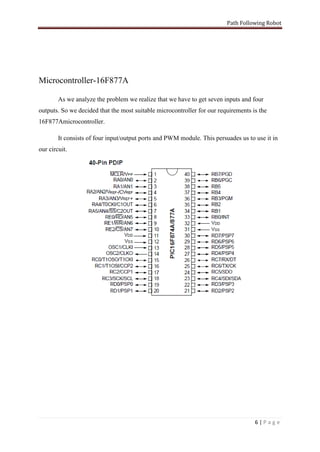
        As we analyze the problem we realize that we have to get seven inputs and four
outputs. So we decided that the most suitable microcontroller for our requirements is the
16F877Amicrocontroller.

        It consists of four input/output ports and PWM module. This persuades us to use it in
our circuit.


                                                                                    6|Page
Path Following Robot


                                       Overview
Block Diagram and Architectural Overview


             Analog                      Digital
 Sensor      Signal        Analog to     Signal                              Motor
                            Digital                  PIC                    Controller
  Panel                    Converte                                          Circuit
                               r


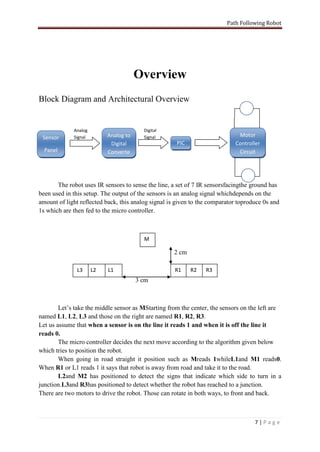
       The robot uses IR sensors to sense the line, a set of 7 IR sensorsfacingthe ground has
been used in this setup. The output of the sensors is an analog signal whichdepends on the
amount of light reflected back, this analog signal is given to the comparator toproduce 0s and
1s which are then fed to the micro controller.


                                         M

                                                    2 cm

              L3      L2   L1                        R1    R2    R3
                                       3 cm


        Let’s take the middle sensor as MStarting from the center, the sensors on the left are
named L1, L2, L3 and those on the right are named R1, R2, R3.
Let us assume that when a sensor is on the line it reads 1 and when it is off the line it
reads 0.
        The micro controller decides the next move according to the algorithm given below
which tries to position the robot.
        When going in road straight it position such as Mreads 1whileL1and M1 reads0.
When R1 or L1 reads 1 it says that robot is away from road and take it to the road.
        L2and M2 has positioned to detect the signs that indicate which side to turn in a
junction.L3and R3has positioned to detect whether the robot has reached to a junction.
There are two motors to drive the robot. Those can rotate in both ways, to front and back.


                                                                                    7|Page
Path Following Robot


                                    Algorithm

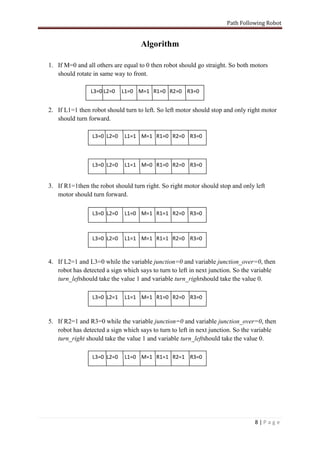
1. If M=0 and all others are equal to 0 then robot should go straight. So both motors
   should rotate in same way to front.

                L3=0 L2=0    L1=0 M=1 R1=0 R2=0 R3=0


2. If L1=1 then robot should turn to left. So left motor should stop and only right motor
   should turn forward.

                 L3=0 L2=0   L1=1 M=1 R1=0 R2=0 R3=0


                 L3=0 L2=0   L1=1 M=0 R1=0 R2=0 R3=0


3. If R1=1then the robot should turn right. So right motor should stop and only left
   motor should turn forward.

                 L3=0 L2=0   L1=0 M=1 R1=1 R2=0 R3=0


                 L3=0 L2=0   L1=1 M=1 R1=1 R2=0 R3=0


4. If L2=1 and L3=0 while the variable junction=0 and variable junction_over=0, then
   robot has detected a sign which says to turn to left in next junction. So the variable
   turn_leftshould take the value 1 and variable turn_rightshould take the value 0.

                 L3=0 L2=1   L1=1 M=1 R1=0 R2=0 R3=0


5. If R2=1 and R3=0 while the variable junction=0 and variable junction_over=0, then
   robot has detected a sign which says to turn to left in next junction. So the variable
   turn_right should take the value 1 and variable turn_leftshould take the value 0.

                 L3=0 L2=0   L1=0 M=1 R1=1 R2=1 R3=0


                                                                                8|Page
Path Following Robot


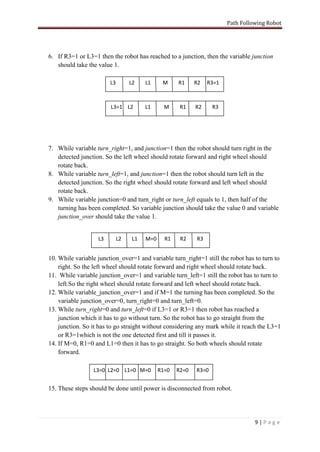
6. If R3=1 or L3=1 then the robot has reached to a junction, then the variable junction
   should take the value 1.

                        L3        L2    L1     M     R1     R2   R3=1


                        L3=1 L2         L1      M     R1    R2     R3


7. While variable turn_right=1, and junction=1 then the robot should turn right in the
   detected junction. So the left wheel should rotate forward and right wheel should
   rotate back.
8. While variable turn_left=1, and junction=1 then the robot should turn left in the
   detected junction. So the right wheel should rotate forward and left wheel should
   rotate back.
9. While variable junction=0 and turn_right or turn_left equals to 1, then half of the
   turning has been completed. So variable junction should take the value 0 and variable
   junction_over should take the value 1.


                   L3        L2    L1   M=0     R1    R2    R3


10. While variable junction_over=1 and variable turn_right=1 still the robot has to turn to
    right. So the left wheel should rotate forward and right wheel should rotate back.
11. While variable junction_over=1 and variable turn_left=1 still the robot has to turn to
    left.So the right wheel should rotate forward and left wheel should rotate back.
12. While variable_junction_over=1 and if M=1 the turning has been completed. So the
    variable junction_over=0, turn_right=0 and turn_left=0.
13. While turn_right=0 and turn_left=0 if L3=1 or R3=1 then robot has reached a
    junction which it has to go without turn. So the robot has to go straight from the
    junction. So it has to go straight without considering any mark while it reach the L3=1
    or R3=1which is not the one detected first and till it passes it.
14. If M=0, R1=0 and L1=0 then it has to go straight. So both wheels should rotate
    forward.

                 L3=0 L2=0 L1=0 M=0           R1=0   R2=0   R3=0


15. These steps should be done until power is disconnected from robot.


                                                                                  9|Page
Path Following Robot


                               Implementation
Sensor Circuit
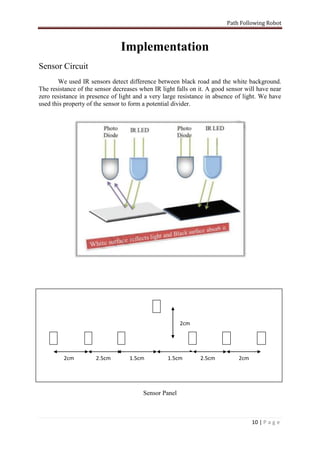
        We used IR sensors detect difference between black road and the white background.
The resistance of the sensor decreases when IR light falls on it. A good sensor will have near
zero resistance in presence of light and a very large resistance in absence of light. We have
used this property of the sensor to form a potential divider.


                                                       2cm


         2cm          2.5cm        1.5cm          1.5cm       2.5cm          2cm


                                        Sensor Panel


                                                                                   10 | P a g e
Path Following Robot


                          1K
           +5V                                                     To PIC


                 Sensor

                                                             10K
                 IR LED


                                                     GND


                                        Sensor Circuit

Analog to Digital Converter


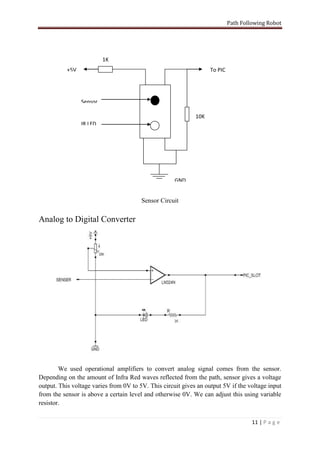
        We used operational amplifiers to convert analog signal comes from the sensor.
Depending on the amount of Infra Red waves reflected from the path, sensor gives a voltage
output. This voltage varies from 0V to 5V. This circuit gives an output 5V if the voltage input
from the sensor is above a certain level and otherwise 0V. We can adjust this using variable
resistor.

                                                                                     11 | P a g e
Path Following Robot


PIC Simulation Circuit


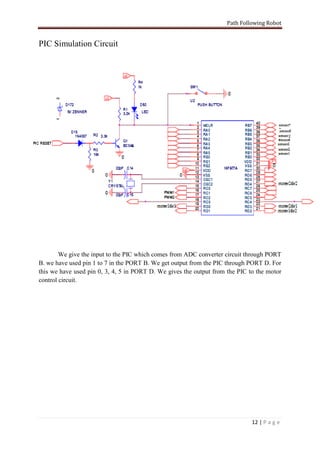
        We give the input to the PIC which comes from ADC converter circuit through PORT
B. we have used pin 1 to 7 in the PORT B. We get output from the PIC through PORT D. For
this we have used pin 0, 3, 4, 5 in PORT D. We gives the output from the PIC to the motor
control circuit.


                                                                              12 | P a g e
Path Following Robot


Motor Interface and Control Circuit
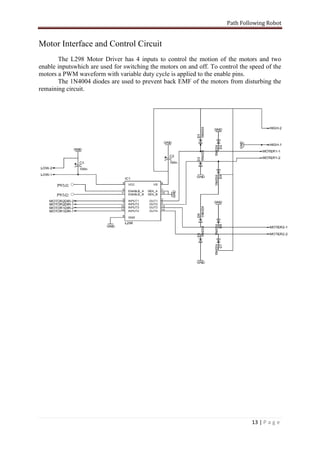
       The L298 Motor Driver has 4 inputs to control the motion of the motors and two
enable inputswhich are used for switching the motors on and off. To control the speed of the
motors a PWM waveform with variable duty cycle is applied to the enable pins.
       The 1N4004 diodes are used to prevent back EMF of the motors from disturbing the
remaining circuit.


                                                                                13 | P a g e
Path Following Robot


Source Code
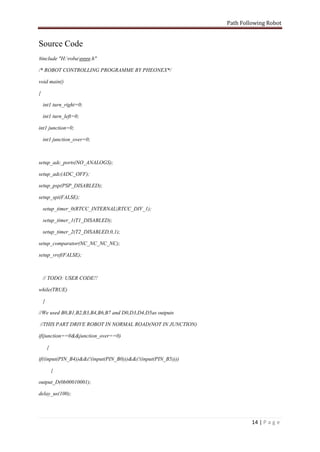
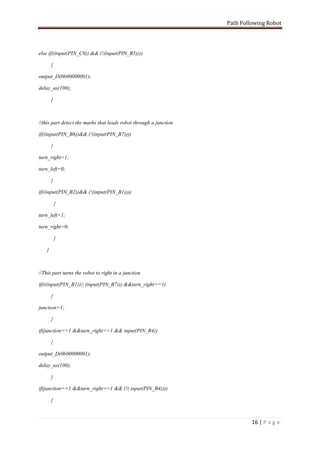
#include "H:robagggg.h"

/* ROBOT CONTROLLING PROGRAMME BY PHEONEX*/

void main()

{

    int1 turn_right=0;

    int1 turn_left=0;

int1 junction=0;

    int1 junction_over=0;


setup_adc_ports(NO_ANALOGS);

setup_adc(ADC_OFF);

setup_psp(PSP_DISABLED);

setup_spi(FALSE);

    setup_timer_0(RTCC_INTERNAL|RTCC_DIV_1);

    setup_timer_1(T1_DISABLED);

    setup_timer_2(T2_DISABLED,0,1);

setup_comparator(NC_NC_NC_NC);

setup_vref(FALSE);


    // TODO: USER CODE!!

while(TRUE)

    {

//We used B0,B1,B2,B3,B4,B6,B7 and D0,D3,D4,D5as outputs

//THIS PART DRIVE ROBOT IN NORMAL ROAD(NOT IN JUNCTION)

if(junction==0&&junction_over==0)

        {

if((input(PIN_B4))&&(!(input(PIN_B0)))&&(!(input(PIN_B5))))

            {

output_D(0b00010001);

delay_us(100);


                                                                       14 | P a g e
Path Following Robot


     }

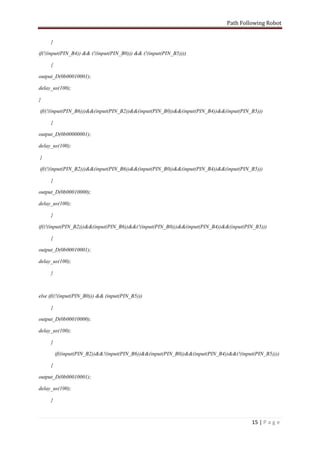
if(!(input(PIN_B4)) && (!(input(PIN_B0))) && (!(input(PIN_B5))))

     {

output_D(0b00010001);

delay_us(100);

}

if((!(input(PIN_B6)))&&(input(PIN_B2))&&(input(PIN_B0))&&(input(PIN_B4))&&(input(PIN_B5)))

     {

output_D(0b00000001);

delay_us(100);

}

if((!(input(PIN_B2)))&&(input(PIN_B6))&&(input(PIN_B0))&&(input(PIN_B4))&&(input(PIN_B5)))

     {

output_D(0b00010000);

delay_us(100);

     }

if((!(input(PIN_B2)))&&(input(PIN_B6))&&(!(input(PIN_B0)))&&(input(PIN_B4))&&(input(PIN_B5)))

     {

output_D(0b00010001);

delay_us(100);

     }


else if((!(input(PIN_B0))) && (input(PIN_B5)))

     {

output_D(0b00010000);

delay_us(100);

     }

         if((input(PIN_B2))&&!(input(PIN_B6))&&(input(PIN_B0))&&(input(PIN_B4))&&(!(input(PIN_B5))))

     {

output_D(0b00010001);

delay_us(100);

     }


                                                                                        15 | P a g e
Path Following Robot


else if((input(PIN_C0)) && (!(input(PIN_B5))))

       {

output_D(0b00000001);

delay_us(100);

       }


//this part detect the marks that leads robot through a junction

if((input(PIN_B6))&& (!(input(PIN_B7))))

       {

turn_right=1;

turn_left=0;

       }

if((input(PIN_B2))&& (!(input(PIN_B1))))

           {

turn_left=1;

turn_right=0;

           }

   }


//This part turns the robot to right in a junction

if(((input(PIN_B1))|| (input(PIN_B7))) &&turn_right==1)

       {

junction=1;

       }

if(junction==1 &&turn_right==1 && input(PIN_B4))

       {

output_D(0b00000001);

delay_us(100);

       }

if(junction==1 &&turn_right==1 && (!( input(PIN_B4))))

       {


                                                                            16 | P a g e
Path Following Robot


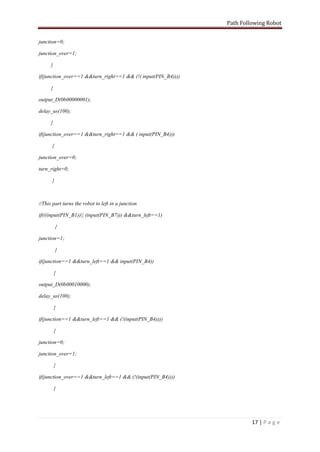
junction=0;

junction_over=1;

      }

if(junction_over==1 &&turn_right==1 && (!( input(PIN_B4))))

      {

output_D(0b00000001);

delay_us(100);

      }

if(junction_over==1 &&turn_right==1 && ( input(PIN_B4)))

      {

junction_over=0;

turn_right=0;

      }


//This part turns the robot to left in a junction

if(((input(PIN_B1))|| (input(PIN_B7))) &&turn_left==1)

          {

junction=1;

          }

if(junction==1 &&turn_left==1 && input(PIN_B4))

          {

output_D(0b00010000);

delay_us(100);

          }

if(junction==1 &&turn_left==1 && (!(input(PIN_B4))))

          {

junction=0;

junction_over=1;

          }

if(junction_over==1 &&turn_left==1 && (!(input(PIN_B4))))

          {


                                                                       17 | P a g e
Path Following Robot


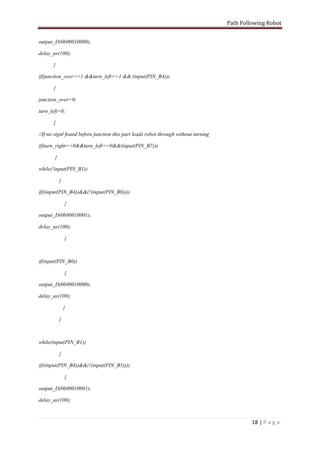
output_D(0b00010000);

delay_us(100);

       }

if(junction_over==1 &&turn_left==1 && (input(PIN_B4)))

       {

junction_over=0;

turn_left=0;

       }

//If no signl found before junction this part leads robot through without turning

if(turn_right==0&&turn_left==0&&(input(PIN_B7)))

       {

while(!input(PIN_B1))

           {

if((input(PIN_B4))&&(!(input(PIN_B0))))

               {

output_D(0b00010001);

delay_us(100);

               }


if(input(PIN_B0))

               {

output_D(0b00010000);

delay_us(100);

               }

           }


while(input(PIN_B1))

           {

if((input(PIN_B4))&&(!(input(PIN_B5))))

               {

output_D(0b00010001);

delay_us(100);


                                                                                             18 | P a g e
Path Following Robot


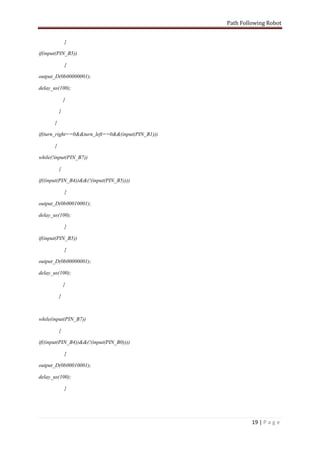
               }

if(input(PIN_B5))

               {

output_D(0b00000001);

delay_us(100);

               }

           }

       }

if(turn_right==0&&turn_left==0&&(input(PIN_B1)))

       {

while(!input(PIN_B7))

           {

if((input(PIN_B4))&&(!(input(PIN_B5))))

               {

output_D(0b00010001);

delay_us(100);

               }

if(input(PIN_B5))

               {

output_D(0b00000001);

delay_us(100);

               }

           }


while(input(PIN_B7))

           {

if((input(PIN_B4))&&(!(input(PIN_B0))))

               {

output_D(0b00010001);

delay_us(100);

               }


                                                            19 | P a g e
Path Following Robot


if(input(PIN_B0))

                {

output_D(0b00010000);

delay_us(100);

            }

        }

            }

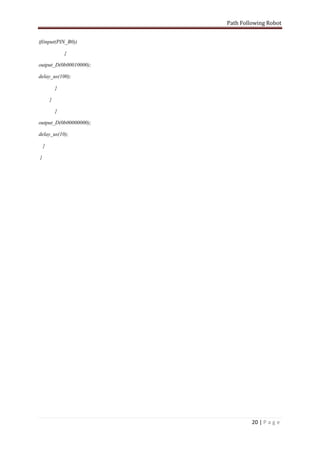
output_D(0b00000000);

delay_us(10);

    }

}


                                 20 | P a g e
Path Following Robot


                     Possible Improvements

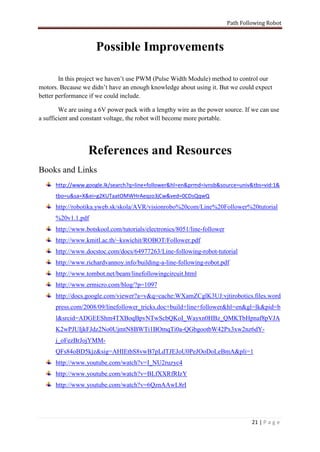
        In this project we haven’t use PWM (Pulse Width Module) method to control our
motors. Because we didn’t have an enough knowledge about using it. But we could expect
better performance if we could include.

        We are using a 6V power pack with a lengthy wire as the power source. If we can use
a sufficient and constant voltage, the robot will become more portable.


                  References and Resources
Books and Links
      http://www.google.lk/search?q=line+follower&hl=en&prmd=ivnsb&source=univ&tbs=vid:1&
      tbo=u&sa=X&ei=g2KUTaatOMWHrAeqzo3jCw&ved=0CDsQqwQ
      http://robotika.yweb.sk/skola/AVR/visionrobo%20com/Line%20Follower%20tutorial
      %20v1.1.pdf
      http://www.botskool.com/tutorials/electronics/8051/line-follower
      http://www.kmitl.ac.th/~kswichit/ROBOT/Follower.pdf
      http://www.docstoc.com/docs/64977263/Line-following-robot-tutorial
      http://www.richardvannoy.info/building-a-line-following-robot.pdf
      http://www.tombot.net/beam/linefollowingcircuit.html
      http://www.ermicro.com/blog/?p=1097
      http://docs.google.com/viewer?a=v&q=cache:WXamZCglK3UJ:vjtirobotics.files.word
      press.com/2008/09/linefollower_tricks.doc+build+line+follower&hl=en&gl=lk&pid=b
      l&srcid=ADGEEShm4TXBoqBpvNTwScbQKoI_Wayxn0HBz_QMKTbHpnaf8pVJA
      K2wPJUIjkFJdz2No0UjmtN8BWTi1BOmqTi0a-QGbgootbW42Px3xw2nz6dY-
      j_oFezBrJojYMM-
      QFs84oBD5kjz&sig=AHIEtbS8vwB7pLdTJEJoU0PeJOoDoLeBmA&pli=1
      http://www.youtube.com/watch?v=I_NU2ruzyc4
      http://www.youtube.com/watch?v=BLfXXRfRIzY
      http://www.youtube.com/watch?v=6QznAAwL8rI


                                                                                  21 | P a g e
Path Following Robot


Discussion with Experts
      Discussion with Mr. ArunaUpul(Level I) of Electronic and Telecommunication
      Department.
      Discussion with Mr. PubuduGunawardena (Level IV) of Computer Science and
      Engineering Department.

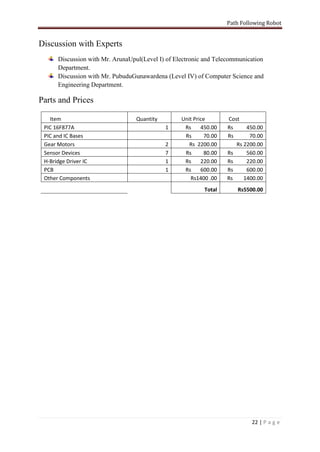
Parts and Prices

   Item                           Quantity        Unit Price       Cost
 PIC 16F877A                                 1     Rs     450.00   Rs     450.00
 PIC and IC Bases                                  Rs      70.00   Rs      70.00
 Gear Motors                                 2       Rs 2200.00       Rs 2200.00
 Sensor Devices                              7     Rs      80.00   Rs     560.00
 H-Bridge Driver IC                          1     Rs     220.00   Rs     220.00
 PCB                                         1     Rs     600.00   Rs     600.00
 Other Components                                    Rs1400 .00    Rs    1400.00
                                                           Total      Rs5500.00


                                                                            22 | P a g e
Path Following Robot


         23 | P a g e

Path Following Robot

  • 1.
    2011 UNIVERSITY OFMORATUWA Path Following Robot Engineering Design Project Department of Computer Science and Engineering Group Name:- Phoenix Group members:- Gunasinghe U. L. D. N. 100162X Sashika W. A. D. 100487X Siriwardena M.P. 100512X Udara Y.B.M. 100544V Wijayarathna D.G.C.D. 100596F
  • 2.
    Path Following Robot Content. 1. Abstract 2. Acknowledgment 3. Introduction 3.1. What is a line follower? 3.2. Why build a line follower? 3.3. Prerequisites 3.4. Microcontroller- 16F877A 4. Overview 4.1. Block Diagram and Architectural Overview 4.2. The Algorithm 5. Implementation 5.1. Sensor Circuit 5.2. Analog to Digital Converter 5.3. PIC Simulation Circuit 5.4. Motor Interface and Control Circuit 5.5. Source Code 6. Possible Improvements 7. References and Resources 7.1. Books and Links 7.2. Discussion with Experts 7.3. Parts and Prices 2|Page
  • 3.
    Path Following Robot Abstract “The Path following Robot” is the project work done by our group in the fulfillment of the “Engineering Design” and “Skill Development” courses in level1-term A2. This will be useful to reach the places where human can’t reach. A practical example is guidance system for industrial robots moving on shop floor etc. We have used IR sensors to detect the road and PIC 16F877A as our central processing unit. 3|Page
  • 4.
    Path Following Robot Acknowledgment Apart of from the effort of us, the success of this product depends largely on the encouragement and guidelines of many others. We take this opportunity to express our gratitude to the people who have been instrumental in the successful completion of this project. First of all we would like to thank our project coordinator Dr. MalakaWalpola, who guided us to do “The Path Following Robot” as our project and helped us throughout the whole period. We are grateful to Eng. B.S. Samarasiri and Prof. J.A.K.S. Jayasinghe who gave us instructions about doing such project. We specially thank our friend Mr. ArunaUpul of Electronic and Telecommunication Engineering department (Level 1) who helped us in designing electronic circuits and correcting the problems in circuit boards. Without him we would not come so far. Also we would like to thank Mr. SupunTharanga of Electronic and Telecommunication Engineering department (Level 1) for giving us a great support to all the works we carried out. Then we would like to thank our mentor Mr. PubuduGunawardena of Computer science and Engineering Department (Level 4) for giving us instructions and useful references. In addition to all of them we would like to thank to all others who helped us in various ways. 4|Page
  • 5.
    Path Following Robot Introduction What is a line Follower? A machine which is built to follow a specific path is defined as a Line Follower. The line may have different appearances A Black line on a white surface or vice-versa. An Invisible line as a magnetic field. Why build a line Follower? There we can find places where humans face troubles when they try to reach these places. In such situations we can use a machine which has the ability to take decisions as humans. A line follower is such a machine. As the level 1 Engineering Design project we were instructed to create a line following robot which identify black path on the white surface and follow it, and also it should be able to make decisions itself to turn at a junction according to a mark situated before it. Prerequisites Basic knowledge about electronic components. Basic knowledge on electronic circuit designing and making. Basic knowledge on C Programing. Innovative brain and perseverance. 5|Page
  • 6.
    Path Following Robot Microcontroller-16F877A As we analyze the problem we realize that we have to get seven inputs and four outputs. So we decided that the most suitable microcontroller for our requirements is the 16F877Amicrocontroller. It consists of four input/output ports and PWM module. This persuades us to use it in our circuit. 6|Page
  • 7.
    Path Following Robot Overview Block Diagram and Architectural Overview Analog Digital Sensor Signal Analog to Signal Motor Digital PIC Controller Panel Converte Circuit r The robot uses IR sensors to sense the line, a set of 7 IR sensorsfacingthe ground has been used in this setup. The output of the sensors is an analog signal whichdepends on the amount of light reflected back, this analog signal is given to the comparator toproduce 0s and 1s which are then fed to the micro controller. M 2 cm L3 L2 L1 R1 R2 R3 3 cm Let’s take the middle sensor as MStarting from the center, the sensors on the left are named L1, L2, L3 and those on the right are named R1, R2, R3. Let us assume that when a sensor is on the line it reads 1 and when it is off the line it reads 0. The micro controller decides the next move according to the algorithm given below which tries to position the robot. When going in road straight it position such as Mreads 1whileL1and M1 reads0. When R1 or L1 reads 1 it says that robot is away from road and take it to the road. L2and M2 has positioned to detect the signs that indicate which side to turn in a junction.L3and R3has positioned to detect whether the robot has reached to a junction. There are two motors to drive the robot. Those can rotate in both ways, to front and back. 7|Page
  • 8.
    Path Following Robot Algorithm 1. If M=0 and all others are equal to 0 then robot should go straight. So both motors should rotate in same way to front. L3=0 L2=0 L1=0 M=1 R1=0 R2=0 R3=0 2. If L1=1 then robot should turn to left. So left motor should stop and only right motor should turn forward. L3=0 L2=0 L1=1 M=1 R1=0 R2=0 R3=0 L3=0 L2=0 L1=1 M=0 R1=0 R2=0 R3=0 3. If R1=1then the robot should turn right. So right motor should stop and only left motor should turn forward. L3=0 L2=0 L1=0 M=1 R1=1 R2=0 R3=0 L3=0 L2=0 L1=1 M=1 R1=1 R2=0 R3=0 4. If L2=1 and L3=0 while the variable junction=0 and variable junction_over=0, then robot has detected a sign which says to turn to left in next junction. So the variable turn_leftshould take the value 1 and variable turn_rightshould take the value 0. L3=0 L2=1 L1=1 M=1 R1=0 R2=0 R3=0 5. If R2=1 and R3=0 while the variable junction=0 and variable junction_over=0, then robot has detected a sign which says to turn to left in next junction. So the variable turn_right should take the value 1 and variable turn_leftshould take the value 0. L3=0 L2=0 L1=0 M=1 R1=1 R2=1 R3=0 8|Page
  • 9.
    Path Following Robot 6.If R3=1 or L3=1 then the robot has reached to a junction, then the variable junction should take the value 1. L3 L2 L1 M R1 R2 R3=1 L3=1 L2 L1 M R1 R2 R3 7. While variable turn_right=1, and junction=1 then the robot should turn right in the detected junction. So the left wheel should rotate forward and right wheel should rotate back. 8. While variable turn_left=1, and junction=1 then the robot should turn left in the detected junction. So the right wheel should rotate forward and left wheel should rotate back. 9. While variable junction=0 and turn_right or turn_left equals to 1, then half of the turning has been completed. So variable junction should take the value 0 and variable junction_over should take the value 1. L3 L2 L1 M=0 R1 R2 R3 10. While variable junction_over=1 and variable turn_right=1 still the robot has to turn to right. So the left wheel should rotate forward and right wheel should rotate back. 11. While variable junction_over=1 and variable turn_left=1 still the robot has to turn to left.So the right wheel should rotate forward and left wheel should rotate back. 12. While variable_junction_over=1 and if M=1 the turning has been completed. So the variable junction_over=0, turn_right=0 and turn_left=0. 13. While turn_right=0 and turn_left=0 if L3=1 or R3=1 then robot has reached a junction which it has to go without turn. So the robot has to go straight from the junction. So it has to go straight without considering any mark while it reach the L3=1 or R3=1which is not the one detected first and till it passes it. 14. If M=0, R1=0 and L1=0 then it has to go straight. So both wheels should rotate forward. L3=0 L2=0 L1=0 M=0 R1=0 R2=0 R3=0 15. These steps should be done until power is disconnected from robot. 9|Page
  • 10.
    Path Following Robot Implementation Sensor Circuit We used IR sensors detect difference between black road and the white background. The resistance of the sensor decreases when IR light falls on it. A good sensor will have near zero resistance in presence of light and a very large resistance in absence of light. We have used this property of the sensor to form a potential divider. 2cm 2cm 2.5cm 1.5cm 1.5cm 2.5cm 2cm Sensor Panel 10 | P a g e
  • 11.
    Path Following Robot 1K +5V To PIC Sensor 10K IR LED GND Sensor Circuit Analog to Digital Converter We used operational amplifiers to convert analog signal comes from the sensor. Depending on the amount of Infra Red waves reflected from the path, sensor gives a voltage output. This voltage varies from 0V to 5V. This circuit gives an output 5V if the voltage input from the sensor is above a certain level and otherwise 0V. We can adjust this using variable resistor. 11 | P a g e
  • 12.
    Path Following Robot PICSimulation Circuit We give the input to the PIC which comes from ADC converter circuit through PORT B. we have used pin 1 to 7 in the PORT B. We get output from the PIC through PORT D. For this we have used pin 0, 3, 4, 5 in PORT D. We gives the output from the PIC to the motor control circuit. 12 | P a g e
  • 13.
    Path Following Robot MotorInterface and Control Circuit The L298 Motor Driver has 4 inputs to control the motion of the motors and two enable inputswhich are used for switching the motors on and off. To control the speed of the motors a PWM waveform with variable duty cycle is applied to the enable pins. The 1N4004 diodes are used to prevent back EMF of the motors from disturbing the remaining circuit. 13 | P a g e
  • 14.
    Path Following Robot SourceCode #include "H:robagggg.h" /* ROBOT CONTROLLING PROGRAMME BY PHEONEX*/ void main() { int1 turn_right=0; int1 turn_left=0; int1 junction=0; int1 junction_over=0; setup_adc_ports(NO_ANALOGS); setup_adc(ADC_OFF); setup_psp(PSP_DISABLED); setup_spi(FALSE); setup_timer_0(RTCC_INTERNAL|RTCC_DIV_1); setup_timer_1(T1_DISABLED); setup_timer_2(T2_DISABLED,0,1); setup_comparator(NC_NC_NC_NC); setup_vref(FALSE); // TODO: USER CODE!! while(TRUE) { //We used B0,B1,B2,B3,B4,B6,B7 and D0,D3,D4,D5as outputs //THIS PART DRIVE ROBOT IN NORMAL ROAD(NOT IN JUNCTION) if(junction==0&&junction_over==0) { if((input(PIN_B4))&&(!(input(PIN_B0)))&&(!(input(PIN_B5)))) { output_D(0b00010001); delay_us(100); 14 | P a g e
  • 15.
    Path Following Robot } if(!(input(PIN_B4)) && (!(input(PIN_B0))) && (!(input(PIN_B5)))) { output_D(0b00010001); delay_us(100); } if((!(input(PIN_B6)))&&(input(PIN_B2))&&(input(PIN_B0))&&(input(PIN_B4))&&(input(PIN_B5))) { output_D(0b00000001); delay_us(100); } if((!(input(PIN_B2)))&&(input(PIN_B6))&&(input(PIN_B0))&&(input(PIN_B4))&&(input(PIN_B5))) { output_D(0b00010000); delay_us(100); } if((!(input(PIN_B2)))&&(input(PIN_B6))&&(!(input(PIN_B0)))&&(input(PIN_B4))&&(input(PIN_B5))) { output_D(0b00010001); delay_us(100); } else if((!(input(PIN_B0))) && (input(PIN_B5))) { output_D(0b00010000); delay_us(100); } if((input(PIN_B2))&&!(input(PIN_B6))&&(input(PIN_B0))&&(input(PIN_B4))&&(!(input(PIN_B5)))) { output_D(0b00010001); delay_us(100); } 15 | P a g e
  • 16.
    Path Following Robot elseif((input(PIN_C0)) && (!(input(PIN_B5)))) { output_D(0b00000001); delay_us(100); } //this part detect the marks that leads robot through a junction if((input(PIN_B6))&& (!(input(PIN_B7)))) { turn_right=1; turn_left=0; } if((input(PIN_B2))&& (!(input(PIN_B1)))) { turn_left=1; turn_right=0; } } //This part turns the robot to right in a junction if(((input(PIN_B1))|| (input(PIN_B7))) &&turn_right==1) { junction=1; } if(junction==1 &&turn_right==1 && input(PIN_B4)) { output_D(0b00000001); delay_us(100); } if(junction==1 &&turn_right==1 && (!( input(PIN_B4)))) { 16 | P a g e
  • 17.
    Path Following Robot junction=0; junction_over=1; } if(junction_over==1 &&turn_right==1 && (!( input(PIN_B4)))) { output_D(0b00000001); delay_us(100); } if(junction_over==1 &&turn_right==1 && ( input(PIN_B4))) { junction_over=0; turn_right=0; } //This part turns the robot to left in a junction if(((input(PIN_B1))|| (input(PIN_B7))) &&turn_left==1) { junction=1; } if(junction==1 &&turn_left==1 && input(PIN_B4)) { output_D(0b00010000); delay_us(100); } if(junction==1 &&turn_left==1 && (!(input(PIN_B4)))) { junction=0; junction_over=1; } if(junction_over==1 &&turn_left==1 && (!(input(PIN_B4)))) { 17 | P a g e
  • 18.
    Path Following Robot output_D(0b00010000); delay_us(100); } if(junction_over==1 &&turn_left==1 && (input(PIN_B4))) { junction_over=0; turn_left=0; } //If no signl found before junction this part leads robot through without turning if(turn_right==0&&turn_left==0&&(input(PIN_B7))) { while(!input(PIN_B1)) { if((input(PIN_B4))&&(!(input(PIN_B0)))) { output_D(0b00010001); delay_us(100); } if(input(PIN_B0)) { output_D(0b00010000); delay_us(100); } } while(input(PIN_B1)) { if((input(PIN_B4))&&(!(input(PIN_B5)))) { output_D(0b00010001); delay_us(100); 18 | P a g e
  • 19.
    Path Following Robot } if(input(PIN_B5)) { output_D(0b00000001); delay_us(100); } } } if(turn_right==0&&turn_left==0&&(input(PIN_B1))) { while(!input(PIN_B7)) { if((input(PIN_B4))&&(!(input(PIN_B5)))) { output_D(0b00010001); delay_us(100); } if(input(PIN_B5)) { output_D(0b00000001); delay_us(100); } } while(input(PIN_B7)) { if((input(PIN_B4))&&(!(input(PIN_B0)))) { output_D(0b00010001); delay_us(100); } 19 | P a g e
  • 20.
    Path Following Robot if(input(PIN_B0)) { output_D(0b00010000); delay_us(100); } } } output_D(0b00000000); delay_us(10); } } 20 | P a g e
  • 21.
    Path Following Robot Possible Improvements In this project we haven’t use PWM (Pulse Width Module) method to control our motors. Because we didn’t have an enough knowledge about using it. But we could expect better performance if we could include. We are using a 6V power pack with a lengthy wire as the power source. If we can use a sufficient and constant voltage, the robot will become more portable. References and Resources Books and Links http://www.google.lk/search?q=line+follower&hl=en&prmd=ivnsb&source=univ&tbs=vid:1& tbo=u&sa=X&ei=g2KUTaatOMWHrAeqzo3jCw&ved=0CDsQqwQ http://robotika.yweb.sk/skola/AVR/visionrobo%20com/Line%20Follower%20tutorial %20v1.1.pdf http://www.botskool.com/tutorials/electronics/8051/line-follower http://www.kmitl.ac.th/~kswichit/ROBOT/Follower.pdf http://www.docstoc.com/docs/64977263/Line-following-robot-tutorial http://www.richardvannoy.info/building-a-line-following-robot.pdf http://www.tombot.net/beam/linefollowingcircuit.html http://www.ermicro.com/blog/?p=1097 http://docs.google.com/viewer?a=v&q=cache:WXamZCglK3UJ:vjtirobotics.files.word press.com/2008/09/linefollower_tricks.doc+build+line+follower&hl=en&gl=lk&pid=b l&srcid=ADGEEShm4TXBoqBpvNTwScbQKoI_Wayxn0HBz_QMKTbHpnaf8pVJA K2wPJUIjkFJdz2No0UjmtN8BWTi1BOmqTi0a-QGbgootbW42Px3xw2nz6dY- j_oFezBrJojYMM- QFs84oBD5kjz&sig=AHIEtbS8vwB7pLdTJEJoU0PeJOoDoLeBmA&pli=1 http://www.youtube.com/watch?v=I_NU2ruzyc4 http://www.youtube.com/watch?v=BLfXXRfRIzY http://www.youtube.com/watch?v=6QznAAwL8rI 21 | P a g e
  • 22.
    Path Following Robot Discussionwith Experts Discussion with Mr. ArunaUpul(Level I) of Electronic and Telecommunication Department. Discussion with Mr. PubuduGunawardena (Level IV) of Computer Science and Engineering Department. Parts and Prices Item Quantity Unit Price Cost PIC 16F877A 1 Rs 450.00 Rs 450.00 PIC and IC Bases Rs 70.00 Rs 70.00 Gear Motors 2 Rs 2200.00 Rs 2200.00 Sensor Devices 7 Rs 80.00 Rs 560.00 H-Bridge Driver IC 1 Rs 220.00 Rs 220.00 PCB 1 Rs 600.00 Rs 600.00 Other Components Rs1400 .00 Rs 1400.00 Total Rs5500.00 22 | P a g e
  • 23.