


Presentation Topic : Line Follower Robot using
University of Development Alternative
|U|O|D|A|
Submitted To : Submitted By :
Department of Computer Science & Engineering
Arduino
Zubayer Al Billal Khan
Research Engineer
IICT , BUET
Kaniz Fatema Chaity
ID : 011143002
Sharmin Akter Lipi
ID : 011143015
Shemanto Chandra Roy
ID : 011143016
Md. Zahid Hasan
ID : 011143035
Batch – 37th
Index
 Introduction
 Components
 Working Principle
 Flowchart
 Block Diagram
 Circuit Diagram
 Application
 Advantages and Disadvantages
 Programming on Arduino
 References
Let’s Discuss
Introduction What is a
Robot
A Robot is a machine
capable of carrying out
a complex series of
actions automatically,
especially one
programmable by a
computer.
Line Following Robot
What is a Line
Following
RobotLine following Robot is
a machine that can
follow a path. The
path can be visible like
a black line on a white
surface or it can be
invisible like a
magnetic field.
What is the
need to build
line following
Robot?
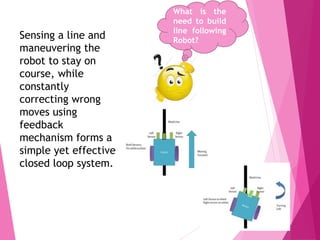
Sensing a line and
maneuvering the
robot to stay on
course, while
constantly
correcting wrong
moves using
feedback
mechanism forms a
simple yet effective
closed loop system.
Components
What are we
using? Arduino UNO R3
 Motors Driver IC L298N
 IR sensor x 3
 Motors 75 RPM x 2
 9 volts Battery for Motor
Driver and 9 volt for
Arduino
 DC jack
 Wires
 Jumper
 Wheels x 2
 ACRYLIC CHASSIS
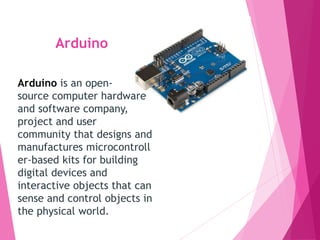
Arduino
Arduino is an open-
source computer hardware
and software company,
project and user
community that designs and
manufactures microcontroll
er-based kits for building
digital devices and
interactive objects that can
sense and control objects in
the physical world.
IR Sensor
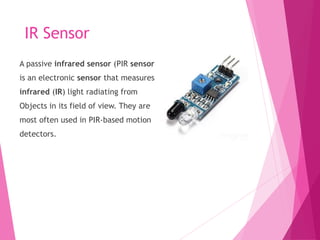
A passive infrared sensor (PIR sensor)
is an electronic sensor that measures
infrared (IR) light radiating from
Objects in its field of view. They are
most often used in PIR-based motion
detectors.
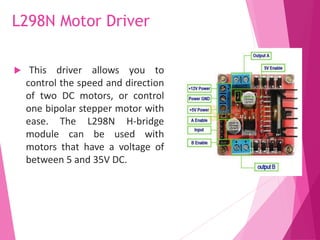
L298N Motor Driver
 This driver allows you to
control the speed and direction
of two DC motors, or control
one bipolar stepper motor with
ease. The L298N H-bridge
module can be used with
motors that have a voltage of
between 5 and 35V DC.
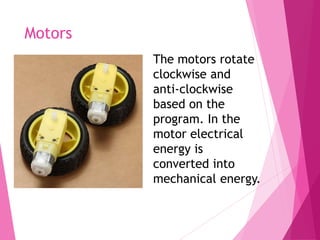
Motors
The motors rotate
clockwise and
anti-clockwise
based on the
program. In the
motor electrical
energy is
converted into
mechanical energy.
Working Principle
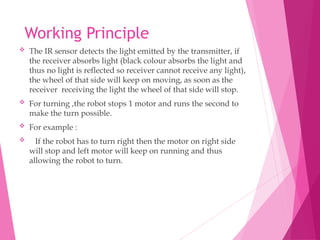
 The IR sensor detects the light emitted by the transmitter, if
the receiver absorbs light (black colour absorbs the light and
thus no light is reflected so receiver cannot receive any light),
the wheel of that side will keep on moving, as soon as the
receiver receiving the light the wheel of that side will stop.
 For turning ,the robot stops 1 motor and runs the second to
make the turn possible.
 For example :
 If the robot has to turn right then the motor on right side
will stop and left motor will keep on running and thus
allowing the robot to turn.
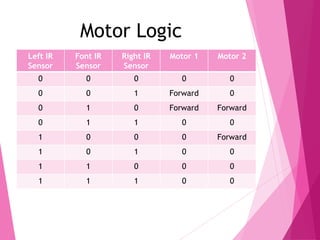
Left IR
Sensor
Font IR
Sensor
Right IR
Sensor
Motor 1 Motor 2
0 0 0 0 0
0 0 1 Forward 0
0 1 0 Forward Forward
0 1 1 0 0
1 0 0 0 Forward
1 0 1 0 0
1 1 0 0 0
1 1 1 0 0
Motor Logic
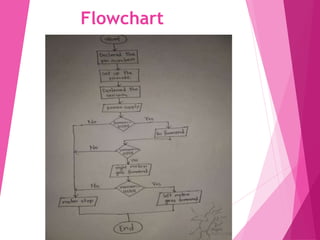
Flowchart
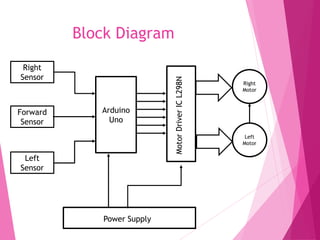
Block Diagram
Arduino
Uno
Right
Motor
Left
Motor
Right
Sensor
Forward
Sensor
Left
Sensor
MotorDriverICL298N
Power Supply
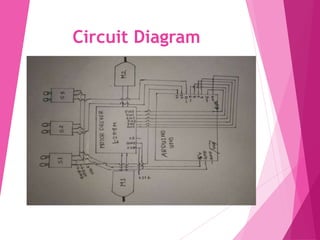
Circuit Diagram
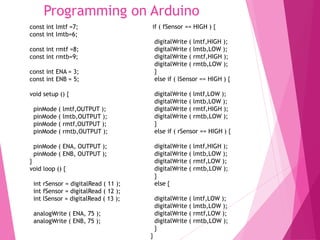
Programming on Arduino
const int lmtf =7;
const int lmtb=6;
const int rmtf =8;
const int rmtb=9;
const int ENA = 3;
const int ENB = 5;
void setup () {
pinMode ( lmtf,OUTPUT );
pinMode ( lmtb,OUTPUT );
pinMode ( rmtf,OUTPUT );
pinMode ( rmtb,OUTPUT );
pinMode ( ENA, OUTPUT );
pinMode ( ENB, OUTPUT );
}
void loop () {
int rSensor = digitalRead ( 11 );
int fSensor = digitalRead ( 12 );
int lSensor = digitalRead ( 13 );
analogWrite ( ENA, 75 );
analogWrite ( ENB, 75 );
if ( fSensor == HIGH ) {
digitalWrite ( lmtf,HIGH );
digitalWrite ( lmtb,LOW );
digitalWrite ( rmtf,HIGH );
digitalWrite ( rmtb,LOW );
}
else if ( lSensor == HIGH ) {
digitalWrite ( lmtf,LOW );
digitalWrite ( lmtb,LOW );
digitalWrite ( rmtf,HIGH );
digitalWrite ( rmtb,LOW );
}
else if ( rSensor == HIGH ) {
digitalWrite ( lmtf,HIGH );
digitalWrite ( lmtb,LOW );
digitalWrite ( rmtf,LOW );
digitalWrite ( rmtb,LOW );
}
else {
digitalWrite ( lmtf,LOW );
digitalWrite ( lmtb,LOW );
digitalWrite ( rmtf,LOW );
digitalWrite ( rmtb,LOW );
}
}
Applications
 Industrial automated equipment
carriers.
 Automated cars.
 Tour guides in museums and other
similar applications.
 Deliver the mail within the office
building
 Deliver medications in a hospital.
Advantages
 The robot must be capable of
following a line.
 Insensitive to environment factors
like noise and lightning.
 It should be capable of taking various
degrees of turns.
 The color of the line must not be a
factor as long as it is darker than the
surroundings.
What are
the
advantages
Disadvantages
 LFR can move on a fixed track or path.
 It requires power supply.
 Lack of speed control makes the robot
unstable at times.
 Choice of line is made in the hardware
abstraction and cannot be changed by
software.
References
 Basic Electronics
http://www.kpsec.freeuk.com/
 Williamson Labs
Nice animated tutorials, articles and project ideas.
http://www.williamson-labs.com/home.htm
 Small Robot Sensors
http://www.andrew.cmu.edu/user/rjg/websensors/ro
bot_sensors2.html
 Robotics India
An Indian site devoted to robotics.
http://www.roboticsindia.com/
QUESTIONS ?????
Thank You
BY

Line Following Robot

  • 2.
    Presentation Topic :Line Follower Robot using University of Development Alternative |U|O|D|A| Submitted To : Submitted By : Department of Computer Science & Engineering Arduino Zubayer Al Billal Khan Research Engineer IICT , BUET Kaniz Fatema Chaity ID : 011143002 Sharmin Akter Lipi ID : 011143015 Shemanto Chandra Roy ID : 011143016 Md. Zahid Hasan ID : 011143035 Batch – 37th
  • 3.
    Index  Introduction  Components Working Principle  Flowchart  Block Diagram  Circuit Diagram  Application  Advantages and Disadvantages  Programming on Arduino  References Let’s Discuss
  • 4.
    Introduction What isa Robot A Robot is a machine capable of carrying out a complex series of actions automatically, especially one programmable by a computer.
  • 5.
    Line Following Robot Whatis a Line Following RobotLine following Robot is a machine that can follow a path. The path can be visible like a black line on a white surface or it can be invisible like a magnetic field.
  • 6.
    What is the needto build line following Robot? Sensing a line and maneuvering the robot to stay on course, while constantly correcting wrong moves using feedback mechanism forms a simple yet effective closed loop system.
  • 7.
    Components What are we using?Arduino UNO R3  Motors Driver IC L298N  IR sensor x 3  Motors 75 RPM x 2  9 volts Battery for Motor Driver and 9 volt for Arduino  DC jack  Wires  Jumper  Wheels x 2  ACRYLIC CHASSIS
  • 8.
    Arduino Arduino is anopen- source computer hardware and software company, project and user community that designs and manufactures microcontroll er-based kits for building digital devices and interactive objects that can sense and control objects in the physical world.
  • 9.
    IR Sensor A passiveinfrared sensor (PIR sensor) is an electronic sensor that measures infrared (IR) light radiating from Objects in its field of view. They are most often used in PIR-based motion detectors.
  • 10.
    L298N Motor Driver This driver allows you to control the speed and direction of two DC motors, or control one bipolar stepper motor with ease. The L298N H-bridge module can be used with motors that have a voltage of between 5 and 35V DC.
  • 11.
    Motors The motors rotate clockwiseand anti-clockwise based on the program. In the motor electrical energy is converted into mechanical energy.
  • 12.
    Working Principle  TheIR sensor detects the light emitted by the transmitter, if the receiver absorbs light (black colour absorbs the light and thus no light is reflected so receiver cannot receive any light), the wheel of that side will keep on moving, as soon as the receiver receiving the light the wheel of that side will stop.  For turning ,the robot stops 1 motor and runs the second to make the turn possible.  For example :  If the robot has to turn right then the motor on right side will stop and left motor will keep on running and thus allowing the robot to turn.
  • 13.
    Left IR Sensor Font IR Sensor RightIR Sensor Motor 1 Motor 2 0 0 0 0 0 0 0 1 Forward 0 0 1 0 Forward Forward 0 1 1 0 0 1 0 0 0 Forward 1 0 1 0 0 1 1 0 0 0 1 1 1 0 0 Motor Logic
  • 14.
  • 15.
  • 16.
  • 17.
    Programming on Arduino constint lmtf =7; const int lmtb=6; const int rmtf =8; const int rmtb=9; const int ENA = 3; const int ENB = 5; void setup () { pinMode ( lmtf,OUTPUT ); pinMode ( lmtb,OUTPUT ); pinMode ( rmtf,OUTPUT ); pinMode ( rmtb,OUTPUT ); pinMode ( ENA, OUTPUT ); pinMode ( ENB, OUTPUT ); } void loop () { int rSensor = digitalRead ( 11 ); int fSensor = digitalRead ( 12 ); int lSensor = digitalRead ( 13 ); analogWrite ( ENA, 75 ); analogWrite ( ENB, 75 ); if ( fSensor == HIGH ) { digitalWrite ( lmtf,HIGH ); digitalWrite ( lmtb,LOW ); digitalWrite ( rmtf,HIGH ); digitalWrite ( rmtb,LOW ); } else if ( lSensor == HIGH ) { digitalWrite ( lmtf,LOW ); digitalWrite ( lmtb,LOW ); digitalWrite ( rmtf,HIGH ); digitalWrite ( rmtb,LOW ); } else if ( rSensor == HIGH ) { digitalWrite ( lmtf,HIGH ); digitalWrite ( lmtb,LOW ); digitalWrite ( rmtf,LOW ); digitalWrite ( rmtb,LOW ); } else { digitalWrite ( lmtf,LOW ); digitalWrite ( lmtb,LOW ); digitalWrite ( rmtf,LOW ); digitalWrite ( rmtb,LOW ); } }
  • 18.
    Applications  Industrial automatedequipment carriers.  Automated cars.  Tour guides in museums and other similar applications.  Deliver the mail within the office building  Deliver medications in a hospital.
  • 19.
    Advantages  The robotmust be capable of following a line.  Insensitive to environment factors like noise and lightning.  It should be capable of taking various degrees of turns.  The color of the line must not be a factor as long as it is darker than the surroundings. What are the advantages
  • 20.
    Disadvantages  LFR canmove on a fixed track or path.  It requires power supply.  Lack of speed control makes the robot unstable at times.  Choice of line is made in the hardware abstraction and cannot be changed by software.
  • 21.
    References  Basic Electronics http://www.kpsec.freeuk.com/ Williamson Labs Nice animated tutorials, articles and project ideas. http://www.williamson-labs.com/home.htm  Small Robot Sensors http://www.andrew.cmu.edu/user/rjg/websensors/ro bot_sensors2.html  Robotics India An Indian site devoted to robotics. http://www.roboticsindia.com/
  • 22.
  • 23.