
Men & Mice Webinar Trilogy
Rethinking Name Resolution
in Local Networks
Local Name Resolution in Windows Networks
Local Name Resolution in
Windows Networks
• Microsoft operating systems have a long history of local
name resolution solutions, from NetBIOS over WINS to the
LLMNR and PNRP protocols today.
• In this webinar we will take a look at PNRP and LLMNR and
how these protocols can be used to have server-less name
resolution without a centralised DNS infrastructure.
2
LLMNR
Link Local Multicast Resolution
LLMNR
4
• LLMNR provides serverless name resolution on the local
link ( = inside the same local subnet)
• LLMNR has been documented as an informal RFC by the
IETF in RFC 4795 (January 2007)

https://www.ietf.org/rfc/rfc4795.txt
LLMNR
• On the wire, LLMNR works very similar to DNS
• But queries are not send to a DNS resolver, but instead
to all hosts in the local subnet that have subscribed to
the LMNR Multicast address
• LLMNR operates on Port 5355
• IPv4 multicast address: 224.0.0.252
• IPv6 multicast address: ff02::1:3
5
LLMNR
• LLMNR only operates on short, single label names
• A host with the DNS name "windowspc.home.arpa."
has the LLMNR name "windowspc"
6
LLMNR
• LLMNR can be used on the command line …


ping windowspc
• … and as well as in graphical applications. Some applications like
web-browser assume multi label hostnames (with at least one dot
"." In the name).
• A single label name is often seen as a search request.
• To use LLMNR single label names in a Browser, enclose the
name in a proper URL, like:


http://windowspc/
7
LLMNR
• Every modern Windows System (Client, Server) will send
LLMNR requests to the network
• But only Systems with enabled "Network Discovery" will
listen for LLMNR queries and answer
• Network Discovery is disabled for Networks of type
"public" and "work" and must be manually enabled to
work in these environments
8
LLMNR
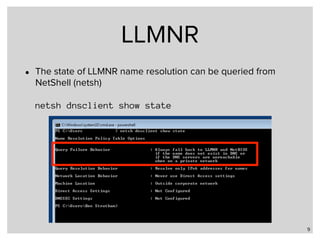
• The state of LLMNR name resolution can be queried from
NetShell (netsh)


netsh dnsclient show state
9
LLMNR
• Sending LLMNR requests can be disabled via a group
policy

Group Policy

Computer Configuration

Administrative Templates

Network

DNS Client

Turn off Multicast Name Resolution. 


(Enabled = Don’t use LLMNR, Disabled = Use LLMNR)
10
LLMNR
• LLMNR requests can also be controlled locally using a
registry key
• Path: 

HKLMSoftwarepoliciesMicrosoftWindows NTDNSClient
• Key: EnableMulticast
• Type: REG_DWORD
• Values: 0 == Disabled / 1 == Enabled
11
LLMNR
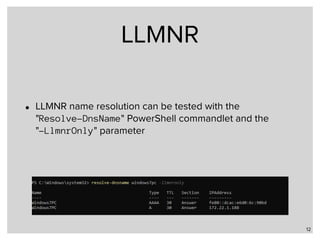
• LLMNR name resolution can be tested with the 

"Resolve-DnsName" PowerShell commandlet and the 

"-LlmnrOnly" parameter
12
Demo
LLMNR security
• Like plain old DNS, LLMNR is not authenticated (no DNSSEC)
• LLMNR responses can be spoofed by an attacker on the local
network
• Use of LLMNR is dangerous on public (Wifi, Hotel, Airport …) networks
• Blog Post on a possible attack using LLMNR: "How to get Windows to
give you credentials through LLMNR":

https://www.pentestpartners.com/security-blog/how-to-get-
windows-to-give-you-credentials-through-llmnr/
• Ready-to-use LLMNR spoofing tools exist, like "Inveigh"

https://github.com/Kevin-Robertson/Inveigh
14
PNRP
Peer Name Resolution Protocol
PNRP
• PNRP is a Peer-to-Peer name resolution protocol designed
by Microsoft
• The PNRP specification is open[1], but so far, only Windows
Systems since Windows Vista implement this protocol
• PNRP requires IPv6 to work, but on an IPv4 only network,
the Windows system will automatically create a Teredo
IPv6-over-IPv4 tunnel to make PNRP work
• PNRP can resolve IPv6 and IPv4 addresses
16
[1] https://msdn.microsoft.com/en-us/library/cc239047.aspx
PNRP cloud
• PNRP is implemented as multiple distributed hash tables
(DHT)[1]
• Every PNRP node "knows" the addresses of it's
"neighbours" in the PNRP cloud
• By default, a local and a public (global) PNRP-Cloud exists
17
[1] https://en.wikipedia.org/wiki/Distributed_hash_table
PNRP addresses
• PNRP addresses are calculated from a human friendly
name (Classifier) and (optionally) a cryptographic key
(Authority)
• The cryptographic key can be zero ("0") for "no key", which
makes the resulting PNRP-name human-friendly but
insecure
• When using a real cryptographic key, the PNRP client can
verify that the resolved name is really the indented one
(and not a spoofed address)
18
PNRP Adresses
19
PNRP-ID
• The PNRP-ID is generated as a hash of the P2P-ID and the
Service-Location. The Service-Location is a 128bit value
that is derived from the hosts IPv6 address
20
PNRP Ports
• PNRP uses UDP-Port 3450 for the PNRP communication
with the outside world
• For link-local communication, also Port 1900 for the
Simple Service Discovery Protocol (SSDP) needs to be
enable
• In IPv4-only networks, Teredo needs to be permitted
through firewalls as well
• IPv6 via Teredo can be unstable, native IPv6 is preferred
21
Using PNRP
• NetShell can be used to check the state of the PNRP
clouds
• In this example, PNRP is not active
22
Using PNRP
• PNRP is now active on the Link-Local network, but there is
no connection to the outside (IPv6) PNRP-cloud
23
Using PNRP
• No connection to the outside world in an IPv4-only network
often is a problem with the Teredo protocol:
24
Seeding PNRP
• To be able to start PNRP name resolution, a Windows
system needs some PNRP hosts (peers) to communicate
• The initial list of peers is loaded from so called "seed"
servers (pnrpv2.ipv6.microsoft.com and
pnrpv21.ipv6.microsoft.com)
• These names are resolved over classic DNS and are
only reachable via IPv6
• Seeding can be forced with 

netsh p2p pnrp cloud synchronize seed <Cloud>
25
Register a name in PNRP
• PNRP does not auto-register names
• PNRP names can be registered for publication using
NetShell or the WindowsAPI
• NetShell example (Authority of "0" = insecure name):


netsh p2p pnrp peer add registration 0.mywebserver comment="Dev-Server"
26
Register a name in PNRP
• The tool "PNRP-
Beacon"[1] can be
used to register a
PNRP-name inside
a GUI
27
[1] http://ftp.gwdg.de/pub/magazine/ct/listings/0904-098.zip
Registering PNRP names
• PNRP names registered as shown via NetShell or PNRP-
Beacon are not persistent
• They are gone after a reboot of the system
• Persistent PNRP names can be generated using the
Windows Internet Computer Name service (WICN)[1],
which can also be controlled via NetShell


netsh p2p pnrp peer set machinename name="0.mypnrpname" publish=start autopublish=enable
28
[1] https://technet.microsoft.com/en-us/library/bb962088.aspx
Registering PNRP names
• The status of the WICN service can be listed with 


29
Register a name in PNRP
• The NetShell command "show names" will list all registered named on this host
30
Resolving a PNRP-Name
• PNRP names can be resolved via NetShell, the Windows API or
through the Windows DNS-Client
• The Windows DNS-Client will intercept all queries for domain names
that end in the domain pnrp.net and will send the query to the
PNRP subsystem
• This works best with insecure names (Authority "0")
• The PNRP name 0.mywebserver becomes the DNS-Name
mywebserver.pnrp.net
• Such a name is global resolvable, in if the host has IPv6, it is also
reachable from the global Internet
31
Resolving a PNRP name
• PNRP Names can also be resolved using NetShell with the
command


netsh p2p pnrp peer resolve <name>
32
Resolving a name in PNRP
• PNRP-Beacon can
also be used to
resolve names
and to display
information about
the remove
machines (IPv4,
IPv6 address,
Windows Version,
CPU Count)
33
PNRP Traceroute
• NetShell offers a PNRP-Traceroute command to list the
PNRP-Peers used in name resolution
34
Demo
PNRP Security
• The Security of PNRP-Names without Authority (public key)
is similar to classic DNS
• These names are insecure and can be spoofed by
anyone in the PNRP cloud. This is actually intended by
the protocol, so that multiple hosts can announce the
same service
• PNRP-Names with public key are protected against
spoofing, however spoofing PNRP names, while hard, is
not impossible. When connecting to a sensible service via
PNRP, additional authentication should be used
36
Next
Men & Mice Training
• Men & Mice DNS Trainings in
2018:
• DNS & BIND
Fundamentals
• DNS & BIND Advanced
• DNS & BIND Week
• DNSSEC & BIND
• Planned dates for the
courses in English language
• US East Coast -
2018-02-26
• Europe - 2018-04-09
• US West Coast -
2018-05-21
• Europe - 2018-06-25
38
http://menandmice.com/training
Men & Mice Training
• Training @ Linuxhotel Essen, Germany
• DNSSEC & DANE Training, 3 days

19.03 - 21.03.18
• DNS & BIND, 3 days 

16.04 - 18.04.18
• DNS Sicherheit (DNS Security), 2 days

19.04 - 20.04.18
• DNSSEC & DANE Training, 3 days

04.06 - 06.06.18
• DNS & BIND, 3 days

06.08 - 08.08.18
• DNS Sicherheit (DNS Security), 2 days

09.08 - 10.08.18
39
http://linuxhotel.de/
Next Webinar
• Name Resolution Webinar Trilogy Part 3 – Local Name Resolution in Linux, FreeBSD
and macOS/iOS
• Wednesday, 29th of November, 2017
• Multicast DNS (mDNS) was pioneered in Apple’s MacOS X system, and is now
available on all systems from Cupertino.
• The focus of this webinar will be to take a deeper look into this local name-
resolution system and the implementations for other Unix systems like Linux and
FreeBSD. Linux’s new über-Daemon “systemd” supports both mDNS and the
Windows LLMNR (Link-Local-Multicast-Name-Resolution). We will also show how
well a Systemd-Linux behaves in heterogenous networks running both Windows
and macOS.
• Join us for a 45 minutes webinar with a Q&A session at the end, on Wednesday,
November 29th, 2017 at 4:00 PM CET/ 3:00 PM GMT/ 10:00 AM EDT / 7:00 AM PDT.
40
Fini - Q & A

Part 2 - Local Name Resolution in Windows Networks

  • 1.
    Men & MiceWebinar Trilogy Rethinking Name Resolution in Local Networks Local Name Resolution in Windows Networks
  • 2.
    Local Name Resolutionin Windows Networks • Microsoft operating systems have a long history of local name resolution solutions, from NetBIOS over WINS to the LLMNR and PNRP protocols today. • In this webinar we will take a look at PNRP and LLMNR and how these protocols can be used to have server-less name resolution without a centralised DNS infrastructure. 2
  • 3.
  • 4.
    LLMNR 4 • LLMNR providesserverless name resolution on the local link ( = inside the same local subnet) • LLMNR has been documented as an informal RFC by the IETF in RFC 4795 (January 2007)
 https://www.ietf.org/rfc/rfc4795.txt
  • 5.
    LLMNR • On thewire, LLMNR works very similar to DNS • But queries are not send to a DNS resolver, but instead to all hosts in the local subnet that have subscribed to the LMNR Multicast address • LLMNR operates on Port 5355 • IPv4 multicast address: 224.0.0.252 • IPv6 multicast address: ff02::1:3 5
  • 6.
    LLMNR • LLMNR onlyoperates on short, single label names • A host with the DNS name "windowspc.home.arpa." has the LLMNR name "windowspc" 6
  • 7.
    LLMNR • LLMNR canbe used on the command line …
 
 ping windowspc • … and as well as in graphical applications. Some applications like web-browser assume multi label hostnames (with at least one dot "." In the name). • A single label name is often seen as a search request. • To use LLMNR single label names in a Browser, enclose the name in a proper URL, like:
 
 http://windowspc/ 7
  • 8.
    LLMNR • Every modernWindows System (Client, Server) will send LLMNR requests to the network • But only Systems with enabled "Network Discovery" will listen for LLMNR queries and answer • Network Discovery is disabled for Networks of type "public" and "work" and must be manually enabled to work in these environments 8
  • 9.
    LLMNR • The stateof LLMNR name resolution can be queried from NetShell (netsh)
 
 netsh dnsclient show state 9
  • 10.
    LLMNR • Sending LLMNRrequests can be disabled via a group policy
 Group Policy
 Computer Configuration
 Administrative Templates
 Network
 DNS Client
 Turn off Multicast Name Resolution. 
 
 (Enabled = Don’t use LLMNR, Disabled = Use LLMNR) 10
  • 11.
    LLMNR • LLMNR requestscan also be controlled locally using a registry key • Path: 
 HKLMSoftwarepoliciesMicrosoftWindows NTDNSClient • Key: EnableMulticast • Type: REG_DWORD • Values: 0 == Disabled / 1 == Enabled 11
  • 12.
    LLMNR • LLMNR nameresolution can be tested with the 
 "Resolve-DnsName" PowerShell commandlet and the 
 "-LlmnrOnly" parameter 12
  • 13.
  • 14.
    LLMNR security • Likeplain old DNS, LLMNR is not authenticated (no DNSSEC) • LLMNR responses can be spoofed by an attacker on the local network • Use of LLMNR is dangerous on public (Wifi, Hotel, Airport …) networks • Blog Post on a possible attack using LLMNR: "How to get Windows to give you credentials through LLMNR":
 https://www.pentestpartners.com/security-blog/how-to-get- windows-to-give-you-credentials-through-llmnr/ • Ready-to-use LLMNR spoofing tools exist, like "Inveigh"
 https://github.com/Kevin-Robertson/Inveigh 14
  • 15.
  • 16.
    PNRP • PNRP isa Peer-to-Peer name resolution protocol designed by Microsoft • The PNRP specification is open[1], but so far, only Windows Systems since Windows Vista implement this protocol • PNRP requires IPv6 to work, but on an IPv4 only network, the Windows system will automatically create a Teredo IPv6-over-IPv4 tunnel to make PNRP work • PNRP can resolve IPv6 and IPv4 addresses 16 [1] https://msdn.microsoft.com/en-us/library/cc239047.aspx
  • 17.
    PNRP cloud • PNRPis implemented as multiple distributed hash tables (DHT)[1] • Every PNRP node "knows" the addresses of it's "neighbours" in the PNRP cloud • By default, a local and a public (global) PNRP-Cloud exists 17 [1] https://en.wikipedia.org/wiki/Distributed_hash_table
  • 18.
    PNRP addresses • PNRPaddresses are calculated from a human friendly name (Classifier) and (optionally) a cryptographic key (Authority) • The cryptographic key can be zero ("0") for "no key", which makes the resulting PNRP-name human-friendly but insecure • When using a real cryptographic key, the PNRP client can verify that the resolved name is really the indented one (and not a spoofed address) 18
  • 19.
  • 20.
    PNRP-ID • The PNRP-IDis generated as a hash of the P2P-ID and the Service-Location. The Service-Location is a 128bit value that is derived from the hosts IPv6 address 20
  • 21.
    PNRP Ports • PNRPuses UDP-Port 3450 for the PNRP communication with the outside world • For link-local communication, also Port 1900 for the Simple Service Discovery Protocol (SSDP) needs to be enable • In IPv4-only networks, Teredo needs to be permitted through firewalls as well • IPv6 via Teredo can be unstable, native IPv6 is preferred 21
  • 22.
    Using PNRP • NetShellcan be used to check the state of the PNRP clouds • In this example, PNRP is not active 22
  • 23.
    Using PNRP • PNRPis now active on the Link-Local network, but there is no connection to the outside (IPv6) PNRP-cloud 23
  • 24.
    Using PNRP • Noconnection to the outside world in an IPv4-only network often is a problem with the Teredo protocol: 24
  • 25.
    Seeding PNRP • Tobe able to start PNRP name resolution, a Windows system needs some PNRP hosts (peers) to communicate • The initial list of peers is loaded from so called "seed" servers (pnrpv2.ipv6.microsoft.com and pnrpv21.ipv6.microsoft.com) • These names are resolved over classic DNS and are only reachable via IPv6 • Seeding can be forced with 
 netsh p2p pnrp cloud synchronize seed <Cloud> 25
  • 26.
    Register a namein PNRP • PNRP does not auto-register names • PNRP names can be registered for publication using NetShell or the WindowsAPI • NetShell example (Authority of "0" = insecure name):
 
 netsh p2p pnrp peer add registration 0.mywebserver comment="Dev-Server" 26
  • 27.
    Register a namein PNRP • The tool "PNRP- Beacon"[1] can be used to register a PNRP-name inside a GUI 27 [1] http://ftp.gwdg.de/pub/magazine/ct/listings/0904-098.zip
  • 28.
    Registering PNRP names •PNRP names registered as shown via NetShell or PNRP- Beacon are not persistent • They are gone after a reboot of the system • Persistent PNRP names can be generated using the Windows Internet Computer Name service (WICN)[1], which can also be controlled via NetShell
 
 netsh p2p pnrp peer set machinename name="0.mypnrpname" publish=start autopublish=enable 28 [1] https://technet.microsoft.com/en-us/library/bb962088.aspx
  • 29.
    Registering PNRP names •The status of the WICN service can be listed with 
 
 29
  • 30.
    Register a namein PNRP • The NetShell command "show names" will list all registered named on this host 30
  • 31.
    Resolving a PNRP-Name •PNRP names can be resolved via NetShell, the Windows API or through the Windows DNS-Client • The Windows DNS-Client will intercept all queries for domain names that end in the domain pnrp.net and will send the query to the PNRP subsystem • This works best with insecure names (Authority "0") • The PNRP name 0.mywebserver becomes the DNS-Name mywebserver.pnrp.net • Such a name is global resolvable, in if the host has IPv6, it is also reachable from the global Internet 31
  • 32.
    Resolving a PNRPname • PNRP Names can also be resolved using NetShell with the command
 
 netsh p2p pnrp peer resolve <name> 32
  • 33.
    Resolving a namein PNRP • PNRP-Beacon can also be used to resolve names and to display information about the remove machines (IPv4, IPv6 address, Windows Version, CPU Count) 33
  • 34.
    PNRP Traceroute • NetShelloffers a PNRP-Traceroute command to list the PNRP-Peers used in name resolution 34
  • 35.
  • 36.
    PNRP Security • TheSecurity of PNRP-Names without Authority (public key) is similar to classic DNS • These names are insecure and can be spoofed by anyone in the PNRP cloud. This is actually intended by the protocol, so that multiple hosts can announce the same service • PNRP-Names with public key are protected against spoofing, however spoofing PNRP names, while hard, is not impossible. When connecting to a sensible service via PNRP, additional authentication should be used 36
  • 37.
  • 38.
    Men & MiceTraining • Men & Mice DNS Trainings in 2018: • DNS & BIND Fundamentals • DNS & BIND Advanced • DNS & BIND Week • DNSSEC & BIND • Planned dates for the courses in English language • US East Coast - 2018-02-26 • Europe - 2018-04-09 • US West Coast - 2018-05-21 • Europe - 2018-06-25 38 http://menandmice.com/training
  • 39.
    Men & MiceTraining • Training @ Linuxhotel Essen, Germany • DNSSEC & DANE Training, 3 days
 19.03 - 21.03.18 • DNS & BIND, 3 days 
 16.04 - 18.04.18 • DNS Sicherheit (DNS Security), 2 days
 19.04 - 20.04.18 • DNSSEC & DANE Training, 3 days
 04.06 - 06.06.18 • DNS & BIND, 3 days
 06.08 - 08.08.18 • DNS Sicherheit (DNS Security), 2 days
 09.08 - 10.08.18 39 http://linuxhotel.de/
  • 40.
    Next Webinar • NameResolution Webinar Trilogy Part 3 – Local Name Resolution in Linux, FreeBSD and macOS/iOS • Wednesday, 29th of November, 2017 • Multicast DNS (mDNS) was pioneered in Apple’s MacOS X system, and is now available on all systems from Cupertino. • The focus of this webinar will be to take a deeper look into this local name- resolution system and the implementations for other Unix systems like Linux and FreeBSD. Linux’s new über-Daemon “systemd” supports both mDNS and the Windows LLMNR (Link-Local-Multicast-Name-Resolution). We will also show how well a Systemd-Linux behaves in heterogenous networks running both Windows and macOS. • Join us for a 45 minutes webinar with a Q&A session at the end, on Wednesday, November 29th, 2017 at 4:00 PM CET/ 3:00 PM GMT/ 10:00 AM EDT / 7:00 AM PDT. 40
  • 41.