Namespaces for Local
Networks
Name Resolution Webinar Trilogy Part 1
A little change …
HSTS forced for all 

".dev" top level domains
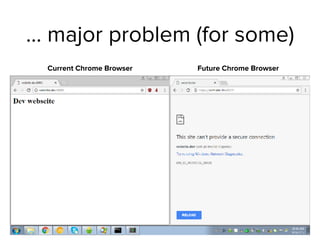
… major problem (for some)
Current Chrome Browser Future Chrome Browser
What has happen?
• Google changed the code of
the next Chrome browser to
enforce proper TLS-
encryption on all ".dev"
domains
• The TLD ".dev" is owned by
Google
4https://www.iana.org/domains/root/db/dev.html
What is the problem?
5
HSTS?
• HSTS is short for "HTTP Strict Transport Security"
• RFC 6797 

https://tools.ietf.org/html/rfc6797
• HSTS declares that web-browser connections towards
this domain always needs to be secured by TLS (HTTPS)
6
HSTS?
• HSTS is usually set in the
website configuration and
send via a HTTP header to the
browser
• The browser caches the value
for "max-age" time
7
https://securityheaders.io/
HSTS Header
Google, Chrome and "dev"
• Google owns both the Chrome-Browser and the "dev" TLD
• For Google it makes sense to ship the Chrome-Browser
with preloaded HSTS for their own domains
• besides "dev", this includes today the "foo" and "google"
TLDs
8
"dev" TLD is not the only
problem
• Administrators and
Developers use domain
names in their local
networks that are not
owned by them:
• .corp
• .lan
• .company
• .media
• .webdev
• .server
• .infra
• .box
• …
• All this names risk name
collisions with new TLDs
9
Choices for a local only
namespace
• Using a seemingly unused DNS TLD in a internal network is a
bad idea
• The name can become in use later and create name
collisions
• Choices for a local only namespace:
• Subdomain of a delegated domain
• A reserved Top-Level-Domain/Second-Level-Domain
• Name-Resolution other than DNS (mDNS, LLMNR, PNRP …)
10
Option: 

Subdomain of a delegated
domain
Subdomain of a delegated
domain
• Using a sub-domain of a delegated (owned) domain in the
Internet is the most safe solution
• If it is delegated to you , you already own all subdomains
and sub-subdomains of that name
• The locally used name should not be reachable from the
public Internet
12
Subdomain of a delegated
domain
13
Internet
"."
".com"
"example.com"
DNS-Resolver
Delegation
Delegation
Query
Query
Query "lan.example.com"
Subdomain of a delegated
domain
14
Internet
"."
".com"
"example.com"
DNS-Resolver
Delegation
Delegation
NXDOMAIN
NXDOMAIN
Query "lan.example.com"
Subdomain of a delegated
domain
15
Internal Network
Internet
"."
".com"
"example.com"
"lan.example.com"
"hr.lan.example.com"
DNS-Resolver
hr.lan.example.com
Subdomain of a delegated
domain
16
Internal Network
Internet
"."
".com"
"example.com"
"lan.example.com"
"hr.lan.example.com"
DNS-Resolver
Query
Query
Option: 

domain reserved

for local use
Reserved Domain Names
• In 1999, the IETF reserved a number of top level domain to not be
used in the Internet
• RFC 2606 "Reserved Top Level DNS Names" 

https://tools.ietf.org/html/rfc2606
• Updated in RFC 6761 "Special-Use Domain Names"

https://tools.ietf.org/html/rfc6761
• ".test", ".invalid", ".example" and ".localhost"
• For an internal development system, ".test" would be a good
choice
18
Reserved Domain Names
19
Internal Network
Internet
"."
".com"
"example.com"
"webdev.test"
"beta.test"
DNS-Resolver
www1.webdev.test
Reserved Domain Names
20
Internal Network
Internet
"."
".com"
"example.com"
DNS-Resolver
Query
Query
"webdev.test"
"beta.test"
The "home.arpa." domain
• The Domain "home.arpa." is used in the new Homenet
Control Protocol (HNCP)
• HNCP is a new IETF protocol to automatically configure
home networks with multiple subnets (lan, wireless, guest-
networks etc)
• The domain "home.arpa." is only defined for local networks
and will never be used in the Internet
• Internet Draft "Special Use Domain 'home.arpa.'"

https://tools.ietf.org/html/draft-ietf-homenet-dot
21
Reserved Domain Names
22
Internal Network
Internet
"."
".com"
"example.com"
DNS-Resolver with 

"home.arpa" local zone
www-dev.home.arpa
Reserved Domain Names
23
Internal Network
Internet
"."
".com"
"example.com"
Query 

"www-dev.home.arpa."
DNS-Resolver with 

"home.arpa" local zone
Reserved Domain Names
24
Internal Network
Internet
"."
".com"
"example.com"
DNS-Resolver with 

"home.arpa" local zone
Answer 

"www-dev.home.arpa."
More options
• We will discuss solutions outside DNS in the upcoming two
webinars
• Link-Local-Multicast-Name-Resolution (LLMNR) for
Windows and Linux
• Peer-Name-Resolution-Protocol (PNRP) for Windows
• Multicast DNS (mDNS) for macOS, iOS, Windows and
Linux
25
Local Zone with
Unbound
Unbound with local zone
• Unbound is a fast and lean DNS resolver
• Available for Unix, Linux, macOS and Windows

Homepage: https://unbound.net
• Unbound main purpose is to resolve names in the Internet for
local clients
• Unbound has limited authoritative functions (it can serve zone
data)
• This setup is recommended for smaller networks (less than 100
DNS clients)
27
Unbound with local zone
• Benefits of using Unbound for local zones:
• Simple setup
• Only one type of software needed
• Fast response times
28
Unbound with local zone
• Downsides of using Unbound for local zones:
• No DNSSEC security for the local zones (but DNSSEC
validation for all DNSSEC secured Internet zones)
• No automatic provisioning of multiple DNS resolver via
zone-transfer
29
Unbound with local zone
30
Internal Network
Internet
"."
".com"
"example.com"DNS-Resolver with 

"home.arpa" local zone
www-dev.home.arpa
Unbound with local zone
31
Internal Network
Internet
"."
".com"
"example.com"DNS-Resolver with 

"home.arpa" local zone
Query 

"www-dev.home.arpa."
Unbound with local zone
32
Internal Network
Internet
"."
".com"
"example.com"DNS-Resolver with 

"home.arpa" local zone
Answer 

"www-dev.home.arpa."
Unbound with local zone
33
Internal Network
Internet
"."
".com"
"example.com"DNS-Resolver with 

"home.arpa" local zone
www.example.com
Unbound with local zone
34
Internal Network
Internet
"."
".com"
"example.com"DNS-Resolver with 

"home.arpa" local zone
Query 

"www.example.com."
Unbound with local zone
35
Internal Network
Internet
"."
".com"
"example.com"DNS-Resolver with 

"home.arpa" local zone
Query 

"www.example.com."
Query 

"www.example.com."
Query 

"www.example.com."
Unbound with local zone
36
Internal Network
Internet
"."
".com"
"example.com"DNS-Resolver with 

"home.arpa" local zone
Answer 

"www.example.com."
Answer 

"www.example.com."
Unbound local-zone example
37
# local-zone example for Unbound
# Installation in Unbound configuration directory
# for Debian e.g. into /etc/unbound/unbound.conf.d/
server:
unblock-lan-zones: yes
insecure-lan-zones: yes
local-zone: "mynet.home.arpa." static
# Zonen-Metadata
local-data: "mynet.home.arpa. 3600 IN SOA resolver01.mynet.home.arpa. hostmaster 1 2h 15m 500h 1h"
local-data: "mynet.home.arpa. 3600 IN NS resolver01.mynet.home.arpa."
# IPv6-Addresses
local-data: "resolver01.mynet.home.arpa. 3600 IN AAAA 2001:db8:10:dd::53"
local-data: "www.mynet.home.arpa. 3600 IN AAAA 2001:db8:10:ff::80"
local-data: "nas.mynet.home.arpa. 3600 IN AAAA 2001:db8:10:ff::222"
local-data: "raspi.mynet.home.arpa. 3600 IN AAAA 2001:db8:10:ff::123"
# IPv4-Addresses
local-data: "resolver01.mynet.home.arpa. 3600 IN A 192.168.1.53"
local-data: "www.mynet.home.arpa. 3600 IN A 192.168.1.80"
local-data: "nas.mynet.home.arpa. 3600 IN A 192.168.1.222"
local-data: "raspi.mynet.home.arpa. 3600 IN A 192.168.1.123"
Local Zone with 

BIND 9
Local zone setup with BIND 9
• For larger networks, we recommend to host the local
zones on authoritative DNS server separate from the
resolvers
• On the next slides we show an example design based on
BIND 9, but the same design can be implemented with
other DNS servers as well (Windows DNS, PowerDNS,
Knot, NSD+Unbound etc)
39
Local zone setup with BIND 9
• Benefits of a local authoritative DNS Server setup
• Higher resiliency
• Automatic load-balancing and failover between servers
• DNSSEC signing and validation possible for the local
zones
• Zones are kept in sync with regular zone transfer
• Better monitoring and logging possible
40
Local authoritative DNS
server
41
Internal Network
Internet
"."
".com"
"example.com"
DNS-Authoritative Server with 

"home.arpa" zone
Datacenter2
Datacenter1
Local authoritative DNS
server
42
Internal Network
Internet
"."
".com"
"example.com"
DNS-Resolver with 

"home.arpa" stub-zone
Datacenter2
Datacenter1
Local authoritative DNS
server
43
Internal Network
Internet
"."
".com"
"example.com"
Datacenter2
Datacenter1
www.example.com
Local authoritative DNS
server
44
Internal Network
Internet
"."
".com"
"example.com"
Datacenter2
Datacenter1
Query 

"www.example.com."
Local authoritative DNS
server
45
Internal Network
Internet
"."
".com"
"example.com"
Datacenter2
Datacenter1
Query 

"www.example.com."
Query 

"www.example.com."
Query 

"www.example.com."
Query 

"www.example.com."
Local authoritative DNS
server
46
Internal Network
Internet
"."
".com"
"example.com"
Datacenter2
Datacenter1
Answer 

"www.example.com."
Answer

"www.example.com"
Local authoritative DNS
server
47
Internal Network
Internet
"."
".com"
"example.com"
Datacenter2
Datacenter1
www-dev.home.arpa
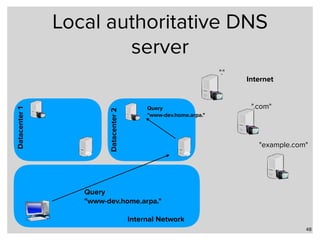
Local authoritative DNS
server
48
Internal Network
Internet
"."
".com"
"example.com"
Datacenter2
Datacenter1
Query 

"www-dev.home.arpa."
Query 

"www-dev.home.arpa."
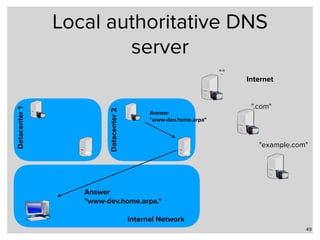
Local authoritative DNS
server
49
Internal Network
Internet
"."
".com"
"example.com"
Datacenter2
Datacenter1
Answer 

"www-dev.home.arpa."
Answer

"www-dev.home.arpa"
BIND 9 configuration on the
authoritative server
50
options {
recursion no;
directory "/var/named";
};
zone "home.arpa." {
type master;
file "home.arpa";
inline-signing yes;
auto-dnssec maintain;
};
BIND 9 master zone on the
authoritative server
51
$TTL 3600
; Zonen-Metadata
mynet.home.arpa. SOA resolver01.mynet.home.arpa. hostmaster 1 2h 15m 500h 1h
mynet.home.arpa. NS resolver01.mynet.home.arpa.
; IPv6-Addresses
resolver01.mynet.home.arpa. AAAA 2001:db8:10:dd::53
www.mynet.home.arpa. AAAA 2001:db8:10:ff::80
nas.mynet.home.arpa. AAAA 2001:db8:10:ff::222
raspi.mynet.home.arpa. AAAA 2001:db8:10:ff::123
; IPv4-Addresses
resolver01.mynet.home.arpa. A 192.168.1.53
www.mynet.home.arpa. A 192.168.1.80
nas.mynet.home.arpa. A 192.168.1.222
raspi.mynet.home.arpa. A 192.168.1.123
BIND 9 configuration on the
resolver server
52
options {
allow-recursion { clients; };
directory "/var/named";
};
managed-keys {

"home.arpa." initial-key 257 3 8 "AwEAAagA…";
};
zone "home.arpa." {
type stub;
file "home.arpa";
masters { 192.0.2.153; 192.0.2.253; };
};
Next
Men & Mice Training
• DNS & DANE Training, 3 days

19.03 - 21.03.18

Linuxhotel Essen, Germany
54
http://linuxhotel.de/
Next Webinar
• Name Resolution Webinar Trilogy Part 2 – Local Name Resolution in Windows
Networks
• Tuesday, 7th of November, 2017
• Microsoft operating systems have a long history of local name resolution
solutions, from NetBIOS over WINS to the LLMNR and PNRP protocols today.
• In this webinar, due to take place on 7th November, 2017, we will take a look at
PNRP and LLMNR in Windows 10 and Windows Server 2016 and how these
protocols can be used to have server-less name resolution without a
centralized DNS infrastructure. We also look deeper into the interoperability of
these new protocols with older Windows versions, such as Windows 7 or
Windows 8.
• Join us for a 45 minutes webinar with a Q&A session at the end, on Tuesday,
November 7th, 2017 at 4:00 PM CET/ 3:00 PM GMT/ 10:00 AM EDT / 7:00 AM PDT.
55
Next Webinar
• Name Resolution Webinar Trilogy Part 3 – Local Name Resolution in Linux, FreeBSD
and macOS/iOS
• Wednesday, 29th of November, 2017
• Multicast DNS (mDNS) was pioneered in Apple’s MacOS X system, and is now
available on all systems from Cupertino.
• The focus of this webinar will be to take a deeper look into this local name-
resolution system and the implementations for other Unix systems like Linux and
FreeBSD. Linux’s new über-Daemon “systemd” supports both mDNS and the
Windows LLMNR (Link-Local-Multicast-Name-Resolution). We will also show how
well a Systemd-Linux behaves in heterogenous networks running both Windows
and macOS.
• Join us for a 45 minutes webinar with a Q&A session at the end, on Wednesday,
November 29th, 2017 at 4:00 PM CET/ 3:00 PM GMT/ 10:00 AM EDT / 7:00 AM PDT.
56
Fini - Q & A

Namespaces for Local Networks

  • 1.
    Namespaces for Local Networks NameResolution Webinar Trilogy Part 1
  • 2.
    A little change… HSTS forced for all 
 ".dev" top level domains
  • 3.
    … major problem(for some) Current Chrome Browser Future Chrome Browser
  • 4.
    What has happen? •Google changed the code of the next Chrome browser to enforce proper TLS- encryption on all ".dev" domains • The TLD ".dev" is owned by Google 4https://www.iana.org/domains/root/db/dev.html
  • 5.
    What is theproblem? 5
  • 6.
    HSTS? • HSTS isshort for "HTTP Strict Transport Security" • RFC 6797 
 https://tools.ietf.org/html/rfc6797 • HSTS declares that web-browser connections towards this domain always needs to be secured by TLS (HTTPS) 6
  • 7.
    HSTS? • HSTS isusually set in the website configuration and send via a HTTP header to the browser • The browser caches the value for "max-age" time 7 https://securityheaders.io/ HSTS Header
  • 8.
    Google, Chrome and"dev" • Google owns both the Chrome-Browser and the "dev" TLD • For Google it makes sense to ship the Chrome-Browser with preloaded HSTS for their own domains • besides "dev", this includes today the "foo" and "google" TLDs 8
  • 9.
    "dev" TLD isnot the only problem • Administrators and Developers use domain names in their local networks that are not owned by them: • .corp • .lan • .company • .media • .webdev • .server • .infra • .box • … • All this names risk name collisions with new TLDs 9
  • 10.
    Choices for alocal only namespace • Using a seemingly unused DNS TLD in a internal network is a bad idea • The name can become in use later and create name collisions • Choices for a local only namespace: • Subdomain of a delegated domain • A reserved Top-Level-Domain/Second-Level-Domain • Name-Resolution other than DNS (mDNS, LLMNR, PNRP …) 10
  • 11.
    Option: 
 Subdomain ofa delegated domain
  • 12.
    Subdomain of adelegated domain • Using a sub-domain of a delegated (owned) domain in the Internet is the most safe solution • If it is delegated to you , you already own all subdomains and sub-subdomains of that name • The locally used name should not be reachable from the public Internet 12
  • 13.
    Subdomain of adelegated domain 13 Internet "." ".com" "example.com" DNS-Resolver Delegation Delegation Query Query Query "lan.example.com"
  • 14.
    Subdomain of adelegated domain 14 Internet "." ".com" "example.com" DNS-Resolver Delegation Delegation NXDOMAIN NXDOMAIN Query "lan.example.com"
  • 15.
    Subdomain of adelegated domain 15 Internal Network Internet "." ".com" "example.com" "lan.example.com" "hr.lan.example.com" DNS-Resolver hr.lan.example.com
  • 16.
    Subdomain of adelegated domain 16 Internal Network Internet "." ".com" "example.com" "lan.example.com" "hr.lan.example.com" DNS-Resolver Query Query
  • 17.
  • 18.
    Reserved Domain Names •In 1999, the IETF reserved a number of top level domain to not be used in the Internet • RFC 2606 "Reserved Top Level DNS Names" 
 https://tools.ietf.org/html/rfc2606 • Updated in RFC 6761 "Special-Use Domain Names"
 https://tools.ietf.org/html/rfc6761 • ".test", ".invalid", ".example" and ".localhost" • For an internal development system, ".test" would be a good choice 18
  • 19.
    Reserved Domain Names 19 InternalNetwork Internet "." ".com" "example.com" "webdev.test" "beta.test" DNS-Resolver www1.webdev.test
  • 20.
    Reserved Domain Names 20 InternalNetwork Internet "." ".com" "example.com" DNS-Resolver Query Query "webdev.test" "beta.test"
  • 21.
    The "home.arpa." domain •The Domain "home.arpa." is used in the new Homenet Control Protocol (HNCP) • HNCP is a new IETF protocol to automatically configure home networks with multiple subnets (lan, wireless, guest- networks etc) • The domain "home.arpa." is only defined for local networks and will never be used in the Internet • Internet Draft "Special Use Domain 'home.arpa.'"
 https://tools.ietf.org/html/draft-ietf-homenet-dot 21
  • 22.
    Reserved Domain Names 22 InternalNetwork Internet "." ".com" "example.com" DNS-Resolver with 
 "home.arpa" local zone www-dev.home.arpa
  • 23.
    Reserved Domain Names 23 InternalNetwork Internet "." ".com" "example.com" Query 
 "www-dev.home.arpa." DNS-Resolver with 
 "home.arpa" local zone
  • 24.
    Reserved Domain Names 24 InternalNetwork Internet "." ".com" "example.com" DNS-Resolver with 
 "home.arpa" local zone Answer 
 "www-dev.home.arpa."
  • 25.
    More options • Wewill discuss solutions outside DNS in the upcoming two webinars • Link-Local-Multicast-Name-Resolution (LLMNR) for Windows and Linux • Peer-Name-Resolution-Protocol (PNRP) for Windows • Multicast DNS (mDNS) for macOS, iOS, Windows and Linux 25
  • 26.
  • 27.
    Unbound with localzone • Unbound is a fast and lean DNS resolver • Available for Unix, Linux, macOS and Windows
 Homepage: https://unbound.net • Unbound main purpose is to resolve names in the Internet for local clients • Unbound has limited authoritative functions (it can serve zone data) • This setup is recommended for smaller networks (less than 100 DNS clients) 27
  • 28.
    Unbound with localzone • Benefits of using Unbound for local zones: • Simple setup • Only one type of software needed • Fast response times 28
  • 29.
    Unbound with localzone • Downsides of using Unbound for local zones: • No DNSSEC security for the local zones (but DNSSEC validation for all DNSSEC secured Internet zones) • No automatic provisioning of multiple DNS resolver via zone-transfer 29
  • 30.
    Unbound with localzone 30 Internal Network Internet "." ".com" "example.com"DNS-Resolver with 
 "home.arpa" local zone www-dev.home.arpa
  • 31.
    Unbound with localzone 31 Internal Network Internet "." ".com" "example.com"DNS-Resolver with 
 "home.arpa" local zone Query 
 "www-dev.home.arpa."
  • 32.
    Unbound with localzone 32 Internal Network Internet "." ".com" "example.com"DNS-Resolver with 
 "home.arpa" local zone Answer 
 "www-dev.home.arpa."
  • 33.
    Unbound with localzone 33 Internal Network Internet "." ".com" "example.com"DNS-Resolver with 
 "home.arpa" local zone www.example.com
  • 34.
    Unbound with localzone 34 Internal Network Internet "." ".com" "example.com"DNS-Resolver with 
 "home.arpa" local zone Query 
 "www.example.com."
  • 35.
    Unbound with localzone 35 Internal Network Internet "." ".com" "example.com"DNS-Resolver with 
 "home.arpa" local zone Query 
 "www.example.com." Query 
 "www.example.com." Query 
 "www.example.com."
  • 36.
    Unbound with localzone 36 Internal Network Internet "." ".com" "example.com"DNS-Resolver with 
 "home.arpa" local zone Answer 
 "www.example.com." Answer 
 "www.example.com."
  • 37.
    Unbound local-zone example 37 #local-zone example for Unbound # Installation in Unbound configuration directory # for Debian e.g. into /etc/unbound/unbound.conf.d/ server: unblock-lan-zones: yes insecure-lan-zones: yes local-zone: "mynet.home.arpa." static # Zonen-Metadata local-data: "mynet.home.arpa. 3600 IN SOA resolver01.mynet.home.arpa. hostmaster 1 2h 15m 500h 1h" local-data: "mynet.home.arpa. 3600 IN NS resolver01.mynet.home.arpa." # IPv6-Addresses local-data: "resolver01.mynet.home.arpa. 3600 IN AAAA 2001:db8:10:dd::53" local-data: "www.mynet.home.arpa. 3600 IN AAAA 2001:db8:10:ff::80" local-data: "nas.mynet.home.arpa. 3600 IN AAAA 2001:db8:10:ff::222" local-data: "raspi.mynet.home.arpa. 3600 IN AAAA 2001:db8:10:ff::123" # IPv4-Addresses local-data: "resolver01.mynet.home.arpa. 3600 IN A 192.168.1.53" local-data: "www.mynet.home.arpa. 3600 IN A 192.168.1.80" local-data: "nas.mynet.home.arpa. 3600 IN A 192.168.1.222" local-data: "raspi.mynet.home.arpa. 3600 IN A 192.168.1.123"
  • 38.
    Local Zone with
 BIND 9
  • 39.
    Local zone setupwith BIND 9 • For larger networks, we recommend to host the local zones on authoritative DNS server separate from the resolvers • On the next slides we show an example design based on BIND 9, but the same design can be implemented with other DNS servers as well (Windows DNS, PowerDNS, Knot, NSD+Unbound etc) 39
  • 40.
    Local zone setupwith BIND 9 • Benefits of a local authoritative DNS Server setup • Higher resiliency • Automatic load-balancing and failover between servers • DNSSEC signing and validation possible for the local zones • Zones are kept in sync with regular zone transfer • Better monitoring and logging possible 40
  • 41.
    Local authoritative DNS server 41 InternalNetwork Internet "." ".com" "example.com" DNS-Authoritative Server with 
 "home.arpa" zone Datacenter2 Datacenter1
  • 42.
    Local authoritative DNS server 42 InternalNetwork Internet "." ".com" "example.com" DNS-Resolver with 
 "home.arpa" stub-zone Datacenter2 Datacenter1
  • 43.
    Local authoritative DNS server 43 InternalNetwork Internet "." ".com" "example.com" Datacenter2 Datacenter1 www.example.com
  • 44.
    Local authoritative DNS server 44 InternalNetwork Internet "." ".com" "example.com" Datacenter2 Datacenter1 Query 
 "www.example.com."
  • 45.
    Local authoritative DNS server 45 InternalNetwork Internet "." ".com" "example.com" Datacenter2 Datacenter1 Query 
 "www.example.com." Query 
 "www.example.com." Query 
 "www.example.com." Query 
 "www.example.com."
  • 46.
    Local authoritative DNS server 46 InternalNetwork Internet "." ".com" "example.com" Datacenter2 Datacenter1 Answer 
 "www.example.com." Answer
 "www.example.com"
  • 47.
    Local authoritative DNS server 47 InternalNetwork Internet "." ".com" "example.com" Datacenter2 Datacenter1 www-dev.home.arpa
  • 48.
    Local authoritative DNS server 48 InternalNetwork Internet "." ".com" "example.com" Datacenter2 Datacenter1 Query 
 "www-dev.home.arpa." Query 
 "www-dev.home.arpa."
  • 49.
    Local authoritative DNS server 49 InternalNetwork Internet "." ".com" "example.com" Datacenter2 Datacenter1 Answer 
 "www-dev.home.arpa." Answer
 "www-dev.home.arpa"
  • 50.
    BIND 9 configurationon the authoritative server 50 options { recursion no; directory "/var/named"; }; zone "home.arpa." { type master; file "home.arpa"; inline-signing yes; auto-dnssec maintain; };
  • 51.
    BIND 9 masterzone on the authoritative server 51 $TTL 3600 ; Zonen-Metadata mynet.home.arpa. SOA resolver01.mynet.home.arpa. hostmaster 1 2h 15m 500h 1h mynet.home.arpa. NS resolver01.mynet.home.arpa. ; IPv6-Addresses resolver01.mynet.home.arpa. AAAA 2001:db8:10:dd::53 www.mynet.home.arpa. AAAA 2001:db8:10:ff::80 nas.mynet.home.arpa. AAAA 2001:db8:10:ff::222 raspi.mynet.home.arpa. AAAA 2001:db8:10:ff::123 ; IPv4-Addresses resolver01.mynet.home.arpa. A 192.168.1.53 www.mynet.home.arpa. A 192.168.1.80 nas.mynet.home.arpa. A 192.168.1.222 raspi.mynet.home.arpa. A 192.168.1.123
  • 52.
    BIND 9 configurationon the resolver server 52 options { allow-recursion { clients; }; directory "/var/named"; }; managed-keys {
 "home.arpa." initial-key 257 3 8 "AwEAAagA…"; }; zone "home.arpa." { type stub; file "home.arpa"; masters { 192.0.2.153; 192.0.2.253; }; };
  • 53.
  • 54.
    Men & MiceTraining • DNS & DANE Training, 3 days
 19.03 - 21.03.18
 Linuxhotel Essen, Germany 54 http://linuxhotel.de/
  • 55.
    Next Webinar • NameResolution Webinar Trilogy Part 2 – Local Name Resolution in Windows Networks • Tuesday, 7th of November, 2017 • Microsoft operating systems have a long history of local name resolution solutions, from NetBIOS over WINS to the LLMNR and PNRP protocols today. • In this webinar, due to take place on 7th November, 2017, we will take a look at PNRP and LLMNR in Windows 10 and Windows Server 2016 and how these protocols can be used to have server-less name resolution without a centralized DNS infrastructure. We also look deeper into the interoperability of these new protocols with older Windows versions, such as Windows 7 or Windows 8. • Join us for a 45 minutes webinar with a Q&A session at the end, on Tuesday, November 7th, 2017 at 4:00 PM CET/ 3:00 PM GMT/ 10:00 AM EDT / 7:00 AM PDT. 55
  • 56.
    Next Webinar • NameResolution Webinar Trilogy Part 3 – Local Name Resolution in Linux, FreeBSD and macOS/iOS • Wednesday, 29th of November, 2017 • Multicast DNS (mDNS) was pioneered in Apple’s MacOS X system, and is now available on all systems from Cupertino. • The focus of this webinar will be to take a deeper look into this local name- resolution system and the implementations for other Unix systems like Linux and FreeBSD. Linux’s new über-Daemon “systemd” supports both mDNS and the Windows LLMNR (Link-Local-Multicast-Name-Resolution). We will also show how well a Systemd-Linux behaves in heterogenous networks running both Windows and macOS. • Join us for a 45 minutes webinar with a Q&A session at the end, on Wednesday, November 29th, 2017 at 4:00 PM CET/ 3:00 PM GMT/ 10:00 AM EDT / 7:00 AM PDT. 56
  • 57.