Paper-based Interaction
Human Computer Interaction Group Project
Group Members
• Waruna Kodituwakku
• Buddhika Chandrasiri
• Lamali Ediriweera
• Kashmira Karunarathne
• Dhanuka Pathinayake
University of Colombo School of Computing
Roadmap
 Introduction to Paper-based Interaction
 Main Technologies & Tools
 OCR
 OMR
 OBR
 MICR
 How this could be used to enhance user interaction.
 Demonstration
 Free Online OCR, i2OCR,
Introduction to Paper-based
Interaction
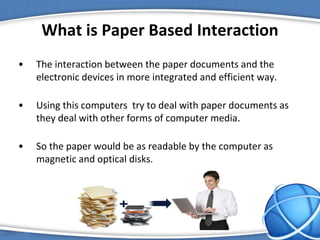
What is Paper Based Interaction
• The interaction between the paper documents and the
electronic devices in more integrated and efficient way.
• Using this computers try to deal with paper documents as
they deal with other forms of computer media.
• So the paper would be as readable by the computer as
magnetic and optical disks.
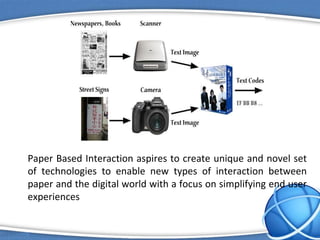
Paper Based Interaction aspires to create unique and novel set
of technologies to enable new types of interaction between
paper and the digital world with a focus on simplifying end user
experiences
The Areas of Paper Based Interaction
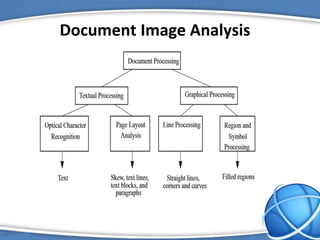
 Document Image Analysis and understanding
 Offline Handwriting recognition
 Computer Vision
 Pattern Recognition
 Information Theory
 Machine Learning
 Compressive Sensing
Document Image Analysis
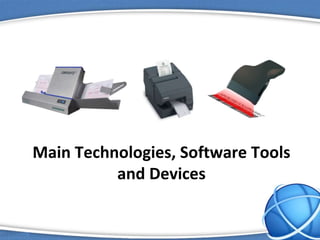
Main Technologies, Software Tools
and Devices
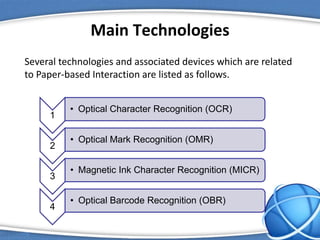
Main Technologies
Several technologies and associated devices which are related
to Paper-based Interaction are listed as follows.
1
• Optical Character Recognition (OCR)
2
• Optical Mark Recognition (OMR)
3
• Magnetic Ink Character Recognition (MICR)
4
• Optical Barcode Recognition (OBR)
Optical Character Recognition (OCR)
Optical character recognition (OCR) is the mechanical or
electronic conversion of scanned images of handwritten,
typewritten or printed text into machine-encoded text. OCR is
a field of research in pattern recognition, artificial intelligence
and computer vision.
Types
• Optical character recognition (OCR) - targets typewritten text, one glyph
or character at a time.
• Optical word recognition - targets typewritten text, one word at a time.
• Intelligent character recognition (ICR) - also targets handwritten print
script or cursive text one glyph or character at a time.
• Intelligent word recognition (IWR) - also targets handwritten
print script or cursive text, one word at a time.
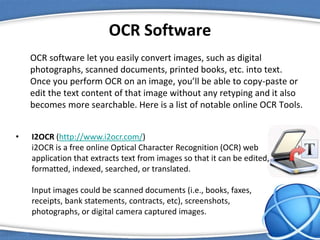
OCR Software
OCR software let you easily convert images, such as digital
photographs, scanned documents, printed books, etc. into text.
Once you perform OCR on an image, you’ll be able to copy-paste or
edit the text content of that image without any retyping and it also
becomes more searchable. Here is a list of notable online OCR Tools.
• I2OCR (http://www.i2ocr.com/)
i2OCR is a free online Optical Character Recognition (OCR) web
application that extracts text from images so that it can be edited,
formatted, indexed, searched, or translated.
Input images could be scanned documents (i.e., books, faxes,
receipts, bank statements, contracts, etc), screenshots,
photographs, or digital camera captured images.
OCR Software Contd.
• Abbyy FineReader (http://finereader.abbyyonline.com/en)
FineReader Online is a web-based OCR service that can instantly convert
your PDF files and images into corresponding office file formats. FineReader
can understand a much wider variety of languages. It even works with
multilingual documents that have text written multiple languages.
• Online OCR (http://www.onlineocr.net/)
Online OCR is cloud based OCR service that can handle all common images
formats including scanned PDFs. If you have multiple images that you would
like to convert to text in one go, you can put them all in a single zip file and
upload it to Online OCR. Online OCR is able to preserve the structure and
formatting after the conversion.
OCR Software Contd.
• OCR Convert (http://www.ocrconvert.com/)
OCRconvert.com is a free online OCR service that allows you to convert
PDF to Text, JPEG to Text and scanned images into editable documents.
Simply upload your file and our server side program will process your file
for any editable text and will send the results back to you, which you can
either download the processed text in for of word document or copy &
past online.
• Free Online OCR (http://www.free-online-ocr.com/)
Free Online OCR accepts JPG, PNG, BMP, GIF, TIFF and multi-page PDF
files, and can export DOC, RTF, TXT or searchable PDF files. It can
automatically correct documents that have been rotated during the
scanning process, and uses a dictionary to increases the accuracy of text
recognition.
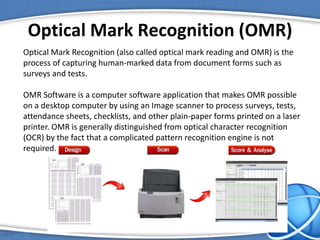
Optical Mark Recognition (OMR)
Optical Mark Recognition (also called optical mark reading and OMR) is the
process of capturing human-marked data from document forms such as
surveys and tests.
OMR Software is a computer software application that makes OMR possible
on a desktop computer by using an Image scanner to process surveys, tests,
attendance sheets, checklists, and other plain-paper forms printed on a laser
printer. OMR is generally distinguished from optical character recognition
(OCR) by the fact that a complicated pattern recognition engine is not
required.
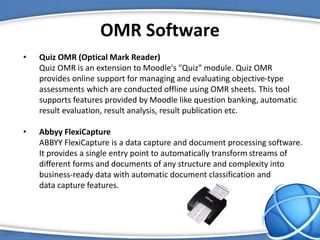
OMR Software
• Quiz OMR (Optical Mark Reader)
Quiz OMR is an extension to Moodle's "Quiz" module. Quiz OMR
provides online support for managing and evaluating objective-type
assessments which are conducted offline using OMR sheets. This tool
supports features provided by Moodle like question banking, automatic
result evaluation, result analysis, result publication etc.
• Abbyy FlexiCapture
ABBYY FlexiCapture is a data capture and document processing software.
It provides a single entry point to automatically transform streams of
different forms and documents of any structure and complexity into
business-ready data with automatic document classification and
data capture features.
• Udai OMR tool
This is a free-to-use OMR (Optimal Mark Recognition) tool. It is especially
suited for extracting data from forms that have been photo-copied and then
scanned; hence, the resultant images are likely to suffer from rotations,
smudge marks, and random lines here and there.
• Samrt Mark Reader (SMR)
Smart Mark Reader™ is software for designing and read Answer Sheets Form to
the data, and examines, assess and provide evaluation reports and analysis,
using digital image scanners. SMR is exclusively can read any skewed or rotated
form's image in any angle from 0 up to 360 degrees.
• Shared Questionnaire System (SQS)
SQS is an integrated Optical Mark Recognition (OMR) form processing system
with straightforward GUIs, which is aimed at developing social platforms to
share knowledge about questionnaire based on XML standards. You can install
and launch them easily from your web browser by JavaWebStart.
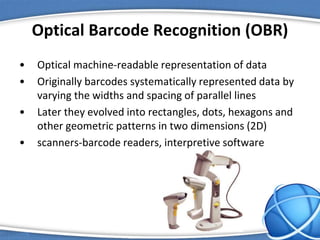
Optical Barcode Recognition (OBR)
• Optical machine-readable representation of data
• Originally barcodes systematically represented data by
varying the widths and spacing of parallel lines
• Later they evolved into rectangles, dots, hexagons and
other geometric patterns in two dimensions (2D)
• scanners-barcode readers, interpretive software
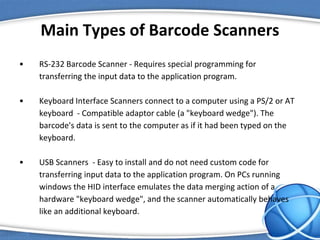
Main Types of Barcode Scanners
• RS-232 Barcode Scanner - Requires special programming for
transferring the input data to the application program.
• Keyboard Interface Scanners connect to a computer using a PS/2 or AT
keyboard - Compatible adaptor cable (a "keyboard wedge"). The
barcode's data is sent to the computer as if it had been typed on the
keyboard.
• USB Scanners - Easy to install and do not need custom code for
transferring input data to the application program. On PCs running
windows the HID interface emulates the data merging action of a
hardware "keyboard wedge", and the scanner automatically behaves
like an additional keyboard.
Barcode Recognition Software
• Built around optical barcode recognition (OBR) technology
• This technology allows for the extraction of information
present in barcodes
• in an office setting is usually used to capture barcodes
present on scanned images of documents and letters
• image types such as BMP, TIFF, JPEG
Magnetic Ink Character Recognition
(MICR)
• MICR is a character recognition technology used mainly by the banking
industry to facilitate the processing and clearance of cheques and other
documents. The MICR encoding, called the MICR line, is located at the
bottom of a cheque or other voucher and typically includes the document
type indicator, bank code, bank account number, cheque number and the
amount, plus some control indicator.
• The technology allows MICR readers to scan and read the information
directly into a data collection device. Unlike barcodes or similar
technologies, MICR characters can be easily read by humans.
• There are two major MICR fonts in use: E-13B and CMC-7. E-13B has a 14
character set, while CMC-7 has 15—the 10 numeric characters, plus
control characters.
MICR Readers
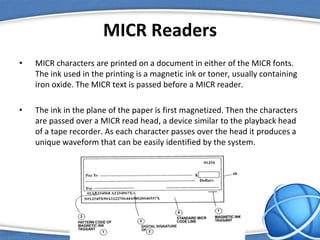
• MICR characters are printed on a document in either of the MICR fonts.
The ink used in the printing is a magnetic ink or toner, usually containing
iron oxide. The MICR text is passed before a MICR reader.
• The ink in the plane of the paper is first magnetized. Then the characters
are passed over a MICR read head, a device similar to the playback head
of a tape recorder. As each character passes over the head it produces a
unique waveform that can be easily identified by the system.
Types of MICR Readers
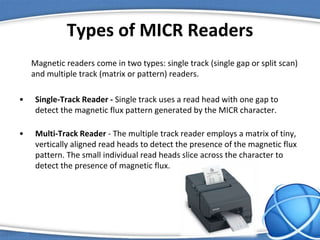
Magnetic readers come in two types: single track (single gap or split scan)
and multiple track (matrix or pattern) readers.
• Single-Track Reader - Single track uses a read head with one gap to
detect the magnetic flux pattern generated by the MICR character.
• Multi-Track Reader - The multiple track reader employs a matrix of tiny,
vertically aligned read heads to detect the presence of the magnetic flux
pattern. The small individual read heads slice across the character to
detect the presence of magnetic flux.
How these technologies could be
used to enhance user interaction
In early days of computing some activities (for example printing
pay checks or entering the results from a questionnaire)
required manually entering data by users.
This would take lot of time and had several disadvantages. In
general, scanners and reading devices increase input accuracy
and efficiency by reducing the role of the weak link in the input
process – the human operator.
But the invention of Scanner and some paper-based
technology such as OCR, OMR, MICR and OBR has clearly
enhanced the user interaction as discussed below.
Data Capturing involves the transforming of written or typed
data from hard copies to computerized media. This captured
data can be presented to the client on virtually any storage
medium, including compact disc, flash drives or by using e-
mail, direct data communication, dial-up connection and File
Transfer Protocol (FTP).
 OCR increases the efficiency and effectiveness of office work.
The ability to instantly search through content is immensely
useful, especially in an office setting that has to deal with high
volume scanning or high document inflow. Users can now use
the copy and paste tools on the document as well, instead of
rewriting everything to correct it.
 OMR, or optical mark recognition, allows users to analyze your
forms or questionnaires electronically, thus saving your time
and minimizing human error.
 In OBR, information captured from barcodes can help invoice
processing software recognize the invoice faster. This leads to
accurate matching of invoices with vendor information and
faster payments. It also helps users to indexing of documents.
 MICR software packages can process several hundred
checks per hour and can even read multiple lines of
MICR data at one instance. Some such MICR software
can even read correction images, deal with poor quality
images, parse fields containing MICR ink, and even
prepare the image for remote deposit.
Simply these technologies mountain of paper-based data and
give back the electronic information business processes need.
This saves time, money, effort and storage space, adding real
value to operations and enhance user interaction.
Demonstration
Free Online OCR
• A free service that allows to easily convert scanned
documents, faxes, screenshots and photos into
editable and searchable text, such as DOC, TXT or
PDF.
• This is completely free software service and users
can convert their particular files without any user
registration either.
• Official Website:
http://www.free-online-ocr.com/
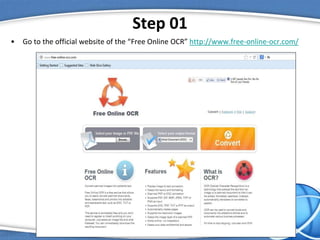
Step 01
• Go to the official website of the “Free Online OCR” http://www.free-online-ocr.com/
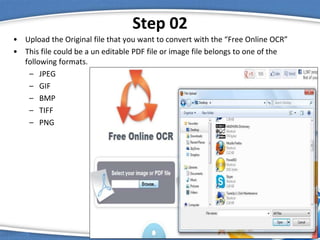
Step 02
• Upload the Original file that you want to convert with the “Free Online OCR”
• This file could be a un editable PDF file or image file belongs to one of the
following formats.
– JPEG
– GIF
– BMP
– TIFF
– PNG
Step 03
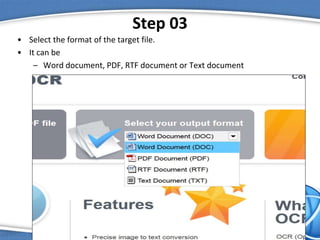
• Select the format of the target file.
• It can be
– Word document, PDF, RTF document or Text document
Step 04
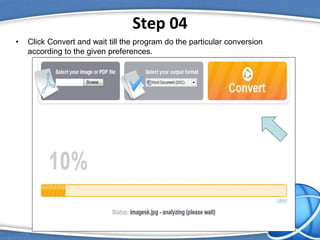
• Click Convert and wait till the program do the particular conversion
according to the given preferences.
Step 05
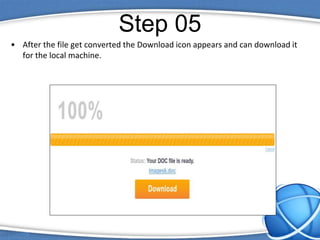
• After the file get converted the Download icon appears and can download it
for the local machine.
i2OCR
• i2OCR is a free online Optical Character Recognition (OCR)
that extracts text from images so that it can be edited,
formatted, indexed, searched, or translated.
– 60+ Recognition Languages
– Supports Major Image Formats
– Multi Column Document Analysis
– 100% FREE with Unlimited Uploads
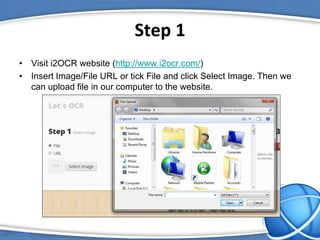
Step 1
• Visit i2OCR website (http://www.i2ocr.com/)
• Insert Image/File URL or tick File and click Select Image. Then we
can upload file in our computer to the website.
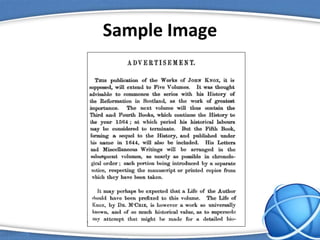
Sample Image
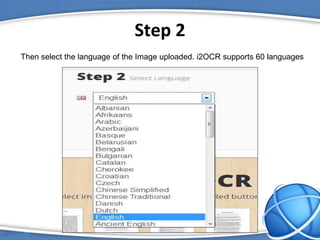
Step 2
Then select the language of the Image uploaded. i2OCR supports 60 languages
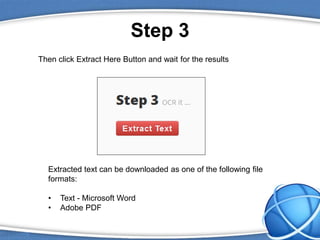
Step 3
Then click Extract Here Button and wait for the results
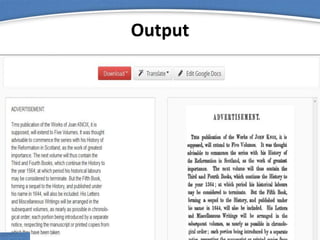
Extracted text can be downloaded as one of the following file
formats:
• Text - Microsoft Word
• Adobe PDF
Output
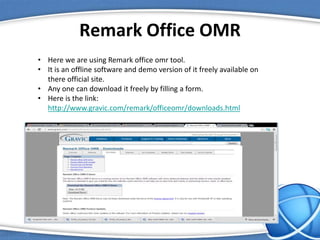
Remark Office OMR
• Here we are using Remark office omr tool.
• It is an offline software and demo version of it freely available on
there official site.
• Any one can download it freely by filling a form.
• Here is the link:
http://www.gravic.com/remark/officeomr/downloads.html
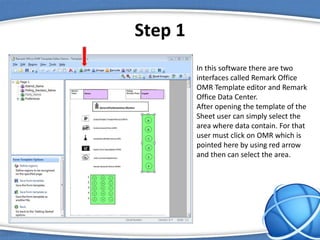
Step 1
In this software there are two
interfaces called Remark Office
OMR Template editor and Remark
Office Data Center.
After opening the template of the
Sheet user can simply select the
area where data contain. For that
user must click on OMR which is
pointed here by using red arrow
and then can select the area.
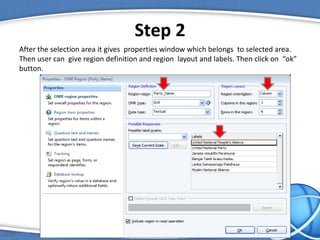
Step 2
After the selection area it gives properties window which belongs to selected area.
Then user can give region definition and region layout and labels. Then click on “ok”
button.
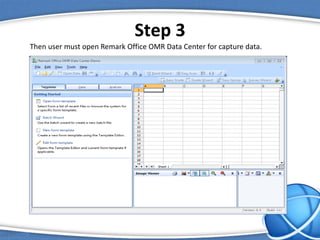
Step 3
Then user must open Remark Office OMR Data Center for capture data.
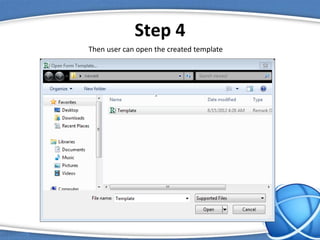
Step 4
Then user can open the created template
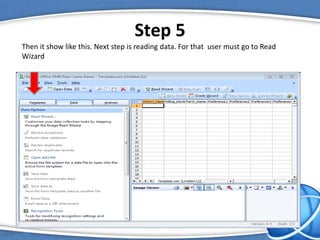
Step 5
Then it show like this. Next step is reading data. For that user must go to Read
Wizard
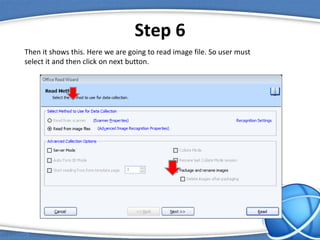
Step 6
Then it shows this. Here we are going to read image file. So user must
select it and then click on next button.
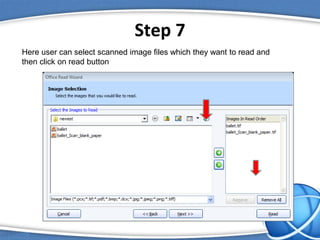
Step 7
Here user can select scanned image files which they want to read and
then click on read button
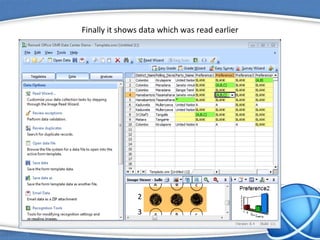
Finally it shows data which was read earlier
Android Barcode Scanner Application
We have used Barcode Scanner Application
which is available for download at
https://play.google.com/store/apps/details?i
d=com.google.zxing.client.android&hl=en
which can scan barcodes on products then
look up prices and reviews. This can also scan
Data Matrix and QR Codes containing URLs,
contact info, etc.
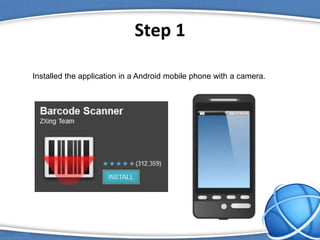
Step 1
Installed the application in a Android mobile phone with a camera.
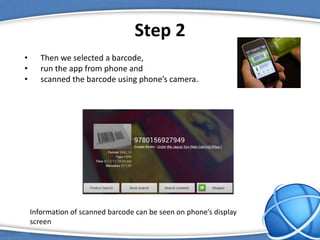
Step 2
• Then we selected a barcode,
• run the app from phone and
• scanned the barcode using phone’s camera.
Information of scanned barcode can be seen on phone’s display
screen
References
• Optical character recognition - Wikipedia, the free encyclopedia. 2013. Optical character
recognition - Wikipedia, the free encyclopedia. [ONLINE] Available at:
http://en.wikipedia.org/wiki/Optical_character_recognition. [Accessed 26 March 2013].
• What is OCR and OCR Technology. 2013. What is OCR and OCR Technology. [ONLINE]
Available at: http://finereader.abbyy.com/about_ocr/whatis_ocr/. [Accessed 26 March 2013].
• Optical mark recognition - Wikipedia, the free encyclopedia. 2013. Optical mark recognition -
Wikipedia, the free encyclopedia. [ONLINE] Available at:
http://en.wikipedia.org/wiki/Optical_mark_recognition. [Accessed 26 March 2013].
• . 2013. . [ONLINE] Available at:
http://www.id.uzh.ch/dl/arbeit/compi/spez/remark/RemarkOfficeOMR8UsersGuide.pdf. [Accessed
26 March 2013].
•
• Barcode - Wikipedia, the free encyclopedia. 2013. Barcode - Wikipedia, the free encyclopedia.
[ONLINE] Available at: http://en.wikipedia.org/wiki/Barcode. [Accessed 27 March 2013].
• Magnetic ink character recognition - Wikipedia, the free encyclopedia. 2013. Magnetic ink
character recognition - Wikipedia, the free encyclopedia. [ONLINE] Available at:
http://en.wikipedia.org/wiki/Magnetic_ink_character_recognition. [Accessed 01 April 2013].
Paper based interaction

Paper based interaction

  • 1.
    Paper-based Interaction Human ComputerInteraction Group Project
  • 2.
    Group Members • WarunaKodituwakku • Buddhika Chandrasiri • Lamali Ediriweera • Kashmira Karunarathne • Dhanuka Pathinayake University of Colombo School of Computing
  • 3.
    Roadmap  Introduction toPaper-based Interaction  Main Technologies & Tools  OCR  OMR  OBR  MICR  How this could be used to enhance user interaction.  Demonstration  Free Online OCR, i2OCR,
  • 4.
  • 5.
    What is PaperBased Interaction • The interaction between the paper documents and the electronic devices in more integrated and efficient way. • Using this computers try to deal with paper documents as they deal with other forms of computer media. • So the paper would be as readable by the computer as magnetic and optical disks.
  • 6.
    Paper Based Interactionaspires to create unique and novel set of technologies to enable new types of interaction between paper and the digital world with a focus on simplifying end user experiences
  • 7.
    The Areas ofPaper Based Interaction  Document Image Analysis and understanding  Offline Handwriting recognition  Computer Vision  Pattern Recognition  Information Theory  Machine Learning  Compressive Sensing
  • 8.
  • 9.
    Main Technologies, SoftwareTools and Devices
  • 10.
    Main Technologies Several technologiesand associated devices which are related to Paper-based Interaction are listed as follows. 1 • Optical Character Recognition (OCR) 2 • Optical Mark Recognition (OMR) 3 • Magnetic Ink Character Recognition (MICR) 4 • Optical Barcode Recognition (OBR)
  • 11.
    Optical Character Recognition(OCR) Optical character recognition (OCR) is the mechanical or electronic conversion of scanned images of handwritten, typewritten or printed text into machine-encoded text. OCR is a field of research in pattern recognition, artificial intelligence and computer vision. Types • Optical character recognition (OCR) - targets typewritten text, one glyph or character at a time. • Optical word recognition - targets typewritten text, one word at a time. • Intelligent character recognition (ICR) - also targets handwritten print script or cursive text one glyph or character at a time. • Intelligent word recognition (IWR) - also targets handwritten print script or cursive text, one word at a time.
  • 12.
    OCR Software OCR softwarelet you easily convert images, such as digital photographs, scanned documents, printed books, etc. into text. Once you perform OCR on an image, you’ll be able to copy-paste or edit the text content of that image without any retyping and it also becomes more searchable. Here is a list of notable online OCR Tools. • I2OCR (http://www.i2ocr.com/) i2OCR is a free online Optical Character Recognition (OCR) web application that extracts text from images so that it can be edited, formatted, indexed, searched, or translated. Input images could be scanned documents (i.e., books, faxes, receipts, bank statements, contracts, etc), screenshots, photographs, or digital camera captured images.
  • 13.
    OCR Software Contd. •Abbyy FineReader (http://finereader.abbyyonline.com/en) FineReader Online is a web-based OCR service that can instantly convert your PDF files and images into corresponding office file formats. FineReader can understand a much wider variety of languages. It even works with multilingual documents that have text written multiple languages. • Online OCR (http://www.onlineocr.net/) Online OCR is cloud based OCR service that can handle all common images formats including scanned PDFs. If you have multiple images that you would like to convert to text in one go, you can put them all in a single zip file and upload it to Online OCR. Online OCR is able to preserve the structure and formatting after the conversion.
  • 14.
    OCR Software Contd. •OCR Convert (http://www.ocrconvert.com/) OCRconvert.com is a free online OCR service that allows you to convert PDF to Text, JPEG to Text and scanned images into editable documents. Simply upload your file and our server side program will process your file for any editable text and will send the results back to you, which you can either download the processed text in for of word document or copy & past online. • Free Online OCR (http://www.free-online-ocr.com/) Free Online OCR accepts JPG, PNG, BMP, GIF, TIFF and multi-page PDF files, and can export DOC, RTF, TXT or searchable PDF files. It can automatically correct documents that have been rotated during the scanning process, and uses a dictionary to increases the accuracy of text recognition.
  • 15.
    Optical Mark Recognition(OMR) Optical Mark Recognition (also called optical mark reading and OMR) is the process of capturing human-marked data from document forms such as surveys and tests. OMR Software is a computer software application that makes OMR possible on a desktop computer by using an Image scanner to process surveys, tests, attendance sheets, checklists, and other plain-paper forms printed on a laser printer. OMR is generally distinguished from optical character recognition (OCR) by the fact that a complicated pattern recognition engine is not required.
  • 16.
    OMR Software • QuizOMR (Optical Mark Reader) Quiz OMR is an extension to Moodle's "Quiz" module. Quiz OMR provides online support for managing and evaluating objective-type assessments which are conducted offline using OMR sheets. This tool supports features provided by Moodle like question banking, automatic result evaluation, result analysis, result publication etc. • Abbyy FlexiCapture ABBYY FlexiCapture is a data capture and document processing software. It provides a single entry point to automatically transform streams of different forms and documents of any structure and complexity into business-ready data with automatic document classification and data capture features.
  • 17.
    • Udai OMRtool This is a free-to-use OMR (Optimal Mark Recognition) tool. It is especially suited for extracting data from forms that have been photo-copied and then scanned; hence, the resultant images are likely to suffer from rotations, smudge marks, and random lines here and there. • Samrt Mark Reader (SMR) Smart Mark Reader™ is software for designing and read Answer Sheets Form to the data, and examines, assess and provide evaluation reports and analysis, using digital image scanners. SMR is exclusively can read any skewed or rotated form's image in any angle from 0 up to 360 degrees. • Shared Questionnaire System (SQS) SQS is an integrated Optical Mark Recognition (OMR) form processing system with straightforward GUIs, which is aimed at developing social platforms to share knowledge about questionnaire based on XML standards. You can install and launch them easily from your web browser by JavaWebStart.
  • 18.
    Optical Barcode Recognition(OBR) • Optical machine-readable representation of data • Originally barcodes systematically represented data by varying the widths and spacing of parallel lines • Later they evolved into rectangles, dots, hexagons and other geometric patterns in two dimensions (2D) • scanners-barcode readers, interpretive software
  • 19.
    Main Types ofBarcode Scanners • RS-232 Barcode Scanner - Requires special programming for transferring the input data to the application program. • Keyboard Interface Scanners connect to a computer using a PS/2 or AT keyboard - Compatible adaptor cable (a "keyboard wedge"). The barcode's data is sent to the computer as if it had been typed on the keyboard. • USB Scanners - Easy to install and do not need custom code for transferring input data to the application program. On PCs running windows the HID interface emulates the data merging action of a hardware "keyboard wedge", and the scanner automatically behaves like an additional keyboard.
  • 20.
    Barcode Recognition Software •Built around optical barcode recognition (OBR) technology • This technology allows for the extraction of information present in barcodes • in an office setting is usually used to capture barcodes present on scanned images of documents and letters • image types such as BMP, TIFF, JPEG
  • 21.
    Magnetic Ink CharacterRecognition (MICR) • MICR is a character recognition technology used mainly by the banking industry to facilitate the processing and clearance of cheques and other documents. The MICR encoding, called the MICR line, is located at the bottom of a cheque or other voucher and typically includes the document type indicator, bank code, bank account number, cheque number and the amount, plus some control indicator. • The technology allows MICR readers to scan and read the information directly into a data collection device. Unlike barcodes or similar technologies, MICR characters can be easily read by humans. • There are two major MICR fonts in use: E-13B and CMC-7. E-13B has a 14 character set, while CMC-7 has 15—the 10 numeric characters, plus control characters.
  • 22.
    MICR Readers • MICRcharacters are printed on a document in either of the MICR fonts. The ink used in the printing is a magnetic ink or toner, usually containing iron oxide. The MICR text is passed before a MICR reader. • The ink in the plane of the paper is first magnetized. Then the characters are passed over a MICR read head, a device similar to the playback head of a tape recorder. As each character passes over the head it produces a unique waveform that can be easily identified by the system.
  • 23.
    Types of MICRReaders Magnetic readers come in two types: single track (single gap or split scan) and multiple track (matrix or pattern) readers. • Single-Track Reader - Single track uses a read head with one gap to detect the magnetic flux pattern generated by the MICR character. • Multi-Track Reader - The multiple track reader employs a matrix of tiny, vertically aligned read heads to detect the presence of the magnetic flux pattern. The small individual read heads slice across the character to detect the presence of magnetic flux.
  • 24.
    How these technologiescould be used to enhance user interaction In early days of computing some activities (for example printing pay checks or entering the results from a questionnaire) required manually entering data by users. This would take lot of time and had several disadvantages. In general, scanners and reading devices increase input accuracy and efficiency by reducing the role of the weak link in the input process – the human operator.
  • 25.
    But the inventionof Scanner and some paper-based technology such as OCR, OMR, MICR and OBR has clearly enhanced the user interaction as discussed below. Data Capturing involves the transforming of written or typed data from hard copies to computerized media. This captured data can be presented to the client on virtually any storage medium, including compact disc, flash drives or by using e- mail, direct data communication, dial-up connection and File Transfer Protocol (FTP).
  • 26.
     OCR increasesthe efficiency and effectiveness of office work. The ability to instantly search through content is immensely useful, especially in an office setting that has to deal with high volume scanning or high document inflow. Users can now use the copy and paste tools on the document as well, instead of rewriting everything to correct it.  OMR, or optical mark recognition, allows users to analyze your forms or questionnaires electronically, thus saving your time and minimizing human error.  In OBR, information captured from barcodes can help invoice processing software recognize the invoice faster. This leads to accurate matching of invoices with vendor information and faster payments. It also helps users to indexing of documents.
  • 27.
     MICR softwarepackages can process several hundred checks per hour and can even read multiple lines of MICR data at one instance. Some such MICR software can even read correction images, deal with poor quality images, parse fields containing MICR ink, and even prepare the image for remote deposit. Simply these technologies mountain of paper-based data and give back the electronic information business processes need. This saves time, money, effort and storage space, adding real value to operations and enhance user interaction.
  • 28.
  • 29.
    Free Online OCR •A free service that allows to easily convert scanned documents, faxes, screenshots and photos into editable and searchable text, such as DOC, TXT or PDF. • This is completely free software service and users can convert their particular files without any user registration either. • Official Website: http://www.free-online-ocr.com/
  • 30.
    Step 01 • Goto the official website of the “Free Online OCR” http://www.free-online-ocr.com/
  • 31.
    Step 02 • Uploadthe Original file that you want to convert with the “Free Online OCR” • This file could be a un editable PDF file or image file belongs to one of the following formats. – JPEG – GIF – BMP – TIFF – PNG
  • 32.
    Step 03 • Selectthe format of the target file. • It can be – Word document, PDF, RTF document or Text document
  • 33.
    Step 04 • ClickConvert and wait till the program do the particular conversion according to the given preferences.
  • 34.
    Step 05 • Afterthe file get converted the Download icon appears and can download it for the local machine.
  • 35.
    i2OCR • i2OCR isa free online Optical Character Recognition (OCR) that extracts text from images so that it can be edited, formatted, indexed, searched, or translated. – 60+ Recognition Languages – Supports Major Image Formats – Multi Column Document Analysis – 100% FREE with Unlimited Uploads
  • 36.
    Step 1 • Visiti2OCR website (http://www.i2ocr.com/) • Insert Image/File URL or tick File and click Select Image. Then we can upload file in our computer to the website.
  • 37.
  • 38.
    Step 2 Then selectthe language of the Image uploaded. i2OCR supports 60 languages
  • 39.
    Step 3 Then clickExtract Here Button and wait for the results Extracted text can be downloaded as one of the following file formats: • Text - Microsoft Word • Adobe PDF
  • 40.
  • 41.
    Remark Office OMR •Here we are using Remark office omr tool. • It is an offline software and demo version of it freely available on there official site. • Any one can download it freely by filling a form. • Here is the link: http://www.gravic.com/remark/officeomr/downloads.html
  • 42.
    Step 1 In thissoftware there are two interfaces called Remark Office OMR Template editor and Remark Office Data Center. After opening the template of the Sheet user can simply select the area where data contain. For that user must click on OMR which is pointed here by using red arrow and then can select the area.
  • 43.
    Step 2 After theselection area it gives properties window which belongs to selected area. Then user can give region definition and region layout and labels. Then click on “ok” button.
  • 44.
    Step 3 Then usermust open Remark Office OMR Data Center for capture data.
  • 45.
    Step 4 Then usercan open the created template
  • 46.
    Step 5 Then itshow like this. Next step is reading data. For that user must go to Read Wizard
  • 47.
    Step 6 Then itshows this. Here we are going to read image file. So user must select it and then click on next button.
  • 48.
    Step 7 Here usercan select scanned image files which they want to read and then click on read button
  • 49.
    Finally it showsdata which was read earlier
  • 50.
    Android Barcode ScannerApplication We have used Barcode Scanner Application which is available for download at https://play.google.com/store/apps/details?i d=com.google.zxing.client.android&hl=en which can scan barcodes on products then look up prices and reviews. This can also scan Data Matrix and QR Codes containing URLs, contact info, etc.
  • 51.
    Step 1 Installed theapplication in a Android mobile phone with a camera.
  • 52.
    Step 2 • Thenwe selected a barcode, • run the app from phone and • scanned the barcode using phone’s camera. Information of scanned barcode can be seen on phone’s display screen
  • 53.
    References • Optical characterrecognition - Wikipedia, the free encyclopedia. 2013. Optical character recognition - Wikipedia, the free encyclopedia. [ONLINE] Available at: http://en.wikipedia.org/wiki/Optical_character_recognition. [Accessed 26 March 2013]. • What is OCR and OCR Technology. 2013. What is OCR and OCR Technology. [ONLINE] Available at: http://finereader.abbyy.com/about_ocr/whatis_ocr/. [Accessed 26 March 2013]. • Optical mark recognition - Wikipedia, the free encyclopedia. 2013. Optical mark recognition - Wikipedia, the free encyclopedia. [ONLINE] Available at: http://en.wikipedia.org/wiki/Optical_mark_recognition. [Accessed 26 March 2013]. • . 2013. . [ONLINE] Available at: http://www.id.uzh.ch/dl/arbeit/compi/spez/remark/RemarkOfficeOMR8UsersGuide.pdf. [Accessed 26 March 2013]. • • Barcode - Wikipedia, the free encyclopedia. 2013. Barcode - Wikipedia, the free encyclopedia. [ONLINE] Available at: http://en.wikipedia.org/wiki/Barcode. [Accessed 27 March 2013]. • Magnetic ink character recognition - Wikipedia, the free encyclopedia. 2013. Magnetic ink character recognition - Wikipedia, the free encyclopedia. [ONLINE] Available at: http://en.wikipedia.org/wiki/Magnetic_ink_character_recognition. [Accessed 01 April 2013].