Packages
Access Specifiers
Interfaces
Multiple Inheritance
Extending Interface
Interface vs Abstract
Practice Questions
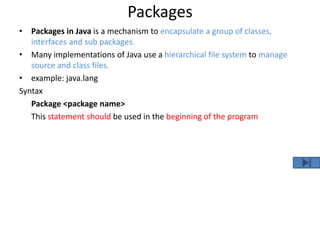
Packages
• Packages in Java is a mechanism to encapsulate a group of classes,
interfaces and sub packages.
• Many implementations of Java use a hierarchical file system to manage
source and class files.
• example: java.lang
Syntax
Package <package name>
This statement should be used in the beginning of the program
/*defining a package*/
package Demo_Package;
public class Demo_Pack
{ public void demo_142()
{ System.out.println("hello world"); }
}
/*importing a package*/
import Demo_Package.*;
public class Demo_1
{
public static void main(String[] y)
{
Demo_Pack p=new Demo_Pack();
p.demo_142();
}
}
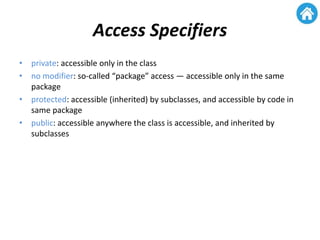
Access Specifiers
• private: accessible only in the class
• no modifier: so-called “package” access — accessible only in the same
package
• protected: accessible (inherited) by subclasses, and accessible by code in
same package
• public: accessible anywhere the class is accessible, and inherited by
subclasses
Interface
• Interface is a pure abstract class
• syntactically similar to classes, but you cannot create instance of an
Interface
• Their methods are declared without any body.
• When you create an interface it defines what a class can do without saying
anything about how the class will do it
Syntax for declaring interface
• Interface <interface_name>
• {…}
• Syntax for Declaring interface
Interface <interface_name>
{…}
• Syntax for implementing interface
Classname implements <interface_name>
{…}
interface Demo_ //interface declaration
{ int int_variable=10;
void demo(); // no method body
}
//implementing interface
public class Demo_interface implements Demo_
{ public void demo() //interface body implemented
{ System.out.println("hellow interface"); }
public static void main(String[] args)
{ Demo_interface d=new Demo_interface();
d.demo();
}
}
Multiple inheritance in java
interface Demo_Interface
{ void Demo_Interface(); }
class Demo
{ void Demo_Print_method()
{ System.out.println("the class Demo method called"); }
}
public class Multiple_Inheritance extends Demo implements Demo_Interface
{ public void Demo_Interface()
{ System.out.println("hello Demo_INterface method called"); }
public static void main(String[] args)
{ Multiple_Inheritance MI=new Multiple_Inheritance();
MI.Demo_Print_method(); //class method called
MI.Demo_Interface(); //interface method called
}
}
Extending interface
interface News_Paper_Color
{ void News_Paper_Color(); }
interface Magazine_Paper_Color extends News_Paper_Color
{ void Magazine_Paper_Color(); }
public class Multiple_Inheritance implements Magazine_Paper_Color
{ public void News_Paper_Color()
{ System.out.println("the New Papaer Color red"); }
public void Magazine_Paper_Color()
{ System.out.println("the magazinge paper color yellow"); }
public static void main(String[] args)
{
/*
* we can not create objects for interface class
*/
//News_Paper_Color n=new News_Paper_Color();
Multiple_Inheritance Mi=new Multiple_Inheritance();
Mi.News_Paper_Color();
Mi.Magazine_Paper_Color();
}
}
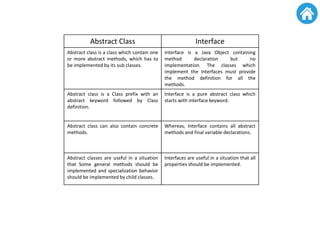
Abstract Class Interface
Abstract class is a class which contain one
or more abstract methods, which has to
be implemented by its sub classes.
Interface is a Java Object containing
method declaration but no
implementation. The classes which
implement the Interfaces must provide
the method definition for all the
methods.
Abstract class is a Class prefix with an
abstract keyword followed by Class
definition.
Interface is a pure abstract class which
starts with interface keyword.
Abstract class can also contain concrete
methods.
Whereas, Interface contains all abstract
methods and final variable declarations.
Abstract classes are useful in a situation
that Some general methods should be
implemented and specialization behavior
should be implemented by child classes.
Interfaces are useful in a situation that all
properties should be implemented.

Packaes & interfaces

  • 1.
    Packages Access Specifiers Interfaces Multiple Inheritance ExtendingInterface Interface vs Abstract Practice Questions
  • 2.
    Packages • Packages inJava is a mechanism to encapsulate a group of classes, interfaces and sub packages. • Many implementations of Java use a hierarchical file system to manage source and class files. • example: java.lang Syntax Package <package name> This statement should be used in the beginning of the program
  • 3.
    /*defining a package*/ packageDemo_Package; public class Demo_Pack { public void demo_142() { System.out.println("hello world"); } } /*importing a package*/ import Demo_Package.*; public class Demo_1 { public static void main(String[] y) { Demo_Pack p=new Demo_Pack(); p.demo_142(); } }
  • 4.
    Access Specifiers • private:accessible only in the class • no modifier: so-called “package” access — accessible only in the same package • protected: accessible (inherited) by subclasses, and accessible by code in same package • public: accessible anywhere the class is accessible, and inherited by subclasses
  • 5.
    Interface • Interface isa pure abstract class • syntactically similar to classes, but you cannot create instance of an Interface • Their methods are declared without any body. • When you create an interface it defines what a class can do without saying anything about how the class will do it Syntax for declaring interface • Interface <interface_name> • {…}
  • 6.
    • Syntax forDeclaring interface Interface <interface_name> {…} • Syntax for implementing interface Classname implements <interface_name> {…}
  • 7.
    interface Demo_ //interfacedeclaration { int int_variable=10; void demo(); // no method body } //implementing interface public class Demo_interface implements Demo_ { public void demo() //interface body implemented { System.out.println("hellow interface"); } public static void main(String[] args) { Demo_interface d=new Demo_interface(); d.demo(); } }
  • 8.
    Multiple inheritance injava interface Demo_Interface { void Demo_Interface(); } class Demo { void Demo_Print_method() { System.out.println("the class Demo method called"); } } public class Multiple_Inheritance extends Demo implements Demo_Interface { public void Demo_Interface() { System.out.println("hello Demo_INterface method called"); } public static void main(String[] args) { Multiple_Inheritance MI=new Multiple_Inheritance(); MI.Demo_Print_method(); //class method called MI.Demo_Interface(); //interface method called } }
  • 9.
    Extending interface interface News_Paper_Color {void News_Paper_Color(); } interface Magazine_Paper_Color extends News_Paper_Color { void Magazine_Paper_Color(); } public class Multiple_Inheritance implements Magazine_Paper_Color { public void News_Paper_Color() { System.out.println("the New Papaer Color red"); } public void Magazine_Paper_Color() { System.out.println("the magazinge paper color yellow"); } public static void main(String[] args) { /* * we can not create objects for interface class */ //News_Paper_Color n=new News_Paper_Color(); Multiple_Inheritance Mi=new Multiple_Inheritance(); Mi.News_Paper_Color(); Mi.Magazine_Paper_Color(); } }
  • 10.
    Abstract Class Interface Abstractclass is a class which contain one or more abstract methods, which has to be implemented by its sub classes. Interface is a Java Object containing method declaration but no implementation. The classes which implement the Interfaces must provide the method definition for all the methods. Abstract class is a Class prefix with an abstract keyword followed by Class definition. Interface is a pure abstract class which starts with interface keyword. Abstract class can also contain concrete methods. Whereas, Interface contains all abstract methods and final variable declarations. Abstract classes are useful in a situation that Some general methods should be implemented and specialization behavior should be implemented by child classes. Interfaces are useful in a situation that all properties should be implemented.