JAVA
Topics for Today’s Session
Access Modifiers
Access Modifiers in Java
 In Java, access modifiers are used to set the accessibility
(visibility) of classes, interfaces, variables, methods,
constructors and data members.
 As the name suggests access modifiers in Java helps to
restrict the scope of a class, constructor , variable ,
method or data member.
 There are four types of access modifiers available in
java:
1. Default – No keyword required
2. Private
3. Protected
4. Public
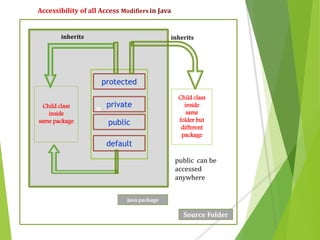
nChild class
inside
same package
Child class
inside
same
folder but
different
package
protected
private
public
default
Source Folder
Java package
public can be
accessed
anywhere
inheritsinherits
 If you do not specify any access level, it will be the
default.
 The data members, class or methods which are not
declared using any access modifiers i.e. having default
access modifier are accessible only within the same
package.
 The access level of a default modifier is only within the
package.
 It cannot be accessed from outside the package.
 Default access modifier means we do not explicitly
declare an access modifier for a class, field, method, etc.
//Java program to illustrate default modifier
package p1;
//Class Hello is having Default access modifier
class Hello {
void display() {
System.out.println("Hello World!");
} }
// program to illustrate error while using class from different package with
//default modifier
package p2;
import p1.*;
//This class is having default access modifier
class HelloNew {
public static void main(String args[]) {
//accessing class Hello from package p1
Hello obj = new Hello();
obj.display();
} }
Output:
Compile time error
 The private access modifier is specified using the
keyword private.
 The access level of a private modifier is only within the
class. It cannot be accessed from outside the class
 The methods or data members declared as private are
accessible only within the class in which they are
declared.
 Any other class of same package will not be able to
access these members.
 These cannot be inherited by subclasses and therefore
not accessible in subclasses.
 We can not override private members.
Example: private int x;
/*Pprogram to illustrate error while using class from different package
with private modifier */
package p1;
class A {
private void display() {
System.out.println("Hello Prathibha");
} }
class B {
public static void main(String args[]) {
A obj = new A();
//trying to access private method of another class
obj.display();
} }
Output:
error: display() has private access in A
obj.display();
//program accessing private members
class HelloData {
private String name; // private variable
}
class HlloMain {
public static void main(String[] main){
HelloData d = new HelloData(); // create an object of
HelloData
// access private variable and field from another class
d.name = "Prathibha Virtual Classes";
}
}
When we run the program, we will get the following error:
HelloMain.java:18: error: name has private access in HelloData
d.name = "Prathibha Virtual Classes”;
Protected Access Modifier
 A variable or method can be declared as protected using a
keyword ‘protected’.
 These can be accessed within the same package as well as
from subclasses.
 This is specially designed for supporting Inheritance.
 Protected access is used to access the variables or methods
visible everywhere in the same package in which it is
defined and also in the subclasses of other packages.
 Non subclasses of other packages cannot access protected
members.
Example: protected int x;
class Animal {
protected void display() { // protected method
System.out.println("I am an animal");
} }
class Dog extends Animal {
public static void main(String[] args) {
// create an object of Dog class
Dog dog = new Dog();
// access protected method
dog.display();
} }
Output:
I am an animal
//Program to illustrate protected modifier
package p1;
class A {
protected void display() {
System.out.println("Prathibha Virtual Classes");
} }
//Program to illustrate protected modifier
package p2;
import p1.*; //importing all classes in package p1
class B extends A { //Class B is subclass of A
public static void main(String args[]) {
B obj = new B();
obj.display();
} }
Output:
Prathibha Virtual Classes
 A variable or method can be declared as public using a
keyword ‘public’.
 The public access modifier has the widest scope among all
other access modifiers.
 Classes, methods or data members which are declared as
public are accessible from every where in the program. There
is no restriction on the scope of a public data members.
 The public methods or variables can be accessed within the
class and in other classes (outside) using objects and in all
packages.
Example: public int n;
public void sum ( ) {…}
//Java program to illustrate public modifier
package p1;
public class A {
public void display() {
System.out.println("Prathibha Virtual Classes");
}
}
package p2;
import p1.*;
class B {
public static void main(String args[]) {
A obj = new A;
obj.display();
}
}
Output:
Prathibha Virtual Classes
// Animal.java file public class
public class Animal {
public int legCount;
public void display() { // public method
System.out.println("I am an animal.");
System.out.println("I have " + legCount + " legs.");
}}
// Main.java
public class Main {
public static void main( String[] args ) {
Animal ani = new Animal(); // accessing the public class
ani.legCount = 4; // accessing the public variable
ani.display(); // accessing the public method
} }
Output:
I am an animal.
I have 4 legs.
Private protected
 We may declare a member as “private protected”.
 This is used to access the member in all subclasses in all
packages.
 This is accessed in its own class and all the subclasses of
all the packages. But it is not accessed in other classes in
the same package and non sub classes in the other
packages.
Example private protected int x;
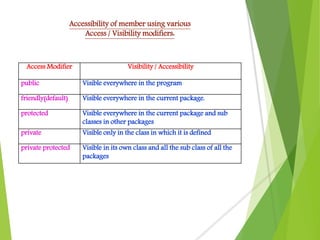
Access Modifier Visibility / Accessibility
public Visible everywhere in the program
friendly(default) Visible everywhere in the current package.
protected Visible everywhere in the current package and sub
classes in other packages
private Visible only in the class in which it is defined
private protected Visible in its own class and all the sub class of all the
packages
Accessibility of member using various
Access / Visibility modifiers:


Access modifiers in java

Access modifiers in java

  • 1.
  • 2.
    Topics for Today’sSession Access Modifiers
  • 3.
    Access Modifiers inJava  In Java, access modifiers are used to set the accessibility (visibility) of classes, interfaces, variables, methods, constructors and data members.  As the name suggests access modifiers in Java helps to restrict the scope of a class, constructor , variable , method or data member.  There are four types of access modifiers available in java: 1. Default – No keyword required 2. Private 3. Protected 4. Public
  • 4.
    nChild class inside same package Childclass inside same folder but different package protected private public default Source Folder Java package public can be accessed anywhere inheritsinherits
  • 5.
     If youdo not specify any access level, it will be the default.  The data members, class or methods which are not declared using any access modifiers i.e. having default access modifier are accessible only within the same package.  The access level of a default modifier is only within the package.  It cannot be accessed from outside the package.  Default access modifier means we do not explicitly declare an access modifier for a class, field, method, etc.
  • 6.
    //Java program toillustrate default modifier package p1; //Class Hello is having Default access modifier class Hello { void display() { System.out.println("Hello World!"); } } // program to illustrate error while using class from different package with //default modifier package p2; import p1.*; //This class is having default access modifier class HelloNew { public static void main(String args[]) { //accessing class Hello from package p1 Hello obj = new Hello(); obj.display(); } } Output: Compile time error
  • 7.
     The privateaccess modifier is specified using the keyword private.  The access level of a private modifier is only within the class. It cannot be accessed from outside the class  The methods or data members declared as private are accessible only within the class in which they are declared.  Any other class of same package will not be able to access these members.  These cannot be inherited by subclasses and therefore not accessible in subclasses.  We can not override private members. Example: private int x;
  • 8.
    /*Pprogram to illustrateerror while using class from different package with private modifier */ package p1; class A { private void display() { System.out.println("Hello Prathibha"); } } class B { public static void main(String args[]) { A obj = new A(); //trying to access private method of another class obj.display(); } } Output: error: display() has private access in A obj.display();
  • 9.
    //program accessing privatemembers class HelloData { private String name; // private variable } class HlloMain { public static void main(String[] main){ HelloData d = new HelloData(); // create an object of HelloData // access private variable and field from another class d.name = "Prathibha Virtual Classes"; } } When we run the program, we will get the following error: HelloMain.java:18: error: name has private access in HelloData d.name = "Prathibha Virtual Classes”;
  • 10.
    Protected Access Modifier A variable or method can be declared as protected using a keyword ‘protected’.  These can be accessed within the same package as well as from subclasses.  This is specially designed for supporting Inheritance.  Protected access is used to access the variables or methods visible everywhere in the same package in which it is defined and also in the subclasses of other packages.  Non subclasses of other packages cannot access protected members. Example: protected int x;
  • 11.
    class Animal { protectedvoid display() { // protected method System.out.println("I am an animal"); } } class Dog extends Animal { public static void main(String[] args) { // create an object of Dog class Dog dog = new Dog(); // access protected method dog.display(); } } Output: I am an animal
  • 12.
    //Program to illustrateprotected modifier package p1; class A { protected void display() { System.out.println("Prathibha Virtual Classes"); } } //Program to illustrate protected modifier package p2; import p1.*; //importing all classes in package p1 class B extends A { //Class B is subclass of A public static void main(String args[]) { B obj = new B(); obj.display(); } } Output: Prathibha Virtual Classes
  • 13.
     A variableor method can be declared as public using a keyword ‘public’.  The public access modifier has the widest scope among all other access modifiers.  Classes, methods or data members which are declared as public are accessible from every where in the program. There is no restriction on the scope of a public data members.  The public methods or variables can be accessed within the class and in other classes (outside) using objects and in all packages. Example: public int n; public void sum ( ) {…}
  • 14.
    //Java program toillustrate public modifier package p1; public class A { public void display() { System.out.println("Prathibha Virtual Classes"); } } package p2; import p1.*; class B { public static void main(String args[]) { A obj = new A; obj.display(); } } Output: Prathibha Virtual Classes
  • 15.
    // Animal.java filepublic class public class Animal { public int legCount; public void display() { // public method System.out.println("I am an animal."); System.out.println("I have " + legCount + " legs."); }} // Main.java public class Main { public static void main( String[] args ) { Animal ani = new Animal(); // accessing the public class ani.legCount = 4; // accessing the public variable ani.display(); // accessing the public method } } Output: I am an animal. I have 4 legs.
  • 16.
    Private protected  Wemay declare a member as “private protected”.  This is used to access the member in all subclasses in all packages.  This is accessed in its own class and all the subclasses of all the packages. But it is not accessed in other classes in the same package and non sub classes in the other packages. Example private protected int x;
  • 17.
    Access Modifier Visibility/ Accessibility public Visible everywhere in the program friendly(default) Visible everywhere in the current package. protected Visible everywhere in the current package and sub classes in other packages private Visible only in the class in which it is defined private protected Visible in its own class and all the sub class of all the packages Accessibility of member using various Access / Visibility modifiers:
  • 18.