Java Programming
Manish Kumar
(manish87it@gmail.com)
Lecture- 9
Access Modifier &
Package
Contents
 Introduction to java package
 Advantage and Naming Convention of Package
 Creating java package with example
 Different ways to import class
 Creating sub package with example
 Introduction to access modifiers
 Explanation of Access Modifiers with examples
Java package
In java, Package can be defined as a container of classes, sub packages, interfaces. There are two categories of
packages are available in java:
 Built-in package
 User defined package
 Built-in package are those which is already defined such as lang, io, util, net, etc.
 User defined package are those which are create by programmer.
Advantage of java package:
Package is:
• Used to remove naming conflicts because we cannot contain more than one class with same name.
• Also used to achieve data encapsulation (or data-hiding).
• Making searching or locating of classes, interface easier.
Java package
Naming Convention of Package:
The name of a package should be in reverse order of domain names, i.e., college.art.history, college.tech.cse, etc.
Subpackage, those packages that are inside another package. Subpackage are not imported by default, they have
imported explicitly. For example in above art is Subpackage of college.
Creating Package:
We can create package with the help of package keyword. It should be first line in java class.
package <package-name>;
package p1;
Java package
Example: (PackageExample1.java)
package p1;
public class PackageExample1 {
public static void main(String args[]){
System.out.println(“Creating Package.”);
}
}
Output-
Creating Package
Let’s understand how to compile and execute java package
program:
To compile java Package Program (As according above
program) we write following command:
javac –d . PackageExample1.java
javac – It is java compiler.
-d – Specifies the destination where to put generated class file.
Dot (.) – Current directory i.e., If you want to create package
within same directory then use dot otherwise specify the
directory name in place of dot.
To execute the java package program:
java p1.PackageExample1
Java package
Creating Subpackage: (SubPackage.java)
package p1.p2;
public class SubPackage {
public static void main(String args[]){
System.out.println(“Creating Sub Package.”);
}
}
Output-
Creating Sub Package
Java package
To access class from another package:
package p1;
public class PackageExample {
public void display(){
System.out.println(“Package Example”);
}
}
package p2;
import p1.*;
public class PackageExample1 {
public static void main(String args[]) {
PackageExample p = new PackgeExample();
p.display();
}
}
Output:
Package Example
PackageExample.java
PackageExample1.java
Java package
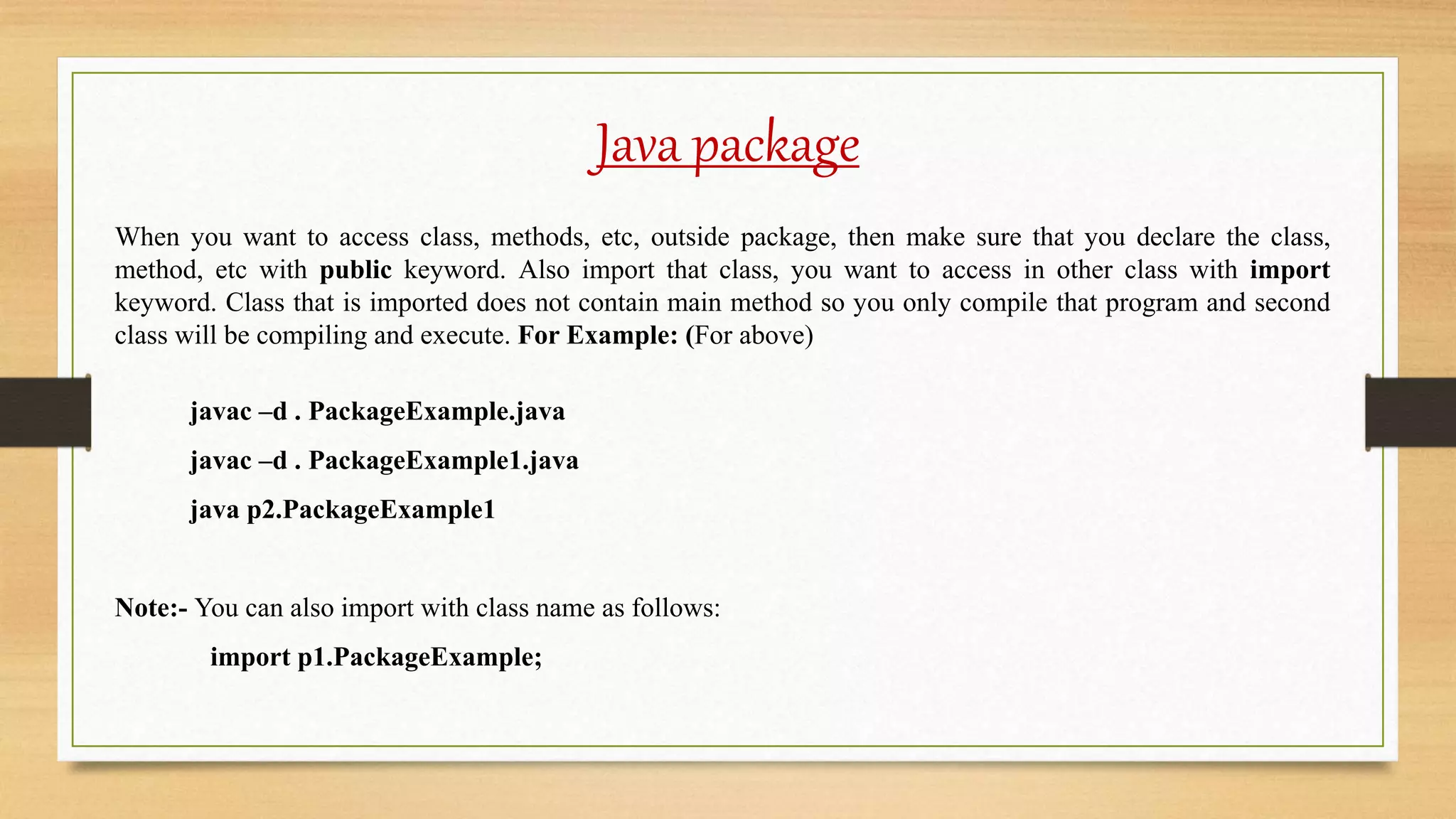
When you want to access class, methods, etc, outside package, then make sure that you declare the class,
method, etc with public keyword. Also import that class, you want to access in other class with import
keyword. Class that is imported does not contain main method so you only compile that program and second
class will be compiling and execute. For Example: (For above)
javac –d . PackageExample.java
javac –d . PackageExample1.java
java p2.PackageExample1
Note:- You can also import with class name as follows:
import p1.PackageExample;
Java package
To access class and package from another package:
There are three ways to access the class and packages from another package:
I. import package.*
II. import package.classname
III. fully qualified name
import package.*
If you are using this method then you can access all the classes and interfaces only i.e. not able to access
Subpackage. With the help import keyword you are able to access classes and interfaces from another package
into current package.
Import package.*
package p1;
class MyPack
{
public void display()
{
System.out.println(“Sparsh Globe.”);
}
}
package p2;
import p1.*;
class MyPack2
{
public static void main(String args[])
{
MyPack mp = new MyPack();
mp.display();
}
}
Output – Sparsh Globe
To execute above program, you save both the class with class name and compile both classes with java compiler
and execute only Mypack2.java class only.
MyPack.java MyPack2.java
Import package.classname
package p1;
class MyPack
{
public void display()
{
System.out.println(“Sparsh Globe.”);
}
}
package p2;
import p1.MyPack;
class MyPack2
{
public static void main(String args[])
{
MyPack mp = new MyPack();
mp.display();
}
}
Output – Sparsh Globe
If you are using this method then you are able to access only declared class of this package.
MyPack.java MyPack2.java
Fully qualified name
package p1;
class MyPack
{
public void display()
{
System.out.println(“Sparsh Globe.”);
}
}
package p2;
class MyPack2
{
public static void main(String args[])
{
P1.MyPack mp = new p1.MyPack();
mp.display();
}
}
Output – Sparsh Globe
In this case, there is no need to import keyword and you can access only declared class of this package. To access
the class or interface using this method every time you write fully qualified name such as package.classname.
MyPack.java MyPack2.java
Java sub package
A subpackage is package inside a package. We create the subpackage to categorize the package again. To
create a subpackage we use the following syntax:
package package.subpackage;
package p1.mypack;
Here p1 is the main package and mypack is treated as subpackage of package p1.
package p1.p2;
class MyPack
{
public static void main(String args[])
{
System.out.println (“Sparsh Globe.”);
}
}
Output – Sparsh Globe
To Compile:
javac -d . Mypack.java
To Run:
java p1.p2.MyPack;
Java package
To send the class files into another directory/drive:
Scenario- Let us suppose I want save my java file (MyPack.java) in p:source and class files (MyPack.class) in
c:classes.
package p1;
class MyPack
{
public static void main(String args[])
{
System.out.println (“Sparsh Globe.”);
}
}
Output – Sparsh Globe
To Compile:
P:source>javac -d c:classes Mypack.java
P:source>set classpath=c:classes;
To Run:
P:source>java p1.MyPack;
Another way to execute
To Compile:
P:source>javac -d c:classes Mypack.java
To Run:
P:source>java –classpath c:classes p1.MyPack;
Access modifier
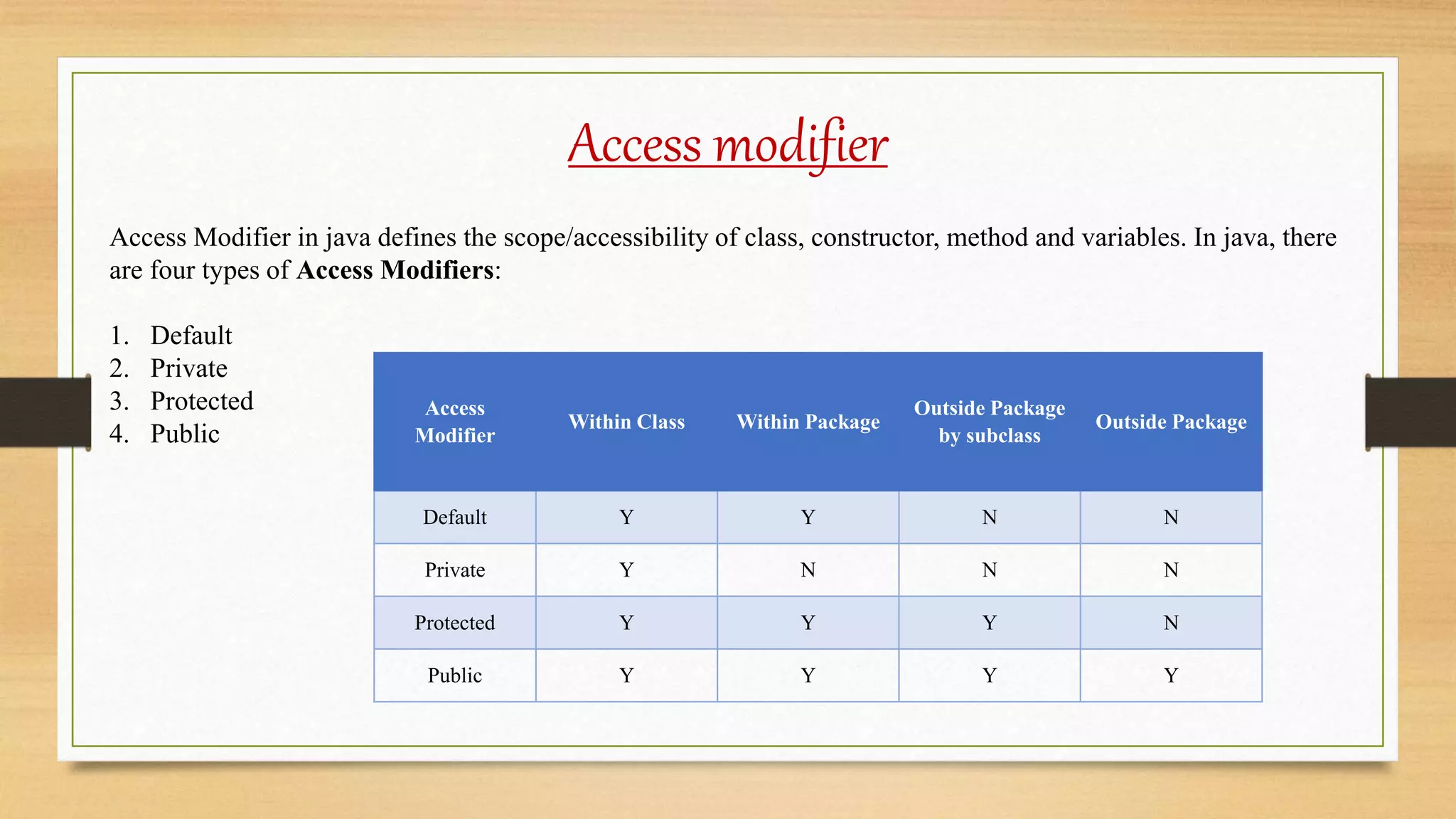
Access Modifier in java defines the scope/accessibility of class, constructor, method and variables. In java, there
are four types of Access Modifiers:
1. Default
2. Private
3. Protected
4. Public
Access
Modifier
Within Class Within Package
Outside Package
by subclass
Outside Package
Default Y Y N N
Private Y N N N
Protected Y Y Y N
Public Y Y Y Y
Default access modifier
In the case of
Default Access
Modifier, there is
no need to write
any access
modifier before
class, method,
variable, etc. The
access level of
this modifier is
only within the
package.
package pack;
class DefaultModifier{
void display(){
System.out.println("Hello Sparsh");
}
}
package mypack;
import pack.*;
class DefaultModifier1{
public static void main(String args[]){
DefaultModifier dm = new DefaultModifier ();
dm.display();
}
}
In above example, the class DefaultModifier and method
display are default so it cannot be accessed from outside the
package.
DefaultModifier.java DefaultModifier1.java
private access modifier
The access level
of this modifier
is only within the
class where it
declared. We use
private keyword
to make a private
data member,
member
function, class,
etc.
//PrivateData1.java
class PrivateData{
private int data=40;
private void displayMessage (){
System.out.println ("Hello Sparsh");
}}
public class PrivateData1 {
public static void main (String args[]){
PrivateData pd =new PrivateData ();
System.out.println (pd.data);
pd.displayMessage ();
}}
Output –
javac Simple.java
Simple.java:11: error: data has
private access in PrivateData
System.out.println(pd.data);
^
Simple.java:12: error:
displayMessage() has private access
in PrivateData
pd.displayMessage();
^
2 errors
private access modifier
If you make any
class constructor
as private, then
you cannot
create an
instance of that
class from
outside the class.
//PrivateConstructor.java
class PrivateConstructor{
private PrivateConstructor (){}
void display()
{
System.out.println("Hello Sparsh");
}
}
public class PrivateConstructor1 {
public static void main(String args[]){
PrivateConstructor pc=new
PrivateConstructor ();
}
}
Output-
javac Simple.java
Simple.java:7: error: A() has private access
in A
A obj=new A();//Compile Time Error
^
1 error
protected access modifier
The access level of
this modifier is
within the package
and outside the
package (Only if
you accessing
through child
class). We use
protected
keyword to make a
private data
member, member
function, class,
etc.
//ProtectedExample.java
package pack;
public class ProtectedExample
{
protected void display()
{
System.out.println("Hello");
}
}
//ProtectedExample1.java
package mypack;
import pack.*;
class ProtectedExample1 extends ProtectedExample {
public static void main(String args[]){
ProtectedExample1 pe = new ProtectedExample1 ();
pe.display();
}
}
public access modifier
The access level of
this modifier is
everywhere. We
use protected
keyword to make a
private data
member, member
function, class,
etc.
//PublicExample.java
package pack;
public class PublicExample
{
public void display()
{
System.out.println("Hello");
}
}
//PublicExample1.java
package mypack;
import pack.*;
class PublicExample1 extends PublicExample {
public static void main(String args[]){
PublicExample1 pe = new PublicExample1 ();
pe.display();
}
}
Lecture   9 access modifiers and packages

Lecture 9 access modifiers and packages

  • 1.
  • 2.
    Contents  Introduction tojava package  Advantage and Naming Convention of Package  Creating java package with example  Different ways to import class  Creating sub package with example  Introduction to access modifiers  Explanation of Access Modifiers with examples
  • 3.
    Java package In java,Package can be defined as a container of classes, sub packages, interfaces. There are two categories of packages are available in java:  Built-in package  User defined package  Built-in package are those which is already defined such as lang, io, util, net, etc.  User defined package are those which are create by programmer. Advantage of java package: Package is: • Used to remove naming conflicts because we cannot contain more than one class with same name. • Also used to achieve data encapsulation (or data-hiding). • Making searching or locating of classes, interface easier.
  • 4.
    Java package Naming Conventionof Package: The name of a package should be in reverse order of domain names, i.e., college.art.history, college.tech.cse, etc. Subpackage, those packages that are inside another package. Subpackage are not imported by default, they have imported explicitly. For example in above art is Subpackage of college. Creating Package: We can create package with the help of package keyword. It should be first line in java class. package <package-name>; package p1;
  • 5.
    Java package Example: (PackageExample1.java) packagep1; public class PackageExample1 { public static void main(String args[]){ System.out.println(“Creating Package.”); } } Output- Creating Package Let’s understand how to compile and execute java package program: To compile java Package Program (As according above program) we write following command: javac –d . PackageExample1.java javac – It is java compiler. -d – Specifies the destination where to put generated class file. Dot (.) – Current directory i.e., If you want to create package within same directory then use dot otherwise specify the directory name in place of dot. To execute the java package program: java p1.PackageExample1
  • 6.
    Java package Creating Subpackage:(SubPackage.java) package p1.p2; public class SubPackage { public static void main(String args[]){ System.out.println(“Creating Sub Package.”); } } Output- Creating Sub Package
  • 7.
    Java package To accessclass from another package: package p1; public class PackageExample { public void display(){ System.out.println(“Package Example”); } } package p2; import p1.*; public class PackageExample1 { public static void main(String args[]) { PackageExample p = new PackgeExample(); p.display(); } } Output: Package Example PackageExample.java PackageExample1.java
  • 8.
    Java package When youwant to access class, methods, etc, outside package, then make sure that you declare the class, method, etc with public keyword. Also import that class, you want to access in other class with import keyword. Class that is imported does not contain main method so you only compile that program and second class will be compiling and execute. For Example: (For above) javac –d . PackageExample.java javac –d . PackageExample1.java java p2.PackageExample1 Note:- You can also import with class name as follows: import p1.PackageExample;
  • 9.
    Java package To accessclass and package from another package: There are three ways to access the class and packages from another package: I. import package.* II. import package.classname III. fully qualified name import package.* If you are using this method then you can access all the classes and interfaces only i.e. not able to access Subpackage. With the help import keyword you are able to access classes and interfaces from another package into current package.
  • 10.
    Import package.* package p1; classMyPack { public void display() { System.out.println(“Sparsh Globe.”); } } package p2; import p1.*; class MyPack2 { public static void main(String args[]) { MyPack mp = new MyPack(); mp.display(); } } Output – Sparsh Globe To execute above program, you save both the class with class name and compile both classes with java compiler and execute only Mypack2.java class only. MyPack.java MyPack2.java
  • 11.
    Import package.classname package p1; classMyPack { public void display() { System.out.println(“Sparsh Globe.”); } } package p2; import p1.MyPack; class MyPack2 { public static void main(String args[]) { MyPack mp = new MyPack(); mp.display(); } } Output – Sparsh Globe If you are using this method then you are able to access only declared class of this package. MyPack.java MyPack2.java
  • 12.
    Fully qualified name packagep1; class MyPack { public void display() { System.out.println(“Sparsh Globe.”); } } package p2; class MyPack2 { public static void main(String args[]) { P1.MyPack mp = new p1.MyPack(); mp.display(); } } Output – Sparsh Globe In this case, there is no need to import keyword and you can access only declared class of this package. To access the class or interface using this method every time you write fully qualified name such as package.classname. MyPack.java MyPack2.java
  • 13.
    Java sub package Asubpackage is package inside a package. We create the subpackage to categorize the package again. To create a subpackage we use the following syntax: package package.subpackage; package p1.mypack; Here p1 is the main package and mypack is treated as subpackage of package p1. package p1.p2; class MyPack { public static void main(String args[]) { System.out.println (“Sparsh Globe.”); } } Output – Sparsh Globe To Compile: javac -d . Mypack.java To Run: java p1.p2.MyPack;
  • 14.
    Java package To sendthe class files into another directory/drive: Scenario- Let us suppose I want save my java file (MyPack.java) in p:source and class files (MyPack.class) in c:classes. package p1; class MyPack { public static void main(String args[]) { System.out.println (“Sparsh Globe.”); } } Output – Sparsh Globe To Compile: P:source>javac -d c:classes Mypack.java P:source>set classpath=c:classes; To Run: P:source>java p1.MyPack; Another way to execute To Compile: P:source>javac -d c:classes Mypack.java To Run: P:source>java –classpath c:classes p1.MyPack;
  • 15.
    Access modifier Access Modifierin java defines the scope/accessibility of class, constructor, method and variables. In java, there are four types of Access Modifiers: 1. Default 2. Private 3. Protected 4. Public Access Modifier Within Class Within Package Outside Package by subclass Outside Package Default Y Y N N Private Y N N N Protected Y Y Y N Public Y Y Y Y
  • 16.
    Default access modifier Inthe case of Default Access Modifier, there is no need to write any access modifier before class, method, variable, etc. The access level of this modifier is only within the package. package pack; class DefaultModifier{ void display(){ System.out.println("Hello Sparsh"); } } package mypack; import pack.*; class DefaultModifier1{ public static void main(String args[]){ DefaultModifier dm = new DefaultModifier (); dm.display(); } } In above example, the class DefaultModifier and method display are default so it cannot be accessed from outside the package. DefaultModifier.java DefaultModifier1.java
  • 17.
    private access modifier Theaccess level of this modifier is only within the class where it declared. We use private keyword to make a private data member, member function, class, etc. //PrivateData1.java class PrivateData{ private int data=40; private void displayMessage (){ System.out.println ("Hello Sparsh"); }} public class PrivateData1 { public static void main (String args[]){ PrivateData pd =new PrivateData (); System.out.println (pd.data); pd.displayMessage (); }} Output – javac Simple.java Simple.java:11: error: data has private access in PrivateData System.out.println(pd.data); ^ Simple.java:12: error: displayMessage() has private access in PrivateData pd.displayMessage(); ^ 2 errors
  • 18.
    private access modifier Ifyou make any class constructor as private, then you cannot create an instance of that class from outside the class. //PrivateConstructor.java class PrivateConstructor{ private PrivateConstructor (){} void display() { System.out.println("Hello Sparsh"); } } public class PrivateConstructor1 { public static void main(String args[]){ PrivateConstructor pc=new PrivateConstructor (); } } Output- javac Simple.java Simple.java:7: error: A() has private access in A A obj=new A();//Compile Time Error ^ 1 error
  • 19.
    protected access modifier Theaccess level of this modifier is within the package and outside the package (Only if you accessing through child class). We use protected keyword to make a private data member, member function, class, etc. //ProtectedExample.java package pack; public class ProtectedExample { protected void display() { System.out.println("Hello"); } } //ProtectedExample1.java package mypack; import pack.*; class ProtectedExample1 extends ProtectedExample { public static void main(String args[]){ ProtectedExample1 pe = new ProtectedExample1 (); pe.display(); } }
  • 20.
    public access modifier Theaccess level of this modifier is everywhere. We use protected keyword to make a private data member, member function, class, etc. //PublicExample.java package pack; public class PublicExample { public void display() { System.out.println("Hello"); } } //PublicExample1.java package mypack; import pack.*; class PublicExample1 extends PublicExample { public static void main(String args[]){ PublicExample1 pe = new PublicExample1 (); pe.display(); } }