
Basic Operating System
       Concepts
       A Review
Main Goals of OS
1. Resource Management: Disk, CPU cycles,
   etc. must be managed efficiently to
   maximize overall system performance
2. Resource Abstraction: Software interface
   to simplify use of hardware resources
3. Virtualization: Supports resource sharing
   – gives each process the appearance of an
   unshared resource
System Call
• An entry point to OS code
• Allows users to request OS services
• API’s/library functions usually provide an
  interface to system calls
  – e.g, language-level I/O functions map user
    parameters into system-call format
• Thus, the run-time support system of a
  prog. language acts as an interface between
  programmer and OS interface
Some UNIX System Calls
• System calls for low level       • System Calls for process
  file I/O                           control
   – creat(name, permissions)         – fork()
   – open(name, mode)                 – wait()
   – close(fd)                        – execl(), execlp(), execv(),
   – unlink(fd)                         execvp()
   – read(fd, buffer, n_to_read)      – exit()
   – write(fd, buffer,                – signal(sig, handler)
     n_to_write)                      – kill(sig, pid)
   – lseek(fd, offest, whence)     • System Calls for IPC
                                      – pipe(fildes)
                                      – dup(fd)
Execution Modes
        (Dual Mode Execution)
• User mode vs. kernel (or supervisor) mode
• Protection mechanism: critical operations
  (e.g. direct device access, disabling
  interrupts) can only be performed by the OS
  while executing in kernel mode
• Mode bit
• Privileged instructions
Mode Switching
• System calls allow boundary to be crossed
  – System call initiates mode switch from user to
    kernel mode
  – Special instruction – “software interrupt” – calls
    the kernel function
     • transfers control to a location in the interrupt vector
  – OS executes kernel code, mode switch occurs
    again when control returns to user process
Processing a System Call*
• Switching between kernel and user mode is time
  consuming
• Kernel must
   – Save registers so process can resume execution
      • Other overhead is involved; e.g. cache misses, & prefetch
   – Verify system call name and parameters
   – Call the kernel function to perform the service
   – On completion, restore registers and return to caller
Review Topics
•   Processes &Threads
•   Scheduling
•   Synchronization
•   Memory Management
•   File and I/O Management
Review of Processes
• Processes
  – process image
  – states and state transitions
  – process switch (context switch)
• Threads
• Concurrency
Process Definition
• A process is an instance of a program in
  execution.
• It encompasses the static concept of
  program and the dynamic aspect of
  execution.
• As the process runs, its context (state)
  changes – register contents, memory
  contents, etc., are modified by execution
Processes: Process Image
• The process image represents the current status of
  the process
• It consists of (among other things)
   – Executable code
   – Static data area
   – Stack & heap area
   – Process Control Block (PCB): data structure used to
     represent execution context, or state
   – Other information needed to manage process
Process Execution States
• For convenience, we describe a process as
  being in one of several basic states.
• Most basic:
  – Running
  – Ready
  – Blocked (or sleeping)
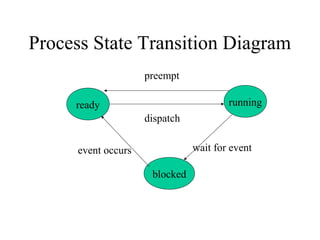
Process State Transition Diagram
                     preempt

     ready                              running
                     dispatch


      event occurs              wait for event

                      blocked
Other States
• New
• Exit
• Suspended (Swapped)
  – Suspended blocked
  – Suspended ready
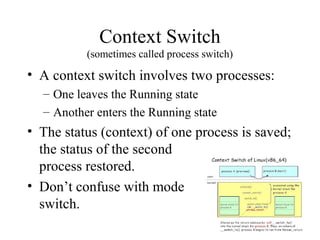
Context Switch
          (sometimes called process switch)

• A context switch involves two processes:
  – One leaves the Running state
  – Another enters the Running state
• The status (context) of one process is saved;
  the status of the second
  process restored.
• Don’t confuse with mode
  switch.
Concurrent Processes

• Two processes are concurrent if their
  executions overlap in time.
• In a uniprocessor environment,
  multiprogramming provides concurrency.
• In a multiprocessor, true parallel execution
  can occur.
Forms of Concurrency
Multi programming: Creates logical parallelism by running
  several processes/threads at a time. The OS keeps several jobs
  in memory simultaneously. It selects a job from the ready state
  and starts executing it. When that job needs to wait for some
  event the CPU is switched to another job. Primary objective:
  eliminate CPU idle time
Time sharing: An extension of multiprogramming. After a certain
  amount of time the CPU is switched to another job regardless of
  whether the process/thread needs to wait for some operation.
  Switching between jobs occurs so frequently that the users can
  interact with each program while it is running.
Multiprocessing: Multiple processors on a single computer run
  multiple processes at the same time. Creates physical
  parallelism.
Protection
• When multiple processes (or threads) exist at the
  same time, and execute concurrently, the OS must
  protect them from mutual interference.
• Memory protection (memory isolation) prevents
  one process from accessing the physical address
  space of another process.
• Base/limit registers, virtual memory are
  techniques to achieve memory protection.
Processes and Threads
• Traditional processes could only do one
  thing at a time – they were single-threaded.
• Multithreaded processes can (conceptually)
  do several things at once – they have
  multiple threads.
• A thread is an “execution context” or
  “separately schedulable” entity.
Threads
• Several threads can share the address space
  of a single process, along with resources
  such as files.
• Each thread has its own stack, PC, and TCB
  (thread control block)
  – Each thread executes a separate section of the
    code and has private data
  – All threads can access global data of process
Threads versus Processes
• If two processes want to access shared data
  structures, the OS must be involved.
  – Overhead: system calls, mode switches, context
    switches, extra execution time.
• Two threads in a single process can share
  global data automatically – as easily as two
  functions in a single process.
Review Topics
•   Processes &Threads
•   Scheduling
•   Synchronization
•   Memory Management
•   File and I/O Management
Process (Thread) Scheduling
• Process scheduling decides which process
  to dispatch (to the Run state) next.
• In a multiprogrammed system several
  processes compete for a single processor
• Preemptive scheduling: a process can be
  removed from the Run state before it
  completes or blocks (timer expires or higher
  priority process enters Ready state).
Scheduling Algorithms:
• FCFS (first-come, first-served): non-
  preemptive: processes run until they
  complete or block themselves for event wait
• RR (round robin): preemptive FCFS, based
  on time slice
  – Time slice = length of time a process can run
    before being preempted
  – Return to Ready state when preempted
Scheduling Goals
• Optimize turnaround time and/or response
  time
• Optimize throughput
• Avoid starvation (be “fair” )
• Respect priorities
  – Static
  – Dynamic
Review Topics
•   Processes &Threads
•   Scheduling
•   Synchronization
•   Memory Management
•   File and I/O Management
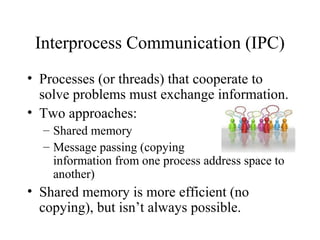
Interprocess Communication (IPC)
• Processes (or threads) that cooperate to
  solve problems must exchange information.
• Two approaches:
  – Shared memory
  – Message passing (copying
    information from one process address space to
    another)
• Shared memory is more efficient (no
  copying), but isn’t always possible.
Process/Thread Synchronization
• Concurrent processes are asynchronous: the
  relative order of events within the two
  processes cannot be predicted in advance.
• If processes are related (exchange
  information in some way) it may be
  necessary to synchronize their activity at
  some points.
Instruction Streams
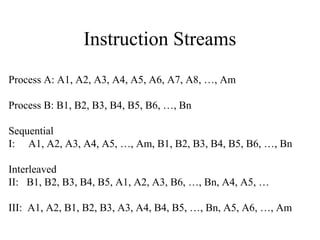
Process A: A1, A2, A3, A4, A5, A6, A7, A8, …, Am

Process B: B1, B2, B3, B4, B5, B6, …, Bn

Sequential
I: A1, A2, A3, A4, A5, …, Am, B1, B2, B3, B4, B5, B6, …, Bn

Interleaved
II: B1, B2, B3, B4, B5, A1, A2, A3, B6, …, Bn, A4, A5, …

III: A1, A2, B1, B2, B3, A3, A4, B4, B5, …, Bn, A5, A6, …, Am
Process Synchronization – 2 Types

• Correct synchronization may mean that we
  want to be sure that event 2 in process A
  happens before event 4 in process B.
• Or, it could mean that when one process is
  accessing a shared resource, no other
  process should be allowed to access the
  same resource. This is the critical section
  problem, and requires mutual exclusion.
Mutual Exclusion
• A critical section is the code that accesses
  shared data or resources.
• A solution to the critical section problem
  must ensure that only one process at a time
  can execute its critical section (CS).
• Two separate shared resources can be
  accessed concurrently.
Synchronization
• Processes and threads are responsible for
  their own synchronization, but
  programming languages and operating
  systems may have features to help.
• Virtually all operating systems provide
  some form of semaphore, which can be
  used for mutual exclusion and other forms
  of synchronization such as event ordering.
Semaphores
• Definition: A semaphore is an integer variable
  (S) which can only be accessed in the following
  ways:
   – Initialize (S)
   – P(S)      // {wait(S)}
   – V(S)      // {signal(S)}
• The operating system must ensure that all
  operations are indivisible, and that no other access
  to the semaphore variable is allowed
Other Mechanisms for Mutual
          Exclusion
• Spinlocks: a busy-waiting solution
  in which a process wishing to enter a
  critical section continuously tests some lock
  variable to see if the critical section is
  available. Implemented with various
  machine-language instructions
• Disable interrupts before entering CS,
  enable after leaving
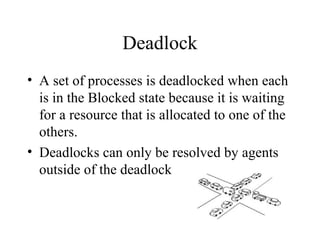
Deadlock
• A set of processes is deadlocked when each
  is in the Blocked state because it is waiting
  for a resource that is allocated to one of the
  others.
• Deadlocks can only be resolved by agents
  outside of the deadlock
Deadlock versus Starvation
• Starvation occurs when a process is repeatedly
  denied access to a resource even though the
  resource becomes available.
• Deadlocked processes are permanently blocked
  but starving processes may eventually get the
  resource being requested.
• In starvation, the resource being waited for is
  continually in use, while in deadlock it is not
  being used because it is assigned to a blocked
  process.
Causes of Deadlock
•   Mutual exclusion (exclusive access)
•   Wait while hold (hold and wait)
•   No preemption
•   Circular wait
Deadlock Management Strategies
• Prevention: design a system in which at
  least one of the 4 causes can never happen
• Avoidance: allocate resources carefully, so
  there will always be enough to allow all
  processes to complete (Banker’s Algorithm)
• Detection: periodically, determine if a
  deadlock exists. If there is one, abort one or
  more processes, or take some other action.
Analysis of Deadlock
           Management
• Most systems do not use any form of
  deadlock management because it is not cost
  effective
  – Too time-consuming
  – Too restrictive
• Exceptions: some transaction systems have
  roll-back capability or apply ordering
  techniques to control acquiring of locks.
Review Topics
•   Processes &Threads
•   Scheduling
•   Synchronization
•   Memory Management
•   File and I/O Management
Memory Management
• Introduction
• Allocation methods
  – One process at a time
  – Multiple processes, contiguous allocation
  – Multiple processes, virtual memory
Memory Management - Intro
• Primary memory must be shared between
  the OS and user processes.
• OS must protect itself from users, and one
  user from another.
• OS must also manage the sharing of
  physical memory so that processes are able
  to execute with reasonable efficiency.
Allocation Methods:
           Single Process
• Earliest systems used a simple approach:
  OS had a protected set of memory locations,
  the remainder of memory belonged to one
  process at a time.
• Process “owned” all computer resources
  from the time it began until it completed
Allocation Methods:
 Multiple Processes, Contiguous Allocation
• Several processes resided in memory at one
  time (multiprogramming).
• The entire process image for each process
  was stored in a contiguous set of locations.
• Drawbacks:
  – Limited number of processes at one time
  – Fragmentation of memory
Allocation Methods:
      Multiple Processes, Virtual Memory
• Motivation for virtual memory:
  – to better utilize memory (reduce fragmentation)
  – to increase the number of processes that could
    execute concurrently
• Method:
  – allow program to be loaded non-contiguously
  – allow program to execute even if it is not
    entirely in memory.
Virtual Memory - Paging
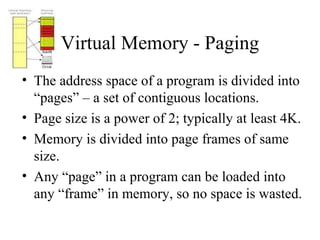
• The address space of a program is divided into
  “pages” – a set of contiguous locations.
• Page size is a power of 2; typically at least 4K.
• Memory is divided into page frames of same
  size.
• Any “page” in a program can be loaded into
  any “frame” in memory, so no space is wasted.
Paging - continued
• General idea – save space by loading only
  those pages that a program needs now.
• Result – more programs can be in memory
  at any given time
• Problems:
  – How to tell what’s “needed”
  – How to keep track of where the pages are
  – How to translate virtual addresses to physical
Solutions to Paging Problems
• How to tell what’s “needed”
  – Demand paging
• How to keep track of where the pages are
  – The page table
• How to translate virtual addresses to
  physical
  – MMU (memory management unit) uses logical
    addresses and page table data to form actual
    physical addresses. All done in hardware.
OS Responsibilities in Paged Virtual
            Memory
• Maintain page tables
• Manage page replacement
Review Topics
•   Processes &Threads
•   Scheduling
•   Synchronization
•   Memory Management
•   File and I/O Management
File Systems
• Maintaining a shared file system is a major
  job for the operating system.
• Single user systems require protection
  against loss, efficient look-up service, etc.
• Multiple user systems also need to provide
  access control.
File Systems – Disk Management
• The file system is also responsible for
  allocating disk space and keeping track of
  where files are located.
• Disk storage management has many of the
  problems main memory management has,
  including fragmentation issues.
End of OS Review

Os

  • 1.
    Basic Operating System Concepts A Review
  • 2.
    Main Goals ofOS 1. Resource Management: Disk, CPU cycles, etc. must be managed efficiently to maximize overall system performance 2. Resource Abstraction: Software interface to simplify use of hardware resources 3. Virtualization: Supports resource sharing – gives each process the appearance of an unshared resource
  • 3.
    System Call • Anentry point to OS code • Allows users to request OS services • API’s/library functions usually provide an interface to system calls – e.g, language-level I/O functions map user parameters into system-call format • Thus, the run-time support system of a prog. language acts as an interface between programmer and OS interface
  • 4.
    Some UNIX SystemCalls • System calls for low level • System Calls for process file I/O control – creat(name, permissions) – fork() – open(name, mode) – wait() – close(fd) – execl(), execlp(), execv(), – unlink(fd) execvp() – read(fd, buffer, n_to_read) – exit() – write(fd, buffer, – signal(sig, handler) n_to_write) – kill(sig, pid) – lseek(fd, offest, whence) • System Calls for IPC – pipe(fildes) – dup(fd)
  • 5.
    Execution Modes (Dual Mode Execution) • User mode vs. kernel (or supervisor) mode • Protection mechanism: critical operations (e.g. direct device access, disabling interrupts) can only be performed by the OS while executing in kernel mode • Mode bit • Privileged instructions
  • 6.
    Mode Switching • Systemcalls allow boundary to be crossed – System call initiates mode switch from user to kernel mode – Special instruction – “software interrupt” – calls the kernel function • transfers control to a location in the interrupt vector – OS executes kernel code, mode switch occurs again when control returns to user process
  • 7.
    Processing a SystemCall* • Switching between kernel and user mode is time consuming • Kernel must – Save registers so process can resume execution • Other overhead is involved; e.g. cache misses, & prefetch – Verify system call name and parameters – Call the kernel function to perform the service – On completion, restore registers and return to caller
  • 8.
    Review Topics • Processes &Threads • Scheduling • Synchronization • Memory Management • File and I/O Management
  • 9.
    Review of Processes •Processes – process image – states and state transitions – process switch (context switch) • Threads • Concurrency
  • 10.
    Process Definition • Aprocess is an instance of a program in execution. • It encompasses the static concept of program and the dynamic aspect of execution. • As the process runs, its context (state) changes – register contents, memory contents, etc., are modified by execution
  • 11.
    Processes: Process Image •The process image represents the current status of the process • It consists of (among other things) – Executable code – Static data area – Stack & heap area – Process Control Block (PCB): data structure used to represent execution context, or state – Other information needed to manage process
  • 12.
    Process Execution States •For convenience, we describe a process as being in one of several basic states. • Most basic: – Running – Ready – Blocked (or sleeping)
  • 13.
    Process State TransitionDiagram preempt ready running dispatch event occurs wait for event blocked
  • 14.
    Other States • New •Exit • Suspended (Swapped) – Suspended blocked – Suspended ready
  • 15.
    Context Switch (sometimes called process switch) • A context switch involves two processes: – One leaves the Running state – Another enters the Running state • The status (context) of one process is saved; the status of the second process restored. • Don’t confuse with mode switch.
  • 16.
    Concurrent Processes • Twoprocesses are concurrent if their executions overlap in time. • In a uniprocessor environment, multiprogramming provides concurrency. • In a multiprocessor, true parallel execution can occur.
  • 17.
    Forms of Concurrency Multiprogramming: Creates logical parallelism by running several processes/threads at a time. The OS keeps several jobs in memory simultaneously. It selects a job from the ready state and starts executing it. When that job needs to wait for some event the CPU is switched to another job. Primary objective: eliminate CPU idle time Time sharing: An extension of multiprogramming. After a certain amount of time the CPU is switched to another job regardless of whether the process/thread needs to wait for some operation. Switching between jobs occurs so frequently that the users can interact with each program while it is running. Multiprocessing: Multiple processors on a single computer run multiple processes at the same time. Creates physical parallelism.
  • 18.
    Protection • When multipleprocesses (or threads) exist at the same time, and execute concurrently, the OS must protect them from mutual interference. • Memory protection (memory isolation) prevents one process from accessing the physical address space of another process. • Base/limit registers, virtual memory are techniques to achieve memory protection.
  • 19.
    Processes and Threads •Traditional processes could only do one thing at a time – they were single-threaded. • Multithreaded processes can (conceptually) do several things at once – they have multiple threads. • A thread is an “execution context” or “separately schedulable” entity.
  • 20.
    Threads • Several threadscan share the address space of a single process, along with resources such as files. • Each thread has its own stack, PC, and TCB (thread control block) – Each thread executes a separate section of the code and has private data – All threads can access global data of process
  • 21.
    Threads versus Processes •If two processes want to access shared data structures, the OS must be involved. – Overhead: system calls, mode switches, context switches, extra execution time. • Two threads in a single process can share global data automatically – as easily as two functions in a single process.
  • 22.
    Review Topics • Processes &Threads • Scheduling • Synchronization • Memory Management • File and I/O Management
  • 23.
    Process (Thread) Scheduling •Process scheduling decides which process to dispatch (to the Run state) next. • In a multiprogrammed system several processes compete for a single processor • Preemptive scheduling: a process can be removed from the Run state before it completes or blocks (timer expires or higher priority process enters Ready state).
  • 24.
    Scheduling Algorithms: • FCFS(first-come, first-served): non- preemptive: processes run until they complete or block themselves for event wait • RR (round robin): preemptive FCFS, based on time slice – Time slice = length of time a process can run before being preempted – Return to Ready state when preempted
  • 25.
    Scheduling Goals • Optimizeturnaround time and/or response time • Optimize throughput • Avoid starvation (be “fair” ) • Respect priorities – Static – Dynamic
  • 26.
    Review Topics • Processes &Threads • Scheduling • Synchronization • Memory Management • File and I/O Management
  • 27.
    Interprocess Communication (IPC) •Processes (or threads) that cooperate to solve problems must exchange information. • Two approaches: – Shared memory – Message passing (copying information from one process address space to another) • Shared memory is more efficient (no copying), but isn’t always possible.
  • 28.
    Process/Thread Synchronization • Concurrentprocesses are asynchronous: the relative order of events within the two processes cannot be predicted in advance. • If processes are related (exchange information in some way) it may be necessary to synchronize their activity at some points.
  • 29.
    Instruction Streams Process A:A1, A2, A3, A4, A5, A6, A7, A8, …, Am Process B: B1, B2, B3, B4, B5, B6, …, Bn Sequential I: A1, A2, A3, A4, A5, …, Am, B1, B2, B3, B4, B5, B6, …, Bn Interleaved II: B1, B2, B3, B4, B5, A1, A2, A3, B6, …, Bn, A4, A5, … III: A1, A2, B1, B2, B3, A3, A4, B4, B5, …, Bn, A5, A6, …, Am
  • 30.
    Process Synchronization –2 Types • Correct synchronization may mean that we want to be sure that event 2 in process A happens before event 4 in process B. • Or, it could mean that when one process is accessing a shared resource, no other process should be allowed to access the same resource. This is the critical section problem, and requires mutual exclusion.
  • 31.
    Mutual Exclusion • Acritical section is the code that accesses shared data or resources. • A solution to the critical section problem must ensure that only one process at a time can execute its critical section (CS). • Two separate shared resources can be accessed concurrently.
  • 32.
    Synchronization • Processes andthreads are responsible for their own synchronization, but programming languages and operating systems may have features to help. • Virtually all operating systems provide some form of semaphore, which can be used for mutual exclusion and other forms of synchronization such as event ordering.
  • 33.
    Semaphores • Definition: Asemaphore is an integer variable (S) which can only be accessed in the following ways: – Initialize (S) – P(S) // {wait(S)} – V(S) // {signal(S)} • The operating system must ensure that all operations are indivisible, and that no other access to the semaphore variable is allowed
  • 34.
    Other Mechanisms forMutual Exclusion • Spinlocks: a busy-waiting solution in which a process wishing to enter a critical section continuously tests some lock variable to see if the critical section is available. Implemented with various machine-language instructions • Disable interrupts before entering CS, enable after leaving
  • 35.
    Deadlock • A setof processes is deadlocked when each is in the Blocked state because it is waiting for a resource that is allocated to one of the others. • Deadlocks can only be resolved by agents outside of the deadlock
  • 36.
    Deadlock versus Starvation •Starvation occurs when a process is repeatedly denied access to a resource even though the resource becomes available. • Deadlocked processes are permanently blocked but starving processes may eventually get the resource being requested. • In starvation, the resource being waited for is continually in use, while in deadlock it is not being used because it is assigned to a blocked process.
  • 37.
    Causes of Deadlock • Mutual exclusion (exclusive access) • Wait while hold (hold and wait) • No preemption • Circular wait
  • 38.
    Deadlock Management Strategies •Prevention: design a system in which at least one of the 4 causes can never happen • Avoidance: allocate resources carefully, so there will always be enough to allow all processes to complete (Banker’s Algorithm) • Detection: periodically, determine if a deadlock exists. If there is one, abort one or more processes, or take some other action.
  • 39.
    Analysis of Deadlock Management • Most systems do not use any form of deadlock management because it is not cost effective – Too time-consuming – Too restrictive • Exceptions: some transaction systems have roll-back capability or apply ordering techniques to control acquiring of locks.
  • 40.
    Review Topics • Processes &Threads • Scheduling • Synchronization • Memory Management • File and I/O Management
  • 41.
    Memory Management • Introduction •Allocation methods – One process at a time – Multiple processes, contiguous allocation – Multiple processes, virtual memory
  • 42.
    Memory Management -Intro • Primary memory must be shared between the OS and user processes. • OS must protect itself from users, and one user from another. • OS must also manage the sharing of physical memory so that processes are able to execute with reasonable efficiency.
  • 43.
    Allocation Methods: Single Process • Earliest systems used a simple approach: OS had a protected set of memory locations, the remainder of memory belonged to one process at a time. • Process “owned” all computer resources from the time it began until it completed
  • 44.
    Allocation Methods: MultipleProcesses, Contiguous Allocation • Several processes resided in memory at one time (multiprogramming). • The entire process image for each process was stored in a contiguous set of locations. • Drawbacks: – Limited number of processes at one time – Fragmentation of memory
  • 45.
    Allocation Methods: Multiple Processes, Virtual Memory • Motivation for virtual memory: – to better utilize memory (reduce fragmentation) – to increase the number of processes that could execute concurrently • Method: – allow program to be loaded non-contiguously – allow program to execute even if it is not entirely in memory.
  • 46.
    Virtual Memory -Paging • The address space of a program is divided into “pages” – a set of contiguous locations. • Page size is a power of 2; typically at least 4K. • Memory is divided into page frames of same size. • Any “page” in a program can be loaded into any “frame” in memory, so no space is wasted.
  • 47.
    Paging - continued •General idea – save space by loading only those pages that a program needs now. • Result – more programs can be in memory at any given time • Problems: – How to tell what’s “needed” – How to keep track of where the pages are – How to translate virtual addresses to physical
  • 48.
    Solutions to PagingProblems • How to tell what’s “needed” – Demand paging • How to keep track of where the pages are – The page table • How to translate virtual addresses to physical – MMU (memory management unit) uses logical addresses and page table data to form actual physical addresses. All done in hardware.
  • 49.
    OS Responsibilities inPaged Virtual Memory • Maintain page tables • Manage page replacement
  • 50.
    Review Topics • Processes &Threads • Scheduling • Synchronization • Memory Management • File and I/O Management
  • 51.
    File Systems • Maintaininga shared file system is a major job for the operating system. • Single user systems require protection against loss, efficient look-up service, etc. • Multiple user systems also need to provide access control.
  • 52.
    File Systems –Disk Management • The file system is also responsible for allocating disk space and keeping track of where files are located. • Disk storage management has many of the problems main memory management has, including fragmentation issues.
  • 53.
    End of OSReview