Module 2
Process Management
Syllabus
Processes: Process concept, processes, Operations on processes, Inter
process communication, Communication in client-server systems.
Threads: Introduction to Threads, Single and Multithreaded processes
and its benefits, User and Kernel threads, Multithreading models,
Threading issues.
Process Scheduling: Basic concepts, Scheduling criteria, Scheduling
Algorithms
What is a Process?
• A process is defined as a system which describes the fundamental
unit of work to be carried out in the system.
• A process is a program in execution. It is the unit of work in most
systems
• A process will need certain resources—such as CPU time, memory,
files, and I/O devices —to accomplish its task.
• These resources are allocated to the process either when it is created
or while it is executing.
Process Layout Inside Memory
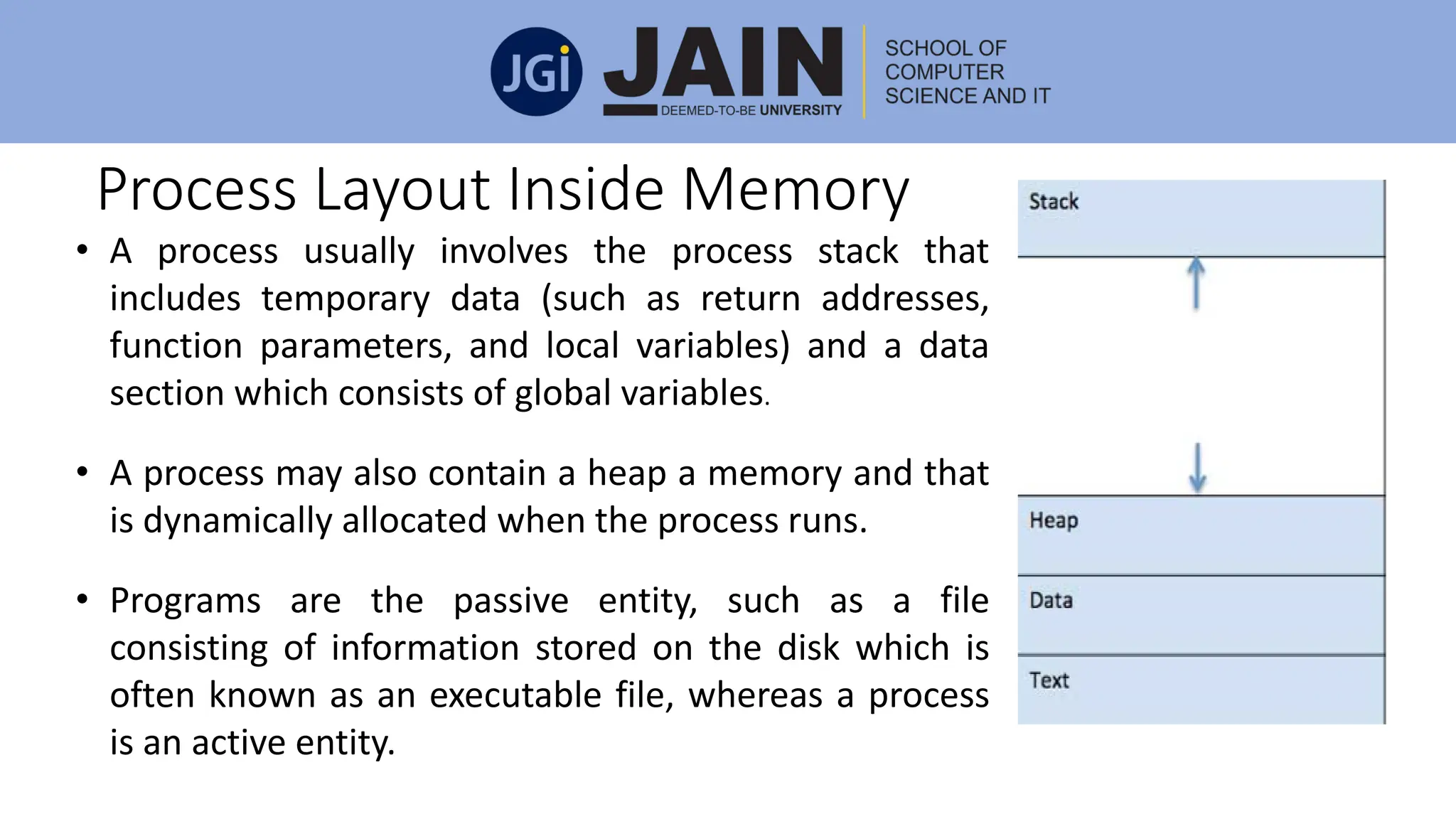
• A process usually involves the process stack that
includes temporary data (such as return addresses,
function parameters, and local variables) and a data
section which consists of global variables.
• A process may also contain a heap a memory and that
is dynamically allocated when the process runs.
• Programs are the passive entity, such as a file
consisting of information stored on the disk which is
often known as an executable file, whereas a process
is an active entity.
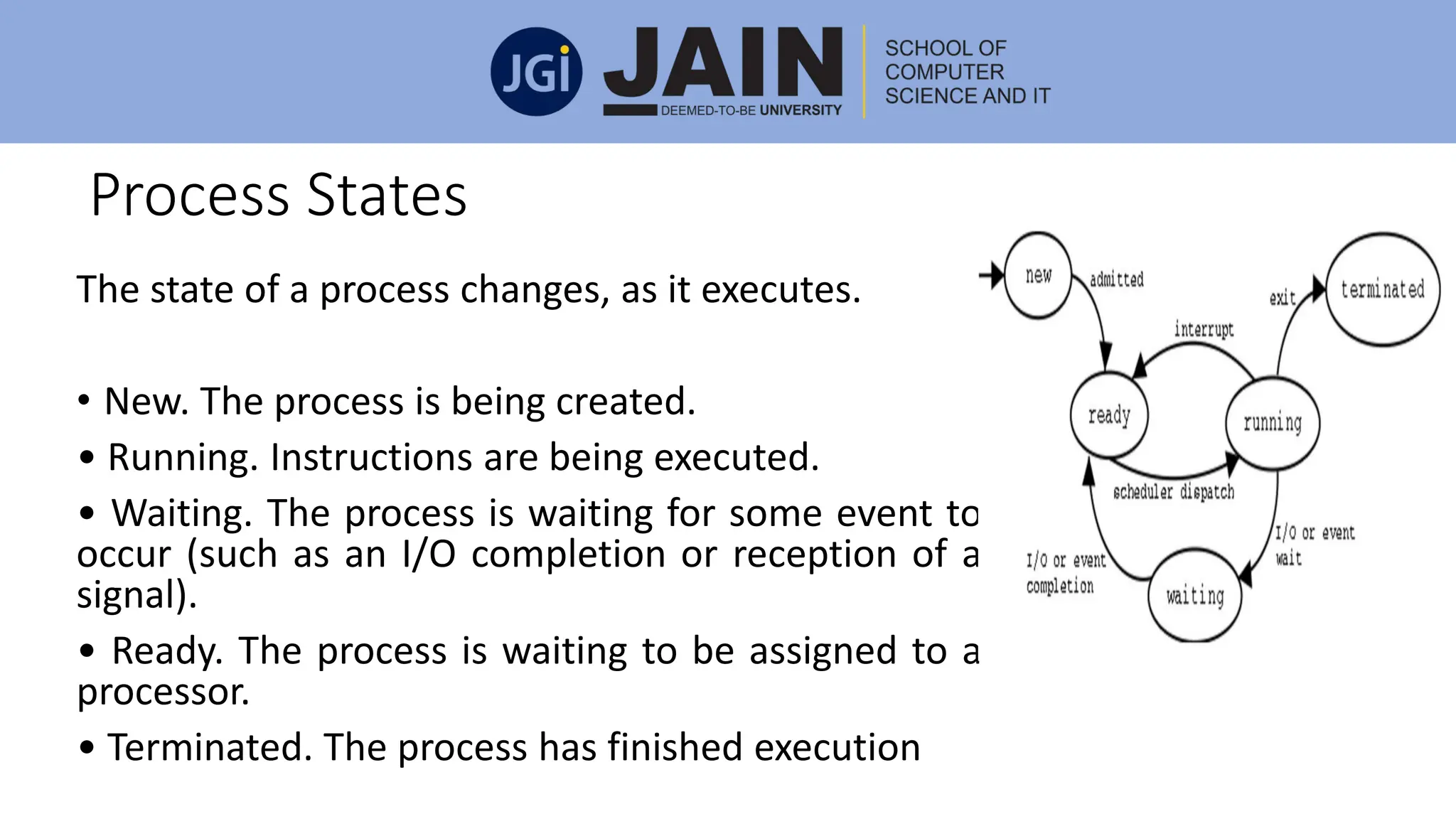
Process States
The state of a process changes, as it executes.
• New. The process is being created.
• Running. Instructions are being executed.
• Waiting. The process is waiting for some event to
occur (such as an I/O completion or reception of a
signal).
• Ready. The process is waiting to be assigned to a
processor.
• Terminated. The process has finished execution
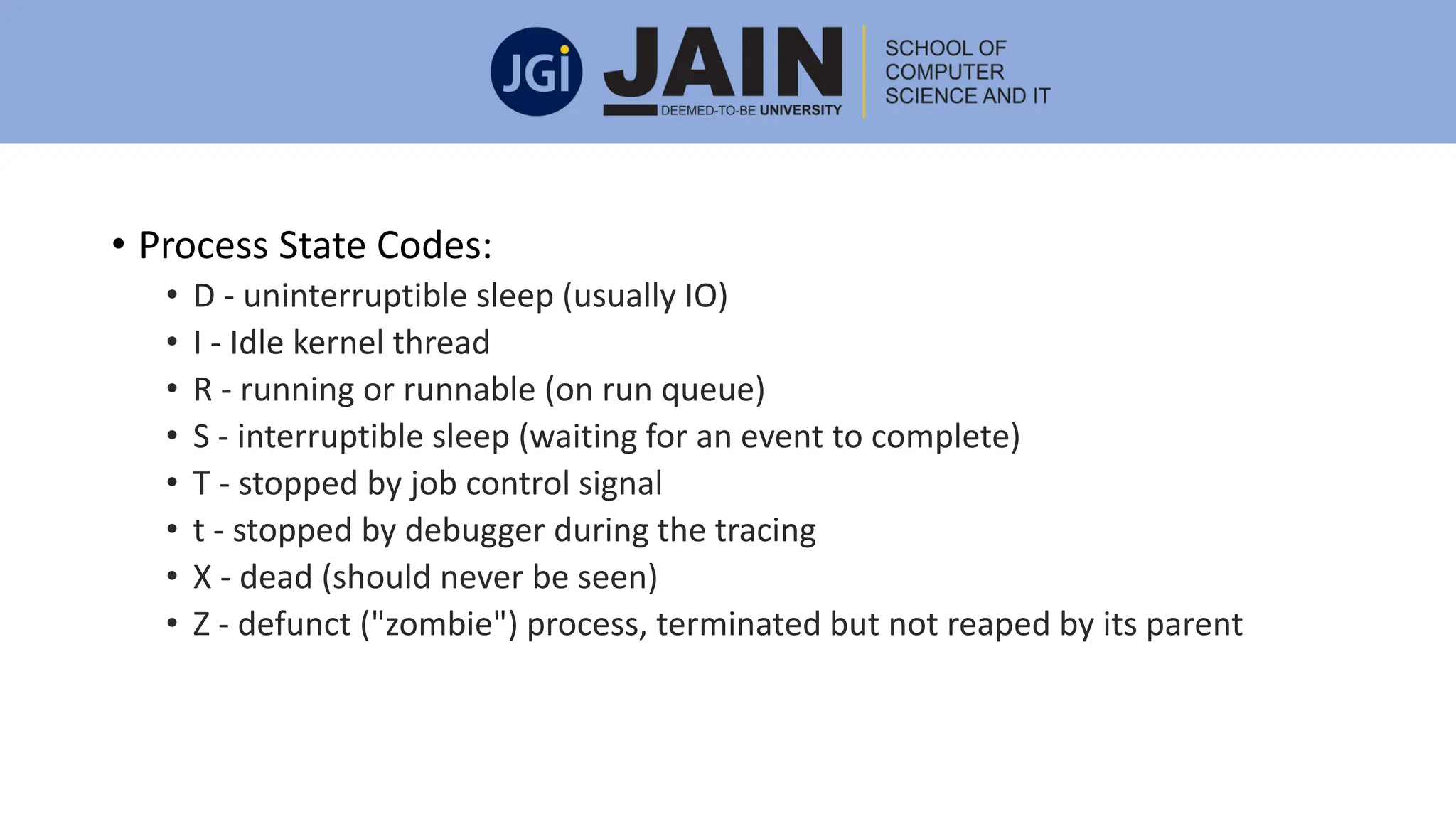
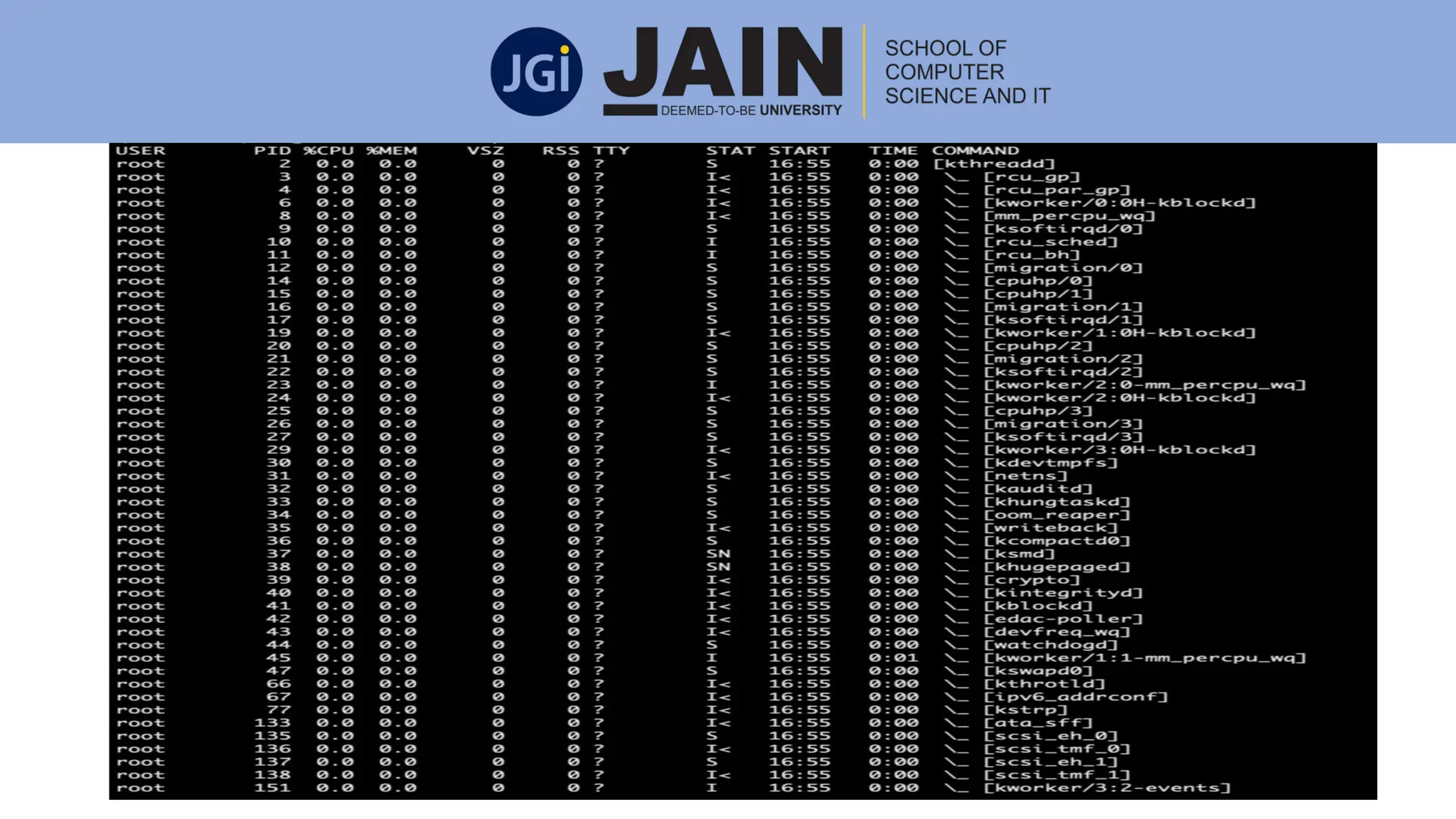
• Process State Codes:
• D - uninterruptible sleep (usually IO)
• I - Idle kernel thread
• R - running or runnable (on run queue)
• S - interruptible sleep (waiting for an event to complete)
• T - stopped by job control signal
• t - stopped by debugger during the tracing
• X - dead (should never be seen)
• Z - defunct ("zombie") process, terminated but not reaped by its parent
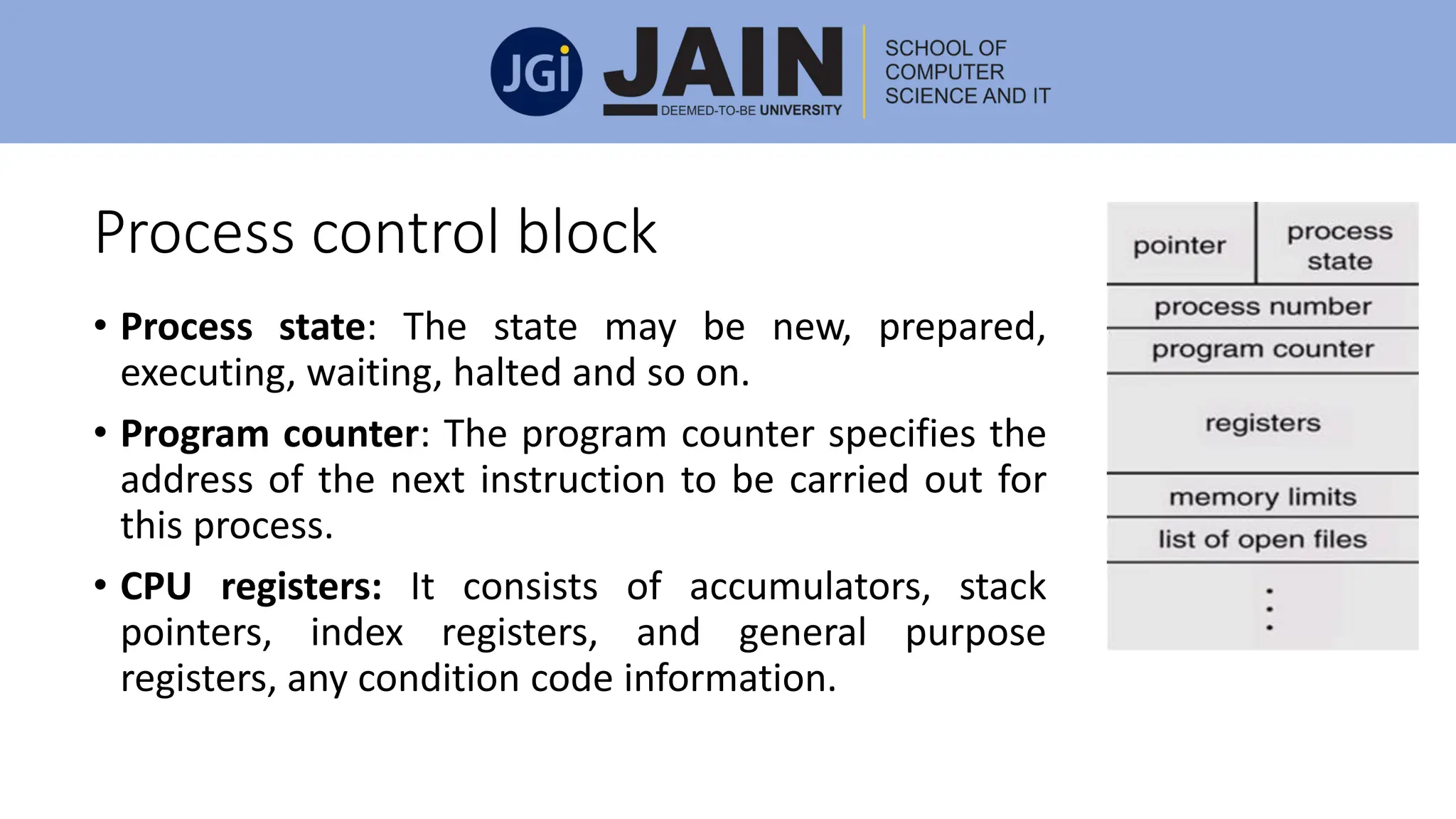
Process control block
• Process state: The state may be new, prepared,
executing, waiting, halted and so on.
• Program counter: The program counter specifies the
address of the next instruction to be carried out for
this process.
• CPU registers: It consists of accumulators, stack
pointers, index registers, and general purpose
registers, any condition code information.
Process control block
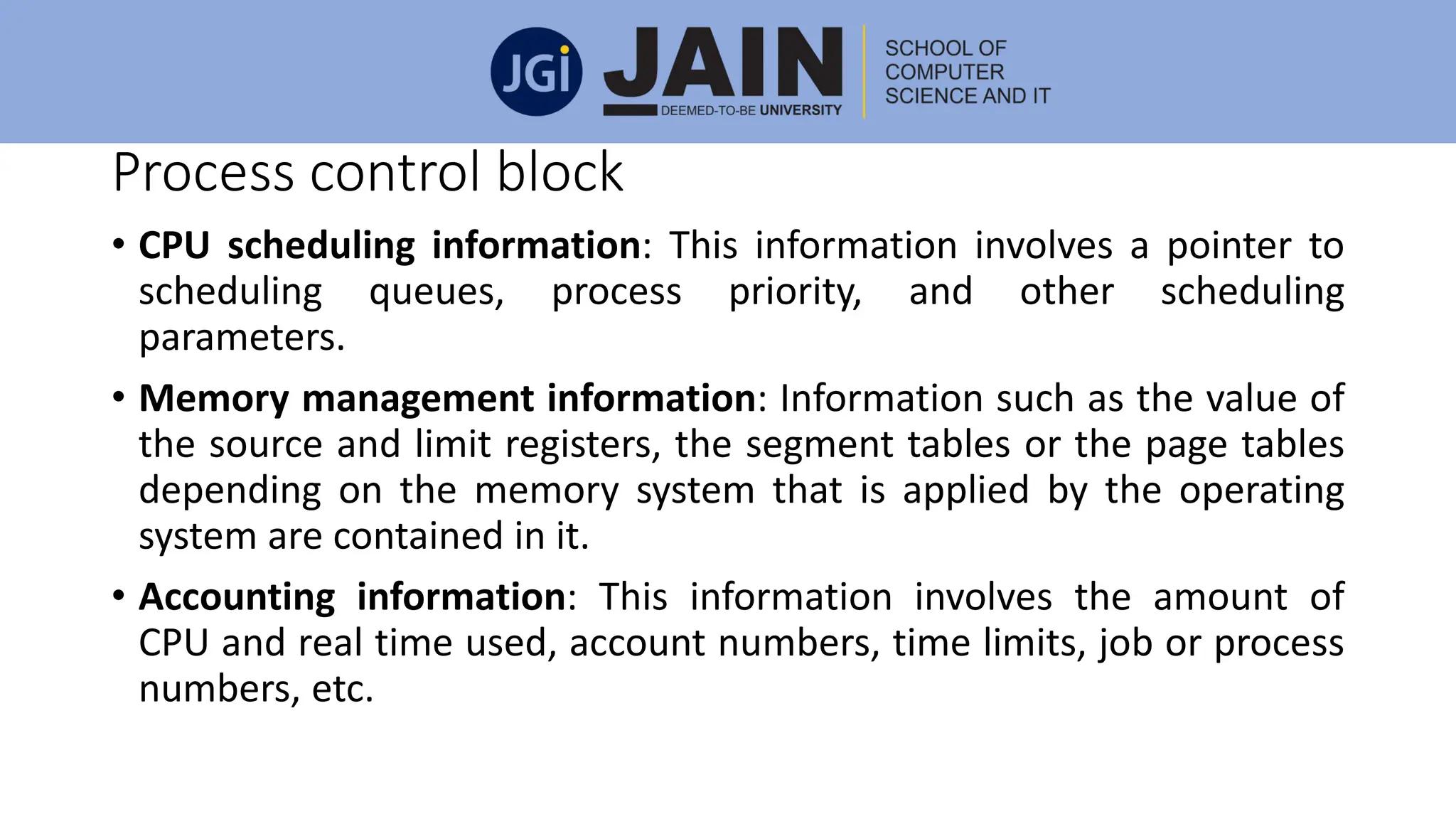
• CPU scheduling information: This information involves a pointer to
scheduling queues, process priority, and other scheduling
parameters.
• Memory management information: Information such as the value of
the source and limit registers, the segment tables or the page tables
depending on the memory system that is applied by the operating
system are contained in it.
• Accounting information: This information involves the amount of
CPU and real time used, account numbers, time limits, job or process
numbers, etc.
Process control block
• I/O status information: It consists of the list of I/O devices allotted to
the process, a list of open files, and so on.
Threads:
A single thread is executed by a program called process. For instance,
when a process is running a word-processor program, a single thread of
instructions is being carried out. This single thread of control supports
the process to execute only one task at one time.
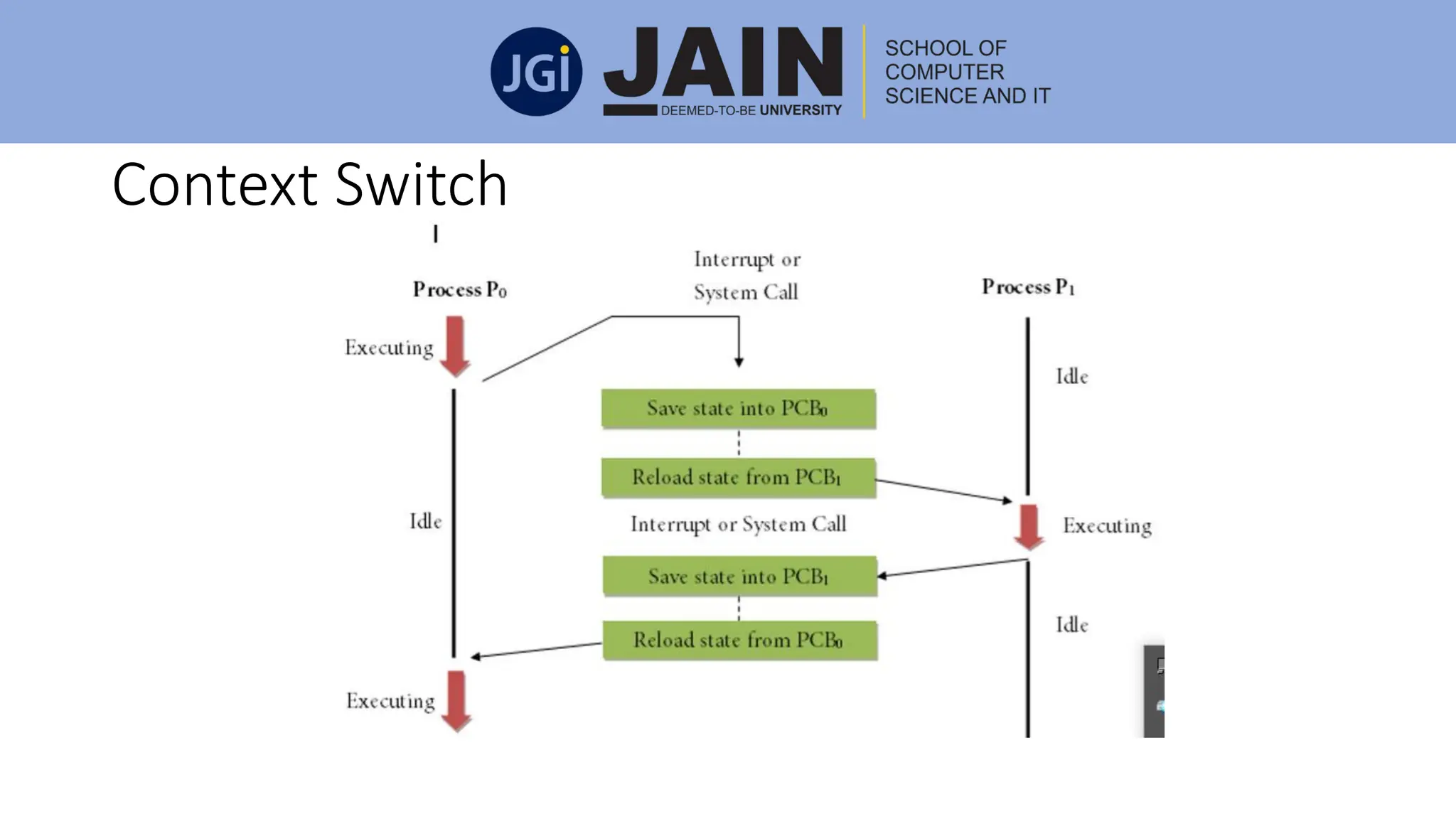
Context Switch
• A context switch is a technique to keep and restore the state or
context of a CPU in Process Control block so that execution of a
process can be resumed from the same point at a later time.
• By using this mechanism, a context switcher allows multiple
processes to use a single CPU.
• When the scheduler exchanges the CPU from one executing process
to another execution process, the state from the current running
process is stored in the process control block.
• After this, the state which is needed for the process to run next is
installed on its own PCB and applied to set the PC, registers, etc. At
this point, the execution of the second process can start.
Context Switch
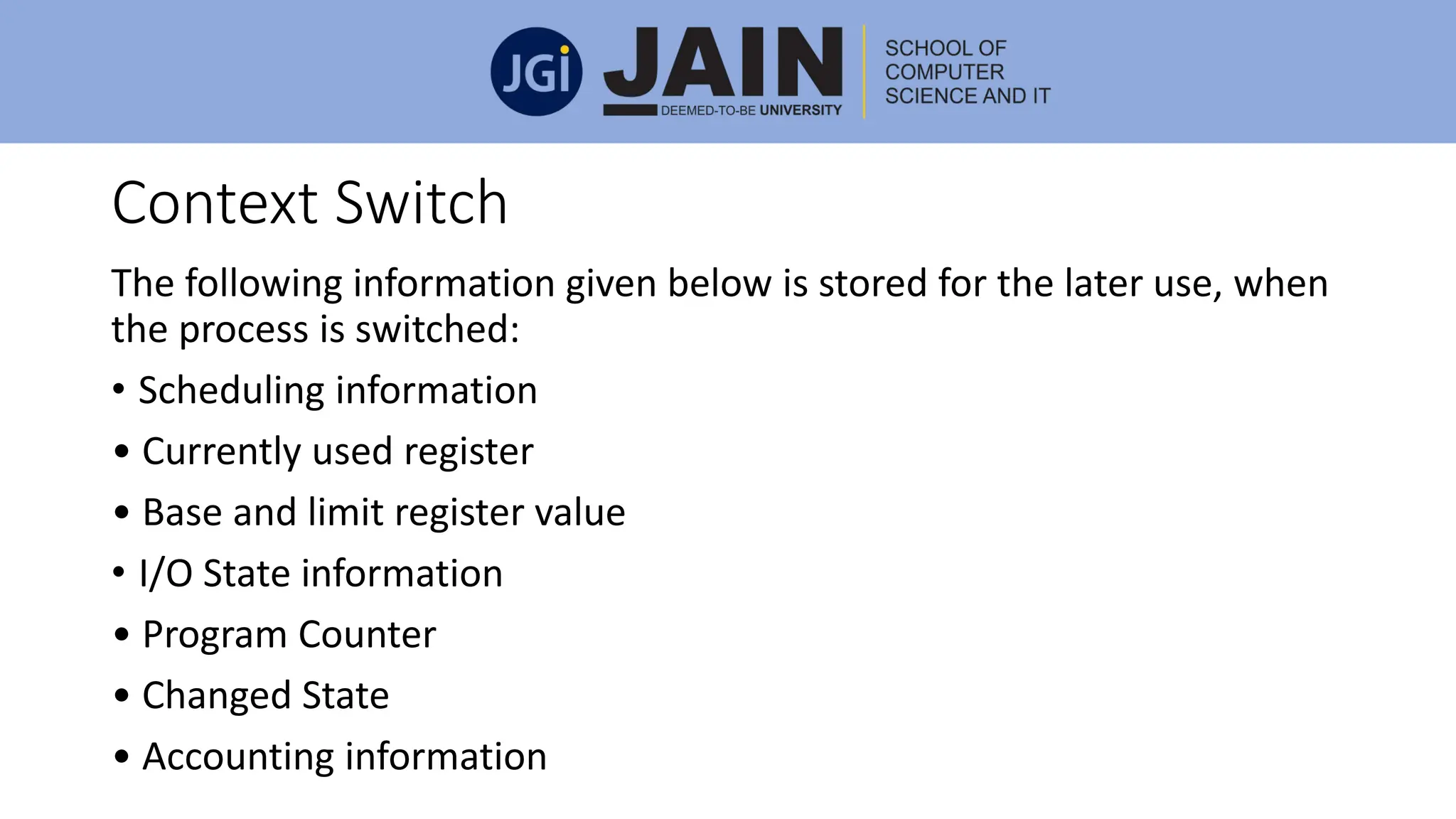
Context Switch
The following information given below is stored for the later use, when
the process is switched:
• Scheduling information
• Currently used register
• Base and limit register value
• I/O State information
• Program Counter
• Changed State
• Accounting information
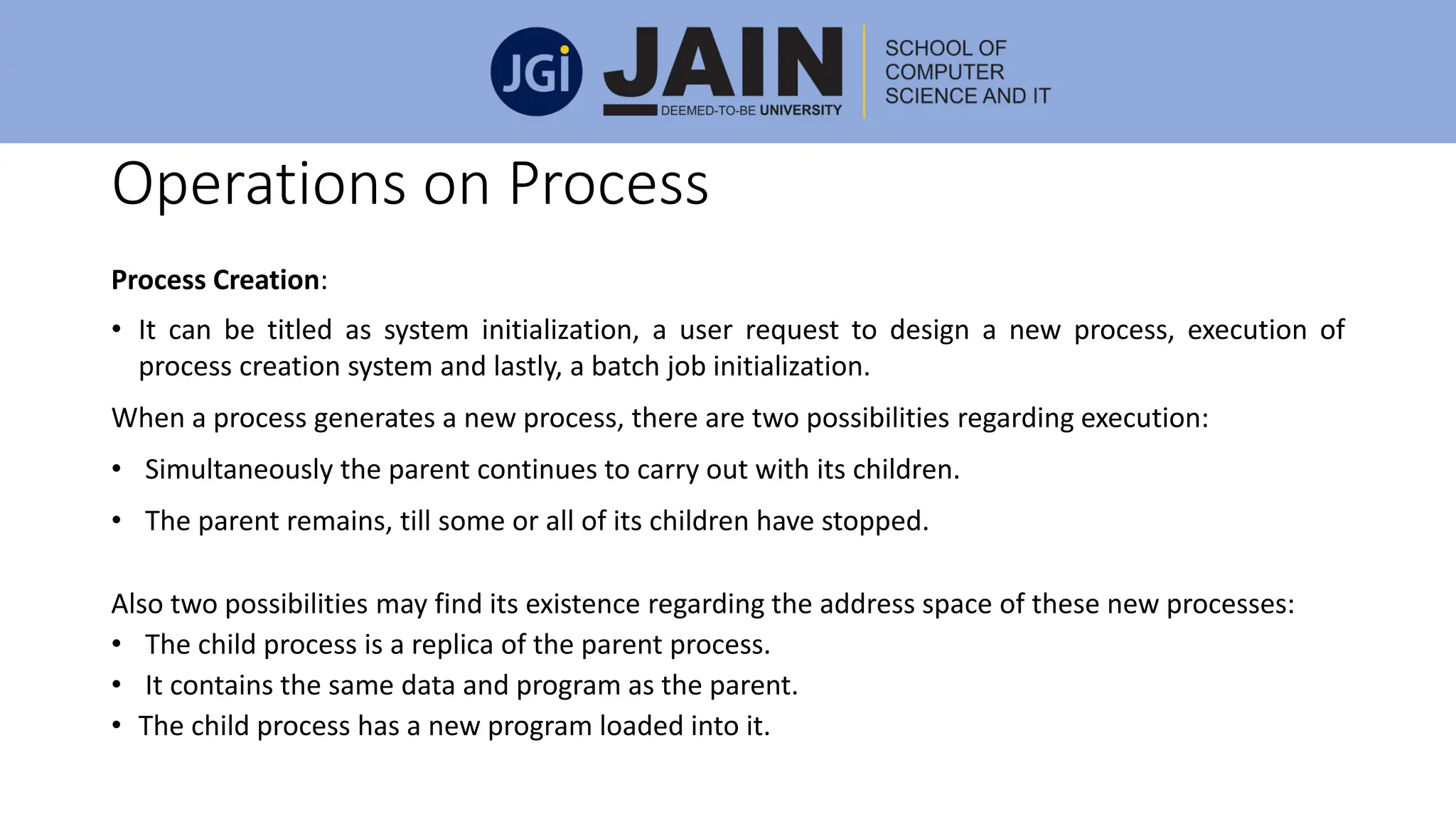
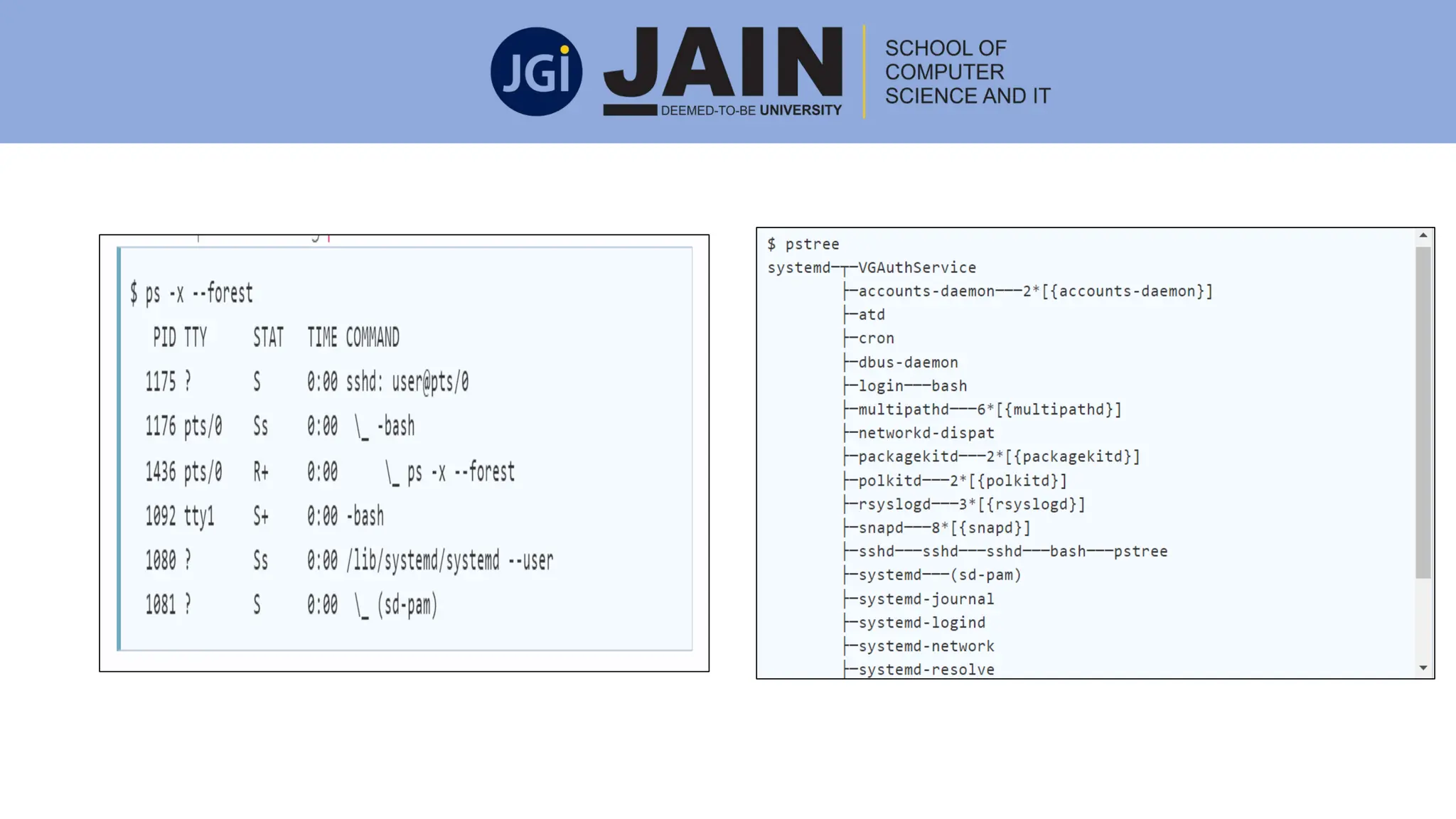
Operations on Process
Process Creation:
• It can be titled as system initialization, a user request to design a new process, execution of
process creation system and lastly, a batch job initialization.
When a process generates a new process, there are two possibilities regarding execution:
• Simultaneously the parent continues to carry out with its children.
• The parent remains, till some or all of its children have stopped.
Also two possibilities may find its existence regarding the address space of these new processes:
• The child process is a replica of the parent process.
• It contains the same data and program as the parent.
• The child process has a new program loaded into it.
Operations on Process
Process Termination :
• The goal of the processes is to execute the instructions provided by a program.
• When the process ends accomplishing the last statement, it gets cancelled. This
process is known as process termination.
A parent may stop the execution of one of its children for various reasons, such as:
• The child has crossed the usage limit of some of the resources that it has been
allotted. For this tracking mechanism of the usage limit, the parent must have a
technique to inspect the usage/state of its children.
• No further necessity of the task that is given to the child.
• When the exiting of the parent happens, since the operating system does not
allow the child to proceed further after the parent has been terminated.
Cooperating Process
• In the operating system, processes executing simultaneously can be
either independent processes or cooperating processes.
• When the sharing of data does not occur between two processes,
then that is called as independent.
• A process is known as a cooperating process if it can impact or get
influenced by the other processes that are being carried out in the
system.
• When the sharing of data takes place between different processes,
then that is called as a cooperating process.
Reason for having Cooperating Process
• Information sharing: Since various users may be involved in the same part of
information (for instance, a shared file), we must give an environment to
support simultaneous access to such information.
• Computation Speedup: If we require a particular task to execute faster, we
must snap it into subtasks, each of which will be carried out in parallel with the
others.
• Modularity: The solution of a problem is divided into parts having well-
defined interfaces, and where the parts execute in parallel. Divide system
functions into separate processes or threads.
• Convenience: A user may be executing multiple processes to obtain a single
objective, or where a utility may apply multiple components, which attach via a
pipe structure that connects the stdout of one stage to stdin of the next, etc.
Inter Process Communication (IPC)
• The processes that are executing in a concurrent fashion, can either
be cooperating processes or it can be an independent processes.
The two important models of communication for IPC are as follows:
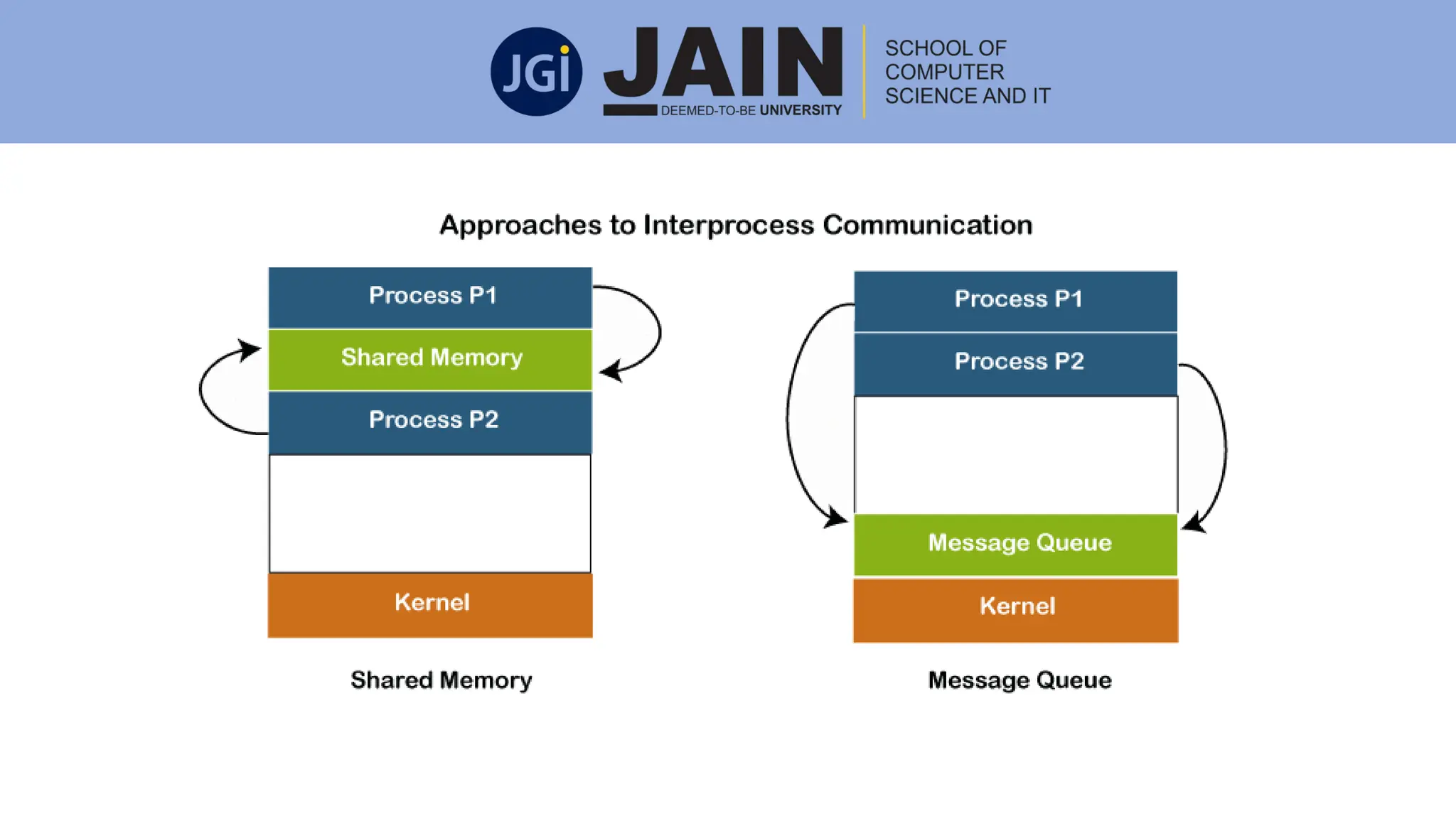
• Shared Memory: In this model, a region of the memory is
established, which has been shared by the cooperating processes. All
the processes that are connected to that shared region can exchange
the information. They can also read and write in the shared region.
• Message Passing: In this model, the communication happens through
the exchange of messages between all the cooperating processes.
Shared Memory Model :
• In this IPC model, a shared memory region is established which is
used by the processes for data communication.
• This memory region is present in the address space of the process
which creates the shared memory segment.
• The processes who want to communicate with this process should
attach it to their address space.
• Producer-Consumer Problem – unbounded buffer and bounded
buffer
Message Passing Model :
• In this model, the processes communicate with each other by
exchanging messages.
• For this purpose a communication link must exist between the
processes and it must facilitate at least two operations send
(message) and receive (message).
• Size of messages may be variable or fixed.
• Direct or indirect communication
• Synchronous or asynchronous communication
• Automatic or explicit buffering
Communication in Client-Server System
Happens via RPC (remote procedure calls), sockets, and Java's RMI (remote
method invocation).
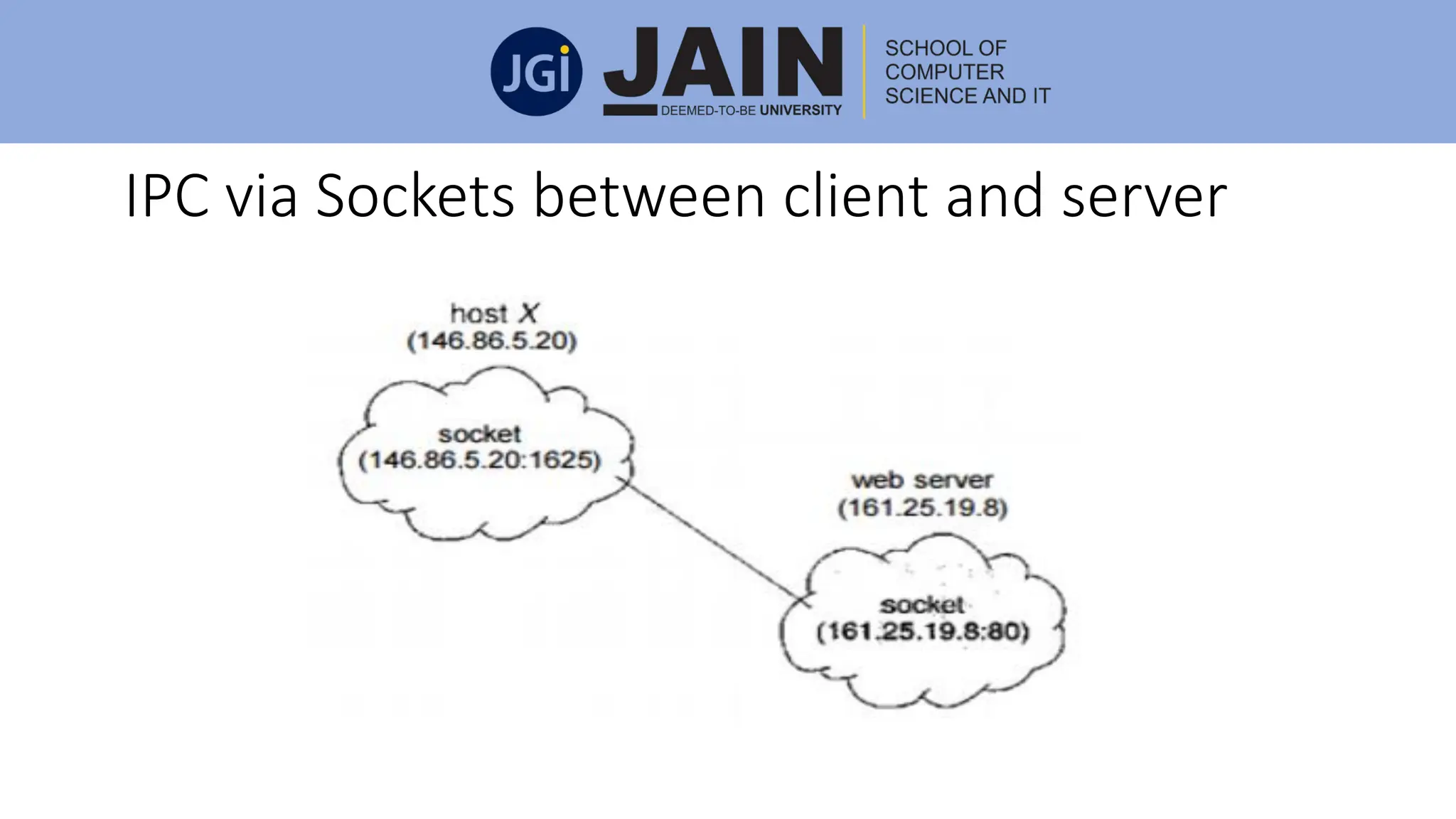
Sockets
• A socket is considered to be an endpoint for the communication.
• A set of processes that are communicating over a network applies a set of
sockets (one for each of the processes).
• A socket is recognised by an IP address along with a port number.
• The server waits for an incoming client request by following a specified
port.
• Once a request is obtained, the server acquires a link from the client socket
to establish a connection.
IPC via Sockets between client and server
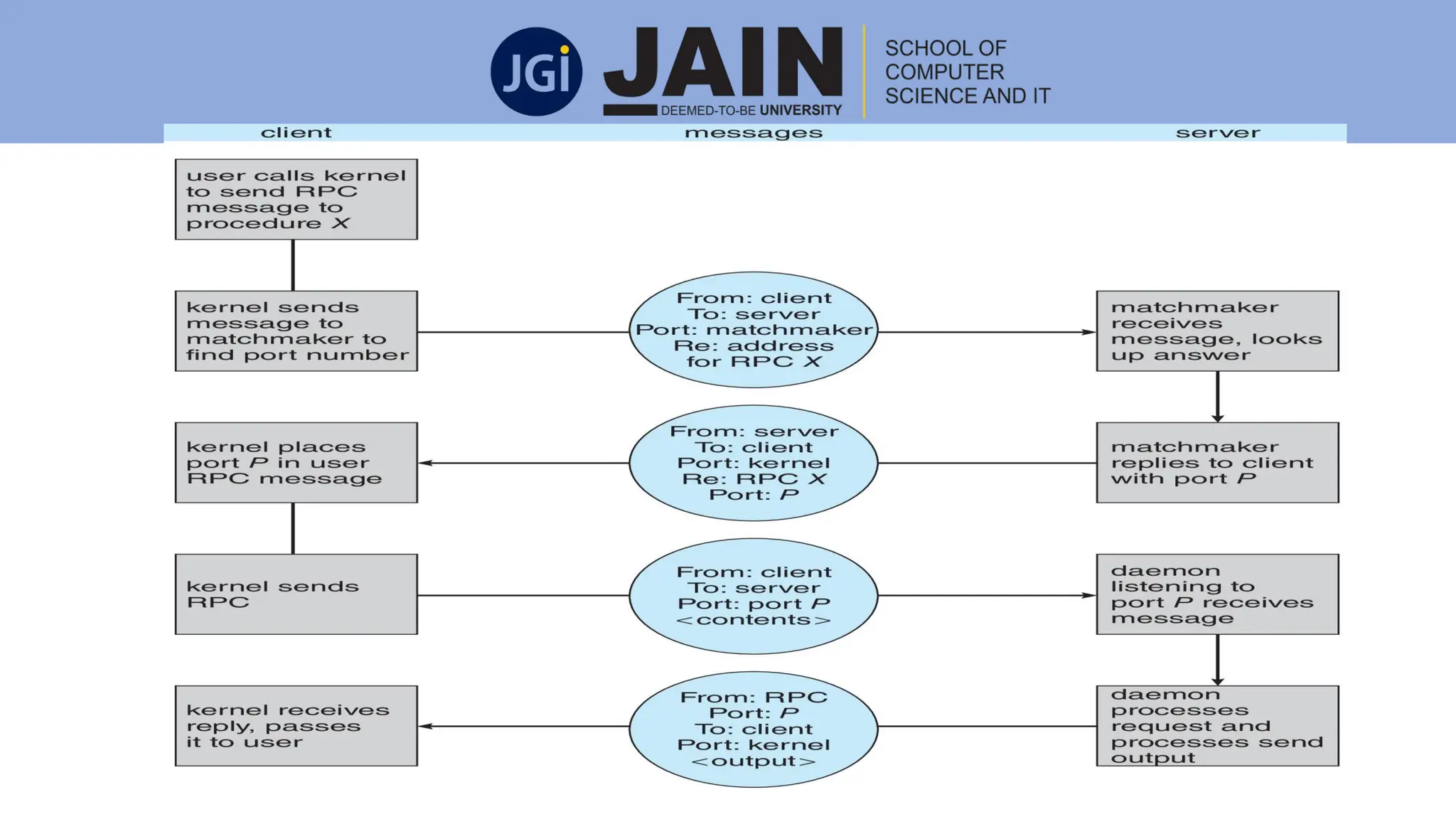
Remote Procedure Calls(RPC)
• The Remote Procedure Calls was planned in a way to separate the
usage of the procedure call mechanism between the systems
including the network connections.
• Each message is directed to a Remote Procedure Calls daemon that is
listening to a port on the remote system, and all of them have an
identifier of the function and the parameters to execute and pass the
function respectively.
• Then the function is accomplished as requested, and the output is
then sent to the requester through a separate message.
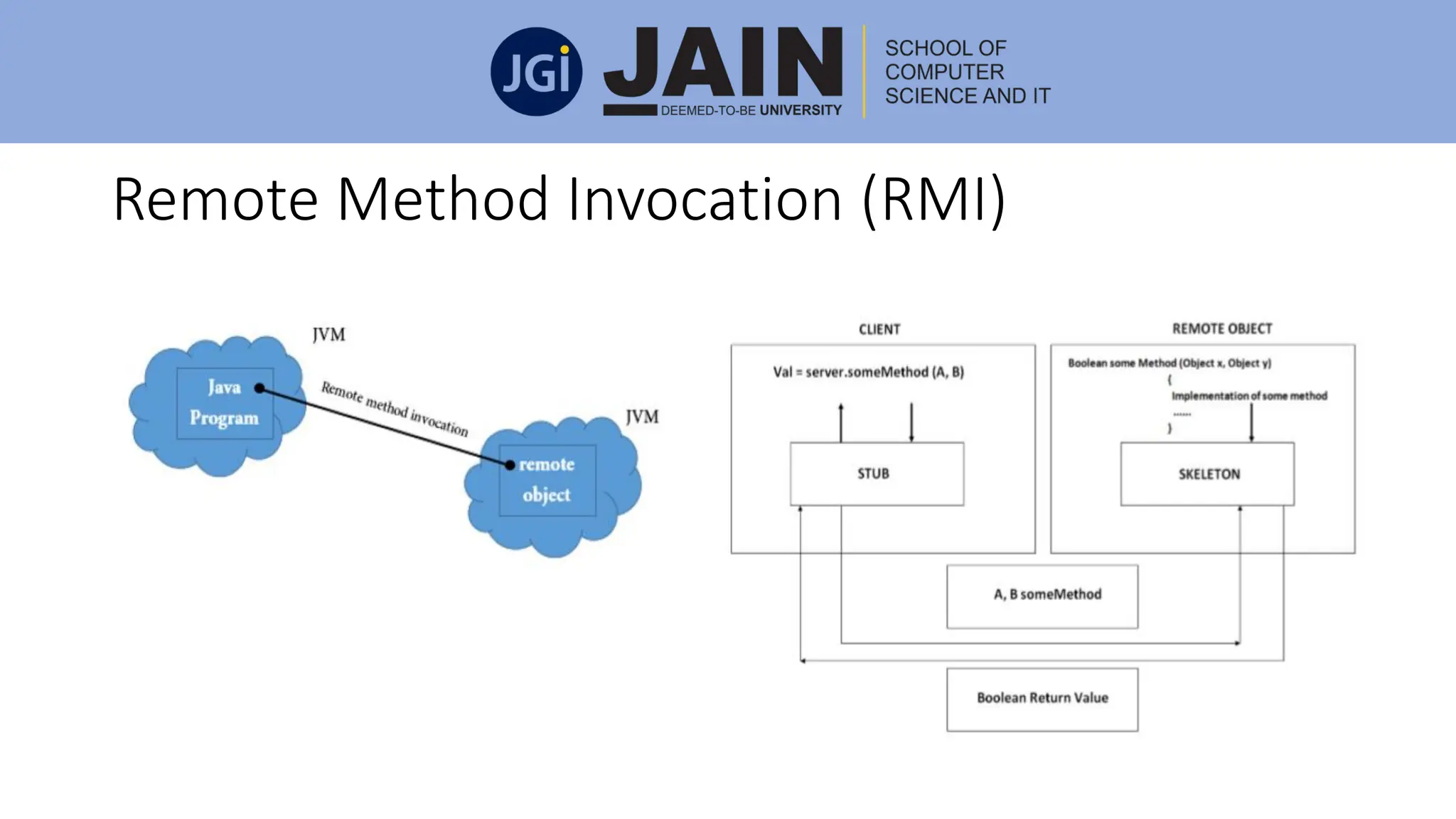
Remote Method Invocation (RMI)
• The Remote Method Invocation enables a thread to request a method
on the remote object.
• The objects are viewed as remote if they are in a different JVM (Java
virtual machine).
• Hence, the remote object can be on a remote host that is connected
by a network or a different Java virtual machine on the same
computer
Remote Method Invocation (RMI)
Threads
• A thread is the smallest unit of processing that can be performed in an OS.
• In most modern operating systems, a thread exists within a process - that
is, a single process may contain multiple threads.
• A thread shares the data section, code section, and other resources of the
operating system with the other threads from the same process. A process
has a single thread.
• If any process has multiple threads, then it can perform multiple tasks.
• A thread is essential for sharing address space within a process because the
cost of communication between threads is low. It uses same code section,
data section, and OS resources. So that threads are also known as a
lightweight process
Threads
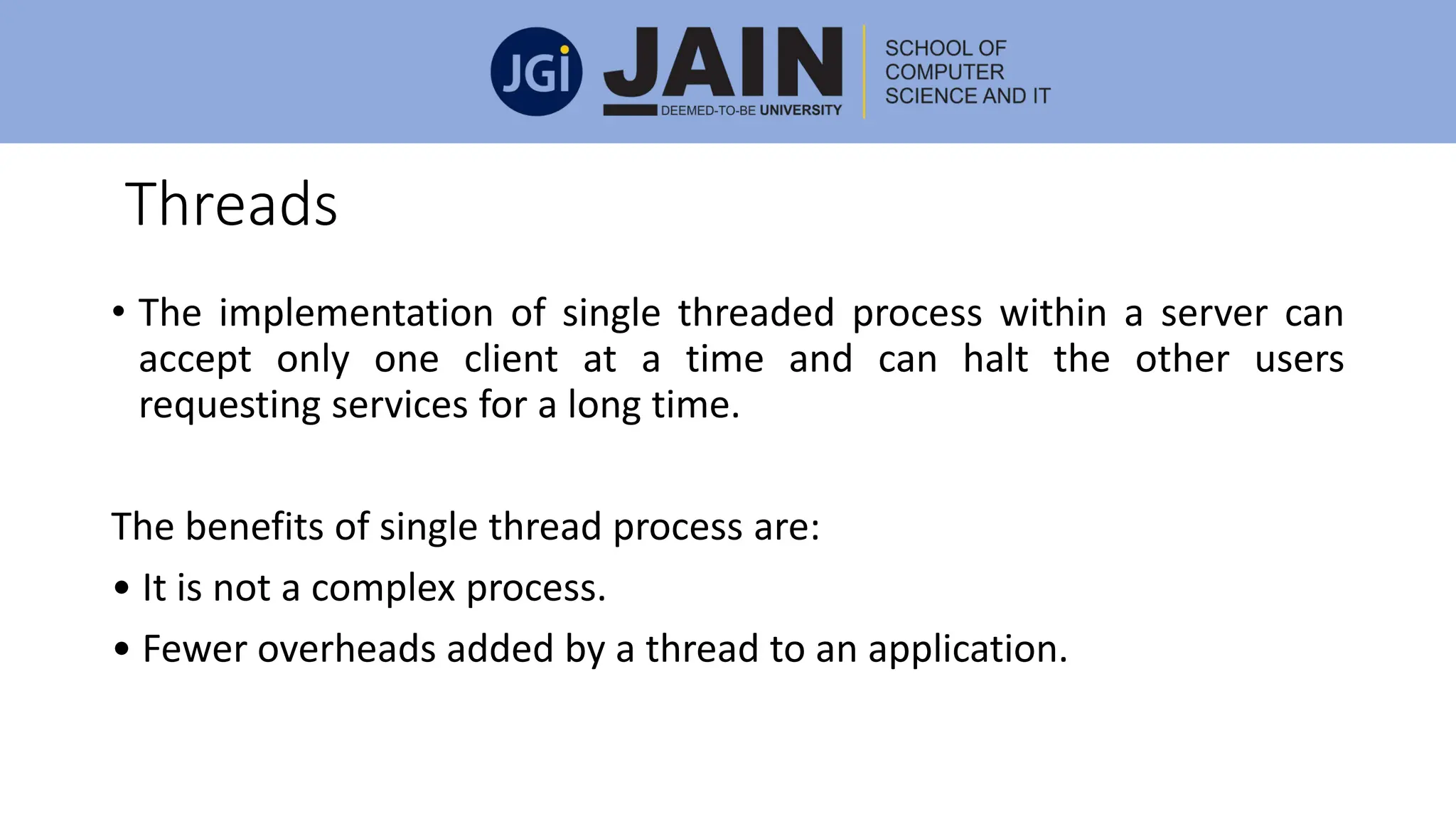
• The implementation of single threaded process within a server can
accept only one client at a time and can halt the other users
requesting services for a long time.
The benefits of single thread process are:
• It is not a complex process.
• Fewer overheads added by a thread to an application.
Multi Thread Process and Benefits
• Multithreading is the process of a CPU (Central Processing Unit) to
handle several processes or threads simultaneously.
• This concept is used by the operating system to control its utilization
simultaneously by multiple users.
• It handles the multiple requests made by a single user on a single
program.
Benefits of Multithreading
• Responsiveness: Multi-threading collective application may provide a
program to carry on execution even if part of it is closed or is operating a
lengthy operation, thereby enhancing responsiveness to the user.
• Resource Sharing: Typically, threads give the memory and the resources of
the process in which they exist.
• Economy: It is expensive allotting memory and resources for process
creation. As threads provide resources of the process in which they exist, it
is more cost effective to make and context-switch threads.
• Utilization of multiprocessor architectures: The advantages of
multithreading can be largely enhanced in a multiprocessor structure,
where threads can be executed parallel on various processors
User and Kernel Threads
User Thread: In user thread, the thread management kernel does not know
the occurrence of threads. The application begins with a single thread.
Advantages
• Thread switching does not need Kernel mode authorisation.
• User level thread can execute on any operating system.
• Scheduling can be applied specifically to the user level thread.
Disadvantages
• In a normal operating system, most system calls are prevented.
• The multi-threaded application is unable to take advantage of
multiprocessing
User and Kernel Threads
• In kernel thread process, thread management is accomplished by the
Kernel.
• Kernel threads are provided directly by the operating system.
Advantages
• The kernel can simultaneously organize multiple threads from the same
process on multiple processes.
• If one thread in a process is obstructed, the Kernel can set up another
thread for the same process.
• Kernel routines can be multi-threaded.
User and Kernel Threads
The disadvantages of kernel threads are:
• Usually, Kernel threads are moderate to design and handle than the
user threads.
• Mode switch to the kernel is required within the same process for the
transfer of control from a thread to another.
Multi-Threading Model
• The two systems i.e. combined user level thread and Kernel level
thread are provided by some operating system.
• Solaris is an example of this combined approach.
• In this combined approach, the same application consisting of
multiple threads can execute in parallel on multiple processors, and
there is no need of blocking the entire process by a blocking system
call
Types of Multi-Threading Model
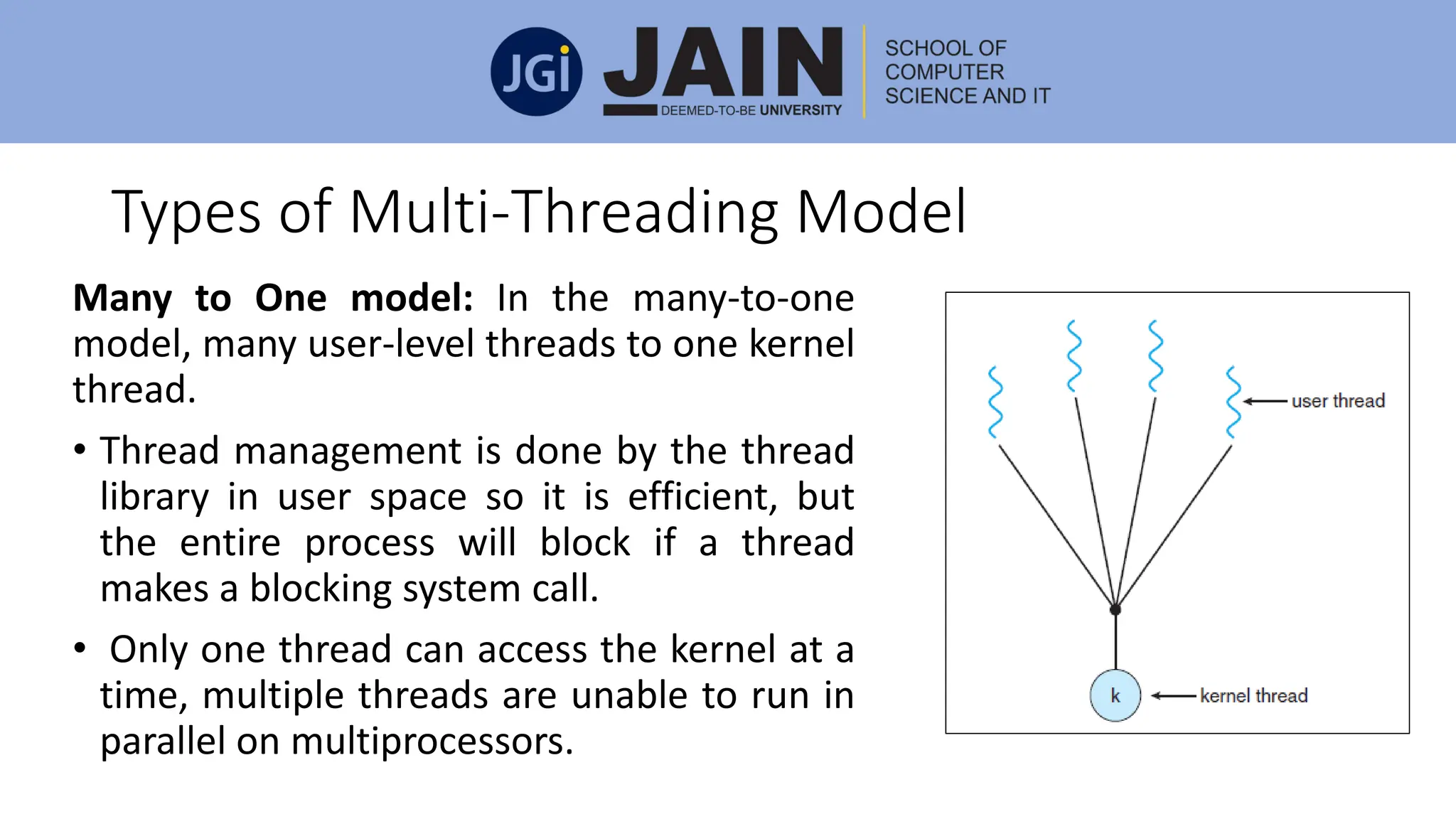
Many to One model: In the many-to-one
model, many user-level threads to one kernel
thread.
• Thread management is done by the thread
library in user space so it is efficient, but
the entire process will block if a thread
makes a blocking system call.
• Only one thread can access the kernel at a
time, multiple threads are unable to run in
parallel on multiprocessors.
Types of Multi-Threading Model
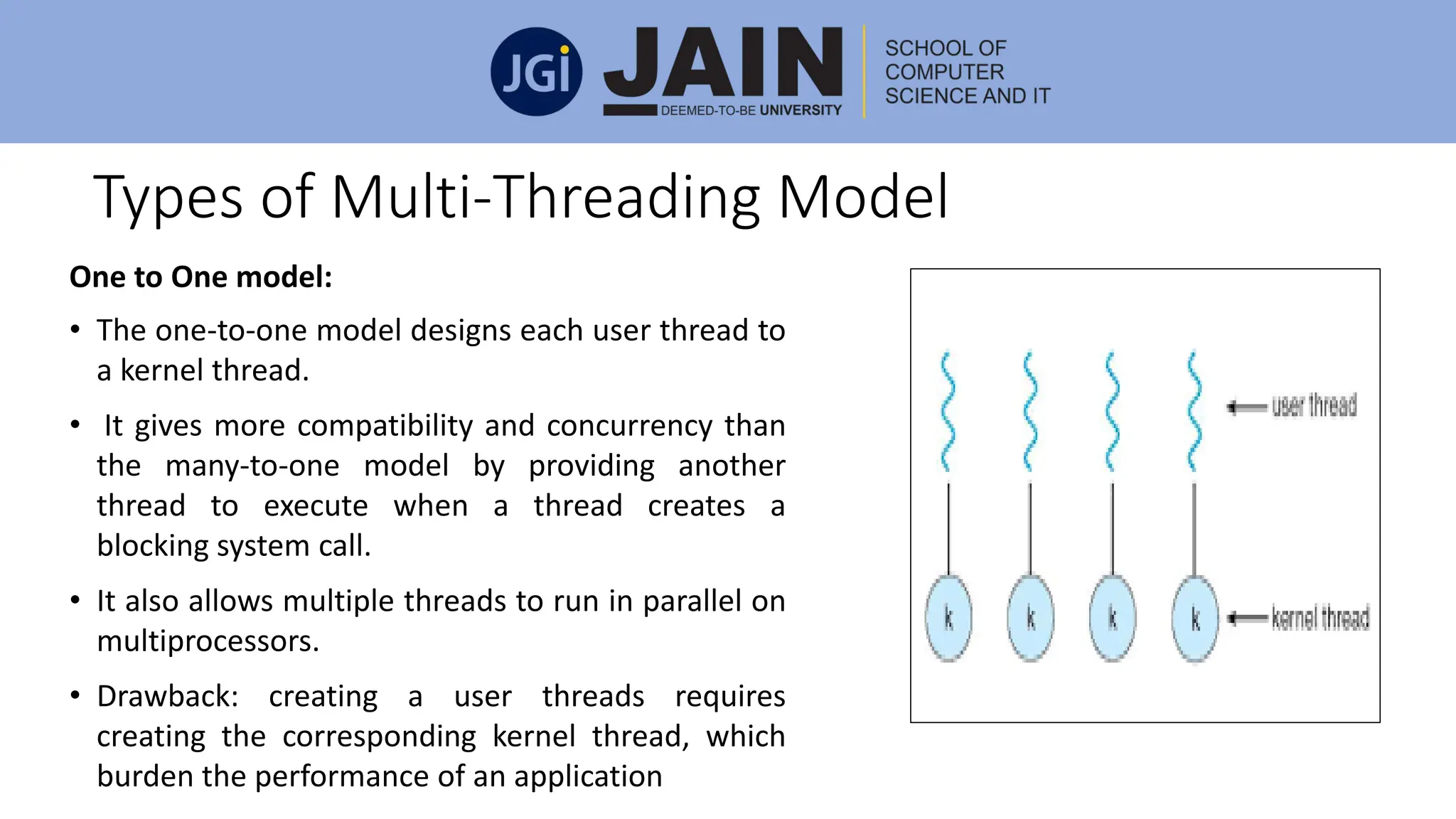
One to One model:
• The one-to-one model designs each user thread to
a kernel thread.
• It gives more compatibility and concurrency than
the many-to-one model by providing another
thread to execute when a thread creates a
blocking system call.
• It also allows multiple threads to run in parallel on
multiprocessors.
• Drawback: creating a user threads requires
creating the corresponding kernel thread, which
burden the performance of an application
Types of Multi-Threading Model
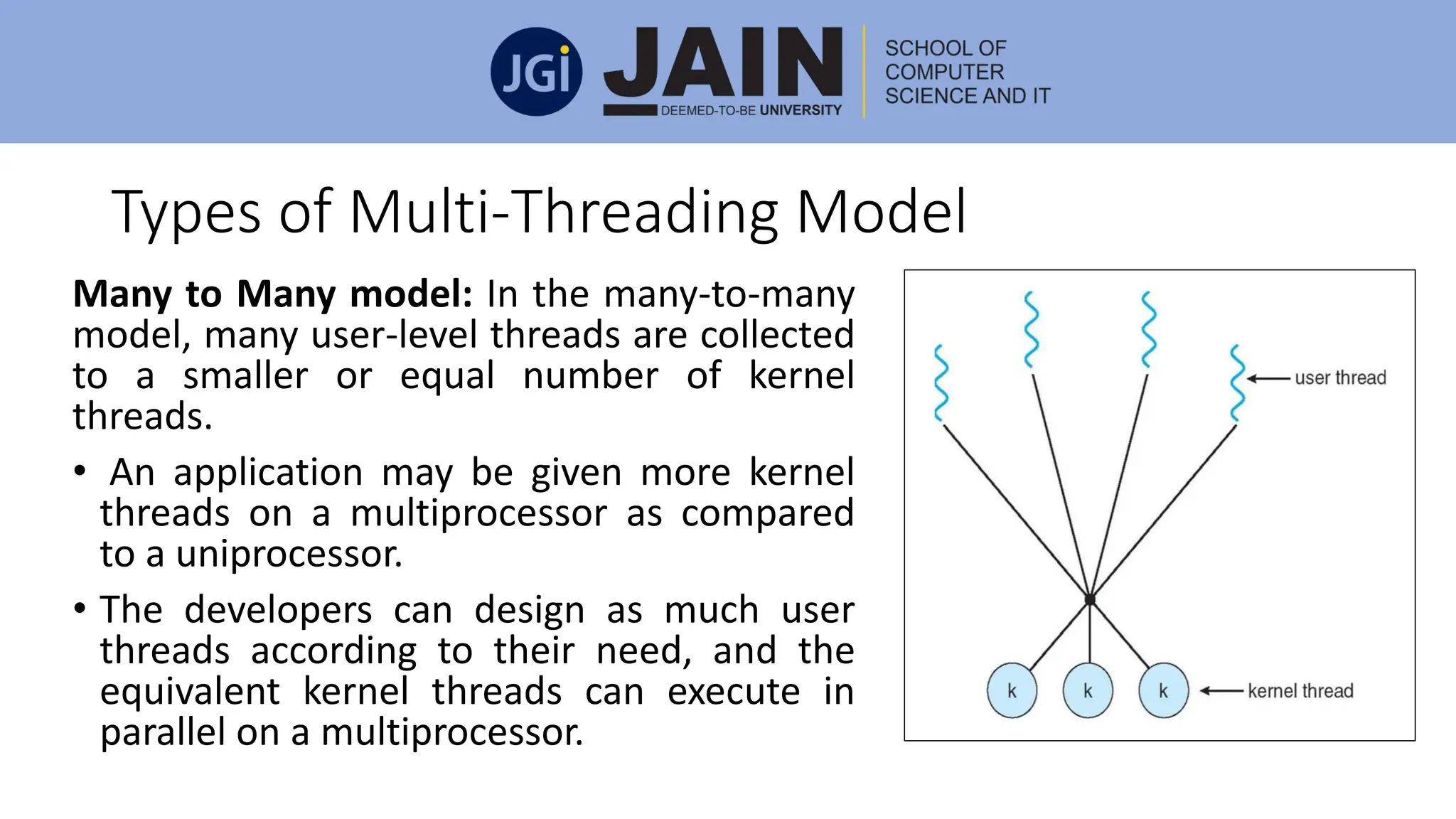
Many to Many model: In the many-to-many
model, many user-level threads are collected
to a smaller or equal number of kernel
threads.
• An application may be given more kernel
threads on a multiprocessor as compared
to a uniprocessor.
• The developers can design as much user
threads according to their need, and the
equivalent kernel threads can execute in
parallel on a multiprocessor.
Threading issue
Cancellation: Thread cancellation is the process of cancelling a thread before
it has accomplished.
A thread which is to be aborted is sometimes specified as the target thread.
Termination of a target thread may take place in two different scenarios:
• Asynchronous cancellation: One thread instantly cancels the target thread.
•Deferred cancellation: The target thread regularly analyses whether it
should cancel or provide it an opportunity to cancel itself in an orderly
fashion
Threading issue
• Signal Handling: A signal is applied in UNIX systems to inform a
process that a specific event has taken place. Signals can be
synchronous or asynchronous.
• A signal is developed by the existence of a particular event.
• A developed signal is passed to a process.
• Once delivered, the signal must be controlled.
Every signal can be controlled by one of the following possible
handlers:
• A default signal handler
• A user-defined signal handler
Threading issue
• Thread Pools
• Thread-Specific Data
Process Scheduling
• The process scheduling is defined as the action of the process
manager which manages the replacement of the functioning process
from the CPU and the choosing of another process by a specific
strategy.
• Process scheduling is an important part of multiprogramming
operating systems.
Process Scheduling
Scheduling Queues:
• The Operating System manages all PCBs in Process Scheduling
Queues.
• For each of the process states, the OS keeps a separate queue and
PCBs of all processes in the same execution state are put in the same
queue.
• When the state of a process is modified, its PCB is separated from its
current queue and switched to its new state queue
Process Scheduling Queues
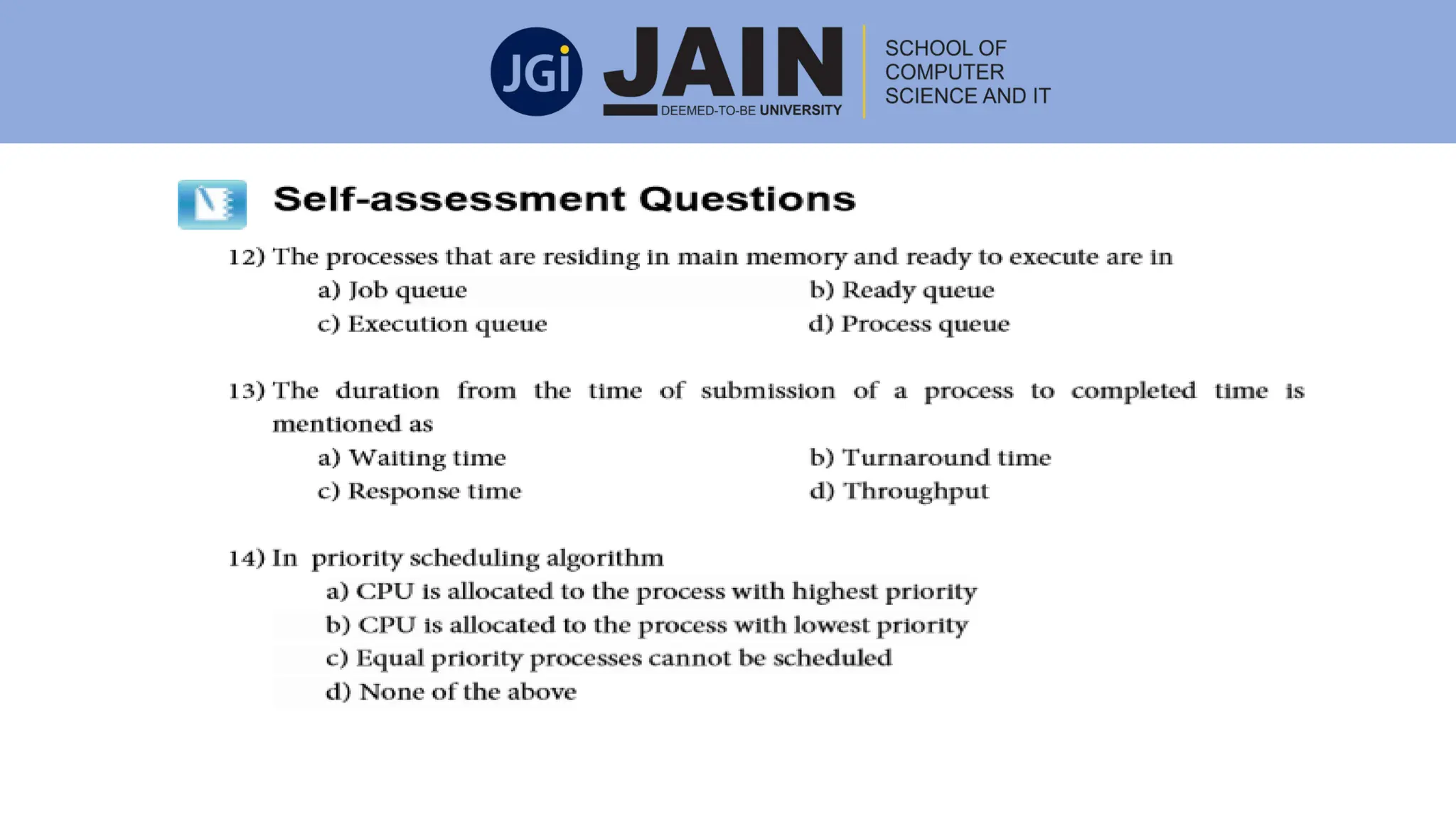
• Job queue: This queue maintains all the processes in the system.
• Ready queue: This queue maintains a set of all processes residing in
main memory, prepared and waiting to be carried out. A new process
is always kept in this queue.
• Device queue: The processes which are stopped due to the absence
of an I/O device constitute this queue.
Schedulers
• Schedulers: Schedulers are special system software which manages
process scheduling in various ways.
• Their main task is to choose the right jobs to be put into the system
and to determine which process to execute.
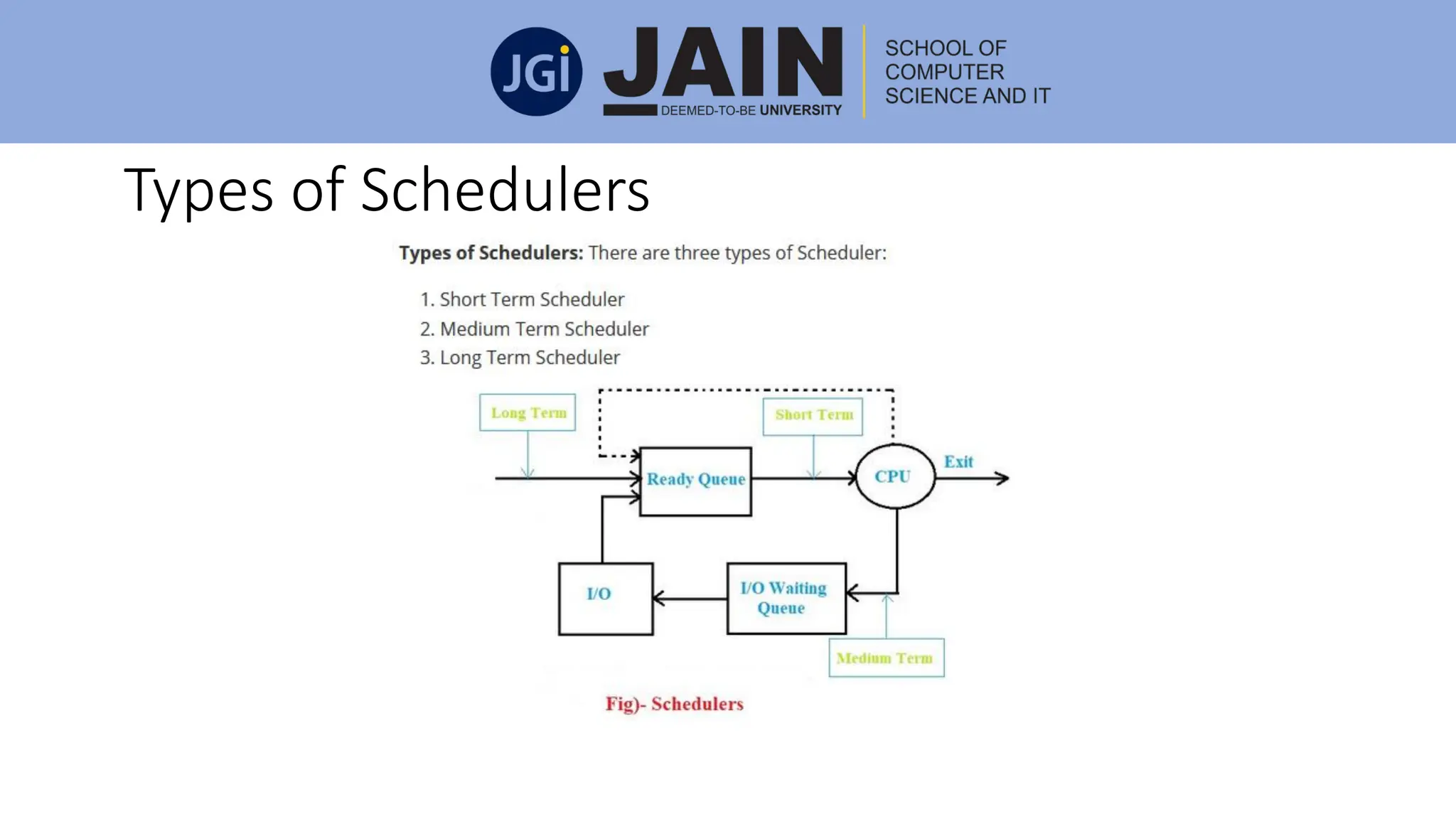
Types of Schedulers
Schedulers are of three types:
• Long-Term Scheduler: It is also known as a job scheduler. Long-Term schedulers
are those schedulers whose decision will have a long-term effect on the
performance. The duty of the long-term scheduler is to bring the process from
the JOB pool to the Ready state for its execution.
• Short term Scheduler: It is also known as CPU scheduler. The main objective of
this scheduler is to enhance system performance following the selected set of
criteria. It is the transformation of the ready state to running state of the process.
CPU scheduler chooses a process among the processes that are prepared to carry
out and allocates CPU to one of them.
Types of Schedulers
• Medium term scheduler: Medium-term scheduling is considered as a
component of swapping. In this scheduler, the processes are removed from
the memory. It decreases the degree of multiprogramming. It is also
responsible for controlling the swapped out processes.
Swapping
• A running process can be turned into suspended if it makes an I/O request.
• A suspended process cannot cause any progress towards completion.
• In this situation, to remove the process from memory and create space for
other processes the suspended process is shifted to the secondary storage.
• This process is known as swapping, and the process is declared to be rolled
out or swapped out
Types of Schedulers
CPU Scheduling
• CPU scheduling is a process which permits one process to utilize the
CPU while the carrying out of another process is in a waiting state due
to deficiency of any resource like I/O etc., thereby using of CPU fully.
• The aim of CPU scheduling is to create the system efficient, fast and
fair.
CPU Scheduling
CPU-I/O Burst Cycle:
• The progress of CPU scheduling relays upon a noticed property of
processes.
• Process execution contains a cycle of CPU execution and I/O wait.
• Processes substitute between these two cases. Process execution
starts with a CPU burst.
• That is supported by an I/O burst, which is supported by another CPU
burst, then another I/O burst, and so on.
CPU Scheduler
• Whenever the CPU turns unproductive, the operating system must
choose one of the processes in the ready queue to be carried out.
• The selection process is executed by the short-term scheduler or CPU
scheduler.
• The scheduler chooses a process from the processes in memory that
are prepared to carry out and assigns the CPU to that process.
• The ready queue is not certainly a First-in First-out (FIFO) queue
Preemptive and Non-preemptive Scheduling
CPU-scheduling decisions can occur under the following four factors:
• When a process shifts from the running state to the waiting state. For
example, on account of an I/O request or an appeal of wait for the
completion of one of the child processes) .
• When a process shifts from the running state to the ready state. For
example, when an interruption takes place.
• When a process shifts from the waiting state to the ready state. For
example, at the termination of I/O.
• When a process completes.
• When scheduling occurs only under factors 3 and 4, we can state that the
scheduling scheme is non-preemptive; otherwise, it is pre-emptive
Scheduling Criteria
• CPU utilization: We should keep using the CPU as much as possible.
Generally, CPU utilization can extend from 0 to 100 percent.
• Throughput: Throughput is defined as the number of processes that
is carried out per time unit.
• Waiting Time: time spend in waiting
Scheduling Criteria
• Turnaround time: From the perspective of a particular process, the
important criterion is how long it requires carrying out that process.
Turnaround time = Exit time - Arrival time
• Response time: The time from the compliance of a request till the
first response is created. This method is called response time.
Response time = Time at which the process gets the CPU for the first
time - Arrival time
Scheduling Algorithms
• CPU Scheduling manages the problem of deciding which of the
processes in the prepared queue is to be allotted to the CPU.
CPU Scheduling Algorithms:
1)First-Come, First-Served (FCFS) scheduling :
• The Jobs are carried out on a first come first serve basis.
• It is a non-preemptive a scheduling algorithm.
• Inefficient in performance as the average wait time is high
Scheduling Algorithms –FCFS example
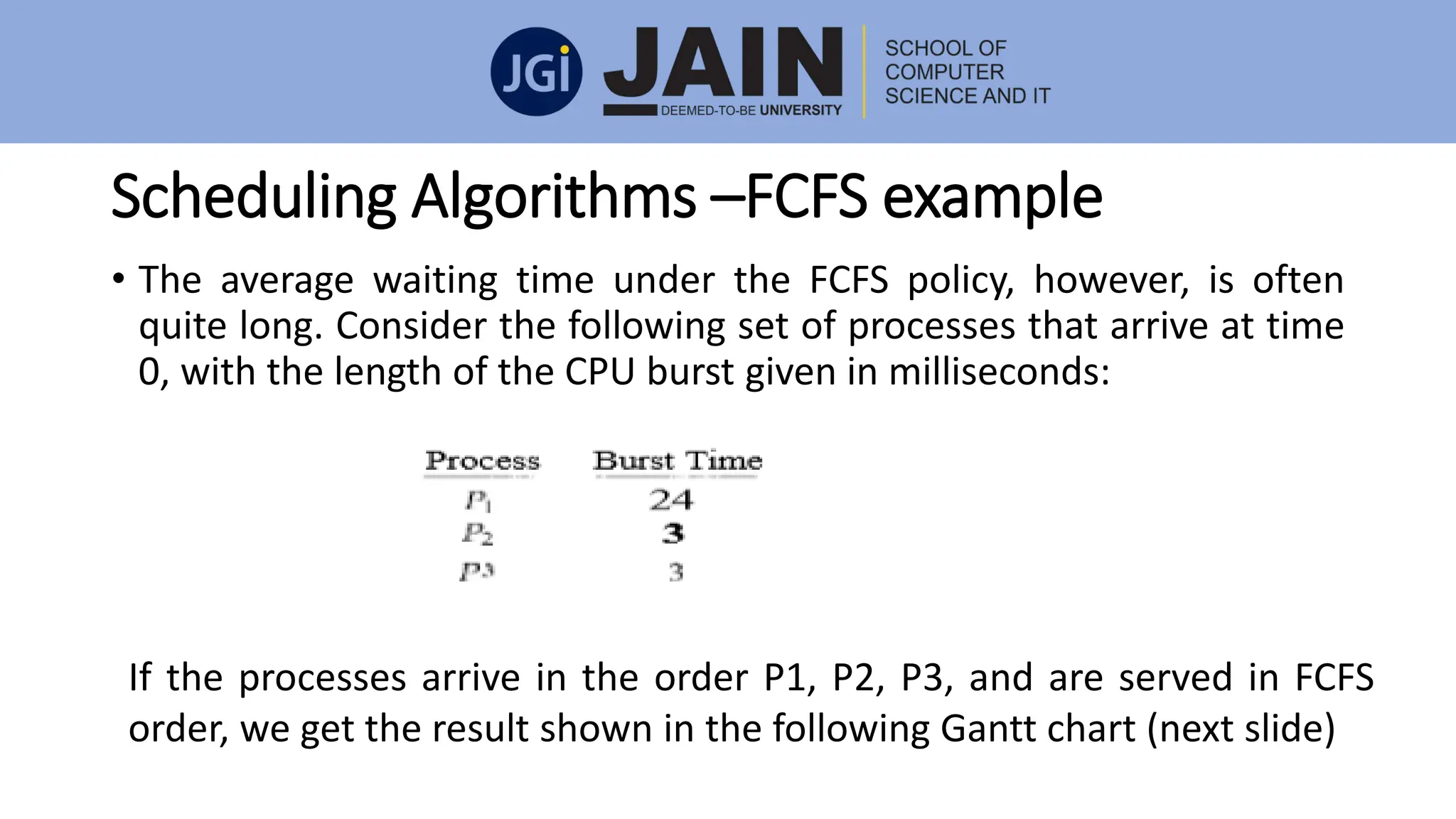
• The average waiting time under the FCFS policy, however, is often
quite long. Consider the following set of processes that arrive at time
0, with the length of the CPU burst given in milliseconds:
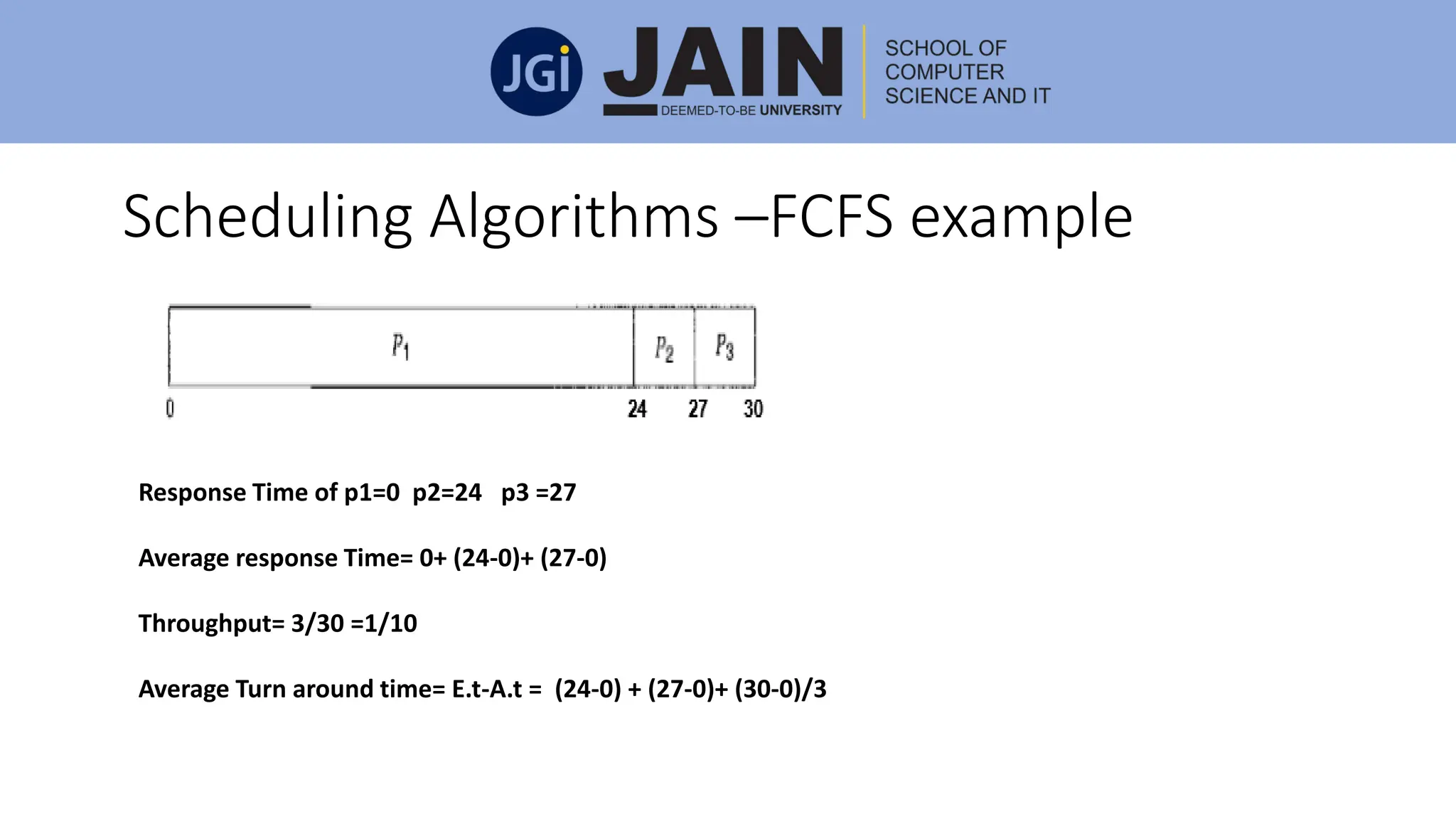
If the processes arrive in the order P1, P2, P3, and are served in FCFS
order, we get the result shown in the following Gantt chart (next slide)
Scheduling Algorithms –FCFS example
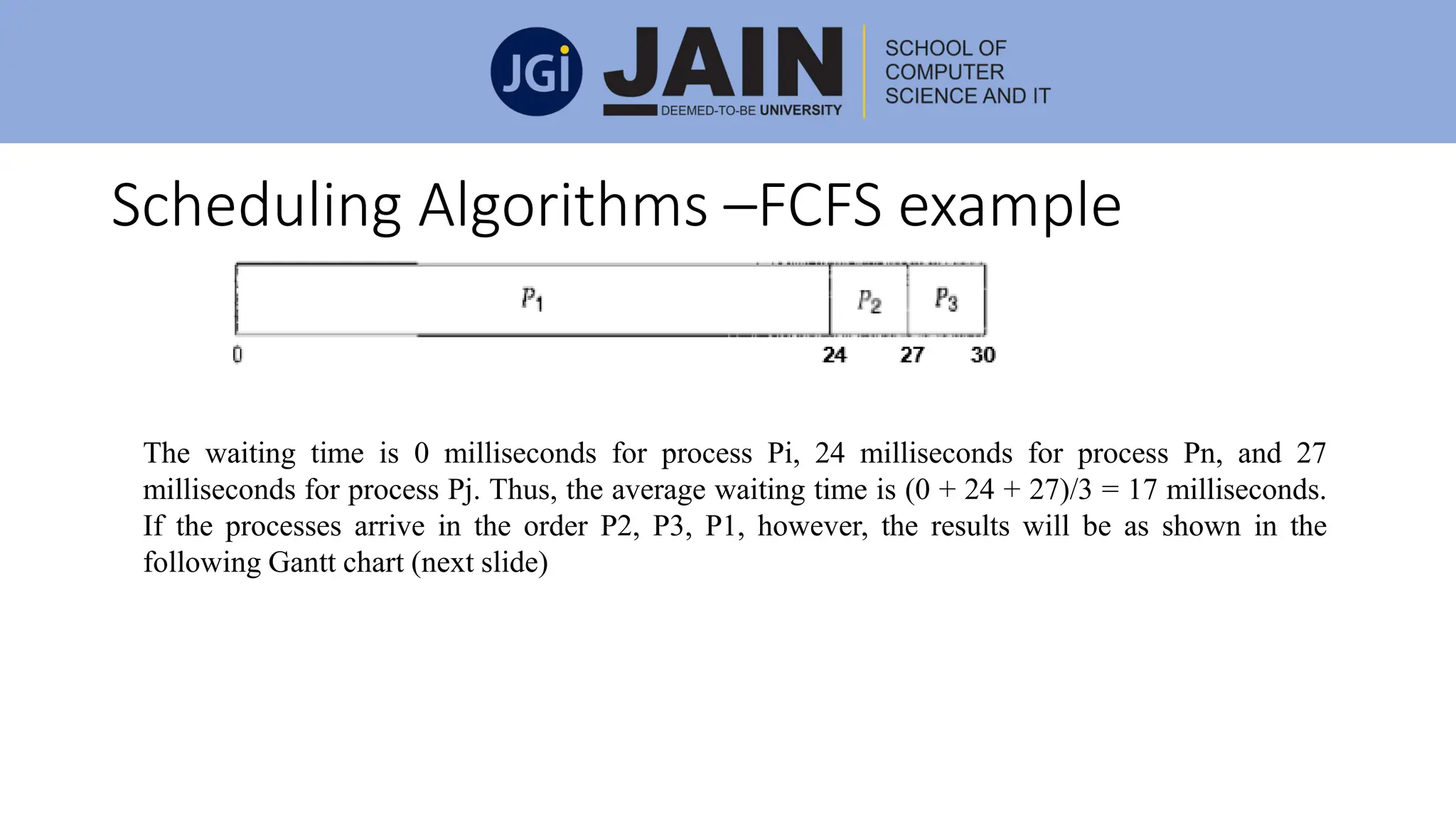
The waiting time is 0 milliseconds for process Pi, 24 milliseconds for process Pn, and 27
milliseconds for process Pj. Thus, the average waiting time is (0 + 24 + 27)/3 = 17 milliseconds.
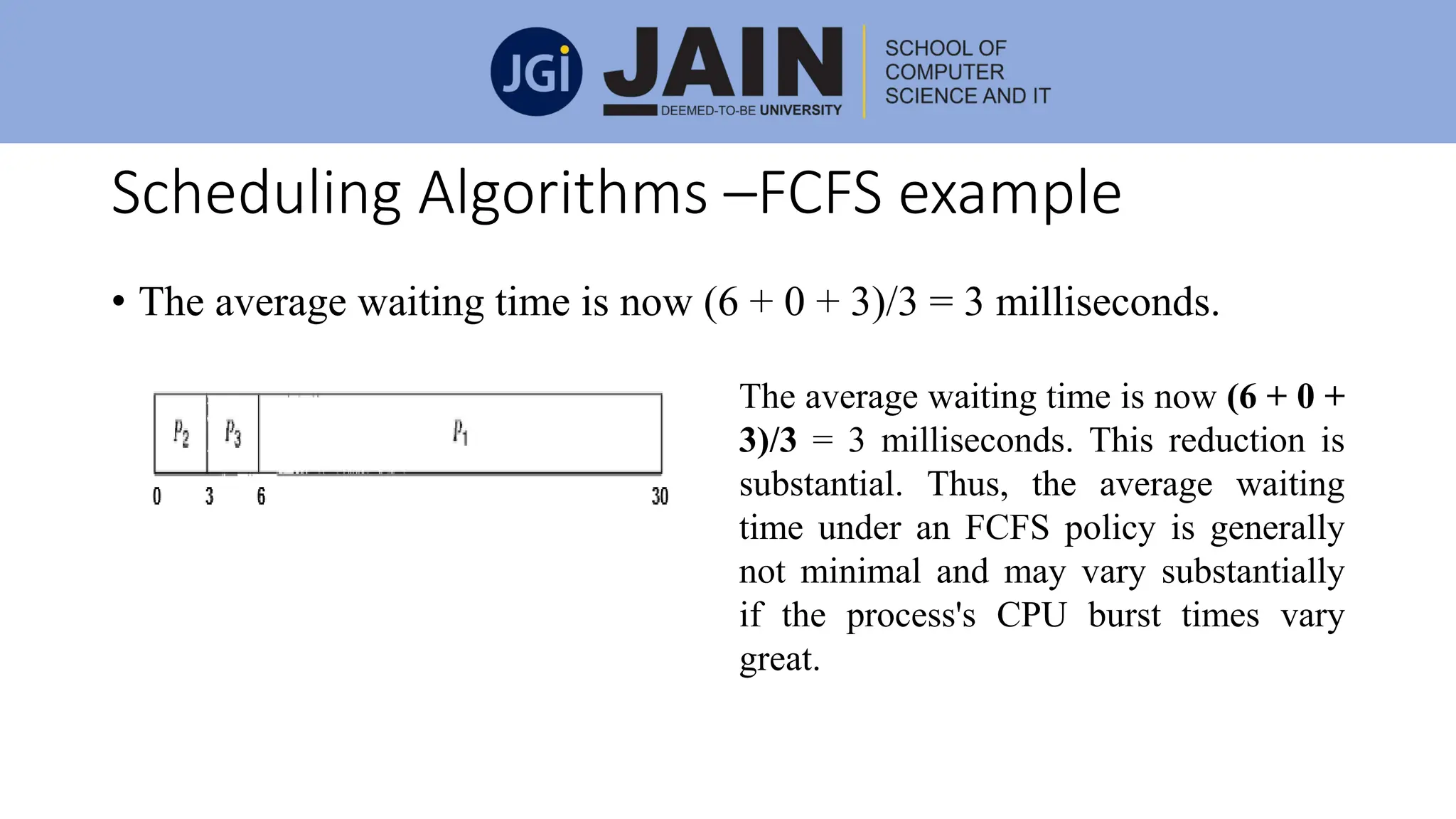
If the processes arrive in the order P2, P3, P1, however, the results will be as shown in the
following Gantt chart (next slide)
Scheduling Algorithms –FCFS example
• The average waiting time is now (6 + 0 + 3)/3 = 3 milliseconds.
The average waiting time is now (6 + 0 +
3)/3 = 3 milliseconds. This reduction is
substantial. Thus, the average waiting
time under an FCFS policy is generally
not minimal and may vary substantially
if the process's CPU burst times vary
great.
Scheduling Algorithms –FCFS example
Response Time of p1=0 p2=24 p3 =27
Average response Time= 0+ (24-0)+ (27-0)
Throughput= 3/30 =1/10
Average Turn around time= E.t-A.t = (24-0) + (27-0)+ (30-0)/3
Shortest-Job-First (SJF) Scheduling
• This algorithm associates with each process the length of the
process's next CPU burst.
• When the CPU is available, it is assigned to the process that has the
smallest next CPU burst.
• If the next CPU bursts of two processes are the same, FCFS
scheduling is used to break the tie.
• Note that a more appropriate term for this scheduling method would
be the shortest-next-CPU-burst algorithm, because scheduling
depends on the length of the next CPU burst of a process, rather than
its total length.
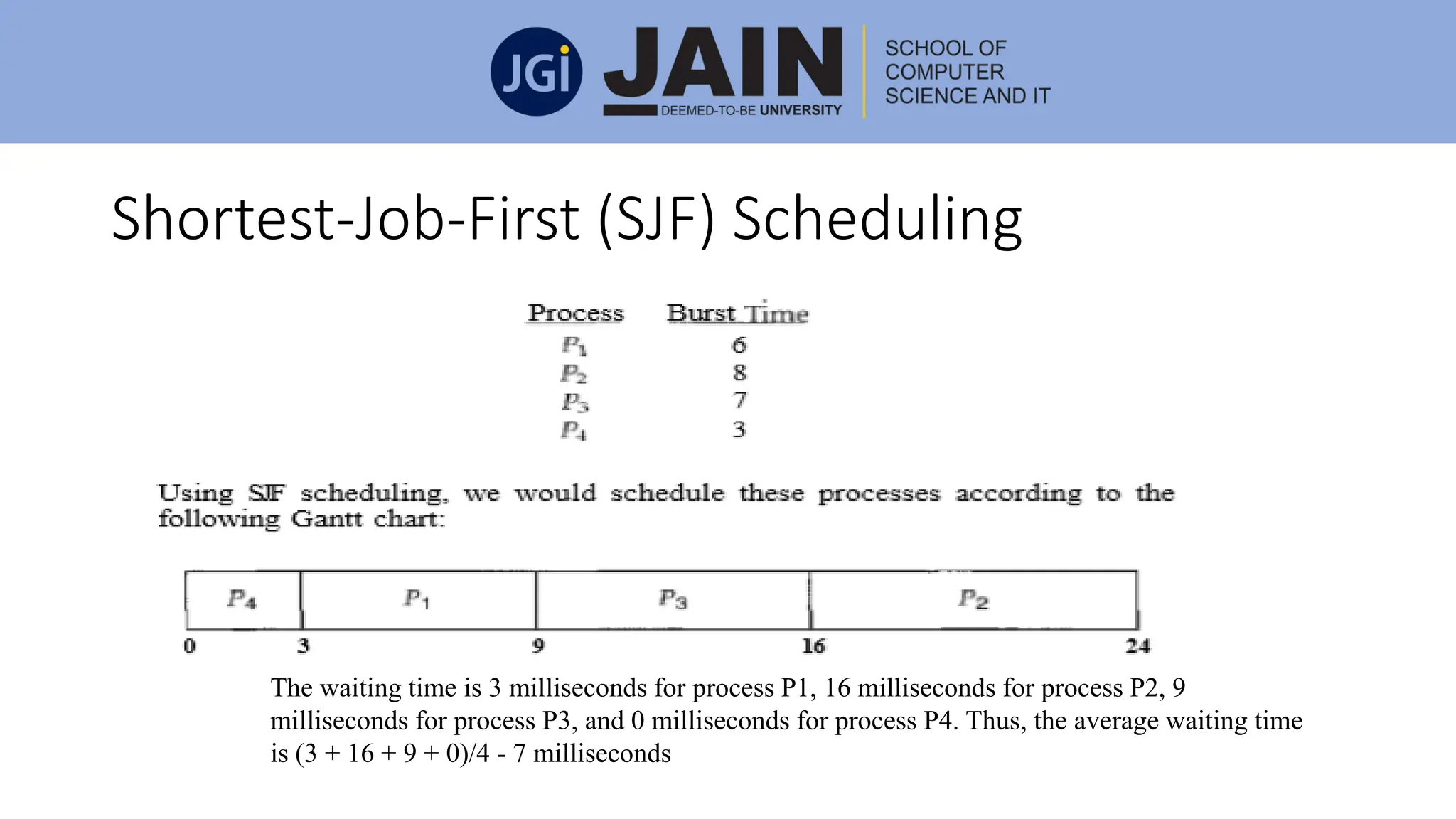
Shortest-Job-First (SJF) Scheduling
The waiting time is 3 milliseconds for process P1, 16 milliseconds for process P2, 9
milliseconds for process P3, and 0 milliseconds for process P4. Thus, the average waiting time
is (3 + 16 + 9 + 0)/4 - 7 milliseconds
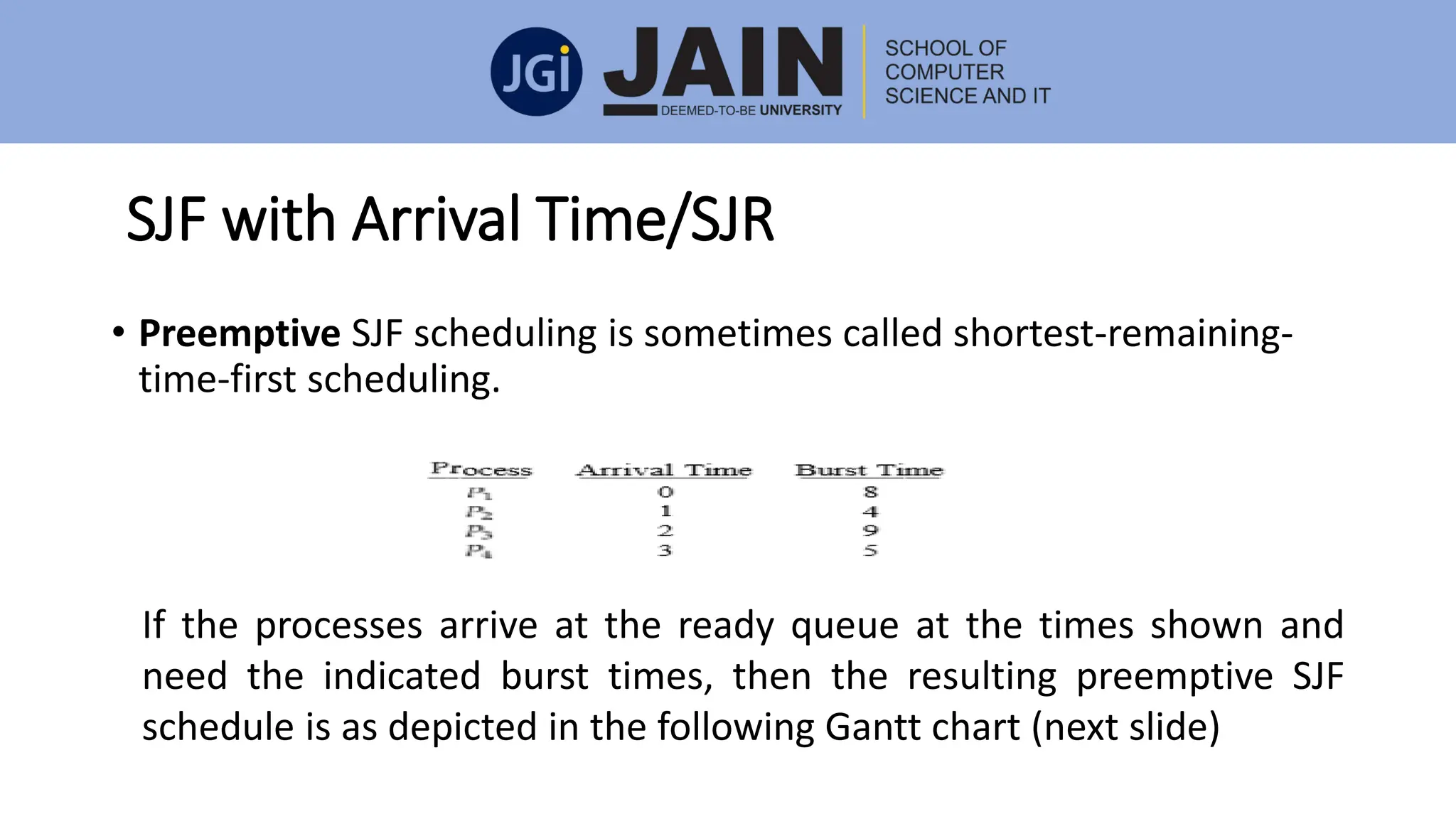
SJF with Arrival Time/SJR
• Preemptive SJF scheduling is sometimes called shortest-remaining-
time-first scheduling.
If the processes arrive at the ready queue at the times shown and
need the indicated burst times, then the resulting preemptive SJF
schedule is as depicted in the following Gantt chart (next slide)
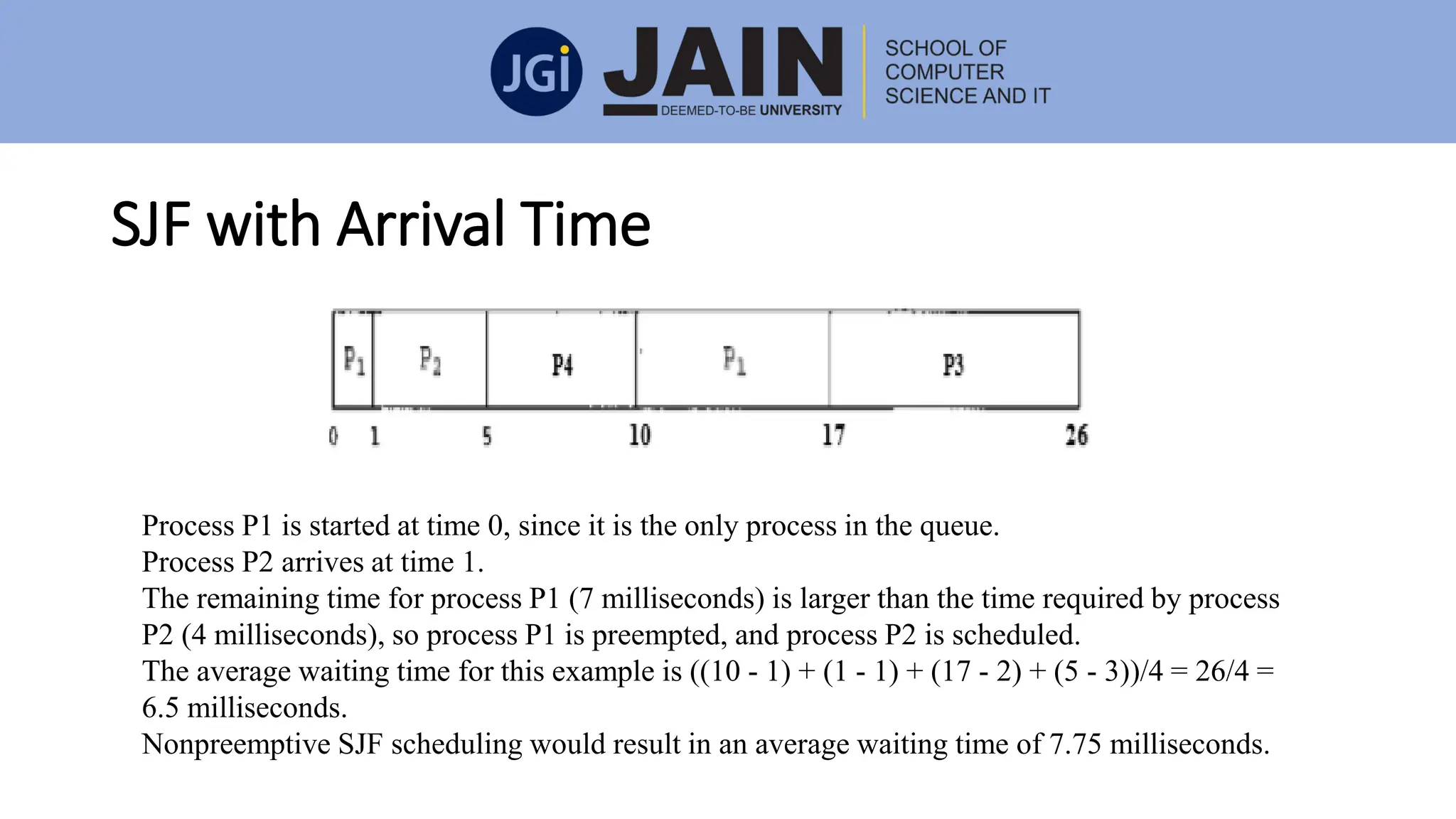
SJF with Arrival Time
Process P1 is started at time 0, since it is the only process in the queue.
Process P2 arrives at time 1.
The remaining time for process P1 (7 milliseconds) is larger than the time required by process
P2 (4 milliseconds), so process P1 is preempted, and process P2 is scheduled.
The average waiting time for this example is ((10 - 1) + (1 - 1) + (17 - 2) + (5 - 3))/4 = 26/4 =
6.5 milliseconds.
Nonpreemptive SJF scheduling would result in an average waiting time of 7.75 milliseconds.
Priority Scheduling
• Priority scheduling can be either pre-emptive or non-preemptive
algorithm, and in batch systems, it is considered as one of the most
common scheduling algorithms.
• Each process is assigned a priority.
• The process which has the highest priority needs to be executed first.
• Processes with the same priority are executed on a first come first
serve basis.
• Prioritization can be done based on the memory demand, time
necessities or some other resource need.
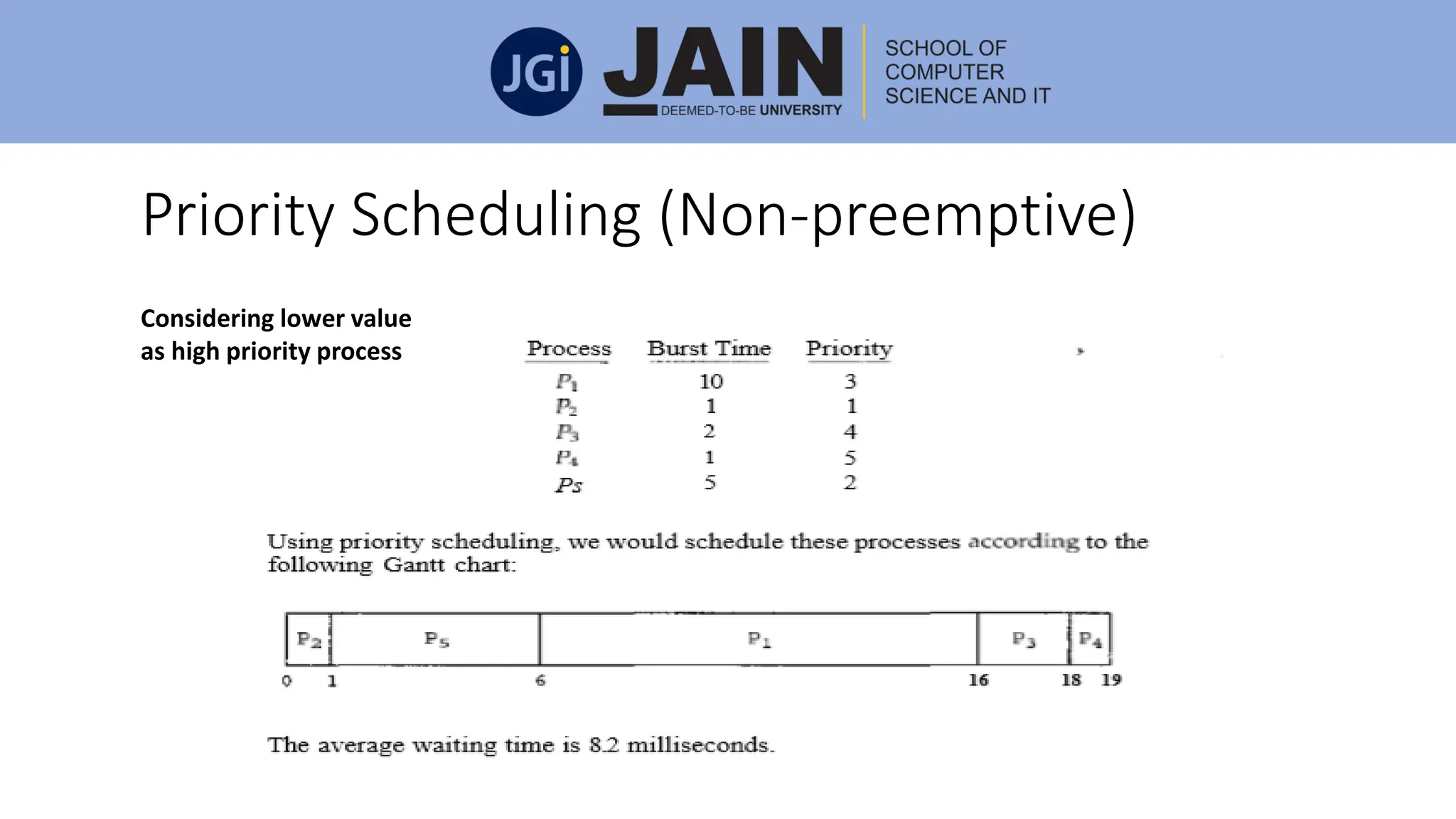
Priority Scheduling (Non-preemptive)
Considering lower value
as high priority process
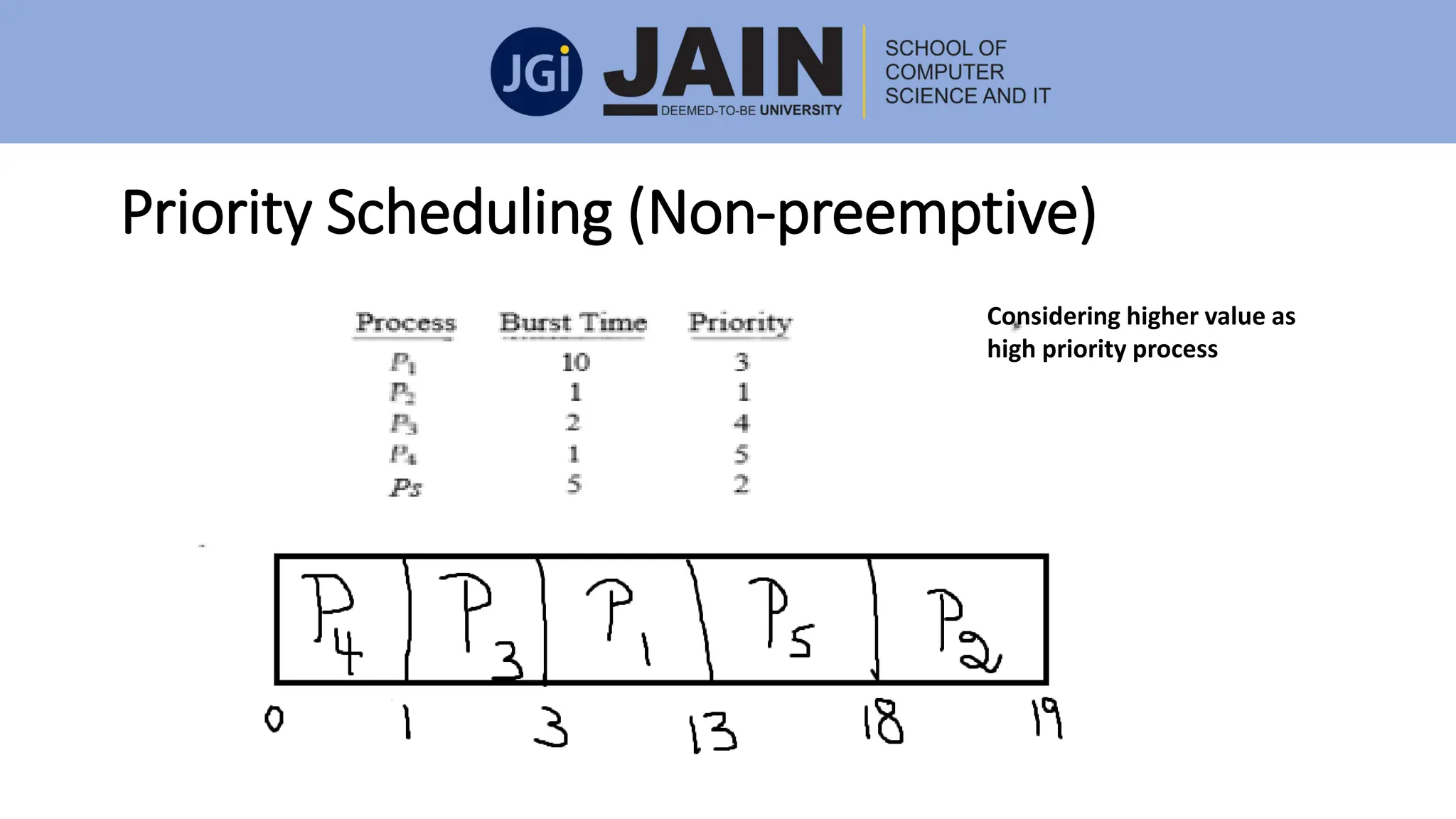
Priority Scheduling (Non-preemptive)
Considering higher value as
high priority process
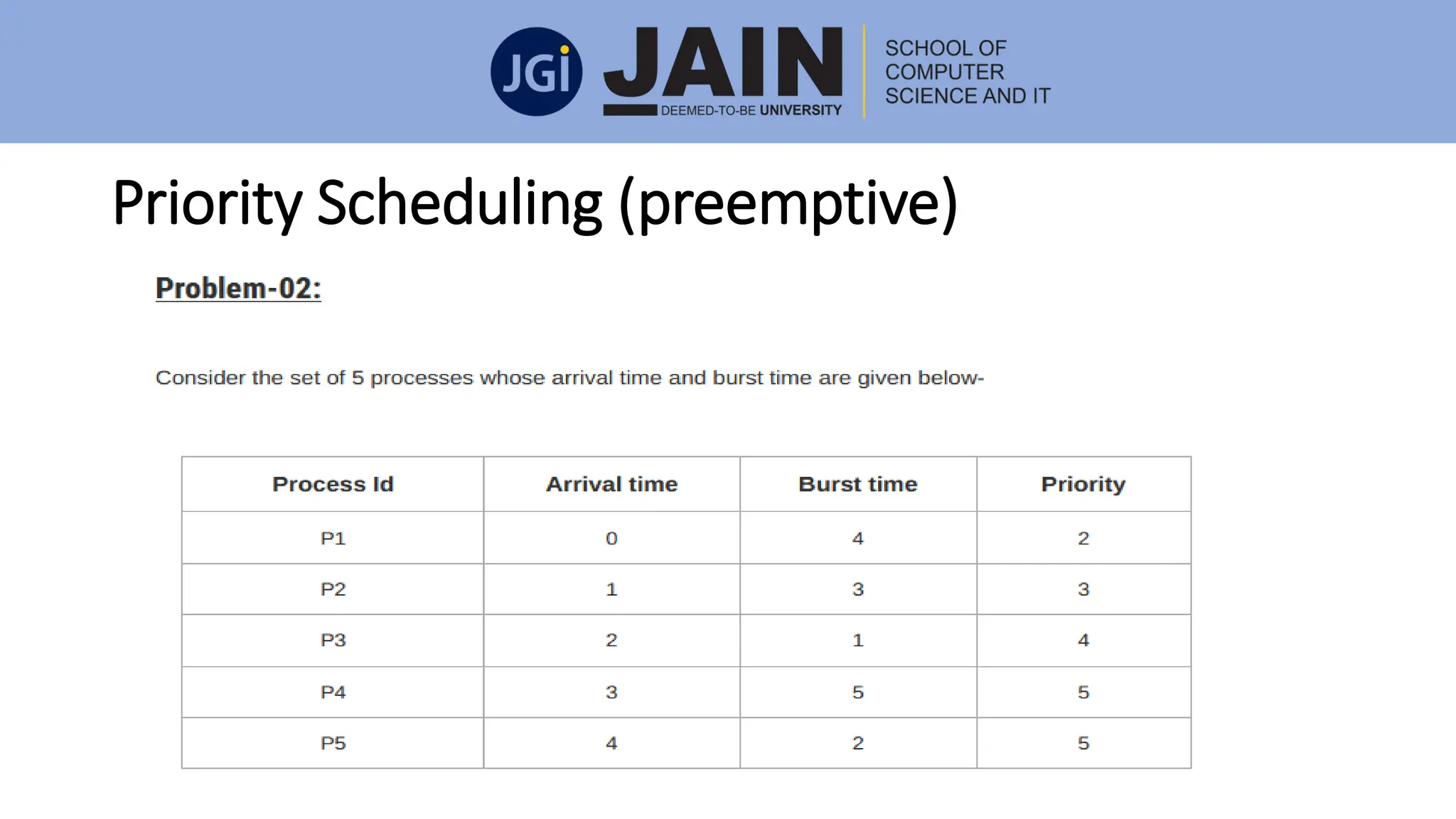
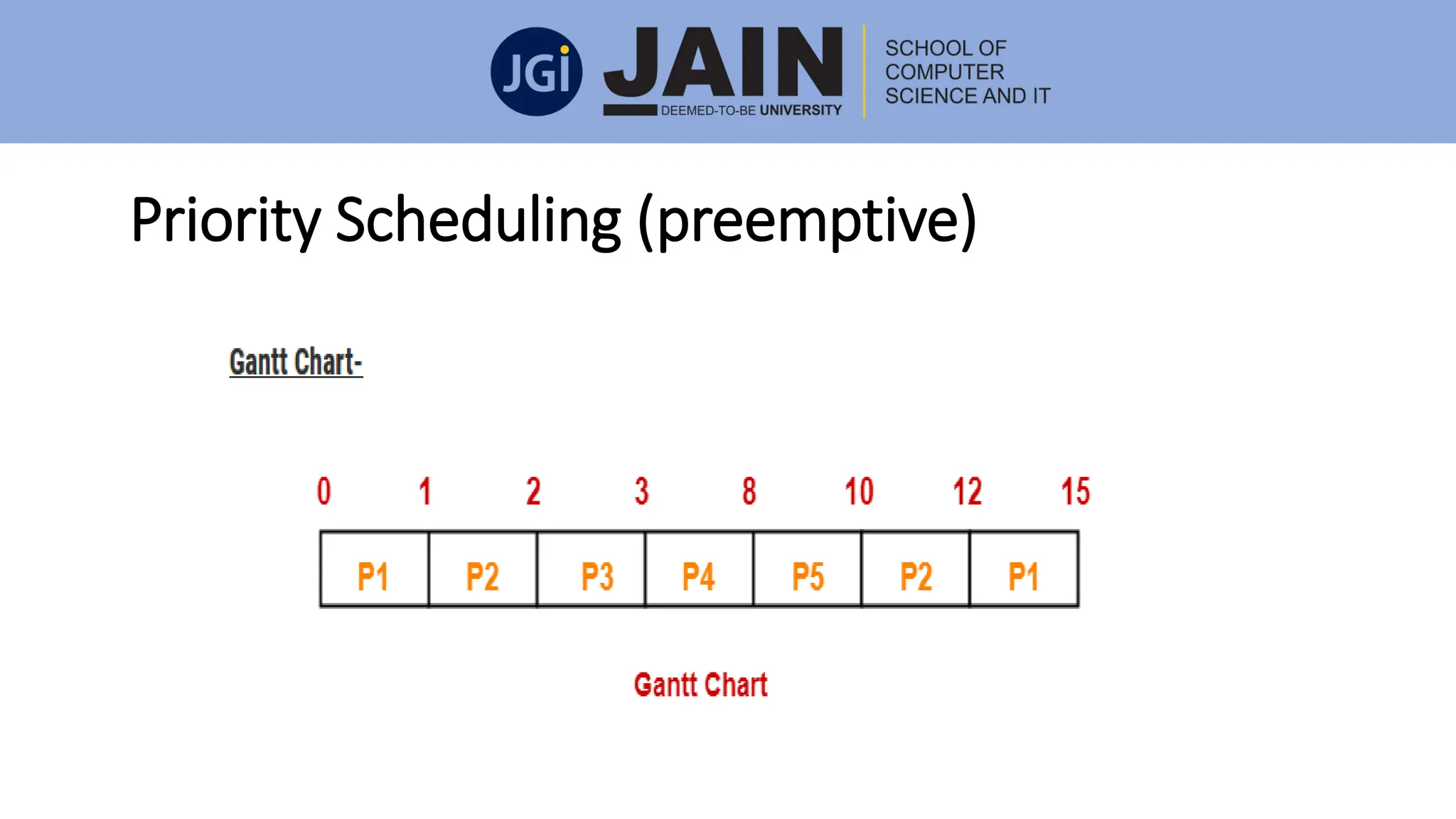
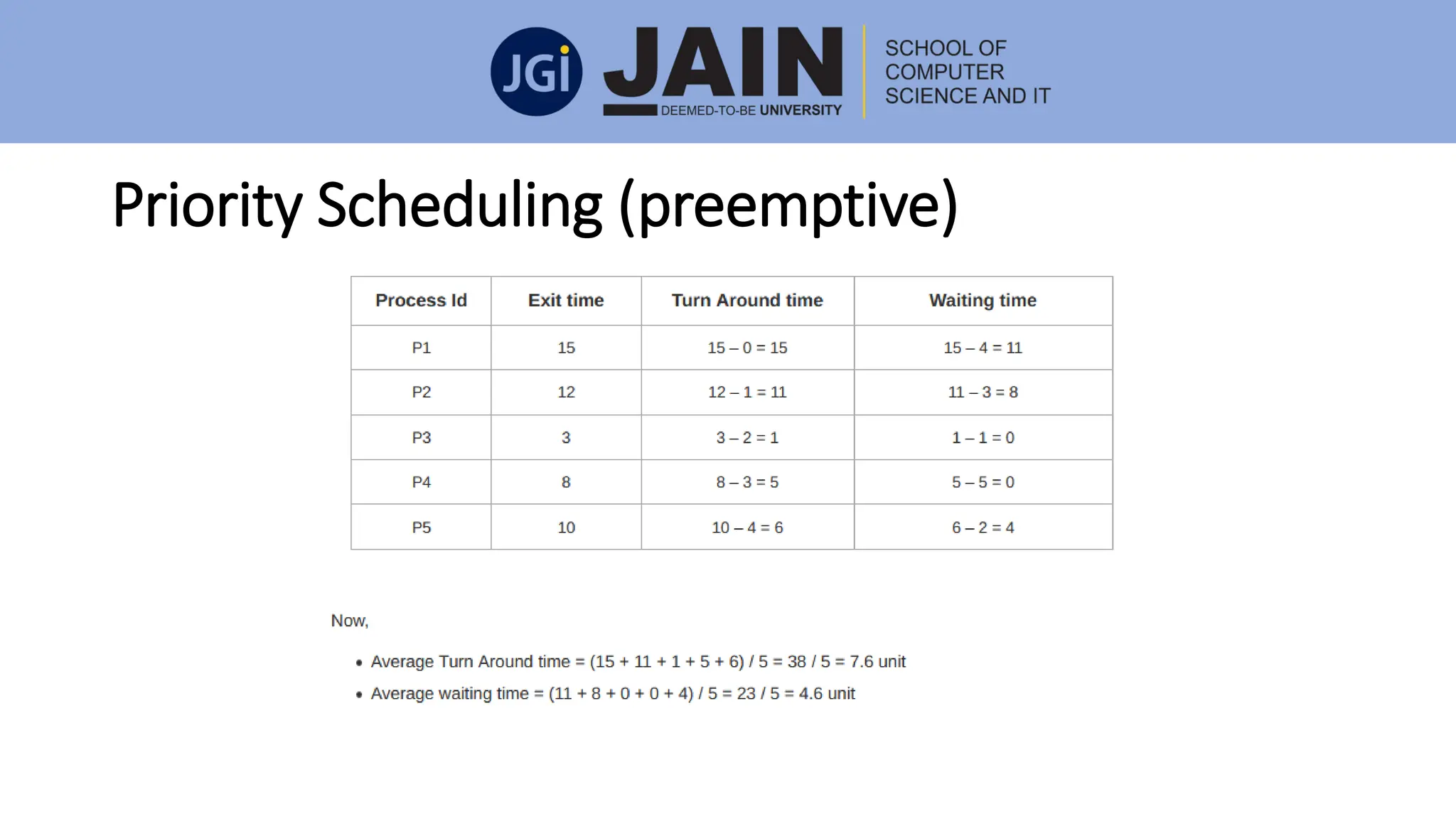
Priority Scheduling (preemptive)
Priority Scheduling
• A major problem with priority scheduling algorithms is indefinite blocking,
or starvation.
• A process that is ready to run but waiting for the CPU can be considered
blocked.
• A priority scheduling algorithm can leave some low priority processes
waiting indefinitely. In a heavily loaded computer system, a steady stream
of higher-priority processes can prevent a low-priority process from ever
getting the CPU.
• A solution to the problem of indefinite blockage of low-priority processes is
aging. Aging is a technique of gradually increasing the priority of processes
that wait in the system for a long time.
Round Robin(RR) Scheduling
• The round-robin (RR) scheduling algorithm is designed especially for timesharing
systems.
• It is similar to FCFS scheduling, but preemption is added to switch between
processes.
• A small unit of time, called a time quantum or time slice, is defined.
• A time quantum is generally from 10 to 100 milliseconds. The ready queue is
treated as a circular queue.
• The CPU scheduler goes around the ready queue, allocating the CPU to each
process for a time interval of up to 1 time quantum.
• To implement RR scheduling, we keep the ready queue as a FIFO queue of
processes.
• New processes are added to the tail of the ready queue. The CPU scheduler picks
the first process from the ready queue, sets a timer to interrupt after 1 time
quantum, and dispatches the process.
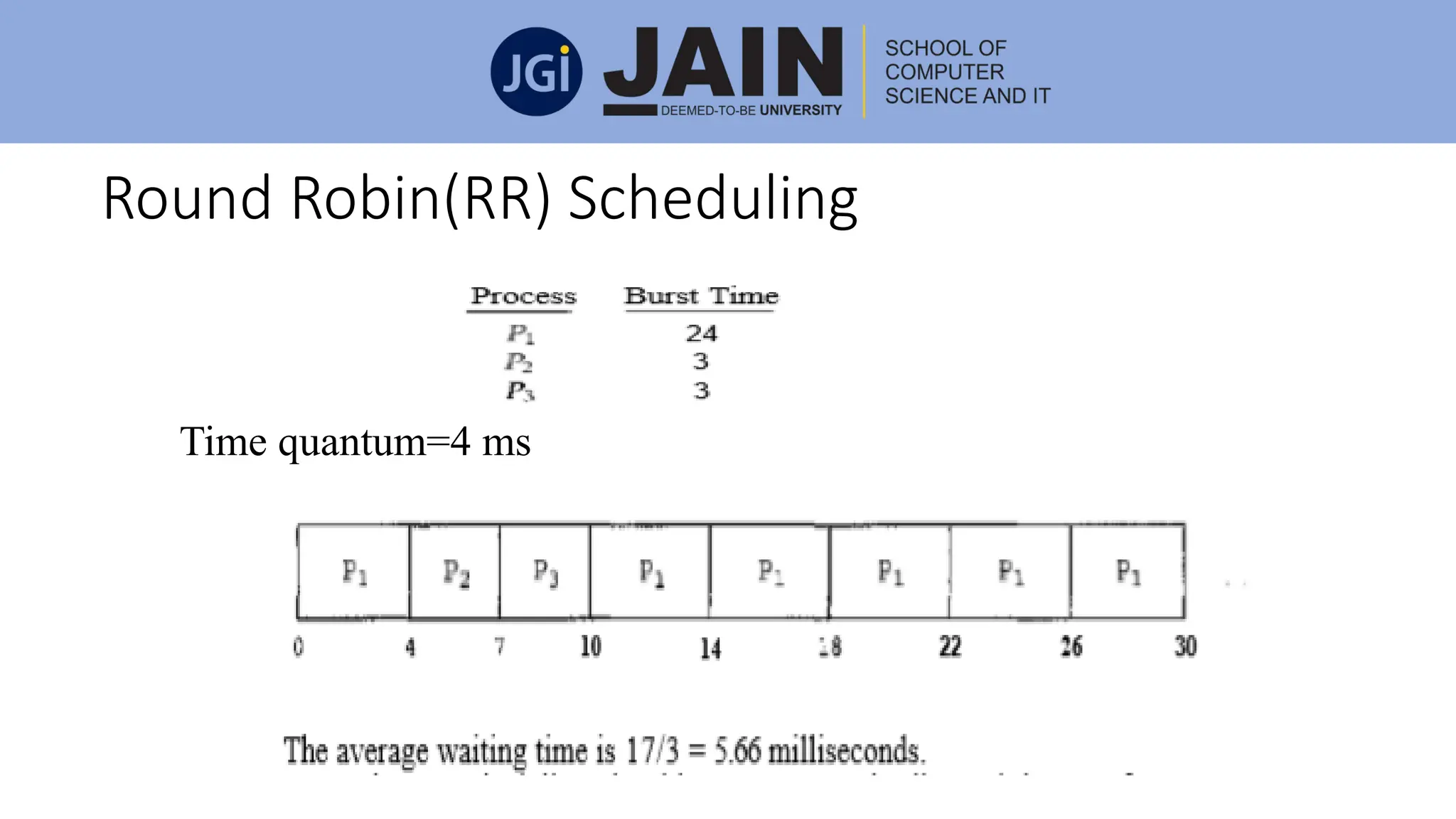
Round Robin(RR) Scheduling
Time quantum=4 ms
Multiple-Level Queues Scheduling
• Multiple-level queues are a dependent scheduling algorithm.
• They allow the use of their existing algorithms to group and schedule
jobs with common features.
• Multiple queues are supported for processes with common features.
Each queue can obtain its own scheduling algorithms.
• Priorities are given to each queue.
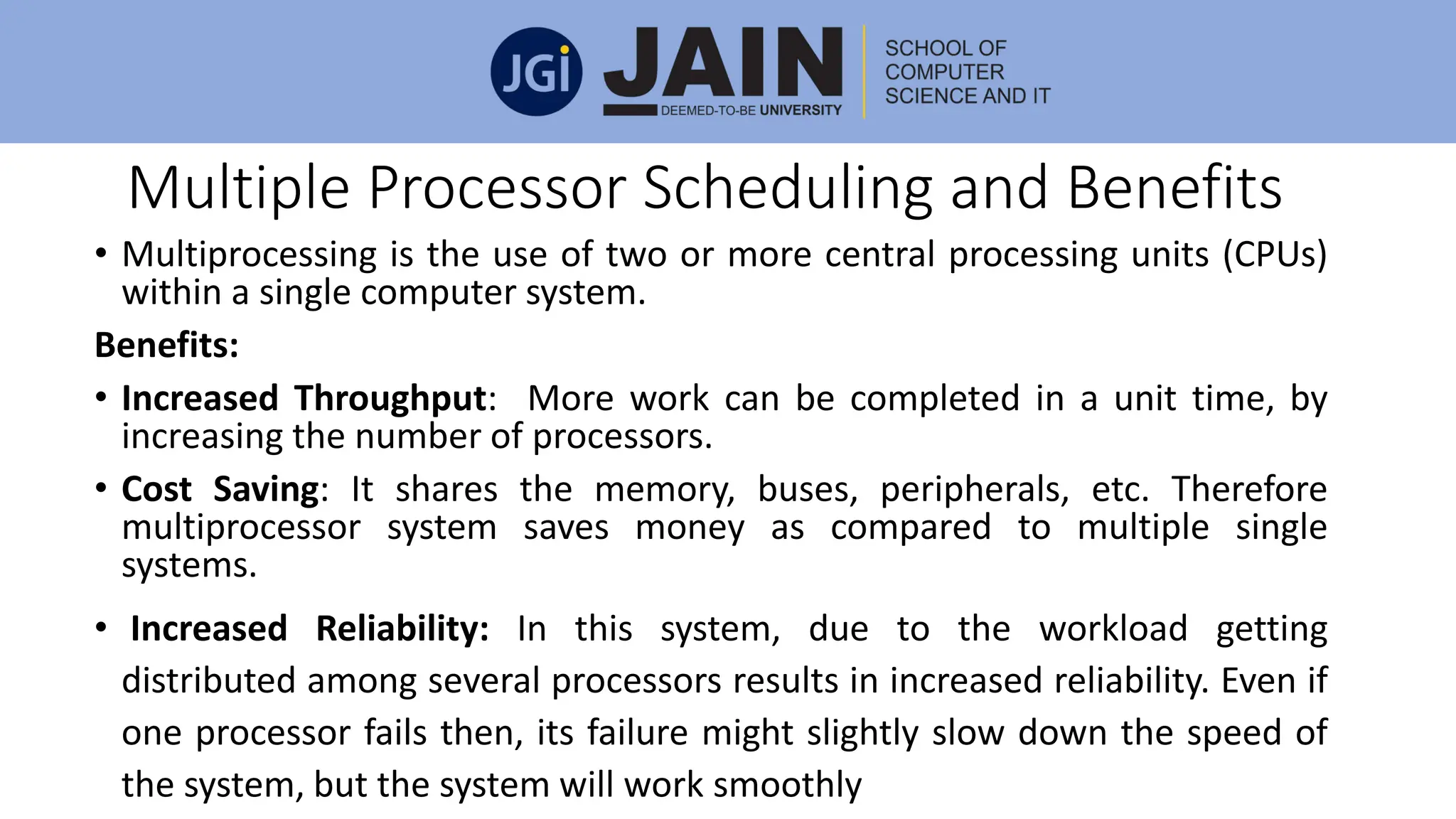
Multiple Processor Scheduling and Benefits
• Multiprocessing is the use of two or more central processing units (CPUs)
within a single computer system.
Benefits:
• Increased Throughput: More work can be completed in a unit time, by
increasing the number of processors.
• Cost Saving: It shares the memory, buses, peripherals, etc. Therefore
multiprocessor system saves money as compared to multiple single
systems.
• Increased Reliability: In this system, due to the workload getting
distributed among several processors results in increased reliability. Even if
one processor fails then, its failure might slightly slow down the speed of
the system, but the system will work smoothly
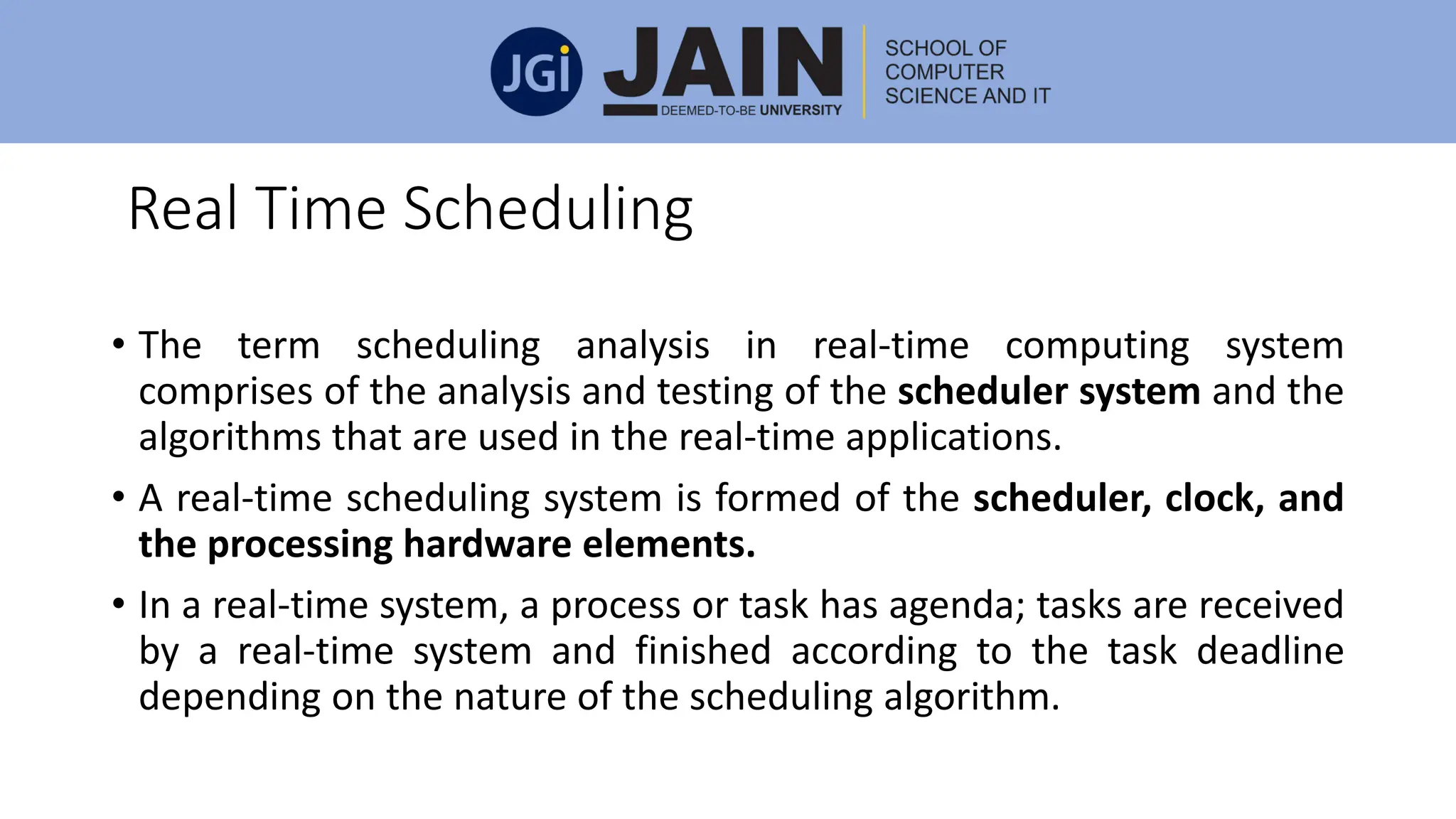
Real Time Scheduling
• The term scheduling analysis in real-time computing system
comprises of the analysis and testing of the scheduler system and the
algorithms that are used in the real-time applications.
• A real-time scheduling system is formed of the scheduler, clock, and
the processing hardware elements.
• In a real-time system, a process or task has agenda; tasks are received
by a real-time system and finished according to the task deadline
depending on the nature of the scheduling algorithm.
Module 2 - PPT.pdfModule 2 - PPT.pdfModule 2 - PPT.pdfModule 2 - PPT.pdfModule 2 - PPT.pdfModule 2 - PPT.pdfModule 2 - PPT.pdf

Module 2 - PPT.pdfModule 2 - PPT.pdfModule 2 - PPT.pdfModule 2 - PPT.pdfModule 2 - PPT.pdfModule 2 - PPT.pdfModule 2 - PPT.pdf

  • 1.
  • 2.
    Syllabus Processes: Process concept,processes, Operations on processes, Inter process communication, Communication in client-server systems. Threads: Introduction to Threads, Single and Multithreaded processes and its benefits, User and Kernel threads, Multithreading models, Threading issues. Process Scheduling: Basic concepts, Scheduling criteria, Scheduling Algorithms
  • 3.
    What is aProcess? • A process is defined as a system which describes the fundamental unit of work to be carried out in the system. • A process is a program in execution. It is the unit of work in most systems • A process will need certain resources—such as CPU time, memory, files, and I/O devices —to accomplish its task. • These resources are allocated to the process either when it is created or while it is executing.
  • 4.
    Process Layout InsideMemory • A process usually involves the process stack that includes temporary data (such as return addresses, function parameters, and local variables) and a data section which consists of global variables. • A process may also contain a heap a memory and that is dynamically allocated when the process runs. • Programs are the passive entity, such as a file consisting of information stored on the disk which is often known as an executable file, whereas a process is an active entity.
  • 5.
    Process States The stateof a process changes, as it executes. • New. The process is being created. • Running. Instructions are being executed. • Waiting. The process is waiting for some event to occur (such as an I/O completion or reception of a signal). • Ready. The process is waiting to be assigned to a processor. • Terminated. The process has finished execution
  • 6.
    • Process StateCodes: • D - uninterruptible sleep (usually IO) • I - Idle kernel thread • R - running or runnable (on run queue) • S - interruptible sleep (waiting for an event to complete) • T - stopped by job control signal • t - stopped by debugger during the tracing • X - dead (should never be seen) • Z - defunct ("zombie") process, terminated but not reaped by its parent
  • 8.
    Process control block •Process state: The state may be new, prepared, executing, waiting, halted and so on. • Program counter: The program counter specifies the address of the next instruction to be carried out for this process. • CPU registers: It consists of accumulators, stack pointers, index registers, and general purpose registers, any condition code information.
  • 9.
    Process control block •CPU scheduling information: This information involves a pointer to scheduling queues, process priority, and other scheduling parameters. • Memory management information: Information such as the value of the source and limit registers, the segment tables or the page tables depending on the memory system that is applied by the operating system are contained in it. • Accounting information: This information involves the amount of CPU and real time used, account numbers, time limits, job or process numbers, etc.
  • 10.
    Process control block •I/O status information: It consists of the list of I/O devices allotted to the process, a list of open files, and so on. Threads: A single thread is executed by a program called process. For instance, when a process is running a word-processor program, a single thread of instructions is being carried out. This single thread of control supports the process to execute only one task at one time.
  • 12.
    Context Switch • Acontext switch is a technique to keep and restore the state or context of a CPU in Process Control block so that execution of a process can be resumed from the same point at a later time. • By using this mechanism, a context switcher allows multiple processes to use a single CPU. • When the scheduler exchanges the CPU from one executing process to another execution process, the state from the current running process is stored in the process control block. • After this, the state which is needed for the process to run next is installed on its own PCB and applied to set the PC, registers, etc. At this point, the execution of the second process can start.
  • 13.
  • 14.
    Context Switch The followinginformation given below is stored for the later use, when the process is switched: • Scheduling information • Currently used register • Base and limit register value • I/O State information • Program Counter • Changed State • Accounting information
  • 15.
    Operations on Process ProcessCreation: • It can be titled as system initialization, a user request to design a new process, execution of process creation system and lastly, a batch job initialization. When a process generates a new process, there are two possibilities regarding execution: • Simultaneously the parent continues to carry out with its children. • The parent remains, till some or all of its children have stopped. Also two possibilities may find its existence regarding the address space of these new processes: • The child process is a replica of the parent process. • It contains the same data and program as the parent. • The child process has a new program loaded into it.
  • 17.
    Operations on Process ProcessTermination : • The goal of the processes is to execute the instructions provided by a program. • When the process ends accomplishing the last statement, it gets cancelled. This process is known as process termination. A parent may stop the execution of one of its children for various reasons, such as: • The child has crossed the usage limit of some of the resources that it has been allotted. For this tracking mechanism of the usage limit, the parent must have a technique to inspect the usage/state of its children. • No further necessity of the task that is given to the child. • When the exiting of the parent happens, since the operating system does not allow the child to proceed further after the parent has been terminated.
  • 18.
    Cooperating Process • Inthe operating system, processes executing simultaneously can be either independent processes or cooperating processes. • When the sharing of data does not occur between two processes, then that is called as independent. • A process is known as a cooperating process if it can impact or get influenced by the other processes that are being carried out in the system. • When the sharing of data takes place between different processes, then that is called as a cooperating process.
  • 19.
    Reason for havingCooperating Process • Information sharing: Since various users may be involved in the same part of information (for instance, a shared file), we must give an environment to support simultaneous access to such information. • Computation Speedup: If we require a particular task to execute faster, we must snap it into subtasks, each of which will be carried out in parallel with the others. • Modularity: The solution of a problem is divided into parts having well- defined interfaces, and where the parts execute in parallel. Divide system functions into separate processes or threads. • Convenience: A user may be executing multiple processes to obtain a single objective, or where a utility may apply multiple components, which attach via a pipe structure that connects the stdout of one stage to stdin of the next, etc.
  • 20.
    Inter Process Communication(IPC) • The processes that are executing in a concurrent fashion, can either be cooperating processes or it can be an independent processes. The two important models of communication for IPC are as follows: • Shared Memory: In this model, a region of the memory is established, which has been shared by the cooperating processes. All the processes that are connected to that shared region can exchange the information. They can also read and write in the shared region. • Message Passing: In this model, the communication happens through the exchange of messages between all the cooperating processes.
  • 22.
    Shared Memory Model: • In this IPC model, a shared memory region is established which is used by the processes for data communication. • This memory region is present in the address space of the process which creates the shared memory segment. • The processes who want to communicate with this process should attach it to their address space. • Producer-Consumer Problem – unbounded buffer and bounded buffer
  • 23.
    Message Passing Model: • In this model, the processes communicate with each other by exchanging messages. • For this purpose a communication link must exist between the processes and it must facilitate at least two operations send (message) and receive (message). • Size of messages may be variable or fixed. • Direct or indirect communication • Synchronous or asynchronous communication • Automatic or explicit buffering
  • 24.
    Communication in Client-ServerSystem Happens via RPC (remote procedure calls), sockets, and Java's RMI (remote method invocation). Sockets • A socket is considered to be an endpoint for the communication. • A set of processes that are communicating over a network applies a set of sockets (one for each of the processes). • A socket is recognised by an IP address along with a port number. • The server waits for an incoming client request by following a specified port. • Once a request is obtained, the server acquires a link from the client socket to establish a connection.
  • 25.
    IPC via Socketsbetween client and server
  • 26.
    Remote Procedure Calls(RPC) •The Remote Procedure Calls was planned in a way to separate the usage of the procedure call mechanism between the systems including the network connections. • Each message is directed to a Remote Procedure Calls daemon that is listening to a port on the remote system, and all of them have an identifier of the function and the parameters to execute and pass the function respectively. • Then the function is accomplished as requested, and the output is then sent to the requester through a separate message.
  • 28.
    Remote Method Invocation(RMI) • The Remote Method Invocation enables a thread to request a method on the remote object. • The objects are viewed as remote if they are in a different JVM (Java virtual machine). • Hence, the remote object can be on a remote host that is connected by a network or a different Java virtual machine on the same computer
  • 29.
  • 32.
    Threads • A threadis the smallest unit of processing that can be performed in an OS. • In most modern operating systems, a thread exists within a process - that is, a single process may contain multiple threads. • A thread shares the data section, code section, and other resources of the operating system with the other threads from the same process. A process has a single thread. • If any process has multiple threads, then it can perform multiple tasks. • A thread is essential for sharing address space within a process because the cost of communication between threads is low. It uses same code section, data section, and OS resources. So that threads are also known as a lightweight process
  • 33.
    Threads • The implementationof single threaded process within a server can accept only one client at a time and can halt the other users requesting services for a long time. The benefits of single thread process are: • It is not a complex process. • Fewer overheads added by a thread to an application.
  • 34.
    Multi Thread Processand Benefits • Multithreading is the process of a CPU (Central Processing Unit) to handle several processes or threads simultaneously. • This concept is used by the operating system to control its utilization simultaneously by multiple users. • It handles the multiple requests made by a single user on a single program.
  • 36.
    Benefits of Multithreading •Responsiveness: Multi-threading collective application may provide a program to carry on execution even if part of it is closed or is operating a lengthy operation, thereby enhancing responsiveness to the user. • Resource Sharing: Typically, threads give the memory and the resources of the process in which they exist. • Economy: It is expensive allotting memory and resources for process creation. As threads provide resources of the process in which they exist, it is more cost effective to make and context-switch threads. • Utilization of multiprocessor architectures: The advantages of multithreading can be largely enhanced in a multiprocessor structure, where threads can be executed parallel on various processors
  • 37.
    User and KernelThreads User Thread: In user thread, the thread management kernel does not know the occurrence of threads. The application begins with a single thread. Advantages • Thread switching does not need Kernel mode authorisation. • User level thread can execute on any operating system. • Scheduling can be applied specifically to the user level thread. Disadvantages • In a normal operating system, most system calls are prevented. • The multi-threaded application is unable to take advantage of multiprocessing
  • 38.
    User and KernelThreads • In kernel thread process, thread management is accomplished by the Kernel. • Kernel threads are provided directly by the operating system. Advantages • The kernel can simultaneously organize multiple threads from the same process on multiple processes. • If one thread in a process is obstructed, the Kernel can set up another thread for the same process. • Kernel routines can be multi-threaded.
  • 39.
    User and KernelThreads The disadvantages of kernel threads are: • Usually, Kernel threads are moderate to design and handle than the user threads. • Mode switch to the kernel is required within the same process for the transfer of control from a thread to another.
  • 40.
    Multi-Threading Model • Thetwo systems i.e. combined user level thread and Kernel level thread are provided by some operating system. • Solaris is an example of this combined approach. • In this combined approach, the same application consisting of multiple threads can execute in parallel on multiple processors, and there is no need of blocking the entire process by a blocking system call
  • 41.
    Types of Multi-ThreadingModel Many to One model: In the many-to-one model, many user-level threads to one kernel thread. • Thread management is done by the thread library in user space so it is efficient, but the entire process will block if a thread makes a blocking system call. • Only one thread can access the kernel at a time, multiple threads are unable to run in parallel on multiprocessors.
  • 42.
    Types of Multi-ThreadingModel One to One model: • The one-to-one model designs each user thread to a kernel thread. • It gives more compatibility and concurrency than the many-to-one model by providing another thread to execute when a thread creates a blocking system call. • It also allows multiple threads to run in parallel on multiprocessors. • Drawback: creating a user threads requires creating the corresponding kernel thread, which burden the performance of an application
  • 43.
    Types of Multi-ThreadingModel Many to Many model: In the many-to-many model, many user-level threads are collected to a smaller or equal number of kernel threads. • An application may be given more kernel threads on a multiprocessor as compared to a uniprocessor. • The developers can design as much user threads according to their need, and the equivalent kernel threads can execute in parallel on a multiprocessor.
  • 44.
    Threading issue Cancellation: Threadcancellation is the process of cancelling a thread before it has accomplished. A thread which is to be aborted is sometimes specified as the target thread. Termination of a target thread may take place in two different scenarios: • Asynchronous cancellation: One thread instantly cancels the target thread. •Deferred cancellation: The target thread regularly analyses whether it should cancel or provide it an opportunity to cancel itself in an orderly fashion
  • 45.
    Threading issue • SignalHandling: A signal is applied in UNIX systems to inform a process that a specific event has taken place. Signals can be synchronous or asynchronous. • A signal is developed by the existence of a particular event. • A developed signal is passed to a process. • Once delivered, the signal must be controlled. Every signal can be controlled by one of the following possible handlers: • A default signal handler • A user-defined signal handler
  • 46.
    Threading issue • ThreadPools • Thread-Specific Data
  • 48.
    Process Scheduling • Theprocess scheduling is defined as the action of the process manager which manages the replacement of the functioning process from the CPU and the choosing of another process by a specific strategy. • Process scheduling is an important part of multiprogramming operating systems.
  • 49.
    Process Scheduling Scheduling Queues: •The Operating System manages all PCBs in Process Scheduling Queues. • For each of the process states, the OS keeps a separate queue and PCBs of all processes in the same execution state are put in the same queue. • When the state of a process is modified, its PCB is separated from its current queue and switched to its new state queue
  • 50.
    Process Scheduling Queues •Job queue: This queue maintains all the processes in the system. • Ready queue: This queue maintains a set of all processes residing in main memory, prepared and waiting to be carried out. A new process is always kept in this queue. • Device queue: The processes which are stopped due to the absence of an I/O device constitute this queue.
  • 51.
    Schedulers • Schedulers: Schedulersare special system software which manages process scheduling in various ways. • Their main task is to choose the right jobs to be put into the system and to determine which process to execute.
  • 52.
    Types of Schedulers Schedulersare of three types: • Long-Term Scheduler: It is also known as a job scheduler. Long-Term schedulers are those schedulers whose decision will have a long-term effect on the performance. The duty of the long-term scheduler is to bring the process from the JOB pool to the Ready state for its execution. • Short term Scheduler: It is also known as CPU scheduler. The main objective of this scheduler is to enhance system performance following the selected set of criteria. It is the transformation of the ready state to running state of the process. CPU scheduler chooses a process among the processes that are prepared to carry out and allocates CPU to one of them.
  • 53.
    Types of Schedulers •Medium term scheduler: Medium-term scheduling is considered as a component of swapping. In this scheduler, the processes are removed from the memory. It decreases the degree of multiprogramming. It is also responsible for controlling the swapped out processes. Swapping • A running process can be turned into suspended if it makes an I/O request. • A suspended process cannot cause any progress towards completion. • In this situation, to remove the process from memory and create space for other processes the suspended process is shifted to the secondary storage. • This process is known as swapping, and the process is declared to be rolled out or swapped out
  • 54.
  • 55.
    CPU Scheduling • CPUscheduling is a process which permits one process to utilize the CPU while the carrying out of another process is in a waiting state due to deficiency of any resource like I/O etc., thereby using of CPU fully. • The aim of CPU scheduling is to create the system efficient, fast and fair.
  • 56.
    CPU Scheduling CPU-I/O BurstCycle: • The progress of CPU scheduling relays upon a noticed property of processes. • Process execution contains a cycle of CPU execution and I/O wait. • Processes substitute between these two cases. Process execution starts with a CPU burst. • That is supported by an I/O burst, which is supported by another CPU burst, then another I/O burst, and so on.
  • 57.
    CPU Scheduler • Wheneverthe CPU turns unproductive, the operating system must choose one of the processes in the ready queue to be carried out. • The selection process is executed by the short-term scheduler or CPU scheduler. • The scheduler chooses a process from the processes in memory that are prepared to carry out and assigns the CPU to that process. • The ready queue is not certainly a First-in First-out (FIFO) queue
  • 58.
    Preemptive and Non-preemptiveScheduling CPU-scheduling decisions can occur under the following four factors: • When a process shifts from the running state to the waiting state. For example, on account of an I/O request or an appeal of wait for the completion of one of the child processes) . • When a process shifts from the running state to the ready state. For example, when an interruption takes place. • When a process shifts from the waiting state to the ready state. For example, at the termination of I/O. • When a process completes. • When scheduling occurs only under factors 3 and 4, we can state that the scheduling scheme is non-preemptive; otherwise, it is pre-emptive
  • 59.
    Scheduling Criteria • CPUutilization: We should keep using the CPU as much as possible. Generally, CPU utilization can extend from 0 to 100 percent. • Throughput: Throughput is defined as the number of processes that is carried out per time unit. • Waiting Time: time spend in waiting
  • 60.
    Scheduling Criteria • Turnaroundtime: From the perspective of a particular process, the important criterion is how long it requires carrying out that process. Turnaround time = Exit time - Arrival time • Response time: The time from the compliance of a request till the first response is created. This method is called response time. Response time = Time at which the process gets the CPU for the first time - Arrival time
  • 61.
    Scheduling Algorithms • CPUScheduling manages the problem of deciding which of the processes in the prepared queue is to be allotted to the CPU. CPU Scheduling Algorithms: 1)First-Come, First-Served (FCFS) scheduling : • The Jobs are carried out on a first come first serve basis. • It is a non-preemptive a scheduling algorithm. • Inefficient in performance as the average wait time is high
  • 62.
    Scheduling Algorithms –FCFSexample • The average waiting time under the FCFS policy, however, is often quite long. Consider the following set of processes that arrive at time 0, with the length of the CPU burst given in milliseconds: If the processes arrive in the order P1, P2, P3, and are served in FCFS order, we get the result shown in the following Gantt chart (next slide)
  • 63.
    Scheduling Algorithms –FCFSexample The waiting time is 0 milliseconds for process Pi, 24 milliseconds for process Pn, and 27 milliseconds for process Pj. Thus, the average waiting time is (0 + 24 + 27)/3 = 17 milliseconds. If the processes arrive in the order P2, P3, P1, however, the results will be as shown in the following Gantt chart (next slide)
  • 64.
    Scheduling Algorithms –FCFSexample • The average waiting time is now (6 + 0 + 3)/3 = 3 milliseconds. The average waiting time is now (6 + 0 + 3)/3 = 3 milliseconds. This reduction is substantial. Thus, the average waiting time under an FCFS policy is generally not minimal and may vary substantially if the process's CPU burst times vary great.
  • 65.
    Scheduling Algorithms –FCFSexample Response Time of p1=0 p2=24 p3 =27 Average response Time= 0+ (24-0)+ (27-0) Throughput= 3/30 =1/10 Average Turn around time= E.t-A.t = (24-0) + (27-0)+ (30-0)/3
  • 66.
    Shortest-Job-First (SJF) Scheduling •This algorithm associates with each process the length of the process's next CPU burst. • When the CPU is available, it is assigned to the process that has the smallest next CPU burst. • If the next CPU bursts of two processes are the same, FCFS scheduling is used to break the tie. • Note that a more appropriate term for this scheduling method would be the shortest-next-CPU-burst algorithm, because scheduling depends on the length of the next CPU burst of a process, rather than its total length.
  • 67.
    Shortest-Job-First (SJF) Scheduling Thewaiting time is 3 milliseconds for process P1, 16 milliseconds for process P2, 9 milliseconds for process P3, and 0 milliseconds for process P4. Thus, the average waiting time is (3 + 16 + 9 + 0)/4 - 7 milliseconds
  • 68.
    SJF with ArrivalTime/SJR • Preemptive SJF scheduling is sometimes called shortest-remaining- time-first scheduling. If the processes arrive at the ready queue at the times shown and need the indicated burst times, then the resulting preemptive SJF schedule is as depicted in the following Gantt chart (next slide)
  • 69.
    SJF with ArrivalTime Process P1 is started at time 0, since it is the only process in the queue. Process P2 arrives at time 1. The remaining time for process P1 (7 milliseconds) is larger than the time required by process P2 (4 milliseconds), so process P1 is preempted, and process P2 is scheduled. The average waiting time for this example is ((10 - 1) + (1 - 1) + (17 - 2) + (5 - 3))/4 = 26/4 = 6.5 milliseconds. Nonpreemptive SJF scheduling would result in an average waiting time of 7.75 milliseconds.
  • 70.
    Priority Scheduling • Priorityscheduling can be either pre-emptive or non-preemptive algorithm, and in batch systems, it is considered as one of the most common scheduling algorithms. • Each process is assigned a priority. • The process which has the highest priority needs to be executed first. • Processes with the same priority are executed on a first come first serve basis. • Prioritization can be done based on the memory demand, time necessities or some other resource need.
  • 71.
    Priority Scheduling (Non-preemptive) Consideringlower value as high priority process
  • 72.
    Priority Scheduling (Non-preemptive) Consideringhigher value as high priority process
  • 73.
  • 74.
  • 75.
  • 76.
    Priority Scheduling • Amajor problem with priority scheduling algorithms is indefinite blocking, or starvation. • A process that is ready to run but waiting for the CPU can be considered blocked. • A priority scheduling algorithm can leave some low priority processes waiting indefinitely. In a heavily loaded computer system, a steady stream of higher-priority processes can prevent a low-priority process from ever getting the CPU. • A solution to the problem of indefinite blockage of low-priority processes is aging. Aging is a technique of gradually increasing the priority of processes that wait in the system for a long time.
  • 77.
    Round Robin(RR) Scheduling •The round-robin (RR) scheduling algorithm is designed especially for timesharing systems. • It is similar to FCFS scheduling, but preemption is added to switch between processes. • A small unit of time, called a time quantum or time slice, is defined. • A time quantum is generally from 10 to 100 milliseconds. The ready queue is treated as a circular queue. • The CPU scheduler goes around the ready queue, allocating the CPU to each process for a time interval of up to 1 time quantum. • To implement RR scheduling, we keep the ready queue as a FIFO queue of processes. • New processes are added to the tail of the ready queue. The CPU scheduler picks the first process from the ready queue, sets a timer to interrupt after 1 time quantum, and dispatches the process.
  • 78.
  • 79.
    Multiple-Level Queues Scheduling •Multiple-level queues are a dependent scheduling algorithm. • They allow the use of their existing algorithms to group and schedule jobs with common features. • Multiple queues are supported for processes with common features. Each queue can obtain its own scheduling algorithms. • Priorities are given to each queue.
  • 80.
    Multiple Processor Schedulingand Benefits • Multiprocessing is the use of two or more central processing units (CPUs) within a single computer system. Benefits: • Increased Throughput: More work can be completed in a unit time, by increasing the number of processors. • Cost Saving: It shares the memory, buses, peripherals, etc. Therefore multiprocessor system saves money as compared to multiple single systems. • Increased Reliability: In this system, due to the workload getting distributed among several processors results in increased reliability. Even if one processor fails then, its failure might slightly slow down the speed of the system, but the system will work smoothly
  • 81.
    Real Time Scheduling •The term scheduling analysis in real-time computing system comprises of the analysis and testing of the scheduler system and the algorithms that are used in the real-time applications. • A real-time scheduling system is formed of the scheduler, clock, and the processing hardware elements. • In a real-time system, a process or task has agenda; tasks are received by a real-time system and finished according to the task deadline depending on the nature of the scheduling algorithm.