AJAZ KHAN BAIG
OPERATING SYSTEM
Class : BSSE SEMESTER 4
Credit Hours ( 3+1)
ATTENDENCE 80% IS MANDATORY FOR FINAL EXAM
GRADING STRUCTURE
05/12/25
2
EXAMS %
ASSIGNMENTS(4) 10
QUIZZES(4) 10
MID TERM EXAM 30
FINAL EXAM 50
NOT ALLOWED:
Talking with others which causes disturbance
Eating /drinking in class
Can’t leave class without permission
Can’t use mobile phone in class or out of class
during class hours
CLASS RULES
05/12/25
3
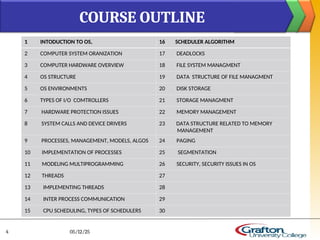
1 INTODUCTION TO OS, 16 SCHEDULER ALGORITHM
2 COMPUTER SYSTEM ORANIZATION 17 DEADLOCKS
3 COMPUTER HARDWARE OVERVIEW 18 FILE SYSTEM MANAGMENT
4 OS STRUCTURE 19 DATA STRUCTURE OF FILE MANAGMENT
5 OS ENVIRONMENTS 20 DISK STORAGE
6 TYPES OF I/O COMTROLLERS 21 STORAGE MANAGMENT
7 HARDWARE PROTECTION ISSUES 22 MEMORY MANAGEMENT
8 SYSTEM CALLS AND DEVICE DRIVERS 23 DATA STRUCTURE RELATED TO MEMORY
MANAGEMENT
9 PROCESSES, MANAGEMENT, MODELS, ALGOS 24 PAGING
10 IMPLEMENTATION OF PROCESSES 25 SEGMENTATION
11 MODELING MULTIPROGRAMMING 26 SECURITY, SECURITY ISSUES IN OS
12 THREADS 27
13 IMPLEMENTING THREADS 28
14 INTER PROCESS COMMUNICATION 29
15 CPU SCHEDULING, TYPES OF SCHEDULERS 30
COURSE OUTLINE
05/12/25
4
05/12/25
5
INTORDUCION TO OPERATING SYSTEM
Lecture # 1
overview
BOOK:
Operating System Concepts
by Silberschatz and Galvin , 8th
Edition
 What is OS
 OS Organization
 Different Definitions of OS
 Computer hardware overview
 OS brief History
 Overview of:
 OS Structure
 Types of OS
 Functions/Goals of OS
 Services of OS
 Computing environments
Key Learning Points
05/12/25
6
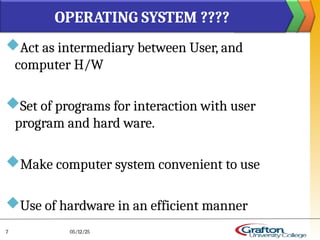
Act as intermediary between User, and
computer H/W
Set of programs for interaction with user
program and hard ware.
Make computer system convenient to use
Use of hardware in an efficient manner
OPERATING SYSTEM ????
05/12/25
7
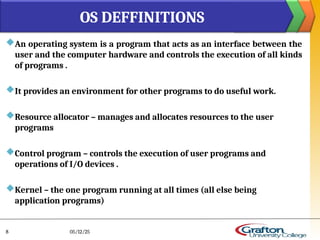
An operating system is a program that acts as an interface between the
user and the computer hardware and controls the execution of all kinds
of programs .
It provides an environment for other programs to do useful work.
Resource allocator – manages and allocates resources to the user
programs
Control program – controls the execution of user programs and
operations of I/O devices .
Kernel – the one program running at all times (all else being
application programs)
OS DEFFINITIONS
05/12/25
8
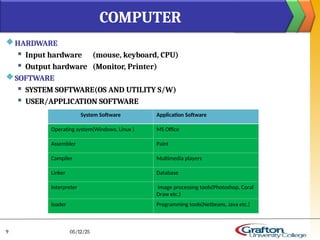
HARDWARE
 Input hardware (mouse, keyboard, CPU)
 Output hardware (Monitor, Printer)
SOFTWARE
 SYSTEM SOFTWARE(OS AND UTILITY S/W)
 USER/APPLICATION SOFTWARE
COMPUTER
05/12/25
9
System Software Application Software
Operating system(Windows, Linux ) MS Office
Assembler Paint
Compiler Multimedia players
Linker Database
Interpreter Image processing tools(Photoshop, Coral
Draw etc.)
loader Programming tools(Netbeans, Java etc.)
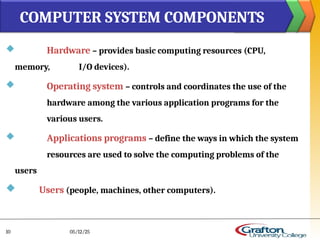
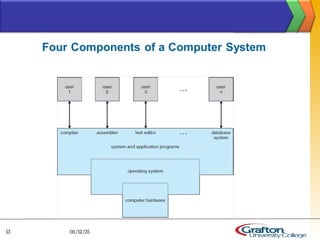
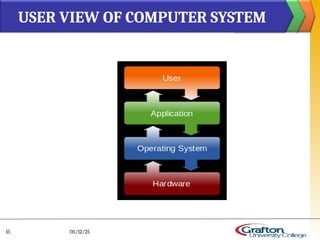
 Hardware – provides basic computing resources (CPU,
memory, I/O devices).
 Operating system – controls and coordinates the use of the
hardware among the various application programs for the
various users.
 Applications programs – define the ways in which the system
resources are used to solve the computing problems of the
users
 Users (people, machines, other computers).
COMPUTER SYSTEM COMPONENTS
05/12/25
10
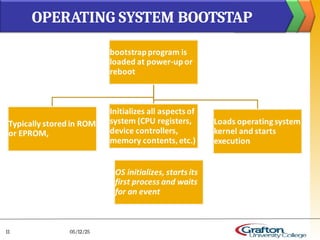
OPERATING SYSTEM BOOTSTAP
05/12/25
11
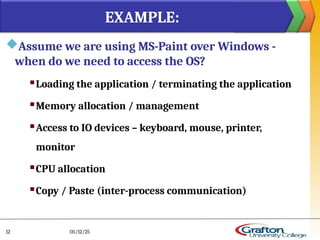
Assume we are using MS-Paint over Windows -
when do we need to access the OS?
 Loading the application / terminating the application
 Memory allocation / management
 Access to IO devices – keyboard, mouse, printer,
monitor
 CPU allocation
 Copy / Paste (inter-process communication)
EXAMPLE:
05/12/25
12
05/12/25
13
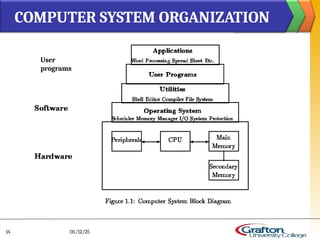
COMPUTER SYSTEM ORGANIZATION
05/12/25
14
User
programs
USER VIEW OF COMPUTER SYSTEM
05/12/25
15
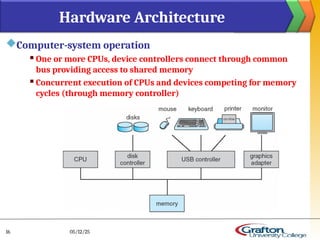
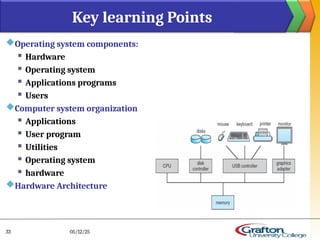
Computer-system operation
 One or more CPUs, device controllers connect through common
bus providing access to shared memory
 Concurrent execution of CPUs and devices competing for memory
cycles (through memory controller)
Hardware Architecture
05/12/25
16
 I/O devices and the CPU can execute concurrently
 Each device controller is in charge of a particular device
type
 Each device controller has a local buffer
 CPU moves data from/to main memory to/from local
buffers
 I/O is from the device to local buffer of controller
 Device controller informs CPU that it has finished its
operation by causing an interrupt
COMPUTER SYSTEM OPERATION
05/12/25
17
 Memory Management
 Processor Management
 Device Management
 File Management
 Security
 Control over system performance
 Job accounting
 Error detecting aids
 Coordination between other software and users
 Efficient use of computer resources
FUNCTIONS/GOALS OF AN OS
05/12/25
18
 MEMORY:
Main memory is a large array of words
Has its own address
Fast storage, access directly by the CPU.
 Memory management activities
 Keeps tracks of primary memory
 Decides which process will get memory
 when and
 how much
 Allocates the memory when the process requests
 De-allocates the memory
MEMORY MANAGMENT
05/12/25
19
OS decides which process gets the processor
when and how much time called
Process scheduling
Activities:
 Keeps tracks of processor
 Status of process
 Allocates the processor(CPU) to a process.
 De-allocates processor when processor is no longer required
PROCESSOR MANAGEMENT
05/12/25
20
OS manages device communication via drivers.
Operating
Activities for device management.
 Keeps tracks of all devices. Program responsible for this task is
known as the I/O controller.
 Decides which process gets the device
 Allocates the device in the efficient way.
 De-allocates devices
DEVICE MANAGEMENT
05/12/25
21
File system is organized into directories
Activities for file management
Keeps track of information,
 location
 uses
 status etc.
Decides who gets the resources.
Allocates the resources.
De-allocates the resources.
FILE MANAGEMENT
05/12/25
22
Security – defense of the system against internal and external attacks
 Huge range, including denial-of-service, worms, viruses, identity
theft, theft of service
Systems generally first distinguish among users, to determine who can
do what
 User identities (user IDs, security IDs)
 User ID then associated with all files, processes of that user to
determine access control
 Group identifier (group ID) allows set of users to be defined and
controls managed,
 then also associated with each process, file
Protection
 Any mechanism for controlling access of processes or users to
resources defined by the OS
SECURITY AND PROTECTION
05/12/25
23
Control over system performance --
 Recording delays between request for a service and response from the
system.
Job accounting --
 Keeping track of time and resources used by various jobs and users.
Error detecting aids --
 Production of dumps, traces, error messages and other debugging and error
detecting aids.
Coordination between other software and users
 Coordination and assignment of compilers, interpreters, assemblers and
other software to the various users of the computer systems
Efficient use of computer resources
OTHER GOALS
05/12/25
24

Program execution
 I/O operations
 File System manipulation
 Communication
 Error Detection
 Resource Allocation
 Protection
OPERATING SYSTEM SERVICES
05/12/25
25
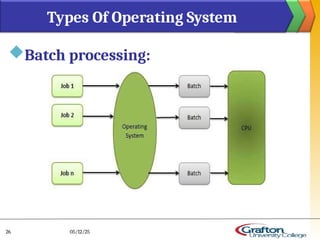
Batch processing:
Types Of Operating System
05/12/25
26
Mainframe Systems:
Reduce setup time by batching similar jobs
 Automatic job sequencing – automatically transfers
control from one job to another.
Resident monitor
 initial control in monitor
 control transfers to job
 when job completes control transfers pack to monitor
05/12/25
27
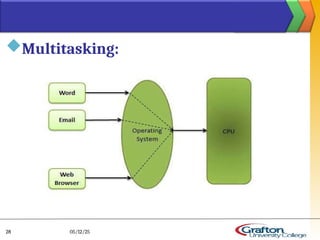
Multitasking:
05/12/25
28
Multi-programmed Batch Systems
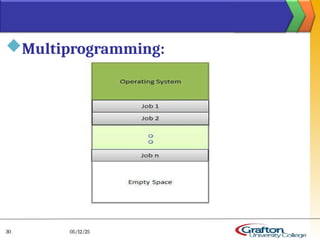
 Several jobs are kept in main memory at the same time
 and the CPU is multiplexed among them.
05/12/25
29
Multiprogramming:
05/12/25
30
OS Features Needed for Multiprogramming:
 I/O routine supplied by the system.
 Memory management – the system must allocate the
memory to several jobs.
 CPU scheduling – the system must choose among several
jobs ready to run.
 Allocation of devices
05/12/25
31
An operating system is a program that manages the computer
hardware. It also provides a basis for application programs and
acts as an intermediary between the computer user and the
computer hardware. An amazing aspect of operating systems is
how varied they are in accomplishing these tasks. Mainframe
operating systems are designed primarily to optimize utilization
of hardware.
Because an operating system is large and complex, it must be
created piece by piece. Each of these pieces should be a well-
delineated portion of the system, with carefully defined inputs,
outputs, and functions.
Summary:
05/12/25
32
Operating system components:
 Hardware
 Operating system
 Applications programs
 Users
Computer system organization
 Applications
 User program
 Utilities
 Operating system
 hardware
Hardware Architecture
Key learning Points
05/12/25
33
Goals or function of OS
 Memory Management
 Processor Management
 Device Management
 File Management
 Security
 Control over system performance
 Job accounting
 Error detecting aids
 Coordination between other software and users
 Efficient use of computer resources
 Memory management – the system must allocate the memory to several
jobs.
 CPU scheduling – the system must choose among several jobs ready to run.
Key Terms
05/12/25
34
https://www.youtube.com/watch?
v=nZRqPctQf8U&list=PLTZbNwgO5ebqnympIYe2GX4
hjjsS9Psdm
Video Link
05/12/25
35
Operating system Lecture no 1. Introduction

Operating system Lecture no 1. Introduction

  • 1.
    AJAZ KHAN BAIG OPERATINGSYSTEM Class : BSSE SEMESTER 4 Credit Hours ( 3+1)
  • 2.
    ATTENDENCE 80% ISMANDATORY FOR FINAL EXAM GRADING STRUCTURE 05/12/25 2 EXAMS % ASSIGNMENTS(4) 10 QUIZZES(4) 10 MID TERM EXAM 30 FINAL EXAM 50
  • 3.
    NOT ALLOWED: Talking withothers which causes disturbance Eating /drinking in class Can’t leave class without permission Can’t use mobile phone in class or out of class during class hours CLASS RULES 05/12/25 3
  • 4.
    1 INTODUCTION TOOS, 16 SCHEDULER ALGORITHM 2 COMPUTER SYSTEM ORANIZATION 17 DEADLOCKS 3 COMPUTER HARDWARE OVERVIEW 18 FILE SYSTEM MANAGMENT 4 OS STRUCTURE 19 DATA STRUCTURE OF FILE MANAGMENT 5 OS ENVIRONMENTS 20 DISK STORAGE 6 TYPES OF I/O COMTROLLERS 21 STORAGE MANAGMENT 7 HARDWARE PROTECTION ISSUES 22 MEMORY MANAGEMENT 8 SYSTEM CALLS AND DEVICE DRIVERS 23 DATA STRUCTURE RELATED TO MEMORY MANAGEMENT 9 PROCESSES, MANAGEMENT, MODELS, ALGOS 24 PAGING 10 IMPLEMENTATION OF PROCESSES 25 SEGMENTATION 11 MODELING MULTIPROGRAMMING 26 SECURITY, SECURITY ISSUES IN OS 12 THREADS 27 13 IMPLEMENTING THREADS 28 14 INTER PROCESS COMMUNICATION 29 15 CPU SCHEDULING, TYPES OF SCHEDULERS 30 COURSE OUTLINE 05/12/25 4
  • 5.
    05/12/25 5 INTORDUCION TO OPERATINGSYSTEM Lecture # 1 overview BOOK: Operating System Concepts by Silberschatz and Galvin , 8th Edition
  • 6.
     What isOS  OS Organization  Different Definitions of OS  Computer hardware overview  OS brief History  Overview of:  OS Structure  Types of OS  Functions/Goals of OS  Services of OS  Computing environments Key Learning Points 05/12/25 6
  • 7.
    Act as intermediarybetween User, and computer H/W Set of programs for interaction with user program and hard ware. Make computer system convenient to use Use of hardware in an efficient manner OPERATING SYSTEM ???? 05/12/25 7
  • 8.
    An operating systemis a program that acts as an interface between the user and the computer hardware and controls the execution of all kinds of programs . It provides an environment for other programs to do useful work. Resource allocator – manages and allocates resources to the user programs Control program – controls the execution of user programs and operations of I/O devices . Kernel – the one program running at all times (all else being application programs) OS DEFFINITIONS 05/12/25 8
  • 9.
    HARDWARE  Input hardware(mouse, keyboard, CPU)  Output hardware (Monitor, Printer) SOFTWARE  SYSTEM SOFTWARE(OS AND UTILITY S/W)  USER/APPLICATION SOFTWARE COMPUTER 05/12/25 9 System Software Application Software Operating system(Windows, Linux ) MS Office Assembler Paint Compiler Multimedia players Linker Database Interpreter Image processing tools(Photoshop, Coral Draw etc.) loader Programming tools(Netbeans, Java etc.)
  • 10.
     Hardware –provides basic computing resources (CPU, memory, I/O devices).  Operating system – controls and coordinates the use of the hardware among the various application programs for the various users.  Applications programs – define the ways in which the system resources are used to solve the computing problems of the users  Users (people, machines, other computers). COMPUTER SYSTEM COMPONENTS 05/12/25 10
  • 11.
  • 12.
    Assume we areusing MS-Paint over Windows - when do we need to access the OS?  Loading the application / terminating the application  Memory allocation / management  Access to IO devices – keyboard, mouse, printer, monitor  CPU allocation  Copy / Paste (inter-process communication) EXAMPLE: 05/12/25 12
  • 13.
  • 14.
  • 15.
    USER VIEW OFCOMPUTER SYSTEM 05/12/25 15
  • 16.
    Computer-system operation  Oneor more CPUs, device controllers connect through common bus providing access to shared memory  Concurrent execution of CPUs and devices competing for memory cycles (through memory controller) Hardware Architecture 05/12/25 16
  • 17.
     I/O devicesand the CPU can execute concurrently  Each device controller is in charge of a particular device type  Each device controller has a local buffer  CPU moves data from/to main memory to/from local buffers  I/O is from the device to local buffer of controller  Device controller informs CPU that it has finished its operation by causing an interrupt COMPUTER SYSTEM OPERATION 05/12/25 17
  • 18.
     Memory Management Processor Management  Device Management  File Management  Security  Control over system performance  Job accounting  Error detecting aids  Coordination between other software and users  Efficient use of computer resources FUNCTIONS/GOALS OF AN OS 05/12/25 18
  • 19.
     MEMORY: Main memoryis a large array of words Has its own address Fast storage, access directly by the CPU.  Memory management activities  Keeps tracks of primary memory  Decides which process will get memory  when and  how much  Allocates the memory when the process requests  De-allocates the memory MEMORY MANAGMENT 05/12/25 19
  • 20.
    OS decides whichprocess gets the processor when and how much time called Process scheduling Activities:  Keeps tracks of processor  Status of process  Allocates the processor(CPU) to a process.  De-allocates processor when processor is no longer required PROCESSOR MANAGEMENT 05/12/25 20
  • 21.
    OS manages devicecommunication via drivers. Operating Activities for device management.  Keeps tracks of all devices. Program responsible for this task is known as the I/O controller.  Decides which process gets the device  Allocates the device in the efficient way.  De-allocates devices DEVICE MANAGEMENT 05/12/25 21
  • 22.
    File system isorganized into directories Activities for file management Keeps track of information,  location  uses  status etc. Decides who gets the resources. Allocates the resources. De-allocates the resources. FILE MANAGEMENT 05/12/25 22
  • 23.
    Security – defenseof the system against internal and external attacks  Huge range, including denial-of-service, worms, viruses, identity theft, theft of service Systems generally first distinguish among users, to determine who can do what  User identities (user IDs, security IDs)  User ID then associated with all files, processes of that user to determine access control  Group identifier (group ID) allows set of users to be defined and controls managed,  then also associated with each process, file Protection  Any mechanism for controlling access of processes or users to resources defined by the OS SECURITY AND PROTECTION 05/12/25 23
  • 24.
    Control over systemperformance --  Recording delays between request for a service and response from the system. Job accounting --  Keeping track of time and resources used by various jobs and users. Error detecting aids --  Production of dumps, traces, error messages and other debugging and error detecting aids. Coordination between other software and users  Coordination and assignment of compilers, interpreters, assemblers and other software to the various users of the computer systems Efficient use of computer resources OTHER GOALS 05/12/25 24
  • 25.
     Program execution  I/Ooperations  File System manipulation  Communication  Error Detection  Resource Allocation  Protection OPERATING SYSTEM SERVICES 05/12/25 25
  • 26.
    Batch processing: Types OfOperating System 05/12/25 26
  • 27.
    Mainframe Systems: Reduce setuptime by batching similar jobs  Automatic job sequencing – automatically transfers control from one job to another. Resident monitor  initial control in monitor  control transfers to job  when job completes control transfers pack to monitor 05/12/25 27
  • 28.
  • 29.
    Multi-programmed Batch Systems Several jobs are kept in main memory at the same time  and the CPU is multiplexed among them. 05/12/25 29
  • 30.
  • 31.
    OS Features Neededfor Multiprogramming:  I/O routine supplied by the system.  Memory management – the system must allocate the memory to several jobs.  CPU scheduling – the system must choose among several jobs ready to run.  Allocation of devices 05/12/25 31
  • 32.
    An operating systemis a program that manages the computer hardware. It also provides a basis for application programs and acts as an intermediary between the computer user and the computer hardware. An amazing aspect of operating systems is how varied they are in accomplishing these tasks. Mainframe operating systems are designed primarily to optimize utilization of hardware. Because an operating system is large and complex, it must be created piece by piece. Each of these pieces should be a well- delineated portion of the system, with carefully defined inputs, outputs, and functions. Summary: 05/12/25 32
  • 33.
    Operating system components: Hardware  Operating system  Applications programs  Users Computer system organization  Applications  User program  Utilities  Operating system  hardware Hardware Architecture Key learning Points 05/12/25 33
  • 34.
    Goals or functionof OS  Memory Management  Processor Management  Device Management  File Management  Security  Control over system performance  Job accounting  Error detecting aids  Coordination between other software and users  Efficient use of computer resources  Memory management – the system must allocate the memory to several jobs.  CPU scheduling – the system must choose among several jobs ready to run. Key Terms 05/12/25 34
  • 35.