Online Safety
(Staff Presentation)
St Wilfred’s RC Primary, Manchester, October 2018
Jamie Edmondson
Education Technology Consultant
Computing Leader / Teacher, Our Lady’s RC Primary School, Manchester
CAS Master Teacher
@jecomputing info@jecomputing.co.ukwww.jecomputing.co.uk
Online Safety
Be Internet Legends (KS2) ...
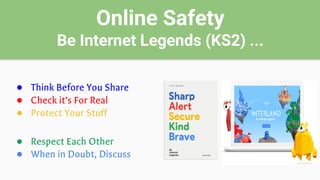
● Think Before You Share
● Check it’s For Real
● Protect Your Stuff
● Respect Each Other
● When in Doubt, Discuss
Online Safety
Be Internet Legends (KS2) ...
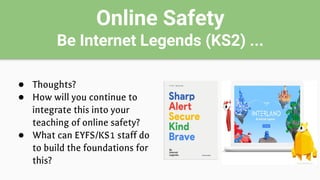
● Thoughts?
● How will you continue to
integrate this into your
teaching of online safety?
● What can EYFS/KS1 staff do
to build the foundations for
this?
Online Safety
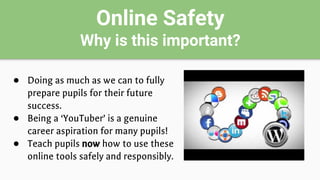
Why is this important?
● Doing as much as we can to fully
prepare pupils for their future
success.
● Being a ‘YouTuber’ is a genuine
career aspiration for many pupils!
● Teach pupils now how to use these
online tools safely and responsibly.
Online Safety
Young people’s use of social media
“On average, tweens (age 8 to 12) and teens (age 13 to 18) use
many different devices and consume tremendous amounts of media.
Other findings push us to rethink our assumptions about kids' lives.
For example, tweens and teens use a lot of social media, but not
many actually enjoy it”.
Source: commonsensemedia.org
Online Safety
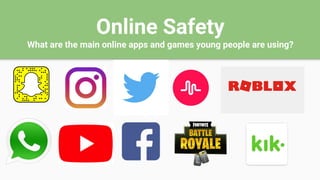
What are the main online apps and games young people are using?
Online Safety
How are young people using these apps?
● Boys tend to play more video games/apps. Many of these contain
content that is inappropriate and as such have a 12+ PEGI rating.
Many also have an online chat ‘friends’ element to them.
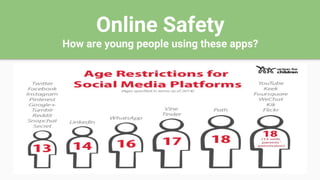
● Girls tend to use more social media apps. To use these apps, users
should be at least 13 years of age or in some cases such as
WhatsApp 16+ years old.
Online Safety
How are young people using these apps?
Online Safety
How are young people using these apps?
● The reason most social media services use an age limit of 13 or over is in part because of
a law in the USA. The COPPA law or Children’s Online Privacy Protection Act states that
any organisations or people operating online services (including social media services)
are not allowed to collect the personal information of anyone under the age of 13
without parental permission.
● These rules around age relate to privacy, but also are relevant to safety. Some services
offer additional protection for users who are registered as under 18, and by supplying a
fake age young people can potentially lose some of this protection. Young people also
risk being exposed to content which is intended for older users when they use sites that
are not designed for people their age.
Source: childnet.com
Online Safety
Useful resources ...
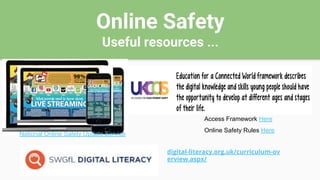
digital-literacy.org.uk/curriculum-ov
erview.aspx/
Access Framework Here
National Online Safety Update Service
Online Safety Rules Here
Online Safety
Useful resources ...
Computing Leaders Toolkit include lots
of good free online safety resources.
Access here
Free online safety resources here
Range of free online safety resources here
Online Safety
Useful resources ...
https://www.facebook.com/The2johns/
https://twitter.com/natonlinesaf
ety?lang=en
Online Safety
Things to consider ...
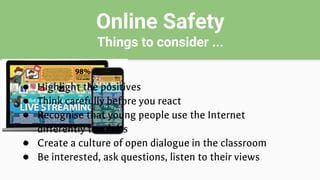
● Highlight the positives
● Think carefully before you react
● Recognise that young people use the Internet
differently to adults
● Create a culture of open dialogue in the classroom
● Be interested, ask questions, listen to their views
Online Safety
Things to consider ...
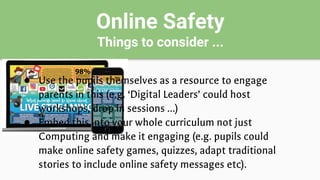
● Use the pupils themselves as a resource to engage
parents in this (e.g. ‘Digital Leaders’ could host
workshops, drop in sessions …)
● Embed this into your whole curriculum not just
Computing and make it engaging (e.g. pupils could
make online safety games, quizzes, adapt traditional
stories to include online safety messages etc).
Online Safety
(Staff Presentation)
St Wilfred’s RC Primary, Manchester, October 2018
Jamie Edmondson
Education Technology Consultant
Computing Leader / Teacher, Our Lady’s RC Primary School, Manchester
CAS Master Teacher
@jecomputing info@jecomputing.co.ukwww.jecomputing.co.uk

Online Safety

  • 1.
    Online Safety (Staff Presentation) StWilfred’s RC Primary, Manchester, October 2018 Jamie Edmondson Education Technology Consultant Computing Leader / Teacher, Our Lady’s RC Primary School, Manchester CAS Master Teacher @jecomputing info@jecomputing.co.ukwww.jecomputing.co.uk
  • 2.
    Online Safety Be InternetLegends (KS2) ... ● Think Before You Share ● Check it’s For Real ● Protect Your Stuff ● Respect Each Other ● When in Doubt, Discuss
  • 3.
    Online Safety Be InternetLegends (KS2) ... ● Thoughts? ● How will you continue to integrate this into your teaching of online safety? ● What can EYFS/KS1 staff do to build the foundations for this?
  • 4.
    Online Safety Why isthis important? ● Doing as much as we can to fully prepare pupils for their future success. ● Being a ‘YouTuber’ is a genuine career aspiration for many pupils! ● Teach pupils now how to use these online tools safely and responsibly.
  • 5.
    Online Safety Young people’suse of social media “On average, tweens (age 8 to 12) and teens (age 13 to 18) use many different devices and consume tremendous amounts of media. Other findings push us to rethink our assumptions about kids' lives. For example, tweens and teens use a lot of social media, but not many actually enjoy it”. Source: commonsensemedia.org
  • 6.
    Online Safety What arethe main online apps and games young people are using?
  • 7.
    Online Safety How areyoung people using these apps? ● Boys tend to play more video games/apps. Many of these contain content that is inappropriate and as such have a 12+ PEGI rating. Many also have an online chat ‘friends’ element to them. ● Girls tend to use more social media apps. To use these apps, users should be at least 13 years of age or in some cases such as WhatsApp 16+ years old.
  • 8.
    Online Safety How areyoung people using these apps?
  • 9.
    Online Safety How areyoung people using these apps? ● The reason most social media services use an age limit of 13 or over is in part because of a law in the USA. The COPPA law or Children’s Online Privacy Protection Act states that any organisations or people operating online services (including social media services) are not allowed to collect the personal information of anyone under the age of 13 without parental permission. ● These rules around age relate to privacy, but also are relevant to safety. Some services offer additional protection for users who are registered as under 18, and by supplying a fake age young people can potentially lose some of this protection. Young people also risk being exposed to content which is intended for older users when they use sites that are not designed for people their age. Source: childnet.com
  • 10.
    Online Safety Useful resources... digital-literacy.org.uk/curriculum-ov erview.aspx/ Access Framework Here National Online Safety Update Service Online Safety Rules Here
  • 11.
    Online Safety Useful resources... Computing Leaders Toolkit include lots of good free online safety resources. Access here Free online safety resources here Range of free online safety resources here
  • 12.
    Online Safety Useful resources... https://www.facebook.com/The2johns/ https://twitter.com/natonlinesaf ety?lang=en
  • 13.
    Online Safety Things toconsider ... ● Highlight the positives ● Think carefully before you react ● Recognise that young people use the Internet differently to adults ● Create a culture of open dialogue in the classroom ● Be interested, ask questions, listen to their views
  • 14.
    Online Safety Things toconsider ... ● Use the pupils themselves as a resource to engage parents in this (e.g. ‘Digital Leaders’ could host workshops, drop in sessions …) ● Embed this into your whole curriculum not just Computing and make it engaging (e.g. pupils could make online safety games, quizzes, adapt traditional stories to include online safety messages etc).
  • 15.
    Online Safety (Staff Presentation) StWilfred’s RC Primary, Manchester, October 2018 Jamie Edmondson Education Technology Consultant Computing Leader / Teacher, Our Lady’s RC Primary School, Manchester CAS Master Teacher @jecomputing info@jecomputing.co.ukwww.jecomputing.co.uk