Using Kodu to develop
Computational Thinking
St Hugh’s RC Primary, May 2018
Jamie Edmondson
Computing Leader, Our Lady’s RC Primary School, Manchester
CAS Master Teacher
@jecomputing
jamie.edmondson@computingatschool.org.uk
What is Computational Thinking?
Concepts and Approaches
.
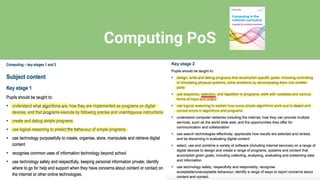
Computing PoS
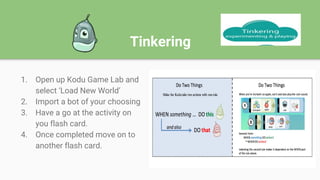
Tinkering
1. Open up Kodu Game Lab and
select ‘Load New World’
2. Import a bot of your choosing
3. Have a go at the activity on
you flash card.
4. Once completed move on to
another flash card.
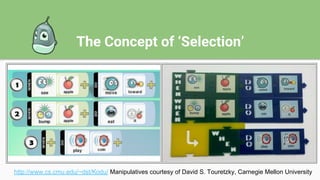
The Concept of ‘Selection’
http://www.cs.cmu.edu/~dst/Kodu/ Manipulatives courtesy of David S. Touretzky, Carnegie Mellon University
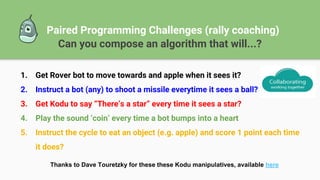
Paired Programming Challenges (rally coaching)
Can you compose an algorithm that will...?
1. Get Rover bot to move towards and apple when it sees it?
2. Instruct a bot (any) to shoot a missile everytime it sees a ball?
3. Get Kodu to say “There’s a star” every time it sees a star?
4. Play the sound ‘coin’ every time a bot bumps into a heart
5. Instruct the cycle to eat an object (e.g. apple) and score 1 point each time
it does?
Thanks to Dave Touretzky for these these Kodu manipulatives, available here
Your Turn!
Design and create your own Kodu game!
WAGOLL (Year One)!
● Use the game planning sheet provided to design your game.
● Use the manipulatives and flash cards to support if need be.
ScreenCasting
Assessing your work!
Open up Screencast-O-Matic and record yourself playing your game.
Explain your programming and how your game works...
Any Questions?
St Hugh’s RC Primary, May 2018
Jamie Edmondson
Computing Leader, Our Lady’s RC Primary School
CAS Master Teacher
@jecomputing
jamie.edmondson@computingatschool.org.uk

Using Kodu to develop computational thinking

  • 1.
    Using Kodu todevelop Computational Thinking St Hugh’s RC Primary, May 2018 Jamie Edmondson Computing Leader, Our Lady’s RC Primary School, Manchester CAS Master Teacher @jecomputing jamie.edmondson@computingatschool.org.uk
  • 2.
    What is ComputationalThinking? Concepts and Approaches .
  • 3.
  • 4.
    Tinkering 1. Open upKodu Game Lab and select ‘Load New World’ 2. Import a bot of your choosing 3. Have a go at the activity on you flash card. 4. Once completed move on to another flash card.
  • 5.
    The Concept of‘Selection’ http://www.cs.cmu.edu/~dst/Kodu/ Manipulatives courtesy of David S. Touretzky, Carnegie Mellon University
  • 6.
    Paired Programming Challenges(rally coaching) Can you compose an algorithm that will...? 1. Get Rover bot to move towards and apple when it sees it? 2. Instruct a bot (any) to shoot a missile everytime it sees a ball? 3. Get Kodu to say “There’s a star” every time it sees a star? 4. Play the sound ‘coin’ every time a bot bumps into a heart 5. Instruct the cycle to eat an object (e.g. apple) and score 1 point each time it does? Thanks to Dave Touretzky for these these Kodu manipulatives, available here
  • 7.
    Your Turn! Design andcreate your own Kodu game! WAGOLL (Year One)! ● Use the game planning sheet provided to design your game. ● Use the manipulatives and flash cards to support if need be.
  • 8.
    ScreenCasting Assessing your work! Openup Screencast-O-Matic and record yourself playing your game. Explain your programming and how your game works...
  • 9.
    Any Questions? St Hugh’sRC Primary, May 2018 Jamie Edmondson Computing Leader, Our Lady’s RC Primary School CAS Master Teacher @jecomputing jamie.edmondson@computingatschool.org.uk