In memory OLAP engine
Samuel Pelletier	

Kaviju inc.	

samuel@kaviju.com
OLAP ?
• An acronym for OnLine Analytical Processing.	

• In simple words, a system to query a multidimensional data set
and get answer fast for interactive reports. 	

• A well known implementation is an Excel Pivot Table.
Why build something new
• I wanted something fast, memory efficient for simple queries with
millions of facts. 	

• Sql queries dost not works for millions of facts with multiple
dimensions, especially with large number of rows.	

• There are specialized tools for OLAP from Microsoft, Oracle and
others but they are large and expensive, too much for my needs.	

• Generic cheap toolkits are not memory efficient, this is the cost for
their simplicity.	

• I wanted a simple solution to deploy with minimal dependency.
Memory usage and time to
retrieve 1 000 000 invoice lines
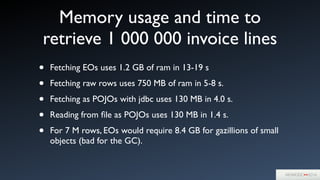
• Fetching EOs uses 1.2 GB of ram in 13-19 s	

• Fetching raw rows uses 750 MB of ram in 5-8 s.	

• Fetching as POJOs with jdbc uses 130 MB in 4.0 s.	

• Reading from file as POJOs uses 130 MB in 1.4 s.	

• For 7 M rows, EOs would require 8.4 GB for gazillions of small
objects (bad for the GC).
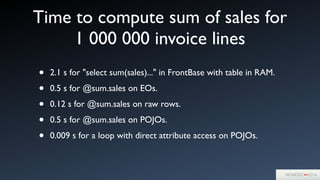
Time to compute sum of sales for
1 000 000 invoice lines
• 2.1 s for "select sum(sales)..." in FrontBase with table in RAM.	

• 0.5 s for @sum.sales on EOs.	

• 0.12 s for @sum.sales on raw rows.	

• 0.5 s for @sum.sales on POJOs.	

• 0.009 s for a loop with direct attribute access on POJOs.
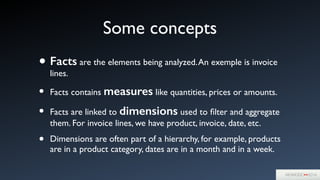
Some concepts
• Facts are the elements being analyzed.An exemple is invoice
lines.	

• Facts contains measures like quantities, prices or amounts.	

• Facts are linked to dimensions used to filter and aggregate
them. For invoice lines, we have product, invoice, date, etc.	

• Dimensions are often part of a hierarchy, for example, products
are in a product category, dates are in a month and in a week.
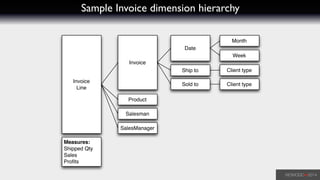
Sample Invoice dimension hierarchy
Invoice
Line
Invoice
Date
Month
Ship to Client type
Sold to
Product
Salesman
SalesManager
Week
Client type
Measures:
Shipped Qty
Sales
Profits
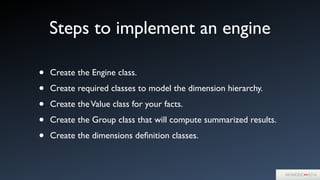
Steps to implement an engine
• Create the Engine class.	

• Create required classes to model the dimension hierarchy. 	

• Create theValue class for your facts.	

• Create the Group class that will compute summarized results.	

• Create the dimensions definition classes.
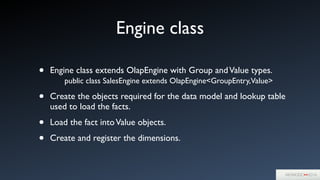
Engine class
• Engine class extends OlapEngine with Group andValue types.


 public class SalesEngine extends OlapEngine<GroupEntry,Value>	

• Create the objects required for the data model and lookup table
used to load the facts.	

• Load the fact intoValue objects.	

• Create and register the dimensions.
Create required model objects
public class Product {	
	 public final int code;	
	 public final String name;	
	 public final ProductCategory category;	
	 	
	 public Product(int code, String name, ProductCategory category) {	
	 	 super();	
	 	 this.code = code;	
	 	 this.name = name;	
	 	 this.category = category;	
	 }	
}	
!
	 private void loadProducts() {	
	 	 productsByCode = new HashMap<Integer, Product>();	
!
	 	 WOResourceManager resourceManager = ERXApplication.application().resourceManager();	
	 	 String fileName = "olapData/products.txt";	
	 	 try ( InputStream fileData = resourceManager.inputStreamForResourceNamed(fileName, null, null);) {	
	 	 	 InputStreamReader fileReader = new InputStreamReader(fileData, "utf-8");	
	 	 	 BufferedReader reader = new BufferedReader(fileReader);	
	 	 	 String line;	
	 	 	 while ( (line = reader.readLine()) != null) {	
	 	 	 	 String[] cols = line.split("t", -1);	
	 	 	 	 Product product = new Product(Integer.parseInt(cols[0]), cols[0], categoryWithID(cols[1]));	
	 	 	 	 	
	 	 	 	 productsByCode.put(product.code, product);	
	 	 	 }	
	 	 }	
	 	 ...	
	 }
Load the facts and create dimensions
	 private void loadInvoiceLines() {	
	 	 ...	
	 	 loadProductCategories();	
	 	 loadProducts();	
!
	 	 InvoiceDimension invoiceDim = new InvoiceDimension(this);	
	 	 SalesmanDimension salesmanDim = new SalesmanDimension(this);	
	 	 	 while ( (line = reader.readLine()) != null) {	
	 	 	 	 String[] cols = line.split("t", -1);	
!
	 	 	 	 InvoiceLine invoiceLine = new InvoiceLine(valueIndex++, Short.parseShort(cols[1]));	
	 	 	 	 invoiceLine.shippedQty = Integer.parseInt(cols[6]);	
	 	 	 	 invoiceLine.sales = Float.parseFloat(cols[7]);	
	 	 	 	 invoiceLine.profits = Float.parseFloat(cols[8]);	
	 	 	 	 lines.add(invoiceLine);	
	 	 	 	 	
	 	 	 	 invoiceDim.addLine(invoiceLine, cols[0], cols);	
!
	 	 	 	 invoiceLine.salesmanNumber = Integer.parseInt(cols[12]);	
	 	 	 	 salesmanDim.addIndexEntry(invoiceLine.salesmanNumber, invoiceLine);	
	 	 	 	 ...	
	 	 	 }	
	 	 }	
	 	 addDimension(productDimension);	
	 	 addDimension(productDimension.createProductCategoryDimension());	
	 	 ...	
	 	 lines.trimToSize();	
	 	 setValues(lines);	
	 }
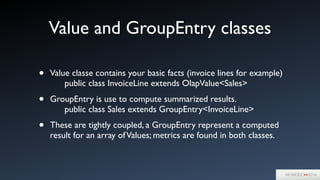
Value and GroupEntry classes
• Value classe contains your basic facts (invoice lines for example) 


 public class InvoiceLine extends OlapValue<Sales>	

• GroupEntry is use to compute summarized results.


 public class Sales extends GroupEntry<InvoiceLine>	

• These are tightly coupled, a GroupEntry represent a computed
result for an array ofValues; metrics are found in both classes.
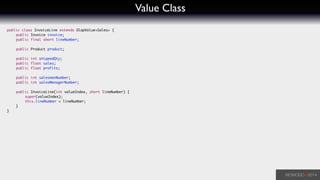
Value Class
public class InvoiceLine extends OlapValue<Sales> {	
	 public Invoice invoice;	
	 public final short lineNumber;	
	 	
	 public Product product;	
!
	 public int shippedQty;	
	 public float sales;	
	 public float profits;	
!
	 public int salesmanNumber;	
	 public int salesManagerNumber;	
!
	 public InvoiceLine(int valueIndex, short lineNumber) {	
	 	 super(valueIndex);	
	 	 this.lineNumber = lineNumber;	
	 }	
}
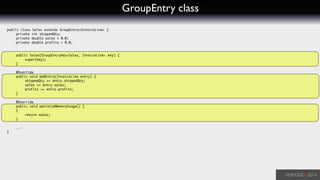
GroupEntry class
public class Sales extends GroupEntry<InvoiceLine> {	
	 private int shippedQty;	
	 private double sales = 0.0;	
	 private double profits = 0.0;	
	 	
!
	 public Sales(GroupEntryKey<Sales, InvoiceLine> key) {	
	 	 super(key);	
	 }	
!
	 @Override	
	 public void addEntry(InvoiceLine entry) {	
	 	 shippedQty += entry.shippedQty;	
	 	 sales += entry.sales;	
	 	 profits += entry.profits;	
	 }	
!
	 @Override	
	 public void optimizeMemoryUsage() {	
	 }	
	 	 return sales;	
	 }	
!
	 ...	
}
Dimensions classes
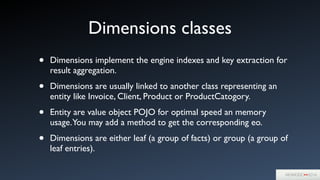
• Dimensions implement the engine indexes and key extraction for
result aggregation.	

• Dimensions are usually linked to another class representing an
entity like Invoice, Client, Product or ProductCatogory.	

• Entity are value object POJO for optimal speed an memory
usage.You may add a method to get the corresponding eo.	

• Dimensions are either leaf (a group of facts) or group (a group of
leaf entries).
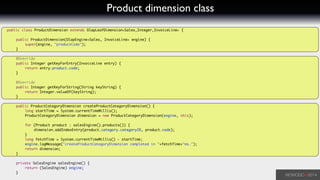
Product dimension class
public class ProductDimension extends OlapLeafDimension<Sales,Integer,InvoiceLine> {	
!
	 public ProductDimension(OlapEngine<Sales, InvoiceLine> engine) {	
	 	 super(engine, "productCode");	
	 }	
!
	 @Override	
	 public Integer getKeyForEntry(InvoiceLine entry) {	
	 	 return entry.product.code;	
	 }	
!
	 @Override	
	 public Integer getKeyForString(String keyString) {	
	 	 return Integer.valueOf(keyString);	
	 }	
	 	
	 public ProductCategoryDimension createProductCategoryDimension() {	
	 	 long startTime = System.currentTimeMillis();	
	 	 ProductCategoryDimension dimension = new ProductCategoryDimension(engine, this);	
!
	 	 for (Product product : salesEngine().products()) {	
	 	 	 dimension.addIndexEntry(product.category.categoryID, product.code);	
	 	 }	
	 	 long fetchTime = System.currentTimeMillis() - startTime;	
	 	 engine.logMessage("createProductCategoryDimension completed in "+fetchTime+"ms.");	
	 	 return dimension;	
	 }	
!
	 private SalesEngine salesEngine() {	
	 	 return (SalesEngine) engine;	
	 }
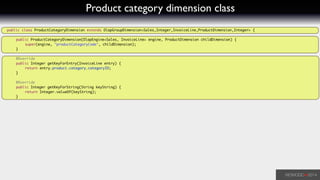
Product category dimension class
public class ProductCategoryDimension extends OlapGroupDimension<Sales,Integer,InvoiceLine,ProductDimension,Integer> {	
!
	 public ProductCategoryDimension(OlapEngine<Sales, InvoiceLine> engine, ProductDimension childDimension) {	
	 	 super(engine, "productCategoryCode", childDimension);	
	 }	
!
	 @Override	
	 public Integer getKeyForEntry(InvoiceLine entry) {	
	 	 return entry.product.category.categoryID;	
	 }	
!
	 @Override	
	 public Integer getKeyForString(String keyString) {	
	 	 return Integer.valueOf(keyString);	
	 }
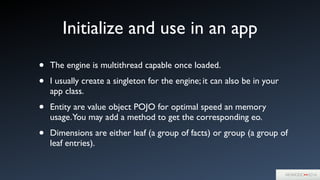
Initialize and use in an app
• The engine is multithread capable once loaded.	

• I usually create a singleton for the engine; it can also be in your
app class.	

• Entity are value object POJO for optimal speed an memory
usage.You may add a method to get the corresponding eo.	

• Dimensions are either leaf (a group of facts) or group (a group of
leaf entries).
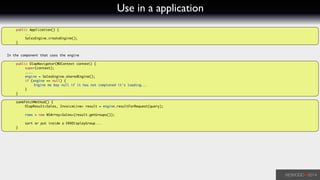
Use in a application
	 public Application() {	
	 	 ...	
	 	 SalesEngine.createEngine();	
	 }	
!
!
In the component that uses the engine	
!
	 public OlapNavigator(WOContext context) {	
	 	 super(context);	
	 	 ....	
	 	 engine = SalesEngine.sharedEngine();	
	 	 if (engine == null) {	
	 	 	 Engine me bay null if it has not completed it's loading...	
	 	 }	
	 }	
!
	 someFetchMethod() {	
	 	 OlapResult<Sales, InvoiceLine> result = engine.resultForRequest(query);	
!
	 	 rows = new NSArray<Sales>(result.getGroups());	
	 	 	
	 	 sort or put inside a ERXDisplayGroup...	
	 }	
!
Demo app
Java and memory
• To keep the garbage collector happy, it is better to have a
maximum heap at least 2-3 times the real usage.	

• GC can kill your app performance if memory is starved.With
default setting, it may even kill your server by using multiple core
for long periods at least in 1.5 and 1.6.	

• Java 1.7 contains a new collector, probable better.
Q&A
Samuel Pelletier	

samuel@kaviju.com

In memory OLAP engine

  • 1.
    In memory OLAPengine Samuel Pelletier Kaviju inc. samuel@kaviju.com
  • 2.
    OLAP ? • Anacronym for OnLine Analytical Processing. • In simple words, a system to query a multidimensional data set and get answer fast for interactive reports. • A well known implementation is an Excel Pivot Table.
  • 3.
    Why build somethingnew • I wanted something fast, memory efficient for simple queries with millions of facts. • Sql queries dost not works for millions of facts with multiple dimensions, especially with large number of rows. • There are specialized tools for OLAP from Microsoft, Oracle and others but they are large and expensive, too much for my needs. • Generic cheap toolkits are not memory efficient, this is the cost for their simplicity. • I wanted a simple solution to deploy with minimal dependency.
  • 4.
    Memory usage andtime to retrieve 1 000 000 invoice lines • Fetching EOs uses 1.2 GB of ram in 13-19 s • Fetching raw rows uses 750 MB of ram in 5-8 s. • Fetching as POJOs with jdbc uses 130 MB in 4.0 s. • Reading from file as POJOs uses 130 MB in 1.4 s. • For 7 M rows, EOs would require 8.4 GB for gazillions of small objects (bad for the GC).
  • 5.
    Time to computesum of sales for 1 000 000 invoice lines • 2.1 s for "select sum(sales)..." in FrontBase with table in RAM. • 0.5 s for @sum.sales on EOs. • 0.12 s for @sum.sales on raw rows. • 0.5 s for @sum.sales on POJOs. • 0.009 s for a loop with direct attribute access on POJOs.
  • 6.
    Some concepts • Factsare the elements being analyzed.An exemple is invoice lines. • Facts contains measures like quantities, prices or amounts. • Facts are linked to dimensions used to filter and aggregate them. For invoice lines, we have product, invoice, date, etc. • Dimensions are often part of a hierarchy, for example, products are in a product category, dates are in a month and in a week.
  • 7.
    Sample Invoice dimensionhierarchy Invoice Line Invoice Date Month Ship to Client type Sold to Product Salesman SalesManager Week Client type Measures: Shipped Qty Sales Profits
  • 8.
    Steps to implementan engine • Create the Engine class. • Create required classes to model the dimension hierarchy. • Create theValue class for your facts. • Create the Group class that will compute summarized results. • Create the dimensions definition classes.
  • 9.
    Engine class • Engineclass extends OlapEngine with Group andValue types.
 public class SalesEngine extends OlapEngine<GroupEntry,Value> • Create the objects required for the data model and lookup table used to load the facts. • Load the fact intoValue objects. • Create and register the dimensions.
  • 10.
    Create required modelobjects public class Product { public final int code; public final String name; public final ProductCategory category; public Product(int code, String name, ProductCategory category) { super(); this.code = code; this.name = name; this.category = category; } } ! private void loadProducts() { productsByCode = new HashMap<Integer, Product>(); ! WOResourceManager resourceManager = ERXApplication.application().resourceManager(); String fileName = "olapData/products.txt"; try ( InputStream fileData = resourceManager.inputStreamForResourceNamed(fileName, null, null);) { InputStreamReader fileReader = new InputStreamReader(fileData, "utf-8"); BufferedReader reader = new BufferedReader(fileReader); String line; while ( (line = reader.readLine()) != null) { String[] cols = line.split("t", -1); Product product = new Product(Integer.parseInt(cols[0]), cols[0], categoryWithID(cols[1])); productsByCode.put(product.code, product); } } ... }
  • 11.
    Load the factsand create dimensions private void loadInvoiceLines() { ... loadProductCategories(); loadProducts(); ! InvoiceDimension invoiceDim = new InvoiceDimension(this); SalesmanDimension salesmanDim = new SalesmanDimension(this); while ( (line = reader.readLine()) != null) { String[] cols = line.split("t", -1); ! InvoiceLine invoiceLine = new InvoiceLine(valueIndex++, Short.parseShort(cols[1])); invoiceLine.shippedQty = Integer.parseInt(cols[6]); invoiceLine.sales = Float.parseFloat(cols[7]); invoiceLine.profits = Float.parseFloat(cols[8]); lines.add(invoiceLine); invoiceDim.addLine(invoiceLine, cols[0], cols); ! invoiceLine.salesmanNumber = Integer.parseInt(cols[12]); salesmanDim.addIndexEntry(invoiceLine.salesmanNumber, invoiceLine); ... } } addDimension(productDimension); addDimension(productDimension.createProductCategoryDimension()); ... lines.trimToSize(); setValues(lines); }
  • 12.
    Value and GroupEntryclasses • Value classe contains your basic facts (invoice lines for example) 
 public class InvoiceLine extends OlapValue<Sales> • GroupEntry is use to compute summarized results.
 public class Sales extends GroupEntry<InvoiceLine> • These are tightly coupled, a GroupEntry represent a computed result for an array ofValues; metrics are found in both classes.
  • 13.
    Value Class public classInvoiceLine extends OlapValue<Sales> { public Invoice invoice; public final short lineNumber; public Product product; ! public int shippedQty; public float sales; public float profits; ! public int salesmanNumber; public int salesManagerNumber; ! public InvoiceLine(int valueIndex, short lineNumber) { super(valueIndex); this.lineNumber = lineNumber; } }
  • 14.
    GroupEntry class public classSales extends GroupEntry<InvoiceLine> { private int shippedQty; private double sales = 0.0; private double profits = 0.0; ! public Sales(GroupEntryKey<Sales, InvoiceLine> key) { super(key); } ! @Override public void addEntry(InvoiceLine entry) { shippedQty += entry.shippedQty; sales += entry.sales; profits += entry.profits; } ! @Override public void optimizeMemoryUsage() { } return sales; } ! ... }
  • 15.
    Dimensions classes • Dimensionsimplement the engine indexes and key extraction for result aggregation. • Dimensions are usually linked to another class representing an entity like Invoice, Client, Product or ProductCatogory. • Entity are value object POJO for optimal speed an memory usage.You may add a method to get the corresponding eo. • Dimensions are either leaf (a group of facts) or group (a group of leaf entries).
  • 16.
    Product dimension class publicclass ProductDimension extends OlapLeafDimension<Sales,Integer,InvoiceLine> { ! public ProductDimension(OlapEngine<Sales, InvoiceLine> engine) { super(engine, "productCode"); } ! @Override public Integer getKeyForEntry(InvoiceLine entry) { return entry.product.code; } ! @Override public Integer getKeyForString(String keyString) { return Integer.valueOf(keyString); } public ProductCategoryDimension createProductCategoryDimension() { long startTime = System.currentTimeMillis(); ProductCategoryDimension dimension = new ProductCategoryDimension(engine, this); ! for (Product product : salesEngine().products()) { dimension.addIndexEntry(product.category.categoryID, product.code); } long fetchTime = System.currentTimeMillis() - startTime; engine.logMessage("createProductCategoryDimension completed in "+fetchTime+"ms."); return dimension; } ! private SalesEngine salesEngine() { return (SalesEngine) engine; }
  • 17.
    Product category dimensionclass public class ProductCategoryDimension extends OlapGroupDimension<Sales,Integer,InvoiceLine,ProductDimension,Integer> { ! public ProductCategoryDimension(OlapEngine<Sales, InvoiceLine> engine, ProductDimension childDimension) { super(engine, "productCategoryCode", childDimension); } ! @Override public Integer getKeyForEntry(InvoiceLine entry) { return entry.product.category.categoryID; } ! @Override public Integer getKeyForString(String keyString) { return Integer.valueOf(keyString); }
  • 18.
    Initialize and usein an app • The engine is multithread capable once loaded. • I usually create a singleton for the engine; it can also be in your app class. • Entity are value object POJO for optimal speed an memory usage.You may add a method to get the corresponding eo. • Dimensions are either leaf (a group of facts) or group (a group of leaf entries).
  • 19.
    Use in aapplication public Application() { ... SalesEngine.createEngine(); } ! ! In the component that uses the engine ! public OlapNavigator(WOContext context) { super(context); .... engine = SalesEngine.sharedEngine(); if (engine == null) { Engine me bay null if it has not completed it's loading... } } ! someFetchMethod() { OlapResult<Sales, InvoiceLine> result = engine.resultForRequest(query); ! rows = new NSArray<Sales>(result.getGroups()); sort or put inside a ERXDisplayGroup... } !
  • 20.
  • 21.
    Java and memory •To keep the garbage collector happy, it is better to have a maximum heap at least 2-3 times the real usage. • GC can kill your app performance if memory is starved.With default setting, it may even kill your server by using multiple core for long periods at least in 1.5 and 1.6. • Java 1.7 contains a new collector, probable better.
  • 22.