1
 An exception is a problem that arises during the execution of a program.
 When executing C++ code, different errors can occur: coding errors made by
the programmer, errors due to wrong input, an attempt to divide by zero or
other unforeseeable things.
 Exception handling in C++ consist of three keywords: try, throw and catch:
 try − The try statement allows you to define a block of code to be tested for
errors while it is being executed.
 throw − A program throws an exception when a problem shows up. This is
done using a throw keyword.
 catch − The catch statement allows you to define a block of code to be
executed, if an error occurs in the try block.
Introduction
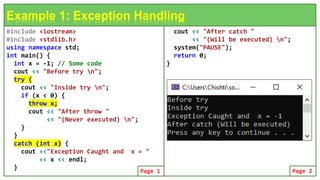
#include <iostream>
#include <stdlib.h>
using namespace std;
int main() {
int x = -1; // Some code
cout << "Before try n";
try {
cout << "Inside try n";
if (x < 0) {
throw x;
cout << "After throw "
<< "(Never executed) n";
}
}
catch (int x) {
cout <<"Exception Caught and x = "
<< x << endl;
}
Example 1: Exception Handling
cout << "After catch "
<< "(Will be executed) n";
system("PAUSE");
return 0;
}
Page 1 Page 2
 Exceptions can be thrown anywhere within a code block using throw
statement. The operand of the throw statement determines a type for the
exception and can be any expression and the type of the result of the
expression determines the type of exception thrown.
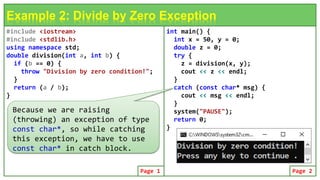
 Following is an example of throwing an exception when dividing by zero
condition occurs:
Throwing Exceptions
double division(int a, int b) {
if (b == 0) {
throw "Division by zero condition!";
}
return (a / b);
}
#include <iostream>
#include <stdlib.h>
using namespace std;
double division(int a, int b) {
if (b == 0) {
throw "Division by zero condition!";
}
return (a / b);
}
Example 2: Divide by Zero Exception
int main() {
int x = 50, y = 0;
double z = 0;
try {
z = division(x, y);
cout << z << endl;
}
catch (const char* msg) {
cout << msg << endl;
}
system("PAUSE");
return 0;
}
Page 1 Page 2
Because we are raising
(throwing) an exception of type
const char*, so while catching
this exception, we have to use
const char* in catch block.
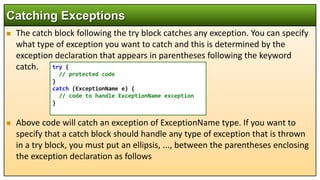
 The catch block following the try block catches any exception. You can specify
what type of exception you want to catch and this is determined by the
exception declaration that appears in parentheses following the keyword
catch.
 Above code will catch an exception of ExceptionName type. If you want to
specify that a catch block should handle any type of exception that is thrown
in a try block, you must put an ellipsis, ..., between the parentheses enclosing
the exception declaration as follows
Catching Exceptions
try {
// protected code
}
catch (ExceptionName e) {
// code to handle ExceptionName exception
}
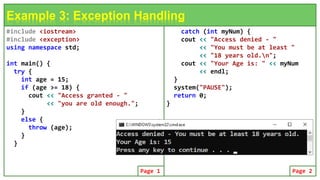
#include <iostream>
#include <exception>
using namespace std;
int main() {
try {
int age = 15;
if (age >= 18) {
cout << "Access granted - "
<< "you are old enough.";
}
else {
throw (age);
}
}
Example 3: Exception Handling
catch (int myNum) {
cout << "Access denied - "
<< "You must be at least "
<< "18 years old.n";
cout << "Your Age is: " << myNum
<< endl;
}
system("PAUSE");
return 0;
}
Page 1 Page 2
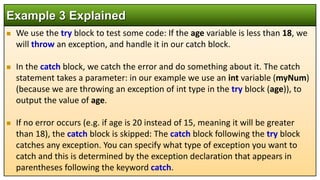
 We use the try block to test some code: If the age variable is less than 18, we
will throw an exception, and handle it in our catch block.
 In the catch block, we catch the error and do something about it. The catch
statement takes a parameter: in our example we use an int variable (myNum)
(because we are throwing an exception of int type in the try block (age)), to
output the value of age.
 If no error occurs (e.g. if age is 20 instead of 15, meaning it will be greater
than 18), the catch block is skipped: The catch block following the try block
catches any exception. You can specify what type of exception you want to
catch and this is determined by the exception declaration that appears in
parentheses following the keyword catch.
Example 3 Explained
#include <iostream>
#include <exception>
using namespace std;
int main() {
try {
int age = 15;
if (age >= 18) {
cout << "Access granted - "
<< "you are old enough.";
}
else {
throw (501);
}
}
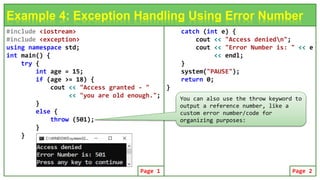
Example 4: Exception Handling Using Error Number
catch (int e) {
cout << "Access deniedn";
cout << "Error Number is: " << e
<< endl;
}
system("PAUSE");
return 0;
}
Page 1 Page 2
You can also use the throw keyword to
output a reference number, like a
custom error number/code for
organizing purposes:
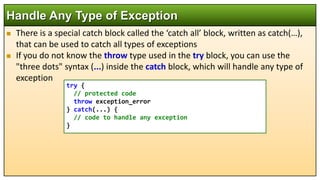
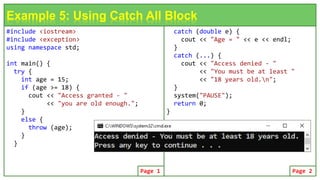
 There is a special catch block called the ‘catch all’ block, written as catch(…),
that can be used to catch all types of exceptions
 If you do not know the throw type used in the try block, you can use the
"three dots" syntax (...) inside the catch block, which will handle any type of
exception
Handle Any Type of Exception
try {
// protected code
throw exception_error
} catch(...) {
// code to handle any exception
}
#include <iostream>
#include <exception>
using namespace std;
int main() {
try {
int age = 15;
if (age >= 18) {
cout << "Access granted - "
<< "you are old enough.";
}
else {
throw (age);
}
}
Example 5: Using Catch All Block
catch (double e) {
cout << "Age = " << e << endl;
}
catch (...) {
cout << "Access denied - "
<< "You must be at least "
<< "18 years old.n";
}
system("PAUSE");
return 0;
}
Page 1 Page 2
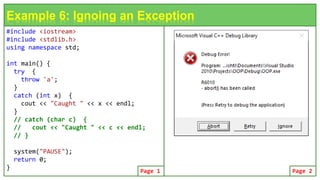
 If an exception is thrown and not caught anywhere, the program terminates
abnormally.
 For example, in the next program, a char is thrown, but there is no catch block
to catch the char.
Handle Any Type of Exception
#include <iostream>
#include <stdlib.h>
using namespace std;
int main() {
try {
throw 'a';
}
catch (int x) {
cout << "Caught " << x << endl;
}
// catch (char c) {
// cout << "Caught " << c << endl;
// }
system("PAUSE");
return 0;
}
Example 6: Ignoing an Exception
Page 1 Page 2
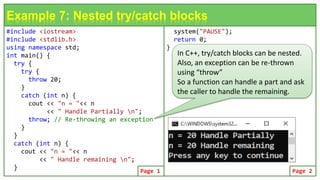
#include <iostream>
#include <stdlib.h>
using namespace std;
int main() {
try {
try {
throw 20;
}
catch (int n) {
cout << "n = "<< n
<< " Handle Partially n";
throw; // Re-throwing an exception
}
}
catch (int n) {
cout << "n = "<< n
<< " Handle remaining n";
}
Example 7: Nested try/catch blocks
system("PAUSE");
return 0;
}
Page 1 Page 2
In C++, try/catch blocks can be nested.
Also, an exception can be re-thrown
using “throw”
So a function can handle a part and ask
the caller to handle the remaining.
 You can define your own exceptions by inheriting and overriding exception
class functionality. Following is the example, which shows how you can use
std::exception class to implement your own exception in standard way −
 In the next code, what() is a public method provided by exception class and
it has been overridden by all the child exception classes. This returns the cause
of an exception.
Defining New Exceptions
#include <iostream>
#include <exception>
using namespace std;
struct MyException : public exception {
const char * what () const throw () {
return "C++ Exception";
}
};
Example 8: Defining New Exceptions
int main() {
try {
throw MyException();
} catch(MyException& e) {
std::cout << "MyException caught"
<< std::endl;
std::cout << e.what()
<< std::endl;
} catch(std::exception& e) {
// Other errors
}
}
Page 1 Page 2
#include <iostream>
using namespace std;
const int MAX = 3; // stack size
class Stack {
private:
int st[MAX]; int top;
public:
class Exception_Full { };
class Exception_Empty { };
Stack() { top = -1; }
void push(int var) {
if (top >= MAX - 1) //if stack full,
throw Exception_Full();
st[++top] = var;
}
int pop() { // take number off stack
if (top < 0) //if stack empty,
throw Exception_Empty();
return st[top--];
}
Example 9: Using Exception Class
};
int main() {
Stack s1;
try {
s1.push(11); s1.push(22);
s1.push(33); // s1.push(44);
cout << s1.pop() << endl;
}
catch (Stack::Exception_Full) {
cout << "Exception: Stack Full" << endl;
}
catch (Stack::Exception_Empty) {
cout << "Exception: Stack Empty" << endl;
}
cout << "I am outside of try / catch "
<< endl; return 0;
}
Page 1 Page 2
#include <iostream>
#include <stdlib.h>
using namespace std;
class Distance {
private:
int feet; float inches;
public:
class Inches_Ex { }; //exception class
Distance() { feet = 0; inches = 0.0; }
Distance(int ft, float in) {
if (in >= 12.0) // if inches too big,
throw Inches_Ex(); //throw exception
feet = ft; inches = in;
}
void getdist() {
cout << "Enter feet : "; cin >> feet;
cout << " inches : "; cin >> inches;
if (inches >= 12.0)
throw Inches_Ex(); //throw exception
}
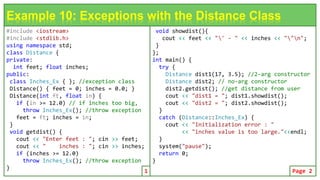
Example 10: Exceptions with the Distance Class
void showdist(){
cout << feet << "' - " << inches << ""n";
}
};
int main() {
try {
Distance dist1(17, 3.5); //2-arg constructor
Distance dist2; // no-arg constructor
dist2.getdist(); //get distance from user
cout << "dist1 = "; dist1.showdist();
cout << "dist2 = "; dist2.showdist();
}
catch (Distance::Inches_Ex) {
cout << "Initialization error : "
<< "inches value is too large."<<endl;
}
system("pause");
return 0;
}
1 Page 2
#include <iostream>
#include <stdlib.h>
#include <string>
using namespace std;
class Inches_Ex { // exception class
public:
string origin; // for name of routine
float iValue; // for inches value
Inches_Ex(string str, float in) {
origin = str; // store string
iValue = in; // store inches
}
}; // end of exception class
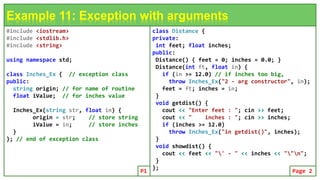
Example 11: Exception with arguments
class Distance {
private:
int feet; float inches;
public:
Distance() { feet = 0; inches = 0.0; }
Distance(int ft, float in) {
if (in >= 12.0) // if inches too big,
throw Inches_Ex("2 - arg constructor", in);
feet = ft; inches = in;
}
void getdist() {
cout << "Enter feet : "; cin >> feet;
cout << " inches : "; cin >> inches;
if (inches >= 12.0)
throw Inches_Ex("in getdist()", inches);
}
void showdist() {
cout << feet << "' - " << inches << ""n";
}
};
P1 Page 2
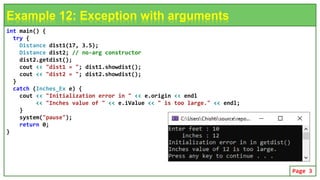
int main() {
try {
Distance dist1(17, 3.5);
Distance dist2; // no-arg constructor
dist2.getdist();
cout << "dist1 = "; dist1.showdist();
cout << "dist2 = "; dist2.showdist();
}
catch (Inches_Ex e) {
cout << "Initialization error in " << e.origin << endl
<< "Inches value of " << e.iValue << " is too large." << endl;
}
system("pause");
return 0;
}
Example 12: Exception with arguments
Page 3

Object Oriented Programming Using C++: C++ Exception Handling.pptx

  • 1.
  • 2.
     An exceptionis a problem that arises during the execution of a program.  When executing C++ code, different errors can occur: coding errors made by the programmer, errors due to wrong input, an attempt to divide by zero or other unforeseeable things.  Exception handling in C++ consist of three keywords: try, throw and catch:  try − The try statement allows you to define a block of code to be tested for errors while it is being executed.  throw − A program throws an exception when a problem shows up. This is done using a throw keyword.  catch − The catch statement allows you to define a block of code to be executed, if an error occurs in the try block. Introduction
  • 3.
    #include <iostream> #include <stdlib.h> usingnamespace std; int main() { int x = -1; // Some code cout << "Before try n"; try { cout << "Inside try n"; if (x < 0) { throw x; cout << "After throw " << "(Never executed) n"; } } catch (int x) { cout <<"Exception Caught and x = " << x << endl; } Example 1: Exception Handling cout << "After catch " << "(Will be executed) n"; system("PAUSE"); return 0; } Page 1 Page 2
  • 4.
     Exceptions canbe thrown anywhere within a code block using throw statement. The operand of the throw statement determines a type for the exception and can be any expression and the type of the result of the expression determines the type of exception thrown.  Following is an example of throwing an exception when dividing by zero condition occurs: Throwing Exceptions double division(int a, int b) { if (b == 0) { throw "Division by zero condition!"; } return (a / b); }
  • 5.
    #include <iostream> #include <stdlib.h> usingnamespace std; double division(int a, int b) { if (b == 0) { throw "Division by zero condition!"; } return (a / b); } Example 2: Divide by Zero Exception int main() { int x = 50, y = 0; double z = 0; try { z = division(x, y); cout << z << endl; } catch (const char* msg) { cout << msg << endl; } system("PAUSE"); return 0; } Page 1 Page 2 Because we are raising (throwing) an exception of type const char*, so while catching this exception, we have to use const char* in catch block.
  • 6.
     The catchblock following the try block catches any exception. You can specify what type of exception you want to catch and this is determined by the exception declaration that appears in parentheses following the keyword catch.  Above code will catch an exception of ExceptionName type. If you want to specify that a catch block should handle any type of exception that is thrown in a try block, you must put an ellipsis, ..., between the parentheses enclosing the exception declaration as follows Catching Exceptions try { // protected code } catch (ExceptionName e) { // code to handle ExceptionName exception }
  • 7.
    #include <iostream> #include <exception> usingnamespace std; int main() { try { int age = 15; if (age >= 18) { cout << "Access granted - " << "you are old enough."; } else { throw (age); } } Example 3: Exception Handling catch (int myNum) { cout << "Access denied - " << "You must be at least " << "18 years old.n"; cout << "Your Age is: " << myNum << endl; } system("PAUSE"); return 0; } Page 1 Page 2
  • 8.
     We usethe try block to test some code: If the age variable is less than 18, we will throw an exception, and handle it in our catch block.  In the catch block, we catch the error and do something about it. The catch statement takes a parameter: in our example we use an int variable (myNum) (because we are throwing an exception of int type in the try block (age)), to output the value of age.  If no error occurs (e.g. if age is 20 instead of 15, meaning it will be greater than 18), the catch block is skipped: The catch block following the try block catches any exception. You can specify what type of exception you want to catch and this is determined by the exception declaration that appears in parentheses following the keyword catch. Example 3 Explained
  • 9.
    #include <iostream> #include <exception> usingnamespace std; int main() { try { int age = 15; if (age >= 18) { cout << "Access granted - " << "you are old enough."; } else { throw (501); } } Example 4: Exception Handling Using Error Number catch (int e) { cout << "Access deniedn"; cout << "Error Number is: " << e << endl; } system("PAUSE"); return 0; } Page 1 Page 2 You can also use the throw keyword to output a reference number, like a custom error number/code for organizing purposes:
  • 10.
     There isa special catch block called the ‘catch all’ block, written as catch(…), that can be used to catch all types of exceptions  If you do not know the throw type used in the try block, you can use the "three dots" syntax (...) inside the catch block, which will handle any type of exception Handle Any Type of Exception try { // protected code throw exception_error } catch(...) { // code to handle any exception }
  • 11.
    #include <iostream> #include <exception> usingnamespace std; int main() { try { int age = 15; if (age >= 18) { cout << "Access granted - " << "you are old enough."; } else { throw (age); } } Example 5: Using Catch All Block catch (double e) { cout << "Age = " << e << endl; } catch (...) { cout << "Access denied - " << "You must be at least " << "18 years old.n"; } system("PAUSE"); return 0; } Page 1 Page 2
  • 12.
     If anexception is thrown and not caught anywhere, the program terminates abnormally.  For example, in the next program, a char is thrown, but there is no catch block to catch the char. Handle Any Type of Exception
  • 13.
    #include <iostream> #include <stdlib.h> usingnamespace std; int main() { try { throw 'a'; } catch (int x) { cout << "Caught " << x << endl; } // catch (char c) { // cout << "Caught " << c << endl; // } system("PAUSE"); return 0; } Example 6: Ignoing an Exception Page 1 Page 2
  • 14.
    #include <iostream> #include <stdlib.h> usingnamespace std; int main() { try { try { throw 20; } catch (int n) { cout << "n = "<< n << " Handle Partially n"; throw; // Re-throwing an exception } } catch (int n) { cout << "n = "<< n << " Handle remaining n"; } Example 7: Nested try/catch blocks system("PAUSE"); return 0; } Page 1 Page 2 In C++, try/catch blocks can be nested. Also, an exception can be re-thrown using “throw” So a function can handle a part and ask the caller to handle the remaining.
  • 15.
     You candefine your own exceptions by inheriting and overriding exception class functionality. Following is the example, which shows how you can use std::exception class to implement your own exception in standard way −  In the next code, what() is a public method provided by exception class and it has been overridden by all the child exception classes. This returns the cause of an exception. Defining New Exceptions
  • 16.
    #include <iostream> #include <exception> usingnamespace std; struct MyException : public exception { const char * what () const throw () { return "C++ Exception"; } }; Example 8: Defining New Exceptions int main() { try { throw MyException(); } catch(MyException& e) { std::cout << "MyException caught" << std::endl; std::cout << e.what() << std::endl; } catch(std::exception& e) { // Other errors } } Page 1 Page 2
  • 17.
    #include <iostream> using namespacestd; const int MAX = 3; // stack size class Stack { private: int st[MAX]; int top; public: class Exception_Full { }; class Exception_Empty { }; Stack() { top = -1; } void push(int var) { if (top >= MAX - 1) //if stack full, throw Exception_Full(); st[++top] = var; } int pop() { // take number off stack if (top < 0) //if stack empty, throw Exception_Empty(); return st[top--]; } Example 9: Using Exception Class }; int main() { Stack s1; try { s1.push(11); s1.push(22); s1.push(33); // s1.push(44); cout << s1.pop() << endl; cout << s1.pop() << endl; cout << s1.pop() << endl; cout << s1.pop() << endl; } catch (Stack::Exception_Full) { cout << "Exception: Stack Full" << endl; } catch (Stack::Exception_Empty) { cout << "Exception: Stack Empty" << endl; } cout << "I am outside of try / catch " << endl; return 0; } Page 1 Page 2
  • 18.
    #include <iostream> #include <stdlib.h> usingnamespace std; class Distance { private: int feet; float inches; public: class Inches_Ex { }; //exception class Distance() { feet = 0; inches = 0.0; } Distance(int ft, float in) { if (in >= 12.0) // if inches too big, throw Inches_Ex(); //throw exception feet = ft; inches = in; } void getdist() { cout << "Enter feet : "; cin >> feet; cout << " inches : "; cin >> inches; if (inches >= 12.0) throw Inches_Ex(); //throw exception } Example 10: Exceptions with the Distance Class void showdist(){ cout << feet << "' - " << inches << ""n"; } }; int main() { try { Distance dist1(17, 3.5); //2-arg constructor Distance dist2; // no-arg constructor dist2.getdist(); //get distance from user cout << "dist1 = "; dist1.showdist(); cout << "dist2 = "; dist2.showdist(); } catch (Distance::Inches_Ex) { cout << "Initialization error : " << "inches value is too large."<<endl; } system("pause"); return 0; } 1 Page 2
  • 19.
    #include <iostream> #include <stdlib.h> #include<string> using namespace std; class Inches_Ex { // exception class public: string origin; // for name of routine float iValue; // for inches value Inches_Ex(string str, float in) { origin = str; // store string iValue = in; // store inches } }; // end of exception class Example 11: Exception with arguments class Distance { private: int feet; float inches; public: Distance() { feet = 0; inches = 0.0; } Distance(int ft, float in) { if (in >= 12.0) // if inches too big, throw Inches_Ex("2 - arg constructor", in); feet = ft; inches = in; } void getdist() { cout << "Enter feet : "; cin >> feet; cout << " inches : "; cin >> inches; if (inches >= 12.0) throw Inches_Ex("in getdist()", inches); } void showdist() { cout << feet << "' - " << inches << ""n"; } }; P1 Page 2
  • 20.
    int main() { try{ Distance dist1(17, 3.5); Distance dist2; // no-arg constructor dist2.getdist(); cout << "dist1 = "; dist1.showdist(); cout << "dist2 = "; dist2.showdist(); } catch (Inches_Ex e) { cout << "Initialization error in " << e.origin << endl << "Inches value of " << e.iValue << " is too large." << endl; } system("pause"); return 0; } Example 12: Exception with arguments Page 3