
Null Mumbai – IOT Workshop
About Us
1) Nitesh Malviya -
• Security Consultant with Payatu Technologies,
• Experience in Web Pentesting, VAPT and Mobile Appsec
• An IOT enthusiast and learner
2) Ganesh Naik
• Consultant in Embedded Linux & Embedded Android Product
Development at Levana Technologies
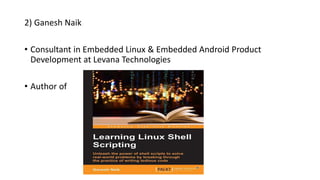
• Author of
What is IoT ??
• The internet of things (IoT) is the network of physical devices,
vehicles, buildings and other items—embedded with electronics,
software, sensors, actuators, and network connectivity that enable
these objects to collect and exchange data(Wikipedia)
• Internet of things increases the connectedness of people and things
on a scale that once was unimaginable.
Various Names, One Concept
• M2M (Machine to Machine)
• “Internet of Everything” (Cisco Systems)
• “World Size Web” (Bruce Schneier)
• “Skynet” (Terminator movie)
Education – Partnership – Solutions
Information Security
Office of Budget and Finance
Where is IoT?
Education – Partnership – Solutions
Information Security
Office of Budget and Finance
It’s everywhere!
Education – Partnership – Solutions
Information Security
Office of Budget and Finance
Devices like…
• Networking devices(routers, firewalls, IDS)
• Set-top boxes
• Medical devices(Health monitors)
• Mobile phones.
• Home security systems
• Vehicles, in-flight entertainment.
• Thermostats, metering systems, consumer electronics Displays
Components Of IOT
• Physical Objects – Things
• Sensors - Sense the physical environment
• Actuators - Affect the physical environment
• People - Humans can control the environment via mobile apps
• Services - Cloud services
• Platforms - Type of middleware used to connect IoT components to
IOT.
• Networks - IoT components are tied together by networks, using
various wireless and wireline technologies
Common Processor Architectures
• ARM (ARM7, ARM9, Cortex)
• Intel ATOM
• MIPS
• Atmel AVR
• Motorola 6800/68000 (68k)
• Ambarella
• Axis CRIS
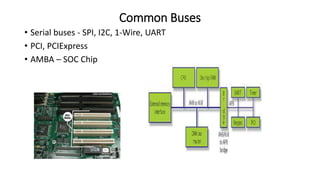
Common Buses
• Serial buses - SPI, I2C, 1-Wire, UART
• PCI, PCIExpress
• AMBA – SOC Chip
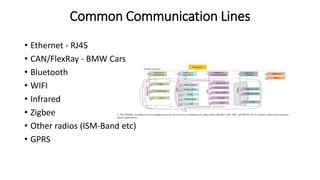
Common Communication Lines
• Ethernet - RJ45
• CAN/FlexRay - BMW Cars
• Bluetooth
• WIFI
• Infrared
• Zigbee
• Other radios (ISM-Band etc)
• GPRS
Common Directly Addressable Memory
• DRAM - Dynamic RAM
• SRAM – Static RAM
• ROM – READ ONLY MEMORY
• Flash Memory
Common Operating Systems
• Linux - Perhaps most favourite and most encoutered
• VxWorks
• Cisco IOS
• Windows CE/NT
• L4
• eCos
• DOS
• Symbian
• JunOS
• Ambarella
Common Bootloaders
• Bootloader is a piece of code that runs before any operating system is
running.
• Bootloader are used to boot other operating systems
Common Bootloaders –
a. U-Boot
b. Perhaps most favourite and most encoutered
c. RedBoot
d. BareBox
e. Ubicom bootloader
Common Libraries and Dev Envs
• busybox + uClibc - Perhaps most favourite and most encoutered
• Buildroot
• openembedded
• crosstool
• crossdev
Firmware Formats/Flavors
• Ar
• YAFFS
• JFFS2
• SquashFS
• CramFS
• ROMFS
• UbiFS
• xFAT
• NTFS
• extNfs
• iHEX
• SREC/S19
• PJL
• CPIO/Ar/Tar/GZip/BZip/LZxxx/RPM
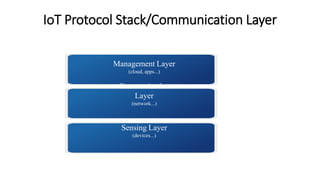
IoT Protocol Stack/Communication Layer
Management Layer
(cloud, apps...)
Communication
Layer
(network...)
Sensing Layer
(devices...)
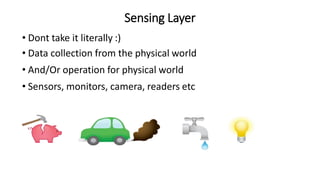
Sensing Layer
• Dont take it literally :)
• Data collection from the physical world
• And/Or operation for physical world
• Sensors, monitors, camera, readers etc
Communication Layer
• Information exchange between two layers
• Provides a channel for data transmission/ communication
- Wifi
- Wired
- Mobile Data
- …
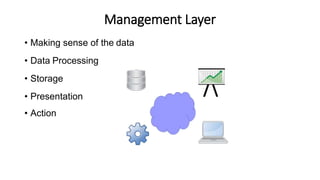
Management Layer
• Making sense of the data
• Data Processing
• Storage
• Presentation
• Action
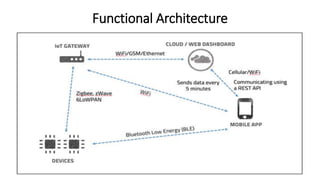
Functional Architecture
Common Protocols used in IoT devices
• Protocol – Way 2 or more device/s can communicate with each other.
• Ex – HTTP,FTP,SMTP,SNMP etc
• For IOT can same be use??
• Protocols – MQTT, CoAP, XMPP, RESTful HTTP etc.
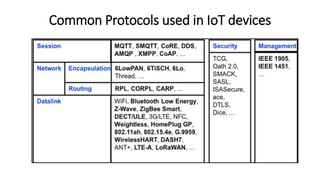
Common Protocols used in IoT devices
MQTT Protocol
• MQTT was developed by Andy Stanford-Clark and Arlen Nipper in 1999
• Lightweight messaging protocol designed for sensors and devices with
• Flaky network connectivity
• Low computing power
• Connections where bandwidth is at a premium
• Uses a publish/subscribe architecture in contrast to HTTP with its
request/response paradigm
• Components - Publisher/Client, Broker and Subscriber.
MQTT Overview
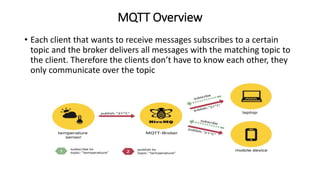
• Each client that wants to receive messages subscribes to a certain
topic and the broker delivers all messages with the matching topic to
the client. Therefore the clients don’t have to know each other, they
only communicate over the topic
MQTT WORKFLOW
• Central concept in MQTT to dispatch messages are Topics.
• A topic is a simple string that can have more hierarchy levels, which are
separated by a slash. Example - house/living-room/temperature
• Client can subscribe to the exact topic or on the other hand use a wildcard (# or
+)
• The subscription to house/+/temperature would result in all message send to the
previously mention topic house/living-room/temperature as well as any topic
with an arbitrary value in the place of living room,
example house/kitchen/temperature.
• If you need to subscribe to more than one level, for example to the entire
subtree, there is also a multilevel wildcard (#). It allows to subscribe to all
underlying hierarchy levels. Example house/# is subscribing to all topics beginning
with house
Protocol Use Case
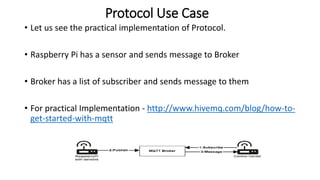
• Let us see the practical implementation of Protocol.
• Raspberry Pi has a sensor and sends message to Broker
• Broker has a list of subscriber and sends message to them
• For practical Implementation - http://www.hivemq.com/blog/how-to-
get-started-with-mqtt
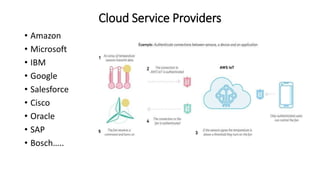
Cloud Service Providers
• Amazon
• Microsoft
• IBM
• Google
• Salesforce
• Cisco
• Oracle
• SAP
• Bosch…..
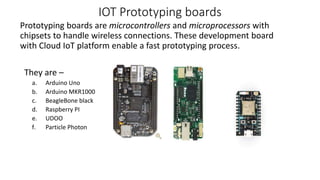
IOT Prototyping boards
Prototyping boards are microcontrollers and microprocessors with
chipsets to handle wireless connections. These development board
with Cloud IoT platform enable a fast prototyping process.
They are –
a. Arduino Uno
b. Arduino MKR1000
c. BeagleBone black
d. Raspberry PI
e. UDOO
f. Particle Photon
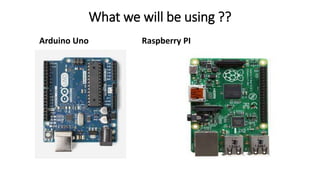
What we will be using ??
Arduino Uno Raspberry PI
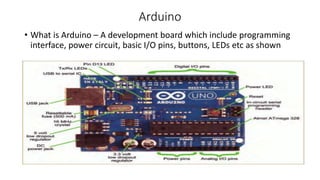
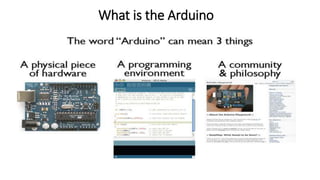
Arduino
• What is Arduino – A development board which include programming
interface, power circuit, basic I/O pins, buttons, LEDs etc as shown
What is the Arduino
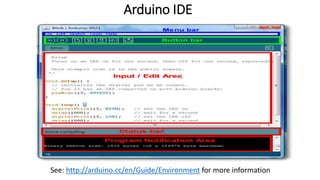
Arduino IDE
See: http://arduino.cc/en/Guide/Environment for more information
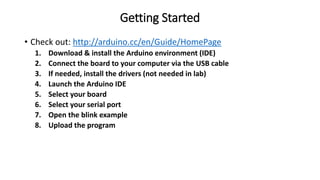
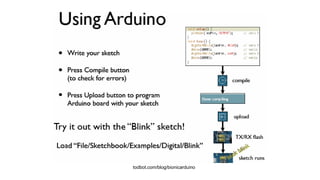
Getting Started
• Check out: http://arduino.cc/en/Guide/HomePage
1. Download & install the Arduino environment (IDE)
2. Connect the board to your computer via the USB cable
3. If needed, install the drivers (not needed in lab)
4. Launch the Arduino IDE
5. Select your board
6. Select your serial port
7. Open the blink example
8. Upload the program
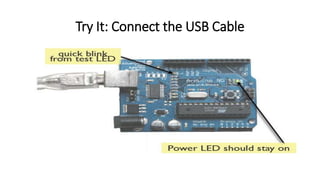
Try It: Connect the USB Cable
todbot.com/blog/bionicarduino
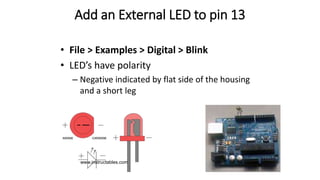
Add an External LED to pin 13
• File > Examples > Digital > Blink
• LED’s have polarity
– Negative indicated by flat side of the housing
and a short leg
www.instructables.com
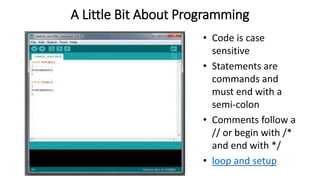
A Little Bit About Programming
• Code is case
sensitive
• Statements are
commands and
must end with a
semi-colon
• Comments follow a
// or begin with /*
and end with */
• loop and setup
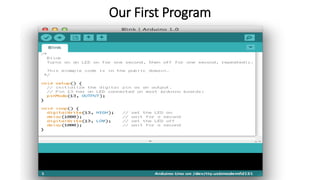
Our First Program
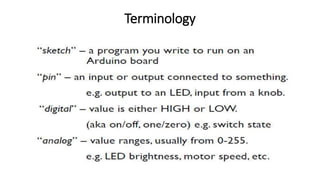
Terminology
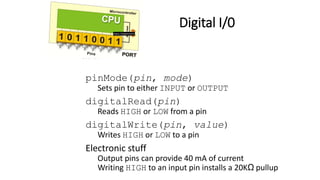
Digital I/0
pinMode(pin, mode)
Sets pin to either INPUT or OUTPUT
digitalRead(pin)
Reads HIGH or LOW from a pin
digitalWrite(pin, value)
Writes HIGH or LOW to a pin
Electronic stuff
Output pins can provide 40 mA of current
Writing HIGH to an input pin installs a 20KΩ pullup
Arduino Timing
• delay(ms)
– Pauses for a few milliseconds
• delayMicroseconds(us)
– Pauses for a few microseconds
• More commands:
arduino.cc/en/Reference/HomePage
Good References
www.arduino.cc
www.ladyada.net/learn/arduino
www.EarthshineElectronics.com
RaspberryPi
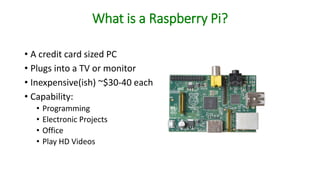
What is a Raspberry Pi?
• A credit card sized PC
• Plugs into a TV or monitor
• Inexpensive(ish) ~$30-40 each
• Capability:
• Programming
• Electronic Projects
• Office
• Play HD Videos
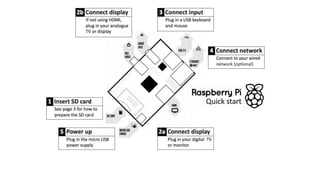
Kit Components
• Essential:
• Raspberry Pi board
• Prepared Operating System SD Card
• USB keyboard
• Display (with HDMI, DVI, or Composite input)
• Power Supply
• Highly suggested extras include:
• USB mouse
• Internet connectivity - LAN cable
• Powered USB Hub
• Case
Programming Languages
• The Raspberry Pi Foundation recommends Python
• Any language which will compile for ARMv6 can be used
• Installed by default on the Raspberry Pi:
• C
• C++
• Java
• Scratch
• Ruby
• Python
Setup
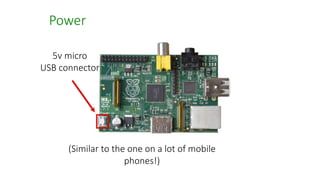
Power
5v micro
USB connector
(Similar to the one on a lot of mobile
phones!)
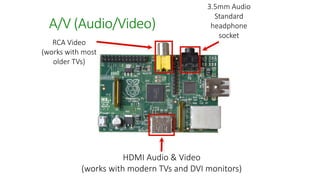
3.5mm Audio
Standard
headphone
socket
RCA Video
(works with most
older TVs)
HDMI Audio & Video
(works with modern TVs and DVI monitors)
A/V (Audio/Video)
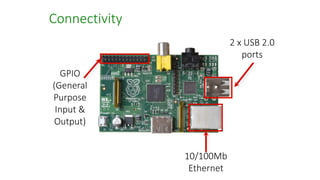
GPIO
(General
Purpose
Input &
Output)
10/100Mb
Ethernet
2 x USB 2.0
ports
Connectivity
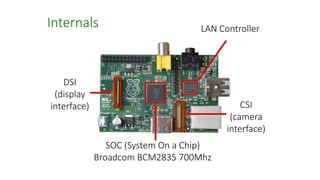
DSI
(display
interface)
SOC (System On a Chip)
Broadcom BCM2835 700Mhz
Internals LAN Controller
CSI
(camera
interface)
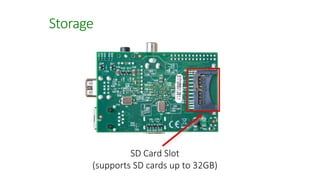
SD Card Slot
(supports SD cards up to 32GB)
Storage
DEMO TIME – LIVE PROJECTS
 THANK YOU 

Null mumbai-iot-workshop

  • 1.
    Null Mumbai –IOT Workshop
  • 2.
    About Us 1) NiteshMalviya - • Security Consultant with Payatu Technologies, • Experience in Web Pentesting, VAPT and Mobile Appsec • An IOT enthusiast and learner
  • 3.
    2) Ganesh Naik •Consultant in Embedded Linux & Embedded Android Product Development at Levana Technologies • Author of
  • 4.
    What is IoT?? • The internet of things (IoT) is the network of physical devices, vehicles, buildings and other items—embedded with electronics, software, sensors, actuators, and network connectivity that enable these objects to collect and exchange data(Wikipedia) • Internet of things increases the connectedness of people and things on a scale that once was unimaginable.
  • 5.
    Various Names, OneConcept • M2M (Machine to Machine) • “Internet of Everything” (Cisco Systems) • “World Size Web” (Bruce Schneier) • “Skynet” (Terminator movie) Education – Partnership – Solutions Information Security Office of Budget and Finance
  • 6.
    Where is IoT? Education– Partnership – Solutions Information Security Office of Budget and Finance It’s everywhere!
  • 7.
    Education – Partnership– Solutions Information Security Office of Budget and Finance
  • 8.
    Devices like… • Networkingdevices(routers, firewalls, IDS) • Set-top boxes • Medical devices(Health monitors) • Mobile phones. • Home security systems • Vehicles, in-flight entertainment. • Thermostats, metering systems, consumer electronics Displays
  • 9.
    Components Of IOT •Physical Objects – Things • Sensors - Sense the physical environment • Actuators - Affect the physical environment • People - Humans can control the environment via mobile apps • Services - Cloud services • Platforms - Type of middleware used to connect IoT components to IOT. • Networks - IoT components are tied together by networks, using various wireless and wireline technologies
  • 10.
    Common Processor Architectures •ARM (ARM7, ARM9, Cortex) • Intel ATOM • MIPS • Atmel AVR • Motorola 6800/68000 (68k) • Ambarella • Axis CRIS
  • 11.
    Common Buses • Serialbuses - SPI, I2C, 1-Wire, UART • PCI, PCIExpress • AMBA – SOC Chip
  • 12.
    Common Communication Lines •Ethernet - RJ45 • CAN/FlexRay - BMW Cars • Bluetooth • WIFI • Infrared • Zigbee • Other radios (ISM-Band etc) • GPRS
  • 13.
    Common Directly AddressableMemory • DRAM - Dynamic RAM • SRAM – Static RAM • ROM – READ ONLY MEMORY • Flash Memory
  • 14.
    Common Operating Systems •Linux - Perhaps most favourite and most encoutered • VxWorks • Cisco IOS • Windows CE/NT • L4 • eCos • DOS • Symbian • JunOS • Ambarella
  • 15.
    Common Bootloaders • Bootloaderis a piece of code that runs before any operating system is running. • Bootloader are used to boot other operating systems Common Bootloaders – a. U-Boot b. Perhaps most favourite and most encoutered c. RedBoot d. BareBox e. Ubicom bootloader
  • 16.
    Common Libraries andDev Envs • busybox + uClibc - Perhaps most favourite and most encoutered • Buildroot • openembedded • crosstool • crossdev
  • 17.
    Firmware Formats/Flavors • Ar •YAFFS • JFFS2 • SquashFS • CramFS • ROMFS • UbiFS • xFAT • NTFS • extNfs • iHEX • SREC/S19 • PJL • CPIO/Ar/Tar/GZip/BZip/LZxxx/RPM
  • 18.
    IoT Protocol Stack/CommunicationLayer Management Layer (cloud, apps...) Communication Layer (network...) Sensing Layer (devices...)
  • 19.
    Sensing Layer • Donttake it literally :) • Data collection from the physical world • And/Or operation for physical world • Sensors, monitors, camera, readers etc
  • 20.
    Communication Layer • Informationexchange between two layers • Provides a channel for data transmission/ communication - Wifi - Wired - Mobile Data - …
  • 21.
    Management Layer • Makingsense of the data • Data Processing • Storage • Presentation • Action
  • 22.
  • 23.
    Common Protocols usedin IoT devices • Protocol – Way 2 or more device/s can communicate with each other. • Ex – HTTP,FTP,SMTP,SNMP etc • For IOT can same be use?? • Protocols – MQTT, CoAP, XMPP, RESTful HTTP etc.
  • 24.
    Common Protocols usedin IoT devices
  • 25.
    MQTT Protocol • MQTTwas developed by Andy Stanford-Clark and Arlen Nipper in 1999 • Lightweight messaging protocol designed for sensors and devices with • Flaky network connectivity • Low computing power • Connections where bandwidth is at a premium • Uses a publish/subscribe architecture in contrast to HTTP with its request/response paradigm • Components - Publisher/Client, Broker and Subscriber.
  • 26.
    MQTT Overview • Eachclient that wants to receive messages subscribes to a certain topic and the broker delivers all messages with the matching topic to the client. Therefore the clients don’t have to know each other, they only communicate over the topic
  • 27.
    MQTT WORKFLOW • Centralconcept in MQTT to dispatch messages are Topics. • A topic is a simple string that can have more hierarchy levels, which are separated by a slash. Example - house/living-room/temperature • Client can subscribe to the exact topic or on the other hand use a wildcard (# or +) • The subscription to house/+/temperature would result in all message send to the previously mention topic house/living-room/temperature as well as any topic with an arbitrary value in the place of living room, example house/kitchen/temperature. • If you need to subscribe to more than one level, for example to the entire subtree, there is also a multilevel wildcard (#). It allows to subscribe to all underlying hierarchy levels. Example house/# is subscribing to all topics beginning with house
  • 28.
    Protocol Use Case •Let us see the practical implementation of Protocol. • Raspberry Pi has a sensor and sends message to Broker • Broker has a list of subscriber and sends message to them • For practical Implementation - http://www.hivemq.com/blog/how-to- get-started-with-mqtt
  • 29.
    Cloud Service Providers •Amazon • Microsoft • IBM • Google • Salesforce • Cisco • Oracle • SAP • Bosch…..
  • 30.
    IOT Prototyping boards Prototypingboards are microcontrollers and microprocessors with chipsets to handle wireless connections. These development board with Cloud IoT platform enable a fast prototyping process. They are – a. Arduino Uno b. Arduino MKR1000 c. BeagleBone black d. Raspberry PI e. UDOO f. Particle Photon
  • 31.
    What we willbe using ?? Arduino Uno Raspberry PI
  • 32.
    Arduino • What isArduino – A development board which include programming interface, power circuit, basic I/O pins, buttons, LEDs etc as shown
  • 33.
    What is theArduino
  • 34.
  • 35.
    Getting Started • Checkout: http://arduino.cc/en/Guide/HomePage 1. Download & install the Arduino environment (IDE) 2. Connect the board to your computer via the USB cable 3. If needed, install the drivers (not needed in lab) 4. Launch the Arduino IDE 5. Select your board 6. Select your serial port 7. Open the blink example 8. Upload the program
  • 36.
    Try It: Connectthe USB Cable
  • 37.
  • 38.
    Add an ExternalLED to pin 13 • File > Examples > Digital > Blink • LED’s have polarity – Negative indicated by flat side of the housing and a short leg www.instructables.com
  • 39.
    A Little BitAbout Programming • Code is case sensitive • Statements are commands and must end with a semi-colon • Comments follow a // or begin with /* and end with */ • loop and setup
  • 40.
  • 41.
  • 42.
    Digital I/0 pinMode(pin, mode) Setspin to either INPUT or OUTPUT digitalRead(pin) Reads HIGH or LOW from a pin digitalWrite(pin, value) Writes HIGH or LOW to a pin Electronic stuff Output pins can provide 40 mA of current Writing HIGH to an input pin installs a 20KΩ pullup
  • 43.
    Arduino Timing • delay(ms) –Pauses for a few milliseconds • delayMicroseconds(us) – Pauses for a few microseconds • More commands: arduino.cc/en/Reference/HomePage
  • 44.
  • 45.
  • 46.
    What is aRaspberry Pi? • A credit card sized PC • Plugs into a TV or monitor • Inexpensive(ish) ~$30-40 each • Capability: • Programming • Electronic Projects • Office • Play HD Videos
  • 47.
    Kit Components • Essential: •Raspberry Pi board • Prepared Operating System SD Card • USB keyboard • Display (with HDMI, DVI, or Composite input) • Power Supply • Highly suggested extras include: • USB mouse • Internet connectivity - LAN cable • Powered USB Hub • Case
  • 48.
    Programming Languages • TheRaspberry Pi Foundation recommends Python • Any language which will compile for ARMv6 can be used • Installed by default on the Raspberry Pi: • C • C++ • Java • Scratch • Ruby • Python
  • 49.
  • 51.
    Power 5v micro USB connector (Similarto the one on a lot of mobile phones!)
  • 52.
    3.5mm Audio Standard headphone socket RCA Video (workswith most older TVs) HDMI Audio & Video (works with modern TVs and DVI monitors) A/V (Audio/Video)
  • 53.
  • 54.
    DSI (display interface) SOC (System Ona Chip) Broadcom BCM2835 700Mhz Internals LAN Controller CSI (camera interface)
  • 55.
    SD Card Slot (supportsSD cards up to 32GB) Storage
  • 56.
    DEMO TIME –LIVE PROJECTS
  • 57.

Editor's Notes

  • #6 British entrepreneur Kevin Ashton first coined the term in 1999 while working at Auto-ID Labs (originally called Auto-ID centers - referring to a global network of Radio-frequency identification (RFID) connected objects).[10] Typically, IoT is expected to offer advanced connectivity of devices, systems, and services that goes beyond machine-to-machine communications (M2M) and covers a variety of protocols, domains, and applications.[11] The interconnection of these embedded devices (including smart objects), is expected to usher in automation in nearly all fields, while also enabling advanced applications like a Smart Grid,[12] and expanding to the areas such as smart cities. Cisco Systems refers to IoT as the “Internet of Everything”… Bruce Schinerer recently referred to two new colloquial terms – World Spanning Robot and Benign Organization. There is also the term “Skynet” in reference to the Terminator movies that is frequently discussed in Blog and online postings/jargon.
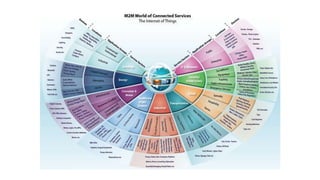
  • #7 IoT is everywhere! (Audience Participation)
  • #8 M2M/IoT Sector Map :: Beecham Research http://www.beechamresearch.com/article.aspx?id=4 The following graphic from Beecham Research depicts how the Internet of Things may interact with various service sectors within the public/private sectors and ordinary consumers. Public sector entities (such as universities) may have some level of involvement and interaction within all service sectors depicted; ranging from the operation and industry elements of buildings, to levels of research, retail entities, transportation, and IT/Networks. **Place emphasis on service sectors, that it is likely that at least one example of devices may be found within university networks.