Workshop
on
Real-Time IOT Using NodeMCU
IOT
• Network of physical objects-“things”-that are embedded with sensors, software, and other
technologies for the purpose of connecting and exchanging data with other devices and
systems over the internet.
• An IOT ecosystem consists of web-enabled smart devices that use embedded systems, such
as processors, sensors and communication hardware, to collect, send and act on data
they acquire from their environments.
USES OF IOT
• Manufacturing Industry
• Agriculture Industry
• Healthcare
• Home Automation
• Automobile and Transportation
• Energy Sector
WHY IOT?
Connectivity
 Enables devices to connect to the internet.
 Share data and communicate with other devices.
 Devices can work together.
WHY IOT?
Efficiency
 Automating tasks.
 Monitoring systems in real-time
 Providing data for predictive maintenance.
WHY IOT?
Personalization
 create of personalized experiences for individuals .
 improve services and products.
WHY IOT?
 Innovation
 creating new products and services that were not possible before.
 lead to new business opportunities.
WHY IOT?
 Data
 Data can be analysed in the future
 gain insights into consumer behavior
 optimize operations
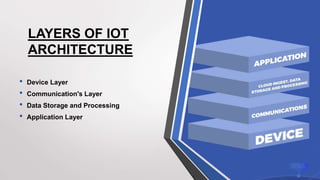
LAYERS OF IOT
ARCHITECTURE
• Device Layer
• Communication's Layer
• Data Storage and Processing
• Application Layer
DEVICE LAYER
• First layer of IoT architecture is a sensing layer
• Includes devices , sensors, and actuators
• Collect data from their surroundings
COMMUNICATION LAYER
• Transports data from the Device Layer to the Internet
• Security functionality including authentication, encryption and malware
protection
DATA STORAGE AND PROCESSING
• structured to handle data analysis and pre-processing.
• Located in the cloud.
• Data can be accessed by applications for edge analytics in use cases
like autonomous vehicles where real-time data is necessary.
• Data is monitored and managed while the processing is completed.
APPLICATION LAYER
• located in the cloud
• data is used by end-user applications.
LAYERS OF IOT ARCHITECTURE
• Device Layer: A temperature sensor takes temperature readings inside a
refrigerator.
• Communications Layer: Readings are sent to a router via a proprietary
protocol and sent to the cloud.
• Data Storage and Processing Layer: The cloud stores and processes the
incoming data to generate alerts in real time and, when possible, reduce the
total amount of data stored.
• Application layer: The cloud generates reports and analysis for end users
to applications and record keeping, via both web interfaces and email
delivery.
PROTOCOL’S IN IOT
• MQTT ( Message Queuing Telemetry Transport )
• CoAP ( Constrained Application Protocol )
• HTTP ( Hypertext Transfer Protocol )
• DDS ( Data Distribution Service )
• Bluetooth
• LoRaWAN
MQTT
• set of rules
• lightweight messaging between devices and the cloud
• Used where reliability and low bandwidth are critical
• supports messaging between devices to the cloud and the cloud to the
device
MQTT
• Lightweight and efficient
• requires minimal resources
• control message can be as little as two data bytes.
• Scalable
• requires a minimal amount of code that consumes very little power in operations
• support communication with a large number of IoT devices.
• Reliable
• reduce the time the IoT device takes to reconnect with the cloud
• Secure
• encrypt messages and authenticate devices
• Well-supported
• languages have extensive support for MQTT protocol
• implement with minimal coding in any type of application.
HTTP
• sending and receiving data between web servers and IoT devices.
• used for IoT devices when there is a lot of data to be published
• connect 3D printers in the network.
NODEMCU
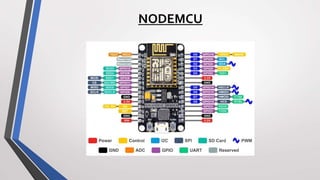
• Also known as ESP8266 NodeMCU
• NodeMCU is an open-source platform, its hardware design is open for
edit/modify/build
• Has 8 Digital and 1 Analog Pins
• It supports serial communication protocols i.e. UART, SPI, I2C, etc
NODEMCU
BENEFITS
PROTOCOLS
•UART (universal asynchronous receiver-transmitter)
•SPI (Serial Peripheral Interface)
•I2C ( Inter-Integrated Circuit)
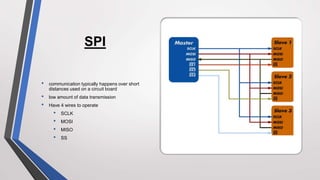
SPI
• communication typically happens over short
distances used on a circuit board
• low amount of data transmission
• Have 4 wires to operate
• SCLK
• MOSI
• MISO
• SS
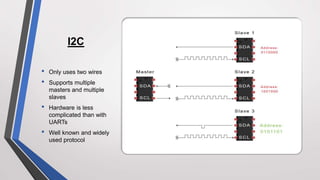
I2C
• Only uses two wires
• Supports multiple
masters and multiple
slaves
• Hardware is less
complicated than with
UARTs
• Well known and widely
used protocol
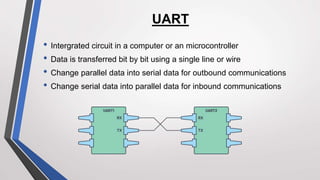
UART
• Intergrated circuit in a computer or an microcontroller
• Data is transferred bit by bit using a single line or wire
• Change parallel data into serial data for outbound communications
• Change serial data into parallel data for inbound communications
• Low current consumption
• More no of digital I/O Pins
• Better processor and memory
• Breadboard friendly
• Built in WiFi
BENEFITS
• Int
• Char
• Float
• Double
• boolean
VARIABLES
• pinMode
• digitalWrite
• digitalRead
• analogWrite
• analogRead
• Serial
• delay
DATATYPES
• If
• If else
• for
• while
Control structures
• Void setup()
• Void loop()
DEFAULT FUNCTIONS
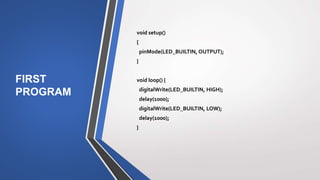
FIRST
PROGRAM
void setup()
{
pinMode(LED_BUILTIN, OUTPUT);
}
void loop() {
digitalWrite(LED_BUILTIN, HIGH);
delay(1000);
digitalWrite(LED_BUILTIN, LOW);
delay(1000);
}
SOFTWARE
• CP2102 Driver
• http://bit.ly/3TPbsPq
• Arduino IDE
• https://bit.ly/3U61TvX
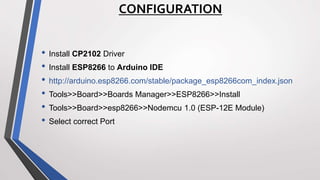
CONFIGURATION
• Install CP2102 Driver
• Install ESP8266 to Arduino IDE
• http://arduino.esp8266.com/stable/package_esp8266com_index.json
• Tools>>Board>>Boards Manager>>ESP8266>>Install
• Tools>>Board>>esp8266>>Nodemcu 1.0 (ESP-12E Module)
• Select correct Port
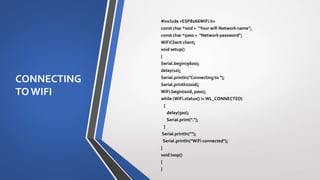
CONNECTING
TOWIFI
#include <ESP8266WiFi.h>
const char *ssid = "Your wifi Network name";
const char *pass = "Network password";
WiFiClient client;
void setup()
{
Serial.begin(9600);
delay(10);
Serial.println("Connecting to ");
Serial.println(ssid);
WiFi.begin(ssid, pass);
while (WiFi.status() !=WL_CONNECTED)
{
delay(500);
Serial.print(".");
}
Serial.println("");
Serial.println("WiFi connected");
}
void loop()
{
}
HANDS ON PROJECTS
• Led Blink
• WiFi Connection
• WiFi with LED
• Interfacing with DHT22
• NodeMCU as a WebServer
• Sending data from sensor to Thingspeak,Firebase,Adafruit IO over IOT
CHALLENGES IN LARGE SCALE IOT
• Scalability
• Data management
• Security
• Interoperability
• Cost
TOPICS DISCUSSED
• What is meant by IOT
• Uses of IOT
• Introduction to NodeMCU
• Hands on Projects
• Case Studies
• Challenges in large scale IOT
THANKYOU

Nodemcu and IOT.pptx

  • 1.
  • 2.
    IOT • Network ofphysical objects-“things”-that are embedded with sensors, software, and other technologies for the purpose of connecting and exchanging data with other devices and systems over the internet. • An IOT ecosystem consists of web-enabled smart devices that use embedded systems, such as processors, sensors and communication hardware, to collect, send and act on data they acquire from their environments.
  • 3.
    USES OF IOT •Manufacturing Industry • Agriculture Industry • Healthcare • Home Automation • Automobile and Transportation • Energy Sector
  • 4.
    WHY IOT? Connectivity  Enablesdevices to connect to the internet.  Share data and communicate with other devices.  Devices can work together.

  • 5.
    WHY IOT? Efficiency  Automatingtasks.  Monitoring systems in real-time  Providing data for predictive maintenance.
  • 6.
    WHY IOT? Personalization  createof personalized experiences for individuals .  improve services and products.
  • 7.
    WHY IOT?  Innovation creating new products and services that were not possible before.  lead to new business opportunities.
  • 8.
    WHY IOT?  Data Data can be analysed in the future  gain insights into consumer behavior  optimize operations
  • 9.
    LAYERS OF IOT ARCHITECTURE •Device Layer • Communication's Layer • Data Storage and Processing • Application Layer
  • 10.
    DEVICE LAYER • Firstlayer of IoT architecture is a sensing layer • Includes devices , sensors, and actuators • Collect data from their surroundings
  • 11.
    COMMUNICATION LAYER • Transportsdata from the Device Layer to the Internet • Security functionality including authentication, encryption and malware protection
  • 12.
    DATA STORAGE ANDPROCESSING • structured to handle data analysis and pre-processing. • Located in the cloud. • Data can be accessed by applications for edge analytics in use cases like autonomous vehicles where real-time data is necessary. • Data is monitored and managed while the processing is completed.
  • 13.
    APPLICATION LAYER • locatedin the cloud • data is used by end-user applications.
  • 14.
    LAYERS OF IOTARCHITECTURE • Device Layer: A temperature sensor takes temperature readings inside a refrigerator. • Communications Layer: Readings are sent to a router via a proprietary protocol and sent to the cloud. • Data Storage and Processing Layer: The cloud stores and processes the incoming data to generate alerts in real time and, when possible, reduce the total amount of data stored. • Application layer: The cloud generates reports and analysis for end users to applications and record keeping, via both web interfaces and email delivery.
  • 15.
    PROTOCOL’S IN IOT •MQTT ( Message Queuing Telemetry Transport ) • CoAP ( Constrained Application Protocol ) • HTTP ( Hypertext Transfer Protocol ) • DDS ( Data Distribution Service ) • Bluetooth • LoRaWAN
  • 16.
    MQTT • set ofrules • lightweight messaging between devices and the cloud • Used where reliability and low bandwidth are critical • supports messaging between devices to the cloud and the cloud to the device
  • 17.
    MQTT • Lightweight andefficient • requires minimal resources • control message can be as little as two data bytes. • Scalable • requires a minimal amount of code that consumes very little power in operations • support communication with a large number of IoT devices. • Reliable • reduce the time the IoT device takes to reconnect with the cloud • Secure • encrypt messages and authenticate devices • Well-supported • languages have extensive support for MQTT protocol • implement with minimal coding in any type of application.
  • 18.
    HTTP • sending andreceiving data between web servers and IoT devices. • used for IoT devices when there is a lot of data to be published • connect 3D printers in the network.
  • 19.
    NODEMCU • Also knownas ESP8266 NodeMCU • NodeMCU is an open-source platform, its hardware design is open for edit/modify/build • Has 8 Digital and 1 Analog Pins • It supports serial communication protocols i.e. UART, SPI, I2C, etc
  • 20.
  • 21.
  • 22.
    PROTOCOLS •UART (universal asynchronousreceiver-transmitter) •SPI (Serial Peripheral Interface) •I2C ( Inter-Integrated Circuit)
  • 23.
    SPI • communication typicallyhappens over short distances used on a circuit board • low amount of data transmission • Have 4 wires to operate • SCLK • MOSI • MISO • SS
  • 24.
    I2C • Only usestwo wires • Supports multiple masters and multiple slaves • Hardware is less complicated than with UARTs • Well known and widely used protocol
  • 25.
    UART • Intergrated circuitin a computer or an microcontroller • Data is transferred bit by bit using a single line or wire • Change parallel data into serial data for outbound communications • Change serial data into parallel data for inbound communications
  • 26.
    • Low currentconsumption • More no of digital I/O Pins • Better processor and memory • Breadboard friendly • Built in WiFi BENEFITS
  • 27.
    • Int • Char •Float • Double • boolean VARIABLES
  • 28.
    • pinMode • digitalWrite •digitalRead • analogWrite • analogRead • Serial • delay DATATYPES
  • 29.
    • If • Ifelse • for • while Control structures
  • 30.
    • Void setup() •Void loop() DEFAULT FUNCTIONS
  • 31.
    FIRST PROGRAM void setup() { pinMode(LED_BUILTIN, OUTPUT); } voidloop() { digitalWrite(LED_BUILTIN, HIGH); delay(1000); digitalWrite(LED_BUILTIN, LOW); delay(1000); }
  • 32.
    SOFTWARE • CP2102 Driver •http://bit.ly/3TPbsPq • Arduino IDE • https://bit.ly/3U61TvX
  • 33.
    CONFIGURATION • Install CP2102Driver • Install ESP8266 to Arduino IDE • http://arduino.esp8266.com/stable/package_esp8266com_index.json • Tools>>Board>>Boards Manager>>ESP8266>>Install • Tools>>Board>>esp8266>>Nodemcu 1.0 (ESP-12E Module) • Select correct Port
  • 34.
    CONNECTING TOWIFI #include <ESP8266WiFi.h> const char*ssid = "Your wifi Network name"; const char *pass = "Network password"; WiFiClient client; void setup() { Serial.begin(9600); delay(10); Serial.println("Connecting to "); Serial.println(ssid); WiFi.begin(ssid, pass); while (WiFi.status() !=WL_CONNECTED) { delay(500); Serial.print("."); } Serial.println(""); Serial.println("WiFi connected"); } void loop() { }
  • 35.
    HANDS ON PROJECTS •Led Blink • WiFi Connection • WiFi with LED • Interfacing with DHT22 • NodeMCU as a WebServer • Sending data from sensor to Thingspeak,Firebase,Adafruit IO over IOT
  • 36.
    CHALLENGES IN LARGESCALE IOT • Scalability • Data management • Security • Interoperability • Cost
  • 37.
    TOPICS DISCUSSED • Whatis meant by IOT • Uses of IOT • Introduction to NodeMCU • Hands on Projects • Case Studies • Challenges in large scale IOT
  • 38.