Normalized Difference
Vegetation Index
By
Qazi Muhammad Ehzaz Ul Mohiz
19-GIS-20
Contents
 What is NDVI?
 How do you Calculate NDVI?
 Applications
 How To Interpret NDVI Images?
 NDVI Specifications
NDVI
 NDVI stands for Normalized Difference Vegetation Index.
 NDVI was introduced by Tarpley and Kogan in 1980’s with the NOAA(National
Oceanic and Atmospheric Administration) in United States.
 There are round about 26 to 28 vegetation indices, like Image Rationing and
Image Differencing , among which NDVI is most popular and accurate vegetation
been used.
 This vegetation index is used to study the properties of different vegetation.
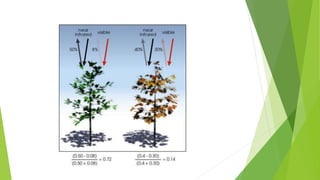
 NDVI quantifies vegetation by measuring the difference between near-infrared
(which vegetation strongly reflects) and red light (which vegetation absorbs)
 It focuses on health of vegetation and separate healthy vegetation from other
features.
How do you calculate NDVI?
 As shown below, Normalized Difference Vegetation Index (NDVI) uses the
NIR and red channels in its formula.
(NIR - R) / (NIR + R)
In Landsat 4-7, NDVI = (Band 4 – Band 3) / (Band 4 + Band 3).
In Landsat 8-9, NDVI = (Band 5 – Band 4) / (Band 5 + Band 4).
• It is calculated in Raster Calculator tool of ESRI Arc GIS.
• Healthy vegetation(chlorophyll) reflects more near-infrared (NIR)
and green light compared to other wavelengths, But it absorbs
more red and blue light.
• This is why our eyes see vegetation as the color green, If you
could see near-infrared, then it would be strong for vegetation
too.
• Satellite sensors like Landsat and Sentinel-2 both have the
necessary bands with NIR and red.
Normalized Difference Vegetation Index
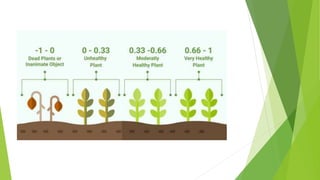
 NDVI always scientific ranges from -1 to +1.
• When you have values less than zero , it represent all other features rather
than vegetation.
• When you have values more than zero, it represent all kind of vegetation.
• When you have values close to zero, there are likely no green leaves and it
could even be an urbanized area.
1. Dead Plants-------------------- -1-0
2. Unhealthy Plants-------------- 0-0.33
3. Moderate Healthy Plants----- 0.33-0.66
4. Very Healthy Plants----------- 0.66-1
Applications
 We see several sectors using NDVI. For example, in agriculture, farmers use
NDVI for precision farming and to measure biomass.
 Whereas, in forestry, foresters use NDVI to quantify forest supply and leaf
area index.
 Furthermore, NASA states that ”NDVI is a good indicator of drought” When
water limits vegetation growth, it has a lower relative NDVI and density of
vegetation.
 It is used for identifying and monitoring droughts affecting agriculture.
 In reality, there are various of applications where NDVI are being applied in
the real world.
How To Interpret NDVI Images?
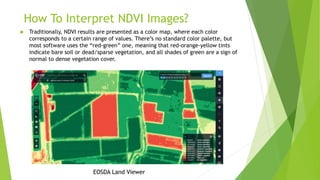
 Traditionally, NDVI results are presented as a color map, where each color
corresponds to a certain range of values. There’s no standard color palette, but
most software uses the “red-green” one, meaning that red-orange-yellow tints
indicate bare soil or dead/sparse vegetation, and all shades of green are a sign of
normal to dense vegetation cover.
EOSDA Land Viewer
By USGS
Thank You…

Normalized Difference Vegetation Index

  • 1.
    Normalized Difference Vegetation Index By QaziMuhammad Ehzaz Ul Mohiz 19-GIS-20
  • 2.
    Contents  What isNDVI?  How do you Calculate NDVI?  Applications  How To Interpret NDVI Images?  NDVI Specifications
  • 3.
    NDVI  NDVI standsfor Normalized Difference Vegetation Index.  NDVI was introduced by Tarpley and Kogan in 1980’s with the NOAA(National Oceanic and Atmospheric Administration) in United States.  There are round about 26 to 28 vegetation indices, like Image Rationing and Image Differencing , among which NDVI is most popular and accurate vegetation been used.  This vegetation index is used to study the properties of different vegetation.  NDVI quantifies vegetation by measuring the difference between near-infrared (which vegetation strongly reflects) and red light (which vegetation absorbs)  It focuses on health of vegetation and separate healthy vegetation from other features.
  • 4.
    How do youcalculate NDVI?  As shown below, Normalized Difference Vegetation Index (NDVI) uses the NIR and red channels in its formula. (NIR - R) / (NIR + R) In Landsat 4-7, NDVI = (Band 4 – Band 3) / (Band 4 + Band 3). In Landsat 8-9, NDVI = (Band 5 – Band 4) / (Band 5 + Band 4). • It is calculated in Raster Calculator tool of ESRI Arc GIS. • Healthy vegetation(chlorophyll) reflects more near-infrared (NIR) and green light compared to other wavelengths, But it absorbs more red and blue light. • This is why our eyes see vegetation as the color green, If you could see near-infrared, then it would be strong for vegetation too. • Satellite sensors like Landsat and Sentinel-2 both have the necessary bands with NIR and red.
  • 5.
    Normalized Difference VegetationIndex  NDVI always scientific ranges from -1 to +1. • When you have values less than zero , it represent all other features rather than vegetation. • When you have values more than zero, it represent all kind of vegetation. • When you have values close to zero, there are likely no green leaves and it could even be an urbanized area. 1. Dead Plants-------------------- -1-0 2. Unhealthy Plants-------------- 0-0.33 3. Moderate Healthy Plants----- 0.33-0.66 4. Very Healthy Plants----------- 0.66-1
  • 8.
    Applications  We seeseveral sectors using NDVI. For example, in agriculture, farmers use NDVI for precision farming and to measure biomass.  Whereas, in forestry, foresters use NDVI to quantify forest supply and leaf area index.  Furthermore, NASA states that ”NDVI is a good indicator of drought” When water limits vegetation growth, it has a lower relative NDVI and density of vegetation.  It is used for identifying and monitoring droughts affecting agriculture.  In reality, there are various of applications where NDVI are being applied in the real world.
  • 9.
    How To InterpretNDVI Images?  Traditionally, NDVI results are presented as a color map, where each color corresponds to a certain range of values. There’s no standard color palette, but most software uses the “red-green” one, meaning that red-orange-yellow tints indicate bare soil or dead/sparse vegetation, and all shades of green are a sign of normal to dense vegetation cover. EOSDA Land Viewer
  • 11.
  • 12.