NODE JS INTRODUCTION
Vatsal Shah
Software Embedded Engineer
Deeps Technology
www.vatsalshah.in
Introduction: Basic
 In simple words Node.js is ‘server-side JavaScript’.
 In not-so-simple words Node.js is a high-performance network
applications framework, well optimized for high concurrent
environments.
 It’s a command line tool.
 In ‘Node.js’ , ‘.js’ doesn’t mean that its solely written JavaScript. It is
40% JS and 60% C++.
 From the official site:
‘Node's goal is to provide an easy way to build scalable network programs’
- (from nodejs.org!)
11/16/2016
2
Vatsal Shah | Node Js
Why node.js ?
 Non Blocking I/O
 V8 Java script Engine
 Single Thread with Event Loop
 40,025 modules
 Windows, Linux, Mac
 1 Language for Frontend and Backend
 Active community
11/16/2016
3
Vatsal Shah | Node Js
Why node.js ?
Build Fast!
 JS on server and client allows
for more code reuse
 A lite stack (quick create-test
cycle)
 Large number of offerings for
web app creation
11/16/2016
4
Vatsal Shah | Node Js
Why node.js ?
 JS across stack allows easier
refactoring
 Smaller codebase
 See #1 (Build Fast!)
Adapt Fast!
11/16/2016
5
Vatsal Shah | Node Js
Why node.js ?
Run Fast!  Fast V8 Engine
 Great I/O performance with
event loop!
 Small number of layers
11/16/2016
6
Vatsal Shah | Node Js
Why node.js use event-based?
In a normal process cycle the web server while processing the request
will have to wait for the IO operations and thus blocking the next
request to be processed.
Node.JS process each request as events, The server doesn’t wait for
the IO operation to complete while it can handle other request at the
same time.
When the IO operation of first request is completed it will call-back
the server to complete the request.
11/16/2016
7
Vatsal Shah | Node Js
HTTP Method
 GET
 POST
 PUT
 DELETE
 GET => Read
 POST => Create
 PUT => Update
 DELETE => Delete
11/16/2016
8
Vatsal Shah | Node Js
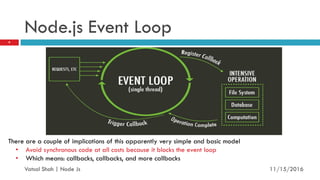
Node.js Event Loop
11/16/2016
9
Vatsal Shah | Node Js
There are a couple of implications of this apparently very simple and basic model
• Avoid synchronous code at all costs because it blocks the event loop
• Which means: callbacks, callbacks, and more callbacks
Blocking vs. Non-Blocking
Example :: Read data from file and show data
11/16/2016
10
Vatsal Shah | Node Js
Blocking
Read data from file
Show data
Do other tasks
var data = fs.readFileSync( “test.txt” );
console.log( data );
console.log( “Do other tasks” );
11/16/2016
11
Vatsal Shah | Node Js
Non-Blocking
 Read data from file
When read data completed, show data
 Do other tasks
fs.readFile( “test.txt”, function( err, data ) {
console.log(data);
});
11/16/2016
12
Vatsal Shah | Node Js
Node.js Modules
 https://npmjs.org/
 # of modules = 1,21,943
11/16/2016
13
Vatsal Shah | Node Js
Modules
 $npm install <module name>
 Modules allow Node to be extended (act as libaries)
 We can include a module with the global require function, require(‘module’)
 Node provides core modules that can be included by their name:
 File System – require(‘fs’)
 Http – require(‘http’)
 Utilities – require(‘util’)
11/16/2016
14
Vatsal Shah | Node Js
Modules
 We can also break our application up into modules and require
them using a file path:
 ‘/’ (absolute path), ‘./’ and ‘../’ (relative to calling file)
 Any valid type can be exported from a module by assigning it to
module.exports
11/16/2016
15
Vatsal Shah | Node Js
NPM Versions
 Var Versions (version [Major].[Minor].[Patch]):
 = (default), >, <, >=, <=
 * most recent version
 1.2.3 – 2.3.4 version greater than 1.2.3 and less than 2.3.4
 ~1.2.3 most recent patch version greater than or equal to 1.2.3 (>=1.2.3 <1.3.0)
 ^1.2.3 most recent minor version greater than or equal to 1.2.3 (>=1.2.3 <2.0.0)
11/16/2016
16
Vatsal Shah | Node Js
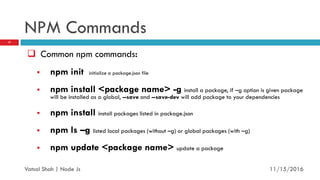
NPM Commands
 Common npm commands:
 npm init initialize a package.json file
 npm install <package name> -g install a package, if –g option is given package
will be installed as a global, --save and --save-dev will add package to your dependencies
 npm install install packages listed in package.json
 npm ls –g listed local packages (without –g) or global packages (with –g)
 npm update <package name> update a package
11/16/2016
17
Vatsal Shah | Node Js
File package.json
 First, we need to create a package.json file for our app
 Contains metadata for our app and lists the dependencies
 Package.json Interactive Guide
Project informations
 Name
 Version
 Dépendances
 Licence
 Main file
Etc...
11/16/2016
18
Vatsal Shah | Node Js
Example-1: Getting Started & Hello World
 Install/build Node.js.
 (Yes! Windows installer is available!)
 Open your favorite editor and start typing JavaScript.
 When you are done, open cmd/terminal and type this:
node YOUR_FILE.js
 Here is a simple example, which prints ‘hello world’
var sys = require sys ;
setTimeout(function(){
sys.puts world ;},3000 ;
sys.puts hello ;
//it prints hello first and waits for 3 seconds and then prints world
11/16/2016
19
Vatsal Shah | Node Js
Node.js Ecosystem
 Node.js heavily relies on modules, in previous examples require keyword
loaded the http & net modules.
 Creating a module is easy, just put your JavaScript code in a separate js
file and include it in your code by using keyword require, like:
var modulex = require ./modulex ;
 Libraries in Node.js are called packages and they can be installed by
typing
npm install package_name ; //package should be available in npm registry @
nmpjs.org
 NPM (Node Package Manager) comes bundled with Node.js installation.
11/16/2016
20
Vatsal Shah | Node Js
Example -2 &3 (HTTP Server & TCP Server)
 Following code creates an HTTP Server and prints ‘Hello World’ on the browser:
var http = require('http');
http.createServer(function (req, res) {
res.writeHead(200, {'Content-Type': 'text/plain'});
res.end('Hello Worldn'); }).listen(5000, "127.0.0.1");
 Here is an example of a simple TCP server which listens on port 6000 and echoes whatever you send it:
var net = require('net');
net.createServer(function (socket) {
socket.write("Echo serverrn");
socket.pipe(socket); }).listen(6000, "127.0.0.1");
11/16/2016
21
Vatsal Shah | Node Js
Example-4: Lets connect to a DB (MongoDB)
 Install mongojs using npm, a mongoDB driver for Node.js
npm install mongojs
 Code to retrieve all the documents from a collection:
var db = require("mongojs")
.connect("localhost:27017/test", ['test']);
db.test.find({}, function(err, posts) {
if( err || !posts) console.log("No posts found");
else posts.forEach( function(post) {
console.log(post);
});
});
11/16/2016
22
Vatsal Shah | Node Js
When to use it ?
 Chat/Messaging
 Real-time Applications
 High Concurrency Applications
 Coordinators
 Web application
 Streaming server
 Fast file upload client
 Any Real-time data apps
 Anything with high I/O
11/16/2016
23
Vatsal Shah | Node Js
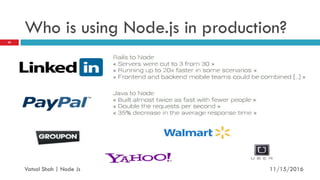
Who is using Node.js in production?
11/16/2016
24
Vatsal Shah | Node Js
Getting Started
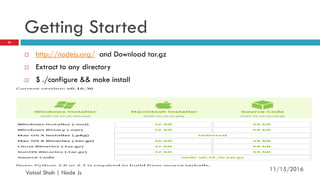
 http://nodejs.org/ and Download tar.gz
 Extract to any directory
 $ ./configure && make install
11/16/2016
25
Vatsal Shah | Node Js
Thank You 

Nodejs vatsal shah

  • 1.
    NODE JS INTRODUCTION VatsalShah Software Embedded Engineer Deeps Technology www.vatsalshah.in
  • 2.
    Introduction: Basic  Insimple words Node.js is ‘server-side JavaScript’.  In not-so-simple words Node.js is a high-performance network applications framework, well optimized for high concurrent environments.  It’s a command line tool.  In ‘Node.js’ , ‘.js’ doesn’t mean that its solely written JavaScript. It is 40% JS and 60% C++.  From the official site: ‘Node's goal is to provide an easy way to build scalable network programs’ - (from nodejs.org!) 11/16/2016 2 Vatsal Shah | Node Js
  • 3.
    Why node.js ? Non Blocking I/O  V8 Java script Engine  Single Thread with Event Loop  40,025 modules  Windows, Linux, Mac  1 Language for Frontend and Backend  Active community 11/16/2016 3 Vatsal Shah | Node Js
  • 4.
    Why node.js ? BuildFast!  JS on server and client allows for more code reuse  A lite stack (quick create-test cycle)  Large number of offerings for web app creation 11/16/2016 4 Vatsal Shah | Node Js
  • 5.
    Why node.js ? JS across stack allows easier refactoring  Smaller codebase  See #1 (Build Fast!) Adapt Fast! 11/16/2016 5 Vatsal Shah | Node Js
  • 6.
    Why node.js ? RunFast!  Fast V8 Engine  Great I/O performance with event loop!  Small number of layers 11/16/2016 6 Vatsal Shah | Node Js
  • 7.
    Why node.js useevent-based? In a normal process cycle the web server while processing the request will have to wait for the IO operations and thus blocking the next request to be processed. Node.JS process each request as events, The server doesn’t wait for the IO operation to complete while it can handle other request at the same time. When the IO operation of first request is completed it will call-back the server to complete the request. 11/16/2016 7 Vatsal Shah | Node Js
  • 8.
    HTTP Method  GET POST  PUT  DELETE  GET => Read  POST => Create  PUT => Update  DELETE => Delete 11/16/2016 8 Vatsal Shah | Node Js
  • 9.
    Node.js Event Loop 11/16/2016 9 VatsalShah | Node Js There are a couple of implications of this apparently very simple and basic model • Avoid synchronous code at all costs because it blocks the event loop • Which means: callbacks, callbacks, and more callbacks
  • 10.
    Blocking vs. Non-Blocking Example:: Read data from file and show data 11/16/2016 10 Vatsal Shah | Node Js
  • 11.
    Blocking Read data fromfile Show data Do other tasks var data = fs.readFileSync( “test.txt” ); console.log( data ); console.log( “Do other tasks” ); 11/16/2016 11 Vatsal Shah | Node Js
  • 12.
    Non-Blocking  Read datafrom file When read data completed, show data  Do other tasks fs.readFile( “test.txt”, function( err, data ) { console.log(data); }); 11/16/2016 12 Vatsal Shah | Node Js
  • 13.
    Node.js Modules  https://npmjs.org/ # of modules = 1,21,943 11/16/2016 13 Vatsal Shah | Node Js
  • 14.
    Modules  $npm install<module name>  Modules allow Node to be extended (act as libaries)  We can include a module with the global require function, require(‘module’)  Node provides core modules that can be included by their name:  File System – require(‘fs’)  Http – require(‘http’)  Utilities – require(‘util’) 11/16/2016 14 Vatsal Shah | Node Js
  • 15.
    Modules  We canalso break our application up into modules and require them using a file path:  ‘/’ (absolute path), ‘./’ and ‘../’ (relative to calling file)  Any valid type can be exported from a module by assigning it to module.exports 11/16/2016 15 Vatsal Shah | Node Js
  • 16.
    NPM Versions  VarVersions (version [Major].[Minor].[Patch]):  = (default), >, <, >=, <=  * most recent version  1.2.3 – 2.3.4 version greater than 1.2.3 and less than 2.3.4  ~1.2.3 most recent patch version greater than or equal to 1.2.3 (>=1.2.3 <1.3.0)  ^1.2.3 most recent minor version greater than or equal to 1.2.3 (>=1.2.3 <2.0.0) 11/16/2016 16 Vatsal Shah | Node Js
  • 17.
    NPM Commands  Commonnpm commands:  npm init initialize a package.json file  npm install <package name> -g install a package, if –g option is given package will be installed as a global, --save and --save-dev will add package to your dependencies  npm install install packages listed in package.json  npm ls –g listed local packages (without –g) or global packages (with –g)  npm update <package name> update a package 11/16/2016 17 Vatsal Shah | Node Js
  • 18.
    File package.json  First,we need to create a package.json file for our app  Contains metadata for our app and lists the dependencies  Package.json Interactive Guide Project informations  Name  Version  Dépendances  Licence  Main file Etc... 11/16/2016 18 Vatsal Shah | Node Js
  • 19.
    Example-1: Getting Started& Hello World  Install/build Node.js.  (Yes! Windows installer is available!)  Open your favorite editor and start typing JavaScript.  When you are done, open cmd/terminal and type this: node YOUR_FILE.js  Here is a simple example, which prints ‘hello world’ var sys = require sys ; setTimeout(function(){ sys.puts world ;},3000 ; sys.puts hello ; //it prints hello first and waits for 3 seconds and then prints world 11/16/2016 19 Vatsal Shah | Node Js
  • 20.
    Node.js Ecosystem  Node.jsheavily relies on modules, in previous examples require keyword loaded the http & net modules.  Creating a module is easy, just put your JavaScript code in a separate js file and include it in your code by using keyword require, like: var modulex = require ./modulex ;  Libraries in Node.js are called packages and they can be installed by typing npm install package_name ; //package should be available in npm registry @ nmpjs.org  NPM (Node Package Manager) comes bundled with Node.js installation. 11/16/2016 20 Vatsal Shah | Node Js
  • 21.
    Example -2 &3(HTTP Server & TCP Server)  Following code creates an HTTP Server and prints ‘Hello World’ on the browser: var http = require('http'); http.createServer(function (req, res) { res.writeHead(200, {'Content-Type': 'text/plain'}); res.end('Hello Worldn'); }).listen(5000, "127.0.0.1");  Here is an example of a simple TCP server which listens on port 6000 and echoes whatever you send it: var net = require('net'); net.createServer(function (socket) { socket.write("Echo serverrn"); socket.pipe(socket); }).listen(6000, "127.0.0.1"); 11/16/2016 21 Vatsal Shah | Node Js
  • 22.
    Example-4: Lets connectto a DB (MongoDB)  Install mongojs using npm, a mongoDB driver for Node.js npm install mongojs  Code to retrieve all the documents from a collection: var db = require("mongojs") .connect("localhost:27017/test", ['test']); db.test.find({}, function(err, posts) { if( err || !posts) console.log("No posts found"); else posts.forEach( function(post) { console.log(post); }); }); 11/16/2016 22 Vatsal Shah | Node Js
  • 23.
    When to useit ?  Chat/Messaging  Real-time Applications  High Concurrency Applications  Coordinators  Web application  Streaming server  Fast file upload client  Any Real-time data apps  Anything with high I/O 11/16/2016 23 Vatsal Shah | Node Js
  • 24.
    Who is usingNode.js in production? 11/16/2016 24 Vatsal Shah | Node Js
  • 25.
    Getting Started  http://nodejs.org/and Download tar.gz  Extract to any directory  $ ./configure && make install 11/16/2016 25 Vatsal Shah | Node Js
  • 26.