Node.js
BUILD real time Web Application Development
Objectives
Introduction to Node.js
What is NPM
Express framework in Node.js
How to create API
MongoDB Configuration
At the end of the session you will be able to learn:
Introduction to node.js
 Node.js is an open source , cross platform runtime environment for server-side and
networking applications
 Node.js applications are written in JavaScript, and can be run within the Node.js
runtime on OS X, Microsoft Windows, Linux, etc – Wikipedia
 This is based on Google ‘s V8 Javascript Engine
What is Node.js
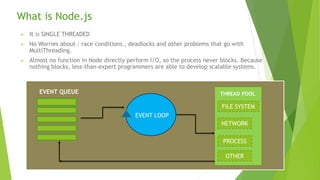
 It is SINGLE THREADED
 No Worries about : race conditions , deadlocks and other problems that go with
MultiThreading.
 Almost no function in Node directly perform I/O, so the process never blocks. Because
nothing blocks, less-than-expert programmers are able to develop scalable systems.
EVENT LOOP
NETWORK
FILE SYSTEM
PROCESS
OTHER
THREAD POOLEVENT QUEUE
Basics of Node.js : npm
 NPM stands for Node Package Manager.
 npm is a registry of reusable modules and packages written by various developers
 You can publish your own packages
 There are two ways to install npm packages:
 Locally: To use and depend on the package from your own module or project
 Globally: To use across the system, like a command line tool
 Installing a package locally:
 The package is easily downloaded by just running “npm install <package name>”
 This will create a node_modules directory (If it doesnot exist yet) and will download the
package there.
 Once installed you can use it in any js file of your project by saying: var obj =
require(‘<package name>’);
Express Framework
 Express is a web application framework which provides a robust set of features for web and
mobile applications
 It is open source designed for building web application and APIs
 It is a server framework for Node.js
 It is backend part of MEAN Stack together with MongoDB, database and Angular JS frontend.
 Creating robust API is quick and easy
 It provides a thin layer of fundamental web application feature
 It offers a simple way to get a server up and running
 Features:
 Router
 Middleware
 Template Engine
 Error Handling
Express : Simple Application Example
Var express = require(‘express’);
Var app = express();
app.listen(9000, function(){
Console.log(‘Server listening to port 9000’);
})
app.get(‘/getUsers’, function(req,res){
res.json({‘message’:’data from getUsers’});
})
Connecting MongoDB with Node.js
 MongoDB has rapidly grown to become a popular database for web application
and is perfect fit for Node.JS applications
 We have lot of third party modules to connect to MongoDB
 Mongoose
 MongoDB
 MongoClient
 First we have to establish a connection between node app and MongoDB
 Once connection is establish, fire the query to perform a crud operation
var mongoose = require(‘mongoose’);
//Middleware
mongoose.connect(‘mongodb://localhost:2701/userManagement’);

Node js Introduction

  • 1.
    Node.js BUILD real timeWeb Application Development
  • 2.
    Objectives Introduction to Node.js Whatis NPM Express framework in Node.js How to create API MongoDB Configuration At the end of the session you will be able to learn:
  • 3.
    Introduction to node.js Node.js is an open source , cross platform runtime environment for server-side and networking applications  Node.js applications are written in JavaScript, and can be run within the Node.js runtime on OS X, Microsoft Windows, Linux, etc – Wikipedia  This is based on Google ‘s V8 Javascript Engine
  • 4.
    What is Node.js It is SINGLE THREADED  No Worries about : race conditions , deadlocks and other problems that go with MultiThreading.  Almost no function in Node directly perform I/O, so the process never blocks. Because nothing blocks, less-than-expert programmers are able to develop scalable systems. EVENT LOOP NETWORK FILE SYSTEM PROCESS OTHER THREAD POOLEVENT QUEUE
  • 5.
    Basics of Node.js: npm  NPM stands for Node Package Manager.  npm is a registry of reusable modules and packages written by various developers  You can publish your own packages  There are two ways to install npm packages:  Locally: To use and depend on the package from your own module or project  Globally: To use across the system, like a command line tool  Installing a package locally:  The package is easily downloaded by just running “npm install <package name>”  This will create a node_modules directory (If it doesnot exist yet) and will download the package there.  Once installed you can use it in any js file of your project by saying: var obj = require(‘<package name>’);
  • 6.
    Express Framework  Expressis a web application framework which provides a robust set of features for web and mobile applications  It is open source designed for building web application and APIs  It is a server framework for Node.js  It is backend part of MEAN Stack together with MongoDB, database and Angular JS frontend.  Creating robust API is quick and easy  It provides a thin layer of fundamental web application feature  It offers a simple way to get a server up and running  Features:  Router  Middleware  Template Engine  Error Handling
  • 7.
    Express : SimpleApplication Example Var express = require(‘express’); Var app = express(); app.listen(9000, function(){ Console.log(‘Server listening to port 9000’); }) app.get(‘/getUsers’, function(req,res){ res.json({‘message’:’data from getUsers’}); })
  • 8.
    Connecting MongoDB withNode.js  MongoDB has rapidly grown to become a popular database for web application and is perfect fit for Node.JS applications  We have lot of third party modules to connect to MongoDB  Mongoose  MongoDB  MongoClient  First we have to establish a connection between node app and MongoDB  Once connection is establish, fire the query to perform a crud operation var mongoose = require(‘mongoose’); //Middleware mongoose.connect(‘mongodb://localhost:2701/userManagement’);