The Server-side JavaScript
Dss PRAKASH
WHAT TO EXPECT AHEAD….
 Introduction
 Some Theory
 A couple of weird diagrams
 2 Pictures showing unbelievable benchmarks
 Some stuff from Internet
Dss PRAKASH
DEVELOPMENT FOR THE WEB
 Data is generated on the server, transferred to the client and
displayed by the browser
 Server Side technologies include PHP, JSP, ASP.net, Rails,
and also Node.js
Dss PRAKASH
NODE JS – WHAT IS IT ..?
 JavaScript is well known for client-side scripts running inside
the browser.
 Node.js is JavaScript running on the server-side .
 Node.js create isomorphic applications, i.e. applications that
are build with the same language on the back and front-ends.
Dss PRAKASH
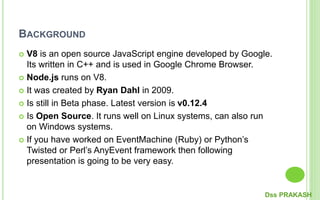
BACKGROUND
 V8 is an open source JavaScript engine developed by Google.
Its written in C++ and is used in Google Chrome Browser.
 Node.js runs on V8.
 It was created by Ryan Dahl in 2009.
 Is still in Beta phase. Latest version is v0.12.4
 Is Open Source. It runs well on Linux systems, can also run
on Windows systems.
 If you have worked on EventMachine (Ruby) or Python’s
Twisted or Perl’s AnyEvent framework then following
presentation is going to be very easy.
Dss PRAKASH
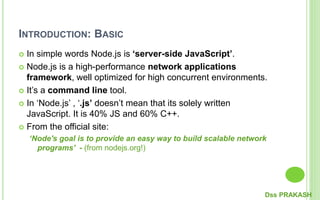
INTRODUCTION: BASIC
 In simple words Node.js is ‘server-side JavaScript’.
 Node.js is a high-performance network applications
framework, well optimized for high concurrent environments.
 It’s a command line tool.
 In ‘Node.js’ , ‘.js’ doesn’t mean that its solely written
JavaScript. It is 40% JS and 60% C++.
 From the official site:
‘Node's goal is to provide an easy way to build scalable network
programs’ - (from nodejs.org!)
Dss PRAKASH
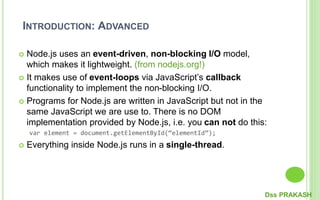
INTRODUCTION: ADVANCED
 Node.js uses an event-driven, non-blocking I/O model,
which makes it lightweight. (from nodejs.org!)
 It makes use of event-loops via JavaScript’s callback
functionality to implement the non-blocking I/O.
 Programs for Node.js are written in JavaScript but not in the
same JavaScript we are use to. There is no DOM
implementation provided by Node.js, i.e. you can not do this:
var element = document.getElementById(“elementId”);
 Everything inside Node.js runs in a single-thread.
Dss PRAKASH
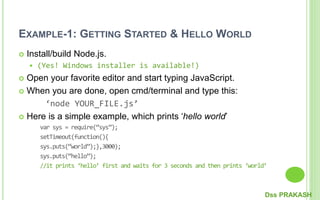
EXAMPLE-1: GETTING STARTED & HELLO WORLD
 Install/build Node.js.
 (Yes! Windows installer is available!)
 Open your favorite editor and start typing JavaScript.
 When you are done, open cmd/terminal and type this:
‘node YOUR_FILE.js’
 Here is a simple example, which prints ‘hello world’
var sys = require(“sys”);
setTimeout(function(){
sys.puts(“world”);},3000);
sys.puts(“hello”);
//it prints ‘hello’ first and waits for 3 seconds and then prints ‘world’
Dss PRAKASH
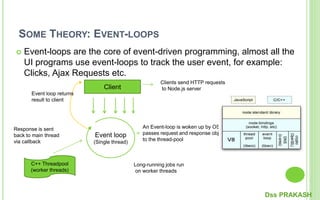
SOME THEORY: EVENT-LOOPS
 Event-loops are the core of event-driven programming, almost all the
UI programs use event-loops to track the user event, for example:
Clicks, Ajax Requests etc.
Client
Event loop
(Single thread)
C++ Threadpool
(worker threads)
Clients send HTTP requests
to Node.js server
An Event-loop is woken up by OS,
passes request and response objects
to the thread-pool
Long-running jobs run
on worker threads
Response is sent
back to main thread
via callback
Event loop returns
result to client
Dss PRAKASH
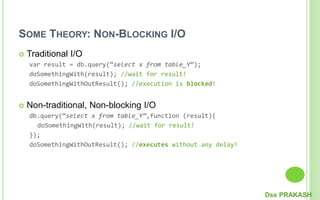
SOME THEORY: NON-BLOCKING I/O
 Traditional I/O
var result = db.query(“select x from table_Y”);
doSomethingWith(result); //wait for result!
doSomethingWithOutResult(); //execution is blocked!
 Non-traditional, Non-blocking I/O
db.query(“select x from table_Y”,function (result){
doSomethingWith(result); //wait for result!
});
doSomethingWithOutResult(); //executes without any delay!
Dss PRAKASH
WHAT CAN YOU DO WITH NODE.JS ?
 You can create an HTTP server and print ‘hello world’ on the
browser in just 4 lines of JavaScript.
 You can create a TCP server similar to HTTP server, in just 4
lines of JavaScript.
 You can create a DNS server.
 You can create a Static File Server.
 You can create a Web Chat Application like GTalk in the
browser.
 Node.js can also be used for creating online games,
collaboration tools or anything which sends updates to the
user in real-time.
Dss PRAKASH
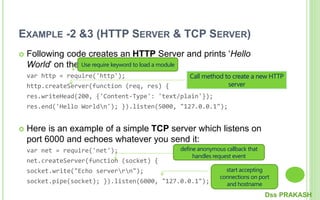
EXAMPLE -2 &3 (HTTP SERVER & TCP SERVER)
 Following code creates an HTTP Server and prints ‘Hello
World’ on the browser:
var http = require('http');
http.createServer(function (req, res) {
res.writeHead(200, {'Content-Type': 'text/plain'});
res.end('Hello Worldn'); }).listen(5000, "127.0.0.1");
 Here is an example of a simple TCP server which listens on
port 6000 and echoes whatever you send it:
var net = require('net');
net.createServer(function (socket) {
socket.write("Echo serverrn");
socket.pipe(socket); }).listen(6000, "127.0.0.1");
Dss PRAKASH
Call method to create a new HTTP
server
Use require keyword to load a module
define anonymous callback that
handles request event
start accepting
connections on port
and hostname
NODE.JS ECOSYSTEM
 Node.js heavily relies on modules, in previous examples
require keyword loaded the http & net modules.
 Creating a module is easy, just put your JavaScript code in a
separate js file and include it in your code by using keyword
require, like:
var modulex = require(‘./modulex’);
 Libraries in Node.js are called packages and they can be
installed by typing
npm install “package_name”; //package should be available in npm
registry @ nmpjs.org
 NPM (Node Package Manager) comes bundled with Node.js
installation.
Dss PRAKASH
EXAMPLE-4: LETS CONNECT TO A DB (MONGODB)
 Install mongojs using npm, a mongoDB driver for Node.js
npm install mongojs
 Code to retrieve all the documents from a collection:
var db = require("mongojs")
.connect("localhost:27017/test", ['test']);
db.test.find({}, function(err, posts) {
if( err || !posts) console.log("No posts found");
else posts.forEach( function(post) {
console.log(post);
});
});
Dss PRAKASH
WHEN TO USE NODE.JS?
 Node.js is good for creating streaming based real-time
services, web chat applications, static file servers etc.
 If you need high level concurrency and not worried about CPU-
cycles.
 If you are great at writing JavaScript code because then you
can use the same language at both the places: server-side
and client-side.
 More can be found at:
http://stackoverflow.com/questions/5062614/how-to-decide-
when-to-use-nodejs
Dss PRAKASH
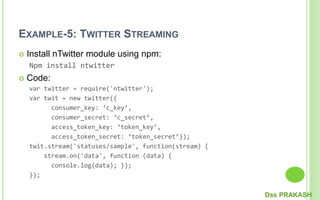
EXAMPLE-5: TWITTER STREAMING
 Install nTwitter module using npm:
Npm install ntwitter
 Code:
var twitter = require('ntwitter');
var twit = new twitter({
consumer_key: ‘c_key’,
consumer_secret: ‘c_secret’,
access_token_key: ‘token_key’,
access_token_secret: ‘token_secret’});
twit.stream('statuses/sample', function(stream) {
stream.on('data', function (data) {
console.log(data); });
});
Dss PRAKASH
Dss PRAKASH
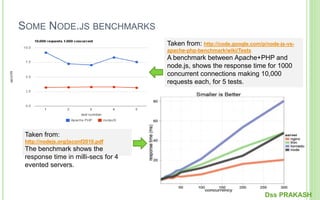
SOME NODE.JS BENCHMARKS
Taken from: http://code.google.com/p/node-js-vs-
apache-php-benchmark/wiki/Tests
A benchmark between Apache+PHP and
node.js, shows the response time for 1000
concurrent connections making 10,000
requests each, for 5 tests.
Taken from:
http://nodejs.org/jsconf2010.pdf
The benchmark shows the
response time in milli-secs for 4
evented servers.
Dss PRAKASH
WHEN TO NOT USE NODE.JS
 When you are doing heavy and CPU intensive calculations on
server side, because event-loops are CPU hungry.
 Node.js API is still in beta, it keeps on changing a lot from one
revision to another and there is a very little backward
compatibility. Most of the packages are also unstable.
Therefore is not yet production ready.
 Node.js is a no match for enterprise level application
frameworks like Spring(java), Django(python), Symfony(php)
etc. Applications written on such platforms are meant to be
highly user interactive and involve complex business logic.
 Read further on disadvantages of Node.js on Quora:
http://www.quora.com/What-are-the-disadvantages-of-using-
Node-js
Dss PRAKASH
APPENDIX-1: WHO IS USING NODE.JS IN
PRODUCTION?
 Yahoo! : iPad App Livestand uses Yahoo! Manhattan
framework which is based on Node.js.
 LinkedIn : LinkedIn uses a combination of Node.js and
MongoDB for its mobile platform. iOS and Android apps are
based on it.
 eBay : Uses Node.js along with ql.io to help application
developers in improving eBay’s end user experience.
 Dow Jones : The WSJ Social front-end is written completely in
Node.js, using Express.js, and many other modules.
 Complete list can be found at:
https://github.com/joyent/node/wiki/Projects,-Applications,-and-
Companies-Using-Node
Dss PRAKASH
APPENDIX-2: RESOURCE TO GET STARTED
 Watch this video at Youtube:
http://www.youtube.com/watch?v=jo_B4LTHi3I
 Read the free O’reilly Book ‘Up and Running with Node.js’ @
http://ofps.oreilly.com/titles/9781449398583/
 Visit www.nodejs.org for Info/News about Node.js
 Watch Node.js tutorials @ http://nodetuts.com/
 For Info on MongoDB:
http://www.mongodb.org/display/DOCS/Home
 For anything else Google!
Dss PRAKASH
APPENDIX-3: SOME GOOD MODULES
 Express – to make things simpler e.g. syntax, DB
connections.
 Jade – HTML template system
 Socket.IO – to create real-time apps
 Nodemon – to monitor Node.js and push change
automatically
 CoffeeScript – for easier JavaScript development
 Find out more about some widely used Node.js modules at:
http://blog.nodejitsu.com/top-node-module-creators
Dss PRAKASH
Dss PRAKASH

Nodejs

  • 1.
  • 2.
    WHAT TO EXPECTAHEAD….  Introduction  Some Theory  A couple of weird diagrams  2 Pictures showing unbelievable benchmarks  Some stuff from Internet Dss PRAKASH
  • 3.
    DEVELOPMENT FOR THEWEB  Data is generated on the server, transferred to the client and displayed by the browser  Server Side technologies include PHP, JSP, ASP.net, Rails, and also Node.js Dss PRAKASH
  • 4.
    NODE JS –WHAT IS IT ..?  JavaScript is well known for client-side scripts running inside the browser.  Node.js is JavaScript running on the server-side .  Node.js create isomorphic applications, i.e. applications that are build with the same language on the back and front-ends. Dss PRAKASH
  • 5.
    BACKGROUND  V8 isan open source JavaScript engine developed by Google. Its written in C++ and is used in Google Chrome Browser.  Node.js runs on V8.  It was created by Ryan Dahl in 2009.  Is still in Beta phase. Latest version is v0.12.4  Is Open Source. It runs well on Linux systems, can also run on Windows systems.  If you have worked on EventMachine (Ruby) or Python’s Twisted or Perl’s AnyEvent framework then following presentation is going to be very easy. Dss PRAKASH
  • 6.
    INTRODUCTION: BASIC  Insimple words Node.js is ‘server-side JavaScript’.  Node.js is a high-performance network applications framework, well optimized for high concurrent environments.  It’s a command line tool.  In ‘Node.js’ , ‘.js’ doesn’t mean that its solely written JavaScript. It is 40% JS and 60% C++.  From the official site: ‘Node's goal is to provide an easy way to build scalable network programs’ - (from nodejs.org!) Dss PRAKASH
  • 7.
    INTRODUCTION: ADVANCED  Node.jsuses an event-driven, non-blocking I/O model, which makes it lightweight. (from nodejs.org!)  It makes use of event-loops via JavaScript’s callback functionality to implement the non-blocking I/O.  Programs for Node.js are written in JavaScript but not in the same JavaScript we are use to. There is no DOM implementation provided by Node.js, i.e. you can not do this: var element = document.getElementById(“elementId”);  Everything inside Node.js runs in a single-thread. Dss PRAKASH
  • 8.
    EXAMPLE-1: GETTING STARTED& HELLO WORLD  Install/build Node.js.  (Yes! Windows installer is available!)  Open your favorite editor and start typing JavaScript.  When you are done, open cmd/terminal and type this: ‘node YOUR_FILE.js’  Here is a simple example, which prints ‘hello world’ var sys = require(“sys”); setTimeout(function(){ sys.puts(“world”);},3000); sys.puts(“hello”); //it prints ‘hello’ first and waits for 3 seconds and then prints ‘world’ Dss PRAKASH
  • 9.
    SOME THEORY: EVENT-LOOPS Event-loops are the core of event-driven programming, almost all the UI programs use event-loops to track the user event, for example: Clicks, Ajax Requests etc. Client Event loop (Single thread) C++ Threadpool (worker threads) Clients send HTTP requests to Node.js server An Event-loop is woken up by OS, passes request and response objects to the thread-pool Long-running jobs run on worker threads Response is sent back to main thread via callback Event loop returns result to client Dss PRAKASH
  • 10.
    SOME THEORY: NON-BLOCKINGI/O  Traditional I/O var result = db.query(“select x from table_Y”); doSomethingWith(result); //wait for result! doSomethingWithOutResult(); //execution is blocked!  Non-traditional, Non-blocking I/O db.query(“select x from table_Y”,function (result){ doSomethingWith(result); //wait for result! }); doSomethingWithOutResult(); //executes without any delay! Dss PRAKASH
  • 11.
    WHAT CAN YOUDO WITH NODE.JS ?  You can create an HTTP server and print ‘hello world’ on the browser in just 4 lines of JavaScript.  You can create a TCP server similar to HTTP server, in just 4 lines of JavaScript.  You can create a DNS server.  You can create a Static File Server.  You can create a Web Chat Application like GTalk in the browser.  Node.js can also be used for creating online games, collaboration tools or anything which sends updates to the user in real-time. Dss PRAKASH
  • 12.
    EXAMPLE -2 &3(HTTP SERVER & TCP SERVER)  Following code creates an HTTP Server and prints ‘Hello World’ on the browser: var http = require('http'); http.createServer(function (req, res) { res.writeHead(200, {'Content-Type': 'text/plain'}); res.end('Hello Worldn'); }).listen(5000, "127.0.0.1");  Here is an example of a simple TCP server which listens on port 6000 and echoes whatever you send it: var net = require('net'); net.createServer(function (socket) { socket.write("Echo serverrn"); socket.pipe(socket); }).listen(6000, "127.0.0.1"); Dss PRAKASH Call method to create a new HTTP server Use require keyword to load a module define anonymous callback that handles request event start accepting connections on port and hostname
  • 13.
    NODE.JS ECOSYSTEM  Node.jsheavily relies on modules, in previous examples require keyword loaded the http & net modules.  Creating a module is easy, just put your JavaScript code in a separate js file and include it in your code by using keyword require, like: var modulex = require(‘./modulex’);  Libraries in Node.js are called packages and they can be installed by typing npm install “package_name”; //package should be available in npm registry @ nmpjs.org  NPM (Node Package Manager) comes bundled with Node.js installation. Dss PRAKASH
  • 14.
    EXAMPLE-4: LETS CONNECTTO A DB (MONGODB)  Install mongojs using npm, a mongoDB driver for Node.js npm install mongojs  Code to retrieve all the documents from a collection: var db = require("mongojs") .connect("localhost:27017/test", ['test']); db.test.find({}, function(err, posts) { if( err || !posts) console.log("No posts found"); else posts.forEach( function(post) { console.log(post); }); }); Dss PRAKASH
  • 15.
    WHEN TO USENODE.JS?  Node.js is good for creating streaming based real-time services, web chat applications, static file servers etc.  If you need high level concurrency and not worried about CPU- cycles.  If you are great at writing JavaScript code because then you can use the same language at both the places: server-side and client-side.  More can be found at: http://stackoverflow.com/questions/5062614/how-to-decide- when-to-use-nodejs Dss PRAKASH
  • 16.
    EXAMPLE-5: TWITTER STREAMING Install nTwitter module using npm: Npm install ntwitter  Code: var twitter = require('ntwitter'); var twit = new twitter({ consumer_key: ‘c_key’, consumer_secret: ‘c_secret’, access_token_key: ‘token_key’, access_token_secret: ‘token_secret’}); twit.stream('statuses/sample', function(stream) { stream.on('data', function (data) { console.log(data); }); }); Dss PRAKASH
  • 17.
  • 18.
    SOME NODE.JS BENCHMARKS Takenfrom: http://code.google.com/p/node-js-vs- apache-php-benchmark/wiki/Tests A benchmark between Apache+PHP and node.js, shows the response time for 1000 concurrent connections making 10,000 requests each, for 5 tests. Taken from: http://nodejs.org/jsconf2010.pdf The benchmark shows the response time in milli-secs for 4 evented servers. Dss PRAKASH
  • 19.
    WHEN TO NOTUSE NODE.JS  When you are doing heavy and CPU intensive calculations on server side, because event-loops are CPU hungry.  Node.js API is still in beta, it keeps on changing a lot from one revision to another and there is a very little backward compatibility. Most of the packages are also unstable. Therefore is not yet production ready.  Node.js is a no match for enterprise level application frameworks like Spring(java), Django(python), Symfony(php) etc. Applications written on such platforms are meant to be highly user interactive and involve complex business logic.  Read further on disadvantages of Node.js on Quora: http://www.quora.com/What-are-the-disadvantages-of-using- Node-js Dss PRAKASH
  • 20.
    APPENDIX-1: WHO ISUSING NODE.JS IN PRODUCTION?  Yahoo! : iPad App Livestand uses Yahoo! Manhattan framework which is based on Node.js.  LinkedIn : LinkedIn uses a combination of Node.js and MongoDB for its mobile platform. iOS and Android apps are based on it.  eBay : Uses Node.js along with ql.io to help application developers in improving eBay’s end user experience.  Dow Jones : The WSJ Social front-end is written completely in Node.js, using Express.js, and many other modules.  Complete list can be found at: https://github.com/joyent/node/wiki/Projects,-Applications,-and- Companies-Using-Node Dss PRAKASH
  • 21.
    APPENDIX-2: RESOURCE TOGET STARTED  Watch this video at Youtube: http://www.youtube.com/watch?v=jo_B4LTHi3I  Read the free O’reilly Book ‘Up and Running with Node.js’ @ http://ofps.oreilly.com/titles/9781449398583/  Visit www.nodejs.org for Info/News about Node.js  Watch Node.js tutorials @ http://nodetuts.com/  For Info on MongoDB: http://www.mongodb.org/display/DOCS/Home  For anything else Google! Dss PRAKASH
  • 22.
    APPENDIX-3: SOME GOODMODULES  Express – to make things simpler e.g. syntax, DB connections.  Jade – HTML template system  Socket.IO – to create real-time apps  Nodemon – to monitor Node.js and push change automatically  CoffeeScript – for easier JavaScript development  Find out more about some widely used Node.js modules at: http://blog.nodejitsu.com/top-node-module-creators Dss PRAKASH
  • 23.