Social Media: Overview
This review will focus on establishing a
foundation for future development,
including:

Setting up accounts

Establishing “automated content feeds” to
populate your FaceBook and Twitter accounts.

Building “friends”

Initial trusted interactions with your friends

                       1
Social Media: FaceBook
Now the hard part – FaceBook.

FaceBook is one of the fastest growing websites in history and
currently has over 800 million users worldwide.

Excluding the US FaceBook’s top five countries are India,
Indonesia, Brazil, Mexico and Turkey.
- In all of these markets mobile usage dominates.
- Usage patterns in each country are unique.

Fastest growing major markets in the last three months
- Brazil (+ 7.0 million)
- Japan (+2.4 million)
- South Korea (+1.9 million)
- Sweden (+1.7million)
- Russia (+1.1 million)

FaceBook has many features and opportunities to build audience
and revenue. But the extra features make it more complex to use.


                               2
Social Media: FaceBook Presence
Creating a FaceBook page is more
complicated and requires you to join
FaceBook as an individual!
When you have a personal profile, you can choose between three types of
FaceBook “pages”:
3.Profile: Specifically for people
- No limit to “friends”
- Cannot advertise their profile

5.Group: used for specific groups of people
- Can be either public or private
- Limited to 5,000 members
- Cannot advertise to promote group membership

7.Page: Used for organizations                                      Best Choice
- Can add specific “apps” to create customized functionality
     + RSS Graffiti, publishes directly to Page from a site’s RSS Feed.
- No limit in the number of people who can “like’ the page
- Can advertise the Page to promote and create audience
- Can analyze with internal “Insights” analytics


                                      3
Manage Permissions


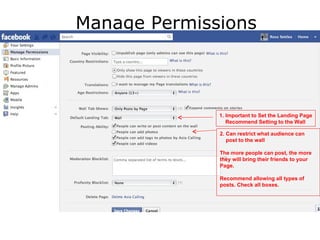
              1. Important to Set the Landing Page
                 Recommend Setting to the Wall

              2. Can restrict what audience can
                 post to the wall

              The more people can post, the more
              they will bring their friends to your
              Page.

              Recommend allowing all types of
              posts. Check all boxes.
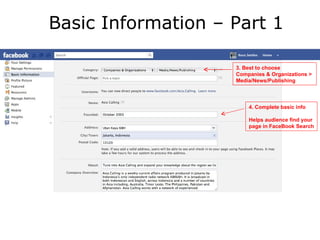
Basic Information – Part 1

                    3. Best to choose
                    Companies & Organizations >
                    Media/News/Publishing


                        4. Complete basic info

                        Helps audience find your
                        page in FaceBook Search
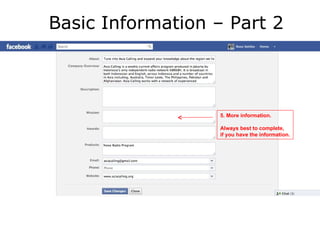
Basic Information – Part 2


                  5. More information.

                  Always best to complete,
                  if you have the information.
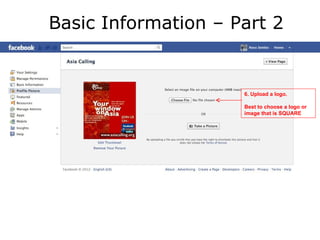
Basic Information – Part 2


                     6. Upload a logo.

                     Best to choose a logo or
                     image that is SQUARE
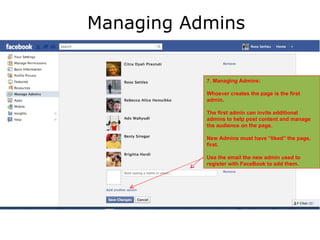
Managing Admins


           7. Managing Admins:

           Whoever creates the page is the first
           admin.

           The first admin can invite additional
           admins to help post content and manage
           the audience on the page.

           New Admins must have “liked” the page,
           first.

           Use the email the new admin used to
           register with FaceBook to add them.
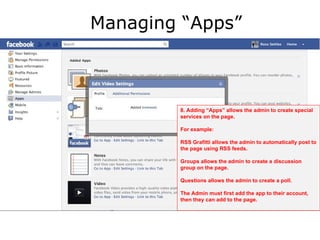
Managing “Apps”


        8. Adding “Apps” allows the admin to create special
        services on the page.

        For example:

        RSS Grafitti allows the admin to automatically post to
        the page using RSS feeds.

        Groups allows the admin to create a discussion
        group on the page.

        Questions allows the admin to create a poll.

        The Admin must first add the app to their account,
        then they can add to the page.

News organisations and Facebook

  • 1.
    Social Media: Overview Thisreview will focus on establishing a foundation for future development, including: Setting up accounts Establishing “automated content feeds” to populate your FaceBook and Twitter accounts. Building “friends” Initial trusted interactions with your friends 1
  • 2.
    Social Media: FaceBook Nowthe hard part – FaceBook. FaceBook is one of the fastest growing websites in history and currently has over 800 million users worldwide. Excluding the US FaceBook’s top five countries are India, Indonesia, Brazil, Mexico and Turkey. - In all of these markets mobile usage dominates. - Usage patterns in each country are unique. Fastest growing major markets in the last three months - Brazil (+ 7.0 million) - Japan (+2.4 million) - South Korea (+1.9 million) - Sweden (+1.7million) - Russia (+1.1 million) FaceBook has many features and opportunities to build audience and revenue. But the extra features make it more complex to use. 2
  • 3.
    Social Media: FaceBookPresence Creating a FaceBook page is more complicated and requires you to join FaceBook as an individual! When you have a personal profile, you can choose between three types of FaceBook “pages”: 3.Profile: Specifically for people - No limit to “friends” - Cannot advertise their profile 5.Group: used for specific groups of people - Can be either public or private - Limited to 5,000 members - Cannot advertise to promote group membership 7.Page: Used for organizations Best Choice - Can add specific “apps” to create customized functionality + RSS Graffiti, publishes directly to Page from a site’s RSS Feed. - No limit in the number of people who can “like’ the page - Can advertise the Page to promote and create audience - Can analyze with internal “Insights” analytics 3
  • 4.
    Manage Permissions 1. Important to Set the Landing Page Recommend Setting to the Wall 2. Can restrict what audience can post to the wall The more people can post, the more they will bring their friends to your Page. Recommend allowing all types of posts. Check all boxes.
  • 5.
    Basic Information –Part 1 3. Best to choose Companies & Organizations > Media/News/Publishing 4. Complete basic info Helps audience find your page in FaceBook Search
  • 6.
    Basic Information –Part 2 5. More information. Always best to complete, if you have the information.
  • 7.
    Basic Information –Part 2 6. Upload a logo. Best to choose a logo or image that is SQUARE
  • 8.
    Managing Admins 7. Managing Admins: Whoever creates the page is the first admin. The first admin can invite additional admins to help post content and manage the audience on the page. New Admins must have “liked” the page, first. Use the email the new admin used to register with FaceBook to add them.
  • 9.
    Managing “Apps” 8. Adding “Apps” allows the admin to create special services on the page. For example: RSS Grafitti allows the admin to automatically post to the page using RSS feeds. Groups allows the admin to create a discussion group on the page. Questions allows the admin to create a poll. The Admin must first add the app to their account, then they can add to the page.