Facebook for charities


Last updated: July 2011
Hello.
These slides are intended to help charities make
the best use of the ever-changing opportunities
offered by Facebook.
If you spot something that’s out of date, wrong or
missing, please let us know, and do share any
examples of charities making good use of the
world’s largest social network!
We hope this proves useful, please share far and
wide.
Getting the message out
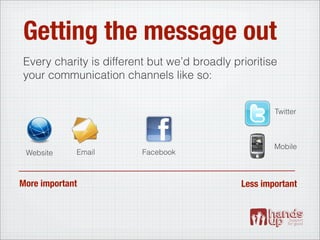
Every charity is different but we’d broadly prioritise
your communication channels like so:


                                                      Twitter


                                                      Mobile
 Website     Email       Facebook


More important                                Less important
Facebook
Why focus on Facebook?
•   It has almost 700,000,000 users worldwide and
    58% of UK population have an account (June 2011)
•   The ever growing scope of the site means many
    users are using Facebook to explore the web
•   It allows you to interact directly with your
    supporters - answering questions, sharing content -
    making your organisation more accessible
•   Your best content is easily shareable
Facebook
There’s a lot going on...

      News Feed             Registration
      Like button           Applications
      Send button           Ads
      Pages                 Places
      Groups
The News Feed
News Feed
The stream of updates that you see after you login to Facebook
is called the News Feed. It’s the core of the Facebook
experience.

If you want supporters to read your updates, to interact with
your content, to respond to your calls to action - then this is
where they need to appear.

We’ll explain how to make this happen a little later on.
The Like button
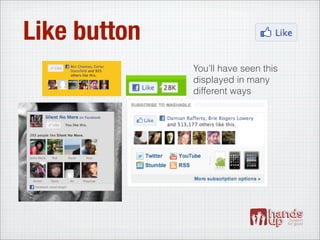
Like button
              You’ll have seen this
              displayed in many
              different ways
Like button
The Like button can be placed anywhere on the web. It has two main purposes:

To connect a user with your Facebook page (become a fan):

•   Clicking Like will make the user a fan of a specified Facebook Page, and it
    will share this activity for their friends to see

•   If you want to engage your users through Facebook, you’ll need them to
    click this button, so if possible add it to a prominent place on your website

•   The Like Box also performs this same function

To share the web page that the button is on:

•   This is useful for sharing individual pieces of content e.g. blog posts
Like button
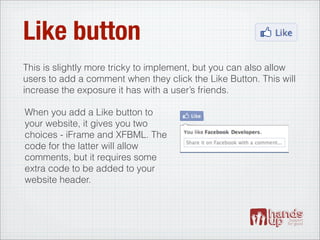
This is slightly more tricky to implement, but you can also allow
users to add a comment when they click the Like Button. This will
increase the exposure it has with a user’s friends.

When you add a Like button to
your website, it gives you two
choices - iFrame and XFBML. The
code for the latter will allow
comments, but it requires some
extra code to be added to your
website header.
Send button
Send button
•   Send replaces the Facebook Share button but
    performs a slightly different function
•   Clicking ‘Send’ gives users the option to email
    your content to a friend or post it on their wall
Pages
Pages
•   A Page is the FB equivalent of your website homepage
•   If a user Likes your Page your updates will appear in their
    news feed. Besides individuals interactions, this is the only
    way to communicate with those that Like your Page, and it
    can easily be hidden
•   As a page you can use Facebook in much the same way as
    a person - commenting on wall posts, liking pages, being
    tagged in photos etc - to do so simply select ‘Use Facebook
    as Page’ from the Account menu
Anatomy of a page
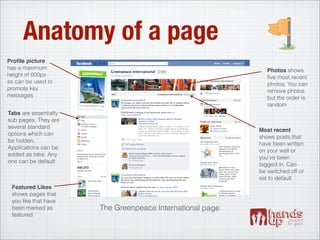
Profile picture
has a maximum                                                 Photos shows
height of 600px                                               five most recent
so can be used to                                             photos. You can
promote key                                                   remove photos
messages                                                      but the order is
                                                              random
Tabs are essentially
sub pages. They are
several standard
                                                           Most recent
options which can
                                                           shows posts that
be hidden.
                                                           have been written
Applications can be
                                                           on your wall or
added as tabs. Any
                                                           you’ve been
one can be default.
                                                           tagged in. Can
                                                           be switched off or
                                                           set to default
 Featured Likes
 shows pages that
 you like that have
 been marked as        The Greenpeace International page
 featured
Posting updates

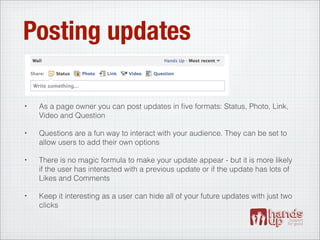
•   As a page owner you can post updates in five formats: Status, Photo, Link,
    Video and Question

•   Questions are a fun way to interact with your audience. They can be set to
    allow users to add their own options

•   There is no magic formula to make your update appear - but it is more likely
    if the user has interacted with a previous update or if the update has lots of
    Likes and Comments

•   Keep it interesting as a user can hide all of your future updates with just two
    clicks
Tabs
•   Tabs can be used for additional content on Pages
•   Appear as menu below profile picture, with
    customisable icons. Defaults include Wall, Info,
    Photos, Discussion
•   Few users click on tabs so it is better to direct to
    these pages from within main content area
•   Any tab can be set as the landing page
•   Tabs can be used for iFrames, exclusive content,
    applications and more
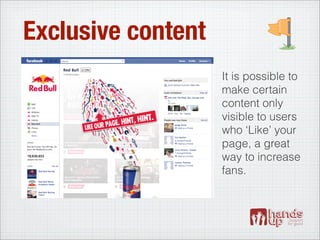
Exclusive content
                    It is possible to
                    make certain
                    content only
                    visible to users
                    who ‘Like’ your
                    page, a great
                    way to increase
                    fans.
iFrames
•   An iFrame is simply a window onto another
    website
•   With iFrames users could interact with your entire
    site through Facebook
•   But to avoid scrolling side to side, you need to set
    up a version that is less than 520px width
•   A better but more expensive option is to design a
    FB specific version of your site with 3 or 4 pages
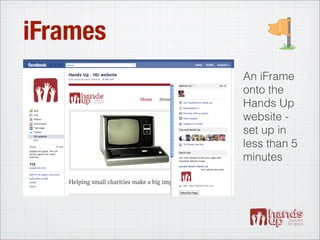
iFrames
          An iFrame
          onto the
          Hands Up
          website -
          set up in
          less than 5
          minutes
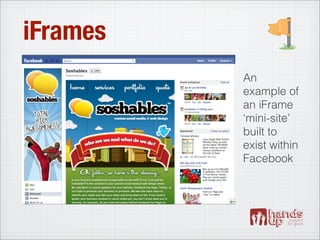
iFrames
          An
          example of
          an iFrame
          ‘mini-site’
          built to
          exist within
          Facebook
Groups
Groups
•   Can be public or private
•   Key features:
     •   Document sharing
     •   Group notifications
     •   Group chat
•   Useful for self-organising groups of users, but
    Page should always be used as main presence
Groups
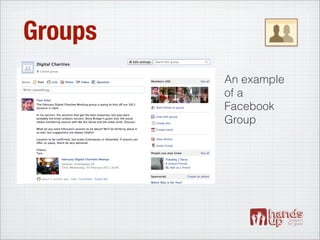
         An example
         of a
         Facebook
         Group
Login
Login
•   Previously known as Facebook Connect
•   Allows users to login to your website with their Facebook
    credentials, and can give various permission to your website
    e.g. posting to a user’s wall
•   Eliminates separate registration process
•   User gives permission to level of access set by you
•   Easy for users to invite FB friends / see which friends are
    using your website
•   Interactions can be shared back to Facebook
Login
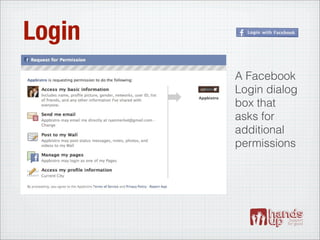
        A Facebook
        Login dialog
        box that
        asks for
        additional
        permissions
Registration
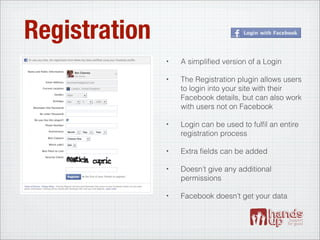
               •   A simplified version of a Login

               •   The Registration plugin allows users
                   to login into your site with their
                   Facebook details, but can also work
                   with users not on Facebook

               •   Login can be used to fulfil an entire
                   registration process

               •   Extra fields can be added

               •   Doesn’t give any additional
                   permissions

               •   Facebook doesn’t get your data
Registration
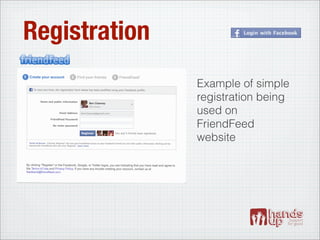
               Example of simple
               registration being
               used on
               FriendFeed
               website
Applications
Existing apps
•   Can be added as tabs, increasing the
    functionality of your Page
•   There is an app for just about everything - audio
    players, photo galleries, ecommerce engines
    and more.
•   For a full list of apps see http://
    www.facebook.com/apps/directory.php
Existing apps
Three to start with:
 •   YouTube for Pages: add your latest videos to
     your page
 •   Networked Blogs: import the feed from your blog
 •   Slideshare: show visitors your latest
     presentations
Bespoke apps
•   Allow your content to be completely integrated into
    the Facebook experience
•   Users can find them within Facebook
•   Allow you to send notifications to users
•   Can access and use profile data (if user allows)
•   Content from apps is more likely to be shared
    within Facebook
Bespoke apps
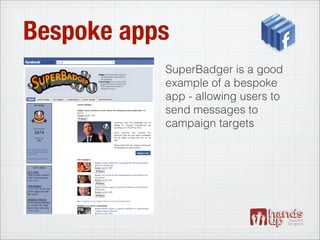
           SuperBadger is a good
           example of a bespoke
           app - allowing users to
           send messages to
           campaign targets
Ads
Ads
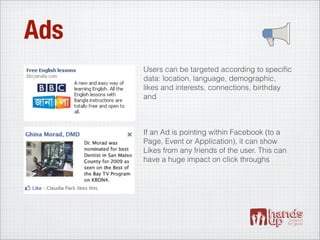
      Users can be targeted according to specific
      data: location, language, demographic,
      likes and interests, connections, birthday
      and


      If an Ad is pointing within Facebook (to a
      Page, Event or Application), it can show
      Likes from any friends of the user. This can
      have a huge impact on click throughs
Sponsored stories
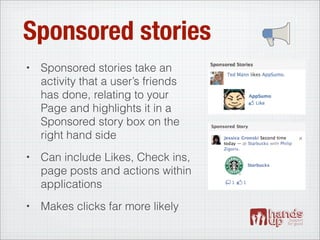
•   Sponsored stories take an
    activity that a user’s friends
    has done, relating to your
    Page and highlights it in a
    Sponsored story box on the
    right hand side
•   Can include Likes, Check ins,
    page posts and actions within
    applications
•   Makes clicks far more likely
Places
Places
•   Allows mobile users to ‘check-in’ at a specific
    place using location-based data, sharing this
    information to their wall
•   Allows discussions and reviews to be associated
    with geographical places
•   With Facebook Deals users can be targeted with
    incredibly specific location-based adverts and
    promotions
Some good principles
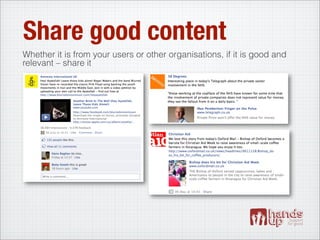
Share good content
Whether it is from your users or other organisations, if it is good and
relevant – share it
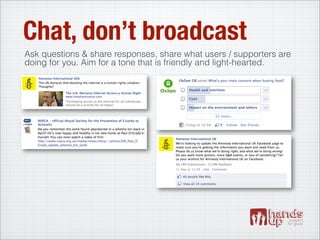
Chat, don’t broadcast
Ask questions & share responses, share what users / supporters are
doing for you. Aim for a tone that is friendly and light-hearted.
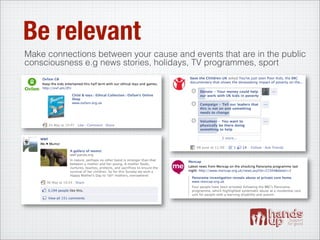
Be relevant
Make connections between your cause and events that are in the public
consciousness e.g news stories, holidays, TV programmes, sport
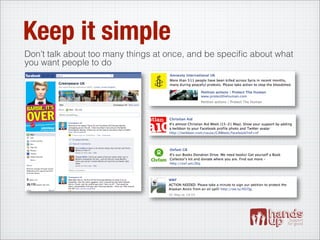
Keep it simple
Don’t talk about too many things at once, and be specific about what
you want people to do
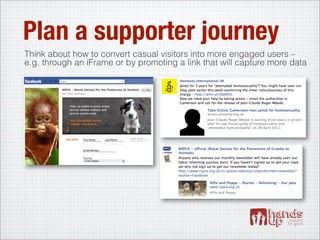
Plan a supporter journey
Think about how to convert casual visitors into more engaged users –
e.g. through an iFrame or by promoting a link that will capture more data
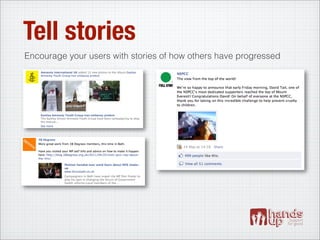
Tell stories
Encourage your users with stories of how others have progressed
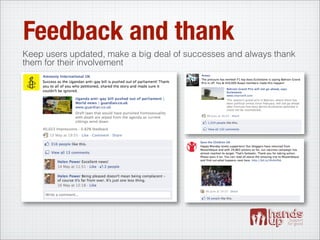
Feedback and thank
Keep users updated, make a big deal of successes and always thank
them for their involvement
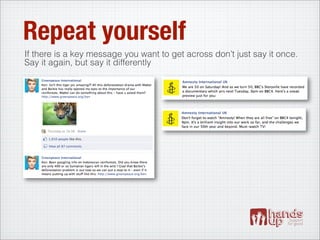
Repeat yourself
If there is a key message you want to get across don’t just say it once.
Say it again, but say it differently
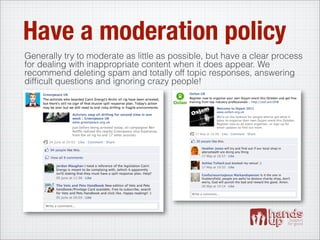
Have a moderation policy
Generally try to moderate as little as possible, but have a clear process
for dealing with inappropriate content when it does appear. We
recommend deleting spam and totally off topic responses, answering
difficult questions and ignoring crazy people!
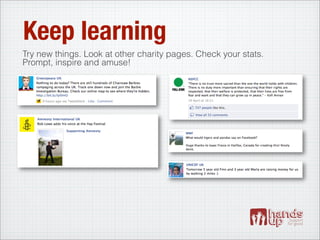
Keep learning
Try new things. Look at other charity pages. Check your stats.
Prompt, inspire and amuse!
And a quick little bit
    about us...
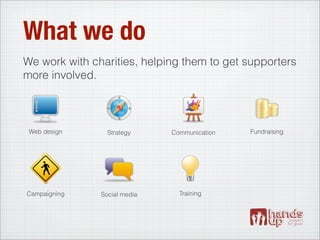
What we do
We work with charities, helping them to get supporters
more involved.


 Web design      Strategy     Communication   Fundraising


Campaigning    Social media     Training
Who we work with
Thanks!
ben@handsupdigital.com
www.handsupdigital.com

Facebook for charities

  • 1.
    Facebook for charities Lastupdated: July 2011
  • 2.
    Hello. These slides areintended to help charities make the best use of the ever-changing opportunities offered by Facebook. If you spot something that’s out of date, wrong or missing, please let us know, and do share any examples of charities making good use of the world’s largest social network! We hope this proves useful, please share far and wide.
  • 3.
    Getting the messageout Every charity is different but we’d broadly prioritise your communication channels like so: Twitter Mobile Website Email Facebook More important Less important
  • 4.
  • 5.
    Why focus onFacebook? • It has almost 700,000,000 users worldwide and 58% of UK population have an account (June 2011) • The ever growing scope of the site means many users are using Facebook to explore the web • It allows you to interact directly with your supporters - answering questions, sharing content - making your organisation more accessible • Your best content is easily shareable
  • 6.
    Facebook There’s a lotgoing on... News Feed Registration Like button Applications Send button Ads Pages Places Groups
  • 7.
  • 8.
    News Feed The streamof updates that you see after you login to Facebook is called the News Feed. It’s the core of the Facebook experience. If you want supporters to read your updates, to interact with your content, to respond to your calls to action - then this is where they need to appear. We’ll explain how to make this happen a little later on.
  • 9.
  • 10.
    Like button You’ll have seen this displayed in many different ways
  • 11.
    Like button The Likebutton can be placed anywhere on the web. It has two main purposes: To connect a user with your Facebook page (become a fan): • Clicking Like will make the user a fan of a specified Facebook Page, and it will share this activity for their friends to see • If you want to engage your users through Facebook, you’ll need them to click this button, so if possible add it to a prominent place on your website • The Like Box also performs this same function To share the web page that the button is on: • This is useful for sharing individual pieces of content e.g. blog posts
  • 12.
    Like button This isslightly more tricky to implement, but you can also allow users to add a comment when they click the Like Button. This will increase the exposure it has with a user’s friends. When you add a Like button to your website, it gives you two choices - iFrame and XFBML. The code for the latter will allow comments, but it requires some extra code to be added to your website header.
  • 13.
  • 14.
    Send button • Send replaces the Facebook Share button but performs a slightly different function • Clicking ‘Send’ gives users the option to email your content to a friend or post it on their wall
  • 15.
  • 16.
    Pages • A Page is the FB equivalent of your website homepage • If a user Likes your Page your updates will appear in their news feed. Besides individuals interactions, this is the only way to communicate with those that Like your Page, and it can easily be hidden • As a page you can use Facebook in much the same way as a person - commenting on wall posts, liking pages, being tagged in photos etc - to do so simply select ‘Use Facebook as Page’ from the Account menu
  • 17.
    Anatomy of apage Profile picture has a maximum Photos shows height of 600px five most recent so can be used to photos. You can promote key remove photos messages but the order is random Tabs are essentially sub pages. They are several standard Most recent options which can shows posts that be hidden. have been written Applications can be on your wall or added as tabs. Any you’ve been one can be default. tagged in. Can be switched off or set to default Featured Likes shows pages that you like that have been marked as The Greenpeace International page featured
  • 18.
    Posting updates • As a page owner you can post updates in five formats: Status, Photo, Link, Video and Question • Questions are a fun way to interact with your audience. They can be set to allow users to add their own options • There is no magic formula to make your update appear - but it is more likely if the user has interacted with a previous update or if the update has lots of Likes and Comments • Keep it interesting as a user can hide all of your future updates with just two clicks
  • 19.
    Tabs • Tabs can be used for additional content on Pages • Appear as menu below profile picture, with customisable icons. Defaults include Wall, Info, Photos, Discussion • Few users click on tabs so it is better to direct to these pages from within main content area • Any tab can be set as the landing page • Tabs can be used for iFrames, exclusive content, applications and more
  • 20.
    Exclusive content It is possible to make certain content only visible to users who ‘Like’ your page, a great way to increase fans.
  • 21.
    iFrames • An iFrame is simply a window onto another website • With iFrames users could interact with your entire site through Facebook • But to avoid scrolling side to side, you need to set up a version that is less than 520px width • A better but more expensive option is to design a FB specific version of your site with 3 or 4 pages
  • 22.
    iFrames An iFrame onto the Hands Up website - set up in less than 5 minutes
  • 23.
    iFrames An example of an iFrame ‘mini-site’ built to exist within Facebook
  • 24.
  • 25.
    Groups • Can be public or private • Key features: • Document sharing • Group notifications • Group chat • Useful for self-organising groups of users, but Page should always be used as main presence
  • 26.
    Groups An example of a Facebook Group
  • 27.
  • 28.
    Login • Previously known as Facebook Connect • Allows users to login to your website with their Facebook credentials, and can give various permission to your website e.g. posting to a user’s wall • Eliminates separate registration process • User gives permission to level of access set by you • Easy for users to invite FB friends / see which friends are using your website • Interactions can be shared back to Facebook
  • 29.
    Login A Facebook Login dialog box that asks for additional permissions
  • 30.
    Registration • A simplified version of a Login • The Registration plugin allows users to login into your site with their Facebook details, but can also work with users not on Facebook • Login can be used to fulfil an entire registration process • Extra fields can be added • Doesn’t give any additional permissions • Facebook doesn’t get your data
  • 31.
    Registration Example of simple registration being used on FriendFeed website
  • 32.
  • 33.
    Existing apps • Can be added as tabs, increasing the functionality of your Page • There is an app for just about everything - audio players, photo galleries, ecommerce engines and more. • For a full list of apps see http:// www.facebook.com/apps/directory.php
  • 34.
    Existing apps Three tostart with: • YouTube for Pages: add your latest videos to your page • Networked Blogs: import the feed from your blog • Slideshare: show visitors your latest presentations
  • 35.
    Bespoke apps • Allow your content to be completely integrated into the Facebook experience • Users can find them within Facebook • Allow you to send notifications to users • Can access and use profile data (if user allows) • Content from apps is more likely to be shared within Facebook
  • 36.
    Bespoke apps SuperBadger is a good example of a bespoke app - allowing users to send messages to campaign targets
  • 37.
  • 38.
    Ads Users can be targeted according to specific data: location, language, demographic, likes and interests, connections, birthday and If an Ad is pointing within Facebook (to a Page, Event or Application), it can show Likes from any friends of the user. This can have a huge impact on click throughs
  • 39.
    Sponsored stories • Sponsored stories take an activity that a user’s friends has done, relating to your Page and highlights it in a Sponsored story box on the right hand side • Can include Likes, Check ins, page posts and actions within applications • Makes clicks far more likely
  • 40.
  • 41.
    Places • Allows mobile users to ‘check-in’ at a specific place using location-based data, sharing this information to their wall • Allows discussions and reviews to be associated with geographical places • With Facebook Deals users can be targeted with incredibly specific location-based adverts and promotions
  • 42.
  • 43.
    Share good content Whetherit is from your users or other organisations, if it is good and relevant – share it
  • 44.
    Chat, don’t broadcast Askquestions & share responses, share what users / supporters are doing for you. Aim for a tone that is friendly and light-hearted.
  • 45.
    Be relevant Make connectionsbetween your cause and events that are in the public consciousness e.g news stories, holidays, TV programmes, sport
  • 46.
    Keep it simple Don’ttalk about too many things at once, and be specific about what you want people to do
  • 47.
    Plan a supporterjourney Think about how to convert casual visitors into more engaged users – e.g. through an iFrame or by promoting a link that will capture more data
  • 48.
    Tell stories Encourage yourusers with stories of how others have progressed
  • 49.
    Feedback and thank Keepusers updated, make a big deal of successes and always thank them for their involvement
  • 50.
    Repeat yourself If thereis a key message you want to get across don’t just say it once. Say it again, but say it differently
  • 51.
    Have a moderationpolicy Generally try to moderate as little as possible, but have a clear process for dealing with inappropriate content when it does appear. We recommend deleting spam and totally off topic responses, answering difficult questions and ignoring crazy people!
  • 52.
    Keep learning Try newthings. Look at other charity pages. Check your stats. Prompt, inspire and amuse!
  • 53.
    And a quicklittle bit about us...
  • 54.
    What we do Wework with charities, helping them to get supporters more involved. Web design Strategy Communication Fundraising Campaigning Social media Training
  • 55.
  • 56.