Reporting System with 
BI Publisher 
(Using Data Template) 
Edi Yanto 
edi.y4nto@gmail.com 
Oracle Applications Technical Consultant
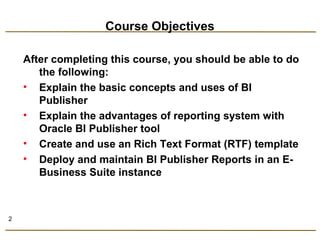
Course Objectives 
After completing this course, you should be able to do 
the following: 
• Explain the basic concepts and uses of BI 
Publisher 
• Explain the advantages of reporting system with 
Oracle BI Publisher tool 
• Create and use an Rich Text Format (RTF) template 
• Deploy and maintain BI Publisher Reports in an E-Business 
Suite instance 
2
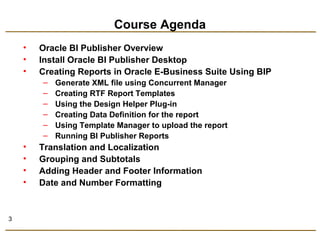
Course Agenda 
• Oracle BI Publisher Overview 
• Install Oracle BI Publisher Desktop 
• Creating Reports in Oracle E-Business Suite Using BIP 
– Generate XML file using Concurrent Manager 
– Creating RTF Report Templates 
– Using the Design Helper Plug-in 
– Creating Data Definition for the report 
– Using Template Manager to upload the report 
– Running BI Publisher Reports 
• Translation and Localization 
• Grouping and Subtotals 
• Adding Header and Footer Information 
• Date and Number Formatting 
3
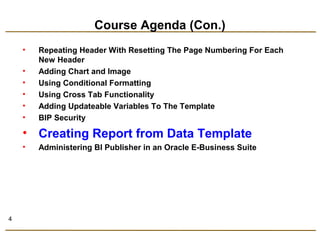
Course Agenda (Con.) 
• Repeating Header With Resetting The Page Numbering For Each 
New Header 
• Adding Chart and Image 
• Using Conditional Formatting 
• Using Cross Tab Functionality 
• Adding Updateable Variables To The Template 
• BIP Security 
• Creating Report from Data Template 
• Administering BI Publisher in an Oracle E-Business Suite 
4
Data Template 
The Data Template is: 
• Used to rapidly generate any kind of XML data structure 
against any database in a scalable, efficient manner.
What Functionality Is Supported? 
Single and multiple data queries 
Query links 
Parameters 
Aggregate functions (SUM, AVG, MIN, MAX, COUNT) 
Event triggers 
Multiple data groups
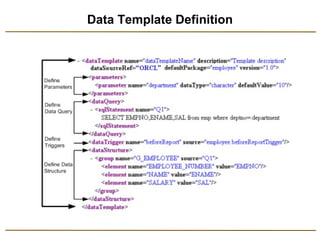
Data Template Definition
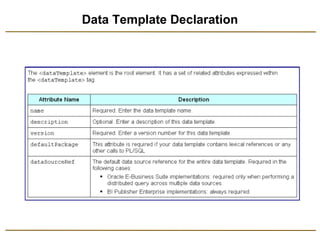
Data Template Declaration
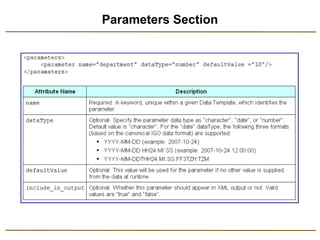
Parameters Section
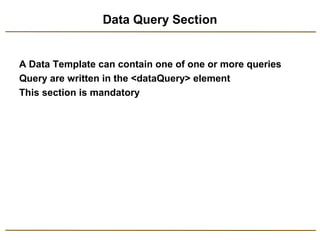
Data Query Section 
A Data Template can contain one of one or more queries 
Query are written in the <dataQuery> element 
This section is mandatory
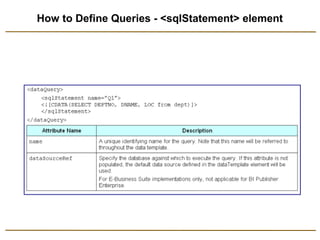
How to Define Queries - <sqlStatement> element
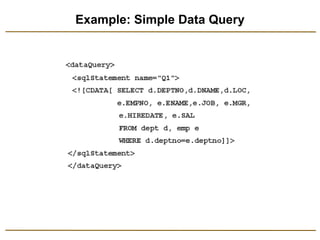
Example: Simple Data Query
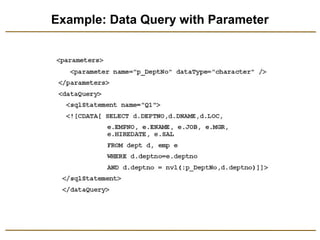
Example: Data Query with Parameter
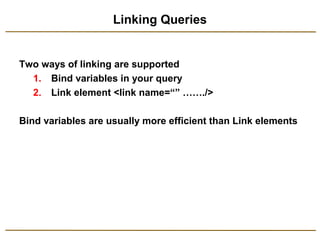
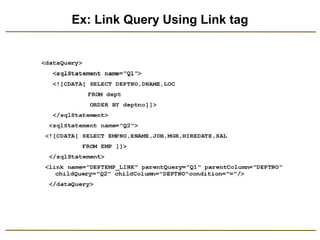
Linking Queries 
Two ways of linking are supported 
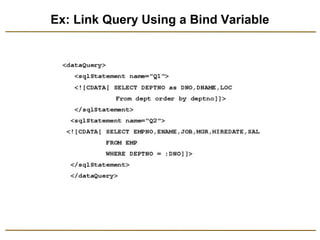
1. Bind variables in your query 
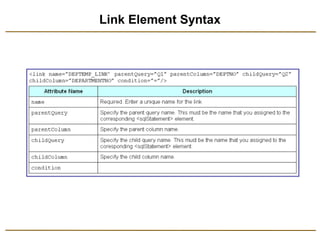
2. Link element <link name=“” ……./> 
Bind variables are usually more efficient than Link elements
Ex: Link Query Using a Bind Variable
Link Element Syntax
Ex: Link Query Using Link tag
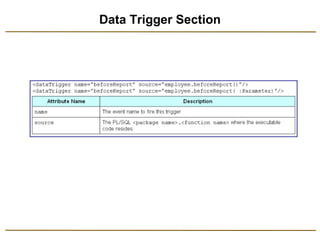
Data Trigger Section
Data Triggers 
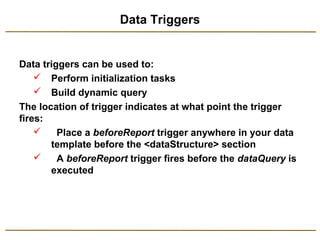
Data triggers can be used to: 
 Perform initialization tasks 
 Build dynamic query 
The location of trigger indicates at what point the trigger 
fires: 
 Place a beforeReport trigger anywhere in your data 
template before the <dataStructure> section 
 A beforeReport trigger fires before the dataQuery is 
executed
Data Triggers (Con.) 
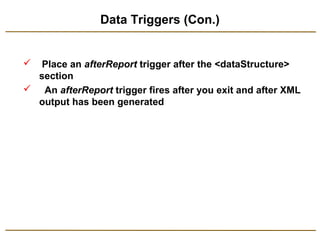
 Place an afterReport trigger after the <dataStructure> 
section 
 An afterReport trigger fires after you exit and after XML 
output has been generated
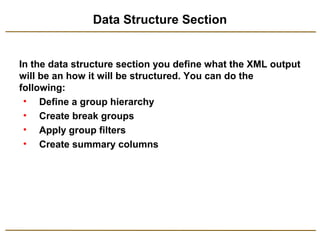
Data Structure Section 
In the data structure section you define what the XML output 
will be an how it will be structured. You can do the 
following: 
• Define a group hierarchy 
• Create break groups 
• Apply group filters 
• Create summary columns
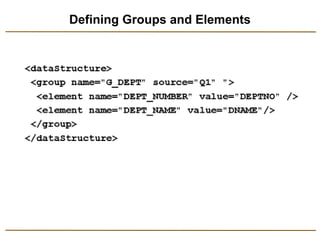
Defining Groups and Elements
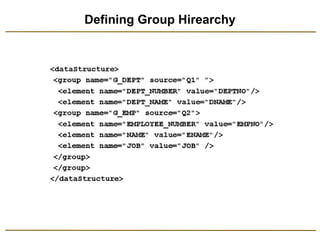
Defining Group Hirearchy
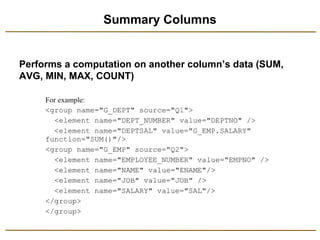
Summary Columns 
Performs a computation on another column’s data (SUM, 
AVG, MIN, MAX, COUNT)
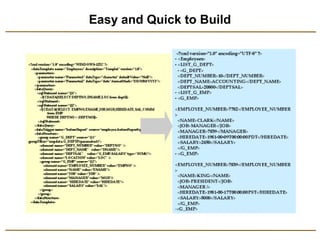
Easy and Quick to Build
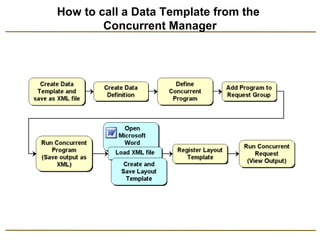
How to call a Data Template from the 
Concurrent Manager
References 
• http://www.oralce.com/technology/products/xml-publisher/ 
index.html 
• http://www.oracle.com/technology/products/xml-publisher/ 
xmlpsamples.html 
• http://blogs.oracle.com/xmlpublisher/ 
• http://ediyanto83.wordpress.com 
• http://www.slideshare.net/ediyanto83 
• http://w3schools.com/ 
• http://metalink.oracle.com 
27
Oracle BI Publsiher Using Data Template

Oracle BI Publsiher Using Data Template

  • 1.
    Reporting System with BI Publisher (Using Data Template) Edi Yanto edi.y4nto@gmail.com Oracle Applications Technical Consultant
  • 2.
    Course Objectives Aftercompleting this course, you should be able to do the following: • Explain the basic concepts and uses of BI Publisher • Explain the advantages of reporting system with Oracle BI Publisher tool • Create and use an Rich Text Format (RTF) template • Deploy and maintain BI Publisher Reports in an E-Business Suite instance 2
  • 3.
    Course Agenda •Oracle BI Publisher Overview • Install Oracle BI Publisher Desktop • Creating Reports in Oracle E-Business Suite Using BIP – Generate XML file using Concurrent Manager – Creating RTF Report Templates – Using the Design Helper Plug-in – Creating Data Definition for the report – Using Template Manager to upload the report – Running BI Publisher Reports • Translation and Localization • Grouping and Subtotals • Adding Header and Footer Information • Date and Number Formatting 3
  • 4.
    Course Agenda (Con.) • Repeating Header With Resetting The Page Numbering For Each New Header • Adding Chart and Image • Using Conditional Formatting • Using Cross Tab Functionality • Adding Updateable Variables To The Template • BIP Security • Creating Report from Data Template • Administering BI Publisher in an Oracle E-Business Suite 4
  • 5.
    Data Template TheData Template is: • Used to rapidly generate any kind of XML data structure against any database in a scalable, efficient manner.
  • 6.
    What Functionality IsSupported? Single and multiple data queries Query links Parameters Aggregate functions (SUM, AVG, MIN, MAX, COUNT) Event triggers Multiple data groups
  • 7.
  • 8.
  • 9.
  • 10.
    Data Query Section A Data Template can contain one of one or more queries Query are written in the <dataQuery> element This section is mandatory
  • 11.
    How to DefineQueries - <sqlStatement> element
  • 12.
  • 13.
    Example: Data Querywith Parameter
  • 14.
    Linking Queries Twoways of linking are supported 1. Bind variables in your query 2. Link element <link name=“” ……./> Bind variables are usually more efficient than Link elements
  • 15.
    Ex: Link QueryUsing a Bind Variable
  • 16.
  • 17.
    Ex: Link QueryUsing Link tag
  • 18.
  • 19.
    Data Triggers Datatriggers can be used to:  Perform initialization tasks  Build dynamic query The location of trigger indicates at what point the trigger fires:  Place a beforeReport trigger anywhere in your data template before the <dataStructure> section  A beforeReport trigger fires before the dataQuery is executed
  • 20.
    Data Triggers (Con.)  Place an afterReport trigger after the <dataStructure> section  An afterReport trigger fires after you exit and after XML output has been generated
  • 21.
    Data Structure Section In the data structure section you define what the XML output will be an how it will be structured. You can do the following: • Define a group hierarchy • Create break groups • Apply group filters • Create summary columns
  • 22.
  • 23.
  • 24.
    Summary Columns Performsa computation on another column’s data (SUM, AVG, MIN, MAX, COUNT)
  • 25.
  • 26.
    How to calla Data Template from the Concurrent Manager
  • 27.
    References • http://www.oralce.com/technology/products/xml-publisher/ index.html • http://www.oracle.com/technology/products/xml-publisher/ xmlpsamples.html • http://blogs.oracle.com/xmlpublisher/ • http://ediyanto83.wordpress.com • http://www.slideshare.net/ediyanto83 • http://w3schools.com/ • http://metalink.oracle.com 27