Alan Arenz
Oconomowoc Residential Programs
Objectives
 Replace base data entry for Client system that uses VB
  application and Access for front ends.
 Allow core data to be used as metadata on documents
  and allow for easily created lists rather than using
  coded applications to store related data and
  documents.
 Link employee list from HR system to minimize
  duplication of data.
Proof of Concept first
 Created a link to a table containing employees to centralize
  phone directory (we have 150+ small locations and 2,000+
  employees)
 Used database to collect and update data from the HR
  system to keep names current and remove terminated
  employees(very high turnover rate)
 Created connection with search criteria based on several
  fields and then added to page in SharePoint using Text
  Filter web part sending to the external content list for
  search
 This content type is also used in InfoPath form for
  workflow base ePIF system
Efficient Lookups
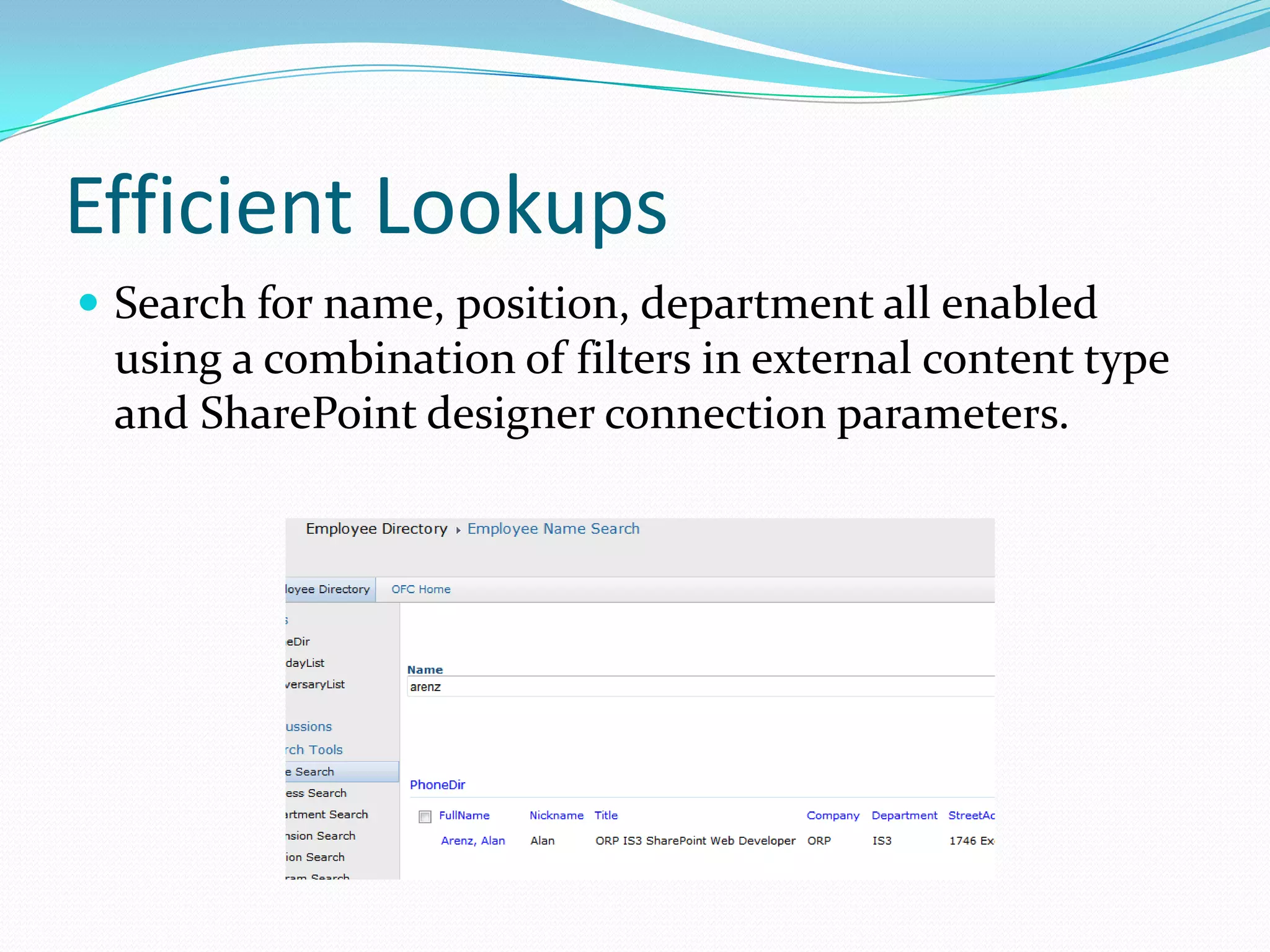
 Search for name, position, department all enabled
 using a combination of filters in external content type
 and SharePoint designer connection parameters.
Client Data
 Working through the client data, it is not simple flat table so
    views and stored procedures will be required to facilitate many
    to many relationships in database
   Existing stored procedures that were created for business layer of
    existing VB application are being used for retrieval and updates.
   Once the data is attached the content type can be used as a
    column in document libraries and lists to allow creation of
    profile pages that would show data from multiple forms based on
    single search and web part connections.
   InfoPath forms created for external content lists can be modified
    to make them cleaner and hide specific fields from users.
   This project is underway but being held up due to merging
    multiple sources of client data into central DB and modifying
    some structures.
Lessons Learned
 Verify the security model being used for accessing the data, we
    are using claims based security for SP and Secure Store for DB
    access account.
   Grant the correct permissions to groups to be able to access the
    content type(caused may errors).
   Create content types at the root of the site so that lists can be
    deployed throughout with the same ECT.
   Once content type is created InfoPath can be used to modify the
    view and update forms but no other connections can be used
    there without making them an association in the content type
    (major drawback).
   Updating the InfoPath form for an external list only changes that
    particular list. If you use the ECT in multiple lists with system,
    you will need to copy the template to each list using SharePoint
    designer.
Lessons Learned
 Associations can use friendly fields for display in the forms if you select
    the field in the association and make it the title field in SP designer
   You can pass the key field for an info path form to use to populate using
    query string and query string filter passing value to the form.
   Make sure to copy data needed in non-list InfoPath forms that use
    external content type for input to avoid having form look odd if the
    item is not in the external content type when the form is viewed at a
    later date(think anti-normalized to allow stand alone in form).
   External content types tend to be slow to open the first time they are
    referenced after a period of time, users need to be aware of that.
   Remember the 2,000 record limit in external content types. No records
    will be returned if it exceeds that limit.
Good Book as Guide
 Enterprise Application Development in SharePoint
 2010
   Creating an End-to-End Application without Code
       IRA Fuchs
       IHF Publishing
       ISBN 978-1-4507-5417-0
       Link to Amazon

External Content Types WIS SPUG

  • 1.
  • 2.
    Objectives  Replace basedata entry for Client system that uses VB application and Access for front ends.  Allow core data to be used as metadata on documents and allow for easily created lists rather than using coded applications to store related data and documents.  Link employee list from HR system to minimize duplication of data.
  • 3.
    Proof of Conceptfirst  Created a link to a table containing employees to centralize phone directory (we have 150+ small locations and 2,000+ employees)  Used database to collect and update data from the HR system to keep names current and remove terminated employees(very high turnover rate)  Created connection with search criteria based on several fields and then added to page in SharePoint using Text Filter web part sending to the external content list for search  This content type is also used in InfoPath form for workflow base ePIF system
  • 4.
    Efficient Lookups  Searchfor name, position, department all enabled using a combination of filters in external content type and SharePoint designer connection parameters.
  • 5.
    Client Data  Workingthrough the client data, it is not simple flat table so views and stored procedures will be required to facilitate many to many relationships in database  Existing stored procedures that were created for business layer of existing VB application are being used for retrieval and updates.  Once the data is attached the content type can be used as a column in document libraries and lists to allow creation of profile pages that would show data from multiple forms based on single search and web part connections.  InfoPath forms created for external content lists can be modified to make them cleaner and hide specific fields from users.  This project is underway but being held up due to merging multiple sources of client data into central DB and modifying some structures.
  • 6.
    Lessons Learned  Verifythe security model being used for accessing the data, we are using claims based security for SP and Secure Store for DB access account.  Grant the correct permissions to groups to be able to access the content type(caused may errors).  Create content types at the root of the site so that lists can be deployed throughout with the same ECT.  Once content type is created InfoPath can be used to modify the view and update forms but no other connections can be used there without making them an association in the content type (major drawback).  Updating the InfoPath form for an external list only changes that particular list. If you use the ECT in multiple lists with system, you will need to copy the template to each list using SharePoint designer.
  • 7.
    Lessons Learned  Associationscan use friendly fields for display in the forms if you select the field in the association and make it the title field in SP designer  You can pass the key field for an info path form to use to populate using query string and query string filter passing value to the form.  Make sure to copy data needed in non-list InfoPath forms that use external content type for input to avoid having form look odd if the item is not in the external content type when the form is viewed at a later date(think anti-normalized to allow stand alone in form).  External content types tend to be slow to open the first time they are referenced after a period of time, users need to be aware of that.  Remember the 2,000 record limit in external content types. No records will be returned if it exceeds that limit.
  • 8.
    Good Book asGuide  Enterprise Application Development in SharePoint 2010  Creating an End-to-End Application without Code  IRA Fuchs  IHF Publishing  ISBN 978-1-4507-5417-0  Link to Amazon