XML Publisher  Duncan Davies Allinity
What is XML Publisher? “ Publisher is the only Reporting Platform for Fusion Apps”
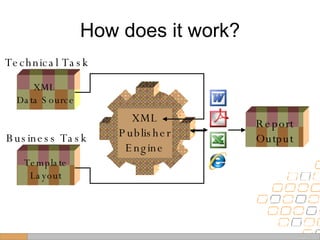
How does it work? XML  Data Source Technical Task Template Layout Business Task Report Output XML Publisher Engine
Step 1 Create an App Engine to supply: XML Sample Data File XSD Schema File
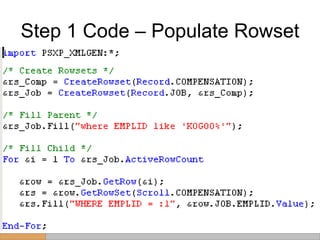
Step 1 Code – Populate Rowset
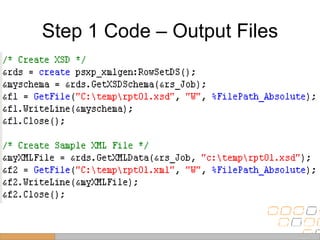
Step 1 Code – Output Files
Step 2 Create an RTF template in Word using the XML Sample data file.
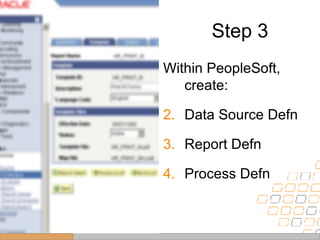
Step 3 Within PeopleSoft, create: Data Source Defn Report Defn Process Defn
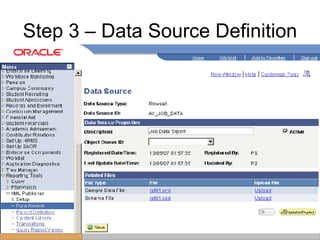
Step 3 – Data Source Definition
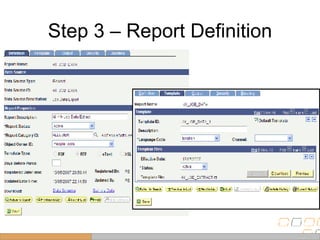
Step 3 – Report Definition
Step 4 Update your App Engine to output full data, then run it.
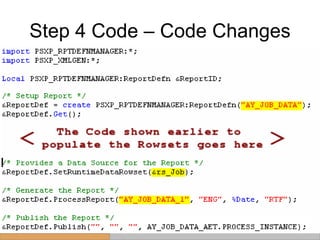
Step 4 Code – Code Changes
Advanced Use Bursting Content Library Translations
What’s good? Single Toolset Business users don’t need a techie to layout a report Highly Flexible Easier upgrade to Fusion Quick and easy
What’s not good? XML/XSL knowledge needed for complex reports Excel output very basic No update until 2008 (Tools 8.50) Need to use Report Mgr
What other tips can we give? Make sure all rowset levels are filled in sample data. RTFs not shown in Process Monitor, so set up Report Manager. Limit the size of the  rowset for sample data. Sort data in Code
Thanks for listening. Does anyone have a Question?

Xml Publisher

  • 1.
    XML Publisher Duncan Davies Allinity
  • 2.
    What is XMLPublisher? “ Publisher is the only Reporting Platform for Fusion Apps”
  • 3.
    How does itwork? XML Data Source Technical Task Template Layout Business Task Report Output XML Publisher Engine
  • 4.
    Step 1 Createan App Engine to supply: XML Sample Data File XSD Schema File
  • 5.
    Step 1 Code– Populate Rowset
  • 6.
    Step 1 Code– Output Files
  • 7.
    Step 2 Createan RTF template in Word using the XML Sample data file.
  • 8.
    Step 3 WithinPeopleSoft, create: Data Source Defn Report Defn Process Defn
  • 9.
    Step 3 –Data Source Definition
  • 10.
    Step 3 –Report Definition
  • 11.
    Step 4 Updateyour App Engine to output full data, then run it.
  • 12.
    Step 4 Code– Code Changes
  • 13.
    Advanced Use BurstingContent Library Translations
  • 14.
    What’s good? SingleToolset Business users don’t need a techie to layout a report Highly Flexible Easier upgrade to Fusion Quick and easy
  • 15.
    What’s not good?XML/XSL knowledge needed for complex reports Excel output very basic No update until 2008 (Tools 8.50) Need to use Report Mgr
  • 16.
    What other tipscan we give? Make sure all rowset levels are filled in sample data. RTFs not shown in Process Monitor, so set up Report Manager. Limit the size of the rowset for sample data. Sort data in Code
  • 17.
    Thanks for listening.Does anyone have a Question?

Editor's Notes