BI Publisher Demo
Agenda
 Overview of BI Publisher
 Data Sources
 Report Templates - RTF
 Report Definition
 Running Reports
 Q & A
Overview
 Enterprise Reporting Solution that streamlines report and form generation.
 Java based tool integrated with PeopleSoft.
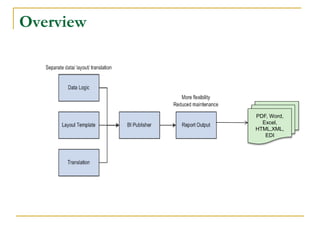
 Separate data extraction process and report layout.
 Create report layouts using desktop applications such as MS Word and Acrobat.
 Single template to generate reports in many formats (PDF, RTF, Excel, HTML, etc.)
 No programming required.
 Enables power users to adjust report layouts with less IT involvement.
Overview
PDF, Word,
Excel,
HTML,XML,
EDI
Data Sources
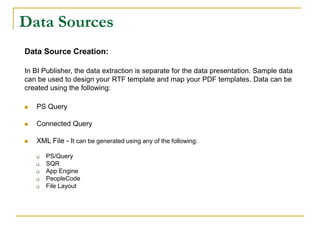
Data Source Creation:
In BI Publisher, the data extraction is separate for the data presentation. Sample data
can be used to design your RTF template and map your PDF templates. Data can be
created using the following:
 PS Query
 Connected Query
 XML File - It can be generated using any of the following:
 PS/Query
 SQR
 App Engine
 PeopleCode
 File Layout
Data Sources
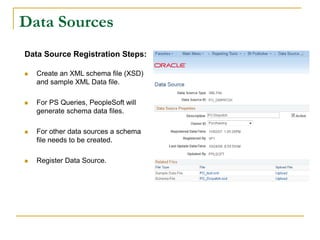
Data Source Registration Steps:
 Create an XML schema file (XSD)
and sample XML Data file.
 For PS Queries, PeopleSoft will
generate schema data files.
 For other data sources a schema
file needs to be created.
 Register Data Source.
Report Template
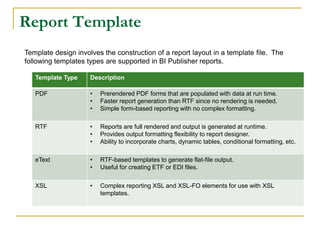
Template design involves the construction of a report layout in a template file. The
following templates types are supported in BI Publisher reports.
Template Type Description
PDF • Prerendered PDF forms that are populated with data at run time.
• Faster report generation than RTF since no rendering is needed.
• Simple form-based reporting with no complex formatting.
RTF • Reports are full rendered and output is generated at runtime.
• Provides output formatting flexibility to report designer.
• Ability to incorporate charts, dynamic tables, conditional formatting, etc.
eText • RTF-based templates to generate flat-file output.
• Useful for creating ETF or EDI files.
XSL • Complex reporting XSL and XSL-FO elements for use with XSL
templates.
Report Template
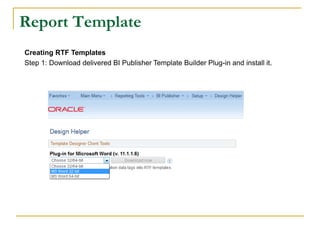
Creating RTF Templates
Step 1: Download delivered BI Publisher Template Builder Plug-in and install it.
Report Template
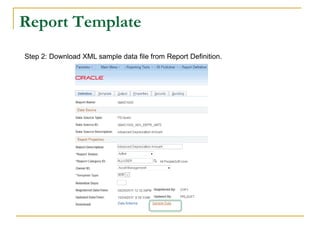
Step 2: Download XML sample data file from Report Definition.
Report Template
Step 3: Load sample data into the Word document.
Report Template
Step 4: Design the template in RTF.
Report Template
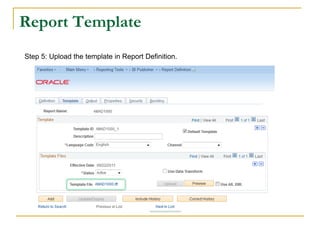
Step 5: Upload the template in Report Definition.
Report Definition
 Define Reports
 Associate Templates
 Use Data Transforms
 Set Output Options
 Report Properties
 Security
 Bursting Options
Report Definition
Report definition consists of the following steps:
 Define Reports
 Associate Templates
 Set Output Options
 Report Properties
 Security
 Bursting Options
Report Definition
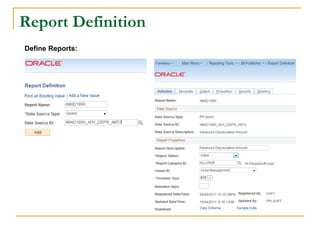
Define Reports:
Report Definition
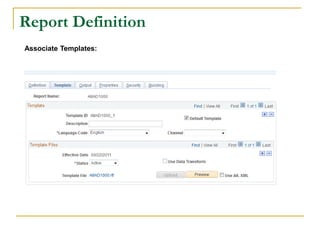
Associate Templates:
Report Definition
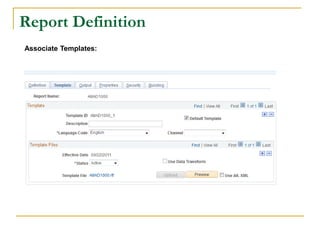
Associate Templates:
Report Definition
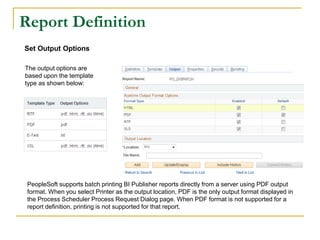
Set Output Options
The output options are
based upon the template
type as shown below:
PeopleSoft supports batch printing BI Publisher reports directly from a server using PDF output
format. When you select Printer as the output location, PDF is the only output format displayed in
the Process Scheduler Process Request Dialog page. When PDF format is not supported for a
report definition, printing is not supported for that report.
Report Definition
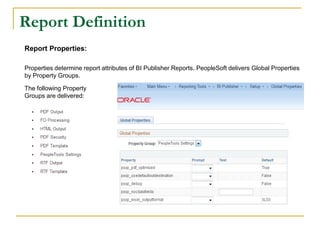
Report Properties:
Properties determine report attributes of BI Publisher Reports. PeopleSoft delivers Global Properties
by Property Groups.
The following Property
Groups are delivered:
Report Definition
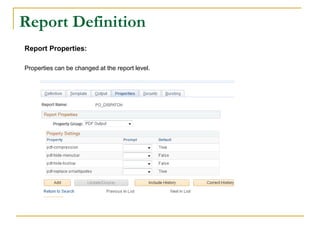
Report Properties:
Properties can be changed at the report level.
Report Definition
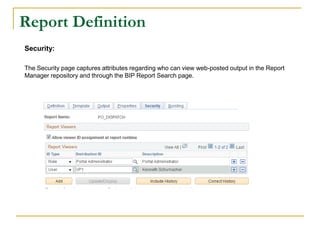
Security:
The Security page captures attributes regarding who can view web-posted output in the Report
Manager repository and through the BIP Report Search page.
Running the reports
The reports can be run through the Process Scheduler or PeopleCode APIs. Query
based reports can be viewed and scheduled with BI Publisher.
 Run reports in Process Scheduler
 Run BI Publisher Query reports.
 Run reports using PeopleCode.
 Locate and view BI Publisher reports
Running the reports
Process Scheduler Option:
 Create Run Control Page
 Create Process Definition
 Process Scheduler Request Page
 Monitor Requests
Running the reports
Create Run Control Page
Running the reports
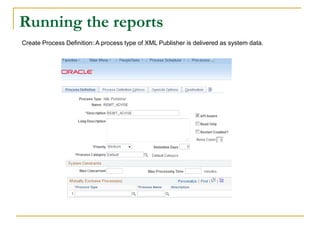
Create Process Definition: A process type of XML Publisher is delivered as system data.
Running the reports
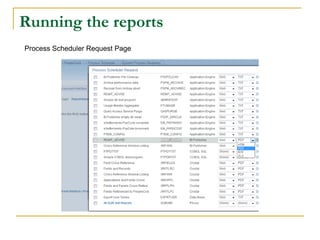
Process Scheduler Request Page
Running the reports
Monitor Requests
Running the reports
Process Scheduler Option:
 Process Scheduler Request Page
 Create Run Control Page
 Create Process Definition
 Monitor Requests
8950 CAL CENTER DRIVE,
BUILDING ONE, SUITE 203
SACRAMENTO, CA - 95826
PHONE:(888) 472-8481
(916) 588-2655
PSOFT@GRAVITONCONSULTING.COM
WWW.GRAVITONCONSULTING.COM

Graviton BI Publisher Presentation

  • 1.
  • 2.
    Agenda  Overview ofBI Publisher  Data Sources  Report Templates - RTF  Report Definition  Running Reports  Q & A
  • 3.
    Overview  Enterprise ReportingSolution that streamlines report and form generation.  Java based tool integrated with PeopleSoft.  Separate data extraction process and report layout.  Create report layouts using desktop applications such as MS Word and Acrobat.  Single template to generate reports in many formats (PDF, RTF, Excel, HTML, etc.)  No programming required.  Enables power users to adjust report layouts with less IT involvement.
  • 4.
  • 5.
    Data Sources Data SourceCreation: In BI Publisher, the data extraction is separate for the data presentation. Sample data can be used to design your RTF template and map your PDF templates. Data can be created using the following:  PS Query  Connected Query  XML File - It can be generated using any of the following:  PS/Query  SQR  App Engine  PeopleCode  File Layout
  • 6.
    Data Sources Data SourceRegistration Steps:  Create an XML schema file (XSD) and sample XML Data file.  For PS Queries, PeopleSoft will generate schema data files.  For other data sources a schema file needs to be created.  Register Data Source.
  • 7.
    Report Template Template designinvolves the construction of a report layout in a template file. The following templates types are supported in BI Publisher reports. Template Type Description PDF • Prerendered PDF forms that are populated with data at run time. • Faster report generation than RTF since no rendering is needed. • Simple form-based reporting with no complex formatting. RTF • Reports are full rendered and output is generated at runtime. • Provides output formatting flexibility to report designer. • Ability to incorporate charts, dynamic tables, conditional formatting, etc. eText • RTF-based templates to generate flat-file output. • Useful for creating ETF or EDI files. XSL • Complex reporting XSL and XSL-FO elements for use with XSL templates.
  • 8.
    Report Template Creating RTFTemplates Step 1: Download delivered BI Publisher Template Builder Plug-in and install it.
  • 9.
    Report Template Step 2:Download XML sample data file from Report Definition.
  • 10.
    Report Template Step 3:Load sample data into the Word document.
  • 11.
    Report Template Step 4:Design the template in RTF.
  • 12.
    Report Template Step 5:Upload the template in Report Definition.
  • 13.
    Report Definition  DefineReports  Associate Templates  Use Data Transforms  Set Output Options  Report Properties  Security  Bursting Options
  • 14.
    Report Definition Report definitionconsists of the following steps:  Define Reports  Associate Templates  Set Output Options  Report Properties  Security  Bursting Options
  • 15.
  • 16.
  • 17.
  • 18.
    Report Definition Set OutputOptions The output options are based upon the template type as shown below: PeopleSoft supports batch printing BI Publisher reports directly from a server using PDF output format. When you select Printer as the output location, PDF is the only output format displayed in the Process Scheduler Process Request Dialog page. When PDF format is not supported for a report definition, printing is not supported for that report.
  • 19.
    Report Definition Report Properties: Propertiesdetermine report attributes of BI Publisher Reports. PeopleSoft delivers Global Properties by Property Groups. The following Property Groups are delivered:
  • 20.
    Report Definition Report Properties: Propertiescan be changed at the report level.
  • 21.
    Report Definition Security: The Securitypage captures attributes regarding who can view web-posted output in the Report Manager repository and through the BIP Report Search page.
  • 22.
    Running the reports Thereports can be run through the Process Scheduler or PeopleCode APIs. Query based reports can be viewed and scheduled with BI Publisher.  Run reports in Process Scheduler  Run BI Publisher Query reports.  Run reports using PeopleCode.  Locate and view BI Publisher reports
  • 23.
    Running the reports ProcessScheduler Option:  Create Run Control Page  Create Process Definition  Process Scheduler Request Page  Monitor Requests
  • 24.
  • 25.
    Running the reports CreateProcess Definition: A process type of XML Publisher is delivered as system data.
  • 26.
    Running the reports ProcessScheduler Request Page
  • 27.
  • 28.
    Running the reports ProcessScheduler Option:  Process Scheduler Request Page  Create Run Control Page  Create Process Definition  Monitor Requests
  • 29.
    8950 CAL CENTERDRIVE, BUILDING ONE, SUITE 203 SACRAMENTO, CA - 95826 PHONE:(888) 472-8481 (916) 588-2655 PSOFT@GRAVITONCONSULTING.COM WWW.GRAVITONCONSULTING.COM