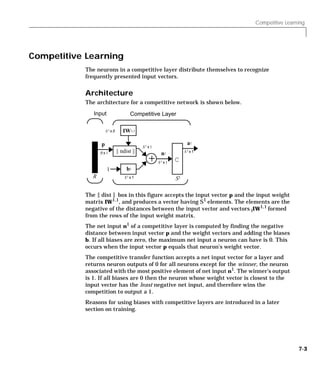
Neural Network Toolbox
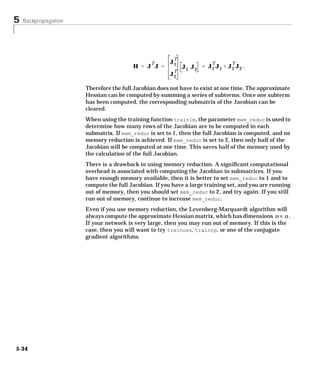
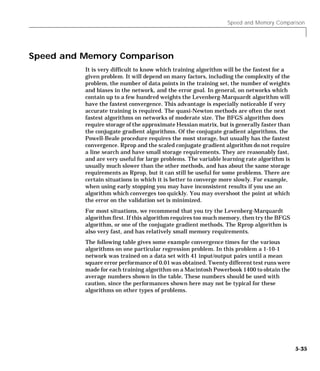
                  For Use with MATLAB    ®


                             Howard Demuth
                                 Mark Beale


                             Computation


                             Visualization


                            Programming


User’s Guide
Version 3.0
How to Contact The MathWorks:


¤     508-647-7000                           Phone

      508-647-7001                           Fax
FAX


u     The MathWorks, Inc.
      24 Prime Park Way
      Natick, MA 01760-1500
                                             Mail


      http://www.mathworks.com               Web
      ftp.mathworks.com                      Anonymous FTP server
      comp.soft-sys.matlab                   Newsgroup


@     support@mathworks.com
      suggest@mathworks.com
                                             Technical support
                                             Product enhancement suggestions
      bugs@mathworks.com                     Bug reports
      doc@mathworks.com                      Documentation error reports
      subscribe@mathworks.com                Subscribing user registration
      service@mathworks.com                  Order status, license renewals, passcodes
      info@mathworks.com                     Sales, pricing, and general information

      Neural Network Toolbox User’s Guide
      © COPYRIGHT 1992 - 1998 by The MathWorks, Inc. All Rights Reserved.
      The software described in this document is furnished under a license agreement. The software may be used
      or copied only under the terms of the license agreement. No part of this manual may be photocopied or repro-
      duced in any form without prior written consent from The MathWorks, Inc.
      U.S. GOVERNMENT: If Licensee is acquiring the Programs on behalf of any unit or agency of the U.S.
      Government, the following shall apply: (a) For units of the Department of Defense: the Government shall
      have only the rights specified in the license under which the commercial computer software or commercial
      software documentation was obtained, as set forth in subparagraph (a) of the Rights in Commercial
      Computer Software or Commercial Software Documentation Clause at DFARS 227.7202-3, therefore the
      rights set forth herein shall apply; and (b) For any other unit or agency: NOTICE: Notwithstanding any
      other lease or license agreement that may pertain to, or accompany the delivery of, the computer software
      and accompanying documentation, the rights of the Government regarding its use, reproduction, and disclo-
      sure are as set forth in Clause 52.227-19 (c)(2) of the FAR.
      MATLAB, Simulink, Handle Graphics, and Real-Time Workshop are registered trademarks and Stateflow
      and Target Language Compiler are trademarks of The MathWorks, Inc.
      Other product or brand names are trademarks or registered trademarks of their respective holders.
      Printing History: June 1992            First printing
                        April 1993           Second printing
                        January 1997         Third printing
                        July 1997            Fourth Printing
                        January 1998         Fifth Printing - Version 3
Contents
                                                                             Introduction
1   Neural Networks . . . . . . . . . . . . . . . . . . . . . . . . . . . . . . . . . . . . . . 1-2

    Getting Started . . . . . . . . . . . . . . . . . . . . . . . . . . . . . . . . . . . . . . . . 1-4
      Basic Chapters . . . . . . . . . . . . . . . . . . . . . . . . . . . . . . . . . . . . . . . . 1-4
      Help and Installation . . . . . . . . . . . . . . . . . . . . . . . . . . . . . . . . . . 1-4

    Whats New in 3.0 . . . . . . . . . . . . . . . . . . . . . . . . . . . . . . . . . . . . . . . 1-5
     Other New Algorithms and Functions . . . . . . . . . . . . . . . . . . . . . 1-5
     Modular Network Representation . . . . . . . . . . . . . . . . . . . . . . . . 1-5
     Simulink Simulation Support . . . . . . . . . . . . . . . . . . . . . . . . . . . .1-5
     General Toolbox Improvements . . . . . . . . . . . . . . . . . . . . . . . . . .1-5

    Reduced Memory Levenberg-Marquardt Algorithm . . . . . . . 1-6

    Other New Networks, Algorithms and Improvements . . . . . 1-7
      Resilient Backpropagation (Rprop) . . . . . . . . . . . . . . . . . . . . . . . 1-7
      Conjugate Gradient Algorithms . . . . . . . . . . . . . . . . . . . . . . . . . .1-7
      Quasi-Newton Algorithms . . . . . . . . . . . . . . . . . . . . . . . . . . . . . . 1-7
        BFGS Quasi Newton Algorithm . . . . . . . . . . . . . . . . . . . . . . . .1-7
        A One Step Secant Algorithm . . . . . . . . . . . . . . . . . . . . . . . . . . 1-7
      Speed Comparison . . . . . . . . . . . . . . . . . . . . . . . . . . . . . . . . . . . . . 1-8
      Improving Generalization . . . . . . . . . . . . . . . . . . . . . . . . . . . . . . . 1-9
        Regularization . . . . . . . . . . . . . . . . . . . . . . . . . . . . . . . . . . . . . .1-9
        Early Stopping With Validation . . . . . . . . . . . . . . . . . . . . . . . . 1-9
      Pre and Post Processing . . . . . . . . . . . . . . . . . . . . . . . . . . . . . . . . 1-9
        Scale Minimum and Maximum . . . . . . . . . . . . . . . . . . . . . . .1-10
        Scale Mean and Standard Deviation . . . . . . . . . . . . . . . . . . .1-10
        Principal Component Analysis . . . . . . . . . . . . . . . . . . . . . . . .1-10
        Post-training Analysis . . . . . . . . . . . . . . . . . . . . . . . . . . . . . .1-10
      New Training Options . . . . . . . . . . . . . . . . . . . . . . . . . . . . . . . . .1-10
      Probabilistic Neural Networks . . . . . . . . . . . . . . . . . . . . . . . . . .1-11
      Generalized Regression Networks . . . . . . . . . . . . . . . . . . . . . . .1-11


                                                                                                                  i
Modular Network Representation . . . . . . . . . . . . . . . . . . . . . 1-12

                    Better Simulink Support . . . . . . . . . . . . . . . . . . . . . . . . . . . . . . 1-13

                    General Toolbox Improvements . . . . . . . . . . . . . . . . . . . . . . . 1-14
                      Simpler and More Extensible Toolbox . . . . . . . . . . . . . . . . . . . 1-14
                      Custom Functions . . . . . . . . . . . . . . . . . . . . . . . . . . . . . . . . . . . 1-15

                    Neural Network Applications . . . . . . . . . . . . . . . . . . . . . . . . .                        1-16
                      Aerospace . . . . . . . . . . . . . . . . . . . . . . . . . . . . . . . . . . . . . . . . . .      1-16
                      Automotive . . . . . . . . . . . . . . . . . . . . . . . . . . . . . . . . . . . . . . . . .       1-16
                      Banking . . . . . . . . . . . . . . . . . . . . . . . . . . . . . . . . . . . . . . . . . . .      1-16
                      Defense . . . . . . . . . . . . . . . . . . . . . . . . . . . . . . . . . . . . . . . . . . . .    1-16
                      Electronics . . . . . . . . . . . . . . . . . . . . . . . . . . . . . . . . . . . . . . . . .      1-16
                      Entertainment . . . . . . . . . . . . . . . . . . . . . . . . . . . . . . . . . . . . . .          1-17
                      Financial . . . . . . . . . . . . . . . . . . . . . . . . . . . . . . . . . . . . . . . . . . .    1-17
                      Insurance . . . . . . . . . . . . . . . . . . . . . . . . . . . . . . . . . . . . . . . . . .      1-17
                      Manufacturing . . . . . . . . . . . . . . . . . . . . . . . . . . . . . . . . . . . . . .          1-17
                      Medical . . . . . . . . . . . . . . . . . . . . . . . . . . . . . . . . . . . . . . . . . . . .    1-17
                      Oil and Gas . . . . . . . . . . . . . . . . . . . . . . . . . . . . . . . . . . . . . . . . .      1-17
                      Robotics . . . . . . . . . . . . . . . . . . . . . . . . . . . . . . . . . . . . . . . . . . . .   1-17
                      Speech . . . . . . . . . . . . . . . . . . . . . . . . . . . . . . . . . . . . . . . . . . . . .   1-18
                      Securities . . . . . . . . . . . . . . . . . . . . . . . . . . . . . . . . . . . . . . . . . .     1-18
                      Telecommunications . . . . . . . . . . . . . . . . . . . . . . . . . . . . . . . . .               1-18
                      Transportation . . . . . . . . . . . . . . . . . . . . . . . . . . . . . . . . . . . . . .         1-18
                      Summary . . . . . . . . . . . . . . . . . . . . . . . . . . . . . . . . . . . . . . . . . .        1-18

                    Neural Network Design Book . . . . . . . . . . . . . . . . . . . . . . . . . 1-19

                    Acknowledgments . . . . . . . . . . . . . . . . . . . . . . . . . . . . . . . . . . . . 1-20


                               Neuron Model and Network Architectures
                2   Basic Chapters . . . . . . . . . . . . . . . . . . . . . . . . . . . .                                2-2
                                                                                                  ......     ......
                      Notation . . . . . . . . . . . . . . . . . . . . . . . . . . . . . . . .    ......     ......       2-2
                        Mathematical Notation . . . . . . . . . . . . . . . . . .                 ......     ......       2-2
                        Mathematical and Code Equivalents . . . . . . .                           ......     ......       2-2


ii   Contents
Neuron Model . . . . . . . . . . . . . . . . . . . . . . . . . . . . . . . . . . . . . . . .       2-4
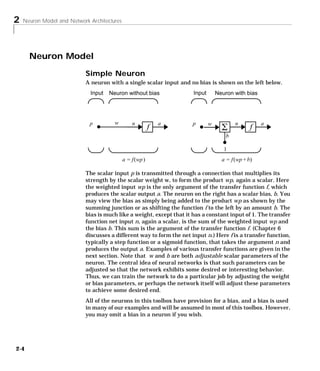
  Simple Neuron . . . . . . . . . . . . . . . . . . . . . . . . . . . . . . . . . . . . . . .      2-4
  Transfer Functions . . . . . . . . . . . . . . . . . . . . . . . . . . . . . . . . . . . .       2-5
  Neuron With Vector Input . . . . . . . . . . . . . . . . . . . . . . . . . . . . . .             2-7

Network Architectures . . . . . . .                  .......     ......     ......    .....       2-10
  A Layer of Neurons . . . . . . . . . .             .......     ......     ......    .....       2-10
    Inputs and Layers . . . . . . . . .              .......     ......     ......    .....       2-11
  Multiple Layers of Neurons . . . .                 .......     ......     ......    .....       2-13

Data Structures . . . . . . . . . . . . . . . . . . . . . . . . . . . . . . . . . . . . . .       2-15
  Simulation With Concurrent Inputs in a Static Network . . . .                                   2-15
  Simulation With Sequential Inputs in a Dynamic Network . .                                      2-16
  Simulation With Concurrent Inputs in a Dynamic Network .                                        2-18

Training Styles . . . . . . . . . . . . . . . . . . . . . . . . . . . . . . . . . . . . . .       2-20
  Incremental Training (of Adaptive and Other Networks) . . . .                                   2-20
    Incremental Training with Static Networks . . . . . . . . . . . .                             2-20
    Incremental Training With Dynamic Networks . . . . . . . . .                                  2-22
  Batch Training . . . . . . . . . . . . . . . . . . . . . . . . . . . . . . . . . . . . . .      2-22
    Batch Training With Static Networks . . . . . . . . . . . . . . . . .                         2-22
    Batch Training With Dynamic Networks . . . . . . . . . . . . . . .                            2-24

Summary . . . . . . . . . . . . . . . . . . . . . . . . . . . . . . . . . . . . . . . . . . . .   2-26
  Figures and Equations . . . . . . . . . . . . . . . . . . . . . . . . . . . . . . . .           2-28
    Simple Neuron . . . . . . . . . . . . . . . . . . . . . . . . . . . . . . . . . . . .         2-28
    Hard Limit Transfer Function . . . . . . . . . . . . . . . . . . . . . . .                    2-28
    Purelin Transfer Function . . . . . . . . . . . . . . . . . . . . . . . . . .                 2-28
    Log Sigmoid Transfer Function . . . . . . . . . . . . . . . . . . . . . .                     2-29
    Neuron With Vector Input . . . . . . . . . . . . . . . . . . . . . . . . . .                  2-29
    Net Input . . . . . . . . . . . . . . . . . . . . . . . . . . . . . . . . . . . . . . . .     2-29
    Single Neuron Using Abbreviated Notation . . . . . . . . . . . .                              2-30
    Icons for Transfer Functions . . . . . . . . . . . . . . . . . . . . . . . . .                2-30
    Layer of Neurons . . . . . . . . . . . . . . . . . . . . . . . . . . . . . . . . . .          2-30
    Three Layers of Neurons . . . . . . . . . . . . . . . . . . . . . . . . . . . .               2-31
    Weight Matrix . . . . . . . . . . . . . . . . . . . . . . . . . . . . . . . . . . . .         2-31
    Layer of Neurons, Abbreviated Notation . . . . . . . . . . . . . . .                          2-32
    Layer of Neurons Showing Indices . . . . . . . . . . . . . . . . . . . .                      2-32
    Three Layers, Abbreviated Notation . . . . . . . . . . . . . . . . . .                        2-33
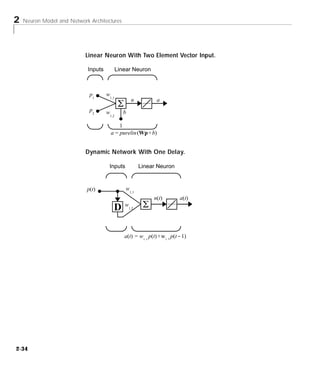
    Linear Neuron With Two Element Vector Input. . . . . . . . .                                  2-34
    Dynamic Network With One Delay. . . . . . . . . . . . . . . . . . . .                         2-34


                                                                                                         iii
Perceptrons
                3   Introduction . . . . . . . . . . . . . . . . . . . . . . . . . . . . . . . . . . . . . . . . . . 3-2
                      Important Perceptron Functions . . . . . . . . . . . . . . . . . . . . . . . . . 3-3

                    Neuron Model . . . . . . . . . . . . . . . . . . . . . . . . . . . . . . . . . . . . . . . . 3-4

                    Perceptron Architecture . . . . . . . . . . . . . . . . . . . . . . . . . . . . . . . 3-6

                    Creating a Perceptron (NEWP) . . . . . . . . . . . . . . . . . . . . . . . . . 3-7
                      Simulation (SIM) . . . . . . . . . . . . . . . . . . . . . . . . . . . . . . . . . . . . . 3-8
                      Initialization (INIT) . . . . . . . . . . . . . . . . . . . . . . . . . . . . . . . . . . . 3-9

                    Learning Rules . . . . . . . . . . . . . . . . . . . . . . . . . . . . . . . . . . . . . . 3-11

                    Perceptron Learning Rule (LEARNP) . . . . . . . . . . . . . . . . . . 3-12

                    Adaptive Training (ADAPT) . . . . . . . . . . . . . . . . . . . . . . . . . . . 3-15

                    Limitations and Cautions . . . . . . . . . . . . . . . . . . . . . . . . . . . . . 3-21
                      Outliers and the Normalized Perceptron Rule . . . . . . . . . . . . . 3-21

                    Summary . . . . . . . . . . . . . . . . . . . . . . . . . . . . . . . . . . . . . . . . . . . .   3-23
                      Figures and Equations . . . . . . . . . . . . . . . . . . . . . . . . . . . . . . . .           3-23
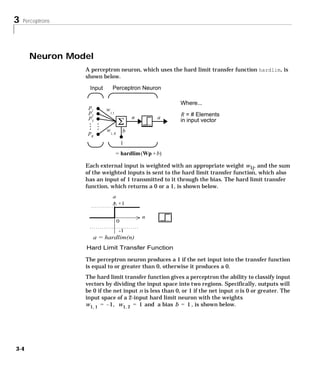
                        Perceptron Neuron . . . . . . . . . . . . . . . . . . . . . . . . . . . . . . . . .           3-23
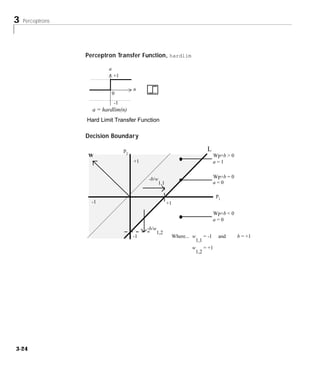
                        Perceptron Transfer Function, hardlim . . . . . . . . . . . . . .                             3-24
                        Decision Boundary . . . . . . . . . . . . . . . . . . . . . . . . . . . . . . . . .           3-24
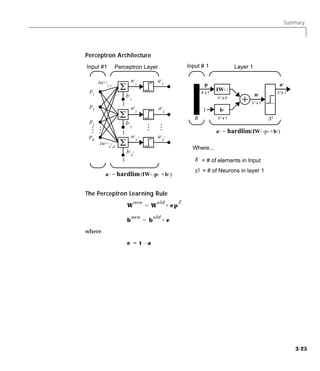
                        Perceptron Architecture . . . . . . . . . . . . . . . . . . . . . . . . . . . .               3-25
                        The Perceptron Learning Rule . . . . . . . . . . . . . . . . . . . . . . .                    3-25
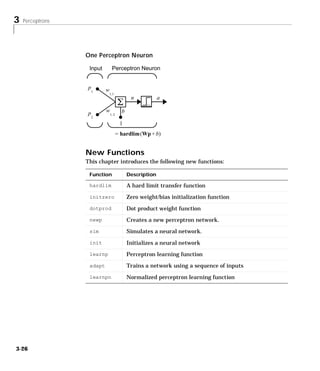
                        One Perceptron Neuron . . . . . . . . . . . . . . . . . . . . . . . . . . . . .               3-26
                      New Functions . . . . . . . . . . . . . . . . . . . . . . . . . . . . . . . . . . . . . .       3-26


                                                                       Adaptive Linear Filters
                4   Introduction . . . . . . . . . . . . . . . . . . . . . . . . . . . . . . . . . . . . . . . . . 4-2
                      Important Linear Network Functions . . . . . . . . . . . . . . . . . . . . 4-3


iv   Contents
Neuron Model . . . . . . . . . . . . . . . . . . . . . . . . . . . . . . . . . . . . . . . . 4-4

Network Architecture . . . . . . . . . . . . . . . . . . . . . . . . . . . . . . . . . 4-5
  Single ADALINE (NEWLIN) . . . . . . . . . . . . . . . . . . . . . . . . . . . . 4-6

Mean Square Error . . . . . . . . . . . . . . . . . . . . . . . . . . . . . . . . . . . . 4-9

Linear System Design (NEWLIND) . . . . . . . . . . . . . . . . . . . . . 4-10

LMS Algorithm (LEARNWH) . . . . . . . . . . . . . . . . . . . . . . . . . . 4-11

Linear Classification (TRAIN) . . . . . . . . . . . . . . . . . . . . . . . . . 4-13

Adaptive Filtering (ADAPT) . . . . . . . . . . . . . . . . . . . . . . . . . . .                  4-16
  Tapped Delay Line . . . . . . . . . . . . . . . . . . . . . . . . . . . . . . . . . . .         4-16
  Adaptive Filter . . . . . . . . . . . . . . . . . . . . . . . . . . . . . . . . . . . . . .     4-17
  Adaptive Filter Example . . . . . . . . . . . . . . . . . . . . . . . . . . . . . .             4-18
  Prediction Example . . . . . . . . . . . . . . . . . . . . . . . . . . . . . . . . . .          4-20
  Noise Cancellation Example . . . . . . . . . . . . . . . . . . . . . . . . . . .                4-21
  Multiple Neuron Adaptive Filters . . . . . . . . . . . . . . . . . . . . . . .                  4-23

Limitations and Cautions . . . . . . . . . . . . . . . . . . . . . . . . . . . . .                4-25
  Overdetermined Systems . . . . . . . . . . . . . . . . . . . . . . . . . . . . . .              4-25
  Underdetermined Systems . . . . . . . . . . . . . . . . . . . . . . . . . . . .                 4-25
  Linearly Dependent Vectors . . . . . . . . . . . . . . . . . . . . . . . . . . .                4-25
  Too Large a Learning Rate . . . . . . . . . . . . . . . . . . . . . . . . . . . .               4-26

Summary . . . . . . . . . . . . . . . . . . . . . . . . . . . . . . . . . . . . . . . . . . . .   4-27
  Figures and Equations . . . . . . . . . . . . . . . . . . . . . . . . . . . . . . . .           4-28
    Linear Neuron . . . . . . . . . . . . . . . . . . . . . . . . . . . . . . . . . . . .         4-28
    Purelin Transfer Function . . . . . . . . . . . . . . . . . . . . . . . . . .                 4-28
    MADALINE . . . . . . . . . . . . . . . . . . . . . . . . . . . . . . . . . . . . . .          4-29
    ADALINE . . . . . . . . . . . . . . . . . . . . . . . . . . . . . . . . . . . . . . . .       4-29
    Decision Boundary . . . . . . . . . . . . . . . . . . . . . . . . . . . . . . . . .           4-30
    Mean Square Error . . . . . . . . . . . . . . . . . . . . . . . . . . . . . . . .             4-30
    LMS (Widrow-Hoff) Algorithm . . . . . . . . . . . . . . . . . . . . . . .                     4-30
    Tapped Delay Line . . . . . . . . . . . . . . . . . . . . . . . . . . . . . . . . .           4-31
    Adaptive Filter . . . . . . . . . . . . . . . . . . . . . . . . . . . . . . . . . . . .       4-32
    Adaptive Filter Example . . . . . . . . . . . . . . . . . . . . . . . . . . . .               4-32


                                                                                                         v
Prediction Example . . . . . . . . . . . . . . . . . . . . . . . . . . . . . . . .          4-33
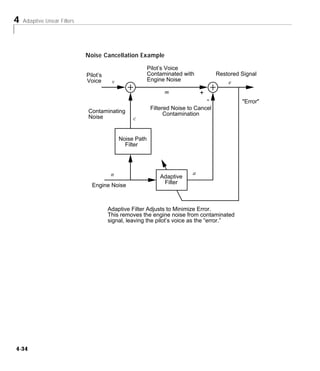
                         Noise Cancellation Example . . . . . . . . . . . . . . . . . . . . . . . . .                4-34
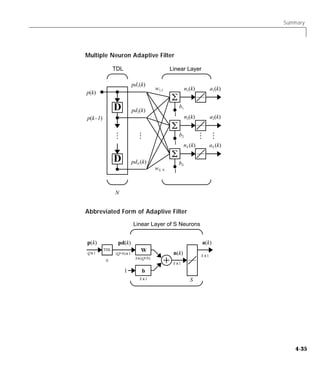
                         Multiple Neuron Adaptive Filter . . . . . . . . . . . . . . . . . . . . .                   4-35
                         Abbreviated Form of Adaptive Filter . . . . . . . . . . . . . . . . . .                     4-35
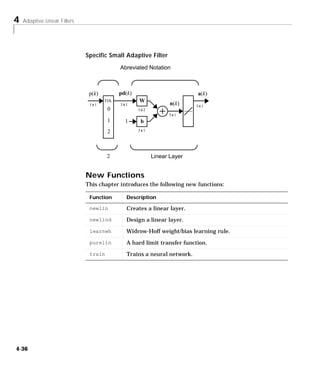
                         Specific Small Adaptive Filter . . . . . . . . . . . . . . . . . . . . . . .                4-36
                       New Functions . . . . . . . . . . . . . . . . . . . . . . . . . . . . . . . . . . . . . .     4-36


                                                                                     Backpropagation
                5   Overview . . . . . . . . . . . . . . . . . . . . . . . . . . . . . . . . . . . . . . . . . . . . . 5-2

                    Fundamentals . . . . . . . . . . . . . . . . . . . . . . . . . . . . . . . . . . . . . . . .         5-3
                      Architecture . . . . . . . . . . . . . . . . . . . . . . . . . . . . . . . . . . . . . . . . .     5-3
                        Neuron Model (TANSIG, LOGSIG, PURELIN) . . . . . . . . . . .                                     5-3
                        Feedforward Network . . . . . . . . . . . . . . . . . . . . . . . . . . . . . . .                5-5
                      Simulation (SIM) . . . . . . . . . . . . . . . . . . . . . . . . . . . . . . . . . . . . .         5-8
                      Training . . . . . . . . . . . . . . . . . . . . . . . . . . . . . . . . . . . . . . . . . . . .   5-8
                        Backpropagation Algorithm . . . . . . . . . . . . . . . . . . . . . . . . . .                    5-9

                    Faster Training . . . . . . . . . . . . . . . . . . . . . . . . . . . . . . . . . . . . . .      5-16
                      Variable Learning Rate (TRAINGDA, TRAINGDX) . . . . . . . .                                    5-16
                      Resilient Backpropagation (TRAINRP) . . . . . . . . . . . . . . . . . .                        5-18
                      Conjugate Gradient Algorithms . . . . . . . . . . . . . . . . . . . . . . . .                  5-20
                        Fletcher-Reeves Update (TRAINCGF) . . . . . . . . . . . . . . . . .                          5-20
                        Polak-Ribiére Update (TRAINCGP) . . . . . . . . . . . . . . . . . .                          5-22
                        Powell-Beale Restarts (TRAINCGB) . . . . . . . . . . . . . . . . . .                         5-24
                        Scaled Conjugate Gradient (TRAINSCG) . . . . . . . . . . . . . .                             5-25
                      Line Search Routines . . . . . . . . . . . . . . . . . . . . . . . . . . . . . . . . .         5-26
                        Golden Section Search (SRCHGOL) . . . . . . . . . . . . . . . . . . .                        5-26
                        Brent’s Search (SRCHBRE) . . . . . . . . . . . . . . . . . . . . . . . . .                   5-27
                        Hybrid Bisection-Cubic Search (SRCHHYB) . . . . . . . . . . .                                5-27
                        Charalambous’ Search (SRCHCHA) . . . . . . . . . . . . . . . . . . .                         5-28
                        Backtracking (SRCHBAC) . . . . . . . . . . . . . . . . . . . . . . . . . .                   5-28
                      Quasi-Newton Algorithms . . . . . . . . . . . . . . . . . . . . . . . . . . . . .              5-29
                        BFGS Algorithm (TRAINBFG) . . . . . . . . . . . . . . . . . . . . . . .                      5-29
                        One Step Secant Algorithm (TRAINOSS) . . . . . . . . . . . . . .                             5-30
                      Levenberg-Marquardt (TRAINLM) . . . . . . . . . . . . . . . . . . . . . .                      5-31
                      Reduced Memory Levenberg-Marquardt (TRAINLM) . . . . . . .                                     5-33


vi   Contents
Speed and Memory Comparison . . . . . . . . . . . . . . . . . . . . . . . 5-35

    Improving Generalization . . . . . . . . . . . . . . . . . . . . . . . . . . . .               5-37
      Regularization . . . . . . . . . . . . . . . . . . . . . . . . . . . . . . . . . . . . . .   5-38
        Modified Performance Function . . . . . . . . . . . . . . . . . . . . . .                  5-38
        Automated Regularization (TRAINBR) . . . . . . . . . . . . . . . .                         5-39
      Early Stopping . . . . . . . . . . . . . . . . . . . . . . . . . . . . . . . . . . . . . .   5-41

    Preprocessing and Postprocessing . . . . . . . . . . . . . . . . . . . . .                     5-44
      Min and Max (PREMNMX, POSTMNMX, TRAMNMX) . . . . .                                           5-44
      Mean and Stand. Dev. (PRESTD, POSTSTD, TRASTD) . . . . .                                     5-45
      Principal Component Analysis (PREPCA, TRAPCA) . . . . . . .                                  5-46
      Post-training Analysis (POSTREG) . . . . . . . . . . . . . . . . . . . . .                   5-47

    Sample Training Session . . . . . . . . . . . . . . . . . . . . . . . . . . . . . . 5-49

    Limitations and Cautions . . . . . . . . . . . . . . . . . . . . . . . . . . . . . 5-54

    Summary . . . . . . . . . . . . . . . . . . . . . . . . . . . . . . . . . . . . . . . . . . . . 5-56


                                                       Radial Basis Networks
6
    Introduction . . . . . . . . . . . . . . . . . . . . . . . . . . . . . . . . . . . . . . . . . . 6-2
      Important Radial Basis Functions . . . . . . . . . . . . . . . . . . . . . . . 6-2

    Radial Basis Functions . . . . . . . . . . . . . . . . . . . . . . . . . . . . . . . .           6-3
      Neuron Model . . . . . . . . . . . . . . . . . . . . . . . . . . . . . . . . . . . . . . . .   6-3
      Network Architecture . . . . . . . . . . . . . . . . . . . . . . . . . . . . . . . . .         6-4
      Exact Design (NEWRBE) . . . . . . . . . . . . . . . . . . . . . . . . . . . . . .              6-5
      More Efficient Design (NEWRB) . . . . . . . . . . . . . . . . . . . . . . . . .                6-7
      Demonstrations . . . . . . . . . . . . . . . . . . . . . . . . . . . . . . . . . . . . . .     6-8

    Generalized Regression Networks . . . . . . . . . . . . . . . . . . . . . . 6-9
      Network Architecture . . . . . . . . . . . . . . . . . . . . . . . . . . . . . . . . . 6-9
      Design (NEWGRNN) . . . . . . . . . . . . . . . . . . . . . . . . . . . . . . . . . 6-11


                                                                                                           vii
Probabilistic Neural Networks . . . . . . . . . . . . . . . . . . . . . . . . 6-12
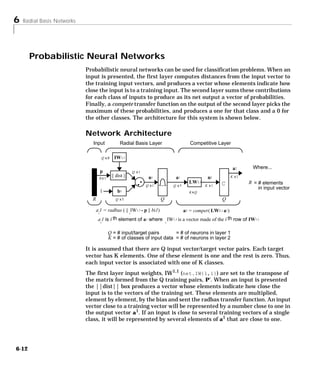
                      Network Architecture . . . . . . . . . . . . . . . . . . . . . . . . . . . . . . . . 6-12
                      Design (NEWPNN) . . . . . . . . . . . . . . . . . . . . . . . . . . . . . . . . . . 6-13

                    Summary . . . . . . . . . . . . . . . . . . . . . . . . . . . . . . . . . . . . . . . . . . . .     6-15
                      Figures . . . . . . . . . . . . . . . . . . . . . . . . . . . . . . . . . . . . . . . . . . . .   6-16
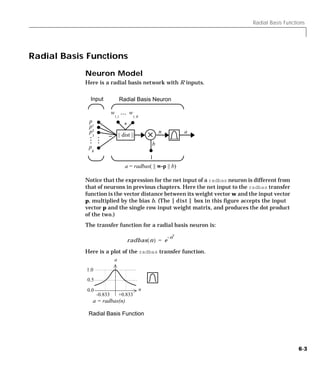
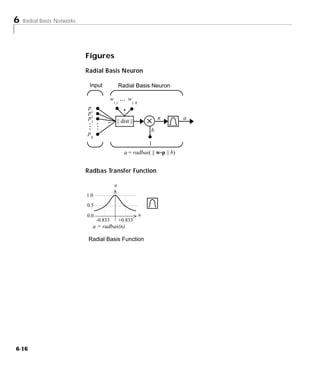
                        Radial Basis Neuron . . . . . . . . . . . . . . . . . . . . . . . . . . . . . . .               6-16
                        Radbas Transfer Function . . . . . . . . . . . . . . . . . . . . . . . . . . .                  6-16
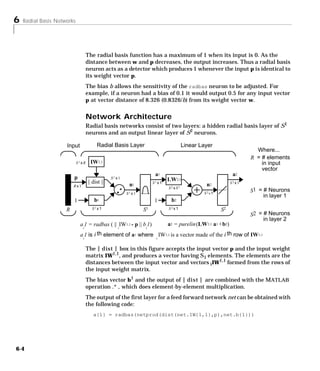
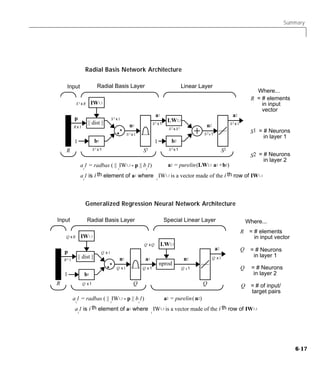
                        Radial Basis Network Architecture . . . . . . . . . . . . . . . . . . .                         6-17
                        Generalized Regression Neural Network Architecture . . . .                                      6-17
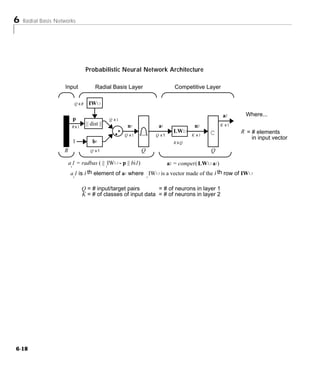
                        Probabilistic Neural Network Architecture . . . . . . . . . . . . .                             6-18
                      New Functions . . . . . . . . . . . . . . . . . . . . . . . . . . . . . . . . . . . . . .         6-19


                                                                   Self-Organizing Networks
                7   Introduction . . . . . . . . . . . . . . . . . . . . . . . . . . . . . . . . . . . . . . . . . . 7-2
                      Important Self-Organizing Functions . . . . . . . . . . . . . . . . . . . . . 7-2

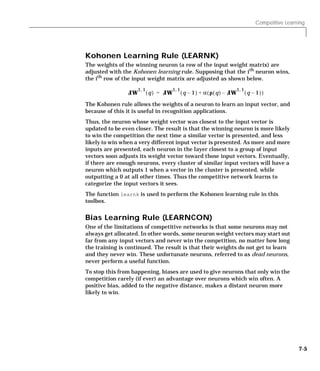
                    Competitive Learning . . . . . . . . . . . . . . . . . . . . . . . . . . . . . . . . .               7-3
                      Architecture . . . . . . . . . . . . . . . . . . . . . . . . . . . . . . . . . . . . . . . . .     7-3
                      Creating a Competitive Neural Network (NEWC) . . . . . . . . . . .                                 7-4
                      Kohonen Learning Rule (LEARNK) . . . . . . . . . . . . . . . . . . . . . .                         7-5
                      Bias Learning Rule (LEARNCON) . . . . . . . . . . . . . . . . . . . . . . .                        7-5
                      Training . . . . . . . . . . . . . . . . . . . . . . . . . . . . . . . . . . . . . . . . . . . .   7-6
                      Graphical Example . . . . . . . . . . . . . . . . . . . . . . . . . . . . . . . . . . .            7-8

                    Self-Organizing Maps . . . . . . . . . . . . . . . . . . . . . . . . . . . . . . . . .              7-10
                      Topologies (GRIDTOP, HEXTOP, RANDTOP) . . . . . . . . . . . .                                     7-12
                      Distance Functions (DIST, LINKDIST,
                         MANDIST, BOXDIST) . . . . . . . . . . . . . . . . . . . . . . . . . . . . . .                  7-16
                      Architecture . . . . . . . . . . . . . . . . . . . . . . . . . . . . . . . . . . . . . . . .      7-19
                      Creating a Self Organizing MAP Neural Network
                         (NEWSOM) . . . . . . . . . . . . . . . . . . . . . . . . . . . . . . . . . . . . . .           7-20
                      Training (LEARNSOM) . . . . . . . . . . . . . . . . . . . . . . . . . . . . . . .                 7-22
                         Phase 1: Ordering Phase . . . . . . . . . . . . . . . . . . . . . . . . . . . .                7-22
                         Phase 2: Tuning Phase . . . . . . . . . . . . . . . . . . . . . . . . . . . . .                7-22


viii Contents
Examples . . . . . . . . . . . . . . . . . . . . . . . . . . . . . . . . . . . . . . . . . . 7-25
         One-Dimensional Self-Organizing Map . . . . . . . . . . . . . . . . 7-25
         Two-Dimensional Self-Organizing Map . . . . . . . . . . . . . . . . 7-27

    Summary and Conclusions . . . . . . . . . . . . . . . . . . . . . . . . . . . .                     7-32
      Figures . . . . . . . . . . . . . . . . . . . . . . . . . . . . . . . . . . . . . . . . . . . .   7-32
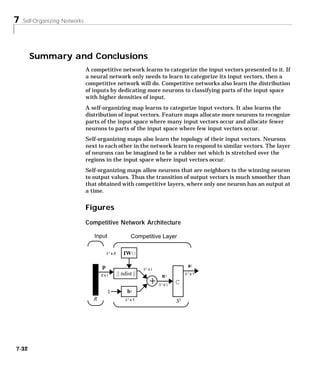
        Competitive Network Architecture . . . . . . . . . . . . . . . . . . . .                        7-32
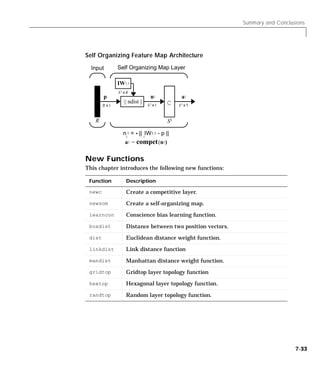
        Self Organizing Feature Map Architecture . . . . . . . . . . . . .                              7-33
      New Functions . . . . . . . . . . . . . . . . . . . . . . . . . . . . . . . . . . . . . .         7-33


                                         Learning Vector Quantization
8   Introduction . . . . . . . . . . . . . . . . . . . . . . . . . . . . . . . . . . . . . . . . . . 8-2
      Important LVQ Functions . . . . . . . . . . . . . . . . . . . . . . . . . . . . . . 8-2

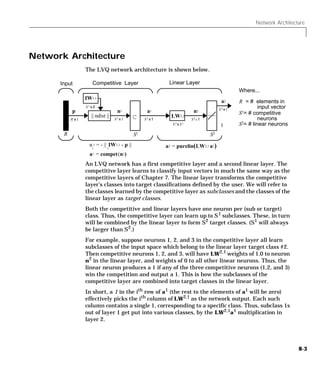
    Network Architecture . . . . . . . . . . . . . . . . . . . . . . . . . . . . . . . . . 8-3

    Creating an LVQ Network (NEWLVQ) . . . . . . . . . . . . . . . . . . . 8-5

    LVQ Learning Rule(LEARNLV2) . . . . . . . . . . . . . . . . . . . . . . . 8-9

    Training . . . . . . . . . . . . . . . . . . . . . . . . . . . . . . . . . . . . . . . . . . . . 8-11

    Summary . . . . . . . . . . . . . . . . . . . . . . . . . . . . . . . . . . . . . . . . . . . .     8-14
      Figures . . . . . . . . . . . . . . . . . . . . . . . . . . . . . . . . . . . . . . . . . . . .   8-14
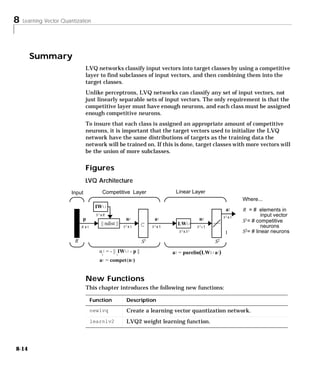
        LVQ Architecture . . . . . . . . . . . . . . . . . . . . . . . . . . . . . . . . . .            8-14
      New Functions . . . . . . . . . . . . . . . . . . . . . . . . . . . . . . . . . . . . . .         8-14


                                                                                                               ix
Recurrent Networks
               9
                    Introduction . . . . . . . . . . . . . . . . . . . . . . . . . . . . . . . . . . . . . . . . . . 9-2
                      Important Recurrent Network Functions . . . . . . . . . . . . . . . . . . 9-2

                    Elman Networks . . . . . . . . . . . . . . . . . . . . . . . . . . . . . . . . . . . . . .           9-3
                      Architecture . . . . . . . . . . . . . . . . . . . . . . . . . . . . . . . . . . . . . . . . .     9-3
                      Creating an Elman Network (NEWELM) . . . . . . . . . . . . . . . . .                               9-4
                        Simulation . . . . . . . . . . . . . . . . . . . . . . . . . . . . . . . . . . . . . . . .       9-4
                      Training an Elman Network . . . . . . . . . . . . . . . . . . . . . . . . . . . .                  9-6

                    Hopfield Network . . . . . . . . . . . . . . . . . . . . . . . . . . . . . . . . . . . . . 9-9
                      Fundamentals . . . . . . . . . . . . . . . . . . . . . . . . . . . . . . . . . . . . . . . 9-9
                      Architecture . . . . . . . . . . . . . . . . . . . . . . . . . . . . . . . . . . . . . . . . . 9-9
                      Design(NEWHOP) . . . . . . . . . . . . . . . . . . . . . . . . . . . . . . . . . . . 9-11
                        Example . . . . . . . . . . . . . . . . . . . . . . . . . . . . . . . . . . . . . . . . . 9-13

                    Summary . . . . . . . . . . . . . . . . . . . . . . . . . . . . . . . . . . . . . . . . . . . .     9-16
                      Figures . . . . . . . . . . . . . . . . . . . . . . . . . . . . . . . . . . . . . . . . . . . .   9-17
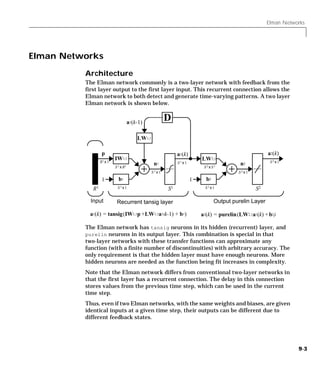
                        Elman Network . . . . . . . . . . . . . . . . . . . . . . . . . . . . . . . . . . .             9-17
                        Hopfield Network . . . . . . . . . . . . . . . . . . . . . . . . . . . . . . . . . .            9-17
                      New Functions . . . . . . . . . . . . . . . . . . . . . . . . . . . . . . . . . . . . . .         9-18


                                                                                                Applications
               10   Introduction . . . . . . . . . . . . . . . . . . . . . . . . . . . . . . . . . . . . . . . . . 10-2
                      Application Scripts . . . . . . . . . . . . . . . . . . . . . . . . . . . . . . . . . . . 10-2

                    Applin1: Linear Design . . . . . . . . . . . . . . . . . . . . . . . . . . . . . . .                10-3
                      Problem Definition . . . . . . . . . . . . . . . . . . . . . . . . . . . . . . . . . . .          10-3
                      Network Design . . . . . . . . . . . . . . . . . . . . . . . . . . . . . . . . . . . . .          10-4
                      Network Testing . . . . . . . . . . . . . . . . . . . . . . . . . . . . . . . . . . . . .         10-4
                      Thoughts and Conclusions . . . . . . . . . . . . . . . . . . . . . . . . . . . . .                10-6


x   Contents
Applin2: Adaptive Prediction . . . . . . . .                  ......    . . . . . . . . . . . 10-7
  Problem Definition . . . . . . . . . . . . . . . . . .      ......    . . . . . . . . . . . 10-7
  Network Initialization . . . . . . . . . . . . . . .        ......    . . . . . . . . . . . 10-8
  Network Training . . . . . . . . . . . . . . . . . . .      ......    . . . . . . . . . . . 10-8
  Network Testing . . . . . . . . . . . . . . . . . . . .     ......    . . . . . . . . . . . 10-8
  Thoughts and Conclusions . . . . . . . . . . . .            ......    . . . . . . . . . . 10-10

Applin3: Linear System Identification                         ......    ..........          10-11
  Problem Definition . . . . . . . . . . . . . . . . . .      ......    ..........          10-11
  Network Design . . . . . . . . . . . . . . . . . . . .      ......    ..........          10-12
  Network Testing . . . . . . . . . . . . . . . . . . . .     ......    ..........          10-12
  Thoughts and Conclusions . . . . . . . . . . . .            ......    ..........          10-14

Applin4: Adaptive System Identification . . . .                         ......     ....     10-15
  Problem Definition . . . . . . . . . . . . . . . . . . . . . . . .    ......     ....     10-15
  Network Initialization . . . . . . . . . . . . . . . . . . . . .      ......     ....     10-16
  Network Training . . . . . . . . . . . . . . . . . . . . . . . . .    ......     ....     10-17
  Network Testing . . . . . . . . . . . . . . . . . . . . . . . . . .   ......     ....     10-17
  Thoughts and Conclusions . . . . . . . . . . . . . . . . . .          ......     ....     10-17

Appelm1: Amplitude Detection . . . . . . . . . . . . . . . . . . . . . . .                  10-19
  Problem Definition . . . . . . . . . . . . . . . . . . . . . . . . . . . . . . . . . .    10-19
  Network Initialization . . . . . . . . . . . . . . . . . . . . . . . . . . . . . . .      10-20
  Network Training . . . . . . . . . . . . . . . . . . . . . . . . . . . . . . . . . . .    10-20
  Network Testing . . . . . . . . . . . . . . . . . . . . . . . . . . . . . . . . . . . .   10-21
  Network Generalization . . . . . . . . . . . . . . . . . . . . . . . . . . . . .          10-22
  Improving Performance . . . . . . . . . . . . . . . . . . . . . . . . . . . . . .         10-23

Appcs1: Nonlinear System Identification . . . .                         ..........          10-24
  Problem Definition . . . . . . . . . . . . . . . . . . . . . . . .    ..........          10-25
  Network Initialization . . . . . . . . . . . . . . . . . . . . .      ..........          10-26
  Network Training . . . . . . . . . . . . . . . . . . . . . . . . .    ..........          10-26
  Network Testing . . . . . . . . . . . . . . . . . . . . . . . . . .   ..........          10-26
  Thoughts and Conclusions . . . . . . . . . . . . . . . . . .          ..........          10-29


                                                                                                     xi
Appcs2: Model Reference Control . . . . .                       ......     ..........          10-30
                        Mathematical Model . . . . . . . . . . . . . . . .            ......     ..........          10-30
                        Neural Design . . . . . . . . . . . . . . . . . . . . .       ......     ..........          10-31
                        Problem Definition . . . . . . . . . . . . . . . . . .        ......     ..........          10-32
                        Network Initialization . . . . . . . . . . . . . . .          ......     ..........          10-32
                        Network Training . . . . . . . . . . . . . . . . . . .        ......     ..........          10-33
                        Network Testing . . . . . . . . . . . . . . . . . . . .       ......     ..........          10-36
                        Thoughts and Conclusions . . . . . . . . . . . .              ......     ..........          10-37

                      Appcr1: Character Recognition . . . . . . . . . . . . . . . . . . . . . . .                    10-38
                        Problem Statement . . . . . . . . . . . . . . . . . . . . . . . . . . . . . . . . .          10-38
                        Neural Network . . . . . . . . . . . . . . . . . . . . . . . . . . . . . . . . . . . .       10-39
                          Architecture . . . . . . . . . . . . . . . . . . . . . . . . . . . . . . . . . . . . .     10-40
                          Initialization . . . . . . . . . . . . . . . . . . . . . . . . . . . . . . . . . . . .     10-40
                          Training . . . . . . . . . . . . . . . . . . . . . . . . . . . . . . . . . . . . . . . .   10-40
                          Training Without Noise . . . . . . . . . . . . . . . . . . . . . . . . . . . .             10-41
                          Training With Noise . . . . . . . . . . . . . . . . . . . . . . . . . . . . . .            10-41
                          Training Without Noise Again . . . . . . . . . . . . . . . . . . . . . .                   10-42
                        System Performance . . . . . . . . . . . . . . . . . . . . . . . . . . . . . . . .           10-42
                        Summary . . . . . . . . . . . . . . . . . . . . . . . . . . . . . . . . . . . . . . . . .    10-43


                                                                                      Advanced Topics
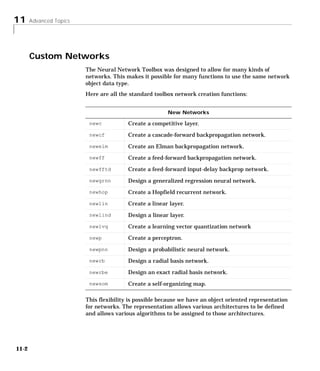
                 11   Custom Networks . . . . . . . . . . . . . . . . . . . . . . . . . . . . . . . . . . . . 11-2
                        Custom Network . . . . . . . . . . . . . . . . . . . . . . . . . . . . . . . . . . . . 11-4
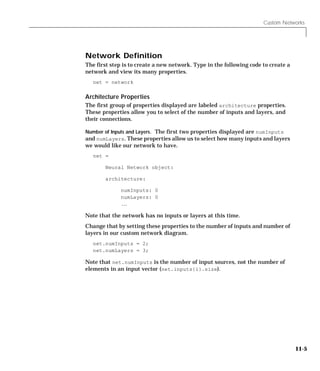
                        Network Definition . . . . . . . . . . . . . . . . . . . . . . . . . . . . . . . . . . 11-5
                          Architecture Properties . . . . . . . . . . . . . . . . . . . . . . . . . . . . . 11-5
                          Number of Outputs and Targets . . . . . . . . . . . . . . . . . . . . . . 11-7
                          Subobject Properties . . . . . . . . . . . . . . . . . . . . . . . . . . . . . . . 11-8
                          Inputs . . . . . . . . . . . . . . . . . . . . . . . . . . . . . . . . . . . . . . . . . . . 11-8
                          Network Functions . . . . . . . . . . . . . . . . . . . . . . . . . . . . . . . 11-12
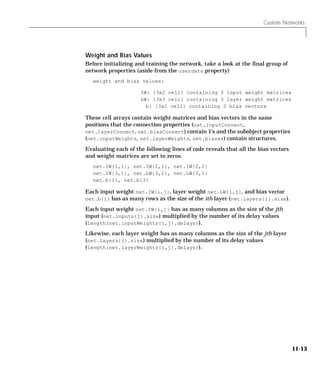
                          Weight and Bias Values . . . . . . . . . . . . . . . . . . . . . . . . . . . 11-13
                        Network Behavior . . . . . . . . . . . . . . . . . . . . . . . . . . . . . . . . . . 11-14
                          Initialization . . . . . . . . . . . . . . . . . . . . . . . . . . . . . . . . . . . . 11-14
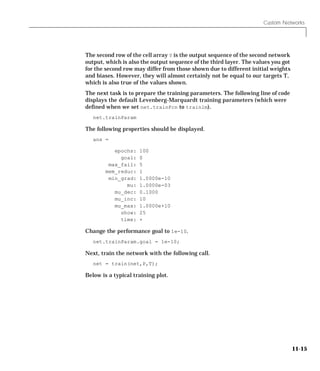
                          Training . . . . . . . . . . . . . . . . . . . . . . . . . . . . . . . . . . . . . . . . 11-14


xii   Contents
Additional Toolbox Functions .                      .......   ......   ......     ....     11-17
  Initialization Functions . . . . . . .            .......   ......   ......     ....     11-17
     randnc . . . . . . . . . . . . . . . . . . .   .......   ......   ......     ....     11-17
     randnr . . . . . . . . . . . . . . . . . . .   .......   ......   ......     ....     11-17
  Transfer Functions . . . . . . . . . . .          .......   ......   ......     ....     11-17
     satlin . . . . . . . . . . . . . . . . . . .   .......   ......   ......     ....     11-17
     softmax . . . . . . . . . . . . . . . . . .    .......   ......   ......     ....     11-17
     tribas . . . . . . . . . . . . . . . . . . .   .......   ......   ......     ....     11-17
  Learning Functions . . . . . . . . . .            .......   ......   ......     ....     11-18
     learnh . . . . . . . . . . . . . . . . . . .   .......   ......   ......     ....     11-18
     learnhd . . . . . . . . . . . . . . . . . .    .......   ......   ......     ....     11-18
     learnis . . . . . . . . . . . . . . . . . .    .......   ......   ......     ....     11-18
     learnos . . . . . . . . . . . . . . . . . .    .......   ......   ......     ....     11-18

Custom Functions . . . . . . . . . . . . . . . . . . . . . . . . . . . . . . . . . . .     11-19
  Simulation Functions . . . . . . . . . . . . . . . . . . . . . . . . . . . . . . . .     11-20
     Transfer Functions . . . . . . . . . . . . . . . . . . . . . . . . . . . . . . .      11-20
     Net Input Functions . . . . . . . . . . . . . . . . . . . . . . . . . . . . . .       11-22
     Weight Functions . . . . . . . . . . . . . . . . . . . . . . . . . . . . . . . . .    11-24
  Initialization Functions . . . . . . . . . . . . . . . . . . . . . . . . . . . . . .     11-26
     Network Initialization Functions . . . . . . . . . . . . . . . . . . . .              11-26
     Layer Initialization Functions . . . . . . . . . . . . . . . . . . . . . .            11-26
     Weight and Bias Initialization Functions . . . . . . . . . . . . .                    11-27
  Learning Functions . . . . . . . . . . . . . . . . . . . . . . . . . . . . . . . . .     11-29
     Training Functions . . . . . . . . . . . . . . . . . . . . . . . . . . . . . . .      11-29
     Adapt Functions . . . . . . . . . . . . . . . . . . . . . . . . . . . . . . . . . .   11-32
     Performance Functions . . . . . . . . . . . . . . . . . . . . . . . . . . . .         11-34
     Weight and Bias Learning Functions . . . . . . . . . . . . . . . . .                  11-36
  Self-Organizing Map Functions . . . . . . . . . . . . . . . . . . . . . . .              11-39
     Topology Functions . . . . . . . . . . . . . . . . . . . . . . . . . . . . . . .      11-39
     Distance Functions . . . . . . . . . . . . . . . . . . . . . . . . . . . . . . .      11-40


                                                                                                   xiii
Network Object Reference
               12   Network Properties . . . . . . . . . . . . . . . . . . . . . . . . . . . . . . . . . . 12-2
                      Architecture . . . . . . . . . . . . . . . . . . . . . . . . . . . . . . . . . . . . . . . . 12-2
                        numInputs . . . . . . . . . . . . . . . . . . . . . . . . . . . . . . . . . . . . . . . . 12-2
                        numLayers . . . . . . . . . . . . . . . . . . . . . . . . . . . . . . . . . . . . . . . . 12-2
                        biasConnect . . . . . . . . . . . . . . . . . . . . . . . . . . . . . . . . . . . . . . 12-3
                        inputConnect . . . . . . . . . . . . . . . . . . . . . . . . . . . . . . . . . . . . 12-4
                        layerConnect . . . . . . . . . . . . . . . . . . . . . . . . . . . . . . . . . . . . 12-4
                        outputConnect . . . . . . . . . . . . . . . . . . . . . . . . . . . . . . . . . . . . 12-4
                        targetConnect . . . . . . . . . . . . . . . . . . . . . . . . . . . . . . . . . . . 12-5
                        numOutputs (read-only) . . . . . . . . . . . . . . . . . . . . . . . . . . . . . 12-5
                        numTargets (read-only) . . . . . . . . . . . . . . . . . . . . . . . . . . . . . 12-5
                        numInputDelays (read-only) . . . . . . . . . . . . . . . . . . . . . . . . . 12-5
                        numLayerDelays (read-only) . . . . . . . . . . . . . . . . . . . . . . . . . 12-6
                      Subobject Structures . . . . . . . . . . . . . . . . . . . . . . . . . . . . . . . . . 12-6
                        inputs . . . . . . . . . . . . . . . . . . . . . . . . . . . . . . . . . . . . . . . . . . . 12-7
                        layers . . . . . . . . . . . . . . . . . . . . . . . . . . . . . . . . . . . . . . . . . . . 12-7
                        outputs . . . . . . . . . . . . . . . . . . . . . . . . . . . . . . . . . . . . . . . . . . 12-7
                        targets . . . . . . . . . . . . . . . . . . . . . . . . . . . . . . . . . . . . . . . . . . 12-8
                        biases . . . . . . . . . . . . . . . . . . . . . . . . . . . . . . . . . . . . . . . . . . . 12-8
                        inputWeights . . . . . . . . . . . . . . . . . . . . . . . . . . . . . . . . . . . . . 12-9
                        layerWeights . . . . . . . . . . . . . . . . . . . . . . . . . . . . . . . . . . . . . 12-9
                      Functions . . . . . . . . . . . . . . . . . . . . . . . . . . . . . . . . . . . . . . . . . 12-10
                        adaptFcn . . . . . . . . . . . . . . . . . . . . . . . . . . . . . . . . . . . . . . . . 12-10
                        initFcn . . . . . . . . . . . . . . . . . . . . . . . . . . . . . . . . . . . . . . . . . 12-10
                        performFcn . . . . . . . . . . . . . . . . . . . . . . . . . . . . . . . . . . . . . . 12-11
                        trainFcn . . . . . . . . . . . . . . . . . . . . . . . . . . . . . . . . . . . . . . . . 12-11
                      Parameters . . . . . . . . . . . . . . . . . . . . . . . . . . . . . . . . . . . . . . . . 12-13
                        adaptParam . . . . . . . . . . . . . . . . . . . . . . . . . . . . . . . . . . . . . . 12-13
                        initParam . . . . . . . . . . . . . . . . . . . . . . . . . . . . . . . . . . . . . . . 12-13
                        performParam . . . . . . . . . . . . . . . . . . . . . . . . . . . . . . . . . . . . 12-13
                        trainParam . . . . . . . . . . . . . . . . . . . . . . . . . . . . . . . . . . . . . . 12-14
                      Weight and Bias Values . . . . . . . . . . . . . . . . . . . . . . . . . . . . . . 12-14
                        IW . . . . . . . . . . . . . . . . . . . . . . . . . . . . . . . . . . . . . . . . . . . . . 12-14
                        LW . . . . . . . . . . . . . . . . . . . . . . . . . . . . . . . . . . . . . . . . . . . . . 12-15
                        b . . . . . . . . . . . . . . . . . . . . . . . . . . . . . . . . . . . . . . . . . . . . . . 12-16
                      Other . . . . . . . . . . . . . . . . . . . . . . . . . . . . . . . . . . . . . . . . . . . . . 12-16
                        userdata . . . . . . . . . . . . . . . . . . . . . . . . . . . . . . . . . . . . . . . . 12-16


xiv Contents
Subobject Properties . . . . . . . . . . . . . . . . . . . . . . . . . . . . . . . .               12-17
  Inputs . . . . . . . . . . . . . . . . . . . . . . . . . . . . . . . . . . . . . . . . . . . .   12-17
    range . . . . . . . . . . . . . . . . . . . . . . . . . . . . . . . . . . . . . . . . . . .    12-17
    size . . . . . . . . . . . . . . . . . . . . . . . . . . . . . . . . . . . . . . . . . . .     12-17
    userdata . . . . . . . . . . . . . . . . . . . . . . . . . . . . . . . . . . . . . . . .       12-18
  Layers . . . . . . . . . . . . . . . . . . . . . . . . . . . . . . . . . . . . . . . . . . . .   12-18
    dimensions . . . . . . . . . . . . . . . . . . . . . . . . . . . . . . . . . . . . . .         12-18
    distanceFcn . . . . . . . . . . . . . . . . . . . . . . . . . . . . . . . . . . . . .          12-19
    distances (read-only) . . . . . . . . . . . . . . . . . . . . . . . . . . . . .                12-19
    initFcn . . . . . . . . . . . . . . . . . . . . . . . . . . . . . . . . . . . . . . . . .      12-20
    netInputFcn . . . . . . . . . . . . . . . . . . . . . . . . . . . . . . . . . . . . .          12-20
    positions (read-only) . . . . . . . . . . . . . . . . . . . . . . . . . . . . .                12-21
    size . . . . . . . . . . . . . . . . . . . . . . . . . . . . . . . . . . . . . . . . . . .     12-22
    topologyFcn . . . . . . . . . . . . . . . . . . . . . . . . . . . . . . . . . . . . .          12-22
    transferFcn . . . . . . . . . . . . . . . . . . . . . . . . . . . . . . . . . . . . .          12-23
    userdata . . . . . . . . . . . . . . . . . . . . . . . . . . . . . . . . . . . . . . . .       12-24
  Outputs . . . . . . . . . . . . . . . . . . . . . . . . . . . . . . . . . . . . . . . . . . .    12-25
    size (read-only) . . . . . . . . . . . . . . . . . . . . . . . . . . . . . . . . . .           12-25
    userdata . . . . . . . . . . . . . . . . . . . . . . . . . . . . . . . . . . . . . . . .       12-25
  Targets . . . . . . . . . . . . . . . . . . . . . . . . . . . . . . . . . . . . . . . . . . .    12-25
    size (read-only) . . . . . . . . . . . . . . . . . . . . . . . . . . . . . . . . . .           12-25
    userdata . . . . . . . . . . . . . . . . . . . . . . . . . . . . . . . . . . . . . . . .       12-25
  Biases . . . . . . . . . . . . . . . . . . . . . . . . . . . . . . . . . . . . . . . . . . . .   12-26
    initFcn . . . . . . . . . . . . . . . . . . . . . . . . . . . . . . . . . . . . . . . . .      12-26
    learn . . . . . . . . . . . . . . . . . . . . . . . . . . . . . . . . . . . . . . . . . . .    12-26
    learnFcn . . . . . . . . . . . . . . . . . . . . . . . . . . . . . . . . . . . . . . . .       12-27
    learnParam . . . . . . . . . . . . . . . . . . . . . . . . . . . . . . . . . . . . . .         12-27
    size (read-only) . . . . . . . . . . . . . . . . . . . . . . . . . . . . . . . . . .           12-28
    userdata . . . . . . . . . . . . . . . . . . . . . . . . . . . . . . . . . . . . . . . .       12-28
  Input Weights . . . . . . . . . . . . . . . . . . . . . . . . . . . . . . . . . . . . . .        12-28
    delays . . . . . . . . . . . . . . . . . . . . . . . . . . . . . . . . . . . . . . . . . .     12-28
    initFcn . . . . . . . . . . . . . . . . . . . . . . . . . . . . . . . . . . . . . . . . .      12-29
    learn . . . . . . . . . . . . . . . . . . . . . . . . . . . . . . . . . . . . . . . . . . .    12-29
    learnFcn . . . . . . . . . . . . . . . . . . . . . . . . . . . . . . . . . . . . . . . .       12-30
    learnParam . . . . . . . . . . . . . . . . . . . . . . . . . . . . . . . . . . . . . .         12-31
    size (read-only) . . . . . . . . . . . . . . . . . . . . . . . . . . . . . . . . . .           12-31
    userdata . . . . . . . . . . . . . . . . . . . . . . . . . . . . . . . . . . . . . . . .       12-31
    weightFcn . . . . . . . . . . . . . . . . . . . . . . . . . . . . . . . . . . . . . . .        12-32


                                                                                                           xv
LayerWeights . . . . . . . . .        ......   .......     ......     ......    ....   12-32
                           delays . . . . . . . . . . . . .    ......   .......     ......     ......    ....   12-32
                           initFcn . . . . . . . . . . . .     ......   .......     ......     ......    ....   12-32
                           learn . . . . . . . . . . . . . .   ......   .......     ......     ......    ....   12-33
                           learnFcn . . . . . . . . . . .      ......   .......     ......     ......    ....   12-33
                           learnParam . . . . . . . . .        ......   .......     ......     ......    ....   12-35
                           size (read-only) . . . . .          ......   .......     ......     ......    ....   12-35
                           userdata . . . . . . . . . . .      ......   .......     ......     ......    ....   12-35
                           weightFcn . . . . . . . . . .       ......   .......     ......     ......    ....   12-36


                                                                                                   Reference
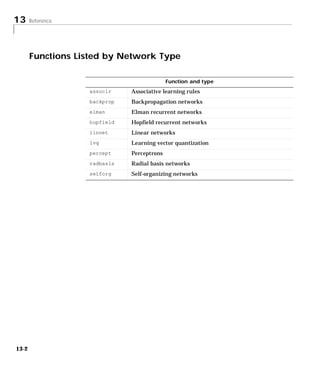
                 13   Functions Listed by Network Type . . . . . . . . . . . . . . . . . . . . 13-2

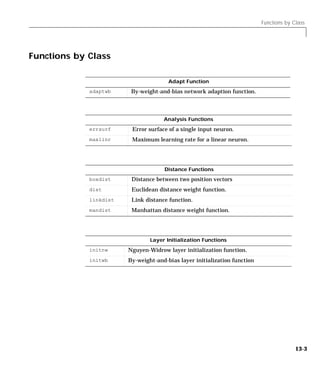
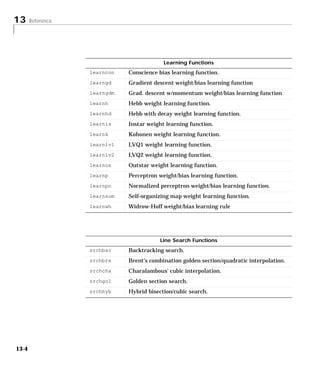
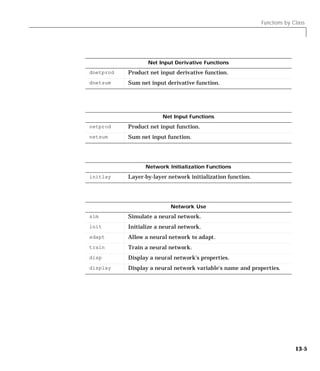
                      Functions by Class . . . . . . . . . . . . . . . . . . . . . . . . . . . . . . . . . . . 13-3

                      Transfer Functions . . . . . . . . . . . . . . . . . . . . . . . . . . . . . . . . . . 13-13

                      Transfer Function Graphs . . . . . . . . . . . . . . . . . . . . . . . . . . . 13-14

                      Reference Page Headings . . . . . . . . . . . . . . . . . . . . . . . . . . . . 13-18

                      Functions . . . . . . . . . . . . . . . . . . . . . . . . . . . . . . . . . . . . . . . . . . 13-19


                                                                                                      Glossary


xvi   Contents
Notation
A   Mathematical Notation for Equations and Figures . . . . . . . B-2
     Basic Concepts . . . . . . . . . . . . . . . . . . . . . . . . . . . . . . . . . . . . . . . B-2
     Language . . . . . . . . . . . . . . . . . . . . . . . . . . . . . . . . . . . . . . . . . . . B-2
     Weight Matrices . . . . . . . . . . . . . . . . . . . . . . . . . . . . . . . . . . . . . . B-2
        Scalar Element . . . . . . . . . . . . . . . . . . . . . . . . . . . . . . . . . . . . . B-2
        Matrix . . . . . . . . . . . . . . . . . . . . . . . . . . . . . . . . . . . . . . . . . . . . B-2
        Column Vector . . . . . . . . . . . . . . . . . . . . . . . . . . . . . . . . . . . . . B-2
        Row Vector . . . . . . . . . . . . . . . . . . . . . . . . . . . . . . . . . . . . . . . B-2
        Bias Vector . . . . . . . . . . . . . . . . . . . . . . . . . . . . . . . . . . . . . . . . B-2
        Scalar Element . . . . . . . . . . . . . . . . . . . . . . . . . . . . . . . . . . . . . B-2
        Vector . . . . . . . . . . . . . . . . . . . . . . . . . . . . . . . . . . . . . . . . . . . . B-2
     Layer Notation . . . . . . . . . . . . . . . . . . . . . . . . . . . . . . . . . . . . . . . B-2
        Input Weight Matrix . . . . . . . . . . . . . . . . . . . . . . . . . . . . . . . . B-3
        Layer Weight Matrix . . . . . . . . . . . . . . . . . . . . . . . . . . . . . . . . B-3
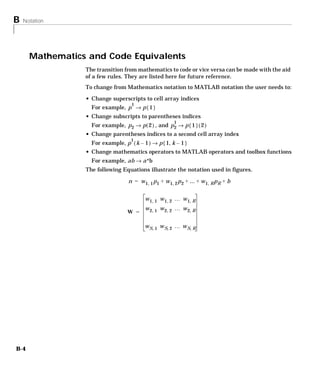
     Figure and Equation Examples . . . . . . . . . . . . . . . . . . . . . . . . . . B-3

    Mathematics and Code Equivalents . . . . . . . . . . . . . . . . . . . . . B-4


                                                                             Bibliography
B

                                 Demonstrations and Applications
C   Tables of Demonstrations and Application . . . . . . . . . . . . . . D-2
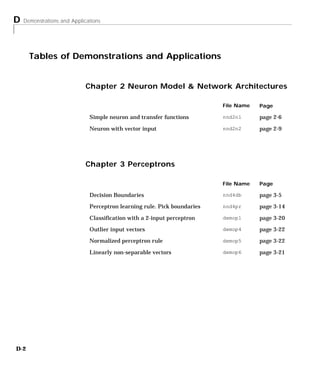
     Chapter 2 Neuron Model & Network Architectures . . . . . . . . . D-2
     Chapter 3 Perceptrons . . . . . . . . . . . . . . . . . . . . . . . . . . . . . . . . . D-2
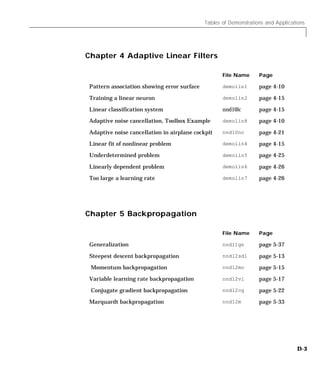
     Chapter 4 Adaptive Linear Filters . . . . . . . . . . . . . . . . . . . . . . . D-3
     Chapter 5 Backpropagation . . . . . . . . . . . . . . . . . . . . . . . . . . . . . D-3
     Chapter 6 Radial Basis Networks . . . . . . . . . . . . . . . . . . . . . . . . D-4
     Chapter 7 Self-Organizing Networks . . . . . . . . . . . . . . . . . . . . . D-4
     Chapter 8 Learning Vector Quantization . . . . . . . . . . . . . . . . . . D-4
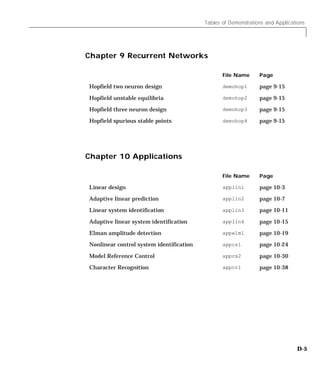
     Chapter 9 Recurrent Networks . . . . . . . . . . . . . . . . . . . . . . . . . . D-5
     Chapter 10 Applications . . . . . . . . . . . . . . . . . . . . . . . . . . . . . . . D-5


                                                                                                             xvii
Simulink
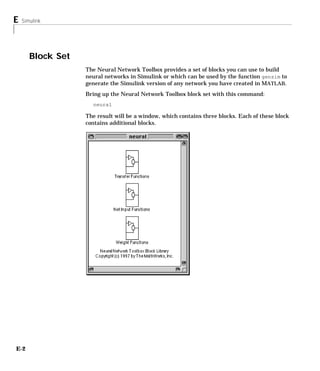
                 D   Block Set . . . . . . . . . . . . . . . . . . . .     .......      ......     ......    ......        E-2
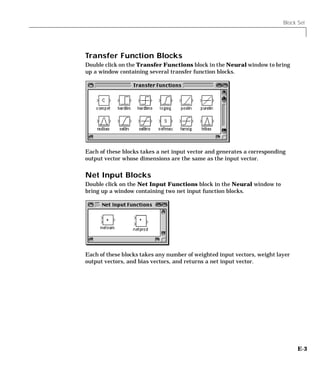
                       Transfer Function Blocks . . . . .                  .......      ......     ......    ......        E-3
                       Net Input Blocks . . . . . . . . . . . .            .......      ......     ......    ......        E-3
                       Weight Blocks . . . . . . . . . . . . . . .         .......      ......     ......    ......        E-4

                     Block Generation . . . . . . . . . . . . . . . . . . . . . . . . . . . . . . . . . . . . .            E-5
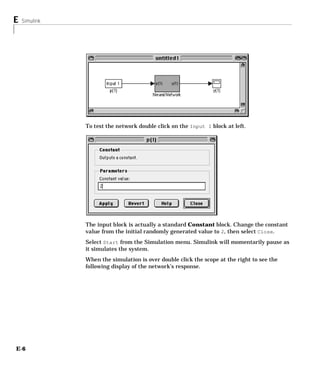
                       Example . . . . . . . . . . . . . . . . . . . . . . . . . . . . . . . . . . . . . . . . . . . .     E-5
                       Exercises . . . . . . . . . . . . . . . . . . . . . . . . . . . . . . . . . . . . . . . . . . . .   E-7
                         Changing Input Signal . . . . . . . . . . . . . . . . . . . . . . . . . . . . . .                 E-7
                         Discrete Sample Time. . . . . . . . . . . . . . . . . . . . . . . . . . . . . . . .               E-7


                                                                                                                 Index


xviii Contents
1

Introduction
Neural Networks . . . . . . . . . . . . . . . . . . 1-2

Getting Started . . . . . . . . . . . . . . . . . . 1-4
Basic Chapters . . . . . . . . . . . . . . . . . . . 1-4
Help and Installation . . . . . . . . . . . . . . . . . 1-4

Whats New in 3.0 . . . . . . . .     .   .   .   .   .   .   .   .   .   .    1-5
Other New Algorithms and Functions   .   .   .   .   .   .   .   .   .   .    1-5
Modular Network Representation . .   .   .   .   .   .   .   .   .   .   .    1-5
Simulink Simulation Support . . .    .   .   .   .   .   .   .   .   .   .    1-5
General Toolbox Improvements . . .   .   .   .   .   .   .   .   .   .   .    1-5

Reduced Memory Levenberg-Marquardt Algorithm . . 1-6

Other New Networks, Algorithms and Improvements                          .    1-7
Resilient Backpropagation (Rprop) . . . . . . . . . .                    .    1-7
Conjugate Gradient Algorithms . . . . . . . . . . . .                    .    1-7
Quasi-Newton Algorithms . . . . . . . . . . . . . .                      .    1-7
Speed Comparison . . . . . . . . . . . . . . . . .                       .    1-8
Improving Generalization . . . . . . . . . . . . . .                     .    1-9
Pre and Post Processing . . . . . . . . . . . . . . .                    .    1-9
New Training Options . . . . . . . . . . . . . . .                       .   1-10
Probabilistic Neural Networks . . . . . . . . . . . .                    .   1-11
Generalized Regression Networks . . . . . . . . . . .                    .   1-11

Modular Network Representation . . . . . . . . . . 1-12

Better Simulink Support   . . . . . . . . . . . . . . 1-13

General Toolbox Improvements . . . . . . . . . . . 1-14
Simpler and More Extensible Toolbox . . . . . . . . . . 1-14
Custom Functions . . . . . . . . . . . . . . . . . . 1-15

Neural Network Applications . . . . . . . . . . . . 1-16

Neural Network Design Book . . . . . . . . . . . . 1-19

Acknowledgments     . . . . . . . . . . . . . . . . . 1-20
1   Introduction


      Neural Networks
                   Neural networks are composed of simple elements operating in parallel. These
                   elements are inspired by biological nervous systems. As in nature, the network
                   function is determined largely by the connections between elements. We can
                   train a neural network to perform a particular function by adjusting the values
                   of the connections (weights) between elements.
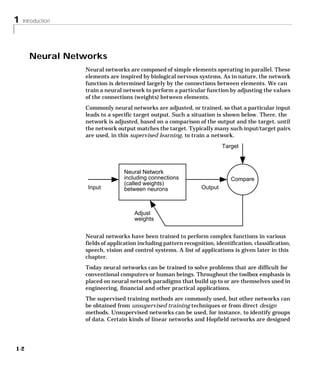
                   Commonly neural networks are adjusted, or trained, so that a particular input
                   leads to a specific target output. Such a situation is shown below. There, the
                   network is adjusted, based on a comparison of the output and the target, until
                   the network output matches the target. Typically many such input/target pairs
                   are used, in this supervised learning, to train a network.
                                                                           Target


                                  Neural Network
                                  including connections                       Compare
                                  (called weights)
                    Input         between neurons                 Output


                                       Adjust
                                       weights


                   Neural networks have been trained to perform complex functions in various
                   fields of application including pattern recognition, identification, classification,
                   speech, vision and control systems. A list of applications is given later in this
                   chapter.
                   Today neural networks can be trained to solve problems that are difficult for
                   conventional computers or human beings. Throughout the toolbox emphasis is
                   placed on neural network paradigms that build up to or are themselves used in
                   engineering, financial and other practical applications.
                   The supervised training methods are commonly used, but other networks can
                   be obtained from unsupervised training techniques or from direct design
                   methods. Unsupervised networks can be used, for instance, to identify groups
                   of data. Certain kinds of linear networks and Hopfield networks are designed


1-2
Neural Networks


directly. In summary, there are a variety of kinds of design and learning
techniques that enrich the choices that a user can make.
The field of neural networks has a history of some five decades but has found
solid application only in the past fifteen years, and the field is still developing
rapidly. Thus, it is distinctly different from the fields of control systems or
optimization where the terminology, basic mathematics, and design
procedures have been firmly established and applied for many years. We do not
view the Neural Network Toolbox as simply a summary of established
procedures that are known to work well. Rather, we hope that it will be a useful
tool for industry, education and research, a tool that will help users find what
works and what doesn’t, and a tool that will help develop and extend the field
of neural networks. Because the field and the material are so new, this toolbox
will explain the procedures, tell how to apply them, and illustrate their
successes and failures with examples. We believe that an understanding of the
paradigms and their application is essential to the satisfactory and successful
use of this toolbox, and that without such understanding user complaints and
inquiries would bury us. So please be patient if we include a lot of explanatory
material. We hope that such material will be helpful to you.
This chapter includes a few comments on getting started with the Neural
Network Toolbox. It also describes the new graphical user interface, and new
algorithms and architectures; and it explains the increased flexibility of the
Toolbox due to its use of modular network object representation.
Finally this chapter gives a list of some practical neural network applications
and describes a new text, Neural Network Design. This book presents the
theory of neural networks as well as their design and application, and makes
considerable use of M ATLAB® and the Neural Network Toolbox.


                                                                                      1-3
1   Introduction


      Getting Started
                   Basic Chapters
                   Chapter 2 contains basic material about network architectures and notation
                   specific to this toolbox. Chapter 3 includes the first reference to basic functions
                   such as init and adapt. Chapter 4 describes the use of the functions designd
                   and train, and discusses delays. Chapter 2, 3 and 4 should be read before going
                   to later chapters


                   Help and Installation
                   The Neural Network Toolbox is contained in a directory called nnet. Type help
                   nnet for a listing of help topics.

                   A number of demonstrations are included in the Toolbox. Each example states
                   a problem, shows the network used to solve the problem and presents the final
                   results. Lists of the neural network demonstration and application scripts that
                   are discussed in this guide can be found by typing help nndemos
                   Instructions for installing the Neural Network Toolbox are found in one of two
                   MATLAB documents, the Installation Guide for MS-Windows and Macintosh or
                   the Installation Guide for UNIX.


1-4
Whats New in 3.0


Whats New in 3.0
           A few of the new features and improvements introduced with this version of the
           Neural Network Toolbox are listed below.
           Reduced Memory Levenberg-Marquardt Algorithm
           The Neural Network Toolbox version 2.0 introduced the Levenberg-Marquardt
           (LM) algorithm which is faster than other algorithms by a factor of from 10 to
           100. Now version 3.0 introduces the Reduced Memory Levenberg-Marquardt
           algorithm, which allows for a time/memory trade off. This means that the LM
           algorithm can now be used in much larger problems, with perhaps only a slight
           increase in running time.


           Other New Algorithms and Functions
           Conjugate gradient and R-Prop algorithms have been added, as have
           Probabilistic, and Generalized Regression Networks. Automatic
           regularization, new training options and a method for early stopping of
           training have also been included here for the first time. New training options,
           including training on variations of mean square error for better generalization,
           training against a validation set, and training until the gradient of the error
           reaches a minimum are now available. Finally, various pre and post processing
           function have been included.


           Modular Network Representation
           The modular representation in the Toolbox version 3.0 allows a great deal of
           flexibility for the design of one’s own custom networks. Virtually any
           combination of neurons and layers, with delays if required, can be trained in
           any one of Other New Networks, Algorithms and Improvements.


           Simulink® Simulation Support
           You can now generate network simulation blocks for use with Simulink.


           General Toolbox Improvements
           This toolbox is simpler but more powerful than ever. It has fewer functions but
           each of them, including INIT (initialization), SIM (simulation), TRAIN,
           (training) and ADAPT (adaptive learning) can be applied to a broad variety of
           networks.


                                                                                              1-5
1   Introduction


      Reduced Memory Levenberg-Marquardt Algorithm
                   A low-memory-use Levenberg-Marquardt algorithm has been developed by
                   Professor Martin Hagan of Oklahoma State University for the Neural Network
                   Toolbox. This algorithm achieves nearly the same speed of the original very
                   fast Levenberg-Marquardt algorithm, but uses less memory required by the
                   original. (See Neural Network Toolbox Version 2.0 and Hagan, M.T., and M.
                   Menhaj, “Training Feedforward Networks with the Marquardt Algorithm,”
                   IEEE Transactions on Neural Networks, vol. 5, no. 6, 1994.)
                   There is a drawback to using memory reduction. A significant computational
                   overhead is associated with computing the Jacobian in submatrices. If you
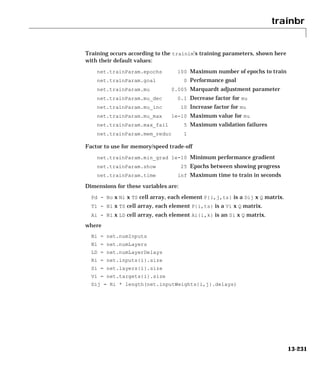
                   have enough memory available, then it is better to set mem_reduc to 1 and to
                   compute the full Jacobian. If you have a large training set, and you are running
                   out of memory, then you should set mem_reduc to 2, and try again. If you still
                   run out of memory, continue to increase mem_reduc.
                   Even if you use memory reduction, the Levenberg-Marquardt algorithm will
                   always compute the approximate Hessian matrix, which has dimensions n × n .
                   If your network is very large, then you may run out of memory. If this is the
                   case, then you will want to try trainoss, trainrp, or one of the conjugate
                   gradient algorithms.


1-6
Other New Networks, Algorithms and Improvements


Other New Networks, Algorithms and Improvements
           Resilient Backpropagation (Rprop)
           The resilient backpropagation (Rprop) training algorithm eliminates the
           harmful effect of having a small slope at the extreme ends of sigmoid squashing
           transfer functions. Only the sign of the derivative of the transfer function is
           used to determine the direction of the weight update; the magnitude of the
           derivative has no effect on the weight update. Rprop is generally much faster
           than the standard steepest descent algorithm. It also has the nice property that
           it requires only a modest increase in memory requirements.


           Conjugate Gradient Algorithms
           Various forms of a conjugate gradient backprop algorithm have been added. In
           the conjugate gradient algorithms a search is performed along conjugate
           directions, which produces generally faster convergence than steepest descent
           directions. This is a well know, highly efficient algorithm that gives good
           results on a broad spectrum of problems.


           Quasi-Newton Algorithms
           Quasi-Newton (or secant) methods are based on Newton’s method but don’t
           require calculation of second derivatives. They update an approximate Hessian
           matrix at each iteration of the algorithm. The update is computed as a function
           of the gradient. Two quasi-newton algorithms are included in the Neural
           Network Toolbox.

           BFGS Quasi Newton Algorithm
           This algorithm requires more computation in each iteration and more storage
           than the conjugate gradient methods, although it generally converges in fewer
           iterations. For very large networks it may be better to use Rprop or one of the
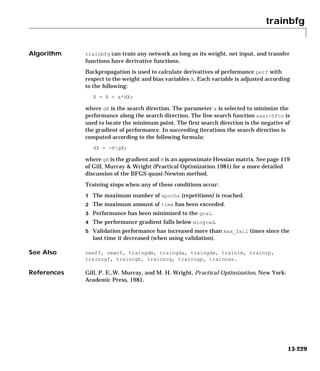
           conjugate gradient algorithms. For smaller networks, however, trainbfg can
           be an efficient training function.

           A One Step Secant Algorithm
           This algorithm requires less storage and computation per epoch than the BFGS
           algorithm. It requires slightly more storage and computation per epoch than
           the conjugate gradient algorithms. It can be considered a compromise between
           full quasi-Newton algorithms and conjugate gradient algorithms.


                                                                                              1-7
1   Introduction


                   Speed Comparison
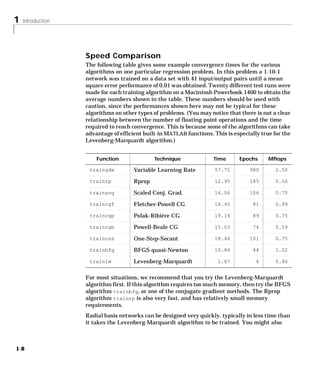
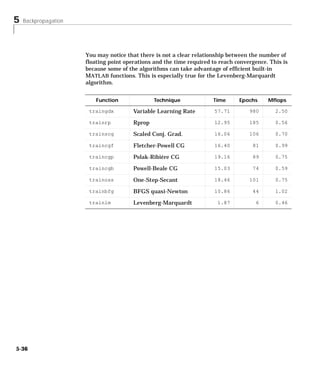
                   The following table gives some example convergence times for the various
                   algorithms on one particular regression problem. In this problem a 1-10-1
                   network was trained on a data set with 41 input/output pairs until a mean
                   square error performance of 0.01 was obtained. Twenty different test runs were
                   made for each training algorithm on a Macintosh Powerbook 1400 to obtain the
                   average numbers shown in the table. These numbers should be used with
                   caution, since the performances shown here may not be typical for these
                   algorithms on other types of problems. (You may notice that there is not a clear
                   relationship between the number of floating point operations and the time
                   required to reach convergence. This is because some of the algorithms can take
                   advantage of efficient built-in MATLAB functions. This is especially true for the
                   Levenberg-Marquardt algorithm.)


                       Function               Technique              Time      Epochs      Mflops

                    traingdx          Variable Learning Rate          57.71        980        2.50

                    trainrp           Rprop                           12.95        185        0.56

                    trainscg          Scaled Conj. Grad.              16.06        106        0.70

                    traincgf          Fletcher-Powell CG              16.40          81       0.99

                    traincgp          Polak-Ribiére CG                19.16          89       0.75

                    traincgb          Powell-Beale CG                 15.03          74       0.59

                    trainoss          One-Step-Secant                 18.46        101        0.75

                    trainbfg          BFGS quasi-Newton               10.86          44       1.02

                    trainlm           Levenberg-Marquardt              1.87           6       0.46


                   For most situations, we recommend that you try the Levenberg-Marquardt
                   algorithm first. If this algorithm requires too much memory, then try the BFGS
                   algorithm trainbfg, or one of the conjugate gradient methods. The Rprop
                   algorithm trainrp is also very fast, and has relatively small memory
                   requirements.
                   Radial basis networks can be designed very quickly, typically in less time than
                   it takes the Levenberg-Marquardt algorithm to be trained. You might also


1-8
Other New Networks, Algorithms and Improvements


consider them. However, they have the disadvantage that, once designed, the
computation associated with their use may be greater than that for
conventional feedforward networks.


Improving Generalization
One of the problems that occurs during neural network training is called
overfitting. The error on the training set is driven to a very small value, but
when new data is presented to the network the error is large. The network has
memorized the training examples, but it has not learned to generalize to new
situations. Two solutions to the overfitting problem are presented here.

Regularization
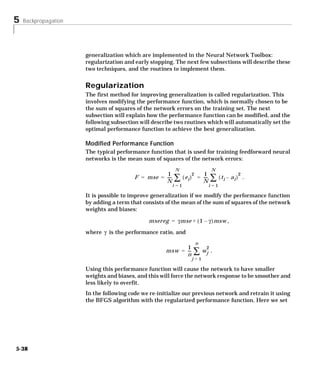
Regularization involves modifying the performance function, which is normally
chosen to be the sum of squares of the network errors on the training set. We
have included two routines which will automatically set the optimal
performance function to achieve the best generalization.
Regularization helps take the mystery out of how to pick the number of
neurons in a network and consistently leads to good networks that are not
overtrained.

Early Stopping With Validation
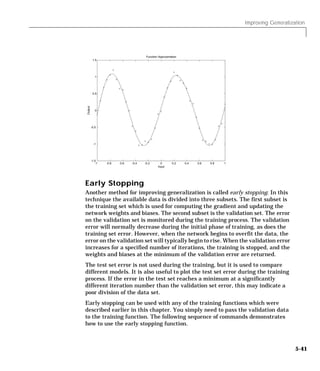
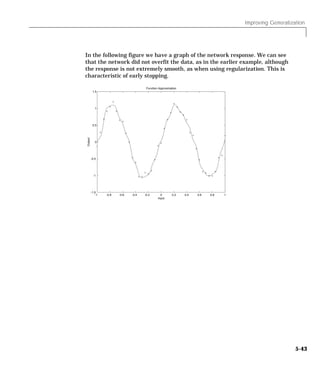
Early stopping is a technique based on dividing the data into three subsets. The
first subset is the training set used for computing the gradient and updating
the network weights and biases. The second subset is the validation set. The
error on the validation set is monitored during the training process. The
validation error will normally decrease during the initial phase of training, as
does the training set error. However, when the network begins to overfit the
data, the error on the validation set will typically begin to rise. When the
validation error increases for a specified number of iterations, the training is
stopped, and the weights and biases at the minimum of the validation error are
returned.


Pre and Post Processing
Neural network training can be made more efficient if certain preprocessing
steps are performed on the network inputs and targets. Thus, we have included
the following functions.


                                                                                   1-9
1   Introduction


                   Scale Minimum and Maximum
                   The function premnmx can be used to scale inputs and targets so that they fall
                   in the range [-1,1].

                   Scale Mean and Standard Deviation
                   The function prestd normalizes the mean and standard deviation of the
                   training set.

                   Principal Component Analysis
                   The principle components analysis program prepca can be used to reduce the
                   dimensions of the input vectors.

                   Post-training Analysis
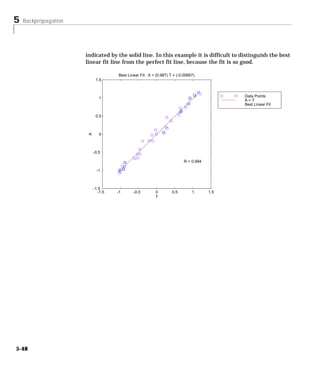
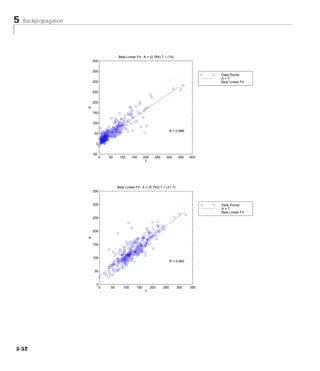
                   We have included a post training function postreg that performs a regression
                   analysis between the network response and the corresponding targets.


                   New Training Options
                   In this toolbox we can not only minimize mean squared error as before, but we
                   can also:

                   • Minimize with variations of mean squared error for better generalization.
                     Such training simplifies the problem of picking the number of hidden
                     neurons and produces good networks that are not overtrained.
                   • Train with validation to achieve appropriately early stopping. Here the
                     training result is checked against a validation set of input output data to
                     make sure that overtraining has not occurred.
                   • Stop training when the error gradient reaches a minimum. This avoids
                     wasting computation time when further training is having little effect.
                   • The low memory use Levenberg Marquardt algorithm has been incorporated
                     into both new and old algorithms.


1-10
Other New Networks, Algorithms and Improvements


Probabilistic Neural Networks
Probabilistic neural networks can be used for classification problems. Their
design is straightforward and does not depend on training. These networks
generalize well.


Generalized Regression Networks
A generalized regression neural network (GRNN) is often used for function
approximation. Given a sufficient number of hidden neurons, GRNNs can
approximate a continuous function to an arbitrary accuracy.


                                                                               1-11
1   Introduction


       Modular Network Representation
                   The modular representation in the Toolbox version 3.0 allows a great deal of
                   flexibility, including the following options:

                   • Networks can have any number of sets of inputs, layers.
                   • Any input or layer can be connected to any layer with a weight.
                   • Each layer can have a bias or not.
                   • Each layer can be a network output or not.
                   • Weights can have tapped delays.
                   • Weights can be partially connected
                   • Each layer can have a target or not


1-12
Better Simulink Support


Better Simulink Support
            The Neural Network Toolbox Version 3.0 can now generate network simulation
            blocks for use with Simulink. The Neural Network Toolbox version 2.0
            provided transfer function blocks but didn't help import entire networks. We
            can do that now.


                                                                                            1-13
1   Introduction


       General Toolbox Improvements
                   Simpler and More Extensible Toolbox
                   The new Toolbox has fewer functions, but each of them does more than the old
                   ones. For instance, the following functions can be applied to a broad variety of
                   networks.

                   • init – initialization
                   • sim – simulation
                   • train – training
                   • adapt – adaptive learning

                   Now the Neural Network Toolbox Version 3.0 is more extensible in the
                   following ways:

                   • Network properties can be altered.
                   • Custom properties can be added to a network object.


1-14
General Toolbox Improvements


Custom Functions
The toolbox allows you to create and use many kinds of functions, giving you a
great deal of control over the algorithms used to initialize, simulate, and train,
your networks. The following sections indicate the kinds of functions you can
create:

• Simulation functions
  - transfer
  - net input
  - weight
• Initialization functions
  - network initialization
  - layer initialization
  - weight and bias initialization
• Learning functions
  - network training
  - network adapt
  - network performance
  - weight and bias learning
• Self-organizing map functions
  - topology
  - distance


                                                                                     1-15
1   Introduction


       Neural Network Applications
                   The 1988 DARPA Neural Network Study [DARP88] lists various neural
                   network application, s beginning in about 1984 with the adaptive channel
                   equalizer. This device, which is an outstanding commercial success, is a single-
                   neuron network used in long distance telephone systems to stabilize voice
                   signals. The DARPA report goes on to list other commercial applications,
                   including a small word recognizer, a process monitor, a sonar classifier, and a
                   risk analysis system.
                   Neural networks have been applied in many other fields since the DARPA
                   report was written. A list of some applications mentioned in the literature
                   follows:


                   Aerospace
                   • High performance aircraft autopilot, flight path simulation, aircraft control
                     systems, autopilot enhancements, aircraft component simulation, aircraft
                     component fault detection


                   Automotive
                   • Automobile automatic guidance system, warranty activity analysis


                   Banking
                   • Check and other document reading, credit application evaluation


                   Defense
                   • Weapon steering, target tracking, object discrimination, facial recognition,
                     new kinds of sensors, sonar, radar and image signal processing including
                     data compression, feature extraction and noise suppression, signal/image
                     identification


                   Electronics
                   • Code sequence prediction, integrated circuit chip layout, process control,
                     chip failure analysis, machine vision, voice synthesis, nonlinear modeling


1-16
Neural Network Applications


Entertainment
• Animation, special effects, market forecasting


Financial
• Real estate appraisal, loan advisor, mortgage screening, corporate bond
  rating, credit line use analysis, portfolio trading program, corporate
  financial analysis, currency price prediction


Insurance
• Policy application evaluation, product optimization


Manufacturing
• Manufacturing process control, product design and analysis, process and
  machine diagnosis, real-time particle identification, visual quality
  inspection systems, beer testing, welding quality analysis, paper quality
  prediction, computer chip quality analysis, analysis of grinding operations,
  chemical product design analysis, machine maintenance analysis, project
  bidding, planning and management, dynamic modeling of chemical process
  system


Medical
• Breast cancer cell analysis, EEG and ECG analysis, prosthesis design,
  optimization of transplant times, hospital expense reduction, hospital
  quality improvement, emergency room test advisement


Oil and Gas
• Exploration


Robotics
• Trajectory control, forklift robot, manipulator controllers, vision systems


                                                                                 1-17
1   Introduction


                   Speech
                   • Speech recognition, speech compression, vowel classification, text to speech
                     synthesis


                   Securities
                   • Market analysis, automatic bond rating, stock trading advisory systems


                   Telecommunications
                   • Image and data compression, automated information services, real-time
                     translation of spoken language, customer payment processing systems


                   Transportation
                   • Truck brake diagnosis systems, vehicle scheduling, routing systems


                   Summary
                   The list of additional neural network applications, the money that has been
                   invested in neural network software and hardware, and the depth and breadth
                   of interest in these devices have been growing rapidly. It is hoped that this
                   toolbox will be useful for neural network educational and design purposes
                   within a broad field of neural network applications.
                   A variety of neural network applications are described in Chapter 10.


1-18
Neural Network Design Book


Neural Network Design Book
           Professor Martin Hagan of Oklahoma State University, and Neural Network
           Toolbox authors Howard Demuth and Mark Beale have written a textbook,
           Neural Network Design, published by PWS Publishing Company in 1996 (ISBN
           0-534-94332-2). The book presents the theory of neural networks as well as
           their design and application, and makes considerable use of MATLAB and the
           Neural Network Toolbox. Demonstration programs from the book are used in
           various chapters of this Guide. The book has a instructor’s manual containing
           problem solutions (ISBN 0-534-95049-3), and overheads for class use. (The
           overheads, in hard copy form, come one to a page for instructor use and three
           to a page for student use.) For information about obtaining this text, please
           contact International Thomson Publishing Customer Service, phone
           1-800-347-7707.


                                                                                           1-19
1   Introduction


       Acknowledgments
                   The authors would like to thank:
                   Martin Hagan, Oklahoma State University for providing the original
                   Levenberg-Marquardt algorithm in the Neural Network Toolbox version 2.0
                   and various algorithms found here in version 3.0, including the new reduced
                   memory use version of the Levenberg-Marquardt algorithm, the coujugate
                   gradient algorithm, RPROP, and generalized regression method. Martin also
                   wrote Chapter 5 of this Toolbox, Backpropagation, which contains descriptions
                   of new algorithms and suggestions for pre and post processing of data.
                   Joe Hicklin, of The MathWorks for getting Howard into neural network
                   research years ago at the University of Idaho, for encouraging Howard to write
                   the toolbox, for providing crucial help in getting the first toolbox version 1.0 out
                   the door, and for continuing to be a good friend.
                   Liz Callanan of The MathWorks for getting us off the such a good start with
                   the Neural Network Toolbox version 1.0.
                   Jim Tung of The MathWorks for his consistent long term support for this
                   project.
                   Jeff Faneuff and Roy Lurie of The MathWorks for their vigilant reviews of
                   the developing material in this version of the toolbox.
                   Matthew Simoneau of The MathWorks for his help with demos, test suite
                   routines, and getting user feedback.
                   Kathy Ford of The MathWorks for her careful help with the documentation.
                   Jane Price of The MathWorks for her help in getting constructive comments
                   from users.
                   Margaret Jenks of Moscow Idaho, for her patient, persistent and effective
                   editing.
                   Teri for running the show while Mark worked on this toolbox and finally,
                   PWS Publishing, for their permission to include various problems,
                   demonstrations and other material from Neural Network Design, Jan. 1996.


1-20
2
Neuron Model and
Network Architectures
Basic Chapters . . . . . . . . . . . . . . . . . . . 2-2
Notation . . . . . . . . . . . . . . . . . . . . . . 2-2

Neuron Model . . . .       .   .   .   .   .   .   .   .   .   .   .   .   .   .   .    2-4
Simple Neuron . . . .      .   .   .   .   .   .   .   .   .   .   .   .   .   .   .    2-4
Transfer Functions . . .   .   .   .   .   .   .   .   .   .   .   .   .   .   .   .    2-5
Neuron With Vector Input   .   .   .   .   .   .   .   .   .   .   .   .   .   .   .    2-7

Network Architectures . . . . . . . . . . . . . . . 2-10
A Layer of Neurons . . . . . . . . . . . . . . . . . . 2-10
Multiple Layers of Neurons . . . . . . . . . . . . . . 2-13

Data Structures . . . . . . . . . . . . . . . . .                                  .   2-15
Simulation With Concurrent Inputs in a Static Network .                            .   2-15
Simulation With Sequential Inputs in a Dynamic Network                             .   2-16
Simulation With Concurrent Inputs in a Dynamic Network                             .   2-18

Training Styles . . . . . . . . . . . . . . . . . . . 2-20
Incremental Training (of Adaptive and other Networks) . . . 2-20
Batch Training . . . . . . . . . . . . . . . . . . . 2-22

Summary . . . . . . . . . . . . . . . . . . . . . 2-26
Figures and Equations . . . . . . . . . . . . . . . . 2-28
2   Neuron Model and Network Architectures


      Basic Chapters
                            The Neural Network Toolbox is written so that if you read Chapter 2, 3 and 4
                            you can proceed to a later chapter, read it and use its functions without
                            difficulty. To make this possible, Chapter 2 presents the fundamentals of the
                            neuron model, the architectures of neural networks. It also will discuss
                            notation used in the architectures. All of this is basic material. It is to your
                            advantage to understand this Chapter 2 material thoroughly.
                            The neuron model and the architecture of a neural network describe how a
                            network transforms its input into an output. This transformation can be
                            viewed as a computation. The model and the architecture each place
                            limitations on what a particular neural network can compute. The way a
                            network computes its output must be understood before training methods for
                            the network can be explained.


                            Notation
                            Mathematical Notation
                            The basic notation used here for equations and figures is given below.

                            • Scalars-small italic letters.....a,b,c
                            • Vectors - small bold non-italic letters.....a,b,c
                            • Matrices - capital BOLD non-italic letters.....A,B,C
                            • Vector means a column of numbers.

                            Mathematical and Code Equivalents
                            The transition from mathematical to code notation or vice versa can be made
                            with the aid of a few rules. They are listed here for future reference.


2-2
Basic Chapters


To change from Mathematical notation to MATLAB notation the user needs to:

• Change superscripts to cell array indices
                   1
  For example, p → p { 1 }
• Change subscripts to parentheses indices
                                     1
  For example, p 2 → p ( 2 ) , and p 2 → p { 1 } ( 2 )
• Change parentheses indices to a second cell array index
                   1
  For example, p ( k – 1 ) → p { 1, k – 1 }
• Change mathematics operators to MATLAB operators and toolbox functions
  For example, ab → a*b
See Appendix B for additional information on notation in this Toolbox.


                                                                                2-3
2   Neuron Model and Network Architectures


      Neuron Model
                            Simple Neuron
                            A neuron with a single scalar input and no bias is shown on the left below.
                              Input   NeuronTitle - bias
                                           - without                   Input           - Title -
                                                                                   Neuron with bias


                             p          w        n             a      p        w           n          a
                                                           f                                      f
                                                                                       b

                                                                                      1
                                             a-= f (wp )
                                               Exp -                                   - Exp -
                                                                                     a = f (wp + b)

                            The scalar input p is transmitted through a connection that multiplies its
                            strength by the scalar weight w, to form the product wp, again a scalar. Here
                            the weighted input wp is the only argument of the transfer function f, which
                            produces the scalar output a. The neuron on the right has a scalar bias, b. You
                            may view the bias as simply being added to the product wp as shown by the
                            summing junction or as shifting the function f to the left by an amount b. The
                            bias is much like a weight, except that it has a constant input of 1. The transfer
                            function net input n, again a scalar, is the sum of the weighted input wp and
                            the bias b. This sum is the argument of the transfer function f. (Chapter 6
                            discusses a different way to form the net input n.) Here f is a transfer function,
                            typically a step function or a sigmoid function, that takes the argument n and
                            produces the output a. Examples of various transfer functions are given in the
                            next section. Note that w and b are both adjustable scalar parameters of the
                            neuron. The central idea of neural networks is that such parameters can be
                            adjusted so that the network exhibits some desired or interesting behavior.
                            Thus, we can train the network to do a particular job by adjusting the weight
                            or bias parameters, or perhaps the network itself will adjust these parameters
                            to achieve some desired end.
                            All of the neurons in this toolbox have provision for a bias, and a bias is used
                            in many of our examples and will be assumed in most of this toolbox. However,
                            you may omit a bias in a neuron if you wish.


2-4
Neuron Model


As noted above, the bias b is an adjustable (scalar) parameter of the neuron. It
is not an input. However, the constant 1 that drives the bias is an input and
must be treated as such when considering the linear dependence of input
vectors in Chapter 4.


Transfer Functions
Many transfer functions have been included in this toolbox. A complete list of
them can be found in “Transfer Function Graphs” in Chapter 13. Three of the
most commonly used functions are shown below.

         a
             +1

                   n
             0
             -1
  a = hardlim(n)
Hard Limit Transfer Function

The hard limit transfer function shown above limits the output of the neuron
to either 0, if the net input argument n is less than 0, or 1, if n is greater than
or equal to 0. We will use this function in Chapter 3 “Perceptrons” to create
neurons that make classification decisions.
The Toolbox has a function, hardlim, to realize the mathematical hard limit
transfer function shown above. Your might try the code shown below.
   n = -5:0.1:5;
   plot(n,hardlim(n),'c+:');

It produces a plot of the function hardlim over the range -5 to +5.
All of the mathematical transfer functions in the toolbox can be realized with
a function having the same name.


                                                                                      2-5
2   Neuron Model and Network Architectures


                            The linear transfer function is shown below.
                                    a
                                        +1

                                                     n
                                        0

                                            -1
                               a = purelin(n)
                             Linear Transfer Function

                            Neurons of this type are used as linear approximators in “Adaptive Linear
                            Filters” in Chapter 4.
                            The sigmoid transfer function shown below takes the input, which may have
                            any value between plus and minus infinity, and squashes the output into the
                            range 0 to 1.
                                            a
                                                +1

                                                         n
                                             0

                                                -1
                                 a = logsig(n)
                            Log-Sigmoid Transfer Function

                            This transfer function is commonly used in backpropagation networks, in part
                            because it is differentiable.
                            The symbol in the square to the right of each transfer function graph shown
                            above represents the associated transfer function. These icons will replace the
                            general f in the boxes of network diagrams to show the particular transfer
                            function that is being used.
                            For a complete listing of transfer functions and their icons, see the “Transfer
                            Function Graphs” in Chapter 13. You can also specify your own transfer
                            functions. You are not limited to the transfer functions listed in Chapter 13.
                            You can experiment with a simple neuron and various transfer functions by
                            running the demonstration program nnd2n1.


2-6
Neuron Model


Neuron With Vector Input
A neuron with a single R-element input vector is shown below. Here the
individual element inputs

                        p 1 , p 2 ,... p R

are multiplied by weights

                        w 1, 1 , w 1, 2 ,...w 1, R

and the weighted values are fed to the summing junction. Their sum is simply
Wp, the dot product of the (single row) matrix W and the vector p.

 Input Neuron w Vector Input

                                                     Where...
 p1       w
 p2        1,1
                                                     R = # Elements
 p3                      n              a
                                  f                  in input vector
          w1, R     b
pR
                   1
                  a = f(Wp +b)

The neuron has a bias b, which is summed with the weighted inputs to form
the net input n. This sum, n, is the argument of the transfer function f.

                        n = w 1, 1 p 1 + w 1, 2 p 2 + ... + w 1, R p R + b

This expression can, of course, be written in MATLAB code as:
      n = W*p + b

However, the user will seldom be writing code at this low level, for such code is
already built into functions to define and simulate entire networks.
The figure of a single neuron shown above contains a lot of detail. When we
consider networks with many neurons and perhaps layers of many neurons,
there is so much detail that the main thoughts tend to be lost. Thus, the
authors have devised an abbreviated notation for an individual neuron. This


                                                                                      2-7
2   Neuron Model and Network Architectures


                            notation, which will be used later in circuits of multiple neurons, is illustrated
                            in the diagram shown below.

                             Input                Neuron

                                                                           Where...
                                     p                                a
                                           W
                                     Rx1
                                                            n        1x1   R = # of elements
                                           1xR
                                                                 f             in input vector
                                                           1x1
                                     1     b
                               R           1x1                   1


                                                 a = f(Wp +b)

                            Here the input vector p is represented by the solid dark vertical bar at the left.
                            The dimensions of p are shown below the symbol p in the figure as Rx1. (Note
                            that we will use a capital letter, such as R in the previous sentence, when
                            referring to the size of a vector.) Thus, p is a vector of R input elements. These
                            inputs post multiply the single row, R column matrix W. As before, a constant
                            1 enters the neuron as an input and is multiplied by a scalar bias b. The net
                            input to the transfer function f is n, the sum of the bias b and the product Wp.
                            This sum is passed to the transfer function f to get the neuron’s output a, which
                            in this case is a scalar. Note that if we had more than one neuron, the network
                            output would be a vector.
                            A layer of a network is defined in the figure shown above. A layer includes the
                            combination of the weights, the multiplication and summing operation (here
                            realized as a vector product Wp), the bias b, and the transfer function f. The
                            array of inputs, vector p, will not be included in or called a layer.
                            Each time this abbreviated network notation is used, the size of the matrices
                            will be shown just below their matrix variable names. We hope that this
                            notation will allow you to understand the architectures and follow the matrix
                            mathematics associated with them.


2-8
Neuron Model


As discussed previously, when a specific transfer function is to be used in a
figure, the symbol for that transfer function will replace the f shown above.
Here are some examples.


hardlim       purelin       logsig

You can experiment with a 2 element neuron by running the demonstration
program nnd2n2.


                                                                                2-9
2   Neuron Model and Network Architectures


       Network Architectures
                            Two or more of the neurons shown above may be combined in a layer, and a
                            particular network might contain one or more such layers. First consider a
                            single layer of neurons.


                            A Layer of Neurons
                            A one layer network with R input elements and S neurons is shown below.
                             Input        Layer of Neurons


                                  w1, 1               n1       a1
                                                           f
                             p1
                                                 b1                 Where...
                             p2              1                       R = # of elements
                                                      n2       a2
                                                                         in input vector
                                                           f
                             p3                  b2
                                                                       S = # Neurons
                                             1                           in Layer
                             pR                       nS       aS
                                  wS, R                    f
                                                 bS
                                             1

                                             a= f (Wp + b)

                            In this network, each element of the input vector p is connected to each neuron
                            input through the weight matrix W. The ith neuron has a summer that gathers
                            its weighted inputs and bias to form its own scalar output n(i). The various n(i)
                            taken together form an S-element net input vector n. Finally, the neuron layer
                            outputs form a column vector a. We show the expression for a at the bottom of
                            the figure.
                            Note that it is common for the number of inputs to a layer to be different from
                            the number of neurons (i.e. R ¦ S). A layer is not constrained to have the
                            number of its inputs equal to the number of its neurons.
                            You can create a single (composite) layer of neurons having different transfer
                            functions simply by putting two of the networks shown above in parallel. Both


2-10
Network Architectures


networks would have the same inputs, and each network would create some of
the outputs.
The input vector elements enter the network through the weight matrix W.

                           w 1, 1 w 1, 2 … w 1, R
                           w 2, 1 w 2, 2 … w 2, R
                     W =

                           w S, 1 w S, 2 … w S, R

Note that the row indices on the elements of matrix W indicate the destination
neuron of the weight and the column indices indicate which source is the input
for that weight. Thus, the indices in w 1, 2 say that the strength of the signal
from the second input element to the first (and only) neuron is w 1, 2 .
The S neuron R input one layer network also can be drawn in abbreviated
notation.
 Input              Layer of Neurons
                                                    Where...
         p                                  a        R = # of elements
         Rx1
               W                           Sx1           in input vector
               SxR
                                n
                              Sx1
                                       f
                                                       S = # Neurons
         1      b                                        in Layer
   R           Sx1                     S

                a= f (Wp + b)

Here p is an R length input vector, W is an SxR matrix, and a and b are S
length vectors. As defined previously, the neuron layer includes the weight
matrix, the multiplication operations, the bias vector b, the summer, and the
transfer function boxes.

Inputs and Layers
We are about to discuss networks having multiple layers so we will need to
extend our notation to talk about such networks. Specifically, we need to make
a distinction between weight matrices that are connected to inputs and weight


                                                                                            2-11
2   Neuron Model and Network Architectures


                            matrices that are connected between layers. We also need to identify the source
                            and destination for the weight matrices.
                            We will call weight matrices connected to inputs, input weights, and we will call
                            weight matrices coming from layer outputs layer weights. Further, we will use
                            superscripts to identify the source (second index) and the destination (first
                            index) for the various weights and other elements of the network. To illustrate,
                            we have re-drawn the one layer multiple input network shown above in
                            abbreviated form below.

                              Input               Layer 1
                                                                                    Where...
                                    p                                        a1
                                          IW1,1
                                   R x1                                     S1x 1
                                                                n1                  R = # of elements
                                          S1xR
                                                               S1 x1
                                                                       f1                 in input
                                   1       b1
                                                                                    S1   = # Neurons in
                               R          S1x1                         S1                  layer 1

                                           a1 = f1(IW1,1p +b1)

                            As you can see, we have labeled the weight matrix connected to the input vector
                            p as an Input Weight matrix (IW1,1) having a source 1 (second index) and a
                            destination 1 (first index). Also, elements of layer one, such as its bias, net
                            input and output have a superscript 1 to say that they are associated with the
                            first layer.
                            In the next section we will use Layer Weight (LW) matrices as well as Input
                            Weight (IW) matrices.
                            You might recall from the notation section at the beginning of this chapter that
                            conversion of the layer weight matrix from math to code for a particular
                            network called net is:
                                                      1, 1
                                                 IW          → net.IW { 1, 1 }

                            Thus, we could write the code to obtain the net input to the transfer function as:
                               n{1} = net.IW{1,1}*p + net.b{1};


2-12
Network Architectures


           Multiple Layers of Neurons
           A network can have several layers. Each layer has a weight matrix W, a bias
           vector b, and an output vector a. To distinguish between the weight matrices,
           output vectors, etc., for each of these layers in our figures, we will append the
           number of the layer as a superscript to the variable of interest. You can see the
           use of this layer notation in the three layer network shown below, and in the
           equations below the figure.

Input                  First Layer                                         Second Layer                                            Third Layer

        iw1,1                   n1             a1         lw2,1                      n2                 a2         lw3,2                    n3                   a3
                                    1               1                                        1              1                                       1             1
            1, 1                          f1                         1,1
                                                                                                   f2                        1,1
                                                                                                                                                            f3
p
    1
                           b1                                                   b2                                                     b3
                            1                                                        1                                                  1

p                      1                                                    1                                                      1
    2                           n1             a1                                    n2                 a2                                  n3                   a3
                                    2
                                          f1        2                                        2
                                                                                                   f2       2                                       2
                                                                                                                                                            f3    2

p
    3                      b1                                                   b2                                                     b3
                            2                                                        2                                                  2
                       1                                                    1                                                      1
p   1                           n   1 1        a   1 1                               n       2 2        a2 2                                n3          3        a3       3
R                                    S              S                                        S               S                                      S                 S
         iw1,1                            f1                                                       f2                                                       f3
                S, R                                    lw2,1    2     1                                         lw3,2   3     2
                           b1 1                                 S ,S            b2       2                           S ,S              b3       3
                                S                                                    S                                                      S
                       1                                                    1                                                      1

                 a1 = f1 (IW1,1p +b1)                                a2 = f2 (LW2,1a1 +b2)                                   a3 =f3 (LW3,2 a2 + b3)

                                          a3 =f3 (LW3,2 f2 (LW2,1f1 (IW1,1p +b1)+ b2)+ b3)

           The network shown above has R1 inputs, S1 neurons in the first layer, S2
           neurons in the second layer, etc. It is common for different layers to have
           different numbers of neurons. A constant input 1 is fed to the biases for each
           neuron.
           Note that the outputs of each intermediate layer are the inputs to the following
           layer. Thus layer 2 can be analyzed as a one layer network with S1 inputs, S2
           neurons, and an S1xS2 weight matrix W2. The input to layer 2 is a1, the output
           is a2. Now that we have identified all the vectors and matrices of layer 2 we can
           treat it as a single layer network on its own. This approach can be taken with
           any layer of the network.


                                                                                                                                                                              2-13
2   Neuron Model and Network Architectures


                                 The layers of a multilayer network play different roles. A layer that produces
                                 the network output is called an output layer. All other layers are called hidden
                                 layers. The three layer network shown above has one output layer (layer 3) and
                                 two hidden layers (layer 1 and layer 2). Some authors refer to the inputs as a
                                 fourth layer. We will not use that designation.
                                 The same three layer network discussed previously also can be drawn using
                                 our abbreviated notation.

             Input               First Layer                         Second Layer                               Third Layer


                  p                                   a1                                   a2                                         a3 = y
                        IW1,1                        S1x1
                                                            LW2,1                                LW3,2
                  Rx1                                                                     S2x1                                       S3 x1
                                          n1                                   n2                                        n3
                        S1xR                                S2xS1                                    S 3x S 2
                                        S1x1
                                                f1                            S2x1
                                                                                     f2                                 S3 x1
                                                                                                                                f3
                  1      b   1                       1       b   2                        1           b   3

              R         S1x1                    S1          S2x1                     S2          S3x1                           S3

                         a1 = f1 (IW1,1p +b1)                 a2 = f2 (LW2,1 a1 +b2)                   a3 =f3 (LW3,2a2 +b3)

                                           a3 =f3 (LW3,2 f2 (LW2,1f1 (IW1,1p +b1)+ b2)+ b3       =    y

                                 Multiple layer networks are quite powerful. For instance, a network of two
                                 layers, where the first layer is sigmoid and the second layer is linear, can be
                                 trained to approximate any function (with a finite number of discontinuities)
                                 arbitrarily well. This kind of two-layer network is used extensively in Chapter
                                 5, “Backpropagation.”
                                 Note that we have labeled the output of the a3 layer as y. We will use this
                                 notation to specify the output of such networks.


2-14
Data Structures


Data Structures
            This section will discuss how the format of input data structures effects the
            simulation of networks. We will begin with static networks and then move to
            dynamic networks.
            We will be concerned about two basic types of input vectors: those that occur
            concurrently (at the same time, or in no particular time sequence) and those
            that occur sequentially in time. For sequential vectors, the order in which the
            vectors appear is important. For concurrent vectors, the order is not important,
            and if we had a number of networks running in parallel we could present one
            input vector to each of the networks.


            Simulation With Concurrent Inputs in a Static
            Network
            The simplest situation for simulating a network occurs when the network to be
            simulated is static (has no feedback or delays). In this case we do not have to
            be concerned about whether or not the input vectors occur in a particular time
            sequence, so we can treat the inputs as concurrent. In addition, to make the
            problem even simpler, we will begin by assuming that the network has only one
            input vector. We will use the following network as an example.

            Inputs          Linear Neuron


             p1      w1,1
                                   n        a
             p2      w1,2      b

                           1
                       a = purelin (Wp + b)

            To set up this feedforward network we can use the following command.
               net = newlin([-1 1;-1 1],1);

            For simplicity we will assign the weight matrix and bias to be
            W = 1 2 ,b = 0 .


                                                                                               2-15
2   Neuron Model and Network Architectures


                            The commands for these assignments are
                               net.IW{1,1} = [1 2];
                               net.b{1} = 0;

                            Suppose that the network simulation data set consists of Q = 4 concurrent
                            vectors:


                            p1 = 1 , p 2 = 2 , p 3 = 2 , p 4 = 3
                                 2         1         3         1

                            Concurrent vectors are presented to the network as a single matrix:
                               P = [1 2 2 3; 2 1 3 1];

                            We can now simulate the network:
                               A = sim(net,P)
                               A =
                                    5     4        8      5

                            A single matrix of concurrent vectors is presented to the network and the
                            network produces a single matrix of concurrent vectors as output. The result
                            would be the same if there were four networks operating in parallel and each
                            network received one of the input vectors and produced one of the outputs. The
                            ordering of the input vectors is not important as they do not interact with each
                            other.


                            Simulation With Sequential Inputs in a Dynamic
                            Network
                            When a network contains delays, the input to the network would normally be
                            a sequence of input vectors which occur in a certain time order. To illustrate
                            this case we will use a simple network which contains one delay.


2-16
Data Structures


         Inputs          Linear Neuron


p(t)              w1,1
                                n(t)           a(t)
               w1,2
           D

               a(t) = w p(t) + w p(t - 1)
                          11           12


The following commands will create this network:
  net = newlin([-1 1],1,[0 1]);
  net.biasConnect = 0;

Assign the weight matrix to be
W = 1 2 .
The command is
  net.IW{1,1} = [1 2];

Suppose that the input sequence is
p (1 ) = 1 , p( 2 ) = 2 , p ( 3 ) = 3 , p ( 4 ) = 4
Sequential inputs are presented to the network as elements of a cell array:
  P = {1 2 3 4};

We can now simulate the network:
  A = sim(net,P)
  A =
      [1]    [4]               [7]          [10]

We input a cell array containing a sequence of inputs, and the network
produced a cell array containing a sequence of outputs. Note that the order of
the inputs is important when they are presented as a sequence. In this case the
current output is obtained by multiplying the current input by 1 and the


                                                                                  2-17
2   Neuron Model and Network Architectures


                            preceding input by 2 and summing the result. If we were to change the order of
                            the inputs it would change the numbers we would obtain in the output.


                            Simulation With Concurrent Inputs in a Dynamic
                            Network
                            If we were to apply the same inputs from the previous example as a set of
                            concurrent inputs instead of a sequence of inputs we would obtain a completely
                            different response. (Although it is not clear why we would want to do this with
                            a dynamic network.) It would be as if each input were applied concurrently to
                            a separate parallel network. For the previous example, if we use a concurrent
                            set of inputs we have
                            p1 = 1 , p 2 = 2 , p 3 = 3 , p 4 = 4 ,
                            which can be created with the following code:
                               P = [1 2 3 4];

                            When we simulate with concurrent inputs we obtain
                               A = sim(net,P)
                               A =
                                    1     2        3       4

                            The result is the same as if we had concurrently applied each one of the inputs
                            to a separate network and computed one output. Note that since we did not
                            assign any initial conditions to the network delays they were assumed to be
                            zero. For this case the output will simply be 1 times the input, since the weight
                            which multiplies the current input is 1.
                            In certain special cases we might want to simulate the network response to
                            several different sequences at the same time. In this case we would want to
                            present the network with a concurrent set of sequences. For example, let’s say
                            we wanted to present the following two sequences to the network:
                            p1( 1 ) = 1 , p1( 2 ) = 2 , p1( 3 ) = 3 , p1(4 ) = 4 ,
                            p2( 1 ) = 4 , p2( 2 ) = 3 , p2( 3 ) = 2 , p2(4 ) = 1 .
                            The input P should be a cell array, where each element of the array contains
                            the two elements of the two sequences which occur at the same time:
                               P = {[1 4] [2 3] [3 2] [4 1]};


2-18
Data Structures


           We can now simulate the network:
                A = sim(net,P);

           The resulting network output would be
                A = {[ 1 4] [4 11] [7 8] [10 5]}

           As you can see, the first column of each matrix makes up the output sequence
           produced by the first input sequence, which was the one we used in an earlier
           example. The second column of each matrix makes up the output sequence
           produced by the second input sequence. There is no interaction between the
           two concurrent sequences. It is as if they were each applied to separate
           networks running in parallel.
           The following diagram shows the general format for the input P to the sim
           function when we have Q concurrent sequences of TS time steps. It covers all
           cases where there is a single input vector. Each element of the cell array is a
           matrix of concurrent vectors which correspond to the same point in time for
           each sequence. If there are multiple input vectors there will be multiple rows
           of matrices in the cell array.

                                                              Qth Sequence

                                                              ·
{ [ p 1 ( 1 ), p 2 ( 1 ), …, p Q ( 1 ) ], [ p 1 ( 2 ), p 2 ( 2 ), …, p Q ( 2 ) ], …, [ p 1 ( TS ), p 2 ( TS ), …, p Q ( TS ) ] }


                                   First Sequence


           In this section we have applied sequential and concurrent inputs to dynamic
           networks. In the previous section we applied concurrent inputs to static
           networks. It is also possible to apply sequential inputs to static networks. It
           will not change the simulated response of the network, but it can affect the way
           in which the network is trained. This will become clear in the next section.


                                                                                                                                   2-19
2   Neuron Model and Network Architectures


       Training Styles
                            In this section we will describe two different styles of training. In incremental
                            training the weights and biases of the network are updated each time an input
                            is presented to the network. In batch training the weights and biases are only
                            updated after all of the inputs have been presented.


                            Incremental Training (of Adaptive and Other
                            Networks)
                            Incremental training can be applied to both static and dynamic networks,
                            although it is more commonly used with dynamic networks, such as adaptive
                            filters. In this section we will demonstrate how incremental training can be
                            performed on both static and dynamic networks.

                            Incremental Training with Static Networks
                            Consider again the static network we used for our first example. We want to
                            train it incrementally, so that the weights and biases will be updated after each
                            input is presented. In this case we use the function adapt, and we present the
                            inputs and targets as sequences.
                            Suppose we want to train the network to create the linear function
                             t = 2p 1 + p 2 .
                            Then for the previous inputs we used,

                            p1 = 1 , p 2 = 2 , p 3 = 2 , p 4 = 3 ,
                                   2         1       3         1
                            the targets would be

                            t1 = 4 , t 2 = 5 , t 3 = 7 , t 4 = 7 .
                            We will first set up the network with zero initial weights and biases. We will
                            also set the learning rate to zero initially, in order to show the effect of the
                            incremental training.
                               net = newlin([-1 1;-1 1],1,0,0);
                               net.IW{1,1} = [0 0];
                               net.b{1} = 0;


2-20
Training Styles


For incremental training we want to present the inputs and targets as
sequences:
   P = {[1;2] [2;1] [2;3] [3;1]};
   T = {4 5 7 7};

Recall from the earlier discussion that for a static network the simulation of the
network will produce the same outputs whether the inputs are presented as a
matrix of concurrent vectors or as a cell array of sequential vectors. This is not
true when training the network, however. When using the adapt function, if
the inputs are presented as a cell array of sequential vectors, then the weights
will be updated as each input is presented (incremental mode). As we will see
in the next section, if the inputs are presented as a matrix of concurrent
vectors, then the weights will be updated only after all inputs have been
presented (batch mode).
We are now ready to train the network incrementally.
   [net,a,e,pf] = adapt(net,P,T);

The network outputs will remain zero, since the learning rate is zero, and the
weights are not updated. The errors will be equal to the targets:
   a = [0]      [0]      [0]      [0]
   e = [4]      [5]      [7]      [7]

If we now set the learning rate to 0.1 we can see how the network is adjusted
as each input is presented:
   net.inputWeights{1,1}.learnParam.lr=0.1;
   net.biases{1,1}.learnParam.lr=0.1;
   [net,a,e,pf] = adapt(net,P,T);
   a = [0]    [2]    [6.0]    [5.8]
   e = [4]    [3]    [1.0]    [1.2]

The first output is the same as it was with zero learning rate, since no update
is made until the first input is presented. The second output is different, since
the weights have been updated. The weights continue to be modified as each
error is computed. If the network is capable and the learning rate is set
correctly, the error will eventually be driven to zero.


                                                                                     2-21
2   Neuron Model and Network Architectures


                            Incremental Training With Dynamic Networks
                            We can also train dynamic networks incrementally. In fact, this would be the
                            most common situation. Let’s take the linear network with one delay at the
                            input that we used in a previous example. We will initialize the weights to zero
                            and set the learning rate to 0.1.
                               net = newlin([-1 1],1,[0 1],0.1);
                               net.IW{1,1} = [0 0];
                               net.biasConnect = 0;

                            To train this network incrementally we will present the inputs and targets as
                            elements of cell arrays.
                               Pi = {1};
                               P = {2 3 4};
                               T = {3 5 7};

                            Here we are attempting to train the network to sum the current and previous
                            inputs to create the current output. This is the same input sequence we used
                            in the previous example of using sim, except that we are assigning the first
                            term in the sequence as the initial condition for the delay. We are now ready to
                            sequentially train the network using adapt.
                               [net,a,e,pf] = adapt(net,P,T,Pi);
                               a = [0] [2.4] [ 7.98]
                               e = [3] [2.6] [-1.98]

                            The first output is zero, since the weights have not yet been updated. The
                            weights change at each subsequent time step.


                            Batch Training
                            Batch training, in which weights and biases are only updated after all of the
                            inputs and targets have been presented, can be applied to both static and
                            dynamic networks. We will discuss both types of networks in this section.

                            Batch Training With Static Networks
                            Batch training can be done using either adapt or train, although train is
                            generally the best option, since it typically has access to more efficient training
                            algorithms. Incremental training can only be done with adapt; train can only
                            perform batch training.


2-22
Training Styles


Let’s begin with the static network we used in previous examples. The learning
rate will be set to 0.1.
  net = newlin([-1 1;-1 1],1,0,0.1);
  net.IW{1,1} = [0 0];
  net.b{1} = 0;

For batch training of a static network with adapt, the input vectors must be
placed in one matrix of concurrent vectors.
  P = [1 2 2 3; 2 1 3 1];
  T = [4 5 7 7];

When we call adapt it will invoke adaptwb, which is the default adaptation
function for the linear network, and learnwh is the default learning function
for the weights and biases. Therefore, Widrow-Hoff learning will be used.
  [net,a,e,pf] = adapt(net,P,T);
  a = 0 0 0 0
  e = 4 5 7 7

Note that the outputs of the network are all zero, because the weights are not
updated until all of the training set has been presented. If we display the
weights we find:
  »net.IW{1,1}
    ans = 4.9000        4.1000
  »net.b{1}
    ans =
      2.3000

This is different that the result we had after one pass of adapt with
incremental updating.
Now let’s perform the same batch training using train. Since the Widrow-Hoff
rule can be used in incremental or batch mode, it can be invoked by adapt or
train. There are several algorithms which can only be used in batch mode (e.g.,
Levenberg-Marquardt), and so these algorithms can only be invoked by train.
The network will be set up in the same way.
  net = newlin([-1 1;-1 1],1,0,0.1);
  net.IW{1,1} = [0 0];
  net.b{1} = 0;


                                                                                  2-23
2   Neuron Model and Network Architectures


                            For this case the input vectors can either be placed in a matrix of concurrent
                            vectors or in a cell array of sequential vectors. Within train any cell array of
                            sequential vectors would be converted to a matrix of concurrent vectors. This
                            is because the network is static, and because train always operates in the
                            batch mode. Concurrent mode operation is generally used whenever possible,
                            because it has a more efficient MATLAB implementation.
                               P = [1 2 2 3; 2 1 3 1];
                               T = [4 5 7 7];

                            Now we are ready to train the network. We will train it for only one epoch, since
                            we used only one pass of adapt. The default training function for the linear
                            network is trainwb, and the default learning function for the weights and
                            biases is learnwh, so we should get the same results that we obtained using
                            adapt in the previous example, where the default adaptation function was
                            adaptwb.
                               net.inputWeights{1,1}.learnParam.lr = 0.1;
                               net.biases{1}.learnParam.lr = 0.1;
                               net.trainParam.epochs = 1;
                               net = train(net,P,T);

                            If we display the weights after one epoch of training we find:
                               »net.IW{1,1}
                                 ans = 4.9000        4.1000
                               »net.b{1}
                                 ans =
                                   2.3000

                            This is the same result we had with the batch mode training in adapt. With
                            static networks the adapt function can implement incremental or batch
                            training depending on the format of the input data. If the data is presented as
                            a matrix of concurrent vectors batch training will occur. If the data is presented
                            as a sequence, incremental training will occur. This is not true for train, which
                            always performs batch training, regardless of the format of the input.

                            Batch Training With Dynamic Networks
                            Training static networks is relatively straightforward. If we use train the
                            network will be trained in the batch mode and the inputs will be converted to
                            concurrent vectors (columns of a matrix), even if they are originally passed as
                            a sequence (elements of a cell array). If we use adapt, the format of the input


2-24
Training Styles


will determine the method of training. If the inputs are passed as a sequence,
then the network will be trained in incremental mode. If the inputs are passed
as concurrent vectors, then batch mode training will be used.
With dynamic networks batch mode training would typically be done with
train only, especially if only one training sequence exists. To illustrate this,
let’s consider again the linear network with a delay. We will use a learning rate
of 0.02 for the training. (When using a gradient descent algorithm, we will
typically use a smaller learning rate for batch mode training than incremental
training, because all of the individual gradients are summed together before
determining the step change to the weights.)
   net = newlin([-1 1],1,[0 1],0.02);
   net.IW{1,1}=[0 0];
   net.biasConnect=0;
   net.trainParam.epochs = 1;
   Pi = {1};
   P = {2 3 4};
   T = {3 5 6};

We want to train the network with the same sequence we used for the
incremental training earlier, but this time we want to update the weights only
after all of the inputs have been applied (batch mode). The network will be
simulated in sequential mode because the input is a sequence, but the weights
will be updated in batch mode.
   net=train(net,P,T,Pi);

The weights after one epoch of training are
   »net.IW{1,1}
   ans = 0.9000       0.6200

These are different weights than we would obtain using incremental training,
where the weights would have been updated three times during one pass
through the training set. For batch training the weights are only updated once
in each epoch.


                                                                                    2-25
2   Neuron Model and Network Architectures


       Summary
                            The inputs to a neuron include its bias and the sum of its weighted inputs
                            (using the inner product). The output of a neuron depends on the neuron’s
                            inputs and on its transfer function. There are many useful transfer functions.
                            A single neuron cannot do very much. However, several neurons can be
                            combined into a layer or multiple layers that have great power. Hopefully this
                            toolbox makes it easy to create and understand such large networks.
                            The architecture of a network consists of a description of how many layers a
                            network has, the number of neurons in each layer, each layer’s transfer
                            function, and how the layers are connected to each other. The best architecture
                            to use depends on the type of problem to be represented by the network.
                            A network effects a computation by mapping input values to output values. The
                            particular mapping problem to be performed fixes the number of inputs as well
                            as the number of outputs for the network.
                            Aside from the number of neurons in a network’s output layer, the number of
                            neurons in each layer is up to the designer. Except for purely linear networks,
                            the more neurons in a hidden layer the more powerful the network.
                            If a linear mapping needs to be represented linear neurons should be used.
                            However, linear networks cannot perform any nonlinear computation. Use of a
                            nonlinear transfer function makes a network capable of storing nonlinear
                            relationships between input and output.
                            A very simple problem may be represented by a single layer of neurons.
                            However, single layer networks cannot solve certain problems. Multiple
                            feed-forward layers give a network greater freedom. For example, any
                            reasonable function can be represented with a two layer network: a sigmoid
                            layer feeding a linear output layer.
                            Networks with biases can represent relationships between inputs and outputs
                            more easily than networks without biases. (For example, a neuron without a
                            bias will always have a net input to the transfer function of zero when all of its
                            inputs are zero. However, a neuron with a bias can learn to have any net
                            transfer function input under the same conditions by learning an appropriate
                            value for the bias.)
                            Feed-forward networks cannot perform temporal computation. More complex
                            networks with internal feedback paths are required for temporal behavior.


2-26
Summary


If several input vectors are to be presented to a network, they may be presented
sequentially or concurrently. Batching of concurrent inputs is computationally
more efficient and may be what is desired in any case. The matrix notation
used in MATLAB makes batching simple.


                                                                                   2-27
2   Neuron Model and Network Architectures


                            Figures and Equations
                            Simple Neuron

                             Input        NeuronTitle - bias
                                               - without                    Input           - Title -
                                                                                        Neuron with bias


                             p                    w       n             a   p       w           n          a
                                                                    f                                  f
                                                                                            b

                                                                                           1
                                                      a-= f (wp )
                                                        Exp -                               - Exp -
                                                                                          a = f (wp + b)

                            Hard Limit Transfer Function

                                          a
                                              +1

                                                           n
                                              0
                                               -1
                              a = hardlim(n)
                            Hard Limit Transfer Function

                            Purelin Transfer Function

                                      a
                                          +1

                                                          n
                                          0

                                              -1
                                 a = purelin(n)
                             Linear Transfer Function


2-28
Summary


Log Sigmoid Transfer Function

             a
                 +1

                               n
             0

                 -1
      a = logsig(n)
Log-Sigmoid Transfer Function

Neuron With Vector Input

 Input Neuron w Vector Input

                                                   Where...
 p1      w
 p2       1,1
                                                   R = # Elements
 p3                        n            a
                                   f               in input vector
         w1, R        b
 pR
                      1
                 a = f(Wp +b)

Net Input
                          n = w 1, 1 p 1 + w 1, 2 p 2 + ... + w 1, R p R + b


                                                                                  2-29
2   Neuron Model and Network Architectures


                            Single Neuron Using Abbreviated Notation

                              Input                 Neuron

                                                                                  Where...
                                      p                                     a
                                            W
                                      Rx1
                                                              n            1x1    R = # of elements
                                            1xR
                                                                      f               in input vector
                                                             1x1
                                      1      b
                               R            1x1                       1


                                                   a = f(Wp +b)


                            Icons for Transfer Functions


                            hardlim           purelin             logsig

                            Layer of Neurons

                             Input               Layer of Neurons
                                                                                 Where...
                                      p                                     a     R = # of elements
                                     Rx1
                                            W                              Sx1        in input vector
                                            SxR
                                                              n
                                                           Sx1
                                                                     f
                                                                                    S = # Neurons
                                     1       b                                        in Layer
                               R            Sx1                      S

                                             a= f (Wp + b)


2-30
Summary


Three Layers of Neurons

 Input        Layer of Neurons


      w1, 1               n1        a1
                               f
 p1
                     b1                      Where...
 p2              1                             R = # of elements
                          n2        a2
                                                   in input vector
                               f
 p3                  b2
                                                 S = # Neurons
                 1                                 in Layer
 pR                       nS        aS
      wS, R                    f
                     bS
                 1

                 a= f (Wp + b)


Weight Matrix

                               w 1, 1 w 1, 2 … w 1, R
                               w 2, 1 w 2, 2 … w 2, R
                      W =

                               w S, 1 w S, 2 … w S, R


                                                                        2-31
2   Neuron Model and Network Architectures


                            Layer of Neurons, Abbreviated Notation

                              Input               Layer of Neurons
                                                                                  Where...
                                      p                                     a      R = # of elements
                                      Rx1
                                             W                            Sx1          in input vector
                                            SxR
                                                               n
                                                            Sx1
                                                                     f
                                                                                     S = # Neurons
                                      1      b                                         in Layer
                                R            Sx1                     S

                                              a= f (Wp + b)

                            Layer of Neurons Showing Indices

                              Input                  Layer 1
                                                                                   Where...
                                      p                                    a1
                                            IW1,1
                                    R x1                                  S1x 1
                                                               n1                   R = # of elements
                                            S1xR
                                                           S1 x1
                                                                     f1                   in input
                                      1      b1
                                                                                    S1   = # Neurons in
                               R            S1x1                    S1                     layer 1

                                             a1 = f1(IW1,1p +b1)


2-32
Summary


                     Three Layers of Neurons

                       Input                      First Layer                                           Second Layer                                             Third Layer

                              iw1,1                    n1                   a1         lw2,1                       n2                 a2           lw3,2                  n3                    a3
                                                           1                 1                                             1               1                                      1               1
                                  1, 1                               f1                          1,1
                                                                                                                                 f2                        1,1
                                                                                                                                                                                          f3
                      p
                          1                       b1                                                          b2                                                     b3
                                                       1                                                        1                                                      1
                      p                       1                                                           1                                                      1
                          2                            n1                   a1                                     n2                 a2                                  n3                    a3
                                                           2
                                                                     f1          2                                         2
                                                                                                                                 f2        2                                      2
                                                                                                                                                                                          f3      2

                      p
                          3                       b1                                                          b2                                                     b3
                                                       2                                                        2                                                      2
                                              1                                                           1                                                      1
                      p   1                            n1       1           a1 1                                   n2 2               a2       2                          n3          3         a3       3
                       R                                    S                    S                                         S               S                                      S                  S
                               iw1,1                                 f1                                                          f2                                                       f3
                                      S, R                                           lw2,1   2    1                                            lw3,2   3     2
                                                   b1 1                                  S ,S                 b2       2                             S ,S            b3       3
                                                       S                                                           S                                                      S
                                              1                                                           1                                                      1

                                       a1 = f1 (IW1,1p +b1)                                      a2 = f2 (LW2,1a1 +b2)                                     a3 =f3 (LW3,2 a2 + b3)

                                                                    a3 =f3 (LW3,2 f2 (LW2,1f1 (IW1,1p +b1)+ b2)+ b3)


                     Three Layers, Abbreviated Notation

Input              First Layer                                            Second Layer                                                               Third Layer


     p                                                 a1                                                                       a2                                                              a3 = y
           IW1,1                                   S1x1
                                                                    LW2,1                                                             LW3,2
     Rx1                                                                                                                       S2x1                                                            S3 x1
                                n1                                                                      n2                                                                n3
           S1xR                                                     S2xS1                                                                 S 3x S 2
                               S1x1
                                             f1                                                        S2x1
                                                                                                                   f2                                                 S3 x1
                                                                                                                                                                                          f3
     1      b1                                         1             b2                                                        1           b3
 R         S1x1                              S1                     S2x1                                               S2             S3x1                                                S3

            a1 = f1 (IW1,1p +b1)                                      a2 = f2 (LW2,1 a1 +b2)                                                a3 =f3 (LW3,2a2 +b3)

                                      a3 =f3 (LW3,2 f2 (LW2,1f1 (IW1,1p +b1)+ b2)+ b3                                                 =    y


                                                                                                                                                                                                             2-33
2   Neuron Model and Network Architectures


                            Linear Neuron With Two Element Vector Input.

                             Inputs          Linear Neuron


                             p1       w1,1
                                                    n          a
                             p2       w1,2      b

                                            1
                                        a = purelin (Wp + b)


                            Dynamic Network With One Delay.

                                       Inputs           Linear Neuron


                            p(t)                 w1,1
                                                              n(t)        a(t)
                                                w1,2
                                         D

                                                a(t) = w p(t) + w p(t - 1)
                                                         11          12


2-34
3
Perceptrons


Introduction . . . . . . . . . . . . . . . . . . . . 3-2
Important Perceptron Functions. . . . . . . . . . . . . 3-3

Neuron Model    . . . . . . . . . . . . . . . . . . . 3-4

Perceptron Architecture    . . . . . . . . . . . . . . 3-6

Creating a Perceptron (NEWP) . . . . . . . . . . . 3-7
Simulation (SIM) . . . . . . . . . . . . . . . . . . . 3-8
Initialization (INIT) . . . . . . . . . . . . . . . . . 3-9

Learning Rules . . . . . . . . . . . . . . . . . . . 3-11

Perceptron Learning Rule (LEARNP)        . . . . . . . . 3-12

Adaptive Training (ADAPT) . . . . . . . . . . . . . 3-15

Limitations and Cautions . . . . . . . . . . . . . . 3-21
Outliers and the Normalized Perceptron Rule . . . . . . . 3-21

Summary . . . . . . . . . . . . . . . . . . . . . 3-23
Figures and Equations . . . . . . . . . . . . . . . . 3-23
New Functions . . . . . . . . . . . . . . . . . . . 3-26
3   Perceptrons


      Introduction
                     This chapter has a number of objectives. First we want to introduce you to
                     learning rules, methods of deriving the next changes that might be made in a
                     network, and training, a procedure whereby a network is actually adjusted to
                     do a particular job. Along the way we will discuss a toolbox function to create a
                     simple perceptron network, and we will also cover functions to initialize and
                     simulate such networks. We will use the perceptron as a vehicle for tying these
                     concepts together.
                     Rosenblatt [Rose61] created many variations of the perceptron. One of the
                     simplest was a single layer network whose weights and biases could be trained
                     to produce a correct target vector when presented with the corresponding input
                     vector. The training technique used is called the perceptron learning rule. The
                     perceptron generated great interest due to its ability to generalize from its
                     training vectors and learn from initially randomly distributed connections.
                     Perceptrons are especially suited for simple problems in pattern classification.
                     They are fast and reliable networks for the problems they can solve. In
                     addition, an understanding of the operations of the perceptron provides a good
                     basis for understanding more complex networks.
                     In this chapter we will define what we mean by a learning rule, explain the
                     perceptron network and its learning rule, and tell you how to initialize and
                     simulate perceptron networks.
                     The discussion of perceptron in this chapter is necessarily brief. You may wish
                     to read a more thorough discussion such as that given in Chapter 4 “Perceptron
                     Learning Rule,” of [HDB1996]. This Chapter discusses the use of multiple
                     layers of perceptrons to solve more difficult problems beyond the capability of
                     one layer.
                     You also may want to refer to the original book on the perceptron, Rosenblatt,
                     F., Principles of Neurodynamics, Washington D.C.: Spartan Press, 1961.
                     [Rose61].


3-2
Introduction


Important Perceptron Functions
Entering help percept at the M ATLAB command line displays all the
functions which are related to perceptrons.
Perceptron networks can be created with the function newp. These networks
can be initialized and simulated with the init and sim. The following material
describes how perceptrons work and introduces these functions.


                                                                                  3-3
3   Perceptrons


      Neuron Model
                  A perceptron neuron, which uses the hard limit transfer function hardlim, is
                  shown below.

                   Input      Perceptron Neuron

                                                           Where...
                   p       w1,1
                   p1                                      R = # Elements
                   p2                      n           a
                    3
                                                   f       in input vector

                   pR      w1, R       b

                                       1
                             a = hardlim-(Wp + b)
                                  - Exp

                  Each external input is weighted with an appropriate weight w1j, and the sum
                  of the weighted inputs is sent to the hard limit transfer function, which also
                  has an input of 1 transmitted to it through the bias. The hard limit transfer
                  function, which returns a 0 or a 1, is shown below.
                              a
                                   +1

                                               n
                                   0
                                   -1
                     a = hardlim(n)
                  Hard Limit Transfer Function

                  The perceptron neuron produces a 1 if the net input into the transfer function
                  is equal to or greater than 0, otherwise it produces a 0.
                  The hard limit transfer function gives a perceptron the ability to classify input
                  vectors by dividing the input space into two regions. Specifically, outputs will
                  be 0 if the net input n is less than 0, or 1 if the net input n is 0 or greater. The
                  input space of a 2-input hard limit neuron with the weights
                  w 1, 1 = – 1, w 1, 2 = 1 and a bias b = 1 , is shown below.


3-4
Neuron Model


               p                                        L
                2
W                                                             Wp+b > 0
                    +1                                        a=1


                         -b/w                                 Wp+b = 0
                                1,1                           a=0

                                                               p
                                                                1
  -1                                  +1

                                                              Wp+b < 0
                                                              a=0
                         -b/w
                             1,2
                    -1                 Where... w      = -1     and      b = +1
                                                 1,1
                                               w       = +1
                                                 1,2

Two classification regions are formed by the decision boundary line L at
Wp + b = 0 . This line is perpendicular to the weight matrix W and shifted
according to the bias b. Input vectors above and to the left of the line L will
result in a net input greater than 0, and therefore cause the hard limit neuron
to output a 1. Input vectors below and to the right of the line L cause the neuron
to output 0. The dividing line can be oriented and moved anywhere to classify
the input space as desired by picking the weight and bias values.
Hard limit neurons without a bias will always have a classification line going
through the origin. Adding a bias allows the neuron to solve problems where
the two sets of input vectors are not located on different sides of the origin. The
bias allows the decision boundary to be shifted away from the origin as shown
in the plot above.
You may wish to run the demonstration program nnd4db. With it you can move
a decision boundary around, pick new inputs to classify, and see how the
repeated application of the learning rule yields a network that does classify the
input vectors properly.


                                                                                           3-5
3   Perceptrons


      Perceptron Architecture
                  The perceptron network consists of a single layer of S perceptron neurons
                  connected to R inputs through a set of weights wi,j as shown below in two
                  forms. As before, the network indices i and j indicate that wi,j is the strength
                  of the connection from the jth input to the ith neuron.

                  Input #1          Perceptron Layer            Input # 1             Layer 1

                        iw1,11, 1              n1      a1
                                                   1        1           p                                  a1
                   p                                                   R x1
                                                                              IW1,1                       S 1x 1
                    1
                                          b1                                  S1xR
                                                                                                n1
                                           1
                                                                                            S1x1
                                                                                                     f1
                   p                  1
                    2                          n2  1   a2
                                                        1
                                                                       1       b1
                                                                   R          S1x1                   S1
                   p                      b1
                    3
                                           2
                                      1                                       a1 = hardlim(IW1,1p1 +b1)
                   pR                          n1S 1   a1S1
                         iw1,1 1
                               S ,R
                                                                  Where...
                                          b1 1
                                               S
                                      1                            R = # of elements in Input

                                                                   S1 = # of Neurons in layer 1
                            a1 = hardlim (IW1,1p1 + b1)

                  The perceptron learning rule that we will describe shortly is capable of training
                  only a single layer. Thus, here we will consider only one layer networks. This
                  restriction places limitations on the computation a perceptron can perform.
                  The types of problems that perceptrons are capable of solving are discussed
                  later in this chapter in the “Limitations and Cautions” section.


3-6
Creating a Perceptron (NEWP)


Creating a Perceptron (NEWP)
           A perceptron can be created with the function newp.
              net = newp(PR, S)

           where the input arguments are:
             PR is an Rx2 matrix of minimum and maximum values for R input elements.
             S is the Number of neurons.
           Commonly the hardlim function is used in perceptrons, so it is the default.
           The code below creates a peceptron network with a single one-element input
           vector and one neuron. The range for the single element of the single input
           vector is [0 2].
              net = newp([0 2],1);

           We can see what network has been created by executing the following code:
              inputweights = net.inputweights{1,1}

           which yields:
              inputweights =
                      delays:    0
                     initFcn:    'initzero'
                       learn:    1
                    learnFcn:    'learnp'
                  learnParam:    []
                        size:    [1 1]
                    userdata:    [1x1 struct]
                   weightFcn:    'dotprod'

           Note that the default learning function is learnp, which will be discussed later
           in this chapter. The net input to the hardlim transfer function is dotprod,
           which generates the product of the input vector and weight matrix and adds
           the bias to compute the net input.
           Also note that the default initialization function, initzero, is used to set the
           initial values of the weights to zero.
           Similarly,
              biases = net.biases{1}


                                                                                              3-7
3   Perceptrons


                  gives
                     biases =
                            initFcn:     'initzero'
                              learn:     1
                           learnFcn:     'learnp'
                         learnParam:     []
                               size:     1
                           userdata:     [1x1 struct].

                  We can see that the default initialization for the bias is also 0.


                  Simulation (SIM)
                  To show how sim works we will examine a simple problem.
                  Suppose we take a perceptron with a single two element input vector, like that
                  discussed in the decision boundary figure. We define the network with:
                     net = newp([-2 2;-2 +2],1);

                  As noted above, this will give us zero weights and biases, so if we want a
                  particular set other than zeros, we will have to create them. We can set the two
                  weights and the one bias to -1, 1 and 1 as they were in the decision boundary
                  figure with the following two lines of code.
                     net.IW{1,1}= [-1 1];
                     net.b{1} = [1];

                  To make sure that these parameters were set correctly, we will check them
                  with:
                     net.IW{1,1}
                     ans =
                         -1     1
                     net.b{1}
                     ans =
                           1


3-8
Creating a Perceptron (NEWP)


Now let us see if the network responds to two signals, one on each side of the
perceptron boundary.
  p1 = [1;1];
  a1 = sim(net,p1)
  a1 =
       1
and for
  p2 = [1;-1]
  a2 = sim(net,p2)
  a2 =
       0

Sure enough, the perceptron has classified the two inputs correctly.
Note that we could have presented the two inputs in a sequence and gotten the
outputs in a sequence as well.
  p3 = {[1;1] [1;-1]};
  a3 = sim(net,p3)
  a3 =
      [1]    [0]


Initialization (INIT)
You can use the function init to reset the network weights and biases to their
original values. Suppose, for instance that you start with the network:
  net = newp([-2 2;-2 +2],1);

Now check its weights with
  wts = net.IW{1,1}

which gives, as expected,
  wts =
          0     0

In the same way, you can verify that the bias is 0 with
  bias = net.b{1}


                                                                                   3-9
3   Perceptrons


                  which gives
                    bias =
                         0.

                  Now set the weights to the values 3 and 4 and the bias to the value 5 with
                    net.IW{1,1} = [3,4];
                    net.b{1} = 5;

                  Recheck the weights and bias as shown above to verify that the change has
                  been made. Sure enough,
                    wts =
                            3    4

                    bias =
                         5.

                  Now use init to reset the weights and bias to their original values.
                    net = init(net);

                  We can check as shown above to verify that:
                    wts =
                         0       0
                    bias =
                         0.

                  We can change the as way that a perceptron is initialized with init. For
                  instance, suppose that we define the network input weights and bias initFcns
                  as rands and then apply init as shown below.
                    net.inputweights{1,1}.initFcn = 'rands';
                    net.biases{1}.initFcn = 'rands';
                    net = init(net);

                  Now check on the weights and bias.
                    wts =
                        0.2309       0.5839
                    biases =
                       -0.1106

                  We can see that the weights and bias have been given random numbers.


3-10
Learning Rules


Learning Rules
            We will define a learning rule as a procedure for modifying the weights and
            biases of a network. (This procedure may also be referred to as a training
            algorithm.) The learning rule is applied to train the network to perform some
            particular task. Learning rules in this toolbox fall into two broad categories:
            supervised learning and unsupervised learning.
            In supervised learning, the learning rule is provided with a set of examples (the
            training set) of proper network behavior:

                            {p1, t 1} , {p2, t 2} , …, {pQ, tQ}

            where pq is an input to the network, and t q is the corresponding correct
            (target) output. As the inputs are applied to the network, the network outputs
            are compared to the targets. The learning rule is then used to adjust the
            weights and biases of the network in order to move the network outputs closer
            to the targets. The perceptron learning rule falls in this supervised learning
            category.
            In unsupervised learning, the weights and biases are modified in response to
            network inputs only. There are no target outputs available. Most of these
            algorithms perform clustering operations. They categorize the input patterns
            into a finite number of classes. This is especially useful in such applications as
            vector quantization.
            As noted, the perceptron discussed in this chapter is trained with supervised
            learning. Hopefully, a network that produces the right output for a particular
            input will be obtained.


                                                                                                 3-11
3   Perceptrons


       Perceptron Learning Rule (LEARNP)
                  Perceptrons are trained on examples of desired behavior. The desired behavior
                  can be summarized by a set of input, output pairs.

                                  p 1 t 1 ,p 2 t 1 ,..., p Q t Q

                  where p is an input to the network and t is the corresponding correct (target)
                  output. The objective is to reduce the error, e which is the difference t – a
                  between the neuron response a, and the target vector t. The perceptron
                  learning rule learnp calculates desired changes to the perceptron’s weights
                  and biases given an input vector p, and the associated error e. The target
                  vector t must contain values of either 0 or 1, as perceptrons (with hardlim
                  transfer functions) can only output such values.
                  Each time learnp is executed, the perceptron will have a better chance of
                  producing the correct outputs. The perceptron rule has been proven to converge
                  on a solution in a finite number of iterations if a solution exists.
                  If a bias is not used, learnp works to find a solution by altering only the weight
                  vector w to point toward input vectors to be classified as 1, and away from
                  vectors to be classified as 0. This results in a decision boundary that is
                  perpendicular to w and which properly classifies the input vectors.
                  There are three conditions that can occur for a single neuron once an input
                  vector p is presented and the network’s response a is calculated:

                  CASE 1. If an input vector is presented and the output of the neuron is correct
                  (a = t, and e = t – a = 0), then the weight vector w is not altered.

                  CASE 2. If the neuron output is 0 and should have been 1 (a = 0 and t = 1, and
                  e = t – a = 1) the input vector p is added to the weight vector w. This makes
                  the weight vector point closer to the input vector, increasing the chance that
                  the input vector will be classified as a 1 in the future.

                  CASE 3. If the neuron output is 1 and should have been 0 (a = 0 and t = 1, and
                  e = t – a = –1) the input vector p is subtracted from the weight vector w. This
                  makes the weight vector point farther away from the input vector, increasing
                  the chance that the input vector will be classified as a 0 in the future.
                  The perceptron learning rule can be written more succinctly in terms of the
                  error e = t – a, and the change to be made to the weight vector ∆w:


3-12
Perceptron Learning Rule (LEARNP)


CASE 1. If e = 0, then make a change ∆w equal to 0.

CASE 2. If e = 1, then make a change ∆w equal to pT.

CASE 3. If e = –1, then make a change ∆w equal to –pT.

All three cases can then be written with a single expression:

                 ∆w = ( t – a )p T = ep T

We can get the expression for changes in a neuron’s bias by noting that the bias
is simply a weight which always has an input of 1:

                 ∆b = ( t – a ) ( 1 ) = e

For the case of a layer of neurons we have:

                 ∆W = ( t – a ) ( p ) T = e ( p ) T and

                 ∆b = ( t – a ) = E

The Perceptron Learning Rule can be summarized as follows:
                     new            old          T
                 W          = W           + ep       and

                     ne w         o ld
                 b          = b          +e

where e = t – a .
Now let us try a simple example. We will start with a single neuron having a
input vector with just two elements.
   net = newp([-2 2;-2 +2],1);

To simplify matters we will set the bias equal to 0 and the weights to 1 and -0.8.
   net.biases{1}.value = [0];
   w = [1 -0.8];
   net.IW{1,1}.value = w;

The input target pair is given by:
   p = [1; 2];
   t = [1];


                                                                                        3-13
3   Perceptrons


                  We can compute the output and error with
                    a = sim(net,p)
                    a =
                         0
                    e = t-a
                    e =
                         1

                  and finally use the function learnp to find the change in the weights.
                    dw = learnp(w,p,[],[],[],[],e,[],[],[])
                    dw =
                         1     2.

                  The new weights, then, are obtained as
                    w = w + dw
                    w =
                        2.0000       1.2000

                  The process of finding new weights (and biases) can be repeated until there are
                  no errors. Note that the perceptron learning rule is guaranteed to converge in
                  a finite number of steps for all problems that can be solved by a perceptron.
                  These include all classification problems that are “linearly separable.” The
                  objects to be classified in such cases can be separated by a single line.
                  You might want to try demo nnd4pr. It allows you to pick new input vectors and
                  apply the learning rule to classify them.


3-14
Adaptive Training (ADAPT)


Adaptive Training (ADAPT)
           If sim and learnp are used repeatedly to present inputs to a perceptron, and to
           change the perceptron weights and biases according to the error, the
           perceptron will eventually find weight and bias values which solve the
           problem, given that the perceptron can solve it. Each traverse through all of the
           training input and target vectors is called a pass.
           The function adapt carries out such a loop of calculation. In each pass the
           function adapt will proceed through the specified sequence of inputs,
           calculating the output, error and network adjustment for each input vector in
           the sequence as the inputs are presented.
           Note that adapt does not guarantee that the resulting network does its job.
           The new values of W and b must be checked by computing the network output
           for each input vector to see if all targets are reached. If a network does not
           perform successfully it can be trained further by again calling adapt with the
           new weights and biases for more training passes, or the problem can be
           analyzed to see if it is a suitable problem for the perceptron. Problems which
           are not solvable by the perceptron network are discussed in the “Limitations
           and Cautions” section.
           To illustrate the adaptation procedure, we will work through a simple problem.
           Consider a one neuron perceptron with a single vector input having two
           elements.
            Input        Perceptron Neuron


            p       w
             1
                    1,1
                                   n       a
                                       f
            p       w          b
                        1, 2
             2

                               1
                        a = hardlim-(Wp + b)
                             - Exp

           This network, and the problem we are about to consider are simple enough that
           you can follow through what is done with hand calculations if you wish. The
           problem discussed below follows that found in [HDB1996].


                                                                                               3-15
3   Perceptrons


                  Let us suppose we have the following classification problem and would like to
                  solve it with our single vector input, 2 element perceptron network.

                        2 , t = 0   p = 1 , t = 1   p = –2 , t = 0   p = –1 , t = 1 
                  p 1 =      1      2        2      3         3      4         4    
                        2               –2              2                1          

                  Use the initial weights and bias. We denote the variables at each step of this
                  calculation by using a number in parentheses after the variable. Thus, above,
                  we have the initial values, W(0) and b(0).

                                  W(0) = 0 0                      b( 0 ) = 0

                  We start by calculating the perceptron’s output a for the first input vector p1,
                  using the initial weights and bias.


                                  a = hardlim ( W ( 0 )p 1 + b ( 0 ) )

                                                          
                                      = hardlim  0 0 2 + 0 = hardlim ( 0 ) = 1
                                                     2    

                  The output a does not equal the target value t1, so we use the perceptron rule
                  to find the incremental changes to the weights and biases based on the error.

                                  e = t1 – a = 0 – 1 = – 1
                                                  T
                                  ∆W = ep1 = ( – 1 ) 2 2 = – 2 – 2
                                  ∆b = e = ( – 1 ) = – 1

                  You can calculate the new weights and bias using the Perceptron update rules
                  shown previously.
                                      ne w            old          T
                                  W          = W            + ep       = 0 0 + – 2 –2 = –2 –2 = W ( 1 )

                                           ne w         o ld
                                       b          = b          + e = 0 + ( –1 ) = – 1 = b ( 1 )


3-16
Adaptive Training (ADAPT)


Now present the next input vector, p2. The output is calculated below.


             a = hardlim ( W ( 1 )p 2 + b ( 1 ) )

                                          
                = hardlim  – 2 – 2 – 2 – 1 = hardlim ( 1 ) = 1
                                   –2     
On this occasion, the target is 1, so the error is zero. Thus there are no changes
in weights or bias so W ( 2 ) = W ( 1 ) = – 2 – 2 and p ( 2 ) = p ( 1 ) = – 1
We can continue in this fashion, presenting p3 next, calculating an output and
the error, and making changes in the weights and bias, etc. After making one
pass through all of the four inputs, you will get the values: W ( 4 ) = – 3 – 1
and b ( 4 ) = 0 . To determine if we have obtained a satisfactory solution, we
must make one pass through all input vectors to see if they all produce the
desired target values. This is not true for the 4th input, but the algorithm does
converge on the 6th presentation of an input. The final values are:
W ( 6 ) = – 2 – 3 and b ( 6 ) = 1 .
This concludes our hand calculation. Now, how can we do this using the adapt
function?
The following code defines a perceptron like that shown in the previous figure,
with initial weights and bias values of 0.
   net = newp([-2 2;-2 +2],1);

Let us first consider the application of a single input. We will define the first
input vector and target as sequences (cell arrays in curly brackets).
   p = {[2; 2]};
   t = {0}

Now set passes to 1, so that adapt will go through the input vectors (only one
here) just one time.
   net.adaptParam.passes = 1;
   [net,a,e] = adapt(net,p,t);


                                                                                     3-17
3   Perceptrons


                  The output and error that are returned are:
                     a =
                           [1]
                     e =
                           [-1]

                  The new weights and bias are:
                     twts = net.IW{1,1}
                     twts =
                         -2    -2
                     tbiase = net.b{1}
                     tbiase =
                         -1

                  Thus, the initial weights and bias are 0, and after training on just the first
                  vector they have the values [-2 -2] and -1, just as we hand calculated.
                  We now apply the second input vector p 2 . The output is 1, as it will be until the
                  weights and bias are changed, but now the target is 1, the error will be 0 and
                  the change will be zero. We could proceed in this way, starting from the
                  previous result and applying a new input vector time after time. But we can do
                  this job automatically with adapt.
                  Now let’s apply adapt for one pass through the sequence of all four input
                  vectors. Start with the network definition.
                     net = newp([-2 2;-2 +2],1);
                     net.trainParam.passes = 1;

                  The input vectors and targets are:
                     p = {[2;2] [1;-2] [-2;2] [-1;1]}
                     t = {0 1 0 1}.

                  Now train the network with:
                     [net,a,e] = adapt(net,p,t);


3-18
Adaptive Training (ADAPT)


The output and error that are returned are:
   a =
         [1]     [1]       [0]   [0]
   e =
         [-1]        [0]   [0]     [1]

Note that these outputs and errors are the values obtained when each input
vector is applied to the network as it existed at the time.
The new weights and bias are:
   twts =
       -3       -1
   tbias =
        0

Finally simulate the trained network for each of the inputs.
   a1 = sim(net,p)
   a1 =
       [0]    [0]          [1]   [1]

The outputs do not yet equal the targets, so we need to train the network for
more than one pass. This time let us run the problem again for two passes. We
get the weights
   twts =
       -2       -3
   tbiase =
        1
and the simulated output and errors for the various inputs is:
   a1 =
       [0]       [1]       [0]   [1]

The second pass does the job. The network has converged and produces the
correct outputs for the four input vectors. To check we can find the error for
each of the inputs.
   error = {a1{1}-t{1} a1{2}-t{2} a1{3}-t{3} a1{4}-t{4}}
   error =
       [0]    [0]    [0]    [0]

Sure enough, all of the inputs are correctly classified.


                                                                                  3-19
3   Perceptrons


                  Note that adapt uses the perceptron learning rule in its pure form, in that
                  corrections to the weights and bias are made after each presentation of an
                  input vector. Thus, adapt will converge in a finite number of steps unless the
                  problem presented can not be solved with a simple perceptron.
                  The function adapt can be used in various ways by other networks as well. You
                  might type help adapt to read more about this basic function.
                  You may wish to try various demonstration programs. For instance, demop1
                  illustrates classification and training of a simple perceptron.


3-20
Limitations and Cautions


Limitations and Cautions
            Perceptron networks should be trained with adapt, which presents the input
            vectors to the network one at a time and makes corrections to the network
            based on the results of each presentation. Use of adapt in this way guarantees
            that any linearly separable problem will be solved in a finite number of
            training presentations. Perceptrons can also be trained with the function
            train, which is presented in the next chapter. When train is used for
            perceptrons, it presents the inputs to the network in batches, and makes
            corrections to the network based on the sum of all the individual corrections.
            Unfortunately, there is no proof that such a training algorithm converges for
            perceptrons. On that account the use of train for perceptrons is not
            recommended.
            Perceptron networks have several limitations. First, the output values of a
            perceptron can take on only one of two values (0 or 1) due to the hard limit
            transfer function. Second, perceptrons can only classify linearly separable sets
            of vectors. If a straight line or a plane can be drawn to separate the input
            vectors into their correct categories, the input vectors are linearly separable. If
            the vectors are not linearly separable, learning will never reach a point where
            all vectors are classified properly. Note, however, that it has been proven that
            if the vectors are linearly separable, perceptrons trained adaptively will always
            find a solution in finite time. You might want to try demop6. It shows the
            difficulty of trying to classify input vectors that are not linearly separable.
            It is only fair, however, to point out that networks with more than one
            perceptron can be used to solve more difficult problems. For instance, suppose
            that you have a set of four vectors that you would like to classify into distinct
            groups, and that in fact, two lines can be drawn to separate them. A two neuron
            network can be found such that its two decision boundaries classify the inputs
            into four categories. For additional discussion about perceptrons and to
            examine more complex perceptron problems, see [HDB1996].


            Outliers and the Normalized Perceptron Rule
            Long training times can be caused by the presence of an outlier input vector
            whose length is much larger or smaller than the other input vectors. Applying
            the perceptron learning rule involves adding and subtracting input vectors
            from the current weights and biases in response to error. Thus, an input vector
            with large elements can lead to changes in the weights and biases that take a


                                                                                                  3-21
3   Perceptrons


                  long time for a much smaller input vector to overcome. You might wish to try
                  demop4 to see how an outlier effects the training.

                  By changing the perceptron learning rule slightly, training times can be made
                  insensitive to extremely large or small outlier input vectors.
                  Here is the original rule for updating weights:

                                  ∆w = ( t – a )p T = ep T
                  As shown above, the larger an input vector p, the larger its effect on the weight
                  vector w. Thus, if an input vector is much larger than other input vectors, the
                  smaller input vectors must be presented many times to have an effect.
                  The solution is to normalize the rule so that effect of each input vector on the
                  weights is of the same magnitude:

                                                  pT          pT
                                  ∆w = ( t – a ) ------- = e -------
                                                       -           -
                                                   p           p
                  The normalized perceptron rule is implemented with the function learnpn
                  which is called exactly like learnpn. The normalized perceptron rule function
                  learnpn takes slightly more time to execute, but reduces number of epochs
                  considerably if there are outlier input vectors. You might try demop5 to see how
                  this normalized training rule works.


3-22
Summary


Summary
          Perceptrons are useful as classifiers. They can classify linearly separable input
          vectors very well. Convergence is guaranteed in a finite number of steps
          providing the perceptron can solve the problem.
          The design of a perceptron network is constrained completely by the problem
          to be solved. Perceptrons have a single layer of hard limit neurons. The number
          of network inputs and the number of neurons in the layer are constrained by
          the number of inputs and outputs required by the problem.
          Training time is sensitive to outliers, but outlier input vectors do not stop the
          network from finding a solution.
          Single-layer perceptrons can solve problems only when data is linearly
          separable. This is seldom the case. One solution to this difficulty is to use a
          preprocessing method that results in linearly separable vectors. Or you might
          use multiple perceptrons in multiple layers. Alternatively, you can use other
          kinds of networks such as linear networks or backpropagation networks, which
          can classify nonlinearly separable input vectors.


          Figures and Equations
          Perceptron Neuron
           Input      Perceptron Neuron

                                               Where...
          p1       w1,1
          p2                                   R = # Elements
          p3                   n       a
                                   f           in input vector

          pR       w1, R   b

                           1
                     a = hardlim-(Wp + b)
                          - Exp


                                                                                              3-23
3   Perceptrons


                  Perceptron Transfer Function, hardlim

                          a
                              +1

                                        n
                              0
                              -1
                    a = hardlim(n)
                  Hard Limit Transfer Function

                  Decision Boundary

                                   p                                        L
                                    2
                  W                                                               Wp+b > 0
                                        +1                                        a=1


                                             -b/w                                 Wp+b = 0
                                                    1,1                           a=0

                                                                                   p
                                                                                    1
                    -1                                    +1

                                                                                  Wp+b < 0
                                                                                  a=0
                                             -b/w
                                                 1,2
                                        -1                 Where... w      = -1     and      b = +1
                                                                     1,1
                                                                   w       = +1
                                                                     1,2


3-24
Summary


Perceptron Architecture
Input #1             Perceptron Layer                                     Input # 1             Layer 1

         iw1,1                   n1                   a1
              1, 1
                                     1                     1                      p                                  a1
 p                                                                               R x1
                                                                                        IW1,1                       S 1x 1
     1
                            b1                                                          S1xR
                                                                                                          n1
                                 1
                                                                                                      S1x1
                                                                                                               f1
 p2                     1
                                 n12                   a12                       1       b1
                                                                             R          S1x1                   S1
 p                          b1
     3
                                 2
                        1                                                               a1 = hardlim(IW1,1p1 +b1)
 p                               n1       1           a1 1
  R                                   S                    S
          iw1,1 1
                 S ,R
                                                                            Where...
                            b1 1
                                 S
                        1                                                    R = # of elements in Input

                                                                             S1 = # of Neurons in layer 1
             a1 = hardlim (IW1,1p1 + b1)


The Perceptron Learning Rule
                                     new              old             T
                            W                 = W              + ep

                                 ne w               o ld
                            b                 = b          +e

where

                            e = t–a


                                                                                                                             3-25
3   Perceptrons


                  One Perceptron Neuron

                   Input        Perceptron Neuron


                  p        w
                    1
                            1,1
                                           n            a
                                                 f
                  p        w          b
                               1, 2
                    2

                                      1
                               a = hardlim-(Wp + b)
                                    - Exp


                  New Functions
                  This chapter introduces the following new functions:

                   Function               Description

                   hardlim                A hard limit transfer function
                   initzero               Zero weight/bias initialization function
                   dotprod                Dot product weight function
                   newp                   Creates a new perceptron network.
                   sim                    Simulates a neural network.
                   init                   Initializes a neural network
                   learnp                 Perceptron learning function
                   adapt                  Trains a network using a sequence of inputs
                   learnpn                Normalized perceptron learning function


3-26
4

Adaptive Linear Filters
Introduction . . . . . . . . . . . . . . . . . . . . 4-2
Important Linear Network Functions . . . . . . . . . . 4-3

Neuron Model     . . . . . . . . . . . . . . . . . . . 4-4

Network Architecture . . . . . . . . . . . . . . . 4-5
Single ADALINE (NEWLIN) . . . . . . . . . . . . . . 4-6

Mean Square Error . . . . . . . . . . . . . . . . . 4-9

Linear System Design (NEWLIND)                    . . . . . . . . . 4-10

LMS Algorithm (LEARNWH)               . . . . . . . . . . . . 4-11

Linear Classification (TRAIN) . . . . . . . . . . . . 4-13

Adaptive Filtering (ADAPT) .          .   .   .   .   .   .   .   .   .   .   .   .   4-16
Tapped Delay Line . . . . . .         .   .   .   .   .   .   .   .   .   .   .   .   4-16
Adaptive Filter . . . . . . .         .   .   .   .   .   .   .   .   .   .   .   .   4-17
Adaptive Filter Example . . .         .   .   .   .   .   .   .   .   .   .   .   .   4-18
Prediction Example . . . . . .        .   .   .   .   .   .   .   .   .   .   .   .   4-20
Noise Cancellation Example . .        .   .   .   .   .   .   .   .   .   .   .   .   4-21
Multiple Neuron Adaptive Filters      .   .   .   .   .   .   .   .   .   .   .   .   4-23

Limitations and Cautions      .   .   .   .   .   .   .   .   .   .   .   .   .   .   4-25
Overdetermined Systems .      .   .   .   .   .   .   .   .   .   .   .   .   .   .   4-25
Underdetermined Systems .     .   .   .   .   .   .   .   .   .   .   .   .   .   .   4-25
Linearly Dependent Vectors    .   .   .   .   .   .   .   .   .   .   .   .   .   .   4-25
Too Large a Learning Rate .   .   .   .   .   .   .   .   .   .   .   .   .   .   .   4-26

Summary . . . . . . . . . . . . . . . . . . . . . 4-27
Figures and Equations . . . . . . . . . . . . . . . . 4-28
New Functions . . . . . . . . . . . . . . . . . . . 4-36
4   Adaptive Linear Filters


      Introduction
                              The ADALINE (Adaptive Linear Neuron networks) networks discussed in this
                              chapter are similar to the perceptron, but their transfer function is linear
                              rather than hard-limiting. This allows their outputs to take on any value,
                              whereas the perceptron output is limited to either 0 or 1. Both the ADALINE
                              and the perceptron can only solve linearly separable problems. However, here
                              we will make use of a so called LMS (Least Mean Squares) learning rule which
                              is much more powerful that the perceptron learning rule. The LMS or
                              Widrow-Hoff learning rule minimizes the mean square error and thus moves
                              the decision boundaries as far as it can from the training patterns.
                              First we will design a linear network that, when presented with a set of given
                              input vectors, produces outputs of corresponding target vectors. For each input
                              vector we can calculate the network’s output vector. The difference between an
                              output vector and its target vector is the error. We would like to find values for
                              the network weights and biases such that the sum of the squares of the errors
                              is minimized or below a specific value. This problem is manageable because
                              linear systems have a single error minimum. In most cases we can calculate a
                              linear network directly, such that its error is a minimum for the given input
                              vectors and targets vectors. In other cases numerical problems prohibit direct
                              calculation. Fortunately, we can always train the network to have a minimum
                              error by using the Widrow-Hoff learning rule.
                              Later we will design an adaptive linear system that responds to changes in its
                              environment as it is operating. Linear networks which are adjusted at each
                              time step based on new input and target vectors can find weights and biases
                              which minimize the network’s sum-squared error for recent input and target
                              vectors. Networks of this sort are often used in error cancellation, signal
                              processing and control systems.
                              The pioneering work in this field was done by Widrow and Hoff, who gave the
                              name ADALINE to adaptive linear elements. The basic reference on this
                              subject is: Widrow B. and S. D. Sterns, Adaptive Signal Processing, New York:
                              Prentice-Hall 1985.


4-2
Introduction


Important Linear Network Functions
This chapter introduces the newlin, a function that creates a linear layer, the
function newlind that designs a linear layer, the function learnwh, the
Widrow-Hoff weight/bias learning rule, the function train, that trains a neural
network and finally, the function adapt, that changes the weights and biases
of a network incrementally during training.
You might type help linnet to see a list of linear network functions,
demonstrations, and applications.


                                                                                   4-3
4   Adaptive Linear Filters


      Neuron Model
                              A linear neuron with R inputs is shown below.
                                                   Linear Neuron w
                               Input                 Vector Input

                                                                             Where...
                               p1       w
                               p2            1,1
                                                                             R = # Elements
                               p3                          n         a
                                                                f            in input vector
                                         w1, R        b
                              pR
                                                 1
                                             a = purelin (Wp + b)

                              This network has the same basic structure as the perceptron. The only
                              difference is that the linear neuron uses a linear transfer function which we
                              will give the name purelin.
                                         a
                                             +1

                                                           n
                                             0

                                                 -1
                                    a = purelin(n)
                               Linear Transfer Function

                              The linear transfer function calculates the neuron’s output by simply returning
                              the value passed to it.

                                                          a = purelin ( n ) = purelin ( Wp + b ) = Wp + b
                              This neuron can be trained to learn an affine function of its inputs, or to find a
                              linear approximation to a nonlinear function. A linear network cannot, of
                              course, be made to perform a nonlinear computation.


4-4
Network Architecture


Network Architecture
           The linear network shown below has one layer of S neurons connected to R
           inputs through a matrix of weights W.
                          Layer of Linear
            Input            Neurons              Input         Layer of Linear Neurons


                 w1, 1               n1     a1
                                                          p                                   a
            p                                                    W
             1                                            Rx1                     n          Sx1
                                b                                SxR
                                 1
                            1                                                    Sx1
            p                        n      a
             2
                                      2      2
                                                       1          b
                                                   R             Sx1                     S
            p3                  b2
                            1                                    a= purelin (Wp + b)
            pR                       nS     aS
                 wS, R
                                                  Where...             R = # of elements
                                bS                                         in input vector
                            1
                                                                        S = # Neurons
                         a= purelin (Wp + b)                              in Layer

           This network is sometimes called a MADALINE for Many ADALINES. Note
           that the figure on the right defines an S-length output vector a.
           The Widrow-Hoff rule can only train single-layer linear networks. This is not
           much of a disadvantage, however, as single-layer linear networks are just as
           capable as multi-layer linear networks. For every multi-layer linear network,
           there is an equivalent single-layer linear network.


                                                                                                        4-5
4   Adaptive Linear Filters


                              Single ADALINE (NEWLIN)
                              Consider a single ADALINE with two inputs. The diagram for this network is
                              shown below.
                               Input       Simple ADALINE


                               p1      w
                                           1,1
                                                           n            a
                               p2      w1,2        b

                                               1
                                           a = purelin(Wp+b)

                              The weight matrix W in this case has only one row. The network output is:

                                                       a = purelin ( n ) = purelin ( Wp + b ) = Wp + b   or

                                                       a = w 1, 1 p 1 + w 1, 2 p 2 + b

                              Like the perceptron, the ADALINE has a decision boundary which is
                              determined by the input vectors for which the net input n is zero. For n = 0
                              the equation Wp + b = 0 specifies such a decision boundary as shown below
                              (adapted with thanks from [HDB96]).
                                                       p
                                                       2
                                a<0                               a>0
                                            -b/w
                                                 1,2
                                                                        W

                                    Wp+b=0
                                                                            p
                                                                             1
                                                               -b/w
                                                                  1,1


                              Input vectors in the upper right gray area will lead to an output greater than
                              0. Input vectors in the lower left white area will lead to an output less than 0.
                              Thus, the ADALINE can be used to classify objects into two categories.


4-6
Network Architecture


However, it can classify in this way only if the objects are linearly separable.
Thus, the ADALINE has the same limitation as the perceptron.
We can create a network like that shown above with the command:
   net = newlin( [-1 1; -1 1],1);

The first matrix of arguments specify the range of the two scalar inputs. The
last argument, 1, says that the network has a single output.
The network weights and biases are set to zero by default. You can see the
current values with the commands:
   W = net.IW{1,1}
   W =
        0     0

and
   b= net.b{1}
   b =
        0

However, you can give the weights any value that you wish, such as 2 and 3
respectively, with:
   net.IW{1,1} = [2 3];
   W = net.IW{1,1}
   W =
        2     3

The bias can be set and checked in the same way.
   net.b{1} =[-4];
   b = net.b{1}
   b =
        -4

You can simulate the ADALINE for a particular input vector. Let us try
   p = [5;6];


                                                                                    4-7
4   Adaptive Linear Filters


                              Now you can find the network output with the function sim.
                                a = sim(net,p)
                                a =
                                    24

                              To summarize, you can create an ADALINE network with newlin, adjust its
                              elements as you wish and simulate it with sim. You can find more about newlin
                              by typing help newlin.


4-8
Mean Square Error


Mean Square Error
           Like the perceptron learning rule, the least mean square error (LMS)
           algorithm is an example of supervised training, in which the learning rule is
           provided with a set of examples of desired network behavior:

                           {p 1, t 1} , { p2, t 2} , …, {p Q, tQ}

           Here pq is an input to the network, and t q is the corresponding target output.
           As each input is applied to the network, the network output is compared to the
           target. The error is calculated as the difference between the target output and
           the network output. We want to minimize the average of the sum of these
           errors.
                                         Q                   Q

                                         ∑                   ∑
                                  1                2    1                                2
                           mse = ---
                                   -         e ( k ) = ---
                                                         -          (t( k ) – a( k ) )
                                 Q                     Q
                                       k=1                   k=1

           The LMS algorithm adjusts the weights and biases of the ADALINE so as to
           minimize this mean square error.
           Fortunately, the mean square error performance index for the ADALINE
           network is a quadratic function. Thus, the performance index will either have
           one global minimum, a weak minimum or no minimum, depending on the
           characteristics of the input vectors. Specifically, the characteristics of the
           input vectors determine whether or not a unique solution exists.
           You can find more about this topic in Ch. 10 of [HDB96].


                                                                                                           4-9
4   Adaptive Linear Filters


       Linear System Design (NEWLIND)
                              Unlike most other network architectures, linear networks can be designed
                              directly if all input/target vector pairs are known. Specific network values for
                              weights and biases can be obtained to minimize the mean square error by using
                              the function newlind.
                              Suppose that the inputs and targets are:
                                 P = [1 2 3];
                                 T= [2.0 4.1 5.9];
                              Now you can design a network.
                                 net = newlind(P,T);

                              You can simulate the network behavior to check that the design was done
                              properly.
                                 Y = sim(net,P)
                                 Y =
                                     2.0500     4.0000        5.9500

                              Note that the network outputs are quite close to the desired targets.
                              You might try demolin1. It shows error surfaces for a particular problem,
                              illustrates the design and plots the designed solution.
                              Next we will discuss the LMS algorithm. We can use it to train a network to
                              minimize the mean square error.


4-10
LMS Algorithm (LEARNWH)


LMS Algorithm (LEARNWH)
          The LMS algorithm or Widrow-Hoff learning algorithm, is based on an
          approximate steepest descent procedure. Here again, linear networks are
          trained on examples of correct behavior.
          Widrow and Hoff had the insight that they could estimate the mean square
          error by using the squared error at each iteration. If we take the partial
          derivative of the squared error with respect to the weights and biases at the kth
          iteration we have:
                              2
                          ∂e ( k )                    ∂e ( k )
                          ---------------- = 2e ( k ) -------------
                                         -                        -
                           ∂w 1, j                    ∂w 1, j

          for j = 1, 2, …, R and
                              2
                          ∂e ( k )                    ∂e ( k )
                          ---------------- = 2e ( k ) -------------
                                         -                        -
                               ∂b                         ∂b

          Next look at the partial derivative with respect to the error.

                          ∂e ( k )        ∂[ t ( k ) – a ( k ) ]                   ∂
                          ------------- = ----------------------------------- =
                                      -                                     -            [ t ( k ) – ( Wp ( k ) + b ) ] or
                          ∂w 1, j                    ∂w 1, j                    ∂ w 1, j

                                                                         R
                           ∂e ( k )           ∂                                               
                           ------------- =
                           ∂w 1, j
                                       -
                                           ∂ w 1, j
                                                              t(k) –    ∑
                                                                      i=1
                                                                           w 1, i p i ( k ) + b
                                                                                               

          Here pi(k) is the ith element of the input vector at the kth iteration.
          Similarly,

                           ∂e ( k )
                           ------------- = – p j ( k )
                                       -
                           ∂w 1, j

          This can be simplified to:

                           ∂e ( k )
                           ------------- = – p j ( k ) and
                                       -
                           ∂w 1, j

                          ∂e ( k )
                          ------------- = – 1
                                      -
                              ∂b


                                                                                                                             4-11
4   Adaptive Linear Filters


                              Finally, the change to the weight matrix and the bias will be:
                              2αe ( k )p ( k ) and 2αe ( k ) . These two equations form the basis of the
                              Widrow-Hoff (LMS) learning algorithm.
                              These results can be extended to the case of multiple neurons, and written in
                              matrix form as:
                                                                                     T
                                               W ( k + 1 ) = W ( k ) + 2αe ( k )p ( k )

                                               b ( k + 1 ) = b ( k ) + 2αe ( k ) .

                              Here the error e and the bias b are vectors and α is a learning rate. If α is
                              large, learning occurs quickly, but if it is too large it may lead to instability and
                              errors may even increase. To ensure stable learning, the learning rate must be
                              less than the reciprocal of the largest eigenvector of the correlation matrix
                              p T p of the input vectors.
                              You might want to read some of Chapter 10 of [HDB96] for more information
                              about the LMS algorithm and its convergence.
                              Fortunately we have a toolbox function learnwh that does all of the calculation
                              for us. It calculates the change in weights as
                                 dw = lr*e*p'

                              and the bias change as
                                 db = lr*e.

                              The constant 2 shown a few lines above has been absorbed into the code
                              learning rate lr. The function maxlinlr calculates this maximum stable
                              learning rate lr as 0.999 * P'*P.
                              Type help learnwh and help maxlinlr for more details about these two
                              functions.


4-12
Linear Classification (TRAIN)


Linear Classification (TRAIN)
             Linear networks can be trained to perform linear classification with the
             function train. This function applies each vector of a set of input vectors and
             calculates the network weight and bias increments due to each of the inputs
             according to learnp. Then the network is adjusted with the sum of all these
             corrections. We will call each pass through the input vectors an epoch. This
             contrasts with adapt, which adjusts weights for each input vector as it is
             presented.
             Finally, train applies the inputs to the new network, calculates the outputs,
             compares them to the associated targets, and calculates a mean square error.
             If the error goal is met, or if the maximum number of epochs is reached, the
             training is stopped and train returns the new network and a training record.
             Otherwise train goes through another epoch. Fortunately, the LMS algorithm
             converges when this procedure is executed.
             To illustrate this procedure, we will work through a simple problem. Consider
             the ADALINE network introduced earlier in this chapter.
              Input       Simple ADALINE


              p1      w
                          1,1
                                    n         a
              p2      w1,2      b

                              1
                          a = purelin(Wp+b)

             Next suppose we have the classification problem presented in Chapter 3 on
             perceptrons.

                  2 , t = 0   p = 1 , t = 1   p = –2 , t = 0   p = – 1 , t = 1 
             p1 =      1      2        2      3         3      4          4    
                  2               –2              2                 1          

             Here we have four input vectors, and we would like a network that produces
             the output corresponding to each input vector when that vector is presented.


                                                                                                4-13
4   Adaptive Linear Filters


                              We will use train to get the weights and biases for a network that produces
                              the correct targets for each input vector. The initial weights and bias for the
                              new network will be 0 by default. We will set the error goal to 0.1 rather than
                              accept its default of 0.
                                 P = [2 1 -2 -1;2 -2 2 1];
                                 t = [0 1 0 1];
                                 net = newlin( [-2 2; -2 2],1);
                                 net.trainParam.goal= 0.1;
                                 [net, tr] = train(net,P,t);

                              The problem runs, producing the following training record.
                                 TRAINWB,   Epoch 0/100, MSE 0.5/0.1.
                                 TRAINWB,   Epoch 25/100, MSE 0.181122/0.1.
                                 TRAINWB,   Epoch 50/100, MSE 0.111233/0.1.
                                 TRAINWB,   Epoch 64/100, MSE 0.0999066/0.1.
                                 TRAINWB,   Performance goal met.

                              Thus, the performance goal is met in 64 epochs. The new weights and bias are:
                                 weights = net.iw{1,1}
                                 weights =
                                    -0.0615   -0.2194
                                 bias = net.b(1)
                                 bias =
                                     [0.5899]

                              We can simulate the new network as shown below.
                                 A = sim(net, p)
                                 A =
                                     0.0282    0.9672          0.2741       0.4320,

                              We also can calculate the error.
                                 err = t - sim(net,P)
                                 err =
                                    -0.0282    0.0328         -0.2741       0.5680

                              Note that the targets are not realized exactly. The problem would have run
                              longer in an attempt to get perfect results had we chosen a smaller error goal,
                              but in this problem it is not possible to obtain a goal of 0. The network is limited


4-14
Linear Classification (TRAIN)


in its capability. See demolin4 in “Limitations and Cautions” at the end of this
chapter for an example of this limitation.
This demonstration program demolin2 shows the training of a linear neuron,
and plots the weight trajectory and error during training
You also might try running the demonstration program nnd10lc. It addresses
a classic and historically interesting problem, shows how a network can be
trained to classify various patterns, and how the trained network responds
when noisy patterns are presented.


                                                                                   4-15
4   Adaptive Linear Filters


       Adaptive Filtering (ADAPT)
                              The ADALINE network, much like the perceptron, can only solve linearly
                              separable problems. Nevertheless, the ADALINE has been and is today one of
                              the most widely used neural networks found in practical applications. Adaptive
                              filtering is one of its major application areas.


                              Tapped Delay Line
                              We need a new component, the tapped delay line, to make full use of the
                              ADALINE network. Such a delay line is shown below. There the input signal
                              enters from the left, and passes through N-1 delays.The output of the tapped
                              delay line (TDL) is an N-dimensional vector, made up of the input signal at the
                              current time, the previous input signal, etc.
                                   TDL


                                          pd1(k)


                                    D     pd (k)
                                            2


                                    D     pdN (k)


                                    N


4-16
Adaptive Filtering (ADAPT)


Adaptive Filter
We can combine a tapped delay line with an ADALINE network to create the
adaptive filter shown below.

           TDL                               Linear Layer


                  pd (k)
                    1
p(k)
                                   w
                                       1,1

           D      pd (k)
                    2
p(k - 1)                                               n(k)
                                                                  a(k)
                                             SxR
                            w1,2
                                                   b
                                              1


           D      pdN (k)          w1, N


           N

The output of the filter is given by
                                                              R
                 a ( k ) = purelin ( Wp + b ) =               ∑ w 1, i a ( k – i + 1 ) + b
                                                              i=1

The network shown above is referred to in the digital signal processing field as
a finite impulse response (FIR) filter [WiSt85]. Let us take a look at the code
that we will use to generate and simulate such an adaptive network.


                                                                                                       4-17
4   Adaptive Linear Filters


                              Adaptive Filter Example
                              First we will define a new linear network using newlin.

                                                  Input     Linear Digital Filter


                               p (t) = p(t)
                                1
                                                            w1,1
                                                   D      w1,2
                                                                               n(t)   a(t)
                               p (t) = p(t - 1)
                                2
                                                                           b
                                                   D        w
                                                                 1,3
                                                                       1
                                p3(t) = p(t - 2)


                                                                  - Exp -
                                                             a = purelin (Wp + b)

                              Assume that the input values have a range from 0 to 10. We can now define our
                              single output network.
                                    net = newlin([0,10],1);

                              We can specify the delays in the tapped delay line with
                                    net.inputWeights{1,1}.delays = [0 1 2];

                              This says that the delay line is connected to the network weight matrix through
                              delays of 0, 1 and 2 time units. (You can specify as many delays as you wish,
                              and can omit some values if you like. They must be in ascending order.)
                              We can give the various weights and the bias values with:
                                    net.IW{1,1} = [7 8 9];
                                    net.b{1} = [0];

                              Finally we will define the initial values of the outputs of the delays as:
                                    pi ={1 2}

                              Note that these are ordered from left to right to correspond to the delays taken
                              from top to bottom in the figure. This concludes the setup of the network. Now
                              how about the input?


4-18
Adaptive Filtering (ADAPT)


We will assume that the input scalars arrive in a sequence, first the value 3,
then the value 4, next the value 5 and finally the value 6. We can indicate this
sequence by defining the values as elements of a cell array. (Note the curly
brackets.)
   p = {3 4 5 6}

Now we have a network and a sequence of inputs. We can simulate the network
to see what its output is as a function of time.
   [a,pf] = sim(net,p,pi);

This yields an output sequence
   a =
         [46]    [70]      [94]     [118]

and final values for the delay outputs of
   pf =
       [5]      [6].

The example is sufficiently simple that you can check it by hand to make sure
that you understand the inputs, initial values of the delays, etc.
The network that we have defined can be trained with the function adapt to
produce a particular output sequence. Suppose, for instance, we would like the
network to produce the sequence of values 10, 20, 30, and 40.
   T = {10 20 30 40}

We can train our defined network to do this, starting from the initial delay
conditions that we used above. We will specify ten passes through the input
sequence with:
   net.adaptParam.passes = 10;

Then we can do the training with:
   [net,y,E pf,af] = adapt(net,p,T,pi);


                                                                                   4-19
4   Adaptive Linear Filters


                              This code returns final weights, bias and output sequence shown below.
                                 wts = net.IW{1,1}
                                 wts =
                                      0.5059    3.1053    5.7046
                                 bias = net.b{1}
                                 bias =
                                     -1.5993
                                 y =
                                      [11.8558]    [20.7735]     [29.6679]                          [39.0036]

                              Presumably if we had run for additional passes the output sequence would
                              have been even closer to the desired values of 10, 20, 30 and 40.
                              Thus, adaptive networks can be specified, simulated and finally trained with
                              adapt. However, the outstanding value of adaptive networks lies in their use
                              to perform a particular function, such as or prediction or noise cancellation.


                              Prediction Example
                              Suppose that we would like to use an adaptive filter to predict the next value
                              of a stationary random process, p(t). We will use the network shown below to
                              do this.
                                                 Input     Linear Digital Filter


                              p1(t) = p(t)                                                   Target = p(t)

                                                  D                                      +
                                                         w1,2                                      e(t)
                              p2(t) = p(t - 1)                          n(t)      a(t)

                                                                    b                -
                                                  D        w1,3 1
                               p3(t) = p(t - 2)                            Adjust weights


                                                           a = purelin (Wp + b)
                                             Predictive Filter: a(t) is approximation to p(t)

                              The signal to be predicted, p(t), enters from the left into a tapped delay line.
                              The previous two values of p(t) are available as outputs from the tapped delay


4-20
Adaptive Filtering (ADAPT)


line. The network uses adapt to change the weights on each time step so as to
minimize the error e(t) on the far right. If this error is zero, then the network
output a(t) is exactly equal to p(t), and the network has done its prediction
properly.
A detailed analysis of this network is not appropriate here, but we can state the
main points. Given the autocorrelation function of the stationary random
process p(t), the error surface, the maximum learning rate, and the optimum
values of the weights can be calculated. Commonly, of course, one does not have
detailed information about the random process, so these calculations cannot be
performed. But this lack does not matter to the network. The network, once
initialized and operating, adapts at each time step to minimize the error and
in a relatively short time is able to predict the input p(t).
Chapter 10 of [HDB96] presents this problem, goes through the analysis, and
shows the weight trajectory during training. The network finds the optimum
weights on its own without any difficulty whatsoever.
You also might want to try demonstration program nnd10nc to see an adaptive
noise cancellation program example in action. This demonstration allows you
to pick a learning rate and momentum, (see Chapter 5), and shows the learning
trajectory, and the original and cancellation signals verses time.


Noise Cancellation Example
Consider a pilot in an airplane. When the pilot speaks into as microphone, the
engine noise in the cockpit is added to the voice signal, and the resultant signal
heard by passengers would be of low quality. We would like to obtain a signal
which contains the pilot’s voice but not the engine noise. We can do this with
an adaptive filter if we can obtain a sample of the engine noise and apply it as
the input to the adaptive filter.


                                                                                     4-21
4   Adaptive Linear Filters


                                                          Pilot’s Voice
                              Pilot’s                     Contaminated with            Restored Signal
                              Voice      v                Engine Noise                     e
                                                                m              +
                                                                                   -            "Error"
                                                           Filtered Noise to Cancel
                               Contaminating                     Contamination
                               Noise              c


                                             Noise Path
                                               Filter


                                         n                                 a
                                                              Adaptive
                                                               Filter
                                Engine Noise


                                        Adaptive Filter Adjusts to Minimize Error.
                                        This removes the engine noise from contaminated
                                        signal, leaving the pilot’s voice as the “error.”

                              Here we will adaptively train the neural linear network to predict the
                              combined pilot/engine signal m from an engine signal n. Notice that the engine
                              signal n does not tell the adaptive network anything about the pilot’s voice
                              signal contained in m. However, the engine signal n. does give the network
                              information it can use to predict the engine’s contribution to the pilot/engine
                              signal m. The network will do its best to adaptively output m. However, in this
                              case, the network can only predict the engine interference noise in the pilot/
                              engine signal m. The network error e will be equal to m, the pilot/engine signal,
                              minus the predicted contaminating engine noise signal. Thus e contains only
                              the pilot’s voice! Our linear adaptive network adaptively learns to cancel the
                              engine noise. Note, in closing, that such adaptive noise canceling generally
                              does a better job than a classical filter because the noise here is subtracted from
                              rather than filtered out of the signal m.


4-22
Adaptive Filtering (ADAPT)


Multiple Neuron Adaptive Filters
We may want to use more than one neuron in an adaptive system, so we need
some additional notation. A tapped delay line can be used with an S linear
neurons as shown below.

                 TDL                              Linear Layer

                             pd1(k)
                                          w1,1              n1(k)           a1(k)
p(k)

                 D           pd2(k)
                                                       b1
                                                   1        n2(k)           a2(k)
p(k - 1)

                                                       b2
                                                   1        nS (k)          aS (k)

                 D           pdN (k)                   bS
                                          wS, N    1


                 N

Alternatively, we can show this same network in abbreviated form.

                             Linear Layer of S Neurons


p(k)              pd(k)                                              a(k)
Qx1
           TDL
                 (Q*N) x 1
                                 W                 n(k)              S x1
                              S x (Q*N)
           N
                                                   S x1
                       1          b
                                S x1                           S


                                                                                                           4-23
4   Adaptive Linear Filters


                              If we want to show more of the detail of the tapped delay line and there are not
                              too many delays we can use the following notation.

                                            Abreviated Notation


                               p(k)         pd(k)                        a(k)
                                      TDL           W            n(k)
                               1x1          3x1                          3x1
                                       0            3x2
                                                                3x1
                                       1      1      b
                                       2            3x1


                                       2                  Linear Layer

                              Here we have a tapped delay line that sends the current signal, the previous
                              signal and the signal delayed before that to the weight matrix. We could have
                              a longer list, and some delay values could be omitted if desired. The only
                              requirement is that the delays are shown in increasing order as they go from
                              top to bottom.


4-24
Limitations and Cautions


Limitations and Cautions
            ADALINEs may only learn linear relationships between input and output
            vectors. Thus ADALINEs cannot find solutions to some problems. However,
            even if a perfect solution does not exist, the ADALINE will minimize the sum
            of squared errors if the learning rate lr is sufficiently small. The network will
            find as close a solution as is possible given the linear nature of the network’s
            architecture. This property holds because the error surface of a linear network
            is a multi-dimensional parabola. Since parabolas have only one minimum, a
            gradient descent algorithm (such as the LMS rule) must produce a solution at
            that minimum.
            ADALINES have other various limitations. Some of them are discussed below.


            Overdetermined Systems
            Linear networks have a number of limitations. For instance, the system may
            be overdetermined. Suppose that we have a network to be trained with four
            1-element input vectors and four targets. A perfect solution to wp + b = t for
            each of the inputs may not exist, for there are four constraining equations and
            only one weight and one bias to adjust. However, the LMS rule will still
            minimize the error. You might try demolin4 to see how this is done.


            Underdetermined Systems
            Consider a single linear neuron with one input. This time, in demolin5, we will
            train it on only one 1-element input vector and its 1-element target vector:
               P = [+1.0];
               T = [+0.5];

            Note that while there is only one constraint arising from the single input/target
            pair, there are two variables, the weight and the bias. Having more variables
            than constraints results in an underdetermined problem with an infinite
            number of solutions. You might wish to try demoin5 to explore this topic.


            Linearly Dependent Vectors
            Normally it is a straightforward job to determine whether or not a linear
            network can solve a problem. Commonly, if a linear network has at least as
            many degrees of freedom (S*R+S = number of weights and biases) as
            constraints (Q = pairs of input/target vectors), then the network can solve the


                                                                                                4-25
4   Adaptive Linear Filters


                              problem. This is true except when the input vectors are linearly dependent and
                              they are applied to a network without biases. In this case, as shown with
                              demonstration script demolin6, the network cannot solve the problem with
                              zero error. You might want to try demolin6.


                              Too Large a Learning Rate
                              A linear network can always be trained with the Widrow-Hoff rule to find the
                              minimum error solution for its weights and biases, as long as the learning rate
                              is small enough. Demonstration script demolin7 shows what happens when a
                              neuron with one input and a bias is trained with a learning rate larger than
                              that recommended by maxlinlr. The network is trained with two different
                              learning rates to show the results of using too large a learning rate.


4-26
Summary


Summary
          Single-layer linear networks can perform linear function approximation or
          pattern association.
          Single-layer linear networks can be designed directly or trained with the
          Widrow-Hoff rule to find a minimum error solution. In addition, linear
          networks can be trained adaptively allowing the network to track changes in
          its environment.
          The design of a single-layer linear network is constrained completely by the
          problem to be solved. The number of network inputs and the number of
          neurons in the layer are determined by the number of inputs and outputs
          required by the problem.
          Multiple layers in a linear network do not result in a more powerful network
          so the single layer is not a limitation. However, linear networks can solve only
          linear problems.
          Nonlinear relationships between inputs and targets cannot be represented
          exactly by a linear network. The networks discussed in this chapter make a
          linear approximation with the minimum sum-squared error.
          If the relationship between inputs and targets is linear or a linear
          approximation is desired then linear networks are made for the job. Otherwise,
          backpropagation may be a good alternative.
          Adaptive linear filters have many practical applications such as noise
          cancellation and prediction in control and communication systems.


                                                                                             4-27
4   Adaptive Linear Filters


                              Figures and Equations
                              Linear Neuron

                                                   Linear Neuron w
                               Input                 Vector Input

                                                                         Where...
                               p1        w
                               p             1,1
                                                                         R = # Elements
                               p2                         n          a
                                3                             f          in input vector
                                         w1, R        b
                               pR
                                                 1
                                             a = purelin (Wp + b)


                              Purelin Transfer Function

                                         a
                                             +1

                                                          n
                                             0

                                                 -1
                                    a = purelin(n)
                               Linear Transfer Function


4-28
Summary


MADALINE
               Layer of Linear
Input             Neurons                      Input         Layer of Linear Neurons


      w1, 1                  n1       a1
                                                       p                                   a
p1                                                            W
                                                       Rx1                     n          Sx1
                        b                                     SxR
                         1
                    1                                                         Sx1
p2                           n2       a2            1          b
                                                R             Sx1                    S
p                       b2
 3

                    1                                         a= purelin (Wp + b)
pR                           nS       aS
      wS, R
                                               Where...             R = # of elements
                        bS                                              in input vector
                    1
                                                                     S = # Neurons
              a= purelin (Wp + b)                                      in Layer


ADALINE

 Input         Simple ADALINE


 p1       w
              1,1
                                  n        a
 p2       w1,2              b

                   1
               a = purelin(Wp+b)


                                                                                                   4-29
4   Adaptive Linear Filters


                              Decision Boundary
                                                p
                                                2
                                a<0                      a>0
                                      -b/w
                                          1,2
                                                               W

                                 Wp+b=0
                                                                        p
                                                                         1
                                                    -b/w
                                                         1,1


                              Mean Square Error
                                                                Q                    Q

                                                               ∑                     ∑
                                                       1                    2   1                                2
                                                mse = ---
                                                        -            e ( k ) = ---
                                                                                 -         ( t( k ) – a( k ) )
                                                      Q                        Q
                                                               k=1                   k=1


                              LMS (Widrow-Hoff) Algorithm
                                                                                         T
                                                W ( k + 1 ) = W ( k ) + 2αe ( k )p ( k )

                                                b ( k + 1 ) = b ( k ) + 2αe ( k ) .


4-30
Summary


Tapped Delay Line

    TDL


          pd1(k)


     D    pd (k)
            2


     D    pdN (k)


     N


                       4-31
4   Adaptive Linear Filters


                              Adaptive Filter

                                              TDL                                   Linear Layer


                                                      pd (k)
                                                         1
                              p(k)
                                                                          w
                                                                              1,1

                                              D       pd2(k)
                              p(k - 1)                                                         n(k)
                                                                                                       a(k)
                                                                                    SxR
                                                                w
                                                                    1,2
                                                                                           b
                                                                                       1


                                              D       pdN (k)             w1, N


                                              N

                              Adaptive Filter Example

                                                 Input       Linear Digital Filter


                               p1(t) = p(t)
                                                             w1,1
                                                  D      w1,2
                                                                                n(t)            a(t)
                              p2(t) = p(t - 1)
                                                                           b
                                                  D          w1,3 1
                               p3(t) = p(t - 2)


                                                                   - Exp -
                                                              a = purelin (Wp + b)


4-32
Summary


Prediction Example
                   Input     Linear Digital Filter


p1(t) = p(t)                                                   Target = p(t)

                    D                                      +
                           w1,2                                      e(t)
p2(t) = p(t - 1)                          n(t)      a(t)

                                      b                -
                    D        w1,3 1
 p3(t) = p(t - 2)                            Adjust weights


                             a = purelin (Wp + b)
               Predictive Filter: a(t) is approximation to p(t)


                                                                                  4-33
4   Adaptive Linear Filters


                              Noise Cancellation Example

                                                          Pilot’s Voice
                              Pilot’s                     Contaminated with            Restored Signal
                              Voice      v                Engine Noise                     e
                                                                m              +
                                                                                   -            "Error"
                                                           Filtered Noise to Cancel
                              Contaminating                      Contamination
                              Noise               c


                                             Noise Path
                                               Filter


                                         n                                 a
                                                              Adaptive
                                                               Filter
                                Engine Noise


                                        Adaptive Filter Adjusts to Minimize Error.
                                        This removes the engine noise from contaminated
                                        signal, leaving the pilot’s voice as the “error.”


4-34
Summary


Multiple Neuron Adaptive Filter

                 TDL                              Linear Layer

                             pd1(k)
                                          w1,1              n1(k)           a1(k)
p(k)

                 D           pd2(k)
                                                       b1
                                                   1        n2(k)           a2(k)
p(k - 1)

                                                       b2
                                                   1        nS (k)          aS (k)

                 D           pdN (k)                   bS
                                          wS, N    1


                 N


Abbreviated Form of Adaptive Filter

                             Linear Layer of S Neurons


p(k)              pd(k)                                              a(k)
Qx1
           TDL
                 (Q*N) x 1
                                 W                 n(k)              S x1
                              S x (Q*N)
           N
                                                   S x1
                       1          b
                                S x1                           S


                                                                                        4-35
4   Adaptive Linear Filters


                              Specific Small Adaptive Filter
                                            Abreviated Notation


                               p(k)         pd(k)                        a(k)
                                      TDL           W            n(k)
                               1x1          3x1                          3x1
                                       0            3x2
                                                                3x1
                                       1      1      b
                                       2            3x1


                                       2                  Linear Layer


                              New Functions
                              This chapter introduces the following new functions:

                               Function       Description

                               newlin         Creates a linear layer.
                               newlind        Design a linear layer.
                               learnwh        Widrow-Hoff weight/bias learning rule.
                               purelin        A hard limit transfer function.
                               train          Trains a neural network.


4-36
5

Backpropagation
Overview    . . . . . . . . . . . . . . . . . . . . . 5-2

Fundamentals       .   .   .   .   .   .   .   .   .   .   .   .   .   .   .   .   .   .   .   5-3
Architecture . .   .   .   .   .   .   .   .   .   .   .   .   .   .   .   .   .   .   .   .   5-3
Simulation (SIM)   .   .   .   .   .   .   .   .   .   .   .   .   .   .   .   .   .   .   .   5-8
Training . . .     .   .   .   .   .   .   .   .   .   .   .   .   .   .   .   .   .   .   .   5-8

Faster Training . . . . . . . . . . . . . .                                    .   .   .   . 5-16
Variable Learning Rate (TRAINGDA, TRAINGDX) .                                  .   .   .   . 5-16
Resilient Backpropagation (TRAINRP) . . . . . .                                .   .   .   . 5-18
Conjugate Gradient Algorithms . . . . . . . . .                                .   .   .   . 5-20
Line Search Routines . . . . . . . . . . . . .                                 .   .   .   . 5-26
Quasi-Newton Algorithms . . . . . . . . . . .                                  .   .   .   . 5-29
Levenberg-Marquardt (TRAINLM) . . . . . . .                                    .   .   .   . 5-31
Reduced Memory Levenberg-Marquardt (TRAINLM)                                   .   .   .   . 5-33

Speed and Memory Comparison . . . . . . . . . . . 5-35

Improving Generalization . . . . . . . . . . . . . . 5-37
Regularization . . . . . . . . . . . . . . . . . . . . 5-38
Early Stopping . . . . . . . . . . . . . . . . . . . . 5-41

Preprocessing and Postprocessing . . . . . . .                                     .   .   . 5-44
Min and Max (PREMNMX, POSTMNMX TRAMNMX)                                            .   .   . 5-44
Mean and Stand. Dev. (PRESTD, POSTSTD, TRASTD)                                     .   .   . 5-45
Principal Component Analysis (PREPCA, TRAPCA) .                                    .   .   . 5-46
Post-training Analysis (POSTREG) . . . . . . . .                                   .   .   . 5-47

Sample Training Session                . . . . . . . . . . . . . . 5-49

Limitations and Cautions . . . . . . . . . . . . . . 5-54

Summary     . . . . . . . . . . . . . . . . . . . . . 5-56
5   Backpropagation


      Overview
                      Backpropagation was created by generalizing the Widrow-Hoff learning rule to
                      multiple-layer networks and nonlinear differentiable transfer functions. Input
                      vectors and the corresponding output vectors are used to train a network until
                      it can approximate a function, associate input vectors with specific output
                      vectors, or classify input vectors in an appropriate way as defined by you.
                      Networks with biases, a sigmoid layer, and a linear output layer are capable of
                      approximating any function with a finite number of discontinuities.
                      Standard backpropagation is a gradient descent algorithm, as is the
                      Widrow-Hoff learning rule. The term backpropagation refers to the manner in
                      which the gradient is computed for nonlinear multilayer networks. There are
                      a number of variations on the basic algorithm which are based on other
                      standard optimization techniques, such as conjugate gradient and Newton
                      methods. The Neural Network Toolbox implements a number of these
                      variations. This chapter will explain how to use each of these routines and will
                      discuss the advantages and disadvantages of each.
                      Properly-trained backpropagation networks tend to give reasonable answers
                      when presented with inputs that they have never seen. Typically, a new input
                      will lead to an output similar to the correct output for input vectors used in
                      training that are similar to the new input being presented. This generalization
                      property makes it possible to train a network on a representative set of input/
                      target pairs and get good results without training the network on all possible
                      input/output pairs. There are two features of the Neural Network Toolbox
                      which are designed to improve network generalization - regularization and
                      early stopping. These features and their use will be discussed later in this
                      chapter.
                      This chapter will also discuss preprocessing and postprocessing techniques
                      which can improve the efficiency of network training.
                      Before beginning this chapter you may want to read a basic reference on
                      backpropagation, such as D.E Rumelhart, G.E. Hinton, R.J. Williams,
                      “Learning internal representations by error propagation,”, D. Rumelhart and
                      J. McClelland, editors. Parallel Data Processing, Vol.1, Chapter 8, the M.I.T.
                      Press, Cambridge, MA 1986 pp. 318-362. This subject is also covered in detail
                      in Chapters 11 and 12 of M.T. Hagan, H.B. Demuth, M.H. Beale, Neural
                      Network Design, PWS Publishing Company, Boston, MA 1996.


5-2
Fundamentals


Fundamentals
          Architecture
          In this section we want to present the architecture of the network which is most
          commonly used with the backpropagation algorithm - the multilayer
          feedforward network. The routines in the Neural Network Toolbox can be used
          to train more general networks, some of these will be briefly discussed in later
          chapters.

          Neuron Model (TANSIG, LOGSIG, PURELIN)
          An elementary neuron with R inputs is shown below. Each input is weighted
          with an appropriate w. The sum of the weighted inputs and the bias forms the
          input to the transfer function f. Neurons may use any differentiable transfer
          function f to generate their output.

            Input       General Neuron


           p
                                                   Where...
           p1       w1,1
           p2                      n           a   R = # Elements
            3                             f
                                                   in input vector
                    w          b
           pR         1, R

                              1
                             a =- fExp -+ b)
                                   (Wp

          Multilayer networks often use the log-sigmoid transfer function logsig.

                     a
                         +1

                                    n
                        0

                         -1
                a = logsig(n)
          Log-Sigmoid Transfer Function


                                                                                             5-3
5   Backpropagation


                      The function logsig generates outputs between 0 and 1 as the neuron’s net
                      input goes from negative to positive infinity.
                      Alternatively, multilayer networks may use the tan-sigmoid transfer function
                      tansig.

                                  a
                                      +1

                                           n
                                      0
                                      -1
                          a = tansig(n)
                      Tan-Sigmoid Transfer Function

                      Occasionally, the linear transfer function purelin is used in backpropagation
                      networks.

                              a
                                  +1

                                           n
                                  0

                                      -1
                         a = purelin(n)
                       Linear Transfer Function

                      If the last layer of a multilayer network has sigmoid neurons, then the outputs
                      of the network are limited to a small range. If linear output neurons are used
                      the network outputs can take on any value.
                      In backpropagation it is important to be able to calculate the derivatives of any
                      transfer functions used. Each of the transfer functions above, tansig, logsig,
                      and purelin, have a corresponding derivative function: dtansig, dlogsig and
                      dpurelin. To get the name of a transfer function’s associated derivative
                      function, call the transfer function with the string 'deriv'.
                         tansig('deriv')
                         ans = dtansig


5-4
Fundamentals


The three transfer functions described here are the most commonly used
transfer functions for backpropagation, but other differentiable transfer
functions can be created and used with backpropagation if desired. See
Chapter 11, “Advanced Topics” for more information.

Feedforward Network
A single-layer network of S logsig neurons having R inputs is shown below in
full detail on the left and with a layer diagram on the right.

 Input        Layer of Neurons        Input              Layer of Neurons

                          n1     a1
      w1, 1                                   p                                  a
 p1                                                 W
                                              Rx1                               Sx1
                     b1                                              n
                                                    SxR
                                                                   Sx1
 p2              1
                          n2     a2           1      b
                                        R           Sx1                     S
 p3
                     b2
                 1                                   a= f (Wp + b)
 pR                       nS     aS
      wS, R                           Where...
                     bS
                                      R = # of elements in input vector
                 1
                                      S = # Neurons in Layer
                 a= f (Wp + b)

Feedforward networks often have one or more hidden layers of sigmoid
neurons followed by an output layer of linear neurons. Multiple layers of
neurons with nonlinear transfer functions allow the network to learn nonlinear
and linear relationships between input and output vectors. The linear output
layer lets the network produce values outside the range –1 to +1.
On the other hand, if it is desirable to constrain the outputs of a network (such
as between 0 and 1) then the output layer should use a sigmoid transfer
function (such as logsig).
As noted in Chapter 2, for multiple-layer networks we use the number of the
layers to determine the superscript on the weight matrices. The appropriate
notation is used in the two-layer tansig/purelin network shown next.


                                                                                          5-5
5   Backpropagation


                       Input               Hidden Layer                       Output Layer


                             p1                                 a1                                 a2
                             2 x1
                                    IW1,1                       4x1
                                                                      LW2,1                       3 x1
                                    4x2
                                                    n1                 3 x4
                                                                                      n2
                                                   4 x1                              3 x1
                                                                                             f2
                             1       b1                         1      b 2

                         2          4 x1                  4           3 x1                   3
                                    a1 = tansig (IW1,1p1 +b1)          a2 =purelin (LW2,1a1 +b2)

                      This network can be used as a general function approximator. It can
                      approximate any function with a finite number of discontinuities, arbitrarily
                      well, given sufficient neurons in the hidden layer.

                      Creating a Network (NEWFF). The first step in training a feedforward network is to
                      create the network object. The function newff creates a trainable feedforward
                      network. It requires four inputs and returns the network object. The first input
                      is an R by 2 matrix of minimum and maximum values for each of the R
                      elements of the input vector. The second input is an array containing the sizes
                      of each layer. The third input is a cell array containing the names of the
                      transfer functions to be used in each layer. The final input contains the name
                      of the training function to be used.
                      For example, the following command will create a two-layer network. There
                      will be one input vector with two elements, three neurons in the first layer and
                      one neuron in the second (output) layer. The transfer function in the first layer
                      will be tan-sigmoid, and the output layer transfer function will be linear. The
                      values for the first element of the input vector will range between -1 and 2, the
                      values of the second element of the input vector will range between 0 and 5, and
                      the training function will be traingd (which will be described in a later
                      section).
                         net=newff([-1 2; 0 5],[3,1],{'tansig','purelin'},'traingd');

                      This command creates the network object and also initializes the weights and
                      biases of the network; therefore the network is ready for training. There are
                      times when you may wish to re-initialize the weights, or to perform a custom
                      initialization. The next section explains the details of the initialization process.


5-6
Fundamentals


Initializing Weights (INIT, INITNW, RANDS). Before training a feedforward network,
the weights and biases must be initialized. The initial weights and biases are
created with the command init. This function takes a network object as input
and returns a network object with all weights and biases initialized. Here is
how a network is initialized:
   net = init(net);

The specific technique which is used to initialize a given network will depend
on how the network parameters net.initFcn and net.layers{i}.initFcn are
set. The parameter net.initFcn is used to determine the overall initialization
function for the network. The default initialization function for the feedforward
network is initlay, which allows each layer to use its own initialization
function. With this setting for net.initFcn, the parameters
net.layers{i}.initFcn are used to determine the initialization method for
each layer.
For feedforward networks there are two different layer initialization methods
which are normally used: initwb and initnw. The initwb function causes the
initialization to revert to the individual initialization parameters for each
weight matrix (net.inputWeights{i,j}.initFcn) and bias. For the
feedforward networks the weight initialization is usually set to rands, which
sets weights to random values between -1 and 1. It is normally used when the
layer transfer function is linear.
The function initnw is normally used for layers of feedforward networks where
the transfer function is sigmoid. It is based on the technique of Nguyen and
Widrow [NgWi90] and generates initial weight and bias values for a layer so
that the active regions of the layer's neurons will be distributed roughly evenly
over the input space. It has several advantages over purely random weights
and biases: (1) few neurons are wasted (since the active regions of all the
neurons are in the input space), (2) training works faster (since each area of the
input space has active neuron regions).
The initialization function init is called by newff, therefore the network is
automatically initialized with the default parameters when it is created, and
init does not have to be called separately. However, the user may want to
re-initialize the weights and biases, or to use a specific method of initialization.
For example, in the network that we just created, using newff, the default
initialization for the first layer would be initnw. If we wanted to re-initialize


                                                                                       5-7
5   Backpropagation


                      the weights and biases in the first layer using the rands function, we would
                      issue the following commands:
                         net.layers{1}.initFcn = 'initwb';
                         net.inputWeights{1,1}.initFcn = 'rands';
                         net.biases{1,1}.initFcn = 'rands';
                         net.biases{2,1}.initFcn = 'rands';
                         net = init(net);


                      Simulation (SIM)
                      The function sim simulates a network. sim takes the network input p, and the
                      network object net, and returns the network outputs a. Here is how simuff can
                      be used to simulate the network we created above for a single input vector:
                         p = [1;2];
                         a = sim(net,p)
                         a =
                             -0.1011

                      (If you try these commands, your output may be different, depending on the
                      state of your random number generator when the network was initialized.)
                      Below, sim is called to calculate the outputs for a concurrent set of three input
                      vectors.
                         p = [1 3 2;2 4 1];
                         a=sim(net,p)
                         a =
                           -0.1011    -0.2308        0.4955


                      Training
                      Once the network weights and biases have been initialized, the network is
                      ready for training. The network can be trained for function approximation
                      (nonlinear regression), pattern association, or pattern classification. The
                      training process requires a set of examples of proper network behavior -
                      network inputs p and target outputs t. During training the weights and biases
                      of the network are iteratively adjusted to minimize the network performance
                      function net.performFcn. The default performance function for feedforward
                      networks is mean square error mse - the average squared error between the
                      network outputs a and the target outputs t.


5-8
Fundamentals


The remainder of this chapter will describe several different training
algorithms for feedforward networks. All of these algorithms use the gradient
of the performance function to determine how to adjust the weights to
minimize performance. The gradient is determined using a technique called
backpropagation, which involves performing computations backwards through
the network. The backpropagation computation is derived using the chain rule
of calculus and is described in Chapter 11 of [HDB96]. The basic
backpropagation training algorithm, in which the weights are moved in the
direction of the negative gradient, is described in the next section. Later
sections will describe more complex algorithms that increase the speed of
convergence.

Backpropagation Algorithm
There are many variations of the backpropagation algorithm, several of which
will be discussed in this chapter. The simplest implementation of
backpropagation learning updates the network weights and biases in the
direction in which the performance function decreases most rapidly - the
negative of the gradient. One iteration of this algorithm can be written

                               xk + 1 = xk – α k gk ,

where x k is a vector of current weights and biases, g k is the current gradient,
and α k is the learning rate.
There are two different ways in which this gradient descent algorithm can be
implemented: incremental mode and batch mode. In the incremental mode, the
gradient is computed and the weights are updated after each input is applied
to the network. In the batch mode all of the inputs are applied to the network
before the weights are updated. The next section will describe the incremental
training, and the following section will describe batch training.

Incremental Training(ADAPT)

The function adapt is used to train networks in the incremental mode. This
function takes the network object and the inputs and the targets from the
training set, and returns the trained network object and the outputs and errors
of the network for the final weights and biases.
There are several network parameters which must be set in order guide the
incremental training. The first is net.adaptFcn, which determines which
incremental mode training function is to be used. The default for feedforward


                                                                                    5-9
5   Backpropagation


                      networks is adaptwb, which allows each weight and bias to assign its own
                      function. These individual learning functions for the weights and biases are set
                      by the parameters net.biases{i,j}.learnFcn,
                      net.inputWeights{i,j}.learnFcn, and net.layerWeights{i,j}.learnFcn.

                      Gradient Descent (LEARDGD). For the basic steepest (gradient) descent algorithm,
                      the weights and biases are moved in the direction of the negative gradient of
                      the performance function. For this algorithm, the individual learning function
                      parameters for the weights and biases are set to 'learngd'. The following
                      commands illustrate how these parameters are set for the feedforward network
                      we created earlier.
                         net.biases{1,1}.learnFcn = 'learngd';
                         net.biases{2,1}.learnFcn = 'learngd';
                         net.layerWeights{2,1}.learnFcn = 'learngd';
                         net.inputWeights{1,1}.learnFcn = 'learngd';

                      The function learngd has one learning parameter associated with it - the
                      learning rate lr. The changes to the weights and biases of the network are
                      obtained by multiplying the learning rate times the negative of the gradient.
                      The larger the learning rate, the bigger the step. If the learning rate is made
                      too large the algorithm will become unstable. If the learning rate is set too
                      small, the algorithm will take a long time to converge. See page 12-8 of
                      [HDB96] for a discussion of the choice of learning rate.
                      The learning rate parameter is set to the default value for each weight and bias
                      when the learnFcn is set to learngd, as in the code above, although you can
                      change its value if you desire. The following command demonstrates how you
                      can set the learning rate to 0.2 for the layer weights. The learning rate can be
                      set separately for each weight and bias.
                         net.layerWeights{2,1}.learnParam.lr= 0.2;

                      The final parameter to be set for sequential training is
                      net.adaptParam.passes, which determines the number of passes through the
                      training set during training. Here we set the number of passes to 200.
                         net.adaptParam.passes = 200;


5-10
Fundamentals


We are now almost ready to train the network. It remains to set up the training
set. Here is a simple set of inputs and targets which we will use to illustrate
the training procedure:
   p = [-1 -1 2 2;0 5 0 5];
   t = [-1 -1 1 1];

If we want the learning algorithm to update the weights after each input
pattern is presented, we need to convert the matrices of inputs and targets into
cell arrays, with a cell for each input vector and target:
   p = num2cell(p,1);
   t = num2cell(t,1);

We are now ready to perform the incremental training using the adapt
function:
   [net,a,e]=adapt(net,p,t);

After the training is complete we can simulate the network to test the quality
of the training.
   a = sim(net,p)
   a =
       [-0.9995]      [-1.0000]       [1.0001]      [1.0000]

Gradient Descent With Momentum (LEARDGDM). In addition to learngd, there is
another incremental learning algorithm for feedforward networks that often
provides faster convergence - learngdm, steepest descent with momentum.
Momentum allows a network to respond not only to the local gradient, but also
to recent trends in the error surface. Acting like a low pass filter, momentum
allows the network to ignore small features in the error surface. Without
momentum a network may get stuck in a shallow local minimum. With
momentum a network can slide through such a minimum. See page 12-9 of
[HDB96] for a discussion of momentum.
Momentum can be added to backpropagation learning by making weight
changes equal to the sum of a fraction of the last weight change and the new
change suggested by the backpropagation rule. The magnitude of the effect
that the last weight change is allowed to have is mediated by a momentum
constant, mc, which can be any number between 0 and 1. When the momentum
constant is 0 a weight change is based solely on the gradient. When the


                                                                                   5-11
5   Backpropagation


                      momentum constant is 1 the new weight change is set to equal the last weight
                      change and the gradient is simply ignored.
                      The learngdm function is invoked using the same steps shown above for the
                      learngd function, except that both the mc and lr learning parameters can be
                      set. Different parameter values can be used for each weight and bias, since
                      each weight and bias has its own learning parameters.
                      The following commands will cause the previously created network to be
                      incrementally trained using learngdm with the default learning parameters.
                         net.biases{1,1}.learnFcn = 'learngdm';
                         net.biases{2,1}.learnFcn = 'learngdm';
                         net.layerWeights{2,1}.learnFcn = 'learngdm';
                         net.inputWeights{1,1}.learnFcn = 'learngdm';
                         [net,a,e]=adapt(net,p,t);

                      Batch Training (TRAIN). The alternative to incremental training is batch training,
                      which is invoked using the function train. In batch mode the weights and
                      biases of the network are updated only after the entire training set has been
                      applied to the network. The gradients calculated at each training example are
                      added together to determine the change in the weights and biases. For a
                      discussion of batch training with the backpropagation algorithm see page 12-7
                      of [HDB96].

                      Batch Gradient Descent (TRAINGD). The batching equivalent of the incremental
                      function learngd is traingd, which implements the batching form of the
                      standard steepest descent training function. The weights and biases are
                      updated in the direction of the negative gradient of the performance function.
                      If you wish to train a network using batch steepest descent, you should set the
                      network trainFcn to traingd and then call the function train. Unlike the
                      learning functions in the previous section, which were assigned separately to
                      each weight matrix and bias vector in the network, there is only one training
                      function associated with a given network.
                      There are seven training parameters associated with traingd: epochs, show,
                      goal, time, min_grad, max_fail, and lr. The learning rate lr has the same
                      meaning here as it did for learngd - it is multiplied times the negative of the
                      gradient to determine the changes to the weights and biases. The training
                      status will be displayed every show iterations of the algorithm. The other
                      parameters determine when the training is stopped. The training will stop if
                      the number of iterations exceeds epochs, if the performance function drops


5-12
Fundamentals


below goal, if the magnitude of the gradient is less than mingrad, or if the
training time is longer than time seconds. We will discuss max_fail, which is
associated with the early stopping technique, in the section on improving
generalization.
The following code will recreate our earlier network, and then train it using
batch steepest descent. (Note that for batch training all of the inputs in the
training set are placed in one matrix.)
   net=newff([-1 2; 0 5],[3,1],{'tansig','purelin'},'traingd');
   net.trainParam.show = 50;
   net.trainParam.lr = 0.05;
   net.trainParam.epochs = 300;
   net.trainParam.goal = 1e-5;
   p = [-1 -1 2 2;0 5 0 5];
   t = [-1 -1 1 1];
   net=train(net,p,t);
       TRAINGD, Epoch 0/300, MSE 1.59423/1e-05, Gradient 2.76799/
   1e-10
       TRAINGD, Epoch 50/300, MSE 0.00236382/1e-05, Gradient
   0.0495292/1e-10
       TRAINGD, Epoch 100/300, MSE 0.000435947/1e-05, Gradient
   0.0161202/1e-10
       TRAINGD, Epoch 150/300, MSE 8.68462e-05/1e-05, Gradient
   0.00769588/1e-10
       TRAINGD, Epoch 200/300, MSE 1.45042e-05/1e-05, Gradient
   0.00325667/1e-10
       TRAINGD, Epoch 211/300, MSE 9.64816e-06/1e-05, Gradient
   0.00266775/1e-10
       TRAINGD, Performance goal met.
   a = sim(net,p)
   a =
       -1.0010   -0.9989    1.0018    0.9985

Try the Neural Network Design Demonstration nnd12sd1[HDB96] for an
illustration of the performance of the batch gradient descent algorithm.

Batch Gradient Descent With Momentum (TRAINGDM). The batch form of gradient
descent with momentum is invoked using the training function traingdm. This
algorithm is equivalent to learngdm, with two exceptions. First, the gradient is
computed by summing the gradients calculated at each training example, and


                                                                                   5-13
5   Backpropagation


                      the weights and biases are only updated after all training examples have been
                      presented. Second, if the new performance function on a given iteration
                      exceeds the performance function on a previous iteration by more than a
                      predefined ratio max_perf_inc (typically 1.04), the new weights and biases are
                      discarded, and the momentum coefficient mc is set to zero.
                      In the following code we recreate our previous network and retrain it using
                      gradient descent with momentum. The training parameters for traingdm are
                      the same as those for traingd, with the addition of the momentum factor mc
                      and the maximum performance increase max_perf_inc. (The training
                      parameters are reset to the default values whenever net.trainFcn is set to
                      traingdm.)

                        net=newff([-1 2; 0 5],[3,1],{'tansig','purelin'},'traingdm');
                        net.trainParam.show = 50;
                        net.trainParam.lr = 0.05;
                        net.trainParam.mc = 0.9;
                        net.trainParam.epochs = 300;
                        net.trainParam.goal = 1e-5;
                        p = [-1 -1 2 2;0 5 0 5];
                        t = [-1 -1 1 1];
                        net=train(net,p,t);
                            TRAINGDM, Epoch 0/300, MSE 3.6913/1e-05, Gradient 4.54729/
                        1e-10
                            TRAINGDM, Epoch 50/300, MSE 0.00532188/1e-05, Gradient
                        0.213222/1e-10
                            TRAINGDM, Epoch 100/300, MSE 6.34868e-05/1e-05, Gradient
                        0.0409749/1e-10
                            TRAINGDM, Epoch 114/300, MSE 9.06235e-06/1e-05, Gradient
                        0.00908756/1e-10
                            TRAINGDM, Performance goal met.
                        a = sim(net,p)
                        a =
                             -1.0026   -1.0044    0.9969    0.9992


5-14
Fundamentals


Note that since we re-initialized the weights and biases before training, we
obtain a different mean square error than we did using traingd. If we were to
re-initialize and train again using traingdm, we would get yet a different mean
square error. The random choice of initial weights and biases will affect the
performance of the algorithm. If you wish to compare the performance of
different algorithms, you should test each using several different sets of initial
weights and biases.
Try the Neural Network Design Demonstration nnd12mo [HDB96] for an
illustration of the performance of the batch momentum algorithm.


                                                                                     5-15
5   Backpropagation


       Faster Training
                      The previous section presented two backpropagation training algorithms:
                      gradient descent and gradient descent with momentum. These two methods
                      are often too slow for practical problems. In this section we will discuss several
                      high performance algorithms which can converge from ten to one hundred
                      times faster than the algorithms discussed previously. All of the algorithms in
                      this section operate in the batch mode and are invoked using train.
                      These faster algorithms fall into two main categories. The first category uses
                      heuristic techniques, which were developed from an analysis of the
                      performance of the standard steepest descent algorithm. One heuristic
                      modification is the momentum technique, which was presented in the previous
                      section. This section will discuss two more heuristic techniques: variable
                      learning rate backpropagation, traingda, and resilient backpropagation
                      trainrp.

                      The second category of fast algorithms uses standard numerical optimization
                      techniques. (See Chapter 9 of [HDB96] for a review of basic numerical
                      optimization.) Later in this section we will present three types of numerical
                      optimization techniques for neural network training: conjugate gradient
                      (traincgf, traincgp, traincgb, trainscg), quasi-Newton (trainbfg,
                      trainoss), and Levenberg-Marquardt (trainlm).


                      Variable Learning Rate (TRAINGDA, TRAINGDX)
                      With standard steepest descent, the learning rate is held constant throughout
                      training. The performance of the algorithm is very sensitive to the proper
                      setting of the learning rate. If the learning rate is set too high, the algorithm
                      may oscillate and become unstable. If the learning rate is too small, the
                      algorithm will take too long to converge. It is not practical to determine the
                      optimal setting for the learning rate before training, and, in fact, the optimal
                      learning rate changes during the training process, as the algorithm moves
                      across the performance surface.
                      The performance of the steepest descent algorithm can be improved if we allow
                      the learning rate to change during the training process. An adaptive learning
                      rate will attempt to keep the learning step size as large as possible while
                      keeping learning stable. The learning rate is made responsive to the
                      complexity of the local error surface.


5-16
Faster Training


An adaptive learning rate requires some changes in the training procedure
used by traingd. First, the initial network output and error are calculated. At
each epoch new weights and biases are calculated using the current learning
rate. New outputs and errors are then calculated.
As with momentum, if the new error exceeds the old error by more than a
predefined ratio max_perf_inc (typically 1.04), the new weights and biases are
discarded. In addition, the learning rate is decreased (typically by multiplying
by lr_dec = 0.7). Otherwise the new weights, etc., are kept. If the new error is
less than the old error, the learning rate is increased (typically by multiplying
by lr_inc = 1.05).
This procedure increases the learning rate, but only to the extent that the
network can learn without large error increases. Thus a near optimal learning
rate is obtained for the local terrain. When a larger learning rate could result
in stable learning, the learning rate is increased. When the learning rate is too
high to guarantee a decrease in error, it gets decreased until stable learning
resumes.
Try the Neural Network Design Demonstration nnd12vl [HDB96] for an
illustration of the performance of the variable learning rate algorithm.


                                                                                    5-17
5   Backpropagation


                      Backpropagation training with an adaptive learning rate is implemented with
                      the function traingda which is called just like traingd except for the
                      additional training parameters max_perf_inc, lr_dec, and lr_inc. Here is
                      how it is called to train our previous two-layer network:
                         net=newff([-1 2; 0 5],[3,1],{'tansig','purelin'},'traingda');
                         net.trainParam.show = 50;
                         net.trainParam.lr = 0.05;
                         net.trainParam.lr_inc = 1.05;
                         net.trainParam.epochs = 300;
                         net.trainParam.goal = 1e-5;
                         p = [-1 -1 2 2;0 5 0 5];
                         t = [-1 -1 1 1];
                         net=train(net,p,t);
                             TRAINGDA, Epoch 0/300, MSE 1.71149/1e-05, Gradient 2.6397/
                         1e-06
                             TRAINGDA, Epoch 44/300, MSE 7.47952e-06/1e-05, Gradient
                         0.00251265/1e-06
                             TRAINGDA, Performance goal met.
                         a = sim(net,p)
                         a =
                             -1.0036   -0.9960    1.0008     0.9991

                      The function traingdx combines adaptive learning rate with momentum
                      training. It is invoked in the same way as traingda, except that it has the
                      momentum coefficient mc as an additional training parameter.


                      Resilient Backpropagation (TRAINRP)
                      Multilayer networks typically use sigmoid transfer functions in the hidden
                      layers. These functions are often called squashing functions, since they
                      compress an infinite input range into a finite output range. Sigmoid functions
                      are characterized by the fact that their slope must approach zero as the input
                      gets large. This causes a problem when using steepest descent to train a
                      multilayer network with sigmoid functions, since the gradient can have a very
                      small magnitude, and therefore cause small changes in the weights and biases,
                      even though the weights and biases are far from their optimal values.
                      The purpose of the resilient backpropagation (Rprop) training algorithm is to
                      eliminate these harmful effects of the magnitudes of the partial derivatives.
                      Only the sign of the derivative is used to determine the direction of the weight


5-18
Faster Training


update; the magnitude of the derivative has no effect on the weight update. The
size of the weight change is determined by a separate update value. The update
value for each weight and bias is increased by a factor delt_inc whenever the
derivative of the performance function with respect to that weight has the
same sign for two successive iterations. The update value is decreased by a
factor delt_dec whenever the derivative with respect that weight changes sign
from the previous iteration. If the derivative is zero, then the update value
remains the same. Whenever the weights are oscillating the weight change will
be reduced. If the weight continues to change in the same direction for several
iterations, then the magnitude of the weight change will be increased. A
complete description of the Rprop algorithm is given in [ReBr93].
In the following code we recreate our previous network and train it using the
Rprop algorithm. The training parameters for trainrp are epochs, show, goal,
time, min_grad, max_fail, delt_inc, delt_dec, delta0, deltamax. We have
previously discussed the first eight parameters. The last two are the initial step
size and the maximum step size, respectively. The performance of Rprop is not
very sensitive to the settings of the training parameters. For the example below
we leave most of the training parameters at the default values. We do reduce
show below our previous value, because Rprop generally converges much faster
than the previous algorithms.
   net=newff([-1 2; 0 5],[3,1],{'tansig','purelin'},'trainrp');
   net.trainParam.show = 10;
   net.trainParam.epochs = 300;
   net.trainParam.goal = 1e-5;
   p = [-1 -1 2 2;0 5 0 5];
   t = [-1 -1 1 1];
   net=train(net,p,t);
       TRAINRP, Epoch 0/300, MSE 0.469151/1e-05, Gradient 1.4258/
   1e-06
       TRAINRP, Epoch 10/300, MSE 0.000789506/1e-05, Gradient
   0.0554529/1e-06
       TRAINRP, Epoch 20/300, MSE 7.13065e-06/1e-05, Gradient
   0.00346986/1e-06
       TRAINRP, Performance goal met.
   a = sim(net,p)
   a =
       -1.0026   -0.9963    0.9978    1.0017


                                                                                     5-19
5   Backpropagation


                      Rprop is generally much faster than the standard steepest descent algorithm.
                      It also has the nice property that it requires only a modest increase in memory
                      requirements. We do need to store the update values for each weight and bias,
                      which is equivalent to storage of the gradient.


                      Conjugate Gradient Algorithms
                      The basic backpropagation algorithm adjusts the weights in the steepest
                      descent direction (negative of the gradient). This is the direction in which the
                      performance function is decreasing most rapidly. It turns out that, although
                      the function decreases most rapidly along the negative of the gradient, this
                      does not necessarily produce the fastest convergence. In the conjugate gradient
                      algorithms a search is performed along conjugate directions, which produces
                      generally faster convergence than steepest descent directions. In this section
                      we will present four different variations of conjugate gradient algorithms.
                      See page 12-14 of [HDB96] for a discussion of conjugate gradient algorithms
                      and their application to neural networks.
                      In most of the training algorithms that we have discussed up to this point, a
                      learning rate is used to determine the length of the weight update (step size).
                      In most of the conjugate gradient algorithms the step size is adjusted at each
                      iteration. A search is made along the conjugate gradient direction to determine
                      the step size which will minimize the performance function along that line.
                      There are five different search functions that are included in the toolbox, and
                      these will be discussed at the end of this section. Any of these search functions
                      can be used interchangeably with a variety of the training functions described
                      in the remainder of this chapter. Some search functions are best suited to
                      certain training functions, although the optimum choice can vary according to
                      the specific application. An appropriate default search function is assigned to
                      each training function, but this can be modified by the user.

                      Fletcher-Reeves Update (TRAINCGF)
                      All of the conjugate gradient algorithms start out by searching in the steepest
                      descent direction (negative of the gradient) on the first iteration.

                                                         p 0 = –g0


5-20
Faster Training


A line search is then performed to determine the optimal distance to move
along the current search direction:

                               xk + 1 = xk + αkpk

Then the next search direction is determined so that it is conjugate to previous
search directions. The general procedure for determining the new search
direction is to combine the new steepest descent direction with the previous
search direction:

                              p k = – gk + βk p k – 1

The various versions of conjugate gradient are distinguished by the manner in
which the constant β k is computed. For the Fletcher-Reeves update the
procedure is
                                                  T
                                            gk g k
                               β k = -------------------------- .
                                                              -
                                        T
                                     gk – 1gk – 1

This is the ratio of the norm squared of the current gradient to the norm
squared of the previous gradient.
See [FlRe64] or [HDB96] for a discussion of the Fletcher-Reeves conjugate
gradient algorithm.
In the following code we re-initialize our previous network and retrain it using
the Fletcher-Reeves version of the conjugate gradient algorithm. The training
parameters for traincgf are epochs, show, goal, time, min_grad, max_fail,
srchFcn, scal_tol, alpha, beta, delta, gama, low_lim, up_lim, maxstep,
minstep, bmax. We have previously discussed the first six parameters. The
parameter srchFcn is the name of the line search function. It can be any of the
functions described later in this section (or a user-supplied function). The
remaining parameters are associated with specific line search routines and are
described later in this section. The default line search routine srchcha is used
in this example. traincgf generally converges in fewer iterations than
trainrp (although there is more computation required in each iteration).


                                                                                   5-21
5   Backpropagation


                        net=newff([-1 2; 0 5],[3,1],{'tansig','purelin'},'traincgf');
                        net.trainParam.show = 5;
                        net.trainParam.epochs = 300;
                        net.trainParam.goal = 1e-5;
                        p = [-1 -1 2 2;0 5 0 5];
                        t = [-1 -1 1 1];
                        net=train(net,p,t);
                            TRAINCGF-srchcha, Epoch 0/300, MSE 2.15911/1e-05, Gradient
                        3.17681/1e-06
                            TRAINCGF-srchcha, Epoch 5/300, MSE 0.111081/1e-05, Gradient
                        0.602109/1e-06
                            TRAINCGF-srchcha, Epoch 10/300, MSE 0.0095015/1e-05, Gradient
                        0.197436/1e-06
                            TRAINCGF-srchcha, Epoch 15/300, MSE 0.000508668/1e-05,
                        Gradient 0.0439273/1e-06
                            TRAINCGF-srchcha, Epoch 17/300, MSE 1.33611e-06/1e-05,
                        Gradient 0.00562836/1e-06
                            TRAINCGF, Performance goal met.
                        a = sim(net,p)
                        a =
                            -1.0001   -1.0023    0.9999     1.0002

                      The conjugate gradient algorithms are usually much faster than variable
                      learning rate backpropagation, and are sometimes faster than trainrp,
                      although the results will vary from one problem to another. The conjugate
                      gradient algorithms require only a little more storage than the simpler
                      algorithms, so they are often a good choice for networks with a large number of
                      weights.
                      Try the Neural Network Design Demonstration nnd12cg [HDB96] for an
                      illustration of the performance of a conjugate gradient algorithm.

                      Polak-Ribiére Update (TRAINCGP)
                      Another version of the conjugate gradient algorithm was proposed by Polak
                      and Ribiére. As with the Fletcher-Reeves algorithm, the search direction at
                      each iteration is determined by

                                                   pk = – g k + β k p k – 1 .


5-22
Faster Training


For the Polak-Ribiére update, the constant β k is computed by
                                                T
                                      ∆g k – 1 g k
                              β k = -------------------------- .
                                                             -
                                       T
                                    gk – 1gk – 1
This is the inner product of the previous change in the gradient with the
current gradient divided by the norm squared of the previous gradient. See
[FlRe64] or [HDB96] for a discussion of the Polak-Ribiére conjugate gradient
algorithm.
In the following code we recreate our previous network and train it using the
Polak-Ribiére version of the conjugate gradient algorithm. The training
parameters for traincgp are the same as those for traincgf. The default line
search routine srchcha is used in this example. The parameters show and
epoch are set to the same values as they were for traincgf.
  net=newff([-1 2; 0 5],[3,1],{'tansig','purelin'},'traincgp');
  net.trainParam.show = 5;
  net.trainParam.epochs = 300;
  net.trainParam.goal = 1e-5;
  p = [-1 -1 2 2;0 5 0 5];
  t = [-1 -1 1 1];
  net=train(net,p,t);
      TRAINCGP-srchcha, Epoch 0/300, MSE 1.21966/1e-05, Gradient
  1.77008/1e-06
      TRAINCGP-srchcha, Epoch 5/300, MSE 0.227447/1e-05, Gradient
  0.86507/1e-06
      TRAINCGP-srchcha, Epoch 10/300, MSE 0.000237395/1e-05,
  Gradient 0.0174276/1e-06
      TRAINCGP-srchcha, Epoch 15/300, MSE 9.28243e-05/1e-05,
  Gradient 0.00485746/1e-06
      TRAINCGP-srchcha, Epoch 20/300, MSE 1.46146e-05/1e-05,
  Gradient 0.000912838/1e-06
      TRAINCGP-srchcha, Epoch 25/300, MSE 1.05893e-05/1e-05,
  Gradient 0.00238173/1e-06
      TRAINCGP-srchcha, Epoch 26/300, MSE 9.10561e-06/1e-05,
  Gradient 0.00197441/1e-06
      TRAINCGP, Performance goal met.
  a = sim(net,p)
  a =
      -0.9967   -1.0018    0.9958    1.0022


                                                                                5-23
5   Backpropagation


                      The traincgp routine has performance similar to traincgf. It is difficult to
                      predict which algorithm will perform best on a given problem. The storage
                      requirements for Polak-Ribiére (four vectors) are slightly larger than for
                      Fletcher-Reeves (three vectors).

                      Powell-Beale Restarts (TRAINCGB)
                      For all conjugate gradient algorithms, the search direction will be periodically
                      reset to the negative of the gradient. The standard reset point occurs when the
                      number of iterations is equal to the number of network parameters (weights
                      and biases), but there are other reset methods which can improve the efficiency
                      of training. One such reset method was proposed by Powell [Powe77], based on
                      an earlier version proposed by Beale [Beal72]. For this technique we will
                      restart if there is very little orthogonality left between the current gradient and
                      the previous gradient. This is tested with the following inequality:
                                                       T                2
                                                        g k – 1 g k ≥ 0.2 g k .
                      If this condition is satisfied, the search direction is reset to the negative of the
                      gradient.
                      In the following code we recreate our previous network and train it using the
                      Powell-Beale version of the conjugate gradient algorithm. The training
                      parameters for traincgb are the same as those for traincgf. The default line
                      search routine srchcha is used in this example. The parameters show and
                      epoch are set to the same values as they were for traincgf.

                         net=newff([-1 2; 0 5],[3,1],{'tansig','purelin'},'traincgb');
                         net.trainParam.show = 5;
                         net.trainParam.epochs = 300;
                         net.trainParam.goal = 1e-5;
                         p = [-1 -1 2 2;0 5 0 5];
                         t = [-1 -1 1 1];
                         net=train(net,p,t);
                             TRAINCGB-srchcha, Epoch 0/300, MSE 2.5245/1e-05, Gradient
                         3.66882/1e-06
                             TRAINCGB-srchcha, Epoch 5/300, MSE 4.86255e-07/1e-05, Gradient
                         0.00145878/1e-06
                             TRAINCGB, Performance goal met.
                         a = sim(net,p)
                         a =
                             -0.9997   -0.9998    1.0000     1.0014


5-24
Faster Training


The traincgb routine has performance which is somewhat better than
traincgp for some problems, although performance on any given problem is
difficult to predict. The storage requirements for the Powell-Beale algorithm
(six vectors) are slightly larger than for Polak-Ribiére (four vectors).
Scaled Conjugate Gradient (TRAINSCG)
Each of the conjugate gradient algorithms which we have discussed so far
require a line search at each iteration. This line search is computationally
expensive, since it requires that the network response to all training inputs be
computed several times for each search. The scaled conjugate gradient
algorithm (SCG), developed by Moller [Moll93], was designed to avoid the time
consuming line search.This algorithm is too complex to explain in a few lines,
but the basic idea is to combine the model-trust region approach, which is used
in the Levenberg-Marquardt algorithm described later, with the conjugate
gradient approach. See {Moll93] for a detailed explanation of the algorithm.
In the following code we re-initialize our previous network and retrain it using
the scaled conjugate gradient algorithm. The training parameters for trainscg
are epochs, show, goal, time, min_grad, max_fail, sigma, lambda. We have
previously discussed the first six parameters. The parameter sigma determines
the change in the weight for the second derivative approximation. The
parameter lambda regulates the indefiniteness of the Hessian. The parameters
show and epoch are set to 10 and 300, respectively.
   net=newff([-1 2; 0 5],[3,1],{'tansig','purelin'},'trainscg');
   net.trainParam.show = 10;
   net.trainParam.epochs = 300;
   net.trainParam.goal = 1e-5;
   p = [-1 -1 2 2;0 5 0 5];
   t = [-1 -1 1 1];
   net=train(net,p,t);
       TRAINSCG, Epoch 0/300, MSE 4.17697/1e-05, Gradient 5.32455/
   1e-06
       TRAINSCG, Epoch 10/300, MSE 2.09505e-05/1e-05, Gradient
   0.00673703/1e-06
       TRAINSCG, Epoch 11/300, MSE 9.38923e-06/1e-05, Gradient
   0.0049926/1e-06
       TRAINSCG, Performance goal met.
   a = sim(net,p)
   a =
       -1.0057   -1.0008    1.0019    1.0005


                                                                                   5-25
5   Backpropagation


                      The trainscg routine may require more iterations to converge than the other
                      conjugate gradient algorithms, but the number of computations in each
                      iteration is significantly reduced because no line search is performed. The
                      storage requirements for the scaled conjugate gradient algorithm are about the
                      same as those of Fletcher-Reeves.


                      Line Search Routines
                      Several of the conjugate gradient and quasi-Newton algorithms require that a
                      line search be performed. In this section we describe five different line searches
                      which can be used. In order to use any of these search routines you simply set
                      the training parameter srchFcn equal to the name of the desired search
                      function, as has been described in previous sections. It is often difficult to
                      predict which of these routines will provide the best results for any given
                      problem, but we have set the default search function to an appropriate initial
                      choice for each training function, so you may never need to modify this
                      parameter.

                      Golden Section Search (SRCHGOL)
                      The golden section search srchgol is a linear search which does not require the
                      calculation of the slope. This routine begins by locating an interval in which the
                      minimum of the performance occurs. This is accomplished by evaluating the
                      performance at a sequence of points, starting at a distance of delta and
                      doubling in distance each step, along the search direction. When the
                      performance increases between two successive iterations, a minimum has been
                      bracketed. The next step is to reduce the size of the interval containing the
                      minimum. Two new points are located within the initial interval. The values of
                      the performance at these two points determines a section of the interval which
                      can be discarded, and a new interior point is placed within the new interval.
                      This procedure is continued until the interval of uncertainty is reduced to a
                      width of tol, which is equal to delta/scale_tol.
                      See [HDB96], starting on page 12-16, for a complete description of the golden
                      section search. Try the Neural Network Design Demonstration nnd12sd1
                      [HDB96] for an illustration of the performance of the golden section search in
                      combination with a conjugate gradient algorithm.


5-26
Faster Training


Brent’s Search (SRCHBRE)
Brent’s search is a linear search which is a hybrid combination of the golden
section search and a quadratic interpolation. Function comparison methods,
like the golden section search, have a first-order rate of convergence, while
polynomial interpolation methods have an asymptotic rate which is faster than
superlinear. On the other hand, the rate of convergence for the golden section
search starts when the algorithm is initialized, whereas the asymptotic
behavior for the polynomial interpolation methods may take many iterations
to become apparent. Brent’s search attempts to combine the best features of
both approaches.
For Brent’s search we begin with the same interval of uncertainty that we used
with the golden section search, but some additional points are computed. A
quadratic function is then fitted to these points and the minimum of the
quadratic function is computed. If this minimum is within the appropriate
interval of uncertainty, it is used in the next stage of the search and a new
quadratic approximation is performed. If the minimum falls outside the known
interval of uncertainty, then a step of the golden section search is performed.
See [Bren73] for a complete description of this algorithm. This algorithm has
the advantage that it does not require computation of the derivative. The
derivative computation requires a backpropagation through the network,
which involves more computation than a forward pass. However, the algorithm
may require more performance evaluations than algorithms which use
derivative information.

Hybrid Bisection-Cubic Search (SRCHHYB)
Like Brent’s search, srchhyb is a hybrid algorithm. It is a combination of
bisection and cubic interpolation. For the bisection algorithm, one point is
located in the interval of uncertainty and the performance and its derivative
are computed. Based on this information, half of the interval of uncertainty is
discarded. In the hybrid algorithm, a cubic interpolation of the function is
obtained by using the value of the performance and its derivative at the two
end points. If the minimum of the cubic interpolation falls within the known
interval of uncertainty, then it is used to reduce the interval of uncertainty.
Otherwise, a step of the bisection algorithm is used.
See [Scal85] for a complete description of the hybrid bisection-cubic search.
This algorithm does require derivative information, so it performs more
computations at each step of the algorithm than the golden section search or
Brent’s algorithm.


                                                                                  5-27
5   Backpropagation


                      Charalambous’ Search (SRCHCHA)
                      The method of Charalambous srchcha was designed to be used in combination
                      with a conjugate gradient algorithm for neural network training. Like the
                      previous two methods, it is a hybrid search. It uses a cubic interpolation,
                      together with a type of sectioning.
                      See [Char92] for a description of Charalambous’ search. We have used this
                      routine as the default search for most of the conjugate gradient algorithms,
                      since it appears to produce excellent results for many different problems. It
                      does require the computation of the derivatives (backpropagation) in addition
                      to the computation of performance, but it overcomes this limitation by locating
                      the minimum with fewer steps. This is not true for all problems, and you may
                      want to experiment with other line searches.

                      Backtracking (SRCHBAC)
                      The backtracking search routine srchbac is best suited to use with the
                      quasi-Newton optimization algorithms. It begins with a step multiplier of 1 and
                      then backtracks until an acceptable reduction in the performance is obtained.
                      On the first step it uses the value of performance at the current point and at a
                      step multiplier of 1, and also the derivative of performance at the current point,
                      to obtain a quadratic approximation to the performance function along the
                      search direction. The minimum of the quadratic approximation becomes a
                      tentative optimum point (under certain conditions) and the performance at this
                      point is tested. If the performance is not sufficiently reduced, a cubic
                      interpolation is obtained and the minimum of the cubic interpolation becomes
                      the new tentative optimum point. This process is continued until a sufficient
                      reduction in the performance is obtained.
                      The backtracking algorithm is described in [DeSc83]. It was used as the default
                      line search for the quasi-Newton algorithms, although it may not be the best
                      technique for all problems.


5-28
Faster Training


Quasi-Newton Algorithms
BFGS Algorithm (TRAINBFG)
Newton’s method is an alternative to the conjugate gradient methods for fast
optimization. The basic step of Newton’s method is
                                             –1
                              xk + 1 = xk – Ak gk ,

where A k is the Hessian matrix (second derivatives) of the performance index
at the current values of the weights and biases. Newton’s method often
converges faster than conjugate gradient methods. Unfortunately, it is complex
and expensive to compute the Hessian matrix for feedforward neural networks.
There is a class of algorithms that are based on Newton’s method but which
don’t require calculation of second derivatives. These are called quasi-Newton
(or secant) methods. They update an approximate Hessian matrix at each
iteration of the algorithm. The update is computed as a function of the
gradient. The quasi-Newton method which has been most successful in
published studies is the Broyden, Fletcher, Goldfarb, and Shanno (BFGS)
update. This algorithm has been implemented in the trainbfg routine.
In the following code we re-initialize our previous network and retrain it using
the BFGS quasi-Newton algorithm. The training parameters for trainbfg are
the same as those for traincgf. The default line search routine srchbac is used
in this example. The parameters show and epoch are set to 5 and 300,
respectively.


                                                                                   5-29
5   Backpropagation


                         net=newff([-1 2; 0 5],[3,1],{'tansig','purelin'},'trainbfg');
                         net.trainParam.show = 5;
                         net.trainParam.epochs = 300;
                         net.trainParam.goal = 1e-5;
                         p = [-1 -1 2 2;0 5 0 5];
                         t = [-1 -1 1 1];
                         net=train(net,p,t);
                             TRAINBFG-srchbac, Epoch 0/300, MSE 0.492231/1e-05, Gradient
                         2.16307/1e-06
                             TRAINBFG-srchbac, Epoch 5/300, MSE 0.000744953/1e-05, Gradient
                         0.0196826/1e-06
                             TRAINBFG-srchbac, Epoch 8/300, MSE 7.69867e-06/1e-05, Gradient
                         0.00497404/1e-06
                             TRAINBFG, Performance goal met.
                         a = sim(net,p)
                         a =
                             -0.9995   -1.0004    1.0008     0.9945

                      The BFGS algorithm is described in [DeSc83]. This algorithm requires more
                      computation in each iteration and more storage than the conjugate gradient
                      methods, although it generally converges in fewer iterations. The approximate
                                                                       2   2
                      Hessian must be stored, and its dimension is n × n , where n is equal to the
                      number of weights and biases in the network. For very large networks it may
                      be better to use Rprop or one of the conjugate gradient algorithms. For smaller
                      networks, however, trainbfg can be an efficient training function.

                      One Step Secant Algorithm (TRAINOSS)
                      Since the BFGS algorithm requires more storage and computation in each
                      iteration than the conjugate gradient algorithms, there is need for a secant
                      approximation with smaller storage and computation requirements. The one
                      step secant (OSS) method is an attempt to bridge the gap between the
                      conjugate gradient algorithms and the quasi-Newton (secant) algorithms. This
                      algorithm does not store the complete Hessian matrix; it assumes that at each
                      iteration the previous Hessian was the identity matrix. This has the additional
                      advantage that the new search direction can be calculated without computing
                      a matrix inverse.
                      In the following code we re-initialize our previous network and retrain it using
                      the one step secant algorithm. The training parameters for trainoss are the
                      same as those for traincgf. The default line search routine srchbac is used in


5-30
Faster Training


this example. The parameters show and epoch are set to 10 and 300,
respectively.
  net=newff([-1 2; 0 5],[3,1],{'tansig','purelin'},'trainoss');
  net.trainParam.show = 5;
  net.trainParam.epochs = 300;
  net.trainParam.goal = 1e-5;
  p = [-1 -1 2 2;0 5 0 5];
  t = [-1 -1 1 1];
  net=train(net,p,t);
      TRAINOSS-srchbac, Epoch 0/300, MSE 0.665136/1e-05, Gradient
  1.61966/1e-06
      TRAINOSS-srchbac, Epoch 5/300, MSE 0.000321921/1e-05, Gradient
  0.0261425/1e-06
      TRAINOSS-srchbac, Epoch 7/300, MSE 7.85697e-06/1e-05, Gradient
  0.00527342/1e-06
      TRAINOSS, Performance goal met.
  a = sim(net,p)
  a =
      -1.0035   -0.9958    1.0014     0.9997

The one step secant method is described in [Batt92]. This algorithm requires
less storage and computation per epoch than the BFGS algorithm. It requires
slightly more storage and computation per epoch than the conjugate gradient
algorithms. It can be considered a compromise between full quasi-Newton
algorithms and conjugate gradient algorithms.


Levenberg-Marquardt (TRAINLM)
Like the quasi-Newton methods, the Levenberg-Marquardt algorithm was
designed to approach second-order training speed without having to compute
the Hessian matrix. When the performance function has the form of a sum of
squares (as is typical in training feedforward networks), then the Hessian
matrix can be approximated as
                                       T
                                 H = J J,

and the gradient can be computed as
                                        T
                                 g = J e


                                                                               5-31
5   Backpropagation


                      where J is the Jacobian matrix, which contains first derivatives of the network
                      errors with respect to the weights and biases, and e is a vector of network
                      errors. The Jacobian matrix can be computed through a standard
                      backpropagation technique (see [HaMe94]) that is much less complex than
                      computing the Hessian matrix.
                      The Levenberg-Marquardt algorithm uses this approximation to the Hessian
                      matrix in the following Newton-like update:

                                                                T            –1 T
                                              x k + 1 = x k – [ J J + µI ]    J e.

                      When the scalar µ is zero, this is just Newton’s method, using the approximate
                      Hessian matrix. When µ is large, this becomes gradient descent with a small
                      step size. Newton’s method is faster and more accurate near an error
                      minimum, so the aim is to shift towards Newton’s method as quickly as
                      possible. Thus, µ is decreased after each successful step (reduction in
                      performance function) and is increased only when a tentative step would
                      increase the performance function. In this way, the performance function will
                      always be reduced at each iteration of the algorithm.
                      In the following code we re-initialize our previous network and retrain it using
                      the Levenberg-Marquardt algorithm. The training parameters for trainlm are
                      epochs, show, goal, time, min_grad, max_fail, mu, mu_dec, mu_inc, mu_max,
                      mem_reduc. We have discussed the first six parameters earlier. The parameter
                      mu is the initial value for µ. This value is multiplied by mu_dec whenever the
                      performance function is reduced by a step. It is multiplied by mu_inc whenever
                      a step would increase the performance function. If mu becomes larger than
                      mu_max, the algorithm is stopped. The parameter mem_reduc is used to control


5-32
Faster Training


the amount of memory used by the algorithm. It will be discussed in the next
section. The parameters show and epoch are set to 5 and 300, respectively.
   net=newff([-1 2; 0 5],[3,1],{'tansig','purelin'},'trainlm');
   net.trainParam.show = 5;
   net.trainParam.epochs = 300;
   net.trainParam.goal = 1e-5;
   p = [-1 -1 2 2;0 5 0 5];
   t = [-1 -1 1 1];
   net=train(net,p,t);
       TRAINLM, Epoch 0/300, MSE 2.7808/1e-05, Gradient 7.77931/1e-10
       TRAINLM, Epoch 4/300, MSE 3.67935e-08/1e-05, Gradient
   0.000808272/1e-10
       TRAINLM, Performance goal met.
   a = sim(net,p)
   a =
       -1.0000   -1.0000    1.0000     0.9996

The original description of the Levenberg-Marquardt algorithm is given in
[Marq63]. The application of Levenberg-Marquardt to neural network training
is described in [HaMe94] and starting on page 12-19 of [HDB96]. This
algorithm appears to be the fastest method for training moderate-sized
feedforward neural networks (up to several hundred weights). It also has a
very efficient MATLAB implementation, since the solution of the matrix
equation is a built-in function, so its attributes become even more pronounced
in a MATLAB setting.
Try the Neural Network Design Demonstration nnd12m [HDB96] for an
illustration of the performance of the batch gradient descent algorithm.


Reduced Memory Levenberg-Marquardt (TRAINLM)
The main drawback of the Levenberg-Marquardt algorithm is that it requires
the storage of some matrices which can be quite large for certain problems. The
size of the Jacobian matrix is Q × n , where Q is the number of training sets and
n is the number of weights and biases in the network. It turns out that this
matrix does not have to be computed and stored as a whole. For example, if we
were to divide the Jacobian into two equal submatrices we could compute the
approximate Hessian matrix as follows:


                                                                                    5-33
5   Backpropagation


                                                        T
                                               T      J1               T       T
                                        H = J J =           J1 J2 = J1 J1 + J2 J2 .
                                                       T
                                                      J2

                      Therefore the full Jacobian does not have to exist at one time. The approximate
                      Hessian can be computed by summing a series of subterms. Once one subterm
                      has been computed, the corresponding submatrix of the Jacobian can be
                      cleared.
                      When using the training function trainlm, the parameter mem_reduc is used to
                      determine how many rows of the Jacobian are to be computed in each
                      submatrix. If mem_reduc is set to 1, then the full Jacobian is computed, and no
                      memory reduction is achieved. If mem_reduc is set to 2, then only half of the
                      Jacobian will be computed at one time. This saves half of the memory used by
                      the calculation of the full Jacobian.
                      There is a drawback to using memory reduction. A significant computational
                      overhead is associated with computing the Jacobian in submatrices. If you
                      have enough memory available, then it is better to set mem_reduc to 1 and to
                      compute the full Jacobian. If you have a large training set, and you are running
                      out of memory, then you should set mem_reduc to 2, and try again. If you still
                      run out of memory, continue to increase mem_reduc.
                      Even if you use memory reduction, the Levenberg-Marquardt algorithm will
                      always compute the approximate Hessian matrix, which has dimensions n × n .
                      If your network is very large, then you may run out of memory. If this is the
                      case, then you will want to try trainoss, trainrp, or one of the conjugate
                      gradient algorithms.


5-34
Speed and Memory Comparison


Speed and Memory Comparison
          It is very difficult to know which training algorithm will be the fastest for a
          given problem. It will depend on many factors, including the complexity of the
          problem, the number of data points in the training set, the number of weights
          and biases in the network, and the error goal. In general, on networks which
          contain up to a few hundred weights the Levenberg-Marquardt algorithm will
          have the fastest convergence. This advantage is especially noticeable if very
          accurate training is required. The quasi-Newton methods are often the next
          fastest algorithms on networks of moderate size. The BFGS algorithm does
          require storage of the approximate Hessian matrix, but is generally faster than
          the conjugate gradient algorithms. Of the conjugate gradient algorithms, the
          Powell-Beale procedure requires the most storage, but usually has the fastest
          convergence. Rprop and the scaled conjugate gradient algorithm do not require
          a line search and have small storage requirements. They are reasonably fast,
          and are very useful for large problems. The variable learning rate algorithm is
          usually much slower than the other methods, and has about the same storage
          requirements as Rprop, but it can still be useful for some problems. There are
          certain situations in which it is better to converge more slowly. For example,
          when using early stopping you may have inconsistent results if you use an
          algorithm which converges too quickly. You may overshoot the point at which
          the error on the validation set is minimized.
          For most situations, we recommend that you try the Levenberg-Marquardt
          algorithm first. If this algorithm requires too much memory, then try the BFGS
          algorithm, or one of the conjugate gradient methods. The Rprop algorithm is
          also very fast, and has relatively small memory requirements.
          The following table gives some example convergence times for the various
          algorithms on one particular regression problem. In this problem a 1-10-1
          network was trained on a data set with 41 input/output pairs until a mean
          square error performance of 0.01 was obtained. Twenty different test runs were
          made for each training algorithm on a Macintosh Powerbook 1400 to obtain the
          average numbers shown in the table. These numbers should be used with
          caution, since the performances shown here may not be typical for these
          algorithms on other types of problems.


                                                                                            5-35
5   Backpropagation


                      You may notice that there is not a clear relationship between the number of
                      floating point operations and the time required to reach convergence. This is
                      because some of the algorithms can take advantage of efficient built-in
                      MATLAB functions. This is especially true for the Levenberg-Marquardt
                      algorithm.


                         Function               Technique             Time      Epochs     Mflops

                       traingdx         Variable Learning Rate         57.71        980       2.50

                       trainrp          Rprop                          12.95        185       0.56

                       trainscg         Scaled Conj. Grad.             16.06        106       0.70

                       traincgf         Fletcher-Powell CG             16.40         81       0.99

                       traincgp         Polak-Ribiére CG               19.16         89       0.75

                       traincgb         Powell-Beale CG                15.03         74       0.59

                       trainoss         One-Step-Secant                18.46        101       0.75

                       trainbfg         BFGS quasi-Newton              10.86         44       1.02

                       trainlm          Levenberg-Marquardt             1.87          6       0.46


5-36
Improving Generalization


Improving Generalization
           One of the problems that occurs during neural network training is called
           overfitting. The error on the training set is driven to a very small value, but
           when new data is presented to the network the error is large. The network has
           memorized the training examples, but it has not learned to generalize to new
           situations.
           The following figure shows the response of a 1-20-1 neural network which has
           been trained to approximate a noisy sine function. The underlying sine
           function is shown by the dotted line, the noisy measurements are given by the
           ‘+’ symbols, and the neural network response is given by the solid line. Clearly
           this network has overfit the data and will not generalize well.

                                                   Function Approximation
                      1.5


                        1


                      0.5
            Output


                        0


                     -0.5


                      -1


                     -1.5
                        -1   -0.8   -0.6   -0.4   -0.2       0       0.2    0.4   0.6   0.8   1
                                                           Input


           One method for improving network generalization is to use a network which is
           just large enough to provide an adequate fit. The larger a network you use, the
           more complex the functions that the network can create. If we use a small
           enough network, it will not have enough power to overfit the data. Run the
           Neural Network Design Demonstration nnd11gn [HDB96] to investigate how
           reducing the size of a network can prevent overfitting.
           The problem is that it is difficult to know beforehand how large a network
           should be for a specific application. There are two other methods for improving


                                                                                                                      5-37
5   Backpropagation


                      generalization which are implemented in the Neural Network Toolbox:
                      regularization and early stopping. The next few subsections will describe these
                      two techniques, and the routines to implement them.


                      Regularization
                      The first method for improving generalization is called regularization. This
                      involves modifying the performance function, which is normally chosen to be
                      the sum of squares of the network errors on the training set. The next
                      subsection will explain how the performance function can be modified, and the
                      following subsection will describe two routines which will automatically set the
                      optimal performance function to achieve the best generalization.

                      Modified Performance Function
                      The typical performance function that is used for training feedforward neural
                      networks is the mean sum of squares of the network errors:
                                                          N                       N

                                                          ∑ ( ei )                ∑ ( ti – ai )
                                                    1                2      1                     2
                                         F = mse = ----                  = ----                       .
                                                   N                       N
                                                          i=1                     i=1

                      It is possible to improve generalization if we modify the performance function
                      by adding a term that consists of the mean of the sum of squares of the network
                      weights and biases:

                                              msereg = γmse + ( 1 – γ )msw ,

                      where γ is the performance ratio, and
                                                                         n

                                                                     ∑ wj .
                                                           1                  2
                                                     msw = --
                                                            -
                                                           n
                                                                     j=1

                      Using this performance function will cause the network to have smaller
                      weights and biases, and this will force the network response to be smoother and
                      less likely to overfit.
                      In the following code we re-initialize our previous network and retrain it using
                      the BFGS algorithm with the regularized performance function. Here we set


5-38
Improving Generalization


the performance ratio to 0.5, which gives equal weight to the mean square
errors and the mean square weights.
   net=newff([-1 2; 0 5],[3,1],{'tansig','purelin'},'trainbfg');
   net.performFcn = 'msereg';
   net.performParam.ratio = 0.5;
   net.trainParam.show = 5;
   net.trainParam.epochs = 300;
   net.trainParam.goal = 1e-5;
   p = [-1 -1 2 2;0 5 0 5];
   t = [-1 -1 1 1];
   net=train(net,p,t);

The problem with regularization is that it is difficult to determine the optimum
value for the performance ratio parameter. If we make this parameter too
large, we may get overfitting. If the ratio is too small, the network will not
adequately fit the training data. In the next section we will describe two
routines which automatically set the regularization parameters.

Automated Regularization (TRAINBR)
It is desirable to determine the optimal regularization parameters in an
automated fashion. One approach to this process is the Bayesian framework of
David MacKay [MacK92]. In this framework the weights and biases of the
network are assumed to be random variables with specified distributions. The
regularization parameters are related to the unknown variances associated
with these distributions. We can then estimate these parameters using
statistical techniques.
A detailed discussion of Bayesian regularization is beyond the scope of this
users guide. A detailed discussion of the use of Bayesian regularization, in
combination with Levenberg-Marquardt training, can be found in [FoHa97].


                                                                                   5-39
5   Backpropagation


                      Bayesian regularization has been implemented in the function trainbr. The
                      following code shows how we can train a 1-20-1 network using this function to
                      approximate the noisy sine wave shown earlier in this section.
                         net=newff([-1 1],[20,1],{'tansig','purelin'},'trainbr');
                         net.trainParam.show = 10;
                         net.trainParam.epochs = 50;
                         randn('seed',192736547);
                         p = [-1:.05:1];
                         t = sin(2*pi*p)+0.1*randn(size(p));
                         net = init(net);
                         net=train(net,p,t);
                         TRAINBR, Epoch 0/50, SSE 107.962/0, Gradient 9.51e+01/1.00e-10,
                         #Par 6.10e+01/61
                         TRAINBR, Epoch 10/50, SSE 20.5/0, Gradient 1.88e-01/1.00e-10,
                         #Par 1.82e+01/61
                         TRAINBR, Epoch 20/50, SSE 20.5/0, Gradient 4.07e-02/1.00e-10,
                         #Par 1.65e+01/61
                         TRAINBR, Epoch 30/50, SSE 20.5/0, Gradient 5.57e-01/1.00e-10,
                         #Par 1.55e+01/61
                         TRAINBR, Epoch 40/50, SSE 20.5/0, Gradient 2.76e-01/1.00e-10,
                         #Par 1.48e+01/61
                         TRAINBR, Epoch 50/50, SSE 20.5/0, Gradient 4.05e-01/1.00e-10,
                         #Par 1.42e+01/61

                      One feature of this algorithm is that it provides a measure of how many
                      network parameters (weights and biases) are being effectively used by the
                      network. In this case, the final trained network uses approximately 14
                      parameters (indicated by #Par in the printout), out of the 61 total weights and
                      biases in the 1-20-1 network. This effective number of parameters should
                      remain the same, no matter how large the total number of parameters in the
                      network becomes.
                      The following figure shows the response of the network. In contrast to the
                      previous figure, in which a 1-20-1 network overfit the data, here we see that
                      the network response is very close to the underlying sine function (dotted line),
                      and, therefore, the network will generalize well to new inputs. We could have
                      tried an even larger network, but the network response would never overfit the
                      data. This eliminates the guesswork required in determining the optimum
                      network size.


5-40
Improving Generalization


                                       Function Approximation
          1.5


            1


          0.5
Output


            0


         -0.5


          -1


         -1.5
            -1   -0.8   -0.6   -0.4   -0.2       0       0.2    0.4   0.6   0.8   1
                                               Input


Early Stopping
Another method for improving generalization is called early stopping. In this
technique the available data is divided into three subsets. The first subset is
the training set which is used for computing the gradient and updating the
network weights and biases. The second subset is the validation set. The error
on the validation set is monitored during the training process. The validation
error will normally decrease during the initial phase of training, as does the
training set error. However, when the network begins to overfit the data, the
error on the validation set will typically begin to rise. When the validation error
increases for a specified number of iterations, the training is stopped, and the
weights and biases at the minimum of the validation error are returned.
The test set error is not used during the training, but it is used to compare
different models. It is also useful to plot the test set error during the training
process. If the error in the test set reaches a minimum at a significantly
different iteration number than the validation set error, this may indicate a
poor division of the data set.
Early stopping can be used with any of the training functions which were
described earlier in this chapter. You simply need to pass the validation data
to the training function. The following sequence of commands demonstrates
how to use the early stopping function.


                                                                                                          5-41
5   Backpropagation


                      First we will create a simple test problem. For our training set we will generate
                      a noisy sine wave with input points ranging from -1 to 1 at steps of 0.05.
                         p = [-1:0.05:1];
                         t = sin(2*pi*p)+0.1*randn(size(p));

                      Next we will generate the validation set. The inputs will range from -1 to 1, as
                      in the test set, but we will offset them slightly. To make the problem more
                      realistic, we also add a different noise sequence to the underlying sine wave.
                      Notice that the validation set is contained in a structure which contains both
                      the inputs and the targets.
                         v.P = [-0.975:.05:0.975];
                         v.T = sin(2*pi*v.P)+0.1*randn(size(v.P));

                      We will now create a 1-20-1 network, as in our previous example with
                      regularization, and train it. (Notice that the validation structure is passed to
                      train after the initial input and layer conditions, which are null vectors in this
                      case since the network contains no delays.) For this example we will use the
                      training function traingdx, although early stopping can be used with any of
                      the other training functions we have discussed in this chapter.
                         net=newff([-1 1],[20,1],{'tansig','purelin'},'traingdx');
                         net.trainParam.show = 25;
                         net.trainParam.epochs = 300;
                         net = init(net);
                         [net,tr]=train(net,p,t,[],[],v);
                         TRAINGDX, Epoch 0/300, MSE 9.39342/0, Gradient 17.7789/1e-06
                         TRAINGDX, Epoch 25/300, MSE 0.312465/0, Gradient 0.873551/1e-06
                         TRAINGDX, Epoch 50/300, MSE 0.102526/0, Gradient 0.206456/1e-06
                         TRAINGDX, Epoch 75/300, MSE 0.0459503/0, Gradient 0.0954717/1e-06
                         TRAINGDX, Epoch 100/300, MSE 0.015725/0, Gradient 0.0299898/1e-06
                         TRAINGDX, Epoch 125/300, MSE 0.00628898/0, Gradient 0.042467/
                         1e-06
                         TRAINGDX, Epoch 131/300, MSE 0.00650734/0, Gradient 0.133314/
                         1e-06
                         TRAINGDX, Validation stop.


5-42
Improving Generalization


In the following figure we have a graph of the network response. We can see
that the network did not overfit the data, as in the earlier example, although
the response is not extremely smooth, as when using regularization. This is
characteristic of early stopping.

                                       Function Approximation
          1.5


            1


          0.5
Output


            0


         -0.5


          -1


         -1.5
            -1   -0.8   -0.6   -0.4   -0.2       0       0.2    0.4   0.6   0.8   1
                                               Input


                                                                                                          5-43
5   Backpropagation


       Preprocessing and Postprocessing
                      Neural network training can be made more efficient if certain preprocessing
                      steps are performed on the network inputs and targets. In this section we
                      describe several preprocessing routines which can be used.


                      Min and Max (PREMNMX, POSTMNMX, TRAMNMX)
                      Before training, it is often useful to scale the inputs and targets so that they
                      always fall within a specified range. The function premnmx can be used to scale
                      inputs and targets so that they fall in the range [-1,1]. The following code
                      illustrates the use of this function.
                         [pn,minp,maxp,tn,mint,maxt] = premnmx(p,t);
                         net=train(net,pn,tn);

                      The original network inputs and targets are given in the matrices p and t. The
                      normalized inputs and targets, pn and tn, that are returned will all fall in the
                      interval [-1,1]. The vectors minp and maxp contain the minimum and maximum
                      values of the original inputs, and the vectors mint and maxt contain the
                      minimum and maximum values of the original targets. After the network has
                      been trained, these vectors should be used to transform any future inputs
                      which are applied to the network. They effectively become a part of the
                      network, just like the network weights and biases.
                      If premnmx is used to scale both the inputs and targets, then the output of the
                      network will be trained to produce outputs in the range [-1,1]. If you want to
                      convert these outputs back into the same units which were used for the original
                      targets, then you should use the routine postmnmx. In the following code we
                      simulate the network which was trained in the previous code and then convert
                      the network output back into the original units.
                         an = sim(net,pn);
                         a = postmnmx(an,mint,maxt);

                      The network output an will correspond to the normalized targets tn. The
                      un-normalized network output a is in the same units as the original targets t.
                      If premnmx is used to preprocess the training set data, then whenever the
                      trained network is used with new inputs they should be preprocessed with the
                      minimum and maximums which were computed for the training set. This can


5-44
Preprocessing and Postprocessing


be accomplished with the routine tramnmx. In the following code we apply a new
set of inputs to the network we have already trained.
   pnewn = tramnmx(pnew,minp,maxp);
   anewn = sim(net,pnewn);
   anew = postmnmx(anewn,mint,maxt);


Mean and Stand. Dev. (PRESTD, POSTSTD, TRASTD)
Another approach for scaling network inputs and targets is to normalize the
mean and standard deviation of the training set. This procedure is
implemented in the function prestd. It normalizes the inputs and targets so
that they will have zero mean and unity standard deviation. The following code
illustrates the use of prestd.
   [pn,meanp,stdp,tn,meant,stdt] = prestd(p,t);

The original network inputs and targets are given in the matrices p and t. The
normalized inputs and targets, pn and tn, that are returned will have zero
means and unity standard deviation. The vectors meanp and stdp contain the
mean and standard deviations of the original inputs, and the vectors meant and
stdt contain the means and standard deviations of the original targets. After
the network has been trained, these vectors should be used to transform any
future inputs which are applied to the network. They effectively become a part
of the network, just like the network weights and biases.
If prestd is used to scale both the inputs and targets, then the output of the
network will be trained to produce outputs with zero mean and unity standard
deviation. If you want to convert these outputs back into the same units which
were used for the original targets, then you should use the routine poststd. In
the following code we simulate the network which was trained in the previous
code and then convert the network output back into the original units.
   an = sim(net,pn);
   a = poststd(an,meant,stdt);

The network output an will correspond to the normalized targets tn. The
un-normalized network output a is in the same units as the original targets t.
If prestd is used to preprocess the training set data, then whenever the trained
network is used with new inputs they should be preprocessed with the means
and standard deviations which were computed for the training set. This can be


                                                                                   5-45
5   Backpropagation


                      accomplished with the routine trastd. In the following code we apply a new set
                      of inputs to the network we have already trained.
                         pnewn = trastd(pnew,meanp,stdp);
                         anewn = sim(net,pnewn);
                         anew = poststd(anewn,meant,stdt);


                      Principal Component Analysis (PREPCA, TRAPCA)
                      In some situations the dimension of the input vector is large, but the
                      components of the vectors are highly correlated (redundant). It is useful in this
                      situation to reduce the dimension of the input vectors. An effective procedure
                      for performing this operation is principal component analysis. This technique
                      has three effects: it orthogonalizes the components of the input vectors (so that
                      they are uncorrelated with each other); it orders the resulting orthogonal
                      components (principal components) so that those with the largest variation
                      come first; and it eliminates those components which contribute the least to the
                      variation in the data set. The following code illustrates the use of prepca,
                      which performs a principal component analysis.
                         [pn,meanp,stdp] = prestd(p);
                         [ptrans,transMat] = prepca(pn,0.02);

                      Note that we first normalize the input vectors, using prestd, so that they have
                      zero mean and unity variance. This is a standard procedure when using
                      principal components. In this example, the second argument passed to prepca
                      is 0.02. This means that prepca will eliminate those principal components
                      which contribute less than 2% to the total variation in the data set. The matrix
                      ptrans contains the transformed input vectors. The matrix transMat contains
                      the principal component transformation matrix. After the network has been
                      trained, this matrix should be used to transform any future inputs which are
                      applied to the network. It effectively becomes a part of the network, just like
                      the network weights and biases. If you multiply the normalized input vectors
                      pn by the transformation matrix transMat, you will obtain the transformed
                      input vectors ptrans.
                      If prepca is used to preprocess the training set data, then whenever the trained
                      network is used with new inputs they should be preprocessed with the
                      transformation matrix which was computed for the training set.


5-46
Preprocessing and Postprocessing


This can be accomplished with the routine trapca. In the following code we
apply a new set of inputs to a network we have already trained.
   pnewn = trastd(pnew,meanp,stdp);
   pnewtrans = trapca(pnewn,transMat);
   a = sim(net,pnewtrans);


Post-training Analysis (POSTREG)
The performance of a trained network can be measured to some extent by the
errors on the training, validation and test sets, but it is often useful to
investigate the network response in more detail. One option is to perform a
regression analysis between the network response and the corresponding
targets. The routine postreg is designed to perform this analysis.
The following commands illustrate how we can perform a regression analysis
on the network which we previously trained in the early stopping section.
   a = sim(net,p);
   [m,b,r] = postreg(a,t)
   m =
        0.9874
   b =
       -0.0067
   r =
        0.9935

Here we pass the network output and the corresponding targets to postreg. It
returns three parameters. The first two, m and b, correspond to the slope and
the y-intercept of the best linear regression relating targets to network
outputs. If we had a perfect fit (outputs exactly equal to targets), the slope
would be 1, and the y-intercept would be 0. In this example we can see that the
numbers are very close. The third variable returned by postreg is the
correlation coefficient (R-value) between the outputs and targets. It is a
measure of how well the variation in the output is explained by the targets. If
this number is equal to 1, then there is perfect correlation between targets and
outputs. In our example here the number is very close to 1, which indicates a
good fit.
The following figure illustrates the graphical output provided by postreg. The
network outputs are plotted versus the targets as open circles. The best linear
fit is indicated by a dashed line. The perfect fit (output equal to targets) is


                                                                                   5-47
5   Backpropagation


                      indicated by the solid line. In this example it is difficult to distinguish the best
                      linear fit line from the perfect fit line, because the fit is so good.

                                    Best Linear Fit: A = (0.987) T + (-0.00667)
                            1.5


                              1                                                            Data Points
                                                                                           A=T
                                                                                           Best Linear Fit

                            0.5


                              0
                       A


                           -0.5

                                                                         R = 0.994

                            -1


                           -1.5
                             -1.5   -1      -0.5        0         0.5        1       1.5
                                                        T


5-48
Sample Training Session


Sample Training Session
           We have covered a number of different concepts in this chapter. At this point it
           might be useful to put some of these ideas together with an example of how a
           typical training session might go.
           For this example we are going to use data from a medical application [PuLu92].
           We want to design an instrument which can determine serum cholesterol levels
           from measurements of spectral content of a blood sample. We have a total of
           264 patients for which we have measurements of 21 wavelengths of the
           spectrum. For the same patients we also have measurements of hdl, ldl and
           vldl cholesterol levels, based on serum separation. The first step is to load the
           data into the workspace and perform a principal component analysis.
              load choles_all
              [pn,meanp,stdp,tn,meant,stdt] = prestd(p,t);
              [ptrans,transMat] = prepca(pn,0.001);

           Here we have conservatively retained those principal components which
           account for 99.9% of the variation in the data set. Let’s check the size of the
           transformed data.
              [R,Q] = size(ptrans)
              R =
                4
              Q =
                264

           There was apparently significant redundancy in the data set, since the
           principal component analysis has reduced the size of the input vectors from 21
           to 4.
           The next step is to divide the data up into training, validation and test subsets.
           We will take one fourth of the data for the validation set, one fourth for the test
           set and one half for the training set. We will pick the sets as equally spaced
           points throughout the original data.
              iitst = 2:4:Q;
              iival = 4:4:Q;
              iitr = [1:4:Q 3:4:Q];
              v.P = ptrans(:,iival); v.T = tn(:,iival);
              t.P = ptrans(:,iitst); t.V = tn(:,iitst);
              ptr = ptrans(:,iitr); ttr = tn(:,iitr);


                                                                                                 5-49
5   Backpropagation


                      We are now ready to create a network and train it. For this example we will try
                      a two-layer network, with tan-sigmoid transfer function in the hidden layer
                      and a linear transfer function in the output layer. This is a useful structure for
                      function approximation (or regression) problems. As an initial guess, we will
                      use five neurons in the hidden layer. The network should have three output
                      neurons since there are three targets. We will use the Levenberg-Marquardt
                      algorithm for training.
                         net = newff(minmax(ptr),[5 3],{'tansig' 'purelin'},'trainlm');
                         [net,tr]=train(net,ptr,ttr,[],[],v,t);
                         TRAINLM, Epoch 0/100, MSE 3.11023/0, Gradient 804.959/1e-10
                         TRAINLM, Epoch 15/100, MSE 0.330295/0, Gradient 104.219/1e-10
                         TRAINLM, Validation stop.

                      The training stopped after 15 iterations because the validation error increased.
                      It is a useful diagnostic tool to plot the training, validation and test errors to
                      check the progress of training. We can do that with the following commands.
                         plot(tr.epoch,tr.perf,tr.epoch,tr.vperf,tr.epoch,tr.tperf)
                         legend('Training','Validation','Test',-1);
                         ylabel('Squared Error'); xlabel('Epoch')

                      The result is shown in the following figure. The result here is reasonable, since
                      the test set error and the validation set error have similar characteristics, and
                      it doesn’t appear that any significant overfitting has occurred.


5-50
Sample Training Session


                 3.5


                  3


                                                                    Training
                                                                    Validation
                 2.5                                                Test
 Squared Error


                  2


                 1.5


                  1


                 0.5


                  0
                       0        5            10           15
                                     Epoch


The next step is to perform some analysis of the network response. We will put
the entire data set through the network (training, validation and test) and will
perform a linear regression between the network outputs and the
corresponding targets. First we will need to un-normalize the network outputs.
                 an = sim(net,ptrans);
                 a = poststd(an,meant,stdt);
                 for i=1:3
                   figure(i)
                   [m(i),b(i),r(i)] = postreg(a(i,:),t(i,:));
                 end

In this case we have three outputs, so we perform three regressions. The
results are shown in the following figures.


                                                                                   5-51
5   Backpropagation


                                         Best Linear Fit: A = (0.764) T + (14)
                          400


                          350
                                                                                                 Data Points
                                                                                                 A=T
                          300                                                                    Best Linear Fit

                          250


                          200
                      A


                          150


                          100

                                                                               R = 0.886
                           50


                            0


                          -50
                                0   50    100     150      200     250    300       350    400
                                                            T


                                         Best Linear Fit: A = (0.753) T + (31.7)
                          350


                          300                                                                    Data Points
                                                                                                 A=T
                                                                                                 Best Linear Fit
                          250


                          200
                      A


                          150


                          100
                                                                               R = 0.862

                           50


                            0
                                0   50      100      150         200     250       300     350
                                                            T


5-52
Sample Training Session


                    Best Linear Fit: A = (0.346) T + (28.3)
     120


     100                                                                Data Points
                                                                        A=T
                                                                        Best Linear Fit

      80


      60
 A


      40

                                                      R = 0.563

      20


       0
           0   20          40         60        80        100     120
                                      T


The first two outputs seem to track the targets reasonably well (this is a
difficult problem), and the R-values are almost 0.9. The third output (vldl
levels) is not well modeled. We probably need to work more on that problem.
We might go on to try other network architectures (more hidden layer
neurons), or to try Bayesian regularization instead of early stopping for our
training technique. Of course there is also the possibility that vldl levels cannot
be accurately computed based on the given spectral components.


                                                                                                             5-53
5   Backpropagation


       Limitations and Cautions
                      The gradient descent algorithm is generally very slow, because it requires
                      small learning rates for stable learning. The momentum variation is usually
                      faster than simple gradient descent, since it allows higher learning rates while
                      maintaining stability, but it is still too slow for many practical applications.
                      These two methods would normally be used only when incremental training is
                      desired. You would normally use Levenberg-Marquardt training if you have
                      enough memory available. If memory is a problem, then there are a variety of
                      other fast algorithms available.
                      Multi-layered networks are capable of performing just about any linear or
                      nonlinear computation, and can approximate any reasonable function
                      arbitrarily well. Such networks overcome the problems associated with the
                      perceptron and linear networks. However, while the network being trained
                      may be capable theoretically of performing correctly, backpropagation and its
                      variations may not always find a solution. See page 12-8 of [HDB96] for a
                      discussion of convergence to local minimum points.
                      Picking the learning rate for a nonlinear network is a challenge. As with linear
                      networks, a learning rate that is too large leads to unstable learning.
                      Conversely, a learning rate that is too small results in incredibly long training
                      times. Unlike linear networks, there is no easy way of picking a good learning
                      rate for nonlinear multilayer networks. See page 12-8 of [HDB96] for examples
                      of choosing the learning rate. With the faster training algorithms, the default
                      parameter values will normally perform adequately.
                      The error surface of a nonlinear network is more complex than the error
                      surface of a linear network. To understand this complexity see the figures on
                      pages 12-5 to 12-7 of [HDB96], which show three different error surfaces for a
                      multilayer network. The problem is that nonlinear transfer functions in
                      multilayer networks introduce many local minima in the error surface. As
                      gradient descent is performed on the error surface it is possible for the network
                      solution to become trapped in one of these local minima. This may happen
                      depending on the initial starting conditions. Settling in a local minimum may
                      be good or bad depending on how close the local minimum is to the global
                      minimum and how low an error is required. In any case, be cautioned that
                      although a multilayer backpropagation network with enough neurons can
                      implement just about any function, backpropagation will not always find the
                      correct weights for the optimum solution. You may wish to re-initialize the
                      network and retrain several times to guarantee that you have the best solution.


5-54
Limitations and Cautions


Networks are also sensitive to the number of neurons in their hidden layers.
Too few neurons can lead to underfitting. Too many neurons can contribute to
overfitting, in which all training points are well fit, but the fitting curve takes
wild oscillations between these points. Ways of dealing with various of these
issues have been discussed in the section on improving generalization. This
topic is also discussed starting on page 11-21 of [HDB96].


                                                                                      5-55
5   Backpropagation


       Summary
                      Backpropagation can train multilayer feed-forward networks with
                      differentiable transfer functions to perform function approximation, pattern
                      association, and pattern classification. (Other types of networks can be trained
                      as well, although the multilayer network is most commonly used.) The term
                      backpropagation refers to the process by which derivatives of network error,
                      with respect to network weights and biases, can be computed. This process can
                      be used with a number of different optimization strategies.
                      The architecture of a multilayer network is not completely constrained by the
                      problem to be solved. The number of inputs to the network is constrained by
                      the problem, and the number of neurons in the output layer is constrained by
                      the number of outputs required by the problem. However, the number of layers
                      between network inputs and the output layer and the sizes of the layers are up
                      to the designer.
                      The two-layer sigmoid/linear network can represent any functional
                      relationship between inputs and outputs if the sigmoid layer has enough
                      neurons.
                      There are several different backpropagation training algorithms. They have a
                      variety of different computation and storage requirements, and no one
                      algorithm is best suited to all locations. The following list summarizes the
                      training algorithms included in the toolbox.


                       Function      Description

                       traingd       Basic gradient descent. Slow response, can be used in
                                     incremental mode training.
                       traingdm      Gradient descent with momentum. Generally faster than
                                     traingd. Can be used in incremental mode training.

                       traingdx      Adaptive learning rate. Faster training than traingd, but
                                     can only be used in batch mode training.
                       trainrp       Resilient backpropagation. Simple batch mode training
                                     algorithm with fast convergence and minimal storage
                                     requirements.


5-56
Summary


 Function      Description

 traincgf      Fletcher-Reeves conjugate gradient algorithm. Has
               smallest storage requirements of the conjugate gradient
               algorithms.
 traincgp      Polak-Ribiére conjugate gradient algorithm. Slightly larger
               storage requirements than traincgf. Faster convergence
               on some problems.
 traincgb      Powell-Beale conjugate gradient algorithm. Slightly larger
               storage requirements than traincgp. Generally faster
               convergence.
 trainscg      Scaled conjugate gradient algorithm. The only conjugate
               gradient algorithm that requires no line search.
 trainbfg      BFGS quasi-Newton method. Requires storage of
               approximate Hessian matrix and has more computation in
               each iteration than conjugate gradient algorithms, but
               usually converges in fewer iterations.
 trainoss      One step secant method. Compromise between conjugate
               gradient methods and quasi-Newton methods.
 trainlm       Levenberg-Marquardt algorithm. Fastest training
               algorithm for networks of moderate size. Has memory
               reduction feature for use when the training set is large.
 trainbr       Bayesian regularization. Modification of the
               Levenberg-Marquardt training algorithm to produce
               networks which generalize well. Reduces the difficulty of
               determining the optimum network architecture.

One problem which can occur when training neural networks is that the
network can overfit on the training set and not generalize well to new data
outside the training set. This can be prevented by training with trainbr, but
it can also be prevented by using early stopping with any of the other training
routines. This requires that the user pass a validation set to the training
algorithm, in addition to the standard training set.


                                                                                  5-57
5   Backpropagation


                      In order to produce the most efficient training, it is often helpful to preprocess
                      the data before training. It is also helpful to analyze the network response after
                      training is complete. The toolbox contains a number of routines for pre- and
                      post-processing. They are summarized in the following table.


                       Function      Description

                       premnmx       Normalize data to fall in the range [-1,1].
                       postmnmx      Inverse of premnmx. Used to convert data back to standard
                                     units.
                       tramnmx       Normalize data using previously computed minimums and
                                     maximums. Used to preprocess new inputs to networks
                                     which have been trained with data normalized with premnmx.
                       prestd        Normalize data to have zero mean and unity standard
                                     deviation.
                       poststd       Inverse of prestd. Used to convert data back to standard
                                     units.
                       trastd        Normalize data using previously computed means and
                                     standard deviations. Used to preprocess new inputs to
                                     networks which have been trained with data normalized
                                     with prestd.
                       prepca        Principal component analysis. Reduces dimension of input
                                     vector and un-correlates components of input vectors.
                       trapca        Preprocess data using previously computed principal
                                     component transformation matrix. Used to preprocess new
                                     inputs to networks which have been trained with data
                                     transformed with prepca.
                       postreg       Linear regression between network outputs and targets.
                                     Used to determine the adequacy of network fit.


5-58
6

Radial Basis Networks
Introduction . . . . . . . . . . . . . . . . . . . . 6-2
Important Radial Basis Functions . . . . . . . . . . . . 6-2

Radial Basis Functions . . .     .   .   .   .   .   .   .   .   .   .   .   .   6-3
Neuron Model . . . . . . . .     .   .   .   .   .   .   .   .   .   .   .   .   6-3
Network Architecture . . . . .   .   .   .   .   .   .   .   .   .   .   .   .   6-4
Exact Design (NEWRBE) . . .      .   .   .   .   .   .   .   .   .   .   .   .   6-5
More Efficient Design (NEWRB)    .   .   .   .   .   .   .   .   .   .   .   .   6-7
Demonstrations . . . . . . .     .   .   .   .   .   .   .   .   .   .   .   .   6-8

Generalized Regression Networks . . . . . . . . . . 6-9
Network Architecture . . . . . . . . . . . . . . . . . 6-9
Design (NEWGRNN) . . . . . . . . . . . . . . . . . 6-11

Probabilistic Neural Networks . . . . . . . . . . . 6-12
Network Architecture . . . . . . . . . . . . . . . . . 6-12
Design (NEWPNN) . . . . . . . . . . . . . . . . . . 6-13

Summary . . . . . . . . . . . . . . . . . . . . . 6-16
Figures . . . . . . . . . . . . . . . . . . . . . . . 6-17
New Functions . . . . . . . . . . . . . . . . . . . 6-19
6   Radial Basis Networks


      Introduction
                            Radial basis networks may require more neurons than standard feed-forward
                            backpropagation networks, but often they can be designed in a fraction of the
                            time it takes to train standard feed-forward networks. They work best when
                            many training vectors are available.
                            You may want to consult the following paper on this subject:
                            Chen, S., C.F.N. Cowan, and P. M. Grant, “Orthogonal Least Squares Learning
                            Algorithm for Radial Basis Function Networks,” IEEE Transactions on Neural
                            Networks, vol. 2, no. 2, March 1991, pp. 302-309.
                            This chapter discusses two variants of radial basis networks, Generalized
                            Regression networks (GRNN) and Probabilistic neural networks (PNN). You
                            may wish to read about them in P.D. Wasserman, Advanced Methods in Neural
                            Computing, New York: Van Nostrand Reinhold, 1993 on pp. 155-61, and pp.
                            35-55 respectively.


                            Important Radial Basis Functions
                            Radial basis networks can be designed with either newrbe or newrb. GRNN and
                            PNN can be designed with newgrnn and newpnn respectively.
                            Type help radbasis to see a listing of all functions and demonstrations related
                            to radial basis networks.


6-2
Radial Basis Functions


Radial Basis Functions
            Neuron Model
            Here is a radial basis network with R inputs.

              Input                 Radial Basis Neuron

                              w
                              1,1
                                    ... w1, R
             p                       +
             p1
             p2           _                             n            a
                 3                || dist ||
                                                    b
             p
              R

                                                    1
                                      a = radbas( || w-p || b)

            Notice that the expression for the net input of a radbas neuron is different from
            that of neurons in previous chapters. Here the net input to the radbas transfer
            function is the vector distance between its weight vector w and the input vector
            p, multiplied by the bias b. (The dist box in this figure accepts the input
            vector p and the single row input weight matrix, and produces the dot product
            of the two.)
            The transfer function for a radial basis neuron is:
                                                                 2
                                                            –n
                                       radbas ( n ) = e

            Here is a plot of the radbas transfer function.
                              a
            1.0
            0.5

            0.0                                 n
                     -0.833       +0.833
                 a = radbas(n)

             Radial Basis Function


                                                                                                 6-3
6   Radial Basis Networks


                                   The radial basis function has a maximum of 1 when its input is 0. As the
                                   distance between w and p decreases, the output increases. Thus a radial basis
                                   neuron acts as a detector which produces 1 whenever the input p is identical to
                                   its weight vector p.
                                   The bias b allows the sensitivity of the radbas neuron to be adjusted. For
                                   example, if a neuron had a bias of 0.1 it would output 0.5 for any input vector
                                   p at vector distance of 8.326 (0.8326/b) from its weight vector w.


                                   Network Architecture
                                   Radial basis networks consist of two layers: a hidden radial basis layer of S1
                                   neurons and an output linear layer of S2 neurons.

                     Input              Radial Basis Layer                        Linear Layer
                                                                                                                 Where...
                                                                                                               R = # elements
                            S1xR    IW1,1                                                                          in input
                                                                                                                   vector
                                                                    a1                                   a2
                         p                      S1x1                      LW2,1
                                   || dist ||           n1         S1x1
                                                                                           n2           S2x1
                         Rx1
                                                  .*   S1x1
                                                                          S2xS1
                                                                                          S2x1
                                                                                                               S1 = # Neurons
                                                                                                                    in layer 1
                         1             b1                          1       b2
                     R               S1x1                     S1          S2x1                   S2
                                                                                                               S2 = # Neurons
                                                                                                                    in layer 2
                             a 1 = radbas ( || IW1,1 - p || b 1)          a2 = purelin (LW2,1 a1 +b2)
                               i                   i           i

                             ai1 is i th element of a1 where i IW1,1 is a vector made of the i th row of IW1,1

                                   The dist box in this figure accepts the input vector p and the input weight
                                   matrix IW1,1, and produces a vector having S1 elements. The elements are the
                                   distances between the input vector and vectors iIW1,1 formed from the rows of
                                   the input weight matrix.
                                   The bias vector b1 and the output of dist are combined with the M ATLAB
                                   operation .* , which does element-by-element multiplication.
                                   The output of the first layer for a feed forward network net can be obtained with
                                   the following code:
                                      a{1} = radbas(netprod(dist(net.IW{1,1},p),net.b{1}))


6-4
Radial Basis Functions


Fortunately, you won’t have to write such lines of code. All of the details of
designing this network are built into design functions newrbe and newrb, and
their outputs can be obtained with sim.
We can understand how this network behaves by following an input vector p
through the network to the output a2. If we present an input vector to such a
network, each neuron in the radial basis layer will output a value according to
how close the input vector is to each neuron’s weight vector.
Thus, radial basis neurons with weight vectors quite different from the input
vector p will have outputs near zero. These small outputs will have only a
negligible effect on the linear output neurons.
In contrast, a radial basis neuron with a weight vector close to the input vector
p will produce a value near 1. If a neuron has an output of 1 its output weights
in the second layer pass their values to the linear neurons in the second layer.
In fact, if only one radial basis neuron had an output of 1, and all others had
outputs of 0’s (or very close to 0), the output of the linear layer would be the
active neuron’s output weights. This would, however, be an extreme case.
Typically several neurons are always firing, to varying degrees.
Now let us look in detail at how the first layer operates. Each neuron's
weighted input is the distance between the input vector and its weight vector,
calculated with dist. Each neuron's net input is the element by element
product of its weighted input with its bias, calculated with netprod. Each
neurons' output is its net input passed through radbas. If a neuron's weight
vector is equal to the input vector (transposed) its weighted input will be 0, its
net input will be 0, and its output will be 1. If a neuron's weight vector is a
distance of spread from the input vector, its weighted input will be spread, its
net input will be sqrt(-log(.5)) (or 0.8326), therefore its output will be 0.5.


Exact Design (NEWRBE)
Radial basis networks can be designed with the function newrbe. This function
can produce a network with zero error on training vectors. It is called in the
following way
   net = newrbe(P,T,SPREAD)

The function newrbe takes matrices of input vectors P and target vectors T, and
a spread constant SPREAD for the radial basis layer, and returns a network with
weights and biases such that the outputs are exactly T when the inputs are P.


                                                                                      6-5
6   Radial Basis Networks


                            This function newrbe creates as many radbas neurons as there are input
                            vectors in P, and sets the first layer weights to P'. Thus, we have a layer of
                            radbas neurons in which each neuron acts as a detector for a different input
                            vector. If there are Q input vectors, then there will be Q neurons.
                            Each bias in the first layer is set to 0.8326/SPREAD. This gives radial basis
                            functions that cross 0.5 at weighted inputs of +/- SPREAD. This determines the
                            width of an area in the input space to which each neuron responds. If SPREAD
                            is 4, then each radbas neuron will respond with 0.5 or more to any input vectors
                            within a vector distance of 4 from their weight vector. As we shall see, SPREAD
                            should be large enough that neurons respond strongly to overlapping regions
                            of the input space.
                            The second layer weights IW 2,1 (or in code, IW{2,1}) and biases b 2 (or in code,
                            b{2}) are found by simulating the first layer outputs a1 (A{1}), and then solving
                            the following linear expression:
                               [W{2,1} b{2}] * [A{1}; ones] = T

                            We know the inputs to the second layer (A{1}) and the target (T), and the layer
                            is linear. We can use the following code to calculate the weights and biases of
                            the second layer to minimize the sum-squared error.
                               Wb = T/[P; ones(1,Q)]

                            Here Wb contains both weights and biases, with the biases in the last column.
                            The sum-squared error will always be 0, as explained below.
                            We have a problem with C constraints (input/target pairs) and each neuron has
                            C +1 variables (the C weights from the C radbas neurons, and a bias). A linear
                            problem with C constraints and more than C variables has an infinite number
                            of zero error solutions!
                            Thus newrbe creates a network with zero error on training vectors. The only
                            condition we have to meet is to make sure that SPREAD is large enough so that
                            the active input regions of the radbas neurons overlap enough so that several
                            radbas neurons always have fairly large outputs at any given moment. This
                            makes the network function smoother and results in better generalization for
                            new input vectors occurring between input vectors used in the design.
                            (However, SPREAD should not be so large that each neuron is effectively
                            responding in the same, large, area of the input space.)


6-6
Radial Basis Functions


The drawback to newrbe is that it produces a network with as many hidden
neurons as there are input vectors. For this reason, newrbe does not return an
acceptable solution when many input vectors are needed to properly define a
network, as is typically the case.


More Efficient Design (NEWRB)
The function newrb iteratively creates a radial basis network one neuron at a
time. Neurons are added to the network until the sum-squared error falls
beneath an error goal or a maximum number of neurons has been reached. The
call for this function is:
  net = newrb(P,T,GOAL,SPREAD)

The function newrb takes matrices of input and target vectors, P and T, and
design parameters GOAL and, SPREAD, and returns the desired network.
The design method of newrb is similar to that of newrbe. The difference is that
newrb creates neurons one at a time. At each iteration the input vector which
will result in lowering the network error the most, is used to create a radbas
neuron. The error of the new network is checked, and if low enough newrb is
finished. Otherwise the next neuron is added. This procedure is repeated until
the error goal is met, or the maximum number of neurons is reached.
As with newrbe, it is important that the spread parameter be large enough that
the radbas neurons respond to overlapping regions of the input space, but not
so large that all the neurons respond in essentially the same manner.
Why not always use a radial basis network instead of a standard feed-forward
network? Radial basis networks, even when designed efficiently with newrbe,
tend to have many times more neurons than a comparable feed-forward
network with tansig or logsig neurons in the hidden layer.
This is because sigmoid neurons can have outputs over a large region of the
input space, while radbas neurons only respond to relatively small regions of
the input space. The result is that the larger the input space (in terms of
number of inputs, and the ranges those inputs vary over) the more radbas
neurons required.
On the other hand, designing a radial basis network often takes much less time
than training a sigmoid/linear network, and can sometimes result in fewer
neurons being used, as can be seen in the next demonstration.


                                                                                   6-7
6   Radial Basis Networks


                            Demonstrations
                            The demonstration script demorb1 shows how a radial basis network is used to
                            fit a function. Here the problem is solved with only five neurons.
                            Demonstration scripts demorb3 and demorb4 examine how the spread constant
                            affects the design process for radial basis networks.
                            In demorb3, a radial basis network is designed to solve the same problem as in
                            demorb1. However, this time the spread constant used is 0.01. Thus, each
                            radial basis neuron returns 0.5 or lower, for any input vectors with a distance
                            of 0.01 or more from its weight vector.
                            Because the training inputs occur at intervals of 0.1, no two radial basis
                            neurons have a strong output for any given input.
                            In demorb3, it was demonstrated that having too small a spread constant can
                            result in a solution which does not generalize from the input/target vectors
                            used in the design. This demonstration, demorb4, shows the opposite problem.
                            If the spread constant is large enough, the radial basis neurons will output
                            large values (near 1.0) for all the inputs used to design the network.
                            If all the radial basis neurons always output 1, any information presented to
                            the network becomes lost. No matter what the input, the second layer outputs
                            ones. The function newrb will attempt to find a network, but will not be able to
                            do so because to numerical problems that arise in this situation.
                            The moral of the story is, choose a spread constant larger than the distance
                            between adjacent input vectors, so as to get good generalization, but smaller
                            than the distance across the whole input space.
                            For this problem that would mean picking a spread constant greater than 0.1,
                            the interval between inputs, and less than 2, the distance between the left most
                            and right most inputs.


6-8
Generalized Regression Networks


Generalized Regression Networks
                     A generalized regression neural network (GRNN) is often used for function
                     approximation. As discussed below, it has a radial basis layer and a special
                     linear layer.


                     Network Architecture
                     The architecture for the GRNN is shown below. It is similar to the radial basis
                     network, but has a slightly different second layer.

     Input            Radial Basis Layer                     Special Linear Layer                      Where...
                                                                                                   R = # elements
         Q xR     IW1,1                                                                                in input vector
                                                     Q xQ   LW2,1
                                                                                       a2          Q    = # Neurons
         p                    Q x1
                 || dist ||                                                           Q x1
                                                                                                         in layer 1
         Rx1                          n   1          a1               n   2

                                .*   Q x1         Q x1
                                                            nprod
                                                                     Q x1                          Q     = # Neurons
         1           b1                                                                                   in layer 2
     R             Q x1                       Q                                   Q                Q     = # of input/
                                                                                                         target pairs
               a 1 = radbas ( || IW1,1 - p || b 1)           a2 = purelin ( n2)
                i                i             i

                ai1 is i th element of a1 where i IW1,1 is a vector made of the i th row of IW1,1

                     Here the nprod box shown above (code function normprod) produces S2
                     elements in vector n2. Each element is the dot product of a row of LW2,1 and
                     the input vector a1, all normalized by the sum of the elements of a1. For
                     instance, suppose that:
                          LW{1,2}= [1 -2;3 4;5 6];
                          a{1} = [7; -8;

                     Then
                          aout = normprod(LW{1,2},a{1})
                          aout =
                             -23
                              11
                              13


                                                                                                                         6-9
6   Radial Basis Networks


                            The first layer is just like that for newrbe networks. It has as many neurons as
                            there are input/ target vectors in P. Specifically, the first layer weights are set
                            to P'. The bias b1 is set to a column vector of 0.8326/SPREAD. The user chooses
                            SPREAD, the distance an input vector must be from a neuron’s weight vector to
                            be 0.5.
                            Again, the first layer operates just like the newbe radial basis layer described
                            previously. Each neuron's weighted input is the distance between the input
                            vector and its weight vector, calculated with dist. Each neuron's net input is
                            the product of its weighted input with its bias, calculated with netprod. Each
                            neurons' output is its net input passed through radbas. If a neuron's weight
                            vector is equal to the input vector (transposed), its weighted input will be 0, its
                            net input will be 0, and its output will be 1. If a neuron's weight vector is a
                            distance of spread from the input vector, its weighted input will be spread, and
                            its net input will be sqrt(-log(.5)) (or 0.8326). Therefore its output will be 0.5.
                            The second layer also has as many neurons as input/target vectors, but here
                            LW{2,1} is set to T.

                            Suppose we have an input vector p close to pi, one of the input vectors among
                            the input vector/target pairs used in designing layer one weights. This input p
                            produces a layer 1 ai output close to 1. This leads to a layer 2 output close to ti,
                            one of the targets used forming layer 2 weights.
                            A larger spread leads to a large area around the input vector where layer 1
                            neurons will respond with significant outputs.Therefore if spread is small the
                            radial basis function is very steep so that the neuron with the weight vector
                            closest to the input will have a much larger output than other neurons. The
                            network will tend to respond with the target vector associated with the nearest
                            design input vector.
                            As spread gets larger the radial basis function's slope gets smoother and
                            several neuron's may respond to an input vector. The network then acts like it
                            is taking a weighted average between target vectors whose design input
                            vectors are closest to the new input vector. As spread gets larger more and
                            more neurons contribute to the average with the result that the network
                            function becomes smoother.


6-10
Generalized Regression Networks


Design (NEWGRNN)
You can use the function newgrnn to create a GRNN. For instance, suppose that
three input and three target vectors are defined as:
  P = [4 5 6];
  T = [1.5 3.6 6.7];

We can now obtain a GRNN with:
  net = newgrnn(P,T);

and simulate it with:
  P = 4.5;
  v = sim(net,P)

You might want to try demogrn1. It shows how to approximate a function with
a GRNN.


                                                                                6-11
6   Radial Basis Networks


       Probabilistic Neural Networks
                            Probabilistic neural networks can be used for classification problems. When an
                            input is presented, the first layer computes distances from the input vector to
                            the training input vectors, and produces a vector whose elements indicate how
                            close the input is to a training input. The second layer sums these contributions
                            for each class of inputs to produce as its net output a vector of probabilities.
                            Finally, a compete transfer function on the output of the second layer picks the
                            maximum of these probabilities, and produces a one for that class and a 0 for
                            the other classes. The architecture for this system is shown below.

                            Network Architecture
                               Input             Radial Basis Layer                    Competitive Layer

                                     Q xR    IW1,1

                                                                                                               a2     Where...
                                    p                    Q x1
                                   Rx1
                                            || dist ||           n1           a1                n2            K x1

                                                           .*   Q x1         Q x1
                                                                                      LW2,1
                                                                                              K x1     C             R = # elements
                                                                                                                         in input vector
                                    1           b   1                                  KxQ

                              R               Q x1                       Q                             Q

                                  ai1 = radbas ( || iIW1,1 - p || bi1)              a2 = compet ( LW2,1 a1)
                                   ai1 is i th element of a1 where i IW1,1 is a vector made of the i th row of IW1,1

                                         Q = # input/target pairs       = # of neurons in layer 1
                                         K = # of classes of input data = # of neurons in layer 2

                            It is assumed that there are Q input vector/target vector pairs. Each target
                            vector has K elements. One of these element is one and the rest is zero. Thus,
                            each input vector is associated with one of K classes.
                            The first layer input weights, IW1,1 (net.IW{1,1}) are set to the transpose of
                            the matrix formed from the Q training pairs, P'. When an input is presented
                            the ||dist|| box produces a vector whose elements indicate how close the
                            input is to the vectors of the training set. These elements are multiplied,
                            element by element, by the bias and sent the radbas transfer function. An input
                            vector close to a training vector will be represented by a number close to one in
                            the output vector a1. If an input is close to several training vectors of a single
                            class, it will be represented by several elements of a1 that are close to one.


6-12
Probabilistic Neural Networks


The second layer weights, LW1,2 (net.LW{2,1}), are set to the matrix T of
target vectors. Each vector has a one only in the row associated with that
particular class of input, and zeros elsewhere. (A function ind2vec is used to
create the proper vectors.) The multiplication Ta1 sums the elements of a1 due
to each of the K input classes. Finally, the second layer transfer function,
compete, produces a one corresponding to the largest element of n2, and zeros
elsewhere. Thus, the network has classified the input vector into a specific one
of K classes because that class had the maximum probability of being correct.

Design (NEWPNN)
You can use the function newpnn to create a PNN. For instance, suppose that
seven input vectors and their corresponding targets are:
   P = [0 0;1 1;0 3;1 4;3 1;4 1;4 3]'

which yields
   P =
        0     1     0         1       3      4      4
        0     1     3         4       1      1      3
   Tc = [1 1 2 2 3 3 3];

Which yields
   Tc =
           1     1     2      2       3      3      3

We need a target matrix with ones in the right place. We can get it with the
function ind2vec. It gives a matrix with zeros except at the correct spots. So
execute
   T = ind2vec(Tc)

which gives
   T =
         (1,1)        1
         (1,2)        1
         (2,3)        1
         (2,4)        1
         (3,5)        1
         (3,6)        1
         (3,7)        1


                                                                                   6-13
6   Radial Basis Networks


                            Now we can create a network and simulate it, using the input P to make sure
                            that it does produce the correct classifications. We will use the function
                            vec2ind to convert the output Y into a row Yc to make the classifications clear.
                              net = newpnn(P,T);
                              Y = sim(net,P)
                              Yc = vec2ind(Y)

                            Finally we get
                              Yc =
                                     1       1     2      2      3       3      3

                            We might try classifying vectors other than those that were used to design the
                            network. We will try to classify the vectors shown below in P2.
                              P2 = [1 4;0 1;5 2]'

                              P2 =
                                     1       0     5
                                     4       1     2

                            Can you guess how these vectors will be classified? If we run the simulation
                            and plot the vectors as we did before we get:
                              Yc =
                                     2       1     3

                            These results look good, for these test vectors were quite close to members of
                            classes 2, 1 and 3 respectively. The network has managed generalize its
                            operation to properly classify vectors other than those used to design the
                            network.
                            You might want to try demopnn1. It shows how to design a PNN, and how the
                            network can successfully classify a vector not used in the design.


6-14
Summary


Summary
          Radial basis networks can be designed very quickly in two different ways.
          The first design method, newrbe, finds an exact solution. The function newrbe
          creates radial basis networks with as many radial basis neurons as there are
          input vectors in the training data.
          The second method, newrb, finds the smallest network that can solve the
          problem within a given error goal. Typically, far fewer neurons are required by
          newrb than are returned newrbe. However, because the number of radial basis
          neurons is proportional to the size of the input space, and the complexity of the
          problem, radial basis networks can still be larger than backpropagation
          networks.
          A generalized regression neural network (GRNN) is often used for function
          approximation. It has been shown that, given a sufficient number of hidden
          neurons, GRNNs can approximate a continuous function to an arbitrary
          accuracy.
          Probabilistic neural networks can be used for classification problems. Their
          design is straightforward and does not depend on training. A PNN is
          guaranteed to converge to a Bayesian classifier providing it is given enough
          training data. These networks generalize well.
          The GRNN and PNN have many advantages, but they both suffer from one
          major disadvantage. They are slower to operate because they use more
          computation than other kinds of networks to do their function approximation
          or classification.


                                                                                              6-15
6   Radial Basis Networks


                            Figures
                            Radial Basis Neuron

                             Input                   Radial Basis Neuron

                                             w
                                             1,1
                                                      ... w1, R
                            p                           +
                            p1
                            p2           _                                n         a
                                3                    || dist ||
                                                                      b
                            p
                             R

                                                                      1
                                                         a = radbas( || w-p || b)


                            Radbas Transfer Function

                                                 a
                            1.0
                            0.5

                            0.0                                   n
                                    -0.833           +0.833
                                a = radbas(n)

                             Radial Basis Function


6-16
Summary


                     Radial Basis Network Architecture

     Input                  Radial Basis Layer                                    Linear Layer
                                                                                                                             Where...
                                                                                                                           R = # elements
           S1xR           IW1,1                                                                                                in input
                                                                                                                               vector
                                                                  a1                                           a2
          p                            S1x1                              LW2,1
                      || dist ||                    n1           S1x1
                                                                                              n2              S2x1
          Rx1
                                         .*        S1x1
                                                                          S2xS1
                                                                                             S2x1
                                                                                                                          S1 = # Neurons
                                                                                                                               in layer 1
          1                b1                                    1         b2
     R                    S1x1                            S1              S2x1                           S2
                                                                                                                          S2 = # Neurons
                                                                                                                               in layer 2
               a 1 = radbas ( || IW1,1 - p || b 1)                       a2 = purelin (LW2,1 a1 +b2)
                 i                        i                i

               ai1 is i th element of a1 where i IW1,1 is a vector made of the i th row of IW1,1


                     Generalized Regression Neural Network Architecture

Input                 Radial Basis Layer                                Special Linear Layer                             Where...
                                                                                                                     R = # elements
    Q xR       IW1,1                                                                                                     in input vector
                                                          Q xQ         LW2,1
                                                                                                    a2               Q    = # Neurons
    p                           Q x1
              || dist ||                                                                           Q x1
                                                                                                                           in layer 1
    Rx1                                       n1           a1                      n2
                                   .*    Q x1             Q x1
                                                                     nprod
                                                                                  Q x1                               Q     = # Neurons
    1                b1                                                                                                     in layer 2
R               Q x1                                 Q                                       Q                       Q     = # of input/
                                                                                                                           target pairs
          a 1 = radbas ( || IW1,1 - p || b 1)                           a2 = purelin ( n2)
           i                i             i

           ai1 is i th element of a1 where i IW1,1 is a vector made of the i th row of IW1,1


                                                                                                                                              6-17
6   Radial Basis Networks


                                  Probabilistic Neural Network Architecture

                    Input              Radial Basis Layer                    Competitive Layer

                           Q xR    IW1,1

                                                                                                     a2     Where...
                          p                    Q x1
                         Rx1
                                  || dist ||           n1           a1                n2            K x1

                                                 .*   Q x1         Q x1
                                                                            LW2,1
                                                                                    K x1     C             R = # elements
                                                                                                               in input vector
                          1           b1                                     KxQ

                    R               Q x1                       Q                             Q

                        ai1 = radbas ( || iIW1,1 - p || bi1)              a2 = compet ( LW2,1 a1)
                         ai1 is i th element of a1 where i IW1,1 is a vector made of the i th row of IW1,1

                               Q = # input/target pairs       = # of neurons in layer 1
                               K = # of classes of input data = # of neurons in layer 2


6-18
Summary


New Functions
This chapter introduces the following new functions:

 Function      Description

 newrb         Design a radial basis network.
 newrbe        Design an exact radial basis network.
 newgrnn       Design a generalized regression neural network.
 newpnn        Design a probabilistic neural network.
 dist          Euclidean distance weight function.
 negdist       Negative euclidean distance weight function
 dotprod       Dot product weight function.
 normprod      Normalized dot product weight function.
 netprod       Product net input function.
 compet        Competitive transfer function.
 radbas        Radial basis transfer function.
 ind2vec       Convert indices to vectors.
 vec2ind       Convert vectors to indices.


                                                                    6-19
6   Radial Basis Networks


6-20
7

Self-Organizing Networks
Introduction . . . . . . . . . . . . . . . . . . . . 7-2
Important Self-Organizing Functions . . . . . . . . . . 7-2

Competitive Learning . . . . . . . . . .       .   .   .   .   .    7-3
Architecture . . . . . . . . . . . . . . . .   .   .   .   .   .    7-3
Creating a Competitive Neural Network (NEWC)   .   .   .   .   .    7-4
Kohonen Learning Rule (LEARNK) . . . . . .     .   .   .   .   .    7-5
Bias Learning Rule (LEARNCON) . . . . . .      .   .   .   .   .    7-5
Training . . . . . . . . . . . . . . . . .     .   .   .   .   .    7-6
Graphical Example . . . . . . . . . . . . .    .   .   .   .   .    7-8

Self-Organizing Maps . . . . . . . . . . . . . .           .   .   7-10
Topologies (GRIDTOP, HEXTOP, RANDTOP) . . . . .            .   .   7-12
Distance Functions(DIST, LINKD., MAND. BOXD.) . .          .   .   7-16
Architecture . . . . . . . . . . . . . . . . . . .         .   .   7-19
Creating a Self Organizing MAP Neural Net. (NEWSOM)        .   .   7-20
Training (LEARNSOM) . . . . . . . . . . . . . .            .   .   7-22
Examples . . . . . . . . . . . . . . . . . . . .           .   .   7-25

Summary and Conclusions . . . . . . . . . . . . . 7-32
Figures . . . . . . . . . . . . . . . . . . . . . . . 7-32
New Functions . . . . . . . . . . . . . . . . . . . 7-33
7   Self-Organizing Networks


      Introduction
                               Self-organizing in networks is one of the most fascinating topics in the neural
                               network field. Such networks can learn to detect regularities and correlations
                               in their input and adapt their future responses to that input accordingly. The
                               neurons of competitive networks learn to recognize groups of similar input
                               vectors. Self-organizing maps learn to recognize groups of similar input vectors
                               in such a way that neurons physically close together in the neuron layer
                               respond to similar input vectors. A basic reference is:
                               Kohonen, T. Self-Organization and Associative Memory, 2nd Edition, Berlin:
                               Springer-Verlag, 1987.


                               Important Self-Organizing Functions
                               Competitive layers and self organizing maps can be created with newc and
                               newsom respectively.

                               A listing of all self-organizing functions and demonstrations can be found by
                               typing help selforg.


7-2
Competitive Learning


Competitive Learning
           The neurons in a competitive layer distribute themselves to recognize
           frequently presented input vectors.


           Architecture
           The architecture for a competitive network is shown below.
              Input                 Competitive Layer

                     S1xR      IW1,1

                 p                                            a1
                                          S1x1
                 Rx1        || ndist ||           n1         S1x1

                                                 S1x1   C
                      1           b1
             R                  S1x1                    S1

           The dist box in this figure accepts the input vector p and the input weight
           matrix IW1,1, and produces a vector having S1 elements. The elements are the
           negative of the distances between the input vector and vectors iIW1,1 formed
           from the rows of the input weight matrix.
           The net input n1 of a competitive layer is computed by finding the negative
           distance between input vector p and the weight vectors and adding the biases
           b. If all biases are zero, the maximum net input a neuron can have is 0. This
           occurs when the input vector p equals that neuron’s weight vector.
           The competitive transfer function accepts a net input vector for a layer and
           returns neuron outputs of 0 for all neurons except for the winner, the neuron
           associated with the most positive element of net input n1. The winner’s output
           is 1. If all biases are 0 then the neuron whose weight vector is closest to the
           input vector has the least negative net input, and therefore wins the
           competition to output a 1.
           Reasons for using biases with competitive layers are introduced in a later
           section on training.


                                                                                             7-3
7   Self-Organizing Networks


                               Creating a Competitive Neural Network (NEWC)
                               A competitive neural network can be created with the function newc. We will
                               show how this works with a simple example.
                               Suppose that we wish to divide the following four two element vectors into two
                               classes.
                                  p = [.1 .8    .1 .9; .2 .9 .1 .8]
                                  p =
                                      0.1000      0.8000       0.1000      0.9000
                                      0.2000      0.9000       0.1000      0.8000

                               Thus, we have two vectors near the origin and two vectors near (1,1).
                               First create a two neuron layer is created with two input elements ranging
                               from 0 to 1. The first argument gives the range of the two input vectors and the
                               second argument says that there are to be 2 neurons.
                                  net = newc([0 1; 0 1],2);

                               The weights will be initialized to the center of the input ranges with the
                               function midpoint. We can check to see these initial values as follows:
                                  wts = net.IW{1,1}
                                  wts =
                                      0.5000    0.5000
                                      0.5000    0.5000

                               These weights are indeed the values at the midpoint of the range (0 to 1) of the
                               inputs, as we would expect when using midpoint for initialization.
                               The biases are computed by initcon, which gives
                                  biases =
                                      5.4366
                                      5.4366

                               Now we have a network, but we need to train it to do the classification job.
                               Recall that each neuron competes to respond to an input vector p. If the biases
                               are all 0, the neuron whose weight vector is closest to p gets the highest net
                               input and therefore wins the competition and outputs 1. All other neurons
                               output 0. We would like to adjust the winning neuron so as to move it closer to
                               the input. A learning rule to do this is discussed in the next section.


7-4
Competitive Learning


Kohonen Learning Rule (LEARNK)
The weights of the winning neuron (a row of the input weight matrix) are
adjusted with the Kohonen learning rule. Supposing that the ith neuron wins,
the ith row of the input weight matrix are adjusted as shown below.
                      1, 1                 1, 1                                   1, 1
                iIW          ( q ) = iIW          ( q – 1 ) + α ( p ( q ) – iIW          (q – 1))

The Kohonen rule allows the weights of a neuron to learn an input vector, and
because of this it is useful in recognition applications.
Thus, the neuron whose weight vector was closest to the input vector is
updated to be even closer. The result is that the winning neuron is more likely
to win the competition the next time a similar vector is presented, and less
likely to win when a very different input vector is presented. As more and more
inputs are presented, each neuron in the layer closest to a group of input
vectors soon adjusts its weight vector toward those input vectors. Eventually,
if there are enough neurons, every cluster of similar input vectors will have a
neuron which outputs 1 when a vector in the cluster is presented, while
outputting a 0 at all other times. Thus the competitive network learns to
categorize the input vectors it sees.
The function learnk is used to perform the Kohonen learning rule in this
toolbox.


Bias Learning Rule (LEARNCON)
One of the limitations of competitive networks is that some neurons may not
always get allocated. In other words, some neuron weight vectors may start out
far from any input vectors and never win the competition, no matter how long
the training is continued. The result is that their weights do not get to learn
and they never win. These unfortunate neurons, referred to as dead neurons,
never perform a useful function.
To stop this from happening, biases are used to give neurons that only win the
competition rarely (if ever) an advantage over neurons which win often. A
positive bias, added to the negative distance, makes a distant neuron more
likely to win.


                                                                                                              7-5
7   Self-Organizing Networks


                               To do this job a running average of neuron outputs is kept. It is equivalent to
                               the percentages of times each output is 1. This average is used to update the
                               biases with the learning function learncon so that the biases of frequently
                               active neurons will get smaller, and biases of infrequently active neurons will
                               get larger.
                               The learning rates for learncon are typically set an order of magnitude or more
                               smaller than for learnk. Doing this helps make sure that the running average
                               is accurate.
                               The result is that biases of neurons which haven’t responded very frequently
                               will increase vs. biases of neurons that have responded frequently. As the
                               biases of infrequently active neurons increase the input space to which that
                               neuron responds increases. As that input space increases the infrequently
                               active neuron responds and moves toward more input vectors. Eventually the
                               neuron will respond to an equal number of vectors as other neurons.
                               This has two good effects. First, if a neuron never wins a competition because
                               its weights are far from any of the input vectors, its bias will eventually get
                               large enough so that it will be able to win. When this happens it will move
                               toward some group of input vectors. Once the neuron’s weights have moved
                               into a group of input vectors and the neuron is winning consistently its bias will
                               decrease to 0. Thus the problem of dead neurons is resolved.
                               The second advantage of biases is that they force each neuron to classify
                               roughly the same percentage of input vectors. Thus, if a region of the input
                               space is associated with a larger number of input vectors than another region,
                               the more densely filled region will attract more neurons and be classified into
                               smaller subsections.


                               Training
                               Now train the network for 500 epochs. Either train or adapt can be used.
                                  net.trainParam.epochs = 500
                                  net = train(net,p);

                               Note that train for competitive networks uses the training function trainwb1.
                               You can verify this by executing the following code after creating the network.
                                  net.trainFcn


7-6
Competitive Learning


This code produces
   ans =
   trainwb1

Thus, during each epoch, a single vector is chosen randomly and presented to
the network and weight and bias values are updated accordingly.
Next supply the original vectors as input to the network, simulate the network
and finally convert its output vectors to class indices.
   a = sim(net,p)
   ac = vec2ind(a)

This yields
   ac =
          1     2      1       2

We see that the network has been trained to classify the input vectors into two
groups, those near the origin, class 1, and those near (1,1), class 2.
It might be interesting to look at the final weights and biases. They are
   wts =
       0.8208        0.8263
       0.1348        0.1787
   biases =
       5.3699
       5.5049

(You may get different answers if you run this problem, as a random seed is
used to pick the order of the vectors presented to the network for training.)
Note that the first vector (formed from the first row of the weight matrix) is
near the input vectors close to (1,1), while the vector formed from the second
row of the weight matrix is close to the input vectors near the origin. Thus, the
network has been trained, just by exposing it to the inputs, to classify them.
During training each neuron in the layer closest to a group of input vectors
adjusts its weight vector toward those input vectors. Eventually, if there are
enough neurons, every cluster of similar input vectors will have a neuron which
outputs 1 when a vector in the cluster is presented, while outputting a 0 at all
other times. Thus the competitive network learns to categorize the input.


                                                                                    7-7
7   Self-Organizing Networks


                               Graphical Example
                               Competitive layers can be understood better when their weight vectors and
                               input vectors are shown graphically. The diagram below shows forty-eight
                               two-element input vectors represented as with ‘+’ markers.

                                              Input Vectors
                                 1


                               0.8


                               0.6


                               0.4


                               0.2


                                 0
                                 -0.5         0          0.5        1


                               The input vectors above appear to fall into clusters. A competitive network of
                               eight neurons will be used to classify the vectors into such clusters.


7-8
Competitive Learning


The following plot shows the weights after training.

         Competitive Learning: 500 epochs
  1


0.8


0.6


0.4


0.2


  0
  -0.5            0          0.5            1

Note that seven of the weight vectors found clusters of input vectors to classify.
The eighth neuron’s weight vector is still in the middle of the input vectors.
Continued training of the layer would eventually cause this last neuron to
move toward some input vectors.
You might try democ1 to see a dynamic example of competitive learning.


                                                                                     7-9
7   Self-Organizing Networks


       Self-Organizing Maps
                               Self-organizing feature maps (SOFM) learn to classify input vectors according
                               to how they are grouped in the input space. They differ from competitive layers
                               in that neighboring neurons in the self-organizing map learn to recognize
                               neighboring sections of the input space. Thus self-organizing maps learn both
                               the distribution (as do competitive layers) and topology of the input vectors
                               they are trained on.
                               The neurons in the layer of an SOFM are arranged originally in physical
                               positions according to a topology function. The functions gridtop, hextop or
                               randtop can arrange the neurons in a grid, hexagonal, or random topology.
                               Distances between neurons are calculated from their positions with a distance
                               function. There are four distance functions, dist, boxdist, linkdist and
                               mandist. Link distance is the most common. These topology and distance
                               functions are described in detail later in this section.
                               Here a self-organizing feature map network identifies a winning neuron i∗
                               using the same procedure as employed by a competitive layer. However,
                               instead of updating only the winning neuron, all neurons within a certain
                               neighborhood N i∗ ( d ) of the winning neuron are updated using the Kohonen
                               rule. Specifically, we will adjust all such neurons i ∈ N i∗ ( d ) as follows

                                               iw ( q )   = iw ( q – 1 ) + α ( p ( q ) – iw ( q – 1 ) ) or

                                               iw ( q )   = ( 1 – α ) iw ( q – 1 ) + αp ( q )

                               Here the neighborhood N i∗ ( d ) contains the indices for all of the neurons that
                               lie within a radius d of the winning neuron i∗ :

                                               N i ( d ) = { j, d ij ≤ d }

                               Thus, when a vector p is presented, the weights of the winning neuron and its
                               close neighbors will move towards p . Consequently, after many presentations,
                               neighboring neurons will have learned vectors similar to each other.


7-10
Self-Organizing Maps


To illustrate the concept of neighborhoods, consider the figure given below. The
left diagram shows a two-dimensional neighborhood of radius d = 1 around
neuron 13 . The right diagram shows a neighborhood of radius d = 2 .

 1   2      3     4    5         1    2      3     4    5


 6   7      8     9    10        6    7      8     9    10


11   12    13     14   15        11   12    13     14   15


16   17    18     19   20        16   17    18     19   20


21   22    23     24   25        21   22    23     24   25


          N (1)                            N (2)
           13                               13

These neighborhoods could be written as:

                       N 13 ( 1 ) = { 8, 12, 13, 14, 18 } and

                       N 13 ( 2 ) = { 3, 7, 8, 9, 11, 12 , 13, 14, 15, 17, 18, 19, 23 }

Note that the neurons in an SOFM do not have to be arranged in a
two-dimensional pattern. You use a one-dimensional arrangement, or even
three or more dimensions. For a one-dimensional SOFM, a neuron will only
have two neighbors within a radius of 1 (or a single neighbor if the neuron is at
the end of the line).You can also define distance in different ways, by using
rectangular and hexagonal arrangements of neurons and neighborhoods for
instance. The performance of the network is not sensitive to the exact shape of
the neighborhoods.


                                                                                                 7-11
7   Self-Organizing Networks


                               Topologies (GRIDTOP, HEXTOP, RANDTOP)
                               You can specify different topologies for the original neuron locations with the
                               functions gridtop, hextop or randtop.
                               The gridtop topology starts with neurons in a rectangular grid similar to that
                               shown in the previous figure. For example, suppose that you want a 2 by 3
                               array of six neurons You can get this with:
                                   pos = gridtop(2,3)
                                   pos =
                                         0    1     0        1      0       1
                                         0    0     1        1      2       2

                               Here neuron 1 has the position (0,0), neuron 2 has the position (1,0), neuron 3
                               had the position (0,1), etc.


                               2     5       6


                               1     3       4


                               0     1       2

                                     0       1

                                   gridtop(2,3)

                               Note that had we asked for a gridtop with the arguments reversed we would
                               have gotten a slightly different arrangement.
                                   pos = gridtop(3,2)
                                   pos =
                                         0    1     2        0      1       2
                                         0    0     0        1      1       1


7-12
Self-Organizing Maps


An 8x10 set of neurons in a gridtop topology can be created and plotted with
the code shown below
                pos = gridtop(8,10);
                plotsom(pos)

to give the following graph.

                                       Neuron Positions
                9


                8


                7


                6
position(2,i)


                5


                4


                3


                2


                1


                0
                         0         2               4           6            8
                                         position(1,i)


As shown, the neurons in the gridtop topology do indeed lie on a grid.
The hextop function creates a similar set of neurons but they are in a
hexagonal pattern. A 2 by 3 pattern of hextop neurons is generated as follows:
                pos = hextop(2,3)
                pos =
                         0    1.0000     0.5000           1.5000        0         1.0000
                         0         0     0.8660           0.8660   1.7321         1.7321


                                                                                                7-13
7   Self-Organizing Networks


                               Note that hextop is the default pattern for SOFM networks generated with
                               newsom.

                               An 8x10 set of neurons in a hextop topology can be created and plotted with the
                               code shown below
                                                pos = hextop(8,10);
                                                plotsom(pos)

                               to give the following graph.

                                                                      Neuron Positions


                                                7


                                                6


                                                5
                                position(2,i)


                                                4


                                                3


                                                2


                                                1


                                                0
                                                     0     1     2    3           4       5   6   7   8
                                                                          position(1,i)


                               Note the positions of the neurons in a hexagonal arrangement.


7-14
Self-Organizing Maps


Finally, the randtop function creates neurons in an N dimensional random
pattern. The following code generates a random pattern of neurons.
                pos = randtop(2,3)
                pos =
                         0    0.7787       0.4390            1.0657   0.1470     0.9070
                         0    0.1925       0.6476            0.9106   1.6490     1.4027
An 8x10 set of neurons in a randtop topology can be created and plotted with
the code shown below
                pos = randtop(8,10);
                plotsom(pos)

to give the following graph.

                                           Neuron Positions

                6


                5


                4
position(2,i)


                3


                2


                1


                0
                      0       1        2            3           4      5        6
                                             position(1,i)


You might take a look at the help for these topology functions. They contain a
number of examples.


                                                                                               7-15
7   Self-Organizing Networks


                               Distance Functions (DIST, LINKDIST, MANDIST,
                               BOXDIST)
                               In this toolbox there are four distinct ways to calculate distances from a
                               particular neuron to its neighbors. Each calculation method is implemented
                               with a special function.
                               The dist function has been discussed before. It calculates the Euclidean
                               distance from a home neuron to any other neuron. Suppose we have three
                               neurons:
                                 pos2 = [ 0 1 2; 0 1 2]
                                 pos2 =
                                      0     1     2
                                      0     1     2

                               We will find the distance from each neuron to the other with:
                                 D2 = dist(pos2)
                                 D2 =
                                          0    1.4142         2.8284
                                     1.4142         0         1.4142
                                     2.8284    1.4142              0

                               Thus, the distance from neuron 1 to itself is 0, the distance from neuron 1 to
                               neuron 2 is 1.414, etc. These are indeed the Euclidean distances as we know
                               them.
                               The graph below shows a home neuron in a two-dimensional (gridtop) layer of
                               neurons. The home neuron has neighborhoods of increasing diameter
                               surrounding it. A neighborhood of diameter 1 includes the home neuron and its


7-16
Self-Organizing Maps


immediate neighbors. The neighborhood of diameter 2 includes the diameter 1
neurons and their immediate neighbors.


As for the dist function, all the neighborhoods for an S neuron layer map are
represented by an SxS matrix of distances. The particular distances shown
above, 1 in the immediate neighborhood, 2 in neighborhood 2, etc., are
generated by the function boxdist. Suppose that we have 6 neurons in a
gridtop configuration.
   pos = gridtop(2,3)
   pos =
         0    1     0          1      0      1
         0    0     1          1      2      2

Then the box distances are:
   d = boxdist(pos)
   d =
        0     1        1       1      2      2
        1     0        1       1      2      2
        1     1        0       1      1      1
        1     1        1       0      1      1
        2     2        1       1      0      1
        2     2        1       1      1      0

The distance from neuron 1 to 2, 3 and 4 is just 1, for they are in the immediate
neighborhood. The distance from neuron 1 to both 5 and 6 is 2. The distance
from both 3 and 4 to all other neurons is just 1.


                                                                                    7-17
7   Self-Organizing Networks


                               The link distance from one neuron is just the number of links, or steps, that
                               must be taken to get to the neuron under consideration. Thus if we calculate
                               the distances from the same set of neurons with linkdist we get:
                                 dlink =
                                      0       1       1        2    2      3
                                      1       0       2        1    3      2
                                      1       2       0        1    1      2
                                      2       1       1        0    2      1
                                      2       3       1        2    0      1
                                      3       2       2        1    1      0

                               The Manhattan distance between two vectors x and y is calculated as:
                                 D = sum(abs(x-y))

                               Thus if we have
                                 W1 = [ 1 2; 3 4; 5 6]
                                 W1 =
                                      1     2
                                      3     4
                                      5     6

                               and
                                 P1= [1;1]
                                 P1 =
                                      1
                                      1

                               then we get for the distances
                                 Z1 = mandist(W1,P1)
                                 Z1 =
                                      1
                                      5
                                      9

                               The distances calculated with mandist do indeed follow the mathematical
                               expression given above.


7-18
Self-Organizing Maps


Architecture
The architecture for this SOFM is shown below.

 Input        Self Organizing Map Layer

              IW1,1
              S1xR
       p                       n1            a1
                || ndist ||           C
       R x1                   S1x1          S1x1


   R                                   S1

                ni1 = - || iIW1,1 - p ||
                 a1 = compet (n1)
This architecture is like that of a competitive network, except no bias is used
here. The competitive transfer function produces a 1 for output element a1i
corresponding to i∗ ,the winning neuron. All other output elements in a1 are 0.
Now, however, as described above, neurons close to the winning neuron are
updated along with the winning neuron. As described previously, one can chose
from various topologies of neurons. Similarly, one can choose from various
distance expressions to calculate neurons that are close to the winning neuron.


                                                                                  7-19
7   Self-Organizing Networks


                               Creating a Self Organizing MAP Neural Network
                               (NEWSOM)
                               You can create a new SOFM network with the function newsom. This function
                               defines variables used in two phases of learning:

                               • Ordering phase learning rate
                               • Ordering phase steps
                               • Tuning phase learning rate
                               • Tuning phase neighborhood distance

                               These values are used for training and adapting.
                               Consider the following example.
                               Suppose that we wish to create a network having input vectors with two
                               elements that fall in the range 0 to 2 and 0 to 1 respectively. Further suppose
                               that we want to have six neurons in a hexagonal 2 by 3 network. The code to
                               obtain this network is:
                                  net = newsom([0 2; 0 1] , [2 3]);

                               Suppose also that the vectors to train on are:
                                  P = [.1 .3 1.2 1.1 1.8 1.7 .1 .3 1.2 1.1 1.8 1.7;...
                                  0.2 0.1 0.3 0.1 0.3 0.2 1.8 1.8 1.9 1.9 1.7 1.8]

                               We can plot all of this with
                                  plot(P(1,:),P(2,:),'.g','markersize',20)
                                  hold on
                                  plotsom(net.iw{1,1},net.layers{1}.distances)
                                  hold off


7-20
Self-Organizing Maps


to give
                                      Weight Vectors
           2


          1.8


          1.6


          1.4


          1.2
 W(i,2)


           1


          0.8


          0.6


          0.4


          0.2


           0
                0   0.2   0.4   0.6   0.8            1   1.2   1.4    1.6    1.8
                                            W(i,1)

The various training vectors are seen as fuzzy gray spots around the perimeter
of this figure. The initialization for newsom is midpoint. Thus, the initial
network neurons are all concentrated at the black spot at (1, 0.5).
When simulating a network, the negative distances between each neuron's
weight vector and the input vector are calculated (negdist) to get the weighted
inputs. The weighted inputs are also the net inputs (netsum). The net inputs
compete (compete) so that only the neuron with the most positive net input will
output a 1.


                                                                                     7-21
7   Self-Organizing Networks


                               Training (LEARNSOM)
                               Learning in a self organizing feature map occurs for one vector at a time
                               independent of whether the network is trained directly (trainwb1) or whether
                               it is trained adaptively (adaptwb). In either case, learnsom is the
                               self-organizing map weight learning function.
                               First the network identifies the winning neuron. Then the weights of the
                               winning neuron, and the other neurons in its neighborhood, are moved closer
                               to the input vector at each learning step using the self-organizing map learning
                               function learnsom. The winning neuron's weights are altered proportional to
                               the learning rate. The weights of neurons in its neighborhood are altered
                               proportional to half the learning rate. The learning rate and the neighborhood
                               distance used to determine which neurons are in the winning neuron's
                               neighborhood are altered during training through two phases.

                               Phase 1: Ordering Phase
                               This phase lasts for the given number of steps. The neighborhood distance
                               starts as the maximum distance between two neurons, and decreases to the
                               tuning neighborhood distance. The learning rate starts at the ordering phase
                               learning rate and decreases until it reaches the tuning phase learning rate. As
                               the neighborhood distance and learning rate decrease over this phase the
                               neuron's of the network will typically order themselves in the input space with
                               the same topology which they are ordered physically.

                               Phase 2: Tuning Phase
                               This phase lasts for the rest of training or adaption. The neighborhood distance
                               stays at the tuning neighborhood distance (should include only close neighbors,
                               i.e. typically 1.0). The learning rate continues to decrease from the tuning
                               phase learning rate, but very slowly. The small neighborhood and slowly
                               decreasing learning rate fine tune the network, while keeping the ordering
                               learned in the previous phase stable. The number of epochs for the tuning part
                               of training (or time steps for adaption) should be much larger than the number
                               of steps in the ordering phase, because the tuning phase usually takes much
                               longer.
                               Now let us take a look at some of the specific values commonly used in these
                               networks.


7-22
Self-Organizing Maps


Learning occurs according to learnsom's learning parameter, shown here with
its default value.

 LP.order_lr          0.9       Ordering phase learning rate.
 LP.order_steps       1000      Ordering phase steps.
 LP.tune_lr           0.02      Tuning phase learning rate.
 LP.tune_nd           1         Tuning phase neighborhood distance.

learnsom calculates the weight change dW for a given neuron from the neuron's
input P, activation A2, and learning rate LR:
   dw =   lr*a2*(p'-w)

where the activation A2 is found from the layer output A and neuron distances
D and the current neighborhood size ND:

   a2(i,q) = 1,   if a(i,q) = 1
           = 0.5, if a(j,q) = 1 and D(i,j) <= nd
           = 0,   otherwise

The learning rate LR and neighborhood size NS are altered through two phases:
an ordering phase and a tuning phase.
The ordering phase lasts as many steps as LP.order_steps. During this phase
LR is adjusted from LP.order_lr down to LP.tune_lr, and ND is adjusted from
the maximum neuron distance down to 1. It is during this phase that neuron
weights are expected to order themselves in the input space consistent with the
associated neuron positions.
During the tuning phase LR decreases slowly from LP.tune_lr and ND is always
set to LP.tune_nd. During this phase the weights are expected to spread out
relatively evenly over the input space while retaining their topological order
found during the ordering phase.
Thus, the neuron’s weight vectors initially take large steps all together toward
the area of input space where input vectors are occurring. Then as the
neighborhood size decreases to 1, the map tends to order itself topologically
over the presented input vectors. Once the neighborhood size is 1, the network
should be fairly well ordered and the learning rate is slowly decreased over a
longer period to give the neurons time to spread out evenly across the input
vectors.


                                                                                   7-23
7   Self-Organizing Networks


                               As with competitive layers, the neurons of a self-organizing map will order
                               themselves with approximately equal distances between them if input vectors
                               appear with even probability throughout a section of the input space. Also, if
                               input vectors occur with varying frequency throughout the input space, the
                               feature map layer will tend to allocate neurons to an area in proportion to the
                               frequency of input vectors there.
                               Thus, feature maps, while learning to categorize their input, also learn both
                               the topology and distribution of their input.
                               We can train the network for 1000 epochs with
                                         net.trainParam.epochs = 1000;
                                         net = train(net,P);

                               This training produces the following plot.


                                                                 Weight Vectors


                                         1.8


                                         1.6


                                         1.4


                                         1.2
                                W(i,2)


                                          1


                                         0.8


                                         0.6


                                         0.4


                                         0.2

                                               0          0.5            1        1.5            2
                                                                     W(i,1)


7-24
Self-Organizing Maps


We can see that the neurons have started to move toward the various training
groups. Additional training will be required to get the neurons closer to the
various groups.
As noted previously, self-organizing maps differ from conventional competitive
learning in terms of which neurons get their weights updated. Instead of
updating only the winner, feature maps update the weights of the winner and
its neighbors. The result is that neighboring neurons tend to have similar
weight vectors and to be responsive to similar input vectors.


Examples
Two examples are described briefly below. You might try the demonstration
scripts demosm1 and demosm2 to see similar examples.

One-Dimensional Self-Organizing Map
Consider 100 two-element unit input vectors spread evenly between 0° and 90°.
   angles = 0:0.5∗pi/99:0.5∗pi;

Here is a plot of the data
   P = [sin(angles); cos(angles)];


  1


0.8


0.6


0.4


0.2


  0
      0             0.5             1


                                                                                 7-25
7   Self-Organizing Networks


                               We will define a a self-organizing map as a one-dimensional layer of 10
                               neurons. This map is to be trained on these input vectors shown above.
                               Originally these neurons will be at the center of the figure.

                                         1.5


                                            1
                                W(i,2)


                                         0.5


                                            0


                                         -0.5
                                             -1   0            1        2
                                                      W(i,1)

                               Of course, since all the weight vectors start in the middle of the input vector
                               space, all you see now is a single circle.
                               As training starts the weight vectors move together toward the input vectors.
                               They also become ordered as the neighborhood size decreases. Finally the layer
                               has adjusted its weights so that each neuron responds strongly to a region of


7-26
Self-Organizing Maps


the input space occupied by input vectors. The placement of neighboring
neuron weight vectors also reflects the topology of the input vectors.

            1


          0.8


          0.6
W(i,2)


          0.4


          0.2


            0
                0        0.5            1
                        W(i,1)

Note that self-organizing maps are trained with input vectors in a random
order, so starting with the same initial vectors does not guarantee identical
training results.

Two-Dimensional Self-Organizing Map
This example shows how a two-dimensional self-organizing map can be
trained.
First some random input data is created with the following code.
         P = rands(2,1000);


                                                                                7-27
7   Self-Organizing Networks


                               Here is a plot of these 1000 input vectors.

                                  1


                                0.5


                                  0


                               -0.5


                                 -1
                                   -1              0                1

                               A two-dimensional map of 30 neurons is used to classify these input vectors.
                               The two-dimensional map is five neurons by six neurons, with distances
                               calculated according to the Manhattan distance neighborhood function
                               mandist.

                               The map is then trained for 5000 presentation cycles, with displays every 20
                               cycles.


7-28
Self-Organizing Maps


Here is what the self-organizing map looks like after 40 cycles.

            1


W(i,2)   0.5


            0


         -0.5


           -1
            -0.5   0             0.5   1
                       W(i,1)

The weight vectors, shown with circles, are almost randomly placed. However,
even after only 40 presentation cycles, neighboring neurons, connected by
lines, have weight vectors close together.
Here is the map after 120 cycles.

            1


          0.5
W(i,2)


            0


         -0.5


           -1
             -1           0                1
                        W(i,1)


                                                                                   7-29
7   Self-Organizing Networks


                               After 120 cycles the map has begun to organize itself according to the topology
                               of the input space which constrains input vectors.
                               The following plot, after 500 cycles, shows the map is more evenly distributed
                               across the input space.

                                            1


                                         0.5
                               W(i,2)


                                            0


                                         -0.5


                                           -1
                                             -1       0               1
                                                    W(i,1)

                               Finally, after 5000 cycles, the map is rather evenly spread across the input
                               space. In addition, the neurons are very evenly spaced reflecting the even
                               distribution of input vectors in this problem.
                                            1


                                          0.5
                                W(i,2)


                                            0


                                         -0.5


                                           -1
                                             -1       0               1
                                                    W(i,1)


7-30
Self-Organizing Maps


Thus a two-dimensional self-organizing map has learned the topology of its
inputs’ space.
It is important to note that while a self-organizing map does not take long to
organize itself so that neighboring neurons recognize similar inputs, it can take
a long time for the map to finally arrange itself according to the distribution of
input vectors.


                                                                                     7-31
7   Self-Organizing Networks


       Summary and Conclusions
                               A competitive network learns to categorize the input vectors presented to it. If
                               a neural network only needs to learn to categorize its input vectors, then a
                               competitive network will do. Competitive networks also learn the distribution
                               of inputs by dedicating more neurons to classifying parts of the input space
                               with higher densities of input.
                               A self-organizing map learns to categorize input vectors. It also learns the
                               distribution of input vectors. Feature maps allocate more neurons to recognize
                               parts of the input space where many input vectors occur and allocate fewer
                               neurons to parts of the input space where few input vectors occur.
                               Self-organizing maps also learn the topology of their input vectors. Neurons
                               next to each other in the network learn to respond to similar vectors. The layer
                               of neurons can be imagined to be a rubber net which is stretched over the
                               regions in the input space where input vectors occur.
                               Self-organizing maps allow neurons that are neighbors to the winning neuron
                               to output values. Thus the transition of output vectors is much smoother than
                               that obtained with competitive layers, where only one neuron has an output at
                               a time.


                               Figures
                               Competitive Network Architecture

                                  Input                  Competitive Layer

                                          S1xR      IW1,1

                                      p                                            a1
                                                               S1x1
                                      Rx1        || ndist ||           n1         S1x1

                                                                      S1x1   C
                                          1            b1
                                  R                  S1x1                    S1


7-32
Summary and Conclusions


Self Organizing Feature Map Architecture

  Input        Self Organizing Map Layer

               IW1,1
               S1xR
        p                       n1            a1
                 || ndist ||           C
        R x1                   S1x1          S1x1


   R                                    S1

                 ni1 = - || iIW1,1 - p ||
                  a1 = compet (n1)


New Functions
This chapter introduces the following new functions:

 Function         Description

 newc             Create a competitive layer.
 newsom           Create a self-organizing map.
 learncon         Conscience bias learning function.
 boxdist          Distance between two position vectors.
 dist             Euclidean distance weight function.
 linkdist         Link distance function
 mandist          Manhattan distance weight function.
 gridtop          Gridtop layer topology function
 hextop           Hexagonal layer topology function.
 randtop          Random layer topology function.


                                                                              7-33
7   Self-Organizing Networks


7-34
8
Learning Vector
Quantization
Introduction . . . . . . . . . . . . . . . . . . . . 8-2
Important LVQ Functions . . . . . . . . . . . . . . . 8-2

Network Architecture    . . . . . . . . . . . . . . . 8-3

Creating an LVQ Network (NEWLVQ)      . . . . . . . . 8-5

LVQ Learning Rule(LEARNLV2) . . . . . . . . . . . 8-9

Training . . . . . . . . . . . . . . . . . . . . . . 8-11

Summary . . . . . . . . . . . . . . . . . . . . . 8-14
Figures . . . . . . . . . . . . . . . . . . . . . . . 8-14
New Functions . . . . . . . . . . . . . . . . . . . 8-14
8   Learning Vector Quantization


      Introduction
                             Learning vector quantization (LVQ) is a method for training competitive layers
                             in a supervised manner. A competitive layer will automatically learn to classify
                             input vectors. However, the classes that the competitive layer finds are
                             dependent only on the distance between input vectors. If two input vectors are
                             very similar, the competitive layer probably will put them into the same class.
                             There is no mechanism in a strictly competitive layer design to say whether or
                             not any two input vectors are in the same class or different classes.
                             LVQ networks, on the other hand, learn to classify input vectors into target
                             classes chosen by the user.
                             You might consult the following reference:
                             Kohonen, T. Self-Organization and Associative Memory, 2nd Edition, Berlin:
                             Springer-Verlag, 1987.


                             Important LVQ Functions
                             An LVQ network can be created with the function newlvq.
                             For a list of all LVQ functions and demonstrations type help lvq.


8-2
Network Architecture


Network Architecture
                  The LVQ network architecture is shown below.

      Input          Competitive Layer                     Linear Layer
                                                                                          Where...
                  IW1,1
                                                                                    a2    R = # elements in
                  S1xR
                                                                                   S2x1
                                                                                                   input vector
           p                       n1               a1                n2                  S1= # competitive
                    || ndist ||               C             LW2,1
           R x1                   S1x1             S1x1              S2x1                          neurons
                                                             S2xS1                 1      S2= # linear neurons
       R                                      S1                             S2
                   ni1 = - || iIW1,1 - p ||               a2 = purelin(LW2,1 a1)
                   a = compet (n )
                     1                  1


                  An LVQ network has a first competitive layer and a second linear layer. The
                  competitive layer learns to classify input vectors in much the same way as the
                  competitive layers of Chapter 7. The linear layer transforms the competitive
                  layer’s classes into target classifications defined by the user. We will refer to
                  the classes learned by the competitive layer as subclasses and the classes of the
                  linear layer as target classes.
                  Both the competitive and linear layers have one neuron per (sub or target)
                  class. Thus, the competitive layer can learn up to S 1 subclasses. These, in turn
                  will be combined by the linear layer to form S2 target classes. (S1 will always
                  be larger than S2.)
                  For example, suppose neurons 1, 2, and 3 in the competitive layer all learn
                  subclasses of the input space which belong to the linear layer target class #2.
                  Then competitive neurons 1, 2, and 3, will have LW2,1 weights of 1.0 to neuron
                  n2 in the linear layer, and weights of 0 to all other linear neurons. Thus, the
                  linear neuron produces a 1 if any of the three competitive neurons (1,2, and 3)
                  win the competition and output a 1. This is how the subclasses of the
                  competitive layer are combined into target classes in the linear layer.
                  In short, a 1 in the ith row of a1 (the rest to the elements of a1 will be zero)
                  effectively picks the ith column of LW2,1 as the network output. Each such
                  column contains a single 1, corresponding to a specific class. Thus, subclass 1s
                  out of layer 1 get put into various classes, by the LW2,1a1 multiplication in
                  layer 2.


                                                                                                                  8-3
8   Learning Vector Quantization


                             We know ahead of time what fraction of the layer one neurons should be
                             classified into the various class outputs of layer 2, so we can specify the
                             elements of LW2,1 at the start. However, we will have to go through a training
                             procedure to get the first layer to produce the correct subclass output for each
                             vector of the training set. We will discuss this training shortly. First consider
                             how to create the original network.


8-4
Creating an LVQ Network (NEWLVQ)


Creating an LVQ Network (NEWLVQ)
          An LVQ network can be created with the function newlvq.
            net = newlvq(PR,S1,PC,LR,LF)

          where

          • PR is an Rx2 matrix of min and max values for R input elements,
          • S1 is the number of first layer hidden neurons, and
          • PC is an S2 element vector of typical class percentages.

          The learning default is 0.01 and the default learning function is 'learnlv2'.
          Suppose we have ten input vectors. We will create a network that assigns each
          of these input vectors to one of four subclasses. Thus, we have four neurons in
          the first competitive layer. These subclasses are then to be assigned to one of
          two output classes by the two neurons in layer 2. The input vectors and targets
          are specified by :
            P = [-3 -2 -2 0 0 0 0 +2 + 2 +3; ...
            0 +1 -1 +2 +1 -1 -2 +1 -1 0]

          and
            Tc = [1 1 1 2 2 2 2 1 1 1];

          It may help to show the details of what we get from these two lines of code.
            P =
                -3      -2      -2      0      0      0       0        2    2      3
                 0       1      -1      2      1     -1      -2        1   -1      0
            Tc =
                 1        1      1      2      2       2      2        1    1      1


                                                                                            8-5
8   Learning Vector Quantization


                             A plot of the input vectors follows.

                               3
                                                    p4
                               2


                               1          p2                   p8
                                                    p5
                               0     p1                             p10
                                                    p6
                              -1          p3                   p9

                              -2
                                                     p7
                              -3
                                -5                  0                     5
                                               Input Vectors

                             As you can see, there are four sub-classes of input vectors. We would like a
                             network that will classify p1, p2, p3, p8, p9, and p10 to produce an output of 1
                             and that will classify vectors p4, p5, p6 and p7 to produce an output of 2. Note
                             that this problem is nonlinearly separable, and so could not be solved by a
                             perceptron, but an LVQ network will have no difficulty.
                             Next we convert the Tc matrix to target vectors.
                                   T = ind2vec(Tc)

                             This gives a sparse matrix T that can be displayed in full with:
                                   targets = full(T)

                             which gives
                                   targets =
                                        1       1        1      0         0   0    0      1       1      1
                                        0       0        0      1         1   1    1      0       0      0

                             This looks right. It says, for instance, that if we have the first column of P as
                             input, we should get the first column of targets as an output, and that output
                             says the input falls in class 1, which is correct. Now we are ready to call newlvq.


8-6
Creating an LVQ Network (NEWLVQ)


We will call newlvq with the proper arguments so that it will create a network
with four neurons in the first layer and two neurons in the second layer. The
first layer weights will be initialized to the center of the input ranges with the
function midpoint. The second layer weights will have 60% (6 of the 10 in Tc
above) of its columns with a 1 in the first row, corresponding to class 1, and 40%
of its columns will have a 1 in the second row, corresponding to class 2.
   net = newlvq(range(P),4,[.6 .4]);

We can check to see the initial values of the first layer weight matrix:
   net.IW{1,1}
   ans =
         0     0
         0     0
         0     0
         0     0

These zero weights are indeed the values at the midpoint of the range (-3 to +3)
of the inputs, as we would expect when using midpoint for initialization.
We can look at the second layer weights with
   net.LW{2,1}
   ans =
         1     1        0      0
         0     0        1      1

This makes sense too. It says that if the competitive layer produces a 1 as the
first or second element, the input vector will be classified as class 1. Otherwise
it will be in class 2.
You may notice that the first two competitive neurons are connected to the first
linear neuron (with weights of 1), while the second two competitive neurons are
connected to the second linear neuron. All other weights between the
competitive neurons and linear neurons have values of 0. Thus, each of the two
target classes (the linear neurons) is in fact, the union of two subclasses (the
competitive neurons).


                                                                                     8-7
8   Learning Vector Quantization


                             We can simulate the network with sim. We will use the original P matrix as
                             input just to see what we get.
                                   Y = sim(net,P);
                                   Y = vec2ind(Yb4t)
                                   Y =
                                        1     1     1       1      1      1       1      1       1      1

                             The network classifies all inputs into class 1. This is not what we want of
                             course. We will have to train the network, adjusting the weights of layer 1 only,
                             before we can expect a good result. We will look at the training process shortly,
                             but first will discuss the LVQ learning rule.


8-8
LVQ Learning Rule(LEARNLV2)


LVQ Learning Rule(LEARNLV2)
           LVQ learning in the competitive layer is based on a set of input/target pairs.

                           { p 1, t 1 }, { p2, t 2 }, …, { p Q, t Q }

           Each target vector has a single 1. The rest of its elements are 0. The 1 tells the
           proper classification of the associated input. For instance, consider the
           following training pair.

                                             
                                           0 
                                  2
                                            0 
                            p1 = –1 , t1 =   
                                           1 
                                 0
                                            0 
                                             

           Here we have input vectors of three elements, and each input vector is to be
           assigned to one of four classes. The network is to be trained so that it will
           classify the input vector shown above into the third of four classes.
           To train the network an input vector p is presented, and the distance from p to
           each row of the input weight matrix IW1,1 is computed with the function ndist.
           The hidden neurons of layer 1 compete. Let us suppose that the ith element of
           n1 is most positive, and neuron i* wins the competition. Then the competitive
           transfer function produces a 1 as the i*th element of a1. All other elements of
           a1 will be 0.
           When a1 is multiplied by the layer 2 weights LW2,1, the single 1 in a1 selects
           the class, k* associated with the input. Thus, the network has assigned the
           input vector p to class k*.
           Of course, this assignment may be a good one or a bad one. We will adjust the
           i*th row of IW1,1 in such a way as to move this row closer to the input vector p
           if the assignment is correct, and to move the row away from p if the assignment
           is incorrect. So if p is classified correctly,
                                 2
                           ( a k∗ = t k∗ = 1 )

           we will compute the new value of the i*th row of IW1,1 as:
                                     1, 1                  1, 1                                    1, 1
                            i∗
                                 IW         ( q ) = i∗IW          ( q – 1 ) + α ( p ( q ) – i∗IW          (q – 1)) .


                                                                                                                       8-9
8   Learning Vector Quantization


                             On the other hand, if p is classified incorrectly,
                                                  2
                                             ( a k∗ = 1 ≠ t k∗ = 0 ) ,

                             we will compute the new value of the i*th row of IW1,1 as:
                                                       1, 1              1, 1                                    1, 1
                                             i∗
                                                  IW          ( q ) = i∗IW      ( q – 1 ) – α ( p ( q ) – i∗IW          (q – 1))

                             Such corrections move the hidden neuron towards vectors that fall into the
                             class for which it forms a subclass, and away from vectors which fall into other
                             classes.
                             The default learning function that implements these changes in the layer 1
                             weights in LVQ networks is learnlv2. It will be applied during training.


8-10
Training


Training
           Next we need to train the network to obtain first layer weights that will lead
           to the correct classification of input vectors. We will do this with train as
           shown below. First set the training epochs to 1000 and the learning rate to
           0.05. Then use train.
                net.trainParam.epochs = 1000;
                net.trainParam.lr = 0.05;
                net = train(net,P,T);

           Now check on the first layer weights.
                net.IW{1,1}
                ans =
                   -2.2506    -0.0948
                    2.2432    -0.0623
                   -0.0023     1.3048
                         0    -1.2692

           The following plot shows that these weights are fairly close to their respective
           classification groups.

            3

            2

            1


            0

           -1


           -2

           -3
             -5                0                5
             Weights (circles) after 1000 epochs


                                                                                              8-11
8   Learning Vector Quantization


                             To check to see that these weights do indeed lead to the correct classification,
                             take the matrix P as input and simulate the network. Then see what
                             classifications are produced by the network.
                                   Y = sim(net,P)
                                   Yc = vec2ind(Y)

                             This gives
                                   Yc =
                                           1   1     1       2      2       2      2       1       1       1

                             which is what we expected. As a last check, try an input close to a vector that
                             was used in training.
                                   pchk1 = [0; 0.5];
                                   Y = sim(net,pchk1);
                                   Yc1 = vec2ind(Y)
                             Which gives
                                   Yc1 =
                                           2

                             This looks right, for pchk1 is close to other vectors classified as 2. Similarly,
                                   pchk2 = [1; 0];
                                   Y = sim(net,pchk2);
                                   Yc2 = vec2ind(Y)

                             gives
                                   Yc2 =
                                           1

                             This looks right too, for pchk2 is close to other vectors classified as 1s.
                             You might try demolvq1 to see an LVQ network problem.
                             Note that you get about the same results by running adapt for 100 epochs
                             through the10 vectors. This will give us 1000 vector presentations just the
                             same as was done when using train. First set the epochs to 100.
                                   net.adaptparam.passes = 100;


8-12
Training


Recall that the input vectors for adapt are to be in a cell array, so create such
an array from the original input signals with the following code.
   Pseq = con2seq(P)
   Tseq = con2seq(T)

Now apply adapt, and check on the results.
   net = adapt(net,Pseq,Tseq);
   wtsl1b = net.IW{1,1}
   wtsl1b =
      -2.2157   -0.0032
       2.2221   -0.0027
      -0.0027    1.2955
      -0.0027   -1.2999
Now test the network with our original input vectors as we did before.
   Y = sim(net,P);
   Yc = vec2ind(Y);
   Yc =
        1     1     1          2      2       2      2      1       1      1

Here adapt and train give nearly the same results in about the same running
time. You may recall that when train is used for competitive networks, it
selects the input vectors in random order, and for that reason might give a
better result than adapt in some problems. In the problem studied here the
results given by train and adapt are about the same. Of course, one could
generate 1000 randomly ordered vectors from the 10 input vectors with the
following code.
   TS = 1000;
   ind = floor(rand(1,TS)*size(P,2))+1;
   Pseq = con2seq(P(:,ind));
   Tseq = con2seq(T(:,ind));

Finally then, we would need to make only one pass.
   net.adaptparam.passes = 1;
   net = adapt(net,Pseq,Tseq);

This code gives a network much like those from train and adapt that were
described previously.


                                                                                    8-13
8   Learning Vector Quantization


       Summary
                               LVQ networks classify input vectors into target classes by using a competitive
                               layer to find subclasses of input vectors, and then combining them into the
                               target classes.
                               Unlike perceptrons, LVQ networks can classify any set of input vectors, not
                               just linearly separable sets of input vectors. The only requirement is that the
                               competitive layer must have enough neurons, and each class must be assigned
                               enough competitive neurons.
                               To insure that each class is assigned an appropriate amount of competitive
                               neurons, it is important that the target vectors used to initialize the LVQ
                               network have the same distributions of targets as the training data the
                               network will be trained on. If this is done, target classes with more vectors will
                               be the union of more subclasses.


                               Figures
                               LVQ Architecture
                       Input            Competitive Layer                     Linear Layer
                                                                                                             Where...
                                     IW1,1
                                                                                                       a2    R = # elements in
                                      S1xR
                                                                                                      S2x1
                                                                                                                      input vector
                             p                         n1              a1                n2                  S1= # competitive
                                        || ndist ||              C             LW2,1
                             R x1                     S1x1            S1x1              S2x1                          neurons
                                                                                S2xS1                 1      S2= # linear neurons
                         R                                       S1                             S2
                                       n 1 = - || IW1,1 - p ||               a2 = purelin(LW2,1 a1)
                                        i         i
                                       a1 = compet (n1)


                               New Functions
                               This chapter introduces the following new functions:

                                    Function           Description

                                    newlvq             Create a learning vector quantization network.
                                    learnlv2           LVQ2 weight learning function.


8-14
9‘

Recurrent Networks
Introduction . . . . . . . . . . . . . . . . . . . . 9-2
Important Recurrent Network Functions . . . . . . . . . 9-2

Elman Networks . . . . . . . . .                       .   .   .   .   .   .   .   .   .    9-3
Architecture . . . . . . . . . . . .                   .   .   .   .   .   .   .   .   .    9-3
Creating an Elman Network (NEWELM)                     .   .   .   .   .   .   .   .   .    9-4
Training an Elman Network . . . . .                    .   .   .   .   .   .   .   .   .    9-6

Hopfield Network       .   .   .   .   .   .   .   .   .   .   .   .   .   .   .   .   .    9-9
Fundamentals . . .     .   .   .   .   .   .   .   .   .   .   .   .   .   .   .   .   .    9-9
Architecture . . . .   .   .   .   .   .   .   .   .   .   .   .   .   .   .   .   .   .    9-9
Design(NEWHOP) .       .   .   .   .   .   .   .   .   .   .   .   .   .   .   .   .   .   9-11

Summary . . . . . . . . . . . . . . . . . . . . . 9-16
Figures . . . . . . . . . . . . . . . . . . . . . . . 9-17
New Functions . . . . . . . . . . . . . . . . . . . 9-18
9   Recurrent Networks


      Introduction
                         Recurrent networks is a topic of considerable interest. This chapter covers two
                         recurrent networks: Elman and Hopfield networks.
                         Elman networks are two-layer backpropagation networks, with the addition of
                         a feedback connection from the output of the hidden layer to its input. This
                         feedback path allows Elman networks to learn to recognize and generate
                         temporal patterns, as well as spatial patterns. The best paper on the Elman
                         network is:
                         Elman, J. L., “Finding structure in time,” Cognitive Science, vol. 14, 1990, pp.
                         179-211.
                         The Hopfield network is used to store one or more stable target vectors. These
                         stable vectors can be viewed as memories which the network recalls when
                         provided with similar vectors which act as a cue to the network memory. You
                         may want to pursue a basic paper in this field:
                         Li, J., A. N. Michel, and W. Porod, “Analysis and synthesis of a class of neural
                         networks: linear systems operating on a closed hypercube,” IEEE Transactions
                         on Circuits and Systems, vol. 36, no. 11, November 1989, pp. 1405-1422.


                         Important Recurrent Network Functions
                         Elman networks can be created with the function newelm.
                         Hopfield networks can be created with the function newhop.
                         Type help elman or help hopfield to see a list of function and demonstrations
                         related to either of these networks.


9-2
Elman Networks


Elman Networks
          Architecture
          The Elman network commonly is a two-layer network with feedback from the
          first layer output to the first layer input. This recurrent connection allows the
          Elman network to both detect and generate time-varying patterns. A two layer
          Elman network is shown below.


                                      a1(k-1)
                                                         D
                                          LW1,1

                   p                                          a1(k)                                     a2(k)
                           IW1,1                                          LW2,1
                  R1 x 1                                      S1x1                                       S2x1
                                                   n1                                      n2
                           S 1 x R1                                        S2xS1
                                                  S1x1                                    S2x1
                   1         b1                                       1     b2
             R1             S1x1                         S1                S1x1                   S2

            Input           Recurrent tansig layer                               Output purelin Layer

           a1(k) = tansig (IW1,1p +LW1,1a1(k-1) + b1)                     a2(k) = purelin (LW2,1a1(k) + b2)

          The Elman network has tansig neurons in its hidden (recurrent) layer, and
          purelin neurons in its output layer. This combination is special in that
          two-layer networks with these transfer functions can approximate any
          function (with a finite number of discontinuities) with arbitrary accuracy. The
          only requirement is that the hidden layer must have enough neurons. More
          hidden neurons are needed as the function being fit increases in complexity.
          Note that the Elman network differs from conventional two-layer networks in
          that the first layer has a recurrent connection. The delay in this connection
          stores values from the previous time step, which can be used in the current
          time step.
          Thus, even if two Elman networks, with the same weights and biases, are given
          identical inputs at a given time step, their outputs can be different due to
          different feedback states.


                                                                                                                   9-3
9   Recurrent Networks


                         Because the network can store information for future reference it is able to
                         learn temporal patterns as well as spatial patterns. The Elman network can be
                         trained to respond to, and to generate, both kinds of patterns.


                         Creating an Elman Network (NEWELM)
                         An Elman network with two or more layers can be created with the function
                         newelm. The hidden layers commonly have tansig transfer functions, so that is
                         the default for newelm. As shown in the architecture diagram, purelin is
                         commonly the output layer transfer function.
                         The default backpropagation training function is trainbfg. One might use
                         trainlm, but it tends to proceed so rapidly that it does not necessarily do well
                         in the Elman network. The backprop weight/bias learning function default is
                         learngdm, and the default performance function is mse.

                         When the network is created, each layers weights and biases are initialized
                         with the Nguyen-Widrow layer initialization method implemented in the
                         function initnw.
                         Now consider an example. Suppose that we have a sequence of single element
                         input vectors in the range from 0 to 1. Suppose further that we want to have
                         five hidden layer tansig neurons and a single logsig output layer. The following
                         code creates the desired network.
                            net = newelm([0 1],[5 1],{'tansig','logsig'});

                         Simulation
                         Suppose that we would like to find the response of this network to an input
                         sequence of eight digits which are either 0 or 1.
                            P = round(rand(1,8))
                            P =
                                 0     1     0         1         1     0     0       0

                         Recall that a sequence to be presented to a network is to be in cell array form.
                         We can convert P to this form with
                            Pseq = con2seq(P)
                            Pseq =
                                [0]    [1]    [0]          [1]       [1]   [0]     [0]      [0]


9-4
Elman Networks


Now we can find the output of the network with the function sim.
  Y = sim(net,Pseq)
  Y =
  Columns 1 through 5
      [1.9875e-04]   [0.1146]   [5.0677e-05]   [0.0017]               [0.9544]
  Columns 6 through 8
       [0.0014]    [5.7241e-05]   [3.6413e-05]

We will convert this back to concurrent form with
  z = seq2con(Y);

and can finally display the output in concurrent form with
  z{1,1}
  ans =
    Columns 1 through 7
     0.0002   0.1146    0.0001        0.0017     0.9544      0.0014     0.0001
  Column 8
      0.0000

Thus, once the network is created and the input specified, one need only
call sim.


                                                                                 9-5
9   Recurrent Networks


                         Training an Elman Network
                         Elman networks can be trained with either of two functions, train or adapt.
                         When using the function train to train an Elman network the following occurs.
                         At each epoch:

                         1 The entire input sequence is presented to the network, and its outputs are
                           calculated and compared with the target sequence to generate an error
                           sequence.

                         2 For each time step the error is backpropagated to find gradients of errors for
                           each weight and bias. This gradient is actually an approximation since the
                           contributions of weights and biases to errors via the delayed recurrent
                           connection are ignored.

                         3 This gradient is then used to update the weights with the backprop training
                           function chosen by the user. The function traingdx is recommended.

                         When using the function adapt to train an Elman network the following occurs.
                         At each time step:

                         1 Input vectors are presented to the network, and it generates an error.

                         2 The error is backpropagated to find gradients of errors for each weight and
                           bias. This gradient is actually an approximation since the contributions of
                           weights and biases to the error, via the delayed recurrent connection are
                           ignored.

                         3 This approximate gradient is then used to update the weights with the
                           learning function chosen by the user. The function learngdm is
                           recommended.

                         Elman network's are not as reliable as some other kinds of networks because
                         both training and adaption happen using an approximation of the error
                         gradient.
                         For an Elman to have the best chance at learning a problem it needs more
                         hidden neurons in its hidden layer than are actually required for a solution by
                         another method, for while a solution may be available with fewer neurons, the


9-6
Elman Networks


Elman network is less able to find the most appropriate weights for hidden
neurons since the error gradient is approximated. Therefore having a fair
number of neurons to begin with makes it more likely that the hidden neurons
will start out dividing up the input space in useful ways.
The function train trains an Elman network to generate a sequence of target
vectors when it is presented with a given sequence of input vectors. The input
vectors and target vectors are passed to train as matrices P and T. Train takes
these vectors and the initial weights and biases of the network, trains the
network using backpropagation with momentum and an adaptive learning
rate, and returns new weights and biases.
Let us continue with the example of the previous section, and suppose that we
wish to train a network with an input P and targets T as defined below.
  P = round(rand(1,8))
  P =
       1     0     1          1      1      0       1      1
and
  T = [0 (P(1:end-1)+P(2:end) == 2)]
  T =
       0     0     0     1     1     0              0      1

Here T is defined to be 0 except when two ones occur in P, in which case T will
be 1.
As noted previously, our network will have five hidden neurons in the first
layer.
  net = newelm([0 1],[5 1],{'tansig','logsig'});

We will use trainbfg as the training function and train for 100 epochs. After
training we will simulate the network with the input P and calculate the
difference between the target output and the simulated network output.
  net = train(net,Pseq,Tseq);
  Y = sim(net,Pseq);
  z = seq2con(Y);
  z{1,1};
  diff1 = T - z{1,1}


                                                                                  9-7
9   Recurrent Networks


                         Note that the difference between the target and the simulated output of the
                         trained network is very small. Thus, the network have been trained to produce
                         the desired output sequence on presentation of the input vector P.
                         See Chapter 10 for an application of the Elman network to the detection of
                         wave amplitudes.


9-8
Hopfield Network


Hopfield Network
           Fundamentals
           The goal here is to design a network that stores a specific set of equilibrium
           points such that, when an initial condition is provided, the network eventually
           comes to rest at such a design point. The network is recursive in that the output
           is fed back as the input once the network is in operation. Hopefully the network
           output will settle on one of the original design points
           The design method that we present is not perfect in that the designed network
           may have undesired spurious equilibrium points in addition to the desired
           ones. However, the number of these undesired points is made as small as
           possible by the design method. Further, the domain of attraction of the
           designed equilibrium points is as large as possible.
           The design method is based on a system of first-order linear ordinary
           differential equations that are defined on a closed hypercube of the state space.
           The solutions exist on the boundary of the hypercube. These systems have the
           basic structure of the Hopfield model but are easier to understand and design
           than the Hopfield model.
           The material in this section is based on the following paper: Jian-Hua Li,
           Anthony N. Michel and Wolfgang Porod, “Analysis and synthesis of a class of
           neural networks: linear systems operating on a closed hypercube,” IEEE
           Trans. on Circuits and Systems vol 36, no. 11, pp. 1405-22, November 1989.
           You may wish to read Chapter 18 of [HDB96] for further information on
           Hopfield networks.


           Architecture
           The architecture of the network that we will use follows.


                                                                                               9-9
9   Recurrent Networks


                                                         a1(k-1)
                                                                            D


                                                                                              a1(k)
                                                               LW1,1
                                       p                                         n1           S1x1
                                                a (0)
                                                 1              S 1 x R1
                                      R1 x 1                                    S1x1
                                                        1         b1
                                 R1                              S1x1                   S1


                           Initial                              Sym. Sat. Linear Layer
                         Conditions                         a1(0) = p and then for k = 1, 2, ...
                                                            a1(k) = satlins (LW1,1a1(k-1)) + b1)
                         As noted, the input p to this network merely supplies the initial conditions.
                         The Hopfield network uses the saturated linear transfer function satlins.
                                       a
                                           +1

                                                     n
                            -1          0 +1
                                           -1
                           a = satlins(n)
                         Satlins Transfer Function

                         For inputs less than -1 satlins produces -1. For inputs in the range -1 to +1 it
                         simply returns the input value. For inputs greater than +1 it produces +1.
                         This network can be tested with one or more input vectors which are presented
                         as initial conditions to the network. After the initial conditions are given, the
                         network produces an output which is then fed back to become the input. This
                         process is repeated over and over until the output stabilizes. Hopefully, each
                         output vector eventually converges to one of the design equilibrium point
                         vectors that is closest to the input that provoked it.


9-10
Hopfield Network


Design(NEWHOP)
Li et. al. [LiMi89] have studied a system that has the basic structure of the
Hopfield network but is, in Li’s own words, “easier to analyze, synthesize and
implement than the Hopfield model.” The authors are enthusiastic about the
reference article, as it has many excellent points and is one of the most
readable in the field. However, the design is mathematically complex, and even
a short justification of it would burden this guide. Thus, we present the Li
design method, with thanks to Li et al., as a recipe that is found in the function
newhop.

Given a set of target equilibrium points represented as a matrix T of vectors,
newhop returns weights and biases for a recursive network. The network is
guaranteed to have stable equilibrium points at the target vectors, but it may
contain other spurious equilibrium points as well. The number of these
undesired points is made as small as possible by the design method.
Once the network has been designed, it can be tested with one or more input
vectors. Hopefully those input vectors close to target equilibrium points will
find their targets. As suggested by the network figure, an array of input vectors
may be presented at one time or in a batch. The network proceeds to give
output vectors which are fed back as inputs. These output vectors can be can
be compared to the target vectors to see how the solution is proceeding.
The ability to run batches of trial input vectors quickly allows you to check the
design in a relatively short time. First you might check to see that the target
equilibrium point vectors are indeed contained in the network. Then you could
try other input vectors to determine the domains of attraction of the target
equilibrium points and the locations of spurious equilibrium points if they are
present.
Consider the following design example. Suppose that we wish to design a
network with two stable points in a three dimensional space.
   T = [-1 -1 1; 1 -1 1]'
   T =
       -1     1
       -1    -1
        1     1

We can execute the design with
   net = newhop(T);


                                                                                     9-11
9   Recurrent Networks


                         Next we might check to make sure that the designed network is at these two
                         points. We can do this as follows. (Since Hopfield networks have no inputs, the
                         second argument to sim below is Q = 2 when using matrix notation).
                            Ai = T;
                            [Y,Pf,Af] = sim(net,2,[],Ai);
                            Y
                         This gives us
                            Y =
                                  -1      1
                                  -1     -1
                                   1      1

                         Thus, the network has indeed been designed to be stable at its design points.
                         Next we might try another input condition that is not a design point, such as:
                            Ai = {[-0.9; -0.8; 0.7]}

                         which gives
                            Ai =
                               -0.9000
                               -0.8000
                                0.7000

                         .This point is reasonably close to the first design point, so one might anticipate
                         that the network would converge to that first point. To see if this happens, we
                         will run the following code. Note, incidentally, that we specified the original
                         point in cell array form. This allows us to run the network for more than one
                         step.
                            [Y,Pf,Af] = sim(net,{1 5},{},Ai);
                            Y{1}

                         We get
                            Y =
                                  -1
                                  -1
                                   1

                         Thus, an original condition close to a design point did converge to that point.


9-12
Hopfield Network


This is, of course, our hope for all such inputs. Unfortunately, even the best
known Hopfield designs occasionally include undesired spurious stable points
that attract the solution.

Example
Consider a Hopfield network with just two neurons. Each neuron has a bias
and weights to accommodate two element input vectors weighted. We define
the target equilibrium points to be stored in the network as the two columns of
the matrix T.
   T = [1 -1; -1 1]'
   T =
        1    -1
       -1     1

Here is a plot of the Hopfield state space with the two stable points labeled
with ‘*’ markers.

               Hopfield Network State Space

      1


    0.5
a(2
 )


      0


   -0.5


     -1
          -1               0                  1
                          a(1)

These target stable points are given to newhop to obtain weights and biases of
a Hopfield network.
   net = newhop(T);


                                                                                  9-13
9   Recurrent Networks


                         The design returns a set of weights and a bias for each neuron. The results are
                         obtained from:
                            W= net.LW{1,1}

                         which gives
                            W =
                                   0.6925     -0.4694
                                  -0.4694      0.6925

                         and from
                            b = net.b{1,1}

                         which gives
                            b =
                                  1.0e-16 *
                                   0.6900
                                   0.6900
                         Next the design is tested with the target vectors T to see if they are stored in
                         the network. The targets are used as inputs for the simulation function sim.
                            Ai = T;
                            [Y,Pf,Af] = sim(net,2,[],Ai);
                            Y =
                                 1    -1
                                -1     1

                         As hoped, the new network outputs are the target vectors. The solution stays
                         at its initial conditions after a single update, and therefore will stay there for
                         any number of updates.


9-14
Hopfield Network


Now you might wonder how the network performs with various random input
vectors. Here is a plot showing the paths that the network took through its
state space, to arrive at a target point.

                Hopfield Network State Space

      1


   0.5
a(2
 )


      0


  -0.5


      -1
           -1              0                   1
                          a(1)

This plot show the trajectories of the solution for various starting points. You
might try the demonstration demohop1 to see more of this kind of network
behavior.
Hopfield networks can be designed for an arbitrary number of dimensions. You
might try demohop3 to see a three dimensional design.
Unfortunately, Hopfield networks may have both unstable equilibrium points
and spurious stable points. You might try demonstration programs demohop2
and demohop4 to investigate these issues.


                                                                                   9-15
9   Recurrent Networks


       Summary
                         Elman networks, by having an internal feedback loop, are capable of learning
                         to detect and generate temporal patterns. This makes Elman networks useful
                         in such areas as signal processing and prediction where time plays a dominant
                         role.
                         Because Elman networks are an extension of the two-layer sigmoid/linear
                         architecture, they inherit the ability to fit any input/output function with a
                         finite number of discontinuities. They are also able to fit temporal patterns, but
                         may need many neurons in the recurrent layer to fit a complex function.
                         Hopfield networks can act as error correction or vector categorization
                         networks. Input vectors are used as the initial conditions to the network, which
                         recurrently updates until it reaches a stable output vector.
                         Hopfield networks are interesting from a theoretical standpoint, but are
                         seldom used in practice. Even the best Hopfield designs may have spurious
                         stable points that lead to incorrect answers. More efficient and reliable error
                         correction techniques, such as backpropagation, are available.


9-16
Summary


Figures
Elman Network


                                a1(k-1)
                                                       D
                                    LW1,1

        p                                                   a1(k)                                       a2(k)
                     IW1,1                                                LW2,1
       R1 x 1                                               S1x1                                        S2x1
                                              n1                                           n2
                     S 1 x R1                                              S2xS1
                                            S1x1                                           S2x1
        1              b1                                           1       b2
  R1                  S1x1                             S1                  S1x1                   S2

 Input                Recurrent tansig layer                                     Output purelin Layer

 a1(k) = tansig (IW1,1p +LW1,1a1(k-1) + b1)                               a2(k) = purelin (LW2,1a1(k) + b2)


Hopfield Network


                                     a1(k-1)
                                                            D


                                                                                   a1(k)
                                           LW1,1
                 p                                                  n1             S1x1
                            a1(0)           S 1 x R1
                R1 x 1                                             S1x1
                                    1         b1
        R1                                   S1x1                          S1


   Initial                                  Sym. Sat. Linear Layer
 Conditions                             a1(0) = p and then for k = 1, 2, ...
                                        a1(k) = satlins (LW1,1a1(k-1)) + b1)


                                                                                                                   9-17
9   Recurrent Networks


                         New Functions
                         This chapter introduces the following new functions:

                          Function      Description

                          newelm        Create an Elman backpropagation network.
                          newhop        Create a Hopfield recurrent network.
                          satlins       Symmetric saturating linear transfer function.


9-18
10

Applications
Introduction . . . . . . . . . . . . . . . . . . . . 10-2

Applin1: Linear Design . . . . . . . . . . . . . . . 10-3

Applin2: Adaptive Prediction   . . . . . . . . . . . . 10-7

Applin3: Linear System Identification   . . . . . . . 10-11

Applin4: Adaptive System Identification . . . . . . 10-15

Appelm1: Amplitude Detection     . . . . . . . . . . 10-19

Appcs1: Nonlinear System Identification . . . . . . 10-24

Appcs2: Model Reference Control    . . . . . . . . . 10-30

Appcr1: Character Recognition    . . . . . . . . . . 10-38
10     Applications


       Introduction
                      Today, problems of economic importance that could not be approached
                      previously in any practical way can now be solved with neural networks. Some
                      of the recent neural network applications are discussed in this chapter. See
                      Chapter 1 for a list of many areas where neural networks already have been
                      applied.


                      The rest of this chapter describes applications that are practical and make
                      extensive use of the neural network functions described in this User’s Guide.


                      Application Scripts
                      The linear network applications are contained in scripts applin1 through
                      applin4.

                      The Elman network amplitude detection application is contained in the script
                      appelm1.

                      The control system applications are contained in scripts appcs1 and appcs2.
                      The character recognition application is in appcr1.
                      Type help nndemos to see a listing of all neural network demonstrations or
                      applications.


10-2
Applin1: Linear Design


Applin1: Linear Design
            Problem Definition
            Here is the definition of a signal T which lasts five seconds, and is defined at a
            sampling rate of 40 samples per second.
                              time = 0:0.025:5;
                              T = sin(time*4*pi);

            At any given time step, the network is given the last five values of the signal t,
            and expected to give the next value. The inputs P are found by delaying the
            signal T from one to five time steps.
                              P = zeros(5,Q);
                              P(1,2:Q) = T(1,1:(Q-1));
                              P(2,3:Q) = T(1,1:(Q-2));
                              P(3,4:Q) = T(1,1:(Q-3));
                              P(4,5:Q) = T(1,1:(Q-4));
                              P(5,6:Q) = T(1,1:(Q-5));

            Here is a plot of the signal T.
                                                       Signal to be Predicted
                               1


                             0.8


                             0.6


                             0.4


                             0.2
            Target Signal


                               0


                            -0.2


                            -0.4


                            -0.6


                            -0.8


                             -1
                                   0   0.5   1   1.5   2        2.5        3    3.5   4   4.5   5
                                                               Time


                                                                                                                      10-3
10     Applications


                      Network Design
                      Because the relationship between past and future values of the signal is not
                      changing, the network can be designed directly from examples using newlind.
                      The problem as defined above has five inputs, the five delayed signal values,
                      and one output, the next signal value. Thus the network solution must consist
                      of a single neuron with five inputs.

                       Input           Linear Neuron


                       p1      w
                       p        1,1
                        2
                       p3                    n         a
                       p
                        4      w1, 5     b
                       p5
                                        1
                                a = purelin (Wp +b)

                      Here newlind finds the weights and biases, for the neuron above, that
                      minimize the sum-squared error for this problem.
                         net = newlind(P,T);

                      The resulting network can now be tested.


                      Network Testing
                      To test the network, its output a is computed for the five delayed signals P and
                      compared with the actual signal T.
                         a = sim(net,P);

                      Here is a plot of a compared to T.


10-4
Applin1: Linear Design


                                                     Output and Target Signals
                       1


                     0.8


                     0.6


Output - Target +    0.4


                     0.2


                       0


                    -0.2


                    -0.4


                    -0.6


                    -0.8


                     -1
                           0       0.5    1   1.5      2        2.5        3     3.5    4       4.5    5
                                                               Time


The network’s output a and the actual signal t appear to match up perfectly.
Just to be sure, let us plot the error e = T – a.
                                                            Error Signal
                     0.35


                      0.3


                     0.25


                      0.2
Error


                     0.15


                      0.1


                     0.05


                           0


                    -0.05
                               0    0.5   1    1.5      2        2.5       3      3.5       4    4.5       5
                                                                Time


The network did have some error for the first few time steps. This occurred
because the network did not actually have five delayed signal values available
until the fifth time step. However, after the fifth time step error was negligible.
The linear network did a good job. Run the script applin1 to see these plots.


                                                                                                                                 10-5
10     Applications


                      Thoughts and Conclusions
                      While newlind is not able to return a zero error solution for nonlinear
                      problems, it does minimize the sum-squared error. In many cases the solution,
                      while not perfect, may model a nonlinear relationship well enough to meet the
                      application specifications. Giving the linear network many delayed signal
                      values gives it more information with which to find the lowest error linear fit
                      for a nonlinear problem.
                      Of course, if the problem is very nonlinear and/or the desired error is very low,
                      backpropagation or radial basis networks would be more appropriate.


10-6
Applin2: Adaptive Prediction


Applin2: Adaptive Prediction
            In application script applin2, a linear network is trained incrementally with
            adapt to predict a time series. Because the linear network is trained
            incrementally, it can respond to changes in the relationship between past and
            future values of the signal.


            Problem Definition
            The signal T to be predicted lasts six seconds with a sampling rate of 20
            samples per second. However, after four seconds the signal’s frequency
            suddenly doubles.
                              time1 = 0:0.05:4;
                              time2 = 4.05:0.024:6;
                              time = [time1 time2];
                              T = [sin(time1*4*pi) sin(time2*8*pi)];

            Since we will be training the network incrementally, we will change t to a
            sequence.
                              T = con2seq(T);

            Here is a plot of this signal:
                                                Signal to be Predicted
                               1


                             0.8


                             0.6


                             0.4


                             0.2
            Target Signal


                               0


                            -0.2


                            -0.4


                            -0.6


                            -0.8


                             -1
                                   0   1   2              3              4   5   6
                                                        Time


                                                                                                             10-7
10     Applications


                      The input to the network is the same signal which makes up the target:
                         P = T;


                      Network Initialization
                      The network has only one neuron, as only one output value of the signal T is
                      being generated at each time step. This neuron has five inputs, the five delayed
                      values of the signal T.

                                                  Linear Layer


                       p(k)         pd(k)                         a(k)
                              TDL           W            n(k)
                       1x1          5x1                          1x1
                               1            1x3
                               2                         1x1

                               3      1      b
                               4            1x1

                               5


                      The function newlin creates the network shown above. We will use a learning
                      rate of 0.1 for incremental training.
                         lr = 0.1;
                         delays = [1 2 3 4 5];
                         net = newlin(minmax(cat(2,P{:})),1,delays,lr);
                         [w,b] = initlin(P,t)


                      Network Training
                      The above neuron will be trained incrementally with adapt. Here is the code to
                      train the network on input/target signals P and T.
                         [net,a,e]=adapt(net,P,T);


                      Network Testing
                      Once the network has been adapted, we can plot its output signal and compare
                      it to the target signal.


10-8
Applin2: Adaptive Prediction


                                            Output and Target Signals
                          1.5


                            1


                          0.5
 Output --- Target - -


                            0


                         -0.5


                           -1


                         -1.5
                                0   1   2               3               4   5   6
                                                      Time


Initially, it takes the network a second and a half (30 samples) to track the
target signal. Then the predictions are accurate until the fourth second when
the target signal suddenly changes frequency. However, the adaptive network
learns to track the new signal in an even shorter interval as it has already
learned a behavior (a sine wave) similar to the new signal.
A plot of the error signal makes these effects easier to see.

                                                  Error Signal
                            1


                          0.8


                          0.6


                          0.4


                          0.2
Error


                            0


                         -0.2


                         -0.4


                         -0.6


                         -0.8


                          -1
                                0   1   2              3                4   5   6
                                                     Time


                                                                                                            10-9
10   Applications


                    Thoughts and Conclusions
                    The linear network was able to adapt very quickly to the change in the target
                    signal. The 30 samples required to learn the wave form are very impressive
                    when one considers that in a typical signal processing application a signal may
                    be sampled at 20 kHz. At such a sampling frequency 30 samples go by in 1.5
                    milliseconds.


10-10
Applin3: Linear System Identification


Applin3: Linear System Identification
            Linear networks may be used to model real systems. If the real system is linear
            or near linear then the linear network can act as a zero, or low, error model.


            Problem Definition
            Here is an input signal x which is given to a finite impulse response linear
            system over a period of five seconds at 25 msec intervals.
                              time = 0:0.025:5;
                              X = sin(sin(time).*time*10);

            Here is a plot of this input signal.
                                                       Input Signal to the System
                               1


                             0.8


                             0.6


                             0.4


                             0.2
             Input Signal


                               0


                            -0.2


                            -0.4


                            -0.6


                            -0.8


                             -1
                                   0   0.5   1   1.5     2        2.5        3      3.5   4   4.5   5
                                                                 Time


            Here are the measured outputs T of the system.
                              T = filter([1 0.5 –1.5],1,X);

            Here is a plot of the systems output T.


                                                                                                                                       10-11
10   Applications


                                                               Output Signal of the System
                                       2


                                     1.5


                                       1


                                     0.5
                    Output Signal


                                       0


                                    -0.5


                                     -1


                                    -1.5


                                     -2
                                           0   0.5   1   1.5      2        2.5       3       3.5   4   4.5   5
                                                                          Time


                    The network attempts to predict the system’s output T given the current and
                    previous two input signals P from X.
                                      P = zeros(3,Q);
                                      P(1,1:Q) = X(1,1:Q);
                                      P(2,2:Q) = X(1,1:(Q-1));
                                      P(3,3:Q) = X(1,1:(Q-2));


                    Network Design
                    The network required to solve this problem has only one neuron because the
                    system has only one output. That neuron has to have three inputs to receive
                    the current and two delayed values of the input signal.
                    The function newlind designs such a neuron for us.
                                      net = newlind(P,T);


                    Network Testing
                    Once the weights and biases are obtained, the network can be tested. Here the
                    linear network computes its approximation a of the system output T given the
                    current and delayed values of the system input.
                                      a = sim(net,P);


10-12
Applin3: Linear System Identification


The system output T and the network output a are compared in the following
plot.
                                                                            Network and System Output Signals
                                        2


                                    1.5


                                        1
Network Output - System Output +


                                    0.5


                                        0


                                   -0.5


                                    -1


                                   -1.5


                                    -2
                                            0          0.5       1    1.5            2         2.5          3    3.5       4    4.5       5
                                                                                              Time


The network appears to do a perfect job of modeling the system.
Here is a plot of the difference between network and system outputs.
                                                -15                                      Error Signal
                                        x 10
                                    2


                                    1
  Error


                                    0


                                   -1


                                        0             0.5    1       1.5         2           2.5        3       3.5    4       4.5    5
                                                                                            Time


Sure enough, the difference is incredibly small (less than 1e–15).


                                                                                                                                                                             10-13
10   Applications


                    Thoughts and Conclusions
                    As with linear predictors, linear system models can be used to model linear
                    systems with zero error, and nonlinear systems with minimum sum-squared
                    error.
                    Giving the linear network many delayed values from the system’s input signal
                    will allow newlind to minimize the error associated with modeling a nonlinear
                    system. However, if the system is highly nonlinear, a backpropagation or radial
                    basis network would be more appropriate.


10-14
Applin4: Adaptive System Identification


Applin4: Adaptive System Identification
            Demonstration applin4 shows how to train a linear network to adaptively
            model a linear system. By training the network incrementally, it can change its
            behavior as the system it is modeling changes.


            Problem Definition
            Here is the input signal X to the system over a period of six seconds with a
            sampling rate of 200 samples per second.
                             time1 = 0:0.005:4;
                             time2 = 4.005:0.005:6;
                             time = [time1 time2];
                             X = sin(sin(time*4).*time*8);

            The input signal X to the system is plotted below.
                                              Input Signal to System
                              1


                            0.8


                            0.6


                            0.4


                            0.2
            Input Signal


                              0


                           -0.2


                           -0.4


                           -0.6


                           -0.8


                            -1
                                  0   1   2             3              4   5   6
                                                      Time


            Here is the output signal T of the system. Note that the system acts differently
            in the intervals before and after the fourth second.
                             steps1 = length(time1);
                             [T1,state] = filter([1 –0.5],1,X(1:steps1));
                             steps2 = length(time2);
                             T2 = filter([0.9 –0.6],1,x((1:steps2) + steps1),state);
                             T = [T1 T2];


                                                                                                                    10-15
10   Applications


                    Here is a plot of the system’s outputs. Note that due to the complexity of the
                    signal, it is not apparent that the system changed at four seconds.
                                                       Output Signal of System
                                     0.8


                                     0.6


                                     0.4


                                     0.2
                    Output Signal


                                       0


                                    -0.2


                                    -0.4


                                    -0.6


                                    -0.8
                                           0   1   2              3              4   5   6
                                                                Time


                    The input to the network P is the system input signal X. The network must
                    estimate the system’s output T from the last two values of the input signal. We
                    need to convert the input and output to sequences, so that the training can be
                    done incrementally.
                                      T = con2seq(T);
                                      P = con2seq(X);


                    Network Initialization
                    The network is created with newlin, which generates the weights and biases
                    for the two-input linear neuron required for this problem. There will be a
                    tapped delay line with two delays at the input of the network. The last two
                    values of the input signal will be used to predict the system’s output.
                                      lr = 0.5;
                                      delays = [0 1];
                                      net = newlin(minmax(cat(2,P{:})),1,delays,lr);


10-16
Applin4: Adaptive System Identification


Network Training
These weights and biases can now be trained incrementally on the signal with
adapt using the learning rate of 0.5, which was set by newlin.

          [net,a,e]=adapt(net,P,T);


Network Testing
To see how well the network did, we could plot the network’s estimate a of the
system’s output against the actual output T. It turns out that the signals are
complex enough that this plot is not of much help. (You can run applin4 to
see it.)
Instead we can take a look at the error between the network output and the
system output. This plot is easier to interpret.
                            Error Signal
         0.25


          0.2


         0.15


          0.1


         0.05
Error


            0


        -0.05


         -0.1


        -0.15


         -0.2


        -0.25
                0   1   2        3         4   5   6
                               Time


The error plot shows that the network took 2.5 seconds to track the model with
a very high accuracy. Then at four seconds, when the system changed abruptly,
another 0.2 seconds were required for network to properly model it again.

Thoughts and Conclusions
Besides being interesting, an adaptive linear model of a system can be used to
obtain a great deal of information. For example, the adaptive model can be
analyzed at any given time to determine characteristics of the actual system.


                                                                                    10-17
10   Applications


                    For example, the adaptive network might be monitored so as to give a warning
                    its constants were nearing values that would result in instability.
                    Another use for an adaptive linear model is suggested by its ability to find a
                    minimum sum-squared error linear estimate of a nonlinear system’s behavior.
                    An adaptive linear model will be highly accurate as long as the nonlinear
                    system stays near a given operating point. If the nonlinear system moves to a
                    different operating point, the adaptive linear network will change to model it
                    at the new point.
                    The sampling rate should be high to obtain the linear model of the nonlinear
                    system at its current operating point in the shortest amount of time. However,
                    there is a minimum amount of time that must occur for the network to see
                    enough of the system’s behavior to properly model it. To minimize this time, a
                    small amount of noise can be added to the input signals of the nonlinear
                    system. This allows the network to adapt faster as more of the operating points
                    dynamics will be expressed in a shorter amount of time. Of course, this noise
                    should be small enough so it does not affect the system’s usefulness.


10-18
Appelm1: Amplitude Detection


Appelm1: Amplitude Detection
           Elman networks can be trained to recognize and produce both spatial and
           temporal patterns. An example of a problem where temporal patterns are
           recognized and classified with a spatial pattern is amplitude detection.
           Amplitude detection requires that a wave form be presented to a network
           through time, and that the network output the amplitude of the wave form.
           This is not a difficult problem, but it demonstrates the Elman network design
           process.
           The following material describes code which is contained in the demonstration
           script appelm1.


           Problem Definition
           The following code defines two sine wave forms, one with an amplitude of 1.0,
           the other with an amplitude of 2.0:
             p1 = sin(1:20);
             p2 = sin(1:20)*2;

           The target outputs for these wave forms will be their amplitudes.
             t1 = ones(1,20);
             t2 = ones(1,20)*2;

           These wave forms can be combined into a sequence where each wave form
           occurs twice. These longer wave forms will be used to train the Elman network.
             p = [p1 p2 p1 p2];
             t = [t1 t2 t1 t2];

           We want the inputs and targets to be considered a sequence, so we need to
           make the conversion from the matrix format.
             Pseq = con2seq(p);
             Tseq = con2seq(t);


                                                                                            10-19
10   Applications


                    Network Initialization
                    This problem requires that the Elman network detect a single value (the
                    signal), and output a single value (the amplitude), at each time step. Therefore
                    the network must have one input element, and one output neuron.
                       R = 1;% 1 input eleement
                       S2 = 1;% 1 layer 2 output neuron

                    The recurrent layer can have any number of neurons. However, as the
                    complexity of the problem grows, more neurons are needed in the recurrent
                    layer for the network to do a good job.
                    This problem is fairly simple, so only 10 recurrent neurons will be used in the
                    first layer.
                       S1 = 10;% 10 recurrent neurons in the first layer

                    Now the function newelm can be used to create initial weight matrices and bias
                    vectors for a network with one input which can vary between –2 and +2. We
                    will use variable learning rate (traingdx) for this example.
                       net = newelm([-2 2],[S1 S2],{'tansig','purelin'},'traingdx');


                    Network Training
                    Now call train.
                       [net,tr] = train(net,Pseq,Tseq);

                    As this function finishes training at 500 epochs, it displays the following plot
                    of errors.


10-20
Appelm1: Amplitude Detection


                                    Mean Squared Error of Elman Network
                      1
                     10


                      0
                     10
Mean Squared Error


                      -1
                     10


                      -2
                     10
                           0   50   100            150            200     250   300
                                                  Epoch


The final mean-squared error was about 1.8e-2. We can test the network to see
what this means.


Network Testing
To test the network, the original inputs are presented, and its outputs are
calculated with simuelm.
                      a = sim(net,Pseq);

Here is the plot:


                                                                                                             10-21
10   Applications


                                                                Testing Amplitute Detection
                                            2.2


                                             2


                                            1.8
                    Target - - Output ---


                                            1.6


                                            1.4


                                            1.2


                                             1


                                            0.8
                                                  0   10   20   30         40           50    60   70   80
                                                                        Time Step


                    The network does a good job. New wave amplitudes are detected with a few
                    samples. More neurons in the recurrent layer and longer training times would
                    result in even better performance.
                    The network has successfully learned to detect the amplitudes of incoming sine
                    waves.


                    Network Generalization
                    Of course, even if the network detects the amplitudes of the training wave
                    forms, it may not detect the amplitude of a sine wave with an amplitude it has
                    not seen before.
                    The following code defines a new wave form made up of two repetitions of a sine
                    wave with amplitude 1.6 and another with amplitude 1.2.
                                              p3 = sin(1:20)*1.6;
                                              t3 = ones(1,20)*1.6;
                                              p4 = sin(1:20)*1.2;
                                              t4 = ones(1,20)*1.2;
                                              pg = [p3 p4 p3 p4];
                                              tg = [t3 t4 t3 t4];
                                              pgseq = con2seq(pg);

                    The input sequence pg and target sequence tg will be used to test the ability of
                    our network to generalize to new amplitudes.


10-22
Appelm1: Amplitude Detection


Once again the function sim is used to simulate the Elman network and the
results are plotted.
                         a = sim(net,pgseq);

                                                 Testing Generalization
                         2


                        1.9


                        1.8


                        1.7
Target - - Output ---


                        1.6


                        1.5


                        1.4


                        1.3


                        1.2


                        1.1


                         1
                              0   10   20   30           40           50   60   70   80
                                                      Time Step


This time the network did not do as well. It seems to have a vague idea as to
what it should do, but is not very accurate!
Improved generalization could be obtained by training the network on more
amplitudes than just 1.0 and 2.0. The use of three or four different wave forms
with different amplitudes can result in a much better amplitude detector.


Improving Performance
Run appelm1 to see plots similar to those above. Then make a copy of this file
and try improving the network by adding more neurons to the recurrent layer,
using longer training times, and giving the network more examples in its
training data.


                                                                                                                 10-23
10   Applications


     Appcs1: Nonlinear System Identification
                    Application script appcs1 demonstrates how to perform system identification
                    on the following inverted pendulum system:

                             0º     Ø(t)


                    u(t)          180º

                    Here the antenna arm angle Ø is controlled by applying a current to a dc motor
                    which is attached to the pendulum. This system may be represented by the
                    following equations:
                    Nonlinear System Model (NSM)

                                      d x              x2
                                     ---- 1 =
                                        -
                                     dt x     9.81 sin x 1 – 2x 2 +u
                                          2

                    where:

                                     x1 = ∅
                                           d∅
                                     x 2 = --------
                                            dt

                    and u is the force applied to the pendulum by a motor. A positive force tends to
                    turn the pendulum clockwise. The 9.81sin x1 term is the force of gravity on the
                    pendulum and the –2x2 term is viscous friction acting against the velocity.


10-24
Appcs1: Nonlinear System Identification


The inverted pendulum system is summarized with the function pmodel which
takes the current time t, pendulum angle, pendulum velocity, and the current,
and returns the derivatives of angle, velocity, and force.
   x = [angle; vel; force];
   dx = pmodel(t,x)

Because the current is an input to the system, its derivative is always returned
as 0.
We can simulate the pendulum from 0 to 0.05 seconds using ode23.
   [time,X] = ode23(‘pmodel’,[0 0.05],x)

This function returns a row vector of times, and the matrix X of state vectors
associated with those times.
The problem is, given only the behavior of this pendulum, create a network
model that behaves in an identical manner.


Problem Definition
Examples of pendulum behavior must be created so that the network can be
trained. The following lines of code define several different pendulum angles,
pendulum velocities, and forces.
   deg2rad = pi/180;
   angle = [–20:40:200]*deg2rad;
   vel = [–90:36:90]*deg2rad;
   force = –30:6:30;

By taking all possible combinations of these values, and also a set of steady
state conditions at various angles, we get a matrix Pm of 749 pendulum state/
input conditions, where the pendulum’s state is its angle and velocity, and its
input is the current.
   angle2 = [-20:10:200]*deg2rad;
   Pm = [combvec(angle,vel,force);
     [angle2; zeros(2,length(angle2))]];

Next each of these 749 initial state/input conditions are applied to the
pendulum, and its next state, 0.05 seconds later is measured. The next state
consists of the pendulum angle and velocity after 0.05 seconds. The result is a
matrix Tm of the 749 2-element next states. (Actually, we will use the difference


                                                                                    10-25
10   Applications


                    between the next state and the current state as the target. The neural network
                    model will learn to predict the change in state over 0.05 seconds. This is done
                    because the state does not change by a large amount in this period of time, and
                    we can improve the performance of the model if we predict only the change in
                    state. If we need to know the actual state we simply need to add the change to
                    the previous state.)


                    Network Initialization
                    The network must transform the pendulum state and input into a next state
                    (or change in state). As there are two states (angle and velocity) and one input,
                    the network requires three inputs and one output.
                    The function initff is used to create a two-layer tansig/purelin network with
                    these number of inputs and outputs and eight hidden neurons.
                       S1 = 8;
                       [S2,Q] = size(Tm);
                       mnet = newff(minmax(Pm),[S1 S2],{'tansig' 'purelin'},'trainlm');

                    We use this network to model the nonlinear pendulum system.


                    Network Training
                    The Levenberg-Marquardt training function trainlm is used to obtain a
                    solution in the minimum amount of time. The network is trained for up to 500
                    epochs, displaying progress every epoch, and with a typical error of 0.0037
                    radians (0.25 degrees) for the 749 training vectors and the network’s two
                    outputs.
                       mnet.trainParam.goal = (0.0037^2);
                       mnet = train(mnet,Pm,Tm);


                    Network Testing
                    The network is tested by simulating its response for the following initial
                    conditions and comparing the results to the pendulum response.
                       angle = 5*deg2rad;
                       vel = 0*deg2rad;
                       force = 0;
                       x = [angle; vel; force];


10-26
Appcs1: Nonlinear System Identification


The following plots may be viewed by running appcs1b. This script loads a
previously trained model network.
Here is a plot of the pendulum’s response to those initial conditions.
                                                   Pendulum Response
                         250

                         200
           Angle (deg)


                         150

                         100

                          50

                           0
                               0   0.5   1   1.5           2           2.5   3   3.5   4
                                                       Time (sec)


                         250

                         200
Velocity (deg/sec)


                         150

                         100

                          50

                           0

                         -50

                     -100
                               0   0.5   1   1.5           2           2.5   3   3.5   4
                                                       Time (sec)


As can be seen, the pendulum starts out with a slightly positive angle (leaning
slightly to the right), but quickly falls. After an oscillation it approaches an
angle of 180 degrees, pointing straight down.
The network is first simulated in an open loop fashion. This means that at each
time step the network computes its estimate of the pendulum’s next state. This
estimate then becomes the input to the network for the next time step. The
network never receives feedback from the real system. The open loop network
response is compared to the pendulum in the following plot.


                                                                                                                        10-27
10   Applications


                                                                                       Pendulum and Open Network Response
                                                                  250

                                                                  200


                                           Angle (deg): P + N -
                                                                  150

                                                                  100

                                                                   50

                                                                    0
                                                                        0   0.5   1         1.5        2         2.5         3   3.5   4
                                                                                                   Time (sec)


                                                                  250
                          Velocity (deg/sec): P + N -


                                                                  200

                                                                  150

                                                                  100

                                                                   50

                                                                    0

                                                                  -50

                                                        -100
                                                                        0   0.5   1         1.5        2         2.5         3   3.5   4
                                                                                                   Time (sec)


                    Note that errors build as the network uses its own estimates as inputs, but the
                    results are still very accurate.
                    To get a better idea of how accurate the model network is, we simulate it in a
                    closed loop manner. At each time step the network is given the actual
                    pendulum state and is required to estimate the pendulum’s next state. Thus,
                    the network’s estimates are not fed back into the network. Here is a plot of the
                    pendulum response and the network closed loop response.

                                                                                      Pendulum and Closed Network Response
                                                                  250

                                                                  200
                                     Angle (deg): P + N -


                                                                  150

                                                                  100

                                                                   50

                                                                    0
                                                                        0   0.5   1        1.5         2         2.5         3   3.5   4
                                                                                                   Time (sec)


                                                                  250
                    Velocity (deg/sec): P + N -


                                                                  200

                                                                  150

                                                                  100

                                                                   50

                                                                    0

                                                                  -50

                                                        -100
                                                                        0   0.5   1        1.5         2         2.5         3   3.5   4
                                                                                                   Time (sec)


10-28
Appcs1: Nonlinear System Identification


The network response (shown with solid line) is so accurate that it perfectly
overlaps the pendulum response (‘+’ markers).


Thoughts and Conclusions
This example demonstrates how to use a nonlinear network (a two-layer
tansig/purelin network) to identify a nonlinear system. Note that the model
was obtained in almost the same way as in applin3, where a linear model was
created. The only difference is that a linear network was being designed in
applin3, so the network could be designed instead of trained.


                                                                                 10-29
10   Applications


     Appcs2: Model Reference Control
                    The script appcs2 shows how a neural network can be trained to act as a model
                    reference controller, if a neural network model is available for the system. In
                    this script a neural controller is created for the inverted pendulum using the
                    neural model created in appcs1. For model reference control we want to control
                    a system so that its output follows the output of a reference model. In this
                    application we will train a neural network controller which will drive the
                    antenna arm system to follow a linear reference model.


                    Mathematical Model
                    Consider the antenna arm system for which a neural model was created in
                    appcs1:

                             0º     Ø(t)


                    u(t)          180º


                    Here the antenna arm angle Ø is to be controlled by applying a current to a dc
                    motor which is attached to the pendulum. We represent this system by the
                    following equations:
                    Nonlinear System Model (NSM)

                                          d x              x2
                                         ---- 1 =
                                            -
                                         dt x     9.81 sin x 1 – 2x 2 +u
                                              2

                    where:
                                         x1 = ∅
                                               d∅
                                         x 2 = --------
                                                 dt


10-30
Appcs2: Model Reference Control


and u is the force applied to the pendulum by a motor. A positive force turns
the pendulum clockwise. The 9.81sin x1 term is the force of gravity on the
pendulum and the –2x2 term is viscous friction acting against the velocity.
Suppose that we would like the closed loop system to respond with the
dynamics given by the Linear Reference Model (LRM).

                  d x          x2
                 ---- 1 =
                    -                   + 0
                 dt x     – 9x 1 – 6x 2   9r
                      2

where r is the desired output angle.
Now let us train a neural network to help perform this model reference control.


Neural Design
A neural controller can be created for the case where the mathematical model
is not available. All that is required is a neural model of the original system
(which is created in appcs1) and a model of our desired system.
The desired linear reference model, described mathematically above, is
available in the function plinear. It takes the current time t, pendulum angle,
pendulum velocity, and the demand angle, and returns the derivatives of angle,
velocity, and demand.
   x = [angle; vel; demand];
   dx = pmodel(t,x)

Because the demand is an input to the system, its derivative is always returned as 0.
We can simulate the desired linear reference model from 0 to 0.05 seconds
using ode23.
   [time,X] = ode23('plinear',0,0.05,x)

This function returns a row vector of times, and the matrix X of state vectors
associated with those times.
We would like to find a controller network which takes the current pendulum
angle, velocity, and the demand angle as inputs, and outputs a current which
can be applied to the pendulum. This current value should make the
pendulum’s next state (in 0.05 seconds) identical to that defined by the desired
linear reference model.


                                                                                        10-31
10   Applications


                    Problem Definition
                    Before the controller can be trained, examples of initial states and desired next
                    states must be created.
                    The following lines of code define several different pendulum angles, pendulum
                    velocities, and demand angles.
                       deg2rad = pi/180;
                       angle = [–200:40:200]*deg2rad;
                       vel = [–90:36:90]*deg2rad;
                       demand = –180:40:180*deg2rad;

                    By taking all possible combinations of these values in addition to a set of steady
                    state initial conditions (velocity = 0, demand = angle) we get a matrix P of 381
                    pendulum state/input conditions, where the pendulum’s state is its angle and
                    velocity, and its input is the current.
                       angle2 = [-10:10:190]*deg2rad;
                       Pc = [combvec(anglevel,demand)
                         [angle2; angle2*0; angle2]];

                    Next each of these 381 initial state/input conditions are applied to the desired
                    linear model, and its next state, 0.05 seconds later is measured. The next state
                    consists of the desired pendulum angle and velocity after 0.05 seconds. The
                    result is a matrix Tc of the 381 two-element target next states. (As in the
                    identification problem appcs1, we will actually use the difference between the
                    next state and the current state as the target. The neural network model
                    learned to predict the change in state over 0.05 seconds. This was done because
                    the state does not change by a large amount in this period of time, and we can
                    improve the performance of the model if we predict only the change in state. If
                    we need to know the actual state we simply need to add the change to the
                    previous state.)


                    Network Initialization
                    The neural controller, like the neural pendulum model, is a
                    tansig/purelin network. Here newff creates such a network for the controller
                    which will have eight hidden neurons, and one output (the current to the
                    pendulum).
                       S1 = 8;
                       cnet = newff(minmax(Pc),[S1 1],{'tansig' 'purelin'});


10-32
Appcs2: Model Reference Control


Network Training
First, take a look at the following diagram of the entire neural controller/
pendulum system.


 State                                              Next
                                                    State
 Demand         Controller    Force      Pendulum
                Network

We would like the pendulum to respond with target states Tc once 0.05 seconds
has passed since the pendulum was in the initial state Pc. The problem is that
the error between the actual pendulum behavior and the desired linear
behavior occurs on the outputs of the pendulum. How can these errors be used
to adjust the controller?
The trick is to replace the pendulum with its neural model, for purposes of
training the controller. Here is a diagram of the neural controller/model
system.
                              Linear                Target
                             Reference
                              Model


State                                               Next
                                                    State
Demand          Controller    Force       Model
                Network                  Network
                                                    Error

Now the error occurs at the output of the model network. The derivatives of this
error can be backpropagated through the model network to the control
network. The derivatives are then backpropagated through the controller and
used to adjust its weights and biases. (The neural model’s weights and biases
are not changed.) Thus the control network must learn how to control the
pendulum (represented temporarily by the model network) so that it behaves
like the linear reference model.
In the following code we will set up a combination network that includes both
the model network and the controller network. There will be two different
inputs to this total network, the state and the demand, and there will be four


                                                                                   10-33
10   Applications


                    layers. (The following code uses advanced features of the Neural Network
                    Toolbox. You may want to look through Chapter 11 and Chapter 12 before
                    reviewing the rest of this application.)
                      numInputs = 2;
                      numLayers = 4;
                      tnet = network(numInputs,numLayers);

                    We next need to set up the network connections.
                      tnet.biasConnect = [1 1 1 1]';
                      tnet.inputConnect = [1 0 1 0; 1 0 0 0]';
                      tnet.layerConnect = [0 0 0 0; 1 0 0 0; 0 1 0 0; 0 0 1 0];
                      tnet.outputConnect = [0 0 0 1];
                      tnet.targetConnect = [0 0 0 1];

                    Now we define the input and layer parameters. The first input corresponds to
                    the states, and the second input is the demand.
                      tnet.inputs{1}.range = minmax(Pc(1:2,:));
                      tnet.inputs{2}.range = minmax(Pc(3,:));

                    Next we define the size of each layer and the transfer functions.
                      tnet.layers{1}.size = S1;
                      tnet.layers{1}.transferFcn       = 'tansig';
                      tnet.layers{2}.size = 1;
                      tnet.layers{2}.transferFcn       = 'purelin';
                      tnet.layers{3}.size = 8;
                      tnet.layers{3}.transferFcn       = 'tansig';
                      tnet.layers{4}.size = 2;
                      tnet.layers{4}.transferFcn       = 'purelin';

                    We will use the quasi-Newton training function trainbfg to train the network
                    to minimize the mean square error.
                      tnet.performFcn = 'mse';
                      tnet.trainFcn = 'trainbfg';


10-34
Appcs2: Model Reference Control


We now set the initial weights and biases in the total network that correspond
to the controller network. These will be adjusted during the training process,
so the learn parameter is set to 1.
   tnet.IW{1,1} = cnet.IW{1,1}(:,1:2);
   tnet.inputWeights{1,1}.learn = 1;
   tnet.IW{1,2} = cnet.IW{1,1}(:,3);
   tnet.inputWeights{1,2}.learn = 1;
   tnet.b{1} = cnet.b{1};
   tnet.biases{1}.learn = 1;
   tnet.b{2} = cnet.b{2};
   tnet.biases{2}.learn = 1;
   tnet.LW{2,1} = cnet.LW{2,1};
   tnet.layerWeights{2,1}.learn = 1;

Finally, we set the weights and biases in the total network that correspond to
the model network. These will not be adjusted during the training process, so
the learn parameter is set to 0.
   tnet.IW{3,1} = mnet.IW{1,1}(:,1:2);
   tnet.inputWeights{3,1}.learn = 0;
   tnet.LW{3,2} = mnet.IW{1,1}(:,3);
   tnet.layerWeights{3,2}.learn = 0;
   tnet.b{3} = mnet.b{1};
   tnet.biases{3}.learn = 0;
   tnet.LW{4,3} = mnet.LW{2,1};
   tnet.layerWeights{4,3}.learn = 0;
   tnet.b{4} = mnet.b{2};
   tnet.biases{4}.learn = 0;

Here train is called to do this training for us. The controller will be trained for
up to 600 epochs, displaying progress every 5 epochs, to a typical error of 0.002
radians (0.11 degrees) for each of the 381 training vectors for each of the 2
model network outputs.
   tnet.trainParam.show = 5;
   tnet.trainParam.epochs = 600;
   tnet.trainParam.goal = (0.002^2);
   [tnet,tr] = train(tnet,{Pc(1:2,:);           Pc(3,:)},{Tc});

The network contains the weights and biases of both the controller and model
networks, but the model weights do not change. Only the controller weights are


                                                                                      10-35
10   Applications


                    updated. Now we want to place the new controller weights and biases back into
                    the controller network.
                                          cnet.IW{1,1}(:,1:2) = tnet.IW{1,1};
                                          cnet.IW{1,1}(:,3) = tnet.IW{1,2};
                                          cnet.b{1} = tnet.b{1};
                                          cnet.b{2} = tnet.b{2};
                                          cnet.LW{2,1} = tnet.LW{2,1};


                    Network Testing
                    To test the control network, the neural controller/pendulum system is
                    simulated and its response compared to the linear reference model. Run
                    appcs2b to see the following plots.

                    Here are the results of simulating the linear reference model from an initial
                    angle of 10 degrees with a velocity of 0 degrees/second, and a constant demand
                    angle of 90 degrees.

                                                                   Pendulum Response
                                         100

                                          80
                    Angle (deg)


                                          60

                                          40

                                          20

                                           0
                                               0   0.5   1   1.5           2           2.5   3   3.5   4
                                                                         Time


                                         100

                                          80
                    Velocity (deg/sec)


                                          60

                                          40

                                          20

                                           0
                                               0   0.5   1   1.5           2           2.5   3   3.5   4
                                                                         Time


                    The linear reference model quickly moves to 90 degrees, and then holds there.


10-36
Appcs2: Model Reference Control


Here are the results found by simulating the controlled pendulum:
                                                 Desired and Actual Response
                             100

                              80


Angle (deg): D + A -
                              60

                              40

                              20

                               0
                                   0   0.5   1   1.5         2          2.5    3   3.5   4
                                                         Time (sec)


                             100
Velocity (deg/sec): D+ A -


                              80

                              60

                              40

                              20

                               0
                                   0   0.5   1   1.5         2          2.5    3   3.5   4
                                                         Time (sec)


The network does a near perfect job of making the nonlinear pendulum system
(solid line) act like the linear reference model (‘+’ markers).


Thoughts and Conclusions
A neural network can be used to control a nonlinear system so that the system
output follows the response of a desired reference model. It is first necessary to
develop a neural network model of the nonlinear system, which is then used in
the training process for the neural network controller.


                                                                                                                       10-37
10   Applications


     Appcr1: Character Recognition
                    It is often useful to have a machine perform pattern recognition. In particular,
                    machines which can read symbols are very cost effective. A machine that reads
                    banking checks can process many more checks than a human being in the same
                    time. This kind of application saves time and money, and eliminates the
                    requirement that a human perform such a repetitive task. The script appcr1
                    demonstrates how character recognition can be done with a backpropagation
                    network.


                    Problem Statement
                    A network is to be designed and trained to recognize the 26 letters of the
                    alphabet. An imaging system that digitizes each letter centered in the system’s
                    field of vision is available. The result is that each letter is represented as a 5 by
                    7 grid of boolean values.
                    For example, here is the letter A:


10-38
Appcr1: Character Recognition


However, the imaging system is not perfect and the letters may suffer from
noise:


Perfect classification of ideal input vectors is required, and reasonably accurate
classification of noisy vectors.
The twenty-six 35-element input vectors are defined in the function prprob as
a matrix of input vectors called alphabet. The target vectors are also defined
in this file with a variable called targets. Each target vector is a 26-element
vector with a 1 in the position of the letter it represents, and 0’s everywhere
else. For example, the letter A is to be represented by a 1 in the first element
(as A is the first letter of the alphabet), and 0’s in elements two through
twenty-six.


Neural Network
The network will receive the 35 boolean values as a 35-element input vector. It
will then be required to identify the letter by responding with a 26-element
output vector. The 26 elements of the output vector each represent a letter. To
operate correctly the network should respond with a 1 in the position of the
letter being presented to the network. All other values in the output vector
should be 0.
In addition, the network should be able to handle noise. In practice the network
will not receive a perfect boolean vector as input. Specifically, the network
should make as few mistakes as possible when classifying vectors with noise of
mean 0 and standard deviation of 0.2 or less.


                                                                                     10-39
10   Applications


                    Architecture
                    The neural network needs 35 inputs and 26 neurons in its output layer to
                    identify the letters. The network is a two-layer log-sigmoid/log-sigmoid
                    network. The log-sigmoid transfer function was picked because its output
                    range (0 to 1) is perfect for learning to output boolean values.

                     Input                    Hidden Layer                           Output Layer


                            p1                                     a1                                      a2
                           35 x 1
                                    IW1,1                         10 x 1
                                                                           LW2,1                          26 x 1
                                    10 x 35
                                                       n1                  26 x 10
                                                                                             n2
                                                       10                                   26 x 1
                                                       x1
                            1         b1                           1        b2
                      35            10 x 1                   10            26 x 1                    26
                                    a1 = logsig (IW1,1p1 +b1)               a2 = logsig(LW2,1a1 +b2)

                    The hidden (first) layer has 10 neurons. This number was picked by guesswork
                    and experience. If the network has trouble learning, then neurons can be added
                    to this layer.
                    The network is trained to output a 1 in the correct position of the output vector
                    and to fill the rest of the output vector with 0’s. However, noisy input vectors
                    may result in the network not creating perfect 1’s and 0’s. After the network
                    has been trained the output will be passed through the competitive transfer
                    function compet. This makes sure that the output corresponding to the letter
                    most like the noisy input vector takes on a value of 1 and all others have a value
                    of 0. The result of this post-processing is the output that is actually used.

                    Initialization
                    The two layer network is created with newff.
                       S1 = 10; S2 = 26;
                       net = newff(minmax(P),[S1 S2],{'logsig' 'logsig'},'traingdx');

                    Training
                    To create a network that can handle noisy input vectors it is best to train the
                    network on both ideal and noisy vectors. To do this the network will first be
                    trained on ideal vectors until it has a low sum-squared error.


10-40
Appcr1: Character Recognition


Then the network will be trained on 10 sets of ideal and noisy vectors. The
network is trained on two copies of the noise-free alphabet at the same time as
it is trained on noisy vectors. The two copies of the noise-free alphabet are used
to maintain the network’s ability to classify ideal input vectors.
Unfortunately, after the training described above the network may have
learned to classify some difficult noisy vectors at the expense of properly
classifying a noise free vector. Therefore, the network will again be trained on
just ideal vectors. This ensures that the network will respond perfectly when
presented with an ideal letter.
All training is done using backpropagation with both adaptive learning rate
and momentum with the function trainbpx.

Training Without Noise
The network is initially trained without noise for a maximum of 5000 epochs
or until the network sum-squared error falls beneath 0.1.
   P = alphabet;
   T = targets;
   net.performFcn = 'sse';
   net.trainParam.goal = 0.1;
   net.trainParam.show = 20;
   net.trainParam.epochs = 5000;
   net.trainParam.mc = 0.95;
   [net,tr] = train(net,P,T);

Training With Noise
To obtain a network not sensitive to noise, we trained with two ideal copies and
two noisy copies of the vectors in alphabet. The target vectors consist of four
copies of the vectors in target. The noisy vectors have noise of mean 0.1 and
0.2 added to them. This forces the neuron to learn how to properly identify
noisy letters, while requiring that it can still respond well to ideal vectors.


                                                                                     10-41
10   Applications


                    To train with noise the maximum number of epochs is reduced to 300 and the
                    error goal is increased to 0.6, reflecting that higher error is expected due to
                    more vectors, including some with noise, are being presented.
                      netn = net;
                      netn.trainParam.goal = 0.6;
                      netn.trainParam.epochs = 300;
                      T = [targets targets targets targets];
                      for pass = 1:10
                      P = [alphabet, alphabet, ...
                            (alphabet + randn(R,Q)*0.1), ...
                            (alphabet + randn(R,Q)*0.2)];
                      [netn,tr] = train(netn,P,T);
                      end

                    Training Without Noise Again
                    Once the network has been trained with noise it makes sense to train it without
                    noise once more to ensure that ideal input vectors are always classified
                    correctly. Therefore the network is again trained with code identical to the
                    "Training Without Noise" section.


                    System Performance
                    The reliability of the neural network pattern recognition system is measured
                    by testing the network with hundreds of input vectors with varying quantities
                    of noise. The script file appcr1 tests the network at various noise levels and
                    then graphs the percentage of network errors vs. noise. Noise with mean of 0
                    and standard deviation from 0 to 0.5 are added to input vectors. At each noise
                    level 100 presentations of different noisy versions of each letter are made and
                    the network’s output is calculated. The output is then passed through the
                    competitive transfer function so that only one of the 26 outputs, representing
                    the letters of the alphabet, has a value of 1.


10-42
Appcr1: Character Recognition


The number of erroneous classifications are then added and percentages are
obtained:
                                                           Percentage of Recognition Errors
                              50


                              45


                              40


                              35
Network 1 - - Network 2 ---


                              30


                              25


                              20


                              15


                              10


                               5


                               0
                                   0   0.05   0.1   0.15       0.2      0.25       0.3        0.35   0.4   0.45   0.5
                                                                     Noise Level


The solid line on the graph shows the reliability for the network trained with
and without noise. The reliability of the same network when it had only been
trained without noise is shown with a dashed line. Thus, training the network
on noisy input vectors greatly reduced its errors when it had to classify noisy
vectors.
The network did not make any errors for vectors with noise of mean 0.00 or
0.05. When noise of mean 0.2 was added to the vectors both networks began to
make errors.
If a higher accuracy is needed the network could be trained for a longer time or
retrained with more neurons in its hidden layer. Also, the resolution of the
input vectors could be increased to say, a 10 by 14 grid. Finally, the network
could be trained on input vectors with greater amounts of noise if greater
reliability were needed for higher levels of noise.


                                                                                                                                                10-43
10   Applications


                    To test the system a letter with noise can be created and presented to the
                    network.
                       noisyJ = alphabet(:,10)+randn(35,1) ∗ 0.2;
                       plotchar(noisyJ);
                       A2 = sim(net,noisyJ);
                       A2 = compet(A2);
                       answer = find(compet(A2) == 1);
                       plotchar(alphabet(:,answer));

                    Here is the noisy letter and the letter the network picked (correctly):


                    Summary
                    This problem demonstrates how a simple pattern recognition system can be
                    designed. Note that the training process did not consist of a single call to a
                    training function. Instead, the network was trained several times on various
                    input vectors.
                    In this case training a network on different sets of noisy vectors forced the
                    network to learn how to deal with noise, a common problem in the real world.


10-44
11
Advanced Topics


Custom Networks        .   .   .   .   .   .   .   .   .   .   .   .   .   .   .   .   . 11-2
Custom Network . .     .   .   .   .   .   .   .   .   .   .   .   .   .   .   .   .   . 11-4
Network Definition .   .   .   .   .   .   .   .   .   .   .   .   .   .   .   .   .   . 11-5
Network Behavior .     .   .   .   .   .   .   .   .   .   .   .   .   .   .   .   .   11-14

Additional Toolbox Functions               .   .   .   .   .   .   .   .   .   .   .   11-17
Initialization Functions . . . .           .   .   .   .   .   .   .   .   .   .   .   11-17
Transfer Functions . . . . . .             .   .   .   .   .   .   .   .   .   .   .   11-17
Learning Functions . . . . . .             .   .   .   .   .   .   .   .   .   .   .   11-18

Custom Functions . . . .               .   .   .   .   .   .   .   .   .   .   .   .   11-19
Simulation Functions . . . .           .   .   .   .   .   .   .   .   .   .   .   .   11-20
Initialization Functions . . .         .   .   .   .   .   .   .   .   .   .   .   .   11-26
Learning Functions . . . . .           .   .   .   .   .   .   .   .   .   .   .   .   11-29
Self-Organizing Map Functions          .   .   .   .   .   .   .   .   .   .   .   .   11-39
11     Advanced Topics


       Custom Networks
                         The Neural Network Toolbox was designed to allow for many kinds of
                         networks. This makes it possible for many functions to use the same network
                         object data type.
                         Here are all the standard toolbox network creation functions:


                                                        New Networks

                          newc           Create a competitive layer.
                          newcf          Create a cascade-forward backpropagation network.
                          newelm         Create an Elman backpropagation network.
                          newff          Create a feed-forward backpropagation network.
                          newfftd        Create a feed-forward input-delay backprop network.
                          newgrnn        Design a generalized regression neural network.
                          newhop         Create a Hopfield recurrent network.
                          newlin         Create a linear layer.
                          newlind        Design a linear layer.
                          newlvq         Create a learning vector quantization network
                          newp           Create a perceptron.
                          newpnn         Design a probabilistic neural network.
                          newrb          Design a radial basis network.
                          newrbe         Design an exact radial basis network.
                          newsom         Create a self-organizing map.

                         This flexibility is possible because we have an object oriented representation
                         for networks. The representation allows various architectures to be defined
                         and allows various algorithms to be assigned to those architectures.


11-2
Custom Networks


To create custom networks, start with an empty network (obtained with the
network function) and set its properties as desired.
  network    - Create a custom neural network.

The network object consists of many properties that you can set to specify the
structure and behavior of your network. See Chapter 12, "Network Object
Reference" for descriptions of all network properties.
The following sections demonstrate how to create a custom network by using
these properties.


                                                                                 11-3
11     Advanced Topics


                                  Custom Network
                                  Before you can build a network you need to know what it looks like. For
                                  dramatic purposes (and to give the toolbox a work out) this section will lead you
                                  through the creation of the wild and complicated network shown below.

           Inputs                  Layers 1 and 2                                        Layer 3                       Outputs


                 p1(k)
                                    IW1,1
                 2x1                                                    TDL
                                                    n1(k)                1       LW3,3
                                     4x2
                                                    4x1                          1 x (1*1)
                              1       b1                        a1(k)
                                                                                 LW3,1
                                                                                 IW3,1
                                                                4x1
             2                       4x1                    4                      1x4
                                                                                                   n3(k)       a3(k)   y2(k)
                                                                                                   1x1         1x1     1x1
                         a1(k) = tansig (IW1,1p1(k) +b1)                     1      b3
                                                                                   1x1
                                                                a2(k)                                      1
                         TDL        IW2,1                                        LW3,2
                          0,1                                   3x1
                                                    n2(k)                          1x3                                 y1(k)
                                   3 x (2*2)
                                                    3x1                                                                3x1
                 p2(k)
                         TDL        IW2,2
                 5x1      1

             5                     3 x (1*5)                3

           a2(k) = logsig (IW2,1 [p1(k);p1(k-1) ]+ IW2,2p2(k-1)) a3(k)=purelin(LW3,3a3(k-1)+IW3,1 a1 (k)+b3+LW3,2a2 (k))

                                  Each of the two elements of the first network input is to accept values ranging
                                  between 0 and 10. Each of the five elements of the second network input will
                                  range from -2 to 2.
                                  Before you can complete your design of this network, the algorithms it employs
                                  for initialization and training must be specified.
                                  We will agree here that each layer’s weights and biases will be initialized with
                                  the Nguyen-Widrow layer initialization method (initnw). Also, the network is
                                  to be trained with the Levenberg-Marquardt backpropagation (trainlm), so
                                  that, given example input vectors, the outputs of the third layer will learn to
                                  match the associated target vectors with minimal mean squared error (mse).


11-4
Custom Networks


Network Definition
The first step is to create a new network. Type in the following code to create a
network and view its many properties.
   net = network

Architecture Properties
The first group of properties displayed are labeled architecture properties.
These properties allow you to select of the number of inputs and layers, and
their connections.

Number of Inputs and Layers. The first two properties displayed are numInputs
and numLayers. These properties allow us to select how many inputs and layers
we would like our network to have.
   net =

       Neural Network object:

       architecture:

              numInputs: 0
              numLayers: 0
              …

Note that the network has no inputs or layers at this time.
Change that by setting these properties to the number of inputs and number of
layers in our custom network diagram.
   net.numInputs = 2;
   net.numLayers = 3;

Note that net.numInputs is the number of input sources, not the number of
elements in an input vector (net.inputs{i}.size).


                                                                                    11-5
11     Advanced Topics


                         Bias Connections. Type net and hit return to view its properties again. The
                         network now has two inputs and three layers.
                            net =

                                 Neural Network object:

                                 architecture:

                                       numInputs: 2
                                       numLayers: 3

                         Now look at the next five properties.
                                      biasConnect:   [0; 0; 0]
                                     inputConnect:   [0 0; 0 0; 0 0]
                                     layerConnect:   [0 0 0; 0 0 0; 0 0 0]
                                    outputConnect:   [0 0 0]
                                    targetConnect:   [0 0 0]

                         These matrices of 1’s and 0’s represent the presence or absence of bias, input
                         weight, layer weight, output, and target connections. They are currently all
                         zeros indicating that the network does not have any such connections.
                         Note that the bias connection matrix is a 3 × 1 vector. To create a bias
                         connection to the ith layer you can set net.biasConnect(i) to 1. Specify that
                         the first and third layer’s are to have bias connections, as our wacky diagram
                         indicates, by typing in the following code.
                            net.biasConnect(1) = 1;
                            net.biasConnect(3) = 1;

                         Note that you could also define those connections with a single line of code.
                            net.biasConnect = [1; 0; 1];

                         Input and Layer Weight Connections. The input connection matrix is 3 × 2 ,
                         representing the presence of connections from 2 sources (the two inputs) to 3
                         destinations (the three layers). Thus net.inputConnect(i,j) represents the
                         presence of an input weight connection going to the ith layer from the jth input.


11-6
Custom Networks


Connect the first input to the first and second layers, and the second input to
the second layer (as is indicated by the custom network diagram) by typing in
the following three lines of code,
   net.inputConnect(1,1) = 1;
   net.inputConnect(2,1) = 1;
   net.inputConnect(2,2) = 1;

or this single line of code:
   net.inputConnect = [1 0; 1 1; 0 0];

Similarly, net.layerConnect(i.j) represents the presence of a layer weight
connection going to the ith layer from the jth layer. Connect layers 1, 2 and 3
to layer 3 as follows.
   net.layerConnect = [0 0 0; 0 0 0; 1 1 1];

Output and Target Connections. Both the output and target connection matrices
are 1 × 3 matrices, indicating that they connect to one destination (the
external world) from three sources (the three layers).
Connect layers 2 and 3 to network outputs with this line of code.
   net.outputConnect = [0 1 1];

Type another line of code to give layer 3 a target connection.
   net.targetConnect = [0 0 1];

The layer 3 target will be compared to the output of layer 3 to generate an error
to be used when measuring the performance of the network, or when updating
the network during training or adaption.

Number of Outputs and Targets
Type net and hit Enter to view the updated properties. The final four
architecture properties are read-only values, which means their values are
determined by the choices we make for other properties. The first two read-only
properties have the following values.
             numOutputs: 2     (read-only)
             numTargets: 1     (read-only)


                                                                                    11-7
11     Advanced Topics


                         By defining output connections from layers 2 and 3, and a target connection
                         from layer 3, you have specified that the network has two outputs and one
                         target.

                         Subobject Properties
                         The next group of properties are as follows.
                            subobject structures:

                                          inputs:   {2x1   cell}   of inputs
                                          layers:   {3x1   cell}   of layers
                                         outputs:   {1x3   cell}   containing   2   outputs
                                         targets:   {1x3   cell}   containing   1   target
                                          biases:   {3x1   cell}   containing   2   biases
                                    inputWeights:   {3x2   cell}   containing   3   input weights
                                    layerWeights:   {3x3   cell}   containing   3   layer weights

                         Inputs
                         When you set the number of inputs (net.numInputs) to 2, the inputs property
                         became a cell array of two input structures. Each ith input structure
                         (net.inputs{i}) contains addition properties associated with the ith input.
                         Type this line of code to see how the input structures are arranged.
                            net.inputs
                            ans =

                                  [1x1 struct]
                                  [1x1 struct]

                         Type the following line of code to see the properties associated with the first
                         input.
                            net.inputs{1}

                         The properties should appear as follows.
                            ans =

                                     range: [0 1]
                                      size: 1
                                  userdata: [1x1 struct]


11-8
Custom Networks


Note that the range property only has one row. This indicates that the input
has only one element, which varies from 0 to 1. The size property also
indicates that this input has just 1 element.
The first input vector of the custom network is to have two elements ranging
from 0 to 10. Specify this by altering the range property of the first input as
follows.
   net.inputs{1}.range = [0 10; 0 10];

If we examine the first input’s structure again, we will see that it now has the
correct size which was inferred from the new range values.
   ans =

          range: [2x2 double]
           size: 2
       userdata: [1x1 struct]

Set the second inputs ranges to be from -2 to 2 for five elements as follows.
   net.inputs{2}.range = [-2 2; -2 2; -2 2; -2 2; -2 2];

Layers . When we set the number of layers (net.numLayers) to 3, the layers
property became a cell array of three layer structures. Type the following line
of code to see the properties associated with the first layer.
   net.layers{1}

   ans =

        dimensions:    1
       distanceFcn:    'dist'
         distances:    0
           initFcn:    'initwb'
       netInputFcn:    'netsum'
         positions:    0
              size:    1
       topologyFcn:    'hextop'
       transferFcn:    'purelin'
          userdata:    [1x1 struct]


                                                                                   11-9
11   Advanced Topics


                       Type the following three lines of code to change the first layer’s size to 4
                       neurons, its transfer function to tansig, and its initialization function to the
                       Nguyen-Widrow function as required for the custom network diagram.
                          net.layers{1}.size = 4;
                          net.layers{1}.transferFcn = ’tansig’;
                          net.layers{1}.initFcn = ’initnw’;

                       The second layer is to have 3 neurons, the logsig transfer function, and be
                       initialized with initnw. Thus, set the second layer’s properties to the desired
                       values as follows.
                          net.layers{2}.size = 3;
                          net.layers{2}.transferFcn = ’logsig’;
                          net.layers{2}.initFcn = ’initnw’;

                       The third layer’s size and transfer function properties don’t need to be changed
                       since the defaults match those shown in the network diagram. You only need
                       to set its initialization function as follows.
                          net.layers{3}.initFcn = ’initnw’;

                       Output and Targets. Take a look at how the outputs property is arranged with
                       this line of code.
                          net.outputs
                          ans =

                                []      [1x1 struct]       [1x1 struct]

                       Note that outputs contains two output structures, one for layer 2 and one for
                       layer 3. This arrangement occurred automatically when net.outputConnect
                       was set to [0 1 1].
                       View the second layer’s output structure with the following expression.
                          net.outputs{2}
                          ans =

                                   size: 3
                               userdata: [1x1 struct]

                       The size was automatically set to 3 when the second layer’s size
                       (net.layers{2}.size) was set to that value. Take a look at the third layer’s
                       output structure if you want to verify that it also has the correct size.


11-10
Custom Networks


Similarly, targets contains one structure representing the third layer’s target.
Type these two lines of code to see how targets is arranged and to view the
third layer’s target properties.
   net.targets

   ans =
           []    []      [1x1 struct]

   net.targets{3}
   ans =
           size: 1
       userdata: [1x1 struct]

Biases, Input Weights and Layer Weights. Enter the following lines of code to see how
bias and weight structures are arranged.
   net.biases
   net.inputWeights
   net.layerWeights

Here are the results for typing net.biases:
   ans =
       [1x1 struct]
                 []
       [1x1 struct]

If you examine the results you will note that each contains a structure where
the corresponding connections (net.biasConnect, net.inputConnect, and
net.layerConnect) contain a 1.

Take a look at their structures with these lines of code.
   net.biases{1}
   net.biases{3}
   net.inputWeights{1,1}
   net.inputWeights{2,1}
   net.inputWeights{2,2}
   net.layerWeights{3,1}
   net.layerWeights{3,2}
   net.layerWeights{3,3}


                                                                                        11-11
11   Advanced Topics


                       For example, typing net.biases{1} results in the following output:
                          ans =
                                  initFcn:   ''
                                    learn:   1
                                 learnFcn:   ''
                               learnParam:   ''
                                     size:   4
                                 userdata:   [1x1 struct]

                       Specify the weights tap delay lines in accordance with the network diagram, by
                       setting each weights delays property.
                          net.inputWeights{2,1}.delays = [0 1];
                          net.inputWeights{2,2}.delays = 1;
                          net.layerWeights{3,3}.delays = 1;

                       Network Functions
                       Type net and press return again to see the next set of properties.
                            functions:

                                      adaptFcn:   (none)
                                       initFcn:   (none)
                                    performFcn:   (none)
                                      trainFcn:   (none)

                       Each of these properties defines a function for a basic network operation.
                       Set the initialization function to initlay so the network will initialize itself
                       according to the layer initialization functions which we have already set to
                       initnw the Nguyen-Widrow initialization function.

                          net.initFcn = 'initlay';

                       This meets the initialization requirement of our network.
                       Set the performance function to mse (mean squared error) and the training
                       function to trainlm (Levenberg-Marquardt backpropagation) to meet the final
                       requirement of the custom network.
                          net.performFcn = 'mse';
                          net.trainFcn = 'trainlm';


11-12
Custom Networks


Weight and Bias Values
Before initializing and training the network, take a look at the final group of
network properties (aside from the userdata property)
   weight and bias values:

                     IW: {3x2 cell} containing 3 input weight matrices
                     LW: {3x3 cell} containing 3 layer weight matrices
                       b: {3x1 cell} containing 2 bias vectors

These cell arrays contain weight matrices and bias vectors in the same
positions that the connection properties (net.inputConnect,
net.layerConnect, net.biasConnect) contain 1’s and the subobject properties
(net.inputWeights, net.layerWeights, net.biases) contain structures.
Evaluating each of the following lines of code reveals that all the bias vectors
and weight matrices are set to zeros.
   net.IW{1,1}, net.IW{2,1}, net.IW{2,2}
   net.IW{3,1}, net.LW{3,2}, net.LW{3,3}
   net.b{1}, net.b{3}

Each input weight net.IW{i,j}, layer weight net.LW{i,j}, and bias vector
net.b{i} has as many rows as the size of the ith layer (net.layers{i}.size).

Each input weight net.IW{i,j} has as many columns as the size of the jth
input (net.inputs{j}.size) multiplied by the number of its delay values
(length(net.inputWeights{i,j}.delays)).
Likewise, each layer weight has as many columns as the size of the jth layer
(net.layers{j}.size) multiplied by the number of its delay values
(length(net.layerWeights{i,j}.delays)).


                                                                                   11-13
11   Advanced Topics


                       Network Behavior
                       Initialization
                       Initialize your network with the following line of code.
                          net = init(net)

                       Reference the network’s biases and weights again to see how they have
                       changed.
                          net.IW{1,1}, net.IW{2,1}, net.IW{2,2}
                          net.IW{3,1}, net.LW{3,2}, net.LW{3,3}
                          net.b{1}, net.b{3}

                       For example:
                          net.IW{1,1}

                          ans =
                             -0.3040      0.4703
                             -0.5423     -0.1395
                              0.5567      0.0604
                              0.2667      0.4924

                       Training
                       Define the following cell array of two input vectors (one with two elements, one
                       with five) for two time steps (i.e. two columns).
                          P = {[0; 0] [2; 0.5]; [2; -2; 1; 0; 1] [-1; -1; 1; 0; 1]}

                       We would like the network to respond with the following target sequence.
                          T = {1 -1}

                       Before training we can simulate the network to see whether the initial
                       network’s response Y is close to the target T.
                          Y = sim(net,P)

                          Y =

                                [3x1 double]      [3x1 double]
                                [    0.0456]      [    0.2119]


11-14
Custom Networks


The second row of the cell array Y is the output sequence of the second network
output, which is also the output sequence of the third layer. The values you got
for the second row may differ from those shown due to different initial weights
and biases. However, they will almost certainly not be equal to our targets T,
which is also true of the values shown.
The next task is to prepare the training parameters. The following line of code
displays the default Levenberg-Marquardt training parameters (which were
defined when we set net.trainFcn to trainlm).
   net.trainParam

The following properties should be displayed.
   ans =

          epochs:    100
            goal:    0
        max_fail:    5
       mem_reduc:    1
        min_grad:    1.0000e-10
              mu:    1.0000e-03
          mu_dec:    0.1000
          mu_inc:    10
          mu_max:    1.0000e+10
            show:    25
            time:    ×

Change the performance goal to 1e-10.
   net.trainParam.goal = 1e-10;

Next, train the network with the following call.
   net = train(net,P,T);

Below is a typical training plot.


                                                                                   11-15
11   Advanced Topics


                                                                      Performance is 3.91852e-16, Goal is 1e-10
                                                   5
                                                  10


                                                   0
                                                  10
                       Training-Blue Goal-Black

                                                   -5
                                                  10


                                                   -10
                                                  10


                                                   -15
                                                  10


                                                   -20
                                                  10
                                                         0      0.5        1     1.5       2    2.5      3        3.5   4
                                                                                       4 Epochs

                       After training you can simulate the network to see if it has learned to respond
                       correctly.
                                                  Y = sim(net,P)

                                                  Y =

                                                             [3x1 double]              [3x1 double]
                                                             [    1.0000]              [   -1.0000]

                       Note that the second network output (i.e. the second row of the cell array Y),
                       which is also the third layer’s output, does match the target sequence T.


11-16
Additional Toolbox Functions


Additional Toolbox Functions
            Most toolbox functions are explained in chapters dealing with networks that
            use them. However, some functions are not used by toolbox networks, but are
            included as they may be useful to you in creating custom networks.
            Each of these is documented in Chapter 13, "Reference," however the notes
            below may also prove to be helpful.


            Initialization Functions
            randnc
            This weight initialization function generates random weight matrices whose
            columns are normalized to a length of 1.

            randnr
            This weight initialization function generates random weight matrices whose
            rows are normalized to a length of 1.


            Transfer Functions
            satlin
            This transfer function is similar to satlins, but has a linear region going from
            0 to 1 (instead of -1 to 1) and minimum and maximum values of 0 and 1 (instead
            of -1 and 1).

            softmax
            This transfer function is a softer version of the hard competitive transfer
            function compet. The neuron with the largest net input will get an output
            closest to one, while other neurons will have outputs close to zero.

            tribas
            The triangular basis transfer function is similar to the radial basis transfer
            function radbas, but has a simpler shape.


                                                                                               11-17
11   Advanced Topics


                       Learning Functions
                       learnh
                       The Hebb weight learning function increases weights in proportion to the
                       product the weights input and the neuron’s output. This allows neurons to
                       learn associations between their inputs and outputs.

                       learnhd
                       The Hebb-with-decay learning function is similar to the Hebb function, but
                       adds a term which decreases weights each time step exponentially. This weight
                       decay allows neurons to forget associations which are not reinforced regularly,
                       and solves the problem that the Hebb function has with weights growing
                       without bound.

                       learnis
                       The instar weight learning function moves a neuron’s weight vector towards
                       the neuron’s input vector with steps proportional to the neuron’s output. This
                       function allows neurons to learn association between input vectors and their
                       outputs.

                       learnos
                       The outstar weight learning function acts in the opposite way as the instar
                       learning rule. The outstar rule moves the weight vector coming from an input
                       toward the output vector of a layer of neurons with step sizes proportional to
                       the input value. This allows inputs to learn to recall vectors when stimulated.


11-18
Custom Functions


Custom Functions
           The toolbox allows you to create and use many kinds of functions, giving you a
           great deal of control over the algorithms used to initialize, simulate, train, and
           allow adaption for you networks.
           The following sections describe how to create your own versions of these kinds
           of functions:

           • Simulation functions
             - transfer functions
             - net input functions
             - weight functions
           • Initialization functions
             - network initialization functions
             - layer initialization functions
             - weight and bias initialization functions
           • Learning functions
             - network training functions
             - network adapt functions
             - network performance functions
             - weight and bias learning functions
           • Self-organizing map functions
             - topology functions
             - distance functions


                                                                                                11-19
11   Advanced Topics


                       Simulation Functions
                       You can create three kinds of simulation functions: transfer, net input, and
                       weight functions. You can also provide associated derivative functions to
                       enable backpropagation learning with your functions.

                       Transfer Functions
                       Transfer functions calculate a layer’s output vector (or matrix) A given its net
                       input vector (or matrix) N. The only constraint on the relationship between the
                       output and net input is that the output must have the same dimensions as the
                       input.
                       Once defined you can assign your transfer function to any layer of a network.
                       For example, the following line of code assigns the transfer function yourtf to
                       the second layer of a network.
                          net.layers{2}.transferFcn = 'yourtf';

                       Your transfer function will then be used whenever you simulate your network.
                          [Y,Pf,Af] = sim(net,P,Pi,Ai)

                       To be a valid transfer function your function must calculate outputs A from net
                       inputs N as follows,
                          A = yourtf(N)

                       where:

                       • N is an SxQ matrix of Q net input (column) vectors.
                       • A is an SxQ matrix of Q output (column) vectors.

                       Your transfer function must also provide information about itself using this
                       calling format,
                          info = yourtf(code)

                       where the correct information is returned for each of the following string codes:

                       • 'version' - Returns the Neural Network Toolbox version (3.0).
                       • 'deriv' - Returns the name of the associated derivative function.
                       • 'output' - Returns the output range.
                       • 'active' - Returns the active input range.


11-20
Custom Functions


The toolbox contains an example custom transfer function called mytf. Enter
the following lines of code to see how it is used.
   help mytf
   n = -5:.1:5;
   a = mytf(n);
   plot(n,a)
   mytf('deriv')

Enter the following command to see how mytf is implemented.
   type mytf

You can use mytf as a template to create your own transfer function.

Transfer Derivative Functions. If you want to use backpropagation with your custom
transfer function you will need to create a custom derivative function for it. The
function will need to calculate the derivative of the layer’s output with respect
to its net input,
   dA_dN = yourdtf(N,A)

where:

• N is an S × Q matrix of Q net input (column) vectors.
• A is an S × Q matrix of Q output (column) vectors.
• dA_dN is the S × Q derivative dA/dN.

This will only work for transfer functions whose output elements are
independent. In other words, where for each A(i) is only a function of N(i).
Otherwise a three dimensional array is required to store the derivatives in the
case of multiple vectors (instead of a matrix as defined above). Such 3-D
derivatives are not supported at this time.
To see how the example custom transfer derivative function mydtf works type
in these lines of code.
   help mydtf
   da_dn = mydtf(n,a)
   subplot(2,1,1), plot(n,a)
   subplot(2,1,2), plot(n,dn_da)


                                                                                     11-21
11   Advanced Topics


                       Use this command to see how mydtf was implemented.
                          type mydtf

                       You can use mydtf as a template to create your own transfer derivative
                       functions.

                       Net Input Functions
                       Net input functions calculate a layer’s net input vector (or matrix) N given its
                       weighted input vectors (or matrices) Zi. The only constraints on the
                       relationship between the net input and the weighted inputs are that the net
                       input must have the same dimensions as the weighted inputs, and that the
                       function cannot be sensitive to the order of the weight inputs.
                       Once defined you can assign your net input function to any layer of a network.
                       For example, the following line of code assigns the transfer function yournif to
                       the second layer of a network.
                          net.layers{2}.netInputFcn = 'yournif';

                       Your net input function will then be used whenever you simulate your network.
                          [Y,Pf,Af] = sim(net,P,Pi,Ai)

                       To be a valid net input function your function must calculate outputs A from
                       net inputs N as follows,
                          N = yournif(Z1,Z2,...)

                       where:

                       • Zi is the ith S × Q matrix of Q weighted input (column) vectors.
                       • N is an S × Q matrix of Q net input (column) vectors.

                       Your net input function must also provide information about itself using this
                       calling format,
                          info = yournif(code)

                       where the correct information is returned for each of the following string codes:

                       • 'version' - Returns the Neural Network Toolbox version (3.0).
                       • 'deriv' - Returns the name of the associated derivative function.


11-22
Custom Functions


The toolbox contains an example custom net input function called mynif. Enter
the following lines of code to see how it is used.
   help mynif
   z1 = rand(4,5);
   z2 = rand(4,5);
   z3 = rand(4,5);
   n = mynif(z1,z2,z3)
   mynif('deriv')

Enter the following command to see how mynif is implemented.
   type mynif

You can use mynif as a template to create your own net input function.

Net Input Derivative Functions. If you want to use backpropagation with your
custom net input function you will need to create a custom derivative function
for it. It will need to calculate the derivative of the layer’s net input with
respect to any of its weighted inputs,
   dN_dZ = dtansig(Z,N)

where:

• Z is one of the S × Q matrices of Q weighted input (column) vectors.
• N is an S × Q matrix of Q net input (column) vectors.
• dN_dZ is the S × Q derivative dN/dZ.

To see how the example custom net input derivative function mydtf works type
these lines of code.
   help mydnif
   dn_dz1 = mydnif(z1,n)
   dn_dz2 = mydnif(z1,n)
   dn_dz3 = mydnif(z1,n)

Use this command to see how mydtf was implemented.
   type mydnif

You can use mydnif as a template to create your own net input derivative
functions.


                                                                                  11-23
11   Advanced Topics


                       Weight Functions
                       Weight functions calculate a weighted input vector (or matrix) Z given an input
                       vector (or matrices) P and a weight matrix W.
                       Once defined you can assign your weight function to any input weight or layer
                       weight of a network. For example, the following line of code assigns the weight
                       function yourwf to the weight going to the second layer from the first input of
                       a network.
                          net.inputWeights{2,1}.weightFcn = 'yourwf';

                       Your weight function will then be used whenever you simulate your network.
                          [Y,Pf,Af] = sim(net,P,Pi,Ai)

                       To be a valid weight function your function must calculate weight inputs Z from
                       inputs P and a weight matrix W as follows,
                          Z = yourwf(W,P)

                       where:

                       • W is an S × R weight matrix.
                       • P is an R × Q matrix of Q input (column) vectors.
                       • Z is an S × Q matrix of Q weighted input (column) vectors.

                       Your net input function must also provide information about itself using this
                       calling format,
                          info = yourwf(code)

                       where the correct information is returned for each of the following string codes:

                       • 'version' - Returns the Neural Network Toolbox version (3.0).
                       • 'deriv' - Returns the name of the associated derivative function.
                       The toolbox contains an example custom weight called mywf. Enter the
                       following lines of code to see how it is used.
                          help mywf
                          w = rand(1,5);
                          p = rand(5,1);
                          z = mywf(w,p);
                          mywf('deriv')


11-24
Custom Functions


Enter the following command to see how mywf is implemented.
   type mywf

You can use mywf as a template to create your own weight functions.

Weight Derivative Functions. If you want to use backpropagation with your custom
weight function you will need to create a custom derivative function for it. It
will need to calculate the derivative of the weight inputs with respect to both
the input and weight,
   dZ_dP = mydwf('p',W,P,Z)
   dZ_dW = mydwf('w',W,P,Z)

where:

• W is an S × R weight matrix.
• P is an R × Q matrix of Q input (column) vectors.
• Z is an S × Q matrix of Q weighted input (column) vectors.
• dZ_dP is the S × R derivative dZ/dP.
• dZ_dW is the R × Q derivative dZ/dW.

This will only work for weight functions whose output consists of a sum of i
term, where each ith term is a function of only W(i) and P(i). Otherwise a
three dimensional array is required to store the derivatives in the case of
multiple vectors (instead of a matrix as defined above). Such 3-D derivatives
are not supported at this time.
To see how the example custom net input derivative function mydwf works type
in these lines of code.
   help mydwf
   dz_dp = mydwf('p',w,p,z)
   dz_dw = mydwf('w',w,p,z)

Use this command to see how mydwf was implemented.
   type mydwf

You can use mydwf as a template to create your own net input derivative
function.


                                                                                   11-25
11   Advanced Topics


                       Initialization Functions
                       You can create three kinds of initialization functions: network, layer, and
                       weight/bias initialization functions.

                       Network Initialization Functions
                       The most general kind of initialization function is the network initialization
                       function which sets all the weights and biases of a network to values suitable
                       as a starting point for training or adaption.
                       Once defined you can assign your network initialization function to a network.
                          net.initFcn = 'yournif';

                       Your network initialization function will then be used whenever you initialize
                       your network.
                          net = init(net)

                       To be a valid network initialization function your function must take and
                       return a network.
                          net = yournif(net)

                       Your function can then set the network’s weight and bias values in any way you
                       see fit. However, you should be careful not to alter any other properties, or to
                       set the weight matrices and bias vectors of the wrong size. For performance
                       reasons, init turns off the normal type checking for network properties before
                       calling your initialization function. So if you set a weight matrix to the wrong
                       size it won’t immediately generate an error, but will cause problems later when
                       you try to simulate or train the network.
                       You can examine the implementation of the toolbox function initlay if you are
                       interested in creating your own network initialization function.

                       Layer Initialization Functions
                       The second kind of initialization function is the layer initialization function
                       which sets all the weights and biases of a layer to values suitable as a starting
                       point for training or adaption.


11-26
Custom Functions


Once defined you can assign your layer initialization function to a layer of a
network. For example, the following line of code assigns the layer initialization
function yourlif to the second layer of a network.
   net.layers{2}.initFcn = 'yourlif';

Layer initialization functions are only called to initialize a layer if the network
initialization function (net.initFcn) is set to the toolbox function initlay. If
this is the case, then your function will be used to initialize the layer whenever
you initialize your network with init.
   net = init(net)

To be a valid layer initialization function your function must take a network
and a layer index i, and return the network after initializing the ith layer.
   net = yournif(net,i)

Your function can then set the ith layer’s weight and bias values in any way
you see fit. However, you should be careful not to alter any other properties, or
to set the weight matrices and bias vectors to the wrong size.
You can examine the implementations of the toolbox functions initwb and
initnw if you are interested in creating your own layer initialization function.

Weight and Bias Initialization Functions
The third kind of initialization function is the weight and bias initialization
function which sets all the weights and biases of a weight or bias to values
suitable as a starting point for training or adaption.
Once defined you can assign your initialization function to any weight and bias
in a network. For example, the following lines of code assign the weight and
bias initialization function yourwbif to the second layer’s bias, and the weight
coming from the first input to the second layer.
   net.biases{2}.initFcn = 'yourwbif';
   net.inputWeights{2,1}.initFcn = 'yourwbif';

Weight and bias initialization functions are only called to initialize a layer if
the network initialization function (net.initFcn) is set to the toolbox function
initlay and the layer’s initialization function (net.layers{i}.initFcn) is set
to the toolbox function initwb. If this is the case, then your function be used to


                                                                                      11-27
11   Advanced Topics


                       initialize the weight and biases it is assigned to whenever you initialize your
                       network with init.
                          net = init(net)

                       To be a valid weight and bias initialization function your function must take a
                       the number of neurons in a layer S, and a two column matrix PR of R rows
                       defining the minimum and maximum values of R inputs and return a new
                       weight matrix W,
                          W = rands(S,PR)

                       where:

                       • S is the number of neurons in the layer.
                       • PR is an R × 2 matrix defining the minimum and maximum values of R
                         inputs.
                       • W is a new S × R weight matrix.

                       Your function also needs to generate a new bias vector as follows,
                          b = rands(S)

                       where:

                       • S is the number of neurons in the layer.
                       • b is a new S × 1 bias vector.

                       To see how an example custom weight and bias initialization function works
                       type in these lines of code.
                          help mywbif
                          W = mywbif(4,[0 1; -2 2])
                          b = mywbif(4,[1 1])

                       Use this command to see how mywbif was implemented.
                          type mywbif

                       You can use mywbif as a template to create your own weight and bias
                       initialization function.


11-28
Custom Functions


Learning Functions
You can create three kinds of initialization functions: training, adaption,
performance, and weight/bias learning functions.

Training Functions
One kind of general learning function is a network training function. Training
functions repeatedly apply a set of input vectors to a network, updating the
network each time, until some stopping criteria is met. Stopping criteria can
consists of a maximum number of epochs, a minimum error gradient, an error
goal, etc.
Once defined you can assign your training function to a network.
   net.trainFcn = 'yourtf';

Your network initialization function will then be used whenever you train your
network.
   [net,tr] = train(NET,P,T,Pi,Ai)

To be a valid training function your function must take and return a network,
   [net,tr] = yourtf(net,Pd,Tl,Ai,Q,TS,VV,TV)

where:

• Pd is an N l × N i × TS cell array of tap delayed inputs.
                                 j     ij
  - Each Pd{i,j,ts} is the R × ( D i Q ) delayed input matrix to the weight
    going to the ith layer from the jth input at time step ts. (Pd{i,j,ts} is
    an empty matrix [] if the ith layer doesn’t have a weight from the jth
    input.)
• Tl is an N l × TS cell array of layer targets.
                             i
  - Each Tl{i,ts} is the S × Q target matrix for the ith layer. (Tl{i,ts} is
    an empty matrix if the ith layer doesn’t have a target.)
• Ai is an N l × LD cell array of initial layer delay states.
                            i
  - Each Ai{l,k} is the S × Q delayed ith layer output for time step ts =
    k-LD, where ts goes from 0 to LD-1.
• Q is the number of concurrent vectors.


                                                                                 11-29
11   Advanced Topics


                       • TS is the number of time steps.
                       • VV and TV are optional structures defining validation and test vectors in the
                         same form as the training vectors above are defined: Pd, Tl, Ai, Q, and TS.
                         Note that the validation and testing Q and TS values can be different from
                         each other and those used by the training vectors.

                       The dimensions above have the following definitions:

                       • N l is the number of network layers (net.numLayers).
                       • N i is the number of network inputs (net.numInputs).
                           j
                       • R is the size of the jth input (net.inputs{j}.size).
                           i
                       • S is the size of the ith layer (net.layers{i}.size)
                       • LD is the number of layer delays (net.numLayerDelays).
                               ij
                       • D i is the number of delay lines associated with the weight going to the ith
                         layer from the jth input (length(net.inputWeights{i,j}.delays)).

                       Your training function must also provide information about itself using this
                       calling format,
                          info = yourtf(code)

                       where the correct information is returned for each of the following string codes:

                       • 'version' - Returns the Neural Network Toolbox version (3.0).
                       • 'pdefaults' - Returns a structure of default training parameters.
                       When you set the network training function (net.trainFcn) to be your
                       function, the network’s training parameters (net.trainParam) will
                       automatically get set to your default structure. Those values can then be
                       altered or not before training.
                       Your function can update the network’s weight and bias values in any way you
                       see fit. However, you should be careful not to alter any other properties, or to
                       set the weight matrices and bias vectors of the wrong size. For performance
                       reasons, train turns off the normal type checking for network properties before
                       calling your training function. So if you set a weight matrix to the wrong size
                       it won’t immediately generate an error, but will cause problems later when you
                       try to simulate or adapt the network.
                       You can examine the implementations of toolbox functions such as trainwb
                       and trainwb1 if you are interested in creating your own training function. The


11-30
Custom Functions


help for each of these utility functions lists the input and output arguments
they take.

Utility Functions. If you examine training functions such as trainwb, traingd,
and trainlm, you will note that they use a set of utility functions found in the
nnet/nnutils directory.

These functions are not listed in Chapter 13 because they may be altered in the
future. However, you can use these functions if you are willing to take the risk
that you will have to update your functions for future versions of the toolbox.
Use help on each function to view the function’s input and output arguments.
These two functions are useful for creating a new training record and
truncating it once the final number of epochs is known:

• newtr - New training record with any number of optional fields.
• cliptr - Clip training record to the final number of epochs.

These three functions calculate network signals going forward, errors, and
derivatives of performance coming back.
• calca - Calculate network outputs and other signals.
• calcerr - Calculates matrix or cell array errors.
• calcgrad - Calculate bias and weight performance gradients.

These two functions get and set a network’s weight and bias values with single
vectors. Being able to treat all these adjustable parameters as a single vector
is often useful for implementing optimization algorithms.
• getx - Get all network weight and bias values as a single vector.
• setx - Set all network weight and bias values with a single vector.

These next three functions are also useful for implementing optimization
functions. One calculates all network signals going forward, including errors
and performance. One backpropagates to find the derivatives of performance
as a single vector. The third function backpropagates to find the Jacobian of
performance. This latter function is used by advanced optimization techniques
like Levenberg-Marquardt.
• calcperf - Calculate network outputs, signals, and performance.
• calcgx - Calculate weight and bias performance gradient as a single vector.
• calcjx - Calculate weight and bias performance Jacobian as a single matrix.


                                                                                   11-31
11   Advanced Topics


                       Adapt Functions
                       The other kind of the general learning functions is a network adapt function.
                       Adapt functions simulate a network, while updating them for each time step of
                       the input before continuing the simulation to the next input.
                       Once defined you can assign your training function to a network.
                          net.adaptFcn = 'youraf';

                       Your network initialization function will then be used whenever you adapt
                       your network.
                          [net,Y,E,Pf,Af] = adapt(NET,P,T,Pi,Ai)

                       To be a valid training function your function must take and return a network,
                          [net,Ac,El] = youraf(net,Pd,Tl,Ai,Q,TS)

                       where:

                       • Pd is an N l × N i × TS cell array of tap delayed inputs.
                                                       j      ij
                         - Each Pd{i,j,ts} is the R × ( D i Q ) delayed input matrix to the weight
                           going to the ith layer from the jth input at time step ts. (Pd{i,j,ts} is
                           an empty matrix [] if the ith layer doesn’t have a weight from the jth
                           input.)
                       • Tl is an N l × TS cell array of layer targets.
                                                    i
                         - Each Tl{i,ts} is the S × Q target matrix for the ith layer. (Tl{i,ts} is
                           an empty matrix if the ith layer doesn’t have a target.)
                       • Ai is an N l × LD cell array of initial layer delay states.
                                                   i
                         - Each Ai{l,k} is the S × Q delayed ith layer output for time step ts =
                           k-LD, where ts goes from 0 to LD-1.
                       • Q is the number of concurrent vectors.
                       • TS is the number of time steps.


11-32
Custom Functions


The dimensions above have the following definitions:

• N l is the number of network layers (net.numLayers).
• N i is the number of network inputs (net.numInputs).
    j
• R is the size of the jth input (net.inputs{j}.size).
    i
• S is the size of the ith layer (net.layers{i}.size)
• LD is the number of layer delays (net.numLayerDelays).
        ij
• D i is the number of delay lines associated with the weight going to the ith
  layer from the jth input (length(net.inputWeights{i,j}.delays)).

Your adapt function must also provide information about itself using this
calling format,
   info = youraf(code)

where the correct information is returned for each of the following string codes:

• 'version' - Returns the Neural Network Toolbox version (3.0).
• 'pdefaults' - Returns a structure of default adapt parameters.
When you set the network adapt function (net.adaptFcn) to be your function,
the network’s adapt parameters (net.adaptParam) will automatically get set to
your default structure. Those values can then be altered or not before adapting.
Your function can update the network’s weight and bias values in any way you
see fit. However, you should be careful not to alter any other properties, or to
set the weight matrices and bias vectors of the wrong size. For performance
reasons, adapt turns off the normal type checking for network properties before
calling your adapt function. So if you set a weight matrix to the wrong size it
won’t immediately generate an error, but will cause problems later when you
try to simulate or train the network.
You can examine the implementations of toolbox functions such as trainwb
and trainwb1 if you are interested in creating your own training function.

Utility Functions. If you examine the toolbox’s only adapt function adaptwb, you
will note that they use a set of utility functions found in the nnet/nnutils
directory. The help for each of these utility functions lists the input and output
arguments they take.


                                                                                     11-33
11   Advanced Topics


                       These functions are not listed in Chapter 13 because they may be altered in the
                       future. However, you can use these functions if you are willing to take the risk
                       that you will have to update your functions for future versions of the toolbox.
                       These two functions are useful for simulating a network, and calculating its
                       derivatives of performance.

                       • calca1 - New training record with any number of optional fields.
                       • calce1 - Clip training record to the final number of epochs.
                       • calcgrad - Calculate bias and weight performance gradients.

                       Performance Functions
                       Performance functions allow a network’s behavior to be graded. This is useful
                       for many algorithms, such as backpropagation, which operate by adjusting
                       network weights and biases to improve performance.
                       Once defined you can assign your training function to a network.
                          net.performFcn = 'yourpf';

                       Your network initialization function will then be used whenever you train your
                       adapt your network.
                          [net,tr] = train(NET,P,T,Pi,Ai)
                          [net,Y,E,Pf,Af] = adapt(NET,P,T,Pi,Ai)

                       To be a valid performance function your function must be called as follows,
                          perf = yourpf(E,X,PP)

                       where:

                       • E is either an S × Q matrix or an N l × TS cell array of layer errors.
                                                  i
                         - Each E{i,ts} is the S × Q target matrix for the ith layer. (Tl(i,ts) is an
                            empty matrix if the ith layer doesn’t have a target.)

                       • X is an M × 1 vector of all the network’s weights and biases.
                       • PP is a structure of network performance parameters.
                       If E is a cell array you can convert it to a matrix as follows.
                          E = cell2mat(E);


11-34
Custom Functions


Alternatively, your function must also be able to be called as follows,
   perf = yourpf(E,net)

where you can get X and PP (if needed) as follows.
   X = getx(net);
   PP = net.performParam;

Your performance function must also provide information about itself using
this calling format,
   info = yourpf(code)

where the correct information is returned for each of the following string codes:

• 'version' - Returns the Neural Network Toolbox version (3.0).
• 'deriv' - Returns the name of the associated derivative function.
• 'pdefaults' - Returns a structure of default performance parameters.
When you set the network performance function (net.performFcn) to be your
function, the network’s adapt parameters (net.performParam) will
automatically get set to your default structure. Those values can then be
altered or not before training or adaption.
To see how an example custom performance function works type in these lines
of code.
   help mypf
   e = rand(4,5);
   x = rand(12,1);
   pp = mypf('pdefaults')
   perf = mypf(e,x,pp)

Use this command to see how mypf was implemented.
   type mypf

You can use mypf as a template to create your own weight and bias
initialization function.

Performance Derivative Functions. If you want to use backpropagation with your
performance function you will need to create a custom derivative function for


                                                                                    11-35
11   Advanced Topics


                       it. It will need to calculate the derivative of the network’s errors and combined
                       weight and bias vector with respect to performance,
                          dPerf_dE = dmsereg('e',E,X,perf,PP)
                          dPerf_dX = dmsereg('x',E,X,perf,PP)

                       where:

                       • E is an N l × TS cell array of layer errors.
                                                  i
                         - Each E{i,ts} is the S × Q target matrix for the ith layer. (Tl(i,ts) is an
                            empty matrix if the ith layer doesn’t have a target.)

                       • X is an M × 1 vector of all the network’s weights and biases.
                       • PP is a structure of network performance parameters.
                       • dPerf_dE is the N l × TS cell array of derivatives dPerf/dE.
                                                  i
                         - Each E{i,ts} is the S × Q derivative matrix for the ith layer. (Tl(i,ts)
                           is an empty matrix if the ith layer doesn’t have a target.)
                       • dPerf_dX is the M × 1 derivative dPerf/dX.

                       To see how the example custom performance derivative function mydpf works
                       type in these lines of code.
                          help mydpf
                          e = {e};
                          dperf_de = mydpf('e',e,x,perf,pp)
                          dperf_dx = mydpf('x',e,x,perf,pp)

                       Use this command to see how mydpf was implemented.
                          type mydpf

                       You can use mydpf as a template to create your own performance derivative
                       functions.

                       Weight and Bias Learning Functions
                       The most specific kind of learning function is a weight and bias learning
                       function. These functions are used to update individual weights and biases
                       during learning with some training and adapt functions.
                       Once defined you can assign your learning function to any weight and bias in
                       a network. For example, the following lines of code assign the weight and bias


11-36
Custom Functions


learning function yourwblf to the second layer’s bias, and the weight coming
from the first input to the second layer.
   net.biases{2}.learnFcn = 'yourwblf';
   net.inputWeights{2,1}.learnFcn = 'yourwblf';

Weight and bias initialization functions are only called to update weights and
biases if the network training function (net.trainFcn) is set to either toolbox
function trainwb or trainwb1, or if the network adapt function (net.adaptFcn)
is set to adaptwb. If this is the case, then your function will be used to update
the weight and biases it is assigned to whenever you train or adapt your
network with train or adapt.
   [net,tr] = train(NET,P,T,Pi,Ai)
   [net,Y,E,Pf,Af] = adapt(NET,P,T,Pi,Ai)

To be a valid weight and bias learning function your function must be callable
as follows,
   [dW,LS] = yourwblf(W,P,Z,N,A,T,E,gW,gA,D,LP,LS)

where:

• W is an S × R weight matrix.
• P is an R × Q matrix of Q input (column) vectors.
• Z is an S × Q matrix of Q weighted input (column) vectors.
• N is an S × Q matrix of Q net input (column) vectors.
• A is an S × Q matrix of Q layer output (column) vectors.
• T is an S × Q matrix of Q target (column) vectors.
• E is an S × Q matrix of Q error (column) vectors.
• gW is an S × R gradient of W with respect to performance.
• gA is an S × Q gradient of A with respect to performance.
• D is an S × S matrix of neuron distances.
• LP is a a structure of learning parameters.
• LS is a structure of the learning state which is updated each call. (Use a null
  matrix [] the first time.)
• dW is the resulting S × R weight change matrix.


                                                                                    11-37
11   Advanced Topics


                       Your function will be called as follows to update bias vector.
                          [db,LS] = yourwblf(b,ones(1,Q),Z,N,A,T,E,gW,gA,D,LP,LS)

                       where:

                       • S is the number of neurons in the layer.
                       • b is a new S × 1 bias vector.

                       Your learning function must also provide information about itself using this
                       calling format,
                          info = yourwblf(code)

                       where the correct information is returned for each of the following string codes:

                       • 'version' - Returns the Neural Network Toolbox version (3.0).
                       • 'deriv' - Returns the name of the associated derivative function.
                       • 'pdefaults' - Returns a structure of default performance parameters.
                       To see how an example custom weight and bias initialization function works
                       type in the example in the following help.
                          help mywblf

                       Use this command to see how mywbif was implemented.
                          type mywblf

                       You can use mywblf as a template to create your own weight and bias learning
                       function.


11-38
Custom Functions


Self-Organizing Map Functions
There are two kinds of functions which control how neurons in self-organizing
maps respond. They are topology and distance functions.

Topology Functions
Topology functions calculate the positions of a layer’s neurons given its
dimensions.
Once defined you can assign your topology function to any layer of a network.
For example, the following line of code assigns the topology function yourtopf
to the second layer of a network.
  net.layers{2}.topologyFcn = 'yourtopf';

Your topology function will then be used whenever your network is trained or
adapts.
  [net,tr] = train(NET,P,T,Pi,Ai)
  [net,Y,E,Pf,Af] = adapt(NET,P,T,Pi,Ai)

To be a valid topology function your function must calculate positions pos from
dimensions dim as follows,
  pos = yourtopf(dim1,dim2,...,dimN)

where:

• dimi is the number of neurons along the ith dimension of the layer.
• pos is an N × S matrix of S position vectors, where S is the total number of
  neurons which is defined by the product dim1*dim1*...*dimN.

The toolbox contains an example custom topology function called mytopf. Enter
the following lines of code to see how it is used.
  help mytopf
  pos = mytopf(20,20);
  plotsom(pos)


                                                                                  11-39
11   Advanced Topics


                       If you type in that code you will get the following plot.

                                                           Neuron Positions


                                        12


                                        10
                        position(2,i)


                                         8


                                         6


                                         4


                                         2


                                         0
                                               0             5                10   15
                                                              position(1,i)

                       Enter the following command to see how mytf is implemented.
                                        type mytopf

                       You can use mytopf as a template to create your own topology function.

                       Distance Functions
                       Distance functions calculate the distances of a layer’s neurons given their
                       position.
                       Once defined you can assign your distance function to any layer of a network.
                       For example, the following line of code assigns the topology function yourdistf
                       to the second layer of a network.
                                        net.layers{2}.distanceFcn = 'yourdistf';


11-40
Custom Functions


Your distance function will then be used whenever your network is trained or
adapts.
  [net,tr] = train(NET,P,T,Pi,Ai)
  [net,Y,E,Pf,Af] = adapt(NET,P,T,Pi,Ai)

To be a valid distance function your function must calculate distances d from
position pos as follows,
  pos = yourtopf(dim1,dim2,...,dimN)

where:

• pos is an N × S matrix of S neuron position vectors.
• d is an S × S matrix of neuron distances.

The toolbox contains an example custom distance function called mydistf.
Enter the following lines of code to see how it is used.
  help mydistf
  pos = gridtop(4,5);
  d = mydistf(pos)

Enter the following command to see how mytf is implemented.
  type mydistf

You can use mydistf as a template to create your own distance function.


                                                                                11-41
11   Advanced Topics


11-42
12
Network Object Reference


Network Properties       .   .   .   .   .   .   .   .   .   .   .   .   .   .   .   . 12-2
Architecture . . . . .   .   .   .   .   .   .   .   .   .   .   .   .   .   .   .   . 12-2
Subobject Structures .   .   .   .   .   .   .   .   .   .   .   .   .   .   .   .   . 12-6
Functions . . . . . .    .   .   .   .   .   .   .   .   .   .   .   .   .   .   .   12-10
Parameters . . . . .     .   .   .   .   .   .   .   .   .   .   .   .   .   .   .   12-13
Weight and Bias Values   .   .   .   .   .   .   .   .   .   .   .   .   .   .   .   12-14
Other . . . . . . .      .   .   .   .   .   .   .   .   .   .   .   .   .   .   .   12-16

Subobject Properties     .   .   .   .   .   .   .   .   .   .   .   .   .   .   .   12-17
Inputs . . . . . . .     .   .   .   .   .   .   .   .   .   .   .   .   .   .   .   12-17
Layers . . . . . . .     .   .   .   .   .   .   .   .   .   .   .   .   .   .   .   12-18
Outputs . . . . . .      .   .   .   .   .   .   .   .   .   .   .   .   .   .   .   12-25
Targets . . . . . . .    .   .   .   .   .   .   .   .   .   .   .   .   .   .   .   12-25
Biases . . . . . . .     .   .   .   .   .   .   .   .   .   .   .   .   .   .   .   12-26
Input Weights . . . .    .   .   .   .   .   .   .   .   .   .   .   .   .   .   .   12-28
LayerWeights . . . .     .   .   .   .   .   .   .   .   .   .   .   .   .   .   .   12-32
12     Network Object Reference


       Network Properties
                            The properties define the basic features of a network. A later section,
                            “Subobject Properties” describes properties which define network details.


                            Architecture
                            These properties determine the number of network subobjects (which include
                            inputs, layers, outputs, targets, biases, and weights), and how they are
                            connected.

                            numInputs
                            This property defines the number of inputs a network receives.
                                  net.numInputs

                            It can be set to 0 or a positive integer.

                            Clarification. The number of network inputs and the size of a network input are
                            not the same thing. The number of inputs defines how many sets of vectors the
                            network receives as input. The size of each input (i.e. the number of elements
                            in each input vector) is determined by the input size (net.inputs{i}.size).
                            Most networks have only one input, whose size is determined by the problem.

                            Side Effects. Any change to this property results in a change in the size of the
                            matrix defining connections to layers from inputs, (net.inputConnect) and the
                            size of the cell array of input subobjects (net.inputs).

                            numLayers
                            This property defines the number of layers a network has.
                                  net.numLayers

                            It can be set to 0 or a positive integer.


12-2
Network Properties


Side Effects. Any change to this property changes the size of each of these
boolean matrices that define connections to and from layers,
   net.biasConnect
   net.inputConnect
   net.layerConnect
   net.outputConnect
   net.targetConnect

and changes the size each cell array of subobject structures whose size depends
on the number of layers,
   net.biases
   net.inputWeights
   net.layerWeights
   net.outputs
   net.targets

and also changes the size of each of the network’s adjustable parameters
properties.
   net.IW
   net.LW
   net.b

biasConnect
This property defines which layers have biases.
   net.biasConnect

It can be set to any N l × 1 matrix of boolean values, where N l is the number
of network layers (net.numLayers). The presence (or absence) of a bias to the
ith layer is indicated by a 1 (or 0) at:
   net.biasConnect(i)

Side Effects. Any change to this property will alter the presence or absence of
structures in the cell array of biases (net.biases) and in the presence or
absence of vectors in the cell array of bias vectors (net.b).


                                                                                   12-3
12     Network Object Reference


                            inputConnect
                            This property defines which layers have weights coming from inputs.
                                  net.inputConnect

                            It can be set to any N l × N i matrix of boolean values, where N l is the number
                            of network layers (net.numLayers), and N i is the number of network inputs
                            (net.numInputs). The presence (or absence) of a weight going to the ith layer
                            from the jth input is indicated by a 1 (or 0) at:
                                  net.inputConnect(i,j)

                            Side Effects. Any change to this property will alter the presence or absence of
                            structures in the cell array of input weight subobjects (net.inputWeights) and
                            in the presence or absence of matrices in the cell array of input weight matrices
                            (net.IW).

                            layerConnect
                            This property defines which layers have weights coming from other layers.
                                  net.layerConnect

                            It can be set to any N l × N l matrix of boolean values, where N l is the number
                            of network layers (net.numLayers). The presence (or absence) of a weight going
                            to the ith layer from the jth layer is indicated by a 1 (or 0) at:
                                  net.layerConnect(i,j)

                            Side Effects. Any change to this property will alter the presence or absence of
                            structures in the cell array of layer weight subobjects (net.layerWeights) and
                            in the presence or absence of matrices in the cell array of layer weight matrices
                            (net.LW).

                            outputConnect
                            This property defines which layers generate network outputs.
                                  net.outputConnect

                            It can be set to any 1 × N l matrix of boolean values, where N l is the number
                            of network layers (net.numLayers). The presence (or absence) of a network
                            output from the ith layer is indicated by a 1 (or 0) at:
                                  net.outputConnect(i)


12-4
Network Properties


Side Effects. Any change to this property will alter the number of network
outputs (net.numOutputs) and the presence or absence of structures in the cell
array of output subobjects (net.outputs).

targetConnect
This property defines which layers have associated targets.
   net.targetConnect

It can be set to any 1 × N l matrix of boolean values, where N l is the number
of network layers (net.numLayers). The presence (or absence) of a target
associated with the ith layer is indicated by a 1 (or 0) at:
   net.targetConnect(i)

Side Effects. Any change to this property will alter the number of network
targets (net.numTargets) and the presence or absence of structures in the cell
array of target subobjects (net.targets).

numOutputs (read-only)
This property indicates how many outputs the network has.
   net.numOutputs

It is always set to the number 1’s in the matrix of output connections.
   numOutputs = sum(net.outputConnect)

numTargets (read-only)
This property indicates how many targets the network has.
   net.numTargets

It is always set to the number of 1’s in the matrix of target connections.
   numTargets = sum(net.targetConnect)

numInputDelays (read-only)
This property indicates the number of time steps of past inputs that must be
supplied to simulate the network.
   net.numInputDelays


                                                                                  12-5
12     Network Object Reference


                            It is always set to the maximum delay value associated any of the network’s
                            input weights.
                                  numInputDelays = 0;
                                  for i=1:net.numLayers
                                    for j=1:net.numInputs
                                      if net.inputConnect(i,j)
                                        numInputDelays = max( ...
                                          [numInputDelays net.inputWeights{i,j}.delays]);
                                      end
                                    end
                                  end

                            numLayerDelays (read-only)
                            This property indicates the number of time steps of past layer outputs that
                            must be supplied to simulate the network.
                                  net.numLayerDelays

                            It is always set to the maximum delay value associated any of the network’s
                            layer weights.
                                  numLayerDelays = 0;
                                  for i=1:net.numLayers
                                    for j=1:net.numLayers
                                      if net.layerConnect(i,j)
                                        numLayerDelays = max( ...
                                          [numLayerDelays net.layerWeights{i,j}.delays]);
                                      end
                                    end
                                  end


                            Subobject Structures
                            These properties consist of cell arrays of structures which define each of the
                            network’s inputs, layers, outputs, targets, biases, and weights.
                            The properties for each kind of subobject are described in the “Subobject
                            Properties” section which follows this “Network Properties” section.


12-6
Network Properties


inputs
This property holds structures of properties for each of the network’s inputs.
   net.inputs

It is always an N i × 1 cell array of input structures, where N i is the number
of network inputs (net.numInputs).
The structure defining the properties of the ith network input is located at:
   net.inputs{i}

Input Properties. See “Inputs” in the “Subobject Properties” section for
descriptions of input properties.

layers
This property holds structures of properties for each of the network’s layers.
   net.layers

It is always an N l × 1 cell array of input structures, where N l is the number
of network layers (net.numLayers).
The structure defining the properties of the ith layer is located at:
   net.layers{i}

Layer Properties. See “Layers” in the “Subobject Properties” section for
descriptions of layer properties.

outputs
This property holds structures of properties for each of the network’s outputs.
   net.outputs

It is always an N l × 1 cell array, where N l is the number of network layers
(net.numLayers).
The structure defining the properties of the output from the ith layer (or a null
matrix []) is located at:
   net.outputs{i}


                                                                                      12-7
12     Network Object Reference


                            if the corresponding output connection is 1 (or 0).
                                  net.outputConnect(i)

                            Output Properties. See “Outputs” in the “Subobject Properties” section for
                            descriptions of output properties.

                            targets
                            This property holds structures of properties for each of the network’s targets.
                                  net.targets

                            It is always an N l × 1 cell array, where N l is the number of network layers
                            (net.numLayers).
                            The structure defining the properties of the target associated with the ith layer
                            (or a null matrix []) is located at:
                                  net.targets{i}

                            if the corresponding target connection is 1 (or 0).
                                  net.targetConnect(i)

                            Target Properties. See “Targets” in the “Subobject Properties” section for
                            descriptions of target properties.

                            biases
                            This property holds structures of properties for each of the network’s biases.
                                  net.biases

                            It is always an N l × 1 cell array, where N l is the number of network layers
                            (net.numLayers).
                            The structure defining the properties of the bias associated with the ith layer
                            (or a null matrix []) is located at:
                                  net.biases{i}

                            if the corresponding bias connection is 1 (or 0).
                                  net.biasConnect(i)


12-8
Network Properties


Bias Properties. See “Biases” in the “Subobject Properties” section for
descriptions of bias properties.

inputWeights
This property holds structures of properties for each of the network’s input
weights.
   net.inputWeights

It is always an N l × N i cell array, where N l is the number of network layers
(net.numLayers) and N i is the number of network inputs (net.numInputs).
The structure defining the properties of the weight going to the ith layer from
the jth input (or a null matrix []) is located at:
   net.inputWeights{i,j}

if the corresponding input connection is 1 (or 0).
   net.inputConnect(i,j)

Input Weight Properties. See “Input Weights” in the “Subobject Properties” section
for descriptions of input weight properties.

layerWeights
This property holds structures of properties for each of the network’s layer
weights.
   net.layerWeights

It is always an N l × N l cell array, where N l is the number of network layers
(net.numLayers).
The structure defining the properties of the weight going to the ith layer from
the jth layer (or a null matrix []) is located at:
   net.layerWeights{i,j}

if the corresponding layer connection is 1 (or 0).
   net.layerConnect(i,j)

Layer Weight Properties. See “LayerWeights” in the “Subobject Properties” section
for descriptions of layer weight properties.


                                                                                     12-9
12   Network Object Reference


                          Functions
                          These properties define the algorithms to use when a network is to adapt, is to
                          be initialized, is to have its performance measured, or is to be trained.

                          adaptFcn
                          This property defines the function to be used when the network adapts.
                                net.adaptFcn

                          It can be set to the name of any network adapt function, including this toolbox
                          function:
                                adaptwb   - By-weight-and-bias network adaption function.

                          The network adapt function is used to perform adaption whenever adapt is
                          called.
                                [net,Y,E,Pf,Af] = adapt(NET,P,T,Pi,Ai)

                          Custom Functions. See Chapter 11, “Advanced Topics” for information on creating
                          custom adapt functions.

                          Side Effects. Whenever this property is altered the network’s adaption
                          parameters (net.adaptParam) are set to contain the parameters and default
                          values of the new function.

                          initFcn
                          This property defines the function used to initialize the network’s weight
                          matrices and bias vectors.
                                net.initFcn

                          It can be set to the name of any network initialization function, including this
                          toolbox function.
                                initlay   - Layer-by-layer network initialization function.

                          The initialization function is used to initialize the network whenever init is
                          called.
                                net = init(net)


12-10
Network Properties


Custom Functions. See Chapter 11, “Advanced Topics” for information on creating
custom initialization functions.

Side Effects. Whenever this property is altered the network’s initialization
parameters (net.initParam) are set to contain the parameters and default
values of the new function.

performFcn
This property defines the function used to measure the network’s performance.
  net.performFcn

It can be set to the name of any performance function, including these toolbox
functions:

                           Performance Functions
 mae            Mean absolute error performance function.
 mse            Mean squared error performance function.
 msereg         Mean squared error w/reg performance function.
 sse            Sum squared error performance function.

The performance function is used to calculate network performance during
training whenever train is called.
  [net,tr] = train(NET,P,T,Pi,Ai)

Custom functions. See Chapter 11, “Advanced Topics” for information on creating
custom performance functions.

Side Effects. Whenever this property is altered the network’s performance
parameters (net.performParam) are set to contain the parameters and default
values of the new function.

trainFcn
This property defines the function used to train the network.
  net.trainFcn


                                                                                  12-11
12   Network Object Reference


                          It can be set to the name of any training function, including these toolbox
                          functions:


                                                        Training Functions
                            trainbfg       BFGS quasi-Newton backpropagation.
                            trainbr        Bayesian regularization.
                            traincgb       Powell-Beale conjugate gradient backpropagation.
                            traincgf       Fletcher-Powell conjugate gradient backpropagation.
                            traincgp       Polak-Ribiere conjugate gradient backpropagation.
                            traingd        Gradient descent backpropagation.
                            traingda       Gradient descent w/adaptive lr backpropagation.
                            traingdm       Gradient descent w/momentum backpropagation.
                            traingdx       Gradient descent w/momentum & adaptive lr backprop.
                            trainlm        Levenberg-Marquardt backpropagation.
                            trainoss       One step secant backpropagation.
                            trainrp        Resilient backpropagation (Rprop)
                            trainscg       Scaled conjugate gradient backpropagation.
                            trainwb        By-weight-and-bias network training function.
                            trainwb1       By-weight-&-bias 1-vector-at-a-time training function.


                          The training function is used to train the network whenever train is called.
                                [net,tr] = train(NET,P,T,Pi,Ai)

                          Custom Functions. See Chapter 11, “Advanced Topics” for information on creating
                          custom training functions.

                          Side Effects. Whenever this property is altered the network’s training
                          parameters (net.trainParam) are set to contain the parameters and default
                          values of the new function.


12-12
Network Properties


Parameters
adaptParam
This property defines the parameters and values of the current adapt function.
   net.adaptParam

The fields of this property depend on the current adapt function
(net.adaptFcn). Evaluate the above reference to see the fields of the current
adapt function.
Call help on the current adapt function to get a description of what each field
means.
   help(net.adaptFcn)

initParam
This property defines the parameters and values of the current initialization
function.
   net.initParam

The fields of this property depend on the current initialization function
(net.initFcn). Evaluate the above reference to see the fields of the current
initialization function.
Call help on the current initialization function to get a description of what each
field means.
   help(net.initFcn)

performParam
This property defines the parameters and values of the current performance
function.
   net.performParam

The fields of this property depend on the current performance function
(net.performFcn). Evaluate the above reference to see the fields of the current
performance function.


                                                                                     12-13
12   Network Object Reference


                          Call help on the current performance function to get a description of what each
                          field means.
                                help(net.performFcn)

                          trainParam
                          This property defines the parameters and values of the current training
                          function.
                                net.trainParam

                          The fields of this property depend on the current training function
                          (net.trainFcn). Evaluate the above reference to see the fields of the current
                          training function.
                          Call help on the current training function to get a description of what each field
                          means.
                                help(net.trainFcn)


                          Weight and Bias Values
                          These properties define the network’s adjustable parameters: its weight
                          matrices and bias vectors.

                          IW
                          This property defines the weight matrices of weights going to layers from
                          network inputs.
                                net.IW

                          It is always an N l × N i cell array, where N l is the number of network layers
                          (net.numLayers) and N i is the number of network inputs (net.numInputs).
                          The weight matrix for the weight going to the ith layer from the jth input (or a
                          null matrix []) is located at:
                                net.IW{i,j}

                          if the corresponding input connection is 1 (or 0).
                                net.inputConnect(i,j)


12-14
Network Properties


The weight matrix will have as many rows as the size of the layer it goes to
(net.layers{i}.size). It will have as many columns as the product of the
input size with the number of delays associated with the weight.
   net.inputs{j}.size * length(net.inputWeights{i,j}.delays)

These dimensions can also be obtained from the input weight properties.
   net.inputWeights{i,j}.size

LW
This property defines the weight matrices of weights going to layers from other
layers.
   net.LW

It is always an N l × N l cell array, where N l is the number of network layers
(net.numLayers).
The weight matrix for the weight going to the ith layer from the jth layer (or a
null matrix []) is located at:
   net.LW{i,j}

if the corresponding layer connection is 1 (or 0).
   net.layerConnect(i,j)

The weight matrix will have as many rows as the size of the layer it goes to
(net.layers{i}.size). It will have as many columns as the product of the size
of the layer it comes from with the number of delays associated with the
weight.
   net.layers{j}.size * length(net.layerWeights{i,j}.delays)

These dimensions can also be obtained from the layer weight properties.
   net.layerWeights{i,j}.size


                                                                                   12-15
12   Network Object Reference


                          b
                          This property defines the bias vectors for each layer with a bias.
                                net.b

                          It is always an N l × 1 cell array, where N l is the number of network layers
                          (net.numLayers).
                          The bias vector for the ith layer (or a null matrix []) is located at:
                                net.b{i}

                          if the corresponding bias connection is 1 (or 0).
                                net.biasConnect(i)

                          The number of elements in the bias vector is always equal to the size of the
                          layer it is associated with (net.layers{i}.size).
                          This dimension can also be obtained from the bias properties.
                                net.biases{i}.size


                          Other
                          The only other property is a user data property.

                          userdata
                          This property provides a place for users to add custom information to a network
                          object.
                                net.userdata

                          Only one field is predefined. It contains a secret message to all Neural Network
                          Toolbox users.
                                net.userdata.note

                          Please keep this information confidential.


12-16
Subobject Properties


Subobject Properties
            These properties define the details of a network’s inputs, layers, outputs,
            targets, biases, and weights.


            Inputs
            These properties define the details of each ith network input.
               net.inputs{i}

            range
            This property defines the ranges of each element of the ith network input.
               net.inputs{i}.range

            It can be set to any R i × 2 matrix, where R i is the number of elements in the
            input (net.inputs{i}.size) and each element in column 1 is less than the
            element next to it in column 2.
            Each jth row defines the minimum and maximum values of the jth input
            element, in that order:
               net.inputs{i}(j,:)

            Uses. Some initialization functions use input ranges to find appropriate initial
            values for input weight matrices.

            Side Effects. Whenever the number of rows in this property is altered, the
            layers’s size (net.inputs{i}.size) will change to remain consistent. The size
            of any weights coming from this input (net.inputWeights{:,i}.size) and the
            dimensions of their weight matrices (net.IW{:,i}) will also change size.

            size
            This property defines the number of elements in the ith network input.
               net.inputs{i}.size

            It can be set to 0 or a positive integer.

            Side Effects. Whenever this property is altered, the input’s ranges
            (net.inputs{i}.ranges), any input weights (net.inputWeights{:,i}.size)
            and their weight matrices (net.IW{:,i}) will change size to remain consistent.


                                                                                               12-17
12   Network Object Reference


                          userdata
                          This property provides a place for users to add custom information to the ith
                          network input.
                                net.inputs{i}.userdata

                          Only one field is predefined. It contains a secret message to all Neural Network
                          Toolbox users.
                                net.inputs{i}.userdata.note


                          Layers
                          These properties define the details of each ith network layer.
                                net.layers{i}

                          dimensions
                          This property defines the physical dimensions of the ith layer’s neurons. Being
                          able to arrange a layer’s neurons in a multi-dimensional manner is important
                          for self-organizing maps.
                                net.layers{i}.dimensions

                          It can be set to any row vector of 0 or positive integer elements, where the
                          product of all the elements will become the number of neuron’s in the layer
                          (net.layers{i}.size).

                          Uses. Layer dimensions are used to calculate the neuron positions within the
                          layer (net.layers{i}.positions) using the layer’s topology function
                          (net.layers{i}.topologyFcn).

                          Side Effects. Whenever this property is altered, the layers’s size
                          (net.layers{i}.size) will change to remain consistent. The layer’s neuron
                          positions (net.layers{i}.positions) and the distances between the neurons
                          (net.layers{i}.distances) will also be updated.


12-18
Subobject Properties


distanceFcn
This property defines the function used to calculate distances between neurons
in the ith layer (net.layers{i}.distances) from the neuron positions
(net.layers{i}.positions). Neuron distances are used by self-organizing
maps.
   net.layers{i}.distanceFcn

It can be set to the name of any distance function, including these toolbox
functions:

                               Distance Functions
 boxdist          Distance between two position vectors
 dist             Euclidean distance weight function.
 linkdist         Link distance function.
 mandist          Manhattan distance weight function.

Custom Functions. See Chapter 11, “Advanced Topics” for information on creating
custom distance functions.

Side Effects. Whenever this property is altered, the distance between the layer’s
neurons (net.layers{i}.distances) will be updated.

distances (read-only)
This property defines the distances between neurons in the ith layer. These
distances are used by self-organizing maps.
   net.layers{i}.distances

It is always set to the result of applying the layer’s distance function
(net.layers{i}.distanceFcn) to the positions of the layers neurons
(net.layers{i}.positions).


                                                                                    12-19
12   Network Object Reference


                          initFcn
                          This property defines the initialization function used to initialize the ith layer,
                          if the network initialization function (net.initFcn) is initlay.
                                net.layers{i}.initFcn

                          It can be set to the name of any layer initialization function, including these
                          toolbox functions:

                                                    Layer Initialization Functions
                            initnw         Nguyen-Widrow layer initialization function.
                            initwb         By-weight-and-bias layer initialization function

                          If the network initialization is set to initlay, then the function indicated by
                          this property will be used to initialize the layer’s weights and biases when init
                          is called.
                                net = init(net)

                          Custom Functions. See Chapter 11, “Advanced Topics” for information on creating
                          custom initialization functions.

                          netInputFcn
                          This property defines the net input function use to calculate the ith layer’s net
                          input, given the layer’s weighted inputs and bias.
                                net.layers{i}.netInputFcn

                          It can be set to the name of any net input function, including these toolbox
                          functions:

                                                         Net Input Functions
                            netprod        Product net input function.
                            netsum         Sum net input function.

                          The net input function is used to simulate the network when sim is called.
                                [Y,Pf,Af] = sim(net,P,Pi,Ai)


12-20
Subobject Properties


Custom Functions. See Chapter 11, “Advanced Topics” for information on creating
custom net input functions.

positions (read-only)
This property defines the positions of neurons in the ith layer. These positions
are used by self-organizing maps.
                net.layers{i}.positions

It is always set to the result of applying the layer’s topology function
(net.layers{i}.topologyFcn) to the positions of the layer’s dimensions
(net.layers{i}.dimensions).

Plotting. Use plotsom to plot the positions of a layer’s neurons.

For instance, if the first layer neurons of a network are arranged with
dimensions (net.layers{1}.dimensions) of [4 5] and the topology function
(net.layers{1}.topologyFcn) is hextop, the neuron’s positions can be plotted
as shown below.
                plotsom(net.layers{1}.positions)


                                   Neuron Positions


                 3


                2.5
position(2,i)


                 2


                1.5


                 1


                0.5


                 0
                      0        1              2       3
                                     position(1,i)


                                                                                   12-21
12   Network Object Reference


                          size
                          This property defines the number of neurons in the ith layer.
                                net.layers{i}.size

                          It can be set to 0 or a positive integer.

                          Side Effects. Whenever this property is altered, the sizes of any input weights
                          going to the layer (net.inputWeights{i,:}.size) and any layer weights going
                          to the layer (net.layerWeights{i,:}.size) or coming from the layer
                          (net.inputWeights{i,:}.size), and the layer’s bias (net.biases{i}.size)
                          will change.
                          The dimensions of the corresponding weight matrices (net.IW{i,:},
                          net.LW{i,:}, net.LW{:,i}) and biases (net.b{i}) will also change.

                          Changing this property also changes the size of the layer’s output
                          (net.outputs{i}.size) and target (net.targets{i}.size) if they exist.
                          Finally, when this property is altered the dimensions of the layer’s neurons
                          (net.layers{i}.dimension) are set to the same value. (This results in a
                          one-dimensional arrangement of neurons. If another arrangement is required
                          set the dimensions property directly instead of using size).

                          topologyFcn
                          This property defines the function used to calculate the ith layer’s neuron
                          positions (net.layers{i}.positions) from the layer’s dimensions
                          (net.layers{i}.dimensions).
                                net.topologyFcn

                          It can be set to the name of any topology function, including these toolbox
                          functions:

                                                         Topology Functions
                            gridtop        Gridtop layer topology function.
                            hextop         Hexagonal layer topology function.
                            randtop        Random layer topology function.

                          Custom functions. See Chapter 11, “Advanced Topics” for information on creating
                          custom topology functions.


12-22
Subobject Properties


Side Effects. Whenever this property is altered, the positions of the layer’s
neurons (net.layers{i}.positions) will be updated.

Plotting. Use plotsom to plot the positions of a layer’s neurons.

For instance, if the first layer neurons of a network are arranged with
dimensions (net.layers{1}.dimensions) of [8 10] and the topology function
(net.layers{1}.topologyFcn) is randtop, the neuron’s positions will be
arranged something like those shown in the plot below.
          plotsom(net.layers{1}.positions)


                                Neuron Positions
                 6


                 5


                 4
 position(2,i)


                 3


                 2


                 1


                 0
                     0   1      2         3         4    5          6
                                    position(1,i)

transferFcn
This function defines the transfer function use to calculate the ith layer’s
output, given the layer’s net input.
          net.layers{i}.transferFcn


                                                                                      12-23
12   Network Object Reference


                          It can be set to the name of any transfer function, including these toolbox
                          functions:

                                                         Transfer Functions
                            compet         Competitive transfer function.
                            hardlim        Hard limit transfer function.
                            hardlims       Symmetric hard limit transfer function.
                            logsig         Log sigmoid transfer function.
                            poslin         Positive linear transfer function.
                            purelin        Hard limit transfer function.
                            radbas         Radial basis transfer function.
                            satlin         Saturating linear transfer function.
                            satlins        Symmetric saturating linear transfer function.
                            softmax        Soft max transfer function.
                            tansig         Hyperbolic tangent sigmoid transfer function.
                            tribas         Triangular basis transfer function

                          The transfer function is used to simulate the network when sim is called.
                                [Y,Pf,Af] = sim(net,P,Pi,Ai)

                          Custom functions. See Chapter 11, “Advanced Topics” for information on creating
                          custom transfer functions.

                          userdata
                          This property provides a place for users to add custom information to the ith
                          network layer.
                                net.layers{i}.userdata

                          Only one field is predefined. It contains a secret message to all Neural Network
                          Toolbox users.
                                net.layers{i}.userdata.note


12-24
Subobject Properties


Outputs
size (read-only)
This property defines the number of elements in the ith layer’s output.
   net.outputs{i}.size

It is always set to the size of the ith layer (net.layers{i}.size).

userdata
This property provides a place for users to add custom information to the ith
layer’s output.
   net.outputs{i}.userdata

Only one field is predefined. It contains a secret message to all Neural Network
Toolbox users.
   net.outputs{i}.userdata.note


Targets
size (read-only)
This property defines the number of elements in the ith layer’s target.
   net.targets{i}.size

It is always set to the size of the ith layer (net.layers{i}.size).

userdata
This property provides a place for users to add custom information to the ith
layer’s target.
   net.targets{i}.userdata

Only one field is predefined. It contains a secret message to all Neural Network
Toolbox users.
   net.targets{i}.userdata.note


                                                                                    12-25
12   Network Object Reference


                          Biases
                          initFcn
                          This property defines the function used to initialize the ith layer’s bias vector,
                          if the network initialization function is initlay, and the ith layer’s
                          initialization function is initwb.
                                net.biases{i}.initFcn

                          This function can be set to the name of any bias initialization function,
                          including the toolbox functions:

                                                      Bias Initialization Functions
                            initcon        Conscience bias initialization function.
                            initzero       Zero weight/bias initialization function.
                            rands          Symmetric random weight/bias initialization function.

                          This function will be used to calculate an initial bias vector for the ith layer
                          (net.b{i}) when init is called, if the network initialization function
                          (net.initFcn) is initlay, and the ith layer’s initialization function
                          (net.layers{i}.initFcn) is initwb.
                                net = init(net)

                          Custom functions. See Chapter 11, “Advanced Topics” for information on creating
                          custom initialization functions.

                          learn
                          This property defines whether the ith bias vector is to be altered during
                          training and adaption.
                                net.biases{i}.learn

                          It can be set to 0 or 1.
                          It enables or disables the bias’ learning during calls to either adapt or train.
                                [net,Y,E,Pf,Af] = adapt(NET,P,T,Pi,Ai)
                                [net,tr] = train(NET,P,T,Pi,Ai)


12-26
Subobject Properties


learnFcn
This property defines the function used to update the ith layer’s bias vector
during training, if the network training function is trainwb or trainwb1, or
during adaption, if the network adapt function is adaptwb.
   net.biases{i}.learnFcn

It can be set to the name of any bias learning function, including these toolbox
functions:

                              Learning Functions
 learncon       Conscience bias learning function.
 learngd        Gradient descent weight/bias learning function
 learngdm       Grad. descent w/momentum weight/bias learning function
 learnp         Perceptron weight/bias learning function.
 learnpn        Normalized perceptron weight/bias learning function.
 learnwh        Widrow-Hoff weight/bias learning rule

The learning function will update the ith bias vector (net.b{i}) during calls to
train, if the network training function (net.trainFcn) is trainwb or trainwb1,
or during calls to adapt, if the network adapt function (net.adaptFcn) is
adaptwb.
   [net,Y,E,Pf,Af] = adapt(NET,P,T,Pi,Ai)
   [net,tr] = train(NET,P,T,Pi,Ai)

Custom functions. See Chapter 11, “Advanced Topics” for information on creating
custom learning functions.

Side Effects. Whenever this property is altered the biases’s learning parameters
(net.biases{i}.learnParam) are set to contain the fields and default values of
the new function.

learnParam
This property defines the learning parameters and values for the current
learning function of the ith layer’s bias.
   net.biases{i}.learnParam


                                                                                   12-27
12   Network Object Reference


                          The fields of this property depend on the current learning function
                          (net.biases{i}.learnFcn). Evaluate the above reference to see the fields of
                          the current learning function.
                          Call help on the current learning function to get a description of what each field
                          means.
                                help(net.biases{i}.learnFcn)

                          size (read-only)
                          This property defines the size of the ith layer’s bias vector.
                                net.biases{i}.size

                          It is always set to the size of the ith layer (net.layers{i}.size).

                          userdata
                          This property provides a place for users to add custom information to the ith
                          layer’s bias.
                                net.biases{i}.userdata

                          Only one field is predefined. It contains a secret message to all Neural Network
                          Toolbox users.
                                net.biases{i}.userdata.note


                          Input Weights
                          delays
                          This property defines a tapped delay line between the jth input and its weight
                          to the ith layer.
                                net.inputWeights{i,j}.delays

                          It must be set to a row vector of increasing 0 or positive integer values.

                          Side Effects. Whenever this property is altered the weight’s size
                          (net.inputWeights{i,j}.size) and the dimensions of its weight matrix
                          (net.IW{i,j}) are updated.


12-28
Subobject Properties


initFcn
This property defines the function used to initialize the weight matrix going to
the ith layer from the jth input, if the network initialization function is
initlay, and the ith layer’s initialization function is initwb.
   net.inputWeights{i,j}.initFcn

This function can be set to the name of any weight initialization function,
including these toolbox functions:

                           Weight Initialization Functions
 initzero        Zero weight/bias initialization function.
 midpoint        Midpoint weight initialization function.
 randnc          Normalized column weight initialization function.
 randnr          Normalized row weight initialization function.
 rands           Symmetric random weight/bias initialization function.

This function will be used to calculate an initial weight matrix for the weight
going to the ith layer from the jth input (net.IW{i,j}) when init is called, if
the network initialization function (net.initFcn) is initlay, and the ith
layer’s initialization function (net.layers{i}.initFcn) is initwb.
   net = init(net)

Custom Functions. See Chapter 11, “Advanced Topics” for information on creating
custom initialization functions.

learn
This property defines whether the weight matrix to the ith layer from the jth
input is to be altered during training and adaption.
   net.inputWeights{i,j}.learn

It can be set to 0 or 1.
It enables or disables the weights learning during calls to either adapt or
train.

   [net,Y,E,Pf,Af] = adapt(NET,P,T,Pi,Ai)
   [net,tr] = train(NET,P,T,Pi,Ai)


                                                                                   12-29
12   Network Object Reference


                          learnFcn
                          This property defines the function used to update the weight matrix going to
                          the ith layer from the jth input during training, if the network training function
                          is trainwb or trainwb1, or during adaption, if the network adapt function is
                          adaptwb.
                                net.inputWeights{i,j}.learnFcn

                          It can be set to the name of any weight learning function, including these
                          toolbox functions:

                                                    Weight Learning Functions
                            learngd        Gradient descent weight/bias learning function
                            learngdm       Grad. descent w/momentum weight/bias learning function
                            learnh         Hebb weight learning function.
                            learnhd        Hebb with decay weight learning function.
                            learnis        Instar weight learning function.
                            learnk         Kohonen weight learning function.
                            learnlv1       LVQ1 weight learning function.
                            learnlv2       LVQ2 weight learning function.
                            learnos        Outstar weight learning function.
                            learnp         Perceptron weight/bias learning function.
                            learnpn        Normalized perceptron weight/bias learning function.
                            learnsom       Self-organizing map weight learning function.
                            learnwh        Widrow-Hoff weight/bias learning rule

                          The learning function will update the weight matrix of the ith layer form the
                          jth input (net.IW{i,j}) during calls to train, if the network training function
                          (net.trainFcn) is trainwb or trainwb1, or during calls to adapt, if the network
                          adapt function (net.adaptFcn) is adaptwb.
                                [net,Y,E,Pf,Af] = adapt(NET,P,T,Pi,Ai)
                                [net,tr] = train(NET,P,T,Pi,Ai)


12-30
Subobject Properties


Custom Functions. See Chapter 11, “Advanced Topics” for information on creating
custom learning functions.

learnParam
This property defines the learning parameters and values for the current
learning function of the ith layer’s weight coming from the jth input.
   net.inputWeights{i,j}.learnParam

The fields of this property depend on the current learning function
(net.inputWeights{i,j}.learnFcn). Evaluate the above reference to see the
fields of the current learning function.
Call help on the current learning function to get a description of what each field
means.
   help(net.inputWeights{i,j}.learnFcn)

size (read-only)
This property defines the dimensions of the ith layer’s weight matrix from the
jth network input.
   net.inputWeights{i,j}.size

It is always set to a two element row vector indicating the number of rows and
columns of the associated weight matrix (net.IW{i,j}). The first element is
equal to the size of the ith layer (net.layers{i}.size). The second element is
equal to the product of the length of the weights delay vectors with the size of
the jth input:
   length(net.inputWeights{i,j}.delays) * net.inputs{j}.size

userdata
This property provides a place for users to add custom information to the (i,j)th
input weight.
   net.inputWeights{i,j}.userdata

Only one field is predefined. It contains a secret message to all Neural Network
Toolbox users.
   net.inputWeights{i,j}.userdata.note


                                                                                     12-31
12   Network Object Reference


                          weightFcn
                          This property defines the function used to apply the ith layer’s weight from the
                          jth input to that input.
                                net.inputWeights{i,j}.weightFcn

                          It can be set to the name of any weight function, including these toolbox
                          functions:

                                                         Weight Functions
                            dist           Conscience bias initialization function.
                            dotprod        Zero weight/bias initialization function.
                            mandist        Manhattan distance weight function.
                            negdist        Normalized column weight initialization function.
                            normprod       Normalized row weight initialization function.

                          The weight function is used when sim is called to simulate the network.
                                [Y,Pf,Af] = sim(net,P,Pi,Ai)

                          Custom functions. See Chapter 11, “Advanced Topics” for information on creating
                          custom weight functions.


                          LayerWeights
                          delays
                          This property defines a tapped delay line between the jth layer and its weight
                          to the ith layer.
                                net.layerWeights{i,j}.delays

                          It must be set to a row vector of increasing 0 or positive integer values.

                          initFcn
                          This property defines the function used to initialize the weight matrix going to
                          the ith layer from the jth layer, if the network initialization function is
                          initlay, and the ith layer’s initialization function is initwb.
                                net.layerWeights{i,j}.initFcn


12-32
Subobject Properties


This function can be set to the name of any weight initialization function,
including the toolbox functions:

                     Weight and Bias Initialization Functions
 initzero        Zero weight/bias initialization function.
 midpoint        Midpoint weight initialization function.
 randnc          Normalized column weight initialization function.
 randnr          Normalized row weight initialization function.
 rands           Symmetric random weight/bias initialization function.

This function will be used to calculate an initial weight matrix for the weight
going to the ith layer from the jth layer (net.LW{i,j}) when init is called, if
the network initialization function (net.initFcn) is initlay, and the ith
layer’s initialization function (net.layers{i}.initFcn) is initwb.
   net = init(net)

Custom Functions. See Chapter 11, “Advanced Topics” for information on creating
custom initialization functions.

learn
This property defines whether the weight matrix to the ith layer from the jth
layer is to be altered during training and adaption.
   net.layerWeights{i,j}.learn

It can be set to 0 or 1.
It enables or disables the weights learning during calls to either adapt or
train.

   [net,Y,E,Pf,Af] = adapt(NET,P,T,Pi,Ai)
   [net,tr] = train(NET,P,T,Pi,Ai)

learnFcn
This property defines the function used to update the weight matrix going to
the ith layer from the jth layer during training, if the network training function


                                                                                     12-33
12   Network Object Reference


                          is trainwb or trainwb1, or during adaption, if the network adapt function is
                          adaptwb.
                                net.layerWeights{i,j}.learnFcn

                          It can be set to the name of any weight learning function, including these
                          toolbox functions:

                                                        Learning Functions
                            learngd        Gradient descent weight/bias learning function
                            learngdm       Grad. descent w/momentum weight/bias learning function
                            learnh         Hebb weight learning function.
                            learnhd        Hebb with decay weight learning function.
                            learnis        Instar weight learning function.
                            learnk         Kohonen weight learning function.
                            learnlv1       LVQ1 weight learning function.
                            learnlv2       LVQ2 weight learning function.
                            learnos        Outstar weight learning function.
                            learnp         Perceptron weight/bias learning function.
                            learnpn        Normalized perceptron weight/bias learning function.
                            learnsom       Self-organizing map weight learning function.
                            learnwh        Widrow-Hoff weight/bias learning rule

                          The learning function will update the weight matrix of the ith layer form the
                          jth layer (net.LW{i,j}) during calls to train, if the network training function
                          (net.trainFcn) is trainwb or trainwb1, or during calls to adapt, if the network
                          adapt function (net.adaptFcn) is adaptwb.
                                [net,Y,E,Pf,Af] = adapt(NET,P,T,Pi,Ai)
                                [net,tr] = train(NET,P,T,Pi,Ai)

                          Custom Functions. See Chapter 11, “Advanced Topics” for information on creating
                          custom learning functions.


12-34
Subobject Properties


learnParam
This property defines the learning parameters fields and values for the current
learning function of the ith layer’s weight coming from the jth layer.
   net.layerWeights{i,j}.learnParam

The sub-fields of this property depend on the current learning function
(net.layerWeights{i,j}.learnFcn). Evaluate the above reference to see the
fields of the current learning function.
Get help on the current learning function to get a description of what each field
means.
   help(net.layerWeights{i,j}.learnFcn)

size (read-only)
This property defines the dimensions of the ith layer’s weight matrix from the
jth layer.
   net.layerWeights{i,j}.size

It is always set to a two element row vector indicating the number of rows and
columns of the associated weight matrix (net.LW{i,j}). The first element is
equal to the size of the ith layer (net.layers{i}.size). The second element is
equal to the product of the length of the weights delay vectors with the size of
the jth layer:
   length(net.layerWeights{i,j}.delays) * net.layers{j}.size

userdata
This property provides a place for users to add custom information to the (i,j)th
layer weight.
   net.layerWeights{i,j}.userdata

Only one field is predefined. It contains a secret message to all Neural Network
Toolbox users.
   net.layerWeights{i,j}.userdata.note


                                                                                    12-35
12   Network Object Reference


                          weightFcn
                          This property defines the function used to apply the ith layer’s weight from the
                          jth layer to that layer’s output.
                                net.layerWeights{i,j}.weightFcn

                          It can be set to the name of any weight function, including these toolbox
                          functions:

                                                         Weight Functions
                            dist           Euclidean distance weight function.
                            dotprod        Dot product weight function.
                            mandist        Manhattan distance weight function.
                            negdist        Dot product weight function.
                            normprod       Normalized dot product weight function.

                          The weight function is used when sim is called to simulate the network.
                                [Y,Pf,Af] = sim(net,P,Pi,Ai)

                          Custom Functions. See Chapter 11, “Advanced Topics” for information on creating
                          custom weight functions.


12-36
13

Reference
Functions Listed by Network Type . . . . . . . . . . 13-2

Functions by Class . . . . . . . . . . . . . . . . . 13-3

Transfer Functions . . . . . . . . . . . . . . . . 13-13

Transfer Function Graphs   . . . . . . . . . . . . 13-14

Reference Page Headings . . . . . . . . . . . . . 13-18

Functions . . . . . . . . . . . . . . . . . . . . 13-19
13     Reference


       Functions Listed by Network Type

                                            Function and type
                   assoclr    Associative learning rules
                   backprop   Backpropagation networks
                   elman      Elman recurrent networks
                   hopfield   Hopfield recurrent networks
                   linnet     Linear networks
                   lvq        Learning vector quantization
                   percept    Perceptrons
                   radbasis   Radial basis networks
                   selforg    Self-organizing networks


13-2
Functions by Class


Functions by Class

                                       Adapt Function
             adaptwb     By-weight-and-bias network adaption function.


                                     Analysis Functions
             errsurf     Error surface of a single input neuron.
             maxlinr     Maximum learning rate for a linear neuron.


                                     Distance Functions
             boxdist     Distance between two position vectors
             dist        Euclidean distance weight function.
             linkdist    Link distance function.
             mandist     Manhattan distance weight function.


                                Layer Initialization Functions
             initnw     Nguyen-Widrow layer initialization function.
             initwb     By-weight-and-bias layer initialization function


                                                                                         13-3
13     Reference


                                           Learning Functions
                   learncon   Conscience bias learning function.
                   learngd    Gradient descent weight/bias learning function
                   learngdm   Grad. descent w/momentum weight/bias learning function
                   learnh     Hebb weight learning function.
                   learnhd    Hebb with decay weight learning function.
                   learnis    Instar weight learning function.
                   learnk     Kohonen weight learning function.
                   learnlv1   LVQ1 weight learning function.
                   learnlv2   LVQ2 weight learning function.
                   learnos    Outstar weight learning function.
                   learnp     Perceptron weight/bias learning function.
                   learnpn    Normalized perceptron weight/bias learning function.
                   learnsom   Self-organizing map weight learning function.
                   learnwh    Widrow-Hoff weight/bias learning rule


                                         Line Search Functions
                   srchbac    Backtracking search.
                   srchbre    Brent's combination golden section/quadratic interpolation.
                   srchcha    Charalambous' cubic interpolation.
                   srchgol    Golden section search.
                   srchhyb    Hybrid bisection/cubic search.


13-4
Functions by Class


                  Net Input Derivative Functions
dnetprod   Product net input derivative function.
dnetsum    Sum net input derivative function.


                        Net Input Functions
netprod    Product net input function.
netsum     Sum net input function.


                 Network Initialization Functions
initlay    Layer-by-layer network initialization function.


                           Network Use
sim        Simulate a neural network.
init       Initialize a neural network.
adapt      Allow a neural network to adapt.
train      Train a neural network.
disp       Display a neural network's properties.
display    Display a neural network variable's name and properties.


                                                                           13-5
13     Reference


                                            New Networks
                   network   Create a custom neural network.
                   newc      Create a competitive layer.
                   newcf     Create a cascade-forward backpropagation network.
                   newelm    Create an Elman backpropagation network.
                   newff     Create a feed-forward backpropagation network.
                   newfftd   Create a feed-forward input-delay backprop network.
                   newgrnn   Design a generalized regression neural network.
                   newhop    Create a Hopfield recurrent network.
                   newlin    Create a linear layer.
                   newlind   Design a linear layer.
                   newlvq    Create a learning vector quantization network
                   newp      Create a perceptron.
                   newpnn    Design a probabilistic neural network.
                   newrb     Design a radial basis network.
                   newrbe    Design an exact radial basis network.
                   newsom    Create a self-organizing map.


                                  Performance Derivative Functions
                   dmae      Mean absolute error performance derivatives function.
                   dmse      Mean squared error performance derivatives function.
                   dmsereg   Mean squared error w/reg performance derivative function.
                   dsse      Sum squared error performance derivative function.


13-6
Functions by Class


                      Performance Functions
mae        Mean absolute error performance function.
mse        Mean squared error performance function.
msereg     Mean squared error w/reg performance function.
sse        Sum squared error performance function.


                         Plotting Functions
hinton     Hinton graph of weight matrix.
hintonwb   Hinton graph of weight matrix and bias vector.
plotep     Plot weight and bias position on error surface.
plotes     Plot error surface of single input neuron.
plotpc     Plot classification line on perceptron vector plot.
plotperf   Plot network performance.
plotpv     Plot perceptron input/target vectors.
plotsom    Plot self-organizing map.
plotv      Plot vectors as lines from the origin.
plotvec    Plot vectors with different colors.


                                                                               13-7
13     Reference


                                        Pre and Post Processing
                   postmnmx   Unnormalize data which has been norm. by PREMNMX.
                   postreg    Post-training regression analysis.
                   poststd    Unnormalize data which has been normalized by PRESTD.
                   premnmx    Normalize data for maximum of 1 and minimum of -1.
                   prepca     Principal component analysis on input data.
                   prestd     Normalize data for unity standard deviation and zero mean.
                   tramnmx    Transform data with precalculated minimum and max.
                   trapca     Transform data with PCA matrix computed by PREPCA.
                   trastd     Transform data with precalc. mean & standard deviation.


                                            Simulink Support
                   gensim     Generate a Simulink block for neural network simulation.


                                           Topology Functions
                   gridtop    Gridtop layer topology function.
                   hextop     Hexagonal layer topology function.
                   randtop    Random layer topology function.


13-8
Functions by Class


                         Training Functions
trainbfg   BFGS quasi-Newton backpropagation.
trainbr    Bayesian regularization.
traincgb   Powell-Beale conjugate gradient backpropagation.
traincgf   Fletcher-Powell conjugate gradient backpropagation.
traincgp   Polak-Ribiere conjugate gradient backpropagation.
traingd    Gradient descent backpropagation.
traingda   Gradient descent w/adaptive lr backpropagation.
traingdm   Gradient descent w/momentum backpropagation.
traingdx   Gradient descent w/momentum & adaptive lr backprop.
trainlm    Levenberg-Marquardt backpropagation.
trainoss   One step secant backpropagation.
trainrp    Resilient backpropagation (Rprop)
trainscg   Scaled conjugate gradient backpropagation.
trainwb    By-weight-and-bias network training function.
trainwb1   By-weight-&-bias 1-vector-at-a-time training function.


                   Transfer Derivative Functions
dhardlim   Hard limit transfer derivative function.
dhardlms   Symmetric hard limit transfer derivative function.
dlogsig    Log sigmoid transfer derivative function.
dposlin    Positive linear transfer derivative function.


                                                                            13-9
13   Reference


                                    Transfer Derivative Functions
                 dpurelin   Hard limit transfer derivative function.
                 dradbas    Radial basis transfer derivative function.
                 dsatlin    Saturating linear transfer derivative function.
                 dsatlins   Symmetric saturating linear transfer derivative function.
                 dtansig    Hyperbolic tangent sigmoid transfer derivative function.
                 dtribas    Triangular basis transfer derivative function


                                          Transfer Functions
                 compet     Competitive transfer function.
                 hardlim    Hard limit transfer function.
                 hardlims   Symmetric hard limit transfer function.
                 logsig     Log sigmoid transfer function.
                 poslin     Positive linear transfer function.
                 purelin    Hard limit transfer function.
                 radbas     Radial basis transfer function.
                 satlin     Saturating linear transfer function.
                 satlins    Symmetric saturating linear transfer function.
                 softmax    Soft max transfer function.
                 tansig     Hyperbolic tangent sigmoid transfer function.
                 tribas     Triangular basis transfer function


13-10
Functions by Class


                              Vectors
cell2mat   Combines cell array of matrices into one matrix.
combvec    Create all combinations of vectors.
concur     Create concurrent bias vectors.
con2seq    Converts concurrent vectors to sequential vectors.
copy       Copy matrix or cell array.
ind2vec    Convert indices to vectors.
mat2cell   Break matrix up into cell array of matrices.
minmax     Ranges of matrix rows.
normc      Normalize columns of matrix.
normr      Normalize rows of matrix.
pnormc     Pseudo-normalize columns of matrix.
quant      Discretize value as multiple of a quantity.
seq2con    Converts sequential vectors to concurrent vectors.
sumsqr     Sum squared elements of matrix.
vec2ind    Convert vectors to indices.


             Weight and Bias Initialization Functions
initcon    Conscience bias initialization function.
initzero   Zero weight/bias initialization function.
midpoint   Midpoint weight initialization function.
randnc     Normalized column weight initialization function.
randnr     Normalized row weight initialization function.
rands      Symmetric random weight/bias initialization function.


                                                                            13-11
13   Reference


                                    Weight Derivative Functions
                 ddotprod   Dot product weight derivative function.


                                          Weight Functions
                 dist       Euclidean distance weight function.
                 dotprod    Dot product weight function.
                 mandist    Manhattan distance weight function.
                 negdist    Dot product weight function.
                 normprod   Normalized dot product weight function.


13-12
Transfer Functions


Transfer Functions

                                      Transfer Function

             compet     Competitive transfer function.


             hardlim    Hard limit transfer function.


             hardlims   Symmetric hard limit transfer function


             logsig     Log sigmoid transfer function.


             poslin     Positive linear transfer function


             purelin    Linear transfer function.


             radbas     Radial basis transfer function.


             satlin     Saturating linear transfer function.


             satlins    Symmetric saturating linear transfer function


             softmax    Soft max transfer function.


             tansig     Hyperbolic tangent sigmoid transfer function.


             tribas     Triangular basis transfer function.


                                                                                    13-13
13   Reference


     Transfer Function Graphs

                         a
                             +1

                                           n
                             0
                             -1
                   a = hardlim(n)
                 Hard Limit Transfer Function


                                 a
                                      +1

                                                   n
                                     0
                                      -1
                     a = hardlims(n)
                 Symmetric Hard Limit Trans. Funct.


                             a
                                 +1

                                               n
                             0

                                 -1
                     a = logsig(n)
                 Log-Sigmoid Transfer Function


13-14
Transfer Function Graphs


Transfer Function Graphs (continued)

                 a
                     +1

                               n
                     0 1

                     -1
      a = poslin(n)
 Positive Linear Transfer Funct.


        a
            +1

                           n
            0

                -1
   a = purelin(n)
 Linear Transfer Function


         a
                +1

                           n
             0
                -1
  a = hardlim(n)
Hard Limit Transfer Function


                                                         13-15
13   Reference


                 Transfer Function Graphs (continued)


                           a
                               +1

                                        n
                   -1          0 +1
                               -1
                   a = satlin(n)
                  Satlin Transfer Function


                            a
                                +1

                                        n
                    -1         0 +1
                                -1
                   a = satlins(n)
                 Satlins Transfer Function


                               a
                                   +1

                                            n
                                0
                                   -1
                        a = tansig(n)
                 Tan-Sigmoid Transfer Function


13-16
Transfer Function Graphs


Transfer Function Graphs (continued)


        a
            +1

                   n
   -1       0 +1

            -1
   a = tribas(n)
 Triangular Basis Function


                                                         13-17
13   Reference


     Reference Page Headings
                 Following is a list of headings used in this section. Not every function will have
                 all this material, but the material that is included will be ordered as shown.

                 - Purpose


                 - Graph and
                   Symbol

                 - Syntax


                 - To Get Help


                 - Description


                 - Properties


                 - Examples


                 - Network Use


                 - Algorithm


                 - Limitations


                 - Notes


                 - See Also


                 - References


13-18
adapt


Purpose       Allow a neural network to adapt
              adapt


Syntax        [net,Y,E,Pf,Af] = adapt(net,P,T,Pi,Ai)

To Get Help   Type help network/adapt

Description   [net,Y,E,Pf,Af] = adapt(net,P,T,Pi,Ai) takes,

                  net - Network.
                  P    - Network inputs.
                  T    - Network targets, default = zeros.
                  Pi   - Initial input delay conditions, default = zeros.
                  Ai   - Initial layer delay conditions, default = zeros.

              and returns the following after applying the adapt function net.adaptFcn with
              the adaption parameters net.adaptParam:
                  net - Updated network.
                  Y    - Network outputs.
                  E    - Network errors.
                  Pf   - Final input delay conditions.
                  Af   - Final layer delay conditions.

              Note that T is optional and only needs to be used for networks that require
              targets. Pi and Pf are also optional and only needs to be used for networks that
              have input or layer delays.
              adapt's signal arguments can have two formats: cell array or matrix.


                                                                                                 13-19
adapt


        The cell array format is easiest to describe. It is most convenient to be used for
        networks with multiple inputs and outputs, and allows sequences of inputs to
        be presented:
          P   - Ni x TS cell array, each element P{i,ts} is an Ri x Q matrix.
          T   - Nt x TS cell array, each element P{i,ts} is a Vi x Q matrix.
          Pi - Ni x ID cell array, each element Pi{i,k} is an Ri x Q matrix.
          Ai - Nl x LD cell array, each element Ai{i,k} is an Si x Q matrix.
          Y   - NO x TS cell array, each element Y{i,ts} is a Ui x Q matrix.
          Pf - Ni x ID cell array, each element Pf{i,k} is an Ri x Q matrix.
          Af - Nl x LD cell array, each element Af{i,k} is an Si x Q matrix.

        where
          Ni = net.numInputs
          Nl = net.numLayers
          No = net.numOutputs
          Nt = net.numTargets
          ID = net.numInputDelays
          LD = net.numLayerDelays
          TS = Number of time steps
          Q   = Batch size
          Ri = net.inputs{i}.size
          Si = net.layers{i}.size
          Ui = net.outputs{i}.size
          Vi = net.targets{i}.size
        The columns of Pi, Pf, Ai, and Af are ordered from oldest delay condition to
        most recent:
          Pi{i,k} = input i at time ts = k-ID.
          Pf{i,k} = input i at time ts = TS+k-ID.
          Ai{i,k} = layer output i at time ts = k-LD.
          Af{i,k} = layer output i at time ts = TS+k-LD.
        The matrix format can be used if only one time step is to be simulated (TS = 1).
        It is convenient for network's with only one input and output, but can be used
        with networks that have more.


13-20
adapt


           Each matrix argument is found by storing the elements of the corresponding
           cell array argument in a single matrix:
             P   - (sum of Ri) x Q matrix
             T   - (sum of Vi) x Q matrix
             Pi - (sum of Ri) x (ID*Q) matrix.
             Ai - (sum of Si) x (LD*Q) matrix.
             Y   - (sum of Ui) x Q matrix.
             Pf - (sum of Ri) x (ID*Q) matrix.
             Af - (sum of Si) x (LD*Q) matrix.

Examples   Here two sequences of 12 steps (where T1 is known to depend on P1) are used
           to define the operation of a filter.
              p1 = {-1 0 1 0 1 1 -1 0 -1 1 0 1};
              t1 = {-1 -1 1 1 1 2 0 -1 -1 0 1 1};

           Here newlin is used to create a layer with an input range of [-1 1]), one
           neuron, input delays of 0 and 1, and a learning rate of 0.5. The linear layer is
           then simulated.
              net = newlin([-1 1],1,[0 1],0.5);

           Here the network adapts for one pass through the sequence.
           The network's mean squared error is displayed. (Since this is the first call of
           adapt the default Pi is used.)

              [net,y,e,pf] = adapt(net,p1,t1);
              mse(e)

           Note the errors are quite large. Here the network adapts to another 12 time
           steps (using the previous Pf as the new initial delay conditions.)
              p2 = {1 -1 -1 1 1 -1 0 0 0 1 -1 -1};
              t2 = {2 0 -2 0 2 0 -1 0 0 1 0 -1};
              [net,y,e,pf] = adapt(net,p2,t2,pf);
              mse(e)


                                                                                              13-21
adapt


            Here the network adapts for 100 passes through the entire sequence.
              p3 = [p1 p2];
              t3 = [t1 t2];
              net.adaptParam.passes = 100;
              [net,y,e] = adapt(net,p3,t3);
              mse(e)

            The error after 100 passes through the sequence is very small. The network has
            adapted to the relationship between the input and target signals.

Algorithm   adapt calls the function indicated by net.adaptFcn, using the adaption
            parameter values indicated by net.adaptParam.
            Given an input sequence with TS steps the network is updated as follows. Each
            step in the sequence of inputs is presented to the network one at a time. The
            network's weight and bias values are updated after each step, before the next
            step in the sequence is presented. Thus the network is updated TS times.

See Also    sim, init, train


13-22
adaptwb


Purpose       By-weight-and-bias network adaption function
              adaptwb


Syntax        [net,Ac,El] = adaptwb(net,Pd,Tl,Ai,Q,TS)
              info = adaptwb(code)

Description   adaptwb is a network function which updates each weight and bias according
              to its learning function.
              adaptwb takes these inputs,

                  net - Neural network.
                  Pd    - Delayed inputs.
                  Tl    - Layer targets.
                  Ai    - Initial input conditions.
                  Q     - Batch size.
                  TS    - Time steps.

              After training the network with its weight and bias the learning functions
              returns,
                  net - Updated network.
                  Ac    - Collective layer outputs.
                  El    - Layer errors.

              Adaption occurs according to the adaptwb's training parameter, shown here
              with its default value:
                  net.adaptparam.passes 1 Number of passes through sequence
              Dimensions for these variables are:
                  Pd - No x Ni x TS cell array, each element P{i,j,ts} is a Zij x Q matrix.
                  Tl - Nl x TS cell array, each element P{i,ts} is a Vi x Q matrix or [].
                  Ai - Nl x LD cell array, each element Ai{i,k} is an Si x Q matrix.
                  Ac - Nl x (LD+TS) cell array, each element Ac{i,k} is an Si x Q matrix.
                  El - Nl x TS cell array, each element El{i,k} is an Si x Q matrix or [].


                                                                                              13-23
adaptwb


              where
                Ni = net.numInputs
                Nl = net.numLayers
                LD = net.numLayerDelays
                Ri = net.inputs{i}.size
                Si = net.layers{i}.size
                Vi = net.targets{i}.size
                Zij = Ri * length(net.inputWeights{i,j}.delays)
              adaptwb(code) returns useful information for each code string:

                'pnames' - Names of training parameters.
                'pdefaults' - Default training parameters.

Network Use   You can create a standard network that uses adaptwb by calling newp or
              newlin.
              To prepare a custom network to adapt with adaptwb:
              1 Set net.adaptfcn to 'adaptwb'. (This will set net.adaptparam to adaptwb's
                default parameters.)
              2 Set each net.inputweights{i,j}.learnfcn to a learning function. Set each
                net.layerweights{i,j}.learnfcn to a learning function. Set each
                net.biases{i}.learnfcn to a learning function. (Weight and bias learning
                parameters will automatically be set to default values for the given learning
                function.)

              To allow the network to adapt:
              1 Set net.adaptparam properties to desired values.
              2 Set weight and bias learning parameters to desired values.
              3 Call adapt.

              See newp and newlin for adaption examples.

Algorithm     Each weight and bias is updated according to its learning function after each
              step in the input sequence.

See Also      newp, newlin, train


13-24
boxdist


Purpose       Box distance function
              boxdist


Syntax        d = boxdist(pos);

Description   boxdist is a layer distance function that is used to find the distances between
              the layer's neurons, given their positions.
              boxdist(pos) takes one argument,

                   pos - N x S matrix of neuron positions.
              and returns the S x S matrix of distances.
              boxdist is most commonly used in conjunction with layers whose topology
              function is gridtop.

Examples      Here we define a random matrix of positions for 10 neurons arranged in
              three-dimensional space and then find their distances.
                        pos = rand(3,10);
                        d = boxdist(pos)

Network Use   You can create a standard network that uses boxdist as a distance function by
              calling newsom.
              To change a network so that a layer's topology uses boxdist, set
              net.layers{i}.distanceFcn to 'boxdist'.

              In either case, call sim to simulate the network with boxdist. See newsom for
              training and adaption examples.

Algorithm     The box distance D between two position vectors Pi and Pj from a set of S
              vectors is:
                        Dij = max(abs(Pi-Pj))

See Also      sim, dist, mandist, linkdist


                                                                                                13-25
cell2mat


Purpose       Combines a cell array of matrices into one matrix
              cell2mat


Syntax        m = cell2mat(c)

Description   m = cell2mat(C)
                   C - Cell array of matrices: {M11 M12... ; M21 M22... ; ...}
              returns
                   M - Single matrix: [M11 M12 ...; M21 M22... ; ...]

Examples      Examples
                    c = {[1 2] [3]; [4 5; 6 7] [8; 9]};
                    m = cell2mat(c)

See Also      mat2cell


13-26
combvec


Purpose       Create all combinations of vectors
              combvec


Syntax        combvec(a1,a2)

Description   combvec(A1,A2) takes two inputs,

                  A1 - Matrix of N1 (column) vectors.
                  A2 - Matrix of N2 (column) vectors.
              and returns a matrix of N1*N2 column vectors, where the columns consist of all
              possibilities of A2 vectors, appended to A1 vectors.

Examples            a1 = [1 2 3; 4 5 6];
                    a2 = [7 8; 9 10];
                    a3 = combvec(a1,a2)


                                                                                               13-27
compet


Purpose       Competitive transfer function
              compet


Syntax        A = compet(N)
              info = compet(code)

Description   compet is a transfer function. Transfer functions calculate a layer's output from
              its net input.
              compet(N) takes one input argument,
                  N - S x Q matrix of net input (column) vectors.
              and returns output vectors with 1 where each net input vector has its
              maximum value, and 0 elsewhere.
              compet(code) returns information about this function.

              These codes are defined:
                  'deriv' - Name of derivative function.
                  'name' - Full name.
                  'output' - Output range.
                  'active' - Active input range.
              compet does not have a derivative function.

              In many network paradigms it is useful to have a layer whose neurons compete
              for the ability to output a 1. In biology this is done by strong inhibitory
              connections between each of the neurons in a layer. The result is that the only
              neuron that can respond with appreciable output is the neuron whose net input
              is the highest. All other neurons are inhibited so strongly by the winning
              neuron that their output’s are negligible.
              To model this type of layer efficiently on a computer, a competitive transfer
              function is often used. Such a function transforms the net input vector of a
              layer of neurons so that the neuron receiving the greatest net input has an
              output of 1 and all other neurons have outputs of 0.


13-28
compet


Examples      Here we define a net input vector N, calculate the output, and plot both with
              bar graphs.
                n = [0; 1; -0.5; 0.5];
                a = compet(n);
                subplot(2,1,1), bar(n), ylabel('n')
                subplot(2,1,2), bar(a), ylabel('a')

Network Use   You can create a standard network that uses compet by calling newc or newpnn.
              To change a network so a layer uses compet, set
              net.layers{i,j}.transferFcn to 'compet'.

              In either case, call sim to simulate the network with compet.
              See newc or newpnn for simulation examples.

See Also      sim, softmax


                                                                                              13-29
con2seq


Purpose       Convert concurrent vectors to sequential vectors
              con2seq


Syntax        s = con2seq(b)

Description   The neural network toolbox arranges concurrent vectors with a matrix, and
              sequential vectors with a cell array (where the second index is the time step).
              con2seq and seq2con allow concurrent vectors to be converted to sequential
              vectors, and back again.
              con2seq(b)takes one input,

                   b - R x TS matrix.
              and returns one output,
                   S - 1 x TS cell array of R x 1 vectors.
              con2seq(b,TS) can also convert multiple batches,

                   b - N x 1 cell array of matrices with M*TS columns.
                   TS - Time steps.
              and will return,
                   S - N x TS cell array of matrices with M columns.

Examples      Here a batch of three values is converted to a sequence.
                    p1 = [1 4 2]
                    p2 = con2seq(p1)

              Here two batches of vectors are converted to two sequences with two time steps.
                    p1 = {[1 3 4 5; 1 1 7 4]; [7 3 4 4; 6 9 4 1]}
                    p2 = con2seq(p1,2)

See Also      seq2con, concur


13-30
concur


Purpose       Create concurrent bias vectors
              concur


Syntax        concur(b,q)

Description   concur(B,Q)
                   B - S x 1 bias vector (or Nl x 1 cell array of vectors).
                   Q - Concurrent size.
              Returns an S x B matrix of copies of B (or Nl x 1 cell array of matrices).

Examples      Here concur creates three copies of a bias vector.
                       b = [1; 3; 2; -1];
                       concur(b,3)

Network Use   To calculate a layer's net input, the layer's weighted inputs must be combined
              with its biases. The following expression calculates the net input for a layer
              with the netsum net input function, two input weights, and a bias:
                       n = netsum(z1,z2,b)

              The above expression works if Z1, Z2, and B are all S x 1 vectors. However, if
              the network is being simulated by sim (or adapt or train) in response to Q
              concurrent vectors, then Z1 and Z2 will be S x Q matrices. Before B can be
              combined with Z1 and Z2 we must make Q copies of it.
                       n = netsum(z1,z2,concur(b,q))

See Also      netsum, netprod, sim, seq2con, con2seq


                                                                                               13-31
ddotprod


Purpose       Dot product weight derivative function
              ddotprod


Syntax        dZ_dP = ddotprod('p',W,P,Z)
              dZ_dW = ddotprod('w',W,P,Z)

Description   ddotprod is a weight derivative function.

              ddotprod('p',W,P,Z) takes three arguments,

                   W - S x R weight matrix.
                   P - R x Q Inputs.
                   Z - S x Q weighted input.
              and returns the S x R derivative dZ/dP.
              ddotprod('w',W,P,Z) returns the R x Q derivative dZ/dW.

Examples      Here we define a weight W and input P for an input with 3 elements and a layer
              with 2 neurons.
                    W = [0 -1 0.2; -1.1 1 0];
                    P = [0.1; 0.6; -0.2];

              Here we calculate the weighted input with dotprod, then calculate each
              derivative with ddotprod.
                    Z = dotprod(W,P)
                    dZ_dP = ddotprod('p',W,P,Z)
                    dZ_dW = ddotprod('w',W,P,Z)

Algorithm     The derivative of a product of two elements with respect to one element is the
              other element.
                    dZ/dP = W
                    dZ/dW = P

See Also      dotprod


13-32
dhardlim


Purpose       Derivative of hard limit transfer function
              dhardlim


Syntax        dA_dN = dhardlim(N,A)

Description   dhardlim is the derivative function for hardlim.

              dhardlim(N,A) takes two arguments,

                  N - S x Q net input.
                  A - S x Q output.
              and returns the S x Q derivative dA/dN.

Examples      Here we define the net input N for a layer of 3 hardlim neurons.
                    N = [0.1; 0.8; -0.7];

              We calculate the layer's output A with hardlim and then the derivative of A
              with respect to N.
                    A = hardlim(N)
                    dA_dN = dhardlim(N,A)

Algorithm     The derivative of hardlim is calculated as follows:
                    d = 0

See Also      hardlim


                                                                                            13-33
dhardlms


Purpose       Derivative of symmetric hard limit transfer function
              dhardlms


Syntax        dA_dN = dhardlms(N,A)

Description   dhardlms is the derivative function for hardlims.

              dhardlms(N,A) takes two arguments,

                  N - S x Q net input.
                  A - S x Q output.
              and returns the S x Q derivative dA/dN.

Examples      Here we define the net input N for a layer of 3 hardlims neurons.
                    N = [0.1; 0.8; -0.7];
              We calculate the layer's output A with hardlims and then the derivative of A
              with respect to N.
                    A = hardlims(N)
                    dA_dN = dhardlms(N,A)

Algorithm     The derivative of hardlims is calculated as follows:
                    d = 0

See Also      hardlims


13-34
disp


Purpose       Display a neural network's properties
              disp


Syntax        disp(net)

To Get Help   Type help network/disp

Description   disp(net) displays a network's properties.

Examples      Here a perceptron is created and displayed.
                     net = newp([-1 1; 0 2],3);
                     disp(net)

See Also      display, sim, init, train, adapt


                                                             13-35
display


Purpose       Display the name and properties of a neural network variables
              display


Syntax        display(net)

To Get Help   Type help network/disp

Description   display(net) displays a network variable's name and properties.

Examples      Here a perceptron variable is defined and displayed.
                        net = newp([-1 1; 0 2],3);
                        display(net)

              display is automatically called as follows:

                        net

See Also      disp, sim, init, train, adapt


13-36
dist


Purpose       Euclidean distance weight function
              dist


Syntax        Z = dist(W,P)
              df = dist('deriv')
              D = dist(pos)

Description   dist is the Euclidean distance weight function. Weight functions apply
              weights to an input to get weighted inputs.
               dist (W,P) takes these inputs,

                     W - S x R weight matrix.
                     P - R x Q matrix of Q input (column) vectors.
              and returns the S x Q matrix of vector distances.
              dist('deriv') returns '' because dist does not have a derivative function.

              dist is also a layer distance function which can be used to find the distances
              between neurons in a layer.
              dist(pos) takes one argument,

                     pos - N x S matrix of neuron positions.
              and returns the S x S matrix of distances.

Examples      Here we define a random weight matrix W and input vector P and calculate the
              corresponding weighted input Z.
                     W = rand(4,3);
                     P = rand(3,1);
                     Z = dist(W,P)

              Here we define a random matrix of positions for 10 neurons arranged in three
              dimensional space and find their distances.
                     pos = rand(3,10);
                     D = dist(pos)


                                                                                               13-37
dist


Network Use   You can create a standard network that uses dist by calling newpnn or
              newgrnn.

              To change a network so an input weight uses dist, set
              net.inputWeight{i,j}.weightFcn to 'dist'.

              For a layer weight set net.inputWeight{i,j}.weightFcn to 'dist'.
              To change a network so that a layer's topology uses dist, set
              net.layers{i}.distanceFcn to 'dist'.

              In either case, call sim to simulate the network with dist.
              See newpnn or newgrnn for simulation examples.

Algorithm     The Euclidean distance d between two vectors X and Y is:
                d = sum((x-y).^2).^0.5

See Also      sim, dotprod, negdist, normprod, mandist, linkdist


13-38
dlogsig


Purpose       Log sigmoid transfer derivative function
              dlogsig


Syntax        dA_dN = dlogsig(N,A)

Description   dlogsig is the derivative function for logsig.

              dlogsig(N,A) takes two arguments,

                   N - S x Q net input.
                   A - S x Q output.
              and returns the S x Q derivative dA/dN.

Examples      Here we define the net input N for a layer of 3 tansig neurons.
                        N = [0.1; 0.8; -0.7];
              We calculate the layer's output A with logsig and then the derivative of A with
              respect to N.
                        A = logsig(N)
                        dA_dN = dlogsig(N,A)

Algorithm     The derivative of logsig is calculated as follows:
                        d = a * (1 - a)

See Also      logsig, tansig, dtansig


                                                                                                13-39
dmae


Purpose       Mean absolute error performance derivative function
              dmae


Syntax        dPerf_dE = dmae('e',E,X,perf,PP)
              dPerf_dX = dmae('x',E,X,perf,PP)

Description   dmae is the derivative function for mae.

              dmae('d',E,X,PERF,PP) takes these arguments,

                     E    - Matrix or cell array of error vector(s).
                     X    - Vector of all weight and bias values.
                     perf - Network performance (ignored).
                     PP   - Performance parameters (ignored).
              and returns the derivative dPerf/dE.
              dmae('x',E,X,PERF,PP) returns the derivative dPerf/dX.

Examples      Here we define E and X for a network with one 3-element output and six weight
              and bias values.
                     E = {[1; -2; 0.5]};
                     X = [0; 0.2; -2.2; 4.1; 0.1; -0.2];

              Here we calculate the network's mean absolute error performance, and
              derivatives of performance.
                     perf = mae(E)
                     dPerf_dE = dmae('e',E,X)
                     dPerf_dX = dmae('x',E,X)

              Note that mae can be called with only one argument and dmae with only three
              arguments because the other arguments are ignored. The other arguments
              exist so that mae and dmae conform to standard performance function argument
              lists.

See Also      mae


13-40
dmse


Purpose       Mean squared error performance derivatives function
              dmse


Syntax        dPerf_dE = dmse('e',E,X,perf,PP)
              dPerf_dX = dmse('x',E,X,perf,PP)

Description   dmse is the derivative function for mse.

              dmse('d',E,X,PERF,PP) takes these arguments,

                     E    - Matrix or cell array of error vector(s).
                     X    - Vector of all weight and bias values.
                     perf - Network performance (ignored).
                     PP   - Performance parameters (ignored).
              and returns the derivative dPerf/dE.
              dmse('x',E,X,PERF,PP) returns the derivative dPerf/dX.

Examples      Here we define E and X for a network with one 3-element output and six weight
              and bias values.
                     E = {[1; -2; 0.5]};
                     X = [0; 0.2; -2.2; 4.1; 0.1; -0.2];

              Here we calculate the network's mean squared error performance, and
              derivatives of performance.
                     perf = mse(E)
                     dPerf_dE = dmse('e',E,X)
                     dPerf_dX = dmse('x',E,X)

              Note that mse can be called with only one argument and dmse with only three
              arguments because the other arguments are ignored. The other arguments
              exist so that mse and dmse conform to standard performance function argument
              lists.

See Also      mse


                                                                                              13-41
dmsereg


Purpose       Mean squared error w/reg performance derivative function
              dmsereg


Syntax        dPerf_dE = dmsereg('e',E,X,perf,PP)
              dPerf_dX = dmsereg('x',E,X,perf,PP)

Description   dmsereg is the derivative function for msereg.

              dmsereg('d',E,X,PERF,PP) takes these arguments,

                  E     - Matrix or cell array of error vector(s).
                  X     - Vector of all weight and bias values.
                  perf - Network performance (ignored).
                  PP    - mse performance parameter.
              where PP defines one performance parameters,
                  PP.ratio - Relative importance of errors vs. weight and bias values.
              and returns the derivative dPerf/dE.
              dmsereg('x',E,X,perf) returns the derivative dPerf/dX.

              mse has only one performance parameter.

Examples      Here we define an error E and X for a network with one 3-element output and
              six weight and bias values.
                    E = {[1; -2; 0.5]};
                    X = [0; 0.2; -2.2; 4.1; 0.1; -0.2];

              Here the ratio performance parameter is defined so that squared errors are 5
              times as important as squared weight and bias values.
                    pp.ratio = 5/(5+1);

              Here we calculate the network's performance, and derivatives of performance.
                    perf = msereg(E,X,pp)
                    dPerf_dE = dmsereg('e',E,X,perf,pp)
                    dPerf_dX = dmsereg('x',E,X,perf,pp)

See Also      msereg


13-42
dnetprod


Purpose       Derivative of net input product function
              dnetprod


Syntax        dN_dZ = dnetprod(Z,N)

Description   dnetprod is the net input derivative function for netprod.

              dnetprod takes two arguments,

                  Z - S x Q weighted input.
                  N - S x Q net input.
              and returns the S x Q derivative dN/dZ.

Examples      Here we define two weighted inputs for a layer with three neurons.
                    Z1 = [0; 1; -1];
                    Z2 = [1; 0.5; 1.2];

              We calculate the layer's net input N with netprod and then the derivative of N
              with respect to each weighted input.
                    N = netprod(Z1,Z2)
                    dN_dZ1 = dnetprod(Z1,N)
                    dN_dZ2 = dnetprod(Z2,N)

Algorithm     The derivative a product with respect to any element of that product is the
              product of the other elements.

See Also      netsum, netprod, dnetsum


                                                                                               13-43
dnetsum


Purpose       Sum net input derivative function
              dnetsum


Syntax        dN_dZ = dnetsum(Z,N)

Description   dnetsum is the net input derivative function for netsum.

              dnetsum takes two arguments,

                  Z - S x Q weighted input.
                  N - S x Q net input.
              and returns the S x Q derivative dN/dZ.

Examples      Here we define two weighted inputs for a layer with three neurons.
                   Z1 = [0; 1; -1];
                   Z2 = [1; 0.5; 1.2];

              We calculate the layer's net input N with netsum and then the derivative of N
              with respect to each weighted input.
                   N = netsum(Z1,Z2)
                   dN_dZ1 = dnetsum(Z1,N)
                   dN_dZ2 = dnetsum(Z2,N)

Algorithm     The derivative of a sum with respect to any element of that sum is always a
              ones matrix that is the same size as the sum.

See Also      netsum, netprod, dnetprod


13-44
dotprod


Purpose       Dot product weight function
              dotprod


Syntax        Z = dotprod(W,P)
              df = dotprod('deriv')

Description   dotprod is the dot product weight function. Weight functions apply weights to
              an input to get weighted inputs.
              dotprod(W,P) takes these inputs,

                   W - S x R weight matrix.
                   P - R x Q matrix of Q input (column) vectors.
              and returns the S x Q dot product of W and P.

Examples      Here we define a random weight matrix W and input vector P and calculate the
              corresponding weighted input Z.
                    W = rand(4,3);
                    P = rand(3,1);
                    Z = dotprod(W,P)

Network Use   You can create a standard network that uses dotprod by calling newp or
              newlin.

              To change a network so an input weight uses dotprod, set
              net.inputWeight{i,j}.weightFcn to 'dotprod’. For a layer weight, set
              net.inputWeight{i,j}.weightFcn to 'dotprod’.

              In either case, call sim to simulate the network with dotprod.
              See newp and newlin for simulation examples.

See Also      sim, ddotprod, dist, negdist, normprod


                                                                                              13-45
dposlin


Purpose       Derivative of positive linear transfer function
              dposlin


Syntax        dA_dN = dposlin(N,A)

Description   dposlin is the derivative function for poslin.

              dposlin(N,A) takes two arguments, and returns the S x Q derivative dA/dN.

Examples      Here we define the net input N for a layer of 3 poslin neurons.
                        N = [0.1; 0.8; -0.7];

              We calculate the layer's output A with poslin and then the derivative of A with
              respect to N.
                        A = poslin(N)
                        dA_dN = dposlin(N,A)

Algorithm     The derivative of poslin is calculated as follows:
                   d = 1, if 0 <= n; 0, Otherwise..

See Also      poslin


13-46
dpurelin


Purpose       Linear transfer derivative function
              dpurelin


Syntax        dA_dN = dpurelin(N,A)

Description   dpurelin is the derivative function for logsig.

              dpurelin(N,A) takes two arguments,

                   N - S x Q net input.
                   A - S x Q output.
              and returns the S x Q derivative dA_dN.

Examples      Here we define the net input N for a layer of 3 purelin neurons.
                    N = [0.1; 0.8; -0.7];

              We calculate the layer's output A with purelin and then the derivative of A
              with respect to N.
                    A = purelin(N)
                    dA_dN = dpurelin(N,A)

Algorithm     The derivative of purelin is calculated as follows:
                   D(i,q) = 1

See Also      purelin


                                                                                            13-47
dradbas


Purpose       Derivative of radial basis transfer function
              dradbas


Syntax        dA_dN = dradbas(N,A)

Description   dradbas is the derivative function for radbas.

              dradbas(N,A) takes two arguments,

                  N - S x Q net input.
                  A - S x Q output.
              and returns the S x Q derivative dA/dN.

Examples      Here we define the net input N for a layer of 3 radbas neurons.
                    N = [0.1; 0.8; -0.7];

              We calculate the layer's output A with radbas and then the derivative of A with
              respect to N.
                    A = radbas(N)

Algorithm     The derivative of radbas is calculated as follows:
                    d = -2*n*a

See Also      radbas


13-48
dsatlin


Purpose       Derivative of saturating linear transfer function
              dsatlin


Syntax        dA_dN = dsatlin(N,A)

Description   dsatlin is the derivative function for satlin.

              dsatlin(N,A) takes two arguments,

                   N - S x Q net input.
                   A - S x Q output.
              and returns the S x Q derivative dA/dN.

Examples      Here we define the net input N for a layer of 3 satlin neurons.
                        N = [0.1; 0.8; -0.7];

              We calculate the layer's output A with satlin and then the derivative of A with
              respect to N.
                        A = satlin(N)
                        dA_dN = dsatlin(N,A)

Algorithm     The derivative of satlin is calculated as follows:
                   d = 1, if 0 <= n <= 1; 0, Otherwise..

See Also      satlin


                                                                                                13-49
dsatlins


Purpose       Derivative of symmetric saturating linear transfer function
              dsatlins


Syntax        dA_dN = dsatlins(N,A)

Description   dsatlins is the derivative function for satlins.

              dsatlins(N,A) takes two arguments,

                   N - S x Q net input.
                   A - S x Q output.
              and returns the S x Q derivative dA/dN.

Examples      Here we define the net input N for a layer of 3 satlins neurons.
                     N = [0.1; 0.8; -0.7];

              We calculate the layer's output A with satlins and then the derivative of A
              with respect to N.
                     A = satlins(N)
                     dA_dN = dsatlins(N,A)

Algorithm     The derivative of satlins is calculated as follows:
                   d = 1, if -1 <= n <= 1; 0, Otherwise.

See Also      satlins


13-50
dsse


Purpose       Sum squared error performance derivative function
              dsse


Syntax        dPerf_dE = dsse('e',E,X,perf,PP)
              dPerf_dX = dsse('x',E,X,perf,PP)

Description   dsse is the derivative function for sse.

              dsse('d',E,X,perf,PP) takes these arguments,

                     E - Matrix or cell array of error vector(s).
                     X - Vector of all weight and bias values.
                     perf - Network performance (ignored).
                     PP - Performance parameters (ignored).
              and returns the derivative dPerf_dE.
              dsse('x',E,X,perf,PP)returns the derivative dPerf_dX.

Examples      Here we define an error E and X for a network with one 3-element output and
              six weight and bias values.
                     E = {[1; -2; 0.5]};
                     X = [0; 0.2; -2.2; 4.1; 0.1; -0.2];

              Here we calculate the network's sum squared error performance, and
              derivatives of performance.
                     perf = sse(E)
                     dPerf_dE = dsse('e',E,X)
                     dPerf_dX = dsse('x',E,X)

              Note that sse can be called with only one argument and dsse with only three
              arguments because the other arguments are ignored. The other arguments
              exist so that sse and dsse conform to standard performance function argument
              lists.

See Also      sse


                                                                                             13-51
dtansig


Purpose       Hyperbolic tangent sigmoid transfer derivative function
              dtansig


Syntax        dA_dN = dtansig(N,A)

Description   dtansig is the derivative function for tansig.

              dtansig(N,A) takes two arguments,

                   N - S x Q net input.
                   A - S x Q output.
              and returns the S x Q derivative dA/dN.

Examples      Here we define the net input N for a layer of 3 tansig neurons.
                    N = [0.1; 0.8; -0.7];

              We calculate the layer's output A with tansig and then the derivative of A with
              respect to N.
                    A = tansig(N)
                    dA_dN = dtansig(N,A)

Algorithm     The derivative of tansig is calculated as follows:
                    d = 1-a^2

See Also      tansig, logsig, dlogsig


13-52
dtribas


Purpose       Derivative of triangular basis transfer function
              dtribas


Syntax        dA_dN = dtribas(N,A)

Description   dtribas is the derivative function for tribas.

              dtribas(N,A) takes two arguments,

                   N - S x Q net input.
                   A - S x Q output.
              and returns the S x Q derivative dA/dN.

Examples      Here we define the net input N for a layer of 3 tribas neurons.
                        N = [0.1; 0.8; -0.7];

              We calculate the layer's output A with tribas and then the derivative of A with
              respect to N.
                        A = tribas(N)
                        dA_dN = dtribas(N,A)

Algorithm     The derivative of tribas is calculated as follows:
                   d = 1, if -1 <= n < 0; -1, if 0 < n <= 1; 0, Otherwise.

See Also      tribas


                                                                                                13-53
errsurf


Purpose       Error surface of single input neuron
              errsurf


Syntax        errsurf(p,t,wv,bv,f)

Description   errsurf(p,t,wv,bv,f) takes these arguments,

                   P      - 1 x Q matrix of input vectors.
                   T      - 1 x Q matrix of target vectors.
                   WV - Row vector of values of W.
                   BV - Row vector of values of B.
                   F      - Transfer function (string).
              and returns a matrix of error values over WV and BV.

Examples                p = [-6.0 -6.1 -4.1 -4.0 +4.0 +4.1 +6.0 +6.1];
                        t = [+0.0 +0.0 +.97 +.99 +.01 +.03 +1.0 +1.0];
                        wv = -1:.1:1; bv = -2.5:.25:2.5;
                        es = errsurf(p,t,wv,bv,'logsig');
                        plotes(wv,bv,ES,[60 30])

See Also      plotes


13-54
gensim


Purpose       Generate a simulink block for neural network simulation
              gensim


Syntax        gensim(net,st)

To Get Help   Type help network/gensim

Description   gensim(net,st) creates a simulink system containing a block which simulates
              neural network net.
              gensim(net,st) takes these inputs,

                  net - Neural network.
                  st      - Sample time (default = 1).
              and creates a Simulink system containing a block which simulates neural
              network net with a sampling time of st.
              If net has no input or layer delays (net.numInputDelays and
              net.numLayerDelays are both 0) then you can use -1 for st to get a
              continuously sampling network.

Examples               net = newff([0 1],[5 1]);
                       gensim(net)


                                                                                            13-55
gridtop


Purpose       Grid layer topology function
              gridtop


Syntax        pos = gridtop(dim1,dim2,...,dimN)

Description   gridtop calculates neuron positions for layers whose neurons are arranged in
              an N dimensional grid.
              gridtop(dim1,dim2,...,dimN) takes N arguments,

                   dimi - Length of layer in dimension i.
              and returns an N x S matrix of N coordinate vectors where S is the product of
              dim1*dim2*...*dimN.

Examples      This code creates and displays a two-dimensional layer with 40 neurons
              arranged in a 8x5 grid.
                        pos = gridtop(8,5); plotsom(pos)

              This code plots the connections between the same neurons, but shows each
              neuron at the location of its weight vector. The weights are generated randomly
              so the layer is very disorganized as is evident in the following plot.
                        W = rands(40,2); plotsom(W,dist(pos))

See Also      hextop, randtop


13-56
hardlim


Purpose       Hard limit transfer function
              hardlim


Graph and
Symbol                   a
                             +1

                                    n
                             0
                             -1
                   a = hardlim(n)
              Hard Limit Transfer Function

Syntax        A = hardlim(N)
              info = hardlim(code)

Description   The hard limit transfer function forces a neuron to output a 1 if its net input
              reaches a threshold, otherwise it outputs 0. This allows a neuron to make a
              decision or classification. It can say yes or no. This kind of neuron is often
              trained with the perceptron learning rule.
              hardlim is a transfer function. Transfer functions calculate a layer's output
              from its net input.
              hardlim(N) takes one input,

                  N - S x Q matrix of net input (column) vectors.
              and returns 1 where N is positive, 0 elsewhere.
              hardlim(code) returns useful information for each code string,

                  'deriv' - Name of derivative function.
                  'name' - Full name.
                  'output' - Output range.
                  'active' - Active input range.

Examples      Here is the code to create a plot of the hardlim transfer function.
                    n = -5:0.1:5;
                    a = hardlim(n);
                    plot(n,a)


                                                                                                13-57
hardlim


Network Use   You can create a standard network that uses hardlim by calling newp.
              To change a network so that a layer uses hardlim, set
              net.layers{i}.transferFcn to 'hardlim'.

              In either case call sim to simulate the network with hardlim.
              See newp for simulation examples.

Algorithm     hardlim(n) = 1, if n >= 0; 0 otherwise.

See Also      sim, hardlims


13-58
hardlims


Purpose       Symmetric hard limit transfer function
              hardlims


Graph and
Symbol                         a
                                   +1

                                           n
                                   0
                                   -1
                         a = hardlims(n)
              Symmetric Hard Limit Trans. Funct.

Syntax        A = hardlims(N)
              info = hardlims(code)

Description   The symmetric hard limit transfer function forces a neuron to output a 1 if its
              net input reaches a threshold. Otherwise it outputs -1. Like the regular hard
              limit function, this allows a neuron to make a decision or classification. It can
              say yes or no.
              hardlims is a transfer function. Transfer functions calculate a layer's output
              from its net input.
              hardlims(N) takes one input,

                  N - S x Q matrix of net input (column) vectors.
              and returns 1 where N is positive, -1 elsewhere.
              hardlims(code) return useful information for each code string:

                  'deriv' - Name of derivative function.
                  'name' - Full name.
                  'output' - Output range.
                  'active' - Active input range.

Examples      Here is the code to create a plot of the hardlims transfer function.
                    n = -5:0.1:5;
                    a = hardlims(n);
                    plot(n,a)


                                                                                                  13-59
hardlims


Network Use   You can create a standard network that uses hardlims by calling newp.
              To change a network so that a layer uses hardlims, set
              net.layers{i}.transferFcn to 'hardlims'.

              In either case call sim to simulate the network with hardlims.
              See newp for simulation examples.

Algorithm     hardlim(n) = 1, if n >= 0; -1 otherwise.

See Also      sim, hardlim


13-60
hextop


Purpose       Hexagonal layer topology function
              hextop


Syntax        pos = hextop(dim1,dim2,...,dimN)

Description   hextop calculates the neuron positions for layers whose neurons are arranged
              in a N dimensional hexagonal pattern.
              hextop(dim1,dim2,...,dimN) takes N arguments,

                   dimi - Length of layer in dimension i.
              and returns an N x S matrix of N coordinate vectors where S is the product of
              dim1*dim2*...*dimN.

Examples      This code creates and displays a two-dimensional layer with 40 neurons
              arranged in a 8x5 hexagonal pattern.
                       pos = hextop(8,5); plotsom(pos)

              This code plots the connections between the same neurons, but shows each
              neuron at the location of its weight vector. The weights are generated randomly
              so that the layer is very disorganized, as is evident in the following plot.
                       W = rands(40,2); plotsom(W,dist(pos))

See Also      gridtop, randtop


                                                                                                13-61
hintonw


Purpose       Hinton graph of weight matrix
              hintonw


Syntax        hintonw(W,maxw,minw)

Description   hintonw(W,maxw,minw) takes these inputs,
                    W - S x R weight matrix
                    maxw - Maximum weight, default = max(max(abs(W))).
                    minw - Minimum weight, default = M1/100.

              and displays a weight matrix represented as a grid of squares.
              Each square's area represents a weight’s magnitude. Each square's projection
              (color) represents a weight’s sign; inset (red) for negative weights, projecting
              (green) for positive.

Examples                W = rands(4,5);

              The following code displays the matrix graphically.
                        hintonw(W)


                          1


                          2
               Neuron


                          3


                          4


                               1          2     3        4          5
                                              Input

See Also      hintonwb


13-62
hintonwb


Purpose       Hinton graph of weight matrix and bias vector
              hintonwb


Syntax        hintonwb(W,b,maxw,minw)

Description   hintonwb(W,B,maxw,minw) takes these inputs,
                    W - S x R weight matrix.
                    B - S x 1 bias vector.
                    maxw - Maximum weight, default = max(max(abs(W))).
                    minw - Minimum weight, default = M1/100.

              and displays a weight matrix and a bias vector represented as a grid of squares.
              Each square's area represents a weight’s magnitude. Each square's projection
              (color) represents a weight’s sign; inset (red) for negative weights, projecting
              (green) for positive. The weights are shown on the left.

Examples      The following code produces the result shown below.
                        W = rands(4,5);
                        b = rands(4,1);
                        hintonwb(W,b)


                         1


                         2
               Neuron


                         3


                         4


                              0     1        2           3   4   5
                                                 Input


See Also      hintonw


                                                                                                 13-63
ind2vec


Purpose       Convert indices to vectors
              ind2vec


Syntax        vec = ind2vec(ind)

Description   ind2vec and vec2ind allow indices to either be represented by themselves, or
              as vectors containing a 1 in the row of the index they represent.
              ind2vec(ind) takes one argument,

                   ind - Row vector of indices.
              and returns a sparse matrix of vectors, with one 1 in each column, as indicated
              by ind.

Examples      Here four indices are defined and converted to vector representation.
                    ind = [1 3 2 3]
                    vec = ind2vec(ind)

See Also      vec2ind


13-64
init


Purpose       Initialize a neural network
              init


Syntax        net = init(net)

To Get Help   Type help network/init

Description   init(net) returns neural network net with weight and bias values updated
              according to the network initialization function, indicated by net.initFcn,
              and the parameter values, indicated by net.initParam.

Examples      Here a perceptron is created with a 2-element input (with ranges of 0 to 1, and
              -2 to 2) and 1 neuron. Once it is created we can display the neuron’s weights
              and bias.
                     net = newp([0 1;-2 2],1);
                     net.iw{1,1}
                     net.b{1}

              Training the perceptron alters its weight and bias values.
                     P = [0 1 0 1; 0 0 1 1];
                     T = [0 0 0 1];
                     net = train(net,P,T);
                     net.iw{1,1}
                     net.b{1}

              init reinitializes those weight and bias values.

                     net = init(net);
                     net.iw{1,1}
                     net.b{1}

              The weights and biases are zeros again, which are the initial values used by
              perceptron networks (see newp).

Algorithm     init calls net.initFcn to initialize the weight and bias values according to the
              parameter values net.initParam.
              Typically, net.initFcn is set to 'initlay' which initializes each layer's
              weights and biases according to its net.layers{i}.initFcn.


                                                                                                 13-65
init


           Backpropagation networks have net.layers{i}.initFcn set to 'initnw',
           which calculates the weight and bias values for layer i using the
           Nguyen-Widrow initialization method.
           Other networks have net.layers{i}.initFcn set to 'initwb', which initializes
           each weight and bias with its own initialization function. The most common
           weight and bias initialization function is rands, which generates random
           values between -1 and 1.

See Also   sim, adapt, train, initlay, initnw, initwb, rands


13-66
initcon


Purpose       Conscience bias initialization function
              initcon


Syntax        b = initcon(s,pr)

Description   initcon is a bias initialization function that initializes biases for learning with
              the learncon learning function.
              initcon (S,PR) takes two arguments,

                   S      - Number of rows (neurons).
                   PR - R x 2 matrix of R = [Pmin Pmax], default = [1 1].
              and returns an S x 1 bias vector.
              Note that for biases R is always 1. initcon could also be used to initialize
              weights, but it is not recommended for that purpose.

Examples      Here initial bias values are calculated for a 5 neuron layer.
                        b = initcon(5)

Network Use   You can create a standard network that uses initcon to initialize weights by
              calling newc.
              To prepare the bias of layer i of a custom network to initialize with initcon:
              1 Set net.initFcn to 'initlay'. (net.initParam will automatically become
                        initlay's default parameters.)
              2 Set net.layers{i}.initFcn to 'initwb'.
              3 Set net.biases{i}.initFcn to 'initcon'.

              To initialize the network call init. See newc for initialization examples.

Algorithm     learncon updates biases so that each bias value b(i) is a function of the
              average output c(i) of the neuron i associated with the bias.
              initcon gets initial bias values by assuming that each neuron has responded
              to equal numbers of vectors in the "past".

See Also      initwb, initlay, init, learncon


                                                                                                    13-67
initlay


Purpose       Layer-by-layer network initialization function
              initlay


Syntax        net = initlay(net)
              info = initlay(code)

Description   initlay is a network initialization function which initializes each layer i
              according to its own initialization function net.layers{i}.initFcn.
              initlay(net) takes,

                   net - Neural network.
              and returns the network with each layer updated. initlay(code) returns
              useful information for each code string:
                   'pnames' - Names of initialization parameters.
                   'pdefaults' - Default initialization parameters.
              initlay does not have any initialization parameters.

Network Use   You can create a standard network that uses initlay by calling newp, newlin,
              newff, newcf, and many other new network functions.

              To prepare a custom network to be initialized with initlay:

              1 Set net.initFcn to 'initlay'. (This will set net.initParam to the empty
                        matrix [ ] since initlay has no initialization parameters.)
              2 Set each net.layers{i}.initFcn to a layer initialization function.
                (Examples of such functions are initwb and initnw).

              To initialize the network call init. See newp and newlin for initialization
              examples.

Algorithm     The weights and biases of each layer i are initialized according to
              net.layers{i}.initFcn.

See Also      initwb, initnw, init


13-68
initnw


Purpose       Nguyen-Widrow layer initialization function
              initnw


Syntax        net = initnw(net,i)

Description   initnw is a layer initialization function which initializes a layer's weights and
              biases according to the Nguyen-Widrow initialization algorithm. This
              algorithm chooses values in order to distribute the active region of each neuron
              in the layer evenly across the layer's input space.
              initnw(net,i) takes two arguments,
                   net - Neural network.
                   i - Index of a layer.
              and returns the network with layer i's weights and biases updated.

Network Use   You can create a standard network that uses initnw by calling newff or newcf.
              To prepare a custom network to be initialized with initnw:
              1 Set net.initFcn to 'initlay'. (This will set net.initParam to the empty
                       matrix [ ] since initlay has no initialization parameters.)
              2 Set net.layers{i}.initFcn to 'initnw'.

              To initialize the network call init. See newff and newcf for training examples.

Algorithm     The Nguyen-Widrow method generates initial weight and bias values for a
              layer, so that the active regions of the layer's neurons will be distributed
              roughly evenly over the input space.
              Advantages over purely random weights and biases are:
              1 Few neurons are wasted (since all the neurons are in the input space).
              2 Training works faster (since each area of the input space has neurons). The
                       Nguyen-Widrow method can only be applied to layers...
                       - with a bias,
                       - with weights whose "weightFcn" is dotprod,
                       - with "netInputFcn" set to netsum.
              If these conditions are not met then initnw uses rands to initialize the layer's
              weights and biases.

See Also      initwb, initlay, init


                                                                                                  13-69
initwb


Purpose       By-weight-and-bias layer initialization function
              initwb


Syntax        net = initwb(net,i)

Description   initwb is a layer initialization function with initializes a layer's weights and
              biases according to their own initialization functions.
              initwb(net,i) takes two arguments,

                   net - Neural network.
                   i       - Index of a layer.
              and returns the network with layer i's weights and biases updated.

Network Use   You can create a standard network that uses initwb by calling newp or newlin.
              To prepare a custom network to be initialized with initwb:
              1 Set net.initFcn to 'initlay'. (This will set net.initParam to the empty
                       matrix [ ] since initlay has no initialization parameters.)
              2 Set net.layers{i}.initFcn to 'initwb'.
              3 Set each net.inputWeights{i,j}.learnFcn to a weight initialization
                       function. Set each net.layerWeights{i,j}.learnFcn to a weight
                       initialization function. Set each net.biases{i}.learnFcn to a bias
                       initialization function. (Examples of such functions are rands and
                       midpoint.)

              To initialize the network call init.
              See newp and newlin for training examples.

Algorithm     Each weight (bias) in layer i is set to new values calculated according to its
              weight (bias) initialization function.

See Also      initnw, initlay, init


13-70
initzero


Purpose       Zero weight/bias initialization function
              initzero


Syntax        W = initzero(S,PR)
              b = initzero(S,[1 1])

Description   initzero(S,PR) takes two arguments,

                   S - Number of rows (neurons).
                   PR - R x 2 matrix of input value ranges = [Pmin Pmax].
              and returns an S x R weight matrix of zeros.
              initzero(S,[1 1]) returns S x 1 bias vector of zeros.

Examples      Here initial weights and biases are calculated for a layer with two inputs
              ranging over [0 1] and [-2 2], and 4 neurons.
                     W = initzero(5,[0 1; -2 2])
                     b = initzero(5,[1 1])

Network Use   You can create a standard network that uses initzero to initialize its weights
              by calling newp or newlin.
              To prepare the weights and the bias of layer i of a custom network to be
              initialized with midpoint:
              1 Set net.initFcn to 'initlay'. (net.initParam will automatically become
                     initlay's default parameters.)
              2 Set net.layers{i}.initFcn to 'initwb'.
              3 Set each net.inputWeights{i,j}.initFcn to 'initzero'. Set each
                     net.layerWeights{i,j}.initFcn to 'initzero'. Set each
                     net.biases{i}.initFcn to 'initzero'.

              To initialize the network call init.
              See newp or newlin for initialization examples.

See Also      initwb, initlay, init


                                                                                               13-71
learncon


Purpose       Conscience bias learning function
              learncon


Syntax        [dB,LS] = learncon(B,P,Z,N,A,T,E,gW,gA,D,LP,LS)
              info = learncon(code)

Description   learncon is the conscience bias learning function used to increase the net input
              to neurons which have the lowest average output until each neuron responds
              roughly an equal percentage of the time.
              learncon(B,P,Z,N,A,T,E,gW,gA,D,LP,LS) takes several inputs,
                   B     - S x 1 bias vector.
                   P     - 1x Q ones vector.
                   Z     - S x Q weighted input vectors.
                   N     - S x Q net input vectors.
                   A     - S x Q output vectors.
                   T     - S x Q layer target vectors.
                   E     - S x Q layer error vectors.
                   gW - S x R gradient with respect to performance.
                   gA - S x Q output gradient with respect to performance.
                   D     - S x S neuron distances.
                   LP - Learning parameters, none, LP = [].
                   LS - Learning state, initially should be = [].
              and returns
                   dB - S x 1 weight (or bias) change matrix.
                   LS - New learning state.
              Learning occurs according to learncon's learning parameter, shown here with
              its default value.
                   LP.lr - 0.001 - Learning rate.
              learncon(code) returns useful information for each code string,
                   'pnames' - Names of learning parameters.
                   'pdefaults' - Default learning parameters.
                   'needg' - Returns 1 if this function uses gW or gA.
              NNT 2.0 compatibility: The LP.lr described above equals 1 minus the bias time
              constant used by trainc in NNT 2.0.


13-72
learncon


Examples      Here we define a random output A, and bias vector W for a layer with 3 neurons.
              We also define the learning rate LR.
                 a = rand(3,1);
                 b = rand(3,1);
                 lp.lr = 0.5;

              Since learncon only needs these values to calculate a bias change (see
              algorithim below), we will use them to do so.
                 dW = learncon(b,[],[],[],a,[],[],[],[],[],lp,[])

Network Use   To prepare the bias of layer i of a custom network to learn with learncon:
              1 Set net.trainFcn to 'trainwb1'. (net.trainParam will automatically
                become adaptwb's default parameters.)
              2 Set net.adaptFcn to 'adaptwb'. (net.adaptParam will automatically become
                adaptwb's default parameters.)
              3 Set net.inputWeights{i}.learnFcn to 'learncon'. Set each
                net.layerWeights{i,j}.learnFcn to 'learncon'. (Each weight learning
                parameter property will automatically be set to learncon's default
                parameters.)

              To train the network (or enable it to adapt):
              1 Set net.trainParam (or net.adaptParam) properties as desired.
              2 Call train (or adapt).

Algorithm     learncon calculates the bias change db for a given neuron by first updating
              each neuron's conscience, i.e. the running average of its output:
                 c = (1-lr)*c + lr*a

              The conscience is then used to compute a bias for the neuron that is greatest
              for smaller conscience values.
                 b = exp(1-log(c)) - b

              (Note that learncon is able to recover C each time it is called from the bias
              values.)

See Also      learnk, learnos, adaptwb, trainwb, adapt, train


                                                                                                13-73
learngd


Purpose       Gradient descent weight/bias learning function
              learngd


Syntax        [dW,LS] = learngd(W,P,Z,N,A,T,E,gW,gA,D,LP,LS)
              [db,LS] = learngd(b,ones(1,Q),Z,N,A,T,E,gW,gA,D,LP,LS)
              info = learngd(code)

Description   learngd is the gradient descent weight/bias learning function.

              learngd(W,P,Z,N,A,T,E,gW,gA,D,LP,LS) takes several inputs,
                   W    - S x R weight matrix (or S x 1 bias vector).
                   P    - R x Q input vectors (or ones(1,Q)).
                   Z    - S x Q weighted input vectors.
                   N    - S x Q net input vectors.
                   A    - S x Q output vectors.
                   T    - S x Q layer target vectors.
                   E    - S x Q layer error vectors.
                   gW - S x R gradient with respect to performance.
                   gA - S x Q output gradient with respect to performance.
                   D    - S x S neuron distances.
                   LP - Learning parameters, none, LP = [].
                   LS - Learning state, initially should be = [].
              and returns,
                   dW - S x R weight (or bias) change matrix.
                   LS - New learning state.
              Learning occurs according to learngd's learning parameter shown here with
              its default value.
                   LP.lr - 0.01 - Learning rate.
              learngd(code) returns useful information for each code string:

                   'pnames' - Names of learning parameters.
                   'pdefaults' - Default learning parameters.
                   'needg' - Returns 1 if this function uses gW or gA.


13-74
learngd


Examples      Here we define a random gradient gW for a weight going to a layer with 3
              neurons, from an input with 2 elements. We also define a learning rate of 0.5.
                 gW = rand(3,2);
                 lp.lr = 0.5;

              Since learngd only needs these values to calculate a weight change (see
              algorithim below), we will use them to do so.
                 dW = learngd([],[],[],[],[],[],[],gW,[],[],lp,[])

Network Use   You can create a standard network that uses learngd with newff, newcf, or
              newelm. To prepare the weights and the bias of layer i of a custom network to
              adapt with learngd:
              1 Set net.adaptFcn to 'adaptwb'. net.adaptParam will automatically become
                trainwb's default parameters.
              2 Set each net.inputWeights{i,j}.learnFcn to 'learngd'. Set each
                net.layerWeights{i,j}.learnFcn to 'learngd'. Set
                net.biases{i}.learnFcn to 'learngd'. Each weight and bias learning
                parameter property will automatically be set to learngd's default
                parameters.

              To allow the network to adapt:
              1 Set net.adaptParam properties to desired values.
              2 Call adapt with the network.

              See newff or newcf for examples.

Algoritm      learngd calculates the weight change dW for a given neuron from the neuron's
              input P and error E, and the weight (or bias) learning rate LR, according to the
              gradient descent: dw = lr*gW.

See Also      learngdm, newff, newcf, adaptwb, trainwb, adapt, train


                                                                                                 13-75
learngdm


Purpose       Gradient descent w/ momentum weight/bias learning function
              learngdm


Syntax        [dW,LS] = learngdm(W,P,Z,N,A,T,E,gW,gA,D,LP,LS)
              [db,LS] = learngdm(b,ones(1,Q),Z,N,A,T,E,gW,gA,D,LP,LS)
              info = learngdm(code)

Description   learngdm is the gradient descent with momentum weight/bias learning
              function.
              learngdm(W,P,Z,N,A,T,E,gW,gA,D,LP,LS) takes several inputs,
                  W      - S x R weight matrix (or S x 1 bias vector).
                  P      - R x Q input vectors (or ones(1,Q)).
                  Z      - S x Q weighted input vectors.
                  N      - S x Q net input vectors.
                  A      - S x Q output vectors.
                  T      - S x Q layer target vectors.
                  E      - S x Q layer error vectors.
                  gW - S x R gradient with respect to performance.
                  gA - S x Q output gradient with respect to performance.
                  D      - S x S neuron distances.
                  LP - Learning parameters, none, LP = [].
                  LS - Learning state, initially should be = [].
              and returns,
                  dW - S x R weight (or bias) change matrix.
                  LS - New learning state.
              Learning occurs according to learngdm's learning parameters, shown here with
              their default values.
                  LP.lr - 0.01 - Learning rate.
                  LP.mc - 0.9        - Momentum constant.


13-76
learngdm


              learngdm(code) returns useful information for each code string:

                'pnames' - Names of learning parameters.
                'pdefaults' - Default learning parameters.
                'needg' - Returns 1 if this function uses gW or gA.

Examples      Here we define a random gradient G for a weight going to a layer with 3
              neurons, from an input with 2 elements. We also define a learning rate of 0.5
              and momentum constant of 0.8;
                 gW = rand(3,2);
                 lp.lr = 0.5;
                 lp.mc = 0.8;

              Since learngdm only needs these values to calculate a weight change (see
              algorithim below), we will use them to do so. We will use the default initial
              learning state.
                 ls = [];
                 [dW,ls] = learngdm([],[],[],[],[],[],[],gW,[],[],lp,ls)

              learngdm returns the weight change and a new learning state.

Network Use   You can create a standard network that uses learngdm with newff, newcf, or newelm.
              To prepare the weights and the bias of layer i of a custom network to adapt
              with learngdm:
              1 Set net.adaptFcn to 'adaptwb'. net.adaptParam will automatically become
                trainwb's default parameters.
              2 Set each net.inputWeights{i,j}.learnFcn to 'learngdm'. Set each
                net.layerWeights{i,j}.learnFcn to 'learngdm'. Set
                net.biases{i}.learnFcn to 'learngdm'. Each weight and bias learning
                parameter property will automatically be set to learngdm's default
                parameters.

              To allow the network to adapt:
              1 Set net.adaptParam properties to desired values.
              2 Call adapt with the network.

              See newff or newcf for examples.


                                                                                               13-77
learngdm


Algorithm   learngdm calculates the weight change dW for a given neuron from the neuron's
            input P and error E, the weight (or bias) W, learning rate LR, and momentum
            constant MC, according to gradient descent with momentum:
              dW = mc*dWprev + (1-mc)*lr*gW

            The previous weight change dWprev is stored and read from the learning
            state LS.

See Also    learngd, newff, newcf, adaptwb, trainwb, adapt, train


13-78
learnh


Purpose       Hebb weight learning rule
              learnh


Syntax        [dW,LS] = learnh(W,P,Z,N,A,T,E,gW,gA,D,LP,LS)
              info = learnh(code)

Description   learnh is the Hebb weight learning function.

              learnh(W,P,Z,N,A,T,E,gW,gA,D,LP,LS) takes several inputs,

                   W   - S x R weight matrix (or S x 1 bias vector).
                   P   - R x Q input vectors (or ones(1,Q)).
                   Z   - S x Q weighted input vectors.
                   N   - S x Q net input vectors.
                   A   - S x Q output vectors.
                   T   - S x Q layer target vectors.
                   E   - S x Q layer error vectors.
                   gW - S x R gradient with respect to performance.
                   gA - S x Q output gradient with respect to performance.
                   D   - S x S neuron distances.
                   LP - Learning parameters, none, LP = [].
                   LS - Learning state, initially should be = [].
              and returns,
                   dW - S x R weight (or bias) change matrix.
                   LS - New learning state.
              Learning occurs according to learnh's learning parameter, shown here with its
              default value.
                   LP.lr - 0.01 - Learning rate.
              learnh(code) returns useful information for each code string:

                   'pnames' - Names of learning parameters.
                   'pdefaults' - Default learning parameters.
                   'needg' - Returns 1 if this function uses gW or gA.


                                                                                              13-79
learnh


Examples      Here we define a random input P and output A for a layer with a 2-element
              input and 3 neurons. We also define the learning rate LR.
                 p = rand(2,1);
                 a = rand(3,1);
                 lp.lr = 0.5;

              Since learnh only needs these values to calculate a weight change (see
              algorithim below), we will use them to do so.
                 dW = learnh([],p,[],[],a,[],[],[],[],[],lp,[])

Network Use   To prepare the weights and the bias of layer i of a custom network to learn with
              learnh:

              1 Set net.trainFcn to 'trainwb'. (net.trainParam will automatically become
                trainwb's default parameters.)
              2 Set net.adaptFcn to 'adaptwb'. (net.adaptParam will automatically become
                trainwb's default parameters.)
              3 Set each net.inputWeights{i,j}.learnFcn to 'learnh'. Set each
                net.layerWeights{i,j}.learnFcn to 'learnh'. Each weight learning
                parameter property will automatically be set to learnh's default
                parameters.)

              To train the network (or enable it to adapt):
              1 Set net.trainParam (net.adaptParam) properties to desired values.
              2 Call train (adapt).

Algorithm     learnh calculates the weight change dW for a given neuron from the neuron's
              input P, output A, and learning rate LR according to the Hebb learning rule:
                 dw =   lr*a*p'

See Also      learnhd, adaptwb, trainwb, adapt, train

References    Hebb, D.O., The Organization of Behavior, New York: Wiley, 1949.


13-80
learnhd


Purpose       Hebb with decay weight learning rule
              learnhd


Syntax        [dW,LS] = learnhd(W,P,Z,N,A,T,E,gW,gA,D,LP,LS)
              info = learnhd(code)

Description   learnhd is the Hebb weight learning function.

              learnhd(W,P,Z,N,A,T,E,gW,gA,D,LP,LS) takes several inputs,

                   W    - S x R weight matrix (or S x 1 bias vector).
                   P    - R x Q input vectors (or ones(1,Q)).
                   Z    - S x Q weighted input vectors.
                   N    - S x Q net input vectors.
                   A    - S x Q output vectors.
                   T    - S x Q layer target vectors.
                   E    - S x Q layer error vectors.
                   gW - S x R gradient with respect to performance.
                   gA - S x Q output gradient with respect to performance.
                   D    - S x S neuron distances.
                   LP - Learning parameters, none, LP = [].
                   LS - Learning state, initially should be = [].
              and returns,
                   dW - S x R weight (or bias) change matrix.
                   LS - New learning state.
              Learning occurs according to learnhd's learning parameters shown here with
              default values.
                   LP.dr - 0.01 - Decay rate.
                   LP.lr - 0.1      - Learning rate.
              learnhd(code) returns useful information for each code string:

                   'pnames' - Names of learning parameters.
                   'pdefaults' - Default learning parameters.
                   'needg' - Returns 1 if this function uses gW or gA.


                                                                                           13-81
learnhd


Examples      Here we define a random input P, output A, and weights W for a layer with a
              2-element input and 3 neurons. We also define the decay and learning rates.
                 p = rand(2,1);
                 a = rand(3,1);
                 w = rand(3,2);
                 lp.dr = 0.05;
                 lp.lr = 0.5;

              Since learnhd only needs these values to calculate a weight change (see
              algorithm below), we will use them to do so.
                 dW = learnhd(w,p,[],[],a,[],[],[],[],[],lp,[])

Network Use   To prepare the weights and the bias of layer i of a custom network to learn with
              learnhd:

              1 Set net.trainFcn to 'trainwb'. (net.trainParam will automatically become
                trainwb's default parameters.)
              2 Set net.adaptFcn to 'adaptwb'. (net.adaptParam will automatically become
                trainwb's default parameters.)
              3 Set each net.inputWeights{i,j}.learnFcn to 'learnhd'. Set each
                net.layerWeights{i,j}.learnFcn to 'learnhd'. (Each weight learning
                parameter property will automatically be set to learnhd's default
                parameters.)

              To train the network (or enable it to adapt):
              1 Set net.trainParam (net.adaptParam) properties to desired values.
              2 Call train (adapt).

Algorithm     learnhd calculates the weight change dW for a given neuron from the neuron's
              input P, output A, decay rate DR, and learning rate LR according to the Hebb
              with decay learning rule:
                 dw =   lr*a*p' - dr*w

See Also      learnh, adaptwb, trainwb, adapt, train


13-82
learnis


Purpose       Instar weight learning function
              learnis


Syntax        [dW,LS] = learnis(W,P,Z,N,A,T,E,gW,gA,D,LP,LS)
              info = learnis(code)

Description   learnis is the instar weight learning function.

              learnis(W,P,Z,N,A,T,E,gW,gA,D,LP,LS) takes several inputs,

                   W    - S x R weight matrix (or S x 1 bias vector).
                   P    - R x Q input vectors (or ones(1,Q)).
                   Z    - S x Q weighted input vectors.
                   N    - S x Q net input vectors.
                   A    - S x Q output vectors.
                   T    - S x Q layer target vectors.
                   E    - S x Q layer error vectors.
                   gW - S x R gradient with respect to performance.
                   gA - S x Q output gradient with respect to performance.
                   D    - S x S neuron distances.
                   LP - Learning parameters, none, LP = [].
                   LS - Learning state, initially should be = [].
              and returns,
                   dW - S x R weight (or bias) change matrix.
                   LS - New learning state.
              Learning occurs according to learnis's learning parameter, shown here with
              its default value.
                   LP.lr - 0.01 - Learning rate.
              learnis(code) return useful information for each code string:

                   'pnames' - Names of learning parameters.
                   'pdefaults' - Default learning parameters.
                   'needg' - Returns 1 if this function uses gW or gA.


                                                                                           13-83
learnis


Examples      Here we define a random input P, output A, and weight matrix W for a layer with
              a 2-element input and 3 neurons. We also define the learning rate LR.
                p = rand(2,1);
                a = rand(3,1);
                w = rand(3,2);
                lp.lr = 0.5;

              Since learnis only needs these values to calculate a weight change (see
              algorithm below), we will use them to do so.
                dW = learnis(w,p,[],[],a,[],[],[],[],[],lp,[])

Network Use   To prepare the weights and the bias of layer i of a custom network so that it
              can learn with learnis:
              1 Set net.trainFcn to 'trainwb'. (net.trainParam will automatically become
                trainwb's default parameters.)
              2 Set net.adaptFcn to 'adaptwb'. (net.adaptParam will automatically become
                trainwb's default parameters.)
              3 Set each net.inputWeights{i,j}.learnFcn to 'learnis'. Set each
                net.layerWeights{i,j}.learnFcn to 'learnis'. (Each weight learning
                parameter property will automatically be set to learnis's default
                parameters.)

              To train the network (or enable it to adapt):
              1 Set net.trainParam (net.adaptParam) properties to desired values.
              2 Call train (adapt).

Algorithm     learnis calculates the weight change dW for a given neuron from the neuron's
              input P, output A, and learning rate LR according to the instar learning rule:
                dw =    lr*a*(p'-w)

See Also      learnk, learnos, adaptwb, trainwb, adapt, train

References    Grossberg, S., Studies of the Mind and Brain, Drodrecht, Holland: Reidel
              Press, 1982.


13-84
learnk


Purpose       Kohonen weight learning function
              learnk


Syntax        [dW,LS] = learnk(W,P,Z,N,A,T,E,gW,gA,D,LP,LS)
              info = learnk(code)

Description   learnk is the Kohonen weight learning function.

              learnk(W,P,Z,N,A,T,E,gW,gA,D,LP,LS) takes several inputs,

                   W   - S x R weight matrix (or S x 1 bias vector).
                   P   - R x Q input vectors (or ones(1,Q)).
                   Z   - S x Q weighted input vectors.
                   N   - S x Q net input vectors.
                   A   - S x Q output vectors.
                   T   - S x Q layer target vectors.
                   E   - S x Q layer error vectors.
                   gW - S x R gradient with respect to performance.
                   gA - S x Q output gradient with respect to performance.
                   D   - S x S neuron distances.
                   LP - Learning parameters, none, LP = [].
                   LS - Learning state, initially should be = [].
              and returns,
                   dW - S x R weight (or bias) change matrix.
                   LS - New learning state.
              Learning occurs according to learnk's learning parameter, shown here with its
              default value.
                   LP.lr - 0.01 - Learning rate.
              learnk(code) returns useful information for each code string:

                   'pnames' - Names of learning parameters.
                   'pdefaults' - Default learning parameters.
                   'needg' - Returns 1 if this function uses gW or gA.


                                                                                              13-85
learnk


Examples      Here we define a random input P, output A, and weight matrix W for a layer with
              a 2-element input and 3 neurons. We also define the learning rate LR.
                 p = rand(2,1);
                 a = rand(3,1);
                 w = rand(3,2);
                 lp.lr = 0.5;

              Since learnk only needs these values to calculate a weight change (see
              algorithm below), we will use them to do so.
                 dW = learnk(w,p,[],[],a,[],[],[],[],[],lp,[])

Network Use   To prepare the weights of layer i of a custom network to learn with learnk:
              1 Set net.trainFcn to 'trainwb1'. (net.trainParam will automatically
                become trainwb1's default parameters.)
              2 Set net.adaptFcn to 'adaptwb'. (net.adaptParam will automatically become
                trainwb1's default parameters.)
              3 Set each net.inputWeights{i,j}.learnFcn to 'learnk'. Set each
                net.layerWeights{i,j}.learnFcn to 'learnk'. (Each weight learning
                parameter property will automatically be set to learnk's default
                parameters.)

              To train the network (or enable it to adapt):
              1 Set net.trainParam (or net.adaptParam) properties as desired.
              2 Call train (or adapt).

Algorithm     learnk calculates the weight change dW for a given neuron from the neuron's
              input P, output A, and learning rate LR according to the Kohonen learning rule:
                dw = lr*(p'-w), if a ~= 0; = 0, otherwise.

See Also      learnis, learnos, adaptwb, trainwb, adapt, train

References    Kohonen, T., Self-Organizing and Associative Memory, New York:
              Springer-Verlag, 1984.


13-86
learnlv1


Purpose       LVQ1 weight learning function
              learnlv1


Syntax        [dW,LS] = learnlv1(W,P,Z,N,A,T,E,gW,gA,D,LP,LS)
              info = learnlv1(code)

Description   learnlv1 is the LVQ1 weight learning function.

              learnlv1(W,P,Z,N,A,T,E,gW,gA,D,LP,LS) takes several inputs,

                   W     - S x R weight matrix (or S x 1 bias vector).
                   P     - R x Q input vectors (or ones(1,Q)).
                   Z     - S x Q weighted input vectors.
                   N     - S x Q net input vectors.
                   A     - S x Q output vectors.
                   T     - S x Q layer target vectors.
                   E     - S x Q layer error vectors.
                   gW - S x R weight gradient with respect to performance.
                   gA - S x Q output gradient with respect to performance.
                   D     - S x R neuron distances.
                   LP - Learning parameters, none, LP = [].
                   LS - Learning state, initially should be = [].
              and returns,
                   dW - S x R weight (or bias) change matrix.
                   LS - New learning state.
              Learning occurs according to learnlv1's learning parameter shown here with
              its default value.
                   LP.lr - 0.01 - Learning rate.
              learnlv1(code) returns useful information for each code string:

                   'pnames' - Names of learning parameters.
                   'pdefaults' - Default learning parameters.
                   needg' - Returns 1 if this function uses gW or gA.


                                                                                           13-87
learnlv1


Examples      Here we define a random input P, output A, weight matrix W, and output
              gradient gA for a layer with a 2-element input and 3 neurons.
              We also define the learning rate LR.
                p = rand(2,1);
                w = rand(3,2);
                a = compet(negdist(w,p));
                gA = [-1;1; 1];
                lp.lr = 0.5;

              Since learnlv1 only needs these values to calculate a weight change (see
              algorithm below), we will use them to do so.
                dW = learnlv1(w,p,[],[],a,[],[],[],gA,[],lp,[])

Network Use   You can create a standard network that uses learnlv1 with newlvq. To prepare
              the weights of layer i of a custom network to learn with learnlv1:
              1 Set net.trainFcn to trainwb1'. (net.trainParam will automatically become
                trainwb1's default parameters.)
              2 Set net.adaptFcn to 'adaptwb'. (net.adaptParam will automatically become
                trainwb1's default parameters.)
              3 Set each net.inputWeights{i,j}.learnFcn to 'learnlv1'. Set each
                net.layerWeights{i,j}.learnFcn to 'learnlv1'. (Each weight learning
                parameter property will automatically be set to learnlv1's default
                parameters.)

              To train the network (or enable it to adapt):
              1 Set net.trainParam (or net.adaptParam) properties as desired.
              2 Call train (or adapt).

Algorithm     learnlv1 calculates the weight change dW for a given neuron from the neuron's
              input P, output A, output gradient gA and learning rate LR, according to the
              LVQ1 rule, given i the index of the neuron whose output a(i) is 1:

                dw(i,:) = +lr*(p-w(i,:)) if gA(i) = 0;= -lr*(p-w(i,:)) if gA(i) = -1

See Also      learnlv2, adaptwb, trainwb, adapt, train


13-88
learnlv2


Purpose       LVQ2 weight learning function
              learnlv2


Syntax        [dW,LS] = learnlv2(W,P,Z,N,A,T,E,gW,gA,D,LP,LS)
              info = learnlv2(code)

Description   learnlv2 is the LVQ2 weight learning function.

              learnlv2(W,P,Z,N,A,T,E,gW,gA,D,LP,LS) takes several inputs,

                   W     - S x R weight matrix (or S x 1 bias vector).
                   P     - R x Q input vectors (or ones(1,Q)).
                   Z     - S x Q weighted input vectors.
                   N     - S x Q net input vectors.
                   A     - S x Q output vectors.
                   T     - S x Q layer target vectors.
                   E     - S x Q layer error vectors.
                   gW - S x R weight gradient with respect to performance.
                   gA - S x Q output gradient with respect to performance.
                   D     - S x S neuron distances.
                   LP - Learning parameters, none, LP = [].
                   LS - Learning state, initially should be = [].
              and returns,
                   dW - S x R weight (or bias) change matrix.
                   LS - New learning state.
              Learning occurs according to learnlv1's learning parameter, shown here with
              its default value.
                   LP.lr - 0.01 - Learning rate.
              learnlv2(code) returns useful information for each code string:

                   'pnames' - Names of learning parameters.
                   'pdefaults' - Default learning parameters.
                   'needg' - Returns 1 if this function uses gW or gA.


                                                                                            13-89
learnlv2


Examples      Here we define a sample input P, output A, weight matrix W, and output
              gradient gA for a layer with a 2-element input and 3 neurons.
              We also define the learning rate LR.
                 p = rand(2,1);
                 w = rand(3,2);
                 n = negdist(w,p);
                 a = compet(n);
                 gA = [-1;1; 1];
                 lp.lr = 0.5;

              Since learnlv2 only needs these values to calculate a weight change (see
              algorithm below), we will use them to do so.
                 dW = learnlv2(w,p,[],n,a,[],[],[],gA,[],lp,[])

Network Use   You can create a standard network that uses learnlv2 with newlvq.
              To prepare the weights of layer i of a custom network to learn with learnlv2:
              1 Set net.trainFcn to 'trainwb1'. (net.trainParam will automatically
                become trainwb1's default parameters.)
              2 Set net.adaptFcn to 'adaptwb'. (net.adaptParam will automatically become
                trainwb1's default parameters.)
              3 Set each net.inputWeights{i,j}.learnFcn to 'learnlv2'. Set each
                net.layerWeights{i,j}.learnFcn to 'learnlv2'. (Each weight learning
                parameter property will automatically be set to learnlv2's default
                parameters.)

              To train the network (or enable it to adapt):
              1 Set net.trainParam (or net.adaptParam) properties as desired.
              2 Call train (or adapt).

Algorithm     learnlv2 calculates the weight change dW for a given neuron from the neuron's
              input P, output A, output gradient gA and learning rate LR according to the LVQ2
              rule, given i the index of the neuron whose output a(i) is 1:
              dw(i,:) = +lr*(p-w(i,:)) if gA(i) = 0; = -lr*(p-w(i,:))


13-90
learnlv2


           If gA(i) = -1; if gA(i) is -1 then the index j is found of the neuron with the
           greatest net input n(k), from the neurons whose gA(k) is 1. This neuron's
           weights are updated as follows:
             dw(j,:) = +lr*(p-w(i,:))

See Also   learnlv1, adaptwb, trainwb, adapt, train


                                                                                            13-91
learnos


Purpose       Outstar weight learning function
              learnos


Syntax        [dW,LS] = learnos(W,P,Z,N,A,T,E,gW,gA,D,LP,LS)
              info = learnos(code)

Description   learnos is the outstar weight learning function.

              learnos(W,P,Z,N,A,T,E,G,D,LP,LS) takes several inputs,

                   W    - S x R weight matrix (or S x 1 bias vector).
                   P    - R x Q input vectors (or ones(1,Q)).
                   Z    - S x Q weighted input vectors.
                   N    - S x Q net input vectors.
                   A    - S x Q output vectors.
                   T    - S x Q layer target vectors.
                   E    - S x Q layer error vectors.
                   gW - S x R weight gradient with respect to performance.
                   gA - S x Q output gradient with respect to performance.
                   D    - S x S neuron distances.
                   LP - Learning parameters, none, LP = [].
                   LS - Learning state, initially should be = [].
              and returns
                   dW - S x R weight (or bias) change matrix.
                   LS - New learning state.
              Learning occurs according to learnos's learning parameter, shown here with
              its default value.
                   LP.lr - 0.01 - Learning rate.
              learnos(code) returns useful information for each code string:

                   'pnames' - Names of learning parameters.
                   'pdefaults' - Default learning parameters.
                   'needg' - Returns 1 if this function uses gW or gA.


13-92
learnos


Examples      Here we define a random input P, output A, and weight matrix W for a layer with
              a 2-element input and 3 neurons. We also define the learning rate LR.
                 p = rand(2,1);
                 a = rand(3,1);
                 w = rand(3,2);
                 lp.lr = 0.5;

              Since learnos only needs these values to calculate a weight change (see
              algorithm below), we will use them to do so.
                 dW = learnos(w,p,[],[],a,[],[],[],[],[],lp,[])

Network Use   To prepare the weights and the bias of layer i of a custom network to learn with
              learnos:

              1 Set net.trainFcn to 'trainwb'. (net.trainParam will automatically become
                trainwb's default parameters.)
              2 Set net.adaptFcn to 'adaptwb'. (net.adaptParam will automatically become
                trainwb's default parameters.)
              3 Set each net.inputWeights{i,j}.learnFcn to 'learnos'. Set each
                net.layerWeights{i,j}.learnFcn to 'learnos'. (Each weight learning
                parameter property will automatically be set to learnos's default
                parameters.)

              To train the network (or enable it to adapt):
              1 Set net.trainParam (net.adaptParam) properties to desired values.
              2 Call train (adapt).

Algorithm     learnos calculates the weight change dW for a given neuron from the neuron's
              input P, output A, and learning rate LR according to the outstar learning rule:
                 dw =   lr*(a-w)*p'

See Also      learnis, learnk, adaptwb, trainwb, adapt, train

References    Grossberg, S., Studies of the Mind and Brain, Drodrecht, Holland: Reidel
              Press, 1982.


                                                                                                 13-93
learnp


Purpose       Perceptron weight/bias learning function
              learnp


Syntax        [dW,LS] = learnp(W,P,Z,N,A,T,E,gW,gA,D,LP,LS)
              [db,LS] = learnp(b,ones(1,Q),Z,N,A,T,E,gW,gA,D,LP,LS)
              info = learnp(code)

Description   learnp is the perceptron weight/bias learning function.

              learnp(W,P,Z,N,A,T,E,gW,gA,D,LP,LS) takes several inputs,

                   W   - S x R weight matrix (or S x 1 bias vector).
                   P   - R x Q input vectors (or ones(1,Q)).
                   Z   - S x Q weighted input vectors.
                   N   - S x Q net input vectors.
                   A   - S x Q output vectors.
                   T   - S x Q layer target vectors.
                   E   - S x Q layer error vectors.
                   gW - S x R weight gradient with respect to performance.
                   gA - S x Q output gradient with respect to performance.
                   D   - S x S neuron distances.
                   LP - Learning parameters, none, LP = [].
                   LS - Learning state, initially should be = [].
              and returns,
                   dW - S x R weight (or bias) change matrix.
                   LS - New learning state.
              learnp(code) returns useful information for each code string:

                   'pnames' - Names of learning parameters.
                   'pdefaults' - Default learning parameters.
                   'needg' - Returns 1 if this function uses gW or gA.


13-94
learnp


Examples      Here we define a random input P and error E to a layer with a 2-element input
              and 3 neurons.
                 p = rand(2,1);
                 e = rand(3,1);

              Since learnp only needs these values to calculate a weight change (see
              algorithm below), we will use them to do so.
                 dW = learnp([],p,[],[],[],[],e,[],[],[],[],[])

Network Use   You can create a standard network that uses learnp with newp.
              To prepare the weights and the bias of layer i of a custom network to learn with
              learnp:

              1 Set net.trainFcn to 'trainwb'. (net.trainParam will automatically become
                trainwb's default parameters.)
              2 Set net.adaptFcn to 'adaptwb'. (net.adaptParam will automatically become
                trainwb's default parameters.)
              3 Set each net.inputWeights{i,j}.learnFcn to 'learnp'. Set each
                net.layerWeights{i,j}.learnFcn to 'learnp'. Set
                net.biases{i}.learnFcn to 'learnp'. (Each weight and bias learning
                parameter property will automatically become the empty matrix since
                learnp has no learning parameters.)

              To train the network (or enable it to adapt):
              1 Set net.trainParam (net.adaptParam) properties to desired values.
              2 Call train (adapt).

              See newp for adaption and training examples.

Algorithm     learnp calculates the weight change dW for a given neuron from the neuron's
              input P and error E according to the perceptron learning rule:
                 dw = 0, if e =       0
                 = p', if e = 1
                 = -p', if e = -1


                                                                                                 13-95
learnp


             This can be summarized as:
               dw = e*p'

See Also     learnpn, newp, adaptwb, trainwb, adapt, train

References   Rosenblatt, F., Principles of Neurodynamics, Washington D.C.: Spartan Press,
             1961.


13-96
learnpn


Purpose       Normalized perceptron weight/bias learning function
              learnpn


Syntax        [dW,LS] = learnpn(W,P,Z,N,A,T,E,gW,gA,D,LP,LS)
              info = learnpn(code)

Description   learnpn is a weight/bias learning function. It can result in faster learning than
              learnp when input vectors have widely varying magnitudes.

              learnpn(W,P,Z,N,A,T,E,gW,gA,D,LP,LS) takes several inputs,

                   W    - S x R weight matrix (or S x 1 bias vector).
                   P    - R x Q input vectors (or ones(1,Q)).
                   Z    - S x Q weighted input vectors.
                   N    - S x Q net input vectors.
                   A    - S x Q output vectors.
                   T    - S x Q layer target vectors.
                   E    - S x Q layer error vectors.
                   gW - S x R weight gradient with respect to performance.
                   gA - S x Q output gradient with respect to performance.
                   D    - S x S neuron distances.
                   LP - Learning parameters, none, LP = [].
                   LS - Learning state, initially should be = [].
              and returns,
                   dW - S x R weight (or bias) change matrix.
                   LS - New learning state.
              learnpn(code) returns useful information for each code string:

                   'pnames' - Names of learning parameters.
                   'pdefaults' - Default learning parameters.
                   'needg' - Returns 1 if this function uses gW or gA.


                                                                                                  13-97
learnpn


Examples      Here we define a random input P and error E to a layer with a 2-element input
              and 3 neurons.
                 p = rand(2,1);
                 e = rand(3,1);

              Since learnpn only needs these values to calculate a weight change (see
              algorithm below), we will use them to do so.
                 dW = learnpn([],p,[],[],[],[],e,[],[],[],[],[])

Network Use   You can create a standard network that uses learnpn with newp.
              To prepare the weights and the bias of layer i of a custom network to learn with
              learnpn:

              1 Set net.trainFcn to 'trainwb'. (net.trainParam will automatically become
                trainwb's default parameters.)
              2 Set net.adaptFcn to 'adaptwb'. (net.adaptParam will automatically become
                trainwb's default parameters.)
              3 Set each net.inputWeights{i,j}.learnFcn to 'learnpn'. Set each
                net.layerWeights{i,j}.learnFcn to 'learnpn'. Set
                net.biases{i}.learnFcn to 'learnpn'. (Each weight and bias learning
                parameter property will automatically become the empty matrix since
                learnpn has no learning parameters.)

              To train the network (or enable it to adapt):
              1 Set net.trainParam (net.adaptParam) properties to desired values.
              2 Call train (adapt).

              See newp for adaption and training examples.

Algorithm     learnpn calculates the weight change dW for a given neuron from the neuron's
              input P and error E according to the normalized perceptron learning rule:
                 pn = p / sqrt(1 + p(1)^2 + p(2)^2) + ... + p(R)^2)
                 dw = 0,    if e = 0
                 = pn', if e = 1
                 = -pn', if e = -1


13-98
learnpn


              The expression for dW can be summarized as:
                 dw = e*pn'

Limitations   Perceptrons do have one real limitation. The set of input vectors must be
              linearly separable if a solution is to be found. That is, if the input vectors with
              targets of 1 cannot be separated by a line or hyperplane from the input vectors
              associated with values of 0, the perceptron will never be able to classify them
              correctly.

See Also      learnp, newp, adaptwb, trainwb, adapt, train


                                                                                                    13-99
learnsom


Purpose       Self-organizing map weight learning function
              learnsom


Syntax        [dW,LS] = learnsom(W,P,Z,N,A,T,E,gW,gA,D,LP,LS)
              info = learnsom(code)

Description   learnsom is the self-organizing map weight learning function.

              learnsom(W,P,Z,N,A,T,E,gW,gA,D,LP,LS) takes several inputs,

                  W      - S x R weight matrix (or S x 1 bias vector).
                  P      - R x Q input vectors (or ones(1,Q)).
                  Z      - S x Q weighted input vectors.
                  N      - S x Q net input vectors.
                  A      - S x Q output vectors.
                  T      - S x Q layer target vectors.
                  E      - S x Q layer error vectors.
                  gW - S x R weight gradient with respect to performance.
                  gA - S x Q output gradient with respect to performance.
                  D      - S x S neuron distances.
                  LP - Learning parameters, none, LP = [].
                  LS - Learning state, initially should be = [].
              and returns,
                  dW - S x R weight (or bias) change matrix.
                  LS - New learning state.
              Learning occurs according to learnsom's learning parameter, shown here with
              its default value.
                  LP.order_lr              0.9     Ordering phase learning rate.
                  LP.order_steps         1000      Ordering phase steps.
                  LP.tune_lr             0.02      Tuning phase learning rate.
                  LP.tune_nd                 1     Tuning phase neighborhood distance.


13-100
learnsom


              learnpn(code) returns useful information for each code string:
                'pnames' - Names of learning parameters.
                'pdefaults' - Default learning parameters.
                'needg' - Returns 1 if this function uses gW or gA.

Examples      Here we define a random input P, output A, and weight matrix W, for a layer
              with a 2-element input and 6 neurons. We also calculate positions and
              distances for the neurons which are arranged in a 2x3 hexagonal pattern. Then
              we define the four learning parameters.
                p = rand(2,1);
                a = rand(6,1);
                w = rand(6,2);
                pos = hextop(2,3);
                d = linkdist(pos);
                lp.order_lr = 0.9;
                lp.order_steps = 1000;
                lp.tune_lr = 0.02;
                lp.tune_nd = 1;

              Since learnsom only needs these values to calculate a weight change (see
              algorithm below), we will use them to do so.
                ls = [];
                [dW,ls] = learnsom(w,p,[],[],a,[],[],[],[],d,lp,ls)

Network Use   You can create a standard network that uses learnsom with newsom.
              1 Set net.trainFcn to 'trainwb1'. (net.trainParam will automatically
                become trainwb1's default parameters.)
              2 Set net.adaptFcn to 'adaptwb'. (net.adaptParam will automatically become
                trainwb1's default parameters.)
              3 Set each net.inputWeights{i,j}.learnFcn to 'learnsom'. Set each
                net.layerWeights{i,j}.learnFcn to 'learnsom'. Set
                net.biases{i}.learnFcn to 'learnsom'. (Each weight learning parameter
                property will automatically be set to learnsom's default parameters.)


                                                                                          13-101
learnsom


            To train the network (or enable it to adapt):
            1 Set net.trainParam (net.adaptParam) properties to desired values.
            2 Call train (adapt).

Algorithm   learnsom calculates the weight change dW for a given neuron from the neuron's
            input P, activation A2, and learning rate LR:
               dw =   lr*a2*(p'-w)

            where the activation A2 is found from the layer output A and neuron distances
            D and the current neighborhood size ND:

               a2(i,q) = 1,   if a(i,q) = 1
                       = 0.5, if a(j,q) = 1 and D(i,j) <= nd
                       = 0,   otherwise

            The learning rate LR and neighborhood size NS are altered through two phases:
            an ordering phase and a tuning phase.
            The ordering phases lasts as many steps as LP.order_steps. During this
            phase LR is adjusted from LP.order_lr down to LP.tune_lr, and ND is adjusted
            from the maximum neuron distance down to 1. It is during this phase that
            neuron weights are expected to order themselves in the input space consistent
            with the associated neuron positions.
            During the tuning phase LR decreases slowly from LP.tune_lr and ND is always
            set to LP.tune_nd. During this phase the weights are expected to spread out
            relatively evenly over the input space while retaining their topological order
            found during the ordering phase.

See Also    adaptwb, trainwb, adapt, train


13-102
learnwh


Purpose       Widrow-Hoff weight/bias learning function
              learnwh


Syntax              [dW,LS] = learnwh(W,P,Z,N,A,T,E,gW,gA,D,LP,LS)
                    [db,LS] = learnwh(b,ones(1,Q),Z,N,A,T,E,gW,gA,D,LP,LS)
                    info = learnwh(code)

Description   learnwh is the Widrow-Hoff weight/bias learning function, and is also known
              as the delta or least mean squared (LMS) rule.
              learnwh(W,P,Z,N,A,T,E,gW,gA,D,LP,LS) takes several inputs,

                  W     - S x R weight matrix (or S x 1 bias vector).
                  P     - R x Q input vectors (or ones(1,Q)).
                  Z     - S x Q weighted input vectors.
                  N     - S x Q net input vectors.
                  A     - S x Q output vectors.
                  T     - S x Q layer target vectors.
                  E     - S x Q layer error vectors.
                  gW - S x R weight gradient with respect to performance.
                  gA - S x Q output gradient with respect to performance.
                  D     - S x S neuron distances.
                  LP - Learning parameters, none, LP = [].
                  LS - Learning state, initially should be = [].
              and returns,
                  dW - S x R weight (or bias) change matrix.
                  LS - New learning state.
              Learning occurs according to learnwh's learning parameter shown here with
              its default value.
                  LP.lr - 0.01 - Learning rate.
              learnwh(code) returns useful information for each code string:

                  'pnames' - Names of learning parameters.
                  'pdefaults' - Default learning parameters.
                  'needg' - Returns 1 if this function uses gW or gA.


                                                                                          13-103
learnwh


Examples      Here we define a random input P and error E to a layer with a 2-element input
              and 3 neurons. We also define the learning rate LR learning parameter.
                 p = rand(2,1);
                 e = rand(3,1);
                 lp.lr = 0.5;

              Since learnwh only needs these values to calculate a weight change (see
              algorithm below), we will use them to do so.
                 dW = learnwh([],p,[],[],[],[],e,[],[],[],lp,[])

Network Use   You can create a standard network that uses learnwh with newlin.
              To prepare the weights and the bias of layer i of a custom network to learn with
              learnwh:

              1 Set net.trainFcn to 'trainwb'. net.trainParam will automatically become
                trainwb's default parameters.
              2 Set net.adaptFcn to 'adaptwb'. net.adaptParam will automatically become
                trainwb's default parameters.
              3 Set each net.inputWeights{i,j}.learnFcn to 'learnwh'. Set each
                net.layerWeights{i,j}.learnFcn to 'learnwh'. Set
                net.biases{i}.learnFcn to 'learnwh'.

              Each weight and bias learning parameter property will automatically be set to
              learnwh's default parameters.

              To train the network (or enable it to adapt):
              1 Set net.trainParam (net.adaptParam) properties to desired values.
              2 Call train(adapt).

              See newlin for adaption and training examples.

Algorithm     learnwh calculates the weight change dW for a given neuron from the neuron's
              input P and error E, and the weight (or bias) learning rate LR, according to the
              Widrow-Hoff learning rule:
                 dw = lr*e*pn'


13-104
learnwh


See Also     newlin, adaptwb, trainwb, adapt, train

References   Widrow, B., and M. E. Hoff, “Adaptive switching circuits,” 1960 IRE WESCON
             Convention Record, New York IRE, pp. 96-104, 1960.
             Widrow B. and S. D. Sterns, Adaptive Signal Processing, New York:
             Prentice-Hall, 1985.


                                                                                      13-105
linkdist


Purpose       Link distance function
              linkdist


Syntax        d = linkdist(pos)

Description   linkdist is a layer distance function used to find the distances between the
              layer's neurons given their positions.
              linkdist(pos) takes one argument,

                   pos - N x S matrix of neuron positions.
              and returns the S x S matrix of distances.

Examples      Here we define a random matrix of positions for 10 neurons arranged in three
              dimensional space and find their distances.
                     pos = rand(3,10);
                     D = linkdist(pos)

Network Use   You can create a standard network that uses linkdist as a distance function
              by calling newsom.
              To change a network so that a layer's topology uses linkdist, set
              net.layers{i}.distanceFcn to 'linkdist’.

              In either case, call sim to simulate the network with dist. See newsom for
              training and adaption examples.

Algorithm     The link distance D between two position vectors Pi and Pj from a set of S
              vectors is:
                     Dij = 0, if i==j
                     = 1, if (sum((Pi-Pj).^2)).^0.5 is <= 1
                     = 2, if k exists, Dik = Dkj = 1
                     = 3, if k1, k2 exist, Dik1 = Dk1k2 = Dk2j = 1.
                     = N, if k1..kN exist, Dik1 = Dk1k2 = ...= DkNj = 1
                     = S, if none of the above conditions apply.

See Also      sim, dist, mandist


13-106
logsig


Purpose       Log sigmoid transfer function
              logsig


Graph and
Symbol                       a
                                 +1

                                        n
                              0

                                 -1
                        a = logsig(n)
               Log-Sigmoid Transfer Function

Syntax        A = logsig(N)
              info = logsig(code)

Description   logsig is a transfer function. Transfer functions calculate a layer's output from
              its net input.
              logsig(N) takes one input,

                   N - S x Q matrix of net input (column) vectors.
              and returns each element of N squashed between 0 and 1.
              logsig(code) returns useful information for each code string:

                   'deriv' - Name of derivative function.
                   'name' - Full name.
                   'output' - Output range.
                   'active' - Active input range.

Examples      Here is the code to create a plot of the logsig transfer function.
                       n = -5:0.1:5;
                       a = logsig(n);
                       plot(n,a)

Network Use   You can create a standard network that uses logsig by calling newff or newcf.


                                                                                              13-107
logsig


            To change a network so a layer uses logsig set net.layers{i}.transferFcn
            to 'logsig'.
            In either case, call sim to simulate the network with purelin.
            See newff or newcf for simulation examples.

Algorithm   logsig(n) = 1 / (1 + exp(-n))

See Also    sim, dlogsig, tansig


13-108
mae


Purpose       Mean absolute error performance function
              mae


Syntax        perf = mae(e,x,pp)
              perf = mae(e,net,pp)
              info = mae(code)

Description   mae is a network performance function.

              mae(E,X,PP) takes from one to three arguments,

                    E - Matrix or cell array of error vector(s).
                    X   - Vector of all weight and bias values (ignored).
                    PP - Performance parameters (ignored).
              and returns the mean absolute error.
              The errors E can be given in cell array form,
                    E - Nt x TS cell array, each element E{i,ts} is a Vi x Q matrix or[].
              or as a matrix,
                    E - (sum of Vi) x Q matrix
              where
                    Nt = net.numTargets
                    TS = Number of time steps
                    Q = Batch size
                    Vi = net.targets{i}.size
              mae(E,net,PP) can take an alternate argument to X,

                    net - Neural network from which X can be obtained (ignored).
              mae(code) returns useful information for each code string:

                    'deriv' - Name of derivative function.
                    'name' - Full name.
                    'pnames' - Names of training parameters.
                    'pdefaults' - Default training parameters.


                                                                                            13-109
mae


Examples      Here a perceptron is created with a 1-element input ranging from -10 to 10, and
              one neuron.
                 net = newp([-10 10],1);

              Here the network is given a batch of inputs P. The error is calculated by
              subtracting the output A from target T. Then the mean absolute error is
              calculated.
                 p = [-10 -5 0 5 10];
                 t = [0 0 1 1 1];
                 y = sim(net,p)
                 e = t-y
                 perf = mae(e)

              Note that mae can be called with only one argument because the other
              arguments are ignored. mae supports those arguments to conform to the
              standard performance function argument list.

Network Use   You can create a standard network that uses mae with newp.
              To prepare a custom network to be trained with mae, set net.performFcn to
              'mae'. This will automatically set net.performParam to the empty matrix [], as
              mae has no performance parameters.

              In either case, calling train or adapt will result in mae being used to calculate
              performance.
              See newp for examples.

See Also      mse, msereg, dmae


13-110
mandist


Purpose       Manhattan distance weight function
              mandist


Syntax        Z = mandist(W,P)
              df = mandist('deriv')
              D = mandist(pos);

Description   mandist is the Manhattan distance weight function. Weight functions apply
              weights to an input to get weighted inputs.
              mandist(W,P) takes these inputs,

                  W - S x R weight matrix.
                  P - R x Q matrix of Q input (column) vectors.
              and returns the S x Q matrix of vector distances.
              mandist('deriv') returns '' because mandist does not have a derivative
              function.
              mandist is also a layer distance function which can be used to find the distances
              between neurons in a layer.
              mandist(pos) takes one argument,

                  pos - An S row matrix of neuron positions.
              and returns the S x S matrix of distances.

Examples      Here we define a random weight matrix W and input vector P and calculate the
              corresponding weighted input Z.
                    W = rand(4,3);
                    P = rand(3,1);
                    Z = mandist(W,P)

              Here we define a random matrix of positions for 10 neurons arranged in three
              dimensional space and then find their distances.
                    pos = rand(3,10);
                    D = mandist(pos)

Network Use   You can create a standard network that uses mandist as a distance function by
              calling newsom.


                                                                                              13-111
mandist


            To change a network so an input weight uses mandist, set
            net.inputWeight{i,j}.weightFcn to 'mandist’. For a layer weight set
            net.inputWeight{i,j}.weightFcn to 'mandist'.

            To change a network so a layer's topology uses mandist, set
            net.layers{i}.distanceFcn to 'mandist'.

            In either case, call sim to simulate the network with dist. See newpnn or
            newgrnn for simulation examples.

Algorithm   The Manhattan distance D between two vectors X and Y is:
              D = sum(abs(x-y))

See Also    sim, dist, linkdist


13-112
mat2cell


Purpose       Break matrix up into a cell array of matrices
              mat2cell


Syntax        mat2cell(M,R,C);

Description   mat2cell(M,R,C) takes three arguments,

                   M - row x col matrix.
                   R - Vector of row sizes (should sum to row).
                   C - Vector of col sizes (should sum to col).
              and returns a cell array of matrices, found using R and C.

Examples            M = [1 2 3 4; 5 6 7 8; 9 10 11 12];
                    C = mat2cell(M,[1 2],[2 2])

See Also      cell2mat


                                                                               13-113
maxlinlr


Purpose       Maximum learning rate for a linear layer
              maxlinlr


Syntax        lr = maxlinlr(P)
              lr = maxlinlr(P,'bias')

Description   maxlinlr is used to calculate learning rates for newlin.

              maxlinlr(P) takes one argument,

                   P - R x Q matrix of input vectors.
              and returns the maximum learning rate for a linear layer without a bias that
              is to be trained only on the vectors in P.
              maxlinlr(P,'bias') returns the maximum learning rate for a linear layer
              with a bias.

Examples      Here we define a batch of 4 2-element input vectors and find the maximum
              learning rate for a linear layer with a bias.
                    P = [1 2 -4 7; 0.1 3 10 6];
                    lr = maxlinlr(P,'bias')

See Also      linnet, newlin, newlind


13-114
midpoint


Purpose       Midpoint weight initialization function
              midpoint


Syntax        W = midpoint(S,PR)

Description   midpoint is a weight initialization function that sets weight (row) vectors to
              the center of the input ranges.
              midpoint(S,PR) takes two arguments,

                  S      - Number of rows (neurons).
                  PR - R x 2 matrix of input value ranges = [Pmin Pmax].
              and returns an S x R matrix with rows set to (Pmin+Pmax)'/2.

Examples      Here initial weight values are calculated for a 5 neuron layer with input
              elements ranging over [0 1] and [-2 2].
                    W = midpoint(5,[0 1; -2 2])

Network Use   You can create a standard network that uses midpoint to initialize weights by
              calling newc.
              To prepare the weights and the bias of layer i of a custom network to initialize
              with midpoint:
              1 Set net.initFcn to 'initlay'. (net.initParam will automatically become
                    initlay's default parameters.)
              2 Set net.layers{i}.initFcn to 'initwb'.
              3 Set each net.inputWeights{i,j}.initFcn to 'midpoint'. Set each
                    net.layerWeights{i,j}.initFcn to 'midpoint';

              To initialize the network call init.

See Also      initwb, initlay, init


                                                                                               13-115
minmax


Purpose       Ranges of matrix rows
              minmax


Syntax        pr = minmax(P)

Description   minmax(P) takes one argument,

                  PR - R x Q matrix.
              and returns the R x 2 matrix PR of minimum and maximum values for each row
              of M.

Examples           p = [0 1 2; -1 -2 -0.5]
                   pr = minmax(p)


13-116
mse


Purpose       Mean squared error performance function
              mse


Syntax        perf = mse(e,x,pp)
              perf = mse(e,net,pp)
              info = mse(code)

Description   mse is a network performance function. It measures the network’s performance
              according to the mean of squared errors.
              mse(E,X,PP) takes from one to three arguments,

                    E   - Matrix or cell array of error vector(s).
                    X   - Vector of all weight and bias values (ignored).
                    PP - Performance parameters (ignored).
              and returns the mean squared error.
              mse(E,net,PP) can take an alternate argument to X,

                    net - Neural network from which X can be obtained (ignored).
              mse(code) returns useful information for each code string:

                    'deriv' - Name of derivative function.
                    'name' - Full name.
                    'pnames' - Names of training parameters.
                    'pdefaults' - Default training parameters.

Examples      Here a two layer feed-forward network is created with a 1-element input
              ranging from -10 to 10, four hidden tansig neurons, and one purelin output
              neuron.
                    net = newff([-10 10],[4 1],{'tansig','purelin'});


                                                                                         13-117
mse


              Here the network is given a batch of inputs P. The error is calculated by
              subtracting the output A from target T. Then the mean squared error is
              calculated.
                 p = [-10 -5 0 5 10];
                 t = [0 0 1 1 1];
                 y = sim(net,p)
                 e = t-y
                 perf = mse(e)

              Note that mse can be called with only one argument because the other
              arguments are ignored. mse supports those ignored arguments to conform to
              the standard performance function argument list.

Network Use   You can create a standard network that uses mse with newff, newcf, or newelm.
              To prepare a custom network to be trained with mse, set net.performFcn to
              'mse'. This will automatically set net.performParam to the empty matrix [], as
              mse has no performance parameters.

              In either case, calling train or adapt will result in mse being used to calculate
              performance.
              See newff or newcf for examples.

See Also      msereg, mae, dmse


13-118
msereg


Purpose       Mean squared error w/reg performance function
              msereg


Syntax        perf = mse(e,x,pp)
              perf = mse(e,net,pp)
              info = mse(code)

Description   msereg is a network performance function. It measures network performance
              as the weight sum of two factors: the mean squared error and the mean
              squared weight and bias values.
              msereg(E,X,PP) takes from three arguments,

                  E    - Matrix or cell array of error vector(s).
                  X    - Vector of all weight and bias values.
                  PP - Performance parameter.
              where PP defines one performance parameters,
                  PP.ratio - Relative importance of errors vs. weight and bias values.
              and returns the sum of mean squared errors (times PP.ratio) with the mean
              squared weight and bias values (times 1-PP.ratio).
              The errors E can be given in cell array form,
                  E - Nt x TS cell array, each element E{i,ts} is an Vi x Q matrix or [].
              or as a matrix,
                  E - (sum of Vi) x Q matrix
              where
                  Nt = net.numTargets
                  TS = Number of time steps
                  Q    = Batch size
                  Vi = net.targets{i}.size
              mse(E,net) takes an alternate argument to X and PP,

                  net - Neural network from which X and PP can be obtained.


                                                                                            13-119
msereg


              mse(code) returns useful information for each code string:

                'deriv' - Name of derivative function.
                'name' - Full name.
                'pnames' - Names of training parameters.
                'pdefaults' - Default training parameters.

Examples      Here a two layer feed-forward is created with a 1-element input ranging from
              -2 to 2, four hidden tansig neurons, and one purelin output neuron.
                net = newff([-2 2],[4 1]
                {'tansig','purelin'},'trainlm','learngdm','msereg');

              Here the network is given a batch of inputs P. The error is calculated by
              subtracting the output A from target T. Then the mean squared error is
              calculated using a ratio of 20/(20+1). (Errors are 20 times as important as
              weight and bias values).
                p = [-2 -1 0 1 2];
                t = [0 1 1 1 0];
                y = sim(net,p)
                e = t-y
                net.performParam.ratio = 20/(20+1);
                perf = msereg(e,net)

Network Use   You can create a standard network that uses msereg with newff, newcf, or
              newelm.

              To prepare a custom network to be trained with msereg, set net.performFcn
              to 'msereg'. This will automatically set net.performParam to msereg's default
              performance parameters.
              In either case, calling train or adapt will result in msereg being used to
              calculate performance.
              See newff or newcf for examples.

See Also      mse, mae, dmsereg


13-120
negdist


Purpose       Negative distance weight function
              negdist


Syntax        Z = negdist(W,P)
              df = negdist('deriv')

Description   negdist is a weight function. Weight functions apply weights to an input to get
              weighted inputs.
              negdist(W,P) takes these inputs,

                   W - S x R weight matrix.
                   P - R x Q matrix of Q input (column) vectors.
              and returns the S x Q matrix of negative vector distances.
              negdist('deriv') returns '' because negdist does not have a derivative
              function.

Examples      Here we define a random weight matrix W and input vector P and calculate the
              corresponding weighted input Z.
                    W = rand(4,3);
                    P = rand(3,1);
                    Z = negdist(W,P)

Network Use   You can create a standard network that uses negdist by calling newc or
              newsom.

              To change a network so an input weight uses negdist, set
              net.inputWeight{i,j}.weightFcn to 'negdist’. For a layer weight set
              net.inputWeight{i,j}.weightFcn to 'negdist’.

              In either case, call sim to simulate the network with negdist. See newc or
              newsom for simulation examples.

Algorithm     negdist returns the negative Euclidean distance:

                    z = -sqrt(sum(w-p)^2)

See Also      sim, dotprod, dist


                                                                                            13-121
netprod


Purpose       Product net input function
              netprod


Syntax        N = netprod(Z1,Z2,...)
              df = netprod('deriv')

Description   netprod is a net input function. Net input functions calculate a layer's net
              input by combining its weighted inputs and biases.
              netprod(Z1,Z2,...,Zn)takes,
                   Zi - S x Q matrices.
              and returns an element-wise sum of Zi's.
              netprod('deriv') returns netprod's derivative function.

Examples      Here netprod combines two sets of weighted input vectors (which we have
              defined ourselves).
                    z1 = [1 2 4;3 4 1];
                    z2 = [-1 2 2; -5 -6 1];
                    n = netprod(z1,z2)

              Here netprod combines the same weighted inputs with a bias vector. Because
              Z1 and Z2 each contain three concurrent vectors, three concurrent copies of B
              must be created with concur so that all sizes match up.
                    b = [0; -1];
                    n = netprod(z1,z2,concur(b,3))

Network Use   You can create a standard network that uses netprod by calling newpnn or
              newgrnn.

              To change a network so that a layer uses netprod, set
              net.layers{i}.netInputFcn to 'netprod'.

              In either case, call sim to simulate the network with netprod. See newpnn or
              newgrnn for simulation examples.

See Also      sim, dnetprod, netsum, concur.


13-122
netsum


Purpose       Sum net input function
              netsum


Syntax        N = netsum(Z1,Z2,...)
              df = netsum('deriv')

Description   netsum is a net input function. Net input functions calculate a layer's net input
              by combining its weighted inputs and biases.
              netsum(Z1,Z2,...,Zn) takes any number of inputs,

                  Zi - S x Q matrices,
              and returns N, the element-wise sum of Zi's.
              netsum('deriv') returns netsum's derivative function.

Examples      Here netsum combines two sets of weighted input vectors (which we have
              defined ourselves).
                   z1 = [1 2 4;3 4 1];
                   z2 = [-1 2 2; -5 -6 1];
                   n = netsum(z1,z2)

              Here netsum combines the same weighted inputs with a bias vector. Because
              Z1 and Z2 each contain three concurrent vectors, three concurrent copies of B
              must be created with concur so that all sizes match up.
                   b = [0; -1];
                   n = netsum(z1,z2,concur(b,3))

Network Use   You can create a standard network that uses netsum by calling newp or newlin.
              To change a network so a layer uses netsum, set net.layers{i}.netInputFcn
              to 'netsum'.
              In either case, call sim to simulate the network with netsum. See newp or
              newlin for simulation examples.

See Also      sim, dnetprod, netprod, concur


                                                                                              13-123
network


Purpose       Create a custom neural network
              network


Syntax        net = network
              net = network(numInputs,numLayers,biasConnect,inputConnect,
              layerConnect,outputConnect,targetConnect)

To Get Help   Type help network/network

Description   network creates new custom networks. It is used to create networks that are
              then customized by functions such as newp, newlin, newff, etc.
              network takes these optional arguments (shown with default values):

                  numInputs      - Number of inputs, 0.
                  numLayers      - Number of layers, 0.
                  biasConnect    - numLayers-by-1 Boolean vector, zeros.
                  inputConnect   - numLayers-by-numInputs Boolean matrix, zeros.
                  layerConnect   - numLayers-by-numLayers Boolean matrix, zeros.
                  outputConnect - 1-by-numLayers Boolean vector, zeros.
                  targetConnect - 1-by-numLayers Boolean vector, zeros.

              and returns,
                  net - New network with the given property values.


13-124
network


Properties   Architecture properties:
               net.numInputs: 0 or a positive integer.
                 Number of inputs.
               net.numLayers: 0 or a positive integer.
                 Number of layers.
               net.biasConnect: numLayer-by-1 Boolean vector.
                 If net.biasConnect(i) is 1 then the layer i has a bias and net.biases{i}
                 is a structure describing that bias.
               net.inputConnect: numLayer-by-numInputs Boolean vector.
                 If net.inputConnect(i,j) is 1 then layer i has a weight coming from
                 input j and net.inputWeights{i,j} is a structure describing that weight.
               net.layerConnect: numLayer-by-numLayers Boolean vector.
                 If net.layerConnect(i,j) is 1 then layer i has a weight coming from
                 layer j and net.layerWeights{i,j} is a structure describing that weight.
               net.outputConnect: 1-by-numLayers Boolean vector.
                 If net.outputConnect(i) is 1 then the network has an output from layer
                 i and net.outputs{i} is a structure describing that output.
               net.targetConnect: 1-by-numLayers Boolean vector.
                 If net.outputConnect(i) is 1 then the network has a target from layer i
                 and net.targets{i} is a structure describing that target.
               net.numOutputs: 0 or a positive integer. Read only.
                 Number of network outputs according to net.outputConnect.
               net.numTargets: 0 or a positive integer. Read only.
                 Number of targets according to net.targetConnect.
               net.numInputDelays: 0 or a positive integer. Read only.
                 Maximum input delay according to all net.inputWeight{i,j}.delays.
               net.numLayerDelays: 0 or a positive number. Read only.
                 Maximum layer delay according to all net.layerWeight{i,j}.delays.


                                                                                        13-125
network


          Subobject structure properties:
            net.inputs: numInputs-by-1 cell array.
              net.inputs{i} is a structure defining input i:
            net.layers: numLayers-by-1 cell array.
              net.layers{i} is a structure defining layer i:
            net.biases: numLayers-by-1 cell array.
              If net.biasConnect(i) is 1, then net.biases{i} is a structure defining
              the bias for layer i.
            net.inputWeights: numLayers-by-numInputs cell array.
              If net.inputConnect(i,j) is 1, then net.inputWeights{i,j} is a
              structure defining the weight to layer i from input j.
            net.layerWeights: numLayers-by-numLayers cell array.
              If net.layerConnect(i,j) is 1, then net.layerWeights{i,j} is a
              structure defining the weight to layer i from layer j.
            net.outputs: 1-by-numLayers cell array.
              If net.outputConnect(i) is 1, then net.outputs{i} is a structure
              defining the network output from layer i.
            net.targets: 1-by-numLayers cell array.
              If net.targetConnect(i) is 1, then net.targets{i} is a structure
              defining the network target to layer i.
          Function properties:
            net.adaptFcn: name of a network adaption function or ''.
            net.initFcn: name of a network initialization function or ''.
            net.performFcn: name of a network performance function or ''.
            net.trainFcn: name of a network training function or ''.

          Parameter properties:
            net.adaptParam: network adaption parameters.
            net.initParam: network initialization parameters.
            net.performParam: network performance parameters.
            net.trainParam: network training parameters.


13-126
network


           Weight and bias value properties:
             net.IW: numLayers-by-numInputs cell array of input weight values.
             net.LW: numLayers-by-numLayers cell array of layer weight values.
             net.b: numLayers-by-1 cell array of bias values.

           Other properties:
             net.userdata: structure you can use to store useful values.

Examples   Here is the code to create a network without any inputs and layers, and then
           set its number of inputs and layer to 1 and 2 respectively.
              net = network
              net.numInputs = 1
              net.numLayers = 2

           Here is the code to create the same network with one line of code.
              net = network(1,2)

           Here is the code to create a 1 input, 2 layer, feed-forward network. Only the
           first layer will have a bias. An input weight will connect to layer 1 from input
           1. A layer weight will connect to layer 2 from layer 1. Layer 2 will be a network
           output, and have a target.
              net = network(1,2,[1;0],[1; 0],[0 0; 1 0],[0 1],[0 1])

           We can then see the properties of subobjects as follows:
              net.inputs{1}
              net.layers{1}, net.layers{2}
              net.biases{1}
              net.inputWeights{1,1}, net.layerWeights{2,1}
              net.outputs{2}
              net.targets{2}

           We can get the weight matrices and bias vector as follows:
              net.iw.{1,1}, net.iw{2,1}, net.b{1}


                                                                                           13-127
network


           We can alter the properties of any of these subobjects. Here we change the
           transfer functions of both layers:
             net.layers{1}.transferFcn = 'tansig';
             net.layers{2}.transferFcn = 'logsig';

           Here we change the number of elements in input 1 to 2, by setting each
           element’s range:
             net.inputs{1}.range = [0 1; -1 1];

           Next we can simulate the network for a 2-element input vector:
             p = [0.5; -0.1];
             y = sim(net,p)

See Also   sim


13-128
newc


Purpose       Create a competitive layer
              newc


Syntax        net = newc(PR,S,KLR,CLR)

Description   Competitive layers are used to solve classification problems.
              net = newc(PR,S,KLR,CLR) takes these inputs,

                     PR - R x 2 matrix of min and max values for R input elements.
                     S   - Number of neurons.
                     KLR - Kohonen learning rate, default = 0.01.
                     CLR - Conscience learning rate, default = 0.001.
              and returns a new competitive layer.

Properties    Competitive layers consist of a single layer with the negdist weight function,
              netsum net input function, and the compet transfer function.

              The layer has a weight from the input, and a bias.
              Weights and biases are initialized with midpoint and initcon.
              Adaption and training are done with adaptwb and trainwb1, which both update
              weight and bias values with the learnk and learncon learning functions.

Examples      Here is a set of four two-element vectors P.
                     P = [.1 .8    .1 .9; .2 .9 .1 .8];

              To competitive layer can be used to divide these inputs into two classes. First
              a two neuron layer is created with two input elements ranging from 0 to 1, then
              it is trained.
                     net = newc([0 1; 0 1],2);
                     net = train(net,P);

              The resulting network can then be simulated and its output vectors converted
              to class indices.
                     Y = sim(net,P)
                     Yc = vec2ind(Y)

See Also      sim, init, adapt, train, adaptwb, trainwb1


                                                                                            13-129
newcf


Purpose       Trainable cascade-forward backpropagation network
              newcf


Syntax        net = newcf(Pr,[S1 S2...SNl],{TF1 TF2...TFNl},BTF,BLF,PF)

Description   newcf(PR,[S1 S2...SNl],{TF1 TF2...TFNl},BTF,BLF,PF) takes,

                  PR     - R x 2 matrix of min and max values for R input elements.
                  Si     - Size of ith layer, for Nl layers.
                  TFi - Transfer function of ith layer, default = 'tansig'.
                  BTF - Backprop network training function, default = 'traingd'.
                  BLF - Backprop weight/bias learning function, default = 'learngdm'.
                  PF     - Performance function, default = 'mse'.
              and returns an N layer cascade-forward backprop network.
              The transfer functions TFi can be any differentiable transfer function such as
              tansig, logsig, or purelin.

              The training function BTF can be any of the backprop training functions such
              as trainlm, trainbfg, trainrp, traingd, etc.
              WARNING: trainlm is the default training function because it is very fast, but
              it requires a lot of memory to run. If you get an out-of-memory error when
              training try doing one of these:

              1 Slow trainlm training, but reduce memory requirements by setting
                      net.trainParam.mem_reduc to 2 or more. (See help trainlm.)
              2 Use trainbfg, which is slower but more memory-efficient than trainlm.
              3 Use trainrp which is slower but more memory-efficient than trainbfg.

              The learning function BLF can be either of the backpropagation learning
              functions such as learngd, or learngdm.
              The performance function can be any of the differentiable performance
              functions such as mse or msereg.

Examples      Here is a problem consisting of inputs P and targets T that we would like to
              solve with a network.
                      P = [0 1 2 3 4 5 6 7 8 9 10];
                      T = [0 1 2 3 4 3 2 1 2 3 4];


13-130
newcf


            Here a two-layer cascade-forward network is created. The network's input
            ranges from [0 to 10]. The first layer has five tansig neurons, the second layer
            has one purelin neuron. The trainlm network training function is to be used.
              net = newcf([0 10],[5 1],{'tansig' 'purelin'});

            Here the network is simulated and its output plotted against the targets.
              Y = sim(net,P);
              plot(P,T,P,Y,'o')

            Here the network is trained for 50 epochs. Again the network's output is
            plotted.
              net.trainParam.epochs = 50;
              net = train(net,P,T);
              Y = sim(net,P);
              plot(P,T,P,Y,'o')

Algorithm   Cascade-forward networks consist of Nl layers using the dotprod weight
            function, netsum net input function, and the specified transfer functions.
            The first layer has weights coming from the input. Each subsequent layer has
            weights coming from the input and all previous layers. All layers have biases.
            The last layer is the network output.
            Each layer's weights and biases are initialized with initnw.
            Adaption is done with adaptwb which updates weights with the specified
            learning function. Training is done with the specified training function.
            Performance is measured according to the specified performance function.

See Also    newff, newelm, sim, init, adapt, train


                                                                                          13-131
newelm


Purpose       Create an Elman backpropagation network
              newelm


Syntax        net = newelm(PR,[S1 S2...SNl],{TF1 TF2...TFNl},BTF,BLF,PF)

Description   newelm(PR,[S1 S2...SNl],{TF1 TF2...TFNl},BTF,BLF,PF) takes several
              arguments,
                  PR   - R x 2 matrix of min and max values for R input elements.
                  Si   - Size of ith layer, for Nl layers.
                  TFi - Transfer function of ith layer, default = 'tansig'.
                  BTF - Backprop network training function, default = 'traingdx'.
                  BLF - Backprop weight/bias learning function, default = 'learngdm'.
                  PF   - Performance function, default = 'mse'.
              and returns an Elman network.
              The training function BTF can be any of the backprop training functions such
              as trainlm, trainbfg, trainrp, traingd, etc.
              WARNING: trainlm is the default training function because it is very fast, but
              it requires a lot of memory to run. If you get an "out-of-memory" error when
              training try doing one of these:
              1 Slow trainlm training, but reduce memory requirements by setting
                   net.trainParam.mem_reduc to 2 or more. (See help trainlm.)
              2 Use trainbfg, which is slower but more memory-efficient than trainlm.
              3 Use trainrp which is slower but more memory-efficient than trainbfg.

              The learning function BLF can be either of the backpropagation learning
              functions such as learngd, or learngdm.
              The performance function can be any of the differentiable performance
              functions such as mse or msereg.

Examples      Here is a series of Boolean inputs P, and another sequence T, which is 1
              wherever P has had two 1's in a row.
                   P = round(rand(1,20));
                   T = [0 (P(1:end-1)+P(2:end) == 2)];


13-132
newelm


            We would like the network to recognize whenever two 1's occur in a row. First
            we arrange these values as sequences.
              Pseq = con2seq(P);
              Tseq = con2seq(T);

            Next we create an Elman network whose input varies from 0 to 1, and has five
            hidden neurons and 1 output.
              net = newelm([0 1],[10 1],{'tansig','logsig'});

            Then we train the network with a mean squared error goal of 0.1, and simulate
            it.
              net = train(net,Pseq,Tseq);
              Y = sim(net,Pseq)

Algorithm   Elman networks consist of Nl layers using the dotprod weight function, netsum
            net input function, and the specified transfer functions.
            The first layer has weights coming from the input. Each subsequent layer has
            a weight coming from the previous layer. All layers except the last have a
            recurrent weight. All layers have biases. The last layer is the network output.
            Each layer's weights and biases are initialized with initnw.
            Adaption is done with adaptwb which updates weights with the specified
            learning function. Training is done with the specified training function.
            Performance is measured according to the specified performance function.

See Also    newff, newcf, sim, init, adapt, train


                                                                                         13-133
newff


Purpose       Create a feed-forward backpropagation network
              newff


Syntax        net = newff(PR,[S1 S2...SNl],{TF1 TF2...TFNl},BTF,BLF,PF)

Description   newff(PR,[S1 S2...SNl],{TF1 TF2...TFNl},BTF,BLF,PF) takes,

                      PR   - R x 2 matrix of min and max values for R input elements.
                      Si   - Size of ith layer, for Nl layers.
                      TFi - Transfer function of ith layer, default = 'tansig'.
                      BTF - Backprop network training function, default = 'traingdx'.
                      BLF - Backprop weight/bias learning function, default = 'learngdm'.
                      PF   - Performance function, default = 'mse'.
              and returns an N layer feed-forward backprop network.
              The transfer functions TFi can be any differentiable transfer function such as
              tansig, logsig, or purelin.

              The training function BTF can be any of the backprop training functions such
              as trainlm, trainbfg, trainrp, traingd, etc.
              WARNING: trainlm is the default training function because it is very fast, but
              it requires a lot of memory to run. If you get an "out-of-memory" error when
              training try doing one of these:

              1 Slow trainlm training, but reduce memory requirements by setting
                      net.trainParam.mem_reduc to 2 or more. (See help trainlm.)
              2 Use trainbfg, which is slower but more memory-efficient than trainlm.
              3 Use trainrp which is slower but more memory-efficient than trainbfg.

              The learning function BLF can be either of the backpropagation learning
              functions such as learngd, or learngdm.
              The performance function can be any of the differentiable performance
              functions such as mse or msereg.

Examples      Here is a problem consisting of inputs P and targets T that we would like to
              solve with a network.
                      P = [0 1 2 3 4 5 6 7 8 9 10];
                      T = [0 1 2 3 4 3 2 1 2 3 4];


13-134
newff


            Here a two-layer feed-forward network is created. The network's input ranges
            from [0 to 10]. The first layer has five tansig neurons, the second layer has one
            purelin neuron. The trainlm network training function is to be used.

               net = newff([0 10],[5 1],{'tansig' 'purelin'});

            Here the network is simulated and its output plotted against the targets.
               Y = sim(net,P);
               plot(P,T,P,Y,'o')

            Here the network is trained for 50 epochs. Again the network's output is
            plotted.
               net.trainParam.epochs = 50;
               net = train(net,P,T);
               Y = sim(net,P);
               plot(P,T,P,Y,'o')

Algorithm   Feed-forward networks consist of Nl layers using the dotprod weight function,
            netsum net input function, and the specified transfer functions.

            The first layer has weights coming from the input. Each subsequent layer has
            a weight coming from the previous layer. All layers have biases. The last layer
            is the network output.
            Each layer's weights and biases are initialized with initnw.
            Adaption is done with adaptwb which updates weights with the specified
            learning function. Training is done with the specified training function.
            Performance is measured according to the specified performance function.

See Also    newcf, newelm, sim, init, adapt, train


                                                                                            13-135
newfftd


Purpose       Create a feed-forward input-delay backprop network
              newfftd


Syntax        net = newfftd(PR,ID,[S1 S2...SNl],{TF1 TF2...TFNl},BTF,BLF,PF)

Description   newfftd(PR,ID,[S1 S2...SNl],{TF1 TF2...TFNl},BTF,BLF,PF) takes,

                   PR   - R x 2 matrix of min and max values for R input elements.
                   ID   - Input delay vector.
                   Si   - Size of ith layer, for Nl layers.
                   TFi - Transfer function of ith layer, default = 'tansig'.
                   BTF - Backprop network training function, default = 'traingdx'.
                   BLF - Backprop weight/bias learning function, default = 'learngdm'.
                   PF   - Performance function, default = 'mse'.
              and returns an N layer feed-forward backprop network.
              The transfer functions TFi can be any differentiable transfer function such as
              tansig, logsig, or purelin.

              The training function BTF can be any of the backprop training functions such
              as trainlm, trainbfg, trainrp, traingd, etc.
              WARNING: trainlm is the default training function because it is very fast, but
              it requires a lot of memory to run. If you get an "out-of-memory" error when
              training try doing one of these:
              1 Slow trainlm training, but reduce memory requirements by setting
                    net.trainParam.mem_reduc to 2 or more. (See help trainlm.)
              2 Use trainbfg, which is slower but more memory-efficient than trainlm.
              3 Use trainrp which is slower but more memory-efficient than trainbfg.

              The learning function BLF can be either of the backpropagation learning
              functions such as learngd, or learngdm.
              The performance function can be any of the differentiable performance
              functions such as mse or msereg.


13-136
newfftd


Examples    Here is a problem consisting of an input sequence P and target sequence T that
            can be solved by a network with one delay.
              P = {1 0 0 1 1 0 1 0 0 0 0 1 1 0 0 1};
              T = {1 -1 0 1 0 -1 1 -1 0 0 0 1 0 -1 0 1};

            Here a two-layer feed-forward network is created with input delays of 0 and 1.
            The network's input ranges from [0 to 1]. The first layer has five tansig
            neurons, the second layer has one purelin neuron. The trainlm network
            training function is to be used.
              net = newfftd([0 1],[0 1],[5 1],{'tansig' 'purelin'});

            Here the network is simulated.
              Y = sim(net,P)

            Here the network is trained for 50 epochs. Again the network's output is
            calculated.
              net.trainParam.epochs = 50;
              net = train(net,P,T);
              Y = sim(net,P)

Algorithm   Feed-forward networks consist of Nl layers using the dotprod weight function,
            netsum net input function, and the specified transfer functions.

            The first layer has weights coming from the input with the specified input
            delays. Each subsequent layer has a weight coming from the previous layer. All
            layers have biases. The last layer is the network output.
            Each layer's weights and biases are initialized with initnw.
            Adaption is done with adaptwb which updates weights with the specified
            learning function. Training is done with the specified training function.
            Performance is measured according to the specified performance function.

See Also    newcf, newelm, sim, init, adapt, train


                                                                                         13-137
newgrnn


Purpose       Design a generalized regression neural network
              newgrnn


Syntax        net = newgrnn(P,T,spread)

Description   Generalized regression neural networks are a kind of radial basis network that
              is often used for function approximation. grnn’s can be designed very quickly.
              newgrnn(P,T,spread) takes three inputs,

                  P - R x Q matrix of Q input vectors.
                  T - S x Q matrix of Q target class vectors.
                  spread - Spread of radial basis functions, default = 1.0.
              and returns a new generalized regression neural network.
              The larger the spread, is the smoother the function approximation will be. To
              fit data very closely, use a spread smaller than the typical distance between
              input vectors. To fit the data more smoothly, use a larger spread.

Properties    newgrnn creates a two layer network. The first layer has radbas neurons,
              calculates weighted inputs with dist and net input with netprod. The second
              layer has purelin neurons, calculates weighted input with normprod and net
              inputs with netsum. Only the first layer has biases.
              newgrnn sets the first layer weights to P', and the first layer biases are all set
              to 0.8326/spread, resulting in radial basis functions that cross 0.5 at weighted
              inputs of +/- spread. The second layer weights W2 are set to T.

Examples      Here we design a radial basis network given inputs P and targets T.
                   P = [1 2 3];
                   T = [2.0 4.1 5.9];
                   net = newgrnn(P,T);

              Here the network is simulated for a new input.
                   P = 1.5;
                   Y = sim(net,P)

See Also      sim, newrb, newrbe, newpnn

References    Wasserman, P.D., Advanced Methods in Neural Computing, New York: Van
              Nostrand Reinhold, pp. 155-61, 1993.


13-138
newhop


Purpose       Create a Hopfield recurrent network
              newhop


Syntax        net = newhop(T)

Description   Hopfield networks are used for pattern recall.
              newhop(T) takes one input argument,

                  T - R x Q matrix of Q target vectors. (Values must be +1 or -1.)
              and returns a new Hopfield recurrent neural network with stable points at the
              vectors in T.

Properties    Hopfield networks consist of a single layer with the dotprod weight function,
              netsum net input function, and the satlins transfer function.

              The layer has a recurrent weight from itself and a bias.

Examples      Here we create a Hopfield network with two three-element stable points T.
                   T = [-1 -1 1; 1 -1 1]';
                   net = newhop(T);

              Below we check that the network is stable at these points by using them as
              initial layer delay conditions. If the network is stable we would expect that the
              outputs Y will be the same. (Since Hopfield networks have no inputs, the second
              argument to sim is Q = 2 when using matrix notation).
                   Ai = T;
                   [Y,Pf,Af] = sim(net,2,[],Ai);
                   Y

              To see if the network can correct a corrupted vector, run the following code
              which simulates the Hopfield network for five timesteps. (Since Hopfield
              networks have no inputs, the second argument to sim is {Q TS} = [1 5] when
              using cell array notation.)
                   Ai = {[-0.9; -0.8; 0.7]};
                   [Y,Pf,Af] = sim(net,{1 5},{},Ai);
                   Y{1}

              If you run the above code, Y{1} will equal T(:,1) if the network has managed
              to convert the corrupted vector Ai to the nearest target vector.


                                                                                              13-139
newhop


Algorithm    Hopfield networks are designed to have stable layer outputs as defined by user
             supplied targets. The algorithm minimizes the number of unwanted stable
             points.

See Also     sim, satlins

References   Li, J., A. N. Michel, and W. Porod, "Analysis and synthesis of a class of neural
             networks: linear systems operating on a closed hypercube," IEEE Transactions
             on Circuits and Systems, vol. 36, no. 11, pp. 1405-1422, November 1989.


13-140
newlin


Purpose       Create a linear layer
              newlin


Syntax        net = newlin(PR,S,ID,LR)
              new = newlin

Description   Linear layers are often used as adaptive filters for signal processing and
              prediction.
              newlin(PR,S,ID,LR) takes these arguments,

                  PR - R x 2 matrix of min and max values for R input elements.
                  S      - Number of elements in the output vector.
                  ID - Input delay vector, default = [0].
                  LR - Learning rate, default = 0.01.
              and returns a new linear layer.
              net = newlin(PR,S,0,P) takes an alternate argument,

                  P      - Matrix of input vectors.
              and returns a linear layer with the maximum stable learning rate for learning
              with inputs P.
              Call newlin without input arguments to define the network's attributes in a
              dialog window.

Examples      This code creates a single input (range of [-1 1] linear layer with one neuron,
              input delays of 0 and 1, and a learning rate of 0.01. It is simulated for an input
              sequence P1.
                       net = newlin([-1 1],1,[0 1],0.01);
                       P1 = {0 -1 1 1 0 -1 1 0 0 1};
                       Y = sim(net,P1)

              Here targets T1 are defined and the layer adapts to them. (Since this is the first
              call to adapt, the default input delay conditions are used.)
                       T1 = {0 -1 0 2 1 -1 0 1 0 1};
                       [net,Y,E,Pf] = adapt(net,P1,T1); Y


                                                                                               13-141
newlin


            Here the linear layer continues to adapt for a new sequence using the previous
            final conditions PF as initial conditions.
               P2 = {1 0 -1 -1 1 1 1 0 -1};
               T2 = {2 1 -1 -2 0 2 2 1 0};
               [net,Y,E,Pf] = adapt(net,P2,T2); Y

            Here we initialize the layer's weights and biases to new values.
               net = init(net);

            Here we train the newly initialized layer on the entire sequence for 200 epochs
            to an error goal of 0.1.
               P3 = [P1 P2];
               T3 = [T1 T2];
               net.trainParam.epochs = 200;
               net.trainParam.goal = 0.1;
               net = train(net,P3,T3);
               Y = sim(net,[P1 P2])

Algorithm   Linear layers consist of a single layer with the dotprod weight function, netsum
            net input function, and purelin transfer function.
            The layer has a weight from the input and a bias.
            Weights and biases are initialized with initzero.
            Adaption and training are done with adaptwb and trainwb, which both update
            weight and bias values with learnwh. Performance is measured with mse.

See Also    newlind, sim, init, adapt, train


13-142
newlind


Purpose       Design a linear layer
              newlind


Syntax        net = newlind(P,T)
              new = newlind

Description   newlind(P,T) takes two input arguments,

                  P - R x Q matrix of Q input vectors.
                  T - S x Q matrix of Q target class vectors.
              and returns a linear layer designed to output T (with minimum sum square
              error) given input P.
              Call newlind without input arguments to define the network's attributes in a
              dialog window.

Examples      We would like a linear layer that outputs T given P for the following definitions.
                    P = [1 2 3];
                    T = [2.0 4.1 5.9];

              Here we use newlind to design such a network and check its response.
                    net = newlind(P,T);
                    Y = sim(net,P)

Algorithm     newlind calculates weight W and bias B values for a linear layer from inputs P
              and targets T by solving this linear equation in the least squares sense:
                    [W b] * [P; ones] = T

See Also      sim, newlin


                                                                                              13-143
newlvq


Purpose       Create a learning vector quantization network
              newlvq


Syntax        net = newlvq(PR,S1,PC,LR,LF)

Description   LVQ networks are used to solve classification problems.
              net = newlvq(PR,S1,PC,LR,LF) takes these inputs,

                  PR - R x 2 matrix of min and max values for R input elements.
                  S1 - Number of hidden neurons.
                  PC - S2 element vector of typical class percentages.
                  LR - Learning rate, default = 0.01.
                  LF - Learning function, default = 'learnlv2'.
              returns a new LVQ network.
              The learning function LF can be learnlv1 or learnlv2.

Properties    newlvq creates a two layer network. The first layer uses the compet transfer
              function, calculates weighted inputs with negdist, and net input with netsum.
              The second layer has purelin neurons, calculates weighted input with dotprod
              and net inputs with netsum. Neither layer has biases.
              First layer weights are initialized with midpoint. The second layer weights are
              set so that each output neuron i has unit weights coming to it from PC(i)
              percent of the hidden neurons.
              Adaption and training are done with adaptwb and trainwb1, which both update
              the first layer weights with the specified learning functions.

Examples      The input vectors P and target classes Tc below define a classification problem
              to be solved by an LVQ network.
                       P = [-3 -2 -2 0 0 0 0 +2 +2 +3; ...
                       0 +1 -1 +2 +1 -1 -2 +1 -1 0];
                       Tc = [1 1 1 2 2 2 2 1 1 1];


13-144
newlvq


           The target classes Tc are converted to target vectors T. Then, an LVQ network
           is created (with inputs ranges obtained from P, 4 hidden neurons, and class
           percentages of 0.6 and 0.4) and is trained.
             T = ind2vec(Tc);
             net = newlvq(minmax(P),4,[.6 .4]);
             net = train(net,P,T);

           The resulting network can be tested.
             Y = sim(net,P)
             Yc = vec2ind(Y)

See Also   sim, init, adapt, train, adaptwb, trainwb1, learnlv1, learnlv2


                                                                                       13-145
newp


Purpose       Create a perceptron
              newp


Syntax        net = newp(pr,s,tf,lf)

Description   Perceptrons are used to solve simple (i.e. linearly separable) classification
              problems.
              net = newp(PR,S,TF,LF) takes these inputs,

                     PR - R x 2 matrix of min and max values for R input elements.
                     S   - Number of neurons.
                     TF - Transfer function, default = 'hardlim'.
                     LF - Learning function, default = 'learnp'.
              and returns a new perceptron.
              The transfer function TF can be hardlim or hardlims. The learning function LF
              can be learnp or learnpn.
              Call newp without input arguments to define the network's attributes in a
              dialog window.

Properties    Perceptrons consist of a single layer with the dotprod weight function, the
              netsum net input function, and the specified transfer function.

              The layer has a weight from the input and a bias.
              Weights and biases are initialized with initzero.
              Adaption and training are done with adaptwb and trainwb, which both update
              weight and bias values with the specified learning function. Performance is
              measured with mae.

Examples      This code creates a perceptron layer with one 2-element input (ranges [0 1] and
              [-2 2]) and one neuron. (Supplying only two arguments to newp results in the
              default perceptron learning function learnp being used.)
                     net = newp([0 1; -2 2],1);

              Here we simulate the network to a sequence of inputs P.
                     P1 = {[0; 0] [0; 1] [1; 0] [1; 1]};
                     Y = sim(net,P1)


13-146
newp


           Here we define a sequence of targets T (together P and T define the operation of
           an AND gate), and then let the network adapt for 10 passes through the
           sequence. We then simulate the updated network.
              T1 = {0 0 0 1};
              net.adaptParam.passes = 10;
              net = adapt(net,P1,T1);
              Y = sim(net,P1)

           Now we define a new problem, an OR gate, with batch inputs P and targets T.
              P2 = [0 0 1 1; 0 1 0 1];
              T2 = [0 1 1 1];

           Here we initialize the perceptron (resulting in new random weight and bias
           values), simulate its output, train for a maximum of 20 epochs, and then
           simulate it again.
              net = init(net);
              Y = sim(net,P2)
              net.trainParam.epochs = 20;
              net = train(net,P2,T2);
              Y = sim(net,P2)

Notes      Perceptrons can classify linearly separable classes in a finite amount of time.
           If input vectors have a large variance in their lengths, the learnpn can be
           faster than learnp.

See Also   sim, init, adapt, train, hardlim, hardlims, learnp, learnpn


                                                                                          13-147
newpnn


Purpose       Design a probabilistic neural network
              newpnn


Syntax        net = newpnn(P,T,spread)

Description   Probabilistic neural networks are a kind of radial basis network suitable for
              classification problems.
              net = newpnn(P,T,spread)takes two or three arguments,

                  P - R x Q matrix of Q input vectors.
                  T - S x Q matrix of Q target class vectors.
                  spread - Spread of radial basis functions, default = 0.1.
              and returns a new probabilistic neural network.
              If spread is near zero the network will act as a nearest neighbor classifier. As
              spread becomes larger the designed network will take into account several
              nearby design vectors.

Examples      Here a classification problem is defined with a set of inputs P and class indices
              Tc.

                   P = [1 2 3 4 5 6 7];
                   Tc = [1 2 3 2 2 3 1];

              Here the class indices are converted to target vectors, and a PNN is designed
              and tested.
                   T = ind2vec(Tc)
                   net = newpnn(P,T);
                   Y = sim(net,P)
                   Yc = vec2ind(Y)

Algorithm     newpnn creates a two layer network. The first layer has radbas neurons, and
              calculates its weighted inputs with dist, and its net input with netprod. The
              second layer has compet neurons, and calculates its weighted input with
              dotprod and its net inputs with netsum. Only the first layer has biases.

              newpnn sets the first layer weights to P', and the first layer biases are all set to
              0.8326/spread resulting in radial basis functions that cross 0.5 at weighted
              inputs of +/- spread. The second layer weights W2 are set to T.


13-148
newpnn


See Also     sim, ind2vec, vec2ind, newrb, newrbe, newgrnn

References   Wasserman, P.D., Advanced Methods in Neural Computing, New York: Van
             Nostrand Reinhold, pp. 35-55, 1993.


                                                                                    13-149
newrb


Purpose       Design a radial basis network
              newrb


Syntax        net = newrb(P,T,goal,spread)

Description   Radial basis networks can be used to approximate functions. newrb adds
              neurons to the hidden layer of a radial basis network until it meets the
              specified mean squared error goal.
              newrb(P,T,goal,spread) takes two to four arguments,

                  P - R x Q matrix of Q input vectors.
                  T - S x Q matrix of Q target class vectors.
                  goal - Mean squared error goal, default = 0.0.
                  spread - Spread of radial basis functions, default = 1.0.
              and returns a new radial basis network.
              The larger that spread is, the smoother the function approximation will be. Too
              large a spread means a lot of neurons will be required to fit a fast changing
              function. Too small a spread means many neurons will be required to fit a
              smooth function, and the network may not generalize well. Call newrb with
              different spreads to find the best value for a given problem.

Examples      Here we design a radial basis network given inputs P and targets T.
                      P = [1 2 3];
                      T = [2.0 4.1 5.9];
                      net = newrb(P,T);

              Here the network is simulated for a new input.
                      P = 1.5;
                      Y = sim(net,P)

Algorithm     newrb creates a two layer network. The first layer has radbas neurons, and
              calculates its weighted inputs with dist, and its net input with netprod. The
              second layer has purelin neurons, and calculates its weighted input with
              dotprod and its net inputs with netsum. Both layers have biases.


13-150
newrb


           Initially the radbas layer has no neurons. The following steps are repeated
           until the network's mean squared error falls below goal.
           1 The network is simulated.
           2 The input vector with the greatest error is found.
           3 A radbas neuron is added with weights equal to that vector.
           4 The purelin layer weights are redesigned to minimize error.

See Also   sim, newrbe, newgrnn, newpnn


                                                                                         13-151
newrbe


Purpose       Design an exact radial basis network
              newrbe


Syntax        net = newrbe(P,T,spread)

Description   Radial basis networks can be used to approximate functions. newrbe very
              quickly designs a radial basis network with zero error on the design vectors.
              newrbe(P,T,spread) takes two or three arguments,

                  P - R x Q matrix of Q input vectors.
                  T - S x Q matrix of Q target class vectors.
                  spread - Spread of radial basis functions, default = 1.0.
              and returns a new exact radial basis network.
              The larger the spread is, the smoother the function approximation will be. Too
              large a spread can cause numerical problems.

Examples      Here we design a radial basis network given inputs P and targets T.
                       P = [1 2 3];
                       T = [2.0 4.1 5.9];
                       net = newrbe(P,T);

              Here the network is simulated for a new input.
                       P = 1.5;
                       Y = sim(net,P)

Algorithm     newrbe creates a two layer network. The first layer has radbas neurons, and
              calculates its weighted inputs with dist, and its net input with netprod. The
              second layer has purelin neurons, and calculates its weighted input with
              dotprod and its net inputs with netsum. Both layers have biases.

              newrbe sets the first layer weights to P', and the first layer biases are all set to
              0.8326/spread, resulting in radial basis functions that cross 0.5 at weighted
              inputs of +/- spread.
              The second layer weights IW{2,1} and biases b{2} are found by simulating the
              first layer outputs A{1}, and then solving the following linear expression:
                       [W{2,1} b{2}] * [A{1}; ones] = T

See Also      sim, newrb, newgrnn, newpnn


13-152
newsom


Purpose       Create a self-organizing map
              newsom


Syntax        net = newsom(PR,[d1,d2,...],tfcn,dfcn,olr,osteps,tlr,tnd)

Description   Competitive layers are used to solve classification problems.
              net = newsom (PR,[D1,D2,...],TFCN,DFCN,OLR,OSTEPS,TLR,TND) takes,
                  PR - R x 2 matrix of min and max values for R input elements.
                  I - Size of ith layer dimension, defaults = [5 8].
                  TFCN - Topology function, default ='hextop'.
                  DFCN - Distance function, default ='linkdist'.
                  OLR - Ordering phase learning rate, default = 0.9.
                  OSTEPS - Ordering phase steps, default = 1000.
                  TLR - Tuning phase learning rate, default = 0.02;
                  TND - Tuning phase neighborhood distance, default = 1.
              and returns a new self-organizing map.
              The topology function TFCN can be hextop, gridtop, or randtop. The distance
              function can be linkdist, dist, or mandist.

Properties    Simms consist of a single layer with the negdist weight function, netsum net
              input function, and the compet transfer function.
              The layer has a weight from the input, but no bias. The weight is initialized
              with midpoint.
              Adaption and training are done with adaptwb and trainwb1, which both update
              the weight with learnsom.

Examples      The input vectors defined below are distributed over an 2-dimension input
              space varying over [0 2] and [0 1]. This data will be used to train a SOM with
              dimensions [3 5].
                   P = [rand(1,400)*2; rand(1,400)];
                   net = newsom([0 2; 0 1],[3 5]);
                   plotsom(net.layers{1}.positions)


                                                                                              13-153
newsom


           Here the SOM is trained and the input vectors are plotted with the map which
           the SOM's weights have formed.
             net = train(net,P);
             plot(P(1,:),P(2,:),'.g','markersize',20)
             hold on
             plotsom(net.iw{1,1},net.layers{1}.distances)
             hold off

See Also   sim, init, adapt, train, adaptwb, trainwb1


13-154
nncopy


Purpose       Copy matrix or cell array
              nncopy


Syntax        nncopy(x,m,n)

Description   nncopy(X,M,N) takes two arguments,

                  X - R x C matrix (or cell array).
                  M - Number of vertical copies.
                  N - Number of horizontal copies.
              and returns a new (R*M) x (C*N) matrix (or cell array).

Examples               x1   =   [1 2 3; 4 5 6];
                       y1   =   nncopy(x1,3,2)
                       x2   =   {[1 2]; [3; 4; 5]}
                       y2   =   nncopy(x2,2,3)


                                                                           13-155
nnt2c


Purpose       Update NNT 2.0 competitive layer to NNT 3.0
              nnt2c


Syntax        net = nnt2c(pr,w,klr,clr)

Description   nnt2c(PR,W,KLR,CLR) takes these arguments,

                  PR   - R x 2 matrix of min and max values for R input elements.
                  W    - S x R weight matrix.
                  KLR - Kohonen learning rate, default = 0.01.
                  CLR - Conscience learning rate, default = 0.001.
              and returns a competitive layer.
              Once a network has been updated it can be simulated, initialized, or trained
              with sim, init, adapt, and train.

See Also      newc


13-156
nnt2elm


Purpose       Update NNT 2.0 Elman backpropagation network to NNT 3.0
              nnt2elm


Syntax        net = nnt2elm(pr,w1,b1,w2,b2,btf,blf,pf)

Description   nnt2elm(PR,W1,B1,W2,B2,BTF,BLF,PF) takes these arguments,

                  PR - R x 2 matrix of min and max values for R input elements.
                  W1 - S1 x (R+S1) weight matrix.
                  B1 - S1 x 1 bias vector.
                  W2 - S2 x S1 weight matrix.
                  B2 - S2 x 1 bias vector.
                  BTF - Backprop network training function, default = 'traingdx'.
                  BLF - Backprop weight/bias learning function, default = 'learngdm'.
                  PF    - Performance function, default = 'mse'.
              and returns a feed-forward network.
              The training function BTF can be any of the backprop training functions such
              as traingd, traingdm, traingda, and traingdx. Large step-size algorithms,
              such as trainlm, are not recommended for Elman networks.
              The learning function BLF can be either of the backpropagation learning
              functions such as learngd or learngdm.
              The performance function can be any of the differentiable performance
              functions such as mse or msereg.
              Once a network has been updated it can be simulated, initialized, adapted, or
              trained with sim, init, adapt, and train.

See Also      newelm


                                                                                          13-157
nnt2ff


Purpose       Update NNT 2.0 feed-forward network to NNT 3.0
              nnt2ff


Syntax        net = nnt2ff(pr,{w1 w2 ...},{b1 b2 ...},{tf1 tf2 ...},btf,blr,pf)

Description   nnt2ff(PR,{W1 W2 ...},{B1 B2 ...},{TF1 TF2 ...},BTF,BLR,PF) takes
              these arguments,
                   PR   - R x 2 matrix of min and max values for R input elements.
                   Wi   - Weight matrix for the ith layer.
                   Bi   - Bias vector for the ith layer.
                   TFi - Transfer function of ith layer, default = 'tansig'.
                   BTF - Backprop network training function, default = 'traingdx'.
                   BLF - Backprop weight/bias learning function, default = 'learngdm'.
                   PF   - Performance function, default = 'mse'.
              and returns a feed-forward network.
              The training function BTF can be any of the backprop training functions such
              as traingd, traingdm, traingda, traingdx or trainlm.
              The learning function BLF can be either of the backpropagation learning
              functions such as learngd or learngdm.
              The performance function can be any of the differentiable performance
              functions such as mse or msereg.
              Once a network has been updated it can be simulated, initialized, adapted, or
              trained with sim, init, adapt, and train.

See Also      newff, newcf, newfftd, newelm


13-158
nnt2hop


Purpose       Update NNT 2.0 Hopfield recurrent network to NNT 3.0
              nnt2hop


Syntax        net = nnt2p(w,b)

Description   nnt2hop (W,B) takes these arguments,

                  W - S x S weight matrix.
                  B - S x 1 bias vector
              and returns a perceptron.
              Once a network has been updated it can be simulated, initialized, adapted, or
              trained with sim, init, adapt, and train.

See Also      newhop


                                                                                          13-159
nnt2lin


Purpose       Update NNT 2.0 linear layer to NNT 3.0
              nnt2lin


Syntax        net = nnt2lin(pr,w,b,lr)

Description   nnt2lin(PR,W,B) takes these arguments,

                   PR - R x 2 matrix of min and max values for R input elements.
                   W    - S x R weight matrix.
                   B    - S x 1 bias vector
                   LR - Learning rate, default = 0.01;
              and returns a linear layer.
              Once a network has been updated it can be simulated, initialized, adapted, or
              trained with sim, init, adapt, and train.

See Also      newlin


13-160
nnt2lvq


Purpose       Update NNT 2.0 learning vector quantization network to NNT 3.0
              nnt2lvq


Syntax        net = nnt2lvq(pr,w1,w2,lr,lf)

Description   nnt2lvq(PR,W1,W2,LR,LF) takes these arguments,

                   PR - R x 2 matrix of min and max values for R input elements.
                   W1 - S1 x R weight matrix.
                   W2 - S2 x S1 weight matrix.
                   LR - Learning rate, default = 0.01.
                   LF - Learning function, default = 'learnlv2'.
              and returns a radial basis network.
              The learning function LF can be learnlv1 or learnlv2.
              Once a network has been updated it can be simulated, initialized, adapted, or
              trained with sim, init, adapt, and train.

See Also      newlvq


                                                                                          13-161
nnt2p


Purpose       Update NNT 2.0 perceptron to NNT 3.0
              nnt2p


Syntax        net = nnt2p(pr,w,b,tf,lf)

Description   nnt2p(PR,W,B,TF,LF) takes these arguments,

                  PR - R x 2 matrix of min and max values for R input elements.
                  W   - S x R weight matrix.
                  B   - S x 1 bias vector.
                  TF - Transfer function, default = 'hardlim'.
                  LF - Learning function, default = 'learnp'.
              and returns a perceptron.
              The transfer function TF can be hardlim or hardlims. The learning function LF
              can be learnp or learnpn.
              Once a network has been updated it can be simulated, initialized, adapted, or
              trained with sim, init, adapt, and train.

See Also      newp


13-162
nnt2rb


Purpose       Update NNT 2.0 radial basis network to NNT 3.0
              nnt2rb


Syntax        net = nnt2rb(pr,w1,b1,w2,b2)

Description   nnt2rb(PR,W1,B1,W2,B2) takes these arguments,

                  PR - R x 2 matrix of min and max values for R input elements.
                  W1 - S1 x R weight matrix.
                  B1 - S1 x 1 bias vector.
                  W2 - S2 x S1 weight matrix.
                  B2 - S2 x 1 bias vector.
              and returns a radial basis network.
              Once a network has been updated it can be simulated, initialized, adapted, or
              trained with sim, init, adapt, and train.

See Also      newrb, newrbe, newgrnn, newpnn


                                                                                          13-163
nnt2som


Purpose       Update NNT 2.0 self-organizing map to NNT 3.0
              nnt2som


Syntax        net = nnt2som(pr,[d1 d2 ...],w,olr,osteps,tlr,tnd)

Description       nnt2som(PR,[D1,D2,...],W,OLR,OSTEPS,TLR,TND) takes these arguments,
                  PR    - R x 2 matrix of min and max values for R input elements.
                  Di    - Size of ith layer dimension.
                  W     - S x R weight matrix.
                  OLR - Ordering phase learning rate, default = 0.9.
                  OSTEPS - Ordering phase steps, default = 1000.
                  TLR - Tuning phase learning rate, default = 0.02;
                  TND - Tuning phase neighborhood distance, default = 1.
              and returns a self-organizing map.
              nnt2som assumes that the self-organizing map has a grid topology (gridtop)
              using link distances (linkdist). This corresponds with the nbman neighborhood
              function in NNT 2.0.
              The new network will only output 1 for the neuron with the greatest net input.
              In NNT 2.0 the network would also output 0.5 for that neuron's neighbors.
              Once a network has been updated it can be simulated, initialized, adapted, or
              trained with sim, init, adapt, and train.

See Also      newsom


13-164
normc


Purpose       Normalize the columns of a matrix
              normc


Syntax        normc(M)

Description   normc(M) normalizes the columns of M to a length of 1.

Examples              m = [1 2; 3 4];
                      normc(m)
                      ans =
                            0.3162    0.4472
                            0.9487    0.8944

See Also      normr


                                                                         13-165
normprod


Purpose       Normalized dot product weight function
              normprod


Syntax        Z = normprod(W,P)
              df = normprod('deriv')

Description   normprod is a weight function. Weight functions apply weights to an input to
              get weighted inputs.
              normprod(W,P) takes these inputs,

                  W - S x R weight matrix.
                  P - R x Q matrix of Q input (column) vectors.
              and returns the S x Q matrix of normalized dot products.
              normprod('deriv') returns '' because normprod does not have a derivative
              function.

Examples      Here we define a random weight matrix W and input vector P and calculate the
              corresponding weighted input Z.
                   W = rand(4,3);
                   P = rand(3,1);
                   Z = normprod(W,P)

Network Use   You can create a standard network that uses normprod by calling newgrnn.
              To change a network so an input weight uses normprod, set
              net.inputWeight{i,j}.weightFcn to 'normprod’. For a layer weight set
              net.inputWeight{i,j}.weightFcn to 'normprod’.

              In either case call sim to simulate the network with normprod. See newgrnn for
              simulation examples.

Algorithm     normprod returns the dot product normalized by the sum of the input vector
              elements.
                   z = w*p/sum(p)

See Also      sim, dotprod, negdist, dist


13-166
normr


Purpose       Normalize the rows of a matrix
              normr


Syntax        normr(M)

Description   normr(M) normalizes the columns of M to a length of 1.

Examples              m = [1 2; 3 4];
                      normr(m)
                      ans =
                            0.4472      0.8944
                            0.6000      0.8000

See Also      normc


                                                                         13-167
plotep


Purpose       Plot a weight-bias position on an error surface
              plotep


Syntax        h = plotep(w,b,e)
              h = plotep(w,b,e,h)

Description   plotep is used to show network learning on a plot already created by plotes.

              plotep(W,B,E) takes these arguments,

                   W - Current weight value.
                   B - Current bias value.
                   E - Current error.
              and returns a vector H, containing information for continuing the plot.
              plotep(W,B,E,H) continues plotting using the vector H returned by the last call
              to plotep.
              H contains handles to dots plotted on the error surface, so they can be deleted
              next time, as well as points on the error contour, so they can be connected.

See Also      errsurf, plotes


13-168
plotes


Purpose       Plot the error surface of a single input neuron
              plotes


Syntax        plotes(wv,bv,es,v)

Description   plotes(WV,BV,ES,V) takes these arguments,

                   WV - 1 x N row vector of values of W.
                   BV - 1 x M row vector of values of B.
                   ES - M x N matrix of error vectors.
                   V     - View, default = [-37.5, 30].
              and plots the error surface with a contour underneath.
              Calculate the error surface ES with errsurf.

Examples               p = [3 2];
                       t = [0.4 0.8];
                       wv = -4:0.4:4; bv = wv;
                       ES = errsurf(p,t,wv,bv,'logsig');
                       plotes(wv,bv,ES,[60 30])

See Also      errsurf


                                                                         13-169
plotpc


Purpose       Plot a classification line on a perceptron vector plot
              plotpc


Syntax        plotpc(W,b)

Description   plotpc(W,B) takes these inputs,

                   W - S x R weight matrix (R must be 3 or less).
                   B - S x 1 bias vector.
              and returns a handle to a plotted classification line.
              plotpc(W,B,H) takes these inputs,

                   H - Handle to last plotted line.
              and deletes the last line before plotting the new one.
              This function does not change the current axis and is intended to be called after
              plotpv.

Examples      The code below defines and plots the inputs and targets for a perceptron:
                       p = [0 0 1 1; 0 1 0 1];
                       t = [0 0 0 1];
                       plotpv(p,t)

              The following code creates a perceptron with inputs ranging over the values in
              P, assigns values to its weights and biases, and plots the resulting classification
              line.
                       net = newp(minmax(p),1);
                       net.iw{1,1} = [-1.2 -0.5];
                       net.b{1} = 1;
                       plotpc(net.iw{1,1},net.b{1})

See Also      plotpv


13-170
plotperf


Purpose       Plot network performance
              plotperf


Syntax        plotperf(tr,goal,name,epoch)

Description   plotperf(TR,goal,name,epoch) takes these inputs,

                   TR - Training record returned by train.
                   goal - Performance goal, default = NaN.
                   name - Training function name, default = ''.
                   epoch - Number of epochs, default = length of training record.
              and plots the training performance, and if available, the performance goal,
              validation performance, and test performance.

Examples      Here are 8 input values P and associated targets T, plus a like number of
              validation inputs VV.P and targets VV.T.
                     P = 1:8; T = sin(P);
                     VV.P = P; VV.T = T+rand(1,8)*0.1;

              The code below creates a network and trains it on this problem.
                     net = newff(minmax(P),[4 1],{'tansig','tansig'});
                     [net,tr] = train(net,P,T,[],[],VV);

              During training plotperf was called to display the training record. You can
              also call plotperf directly with the final training record TR, as shown below.
                     plotperf(tr)


                                                                                            13-171
plotpv


Purpose       Plot perceptron input/target vectors
              plotpv


Syntax        plotpv(p,t)

Description   plotpv(P,T) take these inputs,

                   P - R x Q matrix of input vectors (R must be 3 or less).
                   T - S x Q matrix of binary target vectors (S must be 3 or less).
              and plots column vectors in P with markers based on T.
              plotpv(P,T,V) takes an additional input,

                   V - Graph limits = [x_min x_max y_min y_max]
              and plots the column vectors with limits set by V.

Examples      The code below defines and plots the inputs and targets for a perceptron:
                       p = [0 0 1 1; 0 1 0 1];
                       t = [0 0 0 1];
                       plotpv(p,t)

              The following code creates a perceptron with inputs ranging over the values in
              P, assigns values to its weights and biases, and plots the resulting classification
              line.
                       net = newp(minmax(p),1);
                       net.iw{1,1} = [-1.2 -0.5];
                       net.b{1} = 1;
                       plotpc(net.iw{1,1},net.b{1})

See Also      plotpc


13-172
plotv


Purpose       Plot vectors as lines from the origin
              plotv


Syntax        plotv(m,t)

Description   plotv(M,T) takes two inputs,

                      M - R x Q matrix of Q column vectors with R elements.
                      T - (optional) the line plotting type, default = '-'.
              and plots the column vectors of M.
              R must be 2 or greater. If R is greater than two, only the first two rows of M are
              used for the plot.

Examples              plotv([-.4 0.7 .2; -0.5 .1 0.5],'-')


                                                                                               13-173
plotvec


Purpose       Plot vectors with different colors
              plotvec


Syntax        plotvec(x,c,m)

Description   plotvec(X,C,M) takes these inputs,

                   X - Matrix of (column) vectors.
                   C - Row vector of color coordinate.
                   M - Marker, default = '+'.
              and plots each ith vector in X with a marker M and using the ith value in C as
              the color coordinate.
              plotvec(X) only takes a matrix X and plots each ith vector in X with marker
              '+' using the index i as the color coordinate.

Examples                x = [0 1 0.5 0.7; -1 2 0.5 0.1];
                        c = [1 2 3 4];
                        plotvec(x,c)


13-174
pnormc


Purpose       Pseudo-normalize columns of a matrix
              pnormc


Syntax        pnormc(x,r)

Description   pnormc(M,R) takes these arguments,

                  X - M x N matrix.
                  R - (optional) radius to normalize columns to, default = 1.
              and returns X with an additional row of elements, which results in new column
              vector lengths of R.


              WARNING: For this function to work properly, the columns of X must
              originally have vector lengths less than R.


Examples           x = [0.1 0.6; 0.3 0.1];
                   y = pnormc(x)

See Also      normc, normr


                                                                                          13-175
poslin


Purpose       Positive linear transfer function
              poslin


Graph and
                             a
Symbol
                                 +1

                                        n
                                 0 1

                                 -1
                        a = poslin(n)
              Positive Linear Transfer Funct.

Syntax        A = poslin(N)
              info = poslin(code)

Description   poslin is a transfer function. Transfer functions calculate a layer's output from
              its net input.
              poslin(N) takes one input,

                   N - S x Q matrix of net input (column) vectors.
              and returns the maximum of 0 and each element of N.
              poslin(code) returns useful information for each code string:

                   'deriv' - Name of derivative function.
                   'name' - Full name.
                   'output' - Output range.
                   'active' - Active input range.

Examples      Here is the code to create a plot of the poslin transfer function.
                       n = -5:0.1:5;
                       a = poslin(n);
                       plot(n,a)


13-176
poslin


Network Use   To change a network so that a layer uses poslin, set
              net.layers{i}.transferFcn to 'poslin'.

              Call sim to simulate the network with poslin.

Algorithm     poslin(n) = n, if n >= 0; = 0, if n <= 0.

See Also      sim, purelin, satlin, satlins


                                                                       13-177
postmnmx


Purpose       Postprocess data which has been preprocessed by premnmx
              postmnmx


Syntax        [p,t] = postmnmx(pn,minp,maxp,tn,mint,maxt)
              [p] = postmnmx(pn,minp,maxp)

Description   postmnmx postprocesses the network training set which was preprocessed by
              premnmx. It converts the data back into unnormalized units.

              postmnmx takes these inputs,

                  PN     - R x Q matrix of normalized input vectors.
                  minp- R x 1 vector containing minimums for each P.
                  maxp- R x 1 vector containing maximums for each P.
                  TN     - S x Q matrix of normalized target vectors.
                  mint- S x 1 vector containing minimums for each T.
                  maxt- S x 1 vector containing maximums for each T.
              and returns,
                  P - R x Q matrix of input (column) vectors.
                  T - R x Q matrix of target vectors.

Examples      In this example we normalize a set of training data with premnmx, create and
              train a network using the normalized data, simulate the network, unnormalize
              the output of the network using postmnmx, and perform a linear regression
              between the network outputs (unnormalized) and the targets to check the
              quality of the network training.
                   p = [-0.92 0.73 -0.47 0.74 0.29; -0.08 0.86 -0.67 -0.52 0.93];
                   t = [-0.08 3.4 -0.82 0.69 3.1];
                   [pn,minp,maxp,tn,mint,maxt] = premnmx(p,t);
                   net = newff(minmax(pn),[5 1],{'tansig' 'purelin'},'trainlm');
                   net = train(net,pn,tn);
                   an = sim(net,pn);
                   [a] = postmnmx(an,mint,maxt);
                   [m,b,r] = postreg(a,t);

Algorithm          p = 0.5(pn+1)*(maxp-minp) + minp;

See Also      premnmx, prepca, poststd


13-178
postreg


Purpose       Postprocess the trained network response with a linear regression
              postreg


Syntax        [m,b,r] = postreg(A,T)

Description   postreg postprocesses the network training set by performing a linear
              regression between each element of the network response and the
              corresponding target.
              postreg(A,T) takes these inputs,

                   A - 1 x Q array of network outputs. One element of the network output.
                   T - 1 x Q array of targets. One element of the target vector.
              and returns,
                   M - Slope of the linear regression.
                   B - Y intercept of the linear regression.
                   R - Regression R-value. R=1 means perfect correlation.

Examples      In this example we normalize a set of training data with prestd, perform a
              principal component transformation on the normalized data, create and train
              a network using the pca data, simulate the network, unnormalize the output
              of the network using poststd, and perform a linear regression between the
              network outputs (unnormalized) and the targets to check the quality of the
              network training.
                    p = [-0.92 0.73 -0.47 0.74 0.29; -0.08 0.86 -0.67 -0.52 0.93];
                    t = [-0.08 3.4 -0.82 0.69 3.1];
                    [pn,meanp,stdp,tn,meant,stdt] = prestd(p,t);
                    [ptrans,transMat] = prepca(pn,0.02);
                    net = newff(minmax(ptrans),[5 1],{'tansig''purelin'},'trainlm');
                    net = train(net,ptrans,tn);
                    an = sim(net,ptrans);
                    a = poststd(an,meant,stdt);
                    [m,b,r] = postreg(a,t);

Algorithm     Performs a linear regression between the network response and the target, and
              then computes the correlation coefficient (R-value) between the network
              response and the target.

See Also      premnmx, prepca


                                                                                            13-179
poststd


Purpose       Postprocess data which has been preprocessed by prestd
              poststd


Syntax        [p,t] = poststd(pn,meanp,stdp,tn,meant,stdt)
              [p] = poststd(pn,meanp,stdp)

Description   poststd postprocesses the network training set which was preprocessed by
              prestd. It converts the data back into unnormalized units.

              poststd takes these inputs,

                   PN        - R x Q matrix of normalized input vectors.
                   meanp - R x 1 vector containing standard deviations for each P.
                   stdp      - R x 1 vector containing standard deviations for each P.
                   TN        - S x Q matrix of normalized target vectors.
                   meant - S x 1 vector containing standard deviations for each T.
                   stdt      - S x 1 vector containing standard deviations for each T.
              and returns,
                   P - R x Q matrix of input (column) vectors.
                   T - S x Q matrix of target vectors.

Examples      In this example we normalize a set of training data with prestd, create and
              train a network using the normalized data, simulate the network, unnormalize
              the output of the network using poststd, and perform a linear regression
              between the network outputs (unnormalized) and the targets to check the
              quality of the network training.
                        p = [-0.92 0.73 -0.47 0.74 0.29; -0.08 0.86 -0.67 -0.52 0.93];
                        t = [-0.08 3.4 -0.82 0.69 3.1];
                        [pn,meanp,stdp,tn,meant,stdt] = prestd(p,t);
                        net = newff(minmax(pn),[5 1],{'tansig' 'purelin'},'trainlm');
                        net = train(net,pn,tn);
                        an = sim(net,pn);
                        a = poststd(an,meant,stdt);
                        [m,b,r] = postreg(a,t);

Algorithm               p = stdp*pn + meanp;

See Also      premnmx, prepca, postmnmx, prestd


13-180
premnmx


Purpose       Preprocess data so that minimum is -1 and maximum is 1
              premnmx


Syntax        [pn,minp,maxp,tn,mint,maxt] = premnmx(p,t)
              [pn,minp,maxp] = premnmx(p)

Description   premnmx preprocesses the network training set by normalizing the inputs and
              targets so that they fall in the interval [-1,1].
              premnmx(P,T) takes these inputs,

                  P - R x Q matrix of input (column) vectors.
                  T - S x Q matrix of target vectors.
              and returns,
                  PN    - R x Q matrix of normalized input vectors.
                  minp- R x 1 vector containing minimums for each P.
                  maxp- R x 1 vector containing maximums for each P.
                  TN    - S x Q matrix of normalized target vectors.
                  mint- S x 1 vector containing minimums for each T.
                  maxt- S x 1 vector containing maximums for each T.

Examples      Here is the code to normalize a given data set so that the inputs and targets
              will fall in the range [-1,1].
                   p = [-10 -7.5 -5 -2.5 0 2.5 5 7.5 10];
                   t = [0 7.07 -10 -7.07 0 7.07 10 7.07 0];
                   [pn,minp,maxp,tn,mint,maxt] = premnmx(p,t);

              If you just want to normalize the input,
                   [pn,minp,maxp] = premnmx(p);

Algorithm          pn = 2*(p-minp)/(maxp-minp) - 1;

See Also      prestd, prepca, postmnmx


                                                                                              13-181
prepca


Purpose       Principal component analysis
              prepca


Syntax        [ptrans,transMat] = prepca(P,min_frac)

Description   prepca preprocesses the network input training set by applying a principal
              component analysis. This analysis transforms the input data so that the
              elements of the input vector set will be uncorrelated. In addition, the size of the
              input vectors may be reduced by retaining only those components which
              contribute more than a specified fraction (min_frac) of the total variation in
              the data set.
              prepca(p,min_frac) takes these inputs

                   P - R x Q matrix of centered input (column) vectors.
                   min_frac - Minimum fraction variance component to keep.
              and returns
                   ptrans - Transformed data set.
                   transMat - Transformation matrix.

Examples      Here is the code to perform a principal component analysis and retain only
              those components which contribute more than 2 percent to the variance in the
              data set. prestd is called first to create zero mean data, which are needed for
              prepca.

                       p=[-1.5 -0.58 0.21 -0.96 -0.79; -2.2 -0.87 0.31 -1.4         -1.2];
                       [pn,meanp,stdp] = prestd(p);
                       [ptrans,transMat] = prepca(pn,0.02);

              Since the second row of p is almost a multiple of the first row, this example will
              produce a transformed data set which contains only one row.

Algorithm     This routine uses singular value decomposition to compute the principal
              components. The input vectors are multiplied by a matrix whose rows consist
              of the eigenvectors of the input covariance matrix. This produces transformed
              input vectors whose components are uncorrelated and ordered according to the
              magnitude of their variance.


13-182
prepca


             Those components which contribute only a small amount to the total variance
             in the data set are eliminated. It is assumed that the input data set has already
             been normalized so that it has a zero mean. The function prestd can be used
             to normalize the data.

See Also     prestd, premnmx

References   Jolliffe, I.T.,Principal Component Analysis, New York: Springer-Verlag, 1986.


                                                                                             13-183
prestd


Purpose       Preprocess data so that its mean is 0 and the standard deviation is 1
              prestd


Syntax        [pn,meanp,stdp,tn,meant,stdt] = prestd(p,t)
              [pn,meanp,stdp] = prestd(p)

Description   prestd preprocesses the network training set by normalizing the inputs and
              targets so that they have means of zero and standard deviations of 1.
              prestd(p,t) takes these inputs,

                   p - R x Q matrix of input (column) vectors.
                   t - S x Q matrix of target vectors.
              and returns,
                   pn       - R x Q matrix of normalized input vectors.
                   meanp - R x 1 vector containing standard deviations for each P.
                   stdp     - R x 1 vector containing standard deviations for each P.
                   tn       - S x Q matrix of normalized target vectors.
                   meant - S x 1 vector containing standard deviations for each T.
                   stdt     - S x 1 vector containing standard deviations for each T.

Examples      Here is the code to normalize a given data set so that the inputs and targets
              will have means of zero and standard deviations of 1.
                       p = [-0.92 0.73 -0.47 0.74 0.29; -0.08 0.86 -0.67 -0.52 0.93];
                       t = [-0.08 3.4 -0.82 0.69 3.1];
                       [pn,meanp,stdp,tn,meant,stdt] = prestd(p,t);

              If you just want to normalize the input,
                       [pn,meanp,stdp] = prestd(p);

Algorithm              pn = (p-meanp)/stdp;

See Also      premnmx, prepca


13-184
purelin


Purpose       Linear transfer function
              purelin


Syntax        A = purelin(N)
              info = purelin(code)

Description   purelin is a transfer function. Transfer functions calculate a layer's output
              from its net input.
              purelin(N) takes one input,

                   N - S x Q matrix of net input (column) vectors.
              and returns N.
              purelin(code) returns useful information for each code string:

                   'deriv' - Name of derivative function.
                   'name' - Full name.
                   'output' - Output range.
                   'active' - Active input range.

Examples      Here is the code to create a plot of the purelin transfer function.
                        n = -5:0.1:5;
                        a = purelin(n);
                        plot(n,a)

Network Use   You can create a standard network that uses purelin by calling newlin or
              newlind.

              To change a network so a layer uses purelin, set
              net.layers{i}.transferFcn to 'purelin'.

              In either case, call sim to simulate the network with purelin. See newlin or
              newlind for simulation examples.

Algorithm               purelin(n) = n

See Also      sim, dpurelin, satlin, satlins


                                                                                              13-185
quant


Purpose       Discretize values as multiples of a quantity
              quant


Syntax        quant(X,q)

Description   quant(X,q) takes two inputs,

                  X - Matrix, vector or scalar.
                  Q - Minimum value.
              and returns values in X rounded to nearest multiple of Q.

Examples              x = [1.333 4.756 -3.897];
                      y = quant(x,0.1)


13-186
radbas


Purpose       Radial basis transfer function
              radbas


Syntax        A = radbas(N)
              info = radbas(code)

Description   radbas is a transfer function. Transfer functions calculate a layer's output from
              its net input.
              radbas(N) takes one input,

                  N - S x Q matrix of net input (column) vectors.
              and returns each element of N passed through a radial basis function.
              radbas(code) returns useful information for each code string:

                  'deriv' - Name of derivative function.
                  'name' - Full name.
                  'output' - Output range.
                  'active' - Active input range.

Examples      Here we create a plot of the radbas transfer function.
                       n = -5:0.1:5;
                       a = radbas(n);
                       plot(n,a)

Network Use   You can create a standard network that uses radbas by calling newpnn or
              newgrnn.

              To change a network so that a layer uses radbas, set
              net.layers{i}.transferFcn to 'radbas'.

              In either case, call sim to simulate the network with radbas. See newpnn or
              newgrnn for simulation examples.

Algorithm     radbas(N) calculates its output with according to:

                  a = exp(-n2)

See Also      sim, tribas, dradbas


                                                                                              13-187
randnc


Purpose       Normalized column weight initialization function
              randnc


Syntax        W = randnc(S,PR)
              W = randnc(S,R)

Description   randnc is a weight initialization function.

              randnc(S,P) takes two inputs,
                  S      - Number of rows (neurons).
                  PR - R x 2 matrix of input value ranges = [Pmin Pmax].
              and returns an S x R random matrix with normalized columns.
              Can also be called as randnc(S,R).

Examples      A random matrix of four normalized three-element columns is generated:
                       M = randnc(3,4)
                       M =
                           –0.6007   –0.4715    –0.2724     0.5596
                           –0.7628   –0.6967    –0.9172     0.7819
                           –0.2395    0.5406    –0.2907     0.2747

See Also      randnr


13-188
randnr


Purpose       Normalized row weight initialization function
              randnr


Syntax        W = randnr(S,PR)
              W = randnr(S,R)

Description   randnr is a weight initialization function.

              randnr(S,P) takes two inputs,
                  S      - Number of rows (neurons).
                  PR - R x 2 matrix of input value ranges = [Pmin Pmax].
              and returns an S x R random matrix with normalized rows.
              Can also be called as randnr(S,R).

Examples      A matrix of three normalized four-element rows is generated:
                       M = randnr(3,4)
                       M =
                            0.9713   0.0800    –0.1838      –0.1282
                            0.8228   0.0338     0.1797       0.5381
                           –0.3042  –0.5725     0.5436       0.5331

See Also      randnc


                                                                               13-189
rands


Purpose       Symmetric random weight/bias initialization function
              rands


Syntax        W = rands(S,PR)
              M = rands(S,R)
              v = rands(S);

Description   rands is a weight/bias initialization function.

              rands(S,PR) takes,

                  S     - Number of neurons.
                  PR - R x 2 matrix of R input ranges.
              and returns an S-by-R weight matrix of random values between -1 and 1.
              rands(S,R) returns an S-by-R matrix of random values. rands(S) returns an
              S-by-1 vector of random values.

Examples      Here three sets of random values are generated with rands.

                      rands(4,[0 1; -2 2])
                      rands(4)
                      rands(2,3)

Network Use   To prepare the weights and the bias of layer i of a custom network to be
              initialized with rands:

              1 Set net.initFcn to 'initlay'. (net.initParam will automatically become
                      initlay's default parameters.)
              2 Set net.layers{i}.initFcn to 'initwb'.
              3 Set each net.inputWeights{i,j}.initFcn to 'rands'. Set each
                      net.layerWeights{i,j}.initFcn to 'rands'. Set each
                      net.biases{i}.initFcn to 'rands'.

              To initialize the network call init.

See Also      randnr, randnc, initwb, initlay, init


13-190
randtop


Purpose       Random layer topology function
              randtop


Syntax        pos = randtop(dim1,dim2,...,dimN)

Description   randtop calculates the neuron positions for layers whose neurons are arranged
              in an N dimensional random pattern.
              randtop(dim1,dim2,...,dimN)) takes N arguments,

                   dimi - Length of layer in dimension i.
              and returns an N x S matrix of N coordinate vectors, where S is the product of
              dim1*dim2*...*dimN.

Examples      This code creates and displays a two-dimensional layer with 192 neurons
              arranged in a 16x12 random pattern.
                    pos = randtop(16,12); plotsom(pos)

              This code plots the connections between the same neurons, but shows each
              neuron at the location of its weight vector. The weights are generated randomly
              so that the layer is very unorganized, as is evident in the plot.
                    W = rands(192,2); plotsom(W,dist(pos))

See Also      gridtop, hextop


                                                                                               13-191
satlin


Purpose       Saturating linear transfer function
              satlin


Syntax        A = satlin(N)
              info = satlin(code)

Description   satlin is a transfer function. Transfer functions calculate a layer's output from
              its net input.
              satlin(N) takes one input,

                   N - S x Q matrix of net input (column) vectors,
              and returns values of N truncated into the interval [-1, 1].
              satlin(code) returns useful information for each code string:

                   'deriv' - Name of derivative function.
                   'name' - Full name.
                   'output' - Output range.
                   'active' - Active input range.

Examples      Here is the code to create a plot of the satlin transfer function.
                       n = -5:0.1:5;
                       a = satlin(n);
                       plot(n,a)

Network Use   To change a network so that a layer uses satlin, set
              net.layers{i}.transferFcn to 'satlin'.

              Call sim to simulate the network with satlin. See newhop for simulation
              examples.

Algorithm     satlin(n) = 0, if n <= 0; n, if 0 <= n <= 1; 1, if 1 <= n.

See Also      sim, poslin, satlins, purelin


13-192
satlins


Purpose       Symmetric saturating linear transfer function
              satlins


Syntax        A = satlins(N)
              info = satlins(code)

Description   satlins is a transfer function. Transfer functions calculate a layer's output
              from its net input.
              satlins(N) takes one input,

                   N - S x Q matrix of net input (column) vectors.
              and returns values of N truncated into the interval [-1, 1].
              satlins(code) returns useful information for each code string:

                   'deriv' - Name of derivative function.
                   'name' - Full name.
                   'output' - Output range.
                   'active' - Active input range.

Examples      Here is the code to create a plot of the satlins transfer function.
                        n = -5:0.1:5;
                        a = satlins(n);
                        plot(n,a)

Network Use   You can create a standard network that uses satlins by calling newhop.
              To change a network so that a layer uses satlins, set
              net.layers{i}.transferFcn to 'satlins'.

              In either case, call sim to simulate the network with satlins. See newhop for
              simulation examples.

Algorithm     satlins(n) = -1, if n <= -1; n, if -1 <= n <= 1; 1, if 1 <= n.

See Also      sim, satlin, poslin, purelin


                                                                                              13-193
seq2con


Purpose       Converts sequential vectors to concurrent vectors
              seq2con


Syntax        b = seq2con(s)

Description   The neural network toolbox represents batches of vectors with a matrix, and
              sequences of vectors with multiple columns of a cell array.
              seq2con and con2seq allow concurrent vectors to be converted to sequential
              vectors, and back again.
              seq2con(S) takes one input,

                   S - N x TS cell array of matrices with M columns.
              and returns,
                   B - N x 1 cell array of matrices with M*TS columns.

Examples      Here three sequential values are converted to concurrent values.
                    p1 = {1 4 2}
                    p2 = seq2con(p1)

              Here two sequences of vectors over three time steps are converted to concurrent
              vectors.
                    p1 = {[1; 1] [5; 4] [1; 2]; [3; 9] [4; 1] [9; 8]}
                    p2 = seq2con(p1)

See Also      con2seq, concur


13-194
sim


Purpose       Simulate a neural network
              sim


Syntax        [Y,Pf,Af] = sim(net,P,Pi,Ai)
              [Y,Pf,Af] = sim(net,{Q TS},Pi,Ai)
              [Y,Pf,Af] = sim(net,Q,Pi,Ai)

To Get Help   Type help network/sim

Description   sim simulates neural networks.

              [Y,Pf,Af] = sim(net,P,Pi,Ai) takes,

                    net - Network.
                    P     - Network inputs.
                    Pi    - Initial input delay conditions, default = zeros.
                    Ai    - Initial layer delay conditions, default = zeros.
              and returns,
                    Y     - Network outputs.
                    Pf    - Final input delay conditions.
                    Af    - Final layer delay conditions.
              Note that arguments Pi, Ai, Pf, and Af are optional and need only be used for
              networks that have input or layer delays.
              sim's signal arguments can have two formats: cell array or matrix.

              The cell array format is easiest to describe. It is most convenient for networks
              with multiple inputs and outputs, and allows sequences of inputs to be
              presented:
                    P    - Ni x TS cell array, each element P{i,ts} is an Ri x Q matrix.
                    Pi - Ni x ID cell array, each element Pi{i,k} is an Ri x Q matrix.
                    Ai - Nl x LD cell array, each element Ai{i,k} is an Si x Q matrix.
                    Y    - NO x TS cell array, each element Y{i,ts} is a Ui x Q matrix.
                    Pf - Ni x ID cell array, each element Pf{i,k} is an Ri x Q matrix.
                    Af - Nl x LD cell array, each element Af{i,k} is an Si x Q matrix.


                                                                                             13-195
sim


         where
           Ni = net.numInputs
           Nl = net.numLayers,
           No = net.numOutputs
           D   = net.numInputDelays
           LD = net.numLayerDelays
           TS = Number of time steps
           Q   = Batch size
           Ri = net.inputs{i}.size
           Si = net.layers{i}.size
           Ui = net.outputs{i}.size

         The columns of Pi, Ai, Pf, and Af are ordered from oldest delay condition to
         most recent:
           Pi{i,k} = input i at time ts=k-ID.
           Pf{i,k} = input i at time ts=TS+k-ID.
           Ai{i,k} = layer output i at time ts=k-LD.
           Af{i,k} = layer output i at time ts=TS+k-LD.

         The matrix format can be used if only one time step is to be simulated (TS =
         1). It is convenient for networks with only one input and output, but can also
         be used with networks that have more.
         Each matrix argument is found by storing the elements of the corresponding
         cell array argument into a single matrix:
           P   - (sum of Ri) x Q matrix
           Pi - (sum of Ri) x (ID*Q) matrix.
           Ai - (sum of Si) x (LD*Q) matrix.
           Y   - (sum of Ui) x Q matrix.
           Pf - (sum of Ri) x (ID*Q) matrix.
           Af - (sum of Si) x (LD*Q) matrix.


13-196
sim


           [Y,Pf,Af] = sim(net,{Q TS},Pi,Ai) is used for networks which do not have
           an input, such as Hopfield networks, when cell array notation is used.
           [Y,Pf,Af] = sim(net,Q,Pi,Ai) is used for networks which do not have an
           input, such as Hopfield networks, when matrix notation is used.

Examples   Here newp is used to create a perceptron layer with a 2-element input (with
           ranges of [0 1]), and a single neuron.
              net = newp([0 1;0 1],1);

           Here the perceptron is simulated for an individual vector, a batch of 3 vectors,
           and a sequence of 3 vectors.
              p1 = [.2; .9]; a1 = sim(net,p1)
              p2 = [.2 .5 .1; .9 .3 .7]; a2 = sim(net,p2)
              p3 = {[.2; .9] [.5; .3] [.1; .7]}; a3 = sim(net,p3)

           Here newlind is used to create a linear layer with a 3-element input, 2 neurons.
              net = newlin([0 2;0 2;0 2],2,[0 1]);

           Here the linear layer is simulated with a sequence of 2 input vectors using the
           default initial input delay conditions (all zeros).
              p1 = {[2; 0.5; 1] [1; 1.2; 0.1]};
              [y1,pf] = sim(net,p1)

           Here the layer is simulated for 3 more vectors using the previous final input
           delay conditions as the new initial delay conditions.
              p2 = {[0.5; 0.6; 1.8] [1.3; 1.6; 1.1] [0.2; 0.1; 0]};
              [y2,pf] = sim(net,p2,pf)

           Here newelm is used to create an Elman network with a 1-element input, and
           a layer 1 with 3 tansig neurons followed by a layer 2 with 2 purelin neurons.
           Because it is an Elman network it has a tap delay line with a delay of 1 going
           from layer 1 to layer 1.
              net = newelm([0 1],[3 2],{'tansig','purelin'});


                                                                                           13-197
sim


            Here the Elman network is simulated for a sequence of 3 values using default
            initial delay conditions.
              p1 = {0.2 0.7 0.1};
              [y1,pf,af] = sim(net,p1)

            Here the network is simulated for 4 more values, using the previous final delay
            conditions as the new initial delay conditions.
              p2 = {0.1 0.9 0.8 0.4};
              [y2,pf,af] = sim(net,p2,pf,af)

Algorithm   sim uses these properties to simulate a network net.

              net.numInputs, net.numLayers
              net.outputConnect, net.biasConnect
              net.inputConnect, net.layerConnect

            These properties determine the network's weight and bias values, and the
            number of delays associated with each weight:
              net.inputWeights{i,j}.value
              net.layerWeights{i,j}.value
              net.layers{i}.value
              net.inputWeights{i,j}.delays
              net.layerWeights{i,j}.delays

            These function properties indicate how sim applies weight and bias values to
            inputs to get each layer's output:
              net.inputWeights{i,j}.weightFcn
              net.layerWeights{i,j}.weightFcn
              net.layers{i}.netInputFcn
              net.layers{i}.transferFcn

            See Chapter 2 for more information on network simulation.

See Also    init, adapt, train


13-198
softmax


Purpose       Soft max transfer function
              softmax


Syntax        A = softmax(N)
              info = softmax(code)

Description   softmax is a transfer function. Transfer functions calculate a layer's output
              from its net input.
              softmax(N) takes one input argument,

                  N - S x Q matrix of net input (column) vectors.
              and returns output vectors with elements between 0 and 1, but with their size
              relations intact.
              softmax('code') returns information about this function.

              These codes are defined:
                  'deriv' - Name of derivative function.
                  'name' - Full name.
                  'output' - Output range.
                  'active' - Active input range.
              compet does not have a derivative function.

Examples      Here we define a net input vector N, calculate the output, and plot both with
              bar graphs.
                    n = [0; 1; -0.5; 0.5];
                    a = softmax(n);
                    subplot(2,1,1), bar(n), ylabel('n')
                    subplot(2,1,2), bar(a), ylabel('a')

Network Use   To change a network so that a layer uses softmax, set
              net.layers{i,j}.transferFcn to 'softmax'.

              Call sim to simulate the network with softmax. See newc or newpnn for
              simulation examples.

See Also      sim, compet


                                                                                              13-199
srchbac


Purpose       One-dimensional minimization using backtracking
              srchbac


Syntax        [a,gX,perf,retcode,delta,tol] =
              srchbac(net,X,Pd,Tl,Ai,Q,TS,dX,gX,perf,dperf,delta,tol,ch_perf)

Description   srchbac is a linear search routine. It searches in a given direction to locate the
              minimum of the performance function in that direction. It uses a technique
              called backtracking.
              srchbac(net,X,Pd,Tl,Ai,Q,TS,dX,gX,perf,dperf,delta,TOL,ch_perf)
              takes these inputs,
                   net - Neural network.
                   X    - Vector containing current values of weights and biases.
                   Pd   - Delayed input vectors.
                   Tl   - Layer target vectors.
                   Ai   - Initial input delay conditions.
                   Q    - Batch size.
                   TS   - Time steps.
                   dX   - Search direction vector.
                   gX   - Gradient vector.
                   perf - Performance value at current X.
                   dperf - Slope of performance value at current X in direction of dX.
                   delta - Initial step size.
                   tol - Tolerance on search.
                   ch_perf - Change in performance on previous step.
              and returns,
                   A - Step size which minimizes performance.
                   gX - Gradient at new minimum point.
                   perf - Performance value at new minimum point.
                   retcode - Return code which has three elements. The first two elements
                   correspond to the number of function evaluations in the two stages of the
                   search. The third element is a return code. These will have different


13-200
srchbac


  meanings for different search algorithms. Some may not be used in this
  function.
    0 - normal; 1 - minimum step taken;
    2 - maximum step taken; 3 - beta condition not met.
  delta - New initial step size. Based on the current step size.
  tol - New tolerance on search.

Parameters used for the backstepping algorithm are:
  alpha    - Scale factor which determines sufficient reduction in perf.
  beta     - Scale factor which determines sufficiently large step size.
  low_lim - Lower limit on change in step size.
  up_lim   - Upper limit on change in step size.
  maxstep - Maximum step length.
  minstep - Minimum step length.
  scale_tol - Parameter which relates the tolerance tol to the initial step
  size delta. Usually set to 20.
The defaults for these parameters are set in the training function which calls
it. See traincgf, traincgb, traincgp, trainbfg, trainoss.
Dimensions for these variables are:
  Pd - No x Ni x TS cell array, each element P{i,j,ts} is a Dij x Q matrix.
  Tl - Nl x TS cell array, each element P{i,ts} is an Vi x Q matrix.
  Ai - Nl x LD cell array, each element Ai{i,k} is an Si x Q matrix.
where
  Ni = net.numInputs
  Nl = net.numLayers
  LD = net.numLayerDelays
  Ri = net.inputs{i}.size
  Si = net.layers{i}.size
  Vi = net.targets{i}.size
  Dij = Ri * length(net.inputWeights{i,j}.delays)


                                                                              13-201
srchbac


Examples      Here is a problem consisting of inputs P and targets T that we would like to
              solve with a network.
                P = [0 1 2 3 4 5];
                T = [0 0 0 1 1 1];

              Here a two-layer feed-forward network is created. The network's input ranges
              from [0 to 10]. The first layer has two tansig neurons, and the second layer
              has one logsig neuron. The traincgf network training function and the
              srchbac search function are to be used.

              Create and Test a Network
                net = newff([0 5],[2 1],{'tansig','logsig'},'traincgf');
                a = sim(net,p)

              Train and Retest the Network
                net.trainParam.searchFcn = 'srchbac';
                net.trainParam.epochs = 50;
                net.trainParam.show = 10;
                net.trainParam.goal = 0.1;
                net = train(net,p,t);
                a = sim(net,p)

Network Use   You can create a standard network that uses srchbac with newff, newcf, or
              newelm.

              To prepare a custom network to be trained with traincgf, using the line
              search function srchbac:
              1 Set net.trainFcn to 'traincgf'. This will set net.trainParam to traincgf's
                default parameters.
              2 Set net.trainParam.searchFcn to 'srchbac'.

              The srchbac function can be used with any of the following training functions:
              traincgf, traincgb, traincgp, trainbfg, trainoss.


13-202
srchbac


Algorithm    srchbac locates the minimum of the performance function in the search
             direction dX, using the backtracking algorithm described on page 126 and 328
             of Dennis and Schnabel. (Numerical Methods for Unconstrained Optimization
             and Nonlinear Equations 1983).

See Also     srchbrc, srchcha, srchgol, srchhyb

References   Dennis, J. E., and R. B. Schnabel, Numerical Methods for Unconstrained
             Optimization and Nonlinear Equations, Englewood Cliffs, NJ: Prentice-Hall,
             1983.


                                                                                        13-203
srchbre


Purpose       One-dimensional interval location using Brent's method
              srchbre


Syntax        [a,gX,perf,retcode,delta,tol] =
              srchbre(net,X,Pd,Tl,Ai,Q,TS,dX,gX,perf,dperf,delta,tol,ch_perf)

Description   srchbre is a linear search routine. It searches in a given direction to locate the
              minimum of the performance function in that direction. It uses a technique
              called Brent’s technique.
              srchbre(net,X,Pd,Tl,Ai,Q,TS,dX,gX,perf,dperf,delta,tol,ch_perf)
              takes these inputs,
                   net - Neural network.
                   X    - Vector containing current values of weights and biases.
                   Pd   - Delayed input vectors.
                   Tl   - Layer target vectors.
                   Ai   - Initial input delay conditions.
                   Q    - Batch size.
                   TS   - Time steps.
                   dX   - Search direction vector.
                   gX   - Gradient vector.
                   perf - Performance value at current X.
                   dperf - Slope of performance value at current X in direction of dX.
                   delta - Initial step size.
                   tol - Tolerance on search.
                   ch_perf - Change in performance on previous step.

              and returns,
                   A - Step size which minimizes performance.
                   gX - Gradient at new minimum point.
                   perf - Performance value at new minimum point.
                   retcode - Return code, which has three elements. The first two elements
                   correspond to the number of function evaluations in the two stages of the
                   search. The third element is a return code. These will have different


13-204
srchbre


             meanings for different search algorithms. Some may not be used in this
             function.
               0 - normal; 1 - minimum step taken;
               2 - maximum step taken; 3 - beta condition not met.
             delta - New initial step size. Based on the current step size.
             tol - New tolerance on search.
           Parameters used for the brent algorithm are:
             alpha - Scale factor which determines sufficient reduction in perf.
             beta   - Scale factor which determines sufficiently large step size.
             bmax   - Largest step size.
             scale_tol - Parameter which relates the tolerance tol to the initial step
             size delta. Usually set to 20.
           The defaults for these parameters are set in the training function which calls
           it. See traincgf, traincgb, traincgp, trainbfg, trainoss.
           Dimensions for these variables are:
             Pd - No x Ni x TS cell array, each element P{i,j,ts} is a Dij x Q matrix.
             Tl - Nl x TS cell array, each element P{i,ts} is an Vi x Q matrix.
             Ai - Nl x LD cell array, each element Ai{i,k} is an Si x Q matrix.
           where
             Ni = net.numInputs
             Nl = net.numLayers
             LD = net.numLayerDelays
             Ri = net.inputs{i}.size
             Si = net.layers{i}.size
             Vi = net.targets{i}.size
             Dij = Ri * length(net.inputWeights{i,j}.delays)

Examples   Here is a problem consisting of inputs P and targets T that we would like to
           solve with a network.
             P = [0 1 2 3 4 5];
             T = [0 0 0 1 1 1];


                                                                                          13-205
srchbre


              Here a two-layer feed-forward network is created. The network's input ranges
              from [0 to 10]. The first layer has two tansig neurons, and the second layer
              has one logsig neuron. The traincgf network training function and the
              srchbac search function are to be used.

              Create and Test a Network
                net = newff([0 5],[2 1],{'tansig','logsig'},'traincgf');
                a = sim(net,p)

              Train and Retest the Network
                net.trainParam.searchFcn = 'srchbre';
                net.trainParam.epochs = 50;
                net.trainParam.show = 10;
                net.trainParam.goal = 0.1;
                net = train(net,p,t);
                a = sim(net,p)

Network Use   You can create a standard network that uses srchbre with newff, newcf, or
              newelm.

              To prepare a custom network to be trained with traincgf, using the line
              search function srchbre:
              1 Set net.trainFcn to 'traincgf'. This will set net.trainParam to traincgf's
                default parameters.
              2 Set net.trainParam.searchFcn to 'srchbre'.

              The srchbre function can be used with any of the following training functions:
              traincgf, traincgb, traincgp, trainbfg, trainoss.

Algorithm     srchbre brackets the minimum of the performance function in the search
              direction dX, using Brent's algorithm described on page 46 of Scales
              (Introduction to Non-Linear Estimation 1985). It is a hybrid algorithm based
              on the golden section search and the quadratic approximation.

See Also      srchbac, srchcha, srchgol, srchhyb

References    Scales, L. E., Introduction to Non-Linear Optimization, New York:
              Springer-Verlag, 1985.


13-206
srchcha


Purpose       One-dimensional minimization using the method of Charalambous
              srchcha


Syntax        [a,gX,perf,retcode,delta,tol] =
              srchcha(net,X,Pd,Tl,Ai,Q,TS,dX,gX,perf,dperf,delta,tol,ch_perf)

Description   srchcha is a linear search routine. It searches in a given direction to locate the
              minimum of the performance function in that direction. It uses a technique
              based on the method of Charalambous.
              srchcha(net,X,Pd,Tl,Ai,Q,TS,dX,gX,perf,dperf,delta,tol,ch_perf)
              takes these inputs,
                   net - Neural network.
                   X    - Vector containing current values of weights and biases.
                   Pd   - Delayed input vectors.
                   Tl   - Layer target vectors.
                   Ai   - Initial input delay conditions.
                   Q    - Batch size.
                   TS   - Time steps.
                   dX   - Search direction vector.
                   gX   - Gradient vector.
                   perf - Performance value at current X.
                   dperf - Slope of performance value at current X in direction of dX.
                   delta - Initial step size.
                   tol - Tolerance on search.
                   ch_perf - Change in performance on previous step.

              and returns,
                   A - Step size which minimizes performance.
                   gX - Gradient at new minimum point.
                   perf - Performance value at new minimum point.
                   retcode - Return code, which has three elements. The first two elements
                   correspond to the number of function evaluations in the two stages of the
                   search. The third element is a return code. These will have different


                                                                                               13-207
srchcha


             meanings for different search algorithms. Some may not be used in this
             function.
               0 - normal; 1 - minimum step taken;
               2 - maximum step taken; 3 - beta condition not met.
             delta - New initial step size. Based on the current step size.
             TOL - New tolerance on search.

           Parameters used for the Charalambous algorithm are:
             alpha - Scale factor which determines sufficient reduction in perf.
             beta   - Scale factor which determines sufficiently large step size.
             gama   - Parameter to avoid small reductions in performance. Usually set to 0.1.
             scale_tol - Parameter which relates the tolerance tol to the initial step
             size delta. Usually set to 20.
           The defaults for these parameters are set in the training function which calls
           it. See traincgf, traincgb, traincgp, trainbfg, trainoss.
           Dimensions for these variables are:
             Pd - No x Ni x TS cell array, each element P{i,j,ts} is a Dij x Q matrix.
             Tl - Nl x TS cell array, each element P{i,ts} is an Vi x Q matrix.
             Ai - Nl x LD cell array, each element Ai{i,k} is an Si x Q matrix.
           where
             Ni = net.numInputs
             Nl = net.numLayers
             LD = net.numLayerDelays
             Ri = net.inputs{i}.size
             Si = net.layers{i}.size
             Vi = net.targets{i}.size
             Dij = Ri * length(net.inputWeights{i,j}.delays)

Examples   Here is a problem consisting of inputs P and targets T that we would like to
           solve with a network.
             P = [0 1 2 3 4 5];
             T = [0 0 0 1 1 1];


13-208
srchcha


              Here a two-layer feed-forward network is created. The network's input ranges
              from [0 to 10]. The first layer has two tansig neurons, and the second layer
              has one logsig neuron. The traincgf network training function and the
              srchcha search function are to be used.

              Create and Test a Network
                net = newff([0 5],[2 1],{'tansig','logsig'},'traincgf');
                a = sim(net,p)

              Train and Retest the Network
                net.trainParam.searchFcn = 'srchcha';
                net.trainParam.epochs = 50;
                net.trainParam.show = 10;
                net.trainParam.goal = 0.1;
                net = train(net,p,t);
                a = sim(net,p)

Network Use   You can create a standard network that uses srchcha with newff, newcf, or
              newelm.

              To prepare a custom network to be trained with traincgf, using the line search
              function srchcha:
              1 Set net.trainFcn to 'traincgf'. This will set net.trainParam to traincgf's
                default parameters.
              2 Set net.trainParam.searchFcn to 'srchcha'.
              The srchcha function can be used with any of the following training functions:
              traincgf, traincgb, traincgp, trainbfg, trainoss.

Algorithm     srchcha locates the minimum of the performance function in the search
              direction dX, using an algorithm based on the method described in
              Charalambous (IEEE Proc. vol. 139, no. 3, June 1992).

See Also      srchbac, srchbre, srchgol, srchhyb

References    Charalambous, C.,“Conjugate gradient algorithm for efficient training of
              artificial neural networks,” IEEE Proceedings, vol. 139, no. 3, pp. 301–310,
              1992.


                                                                                             13-209
srchgol


Purpose       One-dimensional minimization using golden section search
              srchgol


Syntax        [a,gX,perf,retcode,delta,tol] =
              srchgol(net,X,Pd,Tl,Ai,Q,TS,dX,gX,perf,dperf,delta,tol,ch_perf)

Description   srchgol is a linear search routine. It searches in a given direction to locate the
              minimum of the performance function in that direction. It uses a technique
              called the golden section search.
              srchgol(net,X,Pd,Tl,Ai,Q,TS,dX,gX,perf,dperf,delta,tol,ch_perf)
              takes these inputs,
                   net - Neural network.
                   X    - Vector containing current values of weights and biases.
                   Pd   - Delayed input vectors.
                   Tl   - Layer target vectors.
                   Ai   - Initial input delay conditions.
                   Q    - Batch size.
                   TS   - Time steps.
                   dX   - Search direction vector.
                   gX   - Gradient vector.
                   perf - Performance value at current X.
                   dperf - Slope of performance value at current X in direction of dX.
                   delta - Initial step size.
                   tol - Tolerance on search.
                   ch_perf - Change in performance on previous step.

              and returns,
                   A - Step size which minimizes performance.
                   gX - Gradient at new minimum point.
                   perf - Performance value at new minimum point.
                   retcode - Return code, which has three elements. The first two elements
                   correspond to the number of function evaluations in the two stages of the
                   search. The third element is a return code. These will have different


13-210
srchgol


             meanings for different search algorithms. Some may not be used in this
             function.
               0 - normal; 1 - minimum step taken;
               2 - maximum step taken; 3 - beta condition not met.
             delta - New initial step size. Based on the current step size.
             tol - New tolerance on search.

           Parameters used for the golden section algorithm are:
             alpha - Scale factor which determines sufficient reduction in perf.
             bmax   - Largest step size.
             scale_tol - Parameter which relates the tolerance tol to the initial step
             size delta. Usually set to 20.
           The defaults for these parameters are set in the training function which calls
           it. See traincgf, traincgb, traincgp, trainbfg, trainoss.
           Dimensions for these variables are:
             Pd - No x Ni x TS cell array, each element P{i,j,ts} is a Dij x Q matrix.
             Tl - Nl x TS cell array, each element P{i,ts} is an Vi x Q matrix.
             Ai - Nl x LD cell array, each element Ai{i,k} is an Si x Q matrix.

           where
             Ni = net.numInputs
             Nl = net.numLayers
             LD = net.numLayerDelays
             Ri = net.inputs{i}.size
             Si = net.layers{i}.size
             Vi = net.targets{i}.size
             Dij = Ri * length(net.inputWeights{i,j}.delays)

Examples   Here is a problem consisting of inputs P and targets T that we would like to
           solve with a network.
             P = [0 1 2 3 4 5];
             T = [0 0 0 1 1 1];


                                                                                          13-211
srchgol


              Here a two-layer feed-forward network is created. The network's input ranges
              from [0 to 10]. The first layer has two tansig neurons, and the second layer
              has one logsig neuron. The traincgf network training function and the
              srchgol search function are to be used.

              Create and Test a Network
                net = newff([0 5],[2 1],{'tansig','logsig'},'traincgf');
                a = sim(net,p)

              Train and Retest the Network
                net.trainParam.searchFcn = 'srchgol';
                net.trainParam.epochs = 50;
                net.trainParam.show = 10;
                net.trainParam.goal = 0.1;
                net = train(net,p,t);
                a = sim(net,p)

Network Use   You can create a standard network that uses srchgol with newff, newcf, or
              newelm.

              To prepare a custom network to be trained with traincgf, using the line search
              function srchgol:
              1 Set net.trainFcn to 'traincgf'. This will set net.trainParam to traincgf's
                default parameters.
              2 Set net.trainParam.searchFcn to 'srchgol'.

              The srchgol function can be used with any of the following training functions:
              traincgf, traincgb, traincgp, trainbfg, trainoss.

Algorithm     srchgol locates the minimum of the performance function in the search
              direction dX, using the golden section search. It is based on the algorithm as
              described on page 33 of Scales (Introduction to Non-Linear Estimation 1985).

See Also      srchbac, srchbre, srchcha, srchhyb

References    Scales, L. E.,Introduction to Non-Linear Optimization, New York:
              Springer-Verlag, 1985.


13-212
srchhyb


Purpose       One-dimensional minimization using a hybrid bisection-cubic search
              srchhyb


Syntax        [a,gX,perf,retcode,delta,tol] =
              srchhyb(net,X,P,T,Q,TS,dX,gX,perf,dperf,delta,tol,ch_perf)

Description   srchhyb is a linear search routine. It searches in a given direction to locate the
              minimum of the performance function in that direction. It uses a technique
              that is a combination of a bisection and a cubic interpolation.
              srchhyb(net,X,Pd,Tl,Ai,Q,TS,dX,gX,perf,dperf,delta,tol,ch_perf)
              takes these inputs,
                  net - Neural network.
                  X     - Vector containing current values of weights and biases.
                  Pd    - Delayed input vectors.
                  Tl    - Layer target vectors.
                  Ai    - Initial input delay conditions.
                  Q     - Batch size.
                  TS    - Time steps.
                  dX    - Search direction vector.
                  gX    - Gradient vector.
                  perf - Performance value at current X.
                  dperf - Slope of performance value at current X in direction of dX.
                  delta - Initial step size.
                  tol - Tolerance on search.
                  ch_perf - Change in performance on previous step.

              and returns,
                  A - Step size which minimizes performance.
                  gX - Gradient at new minimum point.
                  perf - Performance value at new minimum point.
                  retcode - Return code, which has three elements. The first two elements
                  correspond to the number of function evaluations in the two stages of the
                  search. The third element is a return code. These will have different


                                                                                               13-213
srchhyb


             meanings for different search algorithms. Some may not be used in this
             function.
               0 - normal; 1 - minimum step taken;
               2 - maximum step taken; 3 - beta condition not met.
             delta - New initial step size. Based on the current step size.
             tol - New tolerance on search.

           Parameters used for the hybrid bisection-cubic algorithm are:
             alpha - Scale factor which determines sufficient reduction in perf.
             beta   - Scale factor which determines sufficiently large step size.
             bmax   - Largest step size.
             scale_tol - Parameter which relates the tolerance tol to the initial step
             size delta. Usually set to 20.
           The defaults for these parameters are set in the training function which calls
           it. See traincgf, traincgb, traincgp, trainbfg, trainoss.
           Dimensions for these variables are:
             Pd - No x Ni x TS cell array, each element P{i,j,ts} is a Dij x Q matrix.
             Tl - Nl x TS cell array, each element P{i,ts} is an Vi x Q matrix.
             Ai - Nl x LD cell array, each element Ai{i,k} is an Si x Q matrix.

           where
             Ni = net.numInputs
             Nl = net.numLayers
             LD = net.numLayerDelays
             Ri = net.inputs{i}.size
             Si = net.layers{i}.size
             Vi = net.targets{i}.size
             Dij = Ri * length(net.inputWeights{i,j}.delays)

Examples   Here is a problem consisting of inputs P and targets T that we would like to
           solve with a network.
             P = [0 1 2 3 4 5];
             T = [0 0 0 1 1 1];


13-214
srchhyb


              Here a two-layer feed-forward network is created. The network's input ranges
              from [0 to 10]. The first layer has two tansig neurons, and the second layer
              has one logsig neuron. The traincgf network training function and the
              srchhyb search function are to be used.

              Create and Test a Network
                 net = newff([0 5],[2 1],{'tansig','logsig'},'traincgf');
                 a = sim(net,p)

              Train and Retest the Network
                 net.trainParam.searchFcn = 'srchhyb';
                 net.trainParam.epochs = 50;
                 net.trainParam.show = 10;
                 net.trainParam.goal = 0.1;
                 net = train(net,p,t);
                 a = sim(net,p)

Network Use   You can create a standard network that uses srchhyb with newff, newcf, or
              newelm.

              To prepare a custom network to be trained with traincgf, using the line search
              function srchhyb:
              1 Set net.trainFcn to 'traincgf'. This will set net.trainParam to traincgf's
                default parameters.
              2 Set net.trainParam.searchFcn to 'srchhyb'.

              The srchhyb function can be used with any of the following training functions:
              traincgf, traincgb, traincgp, trainbfg, trainoss.

Algorithm     srchhyb locates the minimum of the performance function in the search
              direction dX, using the hybrid bisection-cubic interpolation algorithm described
              on page 50 of Scales (Introduction to Non-Linear Estimation 1985).

See Also      srchbac, srchbre, srchcha, srchgol

References    Scales, L. E., Introduction to Non-Linear Optimization, New York:
              Springer-Verlag, 1985.


                                                                                             13-215
sse


Purpose       Sum squared error performance function
              sse


Syntax        perf = sse(e,x,pp)
              perf = sse(e,net,pp)
              info = sse(code)

Description   sse is a network performance function. It measures performance according to
              the sum of squared errors.
              sse(E,X,PP) takes from one to three arguments,

                    E   - Matrix or cell array of error vector(s).
                    X   - Vector of all weight and bias values (ignored).
                    PP - Performance parameters (ignored).

              and returns the sum squared error.
              sse(E,net,PP) can take an alternate argument to X,

                    net - Neural network from which X can be obtained (ignored).

              sse(code) returns useful information for each code string:

                    'deriv' - Name of derivative function.
                    'name' - Full name.
                    'pnames' - Names of training parameters.
                    'pdefaults' - Default training parameters.

Examples      Here a two layer feed-forward is created with a 1-element input ranging from
              -10 to 10, four hidden tansig neurons, and one purelin output neuron.
                    net = newff([-10 10],[4 1],{'tansig','purelin'});

              Here the network is given a batch of inputs P. The error is calculated by
              subtracting the output A from target T. Then the sum squared error is
              calculated.


13-216
sse


                p = [-10 -5 0 5 10];
                t = [0 0 1 1 1];
                y = sim(net,p)
                e = t-y
                perf = sse(e)

              Note that sse can be called with only one argument because the other
              arguments are ignored. sse supports those arguments to conform to the
              standard performance function argument list.

Network Use   To prepare a custom network to be trained with sse set net.performFcn to
              'sse'. This will automatically set net.performParam to the empty matrix [], as
              sse has no performance parameters.

              Calling train or adapt will result in sse being used to calculate performance.

See Also      dsse


                                                                                           13-217
sumsqr


Purpose       Sum squared elements of a matrix
              sumsqr


Syntax        sumsqr(m)

Description   sumsqr(M) returns the sum of the squared elements in M.

Examples           s = sumsqr([1 2;3 4])


13-218
tansig


Purpose       Hyperbolic tangent sigmoid transfer function
              tansig


Graph and
Symbol                       a
                                 +1

                                        n
                              0
                                 -1
                        a = tansig(n)
              Tan-Sigmoid Transfer Function

Syntax        A = tansig(N)
              info = tansig(code)

Description   tansig is a transfer function. Transfer functions calculate a layer's output from
              its net input.
              tansig(N) takes one input,

                   N - S x Q matrix of net input (column) vectors.
              and returns each element of N squashed between -1 and 1.
              tansig(code) return useful information for each code string:

                   'deriv' - Name of derivative function.
                   'name' - Full name.
                   'output' - Output range.
                   'active' - Active input range.
              tansig is named after the hyperbolic tangent which has the same shape.
              However, tanh may be more accurate and is recommended for applications that
              require the hyperbolic tangent.

Examples      Here is the code to create a plot of the tansig transfer function.
                       n = -5:0.1:5;
                       a = tansig(n);
                       plot(n,a)


                                                                                              13-219
tansig


Network Use   You can create a standard network that uses tansig by calling newff or newcf.
              To change a network so a layer uses tansig set
              net.layers{i,j}.transferFcn to 'tansig'.

              In either case, call sim to simulate the network with tansig. See newff or
              newcf for simulation examples.

Algorithm     tansig(N) calculates its output according to:

                n = 2/(1+exp(-2*n))-1

              This is mathematically equivalent to tanh(N). It differs in that it runs faster
              than the MATLAB implementation of tanh, but the results can have very small
              numerical differences. This function is a good trade off for neural networks,
              where speed is important and the exact shape of the transfer function is not.

See Also      sim, dtansig, logsig

References    Vogl, T. P., J.K. Mangis, A.K. Rigler, W.T. Zink, and D.L. Alkon, “Accelerating
              the convergence of the backpropagation method,” Biological Cybernetics, vol.
              59, pp. 257-263, 1988.


13-220
train


Purpose       Train a neural network
              train


Syntax        [net,tr] = train(NET,P,T,Pi,Ai)
              [net,tr] = train(NET,P,T,Pi,Ai,VV,TV)

To Get Help   Type help network/train

Description   train trains a network net according to net.trainFcn and net.trainParam.

              train(net,P,T,Pi,Ai) takes,

                      net - Network.
                      P     - Network inputs.
                      T     - Network targets, default = zeros.
                      Pi    - Initial input delay conditions, default = zeros.
                      Ai    - Initial layer delay conditions, default = zeros.

              and returns,
                      net - New network.
                      TR    - Training record (epoch and perf).

              Note that T is optional and need only be used for networks that require targets.
              Pi and Pf are also optional and need only be used for networks that have input
              or layer delays.
              train's signal arguments can have two formats: cell array or matrix.

              The cell array format is easiest to describe. It is most convenient for networks
              with multiple inputs and outputs, and allows sequences of inputs to be
              presented:
                      P    - Ni x TS cell array, each element P{i,ts} is an Ri x Q matrix.
                      T    - Nt x TS cell array, each element P{i,ts} is an Vi x Q matrix.
                      Pi - Ni x ID cell array, each element Pi{i,k} is an Ri x Q matrix.
                      Ai - Nl x LD cell array, each element Ai{i,k} is an S i x Q matrix.


                                                                                              13-221
train


         where
           Ni = net.numInputs
           Nl = net.numLayers
           Nt = net.numTargets
           ID = net.numInputDelays
           LD = net.numLayerDelays
           TS = Number of time steps
           Q   = Batch size
           Ri = net.inputs{i}.size
           Si = net.layers{i}.size
           Vi = net.targets{i}.size

         The columns of Pi, Pf, Ai, and Af are ordered from the oldest delay condition
         to the most recent:
           Pi{i,k} = input i at time ts=k-ID.
           Pf{i,k} = input i at time ts=TS+k-ID.
           Ai{i,k} = layer output i at time ts=k-LD.
           Af{i,k} = layer output i at time ts=TS+k-LD.

         The matrix format can be used if only one time step is to be simulated (TS = 1).
         It is convenient for network's with only one input and output, but can be used
         with networks that have more.
         Each matrix argument is found by storing the elements of the corresponding
         cell array argument into a single matrix:
           P   - (sum of Ri) x Q matrix
           T   - (sum of Vi) x Q matrix
           Pi - (sum of Ri) x (ID*Q) matrix.
           Ai - (sum of Si) x (LD*Q) matrix.


13-222
train


            train(net,P,T,Pi,Ai,VV,TV) takes optional structures of validation and test
            vectors,
              VV.P,    TV.P - Validation/test inputs.
              VV.T,    VV.T   - Validation/test targets, default = zeros.
              VV.Pi, VV.Pi - Validation/test initial input delay conditions, default= zeros.
              VV.Ai, VV.Ai - Validation/test layer delay conditions, default = zeros.

            The validation vectors are used to stop training early if further training on the
            primary vectors will hurt generalization to the validation vectors. Test vector
            performance can be used to measure how well the network generalizes beyond
            primary and validation vectors. If VV.T, VV.Pi, or VV.Ai are set to an empty
            matrix or cell array, default values will be used. The same is true for VT.T,
            VT.Pi, VT.Ai.

Examples    Here input P and targets T define a simple function which we can plot:
               p = [0 1 2 3 4 5 6 7 8];
               t = [0 0.84 0.91 0.14 -0.77 -0.96 -0.28 0.66 0.99];
               plot(p,t,'o')

            Here newff is used to create a two layer feed forward network. The network
            will have an input (ranging from 0 to 8), followed by a layer of 10 tansig
            neurons, followed by a layer with 1 purelin neuron. trainlm backpropagation
            is used. The network is also simulated.
               net = newff([0 8],[10 1],{'tansig' 'purelin'},'trainlm');
               y1 = sim(net,p)
               plot(p,t,'o',p,y1,'x')

            Here the network is trained for up to 50 epochs to a error goal of 0.01, and then
            resimulated.
               net.trainParam.epochs = 50;
               net.trainParam.goal = 0.01;
               net = train(net,p,t);
               y2 = sim(net,p)
               plot(p,t,'o',p,y1,'x',p,y2,'*')

Algorithm   train calls the function indicated by net.trainFcn, using the adaption
            parameter values indicated by net.trainParam.


                                                                                            13-223
train


           Typically one epoch of training is defined as a single presentation of all input
           vectors to the network. The network is then updated according to the results of
           all those presentations.
           Training occurs until a maximum number of epochs occurs, the performance
           goal is met, or any other stopping condition of the function net.trainFcn
           occurs.
           Some training functions depart from this norm by presenting only one input
           vector (or sequence) each epoch. An input vector (or sequence) is chosen
           randomly each epoch from concurrent input vectors (or sequences). newc and
           newsom return networks that use trainwb1, a training function that presents
           only one input vector.

See Also   sim, init, adapt


13-224
trainbfg


Purpose       BFGS quasi-Newton backpropagation
              trainbfg


Syntax        [net,tr] = trainbfg(net,Pd,Tl,Ai,Q,TS,VV)
              info = trainbfg(code)

Description   trainbfg is a network training function that updates weight and bias values
              according to the BFGS quasi-Newton method.
              trainbfg(net,Pd,Tl,Ai,Q,TS,VV,TV) takes these inputs,

                   net - Neural network.
                   Pd      - Delayed input vectors.
                   Tl      - Layer target vectors.
                   Ai      - Initial input delay conditions.
                   Q       - Batch size.
                   TS      - Time steps.
                   VV      - Either empty matrix [] or structure of validation vectors.
                   TV      - Either empty matrix [] or structure of test vectors.

              and returns,
                   net - Trained network.
                   TR      - Training record of various values over each epoch:
                         TR.epoch - Epoch number.
                         TR.perf -   Training performance.
                         TR.vperf - Validation performance.
                         TR.tperf - Test performance.


                                                                                              13-225
trainbfg


           Training occurs according to the trainbfg's training parameters, shown here
           with their default values:
             net.trainParam.epochs           100    Maximum number of epochs to train
             net.trainParam.show               25   Epochs between showing progress
             net.trainParam.goal                0   Performance goal
             net.trainParam.time             inf    Maximum time to train in seconds
             net.trainParam.min_grad        1e-6    Minimum performance gradient
             net.trainParam.max_fail            5   Maximum validation failures
             net.trainParam.searchFcn               Name of line search routine to use.
             'srchcha'

           Parameters related to line search methods (not all used for all methods):
             net.trainParam.scal_tol                 20
               Divide into delta to determine tolerance for linear search.
             net.trainParam.alpha                0.001
               Scale factor which determines sufficient reduction in perf.
             net.trainParam.beta                     0.1
               Scale factor which determines sufficiently large step size.
             net.trainParam.delta                   0.01
               Initial step size in interval location step.
             net.trainParam.gama                     0.1
               Parameter to avoid small reductions in performance. Usually set to 0.1.
               (See use in srch_cha.)
             net.trainParam.low_lim                 0.1 Lower limit on change in step size.
             net.trainParam.up_lim                  0.5 Upper limit on change in step size.
             net.trainParam.maxstep                  100 Maximum step length.
             net.trainParam.minstep             1.0e-6 Minimum step length.
             net.trainParam.bmax                     26 Maximum step size.


13-226
trainbfg


Dimensions for these variables are:
  Pd - No x Ni x TS cell array, each element P{i,j,ts} is a Dij x Q matrix.
  Tl - Nl x TS cell array, each element P{i,ts} is a Vi x Q matrix.
  Ai - Nl x LD cell array, each element Ai{i,k} is an Si x Q matrix.

where
  Ni = net.numInputs
  Nl = net.numLayers
  LD = net.numLayerDelays
  Ri = net.inputs{i}.size
  Si = net.layers{i}.size
  Vi = net.targets{i}.size
  Dij = Ri * length(net.inputWeights{i,j}.delays)

If VV is not [], it must be a structure of validation vectors,
  VV.PD - Validation delayed inputs.
  VV.Tl - Validation layer targets.
  VV.Ai - Validation initial input conditions.
  VV.Q   - Validation batch size.
  VV.TS - Validation time steps.

which is used to stop training early if the network performance on the
validation vectors fails to improve or remains the same for max_fail epochs in
a row.
If TV is not [], it must be a structure of validation vectors,
  TV.PD - Validation delayed inputs.
  TV.Tl - Validation layer targets.
  TV.Ai - Validation initial input conditions.
  TV.Q   - Validation batch size.
  TV.TS - Validation time steps.

which is used to test the generalization capability of the trained network.


                                                                              13-227
trainbfg


              trainbfg(code) returns useful information for each code string:

                'pnames' - Names of training parameters.
                'pdefaults' - Default training parameters.

Examples      Here is a problem consisting of inputs P and targets T that we would like to
              solve with a network.
                P = [0 1 2 3 4 5];
                T = [0 0 0 1 1 1];

              Here a two-layer feed-forward network is created. The network's input ranges
              from [0 to 10]. The first layer has two tansig neurons, and the second layer
              has one logsig neuron. The trainbfg network training function is to be used.
              Create and Test a Network
                net = newff([0 5],[2 1],{'tansig','logsig'},'trainbfg');
                a = sim(net,p)

              Train and Retest the Network
                net.trainParam.epochs = 50;
                net.trainParam.show = 10;
                net.trainParam.goal = 0.1;
                net = train(net,p,t);
                a = sim(net,p)

              See newff, newcf, and newelm for other examples

Network Use   You can create a standard network that uses trainbfg with newff, newcf, or
              newelm.

              To prepare a custom network to be trained with trainbfg:
              1 Set net.trainFcn to 'trainbfg'. This will set net.trainParam to trainbfg's
                default parameters.
              2 Set net.trainParam properties to desired values.

              In either case, calling train with the resulting network will train the network
              with trainbfg.


13-228
trainbfg


Algorithm    trainbfg can train any network as long as its weight, net input, and transfer
             functions have derivative functions.
             Backpropagation is used to calculate derivatives of performance perf with
             respect to the weight and bias variables X. Each variable is adjusted according
             to the following:
               X = X + a*dX;

             where dX is the search direction. The parameter a is selected to minimize the
             performance along the search direction. The line search function searchFcn is
             used to locate the minimum point. The first search direction is the negative of
             the gradient of performance. In succeeding iterations the search direction is
             computed according to the following formula:
               dX = -HgX;

             where gX is the gradient and H is an approximate Hessian matrix. See page 119
             of Gill, Murray & Wright (Practical Optimization 1981) for a more detailed
             discussion of the BFGS quasi-Newton method.
             Training stops when any of these conditions occur:
             1 The maximum number of epochs (repetitions) is reached.
             2 The maximum amount of time has been exceeded.
             3 Performance has been minimized to the goal.
             4 The performance gradient falls below mingrad.
             5 Validation performance has increased more than max_fail times since the
               last time it decreased (when using validation).

See Also     newff, newcf, traingdm, traingda, traingdx, trainlm, trainrp,
             traincgf, traincgb, trainscg, traincgp, trainoss.

References   Gill, P. E.,W. Murray, and M. H. Wright, Practical Optimization, New York:
             Academic Press, 1981.


                                                                                           13-229
trainbr


Purpose       Bayesian Regulation backpropagation
              trainbr


Syntax        [net,tr] = trainbr(net,Pd,Tl,Ai,Q,TS,VV)
              info = trainbr(code)

Description   trainbr is a network training function that updates the weight and bias values
              according to Levenberg-Marquardt optimization. It minimizes a combination of
              squared errors and weights, and then determines the correct combination so as
              to produce a network which generalizes well. The process is called Bayesian
              regularization.
              trainbr(net,Pd,Tl,Ai,Q,TS,VV,TV) takes these inputs,

                   net - Neural network.
                   Pd     - Delayed input vectors.
                   Tl     - Layer target vectors.
                   Ai     - Initial input delay conditions.
                   Q      - Batch size.
                   TS     - Time steps.
                   VV     - Either empty matrix [] or structure of validation vectors.

              and returns,
                   net - Trained network.
                   TR     - Training record of various values over each epoch:
                        TR.epoch - Epoch number.
                        TR.perf   - Training performance.
                        TR.vperf - Validation performance.
                        TR.tperf - Test performance.
                        TR.mu     - Adaptive mu value.


13-230
trainbr


Training occurs according to the trainlm's training parameters, shown here
with their default values:
    net.trainParam.epochs         100 Maximum number of epochs to train
    net.trainParam.goal                0 Performance goal
    net.trainParam.mu           0.005 Marquardt adjustment parameter
    net.trainParam.mu_dec         0.1 Decrease factor for mu
    net.trainParam.mu_inc             10 Increase factor for mu
    net.trainParam.mu_max       1e-10 Maximum value for mu
    net.trainParam.max_fail            5 Maximum validation failures
    net.trainParam.mem_reduc           1

Factor to use for memory/speed trade-off
    net.trainParam.min_grad 1e-10 Minimum performance gradient
    net.trainParam.show               25 Epochs between showing progress
    net.trainParam.time           inf Maximum time to train in seconds

Dimensions for these variables are:
  Pd - No x Ni x TS cell array, each element P{i,j,ts} is a Dij x Q matrix.
  Tl - Nl x TS cell array, each element P{i,ts} is a Vi x Q matrix.
  Ai - Nl x LD cell array, each element Ai{i,k} is an Si x Q matrix.

where
  Ni = net.numInputs
  Nl = net.numLayers
  LD = net.numLayerDelays
  Ri = net.inputs{i}.size
  Si = net.layers{i}.size
  Vi = net.targets{i}.size
  Dij = Ri * length(net.inputWeights{i,j}.delays)


                                                                              13-231
trainbr


           If VV is not [], it must be a structure of validation vectors,
             VV.PD - Validation delayed inputs.
             VV.Tl - Validation layer targets.
             VV.Ai - Validation initial input conditions.
             VV.Q   - Validation batch size.
             VV.TS - Validation time steps.

           which is normally used to stop training early if the network performance on the
           validation vectors fails to improve or remains the same for max_fail epochs in
           a row. This early stopping is not used for trainbr, but the validation
           performance is computed for analysis purposes if VV is not [].
           trainbr(code) returns useful information for each code string:

             'pnames' - Names of training parameters.
             'pdefaults' - Default training parameters.

Examples   Here is a problem consisting of inputs p and targets t that we would like to
           solve with a network. It involves fitting a noisy sine wave.
              p = [-1:.05:1];
              t = sin(2*pi*p)+0.1*randn(size(p));

           Here a two-layer feed-forward network is created. The network's input ranges
           from [-1 to 1]. The first layer has 20 tansig neurons, the second layer has one
           purelin neuron. The trainbr network training function is to be used. The plot
           of the resulting network output should show a smooth response, without
           overfitting.
           Create a Network
              net=newff([-1 1],[20,1],{'tansig','purelin'},'trainbr');

           Train and Test the Network
              net.trainParam.epochs = 50;
              net.trainParam.show = 10;
              net = train(net,p,t);
              a = sim(net,p)
              plot(p,a,p,t,'+')


13-232
trainbr


Network Use   You can create a standard network that uses trainbr with newff, newcf, or
              newelm.

              To prepare a custom network to be trained with trainbr:
              1 Set net.trainFcn to 'trainlm'. This will set net.trainParam to trainbr's
                default parameters.
              2 Set net.trainParam properties to desired values.

              In either case, calling train with the resulting network will train the network
              with trainbr.
              See newff, newcf, and newelm for examples.

Algorithm     trainbr can train any network as long as its weight, net input, and transfer
              functions have derivative functions.
              Bayesian regularization minimizes a linear combination of squared errors and
              weights. It also modifies the linear combination so that at the end of training
              the resulting network has good generalization qualities. See MacKay (Neural
              Computation, vol. 4, no. 3, 1992, pp. 415-447) and Foresee and Hagan
              (Proceedings of the International Joint Conference on Neural Networks, June,
              1997) for more detailed discussions of Bayesian regularization.
              This Bayesian regularization takes place within the Levenberg-Marquardt
              algorithm. Backpropagation is used to calculate the Jacobian jX of
              performance perf with respect to the weight and bias variables X. Each
              variable is adjusted according to Levenberg-Marquardt,
                 jj = jX * jX
                 je = jX * E
                 dX = -(jj+I*mu)  je

              where E is all errors and I is the identity matrix.
              The adaptive value mu is increased by mu_inc until the change shown above
              results in a reduced performance value. The change is then made to the
              network and mu is decreased by mu_dec.
              The parameter mem_reduc indicates how to use memory and speed to calculate
              the Jacobian jX. If mem_reduc is 1, then trainlm runs the fastest, but can
              require a lot of memory. Increase mem_reduc to 2, cuts some of the memory
              required by a factor of two, but slows trainlm somewhat. Higher values


                                                                                             13-233
trainbr


             continue to decrease the amount of memory needed and increase the training
             times.
             Training stops when any of these conditions occur:
             1 The maximum number of epochs (repetitions) is reached.
             2 The maximum amount of time has been exceeded.
             3 Performance has been minimized to the goal.
             4 The performance gradient falls below mingrad.
             5 mu exceeds mu_max.
             6 Validation performance has increased more than max_fail times since the
               last time it decreased (when using validation).

See Also     newff, newcf, traingdm, traingda, traingdx, trainlm, trainrp,
             traincgf, traincgb, trainscg, traincgp, trainoss

References   Foresee, F. D., and M. T. Hagan, “Gauss-Newton approximation to Bayesian
             regularization,” Proceedings of the 1997 International Joint Conference on
             Neural Networks, 1997.
             MacKay, D. J. C., “Bayesian interpolation,” Neural Computation, vol. 4, no. 3,
             pp. 415-447, 1992.


13-234
traincgb


Purpose       Conjugate gradient backpropagation with Powell-Beale restarts
              traincgb


Syntax        [net,tr] = traincgb(net,Pd,Tl,Ai,Q,TS,VV)
              info = traincgb(code)

Description   traincgb is a network training function that updates weight and bias values
              according to the conjugate gradient backpropagation with Powell-Beale
              restarts.
              traincgb(net,Pd,Tl,Ai,Q,TS,VV,TV) takes these inputs,

                   net - Neural network.
                   Pd      - Delayed input vectors.
                   Tl      - Layer target vectors.
                   Ai      - Initial input delay conditions.
                   Q       - Batch size.
                   TS      - Time steps.
                   VV      - Either empty matrix [] or structure of validation vectors.
                   TV      - Either empty matrix [] or structure of test vectors.

              and returns,
                   net - Trained network.
                   TR      - Training record of various values over each epoch:
                         TR.epoch - Epoch number.
                         TR.perf   - Training performance.
                         TR.vperf - Validation performance.
                         TR.tperf - Test performance.


                                                                                              13-235
traincgb


           Training occurs according to the traincgb's training parameters, shown here
           with their default values:
             net.trainParam.epochs           100    Maximum number of epochs to train
             net.trainParam.show               25   Epochs between showing progress
             net.trainParam.goal                0   Performance goal
             net.trainParam.time             inf    Maximum time to train in seconds
             net.trainParam.min_grad        1e-6    Minimum performance gradient
             net.trainParam.max_fail            5   Maximum validation failures
             net.trainParam.searchFcn               Name of line search routine to use.
             'srchcha'

           Parameters related to line search methods (not all used for all methods):
             net.trainParam.scal_tol                 20
               Divide into delta to determine tolerance for linear search.
             net.trainParam.alpha                0.001
               Scale factor which determines sufficient reduction in perf.
             net.trainParam.beta                     0.1
               Scale factor which determines sufficiently large step size.
             net.trainParam.delta                   0.01
               Initial step size in interval location step.
             net.trainParam.gama                     0.1
               Parameter to avoid small reductions in performance. Usually set to 0.1.
               (See use in srch_cha.)
             net.trainParam.low_lim                 0.1 Lower limit on change in step size.
             net.trainParam.up_lim                  0.5 Upper limit on change in step size.
             net.trainParam.maxstep                  100 Maximum step length.
             net.trainParam.minstep             1.0e-6 Minimum step length.
             net.trainParam.bmax                     26 Maximum step size.


13-236
traincgb


Dimensions for these variables are:
  Pd - No x Ni x TS cell array, each element P{i,j,ts} is a Dij x Q matrix.
  Tl - Nl x TS cell array, each element P{i,ts} is a Vi x Q matrix.
  Ai - Nl x LD cell array, each element Ai{i,k} is an Si x Q matrix.

where
  Ni = net.numInputs
  Nl = net.numLayers
  LD = net.numLayerDelays
  Ri = net.inputs{i}.size
  Si = net.layers{i}.size
  Vi = net.targets{i}.size
  Dij = Ri * length(net.inputWeights{i,j}.delays)

If VV is not [], it must be a structure of validation vectors,
  VV.PD - Validation delayed inputs.
  VV.Tl - Validation layer targets.
  VV.Ai - Validation initial input conditions.
  VV.Q   - Validation batch size.
  VV.TS - Validation time steps.

which is used to stop training early if the network performance on the
validation vectors fails to improve or remains the same for max_fail epochs in
a row.
If TV is not [], it must be a structure of validation vectors,
  TV.PD - Validation delayed inputs.
  TV.Tl - Validation layer targets.
  TV.Ai - Validation initial input conditions.
  TV.Q   - Validation batch size.
  TV.TS - Validation time steps.

which is used to test the generalization capability of the trained network.


                                                                              13-237
traincgb


              traincgb(code) returns useful information for each code string:

                'pnames' - Names of training parameters.
                'pdefaults' - Default training parameters.

Examples      Here is a problem consisting of inputs P and targets T that we would like to
              solve with a network.
                P = [0 1 2 3 4 5];
                T = [0 0 0 1 1 1];

              Here a two-layer feed-forward network is created. The network's input ranges
              from [0 to 10]. The first layer has two tansig neurons, and the second layer
              has one logsig neuron. The traincgb network training function is to be used.
              Create and Test a Network
                net = newff([0 5],[2 1],{'tansig','logsig'},'traincgb');
                a = sim(net,p)

              Train and Retest the Network
                net.trainParam.epochs = 50;
                net.trainParam.show = 10;
                net.trainParam.goal = 0.1;
                net = train(net,p,t);
                a = sim(net,p)

              See newff, newcf, and newelm for other examples.

Network Use   You can create a standard network that uses traincgb with newff, newcf, or
              newelm.

              To prepare a custom network to be trained with traincgb:
              1 Set net.trainFcn to 'traincgb'. This will set net.trainParam to traincgb's
                default parameters.
              2 Set net.trainParam properties to desired values.

              In either case, calling train with the resulting network will train the network
              with traincgb.


13-238
traincgb


Algorithm    traincgb can train any network as long as its weight, net input, and transfer
             functions have derivative functions.
             Backpropagation is used to calculate derivatives of performance perf with
             respect to the weight and bias variables X. Each variable is adjusted according
             to the following:
                X = X + a*dX;

             where dX is the search direction. The parameter a is selected to minimize the
             performance along the search direction. The line search function searchFcn is
             used to locate the minimum point. The first search direction is the negative of
             the gradient of performance. In succeeding iterations the search direction is
             computed from the new gradient and the previous search direction according
             to the formula:
                dX = -gX + dX_old*Z;

             where gX is the gradient. The parameter Z can be computed in several different
             ways. The Powell-Beale variation of conjugate gradient is distinguished by two
             features. First, the algorithm uses a test to determine when to reset the search
             direction to the negative of the gradient. Second, the search direction is
             computed from the negative gradient, the previous search direction, and the
             last search direction before the previous reset. See Powell, Mathematical
             Programming, Vol. 12 (1977) pp. 241-254, for a more detailed discussion of the
             algorithm.
             Training stops when any of these conditions occur:
             1 The maximum number of epochs (repetitions) is reached.
             2 The maximum amount of time has been exceeded.
             3 Performance has been minimized to the goal.
             4 The performance gradient falls below mingrad.
             5 Validation performance has increased more than max_fail times since the
               last time it decreased (when using validation).

See Also     newff, newcf, traingdm, traingda, traingdx, trainlm, traincgp,
             traincgf, traincgb, trainscg, trainoss, trainbfg

References   Powell, M. J. D.,“Restart procedures for the conjugate gradient method,”
             Mathematical Programming, vol. 12, pp. 241-254, 1977.


                                                                                            13-239
traincgf


Purpose       Conjugate gradient backpropagation with Fletcher-Reeves updates
              traincgf


Syntax        [net,tr] = traincgf(net,Pd,Tl,Ai,Q,TS,VV)
              info = traincgf(code)

Description   traincgf is a network training function that updates weight and bias values
              according to the conjugate gradient backpropagation with Fletcher-Reeves
              updates.
              traincgf(net,Pd,Tl,Ai,Q,TS,VV,TV) takes these inputs,

                   net - Neural network.
                   Pd      - Delayed input vectors.
                   Tl      - Layer target vectors.
                   Ai      - Initial input delay conditions.
                   Q       - Batch size.
                   TS      - Time steps.
                   VV      - Either empty matrix [] or structure of validation vectors.
                   TV      - Either empty matrix [] or structure of test vectors.

              and returns,
                   net - Trained network.
                   TR      - Training record of various values over each epoch:
                         TR.epoch - Epoch number.
                         TR.perf   - Training performance.
                         TR.vperf - Validation performance.
                         TR.tperf - Test performance.


13-240
traincgf


Training occurs according to the traincgf's training parameters, shown here
with their default values:
  net.trainParam.epochs           100    Maximum number of epochs to train
  net.trainParam.show               25   Epochs between showing progress
  net.trainParam.goal                0   Performance goal
  net.trainParam.time             inf    Maximum time to train in seconds
  net.trainParam.min_grad        1e-6    Minimum performance gradient
  net.trainParam.max_fail            5   Maximum validation failures
  net.trainParam.searchFcn               Name of line search routine to use
  'srchcha'

Parameters related to line search methods (not all used for all methods):
  net.trainParam.scal_tol                 20
    Divide into delta to determine tolerance for linear search.
  net.trainParam.alpha                0.001
    Scale factor which determines sufficient reduction in perf.
  net.trainParam.beta                    0.1
    Scale factor which determines sufficiently large step size.
  net.trainParam.delta                   0.01
    Initial step size in interval location step.
  net.trainParam.gama                    0.1
    Parameter to avoid small reductions in performance. Usually set to 0.1.
    (See use in srch_cha.)
  net.trainParam.low_lim                 0.1 Lower limit on change in step size.
  net.trainParam.up_lim                  0.5 Upper limit on change in step size.
  net.trainParam.maxstep                  100 Maximum step length.
  net.trainParam.minstep             1.0e-6 Minimum step length.
  net.trainParam.bmax                     26 Maximum step size.


                                                                              13-241
traincgf


           Dimensions for these variables are:
             Pd - No x Ni x TS cell array, each element P{i,j,ts} is a Dij x Q matrix.
             Tl - Nl x TS cell array, each element P{i,ts} is a Vi x Q matrix.
             Ai - Nl x LD cell array, each element Ai{i,k} is an Si x Q matrix.

           where
             Ni = net.numInputs
             Nl = net.numLayers
             LD = net.numLayerDelays
             Ri = net.inputs{i}.size
             Si = net.layers{i}.size
             Vi = net.targets{i}.size
             Dij = Ri * length(net.inputWeights{i,j}.delays)

           If VV is not [], it must be a structure of validation vectors,
             VV.PD - Validation delayed inputs.
             VV.Tl - Validation layer targets.
             VV.Ai - Validation initial input conditions.
             VV.Q   - Validation batch size.
             VV.TS - Validation time steps.

           which is used to stop training early if the network performance on the
           validation vectors fails to improve or remains the same for max_fail epochs in
           a row.
           If TV is not [], it must be a structure of validation vectors,
             TV.PD - Validation delayed inputs.
             TV.Tl - Validation layer targets.
             TV.Ai - Validation initial input conditions.
             TV.Q   - Validation batch size.
             TV.TS - Validation time steps.

           which is used to test the generalization capability of the trained network.


13-242
traincgf


              traincgf(code) returns useful information for each code string:

                'pnames' - Names of training parameters.
                'pdefaults' - Default training parameters.

Examples      Here is a problem consisting of inputs P and targets T that we would like to
              solve with a network.
                P = [0 1 2 3 4 5];
                T = [0 0 0 1 1 1];

              Here a two-layer feed-forward network is created. The network's input ranges
              from [0 to 10]. The first layer has two tansig neurons, and the second layer
              has one logsig neuron. The traincgf network training function is to be used.
              Create and Test a Network
                net = newff([0 5],[2 1],{'tansig','logsig'},'traincgf');
                a = sim(net,p)

              Train and Retest the Network
                net.trainParam.epochs = 50;
                net.trainParam.show = 10;
                net.trainParam.goal = 0.1;
                net = train(net,p,t);
                a = sim(net,p)

              See newff, newcf, and newelm for other examples.

Network Use   You can create a standard network that uses traincgf with newff, newcf, or
              newelm.

              To prepare a custom network to be trained with traincgf:
              1 Set net.trainFcn to 'traincgf'. This will set net.trainParam to traincgf's
                default parameters.
              2 Set net.trainParam properties to desired values.

              In either case, calling train with the resulting network will train the network
              with traincgf.


                                                                                             13-243
traincgf


Algorithm   traincgf can train any network as long as its weight, net input, and transfer
            functions have derivative functions.
            Backpropagation is used to calculate derivatives of performance perf with
            respect to the weight and bias variables X. Each variable is adjusted according
            to the following:
              X = X + a*dX;

            where dX is the search direction. The parameter a is selected to minimize the
            performance along the search direction. The line search function searchFcn is
            used to locate the minimum point. The first search direction is the negative of
            the gradient of performance. In succeeding iterations the search direction is
            computed from the new gradient and the previous search direction, according
            to the formula:
              dX = -gX + dX_old*Z;

            where gX is the gradient. The parameter Z can be computed in several different
            ways. For the Fletcher-Reeves variation of conjugate gradient it is computed
            according to
              Z=normnew_sqr/norm_sqr;

            where norm_sqr is the norm square of the previous gradient and normnew_sqr
            is the norm square of the current gradient. See page 78 of Scales (Introduction
            to Non-Linear Optimization 1985) for a more detailed discussion of the
            algorithm.
            Training stops when any of these conditions occur:
            1 The maximum number of epochs (repetitions) is reached.
            2 The maximum amount of time has been exceeded.
            3 Performance has been minimized to the goal.
            4 The performance gradient falls below mingrad.
            5 Validation performance has increased more than max_fail times since the
              last time it decreased (when using validation).


13-244
traincgf


See Also     newff, newcf, traingdm, traingda, traingdx, trainlm, traincgp,
             traincgb, trainscg, traincgp, trainoss, trainbfg

References   Scales, L. E.,Introduction to Non-Linear Optimization, New York:
             Springer-Verlag, 1985.


                                                                                    13-245
traincgp


Purpose       Conjugate gradient backpropagation with Polak-Ribiere updates
              traincgp


Syntax        [net,tr] = traincgp(net,Pd,Tl,Ai,Q,TS,VV)
              info = traincgp(code)

Description   traincgp is a network training function that updates weight and bias values
              according to the conjugate gradient backpropagation with Polak-Ribiere
              updates.
              traincgp(net,Pd,Tl,Ai,Q,TS,VV,TV) takes these inputs,

                   net - Neural network.
                   Pd      - Delayed input vectors.
                   Tl      - Layer target vectors.
                   Ai      - Initial input delay conditions.
                   Q       - Batch size.
                   TS      - Time steps.
                   VV      - Either empty matrix [] or structure of validation vectors.
                   TV      - Either empty matrix [] or structure of test vectors.

              and returns,
                   net - Trained network.
                   TR      - Training record of various values over each epoch:
                         TR.epoch - Epoch number.
                         TR.perf   - Training performance.
                         TR.vperf - Validation performance.
                         TR.tperf - Test performance.


13-246
traincgp


Training occurs according to the traincgp's training parameters shown here
with their default values:
  net.trainParam.epochs           100    Maximum number of epochs to train
  net.trainParam.show               25   Epochs between showing progress
  net.trainParam.goal                0   Performance goal
  net.trainParam.time             inf    Maximum time to train in seconds
  net.trainParam.min_grad        1e-6    Minimum performance gradient
  net.trainParam.max_fail            5   Maximum validation failures
  net.trainParam.searchFcn               Name of line search routine to use
  'srchcha'

Parameters related to line search methods (not all used for all methods):
  net.trainParam.scal_tol                 20
    Divide into delta to determine tolerance for linear search.
  net.trainParam.alpha                0.001
    Scale factor which determines sufficient reduction in perf.
  net.trainParam.beta                    0.1
    Scale factor which determines sufficiently large step size.
  net.trainParam.delta                   0.01
    Initial step size in interval location step.
  net.trainParam.gama                    0.1
    Parameter to avoid small reductions in performance. Usually set to 0.1.
    (See use in srch_cha.)
  net.trainParam.low_lim                 0.1 Lower limit on change in step size.
  net.trainParam.up_lim                  0.5 Upper limit on change in step size.
  net.trainParam.maxstep                  100 Maximum step length.
  net.trainParam.minstep             1.0e-6 Minimum step length.
  net.trainParam.bmax                     26 Maximum step size.


                                                                              13-247
traincgp


           Dimensions for these variables are:
             Pd - No x Ni x TS cell array, each element P{i,j,ts} is a Dij x Q matrix.
             Tl - Nl x TS cell array, each element P{i,ts} is a Vi x Q matrix.
             Ai - Nl x LD cell array, each element Ai{i,k} is an Si x Q matrix.

           where
             Ni = net.numInputs
             Nl = net.numLayers
             LD = net.numLayerDelays
             Ri = net.inputs{i}.size
             Si = net.layers{i}.size
             Vi = net.targets{i}.size
             Dij = Ri * length(net.inputWeights{i,j}.delays)

           If VV is not [], it must be a structure of validation vectors,
             VV.PD - Validation delayed inputs.
             VV.Tl - Validation layer targets.
             VV.Ai - Validation initial input conditions.
             VV.Q   - Validation batch size.
             VV.TS - Validation time steps.

           which is used to stop training early if the network performance on the
           validation vectors fails to improve or remains the same for max_fail epochs in
           a row.
           If TV is not [], it must be a structure of validation vectors,
             TV.PD - Validation delayed inputs.
             TV.Tl - Validation layer targets.
             TV.Ai - Validation initial input conditions.
             TV.Q   - Validation batch size.
             TV.TS - Validation time steps.

           which is used to test the generalization capability of the trained network.


13-248
traincgp


              traincgp(code) returns useful information for each code string:

                'pnames' - Names of training parameters.
                'pdefaults' - Default training parameters.

Examples      Here is a problem consisting of inputs P and targets T that we would like to
              solve with a network.
                P = [0 1 2 3 4 5];
                T = [0 0 0 1 1 1];

              Here a two-layer feed-forward network is created. The network's input ranges
              from [0 to 10]. The first layer has two tansig neurons, and the second layer
              has one logsig neuron. The traincgp network training function is to be used.
              Create and Test a Network
                net = newff([0 5],[2 1],{'tansig','logsig'},'traincgp');
                a = sim(net,p)

              Train and Retest the Network
                net.trainParam.epochs = 50;
                net.trainParam.show = 10;
                net.trainParam.goal = 0.1;
                net = train(net,p,t);
                a = sim(net,p)

              See newff, newcf, and newelm for other examples.

Network Use   You can create a standard network that uses traincgp with newff, newcf, or
              newelm.

              To prepare a custom network to be trained with traincgp:
              1 Set net.trainFcn to 'traincgp'. This will set net.trainParam to traincgp's
                default parameters.
              2 Set net.trainParam properties to desired values.

              In either case, calling train with the resulting network will train the network
              with traincgp.


                                                                                             13-249
traincgp


Algorithm   traincgp can train any network as long as its weight, net input, and transfer
            functions have derivative functions.
            Backpropagation is used to calculate derivatives of performance perf with
            respect to the weight and bias variables X. Each variable is adjusted according
            to the following:
              X = X + a*dX;

            where dX is the search direction. The parameter a is selected to minimize the
            performance along the search direction. The line search function searchFcn is
            used to locate the minimum point. The first search direction is the negative of
            the gradient of performance. In succeeding iterations the search direction is
            computed from the new gradient and the previous search direction according
            to the formula:
              dX = -gX + dX_old*Z;

            where gX is the gradient. The parameter Z can be computed in several different
            ways. For the Polak-Ribiere variation of conjugate gradient it is computed
            according to:
              Z = ((gX - gX_old)'*gX)/norm_sqr;

            where norm_sqr is the norm square of the previous gradient and gX_old is the
            gradient on the previous iteration. See page 78 of Scales (Introduction to
            Non-Linear Optimization 1985) for a more detailed discussion of the algorithm.
            Training stops when any of these conditions occur:
            1 The maximum number of epochs (repetitions) is reached.
            2 The maximum amount of time has been exceeded.
            3 Performance has been minimized to the goal.
            4 The performance gradient falls below mingrad.
            5 Validation performance has increased more than max_fail times since the
              last time it decreased (when using validation).


13-250
traincgp


See Also     newff, newcf, traingdm, traingda, traingdx, trainlm, trainrp,
             traincgf, traincgb, trainscg, trainoss, trainbfg

References   Scales, L. E.,Introduction to Non-Linear Optimization, New York:
             Springer-Verlag, 1985.


                                                                                    13-251
traingd


Purpose       Gradient descent backpropagation
              traingd


Syntax        [net,tr] = traingd(net,Pd,Tl,Ai,Q,TS,VV)
              info = traingd(code)

Description   traingd is a network training function that updates weight and bias values
              according to gradient descent.
              traingd(net,Pd,Tl,Ai,Q,TS,VV) takes these inputs,

                   net - Neural network.
                   Pd     - Delayed input vectors.
                   Tl     - Layer target vectors.
                   Ai     - Initial input delay conditions.
                   Q      - Batch size.
                   TS     - Time steps.
                   VV     - Either an empty matrix [] or a structure of validation vectors.

              and returns,
                   net - Trained network.
                   TR     - Training record of various values over each epoch:
                        TR.epoch - Epoch number.
                        TR.perf   - Training performance.
                        TR.vperf - Validation performance.
                        TR.tperf - Test performance.

              Training occurs according to the traingd's training parameters shown here
              with their default values:
                   net.trainParam.epochs             10    Maximum number of epochs to train
                   net.trainParam.goal                 0   Performance goal
                   net.trainParam.lr                0.01   Learning rate
                   net.trainParam.max_fail             5   Maximum validation failures
                   net.trainParam.min_grad 1e-10           Minimum performance gradient
                   net.trainParam.show               25    Epochs between showing progress
                   net.trainParam.time               inf   Maximum time to train in seconds


13-252
traingd


              Dimensions for these variables are:
                Pd - No x Ni x TS cell array, each element P{i,j,ts} is a Dij x Q matrix.
                Tl - Nl x TS cell array, each element P{i,ts} is an Vi x Q matrix.
                Ai - Nl x LD cell array, each element Ai{i,k} is an Si x Q matrix.

              where
                Ni = net.numInputs
                Nl = net.numLayers
                LD = net.numLayerDelays
                Ri = net.inputs{i}.size
                Si = net.layers{i}.size
                Vi = net.targets{i}.size
                Dij = Ri * length(net.inputWeights{i,j}.delays)

              If VV is not [], it must be a structure of validation vectors,
                VV.PD - Validation delayed inputs.
                VV.Tl - Validation layer targets.
                VV.Ai - Validation initial input conditions.
                VV.Q   - Validation batch size.
                VV.TS - Validation time steps.

              which are used to stop training early if the network performance on the
              validation vectors fails to improve or remain the same for max_fail epochs in
              a row.
              traingd(code) returns useful information for each code string:

                'pnames' - Names of training parameters.
                'pdefaults' - Default training parameters.

Network Use   You can create a standard network that uses traingd with newff, newcf, or
              newelm.


                                                                                            13-253
traingd


            To prepare a custom network to be trained with traingd:
            1 Set net.trainFcn to 'traingd'. This will set net.trainParam to traingd's
              default parameters.
            2 Set net.trainParam properties to desired values.

            In either case, calling train with the resulting network will train the network
            with traingd.
            See newff, newcf, and newelm for examples.

Algorithm   traingd can train any network as long as its weight, net input, and transfer
            functions have derivative functions.
            Backpropagation is used to calculate derivatives of performance perf with
            respect to the weight and bias variables X. Each variable is adjusted according
            to gradient descent:
              dX = lr * dperf/dX

            Training stops when any of these conditions occurs:
            1 The maximum number of epochs (repetitions) is reached.
            2 The maximum amount of time has been exceeded.
            3 Performance has been minimized to the goal.
            4 The performance gradient falls below mingrad.
            5 Validation performance has increased more than max_fail times since the
              last time it decreased (when using validation).

See Also    newff, newcf, traingdm, traingda, traingdx, trainlm


13-254
traingda


Purpose       Gradient descent with adaptive lr backpropagation
              traingda


Syntax        [net,tr] = traingda(net,Pd,Tl,Ai,Q,TS,VV)
              info = traingda(code)

Description   traingda is a network training function that updates weight and bias values
              according to gradient descent with adaptive learning rate.
              traingda(NET,Pd,Tl,Ai,Q,TS,VV) takes these inputs,

                   net - Neural network.
                   Pd      - Delayed input vectors.
                   Tl      - Layer target vectors.
                   Ai      - Initial input delay conditions.
                   Q       - Batch size.
                   TS      - Time steps.
                   VV      - Either empty matrix [] or structure of validation vectors.
              and returns,
                   net - Trained network.
                   TR      - Training record of various values over each epoch:
                         TR.epoch - Epoch number.
                         TR.perf   - Training performance.
                         TR.vperf - Validation performance.
                         TR.tperf - Test performance.
                         TR.lr     - Adaptive learning rate.


                                                                                              13-255
traingda


           Training occurs according to the traingda's training parameters, shown here
           with their default values:
             net.trainParam.epochs                10    Maximum number of epochs to train
             net.trainParam.goal                    0   Performance goal
             net.trainParam.lr                  0.01    Learning rate
             net.trainParam.lr_inc              1.05    Ratio to increase learning rate
             net.trainParam.lr_dec               0.7    Ratio to decrease learning rate
             net.trainParam.max_fail                5   Maximum validation failures
             net.trainParam.max_perf_inc 1.04           Maximum performance increase
             net.trainParam.min_grad           1e-10    Minimum performance gradient
             net.trainParam.show                  25    Epochs between showing progress
             net.trainParam.time                 inf Maximum time to train in seconds

           Dimensions for these variables are:
             Pd - No x Ni x TS cell array, each element P{i,j,ts} is a Dij x Q matrix.
             Tl - Nl x TS cell array, each element P{i,ts} is a Vi x Q matrix.
             Ai - Nl x LD cell array, each element Ai{i,k} is an Si x Q matrix.

           where
             Ni = net.numInputs
             Nl = net.numLayers
             LD = net.numLayerDelays
             Ri = net.inputs{i}.size
             Si = net.layers{i}.size
             Vi = net.targets{i}.size
             Dij = Ri * length(net.inputWeights{i,j}.delays)

           If VV is not [], it must be a structure of validation vectors,
             VV.PD - Validation delayed inputs.
             VV.Tl - Validation layer targets.
             VV.Ai - Validation initial input conditions.
             VV.Q   - Validation batch size.
             VV.TS - Validation time steps.


13-256
traingda


              which are used to stop training early if the network performance on the
              validation vectors fails to improve or remains the same for max_fail epochs in
              a row.
              traingda(code) return useful information for each code string:

                'pnames' - Names of training parameters.
                'pdefaults' - Default training parameters.

Network Use   You can create a standard network that uses traingda with newff, newcf, or
              newelm.

              To prepare a custom network to be trained with traingda:
              1 Set net.trainFcn to 'traingda'. This will set net.trainParam to traingda's
                default parameters.
              2 Set net.trainParam properties to desired values.

              In either case, calling train with the resulting network will train the network
              with traingda.
              See newff, newcf, and newelm for examples.

Algorithm     traingda can train any network as long as its weight, net input, and transfer
              functions have derivative functions.
              Backpropagation is used to calculate derivatives of performance dperf with
              respect to the weight and bias variables X. Each variable is adjusted according
              to gradient descent:
                dX = lr*dperf/dX

              At each epoch, if performance decreases toward the goal, then the learning rate
              is increased by the factor lr_inc. If performance increases by more than the
              factor max_perf_inc, the learning rate is adjusted by the factor lr_dec and the
              change, which increased the performance, is not made.


                                                                                            13-257
traingda


           Training stops when any of these conditions occurs:
           1 The maximum number of epochs (repetitions) is reached.
           2 The maximum amount of time has been exceeded.
           3 Performance has been minimized to the goal.
           4 The performance gradient falls below mingrad.
           5 Validation performance has increased more than max_fail times since the
             last time it decreased (when using validation).

See Also   newff, newcf, traingd, traingdm, traingdx, trainlm


13-258
traingdm


Purpose       Gradient descent w/momentum backpropagation
              traingdm


Syntax        [net,tr] = traingdm(net,Pd,Tl,Ai,Q,TS,VV)
              info = traingdm(code)

Description   traingdm is a network training function that updates weight and bias values
              according to gradient descent with adaptive learning rate.
              traingdm(net,Pd,Tl,Ai,Q,TS,VV) takes these inputs,

                  net - Neural network.
                  Pd       - Delayed input vectors.
                  Tl       - Layer target vectors.
                  Ai       - Initial input delay conditions.
                  Q        - Batch size.
                  TS       - Time steps.
                  VV       - Either empty matrix [] or structure of validation vectors.

              and returns,
                  net - Trained network.
                  TR       - Training record of various values over each epoch:
                         TR.epoch - Epoch number.
                         TR.perf   - Training performance.
                         TR.vperf - Validation performance.
                         TR.tperf - Test performance.


                                                                                          13-259
traingdm


           TR.lr - adaptive learning rate. Training occurs according to the traingdm's
           training parameters shown here with their default values:
             net.trainParam.epochs                10    Maximum number of epochs to train
             net.trainParam.goal                    0   Performance goal
             net.trainParam.lr                  0.01    Learning rate
             net.trainParam.max_fail                5   Maximum validation failures
             net.trainParam.mc                   0.9    Momentum constant.
             net.trainParam.min_grad           1e-10    Minimum performance gradient
             net.trainParam.show                  25    Epochs between showing progress
             net.trainParam.time                 inf Maximum time to train in seconds

           Dimensions for these variables are:
             Pd - No x Ni x TS cell array, each element P{i,j,ts} is a Dij x Q matrix.
             Tl - Nl x TS cell array, each element P{i,ts} is a Vi x Q matrix.
             Ai - Nl x LD cell array, each element Ai{i,k} is an Si x Q matrix.
           where
             Ni = net.numInputs
             Nl = net.numLayers
             LD = net.numLayerDelays
             Ri = net.inputs{i}.size
             Si = net.layers{i}.size
             Vi = net.targets{i}.size
             Dij = Ri * length(net.inputWeights{i,j}.delays)

           If VV is not [], it must be a structure of validation vectors,
             VV.PD - Validation delayed inputs.
             VV.Tl - Validation layer targets.
             VV.Ai - Validation initial input conditions.
             VV.Q   - Validation batch size.
             VV.TS - Validation time steps.

           which is used to stop training early if the network performance on the
           validation vectors fails to improve or remains the same for max_fail epochs in
           a row.


13-260
traingdm


              traingdm(code) returns useful information for each code string:

                'pnames' - Names of training parameters.
                'pdefaults' - Default training parameters.

Network Use   You can create a standard network that uses traingdm with newff, newcf, or
              newelm.

              To prepare a custom network to be trained with traingdm:
              1 Set net.trainFcn to 'traingdm'. This will set net.trainParam to traingdm's
                default parameters.
              2 Set net.trainParam properties to desired values.

              In either case, calling train with the resulting network will train the network
              with traingdm.
              See newff, newcf, and newelm for examples.

Algorithm     traingdm can train any network as long as its weight, net input, and transfer
              functions have derivative functions.
              Backpropagation is used to calculate derivatives of performance perf with
              respect to the weight and bias variables X. Each variable is adjusted according
              to gradient descent with momentum,
                dX = mc*dXprev + lr*mc*dperf/dX

              where dXprev is the previous change to the weight or bias.
              Training stops when any of these conditions occur:
              1 The maximum number of epochs (repetitions) is reached.
              2 The maximum amount of time has been exceeded.
              3 Performance has been minimized to the goal.
              4 The performance gradient falls below mingrad.
              5 Validation performance has increase more than max_fail times since the
                last time it decreased (when using validation).

See Also      newff, newcf, traingd, traingda, traingdx, trainlm


                                                                                            13-261
traingdx


Purpose       Gradient descent w/momentum & adaptive lr backpropagation
              traingdx


Syntax        [net,tr] = traingdx(net,Pd,Tl,Ai,Q,TS,VV)
              info = traingdx(code)

Description   traingdx is a network training function that updates weight and bias values
              according to gradient descent momentum and an adaptive learning rate.
              traingdx(net,Pd,Tl,Ai,Q,TS,VV) takes these inputs,

                   net - Neural network.
                   Pd      - Delayed input vectors.
                   Tl      - Layer target vectors.
                   Ai      - Initial input delay conditions.
                   Q       - Batch size.
                   TS      - Time steps.
                   VV      - Either empty matrix [] or structure of validation vectors.

              and returns,
                   net - Trained network.
                   TR      - Training record of various values over each epoch:
                         TR.epoch - Epoch number.
                         TR.perf   - Training performance.
                         TR.vperf - Validation performance.
                         TR.tperf - Test performance.
                          TR.lr    - Adaptive learning rate.


13-262
traingdx


Training occurs according to the traingdx's training parameters shown here
with their default values:
  net.trainParam.epochs               10    Maximum number of epochs to train
  net.trainParam.goal                   0   Performance goal
  net.trainParam.lr               0.01      Learning rate
  net.trainParam.lr_inc           1.05      Ratio to increase learning rate
  net.trainParam.lr_dec               0.7   Ratio to decrease learning rate
  net.trainParam.max_fail               5   Maximum validation failures
  net.trainParam.max_perf_inc 1.04          Maximum performance increase
  net.trainParam.mc                   0.9   Momentum constant.
  net.trainParam.min_grad        1e-10      Minimum performance gradient
  net.trainParam.show                  25   Epochs between showing progress
  net.trainParam.time                 inf Maximum time to train in seconds

Dimensions for these variables are:
  Pd - No x Ni x TS cell array, each element P{i,j,ts} is a Dij x Q matrix.
  Tl - Nl x TS cell array, each element P{i,ts} is a Vi x Q matrix.
  Ai - Nl x LD cell array, each element Ai{i,k} is an Si x Q matrix.

where
  Ni = net.numInputs
  Nl = net.numLayers
  LD = net.numLayerDelays
  Ri = net.inputs{i}.size
  Si = net.layers{i}.size
  Vi = net.targets{i}.size
  Dij = Ri * length(net.inputWeights{i,j}.delays)


                                                                              13-263
traingdx


              If VV is not [], it must be a structure of validation vectors,
                VV.PD - Validation delayed inputs.
                VV.Tl - Validation layer targets.
                VV.Ai - Validation initial input conditions.
                VV.Q   - Validation batch size.
                VV.TS - Validation time steps.

              which is used to stop training early if the network performance on the
              validation vectors fails to improve or remains the same for max_fail epochs in
              a row.
              traingdx(code) return useful information for each code string:

                'pnames' - Names of training parameters.
                'pdefaults' - Default training parameters.

Network Use   You can create a standard network that uses traingdx with newff, newcf, or
              newelm.

              To prepare a custom network to be trained with traingdx:
              1 Set net.trainFcn to 'traingdx'. This will set net.trainParam to traingdx's
                 default parameters.
              2 Set net.trainParam properties to desired values.

              In either case, calling train with the resulting network will train the network
              with traingdx.
              See newff, newcf, and newelm for examples.

Algorithm     traingdx can train any network as long as its weight, net input, and transfer
              functions have derivative functions.
              Backpropagation is used to calculate derivatives of performance perf with
              respect to the weight and bias variables X. Each variable is adjusted according
              to gradient descent with momentum,
                 dX = mc*dXprev + lr*mc*dperf/dX

              where dXprev is the previous change to the weight or bias.


13-264
traingdx


           For each epoch, if performance decreases toward the goal, then the learning
           rate is increased by the factor lr_inc. If performance increases by more than
           the factor max_perf_inc, the learning rate is adjusted by the factor lr_dec and
           the change, which increased the performance, is not made.
           Training stops when any of these conditions occur:
           1 The maximum number of epochs (repetitions) is reached.
           2 The maximum amount of time has been exceeded.
           3 Performance has been minimized to the goal.
           4 The performance gradient falls below mingrad.
           5 Validation performance has increase more than max_fail times since the
             last time it decreased (when using validation).

See Also   newff, newcf, traingd, traingdm, traingda, trainlm


                                                                                         13-265
trainlm


Purpose       Levenberg-Marquardt backpropagation
              trainlm


Syntax        [net,tr] = trainlm(net,Pd,Tl,Ai,Q,TS,VV)
              info = trainlm(code)

Description   trainlm is a network training function that updates weight and bias values
              according to Levenberg-Marquardt optimization.
              trainlm(net,Pd,Tl,Ai,Q,TS,VV) takes these inputs,

                   net - Neural network.
                   Pd     - Delayed input vectors.
                   Tl     - Layer target vectors.
                   Ai     - Initial input delay conditions.
                   Q      - Batch size.
                   TS     - Time steps.
                   VV     - Either empty matrix [] or structure of validation vectors.

              and returns,
                   net - Trained network.
                   TR     - Training record of various values over each epoch:
                        TR.epoch - Epoch number.
                        TR.perf   - Training performance.
                        TR.vperf - Validation performance.
                        TR.tperf - Test performance.
                        TR.mu     - Adaptive mu value.


13-266
trainlm


Training occurs according to the trainlm's training parameters shown here
with their default values:
  net.trainParam.epochs             10    Maximum number of epochs to train
  net.trainParam.goal                0    Performance goal
  net.trainParam.lr             0.01      Learning rate
  net.trainParam.max_fail            5    Maximum validation failures
  net.trainParam.mem_reduc            1   Factor to use for memory/speed
                                          trade off
  net.trainParam.min_grad 1e-10           Minimum performance gradient
  net.trainParam.show               25    Epochs between showing progress
  net.trainParam.time             inf     Maximum time to train in seconds
Dimensions for these variables are:
  Pd - No x Ni x TS cell array, each element P{i,j,ts} is a Dij x Q matrix.
  Tl - Nl x TS cell array, each element P{i,ts} is a Vi x Q matrix.
  Ai - Nl x LD cell array, each element Ai{i,k} is an Si x Q matrix.

where
  Ni = net.numInputs
  Nl = net.numLayers
  LD = net.numLayerDelays
  Ri = net.inputs{i}.size
  Si = net.layers{i}.size
  Vi = net.targets{i}.size
  Dij = Ri * length(net.inputWeights{i,j}.delays)

If VV is not [], it must be a structure of validation vectors,
  VV.PD - Validation delayed inputs.
  VV.Tl - Validation layer targets.
  VV.Ai - Validation initial input conditions.
  VV.Q   - Validation batch size.
  VV.TS - Validation time steps.


                                                                              13-267
trainlm


              which is used to stop training early if the network performance on the
              validation vectors fails to improve or remains the same for max_fail epochs in
              a row.
              trainlm(code) returns useful information for each code string:

                'pnames' - Names of training parameters.
                'pdefaults' - Default training parameters.

Network Use   You can create a standard network that uses trainlm with newff, newcf, or
              newelm.

              To prepare a custom network to be trained with trainlm:
              1 Set net.trainFcn to 'trainlm'. This will set net.trainParam to trainlm's
                default parameters.
              2 Set net.trainParam properties to desired values.

              In either case, calling train with the resulting network will train the network
              with trainlm.
              See newff, newcf, and newelm for examples.

Algorithm     trainlm can train any network as long as its weight, net input, and transfer
              functions have derivative functions.
              Backpropagation is used to calculate the Jacobian jX of performance perf with
              respect to the weight and bias variables X. Each variable is adjusted according
              to Levenberg-Marquardt,
                 jj = jX * jX
                 je = jX * E
                 dX = -(jj+I*mu)  je

              where E is all errors and I is the identity matrix.
              The adaptive value mu is increased by mu_inc until the change above results in
              a reduced performance value. The change is then made to the network and mu
              is decreased by mu_dec.
              The parameter mem_reduc indicates how to use memory and speed to calculate
              the Jacobian jX. If mem_reduc is 1, then trainlm runs the fastest, but can
              require a lot of memory. Increasing mem_reduc to 2, cuts some of the memory


13-268
trainlm


           required by a factor of two, but slows trainlm somewhat. Higher values
           continue to decrease the amount of memory needed and increase training
           times.
           Training stops when any of these conditions occur:
           1 The maximum number of epochs (repetitions) is reached.
           2 The maximum amount of time has been exceeded.
           3 Performance has been minimized to the goal.
           4 The performance gradient falls below mingrad.
           5 mu exceeds mu_max.
           6 Validation performance has increase more than max_fail times since the
             last time it decreased (when using validation).

See Also   newff, newcf, traingd, traingdm, traingda, traingdx


                                                                                      13-269
trainoss


Purpose       One step secant backpropagation
              trainoss


Syntax        [net,tr] = trainoss(net,Pd,Tl,Ai,Q,TS,VV)
              info = trainoss(code)

Description   trainoss is a network training function that updates weight and bias values
              according to the one step secant method.
              trainoss(net,Pd,Tl,Ai,Q,TS,VV,TV) takes these inputs,

                   net - Neural network.
                   Pd      - Delayed input vectors.
                   Tl      - Layer target vectors.
                   Ai      - Initial input delay conditions.
                   Q       - Batch size.
                   TS      - Time steps.
                   VV      - Either empty matrix [] or structure of validation vectors.
                   TV      - Either empty matrix [] or structure of test vectors.

              and returns,
                   net - Trained network.
                   TR      - Training record of various values over each epoch:
                         TR.epoch - Epoch number.
                         TR.perf   - Training performance.
                         TR.vperf - Validation performance.
                         TR.tperf - Test performance.


13-270
trainoss


Training occurs according to the trainoss's training parameters, shown here
with their default values:
  net.trainParam.epochs           100    Maximum number of epochs to train
  net.trainParam.show               25   Epochs between showing progress
  net.trainParam.goal                0   Performance goal
  net.trainParam.time             inf    Maximum time to train in seconds
  net.trainParam.min_grad        1e-6    Minimum performance gradient
  net.trainParam.max_fail            5   Maximum validation failures
  net.trainParam.searchFcn               Name of line search routine to use
  'srchcha'
Parameters related to line search methods (not all used for all methods):
  net.trainParam.scal_tol                 20
    Divide into delta to determine tolerance for linear search.
  net.trainParam.alpha                0.001
    Scale factor which determines sufficient reduction in perf.
  net.trainParam.beta                    0.1
    Scale factor which determines sufficiently large step size.
  net.trainParam.delta                   0.01
    Initial step size in interval location step.
  net.trainParam.gama                    0.1
    Parameter to avoid small reductions in performance. Usually set to 0.1.
    (See use in srch_cha.)
  net.trainParam.low_lim                 0.1 Lower limit on change in step size.
  net.trainParam.up_lim                  0.5 Upper limit on change in step size.
  net.trainParam.maxstep                  100 Maximum step length.
  net.trainParam.minstep             1.0e-6 Minimum step length.
  net.trainParam.bmax                     26 Maximum step size.


                                                                              13-271
trainoss


           Dimensions for these variables are:
             Pd - No x Ni x TS cell array, each element P{i,j,ts} is a Dij x Q matrix.
             Tl - Nl x TS cell array, each element P{i,ts} is a Vi x Q matrix.
             Ai - Nl x LD cell array, each element Ai{i,k} is an Si x Q matrix.

           where
             Ni = net.numInputs
             Nl = net.numLayers
             LD = net.numLayerDelays
             Ri = net.inputs{i}.size
             Si = net.layers{i}.size
             Vi = net.targets{i}.size
             Dij = Ri * length(net.inputWeights{i,j}.delays)

           If VV is not [], it must be a structure of validation vectors,
             VV.PD - Validation delayed inputs.
             VV.Tl - Validation layer targets.
             VV.Ai - Validation initial input conditions.
             VV.Q   - Validation batch size.
             VV.TS - Validation time steps.

           which is used to stop training early if the network performance on the
           validation vectors fails to improve or remains the same for max_fail epochs in
           a row.
           If TV is not [], it must be a structure of validation vectors,
             TV.PD - Validation delayed inputs.
             TV.Tl - Validation layer targets.
             TV.Ai - Validation initial input conditions.
             TV.Q   - Validation batch size.
             TV.TS - Validation time steps.

           which is used to test the generalization capability of the trained network.


13-272
trainoss


              trainoss(code) returns useful information for each code string:

                'pnames' - Names of training parameters.
                'pdefaults' - Default training parameters.

Examples      Here is a problem consisting of inputs P and targets T that we would like to
              solve with a network.
                P = [0 1 2 3 4 5];
                T = [0 0 0 1 1 1];

              Here a two-layer feed-forward network is created. The network's input ranges
              from [0 to 10]. The first layer has two tansig neurons, and the second layer
              has one logsig neuron. The trainoss network training function is to be used.
              Create and Test a Network
                net = newff([0 5],[2 1],{'tansig','logsig'},'trainoss');
                a = sim(net,p)

              Train and Retest the Network
                net.trainParam.epochs = 50;
                net.trainParam.show = 10;
                net.trainParam.goal = 0.1;
                net = train(net,p,t);
                a = sim(net,p)

              See newff, newcf, and newelm for other examples.

Network Use   You can create a standard network that uses trainoss with newff, newcf, or
              newelm.

              To prepare a custom network to be trained with trainoss:
              1 Set net.trainFcn to 'trainoss'. This will set net.trainParam to trainoss's
                default parameters.
              2 Set net.trainParam properties to desired values.

              In either case, calling train with the resulting network will train the network
              with trainoss.


                                                                                             13-273
trainoss


Algorithm    trainoss can train any network as long as its weight, net input, and transfer
             functions have derivative functions.
             Backpropagation is used to calculate derivatives of performance perf with
             respect to the weight and bias variables X. Each variable is adjusted according
             to the following:
               X = X + a*dX;

             where dX is the search direction. The parameter a is selected to minimize the
             performance along the search direction. The line search function searchFcn is
             used to locate the minimum point. The first search direction is the negative of
             the gradient of performance. In succeeding iterations the search direction is
             computed from the new gradient and the previous steps and gradients
             according to the following formula:
               dX = -gX + Ac*X_step + Bc*dgX;

             where gX is the gradient, X_step is the change in the weights on the previous
             iteration, and dgX is the change in the gradient from the last iteration. See
             Battiti (Neural Computation, vol. 4, 1992, pp. 141-166) for a more detailed
             discussion of the one step secant algorithm.
             Training stops when any of these conditions occur:
             1 The maximum number of epochs (repetitions) is reached.
             2 The maximum amount of time has been exceeded.
             3 Performance has been minimized to the goal.
             4 The performance gradient falls below mingrad.
             5 Validation performance has increased more than max_fail times since the
               last time it decreased (when using validation).

See Also     newff, newcf, traingdm, traingda, traingdx, trainlm, trainrp,
             traincgf, traincgb, trainscg, traincgp, trainbfg

References   R. Battiti, “First and second order methods for learning: Between steepest
             descent and Newton’s method,” Neural Computation, vol. 4, no. 2, pp. 141–166,
             1992.


13-274
trainrp


Purpose       RPROP backpropagation
              trainrp


Syntax        [net,tr] = trainrp(net,Pd,Tl,Ai,Q,TS,VV)
              info = trainrp(code)

Description   trainrp is a network training function that updates weight and bias values
              according to the resilient backpropagation algorithm (RPROP).
              trainrp(net,Pd,Tl,Ai,Q,TS,VV,TV) takes these inputs,

                   net - Neural network.
                   Pd     - Delayed input vectors.
                   Tl     - Layer target vectors.
                   Ai     - Initial input delay conditions.
                   Q      - Batch size.
                   TS     - Time steps.
                   VV     - Either empty matrix [] or structure of validation vectors.
                   TV     - Either empty matrix [] or structure of test vectors.
              and returns,
                   net - Trained network.
                   TR     - Training record of various values over each epoch:
                        TR.epoch - Epoch number.
                        TR.perf   - Training performance.
                        TR.vperf - Validation performance.
                        TR.tperf - Test performance.


                                                                                            13-275
trainrp


          Training occurs according to the trainrp's training parameters shown here
          with their default values:
            net.trainParam.epochs         100   Maximum number of epochs to train
            net.trainParam.show            25   Epochs between showing progress
            net.trainParam.goal             0   Performance goal
            net.trainParam.time           inf   Maximum time to train in seconds
            net.trainParam.min_grad      1e-6   Minimum performance gradient
            net.trainParam.max_fail         5   Maximum validation failures
            net.trainParam.lr            0.01   Learning rate
            net.trainParam.delt_inc       1.2   Increment to weight change
            net.trainParam.delt_dec       0.5   Decrement to weight change
            net.trainParam.delta0        0.07   Initial weight change
            net.trainParam.deltamax      50.0   Maximum weight change
          Dimensions for these variables are:
            Pd - No x Ni x TS cell array, each element P{i,j,ts} is a Dij x Q matrix.
            Tl - Nl x TS cell array, each element P{i,ts} is a Vi x Q matrix.
            Ai - Nl x LD cell array, each element Ai{i,k} is an Si x Q matrix.

          where
            Ni = net.numInputs
            Nl = net.numLayers
            LD = net.numLayerDelays
            Ri = net.inputs{i}.size
            Si = net.layers{i}.size
            Vi = net.targets{i}.size
            Dij = Ri * length(net.inputWeights{i,j}.delays)


13-276
trainrp


           If VV is not [], it must be a structure of validation vectors,
             VV.PD - Validation delayed inputs.
             VV.Tl - Validation layer targets.
             VV.Ai - Validation initial input conditions.
             VV.Q   - Validation batch size.
             VV.TS - Validation time steps.

           which is used to stop training early if the network performance on the
           validation vectors fails to improve or remains the same for max_fail epochs in
           a row.
           If TV is not [], it must be a structure of validation vectors,
             TV.PD - Validation delayed inputs.
             TV.Tl - Validation layer targets.
             TV.Ai - Validation initial input conditions.
             TV.Q   - Validation batch size.
             TV.TS - Validation time steps.

           which is used to test the generalization capability of the trained network.
           trainrp(code) returns useful information for each code string:

             'pnames' - Names of training parameters.
             'pdefaults' - Default training parameters.

Examples   Here is a problem consisting of inputs P and targets T that we would like to
           solve with a network.
              P = [0 1 2 3 4 5];
              T = [0 0 0 1 1 1];

           Here a two-layer feed-forward network is created. The network's input ranges
           from [0 to 10]. The first layer has two tansig neurons, and the second layer
           has one logsig neuron. The trainrp network training function is to be used.
           Create and Test a Network
              net = newff([0 5],[2 1],{'tansig','logsig'},'trainrp');
              a = sim(net,p)


                                                                                          13-277
trainrp


              Train and Retest the Network
                net.trainParam.epochs = 50;
                net.trainParam.show = 10;
                net.trainParam.goal = 0.1;
                net = train(net,p,t);
                a = sim(net,p)

              See newff, newcf, and newelm for other examples.

Network Use   You can create a standard network that uses trainrp with newff, newcf, or
              newelm.

              To prepare a custom network to be trained with trainrp:
              1 Set net.trainFcn to 'trainrp'. This will set net.trainParam to trainrp's
                default parameters.
              2 Set net.trainParam properties to desired values.

              In either case, calling train with the resulting network will train the network
              with trainrp.

Algorithm     trainrp can train any network as long as its weight, net input, and transfer
              functions have derivative functions.
              Backpropagation is used to calculate derivatives of performance perf with
              respect to the weight and bias variables X. Each variable is adjusted according
              to the following:
                dX = deltaX.*sign(gX);

              where the elements of deltaX are all initialized to delta0 and gX is the
              gradient. At each iteration the elements of deltaX are modified. If an element
              of gX changes sign from one iteration to the next, then the corresponding
              element of deltaX is decreased by delta_dec. If an element of gX maintains the
              same sign from one iteration to the next, then the corresponding element of
              deltaX is increased by delta_inc. See Reidmiller and Braun, Proceedings of
              the IEEE International Conference on Neural Networks,, 1993, pp. 586-591.


13-278
trainrp


             Training stops when any of these conditions occur:
             1 The maximum number of epochs (repetitions) is reached.
             2 The maximum amount of time has been exceeded.
             3 Performance has been minimized to the goal.
             4 The performance gradient falls below mingrad.
             5 Validation performance has increased more than max_fail times since the
               last time it decreased (when using validation).

See Also     newff, newcf, traingdm, traingda, traingdx, trainlm, traincgp,
             traincgf, traincgb, trainscg, trainoss, trainbfg

References   Riedmiller, M., and H. Braun, “A direct adaptive method for faster
             backpropagation learning: The RPROP algorithm,” Proceedings of the IEEE
             International Conference on Neural Networks, San Francisco,1993.


                                                                                       13-279
trainscg


Purpose       Scaled conjugate gradient backpropagation
              trainscg


Syntax        [net,tr] = trainscg(net,Pd,Tl,Ai,Q,TS,VV)
              info = trainscg(code)

Description   trainscg is a network training function that updates weight and bias values
              according to the scaled conjugate gradient method.
              trainscg(net,Pd,Tl,Ai,Q,TS,VV,TV) takes these inputs,

                   net - Neural network.
                   Pd      - Delayed input vectors.
                   Tl      - Layer target vectors.
                   Ai      - Initial input delay conditions.
                   Q       - Batch size.
                   TS      - Time steps.
                   VV      - Either empty matrix [] or structure of validation vectors.
                   TV      - Either empty matrix [] or structure of test vectors.

              and returns,
                   net - Trained network.
                   TR      - Training record of various values over each epoch:
                         TR.epoch - Epoch number.
                         TR.perf   - Training performance.
                         TR.vperf - Validation performance.
                         TR.tperf - Test performance.


13-280
trainscg


Training occurs according to the trainscg's training parameters shown here
with their default values:
  net.trainParam.epochs           100    Maximum number of epochs to train
  net.trainParam.show               25   Epochs between showing progress
  net.trainParam.goal                0   Performance goal
  net.trainParam.time             inf    Maximum time to train in seconds
  net.trainParam.min_grad        1e-6    Minimum performance gradient
  net.trainParam.max_fail            5   Maximum validation failures
  net.trainParam.sigma         5.0e-5    Determines change in weight for
                                         second derivative approximation.
  net.trainParam.lambda        5.0e-7    Parameter for regulating the
                                         indefiniteness of the Hessian.
Dimensions for these variables are:
  Pd - No x Ni x TS cell array, each element P{i,j,ts} is a Dij x Q matrix.
  Tl - Nl x TS cell array, each element P{i,ts} is a Vi x Q matrix.
  Ai - Nl x LD cell array, each element Ai{i,k} is an Si x Q matrix.

where
  Ni = net.numInputs
  Nl = net.numLayers
  LD = net.numLayerDelays
  Ri = net.inputs{i}.size
  Si = net.layers{i}.size
  Vi = net.targets{i}.size
  Dij = Ri * length(net.inputWeights{i,j}.delays)

If VV is not [], it must be a structure of validation vectors,
  VV.PD - Validation delayed inputs.
  VV.Tl - Validation layer targets.
  VV.Ai - Validation initial input conditions.
  VV.Q   - Validation batch size.
  VV.TS - Validation time steps.


                                                                              13-281
trainscg


           which is used to stop training early if the network performance on the
           validation vectors fails to improve or remains the same for max_fail epochs in
           a row.
           If TV is not [], it must be a structure of validation vectors,
             TV.PD - Validation delayed inputs.
             TV.Tl - Validation layer targets.
             TV.Ai - Validation initial input conditions.
             TV.Q   - Validation batch size.
             TV.TS - Validation time steps.

           which is used to test the generalization capability of the trained network.
           trainscg(code) returns useful information for each code string:

             'pnames' - Names of training parameters.
             'pdefaults' - Default training parameters.

Examples   Here is a problem consisting of inputs P and targets T that we would like to
           solve with a network.
              P = [0 1 2 3 4 5];
              T = [0 0 0 1 1 1];

           Here a two-layer feed-forward network is created. The network's input ranges
           from [0 to 10]. The first layer has two tansig neurons, and the second layer
           has one logsig neuron. The trainscg network training function is to be used.
           Create and Test a Network
              net = newff([0 5],[2 1],{'tansig','logsig'},'trainscg');
              a = sim(net,p)

           Train and Retest the Network
              net.trainParam.epochs = 50;
              net.trainParam.show = 10;
              net.trainParam.goal = 0.1;
              net = train(net,p,t);
              a = sim(net,p)

           See newff, newcf, and newelm for other examples.


13-282
trainscg


Network Use   You can create a standard network that uses trainscg with newff, newcf, or
              newelm.

              To prepare a custom network to be trained with trainscg:
              1 Set net.trainFcn to 'trainscg'. This will set net.trainParam to trainscg's
                default parameters.
              2 Set net.trainParam properties to desired values.

              In either case, calling train with the resulting network will train the network
              with trainscg.

Algorithm     trainscg can train any network as long as its weight, net input, and transfer
              functions have derivative functions. Backpropagation is used to calculate
              derivatives of performance perf with respect to the weight and bias variables
              X.

              The scaled conjugate gradient algorithm is based on conjugate directions, as in
              traincgp, traincgf and traincgb, but this algorithm does not perform a line
              search at each iteration. See Moller (Neural Networks, vol. 6, 1993,
              pp.525-533) for a more detailed discussion of the scaled conjugate gradient
              algorithm.
              Training stops when any of these conditions occur:
              1 The maximum number of epochs (repetitions) is reached.
              2 The maximum amount of time has been exceeded.
              3 Performance has been minimized to the goal.
              4 The performance gradient falls below mingrad.
              5 Validation performance has increased more than max_fail times since the
                last time it decreased (when using validation).

See Also      newff, newcf, traingdm, traingda, traingdx, trainlm, trainrp,
              traincgf, traincgb, trainbfg, traincgp, trainoss

References    Moller, M. F., “A scaled conjugate gradient algorithm for fast supervised
              learning,” Neural Networks, vol. 6, pp. 525-533, 1993.


                                                                                            13-283
trainwb


Purpose       By-weight-&-bias 1-vector-at-a-time training function
              trainwb


Syntax        [net,tr] = trainwb(net,Pd,Tl,Ai,Q,TS,VV)
              info = trainwb(code)

Description   trainwb is a network training function that updates weight and bias values
              according to Levenberg-Marquardt optimization.
              trainwb(net,Pd,Tl,Ai,Q,TS,VV) takes these inputs,

                   net - Neural network.
                   Pd     - Delayed input vectors.
                   Tl     - Layer target vectors.
                   Ai     - Initial input delay conditions.
                   Q      - Batch size.
                   TS     - Time steps.
                   VV     - Either empty matrix [] or structure of validation vectors.
              and returns,
                   net - Trained network.
                   TR     - Training record of various values over each epoch:
                        TR.epoch - Epoch number.
                        TR.perf   - Training performance.
                        TR.vperf - Validation performance.
                        TR.tperf - Test performance.

              Training occurs according to the trainwb1's training parameters, shown here
              with their default values:
                   net.trainParam.epochs             100 Maximum number of epochs to train
                   net.trainParam.goal                 0   Performance goal
                   net.trainParam.max_fail             5   Maximum validation failures
                   net.trainParam.show               25    Epochs between showing progress
                   net.trainParam.time               inf   Maximum time to train in seconds


13-284
trainwb


              Dimensions for these variables are:
                Pd - No x Ni x TS cell array, each element P{i,j,ts} is a Dij x Q matrix.
                Tl - Nl x TS cell array, each element P{i,ts} is a Vi x Q matrix.
                Ai - Nl x LD cell array, each element Ai{i,k} is an Si x Q matrix.

              where
                Ni = net.numInputs
                Nl = net.numLayers
                LD = net.numLayerDelays
                Ri = net.inputs{i}.size
                Si = net.layers{i}.size
                Vi = net.targets{i}.size
                Dij = Ri * length(net.inputWeights{i,j}.delays)

              If VV is not [], it must be a structure of validation vectors,
                VV.PD - Validation delayed inputs.
                VV.Tl - Validation layer targets.
                VV.Ai - Validation initial input conditions.
                VV.Q   - Validation batch size.
                VV.TS - Validation time steps.

              which is used to stop training early if the network performance on the
              validation vectors fails to improve or remains the same for max_fail epochs in
              a row.
              trainwb(code) returns useful information for each code string:

                'pnames' - Names of training parameters.
                'pdefaults' - Default training parameters.

Network Use   You can create a standard network that uses trainwb with newp or newlin.


                                                                                            13-285
trainwb


            To prepare a custom network to be trained with trainwb:
            1 Set net.trainFcn to 'trainwb'. (This will set net.trainParam to trainwb's
              default parameters.)
            2 Set each net.inputWeights{i,j}.learnFcn to a learning function. Set each
              net.layerWeights{i,j}.learnFcn to a learning function. Set each
              net.biases{i}.learnFcn to a learning function. (Weight and bias learning
              parameters will automatically be set to default values for the given learning
              function.)

            To train the network:
            1 Set net.trainParam properties to desired values.
            2 Set weight and bias learning parameters to desired values.
            3 Call train.

            See newp and newlin for training examples.

Algorithm   Each weight and bias updates according to its learning function after each
            epoch (one pass through the entire set of input vectors).
            Training stops when any of these conditions occur:
            1 The maximum number of epochs (repetitions) is reached.
            2 Performance has been minimized to the goal.
            3 The maximum amount of time has been exceeded.
            4 Validation performance has increase more than max_fail times since the
              last time it decreased (when using validation).

See Also    newp, newlin, train


13-286
trainwb1


Purpose       By-weight-and-bias network training function
              trainwb1


Syntax        [net,tr] = trainwb1(net,Pd,Tl,Ai,Q,TS,VV)
              info = trainwb1(code)

Description   trainwb1 is a network training function which updates each weight and bias
              according to its learning function. At each epoch trainwb1 randomly chooses
              just one input vector (or sequence) to present to the network.
              trainwb1(net,Pd,Tl,Ai,Q,TS,VV) takes these inputs,

                  net - Neural network.
                  Pd       - Delayed input vectors.
                  Tl       - Layer target vectors.
                  Ai       - Initial input delay conditions.
                  Q        - Batch size.
                  TS       - Time steps.
                  VV       - Either empty matrix [] or structure of validation vectors.

              and returns,
                  net - Trained network.
                  TR       - Training record of various values over each epoch:
                         TR.epoch - Epoch number.
                         TR.perf   - Training performance.
                         TR.index - Index of presented input vector (or sequence).

              Training occurs according to the trainwb1's training parameters shown here
              with their default values:
                  net.trainParam.epochs               100 Maximum number of epochs to train
                  net.trainParam.show                 25    Epochs between showing progress
                  net.trainParam.time                 inf   Maximum time to train in seconds


                                                                                               13-287
trainwb1


              Dimensions for these variables are:
                Pd - No x Ni x TS cell array, each element P{i,j,ts} is a Dij x Q matrix.
                Tl - Nl x TS cell array, each element P{i,ts} is a Vi x Q matrix.
                Ai - Nl x LD cell array, each element Ai{i,k} is an Si x Q matrix.

              where
                Ni = net.numInputs
                Nl = net.numLayers
                LD = net.numLayerDelays
                Ri = net.inputs{i}.size
                Si = net.layers{i}.size
                Vi = net.targets{i}.size
                Dij = Ri * length(net.inputWeights{i,j}.delays)

              trainwb1 does not implement validation or test vectors, so arguments VV and
              TV are ignored.

              trainwb1(code) returns useful information for each code string:
                'pnames' - Names of training parameters.
                'pdefaults' - Default training parameters.

Network Use   You can create a standard network that uses trainwb1 with newc or newsom.
              To prepare a custom network to be trained with trainwb1:
              1 Set net.trainFcn to 'trainwb1'. (This will set net.trainParam to
                trainwb1's default parameters.)
              2 Set each net.inputWeights{i,j}.learnFcn to a learning function. Set each
                net.layerWeights{i,j}.learnFcn to a learning function. Set each
                net.biases{i}.learnFcn to a learning function. (Weight and bias learning
                parameters will automatically be set to default values for the given learning
                function.)
              To train the network:
              1 Set net.trainParam properties to desired values.
              2 Set weight and bias learning parameters to desired values.
              3 Call train.

              See newc and newsom for training examples.


13-288
trainwb1


Algorithm   For each epoch a vector (or sequence) is chosen randomly and presented to the
            network and then the weight and bias values are updated accordingly.
            Training stops when any of these conditions are met:
            1 The maximum number of epochs (repetitions) is reached.
            2 The maximum amount of time has been exceeded.

See Also    newp, newlin, train


                                                                                        13-289
tramnmx


Purpose       Transform data using a precalculated min and max
              tramnmx


Syntax        [pn] = tramnmx(p,minp,maxp)

Description   tramnmx transforms the network input set using minimum and maximum
              values that were previously computed by premnmx. This function needs to be
              used when a network has been trained using data normalized by premnmx. All
              subsequent inputs to the network need to be transformed using the same
              normalization.
              tramnmx(P,minp, maxp)takes these inputs

                  P     - R x Q matrix of input (column) vectors.
                  minp- R x 1 vector containing original minimums for each input.
                  maxp- R x 1 vector containing original maximums for each input.
              and returns,
                  PN    - R x Q matrix of normalized input vectors

Examples      Here is the code to normalize a given data set, so that the inputs and targets
              will fall in the range [-1,1], using premnmx, and also code to train a network
              with the normalized data.
                   p = [-10 -7.5 -5 -2.5 0 2.5 5 7.5 10];
                   t = [0 7.07 -10 -7.07 0 7.07 10 7.07 0];
                   [pn,minp,maxp,tn,mint,maxt] = premnmx(p,t);
                   net = newff(minmax(pn),[5 1],{'tansig' 'purelin'},'trainlm');
                   net = train(net,pn,tn);

              If we then receive new inputs to apply to the trained network, we will use
              tramnmx to transform them first. Then the transformed inputs can be used to
              simulate the previously trained network. The network output must also be
              unnormalized using postmnmx.
                   p2 = [4 -7];
                   [p2n] = tramnmx(p2,minp,maxp);
                   an = sim(net,pn);
                   [a] = postmnmx(an,mint,maxt);

Algorithm          pn = 2*(p-minp)/(maxp-minp) - 1;

See Also      premnmx, prestd, prepca, trastd, trapca


13-290
trapca


Purpose       Principal component transformation
              trapca


Syntax        [Ptrans] = trapca(P,TransMat)

Description   trapca preprocesses the network input training set by applying the principal
              component transformation that was previously computed by prepca. This
              function needs to be used when a network has been trained using data
              normalized by prepca. All subsequent inputs to the network need to be
              transformed using the same normalization.
              trapca(P,TransMat) takes these inputs,

                   P - R x Q matrix of centered input (column) vectors.
                   TransMat - Transformation matrix.
              and returns,
                   Ptrans - Transformed data set.

Examples      Here is the code to perform a principal component analysis and retain only
              those components which contribute more than 2 percent to the variance in the
              data set. prestd is called first to create zero mean data, which are needed for
              prepca.

                       p = [-1.5 -0.58 0.21 -0.96 -0.79; -2.2 -0.87 0.31 -1.4 -1.2];
                       t = [-0.08 3.4 -0.82 0.69 3.1];
                       [pn,meanp,stdp,tn,meant,stdt] = prestd(p,t);
                       [ptrans,transMat] = prepca(pn,0.02);
                       net = newff(minmax(ptrans),[5 1],{'tansig''purelin'},'trainlm');
                       net = train(net,ptrans,tn);

              If we then receive new inputs to apply to the trained network, we will use
              trastd and trapca to transform them first. Then the transformed inputs can
              be used to simulate the previously trained network. The network output must
              also be unnormalized using poststd.
                       p2 = [1.5 -0.8;0.05 -0.3];
                       [p2n] = trastd(p2,meanp,stdp);
                       [p2trans] = trapca(p2n,TransMat)
                       an = sim(net,p2trans);
                       [a] = poststd(an,meant,stdt);


                                                                                            13-291
trapca


Algorithm     Ptrans = TransMat*P;

See Also    prestd, premnmx, prepca, trastd, tramnmx


13-292
trastd


Purpose       Preprocess data using a precalculated mean and standard deviation
              trastd


Syntax        [pn] = trastd(p,meanp,stdp)

Description   trastd preprocesses the network training set using the mean and standard
              deviation that were previously computed by prestd. This function needs to be
              used when a network has been trained using data normalized by prestd. All
              subsequent inputs to the network need to be transformed using the same
              normalization.
              trastd(P,T) takes these inputs,
                   P        - R x Q matrix of input (column) vectors.
                   meanp - R x 1 vector containing the original means for each input.
                   stdp     - R x 1 vector containing the original standard deviations for each
                   input.
              and returns,
                   PN - R x Q matrix of normalized input vectors.

Examples      Here is the code to normalize a given data set so that the inputs and targets
              will have means of zero and standard deviations of 1.
                       p = [-0.92 0.73 -0.47 0.74 0.29; -0.08 0.86 -0.67 -0.52 0.93];
                       t = [-0.08 3.4 -0.82 0.69 3.1];
                       [pn,meanp,stdp,tn,meant,stdt] = prestd(p,t);
                       net = newff(minmax(pn),[5 1],{'tansig' 'purelin'},'trainlm');
                       net = train(net,pn,tn);

              If we then receive new inputs to apply to the trained network, we will use
              trastd to transform them first. Then the transformed inputs can be used to
              simulate the previously trained network. The network output must also be
              unnormalized using poststd.
                       p2 = [1.5 -0.8;0.05 -0.3];
                       [p2n] = trastd(p2,meanp,stdp);
                       an = sim(net,pn);
                       [a] = poststd(an,meant,stdt);

Algorithm              pn = (p-meanp)/stdp;

See Also      premnmx, prepca, prestd, trapca, tramnmx


                                                                                                  13-293
tribas


Purpose       Triangular basis transfer function
              tribas


Syntax        A = tribas(N)
              info = tribas(code)

Description   tribas is a transfer function. Transfer functions calculate a layer's output from
              its net input.
              tribas(N) takes one input,

                   N - S x Q matrix of net input (column) vectors.
              and returns each element of N passed through a radial basis function.
              tribas(code) returns useful information for each code string:

                   'deriv' - Name of derivative function.
                   'name' - Full name.
                   'output' - Output range.
                   'active' - Active input range.

Examples      Here we create a plot of the tribas transfer function.
                       n = -5:0.1:5;
                       a = tribas(n);
                       plot(n,a)

Network Use   To change a network so that a layer uses tribas, set
              net.layers{i}.transferFcn to 'tribas'.

              Call sim to simulate the network with tribas.

Algorithm     tribas(N) calculates its output with according to:

                   tribas(n) = 1-abs(n), if -1 <= n <= 1; = 0, otherwise.

See Also      sim, radbas


13-294
vec2ind


Purpose       Convert vectors to indices
              vec2ind


Syntax        ind = vec2ind(vec)

Description   ind2vec and vec2ind allow indices to be represented either by themselves or as
              vectors containing a 1 in the row of the index they represent.
              vec2ind(vec) takes one argument,

                   vec - Matrix of vectors, each containing a single 1.
              and returns the indices of the 1's.

Examples      Here four vectors (containing only one 1 each) are defined and the indices of the
              1's are found.
                    vec = [1 0 0 0; 0 0 1 0; 0 1 0 1]
                    ind = vec2ind(vec)

See Also      ind2vec


                                                                                              13-295
vec2ind


13-296
A

Glossary
A   Glossary


               ADALINE - an acronym for a linear neuron: ADAptive LINear Element.
               adaption - a function that proceeds through the specified sequence of inputs,
               calculating the output, error and network adjustment for each input vector in
               the sequence as the inputs are presented.
               adaptive learning rate - a learning rate that is adjusted according to an
               algorithm during training to minimize training time.
               adaptive filter - a network that contains delays and whose weights are adjusted
               after each new input vector is presented. The network “adapts” to changes in the
               input signal properties if such occur. This kind of filter is used in long distance
               telephone lines to cancel echoes.
               architecture - a description of the number of the layers in a neural network,
               each layer’s transfer function, the number of neurons per layer, and the
               connections between layers.
               backpropagation learning rule -a learning rule in which weights and biases
               are adjusted by error derivative (delta) vectors backpropagated through the
               network. Backpropagation is commonly applied to feedforward multilayer
               networks. Sometimes this rule is called the generalized delta rule.
               backtracking search - linear search routine which begins with a step
               multiplier of 1 and then backtracks until an acceptable reduction in the
               performance is obtained.
               batch - a matrix of input (or target) vectors applied to the network
               “simultaneously”. Changes to the network weights and biases are made just
               once for the entire set of vectors in the input matrix.
               batching - the process of presenting a matrix (batch) of input vectors for
               simultaneous calculation of a matrix of output vectors and/or new weights and
               biases.
               Bayesian framework - assumes that the weights and biases of the network
               are random variables with specified distributions.
               BFGS quasi-Newton algorithm - a variation of Newton’s optimization
               algorithm, in which an approximation of the Hessian matrix is obtained from
               gradients computed at each iteration of the algorithm.
               bias - a neuron parameter that is summed with the neuron’s weighted inputs
               and passed through the neuron’s transfer function to generate the neuron’s
               output.


A-2
bias vector - a column vector of bias values for a layer of neurons.
Brent’s search - a linear search which is a hybrid combination of the golden
section search and a quadratic interpolation.
Charalambous’ search - a hybrid line search that uses a cubic interpolation,
together with a type of sectioning.
classification - an association of an input vector with a particular target vector.
competitive layer - a layer of neurons in which only the neuron with
maximum net input has an output of 1 and all other neurons output 0. Neurons
compete with each other for the right to respond to a given input vector.
competitive learning - the unsupervised training of a competitive layer with
the instar rule or Kohonen rule. Individual neurons learn to become feature
detectors. After training, the layer categorizes input vectors among its
neurons.
competitive transfer function - accepts a net input vector for a layer and
returns neuron outputs of 0 for all neurons except for the “winner,” the neuron
associated with the most positive element of the net input n.
concurrent input vectors - name given to a matrix of input vectors that are to be
presented to a network “simultaneously.” All the vectors in the matrix will be used
in making just one set of changes in the weights and biases.
conjugate gradient algorithm -in the conjugate gradient algorithms a
search is performed along conjugate directions, which produces generally
faster convergence than a search along the steepest descent directions.
connection - a one-way link between neurons in a network.
connection strength - the strength of a link between two neurons in a
network. The strength, often called weight, determines the effect that one
neuron has on another.
cycle - a single presentation of an input vector, calculation of output and new
weights and biases.
dead neurons - a competitive layer neuron that never won any competition
during training and so has not become a useful feature detector. Dead neurons
do not respond to any of the training vectors.
decision boundary - a line, determined by the weight and bias vectors, for
which the net input n is zero.


                                                                                      A-3
A   Glossary


               delta rule - the Widrow-Hoff rule.
               delta vector - the delta vector for a layer is the derivative of a network’s output
               error with respect to that layer’s net input vector.
               distance - the distance between neurons, calculated from their positions with
               a distance function.
               early stopping - a technique based on dividing the data into three subsets. The
               first subset is the training set used for computing the gradient and updating
               the network weights and biases. The second subset is the validation set. When
               the validation error increases for a specified number of iterations, the training
               is stopped, and the weights and biases at the minimum of the validation error
               are returned. The third set is the test set. It is used to verify the network
               design.
               epoch - the presentation of the set of training (input and/or target) vectors to
               a network and the calculation of new weights and biases. Note that training
               vectors may be presented one at a time or all together in a batch.
               error jumping -a sudden increase in a network’s sum-squared error during
               training. This is often due to too large a learning rate.
               error ratio - a training parameter used with adaptive learning rate and
               momentum training of backpropagation networks.
               error vector - the difference between a network’s output vector in response to
               an input vector and an associated target output vector.
               feedback network - a network with connections from a layer’s output to that
               layer’s input. The feedback connection may be direct or pass through several
               layers.
               feedforward network - a layered network in which each layer only receives
               inputs from previous layers.
               Fletcher-Reeves update - a method developed by Fletcher and Reeves for
               computing a set of conjugate directions. These directions are used as search
               directions as part of a conjugate gradient optimization procedure.
               function approximation - the task performed by a network trained to respond
               to inputs with an approximation of a desired function.
               generalization - an attribute of a network whose output for a new input vector
               tends to be close to outputs for similar input vectors in its training set.


A-4
generalized regression network - approximates a continuous function to an
arbitrary accuracy, given a sufficient number of hidden neurons.
global minimum - the lowest value of a function over the entire range of its
input parameters. Gradient descent methods adjust weights and biases in
order to find the global minimum of error for a network.
golden section search - a linear search which does not require the
calculation of the slope. The interval containing the minimum of the
performance is subdivided at each iteration of the search, and one subdivision
is eliminated at each iteration.
gradient descent - the process of making changes to weights and biases, where
the changes are proportional to the derivatives of network error with respect to
those weights and biases. This is done to minimize network error.
hard limit transfer function - a transfer that maps inputs greater-than or
equal-to 0 to 1, and all other values to 0.
Hebb learning rule - historically the first proposed learning rule for neurons.
Weights are adjusted proportional to the product of the outputs of pre- and
post-weight neurons.
hidden layer - a layer of a network that is not connected to the network output.
(For instance, the first layer of a two layer feedforward network.)
home neuron - a neuron at the center of a neighborhood.
hybrid bisection-cubicsearch - a line search that combines bisection and
cubic interpolation.
input layer - a layer of neurons receiving inputs directly from outside the
network.
initialization - the process of setting the network weights and biases to their
original values.
input space - the range of all possible input vectors.
input vector - a vector presented to the network.
input weights - the weights connecting network inputs to layers.
input weight vector - the row vector of weights going to a neuron.
Jacobian matrix - contains the first derivatives of the network errors with
respect to the weights and biases.


                                                                                   A-5
A   Glossary


               Kohonen learning rule - a learning rule that trains selected neuron’s weight
               vectors to take on the values of the current input vector.
               layer - a group of neurons having connections to the same inputs and sending
               outputs to the same destinations.
               layer diagram - a network architecture figure showing the layers and the
               weight matrices connecting them. Each layer’s transfer function is indicated
               with a symbol. Sizes of input, output, bias and weight matrices are shown.
               Individual neurons and connections are not shown. (See Chapter 2.)
               layer weights - the weights connecting layers to other layers. Such weights
               need to have non-zero delays if they form a recurrent connection (i.e. a loop).
               learning - the process by which weights and biases are adjusted to achieve
               some desired network behavior.
               learning rate - a training parameter that controls the size of weight and bias
               changes during learning.
               learning rules - methods of deriving the next changes that might be made in
               a network OR a procedure for modifying the weights and biases of a network.
               Levenberg-Marquardt - an algorithm that trains a neural network 10 to 100
               faster than the usual gradient descent backpropagation method. It will always
               compute the approximate Hessian matrix, which has dimensions n × n .
               line search function - procedure for searching along a given search direction
               (line) to locate the minimum of the network performance.
               linear transfer function - a transfer function that produces its input as its
               output.
               link distance - the number of links, or steps, that must be taken to get to the
               neuron under consideration.
               local minimum - the minimum of a function over a limited range of input
               values. A local minimum may not be the global minimum.
               log-sigmoid transfer function - a squashing function of the form shown below
               that maps the input to the interval (0,1). (The toolbox function is logsig.)

                                             1
                               f(n) = -----------------
                                                      -
                                      1 + e –n


A-6
Manhattan distance - The Manhattan distance between two vectors x and y
is calculated as:
   D = sum(abs(x-y))

maximum performance increase - the maximum amount by which the
performance is allowed to increase in one iteration of the variable learning rate
training algorithm.
maximum step size - the maximum step size allowed during a linear search.
The magnitude of the weight vector is not allowed to increase by more than this
maximum step size in one iteration of a training algorithm.
mean square error function - the performance function that calculates the
average squared error between the network outputs a and the target outputs t.
momentum - a technique often used to make it less likely for a
backpropagation networks to get caught in a shallow minima.
momentum constant - A training parameter that controls how much
“momentum” is used.
mu parameter - the initial value for the scalar µ.
neighborhood - a group of neurons within a specified distance of a particular
neuron. The neighborhood is specified by the indices for all of the neurons that
lie within a radius d of the winning neuron i∗ :

                 N i ( d ) = { j, d ij ≤ d }

net input vector - the combination, in a layer, of all the layer’s weighted input
vectors with its bias.
neuron - the basic processing element of a neural network. Includes weights
and bias, a summing junction and an output transfer function. Artificial
neurons, such as those simulated and trained with this toolbox, are
abstractions of biological neurons.
neuron diagram - a network architecture figure showing the neurons and the
weights connecting them. Each neuron’s transfer function is indicated with a
symbol.
ordering phase - period of training during which neuron weights are expected
to order themselves in the input space consistent with the associated neuron
positions.


                                                                                    A-7
A   Glossary


               output layer - a layer whose output is passed to the world outside the network.
               output vector - the output of a neural network. Each element of the output
               vector is the output of a neuron.
               output weight vector - the column vector of weights coming from a neuron or
               input. (See outstar learning rule.)
               outstar learning rule - a learning rule that trains an neuron’s (or input’s)
               output weight vector to take on the values of the current output vector of the
               post-weight layer. Changes in the weights are proportional to the neuron’s
               output.
               overfitting - a case in which the error on the training set is driven to a very
               small value, but when new data is presented to the network, the error is large.
               pass - each traverse through all of the training input and target vectors.
               pattern - a vector.

               pattern association - the task performed by a network trained to respond with
               the correct output vector for each presented input vector.
               pattern recognition - the task performed by a network trained to respond
               when an input vector close to a learned vector is presented. The network
               “recognizes” the input as one of the original target vectors.
               performance function - commonly the mean squared error of the network
               outputs. However, the toolbox also considers other performance functions.
               Type nnets and look under performance functions.
               perceptron - a single-layer network with a hard limit transfer function. This
               network is often trained with the perceptron learning rule.
               perceptron learning rule - a learning rule for training single-layer hard limit
               networks. It is guaranteed to result in a perfectly functioning network in finite
               time given that the network is capable of doing so.
               Polak-Ribiére update - a method developed by Polak and Ribiére for
               computing a set of conjugate directions. These directions are used as search
               directions as part of a conjugate gradient optimization procedure.
               positive linear transfer function - a transfer function that produces an output
               of zero for negative inputs and an output equal to the input for positive inputs.
               postprocessing - converts normalized outputs back into the same units which
               were used for the original targets.


A-8
Powell-Beale restarts - a method developed by Powell and Beale for
computing a set of conjugate directions. These directions are used as search
directions as part of a conjugate gradient optimization procedure. This
procedure also periodically resets the search direction to the negative of the
gradient.
preprocessing - perform some transformation of the input or target data
before it is presented to the neural network.
principal component analysis - orthogonalize the components of network
input vectors. This procedure can also reduce the dimension of the input
vectors by eliminating redundant components.
quasi-Newton algorithm - class of optimization algorithm based on
Newton’s method. An approximate Hessian matrix is computed at each
iteration of the algorithm based on the gradients.
radial basis networks - a neural network that can be designed directly by fitting
special response elements where they will do the most good.
radial basis transfer function - the transfer function for a radial basis neuron
is:
                                        2
                                   –n
                radbas ( n ) = e

regularization - involves modifying the performance function, which is
normally chosen to be the sum of squares of the network errors on the training
set, by adding some fraction of the squares of the network weights.
resilient backpropagation - a training algorithm that eliminates the harmful
effect of having a small slope at the extreme ends of the sigmoid “squashing”
transfer functions.
saturating linear transfer function - a function that is linear in the interval
(-1,+1) and saturates outside this interval to -1 or +1. (The toolbox function is
satlin.)

scaled conjugate gradient algorithm - avoids the time consuming line
search of the standard conjugate gradient algorithm.
sequential input vectors - a set of vectors that are to be presented to a
network “one after the other.” The network weights and biases are adjusted on
the presentation of each input vector.


                                                                                    A-9
A   Glossary


               sigma parameter - determines the change in weight for the calculation of the
               approximate Hessian matrix in the scaled conjugate gradient algorithm.
               sigmoid - monotonic S-shaped function mapping numbers in the interval
               (-∞,∞) to a finite interval such as (-1,+1) or (0,1).
               simulation - takes the network input p, and the network object net, and
               returns the network outputs a.
               spread constant - the distance an input vector must be from a neuron’s weight
               vector to produce an output of 0.5.
               squashing function - a monotonic increasing function that takes input values
               between -∞ and +∞ and returns values in a finite interval.
               star learning rule - a learning rule that trains a neuron’s weight vector to take
               on the values of the current input vector. Changes in the weights are
               proportional to the neuron’s output.
               sum-squared error - The sum of squared differences between the network
               targets and actual outputs for a given input vector or set of vectors.
               supervised learning - a learning process in which changes in a network’s
               weights and biases are due to the intervention of any external teacher. The
               teacher typically provides output targets.
               symmetric hard limit transfer function - a transfer that maps inputs
               greater-than or equal-to 0 to +1, and all other values to -1.
               symmetric saturating linear transfer function - produces the input as its
               output as long as the input i in the range -1 to 1. Outside that range the output is
               -1 and +1 respectively.
               tan-sigmoid transfer function - a squashing function of the form shown below
               that maps the input to the interval (-1,1). (The toolbox function is tansig.)

                                              1
                                f(n) = -----------------
                                                       -
                                       1 + e –n
               tapped delay line - a sequential set of delays with outputs available at each delay
               output.
               target vector - the desired output vector for a given input vector.
               topology functions - ways to arrange the neurons in a grid, box, hexagonal, or
               random topology.


A-10
training - a procedure whereby a network is adjusted to do a particular job
training vector - an input and/or target vector used to train a network.
transfer function - the function that maps a neuron’s (or layer’s) net output n
to its actual output.
tuning phase - period of SOFM training during which weights are expected to
spread out relatively evenly over the input space while retaining their
topological order found during the ordering phase.
underdetermined system - a system that has more variables than constraints.
unsupervised learning - a learning process in which changes in a network’s
weights and biases are not due to the intervention of any external teacher.
Commonly changes are a function of the current network input vectors, output
vectors, and previous weights and biases.
update - make a change in weights and biases. The update can occur after
presentation of a single input vector or after accumulating changes over
several input vectors.
weighted input vector - the result of applying a weight to a layer's input,
whether it is a network input or the output of another layer.
weight matrix - a matrix containing connection strengths from a layer’s inputs
to its neurons. The element wi,j of a weight matrix W refers to the connection
strength from input j to neuron i.
Widrow-Hoff learning rule - a learning rule used to trained single layer linear
networks. This rule is the predecessor of the backpropagation rule and is
sometimes referred to as the delta rule.


                                                                                  A-11
A   Glossary


A-12
B

Notation
Mathematical Notation for Equations and Figures      .   .   B-2
Basic Concepts . . . . . . . . . . . . . . . . .     .   .   B-2
Language . . . . . . . . . . . . . . . . . . . .     .   .   B-2
Weight Matrices . . . . . . . . . . . . . . . . .    .   .   B-2
Layer Notation . . . . . . . . . . . . . . . . .     .   .   B-2
Figure and Equation Examples . . . . . . . . . . .   .   .   B-3

Mathematics and Code Equivalents    . . . . . . . . . B-4
B   Notation


      Mathematical Notation for Equations and Figures
                 Basic Concepts
                 Scalars-small italic letters.....a,b,c
                 Vectors - small bold non-italic letters.....a,b,c
                 Matrices - capital BOLD non-italic letters.....A,B,C


                 Language
                 Vector means a column of numbers.


                 Weight Matrices
                 Scalar Element w i, j ( t )
                  i - row, j - column, t - time or iteration

                 Matrix W ( t )

                 Column Vector w j ( t )

                 Row Vector iw ( t ) ...vector made of ith row of weight matrix W

                 Bias Vector

                 Scalar Element b i ( t )

                 Vector b ( t )

                 Layer Notation
                 A single superscript will be used to identify elements of layer. For instance, the
                 net input of layer 3 would be shown as n3.
                 Superscripts k, l will be used to identify the source (l) connection and the
                 destination (k) connection of layer weight matrices ans input weight matrices.
                 For instance, the layer weight matrix from layer 2 to layer 4 would be shown
                 as LW4,2.


B-2
Mathematical Notation for Equations and Figures


                                                      k, l
                       Input Weight Matrix IW
                                                          k, l
                       Layer Weight Matrix LW

                       Figure and Equation Examples
                       The following figure, taken from Chapter 11, “Advanced Topics,” illustrates
                       notation used in such advanced figures.

Inputs                 Layers 1 and 2                                            Layer 3                       Outputs


      p1(k)
                       IW1,1
      2x1                                                        TDL
                                        n1(k)                    1       LW3,3
                         4x2
                                        4x1                              1 x (1*1)
                   1      b1                        a1(k)
                                                    4x1
                                                                         IW3,1
  2                      4x1                    4                          1x4
                                                                                           n3(k)       a3(k)   y2(k)
                                                                                           1x1         1x1     1x1
              a1(k) = tansig (IW1,1p1(k) +b1)                        1      b3
                                                                           1x1
                                                    a2(k)                                          1
              TDL      IW   2,1
                                                                         LW3,2
               0,1                                  3x1
                                        n2(k)                              1x3                                 y1(k)
                       3 x (2*2)
                                        3x1                                                                    3x1
      p2(k)
              TDL      IW2,2
      5x1      1

  5                    3 x (1*5)                3

a2(k) = logsig (IW2,1 [p1(k);p1(k-1) ]+ IW2,2p2(k-1)) a3(k)=purelin(LW3,3a3(k-1)+IW3,1 a1 (k)+b3+LW3,2a2 (k))


                                                                                                                         B-3
B   Notation


      Mathematics and Code Equivalents
                 The transition from mathematics to code or vice versa can be made with the aid
                 of a few rules. They are listed here for future reference.
                 To change from Mathematics notation to MATLAB notation the user needs to:

                 • Change superscripts to cell array indices
                                    1
                   For example, p → p { 1 }
                 • Change subscripts to parentheses indices
                                                        1
                   For example, p 2 → p ( 2 ) , and p 2 → p { 1 } ( 2 )
                 • Change parentheses indices to a second cell array index
                                   1
                   For example, p ( k – 1 ) → p { 1, k – 1 }
                 • Change mathematics operators to MATLAB operators and toolbox functions
                   For example, ab → a*b
                 The following Equations illustrate the notation used in figures.

                                  n = w 1, 1 p 1 + w 1, 2 p 2 + ... + w 1, R p R + b


                                      w 1, 1 w 1, 2 … w 1, R
                                      w 2, 1 w 2, 2 … w 2, R
                                  W =

                                          wS, 1 w S, 2 … w S, R


B-4
C

Bibliography
C   Bibliography


                   [Batt92] Battiti, R., “First and second order methods for learning: Between
                   steepest descent and Newton’s method,” Neural Computation, vol. 4, no. 2, pp.
                   141–166, 1992.
                   [Beal72] Beale, E. M. L., “A derivation of conjugate gradients,” in F. A.
                   Lootsma, ed., Numerical methods for nonlinear optimization, London:
                   Academic Press, 1972.
                   [Bren73] Brent, R. P., Algorithms for Minimization Without Derivatives,
                   Englewood Cliffs, NJ: Prentice-Hall, 1973.
                   [Caud89] Caudill, M., Neural Networks Primer, San Francisco, CA: Miller
                   Freeman Publications, 1989.
                   This collection of papers from the AI Expert Magazine gives an excellent
                   introduction to the field of neural networks. The papers use a minimum of
                   mathematics to explain the main results clearly. Several good suggestions for
                   further reading are included.
                   [CaBu92] Caudill, M., and C. Butler, Understanding Neural Networks:
                   Computer Explorations, Vols. 1 and 2, Cambridge, MA: the MIT Press, 1992.
                   This is a two volume workbook designed to give students “hands on” experience
                   with neural networks. It is written for a laboratory course at the senior or
                   first-year graduate level. Software for IBM PC and Apple Macintosh computers
                   is included. The material is well written, clear and helpful in understanding a
                   field that traditionally has been buried in mathematics.
                   [Char92] Charalambous, C.,“Conjugate gradient algorithm for efficient
                   training of artificial neural networks,” IEEE Proceedings, vol. 139, no. 3, pp.
                   301–310, 1992.
                   [ChCo91] Chen, S., C. F. N. Cowan, and P. M. Grant, “Orthogonal least
                   squares learning algorithm for radial basis function networks,” IEEE
                   Transactions on Neural Networks, vol. 2, no. 2, pp. 302-309, 1991.
                   This paper gives an excellent introduction to the field of radial basis functions.
                   The papers use a minimum of mathematics to explain the main results clearly.
                   Several good suggestions for further reading are included.
                   [DARP88] DARPA Neural Network Study, Lexington, MA: M.I.T. Lincoln
                   Laboratory, 1988.
                   This book is a compendium of knowledge of neural networks as they were
                   known to 1988. It presents the theoretical foundations of neural networks and


C-2
discusses their current applications. It contains sections on associative
memories, recurrent networks, vision, speech recognition, and robotics.
Finally, it discusses simulation tools and implementation technology.
[DeSc83] Dennis, J. E., and R. B. Schnabel, Numerical Methods for
Unconstrained Optimization and Nonlinear Equations, Englewood Cliffs, NJ:
Prentice-Hall, 1983.
[Elma90] Elman, J. L.,“Finding structure in time,” Cognitive Science, vol. 14,
pp. 179-211, 1990.
This paper is a superb introduction to the Elman networks described in
Chapter 10, “Recurrent Networks.”
[FlRe64] Fletcher, R., and C. M. Reeves, “Function minimization by conjugate
gradients,” Computer Journal, vol. 7, pp. 149-154, 1964.
[FoHa97] Foresee, F. D., and M. T. Hagan, “Gauss-Newton approximation to
Bayesian regularization,” Proceedings of the 1997 International Joint
Conference on Neural Networks,, pages 1930-1935, 1997.
[GiMu81] Gill, P. E., W. Murray, and M. H. Wright, Practical Optimization,
New York: Academic Press, 1981.
[Gros82] Grossberg, S., Studies of the Mind and Brain, Drodrecht, Holland:
Reidel Press, 1982.
This book contains articles summarizing Grossberg’s theoretical
psychophysiology work up to 1980. Each article contains a preface explaining
the main points.
[HaMe94] Hagan, M. T., and M. Menhaj, “Training feedforward networks with
the Marquardt algorithm,” IEEE Transactions on Neural Networks, vol. 5, no. 6, pp.
989–993, 1994.
This paper reports the first development of the Levenberg-Marquardt
algorithm for neural networks. It describes the theory and application of the
algorithm, which trains neural networks at a rate 10 to 100 times faster than
the usual gradient descent backpropagation method.
[HDB96] Hagan, M. T., H. B. Demuth, and M. H. Beale, Neural Network
Design, Boston, MA: PWS Publishing, 1996.
[Hebb49] Hebb, D. O., The Organization of Behavior, New York: Wiley, 1949.


                                                                                     C-3
C   Bibliography


                   This book proposed neural network architectures and the first learning rule.
                   The learning rule is used to form a theory of how collections of cells might form
                   a concept.
                   [Himm72] Himmelblau, D. M., Applied Nonlinear Programming, New York:
                   McGraw-Hill, 1972.
                   [Joll86] Jolliffe, I. T., Principal Component Analysis, New York:
                   Springer-Verlag, 1986.
                   [Koho87] Kohonen, T., Self-Organization and Associative Memory, 2nd
                   Edition, Berlin: Springer-Verlag, 1987.
                   This book analyzes several learning rules. The Kohonen learning rule is then
                   introduced and embedded in self-organizing feature maps. Associative
                   networks are also studied.
                   [LiMi89] Li, J., A. N. Michel, and W. Porod, “Analysis and synthesis of a class
                   of neural networks: linear systems operating on a closed hypercube,” IEEE
                   Transactions on Circuits and Systems, vol. 36, no. 11, pp. 1405-1422, 1989.
                   This paper discusses a class of neural networks described by first order linear
                   differential equations that are defined on a closed hypercube. The systems
                   considered retain the basic structure of the Hopfield model but are easier to
                   analyze and implement. The paper presents an efficient method for
                   determining the set of asymptotically stable equilibrium points and the set of
                   unstable equilibrium points. Examples are presented. The method of Li et. al.
                   is implemented in Chapter 9 of this Users Guide.
                   [Lipp87] Lippman, R. P., “An introduction to computing with neural nets,”
                   IEEE ASSP Magazine, pp. 4-22, 1987.
                   This paper gives an introduction to the field of neural nets by reviewing six
                   neural net models that can be used for pattern classification.The paper shows
                   how existing classification and clustering algorithms can be performed using
                   simple components that are like neurons. This is a highly readable paper.
                   [MacK92] MacKay, D. J. C., “Bayesian interpolation,” Neural Computation,
                   vol. 4, no. 3, pp. 415-447, 1992.
                   [McPi43] McCulloch, W. S., and W. H. Pitts, “A logical calculus of ideas
                   immanent in nervous activity,” Bulletin of Mathematical Biophysics, vol. 5, pp.
                   115-133, 1943.


C-4
A classic paper that describes a model of a neuron that is binary and has a fixed
threshold. A network of such neurons can perform logical operations.
[Moll93] Moller, M. F., “A scaled conjugate gradient algorithm for fast
supervised learning,” Neural Networks, vol. 6, pp. 525-533, 1993.
[NgWi89] Nguyen, D., and B. Widrow, “The truck backer-upper: An example
of self-learning in neural networks,” Proceedings of the International Joint
Conference on Neural Networks, vol 2, pp. 357-363, 1989.
This paper describes a two-layer network that first learned the truck dynamics
and then learned how to back the truck to a specified position at a loading dock.
To do this, the neural network had to solve a highly nonlinear control systems
problem.
[NgWi90] Nguyen, D., and B. Widrow, “Improving the learning speed of
2-layer neural networks by choosing initial values of the adaptive weights,”
Proceedings of the International Joint Conference on Neural Networks, vol 3,
pp. 21-26, 1990.
Nguyen and Widrow demonstrate that a 2-layer sigmoid/linear network can be
viewed as performing a piecewise linear approximation of any learned
function. It is shown that weights and biases generated with certain
constraints will result in an initial network better able to form a function
approximation of an arbitrary function. Use of the Nguyen-Widrow (instead of
purely random) initial conditions often shortens training time by more than an
order of magnitude.
[Powe77] Powell, M. J. D., “Restart procedures for the conjugate gradient
method,” Mathematical Programming, vol. 12, pp. 241-254, 1977.
[Pulu92] N. Purdie, E.A. Lucas and M.B. Talley, "Direct measure of total
cholesterol and its distribution among major serum lipoproteins," Clinical
Chemistry, vol. 38, no. 9, pp. 1645-1647, 1992.
[RiBr93] Riedmiller, M., and H. Braun, “A direct adaptive method for faster
backpropagation learning: The RPROP algorithm,” Proceedings of the IEEE
International Conference on Neural Networks, 1993.
[Rose61] Rosenblatt, F., Principles of Neurodynamics, Washington D.C.:
Spartan Press, 1961.
This book presents all of Rosenblatt’s results on perceptrons. In particular, it
presents his most important result, the perceptron learning theorem.


                                                                                    C-5
C   Bibliography


                   [RuHi86a] Rumelhart, D. E., G. E. Hinton, and R. J. Williams, “Learning
                   internal representations by error propagation,”, in D. E. Rumelhart and J. L.
                   McClelland, eds. Parallel Data Processing, vol.1, Cambridge, MA: The M.I.T.
                   Press, pp. 318-362, 1986.
                   This is a basic reference on backpropagation.
                   [RuHi86b] Rumelhart, D. E., G. E. Hinton, and R. J. Williams, “Learning
                   representations by back-propagating errors,” Nature, vol. 323, pp. 533–536,
                   1986.
                   [RuMc86] Rumelhart, D. E., J. L. McClelland, and the PDP Research Group,
                   eds., Parallel Distributed Processing, Vols. 1 and 2, Cambridge, MA: The M.I.T.
                   Press, 1986.
                   These two volumes contain a set of monographs that present a technical
                   introduction to the field of neural networks. Each section is written by different
                   authors. These works present a summary of most of the research in neural
                   networks to the date of publication.
                   [Scal85] Scales, L. E., Introduction to Non-Linear Optimization, New York:
                   Springer-Verlag, 1985.
                   [VoMa88] Vogl, T. P., J. K. Mangis, A. K. Rigler, W. T. Zink, and D. L. Alkon,
                   “Accelerating the convergence of the backpropagation method,” Biological
                   Cybernetics, vol. 59, pp. 256-264, 1988.
                   Backpropagation learning can be speeded up and made less sensitive to small
                   features in the error surface such as shallow local minima by combining
                   techniques such as batching, adaptive learning rate, and momentum.
                   [Wass93] Wasserman, P. D., Advanced Methods in Neural Computing, New
                   York: Van Nostrand Reinhold, 1993.
                   [WiHo60] Widrow, B., and M. E. Hoff, “Adaptive switching circuits,” 1960 IRE
                   WESCON Convention Record, New York IRE, pp. 96-104, 1960.
                   [WiSt85] Widrow, B., and S. D. Sterns, Adaptive Signal Processing, New York:
                   Prentice-Hall, 1985.
                   This is a basic paper on adaptive signal processing.


C-6
D
Demonstrations and
Applications
Tables of Demonstrations and Applications. .        . .    . .    D-2
Chapter 2 Neuron Model & Network Architectures .     . .    . .   D-2
Chapter 3 Perceptrons . . . . . . . . . . . .        . .    . .   D-2
Chapter 4 Adaptive Linear Filters . . . . . . . .    . .    . .   D-3
Chapter 5 Backpropagation . . . . . . . . . .        . .    . .   D-3
Chapter 6 Radial Basis Networks . . . . . . . .      . .    . .   D-4
Chapter 7 Self-Organizing Networks . . . . . . .     . .    . .   D-4
Chapter 8 Learning Vector Quantization . . . . .     . .    . .   D-4
Chapter 9 Recurrent Networks . . . . . . . . .       . .    . .   D-5
Chapter 10 Applications . . . . . . . . . . . .      . .    . .   D-5
D   Demonstrations and Applications


      Tables of Demonstrations and Applications


                             Chapter 2 Neuron Model & Network Architectures

                                                                          File Name   Page

                              Simple neuron and transfer functions        nnd2n1      page 2-6

                              Neuron with vector input                    nnd2n2      page 2-9


                             Chapter 3 Perceptrons

                                                                          File Name   Page

                              Decision Boundaries                         nnd4db      page 3-5

                              Perceptron learning rule. Pick boundaries   nnd4pr      page 3-14

                              Classification with a 2-input perceptron    demop1      page 3-20

                              Outlier input vectors                       demop4      page 3-22

                              Normalized perceptron rule                  demop5      page 3-22

                              Linearly non-separable vectors              demop6      page 3-21


D-2
Tables of Demonstrations and Applications


Chapter 4 Adaptive Linear Filters

                                                   File Name      Page

Pattern association showing error surface          demolin1       page 4-10

Training a linear neuron                           demolin2       page 4-15

Linear classification system                       nnd10lc        page 4-15

Adaptive noise cancellation, Toolbox Example       demolin8       page 4-10

Adaptive noise cancellation in airplane cockpit    nnd10nc        page 4-21

Linear fit of nonlinear problem                    demolin4       page 4-15

Underdetermined problem                            demolin5       page 4-25

Linearly dependent problem                         demolin6       page 4-26

Too large a learning rate                          demolin7       page 4-26


Chapter 5 Backpropagation

                                                   File Name      Page

Generalization                                     nnd11gn        page 5-37

Steepest descent backpropagation                   nnd12sd1       page 5-13

 Momentum backpropagation                          nnd12mo        page 5-15

Variable learning rate backpropagation             nnd12vl        page 5-17

 Conjugate gradient backpropagation                nnd12cg        page 5-22

Marquardt backpropagation                          nnd12m         page 5-33


                                                                                 D-3
D   Demonstrations and Applications


                             Chapter 6 Radial Basis Networks

                                                                    File Name   Page

                              Radial basis approximation            demorb1     page 6-8

                              Radial basis underlapping neurons     demorb3     page 6-8

                              Radial basis overlapping neurons      demorb4     page 6-8

                              GRNN Function Approximation           demogrn1    page 6-11

                              PNN Classification                    demopnn1    page 6-14


                             Chapter 7 Self-Organizing Networks

                                                                    File Name   Page

                              Competitive learning                  democ1      page 7-9

                              One-Dimensional Self-organizing map   demosm1     page 7-25

                              Two-Dimensional Self-organizing map   demosm2     page 7-25


                             Chapter 8 Learning Vector Quantization

                                                                    File Name   Page

                              Learning vector quantization          demolvq1    page 8-12


D-4
Tables of Demonstrations and Applications


Chapter 9 Recurrent Networks

                                                 File Name      Page

Hopfield two neuron design                       demohop1       page 9-15

Hopfield unstable equilibria                     demohop2       page 9-15

Hopfield three neuron design                     demohop3       page 9-15

Hopfield spurious stable points                  demohop4       page 9-15


Chapter 10 Applications

                                                 File Name      Page

Linear design                                    applin1        page 10-3

Adaptive linear prediction                       applin2        page 10-7

Linear system identification                     applin3        page 10-11

Adaptive linear system identification            applin4        page 10-15

Elman amplitude detection                        appelm1        page 10-19

Nonlinear control system identification          appcs1         page 10-24

Model Reference Control                          appcs2         page 10-30

Character Recognition                            appcr1         page 10-38


                                                                               D-5
D   Demonstrations and Applications


D-6
E
Simulink


Block Set . . . . . . .    .   .   .   .   .   .   .   .   .   .   .   .   .   .   .   E-2
Transfer Function Blocks   .   .   .   .   .   .   .   .   .   .   .   .   .   .   .   E-3
Net Input Blocks . . . .   .   .   .   .   .   .   .   .   .   .   .   .   .   .   .   E-3
Weight Blocks . . . . .    .   .   .   .   .   .   .   .   .   .   .   .   .   .   .   E-4

Block Generation . . . . . . . . . . . . . . . . . . E-5
Example . . . . . . . . . . . . . . . . . . . . . . E-5
Exercises . . . . . . . . . . . . . . . . . . . . . . E-7
E   Simulink


       Block Set
                   The Neural Network Toolbox provides a set of blocks you can use to build
                   neural networks in Simulink or which can be used by the function gensim to
                   generate the Simulink version of any network you have created in MATLAB.
                   Bring up the Neural Network Toolbox block set with this command:
                     neural

                   The result will be a window, which contains three blocks. Each of these block
                   contains additional blocks.


E-2
Block Set


Transfer Function Blocks
Double click on the Transfer Functions block in the Neural window to bring
up a window containing several transfer function blocks.


Each of these blocks takes a net input vector and generates a corresponding
output vector whose dimensions are the same as the input vector.


Net Input Blocks
Double click on the Net Input Functions block in the Neural window to
bring up a window containing two net input function blocks.


Each of these blocks takes any number of weighted input vectors, weight layer
output vectors, and bias vectors, and returns a net input vector.


                                                                                E-3
E   Simulink


               Weight Blocks
               Double click on the Weight Functions block in the Neural window to bring
               up a window containing three weight function blocks.


               Each of these blocks takes a neuron’s weight vector and applies it to an input
               vector (or a layer output vector) to get a weighted input value for a neuron.
               It is important to note that the blocks above expect the neuron’s weight vector
               to be defined as a column vector. This is because Simulink signals can be
               column vectors, but cannot be matrices or row vectors.
               It is also important to note that because of this limitation you will have to
               create S weight function blocks, one for each row, to implement a weight matrix
               going to a layer with S neurons.
               This contrasts with the other two kinds of blocks. Only one net input function
               and one transfer function block are required for each layer.


E-4
Block Generation


Block Generation
           The function gensim generates block descriptions of networks so you can
           simulate them in Simulink.
              gensim(net,st)

           The second argument to gensim determines the sample time, which is normally
           chosen to be some positive real value.
           If a network has no delays associated with its input weights or layer weights
           this value can be set to -1. A value of -1 tells gensim to generate a network with
           continuous sampling.


           Example
           Here is a simple problem defining a set of inputs p and corresponding targets t:
              p = [1 2 3 4 5];
              t = [1 3 5 7 9];

           The code below designs a linear layer to solve this problem.
              net = newlind(p,t)

           We can test the network on our original inputs with sim.
              y = sim(net,p)

           The results returned show the network has solved the problem.
              y =
                     1.0000      3.0000       5.0000      7.0000       9.0000

           Call gensim as follows to generate a Simulink version of the network:
              gensim(net,-1)

           The second argument is -1 so the resulting network block will sample
           continuously.
           The call to gensim results in the following screen appearing. It contains a
           Simulink system consisting of the linear network connected to a sample input
           and a scope.


                                                                                                E-5
E   Simulink


               To test the network double click on the Input 1 block at left.


               The input block is actually a standard Constant block. Change the constant
               value from the initial randomly generated value to 2, then select Close.
               Select Start from the Simulation menu. Simulink will momentarily pause as
               it simulates the system.
               When the simulation is over double click the scope at the right to see the
               following display of the network’s response.


E-6
Block Generation


Note that the output is 3, which is the correct output for an input of 2.


Exercises
Here are a couple of exercises you might try.

Changing Input Signal
Replace the constant input block with a signal generator from the standard
Simulink block set Sources. Simulate the system and view the network’s
response.

Discrete Sample Time
Recreate the network, but with a discrete sample time of 0.5, instead of
continuous sampling.
   gensim(net,0.5)

Again replace the constant input with a signal generator. Simulate the system
and view the network’s response.


                                                                                   E-7
E   Simulink


E-8
Index

A
ADALINE network                             Architecture
  decision boundary 4-6                       bias connection 11-6, 12-3
Adaption 5-9                                  input connection 11-6, 12-4
  custom function 11-32                       input delays 12-5
  definition 3-15                             layer connection 11-6, 12-4
  function 12-10                              layer delays 12-6
  parameters 12-13                            number of inputs 11-5, 12-2
Adaptive filter 4-17                          number of layers 11-5, 12-2
  example 4-18                                number of outputs 11-7, 12-5
  noise cancellation example 4-21             number of targets 11-7, 12-5
  prediction application 10-7                 output connection 11-7, 12-4
  prediction example 4-20                     target connection 11-7, 12-5
  system identification application 10-15
  training 2-20
Adaptive linear networks 4-2                B
Amplitude detection 10-19                   Backpropagation 5-2
Applications                                  algorithm 5-9
  adaptive filtering 4-16                     example 5-49
  aerospace 1-16                            Backtracking search 5-28
  automotive 1-16                           Batch training 2-20, 2-22, 5-12
  banking 1-16                                dynamic networks 2-24
  defense 1-16                                static networks 2-22
  electronics 1-16                          Bayesian framework 5-39
  entertainment 1-17                        BFGS quasi-Newton algorithm 5-29
  financial 1-17                            Bias
  insurance 1-17                              connection 11-6
  manufacturing 1-17                          definition 2-4
  medical 1-17, 5-49                          initialization function 12-26
  oil and gas exploration 1-17                learning 12-26
  robotics 1-17                               learning function 12-27
  speech 1-18                                 learning parameters 12-27
  telecommunications 1-18                     subobject 11-11, 12-26
  transportation 1-18                         value 11-13, 12-16
                                            Box distance 7-17
                                            Brent’s search 5-27


                                                                                     I-1
Index


      C
      Cell array 2-3, 2-17, 2-18, 2-19, 2-21, 2-22, 2-24,       demohop2 9-15
               11-8, 11-9, 11-13, 11-14, 11-29                  demolin4 4-25
      Charalambous’ search 5-28                                 demorb4 6-8
      Classification 6-12                                       nnd10lc 4-15
        input vectors 3-4                                       nnd11gn 5-37
        linear 4-13                                             nnd12cg 5-22
        regions 3-5                                             nnd12m 5-33
      Code                                                      nnd12mo 5-15
        mathematical equivalents 2-2, 2-12                      nnd12sd1 5-13, 5-26
        perceptron network 3-7                                  nnd12vl 5-17
        writing 2-7                                         Distance 7-10, 7-16
      Competitive layer 7-3                                   box 7-17
      Competitive neural network 7-4                          custom function 11-40
        example 7-8                                           Euclidean 7-16
      Competitive transfer function 6-12, 7-3, 7-19           link 7-18
      Concurrent inputs 2-15, 2-18                            Manhattan 7-18
      Conjugate gradient algorithm 5-20                       tuning phase 7-20
        Fletcher-Reeves update 5-21                         Dynamic network 2-16, 2-18
        Polak-Ribiere update 5-22                           Dynamic networks
        Powell-Beale restarts 5-24                            training 2-22, 2-24
        scaled 5-25
      Custom
        neural network 11-2                                 E
                                                            Early stopping 1-9, 5-41
                                                            Elman network 9-3
      D                                                       recurrent connection 9-3
      Dead neurons 7-5                                      Euclidean distance 7-16
      Decision boundary 4-6
        definition 3-5
      Demonstrations                                        F
        appcs1 10-24                                        Feedforward network 5-5
        appelm1 10-19                                       Finite impulse response filter 4-17
        applin3 10-11                                       Fletcher-Reeves update 5-21
        applin4 10-15
        definition 1-4
        demohop1 9-15


I-2
Index


G
Generalization 5-37                           Initialization
  regularization 5-38                            additional functions 11-17
Generalized regression network 1-11, 6-9         custom function 11-26
Golden section search 5-26                       definition 3-9
Gradient descent algorithm 5-2, 5-9              function 5-7, 12-10
  batch 5-12, 5-33                               parameters 12-13
  with momentum 5-11, 5-13                    Input
Gridtop topology 7-12                            concurrent 2-15
                                                 connection 11-6
                                                 number 11-5
H                                                range 12-17
Hard limit transfer function 2-5, 2-28, 3-4      size 12-17
Heuristic techniques 5-16                        subobject 11-8, 11-9, 12-17
Hextop topology 7-12                          Input vector
Hidden layer                                     classification 3-4
  definition 2-14                                dimension reduction 5-46
Home neuron 7-16                                 distance 7-10
Hopfield network                                 outlier 3-21
  architecture 9-9                               topology 7-10
  design equilibrium point 9-10               Input weights
  solution trajectories 9-15                     definition 2-12
  stable equilibrium point 9-11               Inputs
  target equilibrium points 9-11                 concurrent 2-18
Hybrid bisection-cubic search 5-27               sequential 2-15, 2-16
                                              Installation
                                                 guide 1-4
I
Identification
   adaptive 10-15                             J
   linear 10-11                               Jacobian matrix 5-32
   nonlinear system application 10-24
Incremental training 2-20
Initial step size function 5-19               K
                                              Kohonen learning rule 7-5


                                                                                       I-3
Index


      L
      Lambda parameter 5-25                 LVQ network 8-3
      Layer                                 subclasses 8-3
        connection 11-6                     target classes 8-3
        dimensions 12-18                    union of two sub-classes 8-7
        distance function 12-19           Least mean square error 4-9
        distances 12-19                   Levenberg-Marquardt algorithm 5-31
        initialization function 12-20       definition 1-6
        net input function 12-20            reduced memory 5-33
        number 11-5                       Line search function 5-21
        positions 12-21                     backtracking search 5-28
        size 12-22                          Brent’s search 5-27
        subobject 12-18                     Charalambous’ search 5-28
        topology function 12-22             Golden section search 5-26
        transfer function 12-23             hybrid bisection-cubic search 5-27
      Layer weights                       Linear networks
        definition 2-12                     design 4-10
      Learning rate 5-10                  Linear transfer function 2-6, 2-28, 4-4, 5-4
        adaptive 5-17                     Linearly dependent vectors 4-26
        maximum stable 4-12               Link distance 7-18
        optimal 5-16                      Log-sigmoid transfer function 2-6, 2-29, 5-3
        ordering phase 7-20
        too large 4-26
        tuning phase 7-20                 M
      Learning rules 3-2                  MADALINE 4-5
        custom 11-36                      Manhattan distance 7-18
        Hebb 11-18                        Maximum performance increase 5-14
        Hebb with decay 11-18             Maximum step size 5-19
        instar 11-18                      Mean square error function 5-8
        Kohonen 7-5                         least 4-9
        outstar 11-18                     Memory reduction 5-34
        supervised learning 3-11          Model reference control 10-30
        unsupervised learning 3-11        Momentum constant 5-11
        Widrow-Hoff 4-2, 4-5, 4-11, 5-2   Mu parameter 5-32
      Learning vector quantization 8-2
        creation 8-5
        learning rule 8-9


I-4
Index


N
Neighborhood 7-10                    Notation
Net input function                     abbreviated 2-7, 4-24
  custom 11-22                         layer 2-13
Network                                . mathematical 2-2
  definition 11-5                      transfer function symbols 2-6, 2-9
  dynamic 2-16, 2-18                 Numerical optimization 5-16
  static 2-15
Network Function 11-12
Network layer                        O
  competitive 7-3                    One step secant algorithm 5-30
  definition 2-8                     Ordering phase learning rate 7-20
Neural network                       Outlier input vector 3-21
  adaptive linear 4-2                Output
  competitive 7-4                      connection 11-7
  custom 11-2                          number 11-7
  definition 1-2                       size 12-25
  feedforward 5-5                      subobject 11-10, 12-25
  generalized regression 6-9         Output layer
  multiple layer 2-13, 4-23, 5-2       definition 2-14
  one layer 2-10, 3-6, 4-5             linear 5-5
  probabilistic 6-12                 Overdetermined systems 4-25
  radial basis 6-2                   Overfitting 5-37
  self organizing 7-2
  self-organizing feature map 7-10
Neuron                               P
  dead (not allocated) 7-5           Pass
  definition 2-4                       definition 3-15
  home 7-16                          pattern recognition 10-38
Newton’s method 5-32                 Perceptron learning rule 3-2, 3-12
Normalization                          normalized 3-22
  inputs and targets 5-44            Perceptron network 3-2
  mean and standard deviation 5-45     code 3-7
                                       creation 3-3
                                       limitations 3-21


                                                                                    I-5
Index


                                           S
      Performance function 12-11           Self-organizing feature map (SOFM)
        custom 11-34                                network 7-10
        modified 5-38                         neighborhood 7-10
        parameters 12-13                      one-dimensional example 7-25
      Polak-Ribiere update 5-22               two-dimensional example 7-27
      Postprocessing 5-44                  Self-organizing networks 7-2
      Post-training analysis 5-47          Sequential inputs 2-15, 2-16
      Powell-Beale restarts 5-24           S-function 13-2
      Preprocessing 5-44                   Sigma parameter 5-25
      Principal component analysis 5-46    Simulation 5-8
      Probabilistic neural network 6-12       definition 3-8
        design 6-13                        Simulink
                                              generating networks E-5
                                              NNT block set E-2
      Q                                    Simulink support 1-13
      Quasi-Newton algorithm 1-7, 5-28     Speed comparison 1-8, 5-35
        BFGS 1-7, 5-29                     Spread constant 6-5
                                           Squashing functions 5-18
                                           Static network 2-15
      R                                    Static networks
      Radial basis                            batch training 2-22
        design 6-11                           training 2-20
        efficient network 6-7              Subobject
        function 6-2                          bias 11-11, 12-8, 12-26
        network 6-2                           input 11-8, 11-9, 12-7, 12-17
        network design 6-5                    layer 12-7, 12-18
      Radial basis transfer function 6-4      output 11-10, 12-7, 12-25
      Randtop topology 7-12                   target 11-10, 12-8, 12-25
      Recurrent connection 9-3                weight 11-11, 12-9, 12-28, 12-32
      Recurrent networks 9-2               Supervised learning 3-11
      Regularization 1-9, 5-38                target output 3-11
        automated 5-39                        training set 3-11
      Resilient backpropagation 5-18
        training algorithm 1-7


I-6
Index


T
Tan-sigmoid transfer function 5-4           Training styles 2-20
Tapped delay line 4-16                      Training with noise 10-41
Target                                      Transfer function
  connection 11-7                             competitive 6-12, 7-3, 7-19
  number 11-7                                 custom 11-20
  size 12-25                                  definition 2-4
  subobject 11-10, 12-25                      derivatives 5-4
Target output 3-11                            hard limit 2-5, 3-4
Topologies                                    linear 4-4, 5-4
  gridtop 7-12                                log-sigmoid 2-6, 2-29, 5-3
  hextop 7-12                                 radial basis 6-4
  randtop 7-12                                saturating linear 11-17
Topologies for SOFM neuron locations 7-12     soft maximum 11-17
Topology 7-10                                 tan-sigmoid 5-4
  custom function 11-39                       triangular basis 11-17
Training 5-8                                Transformation matrix 5-46
  batch 2-20, 5-12                          Tuning phase learning rate 7-20
  competitive networks 7-6                  Tuning phase neighborhood distance 7-20
  custom function 11-29
  definition 2-4, 3-2
  efficient 5-44                            U
  faster 5-16                               Underdetermined systems 4-25
  function 12-11                            Unsupervised learning 3-11
  incremental 2-20, 5-9
  ordering phase 7-22
  parameters 12-14                          V
  post-training analysis 5-47               Variable learning rate algorithm 5-17
  self organizing feature map 7-22          Vectors
  styles 2-20                                 linearly dependent 4-26
  tuning phase 7-22
Training set 3-11


                                                                                              I-7
Index


      W
      Weight                                   Weight function
        definition 2-4                           custom 11-24
        delays 12-28, 12-32                    Weight matrix
        initialization function 12-29, 12-32     definition 2-10
        learning 12-29, 12-33                  Widrow-Hoff learning rule 4-2, 4-5, 4-11, 5-2
        learning function 12-30, 12-33
        learning parameters 12-31, 12-35
        size 12-31, 12-35
        subobject 11-11, 12-28, 12-32
        value 11-13, 12-14, 12-15
        weight function 12-32, 12-36


I-8

Neural Network Toolbox MATLAB

  • 1.
    Neural Network Toolbox For Use with MATLAB ® Howard Demuth Mark Beale Computation Visualization Programming User’s Guide Version 3.0
  • 2.
    How to ContactThe MathWorks: ¤ 508-647-7000 Phone 508-647-7001 Fax FAX u The MathWorks, Inc. 24 Prime Park Way Natick, MA 01760-1500 Mail http://www.mathworks.com Web ftp.mathworks.com Anonymous FTP server comp.soft-sys.matlab Newsgroup @ support@mathworks.com suggest@mathworks.com Technical support Product enhancement suggestions bugs@mathworks.com Bug reports doc@mathworks.com Documentation error reports subscribe@mathworks.com Subscribing user registration service@mathworks.com Order status, license renewals, passcodes info@mathworks.com Sales, pricing, and general information Neural Network Toolbox User’s Guide © COPYRIGHT 1992 - 1998 by The MathWorks, Inc. All Rights Reserved. The software described in this document is furnished under a license agreement. The software may be used or copied only under the terms of the license agreement. No part of this manual may be photocopied or repro- duced in any form without prior written consent from The MathWorks, Inc. U.S. GOVERNMENT: If Licensee is acquiring the Programs on behalf of any unit or agency of the U.S. Government, the following shall apply: (a) For units of the Department of Defense: the Government shall have only the rights specified in the license under which the commercial computer software or commercial software documentation was obtained, as set forth in subparagraph (a) of the Rights in Commercial Computer Software or Commercial Software Documentation Clause at DFARS 227.7202-3, therefore the rights set forth herein shall apply; and (b) For any other unit or agency: NOTICE: Notwithstanding any other lease or license agreement that may pertain to, or accompany the delivery of, the computer software and accompanying documentation, the rights of the Government regarding its use, reproduction, and disclo- sure are as set forth in Clause 52.227-19 (c)(2) of the FAR. MATLAB, Simulink, Handle Graphics, and Real-Time Workshop are registered trademarks and Stateflow and Target Language Compiler are trademarks of The MathWorks, Inc. Other product or brand names are trademarks or registered trademarks of their respective holders. Printing History: June 1992 First printing April 1993 Second printing January 1997 Third printing July 1997 Fourth Printing January 1998 Fifth Printing - Version 3
  • 3.
    Contents Introduction 1 Neural Networks . . . . . . . . . . . . . . . . . . . . . . . . . . . . . . . . . . . . . . 1-2 Getting Started . . . . . . . . . . . . . . . . . . . . . . . . . . . . . . . . . . . . . . . . 1-4 Basic Chapters . . . . . . . . . . . . . . . . . . . . . . . . . . . . . . . . . . . . . . . . 1-4 Help and Installation . . . . . . . . . . . . . . . . . . . . . . . . . . . . . . . . . . 1-4 Whats New in 3.0 . . . . . . . . . . . . . . . . . . . . . . . . . . . . . . . . . . . . . . . 1-5 Other New Algorithms and Functions . . . . . . . . . . . . . . . . . . . . . 1-5 Modular Network Representation . . . . . . . . . . . . . . . . . . . . . . . . 1-5 Simulink Simulation Support . . . . . . . . . . . . . . . . . . . . . . . . . . . .1-5 General Toolbox Improvements . . . . . . . . . . . . . . . . . . . . . . . . . .1-5 Reduced Memory Levenberg-Marquardt Algorithm . . . . . . . 1-6 Other New Networks, Algorithms and Improvements . . . . . 1-7 Resilient Backpropagation (Rprop) . . . . . . . . . . . . . . . . . . . . . . . 1-7 Conjugate Gradient Algorithms . . . . . . . . . . . . . . . . . . . . . . . . . .1-7 Quasi-Newton Algorithms . . . . . . . . . . . . . . . . . . . . . . . . . . . . . . 1-7 BFGS Quasi Newton Algorithm . . . . . . . . . . . . . . . . . . . . . . . .1-7 A One Step Secant Algorithm . . . . . . . . . . . . . . . . . . . . . . . . . . 1-7 Speed Comparison . . . . . . . . . . . . . . . . . . . . . . . . . . . . . . . . . . . . . 1-8 Improving Generalization . . . . . . . . . . . . . . . . . . . . . . . . . . . . . . . 1-9 Regularization . . . . . . . . . . . . . . . . . . . . . . . . . . . . . . . . . . . . . .1-9 Early Stopping With Validation . . . . . . . . . . . . . . . . . . . . . . . . 1-9 Pre and Post Processing . . . . . . . . . . . . . . . . . . . . . . . . . . . . . . . . 1-9 Scale Minimum and Maximum . . . . . . . . . . . . . . . . . . . . . . .1-10 Scale Mean and Standard Deviation . . . . . . . . . . . . . . . . . . .1-10 Principal Component Analysis . . . . . . . . . . . . . . . . . . . . . . . .1-10 Post-training Analysis . . . . . . . . . . . . . . . . . . . . . . . . . . . . . .1-10 New Training Options . . . . . . . . . . . . . . . . . . . . . . . . . . . . . . . . .1-10 Probabilistic Neural Networks . . . . . . . . . . . . . . . . . . . . . . . . . .1-11 Generalized Regression Networks . . . . . . . . . . . . . . . . . . . . . . .1-11 i
  • 4.
    Modular Network Representation. . . . . . . . . . . . . . . . . . . . . 1-12 Better Simulink Support . . . . . . . . . . . . . . . . . . . . . . . . . . . . . . 1-13 General Toolbox Improvements . . . . . . . . . . . . . . . . . . . . . . . 1-14 Simpler and More Extensible Toolbox . . . . . . . . . . . . . . . . . . . 1-14 Custom Functions . . . . . . . . . . . . . . . . . . . . . . . . . . . . . . . . . . . 1-15 Neural Network Applications . . . . . . . . . . . . . . . . . . . . . . . . . 1-16 Aerospace . . . . . . . . . . . . . . . . . . . . . . . . . . . . . . . . . . . . . . . . . . 1-16 Automotive . . . . . . . . . . . . . . . . . . . . . . . . . . . . . . . . . . . . . . . . . 1-16 Banking . . . . . . . . . . . . . . . . . . . . . . . . . . . . . . . . . . . . . . . . . . . 1-16 Defense . . . . . . . . . . . . . . . . . . . . . . . . . . . . . . . . . . . . . . . . . . . . 1-16 Electronics . . . . . . . . . . . . . . . . . . . . . . . . . . . . . . . . . . . . . . . . . 1-16 Entertainment . . . . . . . . . . . . . . . . . . . . . . . . . . . . . . . . . . . . . . 1-17 Financial . . . . . . . . . . . . . . . . . . . . . . . . . . . . . . . . . . . . . . . . . . . 1-17 Insurance . . . . . . . . . . . . . . . . . . . . . . . . . . . . . . . . . . . . . . . . . . 1-17 Manufacturing . . . . . . . . . . . . . . . . . . . . . . . . . . . . . . . . . . . . . . 1-17 Medical . . . . . . . . . . . . . . . . . . . . . . . . . . . . . . . . . . . . . . . . . . . . 1-17 Oil and Gas . . . . . . . . . . . . . . . . . . . . . . . . . . . . . . . . . . . . . . . . . 1-17 Robotics . . . . . . . . . . . . . . . . . . . . . . . . . . . . . . . . . . . . . . . . . . . . 1-17 Speech . . . . . . . . . . . . . . . . . . . . . . . . . . . . . . . . . . . . . . . . . . . . . 1-18 Securities . . . . . . . . . . . . . . . . . . . . . . . . . . . . . . . . . . . . . . . . . . 1-18 Telecommunications . . . . . . . . . . . . . . . . . . . . . . . . . . . . . . . . . 1-18 Transportation . . . . . . . . . . . . . . . . . . . . . . . . . . . . . . . . . . . . . . 1-18 Summary . . . . . . . . . . . . . . . . . . . . . . . . . . . . . . . . . . . . . . . . . . 1-18 Neural Network Design Book . . . . . . . . . . . . . . . . . . . . . . . . . 1-19 Acknowledgments . . . . . . . . . . . . . . . . . . . . . . . . . . . . . . . . . . . . 1-20 Neuron Model and Network Architectures 2 Basic Chapters . . . . . . . . . . . . . . . . . . . . . . . . . . . . 2-2 ...... ...... Notation . . . . . . . . . . . . . . . . . . . . . . . . . . . . . . . . ...... ...... 2-2 Mathematical Notation . . . . . . . . . . . . . . . . . . ...... ...... 2-2 Mathematical and Code Equivalents . . . . . . . ...... ...... 2-2 ii Contents
  • 5.
    Neuron Model .. . . . . . . . . . . . . . . . . . . . . . . . . . . . . . . . . . . . . . . 2-4 Simple Neuron . . . . . . . . . . . . . . . . . . . . . . . . . . . . . . . . . . . . . . . 2-4 Transfer Functions . . . . . . . . . . . . . . . . . . . . . . . . . . . . . . . . . . . . 2-5 Neuron With Vector Input . . . . . . . . . . . . . . . . . . . . . . . . . . . . . . 2-7 Network Architectures . . . . . . . ....... ...... ...... ..... 2-10 A Layer of Neurons . . . . . . . . . . ....... ...... ...... ..... 2-10 Inputs and Layers . . . . . . . . . ....... ...... ...... ..... 2-11 Multiple Layers of Neurons . . . . ....... ...... ...... ..... 2-13 Data Structures . . . . . . . . . . . . . . . . . . . . . . . . . . . . . . . . . . . . . . 2-15 Simulation With Concurrent Inputs in a Static Network . . . . 2-15 Simulation With Sequential Inputs in a Dynamic Network . . 2-16 Simulation With Concurrent Inputs in a Dynamic Network . 2-18 Training Styles . . . . . . . . . . . . . . . . . . . . . . . . . . . . . . . . . . . . . . 2-20 Incremental Training (of Adaptive and Other Networks) . . . . 2-20 Incremental Training with Static Networks . . . . . . . . . . . . 2-20 Incremental Training With Dynamic Networks . . . . . . . . . 2-22 Batch Training . . . . . . . . . . . . . . . . . . . . . . . . . . . . . . . . . . . . . . 2-22 Batch Training With Static Networks . . . . . . . . . . . . . . . . . 2-22 Batch Training With Dynamic Networks . . . . . . . . . . . . . . . 2-24 Summary . . . . . . . . . . . . . . . . . . . . . . . . . . . . . . . . . . . . . . . . . . . . 2-26 Figures and Equations . . . . . . . . . . . . . . . . . . . . . . . . . . . . . . . . 2-28 Simple Neuron . . . . . . . . . . . . . . . . . . . . . . . . . . . . . . . . . . . . 2-28 Hard Limit Transfer Function . . . . . . . . . . . . . . . . . . . . . . . 2-28 Purelin Transfer Function . . . . . . . . . . . . . . . . . . . . . . . . . . 2-28 Log Sigmoid Transfer Function . . . . . . . . . . . . . . . . . . . . . . 2-29 Neuron With Vector Input . . . . . . . . . . . . . . . . . . . . . . . . . . 2-29 Net Input . . . . . . . . . . . . . . . . . . . . . . . . . . . . . . . . . . . . . . . . 2-29 Single Neuron Using Abbreviated Notation . . . . . . . . . . . . 2-30 Icons for Transfer Functions . . . . . . . . . . . . . . . . . . . . . . . . . 2-30 Layer of Neurons . . . . . . . . . . . . . . . . . . . . . . . . . . . . . . . . . . 2-30 Three Layers of Neurons . . . . . . . . . . . . . . . . . . . . . . . . . . . . 2-31 Weight Matrix . . . . . . . . . . . . . . . . . . . . . . . . . . . . . . . . . . . . 2-31 Layer of Neurons, Abbreviated Notation . . . . . . . . . . . . . . . 2-32 Layer of Neurons Showing Indices . . . . . . . . . . . . . . . . . . . . 2-32 Three Layers, Abbreviated Notation . . . . . . . . . . . . . . . . . . 2-33 Linear Neuron With Two Element Vector Input. . . . . . . . . 2-34 Dynamic Network With One Delay. . . . . . . . . . . . . . . . . . . . 2-34 iii
  • 6.
    Perceptrons 3 Introduction . . . . . . . . . . . . . . . . . . . . . . . . . . . . . . . . . . . . . . . . . . 3-2 Important Perceptron Functions . . . . . . . . . . . . . . . . . . . . . . . . . 3-3 Neuron Model . . . . . . . . . . . . . . . . . . . . . . . . . . . . . . . . . . . . . . . . 3-4 Perceptron Architecture . . . . . . . . . . . . . . . . . . . . . . . . . . . . . . . 3-6 Creating a Perceptron (NEWP) . . . . . . . . . . . . . . . . . . . . . . . . . 3-7 Simulation (SIM) . . . . . . . . . . . . . . . . . . . . . . . . . . . . . . . . . . . . . 3-8 Initialization (INIT) . . . . . . . . . . . . . . . . . . . . . . . . . . . . . . . . . . . 3-9 Learning Rules . . . . . . . . . . . . . . . . . . . . . . . . . . . . . . . . . . . . . . 3-11 Perceptron Learning Rule (LEARNP) . . . . . . . . . . . . . . . . . . 3-12 Adaptive Training (ADAPT) . . . . . . . . . . . . . . . . . . . . . . . . . . . 3-15 Limitations and Cautions . . . . . . . . . . . . . . . . . . . . . . . . . . . . . 3-21 Outliers and the Normalized Perceptron Rule . . . . . . . . . . . . . 3-21 Summary . . . . . . . . . . . . . . . . . . . . . . . . . . . . . . . . . . . . . . . . . . . . 3-23 Figures and Equations . . . . . . . . . . . . . . . . . . . . . . . . . . . . . . . . 3-23 Perceptron Neuron . . . . . . . . . . . . . . . . . . . . . . . . . . . . . . . . . 3-23 Perceptron Transfer Function, hardlim . . . . . . . . . . . . . . 3-24 Decision Boundary . . . . . . . . . . . . . . . . . . . . . . . . . . . . . . . . . 3-24 Perceptron Architecture . . . . . . . . . . . . . . . . . . . . . . . . . . . . 3-25 The Perceptron Learning Rule . . . . . . . . . . . . . . . . . . . . . . . 3-25 One Perceptron Neuron . . . . . . . . . . . . . . . . . . . . . . . . . . . . . 3-26 New Functions . . . . . . . . . . . . . . . . . . . . . . . . . . . . . . . . . . . . . . 3-26 Adaptive Linear Filters 4 Introduction . . . . . . . . . . . . . . . . . . . . . . . . . . . . . . . . . . . . . . . . . 4-2 Important Linear Network Functions . . . . . . . . . . . . . . . . . . . . 4-3 iv Contents
  • 7.
    Neuron Model .. . . . . . . . . . . . . . . . . . . . . . . . . . . . . . . . . . . . . . . 4-4 Network Architecture . . . . . . . . . . . . . . . . . . . . . . . . . . . . . . . . . 4-5 Single ADALINE (NEWLIN) . . . . . . . . . . . . . . . . . . . . . . . . . . . . 4-6 Mean Square Error . . . . . . . . . . . . . . . . . . . . . . . . . . . . . . . . . . . . 4-9 Linear System Design (NEWLIND) . . . . . . . . . . . . . . . . . . . . . 4-10 LMS Algorithm (LEARNWH) . . . . . . . . . . . . . . . . . . . . . . . . . . 4-11 Linear Classification (TRAIN) . . . . . . . . . . . . . . . . . . . . . . . . . 4-13 Adaptive Filtering (ADAPT) . . . . . . . . . . . . . . . . . . . . . . . . . . . 4-16 Tapped Delay Line . . . . . . . . . . . . . . . . . . . . . . . . . . . . . . . . . . . 4-16 Adaptive Filter . . . . . . . . . . . . . . . . . . . . . . . . . . . . . . . . . . . . . . 4-17 Adaptive Filter Example . . . . . . . . . . . . . . . . . . . . . . . . . . . . . . 4-18 Prediction Example . . . . . . . . . . . . . . . . . . . . . . . . . . . . . . . . . . 4-20 Noise Cancellation Example . . . . . . . . . . . . . . . . . . . . . . . . . . . 4-21 Multiple Neuron Adaptive Filters . . . . . . . . . . . . . . . . . . . . . . . 4-23 Limitations and Cautions . . . . . . . . . . . . . . . . . . . . . . . . . . . . . 4-25 Overdetermined Systems . . . . . . . . . . . . . . . . . . . . . . . . . . . . . . 4-25 Underdetermined Systems . . . . . . . . . . . . . . . . . . . . . . . . . . . . 4-25 Linearly Dependent Vectors . . . . . . . . . . . . . . . . . . . . . . . . . . . 4-25 Too Large a Learning Rate . . . . . . . . . . . . . . . . . . . . . . . . . . . . 4-26 Summary . . . . . . . . . . . . . . . . . . . . . . . . . . . . . . . . . . . . . . . . . . . . 4-27 Figures and Equations . . . . . . . . . . . . . . . . . . . . . . . . . . . . . . . . 4-28 Linear Neuron . . . . . . . . . . . . . . . . . . . . . . . . . . . . . . . . . . . . 4-28 Purelin Transfer Function . . . . . . . . . . . . . . . . . . . . . . . . . . 4-28 MADALINE . . . . . . . . . . . . . . . . . . . . . . . . . . . . . . . . . . . . . . 4-29 ADALINE . . . . . . . . . . . . . . . . . . . . . . . . . . . . . . . . . . . . . . . . 4-29 Decision Boundary . . . . . . . . . . . . . . . . . . . . . . . . . . . . . . . . . 4-30 Mean Square Error . . . . . . . . . . . . . . . . . . . . . . . . . . . . . . . . 4-30 LMS (Widrow-Hoff) Algorithm . . . . . . . . . . . . . . . . . . . . . . . 4-30 Tapped Delay Line . . . . . . . . . . . . . . . . . . . . . . . . . . . . . . . . . 4-31 Adaptive Filter . . . . . . . . . . . . . . . . . . . . . . . . . . . . . . . . . . . . 4-32 Adaptive Filter Example . . . . . . . . . . . . . . . . . . . . . . . . . . . . 4-32 v
  • 8.
    Prediction Example .. . . . . . . . . . . . . . . . . . . . . . . . . . . . . . . 4-33 Noise Cancellation Example . . . . . . . . . . . . . . . . . . . . . . . . . 4-34 Multiple Neuron Adaptive Filter . . . . . . . . . . . . . . . . . . . . . 4-35 Abbreviated Form of Adaptive Filter . . . . . . . . . . . . . . . . . . 4-35 Specific Small Adaptive Filter . . . . . . . . . . . . . . . . . . . . . . . 4-36 New Functions . . . . . . . . . . . . . . . . . . . . . . . . . . . . . . . . . . . . . . 4-36 Backpropagation 5 Overview . . . . . . . . . . . . . . . . . . . . . . . . . . . . . . . . . . . . . . . . . . . . . 5-2 Fundamentals . . . . . . . . . . . . . . . . . . . . . . . . . . . . . . . . . . . . . . . . 5-3 Architecture . . . . . . . . . . . . . . . . . . . . . . . . . . . . . . . . . . . . . . . . . 5-3 Neuron Model (TANSIG, LOGSIG, PURELIN) . . . . . . . . . . . 5-3 Feedforward Network . . . . . . . . . . . . . . . . . . . . . . . . . . . . . . . 5-5 Simulation (SIM) . . . . . . . . . . . . . . . . . . . . . . . . . . . . . . . . . . . . . 5-8 Training . . . . . . . . . . . . . . . . . . . . . . . . . . . . . . . . . . . . . . . . . . . . 5-8 Backpropagation Algorithm . . . . . . . . . . . . . . . . . . . . . . . . . . 5-9 Faster Training . . . . . . . . . . . . . . . . . . . . . . . . . . . . . . . . . . . . . . 5-16 Variable Learning Rate (TRAINGDA, TRAINGDX) . . . . . . . . 5-16 Resilient Backpropagation (TRAINRP) . . . . . . . . . . . . . . . . . . 5-18 Conjugate Gradient Algorithms . . . . . . . . . . . . . . . . . . . . . . . . 5-20 Fletcher-Reeves Update (TRAINCGF) . . . . . . . . . . . . . . . . . 5-20 Polak-Ribiére Update (TRAINCGP) . . . . . . . . . . . . . . . . . . 5-22 Powell-Beale Restarts (TRAINCGB) . . . . . . . . . . . . . . . . . . 5-24 Scaled Conjugate Gradient (TRAINSCG) . . . . . . . . . . . . . . 5-25 Line Search Routines . . . . . . . . . . . . . . . . . . . . . . . . . . . . . . . . . 5-26 Golden Section Search (SRCHGOL) . . . . . . . . . . . . . . . . . . . 5-26 Brent’s Search (SRCHBRE) . . . . . . . . . . . . . . . . . . . . . . . . . 5-27 Hybrid Bisection-Cubic Search (SRCHHYB) . . . . . . . . . . . 5-27 Charalambous’ Search (SRCHCHA) . . . . . . . . . . . . . . . . . . . 5-28 Backtracking (SRCHBAC) . . . . . . . . . . . . . . . . . . . . . . . . . . 5-28 Quasi-Newton Algorithms . . . . . . . . . . . . . . . . . . . . . . . . . . . . . 5-29 BFGS Algorithm (TRAINBFG) . . . . . . . . . . . . . . . . . . . . . . . 5-29 One Step Secant Algorithm (TRAINOSS) . . . . . . . . . . . . . . 5-30 Levenberg-Marquardt (TRAINLM) . . . . . . . . . . . . . . . . . . . . . . 5-31 Reduced Memory Levenberg-Marquardt (TRAINLM) . . . . . . . 5-33 vi Contents
  • 9.
    Speed and MemoryComparison . . . . . . . . . . . . . . . . . . . . . . . 5-35 Improving Generalization . . . . . . . . . . . . . . . . . . . . . . . . . . . . 5-37 Regularization . . . . . . . . . . . . . . . . . . . . . . . . . . . . . . . . . . . . . . 5-38 Modified Performance Function . . . . . . . . . . . . . . . . . . . . . . 5-38 Automated Regularization (TRAINBR) . . . . . . . . . . . . . . . . 5-39 Early Stopping . . . . . . . . . . . . . . . . . . . . . . . . . . . . . . . . . . . . . . 5-41 Preprocessing and Postprocessing . . . . . . . . . . . . . . . . . . . . . 5-44 Min and Max (PREMNMX, POSTMNMX, TRAMNMX) . . . . . 5-44 Mean and Stand. Dev. (PRESTD, POSTSTD, TRASTD) . . . . . 5-45 Principal Component Analysis (PREPCA, TRAPCA) . . . . . . . 5-46 Post-training Analysis (POSTREG) . . . . . . . . . . . . . . . . . . . . . 5-47 Sample Training Session . . . . . . . . . . . . . . . . . . . . . . . . . . . . . . 5-49 Limitations and Cautions . . . . . . . . . . . . . . . . . . . . . . . . . . . . . 5-54 Summary . . . . . . . . . . . . . . . . . . . . . . . . . . . . . . . . . . . . . . . . . . . . 5-56 Radial Basis Networks 6 Introduction . . . . . . . . . . . . . . . . . . . . . . . . . . . . . . . . . . . . . . . . . . 6-2 Important Radial Basis Functions . . . . . . . . . . . . . . . . . . . . . . . 6-2 Radial Basis Functions . . . . . . . . . . . . . . . . . . . . . . . . . . . . . . . . 6-3 Neuron Model . . . . . . . . . . . . . . . . . . . . . . . . . . . . . . . . . . . . . . . . 6-3 Network Architecture . . . . . . . . . . . . . . . . . . . . . . . . . . . . . . . . . 6-4 Exact Design (NEWRBE) . . . . . . . . . . . . . . . . . . . . . . . . . . . . . . 6-5 More Efficient Design (NEWRB) . . . . . . . . . . . . . . . . . . . . . . . . . 6-7 Demonstrations . . . . . . . . . . . . . . . . . . . . . . . . . . . . . . . . . . . . . . 6-8 Generalized Regression Networks . . . . . . . . . . . . . . . . . . . . . . 6-9 Network Architecture . . . . . . . . . . . . . . . . . . . . . . . . . . . . . . . . . 6-9 Design (NEWGRNN) . . . . . . . . . . . . . . . . . . . . . . . . . . . . . . . . . 6-11 vii
  • 10.
    Probabilistic Neural Networks. . . . . . . . . . . . . . . . . . . . . . . . 6-12 Network Architecture . . . . . . . . . . . . . . . . . . . . . . . . . . . . . . . . 6-12 Design (NEWPNN) . . . . . . . . . . . . . . . . . . . . . . . . . . . . . . . . . . 6-13 Summary . . . . . . . . . . . . . . . . . . . . . . . . . . . . . . . . . . . . . . . . . . . . 6-15 Figures . . . . . . . . . . . . . . . . . . . . . . . . . . . . . . . . . . . . . . . . . . . . 6-16 Radial Basis Neuron . . . . . . . . . . . . . . . . . . . . . . . . . . . . . . . 6-16 Radbas Transfer Function . . . . . . . . . . . . . . . . . . . . . . . . . . . 6-16 Radial Basis Network Architecture . . . . . . . . . . . . . . . . . . . 6-17 Generalized Regression Neural Network Architecture . . . . 6-17 Probabilistic Neural Network Architecture . . . . . . . . . . . . . 6-18 New Functions . . . . . . . . . . . . . . . . . . . . . . . . . . . . . . . . . . . . . . 6-19 Self-Organizing Networks 7 Introduction . . . . . . . . . . . . . . . . . . . . . . . . . . . . . . . . . . . . . . . . . . 7-2 Important Self-Organizing Functions . . . . . . . . . . . . . . . . . . . . . 7-2 Competitive Learning . . . . . . . . . . . . . . . . . . . . . . . . . . . . . . . . . 7-3 Architecture . . . . . . . . . . . . . . . . . . . . . . . . . . . . . . . . . . . . . . . . . 7-3 Creating a Competitive Neural Network (NEWC) . . . . . . . . . . . 7-4 Kohonen Learning Rule (LEARNK) . . . . . . . . . . . . . . . . . . . . . . 7-5 Bias Learning Rule (LEARNCON) . . . . . . . . . . . . . . . . . . . . . . . 7-5 Training . . . . . . . . . . . . . . . . . . . . . . . . . . . . . . . . . . . . . . . . . . . . 7-6 Graphical Example . . . . . . . . . . . . . . . . . . . . . . . . . . . . . . . . . . . 7-8 Self-Organizing Maps . . . . . . . . . . . . . . . . . . . . . . . . . . . . . . . . . 7-10 Topologies (GRIDTOP, HEXTOP, RANDTOP) . . . . . . . . . . . . 7-12 Distance Functions (DIST, LINKDIST, MANDIST, BOXDIST) . . . . . . . . . . . . . . . . . . . . . . . . . . . . . . 7-16 Architecture . . . . . . . . . . . . . . . . . . . . . . . . . . . . . . . . . . . . . . . . 7-19 Creating a Self Organizing MAP Neural Network (NEWSOM) . . . . . . . . . . . . . . . . . . . . . . . . . . . . . . . . . . . . . . 7-20 Training (LEARNSOM) . . . . . . . . . . . . . . . . . . . . . . . . . . . . . . . 7-22 Phase 1: Ordering Phase . . . . . . . . . . . . . . . . . . . . . . . . . . . . 7-22 Phase 2: Tuning Phase . . . . . . . . . . . . . . . . . . . . . . . . . . . . . 7-22 viii Contents
  • 11.
    Examples . .. . . . . . . . . . . . . . . . . . . . . . . . . . . . . . . . . . . . . . . . 7-25 One-Dimensional Self-Organizing Map . . . . . . . . . . . . . . . . 7-25 Two-Dimensional Self-Organizing Map . . . . . . . . . . . . . . . . 7-27 Summary and Conclusions . . . . . . . . . . . . . . . . . . . . . . . . . . . . 7-32 Figures . . . . . . . . . . . . . . . . . . . . . . . . . . . . . . . . . . . . . . . . . . . . 7-32 Competitive Network Architecture . . . . . . . . . . . . . . . . . . . . 7-32 Self Organizing Feature Map Architecture . . . . . . . . . . . . . 7-33 New Functions . . . . . . . . . . . . . . . . . . . . . . . . . . . . . . . . . . . . . . 7-33 Learning Vector Quantization 8 Introduction . . . . . . . . . . . . . . . . . . . . . . . . . . . . . . . . . . . . . . . . . . 8-2 Important LVQ Functions . . . . . . . . . . . . . . . . . . . . . . . . . . . . . . 8-2 Network Architecture . . . . . . . . . . . . . . . . . . . . . . . . . . . . . . . . . 8-3 Creating an LVQ Network (NEWLVQ) . . . . . . . . . . . . . . . . . . . 8-5 LVQ Learning Rule(LEARNLV2) . . . . . . . . . . . . . . . . . . . . . . . 8-9 Training . . . . . . . . . . . . . . . . . . . . . . . . . . . . . . . . . . . . . . . . . . . . 8-11 Summary . . . . . . . . . . . . . . . . . . . . . . . . . . . . . . . . . . . . . . . . . . . . 8-14 Figures . . . . . . . . . . . . . . . . . . . . . . . . . . . . . . . . . . . . . . . . . . . . 8-14 LVQ Architecture . . . . . . . . . . . . . . . . . . . . . . . . . . . . . . . . . . 8-14 New Functions . . . . . . . . . . . . . . . . . . . . . . . . . . . . . . . . . . . . . . 8-14 ix
  • 12.
    Recurrent Networks 9 Introduction . . . . . . . . . . . . . . . . . . . . . . . . . . . . . . . . . . . . . . . . . . 9-2 Important Recurrent Network Functions . . . . . . . . . . . . . . . . . . 9-2 Elman Networks . . . . . . . . . . . . . . . . . . . . . . . . . . . . . . . . . . . . . . 9-3 Architecture . . . . . . . . . . . . . . . . . . . . . . . . . . . . . . . . . . . . . . . . . 9-3 Creating an Elman Network (NEWELM) . . . . . . . . . . . . . . . . . 9-4 Simulation . . . . . . . . . . . . . . . . . . . . . . . . . . . . . . . . . . . . . . . . 9-4 Training an Elman Network . . . . . . . . . . . . . . . . . . . . . . . . . . . . 9-6 Hopfield Network . . . . . . . . . . . . . . . . . . . . . . . . . . . . . . . . . . . . . 9-9 Fundamentals . . . . . . . . . . . . . . . . . . . . . . . . . . . . . . . . . . . . . . . 9-9 Architecture . . . . . . . . . . . . . . . . . . . . . . . . . . . . . . . . . . . . . . . . . 9-9 Design(NEWHOP) . . . . . . . . . . . . . . . . . . . . . . . . . . . . . . . . . . . 9-11 Example . . . . . . . . . . . . . . . . . . . . . . . . . . . . . . . . . . . . . . . . . 9-13 Summary . . . . . . . . . . . . . . . . . . . . . . . . . . . . . . . . . . . . . . . . . . . . 9-16 Figures . . . . . . . . . . . . . . . . . . . . . . . . . . . . . . . . . . . . . . . . . . . . 9-17 Elman Network . . . . . . . . . . . . . . . . . . . . . . . . . . . . . . . . . . . 9-17 Hopfield Network . . . . . . . . . . . . . . . . . . . . . . . . . . . . . . . . . . 9-17 New Functions . . . . . . . . . . . . . . . . . . . . . . . . . . . . . . . . . . . . . . 9-18 Applications 10 Introduction . . . . . . . . . . . . . . . . . . . . . . . . . . . . . . . . . . . . . . . . . 10-2 Application Scripts . . . . . . . . . . . . . . . . . . . . . . . . . . . . . . . . . . . 10-2 Applin1: Linear Design . . . . . . . . . . . . . . . . . . . . . . . . . . . . . . . 10-3 Problem Definition . . . . . . . . . . . . . . . . . . . . . . . . . . . . . . . . . . . 10-3 Network Design . . . . . . . . . . . . . . . . . . . . . . . . . . . . . . . . . . . . . 10-4 Network Testing . . . . . . . . . . . . . . . . . . . . . . . . . . . . . . . . . . . . . 10-4 Thoughts and Conclusions . . . . . . . . . . . . . . . . . . . . . . . . . . . . . 10-6 x Contents
  • 13.
    Applin2: Adaptive Prediction. . . . . . . . ...... . . . . . . . . . . . 10-7 Problem Definition . . . . . . . . . . . . . . . . . . ...... . . . . . . . . . . . 10-7 Network Initialization . . . . . . . . . . . . . . . ...... . . . . . . . . . . . 10-8 Network Training . . . . . . . . . . . . . . . . . . . ...... . . . . . . . . . . . 10-8 Network Testing . . . . . . . . . . . . . . . . . . . . ...... . . . . . . . . . . . 10-8 Thoughts and Conclusions . . . . . . . . . . . . ...... . . . . . . . . . . 10-10 Applin3: Linear System Identification ...... .......... 10-11 Problem Definition . . . . . . . . . . . . . . . . . . ...... .......... 10-11 Network Design . . . . . . . . . . . . . . . . . . . . ...... .......... 10-12 Network Testing . . . . . . . . . . . . . . . . . . . . ...... .......... 10-12 Thoughts and Conclusions . . . . . . . . . . . . ...... .......... 10-14 Applin4: Adaptive System Identification . . . . ...... .... 10-15 Problem Definition . . . . . . . . . . . . . . . . . . . . . . . . ...... .... 10-15 Network Initialization . . . . . . . . . . . . . . . . . . . . . ...... .... 10-16 Network Training . . . . . . . . . . . . . . . . . . . . . . . . . ...... .... 10-17 Network Testing . . . . . . . . . . . . . . . . . . . . . . . . . . ...... .... 10-17 Thoughts and Conclusions . . . . . . . . . . . . . . . . . . ...... .... 10-17 Appelm1: Amplitude Detection . . . . . . . . . . . . . . . . . . . . . . . 10-19 Problem Definition . . . . . . . . . . . . . . . . . . . . . . . . . . . . . . . . . . 10-19 Network Initialization . . . . . . . . . . . . . . . . . . . . . . . . . . . . . . . 10-20 Network Training . . . . . . . . . . . . . . . . . . . . . . . . . . . . . . . . . . . 10-20 Network Testing . . . . . . . . . . . . . . . . . . . . . . . . . . . . . . . . . . . . 10-21 Network Generalization . . . . . . . . . . . . . . . . . . . . . . . . . . . . . 10-22 Improving Performance . . . . . . . . . . . . . . . . . . . . . . . . . . . . . . 10-23 Appcs1: Nonlinear System Identification . . . . .......... 10-24 Problem Definition . . . . . . . . . . . . . . . . . . . . . . . . .......... 10-25 Network Initialization . . . . . . . . . . . . . . . . . . . . . .......... 10-26 Network Training . . . . . . . . . . . . . . . . . . . . . . . . . .......... 10-26 Network Testing . . . . . . . . . . . . . . . . . . . . . . . . . . .......... 10-26 Thoughts and Conclusions . . . . . . . . . . . . . . . . . . .......... 10-29 xi
  • 14.
    Appcs2: Model ReferenceControl . . . . . ...... .......... 10-30 Mathematical Model . . . . . . . . . . . . . . . . ...... .......... 10-30 Neural Design . . . . . . . . . . . . . . . . . . . . . ...... .......... 10-31 Problem Definition . . . . . . . . . . . . . . . . . . ...... .......... 10-32 Network Initialization . . . . . . . . . . . . . . . ...... .......... 10-32 Network Training . . . . . . . . . . . . . . . . . . . ...... .......... 10-33 Network Testing . . . . . . . . . . . . . . . . . . . . ...... .......... 10-36 Thoughts and Conclusions . . . . . . . . . . . . ...... .......... 10-37 Appcr1: Character Recognition . . . . . . . . . . . . . . . . . . . . . . . 10-38 Problem Statement . . . . . . . . . . . . . . . . . . . . . . . . . . . . . . . . . 10-38 Neural Network . . . . . . . . . . . . . . . . . . . . . . . . . . . . . . . . . . . . 10-39 Architecture . . . . . . . . . . . . . . . . . . . . . . . . . . . . . . . . . . . . . 10-40 Initialization . . . . . . . . . . . . . . . . . . . . . . . . . . . . . . . . . . . . 10-40 Training . . . . . . . . . . . . . . . . . . . . . . . . . . . . . . . . . . . . . . . . 10-40 Training Without Noise . . . . . . . . . . . . . . . . . . . . . . . . . . . . 10-41 Training With Noise . . . . . . . . . . . . . . . . . . . . . . . . . . . . . . 10-41 Training Without Noise Again . . . . . . . . . . . . . . . . . . . . . . 10-42 System Performance . . . . . . . . . . . . . . . . . . . . . . . . . . . . . . . . 10-42 Summary . . . . . . . . . . . . . . . . . . . . . . . . . . . . . . . . . . . . . . . . . 10-43 Advanced Topics 11 Custom Networks . . . . . . . . . . . . . . . . . . . . . . . . . . . . . . . . . . . . 11-2 Custom Network . . . . . . . . . . . . . . . . . . . . . . . . . . . . . . . . . . . . 11-4 Network Definition . . . . . . . . . . . . . . . . . . . . . . . . . . . . . . . . . . 11-5 Architecture Properties . . . . . . . . . . . . . . . . . . . . . . . . . . . . . 11-5 Number of Outputs and Targets . . . . . . . . . . . . . . . . . . . . . . 11-7 Subobject Properties . . . . . . . . . . . . . . . . . . . . . . . . . . . . . . . 11-8 Inputs . . . . . . . . . . . . . . . . . . . . . . . . . . . . . . . . . . . . . . . . . . . 11-8 Network Functions . . . . . . . . . . . . . . . . . . . . . . . . . . . . . . . 11-12 Weight and Bias Values . . . . . . . . . . . . . . . . . . . . . . . . . . . 11-13 Network Behavior . . . . . . . . . . . . . . . . . . . . . . . . . . . . . . . . . . 11-14 Initialization . . . . . . . . . . . . . . . . . . . . . . . . . . . . . . . . . . . . 11-14 Training . . . . . . . . . . . . . . . . . . . . . . . . . . . . . . . . . . . . . . . . 11-14 xii Contents
  • 15.
    Additional Toolbox Functions. ....... ...... ...... .... 11-17 Initialization Functions . . . . . . . ....... ...... ...... .... 11-17 randnc . . . . . . . . . . . . . . . . . . . ....... ...... ...... .... 11-17 randnr . . . . . . . . . . . . . . . . . . . ....... ...... ...... .... 11-17 Transfer Functions . . . . . . . . . . . ....... ...... ...... .... 11-17 satlin . . . . . . . . . . . . . . . . . . . ....... ...... ...... .... 11-17 softmax . . . . . . . . . . . . . . . . . . ....... ...... ...... .... 11-17 tribas . . . . . . . . . . . . . . . . . . . ....... ...... ...... .... 11-17 Learning Functions . . . . . . . . . . ....... ...... ...... .... 11-18 learnh . . . . . . . . . . . . . . . . . . . ....... ...... ...... .... 11-18 learnhd . . . . . . . . . . . . . . . . . . ....... ...... ...... .... 11-18 learnis . . . . . . . . . . . . . . . . . . ....... ...... ...... .... 11-18 learnos . . . . . . . . . . . . . . . . . . ....... ...... ...... .... 11-18 Custom Functions . . . . . . . . . . . . . . . . . . . . . . . . . . . . . . . . . . . 11-19 Simulation Functions . . . . . . . . . . . . . . . . . . . . . . . . . . . . . . . . 11-20 Transfer Functions . . . . . . . . . . . . . . . . . . . . . . . . . . . . . . . 11-20 Net Input Functions . . . . . . . . . . . . . . . . . . . . . . . . . . . . . . 11-22 Weight Functions . . . . . . . . . . . . . . . . . . . . . . . . . . . . . . . . . 11-24 Initialization Functions . . . . . . . . . . . . . . . . . . . . . . . . . . . . . . 11-26 Network Initialization Functions . . . . . . . . . . . . . . . . . . . . 11-26 Layer Initialization Functions . . . . . . . . . . . . . . . . . . . . . . 11-26 Weight and Bias Initialization Functions . . . . . . . . . . . . . 11-27 Learning Functions . . . . . . . . . . . . . . . . . . . . . . . . . . . . . . . . . 11-29 Training Functions . . . . . . . . . . . . . . . . . . . . . . . . . . . . . . . 11-29 Adapt Functions . . . . . . . . . . . . . . . . . . . . . . . . . . . . . . . . . . 11-32 Performance Functions . . . . . . . . . . . . . . . . . . . . . . . . . . . . 11-34 Weight and Bias Learning Functions . . . . . . . . . . . . . . . . . 11-36 Self-Organizing Map Functions . . . . . . . . . . . . . . . . . . . . . . . 11-39 Topology Functions . . . . . . . . . . . . . . . . . . . . . . . . . . . . . . . 11-39 Distance Functions . . . . . . . . . . . . . . . . . . . . . . . . . . . . . . . 11-40 xiii
  • 16.
    Network Object Reference 12 Network Properties . . . . . . . . . . . . . . . . . . . . . . . . . . . . . . . . . . 12-2 Architecture . . . . . . . . . . . . . . . . . . . . . . . . . . . . . . . . . . . . . . . . 12-2 numInputs . . . . . . . . . . . . . . . . . . . . . . . . . . . . . . . . . . . . . . . . 12-2 numLayers . . . . . . . . . . . . . . . . . . . . . . . . . . . . . . . . . . . . . . . . 12-2 biasConnect . . . . . . . . . . . . . . . . . . . . . . . . . . . . . . . . . . . . . . 12-3 inputConnect . . . . . . . . . . . . . . . . . . . . . . . . . . . . . . . . . . . . 12-4 layerConnect . . . . . . . . . . . . . . . . . . . . . . . . . . . . . . . . . . . . 12-4 outputConnect . . . . . . . . . . . . . . . . . . . . . . . . . . . . . . . . . . . . 12-4 targetConnect . . . . . . . . . . . . . . . . . . . . . . . . . . . . . . . . . . . 12-5 numOutputs (read-only) . . . . . . . . . . . . . . . . . . . . . . . . . . . . . 12-5 numTargets (read-only) . . . . . . . . . . . . . . . . . . . . . . . . . . . . . 12-5 numInputDelays (read-only) . . . . . . . . . . . . . . . . . . . . . . . . . 12-5 numLayerDelays (read-only) . . . . . . . . . . . . . . . . . . . . . . . . . 12-6 Subobject Structures . . . . . . . . . . . . . . . . . . . . . . . . . . . . . . . . . 12-6 inputs . . . . . . . . . . . . . . . . . . . . . . . . . . . . . . . . . . . . . . . . . . . 12-7 layers . . . . . . . . . . . . . . . . . . . . . . . . . . . . . . . . . . . . . . . . . . . 12-7 outputs . . . . . . . . . . . . . . . . . . . . . . . . . . . . . . . . . . . . . . . . . . 12-7 targets . . . . . . . . . . . . . . . . . . . . . . . . . . . . . . . . . . . . . . . . . . 12-8 biases . . . . . . . . . . . . . . . . . . . . . . . . . . . . . . . . . . . . . . . . . . . 12-8 inputWeights . . . . . . . . . . . . . . . . . . . . . . . . . . . . . . . . . . . . . 12-9 layerWeights . . . . . . . . . . . . . . . . . . . . . . . . . . . . . . . . . . . . . 12-9 Functions . . . . . . . . . . . . . . . . . . . . . . . . . . . . . . . . . . . . . . . . . 12-10 adaptFcn . . . . . . . . . . . . . . . . . . . . . . . . . . . . . . . . . . . . . . . . 12-10 initFcn . . . . . . . . . . . . . . . . . . . . . . . . . . . . . . . . . . . . . . . . . 12-10 performFcn . . . . . . . . . . . . . . . . . . . . . . . . . . . . . . . . . . . . . . 12-11 trainFcn . . . . . . . . . . . . . . . . . . . . . . . . . . . . . . . . . . . . . . . . 12-11 Parameters . . . . . . . . . . . . . . . . . . . . . . . . . . . . . . . . . . . . . . . . 12-13 adaptParam . . . . . . . . . . . . . . . . . . . . . . . . . . . . . . . . . . . . . . 12-13 initParam . . . . . . . . . . . . . . . . . . . . . . . . . . . . . . . . . . . . . . . 12-13 performParam . . . . . . . . . . . . . . . . . . . . . . . . . . . . . . . . . . . . 12-13 trainParam . . . . . . . . . . . . . . . . . . . . . . . . . . . . . . . . . . . . . . 12-14 Weight and Bias Values . . . . . . . . . . . . . . . . . . . . . . . . . . . . . . 12-14 IW . . . . . . . . . . . . . . . . . . . . . . . . . . . . . . . . . . . . . . . . . . . . . 12-14 LW . . . . . . . . . . . . . . . . . . . . . . . . . . . . . . . . . . . . . . . . . . . . . 12-15 b . . . . . . . . . . . . . . . . . . . . . . . . . . . . . . . . . . . . . . . . . . . . . . 12-16 Other . . . . . . . . . . . . . . . . . . . . . . . . . . . . . . . . . . . . . . . . . . . . . 12-16 userdata . . . . . . . . . . . . . . . . . . . . . . . . . . . . . . . . . . . . . . . . 12-16 xiv Contents
  • 17.
    Subobject Properties .. . . . . . . . . . . . . . . . . . . . . . . . . . . . . . . 12-17 Inputs . . . . . . . . . . . . . . . . . . . . . . . . . . . . . . . . . . . . . . . . . . . . 12-17 range . . . . . . . . . . . . . . . . . . . . . . . . . . . . . . . . . . . . . . . . . . . 12-17 size . . . . . . . . . . . . . . . . . . . . . . . . . . . . . . . . . . . . . . . . . . . 12-17 userdata . . . . . . . . . . . . . . . . . . . . . . . . . . . . . . . . . . . . . . . . 12-18 Layers . . . . . . . . . . . . . . . . . . . . . . . . . . . . . . . . . . . . . . . . . . . . 12-18 dimensions . . . . . . . . . . . . . . . . . . . . . . . . . . . . . . . . . . . . . . 12-18 distanceFcn . . . . . . . . . . . . . . . . . . . . . . . . . . . . . . . . . . . . . 12-19 distances (read-only) . . . . . . . . . . . . . . . . . . . . . . . . . . . . . 12-19 initFcn . . . . . . . . . . . . . . . . . . . . . . . . . . . . . . . . . . . . . . . . . 12-20 netInputFcn . . . . . . . . . . . . . . . . . . . . . . . . . . . . . . . . . . . . . 12-20 positions (read-only) . . . . . . . . . . . . . . . . . . . . . . . . . . . . . 12-21 size . . . . . . . . . . . . . . . . . . . . . . . . . . . . . . . . . . . . . . . . . . . 12-22 topologyFcn . . . . . . . . . . . . . . . . . . . . . . . . . . . . . . . . . . . . . 12-22 transferFcn . . . . . . . . . . . . . . . . . . . . . . . . . . . . . . . . . . . . . 12-23 userdata . . . . . . . . . . . . . . . . . . . . . . . . . . . . . . . . . . . . . . . . 12-24 Outputs . . . . . . . . . . . . . . . . . . . . . . . . . . . . . . . . . . . . . . . . . . . 12-25 size (read-only) . . . . . . . . . . . . . . . . . . . . . . . . . . . . . . . . . . 12-25 userdata . . . . . . . . . . . . . . . . . . . . . . . . . . . . . . . . . . . . . . . . 12-25 Targets . . . . . . . . . . . . . . . . . . . . . . . . . . . . . . . . . . . . . . . . . . . 12-25 size (read-only) . . . . . . . . . . . . . . . . . . . . . . . . . . . . . . . . . . 12-25 userdata . . . . . . . . . . . . . . . . . . . . . . . . . . . . . . . . . . . . . . . . 12-25 Biases . . . . . . . . . . . . . . . . . . . . . . . . . . . . . . . . . . . . . . . . . . . . 12-26 initFcn . . . . . . . . . . . . . . . . . . . . . . . . . . . . . . . . . . . . . . . . . 12-26 learn . . . . . . . . . . . . . . . . . . . . . . . . . . . . . . . . . . . . . . . . . . . 12-26 learnFcn . . . . . . . . . . . . . . . . . . . . . . . . . . . . . . . . . . . . . . . . 12-27 learnParam . . . . . . . . . . . . . . . . . . . . . . . . . . . . . . . . . . . . . . 12-27 size (read-only) . . . . . . . . . . . . . . . . . . . . . . . . . . . . . . . . . . 12-28 userdata . . . . . . . . . . . . . . . . . . . . . . . . . . . . . . . . . . . . . . . . 12-28 Input Weights . . . . . . . . . . . . . . . . . . . . . . . . . . . . . . . . . . . . . . 12-28 delays . . . . . . . . . . . . . . . . . . . . . . . . . . . . . . . . . . . . . . . . . . 12-28 initFcn . . . . . . . . . . . . . . . . . . . . . . . . . . . . . . . . . . . . . . . . . 12-29 learn . . . . . . . . . . . . . . . . . . . . . . . . . . . . . . . . . . . . . . . . . . . 12-29 learnFcn . . . . . . . . . . . . . . . . . . . . . . . . . . . . . . . . . . . . . . . . 12-30 learnParam . . . . . . . . . . . . . . . . . . . . . . . . . . . . . . . . . . . . . . 12-31 size (read-only) . . . . . . . . . . . . . . . . . . . . . . . . . . . . . . . . . . 12-31 userdata . . . . . . . . . . . . . . . . . . . . . . . . . . . . . . . . . . . . . . . . 12-31 weightFcn . . . . . . . . . . . . . . . . . . . . . . . . . . . . . . . . . . . . . . . 12-32 xv
  • 18.
    LayerWeights . .. . . . . . . ...... ....... ...... ...... .... 12-32 delays . . . . . . . . . . . . . ...... ....... ...... ...... .... 12-32 initFcn . . . . . . . . . . . . ...... ....... ...... ...... .... 12-32 learn . . . . . . . . . . . . . . ...... ....... ...... ...... .... 12-33 learnFcn . . . . . . . . . . . ...... ....... ...... ...... .... 12-33 learnParam . . . . . . . . . ...... ....... ...... ...... .... 12-35 size (read-only) . . . . . ...... ....... ...... ...... .... 12-35 userdata . . . . . . . . . . . ...... ....... ...... ...... .... 12-35 weightFcn . . . . . . . . . . ...... ....... ...... ...... .... 12-36 Reference 13 Functions Listed by Network Type . . . . . . . . . . . . . . . . . . . . 13-2 Functions by Class . . . . . . . . . . . . . . . . . . . . . . . . . . . . . . . . . . . 13-3 Transfer Functions . . . . . . . . . . . . . . . . . . . . . . . . . . . . . . . . . . 13-13 Transfer Function Graphs . . . . . . . . . . . . . . . . . . . . . . . . . . . 13-14 Reference Page Headings . . . . . . . . . . . . . . . . . . . . . . . . . . . . 13-18 Functions . . . . . . . . . . . . . . . . . . . . . . . . . . . . . . . . . . . . . . . . . . 13-19 Glossary xvi Contents
  • 19.
    Notation A Mathematical Notation for Equations and Figures . . . . . . . B-2 Basic Concepts . . . . . . . . . . . . . . . . . . . . . . . . . . . . . . . . . . . . . . . B-2 Language . . . . . . . . . . . . . . . . . . . . . . . . . . . . . . . . . . . . . . . . . . . B-2 Weight Matrices . . . . . . . . . . . . . . . . . . . . . . . . . . . . . . . . . . . . . . B-2 Scalar Element . . . . . . . . . . . . . . . . . . . . . . . . . . . . . . . . . . . . . B-2 Matrix . . . . . . . . . . . . . . . . . . . . . . . . . . . . . . . . . . . . . . . . . . . . B-2 Column Vector . . . . . . . . . . . . . . . . . . . . . . . . . . . . . . . . . . . . . B-2 Row Vector . . . . . . . . . . . . . . . . . . . . . . . . . . . . . . . . . . . . . . . B-2 Bias Vector . . . . . . . . . . . . . . . . . . . . . . . . . . . . . . . . . . . . . . . . B-2 Scalar Element . . . . . . . . . . . . . . . . . . . . . . . . . . . . . . . . . . . . . B-2 Vector . . . . . . . . . . . . . . . . . . . . . . . . . . . . . . . . . . . . . . . . . . . . B-2 Layer Notation . . . . . . . . . . . . . . . . . . . . . . . . . . . . . . . . . . . . . . . B-2 Input Weight Matrix . . . . . . . . . . . . . . . . . . . . . . . . . . . . . . . . B-3 Layer Weight Matrix . . . . . . . . . . . . . . . . . . . . . . . . . . . . . . . . B-3 Figure and Equation Examples . . . . . . . . . . . . . . . . . . . . . . . . . . B-3 Mathematics and Code Equivalents . . . . . . . . . . . . . . . . . . . . . B-4 Bibliography B Demonstrations and Applications C Tables of Demonstrations and Application . . . . . . . . . . . . . . D-2 Chapter 2 Neuron Model & Network Architectures . . . . . . . . . D-2 Chapter 3 Perceptrons . . . . . . . . . . . . . . . . . . . . . . . . . . . . . . . . . D-2 Chapter 4 Adaptive Linear Filters . . . . . . . . . . . . . . . . . . . . . . . D-3 Chapter 5 Backpropagation . . . . . . . . . . . . . . . . . . . . . . . . . . . . . D-3 Chapter 6 Radial Basis Networks . . . . . . . . . . . . . . . . . . . . . . . . D-4 Chapter 7 Self-Organizing Networks . . . . . . . . . . . . . . . . . . . . . D-4 Chapter 8 Learning Vector Quantization . . . . . . . . . . . . . . . . . . D-4 Chapter 9 Recurrent Networks . . . . . . . . . . . . . . . . . . . . . . . . . . D-5 Chapter 10 Applications . . . . . . . . . . . . . . . . . . . . . . . . . . . . . . . D-5 xvii
  • 20.
    Simulink D Block Set . . . . . . . . . . . . . . . . . . . . ....... ...... ...... ...... E-2 Transfer Function Blocks . . . . . ....... ...... ...... ...... E-3 Net Input Blocks . . . . . . . . . . . . ....... ...... ...... ...... E-3 Weight Blocks . . . . . . . . . . . . . . . ....... ...... ...... ...... E-4 Block Generation . . . . . . . . . . . . . . . . . . . . . . . . . . . . . . . . . . . . . E-5 Example . . . . . . . . . . . . . . . . . . . . . . . . . . . . . . . . . . . . . . . . . . . . E-5 Exercises . . . . . . . . . . . . . . . . . . . . . . . . . . . . . . . . . . . . . . . . . . . . E-7 Changing Input Signal . . . . . . . . . . . . . . . . . . . . . . . . . . . . . . E-7 Discrete Sample Time. . . . . . . . . . . . . . . . . . . . . . . . . . . . . . . . E-7 Index xviii Contents
  • 21.
    1 Introduction Neural Networks .. . . . . . . . . . . . . . . . . 1-2 Getting Started . . . . . . . . . . . . . . . . . . 1-4 Basic Chapters . . . . . . . . . . . . . . . . . . . 1-4 Help and Installation . . . . . . . . . . . . . . . . . 1-4 Whats New in 3.0 . . . . . . . . . . . . . . . . . . 1-5 Other New Algorithms and Functions . . . . . . . . . . 1-5 Modular Network Representation . . . . . . . . . . . . 1-5 Simulink Simulation Support . . . . . . . . . . . . . 1-5 General Toolbox Improvements . . . . . . . . . . . . . 1-5 Reduced Memory Levenberg-Marquardt Algorithm . . 1-6 Other New Networks, Algorithms and Improvements . 1-7 Resilient Backpropagation (Rprop) . . . . . . . . . . . 1-7 Conjugate Gradient Algorithms . . . . . . . . . . . . . 1-7 Quasi-Newton Algorithms . . . . . . . . . . . . . . . 1-7 Speed Comparison . . . . . . . . . . . . . . . . . . 1-8 Improving Generalization . . . . . . . . . . . . . . . 1-9 Pre and Post Processing . . . . . . . . . . . . . . . . 1-9 New Training Options . . . . . . . . . . . . . . . . 1-10 Probabilistic Neural Networks . . . . . . . . . . . . . 1-11 Generalized Regression Networks . . . . . . . . . . . . 1-11 Modular Network Representation . . . . . . . . . . 1-12 Better Simulink Support . . . . . . . . . . . . . . 1-13 General Toolbox Improvements . . . . . . . . . . . 1-14 Simpler and More Extensible Toolbox . . . . . . . . . . 1-14 Custom Functions . . . . . . . . . . . . . . . . . . 1-15 Neural Network Applications . . . . . . . . . . . . 1-16 Neural Network Design Book . . . . . . . . . . . . 1-19 Acknowledgments . . . . . . . . . . . . . . . . . 1-20
  • 22.
    1 Introduction Neural Networks Neural networks are composed of simple elements operating in parallel. These elements are inspired by biological nervous systems. As in nature, the network function is determined largely by the connections between elements. We can train a neural network to perform a particular function by adjusting the values of the connections (weights) between elements. Commonly neural networks are adjusted, or trained, so that a particular input leads to a specific target output. Such a situation is shown below. There, the network is adjusted, based on a comparison of the output and the target, until the network output matches the target. Typically many such input/target pairs are used, in this supervised learning, to train a network. Target Neural Network including connections Compare (called weights) Input between neurons Output Adjust weights Neural networks have been trained to perform complex functions in various fields of application including pattern recognition, identification, classification, speech, vision and control systems. A list of applications is given later in this chapter. Today neural networks can be trained to solve problems that are difficult for conventional computers or human beings. Throughout the toolbox emphasis is placed on neural network paradigms that build up to or are themselves used in engineering, financial and other practical applications. The supervised training methods are commonly used, but other networks can be obtained from unsupervised training techniques or from direct design methods. Unsupervised networks can be used, for instance, to identify groups of data. Certain kinds of linear networks and Hopfield networks are designed 1-2
  • 23.
    Neural Networks directly. Insummary, there are a variety of kinds of design and learning techniques that enrich the choices that a user can make. The field of neural networks has a history of some five decades but has found solid application only in the past fifteen years, and the field is still developing rapidly. Thus, it is distinctly different from the fields of control systems or optimization where the terminology, basic mathematics, and design procedures have been firmly established and applied for many years. We do not view the Neural Network Toolbox as simply a summary of established procedures that are known to work well. Rather, we hope that it will be a useful tool for industry, education and research, a tool that will help users find what works and what doesn’t, and a tool that will help develop and extend the field of neural networks. Because the field and the material are so new, this toolbox will explain the procedures, tell how to apply them, and illustrate their successes and failures with examples. We believe that an understanding of the paradigms and their application is essential to the satisfactory and successful use of this toolbox, and that without such understanding user complaints and inquiries would bury us. So please be patient if we include a lot of explanatory material. We hope that such material will be helpful to you. This chapter includes a few comments on getting started with the Neural Network Toolbox. It also describes the new graphical user interface, and new algorithms and architectures; and it explains the increased flexibility of the Toolbox due to its use of modular network object representation. Finally this chapter gives a list of some practical neural network applications and describes a new text, Neural Network Design. This book presents the theory of neural networks as well as their design and application, and makes considerable use of M ATLAB® and the Neural Network Toolbox. 1-3
  • 24.
    1 Introduction Getting Started Basic Chapters Chapter 2 contains basic material about network architectures and notation specific to this toolbox. Chapter 3 includes the first reference to basic functions such as init and adapt. Chapter 4 describes the use of the functions designd and train, and discusses delays. Chapter 2, 3 and 4 should be read before going to later chapters Help and Installation The Neural Network Toolbox is contained in a directory called nnet. Type help nnet for a listing of help topics. A number of demonstrations are included in the Toolbox. Each example states a problem, shows the network used to solve the problem and presents the final results. Lists of the neural network demonstration and application scripts that are discussed in this guide can be found by typing help nndemos Instructions for installing the Neural Network Toolbox are found in one of two MATLAB documents, the Installation Guide for MS-Windows and Macintosh or the Installation Guide for UNIX. 1-4
  • 25.
    Whats New in3.0 Whats New in 3.0 A few of the new features and improvements introduced with this version of the Neural Network Toolbox are listed below. Reduced Memory Levenberg-Marquardt Algorithm The Neural Network Toolbox version 2.0 introduced the Levenberg-Marquardt (LM) algorithm which is faster than other algorithms by a factor of from 10 to 100. Now version 3.0 introduces the Reduced Memory Levenberg-Marquardt algorithm, which allows for a time/memory trade off. This means that the LM algorithm can now be used in much larger problems, with perhaps only a slight increase in running time. Other New Algorithms and Functions Conjugate gradient and R-Prop algorithms have been added, as have Probabilistic, and Generalized Regression Networks. Automatic regularization, new training options and a method for early stopping of training have also been included here for the first time. New training options, including training on variations of mean square error for better generalization, training against a validation set, and training until the gradient of the error reaches a minimum are now available. Finally, various pre and post processing function have been included. Modular Network Representation The modular representation in the Toolbox version 3.0 allows a great deal of flexibility for the design of one’s own custom networks. Virtually any combination of neurons and layers, with delays if required, can be trained in any one of Other New Networks, Algorithms and Improvements. Simulink® Simulation Support You can now generate network simulation blocks for use with Simulink. General Toolbox Improvements This toolbox is simpler but more powerful than ever. It has fewer functions but each of them, including INIT (initialization), SIM (simulation), TRAIN, (training) and ADAPT (adaptive learning) can be applied to a broad variety of networks. 1-5
  • 26.
    1 Introduction Reduced Memory Levenberg-Marquardt Algorithm A low-memory-use Levenberg-Marquardt algorithm has been developed by Professor Martin Hagan of Oklahoma State University for the Neural Network Toolbox. This algorithm achieves nearly the same speed of the original very fast Levenberg-Marquardt algorithm, but uses less memory required by the original. (See Neural Network Toolbox Version 2.0 and Hagan, M.T., and M. Menhaj, “Training Feedforward Networks with the Marquardt Algorithm,” IEEE Transactions on Neural Networks, vol. 5, no. 6, 1994.) There is a drawback to using memory reduction. A significant computational overhead is associated with computing the Jacobian in submatrices. If you have enough memory available, then it is better to set mem_reduc to 1 and to compute the full Jacobian. If you have a large training set, and you are running out of memory, then you should set mem_reduc to 2, and try again. If you still run out of memory, continue to increase mem_reduc. Even if you use memory reduction, the Levenberg-Marquardt algorithm will always compute the approximate Hessian matrix, which has dimensions n × n . If your network is very large, then you may run out of memory. If this is the case, then you will want to try trainoss, trainrp, or one of the conjugate gradient algorithms. 1-6
  • 27.
    Other New Networks,Algorithms and Improvements Other New Networks, Algorithms and Improvements Resilient Backpropagation (Rprop) The resilient backpropagation (Rprop) training algorithm eliminates the harmful effect of having a small slope at the extreme ends of sigmoid squashing transfer functions. Only the sign of the derivative of the transfer function is used to determine the direction of the weight update; the magnitude of the derivative has no effect on the weight update. Rprop is generally much faster than the standard steepest descent algorithm. It also has the nice property that it requires only a modest increase in memory requirements. Conjugate Gradient Algorithms Various forms of a conjugate gradient backprop algorithm have been added. In the conjugate gradient algorithms a search is performed along conjugate directions, which produces generally faster convergence than steepest descent directions. This is a well know, highly efficient algorithm that gives good results on a broad spectrum of problems. Quasi-Newton Algorithms Quasi-Newton (or secant) methods are based on Newton’s method but don’t require calculation of second derivatives. They update an approximate Hessian matrix at each iteration of the algorithm. The update is computed as a function of the gradient. Two quasi-newton algorithms are included in the Neural Network Toolbox. BFGS Quasi Newton Algorithm This algorithm requires more computation in each iteration and more storage than the conjugate gradient methods, although it generally converges in fewer iterations. For very large networks it may be better to use Rprop or one of the conjugate gradient algorithms. For smaller networks, however, trainbfg can be an efficient training function. A One Step Secant Algorithm This algorithm requires less storage and computation per epoch than the BFGS algorithm. It requires slightly more storage and computation per epoch than the conjugate gradient algorithms. It can be considered a compromise between full quasi-Newton algorithms and conjugate gradient algorithms. 1-7
  • 28.
    1 Introduction Speed Comparison The following table gives some example convergence times for the various algorithms on one particular regression problem. In this problem a 1-10-1 network was trained on a data set with 41 input/output pairs until a mean square error performance of 0.01 was obtained. Twenty different test runs were made for each training algorithm on a Macintosh Powerbook 1400 to obtain the average numbers shown in the table. These numbers should be used with caution, since the performances shown here may not be typical for these algorithms on other types of problems. (You may notice that there is not a clear relationship between the number of floating point operations and the time required to reach convergence. This is because some of the algorithms can take advantage of efficient built-in MATLAB functions. This is especially true for the Levenberg-Marquardt algorithm.) Function Technique Time Epochs Mflops traingdx Variable Learning Rate 57.71 980 2.50 trainrp Rprop 12.95 185 0.56 trainscg Scaled Conj. Grad. 16.06 106 0.70 traincgf Fletcher-Powell CG 16.40 81 0.99 traincgp Polak-Ribiére CG 19.16 89 0.75 traincgb Powell-Beale CG 15.03 74 0.59 trainoss One-Step-Secant 18.46 101 0.75 trainbfg BFGS quasi-Newton 10.86 44 1.02 trainlm Levenberg-Marquardt 1.87 6 0.46 For most situations, we recommend that you try the Levenberg-Marquardt algorithm first. If this algorithm requires too much memory, then try the BFGS algorithm trainbfg, or one of the conjugate gradient methods. The Rprop algorithm trainrp is also very fast, and has relatively small memory requirements. Radial basis networks can be designed very quickly, typically in less time than it takes the Levenberg-Marquardt algorithm to be trained. You might also 1-8
  • 29.
    Other New Networks,Algorithms and Improvements consider them. However, they have the disadvantage that, once designed, the computation associated with their use may be greater than that for conventional feedforward networks. Improving Generalization One of the problems that occurs during neural network training is called overfitting. The error on the training set is driven to a very small value, but when new data is presented to the network the error is large. The network has memorized the training examples, but it has not learned to generalize to new situations. Two solutions to the overfitting problem are presented here. Regularization Regularization involves modifying the performance function, which is normally chosen to be the sum of squares of the network errors on the training set. We have included two routines which will automatically set the optimal performance function to achieve the best generalization. Regularization helps take the mystery out of how to pick the number of neurons in a network and consistently leads to good networks that are not overtrained. Early Stopping With Validation Early stopping is a technique based on dividing the data into three subsets. The first subset is the training set used for computing the gradient and updating the network weights and biases. The second subset is the validation set. The error on the validation set is monitored during the training process. The validation error will normally decrease during the initial phase of training, as does the training set error. However, when the network begins to overfit the data, the error on the validation set will typically begin to rise. When the validation error increases for a specified number of iterations, the training is stopped, and the weights and biases at the minimum of the validation error are returned. Pre and Post Processing Neural network training can be made more efficient if certain preprocessing steps are performed on the network inputs and targets. Thus, we have included the following functions. 1-9
  • 30.
    1 Introduction Scale Minimum and Maximum The function premnmx can be used to scale inputs and targets so that they fall in the range [-1,1]. Scale Mean and Standard Deviation The function prestd normalizes the mean and standard deviation of the training set. Principal Component Analysis The principle components analysis program prepca can be used to reduce the dimensions of the input vectors. Post-training Analysis We have included a post training function postreg that performs a regression analysis between the network response and the corresponding targets. New Training Options In this toolbox we can not only minimize mean squared error as before, but we can also: • Minimize with variations of mean squared error for better generalization. Such training simplifies the problem of picking the number of hidden neurons and produces good networks that are not overtrained. • Train with validation to achieve appropriately early stopping. Here the training result is checked against a validation set of input output data to make sure that overtraining has not occurred. • Stop training when the error gradient reaches a minimum. This avoids wasting computation time when further training is having little effect. • The low memory use Levenberg Marquardt algorithm has been incorporated into both new and old algorithms. 1-10
  • 31.
    Other New Networks,Algorithms and Improvements Probabilistic Neural Networks Probabilistic neural networks can be used for classification problems. Their design is straightforward and does not depend on training. These networks generalize well. Generalized Regression Networks A generalized regression neural network (GRNN) is often used for function approximation. Given a sufficient number of hidden neurons, GRNNs can approximate a continuous function to an arbitrary accuracy. 1-11
  • 32.
    1 Introduction Modular Network Representation The modular representation in the Toolbox version 3.0 allows a great deal of flexibility, including the following options: • Networks can have any number of sets of inputs, layers. • Any input or layer can be connected to any layer with a weight. • Each layer can have a bias or not. • Each layer can be a network output or not. • Weights can have tapped delays. • Weights can be partially connected • Each layer can have a target or not 1-12
  • 33.
    Better Simulink Support BetterSimulink Support The Neural Network Toolbox Version 3.0 can now generate network simulation blocks for use with Simulink. The Neural Network Toolbox version 2.0 provided transfer function blocks but didn't help import entire networks. We can do that now. 1-13
  • 34.
    1 Introduction General Toolbox Improvements Simpler and More Extensible Toolbox The new Toolbox has fewer functions, but each of them does more than the old ones. For instance, the following functions can be applied to a broad variety of networks. • init – initialization • sim – simulation • train – training • adapt – adaptive learning Now the Neural Network Toolbox Version 3.0 is more extensible in the following ways: • Network properties can be altered. • Custom properties can be added to a network object. 1-14
  • 35.
    General Toolbox Improvements CustomFunctions The toolbox allows you to create and use many kinds of functions, giving you a great deal of control over the algorithms used to initialize, simulate, and train, your networks. The following sections indicate the kinds of functions you can create: • Simulation functions - transfer - net input - weight • Initialization functions - network initialization - layer initialization - weight and bias initialization • Learning functions - network training - network adapt - network performance - weight and bias learning • Self-organizing map functions - topology - distance 1-15
  • 36.
    1 Introduction Neural Network Applications The 1988 DARPA Neural Network Study [DARP88] lists various neural network application, s beginning in about 1984 with the adaptive channel equalizer. This device, which is an outstanding commercial success, is a single- neuron network used in long distance telephone systems to stabilize voice signals. The DARPA report goes on to list other commercial applications, including a small word recognizer, a process monitor, a sonar classifier, and a risk analysis system. Neural networks have been applied in many other fields since the DARPA report was written. A list of some applications mentioned in the literature follows: Aerospace • High performance aircraft autopilot, flight path simulation, aircraft control systems, autopilot enhancements, aircraft component simulation, aircraft component fault detection Automotive • Automobile automatic guidance system, warranty activity analysis Banking • Check and other document reading, credit application evaluation Defense • Weapon steering, target tracking, object discrimination, facial recognition, new kinds of sensors, sonar, radar and image signal processing including data compression, feature extraction and noise suppression, signal/image identification Electronics • Code sequence prediction, integrated circuit chip layout, process control, chip failure analysis, machine vision, voice synthesis, nonlinear modeling 1-16
  • 37.
    Neural Network Applications Entertainment •Animation, special effects, market forecasting Financial • Real estate appraisal, loan advisor, mortgage screening, corporate bond rating, credit line use analysis, portfolio trading program, corporate financial analysis, currency price prediction Insurance • Policy application evaluation, product optimization Manufacturing • Manufacturing process control, product design and analysis, process and machine diagnosis, real-time particle identification, visual quality inspection systems, beer testing, welding quality analysis, paper quality prediction, computer chip quality analysis, analysis of grinding operations, chemical product design analysis, machine maintenance analysis, project bidding, planning and management, dynamic modeling of chemical process system Medical • Breast cancer cell analysis, EEG and ECG analysis, prosthesis design, optimization of transplant times, hospital expense reduction, hospital quality improvement, emergency room test advisement Oil and Gas • Exploration Robotics • Trajectory control, forklift robot, manipulator controllers, vision systems 1-17
  • 38.
    1 Introduction Speech • Speech recognition, speech compression, vowel classification, text to speech synthesis Securities • Market analysis, automatic bond rating, stock trading advisory systems Telecommunications • Image and data compression, automated information services, real-time translation of spoken language, customer payment processing systems Transportation • Truck brake diagnosis systems, vehicle scheduling, routing systems Summary The list of additional neural network applications, the money that has been invested in neural network software and hardware, and the depth and breadth of interest in these devices have been growing rapidly. It is hoped that this toolbox will be useful for neural network educational and design purposes within a broad field of neural network applications. A variety of neural network applications are described in Chapter 10. 1-18
  • 39.
    Neural Network DesignBook Neural Network Design Book Professor Martin Hagan of Oklahoma State University, and Neural Network Toolbox authors Howard Demuth and Mark Beale have written a textbook, Neural Network Design, published by PWS Publishing Company in 1996 (ISBN 0-534-94332-2). The book presents the theory of neural networks as well as their design and application, and makes considerable use of MATLAB and the Neural Network Toolbox. Demonstration programs from the book are used in various chapters of this Guide. The book has a instructor’s manual containing problem solutions (ISBN 0-534-95049-3), and overheads for class use. (The overheads, in hard copy form, come one to a page for instructor use and three to a page for student use.) For information about obtaining this text, please contact International Thomson Publishing Customer Service, phone 1-800-347-7707. 1-19
  • 40.
    1 Introduction Acknowledgments The authors would like to thank: Martin Hagan, Oklahoma State University for providing the original Levenberg-Marquardt algorithm in the Neural Network Toolbox version 2.0 and various algorithms found here in version 3.0, including the new reduced memory use version of the Levenberg-Marquardt algorithm, the coujugate gradient algorithm, RPROP, and generalized regression method. Martin also wrote Chapter 5 of this Toolbox, Backpropagation, which contains descriptions of new algorithms and suggestions for pre and post processing of data. Joe Hicklin, of The MathWorks for getting Howard into neural network research years ago at the University of Idaho, for encouraging Howard to write the toolbox, for providing crucial help in getting the first toolbox version 1.0 out the door, and for continuing to be a good friend. Liz Callanan of The MathWorks for getting us off the such a good start with the Neural Network Toolbox version 1.0. Jim Tung of The MathWorks for his consistent long term support for this project. Jeff Faneuff and Roy Lurie of The MathWorks for their vigilant reviews of the developing material in this version of the toolbox. Matthew Simoneau of The MathWorks for his help with demos, test suite routines, and getting user feedback. Kathy Ford of The MathWorks for her careful help with the documentation. Jane Price of The MathWorks for her help in getting constructive comments from users. Margaret Jenks of Moscow Idaho, for her patient, persistent and effective editing. Teri for running the show while Mark worked on this toolbox and finally, PWS Publishing, for their permission to include various problems, demonstrations and other material from Neural Network Design, Jan. 1996. 1-20
  • 41.
    2 Neuron Model and NetworkArchitectures Basic Chapters . . . . . . . . . . . . . . . . . . . 2-2 Notation . . . . . . . . . . . . . . . . . . . . . . 2-2 Neuron Model . . . . . . . . . . . . . . . . . . . 2-4 Simple Neuron . . . . . . . . . . . . . . . . . . . 2-4 Transfer Functions . . . . . . . . . . . . . . . . . . 2-5 Neuron With Vector Input . . . . . . . . . . . . . . . 2-7 Network Architectures . . . . . . . . . . . . . . . 2-10 A Layer of Neurons . . . . . . . . . . . . . . . . . . 2-10 Multiple Layers of Neurons . . . . . . . . . . . . . . 2-13 Data Structures . . . . . . . . . . . . . . . . . . 2-15 Simulation With Concurrent Inputs in a Static Network . . 2-15 Simulation With Sequential Inputs in a Dynamic Network . 2-16 Simulation With Concurrent Inputs in a Dynamic Network . 2-18 Training Styles . . . . . . . . . . . . . . . . . . . 2-20 Incremental Training (of Adaptive and other Networks) . . . 2-20 Batch Training . . . . . . . . . . . . . . . . . . . 2-22 Summary . . . . . . . . . . . . . . . . . . . . . 2-26 Figures and Equations . . . . . . . . . . . . . . . . 2-28
  • 42.
    2 Neuron Model and Network Architectures Basic Chapters The Neural Network Toolbox is written so that if you read Chapter 2, 3 and 4 you can proceed to a later chapter, read it and use its functions without difficulty. To make this possible, Chapter 2 presents the fundamentals of the neuron model, the architectures of neural networks. It also will discuss notation used in the architectures. All of this is basic material. It is to your advantage to understand this Chapter 2 material thoroughly. The neuron model and the architecture of a neural network describe how a network transforms its input into an output. This transformation can be viewed as a computation. The model and the architecture each place limitations on what a particular neural network can compute. The way a network computes its output must be understood before training methods for the network can be explained. Notation Mathematical Notation The basic notation used here for equations and figures is given below. • Scalars-small italic letters.....a,b,c • Vectors - small bold non-italic letters.....a,b,c • Matrices - capital BOLD non-italic letters.....A,B,C • Vector means a column of numbers. Mathematical and Code Equivalents The transition from mathematical to code notation or vice versa can be made with the aid of a few rules. They are listed here for future reference. 2-2
  • 43.
    Basic Chapters To changefrom Mathematical notation to MATLAB notation the user needs to: • Change superscripts to cell array indices 1 For example, p → p { 1 } • Change subscripts to parentheses indices 1 For example, p 2 → p ( 2 ) , and p 2 → p { 1 } ( 2 ) • Change parentheses indices to a second cell array index 1 For example, p ( k – 1 ) → p { 1, k – 1 } • Change mathematics operators to MATLAB operators and toolbox functions For example, ab → a*b See Appendix B for additional information on notation in this Toolbox. 2-3
  • 44.
    2 Neuron Model and Network Architectures Neuron Model Simple Neuron A neuron with a single scalar input and no bias is shown on the left below. Input NeuronTitle - bias - without Input - Title - Neuron with bias p w n a p w n a f f b 1 a-= f (wp ) Exp - - Exp - a = f (wp + b) The scalar input p is transmitted through a connection that multiplies its strength by the scalar weight w, to form the product wp, again a scalar. Here the weighted input wp is the only argument of the transfer function f, which produces the scalar output a. The neuron on the right has a scalar bias, b. You may view the bias as simply being added to the product wp as shown by the summing junction or as shifting the function f to the left by an amount b. The bias is much like a weight, except that it has a constant input of 1. The transfer function net input n, again a scalar, is the sum of the weighted input wp and the bias b. This sum is the argument of the transfer function f. (Chapter 6 discusses a different way to form the net input n.) Here f is a transfer function, typically a step function or a sigmoid function, that takes the argument n and produces the output a. Examples of various transfer functions are given in the next section. Note that w and b are both adjustable scalar parameters of the neuron. The central idea of neural networks is that such parameters can be adjusted so that the network exhibits some desired or interesting behavior. Thus, we can train the network to do a particular job by adjusting the weight or bias parameters, or perhaps the network itself will adjust these parameters to achieve some desired end. All of the neurons in this toolbox have provision for a bias, and a bias is used in many of our examples and will be assumed in most of this toolbox. However, you may omit a bias in a neuron if you wish. 2-4
  • 45.
    Neuron Model As notedabove, the bias b is an adjustable (scalar) parameter of the neuron. It is not an input. However, the constant 1 that drives the bias is an input and must be treated as such when considering the linear dependence of input vectors in Chapter 4. Transfer Functions Many transfer functions have been included in this toolbox. A complete list of them can be found in “Transfer Function Graphs” in Chapter 13. Three of the most commonly used functions are shown below. a +1 n 0 -1 a = hardlim(n) Hard Limit Transfer Function The hard limit transfer function shown above limits the output of the neuron to either 0, if the net input argument n is less than 0, or 1, if n is greater than or equal to 0. We will use this function in Chapter 3 “Perceptrons” to create neurons that make classification decisions. The Toolbox has a function, hardlim, to realize the mathematical hard limit transfer function shown above. Your might try the code shown below. n = -5:0.1:5; plot(n,hardlim(n),'c+:'); It produces a plot of the function hardlim over the range -5 to +5. All of the mathematical transfer functions in the toolbox can be realized with a function having the same name. 2-5
  • 46.
    2 Neuron Model and Network Architectures The linear transfer function is shown below. a +1 n 0 -1 a = purelin(n) Linear Transfer Function Neurons of this type are used as linear approximators in “Adaptive Linear Filters” in Chapter 4. The sigmoid transfer function shown below takes the input, which may have any value between plus and minus infinity, and squashes the output into the range 0 to 1. a +1 n 0 -1 a = logsig(n) Log-Sigmoid Transfer Function This transfer function is commonly used in backpropagation networks, in part because it is differentiable. The symbol in the square to the right of each transfer function graph shown above represents the associated transfer function. These icons will replace the general f in the boxes of network diagrams to show the particular transfer function that is being used. For a complete listing of transfer functions and their icons, see the “Transfer Function Graphs” in Chapter 13. You can also specify your own transfer functions. You are not limited to the transfer functions listed in Chapter 13. You can experiment with a simple neuron and various transfer functions by running the demonstration program nnd2n1. 2-6
  • 47.
    Neuron Model Neuron WithVector Input A neuron with a single R-element input vector is shown below. Here the individual element inputs p 1 , p 2 ,... p R are multiplied by weights w 1, 1 , w 1, 2 ,...w 1, R and the weighted values are fed to the summing junction. Their sum is simply Wp, the dot product of the (single row) matrix W and the vector p. Input Neuron w Vector Input Where... p1 w p2 1,1 R = # Elements p3 n a f in input vector w1, R b pR 1 a = f(Wp +b) The neuron has a bias b, which is summed with the weighted inputs to form the net input n. This sum, n, is the argument of the transfer function f. n = w 1, 1 p 1 + w 1, 2 p 2 + ... + w 1, R p R + b This expression can, of course, be written in MATLAB code as: n = W*p + b However, the user will seldom be writing code at this low level, for such code is already built into functions to define and simulate entire networks. The figure of a single neuron shown above contains a lot of detail. When we consider networks with many neurons and perhaps layers of many neurons, there is so much detail that the main thoughts tend to be lost. Thus, the authors have devised an abbreviated notation for an individual neuron. This 2-7
  • 48.
    2 Neuron Model and Network Architectures notation, which will be used later in circuits of multiple neurons, is illustrated in the diagram shown below. Input Neuron Where... p a W Rx1 n 1x1 R = # of elements 1xR f in input vector 1x1 1 b R 1x1 1 a = f(Wp +b) Here the input vector p is represented by the solid dark vertical bar at the left. The dimensions of p are shown below the symbol p in the figure as Rx1. (Note that we will use a capital letter, such as R in the previous sentence, when referring to the size of a vector.) Thus, p is a vector of R input elements. These inputs post multiply the single row, R column matrix W. As before, a constant 1 enters the neuron as an input and is multiplied by a scalar bias b. The net input to the transfer function f is n, the sum of the bias b and the product Wp. This sum is passed to the transfer function f to get the neuron’s output a, which in this case is a scalar. Note that if we had more than one neuron, the network output would be a vector. A layer of a network is defined in the figure shown above. A layer includes the combination of the weights, the multiplication and summing operation (here realized as a vector product Wp), the bias b, and the transfer function f. The array of inputs, vector p, will not be included in or called a layer. Each time this abbreviated network notation is used, the size of the matrices will be shown just below their matrix variable names. We hope that this notation will allow you to understand the architectures and follow the matrix mathematics associated with them. 2-8
  • 49.
    Neuron Model As discussedpreviously, when a specific transfer function is to be used in a figure, the symbol for that transfer function will replace the f shown above. Here are some examples. hardlim purelin logsig You can experiment with a 2 element neuron by running the demonstration program nnd2n2. 2-9
  • 50.
    2 Neuron Model and Network Architectures Network Architectures Two or more of the neurons shown above may be combined in a layer, and a particular network might contain one or more such layers. First consider a single layer of neurons. A Layer of Neurons A one layer network with R input elements and S neurons is shown below. Input Layer of Neurons w1, 1 n1 a1 f p1 b1 Where... p2 1 R = # of elements n2 a2 in input vector f p3 b2 S = # Neurons 1 in Layer pR nS aS wS, R f bS 1 a= f (Wp + b) In this network, each element of the input vector p is connected to each neuron input through the weight matrix W. The ith neuron has a summer that gathers its weighted inputs and bias to form its own scalar output n(i). The various n(i) taken together form an S-element net input vector n. Finally, the neuron layer outputs form a column vector a. We show the expression for a at the bottom of the figure. Note that it is common for the number of inputs to a layer to be different from the number of neurons (i.e. R ¦ S). A layer is not constrained to have the number of its inputs equal to the number of its neurons. You can create a single (composite) layer of neurons having different transfer functions simply by putting two of the networks shown above in parallel. Both 2-10
  • 51.
    Network Architectures networks wouldhave the same inputs, and each network would create some of the outputs. The input vector elements enter the network through the weight matrix W. w 1, 1 w 1, 2 … w 1, R w 2, 1 w 2, 2 … w 2, R W = w S, 1 w S, 2 … w S, R Note that the row indices on the elements of matrix W indicate the destination neuron of the weight and the column indices indicate which source is the input for that weight. Thus, the indices in w 1, 2 say that the strength of the signal from the second input element to the first (and only) neuron is w 1, 2 . The S neuron R input one layer network also can be drawn in abbreviated notation. Input Layer of Neurons Where... p a R = # of elements Rx1 W Sx1 in input vector SxR n Sx1 f S = # Neurons 1 b in Layer R Sx1 S a= f (Wp + b) Here p is an R length input vector, W is an SxR matrix, and a and b are S length vectors. As defined previously, the neuron layer includes the weight matrix, the multiplication operations, the bias vector b, the summer, and the transfer function boxes. Inputs and Layers We are about to discuss networks having multiple layers so we will need to extend our notation to talk about such networks. Specifically, we need to make a distinction between weight matrices that are connected to inputs and weight 2-11
  • 52.
    2 Neuron Model and Network Architectures matrices that are connected between layers. We also need to identify the source and destination for the weight matrices. We will call weight matrices connected to inputs, input weights, and we will call weight matrices coming from layer outputs layer weights. Further, we will use superscripts to identify the source (second index) and the destination (first index) for the various weights and other elements of the network. To illustrate, we have re-drawn the one layer multiple input network shown above in abbreviated form below. Input Layer 1 Where... p a1 IW1,1 R x1 S1x 1 n1 R = # of elements S1xR S1 x1 f1 in input 1 b1 S1 = # Neurons in R S1x1 S1 layer 1 a1 = f1(IW1,1p +b1) As you can see, we have labeled the weight matrix connected to the input vector p as an Input Weight matrix (IW1,1) having a source 1 (second index) and a destination 1 (first index). Also, elements of layer one, such as its bias, net input and output have a superscript 1 to say that they are associated with the first layer. In the next section we will use Layer Weight (LW) matrices as well as Input Weight (IW) matrices. You might recall from the notation section at the beginning of this chapter that conversion of the layer weight matrix from math to code for a particular network called net is: 1, 1 IW → net.IW { 1, 1 } Thus, we could write the code to obtain the net input to the transfer function as: n{1} = net.IW{1,1}*p + net.b{1}; 2-12
  • 53.
    Network Architectures Multiple Layers of Neurons A network can have several layers. Each layer has a weight matrix W, a bias vector b, and an output vector a. To distinguish between the weight matrices, output vectors, etc., for each of these layers in our figures, we will append the number of the layer as a superscript to the variable of interest. You can see the use of this layer notation in the three layer network shown below, and in the equations below the figure. Input First Layer Second Layer Third Layer iw1,1 n1 a1 lw2,1 n2 a2 lw3,2 n3 a3 1 1 1 1 1 1 1, 1 f1 1,1 f2 1,1 f3 p 1 b1 b2 b3 1 1 1 p 1 1 1 2 n1 a1 n2 a2 n3 a3 2 f1 2 2 f2 2 2 f3 2 p 3 b1 b2 b3 2 2 2 1 1 1 p 1 n 1 1 a 1 1 n 2 2 a2 2 n3 3 a3 3 R S S S S S S iw1,1 f1 f2 f3 S, R lw2,1 2 1 lw3,2 3 2 b1 1 S ,S b2 2 S ,S b3 3 S S S 1 1 1 a1 = f1 (IW1,1p +b1) a2 = f2 (LW2,1a1 +b2) a3 =f3 (LW3,2 a2 + b3) a3 =f3 (LW3,2 f2 (LW2,1f1 (IW1,1p +b1)+ b2)+ b3) The network shown above has R1 inputs, S1 neurons in the first layer, S2 neurons in the second layer, etc. It is common for different layers to have different numbers of neurons. A constant input 1 is fed to the biases for each neuron. Note that the outputs of each intermediate layer are the inputs to the following layer. Thus layer 2 can be analyzed as a one layer network with S1 inputs, S2 neurons, and an S1xS2 weight matrix W2. The input to layer 2 is a1, the output is a2. Now that we have identified all the vectors and matrices of layer 2 we can treat it as a single layer network on its own. This approach can be taken with any layer of the network. 2-13
  • 54.
    2 Neuron Model and Network Architectures The layers of a multilayer network play different roles. A layer that produces the network output is called an output layer. All other layers are called hidden layers. The three layer network shown above has one output layer (layer 3) and two hidden layers (layer 1 and layer 2). Some authors refer to the inputs as a fourth layer. We will not use that designation. The same three layer network discussed previously also can be drawn using our abbreviated notation. Input First Layer Second Layer Third Layer p a1 a2 a3 = y IW1,1 S1x1 LW2,1 LW3,2 Rx1 S2x1 S3 x1 n1 n2 n3 S1xR S2xS1 S 3x S 2 S1x1 f1 S2x1 f2 S3 x1 f3 1 b 1 1 b 2 1 b 3 R S1x1 S1 S2x1 S2 S3x1 S3 a1 = f1 (IW1,1p +b1) a2 = f2 (LW2,1 a1 +b2) a3 =f3 (LW3,2a2 +b3) a3 =f3 (LW3,2 f2 (LW2,1f1 (IW1,1p +b1)+ b2)+ b3 = y Multiple layer networks are quite powerful. For instance, a network of two layers, where the first layer is sigmoid and the second layer is linear, can be trained to approximate any function (with a finite number of discontinuities) arbitrarily well. This kind of two-layer network is used extensively in Chapter 5, “Backpropagation.” Note that we have labeled the output of the a3 layer as y. We will use this notation to specify the output of such networks. 2-14
  • 55.
    Data Structures Data Structures This section will discuss how the format of input data structures effects the simulation of networks. We will begin with static networks and then move to dynamic networks. We will be concerned about two basic types of input vectors: those that occur concurrently (at the same time, or in no particular time sequence) and those that occur sequentially in time. For sequential vectors, the order in which the vectors appear is important. For concurrent vectors, the order is not important, and if we had a number of networks running in parallel we could present one input vector to each of the networks. Simulation With Concurrent Inputs in a Static Network The simplest situation for simulating a network occurs when the network to be simulated is static (has no feedback or delays). In this case we do not have to be concerned about whether or not the input vectors occur in a particular time sequence, so we can treat the inputs as concurrent. In addition, to make the problem even simpler, we will begin by assuming that the network has only one input vector. We will use the following network as an example. Inputs Linear Neuron p1 w1,1 n a p2 w1,2 b 1 a = purelin (Wp + b) To set up this feedforward network we can use the following command. net = newlin([-1 1;-1 1],1); For simplicity we will assign the weight matrix and bias to be W = 1 2 ,b = 0 . 2-15
  • 56.
    2 Neuron Model and Network Architectures The commands for these assignments are net.IW{1,1} = [1 2]; net.b{1} = 0; Suppose that the network simulation data set consists of Q = 4 concurrent vectors: p1 = 1 , p 2 = 2 , p 3 = 2 , p 4 = 3 2 1 3 1 Concurrent vectors are presented to the network as a single matrix: P = [1 2 2 3; 2 1 3 1]; We can now simulate the network: A = sim(net,P) A = 5 4 8 5 A single matrix of concurrent vectors is presented to the network and the network produces a single matrix of concurrent vectors as output. The result would be the same if there were four networks operating in parallel and each network received one of the input vectors and produced one of the outputs. The ordering of the input vectors is not important as they do not interact with each other. Simulation With Sequential Inputs in a Dynamic Network When a network contains delays, the input to the network would normally be a sequence of input vectors which occur in a certain time order. To illustrate this case we will use a simple network which contains one delay. 2-16
  • 57.
    Data Structures Inputs Linear Neuron p(t) w1,1 n(t) a(t) w1,2 D a(t) = w p(t) + w p(t - 1) 11 12 The following commands will create this network: net = newlin([-1 1],1,[0 1]); net.biasConnect = 0; Assign the weight matrix to be W = 1 2 . The command is net.IW{1,1} = [1 2]; Suppose that the input sequence is p (1 ) = 1 , p( 2 ) = 2 , p ( 3 ) = 3 , p ( 4 ) = 4 Sequential inputs are presented to the network as elements of a cell array: P = {1 2 3 4}; We can now simulate the network: A = sim(net,P) A = [1] [4] [7] [10] We input a cell array containing a sequence of inputs, and the network produced a cell array containing a sequence of outputs. Note that the order of the inputs is important when they are presented as a sequence. In this case the current output is obtained by multiplying the current input by 1 and the 2-17
  • 58.
    2 Neuron Model and Network Architectures preceding input by 2 and summing the result. If we were to change the order of the inputs it would change the numbers we would obtain in the output. Simulation With Concurrent Inputs in a Dynamic Network If we were to apply the same inputs from the previous example as a set of concurrent inputs instead of a sequence of inputs we would obtain a completely different response. (Although it is not clear why we would want to do this with a dynamic network.) It would be as if each input were applied concurrently to a separate parallel network. For the previous example, if we use a concurrent set of inputs we have p1 = 1 , p 2 = 2 , p 3 = 3 , p 4 = 4 , which can be created with the following code: P = [1 2 3 4]; When we simulate with concurrent inputs we obtain A = sim(net,P) A = 1 2 3 4 The result is the same as if we had concurrently applied each one of the inputs to a separate network and computed one output. Note that since we did not assign any initial conditions to the network delays they were assumed to be zero. For this case the output will simply be 1 times the input, since the weight which multiplies the current input is 1. In certain special cases we might want to simulate the network response to several different sequences at the same time. In this case we would want to present the network with a concurrent set of sequences. For example, let’s say we wanted to present the following two sequences to the network: p1( 1 ) = 1 , p1( 2 ) = 2 , p1( 3 ) = 3 , p1(4 ) = 4 , p2( 1 ) = 4 , p2( 2 ) = 3 , p2( 3 ) = 2 , p2(4 ) = 1 . The input P should be a cell array, where each element of the array contains the two elements of the two sequences which occur at the same time: P = {[1 4] [2 3] [3 2] [4 1]}; 2-18
  • 59.
    Data Structures We can now simulate the network: A = sim(net,P); The resulting network output would be A = {[ 1 4] [4 11] [7 8] [10 5]} As you can see, the first column of each matrix makes up the output sequence produced by the first input sequence, which was the one we used in an earlier example. The second column of each matrix makes up the output sequence produced by the second input sequence. There is no interaction between the two concurrent sequences. It is as if they were each applied to separate networks running in parallel. The following diagram shows the general format for the input P to the sim function when we have Q concurrent sequences of TS time steps. It covers all cases where there is a single input vector. Each element of the cell array is a matrix of concurrent vectors which correspond to the same point in time for each sequence. If there are multiple input vectors there will be multiple rows of matrices in the cell array. Qth Sequence · { [ p 1 ( 1 ), p 2 ( 1 ), …, p Q ( 1 ) ], [ p 1 ( 2 ), p 2 ( 2 ), …, p Q ( 2 ) ], …, [ p 1 ( TS ), p 2 ( TS ), …, p Q ( TS ) ] } First Sequence In this section we have applied sequential and concurrent inputs to dynamic networks. In the previous section we applied concurrent inputs to static networks. It is also possible to apply sequential inputs to static networks. It will not change the simulated response of the network, but it can affect the way in which the network is trained. This will become clear in the next section. 2-19
  • 60.
    2 Neuron Model and Network Architectures Training Styles In this section we will describe two different styles of training. In incremental training the weights and biases of the network are updated each time an input is presented to the network. In batch training the weights and biases are only updated after all of the inputs have been presented. Incremental Training (of Adaptive and Other Networks) Incremental training can be applied to both static and dynamic networks, although it is more commonly used with dynamic networks, such as adaptive filters. In this section we will demonstrate how incremental training can be performed on both static and dynamic networks. Incremental Training with Static Networks Consider again the static network we used for our first example. We want to train it incrementally, so that the weights and biases will be updated after each input is presented. In this case we use the function adapt, and we present the inputs and targets as sequences. Suppose we want to train the network to create the linear function t = 2p 1 + p 2 . Then for the previous inputs we used, p1 = 1 , p 2 = 2 , p 3 = 2 , p 4 = 3 , 2 1 3 1 the targets would be t1 = 4 , t 2 = 5 , t 3 = 7 , t 4 = 7 . We will first set up the network with zero initial weights and biases. We will also set the learning rate to zero initially, in order to show the effect of the incremental training. net = newlin([-1 1;-1 1],1,0,0); net.IW{1,1} = [0 0]; net.b{1} = 0; 2-20
  • 61.
    Training Styles For incrementaltraining we want to present the inputs and targets as sequences: P = {[1;2] [2;1] [2;3] [3;1]}; T = {4 5 7 7}; Recall from the earlier discussion that for a static network the simulation of the network will produce the same outputs whether the inputs are presented as a matrix of concurrent vectors or as a cell array of sequential vectors. This is not true when training the network, however. When using the adapt function, if the inputs are presented as a cell array of sequential vectors, then the weights will be updated as each input is presented (incremental mode). As we will see in the next section, if the inputs are presented as a matrix of concurrent vectors, then the weights will be updated only after all inputs have been presented (batch mode). We are now ready to train the network incrementally. [net,a,e,pf] = adapt(net,P,T); The network outputs will remain zero, since the learning rate is zero, and the weights are not updated. The errors will be equal to the targets: a = [0] [0] [0] [0] e = [4] [5] [7] [7] If we now set the learning rate to 0.1 we can see how the network is adjusted as each input is presented: net.inputWeights{1,1}.learnParam.lr=0.1; net.biases{1,1}.learnParam.lr=0.1; [net,a,e,pf] = adapt(net,P,T); a = [0] [2] [6.0] [5.8] e = [4] [3] [1.0] [1.2] The first output is the same as it was with zero learning rate, since no update is made until the first input is presented. The second output is different, since the weights have been updated. The weights continue to be modified as each error is computed. If the network is capable and the learning rate is set correctly, the error will eventually be driven to zero. 2-21
  • 62.
    2 Neuron Model and Network Architectures Incremental Training With Dynamic Networks We can also train dynamic networks incrementally. In fact, this would be the most common situation. Let’s take the linear network with one delay at the input that we used in a previous example. We will initialize the weights to zero and set the learning rate to 0.1. net = newlin([-1 1],1,[0 1],0.1); net.IW{1,1} = [0 0]; net.biasConnect = 0; To train this network incrementally we will present the inputs and targets as elements of cell arrays. Pi = {1}; P = {2 3 4}; T = {3 5 7}; Here we are attempting to train the network to sum the current and previous inputs to create the current output. This is the same input sequence we used in the previous example of using sim, except that we are assigning the first term in the sequence as the initial condition for the delay. We are now ready to sequentially train the network using adapt. [net,a,e,pf] = adapt(net,P,T,Pi); a = [0] [2.4] [ 7.98] e = [3] [2.6] [-1.98] The first output is zero, since the weights have not yet been updated. The weights change at each subsequent time step. Batch Training Batch training, in which weights and biases are only updated after all of the inputs and targets have been presented, can be applied to both static and dynamic networks. We will discuss both types of networks in this section. Batch Training With Static Networks Batch training can be done using either adapt or train, although train is generally the best option, since it typically has access to more efficient training algorithms. Incremental training can only be done with adapt; train can only perform batch training. 2-22
  • 63.
    Training Styles Let’s beginwith the static network we used in previous examples. The learning rate will be set to 0.1. net = newlin([-1 1;-1 1],1,0,0.1); net.IW{1,1} = [0 0]; net.b{1} = 0; For batch training of a static network with adapt, the input vectors must be placed in one matrix of concurrent vectors. P = [1 2 2 3; 2 1 3 1]; T = [4 5 7 7]; When we call adapt it will invoke adaptwb, which is the default adaptation function for the linear network, and learnwh is the default learning function for the weights and biases. Therefore, Widrow-Hoff learning will be used. [net,a,e,pf] = adapt(net,P,T); a = 0 0 0 0 e = 4 5 7 7 Note that the outputs of the network are all zero, because the weights are not updated until all of the training set has been presented. If we display the weights we find: »net.IW{1,1} ans = 4.9000 4.1000 »net.b{1} ans = 2.3000 This is different that the result we had after one pass of adapt with incremental updating. Now let’s perform the same batch training using train. Since the Widrow-Hoff rule can be used in incremental or batch mode, it can be invoked by adapt or train. There are several algorithms which can only be used in batch mode (e.g., Levenberg-Marquardt), and so these algorithms can only be invoked by train. The network will be set up in the same way. net = newlin([-1 1;-1 1],1,0,0.1); net.IW{1,1} = [0 0]; net.b{1} = 0; 2-23
  • 64.
    2 Neuron Model and Network Architectures For this case the input vectors can either be placed in a matrix of concurrent vectors or in a cell array of sequential vectors. Within train any cell array of sequential vectors would be converted to a matrix of concurrent vectors. This is because the network is static, and because train always operates in the batch mode. Concurrent mode operation is generally used whenever possible, because it has a more efficient MATLAB implementation. P = [1 2 2 3; 2 1 3 1]; T = [4 5 7 7]; Now we are ready to train the network. We will train it for only one epoch, since we used only one pass of adapt. The default training function for the linear network is trainwb, and the default learning function for the weights and biases is learnwh, so we should get the same results that we obtained using adapt in the previous example, where the default adaptation function was adaptwb. net.inputWeights{1,1}.learnParam.lr = 0.1; net.biases{1}.learnParam.lr = 0.1; net.trainParam.epochs = 1; net = train(net,P,T); If we display the weights after one epoch of training we find: »net.IW{1,1} ans = 4.9000 4.1000 »net.b{1} ans = 2.3000 This is the same result we had with the batch mode training in adapt. With static networks the adapt function can implement incremental or batch training depending on the format of the input data. If the data is presented as a matrix of concurrent vectors batch training will occur. If the data is presented as a sequence, incremental training will occur. This is not true for train, which always performs batch training, regardless of the format of the input. Batch Training With Dynamic Networks Training static networks is relatively straightforward. If we use train the network will be trained in the batch mode and the inputs will be converted to concurrent vectors (columns of a matrix), even if they are originally passed as a sequence (elements of a cell array). If we use adapt, the format of the input 2-24
  • 65.
    Training Styles will determinethe method of training. If the inputs are passed as a sequence, then the network will be trained in incremental mode. If the inputs are passed as concurrent vectors, then batch mode training will be used. With dynamic networks batch mode training would typically be done with train only, especially if only one training sequence exists. To illustrate this, let’s consider again the linear network with a delay. We will use a learning rate of 0.02 for the training. (When using a gradient descent algorithm, we will typically use a smaller learning rate for batch mode training than incremental training, because all of the individual gradients are summed together before determining the step change to the weights.) net = newlin([-1 1],1,[0 1],0.02); net.IW{1,1}=[0 0]; net.biasConnect=0; net.trainParam.epochs = 1; Pi = {1}; P = {2 3 4}; T = {3 5 6}; We want to train the network with the same sequence we used for the incremental training earlier, but this time we want to update the weights only after all of the inputs have been applied (batch mode). The network will be simulated in sequential mode because the input is a sequence, but the weights will be updated in batch mode. net=train(net,P,T,Pi); The weights after one epoch of training are »net.IW{1,1} ans = 0.9000 0.6200 These are different weights than we would obtain using incremental training, where the weights would have been updated three times during one pass through the training set. For batch training the weights are only updated once in each epoch. 2-25
  • 66.
    2 Neuron Model and Network Architectures Summary The inputs to a neuron include its bias and the sum of its weighted inputs (using the inner product). The output of a neuron depends on the neuron’s inputs and on its transfer function. There are many useful transfer functions. A single neuron cannot do very much. However, several neurons can be combined into a layer or multiple layers that have great power. Hopefully this toolbox makes it easy to create and understand such large networks. The architecture of a network consists of a description of how many layers a network has, the number of neurons in each layer, each layer’s transfer function, and how the layers are connected to each other. The best architecture to use depends on the type of problem to be represented by the network. A network effects a computation by mapping input values to output values. The particular mapping problem to be performed fixes the number of inputs as well as the number of outputs for the network. Aside from the number of neurons in a network’s output layer, the number of neurons in each layer is up to the designer. Except for purely linear networks, the more neurons in a hidden layer the more powerful the network. If a linear mapping needs to be represented linear neurons should be used. However, linear networks cannot perform any nonlinear computation. Use of a nonlinear transfer function makes a network capable of storing nonlinear relationships between input and output. A very simple problem may be represented by a single layer of neurons. However, single layer networks cannot solve certain problems. Multiple feed-forward layers give a network greater freedom. For example, any reasonable function can be represented with a two layer network: a sigmoid layer feeding a linear output layer. Networks with biases can represent relationships between inputs and outputs more easily than networks without biases. (For example, a neuron without a bias will always have a net input to the transfer function of zero when all of its inputs are zero. However, a neuron with a bias can learn to have any net transfer function input under the same conditions by learning an appropriate value for the bias.) Feed-forward networks cannot perform temporal computation. More complex networks with internal feedback paths are required for temporal behavior. 2-26
  • 67.
    Summary If several inputvectors are to be presented to a network, they may be presented sequentially or concurrently. Batching of concurrent inputs is computationally more efficient and may be what is desired in any case. The matrix notation used in MATLAB makes batching simple. 2-27
  • 68.
    2 Neuron Model and Network Architectures Figures and Equations Simple Neuron Input NeuronTitle - bias - without Input - Title - Neuron with bias p w n a p w n a f f b 1 a-= f (wp ) Exp - - Exp - a = f (wp + b) Hard Limit Transfer Function a +1 n 0 -1 a = hardlim(n) Hard Limit Transfer Function Purelin Transfer Function a +1 n 0 -1 a = purelin(n) Linear Transfer Function 2-28
  • 69.
    Summary Log Sigmoid TransferFunction a +1 n 0 -1 a = logsig(n) Log-Sigmoid Transfer Function Neuron With Vector Input Input Neuron w Vector Input Where... p1 w p2 1,1 R = # Elements p3 n a f in input vector w1, R b pR 1 a = f(Wp +b) Net Input n = w 1, 1 p 1 + w 1, 2 p 2 + ... + w 1, R p R + b 2-29
  • 70.
    2 Neuron Model and Network Architectures Single Neuron Using Abbreviated Notation Input Neuron Where... p a W Rx1 n 1x1 R = # of elements 1xR f in input vector 1x1 1 b R 1x1 1 a = f(Wp +b) Icons for Transfer Functions hardlim purelin logsig Layer of Neurons Input Layer of Neurons Where... p a R = # of elements Rx1 W Sx1 in input vector SxR n Sx1 f S = # Neurons 1 b in Layer R Sx1 S a= f (Wp + b) 2-30
  • 71.
    Summary Three Layers ofNeurons Input Layer of Neurons w1, 1 n1 a1 f p1 b1 Where... p2 1 R = # of elements n2 a2 in input vector f p3 b2 S = # Neurons 1 in Layer pR nS aS wS, R f bS 1 a= f (Wp + b) Weight Matrix w 1, 1 w 1, 2 … w 1, R w 2, 1 w 2, 2 … w 2, R W = w S, 1 w S, 2 … w S, R 2-31
  • 72.
    2 Neuron Model and Network Architectures Layer of Neurons, Abbreviated Notation Input Layer of Neurons Where... p a R = # of elements Rx1 W Sx1 in input vector SxR n Sx1 f S = # Neurons 1 b in Layer R Sx1 S a= f (Wp + b) Layer of Neurons Showing Indices Input Layer 1 Where... p a1 IW1,1 R x1 S1x 1 n1 R = # of elements S1xR S1 x1 f1 in input 1 b1 S1 = # Neurons in R S1x1 S1 layer 1 a1 = f1(IW1,1p +b1) 2-32
  • 73.
    Summary Three Layers of Neurons Input First Layer Second Layer Third Layer iw1,1 n1 a1 lw2,1 n2 a2 lw3,2 n3 a3 1 1 1 1 1 1 1, 1 f1 1,1 f2 1,1 f3 p 1 b1 b2 b3 1 1 1 p 1 1 1 2 n1 a1 n2 a2 n3 a3 2 f1 2 2 f2 2 2 f3 2 p 3 b1 b2 b3 2 2 2 1 1 1 p 1 n1 1 a1 1 n2 2 a2 2 n3 3 a3 3 R S S S S S S iw1,1 f1 f2 f3 S, R lw2,1 2 1 lw3,2 3 2 b1 1 S ,S b2 2 S ,S b3 3 S S S 1 1 1 a1 = f1 (IW1,1p +b1) a2 = f2 (LW2,1a1 +b2) a3 =f3 (LW3,2 a2 + b3) a3 =f3 (LW3,2 f2 (LW2,1f1 (IW1,1p +b1)+ b2)+ b3) Three Layers, Abbreviated Notation Input First Layer Second Layer Third Layer p a1 a2 a3 = y IW1,1 S1x1 LW2,1 LW3,2 Rx1 S2x1 S3 x1 n1 n2 n3 S1xR S2xS1 S 3x S 2 S1x1 f1 S2x1 f2 S3 x1 f3 1 b1 1 b2 1 b3 R S1x1 S1 S2x1 S2 S3x1 S3 a1 = f1 (IW1,1p +b1) a2 = f2 (LW2,1 a1 +b2) a3 =f3 (LW3,2a2 +b3) a3 =f3 (LW3,2 f2 (LW2,1f1 (IW1,1p +b1)+ b2)+ b3 = y 2-33
  • 74.
    2 Neuron Model and Network Architectures Linear Neuron With Two Element Vector Input. Inputs Linear Neuron p1 w1,1 n a p2 w1,2 b 1 a = purelin (Wp + b) Dynamic Network With One Delay. Inputs Linear Neuron p(t) w1,1 n(t) a(t) w1,2 D a(t) = w p(t) + w p(t - 1) 11 12 2-34
  • 75.
    3 Perceptrons Introduction . .. . . . . . . . . . . . . . . . . . 3-2 Important Perceptron Functions. . . . . . . . . . . . . 3-3 Neuron Model . . . . . . . . . . . . . . . . . . . 3-4 Perceptron Architecture . . . . . . . . . . . . . . 3-6 Creating a Perceptron (NEWP) . . . . . . . . . . . 3-7 Simulation (SIM) . . . . . . . . . . . . . . . . . . . 3-8 Initialization (INIT) . . . . . . . . . . . . . . . . . 3-9 Learning Rules . . . . . . . . . . . . . . . . . . . 3-11 Perceptron Learning Rule (LEARNP) . . . . . . . . 3-12 Adaptive Training (ADAPT) . . . . . . . . . . . . . 3-15 Limitations and Cautions . . . . . . . . . . . . . . 3-21 Outliers and the Normalized Perceptron Rule . . . . . . . 3-21 Summary . . . . . . . . . . . . . . . . . . . . . 3-23 Figures and Equations . . . . . . . . . . . . . . . . 3-23 New Functions . . . . . . . . . . . . . . . . . . . 3-26
  • 76.
    3 Perceptrons Introduction This chapter has a number of objectives. First we want to introduce you to learning rules, methods of deriving the next changes that might be made in a network, and training, a procedure whereby a network is actually adjusted to do a particular job. Along the way we will discuss a toolbox function to create a simple perceptron network, and we will also cover functions to initialize and simulate such networks. We will use the perceptron as a vehicle for tying these concepts together. Rosenblatt [Rose61] created many variations of the perceptron. One of the simplest was a single layer network whose weights and biases could be trained to produce a correct target vector when presented with the corresponding input vector. The training technique used is called the perceptron learning rule. The perceptron generated great interest due to its ability to generalize from its training vectors and learn from initially randomly distributed connections. Perceptrons are especially suited for simple problems in pattern classification. They are fast and reliable networks for the problems they can solve. In addition, an understanding of the operations of the perceptron provides a good basis for understanding more complex networks. In this chapter we will define what we mean by a learning rule, explain the perceptron network and its learning rule, and tell you how to initialize and simulate perceptron networks. The discussion of perceptron in this chapter is necessarily brief. You may wish to read a more thorough discussion such as that given in Chapter 4 “Perceptron Learning Rule,” of [HDB1996]. This Chapter discusses the use of multiple layers of perceptrons to solve more difficult problems beyond the capability of one layer. You also may want to refer to the original book on the perceptron, Rosenblatt, F., Principles of Neurodynamics, Washington D.C.: Spartan Press, 1961. [Rose61]. 3-2
  • 77.
    Introduction Important Perceptron Functions Enteringhelp percept at the M ATLAB command line displays all the functions which are related to perceptrons. Perceptron networks can be created with the function newp. These networks can be initialized and simulated with the init and sim. The following material describes how perceptrons work and introduces these functions. 3-3
  • 78.
    3 Perceptrons Neuron Model A perceptron neuron, which uses the hard limit transfer function hardlim, is shown below. Input Perceptron Neuron Where... p w1,1 p1 R = # Elements p2 n a 3 f in input vector pR w1, R b 1 a = hardlim-(Wp + b) - Exp Each external input is weighted with an appropriate weight w1j, and the sum of the weighted inputs is sent to the hard limit transfer function, which also has an input of 1 transmitted to it through the bias. The hard limit transfer function, which returns a 0 or a 1, is shown below. a +1 n 0 -1 a = hardlim(n) Hard Limit Transfer Function The perceptron neuron produces a 1 if the net input into the transfer function is equal to or greater than 0, otherwise it produces a 0. The hard limit transfer function gives a perceptron the ability to classify input vectors by dividing the input space into two regions. Specifically, outputs will be 0 if the net input n is less than 0, or 1 if the net input n is 0 or greater. The input space of a 2-input hard limit neuron with the weights w 1, 1 = – 1, w 1, 2 = 1 and a bias b = 1 , is shown below. 3-4
  • 79.
    Neuron Model p L 2 W Wp+b > 0 +1 a=1 -b/w Wp+b = 0 1,1 a=0 p 1 -1 +1 Wp+b < 0 a=0 -b/w 1,2 -1 Where... w = -1 and b = +1 1,1 w = +1 1,2 Two classification regions are formed by the decision boundary line L at Wp + b = 0 . This line is perpendicular to the weight matrix W and shifted according to the bias b. Input vectors above and to the left of the line L will result in a net input greater than 0, and therefore cause the hard limit neuron to output a 1. Input vectors below and to the right of the line L cause the neuron to output 0. The dividing line can be oriented and moved anywhere to classify the input space as desired by picking the weight and bias values. Hard limit neurons without a bias will always have a classification line going through the origin. Adding a bias allows the neuron to solve problems where the two sets of input vectors are not located on different sides of the origin. The bias allows the decision boundary to be shifted away from the origin as shown in the plot above. You may wish to run the demonstration program nnd4db. With it you can move a decision boundary around, pick new inputs to classify, and see how the repeated application of the learning rule yields a network that does classify the input vectors properly. 3-5
  • 80.
    3 Perceptrons Perceptron Architecture The perceptron network consists of a single layer of S perceptron neurons connected to R inputs through a set of weights wi,j as shown below in two forms. As before, the network indices i and j indicate that wi,j is the strength of the connection from the jth input to the ith neuron. Input #1 Perceptron Layer Input # 1 Layer 1 iw1,11, 1 n1 a1 1 1 p a1 p R x1 IW1,1 S 1x 1 1 b1 S1xR n1 1 S1x1 f1 p 1 2 n2 1 a2 1 1 b1 R S1x1 S1 p b1 3 2 1 a1 = hardlim(IW1,1p1 +b1) pR n1S 1 a1S1 iw1,1 1 S ,R Where... b1 1 S 1 R = # of elements in Input S1 = # of Neurons in layer 1 a1 = hardlim (IW1,1p1 + b1) The perceptron learning rule that we will describe shortly is capable of training only a single layer. Thus, here we will consider only one layer networks. This restriction places limitations on the computation a perceptron can perform. The types of problems that perceptrons are capable of solving are discussed later in this chapter in the “Limitations and Cautions” section. 3-6
  • 81.
    Creating a Perceptron(NEWP) Creating a Perceptron (NEWP) A perceptron can be created with the function newp. net = newp(PR, S) where the input arguments are: PR is an Rx2 matrix of minimum and maximum values for R input elements. S is the Number of neurons. Commonly the hardlim function is used in perceptrons, so it is the default. The code below creates a peceptron network with a single one-element input vector and one neuron. The range for the single element of the single input vector is [0 2]. net = newp([0 2],1); We can see what network has been created by executing the following code: inputweights = net.inputweights{1,1} which yields: inputweights = delays: 0 initFcn: 'initzero' learn: 1 learnFcn: 'learnp' learnParam: [] size: [1 1] userdata: [1x1 struct] weightFcn: 'dotprod' Note that the default learning function is learnp, which will be discussed later in this chapter. The net input to the hardlim transfer function is dotprod, which generates the product of the input vector and weight matrix and adds the bias to compute the net input. Also note that the default initialization function, initzero, is used to set the initial values of the weights to zero. Similarly, biases = net.biases{1} 3-7
  • 82.
    3 Perceptrons gives biases = initFcn: 'initzero' learn: 1 learnFcn: 'learnp' learnParam: [] size: 1 userdata: [1x1 struct]. We can see that the default initialization for the bias is also 0. Simulation (SIM) To show how sim works we will examine a simple problem. Suppose we take a perceptron with a single two element input vector, like that discussed in the decision boundary figure. We define the network with: net = newp([-2 2;-2 +2],1); As noted above, this will give us zero weights and biases, so if we want a particular set other than zeros, we will have to create them. We can set the two weights and the one bias to -1, 1 and 1 as they were in the decision boundary figure with the following two lines of code. net.IW{1,1}= [-1 1]; net.b{1} = [1]; To make sure that these parameters were set correctly, we will check them with: net.IW{1,1} ans = -1 1 net.b{1} ans = 1 3-8
  • 83.
    Creating a Perceptron(NEWP) Now let us see if the network responds to two signals, one on each side of the perceptron boundary. p1 = [1;1]; a1 = sim(net,p1) a1 = 1 and for p2 = [1;-1] a2 = sim(net,p2) a2 = 0 Sure enough, the perceptron has classified the two inputs correctly. Note that we could have presented the two inputs in a sequence and gotten the outputs in a sequence as well. p3 = {[1;1] [1;-1]}; a3 = sim(net,p3) a3 = [1] [0] Initialization (INIT) You can use the function init to reset the network weights and biases to their original values. Suppose, for instance that you start with the network: net = newp([-2 2;-2 +2],1); Now check its weights with wts = net.IW{1,1} which gives, as expected, wts = 0 0 In the same way, you can verify that the bias is 0 with bias = net.b{1} 3-9
  • 84.
    3 Perceptrons which gives bias = 0. Now set the weights to the values 3 and 4 and the bias to the value 5 with net.IW{1,1} = [3,4]; net.b{1} = 5; Recheck the weights and bias as shown above to verify that the change has been made. Sure enough, wts = 3 4 bias = 5. Now use init to reset the weights and bias to their original values. net = init(net); We can check as shown above to verify that: wts = 0 0 bias = 0. We can change the as way that a perceptron is initialized with init. For instance, suppose that we define the network input weights and bias initFcns as rands and then apply init as shown below. net.inputweights{1,1}.initFcn = 'rands'; net.biases{1}.initFcn = 'rands'; net = init(net); Now check on the weights and bias. wts = 0.2309 0.5839 biases = -0.1106 We can see that the weights and bias have been given random numbers. 3-10
  • 85.
    Learning Rules Learning Rules We will define a learning rule as a procedure for modifying the weights and biases of a network. (This procedure may also be referred to as a training algorithm.) The learning rule is applied to train the network to perform some particular task. Learning rules in this toolbox fall into two broad categories: supervised learning and unsupervised learning. In supervised learning, the learning rule is provided with a set of examples (the training set) of proper network behavior: {p1, t 1} , {p2, t 2} , …, {pQ, tQ} where pq is an input to the network, and t q is the corresponding correct (target) output. As the inputs are applied to the network, the network outputs are compared to the targets. The learning rule is then used to adjust the weights and biases of the network in order to move the network outputs closer to the targets. The perceptron learning rule falls in this supervised learning category. In unsupervised learning, the weights and biases are modified in response to network inputs only. There are no target outputs available. Most of these algorithms perform clustering operations. They categorize the input patterns into a finite number of classes. This is especially useful in such applications as vector quantization. As noted, the perceptron discussed in this chapter is trained with supervised learning. Hopefully, a network that produces the right output for a particular input will be obtained. 3-11
  • 86.
    3 Perceptrons Perceptron Learning Rule (LEARNP) Perceptrons are trained on examples of desired behavior. The desired behavior can be summarized by a set of input, output pairs. p 1 t 1 ,p 2 t 1 ,..., p Q t Q where p is an input to the network and t is the corresponding correct (target) output. The objective is to reduce the error, e which is the difference t – a between the neuron response a, and the target vector t. The perceptron learning rule learnp calculates desired changes to the perceptron’s weights and biases given an input vector p, and the associated error e. The target vector t must contain values of either 0 or 1, as perceptrons (with hardlim transfer functions) can only output such values. Each time learnp is executed, the perceptron will have a better chance of producing the correct outputs. The perceptron rule has been proven to converge on a solution in a finite number of iterations if a solution exists. If a bias is not used, learnp works to find a solution by altering only the weight vector w to point toward input vectors to be classified as 1, and away from vectors to be classified as 0. This results in a decision boundary that is perpendicular to w and which properly classifies the input vectors. There are three conditions that can occur for a single neuron once an input vector p is presented and the network’s response a is calculated: CASE 1. If an input vector is presented and the output of the neuron is correct (a = t, and e = t – a = 0), then the weight vector w is not altered. CASE 2. If the neuron output is 0 and should have been 1 (a = 0 and t = 1, and e = t – a = 1) the input vector p is added to the weight vector w. This makes the weight vector point closer to the input vector, increasing the chance that the input vector will be classified as a 1 in the future. CASE 3. If the neuron output is 1 and should have been 0 (a = 0 and t = 1, and e = t – a = –1) the input vector p is subtracted from the weight vector w. This makes the weight vector point farther away from the input vector, increasing the chance that the input vector will be classified as a 0 in the future. The perceptron learning rule can be written more succinctly in terms of the error e = t – a, and the change to be made to the weight vector ∆w: 3-12
  • 87.
    Perceptron Learning Rule(LEARNP) CASE 1. If e = 0, then make a change ∆w equal to 0. CASE 2. If e = 1, then make a change ∆w equal to pT. CASE 3. If e = –1, then make a change ∆w equal to –pT. All three cases can then be written with a single expression: ∆w = ( t – a )p T = ep T We can get the expression for changes in a neuron’s bias by noting that the bias is simply a weight which always has an input of 1: ∆b = ( t – a ) ( 1 ) = e For the case of a layer of neurons we have: ∆W = ( t – a ) ( p ) T = e ( p ) T and ∆b = ( t – a ) = E The Perceptron Learning Rule can be summarized as follows: new old T W = W + ep and ne w o ld b = b +e where e = t – a . Now let us try a simple example. We will start with a single neuron having a input vector with just two elements. net = newp([-2 2;-2 +2],1); To simplify matters we will set the bias equal to 0 and the weights to 1 and -0.8. net.biases{1}.value = [0]; w = [1 -0.8]; net.IW{1,1}.value = w; The input target pair is given by: p = [1; 2]; t = [1]; 3-13
  • 88.
    3 Perceptrons We can compute the output and error with a = sim(net,p) a = 0 e = t-a e = 1 and finally use the function learnp to find the change in the weights. dw = learnp(w,p,[],[],[],[],e,[],[],[]) dw = 1 2. The new weights, then, are obtained as w = w + dw w = 2.0000 1.2000 The process of finding new weights (and biases) can be repeated until there are no errors. Note that the perceptron learning rule is guaranteed to converge in a finite number of steps for all problems that can be solved by a perceptron. These include all classification problems that are “linearly separable.” The objects to be classified in such cases can be separated by a single line. You might want to try demo nnd4pr. It allows you to pick new input vectors and apply the learning rule to classify them. 3-14
  • 89.
    Adaptive Training (ADAPT) AdaptiveTraining (ADAPT) If sim and learnp are used repeatedly to present inputs to a perceptron, and to change the perceptron weights and biases according to the error, the perceptron will eventually find weight and bias values which solve the problem, given that the perceptron can solve it. Each traverse through all of the training input and target vectors is called a pass. The function adapt carries out such a loop of calculation. In each pass the function adapt will proceed through the specified sequence of inputs, calculating the output, error and network adjustment for each input vector in the sequence as the inputs are presented. Note that adapt does not guarantee that the resulting network does its job. The new values of W and b must be checked by computing the network output for each input vector to see if all targets are reached. If a network does not perform successfully it can be trained further by again calling adapt with the new weights and biases for more training passes, or the problem can be analyzed to see if it is a suitable problem for the perceptron. Problems which are not solvable by the perceptron network are discussed in the “Limitations and Cautions” section. To illustrate the adaptation procedure, we will work through a simple problem. Consider a one neuron perceptron with a single vector input having two elements. Input Perceptron Neuron p w 1 1,1 n a f p w b 1, 2 2 1 a = hardlim-(Wp + b) - Exp This network, and the problem we are about to consider are simple enough that you can follow through what is done with hand calculations if you wish. The problem discussed below follows that found in [HDB1996]. 3-15
  • 90.
    3 Perceptrons Let us suppose we have the following classification problem and would like to solve it with our single vector input, 2 element perceptron network.  2 , t = 0   p = 1 , t = 1   p = –2 , t = 0   p = –1 , t = 1  p 1 = 1   2 2   3 3   4 4   2   –2   2   1  Use the initial weights and bias. We denote the variables at each step of this calculation by using a number in parentheses after the variable. Thus, above, we have the initial values, W(0) and b(0). W(0) = 0 0 b( 0 ) = 0 We start by calculating the perceptron’s output a for the first input vector p1, using the initial weights and bias. a = hardlim ( W ( 0 )p 1 + b ( 0 ) )   = hardlim  0 0 2 + 0 = hardlim ( 0 ) = 1  2  The output a does not equal the target value t1, so we use the perceptron rule to find the incremental changes to the weights and biases based on the error. e = t1 – a = 0 – 1 = – 1 T ∆W = ep1 = ( – 1 ) 2 2 = – 2 – 2 ∆b = e = ( – 1 ) = – 1 You can calculate the new weights and bias using the Perceptron update rules shown previously. ne w old T W = W + ep = 0 0 + – 2 –2 = –2 –2 = W ( 1 ) ne w o ld b = b + e = 0 + ( –1 ) = – 1 = b ( 1 ) 3-16
  • 91.
    Adaptive Training (ADAPT) Nowpresent the next input vector, p2. The output is calculated below. a = hardlim ( W ( 1 )p 2 + b ( 1 ) )   = hardlim  – 2 – 2 – 2 – 1 = hardlim ( 1 ) = 1  –2  On this occasion, the target is 1, so the error is zero. Thus there are no changes in weights or bias so W ( 2 ) = W ( 1 ) = – 2 – 2 and p ( 2 ) = p ( 1 ) = – 1 We can continue in this fashion, presenting p3 next, calculating an output and the error, and making changes in the weights and bias, etc. After making one pass through all of the four inputs, you will get the values: W ( 4 ) = – 3 – 1 and b ( 4 ) = 0 . To determine if we have obtained a satisfactory solution, we must make one pass through all input vectors to see if they all produce the desired target values. This is not true for the 4th input, but the algorithm does converge on the 6th presentation of an input. The final values are: W ( 6 ) = – 2 – 3 and b ( 6 ) = 1 . This concludes our hand calculation. Now, how can we do this using the adapt function? The following code defines a perceptron like that shown in the previous figure, with initial weights and bias values of 0. net = newp([-2 2;-2 +2],1); Let us first consider the application of a single input. We will define the first input vector and target as sequences (cell arrays in curly brackets). p = {[2; 2]}; t = {0} Now set passes to 1, so that adapt will go through the input vectors (only one here) just one time. net.adaptParam.passes = 1; [net,a,e] = adapt(net,p,t); 3-17
  • 92.
    3 Perceptrons The output and error that are returned are: a = [1] e = [-1] The new weights and bias are: twts = net.IW{1,1} twts = -2 -2 tbiase = net.b{1} tbiase = -1 Thus, the initial weights and bias are 0, and after training on just the first vector they have the values [-2 -2] and -1, just as we hand calculated. We now apply the second input vector p 2 . The output is 1, as it will be until the weights and bias are changed, but now the target is 1, the error will be 0 and the change will be zero. We could proceed in this way, starting from the previous result and applying a new input vector time after time. But we can do this job automatically with adapt. Now let’s apply adapt for one pass through the sequence of all four input vectors. Start with the network definition. net = newp([-2 2;-2 +2],1); net.trainParam.passes = 1; The input vectors and targets are: p = {[2;2] [1;-2] [-2;2] [-1;1]} t = {0 1 0 1}. Now train the network with: [net,a,e] = adapt(net,p,t); 3-18
  • 93.
    Adaptive Training (ADAPT) Theoutput and error that are returned are: a = [1] [1] [0] [0] e = [-1] [0] [0] [1] Note that these outputs and errors are the values obtained when each input vector is applied to the network as it existed at the time. The new weights and bias are: twts = -3 -1 tbias = 0 Finally simulate the trained network for each of the inputs. a1 = sim(net,p) a1 = [0] [0] [1] [1] The outputs do not yet equal the targets, so we need to train the network for more than one pass. This time let us run the problem again for two passes. We get the weights twts = -2 -3 tbiase = 1 and the simulated output and errors for the various inputs is: a1 = [0] [1] [0] [1] The second pass does the job. The network has converged and produces the correct outputs for the four input vectors. To check we can find the error for each of the inputs. error = {a1{1}-t{1} a1{2}-t{2} a1{3}-t{3} a1{4}-t{4}} error = [0] [0] [0] [0] Sure enough, all of the inputs are correctly classified. 3-19
  • 94.
    3 Perceptrons Note that adapt uses the perceptron learning rule in its pure form, in that corrections to the weights and bias are made after each presentation of an input vector. Thus, adapt will converge in a finite number of steps unless the problem presented can not be solved with a simple perceptron. The function adapt can be used in various ways by other networks as well. You might type help adapt to read more about this basic function. You may wish to try various demonstration programs. For instance, demop1 illustrates classification and training of a simple perceptron. 3-20
  • 95.
    Limitations and Cautions Limitationsand Cautions Perceptron networks should be trained with adapt, which presents the input vectors to the network one at a time and makes corrections to the network based on the results of each presentation. Use of adapt in this way guarantees that any linearly separable problem will be solved in a finite number of training presentations. Perceptrons can also be trained with the function train, which is presented in the next chapter. When train is used for perceptrons, it presents the inputs to the network in batches, and makes corrections to the network based on the sum of all the individual corrections. Unfortunately, there is no proof that such a training algorithm converges for perceptrons. On that account the use of train for perceptrons is not recommended. Perceptron networks have several limitations. First, the output values of a perceptron can take on only one of two values (0 or 1) due to the hard limit transfer function. Second, perceptrons can only classify linearly separable sets of vectors. If a straight line or a plane can be drawn to separate the input vectors into their correct categories, the input vectors are linearly separable. If the vectors are not linearly separable, learning will never reach a point where all vectors are classified properly. Note, however, that it has been proven that if the vectors are linearly separable, perceptrons trained adaptively will always find a solution in finite time. You might want to try demop6. It shows the difficulty of trying to classify input vectors that are not linearly separable. It is only fair, however, to point out that networks with more than one perceptron can be used to solve more difficult problems. For instance, suppose that you have a set of four vectors that you would like to classify into distinct groups, and that in fact, two lines can be drawn to separate them. A two neuron network can be found such that its two decision boundaries classify the inputs into four categories. For additional discussion about perceptrons and to examine more complex perceptron problems, see [HDB1996]. Outliers and the Normalized Perceptron Rule Long training times can be caused by the presence of an outlier input vector whose length is much larger or smaller than the other input vectors. Applying the perceptron learning rule involves adding and subtracting input vectors from the current weights and biases in response to error. Thus, an input vector with large elements can lead to changes in the weights and biases that take a 3-21
  • 96.
    3 Perceptrons long time for a much smaller input vector to overcome. You might wish to try demop4 to see how an outlier effects the training. By changing the perceptron learning rule slightly, training times can be made insensitive to extremely large or small outlier input vectors. Here is the original rule for updating weights: ∆w = ( t – a )p T = ep T As shown above, the larger an input vector p, the larger its effect on the weight vector w. Thus, if an input vector is much larger than other input vectors, the smaller input vectors must be presented many times to have an effect. The solution is to normalize the rule so that effect of each input vector on the weights is of the same magnitude: pT pT ∆w = ( t – a ) ------- = e ------- - - p p The normalized perceptron rule is implemented with the function learnpn which is called exactly like learnpn. The normalized perceptron rule function learnpn takes slightly more time to execute, but reduces number of epochs considerably if there are outlier input vectors. You might try demop5 to see how this normalized training rule works. 3-22
  • 97.
    Summary Summary Perceptrons are useful as classifiers. They can classify linearly separable input vectors very well. Convergence is guaranteed in a finite number of steps providing the perceptron can solve the problem. The design of a perceptron network is constrained completely by the problem to be solved. Perceptrons have a single layer of hard limit neurons. The number of network inputs and the number of neurons in the layer are constrained by the number of inputs and outputs required by the problem. Training time is sensitive to outliers, but outlier input vectors do not stop the network from finding a solution. Single-layer perceptrons can solve problems only when data is linearly separable. This is seldom the case. One solution to this difficulty is to use a preprocessing method that results in linearly separable vectors. Or you might use multiple perceptrons in multiple layers. Alternatively, you can use other kinds of networks such as linear networks or backpropagation networks, which can classify nonlinearly separable input vectors. Figures and Equations Perceptron Neuron Input Perceptron Neuron Where... p1 w1,1 p2 R = # Elements p3 n a f in input vector pR w1, R b 1 a = hardlim-(Wp + b) - Exp 3-23
  • 98.
    3 Perceptrons Perceptron Transfer Function, hardlim a +1 n 0 -1 a = hardlim(n) Hard Limit Transfer Function Decision Boundary p L 2 W Wp+b > 0 +1 a=1 -b/w Wp+b = 0 1,1 a=0 p 1 -1 +1 Wp+b < 0 a=0 -b/w 1,2 -1 Where... w = -1 and b = +1 1,1 w = +1 1,2 3-24
  • 99.
    Summary Perceptron Architecture Input #1 Perceptron Layer Input # 1 Layer 1 iw1,1 n1 a1 1, 1 1 1 p a1 p R x1 IW1,1 S 1x 1 1 b1 S1xR n1 1 S1x1 f1 p2 1 n12 a12 1 b1 R S1x1 S1 p b1 3 2 1 a1 = hardlim(IW1,1p1 +b1) p n1 1 a1 1 R S S iw1,1 1 S ,R Where... b1 1 S 1 R = # of elements in Input S1 = # of Neurons in layer 1 a1 = hardlim (IW1,1p1 + b1) The Perceptron Learning Rule new old T W = W + ep ne w o ld b = b +e where e = t–a 3-25
  • 100.
    3 Perceptrons One Perceptron Neuron Input Perceptron Neuron p w 1 1,1 n a f p w b 1, 2 2 1 a = hardlim-(Wp + b) - Exp New Functions This chapter introduces the following new functions: Function Description hardlim A hard limit transfer function initzero Zero weight/bias initialization function dotprod Dot product weight function newp Creates a new perceptron network. sim Simulates a neural network. init Initializes a neural network learnp Perceptron learning function adapt Trains a network using a sequence of inputs learnpn Normalized perceptron learning function 3-26
  • 101.
    4 Adaptive Linear Filters Introduction. . . . . . . . . . . . . . . . . . . . 4-2 Important Linear Network Functions . . . . . . . . . . 4-3 Neuron Model . . . . . . . . . . . . . . . . . . . 4-4 Network Architecture . . . . . . . . . . . . . . . 4-5 Single ADALINE (NEWLIN) . . . . . . . . . . . . . . 4-6 Mean Square Error . . . . . . . . . . . . . . . . . 4-9 Linear System Design (NEWLIND) . . . . . . . . . 4-10 LMS Algorithm (LEARNWH) . . . . . . . . . . . . 4-11 Linear Classification (TRAIN) . . . . . . . . . . . . 4-13 Adaptive Filtering (ADAPT) . . . . . . . . . . . . . 4-16 Tapped Delay Line . . . . . . . . . . . . . . . . . . 4-16 Adaptive Filter . . . . . . . . . . . . . . . . . . . 4-17 Adaptive Filter Example . . . . . . . . . . . . . . . 4-18 Prediction Example . . . . . . . . . . . . . . . . . . 4-20 Noise Cancellation Example . . . . . . . . . . . . . . 4-21 Multiple Neuron Adaptive Filters . . . . . . . . . . . . 4-23 Limitations and Cautions . . . . . . . . . . . . . . 4-25 Overdetermined Systems . . . . . . . . . . . . . . . 4-25 Underdetermined Systems . . . . . . . . . . . . . . . 4-25 Linearly Dependent Vectors . . . . . . . . . . . . . . 4-25 Too Large a Learning Rate . . . . . . . . . . . . . . . 4-26 Summary . . . . . . . . . . . . . . . . . . . . . 4-27 Figures and Equations . . . . . . . . . . . . . . . . 4-28 New Functions . . . . . . . . . . . . . . . . . . . 4-36
  • 102.
    4 Adaptive Linear Filters Introduction The ADALINE (Adaptive Linear Neuron networks) networks discussed in this chapter are similar to the perceptron, but their transfer function is linear rather than hard-limiting. This allows their outputs to take on any value, whereas the perceptron output is limited to either 0 or 1. Both the ADALINE and the perceptron can only solve linearly separable problems. However, here we will make use of a so called LMS (Least Mean Squares) learning rule which is much more powerful that the perceptron learning rule. The LMS or Widrow-Hoff learning rule minimizes the mean square error and thus moves the decision boundaries as far as it can from the training patterns. First we will design a linear network that, when presented with a set of given input vectors, produces outputs of corresponding target vectors. For each input vector we can calculate the network’s output vector. The difference between an output vector and its target vector is the error. We would like to find values for the network weights and biases such that the sum of the squares of the errors is minimized or below a specific value. This problem is manageable because linear systems have a single error minimum. In most cases we can calculate a linear network directly, such that its error is a minimum for the given input vectors and targets vectors. In other cases numerical problems prohibit direct calculation. Fortunately, we can always train the network to have a minimum error by using the Widrow-Hoff learning rule. Later we will design an adaptive linear system that responds to changes in its environment as it is operating. Linear networks which are adjusted at each time step based on new input and target vectors can find weights and biases which minimize the network’s sum-squared error for recent input and target vectors. Networks of this sort are often used in error cancellation, signal processing and control systems. The pioneering work in this field was done by Widrow and Hoff, who gave the name ADALINE to adaptive linear elements. The basic reference on this subject is: Widrow B. and S. D. Sterns, Adaptive Signal Processing, New York: Prentice-Hall 1985. 4-2
  • 103.
    Introduction Important Linear NetworkFunctions This chapter introduces the newlin, a function that creates a linear layer, the function newlind that designs a linear layer, the function learnwh, the Widrow-Hoff weight/bias learning rule, the function train, that trains a neural network and finally, the function adapt, that changes the weights and biases of a network incrementally during training. You might type help linnet to see a list of linear network functions, demonstrations, and applications. 4-3
  • 104.
    4 Adaptive Linear Filters Neuron Model A linear neuron with R inputs is shown below. Linear Neuron w Input Vector Input Where... p1 w p2 1,1 R = # Elements p3 n a f in input vector w1, R b pR 1 a = purelin (Wp + b) This network has the same basic structure as the perceptron. The only difference is that the linear neuron uses a linear transfer function which we will give the name purelin. a +1 n 0 -1 a = purelin(n) Linear Transfer Function The linear transfer function calculates the neuron’s output by simply returning the value passed to it. a = purelin ( n ) = purelin ( Wp + b ) = Wp + b This neuron can be trained to learn an affine function of its inputs, or to find a linear approximation to a nonlinear function. A linear network cannot, of course, be made to perform a nonlinear computation. 4-4
  • 105.
    Network Architecture Network Architecture The linear network shown below has one layer of S neurons connected to R inputs through a matrix of weights W. Layer of Linear Input Neurons Input Layer of Linear Neurons w1, 1 n1 a1 p a p W 1 Rx1 n Sx1 b SxR 1 1 Sx1 p n a 2 2 2 1 b R Sx1 S p3 b2 1 a= purelin (Wp + b) pR nS aS wS, R Where... R = # of elements bS in input vector 1 S = # Neurons a= purelin (Wp + b) in Layer This network is sometimes called a MADALINE for Many ADALINES. Note that the figure on the right defines an S-length output vector a. The Widrow-Hoff rule can only train single-layer linear networks. This is not much of a disadvantage, however, as single-layer linear networks are just as capable as multi-layer linear networks. For every multi-layer linear network, there is an equivalent single-layer linear network. 4-5
  • 106.
    4 Adaptive Linear Filters Single ADALINE (NEWLIN) Consider a single ADALINE with two inputs. The diagram for this network is shown below. Input Simple ADALINE p1 w 1,1 n a p2 w1,2 b 1 a = purelin(Wp+b) The weight matrix W in this case has only one row. The network output is: a = purelin ( n ) = purelin ( Wp + b ) = Wp + b or a = w 1, 1 p 1 + w 1, 2 p 2 + b Like the perceptron, the ADALINE has a decision boundary which is determined by the input vectors for which the net input n is zero. For n = 0 the equation Wp + b = 0 specifies such a decision boundary as shown below (adapted with thanks from [HDB96]). p 2 a<0 a>0 -b/w 1,2 W Wp+b=0 p 1 -b/w 1,1 Input vectors in the upper right gray area will lead to an output greater than 0. Input vectors in the lower left white area will lead to an output less than 0. Thus, the ADALINE can be used to classify objects into two categories. 4-6
  • 107.
    Network Architecture However, itcan classify in this way only if the objects are linearly separable. Thus, the ADALINE has the same limitation as the perceptron. We can create a network like that shown above with the command: net = newlin( [-1 1; -1 1],1); The first matrix of arguments specify the range of the two scalar inputs. The last argument, 1, says that the network has a single output. The network weights and biases are set to zero by default. You can see the current values with the commands: W = net.IW{1,1} W = 0 0 and b= net.b{1} b = 0 However, you can give the weights any value that you wish, such as 2 and 3 respectively, with: net.IW{1,1} = [2 3]; W = net.IW{1,1} W = 2 3 The bias can be set and checked in the same way. net.b{1} =[-4]; b = net.b{1} b = -4 You can simulate the ADALINE for a particular input vector. Let us try p = [5;6]; 4-7
  • 108.
    4 Adaptive Linear Filters Now you can find the network output with the function sim. a = sim(net,p) a = 24 To summarize, you can create an ADALINE network with newlin, adjust its elements as you wish and simulate it with sim. You can find more about newlin by typing help newlin. 4-8
  • 109.
    Mean Square Error MeanSquare Error Like the perceptron learning rule, the least mean square error (LMS) algorithm is an example of supervised training, in which the learning rule is provided with a set of examples of desired network behavior: {p 1, t 1} , { p2, t 2} , …, {p Q, tQ} Here pq is an input to the network, and t q is the corresponding target output. As each input is applied to the network, the network output is compared to the target. The error is calculated as the difference between the target output and the network output. We want to minimize the average of the sum of these errors. Q Q ∑ ∑ 1 2 1 2 mse = --- - e ( k ) = --- - (t( k ) – a( k ) ) Q Q k=1 k=1 The LMS algorithm adjusts the weights and biases of the ADALINE so as to minimize this mean square error. Fortunately, the mean square error performance index for the ADALINE network is a quadratic function. Thus, the performance index will either have one global minimum, a weak minimum or no minimum, depending on the characteristics of the input vectors. Specifically, the characteristics of the input vectors determine whether or not a unique solution exists. You can find more about this topic in Ch. 10 of [HDB96]. 4-9
  • 110.
    4 Adaptive Linear Filters Linear System Design (NEWLIND) Unlike most other network architectures, linear networks can be designed directly if all input/target vector pairs are known. Specific network values for weights and biases can be obtained to minimize the mean square error by using the function newlind. Suppose that the inputs and targets are: P = [1 2 3]; T= [2.0 4.1 5.9]; Now you can design a network. net = newlind(P,T); You can simulate the network behavior to check that the design was done properly. Y = sim(net,P) Y = 2.0500 4.0000 5.9500 Note that the network outputs are quite close to the desired targets. You might try demolin1. It shows error surfaces for a particular problem, illustrates the design and plots the designed solution. Next we will discuss the LMS algorithm. We can use it to train a network to minimize the mean square error. 4-10
  • 111.
    LMS Algorithm (LEARNWH) LMSAlgorithm (LEARNWH) The LMS algorithm or Widrow-Hoff learning algorithm, is based on an approximate steepest descent procedure. Here again, linear networks are trained on examples of correct behavior. Widrow and Hoff had the insight that they could estimate the mean square error by using the squared error at each iteration. If we take the partial derivative of the squared error with respect to the weights and biases at the kth iteration we have: 2 ∂e ( k ) ∂e ( k ) ---------------- = 2e ( k ) ------------- - - ∂w 1, j ∂w 1, j for j = 1, 2, …, R and 2 ∂e ( k ) ∂e ( k ) ---------------- = 2e ( k ) ------------- - - ∂b ∂b Next look at the partial derivative with respect to the error. ∂e ( k ) ∂[ t ( k ) – a ( k ) ] ∂ ------------- = ----------------------------------- = - - [ t ( k ) – ( Wp ( k ) + b ) ] or ∂w 1, j ∂w 1, j ∂ w 1, j R ∂e ( k ) ∂   ------------- = ∂w 1, j - ∂ w 1, j t(k) –  ∑  i=1 w 1, i p i ( k ) + b  Here pi(k) is the ith element of the input vector at the kth iteration. Similarly, ∂e ( k ) ------------- = – p j ( k ) - ∂w 1, j This can be simplified to: ∂e ( k ) ------------- = – p j ( k ) and - ∂w 1, j ∂e ( k ) ------------- = – 1 - ∂b 4-11
  • 112.
    4 Adaptive Linear Filters Finally, the change to the weight matrix and the bias will be: 2αe ( k )p ( k ) and 2αe ( k ) . These two equations form the basis of the Widrow-Hoff (LMS) learning algorithm. These results can be extended to the case of multiple neurons, and written in matrix form as: T W ( k + 1 ) = W ( k ) + 2αe ( k )p ( k ) b ( k + 1 ) = b ( k ) + 2αe ( k ) . Here the error e and the bias b are vectors and α is a learning rate. If α is large, learning occurs quickly, but if it is too large it may lead to instability and errors may even increase. To ensure stable learning, the learning rate must be less than the reciprocal of the largest eigenvector of the correlation matrix p T p of the input vectors. You might want to read some of Chapter 10 of [HDB96] for more information about the LMS algorithm and its convergence. Fortunately we have a toolbox function learnwh that does all of the calculation for us. It calculates the change in weights as dw = lr*e*p' and the bias change as db = lr*e. The constant 2 shown a few lines above has been absorbed into the code learning rate lr. The function maxlinlr calculates this maximum stable learning rate lr as 0.999 * P'*P. Type help learnwh and help maxlinlr for more details about these two functions. 4-12
  • 113.
    Linear Classification (TRAIN) LinearClassification (TRAIN) Linear networks can be trained to perform linear classification with the function train. This function applies each vector of a set of input vectors and calculates the network weight and bias increments due to each of the inputs according to learnp. Then the network is adjusted with the sum of all these corrections. We will call each pass through the input vectors an epoch. This contrasts with adapt, which adjusts weights for each input vector as it is presented. Finally, train applies the inputs to the new network, calculates the outputs, compares them to the associated targets, and calculates a mean square error. If the error goal is met, or if the maximum number of epochs is reached, the training is stopped and train returns the new network and a training record. Otherwise train goes through another epoch. Fortunately, the LMS algorithm converges when this procedure is executed. To illustrate this procedure, we will work through a simple problem. Consider the ADALINE network introduced earlier in this chapter. Input Simple ADALINE p1 w 1,1 n a p2 w1,2 b 1 a = purelin(Wp+b) Next suppose we have the classification problem presented in Chapter 3 on perceptrons.  2 , t = 0   p = 1 , t = 1   p = –2 , t = 0   p = – 1 , t = 1  p1 = 1   2 2   3 3   4 4   2   –2   2   1  Here we have four input vectors, and we would like a network that produces the output corresponding to each input vector when that vector is presented. 4-13
  • 114.
    4 Adaptive Linear Filters We will use train to get the weights and biases for a network that produces the correct targets for each input vector. The initial weights and bias for the new network will be 0 by default. We will set the error goal to 0.1 rather than accept its default of 0. P = [2 1 -2 -1;2 -2 2 1]; t = [0 1 0 1]; net = newlin( [-2 2; -2 2],1); net.trainParam.goal= 0.1; [net, tr] = train(net,P,t); The problem runs, producing the following training record. TRAINWB, Epoch 0/100, MSE 0.5/0.1. TRAINWB, Epoch 25/100, MSE 0.181122/0.1. TRAINWB, Epoch 50/100, MSE 0.111233/0.1. TRAINWB, Epoch 64/100, MSE 0.0999066/0.1. TRAINWB, Performance goal met. Thus, the performance goal is met in 64 epochs. The new weights and bias are: weights = net.iw{1,1} weights = -0.0615 -0.2194 bias = net.b(1) bias = [0.5899] We can simulate the new network as shown below. A = sim(net, p) A = 0.0282 0.9672 0.2741 0.4320, We also can calculate the error. err = t - sim(net,P) err = -0.0282 0.0328 -0.2741 0.5680 Note that the targets are not realized exactly. The problem would have run longer in an attempt to get perfect results had we chosen a smaller error goal, but in this problem it is not possible to obtain a goal of 0. The network is limited 4-14
  • 115.
    Linear Classification (TRAIN) inits capability. See demolin4 in “Limitations and Cautions” at the end of this chapter for an example of this limitation. This demonstration program demolin2 shows the training of a linear neuron, and plots the weight trajectory and error during training You also might try running the demonstration program nnd10lc. It addresses a classic and historically interesting problem, shows how a network can be trained to classify various patterns, and how the trained network responds when noisy patterns are presented. 4-15
  • 116.
    4 Adaptive Linear Filters Adaptive Filtering (ADAPT) The ADALINE network, much like the perceptron, can only solve linearly separable problems. Nevertheless, the ADALINE has been and is today one of the most widely used neural networks found in practical applications. Adaptive filtering is one of its major application areas. Tapped Delay Line We need a new component, the tapped delay line, to make full use of the ADALINE network. Such a delay line is shown below. There the input signal enters from the left, and passes through N-1 delays.The output of the tapped delay line (TDL) is an N-dimensional vector, made up of the input signal at the current time, the previous input signal, etc. TDL pd1(k) D pd (k) 2 D pdN (k) N 4-16
  • 117.
    Adaptive Filtering (ADAPT) AdaptiveFilter We can combine a tapped delay line with an ADALINE network to create the adaptive filter shown below. TDL Linear Layer pd (k) 1 p(k) w 1,1 D pd (k) 2 p(k - 1) n(k) a(k) SxR w1,2 b 1 D pdN (k) w1, N N The output of the filter is given by R a ( k ) = purelin ( Wp + b ) = ∑ w 1, i a ( k – i + 1 ) + b i=1 The network shown above is referred to in the digital signal processing field as a finite impulse response (FIR) filter [WiSt85]. Let us take a look at the code that we will use to generate and simulate such an adaptive network. 4-17
  • 118.
    4 Adaptive Linear Filters Adaptive Filter Example First we will define a new linear network using newlin. Input Linear Digital Filter p (t) = p(t) 1 w1,1 D w1,2 n(t) a(t) p (t) = p(t - 1) 2 b D w 1,3 1 p3(t) = p(t - 2) - Exp - a = purelin (Wp + b) Assume that the input values have a range from 0 to 10. We can now define our single output network. net = newlin([0,10],1); We can specify the delays in the tapped delay line with net.inputWeights{1,1}.delays = [0 1 2]; This says that the delay line is connected to the network weight matrix through delays of 0, 1 and 2 time units. (You can specify as many delays as you wish, and can omit some values if you like. They must be in ascending order.) We can give the various weights and the bias values with: net.IW{1,1} = [7 8 9]; net.b{1} = [0]; Finally we will define the initial values of the outputs of the delays as: pi ={1 2} Note that these are ordered from left to right to correspond to the delays taken from top to bottom in the figure. This concludes the setup of the network. Now how about the input? 4-18
  • 119.
    Adaptive Filtering (ADAPT) Wewill assume that the input scalars arrive in a sequence, first the value 3, then the value 4, next the value 5 and finally the value 6. We can indicate this sequence by defining the values as elements of a cell array. (Note the curly brackets.) p = {3 4 5 6} Now we have a network and a sequence of inputs. We can simulate the network to see what its output is as a function of time. [a,pf] = sim(net,p,pi); This yields an output sequence a = [46] [70] [94] [118] and final values for the delay outputs of pf = [5] [6]. The example is sufficiently simple that you can check it by hand to make sure that you understand the inputs, initial values of the delays, etc. The network that we have defined can be trained with the function adapt to produce a particular output sequence. Suppose, for instance, we would like the network to produce the sequence of values 10, 20, 30, and 40. T = {10 20 30 40} We can train our defined network to do this, starting from the initial delay conditions that we used above. We will specify ten passes through the input sequence with: net.adaptParam.passes = 10; Then we can do the training with: [net,y,E pf,af] = adapt(net,p,T,pi); 4-19
  • 120.
    4 Adaptive Linear Filters This code returns final weights, bias and output sequence shown below. wts = net.IW{1,1} wts = 0.5059 3.1053 5.7046 bias = net.b{1} bias = -1.5993 y = [11.8558] [20.7735] [29.6679] [39.0036] Presumably if we had run for additional passes the output sequence would have been even closer to the desired values of 10, 20, 30 and 40. Thus, adaptive networks can be specified, simulated and finally trained with adapt. However, the outstanding value of adaptive networks lies in their use to perform a particular function, such as or prediction or noise cancellation. Prediction Example Suppose that we would like to use an adaptive filter to predict the next value of a stationary random process, p(t). We will use the network shown below to do this. Input Linear Digital Filter p1(t) = p(t) Target = p(t) D + w1,2 e(t) p2(t) = p(t - 1) n(t) a(t) b - D w1,3 1 p3(t) = p(t - 2) Adjust weights a = purelin (Wp + b) Predictive Filter: a(t) is approximation to p(t) The signal to be predicted, p(t), enters from the left into a tapped delay line. The previous two values of p(t) are available as outputs from the tapped delay 4-20
  • 121.
    Adaptive Filtering (ADAPT) line.The network uses adapt to change the weights on each time step so as to minimize the error e(t) on the far right. If this error is zero, then the network output a(t) is exactly equal to p(t), and the network has done its prediction properly. A detailed analysis of this network is not appropriate here, but we can state the main points. Given the autocorrelation function of the stationary random process p(t), the error surface, the maximum learning rate, and the optimum values of the weights can be calculated. Commonly, of course, one does not have detailed information about the random process, so these calculations cannot be performed. But this lack does not matter to the network. The network, once initialized and operating, adapts at each time step to minimize the error and in a relatively short time is able to predict the input p(t). Chapter 10 of [HDB96] presents this problem, goes through the analysis, and shows the weight trajectory during training. The network finds the optimum weights on its own without any difficulty whatsoever. You also might want to try demonstration program nnd10nc to see an adaptive noise cancellation program example in action. This demonstration allows you to pick a learning rate and momentum, (see Chapter 5), and shows the learning trajectory, and the original and cancellation signals verses time. Noise Cancellation Example Consider a pilot in an airplane. When the pilot speaks into as microphone, the engine noise in the cockpit is added to the voice signal, and the resultant signal heard by passengers would be of low quality. We would like to obtain a signal which contains the pilot’s voice but not the engine noise. We can do this with an adaptive filter if we can obtain a sample of the engine noise and apply it as the input to the adaptive filter. 4-21
  • 122.
    4 Adaptive Linear Filters Pilot’s Voice Pilot’s Contaminated with Restored Signal Voice v Engine Noise e m + - "Error" Filtered Noise to Cancel Contaminating Contamination Noise c Noise Path Filter n a Adaptive Filter Engine Noise Adaptive Filter Adjusts to Minimize Error. This removes the engine noise from contaminated signal, leaving the pilot’s voice as the “error.” Here we will adaptively train the neural linear network to predict the combined pilot/engine signal m from an engine signal n. Notice that the engine signal n does not tell the adaptive network anything about the pilot’s voice signal contained in m. However, the engine signal n. does give the network information it can use to predict the engine’s contribution to the pilot/engine signal m. The network will do its best to adaptively output m. However, in this case, the network can only predict the engine interference noise in the pilot/ engine signal m. The network error e will be equal to m, the pilot/engine signal, minus the predicted contaminating engine noise signal. Thus e contains only the pilot’s voice! Our linear adaptive network adaptively learns to cancel the engine noise. Note, in closing, that such adaptive noise canceling generally does a better job than a classical filter because the noise here is subtracted from rather than filtered out of the signal m. 4-22
  • 123.
    Adaptive Filtering (ADAPT) MultipleNeuron Adaptive Filters We may want to use more than one neuron in an adaptive system, so we need some additional notation. A tapped delay line can be used with an S linear neurons as shown below. TDL Linear Layer pd1(k) w1,1 n1(k) a1(k) p(k) D pd2(k) b1 1 n2(k) a2(k) p(k - 1) b2 1 nS (k) aS (k) D pdN (k) bS wS, N 1 N Alternatively, we can show this same network in abbreviated form. Linear Layer of S Neurons p(k) pd(k) a(k) Qx1 TDL (Q*N) x 1 W n(k) S x1 S x (Q*N) N S x1 1 b S x1 S 4-23
  • 124.
    4 Adaptive Linear Filters If we want to show more of the detail of the tapped delay line and there are not too many delays we can use the following notation. Abreviated Notation p(k) pd(k) a(k) TDL W n(k) 1x1 3x1 3x1 0 3x2 3x1 1 1 b 2 3x1 2 Linear Layer Here we have a tapped delay line that sends the current signal, the previous signal and the signal delayed before that to the weight matrix. We could have a longer list, and some delay values could be omitted if desired. The only requirement is that the delays are shown in increasing order as they go from top to bottom. 4-24
  • 125.
    Limitations and Cautions Limitationsand Cautions ADALINEs may only learn linear relationships between input and output vectors. Thus ADALINEs cannot find solutions to some problems. However, even if a perfect solution does not exist, the ADALINE will minimize the sum of squared errors if the learning rate lr is sufficiently small. The network will find as close a solution as is possible given the linear nature of the network’s architecture. This property holds because the error surface of a linear network is a multi-dimensional parabola. Since parabolas have only one minimum, a gradient descent algorithm (such as the LMS rule) must produce a solution at that minimum. ADALINES have other various limitations. Some of them are discussed below. Overdetermined Systems Linear networks have a number of limitations. For instance, the system may be overdetermined. Suppose that we have a network to be trained with four 1-element input vectors and four targets. A perfect solution to wp + b = t for each of the inputs may not exist, for there are four constraining equations and only one weight and one bias to adjust. However, the LMS rule will still minimize the error. You might try demolin4 to see how this is done. Underdetermined Systems Consider a single linear neuron with one input. This time, in demolin5, we will train it on only one 1-element input vector and its 1-element target vector: P = [+1.0]; T = [+0.5]; Note that while there is only one constraint arising from the single input/target pair, there are two variables, the weight and the bias. Having more variables than constraints results in an underdetermined problem with an infinite number of solutions. You might wish to try demoin5 to explore this topic. Linearly Dependent Vectors Normally it is a straightforward job to determine whether or not a linear network can solve a problem. Commonly, if a linear network has at least as many degrees of freedom (S*R+S = number of weights and biases) as constraints (Q = pairs of input/target vectors), then the network can solve the 4-25
  • 126.
    4 Adaptive Linear Filters problem. This is true except when the input vectors are linearly dependent and they are applied to a network without biases. In this case, as shown with demonstration script demolin6, the network cannot solve the problem with zero error. You might want to try demolin6. Too Large a Learning Rate A linear network can always be trained with the Widrow-Hoff rule to find the minimum error solution for its weights and biases, as long as the learning rate is small enough. Demonstration script demolin7 shows what happens when a neuron with one input and a bias is trained with a learning rate larger than that recommended by maxlinlr. The network is trained with two different learning rates to show the results of using too large a learning rate. 4-26
  • 127.
    Summary Summary Single-layer linear networks can perform linear function approximation or pattern association. Single-layer linear networks can be designed directly or trained with the Widrow-Hoff rule to find a minimum error solution. In addition, linear networks can be trained adaptively allowing the network to track changes in its environment. The design of a single-layer linear network is constrained completely by the problem to be solved. The number of network inputs and the number of neurons in the layer are determined by the number of inputs and outputs required by the problem. Multiple layers in a linear network do not result in a more powerful network so the single layer is not a limitation. However, linear networks can solve only linear problems. Nonlinear relationships between inputs and targets cannot be represented exactly by a linear network. The networks discussed in this chapter make a linear approximation with the minimum sum-squared error. If the relationship between inputs and targets is linear or a linear approximation is desired then linear networks are made for the job. Otherwise, backpropagation may be a good alternative. Adaptive linear filters have many practical applications such as noise cancellation and prediction in control and communication systems. 4-27
  • 128.
    4 Adaptive Linear Filters Figures and Equations Linear Neuron Linear Neuron w Input Vector Input Where... p1 w p 1,1 R = # Elements p2 n a 3 f in input vector w1, R b pR 1 a = purelin (Wp + b) Purelin Transfer Function a +1 n 0 -1 a = purelin(n) Linear Transfer Function 4-28
  • 129.
    Summary MADALINE Layer of Linear Input Neurons Input Layer of Linear Neurons w1, 1 n1 a1 p a p1 W Rx1 n Sx1 b SxR 1 1 Sx1 p2 n2 a2 1 b R Sx1 S p b2 3 1 a= purelin (Wp + b) pR nS aS wS, R Where... R = # of elements bS in input vector 1 S = # Neurons a= purelin (Wp + b) in Layer ADALINE Input Simple ADALINE p1 w 1,1 n a p2 w1,2 b 1 a = purelin(Wp+b) 4-29
  • 130.
    4 Adaptive Linear Filters Decision Boundary p 2 a<0 a>0 -b/w 1,2 W Wp+b=0 p 1 -b/w 1,1 Mean Square Error Q Q ∑ ∑ 1 2 1 2 mse = --- - e ( k ) = --- - ( t( k ) – a( k ) ) Q Q k=1 k=1 LMS (Widrow-Hoff) Algorithm T W ( k + 1 ) = W ( k ) + 2αe ( k )p ( k ) b ( k + 1 ) = b ( k ) + 2αe ( k ) . 4-30
  • 131.
    Summary Tapped Delay Line TDL pd1(k) D pd (k) 2 D pdN (k) N 4-31
  • 132.
    4 Adaptive Linear Filters Adaptive Filter TDL Linear Layer pd (k) 1 p(k) w 1,1 D pd2(k) p(k - 1) n(k) a(k) SxR w 1,2 b 1 D pdN (k) w1, N N Adaptive Filter Example Input Linear Digital Filter p1(t) = p(t) w1,1 D w1,2 n(t) a(t) p2(t) = p(t - 1) b D w1,3 1 p3(t) = p(t - 2) - Exp - a = purelin (Wp + b) 4-32
  • 133.
    Summary Prediction Example Input Linear Digital Filter p1(t) = p(t) Target = p(t) D + w1,2 e(t) p2(t) = p(t - 1) n(t) a(t) b - D w1,3 1 p3(t) = p(t - 2) Adjust weights a = purelin (Wp + b) Predictive Filter: a(t) is approximation to p(t) 4-33
  • 134.
    4 Adaptive Linear Filters Noise Cancellation Example Pilot’s Voice Pilot’s Contaminated with Restored Signal Voice v Engine Noise e m + - "Error" Filtered Noise to Cancel Contaminating Contamination Noise c Noise Path Filter n a Adaptive Filter Engine Noise Adaptive Filter Adjusts to Minimize Error. This removes the engine noise from contaminated signal, leaving the pilot’s voice as the “error.” 4-34
  • 135.
    Summary Multiple Neuron AdaptiveFilter TDL Linear Layer pd1(k) w1,1 n1(k) a1(k) p(k) D pd2(k) b1 1 n2(k) a2(k) p(k - 1) b2 1 nS (k) aS (k) D pdN (k) bS wS, N 1 N Abbreviated Form of Adaptive Filter Linear Layer of S Neurons p(k) pd(k) a(k) Qx1 TDL (Q*N) x 1 W n(k) S x1 S x (Q*N) N S x1 1 b S x1 S 4-35
  • 136.
    4 Adaptive Linear Filters Specific Small Adaptive Filter Abreviated Notation p(k) pd(k) a(k) TDL W n(k) 1x1 3x1 3x1 0 3x2 3x1 1 1 b 2 3x1 2 Linear Layer New Functions This chapter introduces the following new functions: Function Description newlin Creates a linear layer. newlind Design a linear layer. learnwh Widrow-Hoff weight/bias learning rule. purelin A hard limit transfer function. train Trains a neural network. 4-36
  • 137.
    5 Backpropagation Overview . . . . . . . . . . . . . . . . . . . . . 5-2 Fundamentals . . . . . . . . . . . . . . . . . . . 5-3 Architecture . . . . . . . . . . . . . . . . . . . . . 5-3 Simulation (SIM) . . . . . . . . . . . . . . . . . . . 5-8 Training . . . . . . . . . . . . . . . . . . . . . . 5-8 Faster Training . . . . . . . . . . . . . . . . . . 5-16 Variable Learning Rate (TRAINGDA, TRAINGDX) . . . . . 5-16 Resilient Backpropagation (TRAINRP) . . . . . . . . . . 5-18 Conjugate Gradient Algorithms . . . . . . . . . . . . . 5-20 Line Search Routines . . . . . . . . . . . . . . . . . 5-26 Quasi-Newton Algorithms . . . . . . . . . . . . . . . 5-29 Levenberg-Marquardt (TRAINLM) . . . . . . . . . . . 5-31 Reduced Memory Levenberg-Marquardt (TRAINLM) . . . . 5-33 Speed and Memory Comparison . . . . . . . . . . . 5-35 Improving Generalization . . . . . . . . . . . . . . 5-37 Regularization . . . . . . . . . . . . . . . . . . . . 5-38 Early Stopping . . . . . . . . . . . . . . . . . . . . 5-41 Preprocessing and Postprocessing . . . . . . . . . . 5-44 Min and Max (PREMNMX, POSTMNMX TRAMNMX) . . . 5-44 Mean and Stand. Dev. (PRESTD, POSTSTD, TRASTD) . . . 5-45 Principal Component Analysis (PREPCA, TRAPCA) . . . . 5-46 Post-training Analysis (POSTREG) . . . . . . . . . . . 5-47 Sample Training Session . . . . . . . . . . . . . . 5-49 Limitations and Cautions . . . . . . . . . . . . . . 5-54 Summary . . . . . . . . . . . . . . . . . . . . . 5-56
  • 138.
    5 Backpropagation Overview Backpropagation was created by generalizing the Widrow-Hoff learning rule to multiple-layer networks and nonlinear differentiable transfer functions. Input vectors and the corresponding output vectors are used to train a network until it can approximate a function, associate input vectors with specific output vectors, or classify input vectors in an appropriate way as defined by you. Networks with biases, a sigmoid layer, and a linear output layer are capable of approximating any function with a finite number of discontinuities. Standard backpropagation is a gradient descent algorithm, as is the Widrow-Hoff learning rule. The term backpropagation refers to the manner in which the gradient is computed for nonlinear multilayer networks. There are a number of variations on the basic algorithm which are based on other standard optimization techniques, such as conjugate gradient and Newton methods. The Neural Network Toolbox implements a number of these variations. This chapter will explain how to use each of these routines and will discuss the advantages and disadvantages of each. Properly-trained backpropagation networks tend to give reasonable answers when presented with inputs that they have never seen. Typically, a new input will lead to an output similar to the correct output for input vectors used in training that are similar to the new input being presented. This generalization property makes it possible to train a network on a representative set of input/ target pairs and get good results without training the network on all possible input/output pairs. There are two features of the Neural Network Toolbox which are designed to improve network generalization - regularization and early stopping. These features and their use will be discussed later in this chapter. This chapter will also discuss preprocessing and postprocessing techniques which can improve the efficiency of network training. Before beginning this chapter you may want to read a basic reference on backpropagation, such as D.E Rumelhart, G.E. Hinton, R.J. Williams, “Learning internal representations by error propagation,”, D. Rumelhart and J. McClelland, editors. Parallel Data Processing, Vol.1, Chapter 8, the M.I.T. Press, Cambridge, MA 1986 pp. 318-362. This subject is also covered in detail in Chapters 11 and 12 of M.T. Hagan, H.B. Demuth, M.H. Beale, Neural Network Design, PWS Publishing Company, Boston, MA 1996. 5-2
  • 139.
    Fundamentals Fundamentals Architecture In this section we want to present the architecture of the network which is most commonly used with the backpropagation algorithm - the multilayer feedforward network. The routines in the Neural Network Toolbox can be used to train more general networks, some of these will be briefly discussed in later chapters. Neuron Model (TANSIG, LOGSIG, PURELIN) An elementary neuron with R inputs is shown below. Each input is weighted with an appropriate w. The sum of the weighted inputs and the bias forms the input to the transfer function f. Neurons may use any differentiable transfer function f to generate their output. Input General Neuron p Where... p1 w1,1 p2 n a R = # Elements 3 f in input vector w b pR 1, R 1 a =- fExp -+ b) (Wp Multilayer networks often use the log-sigmoid transfer function logsig. a +1 n 0 -1 a = logsig(n) Log-Sigmoid Transfer Function 5-3
  • 140.
    5 Backpropagation The function logsig generates outputs between 0 and 1 as the neuron’s net input goes from negative to positive infinity. Alternatively, multilayer networks may use the tan-sigmoid transfer function tansig. a +1 n 0 -1 a = tansig(n) Tan-Sigmoid Transfer Function Occasionally, the linear transfer function purelin is used in backpropagation networks. a +1 n 0 -1 a = purelin(n) Linear Transfer Function If the last layer of a multilayer network has sigmoid neurons, then the outputs of the network are limited to a small range. If linear output neurons are used the network outputs can take on any value. In backpropagation it is important to be able to calculate the derivatives of any transfer functions used. Each of the transfer functions above, tansig, logsig, and purelin, have a corresponding derivative function: dtansig, dlogsig and dpurelin. To get the name of a transfer function’s associated derivative function, call the transfer function with the string 'deriv'. tansig('deriv') ans = dtansig 5-4
  • 141.
    Fundamentals The three transferfunctions described here are the most commonly used transfer functions for backpropagation, but other differentiable transfer functions can be created and used with backpropagation if desired. See Chapter 11, “Advanced Topics” for more information. Feedforward Network A single-layer network of S logsig neurons having R inputs is shown below in full detail on the left and with a layer diagram on the right. Input Layer of Neurons Input Layer of Neurons n1 a1 w1, 1 p a p1 W Rx1 Sx1 b1 n SxR Sx1 p2 1 n2 a2 1 b R Sx1 S p3 b2 1 a= f (Wp + b) pR nS aS wS, R Where... bS R = # of elements in input vector 1 S = # Neurons in Layer a= f (Wp + b) Feedforward networks often have one or more hidden layers of sigmoid neurons followed by an output layer of linear neurons. Multiple layers of neurons with nonlinear transfer functions allow the network to learn nonlinear and linear relationships between input and output vectors. The linear output layer lets the network produce values outside the range –1 to +1. On the other hand, if it is desirable to constrain the outputs of a network (such as between 0 and 1) then the output layer should use a sigmoid transfer function (such as logsig). As noted in Chapter 2, for multiple-layer networks we use the number of the layers to determine the superscript on the weight matrices. The appropriate notation is used in the two-layer tansig/purelin network shown next. 5-5
  • 142.
    5 Backpropagation Input Hidden Layer Output Layer p1 a1 a2 2 x1 IW1,1 4x1 LW2,1 3 x1 4x2 n1 3 x4 n2 4 x1 3 x1 f2 1 b1 1 b 2 2 4 x1 4 3 x1 3 a1 = tansig (IW1,1p1 +b1) a2 =purelin (LW2,1a1 +b2) This network can be used as a general function approximator. It can approximate any function with a finite number of discontinuities, arbitrarily well, given sufficient neurons in the hidden layer. Creating a Network (NEWFF). The first step in training a feedforward network is to create the network object. The function newff creates a trainable feedforward network. It requires four inputs and returns the network object. The first input is an R by 2 matrix of minimum and maximum values for each of the R elements of the input vector. The second input is an array containing the sizes of each layer. The third input is a cell array containing the names of the transfer functions to be used in each layer. The final input contains the name of the training function to be used. For example, the following command will create a two-layer network. There will be one input vector with two elements, three neurons in the first layer and one neuron in the second (output) layer. The transfer function in the first layer will be tan-sigmoid, and the output layer transfer function will be linear. The values for the first element of the input vector will range between -1 and 2, the values of the second element of the input vector will range between 0 and 5, and the training function will be traingd (which will be described in a later section). net=newff([-1 2; 0 5],[3,1],{'tansig','purelin'},'traingd'); This command creates the network object and also initializes the weights and biases of the network; therefore the network is ready for training. There are times when you may wish to re-initialize the weights, or to perform a custom initialization. The next section explains the details of the initialization process. 5-6
  • 143.
    Fundamentals Initializing Weights (INIT,INITNW, RANDS). Before training a feedforward network, the weights and biases must be initialized. The initial weights and biases are created with the command init. This function takes a network object as input and returns a network object with all weights and biases initialized. Here is how a network is initialized: net = init(net); The specific technique which is used to initialize a given network will depend on how the network parameters net.initFcn and net.layers{i}.initFcn are set. The parameter net.initFcn is used to determine the overall initialization function for the network. The default initialization function for the feedforward network is initlay, which allows each layer to use its own initialization function. With this setting for net.initFcn, the parameters net.layers{i}.initFcn are used to determine the initialization method for each layer. For feedforward networks there are two different layer initialization methods which are normally used: initwb and initnw. The initwb function causes the initialization to revert to the individual initialization parameters for each weight matrix (net.inputWeights{i,j}.initFcn) and bias. For the feedforward networks the weight initialization is usually set to rands, which sets weights to random values between -1 and 1. It is normally used when the layer transfer function is linear. The function initnw is normally used for layers of feedforward networks where the transfer function is sigmoid. It is based on the technique of Nguyen and Widrow [NgWi90] and generates initial weight and bias values for a layer so that the active regions of the layer's neurons will be distributed roughly evenly over the input space. It has several advantages over purely random weights and biases: (1) few neurons are wasted (since the active regions of all the neurons are in the input space), (2) training works faster (since each area of the input space has active neuron regions). The initialization function init is called by newff, therefore the network is automatically initialized with the default parameters when it is created, and init does not have to be called separately. However, the user may want to re-initialize the weights and biases, or to use a specific method of initialization. For example, in the network that we just created, using newff, the default initialization for the first layer would be initnw. If we wanted to re-initialize 5-7
  • 144.
    5 Backpropagation the weights and biases in the first layer using the rands function, we would issue the following commands: net.layers{1}.initFcn = 'initwb'; net.inputWeights{1,1}.initFcn = 'rands'; net.biases{1,1}.initFcn = 'rands'; net.biases{2,1}.initFcn = 'rands'; net = init(net); Simulation (SIM) The function sim simulates a network. sim takes the network input p, and the network object net, and returns the network outputs a. Here is how simuff can be used to simulate the network we created above for a single input vector: p = [1;2]; a = sim(net,p) a = -0.1011 (If you try these commands, your output may be different, depending on the state of your random number generator when the network was initialized.) Below, sim is called to calculate the outputs for a concurrent set of three input vectors. p = [1 3 2;2 4 1]; a=sim(net,p) a = -0.1011 -0.2308 0.4955 Training Once the network weights and biases have been initialized, the network is ready for training. The network can be trained for function approximation (nonlinear regression), pattern association, or pattern classification. The training process requires a set of examples of proper network behavior - network inputs p and target outputs t. During training the weights and biases of the network are iteratively adjusted to minimize the network performance function net.performFcn. The default performance function for feedforward networks is mean square error mse - the average squared error between the network outputs a and the target outputs t. 5-8
  • 145.
    Fundamentals The remainder ofthis chapter will describe several different training algorithms for feedforward networks. All of these algorithms use the gradient of the performance function to determine how to adjust the weights to minimize performance. The gradient is determined using a technique called backpropagation, which involves performing computations backwards through the network. The backpropagation computation is derived using the chain rule of calculus and is described in Chapter 11 of [HDB96]. The basic backpropagation training algorithm, in which the weights are moved in the direction of the negative gradient, is described in the next section. Later sections will describe more complex algorithms that increase the speed of convergence. Backpropagation Algorithm There are many variations of the backpropagation algorithm, several of which will be discussed in this chapter. The simplest implementation of backpropagation learning updates the network weights and biases in the direction in which the performance function decreases most rapidly - the negative of the gradient. One iteration of this algorithm can be written xk + 1 = xk – α k gk , where x k is a vector of current weights and biases, g k is the current gradient, and α k is the learning rate. There are two different ways in which this gradient descent algorithm can be implemented: incremental mode and batch mode. In the incremental mode, the gradient is computed and the weights are updated after each input is applied to the network. In the batch mode all of the inputs are applied to the network before the weights are updated. The next section will describe the incremental training, and the following section will describe batch training. Incremental Training(ADAPT) The function adapt is used to train networks in the incremental mode. This function takes the network object and the inputs and the targets from the training set, and returns the trained network object and the outputs and errors of the network for the final weights and biases. There are several network parameters which must be set in order guide the incremental training. The first is net.adaptFcn, which determines which incremental mode training function is to be used. The default for feedforward 5-9
  • 146.
    5 Backpropagation networks is adaptwb, which allows each weight and bias to assign its own function. These individual learning functions for the weights and biases are set by the parameters net.biases{i,j}.learnFcn, net.inputWeights{i,j}.learnFcn, and net.layerWeights{i,j}.learnFcn. Gradient Descent (LEARDGD). For the basic steepest (gradient) descent algorithm, the weights and biases are moved in the direction of the negative gradient of the performance function. For this algorithm, the individual learning function parameters for the weights and biases are set to 'learngd'. The following commands illustrate how these parameters are set for the feedforward network we created earlier. net.biases{1,1}.learnFcn = 'learngd'; net.biases{2,1}.learnFcn = 'learngd'; net.layerWeights{2,1}.learnFcn = 'learngd'; net.inputWeights{1,1}.learnFcn = 'learngd'; The function learngd has one learning parameter associated with it - the learning rate lr. The changes to the weights and biases of the network are obtained by multiplying the learning rate times the negative of the gradient. The larger the learning rate, the bigger the step. If the learning rate is made too large the algorithm will become unstable. If the learning rate is set too small, the algorithm will take a long time to converge. See page 12-8 of [HDB96] for a discussion of the choice of learning rate. The learning rate parameter is set to the default value for each weight and bias when the learnFcn is set to learngd, as in the code above, although you can change its value if you desire. The following command demonstrates how you can set the learning rate to 0.2 for the layer weights. The learning rate can be set separately for each weight and bias. net.layerWeights{2,1}.learnParam.lr= 0.2; The final parameter to be set for sequential training is net.adaptParam.passes, which determines the number of passes through the training set during training. Here we set the number of passes to 200. net.adaptParam.passes = 200; 5-10
  • 147.
    Fundamentals We are nowalmost ready to train the network. It remains to set up the training set. Here is a simple set of inputs and targets which we will use to illustrate the training procedure: p = [-1 -1 2 2;0 5 0 5]; t = [-1 -1 1 1]; If we want the learning algorithm to update the weights after each input pattern is presented, we need to convert the matrices of inputs and targets into cell arrays, with a cell for each input vector and target: p = num2cell(p,1); t = num2cell(t,1); We are now ready to perform the incremental training using the adapt function: [net,a,e]=adapt(net,p,t); After the training is complete we can simulate the network to test the quality of the training. a = sim(net,p) a = [-0.9995] [-1.0000] [1.0001] [1.0000] Gradient Descent With Momentum (LEARDGDM). In addition to learngd, there is another incremental learning algorithm for feedforward networks that often provides faster convergence - learngdm, steepest descent with momentum. Momentum allows a network to respond not only to the local gradient, but also to recent trends in the error surface. Acting like a low pass filter, momentum allows the network to ignore small features in the error surface. Without momentum a network may get stuck in a shallow local minimum. With momentum a network can slide through such a minimum. See page 12-9 of [HDB96] for a discussion of momentum. Momentum can be added to backpropagation learning by making weight changes equal to the sum of a fraction of the last weight change and the new change suggested by the backpropagation rule. The magnitude of the effect that the last weight change is allowed to have is mediated by a momentum constant, mc, which can be any number between 0 and 1. When the momentum constant is 0 a weight change is based solely on the gradient. When the 5-11
  • 148.
    5 Backpropagation momentum constant is 1 the new weight change is set to equal the last weight change and the gradient is simply ignored. The learngdm function is invoked using the same steps shown above for the learngd function, except that both the mc and lr learning parameters can be set. Different parameter values can be used for each weight and bias, since each weight and bias has its own learning parameters. The following commands will cause the previously created network to be incrementally trained using learngdm with the default learning parameters. net.biases{1,1}.learnFcn = 'learngdm'; net.biases{2,1}.learnFcn = 'learngdm'; net.layerWeights{2,1}.learnFcn = 'learngdm'; net.inputWeights{1,1}.learnFcn = 'learngdm'; [net,a,e]=adapt(net,p,t); Batch Training (TRAIN). The alternative to incremental training is batch training, which is invoked using the function train. In batch mode the weights and biases of the network are updated only after the entire training set has been applied to the network. The gradients calculated at each training example are added together to determine the change in the weights and biases. For a discussion of batch training with the backpropagation algorithm see page 12-7 of [HDB96]. Batch Gradient Descent (TRAINGD). The batching equivalent of the incremental function learngd is traingd, which implements the batching form of the standard steepest descent training function. The weights and biases are updated in the direction of the negative gradient of the performance function. If you wish to train a network using batch steepest descent, you should set the network trainFcn to traingd and then call the function train. Unlike the learning functions in the previous section, which were assigned separately to each weight matrix and bias vector in the network, there is only one training function associated with a given network. There are seven training parameters associated with traingd: epochs, show, goal, time, min_grad, max_fail, and lr. The learning rate lr has the same meaning here as it did for learngd - it is multiplied times the negative of the gradient to determine the changes to the weights and biases. The training status will be displayed every show iterations of the algorithm. The other parameters determine when the training is stopped. The training will stop if the number of iterations exceeds epochs, if the performance function drops 5-12
  • 149.
    Fundamentals below goal, ifthe magnitude of the gradient is less than mingrad, or if the training time is longer than time seconds. We will discuss max_fail, which is associated with the early stopping technique, in the section on improving generalization. The following code will recreate our earlier network, and then train it using batch steepest descent. (Note that for batch training all of the inputs in the training set are placed in one matrix.) net=newff([-1 2; 0 5],[3,1],{'tansig','purelin'},'traingd'); net.trainParam.show = 50; net.trainParam.lr = 0.05; net.trainParam.epochs = 300; net.trainParam.goal = 1e-5; p = [-1 -1 2 2;0 5 0 5]; t = [-1 -1 1 1]; net=train(net,p,t); TRAINGD, Epoch 0/300, MSE 1.59423/1e-05, Gradient 2.76799/ 1e-10 TRAINGD, Epoch 50/300, MSE 0.00236382/1e-05, Gradient 0.0495292/1e-10 TRAINGD, Epoch 100/300, MSE 0.000435947/1e-05, Gradient 0.0161202/1e-10 TRAINGD, Epoch 150/300, MSE 8.68462e-05/1e-05, Gradient 0.00769588/1e-10 TRAINGD, Epoch 200/300, MSE 1.45042e-05/1e-05, Gradient 0.00325667/1e-10 TRAINGD, Epoch 211/300, MSE 9.64816e-06/1e-05, Gradient 0.00266775/1e-10 TRAINGD, Performance goal met. a = sim(net,p) a = -1.0010 -0.9989 1.0018 0.9985 Try the Neural Network Design Demonstration nnd12sd1[HDB96] for an illustration of the performance of the batch gradient descent algorithm. Batch Gradient Descent With Momentum (TRAINGDM). The batch form of gradient descent with momentum is invoked using the training function traingdm. This algorithm is equivalent to learngdm, with two exceptions. First, the gradient is computed by summing the gradients calculated at each training example, and 5-13
  • 150.
    5 Backpropagation the weights and biases are only updated after all training examples have been presented. Second, if the new performance function on a given iteration exceeds the performance function on a previous iteration by more than a predefined ratio max_perf_inc (typically 1.04), the new weights and biases are discarded, and the momentum coefficient mc is set to zero. In the following code we recreate our previous network and retrain it using gradient descent with momentum. The training parameters for traingdm are the same as those for traingd, with the addition of the momentum factor mc and the maximum performance increase max_perf_inc. (The training parameters are reset to the default values whenever net.trainFcn is set to traingdm.) net=newff([-1 2; 0 5],[3,1],{'tansig','purelin'},'traingdm'); net.trainParam.show = 50; net.trainParam.lr = 0.05; net.trainParam.mc = 0.9; net.trainParam.epochs = 300; net.trainParam.goal = 1e-5; p = [-1 -1 2 2;0 5 0 5]; t = [-1 -1 1 1]; net=train(net,p,t); TRAINGDM, Epoch 0/300, MSE 3.6913/1e-05, Gradient 4.54729/ 1e-10 TRAINGDM, Epoch 50/300, MSE 0.00532188/1e-05, Gradient 0.213222/1e-10 TRAINGDM, Epoch 100/300, MSE 6.34868e-05/1e-05, Gradient 0.0409749/1e-10 TRAINGDM, Epoch 114/300, MSE 9.06235e-06/1e-05, Gradient 0.00908756/1e-10 TRAINGDM, Performance goal met. a = sim(net,p) a = -1.0026 -1.0044 0.9969 0.9992 5-14
  • 151.
    Fundamentals Note that sincewe re-initialized the weights and biases before training, we obtain a different mean square error than we did using traingd. If we were to re-initialize and train again using traingdm, we would get yet a different mean square error. The random choice of initial weights and biases will affect the performance of the algorithm. If you wish to compare the performance of different algorithms, you should test each using several different sets of initial weights and biases. Try the Neural Network Design Demonstration nnd12mo [HDB96] for an illustration of the performance of the batch momentum algorithm. 5-15
  • 152.
    5 Backpropagation Faster Training The previous section presented two backpropagation training algorithms: gradient descent and gradient descent with momentum. These two methods are often too slow for practical problems. In this section we will discuss several high performance algorithms which can converge from ten to one hundred times faster than the algorithms discussed previously. All of the algorithms in this section operate in the batch mode and are invoked using train. These faster algorithms fall into two main categories. The first category uses heuristic techniques, which were developed from an analysis of the performance of the standard steepest descent algorithm. One heuristic modification is the momentum technique, which was presented in the previous section. This section will discuss two more heuristic techniques: variable learning rate backpropagation, traingda, and resilient backpropagation trainrp. The second category of fast algorithms uses standard numerical optimization techniques. (See Chapter 9 of [HDB96] for a review of basic numerical optimization.) Later in this section we will present three types of numerical optimization techniques for neural network training: conjugate gradient (traincgf, traincgp, traincgb, trainscg), quasi-Newton (trainbfg, trainoss), and Levenberg-Marquardt (trainlm). Variable Learning Rate (TRAINGDA, TRAINGDX) With standard steepest descent, the learning rate is held constant throughout training. The performance of the algorithm is very sensitive to the proper setting of the learning rate. If the learning rate is set too high, the algorithm may oscillate and become unstable. If the learning rate is too small, the algorithm will take too long to converge. It is not practical to determine the optimal setting for the learning rate before training, and, in fact, the optimal learning rate changes during the training process, as the algorithm moves across the performance surface. The performance of the steepest descent algorithm can be improved if we allow the learning rate to change during the training process. An adaptive learning rate will attempt to keep the learning step size as large as possible while keeping learning stable. The learning rate is made responsive to the complexity of the local error surface. 5-16
  • 153.
    Faster Training An adaptivelearning rate requires some changes in the training procedure used by traingd. First, the initial network output and error are calculated. At each epoch new weights and biases are calculated using the current learning rate. New outputs and errors are then calculated. As with momentum, if the new error exceeds the old error by more than a predefined ratio max_perf_inc (typically 1.04), the new weights and biases are discarded. In addition, the learning rate is decreased (typically by multiplying by lr_dec = 0.7). Otherwise the new weights, etc., are kept. If the new error is less than the old error, the learning rate is increased (typically by multiplying by lr_inc = 1.05). This procedure increases the learning rate, but only to the extent that the network can learn without large error increases. Thus a near optimal learning rate is obtained for the local terrain. When a larger learning rate could result in stable learning, the learning rate is increased. When the learning rate is too high to guarantee a decrease in error, it gets decreased until stable learning resumes. Try the Neural Network Design Demonstration nnd12vl [HDB96] for an illustration of the performance of the variable learning rate algorithm. 5-17
  • 154.
    5 Backpropagation Backpropagation training with an adaptive learning rate is implemented with the function traingda which is called just like traingd except for the additional training parameters max_perf_inc, lr_dec, and lr_inc. Here is how it is called to train our previous two-layer network: net=newff([-1 2; 0 5],[3,1],{'tansig','purelin'},'traingda'); net.trainParam.show = 50; net.trainParam.lr = 0.05; net.trainParam.lr_inc = 1.05; net.trainParam.epochs = 300; net.trainParam.goal = 1e-5; p = [-1 -1 2 2;0 5 0 5]; t = [-1 -1 1 1]; net=train(net,p,t); TRAINGDA, Epoch 0/300, MSE 1.71149/1e-05, Gradient 2.6397/ 1e-06 TRAINGDA, Epoch 44/300, MSE 7.47952e-06/1e-05, Gradient 0.00251265/1e-06 TRAINGDA, Performance goal met. a = sim(net,p) a = -1.0036 -0.9960 1.0008 0.9991 The function traingdx combines adaptive learning rate with momentum training. It is invoked in the same way as traingda, except that it has the momentum coefficient mc as an additional training parameter. Resilient Backpropagation (TRAINRP) Multilayer networks typically use sigmoid transfer functions in the hidden layers. These functions are often called squashing functions, since they compress an infinite input range into a finite output range. Sigmoid functions are characterized by the fact that their slope must approach zero as the input gets large. This causes a problem when using steepest descent to train a multilayer network with sigmoid functions, since the gradient can have a very small magnitude, and therefore cause small changes in the weights and biases, even though the weights and biases are far from their optimal values. The purpose of the resilient backpropagation (Rprop) training algorithm is to eliminate these harmful effects of the magnitudes of the partial derivatives. Only the sign of the derivative is used to determine the direction of the weight 5-18
  • 155.
    Faster Training update; themagnitude of the derivative has no effect on the weight update. The size of the weight change is determined by a separate update value. The update value for each weight and bias is increased by a factor delt_inc whenever the derivative of the performance function with respect to that weight has the same sign for two successive iterations. The update value is decreased by a factor delt_dec whenever the derivative with respect that weight changes sign from the previous iteration. If the derivative is zero, then the update value remains the same. Whenever the weights are oscillating the weight change will be reduced. If the weight continues to change in the same direction for several iterations, then the magnitude of the weight change will be increased. A complete description of the Rprop algorithm is given in [ReBr93]. In the following code we recreate our previous network and train it using the Rprop algorithm. The training parameters for trainrp are epochs, show, goal, time, min_grad, max_fail, delt_inc, delt_dec, delta0, deltamax. We have previously discussed the first eight parameters. The last two are the initial step size and the maximum step size, respectively. The performance of Rprop is not very sensitive to the settings of the training parameters. For the example below we leave most of the training parameters at the default values. We do reduce show below our previous value, because Rprop generally converges much faster than the previous algorithms. net=newff([-1 2; 0 5],[3,1],{'tansig','purelin'},'trainrp'); net.trainParam.show = 10; net.trainParam.epochs = 300; net.trainParam.goal = 1e-5; p = [-1 -1 2 2;0 5 0 5]; t = [-1 -1 1 1]; net=train(net,p,t); TRAINRP, Epoch 0/300, MSE 0.469151/1e-05, Gradient 1.4258/ 1e-06 TRAINRP, Epoch 10/300, MSE 0.000789506/1e-05, Gradient 0.0554529/1e-06 TRAINRP, Epoch 20/300, MSE 7.13065e-06/1e-05, Gradient 0.00346986/1e-06 TRAINRP, Performance goal met. a = sim(net,p) a = -1.0026 -0.9963 0.9978 1.0017 5-19
  • 156.
    5 Backpropagation Rprop is generally much faster than the standard steepest descent algorithm. It also has the nice property that it requires only a modest increase in memory requirements. We do need to store the update values for each weight and bias, which is equivalent to storage of the gradient. Conjugate Gradient Algorithms The basic backpropagation algorithm adjusts the weights in the steepest descent direction (negative of the gradient). This is the direction in which the performance function is decreasing most rapidly. It turns out that, although the function decreases most rapidly along the negative of the gradient, this does not necessarily produce the fastest convergence. In the conjugate gradient algorithms a search is performed along conjugate directions, which produces generally faster convergence than steepest descent directions. In this section we will present four different variations of conjugate gradient algorithms. See page 12-14 of [HDB96] for a discussion of conjugate gradient algorithms and their application to neural networks. In most of the training algorithms that we have discussed up to this point, a learning rate is used to determine the length of the weight update (step size). In most of the conjugate gradient algorithms the step size is adjusted at each iteration. A search is made along the conjugate gradient direction to determine the step size which will minimize the performance function along that line. There are five different search functions that are included in the toolbox, and these will be discussed at the end of this section. Any of these search functions can be used interchangeably with a variety of the training functions described in the remainder of this chapter. Some search functions are best suited to certain training functions, although the optimum choice can vary according to the specific application. An appropriate default search function is assigned to each training function, but this can be modified by the user. Fletcher-Reeves Update (TRAINCGF) All of the conjugate gradient algorithms start out by searching in the steepest descent direction (negative of the gradient) on the first iteration. p 0 = –g0 5-20
  • 157.
    Faster Training A linesearch is then performed to determine the optimal distance to move along the current search direction: xk + 1 = xk + αkpk Then the next search direction is determined so that it is conjugate to previous search directions. The general procedure for determining the new search direction is to combine the new steepest descent direction with the previous search direction: p k = – gk + βk p k – 1 The various versions of conjugate gradient are distinguished by the manner in which the constant β k is computed. For the Fletcher-Reeves update the procedure is T gk g k β k = -------------------------- . - T gk – 1gk – 1 This is the ratio of the norm squared of the current gradient to the norm squared of the previous gradient. See [FlRe64] or [HDB96] for a discussion of the Fletcher-Reeves conjugate gradient algorithm. In the following code we re-initialize our previous network and retrain it using the Fletcher-Reeves version of the conjugate gradient algorithm. The training parameters for traincgf are epochs, show, goal, time, min_grad, max_fail, srchFcn, scal_tol, alpha, beta, delta, gama, low_lim, up_lim, maxstep, minstep, bmax. We have previously discussed the first six parameters. The parameter srchFcn is the name of the line search function. It can be any of the functions described later in this section (or a user-supplied function). The remaining parameters are associated with specific line search routines and are described later in this section. The default line search routine srchcha is used in this example. traincgf generally converges in fewer iterations than trainrp (although there is more computation required in each iteration). 5-21
  • 158.
    5 Backpropagation net=newff([-1 2; 0 5],[3,1],{'tansig','purelin'},'traincgf'); net.trainParam.show = 5; net.trainParam.epochs = 300; net.trainParam.goal = 1e-5; p = [-1 -1 2 2;0 5 0 5]; t = [-1 -1 1 1]; net=train(net,p,t); TRAINCGF-srchcha, Epoch 0/300, MSE 2.15911/1e-05, Gradient 3.17681/1e-06 TRAINCGF-srchcha, Epoch 5/300, MSE 0.111081/1e-05, Gradient 0.602109/1e-06 TRAINCGF-srchcha, Epoch 10/300, MSE 0.0095015/1e-05, Gradient 0.197436/1e-06 TRAINCGF-srchcha, Epoch 15/300, MSE 0.000508668/1e-05, Gradient 0.0439273/1e-06 TRAINCGF-srchcha, Epoch 17/300, MSE 1.33611e-06/1e-05, Gradient 0.00562836/1e-06 TRAINCGF, Performance goal met. a = sim(net,p) a = -1.0001 -1.0023 0.9999 1.0002 The conjugate gradient algorithms are usually much faster than variable learning rate backpropagation, and are sometimes faster than trainrp, although the results will vary from one problem to another. The conjugate gradient algorithms require only a little more storage than the simpler algorithms, so they are often a good choice for networks with a large number of weights. Try the Neural Network Design Demonstration nnd12cg [HDB96] for an illustration of the performance of a conjugate gradient algorithm. Polak-Ribiére Update (TRAINCGP) Another version of the conjugate gradient algorithm was proposed by Polak and Ribiére. As with the Fletcher-Reeves algorithm, the search direction at each iteration is determined by pk = – g k + β k p k – 1 . 5-22
  • 159.
    Faster Training For thePolak-Ribiére update, the constant β k is computed by T ∆g k – 1 g k β k = -------------------------- . - T gk – 1gk – 1 This is the inner product of the previous change in the gradient with the current gradient divided by the norm squared of the previous gradient. See [FlRe64] or [HDB96] for a discussion of the Polak-Ribiére conjugate gradient algorithm. In the following code we recreate our previous network and train it using the Polak-Ribiére version of the conjugate gradient algorithm. The training parameters for traincgp are the same as those for traincgf. The default line search routine srchcha is used in this example. The parameters show and epoch are set to the same values as they were for traincgf. net=newff([-1 2; 0 5],[3,1],{'tansig','purelin'},'traincgp'); net.trainParam.show = 5; net.trainParam.epochs = 300; net.trainParam.goal = 1e-5; p = [-1 -1 2 2;0 5 0 5]; t = [-1 -1 1 1]; net=train(net,p,t); TRAINCGP-srchcha, Epoch 0/300, MSE 1.21966/1e-05, Gradient 1.77008/1e-06 TRAINCGP-srchcha, Epoch 5/300, MSE 0.227447/1e-05, Gradient 0.86507/1e-06 TRAINCGP-srchcha, Epoch 10/300, MSE 0.000237395/1e-05, Gradient 0.0174276/1e-06 TRAINCGP-srchcha, Epoch 15/300, MSE 9.28243e-05/1e-05, Gradient 0.00485746/1e-06 TRAINCGP-srchcha, Epoch 20/300, MSE 1.46146e-05/1e-05, Gradient 0.000912838/1e-06 TRAINCGP-srchcha, Epoch 25/300, MSE 1.05893e-05/1e-05, Gradient 0.00238173/1e-06 TRAINCGP-srchcha, Epoch 26/300, MSE 9.10561e-06/1e-05, Gradient 0.00197441/1e-06 TRAINCGP, Performance goal met. a = sim(net,p) a = -0.9967 -1.0018 0.9958 1.0022 5-23
  • 160.
    5 Backpropagation The traincgp routine has performance similar to traincgf. It is difficult to predict which algorithm will perform best on a given problem. The storage requirements for Polak-Ribiére (four vectors) are slightly larger than for Fletcher-Reeves (three vectors). Powell-Beale Restarts (TRAINCGB) For all conjugate gradient algorithms, the search direction will be periodically reset to the negative of the gradient. The standard reset point occurs when the number of iterations is equal to the number of network parameters (weights and biases), but there are other reset methods which can improve the efficiency of training. One such reset method was proposed by Powell [Powe77], based on an earlier version proposed by Beale [Beal72]. For this technique we will restart if there is very little orthogonality left between the current gradient and the previous gradient. This is tested with the following inequality: T 2 g k – 1 g k ≥ 0.2 g k . If this condition is satisfied, the search direction is reset to the negative of the gradient. In the following code we recreate our previous network and train it using the Powell-Beale version of the conjugate gradient algorithm. The training parameters for traincgb are the same as those for traincgf. The default line search routine srchcha is used in this example. The parameters show and epoch are set to the same values as they were for traincgf. net=newff([-1 2; 0 5],[3,1],{'tansig','purelin'},'traincgb'); net.trainParam.show = 5; net.trainParam.epochs = 300; net.trainParam.goal = 1e-5; p = [-1 -1 2 2;0 5 0 5]; t = [-1 -1 1 1]; net=train(net,p,t); TRAINCGB-srchcha, Epoch 0/300, MSE 2.5245/1e-05, Gradient 3.66882/1e-06 TRAINCGB-srchcha, Epoch 5/300, MSE 4.86255e-07/1e-05, Gradient 0.00145878/1e-06 TRAINCGB, Performance goal met. a = sim(net,p) a = -0.9997 -0.9998 1.0000 1.0014 5-24
  • 161.
    Faster Training The traincgbroutine has performance which is somewhat better than traincgp for some problems, although performance on any given problem is difficult to predict. The storage requirements for the Powell-Beale algorithm (six vectors) are slightly larger than for Polak-Ribiére (four vectors). Scaled Conjugate Gradient (TRAINSCG) Each of the conjugate gradient algorithms which we have discussed so far require a line search at each iteration. This line search is computationally expensive, since it requires that the network response to all training inputs be computed several times for each search. The scaled conjugate gradient algorithm (SCG), developed by Moller [Moll93], was designed to avoid the time consuming line search.This algorithm is too complex to explain in a few lines, but the basic idea is to combine the model-trust region approach, which is used in the Levenberg-Marquardt algorithm described later, with the conjugate gradient approach. See {Moll93] for a detailed explanation of the algorithm. In the following code we re-initialize our previous network and retrain it using the scaled conjugate gradient algorithm. The training parameters for trainscg are epochs, show, goal, time, min_grad, max_fail, sigma, lambda. We have previously discussed the first six parameters. The parameter sigma determines the change in the weight for the second derivative approximation. The parameter lambda regulates the indefiniteness of the Hessian. The parameters show and epoch are set to 10 and 300, respectively. net=newff([-1 2; 0 5],[3,1],{'tansig','purelin'},'trainscg'); net.trainParam.show = 10; net.trainParam.epochs = 300; net.trainParam.goal = 1e-5; p = [-1 -1 2 2;0 5 0 5]; t = [-1 -1 1 1]; net=train(net,p,t); TRAINSCG, Epoch 0/300, MSE 4.17697/1e-05, Gradient 5.32455/ 1e-06 TRAINSCG, Epoch 10/300, MSE 2.09505e-05/1e-05, Gradient 0.00673703/1e-06 TRAINSCG, Epoch 11/300, MSE 9.38923e-06/1e-05, Gradient 0.0049926/1e-06 TRAINSCG, Performance goal met. a = sim(net,p) a = -1.0057 -1.0008 1.0019 1.0005 5-25
  • 162.
    5 Backpropagation The trainscg routine may require more iterations to converge than the other conjugate gradient algorithms, but the number of computations in each iteration is significantly reduced because no line search is performed. The storage requirements for the scaled conjugate gradient algorithm are about the same as those of Fletcher-Reeves. Line Search Routines Several of the conjugate gradient and quasi-Newton algorithms require that a line search be performed. In this section we describe five different line searches which can be used. In order to use any of these search routines you simply set the training parameter srchFcn equal to the name of the desired search function, as has been described in previous sections. It is often difficult to predict which of these routines will provide the best results for any given problem, but we have set the default search function to an appropriate initial choice for each training function, so you may never need to modify this parameter. Golden Section Search (SRCHGOL) The golden section search srchgol is a linear search which does not require the calculation of the slope. This routine begins by locating an interval in which the minimum of the performance occurs. This is accomplished by evaluating the performance at a sequence of points, starting at a distance of delta and doubling in distance each step, along the search direction. When the performance increases between two successive iterations, a minimum has been bracketed. The next step is to reduce the size of the interval containing the minimum. Two new points are located within the initial interval. The values of the performance at these two points determines a section of the interval which can be discarded, and a new interior point is placed within the new interval. This procedure is continued until the interval of uncertainty is reduced to a width of tol, which is equal to delta/scale_tol. See [HDB96], starting on page 12-16, for a complete description of the golden section search. Try the Neural Network Design Demonstration nnd12sd1 [HDB96] for an illustration of the performance of the golden section search in combination with a conjugate gradient algorithm. 5-26
  • 163.
    Faster Training Brent’s Search(SRCHBRE) Brent’s search is a linear search which is a hybrid combination of the golden section search and a quadratic interpolation. Function comparison methods, like the golden section search, have a first-order rate of convergence, while polynomial interpolation methods have an asymptotic rate which is faster than superlinear. On the other hand, the rate of convergence for the golden section search starts when the algorithm is initialized, whereas the asymptotic behavior for the polynomial interpolation methods may take many iterations to become apparent. Brent’s search attempts to combine the best features of both approaches. For Brent’s search we begin with the same interval of uncertainty that we used with the golden section search, but some additional points are computed. A quadratic function is then fitted to these points and the minimum of the quadratic function is computed. If this minimum is within the appropriate interval of uncertainty, it is used in the next stage of the search and a new quadratic approximation is performed. If the minimum falls outside the known interval of uncertainty, then a step of the golden section search is performed. See [Bren73] for a complete description of this algorithm. This algorithm has the advantage that it does not require computation of the derivative. The derivative computation requires a backpropagation through the network, which involves more computation than a forward pass. However, the algorithm may require more performance evaluations than algorithms which use derivative information. Hybrid Bisection-Cubic Search (SRCHHYB) Like Brent’s search, srchhyb is a hybrid algorithm. It is a combination of bisection and cubic interpolation. For the bisection algorithm, one point is located in the interval of uncertainty and the performance and its derivative are computed. Based on this information, half of the interval of uncertainty is discarded. In the hybrid algorithm, a cubic interpolation of the function is obtained by using the value of the performance and its derivative at the two end points. If the minimum of the cubic interpolation falls within the known interval of uncertainty, then it is used to reduce the interval of uncertainty. Otherwise, a step of the bisection algorithm is used. See [Scal85] for a complete description of the hybrid bisection-cubic search. This algorithm does require derivative information, so it performs more computations at each step of the algorithm than the golden section search or Brent’s algorithm. 5-27
  • 164.
    5 Backpropagation Charalambous’ Search (SRCHCHA) The method of Charalambous srchcha was designed to be used in combination with a conjugate gradient algorithm for neural network training. Like the previous two methods, it is a hybrid search. It uses a cubic interpolation, together with a type of sectioning. See [Char92] for a description of Charalambous’ search. We have used this routine as the default search for most of the conjugate gradient algorithms, since it appears to produce excellent results for many different problems. It does require the computation of the derivatives (backpropagation) in addition to the computation of performance, but it overcomes this limitation by locating the minimum with fewer steps. This is not true for all problems, and you may want to experiment with other line searches. Backtracking (SRCHBAC) The backtracking search routine srchbac is best suited to use with the quasi-Newton optimization algorithms. It begins with a step multiplier of 1 and then backtracks until an acceptable reduction in the performance is obtained. On the first step it uses the value of performance at the current point and at a step multiplier of 1, and also the derivative of performance at the current point, to obtain a quadratic approximation to the performance function along the search direction. The minimum of the quadratic approximation becomes a tentative optimum point (under certain conditions) and the performance at this point is tested. If the performance is not sufficiently reduced, a cubic interpolation is obtained and the minimum of the cubic interpolation becomes the new tentative optimum point. This process is continued until a sufficient reduction in the performance is obtained. The backtracking algorithm is described in [DeSc83]. It was used as the default line search for the quasi-Newton algorithms, although it may not be the best technique for all problems. 5-28
  • 165.
    Faster Training Quasi-Newton Algorithms BFGSAlgorithm (TRAINBFG) Newton’s method is an alternative to the conjugate gradient methods for fast optimization. The basic step of Newton’s method is –1 xk + 1 = xk – Ak gk , where A k is the Hessian matrix (second derivatives) of the performance index at the current values of the weights and biases. Newton’s method often converges faster than conjugate gradient methods. Unfortunately, it is complex and expensive to compute the Hessian matrix for feedforward neural networks. There is a class of algorithms that are based on Newton’s method but which don’t require calculation of second derivatives. These are called quasi-Newton (or secant) methods. They update an approximate Hessian matrix at each iteration of the algorithm. The update is computed as a function of the gradient. The quasi-Newton method which has been most successful in published studies is the Broyden, Fletcher, Goldfarb, and Shanno (BFGS) update. This algorithm has been implemented in the trainbfg routine. In the following code we re-initialize our previous network and retrain it using the BFGS quasi-Newton algorithm. The training parameters for trainbfg are the same as those for traincgf. The default line search routine srchbac is used in this example. The parameters show and epoch are set to 5 and 300, respectively. 5-29
  • 166.
    5 Backpropagation net=newff([-1 2; 0 5],[3,1],{'tansig','purelin'},'trainbfg'); net.trainParam.show = 5; net.trainParam.epochs = 300; net.trainParam.goal = 1e-5; p = [-1 -1 2 2;0 5 0 5]; t = [-1 -1 1 1]; net=train(net,p,t); TRAINBFG-srchbac, Epoch 0/300, MSE 0.492231/1e-05, Gradient 2.16307/1e-06 TRAINBFG-srchbac, Epoch 5/300, MSE 0.000744953/1e-05, Gradient 0.0196826/1e-06 TRAINBFG-srchbac, Epoch 8/300, MSE 7.69867e-06/1e-05, Gradient 0.00497404/1e-06 TRAINBFG, Performance goal met. a = sim(net,p) a = -0.9995 -1.0004 1.0008 0.9945 The BFGS algorithm is described in [DeSc83]. This algorithm requires more computation in each iteration and more storage than the conjugate gradient methods, although it generally converges in fewer iterations. The approximate 2 2 Hessian must be stored, and its dimension is n × n , where n is equal to the number of weights and biases in the network. For very large networks it may be better to use Rprop or one of the conjugate gradient algorithms. For smaller networks, however, trainbfg can be an efficient training function. One Step Secant Algorithm (TRAINOSS) Since the BFGS algorithm requires more storage and computation in each iteration than the conjugate gradient algorithms, there is need for a secant approximation with smaller storage and computation requirements. The one step secant (OSS) method is an attempt to bridge the gap between the conjugate gradient algorithms and the quasi-Newton (secant) algorithms. This algorithm does not store the complete Hessian matrix; it assumes that at each iteration the previous Hessian was the identity matrix. This has the additional advantage that the new search direction can be calculated without computing a matrix inverse. In the following code we re-initialize our previous network and retrain it using the one step secant algorithm. The training parameters for trainoss are the same as those for traincgf. The default line search routine srchbac is used in 5-30
  • 167.
    Faster Training this example.The parameters show and epoch are set to 10 and 300, respectively. net=newff([-1 2; 0 5],[3,1],{'tansig','purelin'},'trainoss'); net.trainParam.show = 5; net.trainParam.epochs = 300; net.trainParam.goal = 1e-5; p = [-1 -1 2 2;0 5 0 5]; t = [-1 -1 1 1]; net=train(net,p,t); TRAINOSS-srchbac, Epoch 0/300, MSE 0.665136/1e-05, Gradient 1.61966/1e-06 TRAINOSS-srchbac, Epoch 5/300, MSE 0.000321921/1e-05, Gradient 0.0261425/1e-06 TRAINOSS-srchbac, Epoch 7/300, MSE 7.85697e-06/1e-05, Gradient 0.00527342/1e-06 TRAINOSS, Performance goal met. a = sim(net,p) a = -1.0035 -0.9958 1.0014 0.9997 The one step secant method is described in [Batt92]. This algorithm requires less storage and computation per epoch than the BFGS algorithm. It requires slightly more storage and computation per epoch than the conjugate gradient algorithms. It can be considered a compromise between full quasi-Newton algorithms and conjugate gradient algorithms. Levenberg-Marquardt (TRAINLM) Like the quasi-Newton methods, the Levenberg-Marquardt algorithm was designed to approach second-order training speed without having to compute the Hessian matrix. When the performance function has the form of a sum of squares (as is typical in training feedforward networks), then the Hessian matrix can be approximated as T H = J J, and the gradient can be computed as T g = J e 5-31
  • 168.
    5 Backpropagation where J is the Jacobian matrix, which contains first derivatives of the network errors with respect to the weights and biases, and e is a vector of network errors. The Jacobian matrix can be computed through a standard backpropagation technique (see [HaMe94]) that is much less complex than computing the Hessian matrix. The Levenberg-Marquardt algorithm uses this approximation to the Hessian matrix in the following Newton-like update: T –1 T x k + 1 = x k – [ J J + µI ] J e. When the scalar µ is zero, this is just Newton’s method, using the approximate Hessian matrix. When µ is large, this becomes gradient descent with a small step size. Newton’s method is faster and more accurate near an error minimum, so the aim is to shift towards Newton’s method as quickly as possible. Thus, µ is decreased after each successful step (reduction in performance function) and is increased only when a tentative step would increase the performance function. In this way, the performance function will always be reduced at each iteration of the algorithm. In the following code we re-initialize our previous network and retrain it using the Levenberg-Marquardt algorithm. The training parameters for trainlm are epochs, show, goal, time, min_grad, max_fail, mu, mu_dec, mu_inc, mu_max, mem_reduc. We have discussed the first six parameters earlier. The parameter mu is the initial value for µ. This value is multiplied by mu_dec whenever the performance function is reduced by a step. It is multiplied by mu_inc whenever a step would increase the performance function. If mu becomes larger than mu_max, the algorithm is stopped. The parameter mem_reduc is used to control 5-32
  • 169.
    Faster Training the amountof memory used by the algorithm. It will be discussed in the next section. The parameters show and epoch are set to 5 and 300, respectively. net=newff([-1 2; 0 5],[3,1],{'tansig','purelin'},'trainlm'); net.trainParam.show = 5; net.trainParam.epochs = 300; net.trainParam.goal = 1e-5; p = [-1 -1 2 2;0 5 0 5]; t = [-1 -1 1 1]; net=train(net,p,t); TRAINLM, Epoch 0/300, MSE 2.7808/1e-05, Gradient 7.77931/1e-10 TRAINLM, Epoch 4/300, MSE 3.67935e-08/1e-05, Gradient 0.000808272/1e-10 TRAINLM, Performance goal met. a = sim(net,p) a = -1.0000 -1.0000 1.0000 0.9996 The original description of the Levenberg-Marquardt algorithm is given in [Marq63]. The application of Levenberg-Marquardt to neural network training is described in [HaMe94] and starting on page 12-19 of [HDB96]. This algorithm appears to be the fastest method for training moderate-sized feedforward neural networks (up to several hundred weights). It also has a very efficient MATLAB implementation, since the solution of the matrix equation is a built-in function, so its attributes become even more pronounced in a MATLAB setting. Try the Neural Network Design Demonstration nnd12m [HDB96] for an illustration of the performance of the batch gradient descent algorithm. Reduced Memory Levenberg-Marquardt (TRAINLM) The main drawback of the Levenberg-Marquardt algorithm is that it requires the storage of some matrices which can be quite large for certain problems. The size of the Jacobian matrix is Q × n , where Q is the number of training sets and n is the number of weights and biases in the network. It turns out that this matrix does not have to be computed and stored as a whole. For example, if we were to divide the Jacobian into two equal submatrices we could compute the approximate Hessian matrix as follows: 5-33
  • 170.
    5 Backpropagation T T J1 T T H = J J = J1 J2 = J1 J1 + J2 J2 . T J2 Therefore the full Jacobian does not have to exist at one time. The approximate Hessian can be computed by summing a series of subterms. Once one subterm has been computed, the corresponding submatrix of the Jacobian can be cleared. When using the training function trainlm, the parameter mem_reduc is used to determine how many rows of the Jacobian are to be computed in each submatrix. If mem_reduc is set to 1, then the full Jacobian is computed, and no memory reduction is achieved. If mem_reduc is set to 2, then only half of the Jacobian will be computed at one time. This saves half of the memory used by the calculation of the full Jacobian. There is a drawback to using memory reduction. A significant computational overhead is associated with computing the Jacobian in submatrices. If you have enough memory available, then it is better to set mem_reduc to 1 and to compute the full Jacobian. If you have a large training set, and you are running out of memory, then you should set mem_reduc to 2, and try again. If you still run out of memory, continue to increase mem_reduc. Even if you use memory reduction, the Levenberg-Marquardt algorithm will always compute the approximate Hessian matrix, which has dimensions n × n . If your network is very large, then you may run out of memory. If this is the case, then you will want to try trainoss, trainrp, or one of the conjugate gradient algorithms. 5-34
  • 171.
    Speed and MemoryComparison Speed and Memory Comparison It is very difficult to know which training algorithm will be the fastest for a given problem. It will depend on many factors, including the complexity of the problem, the number of data points in the training set, the number of weights and biases in the network, and the error goal. In general, on networks which contain up to a few hundred weights the Levenberg-Marquardt algorithm will have the fastest convergence. This advantage is especially noticeable if very accurate training is required. The quasi-Newton methods are often the next fastest algorithms on networks of moderate size. The BFGS algorithm does require storage of the approximate Hessian matrix, but is generally faster than the conjugate gradient algorithms. Of the conjugate gradient algorithms, the Powell-Beale procedure requires the most storage, but usually has the fastest convergence. Rprop and the scaled conjugate gradient algorithm do not require a line search and have small storage requirements. They are reasonably fast, and are very useful for large problems. The variable learning rate algorithm is usually much slower than the other methods, and has about the same storage requirements as Rprop, but it can still be useful for some problems. There are certain situations in which it is better to converge more slowly. For example, when using early stopping you may have inconsistent results if you use an algorithm which converges too quickly. You may overshoot the point at which the error on the validation set is minimized. For most situations, we recommend that you try the Levenberg-Marquardt algorithm first. If this algorithm requires too much memory, then try the BFGS algorithm, or one of the conjugate gradient methods. The Rprop algorithm is also very fast, and has relatively small memory requirements. The following table gives some example convergence times for the various algorithms on one particular regression problem. In this problem a 1-10-1 network was trained on a data set with 41 input/output pairs until a mean square error performance of 0.01 was obtained. Twenty different test runs were made for each training algorithm on a Macintosh Powerbook 1400 to obtain the average numbers shown in the table. These numbers should be used with caution, since the performances shown here may not be typical for these algorithms on other types of problems. 5-35
  • 172.
    5 Backpropagation You may notice that there is not a clear relationship between the number of floating point operations and the time required to reach convergence. This is because some of the algorithms can take advantage of efficient built-in MATLAB functions. This is especially true for the Levenberg-Marquardt algorithm. Function Technique Time Epochs Mflops traingdx Variable Learning Rate 57.71 980 2.50 trainrp Rprop 12.95 185 0.56 trainscg Scaled Conj. Grad. 16.06 106 0.70 traincgf Fletcher-Powell CG 16.40 81 0.99 traincgp Polak-Ribiére CG 19.16 89 0.75 traincgb Powell-Beale CG 15.03 74 0.59 trainoss One-Step-Secant 18.46 101 0.75 trainbfg BFGS quasi-Newton 10.86 44 1.02 trainlm Levenberg-Marquardt 1.87 6 0.46 5-36
  • 173.
    Improving Generalization Improving Generalization One of the problems that occurs during neural network training is called overfitting. The error on the training set is driven to a very small value, but when new data is presented to the network the error is large. The network has memorized the training examples, but it has not learned to generalize to new situations. The following figure shows the response of a 1-20-1 neural network which has been trained to approximate a noisy sine function. The underlying sine function is shown by the dotted line, the noisy measurements are given by the ‘+’ symbols, and the neural network response is given by the solid line. Clearly this network has overfit the data and will not generalize well. Function Approximation 1.5 1 0.5 Output 0 -0.5 -1 -1.5 -1 -0.8 -0.6 -0.4 -0.2 0 0.2 0.4 0.6 0.8 1 Input One method for improving network generalization is to use a network which is just large enough to provide an adequate fit. The larger a network you use, the more complex the functions that the network can create. If we use a small enough network, it will not have enough power to overfit the data. Run the Neural Network Design Demonstration nnd11gn [HDB96] to investigate how reducing the size of a network can prevent overfitting. The problem is that it is difficult to know beforehand how large a network should be for a specific application. There are two other methods for improving 5-37
  • 174.
    5 Backpropagation generalization which are implemented in the Neural Network Toolbox: regularization and early stopping. The next few subsections will describe these two techniques, and the routines to implement them. Regularization The first method for improving generalization is called regularization. This involves modifying the performance function, which is normally chosen to be the sum of squares of the network errors on the training set. The next subsection will explain how the performance function can be modified, and the following subsection will describe two routines which will automatically set the optimal performance function to achieve the best generalization. Modified Performance Function The typical performance function that is used for training feedforward neural networks is the mean sum of squares of the network errors: N N ∑ ( ei ) ∑ ( ti – ai ) 1 2 1 2 F = mse = ---- = ---- . N N i=1 i=1 It is possible to improve generalization if we modify the performance function by adding a term that consists of the mean of the sum of squares of the network weights and biases: msereg = γmse + ( 1 – γ )msw , where γ is the performance ratio, and n ∑ wj . 1 2 msw = -- - n j=1 Using this performance function will cause the network to have smaller weights and biases, and this will force the network response to be smoother and less likely to overfit. In the following code we re-initialize our previous network and retrain it using the BFGS algorithm with the regularized performance function. Here we set 5-38
  • 175.
    Improving Generalization the performanceratio to 0.5, which gives equal weight to the mean square errors and the mean square weights. net=newff([-1 2; 0 5],[3,1],{'tansig','purelin'},'trainbfg'); net.performFcn = 'msereg'; net.performParam.ratio = 0.5; net.trainParam.show = 5; net.trainParam.epochs = 300; net.trainParam.goal = 1e-5; p = [-1 -1 2 2;0 5 0 5]; t = [-1 -1 1 1]; net=train(net,p,t); The problem with regularization is that it is difficult to determine the optimum value for the performance ratio parameter. If we make this parameter too large, we may get overfitting. If the ratio is too small, the network will not adequately fit the training data. In the next section we will describe two routines which automatically set the regularization parameters. Automated Regularization (TRAINBR) It is desirable to determine the optimal regularization parameters in an automated fashion. One approach to this process is the Bayesian framework of David MacKay [MacK92]. In this framework the weights and biases of the network are assumed to be random variables with specified distributions. The regularization parameters are related to the unknown variances associated with these distributions. We can then estimate these parameters using statistical techniques. A detailed discussion of Bayesian regularization is beyond the scope of this users guide. A detailed discussion of the use of Bayesian regularization, in combination with Levenberg-Marquardt training, can be found in [FoHa97]. 5-39
  • 176.
    5 Backpropagation Bayesian regularization has been implemented in the function trainbr. The following code shows how we can train a 1-20-1 network using this function to approximate the noisy sine wave shown earlier in this section. net=newff([-1 1],[20,1],{'tansig','purelin'},'trainbr'); net.trainParam.show = 10; net.trainParam.epochs = 50; randn('seed',192736547); p = [-1:.05:1]; t = sin(2*pi*p)+0.1*randn(size(p)); net = init(net); net=train(net,p,t); TRAINBR, Epoch 0/50, SSE 107.962/0, Gradient 9.51e+01/1.00e-10, #Par 6.10e+01/61 TRAINBR, Epoch 10/50, SSE 20.5/0, Gradient 1.88e-01/1.00e-10, #Par 1.82e+01/61 TRAINBR, Epoch 20/50, SSE 20.5/0, Gradient 4.07e-02/1.00e-10, #Par 1.65e+01/61 TRAINBR, Epoch 30/50, SSE 20.5/0, Gradient 5.57e-01/1.00e-10, #Par 1.55e+01/61 TRAINBR, Epoch 40/50, SSE 20.5/0, Gradient 2.76e-01/1.00e-10, #Par 1.48e+01/61 TRAINBR, Epoch 50/50, SSE 20.5/0, Gradient 4.05e-01/1.00e-10, #Par 1.42e+01/61 One feature of this algorithm is that it provides a measure of how many network parameters (weights and biases) are being effectively used by the network. In this case, the final trained network uses approximately 14 parameters (indicated by #Par in the printout), out of the 61 total weights and biases in the 1-20-1 network. This effective number of parameters should remain the same, no matter how large the total number of parameters in the network becomes. The following figure shows the response of the network. In contrast to the previous figure, in which a 1-20-1 network overfit the data, here we see that the network response is very close to the underlying sine function (dotted line), and, therefore, the network will generalize well to new inputs. We could have tried an even larger network, but the network response would never overfit the data. This eliminates the guesswork required in determining the optimum network size. 5-40
  • 177.
    Improving Generalization Function Approximation 1.5 1 0.5 Output 0 -0.5 -1 -1.5 -1 -0.8 -0.6 -0.4 -0.2 0 0.2 0.4 0.6 0.8 1 Input Early Stopping Another method for improving generalization is called early stopping. In this technique the available data is divided into three subsets. The first subset is the training set which is used for computing the gradient and updating the network weights and biases. The second subset is the validation set. The error on the validation set is monitored during the training process. The validation error will normally decrease during the initial phase of training, as does the training set error. However, when the network begins to overfit the data, the error on the validation set will typically begin to rise. When the validation error increases for a specified number of iterations, the training is stopped, and the weights and biases at the minimum of the validation error are returned. The test set error is not used during the training, but it is used to compare different models. It is also useful to plot the test set error during the training process. If the error in the test set reaches a minimum at a significantly different iteration number than the validation set error, this may indicate a poor division of the data set. Early stopping can be used with any of the training functions which were described earlier in this chapter. You simply need to pass the validation data to the training function. The following sequence of commands demonstrates how to use the early stopping function. 5-41
  • 178.
    5 Backpropagation First we will create a simple test problem. For our training set we will generate a noisy sine wave with input points ranging from -1 to 1 at steps of 0.05. p = [-1:0.05:1]; t = sin(2*pi*p)+0.1*randn(size(p)); Next we will generate the validation set. The inputs will range from -1 to 1, as in the test set, but we will offset them slightly. To make the problem more realistic, we also add a different noise sequence to the underlying sine wave. Notice that the validation set is contained in a structure which contains both the inputs and the targets. v.P = [-0.975:.05:0.975]; v.T = sin(2*pi*v.P)+0.1*randn(size(v.P)); We will now create a 1-20-1 network, as in our previous example with regularization, and train it. (Notice that the validation structure is passed to train after the initial input and layer conditions, which are null vectors in this case since the network contains no delays.) For this example we will use the training function traingdx, although early stopping can be used with any of the other training functions we have discussed in this chapter. net=newff([-1 1],[20,1],{'tansig','purelin'},'traingdx'); net.trainParam.show = 25; net.trainParam.epochs = 300; net = init(net); [net,tr]=train(net,p,t,[],[],v); TRAINGDX, Epoch 0/300, MSE 9.39342/0, Gradient 17.7789/1e-06 TRAINGDX, Epoch 25/300, MSE 0.312465/0, Gradient 0.873551/1e-06 TRAINGDX, Epoch 50/300, MSE 0.102526/0, Gradient 0.206456/1e-06 TRAINGDX, Epoch 75/300, MSE 0.0459503/0, Gradient 0.0954717/1e-06 TRAINGDX, Epoch 100/300, MSE 0.015725/0, Gradient 0.0299898/1e-06 TRAINGDX, Epoch 125/300, MSE 0.00628898/0, Gradient 0.042467/ 1e-06 TRAINGDX, Epoch 131/300, MSE 0.00650734/0, Gradient 0.133314/ 1e-06 TRAINGDX, Validation stop. 5-42
  • 179.
    Improving Generalization In thefollowing figure we have a graph of the network response. We can see that the network did not overfit the data, as in the earlier example, although the response is not extremely smooth, as when using regularization. This is characteristic of early stopping. Function Approximation 1.5 1 0.5 Output 0 -0.5 -1 -1.5 -1 -0.8 -0.6 -0.4 -0.2 0 0.2 0.4 0.6 0.8 1 Input 5-43
  • 180.
    5 Backpropagation Preprocessing and Postprocessing Neural network training can be made more efficient if certain preprocessing steps are performed on the network inputs and targets. In this section we describe several preprocessing routines which can be used. Min and Max (PREMNMX, POSTMNMX, TRAMNMX) Before training, it is often useful to scale the inputs and targets so that they always fall within a specified range. The function premnmx can be used to scale inputs and targets so that they fall in the range [-1,1]. The following code illustrates the use of this function. [pn,minp,maxp,tn,mint,maxt] = premnmx(p,t); net=train(net,pn,tn); The original network inputs and targets are given in the matrices p and t. The normalized inputs and targets, pn and tn, that are returned will all fall in the interval [-1,1]. The vectors minp and maxp contain the minimum and maximum values of the original inputs, and the vectors mint and maxt contain the minimum and maximum values of the original targets. After the network has been trained, these vectors should be used to transform any future inputs which are applied to the network. They effectively become a part of the network, just like the network weights and biases. If premnmx is used to scale both the inputs and targets, then the output of the network will be trained to produce outputs in the range [-1,1]. If you want to convert these outputs back into the same units which were used for the original targets, then you should use the routine postmnmx. In the following code we simulate the network which was trained in the previous code and then convert the network output back into the original units. an = sim(net,pn); a = postmnmx(an,mint,maxt); The network output an will correspond to the normalized targets tn. The un-normalized network output a is in the same units as the original targets t. If premnmx is used to preprocess the training set data, then whenever the trained network is used with new inputs they should be preprocessed with the minimum and maximums which were computed for the training set. This can 5-44
  • 181.
    Preprocessing and Postprocessing beaccomplished with the routine tramnmx. In the following code we apply a new set of inputs to the network we have already trained. pnewn = tramnmx(pnew,minp,maxp); anewn = sim(net,pnewn); anew = postmnmx(anewn,mint,maxt); Mean and Stand. Dev. (PRESTD, POSTSTD, TRASTD) Another approach for scaling network inputs and targets is to normalize the mean and standard deviation of the training set. This procedure is implemented in the function prestd. It normalizes the inputs and targets so that they will have zero mean and unity standard deviation. The following code illustrates the use of prestd. [pn,meanp,stdp,tn,meant,stdt] = prestd(p,t); The original network inputs and targets are given in the matrices p and t. The normalized inputs and targets, pn and tn, that are returned will have zero means and unity standard deviation. The vectors meanp and stdp contain the mean and standard deviations of the original inputs, and the vectors meant and stdt contain the means and standard deviations of the original targets. After the network has been trained, these vectors should be used to transform any future inputs which are applied to the network. They effectively become a part of the network, just like the network weights and biases. If prestd is used to scale both the inputs and targets, then the output of the network will be trained to produce outputs with zero mean and unity standard deviation. If you want to convert these outputs back into the same units which were used for the original targets, then you should use the routine poststd. In the following code we simulate the network which was trained in the previous code and then convert the network output back into the original units. an = sim(net,pn); a = poststd(an,meant,stdt); The network output an will correspond to the normalized targets tn. The un-normalized network output a is in the same units as the original targets t. If prestd is used to preprocess the training set data, then whenever the trained network is used with new inputs they should be preprocessed with the means and standard deviations which were computed for the training set. This can be 5-45
  • 182.
    5 Backpropagation accomplished with the routine trastd. In the following code we apply a new set of inputs to the network we have already trained. pnewn = trastd(pnew,meanp,stdp); anewn = sim(net,pnewn); anew = poststd(anewn,meant,stdt); Principal Component Analysis (PREPCA, TRAPCA) In some situations the dimension of the input vector is large, but the components of the vectors are highly correlated (redundant). It is useful in this situation to reduce the dimension of the input vectors. An effective procedure for performing this operation is principal component analysis. This technique has three effects: it orthogonalizes the components of the input vectors (so that they are uncorrelated with each other); it orders the resulting orthogonal components (principal components) so that those with the largest variation come first; and it eliminates those components which contribute the least to the variation in the data set. The following code illustrates the use of prepca, which performs a principal component analysis. [pn,meanp,stdp] = prestd(p); [ptrans,transMat] = prepca(pn,0.02); Note that we first normalize the input vectors, using prestd, so that they have zero mean and unity variance. This is a standard procedure when using principal components. In this example, the second argument passed to prepca is 0.02. This means that prepca will eliminate those principal components which contribute less than 2% to the total variation in the data set. The matrix ptrans contains the transformed input vectors. The matrix transMat contains the principal component transformation matrix. After the network has been trained, this matrix should be used to transform any future inputs which are applied to the network. It effectively becomes a part of the network, just like the network weights and biases. If you multiply the normalized input vectors pn by the transformation matrix transMat, you will obtain the transformed input vectors ptrans. If prepca is used to preprocess the training set data, then whenever the trained network is used with new inputs they should be preprocessed with the transformation matrix which was computed for the training set. 5-46
  • 183.
    Preprocessing and Postprocessing Thiscan be accomplished with the routine trapca. In the following code we apply a new set of inputs to a network we have already trained. pnewn = trastd(pnew,meanp,stdp); pnewtrans = trapca(pnewn,transMat); a = sim(net,pnewtrans); Post-training Analysis (POSTREG) The performance of a trained network can be measured to some extent by the errors on the training, validation and test sets, but it is often useful to investigate the network response in more detail. One option is to perform a regression analysis between the network response and the corresponding targets. The routine postreg is designed to perform this analysis. The following commands illustrate how we can perform a regression analysis on the network which we previously trained in the early stopping section. a = sim(net,p); [m,b,r] = postreg(a,t) m = 0.9874 b = -0.0067 r = 0.9935 Here we pass the network output and the corresponding targets to postreg. It returns three parameters. The first two, m and b, correspond to the slope and the y-intercept of the best linear regression relating targets to network outputs. If we had a perfect fit (outputs exactly equal to targets), the slope would be 1, and the y-intercept would be 0. In this example we can see that the numbers are very close. The third variable returned by postreg is the correlation coefficient (R-value) between the outputs and targets. It is a measure of how well the variation in the output is explained by the targets. If this number is equal to 1, then there is perfect correlation between targets and outputs. In our example here the number is very close to 1, which indicates a good fit. The following figure illustrates the graphical output provided by postreg. The network outputs are plotted versus the targets as open circles. The best linear fit is indicated by a dashed line. The perfect fit (output equal to targets) is 5-47
  • 184.
    5 Backpropagation indicated by the solid line. In this example it is difficult to distinguish the best linear fit line from the perfect fit line, because the fit is so good. Best Linear Fit: A = (0.987) T + (-0.00667) 1.5 1 Data Points A=T Best Linear Fit 0.5 0 A -0.5 R = 0.994 -1 -1.5 -1.5 -1 -0.5 0 0.5 1 1.5 T 5-48
  • 185.
    Sample Training Session SampleTraining Session We have covered a number of different concepts in this chapter. At this point it might be useful to put some of these ideas together with an example of how a typical training session might go. For this example we are going to use data from a medical application [PuLu92]. We want to design an instrument which can determine serum cholesterol levels from measurements of spectral content of a blood sample. We have a total of 264 patients for which we have measurements of 21 wavelengths of the spectrum. For the same patients we also have measurements of hdl, ldl and vldl cholesterol levels, based on serum separation. The first step is to load the data into the workspace and perform a principal component analysis. load choles_all [pn,meanp,stdp,tn,meant,stdt] = prestd(p,t); [ptrans,transMat] = prepca(pn,0.001); Here we have conservatively retained those principal components which account for 99.9% of the variation in the data set. Let’s check the size of the transformed data. [R,Q] = size(ptrans) R = 4 Q = 264 There was apparently significant redundancy in the data set, since the principal component analysis has reduced the size of the input vectors from 21 to 4. The next step is to divide the data up into training, validation and test subsets. We will take one fourth of the data for the validation set, one fourth for the test set and one half for the training set. We will pick the sets as equally spaced points throughout the original data. iitst = 2:4:Q; iival = 4:4:Q; iitr = [1:4:Q 3:4:Q]; v.P = ptrans(:,iival); v.T = tn(:,iival); t.P = ptrans(:,iitst); t.V = tn(:,iitst); ptr = ptrans(:,iitr); ttr = tn(:,iitr); 5-49
  • 186.
    5 Backpropagation We are now ready to create a network and train it. For this example we will try a two-layer network, with tan-sigmoid transfer function in the hidden layer and a linear transfer function in the output layer. This is a useful structure for function approximation (or regression) problems. As an initial guess, we will use five neurons in the hidden layer. The network should have three output neurons since there are three targets. We will use the Levenberg-Marquardt algorithm for training. net = newff(minmax(ptr),[5 3],{'tansig' 'purelin'},'trainlm'); [net,tr]=train(net,ptr,ttr,[],[],v,t); TRAINLM, Epoch 0/100, MSE 3.11023/0, Gradient 804.959/1e-10 TRAINLM, Epoch 15/100, MSE 0.330295/0, Gradient 104.219/1e-10 TRAINLM, Validation stop. The training stopped after 15 iterations because the validation error increased. It is a useful diagnostic tool to plot the training, validation and test errors to check the progress of training. We can do that with the following commands. plot(tr.epoch,tr.perf,tr.epoch,tr.vperf,tr.epoch,tr.tperf) legend('Training','Validation','Test',-1); ylabel('Squared Error'); xlabel('Epoch') The result is shown in the following figure. The result here is reasonable, since the test set error and the validation set error have similar characteristics, and it doesn’t appear that any significant overfitting has occurred. 5-50
  • 187.
    Sample Training Session 3.5 3 Training Validation 2.5 Test Squared Error 2 1.5 1 0.5 0 0 5 10 15 Epoch The next step is to perform some analysis of the network response. We will put the entire data set through the network (training, validation and test) and will perform a linear regression between the network outputs and the corresponding targets. First we will need to un-normalize the network outputs. an = sim(net,ptrans); a = poststd(an,meant,stdt); for i=1:3 figure(i) [m(i),b(i),r(i)] = postreg(a(i,:),t(i,:)); end In this case we have three outputs, so we perform three regressions. The results are shown in the following figures. 5-51
  • 188.
    5 Backpropagation Best Linear Fit: A = (0.764) T + (14) 400 350 Data Points A=T 300 Best Linear Fit 250 200 A 150 100 R = 0.886 50 0 -50 0 50 100 150 200 250 300 350 400 T Best Linear Fit: A = (0.753) T + (31.7) 350 300 Data Points A=T Best Linear Fit 250 200 A 150 100 R = 0.862 50 0 0 50 100 150 200 250 300 350 T 5-52
  • 189.
    Sample Training Session Best Linear Fit: A = (0.346) T + (28.3) 120 100 Data Points A=T Best Linear Fit 80 60 A 40 R = 0.563 20 0 0 20 40 60 80 100 120 T The first two outputs seem to track the targets reasonably well (this is a difficult problem), and the R-values are almost 0.9. The third output (vldl levels) is not well modeled. We probably need to work more on that problem. We might go on to try other network architectures (more hidden layer neurons), or to try Bayesian regularization instead of early stopping for our training technique. Of course there is also the possibility that vldl levels cannot be accurately computed based on the given spectral components. 5-53
  • 190.
    5 Backpropagation Limitations and Cautions The gradient descent algorithm is generally very slow, because it requires small learning rates for stable learning. The momentum variation is usually faster than simple gradient descent, since it allows higher learning rates while maintaining stability, but it is still too slow for many practical applications. These two methods would normally be used only when incremental training is desired. You would normally use Levenberg-Marquardt training if you have enough memory available. If memory is a problem, then there are a variety of other fast algorithms available. Multi-layered networks are capable of performing just about any linear or nonlinear computation, and can approximate any reasonable function arbitrarily well. Such networks overcome the problems associated with the perceptron and linear networks. However, while the network being trained may be capable theoretically of performing correctly, backpropagation and its variations may not always find a solution. See page 12-8 of [HDB96] for a discussion of convergence to local minimum points. Picking the learning rate for a nonlinear network is a challenge. As with linear networks, a learning rate that is too large leads to unstable learning. Conversely, a learning rate that is too small results in incredibly long training times. Unlike linear networks, there is no easy way of picking a good learning rate for nonlinear multilayer networks. See page 12-8 of [HDB96] for examples of choosing the learning rate. With the faster training algorithms, the default parameter values will normally perform adequately. The error surface of a nonlinear network is more complex than the error surface of a linear network. To understand this complexity see the figures on pages 12-5 to 12-7 of [HDB96], which show three different error surfaces for a multilayer network. The problem is that nonlinear transfer functions in multilayer networks introduce many local minima in the error surface. As gradient descent is performed on the error surface it is possible for the network solution to become trapped in one of these local minima. This may happen depending on the initial starting conditions. Settling in a local minimum may be good or bad depending on how close the local minimum is to the global minimum and how low an error is required. In any case, be cautioned that although a multilayer backpropagation network with enough neurons can implement just about any function, backpropagation will not always find the correct weights for the optimum solution. You may wish to re-initialize the network and retrain several times to guarantee that you have the best solution. 5-54
  • 191.
    Limitations and Cautions Networksare also sensitive to the number of neurons in their hidden layers. Too few neurons can lead to underfitting. Too many neurons can contribute to overfitting, in which all training points are well fit, but the fitting curve takes wild oscillations between these points. Ways of dealing with various of these issues have been discussed in the section on improving generalization. This topic is also discussed starting on page 11-21 of [HDB96]. 5-55
  • 192.
    5 Backpropagation Summary Backpropagation can train multilayer feed-forward networks with differentiable transfer functions to perform function approximation, pattern association, and pattern classification. (Other types of networks can be trained as well, although the multilayer network is most commonly used.) The term backpropagation refers to the process by which derivatives of network error, with respect to network weights and biases, can be computed. This process can be used with a number of different optimization strategies. The architecture of a multilayer network is not completely constrained by the problem to be solved. The number of inputs to the network is constrained by the problem, and the number of neurons in the output layer is constrained by the number of outputs required by the problem. However, the number of layers between network inputs and the output layer and the sizes of the layers are up to the designer. The two-layer sigmoid/linear network can represent any functional relationship between inputs and outputs if the sigmoid layer has enough neurons. There are several different backpropagation training algorithms. They have a variety of different computation and storage requirements, and no one algorithm is best suited to all locations. The following list summarizes the training algorithms included in the toolbox. Function Description traingd Basic gradient descent. Slow response, can be used in incremental mode training. traingdm Gradient descent with momentum. Generally faster than traingd. Can be used in incremental mode training. traingdx Adaptive learning rate. Faster training than traingd, but can only be used in batch mode training. trainrp Resilient backpropagation. Simple batch mode training algorithm with fast convergence and minimal storage requirements. 5-56
  • 193.
    Summary Function Description traincgf Fletcher-Reeves conjugate gradient algorithm. Has smallest storage requirements of the conjugate gradient algorithms. traincgp Polak-Ribiére conjugate gradient algorithm. Slightly larger storage requirements than traincgf. Faster convergence on some problems. traincgb Powell-Beale conjugate gradient algorithm. Slightly larger storage requirements than traincgp. Generally faster convergence. trainscg Scaled conjugate gradient algorithm. The only conjugate gradient algorithm that requires no line search. trainbfg BFGS quasi-Newton method. Requires storage of approximate Hessian matrix and has more computation in each iteration than conjugate gradient algorithms, but usually converges in fewer iterations. trainoss One step secant method. Compromise between conjugate gradient methods and quasi-Newton methods. trainlm Levenberg-Marquardt algorithm. Fastest training algorithm for networks of moderate size. Has memory reduction feature for use when the training set is large. trainbr Bayesian regularization. Modification of the Levenberg-Marquardt training algorithm to produce networks which generalize well. Reduces the difficulty of determining the optimum network architecture. One problem which can occur when training neural networks is that the network can overfit on the training set and not generalize well to new data outside the training set. This can be prevented by training with trainbr, but it can also be prevented by using early stopping with any of the other training routines. This requires that the user pass a validation set to the training algorithm, in addition to the standard training set. 5-57
  • 194.
    5 Backpropagation In order to produce the most efficient training, it is often helpful to preprocess the data before training. It is also helpful to analyze the network response after training is complete. The toolbox contains a number of routines for pre- and post-processing. They are summarized in the following table. Function Description premnmx Normalize data to fall in the range [-1,1]. postmnmx Inverse of premnmx. Used to convert data back to standard units. tramnmx Normalize data using previously computed minimums and maximums. Used to preprocess new inputs to networks which have been trained with data normalized with premnmx. prestd Normalize data to have zero mean and unity standard deviation. poststd Inverse of prestd. Used to convert data back to standard units. trastd Normalize data using previously computed means and standard deviations. Used to preprocess new inputs to networks which have been trained with data normalized with prestd. prepca Principal component analysis. Reduces dimension of input vector and un-correlates components of input vectors. trapca Preprocess data using previously computed principal component transformation matrix. Used to preprocess new inputs to networks which have been trained with data transformed with prepca. postreg Linear regression between network outputs and targets. Used to determine the adequacy of network fit. 5-58
  • 195.
    6 Radial Basis Networks Introduction. . . . . . . . . . . . . . . . . . . . 6-2 Important Radial Basis Functions . . . . . . . . . . . . 6-2 Radial Basis Functions . . . . . . . . . . . . . . . 6-3 Neuron Model . . . . . . . . . . . . . . . . . . . . 6-3 Network Architecture . . . . . . . . . . . . . . . . . 6-4 Exact Design (NEWRBE) . . . . . . . . . . . . . . . 6-5 More Efficient Design (NEWRB) . . . . . . . . . . . . 6-7 Demonstrations . . . . . . . . . . . . . . . . . . . 6-8 Generalized Regression Networks . . . . . . . . . . 6-9 Network Architecture . . . . . . . . . . . . . . . . . 6-9 Design (NEWGRNN) . . . . . . . . . . . . . . . . . 6-11 Probabilistic Neural Networks . . . . . . . . . . . 6-12 Network Architecture . . . . . . . . . . . . . . . . . 6-12 Design (NEWPNN) . . . . . . . . . . . . . . . . . . 6-13 Summary . . . . . . . . . . . . . . . . . . . . . 6-16 Figures . . . . . . . . . . . . . . . . . . . . . . . 6-17 New Functions . . . . . . . . . . . . . . . . . . . 6-19
  • 196.
    6 Radial Basis Networks Introduction Radial basis networks may require more neurons than standard feed-forward backpropagation networks, but often they can be designed in a fraction of the time it takes to train standard feed-forward networks. They work best when many training vectors are available. You may want to consult the following paper on this subject: Chen, S., C.F.N. Cowan, and P. M. Grant, “Orthogonal Least Squares Learning Algorithm for Radial Basis Function Networks,” IEEE Transactions on Neural Networks, vol. 2, no. 2, March 1991, pp. 302-309. This chapter discusses two variants of radial basis networks, Generalized Regression networks (GRNN) and Probabilistic neural networks (PNN). You may wish to read about them in P.D. Wasserman, Advanced Methods in Neural Computing, New York: Van Nostrand Reinhold, 1993 on pp. 155-61, and pp. 35-55 respectively. Important Radial Basis Functions Radial basis networks can be designed with either newrbe or newrb. GRNN and PNN can be designed with newgrnn and newpnn respectively. Type help radbasis to see a listing of all functions and demonstrations related to radial basis networks. 6-2
  • 197.
    Radial Basis Functions RadialBasis Functions Neuron Model Here is a radial basis network with R inputs. Input Radial Basis Neuron w 1,1 ... w1, R p + p1 p2 _ n a 3 || dist || b p R 1 a = radbas( || w-p || b) Notice that the expression for the net input of a radbas neuron is different from that of neurons in previous chapters. Here the net input to the radbas transfer function is the vector distance between its weight vector w and the input vector p, multiplied by the bias b. (The dist box in this figure accepts the input vector p and the single row input weight matrix, and produces the dot product of the two.) The transfer function for a radial basis neuron is: 2 –n radbas ( n ) = e Here is a plot of the radbas transfer function. a 1.0 0.5 0.0 n -0.833 +0.833 a = radbas(n) Radial Basis Function 6-3
  • 198.
    6 Radial Basis Networks The radial basis function has a maximum of 1 when its input is 0. As the distance between w and p decreases, the output increases. Thus a radial basis neuron acts as a detector which produces 1 whenever the input p is identical to its weight vector p. The bias b allows the sensitivity of the radbas neuron to be adjusted. For example, if a neuron had a bias of 0.1 it would output 0.5 for any input vector p at vector distance of 8.326 (0.8326/b) from its weight vector w. Network Architecture Radial basis networks consist of two layers: a hidden radial basis layer of S1 neurons and an output linear layer of S2 neurons. Input Radial Basis Layer Linear Layer Where... R = # elements S1xR IW1,1 in input vector a1 a2 p S1x1 LW2,1 || dist || n1 S1x1 n2 S2x1 Rx1 .* S1x1 S2xS1 S2x1 S1 = # Neurons in layer 1 1 b1 1 b2 R S1x1 S1 S2x1 S2 S2 = # Neurons in layer 2 a 1 = radbas ( || IW1,1 - p || b 1) a2 = purelin (LW2,1 a1 +b2) i i i ai1 is i th element of a1 where i IW1,1 is a vector made of the i th row of IW1,1 The dist box in this figure accepts the input vector p and the input weight matrix IW1,1, and produces a vector having S1 elements. The elements are the distances between the input vector and vectors iIW1,1 formed from the rows of the input weight matrix. The bias vector b1 and the output of dist are combined with the M ATLAB operation .* , which does element-by-element multiplication. The output of the first layer for a feed forward network net can be obtained with the following code: a{1} = radbas(netprod(dist(net.IW{1,1},p),net.b{1})) 6-4
  • 199.
    Radial Basis Functions Fortunately,you won’t have to write such lines of code. All of the details of designing this network are built into design functions newrbe and newrb, and their outputs can be obtained with sim. We can understand how this network behaves by following an input vector p through the network to the output a2. If we present an input vector to such a network, each neuron in the radial basis layer will output a value according to how close the input vector is to each neuron’s weight vector. Thus, radial basis neurons with weight vectors quite different from the input vector p will have outputs near zero. These small outputs will have only a negligible effect on the linear output neurons. In contrast, a radial basis neuron with a weight vector close to the input vector p will produce a value near 1. If a neuron has an output of 1 its output weights in the second layer pass their values to the linear neurons in the second layer. In fact, if only one radial basis neuron had an output of 1, and all others had outputs of 0’s (or very close to 0), the output of the linear layer would be the active neuron’s output weights. This would, however, be an extreme case. Typically several neurons are always firing, to varying degrees. Now let us look in detail at how the first layer operates. Each neuron's weighted input is the distance between the input vector and its weight vector, calculated with dist. Each neuron's net input is the element by element product of its weighted input with its bias, calculated with netprod. Each neurons' output is its net input passed through radbas. If a neuron's weight vector is equal to the input vector (transposed) its weighted input will be 0, its net input will be 0, and its output will be 1. If a neuron's weight vector is a distance of spread from the input vector, its weighted input will be spread, its net input will be sqrt(-log(.5)) (or 0.8326), therefore its output will be 0.5. Exact Design (NEWRBE) Radial basis networks can be designed with the function newrbe. This function can produce a network with zero error on training vectors. It is called in the following way net = newrbe(P,T,SPREAD) The function newrbe takes matrices of input vectors P and target vectors T, and a spread constant SPREAD for the radial basis layer, and returns a network with weights and biases such that the outputs are exactly T when the inputs are P. 6-5
  • 200.
    6 Radial Basis Networks This function newrbe creates as many radbas neurons as there are input vectors in P, and sets the first layer weights to P'. Thus, we have a layer of radbas neurons in which each neuron acts as a detector for a different input vector. If there are Q input vectors, then there will be Q neurons. Each bias in the first layer is set to 0.8326/SPREAD. This gives radial basis functions that cross 0.5 at weighted inputs of +/- SPREAD. This determines the width of an area in the input space to which each neuron responds. If SPREAD is 4, then each radbas neuron will respond with 0.5 or more to any input vectors within a vector distance of 4 from their weight vector. As we shall see, SPREAD should be large enough that neurons respond strongly to overlapping regions of the input space. The second layer weights IW 2,1 (or in code, IW{2,1}) and biases b 2 (or in code, b{2}) are found by simulating the first layer outputs a1 (A{1}), and then solving the following linear expression: [W{2,1} b{2}] * [A{1}; ones] = T We know the inputs to the second layer (A{1}) and the target (T), and the layer is linear. We can use the following code to calculate the weights and biases of the second layer to minimize the sum-squared error. Wb = T/[P; ones(1,Q)] Here Wb contains both weights and biases, with the biases in the last column. The sum-squared error will always be 0, as explained below. We have a problem with C constraints (input/target pairs) and each neuron has C +1 variables (the C weights from the C radbas neurons, and a bias). A linear problem with C constraints and more than C variables has an infinite number of zero error solutions! Thus newrbe creates a network with zero error on training vectors. The only condition we have to meet is to make sure that SPREAD is large enough so that the active input regions of the radbas neurons overlap enough so that several radbas neurons always have fairly large outputs at any given moment. This makes the network function smoother and results in better generalization for new input vectors occurring between input vectors used in the design. (However, SPREAD should not be so large that each neuron is effectively responding in the same, large, area of the input space.) 6-6
  • 201.
    Radial Basis Functions Thedrawback to newrbe is that it produces a network with as many hidden neurons as there are input vectors. For this reason, newrbe does not return an acceptable solution when many input vectors are needed to properly define a network, as is typically the case. More Efficient Design (NEWRB) The function newrb iteratively creates a radial basis network one neuron at a time. Neurons are added to the network until the sum-squared error falls beneath an error goal or a maximum number of neurons has been reached. The call for this function is: net = newrb(P,T,GOAL,SPREAD) The function newrb takes matrices of input and target vectors, P and T, and design parameters GOAL and, SPREAD, and returns the desired network. The design method of newrb is similar to that of newrbe. The difference is that newrb creates neurons one at a time. At each iteration the input vector which will result in lowering the network error the most, is used to create a radbas neuron. The error of the new network is checked, and if low enough newrb is finished. Otherwise the next neuron is added. This procedure is repeated until the error goal is met, or the maximum number of neurons is reached. As with newrbe, it is important that the spread parameter be large enough that the radbas neurons respond to overlapping regions of the input space, but not so large that all the neurons respond in essentially the same manner. Why not always use a radial basis network instead of a standard feed-forward network? Radial basis networks, even when designed efficiently with newrbe, tend to have many times more neurons than a comparable feed-forward network with tansig or logsig neurons in the hidden layer. This is because sigmoid neurons can have outputs over a large region of the input space, while radbas neurons only respond to relatively small regions of the input space. The result is that the larger the input space (in terms of number of inputs, and the ranges those inputs vary over) the more radbas neurons required. On the other hand, designing a radial basis network often takes much less time than training a sigmoid/linear network, and can sometimes result in fewer neurons being used, as can be seen in the next demonstration. 6-7
  • 202.
    6 Radial Basis Networks Demonstrations The demonstration script demorb1 shows how a radial basis network is used to fit a function. Here the problem is solved with only five neurons. Demonstration scripts demorb3 and demorb4 examine how the spread constant affects the design process for radial basis networks. In demorb3, a radial basis network is designed to solve the same problem as in demorb1. However, this time the spread constant used is 0.01. Thus, each radial basis neuron returns 0.5 or lower, for any input vectors with a distance of 0.01 or more from its weight vector. Because the training inputs occur at intervals of 0.1, no two radial basis neurons have a strong output for any given input. In demorb3, it was demonstrated that having too small a spread constant can result in a solution which does not generalize from the input/target vectors used in the design. This demonstration, demorb4, shows the opposite problem. If the spread constant is large enough, the radial basis neurons will output large values (near 1.0) for all the inputs used to design the network. If all the radial basis neurons always output 1, any information presented to the network becomes lost. No matter what the input, the second layer outputs ones. The function newrb will attempt to find a network, but will not be able to do so because to numerical problems that arise in this situation. The moral of the story is, choose a spread constant larger than the distance between adjacent input vectors, so as to get good generalization, but smaller than the distance across the whole input space. For this problem that would mean picking a spread constant greater than 0.1, the interval between inputs, and less than 2, the distance between the left most and right most inputs. 6-8
  • 203.
    Generalized Regression Networks GeneralizedRegression Networks A generalized regression neural network (GRNN) is often used for function approximation. As discussed below, it has a radial basis layer and a special linear layer. Network Architecture The architecture for the GRNN is shown below. It is similar to the radial basis network, but has a slightly different second layer. Input Radial Basis Layer Special Linear Layer Where... R = # elements Q xR IW1,1 in input vector Q xQ LW2,1 a2 Q = # Neurons p Q x1 || dist || Q x1 in layer 1 Rx1 n 1 a1 n 2 .* Q x1 Q x1 nprod Q x1 Q = # Neurons 1 b1 in layer 2 R Q x1 Q Q Q = # of input/ target pairs a 1 = radbas ( || IW1,1 - p || b 1) a2 = purelin ( n2) i i i ai1 is i th element of a1 where i IW1,1 is a vector made of the i th row of IW1,1 Here the nprod box shown above (code function normprod) produces S2 elements in vector n2. Each element is the dot product of a row of LW2,1 and the input vector a1, all normalized by the sum of the elements of a1. For instance, suppose that: LW{1,2}= [1 -2;3 4;5 6]; a{1} = [7; -8; Then aout = normprod(LW{1,2},a{1}) aout = -23 11 13 6-9
  • 204.
    6 Radial Basis Networks The first layer is just like that for newrbe networks. It has as many neurons as there are input/ target vectors in P. Specifically, the first layer weights are set to P'. The bias b1 is set to a column vector of 0.8326/SPREAD. The user chooses SPREAD, the distance an input vector must be from a neuron’s weight vector to be 0.5. Again, the first layer operates just like the newbe radial basis layer described previously. Each neuron's weighted input is the distance between the input vector and its weight vector, calculated with dist. Each neuron's net input is the product of its weighted input with its bias, calculated with netprod. Each neurons' output is its net input passed through radbas. If a neuron's weight vector is equal to the input vector (transposed), its weighted input will be 0, its net input will be 0, and its output will be 1. If a neuron's weight vector is a distance of spread from the input vector, its weighted input will be spread, and its net input will be sqrt(-log(.5)) (or 0.8326). Therefore its output will be 0.5. The second layer also has as many neurons as input/target vectors, but here LW{2,1} is set to T. Suppose we have an input vector p close to pi, one of the input vectors among the input vector/target pairs used in designing layer one weights. This input p produces a layer 1 ai output close to 1. This leads to a layer 2 output close to ti, one of the targets used forming layer 2 weights. A larger spread leads to a large area around the input vector where layer 1 neurons will respond with significant outputs.Therefore if spread is small the radial basis function is very steep so that the neuron with the weight vector closest to the input will have a much larger output than other neurons. The network will tend to respond with the target vector associated with the nearest design input vector. As spread gets larger the radial basis function's slope gets smoother and several neuron's may respond to an input vector. The network then acts like it is taking a weighted average between target vectors whose design input vectors are closest to the new input vector. As spread gets larger more and more neurons contribute to the average with the result that the network function becomes smoother. 6-10
  • 205.
    Generalized Regression Networks Design(NEWGRNN) You can use the function newgrnn to create a GRNN. For instance, suppose that three input and three target vectors are defined as: P = [4 5 6]; T = [1.5 3.6 6.7]; We can now obtain a GRNN with: net = newgrnn(P,T); and simulate it with: P = 4.5; v = sim(net,P) You might want to try demogrn1. It shows how to approximate a function with a GRNN. 6-11
  • 206.
    6 Radial Basis Networks Probabilistic Neural Networks Probabilistic neural networks can be used for classification problems. When an input is presented, the first layer computes distances from the input vector to the training input vectors, and produces a vector whose elements indicate how close the input is to a training input. The second layer sums these contributions for each class of inputs to produce as its net output a vector of probabilities. Finally, a compete transfer function on the output of the second layer picks the maximum of these probabilities, and produces a one for that class and a 0 for the other classes. The architecture for this system is shown below. Network Architecture Input Radial Basis Layer Competitive Layer Q xR IW1,1 a2 Where... p Q x1 Rx1 || dist || n1 a1 n2 K x1 .* Q x1 Q x1 LW2,1 K x1 C R = # elements in input vector 1 b 1 KxQ R Q x1 Q Q ai1 = radbas ( || iIW1,1 - p || bi1) a2 = compet ( LW2,1 a1) ai1 is i th element of a1 where i IW1,1 is a vector made of the i th row of IW1,1 Q = # input/target pairs = # of neurons in layer 1 K = # of classes of input data = # of neurons in layer 2 It is assumed that there are Q input vector/target vector pairs. Each target vector has K elements. One of these element is one and the rest is zero. Thus, each input vector is associated with one of K classes. The first layer input weights, IW1,1 (net.IW{1,1}) are set to the transpose of the matrix formed from the Q training pairs, P'. When an input is presented the ||dist|| box produces a vector whose elements indicate how close the input is to the vectors of the training set. These elements are multiplied, element by element, by the bias and sent the radbas transfer function. An input vector close to a training vector will be represented by a number close to one in the output vector a1. If an input is close to several training vectors of a single class, it will be represented by several elements of a1 that are close to one. 6-12
  • 207.
    Probabilistic Neural Networks Thesecond layer weights, LW1,2 (net.LW{2,1}), are set to the matrix T of target vectors. Each vector has a one only in the row associated with that particular class of input, and zeros elsewhere. (A function ind2vec is used to create the proper vectors.) The multiplication Ta1 sums the elements of a1 due to each of the K input classes. Finally, the second layer transfer function, compete, produces a one corresponding to the largest element of n2, and zeros elsewhere. Thus, the network has classified the input vector into a specific one of K classes because that class had the maximum probability of being correct. Design (NEWPNN) You can use the function newpnn to create a PNN. For instance, suppose that seven input vectors and their corresponding targets are: P = [0 0;1 1;0 3;1 4;3 1;4 1;4 3]' which yields P = 0 1 0 1 3 4 4 0 1 3 4 1 1 3 Tc = [1 1 2 2 3 3 3]; Which yields Tc = 1 1 2 2 3 3 3 We need a target matrix with ones in the right place. We can get it with the function ind2vec. It gives a matrix with zeros except at the correct spots. So execute T = ind2vec(Tc) which gives T = (1,1) 1 (1,2) 1 (2,3) 1 (2,4) 1 (3,5) 1 (3,6) 1 (3,7) 1 6-13
  • 208.
    6 Radial Basis Networks Now we can create a network and simulate it, using the input P to make sure that it does produce the correct classifications. We will use the function vec2ind to convert the output Y into a row Yc to make the classifications clear. net = newpnn(P,T); Y = sim(net,P) Yc = vec2ind(Y) Finally we get Yc = 1 1 2 2 3 3 3 We might try classifying vectors other than those that were used to design the network. We will try to classify the vectors shown below in P2. P2 = [1 4;0 1;5 2]' P2 = 1 0 5 4 1 2 Can you guess how these vectors will be classified? If we run the simulation and plot the vectors as we did before we get: Yc = 2 1 3 These results look good, for these test vectors were quite close to members of classes 2, 1 and 3 respectively. The network has managed generalize its operation to properly classify vectors other than those used to design the network. You might want to try demopnn1. It shows how to design a PNN, and how the network can successfully classify a vector not used in the design. 6-14
  • 209.
    Summary Summary Radial basis networks can be designed very quickly in two different ways. The first design method, newrbe, finds an exact solution. The function newrbe creates radial basis networks with as many radial basis neurons as there are input vectors in the training data. The second method, newrb, finds the smallest network that can solve the problem within a given error goal. Typically, far fewer neurons are required by newrb than are returned newrbe. However, because the number of radial basis neurons is proportional to the size of the input space, and the complexity of the problem, radial basis networks can still be larger than backpropagation networks. A generalized regression neural network (GRNN) is often used for function approximation. It has been shown that, given a sufficient number of hidden neurons, GRNNs can approximate a continuous function to an arbitrary accuracy. Probabilistic neural networks can be used for classification problems. Their design is straightforward and does not depend on training. A PNN is guaranteed to converge to a Bayesian classifier providing it is given enough training data. These networks generalize well. The GRNN and PNN have many advantages, but they both suffer from one major disadvantage. They are slower to operate because they use more computation than other kinds of networks to do their function approximation or classification. 6-15
  • 210.
    6 Radial Basis Networks Figures Radial Basis Neuron Input Radial Basis Neuron w 1,1 ... w1, R p + p1 p2 _ n a 3 || dist || b p R 1 a = radbas( || w-p || b) Radbas Transfer Function a 1.0 0.5 0.0 n -0.833 +0.833 a = radbas(n) Radial Basis Function 6-16
  • 211.
    Summary Radial Basis Network Architecture Input Radial Basis Layer Linear Layer Where... R = # elements S1xR IW1,1 in input vector a1 a2 p S1x1 LW2,1 || dist || n1 S1x1 n2 S2x1 Rx1 .* S1x1 S2xS1 S2x1 S1 = # Neurons in layer 1 1 b1 1 b2 R S1x1 S1 S2x1 S2 S2 = # Neurons in layer 2 a 1 = radbas ( || IW1,1 - p || b 1) a2 = purelin (LW2,1 a1 +b2) i i i ai1 is i th element of a1 where i IW1,1 is a vector made of the i th row of IW1,1 Generalized Regression Neural Network Architecture Input Radial Basis Layer Special Linear Layer Where... R = # elements Q xR IW1,1 in input vector Q xQ LW2,1 a2 Q = # Neurons p Q x1 || dist || Q x1 in layer 1 Rx1 n1 a1 n2 .* Q x1 Q x1 nprod Q x1 Q = # Neurons 1 b1 in layer 2 R Q x1 Q Q Q = # of input/ target pairs a 1 = radbas ( || IW1,1 - p || b 1) a2 = purelin ( n2) i i i ai1 is i th element of a1 where i IW1,1 is a vector made of the i th row of IW1,1 6-17
  • 212.
    6 Radial Basis Networks Probabilistic Neural Network Architecture Input Radial Basis Layer Competitive Layer Q xR IW1,1 a2 Where... p Q x1 Rx1 || dist || n1 a1 n2 K x1 .* Q x1 Q x1 LW2,1 K x1 C R = # elements in input vector 1 b1 KxQ R Q x1 Q Q ai1 = radbas ( || iIW1,1 - p || bi1) a2 = compet ( LW2,1 a1) ai1 is i th element of a1 where i IW1,1 is a vector made of the i th row of IW1,1 Q = # input/target pairs = # of neurons in layer 1 K = # of classes of input data = # of neurons in layer 2 6-18
  • 213.
    Summary New Functions This chapterintroduces the following new functions: Function Description newrb Design a radial basis network. newrbe Design an exact radial basis network. newgrnn Design a generalized regression neural network. newpnn Design a probabilistic neural network. dist Euclidean distance weight function. negdist Negative euclidean distance weight function dotprod Dot product weight function. normprod Normalized dot product weight function. netprod Product net input function. compet Competitive transfer function. radbas Radial basis transfer function. ind2vec Convert indices to vectors. vec2ind Convert vectors to indices. 6-19
  • 214.
    6 Radial Basis Networks 6-20
  • 215.
    7 Self-Organizing Networks Introduction .. . . . . . . . . . . . . . . . . . . 7-2 Important Self-Organizing Functions . . . . . . . . . . 7-2 Competitive Learning . . . . . . . . . . . . . . . 7-3 Architecture . . . . . . . . . . . . . . . . . . . . . 7-3 Creating a Competitive Neural Network (NEWC) . . . . . 7-4 Kohonen Learning Rule (LEARNK) . . . . . . . . . . . 7-5 Bias Learning Rule (LEARNCON) . . . . . . . . . . . 7-5 Training . . . . . . . . . . . . . . . . . . . . . . 7-6 Graphical Example . . . . . . . . . . . . . . . . . . 7-8 Self-Organizing Maps . . . . . . . . . . . . . . . . 7-10 Topologies (GRIDTOP, HEXTOP, RANDTOP) . . . . . . . 7-12 Distance Functions(DIST, LINKD., MAND. BOXD.) . . . . 7-16 Architecture . . . . . . . . . . . . . . . . . . . . . 7-19 Creating a Self Organizing MAP Neural Net. (NEWSOM) . . 7-20 Training (LEARNSOM) . . . . . . . . . . . . . . . . 7-22 Examples . . . . . . . . . . . . . . . . . . . . . . 7-25 Summary and Conclusions . . . . . . . . . . . . . 7-32 Figures . . . . . . . . . . . . . . . . . . . . . . . 7-32 New Functions . . . . . . . . . . . . . . . . . . . 7-33
  • 216.
    7 Self-Organizing Networks Introduction Self-organizing in networks is one of the most fascinating topics in the neural network field. Such networks can learn to detect regularities and correlations in their input and adapt their future responses to that input accordingly. The neurons of competitive networks learn to recognize groups of similar input vectors. Self-organizing maps learn to recognize groups of similar input vectors in such a way that neurons physically close together in the neuron layer respond to similar input vectors. A basic reference is: Kohonen, T. Self-Organization and Associative Memory, 2nd Edition, Berlin: Springer-Verlag, 1987. Important Self-Organizing Functions Competitive layers and self organizing maps can be created with newc and newsom respectively. A listing of all self-organizing functions and demonstrations can be found by typing help selforg. 7-2
  • 217.
    Competitive Learning Competitive Learning The neurons in a competitive layer distribute themselves to recognize frequently presented input vectors. Architecture The architecture for a competitive network is shown below. Input Competitive Layer S1xR IW1,1 p a1 S1x1 Rx1 || ndist || n1 S1x1 S1x1 C 1 b1 R S1x1 S1 The dist box in this figure accepts the input vector p and the input weight matrix IW1,1, and produces a vector having S1 elements. The elements are the negative of the distances between the input vector and vectors iIW1,1 formed from the rows of the input weight matrix. The net input n1 of a competitive layer is computed by finding the negative distance between input vector p and the weight vectors and adding the biases b. If all biases are zero, the maximum net input a neuron can have is 0. This occurs when the input vector p equals that neuron’s weight vector. The competitive transfer function accepts a net input vector for a layer and returns neuron outputs of 0 for all neurons except for the winner, the neuron associated with the most positive element of net input n1. The winner’s output is 1. If all biases are 0 then the neuron whose weight vector is closest to the input vector has the least negative net input, and therefore wins the competition to output a 1. Reasons for using biases with competitive layers are introduced in a later section on training. 7-3
  • 218.
    7 Self-Organizing Networks Creating a Competitive Neural Network (NEWC) A competitive neural network can be created with the function newc. We will show how this works with a simple example. Suppose that we wish to divide the following four two element vectors into two classes. p = [.1 .8 .1 .9; .2 .9 .1 .8] p = 0.1000 0.8000 0.1000 0.9000 0.2000 0.9000 0.1000 0.8000 Thus, we have two vectors near the origin and two vectors near (1,1). First create a two neuron layer is created with two input elements ranging from 0 to 1. The first argument gives the range of the two input vectors and the second argument says that there are to be 2 neurons. net = newc([0 1; 0 1],2); The weights will be initialized to the center of the input ranges with the function midpoint. We can check to see these initial values as follows: wts = net.IW{1,1} wts = 0.5000 0.5000 0.5000 0.5000 These weights are indeed the values at the midpoint of the range (0 to 1) of the inputs, as we would expect when using midpoint for initialization. The biases are computed by initcon, which gives biases = 5.4366 5.4366 Now we have a network, but we need to train it to do the classification job. Recall that each neuron competes to respond to an input vector p. If the biases are all 0, the neuron whose weight vector is closest to p gets the highest net input and therefore wins the competition and outputs 1. All other neurons output 0. We would like to adjust the winning neuron so as to move it closer to the input. A learning rule to do this is discussed in the next section. 7-4
  • 219.
    Competitive Learning Kohonen LearningRule (LEARNK) The weights of the winning neuron (a row of the input weight matrix) are adjusted with the Kohonen learning rule. Supposing that the ith neuron wins, the ith row of the input weight matrix are adjusted as shown below. 1, 1 1, 1 1, 1 iIW ( q ) = iIW ( q – 1 ) + α ( p ( q ) – iIW (q – 1)) The Kohonen rule allows the weights of a neuron to learn an input vector, and because of this it is useful in recognition applications. Thus, the neuron whose weight vector was closest to the input vector is updated to be even closer. The result is that the winning neuron is more likely to win the competition the next time a similar vector is presented, and less likely to win when a very different input vector is presented. As more and more inputs are presented, each neuron in the layer closest to a group of input vectors soon adjusts its weight vector toward those input vectors. Eventually, if there are enough neurons, every cluster of similar input vectors will have a neuron which outputs 1 when a vector in the cluster is presented, while outputting a 0 at all other times. Thus the competitive network learns to categorize the input vectors it sees. The function learnk is used to perform the Kohonen learning rule in this toolbox. Bias Learning Rule (LEARNCON) One of the limitations of competitive networks is that some neurons may not always get allocated. In other words, some neuron weight vectors may start out far from any input vectors and never win the competition, no matter how long the training is continued. The result is that their weights do not get to learn and they never win. These unfortunate neurons, referred to as dead neurons, never perform a useful function. To stop this from happening, biases are used to give neurons that only win the competition rarely (if ever) an advantage over neurons which win often. A positive bias, added to the negative distance, makes a distant neuron more likely to win. 7-5
  • 220.
    7 Self-Organizing Networks To do this job a running average of neuron outputs is kept. It is equivalent to the percentages of times each output is 1. This average is used to update the biases with the learning function learncon so that the biases of frequently active neurons will get smaller, and biases of infrequently active neurons will get larger. The learning rates for learncon are typically set an order of magnitude or more smaller than for learnk. Doing this helps make sure that the running average is accurate. The result is that biases of neurons which haven’t responded very frequently will increase vs. biases of neurons that have responded frequently. As the biases of infrequently active neurons increase the input space to which that neuron responds increases. As that input space increases the infrequently active neuron responds and moves toward more input vectors. Eventually the neuron will respond to an equal number of vectors as other neurons. This has two good effects. First, if a neuron never wins a competition because its weights are far from any of the input vectors, its bias will eventually get large enough so that it will be able to win. When this happens it will move toward some group of input vectors. Once the neuron’s weights have moved into a group of input vectors and the neuron is winning consistently its bias will decrease to 0. Thus the problem of dead neurons is resolved. The second advantage of biases is that they force each neuron to classify roughly the same percentage of input vectors. Thus, if a region of the input space is associated with a larger number of input vectors than another region, the more densely filled region will attract more neurons and be classified into smaller subsections. Training Now train the network for 500 epochs. Either train or adapt can be used. net.trainParam.epochs = 500 net = train(net,p); Note that train for competitive networks uses the training function trainwb1. You can verify this by executing the following code after creating the network. net.trainFcn 7-6
  • 221.
    Competitive Learning This codeproduces ans = trainwb1 Thus, during each epoch, a single vector is chosen randomly and presented to the network and weight and bias values are updated accordingly. Next supply the original vectors as input to the network, simulate the network and finally convert its output vectors to class indices. a = sim(net,p) ac = vec2ind(a) This yields ac = 1 2 1 2 We see that the network has been trained to classify the input vectors into two groups, those near the origin, class 1, and those near (1,1), class 2. It might be interesting to look at the final weights and biases. They are wts = 0.8208 0.8263 0.1348 0.1787 biases = 5.3699 5.5049 (You may get different answers if you run this problem, as a random seed is used to pick the order of the vectors presented to the network for training.) Note that the first vector (formed from the first row of the weight matrix) is near the input vectors close to (1,1), while the vector formed from the second row of the weight matrix is close to the input vectors near the origin. Thus, the network has been trained, just by exposing it to the inputs, to classify them. During training each neuron in the layer closest to a group of input vectors adjusts its weight vector toward those input vectors. Eventually, if there are enough neurons, every cluster of similar input vectors will have a neuron which outputs 1 when a vector in the cluster is presented, while outputting a 0 at all other times. Thus the competitive network learns to categorize the input. 7-7
  • 222.
    7 Self-Organizing Networks Graphical Example Competitive layers can be understood better when their weight vectors and input vectors are shown graphically. The diagram below shows forty-eight two-element input vectors represented as with ‘+’ markers. Input Vectors 1 0.8 0.6 0.4 0.2 0 -0.5 0 0.5 1 The input vectors above appear to fall into clusters. A competitive network of eight neurons will be used to classify the vectors into such clusters. 7-8
  • 223.
    Competitive Learning The followingplot shows the weights after training. Competitive Learning: 500 epochs 1 0.8 0.6 0.4 0.2 0 -0.5 0 0.5 1 Note that seven of the weight vectors found clusters of input vectors to classify. The eighth neuron’s weight vector is still in the middle of the input vectors. Continued training of the layer would eventually cause this last neuron to move toward some input vectors. You might try democ1 to see a dynamic example of competitive learning. 7-9
  • 224.
    7 Self-Organizing Networks Self-Organizing Maps Self-organizing feature maps (SOFM) learn to classify input vectors according to how they are grouped in the input space. They differ from competitive layers in that neighboring neurons in the self-organizing map learn to recognize neighboring sections of the input space. Thus self-organizing maps learn both the distribution (as do competitive layers) and topology of the input vectors they are trained on. The neurons in the layer of an SOFM are arranged originally in physical positions according to a topology function. The functions gridtop, hextop or randtop can arrange the neurons in a grid, hexagonal, or random topology. Distances between neurons are calculated from their positions with a distance function. There are four distance functions, dist, boxdist, linkdist and mandist. Link distance is the most common. These topology and distance functions are described in detail later in this section. Here a self-organizing feature map network identifies a winning neuron i∗ using the same procedure as employed by a competitive layer. However, instead of updating only the winning neuron, all neurons within a certain neighborhood N i∗ ( d ) of the winning neuron are updated using the Kohonen rule. Specifically, we will adjust all such neurons i ∈ N i∗ ( d ) as follows iw ( q ) = iw ( q – 1 ) + α ( p ( q ) – iw ( q – 1 ) ) or iw ( q ) = ( 1 – α ) iw ( q – 1 ) + αp ( q ) Here the neighborhood N i∗ ( d ) contains the indices for all of the neurons that lie within a radius d of the winning neuron i∗ : N i ( d ) = { j, d ij ≤ d } Thus, when a vector p is presented, the weights of the winning neuron and its close neighbors will move towards p . Consequently, after many presentations, neighboring neurons will have learned vectors similar to each other. 7-10
  • 225.
    Self-Organizing Maps To illustratethe concept of neighborhoods, consider the figure given below. The left diagram shows a two-dimensional neighborhood of radius d = 1 around neuron 13 . The right diagram shows a neighborhood of radius d = 2 . 1 2 3 4 5 1 2 3 4 5 6 7 8 9 10 6 7 8 9 10 11 12 13 14 15 11 12 13 14 15 16 17 18 19 20 16 17 18 19 20 21 22 23 24 25 21 22 23 24 25 N (1) N (2) 13 13 These neighborhoods could be written as: N 13 ( 1 ) = { 8, 12, 13, 14, 18 } and N 13 ( 2 ) = { 3, 7, 8, 9, 11, 12 , 13, 14, 15, 17, 18, 19, 23 } Note that the neurons in an SOFM do not have to be arranged in a two-dimensional pattern. You use a one-dimensional arrangement, or even three or more dimensions. For a one-dimensional SOFM, a neuron will only have two neighbors within a radius of 1 (or a single neighbor if the neuron is at the end of the line).You can also define distance in different ways, by using rectangular and hexagonal arrangements of neurons and neighborhoods for instance. The performance of the network is not sensitive to the exact shape of the neighborhoods. 7-11
  • 226.
    7 Self-Organizing Networks Topologies (GRIDTOP, HEXTOP, RANDTOP) You can specify different topologies for the original neuron locations with the functions gridtop, hextop or randtop. The gridtop topology starts with neurons in a rectangular grid similar to that shown in the previous figure. For example, suppose that you want a 2 by 3 array of six neurons You can get this with: pos = gridtop(2,3) pos = 0 1 0 1 0 1 0 0 1 1 2 2 Here neuron 1 has the position (0,0), neuron 2 has the position (1,0), neuron 3 had the position (0,1), etc. 2 5 6 1 3 4 0 1 2 0 1 gridtop(2,3) Note that had we asked for a gridtop with the arguments reversed we would have gotten a slightly different arrangement. pos = gridtop(3,2) pos = 0 1 2 0 1 2 0 0 0 1 1 1 7-12
  • 227.
    Self-Organizing Maps An 8x10set of neurons in a gridtop topology can be created and plotted with the code shown below pos = gridtop(8,10); plotsom(pos) to give the following graph. Neuron Positions 9 8 7 6 position(2,i) 5 4 3 2 1 0 0 2 4 6 8 position(1,i) As shown, the neurons in the gridtop topology do indeed lie on a grid. The hextop function creates a similar set of neurons but they are in a hexagonal pattern. A 2 by 3 pattern of hextop neurons is generated as follows: pos = hextop(2,3) pos = 0 1.0000 0.5000 1.5000 0 1.0000 0 0 0.8660 0.8660 1.7321 1.7321 7-13
  • 228.
    7 Self-Organizing Networks Note that hextop is the default pattern for SOFM networks generated with newsom. An 8x10 set of neurons in a hextop topology can be created and plotted with the code shown below pos = hextop(8,10); plotsom(pos) to give the following graph. Neuron Positions 7 6 5 position(2,i) 4 3 2 1 0 0 1 2 3 4 5 6 7 8 position(1,i) Note the positions of the neurons in a hexagonal arrangement. 7-14
  • 229.
    Self-Organizing Maps Finally, therandtop function creates neurons in an N dimensional random pattern. The following code generates a random pattern of neurons. pos = randtop(2,3) pos = 0 0.7787 0.4390 1.0657 0.1470 0.9070 0 0.1925 0.6476 0.9106 1.6490 1.4027 An 8x10 set of neurons in a randtop topology can be created and plotted with the code shown below pos = randtop(8,10); plotsom(pos) to give the following graph. Neuron Positions 6 5 4 position(2,i) 3 2 1 0 0 1 2 3 4 5 6 position(1,i) You might take a look at the help for these topology functions. They contain a number of examples. 7-15
  • 230.
    7 Self-Organizing Networks Distance Functions (DIST, LINKDIST, MANDIST, BOXDIST) In this toolbox there are four distinct ways to calculate distances from a particular neuron to its neighbors. Each calculation method is implemented with a special function. The dist function has been discussed before. It calculates the Euclidean distance from a home neuron to any other neuron. Suppose we have three neurons: pos2 = [ 0 1 2; 0 1 2] pos2 = 0 1 2 0 1 2 We will find the distance from each neuron to the other with: D2 = dist(pos2) D2 = 0 1.4142 2.8284 1.4142 0 1.4142 2.8284 1.4142 0 Thus, the distance from neuron 1 to itself is 0, the distance from neuron 1 to neuron 2 is 1.414, etc. These are indeed the Euclidean distances as we know them. The graph below shows a home neuron in a two-dimensional (gridtop) layer of neurons. The home neuron has neighborhoods of increasing diameter surrounding it. A neighborhood of diameter 1 includes the home neuron and its 7-16
  • 231.
    Self-Organizing Maps immediate neighbors.The neighborhood of diameter 2 includes the diameter 1 neurons and their immediate neighbors. As for the dist function, all the neighborhoods for an S neuron layer map are represented by an SxS matrix of distances. The particular distances shown above, 1 in the immediate neighborhood, 2 in neighborhood 2, etc., are generated by the function boxdist. Suppose that we have 6 neurons in a gridtop configuration. pos = gridtop(2,3) pos = 0 1 0 1 0 1 0 0 1 1 2 2 Then the box distances are: d = boxdist(pos) d = 0 1 1 1 2 2 1 0 1 1 2 2 1 1 0 1 1 1 1 1 1 0 1 1 2 2 1 1 0 1 2 2 1 1 1 0 The distance from neuron 1 to 2, 3 and 4 is just 1, for they are in the immediate neighborhood. The distance from neuron 1 to both 5 and 6 is 2. The distance from both 3 and 4 to all other neurons is just 1. 7-17
  • 232.
    7 Self-Organizing Networks The link distance from one neuron is just the number of links, or steps, that must be taken to get to the neuron under consideration. Thus if we calculate the distances from the same set of neurons with linkdist we get: dlink = 0 1 1 2 2 3 1 0 2 1 3 2 1 2 0 1 1 2 2 1 1 0 2 1 2 3 1 2 0 1 3 2 2 1 1 0 The Manhattan distance between two vectors x and y is calculated as: D = sum(abs(x-y)) Thus if we have W1 = [ 1 2; 3 4; 5 6] W1 = 1 2 3 4 5 6 and P1= [1;1] P1 = 1 1 then we get for the distances Z1 = mandist(W1,P1) Z1 = 1 5 9 The distances calculated with mandist do indeed follow the mathematical expression given above. 7-18
  • 233.
    Self-Organizing Maps Architecture The architecturefor this SOFM is shown below. Input Self Organizing Map Layer IW1,1 S1xR p n1 a1 || ndist || C R x1 S1x1 S1x1 R S1 ni1 = - || iIW1,1 - p || a1 = compet (n1) This architecture is like that of a competitive network, except no bias is used here. The competitive transfer function produces a 1 for output element a1i corresponding to i∗ ,the winning neuron. All other output elements in a1 are 0. Now, however, as described above, neurons close to the winning neuron are updated along with the winning neuron. As described previously, one can chose from various topologies of neurons. Similarly, one can choose from various distance expressions to calculate neurons that are close to the winning neuron. 7-19
  • 234.
    7 Self-Organizing Networks Creating a Self Organizing MAP Neural Network (NEWSOM) You can create a new SOFM network with the function newsom. This function defines variables used in two phases of learning: • Ordering phase learning rate • Ordering phase steps • Tuning phase learning rate • Tuning phase neighborhood distance These values are used for training and adapting. Consider the following example. Suppose that we wish to create a network having input vectors with two elements that fall in the range 0 to 2 and 0 to 1 respectively. Further suppose that we want to have six neurons in a hexagonal 2 by 3 network. The code to obtain this network is: net = newsom([0 2; 0 1] , [2 3]); Suppose also that the vectors to train on are: P = [.1 .3 1.2 1.1 1.8 1.7 .1 .3 1.2 1.1 1.8 1.7;... 0.2 0.1 0.3 0.1 0.3 0.2 1.8 1.8 1.9 1.9 1.7 1.8] We can plot all of this with plot(P(1,:),P(2,:),'.g','markersize',20) hold on plotsom(net.iw{1,1},net.layers{1}.distances) hold off 7-20
  • 235.
    Self-Organizing Maps to give Weight Vectors 2 1.8 1.6 1.4 1.2 W(i,2) 1 0.8 0.6 0.4 0.2 0 0 0.2 0.4 0.6 0.8 1 1.2 1.4 1.6 1.8 W(i,1) The various training vectors are seen as fuzzy gray spots around the perimeter of this figure. The initialization for newsom is midpoint. Thus, the initial network neurons are all concentrated at the black spot at (1, 0.5). When simulating a network, the negative distances between each neuron's weight vector and the input vector are calculated (negdist) to get the weighted inputs. The weighted inputs are also the net inputs (netsum). The net inputs compete (compete) so that only the neuron with the most positive net input will output a 1. 7-21
  • 236.
    7 Self-Organizing Networks Training (LEARNSOM) Learning in a self organizing feature map occurs for one vector at a time independent of whether the network is trained directly (trainwb1) or whether it is trained adaptively (adaptwb). In either case, learnsom is the self-organizing map weight learning function. First the network identifies the winning neuron. Then the weights of the winning neuron, and the other neurons in its neighborhood, are moved closer to the input vector at each learning step using the self-organizing map learning function learnsom. The winning neuron's weights are altered proportional to the learning rate. The weights of neurons in its neighborhood are altered proportional to half the learning rate. The learning rate and the neighborhood distance used to determine which neurons are in the winning neuron's neighborhood are altered during training through two phases. Phase 1: Ordering Phase This phase lasts for the given number of steps. The neighborhood distance starts as the maximum distance between two neurons, and decreases to the tuning neighborhood distance. The learning rate starts at the ordering phase learning rate and decreases until it reaches the tuning phase learning rate. As the neighborhood distance and learning rate decrease over this phase the neuron's of the network will typically order themselves in the input space with the same topology which they are ordered physically. Phase 2: Tuning Phase This phase lasts for the rest of training or adaption. The neighborhood distance stays at the tuning neighborhood distance (should include only close neighbors, i.e. typically 1.0). The learning rate continues to decrease from the tuning phase learning rate, but very slowly. The small neighborhood and slowly decreasing learning rate fine tune the network, while keeping the ordering learned in the previous phase stable. The number of epochs for the tuning part of training (or time steps for adaption) should be much larger than the number of steps in the ordering phase, because the tuning phase usually takes much longer. Now let us take a look at some of the specific values commonly used in these networks. 7-22
  • 237.
    Self-Organizing Maps Learning occursaccording to learnsom's learning parameter, shown here with its default value. LP.order_lr 0.9 Ordering phase learning rate. LP.order_steps 1000 Ordering phase steps. LP.tune_lr 0.02 Tuning phase learning rate. LP.tune_nd 1 Tuning phase neighborhood distance. learnsom calculates the weight change dW for a given neuron from the neuron's input P, activation A2, and learning rate LR: dw = lr*a2*(p'-w) where the activation A2 is found from the layer output A and neuron distances D and the current neighborhood size ND: a2(i,q) = 1, if a(i,q) = 1 = 0.5, if a(j,q) = 1 and D(i,j) <= nd = 0, otherwise The learning rate LR and neighborhood size NS are altered through two phases: an ordering phase and a tuning phase. The ordering phase lasts as many steps as LP.order_steps. During this phase LR is adjusted from LP.order_lr down to LP.tune_lr, and ND is adjusted from the maximum neuron distance down to 1. It is during this phase that neuron weights are expected to order themselves in the input space consistent with the associated neuron positions. During the tuning phase LR decreases slowly from LP.tune_lr and ND is always set to LP.tune_nd. During this phase the weights are expected to spread out relatively evenly over the input space while retaining their topological order found during the ordering phase. Thus, the neuron’s weight vectors initially take large steps all together toward the area of input space where input vectors are occurring. Then as the neighborhood size decreases to 1, the map tends to order itself topologically over the presented input vectors. Once the neighborhood size is 1, the network should be fairly well ordered and the learning rate is slowly decreased over a longer period to give the neurons time to spread out evenly across the input vectors. 7-23
  • 238.
    7 Self-Organizing Networks As with competitive layers, the neurons of a self-organizing map will order themselves with approximately equal distances between them if input vectors appear with even probability throughout a section of the input space. Also, if input vectors occur with varying frequency throughout the input space, the feature map layer will tend to allocate neurons to an area in proportion to the frequency of input vectors there. Thus, feature maps, while learning to categorize their input, also learn both the topology and distribution of their input. We can train the network for 1000 epochs with net.trainParam.epochs = 1000; net = train(net,P); This training produces the following plot. Weight Vectors 1.8 1.6 1.4 1.2 W(i,2) 1 0.8 0.6 0.4 0.2 0 0.5 1 1.5 2 W(i,1) 7-24
  • 239.
    Self-Organizing Maps We cansee that the neurons have started to move toward the various training groups. Additional training will be required to get the neurons closer to the various groups. As noted previously, self-organizing maps differ from conventional competitive learning in terms of which neurons get their weights updated. Instead of updating only the winner, feature maps update the weights of the winner and its neighbors. The result is that neighboring neurons tend to have similar weight vectors and to be responsive to similar input vectors. Examples Two examples are described briefly below. You might try the demonstration scripts demosm1 and demosm2 to see similar examples. One-Dimensional Self-Organizing Map Consider 100 two-element unit input vectors spread evenly between 0° and 90°. angles = 0:0.5∗pi/99:0.5∗pi; Here is a plot of the data P = [sin(angles); cos(angles)]; 1 0.8 0.6 0.4 0.2 0 0 0.5 1 7-25
  • 240.
    7 Self-Organizing Networks We will define a a self-organizing map as a one-dimensional layer of 10 neurons. This map is to be trained on these input vectors shown above. Originally these neurons will be at the center of the figure. 1.5 1 W(i,2) 0.5 0 -0.5 -1 0 1 2 W(i,1) Of course, since all the weight vectors start in the middle of the input vector space, all you see now is a single circle. As training starts the weight vectors move together toward the input vectors. They also become ordered as the neighborhood size decreases. Finally the layer has adjusted its weights so that each neuron responds strongly to a region of 7-26
  • 241.
    Self-Organizing Maps the inputspace occupied by input vectors. The placement of neighboring neuron weight vectors also reflects the topology of the input vectors. 1 0.8 0.6 W(i,2) 0.4 0.2 0 0 0.5 1 W(i,1) Note that self-organizing maps are trained with input vectors in a random order, so starting with the same initial vectors does not guarantee identical training results. Two-Dimensional Self-Organizing Map This example shows how a two-dimensional self-organizing map can be trained. First some random input data is created with the following code. P = rands(2,1000); 7-27
  • 242.
    7 Self-Organizing Networks Here is a plot of these 1000 input vectors. 1 0.5 0 -0.5 -1 -1 0 1 A two-dimensional map of 30 neurons is used to classify these input vectors. The two-dimensional map is five neurons by six neurons, with distances calculated according to the Manhattan distance neighborhood function mandist. The map is then trained for 5000 presentation cycles, with displays every 20 cycles. 7-28
  • 243.
    Self-Organizing Maps Here iswhat the self-organizing map looks like after 40 cycles. 1 W(i,2) 0.5 0 -0.5 -1 -0.5 0 0.5 1 W(i,1) The weight vectors, shown with circles, are almost randomly placed. However, even after only 40 presentation cycles, neighboring neurons, connected by lines, have weight vectors close together. Here is the map after 120 cycles. 1 0.5 W(i,2) 0 -0.5 -1 -1 0 1 W(i,1) 7-29
  • 244.
    7 Self-Organizing Networks After 120 cycles the map has begun to organize itself according to the topology of the input space which constrains input vectors. The following plot, after 500 cycles, shows the map is more evenly distributed across the input space. 1 0.5 W(i,2) 0 -0.5 -1 -1 0 1 W(i,1) Finally, after 5000 cycles, the map is rather evenly spread across the input space. In addition, the neurons are very evenly spaced reflecting the even distribution of input vectors in this problem. 1 0.5 W(i,2) 0 -0.5 -1 -1 0 1 W(i,1) 7-30
  • 245.
    Self-Organizing Maps Thus atwo-dimensional self-organizing map has learned the topology of its inputs’ space. It is important to note that while a self-organizing map does not take long to organize itself so that neighboring neurons recognize similar inputs, it can take a long time for the map to finally arrange itself according to the distribution of input vectors. 7-31
  • 246.
    7 Self-Organizing Networks Summary and Conclusions A competitive network learns to categorize the input vectors presented to it. If a neural network only needs to learn to categorize its input vectors, then a competitive network will do. Competitive networks also learn the distribution of inputs by dedicating more neurons to classifying parts of the input space with higher densities of input. A self-organizing map learns to categorize input vectors. It also learns the distribution of input vectors. Feature maps allocate more neurons to recognize parts of the input space where many input vectors occur and allocate fewer neurons to parts of the input space where few input vectors occur. Self-organizing maps also learn the topology of their input vectors. Neurons next to each other in the network learn to respond to similar vectors. The layer of neurons can be imagined to be a rubber net which is stretched over the regions in the input space where input vectors occur. Self-organizing maps allow neurons that are neighbors to the winning neuron to output values. Thus the transition of output vectors is much smoother than that obtained with competitive layers, where only one neuron has an output at a time. Figures Competitive Network Architecture Input Competitive Layer S1xR IW1,1 p a1 S1x1 Rx1 || ndist || n1 S1x1 S1x1 C 1 b1 R S1x1 S1 7-32
  • 247.
    Summary and Conclusions SelfOrganizing Feature Map Architecture Input Self Organizing Map Layer IW1,1 S1xR p n1 a1 || ndist || C R x1 S1x1 S1x1 R S1 ni1 = - || iIW1,1 - p || a1 = compet (n1) New Functions This chapter introduces the following new functions: Function Description newc Create a competitive layer. newsom Create a self-organizing map. learncon Conscience bias learning function. boxdist Distance between two position vectors. dist Euclidean distance weight function. linkdist Link distance function mandist Manhattan distance weight function. gridtop Gridtop layer topology function hextop Hexagonal layer topology function. randtop Random layer topology function. 7-33
  • 248.
    7 Self-Organizing Networks 7-34
  • 249.
    8 Learning Vector Quantization Introduction .. . . . . . . . . . . . . . . . . . . 8-2 Important LVQ Functions . . . . . . . . . . . . . . . 8-2 Network Architecture . . . . . . . . . . . . . . . 8-3 Creating an LVQ Network (NEWLVQ) . . . . . . . . 8-5 LVQ Learning Rule(LEARNLV2) . . . . . . . . . . . 8-9 Training . . . . . . . . . . . . . . . . . . . . . . 8-11 Summary . . . . . . . . . . . . . . . . . . . . . 8-14 Figures . . . . . . . . . . . . . . . . . . . . . . . 8-14 New Functions . . . . . . . . . . . . . . . . . . . 8-14
  • 250.
    8 Learning Vector Quantization Introduction Learning vector quantization (LVQ) is a method for training competitive layers in a supervised manner. A competitive layer will automatically learn to classify input vectors. However, the classes that the competitive layer finds are dependent only on the distance between input vectors. If two input vectors are very similar, the competitive layer probably will put them into the same class. There is no mechanism in a strictly competitive layer design to say whether or not any two input vectors are in the same class or different classes. LVQ networks, on the other hand, learn to classify input vectors into target classes chosen by the user. You might consult the following reference: Kohonen, T. Self-Organization and Associative Memory, 2nd Edition, Berlin: Springer-Verlag, 1987. Important LVQ Functions An LVQ network can be created with the function newlvq. For a list of all LVQ functions and demonstrations type help lvq. 8-2
  • 251.
    Network Architecture Network Architecture The LVQ network architecture is shown below. Input Competitive Layer Linear Layer Where... IW1,1 a2 R = # elements in S1xR S2x1 input vector p n1 a1 n2 S1= # competitive || ndist || C LW2,1 R x1 S1x1 S1x1 S2x1 neurons S2xS1 1 S2= # linear neurons R S1 S2 ni1 = - || iIW1,1 - p || a2 = purelin(LW2,1 a1) a = compet (n ) 1 1 An LVQ network has a first competitive layer and a second linear layer. The competitive layer learns to classify input vectors in much the same way as the competitive layers of Chapter 7. The linear layer transforms the competitive layer’s classes into target classifications defined by the user. We will refer to the classes learned by the competitive layer as subclasses and the classes of the linear layer as target classes. Both the competitive and linear layers have one neuron per (sub or target) class. Thus, the competitive layer can learn up to S 1 subclasses. These, in turn will be combined by the linear layer to form S2 target classes. (S1 will always be larger than S2.) For example, suppose neurons 1, 2, and 3 in the competitive layer all learn subclasses of the input space which belong to the linear layer target class #2. Then competitive neurons 1, 2, and 3, will have LW2,1 weights of 1.0 to neuron n2 in the linear layer, and weights of 0 to all other linear neurons. Thus, the linear neuron produces a 1 if any of the three competitive neurons (1,2, and 3) win the competition and output a 1. This is how the subclasses of the competitive layer are combined into target classes in the linear layer. In short, a 1 in the ith row of a1 (the rest to the elements of a1 will be zero) effectively picks the ith column of LW2,1 as the network output. Each such column contains a single 1, corresponding to a specific class. Thus, subclass 1s out of layer 1 get put into various classes, by the LW2,1a1 multiplication in layer 2. 8-3
  • 252.
    8 Learning Vector Quantization We know ahead of time what fraction of the layer one neurons should be classified into the various class outputs of layer 2, so we can specify the elements of LW2,1 at the start. However, we will have to go through a training procedure to get the first layer to produce the correct subclass output for each vector of the training set. We will discuss this training shortly. First consider how to create the original network. 8-4
  • 253.
    Creating an LVQNetwork (NEWLVQ) Creating an LVQ Network (NEWLVQ) An LVQ network can be created with the function newlvq. net = newlvq(PR,S1,PC,LR,LF) where • PR is an Rx2 matrix of min and max values for R input elements, • S1 is the number of first layer hidden neurons, and • PC is an S2 element vector of typical class percentages. The learning default is 0.01 and the default learning function is 'learnlv2'. Suppose we have ten input vectors. We will create a network that assigns each of these input vectors to one of four subclasses. Thus, we have four neurons in the first competitive layer. These subclasses are then to be assigned to one of two output classes by the two neurons in layer 2. The input vectors and targets are specified by : P = [-3 -2 -2 0 0 0 0 +2 + 2 +3; ... 0 +1 -1 +2 +1 -1 -2 +1 -1 0] and Tc = [1 1 1 2 2 2 2 1 1 1]; It may help to show the details of what we get from these two lines of code. P = -3 -2 -2 0 0 0 0 2 2 3 0 1 -1 2 1 -1 -2 1 -1 0 Tc = 1 1 1 2 2 2 2 1 1 1 8-5
  • 254.
    8 Learning Vector Quantization A plot of the input vectors follows. 3 p4 2 1 p2 p8 p5 0 p1 p10 p6 -1 p3 p9 -2 p7 -3 -5 0 5 Input Vectors As you can see, there are four sub-classes of input vectors. We would like a network that will classify p1, p2, p3, p8, p9, and p10 to produce an output of 1 and that will classify vectors p4, p5, p6 and p7 to produce an output of 2. Note that this problem is nonlinearly separable, and so could not be solved by a perceptron, but an LVQ network will have no difficulty. Next we convert the Tc matrix to target vectors. T = ind2vec(Tc) This gives a sparse matrix T that can be displayed in full with: targets = full(T) which gives targets = 1 1 1 0 0 0 0 1 1 1 0 0 0 1 1 1 1 0 0 0 This looks right. It says, for instance, that if we have the first column of P as input, we should get the first column of targets as an output, and that output says the input falls in class 1, which is correct. Now we are ready to call newlvq. 8-6
  • 255.
    Creating an LVQNetwork (NEWLVQ) We will call newlvq with the proper arguments so that it will create a network with four neurons in the first layer and two neurons in the second layer. The first layer weights will be initialized to the center of the input ranges with the function midpoint. The second layer weights will have 60% (6 of the 10 in Tc above) of its columns with a 1 in the first row, corresponding to class 1, and 40% of its columns will have a 1 in the second row, corresponding to class 2. net = newlvq(range(P),4,[.6 .4]); We can check to see the initial values of the first layer weight matrix: net.IW{1,1} ans = 0 0 0 0 0 0 0 0 These zero weights are indeed the values at the midpoint of the range (-3 to +3) of the inputs, as we would expect when using midpoint for initialization. We can look at the second layer weights with net.LW{2,1} ans = 1 1 0 0 0 0 1 1 This makes sense too. It says that if the competitive layer produces a 1 as the first or second element, the input vector will be classified as class 1. Otherwise it will be in class 2. You may notice that the first two competitive neurons are connected to the first linear neuron (with weights of 1), while the second two competitive neurons are connected to the second linear neuron. All other weights between the competitive neurons and linear neurons have values of 0. Thus, each of the two target classes (the linear neurons) is in fact, the union of two subclasses (the competitive neurons). 8-7
  • 256.
    8 Learning Vector Quantization We can simulate the network with sim. We will use the original P matrix as input just to see what we get. Y = sim(net,P); Y = vec2ind(Yb4t) Y = 1 1 1 1 1 1 1 1 1 1 The network classifies all inputs into class 1. This is not what we want of course. We will have to train the network, adjusting the weights of layer 1 only, before we can expect a good result. We will look at the training process shortly, but first will discuss the LVQ learning rule. 8-8
  • 257.
    LVQ Learning Rule(LEARNLV2) LVQLearning Rule(LEARNLV2) LVQ learning in the competitive layer is based on a set of input/target pairs. { p 1, t 1 }, { p2, t 2 }, …, { p Q, t Q } Each target vector has a single 1. The rest of its elements are 0. The 1 tells the proper classification of the associated input. For instance, consider the following training pair.    0   2 0   p1 = –1 , t1 =   1   0 0    Here we have input vectors of three elements, and each input vector is to be assigned to one of four classes. The network is to be trained so that it will classify the input vector shown above into the third of four classes. To train the network an input vector p is presented, and the distance from p to each row of the input weight matrix IW1,1 is computed with the function ndist. The hidden neurons of layer 1 compete. Let us suppose that the ith element of n1 is most positive, and neuron i* wins the competition. Then the competitive transfer function produces a 1 as the i*th element of a1. All other elements of a1 will be 0. When a1 is multiplied by the layer 2 weights LW2,1, the single 1 in a1 selects the class, k* associated with the input. Thus, the network has assigned the input vector p to class k*. Of course, this assignment may be a good one or a bad one. We will adjust the i*th row of IW1,1 in such a way as to move this row closer to the input vector p if the assignment is correct, and to move the row away from p if the assignment is incorrect. So if p is classified correctly, 2 ( a k∗ = t k∗ = 1 ) we will compute the new value of the i*th row of IW1,1 as: 1, 1 1, 1 1, 1 i∗ IW ( q ) = i∗IW ( q – 1 ) + α ( p ( q ) – i∗IW (q – 1)) . 8-9
  • 258.
    8 Learning Vector Quantization On the other hand, if p is classified incorrectly, 2 ( a k∗ = 1 ≠ t k∗ = 0 ) , we will compute the new value of the i*th row of IW1,1 as: 1, 1 1, 1 1, 1 i∗ IW ( q ) = i∗IW ( q – 1 ) – α ( p ( q ) – i∗IW (q – 1)) Such corrections move the hidden neuron towards vectors that fall into the class for which it forms a subclass, and away from vectors which fall into other classes. The default learning function that implements these changes in the layer 1 weights in LVQ networks is learnlv2. It will be applied during training. 8-10
  • 259.
    Training Training Next we need to train the network to obtain first layer weights that will lead to the correct classification of input vectors. We will do this with train as shown below. First set the training epochs to 1000 and the learning rate to 0.05. Then use train. net.trainParam.epochs = 1000; net.trainParam.lr = 0.05; net = train(net,P,T); Now check on the first layer weights. net.IW{1,1} ans = -2.2506 -0.0948 2.2432 -0.0623 -0.0023 1.3048 0 -1.2692 The following plot shows that these weights are fairly close to their respective classification groups. 3 2 1 0 -1 -2 -3 -5 0 5 Weights (circles) after 1000 epochs 8-11
  • 260.
    8 Learning Vector Quantization To check to see that these weights do indeed lead to the correct classification, take the matrix P as input and simulate the network. Then see what classifications are produced by the network. Y = sim(net,P) Yc = vec2ind(Y) This gives Yc = 1 1 1 2 2 2 2 1 1 1 which is what we expected. As a last check, try an input close to a vector that was used in training. pchk1 = [0; 0.5]; Y = sim(net,pchk1); Yc1 = vec2ind(Y) Which gives Yc1 = 2 This looks right, for pchk1 is close to other vectors classified as 2. Similarly, pchk2 = [1; 0]; Y = sim(net,pchk2); Yc2 = vec2ind(Y) gives Yc2 = 1 This looks right too, for pchk2 is close to other vectors classified as 1s. You might try demolvq1 to see an LVQ network problem. Note that you get about the same results by running adapt for 100 epochs through the10 vectors. This will give us 1000 vector presentations just the same as was done when using train. First set the epochs to 100. net.adaptparam.passes = 100; 8-12
  • 261.
    Training Recall that theinput vectors for adapt are to be in a cell array, so create such an array from the original input signals with the following code. Pseq = con2seq(P) Tseq = con2seq(T) Now apply adapt, and check on the results. net = adapt(net,Pseq,Tseq); wtsl1b = net.IW{1,1} wtsl1b = -2.2157 -0.0032 2.2221 -0.0027 -0.0027 1.2955 -0.0027 -1.2999 Now test the network with our original input vectors as we did before. Y = sim(net,P); Yc = vec2ind(Y); Yc = 1 1 1 2 2 2 2 1 1 1 Here adapt and train give nearly the same results in about the same running time. You may recall that when train is used for competitive networks, it selects the input vectors in random order, and for that reason might give a better result than adapt in some problems. In the problem studied here the results given by train and adapt are about the same. Of course, one could generate 1000 randomly ordered vectors from the 10 input vectors with the following code. TS = 1000; ind = floor(rand(1,TS)*size(P,2))+1; Pseq = con2seq(P(:,ind)); Tseq = con2seq(T(:,ind)); Finally then, we would need to make only one pass. net.adaptparam.passes = 1; net = adapt(net,Pseq,Tseq); This code gives a network much like those from train and adapt that were described previously. 8-13
  • 262.
    8 Learning Vector Quantization Summary LVQ networks classify input vectors into target classes by using a competitive layer to find subclasses of input vectors, and then combining them into the target classes. Unlike perceptrons, LVQ networks can classify any set of input vectors, not just linearly separable sets of input vectors. The only requirement is that the competitive layer must have enough neurons, and each class must be assigned enough competitive neurons. To insure that each class is assigned an appropriate amount of competitive neurons, it is important that the target vectors used to initialize the LVQ network have the same distributions of targets as the training data the network will be trained on. If this is done, target classes with more vectors will be the union of more subclasses. Figures LVQ Architecture Input Competitive Layer Linear Layer Where... IW1,1 a2 R = # elements in S1xR S2x1 input vector p n1 a1 n2 S1= # competitive || ndist || C LW2,1 R x1 S1x1 S1x1 S2x1 neurons S2xS1 1 S2= # linear neurons R S1 S2 n 1 = - || IW1,1 - p || a2 = purelin(LW2,1 a1) i i a1 = compet (n1) New Functions This chapter introduces the following new functions: Function Description newlvq Create a learning vector quantization network. learnlv2 LVQ2 weight learning function. 8-14
  • 263.
    9‘ Recurrent Networks Introduction .. . . . . . . . . . . . . . . . . . . 9-2 Important Recurrent Network Functions . . . . . . . . . 9-2 Elman Networks . . . . . . . . . . . . . . . . . . 9-3 Architecture . . . . . . . . . . . . . . . . . . . . . 9-3 Creating an Elman Network (NEWELM) . . . . . . . . . 9-4 Training an Elman Network . . . . . . . . . . . . . . 9-6 Hopfield Network . . . . . . . . . . . . . . . . . 9-9 Fundamentals . . . . . . . . . . . . . . . . . . . . 9-9 Architecture . . . . . . . . . . . . . . . . . . . . . 9-9 Design(NEWHOP) . . . . . . . . . . . . . . . . . . 9-11 Summary . . . . . . . . . . . . . . . . . . . . . 9-16 Figures . . . . . . . . . . . . . . . . . . . . . . . 9-17 New Functions . . . . . . . . . . . . . . . . . . . 9-18
  • 264.
    9 Recurrent Networks Introduction Recurrent networks is a topic of considerable interest. This chapter covers two recurrent networks: Elman and Hopfield networks. Elman networks are two-layer backpropagation networks, with the addition of a feedback connection from the output of the hidden layer to its input. This feedback path allows Elman networks to learn to recognize and generate temporal patterns, as well as spatial patterns. The best paper on the Elman network is: Elman, J. L., “Finding structure in time,” Cognitive Science, vol. 14, 1990, pp. 179-211. The Hopfield network is used to store one or more stable target vectors. These stable vectors can be viewed as memories which the network recalls when provided with similar vectors which act as a cue to the network memory. You may want to pursue a basic paper in this field: Li, J., A. N. Michel, and W. Porod, “Analysis and synthesis of a class of neural networks: linear systems operating on a closed hypercube,” IEEE Transactions on Circuits and Systems, vol. 36, no. 11, November 1989, pp. 1405-1422. Important Recurrent Network Functions Elman networks can be created with the function newelm. Hopfield networks can be created with the function newhop. Type help elman or help hopfield to see a list of function and demonstrations related to either of these networks. 9-2
  • 265.
    Elman Networks Elman Networks Architecture The Elman network commonly is a two-layer network with feedback from the first layer output to the first layer input. This recurrent connection allows the Elman network to both detect and generate time-varying patterns. A two layer Elman network is shown below. a1(k-1) D LW1,1 p a1(k) a2(k) IW1,1 LW2,1 R1 x 1 S1x1 S2x1 n1 n2 S 1 x R1 S2xS1 S1x1 S2x1 1 b1 1 b2 R1 S1x1 S1 S1x1 S2 Input Recurrent tansig layer Output purelin Layer a1(k) = tansig (IW1,1p +LW1,1a1(k-1) + b1) a2(k) = purelin (LW2,1a1(k) + b2) The Elman network has tansig neurons in its hidden (recurrent) layer, and purelin neurons in its output layer. This combination is special in that two-layer networks with these transfer functions can approximate any function (with a finite number of discontinuities) with arbitrary accuracy. The only requirement is that the hidden layer must have enough neurons. More hidden neurons are needed as the function being fit increases in complexity. Note that the Elman network differs from conventional two-layer networks in that the first layer has a recurrent connection. The delay in this connection stores values from the previous time step, which can be used in the current time step. Thus, even if two Elman networks, with the same weights and biases, are given identical inputs at a given time step, their outputs can be different due to different feedback states. 9-3
  • 266.
    9 Recurrent Networks Because the network can store information for future reference it is able to learn temporal patterns as well as spatial patterns. The Elman network can be trained to respond to, and to generate, both kinds of patterns. Creating an Elman Network (NEWELM) An Elman network with two or more layers can be created with the function newelm. The hidden layers commonly have tansig transfer functions, so that is the default for newelm. As shown in the architecture diagram, purelin is commonly the output layer transfer function. The default backpropagation training function is trainbfg. One might use trainlm, but it tends to proceed so rapidly that it does not necessarily do well in the Elman network. The backprop weight/bias learning function default is learngdm, and the default performance function is mse. When the network is created, each layers weights and biases are initialized with the Nguyen-Widrow layer initialization method implemented in the function initnw. Now consider an example. Suppose that we have a sequence of single element input vectors in the range from 0 to 1. Suppose further that we want to have five hidden layer tansig neurons and a single logsig output layer. The following code creates the desired network. net = newelm([0 1],[5 1],{'tansig','logsig'}); Simulation Suppose that we would like to find the response of this network to an input sequence of eight digits which are either 0 or 1. P = round(rand(1,8)) P = 0 1 0 1 1 0 0 0 Recall that a sequence to be presented to a network is to be in cell array form. We can convert P to this form with Pseq = con2seq(P) Pseq = [0] [1] [0] [1] [1] [0] [0] [0] 9-4
  • 267.
    Elman Networks Now wecan find the output of the network with the function sim. Y = sim(net,Pseq) Y = Columns 1 through 5 [1.9875e-04] [0.1146] [5.0677e-05] [0.0017] [0.9544] Columns 6 through 8 [0.0014] [5.7241e-05] [3.6413e-05] We will convert this back to concurrent form with z = seq2con(Y); and can finally display the output in concurrent form with z{1,1} ans = Columns 1 through 7 0.0002 0.1146 0.0001 0.0017 0.9544 0.0014 0.0001 Column 8 0.0000 Thus, once the network is created and the input specified, one need only call sim. 9-5
  • 268.
    9 Recurrent Networks Training an Elman Network Elman networks can be trained with either of two functions, train or adapt. When using the function train to train an Elman network the following occurs. At each epoch: 1 The entire input sequence is presented to the network, and its outputs are calculated and compared with the target sequence to generate an error sequence. 2 For each time step the error is backpropagated to find gradients of errors for each weight and bias. This gradient is actually an approximation since the contributions of weights and biases to errors via the delayed recurrent connection are ignored. 3 This gradient is then used to update the weights with the backprop training function chosen by the user. The function traingdx is recommended. When using the function adapt to train an Elman network the following occurs. At each time step: 1 Input vectors are presented to the network, and it generates an error. 2 The error is backpropagated to find gradients of errors for each weight and bias. This gradient is actually an approximation since the contributions of weights and biases to the error, via the delayed recurrent connection are ignored. 3 This approximate gradient is then used to update the weights with the learning function chosen by the user. The function learngdm is recommended. Elman network's are not as reliable as some other kinds of networks because both training and adaption happen using an approximation of the error gradient. For an Elman to have the best chance at learning a problem it needs more hidden neurons in its hidden layer than are actually required for a solution by another method, for while a solution may be available with fewer neurons, the 9-6
  • 269.
    Elman Networks Elman networkis less able to find the most appropriate weights for hidden neurons since the error gradient is approximated. Therefore having a fair number of neurons to begin with makes it more likely that the hidden neurons will start out dividing up the input space in useful ways. The function train trains an Elman network to generate a sequence of target vectors when it is presented with a given sequence of input vectors. The input vectors and target vectors are passed to train as matrices P and T. Train takes these vectors and the initial weights and biases of the network, trains the network using backpropagation with momentum and an adaptive learning rate, and returns new weights and biases. Let us continue with the example of the previous section, and suppose that we wish to train a network with an input P and targets T as defined below. P = round(rand(1,8)) P = 1 0 1 1 1 0 1 1 and T = [0 (P(1:end-1)+P(2:end) == 2)] T = 0 0 0 1 1 0 0 1 Here T is defined to be 0 except when two ones occur in P, in which case T will be 1. As noted previously, our network will have five hidden neurons in the first layer. net = newelm([0 1],[5 1],{'tansig','logsig'}); We will use trainbfg as the training function and train for 100 epochs. After training we will simulate the network with the input P and calculate the difference between the target output and the simulated network output. net = train(net,Pseq,Tseq); Y = sim(net,Pseq); z = seq2con(Y); z{1,1}; diff1 = T - z{1,1} 9-7
  • 270.
    9 Recurrent Networks Note that the difference between the target and the simulated output of the trained network is very small. Thus, the network have been trained to produce the desired output sequence on presentation of the input vector P. See Chapter 10 for an application of the Elman network to the detection of wave amplitudes. 9-8
  • 271.
    Hopfield Network Hopfield Network Fundamentals The goal here is to design a network that stores a specific set of equilibrium points such that, when an initial condition is provided, the network eventually comes to rest at such a design point. The network is recursive in that the output is fed back as the input once the network is in operation. Hopefully the network output will settle on one of the original design points The design method that we present is not perfect in that the designed network may have undesired spurious equilibrium points in addition to the desired ones. However, the number of these undesired points is made as small as possible by the design method. Further, the domain of attraction of the designed equilibrium points is as large as possible. The design method is based on a system of first-order linear ordinary differential equations that are defined on a closed hypercube of the state space. The solutions exist on the boundary of the hypercube. These systems have the basic structure of the Hopfield model but are easier to understand and design than the Hopfield model. The material in this section is based on the following paper: Jian-Hua Li, Anthony N. Michel and Wolfgang Porod, “Analysis and synthesis of a class of neural networks: linear systems operating on a closed hypercube,” IEEE Trans. on Circuits and Systems vol 36, no. 11, pp. 1405-22, November 1989. You may wish to read Chapter 18 of [HDB96] for further information on Hopfield networks. Architecture The architecture of the network that we will use follows. 9-9
  • 272.
    9 Recurrent Networks a1(k-1) D a1(k) LW1,1 p n1 S1x1 a (0) 1 S 1 x R1 R1 x 1 S1x1 1 b1 R1 S1x1 S1 Initial Sym. Sat. Linear Layer Conditions a1(0) = p and then for k = 1, 2, ... a1(k) = satlins (LW1,1a1(k-1)) + b1) As noted, the input p to this network merely supplies the initial conditions. The Hopfield network uses the saturated linear transfer function satlins. a +1 n -1 0 +1 -1 a = satlins(n) Satlins Transfer Function For inputs less than -1 satlins produces -1. For inputs in the range -1 to +1 it simply returns the input value. For inputs greater than +1 it produces +1. This network can be tested with one or more input vectors which are presented as initial conditions to the network. After the initial conditions are given, the network produces an output which is then fed back to become the input. This process is repeated over and over until the output stabilizes. Hopefully, each output vector eventually converges to one of the design equilibrium point vectors that is closest to the input that provoked it. 9-10
  • 273.
    Hopfield Network Design(NEWHOP) Li et.al. [LiMi89] have studied a system that has the basic structure of the Hopfield network but is, in Li’s own words, “easier to analyze, synthesize and implement than the Hopfield model.” The authors are enthusiastic about the reference article, as it has many excellent points and is one of the most readable in the field. However, the design is mathematically complex, and even a short justification of it would burden this guide. Thus, we present the Li design method, with thanks to Li et al., as a recipe that is found in the function newhop. Given a set of target equilibrium points represented as a matrix T of vectors, newhop returns weights and biases for a recursive network. The network is guaranteed to have stable equilibrium points at the target vectors, but it may contain other spurious equilibrium points as well. The number of these undesired points is made as small as possible by the design method. Once the network has been designed, it can be tested with one or more input vectors. Hopefully those input vectors close to target equilibrium points will find their targets. As suggested by the network figure, an array of input vectors may be presented at one time or in a batch. The network proceeds to give output vectors which are fed back as inputs. These output vectors can be can be compared to the target vectors to see how the solution is proceeding. The ability to run batches of trial input vectors quickly allows you to check the design in a relatively short time. First you might check to see that the target equilibrium point vectors are indeed contained in the network. Then you could try other input vectors to determine the domains of attraction of the target equilibrium points and the locations of spurious equilibrium points if they are present. Consider the following design example. Suppose that we wish to design a network with two stable points in a three dimensional space. T = [-1 -1 1; 1 -1 1]' T = -1 1 -1 -1 1 1 We can execute the design with net = newhop(T); 9-11
  • 274.
    9 Recurrent Networks Next we might check to make sure that the designed network is at these two points. We can do this as follows. (Since Hopfield networks have no inputs, the second argument to sim below is Q = 2 when using matrix notation). Ai = T; [Y,Pf,Af] = sim(net,2,[],Ai); Y This gives us Y = -1 1 -1 -1 1 1 Thus, the network has indeed been designed to be stable at its design points. Next we might try another input condition that is not a design point, such as: Ai = {[-0.9; -0.8; 0.7]} which gives Ai = -0.9000 -0.8000 0.7000 .This point is reasonably close to the first design point, so one might anticipate that the network would converge to that first point. To see if this happens, we will run the following code. Note, incidentally, that we specified the original point in cell array form. This allows us to run the network for more than one step. [Y,Pf,Af] = sim(net,{1 5},{},Ai); Y{1} We get Y = -1 -1 1 Thus, an original condition close to a design point did converge to that point. 9-12
  • 275.
    Hopfield Network This is,of course, our hope for all such inputs. Unfortunately, even the best known Hopfield designs occasionally include undesired spurious stable points that attract the solution. Example Consider a Hopfield network with just two neurons. Each neuron has a bias and weights to accommodate two element input vectors weighted. We define the target equilibrium points to be stored in the network as the two columns of the matrix T. T = [1 -1; -1 1]' T = 1 -1 -1 1 Here is a plot of the Hopfield state space with the two stable points labeled with ‘*’ markers. Hopfield Network State Space 1 0.5 a(2 ) 0 -0.5 -1 -1 0 1 a(1) These target stable points are given to newhop to obtain weights and biases of a Hopfield network. net = newhop(T); 9-13
  • 276.
    9 Recurrent Networks The design returns a set of weights and a bias for each neuron. The results are obtained from: W= net.LW{1,1} which gives W = 0.6925 -0.4694 -0.4694 0.6925 and from b = net.b{1,1} which gives b = 1.0e-16 * 0.6900 0.6900 Next the design is tested with the target vectors T to see if they are stored in the network. The targets are used as inputs for the simulation function sim. Ai = T; [Y,Pf,Af] = sim(net,2,[],Ai); Y = 1 -1 -1 1 As hoped, the new network outputs are the target vectors. The solution stays at its initial conditions after a single update, and therefore will stay there for any number of updates. 9-14
  • 277.
    Hopfield Network Now youmight wonder how the network performs with various random input vectors. Here is a plot showing the paths that the network took through its state space, to arrive at a target point. Hopfield Network State Space 1 0.5 a(2 ) 0 -0.5 -1 -1 0 1 a(1) This plot show the trajectories of the solution for various starting points. You might try the demonstration demohop1 to see more of this kind of network behavior. Hopfield networks can be designed for an arbitrary number of dimensions. You might try demohop3 to see a three dimensional design. Unfortunately, Hopfield networks may have both unstable equilibrium points and spurious stable points. You might try demonstration programs demohop2 and demohop4 to investigate these issues. 9-15
  • 278.
    9 Recurrent Networks Summary Elman networks, by having an internal feedback loop, are capable of learning to detect and generate temporal patterns. This makes Elman networks useful in such areas as signal processing and prediction where time plays a dominant role. Because Elman networks are an extension of the two-layer sigmoid/linear architecture, they inherit the ability to fit any input/output function with a finite number of discontinuities. They are also able to fit temporal patterns, but may need many neurons in the recurrent layer to fit a complex function. Hopfield networks can act as error correction or vector categorization networks. Input vectors are used as the initial conditions to the network, which recurrently updates until it reaches a stable output vector. Hopfield networks are interesting from a theoretical standpoint, but are seldom used in practice. Even the best Hopfield designs may have spurious stable points that lead to incorrect answers. More efficient and reliable error correction techniques, such as backpropagation, are available. 9-16
  • 279.
    Summary Figures Elman Network a1(k-1) D LW1,1 p a1(k) a2(k) IW1,1 LW2,1 R1 x 1 S1x1 S2x1 n1 n2 S 1 x R1 S2xS1 S1x1 S2x1 1 b1 1 b2 R1 S1x1 S1 S1x1 S2 Input Recurrent tansig layer Output purelin Layer a1(k) = tansig (IW1,1p +LW1,1a1(k-1) + b1) a2(k) = purelin (LW2,1a1(k) + b2) Hopfield Network a1(k-1) D a1(k) LW1,1 p n1 S1x1 a1(0) S 1 x R1 R1 x 1 S1x1 1 b1 R1 S1x1 S1 Initial Sym. Sat. Linear Layer Conditions a1(0) = p and then for k = 1, 2, ... a1(k) = satlins (LW1,1a1(k-1)) + b1) 9-17
  • 280.
    9 Recurrent Networks New Functions This chapter introduces the following new functions: Function Description newelm Create an Elman backpropagation network. newhop Create a Hopfield recurrent network. satlins Symmetric saturating linear transfer function. 9-18
  • 281.
    10 Applications Introduction . .. . . . . . . . . . . . . . . . . . 10-2 Applin1: Linear Design . . . . . . . . . . . . . . . 10-3 Applin2: Adaptive Prediction . . . . . . . . . . . . 10-7 Applin3: Linear System Identification . . . . . . . 10-11 Applin4: Adaptive System Identification . . . . . . 10-15 Appelm1: Amplitude Detection . . . . . . . . . . 10-19 Appcs1: Nonlinear System Identification . . . . . . 10-24 Appcs2: Model Reference Control . . . . . . . . . 10-30 Appcr1: Character Recognition . . . . . . . . . . 10-38
  • 282.
    10 Applications Introduction Today, problems of economic importance that could not be approached previously in any practical way can now be solved with neural networks. Some of the recent neural network applications are discussed in this chapter. See Chapter 1 for a list of many areas where neural networks already have been applied. The rest of this chapter describes applications that are practical and make extensive use of the neural network functions described in this User’s Guide. Application Scripts The linear network applications are contained in scripts applin1 through applin4. The Elman network amplitude detection application is contained in the script appelm1. The control system applications are contained in scripts appcs1 and appcs2. The character recognition application is in appcr1. Type help nndemos to see a listing of all neural network demonstrations or applications. 10-2
  • 283.
    Applin1: Linear Design Applin1:Linear Design Problem Definition Here is the definition of a signal T which lasts five seconds, and is defined at a sampling rate of 40 samples per second. time = 0:0.025:5; T = sin(time*4*pi); At any given time step, the network is given the last five values of the signal t, and expected to give the next value. The inputs P are found by delaying the signal T from one to five time steps. P = zeros(5,Q); P(1,2:Q) = T(1,1:(Q-1)); P(2,3:Q) = T(1,1:(Q-2)); P(3,4:Q) = T(1,1:(Q-3)); P(4,5:Q) = T(1,1:(Q-4)); P(5,6:Q) = T(1,1:(Q-5)); Here is a plot of the signal T. Signal to be Predicted 1 0.8 0.6 0.4 0.2 Target Signal 0 -0.2 -0.4 -0.6 -0.8 -1 0 0.5 1 1.5 2 2.5 3 3.5 4 4.5 5 Time 10-3
  • 284.
    10 Applications Network Design Because the relationship between past and future values of the signal is not changing, the network can be designed directly from examples using newlind. The problem as defined above has five inputs, the five delayed signal values, and one output, the next signal value. Thus the network solution must consist of a single neuron with five inputs. Input Linear Neuron p1 w p 1,1 2 p3 n a p 4 w1, 5 b p5 1 a = purelin (Wp +b) Here newlind finds the weights and biases, for the neuron above, that minimize the sum-squared error for this problem. net = newlind(P,T); The resulting network can now be tested. Network Testing To test the network, its output a is computed for the five delayed signals P and compared with the actual signal T. a = sim(net,P); Here is a plot of a compared to T. 10-4
  • 285.
    Applin1: Linear Design Output and Target Signals 1 0.8 0.6 Output - Target + 0.4 0.2 0 -0.2 -0.4 -0.6 -0.8 -1 0 0.5 1 1.5 2 2.5 3 3.5 4 4.5 5 Time The network’s output a and the actual signal t appear to match up perfectly. Just to be sure, let us plot the error e = T – a. Error Signal 0.35 0.3 0.25 0.2 Error 0.15 0.1 0.05 0 -0.05 0 0.5 1 1.5 2 2.5 3 3.5 4 4.5 5 Time The network did have some error for the first few time steps. This occurred because the network did not actually have five delayed signal values available until the fifth time step. However, after the fifth time step error was negligible. The linear network did a good job. Run the script applin1 to see these plots. 10-5
  • 286.
    10 Applications Thoughts and Conclusions While newlind is not able to return a zero error solution for nonlinear problems, it does minimize the sum-squared error. In many cases the solution, while not perfect, may model a nonlinear relationship well enough to meet the application specifications. Giving the linear network many delayed signal values gives it more information with which to find the lowest error linear fit for a nonlinear problem. Of course, if the problem is very nonlinear and/or the desired error is very low, backpropagation or radial basis networks would be more appropriate. 10-6
  • 287.
    Applin2: Adaptive Prediction Applin2:Adaptive Prediction In application script applin2, a linear network is trained incrementally with adapt to predict a time series. Because the linear network is trained incrementally, it can respond to changes in the relationship between past and future values of the signal. Problem Definition The signal T to be predicted lasts six seconds with a sampling rate of 20 samples per second. However, after four seconds the signal’s frequency suddenly doubles. time1 = 0:0.05:4; time2 = 4.05:0.024:6; time = [time1 time2]; T = [sin(time1*4*pi) sin(time2*8*pi)]; Since we will be training the network incrementally, we will change t to a sequence. T = con2seq(T); Here is a plot of this signal: Signal to be Predicted 1 0.8 0.6 0.4 0.2 Target Signal 0 -0.2 -0.4 -0.6 -0.8 -1 0 1 2 3 4 5 6 Time 10-7
  • 288.
    10 Applications The input to the network is the same signal which makes up the target: P = T; Network Initialization The network has only one neuron, as only one output value of the signal T is being generated at each time step. This neuron has five inputs, the five delayed values of the signal T. Linear Layer p(k) pd(k) a(k) TDL W n(k) 1x1 5x1 1x1 1 1x3 2 1x1 3 1 b 4 1x1 5 The function newlin creates the network shown above. We will use a learning rate of 0.1 for incremental training. lr = 0.1; delays = [1 2 3 4 5]; net = newlin(minmax(cat(2,P{:})),1,delays,lr); [w,b] = initlin(P,t) Network Training The above neuron will be trained incrementally with adapt. Here is the code to train the network on input/target signals P and T. [net,a,e]=adapt(net,P,T); Network Testing Once the network has been adapted, we can plot its output signal and compare it to the target signal. 10-8
  • 289.
    Applin2: Adaptive Prediction Output and Target Signals 1.5 1 0.5 Output --- Target - - 0 -0.5 -1 -1.5 0 1 2 3 4 5 6 Time Initially, it takes the network a second and a half (30 samples) to track the target signal. Then the predictions are accurate until the fourth second when the target signal suddenly changes frequency. However, the adaptive network learns to track the new signal in an even shorter interval as it has already learned a behavior (a sine wave) similar to the new signal. A plot of the error signal makes these effects easier to see. Error Signal 1 0.8 0.6 0.4 0.2 Error 0 -0.2 -0.4 -0.6 -0.8 -1 0 1 2 3 4 5 6 Time 10-9
  • 290.
    10 Applications Thoughts and Conclusions The linear network was able to adapt very quickly to the change in the target signal. The 30 samples required to learn the wave form are very impressive when one considers that in a typical signal processing application a signal may be sampled at 20 kHz. At such a sampling frequency 30 samples go by in 1.5 milliseconds. 10-10
  • 291.
    Applin3: Linear SystemIdentification Applin3: Linear System Identification Linear networks may be used to model real systems. If the real system is linear or near linear then the linear network can act as a zero, or low, error model. Problem Definition Here is an input signal x which is given to a finite impulse response linear system over a period of five seconds at 25 msec intervals. time = 0:0.025:5; X = sin(sin(time).*time*10); Here is a plot of this input signal. Input Signal to the System 1 0.8 0.6 0.4 0.2 Input Signal 0 -0.2 -0.4 -0.6 -0.8 -1 0 0.5 1 1.5 2 2.5 3 3.5 4 4.5 5 Time Here are the measured outputs T of the system. T = filter([1 0.5 –1.5],1,X); Here is a plot of the systems output T. 10-11
  • 292.
    10 Applications Output Signal of the System 2 1.5 1 0.5 Output Signal 0 -0.5 -1 -1.5 -2 0 0.5 1 1.5 2 2.5 3 3.5 4 4.5 5 Time The network attempts to predict the system’s output T given the current and previous two input signals P from X. P = zeros(3,Q); P(1,1:Q) = X(1,1:Q); P(2,2:Q) = X(1,1:(Q-1)); P(3,3:Q) = X(1,1:(Q-2)); Network Design The network required to solve this problem has only one neuron because the system has only one output. That neuron has to have three inputs to receive the current and two delayed values of the input signal. The function newlind designs such a neuron for us. net = newlind(P,T); Network Testing Once the weights and biases are obtained, the network can be tested. Here the linear network computes its approximation a of the system output T given the current and delayed values of the system input. a = sim(net,P); 10-12
  • 293.
    Applin3: Linear SystemIdentification The system output T and the network output a are compared in the following plot. Network and System Output Signals 2 1.5 1 Network Output - System Output + 0.5 0 -0.5 -1 -1.5 -2 0 0.5 1 1.5 2 2.5 3 3.5 4 4.5 5 Time The network appears to do a perfect job of modeling the system. Here is a plot of the difference between network and system outputs. -15 Error Signal x 10 2 1 Error 0 -1 0 0.5 1 1.5 2 2.5 3 3.5 4 4.5 5 Time Sure enough, the difference is incredibly small (less than 1e–15). 10-13
  • 294.
    10 Applications Thoughts and Conclusions As with linear predictors, linear system models can be used to model linear systems with zero error, and nonlinear systems with minimum sum-squared error. Giving the linear network many delayed values from the system’s input signal will allow newlind to minimize the error associated with modeling a nonlinear system. However, if the system is highly nonlinear, a backpropagation or radial basis network would be more appropriate. 10-14
  • 295.
    Applin4: Adaptive SystemIdentification Applin4: Adaptive System Identification Demonstration applin4 shows how to train a linear network to adaptively model a linear system. By training the network incrementally, it can change its behavior as the system it is modeling changes. Problem Definition Here is the input signal X to the system over a period of six seconds with a sampling rate of 200 samples per second. time1 = 0:0.005:4; time2 = 4.005:0.005:6; time = [time1 time2]; X = sin(sin(time*4).*time*8); The input signal X to the system is plotted below. Input Signal to System 1 0.8 0.6 0.4 0.2 Input Signal 0 -0.2 -0.4 -0.6 -0.8 -1 0 1 2 3 4 5 6 Time Here is the output signal T of the system. Note that the system acts differently in the intervals before and after the fourth second. steps1 = length(time1); [T1,state] = filter([1 –0.5],1,X(1:steps1)); steps2 = length(time2); T2 = filter([0.9 –0.6],1,x((1:steps2) + steps1),state); T = [T1 T2]; 10-15
  • 296.
    10 Applications Here is a plot of the system’s outputs. Note that due to the complexity of the signal, it is not apparent that the system changed at four seconds. Output Signal of System 0.8 0.6 0.4 0.2 Output Signal 0 -0.2 -0.4 -0.6 -0.8 0 1 2 3 4 5 6 Time The input to the network P is the system input signal X. The network must estimate the system’s output T from the last two values of the input signal. We need to convert the input and output to sequences, so that the training can be done incrementally. T = con2seq(T); P = con2seq(X); Network Initialization The network is created with newlin, which generates the weights and biases for the two-input linear neuron required for this problem. There will be a tapped delay line with two delays at the input of the network. The last two values of the input signal will be used to predict the system’s output. lr = 0.5; delays = [0 1]; net = newlin(minmax(cat(2,P{:})),1,delays,lr); 10-16
  • 297.
    Applin4: Adaptive SystemIdentification Network Training These weights and biases can now be trained incrementally on the signal with adapt using the learning rate of 0.5, which was set by newlin. [net,a,e]=adapt(net,P,T); Network Testing To see how well the network did, we could plot the network’s estimate a of the system’s output against the actual output T. It turns out that the signals are complex enough that this plot is not of much help. (You can run applin4 to see it.) Instead we can take a look at the error between the network output and the system output. This plot is easier to interpret. Error Signal 0.25 0.2 0.15 0.1 0.05 Error 0 -0.05 -0.1 -0.15 -0.2 -0.25 0 1 2 3 4 5 6 Time The error plot shows that the network took 2.5 seconds to track the model with a very high accuracy. Then at four seconds, when the system changed abruptly, another 0.2 seconds were required for network to properly model it again. Thoughts and Conclusions Besides being interesting, an adaptive linear model of a system can be used to obtain a great deal of information. For example, the adaptive model can be analyzed at any given time to determine characteristics of the actual system. 10-17
  • 298.
    10 Applications For example, the adaptive network might be monitored so as to give a warning its constants were nearing values that would result in instability. Another use for an adaptive linear model is suggested by its ability to find a minimum sum-squared error linear estimate of a nonlinear system’s behavior. An adaptive linear model will be highly accurate as long as the nonlinear system stays near a given operating point. If the nonlinear system moves to a different operating point, the adaptive linear network will change to model it at the new point. The sampling rate should be high to obtain the linear model of the nonlinear system at its current operating point in the shortest amount of time. However, there is a minimum amount of time that must occur for the network to see enough of the system’s behavior to properly model it. To minimize this time, a small amount of noise can be added to the input signals of the nonlinear system. This allows the network to adapt faster as more of the operating points dynamics will be expressed in a shorter amount of time. Of course, this noise should be small enough so it does not affect the system’s usefulness. 10-18
  • 299.
    Appelm1: Amplitude Detection Appelm1:Amplitude Detection Elman networks can be trained to recognize and produce both spatial and temporal patterns. An example of a problem where temporal patterns are recognized and classified with a spatial pattern is amplitude detection. Amplitude detection requires that a wave form be presented to a network through time, and that the network output the amplitude of the wave form. This is not a difficult problem, but it demonstrates the Elman network design process. The following material describes code which is contained in the demonstration script appelm1. Problem Definition The following code defines two sine wave forms, one with an amplitude of 1.0, the other with an amplitude of 2.0: p1 = sin(1:20); p2 = sin(1:20)*2; The target outputs for these wave forms will be their amplitudes. t1 = ones(1,20); t2 = ones(1,20)*2; These wave forms can be combined into a sequence where each wave form occurs twice. These longer wave forms will be used to train the Elman network. p = [p1 p2 p1 p2]; t = [t1 t2 t1 t2]; We want the inputs and targets to be considered a sequence, so we need to make the conversion from the matrix format. Pseq = con2seq(p); Tseq = con2seq(t); 10-19
  • 300.
    10 Applications Network Initialization This problem requires that the Elman network detect a single value (the signal), and output a single value (the amplitude), at each time step. Therefore the network must have one input element, and one output neuron. R = 1;% 1 input eleement S2 = 1;% 1 layer 2 output neuron The recurrent layer can have any number of neurons. However, as the complexity of the problem grows, more neurons are needed in the recurrent layer for the network to do a good job. This problem is fairly simple, so only 10 recurrent neurons will be used in the first layer. S1 = 10;% 10 recurrent neurons in the first layer Now the function newelm can be used to create initial weight matrices and bias vectors for a network with one input which can vary between –2 and +2. We will use variable learning rate (traingdx) for this example. net = newelm([-2 2],[S1 S2],{'tansig','purelin'},'traingdx'); Network Training Now call train. [net,tr] = train(net,Pseq,Tseq); As this function finishes training at 500 epochs, it displays the following plot of errors. 10-20
  • 301.
    Appelm1: Amplitude Detection Mean Squared Error of Elman Network 1 10 0 10 Mean Squared Error -1 10 -2 10 0 50 100 150 200 250 300 Epoch The final mean-squared error was about 1.8e-2. We can test the network to see what this means. Network Testing To test the network, the original inputs are presented, and its outputs are calculated with simuelm. a = sim(net,Pseq); Here is the plot: 10-21
  • 302.
    10 Applications Testing Amplitute Detection 2.2 2 1.8 Target - - Output --- 1.6 1.4 1.2 1 0.8 0 10 20 30 40 50 60 70 80 Time Step The network does a good job. New wave amplitudes are detected with a few samples. More neurons in the recurrent layer and longer training times would result in even better performance. The network has successfully learned to detect the amplitudes of incoming sine waves. Network Generalization Of course, even if the network detects the amplitudes of the training wave forms, it may not detect the amplitude of a sine wave with an amplitude it has not seen before. The following code defines a new wave form made up of two repetitions of a sine wave with amplitude 1.6 and another with amplitude 1.2. p3 = sin(1:20)*1.6; t3 = ones(1,20)*1.6; p4 = sin(1:20)*1.2; t4 = ones(1,20)*1.2; pg = [p3 p4 p3 p4]; tg = [t3 t4 t3 t4]; pgseq = con2seq(pg); The input sequence pg and target sequence tg will be used to test the ability of our network to generalize to new amplitudes. 10-22
  • 303.
    Appelm1: Amplitude Detection Onceagain the function sim is used to simulate the Elman network and the results are plotted. a = sim(net,pgseq); Testing Generalization 2 1.9 1.8 1.7 Target - - Output --- 1.6 1.5 1.4 1.3 1.2 1.1 1 0 10 20 30 40 50 60 70 80 Time Step This time the network did not do as well. It seems to have a vague idea as to what it should do, but is not very accurate! Improved generalization could be obtained by training the network on more amplitudes than just 1.0 and 2.0. The use of three or four different wave forms with different amplitudes can result in a much better amplitude detector. Improving Performance Run appelm1 to see plots similar to those above. Then make a copy of this file and try improving the network by adding more neurons to the recurrent layer, using longer training times, and giving the network more examples in its training data. 10-23
  • 304.
    10 Applications Appcs1: Nonlinear System Identification Application script appcs1 demonstrates how to perform system identification on the following inverted pendulum system: 0º Ø(t) u(t) 180º Here the antenna arm angle Ø is controlled by applying a current to a dc motor which is attached to the pendulum. This system may be represented by the following equations: Nonlinear System Model (NSM) d x x2 ---- 1 = - dt x 9.81 sin x 1 – 2x 2 +u 2 where: x1 = ∅ d∅ x 2 = -------- dt and u is the force applied to the pendulum by a motor. A positive force tends to turn the pendulum clockwise. The 9.81sin x1 term is the force of gravity on the pendulum and the –2x2 term is viscous friction acting against the velocity. 10-24
  • 305.
    Appcs1: Nonlinear SystemIdentification The inverted pendulum system is summarized with the function pmodel which takes the current time t, pendulum angle, pendulum velocity, and the current, and returns the derivatives of angle, velocity, and force. x = [angle; vel; force]; dx = pmodel(t,x) Because the current is an input to the system, its derivative is always returned as 0. We can simulate the pendulum from 0 to 0.05 seconds using ode23. [time,X] = ode23(‘pmodel’,[0 0.05],x) This function returns a row vector of times, and the matrix X of state vectors associated with those times. The problem is, given only the behavior of this pendulum, create a network model that behaves in an identical manner. Problem Definition Examples of pendulum behavior must be created so that the network can be trained. The following lines of code define several different pendulum angles, pendulum velocities, and forces. deg2rad = pi/180; angle = [–20:40:200]*deg2rad; vel = [–90:36:90]*deg2rad; force = –30:6:30; By taking all possible combinations of these values, and also a set of steady state conditions at various angles, we get a matrix Pm of 749 pendulum state/ input conditions, where the pendulum’s state is its angle and velocity, and its input is the current. angle2 = [-20:10:200]*deg2rad; Pm = [combvec(angle,vel,force); [angle2; zeros(2,length(angle2))]]; Next each of these 749 initial state/input conditions are applied to the pendulum, and its next state, 0.05 seconds later is measured. The next state consists of the pendulum angle and velocity after 0.05 seconds. The result is a matrix Tm of the 749 2-element next states. (Actually, we will use the difference 10-25
  • 306.
    10 Applications between the next state and the current state as the target. The neural network model will learn to predict the change in state over 0.05 seconds. This is done because the state does not change by a large amount in this period of time, and we can improve the performance of the model if we predict only the change in state. If we need to know the actual state we simply need to add the change to the previous state.) Network Initialization The network must transform the pendulum state and input into a next state (or change in state). As there are two states (angle and velocity) and one input, the network requires three inputs and one output. The function initff is used to create a two-layer tansig/purelin network with these number of inputs and outputs and eight hidden neurons. S1 = 8; [S2,Q] = size(Tm); mnet = newff(minmax(Pm),[S1 S2],{'tansig' 'purelin'},'trainlm'); We use this network to model the nonlinear pendulum system. Network Training The Levenberg-Marquardt training function trainlm is used to obtain a solution in the minimum amount of time. The network is trained for up to 500 epochs, displaying progress every epoch, and with a typical error of 0.0037 radians (0.25 degrees) for the 749 training vectors and the network’s two outputs. mnet.trainParam.goal = (0.0037^2); mnet = train(mnet,Pm,Tm); Network Testing The network is tested by simulating its response for the following initial conditions and comparing the results to the pendulum response. angle = 5*deg2rad; vel = 0*deg2rad; force = 0; x = [angle; vel; force]; 10-26
  • 307.
    Appcs1: Nonlinear SystemIdentification The following plots may be viewed by running appcs1b. This script loads a previously trained model network. Here is a plot of the pendulum’s response to those initial conditions. Pendulum Response 250 200 Angle (deg) 150 100 50 0 0 0.5 1 1.5 2 2.5 3 3.5 4 Time (sec) 250 200 Velocity (deg/sec) 150 100 50 0 -50 -100 0 0.5 1 1.5 2 2.5 3 3.5 4 Time (sec) As can be seen, the pendulum starts out with a slightly positive angle (leaning slightly to the right), but quickly falls. After an oscillation it approaches an angle of 180 degrees, pointing straight down. The network is first simulated in an open loop fashion. This means that at each time step the network computes its estimate of the pendulum’s next state. This estimate then becomes the input to the network for the next time step. The network never receives feedback from the real system. The open loop network response is compared to the pendulum in the following plot. 10-27
  • 308.
    10 Applications Pendulum and Open Network Response 250 200 Angle (deg): P + N - 150 100 50 0 0 0.5 1 1.5 2 2.5 3 3.5 4 Time (sec) 250 Velocity (deg/sec): P + N - 200 150 100 50 0 -50 -100 0 0.5 1 1.5 2 2.5 3 3.5 4 Time (sec) Note that errors build as the network uses its own estimates as inputs, but the results are still very accurate. To get a better idea of how accurate the model network is, we simulate it in a closed loop manner. At each time step the network is given the actual pendulum state and is required to estimate the pendulum’s next state. Thus, the network’s estimates are not fed back into the network. Here is a plot of the pendulum response and the network closed loop response. Pendulum and Closed Network Response 250 200 Angle (deg): P + N - 150 100 50 0 0 0.5 1 1.5 2 2.5 3 3.5 4 Time (sec) 250 Velocity (deg/sec): P + N - 200 150 100 50 0 -50 -100 0 0.5 1 1.5 2 2.5 3 3.5 4 Time (sec) 10-28
  • 309.
    Appcs1: Nonlinear SystemIdentification The network response (shown with solid line) is so accurate that it perfectly overlaps the pendulum response (‘+’ markers). Thoughts and Conclusions This example demonstrates how to use a nonlinear network (a two-layer tansig/purelin network) to identify a nonlinear system. Note that the model was obtained in almost the same way as in applin3, where a linear model was created. The only difference is that a linear network was being designed in applin3, so the network could be designed instead of trained. 10-29
  • 310.
    10 Applications Appcs2: Model Reference Control The script appcs2 shows how a neural network can be trained to act as a model reference controller, if a neural network model is available for the system. In this script a neural controller is created for the inverted pendulum using the neural model created in appcs1. For model reference control we want to control a system so that its output follows the output of a reference model. In this application we will train a neural network controller which will drive the antenna arm system to follow a linear reference model. Mathematical Model Consider the antenna arm system for which a neural model was created in appcs1: 0º Ø(t) u(t) 180º Here the antenna arm angle Ø is to be controlled by applying a current to a dc motor which is attached to the pendulum. We represent this system by the following equations: Nonlinear System Model (NSM) d x x2 ---- 1 = - dt x 9.81 sin x 1 – 2x 2 +u 2 where: x1 = ∅ d∅ x 2 = -------- dt 10-30
  • 311.
    Appcs2: Model ReferenceControl and u is the force applied to the pendulum by a motor. A positive force turns the pendulum clockwise. The 9.81sin x1 term is the force of gravity on the pendulum and the –2x2 term is viscous friction acting against the velocity. Suppose that we would like the closed loop system to respond with the dynamics given by the Linear Reference Model (LRM). d x x2 ---- 1 = - + 0 dt x – 9x 1 – 6x 2 9r 2 where r is the desired output angle. Now let us train a neural network to help perform this model reference control. Neural Design A neural controller can be created for the case where the mathematical model is not available. All that is required is a neural model of the original system (which is created in appcs1) and a model of our desired system. The desired linear reference model, described mathematically above, is available in the function plinear. It takes the current time t, pendulum angle, pendulum velocity, and the demand angle, and returns the derivatives of angle, velocity, and demand. x = [angle; vel; demand]; dx = pmodel(t,x) Because the demand is an input to the system, its derivative is always returned as 0. We can simulate the desired linear reference model from 0 to 0.05 seconds using ode23. [time,X] = ode23('plinear',0,0.05,x) This function returns a row vector of times, and the matrix X of state vectors associated with those times. We would like to find a controller network which takes the current pendulum angle, velocity, and the demand angle as inputs, and outputs a current which can be applied to the pendulum. This current value should make the pendulum’s next state (in 0.05 seconds) identical to that defined by the desired linear reference model. 10-31
  • 312.
    10 Applications Problem Definition Before the controller can be trained, examples of initial states and desired next states must be created. The following lines of code define several different pendulum angles, pendulum velocities, and demand angles. deg2rad = pi/180; angle = [–200:40:200]*deg2rad; vel = [–90:36:90]*deg2rad; demand = –180:40:180*deg2rad; By taking all possible combinations of these values in addition to a set of steady state initial conditions (velocity = 0, demand = angle) we get a matrix P of 381 pendulum state/input conditions, where the pendulum’s state is its angle and velocity, and its input is the current. angle2 = [-10:10:190]*deg2rad; Pc = [combvec(anglevel,demand) [angle2; angle2*0; angle2]]; Next each of these 381 initial state/input conditions are applied to the desired linear model, and its next state, 0.05 seconds later is measured. The next state consists of the desired pendulum angle and velocity after 0.05 seconds. The result is a matrix Tc of the 381 two-element target next states. (As in the identification problem appcs1, we will actually use the difference between the next state and the current state as the target. The neural network model learned to predict the change in state over 0.05 seconds. This was done because the state does not change by a large amount in this period of time, and we can improve the performance of the model if we predict only the change in state. If we need to know the actual state we simply need to add the change to the previous state.) Network Initialization The neural controller, like the neural pendulum model, is a tansig/purelin network. Here newff creates such a network for the controller which will have eight hidden neurons, and one output (the current to the pendulum). S1 = 8; cnet = newff(minmax(Pc),[S1 1],{'tansig' 'purelin'}); 10-32
  • 313.
    Appcs2: Model ReferenceControl Network Training First, take a look at the following diagram of the entire neural controller/ pendulum system. State Next State Demand Controller Force Pendulum Network We would like the pendulum to respond with target states Tc once 0.05 seconds has passed since the pendulum was in the initial state Pc. The problem is that the error between the actual pendulum behavior and the desired linear behavior occurs on the outputs of the pendulum. How can these errors be used to adjust the controller? The trick is to replace the pendulum with its neural model, for purposes of training the controller. Here is a diagram of the neural controller/model system. Linear Target Reference Model State Next State Demand Controller Force Model Network Network Error Now the error occurs at the output of the model network. The derivatives of this error can be backpropagated through the model network to the control network. The derivatives are then backpropagated through the controller and used to adjust its weights and biases. (The neural model’s weights and biases are not changed.) Thus the control network must learn how to control the pendulum (represented temporarily by the model network) so that it behaves like the linear reference model. In the following code we will set up a combination network that includes both the model network and the controller network. There will be two different inputs to this total network, the state and the demand, and there will be four 10-33
  • 314.
    10 Applications layers. (The following code uses advanced features of the Neural Network Toolbox. You may want to look through Chapter 11 and Chapter 12 before reviewing the rest of this application.) numInputs = 2; numLayers = 4; tnet = network(numInputs,numLayers); We next need to set up the network connections. tnet.biasConnect = [1 1 1 1]'; tnet.inputConnect = [1 0 1 0; 1 0 0 0]'; tnet.layerConnect = [0 0 0 0; 1 0 0 0; 0 1 0 0; 0 0 1 0]; tnet.outputConnect = [0 0 0 1]; tnet.targetConnect = [0 0 0 1]; Now we define the input and layer parameters. The first input corresponds to the states, and the second input is the demand. tnet.inputs{1}.range = minmax(Pc(1:2,:)); tnet.inputs{2}.range = minmax(Pc(3,:)); Next we define the size of each layer and the transfer functions. tnet.layers{1}.size = S1; tnet.layers{1}.transferFcn = 'tansig'; tnet.layers{2}.size = 1; tnet.layers{2}.transferFcn = 'purelin'; tnet.layers{3}.size = 8; tnet.layers{3}.transferFcn = 'tansig'; tnet.layers{4}.size = 2; tnet.layers{4}.transferFcn = 'purelin'; We will use the quasi-Newton training function trainbfg to train the network to minimize the mean square error. tnet.performFcn = 'mse'; tnet.trainFcn = 'trainbfg'; 10-34
  • 315.
    Appcs2: Model ReferenceControl We now set the initial weights and biases in the total network that correspond to the controller network. These will be adjusted during the training process, so the learn parameter is set to 1. tnet.IW{1,1} = cnet.IW{1,1}(:,1:2); tnet.inputWeights{1,1}.learn = 1; tnet.IW{1,2} = cnet.IW{1,1}(:,3); tnet.inputWeights{1,2}.learn = 1; tnet.b{1} = cnet.b{1}; tnet.biases{1}.learn = 1; tnet.b{2} = cnet.b{2}; tnet.biases{2}.learn = 1; tnet.LW{2,1} = cnet.LW{2,1}; tnet.layerWeights{2,1}.learn = 1; Finally, we set the weights and biases in the total network that correspond to the model network. These will not be adjusted during the training process, so the learn parameter is set to 0. tnet.IW{3,1} = mnet.IW{1,1}(:,1:2); tnet.inputWeights{3,1}.learn = 0; tnet.LW{3,2} = mnet.IW{1,1}(:,3); tnet.layerWeights{3,2}.learn = 0; tnet.b{3} = mnet.b{1}; tnet.biases{3}.learn = 0; tnet.LW{4,3} = mnet.LW{2,1}; tnet.layerWeights{4,3}.learn = 0; tnet.b{4} = mnet.b{2}; tnet.biases{4}.learn = 0; Here train is called to do this training for us. The controller will be trained for up to 600 epochs, displaying progress every 5 epochs, to a typical error of 0.002 radians (0.11 degrees) for each of the 381 training vectors for each of the 2 model network outputs. tnet.trainParam.show = 5; tnet.trainParam.epochs = 600; tnet.trainParam.goal = (0.002^2); [tnet,tr] = train(tnet,{Pc(1:2,:); Pc(3,:)},{Tc}); The network contains the weights and biases of both the controller and model networks, but the model weights do not change. Only the controller weights are 10-35
  • 316.
    10 Applications updated. Now we want to place the new controller weights and biases back into the controller network. cnet.IW{1,1}(:,1:2) = tnet.IW{1,1}; cnet.IW{1,1}(:,3) = tnet.IW{1,2}; cnet.b{1} = tnet.b{1}; cnet.b{2} = tnet.b{2}; cnet.LW{2,1} = tnet.LW{2,1}; Network Testing To test the control network, the neural controller/pendulum system is simulated and its response compared to the linear reference model. Run appcs2b to see the following plots. Here are the results of simulating the linear reference model from an initial angle of 10 degrees with a velocity of 0 degrees/second, and a constant demand angle of 90 degrees. Pendulum Response 100 80 Angle (deg) 60 40 20 0 0 0.5 1 1.5 2 2.5 3 3.5 4 Time 100 80 Velocity (deg/sec) 60 40 20 0 0 0.5 1 1.5 2 2.5 3 3.5 4 Time The linear reference model quickly moves to 90 degrees, and then holds there. 10-36
  • 317.
    Appcs2: Model ReferenceControl Here are the results found by simulating the controlled pendulum: Desired and Actual Response 100 80 Angle (deg): D + A - 60 40 20 0 0 0.5 1 1.5 2 2.5 3 3.5 4 Time (sec) 100 Velocity (deg/sec): D+ A - 80 60 40 20 0 0 0.5 1 1.5 2 2.5 3 3.5 4 Time (sec) The network does a near perfect job of making the nonlinear pendulum system (solid line) act like the linear reference model (‘+’ markers). Thoughts and Conclusions A neural network can be used to control a nonlinear system so that the system output follows the response of a desired reference model. It is first necessary to develop a neural network model of the nonlinear system, which is then used in the training process for the neural network controller. 10-37
  • 318.
    10 Applications Appcr1: Character Recognition It is often useful to have a machine perform pattern recognition. In particular, machines which can read symbols are very cost effective. A machine that reads banking checks can process many more checks than a human being in the same time. This kind of application saves time and money, and eliminates the requirement that a human perform such a repetitive task. The script appcr1 demonstrates how character recognition can be done with a backpropagation network. Problem Statement A network is to be designed and trained to recognize the 26 letters of the alphabet. An imaging system that digitizes each letter centered in the system’s field of vision is available. The result is that each letter is represented as a 5 by 7 grid of boolean values. For example, here is the letter A: 10-38
  • 319.
    Appcr1: Character Recognition However,the imaging system is not perfect and the letters may suffer from noise: Perfect classification of ideal input vectors is required, and reasonably accurate classification of noisy vectors. The twenty-six 35-element input vectors are defined in the function prprob as a matrix of input vectors called alphabet. The target vectors are also defined in this file with a variable called targets. Each target vector is a 26-element vector with a 1 in the position of the letter it represents, and 0’s everywhere else. For example, the letter A is to be represented by a 1 in the first element (as A is the first letter of the alphabet), and 0’s in elements two through twenty-six. Neural Network The network will receive the 35 boolean values as a 35-element input vector. It will then be required to identify the letter by responding with a 26-element output vector. The 26 elements of the output vector each represent a letter. To operate correctly the network should respond with a 1 in the position of the letter being presented to the network. All other values in the output vector should be 0. In addition, the network should be able to handle noise. In practice the network will not receive a perfect boolean vector as input. Specifically, the network should make as few mistakes as possible when classifying vectors with noise of mean 0 and standard deviation of 0.2 or less. 10-39
  • 320.
    10 Applications Architecture The neural network needs 35 inputs and 26 neurons in its output layer to identify the letters. The network is a two-layer log-sigmoid/log-sigmoid network. The log-sigmoid transfer function was picked because its output range (0 to 1) is perfect for learning to output boolean values. Input Hidden Layer Output Layer p1 a1 a2 35 x 1 IW1,1 10 x 1 LW2,1 26 x 1 10 x 35 n1 26 x 10 n2 10 26 x 1 x1 1 b1 1 b2 35 10 x 1 10 26 x 1 26 a1 = logsig (IW1,1p1 +b1) a2 = logsig(LW2,1a1 +b2) The hidden (first) layer has 10 neurons. This number was picked by guesswork and experience. If the network has trouble learning, then neurons can be added to this layer. The network is trained to output a 1 in the correct position of the output vector and to fill the rest of the output vector with 0’s. However, noisy input vectors may result in the network not creating perfect 1’s and 0’s. After the network has been trained the output will be passed through the competitive transfer function compet. This makes sure that the output corresponding to the letter most like the noisy input vector takes on a value of 1 and all others have a value of 0. The result of this post-processing is the output that is actually used. Initialization The two layer network is created with newff. S1 = 10; S2 = 26; net = newff(minmax(P),[S1 S2],{'logsig' 'logsig'},'traingdx'); Training To create a network that can handle noisy input vectors it is best to train the network on both ideal and noisy vectors. To do this the network will first be trained on ideal vectors until it has a low sum-squared error. 10-40
  • 321.
    Appcr1: Character Recognition Thenthe network will be trained on 10 sets of ideal and noisy vectors. The network is trained on two copies of the noise-free alphabet at the same time as it is trained on noisy vectors. The two copies of the noise-free alphabet are used to maintain the network’s ability to classify ideal input vectors. Unfortunately, after the training described above the network may have learned to classify some difficult noisy vectors at the expense of properly classifying a noise free vector. Therefore, the network will again be trained on just ideal vectors. This ensures that the network will respond perfectly when presented with an ideal letter. All training is done using backpropagation with both adaptive learning rate and momentum with the function trainbpx. Training Without Noise The network is initially trained without noise for a maximum of 5000 epochs or until the network sum-squared error falls beneath 0.1. P = alphabet; T = targets; net.performFcn = 'sse'; net.trainParam.goal = 0.1; net.trainParam.show = 20; net.trainParam.epochs = 5000; net.trainParam.mc = 0.95; [net,tr] = train(net,P,T); Training With Noise To obtain a network not sensitive to noise, we trained with two ideal copies and two noisy copies of the vectors in alphabet. The target vectors consist of four copies of the vectors in target. The noisy vectors have noise of mean 0.1 and 0.2 added to them. This forces the neuron to learn how to properly identify noisy letters, while requiring that it can still respond well to ideal vectors. 10-41
  • 322.
    10 Applications To train with noise the maximum number of epochs is reduced to 300 and the error goal is increased to 0.6, reflecting that higher error is expected due to more vectors, including some with noise, are being presented. netn = net; netn.trainParam.goal = 0.6; netn.trainParam.epochs = 300; T = [targets targets targets targets]; for pass = 1:10 P = [alphabet, alphabet, ... (alphabet + randn(R,Q)*0.1), ... (alphabet + randn(R,Q)*0.2)]; [netn,tr] = train(netn,P,T); end Training Without Noise Again Once the network has been trained with noise it makes sense to train it without noise once more to ensure that ideal input vectors are always classified correctly. Therefore the network is again trained with code identical to the "Training Without Noise" section. System Performance The reliability of the neural network pattern recognition system is measured by testing the network with hundreds of input vectors with varying quantities of noise. The script file appcr1 tests the network at various noise levels and then graphs the percentage of network errors vs. noise. Noise with mean of 0 and standard deviation from 0 to 0.5 are added to input vectors. At each noise level 100 presentations of different noisy versions of each letter are made and the network’s output is calculated. The output is then passed through the competitive transfer function so that only one of the 26 outputs, representing the letters of the alphabet, has a value of 1. 10-42
  • 323.
    Appcr1: Character Recognition Thenumber of erroneous classifications are then added and percentages are obtained: Percentage of Recognition Errors 50 45 40 35 Network 1 - - Network 2 --- 30 25 20 15 10 5 0 0 0.05 0.1 0.15 0.2 0.25 0.3 0.35 0.4 0.45 0.5 Noise Level The solid line on the graph shows the reliability for the network trained with and without noise. The reliability of the same network when it had only been trained without noise is shown with a dashed line. Thus, training the network on noisy input vectors greatly reduced its errors when it had to classify noisy vectors. The network did not make any errors for vectors with noise of mean 0.00 or 0.05. When noise of mean 0.2 was added to the vectors both networks began to make errors. If a higher accuracy is needed the network could be trained for a longer time or retrained with more neurons in its hidden layer. Also, the resolution of the input vectors could be increased to say, a 10 by 14 grid. Finally, the network could be trained on input vectors with greater amounts of noise if greater reliability were needed for higher levels of noise. 10-43
  • 324.
    10 Applications To test the system a letter with noise can be created and presented to the network. noisyJ = alphabet(:,10)+randn(35,1) ∗ 0.2; plotchar(noisyJ); A2 = sim(net,noisyJ); A2 = compet(A2); answer = find(compet(A2) == 1); plotchar(alphabet(:,answer)); Here is the noisy letter and the letter the network picked (correctly): Summary This problem demonstrates how a simple pattern recognition system can be designed. Note that the training process did not consist of a single call to a training function. Instead, the network was trained several times on various input vectors. In this case training a network on different sets of noisy vectors forced the network to learn how to deal with noise, a common problem in the real world. 10-44
  • 325.
    11 Advanced Topics Custom Networks . . . . . . . . . . . . . . . . . 11-2 Custom Network . . . . . . . . . . . . . . . . . . . 11-4 Network Definition . . . . . . . . . . . . . . . . . . 11-5 Network Behavior . . . . . . . . . . . . . . . . . 11-14 Additional Toolbox Functions . . . . . . . . . . . 11-17 Initialization Functions . . . . . . . . . . . . . . . 11-17 Transfer Functions . . . . . . . . . . . . . . . . . 11-17 Learning Functions . . . . . . . . . . . . . . . . . 11-18 Custom Functions . . . . . . . . . . . . . . . . 11-19 Simulation Functions . . . . . . . . . . . . . . . . 11-20 Initialization Functions . . . . . . . . . . . . . . . 11-26 Learning Functions . . . . . . . . . . . . . . . . . 11-29 Self-Organizing Map Functions . . . . . . . . . . . . 11-39
  • 326.
    11 Advanced Topics Custom Networks The Neural Network Toolbox was designed to allow for many kinds of networks. This makes it possible for many functions to use the same network object data type. Here are all the standard toolbox network creation functions: New Networks newc Create a competitive layer. newcf Create a cascade-forward backpropagation network. newelm Create an Elman backpropagation network. newff Create a feed-forward backpropagation network. newfftd Create a feed-forward input-delay backprop network. newgrnn Design a generalized regression neural network. newhop Create a Hopfield recurrent network. newlin Create a linear layer. newlind Design a linear layer. newlvq Create a learning vector quantization network newp Create a perceptron. newpnn Design a probabilistic neural network. newrb Design a radial basis network. newrbe Design an exact radial basis network. newsom Create a self-organizing map. This flexibility is possible because we have an object oriented representation for networks. The representation allows various architectures to be defined and allows various algorithms to be assigned to those architectures. 11-2
  • 327.
    Custom Networks To createcustom networks, start with an empty network (obtained with the network function) and set its properties as desired. network - Create a custom neural network. The network object consists of many properties that you can set to specify the structure and behavior of your network. See Chapter 12, "Network Object Reference" for descriptions of all network properties. The following sections demonstrate how to create a custom network by using these properties. 11-3
  • 328.
    11 Advanced Topics Custom Network Before you can build a network you need to know what it looks like. For dramatic purposes (and to give the toolbox a work out) this section will lead you through the creation of the wild and complicated network shown below. Inputs Layers 1 and 2 Layer 3 Outputs p1(k) IW1,1 2x1 TDL n1(k) 1 LW3,3 4x2 4x1 1 x (1*1) 1 b1 a1(k) LW3,1 IW3,1 4x1 2 4x1 4 1x4 n3(k) a3(k) y2(k) 1x1 1x1 1x1 a1(k) = tansig (IW1,1p1(k) +b1) 1 b3 1x1 a2(k) 1 TDL IW2,1 LW3,2 0,1 3x1 n2(k) 1x3 y1(k) 3 x (2*2) 3x1 3x1 p2(k) TDL IW2,2 5x1 1 5 3 x (1*5) 3 a2(k) = logsig (IW2,1 [p1(k);p1(k-1) ]+ IW2,2p2(k-1)) a3(k)=purelin(LW3,3a3(k-1)+IW3,1 a1 (k)+b3+LW3,2a2 (k)) Each of the two elements of the first network input is to accept values ranging between 0 and 10. Each of the five elements of the second network input will range from -2 to 2. Before you can complete your design of this network, the algorithms it employs for initialization and training must be specified. We will agree here that each layer’s weights and biases will be initialized with the Nguyen-Widrow layer initialization method (initnw). Also, the network is to be trained with the Levenberg-Marquardt backpropagation (trainlm), so that, given example input vectors, the outputs of the third layer will learn to match the associated target vectors with minimal mean squared error (mse). 11-4
  • 329.
    Custom Networks Network Definition Thefirst step is to create a new network. Type in the following code to create a network and view its many properties. net = network Architecture Properties The first group of properties displayed are labeled architecture properties. These properties allow you to select of the number of inputs and layers, and their connections. Number of Inputs and Layers. The first two properties displayed are numInputs and numLayers. These properties allow us to select how many inputs and layers we would like our network to have. net = Neural Network object: architecture: numInputs: 0 numLayers: 0 … Note that the network has no inputs or layers at this time. Change that by setting these properties to the number of inputs and number of layers in our custom network diagram. net.numInputs = 2; net.numLayers = 3; Note that net.numInputs is the number of input sources, not the number of elements in an input vector (net.inputs{i}.size). 11-5
  • 330.
    11 Advanced Topics Bias Connections. Type net and hit return to view its properties again. The network now has two inputs and three layers. net = Neural Network object: architecture: numInputs: 2 numLayers: 3 Now look at the next five properties. biasConnect: [0; 0; 0] inputConnect: [0 0; 0 0; 0 0] layerConnect: [0 0 0; 0 0 0; 0 0 0] outputConnect: [0 0 0] targetConnect: [0 0 0] These matrices of 1’s and 0’s represent the presence or absence of bias, input weight, layer weight, output, and target connections. They are currently all zeros indicating that the network does not have any such connections. Note that the bias connection matrix is a 3 × 1 vector. To create a bias connection to the ith layer you can set net.biasConnect(i) to 1. Specify that the first and third layer’s are to have bias connections, as our wacky diagram indicates, by typing in the following code. net.biasConnect(1) = 1; net.biasConnect(3) = 1; Note that you could also define those connections with a single line of code. net.biasConnect = [1; 0; 1]; Input and Layer Weight Connections. The input connection matrix is 3 × 2 , representing the presence of connections from 2 sources (the two inputs) to 3 destinations (the three layers). Thus net.inputConnect(i,j) represents the presence of an input weight connection going to the ith layer from the jth input. 11-6
  • 331.
    Custom Networks Connect thefirst input to the first and second layers, and the second input to the second layer (as is indicated by the custom network diagram) by typing in the following three lines of code, net.inputConnect(1,1) = 1; net.inputConnect(2,1) = 1; net.inputConnect(2,2) = 1; or this single line of code: net.inputConnect = [1 0; 1 1; 0 0]; Similarly, net.layerConnect(i.j) represents the presence of a layer weight connection going to the ith layer from the jth layer. Connect layers 1, 2 and 3 to layer 3 as follows. net.layerConnect = [0 0 0; 0 0 0; 1 1 1]; Output and Target Connections. Both the output and target connection matrices are 1 × 3 matrices, indicating that they connect to one destination (the external world) from three sources (the three layers). Connect layers 2 and 3 to network outputs with this line of code. net.outputConnect = [0 1 1]; Type another line of code to give layer 3 a target connection. net.targetConnect = [0 0 1]; The layer 3 target will be compared to the output of layer 3 to generate an error to be used when measuring the performance of the network, or when updating the network during training or adaption. Number of Outputs and Targets Type net and hit Enter to view the updated properties. The final four architecture properties are read-only values, which means their values are determined by the choices we make for other properties. The first two read-only properties have the following values. numOutputs: 2 (read-only) numTargets: 1 (read-only) 11-7
  • 332.
    11 Advanced Topics By defining output connections from layers 2 and 3, and a target connection from layer 3, you have specified that the network has two outputs and one target. Subobject Properties The next group of properties are as follows. subobject structures: inputs: {2x1 cell} of inputs layers: {3x1 cell} of layers outputs: {1x3 cell} containing 2 outputs targets: {1x3 cell} containing 1 target biases: {3x1 cell} containing 2 biases inputWeights: {3x2 cell} containing 3 input weights layerWeights: {3x3 cell} containing 3 layer weights Inputs When you set the number of inputs (net.numInputs) to 2, the inputs property became a cell array of two input structures. Each ith input structure (net.inputs{i}) contains addition properties associated with the ith input. Type this line of code to see how the input structures are arranged. net.inputs ans = [1x1 struct] [1x1 struct] Type the following line of code to see the properties associated with the first input. net.inputs{1} The properties should appear as follows. ans = range: [0 1] size: 1 userdata: [1x1 struct] 11-8
  • 333.
    Custom Networks Note thatthe range property only has one row. This indicates that the input has only one element, which varies from 0 to 1. The size property also indicates that this input has just 1 element. The first input vector of the custom network is to have two elements ranging from 0 to 10. Specify this by altering the range property of the first input as follows. net.inputs{1}.range = [0 10; 0 10]; If we examine the first input’s structure again, we will see that it now has the correct size which was inferred from the new range values. ans = range: [2x2 double] size: 2 userdata: [1x1 struct] Set the second inputs ranges to be from -2 to 2 for five elements as follows. net.inputs{2}.range = [-2 2; -2 2; -2 2; -2 2; -2 2]; Layers . When we set the number of layers (net.numLayers) to 3, the layers property became a cell array of three layer structures. Type the following line of code to see the properties associated with the first layer. net.layers{1} ans = dimensions: 1 distanceFcn: 'dist' distances: 0 initFcn: 'initwb' netInputFcn: 'netsum' positions: 0 size: 1 topologyFcn: 'hextop' transferFcn: 'purelin' userdata: [1x1 struct] 11-9
  • 334.
    11 Advanced Topics Type the following three lines of code to change the first layer’s size to 4 neurons, its transfer function to tansig, and its initialization function to the Nguyen-Widrow function as required for the custom network diagram. net.layers{1}.size = 4; net.layers{1}.transferFcn = ’tansig’; net.layers{1}.initFcn = ’initnw’; The second layer is to have 3 neurons, the logsig transfer function, and be initialized with initnw. Thus, set the second layer’s properties to the desired values as follows. net.layers{2}.size = 3; net.layers{2}.transferFcn = ’logsig’; net.layers{2}.initFcn = ’initnw’; The third layer’s size and transfer function properties don’t need to be changed since the defaults match those shown in the network diagram. You only need to set its initialization function as follows. net.layers{3}.initFcn = ’initnw’; Output and Targets. Take a look at how the outputs property is arranged with this line of code. net.outputs ans = [] [1x1 struct] [1x1 struct] Note that outputs contains two output structures, one for layer 2 and one for layer 3. This arrangement occurred automatically when net.outputConnect was set to [0 1 1]. View the second layer’s output structure with the following expression. net.outputs{2} ans = size: 3 userdata: [1x1 struct] The size was automatically set to 3 when the second layer’s size (net.layers{2}.size) was set to that value. Take a look at the third layer’s output structure if you want to verify that it also has the correct size. 11-10
  • 335.
    Custom Networks Similarly, targetscontains one structure representing the third layer’s target. Type these two lines of code to see how targets is arranged and to view the third layer’s target properties. net.targets ans = [] [] [1x1 struct] net.targets{3} ans = size: 1 userdata: [1x1 struct] Biases, Input Weights and Layer Weights. Enter the following lines of code to see how bias and weight structures are arranged. net.biases net.inputWeights net.layerWeights Here are the results for typing net.biases: ans = [1x1 struct] [] [1x1 struct] If you examine the results you will note that each contains a structure where the corresponding connections (net.biasConnect, net.inputConnect, and net.layerConnect) contain a 1. Take a look at their structures with these lines of code. net.biases{1} net.biases{3} net.inputWeights{1,1} net.inputWeights{2,1} net.inputWeights{2,2} net.layerWeights{3,1} net.layerWeights{3,2} net.layerWeights{3,3} 11-11
  • 336.
    11 Advanced Topics For example, typing net.biases{1} results in the following output: ans = initFcn: '' learn: 1 learnFcn: '' learnParam: '' size: 4 userdata: [1x1 struct] Specify the weights tap delay lines in accordance with the network diagram, by setting each weights delays property. net.inputWeights{2,1}.delays = [0 1]; net.inputWeights{2,2}.delays = 1; net.layerWeights{3,3}.delays = 1; Network Functions Type net and press return again to see the next set of properties. functions: adaptFcn: (none) initFcn: (none) performFcn: (none) trainFcn: (none) Each of these properties defines a function for a basic network operation. Set the initialization function to initlay so the network will initialize itself according to the layer initialization functions which we have already set to initnw the Nguyen-Widrow initialization function. net.initFcn = 'initlay'; This meets the initialization requirement of our network. Set the performance function to mse (mean squared error) and the training function to trainlm (Levenberg-Marquardt backpropagation) to meet the final requirement of the custom network. net.performFcn = 'mse'; net.trainFcn = 'trainlm'; 11-12
  • 337.
    Custom Networks Weight andBias Values Before initializing and training the network, take a look at the final group of network properties (aside from the userdata property) weight and bias values: IW: {3x2 cell} containing 3 input weight matrices LW: {3x3 cell} containing 3 layer weight matrices b: {3x1 cell} containing 2 bias vectors These cell arrays contain weight matrices and bias vectors in the same positions that the connection properties (net.inputConnect, net.layerConnect, net.biasConnect) contain 1’s and the subobject properties (net.inputWeights, net.layerWeights, net.biases) contain structures. Evaluating each of the following lines of code reveals that all the bias vectors and weight matrices are set to zeros. net.IW{1,1}, net.IW{2,1}, net.IW{2,2} net.IW{3,1}, net.LW{3,2}, net.LW{3,3} net.b{1}, net.b{3} Each input weight net.IW{i,j}, layer weight net.LW{i,j}, and bias vector net.b{i} has as many rows as the size of the ith layer (net.layers{i}.size). Each input weight net.IW{i,j} has as many columns as the size of the jth input (net.inputs{j}.size) multiplied by the number of its delay values (length(net.inputWeights{i,j}.delays)). Likewise, each layer weight has as many columns as the size of the jth layer (net.layers{j}.size) multiplied by the number of its delay values (length(net.layerWeights{i,j}.delays)). 11-13
  • 338.
    11 Advanced Topics Network Behavior Initialization Initialize your network with the following line of code. net = init(net) Reference the network’s biases and weights again to see how they have changed. net.IW{1,1}, net.IW{2,1}, net.IW{2,2} net.IW{3,1}, net.LW{3,2}, net.LW{3,3} net.b{1}, net.b{3} For example: net.IW{1,1} ans = -0.3040 0.4703 -0.5423 -0.1395 0.5567 0.0604 0.2667 0.4924 Training Define the following cell array of two input vectors (one with two elements, one with five) for two time steps (i.e. two columns). P = {[0; 0] [2; 0.5]; [2; -2; 1; 0; 1] [-1; -1; 1; 0; 1]} We would like the network to respond with the following target sequence. T = {1 -1} Before training we can simulate the network to see whether the initial network’s response Y is close to the target T. Y = sim(net,P) Y = [3x1 double] [3x1 double] [ 0.0456] [ 0.2119] 11-14
  • 339.
    Custom Networks The secondrow of the cell array Y is the output sequence of the second network output, which is also the output sequence of the third layer. The values you got for the second row may differ from those shown due to different initial weights and biases. However, they will almost certainly not be equal to our targets T, which is also true of the values shown. The next task is to prepare the training parameters. The following line of code displays the default Levenberg-Marquardt training parameters (which were defined when we set net.trainFcn to trainlm). net.trainParam The following properties should be displayed. ans = epochs: 100 goal: 0 max_fail: 5 mem_reduc: 1 min_grad: 1.0000e-10 mu: 1.0000e-03 mu_dec: 0.1000 mu_inc: 10 mu_max: 1.0000e+10 show: 25 time: × Change the performance goal to 1e-10. net.trainParam.goal = 1e-10; Next, train the network with the following call. net = train(net,P,T); Below is a typical training plot. 11-15
  • 340.
    11 Advanced Topics Performance is 3.91852e-16, Goal is 1e-10 5 10 0 10 Training-Blue Goal-Black -5 10 -10 10 -15 10 -20 10 0 0.5 1 1.5 2 2.5 3 3.5 4 4 Epochs After training you can simulate the network to see if it has learned to respond correctly. Y = sim(net,P) Y = [3x1 double] [3x1 double] [ 1.0000] [ -1.0000] Note that the second network output (i.e. the second row of the cell array Y), which is also the third layer’s output, does match the target sequence T. 11-16
  • 341.
    Additional Toolbox Functions AdditionalToolbox Functions Most toolbox functions are explained in chapters dealing with networks that use them. However, some functions are not used by toolbox networks, but are included as they may be useful to you in creating custom networks. Each of these is documented in Chapter 13, "Reference," however the notes below may also prove to be helpful. Initialization Functions randnc This weight initialization function generates random weight matrices whose columns are normalized to a length of 1. randnr This weight initialization function generates random weight matrices whose rows are normalized to a length of 1. Transfer Functions satlin This transfer function is similar to satlins, but has a linear region going from 0 to 1 (instead of -1 to 1) and minimum and maximum values of 0 and 1 (instead of -1 and 1). softmax This transfer function is a softer version of the hard competitive transfer function compet. The neuron with the largest net input will get an output closest to one, while other neurons will have outputs close to zero. tribas The triangular basis transfer function is similar to the radial basis transfer function radbas, but has a simpler shape. 11-17
  • 342.
    11 Advanced Topics Learning Functions learnh The Hebb weight learning function increases weights in proportion to the product the weights input and the neuron’s output. This allows neurons to learn associations between their inputs and outputs. learnhd The Hebb-with-decay learning function is similar to the Hebb function, but adds a term which decreases weights each time step exponentially. This weight decay allows neurons to forget associations which are not reinforced regularly, and solves the problem that the Hebb function has with weights growing without bound. learnis The instar weight learning function moves a neuron’s weight vector towards the neuron’s input vector with steps proportional to the neuron’s output. This function allows neurons to learn association between input vectors and their outputs. learnos The outstar weight learning function acts in the opposite way as the instar learning rule. The outstar rule moves the weight vector coming from an input toward the output vector of a layer of neurons with step sizes proportional to the input value. This allows inputs to learn to recall vectors when stimulated. 11-18
  • 343.
    Custom Functions Custom Functions The toolbox allows you to create and use many kinds of functions, giving you a great deal of control over the algorithms used to initialize, simulate, train, and allow adaption for you networks. The following sections describe how to create your own versions of these kinds of functions: • Simulation functions - transfer functions - net input functions - weight functions • Initialization functions - network initialization functions - layer initialization functions - weight and bias initialization functions • Learning functions - network training functions - network adapt functions - network performance functions - weight and bias learning functions • Self-organizing map functions - topology functions - distance functions 11-19
  • 344.
    11 Advanced Topics Simulation Functions You can create three kinds of simulation functions: transfer, net input, and weight functions. You can also provide associated derivative functions to enable backpropagation learning with your functions. Transfer Functions Transfer functions calculate a layer’s output vector (or matrix) A given its net input vector (or matrix) N. The only constraint on the relationship between the output and net input is that the output must have the same dimensions as the input. Once defined you can assign your transfer function to any layer of a network. For example, the following line of code assigns the transfer function yourtf to the second layer of a network. net.layers{2}.transferFcn = 'yourtf'; Your transfer function will then be used whenever you simulate your network. [Y,Pf,Af] = sim(net,P,Pi,Ai) To be a valid transfer function your function must calculate outputs A from net inputs N as follows, A = yourtf(N) where: • N is an SxQ matrix of Q net input (column) vectors. • A is an SxQ matrix of Q output (column) vectors. Your transfer function must also provide information about itself using this calling format, info = yourtf(code) where the correct information is returned for each of the following string codes: • 'version' - Returns the Neural Network Toolbox version (3.0). • 'deriv' - Returns the name of the associated derivative function. • 'output' - Returns the output range. • 'active' - Returns the active input range. 11-20
  • 345.
    Custom Functions The toolboxcontains an example custom transfer function called mytf. Enter the following lines of code to see how it is used. help mytf n = -5:.1:5; a = mytf(n); plot(n,a) mytf('deriv') Enter the following command to see how mytf is implemented. type mytf You can use mytf as a template to create your own transfer function. Transfer Derivative Functions. If you want to use backpropagation with your custom transfer function you will need to create a custom derivative function for it. The function will need to calculate the derivative of the layer’s output with respect to its net input, dA_dN = yourdtf(N,A) where: • N is an S × Q matrix of Q net input (column) vectors. • A is an S × Q matrix of Q output (column) vectors. • dA_dN is the S × Q derivative dA/dN. This will only work for transfer functions whose output elements are independent. In other words, where for each A(i) is only a function of N(i). Otherwise a three dimensional array is required to store the derivatives in the case of multiple vectors (instead of a matrix as defined above). Such 3-D derivatives are not supported at this time. To see how the example custom transfer derivative function mydtf works type in these lines of code. help mydtf da_dn = mydtf(n,a) subplot(2,1,1), plot(n,a) subplot(2,1,2), plot(n,dn_da) 11-21
  • 346.
    11 Advanced Topics Use this command to see how mydtf was implemented. type mydtf You can use mydtf as a template to create your own transfer derivative functions. Net Input Functions Net input functions calculate a layer’s net input vector (or matrix) N given its weighted input vectors (or matrices) Zi. The only constraints on the relationship between the net input and the weighted inputs are that the net input must have the same dimensions as the weighted inputs, and that the function cannot be sensitive to the order of the weight inputs. Once defined you can assign your net input function to any layer of a network. For example, the following line of code assigns the transfer function yournif to the second layer of a network. net.layers{2}.netInputFcn = 'yournif'; Your net input function will then be used whenever you simulate your network. [Y,Pf,Af] = sim(net,P,Pi,Ai) To be a valid net input function your function must calculate outputs A from net inputs N as follows, N = yournif(Z1,Z2,...) where: • Zi is the ith S × Q matrix of Q weighted input (column) vectors. • N is an S × Q matrix of Q net input (column) vectors. Your net input function must also provide information about itself using this calling format, info = yournif(code) where the correct information is returned for each of the following string codes: • 'version' - Returns the Neural Network Toolbox version (3.0). • 'deriv' - Returns the name of the associated derivative function. 11-22
  • 347.
    Custom Functions The toolboxcontains an example custom net input function called mynif. Enter the following lines of code to see how it is used. help mynif z1 = rand(4,5); z2 = rand(4,5); z3 = rand(4,5); n = mynif(z1,z2,z3) mynif('deriv') Enter the following command to see how mynif is implemented. type mynif You can use mynif as a template to create your own net input function. Net Input Derivative Functions. If you want to use backpropagation with your custom net input function you will need to create a custom derivative function for it. It will need to calculate the derivative of the layer’s net input with respect to any of its weighted inputs, dN_dZ = dtansig(Z,N) where: • Z is one of the S × Q matrices of Q weighted input (column) vectors. • N is an S × Q matrix of Q net input (column) vectors. • dN_dZ is the S × Q derivative dN/dZ. To see how the example custom net input derivative function mydtf works type these lines of code. help mydnif dn_dz1 = mydnif(z1,n) dn_dz2 = mydnif(z1,n) dn_dz3 = mydnif(z1,n) Use this command to see how mydtf was implemented. type mydnif You can use mydnif as a template to create your own net input derivative functions. 11-23
  • 348.
    11 Advanced Topics Weight Functions Weight functions calculate a weighted input vector (or matrix) Z given an input vector (or matrices) P and a weight matrix W. Once defined you can assign your weight function to any input weight or layer weight of a network. For example, the following line of code assigns the weight function yourwf to the weight going to the second layer from the first input of a network. net.inputWeights{2,1}.weightFcn = 'yourwf'; Your weight function will then be used whenever you simulate your network. [Y,Pf,Af] = sim(net,P,Pi,Ai) To be a valid weight function your function must calculate weight inputs Z from inputs P and a weight matrix W as follows, Z = yourwf(W,P) where: • W is an S × R weight matrix. • P is an R × Q matrix of Q input (column) vectors. • Z is an S × Q matrix of Q weighted input (column) vectors. Your net input function must also provide information about itself using this calling format, info = yourwf(code) where the correct information is returned for each of the following string codes: • 'version' - Returns the Neural Network Toolbox version (3.0). • 'deriv' - Returns the name of the associated derivative function. The toolbox contains an example custom weight called mywf. Enter the following lines of code to see how it is used. help mywf w = rand(1,5); p = rand(5,1); z = mywf(w,p); mywf('deriv') 11-24
  • 349.
    Custom Functions Enter thefollowing command to see how mywf is implemented. type mywf You can use mywf as a template to create your own weight functions. Weight Derivative Functions. If you want to use backpropagation with your custom weight function you will need to create a custom derivative function for it. It will need to calculate the derivative of the weight inputs with respect to both the input and weight, dZ_dP = mydwf('p',W,P,Z) dZ_dW = mydwf('w',W,P,Z) where: • W is an S × R weight matrix. • P is an R × Q matrix of Q input (column) vectors. • Z is an S × Q matrix of Q weighted input (column) vectors. • dZ_dP is the S × R derivative dZ/dP. • dZ_dW is the R × Q derivative dZ/dW. This will only work for weight functions whose output consists of a sum of i term, where each ith term is a function of only W(i) and P(i). Otherwise a three dimensional array is required to store the derivatives in the case of multiple vectors (instead of a matrix as defined above). Such 3-D derivatives are not supported at this time. To see how the example custom net input derivative function mydwf works type in these lines of code. help mydwf dz_dp = mydwf('p',w,p,z) dz_dw = mydwf('w',w,p,z) Use this command to see how mydwf was implemented. type mydwf You can use mydwf as a template to create your own net input derivative function. 11-25
  • 350.
    11 Advanced Topics Initialization Functions You can create three kinds of initialization functions: network, layer, and weight/bias initialization functions. Network Initialization Functions The most general kind of initialization function is the network initialization function which sets all the weights and biases of a network to values suitable as a starting point for training or adaption. Once defined you can assign your network initialization function to a network. net.initFcn = 'yournif'; Your network initialization function will then be used whenever you initialize your network. net = init(net) To be a valid network initialization function your function must take and return a network. net = yournif(net) Your function can then set the network’s weight and bias values in any way you see fit. However, you should be careful not to alter any other properties, or to set the weight matrices and bias vectors of the wrong size. For performance reasons, init turns off the normal type checking for network properties before calling your initialization function. So if you set a weight matrix to the wrong size it won’t immediately generate an error, but will cause problems later when you try to simulate or train the network. You can examine the implementation of the toolbox function initlay if you are interested in creating your own network initialization function. Layer Initialization Functions The second kind of initialization function is the layer initialization function which sets all the weights and biases of a layer to values suitable as a starting point for training or adaption. 11-26
  • 351.
    Custom Functions Once definedyou can assign your layer initialization function to a layer of a network. For example, the following line of code assigns the layer initialization function yourlif to the second layer of a network. net.layers{2}.initFcn = 'yourlif'; Layer initialization functions are only called to initialize a layer if the network initialization function (net.initFcn) is set to the toolbox function initlay. If this is the case, then your function will be used to initialize the layer whenever you initialize your network with init. net = init(net) To be a valid layer initialization function your function must take a network and a layer index i, and return the network after initializing the ith layer. net = yournif(net,i) Your function can then set the ith layer’s weight and bias values in any way you see fit. However, you should be careful not to alter any other properties, or to set the weight matrices and bias vectors to the wrong size. You can examine the implementations of the toolbox functions initwb and initnw if you are interested in creating your own layer initialization function. Weight and Bias Initialization Functions The third kind of initialization function is the weight and bias initialization function which sets all the weights and biases of a weight or bias to values suitable as a starting point for training or adaption. Once defined you can assign your initialization function to any weight and bias in a network. For example, the following lines of code assign the weight and bias initialization function yourwbif to the second layer’s bias, and the weight coming from the first input to the second layer. net.biases{2}.initFcn = 'yourwbif'; net.inputWeights{2,1}.initFcn = 'yourwbif'; Weight and bias initialization functions are only called to initialize a layer if the network initialization function (net.initFcn) is set to the toolbox function initlay and the layer’s initialization function (net.layers{i}.initFcn) is set to the toolbox function initwb. If this is the case, then your function be used to 11-27
  • 352.
    11 Advanced Topics initialize the weight and biases it is assigned to whenever you initialize your network with init. net = init(net) To be a valid weight and bias initialization function your function must take a the number of neurons in a layer S, and a two column matrix PR of R rows defining the minimum and maximum values of R inputs and return a new weight matrix W, W = rands(S,PR) where: • S is the number of neurons in the layer. • PR is an R × 2 matrix defining the minimum and maximum values of R inputs. • W is a new S × R weight matrix. Your function also needs to generate a new bias vector as follows, b = rands(S) where: • S is the number of neurons in the layer. • b is a new S × 1 bias vector. To see how an example custom weight and bias initialization function works type in these lines of code. help mywbif W = mywbif(4,[0 1; -2 2]) b = mywbif(4,[1 1]) Use this command to see how mywbif was implemented. type mywbif You can use mywbif as a template to create your own weight and bias initialization function. 11-28
  • 353.
    Custom Functions Learning Functions Youcan create three kinds of initialization functions: training, adaption, performance, and weight/bias learning functions. Training Functions One kind of general learning function is a network training function. Training functions repeatedly apply a set of input vectors to a network, updating the network each time, until some stopping criteria is met. Stopping criteria can consists of a maximum number of epochs, a minimum error gradient, an error goal, etc. Once defined you can assign your training function to a network. net.trainFcn = 'yourtf'; Your network initialization function will then be used whenever you train your network. [net,tr] = train(NET,P,T,Pi,Ai) To be a valid training function your function must take and return a network, [net,tr] = yourtf(net,Pd,Tl,Ai,Q,TS,VV,TV) where: • Pd is an N l × N i × TS cell array of tap delayed inputs. j ij - Each Pd{i,j,ts} is the R × ( D i Q ) delayed input matrix to the weight going to the ith layer from the jth input at time step ts. (Pd{i,j,ts} is an empty matrix [] if the ith layer doesn’t have a weight from the jth input.) • Tl is an N l × TS cell array of layer targets. i - Each Tl{i,ts} is the S × Q target matrix for the ith layer. (Tl{i,ts} is an empty matrix if the ith layer doesn’t have a target.) • Ai is an N l × LD cell array of initial layer delay states. i - Each Ai{l,k} is the S × Q delayed ith layer output for time step ts = k-LD, where ts goes from 0 to LD-1. • Q is the number of concurrent vectors. 11-29
  • 354.
    11 Advanced Topics • TS is the number of time steps. • VV and TV are optional structures defining validation and test vectors in the same form as the training vectors above are defined: Pd, Tl, Ai, Q, and TS. Note that the validation and testing Q and TS values can be different from each other and those used by the training vectors. The dimensions above have the following definitions: • N l is the number of network layers (net.numLayers). • N i is the number of network inputs (net.numInputs). j • R is the size of the jth input (net.inputs{j}.size). i • S is the size of the ith layer (net.layers{i}.size) • LD is the number of layer delays (net.numLayerDelays). ij • D i is the number of delay lines associated with the weight going to the ith layer from the jth input (length(net.inputWeights{i,j}.delays)). Your training function must also provide information about itself using this calling format, info = yourtf(code) where the correct information is returned for each of the following string codes: • 'version' - Returns the Neural Network Toolbox version (3.0). • 'pdefaults' - Returns a structure of default training parameters. When you set the network training function (net.trainFcn) to be your function, the network’s training parameters (net.trainParam) will automatically get set to your default structure. Those values can then be altered or not before training. Your function can update the network’s weight and bias values in any way you see fit. However, you should be careful not to alter any other properties, or to set the weight matrices and bias vectors of the wrong size. For performance reasons, train turns off the normal type checking for network properties before calling your training function. So if you set a weight matrix to the wrong size it won’t immediately generate an error, but will cause problems later when you try to simulate or adapt the network. You can examine the implementations of toolbox functions such as trainwb and trainwb1 if you are interested in creating your own training function. The 11-30
  • 355.
    Custom Functions help foreach of these utility functions lists the input and output arguments they take. Utility Functions. If you examine training functions such as trainwb, traingd, and trainlm, you will note that they use a set of utility functions found in the nnet/nnutils directory. These functions are not listed in Chapter 13 because they may be altered in the future. However, you can use these functions if you are willing to take the risk that you will have to update your functions for future versions of the toolbox. Use help on each function to view the function’s input and output arguments. These two functions are useful for creating a new training record and truncating it once the final number of epochs is known: • newtr - New training record with any number of optional fields. • cliptr - Clip training record to the final number of epochs. These three functions calculate network signals going forward, errors, and derivatives of performance coming back. • calca - Calculate network outputs and other signals. • calcerr - Calculates matrix or cell array errors. • calcgrad - Calculate bias and weight performance gradients. These two functions get and set a network’s weight and bias values with single vectors. Being able to treat all these adjustable parameters as a single vector is often useful for implementing optimization algorithms. • getx - Get all network weight and bias values as a single vector. • setx - Set all network weight and bias values with a single vector. These next three functions are also useful for implementing optimization functions. One calculates all network signals going forward, including errors and performance. One backpropagates to find the derivatives of performance as a single vector. The third function backpropagates to find the Jacobian of performance. This latter function is used by advanced optimization techniques like Levenberg-Marquardt. • calcperf - Calculate network outputs, signals, and performance. • calcgx - Calculate weight and bias performance gradient as a single vector. • calcjx - Calculate weight and bias performance Jacobian as a single matrix. 11-31
  • 356.
    11 Advanced Topics Adapt Functions The other kind of the general learning functions is a network adapt function. Adapt functions simulate a network, while updating them for each time step of the input before continuing the simulation to the next input. Once defined you can assign your training function to a network. net.adaptFcn = 'youraf'; Your network initialization function will then be used whenever you adapt your network. [net,Y,E,Pf,Af] = adapt(NET,P,T,Pi,Ai) To be a valid training function your function must take and return a network, [net,Ac,El] = youraf(net,Pd,Tl,Ai,Q,TS) where: • Pd is an N l × N i × TS cell array of tap delayed inputs. j ij - Each Pd{i,j,ts} is the R × ( D i Q ) delayed input matrix to the weight going to the ith layer from the jth input at time step ts. (Pd{i,j,ts} is an empty matrix [] if the ith layer doesn’t have a weight from the jth input.) • Tl is an N l × TS cell array of layer targets. i - Each Tl{i,ts} is the S × Q target matrix for the ith layer. (Tl{i,ts} is an empty matrix if the ith layer doesn’t have a target.) • Ai is an N l × LD cell array of initial layer delay states. i - Each Ai{l,k} is the S × Q delayed ith layer output for time step ts = k-LD, where ts goes from 0 to LD-1. • Q is the number of concurrent vectors. • TS is the number of time steps. 11-32
  • 357.
    Custom Functions The dimensionsabove have the following definitions: • N l is the number of network layers (net.numLayers). • N i is the number of network inputs (net.numInputs). j • R is the size of the jth input (net.inputs{j}.size). i • S is the size of the ith layer (net.layers{i}.size) • LD is the number of layer delays (net.numLayerDelays). ij • D i is the number of delay lines associated with the weight going to the ith layer from the jth input (length(net.inputWeights{i,j}.delays)). Your adapt function must also provide information about itself using this calling format, info = youraf(code) where the correct information is returned for each of the following string codes: • 'version' - Returns the Neural Network Toolbox version (3.0). • 'pdefaults' - Returns a structure of default adapt parameters. When you set the network adapt function (net.adaptFcn) to be your function, the network’s adapt parameters (net.adaptParam) will automatically get set to your default structure. Those values can then be altered or not before adapting. Your function can update the network’s weight and bias values in any way you see fit. However, you should be careful not to alter any other properties, or to set the weight matrices and bias vectors of the wrong size. For performance reasons, adapt turns off the normal type checking for network properties before calling your adapt function. So if you set a weight matrix to the wrong size it won’t immediately generate an error, but will cause problems later when you try to simulate or train the network. You can examine the implementations of toolbox functions such as trainwb and trainwb1 if you are interested in creating your own training function. Utility Functions. If you examine the toolbox’s only adapt function adaptwb, you will note that they use a set of utility functions found in the nnet/nnutils directory. The help for each of these utility functions lists the input and output arguments they take. 11-33
  • 358.
    11 Advanced Topics These functions are not listed in Chapter 13 because they may be altered in the future. However, you can use these functions if you are willing to take the risk that you will have to update your functions for future versions of the toolbox. These two functions are useful for simulating a network, and calculating its derivatives of performance. • calca1 - New training record with any number of optional fields. • calce1 - Clip training record to the final number of epochs. • calcgrad - Calculate bias and weight performance gradients. Performance Functions Performance functions allow a network’s behavior to be graded. This is useful for many algorithms, such as backpropagation, which operate by adjusting network weights and biases to improve performance. Once defined you can assign your training function to a network. net.performFcn = 'yourpf'; Your network initialization function will then be used whenever you train your adapt your network. [net,tr] = train(NET,P,T,Pi,Ai) [net,Y,E,Pf,Af] = adapt(NET,P,T,Pi,Ai) To be a valid performance function your function must be called as follows, perf = yourpf(E,X,PP) where: • E is either an S × Q matrix or an N l × TS cell array of layer errors. i - Each E{i,ts} is the S × Q target matrix for the ith layer. (Tl(i,ts) is an empty matrix if the ith layer doesn’t have a target.) • X is an M × 1 vector of all the network’s weights and biases. • PP is a structure of network performance parameters. If E is a cell array you can convert it to a matrix as follows. E = cell2mat(E); 11-34
  • 359.
    Custom Functions Alternatively, yourfunction must also be able to be called as follows, perf = yourpf(E,net) where you can get X and PP (if needed) as follows. X = getx(net); PP = net.performParam; Your performance function must also provide information about itself using this calling format, info = yourpf(code) where the correct information is returned for each of the following string codes: • 'version' - Returns the Neural Network Toolbox version (3.0). • 'deriv' - Returns the name of the associated derivative function. • 'pdefaults' - Returns a structure of default performance parameters. When you set the network performance function (net.performFcn) to be your function, the network’s adapt parameters (net.performParam) will automatically get set to your default structure. Those values can then be altered or not before training or adaption. To see how an example custom performance function works type in these lines of code. help mypf e = rand(4,5); x = rand(12,1); pp = mypf('pdefaults') perf = mypf(e,x,pp) Use this command to see how mypf was implemented. type mypf You can use mypf as a template to create your own weight and bias initialization function. Performance Derivative Functions. If you want to use backpropagation with your performance function you will need to create a custom derivative function for 11-35
  • 360.
    11 Advanced Topics it. It will need to calculate the derivative of the network’s errors and combined weight and bias vector with respect to performance, dPerf_dE = dmsereg('e',E,X,perf,PP) dPerf_dX = dmsereg('x',E,X,perf,PP) where: • E is an N l × TS cell array of layer errors. i - Each E{i,ts} is the S × Q target matrix for the ith layer. (Tl(i,ts) is an empty matrix if the ith layer doesn’t have a target.) • X is an M × 1 vector of all the network’s weights and biases. • PP is a structure of network performance parameters. • dPerf_dE is the N l × TS cell array of derivatives dPerf/dE. i - Each E{i,ts} is the S × Q derivative matrix for the ith layer. (Tl(i,ts) is an empty matrix if the ith layer doesn’t have a target.) • dPerf_dX is the M × 1 derivative dPerf/dX. To see how the example custom performance derivative function mydpf works type in these lines of code. help mydpf e = {e}; dperf_de = mydpf('e',e,x,perf,pp) dperf_dx = mydpf('x',e,x,perf,pp) Use this command to see how mydpf was implemented. type mydpf You can use mydpf as a template to create your own performance derivative functions. Weight and Bias Learning Functions The most specific kind of learning function is a weight and bias learning function. These functions are used to update individual weights and biases during learning with some training and adapt functions. Once defined you can assign your learning function to any weight and bias in a network. For example, the following lines of code assign the weight and bias 11-36
  • 361.
    Custom Functions learning functionyourwblf to the second layer’s bias, and the weight coming from the first input to the second layer. net.biases{2}.learnFcn = 'yourwblf'; net.inputWeights{2,1}.learnFcn = 'yourwblf'; Weight and bias initialization functions are only called to update weights and biases if the network training function (net.trainFcn) is set to either toolbox function trainwb or trainwb1, or if the network adapt function (net.adaptFcn) is set to adaptwb. If this is the case, then your function will be used to update the weight and biases it is assigned to whenever you train or adapt your network with train or adapt. [net,tr] = train(NET,P,T,Pi,Ai) [net,Y,E,Pf,Af] = adapt(NET,P,T,Pi,Ai) To be a valid weight and bias learning function your function must be callable as follows, [dW,LS] = yourwblf(W,P,Z,N,A,T,E,gW,gA,D,LP,LS) where: • W is an S × R weight matrix. • P is an R × Q matrix of Q input (column) vectors. • Z is an S × Q matrix of Q weighted input (column) vectors. • N is an S × Q matrix of Q net input (column) vectors. • A is an S × Q matrix of Q layer output (column) vectors. • T is an S × Q matrix of Q target (column) vectors. • E is an S × Q matrix of Q error (column) vectors. • gW is an S × R gradient of W with respect to performance. • gA is an S × Q gradient of A with respect to performance. • D is an S × S matrix of neuron distances. • LP is a a structure of learning parameters. • LS is a structure of the learning state which is updated each call. (Use a null matrix [] the first time.) • dW is the resulting S × R weight change matrix. 11-37
  • 362.
    11 Advanced Topics Your function will be called as follows to update bias vector. [db,LS] = yourwblf(b,ones(1,Q),Z,N,A,T,E,gW,gA,D,LP,LS) where: • S is the number of neurons in the layer. • b is a new S × 1 bias vector. Your learning function must also provide information about itself using this calling format, info = yourwblf(code) where the correct information is returned for each of the following string codes: • 'version' - Returns the Neural Network Toolbox version (3.0). • 'deriv' - Returns the name of the associated derivative function. • 'pdefaults' - Returns a structure of default performance parameters. To see how an example custom weight and bias initialization function works type in the example in the following help. help mywblf Use this command to see how mywbif was implemented. type mywblf You can use mywblf as a template to create your own weight and bias learning function. 11-38
  • 363.
    Custom Functions Self-Organizing MapFunctions There are two kinds of functions which control how neurons in self-organizing maps respond. They are topology and distance functions. Topology Functions Topology functions calculate the positions of a layer’s neurons given its dimensions. Once defined you can assign your topology function to any layer of a network. For example, the following line of code assigns the topology function yourtopf to the second layer of a network. net.layers{2}.topologyFcn = 'yourtopf'; Your topology function will then be used whenever your network is trained or adapts. [net,tr] = train(NET,P,T,Pi,Ai) [net,Y,E,Pf,Af] = adapt(NET,P,T,Pi,Ai) To be a valid topology function your function must calculate positions pos from dimensions dim as follows, pos = yourtopf(dim1,dim2,...,dimN) where: • dimi is the number of neurons along the ith dimension of the layer. • pos is an N × S matrix of S position vectors, where S is the total number of neurons which is defined by the product dim1*dim1*...*dimN. The toolbox contains an example custom topology function called mytopf. Enter the following lines of code to see how it is used. help mytopf pos = mytopf(20,20); plotsom(pos) 11-39
  • 364.
    11 Advanced Topics If you type in that code you will get the following plot. Neuron Positions 12 10 position(2,i) 8 6 4 2 0 0 5 10 15 position(1,i) Enter the following command to see how mytf is implemented. type mytopf You can use mytopf as a template to create your own topology function. Distance Functions Distance functions calculate the distances of a layer’s neurons given their position. Once defined you can assign your distance function to any layer of a network. For example, the following line of code assigns the topology function yourdistf to the second layer of a network. net.layers{2}.distanceFcn = 'yourdistf'; 11-40
  • 365.
    Custom Functions Your distancefunction will then be used whenever your network is trained or adapts. [net,tr] = train(NET,P,T,Pi,Ai) [net,Y,E,Pf,Af] = adapt(NET,P,T,Pi,Ai) To be a valid distance function your function must calculate distances d from position pos as follows, pos = yourtopf(dim1,dim2,...,dimN) where: • pos is an N × S matrix of S neuron position vectors. • d is an S × S matrix of neuron distances. The toolbox contains an example custom distance function called mydistf. Enter the following lines of code to see how it is used. help mydistf pos = gridtop(4,5); d = mydistf(pos) Enter the following command to see how mytf is implemented. type mydistf You can use mydistf as a template to create your own distance function. 11-41
  • 366.
    11 Advanced Topics 11-42
  • 367.
    12 Network Object Reference NetworkProperties . . . . . . . . . . . . . . . . 12-2 Architecture . . . . . . . . . . . . . . . . . . . . . 12-2 Subobject Structures . . . . . . . . . . . . . . . . . 12-6 Functions . . . . . . . . . . . . . . . . . . . . . 12-10 Parameters . . . . . . . . . . . . . . . . . . . . 12-13 Weight and Bias Values . . . . . . . . . . . . . . . 12-14 Other . . . . . . . . . . . . . . . . . . . . . . 12-16 Subobject Properties . . . . . . . . . . . . . . . 12-17 Inputs . . . . . . . . . . . . . . . . . . . . . . 12-17 Layers . . . . . . . . . . . . . . . . . . . . . . 12-18 Outputs . . . . . . . . . . . . . . . . . . . . . 12-25 Targets . . . . . . . . . . . . . . . . . . . . . . 12-25 Biases . . . . . . . . . . . . . . . . . . . . . . 12-26 Input Weights . . . . . . . . . . . . . . . . . . . 12-28 LayerWeights . . . . . . . . . . . . . . . . . . . 12-32
  • 368.
    12 Network Object Reference Network Properties The properties define the basic features of a network. A later section, “Subobject Properties” describes properties which define network details. Architecture These properties determine the number of network subobjects (which include inputs, layers, outputs, targets, biases, and weights), and how they are connected. numInputs This property defines the number of inputs a network receives. net.numInputs It can be set to 0 or a positive integer. Clarification. The number of network inputs and the size of a network input are not the same thing. The number of inputs defines how many sets of vectors the network receives as input. The size of each input (i.e. the number of elements in each input vector) is determined by the input size (net.inputs{i}.size). Most networks have only one input, whose size is determined by the problem. Side Effects. Any change to this property results in a change in the size of the matrix defining connections to layers from inputs, (net.inputConnect) and the size of the cell array of input subobjects (net.inputs). numLayers This property defines the number of layers a network has. net.numLayers It can be set to 0 or a positive integer. 12-2
  • 369.
    Network Properties Side Effects.Any change to this property changes the size of each of these boolean matrices that define connections to and from layers, net.biasConnect net.inputConnect net.layerConnect net.outputConnect net.targetConnect and changes the size each cell array of subobject structures whose size depends on the number of layers, net.biases net.inputWeights net.layerWeights net.outputs net.targets and also changes the size of each of the network’s adjustable parameters properties. net.IW net.LW net.b biasConnect This property defines which layers have biases. net.biasConnect It can be set to any N l × 1 matrix of boolean values, where N l is the number of network layers (net.numLayers). The presence (or absence) of a bias to the ith layer is indicated by a 1 (or 0) at: net.biasConnect(i) Side Effects. Any change to this property will alter the presence or absence of structures in the cell array of biases (net.biases) and in the presence or absence of vectors in the cell array of bias vectors (net.b). 12-3
  • 370.
    12 Network Object Reference inputConnect This property defines which layers have weights coming from inputs. net.inputConnect It can be set to any N l × N i matrix of boolean values, where N l is the number of network layers (net.numLayers), and N i is the number of network inputs (net.numInputs). The presence (or absence) of a weight going to the ith layer from the jth input is indicated by a 1 (or 0) at: net.inputConnect(i,j) Side Effects. Any change to this property will alter the presence or absence of structures in the cell array of input weight subobjects (net.inputWeights) and in the presence or absence of matrices in the cell array of input weight matrices (net.IW). layerConnect This property defines which layers have weights coming from other layers. net.layerConnect It can be set to any N l × N l matrix of boolean values, where N l is the number of network layers (net.numLayers). The presence (or absence) of a weight going to the ith layer from the jth layer is indicated by a 1 (or 0) at: net.layerConnect(i,j) Side Effects. Any change to this property will alter the presence or absence of structures in the cell array of layer weight subobjects (net.layerWeights) and in the presence or absence of matrices in the cell array of layer weight matrices (net.LW). outputConnect This property defines which layers generate network outputs. net.outputConnect It can be set to any 1 × N l matrix of boolean values, where N l is the number of network layers (net.numLayers). The presence (or absence) of a network output from the ith layer is indicated by a 1 (or 0) at: net.outputConnect(i) 12-4
  • 371.
    Network Properties Side Effects.Any change to this property will alter the number of network outputs (net.numOutputs) and the presence or absence of structures in the cell array of output subobjects (net.outputs). targetConnect This property defines which layers have associated targets. net.targetConnect It can be set to any 1 × N l matrix of boolean values, where N l is the number of network layers (net.numLayers). The presence (or absence) of a target associated with the ith layer is indicated by a 1 (or 0) at: net.targetConnect(i) Side Effects. Any change to this property will alter the number of network targets (net.numTargets) and the presence or absence of structures in the cell array of target subobjects (net.targets). numOutputs (read-only) This property indicates how many outputs the network has. net.numOutputs It is always set to the number 1’s in the matrix of output connections. numOutputs = sum(net.outputConnect) numTargets (read-only) This property indicates how many targets the network has. net.numTargets It is always set to the number of 1’s in the matrix of target connections. numTargets = sum(net.targetConnect) numInputDelays (read-only) This property indicates the number of time steps of past inputs that must be supplied to simulate the network. net.numInputDelays 12-5
  • 372.
    12 Network Object Reference It is always set to the maximum delay value associated any of the network’s input weights. numInputDelays = 0; for i=1:net.numLayers for j=1:net.numInputs if net.inputConnect(i,j) numInputDelays = max( ... [numInputDelays net.inputWeights{i,j}.delays]); end end end numLayerDelays (read-only) This property indicates the number of time steps of past layer outputs that must be supplied to simulate the network. net.numLayerDelays It is always set to the maximum delay value associated any of the network’s layer weights. numLayerDelays = 0; for i=1:net.numLayers for j=1:net.numLayers if net.layerConnect(i,j) numLayerDelays = max( ... [numLayerDelays net.layerWeights{i,j}.delays]); end end end Subobject Structures These properties consist of cell arrays of structures which define each of the network’s inputs, layers, outputs, targets, biases, and weights. The properties for each kind of subobject are described in the “Subobject Properties” section which follows this “Network Properties” section. 12-6
  • 373.
    Network Properties inputs This propertyholds structures of properties for each of the network’s inputs. net.inputs It is always an N i × 1 cell array of input structures, where N i is the number of network inputs (net.numInputs). The structure defining the properties of the ith network input is located at: net.inputs{i} Input Properties. See “Inputs” in the “Subobject Properties” section for descriptions of input properties. layers This property holds structures of properties for each of the network’s layers. net.layers It is always an N l × 1 cell array of input structures, where N l is the number of network layers (net.numLayers). The structure defining the properties of the ith layer is located at: net.layers{i} Layer Properties. See “Layers” in the “Subobject Properties” section for descriptions of layer properties. outputs This property holds structures of properties for each of the network’s outputs. net.outputs It is always an N l × 1 cell array, where N l is the number of network layers (net.numLayers). The structure defining the properties of the output from the ith layer (or a null matrix []) is located at: net.outputs{i} 12-7
  • 374.
    12 Network Object Reference if the corresponding output connection is 1 (or 0). net.outputConnect(i) Output Properties. See “Outputs” in the “Subobject Properties” section for descriptions of output properties. targets This property holds structures of properties for each of the network’s targets. net.targets It is always an N l × 1 cell array, where N l is the number of network layers (net.numLayers). The structure defining the properties of the target associated with the ith layer (or a null matrix []) is located at: net.targets{i} if the corresponding target connection is 1 (or 0). net.targetConnect(i) Target Properties. See “Targets” in the “Subobject Properties” section for descriptions of target properties. biases This property holds structures of properties for each of the network’s biases. net.biases It is always an N l × 1 cell array, where N l is the number of network layers (net.numLayers). The structure defining the properties of the bias associated with the ith layer (or a null matrix []) is located at: net.biases{i} if the corresponding bias connection is 1 (or 0). net.biasConnect(i) 12-8
  • 375.
    Network Properties Bias Properties.See “Biases” in the “Subobject Properties” section for descriptions of bias properties. inputWeights This property holds structures of properties for each of the network’s input weights. net.inputWeights It is always an N l × N i cell array, where N l is the number of network layers (net.numLayers) and N i is the number of network inputs (net.numInputs). The structure defining the properties of the weight going to the ith layer from the jth input (or a null matrix []) is located at: net.inputWeights{i,j} if the corresponding input connection is 1 (or 0). net.inputConnect(i,j) Input Weight Properties. See “Input Weights” in the “Subobject Properties” section for descriptions of input weight properties. layerWeights This property holds structures of properties for each of the network’s layer weights. net.layerWeights It is always an N l × N l cell array, where N l is the number of network layers (net.numLayers). The structure defining the properties of the weight going to the ith layer from the jth layer (or a null matrix []) is located at: net.layerWeights{i,j} if the corresponding layer connection is 1 (or 0). net.layerConnect(i,j) Layer Weight Properties. See “LayerWeights” in the “Subobject Properties” section for descriptions of layer weight properties. 12-9
  • 376.
    12 Network Object Reference Functions These properties define the algorithms to use when a network is to adapt, is to be initialized, is to have its performance measured, or is to be trained. adaptFcn This property defines the function to be used when the network adapts. net.adaptFcn It can be set to the name of any network adapt function, including this toolbox function: adaptwb - By-weight-and-bias network adaption function. The network adapt function is used to perform adaption whenever adapt is called. [net,Y,E,Pf,Af] = adapt(NET,P,T,Pi,Ai) Custom Functions. See Chapter 11, “Advanced Topics” for information on creating custom adapt functions. Side Effects. Whenever this property is altered the network’s adaption parameters (net.adaptParam) are set to contain the parameters and default values of the new function. initFcn This property defines the function used to initialize the network’s weight matrices and bias vectors. net.initFcn It can be set to the name of any network initialization function, including this toolbox function. initlay - Layer-by-layer network initialization function. The initialization function is used to initialize the network whenever init is called. net = init(net) 12-10
  • 377.
    Network Properties Custom Functions.See Chapter 11, “Advanced Topics” for information on creating custom initialization functions. Side Effects. Whenever this property is altered the network’s initialization parameters (net.initParam) are set to contain the parameters and default values of the new function. performFcn This property defines the function used to measure the network’s performance. net.performFcn It can be set to the name of any performance function, including these toolbox functions: Performance Functions mae Mean absolute error performance function. mse Mean squared error performance function. msereg Mean squared error w/reg performance function. sse Sum squared error performance function. The performance function is used to calculate network performance during training whenever train is called. [net,tr] = train(NET,P,T,Pi,Ai) Custom functions. See Chapter 11, “Advanced Topics” for information on creating custom performance functions. Side Effects. Whenever this property is altered the network’s performance parameters (net.performParam) are set to contain the parameters and default values of the new function. trainFcn This property defines the function used to train the network. net.trainFcn 12-11
  • 378.
    12 Network Object Reference It can be set to the name of any training function, including these toolbox functions: Training Functions trainbfg BFGS quasi-Newton backpropagation. trainbr Bayesian regularization. traincgb Powell-Beale conjugate gradient backpropagation. traincgf Fletcher-Powell conjugate gradient backpropagation. traincgp Polak-Ribiere conjugate gradient backpropagation. traingd Gradient descent backpropagation. traingda Gradient descent w/adaptive lr backpropagation. traingdm Gradient descent w/momentum backpropagation. traingdx Gradient descent w/momentum & adaptive lr backprop. trainlm Levenberg-Marquardt backpropagation. trainoss One step secant backpropagation. trainrp Resilient backpropagation (Rprop) trainscg Scaled conjugate gradient backpropagation. trainwb By-weight-and-bias network training function. trainwb1 By-weight-&-bias 1-vector-at-a-time training function. The training function is used to train the network whenever train is called. [net,tr] = train(NET,P,T,Pi,Ai) Custom Functions. See Chapter 11, “Advanced Topics” for information on creating custom training functions. Side Effects. Whenever this property is altered the network’s training parameters (net.trainParam) are set to contain the parameters and default values of the new function. 12-12
  • 379.
    Network Properties Parameters adaptParam This propertydefines the parameters and values of the current adapt function. net.adaptParam The fields of this property depend on the current adapt function (net.adaptFcn). Evaluate the above reference to see the fields of the current adapt function. Call help on the current adapt function to get a description of what each field means. help(net.adaptFcn) initParam This property defines the parameters and values of the current initialization function. net.initParam The fields of this property depend on the current initialization function (net.initFcn). Evaluate the above reference to see the fields of the current initialization function. Call help on the current initialization function to get a description of what each field means. help(net.initFcn) performParam This property defines the parameters and values of the current performance function. net.performParam The fields of this property depend on the current performance function (net.performFcn). Evaluate the above reference to see the fields of the current performance function. 12-13
  • 380.
    12 Network Object Reference Call help on the current performance function to get a description of what each field means. help(net.performFcn) trainParam This property defines the parameters and values of the current training function. net.trainParam The fields of this property depend on the current training function (net.trainFcn). Evaluate the above reference to see the fields of the current training function. Call help on the current training function to get a description of what each field means. help(net.trainFcn) Weight and Bias Values These properties define the network’s adjustable parameters: its weight matrices and bias vectors. IW This property defines the weight matrices of weights going to layers from network inputs. net.IW It is always an N l × N i cell array, where N l is the number of network layers (net.numLayers) and N i is the number of network inputs (net.numInputs). The weight matrix for the weight going to the ith layer from the jth input (or a null matrix []) is located at: net.IW{i,j} if the corresponding input connection is 1 (or 0). net.inputConnect(i,j) 12-14
  • 381.
    Network Properties The weightmatrix will have as many rows as the size of the layer it goes to (net.layers{i}.size). It will have as many columns as the product of the input size with the number of delays associated with the weight. net.inputs{j}.size * length(net.inputWeights{i,j}.delays) These dimensions can also be obtained from the input weight properties. net.inputWeights{i,j}.size LW This property defines the weight matrices of weights going to layers from other layers. net.LW It is always an N l × N l cell array, where N l is the number of network layers (net.numLayers). The weight matrix for the weight going to the ith layer from the jth layer (or a null matrix []) is located at: net.LW{i,j} if the corresponding layer connection is 1 (or 0). net.layerConnect(i,j) The weight matrix will have as many rows as the size of the layer it goes to (net.layers{i}.size). It will have as many columns as the product of the size of the layer it comes from with the number of delays associated with the weight. net.layers{j}.size * length(net.layerWeights{i,j}.delays) These dimensions can also be obtained from the layer weight properties. net.layerWeights{i,j}.size 12-15
  • 382.
    12 Network Object Reference b This property defines the bias vectors for each layer with a bias. net.b It is always an N l × 1 cell array, where N l is the number of network layers (net.numLayers). The bias vector for the ith layer (or a null matrix []) is located at: net.b{i} if the corresponding bias connection is 1 (or 0). net.biasConnect(i) The number of elements in the bias vector is always equal to the size of the layer it is associated with (net.layers{i}.size). This dimension can also be obtained from the bias properties. net.biases{i}.size Other The only other property is a user data property. userdata This property provides a place for users to add custom information to a network object. net.userdata Only one field is predefined. It contains a secret message to all Neural Network Toolbox users. net.userdata.note Please keep this information confidential. 12-16
  • 383.
    Subobject Properties Subobject Properties These properties define the details of a network’s inputs, layers, outputs, targets, biases, and weights. Inputs These properties define the details of each ith network input. net.inputs{i} range This property defines the ranges of each element of the ith network input. net.inputs{i}.range It can be set to any R i × 2 matrix, where R i is the number of elements in the input (net.inputs{i}.size) and each element in column 1 is less than the element next to it in column 2. Each jth row defines the minimum and maximum values of the jth input element, in that order: net.inputs{i}(j,:) Uses. Some initialization functions use input ranges to find appropriate initial values for input weight matrices. Side Effects. Whenever the number of rows in this property is altered, the layers’s size (net.inputs{i}.size) will change to remain consistent. The size of any weights coming from this input (net.inputWeights{:,i}.size) and the dimensions of their weight matrices (net.IW{:,i}) will also change size. size This property defines the number of elements in the ith network input. net.inputs{i}.size It can be set to 0 or a positive integer. Side Effects. Whenever this property is altered, the input’s ranges (net.inputs{i}.ranges), any input weights (net.inputWeights{:,i}.size) and their weight matrices (net.IW{:,i}) will change size to remain consistent. 12-17
  • 384.
    12 Network Object Reference userdata This property provides a place for users to add custom information to the ith network input. net.inputs{i}.userdata Only one field is predefined. It contains a secret message to all Neural Network Toolbox users. net.inputs{i}.userdata.note Layers These properties define the details of each ith network layer. net.layers{i} dimensions This property defines the physical dimensions of the ith layer’s neurons. Being able to arrange a layer’s neurons in a multi-dimensional manner is important for self-organizing maps. net.layers{i}.dimensions It can be set to any row vector of 0 or positive integer elements, where the product of all the elements will become the number of neuron’s in the layer (net.layers{i}.size). Uses. Layer dimensions are used to calculate the neuron positions within the layer (net.layers{i}.positions) using the layer’s topology function (net.layers{i}.topologyFcn). Side Effects. Whenever this property is altered, the layers’s size (net.layers{i}.size) will change to remain consistent. The layer’s neuron positions (net.layers{i}.positions) and the distances between the neurons (net.layers{i}.distances) will also be updated. 12-18
  • 385.
    Subobject Properties distanceFcn This propertydefines the function used to calculate distances between neurons in the ith layer (net.layers{i}.distances) from the neuron positions (net.layers{i}.positions). Neuron distances are used by self-organizing maps. net.layers{i}.distanceFcn It can be set to the name of any distance function, including these toolbox functions: Distance Functions boxdist Distance between two position vectors dist Euclidean distance weight function. linkdist Link distance function. mandist Manhattan distance weight function. Custom Functions. See Chapter 11, “Advanced Topics” for information on creating custom distance functions. Side Effects. Whenever this property is altered, the distance between the layer’s neurons (net.layers{i}.distances) will be updated. distances (read-only) This property defines the distances between neurons in the ith layer. These distances are used by self-organizing maps. net.layers{i}.distances It is always set to the result of applying the layer’s distance function (net.layers{i}.distanceFcn) to the positions of the layers neurons (net.layers{i}.positions). 12-19
  • 386.
    12 Network Object Reference initFcn This property defines the initialization function used to initialize the ith layer, if the network initialization function (net.initFcn) is initlay. net.layers{i}.initFcn It can be set to the name of any layer initialization function, including these toolbox functions: Layer Initialization Functions initnw Nguyen-Widrow layer initialization function. initwb By-weight-and-bias layer initialization function If the network initialization is set to initlay, then the function indicated by this property will be used to initialize the layer’s weights and biases when init is called. net = init(net) Custom Functions. See Chapter 11, “Advanced Topics” for information on creating custom initialization functions. netInputFcn This property defines the net input function use to calculate the ith layer’s net input, given the layer’s weighted inputs and bias. net.layers{i}.netInputFcn It can be set to the name of any net input function, including these toolbox functions: Net Input Functions netprod Product net input function. netsum Sum net input function. The net input function is used to simulate the network when sim is called. [Y,Pf,Af] = sim(net,P,Pi,Ai) 12-20
  • 387.
    Subobject Properties Custom Functions.See Chapter 11, “Advanced Topics” for information on creating custom net input functions. positions (read-only) This property defines the positions of neurons in the ith layer. These positions are used by self-organizing maps. net.layers{i}.positions It is always set to the result of applying the layer’s topology function (net.layers{i}.topologyFcn) to the positions of the layer’s dimensions (net.layers{i}.dimensions). Plotting. Use plotsom to plot the positions of a layer’s neurons. For instance, if the first layer neurons of a network are arranged with dimensions (net.layers{1}.dimensions) of [4 5] and the topology function (net.layers{1}.topologyFcn) is hextop, the neuron’s positions can be plotted as shown below. plotsom(net.layers{1}.positions) Neuron Positions 3 2.5 position(2,i) 2 1.5 1 0.5 0 0 1 2 3 position(1,i) 12-21
  • 388.
    12 Network Object Reference size This property defines the number of neurons in the ith layer. net.layers{i}.size It can be set to 0 or a positive integer. Side Effects. Whenever this property is altered, the sizes of any input weights going to the layer (net.inputWeights{i,:}.size) and any layer weights going to the layer (net.layerWeights{i,:}.size) or coming from the layer (net.inputWeights{i,:}.size), and the layer’s bias (net.biases{i}.size) will change. The dimensions of the corresponding weight matrices (net.IW{i,:}, net.LW{i,:}, net.LW{:,i}) and biases (net.b{i}) will also change. Changing this property also changes the size of the layer’s output (net.outputs{i}.size) and target (net.targets{i}.size) if they exist. Finally, when this property is altered the dimensions of the layer’s neurons (net.layers{i}.dimension) are set to the same value. (This results in a one-dimensional arrangement of neurons. If another arrangement is required set the dimensions property directly instead of using size). topologyFcn This property defines the function used to calculate the ith layer’s neuron positions (net.layers{i}.positions) from the layer’s dimensions (net.layers{i}.dimensions). net.topologyFcn It can be set to the name of any topology function, including these toolbox functions: Topology Functions gridtop Gridtop layer topology function. hextop Hexagonal layer topology function. randtop Random layer topology function. Custom functions. See Chapter 11, “Advanced Topics” for information on creating custom topology functions. 12-22
  • 389.
    Subobject Properties Side Effects.Whenever this property is altered, the positions of the layer’s neurons (net.layers{i}.positions) will be updated. Plotting. Use plotsom to plot the positions of a layer’s neurons. For instance, if the first layer neurons of a network are arranged with dimensions (net.layers{1}.dimensions) of [8 10] and the topology function (net.layers{1}.topologyFcn) is randtop, the neuron’s positions will be arranged something like those shown in the plot below. plotsom(net.layers{1}.positions) Neuron Positions 6 5 4 position(2,i) 3 2 1 0 0 1 2 3 4 5 6 position(1,i) transferFcn This function defines the transfer function use to calculate the ith layer’s output, given the layer’s net input. net.layers{i}.transferFcn 12-23
  • 390.
    12 Network Object Reference It can be set to the name of any transfer function, including these toolbox functions: Transfer Functions compet Competitive transfer function. hardlim Hard limit transfer function. hardlims Symmetric hard limit transfer function. logsig Log sigmoid transfer function. poslin Positive linear transfer function. purelin Hard limit transfer function. radbas Radial basis transfer function. satlin Saturating linear transfer function. satlins Symmetric saturating linear transfer function. softmax Soft max transfer function. tansig Hyperbolic tangent sigmoid transfer function. tribas Triangular basis transfer function The transfer function is used to simulate the network when sim is called. [Y,Pf,Af] = sim(net,P,Pi,Ai) Custom functions. See Chapter 11, “Advanced Topics” for information on creating custom transfer functions. userdata This property provides a place for users to add custom information to the ith network layer. net.layers{i}.userdata Only one field is predefined. It contains a secret message to all Neural Network Toolbox users. net.layers{i}.userdata.note 12-24
  • 391.
    Subobject Properties Outputs size (read-only) Thisproperty defines the number of elements in the ith layer’s output. net.outputs{i}.size It is always set to the size of the ith layer (net.layers{i}.size). userdata This property provides a place for users to add custom information to the ith layer’s output. net.outputs{i}.userdata Only one field is predefined. It contains a secret message to all Neural Network Toolbox users. net.outputs{i}.userdata.note Targets size (read-only) This property defines the number of elements in the ith layer’s target. net.targets{i}.size It is always set to the size of the ith layer (net.layers{i}.size). userdata This property provides a place for users to add custom information to the ith layer’s target. net.targets{i}.userdata Only one field is predefined. It contains a secret message to all Neural Network Toolbox users. net.targets{i}.userdata.note 12-25
  • 392.
    12 Network Object Reference Biases initFcn This property defines the function used to initialize the ith layer’s bias vector, if the network initialization function is initlay, and the ith layer’s initialization function is initwb. net.biases{i}.initFcn This function can be set to the name of any bias initialization function, including the toolbox functions: Bias Initialization Functions initcon Conscience bias initialization function. initzero Zero weight/bias initialization function. rands Symmetric random weight/bias initialization function. This function will be used to calculate an initial bias vector for the ith layer (net.b{i}) when init is called, if the network initialization function (net.initFcn) is initlay, and the ith layer’s initialization function (net.layers{i}.initFcn) is initwb. net = init(net) Custom functions. See Chapter 11, “Advanced Topics” for information on creating custom initialization functions. learn This property defines whether the ith bias vector is to be altered during training and adaption. net.biases{i}.learn It can be set to 0 or 1. It enables or disables the bias’ learning during calls to either adapt or train. [net,Y,E,Pf,Af] = adapt(NET,P,T,Pi,Ai) [net,tr] = train(NET,P,T,Pi,Ai) 12-26
  • 393.
    Subobject Properties learnFcn This propertydefines the function used to update the ith layer’s bias vector during training, if the network training function is trainwb or trainwb1, or during adaption, if the network adapt function is adaptwb. net.biases{i}.learnFcn It can be set to the name of any bias learning function, including these toolbox functions: Learning Functions learncon Conscience bias learning function. learngd Gradient descent weight/bias learning function learngdm Grad. descent w/momentum weight/bias learning function learnp Perceptron weight/bias learning function. learnpn Normalized perceptron weight/bias learning function. learnwh Widrow-Hoff weight/bias learning rule The learning function will update the ith bias vector (net.b{i}) during calls to train, if the network training function (net.trainFcn) is trainwb or trainwb1, or during calls to adapt, if the network adapt function (net.adaptFcn) is adaptwb. [net,Y,E,Pf,Af] = adapt(NET,P,T,Pi,Ai) [net,tr] = train(NET,P,T,Pi,Ai) Custom functions. See Chapter 11, “Advanced Topics” for information on creating custom learning functions. Side Effects. Whenever this property is altered the biases’s learning parameters (net.biases{i}.learnParam) are set to contain the fields and default values of the new function. learnParam This property defines the learning parameters and values for the current learning function of the ith layer’s bias. net.biases{i}.learnParam 12-27
  • 394.
    12 Network Object Reference The fields of this property depend on the current learning function (net.biases{i}.learnFcn). Evaluate the above reference to see the fields of the current learning function. Call help on the current learning function to get a description of what each field means. help(net.biases{i}.learnFcn) size (read-only) This property defines the size of the ith layer’s bias vector. net.biases{i}.size It is always set to the size of the ith layer (net.layers{i}.size). userdata This property provides a place for users to add custom information to the ith layer’s bias. net.biases{i}.userdata Only one field is predefined. It contains a secret message to all Neural Network Toolbox users. net.biases{i}.userdata.note Input Weights delays This property defines a tapped delay line between the jth input and its weight to the ith layer. net.inputWeights{i,j}.delays It must be set to a row vector of increasing 0 or positive integer values. Side Effects. Whenever this property is altered the weight’s size (net.inputWeights{i,j}.size) and the dimensions of its weight matrix (net.IW{i,j}) are updated. 12-28
  • 395.
    Subobject Properties initFcn This propertydefines the function used to initialize the weight matrix going to the ith layer from the jth input, if the network initialization function is initlay, and the ith layer’s initialization function is initwb. net.inputWeights{i,j}.initFcn This function can be set to the name of any weight initialization function, including these toolbox functions: Weight Initialization Functions initzero Zero weight/bias initialization function. midpoint Midpoint weight initialization function. randnc Normalized column weight initialization function. randnr Normalized row weight initialization function. rands Symmetric random weight/bias initialization function. This function will be used to calculate an initial weight matrix for the weight going to the ith layer from the jth input (net.IW{i,j}) when init is called, if the network initialization function (net.initFcn) is initlay, and the ith layer’s initialization function (net.layers{i}.initFcn) is initwb. net = init(net) Custom Functions. See Chapter 11, “Advanced Topics” for information on creating custom initialization functions. learn This property defines whether the weight matrix to the ith layer from the jth input is to be altered during training and adaption. net.inputWeights{i,j}.learn It can be set to 0 or 1. It enables or disables the weights learning during calls to either adapt or train. [net,Y,E,Pf,Af] = adapt(NET,P,T,Pi,Ai) [net,tr] = train(NET,P,T,Pi,Ai) 12-29
  • 396.
    12 Network Object Reference learnFcn This property defines the function used to update the weight matrix going to the ith layer from the jth input during training, if the network training function is trainwb or trainwb1, or during adaption, if the network adapt function is adaptwb. net.inputWeights{i,j}.learnFcn It can be set to the name of any weight learning function, including these toolbox functions: Weight Learning Functions learngd Gradient descent weight/bias learning function learngdm Grad. descent w/momentum weight/bias learning function learnh Hebb weight learning function. learnhd Hebb with decay weight learning function. learnis Instar weight learning function. learnk Kohonen weight learning function. learnlv1 LVQ1 weight learning function. learnlv2 LVQ2 weight learning function. learnos Outstar weight learning function. learnp Perceptron weight/bias learning function. learnpn Normalized perceptron weight/bias learning function. learnsom Self-organizing map weight learning function. learnwh Widrow-Hoff weight/bias learning rule The learning function will update the weight matrix of the ith layer form the jth input (net.IW{i,j}) during calls to train, if the network training function (net.trainFcn) is trainwb or trainwb1, or during calls to adapt, if the network adapt function (net.adaptFcn) is adaptwb. [net,Y,E,Pf,Af] = adapt(NET,P,T,Pi,Ai) [net,tr] = train(NET,P,T,Pi,Ai) 12-30
  • 397.
    Subobject Properties Custom Functions.See Chapter 11, “Advanced Topics” for information on creating custom learning functions. learnParam This property defines the learning parameters and values for the current learning function of the ith layer’s weight coming from the jth input. net.inputWeights{i,j}.learnParam The fields of this property depend on the current learning function (net.inputWeights{i,j}.learnFcn). Evaluate the above reference to see the fields of the current learning function. Call help on the current learning function to get a description of what each field means. help(net.inputWeights{i,j}.learnFcn) size (read-only) This property defines the dimensions of the ith layer’s weight matrix from the jth network input. net.inputWeights{i,j}.size It is always set to a two element row vector indicating the number of rows and columns of the associated weight matrix (net.IW{i,j}). The first element is equal to the size of the ith layer (net.layers{i}.size). The second element is equal to the product of the length of the weights delay vectors with the size of the jth input: length(net.inputWeights{i,j}.delays) * net.inputs{j}.size userdata This property provides a place for users to add custom information to the (i,j)th input weight. net.inputWeights{i,j}.userdata Only one field is predefined. It contains a secret message to all Neural Network Toolbox users. net.inputWeights{i,j}.userdata.note 12-31
  • 398.
    12 Network Object Reference weightFcn This property defines the function used to apply the ith layer’s weight from the jth input to that input. net.inputWeights{i,j}.weightFcn It can be set to the name of any weight function, including these toolbox functions: Weight Functions dist Conscience bias initialization function. dotprod Zero weight/bias initialization function. mandist Manhattan distance weight function. negdist Normalized column weight initialization function. normprod Normalized row weight initialization function. The weight function is used when sim is called to simulate the network. [Y,Pf,Af] = sim(net,P,Pi,Ai) Custom functions. See Chapter 11, “Advanced Topics” for information on creating custom weight functions. LayerWeights delays This property defines a tapped delay line between the jth layer and its weight to the ith layer. net.layerWeights{i,j}.delays It must be set to a row vector of increasing 0 or positive integer values. initFcn This property defines the function used to initialize the weight matrix going to the ith layer from the jth layer, if the network initialization function is initlay, and the ith layer’s initialization function is initwb. net.layerWeights{i,j}.initFcn 12-32
  • 399.
    Subobject Properties This functioncan be set to the name of any weight initialization function, including the toolbox functions: Weight and Bias Initialization Functions initzero Zero weight/bias initialization function. midpoint Midpoint weight initialization function. randnc Normalized column weight initialization function. randnr Normalized row weight initialization function. rands Symmetric random weight/bias initialization function. This function will be used to calculate an initial weight matrix for the weight going to the ith layer from the jth layer (net.LW{i,j}) when init is called, if the network initialization function (net.initFcn) is initlay, and the ith layer’s initialization function (net.layers{i}.initFcn) is initwb. net = init(net) Custom Functions. See Chapter 11, “Advanced Topics” for information on creating custom initialization functions. learn This property defines whether the weight matrix to the ith layer from the jth layer is to be altered during training and adaption. net.layerWeights{i,j}.learn It can be set to 0 or 1. It enables or disables the weights learning during calls to either adapt or train. [net,Y,E,Pf,Af] = adapt(NET,P,T,Pi,Ai) [net,tr] = train(NET,P,T,Pi,Ai) learnFcn This property defines the function used to update the weight matrix going to the ith layer from the jth layer during training, if the network training function 12-33
  • 400.
    12 Network Object Reference is trainwb or trainwb1, or during adaption, if the network adapt function is adaptwb. net.layerWeights{i,j}.learnFcn It can be set to the name of any weight learning function, including these toolbox functions: Learning Functions learngd Gradient descent weight/bias learning function learngdm Grad. descent w/momentum weight/bias learning function learnh Hebb weight learning function. learnhd Hebb with decay weight learning function. learnis Instar weight learning function. learnk Kohonen weight learning function. learnlv1 LVQ1 weight learning function. learnlv2 LVQ2 weight learning function. learnos Outstar weight learning function. learnp Perceptron weight/bias learning function. learnpn Normalized perceptron weight/bias learning function. learnsom Self-organizing map weight learning function. learnwh Widrow-Hoff weight/bias learning rule The learning function will update the weight matrix of the ith layer form the jth layer (net.LW{i,j}) during calls to train, if the network training function (net.trainFcn) is trainwb or trainwb1, or during calls to adapt, if the network adapt function (net.adaptFcn) is adaptwb. [net,Y,E,Pf,Af] = adapt(NET,P,T,Pi,Ai) [net,tr] = train(NET,P,T,Pi,Ai) Custom Functions. See Chapter 11, “Advanced Topics” for information on creating custom learning functions. 12-34
  • 401.
    Subobject Properties learnParam This propertydefines the learning parameters fields and values for the current learning function of the ith layer’s weight coming from the jth layer. net.layerWeights{i,j}.learnParam The sub-fields of this property depend on the current learning function (net.layerWeights{i,j}.learnFcn). Evaluate the above reference to see the fields of the current learning function. Get help on the current learning function to get a description of what each field means. help(net.layerWeights{i,j}.learnFcn) size (read-only) This property defines the dimensions of the ith layer’s weight matrix from the jth layer. net.layerWeights{i,j}.size It is always set to a two element row vector indicating the number of rows and columns of the associated weight matrix (net.LW{i,j}). The first element is equal to the size of the ith layer (net.layers{i}.size). The second element is equal to the product of the length of the weights delay vectors with the size of the jth layer: length(net.layerWeights{i,j}.delays) * net.layers{j}.size userdata This property provides a place for users to add custom information to the (i,j)th layer weight. net.layerWeights{i,j}.userdata Only one field is predefined. It contains a secret message to all Neural Network Toolbox users. net.layerWeights{i,j}.userdata.note 12-35
  • 402.
    12 Network Object Reference weightFcn This property defines the function used to apply the ith layer’s weight from the jth layer to that layer’s output. net.layerWeights{i,j}.weightFcn It can be set to the name of any weight function, including these toolbox functions: Weight Functions dist Euclidean distance weight function. dotprod Dot product weight function. mandist Manhattan distance weight function. negdist Dot product weight function. normprod Normalized dot product weight function. The weight function is used when sim is called to simulate the network. [Y,Pf,Af] = sim(net,P,Pi,Ai) Custom Functions. See Chapter 11, “Advanced Topics” for information on creating custom weight functions. 12-36
  • 403.
    13 Reference Functions Listed byNetwork Type . . . . . . . . . . 13-2 Functions by Class . . . . . . . . . . . . . . . . . 13-3 Transfer Functions . . . . . . . . . . . . . . . . 13-13 Transfer Function Graphs . . . . . . . . . . . . 13-14 Reference Page Headings . . . . . . . . . . . . . 13-18 Functions . . . . . . . . . . . . . . . . . . . . 13-19
  • 404.
    13 Reference Functions Listed by Network Type Function and type assoclr Associative learning rules backprop Backpropagation networks elman Elman recurrent networks hopfield Hopfield recurrent networks linnet Linear networks lvq Learning vector quantization percept Perceptrons radbasis Radial basis networks selforg Self-organizing networks 13-2
  • 405.
    Functions by Class Functionsby Class Adapt Function adaptwb By-weight-and-bias network adaption function. Analysis Functions errsurf Error surface of a single input neuron. maxlinr Maximum learning rate for a linear neuron. Distance Functions boxdist Distance between two position vectors dist Euclidean distance weight function. linkdist Link distance function. mandist Manhattan distance weight function. Layer Initialization Functions initnw Nguyen-Widrow layer initialization function. initwb By-weight-and-bias layer initialization function 13-3
  • 406.
    13 Reference Learning Functions learncon Conscience bias learning function. learngd Gradient descent weight/bias learning function learngdm Grad. descent w/momentum weight/bias learning function learnh Hebb weight learning function. learnhd Hebb with decay weight learning function. learnis Instar weight learning function. learnk Kohonen weight learning function. learnlv1 LVQ1 weight learning function. learnlv2 LVQ2 weight learning function. learnos Outstar weight learning function. learnp Perceptron weight/bias learning function. learnpn Normalized perceptron weight/bias learning function. learnsom Self-organizing map weight learning function. learnwh Widrow-Hoff weight/bias learning rule Line Search Functions srchbac Backtracking search. srchbre Brent's combination golden section/quadratic interpolation. srchcha Charalambous' cubic interpolation. srchgol Golden section search. srchhyb Hybrid bisection/cubic search. 13-4
  • 407.
    Functions by Class Net Input Derivative Functions dnetprod Product net input derivative function. dnetsum Sum net input derivative function. Net Input Functions netprod Product net input function. netsum Sum net input function. Network Initialization Functions initlay Layer-by-layer network initialization function. Network Use sim Simulate a neural network. init Initialize a neural network. adapt Allow a neural network to adapt. train Train a neural network. disp Display a neural network's properties. display Display a neural network variable's name and properties. 13-5
  • 408.
    13 Reference New Networks network Create a custom neural network. newc Create a competitive layer. newcf Create a cascade-forward backpropagation network. newelm Create an Elman backpropagation network. newff Create a feed-forward backpropagation network. newfftd Create a feed-forward input-delay backprop network. newgrnn Design a generalized regression neural network. newhop Create a Hopfield recurrent network. newlin Create a linear layer. newlind Design a linear layer. newlvq Create a learning vector quantization network newp Create a perceptron. newpnn Design a probabilistic neural network. newrb Design a radial basis network. newrbe Design an exact radial basis network. newsom Create a self-organizing map. Performance Derivative Functions dmae Mean absolute error performance derivatives function. dmse Mean squared error performance derivatives function. dmsereg Mean squared error w/reg performance derivative function. dsse Sum squared error performance derivative function. 13-6
  • 409.
    Functions by Class Performance Functions mae Mean absolute error performance function. mse Mean squared error performance function. msereg Mean squared error w/reg performance function. sse Sum squared error performance function. Plotting Functions hinton Hinton graph of weight matrix. hintonwb Hinton graph of weight matrix and bias vector. plotep Plot weight and bias position on error surface. plotes Plot error surface of single input neuron. plotpc Plot classification line on perceptron vector plot. plotperf Plot network performance. plotpv Plot perceptron input/target vectors. plotsom Plot self-organizing map. plotv Plot vectors as lines from the origin. plotvec Plot vectors with different colors. 13-7
  • 410.
    13 Reference Pre and Post Processing postmnmx Unnormalize data which has been norm. by PREMNMX. postreg Post-training regression analysis. poststd Unnormalize data which has been normalized by PRESTD. premnmx Normalize data for maximum of 1 and minimum of -1. prepca Principal component analysis on input data. prestd Normalize data for unity standard deviation and zero mean. tramnmx Transform data with precalculated minimum and max. trapca Transform data with PCA matrix computed by PREPCA. trastd Transform data with precalc. mean & standard deviation. Simulink Support gensim Generate a Simulink block for neural network simulation. Topology Functions gridtop Gridtop layer topology function. hextop Hexagonal layer topology function. randtop Random layer topology function. 13-8
  • 411.
    Functions by Class Training Functions trainbfg BFGS quasi-Newton backpropagation. trainbr Bayesian regularization. traincgb Powell-Beale conjugate gradient backpropagation. traincgf Fletcher-Powell conjugate gradient backpropagation. traincgp Polak-Ribiere conjugate gradient backpropagation. traingd Gradient descent backpropagation. traingda Gradient descent w/adaptive lr backpropagation. traingdm Gradient descent w/momentum backpropagation. traingdx Gradient descent w/momentum & adaptive lr backprop. trainlm Levenberg-Marquardt backpropagation. trainoss One step secant backpropagation. trainrp Resilient backpropagation (Rprop) trainscg Scaled conjugate gradient backpropagation. trainwb By-weight-and-bias network training function. trainwb1 By-weight-&-bias 1-vector-at-a-time training function. Transfer Derivative Functions dhardlim Hard limit transfer derivative function. dhardlms Symmetric hard limit transfer derivative function. dlogsig Log sigmoid transfer derivative function. dposlin Positive linear transfer derivative function. 13-9
  • 412.
    13 Reference Transfer Derivative Functions dpurelin Hard limit transfer derivative function. dradbas Radial basis transfer derivative function. dsatlin Saturating linear transfer derivative function. dsatlins Symmetric saturating linear transfer derivative function. dtansig Hyperbolic tangent sigmoid transfer derivative function. dtribas Triangular basis transfer derivative function Transfer Functions compet Competitive transfer function. hardlim Hard limit transfer function. hardlims Symmetric hard limit transfer function. logsig Log sigmoid transfer function. poslin Positive linear transfer function. purelin Hard limit transfer function. radbas Radial basis transfer function. satlin Saturating linear transfer function. satlins Symmetric saturating linear transfer function. softmax Soft max transfer function. tansig Hyperbolic tangent sigmoid transfer function. tribas Triangular basis transfer function 13-10
  • 413.
    Functions by Class Vectors cell2mat Combines cell array of matrices into one matrix. combvec Create all combinations of vectors. concur Create concurrent bias vectors. con2seq Converts concurrent vectors to sequential vectors. copy Copy matrix or cell array. ind2vec Convert indices to vectors. mat2cell Break matrix up into cell array of matrices. minmax Ranges of matrix rows. normc Normalize columns of matrix. normr Normalize rows of matrix. pnormc Pseudo-normalize columns of matrix. quant Discretize value as multiple of a quantity. seq2con Converts sequential vectors to concurrent vectors. sumsqr Sum squared elements of matrix. vec2ind Convert vectors to indices. Weight and Bias Initialization Functions initcon Conscience bias initialization function. initzero Zero weight/bias initialization function. midpoint Midpoint weight initialization function. randnc Normalized column weight initialization function. randnr Normalized row weight initialization function. rands Symmetric random weight/bias initialization function. 13-11
  • 414.
    13 Reference Weight Derivative Functions ddotprod Dot product weight derivative function. Weight Functions dist Euclidean distance weight function. dotprod Dot product weight function. mandist Manhattan distance weight function. negdist Dot product weight function. normprod Normalized dot product weight function. 13-12
  • 415.
    Transfer Functions Transfer Functions Transfer Function compet Competitive transfer function. hardlim Hard limit transfer function. hardlims Symmetric hard limit transfer function logsig Log sigmoid transfer function. poslin Positive linear transfer function purelin Linear transfer function. radbas Radial basis transfer function. satlin Saturating linear transfer function. satlins Symmetric saturating linear transfer function softmax Soft max transfer function. tansig Hyperbolic tangent sigmoid transfer function. tribas Triangular basis transfer function. 13-13
  • 416.
    13 Reference Transfer Function Graphs a +1 n 0 -1 a = hardlim(n) Hard Limit Transfer Function a +1 n 0 -1 a = hardlims(n) Symmetric Hard Limit Trans. Funct. a +1 n 0 -1 a = logsig(n) Log-Sigmoid Transfer Function 13-14
  • 417.
    Transfer Function Graphs TransferFunction Graphs (continued) a +1 n 0 1 -1 a = poslin(n) Positive Linear Transfer Funct. a +1 n 0 -1 a = purelin(n) Linear Transfer Function a +1 n 0 -1 a = hardlim(n) Hard Limit Transfer Function 13-15
  • 418.
    13 Reference Transfer Function Graphs (continued) a +1 n -1 0 +1 -1 a = satlin(n) Satlin Transfer Function a +1 n -1 0 +1 -1 a = satlins(n) Satlins Transfer Function a +1 n 0 -1 a = tansig(n) Tan-Sigmoid Transfer Function 13-16
  • 419.
    Transfer Function Graphs TransferFunction Graphs (continued) a +1 n -1 0 +1 -1 a = tribas(n) Triangular Basis Function 13-17
  • 420.
    13 Reference Reference Page Headings Following is a list of headings used in this section. Not every function will have all this material, but the material that is included will be ordered as shown. - Purpose - Graph and Symbol - Syntax - To Get Help - Description - Properties - Examples - Network Use - Algorithm - Limitations - Notes - See Also - References 13-18
  • 421.
    adapt Purpose Allow a neural network to adapt adapt Syntax [net,Y,E,Pf,Af] = adapt(net,P,T,Pi,Ai) To Get Help Type help network/adapt Description [net,Y,E,Pf,Af] = adapt(net,P,T,Pi,Ai) takes, net - Network. P - Network inputs. T - Network targets, default = zeros. Pi - Initial input delay conditions, default = zeros. Ai - Initial layer delay conditions, default = zeros. and returns the following after applying the adapt function net.adaptFcn with the adaption parameters net.adaptParam: net - Updated network. Y - Network outputs. E - Network errors. Pf - Final input delay conditions. Af - Final layer delay conditions. Note that T is optional and only needs to be used for networks that require targets. Pi and Pf are also optional and only needs to be used for networks that have input or layer delays. adapt's signal arguments can have two formats: cell array or matrix. 13-19
  • 422.
    adapt The cell array format is easiest to describe. It is most convenient to be used for networks with multiple inputs and outputs, and allows sequences of inputs to be presented: P - Ni x TS cell array, each element P{i,ts} is an Ri x Q matrix. T - Nt x TS cell array, each element P{i,ts} is a Vi x Q matrix. Pi - Ni x ID cell array, each element Pi{i,k} is an Ri x Q matrix. Ai - Nl x LD cell array, each element Ai{i,k} is an Si x Q matrix. Y - NO x TS cell array, each element Y{i,ts} is a Ui x Q matrix. Pf - Ni x ID cell array, each element Pf{i,k} is an Ri x Q matrix. Af - Nl x LD cell array, each element Af{i,k} is an Si x Q matrix. where Ni = net.numInputs Nl = net.numLayers No = net.numOutputs Nt = net.numTargets ID = net.numInputDelays LD = net.numLayerDelays TS = Number of time steps Q = Batch size Ri = net.inputs{i}.size Si = net.layers{i}.size Ui = net.outputs{i}.size Vi = net.targets{i}.size The columns of Pi, Pf, Ai, and Af are ordered from oldest delay condition to most recent: Pi{i,k} = input i at time ts = k-ID. Pf{i,k} = input i at time ts = TS+k-ID. Ai{i,k} = layer output i at time ts = k-LD. Af{i,k} = layer output i at time ts = TS+k-LD. The matrix format can be used if only one time step is to be simulated (TS = 1). It is convenient for network's with only one input and output, but can be used with networks that have more. 13-20
  • 423.
    adapt Each matrix argument is found by storing the elements of the corresponding cell array argument in a single matrix: P - (sum of Ri) x Q matrix T - (sum of Vi) x Q matrix Pi - (sum of Ri) x (ID*Q) matrix. Ai - (sum of Si) x (LD*Q) matrix. Y - (sum of Ui) x Q matrix. Pf - (sum of Ri) x (ID*Q) matrix. Af - (sum of Si) x (LD*Q) matrix. Examples Here two sequences of 12 steps (where T1 is known to depend on P1) are used to define the operation of a filter. p1 = {-1 0 1 0 1 1 -1 0 -1 1 0 1}; t1 = {-1 -1 1 1 1 2 0 -1 -1 0 1 1}; Here newlin is used to create a layer with an input range of [-1 1]), one neuron, input delays of 0 and 1, and a learning rate of 0.5. The linear layer is then simulated. net = newlin([-1 1],1,[0 1],0.5); Here the network adapts for one pass through the sequence. The network's mean squared error is displayed. (Since this is the first call of adapt the default Pi is used.) [net,y,e,pf] = adapt(net,p1,t1); mse(e) Note the errors are quite large. Here the network adapts to another 12 time steps (using the previous Pf as the new initial delay conditions.) p2 = {1 -1 -1 1 1 -1 0 0 0 1 -1 -1}; t2 = {2 0 -2 0 2 0 -1 0 0 1 0 -1}; [net,y,e,pf] = adapt(net,p2,t2,pf); mse(e) 13-21
  • 424.
    adapt Here the network adapts for 100 passes through the entire sequence. p3 = [p1 p2]; t3 = [t1 t2]; net.adaptParam.passes = 100; [net,y,e] = adapt(net,p3,t3); mse(e) The error after 100 passes through the sequence is very small. The network has adapted to the relationship between the input and target signals. Algorithm adapt calls the function indicated by net.adaptFcn, using the adaption parameter values indicated by net.adaptParam. Given an input sequence with TS steps the network is updated as follows. Each step in the sequence of inputs is presented to the network one at a time. The network's weight and bias values are updated after each step, before the next step in the sequence is presented. Thus the network is updated TS times. See Also sim, init, train 13-22
  • 425.
    adaptwb Purpose By-weight-and-bias network adaption function adaptwb Syntax [net,Ac,El] = adaptwb(net,Pd,Tl,Ai,Q,TS) info = adaptwb(code) Description adaptwb is a network function which updates each weight and bias according to its learning function. adaptwb takes these inputs, net - Neural network. Pd - Delayed inputs. Tl - Layer targets. Ai - Initial input conditions. Q - Batch size. TS - Time steps. After training the network with its weight and bias the learning functions returns, net - Updated network. Ac - Collective layer outputs. El - Layer errors. Adaption occurs according to the adaptwb's training parameter, shown here with its default value: net.adaptparam.passes 1 Number of passes through sequence Dimensions for these variables are: Pd - No x Ni x TS cell array, each element P{i,j,ts} is a Zij x Q matrix. Tl - Nl x TS cell array, each element P{i,ts} is a Vi x Q matrix or []. Ai - Nl x LD cell array, each element Ai{i,k} is an Si x Q matrix. Ac - Nl x (LD+TS) cell array, each element Ac{i,k} is an Si x Q matrix. El - Nl x TS cell array, each element El{i,k} is an Si x Q matrix or []. 13-23
  • 426.
    adaptwb where Ni = net.numInputs Nl = net.numLayers LD = net.numLayerDelays Ri = net.inputs{i}.size Si = net.layers{i}.size Vi = net.targets{i}.size Zij = Ri * length(net.inputWeights{i,j}.delays) adaptwb(code) returns useful information for each code string: 'pnames' - Names of training parameters. 'pdefaults' - Default training parameters. Network Use You can create a standard network that uses adaptwb by calling newp or newlin. To prepare a custom network to adapt with adaptwb: 1 Set net.adaptfcn to 'adaptwb'. (This will set net.adaptparam to adaptwb's default parameters.) 2 Set each net.inputweights{i,j}.learnfcn to a learning function. Set each net.layerweights{i,j}.learnfcn to a learning function. Set each net.biases{i}.learnfcn to a learning function. (Weight and bias learning parameters will automatically be set to default values for the given learning function.) To allow the network to adapt: 1 Set net.adaptparam properties to desired values. 2 Set weight and bias learning parameters to desired values. 3 Call adapt. See newp and newlin for adaption examples. Algorithm Each weight and bias is updated according to its learning function after each step in the input sequence. See Also newp, newlin, train 13-24
  • 427.
    boxdist Purpose Box distance function boxdist Syntax d = boxdist(pos); Description boxdist is a layer distance function that is used to find the distances between the layer's neurons, given their positions. boxdist(pos) takes one argument, pos - N x S matrix of neuron positions. and returns the S x S matrix of distances. boxdist is most commonly used in conjunction with layers whose topology function is gridtop. Examples Here we define a random matrix of positions for 10 neurons arranged in three-dimensional space and then find their distances. pos = rand(3,10); d = boxdist(pos) Network Use You can create a standard network that uses boxdist as a distance function by calling newsom. To change a network so that a layer's topology uses boxdist, set net.layers{i}.distanceFcn to 'boxdist'. In either case, call sim to simulate the network with boxdist. See newsom for training and adaption examples. Algorithm The box distance D between two position vectors Pi and Pj from a set of S vectors is: Dij = max(abs(Pi-Pj)) See Also sim, dist, mandist, linkdist 13-25
  • 428.
    cell2mat Purpose Combines a cell array of matrices into one matrix cell2mat Syntax m = cell2mat(c) Description m = cell2mat(C) C - Cell array of matrices: {M11 M12... ; M21 M22... ; ...} returns M - Single matrix: [M11 M12 ...; M21 M22... ; ...] Examples Examples c = {[1 2] [3]; [4 5; 6 7] [8; 9]}; m = cell2mat(c) See Also mat2cell 13-26
  • 429.
    combvec Purpose Create all combinations of vectors combvec Syntax combvec(a1,a2) Description combvec(A1,A2) takes two inputs, A1 - Matrix of N1 (column) vectors. A2 - Matrix of N2 (column) vectors. and returns a matrix of N1*N2 column vectors, where the columns consist of all possibilities of A2 vectors, appended to A1 vectors. Examples a1 = [1 2 3; 4 5 6]; a2 = [7 8; 9 10]; a3 = combvec(a1,a2) 13-27
  • 430.
    compet Purpose Competitive transfer function compet Syntax A = compet(N) info = compet(code) Description compet is a transfer function. Transfer functions calculate a layer's output from its net input. compet(N) takes one input argument, N - S x Q matrix of net input (column) vectors. and returns output vectors with 1 where each net input vector has its maximum value, and 0 elsewhere. compet(code) returns information about this function. These codes are defined: 'deriv' - Name of derivative function. 'name' - Full name. 'output' - Output range. 'active' - Active input range. compet does not have a derivative function. In many network paradigms it is useful to have a layer whose neurons compete for the ability to output a 1. In biology this is done by strong inhibitory connections between each of the neurons in a layer. The result is that the only neuron that can respond with appreciable output is the neuron whose net input is the highest. All other neurons are inhibited so strongly by the winning neuron that their output’s are negligible. To model this type of layer efficiently on a computer, a competitive transfer function is often used. Such a function transforms the net input vector of a layer of neurons so that the neuron receiving the greatest net input has an output of 1 and all other neurons have outputs of 0. 13-28
  • 431.
    compet Examples Here we define a net input vector N, calculate the output, and plot both with bar graphs. n = [0; 1; -0.5; 0.5]; a = compet(n); subplot(2,1,1), bar(n), ylabel('n') subplot(2,1,2), bar(a), ylabel('a') Network Use You can create a standard network that uses compet by calling newc or newpnn. To change a network so a layer uses compet, set net.layers{i,j}.transferFcn to 'compet'. In either case, call sim to simulate the network with compet. See newc or newpnn for simulation examples. See Also sim, softmax 13-29
  • 432.
    con2seq Purpose Convert concurrent vectors to sequential vectors con2seq Syntax s = con2seq(b) Description The neural network toolbox arranges concurrent vectors with a matrix, and sequential vectors with a cell array (where the second index is the time step). con2seq and seq2con allow concurrent vectors to be converted to sequential vectors, and back again. con2seq(b)takes one input, b - R x TS matrix. and returns one output, S - 1 x TS cell array of R x 1 vectors. con2seq(b,TS) can also convert multiple batches, b - N x 1 cell array of matrices with M*TS columns. TS - Time steps. and will return, S - N x TS cell array of matrices with M columns. Examples Here a batch of three values is converted to a sequence. p1 = [1 4 2] p2 = con2seq(p1) Here two batches of vectors are converted to two sequences with two time steps. p1 = {[1 3 4 5; 1 1 7 4]; [7 3 4 4; 6 9 4 1]} p2 = con2seq(p1,2) See Also seq2con, concur 13-30
  • 433.
    concur Purpose Create concurrent bias vectors concur Syntax concur(b,q) Description concur(B,Q) B - S x 1 bias vector (or Nl x 1 cell array of vectors). Q - Concurrent size. Returns an S x B matrix of copies of B (or Nl x 1 cell array of matrices). Examples Here concur creates three copies of a bias vector. b = [1; 3; 2; -1]; concur(b,3) Network Use To calculate a layer's net input, the layer's weighted inputs must be combined with its biases. The following expression calculates the net input for a layer with the netsum net input function, two input weights, and a bias: n = netsum(z1,z2,b) The above expression works if Z1, Z2, and B are all S x 1 vectors. However, if the network is being simulated by sim (or adapt or train) in response to Q concurrent vectors, then Z1 and Z2 will be S x Q matrices. Before B can be combined with Z1 and Z2 we must make Q copies of it. n = netsum(z1,z2,concur(b,q)) See Also netsum, netprod, sim, seq2con, con2seq 13-31
  • 434.
    ddotprod Purpose Dot product weight derivative function ddotprod Syntax dZ_dP = ddotprod('p',W,P,Z) dZ_dW = ddotprod('w',W,P,Z) Description ddotprod is a weight derivative function. ddotprod('p',W,P,Z) takes three arguments, W - S x R weight matrix. P - R x Q Inputs. Z - S x Q weighted input. and returns the S x R derivative dZ/dP. ddotprod('w',W,P,Z) returns the R x Q derivative dZ/dW. Examples Here we define a weight W and input P for an input with 3 elements and a layer with 2 neurons. W = [0 -1 0.2; -1.1 1 0]; P = [0.1; 0.6; -0.2]; Here we calculate the weighted input with dotprod, then calculate each derivative with ddotprod. Z = dotprod(W,P) dZ_dP = ddotprod('p',W,P,Z) dZ_dW = ddotprod('w',W,P,Z) Algorithm The derivative of a product of two elements with respect to one element is the other element. dZ/dP = W dZ/dW = P See Also dotprod 13-32
  • 435.
    dhardlim Purpose Derivative of hard limit transfer function dhardlim Syntax dA_dN = dhardlim(N,A) Description dhardlim is the derivative function for hardlim. dhardlim(N,A) takes two arguments, N - S x Q net input. A - S x Q output. and returns the S x Q derivative dA/dN. Examples Here we define the net input N for a layer of 3 hardlim neurons. N = [0.1; 0.8; -0.7]; We calculate the layer's output A with hardlim and then the derivative of A with respect to N. A = hardlim(N) dA_dN = dhardlim(N,A) Algorithm The derivative of hardlim is calculated as follows: d = 0 See Also hardlim 13-33
  • 436.
    dhardlms Purpose Derivative of symmetric hard limit transfer function dhardlms Syntax dA_dN = dhardlms(N,A) Description dhardlms is the derivative function for hardlims. dhardlms(N,A) takes two arguments, N - S x Q net input. A - S x Q output. and returns the S x Q derivative dA/dN. Examples Here we define the net input N for a layer of 3 hardlims neurons. N = [0.1; 0.8; -0.7]; We calculate the layer's output A with hardlims and then the derivative of A with respect to N. A = hardlims(N) dA_dN = dhardlms(N,A) Algorithm The derivative of hardlims is calculated as follows: d = 0 See Also hardlims 13-34
  • 437.
    disp Purpose Display a neural network's properties disp Syntax disp(net) To Get Help Type help network/disp Description disp(net) displays a network's properties. Examples Here a perceptron is created and displayed. net = newp([-1 1; 0 2],3); disp(net) See Also display, sim, init, train, adapt 13-35
  • 438.
    display Purpose Display the name and properties of a neural network variables display Syntax display(net) To Get Help Type help network/disp Description display(net) displays a network variable's name and properties. Examples Here a perceptron variable is defined and displayed. net = newp([-1 1; 0 2],3); display(net) display is automatically called as follows: net See Also disp, sim, init, train, adapt 13-36
  • 439.
    dist Purpose Euclidean distance weight function dist Syntax Z = dist(W,P) df = dist('deriv') D = dist(pos) Description dist is the Euclidean distance weight function. Weight functions apply weights to an input to get weighted inputs. dist (W,P) takes these inputs, W - S x R weight matrix. P - R x Q matrix of Q input (column) vectors. and returns the S x Q matrix of vector distances. dist('deriv') returns '' because dist does not have a derivative function. dist is also a layer distance function which can be used to find the distances between neurons in a layer. dist(pos) takes one argument, pos - N x S matrix of neuron positions. and returns the S x S matrix of distances. Examples Here we define a random weight matrix W and input vector P and calculate the corresponding weighted input Z. W = rand(4,3); P = rand(3,1); Z = dist(W,P) Here we define a random matrix of positions for 10 neurons arranged in three dimensional space and find their distances. pos = rand(3,10); D = dist(pos) 13-37
  • 440.
    dist Network Use You can create a standard network that uses dist by calling newpnn or newgrnn. To change a network so an input weight uses dist, set net.inputWeight{i,j}.weightFcn to 'dist'. For a layer weight set net.inputWeight{i,j}.weightFcn to 'dist'. To change a network so that a layer's topology uses dist, set net.layers{i}.distanceFcn to 'dist'. In either case, call sim to simulate the network with dist. See newpnn or newgrnn for simulation examples. Algorithm The Euclidean distance d between two vectors X and Y is: d = sum((x-y).^2).^0.5 See Also sim, dotprod, negdist, normprod, mandist, linkdist 13-38
  • 441.
    dlogsig Purpose Log sigmoid transfer derivative function dlogsig Syntax dA_dN = dlogsig(N,A) Description dlogsig is the derivative function for logsig. dlogsig(N,A) takes two arguments, N - S x Q net input. A - S x Q output. and returns the S x Q derivative dA/dN. Examples Here we define the net input N for a layer of 3 tansig neurons. N = [0.1; 0.8; -0.7]; We calculate the layer's output A with logsig and then the derivative of A with respect to N. A = logsig(N) dA_dN = dlogsig(N,A) Algorithm The derivative of logsig is calculated as follows: d = a * (1 - a) See Also logsig, tansig, dtansig 13-39
  • 442.
    dmae Purpose Mean absolute error performance derivative function dmae Syntax dPerf_dE = dmae('e',E,X,perf,PP) dPerf_dX = dmae('x',E,X,perf,PP) Description dmae is the derivative function for mae. dmae('d',E,X,PERF,PP) takes these arguments, E - Matrix or cell array of error vector(s). X - Vector of all weight and bias values. perf - Network performance (ignored). PP - Performance parameters (ignored). and returns the derivative dPerf/dE. dmae('x',E,X,PERF,PP) returns the derivative dPerf/dX. Examples Here we define E and X for a network with one 3-element output and six weight and bias values. E = {[1; -2; 0.5]}; X = [0; 0.2; -2.2; 4.1; 0.1; -0.2]; Here we calculate the network's mean absolute error performance, and derivatives of performance. perf = mae(E) dPerf_dE = dmae('e',E,X) dPerf_dX = dmae('x',E,X) Note that mae can be called with only one argument and dmae with only three arguments because the other arguments are ignored. The other arguments exist so that mae and dmae conform to standard performance function argument lists. See Also mae 13-40
  • 443.
    dmse Purpose Mean squared error performance derivatives function dmse Syntax dPerf_dE = dmse('e',E,X,perf,PP) dPerf_dX = dmse('x',E,X,perf,PP) Description dmse is the derivative function for mse. dmse('d',E,X,PERF,PP) takes these arguments, E - Matrix or cell array of error vector(s). X - Vector of all weight and bias values. perf - Network performance (ignored). PP - Performance parameters (ignored). and returns the derivative dPerf/dE. dmse('x',E,X,PERF,PP) returns the derivative dPerf/dX. Examples Here we define E and X for a network with one 3-element output and six weight and bias values. E = {[1; -2; 0.5]}; X = [0; 0.2; -2.2; 4.1; 0.1; -0.2]; Here we calculate the network's mean squared error performance, and derivatives of performance. perf = mse(E) dPerf_dE = dmse('e',E,X) dPerf_dX = dmse('x',E,X) Note that mse can be called with only one argument and dmse with only three arguments because the other arguments are ignored. The other arguments exist so that mse and dmse conform to standard performance function argument lists. See Also mse 13-41
  • 444.
    dmsereg Purpose Mean squared error w/reg performance derivative function dmsereg Syntax dPerf_dE = dmsereg('e',E,X,perf,PP) dPerf_dX = dmsereg('x',E,X,perf,PP) Description dmsereg is the derivative function for msereg. dmsereg('d',E,X,PERF,PP) takes these arguments, E - Matrix or cell array of error vector(s). X - Vector of all weight and bias values. perf - Network performance (ignored). PP - mse performance parameter. where PP defines one performance parameters, PP.ratio - Relative importance of errors vs. weight and bias values. and returns the derivative dPerf/dE. dmsereg('x',E,X,perf) returns the derivative dPerf/dX. mse has only one performance parameter. Examples Here we define an error E and X for a network with one 3-element output and six weight and bias values. E = {[1; -2; 0.5]}; X = [0; 0.2; -2.2; 4.1; 0.1; -0.2]; Here the ratio performance parameter is defined so that squared errors are 5 times as important as squared weight and bias values. pp.ratio = 5/(5+1); Here we calculate the network's performance, and derivatives of performance. perf = msereg(E,X,pp) dPerf_dE = dmsereg('e',E,X,perf,pp) dPerf_dX = dmsereg('x',E,X,perf,pp) See Also msereg 13-42
  • 445.
    dnetprod Purpose Derivative of net input product function dnetprod Syntax dN_dZ = dnetprod(Z,N) Description dnetprod is the net input derivative function for netprod. dnetprod takes two arguments, Z - S x Q weighted input. N - S x Q net input. and returns the S x Q derivative dN/dZ. Examples Here we define two weighted inputs for a layer with three neurons. Z1 = [0; 1; -1]; Z2 = [1; 0.5; 1.2]; We calculate the layer's net input N with netprod and then the derivative of N with respect to each weighted input. N = netprod(Z1,Z2) dN_dZ1 = dnetprod(Z1,N) dN_dZ2 = dnetprod(Z2,N) Algorithm The derivative a product with respect to any element of that product is the product of the other elements. See Also netsum, netprod, dnetsum 13-43
  • 446.
    dnetsum Purpose Sum net input derivative function dnetsum Syntax dN_dZ = dnetsum(Z,N) Description dnetsum is the net input derivative function for netsum. dnetsum takes two arguments, Z - S x Q weighted input. N - S x Q net input. and returns the S x Q derivative dN/dZ. Examples Here we define two weighted inputs for a layer with three neurons. Z1 = [0; 1; -1]; Z2 = [1; 0.5; 1.2]; We calculate the layer's net input N with netsum and then the derivative of N with respect to each weighted input. N = netsum(Z1,Z2) dN_dZ1 = dnetsum(Z1,N) dN_dZ2 = dnetsum(Z2,N) Algorithm The derivative of a sum with respect to any element of that sum is always a ones matrix that is the same size as the sum. See Also netsum, netprod, dnetprod 13-44
  • 447.
    dotprod Purpose Dot product weight function dotprod Syntax Z = dotprod(W,P) df = dotprod('deriv') Description dotprod is the dot product weight function. Weight functions apply weights to an input to get weighted inputs. dotprod(W,P) takes these inputs, W - S x R weight matrix. P - R x Q matrix of Q input (column) vectors. and returns the S x Q dot product of W and P. Examples Here we define a random weight matrix W and input vector P and calculate the corresponding weighted input Z. W = rand(4,3); P = rand(3,1); Z = dotprod(W,P) Network Use You can create a standard network that uses dotprod by calling newp or newlin. To change a network so an input weight uses dotprod, set net.inputWeight{i,j}.weightFcn to 'dotprod’. For a layer weight, set net.inputWeight{i,j}.weightFcn to 'dotprod’. In either case, call sim to simulate the network with dotprod. See newp and newlin for simulation examples. See Also sim, ddotprod, dist, negdist, normprod 13-45
  • 448.
    dposlin Purpose Derivative of positive linear transfer function dposlin Syntax dA_dN = dposlin(N,A) Description dposlin is the derivative function for poslin. dposlin(N,A) takes two arguments, and returns the S x Q derivative dA/dN. Examples Here we define the net input N for a layer of 3 poslin neurons. N = [0.1; 0.8; -0.7]; We calculate the layer's output A with poslin and then the derivative of A with respect to N. A = poslin(N) dA_dN = dposlin(N,A) Algorithm The derivative of poslin is calculated as follows: d = 1, if 0 <= n; 0, Otherwise.. See Also poslin 13-46
  • 449.
    dpurelin Purpose Linear transfer derivative function dpurelin Syntax dA_dN = dpurelin(N,A) Description dpurelin is the derivative function for logsig. dpurelin(N,A) takes two arguments, N - S x Q net input. A - S x Q output. and returns the S x Q derivative dA_dN. Examples Here we define the net input N for a layer of 3 purelin neurons. N = [0.1; 0.8; -0.7]; We calculate the layer's output A with purelin and then the derivative of A with respect to N. A = purelin(N) dA_dN = dpurelin(N,A) Algorithm The derivative of purelin is calculated as follows: D(i,q) = 1 See Also purelin 13-47
  • 450.
    dradbas Purpose Derivative of radial basis transfer function dradbas Syntax dA_dN = dradbas(N,A) Description dradbas is the derivative function for radbas. dradbas(N,A) takes two arguments, N - S x Q net input. A - S x Q output. and returns the S x Q derivative dA/dN. Examples Here we define the net input N for a layer of 3 radbas neurons. N = [0.1; 0.8; -0.7]; We calculate the layer's output A with radbas and then the derivative of A with respect to N. A = radbas(N) Algorithm The derivative of radbas is calculated as follows: d = -2*n*a See Also radbas 13-48
  • 451.
    dsatlin Purpose Derivative of saturating linear transfer function dsatlin Syntax dA_dN = dsatlin(N,A) Description dsatlin is the derivative function for satlin. dsatlin(N,A) takes two arguments, N - S x Q net input. A - S x Q output. and returns the S x Q derivative dA/dN. Examples Here we define the net input N for a layer of 3 satlin neurons. N = [0.1; 0.8; -0.7]; We calculate the layer's output A with satlin and then the derivative of A with respect to N. A = satlin(N) dA_dN = dsatlin(N,A) Algorithm The derivative of satlin is calculated as follows: d = 1, if 0 <= n <= 1; 0, Otherwise.. See Also satlin 13-49
  • 452.
    dsatlins Purpose Derivative of symmetric saturating linear transfer function dsatlins Syntax dA_dN = dsatlins(N,A) Description dsatlins is the derivative function for satlins. dsatlins(N,A) takes two arguments, N - S x Q net input. A - S x Q output. and returns the S x Q derivative dA/dN. Examples Here we define the net input N for a layer of 3 satlins neurons. N = [0.1; 0.8; -0.7]; We calculate the layer's output A with satlins and then the derivative of A with respect to N. A = satlins(N) dA_dN = dsatlins(N,A) Algorithm The derivative of satlins is calculated as follows: d = 1, if -1 <= n <= 1; 0, Otherwise. See Also satlins 13-50
  • 453.
    dsse Purpose Sum squared error performance derivative function dsse Syntax dPerf_dE = dsse('e',E,X,perf,PP) dPerf_dX = dsse('x',E,X,perf,PP) Description dsse is the derivative function for sse. dsse('d',E,X,perf,PP) takes these arguments, E - Matrix or cell array of error vector(s). X - Vector of all weight and bias values. perf - Network performance (ignored). PP - Performance parameters (ignored). and returns the derivative dPerf_dE. dsse('x',E,X,perf,PP)returns the derivative dPerf_dX. Examples Here we define an error E and X for a network with one 3-element output and six weight and bias values. E = {[1; -2; 0.5]}; X = [0; 0.2; -2.2; 4.1; 0.1; -0.2]; Here we calculate the network's sum squared error performance, and derivatives of performance. perf = sse(E) dPerf_dE = dsse('e',E,X) dPerf_dX = dsse('x',E,X) Note that sse can be called with only one argument and dsse with only three arguments because the other arguments are ignored. The other arguments exist so that sse and dsse conform to standard performance function argument lists. See Also sse 13-51
  • 454.
    dtansig Purpose Hyperbolic tangent sigmoid transfer derivative function dtansig Syntax dA_dN = dtansig(N,A) Description dtansig is the derivative function for tansig. dtansig(N,A) takes two arguments, N - S x Q net input. A - S x Q output. and returns the S x Q derivative dA/dN. Examples Here we define the net input N for a layer of 3 tansig neurons. N = [0.1; 0.8; -0.7]; We calculate the layer's output A with tansig and then the derivative of A with respect to N. A = tansig(N) dA_dN = dtansig(N,A) Algorithm The derivative of tansig is calculated as follows: d = 1-a^2 See Also tansig, logsig, dlogsig 13-52
  • 455.
    dtribas Purpose Derivative of triangular basis transfer function dtribas Syntax dA_dN = dtribas(N,A) Description dtribas is the derivative function for tribas. dtribas(N,A) takes two arguments, N - S x Q net input. A - S x Q output. and returns the S x Q derivative dA/dN. Examples Here we define the net input N for a layer of 3 tribas neurons. N = [0.1; 0.8; -0.7]; We calculate the layer's output A with tribas and then the derivative of A with respect to N. A = tribas(N) dA_dN = dtribas(N,A) Algorithm The derivative of tribas is calculated as follows: d = 1, if -1 <= n < 0; -1, if 0 < n <= 1; 0, Otherwise. See Also tribas 13-53
  • 456.
    errsurf Purpose Error surface of single input neuron errsurf Syntax errsurf(p,t,wv,bv,f) Description errsurf(p,t,wv,bv,f) takes these arguments, P - 1 x Q matrix of input vectors. T - 1 x Q matrix of target vectors. WV - Row vector of values of W. BV - Row vector of values of B. F - Transfer function (string). and returns a matrix of error values over WV and BV. Examples p = [-6.0 -6.1 -4.1 -4.0 +4.0 +4.1 +6.0 +6.1]; t = [+0.0 +0.0 +.97 +.99 +.01 +.03 +1.0 +1.0]; wv = -1:.1:1; bv = -2.5:.25:2.5; es = errsurf(p,t,wv,bv,'logsig'); plotes(wv,bv,ES,[60 30]) See Also plotes 13-54
  • 457.
    gensim Purpose Generate a simulink block for neural network simulation gensim Syntax gensim(net,st) To Get Help Type help network/gensim Description gensim(net,st) creates a simulink system containing a block which simulates neural network net. gensim(net,st) takes these inputs, net - Neural network. st - Sample time (default = 1). and creates a Simulink system containing a block which simulates neural network net with a sampling time of st. If net has no input or layer delays (net.numInputDelays and net.numLayerDelays are both 0) then you can use -1 for st to get a continuously sampling network. Examples net = newff([0 1],[5 1]); gensim(net) 13-55
  • 458.
    gridtop Purpose Grid layer topology function gridtop Syntax pos = gridtop(dim1,dim2,...,dimN) Description gridtop calculates neuron positions for layers whose neurons are arranged in an N dimensional grid. gridtop(dim1,dim2,...,dimN) takes N arguments, dimi - Length of layer in dimension i. and returns an N x S matrix of N coordinate vectors where S is the product of dim1*dim2*...*dimN. Examples This code creates and displays a two-dimensional layer with 40 neurons arranged in a 8x5 grid. pos = gridtop(8,5); plotsom(pos) This code plots the connections between the same neurons, but shows each neuron at the location of its weight vector. The weights are generated randomly so the layer is very disorganized as is evident in the following plot. W = rands(40,2); plotsom(W,dist(pos)) See Also hextop, randtop 13-56
  • 459.
    hardlim Purpose Hard limit transfer function hardlim Graph and Symbol a +1 n 0 -1 a = hardlim(n) Hard Limit Transfer Function Syntax A = hardlim(N) info = hardlim(code) Description The hard limit transfer function forces a neuron to output a 1 if its net input reaches a threshold, otherwise it outputs 0. This allows a neuron to make a decision or classification. It can say yes or no. This kind of neuron is often trained with the perceptron learning rule. hardlim is a transfer function. Transfer functions calculate a layer's output from its net input. hardlim(N) takes one input, N - S x Q matrix of net input (column) vectors. and returns 1 where N is positive, 0 elsewhere. hardlim(code) returns useful information for each code string, 'deriv' - Name of derivative function. 'name' - Full name. 'output' - Output range. 'active' - Active input range. Examples Here is the code to create a plot of the hardlim transfer function. n = -5:0.1:5; a = hardlim(n); plot(n,a) 13-57
  • 460.
    hardlim Network Use You can create a standard network that uses hardlim by calling newp. To change a network so that a layer uses hardlim, set net.layers{i}.transferFcn to 'hardlim'. In either case call sim to simulate the network with hardlim. See newp for simulation examples. Algorithm hardlim(n) = 1, if n >= 0; 0 otherwise. See Also sim, hardlims 13-58
  • 461.
    hardlims Purpose Symmetric hard limit transfer function hardlims Graph and Symbol a +1 n 0 -1 a = hardlims(n) Symmetric Hard Limit Trans. Funct. Syntax A = hardlims(N) info = hardlims(code) Description The symmetric hard limit transfer function forces a neuron to output a 1 if its net input reaches a threshold. Otherwise it outputs -1. Like the regular hard limit function, this allows a neuron to make a decision or classification. It can say yes or no. hardlims is a transfer function. Transfer functions calculate a layer's output from its net input. hardlims(N) takes one input, N - S x Q matrix of net input (column) vectors. and returns 1 where N is positive, -1 elsewhere. hardlims(code) return useful information for each code string: 'deriv' - Name of derivative function. 'name' - Full name. 'output' - Output range. 'active' - Active input range. Examples Here is the code to create a plot of the hardlims transfer function. n = -5:0.1:5; a = hardlims(n); plot(n,a) 13-59
  • 462.
    hardlims Network Use You can create a standard network that uses hardlims by calling newp. To change a network so that a layer uses hardlims, set net.layers{i}.transferFcn to 'hardlims'. In either case call sim to simulate the network with hardlims. See newp for simulation examples. Algorithm hardlim(n) = 1, if n >= 0; -1 otherwise. See Also sim, hardlim 13-60
  • 463.
    hextop Purpose Hexagonal layer topology function hextop Syntax pos = hextop(dim1,dim2,...,dimN) Description hextop calculates the neuron positions for layers whose neurons are arranged in a N dimensional hexagonal pattern. hextop(dim1,dim2,...,dimN) takes N arguments, dimi - Length of layer in dimension i. and returns an N x S matrix of N coordinate vectors where S is the product of dim1*dim2*...*dimN. Examples This code creates and displays a two-dimensional layer with 40 neurons arranged in a 8x5 hexagonal pattern. pos = hextop(8,5); plotsom(pos) This code plots the connections between the same neurons, but shows each neuron at the location of its weight vector. The weights are generated randomly so that the layer is very disorganized, as is evident in the following plot. W = rands(40,2); plotsom(W,dist(pos)) See Also gridtop, randtop 13-61
  • 464.
    hintonw Purpose Hinton graph of weight matrix hintonw Syntax hintonw(W,maxw,minw) Description hintonw(W,maxw,minw) takes these inputs, W - S x R weight matrix maxw - Maximum weight, default = max(max(abs(W))). minw - Minimum weight, default = M1/100. and displays a weight matrix represented as a grid of squares. Each square's area represents a weight’s magnitude. Each square's projection (color) represents a weight’s sign; inset (red) for negative weights, projecting (green) for positive. Examples W = rands(4,5); The following code displays the matrix graphically. hintonw(W) 1 2 Neuron 3 4 1 2 3 4 5 Input See Also hintonwb 13-62
  • 465.
    hintonwb Purpose Hinton graph of weight matrix and bias vector hintonwb Syntax hintonwb(W,b,maxw,minw) Description hintonwb(W,B,maxw,minw) takes these inputs, W - S x R weight matrix. B - S x 1 bias vector. maxw - Maximum weight, default = max(max(abs(W))). minw - Minimum weight, default = M1/100. and displays a weight matrix and a bias vector represented as a grid of squares. Each square's area represents a weight’s magnitude. Each square's projection (color) represents a weight’s sign; inset (red) for negative weights, projecting (green) for positive. The weights are shown on the left. Examples The following code produces the result shown below. W = rands(4,5); b = rands(4,1); hintonwb(W,b) 1 2 Neuron 3 4 0 1 2 3 4 5 Input See Also hintonw 13-63
  • 466.
    ind2vec Purpose Convert indices to vectors ind2vec Syntax vec = ind2vec(ind) Description ind2vec and vec2ind allow indices to either be represented by themselves, or as vectors containing a 1 in the row of the index they represent. ind2vec(ind) takes one argument, ind - Row vector of indices. and returns a sparse matrix of vectors, with one 1 in each column, as indicated by ind. Examples Here four indices are defined and converted to vector representation. ind = [1 3 2 3] vec = ind2vec(ind) See Also vec2ind 13-64
  • 467.
    init Purpose Initialize a neural network init Syntax net = init(net) To Get Help Type help network/init Description init(net) returns neural network net with weight and bias values updated according to the network initialization function, indicated by net.initFcn, and the parameter values, indicated by net.initParam. Examples Here a perceptron is created with a 2-element input (with ranges of 0 to 1, and -2 to 2) and 1 neuron. Once it is created we can display the neuron’s weights and bias. net = newp([0 1;-2 2],1); net.iw{1,1} net.b{1} Training the perceptron alters its weight and bias values. P = [0 1 0 1; 0 0 1 1]; T = [0 0 0 1]; net = train(net,P,T); net.iw{1,1} net.b{1} init reinitializes those weight and bias values. net = init(net); net.iw{1,1} net.b{1} The weights and biases are zeros again, which are the initial values used by perceptron networks (see newp). Algorithm init calls net.initFcn to initialize the weight and bias values according to the parameter values net.initParam. Typically, net.initFcn is set to 'initlay' which initializes each layer's weights and biases according to its net.layers{i}.initFcn. 13-65
  • 468.
    init Backpropagation networks have net.layers{i}.initFcn set to 'initnw', which calculates the weight and bias values for layer i using the Nguyen-Widrow initialization method. Other networks have net.layers{i}.initFcn set to 'initwb', which initializes each weight and bias with its own initialization function. The most common weight and bias initialization function is rands, which generates random values between -1 and 1. See Also sim, adapt, train, initlay, initnw, initwb, rands 13-66
  • 469.
    initcon Purpose Conscience bias initialization function initcon Syntax b = initcon(s,pr) Description initcon is a bias initialization function that initializes biases for learning with the learncon learning function. initcon (S,PR) takes two arguments, S - Number of rows (neurons). PR - R x 2 matrix of R = [Pmin Pmax], default = [1 1]. and returns an S x 1 bias vector. Note that for biases R is always 1. initcon could also be used to initialize weights, but it is not recommended for that purpose. Examples Here initial bias values are calculated for a 5 neuron layer. b = initcon(5) Network Use You can create a standard network that uses initcon to initialize weights by calling newc. To prepare the bias of layer i of a custom network to initialize with initcon: 1 Set net.initFcn to 'initlay'. (net.initParam will automatically become initlay's default parameters.) 2 Set net.layers{i}.initFcn to 'initwb'. 3 Set net.biases{i}.initFcn to 'initcon'. To initialize the network call init. See newc for initialization examples. Algorithm learncon updates biases so that each bias value b(i) is a function of the average output c(i) of the neuron i associated with the bias. initcon gets initial bias values by assuming that each neuron has responded to equal numbers of vectors in the "past". See Also initwb, initlay, init, learncon 13-67
  • 470.
    initlay Purpose Layer-by-layer network initialization function initlay Syntax net = initlay(net) info = initlay(code) Description initlay is a network initialization function which initializes each layer i according to its own initialization function net.layers{i}.initFcn. initlay(net) takes, net - Neural network. and returns the network with each layer updated. initlay(code) returns useful information for each code string: 'pnames' - Names of initialization parameters. 'pdefaults' - Default initialization parameters. initlay does not have any initialization parameters. Network Use You can create a standard network that uses initlay by calling newp, newlin, newff, newcf, and many other new network functions. To prepare a custom network to be initialized with initlay: 1 Set net.initFcn to 'initlay'. (This will set net.initParam to the empty matrix [ ] since initlay has no initialization parameters.) 2 Set each net.layers{i}.initFcn to a layer initialization function. (Examples of such functions are initwb and initnw). To initialize the network call init. See newp and newlin for initialization examples. Algorithm The weights and biases of each layer i are initialized according to net.layers{i}.initFcn. See Also initwb, initnw, init 13-68
  • 471.
    initnw Purpose Nguyen-Widrow layer initialization function initnw Syntax net = initnw(net,i) Description initnw is a layer initialization function which initializes a layer's weights and biases according to the Nguyen-Widrow initialization algorithm. This algorithm chooses values in order to distribute the active region of each neuron in the layer evenly across the layer's input space. initnw(net,i) takes two arguments, net - Neural network. i - Index of a layer. and returns the network with layer i's weights and biases updated. Network Use You can create a standard network that uses initnw by calling newff or newcf. To prepare a custom network to be initialized with initnw: 1 Set net.initFcn to 'initlay'. (This will set net.initParam to the empty matrix [ ] since initlay has no initialization parameters.) 2 Set net.layers{i}.initFcn to 'initnw'. To initialize the network call init. See newff and newcf for training examples. Algorithm The Nguyen-Widrow method generates initial weight and bias values for a layer, so that the active regions of the layer's neurons will be distributed roughly evenly over the input space. Advantages over purely random weights and biases are: 1 Few neurons are wasted (since all the neurons are in the input space). 2 Training works faster (since each area of the input space has neurons). The Nguyen-Widrow method can only be applied to layers... - with a bias, - with weights whose "weightFcn" is dotprod, - with "netInputFcn" set to netsum. If these conditions are not met then initnw uses rands to initialize the layer's weights and biases. See Also initwb, initlay, init 13-69
  • 472.
    initwb Purpose By-weight-and-bias layer initialization function initwb Syntax net = initwb(net,i) Description initwb is a layer initialization function with initializes a layer's weights and biases according to their own initialization functions. initwb(net,i) takes two arguments, net - Neural network. i - Index of a layer. and returns the network with layer i's weights and biases updated. Network Use You can create a standard network that uses initwb by calling newp or newlin. To prepare a custom network to be initialized with initwb: 1 Set net.initFcn to 'initlay'. (This will set net.initParam to the empty matrix [ ] since initlay has no initialization parameters.) 2 Set net.layers{i}.initFcn to 'initwb'. 3 Set each net.inputWeights{i,j}.learnFcn to a weight initialization function. Set each net.layerWeights{i,j}.learnFcn to a weight initialization function. Set each net.biases{i}.learnFcn to a bias initialization function. (Examples of such functions are rands and midpoint.) To initialize the network call init. See newp and newlin for training examples. Algorithm Each weight (bias) in layer i is set to new values calculated according to its weight (bias) initialization function. See Also initnw, initlay, init 13-70
  • 473.
    initzero Purpose Zero weight/bias initialization function initzero Syntax W = initzero(S,PR) b = initzero(S,[1 1]) Description initzero(S,PR) takes two arguments, S - Number of rows (neurons). PR - R x 2 matrix of input value ranges = [Pmin Pmax]. and returns an S x R weight matrix of zeros. initzero(S,[1 1]) returns S x 1 bias vector of zeros. Examples Here initial weights and biases are calculated for a layer with two inputs ranging over [0 1] and [-2 2], and 4 neurons. W = initzero(5,[0 1; -2 2]) b = initzero(5,[1 1]) Network Use You can create a standard network that uses initzero to initialize its weights by calling newp or newlin. To prepare the weights and the bias of layer i of a custom network to be initialized with midpoint: 1 Set net.initFcn to 'initlay'. (net.initParam will automatically become initlay's default parameters.) 2 Set net.layers{i}.initFcn to 'initwb'. 3 Set each net.inputWeights{i,j}.initFcn to 'initzero'. Set each net.layerWeights{i,j}.initFcn to 'initzero'. Set each net.biases{i}.initFcn to 'initzero'. To initialize the network call init. See newp or newlin for initialization examples. See Also initwb, initlay, init 13-71
  • 474.
    learncon Purpose Conscience bias learning function learncon Syntax [dB,LS] = learncon(B,P,Z,N,A,T,E,gW,gA,D,LP,LS) info = learncon(code) Description learncon is the conscience bias learning function used to increase the net input to neurons which have the lowest average output until each neuron responds roughly an equal percentage of the time. learncon(B,P,Z,N,A,T,E,gW,gA,D,LP,LS) takes several inputs, B - S x 1 bias vector. P - 1x Q ones vector. Z - S x Q weighted input vectors. N - S x Q net input vectors. A - S x Q output vectors. T - S x Q layer target vectors. E - S x Q layer error vectors. gW - S x R gradient with respect to performance. gA - S x Q output gradient with respect to performance. D - S x S neuron distances. LP - Learning parameters, none, LP = []. LS - Learning state, initially should be = []. and returns dB - S x 1 weight (or bias) change matrix. LS - New learning state. Learning occurs according to learncon's learning parameter, shown here with its default value. LP.lr - 0.001 - Learning rate. learncon(code) returns useful information for each code string, 'pnames' - Names of learning parameters. 'pdefaults' - Default learning parameters. 'needg' - Returns 1 if this function uses gW or gA. NNT 2.0 compatibility: The LP.lr described above equals 1 minus the bias time constant used by trainc in NNT 2.0. 13-72
  • 475.
    learncon Examples Here we define a random output A, and bias vector W for a layer with 3 neurons. We also define the learning rate LR. a = rand(3,1); b = rand(3,1); lp.lr = 0.5; Since learncon only needs these values to calculate a bias change (see algorithim below), we will use them to do so. dW = learncon(b,[],[],[],a,[],[],[],[],[],lp,[]) Network Use To prepare the bias of layer i of a custom network to learn with learncon: 1 Set net.trainFcn to 'trainwb1'. (net.trainParam will automatically become adaptwb's default parameters.) 2 Set net.adaptFcn to 'adaptwb'. (net.adaptParam will automatically become adaptwb's default parameters.) 3 Set net.inputWeights{i}.learnFcn to 'learncon'. Set each net.layerWeights{i,j}.learnFcn to 'learncon'. (Each weight learning parameter property will automatically be set to learncon's default parameters.) To train the network (or enable it to adapt): 1 Set net.trainParam (or net.adaptParam) properties as desired. 2 Call train (or adapt). Algorithm learncon calculates the bias change db for a given neuron by first updating each neuron's conscience, i.e. the running average of its output: c = (1-lr)*c + lr*a The conscience is then used to compute a bias for the neuron that is greatest for smaller conscience values. b = exp(1-log(c)) - b (Note that learncon is able to recover C each time it is called from the bias values.) See Also learnk, learnos, adaptwb, trainwb, adapt, train 13-73
  • 476.
    learngd Purpose Gradient descent weight/bias learning function learngd Syntax [dW,LS] = learngd(W,P,Z,N,A,T,E,gW,gA,D,LP,LS) [db,LS] = learngd(b,ones(1,Q),Z,N,A,T,E,gW,gA,D,LP,LS) info = learngd(code) Description learngd is the gradient descent weight/bias learning function. learngd(W,P,Z,N,A,T,E,gW,gA,D,LP,LS) takes several inputs, W - S x R weight matrix (or S x 1 bias vector). P - R x Q input vectors (or ones(1,Q)). Z - S x Q weighted input vectors. N - S x Q net input vectors. A - S x Q output vectors. T - S x Q layer target vectors. E - S x Q layer error vectors. gW - S x R gradient with respect to performance. gA - S x Q output gradient with respect to performance. D - S x S neuron distances. LP - Learning parameters, none, LP = []. LS - Learning state, initially should be = []. and returns, dW - S x R weight (or bias) change matrix. LS - New learning state. Learning occurs according to learngd's learning parameter shown here with its default value. LP.lr - 0.01 - Learning rate. learngd(code) returns useful information for each code string: 'pnames' - Names of learning parameters. 'pdefaults' - Default learning parameters. 'needg' - Returns 1 if this function uses gW or gA. 13-74
  • 477.
    learngd Examples Here we define a random gradient gW for a weight going to a layer with 3 neurons, from an input with 2 elements. We also define a learning rate of 0.5. gW = rand(3,2); lp.lr = 0.5; Since learngd only needs these values to calculate a weight change (see algorithim below), we will use them to do so. dW = learngd([],[],[],[],[],[],[],gW,[],[],lp,[]) Network Use You can create a standard network that uses learngd with newff, newcf, or newelm. To prepare the weights and the bias of layer i of a custom network to adapt with learngd: 1 Set net.adaptFcn to 'adaptwb'. net.adaptParam will automatically become trainwb's default parameters. 2 Set each net.inputWeights{i,j}.learnFcn to 'learngd'. Set each net.layerWeights{i,j}.learnFcn to 'learngd'. Set net.biases{i}.learnFcn to 'learngd'. Each weight and bias learning parameter property will automatically be set to learngd's default parameters. To allow the network to adapt: 1 Set net.adaptParam properties to desired values. 2 Call adapt with the network. See newff or newcf for examples. Algoritm learngd calculates the weight change dW for a given neuron from the neuron's input P and error E, and the weight (or bias) learning rate LR, according to the gradient descent: dw = lr*gW. See Also learngdm, newff, newcf, adaptwb, trainwb, adapt, train 13-75
  • 478.
    learngdm Purpose Gradient descent w/ momentum weight/bias learning function learngdm Syntax [dW,LS] = learngdm(W,P,Z,N,A,T,E,gW,gA,D,LP,LS) [db,LS] = learngdm(b,ones(1,Q),Z,N,A,T,E,gW,gA,D,LP,LS) info = learngdm(code) Description learngdm is the gradient descent with momentum weight/bias learning function. learngdm(W,P,Z,N,A,T,E,gW,gA,D,LP,LS) takes several inputs, W - S x R weight matrix (or S x 1 bias vector). P - R x Q input vectors (or ones(1,Q)). Z - S x Q weighted input vectors. N - S x Q net input vectors. A - S x Q output vectors. T - S x Q layer target vectors. E - S x Q layer error vectors. gW - S x R gradient with respect to performance. gA - S x Q output gradient with respect to performance. D - S x S neuron distances. LP - Learning parameters, none, LP = []. LS - Learning state, initially should be = []. and returns, dW - S x R weight (or bias) change matrix. LS - New learning state. Learning occurs according to learngdm's learning parameters, shown here with their default values. LP.lr - 0.01 - Learning rate. LP.mc - 0.9 - Momentum constant. 13-76
  • 479.
    learngdm learngdm(code) returns useful information for each code string: 'pnames' - Names of learning parameters. 'pdefaults' - Default learning parameters. 'needg' - Returns 1 if this function uses gW or gA. Examples Here we define a random gradient G for a weight going to a layer with 3 neurons, from an input with 2 elements. We also define a learning rate of 0.5 and momentum constant of 0.8; gW = rand(3,2); lp.lr = 0.5; lp.mc = 0.8; Since learngdm only needs these values to calculate a weight change (see algorithim below), we will use them to do so. We will use the default initial learning state. ls = []; [dW,ls] = learngdm([],[],[],[],[],[],[],gW,[],[],lp,ls) learngdm returns the weight change and a new learning state. Network Use You can create a standard network that uses learngdm with newff, newcf, or newelm. To prepare the weights and the bias of layer i of a custom network to adapt with learngdm: 1 Set net.adaptFcn to 'adaptwb'. net.adaptParam will automatically become trainwb's default parameters. 2 Set each net.inputWeights{i,j}.learnFcn to 'learngdm'. Set each net.layerWeights{i,j}.learnFcn to 'learngdm'. Set net.biases{i}.learnFcn to 'learngdm'. Each weight and bias learning parameter property will automatically be set to learngdm's default parameters. To allow the network to adapt: 1 Set net.adaptParam properties to desired values. 2 Call adapt with the network. See newff or newcf for examples. 13-77
  • 480.
    learngdm Algorithm learngdm calculates the weight change dW for a given neuron from the neuron's input P and error E, the weight (or bias) W, learning rate LR, and momentum constant MC, according to gradient descent with momentum: dW = mc*dWprev + (1-mc)*lr*gW The previous weight change dWprev is stored and read from the learning state LS. See Also learngd, newff, newcf, adaptwb, trainwb, adapt, train 13-78
  • 481.
    learnh Purpose Hebb weight learning rule learnh Syntax [dW,LS] = learnh(W,P,Z,N,A,T,E,gW,gA,D,LP,LS) info = learnh(code) Description learnh is the Hebb weight learning function. learnh(W,P,Z,N,A,T,E,gW,gA,D,LP,LS) takes several inputs, W - S x R weight matrix (or S x 1 bias vector). P - R x Q input vectors (or ones(1,Q)). Z - S x Q weighted input vectors. N - S x Q net input vectors. A - S x Q output vectors. T - S x Q layer target vectors. E - S x Q layer error vectors. gW - S x R gradient with respect to performance. gA - S x Q output gradient with respect to performance. D - S x S neuron distances. LP - Learning parameters, none, LP = []. LS - Learning state, initially should be = []. and returns, dW - S x R weight (or bias) change matrix. LS - New learning state. Learning occurs according to learnh's learning parameter, shown here with its default value. LP.lr - 0.01 - Learning rate. learnh(code) returns useful information for each code string: 'pnames' - Names of learning parameters. 'pdefaults' - Default learning parameters. 'needg' - Returns 1 if this function uses gW or gA. 13-79
  • 482.
    learnh Examples Here we define a random input P and output A for a layer with a 2-element input and 3 neurons. We also define the learning rate LR. p = rand(2,1); a = rand(3,1); lp.lr = 0.5; Since learnh only needs these values to calculate a weight change (see algorithim below), we will use them to do so. dW = learnh([],p,[],[],a,[],[],[],[],[],lp,[]) Network Use To prepare the weights and the bias of layer i of a custom network to learn with learnh: 1 Set net.trainFcn to 'trainwb'. (net.trainParam will automatically become trainwb's default parameters.) 2 Set net.adaptFcn to 'adaptwb'. (net.adaptParam will automatically become trainwb's default parameters.) 3 Set each net.inputWeights{i,j}.learnFcn to 'learnh'. Set each net.layerWeights{i,j}.learnFcn to 'learnh'. Each weight learning parameter property will automatically be set to learnh's default parameters.) To train the network (or enable it to adapt): 1 Set net.trainParam (net.adaptParam) properties to desired values. 2 Call train (adapt). Algorithm learnh calculates the weight change dW for a given neuron from the neuron's input P, output A, and learning rate LR according to the Hebb learning rule: dw = lr*a*p' See Also learnhd, adaptwb, trainwb, adapt, train References Hebb, D.O., The Organization of Behavior, New York: Wiley, 1949. 13-80
  • 483.
    learnhd Purpose Hebb with decay weight learning rule learnhd Syntax [dW,LS] = learnhd(W,P,Z,N,A,T,E,gW,gA,D,LP,LS) info = learnhd(code) Description learnhd is the Hebb weight learning function. learnhd(W,P,Z,N,A,T,E,gW,gA,D,LP,LS) takes several inputs, W - S x R weight matrix (or S x 1 bias vector). P - R x Q input vectors (or ones(1,Q)). Z - S x Q weighted input vectors. N - S x Q net input vectors. A - S x Q output vectors. T - S x Q layer target vectors. E - S x Q layer error vectors. gW - S x R gradient with respect to performance. gA - S x Q output gradient with respect to performance. D - S x S neuron distances. LP - Learning parameters, none, LP = []. LS - Learning state, initially should be = []. and returns, dW - S x R weight (or bias) change matrix. LS - New learning state. Learning occurs according to learnhd's learning parameters shown here with default values. LP.dr - 0.01 - Decay rate. LP.lr - 0.1 - Learning rate. learnhd(code) returns useful information for each code string: 'pnames' - Names of learning parameters. 'pdefaults' - Default learning parameters. 'needg' - Returns 1 if this function uses gW or gA. 13-81
  • 484.
    learnhd Examples Here we define a random input P, output A, and weights W for a layer with a 2-element input and 3 neurons. We also define the decay and learning rates. p = rand(2,1); a = rand(3,1); w = rand(3,2); lp.dr = 0.05; lp.lr = 0.5; Since learnhd only needs these values to calculate a weight change (see algorithm below), we will use them to do so. dW = learnhd(w,p,[],[],a,[],[],[],[],[],lp,[]) Network Use To prepare the weights and the bias of layer i of a custom network to learn with learnhd: 1 Set net.trainFcn to 'trainwb'. (net.trainParam will automatically become trainwb's default parameters.) 2 Set net.adaptFcn to 'adaptwb'. (net.adaptParam will automatically become trainwb's default parameters.) 3 Set each net.inputWeights{i,j}.learnFcn to 'learnhd'. Set each net.layerWeights{i,j}.learnFcn to 'learnhd'. (Each weight learning parameter property will automatically be set to learnhd's default parameters.) To train the network (or enable it to adapt): 1 Set net.trainParam (net.adaptParam) properties to desired values. 2 Call train (adapt). Algorithm learnhd calculates the weight change dW for a given neuron from the neuron's input P, output A, decay rate DR, and learning rate LR according to the Hebb with decay learning rule: dw = lr*a*p' - dr*w See Also learnh, adaptwb, trainwb, adapt, train 13-82
  • 485.
    learnis Purpose Instar weight learning function learnis Syntax [dW,LS] = learnis(W,P,Z,N,A,T,E,gW,gA,D,LP,LS) info = learnis(code) Description learnis is the instar weight learning function. learnis(W,P,Z,N,A,T,E,gW,gA,D,LP,LS) takes several inputs, W - S x R weight matrix (or S x 1 bias vector). P - R x Q input vectors (or ones(1,Q)). Z - S x Q weighted input vectors. N - S x Q net input vectors. A - S x Q output vectors. T - S x Q layer target vectors. E - S x Q layer error vectors. gW - S x R gradient with respect to performance. gA - S x Q output gradient with respect to performance. D - S x S neuron distances. LP - Learning parameters, none, LP = []. LS - Learning state, initially should be = []. and returns, dW - S x R weight (or bias) change matrix. LS - New learning state. Learning occurs according to learnis's learning parameter, shown here with its default value. LP.lr - 0.01 - Learning rate. learnis(code) return useful information for each code string: 'pnames' - Names of learning parameters. 'pdefaults' - Default learning parameters. 'needg' - Returns 1 if this function uses gW or gA. 13-83
  • 486.
    learnis Examples Here we define a random input P, output A, and weight matrix W for a layer with a 2-element input and 3 neurons. We also define the learning rate LR. p = rand(2,1); a = rand(3,1); w = rand(3,2); lp.lr = 0.5; Since learnis only needs these values to calculate a weight change (see algorithm below), we will use them to do so. dW = learnis(w,p,[],[],a,[],[],[],[],[],lp,[]) Network Use To prepare the weights and the bias of layer i of a custom network so that it can learn with learnis: 1 Set net.trainFcn to 'trainwb'. (net.trainParam will automatically become trainwb's default parameters.) 2 Set net.adaptFcn to 'adaptwb'. (net.adaptParam will automatically become trainwb's default parameters.) 3 Set each net.inputWeights{i,j}.learnFcn to 'learnis'. Set each net.layerWeights{i,j}.learnFcn to 'learnis'. (Each weight learning parameter property will automatically be set to learnis's default parameters.) To train the network (or enable it to adapt): 1 Set net.trainParam (net.adaptParam) properties to desired values. 2 Call train (adapt). Algorithm learnis calculates the weight change dW for a given neuron from the neuron's input P, output A, and learning rate LR according to the instar learning rule: dw = lr*a*(p'-w) See Also learnk, learnos, adaptwb, trainwb, adapt, train References Grossberg, S., Studies of the Mind and Brain, Drodrecht, Holland: Reidel Press, 1982. 13-84
  • 487.
    learnk Purpose Kohonen weight learning function learnk Syntax [dW,LS] = learnk(W,P,Z,N,A,T,E,gW,gA,D,LP,LS) info = learnk(code) Description learnk is the Kohonen weight learning function. learnk(W,P,Z,N,A,T,E,gW,gA,D,LP,LS) takes several inputs, W - S x R weight matrix (or S x 1 bias vector). P - R x Q input vectors (or ones(1,Q)). Z - S x Q weighted input vectors. N - S x Q net input vectors. A - S x Q output vectors. T - S x Q layer target vectors. E - S x Q layer error vectors. gW - S x R gradient with respect to performance. gA - S x Q output gradient with respect to performance. D - S x S neuron distances. LP - Learning parameters, none, LP = []. LS - Learning state, initially should be = []. and returns, dW - S x R weight (or bias) change matrix. LS - New learning state. Learning occurs according to learnk's learning parameter, shown here with its default value. LP.lr - 0.01 - Learning rate. learnk(code) returns useful information for each code string: 'pnames' - Names of learning parameters. 'pdefaults' - Default learning parameters. 'needg' - Returns 1 if this function uses gW or gA. 13-85
  • 488.
    learnk Examples Here we define a random input P, output A, and weight matrix W for a layer with a 2-element input and 3 neurons. We also define the learning rate LR. p = rand(2,1); a = rand(3,1); w = rand(3,2); lp.lr = 0.5; Since learnk only needs these values to calculate a weight change (see algorithm below), we will use them to do so. dW = learnk(w,p,[],[],a,[],[],[],[],[],lp,[]) Network Use To prepare the weights of layer i of a custom network to learn with learnk: 1 Set net.trainFcn to 'trainwb1'. (net.trainParam will automatically become trainwb1's default parameters.) 2 Set net.adaptFcn to 'adaptwb'. (net.adaptParam will automatically become trainwb1's default parameters.) 3 Set each net.inputWeights{i,j}.learnFcn to 'learnk'. Set each net.layerWeights{i,j}.learnFcn to 'learnk'. (Each weight learning parameter property will automatically be set to learnk's default parameters.) To train the network (or enable it to adapt): 1 Set net.trainParam (or net.adaptParam) properties as desired. 2 Call train (or adapt). Algorithm learnk calculates the weight change dW for a given neuron from the neuron's input P, output A, and learning rate LR according to the Kohonen learning rule: dw = lr*(p'-w), if a ~= 0; = 0, otherwise. See Also learnis, learnos, adaptwb, trainwb, adapt, train References Kohonen, T., Self-Organizing and Associative Memory, New York: Springer-Verlag, 1984. 13-86
  • 489.
    learnlv1 Purpose LVQ1 weight learning function learnlv1 Syntax [dW,LS] = learnlv1(W,P,Z,N,A,T,E,gW,gA,D,LP,LS) info = learnlv1(code) Description learnlv1 is the LVQ1 weight learning function. learnlv1(W,P,Z,N,A,T,E,gW,gA,D,LP,LS) takes several inputs, W - S x R weight matrix (or S x 1 bias vector). P - R x Q input vectors (or ones(1,Q)). Z - S x Q weighted input vectors. N - S x Q net input vectors. A - S x Q output vectors. T - S x Q layer target vectors. E - S x Q layer error vectors. gW - S x R weight gradient with respect to performance. gA - S x Q output gradient with respect to performance. D - S x R neuron distances. LP - Learning parameters, none, LP = []. LS - Learning state, initially should be = []. and returns, dW - S x R weight (or bias) change matrix. LS - New learning state. Learning occurs according to learnlv1's learning parameter shown here with its default value. LP.lr - 0.01 - Learning rate. learnlv1(code) returns useful information for each code string: 'pnames' - Names of learning parameters. 'pdefaults' - Default learning parameters. needg' - Returns 1 if this function uses gW or gA. 13-87
  • 490.
    learnlv1 Examples Here we define a random input P, output A, weight matrix W, and output gradient gA for a layer with a 2-element input and 3 neurons. We also define the learning rate LR. p = rand(2,1); w = rand(3,2); a = compet(negdist(w,p)); gA = [-1;1; 1]; lp.lr = 0.5; Since learnlv1 only needs these values to calculate a weight change (see algorithm below), we will use them to do so. dW = learnlv1(w,p,[],[],a,[],[],[],gA,[],lp,[]) Network Use You can create a standard network that uses learnlv1 with newlvq. To prepare the weights of layer i of a custom network to learn with learnlv1: 1 Set net.trainFcn to trainwb1'. (net.trainParam will automatically become trainwb1's default parameters.) 2 Set net.adaptFcn to 'adaptwb'. (net.adaptParam will automatically become trainwb1's default parameters.) 3 Set each net.inputWeights{i,j}.learnFcn to 'learnlv1'. Set each net.layerWeights{i,j}.learnFcn to 'learnlv1'. (Each weight learning parameter property will automatically be set to learnlv1's default parameters.) To train the network (or enable it to adapt): 1 Set net.trainParam (or net.adaptParam) properties as desired. 2 Call train (or adapt). Algorithm learnlv1 calculates the weight change dW for a given neuron from the neuron's input P, output A, output gradient gA and learning rate LR, according to the LVQ1 rule, given i the index of the neuron whose output a(i) is 1: dw(i,:) = +lr*(p-w(i,:)) if gA(i) = 0;= -lr*(p-w(i,:)) if gA(i) = -1 See Also learnlv2, adaptwb, trainwb, adapt, train 13-88
  • 491.
    learnlv2 Purpose LVQ2 weight learning function learnlv2 Syntax [dW,LS] = learnlv2(W,P,Z,N,A,T,E,gW,gA,D,LP,LS) info = learnlv2(code) Description learnlv2 is the LVQ2 weight learning function. learnlv2(W,P,Z,N,A,T,E,gW,gA,D,LP,LS) takes several inputs, W - S x R weight matrix (or S x 1 bias vector). P - R x Q input vectors (or ones(1,Q)). Z - S x Q weighted input vectors. N - S x Q net input vectors. A - S x Q output vectors. T - S x Q layer target vectors. E - S x Q layer error vectors. gW - S x R weight gradient with respect to performance. gA - S x Q output gradient with respect to performance. D - S x S neuron distances. LP - Learning parameters, none, LP = []. LS - Learning state, initially should be = []. and returns, dW - S x R weight (or bias) change matrix. LS - New learning state. Learning occurs according to learnlv1's learning parameter, shown here with its default value. LP.lr - 0.01 - Learning rate. learnlv2(code) returns useful information for each code string: 'pnames' - Names of learning parameters. 'pdefaults' - Default learning parameters. 'needg' - Returns 1 if this function uses gW or gA. 13-89
  • 492.
    learnlv2 Examples Here we define a sample input P, output A, weight matrix W, and output gradient gA for a layer with a 2-element input and 3 neurons. We also define the learning rate LR. p = rand(2,1); w = rand(3,2); n = negdist(w,p); a = compet(n); gA = [-1;1; 1]; lp.lr = 0.5; Since learnlv2 only needs these values to calculate a weight change (see algorithm below), we will use them to do so. dW = learnlv2(w,p,[],n,a,[],[],[],gA,[],lp,[]) Network Use You can create a standard network that uses learnlv2 with newlvq. To prepare the weights of layer i of a custom network to learn with learnlv2: 1 Set net.trainFcn to 'trainwb1'. (net.trainParam will automatically become trainwb1's default parameters.) 2 Set net.adaptFcn to 'adaptwb'. (net.adaptParam will automatically become trainwb1's default parameters.) 3 Set each net.inputWeights{i,j}.learnFcn to 'learnlv2'. Set each net.layerWeights{i,j}.learnFcn to 'learnlv2'. (Each weight learning parameter property will automatically be set to learnlv2's default parameters.) To train the network (or enable it to adapt): 1 Set net.trainParam (or net.adaptParam) properties as desired. 2 Call train (or adapt). Algorithm learnlv2 calculates the weight change dW for a given neuron from the neuron's input P, output A, output gradient gA and learning rate LR according to the LVQ2 rule, given i the index of the neuron whose output a(i) is 1: dw(i,:) = +lr*(p-w(i,:)) if gA(i) = 0; = -lr*(p-w(i,:)) 13-90
  • 493.
    learnlv2 If gA(i) = -1; if gA(i) is -1 then the index j is found of the neuron with the greatest net input n(k), from the neurons whose gA(k) is 1. This neuron's weights are updated as follows: dw(j,:) = +lr*(p-w(i,:)) See Also learnlv1, adaptwb, trainwb, adapt, train 13-91
  • 494.
    learnos Purpose Outstar weight learning function learnos Syntax [dW,LS] = learnos(W,P,Z,N,A,T,E,gW,gA,D,LP,LS) info = learnos(code) Description learnos is the outstar weight learning function. learnos(W,P,Z,N,A,T,E,G,D,LP,LS) takes several inputs, W - S x R weight matrix (or S x 1 bias vector). P - R x Q input vectors (or ones(1,Q)). Z - S x Q weighted input vectors. N - S x Q net input vectors. A - S x Q output vectors. T - S x Q layer target vectors. E - S x Q layer error vectors. gW - S x R weight gradient with respect to performance. gA - S x Q output gradient with respect to performance. D - S x S neuron distances. LP - Learning parameters, none, LP = []. LS - Learning state, initially should be = []. and returns dW - S x R weight (or bias) change matrix. LS - New learning state. Learning occurs according to learnos's learning parameter, shown here with its default value. LP.lr - 0.01 - Learning rate. learnos(code) returns useful information for each code string: 'pnames' - Names of learning parameters. 'pdefaults' - Default learning parameters. 'needg' - Returns 1 if this function uses gW or gA. 13-92
  • 495.
    learnos Examples Here we define a random input P, output A, and weight matrix W for a layer with a 2-element input and 3 neurons. We also define the learning rate LR. p = rand(2,1); a = rand(3,1); w = rand(3,2); lp.lr = 0.5; Since learnos only needs these values to calculate a weight change (see algorithm below), we will use them to do so. dW = learnos(w,p,[],[],a,[],[],[],[],[],lp,[]) Network Use To prepare the weights and the bias of layer i of a custom network to learn with learnos: 1 Set net.trainFcn to 'trainwb'. (net.trainParam will automatically become trainwb's default parameters.) 2 Set net.adaptFcn to 'adaptwb'. (net.adaptParam will automatically become trainwb's default parameters.) 3 Set each net.inputWeights{i,j}.learnFcn to 'learnos'. Set each net.layerWeights{i,j}.learnFcn to 'learnos'. (Each weight learning parameter property will automatically be set to learnos's default parameters.) To train the network (or enable it to adapt): 1 Set net.trainParam (net.adaptParam) properties to desired values. 2 Call train (adapt). Algorithm learnos calculates the weight change dW for a given neuron from the neuron's input P, output A, and learning rate LR according to the outstar learning rule: dw = lr*(a-w)*p' See Also learnis, learnk, adaptwb, trainwb, adapt, train References Grossberg, S., Studies of the Mind and Brain, Drodrecht, Holland: Reidel Press, 1982. 13-93
  • 496.
    learnp Purpose Perceptron weight/bias learning function learnp Syntax [dW,LS] = learnp(W,P,Z,N,A,T,E,gW,gA,D,LP,LS) [db,LS] = learnp(b,ones(1,Q),Z,N,A,T,E,gW,gA,D,LP,LS) info = learnp(code) Description learnp is the perceptron weight/bias learning function. learnp(W,P,Z,N,A,T,E,gW,gA,D,LP,LS) takes several inputs, W - S x R weight matrix (or S x 1 bias vector). P - R x Q input vectors (or ones(1,Q)). Z - S x Q weighted input vectors. N - S x Q net input vectors. A - S x Q output vectors. T - S x Q layer target vectors. E - S x Q layer error vectors. gW - S x R weight gradient with respect to performance. gA - S x Q output gradient with respect to performance. D - S x S neuron distances. LP - Learning parameters, none, LP = []. LS - Learning state, initially should be = []. and returns, dW - S x R weight (or bias) change matrix. LS - New learning state. learnp(code) returns useful information for each code string: 'pnames' - Names of learning parameters. 'pdefaults' - Default learning parameters. 'needg' - Returns 1 if this function uses gW or gA. 13-94
  • 497.
    learnp Examples Here we define a random input P and error E to a layer with a 2-element input and 3 neurons. p = rand(2,1); e = rand(3,1); Since learnp only needs these values to calculate a weight change (see algorithm below), we will use them to do so. dW = learnp([],p,[],[],[],[],e,[],[],[],[],[]) Network Use You can create a standard network that uses learnp with newp. To prepare the weights and the bias of layer i of a custom network to learn with learnp: 1 Set net.trainFcn to 'trainwb'. (net.trainParam will automatically become trainwb's default parameters.) 2 Set net.adaptFcn to 'adaptwb'. (net.adaptParam will automatically become trainwb's default parameters.) 3 Set each net.inputWeights{i,j}.learnFcn to 'learnp'. Set each net.layerWeights{i,j}.learnFcn to 'learnp'. Set net.biases{i}.learnFcn to 'learnp'. (Each weight and bias learning parameter property will automatically become the empty matrix since learnp has no learning parameters.) To train the network (or enable it to adapt): 1 Set net.trainParam (net.adaptParam) properties to desired values. 2 Call train (adapt). See newp for adaption and training examples. Algorithm learnp calculates the weight change dW for a given neuron from the neuron's input P and error E according to the perceptron learning rule: dw = 0, if e = 0 = p', if e = 1 = -p', if e = -1 13-95
  • 498.
    learnp This can be summarized as: dw = e*p' See Also learnpn, newp, adaptwb, trainwb, adapt, train References Rosenblatt, F., Principles of Neurodynamics, Washington D.C.: Spartan Press, 1961. 13-96
  • 499.
    learnpn Purpose Normalized perceptron weight/bias learning function learnpn Syntax [dW,LS] = learnpn(W,P,Z,N,A,T,E,gW,gA,D,LP,LS) info = learnpn(code) Description learnpn is a weight/bias learning function. It can result in faster learning than learnp when input vectors have widely varying magnitudes. learnpn(W,P,Z,N,A,T,E,gW,gA,D,LP,LS) takes several inputs, W - S x R weight matrix (or S x 1 bias vector). P - R x Q input vectors (or ones(1,Q)). Z - S x Q weighted input vectors. N - S x Q net input vectors. A - S x Q output vectors. T - S x Q layer target vectors. E - S x Q layer error vectors. gW - S x R weight gradient with respect to performance. gA - S x Q output gradient with respect to performance. D - S x S neuron distances. LP - Learning parameters, none, LP = []. LS - Learning state, initially should be = []. and returns, dW - S x R weight (or bias) change matrix. LS - New learning state. learnpn(code) returns useful information for each code string: 'pnames' - Names of learning parameters. 'pdefaults' - Default learning parameters. 'needg' - Returns 1 if this function uses gW or gA. 13-97
  • 500.
    learnpn Examples Here we define a random input P and error E to a layer with a 2-element input and 3 neurons. p = rand(2,1); e = rand(3,1); Since learnpn only needs these values to calculate a weight change (see algorithm below), we will use them to do so. dW = learnpn([],p,[],[],[],[],e,[],[],[],[],[]) Network Use You can create a standard network that uses learnpn with newp. To prepare the weights and the bias of layer i of a custom network to learn with learnpn: 1 Set net.trainFcn to 'trainwb'. (net.trainParam will automatically become trainwb's default parameters.) 2 Set net.adaptFcn to 'adaptwb'. (net.adaptParam will automatically become trainwb's default parameters.) 3 Set each net.inputWeights{i,j}.learnFcn to 'learnpn'. Set each net.layerWeights{i,j}.learnFcn to 'learnpn'. Set net.biases{i}.learnFcn to 'learnpn'. (Each weight and bias learning parameter property will automatically become the empty matrix since learnpn has no learning parameters.) To train the network (or enable it to adapt): 1 Set net.trainParam (net.adaptParam) properties to desired values. 2 Call train (adapt). See newp for adaption and training examples. Algorithm learnpn calculates the weight change dW for a given neuron from the neuron's input P and error E according to the normalized perceptron learning rule: pn = p / sqrt(1 + p(1)^2 + p(2)^2) + ... + p(R)^2) dw = 0, if e = 0 = pn', if e = 1 = -pn', if e = -1 13-98
  • 501.
    learnpn The expression for dW can be summarized as: dw = e*pn' Limitations Perceptrons do have one real limitation. The set of input vectors must be linearly separable if a solution is to be found. That is, if the input vectors with targets of 1 cannot be separated by a line or hyperplane from the input vectors associated with values of 0, the perceptron will never be able to classify them correctly. See Also learnp, newp, adaptwb, trainwb, adapt, train 13-99
  • 502.
    learnsom Purpose Self-organizing map weight learning function learnsom Syntax [dW,LS] = learnsom(W,P,Z,N,A,T,E,gW,gA,D,LP,LS) info = learnsom(code) Description learnsom is the self-organizing map weight learning function. learnsom(W,P,Z,N,A,T,E,gW,gA,D,LP,LS) takes several inputs, W - S x R weight matrix (or S x 1 bias vector). P - R x Q input vectors (or ones(1,Q)). Z - S x Q weighted input vectors. N - S x Q net input vectors. A - S x Q output vectors. T - S x Q layer target vectors. E - S x Q layer error vectors. gW - S x R weight gradient with respect to performance. gA - S x Q output gradient with respect to performance. D - S x S neuron distances. LP - Learning parameters, none, LP = []. LS - Learning state, initially should be = []. and returns, dW - S x R weight (or bias) change matrix. LS - New learning state. Learning occurs according to learnsom's learning parameter, shown here with its default value. LP.order_lr 0.9 Ordering phase learning rate. LP.order_steps 1000 Ordering phase steps. LP.tune_lr 0.02 Tuning phase learning rate. LP.tune_nd 1 Tuning phase neighborhood distance. 13-100
  • 503.
    learnsom learnpn(code) returns useful information for each code string: 'pnames' - Names of learning parameters. 'pdefaults' - Default learning parameters. 'needg' - Returns 1 if this function uses gW or gA. Examples Here we define a random input P, output A, and weight matrix W, for a layer with a 2-element input and 6 neurons. We also calculate positions and distances for the neurons which are arranged in a 2x3 hexagonal pattern. Then we define the four learning parameters. p = rand(2,1); a = rand(6,1); w = rand(6,2); pos = hextop(2,3); d = linkdist(pos); lp.order_lr = 0.9; lp.order_steps = 1000; lp.tune_lr = 0.02; lp.tune_nd = 1; Since learnsom only needs these values to calculate a weight change (see algorithm below), we will use them to do so. ls = []; [dW,ls] = learnsom(w,p,[],[],a,[],[],[],[],d,lp,ls) Network Use You can create a standard network that uses learnsom with newsom. 1 Set net.trainFcn to 'trainwb1'. (net.trainParam will automatically become trainwb1's default parameters.) 2 Set net.adaptFcn to 'adaptwb'. (net.adaptParam will automatically become trainwb1's default parameters.) 3 Set each net.inputWeights{i,j}.learnFcn to 'learnsom'. Set each net.layerWeights{i,j}.learnFcn to 'learnsom'. Set net.biases{i}.learnFcn to 'learnsom'. (Each weight learning parameter property will automatically be set to learnsom's default parameters.) 13-101
  • 504.
    learnsom To train the network (or enable it to adapt): 1 Set net.trainParam (net.adaptParam) properties to desired values. 2 Call train (adapt). Algorithm learnsom calculates the weight change dW for a given neuron from the neuron's input P, activation A2, and learning rate LR: dw = lr*a2*(p'-w) where the activation A2 is found from the layer output A and neuron distances D and the current neighborhood size ND: a2(i,q) = 1, if a(i,q) = 1 = 0.5, if a(j,q) = 1 and D(i,j) <= nd = 0, otherwise The learning rate LR and neighborhood size NS are altered through two phases: an ordering phase and a tuning phase. The ordering phases lasts as many steps as LP.order_steps. During this phase LR is adjusted from LP.order_lr down to LP.tune_lr, and ND is adjusted from the maximum neuron distance down to 1. It is during this phase that neuron weights are expected to order themselves in the input space consistent with the associated neuron positions. During the tuning phase LR decreases slowly from LP.tune_lr and ND is always set to LP.tune_nd. During this phase the weights are expected to spread out relatively evenly over the input space while retaining their topological order found during the ordering phase. See Also adaptwb, trainwb, adapt, train 13-102
  • 505.
    learnwh Purpose Widrow-Hoff weight/bias learning function learnwh Syntax [dW,LS] = learnwh(W,P,Z,N,A,T,E,gW,gA,D,LP,LS) [db,LS] = learnwh(b,ones(1,Q),Z,N,A,T,E,gW,gA,D,LP,LS) info = learnwh(code) Description learnwh is the Widrow-Hoff weight/bias learning function, and is also known as the delta or least mean squared (LMS) rule. learnwh(W,P,Z,N,A,T,E,gW,gA,D,LP,LS) takes several inputs, W - S x R weight matrix (or S x 1 bias vector). P - R x Q input vectors (or ones(1,Q)). Z - S x Q weighted input vectors. N - S x Q net input vectors. A - S x Q output vectors. T - S x Q layer target vectors. E - S x Q layer error vectors. gW - S x R weight gradient with respect to performance. gA - S x Q output gradient with respect to performance. D - S x S neuron distances. LP - Learning parameters, none, LP = []. LS - Learning state, initially should be = []. and returns, dW - S x R weight (or bias) change matrix. LS - New learning state. Learning occurs according to learnwh's learning parameter shown here with its default value. LP.lr - 0.01 - Learning rate. learnwh(code) returns useful information for each code string: 'pnames' - Names of learning parameters. 'pdefaults' - Default learning parameters. 'needg' - Returns 1 if this function uses gW or gA. 13-103
  • 506.
    learnwh Examples Here we define a random input P and error E to a layer with a 2-element input and 3 neurons. We also define the learning rate LR learning parameter. p = rand(2,1); e = rand(3,1); lp.lr = 0.5; Since learnwh only needs these values to calculate a weight change (see algorithm below), we will use them to do so. dW = learnwh([],p,[],[],[],[],e,[],[],[],lp,[]) Network Use You can create a standard network that uses learnwh with newlin. To prepare the weights and the bias of layer i of a custom network to learn with learnwh: 1 Set net.trainFcn to 'trainwb'. net.trainParam will automatically become trainwb's default parameters. 2 Set net.adaptFcn to 'adaptwb'. net.adaptParam will automatically become trainwb's default parameters. 3 Set each net.inputWeights{i,j}.learnFcn to 'learnwh'. Set each net.layerWeights{i,j}.learnFcn to 'learnwh'. Set net.biases{i}.learnFcn to 'learnwh'. Each weight and bias learning parameter property will automatically be set to learnwh's default parameters. To train the network (or enable it to adapt): 1 Set net.trainParam (net.adaptParam) properties to desired values. 2 Call train(adapt). See newlin for adaption and training examples. Algorithm learnwh calculates the weight change dW for a given neuron from the neuron's input P and error E, and the weight (or bias) learning rate LR, according to the Widrow-Hoff learning rule: dw = lr*e*pn' 13-104
  • 507.
    learnwh See Also newlin, adaptwb, trainwb, adapt, train References Widrow, B., and M. E. Hoff, “Adaptive switching circuits,” 1960 IRE WESCON Convention Record, New York IRE, pp. 96-104, 1960. Widrow B. and S. D. Sterns, Adaptive Signal Processing, New York: Prentice-Hall, 1985. 13-105
  • 508.
    linkdist Purpose Link distance function linkdist Syntax d = linkdist(pos) Description linkdist is a layer distance function used to find the distances between the layer's neurons given their positions. linkdist(pos) takes one argument, pos - N x S matrix of neuron positions. and returns the S x S matrix of distances. Examples Here we define a random matrix of positions for 10 neurons arranged in three dimensional space and find their distances. pos = rand(3,10); D = linkdist(pos) Network Use You can create a standard network that uses linkdist as a distance function by calling newsom. To change a network so that a layer's topology uses linkdist, set net.layers{i}.distanceFcn to 'linkdist’. In either case, call sim to simulate the network with dist. See newsom for training and adaption examples. Algorithm The link distance D between two position vectors Pi and Pj from a set of S vectors is: Dij = 0, if i==j = 1, if (sum((Pi-Pj).^2)).^0.5 is <= 1 = 2, if k exists, Dik = Dkj = 1 = 3, if k1, k2 exist, Dik1 = Dk1k2 = Dk2j = 1. = N, if k1..kN exist, Dik1 = Dk1k2 = ...= DkNj = 1 = S, if none of the above conditions apply. See Also sim, dist, mandist 13-106
  • 509.
    logsig Purpose Log sigmoid transfer function logsig Graph and Symbol a +1 n 0 -1 a = logsig(n) Log-Sigmoid Transfer Function Syntax A = logsig(N) info = logsig(code) Description logsig is a transfer function. Transfer functions calculate a layer's output from its net input. logsig(N) takes one input, N - S x Q matrix of net input (column) vectors. and returns each element of N squashed between 0 and 1. logsig(code) returns useful information for each code string: 'deriv' - Name of derivative function. 'name' - Full name. 'output' - Output range. 'active' - Active input range. Examples Here is the code to create a plot of the logsig transfer function. n = -5:0.1:5; a = logsig(n); plot(n,a) Network Use You can create a standard network that uses logsig by calling newff or newcf. 13-107
  • 510.
    logsig To change a network so a layer uses logsig set net.layers{i}.transferFcn to 'logsig'. In either case, call sim to simulate the network with purelin. See newff or newcf for simulation examples. Algorithm logsig(n) = 1 / (1 + exp(-n)) See Also sim, dlogsig, tansig 13-108
  • 511.
    mae Purpose Mean absolute error performance function mae Syntax perf = mae(e,x,pp) perf = mae(e,net,pp) info = mae(code) Description mae is a network performance function. mae(E,X,PP) takes from one to three arguments, E - Matrix or cell array of error vector(s). X - Vector of all weight and bias values (ignored). PP - Performance parameters (ignored). and returns the mean absolute error. The errors E can be given in cell array form, E - Nt x TS cell array, each element E{i,ts} is a Vi x Q matrix or[]. or as a matrix, E - (sum of Vi) x Q matrix where Nt = net.numTargets TS = Number of time steps Q = Batch size Vi = net.targets{i}.size mae(E,net,PP) can take an alternate argument to X, net - Neural network from which X can be obtained (ignored). mae(code) returns useful information for each code string: 'deriv' - Name of derivative function. 'name' - Full name. 'pnames' - Names of training parameters. 'pdefaults' - Default training parameters. 13-109
  • 512.
    mae Examples Here a perceptron is created with a 1-element input ranging from -10 to 10, and one neuron. net = newp([-10 10],1); Here the network is given a batch of inputs P. The error is calculated by subtracting the output A from target T. Then the mean absolute error is calculated. p = [-10 -5 0 5 10]; t = [0 0 1 1 1]; y = sim(net,p) e = t-y perf = mae(e) Note that mae can be called with only one argument because the other arguments are ignored. mae supports those arguments to conform to the standard performance function argument list. Network Use You can create a standard network that uses mae with newp. To prepare a custom network to be trained with mae, set net.performFcn to 'mae'. This will automatically set net.performParam to the empty matrix [], as mae has no performance parameters. In either case, calling train or adapt will result in mae being used to calculate performance. See newp for examples. See Also mse, msereg, dmae 13-110
  • 513.
    mandist Purpose Manhattan distance weight function mandist Syntax Z = mandist(W,P) df = mandist('deriv') D = mandist(pos); Description mandist is the Manhattan distance weight function. Weight functions apply weights to an input to get weighted inputs. mandist(W,P) takes these inputs, W - S x R weight matrix. P - R x Q matrix of Q input (column) vectors. and returns the S x Q matrix of vector distances. mandist('deriv') returns '' because mandist does not have a derivative function. mandist is also a layer distance function which can be used to find the distances between neurons in a layer. mandist(pos) takes one argument, pos - An S row matrix of neuron positions. and returns the S x S matrix of distances. Examples Here we define a random weight matrix W and input vector P and calculate the corresponding weighted input Z. W = rand(4,3); P = rand(3,1); Z = mandist(W,P) Here we define a random matrix of positions for 10 neurons arranged in three dimensional space and then find their distances. pos = rand(3,10); D = mandist(pos) Network Use You can create a standard network that uses mandist as a distance function by calling newsom. 13-111
  • 514.
    mandist To change a network so an input weight uses mandist, set net.inputWeight{i,j}.weightFcn to 'mandist’. For a layer weight set net.inputWeight{i,j}.weightFcn to 'mandist'. To change a network so a layer's topology uses mandist, set net.layers{i}.distanceFcn to 'mandist'. In either case, call sim to simulate the network with dist. See newpnn or newgrnn for simulation examples. Algorithm The Manhattan distance D between two vectors X and Y is: D = sum(abs(x-y)) See Also sim, dist, linkdist 13-112
  • 515.
    mat2cell Purpose Break matrix up into a cell array of matrices mat2cell Syntax mat2cell(M,R,C); Description mat2cell(M,R,C) takes three arguments, M - row x col matrix. R - Vector of row sizes (should sum to row). C - Vector of col sizes (should sum to col). and returns a cell array of matrices, found using R and C. Examples M = [1 2 3 4; 5 6 7 8; 9 10 11 12]; C = mat2cell(M,[1 2],[2 2]) See Also cell2mat 13-113
  • 516.
    maxlinlr Purpose Maximum learning rate for a linear layer maxlinlr Syntax lr = maxlinlr(P) lr = maxlinlr(P,'bias') Description maxlinlr is used to calculate learning rates for newlin. maxlinlr(P) takes one argument, P - R x Q matrix of input vectors. and returns the maximum learning rate for a linear layer without a bias that is to be trained only on the vectors in P. maxlinlr(P,'bias') returns the maximum learning rate for a linear layer with a bias. Examples Here we define a batch of 4 2-element input vectors and find the maximum learning rate for a linear layer with a bias. P = [1 2 -4 7; 0.1 3 10 6]; lr = maxlinlr(P,'bias') See Also linnet, newlin, newlind 13-114
  • 517.
    midpoint Purpose Midpoint weight initialization function midpoint Syntax W = midpoint(S,PR) Description midpoint is a weight initialization function that sets weight (row) vectors to the center of the input ranges. midpoint(S,PR) takes two arguments, S - Number of rows (neurons). PR - R x 2 matrix of input value ranges = [Pmin Pmax]. and returns an S x R matrix with rows set to (Pmin+Pmax)'/2. Examples Here initial weight values are calculated for a 5 neuron layer with input elements ranging over [0 1] and [-2 2]. W = midpoint(5,[0 1; -2 2]) Network Use You can create a standard network that uses midpoint to initialize weights by calling newc. To prepare the weights and the bias of layer i of a custom network to initialize with midpoint: 1 Set net.initFcn to 'initlay'. (net.initParam will automatically become initlay's default parameters.) 2 Set net.layers{i}.initFcn to 'initwb'. 3 Set each net.inputWeights{i,j}.initFcn to 'midpoint'. Set each net.layerWeights{i,j}.initFcn to 'midpoint'; To initialize the network call init. See Also initwb, initlay, init 13-115
  • 518.
    minmax Purpose Ranges of matrix rows minmax Syntax pr = minmax(P) Description minmax(P) takes one argument, PR - R x Q matrix. and returns the R x 2 matrix PR of minimum and maximum values for each row of M. Examples p = [0 1 2; -1 -2 -0.5] pr = minmax(p) 13-116
  • 519.
    mse Purpose Mean squared error performance function mse Syntax perf = mse(e,x,pp) perf = mse(e,net,pp) info = mse(code) Description mse is a network performance function. It measures the network’s performance according to the mean of squared errors. mse(E,X,PP) takes from one to three arguments, E - Matrix or cell array of error vector(s). X - Vector of all weight and bias values (ignored). PP - Performance parameters (ignored). and returns the mean squared error. mse(E,net,PP) can take an alternate argument to X, net - Neural network from which X can be obtained (ignored). mse(code) returns useful information for each code string: 'deriv' - Name of derivative function. 'name' - Full name. 'pnames' - Names of training parameters. 'pdefaults' - Default training parameters. Examples Here a two layer feed-forward network is created with a 1-element input ranging from -10 to 10, four hidden tansig neurons, and one purelin output neuron. net = newff([-10 10],[4 1],{'tansig','purelin'}); 13-117
  • 520.
    mse Here the network is given a batch of inputs P. The error is calculated by subtracting the output A from target T. Then the mean squared error is calculated. p = [-10 -5 0 5 10]; t = [0 0 1 1 1]; y = sim(net,p) e = t-y perf = mse(e) Note that mse can be called with only one argument because the other arguments are ignored. mse supports those ignored arguments to conform to the standard performance function argument list. Network Use You can create a standard network that uses mse with newff, newcf, or newelm. To prepare a custom network to be trained with mse, set net.performFcn to 'mse'. This will automatically set net.performParam to the empty matrix [], as mse has no performance parameters. In either case, calling train or adapt will result in mse being used to calculate performance. See newff or newcf for examples. See Also msereg, mae, dmse 13-118
  • 521.
    msereg Purpose Mean squared error w/reg performance function msereg Syntax perf = mse(e,x,pp) perf = mse(e,net,pp) info = mse(code) Description msereg is a network performance function. It measures network performance as the weight sum of two factors: the mean squared error and the mean squared weight and bias values. msereg(E,X,PP) takes from three arguments, E - Matrix or cell array of error vector(s). X - Vector of all weight and bias values. PP - Performance parameter. where PP defines one performance parameters, PP.ratio - Relative importance of errors vs. weight and bias values. and returns the sum of mean squared errors (times PP.ratio) with the mean squared weight and bias values (times 1-PP.ratio). The errors E can be given in cell array form, E - Nt x TS cell array, each element E{i,ts} is an Vi x Q matrix or []. or as a matrix, E - (sum of Vi) x Q matrix where Nt = net.numTargets TS = Number of time steps Q = Batch size Vi = net.targets{i}.size mse(E,net) takes an alternate argument to X and PP, net - Neural network from which X and PP can be obtained. 13-119
  • 522.
    msereg mse(code) returns useful information for each code string: 'deriv' - Name of derivative function. 'name' - Full name. 'pnames' - Names of training parameters. 'pdefaults' - Default training parameters. Examples Here a two layer feed-forward is created with a 1-element input ranging from -2 to 2, four hidden tansig neurons, and one purelin output neuron. net = newff([-2 2],[4 1] {'tansig','purelin'},'trainlm','learngdm','msereg'); Here the network is given a batch of inputs P. The error is calculated by subtracting the output A from target T. Then the mean squared error is calculated using a ratio of 20/(20+1). (Errors are 20 times as important as weight and bias values). p = [-2 -1 0 1 2]; t = [0 1 1 1 0]; y = sim(net,p) e = t-y net.performParam.ratio = 20/(20+1); perf = msereg(e,net) Network Use You can create a standard network that uses msereg with newff, newcf, or newelm. To prepare a custom network to be trained with msereg, set net.performFcn to 'msereg'. This will automatically set net.performParam to msereg's default performance parameters. In either case, calling train or adapt will result in msereg being used to calculate performance. See newff or newcf for examples. See Also mse, mae, dmsereg 13-120
  • 523.
    negdist Purpose Negative distance weight function negdist Syntax Z = negdist(W,P) df = negdist('deriv') Description negdist is a weight function. Weight functions apply weights to an input to get weighted inputs. negdist(W,P) takes these inputs, W - S x R weight matrix. P - R x Q matrix of Q input (column) vectors. and returns the S x Q matrix of negative vector distances. negdist('deriv') returns '' because negdist does not have a derivative function. Examples Here we define a random weight matrix W and input vector P and calculate the corresponding weighted input Z. W = rand(4,3); P = rand(3,1); Z = negdist(W,P) Network Use You can create a standard network that uses negdist by calling newc or newsom. To change a network so an input weight uses negdist, set net.inputWeight{i,j}.weightFcn to 'negdist’. For a layer weight set net.inputWeight{i,j}.weightFcn to 'negdist’. In either case, call sim to simulate the network with negdist. See newc or newsom for simulation examples. Algorithm negdist returns the negative Euclidean distance: z = -sqrt(sum(w-p)^2) See Also sim, dotprod, dist 13-121
  • 524.
    netprod Purpose Product net input function netprod Syntax N = netprod(Z1,Z2,...) df = netprod('deriv') Description netprod is a net input function. Net input functions calculate a layer's net input by combining its weighted inputs and biases. netprod(Z1,Z2,...,Zn)takes, Zi - S x Q matrices. and returns an element-wise sum of Zi's. netprod('deriv') returns netprod's derivative function. Examples Here netprod combines two sets of weighted input vectors (which we have defined ourselves). z1 = [1 2 4;3 4 1]; z2 = [-1 2 2; -5 -6 1]; n = netprod(z1,z2) Here netprod combines the same weighted inputs with a bias vector. Because Z1 and Z2 each contain three concurrent vectors, three concurrent copies of B must be created with concur so that all sizes match up. b = [0; -1]; n = netprod(z1,z2,concur(b,3)) Network Use You can create a standard network that uses netprod by calling newpnn or newgrnn. To change a network so that a layer uses netprod, set net.layers{i}.netInputFcn to 'netprod'. In either case, call sim to simulate the network with netprod. See newpnn or newgrnn for simulation examples. See Also sim, dnetprod, netsum, concur. 13-122
  • 525.
    netsum Purpose Sum net input function netsum Syntax N = netsum(Z1,Z2,...) df = netsum('deriv') Description netsum is a net input function. Net input functions calculate a layer's net input by combining its weighted inputs and biases. netsum(Z1,Z2,...,Zn) takes any number of inputs, Zi - S x Q matrices, and returns N, the element-wise sum of Zi's. netsum('deriv') returns netsum's derivative function. Examples Here netsum combines two sets of weighted input vectors (which we have defined ourselves). z1 = [1 2 4;3 4 1]; z2 = [-1 2 2; -5 -6 1]; n = netsum(z1,z2) Here netsum combines the same weighted inputs with a bias vector. Because Z1 and Z2 each contain three concurrent vectors, three concurrent copies of B must be created with concur so that all sizes match up. b = [0; -1]; n = netsum(z1,z2,concur(b,3)) Network Use You can create a standard network that uses netsum by calling newp or newlin. To change a network so a layer uses netsum, set net.layers{i}.netInputFcn to 'netsum'. In either case, call sim to simulate the network with netsum. See newp or newlin for simulation examples. See Also sim, dnetprod, netprod, concur 13-123
  • 526.
    network Purpose Create a custom neural network network Syntax net = network net = network(numInputs,numLayers,biasConnect,inputConnect, layerConnect,outputConnect,targetConnect) To Get Help Type help network/network Description network creates new custom networks. It is used to create networks that are then customized by functions such as newp, newlin, newff, etc. network takes these optional arguments (shown with default values): numInputs - Number of inputs, 0. numLayers - Number of layers, 0. biasConnect - numLayers-by-1 Boolean vector, zeros. inputConnect - numLayers-by-numInputs Boolean matrix, zeros. layerConnect - numLayers-by-numLayers Boolean matrix, zeros. outputConnect - 1-by-numLayers Boolean vector, zeros. targetConnect - 1-by-numLayers Boolean vector, zeros. and returns, net - New network with the given property values. 13-124
  • 527.
    network Properties Architecture properties: net.numInputs: 0 or a positive integer. Number of inputs. net.numLayers: 0 or a positive integer. Number of layers. net.biasConnect: numLayer-by-1 Boolean vector. If net.biasConnect(i) is 1 then the layer i has a bias and net.biases{i} is a structure describing that bias. net.inputConnect: numLayer-by-numInputs Boolean vector. If net.inputConnect(i,j) is 1 then layer i has a weight coming from input j and net.inputWeights{i,j} is a structure describing that weight. net.layerConnect: numLayer-by-numLayers Boolean vector. If net.layerConnect(i,j) is 1 then layer i has a weight coming from layer j and net.layerWeights{i,j} is a structure describing that weight. net.outputConnect: 1-by-numLayers Boolean vector. If net.outputConnect(i) is 1 then the network has an output from layer i and net.outputs{i} is a structure describing that output. net.targetConnect: 1-by-numLayers Boolean vector. If net.outputConnect(i) is 1 then the network has a target from layer i and net.targets{i} is a structure describing that target. net.numOutputs: 0 or a positive integer. Read only. Number of network outputs according to net.outputConnect. net.numTargets: 0 or a positive integer. Read only. Number of targets according to net.targetConnect. net.numInputDelays: 0 or a positive integer. Read only. Maximum input delay according to all net.inputWeight{i,j}.delays. net.numLayerDelays: 0 or a positive number. Read only. Maximum layer delay according to all net.layerWeight{i,j}.delays. 13-125
  • 528.
    network Subobject structure properties: net.inputs: numInputs-by-1 cell array. net.inputs{i} is a structure defining input i: net.layers: numLayers-by-1 cell array. net.layers{i} is a structure defining layer i: net.biases: numLayers-by-1 cell array. If net.biasConnect(i) is 1, then net.biases{i} is a structure defining the bias for layer i. net.inputWeights: numLayers-by-numInputs cell array. If net.inputConnect(i,j) is 1, then net.inputWeights{i,j} is a structure defining the weight to layer i from input j. net.layerWeights: numLayers-by-numLayers cell array. If net.layerConnect(i,j) is 1, then net.layerWeights{i,j} is a structure defining the weight to layer i from layer j. net.outputs: 1-by-numLayers cell array. If net.outputConnect(i) is 1, then net.outputs{i} is a structure defining the network output from layer i. net.targets: 1-by-numLayers cell array. If net.targetConnect(i) is 1, then net.targets{i} is a structure defining the network target to layer i. Function properties: net.adaptFcn: name of a network adaption function or ''. net.initFcn: name of a network initialization function or ''. net.performFcn: name of a network performance function or ''. net.trainFcn: name of a network training function or ''. Parameter properties: net.adaptParam: network adaption parameters. net.initParam: network initialization parameters. net.performParam: network performance parameters. net.trainParam: network training parameters. 13-126
  • 529.
    network Weight and bias value properties: net.IW: numLayers-by-numInputs cell array of input weight values. net.LW: numLayers-by-numLayers cell array of layer weight values. net.b: numLayers-by-1 cell array of bias values. Other properties: net.userdata: structure you can use to store useful values. Examples Here is the code to create a network without any inputs and layers, and then set its number of inputs and layer to 1 and 2 respectively. net = network net.numInputs = 1 net.numLayers = 2 Here is the code to create the same network with one line of code. net = network(1,2) Here is the code to create a 1 input, 2 layer, feed-forward network. Only the first layer will have a bias. An input weight will connect to layer 1 from input 1. A layer weight will connect to layer 2 from layer 1. Layer 2 will be a network output, and have a target. net = network(1,2,[1;0],[1; 0],[0 0; 1 0],[0 1],[0 1]) We can then see the properties of subobjects as follows: net.inputs{1} net.layers{1}, net.layers{2} net.biases{1} net.inputWeights{1,1}, net.layerWeights{2,1} net.outputs{2} net.targets{2} We can get the weight matrices and bias vector as follows: net.iw.{1,1}, net.iw{2,1}, net.b{1} 13-127
  • 530.
    network We can alter the properties of any of these subobjects. Here we change the transfer functions of both layers: net.layers{1}.transferFcn = 'tansig'; net.layers{2}.transferFcn = 'logsig'; Here we change the number of elements in input 1 to 2, by setting each element’s range: net.inputs{1}.range = [0 1; -1 1]; Next we can simulate the network for a 2-element input vector: p = [0.5; -0.1]; y = sim(net,p) See Also sim 13-128
  • 531.
    newc Purpose Create a competitive layer newc Syntax net = newc(PR,S,KLR,CLR) Description Competitive layers are used to solve classification problems. net = newc(PR,S,KLR,CLR) takes these inputs, PR - R x 2 matrix of min and max values for R input elements. S - Number of neurons. KLR - Kohonen learning rate, default = 0.01. CLR - Conscience learning rate, default = 0.001. and returns a new competitive layer. Properties Competitive layers consist of a single layer with the negdist weight function, netsum net input function, and the compet transfer function. The layer has a weight from the input, and a bias. Weights and biases are initialized with midpoint and initcon. Adaption and training are done with adaptwb and trainwb1, which both update weight and bias values with the learnk and learncon learning functions. Examples Here is a set of four two-element vectors P. P = [.1 .8 .1 .9; .2 .9 .1 .8]; To competitive layer can be used to divide these inputs into two classes. First a two neuron layer is created with two input elements ranging from 0 to 1, then it is trained. net = newc([0 1; 0 1],2); net = train(net,P); The resulting network can then be simulated and its output vectors converted to class indices. Y = sim(net,P) Yc = vec2ind(Y) See Also sim, init, adapt, train, adaptwb, trainwb1 13-129
  • 532.
    newcf Purpose Trainable cascade-forward backpropagation network newcf Syntax net = newcf(Pr,[S1 S2...SNl],{TF1 TF2...TFNl},BTF,BLF,PF) Description newcf(PR,[S1 S2...SNl],{TF1 TF2...TFNl},BTF,BLF,PF) takes, PR - R x 2 matrix of min and max values for R input elements. Si - Size of ith layer, for Nl layers. TFi - Transfer function of ith layer, default = 'tansig'. BTF - Backprop network training function, default = 'traingd'. BLF - Backprop weight/bias learning function, default = 'learngdm'. PF - Performance function, default = 'mse'. and returns an N layer cascade-forward backprop network. The transfer functions TFi can be any differentiable transfer function such as tansig, logsig, or purelin. The training function BTF can be any of the backprop training functions such as trainlm, trainbfg, trainrp, traingd, etc. WARNING: trainlm is the default training function because it is very fast, but it requires a lot of memory to run. If you get an out-of-memory error when training try doing one of these: 1 Slow trainlm training, but reduce memory requirements by setting net.trainParam.mem_reduc to 2 or more. (See help trainlm.) 2 Use trainbfg, which is slower but more memory-efficient than trainlm. 3 Use trainrp which is slower but more memory-efficient than trainbfg. The learning function BLF can be either of the backpropagation learning functions such as learngd, or learngdm. The performance function can be any of the differentiable performance functions such as mse or msereg. Examples Here is a problem consisting of inputs P and targets T that we would like to solve with a network. P = [0 1 2 3 4 5 6 7 8 9 10]; T = [0 1 2 3 4 3 2 1 2 3 4]; 13-130
  • 533.
    newcf Here a two-layer cascade-forward network is created. The network's input ranges from [0 to 10]. The first layer has five tansig neurons, the second layer has one purelin neuron. The trainlm network training function is to be used. net = newcf([0 10],[5 1],{'tansig' 'purelin'}); Here the network is simulated and its output plotted against the targets. Y = sim(net,P); plot(P,T,P,Y,'o') Here the network is trained for 50 epochs. Again the network's output is plotted. net.trainParam.epochs = 50; net = train(net,P,T); Y = sim(net,P); plot(P,T,P,Y,'o') Algorithm Cascade-forward networks consist of Nl layers using the dotprod weight function, netsum net input function, and the specified transfer functions. The first layer has weights coming from the input. Each subsequent layer has weights coming from the input and all previous layers. All layers have biases. The last layer is the network output. Each layer's weights and biases are initialized with initnw. Adaption is done with adaptwb which updates weights with the specified learning function. Training is done with the specified training function. Performance is measured according to the specified performance function. See Also newff, newelm, sim, init, adapt, train 13-131
  • 534.
    newelm Purpose Create an Elman backpropagation network newelm Syntax net = newelm(PR,[S1 S2...SNl],{TF1 TF2...TFNl},BTF,BLF,PF) Description newelm(PR,[S1 S2...SNl],{TF1 TF2...TFNl},BTF,BLF,PF) takes several arguments, PR - R x 2 matrix of min and max values for R input elements. Si - Size of ith layer, for Nl layers. TFi - Transfer function of ith layer, default = 'tansig'. BTF - Backprop network training function, default = 'traingdx'. BLF - Backprop weight/bias learning function, default = 'learngdm'. PF - Performance function, default = 'mse'. and returns an Elman network. The training function BTF can be any of the backprop training functions such as trainlm, trainbfg, trainrp, traingd, etc. WARNING: trainlm is the default training function because it is very fast, but it requires a lot of memory to run. If you get an "out-of-memory" error when training try doing one of these: 1 Slow trainlm training, but reduce memory requirements by setting net.trainParam.mem_reduc to 2 or more. (See help trainlm.) 2 Use trainbfg, which is slower but more memory-efficient than trainlm. 3 Use trainrp which is slower but more memory-efficient than trainbfg. The learning function BLF can be either of the backpropagation learning functions such as learngd, or learngdm. The performance function can be any of the differentiable performance functions such as mse or msereg. Examples Here is a series of Boolean inputs P, and another sequence T, which is 1 wherever P has had two 1's in a row. P = round(rand(1,20)); T = [0 (P(1:end-1)+P(2:end) == 2)]; 13-132
  • 535.
    newelm We would like the network to recognize whenever two 1's occur in a row. First we arrange these values as sequences. Pseq = con2seq(P); Tseq = con2seq(T); Next we create an Elman network whose input varies from 0 to 1, and has five hidden neurons and 1 output. net = newelm([0 1],[10 1],{'tansig','logsig'}); Then we train the network with a mean squared error goal of 0.1, and simulate it. net = train(net,Pseq,Tseq); Y = sim(net,Pseq) Algorithm Elman networks consist of Nl layers using the dotprod weight function, netsum net input function, and the specified transfer functions. The first layer has weights coming from the input. Each subsequent layer has a weight coming from the previous layer. All layers except the last have a recurrent weight. All layers have biases. The last layer is the network output. Each layer's weights and biases are initialized with initnw. Adaption is done with adaptwb which updates weights with the specified learning function. Training is done with the specified training function. Performance is measured according to the specified performance function. See Also newff, newcf, sim, init, adapt, train 13-133
  • 536.
    newff Purpose Create a feed-forward backpropagation network newff Syntax net = newff(PR,[S1 S2...SNl],{TF1 TF2...TFNl},BTF,BLF,PF) Description newff(PR,[S1 S2...SNl],{TF1 TF2...TFNl},BTF,BLF,PF) takes, PR - R x 2 matrix of min and max values for R input elements. Si - Size of ith layer, for Nl layers. TFi - Transfer function of ith layer, default = 'tansig'. BTF - Backprop network training function, default = 'traingdx'. BLF - Backprop weight/bias learning function, default = 'learngdm'. PF - Performance function, default = 'mse'. and returns an N layer feed-forward backprop network. The transfer functions TFi can be any differentiable transfer function such as tansig, logsig, or purelin. The training function BTF can be any of the backprop training functions such as trainlm, trainbfg, trainrp, traingd, etc. WARNING: trainlm is the default training function because it is very fast, but it requires a lot of memory to run. If you get an "out-of-memory" error when training try doing one of these: 1 Slow trainlm training, but reduce memory requirements by setting net.trainParam.mem_reduc to 2 or more. (See help trainlm.) 2 Use trainbfg, which is slower but more memory-efficient than trainlm. 3 Use trainrp which is slower but more memory-efficient than trainbfg. The learning function BLF can be either of the backpropagation learning functions such as learngd, or learngdm. The performance function can be any of the differentiable performance functions such as mse or msereg. Examples Here is a problem consisting of inputs P and targets T that we would like to solve with a network. P = [0 1 2 3 4 5 6 7 8 9 10]; T = [0 1 2 3 4 3 2 1 2 3 4]; 13-134
  • 537.
    newff Here a two-layer feed-forward network is created. The network's input ranges from [0 to 10]. The first layer has five tansig neurons, the second layer has one purelin neuron. The trainlm network training function is to be used. net = newff([0 10],[5 1],{'tansig' 'purelin'}); Here the network is simulated and its output plotted against the targets. Y = sim(net,P); plot(P,T,P,Y,'o') Here the network is trained for 50 epochs. Again the network's output is plotted. net.trainParam.epochs = 50; net = train(net,P,T); Y = sim(net,P); plot(P,T,P,Y,'o') Algorithm Feed-forward networks consist of Nl layers using the dotprod weight function, netsum net input function, and the specified transfer functions. The first layer has weights coming from the input. Each subsequent layer has a weight coming from the previous layer. All layers have biases. The last layer is the network output. Each layer's weights and biases are initialized with initnw. Adaption is done with adaptwb which updates weights with the specified learning function. Training is done with the specified training function. Performance is measured according to the specified performance function. See Also newcf, newelm, sim, init, adapt, train 13-135
  • 538.
    newfftd Purpose Create a feed-forward input-delay backprop network newfftd Syntax net = newfftd(PR,ID,[S1 S2...SNl],{TF1 TF2...TFNl},BTF,BLF,PF) Description newfftd(PR,ID,[S1 S2...SNl],{TF1 TF2...TFNl},BTF,BLF,PF) takes, PR - R x 2 matrix of min and max values for R input elements. ID - Input delay vector. Si - Size of ith layer, for Nl layers. TFi - Transfer function of ith layer, default = 'tansig'. BTF - Backprop network training function, default = 'traingdx'. BLF - Backprop weight/bias learning function, default = 'learngdm'. PF - Performance function, default = 'mse'. and returns an N layer feed-forward backprop network. The transfer functions TFi can be any differentiable transfer function such as tansig, logsig, or purelin. The training function BTF can be any of the backprop training functions such as trainlm, trainbfg, trainrp, traingd, etc. WARNING: trainlm is the default training function because it is very fast, but it requires a lot of memory to run. If you get an "out-of-memory" error when training try doing one of these: 1 Slow trainlm training, but reduce memory requirements by setting net.trainParam.mem_reduc to 2 or more. (See help trainlm.) 2 Use trainbfg, which is slower but more memory-efficient than trainlm. 3 Use trainrp which is slower but more memory-efficient than trainbfg. The learning function BLF can be either of the backpropagation learning functions such as learngd, or learngdm. The performance function can be any of the differentiable performance functions such as mse or msereg. 13-136
  • 539.
    newfftd Examples Here is a problem consisting of an input sequence P and target sequence T that can be solved by a network with one delay. P = {1 0 0 1 1 0 1 0 0 0 0 1 1 0 0 1}; T = {1 -1 0 1 0 -1 1 -1 0 0 0 1 0 -1 0 1}; Here a two-layer feed-forward network is created with input delays of 0 and 1. The network's input ranges from [0 to 1]. The first layer has five tansig neurons, the second layer has one purelin neuron. The trainlm network training function is to be used. net = newfftd([0 1],[0 1],[5 1],{'tansig' 'purelin'}); Here the network is simulated. Y = sim(net,P) Here the network is trained for 50 epochs. Again the network's output is calculated. net.trainParam.epochs = 50; net = train(net,P,T); Y = sim(net,P) Algorithm Feed-forward networks consist of Nl layers using the dotprod weight function, netsum net input function, and the specified transfer functions. The first layer has weights coming from the input with the specified input delays. Each subsequent layer has a weight coming from the previous layer. All layers have biases. The last layer is the network output. Each layer's weights and biases are initialized with initnw. Adaption is done with adaptwb which updates weights with the specified learning function. Training is done with the specified training function. Performance is measured according to the specified performance function. See Also newcf, newelm, sim, init, adapt, train 13-137
  • 540.
    newgrnn Purpose Design a generalized regression neural network newgrnn Syntax net = newgrnn(P,T,spread) Description Generalized regression neural networks are a kind of radial basis network that is often used for function approximation. grnn’s can be designed very quickly. newgrnn(P,T,spread) takes three inputs, P - R x Q matrix of Q input vectors. T - S x Q matrix of Q target class vectors. spread - Spread of radial basis functions, default = 1.0. and returns a new generalized regression neural network. The larger the spread, is the smoother the function approximation will be. To fit data very closely, use a spread smaller than the typical distance between input vectors. To fit the data more smoothly, use a larger spread. Properties newgrnn creates a two layer network. The first layer has radbas neurons, calculates weighted inputs with dist and net input with netprod. The second layer has purelin neurons, calculates weighted input with normprod and net inputs with netsum. Only the first layer has biases. newgrnn sets the first layer weights to P', and the first layer biases are all set to 0.8326/spread, resulting in radial basis functions that cross 0.5 at weighted inputs of +/- spread. The second layer weights W2 are set to T. Examples Here we design a radial basis network given inputs P and targets T. P = [1 2 3]; T = [2.0 4.1 5.9]; net = newgrnn(P,T); Here the network is simulated for a new input. P = 1.5; Y = sim(net,P) See Also sim, newrb, newrbe, newpnn References Wasserman, P.D., Advanced Methods in Neural Computing, New York: Van Nostrand Reinhold, pp. 155-61, 1993. 13-138
  • 541.
    newhop Purpose Create a Hopfield recurrent network newhop Syntax net = newhop(T) Description Hopfield networks are used for pattern recall. newhop(T) takes one input argument, T - R x Q matrix of Q target vectors. (Values must be +1 or -1.) and returns a new Hopfield recurrent neural network with stable points at the vectors in T. Properties Hopfield networks consist of a single layer with the dotprod weight function, netsum net input function, and the satlins transfer function. The layer has a recurrent weight from itself and a bias. Examples Here we create a Hopfield network with two three-element stable points T. T = [-1 -1 1; 1 -1 1]'; net = newhop(T); Below we check that the network is stable at these points by using them as initial layer delay conditions. If the network is stable we would expect that the outputs Y will be the same. (Since Hopfield networks have no inputs, the second argument to sim is Q = 2 when using matrix notation). Ai = T; [Y,Pf,Af] = sim(net,2,[],Ai); Y To see if the network can correct a corrupted vector, run the following code which simulates the Hopfield network for five timesteps. (Since Hopfield networks have no inputs, the second argument to sim is {Q TS} = [1 5] when using cell array notation.) Ai = {[-0.9; -0.8; 0.7]}; [Y,Pf,Af] = sim(net,{1 5},{},Ai); Y{1} If you run the above code, Y{1} will equal T(:,1) if the network has managed to convert the corrupted vector Ai to the nearest target vector. 13-139
  • 542.
    newhop Algorithm Hopfield networks are designed to have stable layer outputs as defined by user supplied targets. The algorithm minimizes the number of unwanted stable points. See Also sim, satlins References Li, J., A. N. Michel, and W. Porod, "Analysis and synthesis of a class of neural networks: linear systems operating on a closed hypercube," IEEE Transactions on Circuits and Systems, vol. 36, no. 11, pp. 1405-1422, November 1989. 13-140
  • 543.
    newlin Purpose Create a linear layer newlin Syntax net = newlin(PR,S,ID,LR) new = newlin Description Linear layers are often used as adaptive filters for signal processing and prediction. newlin(PR,S,ID,LR) takes these arguments, PR - R x 2 matrix of min and max values for R input elements. S - Number of elements in the output vector. ID - Input delay vector, default = [0]. LR - Learning rate, default = 0.01. and returns a new linear layer. net = newlin(PR,S,0,P) takes an alternate argument, P - Matrix of input vectors. and returns a linear layer with the maximum stable learning rate for learning with inputs P. Call newlin without input arguments to define the network's attributes in a dialog window. Examples This code creates a single input (range of [-1 1] linear layer with one neuron, input delays of 0 and 1, and a learning rate of 0.01. It is simulated for an input sequence P1. net = newlin([-1 1],1,[0 1],0.01); P1 = {0 -1 1 1 0 -1 1 0 0 1}; Y = sim(net,P1) Here targets T1 are defined and the layer adapts to them. (Since this is the first call to adapt, the default input delay conditions are used.) T1 = {0 -1 0 2 1 -1 0 1 0 1}; [net,Y,E,Pf] = adapt(net,P1,T1); Y 13-141
  • 544.
    newlin Here the linear layer continues to adapt for a new sequence using the previous final conditions PF as initial conditions. P2 = {1 0 -1 -1 1 1 1 0 -1}; T2 = {2 1 -1 -2 0 2 2 1 0}; [net,Y,E,Pf] = adapt(net,P2,T2); Y Here we initialize the layer's weights and biases to new values. net = init(net); Here we train the newly initialized layer on the entire sequence for 200 epochs to an error goal of 0.1. P3 = [P1 P2]; T3 = [T1 T2]; net.trainParam.epochs = 200; net.trainParam.goal = 0.1; net = train(net,P3,T3); Y = sim(net,[P1 P2]) Algorithm Linear layers consist of a single layer with the dotprod weight function, netsum net input function, and purelin transfer function. The layer has a weight from the input and a bias. Weights and biases are initialized with initzero. Adaption and training are done with adaptwb and trainwb, which both update weight and bias values with learnwh. Performance is measured with mse. See Also newlind, sim, init, adapt, train 13-142
  • 545.
    newlind Purpose Design a linear layer newlind Syntax net = newlind(P,T) new = newlind Description newlind(P,T) takes two input arguments, P - R x Q matrix of Q input vectors. T - S x Q matrix of Q target class vectors. and returns a linear layer designed to output T (with minimum sum square error) given input P. Call newlind without input arguments to define the network's attributes in a dialog window. Examples We would like a linear layer that outputs T given P for the following definitions. P = [1 2 3]; T = [2.0 4.1 5.9]; Here we use newlind to design such a network and check its response. net = newlind(P,T); Y = sim(net,P) Algorithm newlind calculates weight W and bias B values for a linear layer from inputs P and targets T by solving this linear equation in the least squares sense: [W b] * [P; ones] = T See Also sim, newlin 13-143
  • 546.
    newlvq Purpose Create a learning vector quantization network newlvq Syntax net = newlvq(PR,S1,PC,LR,LF) Description LVQ networks are used to solve classification problems. net = newlvq(PR,S1,PC,LR,LF) takes these inputs, PR - R x 2 matrix of min and max values for R input elements. S1 - Number of hidden neurons. PC - S2 element vector of typical class percentages. LR - Learning rate, default = 0.01. LF - Learning function, default = 'learnlv2'. returns a new LVQ network. The learning function LF can be learnlv1 or learnlv2. Properties newlvq creates a two layer network. The first layer uses the compet transfer function, calculates weighted inputs with negdist, and net input with netsum. The second layer has purelin neurons, calculates weighted input with dotprod and net inputs with netsum. Neither layer has biases. First layer weights are initialized with midpoint. The second layer weights are set so that each output neuron i has unit weights coming to it from PC(i) percent of the hidden neurons. Adaption and training are done with adaptwb and trainwb1, which both update the first layer weights with the specified learning functions. Examples The input vectors P and target classes Tc below define a classification problem to be solved by an LVQ network. P = [-3 -2 -2 0 0 0 0 +2 +2 +3; ... 0 +1 -1 +2 +1 -1 -2 +1 -1 0]; Tc = [1 1 1 2 2 2 2 1 1 1]; 13-144
  • 547.
    newlvq The target classes Tc are converted to target vectors T. Then, an LVQ network is created (with inputs ranges obtained from P, 4 hidden neurons, and class percentages of 0.6 and 0.4) and is trained. T = ind2vec(Tc); net = newlvq(minmax(P),4,[.6 .4]); net = train(net,P,T); The resulting network can be tested. Y = sim(net,P) Yc = vec2ind(Y) See Also sim, init, adapt, train, adaptwb, trainwb1, learnlv1, learnlv2 13-145
  • 548.
    newp Purpose Create a perceptron newp Syntax net = newp(pr,s,tf,lf) Description Perceptrons are used to solve simple (i.e. linearly separable) classification problems. net = newp(PR,S,TF,LF) takes these inputs, PR - R x 2 matrix of min and max values for R input elements. S - Number of neurons. TF - Transfer function, default = 'hardlim'. LF - Learning function, default = 'learnp'. and returns a new perceptron. The transfer function TF can be hardlim or hardlims. The learning function LF can be learnp or learnpn. Call newp without input arguments to define the network's attributes in a dialog window. Properties Perceptrons consist of a single layer with the dotprod weight function, the netsum net input function, and the specified transfer function. The layer has a weight from the input and a bias. Weights and biases are initialized with initzero. Adaption and training are done with adaptwb and trainwb, which both update weight and bias values with the specified learning function. Performance is measured with mae. Examples This code creates a perceptron layer with one 2-element input (ranges [0 1] and [-2 2]) and one neuron. (Supplying only two arguments to newp results in the default perceptron learning function learnp being used.) net = newp([0 1; -2 2],1); Here we simulate the network to a sequence of inputs P. P1 = {[0; 0] [0; 1] [1; 0] [1; 1]}; Y = sim(net,P1) 13-146
  • 549.
    newp Here we define a sequence of targets T (together P and T define the operation of an AND gate), and then let the network adapt for 10 passes through the sequence. We then simulate the updated network. T1 = {0 0 0 1}; net.adaptParam.passes = 10; net = adapt(net,P1,T1); Y = sim(net,P1) Now we define a new problem, an OR gate, with batch inputs P and targets T. P2 = [0 0 1 1; 0 1 0 1]; T2 = [0 1 1 1]; Here we initialize the perceptron (resulting in new random weight and bias values), simulate its output, train for a maximum of 20 epochs, and then simulate it again. net = init(net); Y = sim(net,P2) net.trainParam.epochs = 20; net = train(net,P2,T2); Y = sim(net,P2) Notes Perceptrons can classify linearly separable classes in a finite amount of time. If input vectors have a large variance in their lengths, the learnpn can be faster than learnp. See Also sim, init, adapt, train, hardlim, hardlims, learnp, learnpn 13-147
  • 550.
    newpnn Purpose Design a probabilistic neural network newpnn Syntax net = newpnn(P,T,spread) Description Probabilistic neural networks are a kind of radial basis network suitable for classification problems. net = newpnn(P,T,spread)takes two or three arguments, P - R x Q matrix of Q input vectors. T - S x Q matrix of Q target class vectors. spread - Spread of radial basis functions, default = 0.1. and returns a new probabilistic neural network. If spread is near zero the network will act as a nearest neighbor classifier. As spread becomes larger the designed network will take into account several nearby design vectors. Examples Here a classification problem is defined with a set of inputs P and class indices Tc. P = [1 2 3 4 5 6 7]; Tc = [1 2 3 2 2 3 1]; Here the class indices are converted to target vectors, and a PNN is designed and tested. T = ind2vec(Tc) net = newpnn(P,T); Y = sim(net,P) Yc = vec2ind(Y) Algorithm newpnn creates a two layer network. The first layer has radbas neurons, and calculates its weighted inputs with dist, and its net input with netprod. The second layer has compet neurons, and calculates its weighted input with dotprod and its net inputs with netsum. Only the first layer has biases. newpnn sets the first layer weights to P', and the first layer biases are all set to 0.8326/spread resulting in radial basis functions that cross 0.5 at weighted inputs of +/- spread. The second layer weights W2 are set to T. 13-148
  • 551.
    newpnn See Also sim, ind2vec, vec2ind, newrb, newrbe, newgrnn References Wasserman, P.D., Advanced Methods in Neural Computing, New York: Van Nostrand Reinhold, pp. 35-55, 1993. 13-149
  • 552.
    newrb Purpose Design a radial basis network newrb Syntax net = newrb(P,T,goal,spread) Description Radial basis networks can be used to approximate functions. newrb adds neurons to the hidden layer of a radial basis network until it meets the specified mean squared error goal. newrb(P,T,goal,spread) takes two to four arguments, P - R x Q matrix of Q input vectors. T - S x Q matrix of Q target class vectors. goal - Mean squared error goal, default = 0.0. spread - Spread of radial basis functions, default = 1.0. and returns a new radial basis network. The larger that spread is, the smoother the function approximation will be. Too large a spread means a lot of neurons will be required to fit a fast changing function. Too small a spread means many neurons will be required to fit a smooth function, and the network may not generalize well. Call newrb with different spreads to find the best value for a given problem. Examples Here we design a radial basis network given inputs P and targets T. P = [1 2 3]; T = [2.0 4.1 5.9]; net = newrb(P,T); Here the network is simulated for a new input. P = 1.5; Y = sim(net,P) Algorithm newrb creates a two layer network. The first layer has radbas neurons, and calculates its weighted inputs with dist, and its net input with netprod. The second layer has purelin neurons, and calculates its weighted input with dotprod and its net inputs with netsum. Both layers have biases. 13-150
  • 553.
    newrb Initially the radbas layer has no neurons. The following steps are repeated until the network's mean squared error falls below goal. 1 The network is simulated. 2 The input vector with the greatest error is found. 3 A radbas neuron is added with weights equal to that vector. 4 The purelin layer weights are redesigned to minimize error. See Also sim, newrbe, newgrnn, newpnn 13-151
  • 554.
    newrbe Purpose Design an exact radial basis network newrbe Syntax net = newrbe(P,T,spread) Description Radial basis networks can be used to approximate functions. newrbe very quickly designs a radial basis network with zero error on the design vectors. newrbe(P,T,spread) takes two or three arguments, P - R x Q matrix of Q input vectors. T - S x Q matrix of Q target class vectors. spread - Spread of radial basis functions, default = 1.0. and returns a new exact radial basis network. The larger the spread is, the smoother the function approximation will be. Too large a spread can cause numerical problems. Examples Here we design a radial basis network given inputs P and targets T. P = [1 2 3]; T = [2.0 4.1 5.9]; net = newrbe(P,T); Here the network is simulated for a new input. P = 1.5; Y = sim(net,P) Algorithm newrbe creates a two layer network. The first layer has radbas neurons, and calculates its weighted inputs with dist, and its net input with netprod. The second layer has purelin neurons, and calculates its weighted input with dotprod and its net inputs with netsum. Both layers have biases. newrbe sets the first layer weights to P', and the first layer biases are all set to 0.8326/spread, resulting in radial basis functions that cross 0.5 at weighted inputs of +/- spread. The second layer weights IW{2,1} and biases b{2} are found by simulating the first layer outputs A{1}, and then solving the following linear expression: [W{2,1} b{2}] * [A{1}; ones] = T See Also sim, newrb, newgrnn, newpnn 13-152
  • 555.
    newsom Purpose Create a self-organizing map newsom Syntax net = newsom(PR,[d1,d2,...],tfcn,dfcn,olr,osteps,tlr,tnd) Description Competitive layers are used to solve classification problems. net = newsom (PR,[D1,D2,...],TFCN,DFCN,OLR,OSTEPS,TLR,TND) takes, PR - R x 2 matrix of min and max values for R input elements. I - Size of ith layer dimension, defaults = [5 8]. TFCN - Topology function, default ='hextop'. DFCN - Distance function, default ='linkdist'. OLR - Ordering phase learning rate, default = 0.9. OSTEPS - Ordering phase steps, default = 1000. TLR - Tuning phase learning rate, default = 0.02; TND - Tuning phase neighborhood distance, default = 1. and returns a new self-organizing map. The topology function TFCN can be hextop, gridtop, or randtop. The distance function can be linkdist, dist, or mandist. Properties Simms consist of a single layer with the negdist weight function, netsum net input function, and the compet transfer function. The layer has a weight from the input, but no bias. The weight is initialized with midpoint. Adaption and training are done with adaptwb and trainwb1, which both update the weight with learnsom. Examples The input vectors defined below are distributed over an 2-dimension input space varying over [0 2] and [0 1]. This data will be used to train a SOM with dimensions [3 5]. P = [rand(1,400)*2; rand(1,400)]; net = newsom([0 2; 0 1],[3 5]); plotsom(net.layers{1}.positions) 13-153
  • 556.
    newsom Here the SOM is trained and the input vectors are plotted with the map which the SOM's weights have formed. net = train(net,P); plot(P(1,:),P(2,:),'.g','markersize',20) hold on plotsom(net.iw{1,1},net.layers{1}.distances) hold off See Also sim, init, adapt, train, adaptwb, trainwb1 13-154
  • 557.
    nncopy Purpose Copy matrix or cell array nncopy Syntax nncopy(x,m,n) Description nncopy(X,M,N) takes two arguments, X - R x C matrix (or cell array). M - Number of vertical copies. N - Number of horizontal copies. and returns a new (R*M) x (C*N) matrix (or cell array). Examples x1 = [1 2 3; 4 5 6]; y1 = nncopy(x1,3,2) x2 = {[1 2]; [3; 4; 5]} y2 = nncopy(x2,2,3) 13-155
  • 558.
    nnt2c Purpose Update NNT 2.0 competitive layer to NNT 3.0 nnt2c Syntax net = nnt2c(pr,w,klr,clr) Description nnt2c(PR,W,KLR,CLR) takes these arguments, PR - R x 2 matrix of min and max values for R input elements. W - S x R weight matrix. KLR - Kohonen learning rate, default = 0.01. CLR - Conscience learning rate, default = 0.001. and returns a competitive layer. Once a network has been updated it can be simulated, initialized, or trained with sim, init, adapt, and train. See Also newc 13-156
  • 559.
    nnt2elm Purpose Update NNT 2.0 Elman backpropagation network to NNT 3.0 nnt2elm Syntax net = nnt2elm(pr,w1,b1,w2,b2,btf,blf,pf) Description nnt2elm(PR,W1,B1,W2,B2,BTF,BLF,PF) takes these arguments, PR - R x 2 matrix of min and max values for R input elements. W1 - S1 x (R+S1) weight matrix. B1 - S1 x 1 bias vector. W2 - S2 x S1 weight matrix. B2 - S2 x 1 bias vector. BTF - Backprop network training function, default = 'traingdx'. BLF - Backprop weight/bias learning function, default = 'learngdm'. PF - Performance function, default = 'mse'. and returns a feed-forward network. The training function BTF can be any of the backprop training functions such as traingd, traingdm, traingda, and traingdx. Large step-size algorithms, such as trainlm, are not recommended for Elman networks. The learning function BLF can be either of the backpropagation learning functions such as learngd or learngdm. The performance function can be any of the differentiable performance functions such as mse or msereg. Once a network has been updated it can be simulated, initialized, adapted, or trained with sim, init, adapt, and train. See Also newelm 13-157
  • 560.
    nnt2ff Purpose Update NNT 2.0 feed-forward network to NNT 3.0 nnt2ff Syntax net = nnt2ff(pr,{w1 w2 ...},{b1 b2 ...},{tf1 tf2 ...},btf,blr,pf) Description nnt2ff(PR,{W1 W2 ...},{B1 B2 ...},{TF1 TF2 ...},BTF,BLR,PF) takes these arguments, PR - R x 2 matrix of min and max values for R input elements. Wi - Weight matrix for the ith layer. Bi - Bias vector for the ith layer. TFi - Transfer function of ith layer, default = 'tansig'. BTF - Backprop network training function, default = 'traingdx'. BLF - Backprop weight/bias learning function, default = 'learngdm'. PF - Performance function, default = 'mse'. and returns a feed-forward network. The training function BTF can be any of the backprop training functions such as traingd, traingdm, traingda, traingdx or trainlm. The learning function BLF can be either of the backpropagation learning functions such as learngd or learngdm. The performance function can be any of the differentiable performance functions such as mse or msereg. Once a network has been updated it can be simulated, initialized, adapted, or trained with sim, init, adapt, and train. See Also newff, newcf, newfftd, newelm 13-158
  • 561.
    nnt2hop Purpose Update NNT 2.0 Hopfield recurrent network to NNT 3.0 nnt2hop Syntax net = nnt2p(w,b) Description nnt2hop (W,B) takes these arguments, W - S x S weight matrix. B - S x 1 bias vector and returns a perceptron. Once a network has been updated it can be simulated, initialized, adapted, or trained with sim, init, adapt, and train. See Also newhop 13-159
  • 562.
    nnt2lin Purpose Update NNT 2.0 linear layer to NNT 3.0 nnt2lin Syntax net = nnt2lin(pr,w,b,lr) Description nnt2lin(PR,W,B) takes these arguments, PR - R x 2 matrix of min and max values for R input elements. W - S x R weight matrix. B - S x 1 bias vector LR - Learning rate, default = 0.01; and returns a linear layer. Once a network has been updated it can be simulated, initialized, adapted, or trained with sim, init, adapt, and train. See Also newlin 13-160
  • 563.
    nnt2lvq Purpose Update NNT 2.0 learning vector quantization network to NNT 3.0 nnt2lvq Syntax net = nnt2lvq(pr,w1,w2,lr,lf) Description nnt2lvq(PR,W1,W2,LR,LF) takes these arguments, PR - R x 2 matrix of min and max values for R input elements. W1 - S1 x R weight matrix. W2 - S2 x S1 weight matrix. LR - Learning rate, default = 0.01. LF - Learning function, default = 'learnlv2'. and returns a radial basis network. The learning function LF can be learnlv1 or learnlv2. Once a network has been updated it can be simulated, initialized, adapted, or trained with sim, init, adapt, and train. See Also newlvq 13-161
  • 564.
    nnt2p Purpose Update NNT 2.0 perceptron to NNT 3.0 nnt2p Syntax net = nnt2p(pr,w,b,tf,lf) Description nnt2p(PR,W,B,TF,LF) takes these arguments, PR - R x 2 matrix of min and max values for R input elements. W - S x R weight matrix. B - S x 1 bias vector. TF - Transfer function, default = 'hardlim'. LF - Learning function, default = 'learnp'. and returns a perceptron. The transfer function TF can be hardlim or hardlims. The learning function LF can be learnp or learnpn. Once a network has been updated it can be simulated, initialized, adapted, or trained with sim, init, adapt, and train. See Also newp 13-162
  • 565.
    nnt2rb Purpose Update NNT 2.0 radial basis network to NNT 3.0 nnt2rb Syntax net = nnt2rb(pr,w1,b1,w2,b2) Description nnt2rb(PR,W1,B1,W2,B2) takes these arguments, PR - R x 2 matrix of min and max values for R input elements. W1 - S1 x R weight matrix. B1 - S1 x 1 bias vector. W2 - S2 x S1 weight matrix. B2 - S2 x 1 bias vector. and returns a radial basis network. Once a network has been updated it can be simulated, initialized, adapted, or trained with sim, init, adapt, and train. See Also newrb, newrbe, newgrnn, newpnn 13-163
  • 566.
    nnt2som Purpose Update NNT 2.0 self-organizing map to NNT 3.0 nnt2som Syntax net = nnt2som(pr,[d1 d2 ...],w,olr,osteps,tlr,tnd) Description nnt2som(PR,[D1,D2,...],W,OLR,OSTEPS,TLR,TND) takes these arguments, PR - R x 2 matrix of min and max values for R input elements. Di - Size of ith layer dimension. W - S x R weight matrix. OLR - Ordering phase learning rate, default = 0.9. OSTEPS - Ordering phase steps, default = 1000. TLR - Tuning phase learning rate, default = 0.02; TND - Tuning phase neighborhood distance, default = 1. and returns a self-organizing map. nnt2som assumes that the self-organizing map has a grid topology (gridtop) using link distances (linkdist). This corresponds with the nbman neighborhood function in NNT 2.0. The new network will only output 1 for the neuron with the greatest net input. In NNT 2.0 the network would also output 0.5 for that neuron's neighbors. Once a network has been updated it can be simulated, initialized, adapted, or trained with sim, init, adapt, and train. See Also newsom 13-164
  • 567.
    normc Purpose Normalize the columns of a matrix normc Syntax normc(M) Description normc(M) normalizes the columns of M to a length of 1. Examples m = [1 2; 3 4]; normc(m) ans = 0.3162 0.4472 0.9487 0.8944 See Also normr 13-165
  • 568.
    normprod Purpose Normalized dot product weight function normprod Syntax Z = normprod(W,P) df = normprod('deriv') Description normprod is a weight function. Weight functions apply weights to an input to get weighted inputs. normprod(W,P) takes these inputs, W - S x R weight matrix. P - R x Q matrix of Q input (column) vectors. and returns the S x Q matrix of normalized dot products. normprod('deriv') returns '' because normprod does not have a derivative function. Examples Here we define a random weight matrix W and input vector P and calculate the corresponding weighted input Z. W = rand(4,3); P = rand(3,1); Z = normprod(W,P) Network Use You can create a standard network that uses normprod by calling newgrnn. To change a network so an input weight uses normprod, set net.inputWeight{i,j}.weightFcn to 'normprod’. For a layer weight set net.inputWeight{i,j}.weightFcn to 'normprod’. In either case call sim to simulate the network with normprod. See newgrnn for simulation examples. Algorithm normprod returns the dot product normalized by the sum of the input vector elements. z = w*p/sum(p) See Also sim, dotprod, negdist, dist 13-166
  • 569.
    normr Purpose Normalize the rows of a matrix normr Syntax normr(M) Description normr(M) normalizes the columns of M to a length of 1. Examples m = [1 2; 3 4]; normr(m) ans = 0.4472 0.8944 0.6000 0.8000 See Also normc 13-167
  • 570.
    plotep Purpose Plot a weight-bias position on an error surface plotep Syntax h = plotep(w,b,e) h = plotep(w,b,e,h) Description plotep is used to show network learning on a plot already created by plotes. plotep(W,B,E) takes these arguments, W - Current weight value. B - Current bias value. E - Current error. and returns a vector H, containing information for continuing the plot. plotep(W,B,E,H) continues plotting using the vector H returned by the last call to plotep. H contains handles to dots plotted on the error surface, so they can be deleted next time, as well as points on the error contour, so they can be connected. See Also errsurf, plotes 13-168
  • 571.
    plotes Purpose Plot the error surface of a single input neuron plotes Syntax plotes(wv,bv,es,v) Description plotes(WV,BV,ES,V) takes these arguments, WV - 1 x N row vector of values of W. BV - 1 x M row vector of values of B. ES - M x N matrix of error vectors. V - View, default = [-37.5, 30]. and plots the error surface with a contour underneath. Calculate the error surface ES with errsurf. Examples p = [3 2]; t = [0.4 0.8]; wv = -4:0.4:4; bv = wv; ES = errsurf(p,t,wv,bv,'logsig'); plotes(wv,bv,ES,[60 30]) See Also errsurf 13-169
  • 572.
    plotpc Purpose Plot a classification line on a perceptron vector plot plotpc Syntax plotpc(W,b) Description plotpc(W,B) takes these inputs, W - S x R weight matrix (R must be 3 or less). B - S x 1 bias vector. and returns a handle to a plotted classification line. plotpc(W,B,H) takes these inputs, H - Handle to last plotted line. and deletes the last line before plotting the new one. This function does not change the current axis and is intended to be called after plotpv. Examples The code below defines and plots the inputs and targets for a perceptron: p = [0 0 1 1; 0 1 0 1]; t = [0 0 0 1]; plotpv(p,t) The following code creates a perceptron with inputs ranging over the values in P, assigns values to its weights and biases, and plots the resulting classification line. net = newp(minmax(p),1); net.iw{1,1} = [-1.2 -0.5]; net.b{1} = 1; plotpc(net.iw{1,1},net.b{1}) See Also plotpv 13-170
  • 573.
    plotperf Purpose Plot network performance plotperf Syntax plotperf(tr,goal,name,epoch) Description plotperf(TR,goal,name,epoch) takes these inputs, TR - Training record returned by train. goal - Performance goal, default = NaN. name - Training function name, default = ''. epoch - Number of epochs, default = length of training record. and plots the training performance, and if available, the performance goal, validation performance, and test performance. Examples Here are 8 input values P and associated targets T, plus a like number of validation inputs VV.P and targets VV.T. P = 1:8; T = sin(P); VV.P = P; VV.T = T+rand(1,8)*0.1; The code below creates a network and trains it on this problem. net = newff(minmax(P),[4 1],{'tansig','tansig'}); [net,tr] = train(net,P,T,[],[],VV); During training plotperf was called to display the training record. You can also call plotperf directly with the final training record TR, as shown below. plotperf(tr) 13-171
  • 574.
    plotpv Purpose Plot perceptron input/target vectors plotpv Syntax plotpv(p,t) Description plotpv(P,T) take these inputs, P - R x Q matrix of input vectors (R must be 3 or less). T - S x Q matrix of binary target vectors (S must be 3 or less). and plots column vectors in P with markers based on T. plotpv(P,T,V) takes an additional input, V - Graph limits = [x_min x_max y_min y_max] and plots the column vectors with limits set by V. Examples The code below defines and plots the inputs and targets for a perceptron: p = [0 0 1 1; 0 1 0 1]; t = [0 0 0 1]; plotpv(p,t) The following code creates a perceptron with inputs ranging over the values in P, assigns values to its weights and biases, and plots the resulting classification line. net = newp(minmax(p),1); net.iw{1,1} = [-1.2 -0.5]; net.b{1} = 1; plotpc(net.iw{1,1},net.b{1}) See Also plotpc 13-172
  • 575.
    plotv Purpose Plot vectors as lines from the origin plotv Syntax plotv(m,t) Description plotv(M,T) takes two inputs, M - R x Q matrix of Q column vectors with R elements. T - (optional) the line plotting type, default = '-'. and plots the column vectors of M. R must be 2 or greater. If R is greater than two, only the first two rows of M are used for the plot. Examples plotv([-.4 0.7 .2; -0.5 .1 0.5],'-') 13-173
  • 576.
    plotvec Purpose Plot vectors with different colors plotvec Syntax plotvec(x,c,m) Description plotvec(X,C,M) takes these inputs, X - Matrix of (column) vectors. C - Row vector of color coordinate. M - Marker, default = '+'. and plots each ith vector in X with a marker M and using the ith value in C as the color coordinate. plotvec(X) only takes a matrix X and plots each ith vector in X with marker '+' using the index i as the color coordinate. Examples x = [0 1 0.5 0.7; -1 2 0.5 0.1]; c = [1 2 3 4]; plotvec(x,c) 13-174
  • 577.
    pnormc Purpose Pseudo-normalize columns of a matrix pnormc Syntax pnormc(x,r) Description pnormc(M,R) takes these arguments, X - M x N matrix. R - (optional) radius to normalize columns to, default = 1. and returns X with an additional row of elements, which results in new column vector lengths of R. WARNING: For this function to work properly, the columns of X must originally have vector lengths less than R. Examples x = [0.1 0.6; 0.3 0.1]; y = pnormc(x) See Also normc, normr 13-175
  • 578.
    poslin Purpose Positive linear transfer function poslin Graph and a Symbol +1 n 0 1 -1 a = poslin(n) Positive Linear Transfer Funct. Syntax A = poslin(N) info = poslin(code) Description poslin is a transfer function. Transfer functions calculate a layer's output from its net input. poslin(N) takes one input, N - S x Q matrix of net input (column) vectors. and returns the maximum of 0 and each element of N. poslin(code) returns useful information for each code string: 'deriv' - Name of derivative function. 'name' - Full name. 'output' - Output range. 'active' - Active input range. Examples Here is the code to create a plot of the poslin transfer function. n = -5:0.1:5; a = poslin(n); plot(n,a) 13-176
  • 579.
    poslin Network Use To change a network so that a layer uses poslin, set net.layers{i}.transferFcn to 'poslin'. Call sim to simulate the network with poslin. Algorithm poslin(n) = n, if n >= 0; = 0, if n <= 0. See Also sim, purelin, satlin, satlins 13-177
  • 580.
    postmnmx Purpose Postprocess data which has been preprocessed by premnmx postmnmx Syntax [p,t] = postmnmx(pn,minp,maxp,tn,mint,maxt) [p] = postmnmx(pn,minp,maxp) Description postmnmx postprocesses the network training set which was preprocessed by premnmx. It converts the data back into unnormalized units. postmnmx takes these inputs, PN - R x Q matrix of normalized input vectors. minp- R x 1 vector containing minimums for each P. maxp- R x 1 vector containing maximums for each P. TN - S x Q matrix of normalized target vectors. mint- S x 1 vector containing minimums for each T. maxt- S x 1 vector containing maximums for each T. and returns, P - R x Q matrix of input (column) vectors. T - R x Q matrix of target vectors. Examples In this example we normalize a set of training data with premnmx, create and train a network using the normalized data, simulate the network, unnormalize the output of the network using postmnmx, and perform a linear regression between the network outputs (unnormalized) and the targets to check the quality of the network training. p = [-0.92 0.73 -0.47 0.74 0.29; -0.08 0.86 -0.67 -0.52 0.93]; t = [-0.08 3.4 -0.82 0.69 3.1]; [pn,minp,maxp,tn,mint,maxt] = premnmx(p,t); net = newff(minmax(pn),[5 1],{'tansig' 'purelin'},'trainlm'); net = train(net,pn,tn); an = sim(net,pn); [a] = postmnmx(an,mint,maxt); [m,b,r] = postreg(a,t); Algorithm p = 0.5(pn+1)*(maxp-minp) + minp; See Also premnmx, prepca, poststd 13-178
  • 581.
    postreg Purpose Postprocess the trained network response with a linear regression postreg Syntax [m,b,r] = postreg(A,T) Description postreg postprocesses the network training set by performing a linear regression between each element of the network response and the corresponding target. postreg(A,T) takes these inputs, A - 1 x Q array of network outputs. One element of the network output. T - 1 x Q array of targets. One element of the target vector. and returns, M - Slope of the linear regression. B - Y intercept of the linear regression. R - Regression R-value. R=1 means perfect correlation. Examples In this example we normalize a set of training data with prestd, perform a principal component transformation on the normalized data, create and train a network using the pca data, simulate the network, unnormalize the output of the network using poststd, and perform a linear regression between the network outputs (unnormalized) and the targets to check the quality of the network training. p = [-0.92 0.73 -0.47 0.74 0.29; -0.08 0.86 -0.67 -0.52 0.93]; t = [-0.08 3.4 -0.82 0.69 3.1]; [pn,meanp,stdp,tn,meant,stdt] = prestd(p,t); [ptrans,transMat] = prepca(pn,0.02); net = newff(minmax(ptrans),[5 1],{'tansig''purelin'},'trainlm'); net = train(net,ptrans,tn); an = sim(net,ptrans); a = poststd(an,meant,stdt); [m,b,r] = postreg(a,t); Algorithm Performs a linear regression between the network response and the target, and then computes the correlation coefficient (R-value) between the network response and the target. See Also premnmx, prepca 13-179
  • 582.
    poststd Purpose Postprocess data which has been preprocessed by prestd poststd Syntax [p,t] = poststd(pn,meanp,stdp,tn,meant,stdt) [p] = poststd(pn,meanp,stdp) Description poststd postprocesses the network training set which was preprocessed by prestd. It converts the data back into unnormalized units. poststd takes these inputs, PN - R x Q matrix of normalized input vectors. meanp - R x 1 vector containing standard deviations for each P. stdp - R x 1 vector containing standard deviations for each P. TN - S x Q matrix of normalized target vectors. meant - S x 1 vector containing standard deviations for each T. stdt - S x 1 vector containing standard deviations for each T. and returns, P - R x Q matrix of input (column) vectors. T - S x Q matrix of target vectors. Examples In this example we normalize a set of training data with prestd, create and train a network using the normalized data, simulate the network, unnormalize the output of the network using poststd, and perform a linear regression between the network outputs (unnormalized) and the targets to check the quality of the network training. p = [-0.92 0.73 -0.47 0.74 0.29; -0.08 0.86 -0.67 -0.52 0.93]; t = [-0.08 3.4 -0.82 0.69 3.1]; [pn,meanp,stdp,tn,meant,stdt] = prestd(p,t); net = newff(minmax(pn),[5 1],{'tansig' 'purelin'},'trainlm'); net = train(net,pn,tn); an = sim(net,pn); a = poststd(an,meant,stdt); [m,b,r] = postreg(a,t); Algorithm p = stdp*pn + meanp; See Also premnmx, prepca, postmnmx, prestd 13-180
  • 583.
    premnmx Purpose Preprocess data so that minimum is -1 and maximum is 1 premnmx Syntax [pn,minp,maxp,tn,mint,maxt] = premnmx(p,t) [pn,minp,maxp] = premnmx(p) Description premnmx preprocesses the network training set by normalizing the inputs and targets so that they fall in the interval [-1,1]. premnmx(P,T) takes these inputs, P - R x Q matrix of input (column) vectors. T - S x Q matrix of target vectors. and returns, PN - R x Q matrix of normalized input vectors. minp- R x 1 vector containing minimums for each P. maxp- R x 1 vector containing maximums for each P. TN - S x Q matrix of normalized target vectors. mint- S x 1 vector containing minimums for each T. maxt- S x 1 vector containing maximums for each T. Examples Here is the code to normalize a given data set so that the inputs and targets will fall in the range [-1,1]. p = [-10 -7.5 -5 -2.5 0 2.5 5 7.5 10]; t = [0 7.07 -10 -7.07 0 7.07 10 7.07 0]; [pn,minp,maxp,tn,mint,maxt] = premnmx(p,t); If you just want to normalize the input, [pn,minp,maxp] = premnmx(p); Algorithm pn = 2*(p-minp)/(maxp-minp) - 1; See Also prestd, prepca, postmnmx 13-181
  • 584.
    prepca Purpose Principal component analysis prepca Syntax [ptrans,transMat] = prepca(P,min_frac) Description prepca preprocesses the network input training set by applying a principal component analysis. This analysis transforms the input data so that the elements of the input vector set will be uncorrelated. In addition, the size of the input vectors may be reduced by retaining only those components which contribute more than a specified fraction (min_frac) of the total variation in the data set. prepca(p,min_frac) takes these inputs P - R x Q matrix of centered input (column) vectors. min_frac - Minimum fraction variance component to keep. and returns ptrans - Transformed data set. transMat - Transformation matrix. Examples Here is the code to perform a principal component analysis and retain only those components which contribute more than 2 percent to the variance in the data set. prestd is called first to create zero mean data, which are needed for prepca. p=[-1.5 -0.58 0.21 -0.96 -0.79; -2.2 -0.87 0.31 -1.4 -1.2]; [pn,meanp,stdp] = prestd(p); [ptrans,transMat] = prepca(pn,0.02); Since the second row of p is almost a multiple of the first row, this example will produce a transformed data set which contains only one row. Algorithm This routine uses singular value decomposition to compute the principal components. The input vectors are multiplied by a matrix whose rows consist of the eigenvectors of the input covariance matrix. This produces transformed input vectors whose components are uncorrelated and ordered according to the magnitude of their variance. 13-182
  • 585.
    prepca Those components which contribute only a small amount to the total variance in the data set are eliminated. It is assumed that the input data set has already been normalized so that it has a zero mean. The function prestd can be used to normalize the data. See Also prestd, premnmx References Jolliffe, I.T.,Principal Component Analysis, New York: Springer-Verlag, 1986. 13-183
  • 586.
    prestd Purpose Preprocess data so that its mean is 0 and the standard deviation is 1 prestd Syntax [pn,meanp,stdp,tn,meant,stdt] = prestd(p,t) [pn,meanp,stdp] = prestd(p) Description prestd preprocesses the network training set by normalizing the inputs and targets so that they have means of zero and standard deviations of 1. prestd(p,t) takes these inputs, p - R x Q matrix of input (column) vectors. t - S x Q matrix of target vectors. and returns, pn - R x Q matrix of normalized input vectors. meanp - R x 1 vector containing standard deviations for each P. stdp - R x 1 vector containing standard deviations for each P. tn - S x Q matrix of normalized target vectors. meant - S x 1 vector containing standard deviations for each T. stdt - S x 1 vector containing standard deviations for each T. Examples Here is the code to normalize a given data set so that the inputs and targets will have means of zero and standard deviations of 1. p = [-0.92 0.73 -0.47 0.74 0.29; -0.08 0.86 -0.67 -0.52 0.93]; t = [-0.08 3.4 -0.82 0.69 3.1]; [pn,meanp,stdp,tn,meant,stdt] = prestd(p,t); If you just want to normalize the input, [pn,meanp,stdp] = prestd(p); Algorithm pn = (p-meanp)/stdp; See Also premnmx, prepca 13-184
  • 587.
    purelin Purpose Linear transfer function purelin Syntax A = purelin(N) info = purelin(code) Description purelin is a transfer function. Transfer functions calculate a layer's output from its net input. purelin(N) takes one input, N - S x Q matrix of net input (column) vectors. and returns N. purelin(code) returns useful information for each code string: 'deriv' - Name of derivative function. 'name' - Full name. 'output' - Output range. 'active' - Active input range. Examples Here is the code to create a plot of the purelin transfer function. n = -5:0.1:5; a = purelin(n); plot(n,a) Network Use You can create a standard network that uses purelin by calling newlin or newlind. To change a network so a layer uses purelin, set net.layers{i}.transferFcn to 'purelin'. In either case, call sim to simulate the network with purelin. See newlin or newlind for simulation examples. Algorithm purelin(n) = n See Also sim, dpurelin, satlin, satlins 13-185
  • 588.
    quant Purpose Discretize values as multiples of a quantity quant Syntax quant(X,q) Description quant(X,q) takes two inputs, X - Matrix, vector or scalar. Q - Minimum value. and returns values in X rounded to nearest multiple of Q. Examples x = [1.333 4.756 -3.897]; y = quant(x,0.1) 13-186
  • 589.
    radbas Purpose Radial basis transfer function radbas Syntax A = radbas(N) info = radbas(code) Description radbas is a transfer function. Transfer functions calculate a layer's output from its net input. radbas(N) takes one input, N - S x Q matrix of net input (column) vectors. and returns each element of N passed through a radial basis function. radbas(code) returns useful information for each code string: 'deriv' - Name of derivative function. 'name' - Full name. 'output' - Output range. 'active' - Active input range. Examples Here we create a plot of the radbas transfer function. n = -5:0.1:5; a = radbas(n); plot(n,a) Network Use You can create a standard network that uses radbas by calling newpnn or newgrnn. To change a network so that a layer uses radbas, set net.layers{i}.transferFcn to 'radbas'. In either case, call sim to simulate the network with radbas. See newpnn or newgrnn for simulation examples. Algorithm radbas(N) calculates its output with according to: a = exp(-n2) See Also sim, tribas, dradbas 13-187
  • 590.
    randnc Purpose Normalized column weight initialization function randnc Syntax W = randnc(S,PR) W = randnc(S,R) Description randnc is a weight initialization function. randnc(S,P) takes two inputs, S - Number of rows (neurons). PR - R x 2 matrix of input value ranges = [Pmin Pmax]. and returns an S x R random matrix with normalized columns. Can also be called as randnc(S,R). Examples A random matrix of four normalized three-element columns is generated: M = randnc(3,4) M = –0.6007 –0.4715 –0.2724 0.5596 –0.7628 –0.6967 –0.9172 0.7819 –0.2395 0.5406 –0.2907 0.2747 See Also randnr 13-188
  • 591.
    randnr Purpose Normalized row weight initialization function randnr Syntax W = randnr(S,PR) W = randnr(S,R) Description randnr is a weight initialization function. randnr(S,P) takes two inputs, S - Number of rows (neurons). PR - R x 2 matrix of input value ranges = [Pmin Pmax]. and returns an S x R random matrix with normalized rows. Can also be called as randnr(S,R). Examples A matrix of three normalized four-element rows is generated: M = randnr(3,4) M = 0.9713 0.0800 –0.1838 –0.1282 0.8228 0.0338 0.1797 0.5381 –0.3042 –0.5725 0.5436 0.5331 See Also randnc 13-189
  • 592.
    rands Purpose Symmetric random weight/bias initialization function rands Syntax W = rands(S,PR) M = rands(S,R) v = rands(S); Description rands is a weight/bias initialization function. rands(S,PR) takes, S - Number of neurons. PR - R x 2 matrix of R input ranges. and returns an S-by-R weight matrix of random values between -1 and 1. rands(S,R) returns an S-by-R matrix of random values. rands(S) returns an S-by-1 vector of random values. Examples Here three sets of random values are generated with rands. rands(4,[0 1; -2 2]) rands(4) rands(2,3) Network Use To prepare the weights and the bias of layer i of a custom network to be initialized with rands: 1 Set net.initFcn to 'initlay'. (net.initParam will automatically become initlay's default parameters.) 2 Set net.layers{i}.initFcn to 'initwb'. 3 Set each net.inputWeights{i,j}.initFcn to 'rands'. Set each net.layerWeights{i,j}.initFcn to 'rands'. Set each net.biases{i}.initFcn to 'rands'. To initialize the network call init. See Also randnr, randnc, initwb, initlay, init 13-190
  • 593.
    randtop Purpose Random layer topology function randtop Syntax pos = randtop(dim1,dim2,...,dimN) Description randtop calculates the neuron positions for layers whose neurons are arranged in an N dimensional random pattern. randtop(dim1,dim2,...,dimN)) takes N arguments, dimi - Length of layer in dimension i. and returns an N x S matrix of N coordinate vectors, where S is the product of dim1*dim2*...*dimN. Examples This code creates and displays a two-dimensional layer with 192 neurons arranged in a 16x12 random pattern. pos = randtop(16,12); plotsom(pos) This code plots the connections between the same neurons, but shows each neuron at the location of its weight vector. The weights are generated randomly so that the layer is very unorganized, as is evident in the plot. W = rands(192,2); plotsom(W,dist(pos)) See Also gridtop, hextop 13-191
  • 594.
    satlin Purpose Saturating linear transfer function satlin Syntax A = satlin(N) info = satlin(code) Description satlin is a transfer function. Transfer functions calculate a layer's output from its net input. satlin(N) takes one input, N - S x Q matrix of net input (column) vectors, and returns values of N truncated into the interval [-1, 1]. satlin(code) returns useful information for each code string: 'deriv' - Name of derivative function. 'name' - Full name. 'output' - Output range. 'active' - Active input range. Examples Here is the code to create a plot of the satlin transfer function. n = -5:0.1:5; a = satlin(n); plot(n,a) Network Use To change a network so that a layer uses satlin, set net.layers{i}.transferFcn to 'satlin'. Call sim to simulate the network with satlin. See newhop for simulation examples. Algorithm satlin(n) = 0, if n <= 0; n, if 0 <= n <= 1; 1, if 1 <= n. See Also sim, poslin, satlins, purelin 13-192
  • 595.
    satlins Purpose Symmetric saturating linear transfer function satlins Syntax A = satlins(N) info = satlins(code) Description satlins is a transfer function. Transfer functions calculate a layer's output from its net input. satlins(N) takes one input, N - S x Q matrix of net input (column) vectors. and returns values of N truncated into the interval [-1, 1]. satlins(code) returns useful information for each code string: 'deriv' - Name of derivative function. 'name' - Full name. 'output' - Output range. 'active' - Active input range. Examples Here is the code to create a plot of the satlins transfer function. n = -5:0.1:5; a = satlins(n); plot(n,a) Network Use You can create a standard network that uses satlins by calling newhop. To change a network so that a layer uses satlins, set net.layers{i}.transferFcn to 'satlins'. In either case, call sim to simulate the network with satlins. See newhop for simulation examples. Algorithm satlins(n) = -1, if n <= -1; n, if -1 <= n <= 1; 1, if 1 <= n. See Also sim, satlin, poslin, purelin 13-193
  • 596.
    seq2con Purpose Converts sequential vectors to concurrent vectors seq2con Syntax b = seq2con(s) Description The neural network toolbox represents batches of vectors with a matrix, and sequences of vectors with multiple columns of a cell array. seq2con and con2seq allow concurrent vectors to be converted to sequential vectors, and back again. seq2con(S) takes one input, S - N x TS cell array of matrices with M columns. and returns, B - N x 1 cell array of matrices with M*TS columns. Examples Here three sequential values are converted to concurrent values. p1 = {1 4 2} p2 = seq2con(p1) Here two sequences of vectors over three time steps are converted to concurrent vectors. p1 = {[1; 1] [5; 4] [1; 2]; [3; 9] [4; 1] [9; 8]} p2 = seq2con(p1) See Also con2seq, concur 13-194
  • 597.
    sim Purpose Simulate a neural network sim Syntax [Y,Pf,Af] = sim(net,P,Pi,Ai) [Y,Pf,Af] = sim(net,{Q TS},Pi,Ai) [Y,Pf,Af] = sim(net,Q,Pi,Ai) To Get Help Type help network/sim Description sim simulates neural networks. [Y,Pf,Af] = sim(net,P,Pi,Ai) takes, net - Network. P - Network inputs. Pi - Initial input delay conditions, default = zeros. Ai - Initial layer delay conditions, default = zeros. and returns, Y - Network outputs. Pf - Final input delay conditions. Af - Final layer delay conditions. Note that arguments Pi, Ai, Pf, and Af are optional and need only be used for networks that have input or layer delays. sim's signal arguments can have two formats: cell array or matrix. The cell array format is easiest to describe. It is most convenient for networks with multiple inputs and outputs, and allows sequences of inputs to be presented: P - Ni x TS cell array, each element P{i,ts} is an Ri x Q matrix. Pi - Ni x ID cell array, each element Pi{i,k} is an Ri x Q matrix. Ai - Nl x LD cell array, each element Ai{i,k} is an Si x Q matrix. Y - NO x TS cell array, each element Y{i,ts} is a Ui x Q matrix. Pf - Ni x ID cell array, each element Pf{i,k} is an Ri x Q matrix. Af - Nl x LD cell array, each element Af{i,k} is an Si x Q matrix. 13-195
  • 598.
    sim where Ni = net.numInputs Nl = net.numLayers, No = net.numOutputs D = net.numInputDelays LD = net.numLayerDelays TS = Number of time steps Q = Batch size Ri = net.inputs{i}.size Si = net.layers{i}.size Ui = net.outputs{i}.size The columns of Pi, Ai, Pf, and Af are ordered from oldest delay condition to most recent: Pi{i,k} = input i at time ts=k-ID. Pf{i,k} = input i at time ts=TS+k-ID. Ai{i,k} = layer output i at time ts=k-LD. Af{i,k} = layer output i at time ts=TS+k-LD. The matrix format can be used if only one time step is to be simulated (TS = 1). It is convenient for networks with only one input and output, but can also be used with networks that have more. Each matrix argument is found by storing the elements of the corresponding cell array argument into a single matrix: P - (sum of Ri) x Q matrix Pi - (sum of Ri) x (ID*Q) matrix. Ai - (sum of Si) x (LD*Q) matrix. Y - (sum of Ui) x Q matrix. Pf - (sum of Ri) x (ID*Q) matrix. Af - (sum of Si) x (LD*Q) matrix. 13-196
  • 599.
    sim [Y,Pf,Af] = sim(net,{Q TS},Pi,Ai) is used for networks which do not have an input, such as Hopfield networks, when cell array notation is used. [Y,Pf,Af] = sim(net,Q,Pi,Ai) is used for networks which do not have an input, such as Hopfield networks, when matrix notation is used. Examples Here newp is used to create a perceptron layer with a 2-element input (with ranges of [0 1]), and a single neuron. net = newp([0 1;0 1],1); Here the perceptron is simulated for an individual vector, a batch of 3 vectors, and a sequence of 3 vectors. p1 = [.2; .9]; a1 = sim(net,p1) p2 = [.2 .5 .1; .9 .3 .7]; a2 = sim(net,p2) p3 = {[.2; .9] [.5; .3] [.1; .7]}; a3 = sim(net,p3) Here newlind is used to create a linear layer with a 3-element input, 2 neurons. net = newlin([0 2;0 2;0 2],2,[0 1]); Here the linear layer is simulated with a sequence of 2 input vectors using the default initial input delay conditions (all zeros). p1 = {[2; 0.5; 1] [1; 1.2; 0.1]}; [y1,pf] = sim(net,p1) Here the layer is simulated for 3 more vectors using the previous final input delay conditions as the new initial delay conditions. p2 = {[0.5; 0.6; 1.8] [1.3; 1.6; 1.1] [0.2; 0.1; 0]}; [y2,pf] = sim(net,p2,pf) Here newelm is used to create an Elman network with a 1-element input, and a layer 1 with 3 tansig neurons followed by a layer 2 with 2 purelin neurons. Because it is an Elman network it has a tap delay line with a delay of 1 going from layer 1 to layer 1. net = newelm([0 1],[3 2],{'tansig','purelin'}); 13-197
  • 600.
    sim Here the Elman network is simulated for a sequence of 3 values using default initial delay conditions. p1 = {0.2 0.7 0.1}; [y1,pf,af] = sim(net,p1) Here the network is simulated for 4 more values, using the previous final delay conditions as the new initial delay conditions. p2 = {0.1 0.9 0.8 0.4}; [y2,pf,af] = sim(net,p2,pf,af) Algorithm sim uses these properties to simulate a network net. net.numInputs, net.numLayers net.outputConnect, net.biasConnect net.inputConnect, net.layerConnect These properties determine the network's weight and bias values, and the number of delays associated with each weight: net.inputWeights{i,j}.value net.layerWeights{i,j}.value net.layers{i}.value net.inputWeights{i,j}.delays net.layerWeights{i,j}.delays These function properties indicate how sim applies weight and bias values to inputs to get each layer's output: net.inputWeights{i,j}.weightFcn net.layerWeights{i,j}.weightFcn net.layers{i}.netInputFcn net.layers{i}.transferFcn See Chapter 2 for more information on network simulation. See Also init, adapt, train 13-198
  • 601.
    softmax Purpose Soft max transfer function softmax Syntax A = softmax(N) info = softmax(code) Description softmax is a transfer function. Transfer functions calculate a layer's output from its net input. softmax(N) takes one input argument, N - S x Q matrix of net input (column) vectors. and returns output vectors with elements between 0 and 1, but with their size relations intact. softmax('code') returns information about this function. These codes are defined: 'deriv' - Name of derivative function. 'name' - Full name. 'output' - Output range. 'active' - Active input range. compet does not have a derivative function. Examples Here we define a net input vector N, calculate the output, and plot both with bar graphs. n = [0; 1; -0.5; 0.5]; a = softmax(n); subplot(2,1,1), bar(n), ylabel('n') subplot(2,1,2), bar(a), ylabel('a') Network Use To change a network so that a layer uses softmax, set net.layers{i,j}.transferFcn to 'softmax'. Call sim to simulate the network with softmax. See newc or newpnn for simulation examples. See Also sim, compet 13-199
  • 602.
    srchbac Purpose One-dimensional minimization using backtracking srchbac Syntax [a,gX,perf,retcode,delta,tol] = srchbac(net,X,Pd,Tl,Ai,Q,TS,dX,gX,perf,dperf,delta,tol,ch_perf) Description srchbac is a linear search routine. It searches in a given direction to locate the minimum of the performance function in that direction. It uses a technique called backtracking. srchbac(net,X,Pd,Tl,Ai,Q,TS,dX,gX,perf,dperf,delta,TOL,ch_perf) takes these inputs, net - Neural network. X - Vector containing current values of weights and biases. Pd - Delayed input vectors. Tl - Layer target vectors. Ai - Initial input delay conditions. Q - Batch size. TS - Time steps. dX - Search direction vector. gX - Gradient vector. perf - Performance value at current X. dperf - Slope of performance value at current X in direction of dX. delta - Initial step size. tol - Tolerance on search. ch_perf - Change in performance on previous step. and returns, A - Step size which minimizes performance. gX - Gradient at new minimum point. perf - Performance value at new minimum point. retcode - Return code which has three elements. The first two elements correspond to the number of function evaluations in the two stages of the search. The third element is a return code. These will have different 13-200
  • 603.
    srchbac meaningsfor different search algorithms. Some may not be used in this function. 0 - normal; 1 - minimum step taken; 2 - maximum step taken; 3 - beta condition not met. delta - New initial step size. Based on the current step size. tol - New tolerance on search. Parameters used for the backstepping algorithm are: alpha - Scale factor which determines sufficient reduction in perf. beta - Scale factor which determines sufficiently large step size. low_lim - Lower limit on change in step size. up_lim - Upper limit on change in step size. maxstep - Maximum step length. minstep - Minimum step length. scale_tol - Parameter which relates the tolerance tol to the initial step size delta. Usually set to 20. The defaults for these parameters are set in the training function which calls it. See traincgf, traincgb, traincgp, trainbfg, trainoss. Dimensions for these variables are: Pd - No x Ni x TS cell array, each element P{i,j,ts} is a Dij x Q matrix. Tl - Nl x TS cell array, each element P{i,ts} is an Vi x Q matrix. Ai - Nl x LD cell array, each element Ai{i,k} is an Si x Q matrix. where Ni = net.numInputs Nl = net.numLayers LD = net.numLayerDelays Ri = net.inputs{i}.size Si = net.layers{i}.size Vi = net.targets{i}.size Dij = Ri * length(net.inputWeights{i,j}.delays) 13-201
  • 604.
    srchbac Examples Here is a problem consisting of inputs P and targets T that we would like to solve with a network. P = [0 1 2 3 4 5]; T = [0 0 0 1 1 1]; Here a two-layer feed-forward network is created. The network's input ranges from [0 to 10]. The first layer has two tansig neurons, and the second layer has one logsig neuron. The traincgf network training function and the srchbac search function are to be used. Create and Test a Network net = newff([0 5],[2 1],{'tansig','logsig'},'traincgf'); a = sim(net,p) Train and Retest the Network net.trainParam.searchFcn = 'srchbac'; net.trainParam.epochs = 50; net.trainParam.show = 10; net.trainParam.goal = 0.1; net = train(net,p,t); a = sim(net,p) Network Use You can create a standard network that uses srchbac with newff, newcf, or newelm. To prepare a custom network to be trained with traincgf, using the line search function srchbac: 1 Set net.trainFcn to 'traincgf'. This will set net.trainParam to traincgf's default parameters. 2 Set net.trainParam.searchFcn to 'srchbac'. The srchbac function can be used with any of the following training functions: traincgf, traincgb, traincgp, trainbfg, trainoss. 13-202
  • 605.
    srchbac Algorithm srchbac locates the minimum of the performance function in the search direction dX, using the backtracking algorithm described on page 126 and 328 of Dennis and Schnabel. (Numerical Methods for Unconstrained Optimization and Nonlinear Equations 1983). See Also srchbrc, srchcha, srchgol, srchhyb References Dennis, J. E., and R. B. Schnabel, Numerical Methods for Unconstrained Optimization and Nonlinear Equations, Englewood Cliffs, NJ: Prentice-Hall, 1983. 13-203
  • 606.
    srchbre Purpose One-dimensional interval location using Brent's method srchbre Syntax [a,gX,perf,retcode,delta,tol] = srchbre(net,X,Pd,Tl,Ai,Q,TS,dX,gX,perf,dperf,delta,tol,ch_perf) Description srchbre is a linear search routine. It searches in a given direction to locate the minimum of the performance function in that direction. It uses a technique called Brent’s technique. srchbre(net,X,Pd,Tl,Ai,Q,TS,dX,gX,perf,dperf,delta,tol,ch_perf) takes these inputs, net - Neural network. X - Vector containing current values of weights and biases. Pd - Delayed input vectors. Tl - Layer target vectors. Ai - Initial input delay conditions. Q - Batch size. TS - Time steps. dX - Search direction vector. gX - Gradient vector. perf - Performance value at current X. dperf - Slope of performance value at current X in direction of dX. delta - Initial step size. tol - Tolerance on search. ch_perf - Change in performance on previous step. and returns, A - Step size which minimizes performance. gX - Gradient at new minimum point. perf - Performance value at new minimum point. retcode - Return code, which has three elements. The first two elements correspond to the number of function evaluations in the two stages of the search. The third element is a return code. These will have different 13-204
  • 607.
    srchbre meanings for different search algorithms. Some may not be used in this function. 0 - normal; 1 - minimum step taken; 2 - maximum step taken; 3 - beta condition not met. delta - New initial step size. Based on the current step size. tol - New tolerance on search. Parameters used for the brent algorithm are: alpha - Scale factor which determines sufficient reduction in perf. beta - Scale factor which determines sufficiently large step size. bmax - Largest step size. scale_tol - Parameter which relates the tolerance tol to the initial step size delta. Usually set to 20. The defaults for these parameters are set in the training function which calls it. See traincgf, traincgb, traincgp, trainbfg, trainoss. Dimensions for these variables are: Pd - No x Ni x TS cell array, each element P{i,j,ts} is a Dij x Q matrix. Tl - Nl x TS cell array, each element P{i,ts} is an Vi x Q matrix. Ai - Nl x LD cell array, each element Ai{i,k} is an Si x Q matrix. where Ni = net.numInputs Nl = net.numLayers LD = net.numLayerDelays Ri = net.inputs{i}.size Si = net.layers{i}.size Vi = net.targets{i}.size Dij = Ri * length(net.inputWeights{i,j}.delays) Examples Here is a problem consisting of inputs P and targets T that we would like to solve with a network. P = [0 1 2 3 4 5]; T = [0 0 0 1 1 1]; 13-205
  • 608.
    srchbre Here a two-layer feed-forward network is created. The network's input ranges from [0 to 10]. The first layer has two tansig neurons, and the second layer has one logsig neuron. The traincgf network training function and the srchbac search function are to be used. Create and Test a Network net = newff([0 5],[2 1],{'tansig','logsig'},'traincgf'); a = sim(net,p) Train and Retest the Network net.trainParam.searchFcn = 'srchbre'; net.trainParam.epochs = 50; net.trainParam.show = 10; net.trainParam.goal = 0.1; net = train(net,p,t); a = sim(net,p) Network Use You can create a standard network that uses srchbre with newff, newcf, or newelm. To prepare a custom network to be trained with traincgf, using the line search function srchbre: 1 Set net.trainFcn to 'traincgf'. This will set net.trainParam to traincgf's default parameters. 2 Set net.trainParam.searchFcn to 'srchbre'. The srchbre function can be used with any of the following training functions: traincgf, traincgb, traincgp, trainbfg, trainoss. Algorithm srchbre brackets the minimum of the performance function in the search direction dX, using Brent's algorithm described on page 46 of Scales (Introduction to Non-Linear Estimation 1985). It is a hybrid algorithm based on the golden section search and the quadratic approximation. See Also srchbac, srchcha, srchgol, srchhyb References Scales, L. E., Introduction to Non-Linear Optimization, New York: Springer-Verlag, 1985. 13-206
  • 609.
    srchcha Purpose One-dimensional minimization using the method of Charalambous srchcha Syntax [a,gX,perf,retcode,delta,tol] = srchcha(net,X,Pd,Tl,Ai,Q,TS,dX,gX,perf,dperf,delta,tol,ch_perf) Description srchcha is a linear search routine. It searches in a given direction to locate the minimum of the performance function in that direction. It uses a technique based on the method of Charalambous. srchcha(net,X,Pd,Tl,Ai,Q,TS,dX,gX,perf,dperf,delta,tol,ch_perf) takes these inputs, net - Neural network. X - Vector containing current values of weights and biases. Pd - Delayed input vectors. Tl - Layer target vectors. Ai - Initial input delay conditions. Q - Batch size. TS - Time steps. dX - Search direction vector. gX - Gradient vector. perf - Performance value at current X. dperf - Slope of performance value at current X in direction of dX. delta - Initial step size. tol - Tolerance on search. ch_perf - Change in performance on previous step. and returns, A - Step size which minimizes performance. gX - Gradient at new minimum point. perf - Performance value at new minimum point. retcode - Return code, which has three elements. The first two elements correspond to the number of function evaluations in the two stages of the search. The third element is a return code. These will have different 13-207
  • 610.
    srchcha meanings for different search algorithms. Some may not be used in this function. 0 - normal; 1 - minimum step taken; 2 - maximum step taken; 3 - beta condition not met. delta - New initial step size. Based on the current step size. TOL - New tolerance on search. Parameters used for the Charalambous algorithm are: alpha - Scale factor which determines sufficient reduction in perf. beta - Scale factor which determines sufficiently large step size. gama - Parameter to avoid small reductions in performance. Usually set to 0.1. scale_tol - Parameter which relates the tolerance tol to the initial step size delta. Usually set to 20. The defaults for these parameters are set in the training function which calls it. See traincgf, traincgb, traincgp, trainbfg, trainoss. Dimensions for these variables are: Pd - No x Ni x TS cell array, each element P{i,j,ts} is a Dij x Q matrix. Tl - Nl x TS cell array, each element P{i,ts} is an Vi x Q matrix. Ai - Nl x LD cell array, each element Ai{i,k} is an Si x Q matrix. where Ni = net.numInputs Nl = net.numLayers LD = net.numLayerDelays Ri = net.inputs{i}.size Si = net.layers{i}.size Vi = net.targets{i}.size Dij = Ri * length(net.inputWeights{i,j}.delays) Examples Here is a problem consisting of inputs P and targets T that we would like to solve with a network. P = [0 1 2 3 4 5]; T = [0 0 0 1 1 1]; 13-208
  • 611.
    srchcha Here a two-layer feed-forward network is created. The network's input ranges from [0 to 10]. The first layer has two tansig neurons, and the second layer has one logsig neuron. The traincgf network training function and the srchcha search function are to be used. Create and Test a Network net = newff([0 5],[2 1],{'tansig','logsig'},'traincgf'); a = sim(net,p) Train and Retest the Network net.trainParam.searchFcn = 'srchcha'; net.trainParam.epochs = 50; net.trainParam.show = 10; net.trainParam.goal = 0.1; net = train(net,p,t); a = sim(net,p) Network Use You can create a standard network that uses srchcha with newff, newcf, or newelm. To prepare a custom network to be trained with traincgf, using the line search function srchcha: 1 Set net.trainFcn to 'traincgf'. This will set net.trainParam to traincgf's default parameters. 2 Set net.trainParam.searchFcn to 'srchcha'. The srchcha function can be used with any of the following training functions: traincgf, traincgb, traincgp, trainbfg, trainoss. Algorithm srchcha locates the minimum of the performance function in the search direction dX, using an algorithm based on the method described in Charalambous (IEEE Proc. vol. 139, no. 3, June 1992). See Also srchbac, srchbre, srchgol, srchhyb References Charalambous, C.,“Conjugate gradient algorithm for efficient training of artificial neural networks,” IEEE Proceedings, vol. 139, no. 3, pp. 301–310, 1992. 13-209
  • 612.
    srchgol Purpose One-dimensional minimization using golden section search srchgol Syntax [a,gX,perf,retcode,delta,tol] = srchgol(net,X,Pd,Tl,Ai,Q,TS,dX,gX,perf,dperf,delta,tol,ch_perf) Description srchgol is a linear search routine. It searches in a given direction to locate the minimum of the performance function in that direction. It uses a technique called the golden section search. srchgol(net,X,Pd,Tl,Ai,Q,TS,dX,gX,perf,dperf,delta,tol,ch_perf) takes these inputs, net - Neural network. X - Vector containing current values of weights and biases. Pd - Delayed input vectors. Tl - Layer target vectors. Ai - Initial input delay conditions. Q - Batch size. TS - Time steps. dX - Search direction vector. gX - Gradient vector. perf - Performance value at current X. dperf - Slope of performance value at current X in direction of dX. delta - Initial step size. tol - Tolerance on search. ch_perf - Change in performance on previous step. and returns, A - Step size which minimizes performance. gX - Gradient at new minimum point. perf - Performance value at new minimum point. retcode - Return code, which has three elements. The first two elements correspond to the number of function evaluations in the two stages of the search. The third element is a return code. These will have different 13-210
  • 613.
    srchgol meanings for different search algorithms. Some may not be used in this function. 0 - normal; 1 - minimum step taken; 2 - maximum step taken; 3 - beta condition not met. delta - New initial step size. Based on the current step size. tol - New tolerance on search. Parameters used for the golden section algorithm are: alpha - Scale factor which determines sufficient reduction in perf. bmax - Largest step size. scale_tol - Parameter which relates the tolerance tol to the initial step size delta. Usually set to 20. The defaults for these parameters are set in the training function which calls it. See traincgf, traincgb, traincgp, trainbfg, trainoss. Dimensions for these variables are: Pd - No x Ni x TS cell array, each element P{i,j,ts} is a Dij x Q matrix. Tl - Nl x TS cell array, each element P{i,ts} is an Vi x Q matrix. Ai - Nl x LD cell array, each element Ai{i,k} is an Si x Q matrix. where Ni = net.numInputs Nl = net.numLayers LD = net.numLayerDelays Ri = net.inputs{i}.size Si = net.layers{i}.size Vi = net.targets{i}.size Dij = Ri * length(net.inputWeights{i,j}.delays) Examples Here is a problem consisting of inputs P and targets T that we would like to solve with a network. P = [0 1 2 3 4 5]; T = [0 0 0 1 1 1]; 13-211
  • 614.
    srchgol Here a two-layer feed-forward network is created. The network's input ranges from [0 to 10]. The first layer has two tansig neurons, and the second layer has one logsig neuron. The traincgf network training function and the srchgol search function are to be used. Create and Test a Network net = newff([0 5],[2 1],{'tansig','logsig'},'traincgf'); a = sim(net,p) Train and Retest the Network net.trainParam.searchFcn = 'srchgol'; net.trainParam.epochs = 50; net.trainParam.show = 10; net.trainParam.goal = 0.1; net = train(net,p,t); a = sim(net,p) Network Use You can create a standard network that uses srchgol with newff, newcf, or newelm. To prepare a custom network to be trained with traincgf, using the line search function srchgol: 1 Set net.trainFcn to 'traincgf'. This will set net.trainParam to traincgf's default parameters. 2 Set net.trainParam.searchFcn to 'srchgol'. The srchgol function can be used with any of the following training functions: traincgf, traincgb, traincgp, trainbfg, trainoss. Algorithm srchgol locates the minimum of the performance function in the search direction dX, using the golden section search. It is based on the algorithm as described on page 33 of Scales (Introduction to Non-Linear Estimation 1985). See Also srchbac, srchbre, srchcha, srchhyb References Scales, L. E.,Introduction to Non-Linear Optimization, New York: Springer-Verlag, 1985. 13-212
  • 615.
    srchhyb Purpose One-dimensional minimization using a hybrid bisection-cubic search srchhyb Syntax [a,gX,perf,retcode,delta,tol] = srchhyb(net,X,P,T,Q,TS,dX,gX,perf,dperf,delta,tol,ch_perf) Description srchhyb is a linear search routine. It searches in a given direction to locate the minimum of the performance function in that direction. It uses a technique that is a combination of a bisection and a cubic interpolation. srchhyb(net,X,Pd,Tl,Ai,Q,TS,dX,gX,perf,dperf,delta,tol,ch_perf) takes these inputs, net - Neural network. X - Vector containing current values of weights and biases. Pd - Delayed input vectors. Tl - Layer target vectors. Ai - Initial input delay conditions. Q - Batch size. TS - Time steps. dX - Search direction vector. gX - Gradient vector. perf - Performance value at current X. dperf - Slope of performance value at current X in direction of dX. delta - Initial step size. tol - Tolerance on search. ch_perf - Change in performance on previous step. and returns, A - Step size which minimizes performance. gX - Gradient at new minimum point. perf - Performance value at new minimum point. retcode - Return code, which has three elements. The first two elements correspond to the number of function evaluations in the two stages of the search. The third element is a return code. These will have different 13-213
  • 616.
    srchhyb meanings for different search algorithms. Some may not be used in this function. 0 - normal; 1 - minimum step taken; 2 - maximum step taken; 3 - beta condition not met. delta - New initial step size. Based on the current step size. tol - New tolerance on search. Parameters used for the hybrid bisection-cubic algorithm are: alpha - Scale factor which determines sufficient reduction in perf. beta - Scale factor which determines sufficiently large step size. bmax - Largest step size. scale_tol - Parameter which relates the tolerance tol to the initial step size delta. Usually set to 20. The defaults for these parameters are set in the training function which calls it. See traincgf, traincgb, traincgp, trainbfg, trainoss. Dimensions for these variables are: Pd - No x Ni x TS cell array, each element P{i,j,ts} is a Dij x Q matrix. Tl - Nl x TS cell array, each element P{i,ts} is an Vi x Q matrix. Ai - Nl x LD cell array, each element Ai{i,k} is an Si x Q matrix. where Ni = net.numInputs Nl = net.numLayers LD = net.numLayerDelays Ri = net.inputs{i}.size Si = net.layers{i}.size Vi = net.targets{i}.size Dij = Ri * length(net.inputWeights{i,j}.delays) Examples Here is a problem consisting of inputs P and targets T that we would like to solve with a network. P = [0 1 2 3 4 5]; T = [0 0 0 1 1 1]; 13-214
  • 617.
    srchhyb Here a two-layer feed-forward network is created. The network's input ranges from [0 to 10]. The first layer has two tansig neurons, and the second layer has one logsig neuron. The traincgf network training function and the srchhyb search function are to be used. Create and Test a Network net = newff([0 5],[2 1],{'tansig','logsig'},'traincgf'); a = sim(net,p) Train and Retest the Network net.trainParam.searchFcn = 'srchhyb'; net.trainParam.epochs = 50; net.trainParam.show = 10; net.trainParam.goal = 0.1; net = train(net,p,t); a = sim(net,p) Network Use You can create a standard network that uses srchhyb with newff, newcf, or newelm. To prepare a custom network to be trained with traincgf, using the line search function srchhyb: 1 Set net.trainFcn to 'traincgf'. This will set net.trainParam to traincgf's default parameters. 2 Set net.trainParam.searchFcn to 'srchhyb'. The srchhyb function can be used with any of the following training functions: traincgf, traincgb, traincgp, trainbfg, trainoss. Algorithm srchhyb locates the minimum of the performance function in the search direction dX, using the hybrid bisection-cubic interpolation algorithm described on page 50 of Scales (Introduction to Non-Linear Estimation 1985). See Also srchbac, srchbre, srchcha, srchgol References Scales, L. E., Introduction to Non-Linear Optimization, New York: Springer-Verlag, 1985. 13-215
  • 618.
    sse Purpose Sum squared error performance function sse Syntax perf = sse(e,x,pp) perf = sse(e,net,pp) info = sse(code) Description sse is a network performance function. It measures performance according to the sum of squared errors. sse(E,X,PP) takes from one to three arguments, E - Matrix or cell array of error vector(s). X - Vector of all weight and bias values (ignored). PP - Performance parameters (ignored). and returns the sum squared error. sse(E,net,PP) can take an alternate argument to X, net - Neural network from which X can be obtained (ignored). sse(code) returns useful information for each code string: 'deriv' - Name of derivative function. 'name' - Full name. 'pnames' - Names of training parameters. 'pdefaults' - Default training parameters. Examples Here a two layer feed-forward is created with a 1-element input ranging from -10 to 10, four hidden tansig neurons, and one purelin output neuron. net = newff([-10 10],[4 1],{'tansig','purelin'}); Here the network is given a batch of inputs P. The error is calculated by subtracting the output A from target T. Then the sum squared error is calculated. 13-216
  • 619.
    sse p = [-10 -5 0 5 10]; t = [0 0 1 1 1]; y = sim(net,p) e = t-y perf = sse(e) Note that sse can be called with only one argument because the other arguments are ignored. sse supports those arguments to conform to the standard performance function argument list. Network Use To prepare a custom network to be trained with sse set net.performFcn to 'sse'. This will automatically set net.performParam to the empty matrix [], as sse has no performance parameters. Calling train or adapt will result in sse being used to calculate performance. See Also dsse 13-217
  • 620.
    sumsqr Purpose Sum squared elements of a matrix sumsqr Syntax sumsqr(m) Description sumsqr(M) returns the sum of the squared elements in M. Examples s = sumsqr([1 2;3 4]) 13-218
  • 621.
    tansig Purpose Hyperbolic tangent sigmoid transfer function tansig Graph and Symbol a +1 n 0 -1 a = tansig(n) Tan-Sigmoid Transfer Function Syntax A = tansig(N) info = tansig(code) Description tansig is a transfer function. Transfer functions calculate a layer's output from its net input. tansig(N) takes one input, N - S x Q matrix of net input (column) vectors. and returns each element of N squashed between -1 and 1. tansig(code) return useful information for each code string: 'deriv' - Name of derivative function. 'name' - Full name. 'output' - Output range. 'active' - Active input range. tansig is named after the hyperbolic tangent which has the same shape. However, tanh may be more accurate and is recommended for applications that require the hyperbolic tangent. Examples Here is the code to create a plot of the tansig transfer function. n = -5:0.1:5; a = tansig(n); plot(n,a) 13-219
  • 622.
    tansig Network Use You can create a standard network that uses tansig by calling newff or newcf. To change a network so a layer uses tansig set net.layers{i,j}.transferFcn to 'tansig'. In either case, call sim to simulate the network with tansig. See newff or newcf for simulation examples. Algorithm tansig(N) calculates its output according to: n = 2/(1+exp(-2*n))-1 This is mathematically equivalent to tanh(N). It differs in that it runs faster than the MATLAB implementation of tanh, but the results can have very small numerical differences. This function is a good trade off for neural networks, where speed is important and the exact shape of the transfer function is not. See Also sim, dtansig, logsig References Vogl, T. P., J.K. Mangis, A.K. Rigler, W.T. Zink, and D.L. Alkon, “Accelerating the convergence of the backpropagation method,” Biological Cybernetics, vol. 59, pp. 257-263, 1988. 13-220
  • 623.
    train Purpose Train a neural network train Syntax [net,tr] = train(NET,P,T,Pi,Ai) [net,tr] = train(NET,P,T,Pi,Ai,VV,TV) To Get Help Type help network/train Description train trains a network net according to net.trainFcn and net.trainParam. train(net,P,T,Pi,Ai) takes, net - Network. P - Network inputs. T - Network targets, default = zeros. Pi - Initial input delay conditions, default = zeros. Ai - Initial layer delay conditions, default = zeros. and returns, net - New network. TR - Training record (epoch and perf). Note that T is optional and need only be used for networks that require targets. Pi and Pf are also optional and need only be used for networks that have input or layer delays. train's signal arguments can have two formats: cell array or matrix. The cell array format is easiest to describe. It is most convenient for networks with multiple inputs and outputs, and allows sequences of inputs to be presented: P - Ni x TS cell array, each element P{i,ts} is an Ri x Q matrix. T - Nt x TS cell array, each element P{i,ts} is an Vi x Q matrix. Pi - Ni x ID cell array, each element Pi{i,k} is an Ri x Q matrix. Ai - Nl x LD cell array, each element Ai{i,k} is an S i x Q matrix. 13-221
  • 624.
    train where Ni = net.numInputs Nl = net.numLayers Nt = net.numTargets ID = net.numInputDelays LD = net.numLayerDelays TS = Number of time steps Q = Batch size Ri = net.inputs{i}.size Si = net.layers{i}.size Vi = net.targets{i}.size The columns of Pi, Pf, Ai, and Af are ordered from the oldest delay condition to the most recent: Pi{i,k} = input i at time ts=k-ID. Pf{i,k} = input i at time ts=TS+k-ID. Ai{i,k} = layer output i at time ts=k-LD. Af{i,k} = layer output i at time ts=TS+k-LD. The matrix format can be used if only one time step is to be simulated (TS = 1). It is convenient for network's with only one input and output, but can be used with networks that have more. Each matrix argument is found by storing the elements of the corresponding cell array argument into a single matrix: P - (sum of Ri) x Q matrix T - (sum of Vi) x Q matrix Pi - (sum of Ri) x (ID*Q) matrix. Ai - (sum of Si) x (LD*Q) matrix. 13-222
  • 625.
    train train(net,P,T,Pi,Ai,VV,TV) takes optional structures of validation and test vectors, VV.P, TV.P - Validation/test inputs. VV.T, VV.T - Validation/test targets, default = zeros. VV.Pi, VV.Pi - Validation/test initial input delay conditions, default= zeros. VV.Ai, VV.Ai - Validation/test layer delay conditions, default = zeros. The validation vectors are used to stop training early if further training on the primary vectors will hurt generalization to the validation vectors. Test vector performance can be used to measure how well the network generalizes beyond primary and validation vectors. If VV.T, VV.Pi, or VV.Ai are set to an empty matrix or cell array, default values will be used. The same is true for VT.T, VT.Pi, VT.Ai. Examples Here input P and targets T define a simple function which we can plot: p = [0 1 2 3 4 5 6 7 8]; t = [0 0.84 0.91 0.14 -0.77 -0.96 -0.28 0.66 0.99]; plot(p,t,'o') Here newff is used to create a two layer feed forward network. The network will have an input (ranging from 0 to 8), followed by a layer of 10 tansig neurons, followed by a layer with 1 purelin neuron. trainlm backpropagation is used. The network is also simulated. net = newff([0 8],[10 1],{'tansig' 'purelin'},'trainlm'); y1 = sim(net,p) plot(p,t,'o',p,y1,'x') Here the network is trained for up to 50 epochs to a error goal of 0.01, and then resimulated. net.trainParam.epochs = 50; net.trainParam.goal = 0.01; net = train(net,p,t); y2 = sim(net,p) plot(p,t,'o',p,y1,'x',p,y2,'*') Algorithm train calls the function indicated by net.trainFcn, using the adaption parameter values indicated by net.trainParam. 13-223
  • 626.
    train Typically one epoch of training is defined as a single presentation of all input vectors to the network. The network is then updated according to the results of all those presentations. Training occurs until a maximum number of epochs occurs, the performance goal is met, or any other stopping condition of the function net.trainFcn occurs. Some training functions depart from this norm by presenting only one input vector (or sequence) each epoch. An input vector (or sequence) is chosen randomly each epoch from concurrent input vectors (or sequences). newc and newsom return networks that use trainwb1, a training function that presents only one input vector. See Also sim, init, adapt 13-224
  • 627.
    trainbfg Purpose BFGS quasi-Newton backpropagation trainbfg Syntax [net,tr] = trainbfg(net,Pd,Tl,Ai,Q,TS,VV) info = trainbfg(code) Description trainbfg is a network training function that updates weight and bias values according to the BFGS quasi-Newton method. trainbfg(net,Pd,Tl,Ai,Q,TS,VV,TV) takes these inputs, net - Neural network. Pd - Delayed input vectors. Tl - Layer target vectors. Ai - Initial input delay conditions. Q - Batch size. TS - Time steps. VV - Either empty matrix [] or structure of validation vectors. TV - Either empty matrix [] or structure of test vectors. and returns, net - Trained network. TR - Training record of various values over each epoch: TR.epoch - Epoch number. TR.perf - Training performance. TR.vperf - Validation performance. TR.tperf - Test performance. 13-225
  • 628.
    trainbfg Training occurs according to the trainbfg's training parameters, shown here with their default values: net.trainParam.epochs 100 Maximum number of epochs to train net.trainParam.show 25 Epochs between showing progress net.trainParam.goal 0 Performance goal net.trainParam.time inf Maximum time to train in seconds net.trainParam.min_grad 1e-6 Minimum performance gradient net.trainParam.max_fail 5 Maximum validation failures net.trainParam.searchFcn Name of line search routine to use. 'srchcha' Parameters related to line search methods (not all used for all methods): net.trainParam.scal_tol 20 Divide into delta to determine tolerance for linear search. net.trainParam.alpha 0.001 Scale factor which determines sufficient reduction in perf. net.trainParam.beta 0.1 Scale factor which determines sufficiently large step size. net.trainParam.delta 0.01 Initial step size in interval location step. net.trainParam.gama 0.1 Parameter to avoid small reductions in performance. Usually set to 0.1. (See use in srch_cha.) net.trainParam.low_lim 0.1 Lower limit on change in step size. net.trainParam.up_lim 0.5 Upper limit on change in step size. net.trainParam.maxstep 100 Maximum step length. net.trainParam.minstep 1.0e-6 Minimum step length. net.trainParam.bmax 26 Maximum step size. 13-226
  • 629.
    trainbfg Dimensions for thesevariables are: Pd - No x Ni x TS cell array, each element P{i,j,ts} is a Dij x Q matrix. Tl - Nl x TS cell array, each element P{i,ts} is a Vi x Q matrix. Ai - Nl x LD cell array, each element Ai{i,k} is an Si x Q matrix. where Ni = net.numInputs Nl = net.numLayers LD = net.numLayerDelays Ri = net.inputs{i}.size Si = net.layers{i}.size Vi = net.targets{i}.size Dij = Ri * length(net.inputWeights{i,j}.delays) If VV is not [], it must be a structure of validation vectors, VV.PD - Validation delayed inputs. VV.Tl - Validation layer targets. VV.Ai - Validation initial input conditions. VV.Q - Validation batch size. VV.TS - Validation time steps. which is used to stop training early if the network performance on the validation vectors fails to improve or remains the same for max_fail epochs in a row. If TV is not [], it must be a structure of validation vectors, TV.PD - Validation delayed inputs. TV.Tl - Validation layer targets. TV.Ai - Validation initial input conditions. TV.Q - Validation batch size. TV.TS - Validation time steps. which is used to test the generalization capability of the trained network. 13-227
  • 630.
    trainbfg trainbfg(code) returns useful information for each code string: 'pnames' - Names of training parameters. 'pdefaults' - Default training parameters. Examples Here is a problem consisting of inputs P and targets T that we would like to solve with a network. P = [0 1 2 3 4 5]; T = [0 0 0 1 1 1]; Here a two-layer feed-forward network is created. The network's input ranges from [0 to 10]. The first layer has two tansig neurons, and the second layer has one logsig neuron. The trainbfg network training function is to be used. Create and Test a Network net = newff([0 5],[2 1],{'tansig','logsig'},'trainbfg'); a = sim(net,p) Train and Retest the Network net.trainParam.epochs = 50; net.trainParam.show = 10; net.trainParam.goal = 0.1; net = train(net,p,t); a = sim(net,p) See newff, newcf, and newelm for other examples Network Use You can create a standard network that uses trainbfg with newff, newcf, or newelm. To prepare a custom network to be trained with trainbfg: 1 Set net.trainFcn to 'trainbfg'. This will set net.trainParam to trainbfg's default parameters. 2 Set net.trainParam properties to desired values. In either case, calling train with the resulting network will train the network with trainbfg. 13-228
  • 631.
    trainbfg Algorithm trainbfg can train any network as long as its weight, net input, and transfer functions have derivative functions. Backpropagation is used to calculate derivatives of performance perf with respect to the weight and bias variables X. Each variable is adjusted according to the following: X = X + a*dX; where dX is the search direction. The parameter a is selected to minimize the performance along the search direction. The line search function searchFcn is used to locate the minimum point. The first search direction is the negative of the gradient of performance. In succeeding iterations the search direction is computed according to the following formula: dX = -HgX; where gX is the gradient and H is an approximate Hessian matrix. See page 119 of Gill, Murray & Wright (Practical Optimization 1981) for a more detailed discussion of the BFGS quasi-Newton method. Training stops when any of these conditions occur: 1 The maximum number of epochs (repetitions) is reached. 2 The maximum amount of time has been exceeded. 3 Performance has been minimized to the goal. 4 The performance gradient falls below mingrad. 5 Validation performance has increased more than max_fail times since the last time it decreased (when using validation). See Also newff, newcf, traingdm, traingda, traingdx, trainlm, trainrp, traincgf, traincgb, trainscg, traincgp, trainoss. References Gill, P. E.,W. Murray, and M. H. Wright, Practical Optimization, New York: Academic Press, 1981. 13-229
  • 632.
    trainbr Purpose Bayesian Regulation backpropagation trainbr Syntax [net,tr] = trainbr(net,Pd,Tl,Ai,Q,TS,VV) info = trainbr(code) Description trainbr is a network training function that updates the weight and bias values according to Levenberg-Marquardt optimization. It minimizes a combination of squared errors and weights, and then determines the correct combination so as to produce a network which generalizes well. The process is called Bayesian regularization. trainbr(net,Pd,Tl,Ai,Q,TS,VV,TV) takes these inputs, net - Neural network. Pd - Delayed input vectors. Tl - Layer target vectors. Ai - Initial input delay conditions. Q - Batch size. TS - Time steps. VV - Either empty matrix [] or structure of validation vectors. and returns, net - Trained network. TR - Training record of various values over each epoch: TR.epoch - Epoch number. TR.perf - Training performance. TR.vperf - Validation performance. TR.tperf - Test performance. TR.mu - Adaptive mu value. 13-230
  • 633.
    trainbr Training occurs accordingto the trainlm's training parameters, shown here with their default values: net.trainParam.epochs 100 Maximum number of epochs to train net.trainParam.goal 0 Performance goal net.trainParam.mu 0.005 Marquardt adjustment parameter net.trainParam.mu_dec 0.1 Decrease factor for mu net.trainParam.mu_inc 10 Increase factor for mu net.trainParam.mu_max 1e-10 Maximum value for mu net.trainParam.max_fail 5 Maximum validation failures net.trainParam.mem_reduc 1 Factor to use for memory/speed trade-off net.trainParam.min_grad 1e-10 Minimum performance gradient net.trainParam.show 25 Epochs between showing progress net.trainParam.time inf Maximum time to train in seconds Dimensions for these variables are: Pd - No x Ni x TS cell array, each element P{i,j,ts} is a Dij x Q matrix. Tl - Nl x TS cell array, each element P{i,ts} is a Vi x Q matrix. Ai - Nl x LD cell array, each element Ai{i,k} is an Si x Q matrix. where Ni = net.numInputs Nl = net.numLayers LD = net.numLayerDelays Ri = net.inputs{i}.size Si = net.layers{i}.size Vi = net.targets{i}.size Dij = Ri * length(net.inputWeights{i,j}.delays) 13-231
  • 634.
    trainbr If VV is not [], it must be a structure of validation vectors, VV.PD - Validation delayed inputs. VV.Tl - Validation layer targets. VV.Ai - Validation initial input conditions. VV.Q - Validation batch size. VV.TS - Validation time steps. which is normally used to stop training early if the network performance on the validation vectors fails to improve or remains the same for max_fail epochs in a row. This early stopping is not used for trainbr, but the validation performance is computed for analysis purposes if VV is not []. trainbr(code) returns useful information for each code string: 'pnames' - Names of training parameters. 'pdefaults' - Default training parameters. Examples Here is a problem consisting of inputs p and targets t that we would like to solve with a network. It involves fitting a noisy sine wave. p = [-1:.05:1]; t = sin(2*pi*p)+0.1*randn(size(p)); Here a two-layer feed-forward network is created. The network's input ranges from [-1 to 1]. The first layer has 20 tansig neurons, the second layer has one purelin neuron. The trainbr network training function is to be used. The plot of the resulting network output should show a smooth response, without overfitting. Create a Network net=newff([-1 1],[20,1],{'tansig','purelin'},'trainbr'); Train and Test the Network net.trainParam.epochs = 50; net.trainParam.show = 10; net = train(net,p,t); a = sim(net,p) plot(p,a,p,t,'+') 13-232
  • 635.
    trainbr Network Use You can create a standard network that uses trainbr with newff, newcf, or newelm. To prepare a custom network to be trained with trainbr: 1 Set net.trainFcn to 'trainlm'. This will set net.trainParam to trainbr's default parameters. 2 Set net.trainParam properties to desired values. In either case, calling train with the resulting network will train the network with trainbr. See newff, newcf, and newelm for examples. Algorithm trainbr can train any network as long as its weight, net input, and transfer functions have derivative functions. Bayesian regularization minimizes a linear combination of squared errors and weights. It also modifies the linear combination so that at the end of training the resulting network has good generalization qualities. See MacKay (Neural Computation, vol. 4, no. 3, 1992, pp. 415-447) and Foresee and Hagan (Proceedings of the International Joint Conference on Neural Networks, June, 1997) for more detailed discussions of Bayesian regularization. This Bayesian regularization takes place within the Levenberg-Marquardt algorithm. Backpropagation is used to calculate the Jacobian jX of performance perf with respect to the weight and bias variables X. Each variable is adjusted according to Levenberg-Marquardt, jj = jX * jX je = jX * E dX = -(jj+I*mu) je where E is all errors and I is the identity matrix. The adaptive value mu is increased by mu_inc until the change shown above results in a reduced performance value. The change is then made to the network and mu is decreased by mu_dec. The parameter mem_reduc indicates how to use memory and speed to calculate the Jacobian jX. If mem_reduc is 1, then trainlm runs the fastest, but can require a lot of memory. Increase mem_reduc to 2, cuts some of the memory required by a factor of two, but slows trainlm somewhat. Higher values 13-233
  • 636.
    trainbr continue to decrease the amount of memory needed and increase the training times. Training stops when any of these conditions occur: 1 The maximum number of epochs (repetitions) is reached. 2 The maximum amount of time has been exceeded. 3 Performance has been minimized to the goal. 4 The performance gradient falls below mingrad. 5 mu exceeds mu_max. 6 Validation performance has increased more than max_fail times since the last time it decreased (when using validation). See Also newff, newcf, traingdm, traingda, traingdx, trainlm, trainrp, traincgf, traincgb, trainscg, traincgp, trainoss References Foresee, F. D., and M. T. Hagan, “Gauss-Newton approximation to Bayesian regularization,” Proceedings of the 1997 International Joint Conference on Neural Networks, 1997. MacKay, D. J. C., “Bayesian interpolation,” Neural Computation, vol. 4, no. 3, pp. 415-447, 1992. 13-234
  • 637.
    traincgb Purpose Conjugate gradient backpropagation with Powell-Beale restarts traincgb Syntax [net,tr] = traincgb(net,Pd,Tl,Ai,Q,TS,VV) info = traincgb(code) Description traincgb is a network training function that updates weight and bias values according to the conjugate gradient backpropagation with Powell-Beale restarts. traincgb(net,Pd,Tl,Ai,Q,TS,VV,TV) takes these inputs, net - Neural network. Pd - Delayed input vectors. Tl - Layer target vectors. Ai - Initial input delay conditions. Q - Batch size. TS - Time steps. VV - Either empty matrix [] or structure of validation vectors. TV - Either empty matrix [] or structure of test vectors. and returns, net - Trained network. TR - Training record of various values over each epoch: TR.epoch - Epoch number. TR.perf - Training performance. TR.vperf - Validation performance. TR.tperf - Test performance. 13-235
  • 638.
    traincgb Training occurs according to the traincgb's training parameters, shown here with their default values: net.trainParam.epochs 100 Maximum number of epochs to train net.trainParam.show 25 Epochs between showing progress net.trainParam.goal 0 Performance goal net.trainParam.time inf Maximum time to train in seconds net.trainParam.min_grad 1e-6 Minimum performance gradient net.trainParam.max_fail 5 Maximum validation failures net.trainParam.searchFcn Name of line search routine to use. 'srchcha' Parameters related to line search methods (not all used for all methods): net.trainParam.scal_tol 20 Divide into delta to determine tolerance for linear search. net.trainParam.alpha 0.001 Scale factor which determines sufficient reduction in perf. net.trainParam.beta 0.1 Scale factor which determines sufficiently large step size. net.trainParam.delta 0.01 Initial step size in interval location step. net.trainParam.gama 0.1 Parameter to avoid small reductions in performance. Usually set to 0.1. (See use in srch_cha.) net.trainParam.low_lim 0.1 Lower limit on change in step size. net.trainParam.up_lim 0.5 Upper limit on change in step size. net.trainParam.maxstep 100 Maximum step length. net.trainParam.minstep 1.0e-6 Minimum step length. net.trainParam.bmax 26 Maximum step size. 13-236
  • 639.
    traincgb Dimensions for thesevariables are: Pd - No x Ni x TS cell array, each element P{i,j,ts} is a Dij x Q matrix. Tl - Nl x TS cell array, each element P{i,ts} is a Vi x Q matrix. Ai - Nl x LD cell array, each element Ai{i,k} is an Si x Q matrix. where Ni = net.numInputs Nl = net.numLayers LD = net.numLayerDelays Ri = net.inputs{i}.size Si = net.layers{i}.size Vi = net.targets{i}.size Dij = Ri * length(net.inputWeights{i,j}.delays) If VV is not [], it must be a structure of validation vectors, VV.PD - Validation delayed inputs. VV.Tl - Validation layer targets. VV.Ai - Validation initial input conditions. VV.Q - Validation batch size. VV.TS - Validation time steps. which is used to stop training early if the network performance on the validation vectors fails to improve or remains the same for max_fail epochs in a row. If TV is not [], it must be a structure of validation vectors, TV.PD - Validation delayed inputs. TV.Tl - Validation layer targets. TV.Ai - Validation initial input conditions. TV.Q - Validation batch size. TV.TS - Validation time steps. which is used to test the generalization capability of the trained network. 13-237
  • 640.
    traincgb traincgb(code) returns useful information for each code string: 'pnames' - Names of training parameters. 'pdefaults' - Default training parameters. Examples Here is a problem consisting of inputs P and targets T that we would like to solve with a network. P = [0 1 2 3 4 5]; T = [0 0 0 1 1 1]; Here a two-layer feed-forward network is created. The network's input ranges from [0 to 10]. The first layer has two tansig neurons, and the second layer has one logsig neuron. The traincgb network training function is to be used. Create and Test a Network net = newff([0 5],[2 1],{'tansig','logsig'},'traincgb'); a = sim(net,p) Train and Retest the Network net.trainParam.epochs = 50; net.trainParam.show = 10; net.trainParam.goal = 0.1; net = train(net,p,t); a = sim(net,p) See newff, newcf, and newelm for other examples. Network Use You can create a standard network that uses traincgb with newff, newcf, or newelm. To prepare a custom network to be trained with traincgb: 1 Set net.trainFcn to 'traincgb'. This will set net.trainParam to traincgb's default parameters. 2 Set net.trainParam properties to desired values. In either case, calling train with the resulting network will train the network with traincgb. 13-238
  • 641.
    traincgb Algorithm traincgb can train any network as long as its weight, net input, and transfer functions have derivative functions. Backpropagation is used to calculate derivatives of performance perf with respect to the weight and bias variables X. Each variable is adjusted according to the following: X = X + a*dX; where dX is the search direction. The parameter a is selected to minimize the performance along the search direction. The line search function searchFcn is used to locate the minimum point. The first search direction is the negative of the gradient of performance. In succeeding iterations the search direction is computed from the new gradient and the previous search direction according to the formula: dX = -gX + dX_old*Z; where gX is the gradient. The parameter Z can be computed in several different ways. The Powell-Beale variation of conjugate gradient is distinguished by two features. First, the algorithm uses a test to determine when to reset the search direction to the negative of the gradient. Second, the search direction is computed from the negative gradient, the previous search direction, and the last search direction before the previous reset. See Powell, Mathematical Programming, Vol. 12 (1977) pp. 241-254, for a more detailed discussion of the algorithm. Training stops when any of these conditions occur: 1 The maximum number of epochs (repetitions) is reached. 2 The maximum amount of time has been exceeded. 3 Performance has been minimized to the goal. 4 The performance gradient falls below mingrad. 5 Validation performance has increased more than max_fail times since the last time it decreased (when using validation). See Also newff, newcf, traingdm, traingda, traingdx, trainlm, traincgp, traincgf, traincgb, trainscg, trainoss, trainbfg References Powell, M. J. D.,“Restart procedures for the conjugate gradient method,” Mathematical Programming, vol. 12, pp. 241-254, 1977. 13-239
  • 642.
    traincgf Purpose Conjugate gradient backpropagation with Fletcher-Reeves updates traincgf Syntax [net,tr] = traincgf(net,Pd,Tl,Ai,Q,TS,VV) info = traincgf(code) Description traincgf is a network training function that updates weight and bias values according to the conjugate gradient backpropagation with Fletcher-Reeves updates. traincgf(net,Pd,Tl,Ai,Q,TS,VV,TV) takes these inputs, net - Neural network. Pd - Delayed input vectors. Tl - Layer target vectors. Ai - Initial input delay conditions. Q - Batch size. TS - Time steps. VV - Either empty matrix [] or structure of validation vectors. TV - Either empty matrix [] or structure of test vectors. and returns, net - Trained network. TR - Training record of various values over each epoch: TR.epoch - Epoch number. TR.perf - Training performance. TR.vperf - Validation performance. TR.tperf - Test performance. 13-240
  • 643.
    traincgf Training occurs accordingto the traincgf's training parameters, shown here with their default values: net.trainParam.epochs 100 Maximum number of epochs to train net.trainParam.show 25 Epochs between showing progress net.trainParam.goal 0 Performance goal net.trainParam.time inf Maximum time to train in seconds net.trainParam.min_grad 1e-6 Minimum performance gradient net.trainParam.max_fail 5 Maximum validation failures net.trainParam.searchFcn Name of line search routine to use 'srchcha' Parameters related to line search methods (not all used for all methods): net.trainParam.scal_tol 20 Divide into delta to determine tolerance for linear search. net.trainParam.alpha 0.001 Scale factor which determines sufficient reduction in perf. net.trainParam.beta 0.1 Scale factor which determines sufficiently large step size. net.trainParam.delta 0.01 Initial step size in interval location step. net.trainParam.gama 0.1 Parameter to avoid small reductions in performance. Usually set to 0.1. (See use in srch_cha.) net.trainParam.low_lim 0.1 Lower limit on change in step size. net.trainParam.up_lim 0.5 Upper limit on change in step size. net.trainParam.maxstep 100 Maximum step length. net.trainParam.minstep 1.0e-6 Minimum step length. net.trainParam.bmax 26 Maximum step size. 13-241
  • 644.
    traincgf Dimensions for these variables are: Pd - No x Ni x TS cell array, each element P{i,j,ts} is a Dij x Q matrix. Tl - Nl x TS cell array, each element P{i,ts} is a Vi x Q matrix. Ai - Nl x LD cell array, each element Ai{i,k} is an Si x Q matrix. where Ni = net.numInputs Nl = net.numLayers LD = net.numLayerDelays Ri = net.inputs{i}.size Si = net.layers{i}.size Vi = net.targets{i}.size Dij = Ri * length(net.inputWeights{i,j}.delays) If VV is not [], it must be a structure of validation vectors, VV.PD - Validation delayed inputs. VV.Tl - Validation layer targets. VV.Ai - Validation initial input conditions. VV.Q - Validation batch size. VV.TS - Validation time steps. which is used to stop training early if the network performance on the validation vectors fails to improve or remains the same for max_fail epochs in a row. If TV is not [], it must be a structure of validation vectors, TV.PD - Validation delayed inputs. TV.Tl - Validation layer targets. TV.Ai - Validation initial input conditions. TV.Q - Validation batch size. TV.TS - Validation time steps. which is used to test the generalization capability of the trained network. 13-242
  • 645.
    traincgf traincgf(code) returns useful information for each code string: 'pnames' - Names of training parameters. 'pdefaults' - Default training parameters. Examples Here is a problem consisting of inputs P and targets T that we would like to solve with a network. P = [0 1 2 3 4 5]; T = [0 0 0 1 1 1]; Here a two-layer feed-forward network is created. The network's input ranges from [0 to 10]. The first layer has two tansig neurons, and the second layer has one logsig neuron. The traincgf network training function is to be used. Create and Test a Network net = newff([0 5],[2 1],{'tansig','logsig'},'traincgf'); a = sim(net,p) Train and Retest the Network net.trainParam.epochs = 50; net.trainParam.show = 10; net.trainParam.goal = 0.1; net = train(net,p,t); a = sim(net,p) See newff, newcf, and newelm for other examples. Network Use You can create a standard network that uses traincgf with newff, newcf, or newelm. To prepare a custom network to be trained with traincgf: 1 Set net.trainFcn to 'traincgf'. This will set net.trainParam to traincgf's default parameters. 2 Set net.trainParam properties to desired values. In either case, calling train with the resulting network will train the network with traincgf. 13-243
  • 646.
    traincgf Algorithm traincgf can train any network as long as its weight, net input, and transfer functions have derivative functions. Backpropagation is used to calculate derivatives of performance perf with respect to the weight and bias variables X. Each variable is adjusted according to the following: X = X + a*dX; where dX is the search direction. The parameter a is selected to minimize the performance along the search direction. The line search function searchFcn is used to locate the minimum point. The first search direction is the negative of the gradient of performance. In succeeding iterations the search direction is computed from the new gradient and the previous search direction, according to the formula: dX = -gX + dX_old*Z; where gX is the gradient. The parameter Z can be computed in several different ways. For the Fletcher-Reeves variation of conjugate gradient it is computed according to Z=normnew_sqr/norm_sqr; where norm_sqr is the norm square of the previous gradient and normnew_sqr is the norm square of the current gradient. See page 78 of Scales (Introduction to Non-Linear Optimization 1985) for a more detailed discussion of the algorithm. Training stops when any of these conditions occur: 1 The maximum number of epochs (repetitions) is reached. 2 The maximum amount of time has been exceeded. 3 Performance has been minimized to the goal. 4 The performance gradient falls below mingrad. 5 Validation performance has increased more than max_fail times since the last time it decreased (when using validation). 13-244
  • 647.
    traincgf See Also newff, newcf, traingdm, traingda, traingdx, trainlm, traincgp, traincgb, trainscg, traincgp, trainoss, trainbfg References Scales, L. E.,Introduction to Non-Linear Optimization, New York: Springer-Verlag, 1985. 13-245
  • 648.
    traincgp Purpose Conjugate gradient backpropagation with Polak-Ribiere updates traincgp Syntax [net,tr] = traincgp(net,Pd,Tl,Ai,Q,TS,VV) info = traincgp(code) Description traincgp is a network training function that updates weight and bias values according to the conjugate gradient backpropagation with Polak-Ribiere updates. traincgp(net,Pd,Tl,Ai,Q,TS,VV,TV) takes these inputs, net - Neural network. Pd - Delayed input vectors. Tl - Layer target vectors. Ai - Initial input delay conditions. Q - Batch size. TS - Time steps. VV - Either empty matrix [] or structure of validation vectors. TV - Either empty matrix [] or structure of test vectors. and returns, net - Trained network. TR - Training record of various values over each epoch: TR.epoch - Epoch number. TR.perf - Training performance. TR.vperf - Validation performance. TR.tperf - Test performance. 13-246
  • 649.
    traincgp Training occurs accordingto the traincgp's training parameters shown here with their default values: net.trainParam.epochs 100 Maximum number of epochs to train net.trainParam.show 25 Epochs between showing progress net.trainParam.goal 0 Performance goal net.trainParam.time inf Maximum time to train in seconds net.trainParam.min_grad 1e-6 Minimum performance gradient net.trainParam.max_fail 5 Maximum validation failures net.trainParam.searchFcn Name of line search routine to use 'srchcha' Parameters related to line search methods (not all used for all methods): net.trainParam.scal_tol 20 Divide into delta to determine tolerance for linear search. net.trainParam.alpha 0.001 Scale factor which determines sufficient reduction in perf. net.trainParam.beta 0.1 Scale factor which determines sufficiently large step size. net.trainParam.delta 0.01 Initial step size in interval location step. net.trainParam.gama 0.1 Parameter to avoid small reductions in performance. Usually set to 0.1. (See use in srch_cha.) net.trainParam.low_lim 0.1 Lower limit on change in step size. net.trainParam.up_lim 0.5 Upper limit on change in step size. net.trainParam.maxstep 100 Maximum step length. net.trainParam.minstep 1.0e-6 Minimum step length. net.trainParam.bmax 26 Maximum step size. 13-247
  • 650.
    traincgp Dimensions for these variables are: Pd - No x Ni x TS cell array, each element P{i,j,ts} is a Dij x Q matrix. Tl - Nl x TS cell array, each element P{i,ts} is a Vi x Q matrix. Ai - Nl x LD cell array, each element Ai{i,k} is an Si x Q matrix. where Ni = net.numInputs Nl = net.numLayers LD = net.numLayerDelays Ri = net.inputs{i}.size Si = net.layers{i}.size Vi = net.targets{i}.size Dij = Ri * length(net.inputWeights{i,j}.delays) If VV is not [], it must be a structure of validation vectors, VV.PD - Validation delayed inputs. VV.Tl - Validation layer targets. VV.Ai - Validation initial input conditions. VV.Q - Validation batch size. VV.TS - Validation time steps. which is used to stop training early if the network performance on the validation vectors fails to improve or remains the same for max_fail epochs in a row. If TV is not [], it must be a structure of validation vectors, TV.PD - Validation delayed inputs. TV.Tl - Validation layer targets. TV.Ai - Validation initial input conditions. TV.Q - Validation batch size. TV.TS - Validation time steps. which is used to test the generalization capability of the trained network. 13-248
  • 651.
    traincgp traincgp(code) returns useful information for each code string: 'pnames' - Names of training parameters. 'pdefaults' - Default training parameters. Examples Here is a problem consisting of inputs P and targets T that we would like to solve with a network. P = [0 1 2 3 4 5]; T = [0 0 0 1 1 1]; Here a two-layer feed-forward network is created. The network's input ranges from [0 to 10]. The first layer has two tansig neurons, and the second layer has one logsig neuron. The traincgp network training function is to be used. Create and Test a Network net = newff([0 5],[2 1],{'tansig','logsig'},'traincgp'); a = sim(net,p) Train and Retest the Network net.trainParam.epochs = 50; net.trainParam.show = 10; net.trainParam.goal = 0.1; net = train(net,p,t); a = sim(net,p) See newff, newcf, and newelm for other examples. Network Use You can create a standard network that uses traincgp with newff, newcf, or newelm. To prepare a custom network to be trained with traincgp: 1 Set net.trainFcn to 'traincgp'. This will set net.trainParam to traincgp's default parameters. 2 Set net.trainParam properties to desired values. In either case, calling train with the resulting network will train the network with traincgp. 13-249
  • 652.
    traincgp Algorithm traincgp can train any network as long as its weight, net input, and transfer functions have derivative functions. Backpropagation is used to calculate derivatives of performance perf with respect to the weight and bias variables X. Each variable is adjusted according to the following: X = X + a*dX; where dX is the search direction. The parameter a is selected to minimize the performance along the search direction. The line search function searchFcn is used to locate the minimum point. The first search direction is the negative of the gradient of performance. In succeeding iterations the search direction is computed from the new gradient and the previous search direction according to the formula: dX = -gX + dX_old*Z; where gX is the gradient. The parameter Z can be computed in several different ways. For the Polak-Ribiere variation of conjugate gradient it is computed according to: Z = ((gX - gX_old)'*gX)/norm_sqr; where norm_sqr is the norm square of the previous gradient and gX_old is the gradient on the previous iteration. See page 78 of Scales (Introduction to Non-Linear Optimization 1985) for a more detailed discussion of the algorithm. Training stops when any of these conditions occur: 1 The maximum number of epochs (repetitions) is reached. 2 The maximum amount of time has been exceeded. 3 Performance has been minimized to the goal. 4 The performance gradient falls below mingrad. 5 Validation performance has increased more than max_fail times since the last time it decreased (when using validation). 13-250
  • 653.
    traincgp See Also newff, newcf, traingdm, traingda, traingdx, trainlm, trainrp, traincgf, traincgb, trainscg, trainoss, trainbfg References Scales, L. E.,Introduction to Non-Linear Optimization, New York: Springer-Verlag, 1985. 13-251
  • 654.
    traingd Purpose Gradient descent backpropagation traingd Syntax [net,tr] = traingd(net,Pd,Tl,Ai,Q,TS,VV) info = traingd(code) Description traingd is a network training function that updates weight and bias values according to gradient descent. traingd(net,Pd,Tl,Ai,Q,TS,VV) takes these inputs, net - Neural network. Pd - Delayed input vectors. Tl - Layer target vectors. Ai - Initial input delay conditions. Q - Batch size. TS - Time steps. VV - Either an empty matrix [] or a structure of validation vectors. and returns, net - Trained network. TR - Training record of various values over each epoch: TR.epoch - Epoch number. TR.perf - Training performance. TR.vperf - Validation performance. TR.tperf - Test performance. Training occurs according to the traingd's training parameters shown here with their default values: net.trainParam.epochs 10 Maximum number of epochs to train net.trainParam.goal 0 Performance goal net.trainParam.lr 0.01 Learning rate net.trainParam.max_fail 5 Maximum validation failures net.trainParam.min_grad 1e-10 Minimum performance gradient net.trainParam.show 25 Epochs between showing progress net.trainParam.time inf Maximum time to train in seconds 13-252
  • 655.
    traingd Dimensions for these variables are: Pd - No x Ni x TS cell array, each element P{i,j,ts} is a Dij x Q matrix. Tl - Nl x TS cell array, each element P{i,ts} is an Vi x Q matrix. Ai - Nl x LD cell array, each element Ai{i,k} is an Si x Q matrix. where Ni = net.numInputs Nl = net.numLayers LD = net.numLayerDelays Ri = net.inputs{i}.size Si = net.layers{i}.size Vi = net.targets{i}.size Dij = Ri * length(net.inputWeights{i,j}.delays) If VV is not [], it must be a structure of validation vectors, VV.PD - Validation delayed inputs. VV.Tl - Validation layer targets. VV.Ai - Validation initial input conditions. VV.Q - Validation batch size. VV.TS - Validation time steps. which are used to stop training early if the network performance on the validation vectors fails to improve or remain the same for max_fail epochs in a row. traingd(code) returns useful information for each code string: 'pnames' - Names of training parameters. 'pdefaults' - Default training parameters. Network Use You can create a standard network that uses traingd with newff, newcf, or newelm. 13-253
  • 656.
    traingd To prepare a custom network to be trained with traingd: 1 Set net.trainFcn to 'traingd'. This will set net.trainParam to traingd's default parameters. 2 Set net.trainParam properties to desired values. In either case, calling train with the resulting network will train the network with traingd. See newff, newcf, and newelm for examples. Algorithm traingd can train any network as long as its weight, net input, and transfer functions have derivative functions. Backpropagation is used to calculate derivatives of performance perf with respect to the weight and bias variables X. Each variable is adjusted according to gradient descent: dX = lr * dperf/dX Training stops when any of these conditions occurs: 1 The maximum number of epochs (repetitions) is reached. 2 The maximum amount of time has been exceeded. 3 Performance has been minimized to the goal. 4 The performance gradient falls below mingrad. 5 Validation performance has increased more than max_fail times since the last time it decreased (when using validation). See Also newff, newcf, traingdm, traingda, traingdx, trainlm 13-254
  • 657.
    traingda Purpose Gradient descent with adaptive lr backpropagation traingda Syntax [net,tr] = traingda(net,Pd,Tl,Ai,Q,TS,VV) info = traingda(code) Description traingda is a network training function that updates weight and bias values according to gradient descent with adaptive learning rate. traingda(NET,Pd,Tl,Ai,Q,TS,VV) takes these inputs, net - Neural network. Pd - Delayed input vectors. Tl - Layer target vectors. Ai - Initial input delay conditions. Q - Batch size. TS - Time steps. VV - Either empty matrix [] or structure of validation vectors. and returns, net - Trained network. TR - Training record of various values over each epoch: TR.epoch - Epoch number. TR.perf - Training performance. TR.vperf - Validation performance. TR.tperf - Test performance. TR.lr - Adaptive learning rate. 13-255
  • 658.
    traingda Training occurs according to the traingda's training parameters, shown here with their default values: net.trainParam.epochs 10 Maximum number of epochs to train net.trainParam.goal 0 Performance goal net.trainParam.lr 0.01 Learning rate net.trainParam.lr_inc 1.05 Ratio to increase learning rate net.trainParam.lr_dec 0.7 Ratio to decrease learning rate net.trainParam.max_fail 5 Maximum validation failures net.trainParam.max_perf_inc 1.04 Maximum performance increase net.trainParam.min_grad 1e-10 Minimum performance gradient net.trainParam.show 25 Epochs between showing progress net.trainParam.time inf Maximum time to train in seconds Dimensions for these variables are: Pd - No x Ni x TS cell array, each element P{i,j,ts} is a Dij x Q matrix. Tl - Nl x TS cell array, each element P{i,ts} is a Vi x Q matrix. Ai - Nl x LD cell array, each element Ai{i,k} is an Si x Q matrix. where Ni = net.numInputs Nl = net.numLayers LD = net.numLayerDelays Ri = net.inputs{i}.size Si = net.layers{i}.size Vi = net.targets{i}.size Dij = Ri * length(net.inputWeights{i,j}.delays) If VV is not [], it must be a structure of validation vectors, VV.PD - Validation delayed inputs. VV.Tl - Validation layer targets. VV.Ai - Validation initial input conditions. VV.Q - Validation batch size. VV.TS - Validation time steps. 13-256
  • 659.
    traingda which are used to stop training early if the network performance on the validation vectors fails to improve or remains the same for max_fail epochs in a row. traingda(code) return useful information for each code string: 'pnames' - Names of training parameters. 'pdefaults' - Default training parameters. Network Use You can create a standard network that uses traingda with newff, newcf, or newelm. To prepare a custom network to be trained with traingda: 1 Set net.trainFcn to 'traingda'. This will set net.trainParam to traingda's default parameters. 2 Set net.trainParam properties to desired values. In either case, calling train with the resulting network will train the network with traingda. See newff, newcf, and newelm for examples. Algorithm traingda can train any network as long as its weight, net input, and transfer functions have derivative functions. Backpropagation is used to calculate derivatives of performance dperf with respect to the weight and bias variables X. Each variable is adjusted according to gradient descent: dX = lr*dperf/dX At each epoch, if performance decreases toward the goal, then the learning rate is increased by the factor lr_inc. If performance increases by more than the factor max_perf_inc, the learning rate is adjusted by the factor lr_dec and the change, which increased the performance, is not made. 13-257
  • 660.
    traingda Training stops when any of these conditions occurs: 1 The maximum number of epochs (repetitions) is reached. 2 The maximum amount of time has been exceeded. 3 Performance has been minimized to the goal. 4 The performance gradient falls below mingrad. 5 Validation performance has increased more than max_fail times since the last time it decreased (when using validation). See Also newff, newcf, traingd, traingdm, traingdx, trainlm 13-258
  • 661.
    traingdm Purpose Gradient descent w/momentum backpropagation traingdm Syntax [net,tr] = traingdm(net,Pd,Tl,Ai,Q,TS,VV) info = traingdm(code) Description traingdm is a network training function that updates weight and bias values according to gradient descent with adaptive learning rate. traingdm(net,Pd,Tl,Ai,Q,TS,VV) takes these inputs, net - Neural network. Pd - Delayed input vectors. Tl - Layer target vectors. Ai - Initial input delay conditions. Q - Batch size. TS - Time steps. VV - Either empty matrix [] or structure of validation vectors. and returns, net - Trained network. TR - Training record of various values over each epoch: TR.epoch - Epoch number. TR.perf - Training performance. TR.vperf - Validation performance. TR.tperf - Test performance. 13-259
  • 662.
    traingdm TR.lr - adaptive learning rate. Training occurs according to the traingdm's training parameters shown here with their default values: net.trainParam.epochs 10 Maximum number of epochs to train net.trainParam.goal 0 Performance goal net.trainParam.lr 0.01 Learning rate net.trainParam.max_fail 5 Maximum validation failures net.trainParam.mc 0.9 Momentum constant. net.trainParam.min_grad 1e-10 Minimum performance gradient net.trainParam.show 25 Epochs between showing progress net.trainParam.time inf Maximum time to train in seconds Dimensions for these variables are: Pd - No x Ni x TS cell array, each element P{i,j,ts} is a Dij x Q matrix. Tl - Nl x TS cell array, each element P{i,ts} is a Vi x Q matrix. Ai - Nl x LD cell array, each element Ai{i,k} is an Si x Q matrix. where Ni = net.numInputs Nl = net.numLayers LD = net.numLayerDelays Ri = net.inputs{i}.size Si = net.layers{i}.size Vi = net.targets{i}.size Dij = Ri * length(net.inputWeights{i,j}.delays) If VV is not [], it must be a structure of validation vectors, VV.PD - Validation delayed inputs. VV.Tl - Validation layer targets. VV.Ai - Validation initial input conditions. VV.Q - Validation batch size. VV.TS - Validation time steps. which is used to stop training early if the network performance on the validation vectors fails to improve or remains the same for max_fail epochs in a row. 13-260
  • 663.
    traingdm traingdm(code) returns useful information for each code string: 'pnames' - Names of training parameters. 'pdefaults' - Default training parameters. Network Use You can create a standard network that uses traingdm with newff, newcf, or newelm. To prepare a custom network to be trained with traingdm: 1 Set net.trainFcn to 'traingdm'. This will set net.trainParam to traingdm's default parameters. 2 Set net.trainParam properties to desired values. In either case, calling train with the resulting network will train the network with traingdm. See newff, newcf, and newelm for examples. Algorithm traingdm can train any network as long as its weight, net input, and transfer functions have derivative functions. Backpropagation is used to calculate derivatives of performance perf with respect to the weight and bias variables X. Each variable is adjusted according to gradient descent with momentum, dX = mc*dXprev + lr*mc*dperf/dX where dXprev is the previous change to the weight or bias. Training stops when any of these conditions occur: 1 The maximum number of epochs (repetitions) is reached. 2 The maximum amount of time has been exceeded. 3 Performance has been minimized to the goal. 4 The performance gradient falls below mingrad. 5 Validation performance has increase more than max_fail times since the last time it decreased (when using validation). See Also newff, newcf, traingd, traingda, traingdx, trainlm 13-261
  • 664.
    traingdx Purpose Gradient descent w/momentum & adaptive lr backpropagation traingdx Syntax [net,tr] = traingdx(net,Pd,Tl,Ai,Q,TS,VV) info = traingdx(code) Description traingdx is a network training function that updates weight and bias values according to gradient descent momentum and an adaptive learning rate. traingdx(net,Pd,Tl,Ai,Q,TS,VV) takes these inputs, net - Neural network. Pd - Delayed input vectors. Tl - Layer target vectors. Ai - Initial input delay conditions. Q - Batch size. TS - Time steps. VV - Either empty matrix [] or structure of validation vectors. and returns, net - Trained network. TR - Training record of various values over each epoch: TR.epoch - Epoch number. TR.perf - Training performance. TR.vperf - Validation performance. TR.tperf - Test performance. TR.lr - Adaptive learning rate. 13-262
  • 665.
    traingdx Training occurs accordingto the traingdx's training parameters shown here with their default values: net.trainParam.epochs 10 Maximum number of epochs to train net.trainParam.goal 0 Performance goal net.trainParam.lr 0.01 Learning rate net.trainParam.lr_inc 1.05 Ratio to increase learning rate net.trainParam.lr_dec 0.7 Ratio to decrease learning rate net.trainParam.max_fail 5 Maximum validation failures net.trainParam.max_perf_inc 1.04 Maximum performance increase net.trainParam.mc 0.9 Momentum constant. net.trainParam.min_grad 1e-10 Minimum performance gradient net.trainParam.show 25 Epochs between showing progress net.trainParam.time inf Maximum time to train in seconds Dimensions for these variables are: Pd - No x Ni x TS cell array, each element P{i,j,ts} is a Dij x Q matrix. Tl - Nl x TS cell array, each element P{i,ts} is a Vi x Q matrix. Ai - Nl x LD cell array, each element Ai{i,k} is an Si x Q matrix. where Ni = net.numInputs Nl = net.numLayers LD = net.numLayerDelays Ri = net.inputs{i}.size Si = net.layers{i}.size Vi = net.targets{i}.size Dij = Ri * length(net.inputWeights{i,j}.delays) 13-263
  • 666.
    traingdx If VV is not [], it must be a structure of validation vectors, VV.PD - Validation delayed inputs. VV.Tl - Validation layer targets. VV.Ai - Validation initial input conditions. VV.Q - Validation batch size. VV.TS - Validation time steps. which is used to stop training early if the network performance on the validation vectors fails to improve or remains the same for max_fail epochs in a row. traingdx(code) return useful information for each code string: 'pnames' - Names of training parameters. 'pdefaults' - Default training parameters. Network Use You can create a standard network that uses traingdx with newff, newcf, or newelm. To prepare a custom network to be trained with traingdx: 1 Set net.trainFcn to 'traingdx'. This will set net.trainParam to traingdx's default parameters. 2 Set net.trainParam properties to desired values. In either case, calling train with the resulting network will train the network with traingdx. See newff, newcf, and newelm for examples. Algorithm traingdx can train any network as long as its weight, net input, and transfer functions have derivative functions. Backpropagation is used to calculate derivatives of performance perf with respect to the weight and bias variables X. Each variable is adjusted according to gradient descent with momentum, dX = mc*dXprev + lr*mc*dperf/dX where dXprev is the previous change to the weight or bias. 13-264
  • 667.
    traingdx For each epoch, if performance decreases toward the goal, then the learning rate is increased by the factor lr_inc. If performance increases by more than the factor max_perf_inc, the learning rate is adjusted by the factor lr_dec and the change, which increased the performance, is not made. Training stops when any of these conditions occur: 1 The maximum number of epochs (repetitions) is reached. 2 The maximum amount of time has been exceeded. 3 Performance has been minimized to the goal. 4 The performance gradient falls below mingrad. 5 Validation performance has increase more than max_fail times since the last time it decreased (when using validation). See Also newff, newcf, traingd, traingdm, traingda, trainlm 13-265
  • 668.
    trainlm Purpose Levenberg-Marquardt backpropagation trainlm Syntax [net,tr] = trainlm(net,Pd,Tl,Ai,Q,TS,VV) info = trainlm(code) Description trainlm is a network training function that updates weight and bias values according to Levenberg-Marquardt optimization. trainlm(net,Pd,Tl,Ai,Q,TS,VV) takes these inputs, net - Neural network. Pd - Delayed input vectors. Tl - Layer target vectors. Ai - Initial input delay conditions. Q - Batch size. TS - Time steps. VV - Either empty matrix [] or structure of validation vectors. and returns, net - Trained network. TR - Training record of various values over each epoch: TR.epoch - Epoch number. TR.perf - Training performance. TR.vperf - Validation performance. TR.tperf - Test performance. TR.mu - Adaptive mu value. 13-266
  • 669.
    trainlm Training occurs accordingto the trainlm's training parameters shown here with their default values: net.trainParam.epochs 10 Maximum number of epochs to train net.trainParam.goal 0 Performance goal net.trainParam.lr 0.01 Learning rate net.trainParam.max_fail 5 Maximum validation failures net.trainParam.mem_reduc 1 Factor to use for memory/speed trade off net.trainParam.min_grad 1e-10 Minimum performance gradient net.trainParam.show 25 Epochs between showing progress net.trainParam.time inf Maximum time to train in seconds Dimensions for these variables are: Pd - No x Ni x TS cell array, each element P{i,j,ts} is a Dij x Q matrix. Tl - Nl x TS cell array, each element P{i,ts} is a Vi x Q matrix. Ai - Nl x LD cell array, each element Ai{i,k} is an Si x Q matrix. where Ni = net.numInputs Nl = net.numLayers LD = net.numLayerDelays Ri = net.inputs{i}.size Si = net.layers{i}.size Vi = net.targets{i}.size Dij = Ri * length(net.inputWeights{i,j}.delays) If VV is not [], it must be a structure of validation vectors, VV.PD - Validation delayed inputs. VV.Tl - Validation layer targets. VV.Ai - Validation initial input conditions. VV.Q - Validation batch size. VV.TS - Validation time steps. 13-267
  • 670.
    trainlm which is used to stop training early if the network performance on the validation vectors fails to improve or remains the same for max_fail epochs in a row. trainlm(code) returns useful information for each code string: 'pnames' - Names of training parameters. 'pdefaults' - Default training parameters. Network Use You can create a standard network that uses trainlm with newff, newcf, or newelm. To prepare a custom network to be trained with trainlm: 1 Set net.trainFcn to 'trainlm'. This will set net.trainParam to trainlm's default parameters. 2 Set net.trainParam properties to desired values. In either case, calling train with the resulting network will train the network with trainlm. See newff, newcf, and newelm for examples. Algorithm trainlm can train any network as long as its weight, net input, and transfer functions have derivative functions. Backpropagation is used to calculate the Jacobian jX of performance perf with respect to the weight and bias variables X. Each variable is adjusted according to Levenberg-Marquardt, jj = jX * jX je = jX * E dX = -(jj+I*mu) je where E is all errors and I is the identity matrix. The adaptive value mu is increased by mu_inc until the change above results in a reduced performance value. The change is then made to the network and mu is decreased by mu_dec. The parameter mem_reduc indicates how to use memory and speed to calculate the Jacobian jX. If mem_reduc is 1, then trainlm runs the fastest, but can require a lot of memory. Increasing mem_reduc to 2, cuts some of the memory 13-268
  • 671.
    trainlm required by a factor of two, but slows trainlm somewhat. Higher values continue to decrease the amount of memory needed and increase training times. Training stops when any of these conditions occur: 1 The maximum number of epochs (repetitions) is reached. 2 The maximum amount of time has been exceeded. 3 Performance has been minimized to the goal. 4 The performance gradient falls below mingrad. 5 mu exceeds mu_max. 6 Validation performance has increase more than max_fail times since the last time it decreased (when using validation). See Also newff, newcf, traingd, traingdm, traingda, traingdx 13-269
  • 672.
    trainoss Purpose One step secant backpropagation trainoss Syntax [net,tr] = trainoss(net,Pd,Tl,Ai,Q,TS,VV) info = trainoss(code) Description trainoss is a network training function that updates weight and bias values according to the one step secant method. trainoss(net,Pd,Tl,Ai,Q,TS,VV,TV) takes these inputs, net - Neural network. Pd - Delayed input vectors. Tl - Layer target vectors. Ai - Initial input delay conditions. Q - Batch size. TS - Time steps. VV - Either empty matrix [] or structure of validation vectors. TV - Either empty matrix [] or structure of test vectors. and returns, net - Trained network. TR - Training record of various values over each epoch: TR.epoch - Epoch number. TR.perf - Training performance. TR.vperf - Validation performance. TR.tperf - Test performance. 13-270
  • 673.
    trainoss Training occurs accordingto the trainoss's training parameters, shown here with their default values: net.trainParam.epochs 100 Maximum number of epochs to train net.trainParam.show 25 Epochs between showing progress net.trainParam.goal 0 Performance goal net.trainParam.time inf Maximum time to train in seconds net.trainParam.min_grad 1e-6 Minimum performance gradient net.trainParam.max_fail 5 Maximum validation failures net.trainParam.searchFcn Name of line search routine to use 'srchcha' Parameters related to line search methods (not all used for all methods): net.trainParam.scal_tol 20 Divide into delta to determine tolerance for linear search. net.trainParam.alpha 0.001 Scale factor which determines sufficient reduction in perf. net.trainParam.beta 0.1 Scale factor which determines sufficiently large step size. net.trainParam.delta 0.01 Initial step size in interval location step. net.trainParam.gama 0.1 Parameter to avoid small reductions in performance. Usually set to 0.1. (See use in srch_cha.) net.trainParam.low_lim 0.1 Lower limit on change in step size. net.trainParam.up_lim 0.5 Upper limit on change in step size. net.trainParam.maxstep 100 Maximum step length. net.trainParam.minstep 1.0e-6 Minimum step length. net.trainParam.bmax 26 Maximum step size. 13-271
  • 674.
    trainoss Dimensions for these variables are: Pd - No x Ni x TS cell array, each element P{i,j,ts} is a Dij x Q matrix. Tl - Nl x TS cell array, each element P{i,ts} is a Vi x Q matrix. Ai - Nl x LD cell array, each element Ai{i,k} is an Si x Q matrix. where Ni = net.numInputs Nl = net.numLayers LD = net.numLayerDelays Ri = net.inputs{i}.size Si = net.layers{i}.size Vi = net.targets{i}.size Dij = Ri * length(net.inputWeights{i,j}.delays) If VV is not [], it must be a structure of validation vectors, VV.PD - Validation delayed inputs. VV.Tl - Validation layer targets. VV.Ai - Validation initial input conditions. VV.Q - Validation batch size. VV.TS - Validation time steps. which is used to stop training early if the network performance on the validation vectors fails to improve or remains the same for max_fail epochs in a row. If TV is not [], it must be a structure of validation vectors, TV.PD - Validation delayed inputs. TV.Tl - Validation layer targets. TV.Ai - Validation initial input conditions. TV.Q - Validation batch size. TV.TS - Validation time steps. which is used to test the generalization capability of the trained network. 13-272
  • 675.
    trainoss trainoss(code) returns useful information for each code string: 'pnames' - Names of training parameters. 'pdefaults' - Default training parameters. Examples Here is a problem consisting of inputs P and targets T that we would like to solve with a network. P = [0 1 2 3 4 5]; T = [0 0 0 1 1 1]; Here a two-layer feed-forward network is created. The network's input ranges from [0 to 10]. The first layer has two tansig neurons, and the second layer has one logsig neuron. The trainoss network training function is to be used. Create and Test a Network net = newff([0 5],[2 1],{'tansig','logsig'},'trainoss'); a = sim(net,p) Train and Retest the Network net.trainParam.epochs = 50; net.trainParam.show = 10; net.trainParam.goal = 0.1; net = train(net,p,t); a = sim(net,p) See newff, newcf, and newelm for other examples. Network Use You can create a standard network that uses trainoss with newff, newcf, or newelm. To prepare a custom network to be trained with trainoss: 1 Set net.trainFcn to 'trainoss'. This will set net.trainParam to trainoss's default parameters. 2 Set net.trainParam properties to desired values. In either case, calling train with the resulting network will train the network with trainoss. 13-273
  • 676.
    trainoss Algorithm trainoss can train any network as long as its weight, net input, and transfer functions have derivative functions. Backpropagation is used to calculate derivatives of performance perf with respect to the weight and bias variables X. Each variable is adjusted according to the following: X = X + a*dX; where dX is the search direction. The parameter a is selected to minimize the performance along the search direction. The line search function searchFcn is used to locate the minimum point. The first search direction is the negative of the gradient of performance. In succeeding iterations the search direction is computed from the new gradient and the previous steps and gradients according to the following formula: dX = -gX + Ac*X_step + Bc*dgX; where gX is the gradient, X_step is the change in the weights on the previous iteration, and dgX is the change in the gradient from the last iteration. See Battiti (Neural Computation, vol. 4, 1992, pp. 141-166) for a more detailed discussion of the one step secant algorithm. Training stops when any of these conditions occur: 1 The maximum number of epochs (repetitions) is reached. 2 The maximum amount of time has been exceeded. 3 Performance has been minimized to the goal. 4 The performance gradient falls below mingrad. 5 Validation performance has increased more than max_fail times since the last time it decreased (when using validation). See Also newff, newcf, traingdm, traingda, traingdx, trainlm, trainrp, traincgf, traincgb, trainscg, traincgp, trainbfg References R. Battiti, “First and second order methods for learning: Between steepest descent and Newton’s method,” Neural Computation, vol. 4, no. 2, pp. 141–166, 1992. 13-274
  • 677.
    trainrp Purpose RPROP backpropagation trainrp Syntax [net,tr] = trainrp(net,Pd,Tl,Ai,Q,TS,VV) info = trainrp(code) Description trainrp is a network training function that updates weight and bias values according to the resilient backpropagation algorithm (RPROP). trainrp(net,Pd,Tl,Ai,Q,TS,VV,TV) takes these inputs, net - Neural network. Pd - Delayed input vectors. Tl - Layer target vectors. Ai - Initial input delay conditions. Q - Batch size. TS - Time steps. VV - Either empty matrix [] or structure of validation vectors. TV - Either empty matrix [] or structure of test vectors. and returns, net - Trained network. TR - Training record of various values over each epoch: TR.epoch - Epoch number. TR.perf - Training performance. TR.vperf - Validation performance. TR.tperf - Test performance. 13-275
  • 678.
    trainrp Training occurs according to the trainrp's training parameters shown here with their default values: net.trainParam.epochs 100 Maximum number of epochs to train net.trainParam.show 25 Epochs between showing progress net.trainParam.goal 0 Performance goal net.trainParam.time inf Maximum time to train in seconds net.trainParam.min_grad 1e-6 Minimum performance gradient net.trainParam.max_fail 5 Maximum validation failures net.trainParam.lr 0.01 Learning rate net.trainParam.delt_inc 1.2 Increment to weight change net.trainParam.delt_dec 0.5 Decrement to weight change net.trainParam.delta0 0.07 Initial weight change net.trainParam.deltamax 50.0 Maximum weight change Dimensions for these variables are: Pd - No x Ni x TS cell array, each element P{i,j,ts} is a Dij x Q matrix. Tl - Nl x TS cell array, each element P{i,ts} is a Vi x Q matrix. Ai - Nl x LD cell array, each element Ai{i,k} is an Si x Q matrix. where Ni = net.numInputs Nl = net.numLayers LD = net.numLayerDelays Ri = net.inputs{i}.size Si = net.layers{i}.size Vi = net.targets{i}.size Dij = Ri * length(net.inputWeights{i,j}.delays) 13-276
  • 679.
    trainrp If VV is not [], it must be a structure of validation vectors, VV.PD - Validation delayed inputs. VV.Tl - Validation layer targets. VV.Ai - Validation initial input conditions. VV.Q - Validation batch size. VV.TS - Validation time steps. which is used to stop training early if the network performance on the validation vectors fails to improve or remains the same for max_fail epochs in a row. If TV is not [], it must be a structure of validation vectors, TV.PD - Validation delayed inputs. TV.Tl - Validation layer targets. TV.Ai - Validation initial input conditions. TV.Q - Validation batch size. TV.TS - Validation time steps. which is used to test the generalization capability of the trained network. trainrp(code) returns useful information for each code string: 'pnames' - Names of training parameters. 'pdefaults' - Default training parameters. Examples Here is a problem consisting of inputs P and targets T that we would like to solve with a network. P = [0 1 2 3 4 5]; T = [0 0 0 1 1 1]; Here a two-layer feed-forward network is created. The network's input ranges from [0 to 10]. The first layer has two tansig neurons, and the second layer has one logsig neuron. The trainrp network training function is to be used. Create and Test a Network net = newff([0 5],[2 1],{'tansig','logsig'},'trainrp'); a = sim(net,p) 13-277
  • 680.
    trainrp Train and Retest the Network net.trainParam.epochs = 50; net.trainParam.show = 10; net.trainParam.goal = 0.1; net = train(net,p,t); a = sim(net,p) See newff, newcf, and newelm for other examples. Network Use You can create a standard network that uses trainrp with newff, newcf, or newelm. To prepare a custom network to be trained with trainrp: 1 Set net.trainFcn to 'trainrp'. This will set net.trainParam to trainrp's default parameters. 2 Set net.trainParam properties to desired values. In either case, calling train with the resulting network will train the network with trainrp. Algorithm trainrp can train any network as long as its weight, net input, and transfer functions have derivative functions. Backpropagation is used to calculate derivatives of performance perf with respect to the weight and bias variables X. Each variable is adjusted according to the following: dX = deltaX.*sign(gX); where the elements of deltaX are all initialized to delta0 and gX is the gradient. At each iteration the elements of deltaX are modified. If an element of gX changes sign from one iteration to the next, then the corresponding element of deltaX is decreased by delta_dec. If an element of gX maintains the same sign from one iteration to the next, then the corresponding element of deltaX is increased by delta_inc. See Reidmiller and Braun, Proceedings of the IEEE International Conference on Neural Networks,, 1993, pp. 586-591. 13-278
  • 681.
    trainrp Training stops when any of these conditions occur: 1 The maximum number of epochs (repetitions) is reached. 2 The maximum amount of time has been exceeded. 3 Performance has been minimized to the goal. 4 The performance gradient falls below mingrad. 5 Validation performance has increased more than max_fail times since the last time it decreased (when using validation). See Also newff, newcf, traingdm, traingda, traingdx, trainlm, traincgp, traincgf, traincgb, trainscg, trainoss, trainbfg References Riedmiller, M., and H. Braun, “A direct adaptive method for faster backpropagation learning: The RPROP algorithm,” Proceedings of the IEEE International Conference on Neural Networks, San Francisco,1993. 13-279
  • 682.
    trainscg Purpose Scaled conjugate gradient backpropagation trainscg Syntax [net,tr] = trainscg(net,Pd,Tl,Ai,Q,TS,VV) info = trainscg(code) Description trainscg is a network training function that updates weight and bias values according to the scaled conjugate gradient method. trainscg(net,Pd,Tl,Ai,Q,TS,VV,TV) takes these inputs, net - Neural network. Pd - Delayed input vectors. Tl - Layer target vectors. Ai - Initial input delay conditions. Q - Batch size. TS - Time steps. VV - Either empty matrix [] or structure of validation vectors. TV - Either empty matrix [] or structure of test vectors. and returns, net - Trained network. TR - Training record of various values over each epoch: TR.epoch - Epoch number. TR.perf - Training performance. TR.vperf - Validation performance. TR.tperf - Test performance. 13-280
  • 683.
    trainscg Training occurs accordingto the trainscg's training parameters shown here with their default values: net.trainParam.epochs 100 Maximum number of epochs to train net.trainParam.show 25 Epochs between showing progress net.trainParam.goal 0 Performance goal net.trainParam.time inf Maximum time to train in seconds net.trainParam.min_grad 1e-6 Minimum performance gradient net.trainParam.max_fail 5 Maximum validation failures net.trainParam.sigma 5.0e-5 Determines change in weight for second derivative approximation. net.trainParam.lambda 5.0e-7 Parameter for regulating the indefiniteness of the Hessian. Dimensions for these variables are: Pd - No x Ni x TS cell array, each element P{i,j,ts} is a Dij x Q matrix. Tl - Nl x TS cell array, each element P{i,ts} is a Vi x Q matrix. Ai - Nl x LD cell array, each element Ai{i,k} is an Si x Q matrix. where Ni = net.numInputs Nl = net.numLayers LD = net.numLayerDelays Ri = net.inputs{i}.size Si = net.layers{i}.size Vi = net.targets{i}.size Dij = Ri * length(net.inputWeights{i,j}.delays) If VV is not [], it must be a structure of validation vectors, VV.PD - Validation delayed inputs. VV.Tl - Validation layer targets. VV.Ai - Validation initial input conditions. VV.Q - Validation batch size. VV.TS - Validation time steps. 13-281
  • 684.
    trainscg which is used to stop training early if the network performance on the validation vectors fails to improve or remains the same for max_fail epochs in a row. If TV is not [], it must be a structure of validation vectors, TV.PD - Validation delayed inputs. TV.Tl - Validation layer targets. TV.Ai - Validation initial input conditions. TV.Q - Validation batch size. TV.TS - Validation time steps. which is used to test the generalization capability of the trained network. trainscg(code) returns useful information for each code string: 'pnames' - Names of training parameters. 'pdefaults' - Default training parameters. Examples Here is a problem consisting of inputs P and targets T that we would like to solve with a network. P = [0 1 2 3 4 5]; T = [0 0 0 1 1 1]; Here a two-layer feed-forward network is created. The network's input ranges from [0 to 10]. The first layer has two tansig neurons, and the second layer has one logsig neuron. The trainscg network training function is to be used. Create and Test a Network net = newff([0 5],[2 1],{'tansig','logsig'},'trainscg'); a = sim(net,p) Train and Retest the Network net.trainParam.epochs = 50; net.trainParam.show = 10; net.trainParam.goal = 0.1; net = train(net,p,t); a = sim(net,p) See newff, newcf, and newelm for other examples. 13-282
  • 685.
    trainscg Network Use You can create a standard network that uses trainscg with newff, newcf, or newelm. To prepare a custom network to be trained with trainscg: 1 Set net.trainFcn to 'trainscg'. This will set net.trainParam to trainscg's default parameters. 2 Set net.trainParam properties to desired values. In either case, calling train with the resulting network will train the network with trainscg. Algorithm trainscg can train any network as long as its weight, net input, and transfer functions have derivative functions. Backpropagation is used to calculate derivatives of performance perf with respect to the weight and bias variables X. The scaled conjugate gradient algorithm is based on conjugate directions, as in traincgp, traincgf and traincgb, but this algorithm does not perform a line search at each iteration. See Moller (Neural Networks, vol. 6, 1993, pp.525-533) for a more detailed discussion of the scaled conjugate gradient algorithm. Training stops when any of these conditions occur: 1 The maximum number of epochs (repetitions) is reached. 2 The maximum amount of time has been exceeded. 3 Performance has been minimized to the goal. 4 The performance gradient falls below mingrad. 5 Validation performance has increased more than max_fail times since the last time it decreased (when using validation). See Also newff, newcf, traingdm, traingda, traingdx, trainlm, trainrp, traincgf, traincgb, trainbfg, traincgp, trainoss References Moller, M. F., “A scaled conjugate gradient algorithm for fast supervised learning,” Neural Networks, vol. 6, pp. 525-533, 1993. 13-283
  • 686.
    trainwb Purpose By-weight-&-bias 1-vector-at-a-time training function trainwb Syntax [net,tr] = trainwb(net,Pd,Tl,Ai,Q,TS,VV) info = trainwb(code) Description trainwb is a network training function that updates weight and bias values according to Levenberg-Marquardt optimization. trainwb(net,Pd,Tl,Ai,Q,TS,VV) takes these inputs, net - Neural network. Pd - Delayed input vectors. Tl - Layer target vectors. Ai - Initial input delay conditions. Q - Batch size. TS - Time steps. VV - Either empty matrix [] or structure of validation vectors. and returns, net - Trained network. TR - Training record of various values over each epoch: TR.epoch - Epoch number. TR.perf - Training performance. TR.vperf - Validation performance. TR.tperf - Test performance. Training occurs according to the trainwb1's training parameters, shown here with their default values: net.trainParam.epochs 100 Maximum number of epochs to train net.trainParam.goal 0 Performance goal net.trainParam.max_fail 5 Maximum validation failures net.trainParam.show 25 Epochs between showing progress net.trainParam.time inf Maximum time to train in seconds 13-284
  • 687.
    trainwb Dimensions for these variables are: Pd - No x Ni x TS cell array, each element P{i,j,ts} is a Dij x Q matrix. Tl - Nl x TS cell array, each element P{i,ts} is a Vi x Q matrix. Ai - Nl x LD cell array, each element Ai{i,k} is an Si x Q matrix. where Ni = net.numInputs Nl = net.numLayers LD = net.numLayerDelays Ri = net.inputs{i}.size Si = net.layers{i}.size Vi = net.targets{i}.size Dij = Ri * length(net.inputWeights{i,j}.delays) If VV is not [], it must be a structure of validation vectors, VV.PD - Validation delayed inputs. VV.Tl - Validation layer targets. VV.Ai - Validation initial input conditions. VV.Q - Validation batch size. VV.TS - Validation time steps. which is used to stop training early if the network performance on the validation vectors fails to improve or remains the same for max_fail epochs in a row. trainwb(code) returns useful information for each code string: 'pnames' - Names of training parameters. 'pdefaults' - Default training parameters. Network Use You can create a standard network that uses trainwb with newp or newlin. 13-285
  • 688.
    trainwb To prepare a custom network to be trained with trainwb: 1 Set net.trainFcn to 'trainwb'. (This will set net.trainParam to trainwb's default parameters.) 2 Set each net.inputWeights{i,j}.learnFcn to a learning function. Set each net.layerWeights{i,j}.learnFcn to a learning function. Set each net.biases{i}.learnFcn to a learning function. (Weight and bias learning parameters will automatically be set to default values for the given learning function.) To train the network: 1 Set net.trainParam properties to desired values. 2 Set weight and bias learning parameters to desired values. 3 Call train. See newp and newlin for training examples. Algorithm Each weight and bias updates according to its learning function after each epoch (one pass through the entire set of input vectors). Training stops when any of these conditions occur: 1 The maximum number of epochs (repetitions) is reached. 2 Performance has been minimized to the goal. 3 The maximum amount of time has been exceeded. 4 Validation performance has increase more than max_fail times since the last time it decreased (when using validation). See Also newp, newlin, train 13-286
  • 689.
    trainwb1 Purpose By-weight-and-bias network training function trainwb1 Syntax [net,tr] = trainwb1(net,Pd,Tl,Ai,Q,TS,VV) info = trainwb1(code) Description trainwb1 is a network training function which updates each weight and bias according to its learning function. At each epoch trainwb1 randomly chooses just one input vector (or sequence) to present to the network. trainwb1(net,Pd,Tl,Ai,Q,TS,VV) takes these inputs, net - Neural network. Pd - Delayed input vectors. Tl - Layer target vectors. Ai - Initial input delay conditions. Q - Batch size. TS - Time steps. VV - Either empty matrix [] or structure of validation vectors. and returns, net - Trained network. TR - Training record of various values over each epoch: TR.epoch - Epoch number. TR.perf - Training performance. TR.index - Index of presented input vector (or sequence). Training occurs according to the trainwb1's training parameters shown here with their default values: net.trainParam.epochs 100 Maximum number of epochs to train net.trainParam.show 25 Epochs between showing progress net.trainParam.time inf Maximum time to train in seconds 13-287
  • 690.
    trainwb1 Dimensions for these variables are: Pd - No x Ni x TS cell array, each element P{i,j,ts} is a Dij x Q matrix. Tl - Nl x TS cell array, each element P{i,ts} is a Vi x Q matrix. Ai - Nl x LD cell array, each element Ai{i,k} is an Si x Q matrix. where Ni = net.numInputs Nl = net.numLayers LD = net.numLayerDelays Ri = net.inputs{i}.size Si = net.layers{i}.size Vi = net.targets{i}.size Dij = Ri * length(net.inputWeights{i,j}.delays) trainwb1 does not implement validation or test vectors, so arguments VV and TV are ignored. trainwb1(code) returns useful information for each code string: 'pnames' - Names of training parameters. 'pdefaults' - Default training parameters. Network Use You can create a standard network that uses trainwb1 with newc or newsom. To prepare a custom network to be trained with trainwb1: 1 Set net.trainFcn to 'trainwb1'. (This will set net.trainParam to trainwb1's default parameters.) 2 Set each net.inputWeights{i,j}.learnFcn to a learning function. Set each net.layerWeights{i,j}.learnFcn to a learning function. Set each net.biases{i}.learnFcn to a learning function. (Weight and bias learning parameters will automatically be set to default values for the given learning function.) To train the network: 1 Set net.trainParam properties to desired values. 2 Set weight and bias learning parameters to desired values. 3 Call train. See newc and newsom for training examples. 13-288
  • 691.
    trainwb1 Algorithm For each epoch a vector (or sequence) is chosen randomly and presented to the network and then the weight and bias values are updated accordingly. Training stops when any of these conditions are met: 1 The maximum number of epochs (repetitions) is reached. 2 The maximum amount of time has been exceeded. See Also newp, newlin, train 13-289
  • 692.
    tramnmx Purpose Transform data using a precalculated min and max tramnmx Syntax [pn] = tramnmx(p,minp,maxp) Description tramnmx transforms the network input set using minimum and maximum values that were previously computed by premnmx. This function needs to be used when a network has been trained using data normalized by premnmx. All subsequent inputs to the network need to be transformed using the same normalization. tramnmx(P,minp, maxp)takes these inputs P - R x Q matrix of input (column) vectors. minp- R x 1 vector containing original minimums for each input. maxp- R x 1 vector containing original maximums for each input. and returns, PN - R x Q matrix of normalized input vectors Examples Here is the code to normalize a given data set, so that the inputs and targets will fall in the range [-1,1], using premnmx, and also code to train a network with the normalized data. p = [-10 -7.5 -5 -2.5 0 2.5 5 7.5 10]; t = [0 7.07 -10 -7.07 0 7.07 10 7.07 0]; [pn,minp,maxp,tn,mint,maxt] = premnmx(p,t); net = newff(minmax(pn),[5 1],{'tansig' 'purelin'},'trainlm'); net = train(net,pn,tn); If we then receive new inputs to apply to the trained network, we will use tramnmx to transform them first. Then the transformed inputs can be used to simulate the previously trained network. The network output must also be unnormalized using postmnmx. p2 = [4 -7]; [p2n] = tramnmx(p2,minp,maxp); an = sim(net,pn); [a] = postmnmx(an,mint,maxt); Algorithm pn = 2*(p-minp)/(maxp-minp) - 1; See Also premnmx, prestd, prepca, trastd, trapca 13-290
  • 693.
    trapca Purpose Principal component transformation trapca Syntax [Ptrans] = trapca(P,TransMat) Description trapca preprocesses the network input training set by applying the principal component transformation that was previously computed by prepca. This function needs to be used when a network has been trained using data normalized by prepca. All subsequent inputs to the network need to be transformed using the same normalization. trapca(P,TransMat) takes these inputs, P - R x Q matrix of centered input (column) vectors. TransMat - Transformation matrix. and returns, Ptrans - Transformed data set. Examples Here is the code to perform a principal component analysis and retain only those components which contribute more than 2 percent to the variance in the data set. prestd is called first to create zero mean data, which are needed for prepca. p = [-1.5 -0.58 0.21 -0.96 -0.79; -2.2 -0.87 0.31 -1.4 -1.2]; t = [-0.08 3.4 -0.82 0.69 3.1]; [pn,meanp,stdp,tn,meant,stdt] = prestd(p,t); [ptrans,transMat] = prepca(pn,0.02); net = newff(minmax(ptrans),[5 1],{'tansig''purelin'},'trainlm'); net = train(net,ptrans,tn); If we then receive new inputs to apply to the trained network, we will use trastd and trapca to transform them first. Then the transformed inputs can be used to simulate the previously trained network. The network output must also be unnormalized using poststd. p2 = [1.5 -0.8;0.05 -0.3]; [p2n] = trastd(p2,meanp,stdp); [p2trans] = trapca(p2n,TransMat) an = sim(net,p2trans); [a] = poststd(an,meant,stdt); 13-291
  • 694.
    trapca Algorithm Ptrans = TransMat*P; See Also prestd, premnmx, prepca, trastd, tramnmx 13-292
  • 695.
    trastd Purpose Preprocess data using a precalculated mean and standard deviation trastd Syntax [pn] = trastd(p,meanp,stdp) Description trastd preprocesses the network training set using the mean and standard deviation that were previously computed by prestd. This function needs to be used when a network has been trained using data normalized by prestd. All subsequent inputs to the network need to be transformed using the same normalization. trastd(P,T) takes these inputs, P - R x Q matrix of input (column) vectors. meanp - R x 1 vector containing the original means for each input. stdp - R x 1 vector containing the original standard deviations for each input. and returns, PN - R x Q matrix of normalized input vectors. Examples Here is the code to normalize a given data set so that the inputs and targets will have means of zero and standard deviations of 1. p = [-0.92 0.73 -0.47 0.74 0.29; -0.08 0.86 -0.67 -0.52 0.93]; t = [-0.08 3.4 -0.82 0.69 3.1]; [pn,meanp,stdp,tn,meant,stdt] = prestd(p,t); net = newff(minmax(pn),[5 1],{'tansig' 'purelin'},'trainlm'); net = train(net,pn,tn); If we then receive new inputs to apply to the trained network, we will use trastd to transform them first. Then the transformed inputs can be used to simulate the previously trained network. The network output must also be unnormalized using poststd. p2 = [1.5 -0.8;0.05 -0.3]; [p2n] = trastd(p2,meanp,stdp); an = sim(net,pn); [a] = poststd(an,meant,stdt); Algorithm pn = (p-meanp)/stdp; See Also premnmx, prepca, prestd, trapca, tramnmx 13-293
  • 696.
    tribas Purpose Triangular basis transfer function tribas Syntax A = tribas(N) info = tribas(code) Description tribas is a transfer function. Transfer functions calculate a layer's output from its net input. tribas(N) takes one input, N - S x Q matrix of net input (column) vectors. and returns each element of N passed through a radial basis function. tribas(code) returns useful information for each code string: 'deriv' - Name of derivative function. 'name' - Full name. 'output' - Output range. 'active' - Active input range. Examples Here we create a plot of the tribas transfer function. n = -5:0.1:5; a = tribas(n); plot(n,a) Network Use To change a network so that a layer uses tribas, set net.layers{i}.transferFcn to 'tribas'. Call sim to simulate the network with tribas. Algorithm tribas(N) calculates its output with according to: tribas(n) = 1-abs(n), if -1 <= n <= 1; = 0, otherwise. See Also sim, radbas 13-294
  • 697.
    vec2ind Purpose Convert vectors to indices vec2ind Syntax ind = vec2ind(vec) Description ind2vec and vec2ind allow indices to be represented either by themselves or as vectors containing a 1 in the row of the index they represent. vec2ind(vec) takes one argument, vec - Matrix of vectors, each containing a single 1. and returns the indices of the 1's. Examples Here four vectors (containing only one 1 each) are defined and the indices of the 1's are found. vec = [1 0 0 0; 0 0 1 0; 0 1 0 1] ind = vec2ind(vec) See Also ind2vec 13-295
  • 698.
  • 699.
  • 700.
    A Glossary ADALINE - an acronym for a linear neuron: ADAptive LINear Element. adaption - a function that proceeds through the specified sequence of inputs, calculating the output, error and network adjustment for each input vector in the sequence as the inputs are presented. adaptive learning rate - a learning rate that is adjusted according to an algorithm during training to minimize training time. adaptive filter - a network that contains delays and whose weights are adjusted after each new input vector is presented. The network “adapts” to changes in the input signal properties if such occur. This kind of filter is used in long distance telephone lines to cancel echoes. architecture - a description of the number of the layers in a neural network, each layer’s transfer function, the number of neurons per layer, and the connections between layers. backpropagation learning rule -a learning rule in which weights and biases are adjusted by error derivative (delta) vectors backpropagated through the network. Backpropagation is commonly applied to feedforward multilayer networks. Sometimes this rule is called the generalized delta rule. backtracking search - linear search routine which begins with a step multiplier of 1 and then backtracks until an acceptable reduction in the performance is obtained. batch - a matrix of input (or target) vectors applied to the network “simultaneously”. Changes to the network weights and biases are made just once for the entire set of vectors in the input matrix. batching - the process of presenting a matrix (batch) of input vectors for simultaneous calculation of a matrix of output vectors and/or new weights and biases. Bayesian framework - assumes that the weights and biases of the network are random variables with specified distributions. BFGS quasi-Newton algorithm - a variation of Newton’s optimization algorithm, in which an approximation of the Hessian matrix is obtained from gradients computed at each iteration of the algorithm. bias - a neuron parameter that is summed with the neuron’s weighted inputs and passed through the neuron’s transfer function to generate the neuron’s output. A-2
  • 701.
    bias vector -a column vector of bias values for a layer of neurons. Brent’s search - a linear search which is a hybrid combination of the golden section search and a quadratic interpolation. Charalambous’ search - a hybrid line search that uses a cubic interpolation, together with a type of sectioning. classification - an association of an input vector with a particular target vector. competitive layer - a layer of neurons in which only the neuron with maximum net input has an output of 1 and all other neurons output 0. Neurons compete with each other for the right to respond to a given input vector. competitive learning - the unsupervised training of a competitive layer with the instar rule or Kohonen rule. Individual neurons learn to become feature detectors. After training, the layer categorizes input vectors among its neurons. competitive transfer function - accepts a net input vector for a layer and returns neuron outputs of 0 for all neurons except for the “winner,” the neuron associated with the most positive element of the net input n. concurrent input vectors - name given to a matrix of input vectors that are to be presented to a network “simultaneously.” All the vectors in the matrix will be used in making just one set of changes in the weights and biases. conjugate gradient algorithm -in the conjugate gradient algorithms a search is performed along conjugate directions, which produces generally faster convergence than a search along the steepest descent directions. connection - a one-way link between neurons in a network. connection strength - the strength of a link between two neurons in a network. The strength, often called weight, determines the effect that one neuron has on another. cycle - a single presentation of an input vector, calculation of output and new weights and biases. dead neurons - a competitive layer neuron that never won any competition during training and so has not become a useful feature detector. Dead neurons do not respond to any of the training vectors. decision boundary - a line, determined by the weight and bias vectors, for which the net input n is zero. A-3
  • 702.
    A Glossary delta rule - the Widrow-Hoff rule. delta vector - the delta vector for a layer is the derivative of a network’s output error with respect to that layer’s net input vector. distance - the distance between neurons, calculated from their positions with a distance function. early stopping - a technique based on dividing the data into three subsets. The first subset is the training set used for computing the gradient and updating the network weights and biases. The second subset is the validation set. When the validation error increases for a specified number of iterations, the training is stopped, and the weights and biases at the minimum of the validation error are returned. The third set is the test set. It is used to verify the network design. epoch - the presentation of the set of training (input and/or target) vectors to a network and the calculation of new weights and biases. Note that training vectors may be presented one at a time or all together in a batch. error jumping -a sudden increase in a network’s sum-squared error during training. This is often due to too large a learning rate. error ratio - a training parameter used with adaptive learning rate and momentum training of backpropagation networks. error vector - the difference between a network’s output vector in response to an input vector and an associated target output vector. feedback network - a network with connections from a layer’s output to that layer’s input. The feedback connection may be direct or pass through several layers. feedforward network - a layered network in which each layer only receives inputs from previous layers. Fletcher-Reeves update - a method developed by Fletcher and Reeves for computing a set of conjugate directions. These directions are used as search directions as part of a conjugate gradient optimization procedure. function approximation - the task performed by a network trained to respond to inputs with an approximation of a desired function. generalization - an attribute of a network whose output for a new input vector tends to be close to outputs for similar input vectors in its training set. A-4
  • 703.
    generalized regression network- approximates a continuous function to an arbitrary accuracy, given a sufficient number of hidden neurons. global minimum - the lowest value of a function over the entire range of its input parameters. Gradient descent methods adjust weights and biases in order to find the global minimum of error for a network. golden section search - a linear search which does not require the calculation of the slope. The interval containing the minimum of the performance is subdivided at each iteration of the search, and one subdivision is eliminated at each iteration. gradient descent - the process of making changes to weights and biases, where the changes are proportional to the derivatives of network error with respect to those weights and biases. This is done to minimize network error. hard limit transfer function - a transfer that maps inputs greater-than or equal-to 0 to 1, and all other values to 0. Hebb learning rule - historically the first proposed learning rule for neurons. Weights are adjusted proportional to the product of the outputs of pre- and post-weight neurons. hidden layer - a layer of a network that is not connected to the network output. (For instance, the first layer of a two layer feedforward network.) home neuron - a neuron at the center of a neighborhood. hybrid bisection-cubicsearch - a line search that combines bisection and cubic interpolation. input layer - a layer of neurons receiving inputs directly from outside the network. initialization - the process of setting the network weights and biases to their original values. input space - the range of all possible input vectors. input vector - a vector presented to the network. input weights - the weights connecting network inputs to layers. input weight vector - the row vector of weights going to a neuron. Jacobian matrix - contains the first derivatives of the network errors with respect to the weights and biases. A-5
  • 704.
    A Glossary Kohonen learning rule - a learning rule that trains selected neuron’s weight vectors to take on the values of the current input vector. layer - a group of neurons having connections to the same inputs and sending outputs to the same destinations. layer diagram - a network architecture figure showing the layers and the weight matrices connecting them. Each layer’s transfer function is indicated with a symbol. Sizes of input, output, bias and weight matrices are shown. Individual neurons and connections are not shown. (See Chapter 2.) layer weights - the weights connecting layers to other layers. Such weights need to have non-zero delays if they form a recurrent connection (i.e. a loop). learning - the process by which weights and biases are adjusted to achieve some desired network behavior. learning rate - a training parameter that controls the size of weight and bias changes during learning. learning rules - methods of deriving the next changes that might be made in a network OR a procedure for modifying the weights and biases of a network. Levenberg-Marquardt - an algorithm that trains a neural network 10 to 100 faster than the usual gradient descent backpropagation method. It will always compute the approximate Hessian matrix, which has dimensions n × n . line search function - procedure for searching along a given search direction (line) to locate the minimum of the network performance. linear transfer function - a transfer function that produces its input as its output. link distance - the number of links, or steps, that must be taken to get to the neuron under consideration. local minimum - the minimum of a function over a limited range of input values. A local minimum may not be the global minimum. log-sigmoid transfer function - a squashing function of the form shown below that maps the input to the interval (0,1). (The toolbox function is logsig.) 1 f(n) = ----------------- - 1 + e –n A-6
  • 705.
    Manhattan distance -The Manhattan distance between two vectors x and y is calculated as: D = sum(abs(x-y)) maximum performance increase - the maximum amount by which the performance is allowed to increase in one iteration of the variable learning rate training algorithm. maximum step size - the maximum step size allowed during a linear search. The magnitude of the weight vector is not allowed to increase by more than this maximum step size in one iteration of a training algorithm. mean square error function - the performance function that calculates the average squared error between the network outputs a and the target outputs t. momentum - a technique often used to make it less likely for a backpropagation networks to get caught in a shallow minima. momentum constant - A training parameter that controls how much “momentum” is used. mu parameter - the initial value for the scalar µ. neighborhood - a group of neurons within a specified distance of a particular neuron. The neighborhood is specified by the indices for all of the neurons that lie within a radius d of the winning neuron i∗ : N i ( d ) = { j, d ij ≤ d } net input vector - the combination, in a layer, of all the layer’s weighted input vectors with its bias. neuron - the basic processing element of a neural network. Includes weights and bias, a summing junction and an output transfer function. Artificial neurons, such as those simulated and trained with this toolbox, are abstractions of biological neurons. neuron diagram - a network architecture figure showing the neurons and the weights connecting them. Each neuron’s transfer function is indicated with a symbol. ordering phase - period of training during which neuron weights are expected to order themselves in the input space consistent with the associated neuron positions. A-7
  • 706.
    A Glossary output layer - a layer whose output is passed to the world outside the network. output vector - the output of a neural network. Each element of the output vector is the output of a neuron. output weight vector - the column vector of weights coming from a neuron or input. (See outstar learning rule.) outstar learning rule - a learning rule that trains an neuron’s (or input’s) output weight vector to take on the values of the current output vector of the post-weight layer. Changes in the weights are proportional to the neuron’s output. overfitting - a case in which the error on the training set is driven to a very small value, but when new data is presented to the network, the error is large. pass - each traverse through all of the training input and target vectors. pattern - a vector. pattern association - the task performed by a network trained to respond with the correct output vector for each presented input vector. pattern recognition - the task performed by a network trained to respond when an input vector close to a learned vector is presented. The network “recognizes” the input as one of the original target vectors. performance function - commonly the mean squared error of the network outputs. However, the toolbox also considers other performance functions. Type nnets and look under performance functions. perceptron - a single-layer network with a hard limit transfer function. This network is often trained with the perceptron learning rule. perceptron learning rule - a learning rule for training single-layer hard limit networks. It is guaranteed to result in a perfectly functioning network in finite time given that the network is capable of doing so. Polak-Ribiére update - a method developed by Polak and Ribiére for computing a set of conjugate directions. These directions are used as search directions as part of a conjugate gradient optimization procedure. positive linear transfer function - a transfer function that produces an output of zero for negative inputs and an output equal to the input for positive inputs. postprocessing - converts normalized outputs back into the same units which were used for the original targets. A-8
  • 707.
    Powell-Beale restarts -a method developed by Powell and Beale for computing a set of conjugate directions. These directions are used as search directions as part of a conjugate gradient optimization procedure. This procedure also periodically resets the search direction to the negative of the gradient. preprocessing - perform some transformation of the input or target data before it is presented to the neural network. principal component analysis - orthogonalize the components of network input vectors. This procedure can also reduce the dimension of the input vectors by eliminating redundant components. quasi-Newton algorithm - class of optimization algorithm based on Newton’s method. An approximate Hessian matrix is computed at each iteration of the algorithm based on the gradients. radial basis networks - a neural network that can be designed directly by fitting special response elements where they will do the most good. radial basis transfer function - the transfer function for a radial basis neuron is: 2 –n radbas ( n ) = e regularization - involves modifying the performance function, which is normally chosen to be the sum of squares of the network errors on the training set, by adding some fraction of the squares of the network weights. resilient backpropagation - a training algorithm that eliminates the harmful effect of having a small slope at the extreme ends of the sigmoid “squashing” transfer functions. saturating linear transfer function - a function that is linear in the interval (-1,+1) and saturates outside this interval to -1 or +1. (The toolbox function is satlin.) scaled conjugate gradient algorithm - avoids the time consuming line search of the standard conjugate gradient algorithm. sequential input vectors - a set of vectors that are to be presented to a network “one after the other.” The network weights and biases are adjusted on the presentation of each input vector. A-9
  • 708.
    A Glossary sigma parameter - determines the change in weight for the calculation of the approximate Hessian matrix in the scaled conjugate gradient algorithm. sigmoid - monotonic S-shaped function mapping numbers in the interval (-∞,∞) to a finite interval such as (-1,+1) or (0,1). simulation - takes the network input p, and the network object net, and returns the network outputs a. spread constant - the distance an input vector must be from a neuron’s weight vector to produce an output of 0.5. squashing function - a monotonic increasing function that takes input values between -∞ and +∞ and returns values in a finite interval. star learning rule - a learning rule that trains a neuron’s weight vector to take on the values of the current input vector. Changes in the weights are proportional to the neuron’s output. sum-squared error - The sum of squared differences between the network targets and actual outputs for a given input vector or set of vectors. supervised learning - a learning process in which changes in a network’s weights and biases are due to the intervention of any external teacher. The teacher typically provides output targets. symmetric hard limit transfer function - a transfer that maps inputs greater-than or equal-to 0 to +1, and all other values to -1. symmetric saturating linear transfer function - produces the input as its output as long as the input i in the range -1 to 1. Outside that range the output is -1 and +1 respectively. tan-sigmoid transfer function - a squashing function of the form shown below that maps the input to the interval (-1,1). (The toolbox function is tansig.) 1 f(n) = ----------------- - 1 + e –n tapped delay line - a sequential set of delays with outputs available at each delay output. target vector - the desired output vector for a given input vector. topology functions - ways to arrange the neurons in a grid, box, hexagonal, or random topology. A-10
  • 709.
    training - aprocedure whereby a network is adjusted to do a particular job training vector - an input and/or target vector used to train a network. transfer function - the function that maps a neuron’s (or layer’s) net output n to its actual output. tuning phase - period of SOFM training during which weights are expected to spread out relatively evenly over the input space while retaining their topological order found during the ordering phase. underdetermined system - a system that has more variables than constraints. unsupervised learning - a learning process in which changes in a network’s weights and biases are not due to the intervention of any external teacher. Commonly changes are a function of the current network input vectors, output vectors, and previous weights and biases. update - make a change in weights and biases. The update can occur after presentation of a single input vector or after accumulating changes over several input vectors. weighted input vector - the result of applying a weight to a layer's input, whether it is a network input or the output of another layer. weight matrix - a matrix containing connection strengths from a layer’s inputs to its neurons. The element wi,j of a weight matrix W refers to the connection strength from input j to neuron i. Widrow-Hoff learning rule - a learning rule used to trained single layer linear networks. This rule is the predecessor of the backpropagation rule and is sometimes referred to as the delta rule. A-11
  • 710.
    A Glossary A-12
  • 711.
    B Notation Mathematical Notation forEquations and Figures . . B-2 Basic Concepts . . . . . . . . . . . . . . . . . . . B-2 Language . . . . . . . . . . . . . . . . . . . . . . B-2 Weight Matrices . . . . . . . . . . . . . . . . . . . B-2 Layer Notation . . . . . . . . . . . . . . . . . . . B-2 Figure and Equation Examples . . . . . . . . . . . . . B-3 Mathematics and Code Equivalents . . . . . . . . . B-4
  • 712.
    B Notation Mathematical Notation for Equations and Figures Basic Concepts Scalars-small italic letters.....a,b,c Vectors - small bold non-italic letters.....a,b,c Matrices - capital BOLD non-italic letters.....A,B,C Language Vector means a column of numbers. Weight Matrices Scalar Element w i, j ( t ) i - row, j - column, t - time or iteration Matrix W ( t ) Column Vector w j ( t ) Row Vector iw ( t ) ...vector made of ith row of weight matrix W Bias Vector Scalar Element b i ( t ) Vector b ( t ) Layer Notation A single superscript will be used to identify elements of layer. For instance, the net input of layer 3 would be shown as n3. Superscripts k, l will be used to identify the source (l) connection and the destination (k) connection of layer weight matrices ans input weight matrices. For instance, the layer weight matrix from layer 2 to layer 4 would be shown as LW4,2. B-2
  • 713.
    Mathematical Notation forEquations and Figures k, l Input Weight Matrix IW k, l Layer Weight Matrix LW Figure and Equation Examples The following figure, taken from Chapter 11, “Advanced Topics,” illustrates notation used in such advanced figures. Inputs Layers 1 and 2 Layer 3 Outputs p1(k) IW1,1 2x1 TDL n1(k) 1 LW3,3 4x2 4x1 1 x (1*1) 1 b1 a1(k) 4x1 IW3,1 2 4x1 4 1x4 n3(k) a3(k) y2(k) 1x1 1x1 1x1 a1(k) = tansig (IW1,1p1(k) +b1) 1 b3 1x1 a2(k) 1 TDL IW 2,1 LW3,2 0,1 3x1 n2(k) 1x3 y1(k) 3 x (2*2) 3x1 3x1 p2(k) TDL IW2,2 5x1 1 5 3 x (1*5) 3 a2(k) = logsig (IW2,1 [p1(k);p1(k-1) ]+ IW2,2p2(k-1)) a3(k)=purelin(LW3,3a3(k-1)+IW3,1 a1 (k)+b3+LW3,2a2 (k)) B-3
  • 714.
    B Notation Mathematics and Code Equivalents The transition from mathematics to code or vice versa can be made with the aid of a few rules. They are listed here for future reference. To change from Mathematics notation to MATLAB notation the user needs to: • Change superscripts to cell array indices 1 For example, p → p { 1 } • Change subscripts to parentheses indices 1 For example, p 2 → p ( 2 ) , and p 2 → p { 1 } ( 2 ) • Change parentheses indices to a second cell array index 1 For example, p ( k – 1 ) → p { 1, k – 1 } • Change mathematics operators to MATLAB operators and toolbox functions For example, ab → a*b The following Equations illustrate the notation used in figures. n = w 1, 1 p 1 + w 1, 2 p 2 + ... + w 1, R p R + b w 1, 1 w 1, 2 … w 1, R w 2, 1 w 2, 2 … w 2, R W = wS, 1 w S, 2 … w S, R B-4
  • 715.
  • 716.
    C Bibliography [Batt92] Battiti, R., “First and second order methods for learning: Between steepest descent and Newton’s method,” Neural Computation, vol. 4, no. 2, pp. 141–166, 1992. [Beal72] Beale, E. M. L., “A derivation of conjugate gradients,” in F. A. Lootsma, ed., Numerical methods for nonlinear optimization, London: Academic Press, 1972. [Bren73] Brent, R. P., Algorithms for Minimization Without Derivatives, Englewood Cliffs, NJ: Prentice-Hall, 1973. [Caud89] Caudill, M., Neural Networks Primer, San Francisco, CA: Miller Freeman Publications, 1989. This collection of papers from the AI Expert Magazine gives an excellent introduction to the field of neural networks. The papers use a minimum of mathematics to explain the main results clearly. Several good suggestions for further reading are included. [CaBu92] Caudill, M., and C. Butler, Understanding Neural Networks: Computer Explorations, Vols. 1 and 2, Cambridge, MA: the MIT Press, 1992. This is a two volume workbook designed to give students “hands on” experience with neural networks. It is written for a laboratory course at the senior or first-year graduate level. Software for IBM PC and Apple Macintosh computers is included. The material is well written, clear and helpful in understanding a field that traditionally has been buried in mathematics. [Char92] Charalambous, C.,“Conjugate gradient algorithm for efficient training of artificial neural networks,” IEEE Proceedings, vol. 139, no. 3, pp. 301–310, 1992. [ChCo91] Chen, S., C. F. N. Cowan, and P. M. Grant, “Orthogonal least squares learning algorithm for radial basis function networks,” IEEE Transactions on Neural Networks, vol. 2, no. 2, pp. 302-309, 1991. This paper gives an excellent introduction to the field of radial basis functions. The papers use a minimum of mathematics to explain the main results clearly. Several good suggestions for further reading are included. [DARP88] DARPA Neural Network Study, Lexington, MA: M.I.T. Lincoln Laboratory, 1988. This book is a compendium of knowledge of neural networks as they were known to 1988. It presents the theoretical foundations of neural networks and C-2
  • 717.
    discusses their currentapplications. It contains sections on associative memories, recurrent networks, vision, speech recognition, and robotics. Finally, it discusses simulation tools and implementation technology. [DeSc83] Dennis, J. E., and R. B. Schnabel, Numerical Methods for Unconstrained Optimization and Nonlinear Equations, Englewood Cliffs, NJ: Prentice-Hall, 1983. [Elma90] Elman, J. L.,“Finding structure in time,” Cognitive Science, vol. 14, pp. 179-211, 1990. This paper is a superb introduction to the Elman networks described in Chapter 10, “Recurrent Networks.” [FlRe64] Fletcher, R., and C. M. Reeves, “Function minimization by conjugate gradients,” Computer Journal, vol. 7, pp. 149-154, 1964. [FoHa97] Foresee, F. D., and M. T. Hagan, “Gauss-Newton approximation to Bayesian regularization,” Proceedings of the 1997 International Joint Conference on Neural Networks,, pages 1930-1935, 1997. [GiMu81] Gill, P. E., W. Murray, and M. H. Wright, Practical Optimization, New York: Academic Press, 1981. [Gros82] Grossberg, S., Studies of the Mind and Brain, Drodrecht, Holland: Reidel Press, 1982. This book contains articles summarizing Grossberg’s theoretical psychophysiology work up to 1980. Each article contains a preface explaining the main points. [HaMe94] Hagan, M. T., and M. Menhaj, “Training feedforward networks with the Marquardt algorithm,” IEEE Transactions on Neural Networks, vol. 5, no. 6, pp. 989–993, 1994. This paper reports the first development of the Levenberg-Marquardt algorithm for neural networks. It describes the theory and application of the algorithm, which trains neural networks at a rate 10 to 100 times faster than the usual gradient descent backpropagation method. [HDB96] Hagan, M. T., H. B. Demuth, and M. H. Beale, Neural Network Design, Boston, MA: PWS Publishing, 1996. [Hebb49] Hebb, D. O., The Organization of Behavior, New York: Wiley, 1949. C-3
  • 718.
    C Bibliography This book proposed neural network architectures and the first learning rule. The learning rule is used to form a theory of how collections of cells might form a concept. [Himm72] Himmelblau, D. M., Applied Nonlinear Programming, New York: McGraw-Hill, 1972. [Joll86] Jolliffe, I. T., Principal Component Analysis, New York: Springer-Verlag, 1986. [Koho87] Kohonen, T., Self-Organization and Associative Memory, 2nd Edition, Berlin: Springer-Verlag, 1987. This book analyzes several learning rules. The Kohonen learning rule is then introduced and embedded in self-organizing feature maps. Associative networks are also studied. [LiMi89] Li, J., A. N. Michel, and W. Porod, “Analysis and synthesis of a class of neural networks: linear systems operating on a closed hypercube,” IEEE Transactions on Circuits and Systems, vol. 36, no. 11, pp. 1405-1422, 1989. This paper discusses a class of neural networks described by first order linear differential equations that are defined on a closed hypercube. The systems considered retain the basic structure of the Hopfield model but are easier to analyze and implement. The paper presents an efficient method for determining the set of asymptotically stable equilibrium points and the set of unstable equilibrium points. Examples are presented. The method of Li et. al. is implemented in Chapter 9 of this Users Guide. [Lipp87] Lippman, R. P., “An introduction to computing with neural nets,” IEEE ASSP Magazine, pp. 4-22, 1987. This paper gives an introduction to the field of neural nets by reviewing six neural net models that can be used for pattern classification.The paper shows how existing classification and clustering algorithms can be performed using simple components that are like neurons. This is a highly readable paper. [MacK92] MacKay, D. J. C., “Bayesian interpolation,” Neural Computation, vol. 4, no. 3, pp. 415-447, 1992. [McPi43] McCulloch, W. S., and W. H. Pitts, “A logical calculus of ideas immanent in nervous activity,” Bulletin of Mathematical Biophysics, vol. 5, pp. 115-133, 1943. C-4
  • 719.
    A classic paperthat describes a model of a neuron that is binary and has a fixed threshold. A network of such neurons can perform logical operations. [Moll93] Moller, M. F., “A scaled conjugate gradient algorithm for fast supervised learning,” Neural Networks, vol. 6, pp. 525-533, 1993. [NgWi89] Nguyen, D., and B. Widrow, “The truck backer-upper: An example of self-learning in neural networks,” Proceedings of the International Joint Conference on Neural Networks, vol 2, pp. 357-363, 1989. This paper describes a two-layer network that first learned the truck dynamics and then learned how to back the truck to a specified position at a loading dock. To do this, the neural network had to solve a highly nonlinear control systems problem. [NgWi90] Nguyen, D., and B. Widrow, “Improving the learning speed of 2-layer neural networks by choosing initial values of the adaptive weights,” Proceedings of the International Joint Conference on Neural Networks, vol 3, pp. 21-26, 1990. Nguyen and Widrow demonstrate that a 2-layer sigmoid/linear network can be viewed as performing a piecewise linear approximation of any learned function. It is shown that weights and biases generated with certain constraints will result in an initial network better able to form a function approximation of an arbitrary function. Use of the Nguyen-Widrow (instead of purely random) initial conditions often shortens training time by more than an order of magnitude. [Powe77] Powell, M. J. D., “Restart procedures for the conjugate gradient method,” Mathematical Programming, vol. 12, pp. 241-254, 1977. [Pulu92] N. Purdie, E.A. Lucas and M.B. Talley, "Direct measure of total cholesterol and its distribution among major serum lipoproteins," Clinical Chemistry, vol. 38, no. 9, pp. 1645-1647, 1992. [RiBr93] Riedmiller, M., and H. Braun, “A direct adaptive method for faster backpropagation learning: The RPROP algorithm,” Proceedings of the IEEE International Conference on Neural Networks, 1993. [Rose61] Rosenblatt, F., Principles of Neurodynamics, Washington D.C.: Spartan Press, 1961. This book presents all of Rosenblatt’s results on perceptrons. In particular, it presents his most important result, the perceptron learning theorem. C-5
  • 720.
    C Bibliography [RuHi86a] Rumelhart, D. E., G. E. Hinton, and R. J. Williams, “Learning internal representations by error propagation,”, in D. E. Rumelhart and J. L. McClelland, eds. Parallel Data Processing, vol.1, Cambridge, MA: The M.I.T. Press, pp. 318-362, 1986. This is a basic reference on backpropagation. [RuHi86b] Rumelhart, D. E., G. E. Hinton, and R. J. Williams, “Learning representations by back-propagating errors,” Nature, vol. 323, pp. 533–536, 1986. [RuMc86] Rumelhart, D. E., J. L. McClelland, and the PDP Research Group, eds., Parallel Distributed Processing, Vols. 1 and 2, Cambridge, MA: The M.I.T. Press, 1986. These two volumes contain a set of monographs that present a technical introduction to the field of neural networks. Each section is written by different authors. These works present a summary of most of the research in neural networks to the date of publication. [Scal85] Scales, L. E., Introduction to Non-Linear Optimization, New York: Springer-Verlag, 1985. [VoMa88] Vogl, T. P., J. K. Mangis, A. K. Rigler, W. T. Zink, and D. L. Alkon, “Accelerating the convergence of the backpropagation method,” Biological Cybernetics, vol. 59, pp. 256-264, 1988. Backpropagation learning can be speeded up and made less sensitive to small features in the error surface such as shallow local minima by combining techniques such as batching, adaptive learning rate, and momentum. [Wass93] Wasserman, P. D., Advanced Methods in Neural Computing, New York: Van Nostrand Reinhold, 1993. [WiHo60] Widrow, B., and M. E. Hoff, “Adaptive switching circuits,” 1960 IRE WESCON Convention Record, New York IRE, pp. 96-104, 1960. [WiSt85] Widrow, B., and S. D. Sterns, Adaptive Signal Processing, New York: Prentice-Hall, 1985. This is a basic paper on adaptive signal processing. C-6
  • 721.
    D Demonstrations and Applications Tables ofDemonstrations and Applications. . . . . . D-2 Chapter 2 Neuron Model & Network Architectures . . . . . D-2 Chapter 3 Perceptrons . . . . . . . . . . . . . . . . D-2 Chapter 4 Adaptive Linear Filters . . . . . . . . . . . . D-3 Chapter 5 Backpropagation . . . . . . . . . . . . . . D-3 Chapter 6 Radial Basis Networks . . . . . . . . . . . . D-4 Chapter 7 Self-Organizing Networks . . . . . . . . . . . D-4 Chapter 8 Learning Vector Quantization . . . . . . . . . D-4 Chapter 9 Recurrent Networks . . . . . . . . . . . . . D-5 Chapter 10 Applications . . . . . . . . . . . . . . . . D-5
  • 722.
    D Demonstrations and Applications Tables of Demonstrations and Applications Chapter 2 Neuron Model & Network Architectures File Name Page Simple neuron and transfer functions nnd2n1 page 2-6 Neuron with vector input nnd2n2 page 2-9 Chapter 3 Perceptrons File Name Page Decision Boundaries nnd4db page 3-5 Perceptron learning rule. Pick boundaries nnd4pr page 3-14 Classification with a 2-input perceptron demop1 page 3-20 Outlier input vectors demop4 page 3-22 Normalized perceptron rule demop5 page 3-22 Linearly non-separable vectors demop6 page 3-21 D-2
  • 723.
    Tables of Demonstrationsand Applications Chapter 4 Adaptive Linear Filters File Name Page Pattern association showing error surface demolin1 page 4-10 Training a linear neuron demolin2 page 4-15 Linear classification system nnd10lc page 4-15 Adaptive noise cancellation, Toolbox Example demolin8 page 4-10 Adaptive noise cancellation in airplane cockpit nnd10nc page 4-21 Linear fit of nonlinear problem demolin4 page 4-15 Underdetermined problem demolin5 page 4-25 Linearly dependent problem demolin6 page 4-26 Too large a learning rate demolin7 page 4-26 Chapter 5 Backpropagation File Name Page Generalization nnd11gn page 5-37 Steepest descent backpropagation nnd12sd1 page 5-13 Momentum backpropagation nnd12mo page 5-15 Variable learning rate backpropagation nnd12vl page 5-17 Conjugate gradient backpropagation nnd12cg page 5-22 Marquardt backpropagation nnd12m page 5-33 D-3
  • 724.
    D Demonstrations and Applications Chapter 6 Radial Basis Networks File Name Page Radial basis approximation demorb1 page 6-8 Radial basis underlapping neurons demorb3 page 6-8 Radial basis overlapping neurons demorb4 page 6-8 GRNN Function Approximation demogrn1 page 6-11 PNN Classification demopnn1 page 6-14 Chapter 7 Self-Organizing Networks File Name Page Competitive learning democ1 page 7-9 One-Dimensional Self-organizing map demosm1 page 7-25 Two-Dimensional Self-organizing map demosm2 page 7-25 Chapter 8 Learning Vector Quantization File Name Page Learning vector quantization demolvq1 page 8-12 D-4
  • 725.
    Tables of Demonstrationsand Applications Chapter 9 Recurrent Networks File Name Page Hopfield two neuron design demohop1 page 9-15 Hopfield unstable equilibria demohop2 page 9-15 Hopfield three neuron design demohop3 page 9-15 Hopfield spurious stable points demohop4 page 9-15 Chapter 10 Applications File Name Page Linear design applin1 page 10-3 Adaptive linear prediction applin2 page 10-7 Linear system identification applin3 page 10-11 Adaptive linear system identification applin4 page 10-15 Elman amplitude detection appelm1 page 10-19 Nonlinear control system identification appcs1 page 10-24 Model Reference Control appcs2 page 10-30 Character Recognition appcr1 page 10-38 D-5
  • 726.
    D Demonstrations and Applications D-6
  • 727.
    E Simulink Block Set .. . . . . . . . . . . . . . . . . . . . . E-2 Transfer Function Blocks . . . . . . . . . . . . . . . E-3 Net Input Blocks . . . . . . . . . . . . . . . . . . . E-3 Weight Blocks . . . . . . . . . . . . . . . . . . . . E-4 Block Generation . . . . . . . . . . . . . . . . . . E-5 Example . . . . . . . . . . . . . . . . . . . . . . E-5 Exercises . . . . . . . . . . . . . . . . . . . . . . E-7
  • 728.
    E Simulink Block Set The Neural Network Toolbox provides a set of blocks you can use to build neural networks in Simulink or which can be used by the function gensim to generate the Simulink version of any network you have created in MATLAB. Bring up the Neural Network Toolbox block set with this command: neural The result will be a window, which contains three blocks. Each of these block contains additional blocks. E-2
  • 729.
    Block Set Transfer FunctionBlocks Double click on the Transfer Functions block in the Neural window to bring up a window containing several transfer function blocks. Each of these blocks takes a net input vector and generates a corresponding output vector whose dimensions are the same as the input vector. Net Input Blocks Double click on the Net Input Functions block in the Neural window to bring up a window containing two net input function blocks. Each of these blocks takes any number of weighted input vectors, weight layer output vectors, and bias vectors, and returns a net input vector. E-3
  • 730.
    E Simulink Weight Blocks Double click on the Weight Functions block in the Neural window to bring up a window containing three weight function blocks. Each of these blocks takes a neuron’s weight vector and applies it to an input vector (or a layer output vector) to get a weighted input value for a neuron. It is important to note that the blocks above expect the neuron’s weight vector to be defined as a column vector. This is because Simulink signals can be column vectors, but cannot be matrices or row vectors. It is also important to note that because of this limitation you will have to create S weight function blocks, one for each row, to implement a weight matrix going to a layer with S neurons. This contrasts with the other two kinds of blocks. Only one net input function and one transfer function block are required for each layer. E-4
  • 731.
    Block Generation Block Generation The function gensim generates block descriptions of networks so you can simulate them in Simulink. gensim(net,st) The second argument to gensim determines the sample time, which is normally chosen to be some positive real value. If a network has no delays associated with its input weights or layer weights this value can be set to -1. A value of -1 tells gensim to generate a network with continuous sampling. Example Here is a simple problem defining a set of inputs p and corresponding targets t: p = [1 2 3 4 5]; t = [1 3 5 7 9]; The code below designs a linear layer to solve this problem. net = newlind(p,t) We can test the network on our original inputs with sim. y = sim(net,p) The results returned show the network has solved the problem. y = 1.0000 3.0000 5.0000 7.0000 9.0000 Call gensim as follows to generate a Simulink version of the network: gensim(net,-1) The second argument is -1 so the resulting network block will sample continuously. The call to gensim results in the following screen appearing. It contains a Simulink system consisting of the linear network connected to a sample input and a scope. E-5
  • 732.
    E Simulink To test the network double click on the Input 1 block at left. The input block is actually a standard Constant block. Change the constant value from the initial randomly generated value to 2, then select Close. Select Start from the Simulation menu. Simulink will momentarily pause as it simulates the system. When the simulation is over double click the scope at the right to see the following display of the network’s response. E-6
  • 733.
    Block Generation Note thatthe output is 3, which is the correct output for an input of 2. Exercises Here are a couple of exercises you might try. Changing Input Signal Replace the constant input block with a signal generator from the standard Simulink block set Sources. Simulate the system and view the network’s response. Discrete Sample Time Recreate the network, but with a discrete sample time of 0.5, instead of continuous sampling. gensim(net,0.5) Again replace the constant input with a signal generator. Simulate the system and view the network’s response. E-7
  • 734.
    E Simulink E-8
  • 735.
    Index A ADALINE network Architecture decision boundary 4-6 bias connection 11-6, 12-3 Adaption 5-9 input connection 11-6, 12-4 custom function 11-32 input delays 12-5 definition 3-15 layer connection 11-6, 12-4 function 12-10 layer delays 12-6 parameters 12-13 number of inputs 11-5, 12-2 Adaptive filter 4-17 number of layers 11-5, 12-2 example 4-18 number of outputs 11-7, 12-5 noise cancellation example 4-21 number of targets 11-7, 12-5 prediction application 10-7 output connection 11-7, 12-4 prediction example 4-20 target connection 11-7, 12-5 system identification application 10-15 training 2-20 Adaptive linear networks 4-2 B Amplitude detection 10-19 Backpropagation 5-2 Applications algorithm 5-9 adaptive filtering 4-16 example 5-49 aerospace 1-16 Backtracking search 5-28 automotive 1-16 Batch training 2-20, 2-22, 5-12 banking 1-16 dynamic networks 2-24 defense 1-16 static networks 2-22 electronics 1-16 Bayesian framework 5-39 entertainment 1-17 BFGS quasi-Newton algorithm 5-29 financial 1-17 Bias insurance 1-17 connection 11-6 manufacturing 1-17 definition 2-4 medical 1-17, 5-49 initialization function 12-26 oil and gas exploration 1-17 learning 12-26 robotics 1-17 learning function 12-27 speech 1-18 learning parameters 12-27 telecommunications 1-18 subobject 11-11, 12-26 transportation 1-18 value 11-13, 12-16 Box distance 7-17 Brent’s search 5-27 I-1
  • 736.
    Index C Cell array 2-3, 2-17, 2-18, 2-19, 2-21, 2-22, 2-24, demohop2 9-15 11-8, 11-9, 11-13, 11-14, 11-29 demolin4 4-25 Charalambous’ search 5-28 demorb4 6-8 Classification 6-12 nnd10lc 4-15 input vectors 3-4 nnd11gn 5-37 linear 4-13 nnd12cg 5-22 regions 3-5 nnd12m 5-33 Code nnd12mo 5-15 mathematical equivalents 2-2, 2-12 nnd12sd1 5-13, 5-26 perceptron network 3-7 nnd12vl 5-17 writing 2-7 Distance 7-10, 7-16 Competitive layer 7-3 box 7-17 Competitive neural network 7-4 custom function 11-40 example 7-8 Euclidean 7-16 Competitive transfer function 6-12, 7-3, 7-19 link 7-18 Concurrent inputs 2-15, 2-18 Manhattan 7-18 Conjugate gradient algorithm 5-20 tuning phase 7-20 Fletcher-Reeves update 5-21 Dynamic network 2-16, 2-18 Polak-Ribiere update 5-22 Dynamic networks Powell-Beale restarts 5-24 training 2-22, 2-24 scaled 5-25 Custom neural network 11-2 E Early stopping 1-9, 5-41 Elman network 9-3 D recurrent connection 9-3 Dead neurons 7-5 Euclidean distance 7-16 Decision boundary 4-6 definition 3-5 Demonstrations F appcs1 10-24 Feedforward network 5-5 appelm1 10-19 Finite impulse response filter 4-17 applin3 10-11 Fletcher-Reeves update 5-21 applin4 10-15 definition 1-4 demohop1 9-15 I-2
  • 737.
    Index G Generalization 5-37 Initialization regularization 5-38 additional functions 11-17 Generalized regression network 1-11, 6-9 custom function 11-26 Golden section search 5-26 definition 3-9 Gradient descent algorithm 5-2, 5-9 function 5-7, 12-10 batch 5-12, 5-33 parameters 12-13 with momentum 5-11, 5-13 Input Gridtop topology 7-12 concurrent 2-15 connection 11-6 number 11-5 H range 12-17 Hard limit transfer function 2-5, 2-28, 3-4 size 12-17 Heuristic techniques 5-16 subobject 11-8, 11-9, 12-17 Hextop topology 7-12 Input vector Hidden layer classification 3-4 definition 2-14 dimension reduction 5-46 Home neuron 7-16 distance 7-10 Hopfield network outlier 3-21 architecture 9-9 topology 7-10 design equilibrium point 9-10 Input weights solution trajectories 9-15 definition 2-12 stable equilibrium point 9-11 Inputs target equilibrium points 9-11 concurrent 2-18 Hybrid bisection-cubic search 5-27 sequential 2-15, 2-16 Installation guide 1-4 I Identification adaptive 10-15 J linear 10-11 Jacobian matrix 5-32 nonlinear system application 10-24 Incremental training 2-20 Initial step size function 5-19 K Kohonen learning rule 7-5 I-3
  • 738.
    Index L Lambda parameter 5-25 LVQ network 8-3 Layer subclasses 8-3 connection 11-6 target classes 8-3 dimensions 12-18 union of two sub-classes 8-7 distance function 12-19 Least mean square error 4-9 distances 12-19 Levenberg-Marquardt algorithm 5-31 initialization function 12-20 definition 1-6 net input function 12-20 reduced memory 5-33 number 11-5 Line search function 5-21 positions 12-21 backtracking search 5-28 size 12-22 Brent’s search 5-27 subobject 12-18 Charalambous’ search 5-28 topology function 12-22 Golden section search 5-26 transfer function 12-23 hybrid bisection-cubic search 5-27 Layer weights Linear networks definition 2-12 design 4-10 Learning rate 5-10 Linear transfer function 2-6, 2-28, 4-4, 5-4 adaptive 5-17 Linearly dependent vectors 4-26 maximum stable 4-12 Link distance 7-18 optimal 5-16 Log-sigmoid transfer function 2-6, 2-29, 5-3 ordering phase 7-20 too large 4-26 tuning phase 7-20 M Learning rules 3-2 MADALINE 4-5 custom 11-36 Manhattan distance 7-18 Hebb 11-18 Maximum performance increase 5-14 Hebb with decay 11-18 Maximum step size 5-19 instar 11-18 Mean square error function 5-8 Kohonen 7-5 least 4-9 outstar 11-18 Memory reduction 5-34 supervised learning 3-11 Model reference control 10-30 unsupervised learning 3-11 Momentum constant 5-11 Widrow-Hoff 4-2, 4-5, 4-11, 5-2 Mu parameter 5-32 Learning vector quantization 8-2 creation 8-5 learning rule 8-9 I-4
  • 739.
    Index N Neighborhood 7-10 Notation Net input function abbreviated 2-7, 4-24 custom 11-22 layer 2-13 Network . mathematical 2-2 definition 11-5 transfer function symbols 2-6, 2-9 dynamic 2-16, 2-18 Numerical optimization 5-16 static 2-15 Network Function 11-12 Network layer O competitive 7-3 One step secant algorithm 5-30 definition 2-8 Ordering phase learning rate 7-20 Neural network Outlier input vector 3-21 adaptive linear 4-2 Output competitive 7-4 connection 11-7 custom 11-2 number 11-7 definition 1-2 size 12-25 feedforward 5-5 subobject 11-10, 12-25 generalized regression 6-9 Output layer multiple layer 2-13, 4-23, 5-2 definition 2-14 one layer 2-10, 3-6, 4-5 linear 5-5 probabilistic 6-12 Overdetermined systems 4-25 radial basis 6-2 Overfitting 5-37 self organizing 7-2 self-organizing feature map 7-10 Neuron P dead (not allocated) 7-5 Pass definition 2-4 definition 3-15 home 7-16 pattern recognition 10-38 Newton’s method 5-32 Perceptron learning rule 3-2, 3-12 Normalization normalized 3-22 inputs and targets 5-44 Perceptron network 3-2 mean and standard deviation 5-45 code 3-7 creation 3-3 limitations 3-21 I-5
  • 740.
    Index S Performance function 12-11 Self-organizing feature map (SOFM) custom 11-34 network 7-10 modified 5-38 neighborhood 7-10 parameters 12-13 one-dimensional example 7-25 Polak-Ribiere update 5-22 two-dimensional example 7-27 Postprocessing 5-44 Self-organizing networks 7-2 Post-training analysis 5-47 Sequential inputs 2-15, 2-16 Powell-Beale restarts 5-24 S-function 13-2 Preprocessing 5-44 Sigma parameter 5-25 Principal component analysis 5-46 Simulation 5-8 Probabilistic neural network 6-12 definition 3-8 design 6-13 Simulink generating networks E-5 NNT block set E-2 Q Simulink support 1-13 Quasi-Newton algorithm 1-7, 5-28 Speed comparison 1-8, 5-35 BFGS 1-7, 5-29 Spread constant 6-5 Squashing functions 5-18 Static network 2-15 R Static networks Radial basis batch training 2-22 design 6-11 training 2-20 efficient network 6-7 Subobject function 6-2 bias 11-11, 12-8, 12-26 network 6-2 input 11-8, 11-9, 12-7, 12-17 network design 6-5 layer 12-7, 12-18 Radial basis transfer function 6-4 output 11-10, 12-7, 12-25 Randtop topology 7-12 target 11-10, 12-8, 12-25 Recurrent connection 9-3 weight 11-11, 12-9, 12-28, 12-32 Recurrent networks 9-2 Supervised learning 3-11 Regularization 1-9, 5-38 target output 3-11 automated 5-39 training set 3-11 Resilient backpropagation 5-18 training algorithm 1-7 I-6
  • 741.
    Index T Tan-sigmoid transfer function5-4 Training styles 2-20 Tapped delay line 4-16 Training with noise 10-41 Target Transfer function connection 11-7 competitive 6-12, 7-3, 7-19 number 11-7 custom 11-20 size 12-25 definition 2-4 subobject 11-10, 12-25 derivatives 5-4 Target output 3-11 hard limit 2-5, 3-4 Topologies linear 4-4, 5-4 gridtop 7-12 log-sigmoid 2-6, 2-29, 5-3 hextop 7-12 radial basis 6-4 randtop 7-12 saturating linear 11-17 Topologies for SOFM neuron locations 7-12 soft maximum 11-17 Topology 7-10 tan-sigmoid 5-4 custom function 11-39 triangular basis 11-17 Training 5-8 Transformation matrix 5-46 batch 2-20, 5-12 Tuning phase learning rate 7-20 competitive networks 7-6 Tuning phase neighborhood distance 7-20 custom function 11-29 definition 2-4, 3-2 efficient 5-44 U faster 5-16 Underdetermined systems 4-25 function 12-11 Unsupervised learning 3-11 incremental 2-20, 5-9 ordering phase 7-22 parameters 12-14 V post-training analysis 5-47 Variable learning rate algorithm 5-17 self organizing feature map 7-22 Vectors styles 2-20 linearly dependent 4-26 tuning phase 7-22 Training set 3-11 I-7
  • 742.
    Index W Weight Weight function definition 2-4 custom 11-24 delays 12-28, 12-32 Weight matrix initialization function 12-29, 12-32 definition 2-10 learning 12-29, 12-33 Widrow-Hoff learning rule 4-2, 4-5, 4-11, 5-2 learning function 12-30, 12-33 learning parameters 12-31, 12-35 size 12-31, 12-35 subobject 11-11, 12-28, 12-32 value 11-13, 12-14, 12-15 weight function 12-32, 12-36 I-8