Learning Apache Spark with Python
Wenqiang Feng
December 05, 2021
CONTENTS
1 Preface 3
1.1 About . . . . . . . . . . . . . . . . . . . . . . . . . . . . . . . . . . . . . . . . . . . . . . 3
1.2 Motivation for this tutorial . . . . . . . . . . . . . . . . . . . . . . . . . . . . . . . . . . . 4
1.3 Copyright notice and license info . . . . . . . . . . . . . . . . . . . . . . . . . . . . . . . 4
1.4 Acknowledgement . . . . . . . . . . . . . . . . . . . . . . . . . . . . . . . . . . . . . . . 5
1.5 Feedback and suggestions . . . . . . . . . . . . . . . . . . . . . . . . . . . . . . . . . . . 5
2 Why Spark with Python ? 7
2.1 Why Spark? . . . . . . . . . . . . . . . . . . . . . . . . . . . . . . . . . . . . . . . . . . 7
2.2 Why Spark with Python (PySpark)? . . . . . . . . . . . . . . . . . . . . . . . . . . . . . . 9
3 Configure Running Platform 11
3.1 Run on Databricks Community Cloud . . . . . . . . . . . . . . . . . . . . . . . . . . . . . 11
3.2 Configure Spark on Mac and Ubuntu . . . . . . . . . . . . . . . . . . . . . . . . . . . . . 18
3.3 Configure Spark on Windows . . . . . . . . . . . . . . . . . . . . . . . . . . . . . . . . . 20
3.4 PySpark With Text Editor or IDE . . . . . . . . . . . . . . . . . . . . . . . . . . . . . . . 21
3.5 PySparkling Water: Spark + H2O . . . . . . . . . . . . . . . . . . . . . . . . . . . . . . . 29
3.6 Set up Spark on Cloud . . . . . . . . . . . . . . . . . . . . . . . . . . . . . . . . . . . . . 30
3.7 PySpark on Colaboratory . . . . . . . . . . . . . . . . . . . . . . . . . . . . . . . . . . . 31
3.8 Demo Code in this Section . . . . . . . . . . . . . . . . . . . . . . . . . . . . . . . . . . . 31
4 An Introduction to Apache Spark 33
4.1 Core Concepts . . . . . . . . . . . . . . . . . . . . . . . . . . . . . . . . . . . . . . . . . 33
4.2 Spark Components . . . . . . . . . . . . . . . . . . . . . . . . . . . . . . . . . . . . . . . 34
4.3 Architecture . . . . . . . . . . . . . . . . . . . . . . . . . . . . . . . . . . . . . . . . . . 36
4.4 How Spark Works? . . . . . . . . . . . . . . . . . . . . . . . . . . . . . . . . . . . . . . . 36
5 Programming with RDDs 37
5.1 Create RDD . . . . . . . . . . . . . . . . . . . . . . . . . . . . . . . . . . . . . . . . . . 37
5.2 Spark Operations . . . . . . . . . . . . . . . . . . . . . . . . . . . . . . . . . . . . . . . . 41
5.3 rdd.DataFrame vs pd.DataFrame . . . . . . . . . . . . . . . . . . . . . . . . . . . 43
6 Statistics and Linear Algebra Preliminaries 61
6.1 Notations . . . . . . . . . . . . . . . . . . . . . . . . . . . . . . . . . . . . . . . . . . . . 61
6.2 Linear Algebra Preliminaries . . . . . . . . . . . . . . . . . . . . . . . . . . . . . . . . . 61
6.3 Measurement Formula . . . . . . . . . . . . . . . . . . . . . . . . . . . . . . . . . . . . . 63
i
6.4 Confusion Matrix . . . . . . . . . . . . . . . . . . . . . . . . . . . . . . . . . . . . . . . . 64
6.5 Statistical Tests . . . . . . . . . . . . . . . . . . . . . . . . . . . . . . . . . . . . . . . . . 65
7 Data Exploration 67
7.1 Univariate Analysis . . . . . . . . . . . . . . . . . . . . . . . . . . . . . . . . . . . . . . 67
7.2 Multivariate Analysis . . . . . . . . . . . . . . . . . . . . . . . . . . . . . . . . . . . . . . 80
8 Data Manipulation: Features 87
8.1 Feature Extraction . . . . . . . . . . . . . . . . . . . . . . . . . . . . . . . . . . . . . . . 87
8.2 Feature Transform . . . . . . . . . . . . . . . . . . . . . . . . . . . . . . . . . . . . . . . 96
8.3 Feature Selection . . . . . . . . . . . . . . . . . . . . . . . . . . . . . . . . . . . . . . . . 116
8.4 Unbalanced data: Undersampling . . . . . . . . . . . . . . . . . . . . . . . . . . . . . . . 117
9 Regression 119
9.1 Linear Regression . . . . . . . . . . . . . . . . . . . . . . . . . . . . . . . . . . . . . . . 119
9.2 Generalized linear regression . . . . . . . . . . . . . . . . . . . . . . . . . . . . . . . . . 133
9.3 Decision tree Regression . . . . . . . . . . . . . . . . . . . . . . . . . . . . . . . . . . . . 142
9.4 Random Forest Regression . . . . . . . . . . . . . . . . . . . . . . . . . . . . . . . . . . . 151
9.5 Gradient-boosted tree regression . . . . . . . . . . . . . . . . . . . . . . . . . . . . . . . . 159
10 Regularization 167
10.1 Ordinary least squares regression . . . . . . . . . . . . . . . . . . . . . . . . . . . . . . . 167
10.2 Ridge regression . . . . . . . . . . . . . . . . . . . . . . . . . . . . . . . . . . . . . . . . 168
10.3 Least Absolute Shrinkage and Selection Operator (LASSO) . . . . . . . . . . . . . . . . . 168
10.4 Elastic net . . . . . . . . . . . . . . . . . . . . . . . . . . . . . . . . . . . . . . . . . . . 168
11 Classification 169
11.1 Binomial logistic regression . . . . . . . . . . . . . . . . . . . . . . . . . . . . . . . . . . 169
11.2 Multinomial logistic regression . . . . . . . . . . . . . . . . . . . . . . . . . . . . . . . . 181
11.3 Decision tree Classification . . . . . . . . . . . . . . . . . . . . . . . . . . . . . . . . . . 194
11.4 Random forest Classification . . . . . . . . . . . . . . . . . . . . . . . . . . . . . . . . . . 206
11.5 Gradient-boosted tree Classification . . . . . . . . . . . . . . . . . . . . . . . . . . . . . . 217
11.6 XGBoost: Gradient-boosted tree Classification . . . . . . . . . . . . . . . . . . . . . . . . 218
11.7 Naive Bayes Classification . . . . . . . . . . . . . . . . . . . . . . . . . . . . . . . . . . . 219
12 Clustering 233
12.1 K-Means Model . . . . . . . . . . . . . . . . . . . . . . . . . . . . . . . . . . . . . . . . 233
13 RFM Analysis 247
13.1 RFM Analysis Methodology . . . . . . . . . . . . . . . . . . . . . . . . . . . . . . . . . . 248
13.2 Demo . . . . . . . . . . . . . . . . . . . . . . . . . . . . . . . . . . . . . . . . . . . . . . 250
13.3 Extension . . . . . . . . . . . . . . . . . . . . . . . . . . . . . . . . . . . . . . . . . . . . 256
14 Text Mining 263
14.1 Text Collection . . . . . . . . . . . . . . . . . . . . . . . . . . . . . . . . . . . . . . . . . 263
14.2 Text Preprocessing . . . . . . . . . . . . . . . . . . . . . . . . . . . . . . . . . . . . . . . 271
14.3 Text Classification . . . . . . . . . . . . . . . . . . . . . . . . . . . . . . . . . . . . . . . 274
14.4 Sentiment analysis . . . . . . . . . . . . . . . . . . . . . . . . . . . . . . . . . . . . . . . 280
14.5 N-grams and Correlations . . . . . . . . . . . . . . . . . . . . . . . . . . . . . . . . . . . 287
ii
14.6 Topic Model: Latent Dirichlet Allocation . . . . . . . . . . . . . . . . . . . . . . . . . . . 287
15 Social Network Analysis 305
15.1 Introduction . . . . . . . . . . . . . . . . . . . . . . . . . . . . . . . . . . . . . . . . . . 306
15.2 Co-occurrence Network . . . . . . . . . . . . . . . . . . . . . . . . . . . . . . . . . . . . 306
15.3 Appendix: matrix multiplication in PySpark . . . . . . . . . . . . . . . . . . . . . . . . . 310
15.4 Correlation Network . . . . . . . . . . . . . . . . . . . . . . . . . . . . . . . . . . . . . . 312
16 ALS: Stock Portfolio Recommendations 313
16.1 Recommender systems . . . . . . . . . . . . . . . . . . . . . . . . . . . . . . . . . . . . . 314
16.2 Alternating Least Squares . . . . . . . . . . . . . . . . . . . . . . . . . . . . . . . . . . . 315
16.3 Demo . . . . . . . . . . . . . . . . . . . . . . . . . . . . . . . . . . . . . . . . . . . . . . 315
17 Monte Carlo Simulation 323
17.1 Simulating Casino Win . . . . . . . . . . . . . . . . . . . . . . . . . . . . . . . . . . . . . 324
17.2 Simulating a Random Walk . . . . . . . . . . . . . . . . . . . . . . . . . . . . . . . . . . 326
18 Markov Chain Monte Carlo 335
18.1 Metropolis algorithm . . . . . . . . . . . . . . . . . . . . . . . . . . . . . . . . . . . . . . 336
18.2 A Toy Example of Metropolis . . . . . . . . . . . . . . . . . . . . . . . . . . . . . . . . . 336
18.3 Demos . . . . . . . . . . . . . . . . . . . . . . . . . . . . . . . . . . . . . . . . . . . . . 337
19 Neural Network 345
19.1 Feedforward Neural Network . . . . . . . . . . . . . . . . . . . . . . . . . . . . . . . . . 345
20 Automation for Cloudera Distribution Hadoop 349
20.1 Automation Pipeline . . . . . . . . . . . . . . . . . . . . . . . . . . . . . . . . . . . . . . 349
20.2 Data Clean and Manipulation Automation . . . . . . . . . . . . . . . . . . . . . . . . . . . 349
20.3 ML Pipeline Automation . . . . . . . . . . . . . . . . . . . . . . . . . . . . . . . . . . . . 352
20.4 Save and Load PipelineModel . . . . . . . . . . . . . . . . . . . . . . . . . . . . . . . . . 353
20.5 Ingest Results Back into Hadoop . . . . . . . . . . . . . . . . . . . . . . . . . . . . . . . 353
21 Wrap PySpark Package 355
21.1 Package Wrapper . . . . . . . . . . . . . . . . . . . . . . . . . . . . . . . . . . . . . . . . 355
21.2 Pacakge Publishing on PyPI . . . . . . . . . . . . . . . . . . . . . . . . . . . . . . . . . . 357
22 PySpark Data Audit Library 359
22.1 Install with pip . . . . . . . . . . . . . . . . . . . . . . . . . . . . . . . . . . . . . . . . 359
22.2 Install from Repo . . . . . . . . . . . . . . . . . . . . . . . . . . . . . . . . . . . . . . . . 359
22.3 Uninstall . . . . . . . . . . . . . . . . . . . . . . . . . . . . . . . . . . . . . . . . . . . . 359
22.4 Test . . . . . . . . . . . . . . . . . . . . . . . . . . . . . . . . . . . . . . . . . . . . . . . 360
22.5 Auditing on Big Dataset . . . . . . . . . . . . . . . . . . . . . . . . . . . . . . . . . . . . 367
23 Zeppelin to jupyter notebook 371
23.1 How to Install . . . . . . . . . . . . . . . . . . . . . . . . . . . . . . . . . . . . . . . . . 371
23.2 Converting Demos . . . . . . . . . . . . . . . . . . . . . . . . . . . . . . . . . . . . . . . 372
24 My Cheat Sheet 377
iii
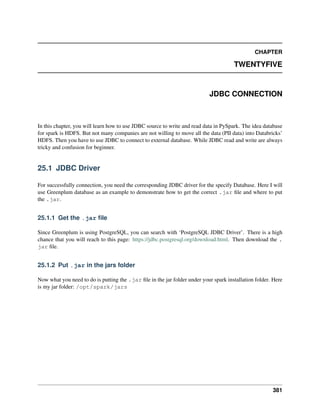
25 JDBC Connection 381
25.1 JDBC Driver . . . . . . . . . . . . . . . . . . . . . . . . . . . . . . . . . . . . . . . . . . 381
25.2 JDBC read . . . . . . . . . . . . . . . . . . . . . . . . . . . . . . . . . . . . . . . . . . 382
25.3 JDBC write . . . . . . . . . . . . . . . . . . . . . . . . . . . . . . . . . . . . . . . . . 383
25.4 JDBC temp_view . . . . . . . . . . . . . . . . . . . . . . . . . . . . . . . . . . . . . . 383
26 Databricks Tips 385
26.1 Display samples . . . . . . . . . . . . . . . . . . . . . . . . . . . . . . . . . . . . . . . . 385
26.2 Auto files download . . . . . . . . . . . . . . . . . . . . . . . . . . . . . . . . . . . . . . 385
26.3 Working with AWS S3 . . . . . . . . . . . . . . . . . . . . . . . . . . . . . . . . . . . . . 389
26.4 delta format . . . . . . . . . . . . . . . . . . . . . . . . . . . . . . . . . . . . . . . . . 403
26.5 mlflow . . . . . . . . . . . . . . . . . . . . . . . . . . . . . . . . . . . . . . . . . . . . 403
27 PySpark API 405
27.1 Stat API . . . . . . . . . . . . . . . . . . . . . . . . . . . . . . . . . . . . . . . . . . . . 405
27.2 Regression API . . . . . . . . . . . . . . . . . . . . . . . . . . . . . . . . . . . . . . . . . 411
27.3 Classification API . . . . . . . . . . . . . . . . . . . . . . . . . . . . . . . . . . . . . . . 430
27.4 Clustering API . . . . . . . . . . . . . . . . . . . . . . . . . . . . . . . . . . . . . . . . . 450
27.5 Recommendation API . . . . . . . . . . . . . . . . . . . . . . . . . . . . . . . . . . . . . 465
27.6 Pipeline API . . . . . . . . . . . . . . . . . . . . . . . . . . . . . . . . . . . . . . . . . . 470
27.7 Tuning API . . . . . . . . . . . . . . . . . . . . . . . . . . . . . . . . . . . . . . . . . . . 472
27.8 Evaluation API . . . . . . . . . . . . . . . . . . . . . . . . . . . . . . . . . . . . . . . . . 477
28 Main Reference 483
Bibliography 485
Python Module Index 487
Index 489
iv
Learning Apache Spark with Python
Welcome to my Learning Apache Spark with Python note! In this note, you will learn a wide array of
concepts about PySpark in Data Mining, Text Mining, Machine Learning and Deep Learning. The PDF
version can be downloaded from HERE.
CONTENTS 1
Learning Apache Spark with Python
2 CONTENTS
CHAPTER
ONE
PREFACE
1.1 About
1.1.1 About this note
This is a shared repository for Learning Apache Spark Notes. The PDF version can be downloaded from
HERE. The first version was posted on Github in ChenFeng ([Feng2017]). This shared repository mainly
contains the self-learning and self-teaching notes from Wenqiang during his IMA Data Science Fellowship.
The reader is referred to the repository https://github.com/runawayhorse001/LearningApacheSpark for more
details about the dataset and the .ipynb files.
In this repository, I try to use the detailed demo code and examples to show how to use each main functions.
If you find your work wasn’t cited in this note, please feel free to let me know.
Although I am by no means an data mining programming and Big Data expert, I decided that it would be
useful for me to share what I learned about PySpark programming in the form of easy tutorials with detailed
example. I hope those tutorials will be a valuable tool for your studies.
The tutorials assume that the reader has a preliminary knowledge of programming and Linux. And this
document is generated automatically by using sphinx.
1.1.2 About the author
• Wenqiang Feng
– Director of Data Science and PhD in Mathematics
– University of Tennessee at Knoxville
– Email: von198@gmail.com
• Biography
Wenqiang Feng is the Director of Data Science at American Express (AMEX). Prior to his time at
AMEX, Dr. Feng was a Sr. Data Scientist in Machine Learning Lab, H&R Block. Before joining
Block, Dr. Feng was a Data Scientist at Applied Analytics Group, DST (now SS&C). Dr. Feng’s
responsibilities include providing clients with access to cutting-edge skills and technologies, including
Big Data analytic solutions, advanced analytic and data enhancement techniques and modeling.
3
Learning Apache Spark with Python
Dr. Feng has deep analytic expertise in data mining, analytic systems, machine learning algorithms,
business intelligence, and applying Big Data tools to strategically solve industry problems in a cross-
functional business. Before joining DST, Dr. Feng was an IMA Data Science Fellow at The Institute
for Mathematics and its Applications (IMA) at the University of Minnesota. While there, he helped
startup companies make marketing decisions based on deep predictive analytics.
Dr. Feng graduated from University of Tennessee, Knoxville, with Ph.D. in Computational Mathe-
matics and Master’s degree in Statistics. He also holds Master’s degree in Computational Mathematics
from Missouri University of Science and Technology (MST) and Master’s degree in Applied Mathe-
matics from the University of Science and Technology of China (USTC).
• Declaration
The work of Wenqiang Feng was supported by the IMA, while working at IMA. However, any opin-
ion, finding, and conclusions or recommendations expressed in this material are those of the author
and do not necessarily reflect the views of the IMA, UTK, DST, HR & Block and AMEX.
1.2 Motivation for this tutorial
I was motivated by the IMA Data Science Fellowship project to learn PySpark. After that I was impressed
and attracted by the PySpark. And I foud that:
1. It is no exaggeration to say that Spark is the most powerful Bigdata tool.
2. However, I still found that learning Spark was a difficult process. I have to Google it and identify
which one is true. And it was hard to find detailed examples which I can easily learned the full
process in one file.
3. Good sources are expensive for a graduate student.
1.3 Copyright notice and license info
This Learning Apache Spark with Python PDF file is supposed to be a free and living document, which
is why its source is available online at https://runawayhorse001.github.io/LearningApacheSpark/pyspark.
pdf. But this document is licensed according to both MIT License and Creative Commons Attribution-
NonCommercial 2.0 Generic (CC BY-NC 2.0) License.
When you plan to use, copy, modify, merge, publish, distribute or sublicense, Please see the terms of
those licenses for more details and give the corresponding credits to the author.
4 Chapter 1. Preface
Learning Apache Spark with Python
1.4 Acknowledgement
At here, I would like to thank Ming Chen, Jian Sun and Zhongbo Li at the University of Tennessee at
Knoxville for the valuable discussion and thank the generous anonymous authors for providing the detailed
solutions and source code on the internet. Without those help, this repository would not have been possible
to be made. Wenqiang also would like to thank the Institute for Mathematics and Its Applications (IMA) at
University of Minnesota, Twin Cities for support during his IMA Data Scientist Fellow visit and thank TAN
THIAM HUAT and Mark Rabins for finding the typos.
A special thank you goes to Dr. Haiping Lu, Lecturer in Machine Learning at Department of Computer
Science, University of Sheffield, for recommending and heavily using my tutorial in his teaching class and
for the valuable suggestions.
1.5 Feedback and suggestions
Your comments and suggestions are highly appreciated. I am more than happy to receive corrections, sug-
gestions or feedbacks through email (von198@gmail.com) for improvements.
1.4. Acknowledgement 5
Learning Apache Spark with Python
6 Chapter 1. Preface
CHAPTER
TWO
WHY SPARK WITH PYTHON ?
Chinese proverb
Sharpening the knife longer can make it easier to hack the firewood – old Chinese proverb
I want to answer this question from the following two parts:
2.1 Why Spark?
I think the following four main reasons from Apache Spark™ official website are good enough to convince
you to use Spark.
1. Speed
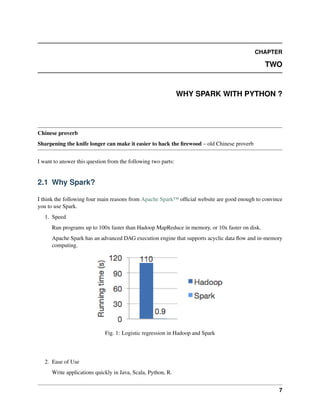
Run programs up to 100x faster than Hadoop MapReduce in memory, or 10x faster on disk.
Apache Spark has an advanced DAG execution engine that supports acyclic data flow and in-memory
computing.
Fig. 1: Logistic regression in Hadoop and Spark
2. Ease of Use
Write applications quickly in Java, Scala, Python, R.
7
Learning Apache Spark with Python
Spark offers over 80 high-level operators that make it easy to build parallel apps. And you can use it
interactively from the Scala, Python and R shells.
3. Generality
Combine SQL, streaming, and complex analytics.
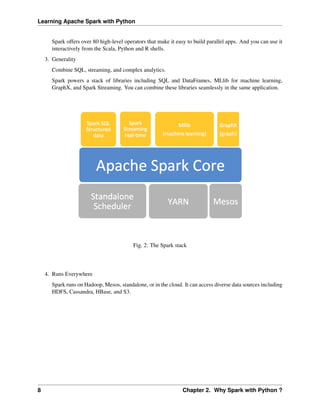
Spark powers a stack of libraries including SQL and DataFrames, MLlib for machine learning,
GraphX, and Spark Streaming. You can combine these libraries seamlessly in the same application.
Fig. 2: The Spark stack
4. Runs Everywhere
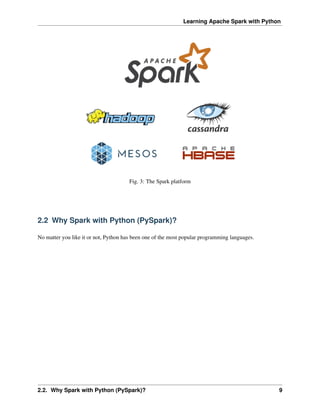
Spark runs on Hadoop, Mesos, standalone, or in the cloud. It can access diverse data sources including
HDFS, Cassandra, HBase, and S3.
8 Chapter 2. Why Spark with Python ?
Learning Apache Spark with Python
Fig. 3: The Spark platform
2.2 Why Spark with Python (PySpark)?
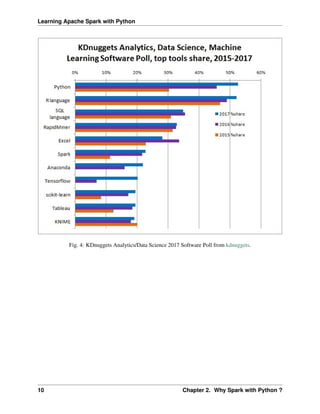
No matter you like it or not, Python has been one of the most popular programming languages.
2.2. Why Spark with Python (PySpark)? 9
Learning Apache Spark with Python
Fig. 4: KDnuggets Analytics/Data Science 2017 Software Poll from kdnuggets.
10 Chapter 2. Why Spark with Python ?
CHAPTER
THREE
CONFIGURE RUNNING PLATFORM
Chinese proverb
Good tools are prerequisite to the successful execution of a job. – old Chinese proverb
A good programming platform can save you lots of troubles and time. Herein I will only present how to
install my favorite programming platform and only show the easiest way which I know to set it up on Linux
system. If you want to install on the other operator system, you can Google it. In this section, you may learn
how to set up Pyspark on the corresponding programming platform and package.
3.1 Run on Databricks Community Cloud
If you don’t have any experience with Linux or Unix operator system, I would love to recommend you to
use Spark on Databricks Community Cloud. Since you do not need to setup the Spark and it’s totally free
for Community Edition. Please follow the steps listed below.
1. Sign up a account at: https://community.cloud.databricks.com/login.html
11
Learning Apache Spark with Python
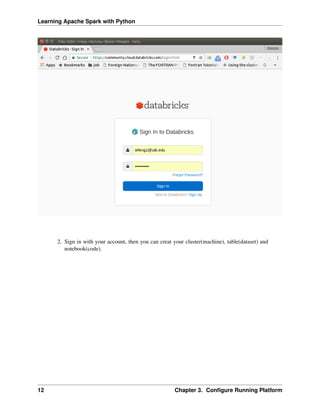
2. Sign in with your account, then you can creat your cluster(machine), table(dataset) and
notebook(code).
12 Chapter 3. Configure Running Platform
Learning Apache Spark with Python
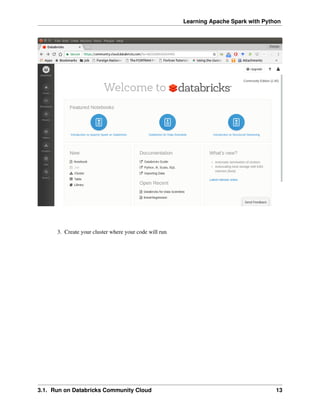
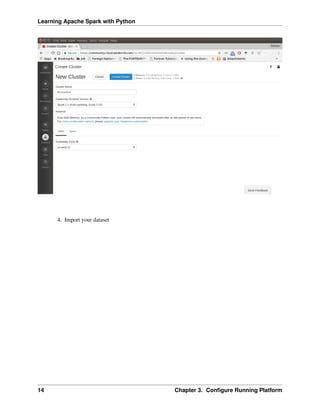
3. Create your cluster where your code will run
3.1. Run on Databricks Community Cloud 13
Learning Apache Spark with Python
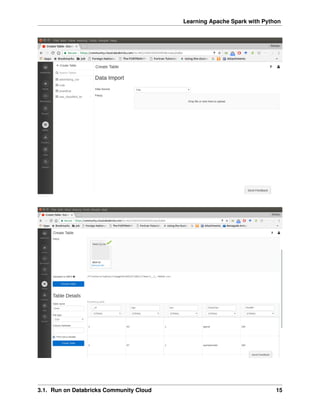
4. Import your dataset
14 Chapter 3. Configure Running Platform
Learning Apache Spark with Python
3.1. Run on Databricks Community Cloud 15
Learning Apache Spark with Python
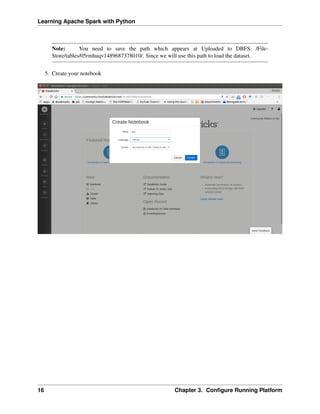
Note: You need to save the path which appears at Uploaded to DBFS: /File-
Store/tables/05rmhuqv1489687378010/. Since we will use this path to load the dataset.
5. Create your notebook
16 Chapter 3. Configure Running Platform
Learning Apache Spark with Python
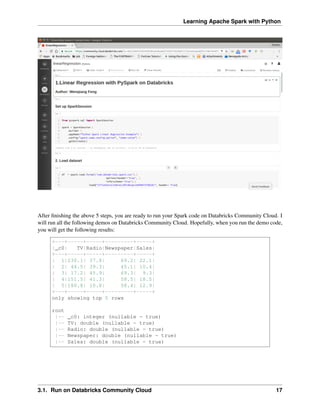
After finishing the above 5 steps, you are ready to run your Spark code on Databricks Community Cloud. I
will run all the following demos on Databricks Community Cloud. Hopefully, when you run the demo code,
you will get the following results:
+---+-----+-----+---------+-----+
|_c0| TV|Radio|Newspaper|Sales|
+---+-----+-----+---------+-----+
| 1|230.1| 37.8| 69.2| 22.1|
| 2| 44.5| 39.3| 45.1| 10.4|
| 3| 17.2| 45.9| 69.3| 9.3|
| 4|151.5| 41.3| 58.5| 18.5|
| 5|180.8| 10.8| 58.4| 12.9|
+---+-----+-----+---------+-----+
only showing top 5 rows
root
|-- _c0: integer (nullable = true)
|-- TV: double (nullable = true)
|-- Radio: double (nullable = true)
|-- Newspaper: double (nullable = true)
|-- Sales: double (nullable = true)
3.1. Run on Databricks Community Cloud 17
Learning Apache Spark with Python
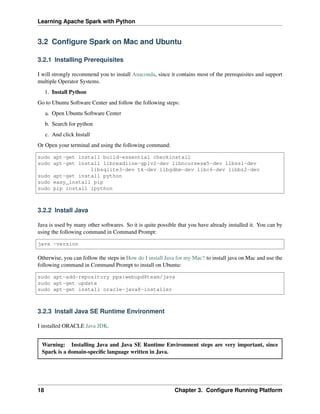
3.2 Configure Spark on Mac and Ubuntu
3.2.1 Installing Prerequisites
I will strongly recommend you to install Anaconda, since it contains most of the prerequisites and support
multiple Operator Systems.
1. Install Python
Go to Ubuntu Software Center and follow the following steps:
a. Open Ubuntu Software Center
b. Search for python
c. And click Install
Or Open your terminal and using the following command:
sudo apt-get install build-essential checkinstall
sudo apt-get install libreadline-gplv2-dev libncursesw5-dev libssl-dev
libsqlite3-dev tk-dev libgdbm-dev libc6-dev libbz2-dev
sudo apt-get install python
sudo easy_install pip
sudo pip install ipython
3.2.2 Install Java
Java is used by many other softwares. So it is quite possible that you have already installed it. You can by
using the following command in Command Prompt:
java -version
Otherwise, you can follow the steps in How do I install Java for my Mac? to install java on Mac and use the
following command in Command Prompt to install on Ubuntu:
sudo apt-add-repository ppa:webupd8team/java
sudo apt-get update
sudo apt-get install oracle-java8-installer
3.2.3 Install Java SE Runtime Environment
I installed ORACLE Java JDK.
Warning: Installing Java and Java SE Runtime Environment steps are very important, since
Spark is a domain-specific language written in Java.
18 Chapter 3. Configure Running Platform
Learning Apache Spark with Python
You can check if your Java is available and find it’s version by using the following command in Command
Prompt:
java -version
If your Java is installed successfully, you will get the similar results as follows:
java version "1.8.0_131"
Java(TM) SE Runtime Environment (build 1.8.0_131-b11)
Java HotSpot(TM) 64-Bit Server VM (build 25.131-b11, mixed mode)
3.2.4 Install Apache Spark
Actually, the Pre-build version doesn’t need installation. You can use it when you unpack it.
a. Download: You can get the Pre-built Apache Spark™ from Download Apache Spark™.
b. Unpack: Unpack the Apache Spark™ to the path where you want to install the Spark.
c. Test: Test the Prerequisites: change the direction spark-#.#.#-bin-hadoop#.#/
bin and run
./pyspark
Python 2.7.13 |Anaconda 4.4.0 (x86_64)| (default, Dec 20 2016,
˓
→23:05:08)
[GCC 4.2.1 Compatible Apple LLVM 6.0 (clang-600.0.57)] on darwin
Type "help", "copyright", "credits" or "license" for more
˓
→information.
Anaconda is brought to you by Continuum Analytics.
Please check out: http://continuum.io/thanks and https://anaconda.org
Using Spark's default log4j profile: org/apache/spark/log4j-defaults.
˓
→properties
Setting default log level to "WARN".
To adjust logging level use sc.setLogLevel(newLevel). For SparkR,
use setLogLevel(newLevel).
17/08/30 13:30:12 WARN NativeCodeLoader: Unable to load native-hadoop
library for your platform... using builtin-java classes where
˓
→applicable
17/08/30 13:30:17 WARN ObjectStore: Failed to get database global_
˓
→temp,
returning NoSuchObjectException
Welcome to
____ __
/ __/__ ___ _____/ /__
_ / _ / _ `/ __/ '_/
/__ / .__/_,_/_/ /_/_ version 2.1.1
/_/
Using Python version 2.7.13 (default, Dec 20 2016 23:05:08)
SparkSession available as 'spark'.
3.2. Configure Spark on Mac and Ubuntu 19
Learning Apache Spark with Python
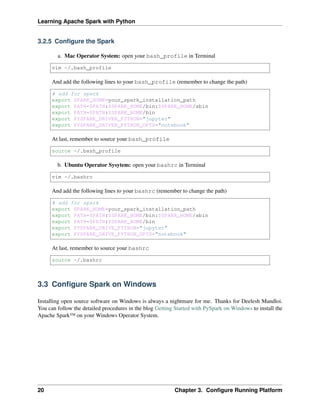
3.2.5 Configure the Spark
a. Mac Operator System: open your bash_profile in Terminal
vim ~/.bash_profile
And add the following lines to your bash_profile (remember to change the path)
# add for spark
export SPARK_HOME=your_spark_installation_path
export PATH=$PATH:$SPARK_HOME/bin:$SPARK_HOME/sbin
export PATH=$PATH:$SPARK_HOME/bin
export PYSPARK_DRIVER_PYTHON="jupyter"
export PYSPARK_DRIVER_PYTHON_OPTS="notebook"
At last, remember to source your bash_profile
source ~/.bash_profile
b. Ubuntu Operator Sysytem: open your bashrc in Terminal
vim ~/.bashrc
And add the following lines to your bashrc (remember to change the path)
# add for spark
export SPARK_HOME=your_spark_installation_path
export PATH=$PATH:$SPARK_HOME/bin:$SPARK_HOME/sbin
export PATH=$PATH:$SPARK_HOME/bin
export PYSPARK_DRIVE_PYTHON="jupyter"
export PYSPARK_DRIVE_PYTHON_OPTS="notebook"
At last, remember to source your bashrc
source ~/.bashrc
3.3 Configure Spark on Windows
Installing open source software on Windows is always a nightmare for me. Thanks for Deelesh Mandloi.
You can follow the detailed procedures in the blog Getting Started with PySpark on Windows to install the
Apache Spark™ on your Windows Operator System.
20 Chapter 3. Configure Running Platform
Learning Apache Spark with Python
3.4 PySpark With Text Editor or IDE
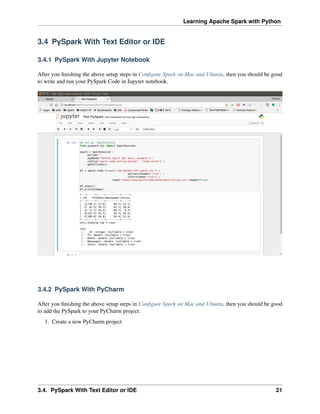
3.4.1 PySpark With Jupyter Notebook
After you finishing the above setup steps in Configure Spark on Mac and Ubuntu, then you should be good
to write and run your PySpark Code in Jupyter notebook.
3.4.2 PySpark With PyCharm
After you finishing the above setup steps in Configure Spark on Mac and Ubuntu, then you should be good
to add the PySpark to your PyCharm project.
1. Create a new PyCharm project
3.4. PySpark With Text Editor or IDE 21
Learning Apache Spark with Python
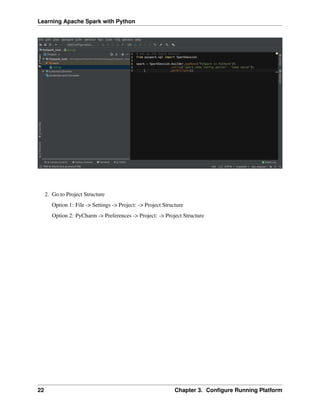
2. Go to Project Structure
Option 1: File -> Settings -> Project: -> Project Structure
Option 2: PyCharm -> Preferences -> Project: -> Project Structure
22 Chapter 3. Configure Running Platform
Learning Apache Spark with Python
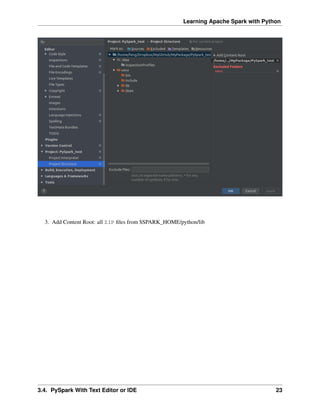
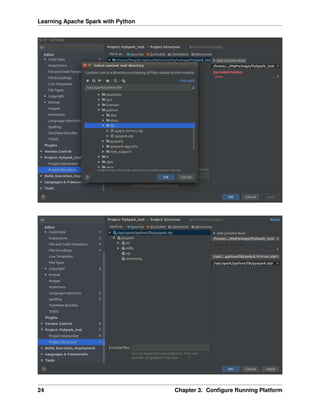
3. Add Content Root: all ZIP files from $SPARK_HOME/python/lib
3.4. PySpark With Text Editor or IDE 23
Learning Apache Spark with Python
24 Chapter 3. Configure Running Platform
Learning Apache Spark with Python
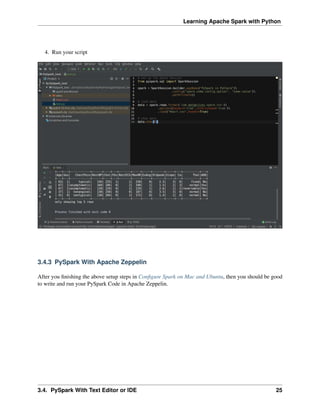
4. Run your script
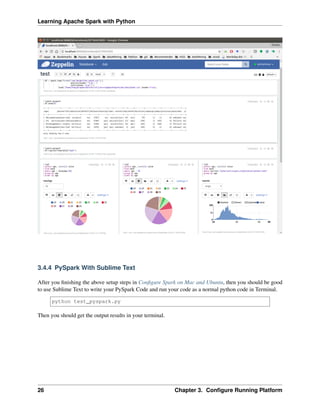
3.4.3 PySpark With Apache Zeppelin
After you finishing the above setup steps in Configure Spark on Mac and Ubuntu, then you should be good
to write and run your PySpark Code in Apache Zeppelin.
3.4. PySpark With Text Editor or IDE 25
Learning Apache Spark with Python
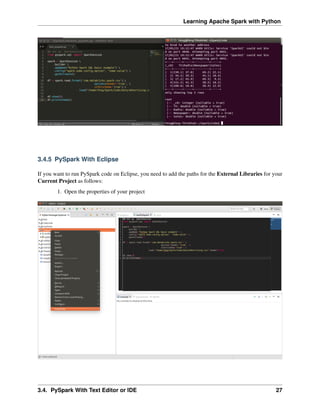
3.4.4 PySpark With Sublime Text
After you finishing the above setup steps in Configure Spark on Mac and Ubuntu, then you should be good
to use Sublime Text to write your PySpark Code and run your code as a normal python code in Terminal.
python test_pyspark.py
Then you should get the output results in your terminal.
26 Chapter 3. Configure Running Platform
Learning Apache Spark with Python
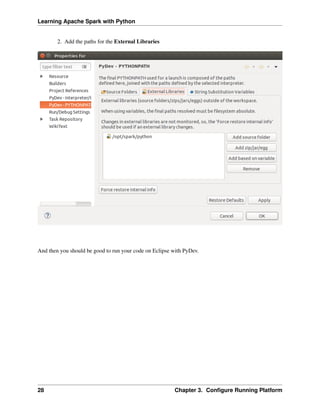
3.4.5 PySpark With Eclipse
If you want to run PySpark code on Eclipse, you need to add the paths for the External Libraries for your
Current Project as follows:
1. Open the properties of your project
3.4. PySpark With Text Editor or IDE 27
Learning Apache Spark with Python
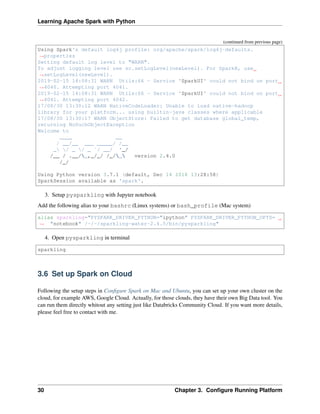
2. Add the paths for the External Libraries
And then you should be good to run your code on Eclipse with PyDev.
28 Chapter 3. Configure Running Platform
Learning Apache Spark with Python
3.5 PySparkling Water: Spark + H2O
1. Download Sparkling Water from: https://s3.amazonaws.com/h2o-release/sparkling-water/
rel-2.4/5/index.html
2. Test PySparking
unzip sparkling-water-2.4.5.zip
cd ~/sparkling-water-2.4.5/bin
./pysparkling
If you have a correct setup for PySpark, then you will get the following results:
Using Spark defined in the SPARK_HOME=/Users/dt216661/spark environmental
˓
→property
Python 3.7.1 (default, Dec 14 2018, 13:28:58)
[GCC 4.2.1 Compatible Apple LLVM 6.0 (clang-600.0.57)] on darwin
Type "help", "copyright", "credits" or "license" for more information.
2019-02-15 14:08:30 WARN NativeCodeLoader:62 - Unable to load native-hadoop
˓
→library for your platform... using builtin-java classes where applicable
Setting default log level to "WARN".
(continues on next page)
3.5. PySparkling Water: Spark + H2O 29
Learning Apache Spark with Python
(continued from previous page)
Using Spark's default log4j profile: org/apache/spark/log4j-defaults.
˓
→properties
Setting default log level to "WARN".
To adjust logging level use sc.setLogLevel(newLevel). For SparkR, use
˓
→setLogLevel(newLevel).
2019-02-15 14:08:31 WARN Utils:66 - Service 'SparkUI' could not bind on port
˓
→4040. Attempting port 4041.
2019-02-15 14:08:31 WARN Utils:66 - Service 'SparkUI' could not bind on port
˓
→4041. Attempting port 4042.
17/08/30 13:30:12 WARN NativeCodeLoader: Unable to load native-hadoop
library for your platform... using builtin-java classes where applicable
17/08/30 13:30:17 WARN ObjectStore: Failed to get database global_temp,
returning NoSuchObjectException
Welcome to
____ __
/ __/__ ___ _____/ /__
_ / _ / _ `/ __/ '_/
/__ / .__/_,_/_/ /_/_ version 2.4.0
/_/
Using Python version 3.7.1 (default, Dec 14 2018 13:28:58)
SparkSession available as 'spark'.
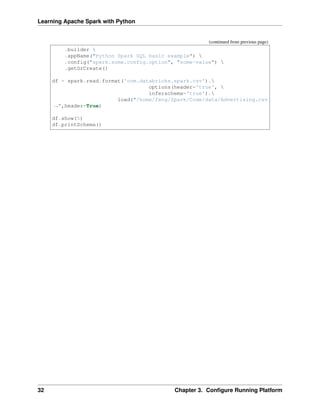
3. Setup pysparkling with Jupyter notebook
Add the following alias to your bashrc (Linux systems) or bash_profile (Mac system)
alias sparkling="PYSPARK_DRIVER_PYTHON="ipython" PYSPARK_DRIVER_PYTHON_OPTS=
˓
→ "notebook" /~/~/sparkling-water-2.4.5/bin/pysparkling"
4. Open pysparkling in terminal
sparkling
3.6 Set up Spark on Cloud
Following the setup steps in Configure Spark on Mac and Ubuntu, you can set up your own cluster on the
cloud, for example AWS, Google Cloud. Actually, for those clouds, they have their own Big Data tool. You
can run them directly whitout any setting just like Databricks Community Cloud. If you want more details,
please feel free to contact with me.
30 Chapter 3. Configure Running Platform
Learning Apache Spark with Python
3.7 PySpark on Colaboratory
Colaboratory is a free Jupyter notebook environment that requires no setup and runs entirely in the cloud.
3.7.1 Installation
!pip install pyspark
3.7.2 Testing
from pyspark.sql import SparkSession
spark = SparkSession 
.builder 
.appName("Python Spark create RDD example") 
.config("spark.some.config.option", "some-value") 
.getOrCreate()
df = spark.sparkContext
.parallelize([(1, 2, 3, 'a b c'),
(4, 5, 6, 'd e f'),
(7, 8, 9, 'g h i')])
.toDF(['col1', 'col2', 'col3','col4'])
df.show()
Output:
+----+----+----+-----+
|col1|col2|col3| col4|
+----+----+----+-----+
| 1| 2| 3|a b c|
| 4| 5| 6|d e f|
| 7| 8| 9|g h i|
+----+----+----+-----+
3.8 Demo Code in this Section
The Jupyter notebook can be download from installation on colab.
• Python Source code
## set up SparkSession
from pyspark.sql import SparkSession
spark = SparkSession 
(continues on next page)
3.7. PySpark on Colaboratory 31
Learning Apache Spark with Python
(continued from previous page)
.builder 
.appName("Python Spark SQL basic example") 
.config("spark.some.config.option", "some-value") 
.getOrCreate()
df = spark.read.format('com.databricks.spark.csv').
options(header='true', 
inferschema='true').
load("/home/feng/Spark/Code/data/Advertising.csv
˓
→",header=True)
df.show(5)
df.printSchema()
32 Chapter 3. Configure Running Platform
CHAPTER
FOUR
AN INTRODUCTION TO APACHE SPARK
Chinese proverb
Know yourself and know your enemy, and you will never be defeated – idiom, from Sunzi’s Art of War
4.1 Core Concepts
Most of the following content comes from [Kirillov2016]. So the copyright belongs to Anton Kirillov. I
will refer you to get more details from Apache Spark core concepts, architecture and internals.
Before diving deep into how Apache Spark works, lets understand the jargon of Apache Spark
• Job: A piece of code which reads some input from HDFS or local, performs some computation on the
data and writes some output data.
• Stages: Jobs are divided into stages. Stages are classified as a Map or reduce stages (Its easier to
understand if you have worked on Hadoop and want to correlate). Stages are divided based on com-
putational boundaries, all computations (operators) cannot be Updated in a single Stage. It happens
over many stages.
• Tasks: Each stage has some tasks, one task per partition. One task is executed on one partition of data
on one executor (machine).
• DAG: DAG stands for Directed Acyclic Graph, in the present context its a DAG of operators.
• Executor: The process responsible for executing a task.
• Master: The machine on which the Driver program runs
• Slave: The machine on which the Executor program runs
33
Learning Apache Spark with Python
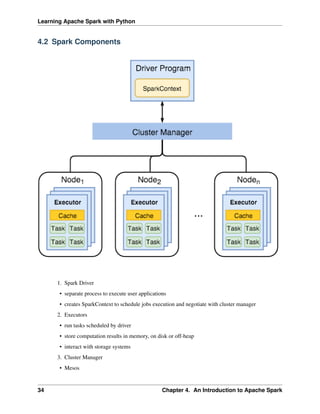
4.2 Spark Components
1. Spark Driver
• separate process to execute user applications
• creates SparkContext to schedule jobs execution and negotiate with cluster manager
2. Executors
• run tasks scheduled by driver
• store computation results in memory, on disk or off-heap
• interact with storage systems
3. Cluster Manager
• Mesos
34 Chapter 4. An Introduction to Apache Spark
Learning Apache Spark with Python
• YARN
• Spark Standalone
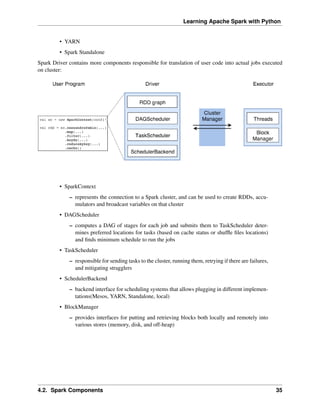
Spark Driver contains more components responsible for translation of user code into actual jobs executed
on cluster:
• SparkContext
– represents the connection to a Spark cluster, and can be used to create RDDs, accu-
mulators and broadcast variables on that cluster
• DAGScheduler
– computes a DAG of stages for each job and submits them to TaskScheduler deter-
mines preferred locations for tasks (based on cache status or shuffle files locations)
and finds minimum schedule to run the jobs
• TaskScheduler
– responsible for sending tasks to the cluster, running them, retrying if there are failures,
and mitigating stragglers
• SchedulerBackend
– backend interface for scheduling systems that allows plugging in different implemen-
tations(Mesos, YARN, Standalone, local)
• BlockManager
– provides interfaces for putting and retrieving blocks both locally and remotely into
various stores (memory, disk, and off-heap)
4.2. Spark Components 35
Learning Apache Spark with Python
4.3 Architecture
4.4 How Spark Works?
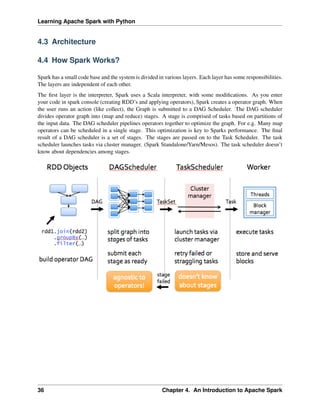
Spark has a small code base and the system is divided in various layers. Each layer has some responsibilities.
The layers are independent of each other.
The first layer is the interpreter, Spark uses a Scala interpreter, with some modifications. As you enter
your code in spark console (creating RDD’s and applying operators), Spark creates a operator graph. When
the user runs an action (like collect), the Graph is submitted to a DAG Scheduler. The DAG scheduler
divides operator graph into (map and reduce) stages. A stage is comprised of tasks based on partitions of
the input data. The DAG scheduler pipelines operators together to optimize the graph. For e.g. Many map
operators can be scheduled in a single stage. This optimization is key to Sparks performance. The final
result of a DAG scheduler is a set of stages. The stages are passed on to the Task Scheduler. The task
scheduler launches tasks via cluster manager. (Spark Standalone/Yarn/Mesos). The task scheduler doesn’t
know about dependencies among stages.
36 Chapter 4. An Introduction to Apache Spark
CHAPTER
FIVE
PROGRAMMING WITH RDDS
Chinese proverb
If you only know yourself, but not your opponent, you may win or may lose. If you know neither
yourself nor your enemy, you will always endanger yourself – idiom, from Sunzi’s Art of War
RDD represents Resilient Distributed Dataset. An RDD in Spark is simply an immutable distributed
collection of objects sets. Each RDD is split into multiple partitions (similar pattern with smaller sets),
which may be computed on different nodes of the cluster.
5.1 Create RDD
Usually, there are two popular ways to create the RDDs: loading an external dataset, or distributing a
set of collection of objects. The following examples show some simplest ways to create RDDs by using
parallelize() fucntion which takes an already existing collection in your program and pass the same
to the Spark Context.
1. By using parallelize( ) function
from pyspark.sql import SparkSession
spark = SparkSession 
.builder 
.appName("Python Spark create RDD example") 
.config("spark.some.config.option", "some-value") 
.getOrCreate()
df = spark.sparkContext.parallelize([(1, 2, 3, 'a b c'),
(4, 5, 6, 'd e f'),
(7, 8, 9, 'g h i')]).toDF(['col1', 'col2', 'col3','col4'])
Then you will get the RDD data:
df.show()
+----+----+----+-----+
(continues on next page)
37
Learning Apache Spark with Python
(continued from previous page)
|col1|col2|col3| col4|
+----+----+----+-----+
| 1| 2| 3|a b c|
| 4| 5| 6|d e f|
| 7| 8| 9|g h i|
+----+----+----+-----+
from pyspark.sql import SparkSession
spark = SparkSession 
.builder 
.appName("Python Spark create RDD example") 
.config("spark.some.config.option", "some-value") 
.getOrCreate()
myData = spark.sparkContext.parallelize([(1,2), (3,4), (5,6), (7,8), (9,10)])
Then you will get the RDD data:
myData.collect()
[(1, 2), (3, 4), (5, 6), (7, 8), (9, 10)]
2. By using createDataFrame( ) function
from pyspark.sql import SparkSession
spark = SparkSession 
.builder 
.appName("Python Spark create RDD example") 
.config("spark.some.config.option", "some-value") 
.getOrCreate()
Employee = spark.createDataFrame([
('1', 'Joe', '70000', '1'),
('2', 'Henry', '80000', '2'),
('3', 'Sam', '60000', '2'),
('4', 'Max', '90000', '1')],
['Id', 'Name', 'Sallary','DepartmentId']
)
Then you will get the RDD data:
+---+-----+-------+------------+
| Id| Name|Sallary|DepartmentId|
+---+-----+-------+------------+
| 1| Joe| 70000| 1|
| 2|Henry| 80000| 2|
| 3| Sam| 60000| 2|
| 4| Max| 90000| 1|
+---+-----+-------+------------+
38 Chapter 5. Programming with RDDs
Learning Apache Spark with Python
3. By using read and load functions
a. Read dataset from .csv file
## set up SparkSession
from pyspark.sql import SparkSession
spark = SparkSession 
.builder 
.appName("Python Spark create RDD example") 
.config("spark.some.config.option", "some-value") 
.getOrCreate()
df = spark.read.format('com.databricks.spark.csv').
options(header='true', 
inferschema='true').
load("/home/feng/Spark/Code/data/Advertising.csv",
˓
→header=True)
df.show(5)
df.printSchema()
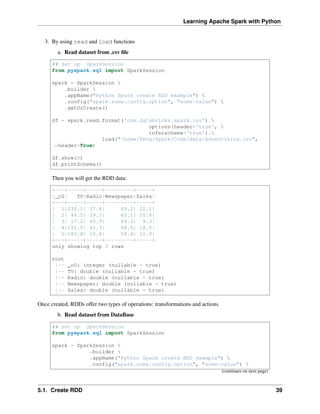
Then you will get the RDD data:
+---+-----+-----+---------+-----+
|_c0| TV|Radio|Newspaper|Sales|
+---+-----+-----+---------+-----+
| 1|230.1| 37.8| 69.2| 22.1|
| 2| 44.5| 39.3| 45.1| 10.4|
| 3| 17.2| 45.9| 69.3| 9.3|
| 4|151.5| 41.3| 58.5| 18.5|
| 5|180.8| 10.8| 58.4| 12.9|
+---+-----+-----+---------+-----+
only showing top 5 rows
root
|-- _c0: integer (nullable = true)
|-- TV: double (nullable = true)
|-- Radio: double (nullable = true)
|-- Newspaper: double (nullable = true)
|-- Sales: double (nullable = true)
Once created, RDDs offer two types of operations: transformations and actions.
b. Read dataset from DataBase
## set up SparkSession
from pyspark.sql import SparkSession
spark = SparkSession 
.builder 
.appName("Python Spark create RDD example") 
.config("spark.some.config.option", "some-value") 
(continues on next page)
5.1. Create RDD 39
Learning Apache Spark with Python
(continued from previous page)
.getOrCreate()
## User information
user = 'your_username'
pw = 'your_password'
## Database information
table_name = 'table_name'
url = 'jdbc:postgresql://##.###.###.##:5432/dataset?user='+user+'&
˓
→password='+pw
properties ={'driver': 'org.postgresql.Driver', 'password': pw,'user
˓
→': user}
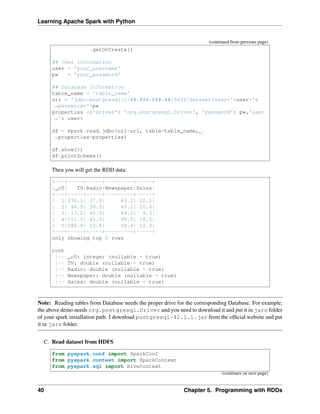
df = spark.read.jdbc(url=url, table=table_name,
˓
→properties=properties)
df.show(5)
df.printSchema()
Then you will get the RDD data:
+---+-----+-----+---------+-----+
|_c0| TV|Radio|Newspaper|Sales|
+---+-----+-----+---------+-----+
| 1|230.1| 37.8| 69.2| 22.1|
| 2| 44.5| 39.3| 45.1| 10.4|
| 3| 17.2| 45.9| 69.3| 9.3|
| 4|151.5| 41.3| 58.5| 18.5|
| 5|180.8| 10.8| 58.4| 12.9|
+---+-----+-----+---------+-----+
only showing top 5 rows
root
|-- _c0: integer (nullable = true)
|-- TV: double (nullable = true)
|-- Radio: double (nullable = true)
|-- Newspaper: double (nullable = true)
|-- Sales: double (nullable = true)
Note: Reading tables from Database needs the proper drive for the corresponding Database. For example,
the above demo needs org.postgresql.Driver and you need to download it and put it in jars folder
of your spark installation path. I download postgresql-42.1.1.jar from the official website and put
it in jars folder.
C. Read dataset from HDFS
from pyspark.conf import SparkConf
from pyspark.context import SparkContext
from pyspark.sql import HiveContext
(continues on next page)
40 Chapter 5. Programming with RDDs
Learning Apache Spark with Python
(continued from previous page)
sc= SparkContext('local','example')
hc = HiveContext(sc)
tf1 = sc.textFile("hdfs://cdhstltest/user/data/demo.CSV")
print(tf1.first())
hc.sql("use intg_cme_w")
spf = hc.sql("SELECT * FROM spf LIMIT 100")
print(spf.show(5))
5.2 Spark Operations
Warning: All the figures below are from Jeffrey Thompson. The interested reader is referred to pyspark
pictures
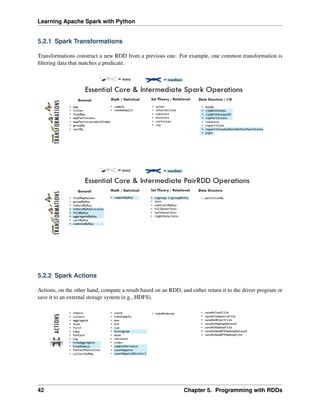
There are two main types of Spark operations: Transformations and Actions [Karau2015].
Note: Some people defined three types of operations: Transformations, Actions and Shuffles.
5.2. Spark Operations 41
Learning Apache Spark with Python
5.2.1 Spark Transformations
Transformations construct a new RDD from a previous one. For example, one common transformation is
filtering data that matches a predicate.
5.2.2 Spark Actions
Actions, on the other hand, compute a result based on an RDD, and either return it to the driver program or
save it to an external storage system (e.g., HDFS).
42 Chapter 5. Programming with RDDs
Learning Apache Spark with Python
5.3 rdd.DataFrame vs pd.DataFrame
5.3.1 Create DataFrame
1. From List
my_list = [['a', 1, 2], ['b', 2, 3],['c', 3, 4]]
col_name = ['A', 'B', 'C']
:: Python Code:
# caution for the columns=
pd.DataFrame(my_list,columns= col_name)
#
spark.createDataFrame(my_list, col_name).show()
:: Comparison:
+---+---+---+
| A| B| C|
A B C +---+---+---+
0 a 1 2 | a| 1| 2|
1 b 2 3 | b| 2| 3|
2 c 3 4 | c| 3| 4|
+---+---+---+
Attention: Pay attentation to the parameter columns= in pd.DataFrame. Since the default value
will make the list as rows.
:: Python Code:
# caution for the columns=
pd.DataFrame(my_list, columns= col_name)
#
pd.DataFrame(my_list, col_name)
:: Comparison:
5.3. rdd.DataFrame vs pd.DataFrame 43
Learning Apache Spark with Python
A B C 0 1 2
0 a 1 2 A a 1 2
1 b 2 3 B b 2 3
2 c 3 4 C c 3 4
2. From Dict
d = {'A': [0, 1, 0],
'B': [1, 0, 1],
'C': [1, 0, 0]}
:: Python Code:
pd.DataFrame(d)for
# Tedious for PySpark
spark.createDataFrame(np.array(list(d.values())).T.tolist(),list(d.keys())).
˓
→show()
:: Comparison:
+---+---+---+
| A| B| C|
A B C +---+---+---+
0 0 1 1 | 0| 1| 1|
1 1 0 0 | 1| 0| 0|
2 0 1 0 | 0| 1| 0|
+---+---+---+
5.3.2 Load DataFrame
1. From DataBase
Most of time, you need to share your code with your colleagues or release your code for Code Review or
Quality assurance(QA). You will definitely do not want to have your User Information in the code.
So you can save them in login.txt:
runawayhorse001
PythonTips
and use the following code to import your User Information:
#User Information
try:
login = pd.read_csv(r'login.txt', header=None)
user = login[0][0]
pw = login[0][1]
print('User information is ready!')
except:
print('Login information is not available!!!')
(continues on next page)
44 Chapter 5. Programming with RDDs
Learning Apache Spark with Python
(continued from previous page)
#Database information
host = '##.###.###.##'
db_name = 'db_name'
table_name = 'table_name'
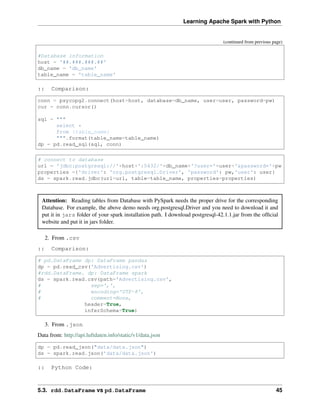
:: Comparison:
conn = psycopg2.connect(host=host, database=db_name, user=user, password=pw)
cur = conn.cursor()
sql = """
select *
from {table_name}
""".format(table_name=table_name)
dp = pd.read_sql(sql, conn)
# connect to database
url = 'jdbc:postgresql://'+host+':5432/'+db_name+'?user='+user+'&password='+pw
properties ={'driver': 'org.postgresql.Driver', 'password': pw,'user': user}
ds = spark.read.jdbc(url=url, table=table_name, properties=properties)
Attention: Reading tables from Database with PySpark needs the proper drive for the corresponding
Database. For example, the above demo needs org.postgresql.Driver and you need to download it and
put it in jars folder of your spark installation path. I download postgresql-42.1.1.jar from the official
website and put it in jars folder.
2. From .csv
:: Comparison:
# pd.DataFrame dp: DataFrame pandas
dp = pd.read_csv('Advertising.csv')
#rdd.DataFrame. dp: DataFrame spark
ds = spark.read.csv(path='Advertising.csv',
# sep=',',
# encoding='UTF-8',
# comment=None,
header=True,
inferSchema=True)
3. From .json
Data from: http://api.luftdaten.info/static/v1/data.json
dp = pd.read_json("data/data.json")
ds = spark.read.json('data/data.json')
:: Python Code:
5.3. rdd.DataFrame vs pd.DataFrame 45
Learning Apache Spark with Python
dp[['id','timestamp']].head(4)
#
ds[['id','timestamp']].show(4)
:: Comparison:
+----------+------------------
˓
→-+
| id|
˓
→timestamp|
id timestamp +----------+------------------
˓
→-+
0 2994551481 2019-02-28 17:23:52 |2994551481|2019-02-28
˓
→17:23:52|
1 2994551482 2019-02-28 17:23:52 |2994551482|2019-02-28
˓
→17:23:52|
2 2994551483 2019-02-28 17:23:52 |2994551483|2019-02-28
˓
→17:23:52|
3 2994551484 2019-02-28 17:23:52 |2994551484|2019-02-28
˓
→17:23:52|
+----------+------------------
˓
→-+
only showing top 4 rows
5.3.3 First n Rows
:: Python Code:
dp.head(4)
#
ds.show(4)
:: Comparison:
+-----+-----+---------+-----+
| TV|Radio|Newspaper|Sales|
TV Radio Newspaper Sales +-----+-----+---------+-----+
0 230.1 37.8 69.2 22.1 |230.1| 37.8| 69.2| 22.1|
1 44.5 39.3 45.1 10.4 | 44.5| 39.3| 45.1| 10.4|
2 17.2 45.9 69.3 9.3 | 17.2| 45.9| 69.3| 9.3|
3 151.5 41.3 58.5 18.5 |151.5| 41.3| 58.5| 18.5|
+-----+-----+---------+-----+
only showing top 4 rows
46 Chapter 5. Programming with RDDs
Learning Apache Spark with Python
5.3.4 Column Names
:: Python Code:
dp.columns
#
ds.columns
:: Comparison:
Index(['TV', 'Radio', 'Newspaper', 'Sales'], dtype='object')
['TV', 'Radio', 'Newspaper', 'Sales']
5.3.5 Data types
:: Python Code:
dp.dtypes
#
ds.dtypes
:: Comparison:
TV float64 [('TV', 'double'),
Radio float64 ('Radio', 'double'),
Newspaper float64 ('Newspaper', 'double'),
Sales float64 ('Sales', 'double')]
dtype: object
5.3.6 Fill Null
my_list = [['male', 1, None], ['female', 2, 3],['male', 3, 4]]
dp = pd.DataFrame(my_list,columns=['A', 'B', 'C'])
ds = spark.createDataFrame(my_list, ['A', 'B', 'C'])
#
dp.head()
ds.show()
:: Comparison:
+------+---+----+
| A| B| C|
A B C +------+---+----+
0 male 1 NaN | male| 1|null|
1 female 2 3.0 |female| 2| 3|
2 male 3 4.0 | male| 3| 4|
+------+---+----+
:: Python Code:
5.3. rdd.DataFrame vs pd.DataFrame 47
Learning Apache Spark with Python
dp.fillna(-99)
#
ds.fillna(-99).show()
:: Comparison:
+------+---+----+
| A| B| C|
A B C +------+---+----+
0 male 1 -99 | male| 1| -99|
1 female 2 3.0 |female| 2| 3|
2 male 3 4.0 | male| 3| 4|
+------+---+----+
5.3.7 Replace Values
:: Python Code:
# caution: you need to chose specific col
dp.A.replace(['male', 'female'],[1, 0], inplace=True)
dp
#caution: Mixed type replacements are not supported
ds.na.replace(['male','female'],['1','0']).show()
:: Comparison:
+---+---+----+
| A| B| C|
A B C +---+---+----+
0 1 1 NaN | 1| 1|null|
1 0 2 3.0 | 0| 2| 3|
2 1 3 4.0 | 1| 3| 4|
+---+---+----+
5.3.8 Rename Columns
1. Rename all columns
:: Python Code:
dp.columns = ['a','b','c','d']
dp.head(4)
#
ds.toDF('a','b','c','d').show(4)
:: Comparison:
+-----+----+----+----+
| a| b| c| d|
(continues on next page)
48 Chapter 5. Programming with RDDs
Learning Apache Spark with Python
(continued from previous page)
a b c d +-----+----+----+----+
0 230.1 37.8 69.2 22.1 |230.1|37.8|69.2|22.1|
1 44.5 39.3 45.1 10.4 | 44.5|39.3|45.1|10.4|
2 17.2 45.9 69.3 9.3 | 17.2|45.9|69.3| 9.3|
3 151.5 41.3 58.5 18.5 |151.5|41.3|58.5|18.5|
+-----+----+----+----+
only showing top 4 rows
2. Rename one or more columns
mapping = {'Newspaper':'C','Sales':'D'}
:: Python Code:
dp.rename(columns=mapping).head(4)
#
new_names = [mapping.get(col,col) for col in ds.columns]
ds.toDF(*new_names).show(4)
:: Comparison:
+-----+-----+----+----+
| TV|Radio| C| D|
TV Radio C D +-----+-----+----+----+
0 230.1 37.8 69.2 22.1 |230.1| 37.8|69.2|22.1|
1 44.5 39.3 45.1 10.4 | 44.5| 39.3|45.1|10.4|
2 17.2 45.9 69.3 9.3 | 17.2| 45.9|69.3| 9.3|
3 151.5 41.3 58.5 18.5 |151.5| 41.3|58.5|18.5|
+-----+-----+----+----+
only showing top 4 rows
Note: You can also use withColumnRenamed to rename one column in PySpark.
:: Python Code:
ds.withColumnRenamed('Newspaper','Paper').show(4
:: Comparison:
+-----+-----+-----+-----+
| TV|Radio|Paper|Sales|
+-----+-----+-----+-----+
|230.1| 37.8| 69.2| 22.1|
| 44.5| 39.3| 45.1| 10.4|
| 17.2| 45.9| 69.3| 9.3|
|151.5| 41.3| 58.5| 18.5|
+-----+-----+-----+-----+
only showing top 4 rows
5.3. rdd.DataFrame vs pd.DataFrame 49
Learning Apache Spark with Python
5.3.9 Drop Columns
drop_name = ['Newspaper','Sales']
:: Python Code:
dp.drop(drop_name,axis=1).head(4)
#
ds.drop(*drop_name).show(4)
:: Comparison:
+-----+-----+
| TV|Radio|
TV Radio +-----+-----+
0 230.1 37.8 |230.1| 37.8|
1 44.5 39.3 | 44.5| 39.3|
2 17.2 45.9 | 17.2| 45.9|
3 151.5 41.3 |151.5| 41.3|
+-----+-----+
only showing top 4 rows
5.3.10 Filter
dp = pd.read_csv('Advertising.csv')
#
ds = spark.read.csv(path='Advertising.csv',
header=True,
inferSchema=True)
:: Python Code:
dp[dp.Newspaper<20].head(4)
#
ds[ds.Newspaper<20].show(4)
:: Comparison:
+-----+-----+---------+-----+
| TV|Radio|Newspaper|Sales|
TV Radio Newspaper Sales +-----+-----+---------+-----+
7 120.2 19.6 11.6 13.2 |120.2| 19.6| 11.6| 13.2|
8 8.6 2.1 1.0 4.8 | 8.6| 2.1| 1.0| 4.8|
11 214.7 24.0 4.0 17.4 |214.7| 24.0| 4.0| 17.4|
13 97.5 7.6 7.2 9.7 | 97.5| 7.6| 7.2| 9.7|
+-----+-----+---------+-----+
only showing top 4 rows
:: Python Code:
50 Chapter 5. Programming with RDDs
Learning Apache Spark with Python
dp[(dp.Newspaper<20)&(dp.TV>100)].head(4)
#
ds[(ds.Newspaper<20)&(ds.TV>100)].show(4)
:: Comparison:
+-----+-----+---------+-----+
| TV|Radio|Newspaper|Sales|
TV Radio Newspaper Sales +-----+-----+---------+-----+
7 120.2 19.6 11.6 13.2 |120.2| 19.6| 11.6| 13.2|
11 214.7 24.0 4.0 17.4 |214.7| 24.0| 4.0| 17.4|
19 147.3 23.9 19.1 14.6 |147.3| 23.9| 19.1| 14.6|
25 262.9 3.5 19.5 12.0 |262.9| 3.5| 19.5| 12.0|
+-----+-----+---------+-----+
only showing top 4 rows
5.3.11 With New Column
:: Python Code:
dp['tv_norm'] = dp.TV/sum(dp.TV)
dp.head(4)
#
ds.withColumn('tv_norm', ds.TV/ds.groupBy().agg(F.sum("TV")).collect()[0][0]).
˓
→show(4)
:: Comparison:
+-----+-----+---------+-----+-
˓
→-------------------+
| TV|Radio|Newspaper|Sales|
˓
→ tv_norm|
TV Radio Newspaper Sales tv_norm +-----+-----+---------+-----+-
˓
→-------------------+
0 230.1 37.8 69.2 22.1 0.007824 |230.1| 37.8| 69.2| 22.
˓
→1|0.007824268493802813|
1 44.5 39.3 45.1 10.4 0.001513 | 44.5| 39.3| 45.1| 10.
˓
→4|0.001513167961643...|
2 17.2 45.9 69.3 9.3 0.000585 | 17.2| 45.9| 69.3| 9.
˓
→3|5.848649200061207E-4|
3 151.5 41.3 58.5 18.5 0.005152 |151.5| 41.3| 58.5| 18.
˓
→5|0.005151571824472517|
+-----+-----+---------+-----+-
˓
→-------------------+
only showing top 4 rows
:: Python Code:
5.3. rdd.DataFrame vs pd.DataFrame 51
Learning Apache Spark with Python
dp['cond'] = dp.apply(lambda c: 1 if ((c.TV>100)&(c.Radio<40)) else 2 if c.
˓
→Sales> 10 else 3,axis=1)
#
ds.withColumn('cond',F.when((ds.TV>100)&(ds.Radio<40),1)
.when(ds.Sales>10, 2)
.otherwise(3)).show(4)
:: Comparison:
+-----+-----+---------+-----+-
˓
→---+
|
˓
→TV|Radio|Newspaper|Sales|cond|
TV Radio Newspaper Sales cond +-----+-----+---------+-----+-
˓
→---+
0 230.1 37.8 69.2 22.1 1 |230.1| 37.8| 69.2| 22.1|
˓
→ 1|
1 44.5 39.3 45.1 10.4 2 | 44.5| 39.3| 45.1| 10.4|
˓
→ 2|
2 17.2 45.9 69.3 9.3 3 | 17.2| 45.9| 69.3| 9.3|
˓
→ 3|
3 151.5 41.3 58.5 18.5 2 |151.5| 41.3| 58.5| 18.5|
˓
→ 2|
+-----+-----+---------+-----+-
˓
→---+
only showing top 4 rows
:: Python Code:
dp['log_tv'] = np.log(dp.TV)
dp.head(4)
#
import pyspark.sql.functions as F
ds.withColumn('log_tv',F.log(ds.TV)).show(4)
:: Comparison:
+-----+-----+---------+-----+-
˓
→-----------------+
| TV|Radio|Newspaper|Sales|
˓
→ log_tv|
TV Radio Newspaper Sales log_tv +-----+-----+---------+-----+-
˓
→-----------------+
0 230.1 37.8 69.2 22.1 5.438514 |230.1| 37.8| 69.2| 22.1|
˓
→ 5.43851399704132|
1 44.5 39.3 45.1 10.4 3.795489 | 44.5| 39.3| 45.1| 10.
˓
→4|3.7954891891721947|
2 17.2 45.9 69.3 9.3 2.844909 | 17.2| 45.9| 69.3| 9.
˓
→3|2.8449093838194073|
3 151.5 41.3 58.5 18.5 5.020586 |151.5| 41.3| 58.5| 18.5|
˓
→5.020585624949423|
+-----+-----+---------+-----+-
˓
→-----------------+ (continues on next page)
52 Chapter 5. Programming with RDDs
Learning Apache Spark with Python
(continued from previous page)
only showing top 4 rows
:: Python Code:
dp['tv+10'] = dp.TV.apply(lambda x: x+10)
dp.head(4)
#
ds.withColumn('tv+10', ds.TV+10).show(4)
:: Comparison:
+-----+-----+---------+-----+-
˓
→----+
|
˓
→TV|Radio|Newspaper|Sales|tv+10|
TV Radio Newspaper Sales tv+10 +-----+-----+---------+-----+-
˓
→----+
0 230.1 37.8 69.2 22.1 240.1 |230.1| 37.8| 69.2| 22.
˓
→1|240.1|
1 44.5 39.3 45.1 10.4 54.5 | 44.5| 39.3| 45.1| 10.4|
˓
→54.5|
2 17.2 45.9 69.3 9.3 27.2 | 17.2| 45.9| 69.3| 9.3|
˓
→27.2|
3 151.5 41.3 58.5 18.5 161.5 |151.5| 41.3| 58.5| 18.
˓
→5|161.5|
+-----+-----+---------+-----+-
˓
→----+
only showing top 4 rows
5.3.12 Join
leftp = pd.DataFrame({'A': ['A0', 'A1', 'A2', 'A3'],
'B': ['B0', 'B1', 'B2', 'B3'],
'C': ['C0', 'C1', 'C2', 'C3'],
'D': ['D0', 'D1', 'D2', 'D3']},
index=[0, 1, 2, 3])
rightp = pd.DataFrame({'A': ['A0', 'A1', 'A6', 'A7'],
'F': ['B4', 'B5', 'B6', 'B7'],
'G': ['C4', 'C5', 'C6', 'C7'],
'H': ['D4', 'D5', 'D6', 'D7']},
index=[4, 5, 6, 7])
lefts = spark.createDataFrame(leftp)
rights = spark.createDataFrame(rightp)
A B C D A F G H
0 A0 B0 C0 D0 4 A0 B4 C4 D4
1 A1 B1 C1 D1 5 A1 B5 C5 D5
(continues on next page)
5.3. rdd.DataFrame vs pd.DataFrame 53
Learning Apache Spark with Python
(continued from previous page)
2 A2 B2 C2 D2 6 A6 B6 C6 D6
3 A3 B3 C3 D3 7 A7 B7 C7 D7
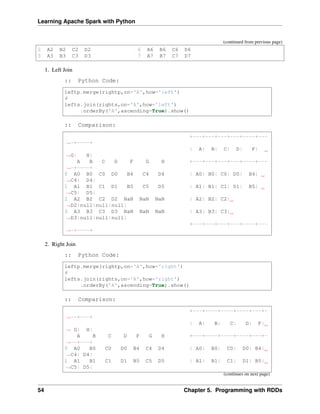
1. Left Join
:: Python Code:
leftp.merge(rightp,on='A',how='left')
#
lefts.join(rights,on='A',how='left')
.orderBy('A',ascending=True).show()
:: Comparison:
+---+---+---+---+----+---
˓
→-+----+
| A| B| C| D| F|
˓
→G| H|
A B C D F G H +---+---+---+---+----+---
˓
→-+----+
0 A0 B0 C0 D0 B4 C4 D4 | A0| B0| C0| D0| B4|
˓
→C4| D4|
1 A1 B1 C1 D1 B5 C5 D5 | A1| B1| C1| D1| B5|
˓
→C5| D5|
2 A2 B2 C2 D2 NaN NaN NaN | A2| B2| C2|
˓
→D2|null|null|null|
3 A3 B3 C3 D3 NaN NaN NaN | A3| B3| C3|
˓
→D3|null|null|null|
+---+---+---+---+----+---
˓
→-+----+
2. Right Join
:: Python Code:
leftp.merge(rightp,on='A',how='right')
#
lefts.join(rights,on='A',how='right')
.orderBy('A',ascending=True).show()
:: Comparison:
+---+----+----+----+---+-
˓
→--+---+
| A| B| C| D| F|
˓
→ G| H|
A B C D F G H +---+----+----+----+---+-
˓
→--+---+
0 A0 B0 C0 D0 B4 C4 D4 | A0| B0| C0| D0| B4|
˓
→C4| D4|
1 A1 B1 C1 D1 B5 C5 D5 | A1| B1| C1| D1| B5|
˓
→C5| D5|
(continues on next page)
54 Chapter 5. Programming with RDDs
Learning Apache Spark with Python
(continued from previous page)
2 A6 NaN NaN NaN B6 C6 D6 | A6|null|null|null| B6|
˓
→C6| D6|
3 A7 NaN NaN NaN B7 C7 D7 | A7|null|null|null| B7|
˓
→C7| D7|
+---+----+----+----+---+-
˓
→--+---+
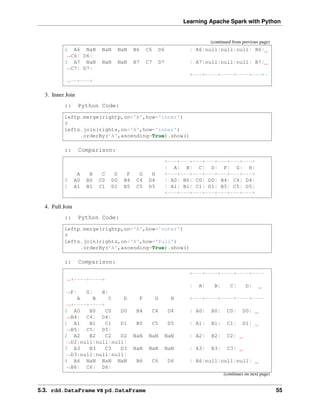
3. Inner Join
:: Python Code:
leftp.merge(rightp,on='A',how='inner')
#
lefts.join(rights,on='A',how='inner')
.orderBy('A',ascending=True).show()
:: Comparison:
+---+---+---+---+---+---+---+
| A| B| C| D| F| G| H|
A B C D F G H +---+---+---+---+---+---+---+
0 A0 B0 C0 D0 B4 C4 D4 | A0| B0| C0| D0| B4| C4| D4|
1 A1 B1 C1 D1 B5 C5 D5 | A1| B1| C1| D1| B5| C5| D5|
+---+---+---+---+---+---+---+
4. Full Join
:: Python Code:
leftp.merge(rightp,on='A',how='outer')
#
lefts.join(rights,on='A',how='full')
.orderBy('A',ascending=True).show()
:: Comparison:
+---+----+----+----+----
˓
→+----+----+
| A| B| C| D|
˓
→F| G| H|
A B C D F G H +---+----+----+----+----
˓
→+----+----+
0 A0 B0 C0 D0 B4 C4 D4 | A0| B0| C0| D0|
˓
→B4| C4| D4|
1 A1 B1 C1 D1 B5 C5 D5 | A1| B1| C1| D1|
˓
→B5| C5| D5|
2 A2 B2 C2 D2 NaN NaN NaN | A2| B2| C2|
˓
→D2|null|null|null|
3 A3 B3 C3 D3 NaN NaN NaN | A3| B3| C3|
˓
→D3|null|null|null|
4 A6 NaN NaN NaN B6 C6 D6 | A6|null|null|null|
˓
→B6| C6| D6|
(continues on next page)
5.3. rdd.DataFrame vs pd.DataFrame 55
Learning Apache Spark with Python
(continued from previous page)
5 A7 NaN NaN NaN B7 C7 D7 | A7|null|null|null|
˓
→B7| C7| D7|
+---+----+----+----+----
˓
→+----+----+
5.3.13 Concat Columns
my_list = [('a', 2, 3),
('b', 5, 6),
('c', 8, 9),
('a', 2, 3),
('b', 5, 6),
('c', 8, 9)]
col_name = ['col1', 'col2', 'col3']
#
dp = pd.DataFrame(my_list,columns=col_name)
ds = spark.createDataFrame(my_list,schema=col_name)
col1 col2 col3
0 a 2 3
1 b 5 6
2 c 8 9
3 a 2 3
4 b 5 6
5 c 8 9
:: Python Code:
dp['concat'] = dp.apply(lambda x:'%s%s'%(x['col1'],x['col2']),axis=1)
dp
#
ds.withColumn('concat',F.concat('col1','col2')).show()
:: Comparison:
+----+----+----+------+
|col1|col2|col3|concat|
col1 col2 col3 concat +----+----+----+------+
0 a 2 3 a2 | a| 2| 3| a2|
1 b 5 6 b5 | b| 5| 6| b5|
2 c 8 9 c8 | c| 8| 9| c8|
3 a 2 3 a2 | a| 2| 3| a2|
4 b 5 6 b5 | b| 5| 6| b5|
5 c 8 9 c8 | c| 8| 9| c8|
+----+----+----+------+
56 Chapter 5. Programming with RDDs
Learning Apache Spark with Python
5.3.14 GroupBy
:: Python Code:
dp.groupby(['col1']).agg({'col2':'min','col3':'mean'})
#
ds.groupBy(['col1']).agg({'col2': 'min', 'col3': 'avg'}).show()
:: Comparison:
+----+---------+---------+
col2 col3 |col1|min(col2)|avg(col3)|
col1 +----+---------+---------+
a 2 3 | c| 8| 9.0|
b 5 6 | b| 5| 6.0|
c 8 9 | a| 2| 3.0|
+----+---------+---------+
5.3.15 Pivot
:: Python Code:
pd.pivot_table(dp, values='col3', index='col1', columns='col2', aggfunc=np.
˓
→sum)
#
ds.groupBy(['col1']).pivot('col2').sum('col3').show()
:: Comparison:
+----+----+----+----+
col2 2 5 8 |col1| 2| 5| 8|
col1 +----+----+----+----+
a 6.0 NaN NaN | c|null|null| 18|
b NaN 12.0 NaN | b|null| 12|null|
c NaN NaN 18.0 | a| 6|null|null|
+----+----+----+----+
5.3.16 Window
d = {'A':['a','b','c','d'],'B':['m','m','n','n'],'C':[1,2,3,6]}
dp = pd.DataFrame(d)
ds = spark.createDataFrame(dp)
:: Python Code:
dp['rank'] = dp.groupby('B')['C'].rank('dense',ascending=False)
#
from pyspark.sql.window import Window
(continues on next page)
5.3. rdd.DataFrame vs pd.DataFrame 57
Learning Apache Spark with Python
(continued from previous page)
w = Window.partitionBy('B').orderBy(ds.C.desc())
ds = ds.withColumn('rank',F.rank().over(w))
:: Comparison:
+---+---+---+----+
| A| B| C|rank|
A B C rank +---+---+---+----+
0 a m 1 2.0 | b| m| 2| 1|
1 b m 2 1.0 | a| m| 1| 2|
2 c n 3 2.0 | d| n| 6| 1|
3 d n 6 1.0 | c| n| 3| 2|
+---+---+---+----+
5.3.17 rank vs dense_rank
d ={'Id':[1,2,3,4,5,6],
'Score': [4.00, 4.00, 3.85, 3.65, 3.65, 3.50]}
#
data = pd.DataFrame(d)
dp = data.copy()
ds = spark.createDataFrame(data)
Id Score
0 1 4.00
1 2 4.00
2 3 3.85
3 4 3.65
4 5 3.65
5 6 3.50
:: Python Code:
dp['Rank_dense'] = dp['Score'].rank(method='dense',ascending =False)
dp['Rank'] = dp['Score'].rank(method='min',ascending =False)
dp
#
import pyspark.sql.functions as F
from pyspark.sql.window import Window
w = Window.orderBy(ds.Score.desc())
ds = ds.withColumn('Rank_spark_dense',F.dense_rank().over(w))
ds = ds.withColumn('Rank_spark',F.rank().over(w))
ds.show()
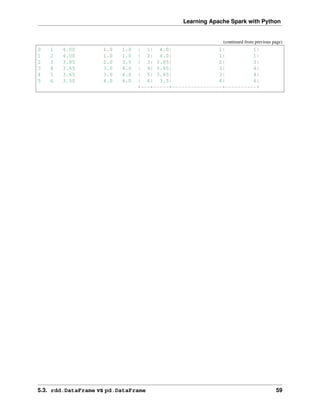
:: Comparison:
+---+-----+----------------+----------+
| Id|Score|Rank_spark_dense|Rank_spark|
Id Score Rank_dense Rank +---+-----+----------------+----------+
(continues on next page)
58 Chapter 5. Programming with RDDs
Learning Apache Spark with Python
(continued from previous page)
0 1 4.00 1.0 1.0 | 1| 4.0| 1| 1|
1 2 4.00 1.0 1.0 | 2| 4.0| 1| 1|
2 3 3.85 2.0 3.0 | 3| 3.85| 2| 3|
3 4 3.65 3.0 4.0 | 4| 3.65| 3| 4|
4 5 3.65 3.0 4.0 | 5| 3.65| 3| 4|
5 6 3.50 4.0 6.0 | 6| 3.5| 4| 6|
+---+-----+----------------+----------+
5.3. rdd.DataFrame vs pd.DataFrame 59
Learning Apache Spark with Python
60 Chapter 5. Programming with RDDs
CHAPTER
SIX
STATISTICS AND LINEAR ALGEBRA PRELIMINARIES
Chinese proverb
If you only know yourself, but not your opponent, you may win or may lose. If you know neither
yourself nor your enemy, you will always endanger yourself – idiom, from Sunzi’s Art of War
6.1 Notations
• m : the number of the samples
• n : the number of the features
• 𝑦𝑖 : i-th label
• ˆ
𝑦𝑖 : i-th predicted label
• ¯
𝑦 = 1
𝑚
∑︀𝑚
𝑖=1 𝑦𝑖 : the mean of 𝑦.
• 𝑦 : the label vector.
• ˆ
𝑦 : the predicted label vector.
6.2 Linear Algebra Preliminaries
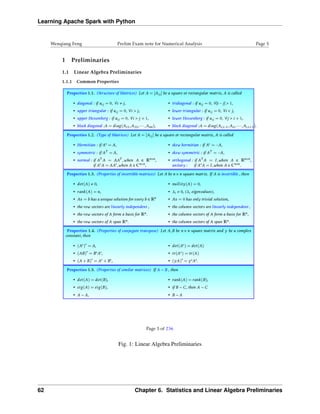
Since I have documented the Linear Algebra Preliminaries in my Prelim Exam note for Numerical Analysis,
the interested reader is referred to [Feng2014] for more details (Figure. Linear Algebra Preliminaries).
61
Learning Apache Spark with Python
Fig. 1: Linear Algebra Preliminaries
62 Chapter 6. Statistics and Linear Algebra Preliminaries
Learning Apache Spark with Python
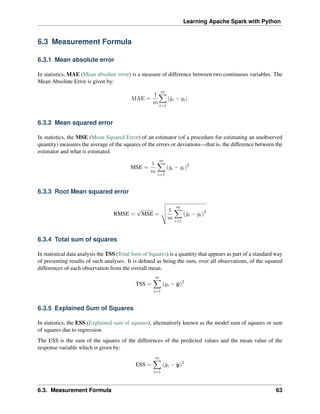
6.3 Measurement Formula
6.3.1 Mean absolute error
In statistics, MAE (Mean absolute error) is a measure of difference between two continuous variables. The
Mean Absolute Error is given by:
MAE =
1
𝑚
𝑚
∑︁
𝑖=1
|ˆ
𝑦𝑖 − 𝑦𝑖|.
6.3.2 Mean squared error
In statistics, the MSE (Mean Squared Error) of an estimator (of a procedure for estimating an unobserved
quantity) measures the average of the squares of the errors or deviations—that is, the difference between the
estimator and what is estimated.
MSE =
1
𝑚
𝑚
∑︁
𝑖=1
(ˆ
𝑦𝑖 − 𝑦𝑖)2
6.3.3 Root Mean squared error
RMSE =
√
MSE =
⎯
⎸
⎸
⎷ 1
𝑚
𝑚
∑︁
𝑖=1
(ˆ
𝑦𝑖 − 𝑦𝑖)2
6.3.4 Total sum of squares
In statistical data analysis the TSS (Total Sum of Squares) is a quantity that appears as part of a standard way
of presenting results of such analyses. It is defined as being the sum, over all observations, of the squared
differences of each observation from the overall mean.
TSS =
𝑚
∑︁
𝑖=1
(𝑦𝑖 − ¯
𝑦)2
6.3.5 Explained Sum of Squares
In statistics, the ESS (Explained sum of squares), alternatively known as the model sum of squares or sum
of squares due to regression.
The ESS is the sum of the squares of the differences of the predicted values and the mean value of the
response variable which is given by:
ESS =
𝑚
∑︁
𝑖=1
(ˆ
𝑦𝑖 − ¯
𝑦)2
6.3. Measurement Formula 63
Learning Apache Spark with Python
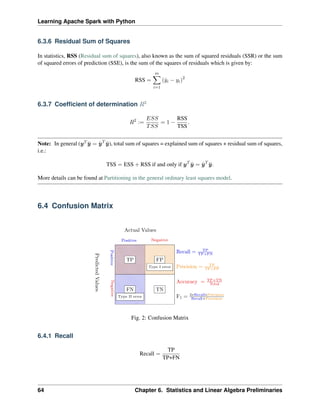
6.3.6 Residual Sum of Squares
In statistics, RSS (Residual sum of squares), also known as the sum of squared residuals (SSR) or the sum
of squared errors of prediction (SSE), is the sum of the squares of residuals which is given by:
RSS =
𝑚
∑︁
𝑖=1
(ˆ
𝑦𝑖 − 𝑦𝑖)2
6.3.7 Coefficient of determination 𝑅2
𝑅2
:=
𝐸𝑆𝑆
𝑇𝑆𝑆
= 1 −
RSS
TSS
.
Note: In general (𝑦𝑇 ¯
𝑦 = ˆ
𝑦𝑇
¯
𝑦), total sum of squares = explained sum of squares + residual sum of squares,
i.e.:
TSS = ESS + RSS if and only if 𝑦𝑇
¯
𝑦 = ˆ
𝑦𝑇
¯
𝑦.
More details can be found at Partitioning in the general ordinary least squares model.
6.4 Confusion Matrix
Fig. 2: Confusion Matrix
6.4.1 Recall
Recall =
TP
TP+FN
64 Chapter 6. Statistics and Linear Algebra Preliminaries
Learning Apache Spark with Python
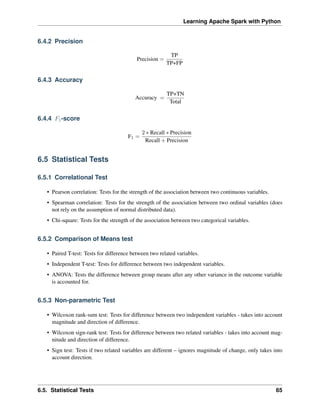
6.4.2 Precision
Precision =
TP
TP+FP
6.4.3 Accuracy
Accuracy =
TP+TN
Total
6.4.4 𝐹1-score
F1 =
2 * Recall * Precision
Recall + Precision
6.5 Statistical Tests
6.5.1 Correlational Test
• Pearson correlation: Tests for the strength of the association between two continuous variables.
• Spearman correlation: Tests for the strength of the association between two ordinal variables (does
not rely on the assumption of normal distributed data).
• Chi-square: Tests for the strength of the association between two categorical variables.
6.5.2 Comparison of Means test
• Paired T-test: Tests for difference between two related variables.
• Independent T-test: Tests for difference between two independent variables.
• ANOVA: Tests the difference between group means after any other variance in the outcome variable
is accounted for.
6.5.3 Non-parametric Test
• Wilcoxon rank-sum test: Tests for difference between two independent variables - takes into account
magnitude and direction of difference.
• Wilcoxon sign-rank test: Tests for difference between two related variables - takes into account mag-
nitude and direction of difference.
• Sign test: Tests if two related variables are different – ignores magnitude of change, only takes into
account direction.
6.5. Statistical Tests 65
Learning Apache Spark with Python
66 Chapter 6. Statistics and Linear Algebra Preliminaries
CHAPTER
SEVEN
DATA EXPLORATION
Chinese proverb
A journey of a thousand miles begins with a single step – idiom, from Laozi.
I wouldn’t say that understanding your dataset is the most difficult thing in data science, but it is really
important and time-consuming. Data Exploration is about describing the data by means of statistical and
visualization techniques. We explore data in order to understand the features and bring important features
to our models.
7.1 Univariate Analysis
In mathematics, univariate refers to an expression, equation, function or polynomial of only one variable.
“Uni” means “one”, so in other words your data has only one variable. So you do not need to deal with the
causes or relationships in this step. Univariate analysis takes data, summarizes that variables (attributes) one
by one and finds patterns in the data.
There are many ways that can describe patterns found in univariate data include central tendency (mean,
mode and median) and dispersion: range, variance, maximum, minimum, quartiles (including the interquar-
tile range), coefficient of variation and standard deviation. You also have several options for visualizing and
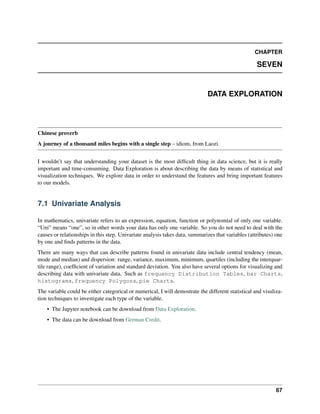
describing data with univariate data. Such as frequency Distribution Tables, bar Charts,
histograms, frequency Polygons, pie Charts.
The variable could be either categorical or numerical, I will demostrate the different statistical and visuliza-
tion techniques to investigate each type of the variable.
• The Jupyter notebook can be download from Data Exploration.
• The data can be download from German Credit.
67
Learning Apache Spark with Python
7.1.1 Numerical Variables
Describe
The describe function in pandas and spark will give us most of the statistical results, such as min,
median, max, quartiles and standard deviation. With the help of the user defined function,
you can get even more statistical results.
# selected varables for the demonstration
num_cols = ['Account Balance','No of dependents']
df.select(num_cols).describe().show()
+-------+------------------+-------------------+
|summary| Account Balance| No of dependents|
+-------+------------------+-------------------+
| count| 1000| 1000|
| mean| 2.577| 1.155|
| stddev|1.2576377271108936|0.36208577175319395|
| min| 1| 1|
| max| 4| 2|
+-------+------------------+-------------------+
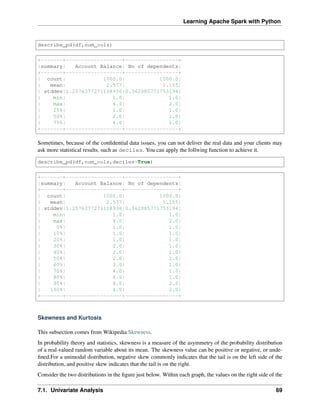
You may find out that the default function in PySpark does not include the quartiles. The following function
will help you to get the same results in Pandas
def describe_pd(df_in, columns, deciles=False):
'''
Function to union the basic stats results and deciles
:param df_in: the input dataframe
:param columns: the cloumn name list of the numerical variable
:param deciles: the deciles output
:return : the numerical describe info. of the input dataframe
:author: Ming Chen and Wenqiang Feng
:email: von198@gmail.com
'''
if deciles:
percentiles = np.array(range(0, 110, 10))
else:
percentiles = [25, 50, 75]
percs = np.transpose([np.percentile(df_in.select(x).collect(),
˓
→percentiles) for x in columns])
percs = pd.DataFrame(percs, columns=columns)
percs['summary'] = [str(p) + '%' for p in percentiles]
spark_describe = df_in.describe().toPandas()
new_df = pd.concat([spark_describe, percs],ignore_index=True)
new_df = new_df.round(2)
return new_df[['summary'] + columns]
68 Chapter 7. Data Exploration
Learning Apache Spark with Python
describe_pd(df,num_cols)
+-------+------------------+-----------------+
|summary| Account Balance| No of dependents|
+-------+------------------+-----------------+
| count| 1000.0| 1000.0|
| mean| 2.577| 1.155|
| stddev|1.2576377271108936|0.362085771753194|
| min| 1.0| 1.0|
| max| 4.0| 2.0|
| 25%| 1.0| 1.0|
| 50%| 2.0| 1.0|
| 75%| 4.0| 1.0|
+-------+------------------+-----------------+
Sometimes, because of the confidential data issues, you can not deliver the real data and your clients may
ask more statistical results, such as deciles. You can apply the follwing function to achieve it.
describe_pd(df,num_cols,deciles=True)
+-------+------------------+-----------------+
|summary| Account Balance| No of dependents|
+-------+------------------+-----------------+
| count| 1000.0| 1000.0|
| mean| 2.577| 1.155|
| stddev|1.2576377271108936|0.362085771753194|
| min| 1.0| 1.0|
| max| 4.0| 2.0|
| 0%| 1.0| 1.0|
| 10%| 1.0| 1.0|
| 20%| 1.0| 1.0|
| 30%| 2.0| 1.0|
| 40%| 2.0| 1.0|
| 50%| 2.0| 1.0|
| 60%| 3.0| 1.0|
| 70%| 4.0| 1.0|
| 80%| 4.0| 1.0|
| 90%| 4.0| 2.0|
| 100%| 4.0| 2.0|
+-------+------------------+-----------------+
Skewness and Kurtosis
This subsection comes from Wikipedia Skewness.
In probability theory and statistics, skewness is a measure of the asymmetry of the probability distribution
of a real-valued random variable about its mean. The skewness value can be positive or negative, or unde-
fined.For a unimodal distribution, negative skew commonly indicates that the tail is on the left side of the
distribution, and positive skew indicates that the tail is on the right.
Consider the two distributions in the figure just below. Within each graph, the values on the right side of the
7.1. Univariate Analysis 69
Learning Apache Spark with Python
distribution taper differently from the values on the left side. These tapering sides are called tails, and they
provide a visual means to determine which of the two kinds of skewness a distribution has:
1. negative skew: The left tail is longer; the mass of the distribution is concentrated on the right of the
figure. The distribution is said to be left-skewed, left-tailed, or skewed to the left, despite the fact that
the curve itself appears to be skewed or leaning to the right; left instead refers to the left tail being
drawn out and, often, the mean being skewed to the left of a typical center of the data. A left-skewed
distribution usually appears as a right-leaning curve.
2. positive skew: The right tail is longer; the mass of the distribution is concentrated on the left of the
figure. The distribution is said to be right-skewed, right-tailed, or skewed to the right, despite the fact
that the curve itself appears to be skewed or leaning to the left; right instead refers to the right tail
being drawn out and, often, the mean being skewed to the right of a typical center of the data. A
right-skewed distribution usually appears as a left-leaning curve.
This subsection comes from Wikipedia Kurtosis.
In probability theory and statistics, kurtosis (kyrtos or kurtos, meaning “curved, arching”) is a measure of the
“tailedness” of the probability distribution of a real-valued random variable. In a similar way to the concept
of skewness, kurtosis is a descriptor of the shape of a probability distribution and, just as for skewness, there
are different ways of quantifying it for a theoretical distribution and corresponding ways of estimating it
from a sample from a population.
from pyspark.sql.functions import col, skewness, kurtosis
df.select(skewness(var),kurtosis(var)).show()
+---------------------+---------------------+
|skewness(Age (years))|kurtosis(Age (years))|
+---------------------+---------------------+
| 1.0231743160548064| 0.6114371688367672|
+---------------------+---------------------+
Warning: Sometimes the statistics can be misleading!
70 Chapter 7. Data Exploration
Learning Apache Spark with Python
F. J. Anscombe once said that make both calculations and graphs. Both sorts of output should be stud-
ied; each will contribute to understanding. These 13 datasets in Figure Same Stats, Different Graphs (the
Datasaurus, plus 12 others) each have the same summary statistics (x/y mean, x/y standard deviation, and
Pearson’s correlation) to two decimal places, while being drastically different in appearance. This work
describes the technique we developed to create this dataset, and others like it. More details and interesting
results can be found in Same Stats Different Graphs.
Fig. 1: Same Stats, Different Graphs
Histogram
Warning: Histograms are often confused with Bar graphs!
The fundamental difference between histogram and bar graph will help you to identify the two easily is that
there are gaps between bars in a bar graph but in the histogram, the bars are adjacent to each other. The
interested reader is referred to Difference Between Histogram and Bar Graph.
var = 'Age (years)'
x = data1[var]
bins = np.arange(0, 100, 5.0)
(continues on next page)
7.1. Univariate Analysis 71
Learning Apache Spark with Python
(continued from previous page)
plt.figure(figsize=(10,8))
# the histogram of the data
plt.hist(x, bins, alpha=0.8, histtype='bar', color='gold',
ec='black',weights=np.zeros_like(x) + 100. / x.size)
plt.xlabel(var)
plt.ylabel('percentage')
plt.xticks(bins)
plt.show()
fig.savefig(var+".pdf", bbox_inches='tight')
var = 'Age (years)'
x = data1[var]
bins = np.arange(0, 100, 5.0)
(continues on next page)
72 Chapter 7. Data Exploration
Learning Apache Spark with Python
(continued from previous page)
########################################################################
hist, bin_edges = np.histogram(x,bins,
weights=np.zeros_like(x) + 100. / x.size)
# make the histogram
fig = plt.figure(figsize=(20, 8))
ax = fig.add_subplot(1, 2, 1)
# Plot the histogram heights against integers on the x axis
ax.bar(range(len(hist)),hist,width=1,alpha=0.8,ec ='black', color='gold')
# # Set the ticks to the middle of the bars
ax.set_xticks([0.5+i for i,j in enumerate(hist)])
# Set the xticklabels to a string that tells us what the bin edges were
labels =['{}'.format(int(bins[i+1])) for i,j in enumerate(hist)]
labels.insert(0,'0')
ax.set_xticklabels(labels)
plt.xlabel(var)
plt.ylabel('percentage')
########################################################################
hist, bin_edges = np.histogram(x,bins) # make the histogram
ax = fig.add_subplot(1, 2, 2)
# Plot the histogram heights against integers on the x axis
ax.bar(range(len(hist)),hist,width=1,alpha=0.8,ec ='black', color='gold')
# # Set the ticks to the middle of the bars
ax.set_xticks([0.5+i for i,j in enumerate(hist)])
# Set the xticklabels to a string that tells us what the bin edges were
labels =['{}'.format(int(bins[i+1])) for i,j in enumerate(hist)]
labels.insert(0,'0')
ax.set_xticklabels(labels)
plt.xlabel(var)
plt.ylabel('count')
plt.suptitle('Histogram of {}: Left with percentage output;Right with count
˓
→output'
.format(var), size=16)
plt.show()
fig.savefig(var+".pdf", bbox_inches='tight')
7.1. Univariate Analysis 73
Learning Apache Spark with Python
Sometimes, some people will ask you to plot the unequal width (invalid argument for histogram) of the bars.
You can still achieve it by the following trick.
var = 'Credit Amount'
plot_data = df.select(var).toPandas()
x= plot_data[var]
bins =[0,200,400,600,700,800,900,1000,2000,3000,4000,5000,6000,10000,25000]
hist, bin_edges = np.histogram(x,bins,weights=np.zeros_like(x) + 100. / x.
˓
→size) # make the histogram
fig = plt.figure(figsize=(10, 8))
ax = fig.add_subplot(1, 1, 1)
# Plot the histogram heights against integers on the x axis
ax.bar(range(len(hist)),hist,width=1,alpha=0.8,ec ='black',color = 'gold')
# # Set the ticks to the middle of the bars
ax.set_xticks([0.5+i for i,j in enumerate(hist)])
# Set the xticklabels to a string that tells us what the bin edges were
#labels =['{}k'.format(int(bins[i+1]/1000)) for i,j in enumerate(hist)]
labels =['{}'.format(bins[i+1]) for i,j in enumerate(hist)]
labels.insert(0,'0')
ax.set_xticklabels(labels)
#plt.text(-0.6, -1.4,'0')
plt.xlabel(var)
plt.ylabel('percentage')
plt.show()
74 Chapter 7. Data Exploration
Learning Apache Spark with Python
Box plot and violin plot
Note that although violin plots are closely related to Tukey’s (1977) box plots, the violin plot can show more
information than box plot. When we perform an exploratory analysis, nothing about the samples could be
known. So the distribution of the samples can not be assumed to a normal distribution and usually when you
get a big data, the normal distribution will show some out liars in box plot.
However, the violin plots are potentially misleading for smaller sample sizes, where the density plots can
appear to show interesting features (and group-differences therein) even when produced for standard normal
data. Some poster suggested the sample size should larger that 250. The sample sizes (e.g. n>250 or ideally
even larger), where the kernel density plots provide a reasonably accurate representation of the distributions,
potentially showing nuances such as bimodality or other forms of non-normality that would be invisible or
less clear in box plots. More details can be found in A simple comparison of box plots and violin plots.
x = df.select(var).toPandas()
fig = plt.figure(figsize=(20, 8))
ax = fig.add_subplot(1, 2, 1)
ax = sns.boxplot(data=x)
(continues on next page)
7.1. Univariate Analysis 75
Learning Apache Spark with Python
(continued from previous page)
ax = fig.add_subplot(1, 2, 2)
ax = sns.violinplot(data=x)
7.1.2 Categorical Variables
Compared with the numerical variables, the categorical variables are much more easier to do the exploration.
Frequency table
from pyspark.sql import functions as F
from pyspark.sql.functions import rank,sum,col
from pyspark.sql import Window
window = Window.rowsBetween(Window.unboundedPreceding,Window.
˓
→unboundedFollowing)
# withColumn('Percent %',F.format_string("%5.0f%%n",col('Credit_num')*100/
˓
→col('total'))).
tab = df.select(['age_class','Credit Amount']).
groupBy('age_class').
agg(F.count('Credit Amount').alias('Credit_num'),
F.mean('Credit Amount').alias('Credit_avg'),
F.min('Credit Amount').alias('Credit_min'),
F.max('Credit Amount').alias('Credit_max')).
withColumn('total',sum(col('Credit_num')).over(window)).
withColumn('Percent',col('Credit_num')*100/col('total')).
drop(col('total'))
+---------+----------+------------------+----------+----------+-------+
|age_class|Credit_num| Credit_avg|Credit_min|Credit_max|Percent|
+---------+----------+------------------+----------+----------+-------+
(continues on next page)
76 Chapter 7. Data Exploration
Learning Apache Spark with Python
(continued from previous page)
| 45-54| 120|3183.0666666666666| 338| 12612| 12.0|
| <25| 150| 2970.733333333333| 276| 15672| 15.0|
| 55-64| 56| 3493.660714285714| 385| 15945| 5.6|
| 35-44| 254| 3403.771653543307| 250| 15857| 25.4|
| 25-34| 397| 3298.823677581864| 343| 18424| 39.7|
| 65+| 23|3210.1739130434785| 571| 14896| 2.3|
+---------+----------+------------------+----------+----------+-------+
Pie plot
# Data to plot
labels = plot_data.age_class
sizes = plot_data.Percent
colors = ['gold', 'yellowgreen', 'lightcoral','blue', 'lightskyblue','green',
˓
→'red']
explode = (0, 0.1, 0, 0,0,0) # explode 1st slice
# Plot
plt.figure(figsize=(10,8))
plt.pie(sizes, explode=explode, labels=labels, colors=colors,
autopct='%1.1f%%', shadow=True, startangle=140)
plt.axis('equal')
plt.show()
7.1. Univariate Analysis 77
Learning Apache Spark with Python
Bar plot
labels = plot_data.age_class
missing = plot_data.Percent
ind = [x for x, _ in enumerate(labels)]
plt.figure(figsize=(10,8))
plt.bar(ind, missing, width=0.8, label='missing', color='gold')
plt.xticks(ind, labels)
plt.ylabel("percentage")
plt.show()
78 Chapter 7. Data Exploration
Learning Apache Spark with Python
labels = ['missing', '<25', '25-34', '35-44', '45-54','55-64','65+']
missing = np.array([0.000095, 0.024830, 0.028665, 0.029477, 0.031918,0.037073,
˓
→0.026699])
man = np.array([0.000147, 0.036311, 0.038684, 0.044761, 0.051269, 0.059542, 0.
˓
→054259])
women = np.array([0.004035, 0.032935, 0.035351, 0.041778, 0.048437, 0.056236,
˓
→0.048091])
ind = [x for x, _ in enumerate(labels)]
plt.figure(figsize=(10,8))
plt.bar(ind, women, width=0.8, label='women', color='gold',
˓
→bottom=man+missing)
plt.bar(ind, man, width=0.8, label='man', color='silver', bottom=missing)
plt.bar(ind, missing, width=0.8, label='missing', color='#CD853F')
plt.xticks(ind, labels)
plt.ylabel("percentage")
plt.legend(loc="upper left")
plt.title("demo")
plt.show()
7.1. Univariate Analysis 79
Learning Apache Spark with Python
7.2 Multivariate Analysis
In this section, I will only demostrate the bivariate analysis. Since the multivariate analysis is the generation
of the bivariate.
7.2.1 Numerical V.S. Numerical
Correlation matrix
from pyspark.mllib.stat import Statistics
import pandas as pd
corr_data = df.select(num_cols)
col_names = corr_data.columns
features = corr_data.rdd.map(lambda row: row[0:])
corr_mat=Statistics.corr(features, method="pearson")
(continues on next page)
80 Chapter 7. Data Exploration
Learning Apache Spark with Python
(continued from previous page)
corr_df = pd.DataFrame(corr_mat)
corr_df.index, corr_df.columns = col_names, col_names
print(corr_df.to_string())
+--------------------+--------------------+
| Account Balance| No of dependents|
+--------------------+--------------------+
| 1.0|-0.01414542650320914|
|-0.01414542650320914| 1.0|
+--------------------+--------------------+
Scatter Plot
import seaborn as sns
sns.set(style="ticks")
df = sns.load_dataset("iris")
sns.pairplot(df, hue="species")
plt.show()
7.2. Multivariate Analysis 81
Learning Apache Spark with Python
7.2.2 Categorical V.S. Categorical
Pearson’s Chi-squared test
Warning: pyspark.ml.stat is only available in Spark 2.4.0.
from pyspark.ml.linalg import Vectors
from pyspark.ml.stat import ChiSquareTest
data = [(0.0, Vectors.dense(0.5, 10.0)),
(0.0, Vectors.dense(1.5, 20.0)),
(1.0, Vectors.dense(1.5, 30.0)),
(0.0, Vectors.dense(3.5, 30.0)),
(continues on next page)
82 Chapter 7. Data Exploration
Learning Apache Spark with Python
(continued from previous page)
(0.0, Vectors.dense(3.5, 40.0)),
(1.0, Vectors.dense(3.5, 40.0))]
df = spark.createDataFrame(data, ["label", "features"])
r = ChiSquareTest.test(df, "features", "label").head()
print("pValues: " + str(r.pValues))
print("degreesOfFreedom: " + str(r.degreesOfFreedom))
print("statistics: " + str(r.statistics))
pValues: [0.687289278791,0.682270330336]
degreesOfFreedom: [2, 3]
statistics: [0.75,1.5]
Cross table
df.stat.crosstab("age_class", "Occupation").show()
+--------------------+---+---+---+---+
|age_class_Occupation| 1| 2| 3| 4|
+--------------------+---+---+---+---+
| <25| 4| 34|108| 4|
| 55-64| 1| 15| 31| 9|
| 25-34| 7| 61|269| 60|
| 35-44| 4| 58|143| 49|
| 65+| 5| 3| 6| 9|
| 45-54| 1| 29| 73| 17|
+--------------------+---+---+---+---+
Stacked plot
labels = ['missing', '<25', '25-34', '35-44', '45-54','55-64','65+']
missing = np.array([0.000095, 0.024830, 0.028665, 0.029477, 0.031918,0.037073,
˓
→0.026699])
man = np.array([0.000147, 0.036311, 0.038684, 0.044761, 0.051269, 0.059542, 0.
˓
→054259])
women = np.array([0.004035, 0.032935, 0.035351, 0.041778, 0.048437, 0.056236,
˓
→0.048091])
ind = [x for x, _ in enumerate(labels)]
plt.figure(figsize=(10,8))
plt.bar(ind, women, width=0.8, label='women', color='gold',
˓
→bottom=man+missing)
plt.bar(ind, man, width=0.8, label='man', color='silver', bottom=missing)
plt.bar(ind, missing, width=0.8, label='missing', color='#CD853F')
plt.xticks(ind, labels)
plt.ylabel("percentage")
(continues on next page)
7.2. Multivariate Analysis 83
Learning Apache Spark with Python
(continued from previous page)
plt.legend(loc="upper left")
plt.title("demo")
plt.show()
7.2.3 Numerical V.S. Categorical
Line Chart with Error Bars
import pandas as pd
import numpy as np
import matplotlib.pyplot as plt
import seaborn as sns
from scipy import stats
%matplotlib inline
plt.rcParams['figure.figsize'] =(16,9)
plt.style.use('ggplot')
(continues on next page)
84 Chapter 7. Data Exploration
Learning Apache Spark with Python
(continued from previous page)
sns.set()
ax = sns.pointplot(x="day", y="tip", data=tips, capsize=.2)
plt.show()
Combination Chart
import pandas as pd
import numpy as np
import matplotlib.pyplot as plt
import seaborn as sns
from scipy import stats
%matplotlib inline
plt.rcParams['figure.figsize'] =(16,9)
plt.style.use('ggplot')
sns.set()
#create list of months
Month = ['Jan', 'Feb', 'Mar', 'Apr', 'May', 'June',
'July', 'Aug', 'Sep', 'Oct', 'Nov', 'Dec']
#create list for made up average temperatures
Avg_Temp = [35, 45, 55, 65, 75, 85, 95, 100, 85, 65, 45, 35]
#create list for made up average percipitation %
Avg_Percipitation_Perc = [.90, .75, .55, .10, .35, .05, .05, .08, .20, .45, .
˓
→65, .80]
(continues on next page)
7.2. Multivariate Analysis 85
Learning Apache Spark with Python
(continued from previous page)
#assign lists to a value
data = {'Month': Month, 'Avg_Temp': Avg_Temp, 'Avg_Percipitation_Perc': Avg_
˓
→Percipitation_Perc}
#convert dictionary to a dataframe
df = pd.DataFrame(data)
fig, ax1 = plt.subplots(figsize=(10,6))
ax1.set_title('Average Percipitation Percentage by Month', fontsize=16)
ax1.tick_params(axis='y')
ax2 = sns.barplot(x='Month', y='Avg_Temp', data = df, color = 'gold')
ax2 = ax1.twinx()
ax2 = sns.lineplot(x='Month', y='Avg_Percipitation_Perc', data = df,
˓
→sort=False, color=color)
ax1.set_xlabel('Month', fontsize=16)
ax1.set_ylabel('Avg Temp', fontsize=16)
ax2.tick_params(axis='y', color=color)
ax2.set_ylabel('Avg Percipitation %', fontsize=16)
plt.show()
86 Chapter 7. Data Exploration
CHAPTER
EIGHT
DATA MANIPULATION: FEATURES
Chinese proverb
All things are diffcult before they are easy!
Feature building is a super important step for modeling which will determine the success or failure of your
model. Otherwise, you will get: garbage in; garbage out! The techniques have been covered in the following
chapters, the followings are the brief summary. I recently found that the Spark official website did a really
good job for tutorial documentation. The chapter is based on Extracting transforming and selecting features.
8.1 Feature Extraction
8.1.1 TF-IDF
Term frequency-inverse document frequency (TF-IDF) is a feature vectorization method widely used in text
mining to reflect the importance of a term to a document in the corpus. More details can be found at:
https://spark.apache.org/docs/latest/ml-features#feature-extractors
Stackoverflow TF: Both HashingTF and CountVectorizer can be used to generate the term frequency vectors.
A few important differences:
a. partially reversible (CountVectorizer) vs irreversible (HashingTF) - since hashing is not reversible
you cannot restore original input from a hash vector. From the other hand count vector with model
(index) can be used to restore unordered input. As a consequence models created using hashed input
can be much harder to interpret and monitor.
b. memory and computational overhead - HashingTF requires only a single data scan and no addi-
tional memory beyond original input and vector. CountVectorizer requires additional scan over the
data to build a model and additional memory to store vocabulary (index). In case of unigram language
model it is usually not a problem but in case of higher n-grams it can be prohibitively expensive or
not feasible.
c. hashing depends on a size of the vector , hashing function and a document. Counting depends on a
size of the vector, training corpus and a document.
87
Learning Apache Spark with Python
d. a source of the information loss - in case of HashingTF it is dimensionality reduction with possible
collisions. CountVectorizer discards infrequent tokens. How it affects downstream models depends
on a particular use case and data.
HashingTF and CountVectorizer are the two popular alogoritms which used to generate term frequency
vectors. They basically convert documents into a numerical representation which can be fed directly or with
further processing into other algorithms like LDA, MinHash for Jaccard Distance, Cosine Distance.
• 𝑡: term
• 𝑑: document
• 𝐷: corpus
• |𝐷|: the number of the elements in corpus
• 𝑇𝐹(𝑡, 𝑑): Term Frequency: the number of times that term 𝑡 appears in document 𝑑
• 𝐷𝐹(𝑡, 𝐷): Document Frequency: the number of documents that contains term 𝑡
• 𝐼𝐷𝐹(𝑡, 𝐷): Inverse Document Frequency is a numerical measure of how much information a term
provides
𝐼𝐷𝐹(𝑡, 𝐷) = log
|𝐷| + 1
𝐷𝐹(𝑡, 𝐷) + 1
• 𝑇𝐹𝐼𝐷𝐹(𝑡, 𝑑, 𝐷) the product of TF and IDF
𝑇𝐹𝐼𝐷𝐹(𝑡, 𝑑, 𝐷) = 𝑇𝐹(𝑡, 𝑑) · 𝐼𝐷𝐹(𝑡, 𝐷)
Let’s look at the example:
from pyspark.ml import Pipeline
from pyspark.ml.feature import HashingTF, IDF, Tokenizer
sentenceData = spark.createDataFrame([
(0, "Python python Spark Spark"),
(1, "Python SQL")],
["document", "sentence"])
sentenceData.show(truncate=False)
+--------+-------------------------+
|document|sentence |
+--------+-------------------------+
|0 |Python python Spark Spark|
|1 |Python SQL |
+--------+-------------------------+
Then:
• 𝑇𝐹(𝑝𝑦𝑡ℎ𝑜𝑛, 𝑑𝑜𝑐𝑢𝑚𝑒𝑛𝑡1) = 1, 𝑇𝐹(𝑠𝑝𝑎𝑟𝑘, 𝑑𝑜𝑐𝑢𝑚𝑒𝑛𝑡1) = 2
• 𝐷𝐹(𝑆𝑝𝑎𝑟𝑘, 𝐷) = 2, 𝐷𝐹(𝑠𝑞𝑙, 𝐷) = 1
• IDF:
88 Chapter 8. Data Manipulation: Features
Learning Apache Spark with Python
𝐼𝐷𝐹(𝑝𝑦𝑡ℎ𝑜𝑛, 𝐷) = log
|𝐷| + 1
𝐷𝐹(𝑡, 𝐷) + 1
= log(
2 + 1
2 + 1
) = 0
𝐼𝐷𝐹(𝑠𝑝𝑎𝑟𝑘, 𝐷) = log
|𝐷| + 1
𝐷𝐹(𝑡, 𝐷) + 1
= log(
2 + 1
1 + 1
) = 0.4054651081081644
𝐼𝐷𝐹(𝑠𝑞𝑙, 𝐷) = log
|𝐷| + 1
𝐷𝐹(𝑡, 𝐷) + 1
= log(
2 + 1
1 + 1
) = 0.4054651081081644
• TFIDF
𝑇𝐹𝐼𝐷𝐹(𝑝𝑦𝑡ℎ𝑜𝑛, 𝑑𝑜𝑐𝑢𝑚𝑒𝑛𝑡1, 𝐷) = 3 * 0 = 0
𝑇𝐹𝐼𝐷𝐹(𝑠𝑝𝑎𝑟𝑘, 𝑑𝑜𝑐𝑢𝑚𝑒𝑛𝑡1, 𝐷) = 2 * 0.4054651081081644 = 0.8109302162163288
𝑇𝐹𝐼𝐷𝐹(𝑠𝑞𝑙, 𝑑𝑜𝑐𝑢𝑚𝑒𝑛𝑡1, 𝐷) = 1 * 0.4054651081081644 = 0.4054651081081644
Countvectorizer
Stackoverflow TF: CountVectorizer and CountVectorizerModel aim to help convert a collection of text doc-
uments to vectors of token counts. When an a-priori dictionary is not available, CountVectorizer can be
used as an Estimator to extract the vocabulary, and generates a CountVectorizerModel. The model produces
sparse representations for the documents over the vocabulary, which can then be passed to other algorithms
like LDA.
from pyspark.ml import Pipeline
from pyspark.ml.feature import CountVectorizer
from pyspark.ml.feature import HashingTF, IDF, Tokenizer
sentenceData = spark.createDataFrame([
(0, "Python python Spark Spark"),
(1, "Python SQL")],
["document", "sentence"])
tokenizer = Tokenizer(inputCol="sentence", outputCol="words")
vectorizer = CountVectorizer(inputCol="words", outputCol="rawFeatures")
idf = IDF(inputCol="rawFeatures", outputCol="features")
pipeline = Pipeline(stages=[tokenizer, vectorizer, idf])
model = pipeline.fit(sentenceData)
import numpy as np
total_counts = model.transform(sentenceData)
.select('rawFeatures').rdd
.map(lambda row: row['rawFeatures'].toArray())
.reduce(lambda x,y: [x[i]+y[i] for i in range(len(y))])
vocabList = model.stages[1].vocabulary
d = {'vocabList':vocabList,'counts':total_counts}
(continues on next page)
8.1. Feature Extraction 89
Learning Apache Spark with Python
(continued from previous page)
spark.createDataFrame(np.array(list(d.values())).T.tolist(),list(d.keys())).
˓
→show()
counts = model.transform(sentenceData).select('rawFeatures').collect()
counts
[Row(rawFeatures=SparseVector(8, {0: 1.0, 1: 1.0, 2: 1.0})),
Row(rawFeatures=SparseVector(8, {0: 1.0, 1: 1.0, 4: 1.0})),
Row(rawFeatures=SparseVector(8, {0: 1.0, 3: 1.0, 5: 1.0, 6: 1.0, 7: 1.0}))]
+---------+------+
|vocabList|counts|
+---------+------+
| python| 3.0|
| spark| 2.0|
| sql| 1.0|
+---------+------+
model.transform(sentenceData).show(truncate=False)
+--------+-------------------------+------------------------------+-----------
˓
→--------+----------------------------------+
|document|sentence |words
˓
→|rawFeatures |features |
+--------+-------------------------+------------------------------+-----------
˓
→--------+----------------------------------+
|0 |Python python Spark Spark|[python, python, spark, spark]|(3,[0,1],
˓
→[2.0,2.0])|(3,[0,1],[0.0,0.8109302162163288])|
|1 |Python SQL |[python, sql] |(3,[0,2],
˓
→[1.0,1.0])|(3,[0,2],[0.0,0.4054651081081644])|
+--------+-------------------------+------------------------------+-----------
˓
→--------+----------------------------------+
from pyspark.sql.types import ArrayType, StringType
def termsIdx2Term(vocabulary):
def termsIdx2Term(termIndices):
return [vocabulary[int(index)] for index in termIndices]
return udf(termsIdx2Term, ArrayType(StringType()))
vectorizerModel = model.stages[1]
vocabList = vectorizerModel.vocabulary
vocabList
['python', 'spark', 'sql']
rawFeatures = model.transform(sentenceData).select('rawFeatures')
rawFeatures.show()
(continues on next page)
90 Chapter 8. Data Manipulation: Features
Learning Apache Spark with Python
(continued from previous page)
+-------------------+
| rawFeatures|
+-------------------+
|(3,[0,1],[2.0,2.0])|
|(3,[0,2],[1.0,1.0])|
+-------------------+
from pyspark.sql.functions import udf
import pyspark.sql.functions as F
from pyspark.sql.types import StringType, DoubleType, IntegerType
indices_udf = udf(lambda vector: vector.indices.tolist(),
˓
→ArrayType(IntegerType()))
values_udf = udf(lambda vector: vector.toArray().tolist(),
˓
→ArrayType(DoubleType()))
rawFeatures.withColumn('indices', indices_udf(F.col('rawFeatures')))
.withColumn('values', values_udf(F.col('rawFeatures')))
.withColumn("Terms", termsIdx2Term(vocabList)("indices")).show()
+-------------------+-------+---------------+---------------+
| rawFeatures|indices| values| Terms|
+-------------------+-------+---------------+---------------+
|(3,[0,1],[2.0,2.0])| [0, 1]|[2.0, 2.0, 0.0]|[python, spark]|
|(3,[0,2],[1.0,1.0])| [0, 2]|[1.0, 0.0, 1.0]| [python, sql]|
+-------------------+-------+---------------+---------------+
HashingTF
Stackoverflow TF: HashingTF is a Transformer which takes sets of terms and converts those sets into fixed-
length feature vectors. In text processing, a “set of terms” might be a bag of words. HashingTF utilizes
the hashing trick. A raw feature is mapped into an index (term) by applying a hash function. The hash
function used here is MurmurHash 3. Then term frequencies are calculated based on the mapped indices.
This approach avoids the need to compute a global term-to-index map, which can be expensive for a large
corpus, but it suffers from potential hash collisions, where different raw features may become the same term
after hashing.
from pyspark.ml import Pipeline
from pyspark.ml.feature import HashingTF, IDF, Tokenizer
sentenceData = spark.createDataFrame([
(0, "Python python Spark Spark"),
(1, "Python SQL")],
["document", "sentence"])
tokenizer = Tokenizer(inputCol="sentence", outputCol="words")
(continues on next page)
8.1. Feature Extraction 91
Learning Apache Spark with Python
(continued from previous page)
vectorizer = HashingTF(inputCol="words", outputCol="rawFeatures",
˓
→numFeatures=5)
idf = IDF(inputCol="rawFeatures", outputCol="features")
pipeline = Pipeline(stages=[tokenizer, vectorizer, idf])
model = pipeline.fit(sentenceData)
model.transform(sentenceData).show(truncate=False)
+--------+-------------------------+------------------------------+-----------
˓
→--------+----------------------------------+
|document|sentence |words
˓
→|rawFeatures |features |
+--------+-------------------------+------------------------------+-----------
˓
→--------+----------------------------------+
|0 |Python python Spark Spark|[python, python, spark, spark]|(5,[0,4],
˓
→[2.0,2.0])|(5,[0,4],[0.8109302162163288,0.0])|
|1 |Python SQL |[python, sql] |(5,[1,4],
˓
→[1.0,1.0])|(5,[1,4],[0.4054651081081644,0.0])|
+--------+-------------------------+------------------------------+-----------
˓
→--------+----------------------------------+
8.1.2 Word2Vec
Word Embeddings
Word2Vec is one of the popupar method to implement the Word Embeddings. Word embeddings (The
best tutorial I have read. The following word and images content are from Chris Bail, PhD Duke University.
So the copyright belongs to Chris Bail, PhD Duke University.) gained fame in the world of automated text
analysis when it was demonstrated that they could be used to identify analogies. Figure 1 illustrates the
output of a word embedding model where individual words are plotted in three dimensional space generated
by the model. By examining the adjacency of words in this space, word embedding models can complete
analogies such as “Man is to woman as king is to queen.” If you’d like to explore what the output of a large
word embedding model looks like in more detail, check out this fantastic visualization of most words in the
English language that was produced using a word embedding model called GloVE.
92 Chapter 8. Data Manipulation: Features
Learning Apache Spark with Python
Fig. 1: output of a word embedding model
The Context Window
Word embeddings are created by identifying the words that occur within something called a “Context Win-
dow.” The Figure below illustrates context windows of varied length for a single sentence. The context
window is defined by a string of words before and after a focal or “center” word that will be used to train a
word embedding model. Each center word and context words can be represented as a vector of numbers that
describe the presence or absence of unique words within a dataset, which is perhaps why word embedding
models are often described as “word vector” models, or “word2vec” models.
Two Types of Embedding Models
Word embeddings are usually performed in one of two ways: “Continuous Bag of Words” (CBOW) or
a “Skip-Gram Model.” The figure below illustrates the differences between the two models. The CBOW
model reads in the context window words and tries to predict the most likely center word. The Skip-Gram
Model predicts the context words given the center word. The examples above were created using the Skip-
Gram model, which is perhaps most useful for people who want to identify patterns within texts to represent
them in multimensional space, whereas the CBOW model is more useful in practical applications such as
predictive web search.
8.1. Feature Extraction 93
Learning Apache Spark with Python
Word Embedding Models in PySpark
from pyspark.ml.feature import Word2Vec
from pyspark.ml import Pipeline
tokenizer = Tokenizer(inputCol="sentence", outputCol="words")
word2Vec = Word2Vec(vectorSize=3, minCount=0, inputCol="words", outputCol=
˓
→"feature")
pipeline = Pipeline(stages=[tokenizer, word2Vec])
model = pipeline.fit(sentenceData)
result = model.transform(sentenceData)
result.show()
+-----+--------------------+--------------------+--------------------+
|label| sentence| words| feature|
+-----+--------------------+--------------------+--------------------+
| 0.0| I love Spark| [i, love, spark]|[0.05594437588782...|
| 0.0| I love python| [i, love, python]|[-0.0350368790871...|
| 1.0|I think ML is awe...|[i, think, ml, is...|[0.01242086507845...|
+-----+--------------------+--------------------+--------------------+
w2v = model.stages[1]
w2v.getVectors().show()
(continues on next page)
94 Chapter 8. Data Manipulation: Features
Learning Apache Spark with Python
(continued from previous page)
+-------+-----------------------------------------------------------------+
|word |vector |
+-------+-----------------------------------------------------------------+
|is |[0.13657838106155396,0.060924094170331955,-0.03379475697875023] |
|awesome|[0.037024181336164474,-0.023855900391936302,0.0760037824511528] |
|i |[-0.0014482572441920638,0.049365971237421036,0.12016955763101578]|
|ml |[-0.14006119966506958,0.01626444421708584,0.042281970381736755] |
|spark |[0.1589149385690689,-0.10970081388950348,-0.10547549277544022] |
|think |[0.030011219903826714,-0.08994936943054199,0.16471518576145172] |
|love |[0.01036644633859396,-0.017782460898160934,0.08870164304971695] |
|python |[-0.11402882635593414,0.045119188725948334,-0.029877422377467155]|
+-------+-----------------------------------------------------------------+
from pyspark.sql.functions import format_number as fmt
w2v.findSynonyms("could", 2).select("word", fmt("similarity", 5).alias(
˓
→"similarity")).show()
+-------+----------+
| word|similarity|
+-------+----------+
|classes| 0.90232|
| i| 0.75424|
+-------+----------+
8.1.3 FeatureHasher
from pyspark.ml.feature import FeatureHasher
dataset = spark.createDataFrame([
(2.2, True, "1", "foo"),
(3.3, False, "2", "bar"),
(4.4, False, "3", "baz"),
(5.5, False, "4", "foo")
], ["real", "bool", "stringNum", "string"])
hasher = FeatureHasher(inputCols=["real", "bool", "stringNum", "string"],
outputCol="features")
featurized = hasher.transform(dataset)
featurized.show(truncate=False)
+----+-----+---------+------+-------------------------------------------------
˓
→-------+
|real|bool |stringNum|string|features
˓
→ |
+----+-----+---------+------+-------------------------------------------------
˓
→-------+
|2.2 |true |1 |foo |(262144,[174475,247670,257907,262126],[2.2,1.0,1.
˓
→0,1.0])| (continues on next page)
8.1. Feature Extraction 95
Learning Apache Spark with Python
(continued from previous page)
|3.3 |false|2 |bar |(262144,[70644,89673,173866,174475],[1.0,1.0,1.0,
˓
→3.3]) |
|4.4 |false|3 |baz |(262144,[22406,70644,174475,187923],[1.0,1.0,4.4,
˓
→1.0]) |
|5.5 |false|4 |foo |(262144,[70644,101499,174475,257907],[1.0,1.0,5.
˓
→5,1.0]) |
+----+-----+---------+------+-------------------------------------------------
˓
→-------+
8.1.4 RFormula
from pyspark.ml.feature import RFormula
dataset = spark.createDataFrame(
[(7, "US", 18, 1.0),
(8, "CA", 12, 0.0),
(9, "CA", 15, 0.0)],
["id", "country", "hour", "clicked"])
formula = RFormula(
formula="clicked ~ country + hour",
featuresCol="features",
labelCol="label")
output = formula.fit(dataset).transform(dataset)
output.select("features", "label").show()
+----------+-----+
| features|label|
+----------+-----+
|[0.0,18.0]| 1.0|
|[1.0,12.0]| 0.0|
|[1.0,15.0]| 0.0|
+----------+-----+
8.2 Feature Transform
8.2.1 Tokenizer
from pyspark.ml.feature import Tokenizer, RegexTokenizer
from pyspark.sql.functions import col, udf
from pyspark.sql.types import IntegerType
sentenceDataFrame = spark.createDataFrame([
(0, "Hi I heard about Spark"),
(1, "I wish Java could use case classes"),
(continues on next page)
96 Chapter 8. Data Manipulation: Features
Learning Apache Spark with Python
(continued from previous page)
(2, "Logistic,regression,models,are,neat")
], ["id", "sentence"])
tokenizer = Tokenizer(inputCol="sentence", outputCol="words")
regexTokenizer = RegexTokenizer(inputCol="sentence", outputCol="words",
˓
→pattern="W")
# alternatively, pattern="w+", gaps(False)
countTokens = udf(lambda words: len(words), IntegerType())
tokenized = tokenizer.transform(sentenceDataFrame)
tokenized.select("sentence", "words")
.withColumn("tokens", countTokens(col("words"))).show(truncate=False)
regexTokenized = regexTokenizer.transform(sentenceDataFrame)
regexTokenized.select("sentence", "words") 
.withColumn("tokens", countTokens(col("words"))).show(truncate=False)
+-----------------------------------+-----------------------------------------
˓
→-+------+
|sentence |words
˓
→ |tokens|
+-----------------------------------+-----------------------------------------
˓
→-+------+
|Hi I heard about Spark |[hi, i, heard, about, spark]
˓
→ |5 |
|I wish Java could use case classes |[i, wish, java, could, use, case,
˓
→classes]|7 |
|Logistic,regression,models,are,neat|[logistic,regression,models,are,neat]
˓
→ |1 |
+-----------------------------------+-----------------------------------------
˓
→-+------+
+-----------------------------------+-----------------------------------------
˓
→-+------+
|sentence |words
˓
→ |tokens|
+-----------------------------------+-----------------------------------------
˓
→-+------+
|Hi I heard about Spark |[hi, i, heard, about, spark]
˓
→ |5 |
|I wish Java could use case classes |[i, wish, java, could, use, case,
˓
→classes]|7 |
|Logistic,regression,models,are,neat|[logistic, regression, models, are,
˓
→neat] |5 |
+-----------------------------------+-----------------------------------------
˓
→-+------+
8.2. Feature Transform 97
Learning Apache Spark with Python
8.2.2 StopWordsRemover
from pyspark.ml.feature import StopWordsRemover
sentenceData = spark.createDataFrame([
(0, ["I", "saw", "the", "red", "balloon"]),
(1, ["Mary", "had", "a", "little", "lamb"])
], ["id", "raw"])
remover = StopWordsRemover(inputCol="raw", outputCol="removeded")
remover.transform(sentenceData).show(truncate=False)
+---+----------------------------+--------------------+
|id |raw |removeded |
+---+----------------------------+--------------------+
|0 |[I, saw, the, red, balloon] |[saw, red, balloon] |
|1 |[Mary, had, a, little, lamb]|[Mary, little, lamb]|
+---+----------------------------+--------------------+
8.2.3 NGram
from pyspark.ml import Pipeline
from pyspark.ml.feature import CountVectorizer
from pyspark.ml.feature import HashingTF, IDF, Tokenizer
from pyspark.ml.feature import NGram
sentenceData = spark.createDataFrame([
(0.0, "I love Spark"),
(0.0, "I love python"),
(1.0, "I think ML is awesome")],
["label", "sentence"])
tokenizer = Tokenizer(inputCol="sentence", outputCol="words")
ngram = NGram(n=2, inputCol="words", outputCol="ngrams")
idf = IDF(inputCol="rawFeatures", outputCol="features")
pipeline = Pipeline(stages=[tokenizer, ngram])
model = pipeline.fit(sentenceData)
model.transform(sentenceData).show(truncate=False)
+-----+---------------------+---------------------------+---------------------
˓
→-----------------+
|label|sentence |words |ngrams
˓
→ |
+-----+---------------------+---------------------------+---------------------
˓
→-----------------+
(continues on next page)
98 Chapter 8. Data Manipulation: Features
Learning Apache Spark with Python
(continued from previous page)
|0.0 |I love Spark |[i, love, spark] |[i love, love spark]
˓
→ |
|0.0 |I love python |[i, love, python] |[i love, love
˓
→python] |
|1.0 |I think ML is awesome|[i, think, ml, is, awesome]|[i think, think ml,
˓
→ml is, is awesome]|
+-----+---------------------+---------------------------+---------------------
˓
→-----------------+
8.2.4 Binarizer
from pyspark.ml.feature import Binarizer
continuousDataFrame = spark.createDataFrame([
(0, 0.1),
(1, 0.8),
(2, 0.2),
(3,0.5)
], ["id", "feature"])
binarizer = Binarizer(threshold=0.5, inputCol="feature", outputCol="binarized_
˓
→feature")
binarizedDataFrame = binarizer.transform(continuousDataFrame)
print("Binarizer output with Threshold = %f" % binarizer.getThreshold())
binarizedDataFrame.show()
Binarizer output with Threshold = 0.500000
+---+-------+-----------------+
| id|feature|binarized_feature|
+---+-------+-----------------+
| 0| 0.1| 0.0|
| 1| 0.8| 1.0|
| 2| 0.2| 0.0|
| 3| 0.5| 0.0|
+---+-------+-----------------+
8.2.5 Bucketizer
[Bucketizer](https://spark.apache.org/docs/latest/ml-features.html#bucketizer) transforms a column of con-
tinuous features to a column of feature buckets, where the buckets are specified by users.
from pyspark.ml.feature import QuantileDiscretizer, Bucketizer
data = [(0, 18.0), (1, 19.0), (2, 8.0), (3, 5.0), (4, 2.0)]
df = spark.createDataFrame(data, ["id", "age"])
(continues on next page)
8.2. Feature Transform 99
Learning Apache Spark with Python
(continued from previous page)
print(df.show())
splits = [-float("inf"),3, 10,float("inf")]
result_bucketizer = Bucketizer(splits=splits, inputCol="age",outputCol="result
˓
→").transform(df)
result_bucketizer.show()
+---+----+
| id| age|
+---+----+
| 0|18.0|
| 1|19.0|
| 2| 8.0|
| 3| 5.0|
| 4| 2.0|
+---+----+
None
+---+----+------+
| id| age|result|
+---+----+------+
| 0|18.0| 2.0|
| 1|19.0| 2.0|
| 2| 8.0| 1.0|
| 3| 5.0| 1.0|
| 4| 2.0| 0.0|
+---+----+------+
8.2.6 QuantileDiscretizer
QuantileDiscretizer takes a column with continuous features and outputs a column with binned categorical
features. The number of bins is set by the numBuckets parameter. It is possible that the number of buckets
used will be smaller than this value, for example, if there are too few distinct values of the input to create
enough distinct quantiles.
from pyspark.ml.feature import QuantileDiscretizer, Bucketizer
data = [(0, 18.0), (1, 19.0), (2, 8.0), (3, 5.0), (4, 2.0)]
df = spark.createDataFrame(data, ["id", "age"])
print(df.show())
qds = QuantileDiscretizer(numBuckets=5, inputCol="age", outputCol="buckets",
relativeError=0.01, handleInvalid="error")
bucketizer = qds.fit(df)
bucketizer.transform(df).show()
bucketizer.setHandleInvalid("skip").transform(df).show()
+---+----+
| id| age|
(continues on next page)
100 Chapter 8. Data Manipulation: Features
Learning Apache Spark with Python
(continued from previous page)
+---+----+
| 0|18.0|
| 1|19.0|
| 2| 8.0|
| 3| 5.0|
| 4| 2.0|
+---+----+
None
+---+----+-------+
| id| age|buckets|
+---+----+-------+
| 0|18.0| 3.0|
| 1|19.0| 3.0|
| 2| 8.0| 2.0|
| 3| 5.0| 2.0|
| 4| 2.0| 1.0|
+---+----+-------+
+---+----+-------+
| id| age|buckets|
+---+----+-------+
| 0|18.0| 3.0|
| 1|19.0| 3.0|
| 2| 8.0| 2.0|
| 3| 5.0| 2.0|
| 4| 2.0| 1.0|
+---+----+-------+
If the data has NULL values, then you will get the following results:
from pyspark.ml.feature import QuantileDiscretizer, Bucketizer
data = [(0, 18.0), (1, 19.0), (2, 8.0), (3, 5.0), (4, None)]
df = spark.createDataFrame(data, ["id", "age"])
print(df.show())
splits = [-float("inf"),3, 10,float("inf")]
result_bucketizer = Bucketizer(splits=splits,
inputCol="age",outputCol="result").
˓
→transform(df)
result_bucketizer.show()
qds = QuantileDiscretizer(numBuckets=5, inputCol="age", outputCol="buckets",
relativeError=0.01, handleInvalid="error")
bucketizer = qds.fit(df)
bucketizer.transform(df).show()
bucketizer.setHandleInvalid("skip").transform(df).show()
+---+----+
| id| age|
(continues on next page)
8.2. Feature Transform 101
Learning Apache Spark with Python
(continued from previous page)
+---+----+
| 0|18.0|
| 1|19.0|
| 2| 8.0|
| 3| 5.0|
| 4|null|
+---+----+
None
+---+----+------+
| id| age|result|
+---+----+------+
| 0|18.0| 2.0|
| 1|19.0| 2.0|
| 2| 8.0| 1.0|
| 3| 5.0| 1.0|
| 4|null| null|
+---+----+------+
+---+----+-------+
| id| age|buckets|
+---+----+-------+
| 0|18.0| 3.0|
| 1|19.0| 4.0|
| 2| 8.0| 2.0|
| 3| 5.0| 1.0|
| 4|null| null|
+---+----+-------+
+---+----+-------+
| id| age|buckets|
+---+----+-------+
| 0|18.0| 3.0|
| 1|19.0| 4.0|
| 2| 8.0| 2.0|
| 3| 5.0| 1.0|
+---+----+-------+
8.2.7 StringIndexer
from pyspark.ml.feature import StringIndexer
df = spark.createDataFrame(
[(0, "a"), (1, "b"), (2, "c"), (3, "a"), (4, "a"), (5, "c")],
["id", "category"])
indexer = StringIndexer(inputCol="category", outputCol="categoryIndex")
indexed = indexer.fit(df).transform(df)
indexed.show()
102 Chapter 8. Data Manipulation: Features
Learning Apache Spark with Python
+---+--------+-------------+
| id|category|categoryIndex|
+---+--------+-------------+
| 0| a| 0.0|
| 1| b| 2.0|
| 2| c| 1.0|
| 3| a| 0.0|
| 4| a| 0.0|
| 5| c| 1.0|
+---+--------+-------------+
8.2.8 labelConverter
from pyspark.ml.feature import IndexToString, StringIndexer
df = spark.createDataFrame(
[(0, "Yes"), (1, "Yes"), (2, "Yes"), (3, "No"), (4, "No"), (5, "No")],
["id", "label"])
indexer = StringIndexer(inputCol="label", outputCol="labelIndex")
model = indexer.fit(df)
indexed = model.transform(df)
print("Transformed string column '%s' to indexed column '%s'"
% (indexer.getInputCol(), indexer.getOutputCol()))
indexed.show()
print("StringIndexer will store labels in output column metadatan")
converter = IndexToString(inputCol="labelIndex", outputCol="originalLabel")
converted = converter.transform(indexed)
print("Transformed indexed column '%s' back to original string column '%s'
˓
→using "
"labels in metadata" % (converter.getInputCol(), converter.
˓
→getOutputCol()))
converted.select("id", "labelIndex", "originalLabel").show()
Transformed string column 'label' to indexed column 'labelIndex'
+---+-----+----------+
| id|label|labelIndex|
+---+-----+----------+
| 0| Yes| 1.0|
| 1| Yes| 1.0|
| 2| Yes| 1.0|
| 3| No| 0.0|
| 4| No| 0.0|
| 5| No| 0.0|
+---+-----+----------+
(continues on next page)
8.2. Feature Transform 103
Learning Apache Spark with Python
(continued from previous page)
StringIndexer will store labels in output column metadata
Transformed indexed column 'labelIndex' back to original string column
˓
→'originalLabel' using labels in metadata
+---+----------+-------------+
| id|labelIndex|originalLabel|
+---+----------+-------------+
| 0| 1.0| Yes|
| 1| 1.0| Yes|
| 2| 1.0| Yes|
| 3| 0.0| No|
| 4| 0.0| No|
| 5| 0.0| No|
+---+----------+-------------+
from pyspark.ml import Pipeline
from pyspark.ml.feature import IndexToString, StringIndexer
df = spark.createDataFrame(
[(0, "Yes"), (1, "Yes"), (2, "Yes"), (3, "No"), (4, "No"), (5, "No")],
["id", "label"])
indexer = StringIndexer(inputCol="label", outputCol="labelIndex")
converter = IndexToString(inputCol="labelIndex", outputCol="originalLabel")
pipeline = Pipeline(stages=[indexer, converter])
model = pipeline.fit(df)
result = model.transform(df)
result.show()
+---+-----+----------+-------------+
| id|label|labelIndex|originalLabel|
+---+-----+----------+-------------+
| 0| Yes| 1.0| Yes|
| 1| Yes| 1.0| Yes|
| 2| Yes| 1.0| Yes|
| 3| No| 0.0| No|
| 4| No| 0.0| No|
| 5| No| 0.0| No|
+---+-----+----------+-------------+
104 Chapter 8. Data Manipulation: Features
Learning Apache Spark with Python
8.2.9 VectorIndexer
from pyspark.ml import Pipeline
from pyspark.ml.regression import LinearRegression
from pyspark.ml.feature import VectorIndexer
from pyspark.ml.evaluation import RegressionEvaluator
from pyspark.ml.feature import RFormula
df = spark.createDataFrame([
(0, 2.2, True, "1", "foo", 'CA'),
(1, 3.3, False, "2", "bar", 'US'),
(0, 4.4, False, "3", "baz", 'CHN'),
(1, 5.5, False, "4", "foo", 'AUS')
], ['label',"real", "bool", "stringNum", "string","country"])
formula = RFormula(
formula="label ~ real + bool + stringNum + string + country",
featuresCol="features",
labelCol="label")
# Automatically identify categorical features, and index them.
# We specify maxCategories so features with > 4 distinct values
# are treated as continuous.
featureIndexer = VectorIndexer(inputCol="features", 
outputCol="indexedFeatures",
maxCategories=2)
pipeline = Pipeline(stages=[formula, featureIndexer])
model = pipeline.fit(df)
result = model.transform(df)
result.show()
+-----+----+-----+---------+------+-------+--------------------+--------------
˓
→------+
|label|real| bool|stringNum|string|country| features|
˓
→indexedFeatures|
+-----+----+-----+---------+------+-------+--------------------+--------------
˓
→------+
| 0| 2.2| true| 1| foo| CA|(10,[0,1,5,7],[2....|(10,[0,1,5,7],
˓
→[2....|
| 1| 3.3|false| 2| bar| US|(10,[0,3,8],[3.3,...|(10,[0,3,8],
˓
→[3.3,...|
| 0| 4.4|false| 3| baz| CHN|(10,[0,4,6,9],[4....|(10,[0,4,6,9],
˓
→[4....|
| 1| 5.5|false| 4| foo| AUS|(10,[0,2,5],[5.5,...|(10,[0,2,5],
˓
→[5.5,...|
+-----+----+-----+---------+------+-------+--------------------+--------------
˓
→------+
8.2. Feature Transform 105
Learning Apache Spark with Python
8.2.10 VectorAssembler
from pyspark.ml.linalg import Vectors
from pyspark.ml.feature import VectorAssembler
dataset = spark.createDataFrame(
[(0, 18, 1.0, Vectors.dense([0.0, 10.0, 0.5]), 1.0)],
["id", "hour", "mobile", "userFeatures", "clicked"])
assembler = VectorAssembler(
inputCols=["hour", "mobile", "userFeatures"],
outputCol="features")
output = assembler.transform(dataset)
print("Assembled columns 'hour', 'mobile', 'userFeatures' to vector column
˓
→'features'")
output.select("features", "clicked").show(truncate=False)
Assembled columns 'hour', 'mobile', 'userFeatures' to vector column 'features'
+-----------------------+-------+
|features |clicked|
+-----------------------+-------+
|[18.0,1.0,0.0,10.0,0.5]|1.0 |
+-----------------------+-------+
8.2.11 OneHotEncoder
This is the note I wrote for one of my readers for explaining the OneHotEncoder. I would like to share it at
here:
Import and creating SparkSession
from pyspark.sql import SparkSession
spark = SparkSession 
.builder 
.appName("Python Spark create RDD example") 
.config("spark.some.config.option", "some-value") 
.getOrCreate()
df = spark.createDataFrame([
(0, "a"),
(1, "b"),
(2, "c"),
(3, "a"),
(4, "a"),
(5, "c")
], ["id", "category"])
df.show()
106 Chapter 8. Data Manipulation: Features
Learning Apache Spark with Python
+---+--------+
| id|category|
+---+--------+
| 0| a|
| 1| b|
| 2| c|
| 3| a|
| 4| a|
| 5| c|
+---+--------+
OneHotEncoder
Encoder
from pyspark.ml.feature import OneHotEncoder, StringIndexer
stringIndexer = StringIndexer(inputCol="category", outputCol="categoryIndex")
model = stringIndexer.fit(df)
indexed = model.transform(df)
# default setting: dropLast=True
encoder = OneHotEncoder(inputCol="categoryIndex", outputCol="categoryVec",
˓
→dropLast=False)
encoded = encoder.transform(indexed)
encoded.show()
+---+--------+-------------+-------------+
| id|category|categoryIndex| categoryVec|
+---+--------+-------------+-------------+
| 0| a| 0.0|(3,[0],[1.0])|
| 1| b| 2.0|(3,[2],[1.0])|
| 2| c| 1.0|(3,[1],[1.0])|
| 3| a| 0.0|(3,[0],[1.0])|
| 4| a| 0.0|(3,[0],[1.0])|
| 5| c| 1.0|(3,[1],[1.0])|
+---+--------+-------------+-------------+
Note: The default setting of OneHotEncoder is: dropLast=True
# default setting: dropLast=True
encoder = OneHotEncoder(inputCol="categoryIndex", outputCol=
˓
→"categoryVec")
encoded = encoder.transform(indexed)
encoded.show()
8.2. Feature Transform 107
Learning Apache Spark with Python
+---+--------+-------------+-------------+
| id|category|categoryIndex| categoryVec|
+---+--------+-------------+-------------+
| 0| a| 0.0|(2,[0],[1.0])|
| 1| b| 2.0| (2,[],[])|
| 2| c| 1.0|(2,[1],[1.0])|
| 3| a| 0.0|(2,[0],[1.0])|
| 4| a| 0.0|(2,[0],[1.0])|
| 5| c| 1.0|(2,[1],[1.0])|
+---+--------+-------------+-------------+
Vector Assembler
from pyspark.ml import Pipeline
from pyspark.ml.feature import VectorAssembler
categoricalCols = ['category']
indexers = [ StringIndexer(inputCol=c, outputCol="{0}_indexed".format(c))
for c in categoricalCols ]
# default setting: dropLast=True
encoders = [ OneHotEncoder(inputCol=indexer.getOutputCol(),
outputCol="{0}_encoded".format(indexer.getOutputCol()),
˓
→dropLast=False)
for indexer in indexers ]
assembler = VectorAssembler(inputCols=[encoder.getOutputCol() for encoder in
˓
→encoders]
, outputCol="features")
pipeline = Pipeline(stages=indexers + encoders + [assembler])
model=pipeline.fit(df)
data = model.transform(df)
data.show()
+---+--------+----------------+------------------------+-------------+
| id|category|category_indexed|category_indexed_encoded| features|
+---+--------+----------------+------------------------+-------------+
| 0| a| 0.0| (3,[0],[1.0])|[1.0,0.0,0.0]|
| 1| b| 2.0| (3,[2],[1.0])|[0.0,0.0,1.0]|
| 2| c| 1.0| (3,[1],[1.0])|[0.0,1.0,0.0]|
| 3| a| 0.0| (3,[0],[1.0])|[1.0,0.0,0.0]|
| 4| a| 0.0| (3,[0],[1.0])|[1.0,0.0,0.0]|
| 5| c| 1.0| (3,[1],[1.0])|[0.0,1.0,0.0]|
+---+--------+----------------+------------------------+-------------+
108 Chapter 8. Data Manipulation: Features
Learning Apache Spark with Python
Application: Get Dummy Variable
def get_dummy(df,indexCol,categoricalCols,continuousCols,labelCol,
˓
→dropLast=False):
'''
Get dummy variables and concat with continuous variables for ml modeling.
:param df: the dataframe
:param categoricalCols: the name list of the categorical data
:param continuousCols: the name list of the numerical data
:param labelCol: the name of label column
:param dropLast: the flag of drop last column
:return: feature matrix
:author: Wenqiang Feng
:email: von198@gmail.com
>>> df = spark.createDataFrame([
(0, "a"),
(1, "b"),
(2, "c"),
(3, "a"),
(4, "a"),
(5, "c")
], ["id", "category"])
>>> indexCol = 'id'
>>> categoricalCols = ['category']
>>> continuousCols = []
>>> labelCol = []
>>> mat = get_dummy(df,indexCol,categoricalCols,continuousCols,labelCol)
>>> mat.show()
>>>
+---+-------------+
| id| features|
+---+-------------+
| 0|[1.0,0.0,0.0]|
| 1|[0.0,0.0,1.0]|
| 2|[0.0,1.0,0.0]|
| 3|[1.0,0.0,0.0]|
| 4|[1.0,0.0,0.0]|
| 5|[0.0,1.0,0.0]|
+---+-------------+
'''
from pyspark.ml import Pipeline
from pyspark.ml.feature import StringIndexer, OneHotEncoder,
˓
→VectorAssembler
from pyspark.sql.functions import col
(continues on next page)
8.2. Feature Transform 109
Learning Apache Spark with Python
(continued from previous page)
indexers = [ StringIndexer(inputCol=c, outputCol="{0}_indexed".format(c))
for c in categoricalCols ]
# default setting: dropLast=True
encoders = [ OneHotEncoder(inputCol=indexer.getOutputCol(),
outputCol="{0}_encoded".format(indexer.getOutputCol()),
˓
→dropLast=dropLast)
for indexer in indexers ]
assembler = VectorAssembler(inputCols=[encoder.getOutputCol() for encoder
˓
→in encoders]
+ continuousCols, outputCol="features")
pipeline = Pipeline(stages=indexers + encoders + [assembler])
model=pipeline.fit(df)
data = model.transform(df)
if indexCol and labelCol:
# for supervised learning
data = data.withColumn('label',col(labelCol))
return data.select(indexCol,'features','label')
elif not indexCol and labelCol:
# for supervised learning
data = data.withColumn('label',col(labelCol))
return data.select('features','label')
elif indexCol and not labelCol:
# for unsupervised learning
return data.select(indexCol,'features')
elif not indexCol and not labelCol:
# for unsupervised learning
return data.select('features')
Unsupervised scenario
df = spark.createDataFrame([
(0, "a"),
(1, "b"),
(2, "c"),
(3, "a"),
(4, "a"),
(5, "c")
], ["id", "category"])
df.show()
indexCol = 'id'
categoricalCols = ['category']
continuousCols = []
labelCol = []
(continues on next page)
110 Chapter 8. Data Manipulation: Features
Learning Apache Spark with Python
(continued from previous page)
mat = get_dummy(df,indexCol,categoricalCols,continuousCols,labelCol)
mat.show()
+---+-------------+
| id| features|
+---+-------------+
| 0|[1.0,0.0,0.0]|
| 1|[0.0,0.0,1.0]|
| 2|[0.0,1.0,0.0]|
| 3|[1.0,0.0,0.0]|
| 4|[1.0,0.0,0.0]|
| 5|[0.0,1.0,0.0]|
+---+-------------+
Supervised scenario
df = spark.read.csv(path='bank.csv',
sep=',',encoding='UTF-8',comment=None,
header=True,inferSchema=True)
indexCol = []
catCols = ['job','marital','education','default',
'housing','loan','contact','poutcome']
contCols = ['balance', 'duration','campaign','pdays','previous']
labelCol = 'y'
data = get_dummy(df,indexCol,catCols,contCols,labelCol,dropLast=False)
data.show(5)
+--------------------+-----+
| features|label|
+--------------------+-----+
|(37,[8,12,17,19,2...| no|
|(37,[4,12,15,19,2...| no|
|(37,[0,13,16,19,2...| no|
|(37,[0,12,16,19,2...| no|
|(37,[1,12,15,19,2...| no|
+--------------------+-----+
only showing top 5 rows
The Jupyter Notebook can be found on Colab: OneHotEncoder .
8.2. Feature Transform 111
Learning Apache Spark with Python
8.2.12 Scaler
from pyspark.ml.feature import Normalizer, StandardScaler, MinMaxScaler,
˓
→MaxAbsScaler
scaler_type = 'Normal'
if scaler_type=='Normal':
scaler = Normalizer(inputCol="features", outputCol="scaledFeatures", p=1.
˓
→0)
elif scaler_type=='Standard':
scaler = StandardScaler(inputCol="features", outputCol="scaledFeatures",
withStd=True, withMean=False)
elif scaler_type=='MinMaxScaler':
scaler = MinMaxScaler(inputCol="features", outputCol="scaledFeatures")
elif scaler_type=='MaxAbsScaler':
scaler = MaxAbsScaler(inputCol="features", outputCol="scaledFeatures")
from pyspark.ml import Pipeline
from pyspark.ml.linalg import Vectors
df = spark.createDataFrame([
(0, Vectors.dense([1.0, 0.5, -1.0]),),
(1, Vectors.dense([2.0, 1.0, 1.0]),),
(2, Vectors.dense([4.0, 10.0, 2.0]),)
], ["id", "features"])
df.show()
pipeline = Pipeline(stages=[scaler])
model =pipeline.fit(df)
data = model.transform(df)
data.show()
+---+--------------+
| id| features|
+---+--------------+
| 0|[1.0,0.5,-1.0]|
| 1| [2.0,1.0,1.0]|
| 2|[4.0,10.0,2.0]|
+---+--------------+
+---+--------------+------------------+
| id| features| scaledFeatures|
+---+--------------+------------------+
| 0|[1.0,0.5,-1.0]| [0.4,0.2,-0.4]|
| 1| [2.0,1.0,1.0]| [0.5,0.25,0.25]|
| 2|[4.0,10.0,2.0]|[0.25,0.625,0.125]|
+---+--------------+------------------+
112 Chapter 8. Data Manipulation: Features
Learning Apache Spark with Python
Normalizer
from pyspark.ml.feature import Normalizer
from pyspark.ml.linalg import Vectors
dataFrame = spark.createDataFrame([
(0, Vectors.dense([1.0, 0.5, -1.0]),),
(1, Vectors.dense([2.0, 1.0, 1.0]),),
(2, Vectors.dense([4.0, 10.0, 2.0]),)
], ["id", "features"])
# Normalize each Vector using $L^1$ norm.
normalizer = Normalizer(inputCol="features", outputCol="normFeatures", p=1.0)
l1NormData = normalizer.transform(dataFrame)
print("Normalized using L^1 norm")
l1NormData.show()
# Normalize each Vector using $L^infty$ norm.
lInfNormData = normalizer.transform(dataFrame, {normalizer.p: float("inf")})
print("Normalized using L^inf norm")
lInfNormData.show()
Normalized using L^1 norm
+---+--------------+------------------+
| id| features| normFeatures|
+---+--------------+------------------+
| 0|[1.0,0.5,-1.0]| [0.4,0.2,-0.4]|
| 1| [2.0,1.0,1.0]| [0.5,0.25,0.25]|
| 2|[4.0,10.0,2.0]|[0.25,0.625,0.125]|
+---+--------------+------------------+
Normalized using L^inf norm
+---+--------------+--------------+
| id| features| normFeatures|
+---+--------------+--------------+
| 0|[1.0,0.5,-1.0]|[1.0,0.5,-1.0]|
| 1| [2.0,1.0,1.0]| [1.0,0.5,0.5]|
| 2|[4.0,10.0,2.0]| [0.4,1.0,0.2]|
+---+--------------+--------------+
StandardScaler
from pyspark.ml.feature import Normalizer, StandardScaler, MinMaxScaler,
˓
→MaxAbsScaler
from pyspark.ml.linalg import Vectors
dataFrame = spark.createDataFrame([
(0, Vectors.dense([1.0, 0.5, -1.0]),),
(1, Vectors.dense([2.0, 1.0, 1.0]),),
(continues on next page)
8.2. Feature Transform 113
Learning Apache Spark with Python
(continued from previous page)
(2, Vectors.dense([4.0, 10.0, 2.0]),)
], ["id", "features"])
scaler = StandardScaler(inputCol="features", outputCol="scaledFeatures",
withStd=True, withMean=False)
scaleredData = scaler.fit((dataFrame)).transform(dataFrame)
scaleredData.show(truncate=False)
+---+--------------+----------------------------------------------------------
˓
→--+
|id |features |scaledFeatures
˓
→ |
+---+--------------+----------------------------------------------------------
˓
→--+
|0 |[1.0,0.5,-1.0]|[0.6546536707079772,0.09352195295828244,-0.
˓
→6546536707079771]|
|1 |[2.0,1.0,1.0] |[1.3093073414159544,0.1870439059165649,0.
˓
→6546536707079771] |
|2 |[4.0,10.0,2.0]|[2.618614682831909,1.870439059165649,1.3093073414159542]
˓
→ |
+---+--------------+----------------------------------------------------------
˓
→--+
MinMaxScaler
from pyspark.ml.feature import Normalizer, StandardScaler, MinMaxScaler,
˓
→MaxAbsScaler
from pyspark.ml.linalg import Vectors
dataFrame = spark.createDataFrame([
(0, Vectors.dense([1.0, 0.5, -1.0]),),
(1, Vectors.dense([2.0, 1.0, 1.0]),),
(2, Vectors.dense([4.0, 10.0, 2.0]),)
], ["id", "features"])
scaler = MinMaxScaler(inputCol="features", outputCol="scaledFeatures")
scaledData = scaler.fit((dataFrame)).transform(dataFrame)
scaledData.show(truncate=False)
+---+--------------+----------------------------------------------------------
˓
→-+
|id |features |scaledFeatures
˓
→ |
+---+--------------+----------------------------------------------------------
˓
→-+
|0 |[1.0,0.5,-1.0]|[0.0,0.0,0.0]
˓
→ |
|1 |[2.0,1.0,1.0] |[0.3333333333333333,0.05263157894736842,0.
˓
→6666666666666666]| (continues on next page)
114 Chapter 8. Data Manipulation: Features
Learning Apache Spark with Python
(continued from previous page)
|2 |[4.0,10.0,2.0]|[1.0,1.0,1.0]
˓
→ |
+---+--------------+----------------------------------------------------------
˓
→-+
MaxAbsScaler
from pyspark.ml.feature import Normalizer, StandardScaler, MinMaxScaler,
˓
→MaxAbsScaler
from pyspark.ml.linalg import Vectors
dataFrame = spark.createDataFrame([
(0, Vectors.dense([1.0, 0.5, -1.0]),),
(1, Vectors.dense([2.0, 1.0, 1.0]),),
(2, Vectors.dense([4.0, 10.0, 2.0]),)
], ["id", "features"])
scaler = MaxAbsScaler(inputCol="features", outputCol="scaledFeatures")
scaledData = scaler.fit((dataFrame)).transform(dataFrame)
scaledData.show(truncate=False)
+---+--------------+----------------+
|id |features |scaledFeatures |
+---+--------------+----------------+
|0 |[1.0,0.5,-1.0]|[0.25,0.05,-0.5]|
|1 |[2.0,1.0,1.0] |[0.5,0.1,0.5] |
|2 |[4.0,10.0,2.0]|[1.0,1.0,1.0] |
+---+--------------+----------------+
8.2.13 PCA
from pyspark.ml.feature import PCA
from pyspark.ml.linalg import Vectors
data = [(Vectors.sparse(5, [(1, 1.0), (3, 7.0)]),),
(Vectors.dense([2.0, 0.0, 3.0, 4.0, 5.0]),),
(Vectors.dense([4.0, 0.0, 0.0, 6.0, 7.0]),)]
df = spark.createDataFrame(data, ["features"])
pca = PCA(k=3, inputCol="features", outputCol="pcaFeatures")
model = pca.fit(df)
result = model.transform(df).select("pcaFeatures")
result.show(truncate=False)
8.2. Feature Transform 115
Learning Apache Spark with Python
+-----------------------------------------------------------+
|pcaFeatures |
+-----------------------------------------------------------+
|[1.6485728230883807,-4.013282700516296,-5.524543751369388] |
|[-4.645104331781534,-1.1167972663619026,-5.524543751369387]|
|[-6.428880535676489,-5.337951427775355,-5.524543751369389] |
+-----------------------------------------------------------+
8.2.14 DCT
from pyspark.ml.feature import DCT
from pyspark.ml.linalg import Vectors
df = spark.createDataFrame([
(Vectors.dense([0.0, 1.0, -2.0, 3.0]),),
(Vectors.dense([-1.0, 2.0, 4.0, -7.0]),),
(Vectors.dense([14.0, -2.0, -5.0, 1.0]),)], ["features"])
dct = DCT(inverse=False, inputCol="features", outputCol="featuresDCT")
dctDf = dct.transform(df)
dctDf.select("featuresDCT").show(truncate=False)
+----------------------------------------------------------------+
|featuresDCT |
+----------------------------------------------------------------+
|[1.0,-1.1480502970952693,2.0000000000000004,-2.7716385975338604]|
|[-1.0,3.378492794482933,-7.000000000000001,2.9301512653149677] |
|[4.0,9.304453421915744,11.000000000000002,1.5579302036357163] |
+----------------------------------------------------------------+
8.3 Feature Selection
8.3.1 LASSO
Variable selection and the removal of correlated variables. The Ridge method shrinks the coefficients of
correlated variables while the LASSO method picks one variable and discards the others. The elastic net
penalty is a mixture of these two; if variables are correlated in groups then 𝛼 = 0.5 tends to select the
groups as in or out. If is close to 1, the elastic net performs much like the LASSO method and removes any
degeneracies and wild behavior caused by extreme correlations.
116 Chapter 8. Data Manipulation: Features
Learning Apache Spark with Python
8.3.2 RandomForest
AutoFeatures library based on RandomForest is coming soon.............
8.4 Unbalanced data: Undersampling
Since we use PySpark to deal with the big data, Undersampling for Unbalanced Classification is a useful
method to deal with the Unbalanced data. Undersampling is a popular technique for unbalanced datasets to
reduce the skew in class distributions. However, it is well-known that undersampling one class modifies the
priors of the training set and consequently biases the posterior probabilities of a classifier. After you applied
the Undersampling, you need to recalibrate the Probability Calibrating Probability with Undersampling for
Unbalanced Classification.
df = spark.createDataFrame([
(0, "Yes"),
(1, "Yes"),
(2, "Yes"),
(3, "Yes"),
(4, "No"),
(5, "No")
], ["id", "label"])
df.show()
+---+-----+
| id|label|
+---+-----+
| 0| Yes|
| 1| Yes|
| 2| Yes|
| 3| Yes|
| 4| No|
| 5| No|
+---+-----+
8.4. Unbalanced data: Undersampling 117
Learning Apache Spark with Python
8.4.1 Calculate undersampling Ratio
import math
def round_up(n, decimals=0):
multiplier = 10 ** decimals
return math.ceil(n * multiplier) / multiplier
# drop missing value rows
df = df.dropna()
# under-sampling majority set
label_Y = df.filter(df.label=='Yes')
label_N = df.filter(df.label=='No')
sampleRatio = round_up(label_N.count() / df.count(),2)
8.4.2 Undersampling
label_Y_sample = label_Y.sample(False, sampleRatio)
# union minority set and the under-sampling majority set
data = label_N.unionAll(label_Y_sample)
data.show()
+---+-----+
| id|label|
+---+-----+
| 4| No|
| 5| No|
| 1| Yes|
| 2| Yes|
+---+-----+
8.4.3 Recalibrating Probability
Undersampling is a popular technique for unbalanced datasets to reduce the skew in class distributions.
However, it is well-known that undersampling one class modifies the priors of the training set and con-
sequently biases the posterior probabilities of a classifier Calibrating Probability with Undersampling for
Unbalanced Classification.
predication.withColumn('adj_probability',sampleRatio*F.col('probability')/
˓
→((sampleRatio-1)*F.col('probability')+1))
118 Chapter 8. Data Manipulation: Features
CHAPTER
NINE
REGRESSION
Chinese proverb
A journey of a thousand miles begins with a single step. – old Chinese proverb
In statistical modeling, regression analysis focuses on investigating the relationship between a dependent
variable and one or more independent variables. Wikipedia Regression analysis
In data mining, Regression is a model to represent the relationship between the value of lable ( or target,
it is numerical variable) and on one or more features (or predictors they can be numerical and categorical
variables).
9.1 Linear Regression
9.1.1 Introduction
Given that a data set { 𝑥𝑖1, . . . , 𝑥𝑖𝑛, 𝑦𝑖}𝑚
𝑖=1 which contains n features (variables) and m samples (data points),
in simple linear regression model for modeling 𝑚 data points with 𝑗 independent variables: 𝑥𝑖𝑗, the formula
is given by:
𝑦𝑖 = 𝛽0 + 𝛽𝑗𝑥𝑖𝑗, where, 𝑖 = 1, · · · 𝑚, 𝑗 = 1, · · · 𝑛.
In matrix notation, the data set is written as X = [𝑥1, · · · , 𝑥𝑛] with 𝑥𝑗 = {𝑥𝑖𝑗}𝑚
𝑖=1, 𝑦 = {𝑦𝑖}𝑚
𝑖=1 (see Fig.
Feature matrix and label) and 𝛽⊤
= {𝛽𝑗}𝑛
𝑗=1. Then the matrix format equation is written as
𝑦 = X𝛽. (9.1)
119
Learning Apache Spark with Python
Fig. 1: Feature matrix and label
9.1.2 How to solve it?
1. Direct Methods (For more information please refer to my Prelim Notes for Numerical Analysis)
• For squared or rectangular matrices
– Singular Value Decomposition
– Gram-Schmidt orthogonalization
– QR Decomposition
• For squared matrices
– LU Decomposition
– Cholesky Decomposition
– Regular Splittings
2. Iterative Methods
• Stationary cases iterative method
– Jacobi Method
– Gauss-Seidel Method
– Richardson Method
– Successive Over Relaxation (SOR) Method
• Dynamic cases iterative method
– Chebyshev iterative Method
– Minimal residuals Method
– Minimal correction iterative method
– Steepest Descent Method
120 Chapter 9. Regression
Learning Apache Spark with Python
– Conjugate Gradients Method
9.1.3 Ordinary Least Squares
In mathematics, (9.1) is a overdetermined system. The method of ordinary least squares can be used to find
an approximate solution to overdetermined systems. For the system overdetermined system (9.1), the least
squares formula is obtained from the problem
min
𝛽
||X𝛽 − 𝑦||, (9.2)
the solution of which can be written with the normal equations:
𝛽 = (X𝑇
X)−1
X𝑇
𝑦 (9.3)
where T indicates a matrix transpose, provided (XT
X)−1
exists (that is, provided X has full column rank).
Note: Actually, (9.3) can be derivated by the following way: multiply X𝑇 on side of (9.1) and then multiply
(X𝑇 X)−1 on both side of the former result. You may also apply the Extreme Value Theorem to (9.2)
and find the solution (9.3).
9.1.4 Gradient Descent
Let’s use the following hypothesis:
ℎ𝛽 = 𝛽0 + 𝛽𝑗𝑥𝑗, where, 𝑗 = 1, · · · 𝑛.
Then, solving (9.2) is equivalent to minimize the following cost fucntion :
9.1.5 Cost Function
𝐽(𝛽) =
1
2𝑚
𝑚
∑︁
𝑖=1
(︁
ℎ𝛽(𝑥(𝑖)
) − 𝑦(𝑖)
)
)︁2
(9.4)
Note: The reason why we prefer to solve (9.4) rather than (9.2) is because (9.4) is convex and it has some
nice properties, such as it’s uniquely solvable and energy stable for small enough learning rate. the interested
reader who has great interest in non-convex cost function (energy) case. is referred to [Feng2016PSD] for
more details.
9.1. Linear Regression 121
Learning Apache Spark with Python
Fig. 2: Gradient Descent in 1D
Fig. 3: Gradient Descent in 2D
122 Chapter 9. Regression
Learning Apache Spark with Python
9.1.6 Batch Gradient Descent
Gradient descent is a first-order iterative optimization algorithm for finding the minimum of a func-
tion. It searchs with the direction of the steepest desscent which is defined by the negative of the
gradient (see Fig. Gradient Descent in 1D and Gradient Descent in 2D for 1D and 2D, respectively) and
with learning rate (search step) 𝛼.
9.1.7 Stochastic Dradient Descent
9.1.8 Mini-batch Gradient Descent
9.1.9 Demo
• The Jupyter notebook can be download from Linear Regression which was implemented without using
Pipeline.
• The Jupyter notebook can be download from Linear Regression with Pipeline which was implemented
with using Pipeline.
• I will only present the code with pipeline style in the following.
• For more details about the parameters, please visit Linear Regression API .
1. Set up spark context and SparkSession
from pyspark.sql import SparkSession
spark = SparkSession 
.builder 
.appName("Python Spark regression example") 
.config("spark.some.config.option", "some-value") 
.getOrCreate()
2. Load dataset
df = spark.read.format('com.databricks.spark.csv').
options(header='true', 
inferschema='true').
load("../data/Advertising.csv",header=True);
check the data set
df.show(5,True)
df.printSchema()
Then you will get
+-----+-----+---------+-----+
| TV|Radio|Newspaper|Sales|
+-----+-----+---------+-----+
|230.1| 37.8| 69.2| 22.1|
(continues on next page)
9.1. Linear Regression 123
Learning Apache Spark with Python
(continued from previous page)
| 44.5| 39.3| 45.1| 10.4|
| 17.2| 45.9| 69.3| 9.3|
|151.5| 41.3| 58.5| 18.5|
|180.8| 10.8| 58.4| 12.9|
+-----+-----+---------+-----+
only showing top 5 rows
root
|-- TV: double (nullable = true)
|-- Radio: double (nullable = true)
|-- Newspaper: double (nullable = true)
|-- Sales: double (nullable = true)
You can also get the Statistical results from the data frame (Unfortunately, it only works for numerical).
df.describe().show()
Then you will get
+-------+-----------------+------------------+------------------+-------------
˓
→-----+
|summary| TV| Radio| Newspaper|
˓
→Sales|
+-------+-----------------+------------------+------------------+-------------
˓
→-----+
| count| 200| 200| 200|
˓
→ 200|
| mean| 147.0425|23.264000000000024|30.553999999999995|14.
˓
→022500000000003|
| stddev|85.85423631490805|14.846809176168728| 21.77862083852283| 5.
˓
→217456565710477|
| min| 0.7| 0.0| 0.3|
˓
→ 1.6|
| max| 296.4| 49.6| 114.0|
˓
→ 27.0|
+-------+-----------------+------------------+------------------+-------------
˓
→-----+
124 Chapter 9. Regression
Learning Apache Spark with Python
Fig. 4: Sales distribution
3. Convert the data to dense vector (features and label)
from pyspark.sql import Row
from pyspark.ml.linalg import Vectors
# I provide two ways to build the features and labels
# method 1 (good for small feature):
#def transData(row):
# return Row(label=row["Sales"],
# features=Vectors.dense([row["TV"],
# row["Radio"],
# row["Newspaper"]]))
# Method 2 (good for large features):
def transData(data):
return data.rdd.map(lambda r: [Vectors.dense(r[:-1]),r[-1]]).toDF(['features',
˓
→'label'])
Note:
You are strongly encouraged to try my get_dummy function for dealing with the categorical
data in comple dataset.
Supervised learning version:
def get_dummy(df,indexCol,categoricalCols,continuousCols,
˓
→labelCol):
(continues on next page)
9.1. Linear Regression 125
Learning Apache Spark with Python
(continued from previous page)
from pyspark.ml import Pipeline
from pyspark.ml.feature import StringIndexer,
˓
→OneHotEncoder, VectorAssembler
from pyspark.sql.functions import col
indexers = [ StringIndexer(inputCol=c, outputCol="{0}_
˓
→indexed".format(c))
for c in categoricalCols ]
# default setting: dropLast=True
encoders = [ OneHotEncoder(inputCol=indexer.
˓
→getOutputCol(),
outputCol="{0}_encoded".format(indexer.
˓
→getOutputCol()))
for indexer in indexers ]
assembler = VectorAssembler(inputCols=[encoder.
˓
→getOutputCol() for encoder in encoders]
+ continuousCols, outputCol=
˓
→"features")
pipeline = Pipeline(stages=indexers + encoders +
˓
→[assembler])
model=pipeline.fit(df)
data = model.transform(df)
data = data.withColumn('label',col(labelCol))
if indexCol:
return data.select(indexCol,'features','label')
else:
return data.select('features','label')
Unsupervised learning version:
def get_dummy(df,indexCol,categoricalCols,continuousCols):
'''
Get dummy variables and concat with continuous variables
˓
→for unsupervised learning.
:param df: the dataframe
:param categoricalCols: the name list of the categorical
˓
→data
:param continuousCols: the name list of the numerical
˓
→data
:return k: feature matrix
:author: Wenqiang Feng
:email: von198@gmail.com
'''
(continues on next page)
126 Chapter 9. Regression
Learning Apache Spark with Python
(continued from previous page)
indexers = [ StringIndexer(inputCol=c, outputCol="{0}_
˓
→indexed".format(c))
for c in categoricalCols ]
# default setting: dropLast=True
encoders = [ OneHotEncoder(inputCol=indexer.
˓
→getOutputCol(),
outputCol="{0}_encoded".format(indexer.
˓
→getOutputCol()))
for indexer in indexers ]
assembler = VectorAssembler(inputCols=[encoder.
˓
→getOutputCol() for encoder in encoders]
+ continuousCols, outputCol=
˓
→"features")
pipeline = Pipeline(stages=indexers + encoders +
˓
→[assembler])
model=pipeline.fit(df)
data = model.transform(df)
if indexCol:
return data.select(indexCol,'features')
else:
return data.select('features')
Two in one:
def get_dummy(df,indexCol,categoricalCols,continuousCols,labelCol,
˓
→dropLast=False):
'''
Get dummy variables and concat with continuous variables for ml
˓
→modeling.
:param df: the dataframe
:param categoricalCols: the name list of the categorical data
:param continuousCols: the name list of the numerical data
:param labelCol: the name of label column
:param dropLast: the flag of drop last column
:return: feature matrix
:author: Wenqiang Feng
:email: von198@gmail.com
>>> df = spark.createDataFrame([
(0, "a"),
(1, "b"),
(2, "c"),
(3, "a"),
(4, "a"),
(5, "c")
(continues on next page)
9.1. Linear Regression 127
Learning Apache Spark with Python
(continued from previous page)
], ["id", "category"])
>>> indexCol = 'id'
>>> categoricalCols = ['category']
>>> continuousCols = []
>>> labelCol = []
>>> mat = get_dummy(df,indexCol,categoricalCols,continuousCols,
˓
→labelCol)
>>> mat.show()
>>>
+---+-------------+
| id| features|
+---+-------------+
| 0|[1.0,0.0,0.0]|
| 1|[0.0,0.0,1.0]|
| 2|[0.0,1.0,0.0]|
| 3|[1.0,0.0,0.0]|
| 4|[1.0,0.0,0.0]|
| 5|[0.0,1.0,0.0]|
+---+-------------+
'''
from pyspark.ml import Pipeline
from pyspark.ml.feature import StringIndexer, OneHotEncoder,
˓
→VectorAssembler
from pyspark.sql.functions import col
indexers = [ StringIndexer(inputCol=c, outputCol="{0}_indexed".
˓
→format(c))
for c in categoricalCols ]
# default setting: dropLast=True
encoders = [ OneHotEncoder(inputCol=indexer.getOutputCol(),
outputCol="{0}_encoded".format(indexer.
˓
→getOutputCol()),dropLast=dropLast)
for indexer in indexers ]
assembler = VectorAssembler(inputCols=[encoder.getOutputCol()
˓
→for encoder in encoders]
+ continuousCols, outputCol="features
˓
→")
pipeline = Pipeline(stages=indexers + encoders + [assembler])
model=pipeline.fit(df)
data = model.transform(df)
if indexCol and labelCol:
# for supervised learning
data = data.withColumn('label',col(labelCol))
(continues on next page)
128 Chapter 9. Regression
Learning Apache Spark with Python
(continued from previous page)
return data.select(indexCol,'features','label')
elif not indexCol and labelCol:
# for supervised learning
data = data.withColumn('label',col(labelCol))
return data.select('features','label')
elif indexCol and not labelCol:
# for unsupervised learning
return data.select(indexCol,'features')
elif not indexCol and not labelCol:
# for unsupervised learning
return data.select('features')
4. Transform the dataset to DataFrame
transformed= transData(df)
transformed.show(5)
+-----------------+-----+
| features|label|
+-----------------+-----+
|[230.1,37.8,69.2]| 22.1|
| [44.5,39.3,45.1]| 10.4|
| [17.2,45.9,69.3]| 9.3|
|[151.5,41.3,58.5]| 18.5|
|[180.8,10.8,58.4]| 12.9|
+-----------------+-----+
only showing top 5 rows
Note: You will find out that all of the supervised machine learning algorithms in Spark are based on the
features and label (unsupervised machine learning algorithms in Spark are based on the features). That is
to say, you can play with all of the machine learning algorithms in Spark when you get ready the features
and label in pipeline architecture.
5. Deal With Categorical Variables
from pyspark.ml import Pipeline
from pyspark.ml.regression import LinearRegression
from pyspark.ml.feature import VectorIndexer
from pyspark.ml.evaluation import RegressionEvaluator
# Automatically identify categorical features, and index them.
# We specify maxCategories so features with > 4 distinct values are treated
˓
→as continuous.
featureIndexer = VectorIndexer(inputCol="features", 
outputCol="indexedFeatures",
maxCategories=4).fit(transformed)
(continues on next page)
9.1. Linear Regression 129
Learning Apache Spark with Python
(continued from previous page)
data = featureIndexer.transform(transformed)
Now you check your dataset with
data.show(5,True)
you will get
+-----------------+-----+-----------------+
| features|label| indexedFeatures|
+-----------------+-----+-----------------+
|[230.1,37.8,69.2]| 22.1|[230.1,37.8,69.2]|
| [44.5,39.3,45.1]| 10.4| [44.5,39.3,45.1]|
| [17.2,45.9,69.3]| 9.3| [17.2,45.9,69.3]|
|[151.5,41.3,58.5]| 18.5|[151.5,41.3,58.5]|
|[180.8,10.8,58.4]| 12.9|[180.8,10.8,58.4]|
+-----------------+-----+-----------------+
only showing top 5 rows
6. Split the data into training and test sets (40% held out for testing)
# Split the data into training and test sets (40% held out for testing)
(trainingData, testData) = transformed.randomSplit([0.6, 0.4])
You can check your train and test data as follows (In my opinion, it is always to good to keep tracking your
data during prototype pahse):
trainingData.show(5)
testData.show(5)
Then you will get
+---------------+-----+---------------+
| features|label|indexedFeatures|
+---------------+-----+---------------+
| [4.1,11.6,5.7]| 3.2| [4.1,11.6,5.7]|
| [5.4,29.9,9.4]| 5.3| [5.4,29.9,9.4]|
|[7.3,28.1,41.4]| 5.5|[7.3,28.1,41.4]|
|[7.8,38.9,50.6]| 6.6|[7.8,38.9,50.6]|
| [8.6,2.1,1.0]| 4.8| [8.6,2.1,1.0]|
+---------------+-----+---------------+
only showing top 5 rows
+----------------+-----+----------------+
| features|label| indexedFeatures|
+----------------+-----+----------------+
| [0.7,39.6,8.7]| 1.6| [0.7,39.6,8.7]|
| [8.4,27.2,2.1]| 5.7| [8.4,27.2,2.1]|
|[11.7,36.9,45.2]| 7.3|[11.7,36.9,45.2]|
|[13.2,15.9,49.6]| 5.6|[13.2,15.9,49.6]|
(continues on next page)
130 Chapter 9. Regression
Learning Apache Spark with Python
(continued from previous page)
|[16.9,43.7,89.4]| 8.7|[16.9,43.7,89.4]|
+----------------+-----+----------------+
only showing top 5 rows
7. Fit Ordinary Least Square Regression Model
For more details about the parameters, please visit Linear Regression API .
# Import LinearRegression class
from pyspark.ml.regression import LinearRegression
# Define LinearRegression algorithm
lr = LinearRegression()
8. Pipeline Architecture
# Chain indexer and tree in a Pipeline
pipeline = Pipeline(stages=[featureIndexer, lr])
model = pipeline.fit(trainingData)
9. Summary of the Model
Spark has a poor summary function for data and model. I wrote a summary function which has similar
format as R output for the linear regression in PySpark.
def modelsummary(model):
import numpy as np
print ("Note: the last rows are the information for Intercept")
print ("##","-------------------------------------------------")
print ("##"," Estimate | Std.Error | t Values | P-value")
coef = np.append(list(model.coefficients),model.intercept)
Summary=model.summary
for i in range(len(Summary.pValues)):
print ("##",'{:10.6f}'.format(coef[i]),
'{:10.6f}'.format(Summary.coefficientStandardErrors[i]),
'{:8.3f}'.format(Summary.tValues[i]),
'{:10.6f}'.format(Summary.pValues[i]))
print ("##",'---')
print ("##","Mean squared error: % .6f" 
% Summary.meanSquaredError, ", RMSE: % .6f" 
% Summary.rootMeanSquaredError )
print ("##","Multiple R-squared: %f" % Summary.r2, ", 
Total iterations: %i"% Summary.totalIterations)
modelsummary(model.stages[-1])
You will get the following summary results:
9.1. Linear Regression 131
Learning Apache Spark with Python
Note: the last rows are the information for Intercept
('##', '-------------------------------------------------')
('##', ' Estimate | Std.Error | t Values | P-value')
('##', ' 0.044186', ' 0.001663', ' 26.573', ' 0.000000')
('##', ' 0.206311', ' 0.010846', ' 19.022', ' 0.000000')
('##', ' 0.001963', ' 0.007467', ' 0.263', ' 0.793113')
('##', ' 2.596154', ' 0.379550', ' 6.840', ' 0.000000')
('##', '---')
('##', 'Mean squared error: 2.588230', ', RMSE: 1.608798')
('##', 'Multiple R-squared: 0.911869', ', Total iterations: 1')
10. Make predictions
# Make predictions.
predictions = model.transform(testData)
# Select example rows to display.
predictions.select("features","label","prediction").show(5)
+----------------+-----+------------------+
| features|label| prediction|
+----------------+-----+------------------+
| [0.7,39.6,8.7]| 1.6| 10.81405928637388|
| [8.4,27.2,2.1]| 5.7| 8.583086404079918|
|[11.7,36.9,45.2]| 7.3|10.814712818232422|
|[13.2,15.9,49.6]| 5.6| 6.557106943899219|
|[16.9,43.7,89.4]| 8.7|12.534151375058645|
+----------------+-----+------------------+
only showing top 5 rows
9. Evaluation
from pyspark.ml.evaluation import RegressionEvaluator
# Select (prediction, true label) and compute test error
evaluator = RegressionEvaluator(labelCol="label",
predictionCol="prediction",
metricName="rmse")
rmse = evaluator.evaluate(predictions)
print("Root Mean Squared Error (RMSE) on test data = %g" % rmse)
The final Root Mean Squared Error (RMSE) is as follows:
Root Mean Squared Error (RMSE) on test data = 1.63114
You can also check the 𝑅2 value for the test data:
y_true = predictions.select("label").toPandas()
y_pred = predictions.select("prediction").toPandas()
import sklearn.metrics
(continues on next page)
132 Chapter 9. Regression
Learning Apache Spark with Python
(continued from previous page)
r2_score = sklearn.metrics.r2_score(y_true, y_pred)
print('r2_score: {0}'.format(r2_score))
Then you will get
r2_score: 0.854486655585
Warning: You should know most softwares are using different formula to calculate the 𝑅2 value
when no intercept is included in the model. You can get more information from the disscussion at
StackExchange.
9.2 Generalized linear regression
9.2.1 Introduction
9.2.2 How to solve it?
9.2.3 Demo
• The Jupyter notebook can be download from Generalized Linear Regression.
• For more details about the parameters, please visit Generalized Linear Regression API .
1. Set up spark context and SparkSession
from pyspark.sql import SparkSession
spark = SparkSession 
.builder 
.appName("Python Spark regression example") 
.config("spark.some.config.option", "some-value") 
.getOrCreate()
2. Load dataset
df = spark.read.format('com.databricks.spark.csv').
options(header='true', 
inferschema='true').
load("../data/Advertising.csv",header=True);
check the data set
df.show(5,True)
df.printSchema()
Then you will get
9.2. Generalized linear regression 133
Learning Apache Spark with Python
+-----+-----+---------+-----+
| TV|Radio|Newspaper|Sales|
+-----+-----+---------+-----+
|230.1| 37.8| 69.2| 22.1|
| 44.5| 39.3| 45.1| 10.4|
| 17.2| 45.9| 69.3| 9.3|
|151.5| 41.3| 58.5| 18.5|
|180.8| 10.8| 58.4| 12.9|
+-----+-----+---------+-----+
only showing top 5 rows
root
|-- TV: double (nullable = true)
|-- Radio: double (nullable = true)
|-- Newspaper: double (nullable = true)
|-- Sales: double (nullable = true)
You can also get the Statistical resutls from the data frame (Unfortunately, it only works for numerical).
df.describe().show()
Then you will get
+-------+-----------------+------------------+------------------+-------------
˓
→-----+
|summary| TV| Radio| Newspaper|
˓
→Sales|
+-------+-----------------+------------------+------------------+-------------
˓
→-----+
| count| 200| 200| 200|
˓
→ 200|
| mean| 147.0425|23.264000000000024|30.553999999999995|14.
˓
→022500000000003|
| stddev|85.85423631490805|14.846809176168728| 21.77862083852283| 5.
˓
→217456565710477|
| min| 0.7| 0.0| 0.3|
˓
→ 1.6|
| max| 296.4| 49.6| 114.0|
˓
→ 27.0|
+-------+-----------------+------------------+------------------+-------------
˓
→-----+
3. Convert the data to dense vector (features and label)
Note:
You are strongly encouraged to try my get_dummy function for dealing with the categorical
data in comple dataset.
Supervised learning version:
134 Chapter 9. Regression
Learning Apache Spark with Python
def get_dummy(df,indexCol,categoricalCols,continuousCols,
˓
→labelCol):
from pyspark.ml import Pipeline
from pyspark.ml.feature import StringIndexer,
˓
→OneHotEncoder, VectorAssembler
from pyspark.sql.functions import col
indexers = [ StringIndexer(inputCol=c, outputCol="{0}_
˓
→indexed".format(c))
for c in categoricalCols ]
# default setting: dropLast=True
encoders = [ OneHotEncoder(inputCol=indexer.
˓
→getOutputCol(),
outputCol="{0}_encoded".format(indexer.
˓
→getOutputCol()))
for indexer in indexers ]
assembler = VectorAssembler(inputCols=[encoder.
˓
→getOutputCol() for encoder in encoders]
+ continuousCols, outputCol=
˓
→"features")
pipeline = Pipeline(stages=indexers + encoders +
˓
→[assembler])
model=pipeline.fit(df)
data = model.transform(df)
data = data.withColumn('label',col(labelCol))
if indexCol:
return data.select(indexCol,'features','label')
else:
return data.select('features','label')
Unsupervised learning version:
def get_dummy(df,indexCol,categoricalCols,continuousCols):
'''
Get dummy variables and concat with continuous variables
˓
→for unsupervised learning.
:param df: the dataframe
:param categoricalCols: the name list of the categorical
˓
→data
:param continuousCols: the name list of the numerical
˓
→data
:return k: feature matrix
:author: Wenqiang Feng
:email: von198@gmail.com
(continues on next page)
9.2. Generalized linear regression 135
Learning Apache Spark with Python
(continued from previous page)
'''
indexers = [ StringIndexer(inputCol=c, outputCol="{0}_
˓
→indexed".format(c))
for c in categoricalCols ]
# default setting: dropLast=True
encoders = [ OneHotEncoder(inputCol=indexer.
˓
→getOutputCol(),
outputCol="{0}_encoded".format(indexer.
˓
→getOutputCol()))
for indexer in indexers ]
assembler = VectorAssembler(inputCols=[encoder.
˓
→getOutputCol() for encoder in encoders]
+ continuousCols, outputCol=
˓
→"features")
pipeline = Pipeline(stages=indexers + encoders +
˓
→[assembler])
model=pipeline.fit(df)
data = model.transform(df)
if indexCol:
return data.select(indexCol,'features')
else:
return data.select('features')
Two in one:
def get_dummy(df,indexCol,categoricalCols,continuousCols,labelCol,
˓
→dropLast=False):
'''
Get dummy variables and concat with continuous variables for ml
˓
→modeling.
:param df: the dataframe
:param categoricalCols: the name list of the categorical data
:param continuousCols: the name list of the numerical data
:param labelCol: the name of label column
:param dropLast: the flag of drop last column
:return: feature matrix
:author: Wenqiang Feng
:email: von198@gmail.com
>>> df = spark.createDataFrame([
(0, "a"),
(1, "b"),
(2, "c"),
(3, "a"),
(continues on next page)
136 Chapter 9. Regression
Learning Apache Spark with Python
(continued from previous page)
(4, "a"),
(5, "c")
], ["id", "category"])
>>> indexCol = 'id'
>>> categoricalCols = ['category']
>>> continuousCols = []
>>> labelCol = []
>>> mat = get_dummy(df,indexCol,categoricalCols,continuousCols,
˓
→labelCol)
>>> mat.show()
>>>
+---+-------------+
| id| features|
+---+-------------+
| 0|[1.0,0.0,0.0]|
| 1|[0.0,0.0,1.0]|
| 2|[0.0,1.0,0.0]|
| 3|[1.0,0.0,0.0]|
| 4|[1.0,0.0,0.0]|
| 5|[0.0,1.0,0.0]|
+---+-------------+
'''
from pyspark.ml import Pipeline
from pyspark.ml.feature import StringIndexer, OneHotEncoder,
˓
→VectorAssembler
from pyspark.sql.functions import col
indexers = [ StringIndexer(inputCol=c, outputCol="{0}_indexed".
˓
→format(c))
for c in categoricalCols ]
# default setting: dropLast=True
encoders = [ OneHotEncoder(inputCol=indexer.getOutputCol(),
outputCol="{0}_encoded".format(indexer.
˓
→getOutputCol()),dropLast=dropLast)
for indexer in indexers ]
assembler = VectorAssembler(inputCols=[encoder.getOutputCol()
˓
→for encoder in encoders]
+ continuousCols, outputCol="features
˓
→")
pipeline = Pipeline(stages=indexers + encoders + [assembler])
model=pipeline.fit(df)
data = model.transform(df)
if indexCol and labelCol:
(continues on next page)
9.2. Generalized linear regression 137
Learning Apache Spark with Python
(continued from previous page)
# for supervised learning
data = data.withColumn('label',col(labelCol))
return data.select(indexCol,'features','label')
elif not indexCol and labelCol:
# for supervised learning
data = data.withColumn('label',col(labelCol))
return data.select('features','label')
elif indexCol and not labelCol:
# for unsupervised learning
return data.select(indexCol,'features')
elif not indexCol and not labelCol:
# for unsupervised learning
return data.select('features')
from pyspark.sql import Row
from pyspark.ml.linalg import Vectors
# I provide two ways to build the features and labels
# method 1 (good for small feature):
#def transData(row):
# return Row(label=row["Sales"],
# features=Vectors.dense([row["TV"],
# row["Radio"],
# row["Newspaper"]]))
# Method 2 (good for large features):
def transData(data):
return data.rdd.map(lambda r: [Vectors.dense(r[:-1]),r[-1]]).toDF(['features',
˓
→'label'])
transformed= transData(df)
transformed.show(5)
+-----------------+-----+
| features|label|
+-----------------+-----+
|[230.1,37.8,69.2]| 22.1|
| [44.5,39.3,45.1]| 10.4|
| [17.2,45.9,69.3]| 9.3|
|[151.5,41.3,58.5]| 18.5|
|[180.8,10.8,58.4]| 12.9|
+-----------------+-----+
only showing top 5 rows
Note: You will find out that all of the machine learning algorithms in Spark are based on the features and
label. That is to say, you can play with all of the machine learning algorithms in Spark when you get ready
138 Chapter 9. Regression
Learning Apache Spark with Python
the features and label.
4. Convert the data to dense vector
# convert the data to dense vector
def transData(data):
return data.rdd.map(lambda r: [r[-1], Vectors.dense(r[:-1])]).
toDF(['label','features'])
from pyspark.sql import Row
from pyspark.ml.linalg import Vectors
data= transData(df)
data.show()
5. Deal with the Categorical variables
from pyspark.ml import Pipeline
from pyspark.ml.regression import LinearRegression
from pyspark.ml.feature import VectorIndexer
from pyspark.ml.evaluation import RegressionEvaluator
# Automatically identify categorical features, and index them.
# We specify maxCategories so features with > 4
# distinct values are treated as continuous.
featureIndexer = VectorIndexer(inputCol="features", 
outputCol="indexedFeatures",
maxCategories=4).fit(transformed)
data = featureIndexer.transform(transformed)
When you check you data at this point, you will get
+-----------------+-----+-----------------+
| features|label| indexedFeatures|
+-----------------+-----+-----------------+
|[230.1,37.8,69.2]| 22.1|[230.1,37.8,69.2]|
| [44.5,39.3,45.1]| 10.4| [44.5,39.3,45.1]|
| [17.2,45.9,69.3]| 9.3| [17.2,45.9,69.3]|
|[151.5,41.3,58.5]| 18.5|[151.5,41.3,58.5]|
|[180.8,10.8,58.4]| 12.9|[180.8,10.8,58.4]|
+-----------------+-----+-----------------+
only showing top 5 rows
6. Split the data into training and test sets (40% held out for testing)
# Split the data into training and test sets (40% held out for testing)
(trainingData, testData) = transformed.randomSplit([0.6, 0.4])
You can check your train and test data as follows (In my opinion, it is always to good to keep tracking your
data during prototype phase):
9.2. Generalized linear regression 139
Learning Apache Spark with Python
trainingData.show(5)
testData.show(5)
Then you will get
+----------------+-----+----------------+
| features|label| indexedFeatures|
+----------------+-----+----------------+
| [5.4,29.9,9.4]| 5.3| [5.4,29.9,9.4]|
| [7.8,38.9,50.6]| 6.6| [7.8,38.9,50.6]|
| [8.4,27.2,2.1]| 5.7| [8.4,27.2,2.1]|
| [8.7,48.9,75.0]| 7.2| [8.7,48.9,75.0]|
|[11.7,36.9,45.2]| 7.3|[11.7,36.9,45.2]|
+----------------+-----+----------------+
only showing top 5 rows
+---------------+-----+---------------+
| features|label|indexedFeatures|
+---------------+-----+---------------+
| [0.7,39.6,8.7]| 1.6| [0.7,39.6,8.7]|
| [4.1,11.6,5.7]| 3.2| [4.1,11.6,5.7]|
|[7.3,28.1,41.4]| 5.5|[7.3,28.1,41.4]|
| [8.6,2.1,1.0]| 4.8| [8.6,2.1,1.0]|
|[17.2,4.1,31.6]| 5.9|[17.2,4.1,31.6]|
+---------------+-----+---------------+
only showing top 5 rows
7. Fit Generalized Linear Regression Model
# Import LinearRegression class
from pyspark.ml.regression import GeneralizedLinearRegression
# Define LinearRegression algorithm
glr = GeneralizedLinearRegression(family="gaussian", link="identity",
maxIter=10, regParam=0.3)
8. Pipeline Architecture
# Chain indexer and tree in a Pipeline
pipeline = Pipeline(stages=[featureIndexer, glr])
model = pipeline.fit(trainingData)
9. Summary of the Model
Spark has a poor summary function for data and model. I wrote a summary function which has similar
format as R output for the linear regression in PySpark.
def modelsummary(model):
import numpy as np
print ("Note: the last rows are the information for Intercept")
print ("##","-------------------------------------------------")
(continues on next page)
140 Chapter 9. Regression
Learning Apache Spark with Python
(continued from previous page)
print ("##"," Estimate | Std.Error | t Values | P-value")
coef = np.append(list(model.coefficients),model.intercept)
Summary=model.summary
for i in range(len(Summary.pValues)):
print ("##",'{:10.6f}'.format(coef[i]),
'{:10.6f}'.format(Summary.coefficientStandardErrors[i]),
'{:8.3f}'.format(Summary.tValues[i]),
'{:10.6f}'.format(Summary.pValues[i]))
print ("##",'---')
# print ("##","Mean squared error: % .6f" 
# % Summary.meanSquaredError, ", RMSE: % .6f" 
# % Summary.rootMeanSquaredError )
# print ("##","Multiple R-squared: %f" % Summary.r2, ", 
# Total iterations: %i"% Summary.totalIterations)
modelsummary(model.stages[-1])
You will get the following summary results:
Note: the last rows are the information for Intercept
('##', '-------------------------------------------------')
('##', ' Estimate | Std.Error | t Values | P-value')
('##', ' 0.042857', ' 0.001668', ' 25.692', ' 0.000000')
('##', ' 0.199922', ' 0.009881', ' 20.232', ' 0.000000')
('##', ' -0.001957', ' 0.006917', ' -0.283', ' 0.777757')
('##', ' 3.007515', ' 0.406389', ' 7.401', ' 0.000000')
('##', '---')
10. Make predictions
# Make predictions.
predictions = model.transform(testData)
# Select example rows to display.
predictions.select("features","label","predictedLabel").show(5)
+---------------+-----+------------------+
| features|label| prediction|
+---------------+-----+------------------+
| [0.7,39.6,8.7]| 1.6|10.937383732327625|
| [4.1,11.6,5.7]| 3.2| 5.491166258750164|
|[7.3,28.1,41.4]| 5.5| 8.8571603947873|
| [8.6,2.1,1.0]| 4.8| 3.793966281660073|
|[17.2,4.1,31.6]| 5.9| 4.502507124763654|
+---------------+-----+------------------+
only showing top 5 rows
11. Evaluation
9.2. Generalized linear regression 141
Learning Apache Spark with Python
from pyspark.ml.evaluation import RegressionEvaluator
# Select (prediction, true label) and compute test error
evaluator = RegressionEvaluator(labelCol="label",
predictionCol="prediction",
metricName="rmse")
rmse = evaluator.evaluate(predictions)
print("Root Mean Squared Error (RMSE) on test data = %g" % rmse)
The final Root Mean Squared Error (RMSE) is as follows:
Root Mean Squared Error (RMSE) on test data = 1.89857
y_true = predictions.select("label").toPandas()
y_pred = predictions.select("prediction").toPandas()
import sklearn.metrics
r2_score = sklearn.metrics.r2_score(y_true, y_pred)
print('r2_score: {0}'.format(r2_score))
Then you will get the 𝑅2 value:
r2_score: 0.87707391843
9.3 Decision tree Regression
9.3.1 Introduction
9.3.2 How to solve it?
9.3.3 Demo
• The Jupyter notebook can be download from Decision Tree Regression.
• For more details about the parameters, please visit Decision Tree Regressor API .
1. Set up spark context and SparkSession
from pyspark.sql import SparkSession
spark = SparkSession 
.builder 
.appName("Python Spark regression example") 
.config("spark.some.config.option", "some-value") 
.getOrCreate()
2. Load dataset
142 Chapter 9. Regression
Learning Apache Spark with Python
df = spark.read.format('com.databricks.spark.csv').
options(header='true', 
inferschema='true').
load("../data/Advertising.csv",header=True);
check the data set
df.show(5,True)
df.printSchema()
Then you will get
+-----+-----+---------+-----+
| TV|Radio|Newspaper|Sales|
+-----+-----+---------+-----+
|230.1| 37.8| 69.2| 22.1|
| 44.5| 39.3| 45.1| 10.4|
| 17.2| 45.9| 69.3| 9.3|
|151.5| 41.3| 58.5| 18.5|
|180.8| 10.8| 58.4| 12.9|
+-----+-----+---------+-----+
only showing top 5 rows
root
|-- TV: double (nullable = true)
|-- Radio: double (nullable = true)
|-- Newspaper: double (nullable = true)
|-- Sales: double (nullable = true)
You can also get the Statistical resutls from the data frame (Unfortunately, it only works for numerical).
df.describe().show()
Then you will get
+-------+-----------------+------------------+------------------+-------------
˓
→-----+
|summary| TV| Radio| Newspaper|
˓
→Sales|
+-------+-----------------+------------------+------------------+-------------
˓
→-----+
| count| 200| 200| 200|
˓
→ 200|
| mean| 147.0425|23.264000000000024|30.553999999999995|14.
˓
→022500000000003|
| stddev|85.85423631490805|14.846809176168728| 21.77862083852283| 5.
˓
→217456565710477|
| min| 0.7| 0.0| 0.3|
˓
→ 1.6|
| max| 296.4| 49.6| 114.0|
˓
→ 27.0|
+-------+-----------------+------------------+------------------+-------------
˓
→-----+ (continues on next page)
9.3. Decision tree Regression 143
Learning Apache Spark with Python
(continued from previous page)
3. Convert the data to dense vector (features and label)
Note:
You are strongly encouraged to try my get_dummy function for dealing with the categorical
data in comple dataset.
Supervised learning version:
def get_dummy(df,indexCol,categoricalCols,continuousCols,
˓
→labelCol):
from pyspark.ml import Pipeline
from pyspark.ml.feature import StringIndexer,
˓
→OneHotEncoder, VectorAssembler
from pyspark.sql.functions import col
indexers = [ StringIndexer(inputCol=c, outputCol="{0}_
˓
→indexed".format(c))
for c in categoricalCols ]
# default setting: dropLast=True
encoders = [ OneHotEncoder(inputCol=indexer.
˓
→getOutputCol(),
outputCol="{0}_encoded".format(indexer.
˓
→getOutputCol()))
for indexer in indexers ]
assembler = VectorAssembler(inputCols=[encoder.
˓
→getOutputCol() for encoder in encoders]
+ continuousCols, outputCol=
˓
→"features")
pipeline = Pipeline(stages=indexers + encoders +
˓
→[assembler])
model=pipeline.fit(df)
data = model.transform(df)
data = data.withColumn('label',col(labelCol))
return data.select(indexCol,'features','label')
Unsupervised learning version:
def get_dummy(df,indexCol,categoricalCols,continuousCols):
'''
Get dummy variables and concat with continuous variables
˓
→for unsupervised learning.
(continues on next page)
144 Chapter 9. Regression
Learning Apache Spark with Python
(continued from previous page)
:param df: the dataframe
:param categoricalCols: the name list of the categorical
˓
→data
:param continuousCols: the name list of the numerical
˓
→data
:return k: feature matrix
:author: Wenqiang Feng
:email: von198@gmail.com
'''
indexers = [ StringIndexer(inputCol=c, outputCol="{0}_
˓
→indexed".format(c))
for c in categoricalCols ]
# default setting: dropLast=True
encoders = [ OneHotEncoder(inputCol=indexer.
˓
→getOutputCol(),
outputCol="{0}_encoded".format(indexer.
˓
→getOutputCol()))
for indexer in indexers ]
assembler = VectorAssembler(inputCols=[encoder.
˓
→getOutputCol() for encoder in encoders]
+ continuousCols, outputCol=
˓
→"features")
pipeline = Pipeline(stages=indexers + encoders +
˓
→[assembler])
model=pipeline.fit(df)
data = model.transform(df)
return data.select(indexCol,'features')
Two in one:
def get_dummy(df,indexCol,categoricalCols,continuousCols,labelCol,
˓
→dropLast=False):
'''
Get dummy variables and concat with continuous variables for ml
˓
→modeling.
:param df: the dataframe
:param categoricalCols: the name list of the categorical data
:param continuousCols: the name list of the numerical data
:param labelCol: the name of label column
:param dropLast: the flag of drop last column
:return: feature matrix
:author: Wenqiang Feng
:email: von198@gmail.com
(continues on next page)
9.3. Decision tree Regression 145
Learning Apache Spark with Python
(continued from previous page)
>>> df = spark.createDataFrame([
(0, "a"),
(1, "b"),
(2, "c"),
(3, "a"),
(4, "a"),
(5, "c")
], ["id", "category"])
>>> indexCol = 'id'
>>> categoricalCols = ['category']
>>> continuousCols = []
>>> labelCol = []
>>> mat = get_dummy(df,indexCol,categoricalCols,continuousCols,
˓
→labelCol)
>>> mat.show()
>>>
+---+-------------+
| id| features|
+---+-------------+
| 0|[1.0,0.0,0.0]|
| 1|[0.0,0.0,1.0]|
| 2|[0.0,1.0,0.0]|
| 3|[1.0,0.0,0.0]|
| 4|[1.0,0.0,0.0]|
| 5|[0.0,1.0,0.0]|
+---+-------------+
'''
from pyspark.ml import Pipeline
from pyspark.ml.feature import StringIndexer, OneHotEncoder,
˓
→VectorAssembler
from pyspark.sql.functions import col
indexers = [ StringIndexer(inputCol=c, outputCol="{0}_indexed".
˓
→format(c))
for c in categoricalCols ]
# default setting: dropLast=True
encoders = [ OneHotEncoder(inputCol=indexer.getOutputCol(),
outputCol="{0}_encoded".format(indexer.
˓
→getOutputCol()),dropLast=dropLast)
for indexer in indexers ]
assembler = VectorAssembler(inputCols=[encoder.getOutputCol()
˓
→for encoder in encoders]
+ continuousCols, outputCol="features
˓
→")
(continues on next page)
146 Chapter 9. Regression
Learning Apache Spark with Python
(continued from previous page)
pipeline = Pipeline(stages=indexers + encoders + [assembler])
model=pipeline.fit(df)
data = model.transform(df)
if indexCol and labelCol:
# for supervised learning
data = data.withColumn('label',col(labelCol))
return data.select(indexCol,'features','label')
elif not indexCol and labelCol:
# for supervised learning
data = data.withColumn('label',col(labelCol))
return data.select('features','label')
elif indexCol and not labelCol:
# for unsupervised learning
return data.select(indexCol,'features')
elif not indexCol and not labelCol:
# for unsupervised learning
return data.select('features')
from pyspark.sql import Row
from pyspark.ml.linalg import Vectors
# I provide two ways to build the features and labels
# method 1 (good for small feature):
#def transData(row):
# return Row(label=row["Sales"],
# features=Vectors.dense([row["TV"],
# row["Radio"],
# row["Newspaper"]]))
# Method 2 (good for large features):
def transData(data):
return data.rdd.map(lambda r: [Vectors.dense(r[:-1]),r[-1]]).toDF(['features',
˓
→'label'])
transformed= transData(df)
transformed.show(5)
+-----------------+-----+
| features|label|
+-----------------+-----+
|[230.1,37.8,69.2]| 22.1|
| [44.5,39.3,45.1]| 10.4|
| [17.2,45.9,69.3]| 9.3|
|[151.5,41.3,58.5]| 18.5|
|[180.8,10.8,58.4]| 12.9|
+-----------------+-----+
only showing top 5 rows
9.3. Decision tree Regression 147
Learning Apache Spark with Python
Note: You will find out that all of the machine learning algorithms in Spark are based on the features and
label. That is to say, you can play with all of the machine learning algorithms in Spark when you get ready
the features and label.
4. Convert the data to dense vector
# convert the data to dense vector
def transData(data):
return data.rdd.map(lambda r: [r[-1], Vectors.dense(r[:-1])]).
toDF(['label','features'])
transformed = transData(df)
transformed.show(5)
5. Deal with the Categorical variables
from pyspark.ml import Pipeline
from pyspark.ml.regression import LinearRegression
from pyspark.ml.feature import VectorIndexer
from pyspark.ml.evaluation import RegressionEvaluator
# Automatically identify categorical features, and index them.
# We specify maxCategories so features with > 4
# distinct values are treated as continuous.
featureIndexer = VectorIndexer(inputCol="features", 
outputCol="indexedFeatures",
maxCategories=4).fit(transformed)
data = featureIndexer.transform(transformed)
When you check you data at this point, you will get
+-----------------+-----+-----------------+
| features|label| indexedFeatures|
+-----------------+-----+-----------------+
|[230.1,37.8,69.2]| 22.1|[230.1,37.8,69.2]|
| [44.5,39.3,45.1]| 10.4| [44.5,39.3,45.1]|
| [17.2,45.9,69.3]| 9.3| [17.2,45.9,69.3]|
|[151.5,41.3,58.5]| 18.5|[151.5,41.3,58.5]|
|[180.8,10.8,58.4]| 12.9|[180.8,10.8,58.4]|
+-----------------+-----+-----------------+
only showing top 5 rows
6. Split the data into training and test sets (40% held out for testing)
# Split the data into training and test sets (40% held out for testing)
(trainingData, testData) = transformed.randomSplit([0.6, 0.4])
You can check your train and test data as follows (In my opinion, it is always to good to keep tracking your
data during prototype pahse):
148 Chapter 9. Regression
Learning Apache Spark with Python
trainingData.show(5)
testData.show(5)
Then you will get
+---------------+-----+---------------+
| features|label|indexedFeatures|
+---------------+-----+---------------+
| [4.1,11.6,5.7]| 3.2| [4.1,11.6,5.7]|
|[7.3,28.1,41.4]| 5.5|[7.3,28.1,41.4]|
| [8.4,27.2,2.1]| 5.7| [8.4,27.2,2.1]|
| [8.6,2.1,1.0]| 4.8| [8.6,2.1,1.0]|
|[8.7,48.9,75.0]| 7.2|[8.7,48.9,75.0]|
+---------------+-----+---------------+
only showing top 5 rows
+----------------+-----+----------------+
| features|label| indexedFeatures|
+----------------+-----+----------------+
| [0.7,39.6,8.7]| 1.6| [0.7,39.6,8.7]|
| [5.4,29.9,9.4]| 5.3| [5.4,29.9,9.4]|
| [7.8,38.9,50.6]| 6.6| [7.8,38.9,50.6]|
|[17.2,45.9,69.3]| 9.3|[17.2,45.9,69.3]|
|[18.7,12.1,23.4]| 6.7|[18.7,12.1,23.4]|
+----------------+-----+----------------+
only showing top 5 rows
7. Fit Decision Tree Regression Model
from pyspark.ml.regression import DecisionTreeRegressor
# Train a DecisionTree model.
dt = DecisionTreeRegressor(featuresCol="indexedFeatures")
8. Pipeline Architecture
# Chain indexer and tree in a Pipeline
pipeline = Pipeline(stages=[featureIndexer, dt])
model = pipeline.fit(trainingData)
9. Make predictions
# Make predictions.
predictions = model.transform(testData)
# Select example rows to display.
predictions.select("features","label","predictedLabel").show(5)
+----------+-----+----------------+
|prediction|label| features|
(continues on next page)
9.3. Decision tree Regression 149
Learning Apache Spark with Python
(continued from previous page)
+----------+-----+----------------+
| 7.2| 1.6| [0.7,39.6,8.7]|
| 7.3| 5.3| [5.4,29.9,9.4]|
| 7.2| 6.6| [7.8,38.9,50.6]|
| 8.64| 9.3|[17.2,45.9,69.3]|
| 6.45| 6.7|[18.7,12.1,23.4]|
+----------+-----+----------------+
only showing top 5 rows
10. Evaluation
from pyspark.ml.evaluation import RegressionEvaluator
# Select (prediction, true label) and compute test error
evaluator = RegressionEvaluator(labelCol="label",
predictionCol="prediction",
metricName="rmse")
rmse = evaluator.evaluate(predictions)
print("Root Mean Squared Error (RMSE) on test data = %g" % rmse)
The final Root Mean Squared Error (RMSE) is as follows:
Root Mean Squared Error (RMSE) on test data = 1.50999
y_true = predictions.select("label").toPandas()
y_pred = predictions.select("prediction").toPandas()
import sklearn.metrics
r2_score = sklearn.metrics.r2_score(y_true, y_pred)
print('r2_score: {0}'.format(r2_score))
Then you will get the 𝑅2 value:
r2_score: 0.911024318967
You may also check the importance of the features:
model.stages[1].featureImportances
The you will get the weight for each features
SparseVector(3, {0: 0.6811, 1: 0.3187, 2: 0.0002})
150 Chapter 9. Regression
Learning Apache Spark with Python
9.4 Random Forest Regression
9.4.1 Introduction
9.4.2 How to solve it?
9.4.3 Demo
• The Jupyter notebook can be download from Random Forest Regression.
• For more details about the parameters, please visit Random Forest Regressor API .
1. Set up spark context and SparkSession
from pyspark.sql import SparkSession
spark = SparkSession 
.builder 
.appName("Python Spark RandomForest Regression example") 
.config("spark.some.config.option", "some-value") 
.getOrCreate()
2. Load dataset
df = spark.read.format('com.databricks.spark.csv').
options(header='true', 
inferschema='true').
load("../data/Advertising.csv",header=True);
df.show(5,True)
df.printSchema()
+-----+-----+---------+-----+
| TV|Radio|Newspaper|Sales|
+-----+-----+---------+-----+
|230.1| 37.8| 69.2| 22.1|
| 44.5| 39.3| 45.1| 10.4|
| 17.2| 45.9| 69.3| 9.3|
|151.5| 41.3| 58.5| 18.5|
|180.8| 10.8| 58.4| 12.9|
+-----+-----+---------+-----+
only showing top 5 rows
root
|-- TV: double (nullable = true)
|-- Radio: double (nullable = true)
|-- Newspaper: double (nullable = true)
|-- Sales: double (nullable = true)
df.describe().show()
(continues on next page)
9.4. Random Forest Regression 151
Learning Apache Spark with Python
(continued from previous page)
+-------+-----------------+------------------+------------------+-------------
˓
→-----+
|summary| TV| Radio| Newspaper|
˓
→Sales|
+-------+-----------------+------------------+------------------+-------------
˓
→-----+
| count| 200| 200| 200|
˓
→ 200|
| mean| 147.0425|23.264000000000024|30.553999999999995|14.
˓
→022500000000003|
| stddev|85.85423631490805|14.846809176168728| 21.77862083852283| 5.
˓
→217456565710477|
| min| 0.7| 0.0| 0.3|
˓
→ 1.6|
| max| 296.4| 49.6| 114.0|
˓
→ 27.0|
+-------+-----------------+------------------+------------------+-------------
˓
→-----+
3. Convert the data to dense vector (features and label)
Note:
You are strongly encouraged to try my get_dummy function for dealing with the categorical
data in comple dataset.
Supervised learning version:
def get_dummy(df,indexCol,categoricalCols,continuousCols,
˓
→labelCol):
from pyspark.ml import Pipeline
from pyspark.ml.feature import StringIndexer,
˓
→OneHotEncoder, VectorAssembler
from pyspark.sql.functions import col
indexers = [ StringIndexer(inputCol=c, outputCol="{0}_
˓
→indexed".format(c))
for c in categoricalCols ]
# default setting: dropLast=True
encoders = [ OneHotEncoder(inputCol=indexer.
˓
→getOutputCol(),
outputCol="{0}_encoded".format(indexer.
˓
→getOutputCol()))
for indexer in indexers ]
assembler = VectorAssembler(inputCols=[encoder.
˓
→getOutputCol() for encoder in encoders]
+ continuousCols, outputCol=
˓
→"features")
(continues on next page)
152 Chapter 9. Regression
Learning Apache Spark with Python
(continued from previous page)
pipeline = Pipeline(stages=indexers + encoders +
˓
→[assembler])
model=pipeline.fit(df)
data = model.transform(df)
data = data.withColumn('label',col(labelCol))
return data.select(indexCol,'features','label')
Unsupervised learning version:
def get_dummy(df,indexCol,categoricalCols,continuousCols):
'''
Get dummy variables and concat with continuous variables
˓
→for unsupervised learning.
:param df: the dataframe
:param categoricalCols: the name list of the categorical
˓
→data
:param continuousCols: the name list of the numerical
˓
→data
:return k: feature matrix
:author: Wenqiang Feng
:email: von198@gmail.com
'''
indexers = [ StringIndexer(inputCol=c, outputCol="{0}_
˓
→indexed".format(c))
for c in categoricalCols ]
# default setting: dropLast=True
encoders = [ OneHotEncoder(inputCol=indexer.
˓
→getOutputCol(),
outputCol="{0}_encoded".format(indexer.
˓
→getOutputCol()))
for indexer in indexers ]
assembler = VectorAssembler(inputCols=[encoder.
˓
→getOutputCol() for encoder in encoders]
+ continuousCols, outputCol=
˓
→"features")
pipeline = Pipeline(stages=indexers + encoders +
˓
→[assembler])
model=pipeline.fit(df)
data = model.transform(df)
return data.select(indexCol,'features')
9.4. Random Forest Regression 153
Learning Apache Spark with Python
Two in one:
def get_dummy(df,indexCol,categoricalCols,continuousCols,labelCol,
˓
→dropLast=False):
'''
Get dummy variables and concat with continuous variables for ml
˓
→modeling.
:param df: the dataframe
:param categoricalCols: the name list of the categorical data
:param continuousCols: the name list of the numerical data
:param labelCol: the name of label column
:param dropLast: the flag of drop last column
:return: feature matrix
:author: Wenqiang Feng
:email: von198@gmail.com
>>> df = spark.createDataFrame([
(0, "a"),
(1, "b"),
(2, "c"),
(3, "a"),
(4, "a"),
(5, "c")
], ["id", "category"])
>>> indexCol = 'id'
>>> categoricalCols = ['category']
>>> continuousCols = []
>>> labelCol = []
>>> mat = get_dummy(df,indexCol,categoricalCols,continuousCols,
˓
→labelCol)
>>> mat.show()
>>>
+---+-------------+
| id| features|
+---+-------------+
| 0|[1.0,0.0,0.0]|
| 1|[0.0,0.0,1.0]|
| 2|[0.0,1.0,0.0]|
| 3|[1.0,0.0,0.0]|
| 4|[1.0,0.0,0.0]|
| 5|[0.0,1.0,0.0]|
+---+-------------+
'''
from pyspark.ml import Pipeline
from pyspark.ml.feature import StringIndexer, OneHotEncoder,
˓
→VectorAssembler
from pyspark.sql.functions import col
(continues on next page)
154 Chapter 9. Regression
Learning Apache Spark with Python
(continued from previous page)
indexers = [ StringIndexer(inputCol=c, outputCol="{0}_indexed".
˓
→format(c))
for c in categoricalCols ]
# default setting: dropLast=True
encoders = [ OneHotEncoder(inputCol=indexer.getOutputCol(),
outputCol="{0}_encoded".format(indexer.
˓
→getOutputCol()),dropLast=dropLast)
for indexer in indexers ]
assembler = VectorAssembler(inputCols=[encoder.getOutputCol()
˓
→for encoder in encoders]
+ continuousCols, outputCol="features
˓
→")
pipeline = Pipeline(stages=indexers + encoders + [assembler])
model=pipeline.fit(df)
data = model.transform(df)
if indexCol and labelCol:
# for supervised learning
data = data.withColumn('label',col(labelCol))
return data.select(indexCol,'features','label')
elif not indexCol and labelCol:
# for supervised learning
data = data.withColumn('label',col(labelCol))
return data.select('features','label')
elif indexCol and not labelCol:
# for unsupervised learning
return data.select(indexCol,'features')
elif not indexCol and not labelCol:
# for unsupervised learning
return data.select('features')
from pyspark.sql import Row
from pyspark.ml.linalg import Vectors
# convert the data to dense vector
#def transData(row):
# return Row(label=row["Sales"],
# features=Vectors.dense([row["TV"],
# row["Radio"],
# row["Newspaper"]]))
def transData(data):
return data.rdd.map(lambda r: [Vectors.dense(r[:-1]),r[-1]]).toDF([
˓
→'features','label'])
4. Convert the data to dense vector
9.4. Random Forest Regression 155
Learning Apache Spark with Python
transformed= transData(df)
transformed.show(5)
+-----------------+-----+
| features|label|
+-----------------+-----+
|[230.1,37.8,69.2]| 22.1|
| [44.5,39.3,45.1]| 10.4|
| [17.2,45.9,69.3]| 9.3|
|[151.5,41.3,58.5]| 18.5|
|[180.8,10.8,58.4]| 12.9|
+-----------------+-----+
only showing top 5 rows
5. Deal with the Categorical variables
from pyspark.ml import Pipeline
from pyspark.ml.regression import LinearRegression
from pyspark.ml.feature import VectorIndexer
from pyspark.ml.evaluation import RegressionEvaluator
featureIndexer = VectorIndexer(inputCol="features", 
outputCol="indexedFeatures",
maxCategories=4).fit(transformed)
data = featureIndexer.transform(transformed)
data.show(5,True)
+-----------------+-----+-----------------+
| features|label| indexedFeatures|
+-----------------+-----+-----------------+
|[230.1,37.8,69.2]| 22.1|[230.1,37.8,69.2]|
| [44.5,39.3,45.1]| 10.4| [44.5,39.3,45.1]|
| [17.2,45.9,69.3]| 9.3| [17.2,45.9,69.3]|
|[151.5,41.3,58.5]| 18.5|[151.5,41.3,58.5]|
|[180.8,10.8,58.4]| 12.9|[180.8,10.8,58.4]|
+-----------------+-----+-----------------+
only showing top 5 rows
6. Split the data into training and test sets (40% held out for testing)
# Split the data into training and test sets (40% held out for testing)
(trainingData, testData) = data.randomSplit([0.6, 0.4])
trainingData.show(5)
testData.show(5)
+----------------+-----+----------------+
| features|label| indexedFeatures|
+----------------+-----+----------------+
| [0.7,39.6,8.7]| 1.6| [0.7,39.6,8.7]|
(continues on next page)
156 Chapter 9. Regression
Learning Apache Spark with Python
(continued from previous page)
| [8.6,2.1,1.0]| 4.8| [8.6,2.1,1.0]|
| [8.7,48.9,75.0]| 7.2| [8.7,48.9,75.0]|
|[11.7,36.9,45.2]| 7.3|[11.7,36.9,45.2]|
|[13.2,15.9,49.6]| 5.6|[13.2,15.9,49.6]|
+----------------+-----+----------------+
only showing top 5 rows
+---------------+-----+---------------+
| features|label|indexedFeatures|
+---------------+-----+---------------+
| [4.1,11.6,5.7]| 3.2| [4.1,11.6,5.7]|
| [5.4,29.9,9.4]| 5.3| [5.4,29.9,9.4]|
|[7.3,28.1,41.4]| 5.5|[7.3,28.1,41.4]|
|[7.8,38.9,50.6]| 6.6|[7.8,38.9,50.6]|
| [8.4,27.2,2.1]| 5.7| [8.4,27.2,2.1]|
+---------------+-----+---------------+
only showing top 5 rows
7. Fit RandomForest Regression Model
# Import LinearRegression class
from pyspark.ml.regression import RandomForestRegressor
# Define LinearRegression algorithm
rf = RandomForestRegressor() # featuresCol="indexedFeatures",numTrees=2,
˓
→maxDepth=2, seed=42
Note: If you decide to use the indexedFeatures features, you need to add the parameter
featuresCol="indexedFeatures".
8. Pipeline Architecture
# Chain indexer and tree in a Pipeline
pipeline = Pipeline(stages=[featureIndexer, rf])
model = pipeline.fit(trainingData)
9. Make predictions
predictions = model.transform(testData)
# Select example rows to display.
predictions.select("features","label", "prediction").show(5)
+---------------+-----+------------------+
| features|label| prediction|
+---------------+-----+------------------+
| [4.1,11.6,5.7]| 3.2| 8.155439814814816|
| [5.4,29.9,9.4]| 5.3|10.412769901394899|
|[7.3,28.1,41.4]| 5.5| 12.13735648148148|
(continues on next page)
9.4. Random Forest Regression 157
Learning Apache Spark with Python
(continued from previous page)
|[7.8,38.9,50.6]| 6.6|11.321796703296704|
| [8.4,27.2,2.1]| 5.7|12.071421957671957|
+---------------+-----+------------------+
only showing top 5 rows
10. Evaluation
# Select (prediction, true label) and compute test error
evaluator = RegressionEvaluator(
labelCol="label", predictionCol="prediction", metricName="rmse")
rmse = evaluator.evaluate(predictions)
print("Root Mean Squared Error (RMSE) on test data = %g" % rmse)
Root Mean Squared Error (RMSE) on test data = 2.35912
import sklearn.metrics
r2_score = sklearn.metrics.r2_score(y_true, y_pred)
print('r2_score: {:4.3f}'.format(r2_score))
r2_score: 0.831
11. Feature importances
model.stages[-1].featureImportances
SparseVector(3, {0: 0.4994, 1: 0.3196, 2: 0.181})
model.stages[-1].trees
[DecisionTreeRegressionModel (uid=dtr_c75f1c75442c) of depth 5 with 43 nodes,
DecisionTreeRegressionModel (uid=dtr_70fc2d441581) of depth 5 with 45 nodes,
DecisionTreeRegressionModel (uid=dtr_bc8464f545a7) of depth 5 with 31 nodes,
DecisionTreeRegressionModel (uid=dtr_a8a7e5367154) of depth 5 with 59 nodes,
DecisionTreeRegressionModel (uid=dtr_3ea01314fcbc) of depth 5 with 47 nodes,
DecisionTreeRegressionModel (uid=dtr_be9a04ac22a6) of depth 5 with 45 nodes,
DecisionTreeRegressionModel (uid=dtr_38610d47328a) of depth 5 with 51 nodes,
DecisionTreeRegressionModel (uid=dtr_bf14aea0ad3b) of depth 5 with 49 nodes,
DecisionTreeRegressionModel (uid=dtr_cde24ebd6bb6) of depth 5 with 39 nodes,
DecisionTreeRegressionModel (uid=dtr_a1fc9bd4fbeb) of depth 5 with 57 nodes,
DecisionTreeRegressionModel (uid=dtr_37798d6db1ba) of depth 5 with 41 nodes,
DecisionTreeRegressionModel (uid=dtr_c078b73ada63) of depth 5 with 41 nodes,
DecisionTreeRegressionModel (uid=dtr_fd00e3a070ad) of depth 5 with 55 nodes,
DecisionTreeRegressionModel (uid=dtr_9d01d5fb8604) of depth 5 with 45 nodes,
DecisionTreeRegressionModel (uid=dtr_8bd8bdddf642) of depth 5 with 41 nodes,
DecisionTreeRegressionModel (uid=dtr_e53b7bae30f8) of depth 5 with 49 nodes,
DecisionTreeRegressionModel (uid=dtr_808a869db21c) of depth 5 with 47 nodes,
DecisionTreeRegressionModel (uid=dtr_64d0916bceb0) of depth 5 with 33 nodes,
DecisionTreeRegressionModel (uid=dtr_0891055fff94) of depth 5 with 55 nodes,
DecisionTreeRegressionModel (uid=dtr_19c8bbad26c2) of depth 5 with 51 nodes]
158 Chapter 9. Regression
Learning Apache Spark with Python
9.5 Gradient-boosted tree regression
9.5.1 Introduction
9.5.2 How to solve it?
9.5.3 Demo
• The Jupyter notebook can be download from Gradient-boosted tree regression.
• For more details about the parameters, please visit Gradient boosted tree API .
1. Set up spark context and SparkSession
from pyspark.sql import SparkSession
spark = SparkSession 
.builder 
.appName("Python Spark GBTRegressor example") 
.config("spark.some.config.option", "some-value") 
.getOrCreate()
2. Load dataset
df = spark.read.format('com.databricks.spark.csv').
options(header='true', 
inferschema='true').
load("../data/Advertising.csv",header=True);
df.show(5,True)
df.printSchema()
+-----+-----+---------+-----+
| TV|Radio|Newspaper|Sales|
+-----+-----+---------+-----+
|230.1| 37.8| 69.2| 22.1|
| 44.5| 39.3| 45.1| 10.4|
| 17.2| 45.9| 69.3| 9.3|
|151.5| 41.3| 58.5| 18.5|
|180.8| 10.8| 58.4| 12.9|
+-----+-----+---------+-----+
only showing top 5 rows
root
|-- TV: double (nullable = true)
|-- Radio: double (nullable = true)
|-- Newspaper: double (nullable = true)
|-- Sales: double (nullable = true)
df.describe().show()
(continues on next page)
9.5. Gradient-boosted tree regression 159
Learning Apache Spark with Python
(continued from previous page)
+-------+-----------------+------------------+------------------+-------------
˓
→-----+
|summary| TV| Radio| Newspaper|
˓
→Sales|
+-------+-----------------+------------------+------------------+-------------
˓
→-----+
| count| 200| 200| 200|
˓
→ 200|
| mean| 147.0425|23.264000000000024|30.553999999999995|14.
˓
→022500000000003|
| stddev|85.85423631490805|14.846809176168728| 21.77862083852283| 5.
˓
→217456565710477|
| min| 0.7| 0.0| 0.3|
˓
→ 1.6|
| max| 296.4| 49.6| 114.0|
˓
→ 27.0|
+-------+-----------------+------------------+------------------+-------------
˓
→-----+
3. Convert the data to dense vector (features and label)
Note:
You are strongly encouraged to try my get_dummy function for dealing with the categorical
data in comple dataset.
Supervised learning version:
def get_dummy(df,indexCol,categoricalCols,continuousCols,
˓
→labelCol):
from pyspark.ml import Pipeline
from pyspark.ml.feature import StringIndexer,
˓
→OneHotEncoder, VectorAssembler
from pyspark.sql.functions import col
indexers = [ StringIndexer(inputCol=c, outputCol="{0}_
˓
→indexed".format(c))
for c in categoricalCols ]
# default setting: dropLast=True
encoders = [ OneHotEncoder(inputCol=indexer.
˓
→getOutputCol(),
outputCol="{0}_encoded".format(indexer.
˓
→getOutputCol()))
for indexer in indexers ]
assembler = VectorAssembler(inputCols=[encoder.
˓
→getOutputCol() for encoder in encoders]
+ continuousCols, outputCol=
˓
→"features")
(continues on next page)
160 Chapter 9. Regression
Learning Apache Spark with Python
(continued from previous page)
pipeline = Pipeline(stages=indexers + encoders +
˓
→[assembler])
model=pipeline.fit(df)
data = model.transform(df)
data = data.withColumn('label',col(labelCol))
return data.select(indexCol,'features','label')
Unsupervised learning version:
def get_dummy(df,indexCol,categoricalCols,continuousCols):
'''
Get dummy variables and concat with continuous variables
˓
→for unsupervised learning.
:param df: the dataframe
:param categoricalCols: the name list of the categorical
˓
→data
:param continuousCols: the name list of the numerical
˓
→data
:return k: feature matrix
:author: Wenqiang Feng
:email: von198@gmail.com
'''
indexers = [ StringIndexer(inputCol=c, outputCol="{0}_
˓
→indexed".format(c))
for c in categoricalCols ]
# default setting: dropLast=True
encoders = [ OneHotEncoder(inputCol=indexer.
˓
→getOutputCol(),
outputCol="{0}_encoded".format(indexer.
˓
→getOutputCol()))
for indexer in indexers ]
assembler = VectorAssembler(inputCols=[encoder.
˓
→getOutputCol() for encoder in encoders]
+ continuousCols, outputCol=
˓
→"features")
pipeline = Pipeline(stages=indexers + encoders +
˓
→[assembler])
model=pipeline.fit(df)
data = model.transform(df)
return data.select(indexCol,'features')
9.5. Gradient-boosted tree regression 161
Learning Apache Spark with Python
Two in one:
def get_dummy(df,indexCol,categoricalCols,continuousCols,labelCol,
˓
→dropLast=False):
'''
Get dummy variables and concat with continuous variables for ml
˓
→modeling.
:param df: the dataframe
:param categoricalCols: the name list of the categorical data
:param continuousCols: the name list of the numerical data
:param labelCol: the name of label column
:param dropLast: the flag of drop last column
:return: feature matrix
:author: Wenqiang Feng
:email: von198@gmail.com
>>> df = spark.createDataFrame([
(0, "a"),
(1, "b"),
(2, "c"),
(3, "a"),
(4, "a"),
(5, "c")
], ["id", "category"])
>>> indexCol = 'id'
>>> categoricalCols = ['category']
>>> continuousCols = []
>>> labelCol = []
>>> mat = get_dummy(df,indexCol,categoricalCols,continuousCols,
˓
→labelCol)
>>> mat.show()
>>>
+---+-------------+
| id| features|
+---+-------------+
| 0|[1.0,0.0,0.0]|
| 1|[0.0,0.0,1.0]|
| 2|[0.0,1.0,0.0]|
| 3|[1.0,0.0,0.0]|
| 4|[1.0,0.0,0.0]|
| 5|[0.0,1.0,0.0]|
+---+-------------+
'''
from pyspark.ml import Pipeline
from pyspark.ml.feature import StringIndexer, OneHotEncoder,
˓
→VectorAssembler
from pyspark.sql.functions import col
(continues on next page)
162 Chapter 9. Regression
Learning Apache Spark with Python
(continued from previous page)
indexers = [ StringIndexer(inputCol=c, outputCol="{0}_indexed".
˓
→format(c))
for c in categoricalCols ]
# default setting: dropLast=True
encoders = [ OneHotEncoder(inputCol=indexer.getOutputCol(),
outputCol="{0}_encoded".format(indexer.
˓
→getOutputCol()),dropLast=dropLast)
for indexer in indexers ]
assembler = VectorAssembler(inputCols=[encoder.getOutputCol()
˓
→for encoder in encoders]
+ continuousCols, outputCol="features
˓
→")
pipeline = Pipeline(stages=indexers + encoders + [assembler])
model=pipeline.fit(df)
data = model.transform(df)
if indexCol and labelCol:
# for supervised learning
data = data.withColumn('label',col(labelCol))
return data.select(indexCol,'features','label')
elif not indexCol and labelCol:
# for supervised learning
data = data.withColumn('label',col(labelCol))
return data.select('features','label')
elif indexCol and not labelCol:
# for unsupervised learning
return data.select(indexCol,'features')
elif not indexCol and not labelCol:
# for unsupervised learning
return data.select('features')
from pyspark.sql import Row
from pyspark.ml.linalg import Vectors
# convert the data to dense vector
#def transData(row):
# return Row(label=row["Sales"],
# features=Vectors.dense([row["TV"],
# row["Radio"],
# row["Newspaper"]]))
def transData(data):
return data.rdd.map(lambda r: [Vectors.dense(r[:-1]),r[-1]]).toDF([
˓
→'features','label'])
4. Convert the data to dense vector
9.5. Gradient-boosted tree regression 163
Learning Apache Spark with Python
transformed= transData(df)
transformed.show(5)
+-----------------+-----+
| features|label|
+-----------------+-----+
|[230.1,37.8,69.2]| 22.1|
| [44.5,39.3,45.1]| 10.4|
| [17.2,45.9,69.3]| 9.3|
|[151.5,41.3,58.5]| 18.5|
|[180.8,10.8,58.4]| 12.9|
+-----------------+-----+
only showing top 5 rows
5. Deal with the Categorical variables
from pyspark.ml import Pipeline
from pyspark.ml.regression import GBTRegressor
from pyspark.ml.feature import VectorIndexer
from pyspark.ml.evaluation import RegressionEvaluator
featureIndexer = VectorIndexer(inputCol="features", 
outputCol="indexedFeatures",
maxCategories=4).fit(transformed)
data = featureIndexer.transform(transformed)
data.show(5,True)
+-----------------+-----+-----------------+
| features|label| indexedFeatures|
+-----------------+-----+-----------------+
|[230.1,37.8,69.2]| 22.1|[230.1,37.8,69.2]|
| [44.5,39.3,45.1]| 10.4| [44.5,39.3,45.1]|
| [17.2,45.9,69.3]| 9.3| [17.2,45.9,69.3]|
|[151.5,41.3,58.5]| 18.5|[151.5,41.3,58.5]|
|[180.8,10.8,58.4]| 12.9|[180.8,10.8,58.4]|
+-----------------+-----+-----------------+
only showing top 5 rows
6. Split the data into training and test sets (40% held out for testing)
# Split the data into training and test sets (40% held out for testing)
(trainingData, testData) = data.randomSplit([0.6, 0.4])
trainingData.show(5)
testData.show(5)
+----------------+-----+----------------+
| features|label| indexedFeatures|
+----------------+-----+----------------+
| [0.7,39.6,8.7]| 1.6| [0.7,39.6,8.7]|
(continues on next page)
164 Chapter 9. Regression
Learning Apache Spark with Python
(continued from previous page)
| [8.6,2.1,1.0]| 4.8| [8.6,2.1,1.0]|
| [8.7,48.9,75.0]| 7.2| [8.7,48.9,75.0]|
|[11.7,36.9,45.2]| 7.3|[11.7,36.9,45.2]|
|[13.2,15.9,49.6]| 5.6|[13.2,15.9,49.6]|
+----------------+-----+----------------+
only showing top 5 rows
+---------------+-----+---------------+
| features|label|indexedFeatures|
+---------------+-----+---------------+
| [4.1,11.6,5.7]| 3.2| [4.1,11.6,5.7]|
| [5.4,29.9,9.4]| 5.3| [5.4,29.9,9.4]|
|[7.3,28.1,41.4]| 5.5|[7.3,28.1,41.4]|
|[7.8,38.9,50.6]| 6.6|[7.8,38.9,50.6]|
| [8.4,27.2,2.1]| 5.7| [8.4,27.2,2.1]|
+---------------+-----+---------------+
only showing top 5 rows
7. Fit RandomForest Regression Model
# Import LinearRegression class
from pyspark.ml.regression import GBTRegressor
# Define LinearRegression algorithm
rf = GBTRegressor() #numTrees=2, maxDepth=2, seed=42
Note: If you decide to use the indexedFeatures features, you need to add the parameter
featuresCol="indexedFeatures".
8. Pipeline Architecture
# Chain indexer and tree in a Pipeline
pipeline = Pipeline(stages=[featureIndexer, rf])
model = pipeline.fit(trainingData)
9. Make predictions
predictions = model.transform(testData)
# Select example rows to display.
predictions.select("features","label", "prediction").show(5)
+----------------+-----+------------------+
| features|label| prediction|
+----------------+-----+------------------+
| [7.8,38.9,50.6]| 6.6| 6.836040343319862|
| [8.6,2.1,1.0]| 4.8| 5.652202764688849|
| [8.7,48.9,75.0]| 7.2| 6.908750296855572|
| [13.1,0.4,25.6]| 5.3| 5.784020210692574|
(continues on next page)
9.5. Gradient-boosted tree regression 165
Learning Apache Spark with Python
(continued from previous page)
|[19.6,20.1,17.0]| 7.6|6.8678921062629295|
+----------------+-----+------------------+
only showing top 5 rows
10. Evaluation
# Select (prediction, true label) and compute test error
evaluator = RegressionEvaluator(
labelCol="label", predictionCol="prediction", metricName="rmse")
rmse = evaluator.evaluate(predictions)
print("Root Mean Squared Error (RMSE) on test data = %g" % rmse)
Root Mean Squared Error (RMSE) on test data = 1.36939
import sklearn.metrics
r2_score = sklearn.metrics.r2_score(y_true, y_pred)
print('r2_score: {:4.3f}'.format(r2_score))
r2_score: 0.932
11. Feature importances
model.stages[-1].featureImportances
SparseVector(3, {0: 0.3716, 1: 0.3525, 2: 0.2759})
model.stages[-1].trees
[DecisionTreeRegressionModel (uid=dtr_7f5cd2ef7cb6) of depth 5 with 61 nodes,
DecisionTreeRegressionModel (uid=dtr_ef3ab6baeac9) of depth 5 with 39 nodes,
DecisionTreeRegressionModel (uid=dtr_07c6e3cf3819) of depth 5 with 45 nodes,
DecisionTreeRegressionModel (uid=dtr_ce724af79a2b) of depth 5 with 47 nodes,
DecisionTreeRegressionModel (uid=dtr_d149ecc71658) of depth 5 with 55 nodes,
DecisionTreeRegressionModel (uid=dtr_d3a79bdea516) of depth 5 with 43 nodes,
DecisionTreeRegressionModel (uid=dtr_7abc1a337844) of depth 5 with 51 nodes,
DecisionTreeRegressionModel (uid=dtr_480834b46d8f) of depth 5 with 33 nodes,
DecisionTreeRegressionModel (uid=dtr_0cbd1eaa3874) of depth 5 with 39 nodes,
DecisionTreeRegressionModel (uid=dtr_8088ac71a204) of depth 5 with 57 nodes,
DecisionTreeRegressionModel (uid=dtr_2ceb9e8deb45) of depth 5 with 47 nodes,
DecisionTreeRegressionModel (uid=dtr_cc334e84e9a2) of depth 5 with 57 nodes,
DecisionTreeRegressionModel (uid=dtr_a665c562929e) of depth 5 with 41 nodes,
DecisionTreeRegressionModel (uid=dtr_2999b1ffd2dc) of depth 5 with 45 nodes,
DecisionTreeRegressionModel (uid=dtr_29965cbe8cfc) of depth 5 with 55 nodes,
DecisionTreeRegressionModel (uid=dtr_731df51bf0ad) of depth 5 with 41 nodes,
DecisionTreeRegressionModel (uid=dtr_354cf33424da) of depth 5 with 51 nodes,
DecisionTreeRegressionModel (uid=dtr_4230f200b1c0) of depth 5 with 41 nodes,
DecisionTreeRegressionModel (uid=dtr_3279cdc1ce1d) of depth 5 with 45 nodes,
DecisionTreeRegressionModel (uid=dtr_f474a99ff06e) of depth 5 with 55 nodes]
166 Chapter 9. Regression
CHAPTER
TEN
REGULARIZATION
In mathematics, statistics, and computer science, particularly in the fields of machine learning and inverse
problems, regularization is a process of introducing additional information in order to solve an ill-posed
problem or to prevent overfitting (Wikipedia Regularization).
Due to the sparsity within our data, our training sets will often be ill-posed (singular). Applying regulariza-
tion to the regression has many advantages, including:
1. Converting ill-posed problems to well-posed by adding additional information via the penalty param-
eter 𝜆
2. Preventing overfitting
3. Variable selection and the removal of correlated variables (Glmnet Vignette). The Ridge method
shrinks the coefficients of correlated variables while the LASSO method picks one variable and dis-
cards the others. The elastic net penalty is a mixture of these two; if variables are correlated in groups
then 𝛼 = 0.5 tends to select the groups as in or out. If 𝛼 is close to 1, the elastic net performs
much like the LASSO method and removes any degeneracies and wild behavior caused by extreme
correlations.
10.1 Ordinary least squares regression
min
𝛽∈R𝑛
1
𝑛
‖X𝛽 − 𝑦‖2
When 𝜆 = 0 (i.e. regParam = 0), then there is no penalty.
LinearRegression(featuresCol="features", labelCol="label", predictionCol=
˓
→"prediction", maxIter=100,
regParam=0.0, elasticNetParam=0.0, tol=1e-6, fitIntercept=True,
˓
→standardization=True, solver="auto",
weightCol=None, aggregationDepth=2)
167
Learning Apache Spark with Python
10.2 Ridge regression
min
𝛽∈R𝑛
1
𝑛
‖X𝛽 − 𝑦‖2
+ 𝜆‖𝛽‖2
2
When 𝜆 > 0 (i.e. regParam > 0) and 𝛼 = 0 (i.e. elasticNetParam = 0) , then the penalty is an L2
penalty.
LinearRegression(featuresCol="features", labelCol="label", predictionCol=
˓
→"prediction", maxIter=100,
regParam=0.1, elasticNetParam=0.0, tol=1e-6, fitIntercept=True,
˓
→standardization=True, solver="auto",
weightCol=None, aggregationDepth=2)
10.3 Least Absolute Shrinkage and Selection Operator (LASSO)
min
𝛽∈R𝑛
1
𝑛
‖X𝛽 − 𝑦‖2
+ 𝜆‖𝛽‖1
When 𝜆 > 0 (i.e. regParam > 0) and 𝛼 = 1 (i.e. elasticNetParam = 1), then the penalty is an L1
penalty.
LinearRegression(featuresCol="features", labelCol="label", predictionCol=
˓
→"prediction", maxIter=100,
regParam=0.0, elasticNetParam=0.0, tol=1e-6, fitIntercept=True,
˓
→standardization=True, solver="auto",
weightCol=None, aggregationDepth=2)
10.4 Elastic net
min
𝛽∈R𝑛
1
𝑛
‖X𝛽 − 𝑦‖2
+ 𝜆(𝛼‖𝛽‖1 + (1 − 𝛼)‖𝛽‖2
2), 𝛼 ∈ (0, 1)
When 𝜆 > 0 (i.e. regParam > 0) and elasticNetParam ∈ (0, 1) (i.e. 𝛼 ∈ (0, 1)) , then the penalty is
an L1 + L2 penalty.
LinearRegression(featuresCol="features", labelCol="label", predictionCol=
˓
→"prediction", maxIter=100,
regParam=0.0, elasticNetParam=0.0, tol=1e-6, fitIntercept=True,
˓
→standardization=True, solver="auto",
weightCol=None, aggregationDepth=2)
168 Chapter 10. Regularization
CHAPTER
ELEVEN
CLASSIFICATION
Chinese proverb
Birds of a feather folock together. – old Chinese proverb
11.1 Binomial logistic regression
11.1.1 Introduction
11.1.2 Demo
• The Jupyter notebook can be download from Logistic Regression.
• For more details, please visit Logistic Regression API .
Note: In this demo, I introduced a new function get_dummy to deal with the categorical data. I highly
recommend you to use my get_dummy function in the other cases. This function will save a lot of time for
you.
1. Set up spark context and SparkSession
from pyspark.sql import SparkSession
spark = SparkSession 
.builder 
.appName("Python Spark Logistic Regression example") 
.config("spark.some.config.option", "some-value") 
.getOrCreate()
2. Load dataset
df = spark.read.format('com.databricks.spark.csv') 
.options(header='true', inferschema='true') 
(continues on next page)
169
Learning Apache Spark with Python
(continued from previous page)
.load("./data/bank.csv",header=True);
df.drop('day','month','poutcome').show(5)
+---+------------+-------+---------+-------+-------+-------+----+-------+-----
˓
→---+--------+-----+--------+---+
|age|
˓
→job|marital|education|default|balance|housing|loan|contact|duration|campaign|pdays|previo
˓
→ y|
+---+------------+-------+---------+-------+-------+-------+----+-------+-----
˓
→---+--------+-----+--------+---+
| 58| management|married| tertiary| no| 2143| yes| no|unknown|
˓
→261| 1| -1| 0| no|
| 44| technician| single|secondary| no| 29| yes| no|unknown|
˓
→151| 1| -1| 0| no|
| 33|entrepreneur|married|secondary| no| 2| yes| yes|unknown|
˓
→ 76| 1| -1| 0| no|
| 47| blue-collar|married| unknown| no| 1506| yes| no|unknown|
˓
→ 92| 1| -1| 0| no|
| 33| unknown| single| unknown| no| 1| no| no|unknown|
˓
→198| 1| -1| 0| no|
+---+------------+-------+---------+-------+-------+-------+----+-------+-----
˓
→---+--------+-----+--------+---+
only showing top 5 rows
df.printSchema()
root
|-- age: integer (nullable = true)
|-- job: string (nullable = true)
|-- marital: string (nullable = true)
|-- education: string (nullable = true)
|-- default: string (nullable = true)
|-- balance: integer (nullable = true)
|-- housing: string (nullable = true)
|-- loan: string (nullable = true)
|-- contact: string (nullable = true)
|-- day: integer (nullable = true)
|-- month: string (nullable = true)
|-- duration: integer (nullable = true)
|-- campaign: integer (nullable = true)
|-- pdays: integer (nullable = true)
|-- previous: integer (nullable = true)
|-- poutcome: string (nullable = true)
|-- y: string (nullable = true)
Note:
You are strongly encouraged to try my get_dummy function for dealing with the categorical
data in complex dataset.
170 Chapter 11. Classification
Learning Apache Spark with Python
Supervised learning version:
def get_dummy(df,indexCol,categoricalCols,continuousCols,
˓
→labelCol):
from pyspark.ml import Pipeline
from pyspark.ml.feature import StringIndexer,
˓
→OneHotEncoder, VectorAssembler
from pyspark.sql.functions import col
indexers = [ StringIndexer(inputCol=c, outputCol="{0}_
˓
→indexed".format(c))
for c in categoricalCols ]
# default setting: dropLast=True
encoders = [ OneHotEncoder(inputCol=indexer.
˓
→getOutputCol(),
outputCol="{0}_encoded".format(indexer.
˓
→getOutputCol()))
for indexer in indexers ]
assembler = VectorAssembler(inputCols=[encoder.
˓
→getOutputCol() for encoder in encoders]
+ continuousCols, outputCol=
˓
→"features")
pipeline = Pipeline(stages=indexers + encoders +
˓
→[assembler])
model=pipeline.fit(df)
data = model.transform(df)
data = data.withColumn('label',col(labelCol))
return data.select(indexCol,'features','label')
Unsupervised learning version:
def get_dummy(df,indexCol,categoricalCols,continuousCols):
'''
Get dummy variables and concat with continuous variables
˓
→for unsupervised learning.
:param df: the dataframe
:param categoricalCols: the name list of the categorical
˓
→data
:param continuousCols: the name list of the numerical
˓
→data
:return k: feature matrix
:author: Wenqiang Feng
:email: von198@gmail.com
'''
(continues on next page)
11.1. Binomial logistic regression 171
Learning Apache Spark with Python
(continued from previous page)
indexers = [ StringIndexer(inputCol=c, outputCol="{0}_
˓
→indexed".format(c))
for c in categoricalCols ]
# default setting: dropLast=True
encoders = [ OneHotEncoder(inputCol=indexer.
˓
→getOutputCol(),
outputCol="{0}_encoded".format(indexer.
˓
→getOutputCol()))
for indexer in indexers ]
assembler = VectorAssembler(inputCols=[encoder.
˓
→getOutputCol() for encoder in encoders]
+ continuousCols, outputCol=
˓
→"features")
pipeline = Pipeline(stages=indexers + encoders +
˓
→[assembler])
model=pipeline.fit(df)
data = model.transform(df)
return data.select(indexCol,'features')
Two in one:
def get_dummy(df,indexCol,categoricalCols,continuousCols,labelCol,
˓
→dropLast=False):
'''
Get dummy variables and concat with continuous variables for ml
˓
→modeling.
:param df: the dataframe
:param categoricalCols: the name list of the categorical data
:param continuousCols: the name list of the numerical data
:param labelCol: the name of label column
:param dropLast: the flag of drop last column
:return: feature matrix
:author: Wenqiang Feng
:email: von198@gmail.com
>>> df = spark.createDataFrame([
(0, "a"),
(1, "b"),
(2, "c"),
(3, "a"),
(4, "a"),
(5, "c")
], ["id", "category"])
>>> indexCol = 'id'
(continues on next page)
172 Chapter 11. Classification
Learning Apache Spark with Python
(continued from previous page)
>>> categoricalCols = ['category']
>>> continuousCols = []
>>> labelCol = []
>>> mat = get_dummy(df,indexCol,categoricalCols,continuousCols,
˓
→labelCol)
>>> mat.show()
>>>
+---+-------------+
| id| features|
+---+-------------+
| 0|[1.0,0.0,0.0]|
| 1|[0.0,0.0,1.0]|
| 2|[0.0,1.0,0.0]|
| 3|[1.0,0.0,0.0]|
| 4|[1.0,0.0,0.0]|
| 5|[0.0,1.0,0.0]|
+---+-------------+
'''
from pyspark.ml import Pipeline
from pyspark.ml.feature import StringIndexer, OneHotEncoder,
˓
→VectorAssembler
from pyspark.sql.functions import col
indexers = [ StringIndexer(inputCol=c, outputCol="{0}_indexed".
˓
→format(c))
for c in categoricalCols ]
# default setting: dropLast=True
encoders = [ OneHotEncoder(inputCol=indexer.getOutputCol(),
outputCol="{0}_encoded".format(indexer.
˓
→getOutputCol()),dropLast=dropLast)
for indexer in indexers ]
assembler = VectorAssembler(inputCols=[encoder.getOutputCol()
˓
→for encoder in encoders]
+ continuousCols, outputCol="features
˓
→")
pipeline = Pipeline(stages=indexers + encoders + [assembler])
model=pipeline.fit(df)
data = model.transform(df)
if indexCol and labelCol:
# for supervised learning
data = data.withColumn('label',col(labelCol))
return data.select(indexCol,'features','label')
elif not indexCol and labelCol:
# for supervised learning
(continues on next page)
11.1. Binomial logistic regression 173
Learning Apache Spark with Python
(continued from previous page)
data = data.withColumn('label',col(labelCol))
return data.select('features','label')
elif indexCol and not labelCol:
# for unsupervised learning
return data.select(indexCol,'features')
elif not indexCol and not labelCol:
# for unsupervised learning
return data.select('features')
def get_dummy(df,categoricalCols,continuousCols,labelCol):
from pyspark.ml import Pipeline
from pyspark.ml.feature import StringIndexer, OneHotEncoder,
˓
→VectorAssembler
from pyspark.sql.functions import col
indexers = [ StringIndexer(inputCol=c, outputCol="{0}_indexed".format(c))
for c in categoricalCols ]
# default setting: dropLast=True
encoders = [ OneHotEncoder(inputCol=indexer.getOutputCol(),
outputCol="{0}_encoded".format(indexer.getOutputCol()))
for indexer in indexers ]
assembler = VectorAssembler(inputCols=[encoder.getOutputCol() for encoder
˓
→in encoders]
+ continuousCols, outputCol="features")
pipeline = Pipeline(stages=indexers + encoders + [assembler])
model=pipeline.fit(df)
data = model.transform(df)
data = data.withColumn('label',col(labelCol))
return data.select('features','label')
3. Deal with categorical data and Convert the data to dense vector
catcols = ['job','marital','education','default',
'housing','loan','contact','poutcome']
num_cols = ['balance', 'duration','campaign','pdays','previous',]
labelCol = 'y'
data = get_dummy(df,catcols,num_cols,labelCol)
data.show(5)
+--------------------+-----+
| features|label|
(continues on next page)
174 Chapter 11. Classification
Learning Apache Spark with Python
(continued from previous page)
+--------------------+-----+
|(29,[1,11,14,16,1...| no|
|(29,[2,12,13,16,1...| no|
|(29,[7,11,13,16,1...| no|
|(29,[0,11,16,17,1...| no|
|(29,[12,16,18,20,...| no|
+--------------------+-----+
only showing top 5 rows
4. Deal with Categorical Label and Variables
from pyspark.ml.feature import StringIndexer
# Index labels, adding metadata to the label column
labelIndexer = StringIndexer(inputCol='label',
outputCol='indexedLabel').fit(data)
labelIndexer.transform(data).show(5, True)
+--------------------+-----+------------+
| features|label|indexedLabel|
+--------------------+-----+------------+
|(29,[1,11,14,16,1...| no| 0.0|
|(29,[2,12,13,16,1...| no| 0.0|
|(29,[7,11,13,16,1...| no| 0.0|
|(29,[0,11,16,17,1...| no| 0.0|
|(29,[12,16,18,20,...| no| 0.0|
+--------------------+-----+------------+
only showing top 5 rows
from pyspark.ml.feature import VectorIndexer
# Automatically identify categorical features, and index them.
# Set maxCategories so features with > 4 distinct values are treated as
˓
→continuous.
featureIndexer =VectorIndexer(inputCol="features", 
outputCol="indexedFeatures", 
maxCategories=4).fit(data)
featureIndexer.transform(data).show(5, True)
+--------------------+-----+--------------------+
| features|label| indexedFeatures|
+--------------------+-----+--------------------+
|(29,[1,11,14,16,1...| no|(29,[1,11,14,16,1...|
|(29,[2,12,13,16,1...| no|(29,[2,12,13,16,1...|
|(29,[7,11,13,16,1...| no|(29,[7,11,13,16,1...|
|(29,[0,11,16,17,1...| no|(29,[0,11,16,17,1...|
|(29,[12,16,18,20,...| no|(29,[12,16,18,20,...|
+--------------------+-----+--------------------+
only showing top 5 rows
5. Split the data to training and test data sets
11.1. Binomial logistic regression 175
Learning Apache Spark with Python
# Split the data into training and test sets (40% held out for testing)
(trainingData, testData) = data.randomSplit([0.6, 0.4])
trainingData.show(5,False)
testData.show(5,False)
+-----------------------------------------------------------------------------
˓
→--------------------+-----+
|features
˓
→ |label|
+-----------------------------------------------------------------------------
˓
→--------------------+-----+
|(29,[0,11,13,16,17,18,19,21,24,25,26,27],[1.0,1.0,1.0,1.0,1.0,1.0,1.0,1.0,-
˓
→731.0,401.0,4.0,-1.0])|no |
|(29,[0,11,13,16,17,18,19,21,24,25,26,27],[1.0,1.0,1.0,1.0,1.0,1.0,1.0,1.0,-
˓
→723.0,112.0,2.0,-1.0])|no |
|(29,[0,11,13,16,17,18,19,21,24,25,26,27],[1.0,1.0,1.0,1.0,1.0,1.0,1.0,1.0,-
˓
→626.0,205.0,1.0,-1.0])|no |
|(29,[0,11,13,16,17,18,19,21,24,25,26,27],[1.0,1.0,1.0,1.0,1.0,1.0,1.0,1.0,-
˓
→498.0,357.0,1.0,-1.0])|no |
|(29,[0,11,13,16,17,18,19,21,24,25,26,27],[1.0,1.0,1.0,1.0,1.0,1.0,1.0,1.0,-
˓
→477.0,473.0,2.0,-1.0])|no |
+-----------------------------------------------------------------------------
˓
→--------------------+-----+
only showing top 5 rows
+-----------------------------------------------------------------------------
˓
→--------------------+-----+
|features
˓
→ |label|
+-----------------------------------------------------------------------------
˓
→--------------------+-----+
|(29,[0,11,13,16,17,18,19,21,24,25,26,27],[1.0,1.0,1.0,1.0,1.0,1.0,1.0,1.0,-
˓
→648.0,280.0,2.0,-1.0])|no |
|(29,[0,11,13,16,17,18,19,21,24,25,26,27],[1.0,1.0,1.0,1.0,1.0,1.0,1.0,1.0,-
˓
→596.0,147.0,1.0,-1.0])|no |
|(29,[0,11,13,16,17,18,19,21,24,25,26,27],[1.0,1.0,1.0,1.0,1.0,1.0,1.0,1.0,-
˓
→529.0,416.0,4.0,-1.0])|no |
|(29,[0,11,13,16,17,18,19,21,24,25,26,27],[1.0,1.0,1.0,1.0,1.0,1.0,1.0,1.0,-
˓
→518.0,46.0,5.0,-1.0]) |no |
|(29,[0,11,13,16,17,18,19,21,24,25,26,27],[1.0,1.0,1.0,1.0,1.0,1.0,1.0,1.0,-
˓
→470.0,275.0,2.0,-1.0])|no |
+-----------------------------------------------------------------------------
˓
→--------------------+-----+
only showing top 5 rows
6. Fit Logistic Regression Model
from pyspark.ml.classification import LogisticRegression
logr = LogisticRegression(featuresCol='indexedFeatures', labelCol=
˓
→'indexedLabel')
7. Pipeline Architecture
176 Chapter 11. Classification
Learning Apache Spark with Python
# Convert indexed labels back to original labels.
labelConverter = IndexToString(inputCol="prediction", outputCol=
˓
→"predictedLabel",
labels=labelIndexer.labels)
# Chain indexers and tree in a Pipeline
pipeline = Pipeline(stages=[labelIndexer, featureIndexer, logr,
˓
→labelConverter])
# Train model. This also runs the indexers.
model = pipeline.fit(trainingData)
8. Make predictions
# Make predictions.
predictions = model.transform(testData)
# Select example rows to display.
predictions.select("features","label","predictedLabel").show(5)
+--------------------+-----+--------------+
| features|label|predictedLabel|
+--------------------+-----+--------------+
|(29,[0,11,13,16,1...| no| no|
|(29,[0,11,13,16,1...| no| no|
|(29,[0,11,13,16,1...| no| no|
|(29,[0,11,13,16,1...| no| no|
|(29,[0,11,13,16,1...| no| no|
+--------------------+-----+--------------+
only showing top 5 rows
9. Evaluation
from pyspark.ml.evaluation import MulticlassClassificationEvaluator
# Select (prediction, true label) and compute test error
evaluator = MulticlassClassificationEvaluator(
labelCol="indexedLabel", predictionCol="prediction", metricName="accuracy
˓
→")
accuracy = evaluator.evaluate(predictions)
print("Test Error = %g" % (1.0 - accuracy))
Test Error = 0.0987688
lrModel = model.stages[2]
trainingSummary = lrModel.summary
# Obtain the objective per iteration
# objectiveHistory = trainingSummary.objectiveHistory
# print("objectiveHistory:")
# for objective in objectiveHistory:
(continues on next page)
11.1. Binomial logistic regression 177
Learning Apache Spark with Python
(continued from previous page)
# print(objective)
# Obtain the receiver-operating characteristic as a dataframe and
˓
→areaUnderROC.
trainingSummary.roc.show(5)
print("areaUnderROC: " + str(trainingSummary.areaUnderROC))
# Set the model threshold to maximize F-Measure
fMeasure = trainingSummary.fMeasureByThreshold
maxFMeasure = fMeasure.groupBy().max('F-Measure').select('max(F-Measure)').
˓
→head(5)
# bestThreshold = fMeasure.where(fMeasure['F-Measure'] == maxFMeasure['max(F-
˓
→Measure)']) 
# .select('threshold').head()['threshold']
# lr.setThreshold(bestThreshold)
You can use z.show() to get the data and plot the ROC curves:
You can also register a TempTable data.registerTempTable('roc_data') and then use sql to
plot the ROC curve:
178 Chapter 11. Classification
Learning Apache Spark with Python
10. visualization
import matplotlib.pyplot as plt
import numpy as np
import itertools
def plot_confusion_matrix(cm, classes,
normalize=False,
title='Confusion matrix',
cmap=plt.cm.Blues):
"""
This function prints and plots the confusion matrix.
Normalization can be applied by setting `normalize=True`.
"""
if normalize:
cm = cm.astype('float') / cm.sum(axis=1)[:, np.newaxis]
print("Normalized confusion matrix")
else:
print('Confusion matrix, without normalization')
print(cm)
plt.imshow(cm, interpolation='nearest', cmap=cmap)
plt.title(title)
plt.colorbar()
tick_marks = np.arange(len(classes))
plt.xticks(tick_marks, classes, rotation=45)
plt.yticks(tick_marks, classes)
fmt = '.2f' if normalize else 'd'
thresh = cm.max() / 2.
for i, j in itertools.product(range(cm.shape[0]), range(cm.shape[1])):
plt.text(j, i, format(cm[i, j], fmt),
horizontalalignment="center",
color="white" if cm[i, j] > thresh else "black")
plt.tight_layout()
plt.ylabel('True label')
plt.xlabel('Predicted label')
class_temp = predictions.select("label").groupBy("label")
.count().sort('count', ascending=False).toPandas()
class_temp = class_temp["label"].values.tolist()
class_names = map(str, class_temp)
# # # print(class_name)
class_names
['no', 'yes']
from sklearn.metrics import confusion_matrix
y_true = predictions.select("label")
y_true = y_true.toPandas()
(continues on next page)
11.1. Binomial logistic regression 179
Learning Apache Spark with Python
(continued from previous page)
y_pred = predictions.select("predictedLabel")
y_pred = y_pred.toPandas()
cnf_matrix = confusion_matrix(y_true, y_pred,labels=class_names)
cnf_matrix
array([[15657, 379],
[ 1410, 667]])
# Plot non-normalized confusion matrix
plt.figure()
plot_confusion_matrix(cnf_matrix, classes=class_names,
title='Confusion matrix, without normalization')
plt.show()
Confusion matrix, without normalization
[[15657 379]
[ 1410 667]]
# Plot normalized confusion matrix
plt.figure()
plot_confusion_matrix(cnf_matrix, classes=class_names, normalize=True,
title='Normalized confusion matrix')
(continues on next page)
180 Chapter 11. Classification
Learning Apache Spark with Python
(continued from previous page)
plt.show()
Normalized confusion matrix
[[ 0.97636568 0.02363432]
[ 0.67886375 0.32113625]]
11.2 Multinomial logistic regression
11.2.1 Introduction
11.2.2 Demo
• The Jupyter notebook can be download from Logistic Regression.
• For more details, please visit Logistic Regression API .
Note: In this demo, I introduced a new function get_dummy to deal with the categorical data. I highly
recommend you to use my get_dummy function in the other cases. This function will save a lot of time for
you.
1. Set up spark context and SparkSession
11.2. Multinomial logistic regression 181
Learning Apache Spark with Python
from pyspark.sql import SparkSession
spark = SparkSession 
.builder 
.appName("Python Spark MultinomialLogisticRegression classification") 
.config("spark.some.config.option", "some-value") 
.getOrCreate()
2. Load dataset
df = spark.read.format('com.databricks.spark.csv') 
.options(header='true', inferschema='true') 
.load("./data/WineData2.csv",header=True);
df.show(5)
+-----+--------+------+-----+---------+----+-----+-------+----+---------+-----
˓
→--+-------+
|fixed|volatile|citric|sugar|chlorides|free|total|density|
˓
→pH|sulphates|alcohol|quality|
+-----+--------+------+-----+---------+----+-----+-------+----+---------+-----
˓
→--+-------+
| 7.4| 0.7| 0.0| 1.9| 0.076|11.0| 34.0| 0.9978|3.51| 0.56|
˓
→9.4| 5|
| 7.8| 0.88| 0.0| 2.6| 0.098|25.0| 67.0| 0.9968| 3.2| 0.68|
˓
→9.8| 5|
| 7.8| 0.76| 0.04| 2.3| 0.092|15.0| 54.0| 0.997|3.26| 0.65|
˓
→9.8| 5|
| 11.2| 0.28| 0.56| 1.9| 0.075|17.0| 60.0| 0.998|3.16| 0.58|
˓
→9.8| 6|
| 7.4| 0.7| 0.0| 1.9| 0.076|11.0| 34.0| 0.9978|3.51| 0.56|
˓
→9.4| 5|
+-----+--------+------+-----+---------+----+-----+-------+----+---------+-----
˓
→--+-------+
only showing top 5 rows
df.printSchema()
root
|-- fixed: double (nullable = true)
|-- volatile: double (nullable = true)
|-- citric: double (nullable = true)
|-- sugar: double (nullable = true)
|-- chlorides: double (nullable = true)
|-- free: double (nullable = true)
|-- total: double (nullable = true)
|-- density: double (nullable = true)
|-- pH: double (nullable = true)
|-- sulphates: double (nullable = true)
|-- alcohol: double (nullable = true)
|-- quality: string (nullable = true)
182 Chapter 11. Classification
Learning Apache Spark with Python
# Convert to float format
def string_to_float(x):
return float(x)
#
def condition(r):
if (0<= r <= 4):
label = "low"
elif(4< r <= 6):
label = "medium"
else:
label = "high"
return label
from pyspark.sql.functions import udf
from pyspark.sql.types import StringType, DoubleType
string_to_float_udf = udf(string_to_float, DoubleType())
quality_udf = udf(lambda x: condition(x), StringType())
df = df.withColumn("quality", quality_udf("quality"))
df.show(5,True)
+-----+--------+------+-----+---------+----+-----+-------+----+---------+-----
˓
→--+-------+
|fixed|volatile|citric|sugar|chlorides|free|total|density|
˓
→pH|sulphates|alcohol|quality|
+-----+--------+------+-----+---------+----+-----+-------+----+---------+-----
˓
→--+-------+
| 7.4| 0.7| 0.0| 1.9| 0.076|11.0| 34.0| 0.9978|3.51| 0.56|
˓
→9.4| medium|
| 7.8| 0.88| 0.0| 2.6| 0.098|25.0| 67.0| 0.9968| 3.2| 0.68|
˓
→9.8| medium|
| 7.8| 0.76| 0.04| 2.3| 0.092|15.0| 54.0| 0.997|3.26| 0.65|
˓
→9.8| medium|
| 11.2| 0.28| 0.56| 1.9| 0.075|17.0| 60.0| 0.998|3.16| 0.58|
˓
→9.8| medium|
| 7.4| 0.7| 0.0| 1.9| 0.076|11.0| 34.0| 0.9978|3.51| 0.56|
˓
→9.4| medium|
+-----+--------+------+-----+---------+----+-----+-------+----+---------+-----
˓
→--+-------+
only showing top 5 rows
df.printSchema()
root
|-- fixed: double (nullable = true)
|-- volatile: double (nullable = true)
|-- citric: double (nullable = true)
|-- sugar: double (nullable = true)
|-- chlorides: double (nullable = true)
(continues on next page)
11.2. Multinomial logistic regression 183
Learning Apache Spark with Python
(continued from previous page)
|-- free: double (nullable = true)
|-- total: double (nullable = true)
|-- density: double (nullable = true)
|-- pH: double (nullable = true)
|-- sulphates: double (nullable = true)
|-- alcohol: double (nullable = true)
|-- quality: string (nullable = true)
3. Deal with categorical data and Convert the data to dense vector
Note:
You are strongly encouraged to try my get_dummy function for dealing with the categorical
data in complex dataset.
Supervised learning version:
def get_dummy(df,indexCol,categoricalCols,continuousCols,
˓
→labelCol):
from pyspark.ml import Pipeline
from pyspark.ml.feature import StringIndexer,
˓
→OneHotEncoder, VectorAssembler
from pyspark.sql.functions import col
indexers = [ StringIndexer(inputCol=c, outputCol="{0}_
˓
→indexed".format(c))
for c in categoricalCols ]
# default setting: dropLast=True
encoders = [ OneHotEncoder(inputCol=indexer.
˓
→getOutputCol(),
outputCol="{0}_encoded".format(indexer.
˓
→getOutputCol()))
for indexer in indexers ]
assembler = VectorAssembler(inputCols=[encoder.
˓
→getOutputCol() for encoder in encoders]
+ continuousCols, outputCol=
˓
→"features")
pipeline = Pipeline(stages=indexers + encoders +
˓
→[assembler])
model=pipeline.fit(df)
data = model.transform(df)
data = data.withColumn('label',col(labelCol))
return data.select(indexCol,'features','label')
Unsupervised learning version:
184 Chapter 11. Classification
Learning Apache Spark with Python
def get_dummy(df,indexCol,categoricalCols,continuousCols):
'''
Get dummy variables and concat with continuous variables
˓
→for unsupervised learning.
:param df: the dataframe
:param categoricalCols: the name list of the categorical
˓
→data
:param continuousCols: the name list of the numerical
˓
→data
:return k: feature matrix
:author: Wenqiang Feng
:email: von198@gmail.com
'''
indexers = [ StringIndexer(inputCol=c, outputCol="{0}_
˓
→indexed".format(c))
for c in categoricalCols ]
# default setting: dropLast=True
encoders = [ OneHotEncoder(inputCol=indexer.
˓
→getOutputCol(),
outputCol="{0}_encoded".format(indexer.
˓
→getOutputCol()))
for indexer in indexers ]
assembler = VectorAssembler(inputCols=[encoder.
˓
→getOutputCol() for encoder in encoders]
+ continuousCols, outputCol=
˓
→"features")
pipeline = Pipeline(stages=indexers + encoders +
˓
→[assembler])
model=pipeline.fit(df)
data = model.transform(df)
return data.select(indexCol,'features')
Two in one:
def get_dummy(df,indexCol,categoricalCols,continuousCols,labelCol,
˓
→dropLast=False):
'''
Get dummy variables and concat with continuous variables for ml
˓
→modeling.
:param df: the dataframe
:param categoricalCols: the name list of the categorical data
:param continuousCols: the name list of the numerical data
:param labelCol: the name of label column
:param dropLast: the flag of drop last column
(continues on next page)
11.2. Multinomial logistic regression 185
Learning Apache Spark with Python
(continued from previous page)
:return: feature matrix
:author: Wenqiang Feng
:email: von198@gmail.com
>>> df = spark.createDataFrame([
(0, "a"),
(1, "b"),
(2, "c"),
(3, "a"),
(4, "a"),
(5, "c")
], ["id", "category"])
>>> indexCol = 'id'
>>> categoricalCols = ['category']
>>> continuousCols = []
>>> labelCol = []
>>> mat = get_dummy(df,indexCol,categoricalCols,continuousCols,
˓
→labelCol)
>>> mat.show()
>>>
+---+-------------+
| id| features|
+---+-------------+
| 0|[1.0,0.0,0.0]|
| 1|[0.0,0.0,1.0]|
| 2|[0.0,1.0,0.0]|
| 3|[1.0,0.0,0.0]|
| 4|[1.0,0.0,0.0]|
| 5|[0.0,1.0,0.0]|
+---+-------------+
'''
from pyspark.ml import Pipeline
from pyspark.ml.feature import StringIndexer, OneHotEncoder,
˓
→VectorAssembler
from pyspark.sql.functions import col
indexers = [ StringIndexer(inputCol=c, outputCol="{0}_indexed".
˓
→format(c))
for c in categoricalCols ]
# default setting: dropLast=True
encoders = [ OneHotEncoder(inputCol=indexer.getOutputCol(),
outputCol="{0}_encoded".format(indexer.
˓
→getOutputCol()),dropLast=dropLast)
for indexer in indexers ]
assembler = VectorAssembler(inputCols=[encoder.getOutputCol()
˓
→for encoder in encoders] (continues on next page)
186 Chapter 11. Classification
Learning Apache Spark with Python
(continued from previous page)
+ continuousCols, outputCol="features
˓
→")
pipeline = Pipeline(stages=indexers + encoders + [assembler])
model=pipeline.fit(df)
data = model.transform(df)
if indexCol and labelCol:
# for supervised learning
data = data.withColumn('label',col(labelCol))
return data.select(indexCol,'features','label')
elif not indexCol and labelCol:
# for supervised learning
data = data.withColumn('label',col(labelCol))
return data.select('features','label')
elif indexCol and not labelCol:
# for unsupervised learning
return data.select(indexCol,'features')
elif not indexCol and not labelCol:
# for unsupervised learning
return data.select('features')
def get_dummy(df,categoricalCols,continuousCols,labelCol):
from pyspark.ml import Pipeline
from pyspark.ml.feature import StringIndexer, OneHotEncoder,
˓
→VectorAssembler
from pyspark.sql.functions import col
indexers = [ StringIndexer(inputCol=c, outputCol="{0}_indexed".format(c))
for c in categoricalCols ]
# default setting: dropLast=True
encoders = [ OneHotEncoder(inputCol=indexer.getOutputCol(),
outputCol="{0}_encoded".format(indexer.getOutputCol()))
for indexer in indexers ]
assembler = VectorAssembler(inputCols=[encoder.getOutputCol() for encoder
˓
→in encoders]
+ continuousCols, outputCol="features")
pipeline = Pipeline(stages=indexers + encoders + [assembler])
model=pipeline.fit(df)
data = model.transform(df)
data = data.withColumn('label',col(labelCol))
return data.select('features','label')
11.2. Multinomial logistic regression 187
Learning Apache Spark with Python
4. Transform the dataset to DataFrame
from pyspark.ml.linalg import Vectors # !!!!caution: not from pyspark.mllib.
˓
→linalg import Vectors
from pyspark.ml import Pipeline
from pyspark.ml.feature import IndexToString,StringIndexer, VectorIndexer
from pyspark.ml.tuning import CrossValidator, ParamGridBuilder
from pyspark.ml.evaluation import MulticlassClassificationEvaluator
def transData(data):
return data.rdd.map(lambda r: [Vectors.dense(r[:-1]),r[-1]]).toDF(['features',
˓
→'label'])
transformed = transData(df)
transformed.show(5)
+--------------------+------+
| features| label|
+--------------------+------+
|[7.4,0.7,0.0,1.9,...|medium|
|[7.8,0.88,0.0,2.6...|medium|
|[7.8,0.76,0.04,2....|medium|
|[11.2,0.28,0.56,1...|medium|
|[7.4,0.7,0.0,1.9,...|medium|
+--------------------+------+
only showing top 5 rows
4. Deal with Categorical Label and Variables
# Index labels, adding metadata to the label column
labelIndexer = StringIndexer(inputCol='label',
outputCol='indexedLabel').fit(transformed)
labelIndexer.transform(transformed).show(5, True)
+--------------------+------+------------+
| features| label|indexedLabel|
+--------------------+------+------------+
|[7.4,0.7,0.0,1.9,...|medium| 0.0|
|[7.8,0.88,0.0,2.6...|medium| 0.0|
|[7.8,0.76,0.04,2....|medium| 0.0|
|[11.2,0.28,0.56,1...|medium| 0.0|
|[7.4,0.7,0.0,1.9,...|medium| 0.0|
+--------------------+------+------------+
only showing top 5 rows
# Automatically identify categorical features, and index them.
# Set maxCategories so features with > 4 distinct values are treated as
˓
→continuous.
featureIndexer =VectorIndexer(inputCol="features", 
outputCol="indexedFeatures", 
maxCategories=4).fit(transformed)
featureIndexer.transform(transformed).show(5, True)
188 Chapter 11. Classification
Learning Apache Spark with Python
+--------------------+------+--------------------+
| features| label| indexedFeatures|
+--------------------+------+--------------------+
|[7.4,0.7,0.0,1.9,...|medium|[7.4,0.7,0.0,1.9,...|
|[7.8,0.88,0.0,2.6...|medium|[7.8,0.88,0.0,2.6...|
|[7.8,0.76,0.04,2....|medium|[7.8,0.76,0.04,2....|
|[11.2,0.28,0.56,1...|medium|[11.2,0.28,0.56,1...|
|[7.4,0.7,0.0,1.9,...|medium|[7.4,0.7,0.0,1.9,...|
+--------------------+------+--------------------+
only showing top 5 rows
5. Split the data to training and test data sets
# Split the data into training and test sets (40% held out for testing)
(trainingData, testData) = data.randomSplit([0.6, 0.4])
trainingData.show(5,False)
testData.show(5,False)
+---------------------------------------------------------+------+
|features |label |
+---------------------------------------------------------+------+
|[4.7,0.6,0.17,2.3,0.058,17.0,106.0,0.9932,3.85,0.6,12.9] |medium|
|[5.0,0.38,0.01,1.6,0.048,26.0,60.0,0.99084,3.7,0.75,14.0]|medium|
|[5.0,0.4,0.5,4.3,0.046,29.0,80.0,0.9902,3.49,0.66,13.6] |medium|
|[5.0,0.74,0.0,1.2,0.041,16.0,46.0,0.99258,4.01,0.59,12.5]|medium|
|[5.1,0.42,0.0,1.8,0.044,18.0,88.0,0.99157,3.68,0.73,13.6]|high |
+---------------------------------------------------------+------+
only showing top 5 rows
+---------------------------------------------------------+------+
|features |label |
+---------------------------------------------------------+------+
|[4.6,0.52,0.15,2.1,0.054,8.0,65.0,0.9934,3.9,0.56,13.1] |low |
|[4.9,0.42,0.0,2.1,0.048,16.0,42.0,0.99154,3.71,0.74,14.0]|high |
|[5.0,0.42,0.24,2.0,0.06,19.0,50.0,0.9917,3.72,0.74,14.0] |high |
|[5.0,1.02,0.04,1.4,0.045,41.0,85.0,0.9938,3.75,0.48,10.5]|low |
|[5.0,1.04,0.24,1.6,0.05,32.0,96.0,0.9934,3.74,0.62,11.5] |medium|
+---------------------------------------------------------+------+
only showing top 5 rows
6. Fit Multinomial logisticRegression Classification Model
from pyspark.ml.classification import LogisticRegression
logr = LogisticRegression(featuresCol='indexedFeatures', labelCol=
˓
→'indexedLabel')
7. Pipeline Architecture
# Convert indexed labels back to original labels.
labelConverter = IndexToString(inputCol="prediction", outputCol=
˓
→"predictedLabel",
(continues on next page)
11.2. Multinomial logistic regression 189
Learning Apache Spark with Python
(continued from previous page)
labels=labelIndexer.labels)
# Chain indexers and tree in a Pipeline
pipeline = Pipeline(stages=[labelIndexer, featureIndexer, logr,
˓
→labelConverter])
# Train model. This also runs the indexers.
model = pipeline.fit(trainingData)
8. Make predictions
# Make predictions.
predictions = model.transform(testData)
# Select example rows to display.
predictions.select("features","label","predictedLabel").show(5)
+--------------------+------+--------------+
| features| label|predictedLabel|
+--------------------+------+--------------+
|[4.6,0.52,0.15,2....| low| medium|
|[4.9,0.42,0.0,2.1...| high| high|
|[5.0,0.42,0.24,2....| high| high|
|[5.0,1.02,0.04,1....| low| medium|
|[5.0,1.04,0.24,1....|medium| medium|
+--------------------+------+--------------+
only showing top 5 rows
9. Evaluation
from pyspark.ml.evaluation import MulticlassClassificationEvaluator
# Select (prediction, true label) and compute test error
evaluator = MulticlassClassificationEvaluator(
labelCol="indexedLabel", predictionCol="prediction", metricName="accuracy
˓
→")
accuracy = evaluator.evaluate(predictions)
print("Test Error = %g" % (1.0 - accuracy))
Test Error = 0.181287
lrModel = model.stages[2]
trainingSummary = lrModel.summary
# Obtain the objective per iteration
# objectiveHistory = trainingSummary.objectiveHistory
# print("objectiveHistory:")
# for objective in objectiveHistory:
# print(objective)
(continues on next page)
190 Chapter 11. Classification
Learning Apache Spark with Python
(continued from previous page)
# Obtain the receiver-operating characteristic as a dataframe and
˓
→areaUnderROC.
trainingSummary.roc.show(5)
print("areaUnderROC: " + str(trainingSummary.areaUnderROC))
# Set the model threshold to maximize F-Measure
fMeasure = trainingSummary.fMeasureByThreshold
maxFMeasure = fMeasure.groupBy().max('F-Measure').select('max(F-Measure)').
˓
→head(5)
# bestThreshold = fMeasure.where(fMeasure['F-Measure'] == maxFMeasure['max(F-
˓
→Measure)']) 
# .select('threshold').head()['threshold']
# lr.setThreshold(bestThreshold)
You can use z.show() to get the data and plot the ROC curves:
You can also register a TempTable data.registerTempTable('roc_data') and then use sql to
plot the ROC curve:
10. visualization
11.2. Multinomial logistic regression 191
Learning Apache Spark with Python
import matplotlib.pyplot as plt
import numpy as np
import itertools
def plot_confusion_matrix(cm, classes,
normalize=False,
title='Confusion matrix',
cmap=plt.cm.Blues):
"""
This function prints and plots the confusion matrix.
Normalization can be applied by setting `normalize=True`.
"""
if normalize:
cm = cm.astype('float') / cm.sum(axis=1)[:, np.newaxis]
print("Normalized confusion matrix")
else:
print('Confusion matrix, without normalization')
print(cm)
plt.imshow(cm, interpolation='nearest', cmap=cmap)
plt.title(title)
plt.colorbar()
tick_marks = np.arange(len(classes))
plt.xticks(tick_marks, classes, rotation=45)
plt.yticks(tick_marks, classes)
fmt = '.2f' if normalize else 'd'
thresh = cm.max() / 2.
for i, j in itertools.product(range(cm.shape[0]), range(cm.shape[1])):
plt.text(j, i, format(cm[i, j], fmt),
horizontalalignment="center",
color="white" if cm[i, j] > thresh else "black")
plt.tight_layout()
plt.ylabel('True label')
plt.xlabel('Predicted label')
class_temp = predictions.select("label").groupBy("label")
.count().sort('count', ascending=False).toPandas()
class_temp = class_temp["label"].values.tolist()
class_names = map(str, class_temp)
# # # print(class_name)
class_names
['medium', 'high', 'low']
from sklearn.metrics import confusion_matrix
y_true = predictions.select("label")
y_true = y_true.toPandas()
(continues on next page)
192 Chapter 11. Classification
Learning Apache Spark with Python
(continued from previous page)
y_pred = predictions.select("predictedLabel")
y_pred = y_pred.toPandas()
cnf_matrix = confusion_matrix(y_true, y_pred,labels=class_names)
cnf_matrix
array([[526, 11, 2],
[ 73, 33, 0],
[ 38, 0, 1]])
# Plot non-normalized confusion matrix
plt.figure()
plot_confusion_matrix(cnf_matrix, classes=class_names,
title='Confusion matrix, without normalization')
plt.show()
Confusion matrix, without normalization
[[526 11 2]
[ 73 33 0]
[ 38 0 1]]
# Plot normalized confusion matrix
plt.figure()
plot_confusion_matrix(cnf_matrix, classes=class_names, normalize=True,
(continues on next page)
11.2. Multinomial logistic regression 193
Learning Apache Spark with Python
(continued from previous page)
title='Normalized confusion matrix')
plt.show()
Normalized confusion matrix
[[0.97588126 0.02040816 0.00371058]
[0.68867925 0.31132075 0. ]
[0.97435897 0. 0.02564103]]
11.3 Decision tree Classification
11.3.1 Introduction
11.3.2 Demo
• The Jupyter notebook can be download from Decision Tree Classification.
• For more details, please visit DecisionTreeClassifier API .
1. Set up spark context and SparkSession
from pyspark.sql import SparkSession
(continues on next page)
194 Chapter 11. Classification
Learning Apache Spark with Python
(continued from previous page)
spark = SparkSession 
.builder 
.appName("Python Spark Decision Tree classification") 
.config("spark.some.config.option", "some-value") 
.getOrCreate()
2. Load dataset
df = spark.read.format('com.databricks.spark.csv').
options(header='true', 
inferschema='true') 
.load("../data/WineData2.csv",header=True);
df.show(5,True)
+-----+--------+------+-----+---------+----+-----+-------+----+---------+-----
˓
→--+-------+
|fixed|volatile|citric|sugar|chlorides|free|total|density|
˓
→pH|sulphates|alcohol|quality|
+-----+--------+------+-----+---------+----+-----+-------+----+---------+-----
˓
→--+-------+
| 7.4| 0.7| 0.0| 1.9| 0.076|11.0| 34.0| 0.9978|3.51| 0.56|
˓
→9.4| 5|
| 7.8| 0.88| 0.0| 2.6| 0.098|25.0| 67.0| 0.9968| 3.2| 0.68|
˓
→9.8| 5|
| 7.8| 0.76| 0.04| 2.3| 0.092|15.0| 54.0| 0.997|3.26| 0.65|
˓
→9.8| 5|
| 11.2| 0.28| 0.56| 1.9| 0.075|17.0| 60.0| 0.998|3.16| 0.58|
˓
→9.8| 6|
| 7.4| 0.7| 0.0| 1.9| 0.076|11.0| 34.0| 0.9978|3.51| 0.56|
˓
→9.4| 5|
+-----+--------+------+-----+---------+----+-----+-------+----+---------+-----
˓
→--+-------+
only showing top 5 rows
# Convert to float format
def string_to_float(x):
return float(x)
#
def condition(r):
if (0<= r <= 4):
label = "low"
elif(4< r <= 6):
label = "medium"
else:
label = "high"
return label
from pyspark.sql.functions import udf
from pyspark.sql.types import StringType, DoubleType
(continues on next page)
11.3. Decision tree Classification 195
Learning Apache Spark with Python
(continued from previous page)
string_to_float_udf = udf(string_to_float, DoubleType())
quality_udf = udf(lambda x: condition(x), StringType())
df = df.withColumn("quality", quality_udf("quality"))
df.show(5,True)
df.printSchema()
+-----+--------+------+-----+---------+----+-----+-------+----+---------+-----
˓
→--+-------+
|fixed|volatile|citric|sugar|chlorides|free|total|density|
˓
→pH|sulphates|alcohol|quality|
+-----+--------+------+-----+---------+----+-----+-------+----+---------+-----
˓
→--+-------+
| 7.4| 0.7| 0.0| 1.9| 0.076|11.0| 34.0| 0.9978|3.51| 0.56|
˓
→9.4| medium|
| 7.8| 0.88| 0.0| 2.6| 0.098|25.0| 67.0| 0.9968| 3.2| 0.68|
˓
→9.8| medium|
| 7.8| 0.76| 0.04| 2.3| 0.092|15.0| 54.0| 0.997|3.26| 0.65|
˓
→9.8| medium|
| 11.2| 0.28| 0.56| 1.9| 0.075|17.0| 60.0| 0.998|3.16| 0.58|
˓
→9.8| medium|
| 7.4| 0.7| 0.0| 1.9| 0.076|11.0| 34.0| 0.9978|3.51| 0.56|
˓
→9.4| medium|
+-----+--------+------+-----+---------+----+-----+-------+----+---------+-----
˓
→--+-------+
only showing top 5 rows
root
|-- fixed: double (nullable = true)
|-- volatile: double (nullable = true)
|-- citric: double (nullable = true)
|-- sugar: double (nullable = true)
|-- chlorides: double (nullable = true)
|-- free: double (nullable = true)
|-- total: double (nullable = true)
|-- density: double (nullable = true)
|-- pH: double (nullable = true)
|-- sulphates: double (nullable = true)
|-- alcohol: double (nullable = true)
|-- quality: string (nullable = true)
3. Convert the data to dense vector
Note:
You are strongly encouraged to try my get_dummy function for dealing with the categorical
data in complex dataset.
Supervised learning version:
196 Chapter 11. Classification
Learning Apache Spark with Python
def get_dummy(df,indexCol,categoricalCols,continuousCols,
˓
→labelCol):
from pyspark.ml import Pipeline
from pyspark.ml.feature import StringIndexer,
˓
→OneHotEncoder, VectorAssembler
from pyspark.sql.functions import col
indexers = [ StringIndexer(inputCol=c, outputCol="{0}_
˓
→indexed".format(c))
for c in categoricalCols ]
# default setting: dropLast=True
encoders = [ OneHotEncoder(inputCol=indexer.
˓
→getOutputCol(),
outputCol="{0}_encoded".format(indexer.
˓
→getOutputCol()))
for indexer in indexers ]
assembler = VectorAssembler(inputCols=[encoder.
˓
→getOutputCol() for encoder in encoders]
+ continuousCols, outputCol=
˓
→"features")
pipeline = Pipeline(stages=indexers + encoders +
˓
→[assembler])
model=pipeline.fit(df)
data = model.transform(df)
data = data.withColumn('label',col(labelCol))
return data.select(indexCol,'features','label')
Unsupervised learning version:
def get_dummy(df,indexCol,categoricalCols,continuousCols):
'''
Get dummy variables and concat with continuous variables
˓
→for unsupervised learning.
:param df: the dataframe
:param categoricalCols: the name list of the categorical
˓
→data
:param continuousCols: the name list of the numerical
˓
→data
:return k: feature matrix
:author: Wenqiang Feng
:email: von198@gmail.com
'''
indexers = [ StringIndexer(inputCol=c, outputCol="{0}_
˓
→indexed".format(c))
(continues on next page)
11.3. Decision tree Classification 197
Learning Apache Spark with Python
(continued from previous page)
for c in categoricalCols ]
# default setting: dropLast=True
encoders = [ OneHotEncoder(inputCol=indexer.
˓
→getOutputCol(),
outputCol="{0}_encoded".format(indexer.
˓
→getOutputCol()))
for indexer in indexers ]
assembler = VectorAssembler(inputCols=[encoder.
˓
→getOutputCol() for encoder in encoders]
+ continuousCols, outputCol=
˓
→"features")
pipeline = Pipeline(stages=indexers + encoders +
˓
→[assembler])
model=pipeline.fit(df)
data = model.transform(df)
return data.select(indexCol,'features')
Two in one:
def get_dummy(df,indexCol,categoricalCols,continuousCols,labelCol,
˓
→dropLast=False):
'''
Get dummy variables and concat with continuous variables for ml
˓
→modeling.
:param df: the dataframe
:param categoricalCols: the name list of the categorical data
:param continuousCols: the name list of the numerical data
:param labelCol: the name of label column
:param dropLast: the flag of drop last column
:return: feature matrix
:author: Wenqiang Feng
:email: von198@gmail.com
>>> df = spark.createDataFrame([
(0, "a"),
(1, "b"),
(2, "c"),
(3, "a"),
(4, "a"),
(5, "c")
], ["id", "category"])
>>> indexCol = 'id'
>>> categoricalCols = ['category']
>>> continuousCols = []
(continues on next page)
198 Chapter 11. Classification
Learning Apache Spark with Python
(continued from previous page)
>>> labelCol = []
>>> mat = get_dummy(df,indexCol,categoricalCols,continuousCols,
˓
→labelCol)
>>> mat.show()
>>>
+---+-------------+
| id| features|
+---+-------------+
| 0|[1.0,0.0,0.0]|
| 1|[0.0,0.0,1.0]|
| 2|[0.0,1.0,0.0]|
| 3|[1.0,0.0,0.0]|
| 4|[1.0,0.0,0.0]|
| 5|[0.0,1.0,0.0]|
+---+-------------+
'''
from pyspark.ml import Pipeline
from pyspark.ml.feature import StringIndexer, OneHotEncoder,
˓
→VectorAssembler
from pyspark.sql.functions import col
indexers = [ StringIndexer(inputCol=c, outputCol="{0}_indexed".
˓
→format(c))
for c in categoricalCols ]
# default setting: dropLast=True
encoders = [ OneHotEncoder(inputCol=indexer.getOutputCol(),
outputCol="{0}_encoded".format(indexer.
˓
→getOutputCol()),dropLast=dropLast)
for indexer in indexers ]
assembler = VectorAssembler(inputCols=[encoder.getOutputCol()
˓
→for encoder in encoders]
+ continuousCols, outputCol="features
˓
→")
pipeline = Pipeline(stages=indexers + encoders + [assembler])
model=pipeline.fit(df)
data = model.transform(df)
if indexCol and labelCol:
# for supervised learning
data = data.withColumn('label',col(labelCol))
return data.select(indexCol,'features','label')
elif not indexCol and labelCol:
# for supervised learning
data = data.withColumn('label',col(labelCol))
return data.select('features','label')
(continues on next page)
11.3. Decision tree Classification 199
Learning Apache Spark with Python
(continued from previous page)
elif indexCol and not labelCol:
# for unsupervised learning
return data.select(indexCol,'features')
elif not indexCol and not labelCol:
# for unsupervised learning
return data.select('features')
# !!!!caution: not from pyspark.mllib.linalg import Vectors
from pyspark.ml.linalg import Vectors
from pyspark.ml import Pipeline
from pyspark.ml.feature import IndexToString,StringIndexer, VectorIndexer
from pyspark.ml.tuning import CrossValidator, ParamGridBuilder
from pyspark.ml.evaluation import MulticlassClassificationEvaluator
def transData(data):
return data.rdd.map(lambda r: [Vectors.dense(r[:-1]),r[-1]]).toDF([
˓
→'features','label'])
4. Transform the dataset to DataFrame
transformed = transData(df)
transformed.show(5)
+--------------------+------+
| features| label|
+--------------------+------+
|[7.4,0.7,0.0,1.9,...|medium|
|[7.8,0.88,0.0,2.6...|medium|
|[7.8,0.76,0.04,2....|medium|
|[11.2,0.28,0.56,1...|medium|
|[7.4,0.7,0.0,1.9,...|medium|
+--------------------+------+
only showing top 5 rows
5. Deal with Categorical Label and Variables
# Index labels, adding metadata to the label column
labelIndexer = StringIndexer(inputCol='label',
outputCol='indexedLabel').fit(transformed)
labelIndexer.transform(transformed).show(5, True)
+--------------------+------+------------+
| features| label|indexedLabel|
+--------------------+------+------------+
|[7.4,0.7,0.0,1.9,...|medium| 0.0|
|[7.8,0.88,0.0,2.6...|medium| 0.0|
|[7.8,0.76,0.04,2....|medium| 0.0|
|[11.2,0.28,0.56,1...|medium| 0.0|
|[7.4,0.7,0.0,1.9,...|medium| 0.0|
(continues on next page)
200 Chapter 11. Classification
Learning Apache Spark with Python
(continued from previous page)
+--------------------+------+------------+
only showing top 5 rows
# Automatically identify categorical features, and index them.
# Set maxCategories so features with > 4 distinct values are treated as
˓
→continuous.
featureIndexer =VectorIndexer(inputCol="features", 
outputCol="indexedFeatures", 
maxCategories=4).fit(transformed)
featureIndexer.transform(transformed).show(5, True)
+--------------------+------+--------------------+
| features| label| indexedFeatures|
+--------------------+------+--------------------+
|[7.4,0.7,0.0,1.9,...|medium|[7.4,0.7,0.0,1.9,...|
|[7.8,0.88,0.0,2.6...|medium|[7.8,0.88,0.0,2.6...|
|[7.8,0.76,0.04,2....|medium|[7.8,0.76,0.04,2....|
|[11.2,0.28,0.56,1...|medium|[11.2,0.28,0.56,1...|
|[7.4,0.7,0.0,1.9,...|medium|[7.4,0.7,0.0,1.9,...|
+--------------------+------+--------------------+
only showing top 5 rows
6. Split the data to training and test data sets
# Split the data into training and test sets (40% held out for testing)
(trainingData, testData) = transformed.randomSplit([0.6, 0.4])
trainingData.show(5)
testData.show(5)
+--------------------+------+
| features| label|
+--------------------+------+
|[4.6,0.52,0.15,2....| low|
|[4.7,0.6,0.17,2.3...|medium|
|[5.0,1.02,0.04,1....| low|
|[5.0,1.04,0.24,1....|medium|
|[5.1,0.585,0.0,1....| high|
+--------------------+------+
only showing top 5 rows
+--------------------+------+
| features| label|
+--------------------+------+
|[4.9,0.42,0.0,2.1...| high|
|[5.0,0.38,0.01,1....|medium|
|[5.0,0.4,0.5,4.3,...|medium|
|[5.0,0.42,0.24,2....| high|
|[5.0,0.74,0.0,1.2...|medium|
+--------------------+------+
only showing top 5 rows
11.3. Decision tree Classification 201
Learning Apache Spark with Python
7. Fit Decision Tree Classification Model
from pyspark.ml.classification import DecisionTreeClassifier
# Train a DecisionTree model
dTree = DecisionTreeClassifier(labelCol='indexedLabel', featuresCol=
˓
→'indexedFeatures')
8. Pipeline Architecture
# Convert indexed labels back to original labels.
labelConverter = IndexToString(inputCol="prediction", outputCol=
˓
→"predictedLabel",
labels=labelIndexer.labels)
# Chain indexers and tree in a Pipeline
pipeline = Pipeline(stages=[labelIndexer, featureIndexer, dTree,
˓
→labelConverter])
# Train model. This also runs the indexers.
model = pipeline.fit(trainingData)
9. Make predictions
# Make predictions.
predictions = model.transform(testData)
# Select example rows to display.
predictions.select("features","label","predictedLabel").show(5)
+--------------------+------+--------------+
| features| label|predictedLabel|
+--------------------+------+--------------+
|[4.9,0.42,0.0,2.1...| high| high|
|[5.0,0.38,0.01,1....|medium| medium|
|[5.0,0.4,0.5,4.3,...|medium| medium|
|[5.0,0.42,0.24,2....| high| medium|
|[5.0,0.74,0.0,1.2...|medium| medium|
+--------------------+------+--------------+
only showing top 5 rows
10. Evaluation
from pyspark.ml.evaluation import MulticlassClassificationEvaluator
# Select (prediction, true label) and compute test error
evaluator = MulticlassClassificationEvaluator(
labelCol="indexedLabel", predictionCol="prediction", metricName="accuracy
˓
→")
accuracy = evaluator.evaluate(predictions)
print("Test Error = %g" % (1.0 - accuracy))
(continues on next page)
202 Chapter 11. Classification
Learning Apache Spark with Python
(continued from previous page)
rfModel = model.stages[-2]
print(rfModel) # summary only
Test Error = 0.45509
DecisionTreeClassificationModel (uid=DecisionTreeClassifier_
˓
→4545ac8dca9c8438ef2a)
of depth 5 with 59 nodes
11. visualization
import matplotlib.pyplot as plt
import numpy as np
import itertools
def plot_confusion_matrix(cm, classes,
normalize=False,
title='Confusion matrix',
cmap=plt.cm.Blues):
"""
This function prints and plots the confusion matrix.
Normalization can be applied by setting `normalize=True`.
"""
if normalize:
cm = cm.astype('float') / cm.sum(axis=1)[:, np.newaxis]
print("Normalized confusion matrix")
else:
print('Confusion matrix, without normalization')
print(cm)
plt.imshow(cm, interpolation='nearest', cmap=cmap)
plt.title(title)
plt.colorbar()
tick_marks = np.arange(len(classes))
plt.xticks(tick_marks, classes, rotation=45)
plt.yticks(tick_marks, classes)
fmt = '.2f' if normalize else 'd'
thresh = cm.max() / 2.
for i, j in itertools.product(range(cm.shape[0]), range(cm.shape[1])):
plt.text(j, i, format(cm[i, j], fmt),
horizontalalignment="center",
color="white" if cm[i, j] > thresh else "black")
plt.tight_layout()
plt.ylabel('True label')
plt.xlabel('Predicted label')
class_temp = predictions.select("label").groupBy("label")
.count().sort('count', ascending=False).toPandas()
class_temp = class_temp["label"].values.tolist()
(continues on next page)
11.3. Decision tree Classification 203
Learning Apache Spark with Python
(continued from previous page)
class_names = map(str, class_temp)
# # # print(class_name)
class_names
['medium', 'high', 'low']
from sklearn.metrics import confusion_matrix
y_true = predictions.select("label")
y_true = y_true.toPandas()
y_pred = predictions.select("predictedLabel")
y_pred = y_pred.toPandas()
cnf_matrix = confusion_matrix(y_true, y_pred,labels=class_names)
cnf_matrix
array([[497, 29, 7],
[ 40, 42, 0],
[ 22, 0, 2]])
# Plot non-normalized confusion matrix
plt.figure()
plot_confusion_matrix(cnf_matrix, classes=class_names,
title='Confusion matrix, without normalization')
plt.show()
Confusion matrix, without normalization
[[497 29 7]
[ 40 42 0]
[ 22 0 2]]
204 Chapter 11. Classification
Learning Apache Spark with Python
# Plot normalized confusion matrix
plt.figure()
plot_confusion_matrix(cnf_matrix, classes=class_names, normalize=True,
title='Normalized confusion matrix')
plt.show()
Normalized confusion matrix
[[ 0.93245779 0.05440901 0.01313321]
[ 0.48780488 0.51219512 0. ]
[ 0.91666667 0. 0.08333333]]
11.3. Decision tree Classification 205
Learning Apache Spark with Python
11.4 Random forest Classification
11.4.1 Introduction
11.4.2 Demo
• The Jupyter notebook can be download from Random forest Classification.
• For more details, please visit RandomForestClassifier API .
1. Set up spark context and SparkSession
from pyspark.sql import SparkSession
spark = SparkSession 
.builder 
.appName("Python Spark Decision Tree classification") 
.config("spark.some.config.option", "some-value") 
.getOrCreate()
2. Load dataset
df = spark.read.format('com.databricks.spark.csv').
options(header='true', 
inferschema='true') 
(continues on next page)
206 Chapter 11. Classification
Learning Apache Spark with Python
(continued from previous page)
.load("../data/WineData2.csv",header=True);
df.show(5,True)
+-----+--------+------+-----+---------+----+-----+-------+----+---------+-----
˓
→--+-------+
|fixed|volatile|citric|sugar|chlorides|free|total|density|
˓
→pH|sulphates|alcohol|quality|
+-----+--------+------+-----+---------+----+-----+-------+----+---------+-----
˓
→--+-------+
| 7.4| 0.7| 0.0| 1.9| 0.076|11.0| 34.0| 0.9978|3.51| 0.56|
˓
→9.4| 5|
| 7.8| 0.88| 0.0| 2.6| 0.098|25.0| 67.0| 0.9968| 3.2| 0.68|
˓
→9.8| 5|
| 7.8| 0.76| 0.04| 2.3| 0.092|15.0| 54.0| 0.997|3.26| 0.65|
˓
→9.8| 5|
| 11.2| 0.28| 0.56| 1.9| 0.075|17.0| 60.0| 0.998|3.16| 0.58|
˓
→9.8| 6|
| 7.4| 0.7| 0.0| 1.9| 0.076|11.0| 34.0| 0.9978|3.51| 0.56|
˓
→9.4| 5|
+-----+--------+------+-----+---------+----+-----+-------+----+---------+-----
˓
→--+-------+
only showing top 5 rows
# Convert to float format
def string_to_float(x):
return float(x)
#
def condition(r):
if (0<= r <= 4):
label = "low"
elif(4< r <= 6):
label = "medium"
else:
label = "high"
return label
from pyspark.sql.functions import udf
from pyspark.sql.types import StringType, DoubleType
string_to_float_udf = udf(string_to_float, DoubleType())
quality_udf = udf(lambda x: condition(x), StringType())
df = df.withColumn("quality", quality_udf("quality"))
df.show(5,True)
df.printSchema()
+-----+--------+------+-----+---------+----+-----+-------+----+---------+-----
˓
→--+-------+
|fixed|volatile|citric|sugar|chlorides|free|total|density|
˓
→pH|sulphates|alcohol|quality|
(continues on next page)
11.4. Random forest Classification 207
Learning Apache Spark with Python
(continued from previous page)
+-----+--------+------+-----+---------+----+-----+-------+----+---------+-----
˓
→--+-------+
| 7.4| 0.7| 0.0| 1.9| 0.076|11.0| 34.0| 0.9978|3.51| 0.56|
˓
→9.4| medium|
| 7.8| 0.88| 0.0| 2.6| 0.098|25.0| 67.0| 0.9968| 3.2| 0.68|
˓
→9.8| medium|
| 7.8| 0.76| 0.04| 2.3| 0.092|15.0| 54.0| 0.997|3.26| 0.65|
˓
→9.8| medium|
| 11.2| 0.28| 0.56| 1.9| 0.075|17.0| 60.0| 0.998|3.16| 0.58|
˓
→9.8| medium|
| 7.4| 0.7| 0.0| 1.9| 0.076|11.0| 34.0| 0.9978|3.51| 0.56|
˓
→9.4| medium|
+-----+--------+------+-----+---------+----+-----+-------+----+---------+-----
˓
→--+-------+
only showing top 5 rows
root
|-- fixed: double (nullable = true)
|-- volatile: double (nullable = true)
|-- citric: double (nullable = true)
|-- sugar: double (nullable = true)
|-- chlorides: double (nullable = true)
|-- free: double (nullable = true)
|-- total: double (nullable = true)
|-- density: double (nullable = true)
|-- pH: double (nullable = true)
|-- sulphates: double (nullable = true)
|-- alcohol: double (nullable = true)
|-- quality: string (nullable = true)
3. Convert the data to dense vector
Note:
You are strongly encouraged to try my get_dummy function for dealing with the categorical
data in complex dataset.
Supervised learning version:
def get_dummy(df,indexCol,categoricalCols,continuousCols,
˓
→labelCol):
from pyspark.ml import Pipeline
from pyspark.ml.feature import StringIndexer,
˓
→OneHotEncoder, VectorAssembler
from pyspark.sql.functions import col
indexers = [ StringIndexer(inputCol=c, outputCol="{0}_
˓
→indexed".format(c))
for c in categoricalCols ]
(continues on next page)
208 Chapter 11. Classification
Learning Apache Spark with Python
(continued from previous page)
# default setting: dropLast=True
encoders = [ OneHotEncoder(inputCol=indexer.
˓
→getOutputCol(),
outputCol="{0}_encoded".format(indexer.
˓
→getOutputCol()))
for indexer in indexers ]
assembler = VectorAssembler(inputCols=[encoder.
˓
→getOutputCol() for encoder in encoders]
+ continuousCols, outputCol=
˓
→"features")
pipeline = Pipeline(stages=indexers + encoders +
˓
→[assembler])
model=pipeline.fit(df)
data = model.transform(df)
data = data.withColumn('label',col(labelCol))
return data.select(indexCol,'features','label')
Unsupervised learning version:
def get_dummy(df,indexCol,categoricalCols,continuousCols):
'''
Get dummy variables and concat with continuous variables
˓
→for unsupervised learning.
:param df: the dataframe
:param categoricalCols: the name list of the categorical
˓
→data
:param continuousCols: the name list of the numerical
˓
→data
:return k: feature matrix
:author: Wenqiang Feng
:email: von198@gmail.com
'''
indexers = [ StringIndexer(inputCol=c, outputCol="{0}_
˓
→indexed".format(c))
for c in categoricalCols ]
# default setting: dropLast=True
encoders = [ OneHotEncoder(inputCol=indexer.
˓
→getOutputCol(),
outputCol="{0}_encoded".format(indexer.
˓
→getOutputCol()))
for indexer in indexers ]
assembler = VectorAssembler(inputCols=[encoder.
˓
→getOutputCol() for encoder in encoders]
(continues on next page)
11.4. Random forest Classification 209
Learning Apache Spark with Python
(continued from previous page)
+ continuousCols, outputCol=
˓
→"features")
pipeline = Pipeline(stages=indexers + encoders +
˓
→[assembler])
model=pipeline.fit(df)
data = model.transform(df)
return data.select(indexCol,'features')
Two in one:
def get_dummy(df,indexCol,categoricalCols,continuousCols,labelCol,
˓
→dropLast=False):
'''
Get dummy variables and concat with continuous variables for ml
˓
→modeling.
:param df: the dataframe
:param categoricalCols: the name list of the categorical data
:param continuousCols: the name list of the numerical data
:param labelCol: the name of label column
:param dropLast: the flag of drop last column
:return: feature matrix
:author: Wenqiang Feng
:email: von198@gmail.com
>>> df = spark.createDataFrame([
(0, "a"),
(1, "b"),
(2, "c"),
(3, "a"),
(4, "a"),
(5, "c")
], ["id", "category"])
>>> indexCol = 'id'
>>> categoricalCols = ['category']
>>> continuousCols = []
>>> labelCol = []
>>> mat = get_dummy(df,indexCol,categoricalCols,continuousCols,
˓
→labelCol)
>>> mat.show()
>>>
+---+-------------+
| id| features|
+---+-------------+
| 0|[1.0,0.0,0.0]|
(continues on next page)
210 Chapter 11. Classification
Learning Apache Spark with Python
(continued from previous page)
| 1|[0.0,0.0,1.0]|
| 2|[0.0,1.0,0.0]|
| 3|[1.0,0.0,0.0]|
| 4|[1.0,0.0,0.0]|
| 5|[0.0,1.0,0.0]|
+---+-------------+
'''
from pyspark.ml import Pipeline
from pyspark.ml.feature import StringIndexer, OneHotEncoder,
˓
→VectorAssembler
from pyspark.sql.functions import col
indexers = [ StringIndexer(inputCol=c, outputCol="{0}_indexed".
˓
→format(c))
for c in categoricalCols ]
# default setting: dropLast=True
encoders = [ OneHotEncoder(inputCol=indexer.getOutputCol(),
outputCol="{0}_encoded".format(indexer.
˓
→getOutputCol()),dropLast=dropLast)
for indexer in indexers ]
assembler = VectorAssembler(inputCols=[encoder.getOutputCol()
˓
→for encoder in encoders]
+ continuousCols, outputCol="features
˓
→")
pipeline = Pipeline(stages=indexers + encoders + [assembler])
model=pipeline.fit(df)
data = model.transform(df)
if indexCol and labelCol:
# for supervised learning
data = data.withColumn('label',col(labelCol))
return data.select(indexCol,'features','label')
elif not indexCol and labelCol:
# for supervised learning
data = data.withColumn('label',col(labelCol))
return data.select('features','label')
elif indexCol and not labelCol:
# for unsupervised learning
return data.select(indexCol,'features')
elif not indexCol and not labelCol:
# for unsupervised learning
return data.select('features')
# !!!!caution: not from pyspark.mllib.linalg import Vectors
from pyspark.ml.linalg import Vectors
(continues on next page)
11.4. Random forest Classification 211
Learning Apache Spark with Python
(continued from previous page)
from pyspark.ml import Pipeline
from pyspark.ml.feature import IndexToString,StringIndexer, VectorIndexer
from pyspark.ml.tuning import CrossValidator, ParamGridBuilder
from pyspark.ml.evaluation import MulticlassClassificationEvaluator
def transData(data):
return data.rdd.map(lambda r: [Vectors.dense(r[:-1]),r[-1]]).toDF([
˓
→'features','label'])
4. Transform the dataset to DataFrame
transformed = transData(df)
transformed.show(5)
+--------------------+------+
| features| label|
+--------------------+------+
|[7.4,0.7,0.0,1.9,...|medium|
|[7.8,0.88,0.0,2.6...|medium|
|[7.8,0.76,0.04,2....|medium|
|[11.2,0.28,0.56,1...|medium|
|[7.4,0.7,0.0,1.9,...|medium|
+--------------------+------+
only showing top 5 rows
5. Deal with Categorical Label and Variables
# Index labels, adding metadata to the label column
labelIndexer = StringIndexer(inputCol='label',
outputCol='indexedLabel').fit(transformed)
labelIndexer.transform(transformed).show(5, True)
+--------------------+------+------------+
| features| label|indexedLabel|
+--------------------+------+------------+
|[7.4,0.7,0.0,1.9,...|medium| 0.0|
|[7.8,0.88,0.0,2.6...|medium| 0.0|
|[7.8,0.76,0.04,2....|medium| 0.0|
|[11.2,0.28,0.56,1...|medium| 0.0|
|[7.4,0.7,0.0,1.9,...|medium| 0.0|
+--------------------+------+------------+
only showing top 5 rows
# Automatically identify categorical features, and index them.
# Set maxCategories so features with > 4 distinct values are treated as
˓
→continuous.
featureIndexer =VectorIndexer(inputCol="features", 
outputCol="indexedFeatures", 
maxCategories=4).fit(transformed)
featureIndexer.transform(transformed).show(5, True)
212 Chapter 11. Classification
Learning Apache Spark with Python
+--------------------+------+--------------------+
| features| label| indexedFeatures|
+--------------------+------+--------------------+
|[7.4,0.7,0.0,1.9,...|medium|[7.4,0.7,0.0,1.9,...|
|[7.8,0.88,0.0,2.6...|medium|[7.8,0.88,0.0,2.6...|
|[7.8,0.76,0.04,2....|medium|[7.8,0.76,0.04,2....|
|[11.2,0.28,0.56,1...|medium|[11.2,0.28,0.56,1...|
|[7.4,0.7,0.0,1.9,...|medium|[7.4,0.7,0.0,1.9,...|
+--------------------+------+--------------------+
only showing top 5 rows
6. Split the data to training and test data sets
# Split the data into training and test sets (40% held out for testing)
(trainingData, testData) = transformed.randomSplit([0.6, 0.4])
trainingData.show(5)
testData.show(5)
+--------------------+------+
| features| label|
+--------------------+------+
|[4.6,0.52,0.15,2....| low|
|[4.7,0.6,0.17,2.3...|medium|
|[5.0,1.02,0.04,1....| low|
|[5.0,1.04,0.24,1....|medium|
|[5.1,0.585,0.0,1....| high|
+--------------------+------+
only showing top 5 rows
+--------------------+------+
| features| label|
+--------------------+------+
|[4.9,0.42,0.0,2.1...| high|
|[5.0,0.38,0.01,1....|medium|
|[5.0,0.4,0.5,4.3,...|medium|
|[5.0,0.42,0.24,2....| high|
|[5.0,0.74,0.0,1.2...|medium|
+--------------------+------+
only showing top 5 rows
7. Fit Random Forest Classification Model
from pyspark.ml.classification import RandomForestClassifier
# Train a RandomForest model.
rf = RandomForestClassifier(labelCol="indexedLabel", featuresCol=
˓
→"indexedFeatures", numTrees=10)
8. Pipeline Architecture
11.4. Random forest Classification 213
Learning Apache Spark with Python
# Convert indexed labels back to original labels.
labelConverter = IndexToString(inputCol="prediction", outputCol=
˓
→"predictedLabel",
labels=labelIndexer.labels)
# Chain indexers and tree in a Pipeline
pipeline = Pipeline(stages=[labelIndexer, featureIndexer, rf,labelConverter])
# Train model. This also runs the indexers.
model = pipeline.fit(trainingData)
9. Make predictions
# Make predictions.
predictions = model.transform(testData)
# Select example rows to display.
predictions.select("features","label","predictedLabel").show(5)
+--------------------+------+--------------+
| features| label|predictedLabel|
+--------------------+------+--------------+
|[4.9,0.42,0.0,2.1...| high| high|
|[5.0,0.38,0.01,1....|medium| medium|
|[5.0,0.4,0.5,4.3,...|medium| medium|
|[5.0,0.42,0.24,2....| high| medium|
|[5.0,0.74,0.0,1.2...|medium| medium|
+--------------------+------+--------------+
only showing top 5 rows
10. Evaluation
from pyspark.ml.evaluation import MulticlassClassificationEvaluator
# Select (prediction, true label) and compute test error
evaluator = MulticlassClassificationEvaluator(
labelCol="indexedLabel", predictionCol="prediction", metricName="accuracy
˓
→")
accuracy = evaluator.evaluate(predictions)
print("Test Error = %g" % (1.0 - accuracy))
rfModel = model.stages[-2]
print(rfModel) # summary only
Test Error = 0.173502
RandomForestClassificationModel (uid=rfc_a3395531f1d2) with 10 trees
11. visualization
import matplotlib.pyplot as plt
import numpy as np
(continues on next page)
214 Chapter 11. Classification
Learning Apache Spark with Python
(continued from previous page)
import itertools
def plot_confusion_matrix(cm, classes,
normalize=False,
title='Confusion matrix',
cmap=plt.cm.Blues):
"""
This function prints and plots the confusion matrix.
Normalization can be applied by setting `normalize=True`.
"""
if normalize:
cm = cm.astype('float') / cm.sum(axis=1)[:, np.newaxis]
print("Normalized confusion matrix")
else:
print('Confusion matrix, without normalization')
print(cm)
plt.imshow(cm, interpolation='nearest', cmap=cmap)
plt.title(title)
plt.colorbar()
tick_marks = np.arange(len(classes))
plt.xticks(tick_marks, classes, rotation=45)
plt.yticks(tick_marks, classes)
fmt = '.2f' if normalize else 'd'
thresh = cm.max() / 2.
for i, j in itertools.product(range(cm.shape[0]), range(cm.shape[1])):
plt.text(j, i, format(cm[i, j], fmt),
horizontalalignment="center",
color="white" if cm[i, j] > thresh else "black")
plt.tight_layout()
plt.ylabel('True label')
plt.xlabel('Predicted label')
class_temp = predictions.select("label").groupBy("label")
.count().sort('count', ascending=False).toPandas()
class_temp = class_temp["label"].values.tolist()
class_names = map(str, class_temp)
# # # print(class_name)
class_names
['medium', 'high', 'low']
from sklearn.metrics import confusion_matrix
y_true = predictions.select("label")
y_true = y_true.toPandas()
y_pred = predictions.select("predictedLabel")
(continues on next page)
11.4. Random forest Classification 215
Learning Apache Spark with Python
(continued from previous page)
y_pred = y_pred.toPandas()
cnf_matrix = confusion_matrix(y_true, y_pred,labels=class_names)
cnf_matrix
array([[502, 9, 0],
[ 73, 22, 0],
[ 28, 0, 0]])
# Plot non-normalized confusion matrix
plt.figure()
plot_confusion_matrix(cnf_matrix, classes=class_names,
title='Confusion matrix, without normalization')
plt.show()
Confusion matrix, without normalization
[[502 9 0]
[ 73 22 0]
[ 28 0 0]]
# Plot normalized confusion matrix
plt.figure()
plot_confusion_matrix(cnf_matrix, classes=class_names, normalize=True,
title='Normalized confusion matrix')
(continues on next page)
216 Chapter 11. Classification
Learning Apache Spark with Python
(continued from previous page)
plt.show()
Normalized confusion matrix
[[ 0.98238748 0.01761252 0. ]
[ 0.76842105 0.23157895 0. ]
[ 1. 0. 0. ]]
11.5 Gradient-boosted tree Classification
11.5.1 Introduction
11.5.2 Demo
• The Jupyter notebook can be download from Gradient boosted tree Classification.
• For more details, please visit GBTClassifier API .
Warning: Unfortunately, the GBTClassifier currently only supports binary labels.
11.5. Gradient-boosted tree Classification 217
Learning Apache Spark with Python
11.6 XGBoost: Gradient-boosted tree Classification
11.6.1 Introduction
11.6.2 Demo
• The Jupyter notebook can be download from Gradient boosted tree Classification.
• For more details, please visit GBTClassifier API .
Warning: Unfortunately, I didn’t find a good way to setup the XGBoost directly in Spark. But I do get
the XGBoost work with pysparkling on my machine.
1. Start H2O cluster inside the Spark environment
from pysparkling import *
hc = H2OContext.getOrCreate(spark)
Connecting to H2O server at http://192.168.0.102:54323... successful.
H2O cluster uptime: 07 secs
H2O cluster timezone: America/Chicago
H2O data parsing timezone: UTC
H2O cluster version: 3.22.1.3
H2O cluster version age: 20 days
H2O cluster name: sparkling-water-dt216661_local-1550259209801
H2O cluster total nodes: 1
H2O cluster free memory: 848 Mb
H2O cluster total cores: 8
H2O cluster allowed cores: 8
H2O cluster status: accepting new members, healthy
H2O connection url: http://192.168.0.102:54323
H2O connection proxy: None
H2O internal security: False
H2O API Extensions: XGBoost, Algos, AutoML, Core V3, Core V4
Python version: 3.7.1 final
Sparkling Water Context:
* H2O name: sparkling-water-dt216661_local-1550259209801
* cluster size: 1
* list of used nodes:
(executorId, host, port)
------------------------
(driver,192.168.0.102,54323)
------------------------
Open H2O Flow in browser: http://192.168.0.102:54323 (CMD + click in Mac
˓
→OSX)
2. Parse the data using H2O and convert them to Spark Frame
218 Chapter 11. Classification
Learning Apache Spark with Python
import h2o
frame = h2o.import_file("https://raw.githubusercontent.com/h2oai/sparkling-
˓
→water/master/examples/smalldata/prostate/prostate.csv")
spark_frame = hc.as_spark_frame(frame)
spark_frame.show(4)
+---+-------+---+----+-----+-----+----+----+-------+
| ID|CAPSULE|AGE|RACE|DPROS|DCAPS| PSA| VOL|GLEASON|
+---+-------+---+----+-----+-----+----+----+-------+
| 1| 0| 65| 1| 2| 1| 1.4| 0.0| 6|
| 2| 0| 72| 1| 3| 2| 6.7| 0.0| 7|
| 3| 0| 70| 1| 1| 2| 4.9| 0.0| 6|
| 4| 0| 76| 2| 2| 1|51.2|20.0| 7|
+---+-------+---+----+-----+-----+----+----+-------+
only showing top 4 rows
3. Train the model
from pysparkling.ml import H2OXGBoost
estimator = H2OXGBoost(predictionCol="AGE")
model = estimator.fit(spark_frame)
4. Run Predictions
predictions = model.transform(spark_frame)
predictions.show(4)
+---+-------+---+----+-----+-----+----+----+-------+-------------------+
| ID|CAPSULE|AGE|RACE|DPROS|DCAPS| PSA| VOL|GLEASON| prediction_output|
+---+-------+---+----+-----+-----+----+----+-------+-------------------+
| 1| 0| 65| 1| 2| 1| 1.4| 0.0| 6|[64.85852813720703]|
| 2| 0| 72| 1| 3| 2| 6.7| 0.0| 7| [72.0611801147461]|
| 3| 0| 70| 1| 1| 2| 4.9| 0.0| 6|[70.26496887207031]|
| 4| 0| 76| 2| 2| 1|51.2|20.0| 7|[75.26521301269531]|
+---+-------+---+----+-----+-----+----+----+-------+-------------------+
only showing top 4 rows
11.7 Naive Bayes Classification
11.7.1 Introduction
11.7.2 Demo
• The Jupyter notebook can be download from Naive Bayes Classification.
11.7. Naive Bayes Classification 219
Learning Apache Spark with Python
• For more details, please visit NaiveBayes API .
1. Set up spark context and SparkSession
from pyspark.sql import SparkSession
spark = SparkSession 
.builder 
.appName("Python Spark Naive Bayes classification") 
.config("spark.some.config.option", "some-value") 
.getOrCreate()
2. Load dataset
df = spark.read.format('com.databricks.spark.csv') 
.options(header='true', inferschema='true') 
.load("./data/WineData2.csv",header=True);
df.show(5)
+-----+--------+------+-----+---------+----+-----+-------+----+---------+-----
˓
→--+-------+
|fixed|volatile|citric|sugar|chlorides|free|total|density|
˓
→pH|sulphates|alcohol|quality|
+-----+--------+------+-----+---------+----+-----+-------+----+---------+-----
˓
→--+-------+
| 7.4| 0.7| 0.0| 1.9| 0.076|11.0| 34.0| 0.9978|3.51| 0.56|
˓
→9.4| 5|
| 7.8| 0.88| 0.0| 2.6| 0.098|25.0| 67.0| 0.9968| 3.2| 0.68|
˓
→9.8| 5|
| 7.8| 0.76| 0.04| 2.3| 0.092|15.0| 54.0| 0.997|3.26| 0.65|
˓
→9.8| 5|
| 11.2| 0.28| 0.56| 1.9| 0.075|17.0| 60.0| 0.998|3.16| 0.58|
˓
→9.8| 6|
| 7.4| 0.7| 0.0| 1.9| 0.076|11.0| 34.0| 0.9978|3.51| 0.56|
˓
→9.4| 5|
+-----+--------+------+-----+---------+----+-----+-------+----+---------+-----
˓
→--+-------+
only showing top 5 rows
df.printSchema()
root
|-- fixed: double (nullable = true)
|-- volatile: double (nullable = true)
|-- citric: double (nullable = true)
|-- sugar: double (nullable = true)
|-- chlorides: double (nullable = true)
|-- free: double (nullable = true)
|-- total: double (nullable = true)
|-- density: double (nullable = true)
|-- pH: double (nullable = true)
|-- sulphates: double (nullable = true)
(continues on next page)
220 Chapter 11. Classification
Learning Apache Spark with Python
(continued from previous page)
|-- alcohol: double (nullable = true)
|-- quality: string (nullable = true)
# Convert to float format
def string_to_float(x):
return float(x)
#
def condition(r):
if (0<= r <= 6):
label = "low"
else:
label = "high"
return label
from pyspark.sql.functions import udf
from pyspark.sql.types import StringType, DoubleType
string_to_float_udf = udf(string_to_float, DoubleType())
quality_udf = udf(lambda x: condition(x), StringType())
df = df.withColumn("quality", quality_udf("quality"))
df.show(5,True)
+-----+--------+------+-----+---------+----+-----+-------+----+---------+-----
˓
→--+-------+
|fixed|volatile|citric|sugar|chlorides|free|total|density|
˓
→pH|sulphates|alcohol|quality|
+-----+--------+------+-----+---------+----+-----+-------+----+---------+-----
˓
→--+-------+
| 7.4| 0.7| 0.0| 1.9| 0.076|11.0| 34.0| 0.9978|3.51| 0.56|
˓
→9.4| medium|
| 7.8| 0.88| 0.0| 2.6| 0.098|25.0| 67.0| 0.9968| 3.2| 0.68|
˓
→9.8| medium|
| 7.8| 0.76| 0.04| 2.3| 0.092|15.0| 54.0| 0.997|3.26| 0.65|
˓
→9.8| medium|
| 11.2| 0.28| 0.56| 1.9| 0.075|17.0| 60.0| 0.998|3.16| 0.58|
˓
→9.8| medium|
| 7.4| 0.7| 0.0| 1.9| 0.076|11.0| 34.0| 0.9978|3.51| 0.56|
˓
→9.4| medium|
+-----+--------+------+-----+---------+----+-----+-------+----+---------+-----
˓
→--+-------+
only showing top 5 rows
df.printSchema()
root
|-- fixed: double (nullable = true)
|-- volatile: double (nullable = true)
|-- citric: double (nullable = true)
(continues on next page)
11.7. Naive Bayes Classification 221
Learning Apache Spark with Python
(continued from previous page)
|-- sugar: double (nullable = true)
|-- chlorides: double (nullable = true)
|-- free: double (nullable = true)
|-- total: double (nullable = true)
|-- density: double (nullable = true)
|-- pH: double (nullable = true)
|-- sulphates: double (nullable = true)
|-- alcohol: double (nullable = true)
|-- quality: string (nullable = true)
3. Deal with categorical data and Convert the data to dense vector
Note:
You are strongly encouraged to try my get_dummy function for dealing with the categorical
data in complex dataset.
Supervised learning version:
def get_dummy(df,indexCol,categoricalCols,continuousCols,
˓
→labelCol):
from pyspark.ml import Pipeline
from pyspark.ml.feature import StringIndexer,
˓
→OneHotEncoder, VectorAssembler
from pyspark.sql.functions import col
indexers = [ StringIndexer(inputCol=c, outputCol="{0}_
˓
→indexed".format(c))
for c in categoricalCols ]
# default setting: dropLast=True
encoders = [ OneHotEncoder(inputCol=indexer.
˓
→getOutputCol(),
outputCol="{0}_encoded".format(indexer.
˓
→getOutputCol()))
for indexer in indexers ]
assembler = VectorAssembler(inputCols=[encoder.
˓
→getOutputCol() for encoder in encoders]
+ continuousCols, outputCol=
˓
→"features")
pipeline = Pipeline(stages=indexers + encoders +
˓
→[assembler])
model=pipeline.fit(df)
data = model.transform(df)
data = data.withColumn('label',col(labelCol))
return data.select(indexCol,'features','label')
222 Chapter 11. Classification
Learning Apache Spark with Python
Unsupervised learning version:
def get_dummy(df,indexCol,categoricalCols,continuousCols):
'''
Get dummy variables and concat with continuous variables
˓
→for unsupervised learning.
:param df: the dataframe
:param categoricalCols: the name list of the categorical
˓
→data
:param continuousCols: the name list of the numerical
˓
→data
:return k: feature matrix
:author: Wenqiang Feng
:email: von198@gmail.com
'''
indexers = [ StringIndexer(inputCol=c, outputCol="{0}_
˓
→indexed".format(c))
for c in categoricalCols ]
# default setting: dropLast=True
encoders = [ OneHotEncoder(inputCol=indexer.
˓
→getOutputCol(),
outputCol="{0}_encoded".format(indexer.
˓
→getOutputCol()))
for indexer in indexers ]
assembler = VectorAssembler(inputCols=[encoder.
˓
→getOutputCol() for encoder in encoders]
+ continuousCols, outputCol=
˓
→"features")
pipeline = Pipeline(stages=indexers + encoders +
˓
→[assembler])
model=pipeline.fit(df)
data = model.transform(df)
return data.select(indexCol,'features')
Two in one:
def get_dummy(df,indexCol,categoricalCols,continuousCols,labelCol,
˓
→dropLast=False):
'''
Get dummy variables and concat with continuous variables for ml
˓
→modeling.
:param df: the dataframe
:param categoricalCols: the name list of the categorical data
:param continuousCols: the name list of the numerical data
:param labelCol: the name of label column
(continues on next page)
11.7. Naive Bayes Classification 223
Learning Apache Spark with Python
(continued from previous page)
:param dropLast: the flag of drop last column
:return: feature matrix
:author: Wenqiang Feng
:email: von198@gmail.com
>>> df = spark.createDataFrame([
(0, "a"),
(1, "b"),
(2, "c"),
(3, "a"),
(4, "a"),
(5, "c")
], ["id", "category"])
>>> indexCol = 'id'
>>> categoricalCols = ['category']
>>> continuousCols = []
>>> labelCol = []
>>> mat = get_dummy(df,indexCol,categoricalCols,continuousCols,
˓
→labelCol)
>>> mat.show()
>>>
+---+-------------+
| id| features|
+---+-------------+
| 0|[1.0,0.0,0.0]|
| 1|[0.0,0.0,1.0]|
| 2|[0.0,1.0,0.0]|
| 3|[1.0,0.0,0.0]|
| 4|[1.0,0.0,0.0]|
| 5|[0.0,1.0,0.0]|
+---+-------------+
'''
from pyspark.ml import Pipeline
from pyspark.ml.feature import StringIndexer, OneHotEncoder,
˓
→VectorAssembler
from pyspark.sql.functions import col
indexers = [ StringIndexer(inputCol=c, outputCol="{0}_indexed".
˓
→format(c))
for c in categoricalCols ]
# default setting: dropLast=True
encoders = [ OneHotEncoder(inputCol=indexer.getOutputCol(),
outputCol="{0}_encoded".format(indexer.
˓
→getOutputCol()),dropLast=dropLast)
for indexer in indexers ]
(continues on next page)
224 Chapter 11. Classification
Learning Apache Spark with Python
(continued from previous page)
assembler = VectorAssembler(inputCols=[encoder.getOutputCol()
˓
→for encoder in encoders]
+ continuousCols, outputCol="features
˓
→")
pipeline = Pipeline(stages=indexers + encoders + [assembler])
model=pipeline.fit(df)
data = model.transform(df)
if indexCol and labelCol:
# for supervised learning
data = data.withColumn('label',col(labelCol))
return data.select(indexCol,'features','label')
elif not indexCol and labelCol:
# for supervised learning
data = data.withColumn('label',col(labelCol))
return data.select('features','label')
elif indexCol and not labelCol:
# for unsupervised learning
return data.select(indexCol,'features')
elif not indexCol and not labelCol:
# for unsupervised learning
return data.select('features')
def get_dummy(df,categoricalCols,continuousCols,labelCol):
from pyspark.ml import Pipeline
from pyspark.ml.feature import StringIndexer, OneHotEncoder,
˓
→VectorAssembler
from pyspark.sql.functions import col
indexers = [ StringIndexer(inputCol=c, outputCol="{0}_indexed".format(c))
for c in categoricalCols ]
# default setting: dropLast=True
encoders = [ OneHotEncoder(inputCol=indexer.getOutputCol(),
outputCol="{0}_encoded".format(indexer.getOutputCol()))
for indexer in indexers ]
assembler = VectorAssembler(inputCols=[encoder.getOutputCol() for encoder
˓
→in encoders]
+ continuousCols, outputCol="features")
pipeline = Pipeline(stages=indexers + encoders + [assembler])
model=pipeline.fit(df)
data = model.transform(df)
data = data.withColumn('label',col(labelCol))
(continues on next page)
11.7. Naive Bayes Classification 225
Learning Apache Spark with Python
(continued from previous page)
return data.select('features','label')
4. Transform the dataset to DataFrame
from pyspark.ml.linalg import Vectors # !!!!caution: not from pyspark.mllib.
˓
→linalg import Vectors
from pyspark.ml import Pipeline
from pyspark.ml.feature import IndexToString,StringIndexer, VectorIndexer
from pyspark.ml.tuning import CrossValidator, ParamGridBuilder
from pyspark.ml.evaluation import MulticlassClassificationEvaluator
def transData(data):
return data.rdd.map(lambda r: [Vectors.dense(r[:-1]),r[-1]]).toDF(['features',
˓
→'label'])
transformed = transData(df)
transformed.show(5)
+--------------------+-----+
| features|label|
+--------------------+-----+
|[7.4,0.7,0.0,1.9,...| low|
|[7.8,0.88,0.0,2.6...| low|
|[7.8,0.76,0.04,2....| low|
|[11.2,0.28,0.56,1...| low|
|[7.4,0.7,0.0,1.9,...| low|
+--------------------+-----+
only showing top 5 rows
4. Deal with Categorical Label and Variables
# Index labels, adding metadata to the label column
labelIndexer = StringIndexer(inputCol='label',
outputCol='indexedLabel').fit(transformed)
labelIndexer.transform(transformed).show(5, True)
+--------------------+-----+------------+
| features|label|indexedLabel|
+--------------------+-----+------------+
|[7.4,0.7,0.0,1.9,...| low| 0.0|
|[7.8,0.88,0.0,2.6...| low| 0.0|
|[7.8,0.76,0.04,2....| low| 0.0|
|[11.2,0.28,0.56,1...| low| 0.0|
|[7.4,0.7,0.0,1.9,...| low| 0.0|
+--------------------+-----+------------+
only showing top 5 rows
# Automatically identify categorical features, and index them.
# Set maxCategories so features with > 4 distinct values are treated as
˓
→continuous. (continues on next page)
226 Chapter 11. Classification
Learning Apache Spark with Python
(continued from previous page)
featureIndexer =VectorIndexer(inputCol="features", 
outputCol="indexedFeatures", 
maxCategories=4).fit(transformed)
featureIndexer.transform(transformed).show(5, True)
+--------------------+-----+--------------------+
| features|label| indexedFeatures|
+--------------------+-----+--------------------+
|[7.4,0.7,0.0,1.9,...| low|[7.4,0.7,0.0,1.9,...|
|[7.8,0.88,0.0,2.6...| low|[7.8,0.88,0.0,2.6...|
|[7.8,0.76,0.04,2....| low|[7.8,0.76,0.04,2....|
|[11.2,0.28,0.56,1...| low|[11.2,0.28,0.56,1...|
|[7.4,0.7,0.0,1.9,...| low|[7.4,0.7,0.0,1.9,...|
+--------------------+-----+--------------------+
only showing top 5 rows
5. Split the data to training and test data sets
# Split the data into training and test sets (40% held out for testing)
(trainingData, testData) = data.randomSplit([0.6, 0.4])
trainingData.show(5,False)
testData.show(5,False)
+---------------------------------------------------------+-----+
|features |label|
+---------------------------------------------------------+-----+
|[5.0,0.38,0.01,1.6,0.048,26.0,60.0,0.99084,3.7,0.75,14.0]|low |
|[5.0,0.42,0.24,2.0,0.06,19.0,50.0,0.9917,3.72,0.74,14.0] |high |
|[5.0,0.74,0.0,1.2,0.041,16.0,46.0,0.99258,4.01,0.59,12.5]|low |
|[5.0,1.02,0.04,1.4,0.045,41.0,85.0,0.9938,3.75,0.48,10.5]|low |
|[5.0,1.04,0.24,1.6,0.05,32.0,96.0,0.9934,3.74,0.62,11.5] |low |
+---------------------------------------------------------+-----+
only showing top 5 rows
+---------------------------------------------------------+-----+
|features |label|
+---------------------------------------------------------+-----+
|[4.6,0.52,0.15,2.1,0.054,8.0,65.0,0.9934,3.9,0.56,13.1] |low |
|[4.7,0.6,0.17,2.3,0.058,17.0,106.0,0.9932,3.85,0.6,12.9] |low |
|[4.9,0.42,0.0,2.1,0.048,16.0,42.0,0.99154,3.71,0.74,14.0]|high |
|[5.0,0.4,0.5,4.3,0.046,29.0,80.0,0.9902,3.49,0.66,13.6] |low |
|[5.2,0.49,0.26,2.3,0.09,23.0,74.0,0.9953,3.71,0.62,12.2] |low |
+---------------------------------------------------------+-----+
only showing top 5 rows
6. Fit Naive Bayes Classification Model
from pyspark.ml.classification import NaiveBayes
nb = NaiveBayes(featuresCol='indexedFeatures', labelCol='indexedLabel')
11.7. Naive Bayes Classification 227
Learning Apache Spark with Python
7. Pipeline Architecture
# Convert indexed labels back to original labels.
labelConverter = IndexToString(inputCol="prediction", outputCol=
˓
→"predictedLabel",
labels=labelIndexer.labels)
# Chain indexers and tree in a Pipeline
pipeline = Pipeline(stages=[labelIndexer, featureIndexer, nb,labelConverter])
# Train model. This also runs the indexers.
model = pipeline.fit(trainingData)
8. Make predictions
# Make predictions.
predictions = model.transform(testData)
# Select example rows to display.
predictions.select("features","label","predictedLabel").show(5)
+--------------------+-----+--------------+
| features|label|predictedLabel|
+--------------------+-----+--------------+
|[4.6,0.52,0.15,2....| low| low|
|[4.7,0.6,0.17,2.3...| low| low|
|[4.9,0.42,0.0,2.1...| high| low|
|[5.0,0.4,0.5,4.3,...| low| low|
|[5.2,0.49,0.26,2....| low| low|
+--------------------+-----+--------------+
only showing top 5 rows
9. Evaluation
from pyspark.ml.evaluation import MulticlassClassificationEvaluator
# Select (prediction, true label) and compute test error
evaluator = MulticlassClassificationEvaluator(
labelCol="indexedLabel", predictionCol="prediction", metricName="accuracy
˓
→")
accuracy = evaluator.evaluate(predictions)
print("Test Error = %g" % (1.0 - accuracy))
Test Error = 0.307339
lrModel = model.stages[2]
trainingSummary = lrModel.summary
# Obtain the objective per iteration
# objectiveHistory = trainingSummary.objectiveHistory
# print("objectiveHistory:")
# for objective in objectiveHistory:
(continues on next page)
228 Chapter 11. Classification
Learning Apache Spark with Python
(continued from previous page)
# print(objective)
# Obtain the receiver-operating characteristic as a dataframe and
˓
→areaUnderROC.
trainingSummary.roc.show(5)
print("areaUnderROC: " + str(trainingSummary.areaUnderROC))
# Set the model threshold to maximize F-Measure
fMeasure = trainingSummary.fMeasureByThreshold
maxFMeasure = fMeasure.groupBy().max('F-Measure').select('max(F-Measure)').
˓
→head(5)
# bestThreshold = fMeasure.where(fMeasure['F-Measure'] == maxFMeasure['max(F-
˓
→Measure)']) 
# .select('threshold').head()['threshold']
# lr.setThreshold(bestThreshold)
You can use z.show() to get the data and plot the ROC curves:
You can also register a TempTable data.registerTempTable('roc_data') and then use sql to
plot the ROC curve:
11.7. Naive Bayes Classification 229
Learning Apache Spark with Python
10. visualization
import matplotlib.pyplot as plt
import numpy as np
import itertools
def plot_confusion_matrix(cm, classes,
normalize=False,
title='Confusion matrix',
cmap=plt.cm.Blues):
"""
This function prints and plots the confusion matrix.
Normalization can be applied by setting `normalize=True`.
"""
if normalize:
cm = cm.astype('float') / cm.sum(axis=1)[:, np.newaxis]
print("Normalized confusion matrix")
else:
print('Confusion matrix, without normalization')
print(cm)
plt.imshow(cm, interpolation='nearest', cmap=cmap)
plt.title(title)
plt.colorbar()
tick_marks = np.arange(len(classes))
plt.xticks(tick_marks, classes, rotation=45)
plt.yticks(tick_marks, classes)
fmt = '.2f' if normalize else 'd'
thresh = cm.max() / 2.
for i, j in itertools.product(range(cm.shape[0]), range(cm.shape[1])):
plt.text(j, i, format(cm[i, j], fmt),
horizontalalignment="center",
color="white" if cm[i, j] > thresh else "black")
plt.tight_layout()
plt.ylabel('True label')
plt.xlabel('Predicted label')
class_temp = predictions.select("label").groupBy("label")
.count().sort('count', ascending=False).toPandas()
class_temp = class_temp["label"].values.tolist()
class_names = map(str, class_temp)
# # # print(class_name)
class_names
['low', 'high']
from sklearn.metrics import confusion_matrix
y_true = predictions.select("label")
y_true = y_true.toPandas()
(continues on next page)
230 Chapter 11. Classification
Learning Apache Spark with Python
(continued from previous page)
y_pred = predictions.select("predictedLabel")
y_pred = y_pred.toPandas()
cnf_matrix = confusion_matrix(y_true, y_pred,labels=class_names)
cnf_matrix
array([[392, 169],
[ 32, 61]])
# Plot non-normalized confusion matrix
plt.figure()
plot_confusion_matrix(cnf_matrix, classes=class_names,
title='Confusion matrix, without normalization')
plt.show()
Confusion matrix, without normalization
[[392 169]
[ 32 61]]
# Plot normalized confusion matrix
plt.figure()
plot_confusion_matrix(cnf_matrix, classes=class_names, normalize=True,
title='Normalized confusion matrix')
(continues on next page)
11.7. Naive Bayes Classification 231
Learning Apache Spark with Python
(continued from previous page)
plt.show()
Normalized confusion matrix
[[0.69875223 0.30124777]
[0.34408602 0.65591398]]
232 Chapter 11. Classification
CHAPTER
TWELVE
CLUSTERING
Chinese proverb
Sharpening the knife longer can make it easier to hack the firewood – old Chinese proverb
The above figure was generated by the code from: Python Data Science Handbook.
12.1 K-Means Model
12.1.1 Introduction
k-means clustering is a method of vector quantization, originally from signal processing, that is popular for
cluster analysis in data mining. The approach k-means follows to solve the problem is called Expectation-
Maximization. It can be described as follows:
1. Assign some cluter centers
2. Repeated until converged
• E-Step: assign points to the nearest center
• M-step: set the cluster center to the mean
233
Learning Apache Spark with Python
Given a set of observations (𝑥1, 𝑥2, · · · , 𝑥𝑚). The objective function is
𝐽 =
𝑚
∑︁
𝑖=1
𝐾
∑︁
𝑘=1
𝑤𝑖𝑘||𝑥𝑖 − 𝑐𝑘||2
where 𝑤𝑖𝑘 = 1 if 𝑥𝑖 is in cluster 𝑘; otherwise 𝑤𝑖𝑘 = 0 and 𝑐𝑘 is the centroid of 𝑥𝑖 ‘s cluster.
Mathematically, k-means is a minimization problem with two parts: First, we minimize 𝐽 w.r.t 𝑤𝑖𝑘 with 𝑐𝑘
fixed; Then minimize 𝐽 w.r.t 𝑐𝑘 with 𝑤𝑖𝑘 fixed. i.e.
E-step:
𝜕𝐽
𝜕𝑤𝑖𝑘
=
𝑚
∑︁
𝑖=1
𝐾
∑︁
𝑘=1
||𝑥𝑖 − 𝑐𝑘||2
⇒ 𝑤𝑖𝑘 =
{︂
1, if 𝑘 = 𝑎𝑟𝑔𝑚𝑖𝑛𝑗||𝑥𝑖 − 𝑐𝑗||2
0, otherwise
M-step:
𝜕𝐽
𝜕𝑐𝑘
= 2
∑︁
𝑖=1
𝑚𝑤𝑖𝑘(𝑥𝑖 − 𝑐𝑘) = 0 ⇒ 𝑐𝑘 =
∑︀𝑚
𝑖=1 𝑤𝑖𝑘𝑥𝑖
∑︀𝑚
𝑖=1 𝑤𝑖𝑘
12.1.2 Demo
1. Set up spark context and SparkSession
from pyspark.sql import SparkSession
spark = SparkSession 
.builder 
.appName("Python Spark K-means example") 
.config("spark.some.config.option", "some-value") 
.getOrCreate()
2. Load dataset
df = spark.read.format('com.databricks.spark.csv').
options(header='true', 
inferschema='true').
load("../data/iris.csv",header=True);
check the data set
df.show(5,True)
df.printSchema()
Then you will get
234 Chapter 12. Clustering
Learning Apache Spark with Python
+------------+-----------+------------+-----------+-------+
|sepal_length|sepal_width|petal_length|petal_width|species|
+------------+-----------+------------+-----------+-------+
| 5.1| 3.5| 1.4| 0.2| setosa|
| 4.9| 3.0| 1.4| 0.2| setosa|
| 4.7| 3.2| 1.3| 0.2| setosa|
| 4.6| 3.1| 1.5| 0.2| setosa|
| 5.0| 3.6| 1.4| 0.2| setosa|
+------------+-----------+------------+-----------+-------+
only showing top 5 rows
root
|-- sepal_length: double (nullable = true)
|-- sepal_width: double (nullable = true)
|-- petal_length: double (nullable = true)
|-- petal_width: double (nullable = true)
|-- species: string (nullable = true)
You can also get the Statistical resutls from the data frame (Unfortunately, it only works for numerical).
df.describe().show()
Then you will get
+-------+------------------+-------------------+------------------+-----------
˓
→-------+---------+
|summary| sepal_length| sepal_width| petal_length|
˓
→petal_width| species|
+-------+------------------+-------------------+------------------+-----------
˓
→-------+---------+
| count| 150| 150| 150|
˓
→ 150| 150|
| mean| 5.843333333333335| 3.0540000000000007|3.7586666666666693|1.
˓
→1986666666666672| null|
| stddev|0.8280661279778637|0.43359431136217375| 1.764420419952262|0.
˓
→7631607417008414| null|
| min| 4.3| 2.0| 1.0|
˓
→ 0.1| setosa|
| max| 7.9| 4.4| 6.9|
˓
→ 2.5|virginica|
+-------+------------------+-------------------+------------------+-----------
˓
→-------+---------+
3. Convert the data to dense vector (features)
# convert the data to dense vector
from pyspark.mllib.linalg import Vectors
def transData(data):
return data.rdd.map(lambda r: [Vectors.dense(r[:-1])]).toDF(['features'])
Note:
12.1. K-Means Model 235
Learning Apache Spark with Python
You are strongly encouraged to try my get_dummy function for dealing with the categorical
data in complex dataset.
Supervised learning version:
def get_dummy(df,indexCol,categoricalCols,continuousCols,
˓
→labelCol):
from pyspark.ml import Pipeline
from pyspark.ml.feature import StringIndexer,
˓
→OneHotEncoder, VectorAssembler
from pyspark.sql.functions import col
indexers = [ StringIndexer(inputCol=c, outputCol="{0}_
˓
→indexed".format(c))
for c in categoricalCols ]
# default setting: dropLast=True
encoders = [ OneHotEncoder(inputCol=indexer.
˓
→getOutputCol(),
outputCol="{0}_encoded".format(indexer.
˓
→getOutputCol()))
for indexer in indexers ]
assembler = VectorAssembler(inputCols=[encoder.
˓
→getOutputCol() for encoder in encoders]
+ continuousCols, outputCol=
˓
→"features")
pipeline = Pipeline(stages=indexers + encoders +
˓
→[assembler])
model=pipeline.fit(df)
data = model.transform(df)
data = data.withColumn('label',col(labelCol))
return data.select(indexCol,'features','label')
Unsupervised learning version:
def get_dummy(df,indexCol,categoricalCols,continuousCols):
'''
Get dummy variables and concat with continuous variables
˓
→for unsupervised learning.
:param df: the dataframe
:param categoricalCols: the name list of the categorical
˓
→data
:param continuousCols: the name list of the numerical
˓
→data
:return k: feature matrix
:author: Wenqiang Feng
(continues on next page)
236 Chapter 12. Clustering
Learning Apache Spark with Python
(continued from previous page)
:email: von198@gmail.com
'''
indexers = [ StringIndexer(inputCol=c, outputCol="{0}_
˓
→indexed".format(c))
for c in categoricalCols ]
# default setting: dropLast=True
encoders = [ OneHotEncoder(inputCol=indexer.
˓
→getOutputCol(),
outputCol="{0}_encoded".format(indexer.
˓
→getOutputCol()))
for indexer in indexers ]
assembler = VectorAssembler(inputCols=[encoder.
˓
→getOutputCol() for encoder in encoders]
+ continuousCols, outputCol=
˓
→"features")
pipeline = Pipeline(stages=indexers + encoders +
˓
→[assembler])
model=pipeline.fit(df)
data = model.transform(df)
return data.select(indexCol,'features')
Two in one:
def get_dummy(df,indexCol,categoricalCols,continuousCols,labelCol,
˓
→dropLast=False):
'''
Get dummy variables and concat with continuous variables for ml
˓
→modeling.
:param df: the dataframe
:param categoricalCols: the name list of the categorical data
:param continuousCols: the name list of the numerical data
:param labelCol: the name of label column
:param dropLast: the flag of drop last column
:return: feature matrix
:author: Wenqiang Feng
:email: von198@gmail.com
>>> df = spark.createDataFrame([
(0, "a"),
(1, "b"),
(2, "c"),
(3, "a"),
(4, "a"),
(5, "c")
(continues on next page)
12.1. K-Means Model 237
Learning Apache Spark with Python
(continued from previous page)
], ["id", "category"])
>>> indexCol = 'id'
>>> categoricalCols = ['category']
>>> continuousCols = []
>>> labelCol = []
>>> mat = get_dummy(df,indexCol,categoricalCols,continuousCols,
˓
→labelCol)
>>> mat.show()
>>>
+---+-------------+
| id| features|
+---+-------------+
| 0|[1.0,0.0,0.0]|
| 1|[0.0,0.0,1.0]|
| 2|[0.0,1.0,0.0]|
| 3|[1.0,0.0,0.0]|
| 4|[1.0,0.0,0.0]|
| 5|[0.0,1.0,0.0]|
+---+-------------+
'''
from pyspark.ml import Pipeline
from pyspark.ml.feature import StringIndexer, OneHotEncoder,
˓
→VectorAssembler
from pyspark.sql.functions import col
indexers = [ StringIndexer(inputCol=c, outputCol="{0}_indexed".
˓
→format(c))
for c in categoricalCols ]
# default setting: dropLast=True
encoders = [ OneHotEncoder(inputCol=indexer.getOutputCol(),
outputCol="{0}_encoded".format(indexer.
˓
→getOutputCol()),dropLast=dropLast)
for indexer in indexers ]
assembler = VectorAssembler(inputCols=[encoder.getOutputCol()
˓
→for encoder in encoders]
+ continuousCols, outputCol="features
˓
→")
pipeline = Pipeline(stages=indexers + encoders + [assembler])
model=pipeline.fit(df)
data = model.transform(df)
if indexCol and labelCol:
# for supervised learning
data = data.withColumn('label',col(labelCol))
(continues on next page)
238 Chapter 12. Clustering
Learning Apache Spark with Python
(continued from previous page)
return data.select(indexCol,'features','label')
elif not indexCol and labelCol:
# for supervised learning
data = data.withColumn('label',col(labelCol))
return data.select('features','label')
elif indexCol and not labelCol:
# for unsupervised learning
return data.select(indexCol,'features')
elif not indexCol and not labelCol:
# for unsupervised learning
return data.select('features')
4. Transform the dataset to DataFrame
transformed= transData(df)
transformed.show(5, False)
+-----------------+
|features |
+-----------------+
|[5.1,3.5,1.4,0.2]|
|[4.9,3.0,1.4,0.2]|
|[4.7,3.2,1.3,0.2]|
|[4.6,3.1,1.5,0.2]|
|[5.0,3.6,1.4,0.2]|
+-----------------+
only showing top 5 rows
5. Deal With Categorical Variables
from pyspark.ml import Pipeline
from pyspark.ml.regression import LinearRegression
from pyspark.ml.feature import VectorIndexer
from pyspark.ml.evaluation import RegressionEvaluator
# Automatically identify categorical features, and index them.
# We specify maxCategories so features with > 4 distinct values are treated
˓
→as continuous.
featureIndexer = VectorIndexer(inputCol="features", 
outputCol="indexedFeatures",
maxCategories=4).fit(transformed)
data = featureIndexer.transform(transformed)
Now you check your dataset with
data.show(5,True)
you will get
12.1. K-Means Model 239
Learning Apache Spark with Python
+-----------------+-----------------+
| features| indexedFeatures|
+-----------------+-----------------+
|[5.1,3.5,1.4,0.2]|[5.1,3.5,1.4,0.2]|
|[4.9,3.0,1.4,0.2]|[4.9,3.0,1.4,0.2]|
|[4.7,3.2,1.3,0.2]|[4.7,3.2,1.3,0.2]|
|[4.6,3.1,1.5,0.2]|[4.6,3.1,1.5,0.2]|
|[5.0,3.6,1.4,0.2]|[5.0,3.6,1.4,0.2]|
+-----------------+-----------------+
only showing top 5 rows
Note: Since clustering algorithms including k-means use distance-based measurements to determine the
similarity between data points, It’s strongly recommended to standardize the data to have a mean of zero
and a standard deviation of one.
6. Elbow method to determine the optimal number of clusters for k-means clustering
import numpy as np
cost = np.zeros(20)
for k in range(2,20):
kmeans = KMeans()
.setK(k)
.setSeed(1) 
.setFeaturesCol("indexedFeatures")
.setPredictionCol("cluster")
model = kmeans.fit(data)
cost[k] = model.computeCost(data) # requires Spark 2.0 or later
import numpy as np
import matplotlib.mlab as mlab
import matplotlib.pyplot as plt
import seaborn as sbs
from matplotlib.ticker import MaxNLocator
fig, ax = plt.subplots(1,1, figsize =(8,6))
ax.plot(range(2,20),cost[2:20])
ax.set_xlabel('k')
ax.set_ylabel('cost')
ax.xaxis.set_major_locator(MaxNLocator(integer=True))
plt.show()
240 Chapter 12. Clustering
Learning Apache Spark with Python
In my opinion, sometimes it’s hard to choose the optimal number of the clusters by using the elbow
method. As shown in the following Figure, you can choose 3, 5 or even 8. I will choose 3 in this demo.
12.1. K-Means Model 241
Learning Apache Spark with Python
• Silhouette analysis
#PySpark libraries
from pyspark.ml import Pipeline
from pyspark.ml.feature import StringIndexer, OneHotEncoder, VectorAssembler
from pyspark.sql.functions import col, percent_rank, lit
from pyspark.sql.window import Window
from pyspark.sql import DataFrame, Row
from pyspark.sql.types import StructType
from functools import reduce # For Python 3.x
from pyspark.ml.clustering import KMeans
from pyspark.ml.evaluation import ClusteringEvaluator
def optimal_k(df_in,index_col,k_min, k_max,num_runs):
'''
Determine optimal number of clusters by using Silhoutte Score Analysis.
:param df_in: the input dataframe
:param index_col: the name of the index column
:param k_min: the minmum number of the clusters
:param k_max: the maxmum number of the clusters
:param num_runs: the number of runs for each fixed clusters
(continues on next page)
242 Chapter 12. Clustering
Learning Apache Spark with Python
(continued from previous page)
:return k: optimal number of the clusters
:return silh_lst: Silhouette score
:return r_table: the running results table
:author: Wenqiang Feng
:email: von198@gmail.com
'''
start = time.time()
silh_lst = []
k_lst = np.arange(k_min, k_max+1)
r_table = df_in.select(index_col).toPandas()
r_table = r_table.set_index(index_col)
centers = pd.DataFrame()
for k in k_lst:
silh_val = []
for run in np.arange(1, num_runs+1):
# Trains a k-means model.
kmeans = KMeans()
.setK(k)
.setSeed(int(np.random.randint(100, size=1)))
model = kmeans.fit(df_in)
# Make predictions
predictions = model.transform(df_in)
r_table['cluster_{k}_{run}'.format(k=k, run=run)]= predictions.
˓
→select('prediction').toPandas()
# Evaluate clustering by computing Silhouette score
evaluator = ClusteringEvaluator()
silhouette = evaluator.evaluate(predictions)
silh_val.append(silhouette)
silh_array=np.asanyarray(silh_val)
silh_lst.append(silh_array.mean())
elapsed = time.time() - start
silhouette = pd.DataFrame(list(zip(k_lst,silh_lst)),columns = ['k',
˓
→'silhouette'])
print('+------------------------------------------------------------+')
print("| The finding optimal k phase took %8.0f s. |"
˓
→%(elapsed))
print('+------------------------------------------------------------+')
return k_lst[np.argmax(silh_lst, axis=0)], silhouette , r_table
12.1. K-Means Model 243
Learning Apache Spark with Python
k, silh_lst, r_table = optimal_k(scaledData,index_col,k_min, k_max,num_runs)
+------------------------------------------------------------+
| The finding optimal k phase took 1783 s. |
+------------------------------------------------------------+
spark.createDataFrame(silh_lst).show()
+---+------------------+
| k| silhouette|
+---+------------------+
| 3|0.8045154385557953|
| 4|0.6993528775512052|
| 5|0.6689286654221447|
| 6|0.6356184024841809|
| 7|0.7174102265711756|
| 8|0.6720861758298997|
| 9| 0.601771359881241|
| 10|0.6292447334578428|
+---+------------------+
From the silhouette list, we can choose 3 as the optimal number of the clusters.
Warning: ClusteringEvaluator in pyspark.ml.evaluation requires Spark 2.4 or later!!
7. Pipeline Architecture
from pyspark.ml.clustering import KMeans, KMeansModel
kmeans = KMeans() 
.setK(3) 
.setFeaturesCol("indexedFeatures")
.setPredictionCol("cluster")
# Chain indexer and tree in a Pipeline
pipeline = Pipeline(stages=[featureIndexer, kmeans])
model = pipeline.fit(transformed)
cluster = model.transform(transformed)
8. k-means clusters
cluster = model.transform(transformed)
+-----------------+-----------------+-------+
| features| indexedFeatures|cluster|
+-----------------+-----------------+-------+
|[5.1,3.5,1.4,0.2]|[5.1,3.5,1.4,0.2]| 1|
|[4.9,3.0,1.4,0.2]|[4.9,3.0,1.4,0.2]| 1|
(continues on next page)
244 Chapter 12. Clustering
Learning Apache Spark with Python
(continued from previous page)
|[4.7,3.2,1.3,0.2]|[4.7,3.2,1.3,0.2]| 1|
|[4.6,3.1,1.5,0.2]|[4.6,3.1,1.5,0.2]| 1|
|[5.0,3.6,1.4,0.2]|[5.0,3.6,1.4,0.2]| 1|
|[5.4,3.9,1.7,0.4]|[5.4,3.9,1.7,0.4]| 1|
|[4.6,3.4,1.4,0.3]|[4.6,3.4,1.4,0.3]| 1|
|[5.0,3.4,1.5,0.2]|[5.0,3.4,1.5,0.2]| 1|
|[4.4,2.9,1.4,0.2]|[4.4,2.9,1.4,0.2]| 1|
|[4.9,3.1,1.5,0.1]|[4.9,3.1,1.5,0.1]| 1|
|[5.4,3.7,1.5,0.2]|[5.4,3.7,1.5,0.2]| 1|
|[4.8,3.4,1.6,0.2]|[4.8,3.4,1.6,0.2]| 1|
|[4.8,3.0,1.4,0.1]|[4.8,3.0,1.4,0.1]| 1|
|[4.3,3.0,1.1,0.1]|[4.3,3.0,1.1,0.1]| 1|
|[5.8,4.0,1.2,0.2]|[5.8,4.0,1.2,0.2]| 1|
|[5.7,4.4,1.5,0.4]|[5.7,4.4,1.5,0.4]| 1|
|[5.4,3.9,1.3,0.4]|[5.4,3.9,1.3,0.4]| 1|
|[5.1,3.5,1.4,0.3]|[5.1,3.5,1.4,0.3]| 1|
|[5.7,3.8,1.7,0.3]|[5.7,3.8,1.7,0.3]| 1|
|[5.1,3.8,1.5,0.3]|[5.1,3.8,1.5,0.3]| 1|
+-----------------+-----------------+-------+
only showing top 20 rows
12.1. K-Means Model 245
Learning Apache Spark with Python
246 Chapter 12. Clustering
CHAPTER
THIRTEEN
RFM ANALYSIS
The above figure source: Blast Analytics Marketing
RFM is a method used for analyzing customer value. It is commonly used in database marketing and direct
marketing and has received particular attention in retail and professional services industries. More details
247
Learning Apache Spark with Python
can be found at Wikipedia RFM_wikipedia.
RFM stands for the three dimensions:
• Recency – How recently did the customer purchase? i.e. Duration since last purchase
• Frequency – How often do they purchase? i.e. Total number of purchases
• Monetary Value – How much do they spend? i.e. Total money this customer spent
13.1 RFM Analysis Methodology
RFM Analysis contains three main steps:
13.1.1 1. Build the RFM features matrix for each customer
+----------+-------+---------+---------+
|CustomerID|Recency|Frequency| Monetary|
+----------+-------+---------+---------+
| 14911| 1| 248|132572.62|
| 12748| 0| 224| 29072.1|
| 17841| 1| 169| 40340.78|
| 14606| 1| 128| 11713.85|
| 15311| 0| 118| 59419.34|
+----------+-------+---------+---------+
only showing top 5 rows
13.1.2 2. Determine cutting points for each feature
+----------+-------+---------+--------+-----+-----+-----+
|CustomerID|Recency|Frequency|Monetary|r_seg|f_seg|m_seg|
+----------+-------+---------+--------+-----+-----+-----+
| 17420| 50| 3| 598.83| 2| 3| 2|
| 16861| 59| 3| 151.65| 3| 3| 1|
| 16503| 106| 5| 1421.43| 3| 2| 3|
| 15727| 16| 7| 5178.96| 1| 1| 4|
| 17389| 0| 43|31300.08| 1| 1| 4|
+----------+-------+---------+--------+-----+-----+-----+
only showing top 5 rows
248 Chapter 13. RFM Analysis
Learning Apache Spark with Python
13.1.3 3. Determine the RFM scores and summarize the corresponding business
value
+----------+-------+---------+--------+-----+-----+-----+--------+
|CustomerID|Recency|Frequency|Monetary|r_seg|f_seg|m_seg|RFMScore|
+----------+-------+---------+--------+-----+-----+-----+--------+
| 17988| 11| 8| 191.17| 1| 1| 1| 111|
| 16892| 1| 7| 496.84| 1| 1| 2| 112|
| 16668| 15| 6| 306.72| 1| 1| 2| 112|
| 16554| 3| 7| 641.55| 1| 1| 2| 112|
| 16500| 4| 6| 400.86| 1| 1| 2| 112|
+----------+-------+---------+--------+-----+-----+-----+--------+
only showing top 5 rows
The corresponding business description and marketing value:
Fig. 1: Source: Blast Analytics Marketing
13.1. RFM Analysis Methodology 249
Learning Apache Spark with Python
13.2 Demo
• The Jupyter notebook can be download from Data Exploration.
• The data can be downloaf from German Credit.
13.2.1 Load and clean data
1. Set up spark context and SparkSession
from pyspark.sql import SparkSession
spark = SparkSession 
.builder 
.appName("Python Spark RFM example") 
.config("spark.some.config.option", "some-value") 
.getOrCreate()
2. Load dataset
df_raw = spark.read.format('com.databricks.spark.csv').
options(header='true', 
inferschema='true').
load("Online Retail.csv",header=True);
check the data set
df_raw.show(5)
df_raw.printSchema()
Then you will get
+---------+---------+--------------------+--------+------------+---------+----
˓
→------+--------------+
|InvoiceNo|StockCode| Description|Quantity|
˓
→InvoiceDate|UnitPrice|CustomerID| Country|
+---------+---------+--------------------+--------+------------+---------+----
˓
→------+--------------+
| 536365| 85123A|WHITE HANGING HEA...| 6|12/1/10 8:26| 2.55|
˓
→ 17850|United Kingdom|
| 536365| 71053| WHITE METAL LANTERN| 6|12/1/10 8:26| 3.39|
˓
→ 17850|United Kingdom|
| 536365| 84406B|CREAM CUPID HEART...| 8|12/1/10 8:26| 2.75|
˓
→ 17850|United Kingdom|
| 536365| 84029G|KNITTED UNION FLA...| 6|12/1/10 8:26| 3.39|
˓
→ 17850|United Kingdom|
| 536365| 84029E|RED WOOLLY HOTTIE...| 6|12/1/10 8:26| 3.39|
˓
→ 17850|United Kingdom|
+---------+---------+--------------------+--------+------------+---------+----
˓
→------+--------------+
only showing top 5 rows
(continues on next page)
250 Chapter 13. RFM Analysis
Learning Apache Spark with Python
(continued from previous page)
root
|-- InvoiceNo: string (nullable = true)
|-- StockCode: string (nullable = true)
|-- Description: string (nullable = true)
|-- Quantity: integer (nullable = true)
|-- InvoiceDate: string (nullable = true)
|-- UnitPrice: double (nullable = true)
|-- CustomerID: integer (nullable = true)
|-- Country: string (nullable = true)
3. Data clean and data manipulation
• check and remove the null values
from pyspark.sql.functions import count
def my_count(df_in):
df_in.agg( *[ count(c).alias(c) for c in df_in.columns ] ).show()
my_count(df_raw)
+---------+---------+-----------+--------+-----------+---------+----------+---
˓
→----+
|InvoiceNo|StockCode|Description|Quantity|InvoiceDate|UnitPrice|CustomerID|Country|
+---------+---------+-----------+--------+-----------+---------+----------+---
˓
→----+
| 541909| 541909| 540455| 541909| 541909| 541909| 406829|
˓
→541909|
+---------+---------+-----------+--------+-----------+---------+----------+---
˓
→----+
Since the count results are not the same, we have some null value in the CustomerID column. We can
drop these records from the dataset.
df = df_raw.dropna(how='any')
my_count(df)
+---------+---------+-----------+--------+-----------+---------+----------+---
˓
→----+
|InvoiceNo|StockCode|Description|Quantity|InvoiceDate|UnitPrice|CustomerID|Country|
+---------+---------+-----------+--------+-----------+---------+----------+---
˓
→----+
| 406829| 406829| 406829| 406829| 406829| 406829| 406829|
˓
→406829|
+---------+---------+-----------+--------+-----------+---------+----------+---
˓
→----+
• Dealwith the InvoiceDate
13.2. Demo 251
Learning Apache Spark with Python
from pyspark.sql.functions import to_utc_timestamp, unix_timestamp, lit,
˓
→datediff, col
timeFmt = "MM/dd/yy HH:mm"
df = df.withColumn('NewInvoiceDate'
, to_utc_timestamp(unix_timestamp(col('InvoiceDate'),
˓
→timeFmt).cast('timestamp')
, 'UTC'))
df.show(5)
+---------+---------+--------------------+--------+------------+---------+----
˓
→------+--------------+--------------------+
|InvoiceNo|StockCode| Description|Quantity|
˓
→InvoiceDate|UnitPrice|CustomerID| Country| NewInvoiceDate|
+---------+---------+--------------------+--------+------------+---------+----
˓
→------+--------------+--------------------+
| 536365| 85123A|WHITE HANGING HEA...| 6|12/1/10 8:26| 2.55|
˓
→ 17850|United Kingdom|2010-12-01 08:26:...|
| 536365| 71053| WHITE METAL LANTERN| 6|12/1/10 8:26| 3.39|
˓
→ 17850|United Kingdom|2010-12-01 08:26:...|
| 536365| 84406B|CREAM CUPID HEART...| 8|12/1/10 8:26| 2.75|
˓
→ 17850|United Kingdom|2010-12-01 08:26:...|
| 536365| 84029G|KNITTED UNION FLA...| 6|12/1/10 8:26| 3.39|
˓
→ 17850|United Kingdom|2010-12-01 08:26:...|
| 536365| 84029E|RED WOOLLY HOTTIE...| 6|12/1/10 8:26| 3.39|
˓
→ 17850|United Kingdom|2010-12-01 08:26:...|
+---------+---------+--------------------+--------+------------+---------+----
˓
→------+--------------+--------------------+
only showing top 5 rows
Warning: The spark is pretty sensitive to the date format!
• calculate total price
from pyspark.sql.functions import round
df = df.withColumn('TotalPrice', round( df.Quantity * df.UnitPrice, 2 ) )
• calculate the time difference
from pyspark.sql.functions import mean, min, max, sum, datediff, to_date
date_max = df.select(max('NewInvoiceDate')).toPandas()
current = to_utc_timestamp( unix_timestamp(lit(str(date_max.iloc[0][0])), 
'yy-MM-dd HH:mm').cast('timestamp'), 'UTC' )
# Calculatre Duration
df = df.withColumn('Duration', datediff(lit(current), 'NewInvoiceDate'))
252 Chapter 13. RFM Analysis
Learning Apache Spark with Python
• build the Recency, Frequency and Monetary
recency = df.groupBy('CustomerID').agg(min('Duration').alias('Recency'))
frequency = df.groupBy('CustomerID', 'InvoiceNo').count()
.groupBy('CustomerID')
.agg(count("*").alias("Frequency"))
monetary = df.groupBy('CustomerID').agg(round(sum('TotalPrice'), 2).alias(
˓
→'Monetary'))
rfm = recency.join(frequency,'CustomerID', how = 'inner')
.join(monetary,'CustomerID', how = 'inner')
rfm.show(5)
+----------+-------+---------+--------+
|CustomerID|Recency|Frequency|Monetary|
+----------+-------+---------+--------+
| 17420| 50| 3| 598.83|
| 16861| 59| 3| 151.65|
| 16503| 106| 5| 1421.43|
| 15727| 16| 7| 5178.96|
| 17389| 0| 43|31300.08|
+----------+-------+---------+--------+
only showing top 5 rows
13.2.2 RFM Segmentation
4. Determine cutting points
In this section, you can use the techniques (statistical results and visualizations) in Data Exploration section
to help you determine the cutting points for each attribute. In my opinion, the cutting points are mainly
depend on the business sense. You’s better talk to your makrting people and get feedback and suggestion
from them. I will use the quantile as the cutting points in this demo.
cols = ['Recency','Frequency','Monetary']
describe_pd(rfm,cols,1)
+-------+-----------------+-----------------+------------------+
|summary| Recency| Frequency| Monetary|
+-------+-----------------+-----------------+------------------+
| count| 4372.0| 4372.0| 4372.0|
| mean|91.58119853613907| 5.07548032936871|1898.4597003659655|
| stddev|100.7721393138483|9.338754163574727| 8219.345141139722|
| min| 0.0| 1.0| -4287.63|
| max| 373.0| 248.0| 279489.02|
| 25%| 16.0| 1.0|293.36249999999995|
| 50%| 50.0| 3.0| 648.075|
| 75%| 143.0| 5.0| 1611.725|
+-------+-----------------+-----------------+------------------+
The user defined function by using the cutting points:
13.2. Demo 253
Learning Apache Spark with Python
def RScore(x):
if x <= 16:
return 1
elif x<= 50:
return 2
elif x<= 143:
return 3
else:
return 4
def FScore(x):
if x <= 1:
return 4
elif x <= 3:
return 3
elif x <= 5:
return 2
else:
return 1
def MScore(x):
if x <= 293:
return 4
elif x <= 648:
return 3
elif x <= 1611:
return 2
else:
return 1
from pyspark.sql.functions import udf
from pyspark.sql.types import StringType, DoubleType
R_udf = udf(lambda x: RScore(x), StringType())
F_udf = udf(lambda x: FScore(x), StringType())
M_udf = udf(lambda x: MScore(x), StringType())
5. RFM Segmentation
rfm_seg = rfm.withColumn("r_seg", R_udf("Recency"))
rfm_seg = rfm_seg.withColumn("f_seg", F_udf("Frequency"))
rfm_seg = rfm_seg.withColumn("m_seg", M_udf("Monetary"))
rfm_seg.show(5)
+----------+-------+---------+--------+-----+-----+-----+
|CustomerID|Recency|Frequency|Monetary|r_seg|f_seg|m_seg|
+----------+-------+---------+--------+-----+-----+-----+
| 17420| 50| 3| 598.83| 2| 3| 2|
| 16861| 59| 3| 151.65| 3| 3| 1|
| 16503| 106| 5| 1421.43| 3| 2| 3|
| 15727| 16| 7| 5178.96| 1| 1| 4|
| 17389| 0| 43|31300.08| 1| 1| 4|
(continues on next page)
254 Chapter 13. RFM Analysis
Learning Apache Spark with Python
(continued from previous page)
+----------+-------+---------+--------+-----+-----+-----+
only showing top 5 rows
rfm_seg = rfm_seg.withColumn('RFMScore',
F.concat(F.col('r_seg'),F.col('f_seg'), F.col('m_
˓
→seg')))
rfm_seg.sort(F.col('RFMScore')).show(5)
+----------+-------+---------+--------+-----+-----+-----+--------+
|CustomerID|Recency|Frequency|Monetary|r_seg|f_seg|m_seg|RFMScore|
+----------+-------+---------+--------+-----+-----+-----+--------+
| 17988| 11| 8| 191.17| 1| 1| 1| 111|
| 16892| 1| 7| 496.84| 1| 1| 2| 112|
| 16668| 15| 6| 306.72| 1| 1| 2| 112|
| 16554| 3| 7| 641.55| 1| 1| 2| 112|
| 16500| 4| 6| 400.86| 1| 1| 2| 112|
+----------+-------+---------+--------+-----+-----+-----+--------+
only showing top 5 rows
13.2.3 Statistical Summary
6. Statistical Summary
• simple summary
rfm_seg.groupBy('RFMScore')
.agg({'Recency':'mean',
'Frequency': 'mean',
'Monetary': 'mean'} )
.sort(F.col('RFMScore')).show(5)
+--------+-----------------+------------------+------------------+
|RFMScore| avg(Recency)| avg(Monetary)| avg(Frequency)|
+--------+-----------------+------------------+------------------+
| 111| 11.0| 191.17| 8.0|
| 112| 8.0| 505.9775| 7.5|
| 113|7.237113402061856|1223.3604123711339| 7.752577319587629|
| 114|6.035123966942149| 8828.888595041324|18.882231404958677|
| 121| 9.6| 207.24| 4.4|
+--------+-----------------+------------------+------------------+
only showing top 5 rows
• complex summary
grp = 'RFMScore'
num_cols = ['Recency','Frequency','Monetary']
df_input = rfm_seg
quantile_grouped = quantile_agg(df_input,grp,num_cols)
(continues on next page)
13.2. Demo 255
Learning Apache Spark with Python
(continued from previous page)
quantile_grouped.toPandas().to_csv(output_dir+'quantile_grouped.csv')
deciles_grouped = deciles_agg(df_input,grp,num_cols)
deciles_grouped.toPandas().to_csv(output_dir+'deciles_grouped.csv')
13.3 Extension
You can also apply the K-means clustering in Clustering section to do the segmentation.
13.3.1 Build feature matrix
1. build dense feature matrix
from pyspark.sql import Row
from pyspark.ml.linalg import Vectors
# method 1 (good for small feature):
#def transData(row):
# return Row(label=row["Sales"],
# features=Vectors.dense([row["TV"],
# row["Radio"],
# row["Newspaper"]]))
# Method 2 (good for large features):
def transData(data):
return data.rdd.map(lambda r: [r[0],Vectors.dense(r[1:])]).toDF([
˓
→'CustomerID','rfm'])
transformed= transData(rfm)
transformed.show(5)
+----------+-------------------+
|CustomerID| rfm|
+----------+-------------------+
| 17420| [50.0,3.0,598.83]|
| 16861| [59.0,3.0,151.65]|
| 16503|[106.0,5.0,1421.43]|
| 15727| [16.0,7.0,5178.96]|
| 17389|[0.0,43.0,31300.08]|
+----------+-------------------+
only showing top 5 rows
2. Scaler the feature matrix
from pyspark.ml.feature import MinMaxScaler
scaler = MinMaxScaler(inputCol="rfm",
(continues on next page)
256 Chapter 13. RFM Analysis
Learning Apache Spark with Python
(continued from previous page)
outputCol="features")
scalerModel = scaler.fit(transformed)
scaledData = scalerModel.transform(transformed)
scaledData.show(5,False)
+----------+-------------------+----------------------------------------------
˓
→----------------+
|CustomerID|rfm |features
˓
→ |
+----------+-------------------+----------------------------------------------
˓
→----------------+
|17420 |[50.0,3.0,598.83] |[0.13404825737265416,0.008097165991902834,0.
˓
→01721938714830836]|
|16861 |[59.0,3.0,151.65] |[0.1581769436997319,0.008097165991902834,0.
˓
→01564357039241953] |
|16503 |[106.0,5.0,1421.43]|[0.28418230563002683,0.016194331983805668,0.
˓
→02011814573186342]|
|15727 |[16.0,7.0,5178.96] |[0.04289544235924933,0.024291497975708502,0.
˓
→03335929858922501]|
|17389 |[0.0,43.0,31300.08]|[0.0,0.1700404858299595,0.12540746393334334]
˓
→ |
+----------+-------------------+----------------------------------------------
˓
→----------------+
only showing top 5 rows
13.3.2 K-means clustering
3. Find optimal number of cluster
I will present two popular ways to determine the optimal number of the cluster.
• elbow analysis
#PySpark libraries
from pyspark.ml import Pipeline
from pyspark.ml.feature import StringIndexer, OneHotEncoder, VectorAssembler
from pyspark.sql.functions import col, percent_rank, lit
from pyspark.sql.window import Window
from pyspark.sql import DataFrame, Row
from pyspark.sql.types import StructType
from functools import reduce # For Python 3.x
from pyspark.ml.clustering import KMeans
#from pyspark.ml.evaluation import ClusteringEvaluator # requires Spark 2.4
˓
→or later
import numpy as np
cost = np.zeros(20)
for k in range(2,20):
kmeans = KMeans()
(continues on next page)
13.3. Extension 257
Learning Apache Spark with Python
(continued from previous page)
.setK(k)
.setSeed(1) 
.setFeaturesCol("features")
.setPredictionCol("cluster")
model = kmeans.fit(scaledData)
cost[k] = model.computeCost(scaledData) # requires Spark 2.0 or later
import numpy as np
import matplotlib.mlab as mlab
import matplotlib.pyplot as plt
import seaborn as sbs
from matplotlib.ticker import MaxNLocator
fig, ax = plt.subplots(1,1, figsize =(8,6))
ax.plot(range(2,20),cost[2:20], marker = "o")
ax.set_xlabel('k')
ax.set_ylabel('cost')
ax.xaxis.set_major_locator(MaxNLocator(integer=True))
plt.show()
258 Chapter 13. RFM Analysis
Learning Apache Spark with Python
Fig. 2: Cost v.s. the number of the clusters
In my opinion, sometimes it’s hard to choose the number of the clusters. As shown in Figure Cost v.s. the
number of the clusters, you can choose 3, 5 or even 8. I will choose 3 in this demo.
• Silhouette analysis
#PySpark libraries
from pyspark.ml import Pipeline
from pyspark.ml.feature import StringIndexer, OneHotEncoder, VectorAssembler
from pyspark.sql.functions import col, percent_rank, lit
from pyspark.sql.window import Window
from pyspark.sql import DataFrame, Row
from pyspark.sql.types import StructType
from functools import reduce # For Python 3.x
from pyspark.ml.clustering import KMeans
from pyspark.ml.evaluation import ClusteringEvaluator
def optimal_k(df_in,index_col,k_min, k_max,num_runs):
'''
Determine optimal number of clusters by using Silhoutte Score Analysis.
(continues on next page)
13.3. Extension 259
Learning Apache Spark with Python
(continued from previous page)
:param df_in: the input dataframe
:param index_col: the name of the index column
:param k_min: the train dataset
:param k_min: the minmum number of the clusters
:param k_max: the maxmum number of the clusters
:param num_runs: the number of runs for each fixed clusters
:return k: optimal number of the clusters
:return silh_lst: Silhouette score
:return r_table: the running results table
:author: Wenqiang Feng
:email: von198@gmail.com.com
'''
start = time.time()
silh_lst = []
k_lst = np.arange(k_min, k_max+1)
r_table = df_in.select(index_col).toPandas()
r_table = r_table.set_index(index_col)
centers = pd.DataFrame()
for k in k_lst:
silh_val = []
for run in np.arange(1, num_runs+1):
# Trains a k-means model.
kmeans = KMeans()
.setK(k)
.setSeed(int(np.random.randint(100, size=1)))
model = kmeans.fit(df_in)
# Make predictions
predictions = model.transform(df_in)
r_table['cluster_{k}_{run}'.format(k=k, run=run)]= predictions.
˓
→select('prediction').toPandas()
# Evaluate clustering by computing Silhouette score
evaluator = ClusteringEvaluator()
silhouette = evaluator.evaluate(predictions)
silh_val.append(silhouette)
silh_array=np.asanyarray(silh_val)
silh_lst.append(silh_array.mean())
elapsed = time.time() - start
silhouette = pd.DataFrame(list(zip(k_lst,silh_lst)),columns = ['k',
˓
→'silhouette'])
print('+------------------------------------------------------------+')
(continues on next page)
260 Chapter 13. RFM Analysis
Learning Apache Spark with Python
(continued from previous page)
print("| The finding optimal k phase took %8.0f s. |"
˓
→%(elapsed))
print('+------------------------------------------------------------+')
return k_lst[np.argmax(silh_lst, axis=0)], silhouette , r_table
k, silh_lst, r_table = optimal_k(scaledData,index_col,k_min, k_max,num_runs)
+------------------------------------------------------------+
| The finding optimal k phase took 1783 s. |
+------------------------------------------------------------+
spark.createDataFrame(silh_lst).show()
+---+------------------+
| k| silhouette|
+---+------------------+
| 3|0.8045154385557953|
| 4|0.6993528775512052|
| 5|0.6689286654221447|
| 6|0.6356184024841809|
| 7|0.7174102265711756|
| 8|0.6720861758298997|
| 9| 0.601771359881241|
| 10|0.6292447334578428|
+---+------------------+
From the silhouette list, we can choose 3 as the optimal number of the clusters.
Warning: ClusteringEvaluator in pyspark.ml.evaluation requires Spark 2.4 or later!!
4. K-means clustering
k = 3
kmeans = KMeans().setK(k).setSeed(1)
model = kmeans.fit(scaledData)
# Make predictions
predictions = model.transform(scaledData)
predictions.show(5,False)
+----------+-------------------+--------------------+----------+
|CustomerID| rfm| features|prediction|
+----------+-------------------+--------------------+----------+
| 17420| [50.0,3.0,598.83]|[0.13404825737265...| 0|
| 16861| [59.0,3.0,151.65]|[0.15817694369973...| 0|
| 16503|[106.0,5.0,1421.43]|[0.28418230563002...| 2|
| 15727| [16.0,7.0,5178.96]|[0.04289544235924...| 0|
| 17389|[0.0,43.0,31300.08]|[0.0,0.1700404858...| 0|
(continues on next page)
13.3. Extension 261
Learning Apache Spark with Python
(continued from previous page)
+----------+-------------------+--------------------+----------+
only showing top 5 rows
13.3.3 Statistical summary
5. statistical summary
results = rfm.join(predictions.select('CustomerID','prediction'),'CustomerID',
˓
→how='left')
results.show(5)
+----------+-------+---------+--------+----------+
|CustomerID|Recency|Frequency|Monetary|prediction|
+----------+-------+---------+--------+----------+
| 13098| 1| 41|28658.88| 0|
| 13248| 124| 2| 465.68| 2|
| 13452| 259| 2| 590.0| 1|
| 13460| 29| 2| 183.44| 0|
| 13518| 85| 1| 659.44| 0|
+----------+-------+---------+--------+----------+
only showing top 5 rows
• simple summary
results.groupBy('prediction')
.agg({'Recency':'mean',
'Frequency': 'mean',
'Monetary': 'mean'} )
.sort(F.col('prediction')).show(5)
+----------+------------------+------------------+------------------+
|prediction| avg(Recency)| avg(Monetary)| avg(Frequency)|
+----------+------------------+------------------+------------------+
| 0|30.966337980278816|2543.0355321319284| 6.514450867052023|
| 1|296.02403846153845|407.16831730769206|1.5592948717948718|
| 2|154.40148698884758| 702.5096406443623| 2.550185873605948|
+----------+------------------+------------------+------------------+
• complex summary
grp = 'RFMScore'
num_cols = ['Recency','Frequency','Monetary']
df_input = results
quantile_grouped = quantile_agg(df_input,grp,num_cols)
quantile_grouped.toPandas().to_csv(output_dir+'quantile_grouped.csv')
deciles_grouped = deciles_agg(df_input,grp,num_cols)
deciles_grouped.toPandas().to_csv(output_dir+'deciles_grouped.csv')
262 Chapter 13. RFM Analysis
CHAPTER
FOURTEEN
TEXT MINING
Chinese proverb
Articles showed more than intended. – Xianglong Shen
14.1 Text Collection
14.1.1 Image to text
• My img2txt function
def img2txt(img_dir):
"""
convert images to text
"""
import os, PythonMagick
(continues on next page)
263
Learning Apache Spark with Python
(continued from previous page)
from datetime import datetime
import PyPDF2
from PIL import Image
import pytesseract
f = open('doc4img.txt','wa')
for img in [img_file for img_file in os.listdir(img_dir)
if (img_file.endswith(".png") or
img_file.endswith(".jpg") or
img_file.endswith(".jpeg"))]:
start_time = datetime.now()
input_img = img_dir + "/" + img
print('---------------------------------------------------------------
˓
→-----')
print(img)
print('Converting ' + img +'.......')
print('---------------------------------------------------------------
˓
→-----')
# extract the text information from images
text = pytesseract.image_to_string(Image.open(input_img))
print(text)
# ouput text file
f.write( img + "n")
f.write(text.encode('utf-8'))
print "CPU Time for converting" + img +":"+ str(datetime.now() -
˓
→start_time) +"n"
f.write( "n----------------------------------------------------------
˓
→---n")
f.close()
• Demo
I applied my img2txt function to the image in Image folder.
image_dir = r"Image"
img2txt(image_dir)
Then I got the following results:
--------------------------------------------------------------------
feng.pdf_0.png
Converting feng.pdf_0.png.......
(continues on next page)
264 Chapter 14. Text Mining
Learning Apache Spark with Python
(continued from previous page)
--------------------------------------------------------------------
l I l w
Wenqiang Feng
Data Scientist
DST APPLIED ANALYTICS GROUP
Wenqiang Feng is Data Scientist for DST’s Applied Analytics Group. Dr. Feng’s
˓
→responsibilities
include providing DST clients with access to cutting--edge skills and
˓
→technologies, including Big
Data analytic solutions, advanced analytic and data enhancement techniques
˓
→and modeling.
Dr. Feng has deep analytic expertise in data mining, analytic systems,
˓
→machine learning
algorithms, business intelligence, and applying Big Data tools to
˓
→strategically solve industry
problems in a cross--functional business. Before joining the DST Applied
˓
→Analytics Group, Dr.
Feng holds a MA Data Science Fellow at The Institute for Mathematics and Its
˓
→Applications
{IMA) at the University of Minnesota. While there, he helped startup
˓
→companies make
marketing decisions based on deep predictive analytics.
Dr. Feng graduated from University of Tennessee, Knoxville with PhD in
˓
→Computational
mathematics and Master’s degree in Statistics. He also holds Master’s degree
˓
→in Computational
Mathematics at Missouri University of Science and Technology (MST) and
˓
→Master’s degree in
Applied Mathematics at University of science and technology of China (USTC).
CPU Time for convertingfeng.pdf_0.png:0:00:02.061208
14.1.2 Image Enhnaced to text
• My img2txt_enhance function
def img2txt_enhance(img_dir,scaler):
"""
convert images files to text
"""
import numpy as np
import os, PythonMagick
from datetime import datetime
import PyPDF2
(continues on next page)
14.1. Text Collection 265
Learning Apache Spark with Python
(continued from previous page)
from PIL import Image, ImageEnhance, ImageFilter
import pytesseract
f = open('doc4img.txt','wa')
for img in [img_file for img_file in os.listdir(img_dir)
if (img_file.endswith(".png") or
img_file.endswith(".jpg") or
img_file.endswith(".jpeg"))]:
start_time = datetime.now()
input_img = img_dir + "/" + img
enhanced_img = img_dir + "/" +"Enhanced" + "/"+ img
im = Image.open(input_img) # the second one
im = im.filter(ImageFilter.MedianFilter())
enhancer = ImageEnhance.Contrast(im)
im = enhancer.enhance(1)
im = im.convert('1')
im.save(enhanced_img)
for scale in np.ones(scaler):
im = Image.open(enhanced_img) # the second one
im = im.filter(ImageFilter.MedianFilter())
enhancer = ImageEnhance.Contrast(im)
im = enhancer.enhance(scale)
im = im.convert('1')
im.save(enhanced_img)
print('---------------------------------------------------------------
˓
→-----')
print(img)
print('Converting ' + img +'.......')
print('---------------------------------------------------------------
˓
→-----')
# extract the text information from images
text = pytesseract.image_to_string(Image.open(enhanced_img))
print(text)
# ouput text file
f.write( img + "n")
f.write(text.encode('utf-8'))
print "CPU Time for converting" + img +":"+ str(datetime.now() -
˓
→start_time) +"n"
f.write( "n----------------------------------------------------------
˓
→---n")
(continues on next page)
266 Chapter 14. Text Mining
Learning Apache Spark with Python
(continued from previous page)
f.close()
• Demo
I applied my img2txt_enhance function to the following noised image in Enhance folder.
image_dir = r"Enhance"
pdf2txt_enhance(image_dir)
Then I got the following results:
--------------------------------------------------------------------
noised.jpg
Converting noised.jpg.......
--------------------------------------------------------------------
zHHH
CPU Time for convertingnoised.jpg:0:00:00.135465
while the result from img2txt function is
--------------------------------------------------------------------
noised.jpg
Converting noised.jpg.......
--------------------------------------------------------------------
,2 WW
CPU Time for convertingnoised.jpg:0:00:00.133508
which is not correct.
14.1.3 PDF to text
• My pdf2txt function
def pdf2txt(pdf_dir,image_dir):
"""
convert PDF to text
"""
import os, PythonMagick
from datetime import datetime
import PyPDF2
(continues on next page)
14.1. Text Collection 267
Learning Apache Spark with Python
(continued from previous page)
from PIL import Image
import pytesseract
f = open('doc.txt','wa')
for pdf in [pdf_file for pdf_file in os.listdir(pdf_dir) if pdf_file.
˓
→endswith(".pdf")]:
start_time = datetime.now()
input_pdf = pdf_dir + "/" + pdf
pdf_im = PyPDF2.PdfFileReader(file(input_pdf, "rb"))
npage = pdf_im.getNumPages()
print('---------------------------------------------------------------
˓
→-----')
print(pdf)
print('Converting %d pages.' % npage)
print('---------------------------------------------------------------
˓
→-----')
f.write( "n----------------------------------------------------------
˓
→----------n")
for p in range(npage):
pdf_file = input_pdf + '[' + str(p) +']'
image_file = image_dir + "/" + pdf+ '_' + str(p)+ '.png'
# convert PDF files to Images
im = PythonMagick.Image()
im.density('300')
im.read(pdf_file)
im.write(image_file)
# extract the text information from images
text = pytesseract.image_to_string(Image.open(image_file))
#print(text)
# ouput text file
f.write( pdf + "n")
f.write(text.encode('utf-8'))
print "CPU Time for converting" + pdf +":"+ str(datetime.now() -
˓
→start_time) +"n"
f.close()
• Demo
268 Chapter 14. Text Mining
Learning Apache Spark with Python
I applied my pdf2txt function to my scaned bio pdf file in pdf folder.
pdf_dir = r"pdf"
image_dir = r"Image"
pdf2txt(pdf_dir,image_dir)
Then I got the following results:
--------------------------------------------------------------------
feng.pdf
Converting 1 pages.
--------------------------------------------------------------------
l I l w
Wenqiang Feng
Data Scientist
DST APPLIED ANALYTICS GROUP
Wenqiang Feng is Data Scientist for DST’s Applied Analytics Group. Dr. Feng’s
˓
→responsibilities
include providing DST clients with access to cutting--edge skills and
˓
→technologies, including Big
Data analytic solutions, advanced analytic and data enhancement techniques
˓
→and modeling.
Dr. Feng has deep analytic expertise in data mining, analytic systems,
˓
→machine learning
algorithms, business intelligence, and applying Big Data tools to
˓
→strategically solve industry
problems in a cross--functional business. Before joining the DST Applied
˓
→Analytics Group, Dr.
Feng holds a MA Data Science Fellow at The Institute for Mathematics and Its
˓
→Applications
{IMA) at the University of Minnesota. While there, he helped startup
˓
→companies make
marketing decisions based on deep predictive analytics.
Dr. Feng graduated from University of Tennessee, Knoxville with PhD in
˓
→Computational
mathematics and Master’s degree in Statistics. He also holds Master’s degree
˓
→in Computational
Mathematics at Missouri University of Science and Technology (MST) and
˓
→Master’s degree in
Applied Mathematics at University of science and technology of China (USTC).
CPU Time for convertingfeng.pdf:0:00:03.143800
14.1. Text Collection 269
Learning Apache Spark with Python
14.1.4 Audio to text
• My audio2txt function
def audio2txt(audio_dir):
''' convert audio to text'''
import speech_recognition as sr
r = sr.Recognizer()
f = open('doc.txt','wa')
for audio_n in [audio_file for audio_file in os.listdir(audio_dir) 
if audio_file.endswith(".wav")]:
filename = audio_dir + "/" + audio_n
# Read audio data
with sr.AudioFile(filename) as source:
audio = r.record(source) # read the entire audio file
# Google Speech Recognition
text = r.recognize_google(audio)
# ouput text file
f.write( audio_n + ": ")
f.write(text.encode('utf-8'))
f.write("n")
print('You said: ' + text)
f.close()
• Demo
I applied my audio2txt function to my audio records in audio folder.
audio_dir = r"audio"
audio2txt(audio_dir)
Then I got the following results:
You said: hello this is George welcome to my tutorial
You said: mathematics is important in daily life
You said: call me tomorrow
You said: do you want something to eat
You said: I want to speak with him
You said: nice to see you
You said: can you speak slowly
You said: have a good day
By the way, you can use my following python code to record your own audio and play with audio2txt
function in Command-line python record.py "demo2.wav":
270 Chapter 14. Text Mining
Learning Apache Spark with Python
import sys, getopt
import speech_recognition as sr
audio_filename = sys.argv[1]
r = sr.Recognizer()
with sr.Microphone() as source:
r.adjust_for_ambient_noise(source)
print("Hey there, say something, I am recording!")
audio = r.listen(source)
print("Done listening!")
with open(audio_filename, "wb") as f:
f.write(audio.get_wav_data())
14.2 Text Preprocessing
• check to see if a row only contains whitespace
def check_blanks(data_str):
is_blank = str(data_str.isspace())
return is_blank
• Determine whether the language of the text content is english or not: Use langid module to classify
the language to make sure we are applying the correct cleanup actions for English langid
def check_lang(data_str):
predict_lang = langid.classify(data_str)
if predict_lang[1] >= .9:
language = predict_lang[0]
else:
language = 'NA'
return language
• Remove features
def remove_features(data_str):
# compile regex
url_re = re.compile('https?://(www.)?w+.w+(/w+)*/?')
punc_re = re.compile('[%s]' % re.escape(string.punctuation))
num_re = re.compile('(d+)')
mention_re = re.compile('@(w+)')
alpha_num_re = re.compile("^[a-z0-9_.]+$")
# convert to lowercase
data_str = data_str.lower()
# remove hyperlinks
data_str = url_re.sub(' ', data_str)
# remove @mentions
data_str = mention_re.sub(' ', data_str)
(continues on next page)
14.2. Text Preprocessing 271
Learning Apache Spark with Python
(continued from previous page)
# remove puncuation
data_str = punc_re.sub(' ', data_str)
# remove numeric 'words'
data_str = num_re.sub(' ', data_str)
# remove non a-z 0-9 characters and words shorter than 3 characters
list_pos = 0
cleaned_str = ''
for word in data_str.split():
if list_pos == 0:
if alpha_num_re.match(word) and len(word) > 2:
cleaned_str = word
else:
cleaned_str = ' '
else:
if alpha_num_re.match(word) and len(word) > 2:
cleaned_str = cleaned_str + ' ' + word
else:
cleaned_str += ' '
list_pos += 1
return cleaned_str
• removes stop words
def remove_stops(data_str):
# expects a string
stops = set(stopwords.words("english"))
list_pos = 0
cleaned_str = ''
text = data_str.split()
for word in text:
if word not in stops:
# rebuild cleaned_str
if list_pos == 0:
cleaned_str = word
else:
cleaned_str = cleaned_str + ' ' + word
list_pos += 1
return cleaned_str
• tagging text
def tag_and_remove(data_str):
cleaned_str = ' '
# noun tags
nn_tags = ['NN', 'NNP', 'NNP', 'NNPS', 'NNS']
# adjectives
jj_tags = ['JJ', 'JJR', 'JJS']
# verbs
vb_tags = ['VB', 'VBD', 'VBG', 'VBN', 'VBP', 'VBZ']
nltk_tags = nn_tags + jj_tags + vb_tags
(continues on next page)
272 Chapter 14. Text Mining
Learning Apache Spark with Python
(continued from previous page)
# break string into 'words'
text = data_str.split()
# tag the text and keep only those with the right tags
tagged_text = pos_tag(text)
for tagged_word in tagged_text:
if tagged_word[1] in nltk_tags:
cleaned_str += tagged_word[0] + ' '
return cleaned_str
• lemmatization
def lemmatize(data_str):
# expects a string
list_pos = 0
cleaned_str = ''
lmtzr = WordNetLemmatizer()
text = data_str.split()
tagged_words = pos_tag(text)
for word in tagged_words:
if 'v' in word[1].lower():
lemma = lmtzr.lemmatize(word[0], pos='v')
else:
lemma = lmtzr.lemmatize(word[0], pos='n')
if list_pos == 0:
cleaned_str = lemma
else:
cleaned_str = cleaned_str + ' ' + lemma
list_pos += 1
return cleaned_str
define the preprocessing function in PySpark
from pyspark.sql.functions import udf
from pyspark.sql.types import StringType
import preproc as pp
check_lang_udf = udf(pp.check_lang, StringType())
remove_stops_udf = udf(pp.remove_stops, StringType())
remove_features_udf = udf(pp.remove_features, StringType())
tag_and_remove_udf = udf(pp.tag_and_remove, StringType())
lemmatize_udf = udf(pp.lemmatize, StringType())
check_blanks_udf = udf(pp.check_blanks, StringType())
14.2. Text Preprocessing 273
Learning Apache Spark with Python
14.3 Text Classification
Theoretically speaking, you may apply any classification algorithms to do classification. I will only present
Naive Bayes method is the following.
14.3.1 Introduction
14.3.2 Demo
1. create spark contexts
import pyspark
from pyspark.sql import SQLContext
# create spark contexts
sc = pyspark.SparkContext()
sqlContext = SQLContext(sc)
2. load dataset
# Load a text file and convert each line to a Row.
data_rdd = sc.textFile("../data/raw_data.txt")
parts_rdd = data_rdd.map(lambda l: l.split("t"))
# Filter bad rows out
garantee_col_rdd = parts_rdd.filter(lambda l: len(l) == 3)
typed_rdd = garantee_col_rdd.map(lambda p: (p[0], p[1], float(p[2])))
#Create DataFrame
data_df = sqlContext.createDataFrame(typed_rdd, ["text", "id", "label"])
# get the raw columns
raw_cols = data_df.columns
#data_df.show()
data_df.printSchema()
274 Chapter 14. Text Mining
Learning Apache Spark with Python
root
|-- text: string (nullable = true)
|-- id: string (nullable = true)
|-- label: double (nullable = true)
+--------------------+------------------+-----+
| text| id|label|
+--------------------+------------------+-----+
|Fresh install of ...| 1018769417| 1.0|
|Well. Now I know ...| 10284216536| 1.0|
|"Literally six we...| 10298589026| 1.0|
|Mitsubishi i MiEV...|109017669432377344| 1.0|
+--------------------+------------------+-----+
only showing top 4 rows
3. setup pyspark udf function
from pyspark.sql.functions import udf
from pyspark.sql.types import StringType
import preproc as pp
# Register all the functions in Preproc with Spark Context
check_lang_udf = udf(pp.check_lang, StringType())
remove_stops_udf = udf(pp.remove_stops, StringType())
remove_features_udf = udf(pp.remove_features, StringType())
tag_and_remove_udf = udf(pp.tag_and_remove, StringType())
lemmatize_udf = udf(pp.lemmatize, StringType())
check_blanks_udf = udf(pp.check_blanks, StringType())
4. language identification
lang_df = data_df.withColumn("lang", check_lang_udf(data_df["text"]))
en_df = lang_df.filter(lang_df["lang"] == "en")
en_df.show(4)
+--------------------+------------------+-----+----+
| text| id|label|lang|
+--------------------+------------------+-----+----+
|RT @goeentertain:...|665305154954989568| 1.0| en|
|Teforia Uses Mach...|660668007975268352| 1.0| en|
| Apple TV or Roku?| 25842461136| 1.0| en|
|Finished http://t...| 9412369614| 1.0| en|
+--------------------+------------------+-----+----+
only showing top 4 rows
5. remove stop words
rm_stops_df = en_df.select(raw_cols)
.withColumn("stop_text", remove_stops_udf(en_df["text"]))
rm_stops_df.show(4)
14.3. Text Classification 275
Learning Apache Spark with Python
+--------------------+------------------+-----+--------------------+
| text| id|label| stop_text|
+--------------------+------------------+-----+--------------------+
|RT @goeentertain:...|665305154954989568| 1.0|RT @goeentertain:...|
|Teforia Uses Mach...|660668007975268352| 1.0|Teforia Uses Mach...|
| Apple TV or Roku?| 25842461136| 1.0| Apple TV Roku?|
|Finished http://t...| 9412369614| 1.0|Finished http://t...|
+--------------------+------------------+-----+--------------------+
only showing top 4 rows
6. remove irrelevant features
rm_features_df = rm_stops_df.select(raw_cols+["stop_text"])
.withColumn("feat_text", 
remove_features_udf(rm_stops_df["stop_text"]))
rm_features_df.show(4)
+--------------------+------------------+-----+--------------------+----------
˓
→----------+
| text| id|label| stop_text|
˓
→ feat_text|
+--------------------+------------------+-----+--------------------+----------
˓
→----------+
|RT @goeentertain:...|665305154954989568| 1.0|RT @goeentertain:...| future
˓
→blase ...|
|Teforia Uses Mach...|660668007975268352| 1.0|Teforia Uses Mach...|teforia
˓
→uses mach...|
| Apple TV or Roku?| 25842461136| 1.0| Apple TV Roku?|
˓
→apple roku|
|Finished http://t...| 9412369614| 1.0|Finished http://t...|
˓
→ finished|
+--------------------+------------------+-----+--------------------+----------
˓
→----------+
only showing top 4 rows
7. tag the words
tagged_df = rm_features_df.select(raw_cols+["feat_text"]) 
.withColumn("tagged_text", 
tag_and_remove_udf(rm_features_df.feat_text))
tagged_df.show(4)
+--------------------+------------------+-----+--------------------+----------
˓
→----------+
| text| id|label| feat_text|
˓
→tagged_text|
+--------------------+------------------+-----+--------------------+----------
˓
→----------+
|RT @goeentertain:...|665305154954989568| 1.0| future blase ...| future
˓
→blase vic...|
(continues on next page)
276 Chapter 14. Text Mining
Learning Apache Spark with Python
(continued from previous page)
|Teforia Uses Mach...|660668007975268352| 1.0|teforia uses mach...| teforia
˓
→uses mac...|
| Apple TV or Roku?| 25842461136| 1.0| apple roku|
˓
→apple roku |
|Finished http://t...| 9412369614| 1.0| finished|
˓
→ finished |
+--------------------+------------------+-----+--------------------+----------
˓
→----------+
only showing top 4 rows
8. lemmatization of words
lemm_df = tagged_df.select(raw_cols+["tagged_text"]) 
.withColumn("lemm_text", lemmatize_udf(tagged_df["tagged_
˓
→text"]))
lemm_df.show(4)
+--------------------+------------------+-----+--------------------+----------
˓
→----------+
| text| id|label| tagged_text|
˓
→ lemm_text|
+--------------------+------------------+-----+--------------------+----------
˓
→----------+
|RT @goeentertain:...|665305154954989568| 1.0| future blase vic...|future
˓
→blase vice...|
|Teforia Uses Mach...|660668007975268352| 1.0| teforia uses mac...|teforia
˓
→use machi...|
| Apple TV or Roku?| 25842461136| 1.0| apple roku |
˓
→apple roku|
|Finished http://t...| 9412369614| 1.0| finished |
˓
→ finish|
+--------------------+------------------+-----+--------------------+----------
˓
→----------+
only showing top 4 rows
9. remove blank rows and drop duplicates
check_blanks_df = lemm_df.select(raw_cols+["lemm_text"])
.withColumn("is_blank", check_blanks_udf(lemm_df[
˓
→"lemm_text"]))
# remove blanks
no_blanks_df = check_blanks_df.filter(check_blanks_df["is_blank"] ==
˓
→"False")
# drop duplicates
dedup_df = no_blanks_df.dropDuplicates(['text', 'label'])
dedup_df.show(4)
+--------------------+------------------+-----+--------------------+--------+
| text| id|label| lemm_text|is_blank|
(continues on next page)
14.3. Text Classification 277
Learning Apache Spark with Python
(continued from previous page)
+--------------------+------------------+-----+--------------------+--------+
|RT @goeentertain:...|665305154954989568| 1.0|future blase vice...| False|
|Teforia Uses Mach...|660668007975268352| 1.0|teforia use machi...| False|
| Apple TV or Roku?| 25842461136| 1.0| apple roku| False|
|Finished http://t...| 9412369614| 1.0| finish| False|
+--------------------+------------------+-----+--------------------+--------+
only showing top 4 rows
10. add unieuq ID
from pyspark.sql.functions import monotonically_increasing_id
# Create Unique ID
dedup_df = dedup_df.withColumn("uid", monotonically_increasing_id())
dedup_df.show(4)
+--------------------+------------------+-----+--------------------+--------+-
˓
→-----------+
| text| id|label| lemm_text|is_blank|
˓
→ uid|
+--------------------+------------------+-----+--------------------+--------+-
˓
→-----------+
| dragon| 1546813742| 1.0| dragon| False|
˓
→85899345920|
| hurt much| 1558492525| 1.0| hurt much|
˓
→False|111669149696|
|seth blog word se...|383221484023709697| 1.0|seth blog word se...|
˓
→False|128849018880|
|teforia use machi...|660668007975268352| 1.0|teforia use machi...|
˓
→False|137438953472|
+--------------------+------------------+-----+--------------------+--------+-
˓
→-----------+
only showing top 4 rows
11. create final dataset
data = dedup_df.select('uid','id', 'text','label')
data.show(4)
+------------+------------------+--------------------+-----+
| uid| id| text|label|
+------------+------------------+--------------------+-----+
| 85899345920| 1546813742| dragon| 1.0|
|111669149696| 1558492525| hurt much| 1.0|
|128849018880|383221484023709697|seth blog word se...| 1.0|
|137438953472|660668007975268352|teforia use machi...| 1.0|
+------------+------------------+--------------------+-----+
only showing top 4 rows
12. Create taining and test sets
278 Chapter 14. Text Mining
Learning Apache Spark with Python
# Split the data into training and test sets (40% held out for testing)
(trainingData, testData) = data.randomSplit([0.6, 0.4])
13. NaiveBayes Pipeline
from pyspark.ml.feature import HashingTF, IDF, Tokenizer
from pyspark.ml import Pipeline
from pyspark.ml.classification import NaiveBayes, RandomForestClassifier
from pyspark.ml.classification import DecisionTreeClassifier
from pyspark.ml.evaluation import MulticlassClassificationEvaluator
from pyspark.ml.tuning import ParamGridBuilder
from pyspark.ml.tuning import CrossValidator
from pyspark.ml.feature import IndexToString, StringIndexer, VectorIndexer
from pyspark.ml.feature import CountVectorizer
# Configure an ML pipeline, which consists of tree stages: tokenizer,
˓
→hashingTF, and nb.
tokenizer = Tokenizer(inputCol="text", outputCol="words")
hashingTF = HashingTF(inputCol=tokenizer.getOutputCol(), outputCol=
˓
→"rawFeatures")
# vectorizer = CountVectorizer(inputCol= "words", outputCol="rawFeatures")
idf = IDF(minDocFreq=3, inputCol="rawFeatures", outputCol="features")
# Naive Bayes model
nb = NaiveBayes()
# Pipeline Architecture
pipeline = Pipeline(stages=[tokenizer, hashingTF, idf, nb])
# Train model. This also runs the indexers.
model = pipeline.fit(trainingData)
14. Make predictions
predictions = model.transform(testData)
# Select example rows to display.
predictions.select("text", "label", "prediction").show(5,False)
+-----------------------------------------------+-----+----------+
|text |label|prediction|
+-----------------------------------------------+-----+----------+
|finish |1.0 |1.0 |
|meet rolo dogsofthinkgeek happy nationaldogday |1.0 |1.0 |
|pumpkin family |1.0 |1.0 |
|meet jet dogsofthinkgeek happy nationaldogday |1.0 |1.0 |
|meet vixie dogsofthinkgeek happy nationaldogday|1.0 |1.0 |
+-----------------------------------------------+-----+----------+
only showing top 5 rows
15. evaluation
14.3. Text Classification 279
Learning Apache Spark with Python
from pyspark.ml.evaluation import MulticlassClassificationEvaluator
evaluator = MulticlassClassificationEvaluator(predictionCol="prediction")
evaluator.evaluate(predictions)
0.912655971479501
14.4 Sentiment analysis
14.4.1 Introduction
Sentiment analysis (sometimes known as opinion mining or emotion AI) refers to the use of natural language
processing, text analysis, computational linguistics, and biometrics to systematically identify, extract, quan-
tify, and study affective states and subjective information. Sentiment analysis is widely applied to voice
of the customer materials such as reviews and survey responses, online and social media, and healthcare
materials for applications that range from marketing to customer service to clinical medicine.
Generally speaking, sentiment analysis aims to determine the attitude of a speaker, writer, or other subject
with respect to some topic or the overall contextual polarity or emotional reaction to a document, interaction,
or event. The attitude may be a judgment or evaluation (see appraisal theory), affective state (that is to say,
the emotional state of the author or speaker), or the intended emotional communication (that is to say, the
emotional effect intended by the author or interlocutor).
Sentiment analysis in business, also known as opinion mining is a process of identifying and cataloging a
piece of text according to the tone conveyed by it. It has broad application:
• Sentiment Analysis in Business Intelligence Build up
• Sentiment Analysis in Business for Competitive Advantage
280 Chapter 14. Text Mining
Learning Apache Spark with Python
• Enhancing the Customer Experience through Sentiment Analysis in Business
14.4.2 Pipeline
Fig. 1: Sentiment Analysis Pipeline
14.4.3 Demo
1. Set up spark context and SparkSession
from pyspark.sql import SparkSession
spark = SparkSession 
.builder 
.appName("Python Spark Sentiment Analysis example") 
.config("spark.some.config.option", "some-value") 
.getOrCreate()
2. Load dataset
df = spark.read.format('com.databricks.spark.csv').
options(header='true', 
inferschema='true').
load("../data/newtwitter.csv",header=True);
+--------------------+----------+-------+
| text| id|pubdate|
+--------------------+----------+-------+
|10 Things Missing...|2602860537| 18536|
|RT @_NATURALBWINN...|2602850443| 18536|
|RT @HBO24 yo the ...|2602761852| 18535|
|Aaaaaaaand I have...|2602738438| 18535|
|can I please have...|2602684185| 18535|
+--------------------+----------+-------+
only showing top 5 rows
3. Text Preprocessing
• remove non ASCII characters
from pyspark.sql.functions import udf
from pyspark.sql.types import StringType
(continues on next page)
14.4. Sentiment analysis 281
Learning Apache Spark with Python
(continued from previous page)
from nltk.stem.wordnet import WordNetLemmatizer
from nltk.corpus import stopwords
from nltk import pos_tag
import string
import re
# remove non ASCII characters
def strip_non_ascii(data_str):
''' Returns the string without non ASCII characters'''
stripped = (c for c in data_str if 0 < ord(c) < 127)
return ''.join(stripped)
# setup pyspark udf function
strip_non_ascii_udf = udf(strip_non_ascii, StringType())
check:
df = df.withColumn('text_non_asci',strip_non_ascii_udf(df['text']))
df.show(5,True)
ouput:
+--------------------+----------+-------+--------------------+
| text| id|pubdate| text_non_asci|
+--------------------+----------+-------+--------------------+
|10 Things Missing...|2602860537| 18536|10 Things Missing...|
|RT @_NATURALBWINN...|2602850443| 18536|RT @_NATURALBWINN...|
|RT @HBO24 yo the ...|2602761852| 18535|RT @HBO24 yo the ...|
|Aaaaaaaand I have...|2602738438| 18535|Aaaaaaaand I have...|
|can I please have...|2602684185| 18535|can I please have...|
+--------------------+----------+-------+--------------------+
only showing top 5 rows
• fixed abbreviation
# fixed abbreviation
def fix_abbreviation(data_str):
data_str = data_str.lower()
data_str = re.sub(r'bthatsb', 'that is', data_str)
data_str = re.sub(r'biveb', 'i have', data_str)
data_str = re.sub(r'bimb', 'i am', data_str)
data_str = re.sub(r'byab', 'yeah', data_str)
data_str = re.sub(r'bcantb', 'can not', data_str)
data_str = re.sub(r'bdontb', 'do not', data_str)
data_str = re.sub(r'bwontb', 'will not', data_str)
data_str = re.sub(r'bidb', 'i would', data_str)
data_str = re.sub(r'wtf', 'what the fuck', data_str)
data_str = re.sub(r'bwthb', 'what the hell', data_str)
data_str = re.sub(r'brb', 'are', data_str)
data_str = re.sub(r'bub', 'you', data_str)
data_str = re.sub(r'bkb', 'OK', data_str)
data_str = re.sub(r'bsuxb', 'sucks', data_str)
(continues on next page)
282 Chapter 14. Text Mining
Learning Apache Spark with Python
(continued from previous page)
data_str = re.sub(r'bno+b', 'no', data_str)
data_str = re.sub(r'bcoo+b', 'cool', data_str)
data_str = re.sub(r'rtb', '', data_str)
data_str = data_str.strip()
return data_str
fix_abbreviation_udf = udf(fix_abbreviation, StringType())
check:
df = df.withColumn('fixed_abbrev',fix_abbreviation_udf(df['text_non_asci
˓
→']))
df.show(5,True)
ouput:
+--------------------+----------+-------+--------------------+----------------
˓
→----+
| text| id|pubdate| text_non_asci| fixed_
˓
→abbrev|
+--------------------+----------+-------+--------------------+----------------
˓
→----+
|10 Things Missing...|2602860537| 18536|10 Things Missing...|10 things
˓
→missing...|
|RT @_NATURALBWINN...|2602850443| 18536|RT @_NATURALBWINN...|@_
˓
→naturalbwinner ...|
|RT @HBO24 yo the ...|2602761852| 18535|RT @HBO24 yo the ...|@hbo24 yo the
˓
→#ne...|
|Aaaaaaaand I have...|2602738438| 18535|Aaaaaaaand I have...|aaaaaaaand i
˓
→have...|
|can I please have...|2602684185| 18535|can I please have...|can i please
˓
→have...|
+--------------------+----------+-------+--------------------+----------------
˓
→----+
only showing top 5 rows
• remove irrelevant features
def remove_features(data_str):
# compile regex
url_re = re.compile('https?://(www.)?w+.w+(/w+)*/?')
punc_re = re.compile('[%s]' % re.escape(string.punctuation))
num_re = re.compile('(d+)')
mention_re = re.compile('@(w+)')
alpha_num_re = re.compile("^[a-z0-9_.]+$")
# convert to lowercase
data_str = data_str.lower()
# remove hyperlinks
data_str = url_re.sub(' ', data_str)
# remove @mentions
data_str = mention_re.sub(' ', data_str)
(continues on next page)
14.4. Sentiment analysis 283
Learning Apache Spark with Python
(continued from previous page)
# remove puncuation
data_str = punc_re.sub(' ', data_str)
# remove numeric 'words'
data_str = num_re.sub(' ', data_str)
# remove non a-z 0-9 characters and words shorter than 1 characters
list_pos = 0
cleaned_str = ''
for word in data_str.split():
if list_pos == 0:
if alpha_num_re.match(word) and len(word) > 1:
cleaned_str = word
else:
cleaned_str = ' '
else:
if alpha_num_re.match(word) and len(word) > 1:
cleaned_str = cleaned_str + ' ' + word
else:
cleaned_str += ' '
list_pos += 1
# remove unwanted space, *.split() will automatically split on
# whitespace and discard duplicates, the " ".join() joins the
# resulting list into one string.
return " ".join(cleaned_str.split())
# setup pyspark udf function
remove_features_udf = udf(remove_features, StringType())
check:
df = df.withColumn('removed',remove_features_udf(df['fixed_abbrev']))
df.show(5,True)
ouput:
+--------------------+----------+-------+--------------------+----------------
˓
→----+--------------------+
| text| id|pubdate| text_non_asci| fixed_
˓
→abbrev| removed|
+--------------------+----------+-------+--------------------+----------------
˓
→----+--------------------+
|10 Things Missing...|2602860537| 18536|10 Things Missing...|10 things
˓
→missing...|things missing in...|
|RT @_NATURALBWINN...|2602850443| 18536|RT @_NATURALBWINN...|@_
˓
→naturalbwinner ...|oh and do not lik...|
|RT @HBO24 yo the ...|2602761852| 18535|RT @HBO24 yo the ...|@hbo24 yo the
˓
→#ne...|yo the newtwitter...|
|Aaaaaaaand I have...|2602738438| 18535|Aaaaaaaand I have...|aaaaaaaand i
˓
→have...|aaaaaaaand have t...|
|can I please have...|2602684185| 18535|can I please have...|can i please
˓
→have...|can please have t...|
+--------------------+----------+-------+--------------------+----------------
˓
→----+--------------------+
only showing top 5 rows
284 Chapter 14. Text Mining
Learning Apache Spark with Python
4. Sentiment Analysis main function
from pyspark.sql.types import FloatType
from textblob import TextBlob
def sentiment_analysis(text):
return TextBlob(text).sentiment.polarity
sentiment_analysis_udf = udf(sentiment_analysis , FloatType())
df = df.withColumn("sentiment_score", sentiment_analysis_udf( df['removed']
˓
→))
df.show(5,True)
• Sentiment score
+--------------------+---------------+
| removed|sentiment_score|
+--------------------+---------------+
|things missing in...| -0.03181818|
|oh and do not lik...| -0.03181818|
|yo the newtwitter...| 0.3181818|
|aaaaaaaand have t...| 0.11818182|
|can please have t...| 0.13636364|
+--------------------+---------------+
only showing top 5 rows
• Words frequency
• Sentiment Classification
14.4. Sentiment analysis 285
Learning Apache Spark with Python
def condition(r):
if (r >=0.1):
label = "positive"
elif(r <= -0.1):
label = "negative"
else:
label = "neutral"
return label
sentiment_udf = udf(lambda x: condition(x), StringType())
5. Output
• Sentiment Class
• Top tweets from each sentiment class
+--------------------+---------------+---------+
| text|sentiment_score|sentiment|
+--------------------+---------------+---------+
|and this #newtwit...| 1.0| positive|
|"RT @SarahsJokes:...| 1.0| positive|
|#newtwitter using...| 1.0| positive|
|The #NewTwitter h...| 1.0| positive|
|You can now undo ...| 1.0| positive|
+--------------------+---------------+---------+
only showing top 5 rows
+--------------------+---------------+---------+
| text|sentiment_score|sentiment|
+--------------------+---------------+---------+
|Lists on #NewTwit...| -0.1| neutral|
|Too bad most of m...| -0.1| neutral|
(continues on next page)
286 Chapter 14. Text Mining
Learning Apache Spark with Python
(continued from previous page)
|the #newtwitter i...| -0.1| neutral|
|Looks like our re...| -0.1| neutral|
|i switched to the...| -0.1| neutral|
+--------------------+---------------+---------+
only showing top 5 rows
+--------------------+---------------+---------+
| text|sentiment_score|sentiment|
+--------------------+---------------+---------+
|oh. #newtwitter i...| -1.0| negative|
|RT @chqwn: #NewTw...| -1.0| negative|
|Copy that - its W...| -1.0| negative|
|RT @chqwn: #NewTw...| -1.0| negative|
|#NewTwitter has t...| -1.0| negative|
+--------------------+---------------+---------+
only showing top 5 rows
14.5 N-grams and Correlations
14.6 Topic Model: Latent Dirichlet Allocation
14.6.1 Introduction
In text mining, a topic model is a unsupervised model for discovering the abstract “topics” that occur in a
collection of documents.
Latent Dirichlet Allocation (LDA) is a mathematical method for estimating both of these at the same time:
finding the mixture of words that is associated with each topic, while also determining the mixture of topics
that describes each document.
14.5. N-grams and Correlations 287
Learning Apache Spark with Python
14.6.2 Demo
1. Load data
rawdata = spark.read.load("../data/airlines.csv", format="csv",
˓
→header=True)
rawdata.show(5)
+-----+---------------+---------+--------+------+--------+-----+-----
˓
→------+--------------------+
| id| airline| date|location|rating|
˓
→cabin|value|recommended| review|
+-----+---------------+---------+--------+------+--------+-----+-----
˓
→------+--------------------+
|10001|Delta Air Lines|21-Jun-14|Thailand| 7| Economy| 4|
˓
→ YES|Flew Mar 30 NRT t...|
|10002|Delta Air Lines|19-Jun-14| USA| 0| Economy| 2|
˓
→ NO|Flight 2463 leavi...|
|10003|Delta Air Lines|18-Jun-14| USA| 0| Economy| 1|
˓
→ NO|Delta Website fro...|
|10004|Delta Air Lines|17-Jun-14| USA| 9|Business| 4|
˓
→ YES|"I just returned ...|
|10005|Delta Air Lines|17-Jun-14| Ecuador| 7| Economy| 3|
˓
→ YES|"Round-trip fligh...|
+-----+---------------+---------+--------+------+--------+-----+-----
˓
→------+--------------------+
only showing top 5 rows
1. Text preprocessing
I will use the following raw column names to keep my table concise:
raw_cols = rawdata.columns
raw_cols
['id', 'airline', 'date', 'location', 'rating', 'cabin', 'value',
˓
→'recommended', 'review']
rawdata = rawdata.dropDuplicates(['review'])
from pyspark.sql.functions import udf, col
from pyspark.sql.types import StringType, DoubleType, DateType
from nltk.stem.wordnet import WordNetLemmatizer
from nltk.corpus import stopwords
from nltk import pos_tag
import langid
import string
import re
• remove non ASCII characters
288 Chapter 14. Text Mining
Learning Apache Spark with Python
# remove non ASCII characters
def strip_non_ascii(data_str):
''' Returns the string without non ASCII characters'''
stripped = (c for c in data_str if 0 < ord(c) < 127)
return ''.join(stripped)
• check it blank line or not
# check to see if a row only contains whitespace
def check_blanks(data_str):
is_blank = str(data_str.isspace())
return is_blank
• check the language (a little bit slow, I skited this step)
# check the language (only apply to english)
def check_lang(data_str):
from langid.langid import LanguageIdentifier, model
identifier = LanguageIdentifier.from_modelstring(model, norm_
˓
→probs=True)
predict_lang = identifier.classify(data_str)
if predict_lang[1] >= .9:
language = predict_lang[0]
else:
language = predict_lang[0]
return language
• fixed abbreviation
# fixed abbreviation
def fix_abbreviation(data_str):
data_str = data_str.lower()
data_str = re.sub(r'bthatsb', 'that is', data_str)
data_str = re.sub(r'biveb', 'i have', data_str)
data_str = re.sub(r'bimb', 'i am', data_str)
data_str = re.sub(r'byab', 'yeah', data_str)
data_str = re.sub(r'bcantb', 'can not', data_str)
data_str = re.sub(r'bdontb', 'do not', data_str)
data_str = re.sub(r'bwontb', 'will not', data_str)
data_str = re.sub(r'bidb', 'i would', data_str)
data_str = re.sub(r'wtf', 'what the fuck', data_str)
data_str = re.sub(r'bwthb', 'what the hell', data_str)
data_str = re.sub(r'brb', 'are', data_str)
data_str = re.sub(r'bub', 'you', data_str)
data_str = re.sub(r'bkb', 'OK', data_str)
data_str = re.sub(r'bsuxb', 'sucks', data_str)
data_str = re.sub(r'bno+b', 'no', data_str)
data_str = re.sub(r'bcoo+b', 'cool', data_str)
data_str = re.sub(r'rtb', '', data_str)
data_str = data_str.strip()
return data_str
14.6. Topic Model: Latent Dirichlet Allocation 289
Learning Apache Spark with Python
• remove irrelevant features
# remove irrelevant features
def remove_features(data_str):
# compile regex
url_re = re.compile('https?://(www.)?w+.w+(/w+)*/?')
punc_re = re.compile('[%s]' % re.escape(string.punctuation))
num_re = re.compile('(d+)')
mention_re = re.compile('@(w+)')
alpha_num_re = re.compile("^[a-z0-9_.]+$")
# convert to lowercase
data_str = data_str.lower()
# remove hyperlinks
data_str = url_re.sub(' ', data_str)
# remove @mentions
data_str = mention_re.sub(' ', data_str)
# remove puncuation
data_str = punc_re.sub(' ', data_str)
# remove numeric 'words'
data_str = num_re.sub(' ', data_str)
# remove non a-z 0-9 characters and words shorter than 1
˓
→characters
list_pos = 0
cleaned_str = ''
for word in data_str.split():
if list_pos == 0:
if alpha_num_re.match(word) and len(word) > 1:
cleaned_str = word
else:
cleaned_str = ' '
else:
if alpha_num_re.match(word) and len(word) > 1:
cleaned_str = cleaned_str + ' ' + word
else:
cleaned_str += ' '
list_pos += 1
# remove unwanted space, *.split() will automatically split on
# whitespace and discard duplicates, the " ".join() joins the
# resulting list into one string.
return " ".join(cleaned_str.split())
• removes stop words
# removes stop words
def remove_stops(data_str):
# expects a string
stops = set(stopwords.words("english"))
list_pos = 0
cleaned_str = ''
text = data_str.split()
for word in text:
if word not in stops:
# rebuild cleaned_str
(continues on next page)
290 Chapter 14. Text Mining
Learning Apache Spark with Python
(continued from previous page)
if list_pos == 0:
cleaned_str = word
else:
cleaned_str = cleaned_str + ' ' + word
list_pos += 1
return cleaned_str
• Part-of-Speech Tagging
# Part-of-Speech Tagging
def tag_and_remove(data_str):
cleaned_str = ' '
# noun tags
nn_tags = ['NN', 'NNP', 'NNP', 'NNPS', 'NNS']
# adjectives
jj_tags = ['JJ', 'JJR', 'JJS']
# verbs
vb_tags = ['VB', 'VBD', 'VBG', 'VBN', 'VBP', 'VBZ']
nltk_tags = nn_tags + jj_tags + vb_tags
# break string into 'words'
text = data_str.split()
# tag the text and keep only those with the right tags
tagged_text = pos_tag(text)
for tagged_word in tagged_text:
if tagged_word[1] in nltk_tags:
cleaned_str += tagged_word[0] + ' '
return cleaned_str
• lemmatization
# lemmatization
def lemmatize(data_str):
# expects a string
list_pos = 0
cleaned_str = ''
lmtzr = WordNetLemmatizer()
text = data_str.split()
tagged_words = pos_tag(text)
for word in tagged_words:
if 'v' in word[1].lower():
lemma = lmtzr.lemmatize(word[0], pos='v')
else:
lemma = lmtzr.lemmatize(word[0], pos='n')
if list_pos == 0:
cleaned_str = lemma
else:
cleaned_str = cleaned_str + ' ' + lemma
list_pos += 1
return cleaned_str
14.6. Topic Model: Latent Dirichlet Allocation 291
Learning Apache Spark with Python
• setup pyspark udf function
# setup pyspark udf function
strip_non_ascii_udf = udf(strip_non_ascii, StringType())
check_blanks_udf = udf(check_blanks, StringType())
check_lang_udf = udf(check_lang, StringType())
fix_abbreviation_udf = udf(fix_abbreviation, StringType())
remove_stops_udf = udf(remove_stops, StringType())
remove_features_udf = udf(remove_features, StringType())
tag_and_remove_udf = udf(tag_and_remove, StringType())
lemmatize_udf = udf(lemmatize, StringType())
1. Text processing
• correct the data schema
rawdata = rawdata.withColumn('rating', rawdata.rating.cast('float'))
rawdata.printSchema()
root
|-- id: string (nullable = true)
|-- airline: string (nullable = true)
|-- date: string (nullable = true)
|-- location: string (nullable = true)
|-- rating: float (nullable = true)
|-- cabin: string (nullable = true)
|-- value: string (nullable = true)
|-- recommended: string (nullable = true)
|-- review: string (nullable = true)
from datetime import datetime
from pyspark.sql.functions import col
# https://docs.python.org/2/library/datetime.html#strftime-and-
˓
→strptime-behavior
# 21-Jun-14 <----> %d-%b-%y
to_date = udf (lambda x: datetime.strptime(x, '%d-%b-%y'),
˓
→DateType())
rawdata = rawdata.withColumn('date', to_date(col('date')))
rawdata.printSchema()
root
|-- id: string (nullable = true)
|-- airline: string (nullable = true)
|-- date: date (nullable = true)
|-- location: string (nullable = true)
|-- rating: float (nullable = true)
|-- cabin: string (nullable = true)
(continues on next page)
292 Chapter 14. Text Mining
Learning Apache Spark with Python
(continued from previous page)
|-- value: string (nullable = true)
|-- recommended: string (nullable = true)
|-- review: string (nullable = true)
rawdata.show(5)
+-----+------------------+----------+--------+------+--------+-----+-
˓
→----------+--------------------+
| id| airline| date|location|rating|
˓
→cabin|value|recommended| review|
+-----+------------------+----------+--------+------+--------+-----+-
˓
→----------+--------------------+
|10551|Southwest Airlines|2013-11-06| USA| 1.0|Business| 2|
˓
→ NO|Flight 3246 from ...|
|10298| US Airways|2014-03-31| UK| 1.0|Business| 0|
˓
→ NO|Flight from Manch...|
|10564|Southwest Airlines|2013-09-06| USA| 10.0| Economy| 5|
˓
→ YES|I'm Executive Pla...|
|10134| Delta Air Lines|2013-12-10| USA| 8.0| Economy| 4|
˓
→ YES|MSP-JFK-MXP and r...|
|10912| United Airlines|2014-04-07| USA| 3.0| Economy| 1|
˓
→ NO|Worst airline I h...|
+-----+------------------+----------+--------+------+--------+-----+-
˓
→----------+--------------------+
only showing top 5 rows
rawdata = rawdata.withColumn('non_asci', strip_non_ascii_udf(rawdata[
˓
→'review']))
+-----+------------------+----------+--------+------+--------+-----+-
˓
→----------+--------------------+--------------------+
| id| airline| date|location|rating|
˓
→cabin|value|recommended| review| non_asci|
+-----+------------------+----------+--------+------+--------+-----+-
˓
→----------+--------------------+--------------------+
|10551|Southwest Airlines|2013-11-06| USA| 1.0|Business| 2|
˓
→ NO|Flight 3246 from ...|Flight 3246 from ...|
|10298| US Airways|2014-03-31| UK| 1.0|Business| 0|
˓
→ NO|Flight from Manch...|Flight from Manch...|
|10564|Southwest Airlines|2013-09-06| USA| 10.0| Economy| 5|
˓
→ YES|I'm Executive Pla...|I'm Executive Pla...|
|10134| Delta Air Lines|2013-12-10| USA| 8.0| Economy| 4|
˓
→ YES|MSP-JFK-MXP and r...|MSP-JFK-MXP and r...|
|10912| United Airlines|2014-04-07| USA| 3.0| Economy| 1|
˓
→ NO|Worst airline I h...|Worst airline I h...|
+-----+------------------+----------+--------+------+--------+-----+-
˓
→----------+--------------------+--------------------+
only showing top 5 rows
14.6. Topic Model: Latent Dirichlet Allocation 293
Learning Apache Spark with Python
rawdata = rawdata.select(raw_cols+['non_asci'])
.withColumn('fixed_abbrev',fix_abbreviation_
˓
→udf(rawdata['non_asci']))
+-----+------------------+----------+--------+------+--------+-----+-
˓
→----------+--------------------+--------------------+--------------
˓
→------+
| id| airline| date|location|rating|
˓
→cabin|value|recommended| review| non_asci|
˓
→ fixed_abbrev|
+-----+------------------+----------+--------+------+--------+-----+-
˓
→----------+--------------------+--------------------+--------------
˓
→------+
|10551|Southwest Airlines|2013-11-06| USA| 1.0|Business| 2|
˓
→ NO|Flight 3246 from ...|Flight 3246 from ...|flight 3246
˓
→from ...|
|10298| US Airways|2014-03-31| UK| 1.0|Business| 0|
˓
→ NO|Flight from Manch...|Flight from Manch...|flight from
˓
→manch...|
|10564|Southwest Airlines|2013-09-06| USA| 10.0| Economy| 5|
˓
→ YES|I'm Executive Pla...|I'm Executive Pla...|i'm executive
˓
→pla...|
|10134| Delta Air Lines|2013-12-10| USA| 8.0| Economy| 4|
˓
→ YES|MSP-JFK-MXP and r...|MSP-JFK-MXP and r...|msp-jfk-mxp
˓
→and r...|
|10912| United Airlines|2014-04-07| USA| 3.0| Economy| 1|
˓
→ NO|Worst airline I h...|Worst airline I h...|worst airline
˓
→i h...|
+-----+------------------+----------+--------+------+--------+-----+-
˓
→----------+--------------------+--------------------+--------------
˓
→------+
only showing top 5 rows
rawdata = rawdata.select(raw_cols+['fixed_abbrev'])
.withColumn('stop_text',remove_stops_udf(rawdata[
˓
→'fixed_abbrev']))
+-----+------------------+----------+--------+------+--------+-----+-
˓
→----------+--------------------+--------------------+--------------
˓
→------+
| id| airline| date|location|rating|
˓
→cabin|value|recommended| review| fixed_abbrev|
˓
→ stop_text|
+-----+------------------+----------+--------+------+--------+-----+-
˓
→----------+--------------------+--------------------+--------------
˓
→------+
|10551|Southwest Airlines|2013-11-06| USA| 1.0|Business| 2|
˓
→ NO|Flight 3246 from ...|flight 3246 from ...|flight 3246
˓
→chica...|
|10298| US Airways|2014-03-31| UK| 1.0|Business| 0|
˓
→ NO|Flight from Manch...|flight from manch...|flight
˓
→manchester...|
(continues on next page)
294 Chapter 14. Text Mining
Learning Apache Spark with Python
(continued from previous page)
|10564|Southwest Airlines|2013-09-06| USA| 10.0| Economy| 5|
˓
→ YES|I'm Executive Pla...|i'm executive pla...|i'm executive
˓
→pla...|
|10134| Delta Air Lines|2013-12-10| USA| 8.0| Economy| 4|
˓
→ YES|MSP-JFK-MXP and r...|msp-jfk-mxp and r...|msp-jfk-mxp
˓
→retur...|
|10912| United Airlines|2014-04-07| USA| 3.0| Economy| 1|
˓
→ NO|Worst airline I h...|worst airline i h...|worst airline
˓
→eve...|
+-----+------------------+----------+--------+------+--------+-----+-
˓
→----------+--------------------+--------------------+--------------
˓
→------+
only showing top 5 rows
rawdata = rawdata.select(raw_cols+['stop_text'])
.withColumn('feat_text',remove_features_udf(rawdata[
˓
→'stop_text']))
+-----+------------------+----------+--------+------+--------+-----+-
˓
→----------+--------------------+--------------------+--------------
˓
→------+
| id| airline| date|location|rating|
˓
→cabin|value|recommended| review| stop_text|
˓
→ feat_text|
+-----+------------------+----------+--------+------+--------+-----+-
˓
→----------+--------------------+--------------------+--------------
˓
→------+
|10551|Southwest Airlines|2013-11-06| USA| 1.0|Business| 2|
˓
→ NO|Flight 3246 from ...|flight 3246 chica...|flight
˓
→chicago mi...|
|10298| US Airways|2014-03-31| UK| 1.0|Business| 0|
˓
→ NO|Flight from Manch...|flight manchester...|flight
˓
→manchester...|
|10564|Southwest Airlines|2013-09-06| USA| 10.0| Economy| 5|
˓
→ YES|I'm Executive Pla...|i'm executive pla...|executive
˓
→platinu...|
|10134| Delta Air Lines|2013-12-10| USA| 8.0| Economy| 4|
˓
→ YES|MSP-JFK-MXP and r...|msp-jfk-mxp retur...|msp jfk mxp
˓
→retur...|
|10912| United Airlines|2014-04-07| USA| 3.0| Economy| 1|
˓
→ NO|Worst airline I h...|worst airline eve...|worst airline
˓
→eve...|
+-----+------------------+----------+--------+------+--------+-----+-
˓
→----------+--------------------+--------------------+--------------
˓
→------+
only showing top 5 rows
rawdata = rawdata.select(raw_cols+['feat_text'])
.withColumn('tagged_text',tag_and_remove_
˓
→udf(rawdata['feat_text']))
(continues on next page)
14.6. Topic Model: Latent Dirichlet Allocation 295
Learning Apache Spark with Python
(continued from previous page)
+-----+------------------+----------+--------+------+--------+-----+-
˓
→----------+--------------------+--------------------+--------------
˓
→------+
| id| airline| date|location|rating|
˓
→cabin|value|recommended| review| feat_text|
˓
→ tagged_text|
+-----+------------------+----------+--------+------+--------+-----+-
˓
→----------+--------------------+--------------------+--------------
˓
→------+
|10551|Southwest Airlines|2013-11-06| USA| 1.0|Business| 2|
˓
→ NO|Flight 3246 from ...|flight chicago mi...| flight
˓
→chicago m...|
|10298| US Airways|2014-03-31| UK| 1.0|Business| 0|
˓
→ NO|Flight from Manch...|flight manchester...| flight
˓
→mancheste...|
|10564|Southwest Airlines|2013-09-06| USA| 10.0| Economy| 5|
˓
→ YES|I'm Executive Pla...|executive platinu...| executive
˓
→platin...|
|10134| Delta Air Lines|2013-12-10| USA| 8.0| Economy| 4|
˓
→ YES|MSP-JFK-MXP and r...|msp jfk mxp retur...| msp jfk mxp
˓
→retu...|
|10912| United Airlines|2014-04-07| USA| 3.0| Economy| 1|
˓
→ NO|Worst airline I h...|worst airline eve...| worst
˓
→airline ua...|
+-----+------------------+----------+--------+------+--------+-----+-
˓
→----------+--------------------+--------------------+--------------
˓
→------+
only showing top 5 rows
rawdata = rawdata.select(raw_cols+['tagged_text']) 
.withColumn('lemm_text',lemmatize_udf(rawdata[
˓
→'tagged_text'])
+-----+------------------+----------+--------+------+--------+-----+-
˓
→----------+--------------------+--------------------+--------------
˓
→------+
| id| airline| date|location|rating|
˓
→cabin|value|recommended| review| tagged_text|
˓
→ lemm_text|
+-----+------------------+----------+--------+------+--------+-----+-
˓
→----------+--------------------+--------------------+--------------
˓
→------+
|10551|Southwest Airlines|2013-11-06| USA| 1.0|Business| 2|
˓
→ NO|Flight 3246 from ...| flight chicago m...|flight
˓
→chicago mi...|
|10298| US Airways|2014-03-31| UK| 1.0|Business| 0|
˓
→ NO|Flight from Manch...| flight mancheste...|flight
˓
→manchester...|
|10564|Southwest Airlines|2013-09-06| USA| 10.0| Economy| 5|
˓
→ YES|I'm Executive Pla...| executive platin...|executive
˓
→platinu...|
(continues on next page)
296 Chapter 14. Text Mining
Learning Apache Spark with Python
(continued from previous page)
|10134| Delta Air Lines|2013-12-10| USA| 8.0| Economy| 4|
˓
→ YES|MSP-JFK-MXP and r...| msp jfk mxp retu...|msp jfk mxp
˓
→retur...|
|10912| United Airlines|2014-04-07| USA| 3.0| Economy| 1|
˓
→ NO|Worst airline I h...| worst airline ua...|worst airline
˓
→ual...|
+-----+------------------+----------+--------+------+--------+-----+-
˓
→----------+--------------------+--------------------+--------------
˓
→------+
only showing top 5 rows
rawdata = rawdata.select(raw_cols+['lemm_text']) 
.withColumn("is_blank", check_blanks_udf(rawdata[
˓
→"lemm_text"]))
+-----+------------------+----------+--------+------+--------+-----+-
˓
→----------+--------------------+--------------------+--------+
| id| airline| date|location|rating|
˓
→cabin|value|recommended| review| lemm_
˓
→text|is_blank|
+-----+------------------+----------+--------+------+--------+-----+-
˓
→----------+--------------------+--------------------+--------+
|10551|Southwest Airlines|2013-11-06| USA| 1.0|Business| 2|
˓
→ NO|Flight 3246 from ...|flight chicago mi...| False|
|10298| US Airways|2014-03-31| UK| 1.0|Business| 0|
˓
→ NO|Flight from Manch...|flight manchester...| False|
|10564|Southwest Airlines|2013-09-06| USA| 10.0| Economy| 5|
˓
→ YES|I'm Executive Pla...|executive platinu...| False|
|10134| Delta Air Lines|2013-12-10| USA| 8.0| Economy| 4|
˓
→ YES|MSP-JFK-MXP and r...|msp jfk mxp retur...| False|
|10912| United Airlines|2014-04-07| USA| 3.0| Economy| 1|
˓
→ NO|Worst airline I h...|worst airline ual...| False|
+-----+------------------+----------+--------+------+--------+-----+-
˓
→----------+--------------------+--------------------+--------+
only showing top 5 rows
from pyspark.sql.functions import monotonically_increasing_id
# Create Unique ID
rawdata = rawdata.withColumn("uid", monotonically_increasing_id())
data = rawdata.filter(rawdata["is_blank"] == "False")
+-----+------------------+----------+--------+------+--------+-----+-
˓
→----------+--------------------+--------------------+--------+---+
| id| airline| date|location|rating|
˓
→cabin|value|recommended| review| lemm_
˓
→text|is_blank|uid|
+-----+------------------+----------+--------+------+--------+-----+-
˓
→----------+--------------------+--------------------+--------+---+
|10551|Southwest Airlines|2013-11-06| USA| 1.0|Business| 2|
˓
→ NO|Flight 3246 from ...|flight chicago mi...| False| 0|
(continues on next page)
14.6. Topic Model: Latent Dirichlet Allocation 297
Learning Apache Spark with Python
(continued from previous page)
|10298| US Airways|2014-03-31| UK| 1.0|Business| 0|
˓
→ NO|Flight from Manch...|flight manchester...| False| 1|
|10564|Southwest Airlines|2013-09-06| USA| 10.0| Economy| 5|
˓
→ YES|I'm Executive Pla...|executive platinu...| False| 2|
|10134| Delta Air Lines|2013-12-10| USA| 8.0| Economy| 4|
˓
→ YES|MSP-JFK-MXP and r...|msp jfk mxp retur...| False| 3|
|10912| United Airlines|2014-04-07| USA| 3.0| Economy| 1|
˓
→ NO|Worst airline I h...|worst airline ual...| False| 4|
+-----+------------------+----------+--------+------+--------+-----+-
˓
→----------+--------------------+--------------------+--------+---+
only showing top 5 rows
# Pipeline for LDA model
from pyspark.ml.feature import HashingTF, IDF, Tokenizer
from pyspark.ml import Pipeline
from pyspark.ml.classification import NaiveBayes,
˓
→RandomForestClassifier
from pyspark.ml.clustering import LDA
from pyspark.ml.classification import DecisionTreeClassifier
from pyspark.ml.evaluation import MulticlassClassificationEvaluator
from pyspark.ml.tuning import ParamGridBuilder
from pyspark.ml.tuning import CrossValidator
from pyspark.ml.feature import IndexToString, StringIndexer,
˓
→VectorIndexer
from pyspark.ml.feature import CountVectorizer
# Configure an ML pipeline, which consists of tree stages: tokenizer,
˓
→ hashingTF, and nb.
tokenizer = Tokenizer(inputCol="lemm_text", outputCol="words")
#data = tokenizer.transform(data)
vectorizer = CountVectorizer(inputCol= "words", outputCol=
˓
→"rawFeatures")
idf = IDF(inputCol="rawFeatures", outputCol="features")
#idfModel = idf.fit(data)
lda = LDA(k=20, seed=1, optimizer="em")
pipeline = Pipeline(stages=[tokenizer, vectorizer,idf, lda])
model = pipeline.fit(data)
1. Results presentation
• Topics
+-----+--------------------+--------------------+
|topic| termIndices| termWeights|
+-----+--------------------+--------------------+
| 0|[60, 7, 12, 483, ...|[0.01349507958269...|
| 1|[363, 29, 187, 55...|[0.01247250144447...|
(continues on next page)
298 Chapter 14. Text Mining
Learning Apache Spark with Python
(continued from previous page)
| 2|[46, 107, 672, 27...|[0.01188684264641...|
| 3|[76, 43, 285, 152...|[0.01132638300115...|
| 4|[201, 13, 372, 69...|[0.01337529863256...|
| 5|[122, 103, 181, 4...|[0.00930415977117...|
| 6|[14, 270, 18, 74,...|[0.01253817708163...|
| 7|[111, 36, 341, 10...|[0.01269584954257...|
| 8|[477, 266, 297, 1...|[0.01017486869509...|
| 9|[10, 73, 46, 1, 2...|[0.01050875237546...|
| 10|[57, 29, 411, 10,...|[0.01777350667863...|
| 11|[293, 119, 385, 4...|[0.01280305149305...|
| 12|[116, 218, 256, 1...|[0.01570714218509...|
| 13|[433, 171, 176, 3...|[0.00819684813575...|
| 14|[74, 84, 45, 108,...|[0.01700630002172...|
| 15|[669, 215, 14, 58...|[0.00779310974971...|
| 16|[198, 21, 98, 164...|[0.01030577084202...|
| 17|[96, 29, 569, 444...|[0.01297142577633...|
| 18|[18, 60, 140, 64,...|[0.01306356985169...|
| 19|[33, 178, 95, 2, ...|[0.00907425683229...|
+-----+--------------------+--------------------+
• Topic terms
from pyspark.sql.types import ArrayType, StringType
def termsIdx2Term(vocabulary):
def termsIdx2Term(termIndices):
return [vocabulary[int(index)] for index in termIndices]
return udf(termsIdx2Term, ArrayType(StringType()))
vectorizerModel = model.stages[1]
vocabList = vectorizerModel.vocabulary
final = ldatopics.withColumn("Terms", termsIdx2Term(vocabList)(
˓
→"termIndices"))
+-----+------------------------------------------------+-------------
˓
→-------------------------------------------------------------------
˓
→-----+
|topic|termIndices |Terms
˓
→
˓
→ |
+-----+------------------------------------------------+-------------
˓
→-------------------------------------------------------------------
˓
→-----+
|0 |[60, 7, 12, 483, 292, 326, 88, 4, 808, 32] |[pm, plane,
˓
→board, kid, online, lga, schedule, get, memphis, arrive]
˓
→ |
|1 |[363, 29, 187, 55, 48, 647, 30, 9, 204, 457] |[dublin,
˓
→class, th, sit, entertainment, express, say, delay, dl, son]
˓
→ |
|2 |[46, 107, 672, 274, 92, 539, 23, 27, 279, 8] |[economy,
˓
→sfo, milwaukee, decent, comfortable, iad, return, united, average,
˓
→airline]|
(continues on next page)
14.6. Topic Model: Latent Dirichlet Allocation 299
Learning Apache Spark with Python
(continued from previous page)
|3 |[76, 43, 285, 152, 102, 34, 300, 113, 24, 31] |[didn, pay,
˓
→lose, different, extra, bag, mile, baggage, leave, day]
˓
→ |
|4 |[201, 13, 372, 692, 248, 62, 211, 187, 105, 110]|[houston,
˓
→crew, heathrow, louisville, london, great, denver, th, land, jfk]
˓
→ |
|5 |[122, 103, 181, 48, 434, 10, 121, 147, 934, 169]|[lhr, serve,
˓
→screen, entertainment, ny, delta, excellent, atl, sin, newark]
˓
→ |
|6 |[14, 270, 18, 74, 70, 37, 16, 450, 3, 20] |[check,
˓
→employee, gate, line, change, wait, take, fll, time, tell]
˓
→ |
|7 |[111, 36, 341, 10, 320, 528, 844, 19, 195, 524] |[atlanta,
˓
→first, toilet, delta, washington, card, global, staff, route,
˓
→amsterdam] |
|8 |[477, 266, 297, 185, 1, 33, 22, 783, 17, 908] |[fuel, group,
˓
→ pas, boarding, seat, trip, minute, orleans, make, select]
˓
→ |
|9 |[10, 73, 46, 1, 248, 302, 213, 659, 48, 228] |[delta, lax,
˓
→economy, seat, london, detroit, comfo, weren, entertainment, wife]
˓
→ |
|10 |[57, 29, 411, 10, 221, 121, 661, 19, 805, 733] |[business,
˓
→class, fra, delta, lounge, excellent, syd, staff, nov, mexico]
˓
→ |
|11 |[293, 119, 385, 481, 503, 69, 13, 87, 176, 545] |[march, ua,
˓
→manchester, phx, envoy, drink, crew, american, aa, canada]
˓
→ |
|12 |[116, 218, 256, 156, 639, 20, 365, 18, 22, 136] |[san, clt,
˓
→francisco, second, text, tell, captain, gate, minute, available]
˓
→ |
|13 |[433, 171, 176, 339, 429, 575, 10, 26, 474, 796]|[daughter,
˓
→small, aa, ba, segment, proceed, delta, passenger, size, similar]
˓
→ |
|14 |[74, 84, 45, 108, 342, 111, 315, 87, 52, 4] |[line, agent,
˓
→ next, hotel, standby, atlanta, dallas, american, book, get]
˓
→ |
|15 |[669, 215, 14, 58, 561, 59, 125, 179, 93, 5] |[fit, carry,
˓
→check, people, bathroom, ask, thing, row, don, fly]
˓
→ |
|16 |[198, 21, 98, 164, 57, 141, 345, 62, 121, 174] |[ife, good,
˓
→nice, much, business, lot, dfw, great, excellent, carrier]
˓
→ |
|17 |[96, 29, 569, 444, 15, 568, 21, 103, 657, 505] |[phl, class,
˓
→diego, lady, food, wheelchair, good, serve, miami, mia]
˓
→ |
|18 |[18, 60, 140, 64, 47, 40, 31, 35, 2, 123] |[gate, pm,
˓
→phoenix, connection, cancel, connect, day, airpo, hour, charlotte]
˓
→ |
|19 |[33, 178, 95, 2, 9, 284, 42, 4, 89, 31] |[trip,
˓
→counter, philadelphia, hour, delay, stay, way, get, southwest,
˓
→day] |
+-----+------------------------------------------------+-------------
˓
→-------------------------------------------------------------------
˓
→-----+
(continues on next page)
300 Chapter 14. Text Mining
Learning Apache Spark with Python
(continued from previous page)
• LDA results
+-----+------------------+----------+-----------+------+-------------
˓
→-------+--------------------+--------------------+
| id| airline| date| cabin|rating|
˓
→ words| features| topicDistribution|
+-----+------------------+----------+-----------+------+-------------
˓
→-------+--------------------+--------------------+
|10551|Southwest Airlines|2013-11-06| Business| 1.0|[flight,
˓
→chicago,...|(4695,[0,2,3,6,11...|[0.03640342580508...|
|10298| US Airways|2014-03-31| Business| 1.0|[flight,
˓
→manchest...|(4695,[0,1,2,6,7,...|[0.01381306271470...|
|10564|Southwest Airlines|2013-09-06| Economy| 10.0|[executive,
˓
→plati...|(4695,[0,1,6,7,11...|[0.05063554352934...|
|10134| Delta Air Lines|2013-12-10| Economy| 8.0|[msp, jfk,
˓
→mxp, r...|(4695,[0,1,3,10,1...|[0.01494708959842...|
|10912| United Airlines|2014-04-07| Economy| 3.0|[worst,
˓
→airline, ...|(4695,[0,1,7,8,13...|[0.04421751181232...|
|10089| Delta Air Lines|2014-02-18| Economy| 2.0|[dl, mia,
˓
→lax, im...|(4695,[2,4,5,7,8,...|[0.02158861273876...|
|10385| US Airways|2013-10-21| Economy| 10.0|[flew, gla,
˓
→phl, ...|(4695,[0,1,3,5,14...|[0.03343845991816...|
|10249| US Airways|2014-06-17| Economy| 1.0|[friend,
˓
→book, fl...|(4695,[0,2,3,4,5,...|[0.02362432562165...|
|10289| US Airways|2014-04-12| Economy| 10.0|[flew, air,
˓
→rome,...|(4695,[0,1,5,8,13...|[0.01664012816210...|
|10654|Southwest Airlines|2012-07-10| Economy| 8.0|[lhr, jfk,
˓
→think,...|(4695,[0,4,5,6,8,...|[0.01526072330297...|
|10754| American Airlines|2014-05-04| Economy| 10.0|[san, diego,
˓
→moli...|(4695,[0,2,8,15,2...|[0.03571177612496...|
|10646|Southwest Airlines|2012-08-17| Economy| 7.0|[toledo, co,
˓
→stop...|(4695,[0,2,3,4,7,...|[0.02394775146271...|
|10097| Delta Air Lines|2014-02-03|First Class| 10.0|[honolulu,
˓
→la, fi...|(4695,[0,4,6,7,13...|[0.02008375619661...|
|10132| Delta Air Lines|2013-12-16| Economy| 7.0|[manchester,
˓
→uk, ...|(4695,[0,1,2,3,5,...|[0.01463126146601...|
|10560|Southwest Airlines|2013-09-20| Economy| 9.0|[first, time,
˓
→ sou...|(4695,[0,3,7,8,9,...|[0.04934836409896...|
|10579|Southwest Airlines|2013-07-25| Economy| 0.0|[plane, land,
˓
→ pm,...|(4695,[2,3,4,5,7,...|[0.06106959241722...|
|10425| US Airways|2013-08-06| Economy| 3.0|[airway, bad,
˓
→ pro...|(4695,[2,3,4,7,8,...|[0.01770471771322...|
|10650|Southwest Airlines|2012-07-27| Economy| 9.0|[flew, jfk,
˓
→lhr, ...|(4695,[0,1,6,13,1...|[0.02676226245086...|
|10260| US Airways|2014-06-03| Economy| 1.0|[february,
˓
→air, u...|(4695,[0,2,4,17,2...|[0.02887390875079...|
|10202| Delta Air Lines|2013-09-14| Economy| 10.0|[aug, lhr,
˓
→jfk, b...|(4695,[1,2,4,7,10...|[0.02377704988307...|
+-----+------------------+----------+-----------+------+-------------
˓
→-------+--------------------+--------------------+
(continues on next page)
14.6. Topic Model: Latent Dirichlet Allocation 301
Learning Apache Spark with Python
(continued from previous page)
only showing top 20 rows
• Average rating and airlines for each day
• Average rating and airlines for each month
• Topic 1 corresponding to time line
302 Chapter 14. Text Mining
Learning Apache Spark with Python
• reviews (documents) relate to topic 1
14.6. Topic Model: Latent Dirichlet Allocation 303
Learning Apache Spark with Python
304 Chapter 14. Text Mining
CHAPTER
FIFTEEN
SOCIAL NETWORK ANALYSIS
Chinese proverb
A Touch of Cloth,linked in countless ways. – old Chinese proverb
305
Learning Apache Spark with Python
15.1 Introduction
15.2 Co-occurrence Network
Co-occurrence networks are generally used to provide a graphic visualization of potential relationships
between people, organizations, concepts or other entities represented within written material. The generation
and visualization of co-occurrence networks has become practical with the advent of electronically stored
text amenable to text mining.
15.2.1 Methodology
• Build Corpus C
• Build Document-Term matrix D based on Corpus C
• Compute Term-Document matrix 𝐷𝑇
• Adjacency Matrix 𝐴 = 𝐷𝑇 · 𝐷
There are four main components in this algorithm in the algorithm: Corpus C, Document-Term matrix D,
Term-Document matrix 𝐷𝑇 and Adjacency Matrix A. In this demo part, I will show how to build those four
main components.
Given that we have three groups of friends, they are
+-------------------------------------+
|words |
+-------------------------------------+
|[[george] [jimmy] [john] [peter]] |
|[[vincent] [george] [stefan] [james]]|
|[[emma] [james] [olivia] [george]] |
+-------------------------------------+
1. Corpus C
Then we can build the following corpus based on the unique elements in the given group data:
[u'george', u'james', u'jimmy', u'peter', u'stefan', u'vincent', u
˓
→'olivia', u'john', u'emma']
The corresponding elements frequency:
306 Chapter 15. Social Network Analysis
Learning Apache Spark with Python
2. Document-Term matrix D based on Corpus C (CountVectorizer)
from pyspark.ml.feature import CountVectorizer
count_vectorizer_wo = CountVectorizer(inputCol='term', outputCol=
˓
→'features')
# with total unique vocabulary
countVectorizer_mod_wo = count_vectorizer_wo.fit(df)
countVectorizer_twitter_wo = countVectorizer_mod_wo.transform(df)
# with truncated unique vocabulary (99%)
count_vectorizer = CountVectorizer(vocabSize=48,inputCol='term',
˓
→outputCol='features')
countVectorizer_mod = count_vectorizer.fit(df)
countVectorizer_twitter = countVectorizer_mod.transform(df)
+-------------------------------+
|features |
+-------------------------------+
|(9,[0,2,3,7],[1.0,1.0,1.0,1.0])|
|(9,[0,1,4,5],[1.0,1.0,1.0,1.0])|
|(9,[0,1,6,8],[1.0,1.0,1.0,1.0])|
+-------------------------------+
• Term-Document matrix 𝐷𝑇
RDD:
[array([ 1., 1., 1.]), array([ 0., 1., 1.]), array([ 1., 0., 0.
˓
→]),
array([ 1., 0., 0.]), array([ 0., 1., 0.]), array([ 0., 1., 0.
˓
→]),
array([ 0., 0., 1.]), array([ 1., 0., 0.]), array([ 0., 0., 1.
˓
→])]
15.2. Co-occurrence Network 307
Learning Apache Spark with Python
Matrix:
array([[ 1., 1., 1.],
[ 0., 1., 1.],
[ 1., 0., 0.],
[ 1., 0., 0.],
[ 0., 1., 0.],
[ 0., 1., 0.],
[ 0., 0., 1.],
[ 1., 0., 0.],
[ 0., 0., 1.]])
3. Adjacency Matrix 𝐴 = 𝐷𝑇 · 𝐷
RDD:
[array([ 1., 1., 1.]), array([ 0., 1., 1.]), array([ 1., 0., 0.
˓
→]),
array([ 1., 0., 0.]), array([ 0., 1., 0.]), array([ 0., 1., 0.
˓
→]),
array([ 0., 0., 1.]), array([ 1., 0., 0.]), array([ 0., 0., 1.
˓
→])]
Matrix:
array([[ 3., 2., 1., 1., 1., 1., 1., 1., 1.],
[ 2., 2., 0., 0., 1., 1., 1., 0., 1.],
[ 1., 0., 1., 1., 0., 0., 0., 1., 0.],
[ 1., 0., 1., 1., 0., 0., 0., 1., 0.],
[ 1., 1., 0., 0., 1., 1., 0., 0., 0.],
[ 1., 1., 0., 0., 1., 1., 0., 0., 0.],
[ 1., 1., 0., 0., 0., 0., 1., 0., 1.],
[ 1., 0., 1., 1., 0., 0., 0., 1., 0.],
[ 1., 1., 0., 0., 0., 0., 1., 0., 1.]])
15.2.2 Coding Puzzle from my interview
• Problem
The attached utf-8 encoded text file contains the tags associated with an online biomedical scientific article
formatted as follows (size: 100000). Each Scientific article is represented by a line in the file delimited by
carriage return.
+--------------------+
| words|
+--------------------+
|[ACTH Syndrome, E...|
|[Antibody Formati...|
|[Adaptation, Phys...|
|[Aerosol Propella...|
+--------------------+
only showing top 4 rows
308 Chapter 15. Social Network Analysis
Learning Apache Spark with Python
Write a program that, using this file as input, produces a list of pairs of tags which appear TOGETHER
in any order and position in at least fifty different Scientific articles. For example, in the above sample,
[Female] and [Humans] appear together twice, but every other pair appears only once. Your program should
output the pair list to stdout in the same form as the input (eg tag 1, tag 2n).
• My solution
The corresponding words frequency:
Fig. 1: Word frequency
Output:
+----------+------+-------+
| term.x|term.y| freq|
+----------+------+-------+
| Female|Humans|16741.0|
| Male|Humans|13883.0|
| Adult|Humans|10391.0|
| Male|Female| 9806.0|
|MiddleAged|Humans| 8181.0|
| Adult|Female| 7411.0|
| Adult| Male| 7240.0|
|MiddleAged| Male| 6328.0|
|MiddleAged|Female| 6002.0|
|MiddleAged| Adult| 5944.0|
+----------+------+-------+
only showing top 10 rows
The corresponding Co-occurrence network:
15.2. Co-occurrence Network 309
Learning Apache Spark with Python
Fig. 2: Co-occurrence network
Then you will get Figure Co-occurrence network
15.3 Appendix: matrix multiplication in PySpark
1. load test matrix
df = spark.read.csv("matrix1.txt",sep=",",inferSchema=True)
df.show()
+---+---+---+---+
|_c0|_c1|_c2|_c3|
+---+---+---+---+
|1.2|3.4|2.3|1.1|
|2.3|1.1|1.5|2.2|
|3.3|1.8|4.5|3.3|
(continues on next page)
310 Chapter 15. Social Network Analysis
Learning Apache Spark with Python
(continued from previous page)
|5.3|2.2|4.5|4.4|
|9.3|8.1|0.3|5.5|
|4.5|4.3|2.1|6.6|
+---+---+---+---+
2. main function for matrix multiplication in PySpark
from pyspark.sql import functions as F
from functools import reduce
# reference: https://stackoverflow.com/questions/44348527/matrix-
˓
→multiplication-at-a-in-pyspark
# do the sum of the multiplication that we want, and get
# one data frame for each column
colDFs = []
for c2 in df.columns:
colDFs.append( df.select( [ F.sum(df[c1]*df[c2]).alias("op_{0}".
˓
→format(i)) for i,c1 in enumerate(df.columns) ] ) )
# now union those separate data frames to build the "matrix"
mtxDF = reduce(lambda a,b: a.select(a.columns).union(b.select(a.columns)),
˓
→colDFs )
mtxDF.show()
+------------------+------------------+------------------+------------------+
| op_0| op_1| op_2| op_3|
+------------------+------------------+------------------+------------------+
| 152.45|118.88999999999999| 57.15|121.44000000000001|
|118.88999999999999|104.94999999999999| 38.93| 94.71|
| 57.15| 38.93|52.540000000000006| 55.99|
|121.44000000000001| 94.71| 55.99|110.10999999999999|
+------------------+------------------+------------------+------------------+
3. Validation with python version
import numpy as np
a = np.genfromtxt("matrix1.txt",delimiter=",")
np.dot(a.T, a)
array([[152.45, 118.89, 57.15, 121.44],
[118.89, 104.95, 38.93, 94.71],
[ 57.15, 38.93, 52.54, 55.99],
[121.44, 94.71, 55.99, 110.11]])
15.3. Appendix: matrix multiplication in PySpark 311
Learning Apache Spark with Python
15.4 Correlation Network
TODO ..
312 Chapter 15. Social Network Analysis
CHAPTER
SIXTEEN
ALS: STOCK PORTFOLIO RECOMMENDATIONS
Chinese proverb
Don’t put all your eggs in one basket.
Code for the above figure:
313
Learning Apache Spark with Python
import numpy as np
import matplotlib.pyplot as plt
fig, ax = plt.subplots(figsize=(10, 8), subplot_kw=dict(aspect="equal"))
recipe = ["375 k U.S. Large Cap Blend",
"300 k U.S. Large Cap Value",
"75 k U.S. Short-Term Bonds",
"50 k U.S. Small Cap Blend",
"55 k U.S. Small Cap Value",
"95 k U.S. Real Estate",
"250 k Intermediate-Term Bonds"]
data = [float(x.split()[0]) for x in recipe]
ingredients = [' '.join(x.split()[2:]) for x in recipe]
print(data)
print(ingredients)
def func(pct, allvals):
absolute = int(pct/100.*np.sum(allvals))
return "{:.1f}%n({:d} k)".format(pct, absolute)
explode = np.empty(len(data))#(0.1, 0.1, 0.1, 0.1, 0.1, 0.1) # explode 1st
˓
→slice
explode.fill(0.1)
wedges, texts, autotexts = ax.pie(data, explode=explode, autopct=lambda pct:
˓
→func(pct, data),
textprops=dict(color="w"))
ax.legend(wedges, ingredients,
#title="Stock portfolio",
loc="center left",
bbox_to_anchor=(1, 0, 0.5, 1))
plt.setp(autotexts, size=8, weight="bold")
#ax.set_title("Stock portfolio")
plt.show()
16.1 Recommender systems
Recommender systems or recommendation systems (sometimes replacing “system” with a synonym such
as platform or engine) are a subclass of information filtering system that seek to predict the “rating” or
“preference” that a user would give to an item.”
The main idea is to build a matrix users R items rating values and try to factorize it, to recommend main
products rated by other users. A popular approach for this is matrix factorization is Alternating Least Squares
(ALS)
314 Chapter 16. ALS: Stock Portfolio Recommendations
Learning Apache Spark with Python
16.2 Alternating Least Squares
Apache Spark ML implements ALS for collaborative filtering, a very popular algorithm for making recom-
mendations.
ALS recommender is a matrix factorization algorithm that uses Alternating Least Squares with Weighted-
Lamda-Regularization (ALS-WR). It factors the user to item matrix A into the user-to-feature matrix U and
the item-to-feature matrix M: It runs the ALS algorithm in a parallel fashion. The ALS algorithm should
uncover the latent factors that explain the observed user to item ratings and tries to find optimal factor
weights to minimize the least squares between predicted and actual ratings.
https://www.elenacuoco.com/2016/12/22/alternating-least-squares-als-spark-ml/
16.3 Demo
• The Jupyter notebook can be download from ALS Recommender systems.
• The data can be downloaf from German Credit.
16.3.1 Load and clean data
1. Set up spark context and SparkSession
from pyspark.sql import SparkSession
spark = SparkSession 
.builder 
.appName("Python Spark RFM example") 
.config("spark.some.config.option", "some-value") 
.getOrCreate()
2. Load dataset
df_raw = spark.read.format('com.databricks.spark.csv').
options(header='true', 
inferschema='true').
load("Online Retail.csv",header=True);
check the data set
df_raw.show(5)
df_raw.printSchema()
Then you will get
+---------+---------+--------------------+--------+------------+---------+----
˓
→------+--------------+
|InvoiceNo|StockCode| Description|Quantity|
˓
→InvoiceDate|UnitPrice|CustomerID| Country|
(continues on next page)
16.2. Alternating Least Squares 315
Learning Apache Spark with Python
(continued from previous page)
+---------+---------+--------------------+--------+------------+---------+----
˓
→------+--------------+
| 536365| 85123A|WHITE HANGING HEA...| 6|12/1/10 8:26| 2.55|
˓
→ 17850|United Kingdom|
| 536365| 71053| WHITE METAL LANTERN| 6|12/1/10 8:26| 3.39|
˓
→ 17850|United Kingdom|
| 536365| 84406B|CREAM CUPID HEART...| 8|12/1/10 8:26| 2.75|
˓
→ 17850|United Kingdom|
| 536365| 84029G|KNITTED UNION FLA...| 6|12/1/10 8:26| 3.39|
˓
→ 17850|United Kingdom|
| 536365| 84029E|RED WOOLLY HOTTIE...| 6|12/1/10 8:26| 3.39|
˓
→ 17850|United Kingdom|
+---------+---------+--------------------+--------+------------+---------+----
˓
→------+--------------+
only showing top 5 rows
root
|-- InvoiceNo: string (nullable = true)
|-- StockCode: string (nullable = true)
|-- Description: string (nullable = true)
|-- Quantity: integer (nullable = true)
|-- InvoiceDate: string (nullable = true)
|-- UnitPrice: double (nullable = true)
|-- CustomerID: integer (nullable = true)
|-- Country: string (nullable = true)
3. Data clean and data manipulation
• check and remove the null values
from pyspark.sql.functions import count
def my_count(df_in):
df_in.agg( *[ count(c).alias(c) for c in df_in.columns ] ).show()
import pyspark.sql.functions as F
from pyspark.sql.functions import round
df_raw = df_raw.withColumn('Asset',round( F.col('Quantity') * F.col('UnitPrice
˓
→'), 2 ))
df = df_raw.withColumnRenamed('StockCode', 'Cusip')
.select('CustomerID','Cusip','Quantity','UnitPrice','Asset')
my_count(df)
+----------+------+--------+---------+------+
|CustomerID| Cusip|Quantity|UnitPrice| Asset|
+----------+------+--------+---------+------+
| 406829|541909| 541909| 541909|541909|
+----------+------+--------+---------+------+
Since the count results are not the same, we have some null value in the CustomerID column. We can
316 Chapter 16. ALS: Stock Portfolio Recommendations
Learning Apache Spark with Python
drop these records from the dataset.
df = df.filter(F.col('Asset')>=0)
df = df.dropna(how='any')
my_count(df)
+----------+------+--------+---------+------+
|CustomerID| Cusip|Quantity|UnitPrice| Asset|
+----------+------+--------+---------+------+
| 397924|397924| 397924| 397924|397924|
+----------+------+--------+---------+------+
df.show(3)
+----------+------+--------+---------+-----+
|CustomerID| Cusip|Quantity|UnitPrice|Asset|
+----------+------+--------+---------+-----+
| 17850|85123A| 6| 2.55| 15.3|
| 17850| 71053| 6| 3.39|20.34|
| 17850|84406B| 8| 2.75| 22.0|
+----------+------+--------+---------+-----+
only showing top 3 rows
• Convert the Cusip to consistent format
from pyspark.sql.functions import udf
from pyspark.sql.types import StringType, DoubleType
def toUpper(s):
return s.upper()
upper_udf = udf(lambda x: toUpper(x), StringType())
• Find the most top n stockes
pop = df.groupBy('Cusip')
.agg(F.count('CustomerID').alias('Customers'),F.round(F.sum('Asset'),2).
˓
→alias('TotalAsset'))
.sort([F.col('Customers'),F.col('TotalAsset')],ascending=[0,0])
pop.show(5)
+------+---------+----------+
| Cusip|Customers|TotalAsset|
+------+---------+----------+
|85123A| 2035| 100603.5|
| 22423| 1724| 142592.95|
|85099B| 1618| 85220.78|
| 84879| 1408| 56580.34|
| 47566| 1397| 68844.33|
+------+---------+----------+
only showing top 5 rows
16.3. Demo 317
Learning Apache Spark with Python
16.3.2 Build feature matrix
• Fetch the top n cusip list
top = 10
cusip_lst = pd.DataFrame(pop.select('Cusip').head(top)).astype('str').iloc[:,
˓
→0].tolist()
cusip_lst.insert(0,'CustomerID')
• Create the portfolio table for each customer
pivot_tab = df.groupBy('CustomerID').pivot('Cusip').sum('Asset')
pivot_tab = pivot_tab.fillna(0)
• Fetch the most n stock’s portfolio table for each customer
selected_tab = pivot_tab.select(cusip_lst)
selected_tab.show(4)
+----------+------+-----+------+-----+-----+-----+-----+-----+----+-----+
|CustomerID|85123A|22423|85099B|84879|47566|20725|22720|20727|POST|23203|
+----------+------+-----+------+-----+-----+-----+-----+-----+----+-----+
| 16503| 0.0| 0.0| 0.0| 0.0| 0.0| 0.0| 0.0| 33.0| 0.0| 0.0|
| 15727| 123.9| 25.5| 0.0| 0.0| 0.0| 33.0| 99.0| 0.0| 0.0| 0.0|
| 14570| 0.0| 0.0| 0.0| 0.0| 0.0| 0.0| 0.0| 0.0| 0.0| 0.0|
| 14450| 0.0| 0.0| 8.32| 0.0| 0.0| 0.0| 49.5| 0.0| 0.0| 0.0|
+----------+------+-----+------+-----+-----+-----+-----+-----+----+-----+
only showing top 4 rows
• Build the rating matrix
def elemwiseDiv(df_in):
num = len(df_in.columns)
temp = df_in.rdd.map(lambda x: list(flatten([x[0],[x[i]/float(sum(x[1:]))
if sum(x[1:])>0 else
˓
→x[i]
for i in range(1,
˓
→num)]])))
return spark.createDataFrame(temp,df_in.columns)
ratings = elemwiseDiv(selected_tab)
ratings.show(4)
+----------+------+-----+------+-----+-----+-----+-----+-----+----+-----+
|CustomerID|85123A|22423|85099B|84879|47566|20725|22720|20727|POST|23203|
+----------+------+-----+------+-----+-----+-----+-----+-----+----+-----+
| 16503| 0.0| 0.0| 0.0| 0.0| 0.0| 0.0| 0.0| 1.0| 0.0| 0.0|
| 15727| 0.44| 0.09| 0.0| 0.0| 0.0| 0.12| 0.35| 0.0| 0.0| 0.0|
(continues on next page)
318 Chapter 16. ALS: Stock Portfolio Recommendations
Learning Apache Spark with Python
(continued from previous page)
| 14570| 0.0| 0.0| 0.0| 0.0| 0.0| 0.0| 0.0| 0.0| 0.0| 0.0|
| 14450| 0.0| 0.0| 0.14| 0.0| 0.0| 0.0| 0.86| 0.0| 0.0| 0.0|
+----------+------+-----+------+-----+-----+-----+-----+-----+----+-----+
• Convert rating matrix to long table
from pyspark.sql.functions import array, col, explode, struct, lit
def to_long(df, by):
"""
reference: https://stackoverflow.com/questions/37864222/transpose-
˓
→column-to-row-with-spark
"""
# Filter dtypes and split into column names and type description
cols, dtypes = zip(*((c, t) for (c, t) in df.dtypes if c not in by))
# Spark SQL supports only homogeneous columns
assert len(set(dtypes)) == 1, "All columns have to be of the same type"
# Create and explode an array of (column_name, column_value) structs
kvs = explode(array([
struct(lit(c).alias("Cusip"), col(c).alias("rating")) for c in cols
])).alias("kvs")
df_all = to_long(ratings,['CustomerID'])
df_all.show(5)
+----------+------+------+
|CustomerID| Cusip|rating|
+----------+------+------+
| 16503|85123A| 0.0|
| 16503| 22423| 0.0|
| 16503|85099B| 0.0|
| 16503| 84879| 0.0|
| 16503| 47566| 0.0|
+----------+------+------+
only showing top 5 rows
• Convert the string Cusip to numerical index
from pyspark.ml.feature import StringIndexer
# Index labels, adding metadata to the label column
labelIndexer = StringIndexer(inputCol='Cusip',
outputCol='indexedCusip').fit(df_all)
df_all = labelIndexer.transform(df_all)
df_all.show(5, True)
df_all.printSchema()
+----------+------+------+------------+
(continues on next page)
16.3. Demo 319
Learning Apache Spark with Python
(continued from previous page)
|CustomerID| Cusip|rating|indexedCusip|
+----------+------+------+------------+
| 16503|85123A| 0.0| 6.0|
| 16503| 22423| 0.0| 9.0|
| 16503|85099B| 0.0| 5.0|
| 16503| 84879| 0.0| 1.0|
| 16503| 47566| 0.0| 0.0|
+----------+------+------+------------+
only showing top 5 rows
root
|-- CustomerID: long (nullable = true)
|-- Cusip: string (nullable = false)
|-- rating: double (nullable = true)
|-- indexedCusip: double (nullable = true)
16.3.3 Train model
• build train and test dataset
train, test = df_all.randomSplit([0.8,0.2])
train.show(5)
test.show(5)
+----------+-----+------------+-------------------+
|CustomerID|Cusip|indexedCusip| rating|
+----------+-----+------------+-------------------+
| 12940|20725| 2.0| 0.0|
| 12940|20727| 4.0| 0.0|
| 12940|22423| 9.0|0.49990198000392083|
| 12940|22720| 3.0| 0.0|
| 12940|23203| 7.0| 0.0|
+----------+-----+------------+-------------------+
only showing top 5 rows
+----------+-----+------------+------------------+
|CustomerID|Cusip|indexedCusip| rating|
+----------+-----+------------+------------------+
| 12940|84879| 1.0|0.1325230346990786|
| 13285|20725| 2.0|0.2054154995331466|
| 13285|20727| 4.0|0.2054154995331466|
| 13285|47566| 0.0| 0.0|
| 13623|23203| 7.0| 0.0|
+----------+-----+------------+------------------+
only showing top 5 rows
• train model
320 Chapter 16. ALS: Stock Portfolio Recommendations
Learning Apache Spark with Python
import itertools
from math import sqrt
from operator import add
import sys
from pyspark.ml.recommendation import ALS
from pyspark.ml.evaluation import RegressionEvaluator
evaluator = RegressionEvaluator(metricName="rmse", labelCol="rating",
predictionCol="prediction")
def computeRmse(model, data):
"""
Compute RMSE (Root mean Squared Error).
"""
predictions = model.transform(data)
rmse = evaluator.evaluate(predictions)
print("Root-mean-square error = " + str(rmse))
return rmse
#train models and evaluate them on the validation set
ranks = [4,5]
lambdas = [0.05]
numIters = [30]
bestModel = None
bestValidationRmse = float("inf")
bestRank = 0
bestLambda = -1.0
bestNumIter = -1
val = test.na.drop()
for rank, lmbda, numIter in itertools.product(ranks, lambdas, numIters):
als = ALS(rank=rank, maxIter=numIter, regParam=lmbda, numUserBlocks=10,
˓
→numItemBlocks=10, implicitPrefs=False,
alpha=1.0,
userCol="CustomerID", itemCol="indexedCusip", seed=1, ratingCol=
˓
→"rating", nonnegative=True)
model=als.fit(train)
validationRmse = computeRmse(model, val)
print("RMSE (validation) = %f for the model trained with " %
˓
→validationRmse + 
"rank = %d, lambda = %.1f, and numIter = %d." % (rank, lmbda,
˓
→numIter))
if (validationRmse, bestValidationRmse):
bestModel = model
bestValidationRmse = validationRmse
bestRank = rank
bestLambda = lmbda
bestNumIter = numIter
model = bestModel
16.3. Demo 321
Learning Apache Spark with Python
16.3.4 Make prediction
• make prediction
topredict=test[test['rating']==0]
predictions=model.transform(topredict)
predictions.filter(predictions.prediction>0)
.sort([F.col('CustomerID'),F.col('Cusip')],ascending=[0,0]).show(5)
+----------+------+------------+------+------------+
|CustomerID| Cusip|indexedCusip|rating| prediction|
+----------+------+------------+------+------------+
| 18283| 47566| 0.0| 0.0| 0.01625076|
| 18282|85123A| 6.0| 0.0| 0.057172246|
| 18282| 84879| 1.0| 0.0| 0.059531752|
| 18282| 23203| 7.0| 0.0| 0.010502596|
| 18282| 22720| 3.0| 0.0| 0.053893942|
+----------+------+------------+------+------------+
only showing top 5 rows
322 Chapter 16. ALS: Stock Portfolio Recommendations
CHAPTER
SEVENTEEN
MONTE CARLO SIMULATION
Monte Carlo simulations are just a way of estimating a fixed parameter by repeatedly generating random
numbers. More details can be found at A Zero Math Introduction to Markov Chain Monte Carlo Methods.
Monte Carlo simulation is a technique used to understand the impact of risk and uncertainty in financial,
project management, cost, and other forecasting models. A Monte Carlo simulator helps one visualize most
or all of the potential outcomes to have a better idea regarding the risk of a decision. More details can be
found at The house always wins.
323
Learning Apache Spark with Python
17.1 Simulating Casino Win
We assume that the player John has the 49% chance to win the game and the wager will be $5 per game.
import numpy as np
import pandas as pd
import matplotlib.pyplot as plt
start_m =100
wager = 5
bets = 100
trials = 1000
trans = np.vectorize(lambda t: -wager if t <=0.51 else wager)
fig = plt.figure(figsize=(10, 6))
ax = fig.add_subplot(1,1,1)
end_m = []
for i in range(trials):
money = reduce(lambda c, x: c + [c[-1] + x], trans(np.random.
˓
→random(bets)), [start_m])
end_m.append(money[-1])
plt.plot(money)
plt.ylabel('Player Money in $')
plt.xlabel('Number of bets')
plt.title(("John starts the game with $ %.2f and ends with $ %.2f")%(start_m,
˓
→sum(end_m)/len(end_m)))
plt.show()
324 Chapter 17. Monte Carlo Simulation
Learning Apache Spark with Python
17.1. Simulating Casino Win 325
Learning Apache Spark with Python
17.2 Simulating a Random Walk
17.2.1 Fetch the histrical stock price
1. Fecth the data. If you need the code for this piece, you can contact with me.
stock.tail(4)
+----------+----------+----------+----------+----------+----------+--------+
| Date| Open| High| Low| Close| Adj Close| Volume|
+----------+----------+----------+----------+----------+----------+--------+
|2018-12-07|155.399994|158.050003|151.729996|153.059998|153.059998|17447900|
|2018-12-10|150.389999|152.809998|147.479996|151.429993|151.429993|15525500|
|2018-12-11|155.259995|156.240005|150.899994|151.830002|151.830002|13651900|
|2018-12-12|155.240005|156.169998|151.429993| 151.5| 151.5|16597900|
+----------+----------+----------+----------+----------+----------+--------+
2. Convert the str type date to date type
stock['Date'] = pd.to_datetime(stock['Date'])
3. Data visualization
# Plot everything by leveraging the very powerful matplotlib package
width = 10
height = 6
data = stock
fig = plt.figure(figsize=(width, height))
ax = fig.add_subplot(1,1,1)
ax.plot(data.Date, data.Close, label='Close')
ax.plot(data.Date, data.High, label='High')
# ax.plot(data.Date, data.Low, label='Low')
ax.set_xlabel('Date')
ax.set_ylabel('price ($)')
ax.legend()
ax.set_title('Stock price: ' + ticker, y=1.01)
#plt.xticks(rotation=70)
plt.show()
# Plot everything by leveraging the very powerful matplotlib package
fig = plt.figure(figsize=(width, height))
ax = fig.add_subplot(1,1,1)
ax.plot(data.Date, data.Volume, label='Volume')
#ax.plot(data.Date, data.High, label='High')
# ax.plot(data.Date, data.Low, label='Low')
ax.set_xlabel('Date')
ax.set_ylabel('Volume')
ax.legend()
ax.set_title('Stock volume: ' + ticker, y=1.01)
#plt.xticks(rotation=70)
plt.show()
326 Chapter 17. Monte Carlo Simulation
Learning Apache Spark with Python
Fig. 1: Historical Stock Price
17.2. Simulating a Random Walk 327
Learning Apache Spark with Python
Fig. 2: Historical Stock Volume
17.2.2 Calulate the Compound Annual Growth Rate
The formula for Compound Annual Growth Rate (CAGR) is very useful for investment analysis. It may also
be referred to as the annualized rate of return or annual percent yield or effective annual rate, depending on
the algebraic form of the equation. Many investments such as stocks have returns that can vary wildly. The
CAGR formula allows you to calculate a “smoothed” rate of return that you can use to compare to other
investments. The formula is defined as (more details can be found at CAGR Calculator and Formula)
CAGR =
(︂
End Value
Start Value
)︂ 365
Days
− 1
days = (stock.Date.iloc[-1] - stock.Date.iloc[0]).days
cagr = ((((stock['Adj Close'].iloc[-1]) / stock['Adj Close'].iloc[0])) **
˓
→(365.0/days)) - 1
print ('CAGR =',str(round(cagr,4)*100)+"%")
mu = cagr
328 Chapter 17. Monte Carlo Simulation
Learning Apache Spark with Python
17.2.3 Calulate the annual volatility
A stock’s volatility is the variation in its price over a period of time. For example, one stock may have a
tendency to swing wildly higher and lower, while another stock may move in much steadier, less turbulent
way. Both stocks may end up at the same price at the end of day, but their path to that point can vary wildly.
First, we create a series of percentage returns and calculate the annual volatility of returns Annualizing
volatility. To present this volatility in annualized terms, we simply need to multiply our daily standard
deviation by the square root of 252. This assumes there are 252 trading days in a given year. More details
can be found at How to Calculate Annualized Volatility.
stock['Returns'] = stock['Adj Close'].pct_change()
vol = stock['Returns'].std()*np.sqrt(252)
17.2.4 Create matrix of daily returns
1. Create matrix of daily returns using random normal distribution Generates an RDD matrix comprised
of i.i.d. samples from the uniform distribution U(0.0, 1.0).
S = stock['Adj Close'].iloc[-1] #starting stock price (i.e. last available
˓
→real stock price)
T = 5 #Number of trading days
mu = cagr #Return
vol = vol #Volatility
trials = 10000
mat = RandomRDDs.normalVectorRDD(sc, trials, T, seed=1)
2. Transform the distribution in the generated RDD from U(0.0, 1.0) to U(a, b), use Random-
RDDs.uniformRDD(sc, n, p, seed) .map(lambda v: a + (b - a) * v)
a = mu/T
b = vol/math.sqrt(T)
v = mat.map(lambda x: a + (b - a)* x)
3. Convert Rdd matrix to dataframe
df = v.map(lambda x: [round(i,6)+1 for i in x]).toDF()
df.show(5)
+--------+--------+--------+--------+--------+
| _1| _2| _3| _4| _5|
+--------+--------+--------+--------+--------+
|0.935234|1.162894| 1.07972|1.238257|1.066136|
|0.878456|1.045922|0.990071|1.045552|0.854516|
|1.186472|0.944777|0.742247|0.940023|1.220934|
|0.872928|1.030882|1.248644|1.114262|1.063762|
| 1.09742|1.188537|1.137283|1.162548|1.024612|
+--------+--------+--------+--------+--------+
only showing top 5 rows
17.2. Simulating a Random Walk 329
Learning Apache Spark with Python
from pyspark.sql.functions import lit
S = stock['Adj Close'].iloc[-1]
price = df.withColumn('init_price' ,lit(S))
price.show(5)
+--------+--------+--------+--------+--------+----------+
| _1| _2| _3| _4| _5|init_price|
+--------+--------+--------+--------+--------+----------+
|0.935234|1.162894| 1.07972|1.238257|1.066136| 151.5|
|0.878456|1.045922|0.990071|1.045552|0.854516| 151.5|
|1.186472|0.944777|0.742247|0.940023|1.220934| 151.5|
|0.872928|1.030882|1.248644|1.114262|1.063762| 151.5|
| 1.09742|1.188537|1.137283|1.162548|1.024612| 151.5|
+--------+--------+--------+--------+--------+----------+
only showing top 5 rows
price = price.withColumn('day_0', col('init_price'))
price.show(5)
+--------+--------+--------+--------+--------+----------+-----+
| _1| _2| _3| _4| _5|init_price|day_0|
+--------+--------+--------+--------+--------+----------+-----+
|0.935234|1.162894| 1.07972|1.238257|1.066136| 151.5|151.5|
|0.878456|1.045922|0.990071|1.045552|0.854516| 151.5|151.5|
|1.186472|0.944777|0.742247|0.940023|1.220934| 151.5|151.5|
|0.872928|1.030882|1.248644|1.114262|1.063762| 151.5|151.5|
| 1.09742|1.188537|1.137283|1.162548|1.024612| 151.5|151.5|
+--------+--------+--------+--------+--------+----------+-----+
only showing top 5 rows
17.2.5 Monte Carlo Simulation
from pyspark.sql.functions import round
for name in price.columns[:-2]:
price = price.withColumn('day'+name, round(col(name)*col('init_price'),2))
price = price.withColumn('init_price',col('day'+name))
price.show(5)
+--------+--------+--------+--------+--------+----------+-----+------+------+-
˓
→-----+------+------+
| _1| _2| _3| _4| _5|init_price|day_0| day_1| day_2|
˓
→day_3| day_4| day_5|
+--------+--------+--------+--------+--------+----------+-----+------+------+-
˓
→-----+------+------+
|0.935234|1.162894| 1.07972|1.238257|1.066136| 234.87|151.5|141.69|164.
˓
→77|177.91| 220.3|234.87|
|0.878456|1.045922|0.990071|1.045552|0.854516| 123.14|151.5|133.09| 139.
˓
→2|137.82| 144.1|123.14| (continues on next page)
330 Chapter 17. Monte Carlo Simulation
Learning Apache Spark with Python
(continued from previous page)
|1.186472|0.944777|0.742247|0.940023|1.220934| 144.67|151.5|179.75|169.
˓
→82|126.05|118.49|144.67|
|0.872928|1.030882|1.248644|1.114262|1.063762| 201.77|151.5|132.25|136.
˓
→33|170.23|189.68|201.77|
| 1.09742|1.188537|1.137283|1.162548|1.024612| 267.7|151.5|166.26|197.
˓
→61|224.74|261.27| 267.7|
+--------+--------+--------+--------+--------+----------+-----+------+------+-
˓
→-----+------+------+
only showing top 5 rows
17.2.6 Summary
selected_col = [name for name in price.columns if 'day_' in name]
simulated = price.select(selected_col)
simulated.describe().show()
+-------+----------+------------------+------------------+------------------+-
˓
→-----------------+------------------+
|summary|2018-12-12| 2018-12-13| 2018-12-14| 2018-12-17|
˓
→ 2018-12-18| 2018-12-19|
+-------+----------+------------------+------------------+------------------+-
˓
→-----------------+------------------+
| count| 10000.0| 10000.0| 10000.0| 10000.0|
˓
→ 10000.0| 10000.0|
| mean| 151.5|155.11643700000002| 158.489058|162.23713200000003|
˓
→ 166.049375| 170.006525|
| std| 0.0|18.313783237787845|26.460919262517276| 33.
˓
→37780495150803|39.369101074463416|45.148120695490846|
| min| 151.5| 88.2| 74.54| 65.87|
˓
→ 68.21| 58.25|
| 25%| 151.5| 142.485| 140.15| 138.72|
˓
→ 138.365| 137.33|
| 50%| 151.5| 154.97| 157.175| 159.82|
˓
→ 162.59|165.04500000000002|
| 75%| 151.5| 167.445|175.48499999999999| 182.8625|
˓
→ 189.725| 196.975|
| max| 151.5| 227.48| 275.94| 319.17|
˓
→ 353.59| 403.68|
+-------+----------+------------------+------------------+------------------+-
˓
→-----------------+------------------+
data_plt = simulated.toPandas()
days = pd.date_range(stock['Date'].iloc[-1], periods= T+1,freq='B').date
width = 10
height = 6
fig = plt.figure(figsize=(width, height))
ax = fig.add_subplot(1,1,1)
(continues on next page)
17.2. Simulating a Random Walk 331
Learning Apache Spark with Python
(continued from previous page)
days = pd.date_range(stock['Date'].iloc[-1], periods= T+1,freq='B').date
for i in range(trials):
plt.plot(days, data_plt.iloc[i])
ax.set_xlabel('Date')
ax.set_ylabel('price ($)')
ax.set_title('Simulated Stock price: ' + ticker, y=1.01)
plt.show()
332 Chapter 17. Monte Carlo Simulation
Learning Apache Spark with Python
17.2.7 One-year Stock price simulation
Fig. 3: Simulated Stock Price
17.2. Simulating a Random Walk 333
Learning Apache Spark with Python
Fig. 4: Simulated Stock Price distribution
334 Chapter 17. Monte Carlo Simulation
CHAPTER
EIGHTEEN
MARKOV CHAIN MONTE CARLO
Chinese proverb
A book is known in time of need.
Monte Carlo simulations are just a way of estimating a fixed parameter by repeatedly generating random
numbers. More details can be found at A Zero Math Introduction to Markov Chain Monte Carlo Methods.
Markov Chain Monte Carlo (MCMC) methods are used to approximate the posterior distribution of a pa-
rameter of interest by random sampling in a probabilistic space. More details can be found at A Zero Math
Introduction to Markov Chain Monte Carlo Methods.
The following theory and demo are from Dr. Rebecca C. Steorts’s Intro to Markov Chain Monte Carlo. More
details can be found at Dr. Rebecca C. Steorts’s STA 360/601: Bayesian Methods and Modern Statistics
class at Duke.
335
Learning Apache Spark with Python
18.1 Metropolis algorithm
The Metropolis algorithm takes three main steps:
1. Sample 𝜃* ∼ 𝐽(𝜃|𝜃(𝑠))
2. Compute the acceptance ratio (𝑟)
𝑟 =
𝑝(𝜃*|𝑦)
𝑝(𝜃(𝑠)|𝑦)
=
𝑝(𝑦|𝜃*)𝑝(𝜃*)
𝑝(𝑦|𝜃(𝑠))𝑝(𝜃(𝑠))
3. Let
𝜃(𝑠+1)
=
{︂
𝜃* with prob min(𝑟, 1)
𝜃(𝑠) otherwise
(18.1)
Note: Actually, the (18.1) in Step 3 can be replaced by sampling 𝑢 ∼ Uniform(0, 1) and setting 𝜃(𝑠+1) = 𝜃*
if 𝑢 < 𝑟 and setting 𝜃(𝑠+1) = 𝜃(𝑠) otherwise.
18.2 A Toy Example of Metropolis
The following example is going to test out the Metropolis algorithm for the conjugate Normal-Normal model
with a known variance situation.
18.2.1 Conjugate Normal-Normal model
𝑋1, · · · , 𝑋𝑛 𝜃
𝑖𝑖𝑑
∼ Normal(𝜃, 𝜎2)
𝜃 ∼ Normal(𝜇, 𝜏2)
Recall that the posterior of 𝜃 is Normal(𝜇𝑛, 𝜏2
𝑛), where
𝜇𝑛 = ¯
𝑥
𝑛/𝜎2
𝑛/𝜎2 + 1/𝜏2
+ 𝜇
1/𝜏2
𝑛/𝜎2 + 1/𝜏2
and
𝜏2
𝑛 =
1
𝑛/𝜎2 + 1/𝜏2
336 Chapter 18. Markov Chain Monte Carlo
Learning Apache Spark with Python
18.2.2 Example setup
The rest of the parameters are 𝜎2 = 1, 𝜏2 = 10, 𝜇 = 5, 𝑛 = 5 and
𝑦 = [9.37, 10.18, 9.16, 11.60, 10.33]
For this setup, we get that 𝜇𝑛 = 10.02745 and 𝜏2
𝑛 = 0.1960784.
18.2.3 Essential mathematical derivation
In the Metropolis algorithm, we need to compute the acceptance ratio 𝑟, i.e.
𝑟 =
𝑝(𝜃*|𝑥)
𝑝(𝜃(𝑠)|𝑥)
=
𝑝(𝑥|𝜃*)𝑝(𝜃*)
𝑝(𝑥|𝜃(𝑠))𝑝(𝜃(𝑠))
=
(︂ ∏︀
𝑖 dnorm(𝑥𝑖, 𝜃*, 𝜎)
∏︀
𝑖 dnorm(𝑥𝑖, 𝜃(𝑠), 𝜎)
)︂ (︂
dnorm(𝜃*, 𝜇, 𝜏)
dnorm(𝜃(𝑠), 𝜇, 𝜏)
)︂
In many cases, computing the ratio 𝑟 directly can be numerically unstable, however, this can be modified by
taking 𝑙𝑜𝑔𝑟. i.e.
𝑙𝑜𝑔𝑟 =
∑︁
𝑖
(︁
𝑙𝑜𝑔[dnorm(𝑥𝑖, 𝜃*
, 𝜎)] − 𝑙𝑜𝑔[dnorm(𝑥𝑖, 𝜃(𝑠)
, 𝜎)]
)︁
+
∑︁
𝑖
(︁
𝑙𝑜𝑔[dnorm(𝜃*
, 𝜇, 𝜏)] − 𝑙𝑜𝑔[dnorm(𝜃(𝑠)
, 𝜇, 𝜏)]
)︁
Then the criteria of the acceptance becomes: if 𝑙𝑜𝑔𝑢 < 𝑙𝑜𝑔𝑟, where 𝑢 is sample form the Uniform(0, 1).
18.3 Demos
Now, We generate 𝑆 iterations of the Metropolis algorithm starting at 𝜃(0) = 0 and using a normal proposal
distribution, where
𝜃(𝑠+1)
∼ Normal(𝜃(𝑠)
, 2).
18.3. Demos 337
Learning Apache Spark with Python
18.3.1 R results
# setting values
set.seed(1)
s2<-1
t2<-10
mu<-5; n<-5
# rounding the rnorm to 2 decimal places
y<-round(rnorm(n,10,1),2)
# mean of the normal posterior
mu.n<-( mean(y)*n/s2 + mu/t2 )/( n/s2+1/t2)
# variance of the normal posterior
t2.n<-1/(n/s2+1/t2)
# defining the data
y<-c(9.37, 10.18, 9.16, 11.60, 10.33)
####metropolis part####
##S = total num of simulations
theta<-0 ; delta<-2 ; S<-10000 ; THETA<-NULL ; set.seed(1)
for(s in 1:S){
## simulating our proposal
#the new value of theta
#print(theta)
theta.star<-rnorm(1,theta,sqrt(delta))
##taking the log of the ratio r
log.r<-( sum(dnorm(y,theta.star,sqrt(s2),log=TRUE))+
dnorm(theta.star,mu,sqrt(t2),log=TRUE))-
( sum(dnorm(y,theta,sqrt(s2),log=TRUE))+
dnorm(theta,mu,sqrt(t2),log=TRUE))
#print(log.r)
if(log(runif(1))<log.r) { theta<-theta.star }
##updating THETA
#print(log(runif(1)))
THETA<-c(THETA,theta)
}
##two plots: trace of theta and comparing the empirical distribution
##of simulated values to the true posterior
par(mar=c(3,3,1,1),mgp=c(1.75,.75,0))
par(mfrow=c(1,2))
# creating a sequence
skeep<-seq(10,S,by=10)
# making a trace place
plot(skeep,THETA[skeep],type="l",
xlab="iteration",ylab=expression(theta))
# making a histogram
hist(THETA[-(1:50)],prob=TRUE,main="",
xlab=expression(theta),ylab="density")
th<-seq(min(THETA),max(THETA),length=100)
lines(th,dnorm(th,mu.n,sqrt(t2.n)) )
338 Chapter 18. Markov Chain Monte Carlo
Learning Apache Spark with Python
Fig. 1: Histogram for the Metropolis algorithm with r
Figure. Histogram for the Metropolis algorithm with r shows a trace plot for this run as well as a histogram
for the Metropolis algorithm compared with a draw from the true normal density.
18.3.2 Python results
# coding: utf-8
# In[1]:
import numpy as np
# In[2]:
from scipy.stats import norm
def rnorm(n,mean,sd):
"""
same functions as rnorm in r
r: rnorm(n, mean=0, sd=1)
py: rvs(loc=0, scale=1, size=1, random_state=None)
"""
return norm.rvs(loc=mean,scale=sd,size=n)
(continues on next page)
18.3. Demos 339
Learning Apache Spark with Python
(continued from previous page)
def dnorm(x,mean,sd, log=False):
"""
same functions as dnorm in r
dnorm(x, mean=0, sd=1, log=FALSE)
pdf(x, loc=0, scale=1)
"""
if log:
return np.log(norm.pdf(x=x,loc=mean,scale=sd))
else:
return norm.pdf(x=x,loc=mean,scale=sd)
def runif(n,min=0, max=1):
"""
r: runif(n, min = 0, max = 1)
py: random.uniform(low=0.0, high=1.0, size=None)
"""
return np.random.uniform(min,max,size=n)
# In[3]:
s2 = 1
t2 = 10
mu = 5
n = 5
# In[4]:
y = rnorm(n,10,1)
y
# In[5]:
# mean of the normal posterior
mu_n = (np.mean(y)*n/s2 + mu/float(t2))/(n/float(s2)+1/float(t2))
mu_n
# In[6]:
# variance of the normal posterior
# t2.n<-1/(n/s2+1/t2)
t2_n = 1.0/(n/float(s2)+1.0/t2)
t2_n
# In[7]:
(continues on next page)
340 Chapter 18. Markov Chain Monte Carlo
Learning Apache Spark with Python
(continued from previous page)
# defining the data
# y<-c(9.37, 10.18, 9.16, 11.60, 10.33)
y = [9.37, 10.18, 9.16, 11.60, 10.33]
# In[8]:
mu_n = (np.mean(y)*n/s2 + mu/float(t2))/(n/float(s2)+1/float(t2))
mu_n
# In[9]:
####metropolis part####
##S = total num of simulations
# theta<-0 ; delta<-2 ; S<-10000 ; THETA<-NULL ; set.seed(1)
theta = 0
delta = 2
S = 10000
theta_v = []
# In[ ]:
for s in range(S):
theta_star = norm.rvs(theta,np.sqrt(delta),1)
logr = (sum(dnorm(y,theta_star,np.sqrt(s2),log=True)) +
sum(dnorm(theta_star,mu,np.sqrt(t2),log=True)))-
(sum(dnorm(y,theta,np.sqrt(s2),log=True)) +
sum(dnorm([theta],mu,np.sqrt(t2),log=True)))
#print(logr)
if np.log(runif(1))<logr:
theta = theta_star
#print(theta)
theta_v.append(theta)
# In[ ]:
import matplotlib.mlab as mlab
import matplotlib.pyplot as plt
plt.figure(figsize=(20, 8))
plt.subplot(1, 2, 1)
plt.plot(theta_v,'b-.')
(continues on next page)
18.3. Demos 341
Learning Apache Spark with Python
(continued from previous page)
plt.subplot(1, 2, 2)
#bins = np.arange(0, S, 10)
plt.hist(theta_v, density=True,bins='auto')
x = np.linspace(min(theta_v),max(theta_v),100)
y = norm.pdf(x,mu_n,np.sqrt(t2_n))
plt.plot(x,y,'y-.')
plt.xlim(right=12) # adjust the right leaving left unchanged
plt.xlim(left=8) # adjust the left leaving right unchanged
plt.show()
# In[ ]:
Fig. 2: Histogram for the Metropolis algorithm with python
Figure. Histogram for the Metropolis algorithm with python shows a trace plot for this run as well as a
histogram for the Metropolis algorithm compared with a draw from the true normal density.
342 Chapter 18. Markov Chain Monte Carlo
Learning Apache Spark with Python
18.3.3 PySpark results
TODO...
Fig. 3: Histogram for the Metropolis algorithm with PySpark
Figure. Histogram for the Metropolis algorithm with PySpark shows a trace plot for this run as well as a
histogram for the Metropolis algorithm compared with a draw from the true normal density.
18.3. Demos 343
Learning Apache Spark with Python
344 Chapter 18. Markov Chain Monte Carlo
CHAPTER
NINETEEN
NEURAL NETWORK
Chinese proverb
Sharpening the knife longer can make it easier to hack the firewood – old Chinese proverb
19.1 Feedforward Neural Network
19.1.1 Introduction
A feedforward neural network is an artificial neural network wherein connections between the units do not
form a cycle. As such, it is different from recurrent neural networks.
The feedforward neural network was the first and simplest type of artificial neural network devised. In this
network, the information moves in only one direction, forward (see Fig. MultiLayer Neural Network), from
the input nodes, through the hidden nodes (if any) and to the output nodes. There are no cycles or loops in
the network.
Fig. 1: MultiLayer Neural Network
345
Learning Apache Spark with Python
19.1.2 Demo
1. Set up spark context and SparkSession
from pyspark.sql import SparkSession
spark = SparkSession 
.builder 
.appName("Python Spark Feedforward neural network example") 
.config("spark.some.config.option", "some-value") 
.getOrCreate()
2. Load dataset
+-----+--------+------+-----+---------+----+-----+-------+----+---------+-----
˓
→--+-------+
|fixed|volatile|citric|sugar|chlorides|free|total|density|
˓
→pH|sulphates|alcohol|quality|
+-----+--------+------+-----+---------+----+-----+-------+----+---------+-----
˓
→--+-------+
| 7.4| 0.7| 0.0| 1.9| 0.076|11.0| 34.0| 0.9978|3.51| 0.56|
˓
→9.4| 5|
| 7.8| 0.88| 0.0| 2.6| 0.098|25.0| 67.0| 0.9968| 3.2| 0.68|
˓
→9.8| 5|
| 7.8| 0.76| 0.04| 2.3| 0.092|15.0| 54.0| 0.997|3.26| 0.65|
˓
→9.8| 5|
| 11.2| 0.28| 0.56| 1.9| 0.075|17.0| 60.0| 0.998|3.16| 0.58|
˓
→9.8| 6|
| 7.4| 0.7| 0.0| 1.9| 0.076|11.0| 34.0| 0.9978|3.51| 0.56|
˓
→9.4| 5|
+-----+--------+------+-----+---------+----+-----+-------+----+---------+-----
˓
→--+-------+
only showing top 5 rows
3. change categorical variable size
# Convert to float format
def string_to_float(x):
return float(x)
#
def condition(r):
if (0<= r <= 4):
label = "low"
elif(4< r <= 6):
label = "medium"
else:
label = "high"
return label
from pyspark.sql.functions import udf
from pyspark.sql.types import StringType, DoubleType
(continues on next page)
346 Chapter 19. Neural Network
Learning Apache Spark with Python
(continued from previous page)
string_to_float_udf = udf(string_to_float, DoubleType())
quality_udf = udf(lambda x: condition(x), StringType())
df= df.withColumn("quality", quality_udf("quality"))
4. Convert the data to dense vector
# convert the data to dense vector
def transData(data):
return data.rdd.map(lambda r: [r[-1], Vectors.dense(r[:-1])]).
toDF(['label','features'])
from pyspark.sql import Row
from pyspark.ml.linalg import Vectors
data= transData(df)
data.show()
5. Split the data into training and test sets (40% held out for testing)
# Split the data into train and test
(trainingData, testData) = data.randomSplit([0.6, 0.4])
6. Train neural network
# specify layers for the neural network:
# input layer of size 11 (features), two intermediate of size 5 and 4
# and output of size 7 (classes)
layers = [11, 5, 4, 4, 3 , 7]
# create the trainer and set its parameters
FNN = MultilayerPerceptronClassifier(labelCol="indexedLabel", 
featuresCol="indexedFeatures",
maxIter=100, layers=layers, 
blockSize=128, seed=1234)
# Convert indexed labels back to original labels.
labelConverter = IndexToString(inputCol="prediction", outputCol=
˓
→"predictedLabel",
labels=labelIndexer.labels)
# Chain indexers and forest in a Pipeline
from pyspark.ml import Pipeline
pipeline = Pipeline(stages=[labelIndexer, featureIndexer, FNN,
˓
→labelConverter])
# train the model
# Train model. This also runs the indexers.
model = pipeline.fit(trainingData)
7. Make predictions
# Make predictions.
predictions = model.transform(testData)
# Select example rows to display.
predictions.select("features","label","predictedLabel").show(5)
19.1. Feedforward Neural Network 347
Learning Apache Spark with Python
8. Evaluation
# Select (prediction, true label) and compute test error
evaluator = MulticlassClassificationEvaluator(
labelCol="indexedLabel", predictionCol="prediction", metricName="accuracy
˓
→")
accuracy = evaluator.evaluate(predictions)
print("Predictions accuracy = %g, Test Error = %g" % (accuracy,(1.0 -
˓
→accuracy)))
348 Chapter 19. Neural Network
CHAPTER
TWENTY
AUTOMATION FOR CLOUDERA DISTRIBUTION HADOOP
CDH (Cloudera Distribution Hadoop) is the most complete, tested, and widely deployed distribution of
Apache Hadoop. A lot of small or middle size companies are using CHD. While Cloudera does not support
IPython or Jupyter notebooks on CDH and the Cloudera Data Science Workbench is expensive, many com-
paies are using CDH+zeppelin or CDH+jupyterhub infrastructure. This infrastructure works pretty
well, but it’s inconvenient for Data Engineer or Data Scientist to do automation during the production pro-
cess. This chapter will cover how to use Jinja2, spark sql and ML Pipelines to implement the automation for
Cloudera Distribution Hadoop.
20.1 Automation Pipeline
The automation pipeline mainly contains two parts:
1. Jinja2 + spark sql for data clean and manipulation automation
2. ML Pipelines for Machine Leanring automation
20.2 Data Clean and Manipulation Automation
20.2.1 Jinja 2
Jinja is a modern and designer-friendly templating language for Python, modelled after Django’s templates.
Use Jinja2 to generate SQL query will need two steps:
1. Get template
349
Learning Apache Spark with Python
temp = """
SELECT project, timesheet, hours
FROM timesheet
WHERE user_id = {{ user_id }}
{% if project_id %}
AND project_id = {{ project_id }}
{% endif %}
"""
2. render the tempalte
args = {"user_id": u"runawayhorse",
"project_id": 123}
query= Template(temp).render(args)
print(query)
Then, you will get the following SQL query:
SELECT project, timesheet, hours
FROM timesheet
WHERE user_id = runawayhorse
AND project_id = 123
Note
The Jinja is smart then you think. If you try this
args = {"user_id": u"runawayhorse"}
query= Template(temp).render(args)
print(query)
Then, you will get the following SQL query:
SELECT project, timesheet, hours
FROM timesheet
WHERE user_id = runawayhorse
If you have a long query, you can use Iinja get_template to read the tempalte:
import os
from jinja2 import Template
from jinja2 import Environment, FileSystemLoader
path = os.path.abspath(os.path.join(sys.path[0]))
(continues on next page)
350 Chapter 20. Automation for Cloudera Distribution Hadoop
Learning Apache Spark with Python
(continued from previous page)
try:
os.mkdir(path)
except OSError:
pass
os.chdir(path)
print(path)
jinja_env = Environment(loader=FileSystemLoader(path))
template = jinja_env.get_template('test.sql')
query = template.render(states=states)
print(query)
with test.sql file is as follows:
select id
{% for var in states %}
, (CASE WHEN (off_st = '{{var}}') THEN 1 ELSE 0 END) AS off_st_{{var}}
{% endfor %}
FROM table1
Then you will get the following query:
select id
, (CASE WHEN (off_st = 'MO') THEN 1 ELSE 0 END) AS off_st_MO
, (CASE WHEN (off_st = 'KS') THEN 1 ELSE 0 END) AS off_st_KS
, (CASE WHEN (off_st = 'KY') THEN 1 ELSE 0 END) AS off_st_KY
, (CASE WHEN (off_st = 'OH') THEN 1 ELSE 0 END) AS off_st_OH
FROM table1
20.2.2 Spark SQL
Spark SQL at here will be called to excute SQL or HiveQL queries which generated by Jinjia2 on existing
warehouses.
# without output
spark.sql(query)
# with output
df = spark.sql(query)
20.2. Data Clean and Manipulation Automation 351
Learning Apache Spark with Python
20.3 ML Pipeline Automation
I will not cover the details of the ML Pipeline at here, the interested reader is referred to ML Pipelines . The
The main steps for defining the stages are as follows:
scalering ='Standard'
from pyspark.ml.feature import Normalizer, StandardScaler, MinMaxScaler
if scalering=='Normal':
scaler = Normalizer(inputCol="features", outputCol="scaledFeatures", p=1.
˓
→0)
elif scalering=='Standard':
scaler = StandardScaler(inputCol="features", outputCol="scaledFeatures",
withStd=True, withMean=False)
else:
scaler = MinMaxScaler(inputCol="features", outputCol="scaledFeatures")
from pyspark.ml.feature import StringIndexer
# Index labels, adding metadata to the label column
labelIndexer = StringIndexer(inputCol='label',
outputCol='label').fit(transformed)
from pyspark.ml.feature import IndexToString
# Convert indexed labels back to original labels.
labelConverter = IndexToString(inputCol="prediction", outputCol=
˓
→"predictedLabel",
labels=labelIndexer.labels)
from pyspark.ml.classification import LogisticRegression
ml = LogisticRegression(featuresCol='scaledFeatures', labelCol='label',
˓
→maxIter=100, regParam=0.01, elasticNetParam=0.6)
# Chain indexers and tree in a Pipeline
pipeline_model = Pipeline(stages=[scaler,labelIndexer,ml,labelConverter])
# Train model. This also runs the indexers.
model = pipeline_model.fit(trainingData)
# Make predictions.
predictions = model.transform(testData)
352 Chapter 20. Automation for Cloudera Distribution Hadoop
Learning Apache Spark with Python
20.4 Save and Load PipelineModel
# save PipelineModel
model.write().overwrite().save(out_path)
# load PipelineModel
from pyspark.ml import PipelineModel
model = PipelineModel.load(out_path)
20.5 Ingest Results Back into Hadoop
df.createOrReplaceTempView("temp_table")
query = '''
create table database_name.prediction_{{dt}} AS
SELECT *
FROM temp_table
'''
output = Template(query).render(dt=dt)
spark.sql(output)
20.4. Save and Load PipelineModel 353
Learning Apache Spark with Python
354 Chapter 20. Automation for Cloudera Distribution Hadoop
CHAPTER
TWENTYONE
WRAP PYSPARK PACKAGE
It’s super easy to wrap your own package in Python. I packed some functions which I frequently used in my
daily work. You can download and install it from My PySpark Package. The hierarchical structure and the
directory structure of this package are as follows.
21.1 Package Wrapper
21.1.1 Hierarchical Structure
|-- build
| |-- bdist.linux-x86_64
| |-- lib.linux-x86_64-2.7
| |-- PySparkTools
| |-- __init__.py
| |-- Manipulation
| | |-- DataManipulation.py
| | |-- __init__.py
| | Visualization
| |-- __init__.py
|-- PyPlots.py
|-- dist
|-- PySParkTools-1.0-py2.7.egg
|-- __init__.py
|-- PySparkTools
| |-- __init__.py
| |-- Manipulation
| | |-- DataManipulation.py
| | |-- __init__.py
| |-- Visualization
| |-- __init__.py
| |-- PyPlots.py
|-- PyPlots.pyc
|-- PySParkTools.egg-info
| |-- dependency_links.txt
| |-- PKG-INFO
| |-- requires.txt
| |-- SOURCES.txt
(continues on next page)
355
Learning Apache Spark with Python
(continued from previous page)
| |-- top_level.txt
|-- README.md
|-- requirements.txt
|-- setup.py
|-- test
|-- spark-warehouse
|-- test1.py
|-- test2.py
From the above hierarchical structure, you will find that you have to have __init__.py in each directory.
I will explain the __init__.py file with the example below:
21.1.2 Set Up
from setuptools import setup, find_packages
try:
with open("README.md") as f:
long_description = f.read()
except IOError:
long_description = ""
try:
with open("requirements.txt") as f:
requirements = [x.strip() for x in f.read().splitlines() if x.strip()]
except IOError:
requirements = []
setup(name='PySParkTools',
install_requires=requirements,
version='1.0',
description='Python Spark Tools',
author='Wenqiang Feng',
author_email='von198@gmail.com',
url='https://github.com/runawayhorse001/PySparkTools',
packages=find_packages(),
long_description=long_description
)
21.1.3 ReadMe
# PySparkTools
This is my PySpark Tools. If you want to colne and install it, you can use
- clone
```{bash}
(continues on next page)
356 Chapter 21. Wrap PySpark Package
Learning Apache Spark with Python
(continued from previous page)
git clone git@github.com:runawayhorse001/PySparkTools.git
```
- install
```{bash}
cd PySparkTools
pip install -r requirements.txt
python setup.py install
```
- test
```{bash}
cd PySparkTools/test
python test1.py
```
21.2 Pacakge Publishing on PyPI
21.2.1 Install twine
pip install twine
21.2.2 Build Your Package
python setup.py sdist bdist_wheel
Then you will get a new folder dist:
.
PySparkAudit-1.0.0-py2.7.egg
PySparkAudit-1.0.0-py2-none-any.whl
PySparkAudit-1.0.0.tar.gz
21.2.3 Upload Your Package
twine upload dist/*
During the uploading processing, you need to provide your PyPI account username and password:
Enter your username: runawayhorse001
Enter your password: ***************
21.2. Pacakge Publishing on PyPI 357
Learning Apache Spark with Python
21.2.4 Package at PyPI
Here is my PySparkAudit package at [PyPI](https://pypi.org/project/PySparkAudit). You can install
PySparkAudit using:
pip install PySparkAudit
358 Chapter 21. Wrap PySpark Package
CHAPTER
TWENTYTWO
PYSPARK DATA AUDIT LIBRARY
PySparkAudit: PySpark Data Audit Library. The PDF version can be downloaded from HERE. The python
version PyAudit: Python Data Audit Library API can be found at PyAudit.
22.1 Install with pip
You can install the PySparkAudit from [PyPI](https://pypi.org/project/PySparkAudit):
pip install PySparkAudit
22.2 Install from Repo
22.2.1 Clone the Repository
git clone https://github.com/runawayhorse001/PySparkAudit.git
22.2.2 Install
cd PySparkAudit
pip install -r requirements.txt
python setup.py install
22.3 Uninstall
pip uninstall PySparkAudit
359
Learning Apache Spark with Python
22.4 Test
22.4.1 Run test code
cd PySparkAudit/test
python test.py
test.py
from pyspark.sql import SparkSession
spark = SparkSession 
.builder 
.appName("Python Spark regression example") 
.config("spark.some.config.option", "some-value") 
.getOrCreate()
# from PySparkAudit import dtypes_class, hist_plot, bar_plot, freq_items,
˓
→feature_len
# from PySparkAudit import dataset_summary, rates, trend_plot
# path = '/home/feng/Desktop'
# import PySpark Audit function
from PySparkAudit import auditing
# load dataset
data = spark.read.csv(path='Heart.csv',
sep=',', encoding='UTF-8', comment=None, header=True,
˓
→inferSchema=True)
# auditing in one function
print(auditing(data, display=True))
360 Chapter 22. PySpark Data Audit Library
Learning Apache Spark with Python
22.4.2 Audited Results
The files in 00-audited_results.xlsx:
1. Dataset_summary
22.4. Test 361
Learning Apache Spark with Python
2. Numeric_summary
362 Chapter 22. PySpark Data Audit Library
Learning Apache Spark with Python
3. Category_summary
22.4. Test 363
Learning Apache Spark with Python
4. Correlation_matrix
364 Chapter 22. PySpark Data Audit Library
Learning Apache Spark with Python
5. Histograms in Histograms.pdf
22.4. Test 365
Learning Apache Spark with Python
6. Barplots in Bar_plots.pdf
366 Chapter 22. PySpark Data Audit Library
Learning Apache Spark with Python
22.5 Auditing on Big Dataset
In this section, we will demonstrate the auditing performance and audited results on the big data set. The
data set is Spanish High Speed Rail tickets pricing. It is available at : https://www.kaggle.
com/thegurus/spanish-high-speed-rail-system-ticket-pricing. This data set has 2579771 samples and 10
features.
From the following CPU time, you will see most of the time was spent on plotting the histograms. If your
time and memory are limited, we will suggest you to use sample_size to generate the subset of the the
dataset to plot histograms.
For example:
from pyspark.sql import SparkSession
spark = SparkSession 
.builder 
.appName("Python Spark regression example") 
.config("spark.some.config.option", "some-value") 
.getOrCreate()
# from PySparkAudit import dtypes_class, hist_plot, bar_plot, freq_items,
˓
→feature_len
# from PySparkAudit import dataset_summary, rates, trend_plot
# Audited results output path
out_path = '/home/feng/Desktop'
# import PySpark Audit function
from PySparkAudit import auditing
# load dataset
# Spanish High Speed Rail tickets pricing - Renfe (~2.58M)
# https://www.kaggle.com/thegurus/spanish-high-speed-rail-system-ticket-
˓
→pricing
data = spark.read.csv(path='/home/feng/Downloads/renfe.csv',
sep=',', encoding='UTF-8', comment=None, header=True,
˓
→inferSchema=True)
# auditing in one function
auditing(data, output_dir=out_path, tracking=True)
Result:
22.5. Auditing on Big Dataset 367
Learning Apache Spark with Python
22.5.1 print in bash
================================================================
The audited results summary audited_results.xlsx was located at:
/home/feng/Desktop/Audited
Generate data set summary took = 60.535009145736694 s
================================================================
Collecting data types.... Please be patient!
Generate counts took = 0.0016515254974365234 s
================================================================
Collecting features' counts.... Please be patient!
Generate counts took = 6.502962350845337 s
================================================================
Collecting data frame description.... Please be patient!
Generate data frame description took = 1.5562639236450195 s
================================================================
Calculating percentiles.... Please be patient!
Generate percentiles took = 19.76785445213318 s
================================================================
Calculating features' length.... Please be patient!
Generate features' length took = 4.953453540802002 s
================================================================
Calculating top 5 frequent items.... Please be patient!
Generate rates took: 4.761325359344482 s
================================================================
Calculating rates.... Please be patient!
Generate rates took: 17.201056718826294 s
Auditing numerical data took = 54.77840781211853 s
================================================================
Collecting data types.... Please be patient!
Generate counts took = 0.001623392105102539 s
================================================================
Collecting features' counts.... Please be patient!
Generate counts took = 12.59226107597351 s
================================================================
Calculating features' length.... Please be patient!
Generate features' length took = 5.332952976226807 s
================================================================
Calculating top 5 frequent items.... Please be patient!
Generate rates took: 6.832213878631592 s
================================================================
Calculating rates.... Please be patient!
Generate rates took: 23.704302072525024 s
Auditing categorical data took = 48.484763622283936 s
================================================================
The correlation matrix plot Corr.png was located at:
/home/feng/Desktop/Audited
Calculating correlation matrix... Please be patient!
Generate correlation matrix took = 19.61273431777954 s
================================================================
The Histograms plots *.png were located at:
/home/feng/Desktop/Audited/02-hist
(continues on next page)
368 Chapter 22. PySpark Data Audit Library
Learning Apache Spark with Python
(continued from previous page)
Plotting histograms of _c0.... Please be patient!
Plotting histograms of price.... Please be patient!
Histograms plots are DONE!!!
Generate histograms plots took = 160.3421311378479 s
================================================================
The Bar plot Bar_plots.pdf was located at:
/home/feng/Desktop/Audited
Plotting barplot of origin.... Please be patient!
Plotting barplot of destination.... Please be patient!
Plotting barplot of train_type.... Please be patient!
Plotting barplot of train_class.... Please be patient!
Plotting barplot of fare.... Please be patient!
Plotting barplot of insert_date.... Please be patient!
Plotting barplot of start_date.... Please be patient!
Plotting barplot of end_date.... Please be patient!
Bar plots are DONE!!!
Generate bar plots took = 24.17994236946106 s
================================================================
The Trend plot Trend_plots.pdf was located at:
/home/feng/Desktop/Audited
Plotting trend plot of _c0.... Please be patient!
Plotting trend plot of price.... Please be patient!
Trend plots are DONE!!!
Generate trend plots took = 11.697550296783447 s
Generate all the figures took = 196.25823402404785 s
Generate all audited results took = 379.73954820632935 s
================================================================
The auditing processes are DONE!!!
22.5. Auditing on Big Dataset 369
Learning Apache Spark with Python
22.5.2 Audited results folder
370 Chapter 22. PySpark Data Audit Library
CHAPTER
TWENTYTHREE
ZEPPELIN TO JUPYTER NOTEBOOK
The Zeppelin users may have same problem with me that the Zeppelin .json notebook is hard to open and
read. ze2nb: A piece of code to convert Zeppelin .json notebook to .ipynb Jupyter notebook, .py and
.html file. This library is based on Ryan Blue’s Jupyter/Zeppelin conversion: [jupyter-zeppelin]. The API
book can be found at ze2nb API or [zeppelin2nb]. You may download and distribute it. Please be aware,
however, that the note contains typos as well as inaccurate or incorrect description.
23.1 How to Install
23.1.1 Install with pip
You can install the ze2nb from [PyPI](https://pypi.org/project/ze2nb):
pip install ze2nb
23.1.2 Install from Repo
1. Clone the Repository
git clone https://github.com/runawayhorse001/ze2nb.git
2. Install
cd zeppelin2nb
pip install -r requirements.txt
python setup.py install
371
Learning Apache Spark with Python
23.1.3 Uninstall
pip uninstall ze2nb
23.2 Converting Demos
The following demos are designed to show how to use zepplin2nb to convert the .json to .ipynb ,
.py and .html.
23.2.1 Converting in one function
For example:
# import python library
import os, sys
# import zeppelin2nb module
from ze2nb import ze2nb
# scenario 1
# file and output at the current directory
# output path, the default output path will be the current directory
ze2nb('H2o_Sparking.json')
# scenario 2
output = os.path.abspath(os.path.join(sys.path[0])) +'/output'
ze2nb('H2o_Sparking.json', out_path=output, to_html=True, to_py=True)
# scenario 3
# with load and output path
load_path = '/Users/dt216661/Documents/MyJson/'
output = os.path.abspath(os.path.join(sys.path[0])) +'/output1'
ze2nb('H2o_GBM.json', load_path=load_path, out_path=output, to_html=True, to_
˓
→py=True)
23.2.2 Converted results
Result:
372 Chapter 23. Zeppelin to jupyter notebook
Learning Apache Spark with Python
Results in output:
23.2. Converting Demos 373
Learning Apache Spark with Python
Results in output1:
374 Chapter 23. Zeppelin to jupyter notebook
Learning Apache Spark with Python
23.2. Converting Demos 375
Learning Apache Spark with Python
376 Chapter 23. Zeppelin to jupyter notebook
CHAPTER
TWENTYFOUR
MY CHEAT SHEET
You can download the PDF version: PySpark Cheat Sheet and pdDataFrame vs rddDataFrame.
377
Learning Apache Spark with Python
378 Chapter 24. My Cheat Sheet
Learning Apache Spark with Python
379
Learning Apache Spark with Python
380 Chapter 24. My Cheat Sheet
CHAPTER
TWENTYFIVE
JDBC CONNECTION
In this chapter, you will learn how to use JDBC source to write and read data in PySpark. The idea database
for spark is HDFS. But not many companies are not willing to move all the data (PII data) into Databricks’
HDFS. Then you have to use JDBC to connect to external database. While JDBC read and write are always
tricky and confusion for beginner.
25.1 JDBC Driver
For successfully connection, you need the corresponding JDBC driver for the specify Database. Here I will
use Greenplum database as an example to demonstrate how to get the correct .jar file and where to put
the .jar.
25.1.1 Get the .jar file
Since Greenplum is using PostgreSQL, you can search with ‘PostgreSQL JDBC Driver’. There is a high
chance that you will reach to this page: https://jdbc.postgresql.org/download.html. Then download the .
jar file.
25.1.2 Put .jar in the jars folder
Now what you need to do is putting the .jar file in the jar folder under your spark installation folder. Here
is my jar folder: /opt/spark/jars
381
Learning Apache Spark with Python
Fig. 1: JDBC connection jars folder
25.2 JDBC read
See code JDBC lower-upper Bound
stride = (upper_bound/partitions_number) - (lower_bound/partitions_number)
partition_nr = 0
while (partition_nr < partitions_number)
generate WHERE clause:
partition_column IS NULL OR partition_column < stride
if:
partition_nr == 0 AND partition_nr < partitions_number
or generate WHERE clause:
partition_column &gt;= stride AND partition_column &lt; next_stride
if:
partition_nr < 0 AND partition_nr &lt; partitions_number
or generate WHERE clause
partition_column >= stride
if:
partition_nr > 0 AND partition_nr == partitions_number
where next_stride is calculated after computing the left sideo
(continues on next page)
382 Chapter 25. JDBC Connection
Learning Apache Spark with Python
(continued from previous page)
of the WHERE clause by next_stride += stride
(stride = (20/5) - (0/5) = 4
SELECT * FROM my_table WHERE partition_column IS NULL OR partition_column < 4
SELECT * FROM my_table WHERE partition_column >= 4 AND partition_column < 8
SELECT * FROM my_table WHERE partition_column >= 8 AND partition_column < 12
SELECT * FROM my_table WHERE partition_column >= 12 AND partition_column < 16
SELECT * FROM my_table WHERE partition_column >= 16
As you see, the above queries generate 5 partitions of data, each containing the values from: (0-3), (4-7),
(8-11), (12-15) and (16 and more).
25.3 JDBC write
TODO...
25.4 JDBC temp_view
TODO...
25.3. JDBC write 383
Learning Apache Spark with Python
384 Chapter 25. JDBC Connection
CHAPTER
TWENTYSIX
DATABRICKS TIPS
In this chapter, I will share some of the useful tips when using Databricks.
26.1 Display samples
In pyspark, we can use show() to display the given size of the sample. While in databricks environment,
we also have display() function to display the sample records. In general, the CPU time for big data
table/set is
display(df) < df.limit(n).show() < df.show(n)
# n is the number of the given size
26.2 Auto files download
Databricks is the most powerful big data analytics and machine learning platform, while it’s not perfect.
The file management system is not that good like jupyter Notebook/Lab. Here I will provide one way
to download the files under dbfs:/FileStore (This method only works for the files under dbfs:/
FileStore).
In general, the file link for downloading is like:
f"{cluster_address}/files/{file_path}?o={cluster_no}"
Here I provided my auto click download functions:
import os
import IPython
from pyspark.sql import SparkSession
import pyspark.sql.functions as F
from jinja2 import Template
from pathlib import Path
from subprocess import Popen, PIPE
def get_hdfs_files(hdfs_path, relative_path=True):
"""
(continues on next page)
385
Learning Apache Spark with Python
(continued from previous page)
Get file names and file path or relative path for the given HDFS
path. Note: os.listdir does not work in ``community.cloud.databricks``.
:param hdfs_path: the input HDFS path
:param relative_path: flag of return full path or the path relative to
``dbfs:/FileStore`` (We need the relative for the
file download.)
:return file_names: file names under the given path
:return relative_p: file paths, full path if ``relative_path=False``
else paths relative to ``bdfs:/FileStore``
"""
# get the file information
xx = dbutils.fs.ls(hdfs_path)
# get hdfs path and folder name
file_names = [list(xx[i])[1] for i in range(len(xx))]
hdfs_paths = [list(xx[i])[0] for i in range(len(xx))]
if relative_path:
try:
relative_p = [os.path.relpath(hdfs_path, 'dbfs:/FileStore') for hdfs_
˓
→path in hdfs_paths]
except:
print("Only suooprt the files under 'dbfs:/FileStore/'")
else:
relative_p = hdfs_paths
return file_names, relative_p
def azdb_files_download(files_path, cluster_address="https://community.cloud.
˓
→databricks.com",
cluster_no='4622560542654492'):
"""
List the files download links.
:param files_path: the given file path ot folder path
:param cluster_address: Your databricks cluster address, i.e. the link before
˓
→``/?o``
:param cluster_no: YOur databricks cluster number, i.e. the number after ``?
˓
→o=``
"""
if not os.path.isfile(files_path): # os.path.isdir(files_path):
file_names, files_path = get_hdfs_files(files_path)
if not isinstance(files_path, list):
files_path = [files_path]
urls = [f"{cluster_address}/files/{file_path}?o={cluster_no}" for file_path
˓
→in files_path]
(continues on next page)
386 Chapter 26. Databricks Tips
Learning Apache Spark with Python
(continued from previous page)
temp = """
<h2>AZDB files download</h2>
{% for i in range(len(urls)) %}
<a href="{{urls[i]}}" target='_blank'> Click me to download {
˓
→{files_path[i].split('/')[-1]}}</a> <br>
{% endfor %}
"""
html = Template(temp).render(files_path=files_path, urls=urls, len=len)
# get dbutils module
dbutils = IPython.get_ipython().user_ns["dbutils"]
dbutils.displayHTML(html)
Note: In commercial version of databricks, you can use
spark.conf.get("spark.databricks.clusterUsageTags.instanceWorkerEnvId")
to get the cluster_no. But it will not work for community version.
By using the above code, you can download the files relative to dbfs:/FileStore.
The files under dbfs:/FileStore/data
26.2. Auto files download 387
Learning Apache Spark with Python
Fig. 1: File under dbfs:/FileStore/data
Click download demos:
388 Chapter 26. Databricks Tips
Learning Apache Spark with Python
Fig. 2: File download in databricks
26.3 Working with AWS S3
Many companies chose to save sensitive data in AWS S3. So you may have to deal with data with python in
Databricks, while python will have many issues to operate in Databricks(PySpark will not have problems if
the environment was set up correctly in Databricks): such as the os.system command-like function can
not use any more; no unified way to upload or download different type files, etc. Here, I will provide my
way to work in AWS S3 with python in Databricks:
26.3. Working with AWS S3 389
Learning Apache Spark with Python
26.3.1 Credentials
I use Security Token Service (STS) to create the credentials to access AWS S3. STS enables you to re-
quest temporary, limited-privilege credentials for Identity and Access Management (IAM) users or for users
that you authenticate (federated users). More details can be found at: https://boto3.amazonaws.com/v1/
documentation/api/latest/reference/services/sts.html
import boto3
response = boto3.client('sts')
.assume_role(RoleArn='arn:aws:iam::123456789012:role/demo',
RoleSessionName='your_role_session_name')
credentials = response['Credentials']
26.3.2 File Upload to S3
The main idea at here is to save the file in memory or a temporary file, then use put_object to put the file
in S3. It’s a little bit tricky to save the corresponding formatted file in memory, I will list several common
types in the examples.
1. s3_file_upload Function
def s3_file_upload(data, path):
file_type = path.split('/')[-1].split('.')[-1].lower()
try:
content_type = s3_content_type(file_type)
except:
print('Do not support the current input type!!!')
s3_path = path.replace('s3://', '').replace('s3a://', '')
bucket = s3_path.split('/')[0]
key = s3_path.split('/', 1)[1]
try:
s3_resource.Bucket(bucket)
.put_object(Key=key,
Body=data,
ContentType=content_type,
ACL='public-read')
print(f"{key.split('/')[-1]} has been successfully saved in s3!")
except Exception as err:
print(err)
2. s3_content_type Function
def s3_content_type(file_type):
mapping = {png:image/png}
return mapping[file_type]
390 Chapter 26. Databricks Tips
Learning Apache Spark with Python
The full mapping list can be found as follows:
3dm:x-world/x-3dmf
3dmf:x-world/x-3dmf
a:application/octet-stream
aab:application/x-authorware-bin
aam:application/x-authorware-map
aas:application/x-authorware-seg
abc:text/vnd.abc
acgi:text/html
afl:video/animaflex
ai:application/postscript
aif:audio/aiff
#aif:audio/x-aiff
aifc:audio/aiff
#aifc:audio/x-aiff
aiff:audio/aiff
#aiff:audio/x-aiff
aim:application/x-aim
aip:text/x-audiosoft-intra
ani:application/x-navi-animation
aos:application/x-nokia-9000-communicator-add-on-software
aps:application/mime
arc:application/octet-stream
arj:application/arj
art:image/x-jg
asf:video/x-ms-asf
asm:text/x-asm
asp:text/asp
asx:application/x-mplayer2
#asx:video/x-ms-asf
#asx:video/x-ms-asf-plugin
au:audio/basic
#au:audio/x-au
#avi:video/avi
#avi:video/msvideo
avi:video/x-msvideo
avs:video/avs-video
bcpio:application/x-bcpio
#bin:application/mac-binary
#bin:application/macbinary
#bin:application/octet-stream
bin:application/x-binary
#bin:application/x-macbinary
bm:image/bmp
bmp:image/bmp
boo:application/book
book:application/book
boz:application/x-bzip2
bsh:application/x-bsh
bz:application/x-bzip
bz2:application/x-bzip2
c:text/plain
(continues on next page)
26.3. Working with AWS S3 391
Learning Apache Spark with Python
(continued from previous page)
c++:text/plain
cat:application/vnd.ms-pki.seccat
cc:text/plain
ccad:application/clariscad
cco:application/x-cocoa
cdf:application/cdf
cer:application/pkix-cert
cha:application/x-chat
chat:application/x-chat
class:application/java
com:application/octet-stream
conf:text/plain
cpio:application/x-cpio
cpp:text/x-c
cpt:application/mac-compactpro
crl:application/pkcs-crl
crt:application/pkix-cert
csh:application/x-csh
css:text/css
cxx:text/plain
dcr:application/x-director
deepv:application/x-deepv
def:text/plain
der:application/x-x509-ca-cert
dif:video/x-dv
dir:application/x-director
dl:video/dl
doc:application/msword
dot:application/msword
dp:application/commonground
drw:application/drafting
dump:application/octet-stream
dv:video/x-dv
dvi:application/x-dvi
dwf:model/vnd.dwf
dwg:application/acad
dxf:application/dxf
dxr:application/x-director
el:text/x-script.elisp
elc:application/x-bytecode.elisp
env:application/x-envoy
eps:application/postscript
es:application/x-esrehber
etx:text/x-setext
evy:application/envoy
exe:application/octet-stream
f:text/plain
f77:text/x-fortran
f90:text/plain
fdf:application/vnd.fdf
fif:application/fractals
fli:video/fli
(continues on next page)
392 Chapter 26. Databricks Tips
Learning Apache Spark with Python
(continued from previous page)
flo:image/florian
flx:text/vnd.fmi.flexstor
fmf:video/x-atomic3d-feature
for:text/plain
fpx:image/vnd.fpx
frl:application/freeloader
funk:audio/make
g:text/plain
g3:image/g3fax
gif:image/gif
gl:video/gl
gsd:audio/x-gsm
gsm:audio/x-gsm
gsp:application/x-gsp
gss:application/x-gss
gtar:application/x-gtar
gz:application/x-gzip
gzip:application/x-gzip
h:text/plain
hdf:application/x-hdf
help:application/x-helpfile
hgl:application/vnd.hp-hpgl
hh:text/plain
hlp:application/hlp
hpg:application/vnd.hp-hpgl
hpgl:application/vnd.hp-hpgl
hqx:application/binhex
hta:application/hta
htc:text/x-component
htm:text/html
html:text/html
htmls:text/html
htt:text/webviewhtml
htx:text/html
ice:x-conference/x-cooltalk
ico:image/x-icon
idc:text/plain
ief:image/ief
iefs:image/ief
iges:application/iges
igs:application/iges
ima:application/x-ima
imap:application/x-httpd-imap
inf:application/inf
ins:application/x-internett-signup
ip:application/x-ip2
isu:video/x-isvideo
it:audio/it
iv:application/x-inventor
ivr:i-world/i-vrml
ivy:application/x-livescreen
jam:audio/x-jam
(continues on next page)
26.3. Working with AWS S3 393
Learning Apache Spark with Python
(continued from previous page)
java:text/plain
jcm:application/x-java-commerce
jfif:image/jpeg
jpeg:image/jpeg
jpg:image/jpeg
jps:image/x-jps
js:application/x-javascript
jut:image/jutvision
kar:audio/midi
ksh:text/x-script.ksh
la:audio/nspaudio
lam:audio/x-liveaudio
latex:application/x-latex
lha:application/octet-stream
lhx:application/octet-stream
list:text/plain
lma:audio/nspaudio
log:text/plain
lst:text/plain
lsx:text/x-la-asf
ltx:application/x-latex
lzh:application/octet-stream
lzx:application/octet-stream
m:text/plain
m1v:video/mpeg
m2a:audio/mpeg
m2v:video/mpeg
m3u:audio/x-mpequrl
m4v:video/x-m4v
man:application/x-troff-man
mht:message/rfc822
mhtml:message/rfc822
midi:audio/midi
mif:application/x-frame
mjf:audio/x-vnd.audioexplosion.mjuicemediafile
mjpg:video/x-motion-jpeg
mod:audio/mod
mov:video/quicktime
movie:video/x-sgi-movie
mp2:audio/mpeg
mp3:audio/mpeg
#mpa:audio/mpeg
mpa:video/mpeg
mpc:application/x-project
mpeg:video/mpeg
mpg:video/mpeg
mpga:audio/mpeg
ogg:video/ogg
ogv:video/ogg
p:text/x-pascal
p10:application/pkcs10
#p12:application/pkcs-12
(continues on next page)
394 Chapter 26. Databricks Tips
Learning Apache Spark with Python
(continued from previous page)
p12:application/x-pkcs12
p7a:application/x-pkcs7-signature
p7c:application/x-pkcs7-mime
p7m:application/pkcs7-mime
p7r:application/x-pkcs7-certreqresp
p7s:application/pkcs7-signature
part:application/pro_eng
pas:text/pascal
pbm:image/x-portable-bitmap
pcl:application/x-pcl
pct:image/x-pict
pcx:image/x-pcx
pdb:chemical/x-pdb
pdf:application/pdf
pfunk:audio/make
pgm:image/x-portable-graymap
pic:image/pict
pict:image/pict
pkg:application/x-newton-compatible-pkg
pko:application/vnd.ms-pki.pko
pl:text/plain
plx:application/x-pixclscript
pm:image/x-xpixmap
pm4:application/x-pagemaker
pm5:application/x-pagemaker
png:image/png
pnm:image/x-portable-anymap
pot:application/mspowerpoint
ppa:application/vnd.ms-powerpoint
ppm:image/x-portable-pixmap
pps:application/mspowerpoint
ppt:application/mspowerpoint
#ppt:application/powerpoint
#ppt:application/vnd.ms-powerpoint
#ppt:application/x-mspowerpoint
ppz:application/mspowerpoint
pre:application/x-freelance
prt:application/pro_eng
ps:application/postscript
psd:application/octet-stream
pvu:paleovu/x-pv
pwz:application/vnd.ms-powerpoint
py:text/x-script.phyton
pyc:applicaiton/x-bytecode.python
qcp:audio/vnd.qcelp
qd3:x-world/x-3dmf
#qd3d:x-world/x-3dmf
qif:image/x-quicktime
qt:video/quicktime
qtc:video/x-qtc
qti:image/x-quicktime
qtif:image/x-quicktime
(continues on next page)
26.3. Working with AWS S3 395
Learning Apache Spark with Python
(continued from previous page)
ra:audio/x-pn-realaudio
#ra:audio/x-pn-realaudio-plugin
#ra:audio/x-realaudio
ram:audio/x-pn-realaudio
ras:application/x-cmu-raster
#ras:image/cmu-raster
#ras:image/x-cmu-raster
#rast:image/cmu-raster
#rexx:text/x-script.rexx
#rf:image/vnd.rn-realflash
rgb:image/x-rgb
rm:application/vnd.rn-realmedia
#rm:audio/x-pn-realaudio
rmi:audio/mid
rmm:audio/x-pn-realaudio
rmp:audio/x-pn-realaudio
#rmp:audio/x-pn-realaudio-plugin
rng:application/ringing-tones
#rng:application/vnd.nokia.ringing-tone
rnx:application/vnd.rn-realplayer
roff:application/x-troff
rp:image/vnd.rn-realpix
rpm:audio/x-pn-realaudio-plugin
rt:text/richtext
#rt:text/vnd.rn-realtext
rtf:application/rtf
#rtf:application/x-rtf
#rtf:text/richtext
#rtx:application/rtf
#rtx:text/richtext
rv:video/vnd.rn-realvideo
s:text/x-asm
s3m:audio/s3m
#saveme:application/octet-stream
sbk:application/x-tbook
scm:application/x-lotusscreencam
#scm:text/x-script.guile
#scm:text/x-script.scheme
#scm:video/x-scm
sdml:text/plain
sdp:application/sdp
#sdp:application/x-sdp
sdr:application/sounder
sea:application/sea
#sea:application/x-sea
set:application/set
sgm:text/sgml
#sgm:text/x-sgml
sgml:text/sgml
#sgml:text/x-sgml
sh:application/x-bsh
#sh:application/x-sh
(continues on next page)
396 Chapter 26. Databricks Tips
Learning Apache Spark with Python
(continued from previous page)
#sh:application/x-shar
#sh:text/x-script.sh
shar:application/x-bsh
#shar:application/x-shar
shtml:text/html
#shtml:text/x-server-parsed-html
sid:audio/x-psid
#sit:application/x-sit
sit:application/x-stuffit
skd:application/x-koan
skm:application/x-koan
skp:application/x-koan
skt:application/x-koan
sl:application/x-seelogo
smi:application/smil
smil:application/smil
#snd:audio/basic
snd:audio/x-adpcm
sol:application/solids
#spc:application/x-pkcs7-certificates
spc:text/x-speech
spl:application/futuresplash
spr:application/x-sprite
sprite:application/x-sprite
src:application/x-wais-source
ssi:text/x-server-parsed-html
ssm:application/streamingmedia
sst:application/vnd.ms-pki.certstore
step:application/step
stl:application/sla
#stl:application/vnd.ms-pki.stl
#stl:application/x-navistyle
stp:application/step
sv4cpio:application/x-sv4cpio
sv4crc:application/x-sv4crc
svf:image/vnd.dwg
#svf:image/x-dwg
svr:application/x-world
#svr:x-world/x-svr
swf:application/x-shockwave-flash
t:application/x-troff
talk:text/x-speech
tar:application/x-tar
tbk:application/toolbook
#tbk:application/x-tbook
tcl:application/x-tcl
#tcl:text/x-script.tcl
tcsh:text/x-script.tcsh
tex:application/x-tex
texi:application/x-texinfo
texinfo:application/x-texinfo
#text:application/plain
(continues on next page)
26.3. Working with AWS S3 397
Learning Apache Spark with Python
(continued from previous page)
text:text/plain
#tgz:application/gnutar
tgz:application/x-compressed
tif:image/tiff
#tif:image/x-tiff
tiff:image/tiff
#tiff:image/x-tiff
tr:application/x-troff
tsi:audio/tsp-audio
tsp:application/dsptype
#tsp:audio/tsplayer
tsv:text/tab-separated-values
turbot:image/florian
txt:text/plain
uil:text/x-uil
uni:text/uri-list
unis:text/uri-list
unv:application/i-deas
uri:text/uri-list
uris:text/uri-list
ustar:application/x-ustar
#ustar:multipart/x-ustar
uu:application/octet-stream
#uu:text/x-uuencode
uue:text/x-uuencode
vcd:application/x-cdlink
vcs:text/x-vcalendar
vda:application/vda
vdo:video/vdo
vew:application/groupwise
viv:video/vivo
#viv:video/vnd.vivo
vivo:video/vivo
#vivo:video/vnd.vivo
vmd:application/vocaltec-media-desc
vmf:application/vocaltec-media-file
voc:audio/voc
#voc:audio/x-voc
vos:video/vosaic
vox:audio/voxware
vqe:audio/x-twinvq-plugin
vqf:audio/x-twinvq
vql:audio/x-twinvq-plugin
vrml:application/x-vrml
#vrml:model/vrml
#vrml:x-world/x-vrml
vrt:x-world/x-vrt
vsd:application/x-visio
vst:application/x-visio
vsw:application/x-visio
w60:application/wordperfect6.0
w61:application/wordperfect6.1
(continues on next page)
398 Chapter 26. Databricks Tips
Learning Apache Spark with Python
(continued from previous page)
w6w:application/msword
wav:audio/wav
#wav:audio/x-wav
wb1:application/x-qpro
wbmp:image/vnd.wap.wbmp
web:application/vnd.xara
wiz:application/msword
wk1:application/x-123
wmf:windows/metafile
wml:text/vnd.wap.wml
wmlc:application/vnd.wap.wmlc
wmls:text/vnd.wap.wmlscript
wmlsc:application/vnd.wap.wmlscriptc
word:application/msword
wp:application/wordperfect
wp5:application/wordperfect
#wp5:application/wordperfect6.0
wp6:application/wordperfect
wpd:application/wordperfect
#wpd:application/x-wpwin
wq1:application/x-lotus
wri:application/mswrite
#wri:application/x-wri
#wrl:application/x-world
wrl:model/vrml
#wrl:x-world/x-vrml
#wrz:model/vrml
#wrz:x-world/x-vrml
#wsc:text/scriplet
wsrc:application/x-wais-source
wtk:application/x-wintalk
#xbm:image/x-xbitmap
#xbm:image/x-xbm
xbm:image/xbm
xdr:video/x-amt-demorun
xgz:xgl/drawing
xif:image/vnd.xiff
xl:application/excel
xla:application/excel
#xla:application/x-excel
#xla:application/x-msexcel
#xlb:application/excel
#xlb:application/vnd.ms-excel
xlb:application/x-excel
#xlc:application/excel
#xlc:application/vnd.ms-excel
#xlc:application/x-excel
xld:application/excel
#xld:application/x-excel
#xlk:application/excel
xlk:application/x-excel
#xll:application/excel
(continues on next page)
26.3. Working with AWS S3 399
Learning Apache Spark with Python
(continued from previous page)
#xll:application/vnd.ms-excel
xll:application/x-excel
#xlm:application/excel
#xlm:application/vnd.ms-excel
xlm:application/x-excel
#xls:application/excel
#xls:application/vnd.ms-excel
#xls:application/x-excel
xls:application/x-msexcel
#xlt:application/excel
xlt:application/x-excel
#xlv:application/excel
xlv:application/x-excel
#xlw:application/excel
#xlw:application/vnd.ms-excel
#xlw:application/x-excel
xlw:application/x-msexcel
xm:audio/xm
#xml:application/xml
xml:text/xml
xmz:xgl/movie
xpix:application/x-vnd.ls-xpix
#xpm:image/x-xpixmap
xpm:image/xpm
x-png:image/png
xsr:video/x-amt-showrun
#xwd:image/x-xwd
xwd:image/x-xwindowdump
xyz:chemical/x-pdb
#z:application/x-compress
z:application/x-compressed
#zip:application/x-compressed
#zip:application/x-zip-compressed
zip:application/zip
#zip:multipart/x-zip
zoo:application/octet-stream
zsh:text/x-script.zsh
3. Examples
a. .csv file
save csv file in memory:
csv_io = io.StringIO()
df.to_csv(csv_io, sep='t', header=True, index=False)
csv_io.seek(0)
# the csv data need encode
csv_data = io.BytesIO(csv_io.getvalue().encode())
Note:
400 Chapter 26. Databricks Tips
Learning Apache Spark with Python
The alternative way by using tempfile:
with tempfile.TemporaryFile(mode='r+') as fp:
df.to_csv(fp, sep='t', header=True, index=False)
fp.seek(0)
#
s3_file_upload(csv_data, file_path)
Upload file
>>> file_path = 'my_bucket/~~/~~/test/test.csv'
>>> s3_file_upload(csv_data, file_path)
test.csv has been successfully saved in S3!
b. .json file
>>> json_object = """ your json content"""
>>> json_data = json.dumps(json_object)
>>> file_path = 'my_bucket/~~/~~/test/test.json'
>>> s3_file_upload(json_data, file_path)
test.json has been successfully saved in S3!
Note:
The alternative way by using tempfile:
with tempfile.TemporaryFile() as fp:
joblib.dump(json_data, fp)
fp.seek(0)
#
s3_file_upload(json_data, file_path)
c. .png, .jpeg or .pdf
Save the image in memory:
flights = sns.load_dataset("flights")
may_flights = flights.query("month == 'May'")
fig = plt.figure(figsize=(20,8))
sns.lineplot(data=may_flights, x="year", y="passengers")
img_data = io.BytesIO()
plt.savefig(img_data, format='png')
img_data.seek(0)
Save the in-memory image data in S3:
path = 'my_bucket/my_key'
s3_file_save(img_data, path)
26.3. Working with AWS S3 401
Learning Apache Spark with Python
Note: The above method also works for .jpeg and .pdf format.
26.3.3 File Download from S3
The main idea is using the s3 resource function to download the file and save it at /temp as a temporary
file, the use the corresponding formatted functions to read it.
1. s3_file_download Function
def s3_file_download(path):
# extract bucket and key from the given path
s3_path = path.replace('s3://', '').replace('s3a://', '')
bucket = s3_path.split('/')[0]
key = s3_path.split('/', 1)[1]
# download file and save it as a temp file
file_name = os.path.join('/tmp', path.split('/')[-1])
s3_resource.Bucket(bucket).download_file(key, file_name)
# return saved file path
return file_name
2. Examples
>>> file_path = 'my_bucket/***/***/test/test.json'
>>> file_name = s3_file_download(file_path)
'/temp/test.json'
>>> joblib.load(filename)
26.3.4 File Management in S3
I mainly use my s3_fs to help me do the file management in S3.
1. s3_fs Function
The s3_fs is mainly based on s3fs package. The top-level class s3fs holds connection information
and allows typical file-system style operations like cp, mv, ls, walk, du, glob, etc. More details can be
found at: https://s3fs.readthedocs.io/en/latest/index.html
import s3fs
s3_fs = s3fs.S3FileSystem(anon=False,
key=credentials['AccessKeyId'],
secret=credentials['SecretAccessKey'],
token=credentials['SessionToken'])
2. Examples
402 Chapter 26. Databricks Tips
Learning Apache Spark with Python
Simple locate and read a file:
>>> s3_fs.ls('my-bucket')
['demo-file.csv']
>>> with fs.open('my-bucket/demo-file.csv', 'rb') as f:
... print(f.read())
b'UserIdtdatenuser_id1t2019-05-02nuser_id2t2019-12-02n'
26.4 delta format
TODO...
26.5 mlflow
TODO...
26.4. delta format 403
Learning Apache Spark with Python
404 Chapter 26. Databricks Tips
CHAPTER
TWENTYSEVEN
PYSPARK API
Those APIs are automatically generated from PySpark package, so all the CopyRights belong to Spark.
27.1 Stat API
class pyspark.ml.stat.ChiSquareTest
Note: Experimental
Conduct Pearson’s independence test for every feature against the label. For each feature, the (feature,
label) pairs are converted into a contingency matrix for which the Chi-squared statistic is computed.
All label and feature values must be categorical.
The null hypothesis is that the occurrence of the outcomes is statistically independent.
New in version 2.2.0.
static test(dataset, featuresCol, labelCol)
Perform a Pearson’s independence test using dataset.
Parameters
• dataset – DataFrame of categorical labels and categorical features. Real-
valued features will be treated as categorical for each distinct value.
• featuresCol – Name of features column in dataset, of type 𝑉 𝑒𝑐𝑡𝑜𝑟
(𝑉 𝑒𝑐𝑡𝑜𝑟𝑈𝐷𝑇).
• labelCol – Name of label column in dataset, of any numerical type.
Returns DataFrame containing the test result for every feature against the label. This
DataFrame will contain a single Row with the following fields: - 𝑝𝑉 𝑎𝑙𝑢𝑒𝑠 :
𝑉 𝑒𝑐𝑡𝑜𝑟 - 𝑑𝑒𝑔𝑟𝑒𝑒𝑠𝑂𝑓𝐹𝑟𝑒𝑒𝑑𝑜𝑚 : 𝐴𝑟𝑟𝑎𝑦[𝐼𝑛𝑡] - 𝑠𝑡𝑎𝑡𝑖𝑠𝑡𝑖𝑐𝑠 : 𝑉 𝑒𝑐𝑡𝑜𝑟 Each of these
fields has one value per feature.
405
Learning Apache Spark with Python
>>> from pyspark.ml.linalg import Vectors
>>> from pyspark.ml.stat import ChiSquareTest
>>> dataset = [[0, Vectors.dense([0, 0, 1])],
... [0, Vectors.dense([1, 0, 1])],
... [1, Vectors.dense([2, 1, 1])],
... [1, Vectors.dense([3, 1, 1])]]
>>> dataset = spark.createDataFrame(dataset, ["label", "features"])
>>> chiSqResult = ChiSquareTest.test(dataset, 'features', 'label')
>>> chiSqResult.select("degreesOfFreedom").collect()[0]
Row(degreesOfFreedom=[3, 1, 0])
New in version 2.2.0.
class pyspark.ml.stat.Correlation
Note: Experimental
Compute the correlation matrix for the input dataset of Vectors using the specified method. Methods
currently supported: 𝑝𝑒𝑎𝑟𝑠𝑜𝑛 (default), 𝑠𝑝𝑒𝑎𝑟𝑚𝑎𝑛.
Note: For Spearman, a rank correlation, we need to create an RDD[Double] for each column and sort
it in order to retrieve the ranks and then join the columns back into an RDD[Vector], which is fairly
costly. Cache the input Dataset before calling corr with 𝑚𝑒𝑡ℎ𝑜𝑑 =′ 𝑠𝑝𝑒𝑎𝑟𝑚𝑎𝑛′ to avoid recomputing
the common lineage.
New in version 2.2.0.
static corr(dataset, column, method='pearson')
Compute the correlation matrix with specified method using dataset.
Parameters
• dataset – A Dataset or a DataFrame.
• column – The name of the column of vectors for which the correlation coeffi-
cient needs to be computed. This must be a column of the dataset, and it must
contain Vector objects.
• method – String specifying the method to use for computing correlation. Sup-
ported: 𝑝𝑒𝑎𝑟𝑠𝑜𝑛 (default), 𝑠𝑝𝑒𝑎𝑟𝑚𝑎𝑛.
Returns A DataFrame that contains the correlation matrix of the column of vectors.
This DataFrame contains a single row and a single column of name ‘$METHOD-
NAME($COLUMN)’.
>>> from pyspark.ml.linalg import Vectors
>>> from pyspark.ml.stat import Correlation
>>> dataset = [[Vectors.dense([1, 0, 0, -2])],
... [Vectors.dense([4, 5, 0, 3])],
(continues on next page)
406 Chapter 27. PySpark API
Learning Apache Spark with Python
(continued from previous page)
... [Vectors.dense([6, 7, 0, 8])],
... [Vectors.dense([9, 0, 0, 1])]]
>>> dataset = spark.createDataFrame(dataset, ['features'])
>>> pearsonCorr = Correlation.corr(dataset, 'features', 'pearson').
˓
→collect()[0][0]
>>> print(str(pearsonCorr).replace('nan', 'NaN'))
DenseMatrix([[ 1. , 0.0556..., NaN, 0.4004...],
[ 0.0556..., 1. , NaN, 0.9135...],
[ NaN, NaN, 1. , NaN],
[ 0.4004..., 0.9135..., NaN, 1. ]])
>>> spearmanCorr = Correlation.corr(dataset, 'features', method=
˓
→'spearman').collect()[0][0]
>>> print(str(spearmanCorr).replace('nan', 'NaN'))
DenseMatrix([[ 1. , 0.1054..., NaN, 0.4 ],
[ 0.1054..., 1. , NaN, 0.9486... ],
[ NaN, NaN, 1. , NaN],
[ 0.4 , 0.9486... , NaN, 1. ]])
New in version 2.2.0.
class pyspark.ml.stat.KolmogorovSmirnovTest
Note: Experimental
Conduct the two-sided Kolmogorov Smirnov (KS) test for data sampled from a continuous distribu-
tion.
By comparing the largest difference between the empirical cumulative distribution of the sample data
and the theoretical distribution we can provide a test for the the null hypothesis that the sample data
comes from that theoretical distribution.
New in version 2.4.0.
static test(dataset, sampleCol, distName, *params)
Conduct a one-sample, two-sided Kolmogorov-Smirnov test for probability distribution equal-
ity. Currently supports the normal distribution, taking as parameters the mean and standard
deviation.
Parameters
• dataset – a Dataset or a DataFrame containing the sample of data to test.
• sampleCol – Name of sample column in dataset, of any numerical type.
• distName – a 𝑠𝑡𝑟𝑖𝑛𝑔 name for a theoretical distribution, currently only sup-
port “norm”.
• params – a list of 𝐷𝑜𝑢𝑏𝑙𝑒 values specifying the parameters to be used for the
theoretical distribution. For “norm” distribution, the parameters includes mean
and variance.
27.1. Stat API 407
Learning Apache Spark with Python
Returns A DataFrame that contains the Kolmogorov-Smirnov test result for the input
sampled data. This DataFrame will contain a single Row with the following fields:
- 𝑝𝑉 𝑎𝑙𝑢𝑒 : 𝐷𝑜𝑢𝑏𝑙𝑒 - 𝑠𝑡𝑎𝑡𝑖𝑠𝑡𝑖𝑐 : 𝐷𝑜𝑢𝑏𝑙𝑒
>>> from pyspark.ml.stat import KolmogorovSmirnovTest
>>> dataset = [[-1.0], [0.0], [1.0]]
>>> dataset = spark.createDataFrame(dataset, ['sample'])
>>> ksResult = KolmogorovSmirnovTest.test(dataset, 'sample', 'norm',
˓
→0.0, 1.0).first()
>>> round(ksResult.pValue, 3)
1.0
>>> round(ksResult.statistic, 3)
0.175
>>> dataset = [[2.0], [3.0], [4.0]]
>>> dataset = spark.createDataFrame(dataset, ['sample'])
>>> ksResult = KolmogorovSmirnovTest.test(dataset, 'sample', 'norm',
˓
→3.0, 1.0).first()
>>> round(ksResult.pValue, 3)
1.0
>>> round(ksResult.statistic, 3)
0.175
New in version 2.4.0.
class pyspark.ml.stat.Summarizer
Note: Experimental
Tools for vectorized statistics on MLlib Vectors. The methods in this package provide various statistics
for Vectors contained inside DataFrames. This class lets users pick the statistics they would like to
extract for a given column.
>>> from pyspark.ml.stat import Summarizer
>>> from pyspark.sql import Row
>>> from pyspark.ml.linalg import Vectors
>>> summarizer = Summarizer.metrics("mean", "count")
>>> df = sc.parallelize([Row(weight=1.0, features=Vectors.dense(1.0, 1.0,
˓
→ 1.0)),
... Row(weight=0.0, features=Vectors.dense(1.0, 2.0,
˓
→ 3.0))]).toDF()
>>> df.select(summarizer.summary(df.features, df.weight)).
˓
→show(truncate=False)
+-----------------------------------+
|aggregate_metrics(features, weight)|
+-----------------------------------+
|[[1.0,1.0,1.0], 1] |
+-----------------------------------+
>>> df.select(summarizer.summary(df.features)).show(truncate=False)
+--------------------------------+
(continues on next page)
408 Chapter 27. PySpark API
Learning Apache Spark with Python
(continued from previous page)
|aggregate_metrics(features, 1.0)|
+--------------------------------+
|[[1.0,1.5,2.0], 2] |
+--------------------------------+
>>> df.select(Summarizer.mean(df.features, df.weight)).
˓
→show(truncate=False)
+--------------+
|mean(features)|
+--------------+
|[1.0,1.0,1.0] |
+--------------+
>>> df.select(Summarizer.mean(df.features)).show(truncate=False)
+--------------+
|mean(features)|
+--------------+
|[1.0,1.5,2.0] |
+--------------+
New in version 2.4.0.
static count(col, weightCol=None)
return a column of count summary
New in version 2.4.0.
static max(col, weightCol=None)
return a column of max summary
New in version 2.4.0.
static mean(col, weightCol=None)
return a column of mean summary
New in version 2.4.0.
static metrics(*metrics)
Given a list of metrics, provides a builder that it turns computes metrics from a column.
See the documentation of [[Summarizer]] for an example.
The following metrics are accepted (case sensitive):
• mean: a vector that contains the coefficient-wise mean.
• variance: a vector tha contains the coefficient-wise variance.
• count: the count of all vectors seen.
• numNonzeros: a vector with the number of non-zeros for each coefficients
• max: the maximum for each coefficient.
• min: the minimum for each coefficient.
• normL2: the Euclidian norm for each coefficient.
27.1. Stat API 409
Learning Apache Spark with Python
• normL1: the L1 norm of each coefficient (sum of the absolute values).
Parameters metrics – metrics that can be provided.
Returns an object of pyspark.ml.stat.SummaryBuilder
Note: Currently, the performance of this interface is about 2x~3x slower then using the RDD
interface.
New in version 2.4.0.
static min(col, weightCol=None)
return a column of min summary
New in version 2.4.0.
static normL1(col, weightCol=None)
return a column of normL1 summary
New in version 2.4.0.
static normL2(col, weightCol=None)
return a column of normL2 summary
New in version 2.4.0.
static numNonZeros(col, weightCol=None)
return a column of numNonZero summary
New in version 2.4.0.
static variance(col, weightCol=None)
return a column of variance summary
New in version 2.4.0.
class pyspark.ml.stat.SummaryBuilder(jSummaryBuilder)
Note: Experimental
A builder object that provides summary statistics about a given column.
Users should not directly create such builders, but instead use one of the methods in pyspark.ml.
stat.Summarizer
New in version 2.4.0.
summary(featuresCol, weightCol=None)
Returns an aggregate object that contains the summary of the column with the requested metrics.
Parameters
• featuresCol – a column that contains features Vector object.
• weightCol – a column that contains weight value. Default weight is 1.0.
410 Chapter 27. PySpark API
Learning Apache Spark with Python
Returns an aggregate column that contains the statistics. The exact content of this
structure is determined during the creation of the builder.
New in version 2.4.0.
27.2 Regression API
class pyspark.ml.regression.AFTSurvivalRegression(*args, **kwargs)
Note: Experimental
Accelerated Failure Time (AFT) Model Survival Regression
Fit a parametric AFT survival regression model based on the Weibull distribution of the survival time.
See also:
AFT Model
>>> from pyspark.ml.linalg import Vectors
>>> df = spark.createDataFrame([
... (1.0, Vectors.dense(1.0), 1.0),
... (1e-40, Vectors.sparse(1, [], []), 0.0)], ["label", "features",
˓
→"censor"])
>>> aftsr = AFTSurvivalRegression()
>>> model = aftsr.fit(df)
>>> model.predict(Vectors.dense(6.3))
1.0
>>> model.predictQuantiles(Vectors.dense(6.3))
DenseVector([0.0101, 0.0513, 0.1054, 0.2877, 0.6931, 1.3863, 2.3026, 2.
˓
→9957, 4.6052])
>>> model.transform(df).show()
+-------+---------+------+----------+
| label| features|censor|prediction|
+-------+---------+------+----------+
| 1.0| [1.0]| 1.0| 1.0|
|1.0E-40|(1,[],[])| 0.0| 1.0|
+-------+---------+------+----------+
...
>>> aftsr_path = temp_path + "/aftsr"
>>> aftsr.save(aftsr_path)
>>> aftsr2 = AFTSurvivalRegression.load(aftsr_path)
>>> aftsr2.getMaxIter()
100
>>> model_path = temp_path + "/aftsr_model"
>>> model.save(model_path)
>>> model2 = AFTSurvivalRegressionModel.load(model_path)
>>> model.coefficients == model2.coefficients
True
(continues on next page)
27.2. Regression API 411
Learning Apache Spark with Python
(continued from previous page)
>>> model.intercept == model2.intercept
True
>>> model.scale == model2.scale
True
New in version 1.6.0.
getCensorCol()
Gets the value of censorCol or its default value.
New in version 1.6.0.
getQuantileProbabilities()
Gets the value of quantileProbabilities or its default value.
New in version 1.6.0.
getQuantilesCol()
Gets the value of quantilesCol or its default value.
New in version 1.6.0.
setCensorCol(value)
Sets the value of censorCol.
New in version 1.6.0.
setParams(featuresCol='features', labelCol='label', predictionCol='prediction', fitInter-
cept=True, maxIter=100, tol=1e-06, censorCol='censor', quantileProbabili-
ties=[0.01, 0.05, 0.1, 0.25, 0.5, 0.75, 0.9, 0.95, 0.99], quantilesCol=None, ag-
gregationDepth=2)
setParams(self, featuresCol=”features”, labelCol=”label”, predictionCol=”prediction”, fitInter-
cept=True, maxIter=100, tol=1E-6, censorCol=”censor”, quantileProbabilities=[0.01, 0.05, 0.1,
0.25, 0.5, 0.75, 0.9, 0.95, 0.99], quantilesCol=None, aggregationDepth=2):
New in version 1.6.0.
setQuantileProbabilities(value)
Sets the value of quantileProbabilities.
New in version 1.6.0.
setQuantilesCol(value)
Sets the value of quantilesCol.
New in version 1.6.0.
class pyspark.ml.regression.AFTSurvivalRegressionModel(java_model=None)
Note: Experimental
Model fitted by AFTSurvivalRegression.
412 Chapter 27. PySpark API
Learning Apache Spark with Python
New in version 1.6.0.
property coefficients
Model coefficients.
New in version 2.0.0.
property intercept
Model intercept.
New in version 1.6.0.
predict(features)
Predicted value
New in version 2.0.0.
predictQuantiles(features)
Predicted Quantiles
New in version 2.0.0.
property scale
Model scale parameter.
New in version 1.6.0.
class pyspark.ml.regression.DecisionTreeRegressionModel(java_model=None)
Model fitted by DecisionTreeRegressor.
New in version 1.4.0.
property featureImportances
Estimate of the importance of each feature.
This generalizes the idea of “Gini” importance to other losses, following the explanation of
Gini importance from “Random Forests” documentation by Leo Breiman and Adele Cutler, and
following the implementation from scikit-learn.
This feature importance is calculated as follows:
• importance(feature j) = sum (over nodes which split on feature j) of the gain, where
gain is scaled by the number of instances passing through node
• Normalize importances for tree to sum to 1.
Note: Feature importance for single decision trees can have high variance due to correlated
predictor variables. Consider using a RandomForestRegressor to determine feature im-
portance instead.
New in version 2.0.0.
class pyspark.ml.regression.DecisionTreeRegressor(*args, **kwargs)
Decision tree learning algorithm for regression. It supports both continuous and categorical features.
27.2. Regression API 413
Learning Apache Spark with Python
>>> from pyspark.ml.linalg import Vectors
>>> df = spark.createDataFrame([
... (1.0, Vectors.dense(1.0)),
... (0.0, Vectors.sparse(1, [], []))], ["label", "features"])
>>> dt = DecisionTreeRegressor(maxDepth=2, varianceCol="variance")
>>> model = dt.fit(df)
>>> model.depth
1
>>> model.numNodes
3
>>> model.featureImportances
SparseVector(1, {0: 1.0})
>>> model.numFeatures
1
>>> test0 = spark.createDataFrame([(Vectors.dense(-1.0),)], ["features"])
>>> model.transform(test0).head().prediction
0.0
>>> test1 = spark.createDataFrame([(Vectors.sparse(1, [0], [1.0]),)], [
˓
→"features"])
>>> model.transform(test1).head().prediction
1.0
>>> dtr_path = temp_path + "/dtr"
>>> dt.save(dtr_path)
>>> dt2 = DecisionTreeRegressor.load(dtr_path)
>>> dt2.getMaxDepth()
2
>>> model_path = temp_path + "/dtr_model"
>>> model.save(model_path)
>>> model2 = DecisionTreeRegressionModel.load(model_path)
>>> model.numNodes == model2.numNodes
True
>>> model.depth == model2.depth
True
>>> model.transform(test1).head().variance
0.0
New in version 1.4.0.
setParams(self, featuresCol='features', labelCol='label', predictionCol='prediction',
maxDepth=5, maxBins=32, minInstancesPerNode=1, minInfoGain=0.0,
maxMemoryInMB=256, cacheNodeIds=False, checkpointInterval=10, impu-
rity='variance', seed=None, varianceCol=None)
Sets params for the DecisionTreeRegressor.
New in version 1.4.0.
class pyspark.ml.regression.GBTRegressionModel(java_model=None)
Model fitted by GBTRegressor.
New in version 1.4.0.
evaluateEachIteration(dataset, loss)
Method to compute error or loss for every iteration of gradient boosting.
414 Chapter 27. PySpark API
Learning Apache Spark with Python
Parameters
• dataset – Test dataset to evaluate model on, where dataset is an instance of
pyspark.sql.DataFrame
• loss – The loss function used to compute error. Supported options: squared,
absolute
New in version 2.4.0.
property featureImportances
Estimate of the importance of each feature.
Each feature’s importance is the average of its importance across all trees in the ensemble The
importance vector is normalized to sum to 1. This method is suggested by Hastie et al. (Hastie,
Tibshirani, Friedman. “The Elements of Statistical Learning, 2nd Edition.” 2001.) and follows
the implementation from scikit-learn.
See also:
DecisionTreeRegressionModel.featureImportances
New in version 2.0.0.
property trees
These have null parent Estimators.
New in version 2.0.0.
Type Trees in this ensemble. Warning
class pyspark.ml.regression.GBTRegressor(*args, **kwargs)
Gradient-Boosted Trees (GBTs) learning algorithm for regression. It supports both continuous and
categorical features.
>>> from numpy import allclose
>>> from pyspark.ml.linalg import Vectors
>>> df = spark.createDataFrame([
... (1.0, Vectors.dense(1.0)),
... (0.0, Vectors.sparse(1, [], []))], ["label", "features"])
>>> gbt = GBTRegressor(maxIter=5, maxDepth=2, seed=42)
>>> print(gbt.getImpurity())
variance
>>> print(gbt.getFeatureSubsetStrategy())
all
>>> model = gbt.fit(df)
>>> model.featureImportances
SparseVector(1, {0: 1.0})
>>> model.numFeatures
1
>>> allclose(model.treeWeights, [1.0, 0.1, 0.1, 0.1, 0.1])
True
>>> test0 = spark.createDataFrame([(Vectors.dense(-1.0),)], ["features"])
>>> model.transform(test0).head().prediction
0.0
(continues on next page)
27.2. Regression API 415
Learning Apache Spark with Python
(continued from previous page)
>>> test1 = spark.createDataFrame([(Vectors.sparse(1, [0], [1.0]),)], [
˓
→"features"])
>>> model.transform(test1).head().prediction
1.0
>>> gbtr_path = temp_path + "gbtr"
>>> gbt.save(gbtr_path)
>>> gbt2 = GBTRegressor.load(gbtr_path)
>>> gbt2.getMaxDepth()
2
>>> model_path = temp_path + "gbtr_model"
>>> model.save(model_path)
>>> model2 = GBTRegressionModel.load(model_path)
>>> model.featureImportances == model2.featureImportances
True
>>> model.treeWeights == model2.treeWeights
True
>>> model.trees
[DecisionTreeRegressionModel (uid=...) of depth...,
˓
→DecisionTreeRegressionModel...]
>>> validation = spark.createDataFrame([(0.0, Vectors.dense(-1.0))],
... ["label", "features"])
>>> model.evaluateEachIteration(validation, "squared")
[0.0, 0.0, 0.0, 0.0, 0.0]
New in version 1.4.0.
getLossType()
Gets the value of lossType or its default value.
New in version 1.4.0.
setFeatureSubsetStrategy(value)
Sets the value of featureSubsetStrategy.
New in version 2.4.0.
setLossType(value)
Sets the value of lossType.
New in version 1.4.0.
setParams(self, featuresCol='features', labelCol='label', predictionCol='prediction',
maxDepth=5, maxBins=32, minInstancesPerNode=1, minInfoGain=0.0,
maxMemoryInMB=256, cacheNodeIds=False, subsamplingRate=1.0, check-
pointInterval=10, lossType='squared', maxIter=20, stepSize=0.1, seed=None,
impurity='variance', featureSubsetStrategy='all')
Sets params for Gradient Boosted Tree Regression.
New in version 1.4.0.
class pyspark.ml.regression.GeneralizedLinearRegression(*args,
**kwargs)
416 Chapter 27. PySpark API
Learning Apache Spark with Python
Note: Experimental
Generalized Linear Regression.
Fit a Generalized Linear Model specified by giving a symbolic description of the linear predictor
(link function) and a description of the error distribution (family). It supports “gaussian”, “binomial”,
“poisson”, “gamma” and “tweedie” as family. Valid link functions for each family is listed below.
The first link function of each family is the default one.
• “gaussian” -> “identity”, “log”, “inverse”
• “binomial” -> “logit”, “probit”, “cloglog”
• “poisson” -> “log”, “identity”, “sqrt”
• “gamma” -> “inverse”, “identity”, “log”
• “tweedie” -> power link function specified through “linkPower”. The default link power in the
tweedie family is 1 - variancePower.
See also:
GLM
>>> from pyspark.ml.linalg import Vectors
>>> df = spark.createDataFrame([
... (1.0, Vectors.dense(0.0, 0.0)),
... (1.0, Vectors.dense(1.0, 2.0)),
... (2.0, Vectors.dense(0.0, 0.0)),
... (2.0, Vectors.dense(1.0, 1.0)),], ["label", "features"])
>>> glr = GeneralizedLinearRegression(family="gaussian", link="identity",
˓
→ linkPredictionCol="p")
>>> model = glr.fit(df)
>>> transformed = model.transform(df)
>>> abs(transformed.head().prediction - 1.5) < 0.001
True
>>> abs(transformed.head().p - 1.5) < 0.001
True
>>> model.coefficients
DenseVector([1.5..., -1.0...])
>>> model.numFeatures
2
>>> abs(model.intercept - 1.5) < 0.001
True
>>> glr_path = temp_path + "/glr"
>>> glr.save(glr_path)
>>> glr2 = GeneralizedLinearRegression.load(glr_path)
>>> glr.getFamily() == glr2.getFamily()
True
>>> model_path = temp_path + "/glr_model"
>>> model.save(model_path)
>>> model2 = GeneralizedLinearRegressionModel.load(model_path)
>>> model.intercept == model2.intercept
(continues on next page)
27.2. Regression API 417
Learning Apache Spark with Python
(continued from previous page)
True
>>> model.coefficients[0] == model2.coefficients[0]
True
New in version 2.0.0.
getFamily()
Gets the value of family or its default value.
New in version 2.0.0.
getLink()
Gets the value of link or its default value.
New in version 2.0.0.
getLinkPower()
Gets the value of linkPower or its default value.
New in version 2.2.0.
getLinkPredictionCol()
Gets the value of linkPredictionCol or its default value.
New in version 2.0.0.
getOffsetCol()
Gets the value of offsetCol or its default value.
New in version 2.3.0.
getVariancePower()
Gets the value of variancePower or its default value.
New in version 2.2.0.
setFamily(value)
Sets the value of family.
New in version 2.0.0.
setLink(value)
Sets the value of link.
New in version 2.0.0.
setLinkPower(value)
Sets the value of linkPower.
New in version 2.2.0.
setLinkPredictionCol(value)
Sets the value of linkPredictionCol.
New in version 2.0.0.
418 Chapter 27. PySpark API
Learning Apache Spark with Python
setOffsetCol(value)
Sets the value of offsetCol.
New in version 2.3.0.
setParams(self, labelCol='label', featuresCol='features', predictionCol='prediction', fam-
ily='gaussian', link=None, fitIntercept=True, maxIter=25, tol=1e-06, reg-
Param=0.0, weightCol=None, solver='irls', linkPredictionCol=None, variance-
Power=0.0, linkPower=None, offsetCol=None)
Sets params for generalized linear regression.
New in version 2.0.0.
setVariancePower(value)
Sets the value of variancePower.
New in version 2.2.0.
class pyspark.ml.regression.GeneralizedLinearRegressionModel(java_model=None)
Note: Experimental
Model fitted by GeneralizedLinearRegression.
New in version 2.0.0.
property coefficients
Model coefficients.
New in version 2.0.0.
evaluate(dataset)
Evaluates the model on a test dataset.
Parameters dataset – Test dataset to evaluate model on, where dataset is an in-
stance of pyspark.sql.DataFrame
New in version 2.0.0.
property hasSummary
Indicates whether a training summary exists for this model instance.
New in version 2.0.0.
property intercept
Model intercept.
New in version 2.0.0.
property summary
Gets summary (e.g. residuals, deviance, pValues) of model on training set. An exception is
thrown if 𝑡𝑟𝑎𝑖𝑛𝑖𝑛𝑔𝑆𝑢𝑚𝑚𝑎𝑟𝑦𝑖𝑠𝑁𝑜𝑛𝑒.
New in version 2.0.0.
27.2. Regression API 419
Learning Apache Spark with Python
class pyspark.ml.regression.GeneralizedLinearRegressionSummary(java_obj=None)
Note: Experimental
Generalized linear regression results evaluated on a dataset.
New in version 2.0.0.
property aic
Akaike’s “An Information Criterion”(AIC) for the fitted model.
New in version 2.0.0.
property degreesOfFreedom
Degrees of freedom.
New in version 2.0.0.
property deviance
The deviance for the fitted model.
New in version 2.0.0.
property dispersion
The dispersion of the fitted model. It is taken as 1.0 for the “binomial” and “poisson” families,
and otherwise estimated by the residual Pearson’s Chi-Squared statistic (which is defined as sum
of the squares of the Pearson residuals) divided by the residual degrees of freedom.
New in version 2.0.0.
property nullDeviance
The deviance for the null model.
New in version 2.0.0.
property numInstances
Number of instances in DataFrame predictions.
New in version 2.2.0.
property predictionCol
Field in predictions which gives the predicted value of each instance. This is set to a new
column name if the original model’s 𝑝𝑟𝑒𝑑𝑖𝑐𝑡𝑖𝑜𝑛𝐶𝑜𝑙 is not set.
New in version 2.0.0.
property predictions
Predictions output by the model’s 𝑡𝑟𝑎𝑛𝑠𝑓𝑜𝑟𝑚 method.
New in version 2.0.0.
property rank
The numeric rank of the fitted linear model.
New in version 2.0.0.
420 Chapter 27. PySpark API
Learning Apache Spark with Python
property residualDegreeOfFreedom
The residual degrees of freedom.
New in version 2.0.0.
property residualDegreeOfFreedomNull
The residual degrees of freedom for the null model.
New in version 2.0.0.
residuals(residualsType='deviance')
Get the residuals of the fitted model by type.
Parameters residualsType – The type of residuals which should be returned.
Supported options: deviance (default), pearson, working, and response.
New in version 2.0.0.
class pyspark.ml.regression.GeneralizedLinearRegressionTrainingSummary(java_obj=None)
Note: Experimental
Generalized linear regression training results.
New in version 2.0.0.
property coefficientStandardErrors
Standard error of estimated coefficients and intercept.
If GeneralizedLinearRegression.fitIntercept is set to True, then the last ele-
ment returned corresponds to the intercept.
New in version 2.0.0.
property numIterations
Number of training iterations.
New in version 2.0.0.
property pValues
Two-sided p-value of estimated coefficients and intercept.
If GeneralizedLinearRegression.fitIntercept is set to True, then the last ele-
ment returned corresponds to the intercept.
New in version 2.0.0.
property solver
The numeric solver used for training.
New in version 2.0.0.
property tValues
T-statistic of estimated coefficients and intercept.
27.2. Regression API 421
Learning Apache Spark with Python
If GeneralizedLinearRegression.fitIntercept is set to True, then the last ele-
ment returned corresponds to the intercept.
New in version 2.0.0.
class pyspark.ml.regression.IsotonicRegression(*args, **kwargs)
Currently implemented using parallelized pool adjacent violators algorithm. Only univariate (single
feature) algorithm supported.
>>> from pyspark.ml.linalg import Vectors
>>> df = spark.createDataFrame([
... (1.0, Vectors.dense(1.0)),
... (0.0, Vectors.sparse(1, [], []))], ["label", "features"])
>>> ir = IsotonicRegression()
>>> model = ir.fit(df)
>>> test0 = spark.createDataFrame([(Vectors.dense(-1.0),)], ["features"])
>>> model.transform(test0).head().prediction
0.0
>>> model.boundaries
DenseVector([0.0, 1.0])
>>> ir_path = temp_path + "/ir"
>>> ir.save(ir_path)
>>> ir2 = IsotonicRegression.load(ir_path)
>>> ir2.getIsotonic()
True
>>> model_path = temp_path + "/ir_model"
>>> model.save(model_path)
>>> model2 = IsotonicRegressionModel.load(model_path)
>>> model.boundaries == model2.boundaries
True
>>> model.predictions == model2.predictions
True
New in version 1.6.0.
getFeatureIndex()
Gets the value of featureIndex or its default value.
getIsotonic()
Gets the value of isotonic or its default value.
setFeatureIndex(value)
Sets the value of featureIndex.
setIsotonic(value)
Sets the value of isotonic.
setParams(featuresCol='features', labelCol='label', predictionCol='prediction', weight-
Col=None, isotonic=True, featureIndex=0)
setParams(self, featuresCol=”features”, labelCol=”label”, predictionCol=”prediction”, weight-
Col=None, isotonic=True, featureIndex=0): Set the params for IsotonicRegression.
class pyspark.ml.regression.IsotonicRegressionModel(java_model=None)
Model fitted by IsotonicRegression.
422 Chapter 27. PySpark API
Learning Apache Spark with Python
New in version 1.6.0.
property boundaries
Boundaries in increasing order for which predictions are known.
New in version 1.6.0.
property predictions
Predictions associated with the boundaries at the same index, monotone because of isotonic
regression.
New in version 1.6.0.
class pyspark.ml.regression.LinearRegression(*args, **kwargs)
Linear regression.
The learning objective is to minimize the specified loss function, with regularization. This supports
two kinds of loss:
• squaredError (a.k.a squared loss)
• huber (a hybrid of squared error for relatively small errors and absolute error for relatively large
ones, and we estimate the scale parameter from training data)
This supports multiple types of regularization:
• none (a.k.a. ordinary least squares)
• L2 (ridge regression)
• L1 (Lasso)
• L2 + L1 (elastic net)
Note: Fitting with huber loss only supports none and L2 regularization.
>>> from pyspark.ml.linalg import Vectors
>>> df = spark.createDataFrame([
... (1.0, 2.0, Vectors.dense(1.0)),
... (0.0, 2.0, Vectors.sparse(1, [], []))], ["label", "weight",
˓
→"features"])
>>> lr = LinearRegression(maxIter=5, regParam=0.0, solver="normal",
˓
→weightCol="weight")
>>> model = lr.fit(df)
>>> test0 = spark.createDataFrame([(Vectors.dense(-1.0),)], ["features"])
>>> abs(model.transform(test0).head().prediction - (-1.0)) < 0.001
True
>>> abs(model.coefficients[0] - 1.0) < 0.001
True
>>> abs(model.intercept - 0.0) < 0.001
True
>>> test1 = spark.createDataFrame([(Vectors.sparse(1, [0], [1.0]),)], [
˓
→"features"])
>>> abs(model.transform(test1).head().prediction - 1.0) < 0.001
True
>>> lr.setParams("vector")
(continues on next page)
27.2. Regression API 423
Learning Apache Spark with Python
(continued from previous page)
Traceback (most recent call last):
...
TypeError: Method setParams forces keyword arguments.
>>> lr_path = temp_path + "/lr"
>>> lr.save(lr_path)
>>> lr2 = LinearRegression.load(lr_path)
>>> lr2.getMaxIter()
5
>>> model_path = temp_path + "/lr_model"
>>> model.save(model_path)
>>> model2 = LinearRegressionModel.load(model_path)
>>> model.coefficients[0] == model2.coefficients[0]
True
>>> model.intercept == model2.intercept
True
>>> model.numFeatures
1
>>> model.write().format("pmml").save(model_path + "_2")
New in version 1.4.0.
getEpsilon()
Gets the value of epsilon or its default value.
New in version 2.3.0.
setEpsilon(value)
Sets the value of epsilon.
New in version 2.3.0.
setParams(self, featuresCol='features', labelCol='label', predictionCol='prediction', max-
Iter=100, regParam=0.0, elasticNetParam=0.0, tol=1e-06, fitIntercept=True,
standardization=True, solver='auto', weightCol=None, aggregationDepth=2,
loss='squaredError', epsilon=1.35)
Sets params for linear regression.
New in version 1.4.0.
class pyspark.ml.regression.LinearRegressionModel(java_model=None)
Model fitted by LinearRegression.
New in version 1.4.0.
property coefficients
Model coefficients.
New in version 2.0.0.
evaluate(dataset)
Evaluates the model on a test dataset.
Parameters dataset – Test dataset to evaluate model on, where dataset is an in-
stance of pyspark.sql.DataFrame
424 Chapter 27. PySpark API
Learning Apache Spark with Python
New in version 2.0.0.
property hasSummary
Indicates whether a training summary exists for this model instance.
New in version 2.0.0.
property intercept
Model intercept.
New in version 1.4.0.
property scale
The value by which ‖𝑦 − 𝑋′𝑤‖ is scaled down when loss is “huber”, otherwise 1.0.
New in version 2.3.0.
property summary
Gets summary (e.g. residuals, mse, r-squared ) of model on training set. An exception is thrown
if 𝑡𝑟𝑎𝑖𝑛𝑖𝑛𝑔𝑆𝑢𝑚𝑚𝑎𝑟𝑦𝑖𝑠𝑁𝑜𝑛𝑒.
New in version 2.0.0.
class pyspark.ml.regression.LinearRegressionSummary(java_obj=None)
Note: Experimental
Linear regression results evaluated on a dataset.
New in version 2.0.0.
property coefficientStandardErrors
Standard error of estimated coefficients and intercept. This value is only available when using
the “normal” solver.
If LinearRegression.fitIntercept is set to True, then the last element returned cor-
responds to the intercept.
See also:
LinearRegression.solver
New in version 2.0.0.
property degreesOfFreedom
Degrees of freedom.
New in version 2.2.0.
property devianceResiduals
The weighted residuals, the usual residuals rescaled by the square root of the instance weights.
New in version 2.0.0.
27.2. Regression API 425
Learning Apache Spark with Python
property explainedVariance
Returns the explained variance regression score. explainedVariance = 1 − 𝑣𝑎𝑟𝑖𝑎𝑛𝑐𝑒(𝑦−^
𝑦)
𝑣𝑎𝑟𝑖𝑎𝑛𝑐𝑒(𝑦)
See also:
Wikipedia explain variation
Note: This ignores instance weights (setting all to 1.0) from 𝐿𝑖𝑛𝑒𝑎𝑟𝑅𝑒𝑔𝑟𝑒𝑠𝑠𝑖𝑜𝑛.𝑤𝑒𝑖𝑔ℎ𝑡𝐶𝑜𝑙.
This will change in later Spark versions.
New in version 2.0.0.
property featuresCol
Field in “predictions” which gives the features of each instance as a vector.
New in version 2.0.0.
property labelCol
Field in “predictions” which gives the true label of each instance.
New in version 2.0.0.
property meanAbsoluteError
Returns the mean absolute error, which is a risk function corresponding to the expected value of
the absolute error loss or l1-norm loss.
Note: This ignores instance weights (setting all to 1.0) from 𝐿𝑖𝑛𝑒𝑎𝑟𝑅𝑒𝑔𝑟𝑒𝑠𝑠𝑖𝑜𝑛.𝑤𝑒𝑖𝑔ℎ𝑡𝐶𝑜𝑙.
This will change in later Spark versions.
New in version 2.0.0.
property meanSquaredError
Returns the mean squared error, which is a risk function corresponding to the expected value of
the squared error loss or quadratic loss.
Note: This ignores instance weights (setting all to 1.0) from 𝐿𝑖𝑛𝑒𝑎𝑟𝑅𝑒𝑔𝑟𝑒𝑠𝑠𝑖𝑜𝑛.𝑤𝑒𝑖𝑔ℎ𝑡𝐶𝑜𝑙.
This will change in later Spark versions.
New in version 2.0.0.
property numInstances
Number of instances in DataFrame predictions
New in version 2.0.0.
property pValues
Two-sided p-value of estimated coefficients and intercept. This value is only available when
using the “normal” solver.
If LinearRegression.fitIntercept is set to True, then the last element returned cor-
responds to the intercept.
426 Chapter 27. PySpark API
Learning Apache Spark with Python
See also:
LinearRegression.solver
New in version 2.0.0.
property predictionCol
Field in “predictions” which gives the predicted value of the label at each instance.
New in version 2.0.0.
property predictions
Dataframe outputted by the model’s 𝑡𝑟𝑎𝑛𝑠𝑓𝑜𝑟𝑚 method.
New in version 2.0.0.
property r2
Returns R^2, the coefficient of determination.
See also:
Wikipedia coefficient of determination
Note: This ignores instance weights (setting all to 1.0) from 𝐿𝑖𝑛𝑒𝑎𝑟𝑅𝑒𝑔𝑟𝑒𝑠𝑠𝑖𝑜𝑛.𝑤𝑒𝑖𝑔ℎ𝑡𝐶𝑜𝑙.
This will change in later Spark versions.
New in version 2.0.0.
property r2adj
Returns Adjusted R^2, the adjusted coefficient of determination.
See also:
Wikipedia coefficient of determination, Adjusted R^2
Note: This ignores instance weights (setting all to 1.0) from 𝐿𝑖𝑛𝑒𝑎𝑟𝑅𝑒𝑔𝑟𝑒𝑠𝑠𝑖𝑜𝑛.𝑤𝑒𝑖𝑔ℎ𝑡𝐶𝑜𝑙.
This will change in later Spark versions.
New in version 2.4.0.
property residuals
Residuals (label - predicted value)
New in version 2.0.0.
property rootMeanSquaredError
Returns the root mean squared error, which is defined as the square root of the mean squared
error.
Note: This ignores instance weights (setting all to 1.0) from 𝐿𝑖𝑛𝑒𝑎𝑟𝑅𝑒𝑔𝑟𝑒𝑠𝑠𝑖𝑜𝑛.𝑤𝑒𝑖𝑔ℎ𝑡𝐶𝑜𝑙.
This will change in later Spark versions.
27.2. Regression API 427
Learning Apache Spark with Python
New in version 2.0.0.
property tValues
T-statistic of estimated coefficients and intercept. This value is only available when using the
“normal” solver.
If LinearRegression.fitIntercept is set to True, then the last element returned cor-
responds to the intercept.
See also:
LinearRegression.solver
New in version 2.0.0.
class pyspark.ml.regression.LinearRegressionTrainingSummary(java_obj=None)
Note: Experimental
Linear regression training results. Currently, the training summary ignores the training weights except
for the objective trace.
New in version 2.0.0.
property objectiveHistory
Objective function (scaled loss + regularization) at each iteration. This value is only available
when using the “l-bfgs” solver.
See also:
LinearRegression.solver
New in version 2.0.0.
property totalIterations
Number of training iterations until termination. This value is only available when using the
“l-bfgs” solver.
See also:
LinearRegression.solver
New in version 2.0.0.
class pyspark.ml.regression.RandomForestRegressionModel(java_model=None)
Model fitted by RandomForestRegressor.
New in version 1.4.0.
property featureImportances
Estimate of the importance of each feature.
Each feature’s importance is the average of its importance across all trees in the ensemble The
importance vector is normalized to sum to 1. This method is suggested by Hastie et al. (Hastie,
428 Chapter 27. PySpark API
Learning Apache Spark with Python
Tibshirani, Friedman. “The Elements of Statistical Learning, 2nd Edition.” 2001.) and follows
the implementation from scikit-learn.
See also:
DecisionTreeRegressionModel.featureImportances
New in version 2.0.0.
property trees
These have null parent Estimators.
New in version 2.0.0.
Type Trees in this ensemble. Warning
class pyspark.ml.regression.RandomForestRegressor(*args, **kwargs)
Random Forest learning algorithm for regression. It supports both continuous and categorical features.
>>> from numpy import allclose
>>> from pyspark.ml.linalg import Vectors
>>> df = spark.createDataFrame([
... (1.0, Vectors.dense(1.0)),
... (0.0, Vectors.sparse(1, [], []))], ["label", "features"])
>>> rf = RandomForestRegressor(numTrees=2, maxDepth=2, seed=42)
>>> model = rf.fit(df)
>>> model.featureImportances
SparseVector(1, {0: 1.0})
>>> allclose(model.treeWeights, [1.0, 1.0])
True
>>> test0 = spark.createDataFrame([(Vectors.dense(-1.0),)], ["features"])
>>> model.transform(test0).head().prediction
0.0
>>> model.numFeatures
1
>>> model.trees
[DecisionTreeRegressionModel (uid=...) of depth...,
˓
→DecisionTreeRegressionModel...]
>>> model.getNumTrees
2
>>> test1 = spark.createDataFrame([(Vectors.sparse(1, [0], [1.0]),)], [
˓
→"features"])
>>> model.transform(test1).head().prediction
0.5
>>> rfr_path = temp_path + "/rfr"
>>> rf.save(rfr_path)
>>> rf2 = RandomForestRegressor.load(rfr_path)
>>> rf2.getNumTrees()
2
>>> model_path = temp_path + "/rfr_model"
>>> model.save(model_path)
>>> model2 = RandomForestRegressionModel.load(model_path)
>>> model.featureImportances == model2.featureImportances
True
27.2. Regression API 429
Learning Apache Spark with Python
New in version 1.4.0.
setFeatureSubsetStrategy(value)
Sets the value of featureSubsetStrategy.
New in version 2.4.0.
setParams(self, featuresCol='features', labelCol='label', predictionCol='prediction',
maxDepth=5, maxBins=32, minInstancesPerNode=1, minInfoGain=0.0,
maxMemoryInMB=256, cacheNodeIds=False, checkpointInterval=10, impu-
rity='variance', subsamplingRate=1.0, seed=None, numTrees=20, featureSub-
setStrategy='auto')
Sets params for linear regression.
New in version 1.4.0.
27.3 Classification API
class pyspark.ml.classification.BinaryLogisticRegressionSummary(java_obj=None)
Note: Experimental
Binary Logistic regression results for a given model.
New in version 2.0.0.
property areaUnderROC
Computes the area under the receiver operating characteristic (ROC) curve.
Note: This ignores instance weights (setting all to 1.0) from 𝐿𝑜𝑔𝑖𝑠𝑡𝑖𝑐𝑅𝑒𝑔𝑟𝑒𝑠𝑠𝑖𝑜𝑛.𝑤𝑒𝑖𝑔ℎ𝑡𝐶𝑜𝑙.
This will change in later Spark versions.
New in version 2.0.0.
property fMeasureByThreshold
Returns a dataframe with two fields (threshold, F-Measure) curve with beta = 1.0.
Note: This ignores instance weights (setting all to 1.0) from 𝐿𝑜𝑔𝑖𝑠𝑡𝑖𝑐𝑅𝑒𝑔𝑟𝑒𝑠𝑠𝑖𝑜𝑛.𝑤𝑒𝑖𝑔ℎ𝑡𝐶𝑜𝑙.
This will change in later Spark versions.
New in version 2.0.0.
property pr
Returns the precision-recall curve, which is a Dataframe containing two fields recall, precision
with (0.0, 1.0) prepended to it.
430 Chapter 27. PySpark API
Learning Apache Spark with Python
Note: This ignores instance weights (setting all to 1.0) from 𝐿𝑜𝑔𝑖𝑠𝑡𝑖𝑐𝑅𝑒𝑔𝑟𝑒𝑠𝑠𝑖𝑜𝑛.𝑤𝑒𝑖𝑔ℎ𝑡𝐶𝑜𝑙.
This will change in later Spark versions.
New in version 2.0.0.
property precisionByThreshold
Returns a dataframe with two fields (threshold, precision) curve. Every possible probability
obtained in transforming the dataset are used as thresholds used in calculating the precision.
Note: This ignores instance weights (setting all to 1.0) from 𝐿𝑜𝑔𝑖𝑠𝑡𝑖𝑐𝑅𝑒𝑔𝑟𝑒𝑠𝑠𝑖𝑜𝑛.𝑤𝑒𝑖𝑔ℎ𝑡𝐶𝑜𝑙.
This will change in later Spark versions.
New in version 2.0.0.
property recallByThreshold
Returns a dataframe with two fields (threshold, recall) curve. Every possible probability obtained
in transforming the dataset are used as thresholds used in calculating the recall.
Note: This ignores instance weights (setting all to 1.0) from 𝐿𝑜𝑔𝑖𝑠𝑡𝑖𝑐𝑅𝑒𝑔𝑟𝑒𝑠𝑠𝑖𝑜𝑛.𝑤𝑒𝑖𝑔ℎ𝑡𝐶𝑜𝑙.
This will change in later Spark versions.
New in version 2.0.0.
property roc
Returns the receiver operating characteristic (ROC) curve, which is a Dataframe having two
fields (FPR, TPR) with (0.0, 0.0) prepended and (1.0, 1.0) appended to it.
See also:
Wikipedia reference
Note: This ignores instance weights (setting all to 1.0) from 𝐿𝑜𝑔𝑖𝑠𝑡𝑖𝑐𝑅𝑒𝑔𝑟𝑒𝑠𝑠𝑖𝑜𝑛.𝑤𝑒𝑖𝑔ℎ𝑡𝐶𝑜𝑙.
This will change in later Spark versions.
New in version 2.0.0.
class pyspark.ml.classification.BinaryLogisticRegressionTrainingSummary(java_obj=None)
Note: Experimental
Binary Logistic regression training results for a given model.
New in version 2.0.0.
27.3. Classification API 431
Learning Apache Spark with Python
class pyspark.ml.classification.DecisionTreeClassificationModel(java_model=None)
Model fitted by DecisionTreeClassifier.
New in version 1.4.0.
property featureImportances
Estimate of the importance of each feature.
This generalizes the idea of “Gini” importance to other losses, following the explanation of
Gini importance from “Random Forests” documentation by Leo Breiman and Adele Cutler, and
following the implementation from scikit-learn.
This feature importance is calculated as follows:
• importance(feature j) = sum (over nodes which split on feature j) of the gain, where
gain is scaled by the number of instances passing through node
• Normalize importances for tree to sum to 1.
Note: Feature importance for single decision trees can have high variance due to correlated
predictor variables. Consider using a RandomForestClassifier to determine feature im-
portance instead.
New in version 2.0.0.
class pyspark.ml.classification.DecisionTreeClassifier(*args, **kwargs)
Decision tree learning algorithm for classification. It supports both binary and multiclass labels, as
well as both continuous and categorical features.
>>> from pyspark.ml.linalg import Vectors
>>> from pyspark.ml.feature import StringIndexer
>>> df = spark.createDataFrame([
... (1.0, Vectors.dense(1.0)),
... (0.0, Vectors.sparse(1, [], []))], ["label", "features"])
>>> stringIndexer = StringIndexer(inputCol="label", outputCol="indexed")
>>> si_model = stringIndexer.fit(df)
>>> td = si_model.transform(df)
>>> dt = DecisionTreeClassifier(maxDepth=2, labelCol="indexed")
>>> model = dt.fit(td)
>>> model.numNodes
3
>>> model.depth
1
>>> model.featureImportances
SparseVector(1, {0: 1.0})
>>> model.numFeatures
1
>>> model.numClasses
2
>>> print(model.toDebugString)
DecisionTreeClassificationModel (uid=...) of depth 1 with 3 nodes...
>>> test0 = spark.createDataFrame([(Vectors.dense(-1.0),)], ["features"])
(continues on next page)
432 Chapter 27. PySpark API
Learning Apache Spark with Python
(continued from previous page)
>>> result = model.transform(test0).head()
>>> result.prediction
0.0
>>> result.probability
DenseVector([1.0, 0.0])
>>> result.rawPrediction
DenseVector([1.0, 0.0])
>>> test1 = spark.createDataFrame([(Vectors.sparse(1, [0], [1.0]),)], [
˓
→"features"])
>>> model.transform(test1).head().prediction
1.0
>>> dtc_path = temp_path + "/dtc"
>>> dt.save(dtc_path)
>>> dt2 = DecisionTreeClassifier.load(dtc_path)
>>> dt2.getMaxDepth()
2
>>> model_path = temp_path + "/dtc_model"
>>> model.save(model_path)
>>> model2 = DecisionTreeClassificationModel.load(model_path)
>>> model.featureImportances == model2.featureImportances
True
New in version 1.4.0.
setParams(self, featuresCol='features', labelCol='label', predictionCol='prediction', prob-
abilityCol='probability', rawPredictionCol='rawPrediction', maxDepth=5,
maxBins=32, minInstancesPerNode=1, minInfoGain=0.0, maxMemory-
InMB=256, cacheNodeIds=False, checkpointInterval=10, impurity='gini',
seed=None)
Sets params for the DecisionTreeClassifier.
New in version 1.4.0.
class pyspark.ml.classification.GBTClassificationModel(java_model=None)
Model fitted by GBTClassifier.
New in version 1.4.0.
evaluateEachIteration(dataset)
Method to compute error or loss for every iteration of gradient boosting.
Parameters dataset – Test dataset to evaluate model on, where dataset is an in-
stance of pyspark.sql.DataFrame
New in version 2.4.0.
property featureImportances
Estimate of the importance of each feature.
Each feature’s importance is the average of its importance across all trees in the ensemble The
importance vector is normalized to sum to 1. This method is suggested by Hastie et al. (Hastie,
27.3. Classification API 433
Learning Apache Spark with Python
Tibshirani, Friedman. “The Elements of Statistical Learning, 2nd Edition.” 2001.) and follows
the implementation from scikit-learn.
See also:
DecisionTreeClassificationModel.featureImportances
New in version 2.0.0.
property trees
These have null parent Estimators.
New in version 2.0.0.
Type Trees in this ensemble. Warning
class pyspark.ml.classification.GBTClassifier(*args, **kwargs)
Gradient-Boosted Trees (GBTs) learning algorithm for classification. It supports binary labels, as
well as both continuous and categorical features.
The implementation is based upon: J.H. Friedman. “Stochastic Gradient Boosting.” 1999.
Notes on Gradient Boosting vs. TreeBoost: - This implementation is for Stochastic Gradient Boosting,
not for TreeBoost. - Both algorithms learn tree ensembles by minimizing loss functions. - TreeBoost
(Friedman, 1999) additionally modifies the outputs at tree leaf nodes based on the loss function,
whereas the original gradient boosting method does not. - We expect to implement TreeBoost in the
future: SPARK-4240
Note: Multiclass labels are not currently supported.
>>> from numpy import allclose
>>> from pyspark.ml.linalg import Vectors
>>> from pyspark.ml.feature import StringIndexer
>>> df = spark.createDataFrame([
... (1.0, Vectors.dense(1.0)),
... (0.0, Vectors.sparse(1, [], []))], ["label", "features"])
>>> stringIndexer = StringIndexer(inputCol="label", outputCol="indexed")
>>> si_model = stringIndexer.fit(df)
>>> td = si_model.transform(df)
>>> gbt = GBTClassifier(maxIter=5, maxDepth=2, labelCol="indexed",
˓
→seed=42)
>>> gbt.getFeatureSubsetStrategy()
'all'
>>> model = gbt.fit(td)
>>> model.featureImportances
SparseVector(1, {0: 1.0})
>>> allclose(model.treeWeights, [1.0, 0.1, 0.1, 0.1, 0.1])
True
>>> test0 = spark.createDataFrame([(Vectors.dense(-1.0),)], ["features"])
>>> model.transform(test0).head().prediction
0.0
>>> test1 = spark.createDataFrame([(Vectors.sparse(1, [0], [1.0]),)], [
˓
→"features"])
(continues on next page)
434 Chapter 27. PySpark API
Learning Apache Spark with Python
(continued from previous page)
>>> model.transform(test1).head().prediction
1.0
>>> model.totalNumNodes
15
>>> print(model.toDebugString)
GBTClassificationModel (uid=...)...with 5 trees...
>>> gbtc_path = temp_path + "gbtc"
>>> gbt.save(gbtc_path)
>>> gbt2 = GBTClassifier.load(gbtc_path)
>>> gbt2.getMaxDepth()
2
>>> model_path = temp_path + "gbtc_model"
>>> model.save(model_path)
>>> model2 = GBTClassificationModel.load(model_path)
>>> model.featureImportances == model2.featureImportances
True
>>> model.treeWeights == model2.treeWeights
True
>>> model.trees
[DecisionTreeRegressionModel (uid=...) of depth...,
˓
→DecisionTreeRegressionModel...]
>>> validation = spark.createDataFrame([(0.0, Vectors.dense(-1.0),)],
... ["indexed", "features"])
>>> model.evaluateEachIteration(validation)
[0.25..., 0.23..., 0.21..., 0.19..., 0.18...]
>>> model.numClasses
2
New in version 1.4.0.
getLossType()
Gets the value of lossType or its default value.
New in version 1.4.0.
setFeatureSubsetStrategy(value)
Sets the value of featureSubsetStrategy.
New in version 2.4.0.
setLossType(value)
Sets the value of lossType.
New in version 1.4.0.
setParams(self, featuresCol='features', labelCol='label', predictionCol='prediction',
maxDepth=5, maxBins=32, minInstancesPerNode=1, minInfoGain=0.0,
maxMemoryInMB=256, cacheNodeIds=False, checkpointInterval=10,
lossType='logistic', maxIter=20, stepSize=0.1, seed=None, subsamplin-
gRate=1.0, featureSubsetStrategy='all')
Sets params for Gradient Boosted Tree Classification.
New in version 1.4.0.
27.3. Classification API 435
Learning Apache Spark with Python
class pyspark.ml.classification.LinearSVC(*args, **kwargs)
Note: Experimental
Linear SVM Classifier
This binary classifier optimizes the Hinge Loss using the OWLQN optimizer. Only supports L2
regularization currently.
>>> from pyspark.sql import Row
>>> from pyspark.ml.linalg import Vectors
>>> df = sc.parallelize([
... Row(label=1.0, features=Vectors.dense(1.0, 1.0, 1.0)),
... Row(label=0.0, features=Vectors.dense(1.0, 2.0, 3.0))]).toDF()
>>> svm = LinearSVC(maxIter=5, regParam=0.01)
>>> model = svm.fit(df)
>>> model.coefficients
DenseVector([0.0, -0.2792, -0.1833])
>>> model.intercept
1.0206118982229047
>>> model.numClasses
2
>>> model.numFeatures
3
>>> test0 = sc.parallelize([Row(features=Vectors.dense(-1.0, -1.0, -1.
˓
→0))]).toDF()
>>> result = model.transform(test0).head()
>>> result.prediction
1.0
>>> result.rawPrediction
DenseVector([-1.4831, 1.4831])
>>> svm_path = temp_path + "/svm"
>>> svm.save(svm_path)
>>> svm2 = LinearSVC.load(svm_path)
>>> svm2.getMaxIter()
5
>>> model_path = temp_path + "/svm_model"
>>> model.save(model_path)
>>> model2 = LinearSVCModel.load(model_path)
>>> model.coefficients[0] == model2.coefficients[0]
True
>>> model.intercept == model2.intercept
True
New in version 2.2.0.
setParams(featuresCol='features', labelCol='label', predictionCol='prediction', max-
Iter=100, regParam=0.0, tol=1e-06, rawPredictionCol='rawPrediction',
fitIntercept=True, standardization=True, threshold=0.0, weightCol=None,
aggregationDepth=2)
setParams(self, featuresCol=”features”, labelCol=”label”, predictionCol=”prediction”, max-
436 Chapter 27. PySpark API
Learning Apache Spark with Python
Iter=100, regParam=0.0, tol=1e-6, rawPredictionCol=”rawPrediction”, fitIntercept=True, stan-
dardization=True, threshold=0.0, weightCol=None, aggregationDepth=2): Sets params for Lin-
ear SVM Classifier.
New in version 2.2.0.
class pyspark.ml.classification.LinearSVCModel(java_model=None)
Note: Experimental
Model fitted by LinearSVC.
New in version 2.2.0.
property coefficients
Model coefficients of Linear SVM Classifier.
New in version 2.2.0.
property intercept
Model intercept of Linear SVM Classifier.
New in version 2.2.0.
class pyspark.ml.classification.LogisticRegression(*args, **kwargs)
Logistic regression. This class supports multinomial logistic (softmax) and binomial logistic regres-
sion.
>>> from pyspark.sql import Row
>>> from pyspark.ml.linalg import Vectors
>>> bdf = sc.parallelize([
... Row(label=1.0, weight=1.0, features=Vectors.dense(0.0, 5.0)),
... Row(label=0.0, weight=2.0, features=Vectors.dense(1.0, 2.0)),
... Row(label=1.0, weight=3.0, features=Vectors.dense(2.0, 1.0)),
... Row(label=0.0, weight=4.0, features=Vectors.dense(3.0, 3.0))]).
˓
→toDF()
>>> blor = LogisticRegression(regParam=0.01, weightCol="weight")
>>> blorModel = blor.fit(bdf)
>>> blorModel.coefficients
DenseVector([-1.080..., -0.646...])
>>> blorModel.intercept
3.112...
>>> data_path = "data/mllib/sample_multiclass_classification_data.txt"
>>> mdf = spark.read.format("libsvm").load(data_path)
>>> mlor = LogisticRegression(regParam=0.1, elasticNetParam=1.0, family=
˓
→"multinomial")
>>> mlorModel = mlor.fit(mdf)
>>> mlorModel.coefficientMatrix
SparseMatrix(3, 4, [0, 1, 2, 3], [3, 2, 1], [1.87..., -2.75..., -0.50...
˓
→], 1)
>>> mlorModel.interceptVector
DenseVector([0.04..., -0.42..., 0.37...])
(continues on next page)
27.3. Classification API 437
Learning Apache Spark with Python
(continued from previous page)
>>> test0 = sc.parallelize([Row(features=Vectors.dense(-1.0, 1.0))]).
˓
→toDF()
>>> result = blorModel.transform(test0).head()
>>> result.prediction
1.0
>>> result.probability
DenseVector([0.02..., 0.97...])
>>> result.rawPrediction
DenseVector([-3.54..., 3.54...])
>>> test1 = sc.parallelize([Row(features=Vectors.sparse(2, [0], [1.
˓
→0]))]).toDF()
>>> blorModel.transform(test1).head().prediction
1.0
>>> blor.setParams("vector")
Traceback (most recent call last):
...
TypeError: Method setParams forces keyword arguments.
>>> lr_path = temp_path + "/lr"
>>> blor.save(lr_path)
>>> lr2 = LogisticRegression.load(lr_path)
>>> lr2.getRegParam()
0.01
>>> model_path = temp_path + "/lr_model"
>>> blorModel.save(model_path)
>>> model2 = LogisticRegressionModel.load(model_path)
>>> blorModel.coefficients[0] == model2.coefficients[0]
True
>>> blorModel.intercept == model2.intercept
True
>>> model2
LogisticRegressionModel: uid = ..., numClasses = 2, numFeatures = 2
New in version 1.3.0.
getFamily()
Gets the value of family or its default value.
New in version 2.1.0.
getLowerBoundsOnCoefficients()
Gets the value of lowerBoundsOnCoefficients
New in version 2.3.0.
getLowerBoundsOnIntercepts()
Gets the value of lowerBoundsOnIntercepts
New in version 2.3.0.
getThreshold()
Get threshold for binary classification.
If thresholds is set with length 2 (i.e., binary classification), this returns the equivalent
threshold: 1
1+
𝑡ℎ𝑟𝑒𝑠ℎ𝑜𝑙𝑑𝑠(0)
𝑡ℎ𝑟𝑒𝑠ℎ𝑜𝑙𝑑𝑠(1)
. Otherwise, returns threshold if set or its default value if unset.
438 Chapter 27. PySpark API
Learning Apache Spark with Python
New in version 1.4.0.
getThresholds()
If thresholds is set, return its value. Otherwise, if threshold is set, return the equivalent
thresholds for binary classification: (1-threshold, threshold). If neither are set, throw an error.
New in version 1.5.0.
getUpperBoundsOnCoefficients()
Gets the value of upperBoundsOnCoefficients
New in version 2.3.0.
getUpperBoundsOnIntercepts()
Gets the value of upperBoundsOnIntercepts
New in version 2.3.0.
setFamily(value)
Sets the value of family.
New in version 2.1.0.
setLowerBoundsOnCoefficients(value)
Sets the value of lowerBoundsOnCoefficients
New in version 2.3.0.
setLowerBoundsOnIntercepts(value)
Sets the value of lowerBoundsOnIntercepts
New in version 2.3.0.
setParams(featuresCol='features', labelCol='label', predictionCol='prediction', max-
Iter=100, regParam=0.0, elasticNetParam=0.0, tol=1e-06, fitIntercept=True,
threshold=0.5, thresholds=None, probabilityCol='probability', rawPrediction-
Col='rawPrediction', standardization=True, weightCol=None, aggregation-
Depth=2, family='auto', lowerBoundsOnCoefficients=None, upperBoundsOn-
Coefficients=None, lowerBoundsOnIntercepts=None, upperBoundsOnInter-
cepts=None)
setParams(self, featuresCol=”features”, labelCol=”label”, predictionCol=”prediction”, max-
Iter=100, regParam=0.0, elasticNetParam=0.0, tol=1e-6, fitIntercept=True, threshold=0.5,
thresholds=None, probabilityCol=”probability”, rawPredictionCol=”rawPrediction”, standard-
ization=True, weightCol=None, aggregationDepth=2, family=”auto”, lowerBoundsOnCoef-
ficients=None, upperBoundsOnCoefficients=None, lowerBoundsOnIntercepts=None, upper-
BoundsOnIntercepts=None): Sets params for logistic regression. If the threshold and thresholds
Params are both set, they must be equivalent.
New in version 1.3.0.
setThreshold(value)
Sets the value of threshold. Clears value of thresholds if it has been set.
New in version 1.4.0.
27.3. Classification API 439
Learning Apache Spark with Python
setThresholds(value)
Sets the value of thresholds. Clears value of threshold if it has been set.
New in version 1.5.0.
setUpperBoundsOnCoefficients(value)
Sets the value of upperBoundsOnCoefficients
New in version 2.3.0.
setUpperBoundsOnIntercepts(value)
Sets the value of upperBoundsOnIntercepts
New in version 2.3.0.
class pyspark.ml.classification.LogisticRegressionModel(java_model=None)
Model fitted by LogisticRegression.
New in version 1.3.0.
property coefficientMatrix
Model coefficients.
New in version 2.1.0.
property coefficients
Model coefficients of binomial logistic regression. An exception is thrown in the case of multi-
nomial logistic regression.
New in version 2.0.0.
evaluate(dataset)
Evaluates the model on a test dataset.
Parameters dataset – Test dataset to evaluate model on, where dataset is an in-
stance of pyspark.sql.DataFrame
New in version 2.0.0.
property hasSummary
Indicates whether a training summary exists for this model instance.
New in version 2.0.0.
property intercept
Model intercept of binomial logistic regression. An exception is thrown in the case of multino-
mial logistic regression.
New in version 1.4.0.
property interceptVector
Model intercept.
New in version 2.1.0.
property summary
Gets summary (e.g. accuracy/precision/recall, objective history, total iterations) of model trained
on the training set. An exception is thrown if 𝑡𝑟𝑎𝑖𝑛𝑖𝑛𝑔𝑆𝑢𝑚𝑚𝑎𝑟𝑦𝑖𝑠𝑁𝑜𝑛𝑒.
440 Chapter 27. PySpark API
Learning Apache Spark with Python
New in version 2.0.0.
class pyspark.ml.classification.LogisticRegressionSummary(java_obj=None)
Note: Experimental
Abstraction for Logistic Regression Results for a given model.
New in version 2.0.0.
property accuracy
Returns accuracy. (equals to the total number of correctly classified instances out of the total
number of instances.)
New in version 2.3.0.
fMeasureByLabel(beta=1.0)
Returns f-measure for each label (category).
New in version 2.3.0.
property falsePositiveRateByLabel
Returns false positive rate for each label (category).
New in version 2.3.0.
property featuresCol
Field in “predictions” which gives the features of each instance as a vector.
New in version 2.0.0.
property labelCol
Field in “predictions” which gives the true label of each instance.
New in version 2.0.0.
property labels
Returns the sequence of labels in ascending order. This order matches the order used in metrics
which are specified as arrays over labels, e.g., truePositiveRateByLabel.
Note: In most cases, it will be values {0.0, 1.0, ..., numClasses-1}, However, if the training set
is missing a label, then all of the arrays over labels (e.g., from truePositiveRateByLabel) will be
of length numClasses-1 instead of the expected numClasses.
New in version 2.3.0.
property precisionByLabel
Returns precision for each label (category).
New in version 2.3.0.
property predictionCol
Field in “predictions” which gives the prediction of each class.
New in version 2.3.0.
27.3. Classification API 441
Learning Apache Spark with Python
property predictions
Dataframe outputted by the model’s 𝑡𝑟𝑎𝑛𝑠𝑓𝑜𝑟𝑚 method.
New in version 2.0.0.
property probabilityCol
Field in “predictions” which gives the probability of each class as a vector.
New in version 2.0.0.
property recallByLabel
Returns recall for each label (category).
New in version 2.3.0.
property truePositiveRateByLabel
Returns true positive rate for each label (category).
New in version 2.3.0.
weightedFMeasure(beta=1.0)
Returns weighted averaged f-measure.
New in version 2.3.0.
property weightedFalsePositiveRate
Returns weighted false positive rate.
New in version 2.3.0.
property weightedPrecision
Returns weighted averaged precision.
New in version 2.3.0.
property weightedRecall
Returns weighted averaged recall. (equals to precision, recall and f-measure)
New in version 2.3.0.
property weightedTruePositiveRate
Returns weighted true positive rate. (equals to precision, recall and f-measure)
New in version 2.3.0.
class pyspark.ml.classification.LogisticRegressionTrainingSummary(java_obj=None)
Note: Experimental
Abstraction for multinomial Logistic Regression Training results. Currently, the training summary
ignores the training weights except for the objective trace.
New in version 2.0.0.
property objectiveHistory
Objective function (scaled loss + regularization) at each iteration.
442 Chapter 27. PySpark API
Learning Apache Spark with Python
New in version 2.0.0.
property totalIterations
Number of training iterations until termination.
New in version 2.0.0.
class pyspark.ml.classification.MultilayerPerceptronClassificationModel(java_model=No
Model fitted by MultilayerPerceptronClassifier.
New in version 1.6.0.
property layers
array of layer sizes including input and output layers.
New in version 1.6.0.
property weights
the weights of layers.
New in version 2.0.0.
class pyspark.ml.classification.MultilayerPerceptronClassifier(*args,
**kwargs)
Classifier trainer based on the Multilayer Perceptron. Each layer has sigmoid activation function,
output layer has softmax. Number of inputs has to be equal to the size of feature vectors. Number of
outputs has to be equal to the total number of labels.
>>> from pyspark.ml.linalg import Vectors
>>> df = spark.createDataFrame([
... (0.0, Vectors.dense([0.0, 0.0])),
... (1.0, Vectors.dense([0.0, 1.0])),
... (1.0, Vectors.dense([1.0, 0.0])),
... (0.0, Vectors.dense([1.0, 1.0]))], ["label", "features"])
>>> mlp = MultilayerPerceptronClassifier(maxIter=100, layers=[2, 2, 2],
˓
→blockSize=1, seed=123)
>>> model = mlp.fit(df)
>>> model.layers
[2, 2, 2]
>>> model.weights.size
12
>>> testDF = spark.createDataFrame([
... (Vectors.dense([1.0, 0.0]),),
... (Vectors.dense([0.0, 0.0]),)], ["features"])
>>> model.transform(testDF).select("features", "prediction").show()
+---------+----------+
| features|prediction|
+---------+----------+
|[1.0,0.0]| 1.0|
|[0.0,0.0]| 0.0|
+---------+----------+
...
>>> mlp_path = temp_path + "/mlp"
>>> mlp.save(mlp_path)
>>> mlp2 = MultilayerPerceptronClassifier.load(mlp_path)
(continues on next page)
27.3. Classification API 443
Learning Apache Spark with Python
(continued from previous page)
>>> mlp2.getBlockSize()
1
>>> model_path = temp_path + "/mlp_model"
>>> model.save(model_path)
>>> model2 = MultilayerPerceptronClassificationModel.load(model_path)
>>> model.layers == model2.layers
True
>>> model.weights == model2.weights
True
>>> mlp2 = mlp2.setInitialWeights(list(range(0, 12)))
>>> model3 = mlp2.fit(df)
>>> model3.weights != model2.weights
True
>>> model3.layers == model.layers
True
New in version 1.6.0.
getBlockSize()
Gets the value of blockSize or its default value.
New in version 1.6.0.
getInitialWeights()
Gets the value of initialWeights or its default value.
New in version 2.0.0.
getLayers()
Gets the value of layers or its default value.
New in version 1.6.0.
getStepSize()
Gets the value of stepSize or its default value.
New in version 2.0.0.
setBlockSize(value)
Sets the value of blockSize.
New in version 1.6.0.
setInitialWeights(value)
Sets the value of initialWeights.
New in version 2.0.0.
setLayers(value)
Sets the value of layers.
New in version 1.6.0.
444 Chapter 27. PySpark API
Learning Apache Spark with Python
setParams(featuresCol='features', labelCol='label', predictionCol='prediction', max-
Iter=100, tol=1e-06, seed=None, layers=None, blockSize=128, stepSize=0.03,
solver='l-bfgs', initialWeights=None, probabilityCol='probability', rawPredic-
tionCol='rawPrediction')
setParams(self, featuresCol=”features”, labelCol=”label”, predictionCol=”prediction”, max-
Iter=100, tol=1e-6, seed=None, layers=None, blockSize=128, stepSize=0.03, solver=”l-bfgs”,
initialWeights=None, probabilityCol=”probability”, rawPredictionCol=”rawPrediction”): Sets
params for MultilayerPerceptronClassifier.
New in version 1.6.0.
setStepSize(value)
Sets the value of stepSize.
New in version 2.0.0.
class pyspark.ml.classification.NaiveBayes(*args, **kwargs)
Naive Bayes Classifiers. It supports both Multinomial and Bernoulli NB. Multinomial NB can handle
finitely supported discrete data. For example, by converting documents into TF-IDF vectors, it can be
used for document classification. By making every vector a binary (0/1) data, it can also be used as
Bernoulli NB. The input feature values must be nonnegative.
>>> from pyspark.sql import Row
>>> from pyspark.ml.linalg import Vectors
>>> df = spark.createDataFrame([
... Row(label=0.0, weight=0.1, features=Vectors.dense([0.0, 0.0])),
... Row(label=0.0, weight=0.5, features=Vectors.dense([0.0, 1.0])),
... Row(label=1.0, weight=1.0, features=Vectors.dense([1.0, 0.0]))])
>>> nb = NaiveBayes(smoothing=1.0, modelType="multinomial", weightCol=
˓
→"weight")
>>> model = nb.fit(df)
>>> model.pi
DenseVector([-0.81..., -0.58...])
>>> model.theta
DenseMatrix(2, 2, [-0.91..., -0.51..., -0.40..., -1.09...], 1)
>>> test0 = sc.parallelize([Row(features=Vectors.dense([1.0, 0.0]))]).
˓
→toDF()
>>> result = model.transform(test0).head()
>>> result.prediction
1.0
>>> result.probability
DenseVector([0.32..., 0.67...])
>>> result.rawPrediction
DenseVector([-1.72..., -0.99...])
>>> test1 = sc.parallelize([Row(features=Vectors.sparse(2, [0], [1.
˓
→0]))]).toDF()
>>> model.transform(test1).head().prediction
1.0
>>> nb_path = temp_path + "/nb"
>>> nb.save(nb_path)
>>> nb2 = NaiveBayes.load(nb_path)
>>> nb2.getSmoothing()
1.0
(continues on next page)
27.3. Classification API 445
Learning Apache Spark with Python
(continued from previous page)
>>> model_path = temp_path + "/nb_model"
>>> model.save(model_path)
>>> model2 = NaiveBayesModel.load(model_path)
>>> model.pi == model2.pi
True
>>> model.theta == model2.theta
True
>>> nb = nb.setThresholds([0.01, 10.00])
>>> model3 = nb.fit(df)
>>> result = model3.transform(test0).head()
>>> result.prediction
0.0
New in version 1.5.0.
getModelType()
Gets the value of modelType or its default value.
New in version 1.5.0.
getSmoothing()
Gets the value of smoothing or its default value.
New in version 1.5.0.
setModelType(value)
Sets the value of modelType.
New in version 1.5.0.
setParams(self, featuresCol='features', labelCol='label', predictionCol='prediction', prob-
abilityCol='probability', rawPredictionCol='rawPrediction', smoothing=1.0,
modelType='multinomial', thresholds=None, weightCol=None)
Sets params for Naive Bayes.
New in version 1.5.0.
setSmoothing(value)
Sets the value of smoothing.
New in version 1.5.0.
class pyspark.ml.classification.NaiveBayesModel(java_model=None)
Model fitted by NaiveBayes.
New in version 1.5.0.
property pi
log of class priors.
New in version 2.0.0.
property theta
log of class conditional probabilities.
New in version 2.0.0.
446 Chapter 27. PySpark API
Learning Apache Spark with Python
class pyspark.ml.classification.OneVsRest(*args, **kwargs)
Note: Experimental
Reduction of Multiclass Classification to Binary Classification. Performs reduction using one against
all strategy. For a multiclass classification with k classes, train k models (one per class). Each example
is scored against all k models and the model with highest score is picked to label the example.
>>> from pyspark.sql import Row
>>> from pyspark.ml.linalg import Vectors
>>> data_path = "data/mllib/sample_multiclass_classification_data.txt"
>>> df = spark.read.format("libsvm").load(data_path)
>>> lr = LogisticRegression(regParam=0.01)
>>> ovr = OneVsRest(classifier=lr)
>>> model = ovr.fit(df)
>>> model.models[0].coefficients
DenseVector([0.5..., -1.0..., 3.4..., 4.2...])
>>> model.models[1].coefficients
DenseVector([-2.1..., 3.1..., -2.6..., -2.3...])
>>> model.models[2].coefficients
DenseVector([0.3..., -3.4..., 1.0..., -1.1...])
>>> [x.intercept for x in model.models]
[-2.7..., -2.5..., -1.3...]
>>> test0 = sc.parallelize([Row(features=Vectors.dense(-1.0, 0.0, 1.0, 1.
˓
→0))]).toDF()
>>> model.transform(test0).head().prediction
0.0
>>> test1 = sc.parallelize([Row(features=Vectors.sparse(4, [0], [1.
˓
→0]))]).toDF()
>>> model.transform(test1).head().prediction
2.0
>>> test2 = sc.parallelize([Row(features=Vectors.dense(0.5, 0.4, 0.3, 0.
˓
→2))]).toDF()
>>> model.transform(test2).head().prediction
0.0
>>> model_path = temp_path + "/ovr_model"
>>> model.save(model_path)
>>> model2 = OneVsRestModel.load(model_path)
>>> model2.transform(test0).head().prediction
0.0
New in version 2.0.0.
copy(extra=None)
Creates a copy of this instance with a randomly generated uid and some extra params. This
creates a deep copy of the embedded paramMap, and copies the embedded and extra parameters
over.
Parameters extra – Extra parameters to copy to the new instance
Returns Copy of this instance
27.3. Classification API 447
Learning Apache Spark with Python
New in version 2.0.0.
setParams(featuresCol='features', labelCol='label', predictionCol='prediction', classi-
fier=None, weightCol=None, parallelism=1)
setParams(self, featuresCol=”features”, labelCol=”label”, predictionCol=”prediction”, classi-
fier=None, weightCol=None, parallelism=1): Sets params for OneVsRest.
New in version 2.0.0.
class pyspark.ml.classification.OneVsRestModel(models)
Note: Experimental
Model fitted by OneVsRest. This stores the models resulting from training k binary classifiers: one
for each class. Each example is scored against all k models, and the model with the highest score is
picked to label the example.
New in version 2.0.0.
copy(extra=None)
Creates a copy of this instance with a randomly generated uid and some extra params. This
creates a deep copy of the embedded paramMap, and copies the embedded and extra parameters
over.
Parameters extra – Extra parameters to copy to the new instance
Returns Copy of this instance
New in version 2.0.0.
class pyspark.ml.classification.RandomForestClassificationModel(java_model=None)
Model fitted by RandomForestClassifier.
New in version 1.4.0.
property featureImportances
Estimate of the importance of each feature.
Each feature’s importance is the average of its importance across all trees in the ensemble The
importance vector is normalized to sum to 1. This method is suggested by Hastie et al. (Hastie,
Tibshirani, Friedman. “The Elements of Statistical Learning, 2nd Edition.” 2001.) and follows
the implementation from scikit-learn.
See also:
DecisionTreeClassificationModel.featureImportances
New in version 2.0.0.
property trees
These have null parent Estimators.
New in version 2.0.0.
Type Trees in this ensemble. Warning
448 Chapter 27. PySpark API
Learning Apache Spark with Python
class pyspark.ml.classification.RandomForestClassifier(*args, **kwargs)
Random Forest learning algorithm for classification. It supports both binary and multiclass labels, as
well as both continuous and categorical features.
>>> import numpy
>>> from numpy import allclose
>>> from pyspark.ml.linalg import Vectors
>>> from pyspark.ml.feature import StringIndexer
>>> df = spark.createDataFrame([
... (1.0, Vectors.dense(1.0)),
... (0.0, Vectors.sparse(1, [], []))], ["label", "features"])
>>> stringIndexer = StringIndexer(inputCol="label", outputCol="indexed")
>>> si_model = stringIndexer.fit(df)
>>> td = si_model.transform(df)
>>> rf = RandomForestClassifier(numTrees=3, maxDepth=2, labelCol="indexed
˓
→", seed=42)
>>> model = rf.fit(td)
>>> model.featureImportances
SparseVector(1, {0: 1.0})
>>> allclose(model.treeWeights, [1.0, 1.0, 1.0])
True
>>> test0 = spark.createDataFrame([(Vectors.dense(-1.0),)], ["features"])
>>> result = model.transform(test0).head()
>>> result.prediction
0.0
>>> numpy.argmax(result.probability)
0
>>> numpy.argmax(result.rawPrediction)
0
>>> test1 = spark.createDataFrame([(Vectors.sparse(1, [0], [1.0]),)], [
˓
→"features"])
>>> model.transform(test1).head().prediction
1.0
>>> model.trees
[DecisionTreeClassificationModel (uid=...) of depth...,
˓
→DecisionTreeClassificationModel...]
>>> rfc_path = temp_path + "/rfc"
>>> rf.save(rfc_path)
>>> rf2 = RandomForestClassifier.load(rfc_path)
>>> rf2.getNumTrees()
3
>>> model_path = temp_path + "/rfc_model"
>>> model.save(model_path)
>>> model2 = RandomForestClassificationModel.load(model_path)
>>> model.featureImportances == model2.featureImportances
True
New in version 1.4.0.
setFeatureSubsetStrategy(value)
Sets the value of featureSubsetStrategy.
New in version 2.4.0.
27.3. Classification API 449
Learning Apache Spark with Python
setParams(self, featuresCol='features', labelCol='label', predictionCol='prediction', prob-
abilityCol='probability', rawPredictionCol='rawPrediction', maxDepth=5,
maxBins=32, minInstancesPerNode=1, minInfoGain=0.0, maxMemory-
InMB=256, cacheNodeIds=False, checkpointInterval=10, seed=None, impu-
rity='gini', numTrees=20, featureSubsetStrategy='auto', subsamplingRate=1.0)
Sets params for linear classification.
New in version 1.4.0.
27.4 Clustering API
class pyspark.ml.clustering.BisectingKMeans(*args, **kwargs)
A bisecting k-means algorithm based on the paper “A comparison of document clustering techniques”
by Steinbach, Karypis, and Kumar, with modification to fit Spark. The algorithm starts from a single
cluster that contains all points. Iteratively it finds divisible clusters on the bottom level and bisects
each of them using k-means, until there are 𝑘 leaf clusters in total or no leaf clusters are divisible. The
bisecting steps of clusters on the same level are grouped together to increase parallelism. If bisecting
all divisible clusters on the bottom level would result more than 𝑘 leaf clusters, larger clusters get
higher priority.
>>> from pyspark.ml.linalg import Vectors
>>> data = [(Vectors.dense([0.0, 0.0]),), (Vectors.dense([1.0, 1.0]),),
... (Vectors.dense([9.0, 8.0]),), (Vectors.dense([8.0, 9.0]),)]
>>> df = spark.createDataFrame(data, ["features"])
>>> bkm = BisectingKMeans(k=2, minDivisibleClusterSize=1.0)
>>> model = bkm.fit(df)
>>> centers = model.clusterCenters()
>>> len(centers)
2
>>> model.computeCost(df)
2.000...
>>> model.hasSummary
True
>>> summary = model.summary
>>> summary.k
2
>>> summary.clusterSizes
[2, 2]
>>> transformed = model.transform(df).select("features", "prediction")
>>> rows = transformed.collect()
>>> rows[0].prediction == rows[1].prediction
True
>>> rows[2].prediction == rows[3].prediction
True
>>> bkm_path = temp_path + "/bkm"
>>> bkm.save(bkm_path)
>>> bkm2 = BisectingKMeans.load(bkm_path)
>>> bkm2.getK()
2
>>> bkm2.getDistanceMeasure()
(continues on next page)
450 Chapter 27. PySpark API
Learning Apache Spark with Python
(continued from previous page)
'euclidean'
>>> model_path = temp_path + "/bkm_model"
>>> model.save(model_path)
>>> model2 = BisectingKMeansModel.load(model_path)
>>> model2.hasSummary
False
>>> model.clusterCenters()[0] == model2.clusterCenters()[0]
array([ True, True], dtype=bool)
>>> model.clusterCenters()[1] == model2.clusterCenters()[1]
array([ True, True], dtype=bool)
New in version 2.0.0.
getDistanceMeasure()
Gets the value of 𝑑𝑖𝑠𝑡𝑎𝑛𝑐𝑒𝑀𝑒𝑎𝑠𝑢𝑟𝑒 or its default value.
New in version 2.4.0.
getK()
Gets the value of 𝑘 or its default value.
New in version 2.0.0.
getMinDivisibleClusterSize()
Gets the value of 𝑚𝑖𝑛𝐷𝑖𝑣𝑖𝑠𝑖𝑏𝑙𝑒𝐶𝑙𝑢𝑠𝑡𝑒𝑟𝑆𝑖𝑧𝑒 or its default value.
New in version 2.0.0.
setDistanceMeasure(value)
Sets the value of distanceMeasure.
New in version 2.4.0.
setK(value)
Sets the value of k.
New in version 2.0.0.
setMinDivisibleClusterSize(value)
Sets the value of minDivisibleClusterSize.
New in version 2.0.0.
setParams(self, featuresCol='features', predictionCol='prediction', maxIter=20,
seed=None, k=4, minDivisibleClusterSize=1.0, distanceMeasure='euclidean')
Sets params for BisectingKMeans.
New in version 2.0.0.
class pyspark.ml.clustering.BisectingKMeansModel(java_model=None)
Model fitted by BisectingKMeans.
New in version 2.0.0.
clusterCenters()
Get the cluster centers, represented as a list of NumPy arrays.
27.4. Clustering API 451
Learning Apache Spark with Python
New in version 2.0.0.
computeCost(dataset)
Computes the sum of squared distances between the input points and their corresponding cluster
centers.
New in version 2.0.0.
property hasSummary
Indicates whether a training summary exists for this model instance.
New in version 2.1.0.
property summary
Gets summary (e.g. cluster assignments, cluster sizes) of the model trained on the training set.
An exception is thrown if no summary exists.
New in version 2.1.0.
class pyspark.ml.clustering.BisectingKMeansSummary(java_obj=None)
Note: Experimental
Bisecting KMeans clustering results for a given model.
New in version 2.1.0.
class pyspark.ml.clustering.DistributedLDAModel(java_model=None)
Distributed model fitted by LDA. This type of model is currently only produced by Expectation-
Maximization (EM).
This model stores the inferred topics, the full training dataset, and the topic distribution for each
training document.
New in version 2.0.0.
getCheckpointFiles()
If using checkpointing and LDA.keepLastCheckpoint is set to true, then there may be
saved checkpoint files. This method is provided so that users can manage those files.
Note: Removing the checkpoints can cause failures if a partition is lost and is needed by certain
DistributedLDAModel methods. Reference counting will clean up the checkpoints when
this model and derivative data go out of scope.
:return List of checkpoint files from training
New in version 2.0.0.
logPrior()
Log probability of the current parameter estimate: log P(topics, topic distributions for docs |
alpha, eta)
452 Chapter 27. PySpark API
Learning Apache Spark with Python
New in version 2.0.0.
toLocal()
Convert this distributed model to a local representation. This discards info about the training
dataset.
WARNING: This involves collecting a large topicsMatrix() to the driver.
New in version 2.0.0.
trainingLogLikelihood()
Log likelihood of the observed tokens in the training set, given the current parameter estimates:
log P(docs | topics, topic distributions for docs, Dirichlet hyperparameters)
Notes:
• This excludes the prior; for that, use logPrior().
• Even with logPrior(), this is NOT the same as the data log likelihood given the
hyperparameters.
• This is computed from the topic distributions computed during training. If you call
logLikelihood() on the same training dataset, the topic distributions will be com-
puted again, possibly giving different results.
New in version 2.0.0.
class pyspark.ml.clustering.GaussianMixture(*args, **kwargs)
GaussianMixture clustering. This class performs expectation maximization for multivariate Gaussian
Mixture Models (GMMs). A GMM represents a composite distribution of independent Gaussian
distributions with associated “mixing” weights specifying each’s contribution to the composite.
Given a set of sample points, this class will maximize the log-likelihood for a mixture of k Gaussians,
iterating until the log-likelihood changes by less than convergenceTol, or until it has reached the max
number of iterations. While this process is generally guaranteed to converge, it is not guaranteed to
find a global optimum.
Note: For high-dimensional data (with many features), this algorithm may perform poorly. This is
due to high-dimensional data (a) making it difficult to cluster at all (based on statistical/theoretical
arguments) and (b) numerical issues with Gaussian distributions.
>>> from pyspark.ml.linalg import Vectors
>>> data = [(Vectors.dense([-0.1, -0.05 ]),),
... (Vectors.dense([-0.01, -0.1]),),
... (Vectors.dense([0.9, 0.8]),),
... (Vectors.dense([0.75, 0.935]),),
... (Vectors.dense([-0.83, -0.68]),),
... (Vectors.dense([-0.91, -0.76]),)]
>>> df = spark.createDataFrame(data, ["features"])
>>> gm = GaussianMixture(k=3, tol=0.0001,
... maxIter=10, seed=10)
(continues on next page)
27.4. Clustering API 453
Learning Apache Spark with Python
(continued from previous page)
>>> model = gm.fit(df)
>>> model.hasSummary
True
>>> summary = model.summary
>>> summary.k
3
>>> summary.clusterSizes
[2, 2, 2]
>>> summary.logLikelihood
8.14636...
>>> weights = model.weights
>>> len(weights)
3
>>> model.gaussiansDF.select("mean").head()
Row(mean=DenseVector([0.825, 0.8675]))
>>> model.gaussiansDF.select("cov").head()
Row(cov=DenseMatrix(2, 2, [0.0056, -0.0051, -0.0051, 0.0046], False))
>>> transformed = model.transform(df).select("features", "prediction")
>>> rows = transformed.collect()
>>> rows[4].prediction == rows[5].prediction
True
>>> rows[2].prediction == rows[3].prediction
True
>>> gmm_path = temp_path + "/gmm"
>>> gm.save(gmm_path)
>>> gm2 = GaussianMixture.load(gmm_path)
>>> gm2.getK()
3
>>> model_path = temp_path + "/gmm_model"
>>> model.save(model_path)
>>> model2 = GaussianMixtureModel.load(model_path)
>>> model2.hasSummary
False
>>> model2.weights == model.weights
True
>>> model2.gaussiansDF.select("mean").head()
Row(mean=DenseVector([0.825, 0.8675]))
>>> model2.gaussiansDF.select("cov").head()
Row(cov=DenseMatrix(2, 2, [0.0056, -0.0051, -0.0051, 0.0046], False))
New in version 2.0.0.
getK()
Gets the value of 𝑘
New in version 2.0.0.
setK(value)
Sets the value of k.
New in version 2.0.0.
setParams(self, featuresCol='features', predictionCol='prediction', k=2, probability-
Col='probability', tol=0.01, maxIter=100, seed=None)
454 Chapter 27. PySpark API
Learning Apache Spark with Python
Sets params for GaussianMixture.
New in version 2.0.0.
class pyspark.ml.clustering.GaussianMixtureModel(java_model=None)
Model fitted by GaussianMixture.
New in version 2.0.0.
property gaussiansDF
Retrieve Gaussian distributions as a DataFrame. Each row represents a Gaussian Distribution.
The DataFrame has two columns: mean (Vector) and cov (Matrix).
New in version 2.0.0.
property hasSummary
Indicates whether a training summary exists for this model instance.
New in version 2.1.0.
property summary
Gets summary (e.g. cluster assignments, cluster sizes) of the model trained on the training set.
An exception is thrown if no summary exists.
New in version 2.1.0.
property weights
Weight for each Gaussian distribution in the mixture. This is a multinomial probability distri-
bution over the k Gaussians, where weights[i] is the weight for Gaussian i, and weights sum to
1.
New in version 2.0.0.
class pyspark.ml.clustering.GaussianMixtureSummary(java_obj=None)
Note: Experimental
Gaussian mixture clustering results for a given model.
New in version 2.1.0.
property logLikelihood
Total log-likelihood for this model on the given data.
New in version 2.2.0.
property probability
DataFrame of probabilities of each cluster for each training data point.
New in version 2.1.0.
property probabilityCol
Name for column of predicted probability of each cluster in 𝑝𝑟𝑒𝑑𝑖𝑐𝑡𝑖𝑜𝑛𝑠.
New in version 2.1.0.
27.4. Clustering API 455
Learning Apache Spark with Python
class pyspark.ml.clustering.KMeans(*args, **kwargs)
K-means clustering with a k-means++ like initialization mode (the k-means|| algorithm by Bahmani
et al).
>>> from pyspark.ml.linalg import Vectors
>>> data = [(Vectors.dense([0.0, 0.0]),), (Vectors.dense([1.0, 1.0]),),
... (Vectors.dense([9.0, 8.0]),), (Vectors.dense([8.0, 9.0]),)]
>>> df = spark.createDataFrame(data, ["features"])
>>> kmeans = KMeans(k=2, seed=1)
>>> model = kmeans.fit(df)
>>> centers = model.clusterCenters()
>>> len(centers)
2
>>> model.computeCost(df)
2.000...
>>> transformed = model.transform(df).select("features", "prediction")
>>> rows = transformed.collect()
>>> rows[0].prediction == rows[1].prediction
True
>>> rows[2].prediction == rows[3].prediction
True
>>> model.hasSummary
True
>>> summary = model.summary
>>> summary.k
2
>>> summary.clusterSizes
[2, 2]
>>> summary.trainingCost
2.000...
>>> kmeans_path = temp_path + "/kmeans"
>>> kmeans.save(kmeans_path)
>>> kmeans2 = KMeans.load(kmeans_path)
>>> kmeans2.getK()
2
>>> model_path = temp_path + "/kmeans_model"
>>> model.save(model_path)
>>> model2 = KMeansModel.load(model_path)
>>> model2.hasSummary
False
>>> model.clusterCenters()[0] == model2.clusterCenters()[0]
array([ True, True], dtype=bool)
>>> model.clusterCenters()[1] == model2.clusterCenters()[1]
array([ True, True], dtype=bool)
New in version 1.5.0.
getDistanceMeasure()
Gets the value of 𝑑𝑖𝑠𝑡𝑎𝑛𝑐𝑒𝑀𝑒𝑎𝑠𝑢𝑟𝑒
New in version 2.4.0.
getInitMode()
Gets the value of 𝑖𝑛𝑖𝑡𝑀𝑜𝑑𝑒
456 Chapter 27. PySpark API
Learning Apache Spark with Python
New in version 1.5.0.
getInitSteps()
Gets the value of 𝑖𝑛𝑖𝑡𝑆𝑡𝑒𝑝𝑠
New in version 1.5.0.
getK()
Gets the value of 𝑘
New in version 1.5.0.
setDistanceMeasure(value)
Sets the value of distanceMeasure.
New in version 2.4.0.
setInitMode(value)
Sets the value of initMode.
New in version 1.5.0.
setInitSteps(value)
Sets the value of initSteps.
New in version 1.5.0.
setK(value)
Sets the value of k.
New in version 1.5.0.
setParams(self, featuresCol='features', predictionCol='prediction', k=2, initMode='k-
means||', initSteps=2, tol=0.0001, maxIter=20, seed=None, distanceMea-
sure='euclidean')
Sets params for KMeans.
New in version 1.5.0.
class pyspark.ml.clustering.KMeansModel(java_model=None)
Model fitted by KMeans.
New in version 1.5.0.
clusterCenters()
Get the cluster centers, represented as a list of NumPy arrays.
New in version 1.5.0.
computeCost(dataset)
Return the K-means cost (sum of squared distances of points to their nearest center) for this
model on the given data.
..note:: Deprecated in 2.4.0. It will be removed in 3.0.0. Use ClusteringEvaluator instead.
You can also get the cost on the training dataset in the summary.
New in version 2.0.0.
27.4. Clustering API 457
Learning Apache Spark with Python
property hasSummary
Indicates whether a training summary exists for this model instance.
New in version 2.1.0.
property summary
Gets summary (e.g. cluster assignments, cluster sizes) of the model trained on the training set.
An exception is thrown if no summary exists.
New in version 2.1.0.
class pyspark.ml.clustering.LDA(*args, **kwargs)
Latent Dirichlet Allocation (LDA), a topic model designed for text documents.
Terminology:
• “term” = “word”: an element of the vocabulary
• “token”: instance of a term appearing in a document
• “topic”: multinomial distribution over terms representing some concept
• “document”: one piece of text, corresponding to one row in the input data
Original LDA paper (journal version): Blei, Ng, and Jordan. “Latent Dirichlet Allocation.” JMLR,
2003.
Input data (featuresCol): LDA is given a collection of documents as input data, via the featuresCol
parameter. Each document is specified as a Vector of length vocabSize, where each entry is the
count for the corresponding term (word) in the document. Feature transformers such as pyspark.
ml.feature.Tokenizer and pyspark.ml.feature.CountVectorizer can be useful
for converting text to word count vectors.
>>> from pyspark.ml.linalg import Vectors, SparseVector
>>> from pyspark.ml.clustering import LDA
>>> df = spark.createDataFrame([[1, Vectors.dense([0.0, 1.0])],
... [2, SparseVector(2, {0: 1.0})],], ["id", "features"])
>>> lda = LDA(k=2, seed=1, optimizer="em")
>>> model = lda.fit(df)
>>> model.isDistributed()
True
>>> localModel = model.toLocal()
>>> localModel.isDistributed()
False
>>> model.vocabSize()
2
>>> model.describeTopics().show()
+-----+-----------+--------------------+
|topic|termIndices| termWeights|
+-----+-----------+--------------------+
| 0| [1, 0]|[0.50401530077160...|
| 1| [0, 1]|[0.50401530077160...|
+-----+-----------+--------------------+
...
(continues on next page)
458 Chapter 27. PySpark API
Learning Apache Spark with Python
(continued from previous page)
>>> model.topicsMatrix()
DenseMatrix(2, 2, [0.496, 0.504, 0.504, 0.496], 0)
>>> lda_path = temp_path + "/lda"
>>> lda.save(lda_path)
>>> sameLDA = LDA.load(lda_path)
>>> distributed_model_path = temp_path + "/lda_distributed_model"
>>> model.save(distributed_model_path)
>>> sameModel = DistributedLDAModel.load(distributed_model_path)
>>> local_model_path = temp_path + "/lda_local_model"
>>> localModel.save(local_model_path)
>>> sameLocalModel = LocalLDAModel.load(local_model_path)
New in version 2.0.0.
getDocConcentration()
Gets the value of docConcentration or its default value.
New in version 2.0.0.
getK()
Gets the value of k or its default value.
New in version 2.0.0.
getKeepLastCheckpoint()
Gets the value of keepLastCheckpoint or its default value.
New in version 2.0.0.
getLearningDecay()
Gets the value of learningDecay or its default value.
New in version 2.0.0.
getLearningOffset()
Gets the value of learningOffset or its default value.
New in version 2.0.0.
getOptimizeDocConcentration()
Gets the value of optimizeDocConcentration or its default value.
New in version 2.0.0.
getOptimizer()
Gets the value of optimizer or its default value.
New in version 2.0.0.
getSubsamplingRate()
Gets the value of subsamplingRate or its default value.
New in version 2.0.0.
getTopicConcentration()
Gets the value of topicConcentration or its default value.
27.4. Clustering API 459
Learning Apache Spark with Python
New in version 2.0.0.
getTopicDistributionCol()
Gets the value of topicDistributionCol or its default value.
New in version 2.0.0.
setDocConcentration(value)
Sets the value of docConcentration.
>>> algo = LDA().setDocConcentration([0.1, 0.2])
>>> algo.getDocConcentration()
[0.1..., 0.2...]
New in version 2.0.0.
setK(value)
Sets the value of k.
>>> algo = LDA().setK(10)
>>> algo.getK()
10
New in version 2.0.0.
setKeepLastCheckpoint(value)
Sets the value of keepLastCheckpoint.
>>> algo = LDA().setKeepLastCheckpoint(False)
>>> algo.getKeepLastCheckpoint()
False
New in version 2.0.0.
setLearningDecay(value)
Sets the value of learningDecay.
>>> algo = LDA().setLearningDecay(0.1)
>>> algo.getLearningDecay()
0.1...
New in version 2.0.0.
setLearningOffset(value)
Sets the value of learningOffset.
>>> algo = LDA().setLearningOffset(100)
>>> algo.getLearningOffset()
100.0
New in version 2.0.0.
setOptimizeDocConcentration(value)
Sets the value of optimizeDocConcentration.
460 Chapter 27. PySpark API
Learning Apache Spark with Python
>>> algo = LDA().setOptimizeDocConcentration(True)
>>> algo.getOptimizeDocConcentration()
True
New in version 2.0.0.
setOptimizer(value)
Sets the value of optimizer. Currently only support ‘em’ and ‘online’.
>>> algo = LDA().setOptimizer("em")
>>> algo.getOptimizer()
'em'
New in version 2.0.0.
setParams(self, featuresCol='features', maxIter=20, seed=None, checkpointInterval=10,
k=10, optimizer='online', learningOffset=1024.0, learningDecay=0.51, subsam-
plingRate=0.05, optimizeDocConcentration=True, docConcentration=None,
topicConcentration=None, topicDistributionCol='topicDistribution', keepLas-
tCheckpoint=True)
Sets params for LDA.
New in version 2.0.0.
setSubsamplingRate(value)
Sets the value of subsamplingRate.
>>> algo = LDA().setSubsamplingRate(0.1)
>>> algo.getSubsamplingRate()
0.1...
New in version 2.0.0.
setTopicConcentration(value)
Sets the value of topicConcentration.
>>> algo = LDA().setTopicConcentration(0.5)
>>> algo.getTopicConcentration()
0.5...
New in version 2.0.0.
setTopicDistributionCol(value)
Sets the value of topicDistributionCol.
>>> algo = LDA().setTopicDistributionCol("topicDistributionCol")
>>> algo.getTopicDistributionCol()
'topicDistributionCol'
New in version 2.0.0.
class pyspark.ml.clustering.LDAModel(java_model=None)
Latent Dirichlet Allocation (LDA) model. This abstraction permits for different underlying represen-
tations, including local and distributed data structures.
27.4. Clustering API 461
Learning Apache Spark with Python
New in version 2.0.0.
describeTopics(maxTermsPerTopic=10)
Return the topics described by their top-weighted terms.
New in version 2.0.0.
estimatedDocConcentration()
Value for LDA.docConcentration estimated from data. If Online LDA was used and LDA.
optimizeDocConcentration was set to false, then this returns the fixed (given) value for
the LDA.docConcentration parameter.
New in version 2.0.0.
isDistributed()
Indicates whether this instance is of type DistributedLDAModel
New in version 2.0.0.
logLikelihood(dataset)
Calculates a lower bound on the log likelihood of the entire corpus. See Equation (16) in the
Online LDA paper (Hoffman et al., 2010).
WARNING: If this model is an instance of DistributedLDAModel (produced when
optimizer is set to “em”), this involves collecting a large topicsMatrix() to the driver.
This implementation may be changed in the future.
New in version 2.0.0.
logPerplexity(dataset)
Calculate an upper bound on perplexity. (Lower is better.) See Equation (16) in the Online LDA
paper (Hoffman et al., 2010).
WARNING: If this model is an instance of DistributedLDAModel (produced when
optimizer is set to “em”), this involves collecting a large topicsMatrix() to the driver.
This implementation may be changed in the future.
New in version 2.0.0.
topicsMatrix()
Inferred topics, where each topic is represented by a distribution over terms. This is a matrix of
size vocabSize x k, where each column is a topic. No guarantees are given about the ordering of
the topics.
WARNING: If this model is actually a DistributedLDAModel instance produced by the
Expectation-Maximization (“em”) 𝑜𝑝𝑡𝑖𝑚𝑖𝑧𝑒𝑟, then this method could involve collecting a large
amount of data to the driver (on the order of vocabSize x k).
New in version 2.0.0.
vocabSize()
Vocabulary size (number of terms or words in the vocabulary)
New in version 2.0.0.
462 Chapter 27. PySpark API
Learning Apache Spark with Python
class pyspark.ml.clustering.LocalLDAModel(java_model=None)
Local (non-distributed) model fitted by LDA. This model stores the inferred topics only; it does not
store info about the training dataset.
New in version 2.0.0.
class pyspark.ml.clustering.PowerIterationClustering(*args, **kwargs)
Note: Experimental
Power Iteration Clustering (PIC), a scalable graph clustering algorithm developed by Lin and Cohen.
From the abstract: PIC finds a very low-dimensional embedding of a dataset using truncated power
iteration on a normalized pair-wise similarity matrix of the data.
This class is not yet an Estimator/Transformer, use assignClusters() method to run the PowerIt-
erationClustering algorithm.
See also:
Wikipedia on Spectral clustering
>>> data = [(1, 0, 0.5),
... (2, 0, 0.5), (2, 1, 0.7),
... (3, 0, 0.5), (3, 1, 0.7), (3, 2, 0.9),
... (4, 0, 0.5), (4, 1, 0.7), (4, 2, 0.9), (4, 3, 1.1),
... (5, 0, 0.5), (5, 1, 0.7), (5, 2, 0.9), (5, 3, 1.1), (5, 4, 1.
˓
→3)]
>>> df = spark.createDataFrame(data).toDF("src", "dst", "weight")
>>> pic = PowerIterationClustering(k=2, maxIter=40, weightCol="weight")
>>> assignments = pic.assignClusters(df)
>>> assignments.sort(assignments.id).show(truncate=False)
+---+-------+
|id |cluster|
+---+-------+
|0 |1 |
|1 |1 |
|2 |1 |
|3 |1 |
|4 |1 |
|5 |0 |
+---+-------+
...
>>> pic_path = temp_path + "/pic"
>>> pic.save(pic_path)
>>> pic2 = PowerIterationClustering.load(pic_path)
>>> pic2.getK()
2
>>> pic2.getMaxIter()
40
New in version 2.4.0.
27.4. Clustering API 463
Learning Apache Spark with Python
assignClusters(dataset)
Run the PIC algorithm and returns a cluster assignment for each input vertex.
Parameters dataset – A dataset with columns src, dst, weight representing the
affinity matrix, which is the matrix A in the PIC paper. Suppose the src column
value is i, the dst column value is j, the weight column value is similarity s„ij„
which must be nonnegative. This is a symmetric matrix and hence s„ij„ = s„ji„.
For any (i, j) with nonzero similarity, there should be either (i, j, s„ij„) or (j, i, s„ji„)
in the input. Rows with i = j are ignored, because we assume s„ij„ = 0.0.
Returns A dataset that contains columns of vertex id and the corresponding cluster
for the id. The schema of it will be: - id: Long - cluster: Int
New in version 2.4.0.
getDstCol()
Gets the value of dstCol or its default value.
New in version 2.4.0.
getInitMode()
Gets the value of initMode or its default value.
New in version 2.4.0.
getK()
Gets the value of k or its default value.
New in version 2.4.0.
getSrcCol()
Gets the value of srcCol or its default value.
New in version 2.4.0.
setDstCol(value)
Sets the value of dstCol.
New in version 2.4.0.
setInitMode(value)
Sets the value of initMode.
New in version 2.4.0.
setK(value)
Sets the value of k.
New in version 2.4.0.
setParams(self, k=2, maxIter=20, initMode='random', srcCol='src', dstCol='dst', weight-
Col=None)
Sets params for PowerIterationClustering.
New in version 2.4.0.
464 Chapter 27. PySpark API
Learning Apache Spark with Python
setSrcCol(value)
Sets the value of srcCol.
New in version 2.4.0.
27.5 Recommendation API
class pyspark.ml.recommendation.ALS(*args, **kwargs)
Alternating Least Squares (ALS) matrix factorization.
ALS attempts to estimate the ratings matrix 𝑅 as the product of two lower-rank matrices, 𝑋 and 𝑌 ,
i.e. 𝑋 * 𝑌 𝑡 = 𝑅. Typically these approximations are called ‘factor’ matrices. The general approach
is iterative. During each iteration, one of the factor matrices is held constant, while the other is solved
for using least squares. The newly-solved factor matrix is then held constant while solving for the
other factor matrix.
This is a blocked implementation of the ALS factorization algorithm that groups the two sets of factors
(referred to as “users” and “products”) into blocks and reduces communication by only sending one
copy of each user vector to each product block on each iteration, and only for the product blocks that
need that user’s feature vector. This is achieved by pre-computing some information about the ratings
matrix to determine the “out-links” of each user (which blocks of products it will contribute to) and
“in-link” information for each product (which of the feature vectors it receives from each user block
it will depend on). This allows us to send only an array of feature vectors between each user block
and product block, and have the product block find the users’ ratings and update the products based
on these messages.
For implicit preference data, the algorithm used is based on “Collaborative Filtering for Implicit Feed-
back Datasets”,, adapted for the blocked approach used here.
Essentially instead of finding the low-rank approximations to the rating matrix 𝑅, this finds the ap-
proximations for a preference matrix 𝑃 where the elements of 𝑃 are 1 if r > 0 and 0 if r <= 0. The
ratings then act as ‘confidence’ values related to strength of indicated user preferences rather than
explicit ratings given to items.
>>> df = spark.createDataFrame(
... [(0, 0, 4.0), (0, 1, 2.0), (1, 1, 3.0), (1, 2, 4.0), (2, 1, 1.0),
˓
→ (2, 2, 5.0)],
... ["user", "item", "rating"])
>>> als = ALS(rank=10, maxIter=5, seed=0)
>>> model = als.fit(df)
>>> model.rank
10
>>> model.userFactors.orderBy("id").collect()
[Row(id=0, features=[...]), Row(id=1, ...), Row(id=2, ...)]
>>> test = spark.createDataFrame([(0, 2), (1, 0), (2, 0)], ["user", "item
˓
→"])
>>> predictions = sorted(model.transform(test).collect(), key=lambda r:
˓
→r[0])
>>> predictions[0]
Row(user=0, item=2, prediction=-0.13807615637779236)
(continues on next page)
27.5. Recommendation API 465
Learning Apache Spark with Python
(continued from previous page)
>>> predictions[1]
Row(user=1, item=0, prediction=2.6258413791656494)
>>> predictions[2]
Row(user=2, item=0, prediction=-1.5018409490585327)
>>> user_recs = model.recommendForAllUsers(3)
>>> user_recs.where(user_recs.user == 0) .select("recommendations.
˓
→item", "recommendations.rating").collect()
[Row(item=[0, 1, 2], rating=[3.910..., 1.992..., -0.138...])]
>>> item_recs = model.recommendForAllItems(3)
>>> item_recs.where(item_recs.item == 2) .select("recommendations.
˓
→user", "recommendations.rating").collect()
[Row(user=[2, 1, 0], rating=[4.901..., 3.981..., -0.138...])]
>>> user_subset = df.where(df.user == 2)
>>> user_subset_recs = model.recommendForUserSubset(user_subset, 3)
>>> user_subset_recs.select("recommendations.item", "recommendations.
˓
→rating").first()
Row(item=[2, 1, 0], rating=[4.901..., 1.056..., -1.501...])
>>> item_subset = df.where(df.item == 0)
>>> item_subset_recs = model.recommendForItemSubset(item_subset, 3)
>>> item_subset_recs.select("recommendations.user", "recommendations.
˓
→rating").first()
Row(user=[0, 1, 2], rating=[3.910..., 2.625..., -1.501...])
>>> als_path = temp_path + "/als"
>>> als.save(als_path)
>>> als2 = ALS.load(als_path)
>>> als.getMaxIter()
5
>>> model_path = temp_path + "/als_model"
>>> model.save(model_path)
>>> model2 = ALSModel.load(model_path)
>>> model.rank == model2.rank
True
>>> sorted(model.userFactors.collect()) == sorted(model2.userFactors.
˓
→collect())
True
>>> sorted(model.itemFactors.collect()) == sorted(model2.itemFactors.
˓
→collect())
True
New in version 1.4.0.
getAlpha()
Gets the value of alpha or its default value.
New in version 1.4.0.
getColdStartStrategy()
Gets the value of coldStartStrategy or its default value.
New in version 2.2.0.
getFinalStorageLevel()
Gets the value of finalStorageLevel or its default value.
466 Chapter 27. PySpark API
Learning Apache Spark with Python
New in version 2.0.0.
getImplicitPrefs()
Gets the value of implicitPrefs or its default value.
New in version 1.4.0.
getIntermediateStorageLevel()
Gets the value of intermediateStorageLevel or its default value.
New in version 2.0.0.
getItemCol()
Gets the value of itemCol or its default value.
New in version 1.4.0.
getNonnegative()
Gets the value of nonnegative or its default value.
New in version 1.4.0.
getNumItemBlocks()
Gets the value of numItemBlocks or its default value.
New in version 1.4.0.
getNumUserBlocks()
Gets the value of numUserBlocks or its default value.
New in version 1.4.0.
getRank()
Gets the value of rank or its default value.
New in version 1.4.0.
getRatingCol()
Gets the value of ratingCol or its default value.
New in version 1.4.0.
getUserCol()
Gets the value of userCol or its default value.
New in version 1.4.0.
setAlpha(value)
Sets the value of alpha.
New in version 1.4.0.
setColdStartStrategy(value)
Sets the value of coldStartStrategy.
New in version 2.2.0.
setFinalStorageLevel(value)
Sets the value of finalStorageLevel.
27.5. Recommendation API 467
Learning Apache Spark with Python
New in version 2.0.0.
setImplicitPrefs(value)
Sets the value of implicitPrefs.
New in version 1.4.0.
setIntermediateStorageLevel(value)
Sets the value of intermediateStorageLevel.
New in version 2.0.0.
setItemCol(value)
Sets the value of itemCol.
New in version 1.4.0.
setNonnegative(value)
Sets the value of nonnegative.
New in version 1.4.0.
setNumBlocks(value)
Sets both numUserBlocks and numItemBlocks to the specific value.
New in version 1.4.0.
setNumItemBlocks(value)
Sets the value of numItemBlocks.
New in version 1.4.0.
setNumUserBlocks(value)
Sets the value of numUserBlocks.
New in version 1.4.0.
setParams(self, rank=10, maxIter=10, regParam=0.1, numUserBlocks=10, nu-
mItemBlocks=10, implicitPrefs=False, alpha=1.0, userCol='user', item-
Col='item', seed=None, ratingCol='rating', nonnegative=False, checkpointIn-
terval=10, intermediateStorageLevel='MEMORY_AND_DISK', finalStor-
ageLevel='MEMORY_AND_DISK', coldStartStrategy='nan')
Sets params for ALS.
New in version 1.4.0.
setRank(value)
Sets the value of rank.
New in version 1.4.0.
setRatingCol(value)
Sets the value of ratingCol.
New in version 1.4.0.
setUserCol(value)
Sets the value of userCol.
468 Chapter 27. PySpark API
Learning Apache Spark with Python
New in version 1.4.0.
class pyspark.ml.recommendation.ALSModel(java_model=None)
Model fitted by ALS.
New in version 1.4.0.
property itemFactors
𝑖𝑑 and 𝑓𝑒𝑎𝑡𝑢𝑟𝑒𝑠
New in version 1.4.0.
Type a DataFrame that stores item factors in two columns
property rank
rank of the matrix factorization model
New in version 1.4.0.
recommendForAllItems(numUsers)
Returns top 𝑛𝑢𝑚𝑈𝑠𝑒𝑟𝑠 users recommended for each item, for all items.
Parameters numUsers – max number of recommendations for each item
Returns a DataFrame of (itemCol, recommendations), where recommendations are
stored as an array of (userCol, rating) Rows.
New in version 2.2.0.
recommendForAllUsers(numItems)
Returns top 𝑛𝑢𝑚𝐼𝑡𝑒𝑚𝑠 items recommended for each user, for all users.
Parameters numItems – max number of recommendations for each user
Returns a DataFrame of (userCol, recommendations), where recommendations are
stored as an array of (itemCol, rating) Rows.
New in version 2.2.0.
recommendForItemSubset(dataset, numUsers)
Returns top 𝑛𝑢𝑚𝑈𝑠𝑒𝑟𝑠 users recommended for each item id in the input data set. Note that if
there are duplicate ids in the input dataset, only one set of recommendations per unique id will
be returned.
Parameters
• dataset – a Dataset containing a column of item ids. The column name must
match 𝑖𝑡𝑒𝑚𝐶𝑜𝑙.
• numUsers – max number of recommendations for each item
Returns a DataFrame of (itemCol, recommendations), where recommendations are
stored as an array of (userCol, rating) Rows.
New in version 2.3.0.
recommendForUserSubset(dataset, numItems)
Returns top 𝑛𝑢𝑚𝐼𝑡𝑒𝑚𝑠 items recommended for each user id in the input data set. Note that if
27.5. Recommendation API 469
Learning Apache Spark with Python
there are duplicate ids in the input dataset, only one set of recommendations per unique id will
be returned.
Parameters
• dataset – a Dataset containing a column of user ids. The column name must
match 𝑢𝑠𝑒𝑟𝐶𝑜𝑙.
• numItems – max number of recommendations for each user
Returns a DataFrame of (userCol, recommendations), where recommendations are
stored as an array of (itemCol, rating) Rows.
New in version 2.3.0.
property userFactors
𝑖𝑑 and 𝑓𝑒𝑎𝑡𝑢𝑟𝑒𝑠
New in version 1.4.0.
Type a DataFrame that stores user factors in two columns
27.6 Pipeline API
class pyspark.ml.pipeline.Pipeline(*args, **kwargs)
A simple pipeline, which acts as an estimator. A Pipeline consists of a sequence of stages, each of
which is either an Estimator or a Transformer. When Pipeline.fit() is called, the stages
are executed in order. If a stage is an Estimator, its Estimator.fit() method will be called
on the input dataset to fit a model. Then the model, which is a transformer, will be used to trans-
form the dataset as the input to the next stage. If a stage is a Transformer, its Transformer.
transform() method will be called to produce the dataset for the next stage. The fitted model
from a Pipeline is a PipelineModel, which consists of fitted models and transformers, corre-
sponding to the pipeline stages. If stages is an empty list, the pipeline acts as an identity transformer.
New in version 1.3.0.
copy(extra=None)
Creates a copy of this instance.
Parameters extra – extra parameters
Returns new instance
New in version 1.4.0.
getStages()
Get pipeline stages.
New in version 1.3.0.
classmethod read()
Returns an MLReader instance for this class.
New in version 2.0.0.
470 Chapter 27. PySpark API
Learning Apache Spark with Python
setParams(self, stages=None)
Sets params for Pipeline.
New in version 1.3.0.
setStages(value)
Set pipeline stages.
Parameters value – a list of transformers or estimators
Returns the pipeline instance
New in version 1.3.0.
write()
Returns an MLWriter instance for this ML instance.
New in version 2.0.0.
class pyspark.ml.pipeline.PipelineModel(stages)
Represents a compiled pipeline with transformers and fitted models.
New in version 1.3.0.
copy(extra=None)
Creates a copy of this instance.
Parameters extra – extra parameters
Returns new instance
New in version 1.4.0.
classmethod read()
Returns an MLReader instance for this class.
New in version 2.0.0.
write()
Returns an MLWriter instance for this ML instance.
New in version 2.0.0.
class pyspark.ml.pipeline.PipelineModelReader(cls)
(Private) Specialization of MLReader for PipelineModel types
load(path)
Load the ML instance from the input path.
class pyspark.ml.pipeline.PipelineModelWriter(instance)
(Private) Specialization of MLWriter for PipelineModel types
saveImpl(path)
save() handles overwriting and then calls this method. Subclasses should override this method
to implement the actual saving of the instance.
class pyspark.ml.pipeline.PipelineReader(cls)
(Private) Specialization of MLReader for Pipeline types
27.6. Pipeline API 471
Learning Apache Spark with Python
load(path)
Load the ML instance from the input path.
class pyspark.ml.pipeline.PipelineSharedReadWrite
Note: DeveloperApi
Functions for MLReader and MLWriter shared between Pipeline and PipelineModel
New in version 2.3.0.
static getStagePath(stageUid, stageIdx, numStages, stagesDir)
Get path for saving the given stage.
static load(metadata, sc, path)
Load metadata and stages for a Pipeline or PipelineModel
Returns (UID, list of stages)
static saveImpl(instance, stages, sc, path)
Save metadata and stages for a Pipeline or PipelineModel - save metadata to
path/metadata - save stages to stages/IDX_UID
static validateStages(stages)
Check that all stages are Writable
class pyspark.ml.pipeline.PipelineWriter(instance)
(Private) Specialization of MLWriter for Pipeline types
saveImpl(path)
save() handles overwriting and then calls this method. Subclasses should override this method
to implement the actual saving of the instance.
27.7 Tuning API
class pyspark.ml.tuning.CrossValidator(*args, **kwargs)
K-fold cross validation performs model selection by splitting the dataset into a set of non-overlapping
randomly partitioned folds which are used as separate training and test datasets e.g., with k=3 folds,
K-fold cross validation will generate 3 (training, test) dataset pairs, each of which uses 2/3 of the data
for training and 1/3 for testing. Each fold is used as the test set exactly once.
>>> from pyspark.ml.classification import LogisticRegression
>>> from pyspark.ml.evaluation import BinaryClassificationEvaluator
>>> from pyspark.ml.linalg import Vectors
>>> dataset = spark.createDataFrame(
... [(Vectors.dense([0.0]), 0.0),
... (Vectors.dense([0.4]), 1.0),
... (Vectors.dense([0.5]), 0.0),
... (Vectors.dense([0.6]), 1.0),
(continues on next page)
472 Chapter 27. PySpark API
Learning Apache Spark with Python
(continued from previous page)
... (Vectors.dense([1.0]), 1.0)] * 10,
... ["features", "label"])
>>> lr = LogisticRegression()
>>> grid = ParamGridBuilder().addGrid(lr.maxIter, [0, 1]).build()
>>> evaluator = BinaryClassificationEvaluator()
>>> cv = CrossValidator(estimator=lr, estimatorParamMaps=grid,
˓
→evaluator=evaluator,
... parallelism=2)
>>> cvModel = cv.fit(dataset)
>>> cvModel.avgMetrics[0]
0.5
>>> evaluator.evaluate(cvModel.transform(dataset))
0.8333...
New in version 1.4.0.
copy(extra=None)
Creates a copy of this instance with a randomly generated uid and some extra params. This
copies creates a deep copy of the embedded paramMap, and copies the embedded and extra
parameters over.
Parameters extra – Extra parameters to copy to the new instance
Returns Copy of this instance
New in version 1.4.0.
getNumFolds()
Gets the value of numFolds or its default value.
New in version 1.4.0.
classmethod read()
Returns an MLReader instance for this class.
New in version 2.3.0.
setNumFolds(value)
Sets the value of numFolds.
New in version 1.4.0.
setParams(estimator=None, estimatorParamMaps=None, evaluator=None, numFolds=3,
seed=None, parallelism=1, collectSubModels=False)
setParams(self, estimator=None, estimatorParamMaps=None, evaluator=None, numFolds=3,
seed=None, parallelism=1, collectSubModels=False): Sets params for cross validator.
New in version 1.4.0.
write()
Returns an MLWriter instance for this ML instance.
New in version 2.3.0.
27.7. Tuning API 473
Learning Apache Spark with Python
class pyspark.ml.tuning.CrossValidatorModel(bestModel, avgMetrics=[], sub-
Models=None)
CrossValidatorModel contains the model with the highest average cross-validation metric across folds
and uses this model to transform input data. CrossValidatorModel also tracks the metrics for each
param map evaluated.
New in version 1.4.0.
avgMetrics
Average cross-validation metrics for each paramMap in CrossValidator.estimatorParamMaps, in
the corresponding order.
bestModel
best model from cross validation
copy(extra=None)
Creates a copy of this instance with a randomly generated uid and some extra params. This
copies the underlying bestModel, creates a deep copy of the embedded paramMap, and copies
the embedded and extra parameters over. It does not copy the extra Params into the subModels.
Parameters extra – Extra parameters to copy to the new instance
Returns Copy of this instance
New in version 1.4.0.
classmethod read()
Returns an MLReader instance for this class.
New in version 2.3.0.
subModels
sub model list from cross validation
write()
Returns an MLWriter instance for this ML instance.
New in version 2.3.0.
class pyspark.ml.tuning.ParamGridBuilder
Builder for a param grid used in grid search-based model selection.
>>> from pyspark.ml.classification import LogisticRegression
>>> lr = LogisticRegression()
>>> output = ParamGridBuilder() 
... .baseOn({lr.labelCol: 'l'}) 
... .baseOn([lr.predictionCol, 'p']) 
... .addGrid(lr.regParam, [1.0, 2.0]) 
... .addGrid(lr.maxIter, [1, 5]) 
... .build()
>>> expected = [
... {lr.regParam: 1.0, lr.maxIter: 1, lr.labelCol: 'l', lr.
˓
→predictionCol: 'p'},
... {lr.regParam: 2.0, lr.maxIter: 1, lr.labelCol: 'l', lr.
˓
→predictionCol: 'p'},
(continues on next page)
474 Chapter 27. PySpark API
Learning Apache Spark with Python
(continued from previous page)
... {lr.regParam: 1.0, lr.maxIter: 5, lr.labelCol: 'l', lr.
˓
→predictionCol: 'p'},
... {lr.regParam: 2.0, lr.maxIter: 5, lr.labelCol: 'l', lr.
˓
→predictionCol: 'p'}]
>>> len(output) == len(expected)
True
>>> all([m in expected for m in output])
True
New in version 1.4.0.
addGrid(param, values)
Sets the given parameters in this grid to fixed values.
New in version 1.4.0.
baseOn(*args)
Sets the given parameters in this grid to fixed values. Accepts either a parameter dictionary or a
list of (parameter, value) pairs.
New in version 1.4.0.
build()
Builds and returns all combinations of parameters specified by the param grid.
New in version 1.4.0.
class pyspark.ml.tuning.TrainValidationSplit(*args, **kwargs)
Note: Experimental
Validation for hyper-parameter tuning. Randomly splits the input dataset into train and valida-
tion sets, and uses evaluation metric on the validation set to select the best model. Similar to
CrossValidator, but only splits the set once.
>>> from pyspark.ml.classification import LogisticRegression
>>> from pyspark.ml.evaluation import BinaryClassificationEvaluator
>>> from pyspark.ml.linalg import Vectors
>>> dataset = spark.createDataFrame(
... [(Vectors.dense([0.0]), 0.0),
... (Vectors.dense([0.4]), 1.0),
... (Vectors.dense([0.5]), 0.0),
... (Vectors.dense([0.6]), 1.0),
... (Vectors.dense([1.0]), 1.0)] * 10,
... ["features", "label"])
>>> lr = LogisticRegression()
>>> grid = ParamGridBuilder().addGrid(lr.maxIter, [0, 1]).build()
>>> evaluator = BinaryClassificationEvaluator()
>>> tvs = TrainValidationSplit(estimator=lr, estimatorParamMaps=grid,
˓
→evaluator=evaluator,
(continues on next page)
27.7. Tuning API 475
Learning Apache Spark with Python
(continued from previous page)
... parallelism=2)
>>> tvsModel = tvs.fit(dataset)
>>> evaluator.evaluate(tvsModel.transform(dataset))
0.8333...
New in version 2.0.0.
copy(extra=None)
Creates a copy of this instance with a randomly generated uid and some extra params. This
copies creates a deep copy of the embedded paramMap, and copies the embedded and extra
parameters over.
Parameters extra – Extra parameters to copy to the new instance
Returns Copy of this instance
New in version 2.0.0.
getTrainRatio()
Gets the value of trainRatio or its default value.
New in version 2.0.0.
classmethod read()
Returns an MLReader instance for this class.
New in version 2.3.0.
setParams(estimator=None, estimatorParamMaps=None, evaluator=None, trainRa-
tio=0.75, parallelism=1, collectSubModels=False, seed=None)
setParams(self, estimator=None, estimatorParamMaps=None, evaluator=None, trainRa-
tio=0.75, parallelism=1, collectSubModels=False, seed=None): Sets params for the train val-
idation split.
New in version 2.0.0.
setTrainRatio(value)
Sets the value of trainRatio.
New in version 2.0.0.
write()
Returns an MLWriter instance for this ML instance.
New in version 2.3.0.
class pyspark.ml.tuning.TrainValidationSplitModel(bestModel, validation-
Metrics=[], subMod-
els=None)
Note: Experimental
Model from train validation split.
476 Chapter 27. PySpark API
Learning Apache Spark with Python
New in version 2.0.0.
bestModel
best model from train validation split
copy(extra=None)
Creates a copy of this instance with a randomly generated uid and some extra params. This
copies the underlying bestModel, creates a deep copy of the embedded paramMap, and copies
the embedded and extra parameters over. And, this creates a shallow copy of the validation-
Metrics. It does not copy the extra Params into the subModels.
Parameters extra – Extra parameters to copy to the new instance
Returns Copy of this instance
New in version 2.0.0.
classmethod read()
Returns an MLReader instance for this class.
New in version 2.3.0.
subModels
sub models from train validation split
validationMetrics
evaluated validation metrics
write()
Returns an MLWriter instance for this ML instance.
New in version 2.3.0.
27.8 Evaluation API
class pyspark.ml.evaluation.BinaryClassificationEvaluator(*args,
**kwargs)
Note: Experimental
Evaluator for binary classification, which expects two input columns: rawPrediction and label. The
rawPrediction column can be of type double (binary 0/1 prediction, or probability of label 1) or of
type vector (length-2 vector of raw predictions, scores, or label probabilities).
>>> from pyspark.ml.linalg import Vectors
>>> scoreAndLabels = map(lambda x: (Vectors.dense([1.0 - x[0], x[0]]),
˓
→x[1]),
... [(0.1, 0.0), (0.1, 1.0), (0.4, 0.0), (0.6, 0.0), (0.6, 1.0), (0.6,
˓
→ 1.0), (0.8, 1.0)])
>>> dataset = spark.createDataFrame(scoreAndLabels, ["raw", "label"])
...
(continues on next page)
27.8. Evaluation API 477
Learning Apache Spark with Python
(continued from previous page)
>>> evaluator = BinaryClassificationEvaluator(rawPredictionCol="raw")
>>> evaluator.evaluate(dataset)
0.70...
>>> evaluator.evaluate(dataset, {evaluator.metricName: "areaUnderPR"})
0.83...
>>> bce_path = temp_path + "/bce"
>>> evaluator.save(bce_path)
>>> evaluator2 = BinaryClassificationEvaluator.load(bce_path)
>>> str(evaluator2.getRawPredictionCol())
'raw'
New in version 1.4.0.
getMetricName()
Gets the value of metricName or its default value.
New in version 1.4.0.
setMetricName(value)
Sets the value of metricName.
New in version 1.4.0.
setParams(self, rawPredictionCol='rawPrediction', labelCol='label', metric-
Name='areaUnderROC')
Sets params for binary classification evaluator.
New in version 1.4.0.
class pyspark.ml.evaluation.ClusteringEvaluator(*args, **kwargs)
Note: Experimental
Evaluator for Clustering results, which expects two input columns: prediction and features. The
metric computes the Silhouette measure using the squared Euclidean distance.
The Silhouette is a measure for the validation of the consistency within clusters. It ranges between 1
and -1, where a value close to 1 means that the points in a cluster are close to the other points in the
same cluster and far from the points of the other clusters.
>>> from pyspark.ml.linalg import Vectors
>>> featureAndPredictions = map(lambda x: (Vectors.dense(x[0]), x[1]),
... [([0.0, 0.5], 0.0), ([0.5, 0.0], 0.0), ([10.0, 11.0], 1.0),
... ([10.5, 11.5], 1.0), ([1.0, 1.0], 0.0), ([8.0, 6.0], 1.0)])
>>> dataset = spark.createDataFrame(featureAndPredictions, ["features",
˓
→"prediction"])
...
>>> evaluator = ClusteringEvaluator(predictionCol="prediction")
>>> evaluator.evaluate(dataset)
0.9079...
(continues on next page)
478 Chapter 27. PySpark API
Learning Apache Spark with Python
(continued from previous page)
>>> ce_path = temp_path + "/ce"
>>> evaluator.save(ce_path)
>>> evaluator2 = ClusteringEvaluator.load(ce_path)
>>> str(evaluator2.getPredictionCol())
'prediction'
New in version 2.3.0.
getDistanceMeasure()
Gets the value of 𝑑𝑖𝑠𝑡𝑎𝑛𝑐𝑒𝑀𝑒𝑎𝑠𝑢𝑟𝑒
New in version 2.4.0.
getMetricName()
Gets the value of metricName or its default value.
New in version 2.3.0.
setDistanceMeasure(value)
Sets the value of distanceMeasure.
New in version 2.4.0.
setMetricName(value)
Sets the value of metricName.
New in version 2.3.0.
setParams(self, predictionCol='prediction', featuresCol='features', metric-
Name='silhouette', distanceMeasure='squaredEuclidean')
Sets params for clustering evaluator.
New in version 2.3.0.
class pyspark.ml.evaluation.Evaluator
Base class for evaluators that compute metrics from predictions.
New in version 1.4.0.
evaluate(dataset, params=None)
Evaluates the output with optional parameters.
Parameters
• dataset – a dataset that contains labels/observations and predictions
• params – an optional param map that overrides embedded params
Returns metric
New in version 1.4.0.
isLargerBetter()
Indicates whether the metric returned by evaluate() should be maximized (True, default) or
minimized (False). A given evaluator may support multiple metrics which may be maximized
or minimized.
27.8. Evaluation API 479
Learning Apache Spark with Python
New in version 1.5.0.
class pyspark.ml.evaluation.MulticlassClassificationEvaluator(*args,
**kwargs)
Note: Experimental
Evaluator for Multiclass Classification, which expects two input columns: prediction and label.
>>> scoreAndLabels = [(0.0, 0.0), (0.0, 1.0), (0.0, 0.0),
... (1.0, 0.0), (1.0, 1.0), (1.0, 1.0), (1.0, 1.0), (2.0, 2.0), (2.0,
˓
→ 0.0)]
>>> dataset = spark.createDataFrame(scoreAndLabels, ["prediction", "label
˓
→"])
...
>>> evaluator = MulticlassClassificationEvaluator(predictionCol=
˓
→"prediction")
>>> evaluator.evaluate(dataset)
0.66...
>>> evaluator.evaluate(dataset, {evaluator.metricName: "accuracy"})
0.66...
>>> mce_path = temp_path + "/mce"
>>> evaluator.save(mce_path)
>>> evaluator2 = MulticlassClassificationEvaluator.load(mce_path)
>>> str(evaluator2.getPredictionCol())
'prediction'
New in version 1.5.0.
getMetricName()
Gets the value of metricName or its default value.
New in version 1.5.0.
setMetricName(value)
Sets the value of metricName.
New in version 1.5.0.
setParams(self, predictionCol='prediction', labelCol='label', metricName='f1')
Sets params for multiclass classification evaluator.
New in version 1.5.0.
class pyspark.ml.evaluation.RegressionEvaluator(*args, **kwargs)
Note: Experimental
Evaluator for Regression, which expects two input columns: prediction and label.
480 Chapter 27. PySpark API
Learning Apache Spark with Python
>>> scoreAndLabels = [(-28.98343821, -27.0), (20.21491975, 21.5),
... (-25.98418959, -22.0), (30.69731842, 33.0), (74.69283752, 71.0)]
>>> dataset = spark.createDataFrame(scoreAndLabels, ["raw", "label"])
...
>>> evaluator = RegressionEvaluator(predictionCol="raw")
>>> evaluator.evaluate(dataset)
2.842...
>>> evaluator.evaluate(dataset, {evaluator.metricName: "r2"})
0.993...
>>> evaluator.evaluate(dataset, {evaluator.metricName: "mae"})
2.649...
>>> re_path = temp_path + "/re"
>>> evaluator.save(re_path)
>>> evaluator2 = RegressionEvaluator.load(re_path)
>>> str(evaluator2.getPredictionCol())
'raw'
New in version 1.4.0.
getMetricName()
Gets the value of metricName or its default value.
New in version 1.4.0.
setMetricName(value)
Sets the value of metricName.
New in version 1.4.0.
setParams(self, predictionCol='prediction', labelCol='label', metricName='rmse')
Sets params for regression evaluator.
New in version 1.4.0.
27.8. Evaluation API 481
Learning Apache Spark with Python
482 Chapter 27. PySpark API
CHAPTER
TWENTYEIGHT
MAIN REFERENCE
483
Learning Apache Spark with Python
484 Chapter 28. Main Reference
BIBLIOGRAPHY
[Feng2017] W. Feng and M. Chen. Learning Apache Spark, Github 2017.
[Feng2016PSD] W. Feng, A. J. Salgado, C. Wang, S. M. Wise. Preconditioned Steepest Descent Meth-
ods for some Nonlinear Elliptic Equations Involving p-Laplacian Terms. J. Comput. Phys.,
334:45–67, 2016.
[Feng2014] W. Feng. Prelim Notes for Numerical Analysis, The University of Tennessee, Knoxville.
[Karau2015] H. Karau, A. Konwinski, P. Wendell and M. Zaharia. Learning Spark: Lightning-Fast Big
Data Analysis. O’Reilly Media, Inc., 2015
[Kirillov2016] Anton Kirillov. Apache Spark: core concepts, architecture and internals. http://datastrophic.
io/core-concepts-architecture-and-internals-of-apache-spark/
[zeppelin2nb] Wenqiang Feng and Ryan Blue. Zeppelin notebook to jupyter notebook Library API, 2019.
[jupyter-zeppelin] Ryan Blue. Jupyter/Zeppelin conversion, 2017.
485
Learning Apache Spark with Python
486 Bibliography
PYTHON MODULE INDEX
p
pyspark.ml.classification, 430
pyspark.ml.clustering, 450
pyspark.ml.evaluation, 477
pyspark.ml.pipeline, 470
pyspark.ml.recommendation, 465
pyspark.ml.regression, 411
pyspark.ml.stat, 405
pyspark.ml.tuning, 472
487
Learning Apache Spark with Python
488 Python Module Index
INDEX
A
accuracy() (pys-
park.ml.classification.LogisticRegressionSummary
property), 441
addGrid() (pyspark.ml.tuning.ParamGridBuilder
method), 475
AFTSurvivalRegression (class in pys-
park.ml.regression), 411
AFTSurvivalRegressionModel (class in pys-
park.ml.regression), 412
aic() (pyspark.ml.regression.GeneralizedLinearRegressionSummary
property), 420
ALS (class in pyspark.ml.recommendation), 465
ALSModel (class in pyspark.ml.recommendation),
469
areaUnderROC() (pys-
park.ml.classification.BinaryLogisticRegressionSummary
property), 430
assignClusters() (pys-
park.ml.clustering.PowerIterationClustering
method), 463
avgMetrics (pys-
park.ml.tuning.CrossValidatorModel
attribute), 474
B
baseOn() (pyspark.ml.tuning.ParamGridBuilder
method), 475
bestModel (pys-
park.ml.tuning.CrossValidatorModel
attribute), 474
bestModel (pys-
park.ml.tuning.TrainValidationSplitModel
attribute), 477
BinaryClassificationEvaluator (class in
pyspark.ml.evaluation), 477
BinaryLogisticRegressionSummary
(class in pyspark.ml.classification), 430
BinaryLogisticRegressionTrainingSummary
(class in pyspark.ml.classification), 431
BisectingKMeans (class in pys-
park.ml.clustering), 450
BisectingKMeansModel (class in pys-
park.ml.clustering), 451
BisectingKMeansSummary (class in pys-
park.ml.clustering), 452
boundaries() (pys-
park.ml.regression.IsotonicRegressionModel
property), 423
build() (pyspark.ml.tuning.ParamGridBuilder
method), 475
C
ChiSquareTest (class in pyspark.ml.stat), 405
clusterCenters() (pys-
park.ml.clustering.BisectingKMeansModel
method), 451
clusterCenters() (pys-
park.ml.clustering.KMeansModel method),
457
ClusteringEvaluator (class in pys-
park.ml.evaluation), 478
coefficientMatrix() (pys-
park.ml.classification.LogisticRegressionModel
property), 440
coefficients() (pys-
park.ml.classification.LinearSVCModel
property), 437
coefficients() (pys-
park.ml.classification.LogisticRegressionModel
property), 440
coefficients() (pys-
park.ml.regression.AFTSurvivalRegressionModel
489
Learning Apache Spark with Python
property), 413
coefficients() (pys-
park.ml.regression.GeneralizedLinearRegressionModel
property), 419
coefficients() (pys-
park.ml.regression.LinearRegressionModel
property), 424
coefficientStandardErrors() (pys-
park.ml.regression.GeneralizedLinearRegressionTrainingSummary
property), 421
coefficientStandardErrors() (pys-
park.ml.regression.LinearRegressionSummary
property), 425
computeCost() (pys-
park.ml.clustering.BisectingKMeansModel
method), 452
computeCost() (pys-
park.ml.clustering.KMeansModel method),
457
Configure Spark on Mac and Ubuntu,
17
copy() (pyspark.ml.classification.OneVsRest
method), 447
copy() (pyspark.ml.classification.OneVsRestModel
method), 448
copy() (pyspark.ml.pipeline.Pipeline method),
470
copy() (pyspark.ml.pipeline.PipelineModel
method), 471
copy() (pyspark.ml.tuning.CrossValidator
method), 473
copy() (pyspark.ml.tuning.CrossValidatorModel
method), 474
copy() (pyspark.ml.tuning.TrainValidationSplit
method), 476
copy() (pyspark.ml.tuning.TrainValidationSplitModel
method), 477
corr() (pyspark.ml.stat.Correlation static
method), 406
Correlation (class in pyspark.ml.stat), 406
count() (pyspark.ml.stat.Summarizer static
method), 409
CrossValidator (class in pyspark.ml.tuning),
472
CrossValidatorModel (class in pys-
park.ml.tuning), 473
D
DecisionTreeClassificationModel
(class in pyspark.ml.classification), 431
DecisionTreeClassifier (class in pys-
park.ml.classification), 432
DecisionTreeRegressionModel (class in
pyspark.ml.regression), 413
DecisionTreeRegressor (class in pys-
park.ml.regression), 413
degreesOfFreedom() (pys-
park.ml.regression.GeneralizedLinearRegressionSummary
property), 420
degreesOfFreedom() (pys-
park.ml.regression.LinearRegressionSummary
property), 425
describeTopics() (pys-
park.ml.clustering.LDAModel method),
462
deviance() (pys-
park.ml.regression.GeneralizedLinearRegressionSummary
property), 420
devianceResiduals() (pys-
park.ml.regression.LinearRegressionSummary
property), 425
dispersion() (pys-
park.ml.regression.GeneralizedLinearRegressionSummary
property), 420
DistributedLDAModel (class in pys-
park.ml.clustering), 452
E
estimatedDocConcentration() (pys-
park.ml.clustering.LDAModel method),
462
evaluate() (pys-
park.ml.classification.LogisticRegressionModel
method), 440
evaluate() (pyspark.ml.evaluation.Evaluator
method), 479
evaluate() (pys-
park.ml.regression.GeneralizedLinearRegressionModel
method), 419
evaluate() (pys-
park.ml.regression.LinearRegressionModel
method), 424
evaluateEachIteration() (pys-
park.ml.classification.GBTClassificationModel
method), 433
490 Index
Learning Apache Spark with Python
evaluateEachIteration() (pys-
park.ml.regression.GBTRegressionModel
method), 414
Evaluator (class in pyspark.ml.evaluation), 479
explainedVariance() (pys-
park.ml.regression.LinearRegressionSummary
property), 425
F
falsePositiveRateByLabel() (pys-
park.ml.classification.LogisticRegressionSummary
property), 441
featureImportances() (pys-
park.ml.classification.DecisionTreeClassificationModel
property), 432
featureImportances() (pys-
park.ml.classification.GBTClassificationModel
property), 433
featureImportances() (pys-
park.ml.classification.RandomForestClassificationModel
property), 448
featureImportances() (pys-
park.ml.regression.DecisionTreeRegressionModel
property), 413
featureImportances() (pys-
park.ml.regression.GBTRegressionModel
property), 415
featureImportances() (pys-
park.ml.regression.RandomForestRegressionModel
property), 428
featuresCol() (pys-
park.ml.classification.LogisticRegressionSummary
property), 441
featuresCol() (pys-
park.ml.regression.LinearRegressionSummary
property), 426
fMeasureByLabel() (pys-
park.ml.classification.LogisticRegressionSummary
method), 441
fMeasureByThreshold() (pys-
park.ml.classification.BinaryLogisticRegressionSummary
property), 430
G
GaussianMixture (class in pys-
park.ml.clustering), 453
GaussianMixtureModel (class in pys-
park.ml.clustering), 455
GaussianMixtureSummary (class in pys-
park.ml.clustering), 455
gaussiansDF() (pys-
park.ml.clustering.GaussianMixtureModel
property), 455
GBTClassificationModel (class in pys-
park.ml.classification), 433
GBTClassifier (class in pys-
park.ml.classification), 434
GBTRegressionModel (class in pys-
park.ml.regression), 414
GBTRegressor (class in pyspark.ml.regression),
415
GeneralizedLinearRegression (class in
pyspark.ml.regression), 416
GeneralizedLinearRegressionModel
(class in pyspark.ml.regression), 419
GeneralizedLinearRegressionSummary
(class in pyspark.ml.regression), 419
GeneralizedLinearRegressionTrainingSummary
(class in pyspark.ml.regression), 421
getAlpha() (pyspark.ml.recommendation.ALS
method), 466
getBlockSize() (pys-
park.ml.classification.MultilayerPerceptronClassifier
method), 444
getCensorCol() (pys-
park.ml.regression.AFTSurvivalRegression
method), 412
getCheckpointFiles() (pys-
park.ml.clustering.DistributedLDAModel
method), 452
getColdStartStrategy() (pys-
park.ml.recommendation.ALS method),
466
getDistanceMeasure() (pys-
park.ml.clustering.BisectingKMeans
method), 451
getDistanceMeasure() (pys-
park.ml.clustering.KMeans method),
456
getDistanceMeasure() (pys-
park.ml.evaluation.ClusteringEvaluator
method), 479
getDocConcentration() (pys-
park.ml.clustering.LDA method), 459
getDstCol() (pys-
park.ml.clustering.PowerIterationClustering
Index 491
Learning Apache Spark with Python
method), 464
getEpsilon() (pys-
park.ml.regression.LinearRegression
method), 424
getFamily() (pys-
park.ml.classification.LogisticRegression
method), 438
getFamily() (pys-
park.ml.regression.GeneralizedLinearRegression
method), 418
getFeatureIndex() (pys-
park.ml.regression.IsotonicRegression
method), 422
getFinalStorageLevel() (pys-
park.ml.recommendation.ALS method),
466
getImplicitPrefs() (pys-
park.ml.recommendation.ALS method),
467
getInitialWeights() (pys-
park.ml.classification.MultilayerPerceptronClassifier
method), 444
getInitMode() (pyspark.ml.clustering.KMeans
method), 456
getInitMode() (pys-
park.ml.clustering.PowerIterationClustering
method), 464
getInitSteps() (pys-
park.ml.clustering.KMeans method),
457
getIntermediateStorageLevel() (pys-
park.ml.recommendation.ALS method),
467
getIsotonic() (pys-
park.ml.regression.IsotonicRegression
method), 422
getItemCol() (pyspark.ml.recommendation.ALS
method), 467
getK() (pyspark.ml.clustering.BisectingKMeans
method), 451
getK() (pyspark.ml.clustering.GaussianMixture
method), 454
getK() (pyspark.ml.clustering.KMeans method),
457
getK() (pyspark.ml.clustering.LDA method), 459
getK() (pyspark.ml.clustering.PowerIterationClustering
method), 464
getKeepLastCheckpoint() (pys-
park.ml.clustering.LDA method), 459
getLayers() (pys-
park.ml.classification.MultilayerPerceptronClassifier
method), 444
getLearningDecay() (pys-
park.ml.clustering.LDA method), 459
getLearningOffset() (pys-
park.ml.clustering.LDA method), 459
getLink() (pys-
park.ml.regression.GeneralizedLinearRegression
method), 418
getLinkPower() (pys-
park.ml.regression.GeneralizedLinearRegression
method), 418
getLinkPredictionCol() (pys-
park.ml.regression.GeneralizedLinearRegression
method), 418
getLossType() (pys-
park.ml.classification.GBTClassifier
method), 435
getLossType() (pys-
park.ml.regression.GBTRegressor method),
416
getLowerBoundsOnCoefficients() (pys-
park.ml.classification.LogisticRegression
method), 438
getLowerBoundsOnIntercepts() (pys-
park.ml.classification.LogisticRegression
method), 438
getMetricName() (pys-
park.ml.evaluation.BinaryClassificationEvaluator
method), 478
getMetricName() (pys-
park.ml.evaluation.ClusteringEvaluator
method), 479
getMetricName() (pys-
park.ml.evaluation.MulticlassClassificationEvaluator
method), 480
getMetricName() (pys-
park.ml.evaluation.RegressionEvaluator
method), 481
getMinDivisibleClusterSize() (pys-
park.ml.clustering.BisectingKMeans
method), 451
getModelType() (pys-
park.ml.classification.NaiveBayes method),
446
492 Index
Learning Apache Spark with Python
getNonnegative() (pys-
park.ml.recommendation.ALS method),
467
getNumFolds() (pys-
park.ml.tuning.CrossValidator method),
473
getNumItemBlocks() (pys-
park.ml.recommendation.ALS method),
467
getNumUserBlocks() (pys-
park.ml.recommendation.ALS method),
467
getOffsetCol() (pys-
park.ml.regression.GeneralizedLinearRegression
method), 418
getOptimizeDocConcentration() (pys-
park.ml.clustering.LDA method), 459
getOptimizer() (pyspark.ml.clustering.LDA
method), 459
getQuantileProbabilities() (pys-
park.ml.regression.AFTSurvivalRegression
method), 412
getQuantilesCol() (pys-
park.ml.regression.AFTSurvivalRegression
method), 412
getRank() (pyspark.ml.recommendation.ALS
method), 467
getRatingCol() (pys-
park.ml.recommendation.ALS method),
467
getSmoothing() (pys-
park.ml.classification.NaiveBayes method),
446
getSrcCol() (pys-
park.ml.clustering.PowerIterationClustering
method), 464
getStagePath() (pys-
park.ml.pipeline.PipelineSharedReadWrite
static method), 472
getStages() (pyspark.ml.pipeline.Pipeline
method), 470
getStepSize() (pys-
park.ml.classification.MultilayerPerceptronClassifier
method), 444
getSubsamplingRate() (pys-
park.ml.clustering.LDA method), 459
getThreshold() (pys-
park.ml.classification.LogisticRegression
method), 438
getThresholds() (pys-
park.ml.classification.LogisticRegression
method), 439
getTopicConcentration() (pys-
park.ml.clustering.LDA method), 459
getTopicDistributionCol() (pys-
park.ml.clustering.LDA method), 460
getTrainRatio() (pys-
park.ml.tuning.TrainValidationSplit
method), 476
getUpperBoundsOnCoefficients() (pys-
park.ml.classification.LogisticRegression
method), 439
getUpperBoundsOnIntercepts() (pys-
park.ml.classification.LogisticRegression
method), 439
getUserCol() (pyspark.ml.recommendation.ALS
method), 467
getVariancePower() (pys-
park.ml.regression.GeneralizedLinearRegression
method), 418
H
hasSummary() (pys-
park.ml.classification.LogisticRegressionModel
property), 440
hasSummary() (pys-
park.ml.clustering.BisectingKMeansModel
property), 452
hasSummary() (pys-
park.ml.clustering.GaussianMixtureModel
property), 455
hasSummary() (pys-
park.ml.clustering.KMeansModel prop-
erty), 457
hasSummary() (pys-
park.ml.regression.GeneralizedLinearRegressionModel
property), 419
hasSummary() (pys-
park.ml.regression.LinearRegressionModel
property), 425
I
intercept() (pys-
park.ml.classification.LinearSVCModel
property), 437
Index 493
Learning Apache Spark with Python
intercept() (pys-
park.ml.classification.LogisticRegressionModel
property), 440
intercept() (pys-
park.ml.regression.AFTSurvivalRegressionModel
property), 413
intercept() (pys-
park.ml.regression.GeneralizedLinearRegressionModel
property), 419
intercept() (pys-
park.ml.regression.LinearRegressionModel
property), 425
interceptVector() (pys-
park.ml.classification.LogisticRegressionModel
property), 440
isDistributed() (pys-
park.ml.clustering.LDAModel method),
462
isLargerBetter() (pys-
park.ml.evaluation.Evaluator method),
479
IsotonicRegression (class in pys-
park.ml.regression), 422
IsotonicRegressionModel (class in pys-
park.ml.regression), 422
itemFactors() (pys-
park.ml.recommendation.ALSModel
property), 469
K
KMeans (class in pyspark.ml.clustering), 455
KMeansModel (class in pyspark.ml.clustering),
457
KolmogorovSmirnovTest (class in pys-
park.ml.stat), 407
L
labelCol() (pys-
park.ml.classification.LogisticRegressionSummary
property), 441
labelCol() (pys-
park.ml.regression.LinearRegressionSummary
property), 426
labels() (pyspark.ml.classification.LogisticRegressionSummary
property), 441
layers() (pyspark.ml.classification.MultilayerPerceptronClassificationModel
property), 443
LDA (class in pyspark.ml.clustering), 458
LDAModel (class in pyspark.ml.clustering), 461
LinearRegression (class in pys-
park.ml.regression), 423
LinearRegressionModel (class in pys-
park.ml.regression), 424
LinearRegressionSummary (class in pys-
park.ml.regression), 425
LinearRegressionTrainingSummary
(class in pyspark.ml.regression), 428
LinearSVC (class in pyspark.ml.classification),
435
LinearSVCModel (class in pys-
park.ml.classification), 437
load() (pyspark.ml.pipeline.PipelineModelReader
method), 471
load() (pyspark.ml.pipeline.PipelineReader
method), 471
load() (pyspark.ml.pipeline.PipelineSharedReadWrite
static method), 472
LocalLDAModel (class in pyspark.ml.clustering),
462
LogisticRegression (class in pys-
park.ml.classification), 437
LogisticRegressionModel (class in pys-
park.ml.classification), 440
LogisticRegressionSummary (class in pys-
park.ml.classification), 441
LogisticRegressionTrainingSummary
(class in pyspark.ml.classification), 442
logLikelihood() (pys-
park.ml.clustering.GaussianMixtureSummary
property), 455
logLikelihood() (pys-
park.ml.clustering.LDAModel method),
462
logPerplexity() (pys-
park.ml.clustering.LDAModel method),
462
logPrior() (pys-
park.ml.clustering.DistributedLDAModel
method), 452
M
max() (pyspark.ml.stat.Summarizer static method),
409
mean() (pyspark.ml.stat.Summarizer static
method), 409
494 Index
Learning Apache Spark with Python
meanAbsoluteError() (pys-
park.ml.regression.LinearRegressionSummary
property), 426
meanSquaredError() (pys-
park.ml.regression.LinearRegressionSummary
property), 426
metrics() (pyspark.ml.stat.Summarizer static
method), 409
min() (pyspark.ml.stat.Summarizer static method),
410
module
pyspark.ml.classification, 430
pyspark.ml.clustering, 450
pyspark.ml.evaluation, 477
pyspark.ml.pipeline, 470
pyspark.ml.recommendation, 465
pyspark.ml.regression, 411
pyspark.ml.stat, 405
pyspark.ml.tuning, 472
MulticlassClassificationEvaluator
(class in pyspark.ml.evaluation), 480
MultilayerPerceptronClassificationModel
(class in pyspark.ml.classification), 443
MultilayerPerceptronClassifier (class
in pyspark.ml.classification), 443
N
NaiveBayes (class in pyspark.ml.classification),
445
NaiveBayesModel (class in pys-
park.ml.classification), 446
normL1() (pyspark.ml.stat.Summarizer static
method), 410
normL2() (pyspark.ml.stat.Summarizer static
method), 410
nullDeviance() (pys-
park.ml.regression.GeneralizedLinearRegressionSummary
property), 420
numInstances() (pys-
park.ml.regression.GeneralizedLinearRegressionSummary
property), 420
numInstances() (pys-
park.ml.regression.LinearRegressionSummary
property), 426
numIterations() (pys-
park.ml.regression.GeneralizedLinearRegressionTrainingSummary
property), 421
numNonZeros() (pyspark.ml.stat.Summarizer
static method), 410
O
objectiveHistory() (pys-
park.ml.classification.LogisticRegressionTrainingSummary
property), 442
objectiveHistory() (pys-
park.ml.regression.LinearRegressionTrainingSummary
property), 428
OneVsRest (class in pyspark.ml.classification),
446
OneVsRestModel (class in pys-
park.ml.classification), 448
P
ParamGridBuilder (class in pys-
park.ml.tuning), 474
pi() (pyspark.ml.classification.NaiveBayesModel
property), 446
Pipeline (class in pyspark.ml.pipeline), 470
PipelineModel (class in pyspark.ml.pipeline),
471
PipelineModelReader (class in pys-
park.ml.pipeline), 471
PipelineModelWriter (class in pys-
park.ml.pipeline), 471
PipelineReader (class in pyspark.ml.pipeline),
471
PipelineSharedReadWrite (class in pys-
park.ml.pipeline), 472
PipelineWriter (class in pyspark.ml.pipeline),
472
PowerIterationClustering (class in pys-
park.ml.clustering), 463
pr() (pyspark.ml.classification.BinaryLogisticRegressionSummary
property), 430
precisionByLabel() (pys-
park.ml.classification.LogisticRegressionSummary
property), 441
precisionByThreshold() (pys-
park.ml.classification.BinaryLogisticRegressionSummary
property), 431
predict() (pys-
park.ml.regression.AFTSurvivalRegressionModel
method), 413
predictionCol() (pys-
park.ml.classification.LogisticRegressionSummary
Index 495
Learning Apache Spark with Python
property), 441
predictionCol() (pys-
park.ml.regression.GeneralizedLinearRegressionSummary
property), 420
predictionCol() (pys-
park.ml.regression.LinearRegressionSummary
property), 427
predictions() (pys-
park.ml.classification.LogisticRegressionSummary
property), 441
predictions() (pys-
park.ml.regression.GeneralizedLinearRegressionSummary
property), 420
predictions() (pys-
park.ml.regression.IsotonicRegressionModel
property), 423
predictions() (pys-
park.ml.regression.LinearRegressionSummary
property), 427
predictQuantiles() (pys-
park.ml.regression.AFTSurvivalRegressionModel
method), 413
probability() (pys-
park.ml.clustering.GaussianMixtureSummary
property), 455
probabilityCol() (pys-
park.ml.classification.LogisticRegressionSummary
property), 442
probabilityCol() (pys-
park.ml.clustering.GaussianMixtureSummary
property), 455
pValues() (pys-
park.ml.regression.GeneralizedLinearRegressionTrainingSummary
property), 421
pValues() (pys-
park.ml.regression.LinearRegressionSummary
property), 426
pyspark.ml.classification
module, 430
pyspark.ml.clustering
module, 450
pyspark.ml.evaluation
module, 477
pyspark.ml.pipeline
module, 470
pyspark.ml.recommendation
module, 465
pyspark.ml.regression
module, 411
pyspark.ml.stat
module, 405
pyspark.ml.tuning
module, 472
R
r2() (pyspark.ml.regression.LinearRegressionSummary
property), 427
r2adj() (pyspark.ml.regression.LinearRegressionSummary
property), 427
RandomForestClassificationModel
(class in pyspark.ml.classification), 448
RandomForestClassifier (class in pys-
park.ml.classification), 448
RandomForestRegressionModel (class in
pyspark.ml.regression), 428
RandomForestRegressor (class in pys-
park.ml.regression), 429
rank() (pyspark.ml.recommendation.ALSModel
property), 469
rank() (pyspark.ml.regression.GeneralizedLinearRegressionSumma
property), 420
read() (pyspark.ml.pipeline.Pipeline class
method), 470
read() (pyspark.ml.pipeline.PipelineModel class
method), 471
read() (pyspark.ml.tuning.CrossValidator class
method), 473
read() (pyspark.ml.tuning.CrossValidatorModel
class method), 474
read() (pyspark.ml.tuning.TrainValidationSplit
class method), 476
read() (pyspark.ml.tuning.TrainValidationSplitModel
class method), 477
recallByLabel() (pys-
park.ml.classification.LogisticRegressionSummary
property), 442
recallByThreshold() (pys-
park.ml.classification.BinaryLogisticRegressionSummary
property), 431
recommendForAllItems() (pys-
park.ml.recommendation.ALSModel
method), 469
recommendForAllUsers() (pys-
park.ml.recommendation.ALSModel
method), 469
496 Index
Learning Apache Spark with Python
recommendForItemSubset() (pys-
park.ml.recommendation.ALSModel
method), 469
recommendForUserSubset() (pys-
park.ml.recommendation.ALSModel
method), 469
RegressionEvaluator (class in pys-
park.ml.evaluation), 480
residualDegreeOfFreedom() (pys-
park.ml.regression.GeneralizedLinearRegressionSummary
property), 420
residualDegreeOfFreedomNull() (pys-
park.ml.regression.GeneralizedLinearRegressionSummary
property), 421
residuals() (pys-
park.ml.regression.GeneralizedLinearRegressionSummary
method), 421
residuals() (pys-
park.ml.regression.LinearRegressionSummary
property), 427
roc() (pyspark.ml.classification.BinaryLogisticRegressionSummary
property), 431
rootMeanSquaredError() (pys-
park.ml.regression.LinearRegressionSummary
property), 427
Run on Databricks Community Cloud,
11
S
saveImpl() (pys-
park.ml.pipeline.PipelineModelWriter
method), 471
saveImpl() (pys-
park.ml.pipeline.PipelineSharedReadWrite
static method), 472
saveImpl() (pyspark.ml.pipeline.PipelineWriter
method), 472
scale() (pyspark.ml.regression.AFTSurvivalRegressionModel
property), 413
scale() (pyspark.ml.regression.LinearRegressionModel
property), 425
Set up Spark on Cloud, 29
setAlpha() (pyspark.ml.recommendation.ALS
method), 467
setBlockSize() (pys-
park.ml.classification.MultilayerPerceptronClassifier
method), 444
setCensorCol() (pys-
park.ml.regression.AFTSurvivalRegression
method), 412
setColdStartStrategy() (pys-
park.ml.recommendation.ALS method),
467
setDistanceMeasure() (pys-
park.ml.clustering.BisectingKMeans
method), 451
setDistanceMeasure() (pys-
park.ml.clustering.KMeans method),
457
setDistanceMeasure() (pys-
park.ml.evaluation.ClusteringEvaluator
method), 479
setDocConcentration() (pys-
park.ml.clustering.LDA method), 460
setDstCol() (pys-
park.ml.clustering.PowerIterationClustering
method), 464
setEpsilon() (pys-
park.ml.regression.LinearRegression
method), 424
setFamily() (pys-
park.ml.classification.LogisticRegression
method), 439
setFamily() (pys-
park.ml.regression.GeneralizedLinearRegression
method), 418
setFeatureIndex() (pys-
park.ml.regression.IsotonicRegression
method), 422
setFeatureSubsetStrategy() (pys-
park.ml.classification.GBTClassifier
method), 435
setFeatureSubsetStrategy() (pys-
park.ml.classification.RandomForestClassifier
method), 449
setFeatureSubsetStrategy() (pys-
park.ml.regression.GBTRegressor method),
416
setFeatureSubsetStrategy() (pys-
park.ml.regression.RandomForestRegressor
method), 430
setFinalStorageLevel() (pys-
park.ml.recommendation.ALS method),
467
Index 497
Learning Apache Spark with Python
setImplicitPrefs() (pys-
park.ml.recommendation.ALS method),
468
setInitialWeights() (pys-
park.ml.classification.MultilayerPerceptronClassifier
method), 444
setInitMode() (pyspark.ml.clustering.KMeans
method), 457
setInitMode() (pys-
park.ml.clustering.PowerIterationClustering
method), 464
setInitSteps() (pys-
park.ml.clustering.KMeans method),
457
setIntermediateStorageLevel() (pys-
park.ml.recommendation.ALS method),
468
setIsotonic() (pys-
park.ml.regression.IsotonicRegression
method), 422
setItemCol() (pyspark.ml.recommendation.ALS
method), 468
setK() (pyspark.ml.clustering.BisectingKMeans
method), 451
setK() (pyspark.ml.clustering.GaussianMixture
method), 454
setK() (pyspark.ml.clustering.KMeans method),
457
setK() (pyspark.ml.clustering.LDA method), 460
setK() (pyspark.ml.clustering.PowerIterationClustering
method), 464
setKeepLastCheckpoint() (pys-
park.ml.clustering.LDA method), 460
setLayers() (pys-
park.ml.classification.MultilayerPerceptronClassifier
method), 444
setLearningDecay() (pys-
park.ml.clustering.LDA method), 460
setLearningOffset() (pys-
park.ml.clustering.LDA method), 460
setLink() (pys-
park.ml.regression.GeneralizedLinearRegression
method), 418
setLinkPower() (pys-
park.ml.regression.GeneralizedLinearRegression
method), 418
setLinkPredictionCol() (pys-
park.ml.regression.GeneralizedLinearRegression
method), 418
setLossType() (pys-
park.ml.classification.GBTClassifier
method), 435
setLossType() (pys-
park.ml.regression.GBTRegressor method),
416
setLowerBoundsOnCoefficients() (pys-
park.ml.classification.LogisticRegression
method), 439
setLowerBoundsOnIntercepts() (pys-
park.ml.classification.LogisticRegression
method), 439
setMetricName() (pys-
park.ml.evaluation.BinaryClassificationEvaluator
method), 478
setMetricName() (pys-
park.ml.evaluation.ClusteringEvaluator
method), 479
setMetricName() (pys-
park.ml.evaluation.MulticlassClassificationEvaluator
method), 480
setMetricName() (pys-
park.ml.evaluation.RegressionEvaluator
method), 481
setMinDivisibleClusterSize() (pys-
park.ml.clustering.BisectingKMeans
method), 451
setModelType() (pys-
park.ml.classification.NaiveBayes method),
446
setNonnegative() (pys-
park.ml.recommendation.ALS method),
468
setNumBlocks() (pys-
park.ml.recommendation.ALS method),
468
setNumFolds() (pys-
park.ml.tuning.CrossValidator method),
473
setNumItemBlocks() (pys-
park.ml.recommendation.ALS method),
468
setNumUserBlocks() (pys-
park.ml.recommendation.ALS method),
468
setOffsetCol() (pys-
park.ml.regression.GeneralizedLinearRegression
498 Index
Learning Apache Spark with Python
method), 418
setOptimizeDocConcentration() (pys-
park.ml.clustering.LDA method), 460
setOptimizer() (pyspark.ml.clustering.LDA
method), 461
setParams() (pys-
park.ml.classification.DecisionTreeClassifier
method), 433
setParams() (pys-
park.ml.classification.GBTClassifier
method), 435
setParams() (pys-
park.ml.classification.LinearSVC method),
436
setParams() (pys-
park.ml.classification.LogisticRegression
method), 439
setParams() (pys-
park.ml.classification.MultilayerPerceptronClassifier
method), 444
setParams() (pys-
park.ml.classification.NaiveBayes method),
446
setParams() (pys-
park.ml.classification.OneVsRest method),
448
setParams() (pys-
park.ml.classification.RandomForestClassifier
method), 449
setParams() (pys-
park.ml.clustering.BisectingKMeans
method), 451
setParams() (pys-
park.ml.clustering.GaussianMixture
method), 454
setParams() (pyspark.ml.clustering.KMeans
method), 457
setParams() (pyspark.ml.clustering.LDA
method), 461
setParams() (pys-
park.ml.clustering.PowerIterationClustering
method), 464
setParams() (pys-
park.ml.evaluation.BinaryClassificationEvaluator
method), 478
setParams() (pys-
park.ml.evaluation.ClusteringEvaluator
method), 479
setParams() (pys-
park.ml.evaluation.MulticlassClassificationEvaluator
method), 480
setParams() (pys-
park.ml.evaluation.RegressionEvaluator
method), 481
setParams() (pyspark.ml.pipeline.Pipeline
method), 470
setParams() (pyspark.ml.recommendation.ALS
method), 468
setParams() (pys-
park.ml.regression.AFTSurvivalRegression
method), 412
setParams() (pys-
park.ml.regression.DecisionTreeRegressor
method), 414
setParams() (pys-
park.ml.regression.GBTRegressor method),
416
setParams() (pys-
park.ml.regression.GeneralizedLinearRegression
method), 419
setParams() (pys-
park.ml.regression.IsotonicRegression
method), 422
setParams() (pys-
park.ml.regression.LinearRegression
method), 424
setParams() (pys-
park.ml.regression.RandomForestRegressor
method), 430
setParams() (pyspark.ml.tuning.CrossValidator
method), 473
setParams() (pys-
park.ml.tuning.TrainValidationSplit
method), 476
setQuantileProbabilities() (pys-
park.ml.regression.AFTSurvivalRegression
method), 412
setQuantilesCol() (pys-
park.ml.regression.AFTSurvivalRegression
method), 412
setRank() (pyspark.ml.recommendation.ALS
method), 468
setRatingCol() (pys-
park.ml.recommendation.ALS method),
468
Index 499
Learning Apache Spark with Python
setSmoothing() (pys-
park.ml.classification.NaiveBayes method),
446
setSrcCol() (pys-
park.ml.clustering.PowerIterationClustering
method), 464
setStages() (pyspark.ml.pipeline.Pipeline
method), 471
setStepSize() (pys-
park.ml.classification.MultilayerPerceptronClassifier
method), 445
setSubsamplingRate() (pys-
park.ml.clustering.LDA method), 461
setThreshold() (pys-
park.ml.classification.LogisticRegression
method), 439
setThresholds() (pys-
park.ml.classification.LogisticRegression
method), 439
setTopicConcentration() (pys-
park.ml.clustering.LDA method), 461
setTopicDistributionCol() (pys-
park.ml.clustering.LDA method), 461
setTrainRatio() (pys-
park.ml.tuning.TrainValidationSplit
method), 476
setUpperBoundsOnCoefficients() (pys-
park.ml.classification.LogisticRegression
method), 440
setUpperBoundsOnIntercepts() (pys-
park.ml.classification.LogisticRegression
method), 440
setUserCol() (pyspark.ml.recommendation.ALS
method), 468
setVariancePower() (pys-
park.ml.regression.GeneralizedLinearRegression
method), 419
solver() (pyspark.ml.regression.GeneralizedLinearRegressionTrainingSummary
property), 421
subModels (pys-
park.ml.tuning.CrossValidatorModel
attribute), 474
subModels (pys-
park.ml.tuning.TrainValidationSplitModel
attribute), 477
Summarizer (class in pyspark.ml.stat), 408
summary() (pys-
park.ml.classification.LogisticRegressionModel
property), 440
summary() (pys-
park.ml.clustering.BisectingKMeansModel
property), 452
summary() (pys-
park.ml.clustering.GaussianMixtureModel
property), 455
summary() (pyspark.ml.clustering.KMeansModel
property), 458
summary() (pys-
park.ml.regression.GeneralizedLinearRegressionModel
property), 419
summary() (pys-
park.ml.regression.LinearRegressionModel
property), 425
summary() (pyspark.ml.stat.SummaryBuilder
method), 410
SummaryBuilder (class in pyspark.ml.stat), 410
T
test() (pyspark.ml.stat.ChiSquareTest static
method), 405
test() (pyspark.ml.stat.KolmogorovSmirnovTest
static method), 407
theta() (pyspark.ml.classification.NaiveBayesModel
property), 446
toLocal() (pys-
park.ml.clustering.DistributedLDAModel
method), 453
topicsMatrix() (pys-
park.ml.clustering.LDAModel method),
462
totalIterations() (pys-
park.ml.classification.LogisticRegressionTrainingSummary
property), 443
totalIterations() (pys-
park.ml.regression.LinearRegressionTrainingSummary
property), 428
trainingLogLikelihood() (pys-
park.ml.clustering.DistributedLDAModel
method), 453
TrainValidationSplit (class in pys-
park.ml.tuning), 475
TrainValidationSplitModel (class in pys-
park.ml.tuning), 476
trees() (pyspark.ml.classification.GBTClassificationModel
property), 434
500 Index
Learning Apache Spark with Python
trees() (pyspark.ml.classification.RandomForestClassificationModel
property), 448
trees() (pyspark.ml.regression.GBTRegressionModel
property), 415
trees() (pyspark.ml.regression.RandomForestRegressionModel
property), 429
truePositiveRateByLabel() (pys-
park.ml.classification.LogisticRegressionSummary
property), 442
tValues() (pys-
park.ml.regression.GeneralizedLinearRegressionTrainingSummary
property), 421
tValues() (pys-
park.ml.regression.LinearRegressionSummary
property), 428
U
userFactors() (pys-
park.ml.recommendation.ALSModel
property), 470
V
validateStages() (pys-
park.ml.pipeline.PipelineSharedReadWrite
static method), 472
validationMetrics (pys-
park.ml.tuning.TrainValidationSplitModel
attribute), 477
variance() (pyspark.ml.stat.Summarizer static
method), 410
vocabSize() (pyspark.ml.clustering.LDAModel
method), 462
W
weightedFalsePositiveRate() (pys-
park.ml.classification.LogisticRegressionSummary
property), 442
weightedFMeasure() (pys-
park.ml.classification.LogisticRegressionSummary
method), 442
weightedPrecision() (pys-
park.ml.classification.LogisticRegressionSummary
property), 442
weightedRecall() (pys-
park.ml.classification.LogisticRegressionSummary
property), 442
weightedTruePositiveRate() (pys-
park.ml.classification.LogisticRegressionSummary
property), 442
weights() (pys-
park.ml.classification.MultilayerPerceptronClassificationMo
property), 443
weights() (pys-
park.ml.clustering.GaussianMixtureModel
property), 455
write() (pyspark.ml.pipeline.Pipeline method),
471
write() (pyspark.ml.pipeline.PipelineModel
method), 471
write() (pyspark.ml.tuning.CrossValidator
method), 473
write() (pyspark.ml.tuning.CrossValidatorModel
method), 474
write() (pyspark.ml.tuning.TrainValidationSplit
method), 476
write() (pyspark.ml.tuning.TrainValidationSplitModel
method), 477
Index 501

pyspark.pdf

  • 1.
    Learning Apache Sparkwith Python Wenqiang Feng December 05, 2021
  • 3.
    CONTENTS 1 Preface 3 1.1About . . . . . . . . . . . . . . . . . . . . . . . . . . . . . . . . . . . . . . . . . . . . . . 3 1.2 Motivation for this tutorial . . . . . . . . . . . . . . . . . . . . . . . . . . . . . . . . . . . 4 1.3 Copyright notice and license info . . . . . . . . . . . . . . . . . . . . . . . . . . . . . . . 4 1.4 Acknowledgement . . . . . . . . . . . . . . . . . . . . . . . . . . . . . . . . . . . . . . . 5 1.5 Feedback and suggestions . . . . . . . . . . . . . . . . . . . . . . . . . . . . . . . . . . . 5 2 Why Spark with Python ? 7 2.1 Why Spark? . . . . . . . . . . . . . . . . . . . . . . . . . . . . . . . . . . . . . . . . . . 7 2.2 Why Spark with Python (PySpark)? . . . . . . . . . . . . . . . . . . . . . . . . . . . . . . 9 3 Configure Running Platform 11 3.1 Run on Databricks Community Cloud . . . . . . . . . . . . . . . . . . . . . . . . . . . . . 11 3.2 Configure Spark on Mac and Ubuntu . . . . . . . . . . . . . . . . . . . . . . . . . . . . . 18 3.3 Configure Spark on Windows . . . . . . . . . . . . . . . . . . . . . . . . . . . . . . . . . 20 3.4 PySpark With Text Editor or IDE . . . . . . . . . . . . . . . . . . . . . . . . . . . . . . . 21 3.5 PySparkling Water: Spark + H2O . . . . . . . . . . . . . . . . . . . . . . . . . . . . . . . 29 3.6 Set up Spark on Cloud . . . . . . . . . . . . . . . . . . . . . . . . . . . . . . . . . . . . . 30 3.7 PySpark on Colaboratory . . . . . . . . . . . . . . . . . . . . . . . . . . . . . . . . . . . 31 3.8 Demo Code in this Section . . . . . . . . . . . . . . . . . . . . . . . . . . . . . . . . . . . 31 4 An Introduction to Apache Spark 33 4.1 Core Concepts . . . . . . . . . . . . . . . . . . . . . . . . . . . . . . . . . . . . . . . . . 33 4.2 Spark Components . . . . . . . . . . . . . . . . . . . . . . . . . . . . . . . . . . . . . . . 34 4.3 Architecture . . . . . . . . . . . . . . . . . . . . . . . . . . . . . . . . . . . . . . . . . . 36 4.4 How Spark Works? . . . . . . . . . . . . . . . . . . . . . . . . . . . . . . . . . . . . . . . 36 5 Programming with RDDs 37 5.1 Create RDD . . . . . . . . . . . . . . . . . . . . . . . . . . . . . . . . . . . . . . . . . . 37 5.2 Spark Operations . . . . . . . . . . . . . . . . . . . . . . . . . . . . . . . . . . . . . . . . 41 5.3 rdd.DataFrame vs pd.DataFrame . . . . . . . . . . . . . . . . . . . . . . . . . . . 43 6 Statistics and Linear Algebra Preliminaries 61 6.1 Notations . . . . . . . . . . . . . . . . . . . . . . . . . . . . . . . . . . . . . . . . . . . . 61 6.2 Linear Algebra Preliminaries . . . . . . . . . . . . . . . . . . . . . . . . . . . . . . . . . 61 6.3 Measurement Formula . . . . . . . . . . . . . . . . . . . . . . . . . . . . . . . . . . . . . 63 i
  • 4.
    6.4 Confusion Matrix. . . . . . . . . . . . . . . . . . . . . . . . . . . . . . . . . . . . . . . . 64 6.5 Statistical Tests . . . . . . . . . . . . . . . . . . . . . . . . . . . . . . . . . . . . . . . . . 65 7 Data Exploration 67 7.1 Univariate Analysis . . . . . . . . . . . . . . . . . . . . . . . . . . . . . . . . . . . . . . 67 7.2 Multivariate Analysis . . . . . . . . . . . . . . . . . . . . . . . . . . . . . . . . . . . . . . 80 8 Data Manipulation: Features 87 8.1 Feature Extraction . . . . . . . . . . . . . . . . . . . . . . . . . . . . . . . . . . . . . . . 87 8.2 Feature Transform . . . . . . . . . . . . . . . . . . . . . . . . . . . . . . . . . . . . . . . 96 8.3 Feature Selection . . . . . . . . . . . . . . . . . . . . . . . . . . . . . . . . . . . . . . . . 116 8.4 Unbalanced data: Undersampling . . . . . . . . . . . . . . . . . . . . . . . . . . . . . . . 117 9 Regression 119 9.1 Linear Regression . . . . . . . . . . . . . . . . . . . . . . . . . . . . . . . . . . . . . . . 119 9.2 Generalized linear regression . . . . . . . . . . . . . . . . . . . . . . . . . . . . . . . . . 133 9.3 Decision tree Regression . . . . . . . . . . . . . . . . . . . . . . . . . . . . . . . . . . . . 142 9.4 Random Forest Regression . . . . . . . . . . . . . . . . . . . . . . . . . . . . . . . . . . . 151 9.5 Gradient-boosted tree regression . . . . . . . . . . . . . . . . . . . . . . . . . . . . . . . . 159 10 Regularization 167 10.1 Ordinary least squares regression . . . . . . . . . . . . . . . . . . . . . . . . . . . . . . . 167 10.2 Ridge regression . . . . . . . . . . . . . . . . . . . . . . . . . . . . . . . . . . . . . . . . 168 10.3 Least Absolute Shrinkage and Selection Operator (LASSO) . . . . . . . . . . . . . . . . . 168 10.4 Elastic net . . . . . . . . . . . . . . . . . . . . . . . . . . . . . . . . . . . . . . . . . . . 168 11 Classification 169 11.1 Binomial logistic regression . . . . . . . . . . . . . . . . . . . . . . . . . . . . . . . . . . 169 11.2 Multinomial logistic regression . . . . . . . . . . . . . . . . . . . . . . . . . . . . . . . . 181 11.3 Decision tree Classification . . . . . . . . . . . . . . . . . . . . . . . . . . . . . . . . . . 194 11.4 Random forest Classification . . . . . . . . . . . . . . . . . . . . . . . . . . . . . . . . . . 206 11.5 Gradient-boosted tree Classification . . . . . . . . . . . . . . . . . . . . . . . . . . . . . . 217 11.6 XGBoost: Gradient-boosted tree Classification . . . . . . . . . . . . . . . . . . . . . . . . 218 11.7 Naive Bayes Classification . . . . . . . . . . . . . . . . . . . . . . . . . . . . . . . . . . . 219 12 Clustering 233 12.1 K-Means Model . . . . . . . . . . . . . . . . . . . . . . . . . . . . . . . . . . . . . . . . 233 13 RFM Analysis 247 13.1 RFM Analysis Methodology . . . . . . . . . . . . . . . . . . . . . . . . . . . . . . . . . . 248 13.2 Demo . . . . . . . . . . . . . . . . . . . . . . . . . . . . . . . . . . . . . . . . . . . . . . 250 13.3 Extension . . . . . . . . . . . . . . . . . . . . . . . . . . . . . . . . . . . . . . . . . . . . 256 14 Text Mining 263 14.1 Text Collection . . . . . . . . . . . . . . . . . . . . . . . . . . . . . . . . . . . . . . . . . 263 14.2 Text Preprocessing . . . . . . . . . . . . . . . . . . . . . . . . . . . . . . . . . . . . . . . 271 14.3 Text Classification . . . . . . . . . . . . . . . . . . . . . . . . . . . . . . . . . . . . . . . 274 14.4 Sentiment analysis . . . . . . . . . . . . . . . . . . . . . . . . . . . . . . . . . . . . . . . 280 14.5 N-grams and Correlations . . . . . . . . . . . . . . . . . . . . . . . . . . . . . . . . . . . 287 ii
  • 5.
    14.6 Topic Model:Latent Dirichlet Allocation . . . . . . . . . . . . . . . . . . . . . . . . . . . 287 15 Social Network Analysis 305 15.1 Introduction . . . . . . . . . . . . . . . . . . . . . . . . . . . . . . . . . . . . . . . . . . 306 15.2 Co-occurrence Network . . . . . . . . . . . . . . . . . . . . . . . . . . . . . . . . . . . . 306 15.3 Appendix: matrix multiplication in PySpark . . . . . . . . . . . . . . . . . . . . . . . . . 310 15.4 Correlation Network . . . . . . . . . . . . . . . . . . . . . . . . . . . . . . . . . . . . . . 312 16 ALS: Stock Portfolio Recommendations 313 16.1 Recommender systems . . . . . . . . . . . . . . . . . . . . . . . . . . . . . . . . . . . . . 314 16.2 Alternating Least Squares . . . . . . . . . . . . . . . . . . . . . . . . . . . . . . . . . . . 315 16.3 Demo . . . . . . . . . . . . . . . . . . . . . . . . . . . . . . . . . . . . . . . . . . . . . . 315 17 Monte Carlo Simulation 323 17.1 Simulating Casino Win . . . . . . . . . . . . . . . . . . . . . . . . . . . . . . . . . . . . . 324 17.2 Simulating a Random Walk . . . . . . . . . . . . . . . . . . . . . . . . . . . . . . . . . . 326 18 Markov Chain Monte Carlo 335 18.1 Metropolis algorithm . . . . . . . . . . . . . . . . . . . . . . . . . . . . . . . . . . . . . . 336 18.2 A Toy Example of Metropolis . . . . . . . . . . . . . . . . . . . . . . . . . . . . . . . . . 336 18.3 Demos . . . . . . . . . . . . . . . . . . . . . . . . . . . . . . . . . . . . . . . . . . . . . 337 19 Neural Network 345 19.1 Feedforward Neural Network . . . . . . . . . . . . . . . . . . . . . . . . . . . . . . . . . 345 20 Automation for Cloudera Distribution Hadoop 349 20.1 Automation Pipeline . . . . . . . . . . . . . . . . . . . . . . . . . . . . . . . . . . . . . . 349 20.2 Data Clean and Manipulation Automation . . . . . . . . . . . . . . . . . . . . . . . . . . . 349 20.3 ML Pipeline Automation . . . . . . . . . . . . . . . . . . . . . . . . . . . . . . . . . . . . 352 20.4 Save and Load PipelineModel . . . . . . . . . . . . . . . . . . . . . . . . . . . . . . . . . 353 20.5 Ingest Results Back into Hadoop . . . . . . . . . . . . . . . . . . . . . . . . . . . . . . . 353 21 Wrap PySpark Package 355 21.1 Package Wrapper . . . . . . . . . . . . . . . . . . . . . . . . . . . . . . . . . . . . . . . . 355 21.2 Pacakge Publishing on PyPI . . . . . . . . . . . . . . . . . . . . . . . . . . . . . . . . . . 357 22 PySpark Data Audit Library 359 22.1 Install with pip . . . . . . . . . . . . . . . . . . . . . . . . . . . . . . . . . . . . . . . . 359 22.2 Install from Repo . . . . . . . . . . . . . . . . . . . . . . . . . . . . . . . . . . . . . . . . 359 22.3 Uninstall . . . . . . . . . . . . . . . . . . . . . . . . . . . . . . . . . . . . . . . . . . . . 359 22.4 Test . . . . . . . . . . . . . . . . . . . . . . . . . . . . . . . . . . . . . . . . . . . . . . . 360 22.5 Auditing on Big Dataset . . . . . . . . . . . . . . . . . . . . . . . . . . . . . . . . . . . . 367 23 Zeppelin to jupyter notebook 371 23.1 How to Install . . . . . . . . . . . . . . . . . . . . . . . . . . . . . . . . . . . . . . . . . 371 23.2 Converting Demos . . . . . . . . . . . . . . . . . . . . . . . . . . . . . . . . . . . . . . . 372 24 My Cheat Sheet 377 iii
  • 6.
    25 JDBC Connection381 25.1 JDBC Driver . . . . . . . . . . . . . . . . . . . . . . . . . . . . . . . . . . . . . . . . . . 381 25.2 JDBC read . . . . . . . . . . . . . . . . . . . . . . . . . . . . . . . . . . . . . . . . . . 382 25.3 JDBC write . . . . . . . . . . . . . . . . . . . . . . . . . . . . . . . . . . . . . . . . . 383 25.4 JDBC temp_view . . . . . . . . . . . . . . . . . . . . . . . . . . . . . . . . . . . . . . 383 26 Databricks Tips 385 26.1 Display samples . . . . . . . . . . . . . . . . . . . . . . . . . . . . . . . . . . . . . . . . 385 26.2 Auto files download . . . . . . . . . . . . . . . . . . . . . . . . . . . . . . . . . . . . . . 385 26.3 Working with AWS S3 . . . . . . . . . . . . . . . . . . . . . . . . . . . . . . . . . . . . . 389 26.4 delta format . . . . . . . . . . . . . . . . . . . . . . . . . . . . . . . . . . . . . . . . . 403 26.5 mlflow . . . . . . . . . . . . . . . . . . . . . . . . . . . . . . . . . . . . . . . . . . . . 403 27 PySpark API 405 27.1 Stat API . . . . . . . . . . . . . . . . . . . . . . . . . . . . . . . . . . . . . . . . . . . . 405 27.2 Regression API . . . . . . . . . . . . . . . . . . . . . . . . . . . . . . . . . . . . . . . . . 411 27.3 Classification API . . . . . . . . . . . . . . . . . . . . . . . . . . . . . . . . . . . . . . . 430 27.4 Clustering API . . . . . . . . . . . . . . . . . . . . . . . . . . . . . . . . . . . . . . . . . 450 27.5 Recommendation API . . . . . . . . . . . . . . . . . . . . . . . . . . . . . . . . . . . . . 465 27.6 Pipeline API . . . . . . . . . . . . . . . . . . . . . . . . . . . . . . . . . . . . . . . . . . 470 27.7 Tuning API . . . . . . . . . . . . . . . . . . . . . . . . . . . . . . . . . . . . . . . . . . . 472 27.8 Evaluation API . . . . . . . . . . . . . . . . . . . . . . . . . . . . . . . . . . . . . . . . . 477 28 Main Reference 483 Bibliography 485 Python Module Index 487 Index 489 iv
  • 7.
    Learning Apache Sparkwith Python Welcome to my Learning Apache Spark with Python note! In this note, you will learn a wide array of concepts about PySpark in Data Mining, Text Mining, Machine Learning and Deep Learning. The PDF version can be downloaded from HERE. CONTENTS 1
  • 8.
    Learning Apache Sparkwith Python 2 CONTENTS
  • 9.
    CHAPTER ONE PREFACE 1.1 About 1.1.1 Aboutthis note This is a shared repository for Learning Apache Spark Notes. The PDF version can be downloaded from HERE. The first version was posted on Github in ChenFeng ([Feng2017]). This shared repository mainly contains the self-learning and self-teaching notes from Wenqiang during his IMA Data Science Fellowship. The reader is referred to the repository https://github.com/runawayhorse001/LearningApacheSpark for more details about the dataset and the .ipynb files. In this repository, I try to use the detailed demo code and examples to show how to use each main functions. If you find your work wasn’t cited in this note, please feel free to let me know. Although I am by no means an data mining programming and Big Data expert, I decided that it would be useful for me to share what I learned about PySpark programming in the form of easy tutorials with detailed example. I hope those tutorials will be a valuable tool for your studies. The tutorials assume that the reader has a preliminary knowledge of programming and Linux. And this document is generated automatically by using sphinx. 1.1.2 About the author • Wenqiang Feng – Director of Data Science and PhD in Mathematics – University of Tennessee at Knoxville – Email: von198@gmail.com • Biography Wenqiang Feng is the Director of Data Science at American Express (AMEX). Prior to his time at AMEX, Dr. Feng was a Sr. Data Scientist in Machine Learning Lab, H&R Block. Before joining Block, Dr. Feng was a Data Scientist at Applied Analytics Group, DST (now SS&C). Dr. Feng’s responsibilities include providing clients with access to cutting-edge skills and technologies, including Big Data analytic solutions, advanced analytic and data enhancement techniques and modeling. 3
  • 10.
    Learning Apache Sparkwith Python Dr. Feng has deep analytic expertise in data mining, analytic systems, machine learning algorithms, business intelligence, and applying Big Data tools to strategically solve industry problems in a cross- functional business. Before joining DST, Dr. Feng was an IMA Data Science Fellow at The Institute for Mathematics and its Applications (IMA) at the University of Minnesota. While there, he helped startup companies make marketing decisions based on deep predictive analytics. Dr. Feng graduated from University of Tennessee, Knoxville, with Ph.D. in Computational Mathe- matics and Master’s degree in Statistics. He also holds Master’s degree in Computational Mathematics from Missouri University of Science and Technology (MST) and Master’s degree in Applied Mathe- matics from the University of Science and Technology of China (USTC). • Declaration The work of Wenqiang Feng was supported by the IMA, while working at IMA. However, any opin- ion, finding, and conclusions or recommendations expressed in this material are those of the author and do not necessarily reflect the views of the IMA, UTK, DST, HR & Block and AMEX. 1.2 Motivation for this tutorial I was motivated by the IMA Data Science Fellowship project to learn PySpark. After that I was impressed and attracted by the PySpark. And I foud that: 1. It is no exaggeration to say that Spark is the most powerful Bigdata tool. 2. However, I still found that learning Spark was a difficult process. I have to Google it and identify which one is true. And it was hard to find detailed examples which I can easily learned the full process in one file. 3. Good sources are expensive for a graduate student. 1.3 Copyright notice and license info This Learning Apache Spark with Python PDF file is supposed to be a free and living document, which is why its source is available online at https://runawayhorse001.github.io/LearningApacheSpark/pyspark. pdf. But this document is licensed according to both MIT License and Creative Commons Attribution- NonCommercial 2.0 Generic (CC BY-NC 2.0) License. When you plan to use, copy, modify, merge, publish, distribute or sublicense, Please see the terms of those licenses for more details and give the corresponding credits to the author. 4 Chapter 1. Preface
  • 11.
    Learning Apache Sparkwith Python 1.4 Acknowledgement At here, I would like to thank Ming Chen, Jian Sun and Zhongbo Li at the University of Tennessee at Knoxville for the valuable discussion and thank the generous anonymous authors for providing the detailed solutions and source code on the internet. Without those help, this repository would not have been possible to be made. Wenqiang also would like to thank the Institute for Mathematics and Its Applications (IMA) at University of Minnesota, Twin Cities for support during his IMA Data Scientist Fellow visit and thank TAN THIAM HUAT and Mark Rabins for finding the typos. A special thank you goes to Dr. Haiping Lu, Lecturer in Machine Learning at Department of Computer Science, University of Sheffield, for recommending and heavily using my tutorial in his teaching class and for the valuable suggestions. 1.5 Feedback and suggestions Your comments and suggestions are highly appreciated. I am more than happy to receive corrections, sug- gestions or feedbacks through email (von198@gmail.com) for improvements. 1.4. Acknowledgement 5
  • 12.
    Learning Apache Sparkwith Python 6 Chapter 1. Preface
  • 13.
    CHAPTER TWO WHY SPARK WITHPYTHON ? Chinese proverb Sharpening the knife longer can make it easier to hack the firewood – old Chinese proverb I want to answer this question from the following two parts: 2.1 Why Spark? I think the following four main reasons from Apache Spark™ official website are good enough to convince you to use Spark. 1. Speed Run programs up to 100x faster than Hadoop MapReduce in memory, or 10x faster on disk. Apache Spark has an advanced DAG execution engine that supports acyclic data flow and in-memory computing. Fig. 1: Logistic regression in Hadoop and Spark 2. Ease of Use Write applications quickly in Java, Scala, Python, R. 7
  • 14.
    Learning Apache Sparkwith Python Spark offers over 80 high-level operators that make it easy to build parallel apps. And you can use it interactively from the Scala, Python and R shells. 3. Generality Combine SQL, streaming, and complex analytics. Spark powers a stack of libraries including SQL and DataFrames, MLlib for machine learning, GraphX, and Spark Streaming. You can combine these libraries seamlessly in the same application. Fig. 2: The Spark stack 4. Runs Everywhere Spark runs on Hadoop, Mesos, standalone, or in the cloud. It can access diverse data sources including HDFS, Cassandra, HBase, and S3. 8 Chapter 2. Why Spark with Python ?
  • 15.
    Learning Apache Sparkwith Python Fig. 3: The Spark platform 2.2 Why Spark with Python (PySpark)? No matter you like it or not, Python has been one of the most popular programming languages. 2.2. Why Spark with Python (PySpark)? 9
  • 16.
    Learning Apache Sparkwith Python Fig. 4: KDnuggets Analytics/Data Science 2017 Software Poll from kdnuggets. 10 Chapter 2. Why Spark with Python ?
  • 17.
    CHAPTER THREE CONFIGURE RUNNING PLATFORM Chineseproverb Good tools are prerequisite to the successful execution of a job. – old Chinese proverb A good programming platform can save you lots of troubles and time. Herein I will only present how to install my favorite programming platform and only show the easiest way which I know to set it up on Linux system. If you want to install on the other operator system, you can Google it. In this section, you may learn how to set up Pyspark on the corresponding programming platform and package. 3.1 Run on Databricks Community Cloud If you don’t have any experience with Linux or Unix operator system, I would love to recommend you to use Spark on Databricks Community Cloud. Since you do not need to setup the Spark and it’s totally free for Community Edition. Please follow the steps listed below. 1. Sign up a account at: https://community.cloud.databricks.com/login.html 11
  • 18.
    Learning Apache Sparkwith Python 2. Sign in with your account, then you can creat your cluster(machine), table(dataset) and notebook(code). 12 Chapter 3. Configure Running Platform
  • 19.
    Learning Apache Sparkwith Python 3. Create your cluster where your code will run 3.1. Run on Databricks Community Cloud 13
  • 20.
    Learning Apache Sparkwith Python 4. Import your dataset 14 Chapter 3. Configure Running Platform
  • 21.
    Learning Apache Sparkwith Python 3.1. Run on Databricks Community Cloud 15
  • 22.
    Learning Apache Sparkwith Python Note: You need to save the path which appears at Uploaded to DBFS: /File- Store/tables/05rmhuqv1489687378010/. Since we will use this path to load the dataset. 5. Create your notebook 16 Chapter 3. Configure Running Platform
  • 23.
    Learning Apache Sparkwith Python After finishing the above 5 steps, you are ready to run your Spark code on Databricks Community Cloud. I will run all the following demos on Databricks Community Cloud. Hopefully, when you run the demo code, you will get the following results: +---+-----+-----+---------+-----+ |_c0| TV|Radio|Newspaper|Sales| +---+-----+-----+---------+-----+ | 1|230.1| 37.8| 69.2| 22.1| | 2| 44.5| 39.3| 45.1| 10.4| | 3| 17.2| 45.9| 69.3| 9.3| | 4|151.5| 41.3| 58.5| 18.5| | 5|180.8| 10.8| 58.4| 12.9| +---+-----+-----+---------+-----+ only showing top 5 rows root |-- _c0: integer (nullable = true) |-- TV: double (nullable = true) |-- Radio: double (nullable = true) |-- Newspaper: double (nullable = true) |-- Sales: double (nullable = true) 3.1. Run on Databricks Community Cloud 17
  • 24.
    Learning Apache Sparkwith Python 3.2 Configure Spark on Mac and Ubuntu 3.2.1 Installing Prerequisites I will strongly recommend you to install Anaconda, since it contains most of the prerequisites and support multiple Operator Systems. 1. Install Python Go to Ubuntu Software Center and follow the following steps: a. Open Ubuntu Software Center b. Search for python c. And click Install Or Open your terminal and using the following command: sudo apt-get install build-essential checkinstall sudo apt-get install libreadline-gplv2-dev libncursesw5-dev libssl-dev libsqlite3-dev tk-dev libgdbm-dev libc6-dev libbz2-dev sudo apt-get install python sudo easy_install pip sudo pip install ipython 3.2.2 Install Java Java is used by many other softwares. So it is quite possible that you have already installed it. You can by using the following command in Command Prompt: java -version Otherwise, you can follow the steps in How do I install Java for my Mac? to install java on Mac and use the following command in Command Prompt to install on Ubuntu: sudo apt-add-repository ppa:webupd8team/java sudo apt-get update sudo apt-get install oracle-java8-installer 3.2.3 Install Java SE Runtime Environment I installed ORACLE Java JDK. Warning: Installing Java and Java SE Runtime Environment steps are very important, since Spark is a domain-specific language written in Java. 18 Chapter 3. Configure Running Platform
  • 25.
    Learning Apache Sparkwith Python You can check if your Java is available and find it’s version by using the following command in Command Prompt: java -version If your Java is installed successfully, you will get the similar results as follows: java version "1.8.0_131" Java(TM) SE Runtime Environment (build 1.8.0_131-b11) Java HotSpot(TM) 64-Bit Server VM (build 25.131-b11, mixed mode) 3.2.4 Install Apache Spark Actually, the Pre-build version doesn’t need installation. You can use it when you unpack it. a. Download: You can get the Pre-built Apache Spark™ from Download Apache Spark™. b. Unpack: Unpack the Apache Spark™ to the path where you want to install the Spark. c. Test: Test the Prerequisites: change the direction spark-#.#.#-bin-hadoop#.#/ bin and run ./pyspark Python 2.7.13 |Anaconda 4.4.0 (x86_64)| (default, Dec 20 2016, ˓ →23:05:08) [GCC 4.2.1 Compatible Apple LLVM 6.0 (clang-600.0.57)] on darwin Type "help", "copyright", "credits" or "license" for more ˓ →information. Anaconda is brought to you by Continuum Analytics. Please check out: http://continuum.io/thanks and https://anaconda.org Using Spark's default log4j profile: org/apache/spark/log4j-defaults. ˓ →properties Setting default log level to "WARN". To adjust logging level use sc.setLogLevel(newLevel). For SparkR, use setLogLevel(newLevel). 17/08/30 13:30:12 WARN NativeCodeLoader: Unable to load native-hadoop library for your platform... using builtin-java classes where ˓ →applicable 17/08/30 13:30:17 WARN ObjectStore: Failed to get database global_ ˓ →temp, returning NoSuchObjectException Welcome to ____ __ / __/__ ___ _____/ /__ _ / _ / _ `/ __/ '_/ /__ / .__/_,_/_/ /_/_ version 2.1.1 /_/ Using Python version 2.7.13 (default, Dec 20 2016 23:05:08) SparkSession available as 'spark'. 3.2. Configure Spark on Mac and Ubuntu 19
  • 26.
    Learning Apache Sparkwith Python 3.2.5 Configure the Spark a. Mac Operator System: open your bash_profile in Terminal vim ~/.bash_profile And add the following lines to your bash_profile (remember to change the path) # add for spark export SPARK_HOME=your_spark_installation_path export PATH=$PATH:$SPARK_HOME/bin:$SPARK_HOME/sbin export PATH=$PATH:$SPARK_HOME/bin export PYSPARK_DRIVER_PYTHON="jupyter" export PYSPARK_DRIVER_PYTHON_OPTS="notebook" At last, remember to source your bash_profile source ~/.bash_profile b. Ubuntu Operator Sysytem: open your bashrc in Terminal vim ~/.bashrc And add the following lines to your bashrc (remember to change the path) # add for spark export SPARK_HOME=your_spark_installation_path export PATH=$PATH:$SPARK_HOME/bin:$SPARK_HOME/sbin export PATH=$PATH:$SPARK_HOME/bin export PYSPARK_DRIVE_PYTHON="jupyter" export PYSPARK_DRIVE_PYTHON_OPTS="notebook" At last, remember to source your bashrc source ~/.bashrc 3.3 Configure Spark on Windows Installing open source software on Windows is always a nightmare for me. Thanks for Deelesh Mandloi. You can follow the detailed procedures in the blog Getting Started with PySpark on Windows to install the Apache Spark™ on your Windows Operator System. 20 Chapter 3. Configure Running Platform
  • 27.
    Learning Apache Sparkwith Python 3.4 PySpark With Text Editor or IDE 3.4.1 PySpark With Jupyter Notebook After you finishing the above setup steps in Configure Spark on Mac and Ubuntu, then you should be good to write and run your PySpark Code in Jupyter notebook. 3.4.2 PySpark With PyCharm After you finishing the above setup steps in Configure Spark on Mac and Ubuntu, then you should be good to add the PySpark to your PyCharm project. 1. Create a new PyCharm project 3.4. PySpark With Text Editor or IDE 21
  • 28.
    Learning Apache Sparkwith Python 2. Go to Project Structure Option 1: File -> Settings -> Project: -> Project Structure Option 2: PyCharm -> Preferences -> Project: -> Project Structure 22 Chapter 3. Configure Running Platform
  • 29.
    Learning Apache Sparkwith Python 3. Add Content Root: all ZIP files from $SPARK_HOME/python/lib 3.4. PySpark With Text Editor or IDE 23
  • 30.
    Learning Apache Sparkwith Python 24 Chapter 3. Configure Running Platform
  • 31.
    Learning Apache Sparkwith Python 4. Run your script 3.4.3 PySpark With Apache Zeppelin After you finishing the above setup steps in Configure Spark on Mac and Ubuntu, then you should be good to write and run your PySpark Code in Apache Zeppelin. 3.4. PySpark With Text Editor or IDE 25
  • 32.
    Learning Apache Sparkwith Python 3.4.4 PySpark With Sublime Text After you finishing the above setup steps in Configure Spark on Mac and Ubuntu, then you should be good to use Sublime Text to write your PySpark Code and run your code as a normal python code in Terminal. python test_pyspark.py Then you should get the output results in your terminal. 26 Chapter 3. Configure Running Platform
  • 33.
    Learning Apache Sparkwith Python 3.4.5 PySpark With Eclipse If you want to run PySpark code on Eclipse, you need to add the paths for the External Libraries for your Current Project as follows: 1. Open the properties of your project 3.4. PySpark With Text Editor or IDE 27
  • 34.
    Learning Apache Sparkwith Python 2. Add the paths for the External Libraries And then you should be good to run your code on Eclipse with PyDev. 28 Chapter 3. Configure Running Platform
  • 35.
    Learning Apache Sparkwith Python 3.5 PySparkling Water: Spark + H2O 1. Download Sparkling Water from: https://s3.amazonaws.com/h2o-release/sparkling-water/ rel-2.4/5/index.html 2. Test PySparking unzip sparkling-water-2.4.5.zip cd ~/sparkling-water-2.4.5/bin ./pysparkling If you have a correct setup for PySpark, then you will get the following results: Using Spark defined in the SPARK_HOME=/Users/dt216661/spark environmental ˓ →property Python 3.7.1 (default, Dec 14 2018, 13:28:58) [GCC 4.2.1 Compatible Apple LLVM 6.0 (clang-600.0.57)] on darwin Type "help", "copyright", "credits" or "license" for more information. 2019-02-15 14:08:30 WARN NativeCodeLoader:62 - Unable to load native-hadoop ˓ →library for your platform... using builtin-java classes where applicable Setting default log level to "WARN". (continues on next page) 3.5. PySparkling Water: Spark + H2O 29
  • 36.
    Learning Apache Sparkwith Python (continued from previous page) Using Spark's default log4j profile: org/apache/spark/log4j-defaults. ˓ →properties Setting default log level to "WARN". To adjust logging level use sc.setLogLevel(newLevel). For SparkR, use ˓ →setLogLevel(newLevel). 2019-02-15 14:08:31 WARN Utils:66 - Service 'SparkUI' could not bind on port ˓ →4040. Attempting port 4041. 2019-02-15 14:08:31 WARN Utils:66 - Service 'SparkUI' could not bind on port ˓ →4041. Attempting port 4042. 17/08/30 13:30:12 WARN NativeCodeLoader: Unable to load native-hadoop library for your platform... using builtin-java classes where applicable 17/08/30 13:30:17 WARN ObjectStore: Failed to get database global_temp, returning NoSuchObjectException Welcome to ____ __ / __/__ ___ _____/ /__ _ / _ / _ `/ __/ '_/ /__ / .__/_,_/_/ /_/_ version 2.4.0 /_/ Using Python version 3.7.1 (default, Dec 14 2018 13:28:58) SparkSession available as 'spark'. 3. Setup pysparkling with Jupyter notebook Add the following alias to your bashrc (Linux systems) or bash_profile (Mac system) alias sparkling="PYSPARK_DRIVER_PYTHON="ipython" PYSPARK_DRIVER_PYTHON_OPTS= ˓ → "notebook" /~/~/sparkling-water-2.4.5/bin/pysparkling" 4. Open pysparkling in terminal sparkling 3.6 Set up Spark on Cloud Following the setup steps in Configure Spark on Mac and Ubuntu, you can set up your own cluster on the cloud, for example AWS, Google Cloud. Actually, for those clouds, they have their own Big Data tool. You can run them directly whitout any setting just like Databricks Community Cloud. If you want more details, please feel free to contact with me. 30 Chapter 3. Configure Running Platform
  • 37.
    Learning Apache Sparkwith Python 3.7 PySpark on Colaboratory Colaboratory is a free Jupyter notebook environment that requires no setup and runs entirely in the cloud. 3.7.1 Installation !pip install pyspark 3.7.2 Testing from pyspark.sql import SparkSession spark = SparkSession .builder .appName("Python Spark create RDD example") .config("spark.some.config.option", "some-value") .getOrCreate() df = spark.sparkContext .parallelize([(1, 2, 3, 'a b c'), (4, 5, 6, 'd e f'), (7, 8, 9, 'g h i')]) .toDF(['col1', 'col2', 'col3','col4']) df.show() Output: +----+----+----+-----+ |col1|col2|col3| col4| +----+----+----+-----+ | 1| 2| 3|a b c| | 4| 5| 6|d e f| | 7| 8| 9|g h i| +----+----+----+-----+ 3.8 Demo Code in this Section The Jupyter notebook can be download from installation on colab. • Python Source code ## set up SparkSession from pyspark.sql import SparkSession spark = SparkSession (continues on next page) 3.7. PySpark on Colaboratory 31
  • 38.
    Learning Apache Sparkwith Python (continued from previous page) .builder .appName("Python Spark SQL basic example") .config("spark.some.config.option", "some-value") .getOrCreate() df = spark.read.format('com.databricks.spark.csv'). options(header='true', inferschema='true'). load("/home/feng/Spark/Code/data/Advertising.csv ˓ →",header=True) df.show(5) df.printSchema() 32 Chapter 3. Configure Running Platform
  • 39.
    CHAPTER FOUR AN INTRODUCTION TOAPACHE SPARK Chinese proverb Know yourself and know your enemy, and you will never be defeated – idiom, from Sunzi’s Art of War 4.1 Core Concepts Most of the following content comes from [Kirillov2016]. So the copyright belongs to Anton Kirillov. I will refer you to get more details from Apache Spark core concepts, architecture and internals. Before diving deep into how Apache Spark works, lets understand the jargon of Apache Spark • Job: A piece of code which reads some input from HDFS or local, performs some computation on the data and writes some output data. • Stages: Jobs are divided into stages. Stages are classified as a Map or reduce stages (Its easier to understand if you have worked on Hadoop and want to correlate). Stages are divided based on com- putational boundaries, all computations (operators) cannot be Updated in a single Stage. It happens over many stages. • Tasks: Each stage has some tasks, one task per partition. One task is executed on one partition of data on one executor (machine). • DAG: DAG stands for Directed Acyclic Graph, in the present context its a DAG of operators. • Executor: The process responsible for executing a task. • Master: The machine on which the Driver program runs • Slave: The machine on which the Executor program runs 33
  • 40.
    Learning Apache Sparkwith Python 4.2 Spark Components 1. Spark Driver • separate process to execute user applications • creates SparkContext to schedule jobs execution and negotiate with cluster manager 2. Executors • run tasks scheduled by driver • store computation results in memory, on disk or off-heap • interact with storage systems 3. Cluster Manager • Mesos 34 Chapter 4. An Introduction to Apache Spark
  • 41.
    Learning Apache Sparkwith Python • YARN • Spark Standalone Spark Driver contains more components responsible for translation of user code into actual jobs executed on cluster: • SparkContext – represents the connection to a Spark cluster, and can be used to create RDDs, accu- mulators and broadcast variables on that cluster • DAGScheduler – computes a DAG of stages for each job and submits them to TaskScheduler deter- mines preferred locations for tasks (based on cache status or shuffle files locations) and finds minimum schedule to run the jobs • TaskScheduler – responsible for sending tasks to the cluster, running them, retrying if there are failures, and mitigating stragglers • SchedulerBackend – backend interface for scheduling systems that allows plugging in different implemen- tations(Mesos, YARN, Standalone, local) • BlockManager – provides interfaces for putting and retrieving blocks both locally and remotely into various stores (memory, disk, and off-heap) 4.2. Spark Components 35
  • 42.
    Learning Apache Sparkwith Python 4.3 Architecture 4.4 How Spark Works? Spark has a small code base and the system is divided in various layers. Each layer has some responsibilities. The layers are independent of each other. The first layer is the interpreter, Spark uses a Scala interpreter, with some modifications. As you enter your code in spark console (creating RDD’s and applying operators), Spark creates a operator graph. When the user runs an action (like collect), the Graph is submitted to a DAG Scheduler. The DAG scheduler divides operator graph into (map and reduce) stages. A stage is comprised of tasks based on partitions of the input data. The DAG scheduler pipelines operators together to optimize the graph. For e.g. Many map operators can be scheduled in a single stage. This optimization is key to Sparks performance. The final result of a DAG scheduler is a set of stages. The stages are passed on to the Task Scheduler. The task scheduler launches tasks via cluster manager. (Spark Standalone/Yarn/Mesos). The task scheduler doesn’t know about dependencies among stages. 36 Chapter 4. An Introduction to Apache Spark
  • 43.
    CHAPTER FIVE PROGRAMMING WITH RDDS Chineseproverb If you only know yourself, but not your opponent, you may win or may lose. If you know neither yourself nor your enemy, you will always endanger yourself – idiom, from Sunzi’s Art of War RDD represents Resilient Distributed Dataset. An RDD in Spark is simply an immutable distributed collection of objects sets. Each RDD is split into multiple partitions (similar pattern with smaller sets), which may be computed on different nodes of the cluster. 5.1 Create RDD Usually, there are two popular ways to create the RDDs: loading an external dataset, or distributing a set of collection of objects. The following examples show some simplest ways to create RDDs by using parallelize() fucntion which takes an already existing collection in your program and pass the same to the Spark Context. 1. By using parallelize( ) function from pyspark.sql import SparkSession spark = SparkSession .builder .appName("Python Spark create RDD example") .config("spark.some.config.option", "some-value") .getOrCreate() df = spark.sparkContext.parallelize([(1, 2, 3, 'a b c'), (4, 5, 6, 'd e f'), (7, 8, 9, 'g h i')]).toDF(['col1', 'col2', 'col3','col4']) Then you will get the RDD data: df.show() +----+----+----+-----+ (continues on next page) 37
  • 44.
    Learning Apache Sparkwith Python (continued from previous page) |col1|col2|col3| col4| +----+----+----+-----+ | 1| 2| 3|a b c| | 4| 5| 6|d e f| | 7| 8| 9|g h i| +----+----+----+-----+ from pyspark.sql import SparkSession spark = SparkSession .builder .appName("Python Spark create RDD example") .config("spark.some.config.option", "some-value") .getOrCreate() myData = spark.sparkContext.parallelize([(1,2), (3,4), (5,6), (7,8), (9,10)]) Then you will get the RDD data: myData.collect() [(1, 2), (3, 4), (5, 6), (7, 8), (9, 10)] 2. By using createDataFrame( ) function from pyspark.sql import SparkSession spark = SparkSession .builder .appName("Python Spark create RDD example") .config("spark.some.config.option", "some-value") .getOrCreate() Employee = spark.createDataFrame([ ('1', 'Joe', '70000', '1'), ('2', 'Henry', '80000', '2'), ('3', 'Sam', '60000', '2'), ('4', 'Max', '90000', '1')], ['Id', 'Name', 'Sallary','DepartmentId'] ) Then you will get the RDD data: +---+-----+-------+------------+ | Id| Name|Sallary|DepartmentId| +---+-----+-------+------------+ | 1| Joe| 70000| 1| | 2|Henry| 80000| 2| | 3| Sam| 60000| 2| | 4| Max| 90000| 1| +---+-----+-------+------------+ 38 Chapter 5. Programming with RDDs
  • 45.
    Learning Apache Sparkwith Python 3. By using read and load functions a. Read dataset from .csv file ## set up SparkSession from pyspark.sql import SparkSession spark = SparkSession .builder .appName("Python Spark create RDD example") .config("spark.some.config.option", "some-value") .getOrCreate() df = spark.read.format('com.databricks.spark.csv'). options(header='true', inferschema='true'). load("/home/feng/Spark/Code/data/Advertising.csv", ˓ →header=True) df.show(5) df.printSchema() Then you will get the RDD data: +---+-----+-----+---------+-----+ |_c0| TV|Radio|Newspaper|Sales| +---+-----+-----+---------+-----+ | 1|230.1| 37.8| 69.2| 22.1| | 2| 44.5| 39.3| 45.1| 10.4| | 3| 17.2| 45.9| 69.3| 9.3| | 4|151.5| 41.3| 58.5| 18.5| | 5|180.8| 10.8| 58.4| 12.9| +---+-----+-----+---------+-----+ only showing top 5 rows root |-- _c0: integer (nullable = true) |-- TV: double (nullable = true) |-- Radio: double (nullable = true) |-- Newspaper: double (nullable = true) |-- Sales: double (nullable = true) Once created, RDDs offer two types of operations: transformations and actions. b. Read dataset from DataBase ## set up SparkSession from pyspark.sql import SparkSession spark = SparkSession .builder .appName("Python Spark create RDD example") .config("spark.some.config.option", "some-value") (continues on next page) 5.1. Create RDD 39
  • 46.
    Learning Apache Sparkwith Python (continued from previous page) .getOrCreate() ## User information user = 'your_username' pw = 'your_password' ## Database information table_name = 'table_name' url = 'jdbc:postgresql://##.###.###.##:5432/dataset?user='+user+'& ˓ →password='+pw properties ={'driver': 'org.postgresql.Driver', 'password': pw,'user ˓ →': user} df = spark.read.jdbc(url=url, table=table_name, ˓ →properties=properties) df.show(5) df.printSchema() Then you will get the RDD data: +---+-----+-----+---------+-----+ |_c0| TV|Radio|Newspaper|Sales| +---+-----+-----+---------+-----+ | 1|230.1| 37.8| 69.2| 22.1| | 2| 44.5| 39.3| 45.1| 10.4| | 3| 17.2| 45.9| 69.3| 9.3| | 4|151.5| 41.3| 58.5| 18.5| | 5|180.8| 10.8| 58.4| 12.9| +---+-----+-----+---------+-----+ only showing top 5 rows root |-- _c0: integer (nullable = true) |-- TV: double (nullable = true) |-- Radio: double (nullable = true) |-- Newspaper: double (nullable = true) |-- Sales: double (nullable = true) Note: Reading tables from Database needs the proper drive for the corresponding Database. For example, the above demo needs org.postgresql.Driver and you need to download it and put it in jars folder of your spark installation path. I download postgresql-42.1.1.jar from the official website and put it in jars folder. C. Read dataset from HDFS from pyspark.conf import SparkConf from pyspark.context import SparkContext from pyspark.sql import HiveContext (continues on next page) 40 Chapter 5. Programming with RDDs
  • 47.
    Learning Apache Sparkwith Python (continued from previous page) sc= SparkContext('local','example') hc = HiveContext(sc) tf1 = sc.textFile("hdfs://cdhstltest/user/data/demo.CSV") print(tf1.first()) hc.sql("use intg_cme_w") spf = hc.sql("SELECT * FROM spf LIMIT 100") print(spf.show(5)) 5.2 Spark Operations Warning: All the figures below are from Jeffrey Thompson. The interested reader is referred to pyspark pictures There are two main types of Spark operations: Transformations and Actions [Karau2015]. Note: Some people defined three types of operations: Transformations, Actions and Shuffles. 5.2. Spark Operations 41
  • 48.
    Learning Apache Sparkwith Python 5.2.1 Spark Transformations Transformations construct a new RDD from a previous one. For example, one common transformation is filtering data that matches a predicate. 5.2.2 Spark Actions Actions, on the other hand, compute a result based on an RDD, and either return it to the driver program or save it to an external storage system (e.g., HDFS). 42 Chapter 5. Programming with RDDs
  • 49.
    Learning Apache Sparkwith Python 5.3 rdd.DataFrame vs pd.DataFrame 5.3.1 Create DataFrame 1. From List my_list = [['a', 1, 2], ['b', 2, 3],['c', 3, 4]] col_name = ['A', 'B', 'C'] :: Python Code: # caution for the columns= pd.DataFrame(my_list,columns= col_name) # spark.createDataFrame(my_list, col_name).show() :: Comparison: +---+---+---+ | A| B| C| A B C +---+---+---+ 0 a 1 2 | a| 1| 2| 1 b 2 3 | b| 2| 3| 2 c 3 4 | c| 3| 4| +---+---+---+ Attention: Pay attentation to the parameter columns= in pd.DataFrame. Since the default value will make the list as rows. :: Python Code: # caution for the columns= pd.DataFrame(my_list, columns= col_name) # pd.DataFrame(my_list, col_name) :: Comparison: 5.3. rdd.DataFrame vs pd.DataFrame 43
  • 50.
    Learning Apache Sparkwith Python A B C 0 1 2 0 a 1 2 A a 1 2 1 b 2 3 B b 2 3 2 c 3 4 C c 3 4 2. From Dict d = {'A': [0, 1, 0], 'B': [1, 0, 1], 'C': [1, 0, 0]} :: Python Code: pd.DataFrame(d)for # Tedious for PySpark spark.createDataFrame(np.array(list(d.values())).T.tolist(),list(d.keys())). ˓ →show() :: Comparison: +---+---+---+ | A| B| C| A B C +---+---+---+ 0 0 1 1 | 0| 1| 1| 1 1 0 0 | 1| 0| 0| 2 0 1 0 | 0| 1| 0| +---+---+---+ 5.3.2 Load DataFrame 1. From DataBase Most of time, you need to share your code with your colleagues or release your code for Code Review or Quality assurance(QA). You will definitely do not want to have your User Information in the code. So you can save them in login.txt: runawayhorse001 PythonTips and use the following code to import your User Information: #User Information try: login = pd.read_csv(r'login.txt', header=None) user = login[0][0] pw = login[0][1] print('User information is ready!') except: print('Login information is not available!!!') (continues on next page) 44 Chapter 5. Programming with RDDs
  • 51.
    Learning Apache Sparkwith Python (continued from previous page) #Database information host = '##.###.###.##' db_name = 'db_name' table_name = 'table_name' :: Comparison: conn = psycopg2.connect(host=host, database=db_name, user=user, password=pw) cur = conn.cursor() sql = """ select * from {table_name} """.format(table_name=table_name) dp = pd.read_sql(sql, conn) # connect to database url = 'jdbc:postgresql://'+host+':5432/'+db_name+'?user='+user+'&password='+pw properties ={'driver': 'org.postgresql.Driver', 'password': pw,'user': user} ds = spark.read.jdbc(url=url, table=table_name, properties=properties) Attention: Reading tables from Database with PySpark needs the proper drive for the corresponding Database. For example, the above demo needs org.postgresql.Driver and you need to download it and put it in jars folder of your spark installation path. I download postgresql-42.1.1.jar from the official website and put it in jars folder. 2. From .csv :: Comparison: # pd.DataFrame dp: DataFrame pandas dp = pd.read_csv('Advertising.csv') #rdd.DataFrame. dp: DataFrame spark ds = spark.read.csv(path='Advertising.csv', # sep=',', # encoding='UTF-8', # comment=None, header=True, inferSchema=True) 3. From .json Data from: http://api.luftdaten.info/static/v1/data.json dp = pd.read_json("data/data.json") ds = spark.read.json('data/data.json') :: Python Code: 5.3. rdd.DataFrame vs pd.DataFrame 45
  • 52.
    Learning Apache Sparkwith Python dp[['id','timestamp']].head(4) # ds[['id','timestamp']].show(4) :: Comparison: +----------+------------------ ˓ →-+ | id| ˓ →timestamp| id timestamp +----------+------------------ ˓ →-+ 0 2994551481 2019-02-28 17:23:52 |2994551481|2019-02-28 ˓ →17:23:52| 1 2994551482 2019-02-28 17:23:52 |2994551482|2019-02-28 ˓ →17:23:52| 2 2994551483 2019-02-28 17:23:52 |2994551483|2019-02-28 ˓ →17:23:52| 3 2994551484 2019-02-28 17:23:52 |2994551484|2019-02-28 ˓ →17:23:52| +----------+------------------ ˓ →-+ only showing top 4 rows 5.3.3 First n Rows :: Python Code: dp.head(4) # ds.show(4) :: Comparison: +-----+-----+---------+-----+ | TV|Radio|Newspaper|Sales| TV Radio Newspaper Sales +-----+-----+---------+-----+ 0 230.1 37.8 69.2 22.1 |230.1| 37.8| 69.2| 22.1| 1 44.5 39.3 45.1 10.4 | 44.5| 39.3| 45.1| 10.4| 2 17.2 45.9 69.3 9.3 | 17.2| 45.9| 69.3| 9.3| 3 151.5 41.3 58.5 18.5 |151.5| 41.3| 58.5| 18.5| +-----+-----+---------+-----+ only showing top 4 rows 46 Chapter 5. Programming with RDDs
  • 53.
    Learning Apache Sparkwith Python 5.3.4 Column Names :: Python Code: dp.columns # ds.columns :: Comparison: Index(['TV', 'Radio', 'Newspaper', 'Sales'], dtype='object') ['TV', 'Radio', 'Newspaper', 'Sales'] 5.3.5 Data types :: Python Code: dp.dtypes # ds.dtypes :: Comparison: TV float64 [('TV', 'double'), Radio float64 ('Radio', 'double'), Newspaper float64 ('Newspaper', 'double'), Sales float64 ('Sales', 'double')] dtype: object 5.3.6 Fill Null my_list = [['male', 1, None], ['female', 2, 3],['male', 3, 4]] dp = pd.DataFrame(my_list,columns=['A', 'B', 'C']) ds = spark.createDataFrame(my_list, ['A', 'B', 'C']) # dp.head() ds.show() :: Comparison: +------+---+----+ | A| B| C| A B C +------+---+----+ 0 male 1 NaN | male| 1|null| 1 female 2 3.0 |female| 2| 3| 2 male 3 4.0 | male| 3| 4| +------+---+----+ :: Python Code: 5.3. rdd.DataFrame vs pd.DataFrame 47
  • 54.
    Learning Apache Sparkwith Python dp.fillna(-99) # ds.fillna(-99).show() :: Comparison: +------+---+----+ | A| B| C| A B C +------+---+----+ 0 male 1 -99 | male| 1| -99| 1 female 2 3.0 |female| 2| 3| 2 male 3 4.0 | male| 3| 4| +------+---+----+ 5.3.7 Replace Values :: Python Code: # caution: you need to chose specific col dp.A.replace(['male', 'female'],[1, 0], inplace=True) dp #caution: Mixed type replacements are not supported ds.na.replace(['male','female'],['1','0']).show() :: Comparison: +---+---+----+ | A| B| C| A B C +---+---+----+ 0 1 1 NaN | 1| 1|null| 1 0 2 3.0 | 0| 2| 3| 2 1 3 4.0 | 1| 3| 4| +---+---+----+ 5.3.8 Rename Columns 1. Rename all columns :: Python Code: dp.columns = ['a','b','c','d'] dp.head(4) # ds.toDF('a','b','c','d').show(4) :: Comparison: +-----+----+----+----+ | a| b| c| d| (continues on next page) 48 Chapter 5. Programming with RDDs
  • 55.
    Learning Apache Sparkwith Python (continued from previous page) a b c d +-----+----+----+----+ 0 230.1 37.8 69.2 22.1 |230.1|37.8|69.2|22.1| 1 44.5 39.3 45.1 10.4 | 44.5|39.3|45.1|10.4| 2 17.2 45.9 69.3 9.3 | 17.2|45.9|69.3| 9.3| 3 151.5 41.3 58.5 18.5 |151.5|41.3|58.5|18.5| +-----+----+----+----+ only showing top 4 rows 2. Rename one or more columns mapping = {'Newspaper':'C','Sales':'D'} :: Python Code: dp.rename(columns=mapping).head(4) # new_names = [mapping.get(col,col) for col in ds.columns] ds.toDF(*new_names).show(4) :: Comparison: +-----+-----+----+----+ | TV|Radio| C| D| TV Radio C D +-----+-----+----+----+ 0 230.1 37.8 69.2 22.1 |230.1| 37.8|69.2|22.1| 1 44.5 39.3 45.1 10.4 | 44.5| 39.3|45.1|10.4| 2 17.2 45.9 69.3 9.3 | 17.2| 45.9|69.3| 9.3| 3 151.5 41.3 58.5 18.5 |151.5| 41.3|58.5|18.5| +-----+-----+----+----+ only showing top 4 rows Note: You can also use withColumnRenamed to rename one column in PySpark. :: Python Code: ds.withColumnRenamed('Newspaper','Paper').show(4 :: Comparison: +-----+-----+-----+-----+ | TV|Radio|Paper|Sales| +-----+-----+-----+-----+ |230.1| 37.8| 69.2| 22.1| | 44.5| 39.3| 45.1| 10.4| | 17.2| 45.9| 69.3| 9.3| |151.5| 41.3| 58.5| 18.5| +-----+-----+-----+-----+ only showing top 4 rows 5.3. rdd.DataFrame vs pd.DataFrame 49
  • 56.
    Learning Apache Sparkwith Python 5.3.9 Drop Columns drop_name = ['Newspaper','Sales'] :: Python Code: dp.drop(drop_name,axis=1).head(4) # ds.drop(*drop_name).show(4) :: Comparison: +-----+-----+ | TV|Radio| TV Radio +-----+-----+ 0 230.1 37.8 |230.1| 37.8| 1 44.5 39.3 | 44.5| 39.3| 2 17.2 45.9 | 17.2| 45.9| 3 151.5 41.3 |151.5| 41.3| +-----+-----+ only showing top 4 rows 5.3.10 Filter dp = pd.read_csv('Advertising.csv') # ds = spark.read.csv(path='Advertising.csv', header=True, inferSchema=True) :: Python Code: dp[dp.Newspaper<20].head(4) # ds[ds.Newspaper<20].show(4) :: Comparison: +-----+-----+---------+-----+ | TV|Radio|Newspaper|Sales| TV Radio Newspaper Sales +-----+-----+---------+-----+ 7 120.2 19.6 11.6 13.2 |120.2| 19.6| 11.6| 13.2| 8 8.6 2.1 1.0 4.8 | 8.6| 2.1| 1.0| 4.8| 11 214.7 24.0 4.0 17.4 |214.7| 24.0| 4.0| 17.4| 13 97.5 7.6 7.2 9.7 | 97.5| 7.6| 7.2| 9.7| +-----+-----+---------+-----+ only showing top 4 rows :: Python Code: 50 Chapter 5. Programming with RDDs
  • 57.
    Learning Apache Sparkwith Python dp[(dp.Newspaper<20)&(dp.TV>100)].head(4) # ds[(ds.Newspaper<20)&(ds.TV>100)].show(4) :: Comparison: +-----+-----+---------+-----+ | TV|Radio|Newspaper|Sales| TV Radio Newspaper Sales +-----+-----+---------+-----+ 7 120.2 19.6 11.6 13.2 |120.2| 19.6| 11.6| 13.2| 11 214.7 24.0 4.0 17.4 |214.7| 24.0| 4.0| 17.4| 19 147.3 23.9 19.1 14.6 |147.3| 23.9| 19.1| 14.6| 25 262.9 3.5 19.5 12.0 |262.9| 3.5| 19.5| 12.0| +-----+-----+---------+-----+ only showing top 4 rows 5.3.11 With New Column :: Python Code: dp['tv_norm'] = dp.TV/sum(dp.TV) dp.head(4) # ds.withColumn('tv_norm', ds.TV/ds.groupBy().agg(F.sum("TV")).collect()[0][0]). ˓ →show(4) :: Comparison: +-----+-----+---------+-----+- ˓ →-------------------+ | TV|Radio|Newspaper|Sales| ˓ → tv_norm| TV Radio Newspaper Sales tv_norm +-----+-----+---------+-----+- ˓ →-------------------+ 0 230.1 37.8 69.2 22.1 0.007824 |230.1| 37.8| 69.2| 22. ˓ →1|0.007824268493802813| 1 44.5 39.3 45.1 10.4 0.001513 | 44.5| 39.3| 45.1| 10. ˓ →4|0.001513167961643...| 2 17.2 45.9 69.3 9.3 0.000585 | 17.2| 45.9| 69.3| 9. ˓ →3|5.848649200061207E-4| 3 151.5 41.3 58.5 18.5 0.005152 |151.5| 41.3| 58.5| 18. ˓ →5|0.005151571824472517| +-----+-----+---------+-----+- ˓ →-------------------+ only showing top 4 rows :: Python Code: 5.3. rdd.DataFrame vs pd.DataFrame 51
  • 58.
    Learning Apache Sparkwith Python dp['cond'] = dp.apply(lambda c: 1 if ((c.TV>100)&(c.Radio<40)) else 2 if c. ˓ →Sales> 10 else 3,axis=1) # ds.withColumn('cond',F.when((ds.TV>100)&(ds.Radio<40),1) .when(ds.Sales>10, 2) .otherwise(3)).show(4) :: Comparison: +-----+-----+---------+-----+- ˓ →---+ | ˓ →TV|Radio|Newspaper|Sales|cond| TV Radio Newspaper Sales cond +-----+-----+---------+-----+- ˓ →---+ 0 230.1 37.8 69.2 22.1 1 |230.1| 37.8| 69.2| 22.1| ˓ → 1| 1 44.5 39.3 45.1 10.4 2 | 44.5| 39.3| 45.1| 10.4| ˓ → 2| 2 17.2 45.9 69.3 9.3 3 | 17.2| 45.9| 69.3| 9.3| ˓ → 3| 3 151.5 41.3 58.5 18.5 2 |151.5| 41.3| 58.5| 18.5| ˓ → 2| +-----+-----+---------+-----+- ˓ →---+ only showing top 4 rows :: Python Code: dp['log_tv'] = np.log(dp.TV) dp.head(4) # import pyspark.sql.functions as F ds.withColumn('log_tv',F.log(ds.TV)).show(4) :: Comparison: +-----+-----+---------+-----+- ˓ →-----------------+ | TV|Radio|Newspaper|Sales| ˓ → log_tv| TV Radio Newspaper Sales log_tv +-----+-----+---------+-----+- ˓ →-----------------+ 0 230.1 37.8 69.2 22.1 5.438514 |230.1| 37.8| 69.2| 22.1| ˓ → 5.43851399704132| 1 44.5 39.3 45.1 10.4 3.795489 | 44.5| 39.3| 45.1| 10. ˓ →4|3.7954891891721947| 2 17.2 45.9 69.3 9.3 2.844909 | 17.2| 45.9| 69.3| 9. ˓ →3|2.8449093838194073| 3 151.5 41.3 58.5 18.5 5.020586 |151.5| 41.3| 58.5| 18.5| ˓ →5.020585624949423| +-----+-----+---------+-----+- ˓ →-----------------+ (continues on next page) 52 Chapter 5. Programming with RDDs
  • 59.
    Learning Apache Sparkwith Python (continued from previous page) only showing top 4 rows :: Python Code: dp['tv+10'] = dp.TV.apply(lambda x: x+10) dp.head(4) # ds.withColumn('tv+10', ds.TV+10).show(4) :: Comparison: +-----+-----+---------+-----+- ˓ →----+ | ˓ →TV|Radio|Newspaper|Sales|tv+10| TV Radio Newspaper Sales tv+10 +-----+-----+---------+-----+- ˓ →----+ 0 230.1 37.8 69.2 22.1 240.1 |230.1| 37.8| 69.2| 22. ˓ →1|240.1| 1 44.5 39.3 45.1 10.4 54.5 | 44.5| 39.3| 45.1| 10.4| ˓ →54.5| 2 17.2 45.9 69.3 9.3 27.2 | 17.2| 45.9| 69.3| 9.3| ˓ →27.2| 3 151.5 41.3 58.5 18.5 161.5 |151.5| 41.3| 58.5| 18. ˓ →5|161.5| +-----+-----+---------+-----+- ˓ →----+ only showing top 4 rows 5.3.12 Join leftp = pd.DataFrame({'A': ['A0', 'A1', 'A2', 'A3'], 'B': ['B0', 'B1', 'B2', 'B3'], 'C': ['C0', 'C1', 'C2', 'C3'], 'D': ['D0', 'D1', 'D2', 'D3']}, index=[0, 1, 2, 3]) rightp = pd.DataFrame({'A': ['A0', 'A1', 'A6', 'A7'], 'F': ['B4', 'B5', 'B6', 'B7'], 'G': ['C4', 'C5', 'C6', 'C7'], 'H': ['D4', 'D5', 'D6', 'D7']}, index=[4, 5, 6, 7]) lefts = spark.createDataFrame(leftp) rights = spark.createDataFrame(rightp) A B C D A F G H 0 A0 B0 C0 D0 4 A0 B4 C4 D4 1 A1 B1 C1 D1 5 A1 B5 C5 D5 (continues on next page) 5.3. rdd.DataFrame vs pd.DataFrame 53
  • 60.
    Learning Apache Sparkwith Python (continued from previous page) 2 A2 B2 C2 D2 6 A6 B6 C6 D6 3 A3 B3 C3 D3 7 A7 B7 C7 D7 1. Left Join :: Python Code: leftp.merge(rightp,on='A',how='left') # lefts.join(rights,on='A',how='left') .orderBy('A',ascending=True).show() :: Comparison: +---+---+---+---+----+--- ˓ →-+----+ | A| B| C| D| F| ˓ →G| H| A B C D F G H +---+---+---+---+----+--- ˓ →-+----+ 0 A0 B0 C0 D0 B4 C4 D4 | A0| B0| C0| D0| B4| ˓ →C4| D4| 1 A1 B1 C1 D1 B5 C5 D5 | A1| B1| C1| D1| B5| ˓ →C5| D5| 2 A2 B2 C2 D2 NaN NaN NaN | A2| B2| C2| ˓ →D2|null|null|null| 3 A3 B3 C3 D3 NaN NaN NaN | A3| B3| C3| ˓ →D3|null|null|null| +---+---+---+---+----+--- ˓ →-+----+ 2. Right Join :: Python Code: leftp.merge(rightp,on='A',how='right') # lefts.join(rights,on='A',how='right') .orderBy('A',ascending=True).show() :: Comparison: +---+----+----+----+---+- ˓ →--+---+ | A| B| C| D| F| ˓ → G| H| A B C D F G H +---+----+----+----+---+- ˓ →--+---+ 0 A0 B0 C0 D0 B4 C4 D4 | A0| B0| C0| D0| B4| ˓ →C4| D4| 1 A1 B1 C1 D1 B5 C5 D5 | A1| B1| C1| D1| B5| ˓ →C5| D5| (continues on next page) 54 Chapter 5. Programming with RDDs
  • 61.
    Learning Apache Sparkwith Python (continued from previous page) 2 A6 NaN NaN NaN B6 C6 D6 | A6|null|null|null| B6| ˓ →C6| D6| 3 A7 NaN NaN NaN B7 C7 D7 | A7|null|null|null| B7| ˓ →C7| D7| +---+----+----+----+---+- ˓ →--+---+ 3. Inner Join :: Python Code: leftp.merge(rightp,on='A',how='inner') # lefts.join(rights,on='A',how='inner') .orderBy('A',ascending=True).show() :: Comparison: +---+---+---+---+---+---+---+ | A| B| C| D| F| G| H| A B C D F G H +---+---+---+---+---+---+---+ 0 A0 B0 C0 D0 B4 C4 D4 | A0| B0| C0| D0| B4| C4| D4| 1 A1 B1 C1 D1 B5 C5 D5 | A1| B1| C1| D1| B5| C5| D5| +---+---+---+---+---+---+---+ 4. Full Join :: Python Code: leftp.merge(rightp,on='A',how='outer') # lefts.join(rights,on='A',how='full') .orderBy('A',ascending=True).show() :: Comparison: +---+----+----+----+---- ˓ →+----+----+ | A| B| C| D| ˓ →F| G| H| A B C D F G H +---+----+----+----+---- ˓ →+----+----+ 0 A0 B0 C0 D0 B4 C4 D4 | A0| B0| C0| D0| ˓ →B4| C4| D4| 1 A1 B1 C1 D1 B5 C5 D5 | A1| B1| C1| D1| ˓ →B5| C5| D5| 2 A2 B2 C2 D2 NaN NaN NaN | A2| B2| C2| ˓ →D2|null|null|null| 3 A3 B3 C3 D3 NaN NaN NaN | A3| B3| C3| ˓ →D3|null|null|null| 4 A6 NaN NaN NaN B6 C6 D6 | A6|null|null|null| ˓ →B6| C6| D6| (continues on next page) 5.3. rdd.DataFrame vs pd.DataFrame 55
  • 62.
    Learning Apache Sparkwith Python (continued from previous page) 5 A7 NaN NaN NaN B7 C7 D7 | A7|null|null|null| ˓ →B7| C7| D7| +---+----+----+----+---- ˓ →+----+----+ 5.3.13 Concat Columns my_list = [('a', 2, 3), ('b', 5, 6), ('c', 8, 9), ('a', 2, 3), ('b', 5, 6), ('c', 8, 9)] col_name = ['col1', 'col2', 'col3'] # dp = pd.DataFrame(my_list,columns=col_name) ds = spark.createDataFrame(my_list,schema=col_name) col1 col2 col3 0 a 2 3 1 b 5 6 2 c 8 9 3 a 2 3 4 b 5 6 5 c 8 9 :: Python Code: dp['concat'] = dp.apply(lambda x:'%s%s'%(x['col1'],x['col2']),axis=1) dp # ds.withColumn('concat',F.concat('col1','col2')).show() :: Comparison: +----+----+----+------+ |col1|col2|col3|concat| col1 col2 col3 concat +----+----+----+------+ 0 a 2 3 a2 | a| 2| 3| a2| 1 b 5 6 b5 | b| 5| 6| b5| 2 c 8 9 c8 | c| 8| 9| c8| 3 a 2 3 a2 | a| 2| 3| a2| 4 b 5 6 b5 | b| 5| 6| b5| 5 c 8 9 c8 | c| 8| 9| c8| +----+----+----+------+ 56 Chapter 5. Programming with RDDs
  • 63.
    Learning Apache Sparkwith Python 5.3.14 GroupBy :: Python Code: dp.groupby(['col1']).agg({'col2':'min','col3':'mean'}) # ds.groupBy(['col1']).agg({'col2': 'min', 'col3': 'avg'}).show() :: Comparison: +----+---------+---------+ col2 col3 |col1|min(col2)|avg(col3)| col1 +----+---------+---------+ a 2 3 | c| 8| 9.0| b 5 6 | b| 5| 6.0| c 8 9 | a| 2| 3.0| +----+---------+---------+ 5.3.15 Pivot :: Python Code: pd.pivot_table(dp, values='col3', index='col1', columns='col2', aggfunc=np. ˓ →sum) # ds.groupBy(['col1']).pivot('col2').sum('col3').show() :: Comparison: +----+----+----+----+ col2 2 5 8 |col1| 2| 5| 8| col1 +----+----+----+----+ a 6.0 NaN NaN | c|null|null| 18| b NaN 12.0 NaN | b|null| 12|null| c NaN NaN 18.0 | a| 6|null|null| +----+----+----+----+ 5.3.16 Window d = {'A':['a','b','c','d'],'B':['m','m','n','n'],'C':[1,2,3,6]} dp = pd.DataFrame(d) ds = spark.createDataFrame(dp) :: Python Code: dp['rank'] = dp.groupby('B')['C'].rank('dense',ascending=False) # from pyspark.sql.window import Window (continues on next page) 5.3. rdd.DataFrame vs pd.DataFrame 57
  • 64.
    Learning Apache Sparkwith Python (continued from previous page) w = Window.partitionBy('B').orderBy(ds.C.desc()) ds = ds.withColumn('rank',F.rank().over(w)) :: Comparison: +---+---+---+----+ | A| B| C|rank| A B C rank +---+---+---+----+ 0 a m 1 2.0 | b| m| 2| 1| 1 b m 2 1.0 | a| m| 1| 2| 2 c n 3 2.0 | d| n| 6| 1| 3 d n 6 1.0 | c| n| 3| 2| +---+---+---+----+ 5.3.17 rank vs dense_rank d ={'Id':[1,2,3,4,5,6], 'Score': [4.00, 4.00, 3.85, 3.65, 3.65, 3.50]} # data = pd.DataFrame(d) dp = data.copy() ds = spark.createDataFrame(data) Id Score 0 1 4.00 1 2 4.00 2 3 3.85 3 4 3.65 4 5 3.65 5 6 3.50 :: Python Code: dp['Rank_dense'] = dp['Score'].rank(method='dense',ascending =False) dp['Rank'] = dp['Score'].rank(method='min',ascending =False) dp # import pyspark.sql.functions as F from pyspark.sql.window import Window w = Window.orderBy(ds.Score.desc()) ds = ds.withColumn('Rank_spark_dense',F.dense_rank().over(w)) ds = ds.withColumn('Rank_spark',F.rank().over(w)) ds.show() :: Comparison: +---+-----+----------------+----------+ | Id|Score|Rank_spark_dense|Rank_spark| Id Score Rank_dense Rank +---+-----+----------------+----------+ (continues on next page) 58 Chapter 5. Programming with RDDs
  • 65.
    Learning Apache Sparkwith Python (continued from previous page) 0 1 4.00 1.0 1.0 | 1| 4.0| 1| 1| 1 2 4.00 1.0 1.0 | 2| 4.0| 1| 1| 2 3 3.85 2.0 3.0 | 3| 3.85| 2| 3| 3 4 3.65 3.0 4.0 | 4| 3.65| 3| 4| 4 5 3.65 3.0 4.0 | 5| 3.65| 3| 4| 5 6 3.50 4.0 6.0 | 6| 3.5| 4| 6| +---+-----+----------------+----------+ 5.3. rdd.DataFrame vs pd.DataFrame 59
  • 66.
    Learning Apache Sparkwith Python 60 Chapter 5. Programming with RDDs
  • 67.
    CHAPTER SIX STATISTICS AND LINEARALGEBRA PRELIMINARIES Chinese proverb If you only know yourself, but not your opponent, you may win or may lose. If you know neither yourself nor your enemy, you will always endanger yourself – idiom, from Sunzi’s Art of War 6.1 Notations • m : the number of the samples • n : the number of the features • 𝑦𝑖 : i-th label • ˆ 𝑦𝑖 : i-th predicted label • ¯ 𝑦 = 1 𝑚 ∑︀𝑚 𝑖=1 𝑦𝑖 : the mean of 𝑦. • 𝑦 : the label vector. • ˆ 𝑦 : the predicted label vector. 6.2 Linear Algebra Preliminaries Since I have documented the Linear Algebra Preliminaries in my Prelim Exam note for Numerical Analysis, the interested reader is referred to [Feng2014] for more details (Figure. Linear Algebra Preliminaries). 61
  • 68.
    Learning Apache Sparkwith Python Fig. 1: Linear Algebra Preliminaries 62 Chapter 6. Statistics and Linear Algebra Preliminaries
  • 69.
    Learning Apache Sparkwith Python 6.3 Measurement Formula 6.3.1 Mean absolute error In statistics, MAE (Mean absolute error) is a measure of difference between two continuous variables. The Mean Absolute Error is given by: MAE = 1 𝑚 𝑚 ∑︁ 𝑖=1 |ˆ 𝑦𝑖 − 𝑦𝑖|. 6.3.2 Mean squared error In statistics, the MSE (Mean Squared Error) of an estimator (of a procedure for estimating an unobserved quantity) measures the average of the squares of the errors or deviations—that is, the difference between the estimator and what is estimated. MSE = 1 𝑚 𝑚 ∑︁ 𝑖=1 (ˆ 𝑦𝑖 − 𝑦𝑖)2 6.3.3 Root Mean squared error RMSE = √ MSE = ⎯ ⎸ ⎸ ⎷ 1 𝑚 𝑚 ∑︁ 𝑖=1 (ˆ 𝑦𝑖 − 𝑦𝑖)2 6.3.4 Total sum of squares In statistical data analysis the TSS (Total Sum of Squares) is a quantity that appears as part of a standard way of presenting results of such analyses. It is defined as being the sum, over all observations, of the squared differences of each observation from the overall mean. TSS = 𝑚 ∑︁ 𝑖=1 (𝑦𝑖 − ¯ 𝑦)2 6.3.5 Explained Sum of Squares In statistics, the ESS (Explained sum of squares), alternatively known as the model sum of squares or sum of squares due to regression. The ESS is the sum of the squares of the differences of the predicted values and the mean value of the response variable which is given by: ESS = 𝑚 ∑︁ 𝑖=1 (ˆ 𝑦𝑖 − ¯ 𝑦)2 6.3. Measurement Formula 63
  • 70.
    Learning Apache Sparkwith Python 6.3.6 Residual Sum of Squares In statistics, RSS (Residual sum of squares), also known as the sum of squared residuals (SSR) or the sum of squared errors of prediction (SSE), is the sum of the squares of residuals which is given by: RSS = 𝑚 ∑︁ 𝑖=1 (ˆ 𝑦𝑖 − 𝑦𝑖)2 6.3.7 Coefficient of determination 𝑅2 𝑅2 := 𝐸𝑆𝑆 𝑇𝑆𝑆 = 1 − RSS TSS . Note: In general (𝑦𝑇 ¯ 𝑦 = ˆ 𝑦𝑇 ¯ 𝑦), total sum of squares = explained sum of squares + residual sum of squares, i.e.: TSS = ESS + RSS if and only if 𝑦𝑇 ¯ 𝑦 = ˆ 𝑦𝑇 ¯ 𝑦. More details can be found at Partitioning in the general ordinary least squares model. 6.4 Confusion Matrix Fig. 2: Confusion Matrix 6.4.1 Recall Recall = TP TP+FN 64 Chapter 6. Statistics and Linear Algebra Preliminaries
  • 71.
    Learning Apache Sparkwith Python 6.4.2 Precision Precision = TP TP+FP 6.4.3 Accuracy Accuracy = TP+TN Total 6.4.4 𝐹1-score F1 = 2 * Recall * Precision Recall + Precision 6.5 Statistical Tests 6.5.1 Correlational Test • Pearson correlation: Tests for the strength of the association between two continuous variables. • Spearman correlation: Tests for the strength of the association between two ordinal variables (does not rely on the assumption of normal distributed data). • Chi-square: Tests for the strength of the association between two categorical variables. 6.5.2 Comparison of Means test • Paired T-test: Tests for difference between two related variables. • Independent T-test: Tests for difference between two independent variables. • ANOVA: Tests the difference between group means after any other variance in the outcome variable is accounted for. 6.5.3 Non-parametric Test • Wilcoxon rank-sum test: Tests for difference between two independent variables - takes into account magnitude and direction of difference. • Wilcoxon sign-rank test: Tests for difference between two related variables - takes into account mag- nitude and direction of difference. • Sign test: Tests if two related variables are different – ignores magnitude of change, only takes into account direction. 6.5. Statistical Tests 65
  • 72.
    Learning Apache Sparkwith Python 66 Chapter 6. Statistics and Linear Algebra Preliminaries
  • 73.
    CHAPTER SEVEN DATA EXPLORATION Chinese proverb Ajourney of a thousand miles begins with a single step – idiom, from Laozi. I wouldn’t say that understanding your dataset is the most difficult thing in data science, but it is really important and time-consuming. Data Exploration is about describing the data by means of statistical and visualization techniques. We explore data in order to understand the features and bring important features to our models. 7.1 Univariate Analysis In mathematics, univariate refers to an expression, equation, function or polynomial of only one variable. “Uni” means “one”, so in other words your data has only one variable. So you do not need to deal with the causes or relationships in this step. Univariate analysis takes data, summarizes that variables (attributes) one by one and finds patterns in the data. There are many ways that can describe patterns found in univariate data include central tendency (mean, mode and median) and dispersion: range, variance, maximum, minimum, quartiles (including the interquar- tile range), coefficient of variation and standard deviation. You also have several options for visualizing and describing data with univariate data. Such as frequency Distribution Tables, bar Charts, histograms, frequency Polygons, pie Charts. The variable could be either categorical or numerical, I will demostrate the different statistical and visuliza- tion techniques to investigate each type of the variable. • The Jupyter notebook can be download from Data Exploration. • The data can be download from German Credit. 67
  • 74.
    Learning Apache Sparkwith Python 7.1.1 Numerical Variables Describe The describe function in pandas and spark will give us most of the statistical results, such as min, median, max, quartiles and standard deviation. With the help of the user defined function, you can get even more statistical results. # selected varables for the demonstration num_cols = ['Account Balance','No of dependents'] df.select(num_cols).describe().show() +-------+------------------+-------------------+ |summary| Account Balance| No of dependents| +-------+------------------+-------------------+ | count| 1000| 1000| | mean| 2.577| 1.155| | stddev|1.2576377271108936|0.36208577175319395| | min| 1| 1| | max| 4| 2| +-------+------------------+-------------------+ You may find out that the default function in PySpark does not include the quartiles. The following function will help you to get the same results in Pandas def describe_pd(df_in, columns, deciles=False): ''' Function to union the basic stats results and deciles :param df_in: the input dataframe :param columns: the cloumn name list of the numerical variable :param deciles: the deciles output :return : the numerical describe info. of the input dataframe :author: Ming Chen and Wenqiang Feng :email: von198@gmail.com ''' if deciles: percentiles = np.array(range(0, 110, 10)) else: percentiles = [25, 50, 75] percs = np.transpose([np.percentile(df_in.select(x).collect(), ˓ →percentiles) for x in columns]) percs = pd.DataFrame(percs, columns=columns) percs['summary'] = [str(p) + '%' for p in percentiles] spark_describe = df_in.describe().toPandas() new_df = pd.concat([spark_describe, percs],ignore_index=True) new_df = new_df.round(2) return new_df[['summary'] + columns] 68 Chapter 7. Data Exploration
  • 75.
    Learning Apache Sparkwith Python describe_pd(df,num_cols) +-------+------------------+-----------------+ |summary| Account Balance| No of dependents| +-------+------------------+-----------------+ | count| 1000.0| 1000.0| | mean| 2.577| 1.155| | stddev|1.2576377271108936|0.362085771753194| | min| 1.0| 1.0| | max| 4.0| 2.0| | 25%| 1.0| 1.0| | 50%| 2.0| 1.0| | 75%| 4.0| 1.0| +-------+------------------+-----------------+ Sometimes, because of the confidential data issues, you can not deliver the real data and your clients may ask more statistical results, such as deciles. You can apply the follwing function to achieve it. describe_pd(df,num_cols,deciles=True) +-------+------------------+-----------------+ |summary| Account Balance| No of dependents| +-------+------------------+-----------------+ | count| 1000.0| 1000.0| | mean| 2.577| 1.155| | stddev|1.2576377271108936|0.362085771753194| | min| 1.0| 1.0| | max| 4.0| 2.0| | 0%| 1.0| 1.0| | 10%| 1.0| 1.0| | 20%| 1.0| 1.0| | 30%| 2.0| 1.0| | 40%| 2.0| 1.0| | 50%| 2.0| 1.0| | 60%| 3.0| 1.0| | 70%| 4.0| 1.0| | 80%| 4.0| 1.0| | 90%| 4.0| 2.0| | 100%| 4.0| 2.0| +-------+------------------+-----------------+ Skewness and Kurtosis This subsection comes from Wikipedia Skewness. In probability theory and statistics, skewness is a measure of the asymmetry of the probability distribution of a real-valued random variable about its mean. The skewness value can be positive or negative, or unde- fined.For a unimodal distribution, negative skew commonly indicates that the tail is on the left side of the distribution, and positive skew indicates that the tail is on the right. Consider the two distributions in the figure just below. Within each graph, the values on the right side of the 7.1. Univariate Analysis 69
  • 76.
    Learning Apache Sparkwith Python distribution taper differently from the values on the left side. These tapering sides are called tails, and they provide a visual means to determine which of the two kinds of skewness a distribution has: 1. negative skew: The left tail is longer; the mass of the distribution is concentrated on the right of the figure. The distribution is said to be left-skewed, left-tailed, or skewed to the left, despite the fact that the curve itself appears to be skewed or leaning to the right; left instead refers to the left tail being drawn out and, often, the mean being skewed to the left of a typical center of the data. A left-skewed distribution usually appears as a right-leaning curve. 2. positive skew: The right tail is longer; the mass of the distribution is concentrated on the left of the figure. The distribution is said to be right-skewed, right-tailed, or skewed to the right, despite the fact that the curve itself appears to be skewed or leaning to the left; right instead refers to the right tail being drawn out and, often, the mean being skewed to the right of a typical center of the data. A right-skewed distribution usually appears as a left-leaning curve. This subsection comes from Wikipedia Kurtosis. In probability theory and statistics, kurtosis (kyrtos or kurtos, meaning “curved, arching”) is a measure of the “tailedness” of the probability distribution of a real-valued random variable. In a similar way to the concept of skewness, kurtosis is a descriptor of the shape of a probability distribution and, just as for skewness, there are different ways of quantifying it for a theoretical distribution and corresponding ways of estimating it from a sample from a population. from pyspark.sql.functions import col, skewness, kurtosis df.select(skewness(var),kurtosis(var)).show() +---------------------+---------------------+ |skewness(Age (years))|kurtosis(Age (years))| +---------------------+---------------------+ | 1.0231743160548064| 0.6114371688367672| +---------------------+---------------------+ Warning: Sometimes the statistics can be misleading! 70 Chapter 7. Data Exploration
  • 77.
    Learning Apache Sparkwith Python F. J. Anscombe once said that make both calculations and graphs. Both sorts of output should be stud- ied; each will contribute to understanding. These 13 datasets in Figure Same Stats, Different Graphs (the Datasaurus, plus 12 others) each have the same summary statistics (x/y mean, x/y standard deviation, and Pearson’s correlation) to two decimal places, while being drastically different in appearance. This work describes the technique we developed to create this dataset, and others like it. More details and interesting results can be found in Same Stats Different Graphs. Fig. 1: Same Stats, Different Graphs Histogram Warning: Histograms are often confused with Bar graphs! The fundamental difference between histogram and bar graph will help you to identify the two easily is that there are gaps between bars in a bar graph but in the histogram, the bars are adjacent to each other. The interested reader is referred to Difference Between Histogram and Bar Graph. var = 'Age (years)' x = data1[var] bins = np.arange(0, 100, 5.0) (continues on next page) 7.1. Univariate Analysis 71
  • 78.
    Learning Apache Sparkwith Python (continued from previous page) plt.figure(figsize=(10,8)) # the histogram of the data plt.hist(x, bins, alpha=0.8, histtype='bar', color='gold', ec='black',weights=np.zeros_like(x) + 100. / x.size) plt.xlabel(var) plt.ylabel('percentage') plt.xticks(bins) plt.show() fig.savefig(var+".pdf", bbox_inches='tight') var = 'Age (years)' x = data1[var] bins = np.arange(0, 100, 5.0) (continues on next page) 72 Chapter 7. Data Exploration
  • 79.
    Learning Apache Sparkwith Python (continued from previous page) ######################################################################## hist, bin_edges = np.histogram(x,bins, weights=np.zeros_like(x) + 100. / x.size) # make the histogram fig = plt.figure(figsize=(20, 8)) ax = fig.add_subplot(1, 2, 1) # Plot the histogram heights against integers on the x axis ax.bar(range(len(hist)),hist,width=1,alpha=0.8,ec ='black', color='gold') # # Set the ticks to the middle of the bars ax.set_xticks([0.5+i for i,j in enumerate(hist)]) # Set the xticklabels to a string that tells us what the bin edges were labels =['{}'.format(int(bins[i+1])) for i,j in enumerate(hist)] labels.insert(0,'0') ax.set_xticklabels(labels) plt.xlabel(var) plt.ylabel('percentage') ######################################################################## hist, bin_edges = np.histogram(x,bins) # make the histogram ax = fig.add_subplot(1, 2, 2) # Plot the histogram heights against integers on the x axis ax.bar(range(len(hist)),hist,width=1,alpha=0.8,ec ='black', color='gold') # # Set the ticks to the middle of the bars ax.set_xticks([0.5+i for i,j in enumerate(hist)]) # Set the xticklabels to a string that tells us what the bin edges were labels =['{}'.format(int(bins[i+1])) for i,j in enumerate(hist)] labels.insert(0,'0') ax.set_xticklabels(labels) plt.xlabel(var) plt.ylabel('count') plt.suptitle('Histogram of {}: Left with percentage output;Right with count ˓ →output' .format(var), size=16) plt.show() fig.savefig(var+".pdf", bbox_inches='tight') 7.1. Univariate Analysis 73
  • 80.
    Learning Apache Sparkwith Python Sometimes, some people will ask you to plot the unequal width (invalid argument for histogram) of the bars. You can still achieve it by the following trick. var = 'Credit Amount' plot_data = df.select(var).toPandas() x= plot_data[var] bins =[0,200,400,600,700,800,900,1000,2000,3000,4000,5000,6000,10000,25000] hist, bin_edges = np.histogram(x,bins,weights=np.zeros_like(x) + 100. / x. ˓ →size) # make the histogram fig = plt.figure(figsize=(10, 8)) ax = fig.add_subplot(1, 1, 1) # Plot the histogram heights against integers on the x axis ax.bar(range(len(hist)),hist,width=1,alpha=0.8,ec ='black',color = 'gold') # # Set the ticks to the middle of the bars ax.set_xticks([0.5+i for i,j in enumerate(hist)]) # Set the xticklabels to a string that tells us what the bin edges were #labels =['{}k'.format(int(bins[i+1]/1000)) for i,j in enumerate(hist)] labels =['{}'.format(bins[i+1]) for i,j in enumerate(hist)] labels.insert(0,'0') ax.set_xticklabels(labels) #plt.text(-0.6, -1.4,'0') plt.xlabel(var) plt.ylabel('percentage') plt.show() 74 Chapter 7. Data Exploration
  • 81.
    Learning Apache Sparkwith Python Box plot and violin plot Note that although violin plots are closely related to Tukey’s (1977) box plots, the violin plot can show more information than box plot. When we perform an exploratory analysis, nothing about the samples could be known. So the distribution of the samples can not be assumed to a normal distribution and usually when you get a big data, the normal distribution will show some out liars in box plot. However, the violin plots are potentially misleading for smaller sample sizes, where the density plots can appear to show interesting features (and group-differences therein) even when produced for standard normal data. Some poster suggested the sample size should larger that 250. The sample sizes (e.g. n>250 or ideally even larger), where the kernel density plots provide a reasonably accurate representation of the distributions, potentially showing nuances such as bimodality or other forms of non-normality that would be invisible or less clear in box plots. More details can be found in A simple comparison of box plots and violin plots. x = df.select(var).toPandas() fig = plt.figure(figsize=(20, 8)) ax = fig.add_subplot(1, 2, 1) ax = sns.boxplot(data=x) (continues on next page) 7.1. Univariate Analysis 75
  • 82.
    Learning Apache Sparkwith Python (continued from previous page) ax = fig.add_subplot(1, 2, 2) ax = sns.violinplot(data=x) 7.1.2 Categorical Variables Compared with the numerical variables, the categorical variables are much more easier to do the exploration. Frequency table from pyspark.sql import functions as F from pyspark.sql.functions import rank,sum,col from pyspark.sql import Window window = Window.rowsBetween(Window.unboundedPreceding,Window. ˓ →unboundedFollowing) # withColumn('Percent %',F.format_string("%5.0f%%n",col('Credit_num')*100/ ˓ →col('total'))). tab = df.select(['age_class','Credit Amount']). groupBy('age_class'). agg(F.count('Credit Amount').alias('Credit_num'), F.mean('Credit Amount').alias('Credit_avg'), F.min('Credit Amount').alias('Credit_min'), F.max('Credit Amount').alias('Credit_max')). withColumn('total',sum(col('Credit_num')).over(window)). withColumn('Percent',col('Credit_num')*100/col('total')). drop(col('total')) +---------+----------+------------------+----------+----------+-------+ |age_class|Credit_num| Credit_avg|Credit_min|Credit_max|Percent| +---------+----------+------------------+----------+----------+-------+ (continues on next page) 76 Chapter 7. Data Exploration
  • 83.
    Learning Apache Sparkwith Python (continued from previous page) | 45-54| 120|3183.0666666666666| 338| 12612| 12.0| | <25| 150| 2970.733333333333| 276| 15672| 15.0| | 55-64| 56| 3493.660714285714| 385| 15945| 5.6| | 35-44| 254| 3403.771653543307| 250| 15857| 25.4| | 25-34| 397| 3298.823677581864| 343| 18424| 39.7| | 65+| 23|3210.1739130434785| 571| 14896| 2.3| +---------+----------+------------------+----------+----------+-------+ Pie plot # Data to plot labels = plot_data.age_class sizes = plot_data.Percent colors = ['gold', 'yellowgreen', 'lightcoral','blue', 'lightskyblue','green', ˓ →'red'] explode = (0, 0.1, 0, 0,0,0) # explode 1st slice # Plot plt.figure(figsize=(10,8)) plt.pie(sizes, explode=explode, labels=labels, colors=colors, autopct='%1.1f%%', shadow=True, startangle=140) plt.axis('equal') plt.show() 7.1. Univariate Analysis 77
  • 84.
    Learning Apache Sparkwith Python Bar plot labels = plot_data.age_class missing = plot_data.Percent ind = [x for x, _ in enumerate(labels)] plt.figure(figsize=(10,8)) plt.bar(ind, missing, width=0.8, label='missing', color='gold') plt.xticks(ind, labels) plt.ylabel("percentage") plt.show() 78 Chapter 7. Data Exploration
  • 85.
    Learning Apache Sparkwith Python labels = ['missing', '<25', '25-34', '35-44', '45-54','55-64','65+'] missing = np.array([0.000095, 0.024830, 0.028665, 0.029477, 0.031918,0.037073, ˓ →0.026699]) man = np.array([0.000147, 0.036311, 0.038684, 0.044761, 0.051269, 0.059542, 0. ˓ →054259]) women = np.array([0.004035, 0.032935, 0.035351, 0.041778, 0.048437, 0.056236, ˓ →0.048091]) ind = [x for x, _ in enumerate(labels)] plt.figure(figsize=(10,8)) plt.bar(ind, women, width=0.8, label='women', color='gold', ˓ →bottom=man+missing) plt.bar(ind, man, width=0.8, label='man', color='silver', bottom=missing) plt.bar(ind, missing, width=0.8, label='missing', color='#CD853F') plt.xticks(ind, labels) plt.ylabel("percentage") plt.legend(loc="upper left") plt.title("demo") plt.show() 7.1. Univariate Analysis 79
  • 86.
    Learning Apache Sparkwith Python 7.2 Multivariate Analysis In this section, I will only demostrate the bivariate analysis. Since the multivariate analysis is the generation of the bivariate. 7.2.1 Numerical V.S. Numerical Correlation matrix from pyspark.mllib.stat import Statistics import pandas as pd corr_data = df.select(num_cols) col_names = corr_data.columns features = corr_data.rdd.map(lambda row: row[0:]) corr_mat=Statistics.corr(features, method="pearson") (continues on next page) 80 Chapter 7. Data Exploration
  • 87.
    Learning Apache Sparkwith Python (continued from previous page) corr_df = pd.DataFrame(corr_mat) corr_df.index, corr_df.columns = col_names, col_names print(corr_df.to_string()) +--------------------+--------------------+ | Account Balance| No of dependents| +--------------------+--------------------+ | 1.0|-0.01414542650320914| |-0.01414542650320914| 1.0| +--------------------+--------------------+ Scatter Plot import seaborn as sns sns.set(style="ticks") df = sns.load_dataset("iris") sns.pairplot(df, hue="species") plt.show() 7.2. Multivariate Analysis 81
  • 88.
    Learning Apache Sparkwith Python 7.2.2 Categorical V.S. Categorical Pearson’s Chi-squared test Warning: pyspark.ml.stat is only available in Spark 2.4.0. from pyspark.ml.linalg import Vectors from pyspark.ml.stat import ChiSquareTest data = [(0.0, Vectors.dense(0.5, 10.0)), (0.0, Vectors.dense(1.5, 20.0)), (1.0, Vectors.dense(1.5, 30.0)), (0.0, Vectors.dense(3.5, 30.0)), (continues on next page) 82 Chapter 7. Data Exploration
  • 89.
    Learning Apache Sparkwith Python (continued from previous page) (0.0, Vectors.dense(3.5, 40.0)), (1.0, Vectors.dense(3.5, 40.0))] df = spark.createDataFrame(data, ["label", "features"]) r = ChiSquareTest.test(df, "features", "label").head() print("pValues: " + str(r.pValues)) print("degreesOfFreedom: " + str(r.degreesOfFreedom)) print("statistics: " + str(r.statistics)) pValues: [0.687289278791,0.682270330336] degreesOfFreedom: [2, 3] statistics: [0.75,1.5] Cross table df.stat.crosstab("age_class", "Occupation").show() +--------------------+---+---+---+---+ |age_class_Occupation| 1| 2| 3| 4| +--------------------+---+---+---+---+ | <25| 4| 34|108| 4| | 55-64| 1| 15| 31| 9| | 25-34| 7| 61|269| 60| | 35-44| 4| 58|143| 49| | 65+| 5| 3| 6| 9| | 45-54| 1| 29| 73| 17| +--------------------+---+---+---+---+ Stacked plot labels = ['missing', '<25', '25-34', '35-44', '45-54','55-64','65+'] missing = np.array([0.000095, 0.024830, 0.028665, 0.029477, 0.031918,0.037073, ˓ →0.026699]) man = np.array([0.000147, 0.036311, 0.038684, 0.044761, 0.051269, 0.059542, 0. ˓ →054259]) women = np.array([0.004035, 0.032935, 0.035351, 0.041778, 0.048437, 0.056236, ˓ →0.048091]) ind = [x for x, _ in enumerate(labels)] plt.figure(figsize=(10,8)) plt.bar(ind, women, width=0.8, label='women', color='gold', ˓ →bottom=man+missing) plt.bar(ind, man, width=0.8, label='man', color='silver', bottom=missing) plt.bar(ind, missing, width=0.8, label='missing', color='#CD853F') plt.xticks(ind, labels) plt.ylabel("percentage") (continues on next page) 7.2. Multivariate Analysis 83
  • 90.
    Learning Apache Sparkwith Python (continued from previous page) plt.legend(loc="upper left") plt.title("demo") plt.show() 7.2.3 Numerical V.S. Categorical Line Chart with Error Bars import pandas as pd import numpy as np import matplotlib.pyplot as plt import seaborn as sns from scipy import stats %matplotlib inline plt.rcParams['figure.figsize'] =(16,9) plt.style.use('ggplot') (continues on next page) 84 Chapter 7. Data Exploration
  • 91.
    Learning Apache Sparkwith Python (continued from previous page) sns.set() ax = sns.pointplot(x="day", y="tip", data=tips, capsize=.2) plt.show() Combination Chart import pandas as pd import numpy as np import matplotlib.pyplot as plt import seaborn as sns from scipy import stats %matplotlib inline plt.rcParams['figure.figsize'] =(16,9) plt.style.use('ggplot') sns.set() #create list of months Month = ['Jan', 'Feb', 'Mar', 'Apr', 'May', 'June', 'July', 'Aug', 'Sep', 'Oct', 'Nov', 'Dec'] #create list for made up average temperatures Avg_Temp = [35, 45, 55, 65, 75, 85, 95, 100, 85, 65, 45, 35] #create list for made up average percipitation % Avg_Percipitation_Perc = [.90, .75, .55, .10, .35, .05, .05, .08, .20, .45, . ˓ →65, .80] (continues on next page) 7.2. Multivariate Analysis 85
  • 92.
    Learning Apache Sparkwith Python (continued from previous page) #assign lists to a value data = {'Month': Month, 'Avg_Temp': Avg_Temp, 'Avg_Percipitation_Perc': Avg_ ˓ →Percipitation_Perc} #convert dictionary to a dataframe df = pd.DataFrame(data) fig, ax1 = plt.subplots(figsize=(10,6)) ax1.set_title('Average Percipitation Percentage by Month', fontsize=16) ax1.tick_params(axis='y') ax2 = sns.barplot(x='Month', y='Avg_Temp', data = df, color = 'gold') ax2 = ax1.twinx() ax2 = sns.lineplot(x='Month', y='Avg_Percipitation_Perc', data = df, ˓ →sort=False, color=color) ax1.set_xlabel('Month', fontsize=16) ax1.set_ylabel('Avg Temp', fontsize=16) ax2.tick_params(axis='y', color=color) ax2.set_ylabel('Avg Percipitation %', fontsize=16) plt.show() 86 Chapter 7. Data Exploration
  • 93.
    CHAPTER EIGHT DATA MANIPULATION: FEATURES Chineseproverb All things are diffcult before they are easy! Feature building is a super important step for modeling which will determine the success or failure of your model. Otherwise, you will get: garbage in; garbage out! The techniques have been covered in the following chapters, the followings are the brief summary. I recently found that the Spark official website did a really good job for tutorial documentation. The chapter is based on Extracting transforming and selecting features. 8.1 Feature Extraction 8.1.1 TF-IDF Term frequency-inverse document frequency (TF-IDF) is a feature vectorization method widely used in text mining to reflect the importance of a term to a document in the corpus. More details can be found at: https://spark.apache.org/docs/latest/ml-features#feature-extractors Stackoverflow TF: Both HashingTF and CountVectorizer can be used to generate the term frequency vectors. A few important differences: a. partially reversible (CountVectorizer) vs irreversible (HashingTF) - since hashing is not reversible you cannot restore original input from a hash vector. From the other hand count vector with model (index) can be used to restore unordered input. As a consequence models created using hashed input can be much harder to interpret and monitor. b. memory and computational overhead - HashingTF requires only a single data scan and no addi- tional memory beyond original input and vector. CountVectorizer requires additional scan over the data to build a model and additional memory to store vocabulary (index). In case of unigram language model it is usually not a problem but in case of higher n-grams it can be prohibitively expensive or not feasible. c. hashing depends on a size of the vector , hashing function and a document. Counting depends on a size of the vector, training corpus and a document. 87
  • 94.
    Learning Apache Sparkwith Python d. a source of the information loss - in case of HashingTF it is dimensionality reduction with possible collisions. CountVectorizer discards infrequent tokens. How it affects downstream models depends on a particular use case and data. HashingTF and CountVectorizer are the two popular alogoritms which used to generate term frequency vectors. They basically convert documents into a numerical representation which can be fed directly or with further processing into other algorithms like LDA, MinHash for Jaccard Distance, Cosine Distance. • 𝑡: term • 𝑑: document • 𝐷: corpus • |𝐷|: the number of the elements in corpus • 𝑇𝐹(𝑡, 𝑑): Term Frequency: the number of times that term 𝑡 appears in document 𝑑 • 𝐷𝐹(𝑡, 𝐷): Document Frequency: the number of documents that contains term 𝑡 • 𝐼𝐷𝐹(𝑡, 𝐷): Inverse Document Frequency is a numerical measure of how much information a term provides 𝐼𝐷𝐹(𝑡, 𝐷) = log |𝐷| + 1 𝐷𝐹(𝑡, 𝐷) + 1 • 𝑇𝐹𝐼𝐷𝐹(𝑡, 𝑑, 𝐷) the product of TF and IDF 𝑇𝐹𝐼𝐷𝐹(𝑡, 𝑑, 𝐷) = 𝑇𝐹(𝑡, 𝑑) · 𝐼𝐷𝐹(𝑡, 𝐷) Let’s look at the example: from pyspark.ml import Pipeline from pyspark.ml.feature import HashingTF, IDF, Tokenizer sentenceData = spark.createDataFrame([ (0, "Python python Spark Spark"), (1, "Python SQL")], ["document", "sentence"]) sentenceData.show(truncate=False) +--------+-------------------------+ |document|sentence | +--------+-------------------------+ |0 |Python python Spark Spark| |1 |Python SQL | +--------+-------------------------+ Then: • 𝑇𝐹(𝑝𝑦𝑡ℎ𝑜𝑛, 𝑑𝑜𝑐𝑢𝑚𝑒𝑛𝑡1) = 1, 𝑇𝐹(𝑠𝑝𝑎𝑟𝑘, 𝑑𝑜𝑐𝑢𝑚𝑒𝑛𝑡1) = 2 • 𝐷𝐹(𝑆𝑝𝑎𝑟𝑘, 𝐷) = 2, 𝐷𝐹(𝑠𝑞𝑙, 𝐷) = 1 • IDF: 88 Chapter 8. Data Manipulation: Features
  • 95.
    Learning Apache Sparkwith Python 𝐼𝐷𝐹(𝑝𝑦𝑡ℎ𝑜𝑛, 𝐷) = log |𝐷| + 1 𝐷𝐹(𝑡, 𝐷) + 1 = log( 2 + 1 2 + 1 ) = 0 𝐼𝐷𝐹(𝑠𝑝𝑎𝑟𝑘, 𝐷) = log |𝐷| + 1 𝐷𝐹(𝑡, 𝐷) + 1 = log( 2 + 1 1 + 1 ) = 0.4054651081081644 𝐼𝐷𝐹(𝑠𝑞𝑙, 𝐷) = log |𝐷| + 1 𝐷𝐹(𝑡, 𝐷) + 1 = log( 2 + 1 1 + 1 ) = 0.4054651081081644 • TFIDF 𝑇𝐹𝐼𝐷𝐹(𝑝𝑦𝑡ℎ𝑜𝑛, 𝑑𝑜𝑐𝑢𝑚𝑒𝑛𝑡1, 𝐷) = 3 * 0 = 0 𝑇𝐹𝐼𝐷𝐹(𝑠𝑝𝑎𝑟𝑘, 𝑑𝑜𝑐𝑢𝑚𝑒𝑛𝑡1, 𝐷) = 2 * 0.4054651081081644 = 0.8109302162163288 𝑇𝐹𝐼𝐷𝐹(𝑠𝑞𝑙, 𝑑𝑜𝑐𝑢𝑚𝑒𝑛𝑡1, 𝐷) = 1 * 0.4054651081081644 = 0.4054651081081644 Countvectorizer Stackoverflow TF: CountVectorizer and CountVectorizerModel aim to help convert a collection of text doc- uments to vectors of token counts. When an a-priori dictionary is not available, CountVectorizer can be used as an Estimator to extract the vocabulary, and generates a CountVectorizerModel. The model produces sparse representations for the documents over the vocabulary, which can then be passed to other algorithms like LDA. from pyspark.ml import Pipeline from pyspark.ml.feature import CountVectorizer from pyspark.ml.feature import HashingTF, IDF, Tokenizer sentenceData = spark.createDataFrame([ (0, "Python python Spark Spark"), (1, "Python SQL")], ["document", "sentence"]) tokenizer = Tokenizer(inputCol="sentence", outputCol="words") vectorizer = CountVectorizer(inputCol="words", outputCol="rawFeatures") idf = IDF(inputCol="rawFeatures", outputCol="features") pipeline = Pipeline(stages=[tokenizer, vectorizer, idf]) model = pipeline.fit(sentenceData) import numpy as np total_counts = model.transform(sentenceData) .select('rawFeatures').rdd .map(lambda row: row['rawFeatures'].toArray()) .reduce(lambda x,y: [x[i]+y[i] for i in range(len(y))]) vocabList = model.stages[1].vocabulary d = {'vocabList':vocabList,'counts':total_counts} (continues on next page) 8.1. Feature Extraction 89
  • 96.
    Learning Apache Sparkwith Python (continued from previous page) spark.createDataFrame(np.array(list(d.values())).T.tolist(),list(d.keys())). ˓ →show() counts = model.transform(sentenceData).select('rawFeatures').collect() counts [Row(rawFeatures=SparseVector(8, {0: 1.0, 1: 1.0, 2: 1.0})), Row(rawFeatures=SparseVector(8, {0: 1.0, 1: 1.0, 4: 1.0})), Row(rawFeatures=SparseVector(8, {0: 1.0, 3: 1.0, 5: 1.0, 6: 1.0, 7: 1.0}))] +---------+------+ |vocabList|counts| +---------+------+ | python| 3.0| | spark| 2.0| | sql| 1.0| +---------+------+ model.transform(sentenceData).show(truncate=False) +--------+-------------------------+------------------------------+----------- ˓ →--------+----------------------------------+ |document|sentence |words ˓ →|rawFeatures |features | +--------+-------------------------+------------------------------+----------- ˓ →--------+----------------------------------+ |0 |Python python Spark Spark|[python, python, spark, spark]|(3,[0,1], ˓ →[2.0,2.0])|(3,[0,1],[0.0,0.8109302162163288])| |1 |Python SQL |[python, sql] |(3,[0,2], ˓ →[1.0,1.0])|(3,[0,2],[0.0,0.4054651081081644])| +--------+-------------------------+------------------------------+----------- ˓ →--------+----------------------------------+ from pyspark.sql.types import ArrayType, StringType def termsIdx2Term(vocabulary): def termsIdx2Term(termIndices): return [vocabulary[int(index)] for index in termIndices] return udf(termsIdx2Term, ArrayType(StringType())) vectorizerModel = model.stages[1] vocabList = vectorizerModel.vocabulary vocabList ['python', 'spark', 'sql'] rawFeatures = model.transform(sentenceData).select('rawFeatures') rawFeatures.show() (continues on next page) 90 Chapter 8. Data Manipulation: Features
  • 97.
    Learning Apache Sparkwith Python (continued from previous page) +-------------------+ | rawFeatures| +-------------------+ |(3,[0,1],[2.0,2.0])| |(3,[0,2],[1.0,1.0])| +-------------------+ from pyspark.sql.functions import udf import pyspark.sql.functions as F from pyspark.sql.types import StringType, DoubleType, IntegerType indices_udf = udf(lambda vector: vector.indices.tolist(), ˓ →ArrayType(IntegerType())) values_udf = udf(lambda vector: vector.toArray().tolist(), ˓ →ArrayType(DoubleType())) rawFeatures.withColumn('indices', indices_udf(F.col('rawFeatures'))) .withColumn('values', values_udf(F.col('rawFeatures'))) .withColumn("Terms", termsIdx2Term(vocabList)("indices")).show() +-------------------+-------+---------------+---------------+ | rawFeatures|indices| values| Terms| +-------------------+-------+---------------+---------------+ |(3,[0,1],[2.0,2.0])| [0, 1]|[2.0, 2.0, 0.0]|[python, spark]| |(3,[0,2],[1.0,1.0])| [0, 2]|[1.0, 0.0, 1.0]| [python, sql]| +-------------------+-------+---------------+---------------+ HashingTF Stackoverflow TF: HashingTF is a Transformer which takes sets of terms and converts those sets into fixed- length feature vectors. In text processing, a “set of terms” might be a bag of words. HashingTF utilizes the hashing trick. A raw feature is mapped into an index (term) by applying a hash function. The hash function used here is MurmurHash 3. Then term frequencies are calculated based on the mapped indices. This approach avoids the need to compute a global term-to-index map, which can be expensive for a large corpus, but it suffers from potential hash collisions, where different raw features may become the same term after hashing. from pyspark.ml import Pipeline from pyspark.ml.feature import HashingTF, IDF, Tokenizer sentenceData = spark.createDataFrame([ (0, "Python python Spark Spark"), (1, "Python SQL")], ["document", "sentence"]) tokenizer = Tokenizer(inputCol="sentence", outputCol="words") (continues on next page) 8.1. Feature Extraction 91
  • 98.
    Learning Apache Sparkwith Python (continued from previous page) vectorizer = HashingTF(inputCol="words", outputCol="rawFeatures", ˓ →numFeatures=5) idf = IDF(inputCol="rawFeatures", outputCol="features") pipeline = Pipeline(stages=[tokenizer, vectorizer, idf]) model = pipeline.fit(sentenceData) model.transform(sentenceData).show(truncate=False) +--------+-------------------------+------------------------------+----------- ˓ →--------+----------------------------------+ |document|sentence |words ˓ →|rawFeatures |features | +--------+-------------------------+------------------------------+----------- ˓ →--------+----------------------------------+ |0 |Python python Spark Spark|[python, python, spark, spark]|(5,[0,4], ˓ →[2.0,2.0])|(5,[0,4],[0.8109302162163288,0.0])| |1 |Python SQL |[python, sql] |(5,[1,4], ˓ →[1.0,1.0])|(5,[1,4],[0.4054651081081644,0.0])| +--------+-------------------------+------------------------------+----------- ˓ →--------+----------------------------------+ 8.1.2 Word2Vec Word Embeddings Word2Vec is one of the popupar method to implement the Word Embeddings. Word embeddings (The best tutorial I have read. The following word and images content are from Chris Bail, PhD Duke University. So the copyright belongs to Chris Bail, PhD Duke University.) gained fame in the world of automated text analysis when it was demonstrated that they could be used to identify analogies. Figure 1 illustrates the output of a word embedding model where individual words are plotted in three dimensional space generated by the model. By examining the adjacency of words in this space, word embedding models can complete analogies such as “Man is to woman as king is to queen.” If you’d like to explore what the output of a large word embedding model looks like in more detail, check out this fantastic visualization of most words in the English language that was produced using a word embedding model called GloVE. 92 Chapter 8. Data Manipulation: Features
  • 99.
    Learning Apache Sparkwith Python Fig. 1: output of a word embedding model The Context Window Word embeddings are created by identifying the words that occur within something called a “Context Win- dow.” The Figure below illustrates context windows of varied length for a single sentence. The context window is defined by a string of words before and after a focal or “center” word that will be used to train a word embedding model. Each center word and context words can be represented as a vector of numbers that describe the presence or absence of unique words within a dataset, which is perhaps why word embedding models are often described as “word vector” models, or “word2vec” models. Two Types of Embedding Models Word embeddings are usually performed in one of two ways: “Continuous Bag of Words” (CBOW) or a “Skip-Gram Model.” The figure below illustrates the differences between the two models. The CBOW model reads in the context window words and tries to predict the most likely center word. The Skip-Gram Model predicts the context words given the center word. The examples above were created using the Skip- Gram model, which is perhaps most useful for people who want to identify patterns within texts to represent them in multimensional space, whereas the CBOW model is more useful in practical applications such as predictive web search. 8.1. Feature Extraction 93
  • 100.
    Learning Apache Sparkwith Python Word Embedding Models in PySpark from pyspark.ml.feature import Word2Vec from pyspark.ml import Pipeline tokenizer = Tokenizer(inputCol="sentence", outputCol="words") word2Vec = Word2Vec(vectorSize=3, minCount=0, inputCol="words", outputCol= ˓ →"feature") pipeline = Pipeline(stages=[tokenizer, word2Vec]) model = pipeline.fit(sentenceData) result = model.transform(sentenceData) result.show() +-----+--------------------+--------------------+--------------------+ |label| sentence| words| feature| +-----+--------------------+--------------------+--------------------+ | 0.0| I love Spark| [i, love, spark]|[0.05594437588782...| | 0.0| I love python| [i, love, python]|[-0.0350368790871...| | 1.0|I think ML is awe...|[i, think, ml, is...|[0.01242086507845...| +-----+--------------------+--------------------+--------------------+ w2v = model.stages[1] w2v.getVectors().show() (continues on next page) 94 Chapter 8. Data Manipulation: Features
  • 101.
    Learning Apache Sparkwith Python (continued from previous page) +-------+-----------------------------------------------------------------+ |word |vector | +-------+-----------------------------------------------------------------+ |is |[0.13657838106155396,0.060924094170331955,-0.03379475697875023] | |awesome|[0.037024181336164474,-0.023855900391936302,0.0760037824511528] | |i |[-0.0014482572441920638,0.049365971237421036,0.12016955763101578]| |ml |[-0.14006119966506958,0.01626444421708584,0.042281970381736755] | |spark |[0.1589149385690689,-0.10970081388950348,-0.10547549277544022] | |think |[0.030011219903826714,-0.08994936943054199,0.16471518576145172] | |love |[0.01036644633859396,-0.017782460898160934,0.08870164304971695] | |python |[-0.11402882635593414,0.045119188725948334,-0.029877422377467155]| +-------+-----------------------------------------------------------------+ from pyspark.sql.functions import format_number as fmt w2v.findSynonyms("could", 2).select("word", fmt("similarity", 5).alias( ˓ →"similarity")).show() +-------+----------+ | word|similarity| +-------+----------+ |classes| 0.90232| | i| 0.75424| +-------+----------+ 8.1.3 FeatureHasher from pyspark.ml.feature import FeatureHasher dataset = spark.createDataFrame([ (2.2, True, "1", "foo"), (3.3, False, "2", "bar"), (4.4, False, "3", "baz"), (5.5, False, "4", "foo") ], ["real", "bool", "stringNum", "string"]) hasher = FeatureHasher(inputCols=["real", "bool", "stringNum", "string"], outputCol="features") featurized = hasher.transform(dataset) featurized.show(truncate=False) +----+-----+---------+------+------------------------------------------------- ˓ →-------+ |real|bool |stringNum|string|features ˓ → | +----+-----+---------+------+------------------------------------------------- ˓ →-------+ |2.2 |true |1 |foo |(262144,[174475,247670,257907,262126],[2.2,1.0,1. ˓ →0,1.0])| (continues on next page) 8.1. Feature Extraction 95
  • 102.
    Learning Apache Sparkwith Python (continued from previous page) |3.3 |false|2 |bar |(262144,[70644,89673,173866,174475],[1.0,1.0,1.0, ˓ →3.3]) | |4.4 |false|3 |baz |(262144,[22406,70644,174475,187923],[1.0,1.0,4.4, ˓ →1.0]) | |5.5 |false|4 |foo |(262144,[70644,101499,174475,257907],[1.0,1.0,5. ˓ →5,1.0]) | +----+-----+---------+------+------------------------------------------------- ˓ →-------+ 8.1.4 RFormula from pyspark.ml.feature import RFormula dataset = spark.createDataFrame( [(7, "US", 18, 1.0), (8, "CA", 12, 0.0), (9, "CA", 15, 0.0)], ["id", "country", "hour", "clicked"]) formula = RFormula( formula="clicked ~ country + hour", featuresCol="features", labelCol="label") output = formula.fit(dataset).transform(dataset) output.select("features", "label").show() +----------+-----+ | features|label| +----------+-----+ |[0.0,18.0]| 1.0| |[1.0,12.0]| 0.0| |[1.0,15.0]| 0.0| +----------+-----+ 8.2 Feature Transform 8.2.1 Tokenizer from pyspark.ml.feature import Tokenizer, RegexTokenizer from pyspark.sql.functions import col, udf from pyspark.sql.types import IntegerType sentenceDataFrame = spark.createDataFrame([ (0, "Hi I heard about Spark"), (1, "I wish Java could use case classes"), (continues on next page) 96 Chapter 8. Data Manipulation: Features
  • 103.
    Learning Apache Sparkwith Python (continued from previous page) (2, "Logistic,regression,models,are,neat") ], ["id", "sentence"]) tokenizer = Tokenizer(inputCol="sentence", outputCol="words") regexTokenizer = RegexTokenizer(inputCol="sentence", outputCol="words", ˓ →pattern="W") # alternatively, pattern="w+", gaps(False) countTokens = udf(lambda words: len(words), IntegerType()) tokenized = tokenizer.transform(sentenceDataFrame) tokenized.select("sentence", "words") .withColumn("tokens", countTokens(col("words"))).show(truncate=False) regexTokenized = regexTokenizer.transform(sentenceDataFrame) regexTokenized.select("sentence", "words") .withColumn("tokens", countTokens(col("words"))).show(truncate=False) +-----------------------------------+----------------------------------------- ˓ →-+------+ |sentence |words ˓ → |tokens| +-----------------------------------+----------------------------------------- ˓ →-+------+ |Hi I heard about Spark |[hi, i, heard, about, spark] ˓ → |5 | |I wish Java could use case classes |[i, wish, java, could, use, case, ˓ →classes]|7 | |Logistic,regression,models,are,neat|[logistic,regression,models,are,neat] ˓ → |1 | +-----------------------------------+----------------------------------------- ˓ →-+------+ +-----------------------------------+----------------------------------------- ˓ →-+------+ |sentence |words ˓ → |tokens| +-----------------------------------+----------------------------------------- ˓ →-+------+ |Hi I heard about Spark |[hi, i, heard, about, spark] ˓ → |5 | |I wish Java could use case classes |[i, wish, java, could, use, case, ˓ →classes]|7 | |Logistic,regression,models,are,neat|[logistic, regression, models, are, ˓ →neat] |5 | +-----------------------------------+----------------------------------------- ˓ →-+------+ 8.2. Feature Transform 97
  • 104.
    Learning Apache Sparkwith Python 8.2.2 StopWordsRemover from pyspark.ml.feature import StopWordsRemover sentenceData = spark.createDataFrame([ (0, ["I", "saw", "the", "red", "balloon"]), (1, ["Mary", "had", "a", "little", "lamb"]) ], ["id", "raw"]) remover = StopWordsRemover(inputCol="raw", outputCol="removeded") remover.transform(sentenceData).show(truncate=False) +---+----------------------------+--------------------+ |id |raw |removeded | +---+----------------------------+--------------------+ |0 |[I, saw, the, red, balloon] |[saw, red, balloon] | |1 |[Mary, had, a, little, lamb]|[Mary, little, lamb]| +---+----------------------------+--------------------+ 8.2.3 NGram from pyspark.ml import Pipeline from pyspark.ml.feature import CountVectorizer from pyspark.ml.feature import HashingTF, IDF, Tokenizer from pyspark.ml.feature import NGram sentenceData = spark.createDataFrame([ (0.0, "I love Spark"), (0.0, "I love python"), (1.0, "I think ML is awesome")], ["label", "sentence"]) tokenizer = Tokenizer(inputCol="sentence", outputCol="words") ngram = NGram(n=2, inputCol="words", outputCol="ngrams") idf = IDF(inputCol="rawFeatures", outputCol="features") pipeline = Pipeline(stages=[tokenizer, ngram]) model = pipeline.fit(sentenceData) model.transform(sentenceData).show(truncate=False) +-----+---------------------+---------------------------+--------------------- ˓ →-----------------+ |label|sentence |words |ngrams ˓ → | +-----+---------------------+---------------------------+--------------------- ˓ →-----------------+ (continues on next page) 98 Chapter 8. Data Manipulation: Features
  • 105.
    Learning Apache Sparkwith Python (continued from previous page) |0.0 |I love Spark |[i, love, spark] |[i love, love spark] ˓ → | |0.0 |I love python |[i, love, python] |[i love, love ˓ →python] | |1.0 |I think ML is awesome|[i, think, ml, is, awesome]|[i think, think ml, ˓ →ml is, is awesome]| +-----+---------------------+---------------------------+--------------------- ˓ →-----------------+ 8.2.4 Binarizer from pyspark.ml.feature import Binarizer continuousDataFrame = spark.createDataFrame([ (0, 0.1), (1, 0.8), (2, 0.2), (3,0.5) ], ["id", "feature"]) binarizer = Binarizer(threshold=0.5, inputCol="feature", outputCol="binarized_ ˓ →feature") binarizedDataFrame = binarizer.transform(continuousDataFrame) print("Binarizer output with Threshold = %f" % binarizer.getThreshold()) binarizedDataFrame.show() Binarizer output with Threshold = 0.500000 +---+-------+-----------------+ | id|feature|binarized_feature| +---+-------+-----------------+ | 0| 0.1| 0.0| | 1| 0.8| 1.0| | 2| 0.2| 0.0| | 3| 0.5| 0.0| +---+-------+-----------------+ 8.2.5 Bucketizer [Bucketizer](https://spark.apache.org/docs/latest/ml-features.html#bucketizer) transforms a column of con- tinuous features to a column of feature buckets, where the buckets are specified by users. from pyspark.ml.feature import QuantileDiscretizer, Bucketizer data = [(0, 18.0), (1, 19.0), (2, 8.0), (3, 5.0), (4, 2.0)] df = spark.createDataFrame(data, ["id", "age"]) (continues on next page) 8.2. Feature Transform 99
  • 106.
    Learning Apache Sparkwith Python (continued from previous page) print(df.show()) splits = [-float("inf"),3, 10,float("inf")] result_bucketizer = Bucketizer(splits=splits, inputCol="age",outputCol="result ˓ →").transform(df) result_bucketizer.show() +---+----+ | id| age| +---+----+ | 0|18.0| | 1|19.0| | 2| 8.0| | 3| 5.0| | 4| 2.0| +---+----+ None +---+----+------+ | id| age|result| +---+----+------+ | 0|18.0| 2.0| | 1|19.0| 2.0| | 2| 8.0| 1.0| | 3| 5.0| 1.0| | 4| 2.0| 0.0| +---+----+------+ 8.2.6 QuantileDiscretizer QuantileDiscretizer takes a column with continuous features and outputs a column with binned categorical features. The number of bins is set by the numBuckets parameter. It is possible that the number of buckets used will be smaller than this value, for example, if there are too few distinct values of the input to create enough distinct quantiles. from pyspark.ml.feature import QuantileDiscretizer, Bucketizer data = [(0, 18.0), (1, 19.0), (2, 8.0), (3, 5.0), (4, 2.0)] df = spark.createDataFrame(data, ["id", "age"]) print(df.show()) qds = QuantileDiscretizer(numBuckets=5, inputCol="age", outputCol="buckets", relativeError=0.01, handleInvalid="error") bucketizer = qds.fit(df) bucketizer.transform(df).show() bucketizer.setHandleInvalid("skip").transform(df).show() +---+----+ | id| age| (continues on next page) 100 Chapter 8. Data Manipulation: Features
  • 107.
    Learning Apache Sparkwith Python (continued from previous page) +---+----+ | 0|18.0| | 1|19.0| | 2| 8.0| | 3| 5.0| | 4| 2.0| +---+----+ None +---+----+-------+ | id| age|buckets| +---+----+-------+ | 0|18.0| 3.0| | 1|19.0| 3.0| | 2| 8.0| 2.0| | 3| 5.0| 2.0| | 4| 2.0| 1.0| +---+----+-------+ +---+----+-------+ | id| age|buckets| +---+----+-------+ | 0|18.0| 3.0| | 1|19.0| 3.0| | 2| 8.0| 2.0| | 3| 5.0| 2.0| | 4| 2.0| 1.0| +---+----+-------+ If the data has NULL values, then you will get the following results: from pyspark.ml.feature import QuantileDiscretizer, Bucketizer data = [(0, 18.0), (1, 19.0), (2, 8.0), (3, 5.0), (4, None)] df = spark.createDataFrame(data, ["id", "age"]) print(df.show()) splits = [-float("inf"),3, 10,float("inf")] result_bucketizer = Bucketizer(splits=splits, inputCol="age",outputCol="result"). ˓ →transform(df) result_bucketizer.show() qds = QuantileDiscretizer(numBuckets=5, inputCol="age", outputCol="buckets", relativeError=0.01, handleInvalid="error") bucketizer = qds.fit(df) bucketizer.transform(df).show() bucketizer.setHandleInvalid("skip").transform(df).show() +---+----+ | id| age| (continues on next page) 8.2. Feature Transform 101
  • 108.
    Learning Apache Sparkwith Python (continued from previous page) +---+----+ | 0|18.0| | 1|19.0| | 2| 8.0| | 3| 5.0| | 4|null| +---+----+ None +---+----+------+ | id| age|result| +---+----+------+ | 0|18.0| 2.0| | 1|19.0| 2.0| | 2| 8.0| 1.0| | 3| 5.0| 1.0| | 4|null| null| +---+----+------+ +---+----+-------+ | id| age|buckets| +---+----+-------+ | 0|18.0| 3.0| | 1|19.0| 4.0| | 2| 8.0| 2.0| | 3| 5.0| 1.0| | 4|null| null| +---+----+-------+ +---+----+-------+ | id| age|buckets| +---+----+-------+ | 0|18.0| 3.0| | 1|19.0| 4.0| | 2| 8.0| 2.0| | 3| 5.0| 1.0| +---+----+-------+ 8.2.7 StringIndexer from pyspark.ml.feature import StringIndexer df = spark.createDataFrame( [(0, "a"), (1, "b"), (2, "c"), (3, "a"), (4, "a"), (5, "c")], ["id", "category"]) indexer = StringIndexer(inputCol="category", outputCol="categoryIndex") indexed = indexer.fit(df).transform(df) indexed.show() 102 Chapter 8. Data Manipulation: Features
  • 109.
    Learning Apache Sparkwith Python +---+--------+-------------+ | id|category|categoryIndex| +---+--------+-------------+ | 0| a| 0.0| | 1| b| 2.0| | 2| c| 1.0| | 3| a| 0.0| | 4| a| 0.0| | 5| c| 1.0| +---+--------+-------------+ 8.2.8 labelConverter from pyspark.ml.feature import IndexToString, StringIndexer df = spark.createDataFrame( [(0, "Yes"), (1, "Yes"), (2, "Yes"), (3, "No"), (4, "No"), (5, "No")], ["id", "label"]) indexer = StringIndexer(inputCol="label", outputCol="labelIndex") model = indexer.fit(df) indexed = model.transform(df) print("Transformed string column '%s' to indexed column '%s'" % (indexer.getInputCol(), indexer.getOutputCol())) indexed.show() print("StringIndexer will store labels in output column metadatan") converter = IndexToString(inputCol="labelIndex", outputCol="originalLabel") converted = converter.transform(indexed) print("Transformed indexed column '%s' back to original string column '%s' ˓ →using " "labels in metadata" % (converter.getInputCol(), converter. ˓ →getOutputCol())) converted.select("id", "labelIndex", "originalLabel").show() Transformed string column 'label' to indexed column 'labelIndex' +---+-----+----------+ | id|label|labelIndex| +---+-----+----------+ | 0| Yes| 1.0| | 1| Yes| 1.0| | 2| Yes| 1.0| | 3| No| 0.0| | 4| No| 0.0| | 5| No| 0.0| +---+-----+----------+ (continues on next page) 8.2. Feature Transform 103
  • 110.
    Learning Apache Sparkwith Python (continued from previous page) StringIndexer will store labels in output column metadata Transformed indexed column 'labelIndex' back to original string column ˓ →'originalLabel' using labels in metadata +---+----------+-------------+ | id|labelIndex|originalLabel| +---+----------+-------------+ | 0| 1.0| Yes| | 1| 1.0| Yes| | 2| 1.0| Yes| | 3| 0.0| No| | 4| 0.0| No| | 5| 0.0| No| +---+----------+-------------+ from pyspark.ml import Pipeline from pyspark.ml.feature import IndexToString, StringIndexer df = spark.createDataFrame( [(0, "Yes"), (1, "Yes"), (2, "Yes"), (3, "No"), (4, "No"), (5, "No")], ["id", "label"]) indexer = StringIndexer(inputCol="label", outputCol="labelIndex") converter = IndexToString(inputCol="labelIndex", outputCol="originalLabel") pipeline = Pipeline(stages=[indexer, converter]) model = pipeline.fit(df) result = model.transform(df) result.show() +---+-----+----------+-------------+ | id|label|labelIndex|originalLabel| +---+-----+----------+-------------+ | 0| Yes| 1.0| Yes| | 1| Yes| 1.0| Yes| | 2| Yes| 1.0| Yes| | 3| No| 0.0| No| | 4| No| 0.0| No| | 5| No| 0.0| No| +---+-----+----------+-------------+ 104 Chapter 8. Data Manipulation: Features
  • 111.
    Learning Apache Sparkwith Python 8.2.9 VectorIndexer from pyspark.ml import Pipeline from pyspark.ml.regression import LinearRegression from pyspark.ml.feature import VectorIndexer from pyspark.ml.evaluation import RegressionEvaluator from pyspark.ml.feature import RFormula df = spark.createDataFrame([ (0, 2.2, True, "1", "foo", 'CA'), (1, 3.3, False, "2", "bar", 'US'), (0, 4.4, False, "3", "baz", 'CHN'), (1, 5.5, False, "4", "foo", 'AUS') ], ['label',"real", "bool", "stringNum", "string","country"]) formula = RFormula( formula="label ~ real + bool + stringNum + string + country", featuresCol="features", labelCol="label") # Automatically identify categorical features, and index them. # We specify maxCategories so features with > 4 distinct values # are treated as continuous. featureIndexer = VectorIndexer(inputCol="features", outputCol="indexedFeatures", maxCategories=2) pipeline = Pipeline(stages=[formula, featureIndexer]) model = pipeline.fit(df) result = model.transform(df) result.show() +-----+----+-----+---------+------+-------+--------------------+-------------- ˓ →------+ |label|real| bool|stringNum|string|country| features| ˓ →indexedFeatures| +-----+----+-----+---------+------+-------+--------------------+-------------- ˓ →------+ | 0| 2.2| true| 1| foo| CA|(10,[0,1,5,7],[2....|(10,[0,1,5,7], ˓ →[2....| | 1| 3.3|false| 2| bar| US|(10,[0,3,8],[3.3,...|(10,[0,3,8], ˓ →[3.3,...| | 0| 4.4|false| 3| baz| CHN|(10,[0,4,6,9],[4....|(10,[0,4,6,9], ˓ →[4....| | 1| 5.5|false| 4| foo| AUS|(10,[0,2,5],[5.5,...|(10,[0,2,5], ˓ →[5.5,...| +-----+----+-----+---------+------+-------+--------------------+-------------- ˓ →------+ 8.2. Feature Transform 105
  • 112.
    Learning Apache Sparkwith Python 8.2.10 VectorAssembler from pyspark.ml.linalg import Vectors from pyspark.ml.feature import VectorAssembler dataset = spark.createDataFrame( [(0, 18, 1.0, Vectors.dense([0.0, 10.0, 0.5]), 1.0)], ["id", "hour", "mobile", "userFeatures", "clicked"]) assembler = VectorAssembler( inputCols=["hour", "mobile", "userFeatures"], outputCol="features") output = assembler.transform(dataset) print("Assembled columns 'hour', 'mobile', 'userFeatures' to vector column ˓ →'features'") output.select("features", "clicked").show(truncate=False) Assembled columns 'hour', 'mobile', 'userFeatures' to vector column 'features' +-----------------------+-------+ |features |clicked| +-----------------------+-------+ |[18.0,1.0,0.0,10.0,0.5]|1.0 | +-----------------------+-------+ 8.2.11 OneHotEncoder This is the note I wrote for one of my readers for explaining the OneHotEncoder. I would like to share it at here: Import and creating SparkSession from pyspark.sql import SparkSession spark = SparkSession .builder .appName("Python Spark create RDD example") .config("spark.some.config.option", "some-value") .getOrCreate() df = spark.createDataFrame([ (0, "a"), (1, "b"), (2, "c"), (3, "a"), (4, "a"), (5, "c") ], ["id", "category"]) df.show() 106 Chapter 8. Data Manipulation: Features
  • 113.
    Learning Apache Sparkwith Python +---+--------+ | id|category| +---+--------+ | 0| a| | 1| b| | 2| c| | 3| a| | 4| a| | 5| c| +---+--------+ OneHotEncoder Encoder from pyspark.ml.feature import OneHotEncoder, StringIndexer stringIndexer = StringIndexer(inputCol="category", outputCol="categoryIndex") model = stringIndexer.fit(df) indexed = model.transform(df) # default setting: dropLast=True encoder = OneHotEncoder(inputCol="categoryIndex", outputCol="categoryVec", ˓ →dropLast=False) encoded = encoder.transform(indexed) encoded.show() +---+--------+-------------+-------------+ | id|category|categoryIndex| categoryVec| +---+--------+-------------+-------------+ | 0| a| 0.0|(3,[0],[1.0])| | 1| b| 2.0|(3,[2],[1.0])| | 2| c| 1.0|(3,[1],[1.0])| | 3| a| 0.0|(3,[0],[1.0])| | 4| a| 0.0|(3,[0],[1.0])| | 5| c| 1.0|(3,[1],[1.0])| +---+--------+-------------+-------------+ Note: The default setting of OneHotEncoder is: dropLast=True # default setting: dropLast=True encoder = OneHotEncoder(inputCol="categoryIndex", outputCol= ˓ →"categoryVec") encoded = encoder.transform(indexed) encoded.show() 8.2. Feature Transform 107
  • 114.
    Learning Apache Sparkwith Python +---+--------+-------------+-------------+ | id|category|categoryIndex| categoryVec| +---+--------+-------------+-------------+ | 0| a| 0.0|(2,[0],[1.0])| | 1| b| 2.0| (2,[],[])| | 2| c| 1.0|(2,[1],[1.0])| | 3| a| 0.0|(2,[0],[1.0])| | 4| a| 0.0|(2,[0],[1.0])| | 5| c| 1.0|(2,[1],[1.0])| +---+--------+-------------+-------------+ Vector Assembler from pyspark.ml import Pipeline from pyspark.ml.feature import VectorAssembler categoricalCols = ['category'] indexers = [ StringIndexer(inputCol=c, outputCol="{0}_indexed".format(c)) for c in categoricalCols ] # default setting: dropLast=True encoders = [ OneHotEncoder(inputCol=indexer.getOutputCol(), outputCol="{0}_encoded".format(indexer.getOutputCol()), ˓ →dropLast=False) for indexer in indexers ] assembler = VectorAssembler(inputCols=[encoder.getOutputCol() for encoder in ˓ →encoders] , outputCol="features") pipeline = Pipeline(stages=indexers + encoders + [assembler]) model=pipeline.fit(df) data = model.transform(df) data.show() +---+--------+----------------+------------------------+-------------+ | id|category|category_indexed|category_indexed_encoded| features| +---+--------+----------------+------------------------+-------------+ | 0| a| 0.0| (3,[0],[1.0])|[1.0,0.0,0.0]| | 1| b| 2.0| (3,[2],[1.0])|[0.0,0.0,1.0]| | 2| c| 1.0| (3,[1],[1.0])|[0.0,1.0,0.0]| | 3| a| 0.0| (3,[0],[1.0])|[1.0,0.0,0.0]| | 4| a| 0.0| (3,[0],[1.0])|[1.0,0.0,0.0]| | 5| c| 1.0| (3,[1],[1.0])|[0.0,1.0,0.0]| +---+--------+----------------+------------------------+-------------+ 108 Chapter 8. Data Manipulation: Features
  • 115.
    Learning Apache Sparkwith Python Application: Get Dummy Variable def get_dummy(df,indexCol,categoricalCols,continuousCols,labelCol, ˓ →dropLast=False): ''' Get dummy variables and concat with continuous variables for ml modeling. :param df: the dataframe :param categoricalCols: the name list of the categorical data :param continuousCols: the name list of the numerical data :param labelCol: the name of label column :param dropLast: the flag of drop last column :return: feature matrix :author: Wenqiang Feng :email: von198@gmail.com >>> df = spark.createDataFrame([ (0, "a"), (1, "b"), (2, "c"), (3, "a"), (4, "a"), (5, "c") ], ["id", "category"]) >>> indexCol = 'id' >>> categoricalCols = ['category'] >>> continuousCols = [] >>> labelCol = [] >>> mat = get_dummy(df,indexCol,categoricalCols,continuousCols,labelCol) >>> mat.show() >>> +---+-------------+ | id| features| +---+-------------+ | 0|[1.0,0.0,0.0]| | 1|[0.0,0.0,1.0]| | 2|[0.0,1.0,0.0]| | 3|[1.0,0.0,0.0]| | 4|[1.0,0.0,0.0]| | 5|[0.0,1.0,0.0]| +---+-------------+ ''' from pyspark.ml import Pipeline from pyspark.ml.feature import StringIndexer, OneHotEncoder, ˓ →VectorAssembler from pyspark.sql.functions import col (continues on next page) 8.2. Feature Transform 109
  • 116.
    Learning Apache Sparkwith Python (continued from previous page) indexers = [ StringIndexer(inputCol=c, outputCol="{0}_indexed".format(c)) for c in categoricalCols ] # default setting: dropLast=True encoders = [ OneHotEncoder(inputCol=indexer.getOutputCol(), outputCol="{0}_encoded".format(indexer.getOutputCol()), ˓ →dropLast=dropLast) for indexer in indexers ] assembler = VectorAssembler(inputCols=[encoder.getOutputCol() for encoder ˓ →in encoders] + continuousCols, outputCol="features") pipeline = Pipeline(stages=indexers + encoders + [assembler]) model=pipeline.fit(df) data = model.transform(df) if indexCol and labelCol: # for supervised learning data = data.withColumn('label',col(labelCol)) return data.select(indexCol,'features','label') elif not indexCol and labelCol: # for supervised learning data = data.withColumn('label',col(labelCol)) return data.select('features','label') elif indexCol and not labelCol: # for unsupervised learning return data.select(indexCol,'features') elif not indexCol and not labelCol: # for unsupervised learning return data.select('features') Unsupervised scenario df = spark.createDataFrame([ (0, "a"), (1, "b"), (2, "c"), (3, "a"), (4, "a"), (5, "c") ], ["id", "category"]) df.show() indexCol = 'id' categoricalCols = ['category'] continuousCols = [] labelCol = [] (continues on next page) 110 Chapter 8. Data Manipulation: Features
  • 117.
    Learning Apache Sparkwith Python (continued from previous page) mat = get_dummy(df,indexCol,categoricalCols,continuousCols,labelCol) mat.show() +---+-------------+ | id| features| +---+-------------+ | 0|[1.0,0.0,0.0]| | 1|[0.0,0.0,1.0]| | 2|[0.0,1.0,0.0]| | 3|[1.0,0.0,0.0]| | 4|[1.0,0.0,0.0]| | 5|[0.0,1.0,0.0]| +---+-------------+ Supervised scenario df = spark.read.csv(path='bank.csv', sep=',',encoding='UTF-8',comment=None, header=True,inferSchema=True) indexCol = [] catCols = ['job','marital','education','default', 'housing','loan','contact','poutcome'] contCols = ['balance', 'duration','campaign','pdays','previous'] labelCol = 'y' data = get_dummy(df,indexCol,catCols,contCols,labelCol,dropLast=False) data.show(5) +--------------------+-----+ | features|label| +--------------------+-----+ |(37,[8,12,17,19,2...| no| |(37,[4,12,15,19,2...| no| |(37,[0,13,16,19,2...| no| |(37,[0,12,16,19,2...| no| |(37,[1,12,15,19,2...| no| +--------------------+-----+ only showing top 5 rows The Jupyter Notebook can be found on Colab: OneHotEncoder . 8.2. Feature Transform 111
  • 118.
    Learning Apache Sparkwith Python 8.2.12 Scaler from pyspark.ml.feature import Normalizer, StandardScaler, MinMaxScaler, ˓ →MaxAbsScaler scaler_type = 'Normal' if scaler_type=='Normal': scaler = Normalizer(inputCol="features", outputCol="scaledFeatures", p=1. ˓ →0) elif scaler_type=='Standard': scaler = StandardScaler(inputCol="features", outputCol="scaledFeatures", withStd=True, withMean=False) elif scaler_type=='MinMaxScaler': scaler = MinMaxScaler(inputCol="features", outputCol="scaledFeatures") elif scaler_type=='MaxAbsScaler': scaler = MaxAbsScaler(inputCol="features", outputCol="scaledFeatures") from pyspark.ml import Pipeline from pyspark.ml.linalg import Vectors df = spark.createDataFrame([ (0, Vectors.dense([1.0, 0.5, -1.0]),), (1, Vectors.dense([2.0, 1.0, 1.0]),), (2, Vectors.dense([4.0, 10.0, 2.0]),) ], ["id", "features"]) df.show() pipeline = Pipeline(stages=[scaler]) model =pipeline.fit(df) data = model.transform(df) data.show() +---+--------------+ | id| features| +---+--------------+ | 0|[1.0,0.5,-1.0]| | 1| [2.0,1.0,1.0]| | 2|[4.0,10.0,2.0]| +---+--------------+ +---+--------------+------------------+ | id| features| scaledFeatures| +---+--------------+------------------+ | 0|[1.0,0.5,-1.0]| [0.4,0.2,-0.4]| | 1| [2.0,1.0,1.0]| [0.5,0.25,0.25]| | 2|[4.0,10.0,2.0]|[0.25,0.625,0.125]| +---+--------------+------------------+ 112 Chapter 8. Data Manipulation: Features
  • 119.
    Learning Apache Sparkwith Python Normalizer from pyspark.ml.feature import Normalizer from pyspark.ml.linalg import Vectors dataFrame = spark.createDataFrame([ (0, Vectors.dense([1.0, 0.5, -1.0]),), (1, Vectors.dense([2.0, 1.0, 1.0]),), (2, Vectors.dense([4.0, 10.0, 2.0]),) ], ["id", "features"]) # Normalize each Vector using $L^1$ norm. normalizer = Normalizer(inputCol="features", outputCol="normFeatures", p=1.0) l1NormData = normalizer.transform(dataFrame) print("Normalized using L^1 norm") l1NormData.show() # Normalize each Vector using $L^infty$ norm. lInfNormData = normalizer.transform(dataFrame, {normalizer.p: float("inf")}) print("Normalized using L^inf norm") lInfNormData.show() Normalized using L^1 norm +---+--------------+------------------+ | id| features| normFeatures| +---+--------------+------------------+ | 0|[1.0,0.5,-1.0]| [0.4,0.2,-0.4]| | 1| [2.0,1.0,1.0]| [0.5,0.25,0.25]| | 2|[4.0,10.0,2.0]|[0.25,0.625,0.125]| +---+--------------+------------------+ Normalized using L^inf norm +---+--------------+--------------+ | id| features| normFeatures| +---+--------------+--------------+ | 0|[1.0,0.5,-1.0]|[1.0,0.5,-1.0]| | 1| [2.0,1.0,1.0]| [1.0,0.5,0.5]| | 2|[4.0,10.0,2.0]| [0.4,1.0,0.2]| +---+--------------+--------------+ StandardScaler from pyspark.ml.feature import Normalizer, StandardScaler, MinMaxScaler, ˓ →MaxAbsScaler from pyspark.ml.linalg import Vectors dataFrame = spark.createDataFrame([ (0, Vectors.dense([1.0, 0.5, -1.0]),), (1, Vectors.dense([2.0, 1.0, 1.0]),), (continues on next page) 8.2. Feature Transform 113
  • 120.
    Learning Apache Sparkwith Python (continued from previous page) (2, Vectors.dense([4.0, 10.0, 2.0]),) ], ["id", "features"]) scaler = StandardScaler(inputCol="features", outputCol="scaledFeatures", withStd=True, withMean=False) scaleredData = scaler.fit((dataFrame)).transform(dataFrame) scaleredData.show(truncate=False) +---+--------------+---------------------------------------------------------- ˓ →--+ |id |features |scaledFeatures ˓ → | +---+--------------+---------------------------------------------------------- ˓ →--+ |0 |[1.0,0.5,-1.0]|[0.6546536707079772,0.09352195295828244,-0. ˓ →6546536707079771]| |1 |[2.0,1.0,1.0] |[1.3093073414159544,0.1870439059165649,0. ˓ →6546536707079771] | |2 |[4.0,10.0,2.0]|[2.618614682831909,1.870439059165649,1.3093073414159542] ˓ → | +---+--------------+---------------------------------------------------------- ˓ →--+ MinMaxScaler from pyspark.ml.feature import Normalizer, StandardScaler, MinMaxScaler, ˓ →MaxAbsScaler from pyspark.ml.linalg import Vectors dataFrame = spark.createDataFrame([ (0, Vectors.dense([1.0, 0.5, -1.0]),), (1, Vectors.dense([2.0, 1.0, 1.0]),), (2, Vectors.dense([4.0, 10.0, 2.0]),) ], ["id", "features"]) scaler = MinMaxScaler(inputCol="features", outputCol="scaledFeatures") scaledData = scaler.fit((dataFrame)).transform(dataFrame) scaledData.show(truncate=False) +---+--------------+---------------------------------------------------------- ˓ →-+ |id |features |scaledFeatures ˓ → | +---+--------------+---------------------------------------------------------- ˓ →-+ |0 |[1.0,0.5,-1.0]|[0.0,0.0,0.0] ˓ → | |1 |[2.0,1.0,1.0] |[0.3333333333333333,0.05263157894736842,0. ˓ →6666666666666666]| (continues on next page) 114 Chapter 8. Data Manipulation: Features
  • 121.
    Learning Apache Sparkwith Python (continued from previous page) |2 |[4.0,10.0,2.0]|[1.0,1.0,1.0] ˓ → | +---+--------------+---------------------------------------------------------- ˓ →-+ MaxAbsScaler from pyspark.ml.feature import Normalizer, StandardScaler, MinMaxScaler, ˓ →MaxAbsScaler from pyspark.ml.linalg import Vectors dataFrame = spark.createDataFrame([ (0, Vectors.dense([1.0, 0.5, -1.0]),), (1, Vectors.dense([2.0, 1.0, 1.0]),), (2, Vectors.dense([4.0, 10.0, 2.0]),) ], ["id", "features"]) scaler = MaxAbsScaler(inputCol="features", outputCol="scaledFeatures") scaledData = scaler.fit((dataFrame)).transform(dataFrame) scaledData.show(truncate=False) +---+--------------+----------------+ |id |features |scaledFeatures | +---+--------------+----------------+ |0 |[1.0,0.5,-1.0]|[0.25,0.05,-0.5]| |1 |[2.0,1.0,1.0] |[0.5,0.1,0.5] | |2 |[4.0,10.0,2.0]|[1.0,1.0,1.0] | +---+--------------+----------------+ 8.2.13 PCA from pyspark.ml.feature import PCA from pyspark.ml.linalg import Vectors data = [(Vectors.sparse(5, [(1, 1.0), (3, 7.0)]),), (Vectors.dense([2.0, 0.0, 3.0, 4.0, 5.0]),), (Vectors.dense([4.0, 0.0, 0.0, 6.0, 7.0]),)] df = spark.createDataFrame(data, ["features"]) pca = PCA(k=3, inputCol="features", outputCol="pcaFeatures") model = pca.fit(df) result = model.transform(df).select("pcaFeatures") result.show(truncate=False) 8.2. Feature Transform 115
  • 122.
    Learning Apache Sparkwith Python +-----------------------------------------------------------+ |pcaFeatures | +-----------------------------------------------------------+ |[1.6485728230883807,-4.013282700516296,-5.524543751369388] | |[-4.645104331781534,-1.1167972663619026,-5.524543751369387]| |[-6.428880535676489,-5.337951427775355,-5.524543751369389] | +-----------------------------------------------------------+ 8.2.14 DCT from pyspark.ml.feature import DCT from pyspark.ml.linalg import Vectors df = spark.createDataFrame([ (Vectors.dense([0.0, 1.0, -2.0, 3.0]),), (Vectors.dense([-1.0, 2.0, 4.0, -7.0]),), (Vectors.dense([14.0, -2.0, -5.0, 1.0]),)], ["features"]) dct = DCT(inverse=False, inputCol="features", outputCol="featuresDCT") dctDf = dct.transform(df) dctDf.select("featuresDCT").show(truncate=False) +----------------------------------------------------------------+ |featuresDCT | +----------------------------------------------------------------+ |[1.0,-1.1480502970952693,2.0000000000000004,-2.7716385975338604]| |[-1.0,3.378492794482933,-7.000000000000001,2.9301512653149677] | |[4.0,9.304453421915744,11.000000000000002,1.5579302036357163] | +----------------------------------------------------------------+ 8.3 Feature Selection 8.3.1 LASSO Variable selection and the removal of correlated variables. The Ridge method shrinks the coefficients of correlated variables while the LASSO method picks one variable and discards the others. The elastic net penalty is a mixture of these two; if variables are correlated in groups then 𝛼 = 0.5 tends to select the groups as in or out. If is close to 1, the elastic net performs much like the LASSO method and removes any degeneracies and wild behavior caused by extreme correlations. 116 Chapter 8. Data Manipulation: Features
  • 123.
    Learning Apache Sparkwith Python 8.3.2 RandomForest AutoFeatures library based on RandomForest is coming soon............. 8.4 Unbalanced data: Undersampling Since we use PySpark to deal with the big data, Undersampling for Unbalanced Classification is a useful method to deal with the Unbalanced data. Undersampling is a popular technique for unbalanced datasets to reduce the skew in class distributions. However, it is well-known that undersampling one class modifies the priors of the training set and consequently biases the posterior probabilities of a classifier. After you applied the Undersampling, you need to recalibrate the Probability Calibrating Probability with Undersampling for Unbalanced Classification. df = spark.createDataFrame([ (0, "Yes"), (1, "Yes"), (2, "Yes"), (3, "Yes"), (4, "No"), (5, "No") ], ["id", "label"]) df.show() +---+-----+ | id|label| +---+-----+ | 0| Yes| | 1| Yes| | 2| Yes| | 3| Yes| | 4| No| | 5| No| +---+-----+ 8.4. Unbalanced data: Undersampling 117
  • 124.
    Learning Apache Sparkwith Python 8.4.1 Calculate undersampling Ratio import math def round_up(n, decimals=0): multiplier = 10 ** decimals return math.ceil(n * multiplier) / multiplier # drop missing value rows df = df.dropna() # under-sampling majority set label_Y = df.filter(df.label=='Yes') label_N = df.filter(df.label=='No') sampleRatio = round_up(label_N.count() / df.count(),2) 8.4.2 Undersampling label_Y_sample = label_Y.sample(False, sampleRatio) # union minority set and the under-sampling majority set data = label_N.unionAll(label_Y_sample) data.show() +---+-----+ | id|label| +---+-----+ | 4| No| | 5| No| | 1| Yes| | 2| Yes| +---+-----+ 8.4.3 Recalibrating Probability Undersampling is a popular technique for unbalanced datasets to reduce the skew in class distributions. However, it is well-known that undersampling one class modifies the priors of the training set and con- sequently biases the posterior probabilities of a classifier Calibrating Probability with Undersampling for Unbalanced Classification. predication.withColumn('adj_probability',sampleRatio*F.col('probability')/ ˓ →((sampleRatio-1)*F.col('probability')+1)) 118 Chapter 8. Data Manipulation: Features
  • 125.
    CHAPTER NINE REGRESSION Chinese proverb A journeyof a thousand miles begins with a single step. – old Chinese proverb In statistical modeling, regression analysis focuses on investigating the relationship between a dependent variable and one or more independent variables. Wikipedia Regression analysis In data mining, Regression is a model to represent the relationship between the value of lable ( or target, it is numerical variable) and on one or more features (or predictors they can be numerical and categorical variables). 9.1 Linear Regression 9.1.1 Introduction Given that a data set { 𝑥𝑖1, . . . , 𝑥𝑖𝑛, 𝑦𝑖}𝑚 𝑖=1 which contains n features (variables) and m samples (data points), in simple linear regression model for modeling 𝑚 data points with 𝑗 independent variables: 𝑥𝑖𝑗, the formula is given by: 𝑦𝑖 = 𝛽0 + 𝛽𝑗𝑥𝑖𝑗, where, 𝑖 = 1, · · · 𝑚, 𝑗 = 1, · · · 𝑛. In matrix notation, the data set is written as X = [𝑥1, · · · , 𝑥𝑛] with 𝑥𝑗 = {𝑥𝑖𝑗}𝑚 𝑖=1, 𝑦 = {𝑦𝑖}𝑚 𝑖=1 (see Fig. Feature matrix and label) and 𝛽⊤ = {𝛽𝑗}𝑛 𝑗=1. Then the matrix format equation is written as 𝑦 = X𝛽. (9.1) 119
  • 126.
    Learning Apache Sparkwith Python Fig. 1: Feature matrix and label 9.1.2 How to solve it? 1. Direct Methods (For more information please refer to my Prelim Notes for Numerical Analysis) • For squared or rectangular matrices – Singular Value Decomposition – Gram-Schmidt orthogonalization – QR Decomposition • For squared matrices – LU Decomposition – Cholesky Decomposition – Regular Splittings 2. Iterative Methods • Stationary cases iterative method – Jacobi Method – Gauss-Seidel Method – Richardson Method – Successive Over Relaxation (SOR) Method • Dynamic cases iterative method – Chebyshev iterative Method – Minimal residuals Method – Minimal correction iterative method – Steepest Descent Method 120 Chapter 9. Regression
  • 127.
    Learning Apache Sparkwith Python – Conjugate Gradients Method 9.1.3 Ordinary Least Squares In mathematics, (9.1) is a overdetermined system. The method of ordinary least squares can be used to find an approximate solution to overdetermined systems. For the system overdetermined system (9.1), the least squares formula is obtained from the problem min 𝛽 ||X𝛽 − 𝑦||, (9.2) the solution of which can be written with the normal equations: 𝛽 = (X𝑇 X)−1 X𝑇 𝑦 (9.3) where T indicates a matrix transpose, provided (XT X)−1 exists (that is, provided X has full column rank). Note: Actually, (9.3) can be derivated by the following way: multiply X𝑇 on side of (9.1) and then multiply (X𝑇 X)−1 on both side of the former result. You may also apply the Extreme Value Theorem to (9.2) and find the solution (9.3). 9.1.4 Gradient Descent Let’s use the following hypothesis: ℎ𝛽 = 𝛽0 + 𝛽𝑗𝑥𝑗, where, 𝑗 = 1, · · · 𝑛. Then, solving (9.2) is equivalent to minimize the following cost fucntion : 9.1.5 Cost Function 𝐽(𝛽) = 1 2𝑚 𝑚 ∑︁ 𝑖=1 (︁ ℎ𝛽(𝑥(𝑖) ) − 𝑦(𝑖) ) )︁2 (9.4) Note: The reason why we prefer to solve (9.4) rather than (9.2) is because (9.4) is convex and it has some nice properties, such as it’s uniquely solvable and energy stable for small enough learning rate. the interested reader who has great interest in non-convex cost function (energy) case. is referred to [Feng2016PSD] for more details. 9.1. Linear Regression 121
  • 128.
    Learning Apache Sparkwith Python Fig. 2: Gradient Descent in 1D Fig. 3: Gradient Descent in 2D 122 Chapter 9. Regression
  • 129.
    Learning Apache Sparkwith Python 9.1.6 Batch Gradient Descent Gradient descent is a first-order iterative optimization algorithm for finding the minimum of a func- tion. It searchs with the direction of the steepest desscent which is defined by the negative of the gradient (see Fig. Gradient Descent in 1D and Gradient Descent in 2D for 1D and 2D, respectively) and with learning rate (search step) 𝛼. 9.1.7 Stochastic Dradient Descent 9.1.8 Mini-batch Gradient Descent 9.1.9 Demo • The Jupyter notebook can be download from Linear Regression which was implemented without using Pipeline. • The Jupyter notebook can be download from Linear Regression with Pipeline which was implemented with using Pipeline. • I will only present the code with pipeline style in the following. • For more details about the parameters, please visit Linear Regression API . 1. Set up spark context and SparkSession from pyspark.sql import SparkSession spark = SparkSession .builder .appName("Python Spark regression example") .config("spark.some.config.option", "some-value") .getOrCreate() 2. Load dataset df = spark.read.format('com.databricks.spark.csv'). options(header='true', inferschema='true'). load("../data/Advertising.csv",header=True); check the data set df.show(5,True) df.printSchema() Then you will get +-----+-----+---------+-----+ | TV|Radio|Newspaper|Sales| +-----+-----+---------+-----+ |230.1| 37.8| 69.2| 22.1| (continues on next page) 9.1. Linear Regression 123
  • 130.
    Learning Apache Sparkwith Python (continued from previous page) | 44.5| 39.3| 45.1| 10.4| | 17.2| 45.9| 69.3| 9.3| |151.5| 41.3| 58.5| 18.5| |180.8| 10.8| 58.4| 12.9| +-----+-----+---------+-----+ only showing top 5 rows root |-- TV: double (nullable = true) |-- Radio: double (nullable = true) |-- Newspaper: double (nullable = true) |-- Sales: double (nullable = true) You can also get the Statistical results from the data frame (Unfortunately, it only works for numerical). df.describe().show() Then you will get +-------+-----------------+------------------+------------------+------------- ˓ →-----+ |summary| TV| Radio| Newspaper| ˓ →Sales| +-------+-----------------+------------------+------------------+------------- ˓ →-----+ | count| 200| 200| 200| ˓ → 200| | mean| 147.0425|23.264000000000024|30.553999999999995|14. ˓ →022500000000003| | stddev|85.85423631490805|14.846809176168728| 21.77862083852283| 5. ˓ →217456565710477| | min| 0.7| 0.0| 0.3| ˓ → 1.6| | max| 296.4| 49.6| 114.0| ˓ → 27.0| +-------+-----------------+------------------+------------------+------------- ˓ →-----+ 124 Chapter 9. Regression
  • 131.
    Learning Apache Sparkwith Python Fig. 4: Sales distribution 3. Convert the data to dense vector (features and label) from pyspark.sql import Row from pyspark.ml.linalg import Vectors # I provide two ways to build the features and labels # method 1 (good for small feature): #def transData(row): # return Row(label=row["Sales"], # features=Vectors.dense([row["TV"], # row["Radio"], # row["Newspaper"]])) # Method 2 (good for large features): def transData(data): return data.rdd.map(lambda r: [Vectors.dense(r[:-1]),r[-1]]).toDF(['features', ˓ →'label']) Note: You are strongly encouraged to try my get_dummy function for dealing with the categorical data in comple dataset. Supervised learning version: def get_dummy(df,indexCol,categoricalCols,continuousCols, ˓ →labelCol): (continues on next page) 9.1. Linear Regression 125
  • 132.
    Learning Apache Sparkwith Python (continued from previous page) from pyspark.ml import Pipeline from pyspark.ml.feature import StringIndexer, ˓ →OneHotEncoder, VectorAssembler from pyspark.sql.functions import col indexers = [ StringIndexer(inputCol=c, outputCol="{0}_ ˓ →indexed".format(c)) for c in categoricalCols ] # default setting: dropLast=True encoders = [ OneHotEncoder(inputCol=indexer. ˓ →getOutputCol(), outputCol="{0}_encoded".format(indexer. ˓ →getOutputCol())) for indexer in indexers ] assembler = VectorAssembler(inputCols=[encoder. ˓ →getOutputCol() for encoder in encoders] + continuousCols, outputCol= ˓ →"features") pipeline = Pipeline(stages=indexers + encoders + ˓ →[assembler]) model=pipeline.fit(df) data = model.transform(df) data = data.withColumn('label',col(labelCol)) if indexCol: return data.select(indexCol,'features','label') else: return data.select('features','label') Unsupervised learning version: def get_dummy(df,indexCol,categoricalCols,continuousCols): ''' Get dummy variables and concat with continuous variables ˓ →for unsupervised learning. :param df: the dataframe :param categoricalCols: the name list of the categorical ˓ →data :param continuousCols: the name list of the numerical ˓ →data :return k: feature matrix :author: Wenqiang Feng :email: von198@gmail.com ''' (continues on next page) 126 Chapter 9. Regression
  • 133.
    Learning Apache Sparkwith Python (continued from previous page) indexers = [ StringIndexer(inputCol=c, outputCol="{0}_ ˓ →indexed".format(c)) for c in categoricalCols ] # default setting: dropLast=True encoders = [ OneHotEncoder(inputCol=indexer. ˓ →getOutputCol(), outputCol="{0}_encoded".format(indexer. ˓ →getOutputCol())) for indexer in indexers ] assembler = VectorAssembler(inputCols=[encoder. ˓ →getOutputCol() for encoder in encoders] + continuousCols, outputCol= ˓ →"features") pipeline = Pipeline(stages=indexers + encoders + ˓ →[assembler]) model=pipeline.fit(df) data = model.transform(df) if indexCol: return data.select(indexCol,'features') else: return data.select('features') Two in one: def get_dummy(df,indexCol,categoricalCols,continuousCols,labelCol, ˓ →dropLast=False): ''' Get dummy variables and concat with continuous variables for ml ˓ →modeling. :param df: the dataframe :param categoricalCols: the name list of the categorical data :param continuousCols: the name list of the numerical data :param labelCol: the name of label column :param dropLast: the flag of drop last column :return: feature matrix :author: Wenqiang Feng :email: von198@gmail.com >>> df = spark.createDataFrame([ (0, "a"), (1, "b"), (2, "c"), (3, "a"), (4, "a"), (5, "c") (continues on next page) 9.1. Linear Regression 127
  • 134.
    Learning Apache Sparkwith Python (continued from previous page) ], ["id", "category"]) >>> indexCol = 'id' >>> categoricalCols = ['category'] >>> continuousCols = [] >>> labelCol = [] >>> mat = get_dummy(df,indexCol,categoricalCols,continuousCols, ˓ →labelCol) >>> mat.show() >>> +---+-------------+ | id| features| +---+-------------+ | 0|[1.0,0.0,0.0]| | 1|[0.0,0.0,1.0]| | 2|[0.0,1.0,0.0]| | 3|[1.0,0.0,0.0]| | 4|[1.0,0.0,0.0]| | 5|[0.0,1.0,0.0]| +---+-------------+ ''' from pyspark.ml import Pipeline from pyspark.ml.feature import StringIndexer, OneHotEncoder, ˓ →VectorAssembler from pyspark.sql.functions import col indexers = [ StringIndexer(inputCol=c, outputCol="{0}_indexed". ˓ →format(c)) for c in categoricalCols ] # default setting: dropLast=True encoders = [ OneHotEncoder(inputCol=indexer.getOutputCol(), outputCol="{0}_encoded".format(indexer. ˓ →getOutputCol()),dropLast=dropLast) for indexer in indexers ] assembler = VectorAssembler(inputCols=[encoder.getOutputCol() ˓ →for encoder in encoders] + continuousCols, outputCol="features ˓ →") pipeline = Pipeline(stages=indexers + encoders + [assembler]) model=pipeline.fit(df) data = model.transform(df) if indexCol and labelCol: # for supervised learning data = data.withColumn('label',col(labelCol)) (continues on next page) 128 Chapter 9. Regression
  • 135.
    Learning Apache Sparkwith Python (continued from previous page) return data.select(indexCol,'features','label') elif not indexCol and labelCol: # for supervised learning data = data.withColumn('label',col(labelCol)) return data.select('features','label') elif indexCol and not labelCol: # for unsupervised learning return data.select(indexCol,'features') elif not indexCol and not labelCol: # for unsupervised learning return data.select('features') 4. Transform the dataset to DataFrame transformed= transData(df) transformed.show(5) +-----------------+-----+ | features|label| +-----------------+-----+ |[230.1,37.8,69.2]| 22.1| | [44.5,39.3,45.1]| 10.4| | [17.2,45.9,69.3]| 9.3| |[151.5,41.3,58.5]| 18.5| |[180.8,10.8,58.4]| 12.9| +-----------------+-----+ only showing top 5 rows Note: You will find out that all of the supervised machine learning algorithms in Spark are based on the features and label (unsupervised machine learning algorithms in Spark are based on the features). That is to say, you can play with all of the machine learning algorithms in Spark when you get ready the features and label in pipeline architecture. 5. Deal With Categorical Variables from pyspark.ml import Pipeline from pyspark.ml.regression import LinearRegression from pyspark.ml.feature import VectorIndexer from pyspark.ml.evaluation import RegressionEvaluator # Automatically identify categorical features, and index them. # We specify maxCategories so features with > 4 distinct values are treated ˓ →as continuous. featureIndexer = VectorIndexer(inputCol="features", outputCol="indexedFeatures", maxCategories=4).fit(transformed) (continues on next page) 9.1. Linear Regression 129
  • 136.
    Learning Apache Sparkwith Python (continued from previous page) data = featureIndexer.transform(transformed) Now you check your dataset with data.show(5,True) you will get +-----------------+-----+-----------------+ | features|label| indexedFeatures| +-----------------+-----+-----------------+ |[230.1,37.8,69.2]| 22.1|[230.1,37.8,69.2]| | [44.5,39.3,45.1]| 10.4| [44.5,39.3,45.1]| | [17.2,45.9,69.3]| 9.3| [17.2,45.9,69.3]| |[151.5,41.3,58.5]| 18.5|[151.5,41.3,58.5]| |[180.8,10.8,58.4]| 12.9|[180.8,10.8,58.4]| +-----------------+-----+-----------------+ only showing top 5 rows 6. Split the data into training and test sets (40% held out for testing) # Split the data into training and test sets (40% held out for testing) (trainingData, testData) = transformed.randomSplit([0.6, 0.4]) You can check your train and test data as follows (In my opinion, it is always to good to keep tracking your data during prototype pahse): trainingData.show(5) testData.show(5) Then you will get +---------------+-----+---------------+ | features|label|indexedFeatures| +---------------+-----+---------------+ | [4.1,11.6,5.7]| 3.2| [4.1,11.6,5.7]| | [5.4,29.9,9.4]| 5.3| [5.4,29.9,9.4]| |[7.3,28.1,41.4]| 5.5|[7.3,28.1,41.4]| |[7.8,38.9,50.6]| 6.6|[7.8,38.9,50.6]| | [8.6,2.1,1.0]| 4.8| [8.6,2.1,1.0]| +---------------+-----+---------------+ only showing top 5 rows +----------------+-----+----------------+ | features|label| indexedFeatures| +----------------+-----+----------------+ | [0.7,39.6,8.7]| 1.6| [0.7,39.6,8.7]| | [8.4,27.2,2.1]| 5.7| [8.4,27.2,2.1]| |[11.7,36.9,45.2]| 7.3|[11.7,36.9,45.2]| |[13.2,15.9,49.6]| 5.6|[13.2,15.9,49.6]| (continues on next page) 130 Chapter 9. Regression
  • 137.
    Learning Apache Sparkwith Python (continued from previous page) |[16.9,43.7,89.4]| 8.7|[16.9,43.7,89.4]| +----------------+-----+----------------+ only showing top 5 rows 7. Fit Ordinary Least Square Regression Model For more details about the parameters, please visit Linear Regression API . # Import LinearRegression class from pyspark.ml.regression import LinearRegression # Define LinearRegression algorithm lr = LinearRegression() 8. Pipeline Architecture # Chain indexer and tree in a Pipeline pipeline = Pipeline(stages=[featureIndexer, lr]) model = pipeline.fit(trainingData) 9. Summary of the Model Spark has a poor summary function for data and model. I wrote a summary function which has similar format as R output for the linear regression in PySpark. def modelsummary(model): import numpy as np print ("Note: the last rows are the information for Intercept") print ("##","-------------------------------------------------") print ("##"," Estimate | Std.Error | t Values | P-value") coef = np.append(list(model.coefficients),model.intercept) Summary=model.summary for i in range(len(Summary.pValues)): print ("##",'{:10.6f}'.format(coef[i]), '{:10.6f}'.format(Summary.coefficientStandardErrors[i]), '{:8.3f}'.format(Summary.tValues[i]), '{:10.6f}'.format(Summary.pValues[i])) print ("##",'---') print ("##","Mean squared error: % .6f" % Summary.meanSquaredError, ", RMSE: % .6f" % Summary.rootMeanSquaredError ) print ("##","Multiple R-squared: %f" % Summary.r2, ", Total iterations: %i"% Summary.totalIterations) modelsummary(model.stages[-1]) You will get the following summary results: 9.1. Linear Regression 131
  • 138.
    Learning Apache Sparkwith Python Note: the last rows are the information for Intercept ('##', '-------------------------------------------------') ('##', ' Estimate | Std.Error | t Values | P-value') ('##', ' 0.044186', ' 0.001663', ' 26.573', ' 0.000000') ('##', ' 0.206311', ' 0.010846', ' 19.022', ' 0.000000') ('##', ' 0.001963', ' 0.007467', ' 0.263', ' 0.793113') ('##', ' 2.596154', ' 0.379550', ' 6.840', ' 0.000000') ('##', '---') ('##', 'Mean squared error: 2.588230', ', RMSE: 1.608798') ('##', 'Multiple R-squared: 0.911869', ', Total iterations: 1') 10. Make predictions # Make predictions. predictions = model.transform(testData) # Select example rows to display. predictions.select("features","label","prediction").show(5) +----------------+-----+------------------+ | features|label| prediction| +----------------+-----+------------------+ | [0.7,39.6,8.7]| 1.6| 10.81405928637388| | [8.4,27.2,2.1]| 5.7| 8.583086404079918| |[11.7,36.9,45.2]| 7.3|10.814712818232422| |[13.2,15.9,49.6]| 5.6| 6.557106943899219| |[16.9,43.7,89.4]| 8.7|12.534151375058645| +----------------+-----+------------------+ only showing top 5 rows 9. Evaluation from pyspark.ml.evaluation import RegressionEvaluator # Select (prediction, true label) and compute test error evaluator = RegressionEvaluator(labelCol="label", predictionCol="prediction", metricName="rmse") rmse = evaluator.evaluate(predictions) print("Root Mean Squared Error (RMSE) on test data = %g" % rmse) The final Root Mean Squared Error (RMSE) is as follows: Root Mean Squared Error (RMSE) on test data = 1.63114 You can also check the 𝑅2 value for the test data: y_true = predictions.select("label").toPandas() y_pred = predictions.select("prediction").toPandas() import sklearn.metrics (continues on next page) 132 Chapter 9. Regression
  • 139.
    Learning Apache Sparkwith Python (continued from previous page) r2_score = sklearn.metrics.r2_score(y_true, y_pred) print('r2_score: {0}'.format(r2_score)) Then you will get r2_score: 0.854486655585 Warning: You should know most softwares are using different formula to calculate the 𝑅2 value when no intercept is included in the model. You can get more information from the disscussion at StackExchange. 9.2 Generalized linear regression 9.2.1 Introduction 9.2.2 How to solve it? 9.2.3 Demo • The Jupyter notebook can be download from Generalized Linear Regression. • For more details about the parameters, please visit Generalized Linear Regression API . 1. Set up spark context and SparkSession from pyspark.sql import SparkSession spark = SparkSession .builder .appName("Python Spark regression example") .config("spark.some.config.option", "some-value") .getOrCreate() 2. Load dataset df = spark.read.format('com.databricks.spark.csv'). options(header='true', inferschema='true'). load("../data/Advertising.csv",header=True); check the data set df.show(5,True) df.printSchema() Then you will get 9.2. Generalized linear regression 133
  • 140.
    Learning Apache Sparkwith Python +-----+-----+---------+-----+ | TV|Radio|Newspaper|Sales| +-----+-----+---------+-----+ |230.1| 37.8| 69.2| 22.1| | 44.5| 39.3| 45.1| 10.4| | 17.2| 45.9| 69.3| 9.3| |151.5| 41.3| 58.5| 18.5| |180.8| 10.8| 58.4| 12.9| +-----+-----+---------+-----+ only showing top 5 rows root |-- TV: double (nullable = true) |-- Radio: double (nullable = true) |-- Newspaper: double (nullable = true) |-- Sales: double (nullable = true) You can also get the Statistical resutls from the data frame (Unfortunately, it only works for numerical). df.describe().show() Then you will get +-------+-----------------+------------------+------------------+------------- ˓ →-----+ |summary| TV| Radio| Newspaper| ˓ →Sales| +-------+-----------------+------------------+------------------+------------- ˓ →-----+ | count| 200| 200| 200| ˓ → 200| | mean| 147.0425|23.264000000000024|30.553999999999995|14. ˓ →022500000000003| | stddev|85.85423631490805|14.846809176168728| 21.77862083852283| 5. ˓ →217456565710477| | min| 0.7| 0.0| 0.3| ˓ → 1.6| | max| 296.4| 49.6| 114.0| ˓ → 27.0| +-------+-----------------+------------------+------------------+------------- ˓ →-----+ 3. Convert the data to dense vector (features and label) Note: You are strongly encouraged to try my get_dummy function for dealing with the categorical data in comple dataset. Supervised learning version: 134 Chapter 9. Regression
  • 141.
    Learning Apache Sparkwith Python def get_dummy(df,indexCol,categoricalCols,continuousCols, ˓ →labelCol): from pyspark.ml import Pipeline from pyspark.ml.feature import StringIndexer, ˓ →OneHotEncoder, VectorAssembler from pyspark.sql.functions import col indexers = [ StringIndexer(inputCol=c, outputCol="{0}_ ˓ →indexed".format(c)) for c in categoricalCols ] # default setting: dropLast=True encoders = [ OneHotEncoder(inputCol=indexer. ˓ →getOutputCol(), outputCol="{0}_encoded".format(indexer. ˓ →getOutputCol())) for indexer in indexers ] assembler = VectorAssembler(inputCols=[encoder. ˓ →getOutputCol() for encoder in encoders] + continuousCols, outputCol= ˓ →"features") pipeline = Pipeline(stages=indexers + encoders + ˓ →[assembler]) model=pipeline.fit(df) data = model.transform(df) data = data.withColumn('label',col(labelCol)) if indexCol: return data.select(indexCol,'features','label') else: return data.select('features','label') Unsupervised learning version: def get_dummy(df,indexCol,categoricalCols,continuousCols): ''' Get dummy variables and concat with continuous variables ˓ →for unsupervised learning. :param df: the dataframe :param categoricalCols: the name list of the categorical ˓ →data :param continuousCols: the name list of the numerical ˓ →data :return k: feature matrix :author: Wenqiang Feng :email: von198@gmail.com (continues on next page) 9.2. Generalized linear regression 135
  • 142.
    Learning Apache Sparkwith Python (continued from previous page) ''' indexers = [ StringIndexer(inputCol=c, outputCol="{0}_ ˓ →indexed".format(c)) for c in categoricalCols ] # default setting: dropLast=True encoders = [ OneHotEncoder(inputCol=indexer. ˓ →getOutputCol(), outputCol="{0}_encoded".format(indexer. ˓ →getOutputCol())) for indexer in indexers ] assembler = VectorAssembler(inputCols=[encoder. ˓ →getOutputCol() for encoder in encoders] + continuousCols, outputCol= ˓ →"features") pipeline = Pipeline(stages=indexers + encoders + ˓ →[assembler]) model=pipeline.fit(df) data = model.transform(df) if indexCol: return data.select(indexCol,'features') else: return data.select('features') Two in one: def get_dummy(df,indexCol,categoricalCols,continuousCols,labelCol, ˓ →dropLast=False): ''' Get dummy variables and concat with continuous variables for ml ˓ →modeling. :param df: the dataframe :param categoricalCols: the name list of the categorical data :param continuousCols: the name list of the numerical data :param labelCol: the name of label column :param dropLast: the flag of drop last column :return: feature matrix :author: Wenqiang Feng :email: von198@gmail.com >>> df = spark.createDataFrame([ (0, "a"), (1, "b"), (2, "c"), (3, "a"), (continues on next page) 136 Chapter 9. Regression
  • 143.
    Learning Apache Sparkwith Python (continued from previous page) (4, "a"), (5, "c") ], ["id", "category"]) >>> indexCol = 'id' >>> categoricalCols = ['category'] >>> continuousCols = [] >>> labelCol = [] >>> mat = get_dummy(df,indexCol,categoricalCols,continuousCols, ˓ →labelCol) >>> mat.show() >>> +---+-------------+ | id| features| +---+-------------+ | 0|[1.0,0.0,0.0]| | 1|[0.0,0.0,1.0]| | 2|[0.0,1.0,0.0]| | 3|[1.0,0.0,0.0]| | 4|[1.0,0.0,0.0]| | 5|[0.0,1.0,0.0]| +---+-------------+ ''' from pyspark.ml import Pipeline from pyspark.ml.feature import StringIndexer, OneHotEncoder, ˓ →VectorAssembler from pyspark.sql.functions import col indexers = [ StringIndexer(inputCol=c, outputCol="{0}_indexed". ˓ →format(c)) for c in categoricalCols ] # default setting: dropLast=True encoders = [ OneHotEncoder(inputCol=indexer.getOutputCol(), outputCol="{0}_encoded".format(indexer. ˓ →getOutputCol()),dropLast=dropLast) for indexer in indexers ] assembler = VectorAssembler(inputCols=[encoder.getOutputCol() ˓ →for encoder in encoders] + continuousCols, outputCol="features ˓ →") pipeline = Pipeline(stages=indexers + encoders + [assembler]) model=pipeline.fit(df) data = model.transform(df) if indexCol and labelCol: (continues on next page) 9.2. Generalized linear regression 137
  • 144.
    Learning Apache Sparkwith Python (continued from previous page) # for supervised learning data = data.withColumn('label',col(labelCol)) return data.select(indexCol,'features','label') elif not indexCol and labelCol: # for supervised learning data = data.withColumn('label',col(labelCol)) return data.select('features','label') elif indexCol and not labelCol: # for unsupervised learning return data.select(indexCol,'features') elif not indexCol and not labelCol: # for unsupervised learning return data.select('features') from pyspark.sql import Row from pyspark.ml.linalg import Vectors # I provide two ways to build the features and labels # method 1 (good for small feature): #def transData(row): # return Row(label=row["Sales"], # features=Vectors.dense([row["TV"], # row["Radio"], # row["Newspaper"]])) # Method 2 (good for large features): def transData(data): return data.rdd.map(lambda r: [Vectors.dense(r[:-1]),r[-1]]).toDF(['features', ˓ →'label']) transformed= transData(df) transformed.show(5) +-----------------+-----+ | features|label| +-----------------+-----+ |[230.1,37.8,69.2]| 22.1| | [44.5,39.3,45.1]| 10.4| | [17.2,45.9,69.3]| 9.3| |[151.5,41.3,58.5]| 18.5| |[180.8,10.8,58.4]| 12.9| +-----------------+-----+ only showing top 5 rows Note: You will find out that all of the machine learning algorithms in Spark are based on the features and label. That is to say, you can play with all of the machine learning algorithms in Spark when you get ready 138 Chapter 9. Regression
  • 145.
    Learning Apache Sparkwith Python the features and label. 4. Convert the data to dense vector # convert the data to dense vector def transData(data): return data.rdd.map(lambda r: [r[-1], Vectors.dense(r[:-1])]). toDF(['label','features']) from pyspark.sql import Row from pyspark.ml.linalg import Vectors data= transData(df) data.show() 5. Deal with the Categorical variables from pyspark.ml import Pipeline from pyspark.ml.regression import LinearRegression from pyspark.ml.feature import VectorIndexer from pyspark.ml.evaluation import RegressionEvaluator # Automatically identify categorical features, and index them. # We specify maxCategories so features with > 4 # distinct values are treated as continuous. featureIndexer = VectorIndexer(inputCol="features", outputCol="indexedFeatures", maxCategories=4).fit(transformed) data = featureIndexer.transform(transformed) When you check you data at this point, you will get +-----------------+-----+-----------------+ | features|label| indexedFeatures| +-----------------+-----+-----------------+ |[230.1,37.8,69.2]| 22.1|[230.1,37.8,69.2]| | [44.5,39.3,45.1]| 10.4| [44.5,39.3,45.1]| | [17.2,45.9,69.3]| 9.3| [17.2,45.9,69.3]| |[151.5,41.3,58.5]| 18.5|[151.5,41.3,58.5]| |[180.8,10.8,58.4]| 12.9|[180.8,10.8,58.4]| +-----------------+-----+-----------------+ only showing top 5 rows 6. Split the data into training and test sets (40% held out for testing) # Split the data into training and test sets (40% held out for testing) (trainingData, testData) = transformed.randomSplit([0.6, 0.4]) You can check your train and test data as follows (In my opinion, it is always to good to keep tracking your data during prototype phase): 9.2. Generalized linear regression 139
  • 146.
    Learning Apache Sparkwith Python trainingData.show(5) testData.show(5) Then you will get +----------------+-----+----------------+ | features|label| indexedFeatures| +----------------+-----+----------------+ | [5.4,29.9,9.4]| 5.3| [5.4,29.9,9.4]| | [7.8,38.9,50.6]| 6.6| [7.8,38.9,50.6]| | [8.4,27.2,2.1]| 5.7| [8.4,27.2,2.1]| | [8.7,48.9,75.0]| 7.2| [8.7,48.9,75.0]| |[11.7,36.9,45.2]| 7.3|[11.7,36.9,45.2]| +----------------+-----+----------------+ only showing top 5 rows +---------------+-----+---------------+ | features|label|indexedFeatures| +---------------+-----+---------------+ | [0.7,39.6,8.7]| 1.6| [0.7,39.6,8.7]| | [4.1,11.6,5.7]| 3.2| [4.1,11.6,5.7]| |[7.3,28.1,41.4]| 5.5|[7.3,28.1,41.4]| | [8.6,2.1,1.0]| 4.8| [8.6,2.1,1.0]| |[17.2,4.1,31.6]| 5.9|[17.2,4.1,31.6]| +---------------+-----+---------------+ only showing top 5 rows 7. Fit Generalized Linear Regression Model # Import LinearRegression class from pyspark.ml.regression import GeneralizedLinearRegression # Define LinearRegression algorithm glr = GeneralizedLinearRegression(family="gaussian", link="identity", maxIter=10, regParam=0.3) 8. Pipeline Architecture # Chain indexer and tree in a Pipeline pipeline = Pipeline(stages=[featureIndexer, glr]) model = pipeline.fit(trainingData) 9. Summary of the Model Spark has a poor summary function for data and model. I wrote a summary function which has similar format as R output for the linear regression in PySpark. def modelsummary(model): import numpy as np print ("Note: the last rows are the information for Intercept") print ("##","-------------------------------------------------") (continues on next page) 140 Chapter 9. Regression
  • 147.
    Learning Apache Sparkwith Python (continued from previous page) print ("##"," Estimate | Std.Error | t Values | P-value") coef = np.append(list(model.coefficients),model.intercept) Summary=model.summary for i in range(len(Summary.pValues)): print ("##",'{:10.6f}'.format(coef[i]), '{:10.6f}'.format(Summary.coefficientStandardErrors[i]), '{:8.3f}'.format(Summary.tValues[i]), '{:10.6f}'.format(Summary.pValues[i])) print ("##",'---') # print ("##","Mean squared error: % .6f" # % Summary.meanSquaredError, ", RMSE: % .6f" # % Summary.rootMeanSquaredError ) # print ("##","Multiple R-squared: %f" % Summary.r2, ", # Total iterations: %i"% Summary.totalIterations) modelsummary(model.stages[-1]) You will get the following summary results: Note: the last rows are the information for Intercept ('##', '-------------------------------------------------') ('##', ' Estimate | Std.Error | t Values | P-value') ('##', ' 0.042857', ' 0.001668', ' 25.692', ' 0.000000') ('##', ' 0.199922', ' 0.009881', ' 20.232', ' 0.000000') ('##', ' -0.001957', ' 0.006917', ' -0.283', ' 0.777757') ('##', ' 3.007515', ' 0.406389', ' 7.401', ' 0.000000') ('##', '---') 10. Make predictions # Make predictions. predictions = model.transform(testData) # Select example rows to display. predictions.select("features","label","predictedLabel").show(5) +---------------+-----+------------------+ | features|label| prediction| +---------------+-----+------------------+ | [0.7,39.6,8.7]| 1.6|10.937383732327625| | [4.1,11.6,5.7]| 3.2| 5.491166258750164| |[7.3,28.1,41.4]| 5.5| 8.8571603947873| | [8.6,2.1,1.0]| 4.8| 3.793966281660073| |[17.2,4.1,31.6]| 5.9| 4.502507124763654| +---------------+-----+------------------+ only showing top 5 rows 11. Evaluation 9.2. Generalized linear regression 141
  • 148.
    Learning Apache Sparkwith Python from pyspark.ml.evaluation import RegressionEvaluator from pyspark.ml.evaluation import RegressionEvaluator # Select (prediction, true label) and compute test error evaluator = RegressionEvaluator(labelCol="label", predictionCol="prediction", metricName="rmse") rmse = evaluator.evaluate(predictions) print("Root Mean Squared Error (RMSE) on test data = %g" % rmse) The final Root Mean Squared Error (RMSE) is as follows: Root Mean Squared Error (RMSE) on test data = 1.89857 y_true = predictions.select("label").toPandas() y_pred = predictions.select("prediction").toPandas() import sklearn.metrics r2_score = sklearn.metrics.r2_score(y_true, y_pred) print('r2_score: {0}'.format(r2_score)) Then you will get the 𝑅2 value: r2_score: 0.87707391843 9.3 Decision tree Regression 9.3.1 Introduction 9.3.2 How to solve it? 9.3.3 Demo • The Jupyter notebook can be download from Decision Tree Regression. • For more details about the parameters, please visit Decision Tree Regressor API . 1. Set up spark context and SparkSession from pyspark.sql import SparkSession spark = SparkSession .builder .appName("Python Spark regression example") .config("spark.some.config.option", "some-value") .getOrCreate() 2. Load dataset 142 Chapter 9. Regression
  • 149.
    Learning Apache Sparkwith Python df = spark.read.format('com.databricks.spark.csv'). options(header='true', inferschema='true'). load("../data/Advertising.csv",header=True); check the data set df.show(5,True) df.printSchema() Then you will get +-----+-----+---------+-----+ | TV|Radio|Newspaper|Sales| +-----+-----+---------+-----+ |230.1| 37.8| 69.2| 22.1| | 44.5| 39.3| 45.1| 10.4| | 17.2| 45.9| 69.3| 9.3| |151.5| 41.3| 58.5| 18.5| |180.8| 10.8| 58.4| 12.9| +-----+-----+---------+-----+ only showing top 5 rows root |-- TV: double (nullable = true) |-- Radio: double (nullable = true) |-- Newspaper: double (nullable = true) |-- Sales: double (nullable = true) You can also get the Statistical resutls from the data frame (Unfortunately, it only works for numerical). df.describe().show() Then you will get +-------+-----------------+------------------+------------------+------------- ˓ →-----+ |summary| TV| Radio| Newspaper| ˓ →Sales| +-------+-----------------+------------------+------------------+------------- ˓ →-----+ | count| 200| 200| 200| ˓ → 200| | mean| 147.0425|23.264000000000024|30.553999999999995|14. ˓ →022500000000003| | stddev|85.85423631490805|14.846809176168728| 21.77862083852283| 5. ˓ →217456565710477| | min| 0.7| 0.0| 0.3| ˓ → 1.6| | max| 296.4| 49.6| 114.0| ˓ → 27.0| +-------+-----------------+------------------+------------------+------------- ˓ →-----+ (continues on next page) 9.3. Decision tree Regression 143
  • 150.
    Learning Apache Sparkwith Python (continued from previous page) 3. Convert the data to dense vector (features and label) Note: You are strongly encouraged to try my get_dummy function for dealing with the categorical data in comple dataset. Supervised learning version: def get_dummy(df,indexCol,categoricalCols,continuousCols, ˓ →labelCol): from pyspark.ml import Pipeline from pyspark.ml.feature import StringIndexer, ˓ →OneHotEncoder, VectorAssembler from pyspark.sql.functions import col indexers = [ StringIndexer(inputCol=c, outputCol="{0}_ ˓ →indexed".format(c)) for c in categoricalCols ] # default setting: dropLast=True encoders = [ OneHotEncoder(inputCol=indexer. ˓ →getOutputCol(), outputCol="{0}_encoded".format(indexer. ˓ →getOutputCol())) for indexer in indexers ] assembler = VectorAssembler(inputCols=[encoder. ˓ →getOutputCol() for encoder in encoders] + continuousCols, outputCol= ˓ →"features") pipeline = Pipeline(stages=indexers + encoders + ˓ →[assembler]) model=pipeline.fit(df) data = model.transform(df) data = data.withColumn('label',col(labelCol)) return data.select(indexCol,'features','label') Unsupervised learning version: def get_dummy(df,indexCol,categoricalCols,continuousCols): ''' Get dummy variables and concat with continuous variables ˓ →for unsupervised learning. (continues on next page) 144 Chapter 9. Regression
  • 151.
    Learning Apache Sparkwith Python (continued from previous page) :param df: the dataframe :param categoricalCols: the name list of the categorical ˓ →data :param continuousCols: the name list of the numerical ˓ →data :return k: feature matrix :author: Wenqiang Feng :email: von198@gmail.com ''' indexers = [ StringIndexer(inputCol=c, outputCol="{0}_ ˓ →indexed".format(c)) for c in categoricalCols ] # default setting: dropLast=True encoders = [ OneHotEncoder(inputCol=indexer. ˓ →getOutputCol(), outputCol="{0}_encoded".format(indexer. ˓ →getOutputCol())) for indexer in indexers ] assembler = VectorAssembler(inputCols=[encoder. ˓ →getOutputCol() for encoder in encoders] + continuousCols, outputCol= ˓ →"features") pipeline = Pipeline(stages=indexers + encoders + ˓ →[assembler]) model=pipeline.fit(df) data = model.transform(df) return data.select(indexCol,'features') Two in one: def get_dummy(df,indexCol,categoricalCols,continuousCols,labelCol, ˓ →dropLast=False): ''' Get dummy variables and concat with continuous variables for ml ˓ →modeling. :param df: the dataframe :param categoricalCols: the name list of the categorical data :param continuousCols: the name list of the numerical data :param labelCol: the name of label column :param dropLast: the flag of drop last column :return: feature matrix :author: Wenqiang Feng :email: von198@gmail.com (continues on next page) 9.3. Decision tree Regression 145
  • 152.
    Learning Apache Sparkwith Python (continued from previous page) >>> df = spark.createDataFrame([ (0, "a"), (1, "b"), (2, "c"), (3, "a"), (4, "a"), (5, "c") ], ["id", "category"]) >>> indexCol = 'id' >>> categoricalCols = ['category'] >>> continuousCols = [] >>> labelCol = [] >>> mat = get_dummy(df,indexCol,categoricalCols,continuousCols, ˓ →labelCol) >>> mat.show() >>> +---+-------------+ | id| features| +---+-------------+ | 0|[1.0,0.0,0.0]| | 1|[0.0,0.0,1.0]| | 2|[0.0,1.0,0.0]| | 3|[1.0,0.0,0.0]| | 4|[1.0,0.0,0.0]| | 5|[0.0,1.0,0.0]| +---+-------------+ ''' from pyspark.ml import Pipeline from pyspark.ml.feature import StringIndexer, OneHotEncoder, ˓ →VectorAssembler from pyspark.sql.functions import col indexers = [ StringIndexer(inputCol=c, outputCol="{0}_indexed". ˓ →format(c)) for c in categoricalCols ] # default setting: dropLast=True encoders = [ OneHotEncoder(inputCol=indexer.getOutputCol(), outputCol="{0}_encoded".format(indexer. ˓ →getOutputCol()),dropLast=dropLast) for indexer in indexers ] assembler = VectorAssembler(inputCols=[encoder.getOutputCol() ˓ →for encoder in encoders] + continuousCols, outputCol="features ˓ →") (continues on next page) 146 Chapter 9. Regression
  • 153.
    Learning Apache Sparkwith Python (continued from previous page) pipeline = Pipeline(stages=indexers + encoders + [assembler]) model=pipeline.fit(df) data = model.transform(df) if indexCol and labelCol: # for supervised learning data = data.withColumn('label',col(labelCol)) return data.select(indexCol,'features','label') elif not indexCol and labelCol: # for supervised learning data = data.withColumn('label',col(labelCol)) return data.select('features','label') elif indexCol and not labelCol: # for unsupervised learning return data.select(indexCol,'features') elif not indexCol and not labelCol: # for unsupervised learning return data.select('features') from pyspark.sql import Row from pyspark.ml.linalg import Vectors # I provide two ways to build the features and labels # method 1 (good for small feature): #def transData(row): # return Row(label=row["Sales"], # features=Vectors.dense([row["TV"], # row["Radio"], # row["Newspaper"]])) # Method 2 (good for large features): def transData(data): return data.rdd.map(lambda r: [Vectors.dense(r[:-1]),r[-1]]).toDF(['features', ˓ →'label']) transformed= transData(df) transformed.show(5) +-----------------+-----+ | features|label| +-----------------+-----+ |[230.1,37.8,69.2]| 22.1| | [44.5,39.3,45.1]| 10.4| | [17.2,45.9,69.3]| 9.3| |[151.5,41.3,58.5]| 18.5| |[180.8,10.8,58.4]| 12.9| +-----------------+-----+ only showing top 5 rows 9.3. Decision tree Regression 147
  • 154.
    Learning Apache Sparkwith Python Note: You will find out that all of the machine learning algorithms in Spark are based on the features and label. That is to say, you can play with all of the machine learning algorithms in Spark when you get ready the features and label. 4. Convert the data to dense vector # convert the data to dense vector def transData(data): return data.rdd.map(lambda r: [r[-1], Vectors.dense(r[:-1])]). toDF(['label','features']) transformed = transData(df) transformed.show(5) 5. Deal with the Categorical variables from pyspark.ml import Pipeline from pyspark.ml.regression import LinearRegression from pyspark.ml.feature import VectorIndexer from pyspark.ml.evaluation import RegressionEvaluator # Automatically identify categorical features, and index them. # We specify maxCategories so features with > 4 # distinct values are treated as continuous. featureIndexer = VectorIndexer(inputCol="features", outputCol="indexedFeatures", maxCategories=4).fit(transformed) data = featureIndexer.transform(transformed) When you check you data at this point, you will get +-----------------+-----+-----------------+ | features|label| indexedFeatures| +-----------------+-----+-----------------+ |[230.1,37.8,69.2]| 22.1|[230.1,37.8,69.2]| | [44.5,39.3,45.1]| 10.4| [44.5,39.3,45.1]| | [17.2,45.9,69.3]| 9.3| [17.2,45.9,69.3]| |[151.5,41.3,58.5]| 18.5|[151.5,41.3,58.5]| |[180.8,10.8,58.4]| 12.9|[180.8,10.8,58.4]| +-----------------+-----+-----------------+ only showing top 5 rows 6. Split the data into training and test sets (40% held out for testing) # Split the data into training and test sets (40% held out for testing) (trainingData, testData) = transformed.randomSplit([0.6, 0.4]) You can check your train and test data as follows (In my opinion, it is always to good to keep tracking your data during prototype pahse): 148 Chapter 9. Regression
  • 155.
    Learning Apache Sparkwith Python trainingData.show(5) testData.show(5) Then you will get +---------------+-----+---------------+ | features|label|indexedFeatures| +---------------+-----+---------------+ | [4.1,11.6,5.7]| 3.2| [4.1,11.6,5.7]| |[7.3,28.1,41.4]| 5.5|[7.3,28.1,41.4]| | [8.4,27.2,2.1]| 5.7| [8.4,27.2,2.1]| | [8.6,2.1,1.0]| 4.8| [8.6,2.1,1.0]| |[8.7,48.9,75.0]| 7.2|[8.7,48.9,75.0]| +---------------+-----+---------------+ only showing top 5 rows +----------------+-----+----------------+ | features|label| indexedFeatures| +----------------+-----+----------------+ | [0.7,39.6,8.7]| 1.6| [0.7,39.6,8.7]| | [5.4,29.9,9.4]| 5.3| [5.4,29.9,9.4]| | [7.8,38.9,50.6]| 6.6| [7.8,38.9,50.6]| |[17.2,45.9,69.3]| 9.3|[17.2,45.9,69.3]| |[18.7,12.1,23.4]| 6.7|[18.7,12.1,23.4]| +----------------+-----+----------------+ only showing top 5 rows 7. Fit Decision Tree Regression Model from pyspark.ml.regression import DecisionTreeRegressor # Train a DecisionTree model. dt = DecisionTreeRegressor(featuresCol="indexedFeatures") 8. Pipeline Architecture # Chain indexer and tree in a Pipeline pipeline = Pipeline(stages=[featureIndexer, dt]) model = pipeline.fit(trainingData) 9. Make predictions # Make predictions. predictions = model.transform(testData) # Select example rows to display. predictions.select("features","label","predictedLabel").show(5) +----------+-----+----------------+ |prediction|label| features| (continues on next page) 9.3. Decision tree Regression 149
  • 156.
    Learning Apache Sparkwith Python (continued from previous page) +----------+-----+----------------+ | 7.2| 1.6| [0.7,39.6,8.7]| | 7.3| 5.3| [5.4,29.9,9.4]| | 7.2| 6.6| [7.8,38.9,50.6]| | 8.64| 9.3|[17.2,45.9,69.3]| | 6.45| 6.7|[18.7,12.1,23.4]| +----------+-----+----------------+ only showing top 5 rows 10. Evaluation from pyspark.ml.evaluation import RegressionEvaluator from pyspark.ml.evaluation import RegressionEvaluator # Select (prediction, true label) and compute test error evaluator = RegressionEvaluator(labelCol="label", predictionCol="prediction", metricName="rmse") rmse = evaluator.evaluate(predictions) print("Root Mean Squared Error (RMSE) on test data = %g" % rmse) The final Root Mean Squared Error (RMSE) is as follows: Root Mean Squared Error (RMSE) on test data = 1.50999 y_true = predictions.select("label").toPandas() y_pred = predictions.select("prediction").toPandas() import sklearn.metrics r2_score = sklearn.metrics.r2_score(y_true, y_pred) print('r2_score: {0}'.format(r2_score)) Then you will get the 𝑅2 value: r2_score: 0.911024318967 You may also check the importance of the features: model.stages[1].featureImportances The you will get the weight for each features SparseVector(3, {0: 0.6811, 1: 0.3187, 2: 0.0002}) 150 Chapter 9. Regression
  • 157.
    Learning Apache Sparkwith Python 9.4 Random Forest Regression 9.4.1 Introduction 9.4.2 How to solve it? 9.4.3 Demo • The Jupyter notebook can be download from Random Forest Regression. • For more details about the parameters, please visit Random Forest Regressor API . 1. Set up spark context and SparkSession from pyspark.sql import SparkSession spark = SparkSession .builder .appName("Python Spark RandomForest Regression example") .config("spark.some.config.option", "some-value") .getOrCreate() 2. Load dataset df = spark.read.format('com.databricks.spark.csv'). options(header='true', inferschema='true'). load("../data/Advertising.csv",header=True); df.show(5,True) df.printSchema() +-----+-----+---------+-----+ | TV|Radio|Newspaper|Sales| +-----+-----+---------+-----+ |230.1| 37.8| 69.2| 22.1| | 44.5| 39.3| 45.1| 10.4| | 17.2| 45.9| 69.3| 9.3| |151.5| 41.3| 58.5| 18.5| |180.8| 10.8| 58.4| 12.9| +-----+-----+---------+-----+ only showing top 5 rows root |-- TV: double (nullable = true) |-- Radio: double (nullable = true) |-- Newspaper: double (nullable = true) |-- Sales: double (nullable = true) df.describe().show() (continues on next page) 9.4. Random Forest Regression 151
  • 158.
    Learning Apache Sparkwith Python (continued from previous page) +-------+-----------------+------------------+------------------+------------- ˓ →-----+ |summary| TV| Radio| Newspaper| ˓ →Sales| +-------+-----------------+------------------+------------------+------------- ˓ →-----+ | count| 200| 200| 200| ˓ → 200| | mean| 147.0425|23.264000000000024|30.553999999999995|14. ˓ →022500000000003| | stddev|85.85423631490805|14.846809176168728| 21.77862083852283| 5. ˓ →217456565710477| | min| 0.7| 0.0| 0.3| ˓ → 1.6| | max| 296.4| 49.6| 114.0| ˓ → 27.0| +-------+-----------------+------------------+------------------+------------- ˓ →-----+ 3. Convert the data to dense vector (features and label) Note: You are strongly encouraged to try my get_dummy function for dealing with the categorical data in comple dataset. Supervised learning version: def get_dummy(df,indexCol,categoricalCols,continuousCols, ˓ →labelCol): from pyspark.ml import Pipeline from pyspark.ml.feature import StringIndexer, ˓ →OneHotEncoder, VectorAssembler from pyspark.sql.functions import col indexers = [ StringIndexer(inputCol=c, outputCol="{0}_ ˓ →indexed".format(c)) for c in categoricalCols ] # default setting: dropLast=True encoders = [ OneHotEncoder(inputCol=indexer. ˓ →getOutputCol(), outputCol="{0}_encoded".format(indexer. ˓ →getOutputCol())) for indexer in indexers ] assembler = VectorAssembler(inputCols=[encoder. ˓ →getOutputCol() for encoder in encoders] + continuousCols, outputCol= ˓ →"features") (continues on next page) 152 Chapter 9. Regression
  • 159.
    Learning Apache Sparkwith Python (continued from previous page) pipeline = Pipeline(stages=indexers + encoders + ˓ →[assembler]) model=pipeline.fit(df) data = model.transform(df) data = data.withColumn('label',col(labelCol)) return data.select(indexCol,'features','label') Unsupervised learning version: def get_dummy(df,indexCol,categoricalCols,continuousCols): ''' Get dummy variables and concat with continuous variables ˓ →for unsupervised learning. :param df: the dataframe :param categoricalCols: the name list of the categorical ˓ →data :param continuousCols: the name list of the numerical ˓ →data :return k: feature matrix :author: Wenqiang Feng :email: von198@gmail.com ''' indexers = [ StringIndexer(inputCol=c, outputCol="{0}_ ˓ →indexed".format(c)) for c in categoricalCols ] # default setting: dropLast=True encoders = [ OneHotEncoder(inputCol=indexer. ˓ →getOutputCol(), outputCol="{0}_encoded".format(indexer. ˓ →getOutputCol())) for indexer in indexers ] assembler = VectorAssembler(inputCols=[encoder. ˓ →getOutputCol() for encoder in encoders] + continuousCols, outputCol= ˓ →"features") pipeline = Pipeline(stages=indexers + encoders + ˓ →[assembler]) model=pipeline.fit(df) data = model.transform(df) return data.select(indexCol,'features') 9.4. Random Forest Regression 153
  • 160.
    Learning Apache Sparkwith Python Two in one: def get_dummy(df,indexCol,categoricalCols,continuousCols,labelCol, ˓ →dropLast=False): ''' Get dummy variables and concat with continuous variables for ml ˓ →modeling. :param df: the dataframe :param categoricalCols: the name list of the categorical data :param continuousCols: the name list of the numerical data :param labelCol: the name of label column :param dropLast: the flag of drop last column :return: feature matrix :author: Wenqiang Feng :email: von198@gmail.com >>> df = spark.createDataFrame([ (0, "a"), (1, "b"), (2, "c"), (3, "a"), (4, "a"), (5, "c") ], ["id", "category"]) >>> indexCol = 'id' >>> categoricalCols = ['category'] >>> continuousCols = [] >>> labelCol = [] >>> mat = get_dummy(df,indexCol,categoricalCols,continuousCols, ˓ →labelCol) >>> mat.show() >>> +---+-------------+ | id| features| +---+-------------+ | 0|[1.0,0.0,0.0]| | 1|[0.0,0.0,1.0]| | 2|[0.0,1.0,0.0]| | 3|[1.0,0.0,0.0]| | 4|[1.0,0.0,0.0]| | 5|[0.0,1.0,0.0]| +---+-------------+ ''' from pyspark.ml import Pipeline from pyspark.ml.feature import StringIndexer, OneHotEncoder, ˓ →VectorAssembler from pyspark.sql.functions import col (continues on next page) 154 Chapter 9. Regression
  • 161.
    Learning Apache Sparkwith Python (continued from previous page) indexers = [ StringIndexer(inputCol=c, outputCol="{0}_indexed". ˓ →format(c)) for c in categoricalCols ] # default setting: dropLast=True encoders = [ OneHotEncoder(inputCol=indexer.getOutputCol(), outputCol="{0}_encoded".format(indexer. ˓ →getOutputCol()),dropLast=dropLast) for indexer in indexers ] assembler = VectorAssembler(inputCols=[encoder.getOutputCol() ˓ →for encoder in encoders] + continuousCols, outputCol="features ˓ →") pipeline = Pipeline(stages=indexers + encoders + [assembler]) model=pipeline.fit(df) data = model.transform(df) if indexCol and labelCol: # for supervised learning data = data.withColumn('label',col(labelCol)) return data.select(indexCol,'features','label') elif not indexCol and labelCol: # for supervised learning data = data.withColumn('label',col(labelCol)) return data.select('features','label') elif indexCol and not labelCol: # for unsupervised learning return data.select(indexCol,'features') elif not indexCol and not labelCol: # for unsupervised learning return data.select('features') from pyspark.sql import Row from pyspark.ml.linalg import Vectors # convert the data to dense vector #def transData(row): # return Row(label=row["Sales"], # features=Vectors.dense([row["TV"], # row["Radio"], # row["Newspaper"]])) def transData(data): return data.rdd.map(lambda r: [Vectors.dense(r[:-1]),r[-1]]).toDF([ ˓ →'features','label']) 4. Convert the data to dense vector 9.4. Random Forest Regression 155
  • 162.
    Learning Apache Sparkwith Python transformed= transData(df) transformed.show(5) +-----------------+-----+ | features|label| +-----------------+-----+ |[230.1,37.8,69.2]| 22.1| | [44.5,39.3,45.1]| 10.4| | [17.2,45.9,69.3]| 9.3| |[151.5,41.3,58.5]| 18.5| |[180.8,10.8,58.4]| 12.9| +-----------------+-----+ only showing top 5 rows 5. Deal with the Categorical variables from pyspark.ml import Pipeline from pyspark.ml.regression import LinearRegression from pyspark.ml.feature import VectorIndexer from pyspark.ml.evaluation import RegressionEvaluator featureIndexer = VectorIndexer(inputCol="features", outputCol="indexedFeatures", maxCategories=4).fit(transformed) data = featureIndexer.transform(transformed) data.show(5,True) +-----------------+-----+-----------------+ | features|label| indexedFeatures| +-----------------+-----+-----------------+ |[230.1,37.8,69.2]| 22.1|[230.1,37.8,69.2]| | [44.5,39.3,45.1]| 10.4| [44.5,39.3,45.1]| | [17.2,45.9,69.3]| 9.3| [17.2,45.9,69.3]| |[151.5,41.3,58.5]| 18.5|[151.5,41.3,58.5]| |[180.8,10.8,58.4]| 12.9|[180.8,10.8,58.4]| +-----------------+-----+-----------------+ only showing top 5 rows 6. Split the data into training and test sets (40% held out for testing) # Split the data into training and test sets (40% held out for testing) (trainingData, testData) = data.randomSplit([0.6, 0.4]) trainingData.show(5) testData.show(5) +----------------+-----+----------------+ | features|label| indexedFeatures| +----------------+-----+----------------+ | [0.7,39.6,8.7]| 1.6| [0.7,39.6,8.7]| (continues on next page) 156 Chapter 9. Regression
  • 163.
    Learning Apache Sparkwith Python (continued from previous page) | [8.6,2.1,1.0]| 4.8| [8.6,2.1,1.0]| | [8.7,48.9,75.0]| 7.2| [8.7,48.9,75.0]| |[11.7,36.9,45.2]| 7.3|[11.7,36.9,45.2]| |[13.2,15.9,49.6]| 5.6|[13.2,15.9,49.6]| +----------------+-----+----------------+ only showing top 5 rows +---------------+-----+---------------+ | features|label|indexedFeatures| +---------------+-----+---------------+ | [4.1,11.6,5.7]| 3.2| [4.1,11.6,5.7]| | [5.4,29.9,9.4]| 5.3| [5.4,29.9,9.4]| |[7.3,28.1,41.4]| 5.5|[7.3,28.1,41.4]| |[7.8,38.9,50.6]| 6.6|[7.8,38.9,50.6]| | [8.4,27.2,2.1]| 5.7| [8.4,27.2,2.1]| +---------------+-----+---------------+ only showing top 5 rows 7. Fit RandomForest Regression Model # Import LinearRegression class from pyspark.ml.regression import RandomForestRegressor # Define LinearRegression algorithm rf = RandomForestRegressor() # featuresCol="indexedFeatures",numTrees=2, ˓ →maxDepth=2, seed=42 Note: If you decide to use the indexedFeatures features, you need to add the parameter featuresCol="indexedFeatures". 8. Pipeline Architecture # Chain indexer and tree in a Pipeline pipeline = Pipeline(stages=[featureIndexer, rf]) model = pipeline.fit(trainingData) 9. Make predictions predictions = model.transform(testData) # Select example rows to display. predictions.select("features","label", "prediction").show(5) +---------------+-----+------------------+ | features|label| prediction| +---------------+-----+------------------+ | [4.1,11.6,5.7]| 3.2| 8.155439814814816| | [5.4,29.9,9.4]| 5.3|10.412769901394899| |[7.3,28.1,41.4]| 5.5| 12.13735648148148| (continues on next page) 9.4. Random Forest Regression 157
  • 164.
    Learning Apache Sparkwith Python (continued from previous page) |[7.8,38.9,50.6]| 6.6|11.321796703296704| | [8.4,27.2,2.1]| 5.7|12.071421957671957| +---------------+-----+------------------+ only showing top 5 rows 10. Evaluation # Select (prediction, true label) and compute test error evaluator = RegressionEvaluator( labelCol="label", predictionCol="prediction", metricName="rmse") rmse = evaluator.evaluate(predictions) print("Root Mean Squared Error (RMSE) on test data = %g" % rmse) Root Mean Squared Error (RMSE) on test data = 2.35912 import sklearn.metrics r2_score = sklearn.metrics.r2_score(y_true, y_pred) print('r2_score: {:4.3f}'.format(r2_score)) r2_score: 0.831 11. Feature importances model.stages[-1].featureImportances SparseVector(3, {0: 0.4994, 1: 0.3196, 2: 0.181}) model.stages[-1].trees [DecisionTreeRegressionModel (uid=dtr_c75f1c75442c) of depth 5 with 43 nodes, DecisionTreeRegressionModel (uid=dtr_70fc2d441581) of depth 5 with 45 nodes, DecisionTreeRegressionModel (uid=dtr_bc8464f545a7) of depth 5 with 31 nodes, DecisionTreeRegressionModel (uid=dtr_a8a7e5367154) of depth 5 with 59 nodes, DecisionTreeRegressionModel (uid=dtr_3ea01314fcbc) of depth 5 with 47 nodes, DecisionTreeRegressionModel (uid=dtr_be9a04ac22a6) of depth 5 with 45 nodes, DecisionTreeRegressionModel (uid=dtr_38610d47328a) of depth 5 with 51 nodes, DecisionTreeRegressionModel (uid=dtr_bf14aea0ad3b) of depth 5 with 49 nodes, DecisionTreeRegressionModel (uid=dtr_cde24ebd6bb6) of depth 5 with 39 nodes, DecisionTreeRegressionModel (uid=dtr_a1fc9bd4fbeb) of depth 5 with 57 nodes, DecisionTreeRegressionModel (uid=dtr_37798d6db1ba) of depth 5 with 41 nodes, DecisionTreeRegressionModel (uid=dtr_c078b73ada63) of depth 5 with 41 nodes, DecisionTreeRegressionModel (uid=dtr_fd00e3a070ad) of depth 5 with 55 nodes, DecisionTreeRegressionModel (uid=dtr_9d01d5fb8604) of depth 5 with 45 nodes, DecisionTreeRegressionModel (uid=dtr_8bd8bdddf642) of depth 5 with 41 nodes, DecisionTreeRegressionModel (uid=dtr_e53b7bae30f8) of depth 5 with 49 nodes, DecisionTreeRegressionModel (uid=dtr_808a869db21c) of depth 5 with 47 nodes, DecisionTreeRegressionModel (uid=dtr_64d0916bceb0) of depth 5 with 33 nodes, DecisionTreeRegressionModel (uid=dtr_0891055fff94) of depth 5 with 55 nodes, DecisionTreeRegressionModel (uid=dtr_19c8bbad26c2) of depth 5 with 51 nodes] 158 Chapter 9. Regression
  • 165.
    Learning Apache Sparkwith Python 9.5 Gradient-boosted tree regression 9.5.1 Introduction 9.5.2 How to solve it? 9.5.3 Demo • The Jupyter notebook can be download from Gradient-boosted tree regression. • For more details about the parameters, please visit Gradient boosted tree API . 1. Set up spark context and SparkSession from pyspark.sql import SparkSession spark = SparkSession .builder .appName("Python Spark GBTRegressor example") .config("spark.some.config.option", "some-value") .getOrCreate() 2. Load dataset df = spark.read.format('com.databricks.spark.csv'). options(header='true', inferschema='true'). load("../data/Advertising.csv",header=True); df.show(5,True) df.printSchema() +-----+-----+---------+-----+ | TV|Radio|Newspaper|Sales| +-----+-----+---------+-----+ |230.1| 37.8| 69.2| 22.1| | 44.5| 39.3| 45.1| 10.4| | 17.2| 45.9| 69.3| 9.3| |151.5| 41.3| 58.5| 18.5| |180.8| 10.8| 58.4| 12.9| +-----+-----+---------+-----+ only showing top 5 rows root |-- TV: double (nullable = true) |-- Radio: double (nullable = true) |-- Newspaper: double (nullable = true) |-- Sales: double (nullable = true) df.describe().show() (continues on next page) 9.5. Gradient-boosted tree regression 159
  • 166.
    Learning Apache Sparkwith Python (continued from previous page) +-------+-----------------+------------------+------------------+------------- ˓ →-----+ |summary| TV| Radio| Newspaper| ˓ →Sales| +-------+-----------------+------------------+------------------+------------- ˓ →-----+ | count| 200| 200| 200| ˓ → 200| | mean| 147.0425|23.264000000000024|30.553999999999995|14. ˓ →022500000000003| | stddev|85.85423631490805|14.846809176168728| 21.77862083852283| 5. ˓ →217456565710477| | min| 0.7| 0.0| 0.3| ˓ → 1.6| | max| 296.4| 49.6| 114.0| ˓ → 27.0| +-------+-----------------+------------------+------------------+------------- ˓ →-----+ 3. Convert the data to dense vector (features and label) Note: You are strongly encouraged to try my get_dummy function for dealing with the categorical data in comple dataset. Supervised learning version: def get_dummy(df,indexCol,categoricalCols,continuousCols, ˓ →labelCol): from pyspark.ml import Pipeline from pyspark.ml.feature import StringIndexer, ˓ →OneHotEncoder, VectorAssembler from pyspark.sql.functions import col indexers = [ StringIndexer(inputCol=c, outputCol="{0}_ ˓ →indexed".format(c)) for c in categoricalCols ] # default setting: dropLast=True encoders = [ OneHotEncoder(inputCol=indexer. ˓ →getOutputCol(), outputCol="{0}_encoded".format(indexer. ˓ →getOutputCol())) for indexer in indexers ] assembler = VectorAssembler(inputCols=[encoder. ˓ →getOutputCol() for encoder in encoders] + continuousCols, outputCol= ˓ →"features") (continues on next page) 160 Chapter 9. Regression
  • 167.
    Learning Apache Sparkwith Python (continued from previous page) pipeline = Pipeline(stages=indexers + encoders + ˓ →[assembler]) model=pipeline.fit(df) data = model.transform(df) data = data.withColumn('label',col(labelCol)) return data.select(indexCol,'features','label') Unsupervised learning version: def get_dummy(df,indexCol,categoricalCols,continuousCols): ''' Get dummy variables and concat with continuous variables ˓ →for unsupervised learning. :param df: the dataframe :param categoricalCols: the name list of the categorical ˓ →data :param continuousCols: the name list of the numerical ˓ →data :return k: feature matrix :author: Wenqiang Feng :email: von198@gmail.com ''' indexers = [ StringIndexer(inputCol=c, outputCol="{0}_ ˓ →indexed".format(c)) for c in categoricalCols ] # default setting: dropLast=True encoders = [ OneHotEncoder(inputCol=indexer. ˓ →getOutputCol(), outputCol="{0}_encoded".format(indexer. ˓ →getOutputCol())) for indexer in indexers ] assembler = VectorAssembler(inputCols=[encoder. ˓ →getOutputCol() for encoder in encoders] + continuousCols, outputCol= ˓ →"features") pipeline = Pipeline(stages=indexers + encoders + ˓ →[assembler]) model=pipeline.fit(df) data = model.transform(df) return data.select(indexCol,'features') 9.5. Gradient-boosted tree regression 161
  • 168.
    Learning Apache Sparkwith Python Two in one: def get_dummy(df,indexCol,categoricalCols,continuousCols,labelCol, ˓ →dropLast=False): ''' Get dummy variables and concat with continuous variables for ml ˓ →modeling. :param df: the dataframe :param categoricalCols: the name list of the categorical data :param continuousCols: the name list of the numerical data :param labelCol: the name of label column :param dropLast: the flag of drop last column :return: feature matrix :author: Wenqiang Feng :email: von198@gmail.com >>> df = spark.createDataFrame([ (0, "a"), (1, "b"), (2, "c"), (3, "a"), (4, "a"), (5, "c") ], ["id", "category"]) >>> indexCol = 'id' >>> categoricalCols = ['category'] >>> continuousCols = [] >>> labelCol = [] >>> mat = get_dummy(df,indexCol,categoricalCols,continuousCols, ˓ →labelCol) >>> mat.show() >>> +---+-------------+ | id| features| +---+-------------+ | 0|[1.0,0.0,0.0]| | 1|[0.0,0.0,1.0]| | 2|[0.0,1.0,0.0]| | 3|[1.0,0.0,0.0]| | 4|[1.0,0.0,0.0]| | 5|[0.0,1.0,0.0]| +---+-------------+ ''' from pyspark.ml import Pipeline from pyspark.ml.feature import StringIndexer, OneHotEncoder, ˓ →VectorAssembler from pyspark.sql.functions import col (continues on next page) 162 Chapter 9. Regression
  • 169.
    Learning Apache Sparkwith Python (continued from previous page) indexers = [ StringIndexer(inputCol=c, outputCol="{0}_indexed". ˓ →format(c)) for c in categoricalCols ] # default setting: dropLast=True encoders = [ OneHotEncoder(inputCol=indexer.getOutputCol(), outputCol="{0}_encoded".format(indexer. ˓ →getOutputCol()),dropLast=dropLast) for indexer in indexers ] assembler = VectorAssembler(inputCols=[encoder.getOutputCol() ˓ →for encoder in encoders] + continuousCols, outputCol="features ˓ →") pipeline = Pipeline(stages=indexers + encoders + [assembler]) model=pipeline.fit(df) data = model.transform(df) if indexCol and labelCol: # for supervised learning data = data.withColumn('label',col(labelCol)) return data.select(indexCol,'features','label') elif not indexCol and labelCol: # for supervised learning data = data.withColumn('label',col(labelCol)) return data.select('features','label') elif indexCol and not labelCol: # for unsupervised learning return data.select(indexCol,'features') elif not indexCol and not labelCol: # for unsupervised learning return data.select('features') from pyspark.sql import Row from pyspark.ml.linalg import Vectors # convert the data to dense vector #def transData(row): # return Row(label=row["Sales"], # features=Vectors.dense([row["TV"], # row["Radio"], # row["Newspaper"]])) def transData(data): return data.rdd.map(lambda r: [Vectors.dense(r[:-1]),r[-1]]).toDF([ ˓ →'features','label']) 4. Convert the data to dense vector 9.5. Gradient-boosted tree regression 163
  • 170.
    Learning Apache Sparkwith Python transformed= transData(df) transformed.show(5) +-----------------+-----+ | features|label| +-----------------+-----+ |[230.1,37.8,69.2]| 22.1| | [44.5,39.3,45.1]| 10.4| | [17.2,45.9,69.3]| 9.3| |[151.5,41.3,58.5]| 18.5| |[180.8,10.8,58.4]| 12.9| +-----------------+-----+ only showing top 5 rows 5. Deal with the Categorical variables from pyspark.ml import Pipeline from pyspark.ml.regression import GBTRegressor from pyspark.ml.feature import VectorIndexer from pyspark.ml.evaluation import RegressionEvaluator featureIndexer = VectorIndexer(inputCol="features", outputCol="indexedFeatures", maxCategories=4).fit(transformed) data = featureIndexer.transform(transformed) data.show(5,True) +-----------------+-----+-----------------+ | features|label| indexedFeatures| +-----------------+-----+-----------------+ |[230.1,37.8,69.2]| 22.1|[230.1,37.8,69.2]| | [44.5,39.3,45.1]| 10.4| [44.5,39.3,45.1]| | [17.2,45.9,69.3]| 9.3| [17.2,45.9,69.3]| |[151.5,41.3,58.5]| 18.5|[151.5,41.3,58.5]| |[180.8,10.8,58.4]| 12.9|[180.8,10.8,58.4]| +-----------------+-----+-----------------+ only showing top 5 rows 6. Split the data into training and test sets (40% held out for testing) # Split the data into training and test sets (40% held out for testing) (trainingData, testData) = data.randomSplit([0.6, 0.4]) trainingData.show(5) testData.show(5) +----------------+-----+----------------+ | features|label| indexedFeatures| +----------------+-----+----------------+ | [0.7,39.6,8.7]| 1.6| [0.7,39.6,8.7]| (continues on next page) 164 Chapter 9. Regression
  • 171.
    Learning Apache Sparkwith Python (continued from previous page) | [8.6,2.1,1.0]| 4.8| [8.6,2.1,1.0]| | [8.7,48.9,75.0]| 7.2| [8.7,48.9,75.0]| |[11.7,36.9,45.2]| 7.3|[11.7,36.9,45.2]| |[13.2,15.9,49.6]| 5.6|[13.2,15.9,49.6]| +----------------+-----+----------------+ only showing top 5 rows +---------------+-----+---------------+ | features|label|indexedFeatures| +---------------+-----+---------------+ | [4.1,11.6,5.7]| 3.2| [4.1,11.6,5.7]| | [5.4,29.9,9.4]| 5.3| [5.4,29.9,9.4]| |[7.3,28.1,41.4]| 5.5|[7.3,28.1,41.4]| |[7.8,38.9,50.6]| 6.6|[7.8,38.9,50.6]| | [8.4,27.2,2.1]| 5.7| [8.4,27.2,2.1]| +---------------+-----+---------------+ only showing top 5 rows 7. Fit RandomForest Regression Model # Import LinearRegression class from pyspark.ml.regression import GBTRegressor # Define LinearRegression algorithm rf = GBTRegressor() #numTrees=2, maxDepth=2, seed=42 Note: If you decide to use the indexedFeatures features, you need to add the parameter featuresCol="indexedFeatures". 8. Pipeline Architecture # Chain indexer and tree in a Pipeline pipeline = Pipeline(stages=[featureIndexer, rf]) model = pipeline.fit(trainingData) 9. Make predictions predictions = model.transform(testData) # Select example rows to display. predictions.select("features","label", "prediction").show(5) +----------------+-----+------------------+ | features|label| prediction| +----------------+-----+------------------+ | [7.8,38.9,50.6]| 6.6| 6.836040343319862| | [8.6,2.1,1.0]| 4.8| 5.652202764688849| | [8.7,48.9,75.0]| 7.2| 6.908750296855572| | [13.1,0.4,25.6]| 5.3| 5.784020210692574| (continues on next page) 9.5. Gradient-boosted tree regression 165
  • 172.
    Learning Apache Sparkwith Python (continued from previous page) |[19.6,20.1,17.0]| 7.6|6.8678921062629295| +----------------+-----+------------------+ only showing top 5 rows 10. Evaluation # Select (prediction, true label) and compute test error evaluator = RegressionEvaluator( labelCol="label", predictionCol="prediction", metricName="rmse") rmse = evaluator.evaluate(predictions) print("Root Mean Squared Error (RMSE) on test data = %g" % rmse) Root Mean Squared Error (RMSE) on test data = 1.36939 import sklearn.metrics r2_score = sklearn.metrics.r2_score(y_true, y_pred) print('r2_score: {:4.3f}'.format(r2_score)) r2_score: 0.932 11. Feature importances model.stages[-1].featureImportances SparseVector(3, {0: 0.3716, 1: 0.3525, 2: 0.2759}) model.stages[-1].trees [DecisionTreeRegressionModel (uid=dtr_7f5cd2ef7cb6) of depth 5 with 61 nodes, DecisionTreeRegressionModel (uid=dtr_ef3ab6baeac9) of depth 5 with 39 nodes, DecisionTreeRegressionModel (uid=dtr_07c6e3cf3819) of depth 5 with 45 nodes, DecisionTreeRegressionModel (uid=dtr_ce724af79a2b) of depth 5 with 47 nodes, DecisionTreeRegressionModel (uid=dtr_d149ecc71658) of depth 5 with 55 nodes, DecisionTreeRegressionModel (uid=dtr_d3a79bdea516) of depth 5 with 43 nodes, DecisionTreeRegressionModel (uid=dtr_7abc1a337844) of depth 5 with 51 nodes, DecisionTreeRegressionModel (uid=dtr_480834b46d8f) of depth 5 with 33 nodes, DecisionTreeRegressionModel (uid=dtr_0cbd1eaa3874) of depth 5 with 39 nodes, DecisionTreeRegressionModel (uid=dtr_8088ac71a204) of depth 5 with 57 nodes, DecisionTreeRegressionModel (uid=dtr_2ceb9e8deb45) of depth 5 with 47 nodes, DecisionTreeRegressionModel (uid=dtr_cc334e84e9a2) of depth 5 with 57 nodes, DecisionTreeRegressionModel (uid=dtr_a665c562929e) of depth 5 with 41 nodes, DecisionTreeRegressionModel (uid=dtr_2999b1ffd2dc) of depth 5 with 45 nodes, DecisionTreeRegressionModel (uid=dtr_29965cbe8cfc) of depth 5 with 55 nodes, DecisionTreeRegressionModel (uid=dtr_731df51bf0ad) of depth 5 with 41 nodes, DecisionTreeRegressionModel (uid=dtr_354cf33424da) of depth 5 with 51 nodes, DecisionTreeRegressionModel (uid=dtr_4230f200b1c0) of depth 5 with 41 nodes, DecisionTreeRegressionModel (uid=dtr_3279cdc1ce1d) of depth 5 with 45 nodes, DecisionTreeRegressionModel (uid=dtr_f474a99ff06e) of depth 5 with 55 nodes] 166 Chapter 9. Regression
  • 173.
    CHAPTER TEN REGULARIZATION In mathematics, statistics,and computer science, particularly in the fields of machine learning and inverse problems, regularization is a process of introducing additional information in order to solve an ill-posed problem or to prevent overfitting (Wikipedia Regularization). Due to the sparsity within our data, our training sets will often be ill-posed (singular). Applying regulariza- tion to the regression has many advantages, including: 1. Converting ill-posed problems to well-posed by adding additional information via the penalty param- eter 𝜆 2. Preventing overfitting 3. Variable selection and the removal of correlated variables (Glmnet Vignette). The Ridge method shrinks the coefficients of correlated variables while the LASSO method picks one variable and dis- cards the others. The elastic net penalty is a mixture of these two; if variables are correlated in groups then 𝛼 = 0.5 tends to select the groups as in or out. If 𝛼 is close to 1, the elastic net performs much like the LASSO method and removes any degeneracies and wild behavior caused by extreme correlations. 10.1 Ordinary least squares regression min 𝛽∈R𝑛 1 𝑛 ‖X𝛽 − 𝑦‖2 When 𝜆 = 0 (i.e. regParam = 0), then there is no penalty. LinearRegression(featuresCol="features", labelCol="label", predictionCol= ˓ →"prediction", maxIter=100, regParam=0.0, elasticNetParam=0.0, tol=1e-6, fitIntercept=True, ˓ →standardization=True, solver="auto", weightCol=None, aggregationDepth=2) 167
  • 174.
    Learning Apache Sparkwith Python 10.2 Ridge regression min 𝛽∈R𝑛 1 𝑛 ‖X𝛽 − 𝑦‖2 + 𝜆‖𝛽‖2 2 When 𝜆 > 0 (i.e. regParam > 0) and 𝛼 = 0 (i.e. elasticNetParam = 0) , then the penalty is an L2 penalty. LinearRegression(featuresCol="features", labelCol="label", predictionCol= ˓ →"prediction", maxIter=100, regParam=0.1, elasticNetParam=0.0, tol=1e-6, fitIntercept=True, ˓ →standardization=True, solver="auto", weightCol=None, aggregationDepth=2) 10.3 Least Absolute Shrinkage and Selection Operator (LASSO) min 𝛽∈R𝑛 1 𝑛 ‖X𝛽 − 𝑦‖2 + 𝜆‖𝛽‖1 When 𝜆 > 0 (i.e. regParam > 0) and 𝛼 = 1 (i.e. elasticNetParam = 1), then the penalty is an L1 penalty. LinearRegression(featuresCol="features", labelCol="label", predictionCol= ˓ →"prediction", maxIter=100, regParam=0.0, elasticNetParam=0.0, tol=1e-6, fitIntercept=True, ˓ →standardization=True, solver="auto", weightCol=None, aggregationDepth=2) 10.4 Elastic net min 𝛽∈R𝑛 1 𝑛 ‖X𝛽 − 𝑦‖2 + 𝜆(𝛼‖𝛽‖1 + (1 − 𝛼)‖𝛽‖2 2), 𝛼 ∈ (0, 1) When 𝜆 > 0 (i.e. regParam > 0) and elasticNetParam ∈ (0, 1) (i.e. 𝛼 ∈ (0, 1)) , then the penalty is an L1 + L2 penalty. LinearRegression(featuresCol="features", labelCol="label", predictionCol= ˓ →"prediction", maxIter=100, regParam=0.0, elasticNetParam=0.0, tol=1e-6, fitIntercept=True, ˓ →standardization=True, solver="auto", weightCol=None, aggregationDepth=2) 168 Chapter 10. Regularization
  • 175.
    CHAPTER ELEVEN CLASSIFICATION Chinese proverb Birds ofa feather folock together. – old Chinese proverb 11.1 Binomial logistic regression 11.1.1 Introduction 11.1.2 Demo • The Jupyter notebook can be download from Logistic Regression. • For more details, please visit Logistic Regression API . Note: In this demo, I introduced a new function get_dummy to deal with the categorical data. I highly recommend you to use my get_dummy function in the other cases. This function will save a lot of time for you. 1. Set up spark context and SparkSession from pyspark.sql import SparkSession spark = SparkSession .builder .appName("Python Spark Logistic Regression example") .config("spark.some.config.option", "some-value") .getOrCreate() 2. Load dataset df = spark.read.format('com.databricks.spark.csv') .options(header='true', inferschema='true') (continues on next page) 169
  • 176.
    Learning Apache Sparkwith Python (continued from previous page) .load("./data/bank.csv",header=True); df.drop('day','month','poutcome').show(5) +---+------------+-------+---------+-------+-------+-------+----+-------+----- ˓ →---+--------+-----+--------+---+ |age| ˓ →job|marital|education|default|balance|housing|loan|contact|duration|campaign|pdays|previo ˓ → y| +---+------------+-------+---------+-------+-------+-------+----+-------+----- ˓ →---+--------+-----+--------+---+ | 58| management|married| tertiary| no| 2143| yes| no|unknown| ˓ →261| 1| -1| 0| no| | 44| technician| single|secondary| no| 29| yes| no|unknown| ˓ →151| 1| -1| 0| no| | 33|entrepreneur|married|secondary| no| 2| yes| yes|unknown| ˓ → 76| 1| -1| 0| no| | 47| blue-collar|married| unknown| no| 1506| yes| no|unknown| ˓ → 92| 1| -1| 0| no| | 33| unknown| single| unknown| no| 1| no| no|unknown| ˓ →198| 1| -1| 0| no| +---+------------+-------+---------+-------+-------+-------+----+-------+----- ˓ →---+--------+-----+--------+---+ only showing top 5 rows df.printSchema() root |-- age: integer (nullable = true) |-- job: string (nullable = true) |-- marital: string (nullable = true) |-- education: string (nullable = true) |-- default: string (nullable = true) |-- balance: integer (nullable = true) |-- housing: string (nullable = true) |-- loan: string (nullable = true) |-- contact: string (nullable = true) |-- day: integer (nullable = true) |-- month: string (nullable = true) |-- duration: integer (nullable = true) |-- campaign: integer (nullable = true) |-- pdays: integer (nullable = true) |-- previous: integer (nullable = true) |-- poutcome: string (nullable = true) |-- y: string (nullable = true) Note: You are strongly encouraged to try my get_dummy function for dealing with the categorical data in complex dataset. 170 Chapter 11. Classification
  • 177.
    Learning Apache Sparkwith Python Supervised learning version: def get_dummy(df,indexCol,categoricalCols,continuousCols, ˓ →labelCol): from pyspark.ml import Pipeline from pyspark.ml.feature import StringIndexer, ˓ →OneHotEncoder, VectorAssembler from pyspark.sql.functions import col indexers = [ StringIndexer(inputCol=c, outputCol="{0}_ ˓ →indexed".format(c)) for c in categoricalCols ] # default setting: dropLast=True encoders = [ OneHotEncoder(inputCol=indexer. ˓ →getOutputCol(), outputCol="{0}_encoded".format(indexer. ˓ →getOutputCol())) for indexer in indexers ] assembler = VectorAssembler(inputCols=[encoder. ˓ →getOutputCol() for encoder in encoders] + continuousCols, outputCol= ˓ →"features") pipeline = Pipeline(stages=indexers + encoders + ˓ →[assembler]) model=pipeline.fit(df) data = model.transform(df) data = data.withColumn('label',col(labelCol)) return data.select(indexCol,'features','label') Unsupervised learning version: def get_dummy(df,indexCol,categoricalCols,continuousCols): ''' Get dummy variables and concat with continuous variables ˓ →for unsupervised learning. :param df: the dataframe :param categoricalCols: the name list of the categorical ˓ →data :param continuousCols: the name list of the numerical ˓ →data :return k: feature matrix :author: Wenqiang Feng :email: von198@gmail.com ''' (continues on next page) 11.1. Binomial logistic regression 171
  • 178.
    Learning Apache Sparkwith Python (continued from previous page) indexers = [ StringIndexer(inputCol=c, outputCol="{0}_ ˓ →indexed".format(c)) for c in categoricalCols ] # default setting: dropLast=True encoders = [ OneHotEncoder(inputCol=indexer. ˓ →getOutputCol(), outputCol="{0}_encoded".format(indexer. ˓ →getOutputCol())) for indexer in indexers ] assembler = VectorAssembler(inputCols=[encoder. ˓ →getOutputCol() for encoder in encoders] + continuousCols, outputCol= ˓ →"features") pipeline = Pipeline(stages=indexers + encoders + ˓ →[assembler]) model=pipeline.fit(df) data = model.transform(df) return data.select(indexCol,'features') Two in one: def get_dummy(df,indexCol,categoricalCols,continuousCols,labelCol, ˓ →dropLast=False): ''' Get dummy variables and concat with continuous variables for ml ˓ →modeling. :param df: the dataframe :param categoricalCols: the name list of the categorical data :param continuousCols: the name list of the numerical data :param labelCol: the name of label column :param dropLast: the flag of drop last column :return: feature matrix :author: Wenqiang Feng :email: von198@gmail.com >>> df = spark.createDataFrame([ (0, "a"), (1, "b"), (2, "c"), (3, "a"), (4, "a"), (5, "c") ], ["id", "category"]) >>> indexCol = 'id' (continues on next page) 172 Chapter 11. Classification
  • 179.
    Learning Apache Sparkwith Python (continued from previous page) >>> categoricalCols = ['category'] >>> continuousCols = [] >>> labelCol = [] >>> mat = get_dummy(df,indexCol,categoricalCols,continuousCols, ˓ →labelCol) >>> mat.show() >>> +---+-------------+ | id| features| +---+-------------+ | 0|[1.0,0.0,0.0]| | 1|[0.0,0.0,1.0]| | 2|[0.0,1.0,0.0]| | 3|[1.0,0.0,0.0]| | 4|[1.0,0.0,0.0]| | 5|[0.0,1.0,0.0]| +---+-------------+ ''' from pyspark.ml import Pipeline from pyspark.ml.feature import StringIndexer, OneHotEncoder, ˓ →VectorAssembler from pyspark.sql.functions import col indexers = [ StringIndexer(inputCol=c, outputCol="{0}_indexed". ˓ →format(c)) for c in categoricalCols ] # default setting: dropLast=True encoders = [ OneHotEncoder(inputCol=indexer.getOutputCol(), outputCol="{0}_encoded".format(indexer. ˓ →getOutputCol()),dropLast=dropLast) for indexer in indexers ] assembler = VectorAssembler(inputCols=[encoder.getOutputCol() ˓ →for encoder in encoders] + continuousCols, outputCol="features ˓ →") pipeline = Pipeline(stages=indexers + encoders + [assembler]) model=pipeline.fit(df) data = model.transform(df) if indexCol and labelCol: # for supervised learning data = data.withColumn('label',col(labelCol)) return data.select(indexCol,'features','label') elif not indexCol and labelCol: # for supervised learning (continues on next page) 11.1. Binomial logistic regression 173
  • 180.
    Learning Apache Sparkwith Python (continued from previous page) data = data.withColumn('label',col(labelCol)) return data.select('features','label') elif indexCol and not labelCol: # for unsupervised learning return data.select(indexCol,'features') elif not indexCol and not labelCol: # for unsupervised learning return data.select('features') def get_dummy(df,categoricalCols,continuousCols,labelCol): from pyspark.ml import Pipeline from pyspark.ml.feature import StringIndexer, OneHotEncoder, ˓ →VectorAssembler from pyspark.sql.functions import col indexers = [ StringIndexer(inputCol=c, outputCol="{0}_indexed".format(c)) for c in categoricalCols ] # default setting: dropLast=True encoders = [ OneHotEncoder(inputCol=indexer.getOutputCol(), outputCol="{0}_encoded".format(indexer.getOutputCol())) for indexer in indexers ] assembler = VectorAssembler(inputCols=[encoder.getOutputCol() for encoder ˓ →in encoders] + continuousCols, outputCol="features") pipeline = Pipeline(stages=indexers + encoders + [assembler]) model=pipeline.fit(df) data = model.transform(df) data = data.withColumn('label',col(labelCol)) return data.select('features','label') 3. Deal with categorical data and Convert the data to dense vector catcols = ['job','marital','education','default', 'housing','loan','contact','poutcome'] num_cols = ['balance', 'duration','campaign','pdays','previous',] labelCol = 'y' data = get_dummy(df,catcols,num_cols,labelCol) data.show(5) +--------------------+-----+ | features|label| (continues on next page) 174 Chapter 11. Classification
  • 181.
    Learning Apache Sparkwith Python (continued from previous page) +--------------------+-----+ |(29,[1,11,14,16,1...| no| |(29,[2,12,13,16,1...| no| |(29,[7,11,13,16,1...| no| |(29,[0,11,16,17,1...| no| |(29,[12,16,18,20,...| no| +--------------------+-----+ only showing top 5 rows 4. Deal with Categorical Label and Variables from pyspark.ml.feature import StringIndexer # Index labels, adding metadata to the label column labelIndexer = StringIndexer(inputCol='label', outputCol='indexedLabel').fit(data) labelIndexer.transform(data).show(5, True) +--------------------+-----+------------+ | features|label|indexedLabel| +--------------------+-----+------------+ |(29,[1,11,14,16,1...| no| 0.0| |(29,[2,12,13,16,1...| no| 0.0| |(29,[7,11,13,16,1...| no| 0.0| |(29,[0,11,16,17,1...| no| 0.0| |(29,[12,16,18,20,...| no| 0.0| +--------------------+-----+------------+ only showing top 5 rows from pyspark.ml.feature import VectorIndexer # Automatically identify categorical features, and index them. # Set maxCategories so features with > 4 distinct values are treated as ˓ →continuous. featureIndexer =VectorIndexer(inputCol="features", outputCol="indexedFeatures", maxCategories=4).fit(data) featureIndexer.transform(data).show(5, True) +--------------------+-----+--------------------+ | features|label| indexedFeatures| +--------------------+-----+--------------------+ |(29,[1,11,14,16,1...| no|(29,[1,11,14,16,1...| |(29,[2,12,13,16,1...| no|(29,[2,12,13,16,1...| |(29,[7,11,13,16,1...| no|(29,[7,11,13,16,1...| |(29,[0,11,16,17,1...| no|(29,[0,11,16,17,1...| |(29,[12,16,18,20,...| no|(29,[12,16,18,20,...| +--------------------+-----+--------------------+ only showing top 5 rows 5. Split the data to training and test data sets 11.1. Binomial logistic regression 175
  • 182.
    Learning Apache Sparkwith Python # Split the data into training and test sets (40% held out for testing) (trainingData, testData) = data.randomSplit([0.6, 0.4]) trainingData.show(5,False) testData.show(5,False) +----------------------------------------------------------------------------- ˓ →--------------------+-----+ |features ˓ → |label| +----------------------------------------------------------------------------- ˓ →--------------------+-----+ |(29,[0,11,13,16,17,18,19,21,24,25,26,27],[1.0,1.0,1.0,1.0,1.0,1.0,1.0,1.0,- ˓ →731.0,401.0,4.0,-1.0])|no | |(29,[0,11,13,16,17,18,19,21,24,25,26,27],[1.0,1.0,1.0,1.0,1.0,1.0,1.0,1.0,- ˓ →723.0,112.0,2.0,-1.0])|no | |(29,[0,11,13,16,17,18,19,21,24,25,26,27],[1.0,1.0,1.0,1.0,1.0,1.0,1.0,1.0,- ˓ →626.0,205.0,1.0,-1.0])|no | |(29,[0,11,13,16,17,18,19,21,24,25,26,27],[1.0,1.0,1.0,1.0,1.0,1.0,1.0,1.0,- ˓ →498.0,357.0,1.0,-1.0])|no | |(29,[0,11,13,16,17,18,19,21,24,25,26,27],[1.0,1.0,1.0,1.0,1.0,1.0,1.0,1.0,- ˓ →477.0,473.0,2.0,-1.0])|no | +----------------------------------------------------------------------------- ˓ →--------------------+-----+ only showing top 5 rows +----------------------------------------------------------------------------- ˓ →--------------------+-----+ |features ˓ → |label| +----------------------------------------------------------------------------- ˓ →--------------------+-----+ |(29,[0,11,13,16,17,18,19,21,24,25,26,27],[1.0,1.0,1.0,1.0,1.0,1.0,1.0,1.0,- ˓ →648.0,280.0,2.0,-1.0])|no | |(29,[0,11,13,16,17,18,19,21,24,25,26,27],[1.0,1.0,1.0,1.0,1.0,1.0,1.0,1.0,- ˓ →596.0,147.0,1.0,-1.0])|no | |(29,[0,11,13,16,17,18,19,21,24,25,26,27],[1.0,1.0,1.0,1.0,1.0,1.0,1.0,1.0,- ˓ →529.0,416.0,4.0,-1.0])|no | |(29,[0,11,13,16,17,18,19,21,24,25,26,27],[1.0,1.0,1.0,1.0,1.0,1.0,1.0,1.0,- ˓ →518.0,46.0,5.0,-1.0]) |no | |(29,[0,11,13,16,17,18,19,21,24,25,26,27],[1.0,1.0,1.0,1.0,1.0,1.0,1.0,1.0,- ˓ →470.0,275.0,2.0,-1.0])|no | +----------------------------------------------------------------------------- ˓ →--------------------+-----+ only showing top 5 rows 6. Fit Logistic Regression Model from pyspark.ml.classification import LogisticRegression logr = LogisticRegression(featuresCol='indexedFeatures', labelCol= ˓ →'indexedLabel') 7. Pipeline Architecture 176 Chapter 11. Classification
  • 183.
    Learning Apache Sparkwith Python # Convert indexed labels back to original labels. labelConverter = IndexToString(inputCol="prediction", outputCol= ˓ →"predictedLabel", labels=labelIndexer.labels) # Chain indexers and tree in a Pipeline pipeline = Pipeline(stages=[labelIndexer, featureIndexer, logr, ˓ →labelConverter]) # Train model. This also runs the indexers. model = pipeline.fit(trainingData) 8. Make predictions # Make predictions. predictions = model.transform(testData) # Select example rows to display. predictions.select("features","label","predictedLabel").show(5) +--------------------+-----+--------------+ | features|label|predictedLabel| +--------------------+-----+--------------+ |(29,[0,11,13,16,1...| no| no| |(29,[0,11,13,16,1...| no| no| |(29,[0,11,13,16,1...| no| no| |(29,[0,11,13,16,1...| no| no| |(29,[0,11,13,16,1...| no| no| +--------------------+-----+--------------+ only showing top 5 rows 9. Evaluation from pyspark.ml.evaluation import MulticlassClassificationEvaluator # Select (prediction, true label) and compute test error evaluator = MulticlassClassificationEvaluator( labelCol="indexedLabel", predictionCol="prediction", metricName="accuracy ˓ →") accuracy = evaluator.evaluate(predictions) print("Test Error = %g" % (1.0 - accuracy)) Test Error = 0.0987688 lrModel = model.stages[2] trainingSummary = lrModel.summary # Obtain the objective per iteration # objectiveHistory = trainingSummary.objectiveHistory # print("objectiveHistory:") # for objective in objectiveHistory: (continues on next page) 11.1. Binomial logistic regression 177
  • 184.
    Learning Apache Sparkwith Python (continued from previous page) # print(objective) # Obtain the receiver-operating characteristic as a dataframe and ˓ →areaUnderROC. trainingSummary.roc.show(5) print("areaUnderROC: " + str(trainingSummary.areaUnderROC)) # Set the model threshold to maximize F-Measure fMeasure = trainingSummary.fMeasureByThreshold maxFMeasure = fMeasure.groupBy().max('F-Measure').select('max(F-Measure)'). ˓ →head(5) # bestThreshold = fMeasure.where(fMeasure['F-Measure'] == maxFMeasure['max(F- ˓ →Measure)']) # .select('threshold').head()['threshold'] # lr.setThreshold(bestThreshold) You can use z.show() to get the data and plot the ROC curves: You can also register a TempTable data.registerTempTable('roc_data') and then use sql to plot the ROC curve: 178 Chapter 11. Classification
  • 185.
    Learning Apache Sparkwith Python 10. visualization import matplotlib.pyplot as plt import numpy as np import itertools def plot_confusion_matrix(cm, classes, normalize=False, title='Confusion matrix', cmap=plt.cm.Blues): """ This function prints and plots the confusion matrix. Normalization can be applied by setting `normalize=True`. """ if normalize: cm = cm.astype('float') / cm.sum(axis=1)[:, np.newaxis] print("Normalized confusion matrix") else: print('Confusion matrix, without normalization') print(cm) plt.imshow(cm, interpolation='nearest', cmap=cmap) plt.title(title) plt.colorbar() tick_marks = np.arange(len(classes)) plt.xticks(tick_marks, classes, rotation=45) plt.yticks(tick_marks, classes) fmt = '.2f' if normalize else 'd' thresh = cm.max() / 2. for i, j in itertools.product(range(cm.shape[0]), range(cm.shape[1])): plt.text(j, i, format(cm[i, j], fmt), horizontalalignment="center", color="white" if cm[i, j] > thresh else "black") plt.tight_layout() plt.ylabel('True label') plt.xlabel('Predicted label') class_temp = predictions.select("label").groupBy("label") .count().sort('count', ascending=False).toPandas() class_temp = class_temp["label"].values.tolist() class_names = map(str, class_temp) # # # print(class_name) class_names ['no', 'yes'] from sklearn.metrics import confusion_matrix y_true = predictions.select("label") y_true = y_true.toPandas() (continues on next page) 11.1. Binomial logistic regression 179
  • 186.
    Learning Apache Sparkwith Python (continued from previous page) y_pred = predictions.select("predictedLabel") y_pred = y_pred.toPandas() cnf_matrix = confusion_matrix(y_true, y_pred,labels=class_names) cnf_matrix array([[15657, 379], [ 1410, 667]]) # Plot non-normalized confusion matrix plt.figure() plot_confusion_matrix(cnf_matrix, classes=class_names, title='Confusion matrix, without normalization') plt.show() Confusion matrix, without normalization [[15657 379] [ 1410 667]] # Plot normalized confusion matrix plt.figure() plot_confusion_matrix(cnf_matrix, classes=class_names, normalize=True, title='Normalized confusion matrix') (continues on next page) 180 Chapter 11. Classification
  • 187.
    Learning Apache Sparkwith Python (continued from previous page) plt.show() Normalized confusion matrix [[ 0.97636568 0.02363432] [ 0.67886375 0.32113625]] 11.2 Multinomial logistic regression 11.2.1 Introduction 11.2.2 Demo • The Jupyter notebook can be download from Logistic Regression. • For more details, please visit Logistic Regression API . Note: In this demo, I introduced a new function get_dummy to deal with the categorical data. I highly recommend you to use my get_dummy function in the other cases. This function will save a lot of time for you. 1. Set up spark context and SparkSession 11.2. Multinomial logistic regression 181
  • 188.
    Learning Apache Sparkwith Python from pyspark.sql import SparkSession spark = SparkSession .builder .appName("Python Spark MultinomialLogisticRegression classification") .config("spark.some.config.option", "some-value") .getOrCreate() 2. Load dataset df = spark.read.format('com.databricks.spark.csv') .options(header='true', inferschema='true') .load("./data/WineData2.csv",header=True); df.show(5) +-----+--------+------+-----+---------+----+-----+-------+----+---------+----- ˓ →--+-------+ |fixed|volatile|citric|sugar|chlorides|free|total|density| ˓ →pH|sulphates|alcohol|quality| +-----+--------+------+-----+---------+----+-----+-------+----+---------+----- ˓ →--+-------+ | 7.4| 0.7| 0.0| 1.9| 0.076|11.0| 34.0| 0.9978|3.51| 0.56| ˓ →9.4| 5| | 7.8| 0.88| 0.0| 2.6| 0.098|25.0| 67.0| 0.9968| 3.2| 0.68| ˓ →9.8| 5| | 7.8| 0.76| 0.04| 2.3| 0.092|15.0| 54.0| 0.997|3.26| 0.65| ˓ →9.8| 5| | 11.2| 0.28| 0.56| 1.9| 0.075|17.0| 60.0| 0.998|3.16| 0.58| ˓ →9.8| 6| | 7.4| 0.7| 0.0| 1.9| 0.076|11.0| 34.0| 0.9978|3.51| 0.56| ˓ →9.4| 5| +-----+--------+------+-----+---------+----+-----+-------+----+---------+----- ˓ →--+-------+ only showing top 5 rows df.printSchema() root |-- fixed: double (nullable = true) |-- volatile: double (nullable = true) |-- citric: double (nullable = true) |-- sugar: double (nullable = true) |-- chlorides: double (nullable = true) |-- free: double (nullable = true) |-- total: double (nullable = true) |-- density: double (nullable = true) |-- pH: double (nullable = true) |-- sulphates: double (nullable = true) |-- alcohol: double (nullable = true) |-- quality: string (nullable = true) 182 Chapter 11. Classification
  • 189.
    Learning Apache Sparkwith Python # Convert to float format def string_to_float(x): return float(x) # def condition(r): if (0<= r <= 4): label = "low" elif(4< r <= 6): label = "medium" else: label = "high" return label from pyspark.sql.functions import udf from pyspark.sql.types import StringType, DoubleType string_to_float_udf = udf(string_to_float, DoubleType()) quality_udf = udf(lambda x: condition(x), StringType()) df = df.withColumn("quality", quality_udf("quality")) df.show(5,True) +-----+--------+------+-----+---------+----+-----+-------+----+---------+----- ˓ →--+-------+ |fixed|volatile|citric|sugar|chlorides|free|total|density| ˓ →pH|sulphates|alcohol|quality| +-----+--------+------+-----+---------+----+-----+-------+----+---------+----- ˓ →--+-------+ | 7.4| 0.7| 0.0| 1.9| 0.076|11.0| 34.0| 0.9978|3.51| 0.56| ˓ →9.4| medium| | 7.8| 0.88| 0.0| 2.6| 0.098|25.0| 67.0| 0.9968| 3.2| 0.68| ˓ →9.8| medium| | 7.8| 0.76| 0.04| 2.3| 0.092|15.0| 54.0| 0.997|3.26| 0.65| ˓ →9.8| medium| | 11.2| 0.28| 0.56| 1.9| 0.075|17.0| 60.0| 0.998|3.16| 0.58| ˓ →9.8| medium| | 7.4| 0.7| 0.0| 1.9| 0.076|11.0| 34.0| 0.9978|3.51| 0.56| ˓ →9.4| medium| +-----+--------+------+-----+---------+----+-----+-------+----+---------+----- ˓ →--+-------+ only showing top 5 rows df.printSchema() root |-- fixed: double (nullable = true) |-- volatile: double (nullable = true) |-- citric: double (nullable = true) |-- sugar: double (nullable = true) |-- chlorides: double (nullable = true) (continues on next page) 11.2. Multinomial logistic regression 183
  • 190.
    Learning Apache Sparkwith Python (continued from previous page) |-- free: double (nullable = true) |-- total: double (nullable = true) |-- density: double (nullable = true) |-- pH: double (nullable = true) |-- sulphates: double (nullable = true) |-- alcohol: double (nullable = true) |-- quality: string (nullable = true) 3. Deal with categorical data and Convert the data to dense vector Note: You are strongly encouraged to try my get_dummy function for dealing with the categorical data in complex dataset. Supervised learning version: def get_dummy(df,indexCol,categoricalCols,continuousCols, ˓ →labelCol): from pyspark.ml import Pipeline from pyspark.ml.feature import StringIndexer, ˓ →OneHotEncoder, VectorAssembler from pyspark.sql.functions import col indexers = [ StringIndexer(inputCol=c, outputCol="{0}_ ˓ →indexed".format(c)) for c in categoricalCols ] # default setting: dropLast=True encoders = [ OneHotEncoder(inputCol=indexer. ˓ →getOutputCol(), outputCol="{0}_encoded".format(indexer. ˓ →getOutputCol())) for indexer in indexers ] assembler = VectorAssembler(inputCols=[encoder. ˓ →getOutputCol() for encoder in encoders] + continuousCols, outputCol= ˓ →"features") pipeline = Pipeline(stages=indexers + encoders + ˓ →[assembler]) model=pipeline.fit(df) data = model.transform(df) data = data.withColumn('label',col(labelCol)) return data.select(indexCol,'features','label') Unsupervised learning version: 184 Chapter 11. Classification
  • 191.
    Learning Apache Sparkwith Python def get_dummy(df,indexCol,categoricalCols,continuousCols): ''' Get dummy variables and concat with continuous variables ˓ →for unsupervised learning. :param df: the dataframe :param categoricalCols: the name list of the categorical ˓ →data :param continuousCols: the name list of the numerical ˓ →data :return k: feature matrix :author: Wenqiang Feng :email: von198@gmail.com ''' indexers = [ StringIndexer(inputCol=c, outputCol="{0}_ ˓ →indexed".format(c)) for c in categoricalCols ] # default setting: dropLast=True encoders = [ OneHotEncoder(inputCol=indexer. ˓ →getOutputCol(), outputCol="{0}_encoded".format(indexer. ˓ →getOutputCol())) for indexer in indexers ] assembler = VectorAssembler(inputCols=[encoder. ˓ →getOutputCol() for encoder in encoders] + continuousCols, outputCol= ˓ →"features") pipeline = Pipeline(stages=indexers + encoders + ˓ →[assembler]) model=pipeline.fit(df) data = model.transform(df) return data.select(indexCol,'features') Two in one: def get_dummy(df,indexCol,categoricalCols,continuousCols,labelCol, ˓ →dropLast=False): ''' Get dummy variables and concat with continuous variables for ml ˓ →modeling. :param df: the dataframe :param categoricalCols: the name list of the categorical data :param continuousCols: the name list of the numerical data :param labelCol: the name of label column :param dropLast: the flag of drop last column (continues on next page) 11.2. Multinomial logistic regression 185
  • 192.
    Learning Apache Sparkwith Python (continued from previous page) :return: feature matrix :author: Wenqiang Feng :email: von198@gmail.com >>> df = spark.createDataFrame([ (0, "a"), (1, "b"), (2, "c"), (3, "a"), (4, "a"), (5, "c") ], ["id", "category"]) >>> indexCol = 'id' >>> categoricalCols = ['category'] >>> continuousCols = [] >>> labelCol = [] >>> mat = get_dummy(df,indexCol,categoricalCols,continuousCols, ˓ →labelCol) >>> mat.show() >>> +---+-------------+ | id| features| +---+-------------+ | 0|[1.0,0.0,0.0]| | 1|[0.0,0.0,1.0]| | 2|[0.0,1.0,0.0]| | 3|[1.0,0.0,0.0]| | 4|[1.0,0.0,0.0]| | 5|[0.0,1.0,0.0]| +---+-------------+ ''' from pyspark.ml import Pipeline from pyspark.ml.feature import StringIndexer, OneHotEncoder, ˓ →VectorAssembler from pyspark.sql.functions import col indexers = [ StringIndexer(inputCol=c, outputCol="{0}_indexed". ˓ →format(c)) for c in categoricalCols ] # default setting: dropLast=True encoders = [ OneHotEncoder(inputCol=indexer.getOutputCol(), outputCol="{0}_encoded".format(indexer. ˓ →getOutputCol()),dropLast=dropLast) for indexer in indexers ] assembler = VectorAssembler(inputCols=[encoder.getOutputCol() ˓ →for encoder in encoders] (continues on next page) 186 Chapter 11. Classification
  • 193.
    Learning Apache Sparkwith Python (continued from previous page) + continuousCols, outputCol="features ˓ →") pipeline = Pipeline(stages=indexers + encoders + [assembler]) model=pipeline.fit(df) data = model.transform(df) if indexCol and labelCol: # for supervised learning data = data.withColumn('label',col(labelCol)) return data.select(indexCol,'features','label') elif not indexCol and labelCol: # for supervised learning data = data.withColumn('label',col(labelCol)) return data.select('features','label') elif indexCol and not labelCol: # for unsupervised learning return data.select(indexCol,'features') elif not indexCol and not labelCol: # for unsupervised learning return data.select('features') def get_dummy(df,categoricalCols,continuousCols,labelCol): from pyspark.ml import Pipeline from pyspark.ml.feature import StringIndexer, OneHotEncoder, ˓ →VectorAssembler from pyspark.sql.functions import col indexers = [ StringIndexer(inputCol=c, outputCol="{0}_indexed".format(c)) for c in categoricalCols ] # default setting: dropLast=True encoders = [ OneHotEncoder(inputCol=indexer.getOutputCol(), outputCol="{0}_encoded".format(indexer.getOutputCol())) for indexer in indexers ] assembler = VectorAssembler(inputCols=[encoder.getOutputCol() for encoder ˓ →in encoders] + continuousCols, outputCol="features") pipeline = Pipeline(stages=indexers + encoders + [assembler]) model=pipeline.fit(df) data = model.transform(df) data = data.withColumn('label',col(labelCol)) return data.select('features','label') 11.2. Multinomial logistic regression 187
  • 194.
    Learning Apache Sparkwith Python 4. Transform the dataset to DataFrame from pyspark.ml.linalg import Vectors # !!!!caution: not from pyspark.mllib. ˓ →linalg import Vectors from pyspark.ml import Pipeline from pyspark.ml.feature import IndexToString,StringIndexer, VectorIndexer from pyspark.ml.tuning import CrossValidator, ParamGridBuilder from pyspark.ml.evaluation import MulticlassClassificationEvaluator def transData(data): return data.rdd.map(lambda r: [Vectors.dense(r[:-1]),r[-1]]).toDF(['features', ˓ →'label']) transformed = transData(df) transformed.show(5) +--------------------+------+ | features| label| +--------------------+------+ |[7.4,0.7,0.0,1.9,...|medium| |[7.8,0.88,0.0,2.6...|medium| |[7.8,0.76,0.04,2....|medium| |[11.2,0.28,0.56,1...|medium| |[7.4,0.7,0.0,1.9,...|medium| +--------------------+------+ only showing top 5 rows 4. Deal with Categorical Label and Variables # Index labels, adding metadata to the label column labelIndexer = StringIndexer(inputCol='label', outputCol='indexedLabel').fit(transformed) labelIndexer.transform(transformed).show(5, True) +--------------------+------+------------+ | features| label|indexedLabel| +--------------------+------+------------+ |[7.4,0.7,0.0,1.9,...|medium| 0.0| |[7.8,0.88,0.0,2.6...|medium| 0.0| |[7.8,0.76,0.04,2....|medium| 0.0| |[11.2,0.28,0.56,1...|medium| 0.0| |[7.4,0.7,0.0,1.9,...|medium| 0.0| +--------------------+------+------------+ only showing top 5 rows # Automatically identify categorical features, and index them. # Set maxCategories so features with > 4 distinct values are treated as ˓ →continuous. featureIndexer =VectorIndexer(inputCol="features", outputCol="indexedFeatures", maxCategories=4).fit(transformed) featureIndexer.transform(transformed).show(5, True) 188 Chapter 11. Classification
  • 195.
    Learning Apache Sparkwith Python +--------------------+------+--------------------+ | features| label| indexedFeatures| +--------------------+------+--------------------+ |[7.4,0.7,0.0,1.9,...|medium|[7.4,0.7,0.0,1.9,...| |[7.8,0.88,0.0,2.6...|medium|[7.8,0.88,0.0,2.6...| |[7.8,0.76,0.04,2....|medium|[7.8,0.76,0.04,2....| |[11.2,0.28,0.56,1...|medium|[11.2,0.28,0.56,1...| |[7.4,0.7,0.0,1.9,...|medium|[7.4,0.7,0.0,1.9,...| +--------------------+------+--------------------+ only showing top 5 rows 5. Split the data to training and test data sets # Split the data into training and test sets (40% held out for testing) (trainingData, testData) = data.randomSplit([0.6, 0.4]) trainingData.show(5,False) testData.show(5,False) +---------------------------------------------------------+------+ |features |label | +---------------------------------------------------------+------+ |[4.7,0.6,0.17,2.3,0.058,17.0,106.0,0.9932,3.85,0.6,12.9] |medium| |[5.0,0.38,0.01,1.6,0.048,26.0,60.0,0.99084,3.7,0.75,14.0]|medium| |[5.0,0.4,0.5,4.3,0.046,29.0,80.0,0.9902,3.49,0.66,13.6] |medium| |[5.0,0.74,0.0,1.2,0.041,16.0,46.0,0.99258,4.01,0.59,12.5]|medium| |[5.1,0.42,0.0,1.8,0.044,18.0,88.0,0.99157,3.68,0.73,13.6]|high | +---------------------------------------------------------+------+ only showing top 5 rows +---------------------------------------------------------+------+ |features |label | +---------------------------------------------------------+------+ |[4.6,0.52,0.15,2.1,0.054,8.0,65.0,0.9934,3.9,0.56,13.1] |low | |[4.9,0.42,0.0,2.1,0.048,16.0,42.0,0.99154,3.71,0.74,14.0]|high | |[5.0,0.42,0.24,2.0,0.06,19.0,50.0,0.9917,3.72,0.74,14.0] |high | |[5.0,1.02,0.04,1.4,0.045,41.0,85.0,0.9938,3.75,0.48,10.5]|low | |[5.0,1.04,0.24,1.6,0.05,32.0,96.0,0.9934,3.74,0.62,11.5] |medium| +---------------------------------------------------------+------+ only showing top 5 rows 6. Fit Multinomial logisticRegression Classification Model from pyspark.ml.classification import LogisticRegression logr = LogisticRegression(featuresCol='indexedFeatures', labelCol= ˓ →'indexedLabel') 7. Pipeline Architecture # Convert indexed labels back to original labels. labelConverter = IndexToString(inputCol="prediction", outputCol= ˓ →"predictedLabel", (continues on next page) 11.2. Multinomial logistic regression 189
  • 196.
    Learning Apache Sparkwith Python (continued from previous page) labels=labelIndexer.labels) # Chain indexers and tree in a Pipeline pipeline = Pipeline(stages=[labelIndexer, featureIndexer, logr, ˓ →labelConverter]) # Train model. This also runs the indexers. model = pipeline.fit(trainingData) 8. Make predictions # Make predictions. predictions = model.transform(testData) # Select example rows to display. predictions.select("features","label","predictedLabel").show(5) +--------------------+------+--------------+ | features| label|predictedLabel| +--------------------+------+--------------+ |[4.6,0.52,0.15,2....| low| medium| |[4.9,0.42,0.0,2.1...| high| high| |[5.0,0.42,0.24,2....| high| high| |[5.0,1.02,0.04,1....| low| medium| |[5.0,1.04,0.24,1....|medium| medium| +--------------------+------+--------------+ only showing top 5 rows 9. Evaluation from pyspark.ml.evaluation import MulticlassClassificationEvaluator # Select (prediction, true label) and compute test error evaluator = MulticlassClassificationEvaluator( labelCol="indexedLabel", predictionCol="prediction", metricName="accuracy ˓ →") accuracy = evaluator.evaluate(predictions) print("Test Error = %g" % (1.0 - accuracy)) Test Error = 0.181287 lrModel = model.stages[2] trainingSummary = lrModel.summary # Obtain the objective per iteration # objectiveHistory = trainingSummary.objectiveHistory # print("objectiveHistory:") # for objective in objectiveHistory: # print(objective) (continues on next page) 190 Chapter 11. Classification
  • 197.
    Learning Apache Sparkwith Python (continued from previous page) # Obtain the receiver-operating characteristic as a dataframe and ˓ →areaUnderROC. trainingSummary.roc.show(5) print("areaUnderROC: " + str(trainingSummary.areaUnderROC)) # Set the model threshold to maximize F-Measure fMeasure = trainingSummary.fMeasureByThreshold maxFMeasure = fMeasure.groupBy().max('F-Measure').select('max(F-Measure)'). ˓ →head(5) # bestThreshold = fMeasure.where(fMeasure['F-Measure'] == maxFMeasure['max(F- ˓ →Measure)']) # .select('threshold').head()['threshold'] # lr.setThreshold(bestThreshold) You can use z.show() to get the data and plot the ROC curves: You can also register a TempTable data.registerTempTable('roc_data') and then use sql to plot the ROC curve: 10. visualization 11.2. Multinomial logistic regression 191
  • 198.
    Learning Apache Sparkwith Python import matplotlib.pyplot as plt import numpy as np import itertools def plot_confusion_matrix(cm, classes, normalize=False, title='Confusion matrix', cmap=plt.cm.Blues): """ This function prints and plots the confusion matrix. Normalization can be applied by setting `normalize=True`. """ if normalize: cm = cm.astype('float') / cm.sum(axis=1)[:, np.newaxis] print("Normalized confusion matrix") else: print('Confusion matrix, without normalization') print(cm) plt.imshow(cm, interpolation='nearest', cmap=cmap) plt.title(title) plt.colorbar() tick_marks = np.arange(len(classes)) plt.xticks(tick_marks, classes, rotation=45) plt.yticks(tick_marks, classes) fmt = '.2f' if normalize else 'd' thresh = cm.max() / 2. for i, j in itertools.product(range(cm.shape[0]), range(cm.shape[1])): plt.text(j, i, format(cm[i, j], fmt), horizontalalignment="center", color="white" if cm[i, j] > thresh else "black") plt.tight_layout() plt.ylabel('True label') plt.xlabel('Predicted label') class_temp = predictions.select("label").groupBy("label") .count().sort('count', ascending=False).toPandas() class_temp = class_temp["label"].values.tolist() class_names = map(str, class_temp) # # # print(class_name) class_names ['medium', 'high', 'low'] from sklearn.metrics import confusion_matrix y_true = predictions.select("label") y_true = y_true.toPandas() (continues on next page) 192 Chapter 11. Classification
  • 199.
    Learning Apache Sparkwith Python (continued from previous page) y_pred = predictions.select("predictedLabel") y_pred = y_pred.toPandas() cnf_matrix = confusion_matrix(y_true, y_pred,labels=class_names) cnf_matrix array([[526, 11, 2], [ 73, 33, 0], [ 38, 0, 1]]) # Plot non-normalized confusion matrix plt.figure() plot_confusion_matrix(cnf_matrix, classes=class_names, title='Confusion matrix, without normalization') plt.show() Confusion matrix, without normalization [[526 11 2] [ 73 33 0] [ 38 0 1]] # Plot normalized confusion matrix plt.figure() plot_confusion_matrix(cnf_matrix, classes=class_names, normalize=True, (continues on next page) 11.2. Multinomial logistic regression 193
  • 200.
    Learning Apache Sparkwith Python (continued from previous page) title='Normalized confusion matrix') plt.show() Normalized confusion matrix [[0.97588126 0.02040816 0.00371058] [0.68867925 0.31132075 0. ] [0.97435897 0. 0.02564103]] 11.3 Decision tree Classification 11.3.1 Introduction 11.3.2 Demo • The Jupyter notebook can be download from Decision Tree Classification. • For more details, please visit DecisionTreeClassifier API . 1. Set up spark context and SparkSession from pyspark.sql import SparkSession (continues on next page) 194 Chapter 11. Classification
  • 201.
    Learning Apache Sparkwith Python (continued from previous page) spark = SparkSession .builder .appName("Python Spark Decision Tree classification") .config("spark.some.config.option", "some-value") .getOrCreate() 2. Load dataset df = spark.read.format('com.databricks.spark.csv'). options(header='true', inferschema='true') .load("../data/WineData2.csv",header=True); df.show(5,True) +-----+--------+------+-----+---------+----+-----+-------+----+---------+----- ˓ →--+-------+ |fixed|volatile|citric|sugar|chlorides|free|total|density| ˓ →pH|sulphates|alcohol|quality| +-----+--------+------+-----+---------+----+-----+-------+----+---------+----- ˓ →--+-------+ | 7.4| 0.7| 0.0| 1.9| 0.076|11.0| 34.0| 0.9978|3.51| 0.56| ˓ →9.4| 5| | 7.8| 0.88| 0.0| 2.6| 0.098|25.0| 67.0| 0.9968| 3.2| 0.68| ˓ →9.8| 5| | 7.8| 0.76| 0.04| 2.3| 0.092|15.0| 54.0| 0.997|3.26| 0.65| ˓ →9.8| 5| | 11.2| 0.28| 0.56| 1.9| 0.075|17.0| 60.0| 0.998|3.16| 0.58| ˓ →9.8| 6| | 7.4| 0.7| 0.0| 1.9| 0.076|11.0| 34.0| 0.9978|3.51| 0.56| ˓ →9.4| 5| +-----+--------+------+-----+---------+----+-----+-------+----+---------+----- ˓ →--+-------+ only showing top 5 rows # Convert to float format def string_to_float(x): return float(x) # def condition(r): if (0<= r <= 4): label = "low" elif(4< r <= 6): label = "medium" else: label = "high" return label from pyspark.sql.functions import udf from pyspark.sql.types import StringType, DoubleType (continues on next page) 11.3. Decision tree Classification 195
  • 202.
    Learning Apache Sparkwith Python (continued from previous page) string_to_float_udf = udf(string_to_float, DoubleType()) quality_udf = udf(lambda x: condition(x), StringType()) df = df.withColumn("quality", quality_udf("quality")) df.show(5,True) df.printSchema() +-----+--------+------+-----+---------+----+-----+-------+----+---------+----- ˓ →--+-------+ |fixed|volatile|citric|sugar|chlorides|free|total|density| ˓ →pH|sulphates|alcohol|quality| +-----+--------+------+-----+---------+----+-----+-------+----+---------+----- ˓ →--+-------+ | 7.4| 0.7| 0.0| 1.9| 0.076|11.0| 34.0| 0.9978|3.51| 0.56| ˓ →9.4| medium| | 7.8| 0.88| 0.0| 2.6| 0.098|25.0| 67.0| 0.9968| 3.2| 0.68| ˓ →9.8| medium| | 7.8| 0.76| 0.04| 2.3| 0.092|15.0| 54.0| 0.997|3.26| 0.65| ˓ →9.8| medium| | 11.2| 0.28| 0.56| 1.9| 0.075|17.0| 60.0| 0.998|3.16| 0.58| ˓ →9.8| medium| | 7.4| 0.7| 0.0| 1.9| 0.076|11.0| 34.0| 0.9978|3.51| 0.56| ˓ →9.4| medium| +-----+--------+------+-----+---------+----+-----+-------+----+---------+----- ˓ →--+-------+ only showing top 5 rows root |-- fixed: double (nullable = true) |-- volatile: double (nullable = true) |-- citric: double (nullable = true) |-- sugar: double (nullable = true) |-- chlorides: double (nullable = true) |-- free: double (nullable = true) |-- total: double (nullable = true) |-- density: double (nullable = true) |-- pH: double (nullable = true) |-- sulphates: double (nullable = true) |-- alcohol: double (nullable = true) |-- quality: string (nullable = true) 3. Convert the data to dense vector Note: You are strongly encouraged to try my get_dummy function for dealing with the categorical data in complex dataset. Supervised learning version: 196 Chapter 11. Classification
  • 203.
    Learning Apache Sparkwith Python def get_dummy(df,indexCol,categoricalCols,continuousCols, ˓ →labelCol): from pyspark.ml import Pipeline from pyspark.ml.feature import StringIndexer, ˓ →OneHotEncoder, VectorAssembler from pyspark.sql.functions import col indexers = [ StringIndexer(inputCol=c, outputCol="{0}_ ˓ →indexed".format(c)) for c in categoricalCols ] # default setting: dropLast=True encoders = [ OneHotEncoder(inputCol=indexer. ˓ →getOutputCol(), outputCol="{0}_encoded".format(indexer. ˓ →getOutputCol())) for indexer in indexers ] assembler = VectorAssembler(inputCols=[encoder. ˓ →getOutputCol() for encoder in encoders] + continuousCols, outputCol= ˓ →"features") pipeline = Pipeline(stages=indexers + encoders + ˓ →[assembler]) model=pipeline.fit(df) data = model.transform(df) data = data.withColumn('label',col(labelCol)) return data.select(indexCol,'features','label') Unsupervised learning version: def get_dummy(df,indexCol,categoricalCols,continuousCols): ''' Get dummy variables and concat with continuous variables ˓ →for unsupervised learning. :param df: the dataframe :param categoricalCols: the name list of the categorical ˓ →data :param continuousCols: the name list of the numerical ˓ →data :return k: feature matrix :author: Wenqiang Feng :email: von198@gmail.com ''' indexers = [ StringIndexer(inputCol=c, outputCol="{0}_ ˓ →indexed".format(c)) (continues on next page) 11.3. Decision tree Classification 197
  • 204.
    Learning Apache Sparkwith Python (continued from previous page) for c in categoricalCols ] # default setting: dropLast=True encoders = [ OneHotEncoder(inputCol=indexer. ˓ →getOutputCol(), outputCol="{0}_encoded".format(indexer. ˓ →getOutputCol())) for indexer in indexers ] assembler = VectorAssembler(inputCols=[encoder. ˓ →getOutputCol() for encoder in encoders] + continuousCols, outputCol= ˓ →"features") pipeline = Pipeline(stages=indexers + encoders + ˓ →[assembler]) model=pipeline.fit(df) data = model.transform(df) return data.select(indexCol,'features') Two in one: def get_dummy(df,indexCol,categoricalCols,continuousCols,labelCol, ˓ →dropLast=False): ''' Get dummy variables and concat with continuous variables for ml ˓ →modeling. :param df: the dataframe :param categoricalCols: the name list of the categorical data :param continuousCols: the name list of the numerical data :param labelCol: the name of label column :param dropLast: the flag of drop last column :return: feature matrix :author: Wenqiang Feng :email: von198@gmail.com >>> df = spark.createDataFrame([ (0, "a"), (1, "b"), (2, "c"), (3, "a"), (4, "a"), (5, "c") ], ["id", "category"]) >>> indexCol = 'id' >>> categoricalCols = ['category'] >>> continuousCols = [] (continues on next page) 198 Chapter 11. Classification
  • 205.
    Learning Apache Sparkwith Python (continued from previous page) >>> labelCol = [] >>> mat = get_dummy(df,indexCol,categoricalCols,continuousCols, ˓ →labelCol) >>> mat.show() >>> +---+-------------+ | id| features| +---+-------------+ | 0|[1.0,0.0,0.0]| | 1|[0.0,0.0,1.0]| | 2|[0.0,1.0,0.0]| | 3|[1.0,0.0,0.0]| | 4|[1.0,0.0,0.0]| | 5|[0.0,1.0,0.0]| +---+-------------+ ''' from pyspark.ml import Pipeline from pyspark.ml.feature import StringIndexer, OneHotEncoder, ˓ →VectorAssembler from pyspark.sql.functions import col indexers = [ StringIndexer(inputCol=c, outputCol="{0}_indexed". ˓ →format(c)) for c in categoricalCols ] # default setting: dropLast=True encoders = [ OneHotEncoder(inputCol=indexer.getOutputCol(), outputCol="{0}_encoded".format(indexer. ˓ →getOutputCol()),dropLast=dropLast) for indexer in indexers ] assembler = VectorAssembler(inputCols=[encoder.getOutputCol() ˓ →for encoder in encoders] + continuousCols, outputCol="features ˓ →") pipeline = Pipeline(stages=indexers + encoders + [assembler]) model=pipeline.fit(df) data = model.transform(df) if indexCol and labelCol: # for supervised learning data = data.withColumn('label',col(labelCol)) return data.select(indexCol,'features','label') elif not indexCol and labelCol: # for supervised learning data = data.withColumn('label',col(labelCol)) return data.select('features','label') (continues on next page) 11.3. Decision tree Classification 199
  • 206.
    Learning Apache Sparkwith Python (continued from previous page) elif indexCol and not labelCol: # for unsupervised learning return data.select(indexCol,'features') elif not indexCol and not labelCol: # for unsupervised learning return data.select('features') # !!!!caution: not from pyspark.mllib.linalg import Vectors from pyspark.ml.linalg import Vectors from pyspark.ml import Pipeline from pyspark.ml.feature import IndexToString,StringIndexer, VectorIndexer from pyspark.ml.tuning import CrossValidator, ParamGridBuilder from pyspark.ml.evaluation import MulticlassClassificationEvaluator def transData(data): return data.rdd.map(lambda r: [Vectors.dense(r[:-1]),r[-1]]).toDF([ ˓ →'features','label']) 4. Transform the dataset to DataFrame transformed = transData(df) transformed.show(5) +--------------------+------+ | features| label| +--------------------+------+ |[7.4,0.7,0.0,1.9,...|medium| |[7.8,0.88,0.0,2.6...|medium| |[7.8,0.76,0.04,2....|medium| |[11.2,0.28,0.56,1...|medium| |[7.4,0.7,0.0,1.9,...|medium| +--------------------+------+ only showing top 5 rows 5. Deal with Categorical Label and Variables # Index labels, adding metadata to the label column labelIndexer = StringIndexer(inputCol='label', outputCol='indexedLabel').fit(transformed) labelIndexer.transform(transformed).show(5, True) +--------------------+------+------------+ | features| label|indexedLabel| +--------------------+------+------------+ |[7.4,0.7,0.0,1.9,...|medium| 0.0| |[7.8,0.88,0.0,2.6...|medium| 0.0| |[7.8,0.76,0.04,2....|medium| 0.0| |[11.2,0.28,0.56,1...|medium| 0.0| |[7.4,0.7,0.0,1.9,...|medium| 0.0| (continues on next page) 200 Chapter 11. Classification
  • 207.
    Learning Apache Sparkwith Python (continued from previous page) +--------------------+------+------------+ only showing top 5 rows # Automatically identify categorical features, and index them. # Set maxCategories so features with > 4 distinct values are treated as ˓ →continuous. featureIndexer =VectorIndexer(inputCol="features", outputCol="indexedFeatures", maxCategories=4).fit(transformed) featureIndexer.transform(transformed).show(5, True) +--------------------+------+--------------------+ | features| label| indexedFeatures| +--------------------+------+--------------------+ |[7.4,0.7,0.0,1.9,...|medium|[7.4,0.7,0.0,1.9,...| |[7.8,0.88,0.0,2.6...|medium|[7.8,0.88,0.0,2.6...| |[7.8,0.76,0.04,2....|medium|[7.8,0.76,0.04,2....| |[11.2,0.28,0.56,1...|medium|[11.2,0.28,0.56,1...| |[7.4,0.7,0.0,1.9,...|medium|[7.4,0.7,0.0,1.9,...| +--------------------+------+--------------------+ only showing top 5 rows 6. Split the data to training and test data sets # Split the data into training and test sets (40% held out for testing) (trainingData, testData) = transformed.randomSplit([0.6, 0.4]) trainingData.show(5) testData.show(5) +--------------------+------+ | features| label| +--------------------+------+ |[4.6,0.52,0.15,2....| low| |[4.7,0.6,0.17,2.3...|medium| |[5.0,1.02,0.04,1....| low| |[5.0,1.04,0.24,1....|medium| |[5.1,0.585,0.0,1....| high| +--------------------+------+ only showing top 5 rows +--------------------+------+ | features| label| +--------------------+------+ |[4.9,0.42,0.0,2.1...| high| |[5.0,0.38,0.01,1....|medium| |[5.0,0.4,0.5,4.3,...|medium| |[5.0,0.42,0.24,2....| high| |[5.0,0.74,0.0,1.2...|medium| +--------------------+------+ only showing top 5 rows 11.3. Decision tree Classification 201
  • 208.
    Learning Apache Sparkwith Python 7. Fit Decision Tree Classification Model from pyspark.ml.classification import DecisionTreeClassifier # Train a DecisionTree model dTree = DecisionTreeClassifier(labelCol='indexedLabel', featuresCol= ˓ →'indexedFeatures') 8. Pipeline Architecture # Convert indexed labels back to original labels. labelConverter = IndexToString(inputCol="prediction", outputCol= ˓ →"predictedLabel", labels=labelIndexer.labels) # Chain indexers and tree in a Pipeline pipeline = Pipeline(stages=[labelIndexer, featureIndexer, dTree, ˓ →labelConverter]) # Train model. This also runs the indexers. model = pipeline.fit(trainingData) 9. Make predictions # Make predictions. predictions = model.transform(testData) # Select example rows to display. predictions.select("features","label","predictedLabel").show(5) +--------------------+------+--------------+ | features| label|predictedLabel| +--------------------+------+--------------+ |[4.9,0.42,0.0,2.1...| high| high| |[5.0,0.38,0.01,1....|medium| medium| |[5.0,0.4,0.5,4.3,...|medium| medium| |[5.0,0.42,0.24,2....| high| medium| |[5.0,0.74,0.0,1.2...|medium| medium| +--------------------+------+--------------+ only showing top 5 rows 10. Evaluation from pyspark.ml.evaluation import MulticlassClassificationEvaluator # Select (prediction, true label) and compute test error evaluator = MulticlassClassificationEvaluator( labelCol="indexedLabel", predictionCol="prediction", metricName="accuracy ˓ →") accuracy = evaluator.evaluate(predictions) print("Test Error = %g" % (1.0 - accuracy)) (continues on next page) 202 Chapter 11. Classification
  • 209.
    Learning Apache Sparkwith Python (continued from previous page) rfModel = model.stages[-2] print(rfModel) # summary only Test Error = 0.45509 DecisionTreeClassificationModel (uid=DecisionTreeClassifier_ ˓ →4545ac8dca9c8438ef2a) of depth 5 with 59 nodes 11. visualization import matplotlib.pyplot as plt import numpy as np import itertools def plot_confusion_matrix(cm, classes, normalize=False, title='Confusion matrix', cmap=plt.cm.Blues): """ This function prints and plots the confusion matrix. Normalization can be applied by setting `normalize=True`. """ if normalize: cm = cm.astype('float') / cm.sum(axis=1)[:, np.newaxis] print("Normalized confusion matrix") else: print('Confusion matrix, without normalization') print(cm) plt.imshow(cm, interpolation='nearest', cmap=cmap) plt.title(title) plt.colorbar() tick_marks = np.arange(len(classes)) plt.xticks(tick_marks, classes, rotation=45) plt.yticks(tick_marks, classes) fmt = '.2f' if normalize else 'd' thresh = cm.max() / 2. for i, j in itertools.product(range(cm.shape[0]), range(cm.shape[1])): plt.text(j, i, format(cm[i, j], fmt), horizontalalignment="center", color="white" if cm[i, j] > thresh else "black") plt.tight_layout() plt.ylabel('True label') plt.xlabel('Predicted label') class_temp = predictions.select("label").groupBy("label") .count().sort('count', ascending=False).toPandas() class_temp = class_temp["label"].values.tolist() (continues on next page) 11.3. Decision tree Classification 203
  • 210.
    Learning Apache Sparkwith Python (continued from previous page) class_names = map(str, class_temp) # # # print(class_name) class_names ['medium', 'high', 'low'] from sklearn.metrics import confusion_matrix y_true = predictions.select("label") y_true = y_true.toPandas() y_pred = predictions.select("predictedLabel") y_pred = y_pred.toPandas() cnf_matrix = confusion_matrix(y_true, y_pred,labels=class_names) cnf_matrix array([[497, 29, 7], [ 40, 42, 0], [ 22, 0, 2]]) # Plot non-normalized confusion matrix plt.figure() plot_confusion_matrix(cnf_matrix, classes=class_names, title='Confusion matrix, without normalization') plt.show() Confusion matrix, without normalization [[497 29 7] [ 40 42 0] [ 22 0 2]] 204 Chapter 11. Classification
  • 211.
    Learning Apache Sparkwith Python # Plot normalized confusion matrix plt.figure() plot_confusion_matrix(cnf_matrix, classes=class_names, normalize=True, title='Normalized confusion matrix') plt.show() Normalized confusion matrix [[ 0.93245779 0.05440901 0.01313321] [ 0.48780488 0.51219512 0. ] [ 0.91666667 0. 0.08333333]] 11.3. Decision tree Classification 205
  • 212.
    Learning Apache Sparkwith Python 11.4 Random forest Classification 11.4.1 Introduction 11.4.2 Demo • The Jupyter notebook can be download from Random forest Classification. • For more details, please visit RandomForestClassifier API . 1. Set up spark context and SparkSession from pyspark.sql import SparkSession spark = SparkSession .builder .appName("Python Spark Decision Tree classification") .config("spark.some.config.option", "some-value") .getOrCreate() 2. Load dataset df = spark.read.format('com.databricks.spark.csv'). options(header='true', inferschema='true') (continues on next page) 206 Chapter 11. Classification
  • 213.
    Learning Apache Sparkwith Python (continued from previous page) .load("../data/WineData2.csv",header=True); df.show(5,True) +-----+--------+------+-----+---------+----+-----+-------+----+---------+----- ˓ →--+-------+ |fixed|volatile|citric|sugar|chlorides|free|total|density| ˓ →pH|sulphates|alcohol|quality| +-----+--------+------+-----+---------+----+-----+-------+----+---------+----- ˓ →--+-------+ | 7.4| 0.7| 0.0| 1.9| 0.076|11.0| 34.0| 0.9978|3.51| 0.56| ˓ →9.4| 5| | 7.8| 0.88| 0.0| 2.6| 0.098|25.0| 67.0| 0.9968| 3.2| 0.68| ˓ →9.8| 5| | 7.8| 0.76| 0.04| 2.3| 0.092|15.0| 54.0| 0.997|3.26| 0.65| ˓ →9.8| 5| | 11.2| 0.28| 0.56| 1.9| 0.075|17.0| 60.0| 0.998|3.16| 0.58| ˓ →9.8| 6| | 7.4| 0.7| 0.0| 1.9| 0.076|11.0| 34.0| 0.9978|3.51| 0.56| ˓ →9.4| 5| +-----+--------+------+-----+---------+----+-----+-------+----+---------+----- ˓ →--+-------+ only showing top 5 rows # Convert to float format def string_to_float(x): return float(x) # def condition(r): if (0<= r <= 4): label = "low" elif(4< r <= 6): label = "medium" else: label = "high" return label from pyspark.sql.functions import udf from pyspark.sql.types import StringType, DoubleType string_to_float_udf = udf(string_to_float, DoubleType()) quality_udf = udf(lambda x: condition(x), StringType()) df = df.withColumn("quality", quality_udf("quality")) df.show(5,True) df.printSchema() +-----+--------+------+-----+---------+----+-----+-------+----+---------+----- ˓ →--+-------+ |fixed|volatile|citric|sugar|chlorides|free|total|density| ˓ →pH|sulphates|alcohol|quality| (continues on next page) 11.4. Random forest Classification 207
  • 214.
    Learning Apache Sparkwith Python (continued from previous page) +-----+--------+------+-----+---------+----+-----+-------+----+---------+----- ˓ →--+-------+ | 7.4| 0.7| 0.0| 1.9| 0.076|11.0| 34.0| 0.9978|3.51| 0.56| ˓ →9.4| medium| | 7.8| 0.88| 0.0| 2.6| 0.098|25.0| 67.0| 0.9968| 3.2| 0.68| ˓ →9.8| medium| | 7.8| 0.76| 0.04| 2.3| 0.092|15.0| 54.0| 0.997|3.26| 0.65| ˓ →9.8| medium| | 11.2| 0.28| 0.56| 1.9| 0.075|17.0| 60.0| 0.998|3.16| 0.58| ˓ →9.8| medium| | 7.4| 0.7| 0.0| 1.9| 0.076|11.0| 34.0| 0.9978|3.51| 0.56| ˓ →9.4| medium| +-----+--------+------+-----+---------+----+-----+-------+----+---------+----- ˓ →--+-------+ only showing top 5 rows root |-- fixed: double (nullable = true) |-- volatile: double (nullable = true) |-- citric: double (nullable = true) |-- sugar: double (nullable = true) |-- chlorides: double (nullable = true) |-- free: double (nullable = true) |-- total: double (nullable = true) |-- density: double (nullable = true) |-- pH: double (nullable = true) |-- sulphates: double (nullable = true) |-- alcohol: double (nullable = true) |-- quality: string (nullable = true) 3. Convert the data to dense vector Note: You are strongly encouraged to try my get_dummy function for dealing with the categorical data in complex dataset. Supervised learning version: def get_dummy(df,indexCol,categoricalCols,continuousCols, ˓ →labelCol): from pyspark.ml import Pipeline from pyspark.ml.feature import StringIndexer, ˓ →OneHotEncoder, VectorAssembler from pyspark.sql.functions import col indexers = [ StringIndexer(inputCol=c, outputCol="{0}_ ˓ →indexed".format(c)) for c in categoricalCols ] (continues on next page) 208 Chapter 11. Classification
  • 215.
    Learning Apache Sparkwith Python (continued from previous page) # default setting: dropLast=True encoders = [ OneHotEncoder(inputCol=indexer. ˓ →getOutputCol(), outputCol="{0}_encoded".format(indexer. ˓ →getOutputCol())) for indexer in indexers ] assembler = VectorAssembler(inputCols=[encoder. ˓ →getOutputCol() for encoder in encoders] + continuousCols, outputCol= ˓ →"features") pipeline = Pipeline(stages=indexers + encoders + ˓ →[assembler]) model=pipeline.fit(df) data = model.transform(df) data = data.withColumn('label',col(labelCol)) return data.select(indexCol,'features','label') Unsupervised learning version: def get_dummy(df,indexCol,categoricalCols,continuousCols): ''' Get dummy variables and concat with continuous variables ˓ →for unsupervised learning. :param df: the dataframe :param categoricalCols: the name list of the categorical ˓ →data :param continuousCols: the name list of the numerical ˓ →data :return k: feature matrix :author: Wenqiang Feng :email: von198@gmail.com ''' indexers = [ StringIndexer(inputCol=c, outputCol="{0}_ ˓ →indexed".format(c)) for c in categoricalCols ] # default setting: dropLast=True encoders = [ OneHotEncoder(inputCol=indexer. ˓ →getOutputCol(), outputCol="{0}_encoded".format(indexer. ˓ →getOutputCol())) for indexer in indexers ] assembler = VectorAssembler(inputCols=[encoder. ˓ →getOutputCol() for encoder in encoders] (continues on next page) 11.4. Random forest Classification 209
  • 216.
    Learning Apache Sparkwith Python (continued from previous page) + continuousCols, outputCol= ˓ →"features") pipeline = Pipeline(stages=indexers + encoders + ˓ →[assembler]) model=pipeline.fit(df) data = model.transform(df) return data.select(indexCol,'features') Two in one: def get_dummy(df,indexCol,categoricalCols,continuousCols,labelCol, ˓ →dropLast=False): ''' Get dummy variables and concat with continuous variables for ml ˓ →modeling. :param df: the dataframe :param categoricalCols: the name list of the categorical data :param continuousCols: the name list of the numerical data :param labelCol: the name of label column :param dropLast: the flag of drop last column :return: feature matrix :author: Wenqiang Feng :email: von198@gmail.com >>> df = spark.createDataFrame([ (0, "a"), (1, "b"), (2, "c"), (3, "a"), (4, "a"), (5, "c") ], ["id", "category"]) >>> indexCol = 'id' >>> categoricalCols = ['category'] >>> continuousCols = [] >>> labelCol = [] >>> mat = get_dummy(df,indexCol,categoricalCols,continuousCols, ˓ →labelCol) >>> mat.show() >>> +---+-------------+ | id| features| +---+-------------+ | 0|[1.0,0.0,0.0]| (continues on next page) 210 Chapter 11. Classification
  • 217.
    Learning Apache Sparkwith Python (continued from previous page) | 1|[0.0,0.0,1.0]| | 2|[0.0,1.0,0.0]| | 3|[1.0,0.0,0.0]| | 4|[1.0,0.0,0.0]| | 5|[0.0,1.0,0.0]| +---+-------------+ ''' from pyspark.ml import Pipeline from pyspark.ml.feature import StringIndexer, OneHotEncoder, ˓ →VectorAssembler from pyspark.sql.functions import col indexers = [ StringIndexer(inputCol=c, outputCol="{0}_indexed". ˓ →format(c)) for c in categoricalCols ] # default setting: dropLast=True encoders = [ OneHotEncoder(inputCol=indexer.getOutputCol(), outputCol="{0}_encoded".format(indexer. ˓ →getOutputCol()),dropLast=dropLast) for indexer in indexers ] assembler = VectorAssembler(inputCols=[encoder.getOutputCol() ˓ →for encoder in encoders] + continuousCols, outputCol="features ˓ →") pipeline = Pipeline(stages=indexers + encoders + [assembler]) model=pipeline.fit(df) data = model.transform(df) if indexCol and labelCol: # for supervised learning data = data.withColumn('label',col(labelCol)) return data.select(indexCol,'features','label') elif not indexCol and labelCol: # for supervised learning data = data.withColumn('label',col(labelCol)) return data.select('features','label') elif indexCol and not labelCol: # for unsupervised learning return data.select(indexCol,'features') elif not indexCol and not labelCol: # for unsupervised learning return data.select('features') # !!!!caution: not from pyspark.mllib.linalg import Vectors from pyspark.ml.linalg import Vectors (continues on next page) 11.4. Random forest Classification 211
  • 218.
    Learning Apache Sparkwith Python (continued from previous page) from pyspark.ml import Pipeline from pyspark.ml.feature import IndexToString,StringIndexer, VectorIndexer from pyspark.ml.tuning import CrossValidator, ParamGridBuilder from pyspark.ml.evaluation import MulticlassClassificationEvaluator def transData(data): return data.rdd.map(lambda r: [Vectors.dense(r[:-1]),r[-1]]).toDF([ ˓ →'features','label']) 4. Transform the dataset to DataFrame transformed = transData(df) transformed.show(5) +--------------------+------+ | features| label| +--------------------+------+ |[7.4,0.7,0.0,1.9,...|medium| |[7.8,0.88,0.0,2.6...|medium| |[7.8,0.76,0.04,2....|medium| |[11.2,0.28,0.56,1...|medium| |[7.4,0.7,0.0,1.9,...|medium| +--------------------+------+ only showing top 5 rows 5. Deal with Categorical Label and Variables # Index labels, adding metadata to the label column labelIndexer = StringIndexer(inputCol='label', outputCol='indexedLabel').fit(transformed) labelIndexer.transform(transformed).show(5, True) +--------------------+------+------------+ | features| label|indexedLabel| +--------------------+------+------------+ |[7.4,0.7,0.0,1.9,...|medium| 0.0| |[7.8,0.88,0.0,2.6...|medium| 0.0| |[7.8,0.76,0.04,2....|medium| 0.0| |[11.2,0.28,0.56,1...|medium| 0.0| |[7.4,0.7,0.0,1.9,...|medium| 0.0| +--------------------+------+------------+ only showing top 5 rows # Automatically identify categorical features, and index them. # Set maxCategories so features with > 4 distinct values are treated as ˓ →continuous. featureIndexer =VectorIndexer(inputCol="features", outputCol="indexedFeatures", maxCategories=4).fit(transformed) featureIndexer.transform(transformed).show(5, True) 212 Chapter 11. Classification
  • 219.
    Learning Apache Sparkwith Python +--------------------+------+--------------------+ | features| label| indexedFeatures| +--------------------+------+--------------------+ |[7.4,0.7,0.0,1.9,...|medium|[7.4,0.7,0.0,1.9,...| |[7.8,0.88,0.0,2.6...|medium|[7.8,0.88,0.0,2.6...| |[7.8,0.76,0.04,2....|medium|[7.8,0.76,0.04,2....| |[11.2,0.28,0.56,1...|medium|[11.2,0.28,0.56,1...| |[7.4,0.7,0.0,1.9,...|medium|[7.4,0.7,0.0,1.9,...| +--------------------+------+--------------------+ only showing top 5 rows 6. Split the data to training and test data sets # Split the data into training and test sets (40% held out for testing) (trainingData, testData) = transformed.randomSplit([0.6, 0.4]) trainingData.show(5) testData.show(5) +--------------------+------+ | features| label| +--------------------+------+ |[4.6,0.52,0.15,2....| low| |[4.7,0.6,0.17,2.3...|medium| |[5.0,1.02,0.04,1....| low| |[5.0,1.04,0.24,1....|medium| |[5.1,0.585,0.0,1....| high| +--------------------+------+ only showing top 5 rows +--------------------+------+ | features| label| +--------------------+------+ |[4.9,0.42,0.0,2.1...| high| |[5.0,0.38,0.01,1....|medium| |[5.0,0.4,0.5,4.3,...|medium| |[5.0,0.42,0.24,2....| high| |[5.0,0.74,0.0,1.2...|medium| +--------------------+------+ only showing top 5 rows 7. Fit Random Forest Classification Model from pyspark.ml.classification import RandomForestClassifier # Train a RandomForest model. rf = RandomForestClassifier(labelCol="indexedLabel", featuresCol= ˓ →"indexedFeatures", numTrees=10) 8. Pipeline Architecture 11.4. Random forest Classification 213
  • 220.
    Learning Apache Sparkwith Python # Convert indexed labels back to original labels. labelConverter = IndexToString(inputCol="prediction", outputCol= ˓ →"predictedLabel", labels=labelIndexer.labels) # Chain indexers and tree in a Pipeline pipeline = Pipeline(stages=[labelIndexer, featureIndexer, rf,labelConverter]) # Train model. This also runs the indexers. model = pipeline.fit(trainingData) 9. Make predictions # Make predictions. predictions = model.transform(testData) # Select example rows to display. predictions.select("features","label","predictedLabel").show(5) +--------------------+------+--------------+ | features| label|predictedLabel| +--------------------+------+--------------+ |[4.9,0.42,0.0,2.1...| high| high| |[5.0,0.38,0.01,1....|medium| medium| |[5.0,0.4,0.5,4.3,...|medium| medium| |[5.0,0.42,0.24,2....| high| medium| |[5.0,0.74,0.0,1.2...|medium| medium| +--------------------+------+--------------+ only showing top 5 rows 10. Evaluation from pyspark.ml.evaluation import MulticlassClassificationEvaluator # Select (prediction, true label) and compute test error evaluator = MulticlassClassificationEvaluator( labelCol="indexedLabel", predictionCol="prediction", metricName="accuracy ˓ →") accuracy = evaluator.evaluate(predictions) print("Test Error = %g" % (1.0 - accuracy)) rfModel = model.stages[-2] print(rfModel) # summary only Test Error = 0.173502 RandomForestClassificationModel (uid=rfc_a3395531f1d2) with 10 trees 11. visualization import matplotlib.pyplot as plt import numpy as np (continues on next page) 214 Chapter 11. Classification
  • 221.
    Learning Apache Sparkwith Python (continued from previous page) import itertools def plot_confusion_matrix(cm, classes, normalize=False, title='Confusion matrix', cmap=plt.cm.Blues): """ This function prints and plots the confusion matrix. Normalization can be applied by setting `normalize=True`. """ if normalize: cm = cm.astype('float') / cm.sum(axis=1)[:, np.newaxis] print("Normalized confusion matrix") else: print('Confusion matrix, without normalization') print(cm) plt.imshow(cm, interpolation='nearest', cmap=cmap) plt.title(title) plt.colorbar() tick_marks = np.arange(len(classes)) plt.xticks(tick_marks, classes, rotation=45) plt.yticks(tick_marks, classes) fmt = '.2f' if normalize else 'd' thresh = cm.max() / 2. for i, j in itertools.product(range(cm.shape[0]), range(cm.shape[1])): plt.text(j, i, format(cm[i, j], fmt), horizontalalignment="center", color="white" if cm[i, j] > thresh else "black") plt.tight_layout() plt.ylabel('True label') plt.xlabel('Predicted label') class_temp = predictions.select("label").groupBy("label") .count().sort('count', ascending=False).toPandas() class_temp = class_temp["label"].values.tolist() class_names = map(str, class_temp) # # # print(class_name) class_names ['medium', 'high', 'low'] from sklearn.metrics import confusion_matrix y_true = predictions.select("label") y_true = y_true.toPandas() y_pred = predictions.select("predictedLabel") (continues on next page) 11.4. Random forest Classification 215
  • 222.
    Learning Apache Sparkwith Python (continued from previous page) y_pred = y_pred.toPandas() cnf_matrix = confusion_matrix(y_true, y_pred,labels=class_names) cnf_matrix array([[502, 9, 0], [ 73, 22, 0], [ 28, 0, 0]]) # Plot non-normalized confusion matrix plt.figure() plot_confusion_matrix(cnf_matrix, classes=class_names, title='Confusion matrix, without normalization') plt.show() Confusion matrix, without normalization [[502 9 0] [ 73 22 0] [ 28 0 0]] # Plot normalized confusion matrix plt.figure() plot_confusion_matrix(cnf_matrix, classes=class_names, normalize=True, title='Normalized confusion matrix') (continues on next page) 216 Chapter 11. Classification
  • 223.
    Learning Apache Sparkwith Python (continued from previous page) plt.show() Normalized confusion matrix [[ 0.98238748 0.01761252 0. ] [ 0.76842105 0.23157895 0. ] [ 1. 0. 0. ]] 11.5 Gradient-boosted tree Classification 11.5.1 Introduction 11.5.2 Demo • The Jupyter notebook can be download from Gradient boosted tree Classification. • For more details, please visit GBTClassifier API . Warning: Unfortunately, the GBTClassifier currently only supports binary labels. 11.5. Gradient-boosted tree Classification 217
  • 224.
    Learning Apache Sparkwith Python 11.6 XGBoost: Gradient-boosted tree Classification 11.6.1 Introduction 11.6.2 Demo • The Jupyter notebook can be download from Gradient boosted tree Classification. • For more details, please visit GBTClassifier API . Warning: Unfortunately, I didn’t find a good way to setup the XGBoost directly in Spark. But I do get the XGBoost work with pysparkling on my machine. 1. Start H2O cluster inside the Spark environment from pysparkling import * hc = H2OContext.getOrCreate(spark) Connecting to H2O server at http://192.168.0.102:54323... successful. H2O cluster uptime: 07 secs H2O cluster timezone: America/Chicago H2O data parsing timezone: UTC H2O cluster version: 3.22.1.3 H2O cluster version age: 20 days H2O cluster name: sparkling-water-dt216661_local-1550259209801 H2O cluster total nodes: 1 H2O cluster free memory: 848 Mb H2O cluster total cores: 8 H2O cluster allowed cores: 8 H2O cluster status: accepting new members, healthy H2O connection url: http://192.168.0.102:54323 H2O connection proxy: None H2O internal security: False H2O API Extensions: XGBoost, Algos, AutoML, Core V3, Core V4 Python version: 3.7.1 final Sparkling Water Context: * H2O name: sparkling-water-dt216661_local-1550259209801 * cluster size: 1 * list of used nodes: (executorId, host, port) ------------------------ (driver,192.168.0.102,54323) ------------------------ Open H2O Flow in browser: http://192.168.0.102:54323 (CMD + click in Mac ˓ →OSX) 2. Parse the data using H2O and convert them to Spark Frame 218 Chapter 11. Classification
  • 225.
    Learning Apache Sparkwith Python import h2o frame = h2o.import_file("https://raw.githubusercontent.com/h2oai/sparkling- ˓ →water/master/examples/smalldata/prostate/prostate.csv") spark_frame = hc.as_spark_frame(frame) spark_frame.show(4) +---+-------+---+----+-----+-----+----+----+-------+ | ID|CAPSULE|AGE|RACE|DPROS|DCAPS| PSA| VOL|GLEASON| +---+-------+---+----+-----+-----+----+----+-------+ | 1| 0| 65| 1| 2| 1| 1.4| 0.0| 6| | 2| 0| 72| 1| 3| 2| 6.7| 0.0| 7| | 3| 0| 70| 1| 1| 2| 4.9| 0.0| 6| | 4| 0| 76| 2| 2| 1|51.2|20.0| 7| +---+-------+---+----+-----+-----+----+----+-------+ only showing top 4 rows 3. Train the model from pysparkling.ml import H2OXGBoost estimator = H2OXGBoost(predictionCol="AGE") model = estimator.fit(spark_frame) 4. Run Predictions predictions = model.transform(spark_frame) predictions.show(4) +---+-------+---+----+-----+-----+----+----+-------+-------------------+ | ID|CAPSULE|AGE|RACE|DPROS|DCAPS| PSA| VOL|GLEASON| prediction_output| +---+-------+---+----+-----+-----+----+----+-------+-------------------+ | 1| 0| 65| 1| 2| 1| 1.4| 0.0| 6|[64.85852813720703]| | 2| 0| 72| 1| 3| 2| 6.7| 0.0| 7| [72.0611801147461]| | 3| 0| 70| 1| 1| 2| 4.9| 0.0| 6|[70.26496887207031]| | 4| 0| 76| 2| 2| 1|51.2|20.0| 7|[75.26521301269531]| +---+-------+---+----+-----+-----+----+----+-------+-------------------+ only showing top 4 rows 11.7 Naive Bayes Classification 11.7.1 Introduction 11.7.2 Demo • The Jupyter notebook can be download from Naive Bayes Classification. 11.7. Naive Bayes Classification 219
  • 226.
    Learning Apache Sparkwith Python • For more details, please visit NaiveBayes API . 1. Set up spark context and SparkSession from pyspark.sql import SparkSession spark = SparkSession .builder .appName("Python Spark Naive Bayes classification") .config("spark.some.config.option", "some-value") .getOrCreate() 2. Load dataset df = spark.read.format('com.databricks.spark.csv') .options(header='true', inferschema='true') .load("./data/WineData2.csv",header=True); df.show(5) +-----+--------+------+-----+---------+----+-----+-------+----+---------+----- ˓ →--+-------+ |fixed|volatile|citric|sugar|chlorides|free|total|density| ˓ →pH|sulphates|alcohol|quality| +-----+--------+------+-----+---------+----+-----+-------+----+---------+----- ˓ →--+-------+ | 7.4| 0.7| 0.0| 1.9| 0.076|11.0| 34.0| 0.9978|3.51| 0.56| ˓ →9.4| 5| | 7.8| 0.88| 0.0| 2.6| 0.098|25.0| 67.0| 0.9968| 3.2| 0.68| ˓ →9.8| 5| | 7.8| 0.76| 0.04| 2.3| 0.092|15.0| 54.0| 0.997|3.26| 0.65| ˓ →9.8| 5| | 11.2| 0.28| 0.56| 1.9| 0.075|17.0| 60.0| 0.998|3.16| 0.58| ˓ →9.8| 6| | 7.4| 0.7| 0.0| 1.9| 0.076|11.0| 34.0| 0.9978|3.51| 0.56| ˓ →9.4| 5| +-----+--------+------+-----+---------+----+-----+-------+----+---------+----- ˓ →--+-------+ only showing top 5 rows df.printSchema() root |-- fixed: double (nullable = true) |-- volatile: double (nullable = true) |-- citric: double (nullable = true) |-- sugar: double (nullable = true) |-- chlorides: double (nullable = true) |-- free: double (nullable = true) |-- total: double (nullable = true) |-- density: double (nullable = true) |-- pH: double (nullable = true) |-- sulphates: double (nullable = true) (continues on next page) 220 Chapter 11. Classification
  • 227.
    Learning Apache Sparkwith Python (continued from previous page) |-- alcohol: double (nullable = true) |-- quality: string (nullable = true) # Convert to float format def string_to_float(x): return float(x) # def condition(r): if (0<= r <= 6): label = "low" else: label = "high" return label from pyspark.sql.functions import udf from pyspark.sql.types import StringType, DoubleType string_to_float_udf = udf(string_to_float, DoubleType()) quality_udf = udf(lambda x: condition(x), StringType()) df = df.withColumn("quality", quality_udf("quality")) df.show(5,True) +-----+--------+------+-----+---------+----+-----+-------+----+---------+----- ˓ →--+-------+ |fixed|volatile|citric|sugar|chlorides|free|total|density| ˓ →pH|sulphates|alcohol|quality| +-----+--------+------+-----+---------+----+-----+-------+----+---------+----- ˓ →--+-------+ | 7.4| 0.7| 0.0| 1.9| 0.076|11.0| 34.0| 0.9978|3.51| 0.56| ˓ →9.4| medium| | 7.8| 0.88| 0.0| 2.6| 0.098|25.0| 67.0| 0.9968| 3.2| 0.68| ˓ →9.8| medium| | 7.8| 0.76| 0.04| 2.3| 0.092|15.0| 54.0| 0.997|3.26| 0.65| ˓ →9.8| medium| | 11.2| 0.28| 0.56| 1.9| 0.075|17.0| 60.0| 0.998|3.16| 0.58| ˓ →9.8| medium| | 7.4| 0.7| 0.0| 1.9| 0.076|11.0| 34.0| 0.9978|3.51| 0.56| ˓ →9.4| medium| +-----+--------+------+-----+---------+----+-----+-------+----+---------+----- ˓ →--+-------+ only showing top 5 rows df.printSchema() root |-- fixed: double (nullable = true) |-- volatile: double (nullable = true) |-- citric: double (nullable = true) (continues on next page) 11.7. Naive Bayes Classification 221
  • 228.
    Learning Apache Sparkwith Python (continued from previous page) |-- sugar: double (nullable = true) |-- chlorides: double (nullable = true) |-- free: double (nullable = true) |-- total: double (nullable = true) |-- density: double (nullable = true) |-- pH: double (nullable = true) |-- sulphates: double (nullable = true) |-- alcohol: double (nullable = true) |-- quality: string (nullable = true) 3. Deal with categorical data and Convert the data to dense vector Note: You are strongly encouraged to try my get_dummy function for dealing with the categorical data in complex dataset. Supervised learning version: def get_dummy(df,indexCol,categoricalCols,continuousCols, ˓ →labelCol): from pyspark.ml import Pipeline from pyspark.ml.feature import StringIndexer, ˓ →OneHotEncoder, VectorAssembler from pyspark.sql.functions import col indexers = [ StringIndexer(inputCol=c, outputCol="{0}_ ˓ →indexed".format(c)) for c in categoricalCols ] # default setting: dropLast=True encoders = [ OneHotEncoder(inputCol=indexer. ˓ →getOutputCol(), outputCol="{0}_encoded".format(indexer. ˓ →getOutputCol())) for indexer in indexers ] assembler = VectorAssembler(inputCols=[encoder. ˓ →getOutputCol() for encoder in encoders] + continuousCols, outputCol= ˓ →"features") pipeline = Pipeline(stages=indexers + encoders + ˓ →[assembler]) model=pipeline.fit(df) data = model.transform(df) data = data.withColumn('label',col(labelCol)) return data.select(indexCol,'features','label') 222 Chapter 11. Classification
  • 229.
    Learning Apache Sparkwith Python Unsupervised learning version: def get_dummy(df,indexCol,categoricalCols,continuousCols): ''' Get dummy variables and concat with continuous variables ˓ →for unsupervised learning. :param df: the dataframe :param categoricalCols: the name list of the categorical ˓ →data :param continuousCols: the name list of the numerical ˓ →data :return k: feature matrix :author: Wenqiang Feng :email: von198@gmail.com ''' indexers = [ StringIndexer(inputCol=c, outputCol="{0}_ ˓ →indexed".format(c)) for c in categoricalCols ] # default setting: dropLast=True encoders = [ OneHotEncoder(inputCol=indexer. ˓ →getOutputCol(), outputCol="{0}_encoded".format(indexer. ˓ →getOutputCol())) for indexer in indexers ] assembler = VectorAssembler(inputCols=[encoder. ˓ →getOutputCol() for encoder in encoders] + continuousCols, outputCol= ˓ →"features") pipeline = Pipeline(stages=indexers + encoders + ˓ →[assembler]) model=pipeline.fit(df) data = model.transform(df) return data.select(indexCol,'features') Two in one: def get_dummy(df,indexCol,categoricalCols,continuousCols,labelCol, ˓ →dropLast=False): ''' Get dummy variables and concat with continuous variables for ml ˓ →modeling. :param df: the dataframe :param categoricalCols: the name list of the categorical data :param continuousCols: the name list of the numerical data :param labelCol: the name of label column (continues on next page) 11.7. Naive Bayes Classification 223
  • 230.
    Learning Apache Sparkwith Python (continued from previous page) :param dropLast: the flag of drop last column :return: feature matrix :author: Wenqiang Feng :email: von198@gmail.com >>> df = spark.createDataFrame([ (0, "a"), (1, "b"), (2, "c"), (3, "a"), (4, "a"), (5, "c") ], ["id", "category"]) >>> indexCol = 'id' >>> categoricalCols = ['category'] >>> continuousCols = [] >>> labelCol = [] >>> mat = get_dummy(df,indexCol,categoricalCols,continuousCols, ˓ →labelCol) >>> mat.show() >>> +---+-------------+ | id| features| +---+-------------+ | 0|[1.0,0.0,0.0]| | 1|[0.0,0.0,1.0]| | 2|[0.0,1.0,0.0]| | 3|[1.0,0.0,0.0]| | 4|[1.0,0.0,0.0]| | 5|[0.0,1.0,0.0]| +---+-------------+ ''' from pyspark.ml import Pipeline from pyspark.ml.feature import StringIndexer, OneHotEncoder, ˓ →VectorAssembler from pyspark.sql.functions import col indexers = [ StringIndexer(inputCol=c, outputCol="{0}_indexed". ˓ →format(c)) for c in categoricalCols ] # default setting: dropLast=True encoders = [ OneHotEncoder(inputCol=indexer.getOutputCol(), outputCol="{0}_encoded".format(indexer. ˓ →getOutputCol()),dropLast=dropLast) for indexer in indexers ] (continues on next page) 224 Chapter 11. Classification
  • 231.
    Learning Apache Sparkwith Python (continued from previous page) assembler = VectorAssembler(inputCols=[encoder.getOutputCol() ˓ →for encoder in encoders] + continuousCols, outputCol="features ˓ →") pipeline = Pipeline(stages=indexers + encoders + [assembler]) model=pipeline.fit(df) data = model.transform(df) if indexCol and labelCol: # for supervised learning data = data.withColumn('label',col(labelCol)) return data.select(indexCol,'features','label') elif not indexCol and labelCol: # for supervised learning data = data.withColumn('label',col(labelCol)) return data.select('features','label') elif indexCol and not labelCol: # for unsupervised learning return data.select(indexCol,'features') elif not indexCol and not labelCol: # for unsupervised learning return data.select('features') def get_dummy(df,categoricalCols,continuousCols,labelCol): from pyspark.ml import Pipeline from pyspark.ml.feature import StringIndexer, OneHotEncoder, ˓ →VectorAssembler from pyspark.sql.functions import col indexers = [ StringIndexer(inputCol=c, outputCol="{0}_indexed".format(c)) for c in categoricalCols ] # default setting: dropLast=True encoders = [ OneHotEncoder(inputCol=indexer.getOutputCol(), outputCol="{0}_encoded".format(indexer.getOutputCol())) for indexer in indexers ] assembler = VectorAssembler(inputCols=[encoder.getOutputCol() for encoder ˓ →in encoders] + continuousCols, outputCol="features") pipeline = Pipeline(stages=indexers + encoders + [assembler]) model=pipeline.fit(df) data = model.transform(df) data = data.withColumn('label',col(labelCol)) (continues on next page) 11.7. Naive Bayes Classification 225
  • 232.
    Learning Apache Sparkwith Python (continued from previous page) return data.select('features','label') 4. Transform the dataset to DataFrame from pyspark.ml.linalg import Vectors # !!!!caution: not from pyspark.mllib. ˓ →linalg import Vectors from pyspark.ml import Pipeline from pyspark.ml.feature import IndexToString,StringIndexer, VectorIndexer from pyspark.ml.tuning import CrossValidator, ParamGridBuilder from pyspark.ml.evaluation import MulticlassClassificationEvaluator def transData(data): return data.rdd.map(lambda r: [Vectors.dense(r[:-1]),r[-1]]).toDF(['features', ˓ →'label']) transformed = transData(df) transformed.show(5) +--------------------+-----+ | features|label| +--------------------+-----+ |[7.4,0.7,0.0,1.9,...| low| |[7.8,0.88,0.0,2.6...| low| |[7.8,0.76,0.04,2....| low| |[11.2,0.28,0.56,1...| low| |[7.4,0.7,0.0,1.9,...| low| +--------------------+-----+ only showing top 5 rows 4. Deal with Categorical Label and Variables # Index labels, adding metadata to the label column labelIndexer = StringIndexer(inputCol='label', outputCol='indexedLabel').fit(transformed) labelIndexer.transform(transformed).show(5, True) +--------------------+-----+------------+ | features|label|indexedLabel| +--------------------+-----+------------+ |[7.4,0.7,0.0,1.9,...| low| 0.0| |[7.8,0.88,0.0,2.6...| low| 0.0| |[7.8,0.76,0.04,2....| low| 0.0| |[11.2,0.28,0.56,1...| low| 0.0| |[7.4,0.7,0.0,1.9,...| low| 0.0| +--------------------+-----+------------+ only showing top 5 rows # Automatically identify categorical features, and index them. # Set maxCategories so features with > 4 distinct values are treated as ˓ →continuous. (continues on next page) 226 Chapter 11. Classification
  • 233.
    Learning Apache Sparkwith Python (continued from previous page) featureIndexer =VectorIndexer(inputCol="features", outputCol="indexedFeatures", maxCategories=4).fit(transformed) featureIndexer.transform(transformed).show(5, True) +--------------------+-----+--------------------+ | features|label| indexedFeatures| +--------------------+-----+--------------------+ |[7.4,0.7,0.0,1.9,...| low|[7.4,0.7,0.0,1.9,...| |[7.8,0.88,0.0,2.6...| low|[7.8,0.88,0.0,2.6...| |[7.8,0.76,0.04,2....| low|[7.8,0.76,0.04,2....| |[11.2,0.28,0.56,1...| low|[11.2,0.28,0.56,1...| |[7.4,0.7,0.0,1.9,...| low|[7.4,0.7,0.0,1.9,...| +--------------------+-----+--------------------+ only showing top 5 rows 5. Split the data to training and test data sets # Split the data into training and test sets (40% held out for testing) (trainingData, testData) = data.randomSplit([0.6, 0.4]) trainingData.show(5,False) testData.show(5,False) +---------------------------------------------------------+-----+ |features |label| +---------------------------------------------------------+-----+ |[5.0,0.38,0.01,1.6,0.048,26.0,60.0,0.99084,3.7,0.75,14.0]|low | |[5.0,0.42,0.24,2.0,0.06,19.0,50.0,0.9917,3.72,0.74,14.0] |high | |[5.0,0.74,0.0,1.2,0.041,16.0,46.0,0.99258,4.01,0.59,12.5]|low | |[5.0,1.02,0.04,1.4,0.045,41.0,85.0,0.9938,3.75,0.48,10.5]|low | |[5.0,1.04,0.24,1.6,0.05,32.0,96.0,0.9934,3.74,0.62,11.5] |low | +---------------------------------------------------------+-----+ only showing top 5 rows +---------------------------------------------------------+-----+ |features |label| +---------------------------------------------------------+-----+ |[4.6,0.52,0.15,2.1,0.054,8.0,65.0,0.9934,3.9,0.56,13.1] |low | |[4.7,0.6,0.17,2.3,0.058,17.0,106.0,0.9932,3.85,0.6,12.9] |low | |[4.9,0.42,0.0,2.1,0.048,16.0,42.0,0.99154,3.71,0.74,14.0]|high | |[5.0,0.4,0.5,4.3,0.046,29.0,80.0,0.9902,3.49,0.66,13.6] |low | |[5.2,0.49,0.26,2.3,0.09,23.0,74.0,0.9953,3.71,0.62,12.2] |low | +---------------------------------------------------------+-----+ only showing top 5 rows 6. Fit Naive Bayes Classification Model from pyspark.ml.classification import NaiveBayes nb = NaiveBayes(featuresCol='indexedFeatures', labelCol='indexedLabel') 11.7. Naive Bayes Classification 227
  • 234.
    Learning Apache Sparkwith Python 7. Pipeline Architecture # Convert indexed labels back to original labels. labelConverter = IndexToString(inputCol="prediction", outputCol= ˓ →"predictedLabel", labels=labelIndexer.labels) # Chain indexers and tree in a Pipeline pipeline = Pipeline(stages=[labelIndexer, featureIndexer, nb,labelConverter]) # Train model. This also runs the indexers. model = pipeline.fit(trainingData) 8. Make predictions # Make predictions. predictions = model.transform(testData) # Select example rows to display. predictions.select("features","label","predictedLabel").show(5) +--------------------+-----+--------------+ | features|label|predictedLabel| +--------------------+-----+--------------+ |[4.6,0.52,0.15,2....| low| low| |[4.7,0.6,0.17,2.3...| low| low| |[4.9,0.42,0.0,2.1...| high| low| |[5.0,0.4,0.5,4.3,...| low| low| |[5.2,0.49,0.26,2....| low| low| +--------------------+-----+--------------+ only showing top 5 rows 9. Evaluation from pyspark.ml.evaluation import MulticlassClassificationEvaluator # Select (prediction, true label) and compute test error evaluator = MulticlassClassificationEvaluator( labelCol="indexedLabel", predictionCol="prediction", metricName="accuracy ˓ →") accuracy = evaluator.evaluate(predictions) print("Test Error = %g" % (1.0 - accuracy)) Test Error = 0.307339 lrModel = model.stages[2] trainingSummary = lrModel.summary # Obtain the objective per iteration # objectiveHistory = trainingSummary.objectiveHistory # print("objectiveHistory:") # for objective in objectiveHistory: (continues on next page) 228 Chapter 11. Classification
  • 235.
    Learning Apache Sparkwith Python (continued from previous page) # print(objective) # Obtain the receiver-operating characteristic as a dataframe and ˓ →areaUnderROC. trainingSummary.roc.show(5) print("areaUnderROC: " + str(trainingSummary.areaUnderROC)) # Set the model threshold to maximize F-Measure fMeasure = trainingSummary.fMeasureByThreshold maxFMeasure = fMeasure.groupBy().max('F-Measure').select('max(F-Measure)'). ˓ →head(5) # bestThreshold = fMeasure.where(fMeasure['F-Measure'] == maxFMeasure['max(F- ˓ →Measure)']) # .select('threshold').head()['threshold'] # lr.setThreshold(bestThreshold) You can use z.show() to get the data and plot the ROC curves: You can also register a TempTable data.registerTempTable('roc_data') and then use sql to plot the ROC curve: 11.7. Naive Bayes Classification 229
  • 236.
    Learning Apache Sparkwith Python 10. visualization import matplotlib.pyplot as plt import numpy as np import itertools def plot_confusion_matrix(cm, classes, normalize=False, title='Confusion matrix', cmap=plt.cm.Blues): """ This function prints and plots the confusion matrix. Normalization can be applied by setting `normalize=True`. """ if normalize: cm = cm.astype('float') / cm.sum(axis=1)[:, np.newaxis] print("Normalized confusion matrix") else: print('Confusion matrix, without normalization') print(cm) plt.imshow(cm, interpolation='nearest', cmap=cmap) plt.title(title) plt.colorbar() tick_marks = np.arange(len(classes)) plt.xticks(tick_marks, classes, rotation=45) plt.yticks(tick_marks, classes) fmt = '.2f' if normalize else 'd' thresh = cm.max() / 2. for i, j in itertools.product(range(cm.shape[0]), range(cm.shape[1])): plt.text(j, i, format(cm[i, j], fmt), horizontalalignment="center", color="white" if cm[i, j] > thresh else "black") plt.tight_layout() plt.ylabel('True label') plt.xlabel('Predicted label') class_temp = predictions.select("label").groupBy("label") .count().sort('count', ascending=False).toPandas() class_temp = class_temp["label"].values.tolist() class_names = map(str, class_temp) # # # print(class_name) class_names ['low', 'high'] from sklearn.metrics import confusion_matrix y_true = predictions.select("label") y_true = y_true.toPandas() (continues on next page) 230 Chapter 11. Classification
  • 237.
    Learning Apache Sparkwith Python (continued from previous page) y_pred = predictions.select("predictedLabel") y_pred = y_pred.toPandas() cnf_matrix = confusion_matrix(y_true, y_pred,labels=class_names) cnf_matrix array([[392, 169], [ 32, 61]]) # Plot non-normalized confusion matrix plt.figure() plot_confusion_matrix(cnf_matrix, classes=class_names, title='Confusion matrix, without normalization') plt.show() Confusion matrix, without normalization [[392 169] [ 32 61]] # Plot normalized confusion matrix plt.figure() plot_confusion_matrix(cnf_matrix, classes=class_names, normalize=True, title='Normalized confusion matrix') (continues on next page) 11.7. Naive Bayes Classification 231
  • 238.
    Learning Apache Sparkwith Python (continued from previous page) plt.show() Normalized confusion matrix [[0.69875223 0.30124777] [0.34408602 0.65591398]] 232 Chapter 11. Classification
  • 239.
    CHAPTER TWELVE CLUSTERING Chinese proverb Sharpening theknife longer can make it easier to hack the firewood – old Chinese proverb The above figure was generated by the code from: Python Data Science Handbook. 12.1 K-Means Model 12.1.1 Introduction k-means clustering is a method of vector quantization, originally from signal processing, that is popular for cluster analysis in data mining. The approach k-means follows to solve the problem is called Expectation- Maximization. It can be described as follows: 1. Assign some cluter centers 2. Repeated until converged • E-Step: assign points to the nearest center • M-step: set the cluster center to the mean 233
  • 240.
    Learning Apache Sparkwith Python Given a set of observations (𝑥1, 𝑥2, · · · , 𝑥𝑚). The objective function is 𝐽 = 𝑚 ∑︁ 𝑖=1 𝐾 ∑︁ 𝑘=1 𝑤𝑖𝑘||𝑥𝑖 − 𝑐𝑘||2 where 𝑤𝑖𝑘 = 1 if 𝑥𝑖 is in cluster 𝑘; otherwise 𝑤𝑖𝑘 = 0 and 𝑐𝑘 is the centroid of 𝑥𝑖 ‘s cluster. Mathematically, k-means is a minimization problem with two parts: First, we minimize 𝐽 w.r.t 𝑤𝑖𝑘 with 𝑐𝑘 fixed; Then minimize 𝐽 w.r.t 𝑐𝑘 with 𝑤𝑖𝑘 fixed. i.e. E-step: 𝜕𝐽 𝜕𝑤𝑖𝑘 = 𝑚 ∑︁ 𝑖=1 𝐾 ∑︁ 𝑘=1 ||𝑥𝑖 − 𝑐𝑘||2 ⇒ 𝑤𝑖𝑘 = {︂ 1, if 𝑘 = 𝑎𝑟𝑔𝑚𝑖𝑛𝑗||𝑥𝑖 − 𝑐𝑗||2 0, otherwise M-step: 𝜕𝐽 𝜕𝑐𝑘 = 2 ∑︁ 𝑖=1 𝑚𝑤𝑖𝑘(𝑥𝑖 − 𝑐𝑘) = 0 ⇒ 𝑐𝑘 = ∑︀𝑚 𝑖=1 𝑤𝑖𝑘𝑥𝑖 ∑︀𝑚 𝑖=1 𝑤𝑖𝑘 12.1.2 Demo 1. Set up spark context and SparkSession from pyspark.sql import SparkSession spark = SparkSession .builder .appName("Python Spark K-means example") .config("spark.some.config.option", "some-value") .getOrCreate() 2. Load dataset df = spark.read.format('com.databricks.spark.csv'). options(header='true', inferschema='true'). load("../data/iris.csv",header=True); check the data set df.show(5,True) df.printSchema() Then you will get 234 Chapter 12. Clustering
  • 241.
    Learning Apache Sparkwith Python +------------+-----------+------------+-----------+-------+ |sepal_length|sepal_width|petal_length|petal_width|species| +------------+-----------+------------+-----------+-------+ | 5.1| 3.5| 1.4| 0.2| setosa| | 4.9| 3.0| 1.4| 0.2| setosa| | 4.7| 3.2| 1.3| 0.2| setosa| | 4.6| 3.1| 1.5| 0.2| setosa| | 5.0| 3.6| 1.4| 0.2| setosa| +------------+-----------+------------+-----------+-------+ only showing top 5 rows root |-- sepal_length: double (nullable = true) |-- sepal_width: double (nullable = true) |-- petal_length: double (nullable = true) |-- petal_width: double (nullable = true) |-- species: string (nullable = true) You can also get the Statistical resutls from the data frame (Unfortunately, it only works for numerical). df.describe().show() Then you will get +-------+------------------+-------------------+------------------+----------- ˓ →-------+---------+ |summary| sepal_length| sepal_width| petal_length| ˓ →petal_width| species| +-------+------------------+-------------------+------------------+----------- ˓ →-------+---------+ | count| 150| 150| 150| ˓ → 150| 150| | mean| 5.843333333333335| 3.0540000000000007|3.7586666666666693|1. ˓ →1986666666666672| null| | stddev|0.8280661279778637|0.43359431136217375| 1.764420419952262|0. ˓ →7631607417008414| null| | min| 4.3| 2.0| 1.0| ˓ → 0.1| setosa| | max| 7.9| 4.4| 6.9| ˓ → 2.5|virginica| +-------+------------------+-------------------+------------------+----------- ˓ →-------+---------+ 3. Convert the data to dense vector (features) # convert the data to dense vector from pyspark.mllib.linalg import Vectors def transData(data): return data.rdd.map(lambda r: [Vectors.dense(r[:-1])]).toDF(['features']) Note: 12.1. K-Means Model 235
  • 242.
    Learning Apache Sparkwith Python You are strongly encouraged to try my get_dummy function for dealing with the categorical data in complex dataset. Supervised learning version: def get_dummy(df,indexCol,categoricalCols,continuousCols, ˓ →labelCol): from pyspark.ml import Pipeline from pyspark.ml.feature import StringIndexer, ˓ →OneHotEncoder, VectorAssembler from pyspark.sql.functions import col indexers = [ StringIndexer(inputCol=c, outputCol="{0}_ ˓ →indexed".format(c)) for c in categoricalCols ] # default setting: dropLast=True encoders = [ OneHotEncoder(inputCol=indexer. ˓ →getOutputCol(), outputCol="{0}_encoded".format(indexer. ˓ →getOutputCol())) for indexer in indexers ] assembler = VectorAssembler(inputCols=[encoder. ˓ →getOutputCol() for encoder in encoders] + continuousCols, outputCol= ˓ →"features") pipeline = Pipeline(stages=indexers + encoders + ˓ →[assembler]) model=pipeline.fit(df) data = model.transform(df) data = data.withColumn('label',col(labelCol)) return data.select(indexCol,'features','label') Unsupervised learning version: def get_dummy(df,indexCol,categoricalCols,continuousCols): ''' Get dummy variables and concat with continuous variables ˓ →for unsupervised learning. :param df: the dataframe :param categoricalCols: the name list of the categorical ˓ →data :param continuousCols: the name list of the numerical ˓ →data :return k: feature matrix :author: Wenqiang Feng (continues on next page) 236 Chapter 12. Clustering
  • 243.
    Learning Apache Sparkwith Python (continued from previous page) :email: von198@gmail.com ''' indexers = [ StringIndexer(inputCol=c, outputCol="{0}_ ˓ →indexed".format(c)) for c in categoricalCols ] # default setting: dropLast=True encoders = [ OneHotEncoder(inputCol=indexer. ˓ →getOutputCol(), outputCol="{0}_encoded".format(indexer. ˓ →getOutputCol())) for indexer in indexers ] assembler = VectorAssembler(inputCols=[encoder. ˓ →getOutputCol() for encoder in encoders] + continuousCols, outputCol= ˓ →"features") pipeline = Pipeline(stages=indexers + encoders + ˓ →[assembler]) model=pipeline.fit(df) data = model.transform(df) return data.select(indexCol,'features') Two in one: def get_dummy(df,indexCol,categoricalCols,continuousCols,labelCol, ˓ →dropLast=False): ''' Get dummy variables and concat with continuous variables for ml ˓ →modeling. :param df: the dataframe :param categoricalCols: the name list of the categorical data :param continuousCols: the name list of the numerical data :param labelCol: the name of label column :param dropLast: the flag of drop last column :return: feature matrix :author: Wenqiang Feng :email: von198@gmail.com >>> df = spark.createDataFrame([ (0, "a"), (1, "b"), (2, "c"), (3, "a"), (4, "a"), (5, "c") (continues on next page) 12.1. K-Means Model 237
  • 244.
    Learning Apache Sparkwith Python (continued from previous page) ], ["id", "category"]) >>> indexCol = 'id' >>> categoricalCols = ['category'] >>> continuousCols = [] >>> labelCol = [] >>> mat = get_dummy(df,indexCol,categoricalCols,continuousCols, ˓ →labelCol) >>> mat.show() >>> +---+-------------+ | id| features| +---+-------------+ | 0|[1.0,0.0,0.0]| | 1|[0.0,0.0,1.0]| | 2|[0.0,1.0,0.0]| | 3|[1.0,0.0,0.0]| | 4|[1.0,0.0,0.0]| | 5|[0.0,1.0,0.0]| +---+-------------+ ''' from pyspark.ml import Pipeline from pyspark.ml.feature import StringIndexer, OneHotEncoder, ˓ →VectorAssembler from pyspark.sql.functions import col indexers = [ StringIndexer(inputCol=c, outputCol="{0}_indexed". ˓ →format(c)) for c in categoricalCols ] # default setting: dropLast=True encoders = [ OneHotEncoder(inputCol=indexer.getOutputCol(), outputCol="{0}_encoded".format(indexer. ˓ →getOutputCol()),dropLast=dropLast) for indexer in indexers ] assembler = VectorAssembler(inputCols=[encoder.getOutputCol() ˓ →for encoder in encoders] + continuousCols, outputCol="features ˓ →") pipeline = Pipeline(stages=indexers + encoders + [assembler]) model=pipeline.fit(df) data = model.transform(df) if indexCol and labelCol: # for supervised learning data = data.withColumn('label',col(labelCol)) (continues on next page) 238 Chapter 12. Clustering
  • 245.
    Learning Apache Sparkwith Python (continued from previous page) return data.select(indexCol,'features','label') elif not indexCol and labelCol: # for supervised learning data = data.withColumn('label',col(labelCol)) return data.select('features','label') elif indexCol and not labelCol: # for unsupervised learning return data.select(indexCol,'features') elif not indexCol and not labelCol: # for unsupervised learning return data.select('features') 4. Transform the dataset to DataFrame transformed= transData(df) transformed.show(5, False) +-----------------+ |features | +-----------------+ |[5.1,3.5,1.4,0.2]| |[4.9,3.0,1.4,0.2]| |[4.7,3.2,1.3,0.2]| |[4.6,3.1,1.5,0.2]| |[5.0,3.6,1.4,0.2]| +-----------------+ only showing top 5 rows 5. Deal With Categorical Variables from pyspark.ml import Pipeline from pyspark.ml.regression import LinearRegression from pyspark.ml.feature import VectorIndexer from pyspark.ml.evaluation import RegressionEvaluator # Automatically identify categorical features, and index them. # We specify maxCategories so features with > 4 distinct values are treated ˓ →as continuous. featureIndexer = VectorIndexer(inputCol="features", outputCol="indexedFeatures", maxCategories=4).fit(transformed) data = featureIndexer.transform(transformed) Now you check your dataset with data.show(5,True) you will get 12.1. K-Means Model 239
  • 246.
    Learning Apache Sparkwith Python +-----------------+-----------------+ | features| indexedFeatures| +-----------------+-----------------+ |[5.1,3.5,1.4,0.2]|[5.1,3.5,1.4,0.2]| |[4.9,3.0,1.4,0.2]|[4.9,3.0,1.4,0.2]| |[4.7,3.2,1.3,0.2]|[4.7,3.2,1.3,0.2]| |[4.6,3.1,1.5,0.2]|[4.6,3.1,1.5,0.2]| |[5.0,3.6,1.4,0.2]|[5.0,3.6,1.4,0.2]| +-----------------+-----------------+ only showing top 5 rows Note: Since clustering algorithms including k-means use distance-based measurements to determine the similarity between data points, It’s strongly recommended to standardize the data to have a mean of zero and a standard deviation of one. 6. Elbow method to determine the optimal number of clusters for k-means clustering import numpy as np cost = np.zeros(20) for k in range(2,20): kmeans = KMeans() .setK(k) .setSeed(1) .setFeaturesCol("indexedFeatures") .setPredictionCol("cluster") model = kmeans.fit(data) cost[k] = model.computeCost(data) # requires Spark 2.0 or later import numpy as np import matplotlib.mlab as mlab import matplotlib.pyplot as plt import seaborn as sbs from matplotlib.ticker import MaxNLocator fig, ax = plt.subplots(1,1, figsize =(8,6)) ax.plot(range(2,20),cost[2:20]) ax.set_xlabel('k') ax.set_ylabel('cost') ax.xaxis.set_major_locator(MaxNLocator(integer=True)) plt.show() 240 Chapter 12. Clustering
  • 247.
    Learning Apache Sparkwith Python In my opinion, sometimes it’s hard to choose the optimal number of the clusters by using the elbow method. As shown in the following Figure, you can choose 3, 5 or even 8. I will choose 3 in this demo. 12.1. K-Means Model 241
  • 248.
    Learning Apache Sparkwith Python • Silhouette analysis #PySpark libraries from pyspark.ml import Pipeline from pyspark.ml.feature import StringIndexer, OneHotEncoder, VectorAssembler from pyspark.sql.functions import col, percent_rank, lit from pyspark.sql.window import Window from pyspark.sql import DataFrame, Row from pyspark.sql.types import StructType from functools import reduce # For Python 3.x from pyspark.ml.clustering import KMeans from pyspark.ml.evaluation import ClusteringEvaluator def optimal_k(df_in,index_col,k_min, k_max,num_runs): ''' Determine optimal number of clusters by using Silhoutte Score Analysis. :param df_in: the input dataframe :param index_col: the name of the index column :param k_min: the minmum number of the clusters :param k_max: the maxmum number of the clusters :param num_runs: the number of runs for each fixed clusters (continues on next page) 242 Chapter 12. Clustering
  • 249.
    Learning Apache Sparkwith Python (continued from previous page) :return k: optimal number of the clusters :return silh_lst: Silhouette score :return r_table: the running results table :author: Wenqiang Feng :email: von198@gmail.com ''' start = time.time() silh_lst = [] k_lst = np.arange(k_min, k_max+1) r_table = df_in.select(index_col).toPandas() r_table = r_table.set_index(index_col) centers = pd.DataFrame() for k in k_lst: silh_val = [] for run in np.arange(1, num_runs+1): # Trains a k-means model. kmeans = KMeans() .setK(k) .setSeed(int(np.random.randint(100, size=1))) model = kmeans.fit(df_in) # Make predictions predictions = model.transform(df_in) r_table['cluster_{k}_{run}'.format(k=k, run=run)]= predictions. ˓ →select('prediction').toPandas() # Evaluate clustering by computing Silhouette score evaluator = ClusteringEvaluator() silhouette = evaluator.evaluate(predictions) silh_val.append(silhouette) silh_array=np.asanyarray(silh_val) silh_lst.append(silh_array.mean()) elapsed = time.time() - start silhouette = pd.DataFrame(list(zip(k_lst,silh_lst)),columns = ['k', ˓ →'silhouette']) print('+------------------------------------------------------------+') print("| The finding optimal k phase took %8.0f s. |" ˓ →%(elapsed)) print('+------------------------------------------------------------+') return k_lst[np.argmax(silh_lst, axis=0)], silhouette , r_table 12.1. K-Means Model 243
  • 250.
    Learning Apache Sparkwith Python k, silh_lst, r_table = optimal_k(scaledData,index_col,k_min, k_max,num_runs) +------------------------------------------------------------+ | The finding optimal k phase took 1783 s. | +------------------------------------------------------------+ spark.createDataFrame(silh_lst).show() +---+------------------+ | k| silhouette| +---+------------------+ | 3|0.8045154385557953| | 4|0.6993528775512052| | 5|0.6689286654221447| | 6|0.6356184024841809| | 7|0.7174102265711756| | 8|0.6720861758298997| | 9| 0.601771359881241| | 10|0.6292447334578428| +---+------------------+ From the silhouette list, we can choose 3 as the optimal number of the clusters. Warning: ClusteringEvaluator in pyspark.ml.evaluation requires Spark 2.4 or later!! 7. Pipeline Architecture from pyspark.ml.clustering import KMeans, KMeansModel kmeans = KMeans() .setK(3) .setFeaturesCol("indexedFeatures") .setPredictionCol("cluster") # Chain indexer and tree in a Pipeline pipeline = Pipeline(stages=[featureIndexer, kmeans]) model = pipeline.fit(transformed) cluster = model.transform(transformed) 8. k-means clusters cluster = model.transform(transformed) +-----------------+-----------------+-------+ | features| indexedFeatures|cluster| +-----------------+-----------------+-------+ |[5.1,3.5,1.4,0.2]|[5.1,3.5,1.4,0.2]| 1| |[4.9,3.0,1.4,0.2]|[4.9,3.0,1.4,0.2]| 1| (continues on next page) 244 Chapter 12. Clustering
  • 251.
    Learning Apache Sparkwith Python (continued from previous page) |[4.7,3.2,1.3,0.2]|[4.7,3.2,1.3,0.2]| 1| |[4.6,3.1,1.5,0.2]|[4.6,3.1,1.5,0.2]| 1| |[5.0,3.6,1.4,0.2]|[5.0,3.6,1.4,0.2]| 1| |[5.4,3.9,1.7,0.4]|[5.4,3.9,1.7,0.4]| 1| |[4.6,3.4,1.4,0.3]|[4.6,3.4,1.4,0.3]| 1| |[5.0,3.4,1.5,0.2]|[5.0,3.4,1.5,0.2]| 1| |[4.4,2.9,1.4,0.2]|[4.4,2.9,1.4,0.2]| 1| |[4.9,3.1,1.5,0.1]|[4.9,3.1,1.5,0.1]| 1| |[5.4,3.7,1.5,0.2]|[5.4,3.7,1.5,0.2]| 1| |[4.8,3.4,1.6,0.2]|[4.8,3.4,1.6,0.2]| 1| |[4.8,3.0,1.4,0.1]|[4.8,3.0,1.4,0.1]| 1| |[4.3,3.0,1.1,0.1]|[4.3,3.0,1.1,0.1]| 1| |[5.8,4.0,1.2,0.2]|[5.8,4.0,1.2,0.2]| 1| |[5.7,4.4,1.5,0.4]|[5.7,4.4,1.5,0.4]| 1| |[5.4,3.9,1.3,0.4]|[5.4,3.9,1.3,0.4]| 1| |[5.1,3.5,1.4,0.3]|[5.1,3.5,1.4,0.3]| 1| |[5.7,3.8,1.7,0.3]|[5.7,3.8,1.7,0.3]| 1| |[5.1,3.8,1.5,0.3]|[5.1,3.8,1.5,0.3]| 1| +-----------------+-----------------+-------+ only showing top 20 rows 12.1. K-Means Model 245
  • 252.
    Learning Apache Sparkwith Python 246 Chapter 12. Clustering
  • 253.
    CHAPTER THIRTEEN RFM ANALYSIS The abovefigure source: Blast Analytics Marketing RFM is a method used for analyzing customer value. It is commonly used in database marketing and direct marketing and has received particular attention in retail and professional services industries. More details 247
  • 254.
    Learning Apache Sparkwith Python can be found at Wikipedia RFM_wikipedia. RFM stands for the three dimensions: • Recency – How recently did the customer purchase? i.e. Duration since last purchase • Frequency – How often do they purchase? i.e. Total number of purchases • Monetary Value – How much do they spend? i.e. Total money this customer spent 13.1 RFM Analysis Methodology RFM Analysis contains three main steps: 13.1.1 1. Build the RFM features matrix for each customer +----------+-------+---------+---------+ |CustomerID|Recency|Frequency| Monetary| +----------+-------+---------+---------+ | 14911| 1| 248|132572.62| | 12748| 0| 224| 29072.1| | 17841| 1| 169| 40340.78| | 14606| 1| 128| 11713.85| | 15311| 0| 118| 59419.34| +----------+-------+---------+---------+ only showing top 5 rows 13.1.2 2. Determine cutting points for each feature +----------+-------+---------+--------+-----+-----+-----+ |CustomerID|Recency|Frequency|Monetary|r_seg|f_seg|m_seg| +----------+-------+---------+--------+-----+-----+-----+ | 17420| 50| 3| 598.83| 2| 3| 2| | 16861| 59| 3| 151.65| 3| 3| 1| | 16503| 106| 5| 1421.43| 3| 2| 3| | 15727| 16| 7| 5178.96| 1| 1| 4| | 17389| 0| 43|31300.08| 1| 1| 4| +----------+-------+---------+--------+-----+-----+-----+ only showing top 5 rows 248 Chapter 13. RFM Analysis
  • 255.
    Learning Apache Sparkwith Python 13.1.3 3. Determine the RFM scores and summarize the corresponding business value +----------+-------+---------+--------+-----+-----+-----+--------+ |CustomerID|Recency|Frequency|Monetary|r_seg|f_seg|m_seg|RFMScore| +----------+-------+---------+--------+-----+-----+-----+--------+ | 17988| 11| 8| 191.17| 1| 1| 1| 111| | 16892| 1| 7| 496.84| 1| 1| 2| 112| | 16668| 15| 6| 306.72| 1| 1| 2| 112| | 16554| 3| 7| 641.55| 1| 1| 2| 112| | 16500| 4| 6| 400.86| 1| 1| 2| 112| +----------+-------+---------+--------+-----+-----+-----+--------+ only showing top 5 rows The corresponding business description and marketing value: Fig. 1: Source: Blast Analytics Marketing 13.1. RFM Analysis Methodology 249
  • 256.
    Learning Apache Sparkwith Python 13.2 Demo • The Jupyter notebook can be download from Data Exploration. • The data can be downloaf from German Credit. 13.2.1 Load and clean data 1. Set up spark context and SparkSession from pyspark.sql import SparkSession spark = SparkSession .builder .appName("Python Spark RFM example") .config("spark.some.config.option", "some-value") .getOrCreate() 2. Load dataset df_raw = spark.read.format('com.databricks.spark.csv'). options(header='true', inferschema='true'). load("Online Retail.csv",header=True); check the data set df_raw.show(5) df_raw.printSchema() Then you will get +---------+---------+--------------------+--------+------------+---------+---- ˓ →------+--------------+ |InvoiceNo|StockCode| Description|Quantity| ˓ →InvoiceDate|UnitPrice|CustomerID| Country| +---------+---------+--------------------+--------+------------+---------+---- ˓ →------+--------------+ | 536365| 85123A|WHITE HANGING HEA...| 6|12/1/10 8:26| 2.55| ˓ → 17850|United Kingdom| | 536365| 71053| WHITE METAL LANTERN| 6|12/1/10 8:26| 3.39| ˓ → 17850|United Kingdom| | 536365| 84406B|CREAM CUPID HEART...| 8|12/1/10 8:26| 2.75| ˓ → 17850|United Kingdom| | 536365| 84029G|KNITTED UNION FLA...| 6|12/1/10 8:26| 3.39| ˓ → 17850|United Kingdom| | 536365| 84029E|RED WOOLLY HOTTIE...| 6|12/1/10 8:26| 3.39| ˓ → 17850|United Kingdom| +---------+---------+--------------------+--------+------------+---------+---- ˓ →------+--------------+ only showing top 5 rows (continues on next page) 250 Chapter 13. RFM Analysis
  • 257.
    Learning Apache Sparkwith Python (continued from previous page) root |-- InvoiceNo: string (nullable = true) |-- StockCode: string (nullable = true) |-- Description: string (nullable = true) |-- Quantity: integer (nullable = true) |-- InvoiceDate: string (nullable = true) |-- UnitPrice: double (nullable = true) |-- CustomerID: integer (nullable = true) |-- Country: string (nullable = true) 3. Data clean and data manipulation • check and remove the null values from pyspark.sql.functions import count def my_count(df_in): df_in.agg( *[ count(c).alias(c) for c in df_in.columns ] ).show() my_count(df_raw) +---------+---------+-----------+--------+-----------+---------+----------+--- ˓ →----+ |InvoiceNo|StockCode|Description|Quantity|InvoiceDate|UnitPrice|CustomerID|Country| +---------+---------+-----------+--------+-----------+---------+----------+--- ˓ →----+ | 541909| 541909| 540455| 541909| 541909| 541909| 406829| ˓ →541909| +---------+---------+-----------+--------+-----------+---------+----------+--- ˓ →----+ Since the count results are not the same, we have some null value in the CustomerID column. We can drop these records from the dataset. df = df_raw.dropna(how='any') my_count(df) +---------+---------+-----------+--------+-----------+---------+----------+--- ˓ →----+ |InvoiceNo|StockCode|Description|Quantity|InvoiceDate|UnitPrice|CustomerID|Country| +---------+---------+-----------+--------+-----------+---------+----------+--- ˓ →----+ | 406829| 406829| 406829| 406829| 406829| 406829| 406829| ˓ →406829| +---------+---------+-----------+--------+-----------+---------+----------+--- ˓ →----+ • Dealwith the InvoiceDate 13.2. Demo 251
  • 258.
    Learning Apache Sparkwith Python from pyspark.sql.functions import to_utc_timestamp, unix_timestamp, lit, ˓ →datediff, col timeFmt = "MM/dd/yy HH:mm" df = df.withColumn('NewInvoiceDate' , to_utc_timestamp(unix_timestamp(col('InvoiceDate'), ˓ →timeFmt).cast('timestamp') , 'UTC')) df.show(5) +---------+---------+--------------------+--------+------------+---------+---- ˓ →------+--------------+--------------------+ |InvoiceNo|StockCode| Description|Quantity| ˓ →InvoiceDate|UnitPrice|CustomerID| Country| NewInvoiceDate| +---------+---------+--------------------+--------+------------+---------+---- ˓ →------+--------------+--------------------+ | 536365| 85123A|WHITE HANGING HEA...| 6|12/1/10 8:26| 2.55| ˓ → 17850|United Kingdom|2010-12-01 08:26:...| | 536365| 71053| WHITE METAL LANTERN| 6|12/1/10 8:26| 3.39| ˓ → 17850|United Kingdom|2010-12-01 08:26:...| | 536365| 84406B|CREAM CUPID HEART...| 8|12/1/10 8:26| 2.75| ˓ → 17850|United Kingdom|2010-12-01 08:26:...| | 536365| 84029G|KNITTED UNION FLA...| 6|12/1/10 8:26| 3.39| ˓ → 17850|United Kingdom|2010-12-01 08:26:...| | 536365| 84029E|RED WOOLLY HOTTIE...| 6|12/1/10 8:26| 3.39| ˓ → 17850|United Kingdom|2010-12-01 08:26:...| +---------+---------+--------------------+--------+------------+---------+---- ˓ →------+--------------+--------------------+ only showing top 5 rows Warning: The spark is pretty sensitive to the date format! • calculate total price from pyspark.sql.functions import round df = df.withColumn('TotalPrice', round( df.Quantity * df.UnitPrice, 2 ) ) • calculate the time difference from pyspark.sql.functions import mean, min, max, sum, datediff, to_date date_max = df.select(max('NewInvoiceDate')).toPandas() current = to_utc_timestamp( unix_timestamp(lit(str(date_max.iloc[0][0])), 'yy-MM-dd HH:mm').cast('timestamp'), 'UTC' ) # Calculatre Duration df = df.withColumn('Duration', datediff(lit(current), 'NewInvoiceDate')) 252 Chapter 13. RFM Analysis
  • 259.
    Learning Apache Sparkwith Python • build the Recency, Frequency and Monetary recency = df.groupBy('CustomerID').agg(min('Duration').alias('Recency')) frequency = df.groupBy('CustomerID', 'InvoiceNo').count() .groupBy('CustomerID') .agg(count("*").alias("Frequency")) monetary = df.groupBy('CustomerID').agg(round(sum('TotalPrice'), 2).alias( ˓ →'Monetary')) rfm = recency.join(frequency,'CustomerID', how = 'inner') .join(monetary,'CustomerID', how = 'inner') rfm.show(5) +----------+-------+---------+--------+ |CustomerID|Recency|Frequency|Monetary| +----------+-------+---------+--------+ | 17420| 50| 3| 598.83| | 16861| 59| 3| 151.65| | 16503| 106| 5| 1421.43| | 15727| 16| 7| 5178.96| | 17389| 0| 43|31300.08| +----------+-------+---------+--------+ only showing top 5 rows 13.2.2 RFM Segmentation 4. Determine cutting points In this section, you can use the techniques (statistical results and visualizations) in Data Exploration section to help you determine the cutting points for each attribute. In my opinion, the cutting points are mainly depend on the business sense. You’s better talk to your makrting people and get feedback and suggestion from them. I will use the quantile as the cutting points in this demo. cols = ['Recency','Frequency','Monetary'] describe_pd(rfm,cols,1) +-------+-----------------+-----------------+------------------+ |summary| Recency| Frequency| Monetary| +-------+-----------------+-----------------+------------------+ | count| 4372.0| 4372.0| 4372.0| | mean|91.58119853613907| 5.07548032936871|1898.4597003659655| | stddev|100.7721393138483|9.338754163574727| 8219.345141139722| | min| 0.0| 1.0| -4287.63| | max| 373.0| 248.0| 279489.02| | 25%| 16.0| 1.0|293.36249999999995| | 50%| 50.0| 3.0| 648.075| | 75%| 143.0| 5.0| 1611.725| +-------+-----------------+-----------------+------------------+ The user defined function by using the cutting points: 13.2. Demo 253
  • 260.
    Learning Apache Sparkwith Python def RScore(x): if x <= 16: return 1 elif x<= 50: return 2 elif x<= 143: return 3 else: return 4 def FScore(x): if x <= 1: return 4 elif x <= 3: return 3 elif x <= 5: return 2 else: return 1 def MScore(x): if x <= 293: return 4 elif x <= 648: return 3 elif x <= 1611: return 2 else: return 1 from pyspark.sql.functions import udf from pyspark.sql.types import StringType, DoubleType R_udf = udf(lambda x: RScore(x), StringType()) F_udf = udf(lambda x: FScore(x), StringType()) M_udf = udf(lambda x: MScore(x), StringType()) 5. RFM Segmentation rfm_seg = rfm.withColumn("r_seg", R_udf("Recency")) rfm_seg = rfm_seg.withColumn("f_seg", F_udf("Frequency")) rfm_seg = rfm_seg.withColumn("m_seg", M_udf("Monetary")) rfm_seg.show(5) +----------+-------+---------+--------+-----+-----+-----+ |CustomerID|Recency|Frequency|Monetary|r_seg|f_seg|m_seg| +----------+-------+---------+--------+-----+-----+-----+ | 17420| 50| 3| 598.83| 2| 3| 2| | 16861| 59| 3| 151.65| 3| 3| 1| | 16503| 106| 5| 1421.43| 3| 2| 3| | 15727| 16| 7| 5178.96| 1| 1| 4| | 17389| 0| 43|31300.08| 1| 1| 4| (continues on next page) 254 Chapter 13. RFM Analysis
  • 261.
    Learning Apache Sparkwith Python (continued from previous page) +----------+-------+---------+--------+-----+-----+-----+ only showing top 5 rows rfm_seg = rfm_seg.withColumn('RFMScore', F.concat(F.col('r_seg'),F.col('f_seg'), F.col('m_ ˓ →seg'))) rfm_seg.sort(F.col('RFMScore')).show(5) +----------+-------+---------+--------+-----+-----+-----+--------+ |CustomerID|Recency|Frequency|Monetary|r_seg|f_seg|m_seg|RFMScore| +----------+-------+---------+--------+-----+-----+-----+--------+ | 17988| 11| 8| 191.17| 1| 1| 1| 111| | 16892| 1| 7| 496.84| 1| 1| 2| 112| | 16668| 15| 6| 306.72| 1| 1| 2| 112| | 16554| 3| 7| 641.55| 1| 1| 2| 112| | 16500| 4| 6| 400.86| 1| 1| 2| 112| +----------+-------+---------+--------+-----+-----+-----+--------+ only showing top 5 rows 13.2.3 Statistical Summary 6. Statistical Summary • simple summary rfm_seg.groupBy('RFMScore') .agg({'Recency':'mean', 'Frequency': 'mean', 'Monetary': 'mean'} ) .sort(F.col('RFMScore')).show(5) +--------+-----------------+------------------+------------------+ |RFMScore| avg(Recency)| avg(Monetary)| avg(Frequency)| +--------+-----------------+------------------+------------------+ | 111| 11.0| 191.17| 8.0| | 112| 8.0| 505.9775| 7.5| | 113|7.237113402061856|1223.3604123711339| 7.752577319587629| | 114|6.035123966942149| 8828.888595041324|18.882231404958677| | 121| 9.6| 207.24| 4.4| +--------+-----------------+------------------+------------------+ only showing top 5 rows • complex summary grp = 'RFMScore' num_cols = ['Recency','Frequency','Monetary'] df_input = rfm_seg quantile_grouped = quantile_agg(df_input,grp,num_cols) (continues on next page) 13.2. Demo 255
  • 262.
    Learning Apache Sparkwith Python (continued from previous page) quantile_grouped.toPandas().to_csv(output_dir+'quantile_grouped.csv') deciles_grouped = deciles_agg(df_input,grp,num_cols) deciles_grouped.toPandas().to_csv(output_dir+'deciles_grouped.csv') 13.3 Extension You can also apply the K-means clustering in Clustering section to do the segmentation. 13.3.1 Build feature matrix 1. build dense feature matrix from pyspark.sql import Row from pyspark.ml.linalg import Vectors # method 1 (good for small feature): #def transData(row): # return Row(label=row["Sales"], # features=Vectors.dense([row["TV"], # row["Radio"], # row["Newspaper"]])) # Method 2 (good for large features): def transData(data): return data.rdd.map(lambda r: [r[0],Vectors.dense(r[1:])]).toDF([ ˓ →'CustomerID','rfm']) transformed= transData(rfm) transformed.show(5) +----------+-------------------+ |CustomerID| rfm| +----------+-------------------+ | 17420| [50.0,3.0,598.83]| | 16861| [59.0,3.0,151.65]| | 16503|[106.0,5.0,1421.43]| | 15727| [16.0,7.0,5178.96]| | 17389|[0.0,43.0,31300.08]| +----------+-------------------+ only showing top 5 rows 2. Scaler the feature matrix from pyspark.ml.feature import MinMaxScaler scaler = MinMaxScaler(inputCol="rfm", (continues on next page) 256 Chapter 13. RFM Analysis
  • 263.
    Learning Apache Sparkwith Python (continued from previous page) outputCol="features") scalerModel = scaler.fit(transformed) scaledData = scalerModel.transform(transformed) scaledData.show(5,False) +----------+-------------------+---------------------------------------------- ˓ →----------------+ |CustomerID|rfm |features ˓ → | +----------+-------------------+---------------------------------------------- ˓ →----------------+ |17420 |[50.0,3.0,598.83] |[0.13404825737265416,0.008097165991902834,0. ˓ →01721938714830836]| |16861 |[59.0,3.0,151.65] |[0.1581769436997319,0.008097165991902834,0. ˓ →01564357039241953] | |16503 |[106.0,5.0,1421.43]|[0.28418230563002683,0.016194331983805668,0. ˓ →02011814573186342]| |15727 |[16.0,7.0,5178.96] |[0.04289544235924933,0.024291497975708502,0. ˓ →03335929858922501]| |17389 |[0.0,43.0,31300.08]|[0.0,0.1700404858299595,0.12540746393334334] ˓ → | +----------+-------------------+---------------------------------------------- ˓ →----------------+ only showing top 5 rows 13.3.2 K-means clustering 3. Find optimal number of cluster I will present two popular ways to determine the optimal number of the cluster. • elbow analysis #PySpark libraries from pyspark.ml import Pipeline from pyspark.ml.feature import StringIndexer, OneHotEncoder, VectorAssembler from pyspark.sql.functions import col, percent_rank, lit from pyspark.sql.window import Window from pyspark.sql import DataFrame, Row from pyspark.sql.types import StructType from functools import reduce # For Python 3.x from pyspark.ml.clustering import KMeans #from pyspark.ml.evaluation import ClusteringEvaluator # requires Spark 2.4 ˓ →or later import numpy as np cost = np.zeros(20) for k in range(2,20): kmeans = KMeans() (continues on next page) 13.3. Extension 257
  • 264.
    Learning Apache Sparkwith Python (continued from previous page) .setK(k) .setSeed(1) .setFeaturesCol("features") .setPredictionCol("cluster") model = kmeans.fit(scaledData) cost[k] = model.computeCost(scaledData) # requires Spark 2.0 or later import numpy as np import matplotlib.mlab as mlab import matplotlib.pyplot as plt import seaborn as sbs from matplotlib.ticker import MaxNLocator fig, ax = plt.subplots(1,1, figsize =(8,6)) ax.plot(range(2,20),cost[2:20], marker = "o") ax.set_xlabel('k') ax.set_ylabel('cost') ax.xaxis.set_major_locator(MaxNLocator(integer=True)) plt.show() 258 Chapter 13. RFM Analysis
  • 265.
    Learning Apache Sparkwith Python Fig. 2: Cost v.s. the number of the clusters In my opinion, sometimes it’s hard to choose the number of the clusters. As shown in Figure Cost v.s. the number of the clusters, you can choose 3, 5 or even 8. I will choose 3 in this demo. • Silhouette analysis #PySpark libraries from pyspark.ml import Pipeline from pyspark.ml.feature import StringIndexer, OneHotEncoder, VectorAssembler from pyspark.sql.functions import col, percent_rank, lit from pyspark.sql.window import Window from pyspark.sql import DataFrame, Row from pyspark.sql.types import StructType from functools import reduce # For Python 3.x from pyspark.ml.clustering import KMeans from pyspark.ml.evaluation import ClusteringEvaluator def optimal_k(df_in,index_col,k_min, k_max,num_runs): ''' Determine optimal number of clusters by using Silhoutte Score Analysis. (continues on next page) 13.3. Extension 259
  • 266.
    Learning Apache Sparkwith Python (continued from previous page) :param df_in: the input dataframe :param index_col: the name of the index column :param k_min: the train dataset :param k_min: the minmum number of the clusters :param k_max: the maxmum number of the clusters :param num_runs: the number of runs for each fixed clusters :return k: optimal number of the clusters :return silh_lst: Silhouette score :return r_table: the running results table :author: Wenqiang Feng :email: von198@gmail.com.com ''' start = time.time() silh_lst = [] k_lst = np.arange(k_min, k_max+1) r_table = df_in.select(index_col).toPandas() r_table = r_table.set_index(index_col) centers = pd.DataFrame() for k in k_lst: silh_val = [] for run in np.arange(1, num_runs+1): # Trains a k-means model. kmeans = KMeans() .setK(k) .setSeed(int(np.random.randint(100, size=1))) model = kmeans.fit(df_in) # Make predictions predictions = model.transform(df_in) r_table['cluster_{k}_{run}'.format(k=k, run=run)]= predictions. ˓ →select('prediction').toPandas() # Evaluate clustering by computing Silhouette score evaluator = ClusteringEvaluator() silhouette = evaluator.evaluate(predictions) silh_val.append(silhouette) silh_array=np.asanyarray(silh_val) silh_lst.append(silh_array.mean()) elapsed = time.time() - start silhouette = pd.DataFrame(list(zip(k_lst,silh_lst)),columns = ['k', ˓ →'silhouette']) print('+------------------------------------------------------------+') (continues on next page) 260 Chapter 13. RFM Analysis
  • 267.
    Learning Apache Sparkwith Python (continued from previous page) print("| The finding optimal k phase took %8.0f s. |" ˓ →%(elapsed)) print('+------------------------------------------------------------+') return k_lst[np.argmax(silh_lst, axis=0)], silhouette , r_table k, silh_lst, r_table = optimal_k(scaledData,index_col,k_min, k_max,num_runs) +------------------------------------------------------------+ | The finding optimal k phase took 1783 s. | +------------------------------------------------------------+ spark.createDataFrame(silh_lst).show() +---+------------------+ | k| silhouette| +---+------------------+ | 3|0.8045154385557953| | 4|0.6993528775512052| | 5|0.6689286654221447| | 6|0.6356184024841809| | 7|0.7174102265711756| | 8|0.6720861758298997| | 9| 0.601771359881241| | 10|0.6292447334578428| +---+------------------+ From the silhouette list, we can choose 3 as the optimal number of the clusters. Warning: ClusteringEvaluator in pyspark.ml.evaluation requires Spark 2.4 or later!! 4. K-means clustering k = 3 kmeans = KMeans().setK(k).setSeed(1) model = kmeans.fit(scaledData) # Make predictions predictions = model.transform(scaledData) predictions.show(5,False) +----------+-------------------+--------------------+----------+ |CustomerID| rfm| features|prediction| +----------+-------------------+--------------------+----------+ | 17420| [50.0,3.0,598.83]|[0.13404825737265...| 0| | 16861| [59.0,3.0,151.65]|[0.15817694369973...| 0| | 16503|[106.0,5.0,1421.43]|[0.28418230563002...| 2| | 15727| [16.0,7.0,5178.96]|[0.04289544235924...| 0| | 17389|[0.0,43.0,31300.08]|[0.0,0.1700404858...| 0| (continues on next page) 13.3. Extension 261
  • 268.
    Learning Apache Sparkwith Python (continued from previous page) +----------+-------------------+--------------------+----------+ only showing top 5 rows 13.3.3 Statistical summary 5. statistical summary results = rfm.join(predictions.select('CustomerID','prediction'),'CustomerID', ˓ →how='left') results.show(5) +----------+-------+---------+--------+----------+ |CustomerID|Recency|Frequency|Monetary|prediction| +----------+-------+---------+--------+----------+ | 13098| 1| 41|28658.88| 0| | 13248| 124| 2| 465.68| 2| | 13452| 259| 2| 590.0| 1| | 13460| 29| 2| 183.44| 0| | 13518| 85| 1| 659.44| 0| +----------+-------+---------+--------+----------+ only showing top 5 rows • simple summary results.groupBy('prediction') .agg({'Recency':'mean', 'Frequency': 'mean', 'Monetary': 'mean'} ) .sort(F.col('prediction')).show(5) +----------+------------------+------------------+------------------+ |prediction| avg(Recency)| avg(Monetary)| avg(Frequency)| +----------+------------------+------------------+------------------+ | 0|30.966337980278816|2543.0355321319284| 6.514450867052023| | 1|296.02403846153845|407.16831730769206|1.5592948717948718| | 2|154.40148698884758| 702.5096406443623| 2.550185873605948| +----------+------------------+------------------+------------------+ • complex summary grp = 'RFMScore' num_cols = ['Recency','Frequency','Monetary'] df_input = results quantile_grouped = quantile_agg(df_input,grp,num_cols) quantile_grouped.toPandas().to_csv(output_dir+'quantile_grouped.csv') deciles_grouped = deciles_agg(df_input,grp,num_cols) deciles_grouped.toPandas().to_csv(output_dir+'deciles_grouped.csv') 262 Chapter 13. RFM Analysis
  • 269.
    CHAPTER FOURTEEN TEXT MINING Chinese proverb Articlesshowed more than intended. – Xianglong Shen 14.1 Text Collection 14.1.1 Image to text • My img2txt function def img2txt(img_dir): """ convert images to text """ import os, PythonMagick (continues on next page) 263
  • 270.
    Learning Apache Sparkwith Python (continued from previous page) from datetime import datetime import PyPDF2 from PIL import Image import pytesseract f = open('doc4img.txt','wa') for img in [img_file for img_file in os.listdir(img_dir) if (img_file.endswith(".png") or img_file.endswith(".jpg") or img_file.endswith(".jpeg"))]: start_time = datetime.now() input_img = img_dir + "/" + img print('--------------------------------------------------------------- ˓ →-----') print(img) print('Converting ' + img +'.......') print('--------------------------------------------------------------- ˓ →-----') # extract the text information from images text = pytesseract.image_to_string(Image.open(input_img)) print(text) # ouput text file f.write( img + "n") f.write(text.encode('utf-8')) print "CPU Time for converting" + img +":"+ str(datetime.now() - ˓ →start_time) +"n" f.write( "n---------------------------------------------------------- ˓ →---n") f.close() • Demo I applied my img2txt function to the image in Image folder. image_dir = r"Image" img2txt(image_dir) Then I got the following results: -------------------------------------------------------------------- feng.pdf_0.png Converting feng.pdf_0.png....... (continues on next page) 264 Chapter 14. Text Mining
  • 271.
    Learning Apache Sparkwith Python (continued from previous page) -------------------------------------------------------------------- l I l w Wenqiang Feng Data Scientist DST APPLIED ANALYTICS GROUP Wenqiang Feng is Data Scientist for DST’s Applied Analytics Group. Dr. Feng’s ˓ →responsibilities include providing DST clients with access to cutting--edge skills and ˓ →technologies, including Big Data analytic solutions, advanced analytic and data enhancement techniques ˓ →and modeling. Dr. Feng has deep analytic expertise in data mining, analytic systems, ˓ →machine learning algorithms, business intelligence, and applying Big Data tools to ˓ →strategically solve industry problems in a cross--functional business. Before joining the DST Applied ˓ →Analytics Group, Dr. Feng holds a MA Data Science Fellow at The Institute for Mathematics and Its ˓ →Applications {IMA) at the University of Minnesota. While there, he helped startup ˓ →companies make marketing decisions based on deep predictive analytics. Dr. Feng graduated from University of Tennessee, Knoxville with PhD in ˓ →Computational mathematics and Master’s degree in Statistics. He also holds Master’s degree ˓ →in Computational Mathematics at Missouri University of Science and Technology (MST) and ˓ →Master’s degree in Applied Mathematics at University of science and technology of China (USTC). CPU Time for convertingfeng.pdf_0.png:0:00:02.061208 14.1.2 Image Enhnaced to text • My img2txt_enhance function def img2txt_enhance(img_dir,scaler): """ convert images files to text """ import numpy as np import os, PythonMagick from datetime import datetime import PyPDF2 (continues on next page) 14.1. Text Collection 265
  • 272.
    Learning Apache Sparkwith Python (continued from previous page) from PIL import Image, ImageEnhance, ImageFilter import pytesseract f = open('doc4img.txt','wa') for img in [img_file for img_file in os.listdir(img_dir) if (img_file.endswith(".png") or img_file.endswith(".jpg") or img_file.endswith(".jpeg"))]: start_time = datetime.now() input_img = img_dir + "/" + img enhanced_img = img_dir + "/" +"Enhanced" + "/"+ img im = Image.open(input_img) # the second one im = im.filter(ImageFilter.MedianFilter()) enhancer = ImageEnhance.Contrast(im) im = enhancer.enhance(1) im = im.convert('1') im.save(enhanced_img) for scale in np.ones(scaler): im = Image.open(enhanced_img) # the second one im = im.filter(ImageFilter.MedianFilter()) enhancer = ImageEnhance.Contrast(im) im = enhancer.enhance(scale) im = im.convert('1') im.save(enhanced_img) print('--------------------------------------------------------------- ˓ →-----') print(img) print('Converting ' + img +'.......') print('--------------------------------------------------------------- ˓ →-----') # extract the text information from images text = pytesseract.image_to_string(Image.open(enhanced_img)) print(text) # ouput text file f.write( img + "n") f.write(text.encode('utf-8')) print "CPU Time for converting" + img +":"+ str(datetime.now() - ˓ →start_time) +"n" f.write( "n---------------------------------------------------------- ˓ →---n") (continues on next page) 266 Chapter 14. Text Mining
  • 273.
    Learning Apache Sparkwith Python (continued from previous page) f.close() • Demo I applied my img2txt_enhance function to the following noised image in Enhance folder. image_dir = r"Enhance" pdf2txt_enhance(image_dir) Then I got the following results: -------------------------------------------------------------------- noised.jpg Converting noised.jpg....... -------------------------------------------------------------------- zHHH CPU Time for convertingnoised.jpg:0:00:00.135465 while the result from img2txt function is -------------------------------------------------------------------- noised.jpg Converting noised.jpg....... -------------------------------------------------------------------- ,2 WW CPU Time for convertingnoised.jpg:0:00:00.133508 which is not correct. 14.1.3 PDF to text • My pdf2txt function def pdf2txt(pdf_dir,image_dir): """ convert PDF to text """ import os, PythonMagick from datetime import datetime import PyPDF2 (continues on next page) 14.1. Text Collection 267
  • 274.
    Learning Apache Sparkwith Python (continued from previous page) from PIL import Image import pytesseract f = open('doc.txt','wa') for pdf in [pdf_file for pdf_file in os.listdir(pdf_dir) if pdf_file. ˓ →endswith(".pdf")]: start_time = datetime.now() input_pdf = pdf_dir + "/" + pdf pdf_im = PyPDF2.PdfFileReader(file(input_pdf, "rb")) npage = pdf_im.getNumPages() print('--------------------------------------------------------------- ˓ →-----') print(pdf) print('Converting %d pages.' % npage) print('--------------------------------------------------------------- ˓ →-----') f.write( "n---------------------------------------------------------- ˓ →----------n") for p in range(npage): pdf_file = input_pdf + '[' + str(p) +']' image_file = image_dir + "/" + pdf+ '_' + str(p)+ '.png' # convert PDF files to Images im = PythonMagick.Image() im.density('300') im.read(pdf_file) im.write(image_file) # extract the text information from images text = pytesseract.image_to_string(Image.open(image_file)) #print(text) # ouput text file f.write( pdf + "n") f.write(text.encode('utf-8')) print "CPU Time for converting" + pdf +":"+ str(datetime.now() - ˓ →start_time) +"n" f.close() • Demo 268 Chapter 14. Text Mining
  • 275.
    Learning Apache Sparkwith Python I applied my pdf2txt function to my scaned bio pdf file in pdf folder. pdf_dir = r"pdf" image_dir = r"Image" pdf2txt(pdf_dir,image_dir) Then I got the following results: -------------------------------------------------------------------- feng.pdf Converting 1 pages. -------------------------------------------------------------------- l I l w Wenqiang Feng Data Scientist DST APPLIED ANALYTICS GROUP Wenqiang Feng is Data Scientist for DST’s Applied Analytics Group. Dr. Feng’s ˓ →responsibilities include providing DST clients with access to cutting--edge skills and ˓ →technologies, including Big Data analytic solutions, advanced analytic and data enhancement techniques ˓ →and modeling. Dr. Feng has deep analytic expertise in data mining, analytic systems, ˓ →machine learning algorithms, business intelligence, and applying Big Data tools to ˓ →strategically solve industry problems in a cross--functional business. Before joining the DST Applied ˓ →Analytics Group, Dr. Feng holds a MA Data Science Fellow at The Institute for Mathematics and Its ˓ →Applications {IMA) at the University of Minnesota. While there, he helped startup ˓ →companies make marketing decisions based on deep predictive analytics. Dr. Feng graduated from University of Tennessee, Knoxville with PhD in ˓ →Computational mathematics and Master’s degree in Statistics. He also holds Master’s degree ˓ →in Computational Mathematics at Missouri University of Science and Technology (MST) and ˓ →Master’s degree in Applied Mathematics at University of science and technology of China (USTC). CPU Time for convertingfeng.pdf:0:00:03.143800 14.1. Text Collection 269
  • 276.
    Learning Apache Sparkwith Python 14.1.4 Audio to text • My audio2txt function def audio2txt(audio_dir): ''' convert audio to text''' import speech_recognition as sr r = sr.Recognizer() f = open('doc.txt','wa') for audio_n in [audio_file for audio_file in os.listdir(audio_dir) if audio_file.endswith(".wav")]: filename = audio_dir + "/" + audio_n # Read audio data with sr.AudioFile(filename) as source: audio = r.record(source) # read the entire audio file # Google Speech Recognition text = r.recognize_google(audio) # ouput text file f.write( audio_n + ": ") f.write(text.encode('utf-8')) f.write("n") print('You said: ' + text) f.close() • Demo I applied my audio2txt function to my audio records in audio folder. audio_dir = r"audio" audio2txt(audio_dir) Then I got the following results: You said: hello this is George welcome to my tutorial You said: mathematics is important in daily life You said: call me tomorrow You said: do you want something to eat You said: I want to speak with him You said: nice to see you You said: can you speak slowly You said: have a good day By the way, you can use my following python code to record your own audio and play with audio2txt function in Command-line python record.py "demo2.wav": 270 Chapter 14. Text Mining
  • 277.
    Learning Apache Sparkwith Python import sys, getopt import speech_recognition as sr audio_filename = sys.argv[1] r = sr.Recognizer() with sr.Microphone() as source: r.adjust_for_ambient_noise(source) print("Hey there, say something, I am recording!") audio = r.listen(source) print("Done listening!") with open(audio_filename, "wb") as f: f.write(audio.get_wav_data()) 14.2 Text Preprocessing • check to see if a row only contains whitespace def check_blanks(data_str): is_blank = str(data_str.isspace()) return is_blank • Determine whether the language of the text content is english or not: Use langid module to classify the language to make sure we are applying the correct cleanup actions for English langid def check_lang(data_str): predict_lang = langid.classify(data_str) if predict_lang[1] >= .9: language = predict_lang[0] else: language = 'NA' return language • Remove features def remove_features(data_str): # compile regex url_re = re.compile('https?://(www.)?w+.w+(/w+)*/?') punc_re = re.compile('[%s]' % re.escape(string.punctuation)) num_re = re.compile('(d+)') mention_re = re.compile('@(w+)') alpha_num_re = re.compile("^[a-z0-9_.]+$") # convert to lowercase data_str = data_str.lower() # remove hyperlinks data_str = url_re.sub(' ', data_str) # remove @mentions data_str = mention_re.sub(' ', data_str) (continues on next page) 14.2. Text Preprocessing 271
  • 278.
    Learning Apache Sparkwith Python (continued from previous page) # remove puncuation data_str = punc_re.sub(' ', data_str) # remove numeric 'words' data_str = num_re.sub(' ', data_str) # remove non a-z 0-9 characters and words shorter than 3 characters list_pos = 0 cleaned_str = '' for word in data_str.split(): if list_pos == 0: if alpha_num_re.match(word) and len(word) > 2: cleaned_str = word else: cleaned_str = ' ' else: if alpha_num_re.match(word) and len(word) > 2: cleaned_str = cleaned_str + ' ' + word else: cleaned_str += ' ' list_pos += 1 return cleaned_str • removes stop words def remove_stops(data_str): # expects a string stops = set(stopwords.words("english")) list_pos = 0 cleaned_str = '' text = data_str.split() for word in text: if word not in stops: # rebuild cleaned_str if list_pos == 0: cleaned_str = word else: cleaned_str = cleaned_str + ' ' + word list_pos += 1 return cleaned_str • tagging text def tag_and_remove(data_str): cleaned_str = ' ' # noun tags nn_tags = ['NN', 'NNP', 'NNP', 'NNPS', 'NNS'] # adjectives jj_tags = ['JJ', 'JJR', 'JJS'] # verbs vb_tags = ['VB', 'VBD', 'VBG', 'VBN', 'VBP', 'VBZ'] nltk_tags = nn_tags + jj_tags + vb_tags (continues on next page) 272 Chapter 14. Text Mining
  • 279.
    Learning Apache Sparkwith Python (continued from previous page) # break string into 'words' text = data_str.split() # tag the text and keep only those with the right tags tagged_text = pos_tag(text) for tagged_word in tagged_text: if tagged_word[1] in nltk_tags: cleaned_str += tagged_word[0] + ' ' return cleaned_str • lemmatization def lemmatize(data_str): # expects a string list_pos = 0 cleaned_str = '' lmtzr = WordNetLemmatizer() text = data_str.split() tagged_words = pos_tag(text) for word in tagged_words: if 'v' in word[1].lower(): lemma = lmtzr.lemmatize(word[0], pos='v') else: lemma = lmtzr.lemmatize(word[0], pos='n') if list_pos == 0: cleaned_str = lemma else: cleaned_str = cleaned_str + ' ' + lemma list_pos += 1 return cleaned_str define the preprocessing function in PySpark from pyspark.sql.functions import udf from pyspark.sql.types import StringType import preproc as pp check_lang_udf = udf(pp.check_lang, StringType()) remove_stops_udf = udf(pp.remove_stops, StringType()) remove_features_udf = udf(pp.remove_features, StringType()) tag_and_remove_udf = udf(pp.tag_and_remove, StringType()) lemmatize_udf = udf(pp.lemmatize, StringType()) check_blanks_udf = udf(pp.check_blanks, StringType()) 14.2. Text Preprocessing 273
  • 280.
    Learning Apache Sparkwith Python 14.3 Text Classification Theoretically speaking, you may apply any classification algorithms to do classification. I will only present Naive Bayes method is the following. 14.3.1 Introduction 14.3.2 Demo 1. create spark contexts import pyspark from pyspark.sql import SQLContext # create spark contexts sc = pyspark.SparkContext() sqlContext = SQLContext(sc) 2. load dataset # Load a text file and convert each line to a Row. data_rdd = sc.textFile("../data/raw_data.txt") parts_rdd = data_rdd.map(lambda l: l.split("t")) # Filter bad rows out garantee_col_rdd = parts_rdd.filter(lambda l: len(l) == 3) typed_rdd = garantee_col_rdd.map(lambda p: (p[0], p[1], float(p[2]))) #Create DataFrame data_df = sqlContext.createDataFrame(typed_rdd, ["text", "id", "label"]) # get the raw columns raw_cols = data_df.columns #data_df.show() data_df.printSchema() 274 Chapter 14. Text Mining
  • 281.
    Learning Apache Sparkwith Python root |-- text: string (nullable = true) |-- id: string (nullable = true) |-- label: double (nullable = true) +--------------------+------------------+-----+ | text| id|label| +--------------------+------------------+-----+ |Fresh install of ...| 1018769417| 1.0| |Well. Now I know ...| 10284216536| 1.0| |"Literally six we...| 10298589026| 1.0| |Mitsubishi i MiEV...|109017669432377344| 1.0| +--------------------+------------------+-----+ only showing top 4 rows 3. setup pyspark udf function from pyspark.sql.functions import udf from pyspark.sql.types import StringType import preproc as pp # Register all the functions in Preproc with Spark Context check_lang_udf = udf(pp.check_lang, StringType()) remove_stops_udf = udf(pp.remove_stops, StringType()) remove_features_udf = udf(pp.remove_features, StringType()) tag_and_remove_udf = udf(pp.tag_and_remove, StringType()) lemmatize_udf = udf(pp.lemmatize, StringType()) check_blanks_udf = udf(pp.check_blanks, StringType()) 4. language identification lang_df = data_df.withColumn("lang", check_lang_udf(data_df["text"])) en_df = lang_df.filter(lang_df["lang"] == "en") en_df.show(4) +--------------------+------------------+-----+----+ | text| id|label|lang| +--------------------+------------------+-----+----+ |RT @goeentertain:...|665305154954989568| 1.0| en| |Teforia Uses Mach...|660668007975268352| 1.0| en| | Apple TV or Roku?| 25842461136| 1.0| en| |Finished http://t...| 9412369614| 1.0| en| +--------------------+------------------+-----+----+ only showing top 4 rows 5. remove stop words rm_stops_df = en_df.select(raw_cols) .withColumn("stop_text", remove_stops_udf(en_df["text"])) rm_stops_df.show(4) 14.3. Text Classification 275
  • 282.
    Learning Apache Sparkwith Python +--------------------+------------------+-----+--------------------+ | text| id|label| stop_text| +--------------------+------------------+-----+--------------------+ |RT @goeentertain:...|665305154954989568| 1.0|RT @goeentertain:...| |Teforia Uses Mach...|660668007975268352| 1.0|Teforia Uses Mach...| | Apple TV or Roku?| 25842461136| 1.0| Apple TV Roku?| |Finished http://t...| 9412369614| 1.0|Finished http://t...| +--------------------+------------------+-----+--------------------+ only showing top 4 rows 6. remove irrelevant features rm_features_df = rm_stops_df.select(raw_cols+["stop_text"]) .withColumn("feat_text", remove_features_udf(rm_stops_df["stop_text"])) rm_features_df.show(4) +--------------------+------------------+-----+--------------------+---------- ˓ →----------+ | text| id|label| stop_text| ˓ → feat_text| +--------------------+------------------+-----+--------------------+---------- ˓ →----------+ |RT @goeentertain:...|665305154954989568| 1.0|RT @goeentertain:...| future ˓ →blase ...| |Teforia Uses Mach...|660668007975268352| 1.0|Teforia Uses Mach...|teforia ˓ →uses mach...| | Apple TV or Roku?| 25842461136| 1.0| Apple TV Roku?| ˓ →apple roku| |Finished http://t...| 9412369614| 1.0|Finished http://t...| ˓ → finished| +--------------------+------------------+-----+--------------------+---------- ˓ →----------+ only showing top 4 rows 7. tag the words tagged_df = rm_features_df.select(raw_cols+["feat_text"]) .withColumn("tagged_text", tag_and_remove_udf(rm_features_df.feat_text)) tagged_df.show(4) +--------------------+------------------+-----+--------------------+---------- ˓ →----------+ | text| id|label| feat_text| ˓ →tagged_text| +--------------------+------------------+-----+--------------------+---------- ˓ →----------+ |RT @goeentertain:...|665305154954989568| 1.0| future blase ...| future ˓ →blase vic...| (continues on next page) 276 Chapter 14. Text Mining
  • 283.
    Learning Apache Sparkwith Python (continued from previous page) |Teforia Uses Mach...|660668007975268352| 1.0|teforia uses mach...| teforia ˓ →uses mac...| | Apple TV or Roku?| 25842461136| 1.0| apple roku| ˓ →apple roku | |Finished http://t...| 9412369614| 1.0| finished| ˓ → finished | +--------------------+------------------+-----+--------------------+---------- ˓ →----------+ only showing top 4 rows 8. lemmatization of words lemm_df = tagged_df.select(raw_cols+["tagged_text"]) .withColumn("lemm_text", lemmatize_udf(tagged_df["tagged_ ˓ →text"])) lemm_df.show(4) +--------------------+------------------+-----+--------------------+---------- ˓ →----------+ | text| id|label| tagged_text| ˓ → lemm_text| +--------------------+------------------+-----+--------------------+---------- ˓ →----------+ |RT @goeentertain:...|665305154954989568| 1.0| future blase vic...|future ˓ →blase vice...| |Teforia Uses Mach...|660668007975268352| 1.0| teforia uses mac...|teforia ˓ →use machi...| | Apple TV or Roku?| 25842461136| 1.0| apple roku | ˓ →apple roku| |Finished http://t...| 9412369614| 1.0| finished | ˓ → finish| +--------------------+------------------+-----+--------------------+---------- ˓ →----------+ only showing top 4 rows 9. remove blank rows and drop duplicates check_blanks_df = lemm_df.select(raw_cols+["lemm_text"]) .withColumn("is_blank", check_blanks_udf(lemm_df[ ˓ →"lemm_text"])) # remove blanks no_blanks_df = check_blanks_df.filter(check_blanks_df["is_blank"] == ˓ →"False") # drop duplicates dedup_df = no_blanks_df.dropDuplicates(['text', 'label']) dedup_df.show(4) +--------------------+------------------+-----+--------------------+--------+ | text| id|label| lemm_text|is_blank| (continues on next page) 14.3. Text Classification 277
  • 284.
    Learning Apache Sparkwith Python (continued from previous page) +--------------------+------------------+-----+--------------------+--------+ |RT @goeentertain:...|665305154954989568| 1.0|future blase vice...| False| |Teforia Uses Mach...|660668007975268352| 1.0|teforia use machi...| False| | Apple TV or Roku?| 25842461136| 1.0| apple roku| False| |Finished http://t...| 9412369614| 1.0| finish| False| +--------------------+------------------+-----+--------------------+--------+ only showing top 4 rows 10. add unieuq ID from pyspark.sql.functions import monotonically_increasing_id # Create Unique ID dedup_df = dedup_df.withColumn("uid", monotonically_increasing_id()) dedup_df.show(4) +--------------------+------------------+-----+--------------------+--------+- ˓ →-----------+ | text| id|label| lemm_text|is_blank| ˓ → uid| +--------------------+------------------+-----+--------------------+--------+- ˓ →-----------+ | dragon| 1546813742| 1.0| dragon| False| ˓ →85899345920| | hurt much| 1558492525| 1.0| hurt much| ˓ →False|111669149696| |seth blog word se...|383221484023709697| 1.0|seth blog word se...| ˓ →False|128849018880| |teforia use machi...|660668007975268352| 1.0|teforia use machi...| ˓ →False|137438953472| +--------------------+------------------+-----+--------------------+--------+- ˓ →-----------+ only showing top 4 rows 11. create final dataset data = dedup_df.select('uid','id', 'text','label') data.show(4) +------------+------------------+--------------------+-----+ | uid| id| text|label| +------------+------------------+--------------------+-----+ | 85899345920| 1546813742| dragon| 1.0| |111669149696| 1558492525| hurt much| 1.0| |128849018880|383221484023709697|seth blog word se...| 1.0| |137438953472|660668007975268352|teforia use machi...| 1.0| +------------+------------------+--------------------+-----+ only showing top 4 rows 12. Create taining and test sets 278 Chapter 14. Text Mining
  • 285.
    Learning Apache Sparkwith Python # Split the data into training and test sets (40% held out for testing) (trainingData, testData) = data.randomSplit([0.6, 0.4]) 13. NaiveBayes Pipeline from pyspark.ml.feature import HashingTF, IDF, Tokenizer from pyspark.ml import Pipeline from pyspark.ml.classification import NaiveBayes, RandomForestClassifier from pyspark.ml.classification import DecisionTreeClassifier from pyspark.ml.evaluation import MulticlassClassificationEvaluator from pyspark.ml.tuning import ParamGridBuilder from pyspark.ml.tuning import CrossValidator from pyspark.ml.feature import IndexToString, StringIndexer, VectorIndexer from pyspark.ml.feature import CountVectorizer # Configure an ML pipeline, which consists of tree stages: tokenizer, ˓ →hashingTF, and nb. tokenizer = Tokenizer(inputCol="text", outputCol="words") hashingTF = HashingTF(inputCol=tokenizer.getOutputCol(), outputCol= ˓ →"rawFeatures") # vectorizer = CountVectorizer(inputCol= "words", outputCol="rawFeatures") idf = IDF(minDocFreq=3, inputCol="rawFeatures", outputCol="features") # Naive Bayes model nb = NaiveBayes() # Pipeline Architecture pipeline = Pipeline(stages=[tokenizer, hashingTF, idf, nb]) # Train model. This also runs the indexers. model = pipeline.fit(trainingData) 14. Make predictions predictions = model.transform(testData) # Select example rows to display. predictions.select("text", "label", "prediction").show(5,False) +-----------------------------------------------+-----+----------+ |text |label|prediction| +-----------------------------------------------+-----+----------+ |finish |1.0 |1.0 | |meet rolo dogsofthinkgeek happy nationaldogday |1.0 |1.0 | |pumpkin family |1.0 |1.0 | |meet jet dogsofthinkgeek happy nationaldogday |1.0 |1.0 | |meet vixie dogsofthinkgeek happy nationaldogday|1.0 |1.0 | +-----------------------------------------------+-----+----------+ only showing top 5 rows 15. evaluation 14.3. Text Classification 279
  • 286.
    Learning Apache Sparkwith Python from pyspark.ml.evaluation import MulticlassClassificationEvaluator evaluator = MulticlassClassificationEvaluator(predictionCol="prediction") evaluator.evaluate(predictions) 0.912655971479501 14.4 Sentiment analysis 14.4.1 Introduction Sentiment analysis (sometimes known as opinion mining or emotion AI) refers to the use of natural language processing, text analysis, computational linguistics, and biometrics to systematically identify, extract, quan- tify, and study affective states and subjective information. Sentiment analysis is widely applied to voice of the customer materials such as reviews and survey responses, online and social media, and healthcare materials for applications that range from marketing to customer service to clinical medicine. Generally speaking, sentiment analysis aims to determine the attitude of a speaker, writer, or other subject with respect to some topic or the overall contextual polarity or emotional reaction to a document, interaction, or event. The attitude may be a judgment or evaluation (see appraisal theory), affective state (that is to say, the emotional state of the author or speaker), or the intended emotional communication (that is to say, the emotional effect intended by the author or interlocutor). Sentiment analysis in business, also known as opinion mining is a process of identifying and cataloging a piece of text according to the tone conveyed by it. It has broad application: • Sentiment Analysis in Business Intelligence Build up • Sentiment Analysis in Business for Competitive Advantage 280 Chapter 14. Text Mining
  • 287.
    Learning Apache Sparkwith Python • Enhancing the Customer Experience through Sentiment Analysis in Business 14.4.2 Pipeline Fig. 1: Sentiment Analysis Pipeline 14.4.3 Demo 1. Set up spark context and SparkSession from pyspark.sql import SparkSession spark = SparkSession .builder .appName("Python Spark Sentiment Analysis example") .config("spark.some.config.option", "some-value") .getOrCreate() 2. Load dataset df = spark.read.format('com.databricks.spark.csv'). options(header='true', inferschema='true'). load("../data/newtwitter.csv",header=True); +--------------------+----------+-------+ | text| id|pubdate| +--------------------+----------+-------+ |10 Things Missing...|2602860537| 18536| |RT @_NATURALBWINN...|2602850443| 18536| |RT @HBO24 yo the ...|2602761852| 18535| |Aaaaaaaand I have...|2602738438| 18535| |can I please have...|2602684185| 18535| +--------------------+----------+-------+ only showing top 5 rows 3. Text Preprocessing • remove non ASCII characters from pyspark.sql.functions import udf from pyspark.sql.types import StringType (continues on next page) 14.4. Sentiment analysis 281
  • 288.
    Learning Apache Sparkwith Python (continued from previous page) from nltk.stem.wordnet import WordNetLemmatizer from nltk.corpus import stopwords from nltk import pos_tag import string import re # remove non ASCII characters def strip_non_ascii(data_str): ''' Returns the string without non ASCII characters''' stripped = (c for c in data_str if 0 < ord(c) < 127) return ''.join(stripped) # setup pyspark udf function strip_non_ascii_udf = udf(strip_non_ascii, StringType()) check: df = df.withColumn('text_non_asci',strip_non_ascii_udf(df['text'])) df.show(5,True) ouput: +--------------------+----------+-------+--------------------+ | text| id|pubdate| text_non_asci| +--------------------+----------+-------+--------------------+ |10 Things Missing...|2602860537| 18536|10 Things Missing...| |RT @_NATURALBWINN...|2602850443| 18536|RT @_NATURALBWINN...| |RT @HBO24 yo the ...|2602761852| 18535|RT @HBO24 yo the ...| |Aaaaaaaand I have...|2602738438| 18535|Aaaaaaaand I have...| |can I please have...|2602684185| 18535|can I please have...| +--------------------+----------+-------+--------------------+ only showing top 5 rows • fixed abbreviation # fixed abbreviation def fix_abbreviation(data_str): data_str = data_str.lower() data_str = re.sub(r'bthatsb', 'that is', data_str) data_str = re.sub(r'biveb', 'i have', data_str) data_str = re.sub(r'bimb', 'i am', data_str) data_str = re.sub(r'byab', 'yeah', data_str) data_str = re.sub(r'bcantb', 'can not', data_str) data_str = re.sub(r'bdontb', 'do not', data_str) data_str = re.sub(r'bwontb', 'will not', data_str) data_str = re.sub(r'bidb', 'i would', data_str) data_str = re.sub(r'wtf', 'what the fuck', data_str) data_str = re.sub(r'bwthb', 'what the hell', data_str) data_str = re.sub(r'brb', 'are', data_str) data_str = re.sub(r'bub', 'you', data_str) data_str = re.sub(r'bkb', 'OK', data_str) data_str = re.sub(r'bsuxb', 'sucks', data_str) (continues on next page) 282 Chapter 14. Text Mining
  • 289.
    Learning Apache Sparkwith Python (continued from previous page) data_str = re.sub(r'bno+b', 'no', data_str) data_str = re.sub(r'bcoo+b', 'cool', data_str) data_str = re.sub(r'rtb', '', data_str) data_str = data_str.strip() return data_str fix_abbreviation_udf = udf(fix_abbreviation, StringType()) check: df = df.withColumn('fixed_abbrev',fix_abbreviation_udf(df['text_non_asci ˓ →'])) df.show(5,True) ouput: +--------------------+----------+-------+--------------------+---------------- ˓ →----+ | text| id|pubdate| text_non_asci| fixed_ ˓ →abbrev| +--------------------+----------+-------+--------------------+---------------- ˓ →----+ |10 Things Missing...|2602860537| 18536|10 Things Missing...|10 things ˓ →missing...| |RT @_NATURALBWINN...|2602850443| 18536|RT @_NATURALBWINN...|@_ ˓ →naturalbwinner ...| |RT @HBO24 yo the ...|2602761852| 18535|RT @HBO24 yo the ...|@hbo24 yo the ˓ →#ne...| |Aaaaaaaand I have...|2602738438| 18535|Aaaaaaaand I have...|aaaaaaaand i ˓ →have...| |can I please have...|2602684185| 18535|can I please have...|can i please ˓ →have...| +--------------------+----------+-------+--------------------+---------------- ˓ →----+ only showing top 5 rows • remove irrelevant features def remove_features(data_str): # compile regex url_re = re.compile('https?://(www.)?w+.w+(/w+)*/?') punc_re = re.compile('[%s]' % re.escape(string.punctuation)) num_re = re.compile('(d+)') mention_re = re.compile('@(w+)') alpha_num_re = re.compile("^[a-z0-9_.]+$") # convert to lowercase data_str = data_str.lower() # remove hyperlinks data_str = url_re.sub(' ', data_str) # remove @mentions data_str = mention_re.sub(' ', data_str) (continues on next page) 14.4. Sentiment analysis 283
  • 290.
    Learning Apache Sparkwith Python (continued from previous page) # remove puncuation data_str = punc_re.sub(' ', data_str) # remove numeric 'words' data_str = num_re.sub(' ', data_str) # remove non a-z 0-9 characters and words shorter than 1 characters list_pos = 0 cleaned_str = '' for word in data_str.split(): if list_pos == 0: if alpha_num_re.match(word) and len(word) > 1: cleaned_str = word else: cleaned_str = ' ' else: if alpha_num_re.match(word) and len(word) > 1: cleaned_str = cleaned_str + ' ' + word else: cleaned_str += ' ' list_pos += 1 # remove unwanted space, *.split() will automatically split on # whitespace and discard duplicates, the " ".join() joins the # resulting list into one string. return " ".join(cleaned_str.split()) # setup pyspark udf function remove_features_udf = udf(remove_features, StringType()) check: df = df.withColumn('removed',remove_features_udf(df['fixed_abbrev'])) df.show(5,True) ouput: +--------------------+----------+-------+--------------------+---------------- ˓ →----+--------------------+ | text| id|pubdate| text_non_asci| fixed_ ˓ →abbrev| removed| +--------------------+----------+-------+--------------------+---------------- ˓ →----+--------------------+ |10 Things Missing...|2602860537| 18536|10 Things Missing...|10 things ˓ →missing...|things missing in...| |RT @_NATURALBWINN...|2602850443| 18536|RT @_NATURALBWINN...|@_ ˓ →naturalbwinner ...|oh and do not lik...| |RT @HBO24 yo the ...|2602761852| 18535|RT @HBO24 yo the ...|@hbo24 yo the ˓ →#ne...|yo the newtwitter...| |Aaaaaaaand I have...|2602738438| 18535|Aaaaaaaand I have...|aaaaaaaand i ˓ →have...|aaaaaaaand have t...| |can I please have...|2602684185| 18535|can I please have...|can i please ˓ →have...|can please have t...| +--------------------+----------+-------+--------------------+---------------- ˓ →----+--------------------+ only showing top 5 rows 284 Chapter 14. Text Mining
  • 291.
    Learning Apache Sparkwith Python 4. Sentiment Analysis main function from pyspark.sql.types import FloatType from textblob import TextBlob def sentiment_analysis(text): return TextBlob(text).sentiment.polarity sentiment_analysis_udf = udf(sentiment_analysis , FloatType()) df = df.withColumn("sentiment_score", sentiment_analysis_udf( df['removed'] ˓ →)) df.show(5,True) • Sentiment score +--------------------+---------------+ | removed|sentiment_score| +--------------------+---------------+ |things missing in...| -0.03181818| |oh and do not lik...| -0.03181818| |yo the newtwitter...| 0.3181818| |aaaaaaaand have t...| 0.11818182| |can please have t...| 0.13636364| +--------------------+---------------+ only showing top 5 rows • Words frequency • Sentiment Classification 14.4. Sentiment analysis 285
  • 292.
    Learning Apache Sparkwith Python def condition(r): if (r >=0.1): label = "positive" elif(r <= -0.1): label = "negative" else: label = "neutral" return label sentiment_udf = udf(lambda x: condition(x), StringType()) 5. Output • Sentiment Class • Top tweets from each sentiment class +--------------------+---------------+---------+ | text|sentiment_score|sentiment| +--------------------+---------------+---------+ |and this #newtwit...| 1.0| positive| |"RT @SarahsJokes:...| 1.0| positive| |#newtwitter using...| 1.0| positive| |The #NewTwitter h...| 1.0| positive| |You can now undo ...| 1.0| positive| +--------------------+---------------+---------+ only showing top 5 rows +--------------------+---------------+---------+ | text|sentiment_score|sentiment| +--------------------+---------------+---------+ |Lists on #NewTwit...| -0.1| neutral| |Too bad most of m...| -0.1| neutral| (continues on next page) 286 Chapter 14. Text Mining
  • 293.
    Learning Apache Sparkwith Python (continued from previous page) |the #newtwitter i...| -0.1| neutral| |Looks like our re...| -0.1| neutral| |i switched to the...| -0.1| neutral| +--------------------+---------------+---------+ only showing top 5 rows +--------------------+---------------+---------+ | text|sentiment_score|sentiment| +--------------------+---------------+---------+ |oh. #newtwitter i...| -1.0| negative| |RT @chqwn: #NewTw...| -1.0| negative| |Copy that - its W...| -1.0| negative| |RT @chqwn: #NewTw...| -1.0| negative| |#NewTwitter has t...| -1.0| negative| +--------------------+---------------+---------+ only showing top 5 rows 14.5 N-grams and Correlations 14.6 Topic Model: Latent Dirichlet Allocation 14.6.1 Introduction In text mining, a topic model is a unsupervised model for discovering the abstract “topics” that occur in a collection of documents. Latent Dirichlet Allocation (LDA) is a mathematical method for estimating both of these at the same time: finding the mixture of words that is associated with each topic, while also determining the mixture of topics that describes each document. 14.5. N-grams and Correlations 287
  • 294.
    Learning Apache Sparkwith Python 14.6.2 Demo 1. Load data rawdata = spark.read.load("../data/airlines.csv", format="csv", ˓ →header=True) rawdata.show(5) +-----+---------------+---------+--------+------+--------+-----+----- ˓ →------+--------------------+ | id| airline| date|location|rating| ˓ →cabin|value|recommended| review| +-----+---------------+---------+--------+------+--------+-----+----- ˓ →------+--------------------+ |10001|Delta Air Lines|21-Jun-14|Thailand| 7| Economy| 4| ˓ → YES|Flew Mar 30 NRT t...| |10002|Delta Air Lines|19-Jun-14| USA| 0| Economy| 2| ˓ → NO|Flight 2463 leavi...| |10003|Delta Air Lines|18-Jun-14| USA| 0| Economy| 1| ˓ → NO|Delta Website fro...| |10004|Delta Air Lines|17-Jun-14| USA| 9|Business| 4| ˓ → YES|"I just returned ...| |10005|Delta Air Lines|17-Jun-14| Ecuador| 7| Economy| 3| ˓ → YES|"Round-trip fligh...| +-----+---------------+---------+--------+------+--------+-----+----- ˓ →------+--------------------+ only showing top 5 rows 1. Text preprocessing I will use the following raw column names to keep my table concise: raw_cols = rawdata.columns raw_cols ['id', 'airline', 'date', 'location', 'rating', 'cabin', 'value', ˓ →'recommended', 'review'] rawdata = rawdata.dropDuplicates(['review']) from pyspark.sql.functions import udf, col from pyspark.sql.types import StringType, DoubleType, DateType from nltk.stem.wordnet import WordNetLemmatizer from nltk.corpus import stopwords from nltk import pos_tag import langid import string import re • remove non ASCII characters 288 Chapter 14. Text Mining
  • 295.
    Learning Apache Sparkwith Python # remove non ASCII characters def strip_non_ascii(data_str): ''' Returns the string without non ASCII characters''' stripped = (c for c in data_str if 0 < ord(c) < 127) return ''.join(stripped) • check it blank line or not # check to see if a row only contains whitespace def check_blanks(data_str): is_blank = str(data_str.isspace()) return is_blank • check the language (a little bit slow, I skited this step) # check the language (only apply to english) def check_lang(data_str): from langid.langid import LanguageIdentifier, model identifier = LanguageIdentifier.from_modelstring(model, norm_ ˓ →probs=True) predict_lang = identifier.classify(data_str) if predict_lang[1] >= .9: language = predict_lang[0] else: language = predict_lang[0] return language • fixed abbreviation # fixed abbreviation def fix_abbreviation(data_str): data_str = data_str.lower() data_str = re.sub(r'bthatsb', 'that is', data_str) data_str = re.sub(r'biveb', 'i have', data_str) data_str = re.sub(r'bimb', 'i am', data_str) data_str = re.sub(r'byab', 'yeah', data_str) data_str = re.sub(r'bcantb', 'can not', data_str) data_str = re.sub(r'bdontb', 'do not', data_str) data_str = re.sub(r'bwontb', 'will not', data_str) data_str = re.sub(r'bidb', 'i would', data_str) data_str = re.sub(r'wtf', 'what the fuck', data_str) data_str = re.sub(r'bwthb', 'what the hell', data_str) data_str = re.sub(r'brb', 'are', data_str) data_str = re.sub(r'bub', 'you', data_str) data_str = re.sub(r'bkb', 'OK', data_str) data_str = re.sub(r'bsuxb', 'sucks', data_str) data_str = re.sub(r'bno+b', 'no', data_str) data_str = re.sub(r'bcoo+b', 'cool', data_str) data_str = re.sub(r'rtb', '', data_str) data_str = data_str.strip() return data_str 14.6. Topic Model: Latent Dirichlet Allocation 289
  • 296.
    Learning Apache Sparkwith Python • remove irrelevant features # remove irrelevant features def remove_features(data_str): # compile regex url_re = re.compile('https?://(www.)?w+.w+(/w+)*/?') punc_re = re.compile('[%s]' % re.escape(string.punctuation)) num_re = re.compile('(d+)') mention_re = re.compile('@(w+)') alpha_num_re = re.compile("^[a-z0-9_.]+$") # convert to lowercase data_str = data_str.lower() # remove hyperlinks data_str = url_re.sub(' ', data_str) # remove @mentions data_str = mention_re.sub(' ', data_str) # remove puncuation data_str = punc_re.sub(' ', data_str) # remove numeric 'words' data_str = num_re.sub(' ', data_str) # remove non a-z 0-9 characters and words shorter than 1 ˓ →characters list_pos = 0 cleaned_str = '' for word in data_str.split(): if list_pos == 0: if alpha_num_re.match(word) and len(word) > 1: cleaned_str = word else: cleaned_str = ' ' else: if alpha_num_re.match(word) and len(word) > 1: cleaned_str = cleaned_str + ' ' + word else: cleaned_str += ' ' list_pos += 1 # remove unwanted space, *.split() will automatically split on # whitespace and discard duplicates, the " ".join() joins the # resulting list into one string. return " ".join(cleaned_str.split()) • removes stop words # removes stop words def remove_stops(data_str): # expects a string stops = set(stopwords.words("english")) list_pos = 0 cleaned_str = '' text = data_str.split() for word in text: if word not in stops: # rebuild cleaned_str (continues on next page) 290 Chapter 14. Text Mining
  • 297.
    Learning Apache Sparkwith Python (continued from previous page) if list_pos == 0: cleaned_str = word else: cleaned_str = cleaned_str + ' ' + word list_pos += 1 return cleaned_str • Part-of-Speech Tagging # Part-of-Speech Tagging def tag_and_remove(data_str): cleaned_str = ' ' # noun tags nn_tags = ['NN', 'NNP', 'NNP', 'NNPS', 'NNS'] # adjectives jj_tags = ['JJ', 'JJR', 'JJS'] # verbs vb_tags = ['VB', 'VBD', 'VBG', 'VBN', 'VBP', 'VBZ'] nltk_tags = nn_tags + jj_tags + vb_tags # break string into 'words' text = data_str.split() # tag the text and keep only those with the right tags tagged_text = pos_tag(text) for tagged_word in tagged_text: if tagged_word[1] in nltk_tags: cleaned_str += tagged_word[0] + ' ' return cleaned_str • lemmatization # lemmatization def lemmatize(data_str): # expects a string list_pos = 0 cleaned_str = '' lmtzr = WordNetLemmatizer() text = data_str.split() tagged_words = pos_tag(text) for word in tagged_words: if 'v' in word[1].lower(): lemma = lmtzr.lemmatize(word[0], pos='v') else: lemma = lmtzr.lemmatize(word[0], pos='n') if list_pos == 0: cleaned_str = lemma else: cleaned_str = cleaned_str + ' ' + lemma list_pos += 1 return cleaned_str 14.6. Topic Model: Latent Dirichlet Allocation 291
  • 298.
    Learning Apache Sparkwith Python • setup pyspark udf function # setup pyspark udf function strip_non_ascii_udf = udf(strip_non_ascii, StringType()) check_blanks_udf = udf(check_blanks, StringType()) check_lang_udf = udf(check_lang, StringType()) fix_abbreviation_udf = udf(fix_abbreviation, StringType()) remove_stops_udf = udf(remove_stops, StringType()) remove_features_udf = udf(remove_features, StringType()) tag_and_remove_udf = udf(tag_and_remove, StringType()) lemmatize_udf = udf(lemmatize, StringType()) 1. Text processing • correct the data schema rawdata = rawdata.withColumn('rating', rawdata.rating.cast('float')) rawdata.printSchema() root |-- id: string (nullable = true) |-- airline: string (nullable = true) |-- date: string (nullable = true) |-- location: string (nullable = true) |-- rating: float (nullable = true) |-- cabin: string (nullable = true) |-- value: string (nullable = true) |-- recommended: string (nullable = true) |-- review: string (nullable = true) from datetime import datetime from pyspark.sql.functions import col # https://docs.python.org/2/library/datetime.html#strftime-and- ˓ →strptime-behavior # 21-Jun-14 <----> %d-%b-%y to_date = udf (lambda x: datetime.strptime(x, '%d-%b-%y'), ˓ →DateType()) rawdata = rawdata.withColumn('date', to_date(col('date'))) rawdata.printSchema() root |-- id: string (nullable = true) |-- airline: string (nullable = true) |-- date: date (nullable = true) |-- location: string (nullable = true) |-- rating: float (nullable = true) |-- cabin: string (nullable = true) (continues on next page) 292 Chapter 14. Text Mining
  • 299.
    Learning Apache Sparkwith Python (continued from previous page) |-- value: string (nullable = true) |-- recommended: string (nullable = true) |-- review: string (nullable = true) rawdata.show(5) +-----+------------------+----------+--------+------+--------+-----+- ˓ →----------+--------------------+ | id| airline| date|location|rating| ˓ →cabin|value|recommended| review| +-----+------------------+----------+--------+------+--------+-----+- ˓ →----------+--------------------+ |10551|Southwest Airlines|2013-11-06| USA| 1.0|Business| 2| ˓ → NO|Flight 3246 from ...| |10298| US Airways|2014-03-31| UK| 1.0|Business| 0| ˓ → NO|Flight from Manch...| |10564|Southwest Airlines|2013-09-06| USA| 10.0| Economy| 5| ˓ → YES|I'm Executive Pla...| |10134| Delta Air Lines|2013-12-10| USA| 8.0| Economy| 4| ˓ → YES|MSP-JFK-MXP and r...| |10912| United Airlines|2014-04-07| USA| 3.0| Economy| 1| ˓ → NO|Worst airline I h...| +-----+------------------+----------+--------+------+--------+-----+- ˓ →----------+--------------------+ only showing top 5 rows rawdata = rawdata.withColumn('non_asci', strip_non_ascii_udf(rawdata[ ˓ →'review'])) +-----+------------------+----------+--------+------+--------+-----+- ˓ →----------+--------------------+--------------------+ | id| airline| date|location|rating| ˓ →cabin|value|recommended| review| non_asci| +-----+------------------+----------+--------+------+--------+-----+- ˓ →----------+--------------------+--------------------+ |10551|Southwest Airlines|2013-11-06| USA| 1.0|Business| 2| ˓ → NO|Flight 3246 from ...|Flight 3246 from ...| |10298| US Airways|2014-03-31| UK| 1.0|Business| 0| ˓ → NO|Flight from Manch...|Flight from Manch...| |10564|Southwest Airlines|2013-09-06| USA| 10.0| Economy| 5| ˓ → YES|I'm Executive Pla...|I'm Executive Pla...| |10134| Delta Air Lines|2013-12-10| USA| 8.0| Economy| 4| ˓ → YES|MSP-JFK-MXP and r...|MSP-JFK-MXP and r...| |10912| United Airlines|2014-04-07| USA| 3.0| Economy| 1| ˓ → NO|Worst airline I h...|Worst airline I h...| +-----+------------------+----------+--------+------+--------+-----+- ˓ →----------+--------------------+--------------------+ only showing top 5 rows 14.6. Topic Model: Latent Dirichlet Allocation 293
  • 300.
    Learning Apache Sparkwith Python rawdata = rawdata.select(raw_cols+['non_asci']) .withColumn('fixed_abbrev',fix_abbreviation_ ˓ →udf(rawdata['non_asci'])) +-----+------------------+----------+--------+------+--------+-----+- ˓ →----------+--------------------+--------------------+-------------- ˓ →------+ | id| airline| date|location|rating| ˓ →cabin|value|recommended| review| non_asci| ˓ → fixed_abbrev| +-----+------------------+----------+--------+------+--------+-----+- ˓ →----------+--------------------+--------------------+-------------- ˓ →------+ |10551|Southwest Airlines|2013-11-06| USA| 1.0|Business| 2| ˓ → NO|Flight 3246 from ...|Flight 3246 from ...|flight 3246 ˓ →from ...| |10298| US Airways|2014-03-31| UK| 1.0|Business| 0| ˓ → NO|Flight from Manch...|Flight from Manch...|flight from ˓ →manch...| |10564|Southwest Airlines|2013-09-06| USA| 10.0| Economy| 5| ˓ → YES|I'm Executive Pla...|I'm Executive Pla...|i'm executive ˓ →pla...| |10134| Delta Air Lines|2013-12-10| USA| 8.0| Economy| 4| ˓ → YES|MSP-JFK-MXP and r...|MSP-JFK-MXP and r...|msp-jfk-mxp ˓ →and r...| |10912| United Airlines|2014-04-07| USA| 3.0| Economy| 1| ˓ → NO|Worst airline I h...|Worst airline I h...|worst airline ˓ →i h...| +-----+------------------+----------+--------+------+--------+-----+- ˓ →----------+--------------------+--------------------+-------------- ˓ →------+ only showing top 5 rows rawdata = rawdata.select(raw_cols+['fixed_abbrev']) .withColumn('stop_text',remove_stops_udf(rawdata[ ˓ →'fixed_abbrev'])) +-----+------------------+----------+--------+------+--------+-----+- ˓ →----------+--------------------+--------------------+-------------- ˓ →------+ | id| airline| date|location|rating| ˓ →cabin|value|recommended| review| fixed_abbrev| ˓ → stop_text| +-----+------------------+----------+--------+------+--------+-----+- ˓ →----------+--------------------+--------------------+-------------- ˓ →------+ |10551|Southwest Airlines|2013-11-06| USA| 1.0|Business| 2| ˓ → NO|Flight 3246 from ...|flight 3246 from ...|flight 3246 ˓ →chica...| |10298| US Airways|2014-03-31| UK| 1.0|Business| 0| ˓ → NO|Flight from Manch...|flight from manch...|flight ˓ →manchester...| (continues on next page) 294 Chapter 14. Text Mining
  • 301.
    Learning Apache Sparkwith Python (continued from previous page) |10564|Southwest Airlines|2013-09-06| USA| 10.0| Economy| 5| ˓ → YES|I'm Executive Pla...|i'm executive pla...|i'm executive ˓ →pla...| |10134| Delta Air Lines|2013-12-10| USA| 8.0| Economy| 4| ˓ → YES|MSP-JFK-MXP and r...|msp-jfk-mxp and r...|msp-jfk-mxp ˓ →retur...| |10912| United Airlines|2014-04-07| USA| 3.0| Economy| 1| ˓ → NO|Worst airline I h...|worst airline i h...|worst airline ˓ →eve...| +-----+------------------+----------+--------+------+--------+-----+- ˓ →----------+--------------------+--------------------+-------------- ˓ →------+ only showing top 5 rows rawdata = rawdata.select(raw_cols+['stop_text']) .withColumn('feat_text',remove_features_udf(rawdata[ ˓ →'stop_text'])) +-----+------------------+----------+--------+------+--------+-----+- ˓ →----------+--------------------+--------------------+-------------- ˓ →------+ | id| airline| date|location|rating| ˓ →cabin|value|recommended| review| stop_text| ˓ → feat_text| +-----+------------------+----------+--------+------+--------+-----+- ˓ →----------+--------------------+--------------------+-------------- ˓ →------+ |10551|Southwest Airlines|2013-11-06| USA| 1.0|Business| 2| ˓ → NO|Flight 3246 from ...|flight 3246 chica...|flight ˓ →chicago mi...| |10298| US Airways|2014-03-31| UK| 1.0|Business| 0| ˓ → NO|Flight from Manch...|flight manchester...|flight ˓ →manchester...| |10564|Southwest Airlines|2013-09-06| USA| 10.0| Economy| 5| ˓ → YES|I'm Executive Pla...|i'm executive pla...|executive ˓ →platinu...| |10134| Delta Air Lines|2013-12-10| USA| 8.0| Economy| 4| ˓ → YES|MSP-JFK-MXP and r...|msp-jfk-mxp retur...|msp jfk mxp ˓ →retur...| |10912| United Airlines|2014-04-07| USA| 3.0| Economy| 1| ˓ → NO|Worst airline I h...|worst airline eve...|worst airline ˓ →eve...| +-----+------------------+----------+--------+------+--------+-----+- ˓ →----------+--------------------+--------------------+-------------- ˓ →------+ only showing top 5 rows rawdata = rawdata.select(raw_cols+['feat_text']) .withColumn('tagged_text',tag_and_remove_ ˓ →udf(rawdata['feat_text'])) (continues on next page) 14.6. Topic Model: Latent Dirichlet Allocation 295
  • 302.
    Learning Apache Sparkwith Python (continued from previous page) +-----+------------------+----------+--------+------+--------+-----+- ˓ →----------+--------------------+--------------------+-------------- ˓ →------+ | id| airline| date|location|rating| ˓ →cabin|value|recommended| review| feat_text| ˓ → tagged_text| +-----+------------------+----------+--------+------+--------+-----+- ˓ →----------+--------------------+--------------------+-------------- ˓ →------+ |10551|Southwest Airlines|2013-11-06| USA| 1.0|Business| 2| ˓ → NO|Flight 3246 from ...|flight chicago mi...| flight ˓ →chicago m...| |10298| US Airways|2014-03-31| UK| 1.0|Business| 0| ˓ → NO|Flight from Manch...|flight manchester...| flight ˓ →mancheste...| |10564|Southwest Airlines|2013-09-06| USA| 10.0| Economy| 5| ˓ → YES|I'm Executive Pla...|executive platinu...| executive ˓ →platin...| |10134| Delta Air Lines|2013-12-10| USA| 8.0| Economy| 4| ˓ → YES|MSP-JFK-MXP and r...|msp jfk mxp retur...| msp jfk mxp ˓ →retu...| |10912| United Airlines|2014-04-07| USA| 3.0| Economy| 1| ˓ → NO|Worst airline I h...|worst airline eve...| worst ˓ →airline ua...| +-----+------------------+----------+--------+------+--------+-----+- ˓ →----------+--------------------+--------------------+-------------- ˓ →------+ only showing top 5 rows rawdata = rawdata.select(raw_cols+['tagged_text']) .withColumn('lemm_text',lemmatize_udf(rawdata[ ˓ →'tagged_text']) +-----+------------------+----------+--------+------+--------+-----+- ˓ →----------+--------------------+--------------------+-------------- ˓ →------+ | id| airline| date|location|rating| ˓ →cabin|value|recommended| review| tagged_text| ˓ → lemm_text| +-----+------------------+----------+--------+------+--------+-----+- ˓ →----------+--------------------+--------------------+-------------- ˓ →------+ |10551|Southwest Airlines|2013-11-06| USA| 1.0|Business| 2| ˓ → NO|Flight 3246 from ...| flight chicago m...|flight ˓ →chicago mi...| |10298| US Airways|2014-03-31| UK| 1.0|Business| 0| ˓ → NO|Flight from Manch...| flight mancheste...|flight ˓ →manchester...| |10564|Southwest Airlines|2013-09-06| USA| 10.0| Economy| 5| ˓ → YES|I'm Executive Pla...| executive platin...|executive ˓ →platinu...| (continues on next page) 296 Chapter 14. Text Mining
  • 303.
    Learning Apache Sparkwith Python (continued from previous page) |10134| Delta Air Lines|2013-12-10| USA| 8.0| Economy| 4| ˓ → YES|MSP-JFK-MXP and r...| msp jfk mxp retu...|msp jfk mxp ˓ →retur...| |10912| United Airlines|2014-04-07| USA| 3.0| Economy| 1| ˓ → NO|Worst airline I h...| worst airline ua...|worst airline ˓ →ual...| +-----+------------------+----------+--------+------+--------+-----+- ˓ →----------+--------------------+--------------------+-------------- ˓ →------+ only showing top 5 rows rawdata = rawdata.select(raw_cols+['lemm_text']) .withColumn("is_blank", check_blanks_udf(rawdata[ ˓ →"lemm_text"])) +-----+------------------+----------+--------+------+--------+-----+- ˓ →----------+--------------------+--------------------+--------+ | id| airline| date|location|rating| ˓ →cabin|value|recommended| review| lemm_ ˓ →text|is_blank| +-----+------------------+----------+--------+------+--------+-----+- ˓ →----------+--------------------+--------------------+--------+ |10551|Southwest Airlines|2013-11-06| USA| 1.0|Business| 2| ˓ → NO|Flight 3246 from ...|flight chicago mi...| False| |10298| US Airways|2014-03-31| UK| 1.0|Business| 0| ˓ → NO|Flight from Manch...|flight manchester...| False| |10564|Southwest Airlines|2013-09-06| USA| 10.0| Economy| 5| ˓ → YES|I'm Executive Pla...|executive platinu...| False| |10134| Delta Air Lines|2013-12-10| USA| 8.0| Economy| 4| ˓ → YES|MSP-JFK-MXP and r...|msp jfk mxp retur...| False| |10912| United Airlines|2014-04-07| USA| 3.0| Economy| 1| ˓ → NO|Worst airline I h...|worst airline ual...| False| +-----+------------------+----------+--------+------+--------+-----+- ˓ →----------+--------------------+--------------------+--------+ only showing top 5 rows from pyspark.sql.functions import monotonically_increasing_id # Create Unique ID rawdata = rawdata.withColumn("uid", monotonically_increasing_id()) data = rawdata.filter(rawdata["is_blank"] == "False") +-----+------------------+----------+--------+------+--------+-----+- ˓ →----------+--------------------+--------------------+--------+---+ | id| airline| date|location|rating| ˓ →cabin|value|recommended| review| lemm_ ˓ →text|is_blank|uid| +-----+------------------+----------+--------+------+--------+-----+- ˓ →----------+--------------------+--------------------+--------+---+ |10551|Southwest Airlines|2013-11-06| USA| 1.0|Business| 2| ˓ → NO|Flight 3246 from ...|flight chicago mi...| False| 0| (continues on next page) 14.6. Topic Model: Latent Dirichlet Allocation 297
  • 304.
    Learning Apache Sparkwith Python (continued from previous page) |10298| US Airways|2014-03-31| UK| 1.0|Business| 0| ˓ → NO|Flight from Manch...|flight manchester...| False| 1| |10564|Southwest Airlines|2013-09-06| USA| 10.0| Economy| 5| ˓ → YES|I'm Executive Pla...|executive platinu...| False| 2| |10134| Delta Air Lines|2013-12-10| USA| 8.0| Economy| 4| ˓ → YES|MSP-JFK-MXP and r...|msp jfk mxp retur...| False| 3| |10912| United Airlines|2014-04-07| USA| 3.0| Economy| 1| ˓ → NO|Worst airline I h...|worst airline ual...| False| 4| +-----+------------------+----------+--------+------+--------+-----+- ˓ →----------+--------------------+--------------------+--------+---+ only showing top 5 rows # Pipeline for LDA model from pyspark.ml.feature import HashingTF, IDF, Tokenizer from pyspark.ml import Pipeline from pyspark.ml.classification import NaiveBayes, ˓ →RandomForestClassifier from pyspark.ml.clustering import LDA from pyspark.ml.classification import DecisionTreeClassifier from pyspark.ml.evaluation import MulticlassClassificationEvaluator from pyspark.ml.tuning import ParamGridBuilder from pyspark.ml.tuning import CrossValidator from pyspark.ml.feature import IndexToString, StringIndexer, ˓ →VectorIndexer from pyspark.ml.feature import CountVectorizer # Configure an ML pipeline, which consists of tree stages: tokenizer, ˓ → hashingTF, and nb. tokenizer = Tokenizer(inputCol="lemm_text", outputCol="words") #data = tokenizer.transform(data) vectorizer = CountVectorizer(inputCol= "words", outputCol= ˓ →"rawFeatures") idf = IDF(inputCol="rawFeatures", outputCol="features") #idfModel = idf.fit(data) lda = LDA(k=20, seed=1, optimizer="em") pipeline = Pipeline(stages=[tokenizer, vectorizer,idf, lda]) model = pipeline.fit(data) 1. Results presentation • Topics +-----+--------------------+--------------------+ |topic| termIndices| termWeights| +-----+--------------------+--------------------+ | 0|[60, 7, 12, 483, ...|[0.01349507958269...| | 1|[363, 29, 187, 55...|[0.01247250144447...| (continues on next page) 298 Chapter 14. Text Mining
  • 305.
    Learning Apache Sparkwith Python (continued from previous page) | 2|[46, 107, 672, 27...|[0.01188684264641...| | 3|[76, 43, 285, 152...|[0.01132638300115...| | 4|[201, 13, 372, 69...|[0.01337529863256...| | 5|[122, 103, 181, 4...|[0.00930415977117...| | 6|[14, 270, 18, 74,...|[0.01253817708163...| | 7|[111, 36, 341, 10...|[0.01269584954257...| | 8|[477, 266, 297, 1...|[0.01017486869509...| | 9|[10, 73, 46, 1, 2...|[0.01050875237546...| | 10|[57, 29, 411, 10,...|[0.01777350667863...| | 11|[293, 119, 385, 4...|[0.01280305149305...| | 12|[116, 218, 256, 1...|[0.01570714218509...| | 13|[433, 171, 176, 3...|[0.00819684813575...| | 14|[74, 84, 45, 108,...|[0.01700630002172...| | 15|[669, 215, 14, 58...|[0.00779310974971...| | 16|[198, 21, 98, 164...|[0.01030577084202...| | 17|[96, 29, 569, 444...|[0.01297142577633...| | 18|[18, 60, 140, 64,...|[0.01306356985169...| | 19|[33, 178, 95, 2, ...|[0.00907425683229...| +-----+--------------------+--------------------+ • Topic terms from pyspark.sql.types import ArrayType, StringType def termsIdx2Term(vocabulary): def termsIdx2Term(termIndices): return [vocabulary[int(index)] for index in termIndices] return udf(termsIdx2Term, ArrayType(StringType())) vectorizerModel = model.stages[1] vocabList = vectorizerModel.vocabulary final = ldatopics.withColumn("Terms", termsIdx2Term(vocabList)( ˓ →"termIndices")) +-----+------------------------------------------------+------------- ˓ →------------------------------------------------------------------- ˓ →-----+ |topic|termIndices |Terms ˓ → ˓ → | +-----+------------------------------------------------+------------- ˓ →------------------------------------------------------------------- ˓ →-----+ |0 |[60, 7, 12, 483, 292, 326, 88, 4, 808, 32] |[pm, plane, ˓ →board, kid, online, lga, schedule, get, memphis, arrive] ˓ → | |1 |[363, 29, 187, 55, 48, 647, 30, 9, 204, 457] |[dublin, ˓ →class, th, sit, entertainment, express, say, delay, dl, son] ˓ → | |2 |[46, 107, 672, 274, 92, 539, 23, 27, 279, 8] |[economy, ˓ →sfo, milwaukee, decent, comfortable, iad, return, united, average, ˓ →airline]| (continues on next page) 14.6. Topic Model: Latent Dirichlet Allocation 299
  • 306.
    Learning Apache Sparkwith Python (continued from previous page) |3 |[76, 43, 285, 152, 102, 34, 300, 113, 24, 31] |[didn, pay, ˓ →lose, different, extra, bag, mile, baggage, leave, day] ˓ → | |4 |[201, 13, 372, 692, 248, 62, 211, 187, 105, 110]|[houston, ˓ →crew, heathrow, louisville, london, great, denver, th, land, jfk] ˓ → | |5 |[122, 103, 181, 48, 434, 10, 121, 147, 934, 169]|[lhr, serve, ˓ →screen, entertainment, ny, delta, excellent, atl, sin, newark] ˓ → | |6 |[14, 270, 18, 74, 70, 37, 16, 450, 3, 20] |[check, ˓ →employee, gate, line, change, wait, take, fll, time, tell] ˓ → | |7 |[111, 36, 341, 10, 320, 528, 844, 19, 195, 524] |[atlanta, ˓ →first, toilet, delta, washington, card, global, staff, route, ˓ →amsterdam] | |8 |[477, 266, 297, 185, 1, 33, 22, 783, 17, 908] |[fuel, group, ˓ → pas, boarding, seat, trip, minute, orleans, make, select] ˓ → | |9 |[10, 73, 46, 1, 248, 302, 213, 659, 48, 228] |[delta, lax, ˓ →economy, seat, london, detroit, comfo, weren, entertainment, wife] ˓ → | |10 |[57, 29, 411, 10, 221, 121, 661, 19, 805, 733] |[business, ˓ →class, fra, delta, lounge, excellent, syd, staff, nov, mexico] ˓ → | |11 |[293, 119, 385, 481, 503, 69, 13, 87, 176, 545] |[march, ua, ˓ →manchester, phx, envoy, drink, crew, american, aa, canada] ˓ → | |12 |[116, 218, 256, 156, 639, 20, 365, 18, 22, 136] |[san, clt, ˓ →francisco, second, text, tell, captain, gate, minute, available] ˓ → | |13 |[433, 171, 176, 339, 429, 575, 10, 26, 474, 796]|[daughter, ˓ →small, aa, ba, segment, proceed, delta, passenger, size, similar] ˓ → | |14 |[74, 84, 45, 108, 342, 111, 315, 87, 52, 4] |[line, agent, ˓ → next, hotel, standby, atlanta, dallas, american, book, get] ˓ → | |15 |[669, 215, 14, 58, 561, 59, 125, 179, 93, 5] |[fit, carry, ˓ →check, people, bathroom, ask, thing, row, don, fly] ˓ → | |16 |[198, 21, 98, 164, 57, 141, 345, 62, 121, 174] |[ife, good, ˓ →nice, much, business, lot, dfw, great, excellent, carrier] ˓ → | |17 |[96, 29, 569, 444, 15, 568, 21, 103, 657, 505] |[phl, class, ˓ →diego, lady, food, wheelchair, good, serve, miami, mia] ˓ → | |18 |[18, 60, 140, 64, 47, 40, 31, 35, 2, 123] |[gate, pm, ˓ →phoenix, connection, cancel, connect, day, airpo, hour, charlotte] ˓ → | |19 |[33, 178, 95, 2, 9, 284, 42, 4, 89, 31] |[trip, ˓ →counter, philadelphia, hour, delay, stay, way, get, southwest, ˓ →day] | +-----+------------------------------------------------+------------- ˓ →------------------------------------------------------------------- ˓ →-----+ (continues on next page) 300 Chapter 14. Text Mining
  • 307.
    Learning Apache Sparkwith Python (continued from previous page) • LDA results +-----+------------------+----------+-----------+------+------------- ˓ →-------+--------------------+--------------------+ | id| airline| date| cabin|rating| ˓ → words| features| topicDistribution| +-----+------------------+----------+-----------+------+------------- ˓ →-------+--------------------+--------------------+ |10551|Southwest Airlines|2013-11-06| Business| 1.0|[flight, ˓ →chicago,...|(4695,[0,2,3,6,11...|[0.03640342580508...| |10298| US Airways|2014-03-31| Business| 1.0|[flight, ˓ →manchest...|(4695,[0,1,2,6,7,...|[0.01381306271470...| |10564|Southwest Airlines|2013-09-06| Economy| 10.0|[executive, ˓ →plati...|(4695,[0,1,6,7,11...|[0.05063554352934...| |10134| Delta Air Lines|2013-12-10| Economy| 8.0|[msp, jfk, ˓ →mxp, r...|(4695,[0,1,3,10,1...|[0.01494708959842...| |10912| United Airlines|2014-04-07| Economy| 3.0|[worst, ˓ →airline, ...|(4695,[0,1,7,8,13...|[0.04421751181232...| |10089| Delta Air Lines|2014-02-18| Economy| 2.0|[dl, mia, ˓ →lax, im...|(4695,[2,4,5,7,8,...|[0.02158861273876...| |10385| US Airways|2013-10-21| Economy| 10.0|[flew, gla, ˓ →phl, ...|(4695,[0,1,3,5,14...|[0.03343845991816...| |10249| US Airways|2014-06-17| Economy| 1.0|[friend, ˓ →book, fl...|(4695,[0,2,3,4,5,...|[0.02362432562165...| |10289| US Airways|2014-04-12| Economy| 10.0|[flew, air, ˓ →rome,...|(4695,[0,1,5,8,13...|[0.01664012816210...| |10654|Southwest Airlines|2012-07-10| Economy| 8.0|[lhr, jfk, ˓ →think,...|(4695,[0,4,5,6,8,...|[0.01526072330297...| |10754| American Airlines|2014-05-04| Economy| 10.0|[san, diego, ˓ →moli...|(4695,[0,2,8,15,2...|[0.03571177612496...| |10646|Southwest Airlines|2012-08-17| Economy| 7.0|[toledo, co, ˓ →stop...|(4695,[0,2,3,4,7,...|[0.02394775146271...| |10097| Delta Air Lines|2014-02-03|First Class| 10.0|[honolulu, ˓ →la, fi...|(4695,[0,4,6,7,13...|[0.02008375619661...| |10132| Delta Air Lines|2013-12-16| Economy| 7.0|[manchester, ˓ →uk, ...|(4695,[0,1,2,3,5,...|[0.01463126146601...| |10560|Southwest Airlines|2013-09-20| Economy| 9.0|[first, time, ˓ → sou...|(4695,[0,3,7,8,9,...|[0.04934836409896...| |10579|Southwest Airlines|2013-07-25| Economy| 0.0|[plane, land, ˓ → pm,...|(4695,[2,3,4,5,7,...|[0.06106959241722...| |10425| US Airways|2013-08-06| Economy| 3.0|[airway, bad, ˓ → pro...|(4695,[2,3,4,7,8,...|[0.01770471771322...| |10650|Southwest Airlines|2012-07-27| Economy| 9.0|[flew, jfk, ˓ →lhr, ...|(4695,[0,1,6,13,1...|[0.02676226245086...| |10260| US Airways|2014-06-03| Economy| 1.0|[february, ˓ →air, u...|(4695,[0,2,4,17,2...|[0.02887390875079...| |10202| Delta Air Lines|2013-09-14| Economy| 10.0|[aug, lhr, ˓ →jfk, b...|(4695,[1,2,4,7,10...|[0.02377704988307...| +-----+------------------+----------+-----------+------+------------- ˓ →-------+--------------------+--------------------+ (continues on next page) 14.6. Topic Model: Latent Dirichlet Allocation 301
  • 308.
    Learning Apache Sparkwith Python (continued from previous page) only showing top 20 rows • Average rating and airlines for each day • Average rating and airlines for each month • Topic 1 corresponding to time line 302 Chapter 14. Text Mining
  • 309.
    Learning Apache Sparkwith Python • reviews (documents) relate to topic 1 14.6. Topic Model: Latent Dirichlet Allocation 303
  • 310.
    Learning Apache Sparkwith Python 304 Chapter 14. Text Mining
  • 311.
    CHAPTER FIFTEEN SOCIAL NETWORK ANALYSIS Chineseproverb A Touch of Cloth,linked in countless ways. – old Chinese proverb 305
  • 312.
    Learning Apache Sparkwith Python 15.1 Introduction 15.2 Co-occurrence Network Co-occurrence networks are generally used to provide a graphic visualization of potential relationships between people, organizations, concepts or other entities represented within written material. The generation and visualization of co-occurrence networks has become practical with the advent of electronically stored text amenable to text mining. 15.2.1 Methodology • Build Corpus C • Build Document-Term matrix D based on Corpus C • Compute Term-Document matrix 𝐷𝑇 • Adjacency Matrix 𝐴 = 𝐷𝑇 · 𝐷 There are four main components in this algorithm in the algorithm: Corpus C, Document-Term matrix D, Term-Document matrix 𝐷𝑇 and Adjacency Matrix A. In this demo part, I will show how to build those four main components. Given that we have three groups of friends, they are +-------------------------------------+ |words | +-------------------------------------+ |[[george] [jimmy] [john] [peter]] | |[[vincent] [george] [stefan] [james]]| |[[emma] [james] [olivia] [george]] | +-------------------------------------+ 1. Corpus C Then we can build the following corpus based on the unique elements in the given group data: [u'george', u'james', u'jimmy', u'peter', u'stefan', u'vincent', u ˓ →'olivia', u'john', u'emma'] The corresponding elements frequency: 306 Chapter 15. Social Network Analysis
  • 313.
    Learning Apache Sparkwith Python 2. Document-Term matrix D based on Corpus C (CountVectorizer) from pyspark.ml.feature import CountVectorizer count_vectorizer_wo = CountVectorizer(inputCol='term', outputCol= ˓ →'features') # with total unique vocabulary countVectorizer_mod_wo = count_vectorizer_wo.fit(df) countVectorizer_twitter_wo = countVectorizer_mod_wo.transform(df) # with truncated unique vocabulary (99%) count_vectorizer = CountVectorizer(vocabSize=48,inputCol='term', ˓ →outputCol='features') countVectorizer_mod = count_vectorizer.fit(df) countVectorizer_twitter = countVectorizer_mod.transform(df) +-------------------------------+ |features | +-------------------------------+ |(9,[0,2,3,7],[1.0,1.0,1.0,1.0])| |(9,[0,1,4,5],[1.0,1.0,1.0,1.0])| |(9,[0,1,6,8],[1.0,1.0,1.0,1.0])| +-------------------------------+ • Term-Document matrix 𝐷𝑇 RDD: [array([ 1., 1., 1.]), array([ 0., 1., 1.]), array([ 1., 0., 0. ˓ →]), array([ 1., 0., 0.]), array([ 0., 1., 0.]), array([ 0., 1., 0. ˓ →]), array([ 0., 0., 1.]), array([ 1., 0., 0.]), array([ 0., 0., 1. ˓ →])] 15.2. Co-occurrence Network 307
  • 314.
    Learning Apache Sparkwith Python Matrix: array([[ 1., 1., 1.], [ 0., 1., 1.], [ 1., 0., 0.], [ 1., 0., 0.], [ 0., 1., 0.], [ 0., 1., 0.], [ 0., 0., 1.], [ 1., 0., 0.], [ 0., 0., 1.]]) 3. Adjacency Matrix 𝐴 = 𝐷𝑇 · 𝐷 RDD: [array([ 1., 1., 1.]), array([ 0., 1., 1.]), array([ 1., 0., 0. ˓ →]), array([ 1., 0., 0.]), array([ 0., 1., 0.]), array([ 0., 1., 0. ˓ →]), array([ 0., 0., 1.]), array([ 1., 0., 0.]), array([ 0., 0., 1. ˓ →])] Matrix: array([[ 3., 2., 1., 1., 1., 1., 1., 1., 1.], [ 2., 2., 0., 0., 1., 1., 1., 0., 1.], [ 1., 0., 1., 1., 0., 0., 0., 1., 0.], [ 1., 0., 1., 1., 0., 0., 0., 1., 0.], [ 1., 1., 0., 0., 1., 1., 0., 0., 0.], [ 1., 1., 0., 0., 1., 1., 0., 0., 0.], [ 1., 1., 0., 0., 0., 0., 1., 0., 1.], [ 1., 0., 1., 1., 0., 0., 0., 1., 0.], [ 1., 1., 0., 0., 0., 0., 1., 0., 1.]]) 15.2.2 Coding Puzzle from my interview • Problem The attached utf-8 encoded text file contains the tags associated with an online biomedical scientific article formatted as follows (size: 100000). Each Scientific article is represented by a line in the file delimited by carriage return. +--------------------+ | words| +--------------------+ |[ACTH Syndrome, E...| |[Antibody Formati...| |[Adaptation, Phys...| |[Aerosol Propella...| +--------------------+ only showing top 4 rows 308 Chapter 15. Social Network Analysis
  • 315.
    Learning Apache Sparkwith Python Write a program that, using this file as input, produces a list of pairs of tags which appear TOGETHER in any order and position in at least fifty different Scientific articles. For example, in the above sample, [Female] and [Humans] appear together twice, but every other pair appears only once. Your program should output the pair list to stdout in the same form as the input (eg tag 1, tag 2n). • My solution The corresponding words frequency: Fig. 1: Word frequency Output: +----------+------+-------+ | term.x|term.y| freq| +----------+------+-------+ | Female|Humans|16741.0| | Male|Humans|13883.0| | Adult|Humans|10391.0| | Male|Female| 9806.0| |MiddleAged|Humans| 8181.0| | Adult|Female| 7411.0| | Adult| Male| 7240.0| |MiddleAged| Male| 6328.0| |MiddleAged|Female| 6002.0| |MiddleAged| Adult| 5944.0| +----------+------+-------+ only showing top 10 rows The corresponding Co-occurrence network: 15.2. Co-occurrence Network 309
  • 316.
    Learning Apache Sparkwith Python Fig. 2: Co-occurrence network Then you will get Figure Co-occurrence network 15.3 Appendix: matrix multiplication in PySpark 1. load test matrix df = spark.read.csv("matrix1.txt",sep=",",inferSchema=True) df.show() +---+---+---+---+ |_c0|_c1|_c2|_c3| +---+---+---+---+ |1.2|3.4|2.3|1.1| |2.3|1.1|1.5|2.2| |3.3|1.8|4.5|3.3| (continues on next page) 310 Chapter 15. Social Network Analysis
  • 317.
    Learning Apache Sparkwith Python (continued from previous page) |5.3|2.2|4.5|4.4| |9.3|8.1|0.3|5.5| |4.5|4.3|2.1|6.6| +---+---+---+---+ 2. main function for matrix multiplication in PySpark from pyspark.sql import functions as F from functools import reduce # reference: https://stackoverflow.com/questions/44348527/matrix- ˓ →multiplication-at-a-in-pyspark # do the sum of the multiplication that we want, and get # one data frame for each column colDFs = [] for c2 in df.columns: colDFs.append( df.select( [ F.sum(df[c1]*df[c2]).alias("op_{0}". ˓ →format(i)) for i,c1 in enumerate(df.columns) ] ) ) # now union those separate data frames to build the "matrix" mtxDF = reduce(lambda a,b: a.select(a.columns).union(b.select(a.columns)), ˓ →colDFs ) mtxDF.show() +------------------+------------------+------------------+------------------+ | op_0| op_1| op_2| op_3| +------------------+------------------+------------------+------------------+ | 152.45|118.88999999999999| 57.15|121.44000000000001| |118.88999999999999|104.94999999999999| 38.93| 94.71| | 57.15| 38.93|52.540000000000006| 55.99| |121.44000000000001| 94.71| 55.99|110.10999999999999| +------------------+------------------+------------------+------------------+ 3. Validation with python version import numpy as np a = np.genfromtxt("matrix1.txt",delimiter=",") np.dot(a.T, a) array([[152.45, 118.89, 57.15, 121.44], [118.89, 104.95, 38.93, 94.71], [ 57.15, 38.93, 52.54, 55.99], [121.44, 94.71, 55.99, 110.11]]) 15.3. Appendix: matrix multiplication in PySpark 311
  • 318.
    Learning Apache Sparkwith Python 15.4 Correlation Network TODO .. 312 Chapter 15. Social Network Analysis
  • 319.
    CHAPTER SIXTEEN ALS: STOCK PORTFOLIORECOMMENDATIONS Chinese proverb Don’t put all your eggs in one basket. Code for the above figure: 313
  • 320.
    Learning Apache Sparkwith Python import numpy as np import matplotlib.pyplot as plt fig, ax = plt.subplots(figsize=(10, 8), subplot_kw=dict(aspect="equal")) recipe = ["375 k U.S. Large Cap Blend", "300 k U.S. Large Cap Value", "75 k U.S. Short-Term Bonds", "50 k U.S. Small Cap Blend", "55 k U.S. Small Cap Value", "95 k U.S. Real Estate", "250 k Intermediate-Term Bonds"] data = [float(x.split()[0]) for x in recipe] ingredients = [' '.join(x.split()[2:]) for x in recipe] print(data) print(ingredients) def func(pct, allvals): absolute = int(pct/100.*np.sum(allvals)) return "{:.1f}%n({:d} k)".format(pct, absolute) explode = np.empty(len(data))#(0.1, 0.1, 0.1, 0.1, 0.1, 0.1) # explode 1st ˓ →slice explode.fill(0.1) wedges, texts, autotexts = ax.pie(data, explode=explode, autopct=lambda pct: ˓ →func(pct, data), textprops=dict(color="w")) ax.legend(wedges, ingredients, #title="Stock portfolio", loc="center left", bbox_to_anchor=(1, 0, 0.5, 1)) plt.setp(autotexts, size=8, weight="bold") #ax.set_title("Stock portfolio") plt.show() 16.1 Recommender systems Recommender systems or recommendation systems (sometimes replacing “system” with a synonym such as platform or engine) are a subclass of information filtering system that seek to predict the “rating” or “preference” that a user would give to an item.” The main idea is to build a matrix users R items rating values and try to factorize it, to recommend main products rated by other users. A popular approach for this is matrix factorization is Alternating Least Squares (ALS) 314 Chapter 16. ALS: Stock Portfolio Recommendations
  • 321.
    Learning Apache Sparkwith Python 16.2 Alternating Least Squares Apache Spark ML implements ALS for collaborative filtering, a very popular algorithm for making recom- mendations. ALS recommender is a matrix factorization algorithm that uses Alternating Least Squares with Weighted- Lamda-Regularization (ALS-WR). It factors the user to item matrix A into the user-to-feature matrix U and the item-to-feature matrix M: It runs the ALS algorithm in a parallel fashion. The ALS algorithm should uncover the latent factors that explain the observed user to item ratings and tries to find optimal factor weights to minimize the least squares between predicted and actual ratings. https://www.elenacuoco.com/2016/12/22/alternating-least-squares-als-spark-ml/ 16.3 Demo • The Jupyter notebook can be download from ALS Recommender systems. • The data can be downloaf from German Credit. 16.3.1 Load and clean data 1. Set up spark context and SparkSession from pyspark.sql import SparkSession spark = SparkSession .builder .appName("Python Spark RFM example") .config("spark.some.config.option", "some-value") .getOrCreate() 2. Load dataset df_raw = spark.read.format('com.databricks.spark.csv'). options(header='true', inferschema='true'). load("Online Retail.csv",header=True); check the data set df_raw.show(5) df_raw.printSchema() Then you will get +---------+---------+--------------------+--------+------------+---------+---- ˓ →------+--------------+ |InvoiceNo|StockCode| Description|Quantity| ˓ →InvoiceDate|UnitPrice|CustomerID| Country| (continues on next page) 16.2. Alternating Least Squares 315
  • 322.
    Learning Apache Sparkwith Python (continued from previous page) +---------+---------+--------------------+--------+------------+---------+---- ˓ →------+--------------+ | 536365| 85123A|WHITE HANGING HEA...| 6|12/1/10 8:26| 2.55| ˓ → 17850|United Kingdom| | 536365| 71053| WHITE METAL LANTERN| 6|12/1/10 8:26| 3.39| ˓ → 17850|United Kingdom| | 536365| 84406B|CREAM CUPID HEART...| 8|12/1/10 8:26| 2.75| ˓ → 17850|United Kingdom| | 536365| 84029G|KNITTED UNION FLA...| 6|12/1/10 8:26| 3.39| ˓ → 17850|United Kingdom| | 536365| 84029E|RED WOOLLY HOTTIE...| 6|12/1/10 8:26| 3.39| ˓ → 17850|United Kingdom| +---------+---------+--------------------+--------+------------+---------+---- ˓ →------+--------------+ only showing top 5 rows root |-- InvoiceNo: string (nullable = true) |-- StockCode: string (nullable = true) |-- Description: string (nullable = true) |-- Quantity: integer (nullable = true) |-- InvoiceDate: string (nullable = true) |-- UnitPrice: double (nullable = true) |-- CustomerID: integer (nullable = true) |-- Country: string (nullable = true) 3. Data clean and data manipulation • check and remove the null values from pyspark.sql.functions import count def my_count(df_in): df_in.agg( *[ count(c).alias(c) for c in df_in.columns ] ).show() import pyspark.sql.functions as F from pyspark.sql.functions import round df_raw = df_raw.withColumn('Asset',round( F.col('Quantity') * F.col('UnitPrice ˓ →'), 2 )) df = df_raw.withColumnRenamed('StockCode', 'Cusip') .select('CustomerID','Cusip','Quantity','UnitPrice','Asset') my_count(df) +----------+------+--------+---------+------+ |CustomerID| Cusip|Quantity|UnitPrice| Asset| +----------+------+--------+---------+------+ | 406829|541909| 541909| 541909|541909| +----------+------+--------+---------+------+ Since the count results are not the same, we have some null value in the CustomerID column. We can 316 Chapter 16. ALS: Stock Portfolio Recommendations
  • 323.
    Learning Apache Sparkwith Python drop these records from the dataset. df = df.filter(F.col('Asset')>=0) df = df.dropna(how='any') my_count(df) +----------+------+--------+---------+------+ |CustomerID| Cusip|Quantity|UnitPrice| Asset| +----------+------+--------+---------+------+ | 397924|397924| 397924| 397924|397924| +----------+------+--------+---------+------+ df.show(3) +----------+------+--------+---------+-----+ |CustomerID| Cusip|Quantity|UnitPrice|Asset| +----------+------+--------+---------+-----+ | 17850|85123A| 6| 2.55| 15.3| | 17850| 71053| 6| 3.39|20.34| | 17850|84406B| 8| 2.75| 22.0| +----------+------+--------+---------+-----+ only showing top 3 rows • Convert the Cusip to consistent format from pyspark.sql.functions import udf from pyspark.sql.types import StringType, DoubleType def toUpper(s): return s.upper() upper_udf = udf(lambda x: toUpper(x), StringType()) • Find the most top n stockes pop = df.groupBy('Cusip') .agg(F.count('CustomerID').alias('Customers'),F.round(F.sum('Asset'),2). ˓ →alias('TotalAsset')) .sort([F.col('Customers'),F.col('TotalAsset')],ascending=[0,0]) pop.show(5) +------+---------+----------+ | Cusip|Customers|TotalAsset| +------+---------+----------+ |85123A| 2035| 100603.5| | 22423| 1724| 142592.95| |85099B| 1618| 85220.78| | 84879| 1408| 56580.34| | 47566| 1397| 68844.33| +------+---------+----------+ only showing top 5 rows 16.3. Demo 317
  • 324.
    Learning Apache Sparkwith Python 16.3.2 Build feature matrix • Fetch the top n cusip list top = 10 cusip_lst = pd.DataFrame(pop.select('Cusip').head(top)).astype('str').iloc[:, ˓ →0].tolist() cusip_lst.insert(0,'CustomerID') • Create the portfolio table for each customer pivot_tab = df.groupBy('CustomerID').pivot('Cusip').sum('Asset') pivot_tab = pivot_tab.fillna(0) • Fetch the most n stock’s portfolio table for each customer selected_tab = pivot_tab.select(cusip_lst) selected_tab.show(4) +----------+------+-----+------+-----+-----+-----+-----+-----+----+-----+ |CustomerID|85123A|22423|85099B|84879|47566|20725|22720|20727|POST|23203| +----------+------+-----+------+-----+-----+-----+-----+-----+----+-----+ | 16503| 0.0| 0.0| 0.0| 0.0| 0.0| 0.0| 0.0| 33.0| 0.0| 0.0| | 15727| 123.9| 25.5| 0.0| 0.0| 0.0| 33.0| 99.0| 0.0| 0.0| 0.0| | 14570| 0.0| 0.0| 0.0| 0.0| 0.0| 0.0| 0.0| 0.0| 0.0| 0.0| | 14450| 0.0| 0.0| 8.32| 0.0| 0.0| 0.0| 49.5| 0.0| 0.0| 0.0| +----------+------+-----+------+-----+-----+-----+-----+-----+----+-----+ only showing top 4 rows • Build the rating matrix def elemwiseDiv(df_in): num = len(df_in.columns) temp = df_in.rdd.map(lambda x: list(flatten([x[0],[x[i]/float(sum(x[1:])) if sum(x[1:])>0 else ˓ →x[i] for i in range(1, ˓ →num)]]))) return spark.createDataFrame(temp,df_in.columns) ratings = elemwiseDiv(selected_tab) ratings.show(4) +----------+------+-----+------+-----+-----+-----+-----+-----+----+-----+ |CustomerID|85123A|22423|85099B|84879|47566|20725|22720|20727|POST|23203| +----------+------+-----+------+-----+-----+-----+-----+-----+----+-----+ | 16503| 0.0| 0.0| 0.0| 0.0| 0.0| 0.0| 0.0| 1.0| 0.0| 0.0| | 15727| 0.44| 0.09| 0.0| 0.0| 0.0| 0.12| 0.35| 0.0| 0.0| 0.0| (continues on next page) 318 Chapter 16. ALS: Stock Portfolio Recommendations
  • 325.
    Learning Apache Sparkwith Python (continued from previous page) | 14570| 0.0| 0.0| 0.0| 0.0| 0.0| 0.0| 0.0| 0.0| 0.0| 0.0| | 14450| 0.0| 0.0| 0.14| 0.0| 0.0| 0.0| 0.86| 0.0| 0.0| 0.0| +----------+------+-----+------+-----+-----+-----+-----+-----+----+-----+ • Convert rating matrix to long table from pyspark.sql.functions import array, col, explode, struct, lit def to_long(df, by): """ reference: https://stackoverflow.com/questions/37864222/transpose- ˓ →column-to-row-with-spark """ # Filter dtypes and split into column names and type description cols, dtypes = zip(*((c, t) for (c, t) in df.dtypes if c not in by)) # Spark SQL supports only homogeneous columns assert len(set(dtypes)) == 1, "All columns have to be of the same type" # Create and explode an array of (column_name, column_value) structs kvs = explode(array([ struct(lit(c).alias("Cusip"), col(c).alias("rating")) for c in cols ])).alias("kvs") df_all = to_long(ratings,['CustomerID']) df_all.show(5) +----------+------+------+ |CustomerID| Cusip|rating| +----------+------+------+ | 16503|85123A| 0.0| | 16503| 22423| 0.0| | 16503|85099B| 0.0| | 16503| 84879| 0.0| | 16503| 47566| 0.0| +----------+------+------+ only showing top 5 rows • Convert the string Cusip to numerical index from pyspark.ml.feature import StringIndexer # Index labels, adding metadata to the label column labelIndexer = StringIndexer(inputCol='Cusip', outputCol='indexedCusip').fit(df_all) df_all = labelIndexer.transform(df_all) df_all.show(5, True) df_all.printSchema() +----------+------+------+------------+ (continues on next page) 16.3. Demo 319
  • 326.
    Learning Apache Sparkwith Python (continued from previous page) |CustomerID| Cusip|rating|indexedCusip| +----------+------+------+------------+ | 16503|85123A| 0.0| 6.0| | 16503| 22423| 0.0| 9.0| | 16503|85099B| 0.0| 5.0| | 16503| 84879| 0.0| 1.0| | 16503| 47566| 0.0| 0.0| +----------+------+------+------------+ only showing top 5 rows root |-- CustomerID: long (nullable = true) |-- Cusip: string (nullable = false) |-- rating: double (nullable = true) |-- indexedCusip: double (nullable = true) 16.3.3 Train model • build train and test dataset train, test = df_all.randomSplit([0.8,0.2]) train.show(5) test.show(5) +----------+-----+------------+-------------------+ |CustomerID|Cusip|indexedCusip| rating| +----------+-----+------------+-------------------+ | 12940|20725| 2.0| 0.0| | 12940|20727| 4.0| 0.0| | 12940|22423| 9.0|0.49990198000392083| | 12940|22720| 3.0| 0.0| | 12940|23203| 7.0| 0.0| +----------+-----+------------+-------------------+ only showing top 5 rows +----------+-----+------------+------------------+ |CustomerID|Cusip|indexedCusip| rating| +----------+-----+------------+------------------+ | 12940|84879| 1.0|0.1325230346990786| | 13285|20725| 2.0|0.2054154995331466| | 13285|20727| 4.0|0.2054154995331466| | 13285|47566| 0.0| 0.0| | 13623|23203| 7.0| 0.0| +----------+-----+------------+------------------+ only showing top 5 rows • train model 320 Chapter 16. ALS: Stock Portfolio Recommendations
  • 327.
    Learning Apache Sparkwith Python import itertools from math import sqrt from operator import add import sys from pyspark.ml.recommendation import ALS from pyspark.ml.evaluation import RegressionEvaluator evaluator = RegressionEvaluator(metricName="rmse", labelCol="rating", predictionCol="prediction") def computeRmse(model, data): """ Compute RMSE (Root mean Squared Error). """ predictions = model.transform(data) rmse = evaluator.evaluate(predictions) print("Root-mean-square error = " + str(rmse)) return rmse #train models and evaluate them on the validation set ranks = [4,5] lambdas = [0.05] numIters = [30] bestModel = None bestValidationRmse = float("inf") bestRank = 0 bestLambda = -1.0 bestNumIter = -1 val = test.na.drop() for rank, lmbda, numIter in itertools.product(ranks, lambdas, numIters): als = ALS(rank=rank, maxIter=numIter, regParam=lmbda, numUserBlocks=10, ˓ →numItemBlocks=10, implicitPrefs=False, alpha=1.0, userCol="CustomerID", itemCol="indexedCusip", seed=1, ratingCol= ˓ →"rating", nonnegative=True) model=als.fit(train) validationRmse = computeRmse(model, val) print("RMSE (validation) = %f for the model trained with " % ˓ →validationRmse + "rank = %d, lambda = %.1f, and numIter = %d." % (rank, lmbda, ˓ →numIter)) if (validationRmse, bestValidationRmse): bestModel = model bestValidationRmse = validationRmse bestRank = rank bestLambda = lmbda bestNumIter = numIter model = bestModel 16.3. Demo 321
  • 328.
    Learning Apache Sparkwith Python 16.3.4 Make prediction • make prediction topredict=test[test['rating']==0] predictions=model.transform(topredict) predictions.filter(predictions.prediction>0) .sort([F.col('CustomerID'),F.col('Cusip')],ascending=[0,0]).show(5) +----------+------+------------+------+------------+ |CustomerID| Cusip|indexedCusip|rating| prediction| +----------+------+------------+------+------------+ | 18283| 47566| 0.0| 0.0| 0.01625076| | 18282|85123A| 6.0| 0.0| 0.057172246| | 18282| 84879| 1.0| 0.0| 0.059531752| | 18282| 23203| 7.0| 0.0| 0.010502596| | 18282| 22720| 3.0| 0.0| 0.053893942| +----------+------+------------+------+------------+ only showing top 5 rows 322 Chapter 16. ALS: Stock Portfolio Recommendations
  • 329.
    CHAPTER SEVENTEEN MONTE CARLO SIMULATION MonteCarlo simulations are just a way of estimating a fixed parameter by repeatedly generating random numbers. More details can be found at A Zero Math Introduction to Markov Chain Monte Carlo Methods. Monte Carlo simulation is a technique used to understand the impact of risk and uncertainty in financial, project management, cost, and other forecasting models. A Monte Carlo simulator helps one visualize most or all of the potential outcomes to have a better idea regarding the risk of a decision. More details can be found at The house always wins. 323
  • 330.
    Learning Apache Sparkwith Python 17.1 Simulating Casino Win We assume that the player John has the 49% chance to win the game and the wager will be $5 per game. import numpy as np import pandas as pd import matplotlib.pyplot as plt start_m =100 wager = 5 bets = 100 trials = 1000 trans = np.vectorize(lambda t: -wager if t <=0.51 else wager) fig = plt.figure(figsize=(10, 6)) ax = fig.add_subplot(1,1,1) end_m = [] for i in range(trials): money = reduce(lambda c, x: c + [c[-1] + x], trans(np.random. ˓ →random(bets)), [start_m]) end_m.append(money[-1]) plt.plot(money) plt.ylabel('Player Money in $') plt.xlabel('Number of bets') plt.title(("John starts the game with $ %.2f and ends with $ %.2f")%(start_m, ˓ →sum(end_m)/len(end_m))) plt.show() 324 Chapter 17. Monte Carlo Simulation
  • 331.
    Learning Apache Sparkwith Python 17.1. Simulating Casino Win 325
  • 332.
    Learning Apache Sparkwith Python 17.2 Simulating a Random Walk 17.2.1 Fetch the histrical stock price 1. Fecth the data. If you need the code for this piece, you can contact with me. stock.tail(4) +----------+----------+----------+----------+----------+----------+--------+ | Date| Open| High| Low| Close| Adj Close| Volume| +----------+----------+----------+----------+----------+----------+--------+ |2018-12-07|155.399994|158.050003|151.729996|153.059998|153.059998|17447900| |2018-12-10|150.389999|152.809998|147.479996|151.429993|151.429993|15525500| |2018-12-11|155.259995|156.240005|150.899994|151.830002|151.830002|13651900| |2018-12-12|155.240005|156.169998|151.429993| 151.5| 151.5|16597900| +----------+----------+----------+----------+----------+----------+--------+ 2. Convert the str type date to date type stock['Date'] = pd.to_datetime(stock['Date']) 3. Data visualization # Plot everything by leveraging the very powerful matplotlib package width = 10 height = 6 data = stock fig = plt.figure(figsize=(width, height)) ax = fig.add_subplot(1,1,1) ax.plot(data.Date, data.Close, label='Close') ax.plot(data.Date, data.High, label='High') # ax.plot(data.Date, data.Low, label='Low') ax.set_xlabel('Date') ax.set_ylabel('price ($)') ax.legend() ax.set_title('Stock price: ' + ticker, y=1.01) #plt.xticks(rotation=70) plt.show() # Plot everything by leveraging the very powerful matplotlib package fig = plt.figure(figsize=(width, height)) ax = fig.add_subplot(1,1,1) ax.plot(data.Date, data.Volume, label='Volume') #ax.plot(data.Date, data.High, label='High') # ax.plot(data.Date, data.Low, label='Low') ax.set_xlabel('Date') ax.set_ylabel('Volume') ax.legend() ax.set_title('Stock volume: ' + ticker, y=1.01) #plt.xticks(rotation=70) plt.show() 326 Chapter 17. Monte Carlo Simulation
  • 333.
    Learning Apache Sparkwith Python Fig. 1: Historical Stock Price 17.2. Simulating a Random Walk 327
  • 334.
    Learning Apache Sparkwith Python Fig. 2: Historical Stock Volume 17.2.2 Calulate the Compound Annual Growth Rate The formula for Compound Annual Growth Rate (CAGR) is very useful for investment analysis. It may also be referred to as the annualized rate of return or annual percent yield or effective annual rate, depending on the algebraic form of the equation. Many investments such as stocks have returns that can vary wildly. The CAGR formula allows you to calculate a “smoothed” rate of return that you can use to compare to other investments. The formula is defined as (more details can be found at CAGR Calculator and Formula) CAGR = (︂ End Value Start Value )︂ 365 Days − 1 days = (stock.Date.iloc[-1] - stock.Date.iloc[0]).days cagr = ((((stock['Adj Close'].iloc[-1]) / stock['Adj Close'].iloc[0])) ** ˓ →(365.0/days)) - 1 print ('CAGR =',str(round(cagr,4)*100)+"%") mu = cagr 328 Chapter 17. Monte Carlo Simulation
  • 335.
    Learning Apache Sparkwith Python 17.2.3 Calulate the annual volatility A stock’s volatility is the variation in its price over a period of time. For example, one stock may have a tendency to swing wildly higher and lower, while another stock may move in much steadier, less turbulent way. Both stocks may end up at the same price at the end of day, but their path to that point can vary wildly. First, we create a series of percentage returns and calculate the annual volatility of returns Annualizing volatility. To present this volatility in annualized terms, we simply need to multiply our daily standard deviation by the square root of 252. This assumes there are 252 trading days in a given year. More details can be found at How to Calculate Annualized Volatility. stock['Returns'] = stock['Adj Close'].pct_change() vol = stock['Returns'].std()*np.sqrt(252) 17.2.4 Create matrix of daily returns 1. Create matrix of daily returns using random normal distribution Generates an RDD matrix comprised of i.i.d. samples from the uniform distribution U(0.0, 1.0). S = stock['Adj Close'].iloc[-1] #starting stock price (i.e. last available ˓ →real stock price) T = 5 #Number of trading days mu = cagr #Return vol = vol #Volatility trials = 10000 mat = RandomRDDs.normalVectorRDD(sc, trials, T, seed=1) 2. Transform the distribution in the generated RDD from U(0.0, 1.0) to U(a, b), use Random- RDDs.uniformRDD(sc, n, p, seed) .map(lambda v: a + (b - a) * v) a = mu/T b = vol/math.sqrt(T) v = mat.map(lambda x: a + (b - a)* x) 3. Convert Rdd matrix to dataframe df = v.map(lambda x: [round(i,6)+1 for i in x]).toDF() df.show(5) +--------+--------+--------+--------+--------+ | _1| _2| _3| _4| _5| +--------+--------+--------+--------+--------+ |0.935234|1.162894| 1.07972|1.238257|1.066136| |0.878456|1.045922|0.990071|1.045552|0.854516| |1.186472|0.944777|0.742247|0.940023|1.220934| |0.872928|1.030882|1.248644|1.114262|1.063762| | 1.09742|1.188537|1.137283|1.162548|1.024612| +--------+--------+--------+--------+--------+ only showing top 5 rows 17.2. Simulating a Random Walk 329
  • 336.
    Learning Apache Sparkwith Python from pyspark.sql.functions import lit S = stock['Adj Close'].iloc[-1] price = df.withColumn('init_price' ,lit(S)) price.show(5) +--------+--------+--------+--------+--------+----------+ | _1| _2| _3| _4| _5|init_price| +--------+--------+--------+--------+--------+----------+ |0.935234|1.162894| 1.07972|1.238257|1.066136| 151.5| |0.878456|1.045922|0.990071|1.045552|0.854516| 151.5| |1.186472|0.944777|0.742247|0.940023|1.220934| 151.5| |0.872928|1.030882|1.248644|1.114262|1.063762| 151.5| | 1.09742|1.188537|1.137283|1.162548|1.024612| 151.5| +--------+--------+--------+--------+--------+----------+ only showing top 5 rows price = price.withColumn('day_0', col('init_price')) price.show(5) +--------+--------+--------+--------+--------+----------+-----+ | _1| _2| _3| _4| _5|init_price|day_0| +--------+--------+--------+--------+--------+----------+-----+ |0.935234|1.162894| 1.07972|1.238257|1.066136| 151.5|151.5| |0.878456|1.045922|0.990071|1.045552|0.854516| 151.5|151.5| |1.186472|0.944777|0.742247|0.940023|1.220934| 151.5|151.5| |0.872928|1.030882|1.248644|1.114262|1.063762| 151.5|151.5| | 1.09742|1.188537|1.137283|1.162548|1.024612| 151.5|151.5| +--------+--------+--------+--------+--------+----------+-----+ only showing top 5 rows 17.2.5 Monte Carlo Simulation from pyspark.sql.functions import round for name in price.columns[:-2]: price = price.withColumn('day'+name, round(col(name)*col('init_price'),2)) price = price.withColumn('init_price',col('day'+name)) price.show(5) +--------+--------+--------+--------+--------+----------+-----+------+------+- ˓ →-----+------+------+ | _1| _2| _3| _4| _5|init_price|day_0| day_1| day_2| ˓ →day_3| day_4| day_5| +--------+--------+--------+--------+--------+----------+-----+------+------+- ˓ →-----+------+------+ |0.935234|1.162894| 1.07972|1.238257|1.066136| 234.87|151.5|141.69|164. ˓ →77|177.91| 220.3|234.87| |0.878456|1.045922|0.990071|1.045552|0.854516| 123.14|151.5|133.09| 139. ˓ →2|137.82| 144.1|123.14| (continues on next page) 330 Chapter 17. Monte Carlo Simulation
  • 337.
    Learning Apache Sparkwith Python (continued from previous page) |1.186472|0.944777|0.742247|0.940023|1.220934| 144.67|151.5|179.75|169. ˓ →82|126.05|118.49|144.67| |0.872928|1.030882|1.248644|1.114262|1.063762| 201.77|151.5|132.25|136. ˓ →33|170.23|189.68|201.77| | 1.09742|1.188537|1.137283|1.162548|1.024612| 267.7|151.5|166.26|197. ˓ →61|224.74|261.27| 267.7| +--------+--------+--------+--------+--------+----------+-----+------+------+- ˓ →-----+------+------+ only showing top 5 rows 17.2.6 Summary selected_col = [name for name in price.columns if 'day_' in name] simulated = price.select(selected_col) simulated.describe().show() +-------+----------+------------------+------------------+------------------+- ˓ →-----------------+------------------+ |summary|2018-12-12| 2018-12-13| 2018-12-14| 2018-12-17| ˓ → 2018-12-18| 2018-12-19| +-------+----------+------------------+------------------+------------------+- ˓ →-----------------+------------------+ | count| 10000.0| 10000.0| 10000.0| 10000.0| ˓ → 10000.0| 10000.0| | mean| 151.5|155.11643700000002| 158.489058|162.23713200000003| ˓ → 166.049375| 170.006525| | std| 0.0|18.313783237787845|26.460919262517276| 33. ˓ →37780495150803|39.369101074463416|45.148120695490846| | min| 151.5| 88.2| 74.54| 65.87| ˓ → 68.21| 58.25| | 25%| 151.5| 142.485| 140.15| 138.72| ˓ → 138.365| 137.33| | 50%| 151.5| 154.97| 157.175| 159.82| ˓ → 162.59|165.04500000000002| | 75%| 151.5| 167.445|175.48499999999999| 182.8625| ˓ → 189.725| 196.975| | max| 151.5| 227.48| 275.94| 319.17| ˓ → 353.59| 403.68| +-------+----------+------------------+------------------+------------------+- ˓ →-----------------+------------------+ data_plt = simulated.toPandas() days = pd.date_range(stock['Date'].iloc[-1], periods= T+1,freq='B').date width = 10 height = 6 fig = plt.figure(figsize=(width, height)) ax = fig.add_subplot(1,1,1) (continues on next page) 17.2. Simulating a Random Walk 331
  • 338.
    Learning Apache Sparkwith Python (continued from previous page) days = pd.date_range(stock['Date'].iloc[-1], periods= T+1,freq='B').date for i in range(trials): plt.plot(days, data_plt.iloc[i]) ax.set_xlabel('Date') ax.set_ylabel('price ($)') ax.set_title('Simulated Stock price: ' + ticker, y=1.01) plt.show() 332 Chapter 17. Monte Carlo Simulation
  • 339.
    Learning Apache Sparkwith Python 17.2.7 One-year Stock price simulation Fig. 3: Simulated Stock Price 17.2. Simulating a Random Walk 333
  • 340.
    Learning Apache Sparkwith Python Fig. 4: Simulated Stock Price distribution 334 Chapter 17. Monte Carlo Simulation
  • 341.
    CHAPTER EIGHTEEN MARKOV CHAIN MONTECARLO Chinese proverb A book is known in time of need. Monte Carlo simulations are just a way of estimating a fixed parameter by repeatedly generating random numbers. More details can be found at A Zero Math Introduction to Markov Chain Monte Carlo Methods. Markov Chain Monte Carlo (MCMC) methods are used to approximate the posterior distribution of a pa- rameter of interest by random sampling in a probabilistic space. More details can be found at A Zero Math Introduction to Markov Chain Monte Carlo Methods. The following theory and demo are from Dr. Rebecca C. Steorts’s Intro to Markov Chain Monte Carlo. More details can be found at Dr. Rebecca C. Steorts’s STA 360/601: Bayesian Methods and Modern Statistics class at Duke. 335
  • 342.
    Learning Apache Sparkwith Python 18.1 Metropolis algorithm The Metropolis algorithm takes three main steps: 1. Sample 𝜃* ∼ 𝐽(𝜃|𝜃(𝑠)) 2. Compute the acceptance ratio (𝑟) 𝑟 = 𝑝(𝜃*|𝑦) 𝑝(𝜃(𝑠)|𝑦) = 𝑝(𝑦|𝜃*)𝑝(𝜃*) 𝑝(𝑦|𝜃(𝑠))𝑝(𝜃(𝑠)) 3. Let 𝜃(𝑠+1) = {︂ 𝜃* with prob min(𝑟, 1) 𝜃(𝑠) otherwise (18.1) Note: Actually, the (18.1) in Step 3 can be replaced by sampling 𝑢 ∼ Uniform(0, 1) and setting 𝜃(𝑠+1) = 𝜃* if 𝑢 < 𝑟 and setting 𝜃(𝑠+1) = 𝜃(𝑠) otherwise. 18.2 A Toy Example of Metropolis The following example is going to test out the Metropolis algorithm for the conjugate Normal-Normal model with a known variance situation. 18.2.1 Conjugate Normal-Normal model 𝑋1, · · · , 𝑋𝑛 𝜃 𝑖𝑖𝑑 ∼ Normal(𝜃, 𝜎2) 𝜃 ∼ Normal(𝜇, 𝜏2) Recall that the posterior of 𝜃 is Normal(𝜇𝑛, 𝜏2 𝑛), where 𝜇𝑛 = ¯ 𝑥 𝑛/𝜎2 𝑛/𝜎2 + 1/𝜏2 + 𝜇 1/𝜏2 𝑛/𝜎2 + 1/𝜏2 and 𝜏2 𝑛 = 1 𝑛/𝜎2 + 1/𝜏2 336 Chapter 18. Markov Chain Monte Carlo
  • 343.
    Learning Apache Sparkwith Python 18.2.2 Example setup The rest of the parameters are 𝜎2 = 1, 𝜏2 = 10, 𝜇 = 5, 𝑛 = 5 and 𝑦 = [9.37, 10.18, 9.16, 11.60, 10.33] For this setup, we get that 𝜇𝑛 = 10.02745 and 𝜏2 𝑛 = 0.1960784. 18.2.3 Essential mathematical derivation In the Metropolis algorithm, we need to compute the acceptance ratio 𝑟, i.e. 𝑟 = 𝑝(𝜃*|𝑥) 𝑝(𝜃(𝑠)|𝑥) = 𝑝(𝑥|𝜃*)𝑝(𝜃*) 𝑝(𝑥|𝜃(𝑠))𝑝(𝜃(𝑠)) = (︂ ∏︀ 𝑖 dnorm(𝑥𝑖, 𝜃*, 𝜎) ∏︀ 𝑖 dnorm(𝑥𝑖, 𝜃(𝑠), 𝜎) )︂ (︂ dnorm(𝜃*, 𝜇, 𝜏) dnorm(𝜃(𝑠), 𝜇, 𝜏) )︂ In many cases, computing the ratio 𝑟 directly can be numerically unstable, however, this can be modified by taking 𝑙𝑜𝑔𝑟. i.e. 𝑙𝑜𝑔𝑟 = ∑︁ 𝑖 (︁ 𝑙𝑜𝑔[dnorm(𝑥𝑖, 𝜃* , 𝜎)] − 𝑙𝑜𝑔[dnorm(𝑥𝑖, 𝜃(𝑠) , 𝜎)] )︁ + ∑︁ 𝑖 (︁ 𝑙𝑜𝑔[dnorm(𝜃* , 𝜇, 𝜏)] − 𝑙𝑜𝑔[dnorm(𝜃(𝑠) , 𝜇, 𝜏)] )︁ Then the criteria of the acceptance becomes: if 𝑙𝑜𝑔𝑢 < 𝑙𝑜𝑔𝑟, where 𝑢 is sample form the Uniform(0, 1). 18.3 Demos Now, We generate 𝑆 iterations of the Metropolis algorithm starting at 𝜃(0) = 0 and using a normal proposal distribution, where 𝜃(𝑠+1) ∼ Normal(𝜃(𝑠) , 2). 18.3. Demos 337
  • 344.
    Learning Apache Sparkwith Python 18.3.1 R results # setting values set.seed(1) s2<-1 t2<-10 mu<-5; n<-5 # rounding the rnorm to 2 decimal places y<-round(rnorm(n,10,1),2) # mean of the normal posterior mu.n<-( mean(y)*n/s2 + mu/t2 )/( n/s2+1/t2) # variance of the normal posterior t2.n<-1/(n/s2+1/t2) # defining the data y<-c(9.37, 10.18, 9.16, 11.60, 10.33) ####metropolis part#### ##S = total num of simulations theta<-0 ; delta<-2 ; S<-10000 ; THETA<-NULL ; set.seed(1) for(s in 1:S){ ## simulating our proposal #the new value of theta #print(theta) theta.star<-rnorm(1,theta,sqrt(delta)) ##taking the log of the ratio r log.r<-( sum(dnorm(y,theta.star,sqrt(s2),log=TRUE))+ dnorm(theta.star,mu,sqrt(t2),log=TRUE))- ( sum(dnorm(y,theta,sqrt(s2),log=TRUE))+ dnorm(theta,mu,sqrt(t2),log=TRUE)) #print(log.r) if(log(runif(1))<log.r) { theta<-theta.star } ##updating THETA #print(log(runif(1))) THETA<-c(THETA,theta) } ##two plots: trace of theta and comparing the empirical distribution ##of simulated values to the true posterior par(mar=c(3,3,1,1),mgp=c(1.75,.75,0)) par(mfrow=c(1,2)) # creating a sequence skeep<-seq(10,S,by=10) # making a trace place plot(skeep,THETA[skeep],type="l", xlab="iteration",ylab=expression(theta)) # making a histogram hist(THETA[-(1:50)],prob=TRUE,main="", xlab=expression(theta),ylab="density") th<-seq(min(THETA),max(THETA),length=100) lines(th,dnorm(th,mu.n,sqrt(t2.n)) ) 338 Chapter 18. Markov Chain Monte Carlo
  • 345.
    Learning Apache Sparkwith Python Fig. 1: Histogram for the Metropolis algorithm with r Figure. Histogram for the Metropolis algorithm with r shows a trace plot for this run as well as a histogram for the Metropolis algorithm compared with a draw from the true normal density. 18.3.2 Python results # coding: utf-8 # In[1]: import numpy as np # In[2]: from scipy.stats import norm def rnorm(n,mean,sd): """ same functions as rnorm in r r: rnorm(n, mean=0, sd=1) py: rvs(loc=0, scale=1, size=1, random_state=None) """ return norm.rvs(loc=mean,scale=sd,size=n) (continues on next page) 18.3. Demos 339
  • 346.
    Learning Apache Sparkwith Python (continued from previous page) def dnorm(x,mean,sd, log=False): """ same functions as dnorm in r dnorm(x, mean=0, sd=1, log=FALSE) pdf(x, loc=0, scale=1) """ if log: return np.log(norm.pdf(x=x,loc=mean,scale=sd)) else: return norm.pdf(x=x,loc=mean,scale=sd) def runif(n,min=0, max=1): """ r: runif(n, min = 0, max = 1) py: random.uniform(low=0.0, high=1.0, size=None) """ return np.random.uniform(min,max,size=n) # In[3]: s2 = 1 t2 = 10 mu = 5 n = 5 # In[4]: y = rnorm(n,10,1) y # In[5]: # mean of the normal posterior mu_n = (np.mean(y)*n/s2 + mu/float(t2))/(n/float(s2)+1/float(t2)) mu_n # In[6]: # variance of the normal posterior # t2.n<-1/(n/s2+1/t2) t2_n = 1.0/(n/float(s2)+1.0/t2) t2_n # In[7]: (continues on next page) 340 Chapter 18. Markov Chain Monte Carlo
  • 347.
    Learning Apache Sparkwith Python (continued from previous page) # defining the data # y<-c(9.37, 10.18, 9.16, 11.60, 10.33) y = [9.37, 10.18, 9.16, 11.60, 10.33] # In[8]: mu_n = (np.mean(y)*n/s2 + mu/float(t2))/(n/float(s2)+1/float(t2)) mu_n # In[9]: ####metropolis part#### ##S = total num of simulations # theta<-0 ; delta<-2 ; S<-10000 ; THETA<-NULL ; set.seed(1) theta = 0 delta = 2 S = 10000 theta_v = [] # In[ ]: for s in range(S): theta_star = norm.rvs(theta,np.sqrt(delta),1) logr = (sum(dnorm(y,theta_star,np.sqrt(s2),log=True)) + sum(dnorm(theta_star,mu,np.sqrt(t2),log=True)))- (sum(dnorm(y,theta,np.sqrt(s2),log=True)) + sum(dnorm([theta],mu,np.sqrt(t2),log=True))) #print(logr) if np.log(runif(1))<logr: theta = theta_star #print(theta) theta_v.append(theta) # In[ ]: import matplotlib.mlab as mlab import matplotlib.pyplot as plt plt.figure(figsize=(20, 8)) plt.subplot(1, 2, 1) plt.plot(theta_v,'b-.') (continues on next page) 18.3. Demos 341
  • 348.
    Learning Apache Sparkwith Python (continued from previous page) plt.subplot(1, 2, 2) #bins = np.arange(0, S, 10) plt.hist(theta_v, density=True,bins='auto') x = np.linspace(min(theta_v),max(theta_v),100) y = norm.pdf(x,mu_n,np.sqrt(t2_n)) plt.plot(x,y,'y-.') plt.xlim(right=12) # adjust the right leaving left unchanged plt.xlim(left=8) # adjust the left leaving right unchanged plt.show() # In[ ]: Fig. 2: Histogram for the Metropolis algorithm with python Figure. Histogram for the Metropolis algorithm with python shows a trace plot for this run as well as a histogram for the Metropolis algorithm compared with a draw from the true normal density. 342 Chapter 18. Markov Chain Monte Carlo
  • 349.
    Learning Apache Sparkwith Python 18.3.3 PySpark results TODO... Fig. 3: Histogram for the Metropolis algorithm with PySpark Figure. Histogram for the Metropolis algorithm with PySpark shows a trace plot for this run as well as a histogram for the Metropolis algorithm compared with a draw from the true normal density. 18.3. Demos 343
  • 350.
    Learning Apache Sparkwith Python 344 Chapter 18. Markov Chain Monte Carlo
  • 351.
    CHAPTER NINETEEN NEURAL NETWORK Chinese proverb Sharpeningthe knife longer can make it easier to hack the firewood – old Chinese proverb 19.1 Feedforward Neural Network 19.1.1 Introduction A feedforward neural network is an artificial neural network wherein connections between the units do not form a cycle. As such, it is different from recurrent neural networks. The feedforward neural network was the first and simplest type of artificial neural network devised. In this network, the information moves in only one direction, forward (see Fig. MultiLayer Neural Network), from the input nodes, through the hidden nodes (if any) and to the output nodes. There are no cycles or loops in the network. Fig. 1: MultiLayer Neural Network 345
  • 352.
    Learning Apache Sparkwith Python 19.1.2 Demo 1. Set up spark context and SparkSession from pyspark.sql import SparkSession spark = SparkSession .builder .appName("Python Spark Feedforward neural network example") .config("spark.some.config.option", "some-value") .getOrCreate() 2. Load dataset +-----+--------+------+-----+---------+----+-----+-------+----+---------+----- ˓ →--+-------+ |fixed|volatile|citric|sugar|chlorides|free|total|density| ˓ →pH|sulphates|alcohol|quality| +-----+--------+------+-----+---------+----+-----+-------+----+---------+----- ˓ →--+-------+ | 7.4| 0.7| 0.0| 1.9| 0.076|11.0| 34.0| 0.9978|3.51| 0.56| ˓ →9.4| 5| | 7.8| 0.88| 0.0| 2.6| 0.098|25.0| 67.0| 0.9968| 3.2| 0.68| ˓ →9.8| 5| | 7.8| 0.76| 0.04| 2.3| 0.092|15.0| 54.0| 0.997|3.26| 0.65| ˓ →9.8| 5| | 11.2| 0.28| 0.56| 1.9| 0.075|17.0| 60.0| 0.998|3.16| 0.58| ˓ →9.8| 6| | 7.4| 0.7| 0.0| 1.9| 0.076|11.0| 34.0| 0.9978|3.51| 0.56| ˓ →9.4| 5| +-----+--------+------+-----+---------+----+-----+-------+----+---------+----- ˓ →--+-------+ only showing top 5 rows 3. change categorical variable size # Convert to float format def string_to_float(x): return float(x) # def condition(r): if (0<= r <= 4): label = "low" elif(4< r <= 6): label = "medium" else: label = "high" return label from pyspark.sql.functions import udf from pyspark.sql.types import StringType, DoubleType (continues on next page) 346 Chapter 19. Neural Network
  • 353.
    Learning Apache Sparkwith Python (continued from previous page) string_to_float_udf = udf(string_to_float, DoubleType()) quality_udf = udf(lambda x: condition(x), StringType()) df= df.withColumn("quality", quality_udf("quality")) 4. Convert the data to dense vector # convert the data to dense vector def transData(data): return data.rdd.map(lambda r: [r[-1], Vectors.dense(r[:-1])]). toDF(['label','features']) from pyspark.sql import Row from pyspark.ml.linalg import Vectors data= transData(df) data.show() 5. Split the data into training and test sets (40% held out for testing) # Split the data into train and test (trainingData, testData) = data.randomSplit([0.6, 0.4]) 6. Train neural network # specify layers for the neural network: # input layer of size 11 (features), two intermediate of size 5 and 4 # and output of size 7 (classes) layers = [11, 5, 4, 4, 3 , 7] # create the trainer and set its parameters FNN = MultilayerPerceptronClassifier(labelCol="indexedLabel", featuresCol="indexedFeatures", maxIter=100, layers=layers, blockSize=128, seed=1234) # Convert indexed labels back to original labels. labelConverter = IndexToString(inputCol="prediction", outputCol= ˓ →"predictedLabel", labels=labelIndexer.labels) # Chain indexers and forest in a Pipeline from pyspark.ml import Pipeline pipeline = Pipeline(stages=[labelIndexer, featureIndexer, FNN, ˓ →labelConverter]) # train the model # Train model. This also runs the indexers. model = pipeline.fit(trainingData) 7. Make predictions # Make predictions. predictions = model.transform(testData) # Select example rows to display. predictions.select("features","label","predictedLabel").show(5) 19.1. Feedforward Neural Network 347
  • 354.
    Learning Apache Sparkwith Python 8. Evaluation # Select (prediction, true label) and compute test error evaluator = MulticlassClassificationEvaluator( labelCol="indexedLabel", predictionCol="prediction", metricName="accuracy ˓ →") accuracy = evaluator.evaluate(predictions) print("Predictions accuracy = %g, Test Error = %g" % (accuracy,(1.0 - ˓ →accuracy))) 348 Chapter 19. Neural Network
  • 355.
    CHAPTER TWENTY AUTOMATION FOR CLOUDERADISTRIBUTION HADOOP CDH (Cloudera Distribution Hadoop) is the most complete, tested, and widely deployed distribution of Apache Hadoop. A lot of small or middle size companies are using CHD. While Cloudera does not support IPython or Jupyter notebooks on CDH and the Cloudera Data Science Workbench is expensive, many com- paies are using CDH+zeppelin or CDH+jupyterhub infrastructure. This infrastructure works pretty well, but it’s inconvenient for Data Engineer or Data Scientist to do automation during the production pro- cess. This chapter will cover how to use Jinja2, spark sql and ML Pipelines to implement the automation for Cloudera Distribution Hadoop. 20.1 Automation Pipeline The automation pipeline mainly contains two parts: 1. Jinja2 + spark sql for data clean and manipulation automation 2. ML Pipelines for Machine Leanring automation 20.2 Data Clean and Manipulation Automation 20.2.1 Jinja 2 Jinja is a modern and designer-friendly templating language for Python, modelled after Django’s templates. Use Jinja2 to generate SQL query will need two steps: 1. Get template 349
  • 356.
    Learning Apache Sparkwith Python temp = """ SELECT project, timesheet, hours FROM timesheet WHERE user_id = {{ user_id }} {% if project_id %} AND project_id = {{ project_id }} {% endif %} """ 2. render the tempalte args = {"user_id": u"runawayhorse", "project_id": 123} query= Template(temp).render(args) print(query) Then, you will get the following SQL query: SELECT project, timesheet, hours FROM timesheet WHERE user_id = runawayhorse AND project_id = 123 Note The Jinja is smart then you think. If you try this args = {"user_id": u"runawayhorse"} query= Template(temp).render(args) print(query) Then, you will get the following SQL query: SELECT project, timesheet, hours FROM timesheet WHERE user_id = runawayhorse If you have a long query, you can use Iinja get_template to read the tempalte: import os from jinja2 import Template from jinja2 import Environment, FileSystemLoader path = os.path.abspath(os.path.join(sys.path[0])) (continues on next page) 350 Chapter 20. Automation for Cloudera Distribution Hadoop
  • 357.
    Learning Apache Sparkwith Python (continued from previous page) try: os.mkdir(path) except OSError: pass os.chdir(path) print(path) jinja_env = Environment(loader=FileSystemLoader(path)) template = jinja_env.get_template('test.sql') query = template.render(states=states) print(query) with test.sql file is as follows: select id {% for var in states %} , (CASE WHEN (off_st = '{{var}}') THEN 1 ELSE 0 END) AS off_st_{{var}} {% endfor %} FROM table1 Then you will get the following query: select id , (CASE WHEN (off_st = 'MO') THEN 1 ELSE 0 END) AS off_st_MO , (CASE WHEN (off_st = 'KS') THEN 1 ELSE 0 END) AS off_st_KS , (CASE WHEN (off_st = 'KY') THEN 1 ELSE 0 END) AS off_st_KY , (CASE WHEN (off_st = 'OH') THEN 1 ELSE 0 END) AS off_st_OH FROM table1 20.2.2 Spark SQL Spark SQL at here will be called to excute SQL or HiveQL queries which generated by Jinjia2 on existing warehouses. # without output spark.sql(query) # with output df = spark.sql(query) 20.2. Data Clean and Manipulation Automation 351
  • 358.
    Learning Apache Sparkwith Python 20.3 ML Pipeline Automation I will not cover the details of the ML Pipeline at here, the interested reader is referred to ML Pipelines . The The main steps for defining the stages are as follows: scalering ='Standard' from pyspark.ml.feature import Normalizer, StandardScaler, MinMaxScaler if scalering=='Normal': scaler = Normalizer(inputCol="features", outputCol="scaledFeatures", p=1. ˓ →0) elif scalering=='Standard': scaler = StandardScaler(inputCol="features", outputCol="scaledFeatures", withStd=True, withMean=False) else: scaler = MinMaxScaler(inputCol="features", outputCol="scaledFeatures") from pyspark.ml.feature import StringIndexer # Index labels, adding metadata to the label column labelIndexer = StringIndexer(inputCol='label', outputCol='label').fit(transformed) from pyspark.ml.feature import IndexToString # Convert indexed labels back to original labels. labelConverter = IndexToString(inputCol="prediction", outputCol= ˓ →"predictedLabel", labels=labelIndexer.labels) from pyspark.ml.classification import LogisticRegression ml = LogisticRegression(featuresCol='scaledFeatures', labelCol='label', ˓ →maxIter=100, regParam=0.01, elasticNetParam=0.6) # Chain indexers and tree in a Pipeline pipeline_model = Pipeline(stages=[scaler,labelIndexer,ml,labelConverter]) # Train model. This also runs the indexers. model = pipeline_model.fit(trainingData) # Make predictions. predictions = model.transform(testData) 352 Chapter 20. Automation for Cloudera Distribution Hadoop
  • 359.
    Learning Apache Sparkwith Python 20.4 Save and Load PipelineModel # save PipelineModel model.write().overwrite().save(out_path) # load PipelineModel from pyspark.ml import PipelineModel model = PipelineModel.load(out_path) 20.5 Ingest Results Back into Hadoop df.createOrReplaceTempView("temp_table") query = ''' create table database_name.prediction_{{dt}} AS SELECT * FROM temp_table ''' output = Template(query).render(dt=dt) spark.sql(output) 20.4. Save and Load PipelineModel 353
  • 360.
    Learning Apache Sparkwith Python 354 Chapter 20. Automation for Cloudera Distribution Hadoop
  • 361.
    CHAPTER TWENTYONE WRAP PYSPARK PACKAGE It’ssuper easy to wrap your own package in Python. I packed some functions which I frequently used in my daily work. You can download and install it from My PySpark Package. The hierarchical structure and the directory structure of this package are as follows. 21.1 Package Wrapper 21.1.1 Hierarchical Structure |-- build | |-- bdist.linux-x86_64 | |-- lib.linux-x86_64-2.7 | |-- PySparkTools | |-- __init__.py | |-- Manipulation | | |-- DataManipulation.py | | |-- __init__.py | | Visualization | |-- __init__.py |-- PyPlots.py |-- dist |-- PySParkTools-1.0-py2.7.egg |-- __init__.py |-- PySparkTools | |-- __init__.py | |-- Manipulation | | |-- DataManipulation.py | | |-- __init__.py | |-- Visualization | |-- __init__.py | |-- PyPlots.py |-- PyPlots.pyc |-- PySParkTools.egg-info | |-- dependency_links.txt | |-- PKG-INFO | |-- requires.txt | |-- SOURCES.txt (continues on next page) 355
  • 362.
    Learning Apache Sparkwith Python (continued from previous page) | |-- top_level.txt |-- README.md |-- requirements.txt |-- setup.py |-- test |-- spark-warehouse |-- test1.py |-- test2.py From the above hierarchical structure, you will find that you have to have __init__.py in each directory. I will explain the __init__.py file with the example below: 21.1.2 Set Up from setuptools import setup, find_packages try: with open("README.md") as f: long_description = f.read() except IOError: long_description = "" try: with open("requirements.txt") as f: requirements = [x.strip() for x in f.read().splitlines() if x.strip()] except IOError: requirements = [] setup(name='PySParkTools', install_requires=requirements, version='1.0', description='Python Spark Tools', author='Wenqiang Feng', author_email='von198@gmail.com', url='https://github.com/runawayhorse001/PySparkTools', packages=find_packages(), long_description=long_description ) 21.1.3 ReadMe # PySparkTools This is my PySpark Tools. If you want to colne and install it, you can use - clone ```{bash} (continues on next page) 356 Chapter 21. Wrap PySpark Package
  • 363.
    Learning Apache Sparkwith Python (continued from previous page) git clone git@github.com:runawayhorse001/PySparkTools.git ``` - install ```{bash} cd PySparkTools pip install -r requirements.txt python setup.py install ``` - test ```{bash} cd PySparkTools/test python test1.py ``` 21.2 Pacakge Publishing on PyPI 21.2.1 Install twine pip install twine 21.2.2 Build Your Package python setup.py sdist bdist_wheel Then you will get a new folder dist: . PySparkAudit-1.0.0-py2.7.egg PySparkAudit-1.0.0-py2-none-any.whl PySparkAudit-1.0.0.tar.gz 21.2.3 Upload Your Package twine upload dist/* During the uploading processing, you need to provide your PyPI account username and password: Enter your username: runawayhorse001 Enter your password: *************** 21.2. Pacakge Publishing on PyPI 357
  • 364.
    Learning Apache Sparkwith Python 21.2.4 Package at PyPI Here is my PySparkAudit package at [PyPI](https://pypi.org/project/PySparkAudit). You can install PySparkAudit using: pip install PySparkAudit 358 Chapter 21. Wrap PySpark Package
  • 365.
    CHAPTER TWENTYTWO PYSPARK DATA AUDITLIBRARY PySparkAudit: PySpark Data Audit Library. The PDF version can be downloaded from HERE. The python version PyAudit: Python Data Audit Library API can be found at PyAudit. 22.1 Install with pip You can install the PySparkAudit from [PyPI](https://pypi.org/project/PySparkAudit): pip install PySparkAudit 22.2 Install from Repo 22.2.1 Clone the Repository git clone https://github.com/runawayhorse001/PySparkAudit.git 22.2.2 Install cd PySparkAudit pip install -r requirements.txt python setup.py install 22.3 Uninstall pip uninstall PySparkAudit 359
  • 366.
    Learning Apache Sparkwith Python 22.4 Test 22.4.1 Run test code cd PySparkAudit/test python test.py test.py from pyspark.sql import SparkSession spark = SparkSession .builder .appName("Python Spark regression example") .config("spark.some.config.option", "some-value") .getOrCreate() # from PySparkAudit import dtypes_class, hist_plot, bar_plot, freq_items, ˓ →feature_len # from PySparkAudit import dataset_summary, rates, trend_plot # path = '/home/feng/Desktop' # import PySpark Audit function from PySparkAudit import auditing # load dataset data = spark.read.csv(path='Heart.csv', sep=',', encoding='UTF-8', comment=None, header=True, ˓ →inferSchema=True) # auditing in one function print(auditing(data, display=True)) 360 Chapter 22. PySpark Data Audit Library
  • 367.
    Learning Apache Sparkwith Python 22.4.2 Audited Results The files in 00-audited_results.xlsx: 1. Dataset_summary 22.4. Test 361
  • 368.
    Learning Apache Sparkwith Python 2. Numeric_summary 362 Chapter 22. PySpark Data Audit Library
  • 369.
    Learning Apache Sparkwith Python 3. Category_summary 22.4. Test 363
  • 370.
    Learning Apache Sparkwith Python 4. Correlation_matrix 364 Chapter 22. PySpark Data Audit Library
  • 371.
    Learning Apache Sparkwith Python 5. Histograms in Histograms.pdf 22.4. Test 365
  • 372.
    Learning Apache Sparkwith Python 6. Barplots in Bar_plots.pdf 366 Chapter 22. PySpark Data Audit Library
  • 373.
    Learning Apache Sparkwith Python 22.5 Auditing on Big Dataset In this section, we will demonstrate the auditing performance and audited results on the big data set. The data set is Spanish High Speed Rail tickets pricing. It is available at : https://www.kaggle. com/thegurus/spanish-high-speed-rail-system-ticket-pricing. This data set has 2579771 samples and 10 features. From the following CPU time, you will see most of the time was spent on plotting the histograms. If your time and memory are limited, we will suggest you to use sample_size to generate the subset of the the dataset to plot histograms. For example: from pyspark.sql import SparkSession spark = SparkSession .builder .appName("Python Spark regression example") .config("spark.some.config.option", "some-value") .getOrCreate() # from PySparkAudit import dtypes_class, hist_plot, bar_plot, freq_items, ˓ →feature_len # from PySparkAudit import dataset_summary, rates, trend_plot # Audited results output path out_path = '/home/feng/Desktop' # import PySpark Audit function from PySparkAudit import auditing # load dataset # Spanish High Speed Rail tickets pricing - Renfe (~2.58M) # https://www.kaggle.com/thegurus/spanish-high-speed-rail-system-ticket- ˓ →pricing data = spark.read.csv(path='/home/feng/Downloads/renfe.csv', sep=',', encoding='UTF-8', comment=None, header=True, ˓ →inferSchema=True) # auditing in one function auditing(data, output_dir=out_path, tracking=True) Result: 22.5. Auditing on Big Dataset 367
  • 374.
    Learning Apache Sparkwith Python 22.5.1 print in bash ================================================================ The audited results summary audited_results.xlsx was located at: /home/feng/Desktop/Audited Generate data set summary took = 60.535009145736694 s ================================================================ Collecting data types.... Please be patient! Generate counts took = 0.0016515254974365234 s ================================================================ Collecting features' counts.... Please be patient! Generate counts took = 6.502962350845337 s ================================================================ Collecting data frame description.... Please be patient! Generate data frame description took = 1.5562639236450195 s ================================================================ Calculating percentiles.... Please be patient! Generate percentiles took = 19.76785445213318 s ================================================================ Calculating features' length.... Please be patient! Generate features' length took = 4.953453540802002 s ================================================================ Calculating top 5 frequent items.... Please be patient! Generate rates took: 4.761325359344482 s ================================================================ Calculating rates.... Please be patient! Generate rates took: 17.201056718826294 s Auditing numerical data took = 54.77840781211853 s ================================================================ Collecting data types.... Please be patient! Generate counts took = 0.001623392105102539 s ================================================================ Collecting features' counts.... Please be patient! Generate counts took = 12.59226107597351 s ================================================================ Calculating features' length.... Please be patient! Generate features' length took = 5.332952976226807 s ================================================================ Calculating top 5 frequent items.... Please be patient! Generate rates took: 6.832213878631592 s ================================================================ Calculating rates.... Please be patient! Generate rates took: 23.704302072525024 s Auditing categorical data took = 48.484763622283936 s ================================================================ The correlation matrix plot Corr.png was located at: /home/feng/Desktop/Audited Calculating correlation matrix... Please be patient! Generate correlation matrix took = 19.61273431777954 s ================================================================ The Histograms plots *.png were located at: /home/feng/Desktop/Audited/02-hist (continues on next page) 368 Chapter 22. PySpark Data Audit Library
  • 375.
    Learning Apache Sparkwith Python (continued from previous page) Plotting histograms of _c0.... Please be patient! Plotting histograms of price.... Please be patient! Histograms plots are DONE!!! Generate histograms plots took = 160.3421311378479 s ================================================================ The Bar plot Bar_plots.pdf was located at: /home/feng/Desktop/Audited Plotting barplot of origin.... Please be patient! Plotting barplot of destination.... Please be patient! Plotting barplot of train_type.... Please be patient! Plotting barplot of train_class.... Please be patient! Plotting barplot of fare.... Please be patient! Plotting barplot of insert_date.... Please be patient! Plotting barplot of start_date.... Please be patient! Plotting barplot of end_date.... Please be patient! Bar plots are DONE!!! Generate bar plots took = 24.17994236946106 s ================================================================ The Trend plot Trend_plots.pdf was located at: /home/feng/Desktop/Audited Plotting trend plot of _c0.... Please be patient! Plotting trend plot of price.... Please be patient! Trend plots are DONE!!! Generate trend plots took = 11.697550296783447 s Generate all the figures took = 196.25823402404785 s Generate all audited results took = 379.73954820632935 s ================================================================ The auditing processes are DONE!!! 22.5. Auditing on Big Dataset 369
  • 376.
    Learning Apache Sparkwith Python 22.5.2 Audited results folder 370 Chapter 22. PySpark Data Audit Library
  • 377.
    CHAPTER TWENTYTHREE ZEPPELIN TO JUPYTERNOTEBOOK The Zeppelin users may have same problem with me that the Zeppelin .json notebook is hard to open and read. ze2nb: A piece of code to convert Zeppelin .json notebook to .ipynb Jupyter notebook, .py and .html file. This library is based on Ryan Blue’s Jupyter/Zeppelin conversion: [jupyter-zeppelin]. The API book can be found at ze2nb API or [zeppelin2nb]. You may download and distribute it. Please be aware, however, that the note contains typos as well as inaccurate or incorrect description. 23.1 How to Install 23.1.1 Install with pip You can install the ze2nb from [PyPI](https://pypi.org/project/ze2nb): pip install ze2nb 23.1.2 Install from Repo 1. Clone the Repository git clone https://github.com/runawayhorse001/ze2nb.git 2. Install cd zeppelin2nb pip install -r requirements.txt python setup.py install 371
  • 378.
    Learning Apache Sparkwith Python 23.1.3 Uninstall pip uninstall ze2nb 23.2 Converting Demos The following demos are designed to show how to use zepplin2nb to convert the .json to .ipynb , .py and .html. 23.2.1 Converting in one function For example: # import python library import os, sys # import zeppelin2nb module from ze2nb import ze2nb # scenario 1 # file and output at the current directory # output path, the default output path will be the current directory ze2nb('H2o_Sparking.json') # scenario 2 output = os.path.abspath(os.path.join(sys.path[0])) +'/output' ze2nb('H2o_Sparking.json', out_path=output, to_html=True, to_py=True) # scenario 3 # with load and output path load_path = '/Users/dt216661/Documents/MyJson/' output = os.path.abspath(os.path.join(sys.path[0])) +'/output1' ze2nb('H2o_GBM.json', load_path=load_path, out_path=output, to_html=True, to_ ˓ →py=True) 23.2.2 Converted results Result: 372 Chapter 23. Zeppelin to jupyter notebook
  • 379.
    Learning Apache Sparkwith Python Results in output: 23.2. Converting Demos 373
  • 380.
    Learning Apache Sparkwith Python Results in output1: 374 Chapter 23. Zeppelin to jupyter notebook
  • 381.
    Learning Apache Sparkwith Python 23.2. Converting Demos 375
  • 382.
    Learning Apache Sparkwith Python 376 Chapter 23. Zeppelin to jupyter notebook
  • 383.
    CHAPTER TWENTYFOUR MY CHEAT SHEET Youcan download the PDF version: PySpark Cheat Sheet and pdDataFrame vs rddDataFrame. 377
  • 384.
    Learning Apache Sparkwith Python 378 Chapter 24. My Cheat Sheet
  • 385.
    Learning Apache Sparkwith Python 379
  • 386.
    Learning Apache Sparkwith Python 380 Chapter 24. My Cheat Sheet
  • 387.
    CHAPTER TWENTYFIVE JDBC CONNECTION In thischapter, you will learn how to use JDBC source to write and read data in PySpark. The idea database for spark is HDFS. But not many companies are not willing to move all the data (PII data) into Databricks’ HDFS. Then you have to use JDBC to connect to external database. While JDBC read and write are always tricky and confusion for beginner. 25.1 JDBC Driver For successfully connection, you need the corresponding JDBC driver for the specify Database. Here I will use Greenplum database as an example to demonstrate how to get the correct .jar file and where to put the .jar. 25.1.1 Get the .jar file Since Greenplum is using PostgreSQL, you can search with ‘PostgreSQL JDBC Driver’. There is a high chance that you will reach to this page: https://jdbc.postgresql.org/download.html. Then download the . jar file. 25.1.2 Put .jar in the jars folder Now what you need to do is putting the .jar file in the jar folder under your spark installation folder. Here is my jar folder: /opt/spark/jars 381
  • 388.
    Learning Apache Sparkwith Python Fig. 1: JDBC connection jars folder 25.2 JDBC read See code JDBC lower-upper Bound stride = (upper_bound/partitions_number) - (lower_bound/partitions_number) partition_nr = 0 while (partition_nr < partitions_number) generate WHERE clause: partition_column IS NULL OR partition_column < stride if: partition_nr == 0 AND partition_nr < partitions_number or generate WHERE clause: partition_column &gt;= stride AND partition_column &lt; next_stride if: partition_nr < 0 AND partition_nr &lt; partitions_number or generate WHERE clause partition_column >= stride if: partition_nr > 0 AND partition_nr == partitions_number where next_stride is calculated after computing the left sideo (continues on next page) 382 Chapter 25. JDBC Connection
  • 389.
    Learning Apache Sparkwith Python (continued from previous page) of the WHERE clause by next_stride += stride (stride = (20/5) - (0/5) = 4 SELECT * FROM my_table WHERE partition_column IS NULL OR partition_column < 4 SELECT * FROM my_table WHERE partition_column >= 4 AND partition_column < 8 SELECT * FROM my_table WHERE partition_column >= 8 AND partition_column < 12 SELECT * FROM my_table WHERE partition_column >= 12 AND partition_column < 16 SELECT * FROM my_table WHERE partition_column >= 16 As you see, the above queries generate 5 partitions of data, each containing the values from: (0-3), (4-7), (8-11), (12-15) and (16 and more). 25.3 JDBC write TODO... 25.4 JDBC temp_view TODO... 25.3. JDBC write 383
  • 390.
    Learning Apache Sparkwith Python 384 Chapter 25. JDBC Connection
  • 391.
    CHAPTER TWENTYSIX DATABRICKS TIPS In thischapter, I will share some of the useful tips when using Databricks. 26.1 Display samples In pyspark, we can use show() to display the given size of the sample. While in databricks environment, we also have display() function to display the sample records. In general, the CPU time for big data table/set is display(df) < df.limit(n).show() < df.show(n) # n is the number of the given size 26.2 Auto files download Databricks is the most powerful big data analytics and machine learning platform, while it’s not perfect. The file management system is not that good like jupyter Notebook/Lab. Here I will provide one way to download the files under dbfs:/FileStore (This method only works for the files under dbfs:/ FileStore). In general, the file link for downloading is like: f"{cluster_address}/files/{file_path}?o={cluster_no}" Here I provided my auto click download functions: import os import IPython from pyspark.sql import SparkSession import pyspark.sql.functions as F from jinja2 import Template from pathlib import Path from subprocess import Popen, PIPE def get_hdfs_files(hdfs_path, relative_path=True): """ (continues on next page) 385
  • 392.
    Learning Apache Sparkwith Python (continued from previous page) Get file names and file path or relative path for the given HDFS path. Note: os.listdir does not work in ``community.cloud.databricks``. :param hdfs_path: the input HDFS path :param relative_path: flag of return full path or the path relative to ``dbfs:/FileStore`` (We need the relative for the file download.) :return file_names: file names under the given path :return relative_p: file paths, full path if ``relative_path=False`` else paths relative to ``bdfs:/FileStore`` """ # get the file information xx = dbutils.fs.ls(hdfs_path) # get hdfs path and folder name file_names = [list(xx[i])[1] for i in range(len(xx))] hdfs_paths = [list(xx[i])[0] for i in range(len(xx))] if relative_path: try: relative_p = [os.path.relpath(hdfs_path, 'dbfs:/FileStore') for hdfs_ ˓ →path in hdfs_paths] except: print("Only suooprt the files under 'dbfs:/FileStore/'") else: relative_p = hdfs_paths return file_names, relative_p def azdb_files_download(files_path, cluster_address="https://community.cloud. ˓ →databricks.com", cluster_no='4622560542654492'): """ List the files download links. :param files_path: the given file path ot folder path :param cluster_address: Your databricks cluster address, i.e. the link before ˓ →``/?o`` :param cluster_no: YOur databricks cluster number, i.e. the number after ``? ˓ →o=`` """ if not os.path.isfile(files_path): # os.path.isdir(files_path): file_names, files_path = get_hdfs_files(files_path) if not isinstance(files_path, list): files_path = [files_path] urls = [f"{cluster_address}/files/{file_path}?o={cluster_no}" for file_path ˓ →in files_path] (continues on next page) 386 Chapter 26. Databricks Tips
  • 393.
    Learning Apache Sparkwith Python (continued from previous page) temp = """ <h2>AZDB files download</h2> {% for i in range(len(urls)) %} <a href="{{urls[i]}}" target='_blank'> Click me to download { ˓ →{files_path[i].split('/')[-1]}}</a> <br> {% endfor %} """ html = Template(temp).render(files_path=files_path, urls=urls, len=len) # get dbutils module dbutils = IPython.get_ipython().user_ns["dbutils"] dbutils.displayHTML(html) Note: In commercial version of databricks, you can use spark.conf.get("spark.databricks.clusterUsageTags.instanceWorkerEnvId") to get the cluster_no. But it will not work for community version. By using the above code, you can download the files relative to dbfs:/FileStore. The files under dbfs:/FileStore/data 26.2. Auto files download 387
  • 394.
    Learning Apache Sparkwith Python Fig. 1: File under dbfs:/FileStore/data Click download demos: 388 Chapter 26. Databricks Tips
  • 395.
    Learning Apache Sparkwith Python Fig. 2: File download in databricks 26.3 Working with AWS S3 Many companies chose to save sensitive data in AWS S3. So you may have to deal with data with python in Databricks, while python will have many issues to operate in Databricks(PySpark will not have problems if the environment was set up correctly in Databricks): such as the os.system command-like function can not use any more; no unified way to upload or download different type files, etc. Here, I will provide my way to work in AWS S3 with python in Databricks: 26.3. Working with AWS S3 389
  • 396.
    Learning Apache Sparkwith Python 26.3.1 Credentials I use Security Token Service (STS) to create the credentials to access AWS S3. STS enables you to re- quest temporary, limited-privilege credentials for Identity and Access Management (IAM) users or for users that you authenticate (federated users). More details can be found at: https://boto3.amazonaws.com/v1/ documentation/api/latest/reference/services/sts.html import boto3 response = boto3.client('sts') .assume_role(RoleArn='arn:aws:iam::123456789012:role/demo', RoleSessionName='your_role_session_name') credentials = response['Credentials'] 26.3.2 File Upload to S3 The main idea at here is to save the file in memory or a temporary file, then use put_object to put the file in S3. It’s a little bit tricky to save the corresponding formatted file in memory, I will list several common types in the examples. 1. s3_file_upload Function def s3_file_upload(data, path): file_type = path.split('/')[-1].split('.')[-1].lower() try: content_type = s3_content_type(file_type) except: print('Do not support the current input type!!!') s3_path = path.replace('s3://', '').replace('s3a://', '') bucket = s3_path.split('/')[0] key = s3_path.split('/', 1)[1] try: s3_resource.Bucket(bucket) .put_object(Key=key, Body=data, ContentType=content_type, ACL='public-read') print(f"{key.split('/')[-1]} has been successfully saved in s3!") except Exception as err: print(err) 2. s3_content_type Function def s3_content_type(file_type): mapping = {png:image/png} return mapping[file_type] 390 Chapter 26. Databricks Tips
  • 397.
    Learning Apache Sparkwith Python The full mapping list can be found as follows: 3dm:x-world/x-3dmf 3dmf:x-world/x-3dmf a:application/octet-stream aab:application/x-authorware-bin aam:application/x-authorware-map aas:application/x-authorware-seg abc:text/vnd.abc acgi:text/html afl:video/animaflex ai:application/postscript aif:audio/aiff #aif:audio/x-aiff aifc:audio/aiff #aifc:audio/x-aiff aiff:audio/aiff #aiff:audio/x-aiff aim:application/x-aim aip:text/x-audiosoft-intra ani:application/x-navi-animation aos:application/x-nokia-9000-communicator-add-on-software aps:application/mime arc:application/octet-stream arj:application/arj art:image/x-jg asf:video/x-ms-asf asm:text/x-asm asp:text/asp asx:application/x-mplayer2 #asx:video/x-ms-asf #asx:video/x-ms-asf-plugin au:audio/basic #au:audio/x-au #avi:video/avi #avi:video/msvideo avi:video/x-msvideo avs:video/avs-video bcpio:application/x-bcpio #bin:application/mac-binary #bin:application/macbinary #bin:application/octet-stream bin:application/x-binary #bin:application/x-macbinary bm:image/bmp bmp:image/bmp boo:application/book book:application/book boz:application/x-bzip2 bsh:application/x-bsh bz:application/x-bzip bz2:application/x-bzip2 c:text/plain (continues on next page) 26.3. Working with AWS S3 391
  • 398.
    Learning Apache Sparkwith Python (continued from previous page) c++:text/plain cat:application/vnd.ms-pki.seccat cc:text/plain ccad:application/clariscad cco:application/x-cocoa cdf:application/cdf cer:application/pkix-cert cha:application/x-chat chat:application/x-chat class:application/java com:application/octet-stream conf:text/plain cpio:application/x-cpio cpp:text/x-c cpt:application/mac-compactpro crl:application/pkcs-crl crt:application/pkix-cert csh:application/x-csh css:text/css cxx:text/plain dcr:application/x-director deepv:application/x-deepv def:text/plain der:application/x-x509-ca-cert dif:video/x-dv dir:application/x-director dl:video/dl doc:application/msword dot:application/msword dp:application/commonground drw:application/drafting dump:application/octet-stream dv:video/x-dv dvi:application/x-dvi dwf:model/vnd.dwf dwg:application/acad dxf:application/dxf dxr:application/x-director el:text/x-script.elisp elc:application/x-bytecode.elisp env:application/x-envoy eps:application/postscript es:application/x-esrehber etx:text/x-setext evy:application/envoy exe:application/octet-stream f:text/plain f77:text/x-fortran f90:text/plain fdf:application/vnd.fdf fif:application/fractals fli:video/fli (continues on next page) 392 Chapter 26. Databricks Tips
  • 399.
    Learning Apache Sparkwith Python (continued from previous page) flo:image/florian flx:text/vnd.fmi.flexstor fmf:video/x-atomic3d-feature for:text/plain fpx:image/vnd.fpx frl:application/freeloader funk:audio/make g:text/plain g3:image/g3fax gif:image/gif gl:video/gl gsd:audio/x-gsm gsm:audio/x-gsm gsp:application/x-gsp gss:application/x-gss gtar:application/x-gtar gz:application/x-gzip gzip:application/x-gzip h:text/plain hdf:application/x-hdf help:application/x-helpfile hgl:application/vnd.hp-hpgl hh:text/plain hlp:application/hlp hpg:application/vnd.hp-hpgl hpgl:application/vnd.hp-hpgl hqx:application/binhex hta:application/hta htc:text/x-component htm:text/html html:text/html htmls:text/html htt:text/webviewhtml htx:text/html ice:x-conference/x-cooltalk ico:image/x-icon idc:text/plain ief:image/ief iefs:image/ief iges:application/iges igs:application/iges ima:application/x-ima imap:application/x-httpd-imap inf:application/inf ins:application/x-internett-signup ip:application/x-ip2 isu:video/x-isvideo it:audio/it iv:application/x-inventor ivr:i-world/i-vrml ivy:application/x-livescreen jam:audio/x-jam (continues on next page) 26.3. Working with AWS S3 393
  • 400.
    Learning Apache Sparkwith Python (continued from previous page) java:text/plain jcm:application/x-java-commerce jfif:image/jpeg jpeg:image/jpeg jpg:image/jpeg jps:image/x-jps js:application/x-javascript jut:image/jutvision kar:audio/midi ksh:text/x-script.ksh la:audio/nspaudio lam:audio/x-liveaudio latex:application/x-latex lha:application/octet-stream lhx:application/octet-stream list:text/plain lma:audio/nspaudio log:text/plain lst:text/plain lsx:text/x-la-asf ltx:application/x-latex lzh:application/octet-stream lzx:application/octet-stream m:text/plain m1v:video/mpeg m2a:audio/mpeg m2v:video/mpeg m3u:audio/x-mpequrl m4v:video/x-m4v man:application/x-troff-man mht:message/rfc822 mhtml:message/rfc822 midi:audio/midi mif:application/x-frame mjf:audio/x-vnd.audioexplosion.mjuicemediafile mjpg:video/x-motion-jpeg mod:audio/mod mov:video/quicktime movie:video/x-sgi-movie mp2:audio/mpeg mp3:audio/mpeg #mpa:audio/mpeg mpa:video/mpeg mpc:application/x-project mpeg:video/mpeg mpg:video/mpeg mpga:audio/mpeg ogg:video/ogg ogv:video/ogg p:text/x-pascal p10:application/pkcs10 #p12:application/pkcs-12 (continues on next page) 394 Chapter 26. Databricks Tips
  • 401.
    Learning Apache Sparkwith Python (continued from previous page) p12:application/x-pkcs12 p7a:application/x-pkcs7-signature p7c:application/x-pkcs7-mime p7m:application/pkcs7-mime p7r:application/x-pkcs7-certreqresp p7s:application/pkcs7-signature part:application/pro_eng pas:text/pascal pbm:image/x-portable-bitmap pcl:application/x-pcl pct:image/x-pict pcx:image/x-pcx pdb:chemical/x-pdb pdf:application/pdf pfunk:audio/make pgm:image/x-portable-graymap pic:image/pict pict:image/pict pkg:application/x-newton-compatible-pkg pko:application/vnd.ms-pki.pko pl:text/plain plx:application/x-pixclscript pm:image/x-xpixmap pm4:application/x-pagemaker pm5:application/x-pagemaker png:image/png pnm:image/x-portable-anymap pot:application/mspowerpoint ppa:application/vnd.ms-powerpoint ppm:image/x-portable-pixmap pps:application/mspowerpoint ppt:application/mspowerpoint #ppt:application/powerpoint #ppt:application/vnd.ms-powerpoint #ppt:application/x-mspowerpoint ppz:application/mspowerpoint pre:application/x-freelance prt:application/pro_eng ps:application/postscript psd:application/octet-stream pvu:paleovu/x-pv pwz:application/vnd.ms-powerpoint py:text/x-script.phyton pyc:applicaiton/x-bytecode.python qcp:audio/vnd.qcelp qd3:x-world/x-3dmf #qd3d:x-world/x-3dmf qif:image/x-quicktime qt:video/quicktime qtc:video/x-qtc qti:image/x-quicktime qtif:image/x-quicktime (continues on next page) 26.3. Working with AWS S3 395
  • 402.
    Learning Apache Sparkwith Python (continued from previous page) ra:audio/x-pn-realaudio #ra:audio/x-pn-realaudio-plugin #ra:audio/x-realaudio ram:audio/x-pn-realaudio ras:application/x-cmu-raster #ras:image/cmu-raster #ras:image/x-cmu-raster #rast:image/cmu-raster #rexx:text/x-script.rexx #rf:image/vnd.rn-realflash rgb:image/x-rgb rm:application/vnd.rn-realmedia #rm:audio/x-pn-realaudio rmi:audio/mid rmm:audio/x-pn-realaudio rmp:audio/x-pn-realaudio #rmp:audio/x-pn-realaudio-plugin rng:application/ringing-tones #rng:application/vnd.nokia.ringing-tone rnx:application/vnd.rn-realplayer roff:application/x-troff rp:image/vnd.rn-realpix rpm:audio/x-pn-realaudio-plugin rt:text/richtext #rt:text/vnd.rn-realtext rtf:application/rtf #rtf:application/x-rtf #rtf:text/richtext #rtx:application/rtf #rtx:text/richtext rv:video/vnd.rn-realvideo s:text/x-asm s3m:audio/s3m #saveme:application/octet-stream sbk:application/x-tbook scm:application/x-lotusscreencam #scm:text/x-script.guile #scm:text/x-script.scheme #scm:video/x-scm sdml:text/plain sdp:application/sdp #sdp:application/x-sdp sdr:application/sounder sea:application/sea #sea:application/x-sea set:application/set sgm:text/sgml #sgm:text/x-sgml sgml:text/sgml #sgml:text/x-sgml sh:application/x-bsh #sh:application/x-sh (continues on next page) 396 Chapter 26. Databricks Tips
  • 403.
    Learning Apache Sparkwith Python (continued from previous page) #sh:application/x-shar #sh:text/x-script.sh shar:application/x-bsh #shar:application/x-shar shtml:text/html #shtml:text/x-server-parsed-html sid:audio/x-psid #sit:application/x-sit sit:application/x-stuffit skd:application/x-koan skm:application/x-koan skp:application/x-koan skt:application/x-koan sl:application/x-seelogo smi:application/smil smil:application/smil #snd:audio/basic snd:audio/x-adpcm sol:application/solids #spc:application/x-pkcs7-certificates spc:text/x-speech spl:application/futuresplash spr:application/x-sprite sprite:application/x-sprite src:application/x-wais-source ssi:text/x-server-parsed-html ssm:application/streamingmedia sst:application/vnd.ms-pki.certstore step:application/step stl:application/sla #stl:application/vnd.ms-pki.stl #stl:application/x-navistyle stp:application/step sv4cpio:application/x-sv4cpio sv4crc:application/x-sv4crc svf:image/vnd.dwg #svf:image/x-dwg svr:application/x-world #svr:x-world/x-svr swf:application/x-shockwave-flash t:application/x-troff talk:text/x-speech tar:application/x-tar tbk:application/toolbook #tbk:application/x-tbook tcl:application/x-tcl #tcl:text/x-script.tcl tcsh:text/x-script.tcsh tex:application/x-tex texi:application/x-texinfo texinfo:application/x-texinfo #text:application/plain (continues on next page) 26.3. Working with AWS S3 397
  • 404.
    Learning Apache Sparkwith Python (continued from previous page) text:text/plain #tgz:application/gnutar tgz:application/x-compressed tif:image/tiff #tif:image/x-tiff tiff:image/tiff #tiff:image/x-tiff tr:application/x-troff tsi:audio/tsp-audio tsp:application/dsptype #tsp:audio/tsplayer tsv:text/tab-separated-values turbot:image/florian txt:text/plain uil:text/x-uil uni:text/uri-list unis:text/uri-list unv:application/i-deas uri:text/uri-list uris:text/uri-list ustar:application/x-ustar #ustar:multipart/x-ustar uu:application/octet-stream #uu:text/x-uuencode uue:text/x-uuencode vcd:application/x-cdlink vcs:text/x-vcalendar vda:application/vda vdo:video/vdo vew:application/groupwise viv:video/vivo #viv:video/vnd.vivo vivo:video/vivo #vivo:video/vnd.vivo vmd:application/vocaltec-media-desc vmf:application/vocaltec-media-file voc:audio/voc #voc:audio/x-voc vos:video/vosaic vox:audio/voxware vqe:audio/x-twinvq-plugin vqf:audio/x-twinvq vql:audio/x-twinvq-plugin vrml:application/x-vrml #vrml:model/vrml #vrml:x-world/x-vrml vrt:x-world/x-vrt vsd:application/x-visio vst:application/x-visio vsw:application/x-visio w60:application/wordperfect6.0 w61:application/wordperfect6.1 (continues on next page) 398 Chapter 26. Databricks Tips
  • 405.
    Learning Apache Sparkwith Python (continued from previous page) w6w:application/msword wav:audio/wav #wav:audio/x-wav wb1:application/x-qpro wbmp:image/vnd.wap.wbmp web:application/vnd.xara wiz:application/msword wk1:application/x-123 wmf:windows/metafile wml:text/vnd.wap.wml wmlc:application/vnd.wap.wmlc wmls:text/vnd.wap.wmlscript wmlsc:application/vnd.wap.wmlscriptc word:application/msword wp:application/wordperfect wp5:application/wordperfect #wp5:application/wordperfect6.0 wp6:application/wordperfect wpd:application/wordperfect #wpd:application/x-wpwin wq1:application/x-lotus wri:application/mswrite #wri:application/x-wri #wrl:application/x-world wrl:model/vrml #wrl:x-world/x-vrml #wrz:model/vrml #wrz:x-world/x-vrml #wsc:text/scriplet wsrc:application/x-wais-source wtk:application/x-wintalk #xbm:image/x-xbitmap #xbm:image/x-xbm xbm:image/xbm xdr:video/x-amt-demorun xgz:xgl/drawing xif:image/vnd.xiff xl:application/excel xla:application/excel #xla:application/x-excel #xla:application/x-msexcel #xlb:application/excel #xlb:application/vnd.ms-excel xlb:application/x-excel #xlc:application/excel #xlc:application/vnd.ms-excel #xlc:application/x-excel xld:application/excel #xld:application/x-excel #xlk:application/excel xlk:application/x-excel #xll:application/excel (continues on next page) 26.3. Working with AWS S3 399
  • 406.
    Learning Apache Sparkwith Python (continued from previous page) #xll:application/vnd.ms-excel xll:application/x-excel #xlm:application/excel #xlm:application/vnd.ms-excel xlm:application/x-excel #xls:application/excel #xls:application/vnd.ms-excel #xls:application/x-excel xls:application/x-msexcel #xlt:application/excel xlt:application/x-excel #xlv:application/excel xlv:application/x-excel #xlw:application/excel #xlw:application/vnd.ms-excel #xlw:application/x-excel xlw:application/x-msexcel xm:audio/xm #xml:application/xml xml:text/xml xmz:xgl/movie xpix:application/x-vnd.ls-xpix #xpm:image/x-xpixmap xpm:image/xpm x-png:image/png xsr:video/x-amt-showrun #xwd:image/x-xwd xwd:image/x-xwindowdump xyz:chemical/x-pdb #z:application/x-compress z:application/x-compressed #zip:application/x-compressed #zip:application/x-zip-compressed zip:application/zip #zip:multipart/x-zip zoo:application/octet-stream zsh:text/x-script.zsh 3. Examples a. .csv file save csv file in memory: csv_io = io.StringIO() df.to_csv(csv_io, sep='t', header=True, index=False) csv_io.seek(0) # the csv data need encode csv_data = io.BytesIO(csv_io.getvalue().encode()) Note: 400 Chapter 26. Databricks Tips
  • 407.
    Learning Apache Sparkwith Python The alternative way by using tempfile: with tempfile.TemporaryFile(mode='r+') as fp: df.to_csv(fp, sep='t', header=True, index=False) fp.seek(0) # s3_file_upload(csv_data, file_path) Upload file >>> file_path = 'my_bucket/~~/~~/test/test.csv' >>> s3_file_upload(csv_data, file_path) test.csv has been successfully saved in S3! b. .json file >>> json_object = """ your json content""" >>> json_data = json.dumps(json_object) >>> file_path = 'my_bucket/~~/~~/test/test.json' >>> s3_file_upload(json_data, file_path) test.json has been successfully saved in S3! Note: The alternative way by using tempfile: with tempfile.TemporaryFile() as fp: joblib.dump(json_data, fp) fp.seek(0) # s3_file_upload(json_data, file_path) c. .png, .jpeg or .pdf Save the image in memory: flights = sns.load_dataset("flights") may_flights = flights.query("month == 'May'") fig = plt.figure(figsize=(20,8)) sns.lineplot(data=may_flights, x="year", y="passengers") img_data = io.BytesIO() plt.savefig(img_data, format='png') img_data.seek(0) Save the in-memory image data in S3: path = 'my_bucket/my_key' s3_file_save(img_data, path) 26.3. Working with AWS S3 401
  • 408.
    Learning Apache Sparkwith Python Note: The above method also works for .jpeg and .pdf format. 26.3.3 File Download from S3 The main idea is using the s3 resource function to download the file and save it at /temp as a temporary file, the use the corresponding formatted functions to read it. 1. s3_file_download Function def s3_file_download(path): # extract bucket and key from the given path s3_path = path.replace('s3://', '').replace('s3a://', '') bucket = s3_path.split('/')[0] key = s3_path.split('/', 1)[1] # download file and save it as a temp file file_name = os.path.join('/tmp', path.split('/')[-1]) s3_resource.Bucket(bucket).download_file(key, file_name) # return saved file path return file_name 2. Examples >>> file_path = 'my_bucket/***/***/test/test.json' >>> file_name = s3_file_download(file_path) '/temp/test.json' >>> joblib.load(filename) 26.3.4 File Management in S3 I mainly use my s3_fs to help me do the file management in S3. 1. s3_fs Function The s3_fs is mainly based on s3fs package. The top-level class s3fs holds connection information and allows typical file-system style operations like cp, mv, ls, walk, du, glob, etc. More details can be found at: https://s3fs.readthedocs.io/en/latest/index.html import s3fs s3_fs = s3fs.S3FileSystem(anon=False, key=credentials['AccessKeyId'], secret=credentials['SecretAccessKey'], token=credentials['SessionToken']) 2. Examples 402 Chapter 26. Databricks Tips
  • 409.
    Learning Apache Sparkwith Python Simple locate and read a file: >>> s3_fs.ls('my-bucket') ['demo-file.csv'] >>> with fs.open('my-bucket/demo-file.csv', 'rb') as f: ... print(f.read()) b'UserIdtdatenuser_id1t2019-05-02nuser_id2t2019-12-02n' 26.4 delta format TODO... 26.5 mlflow TODO... 26.4. delta format 403
  • 410.
    Learning Apache Sparkwith Python 404 Chapter 26. Databricks Tips
  • 411.
    CHAPTER TWENTYSEVEN PYSPARK API Those APIsare automatically generated from PySpark package, so all the CopyRights belong to Spark. 27.1 Stat API class pyspark.ml.stat.ChiSquareTest Note: Experimental Conduct Pearson’s independence test for every feature against the label. For each feature, the (feature, label) pairs are converted into a contingency matrix for which the Chi-squared statistic is computed. All label and feature values must be categorical. The null hypothesis is that the occurrence of the outcomes is statistically independent. New in version 2.2.0. static test(dataset, featuresCol, labelCol) Perform a Pearson’s independence test using dataset. Parameters • dataset – DataFrame of categorical labels and categorical features. Real- valued features will be treated as categorical for each distinct value. • featuresCol – Name of features column in dataset, of type 𝑉 𝑒𝑐𝑡𝑜𝑟 (𝑉 𝑒𝑐𝑡𝑜𝑟𝑈𝐷𝑇). • labelCol – Name of label column in dataset, of any numerical type. Returns DataFrame containing the test result for every feature against the label. This DataFrame will contain a single Row with the following fields: - 𝑝𝑉 𝑎𝑙𝑢𝑒𝑠 : 𝑉 𝑒𝑐𝑡𝑜𝑟 - 𝑑𝑒𝑔𝑟𝑒𝑒𝑠𝑂𝑓𝐹𝑟𝑒𝑒𝑑𝑜𝑚 : 𝐴𝑟𝑟𝑎𝑦[𝐼𝑛𝑡] - 𝑠𝑡𝑎𝑡𝑖𝑠𝑡𝑖𝑐𝑠 : 𝑉 𝑒𝑐𝑡𝑜𝑟 Each of these fields has one value per feature. 405
  • 412.
    Learning Apache Sparkwith Python >>> from pyspark.ml.linalg import Vectors >>> from pyspark.ml.stat import ChiSquareTest >>> dataset = [[0, Vectors.dense([0, 0, 1])], ... [0, Vectors.dense([1, 0, 1])], ... [1, Vectors.dense([2, 1, 1])], ... [1, Vectors.dense([3, 1, 1])]] >>> dataset = spark.createDataFrame(dataset, ["label", "features"]) >>> chiSqResult = ChiSquareTest.test(dataset, 'features', 'label') >>> chiSqResult.select("degreesOfFreedom").collect()[0] Row(degreesOfFreedom=[3, 1, 0]) New in version 2.2.0. class pyspark.ml.stat.Correlation Note: Experimental Compute the correlation matrix for the input dataset of Vectors using the specified method. Methods currently supported: 𝑝𝑒𝑎𝑟𝑠𝑜𝑛 (default), 𝑠𝑝𝑒𝑎𝑟𝑚𝑎𝑛. Note: For Spearman, a rank correlation, we need to create an RDD[Double] for each column and sort it in order to retrieve the ranks and then join the columns back into an RDD[Vector], which is fairly costly. Cache the input Dataset before calling corr with 𝑚𝑒𝑡ℎ𝑜𝑑 =′ 𝑠𝑝𝑒𝑎𝑟𝑚𝑎𝑛′ to avoid recomputing the common lineage. New in version 2.2.0. static corr(dataset, column, method='pearson') Compute the correlation matrix with specified method using dataset. Parameters • dataset – A Dataset or a DataFrame. • column – The name of the column of vectors for which the correlation coeffi- cient needs to be computed. This must be a column of the dataset, and it must contain Vector objects. • method – String specifying the method to use for computing correlation. Sup- ported: 𝑝𝑒𝑎𝑟𝑠𝑜𝑛 (default), 𝑠𝑝𝑒𝑎𝑟𝑚𝑎𝑛. Returns A DataFrame that contains the correlation matrix of the column of vectors. This DataFrame contains a single row and a single column of name ‘$METHOD- NAME($COLUMN)’. >>> from pyspark.ml.linalg import Vectors >>> from pyspark.ml.stat import Correlation >>> dataset = [[Vectors.dense([1, 0, 0, -2])], ... [Vectors.dense([4, 5, 0, 3])], (continues on next page) 406 Chapter 27. PySpark API
  • 413.
    Learning Apache Sparkwith Python (continued from previous page) ... [Vectors.dense([6, 7, 0, 8])], ... [Vectors.dense([9, 0, 0, 1])]] >>> dataset = spark.createDataFrame(dataset, ['features']) >>> pearsonCorr = Correlation.corr(dataset, 'features', 'pearson'). ˓ →collect()[0][0] >>> print(str(pearsonCorr).replace('nan', 'NaN')) DenseMatrix([[ 1. , 0.0556..., NaN, 0.4004...], [ 0.0556..., 1. , NaN, 0.9135...], [ NaN, NaN, 1. , NaN], [ 0.4004..., 0.9135..., NaN, 1. ]]) >>> spearmanCorr = Correlation.corr(dataset, 'features', method= ˓ →'spearman').collect()[0][0] >>> print(str(spearmanCorr).replace('nan', 'NaN')) DenseMatrix([[ 1. , 0.1054..., NaN, 0.4 ], [ 0.1054..., 1. , NaN, 0.9486... ], [ NaN, NaN, 1. , NaN], [ 0.4 , 0.9486... , NaN, 1. ]]) New in version 2.2.0. class pyspark.ml.stat.KolmogorovSmirnovTest Note: Experimental Conduct the two-sided Kolmogorov Smirnov (KS) test for data sampled from a continuous distribu- tion. By comparing the largest difference between the empirical cumulative distribution of the sample data and the theoretical distribution we can provide a test for the the null hypothesis that the sample data comes from that theoretical distribution. New in version 2.4.0. static test(dataset, sampleCol, distName, *params) Conduct a one-sample, two-sided Kolmogorov-Smirnov test for probability distribution equal- ity. Currently supports the normal distribution, taking as parameters the mean and standard deviation. Parameters • dataset – a Dataset or a DataFrame containing the sample of data to test. • sampleCol – Name of sample column in dataset, of any numerical type. • distName – a 𝑠𝑡𝑟𝑖𝑛𝑔 name for a theoretical distribution, currently only sup- port “norm”. • params – a list of 𝐷𝑜𝑢𝑏𝑙𝑒 values specifying the parameters to be used for the theoretical distribution. For “norm” distribution, the parameters includes mean and variance. 27.1. Stat API 407
  • 414.
    Learning Apache Sparkwith Python Returns A DataFrame that contains the Kolmogorov-Smirnov test result for the input sampled data. This DataFrame will contain a single Row with the following fields: - 𝑝𝑉 𝑎𝑙𝑢𝑒 : 𝐷𝑜𝑢𝑏𝑙𝑒 - 𝑠𝑡𝑎𝑡𝑖𝑠𝑡𝑖𝑐 : 𝐷𝑜𝑢𝑏𝑙𝑒 >>> from pyspark.ml.stat import KolmogorovSmirnovTest >>> dataset = [[-1.0], [0.0], [1.0]] >>> dataset = spark.createDataFrame(dataset, ['sample']) >>> ksResult = KolmogorovSmirnovTest.test(dataset, 'sample', 'norm', ˓ →0.0, 1.0).first() >>> round(ksResult.pValue, 3) 1.0 >>> round(ksResult.statistic, 3) 0.175 >>> dataset = [[2.0], [3.0], [4.0]] >>> dataset = spark.createDataFrame(dataset, ['sample']) >>> ksResult = KolmogorovSmirnovTest.test(dataset, 'sample', 'norm', ˓ →3.0, 1.0).first() >>> round(ksResult.pValue, 3) 1.0 >>> round(ksResult.statistic, 3) 0.175 New in version 2.4.0. class pyspark.ml.stat.Summarizer Note: Experimental Tools for vectorized statistics on MLlib Vectors. The methods in this package provide various statistics for Vectors contained inside DataFrames. This class lets users pick the statistics they would like to extract for a given column. >>> from pyspark.ml.stat import Summarizer >>> from pyspark.sql import Row >>> from pyspark.ml.linalg import Vectors >>> summarizer = Summarizer.metrics("mean", "count") >>> df = sc.parallelize([Row(weight=1.0, features=Vectors.dense(1.0, 1.0, ˓ → 1.0)), ... Row(weight=0.0, features=Vectors.dense(1.0, 2.0, ˓ → 3.0))]).toDF() >>> df.select(summarizer.summary(df.features, df.weight)). ˓ →show(truncate=False) +-----------------------------------+ |aggregate_metrics(features, weight)| +-----------------------------------+ |[[1.0,1.0,1.0], 1] | +-----------------------------------+ >>> df.select(summarizer.summary(df.features)).show(truncate=False) +--------------------------------+ (continues on next page) 408 Chapter 27. PySpark API
  • 415.
    Learning Apache Sparkwith Python (continued from previous page) |aggregate_metrics(features, 1.0)| +--------------------------------+ |[[1.0,1.5,2.0], 2] | +--------------------------------+ >>> df.select(Summarizer.mean(df.features, df.weight)). ˓ →show(truncate=False) +--------------+ |mean(features)| +--------------+ |[1.0,1.0,1.0] | +--------------+ >>> df.select(Summarizer.mean(df.features)).show(truncate=False) +--------------+ |mean(features)| +--------------+ |[1.0,1.5,2.0] | +--------------+ New in version 2.4.0. static count(col, weightCol=None) return a column of count summary New in version 2.4.0. static max(col, weightCol=None) return a column of max summary New in version 2.4.0. static mean(col, weightCol=None) return a column of mean summary New in version 2.4.0. static metrics(*metrics) Given a list of metrics, provides a builder that it turns computes metrics from a column. See the documentation of [[Summarizer]] for an example. The following metrics are accepted (case sensitive): • mean: a vector that contains the coefficient-wise mean. • variance: a vector tha contains the coefficient-wise variance. • count: the count of all vectors seen. • numNonzeros: a vector with the number of non-zeros for each coefficients • max: the maximum for each coefficient. • min: the minimum for each coefficient. • normL2: the Euclidian norm for each coefficient. 27.1. Stat API 409
  • 416.
    Learning Apache Sparkwith Python • normL1: the L1 norm of each coefficient (sum of the absolute values). Parameters metrics – metrics that can be provided. Returns an object of pyspark.ml.stat.SummaryBuilder Note: Currently, the performance of this interface is about 2x~3x slower then using the RDD interface. New in version 2.4.0. static min(col, weightCol=None) return a column of min summary New in version 2.4.0. static normL1(col, weightCol=None) return a column of normL1 summary New in version 2.4.0. static normL2(col, weightCol=None) return a column of normL2 summary New in version 2.4.0. static numNonZeros(col, weightCol=None) return a column of numNonZero summary New in version 2.4.0. static variance(col, weightCol=None) return a column of variance summary New in version 2.4.0. class pyspark.ml.stat.SummaryBuilder(jSummaryBuilder) Note: Experimental A builder object that provides summary statistics about a given column. Users should not directly create such builders, but instead use one of the methods in pyspark.ml. stat.Summarizer New in version 2.4.0. summary(featuresCol, weightCol=None) Returns an aggregate object that contains the summary of the column with the requested metrics. Parameters • featuresCol – a column that contains features Vector object. • weightCol – a column that contains weight value. Default weight is 1.0. 410 Chapter 27. PySpark API
  • 417.
    Learning Apache Sparkwith Python Returns an aggregate column that contains the statistics. The exact content of this structure is determined during the creation of the builder. New in version 2.4.0. 27.2 Regression API class pyspark.ml.regression.AFTSurvivalRegression(*args, **kwargs) Note: Experimental Accelerated Failure Time (AFT) Model Survival Regression Fit a parametric AFT survival regression model based on the Weibull distribution of the survival time. See also: AFT Model >>> from pyspark.ml.linalg import Vectors >>> df = spark.createDataFrame([ ... (1.0, Vectors.dense(1.0), 1.0), ... (1e-40, Vectors.sparse(1, [], []), 0.0)], ["label", "features", ˓ →"censor"]) >>> aftsr = AFTSurvivalRegression() >>> model = aftsr.fit(df) >>> model.predict(Vectors.dense(6.3)) 1.0 >>> model.predictQuantiles(Vectors.dense(6.3)) DenseVector([0.0101, 0.0513, 0.1054, 0.2877, 0.6931, 1.3863, 2.3026, 2. ˓ →9957, 4.6052]) >>> model.transform(df).show() +-------+---------+------+----------+ | label| features|censor|prediction| +-------+---------+------+----------+ | 1.0| [1.0]| 1.0| 1.0| |1.0E-40|(1,[],[])| 0.0| 1.0| +-------+---------+------+----------+ ... >>> aftsr_path = temp_path + "/aftsr" >>> aftsr.save(aftsr_path) >>> aftsr2 = AFTSurvivalRegression.load(aftsr_path) >>> aftsr2.getMaxIter() 100 >>> model_path = temp_path + "/aftsr_model" >>> model.save(model_path) >>> model2 = AFTSurvivalRegressionModel.load(model_path) >>> model.coefficients == model2.coefficients True (continues on next page) 27.2. Regression API 411
  • 418.
    Learning Apache Sparkwith Python (continued from previous page) >>> model.intercept == model2.intercept True >>> model.scale == model2.scale True New in version 1.6.0. getCensorCol() Gets the value of censorCol or its default value. New in version 1.6.0. getQuantileProbabilities() Gets the value of quantileProbabilities or its default value. New in version 1.6.0. getQuantilesCol() Gets the value of quantilesCol or its default value. New in version 1.6.0. setCensorCol(value) Sets the value of censorCol. New in version 1.6.0. setParams(featuresCol='features', labelCol='label', predictionCol='prediction', fitInter- cept=True, maxIter=100, tol=1e-06, censorCol='censor', quantileProbabili- ties=[0.01, 0.05, 0.1, 0.25, 0.5, 0.75, 0.9, 0.95, 0.99], quantilesCol=None, ag- gregationDepth=2) setParams(self, featuresCol=”features”, labelCol=”label”, predictionCol=”prediction”, fitInter- cept=True, maxIter=100, tol=1E-6, censorCol=”censor”, quantileProbabilities=[0.01, 0.05, 0.1, 0.25, 0.5, 0.75, 0.9, 0.95, 0.99], quantilesCol=None, aggregationDepth=2): New in version 1.6.0. setQuantileProbabilities(value) Sets the value of quantileProbabilities. New in version 1.6.0. setQuantilesCol(value) Sets the value of quantilesCol. New in version 1.6.0. class pyspark.ml.regression.AFTSurvivalRegressionModel(java_model=None) Note: Experimental Model fitted by AFTSurvivalRegression. 412 Chapter 27. PySpark API
  • 419.
    Learning Apache Sparkwith Python New in version 1.6.0. property coefficients Model coefficients. New in version 2.0.0. property intercept Model intercept. New in version 1.6.0. predict(features) Predicted value New in version 2.0.0. predictQuantiles(features) Predicted Quantiles New in version 2.0.0. property scale Model scale parameter. New in version 1.6.0. class pyspark.ml.regression.DecisionTreeRegressionModel(java_model=None) Model fitted by DecisionTreeRegressor. New in version 1.4.0. property featureImportances Estimate of the importance of each feature. This generalizes the idea of “Gini” importance to other losses, following the explanation of Gini importance from “Random Forests” documentation by Leo Breiman and Adele Cutler, and following the implementation from scikit-learn. This feature importance is calculated as follows: • importance(feature j) = sum (over nodes which split on feature j) of the gain, where gain is scaled by the number of instances passing through node • Normalize importances for tree to sum to 1. Note: Feature importance for single decision trees can have high variance due to correlated predictor variables. Consider using a RandomForestRegressor to determine feature im- portance instead. New in version 2.0.0. class pyspark.ml.regression.DecisionTreeRegressor(*args, **kwargs) Decision tree learning algorithm for regression. It supports both continuous and categorical features. 27.2. Regression API 413
  • 420.
    Learning Apache Sparkwith Python >>> from pyspark.ml.linalg import Vectors >>> df = spark.createDataFrame([ ... (1.0, Vectors.dense(1.0)), ... (0.0, Vectors.sparse(1, [], []))], ["label", "features"]) >>> dt = DecisionTreeRegressor(maxDepth=2, varianceCol="variance") >>> model = dt.fit(df) >>> model.depth 1 >>> model.numNodes 3 >>> model.featureImportances SparseVector(1, {0: 1.0}) >>> model.numFeatures 1 >>> test0 = spark.createDataFrame([(Vectors.dense(-1.0),)], ["features"]) >>> model.transform(test0).head().prediction 0.0 >>> test1 = spark.createDataFrame([(Vectors.sparse(1, [0], [1.0]),)], [ ˓ →"features"]) >>> model.transform(test1).head().prediction 1.0 >>> dtr_path = temp_path + "/dtr" >>> dt.save(dtr_path) >>> dt2 = DecisionTreeRegressor.load(dtr_path) >>> dt2.getMaxDepth() 2 >>> model_path = temp_path + "/dtr_model" >>> model.save(model_path) >>> model2 = DecisionTreeRegressionModel.load(model_path) >>> model.numNodes == model2.numNodes True >>> model.depth == model2.depth True >>> model.transform(test1).head().variance 0.0 New in version 1.4.0. setParams(self, featuresCol='features', labelCol='label', predictionCol='prediction', maxDepth=5, maxBins=32, minInstancesPerNode=1, minInfoGain=0.0, maxMemoryInMB=256, cacheNodeIds=False, checkpointInterval=10, impu- rity='variance', seed=None, varianceCol=None) Sets params for the DecisionTreeRegressor. New in version 1.4.0. class pyspark.ml.regression.GBTRegressionModel(java_model=None) Model fitted by GBTRegressor. New in version 1.4.0. evaluateEachIteration(dataset, loss) Method to compute error or loss for every iteration of gradient boosting. 414 Chapter 27. PySpark API
  • 421.
    Learning Apache Sparkwith Python Parameters • dataset – Test dataset to evaluate model on, where dataset is an instance of pyspark.sql.DataFrame • loss – The loss function used to compute error. Supported options: squared, absolute New in version 2.4.0. property featureImportances Estimate of the importance of each feature. Each feature’s importance is the average of its importance across all trees in the ensemble The importance vector is normalized to sum to 1. This method is suggested by Hastie et al. (Hastie, Tibshirani, Friedman. “The Elements of Statistical Learning, 2nd Edition.” 2001.) and follows the implementation from scikit-learn. See also: DecisionTreeRegressionModel.featureImportances New in version 2.0.0. property trees These have null parent Estimators. New in version 2.0.0. Type Trees in this ensemble. Warning class pyspark.ml.regression.GBTRegressor(*args, **kwargs) Gradient-Boosted Trees (GBTs) learning algorithm for regression. It supports both continuous and categorical features. >>> from numpy import allclose >>> from pyspark.ml.linalg import Vectors >>> df = spark.createDataFrame([ ... (1.0, Vectors.dense(1.0)), ... (0.0, Vectors.sparse(1, [], []))], ["label", "features"]) >>> gbt = GBTRegressor(maxIter=5, maxDepth=2, seed=42) >>> print(gbt.getImpurity()) variance >>> print(gbt.getFeatureSubsetStrategy()) all >>> model = gbt.fit(df) >>> model.featureImportances SparseVector(1, {0: 1.0}) >>> model.numFeatures 1 >>> allclose(model.treeWeights, [1.0, 0.1, 0.1, 0.1, 0.1]) True >>> test0 = spark.createDataFrame([(Vectors.dense(-1.0),)], ["features"]) >>> model.transform(test0).head().prediction 0.0 (continues on next page) 27.2. Regression API 415
  • 422.
    Learning Apache Sparkwith Python (continued from previous page) >>> test1 = spark.createDataFrame([(Vectors.sparse(1, [0], [1.0]),)], [ ˓ →"features"]) >>> model.transform(test1).head().prediction 1.0 >>> gbtr_path = temp_path + "gbtr" >>> gbt.save(gbtr_path) >>> gbt2 = GBTRegressor.load(gbtr_path) >>> gbt2.getMaxDepth() 2 >>> model_path = temp_path + "gbtr_model" >>> model.save(model_path) >>> model2 = GBTRegressionModel.load(model_path) >>> model.featureImportances == model2.featureImportances True >>> model.treeWeights == model2.treeWeights True >>> model.trees [DecisionTreeRegressionModel (uid=...) of depth..., ˓ →DecisionTreeRegressionModel...] >>> validation = spark.createDataFrame([(0.0, Vectors.dense(-1.0))], ... ["label", "features"]) >>> model.evaluateEachIteration(validation, "squared") [0.0, 0.0, 0.0, 0.0, 0.0] New in version 1.4.0. getLossType() Gets the value of lossType or its default value. New in version 1.4.0. setFeatureSubsetStrategy(value) Sets the value of featureSubsetStrategy. New in version 2.4.0. setLossType(value) Sets the value of lossType. New in version 1.4.0. setParams(self, featuresCol='features', labelCol='label', predictionCol='prediction', maxDepth=5, maxBins=32, minInstancesPerNode=1, minInfoGain=0.0, maxMemoryInMB=256, cacheNodeIds=False, subsamplingRate=1.0, check- pointInterval=10, lossType='squared', maxIter=20, stepSize=0.1, seed=None, impurity='variance', featureSubsetStrategy='all') Sets params for Gradient Boosted Tree Regression. New in version 1.4.0. class pyspark.ml.regression.GeneralizedLinearRegression(*args, **kwargs) 416 Chapter 27. PySpark API
  • 423.
    Learning Apache Sparkwith Python Note: Experimental Generalized Linear Regression. Fit a Generalized Linear Model specified by giving a symbolic description of the linear predictor (link function) and a description of the error distribution (family). It supports “gaussian”, “binomial”, “poisson”, “gamma” and “tweedie” as family. Valid link functions for each family is listed below. The first link function of each family is the default one. • “gaussian” -> “identity”, “log”, “inverse” • “binomial” -> “logit”, “probit”, “cloglog” • “poisson” -> “log”, “identity”, “sqrt” • “gamma” -> “inverse”, “identity”, “log” • “tweedie” -> power link function specified through “linkPower”. The default link power in the tweedie family is 1 - variancePower. See also: GLM >>> from pyspark.ml.linalg import Vectors >>> df = spark.createDataFrame([ ... (1.0, Vectors.dense(0.0, 0.0)), ... (1.0, Vectors.dense(1.0, 2.0)), ... (2.0, Vectors.dense(0.0, 0.0)), ... (2.0, Vectors.dense(1.0, 1.0)),], ["label", "features"]) >>> glr = GeneralizedLinearRegression(family="gaussian", link="identity", ˓ → linkPredictionCol="p") >>> model = glr.fit(df) >>> transformed = model.transform(df) >>> abs(transformed.head().prediction - 1.5) < 0.001 True >>> abs(transformed.head().p - 1.5) < 0.001 True >>> model.coefficients DenseVector([1.5..., -1.0...]) >>> model.numFeatures 2 >>> abs(model.intercept - 1.5) < 0.001 True >>> glr_path = temp_path + "/glr" >>> glr.save(glr_path) >>> glr2 = GeneralizedLinearRegression.load(glr_path) >>> glr.getFamily() == glr2.getFamily() True >>> model_path = temp_path + "/glr_model" >>> model.save(model_path) >>> model2 = GeneralizedLinearRegressionModel.load(model_path) >>> model.intercept == model2.intercept (continues on next page) 27.2. Regression API 417
  • 424.
    Learning Apache Sparkwith Python (continued from previous page) True >>> model.coefficients[0] == model2.coefficients[0] True New in version 2.0.0. getFamily() Gets the value of family or its default value. New in version 2.0.0. getLink() Gets the value of link or its default value. New in version 2.0.0. getLinkPower() Gets the value of linkPower or its default value. New in version 2.2.0. getLinkPredictionCol() Gets the value of linkPredictionCol or its default value. New in version 2.0.0. getOffsetCol() Gets the value of offsetCol or its default value. New in version 2.3.0. getVariancePower() Gets the value of variancePower or its default value. New in version 2.2.0. setFamily(value) Sets the value of family. New in version 2.0.0. setLink(value) Sets the value of link. New in version 2.0.0. setLinkPower(value) Sets the value of linkPower. New in version 2.2.0. setLinkPredictionCol(value) Sets the value of linkPredictionCol. New in version 2.0.0. 418 Chapter 27. PySpark API
  • 425.
    Learning Apache Sparkwith Python setOffsetCol(value) Sets the value of offsetCol. New in version 2.3.0. setParams(self, labelCol='label', featuresCol='features', predictionCol='prediction', fam- ily='gaussian', link=None, fitIntercept=True, maxIter=25, tol=1e-06, reg- Param=0.0, weightCol=None, solver='irls', linkPredictionCol=None, variance- Power=0.0, linkPower=None, offsetCol=None) Sets params for generalized linear regression. New in version 2.0.0. setVariancePower(value) Sets the value of variancePower. New in version 2.2.0. class pyspark.ml.regression.GeneralizedLinearRegressionModel(java_model=None) Note: Experimental Model fitted by GeneralizedLinearRegression. New in version 2.0.0. property coefficients Model coefficients. New in version 2.0.0. evaluate(dataset) Evaluates the model on a test dataset. Parameters dataset – Test dataset to evaluate model on, where dataset is an in- stance of pyspark.sql.DataFrame New in version 2.0.0. property hasSummary Indicates whether a training summary exists for this model instance. New in version 2.0.0. property intercept Model intercept. New in version 2.0.0. property summary Gets summary (e.g. residuals, deviance, pValues) of model on training set. An exception is thrown if 𝑡𝑟𝑎𝑖𝑛𝑖𝑛𝑔𝑆𝑢𝑚𝑚𝑎𝑟𝑦𝑖𝑠𝑁𝑜𝑛𝑒. New in version 2.0.0. 27.2. Regression API 419
  • 426.
    Learning Apache Sparkwith Python class pyspark.ml.regression.GeneralizedLinearRegressionSummary(java_obj=None) Note: Experimental Generalized linear regression results evaluated on a dataset. New in version 2.0.0. property aic Akaike’s “An Information Criterion”(AIC) for the fitted model. New in version 2.0.0. property degreesOfFreedom Degrees of freedom. New in version 2.0.0. property deviance The deviance for the fitted model. New in version 2.0.0. property dispersion The dispersion of the fitted model. It is taken as 1.0 for the “binomial” and “poisson” families, and otherwise estimated by the residual Pearson’s Chi-Squared statistic (which is defined as sum of the squares of the Pearson residuals) divided by the residual degrees of freedom. New in version 2.0.0. property nullDeviance The deviance for the null model. New in version 2.0.0. property numInstances Number of instances in DataFrame predictions. New in version 2.2.0. property predictionCol Field in predictions which gives the predicted value of each instance. This is set to a new column name if the original model’s 𝑝𝑟𝑒𝑑𝑖𝑐𝑡𝑖𝑜𝑛𝐶𝑜𝑙 is not set. New in version 2.0.0. property predictions Predictions output by the model’s 𝑡𝑟𝑎𝑛𝑠𝑓𝑜𝑟𝑚 method. New in version 2.0.0. property rank The numeric rank of the fitted linear model. New in version 2.0.0. 420 Chapter 27. PySpark API
  • 427.
    Learning Apache Sparkwith Python property residualDegreeOfFreedom The residual degrees of freedom. New in version 2.0.0. property residualDegreeOfFreedomNull The residual degrees of freedom for the null model. New in version 2.0.0. residuals(residualsType='deviance') Get the residuals of the fitted model by type. Parameters residualsType – The type of residuals which should be returned. Supported options: deviance (default), pearson, working, and response. New in version 2.0.0. class pyspark.ml.regression.GeneralizedLinearRegressionTrainingSummary(java_obj=None) Note: Experimental Generalized linear regression training results. New in version 2.0.0. property coefficientStandardErrors Standard error of estimated coefficients and intercept. If GeneralizedLinearRegression.fitIntercept is set to True, then the last ele- ment returned corresponds to the intercept. New in version 2.0.0. property numIterations Number of training iterations. New in version 2.0.0. property pValues Two-sided p-value of estimated coefficients and intercept. If GeneralizedLinearRegression.fitIntercept is set to True, then the last ele- ment returned corresponds to the intercept. New in version 2.0.0. property solver The numeric solver used for training. New in version 2.0.0. property tValues T-statistic of estimated coefficients and intercept. 27.2. Regression API 421
  • 428.
    Learning Apache Sparkwith Python If GeneralizedLinearRegression.fitIntercept is set to True, then the last ele- ment returned corresponds to the intercept. New in version 2.0.0. class pyspark.ml.regression.IsotonicRegression(*args, **kwargs) Currently implemented using parallelized pool adjacent violators algorithm. Only univariate (single feature) algorithm supported. >>> from pyspark.ml.linalg import Vectors >>> df = spark.createDataFrame([ ... (1.0, Vectors.dense(1.0)), ... (0.0, Vectors.sparse(1, [], []))], ["label", "features"]) >>> ir = IsotonicRegression() >>> model = ir.fit(df) >>> test0 = spark.createDataFrame([(Vectors.dense(-1.0),)], ["features"]) >>> model.transform(test0).head().prediction 0.0 >>> model.boundaries DenseVector([0.0, 1.0]) >>> ir_path = temp_path + "/ir" >>> ir.save(ir_path) >>> ir2 = IsotonicRegression.load(ir_path) >>> ir2.getIsotonic() True >>> model_path = temp_path + "/ir_model" >>> model.save(model_path) >>> model2 = IsotonicRegressionModel.load(model_path) >>> model.boundaries == model2.boundaries True >>> model.predictions == model2.predictions True New in version 1.6.0. getFeatureIndex() Gets the value of featureIndex or its default value. getIsotonic() Gets the value of isotonic or its default value. setFeatureIndex(value) Sets the value of featureIndex. setIsotonic(value) Sets the value of isotonic. setParams(featuresCol='features', labelCol='label', predictionCol='prediction', weight- Col=None, isotonic=True, featureIndex=0) setParams(self, featuresCol=”features”, labelCol=”label”, predictionCol=”prediction”, weight- Col=None, isotonic=True, featureIndex=0): Set the params for IsotonicRegression. class pyspark.ml.regression.IsotonicRegressionModel(java_model=None) Model fitted by IsotonicRegression. 422 Chapter 27. PySpark API
  • 429.
    Learning Apache Sparkwith Python New in version 1.6.0. property boundaries Boundaries in increasing order for which predictions are known. New in version 1.6.0. property predictions Predictions associated with the boundaries at the same index, monotone because of isotonic regression. New in version 1.6.0. class pyspark.ml.regression.LinearRegression(*args, **kwargs) Linear regression. The learning objective is to minimize the specified loss function, with regularization. This supports two kinds of loss: • squaredError (a.k.a squared loss) • huber (a hybrid of squared error for relatively small errors and absolute error for relatively large ones, and we estimate the scale parameter from training data) This supports multiple types of regularization: • none (a.k.a. ordinary least squares) • L2 (ridge regression) • L1 (Lasso) • L2 + L1 (elastic net) Note: Fitting with huber loss only supports none and L2 regularization. >>> from pyspark.ml.linalg import Vectors >>> df = spark.createDataFrame([ ... (1.0, 2.0, Vectors.dense(1.0)), ... (0.0, 2.0, Vectors.sparse(1, [], []))], ["label", "weight", ˓ →"features"]) >>> lr = LinearRegression(maxIter=5, regParam=0.0, solver="normal", ˓ →weightCol="weight") >>> model = lr.fit(df) >>> test0 = spark.createDataFrame([(Vectors.dense(-1.0),)], ["features"]) >>> abs(model.transform(test0).head().prediction - (-1.0)) < 0.001 True >>> abs(model.coefficients[0] - 1.0) < 0.001 True >>> abs(model.intercept - 0.0) < 0.001 True >>> test1 = spark.createDataFrame([(Vectors.sparse(1, [0], [1.0]),)], [ ˓ →"features"]) >>> abs(model.transform(test1).head().prediction - 1.0) < 0.001 True >>> lr.setParams("vector") (continues on next page) 27.2. Regression API 423
  • 430.
    Learning Apache Sparkwith Python (continued from previous page) Traceback (most recent call last): ... TypeError: Method setParams forces keyword arguments. >>> lr_path = temp_path + "/lr" >>> lr.save(lr_path) >>> lr2 = LinearRegression.load(lr_path) >>> lr2.getMaxIter() 5 >>> model_path = temp_path + "/lr_model" >>> model.save(model_path) >>> model2 = LinearRegressionModel.load(model_path) >>> model.coefficients[0] == model2.coefficients[0] True >>> model.intercept == model2.intercept True >>> model.numFeatures 1 >>> model.write().format("pmml").save(model_path + "_2") New in version 1.4.0. getEpsilon() Gets the value of epsilon or its default value. New in version 2.3.0. setEpsilon(value) Sets the value of epsilon. New in version 2.3.0. setParams(self, featuresCol='features', labelCol='label', predictionCol='prediction', max- Iter=100, regParam=0.0, elasticNetParam=0.0, tol=1e-06, fitIntercept=True, standardization=True, solver='auto', weightCol=None, aggregationDepth=2, loss='squaredError', epsilon=1.35) Sets params for linear regression. New in version 1.4.0. class pyspark.ml.regression.LinearRegressionModel(java_model=None) Model fitted by LinearRegression. New in version 1.4.0. property coefficients Model coefficients. New in version 2.0.0. evaluate(dataset) Evaluates the model on a test dataset. Parameters dataset – Test dataset to evaluate model on, where dataset is an in- stance of pyspark.sql.DataFrame 424 Chapter 27. PySpark API
  • 431.
    Learning Apache Sparkwith Python New in version 2.0.0. property hasSummary Indicates whether a training summary exists for this model instance. New in version 2.0.0. property intercept Model intercept. New in version 1.4.0. property scale The value by which ‖𝑦 − 𝑋′𝑤‖ is scaled down when loss is “huber”, otherwise 1.0. New in version 2.3.0. property summary Gets summary (e.g. residuals, mse, r-squared ) of model on training set. An exception is thrown if 𝑡𝑟𝑎𝑖𝑛𝑖𝑛𝑔𝑆𝑢𝑚𝑚𝑎𝑟𝑦𝑖𝑠𝑁𝑜𝑛𝑒. New in version 2.0.0. class pyspark.ml.regression.LinearRegressionSummary(java_obj=None) Note: Experimental Linear regression results evaluated on a dataset. New in version 2.0.0. property coefficientStandardErrors Standard error of estimated coefficients and intercept. This value is only available when using the “normal” solver. If LinearRegression.fitIntercept is set to True, then the last element returned cor- responds to the intercept. See also: LinearRegression.solver New in version 2.0.0. property degreesOfFreedom Degrees of freedom. New in version 2.2.0. property devianceResiduals The weighted residuals, the usual residuals rescaled by the square root of the instance weights. New in version 2.0.0. 27.2. Regression API 425
  • 432.
    Learning Apache Sparkwith Python property explainedVariance Returns the explained variance regression score. explainedVariance = 1 − 𝑣𝑎𝑟𝑖𝑎𝑛𝑐𝑒(𝑦−^ 𝑦) 𝑣𝑎𝑟𝑖𝑎𝑛𝑐𝑒(𝑦) See also: Wikipedia explain variation Note: This ignores instance weights (setting all to 1.0) from 𝐿𝑖𝑛𝑒𝑎𝑟𝑅𝑒𝑔𝑟𝑒𝑠𝑠𝑖𝑜𝑛.𝑤𝑒𝑖𝑔ℎ𝑡𝐶𝑜𝑙. This will change in later Spark versions. New in version 2.0.0. property featuresCol Field in “predictions” which gives the features of each instance as a vector. New in version 2.0.0. property labelCol Field in “predictions” which gives the true label of each instance. New in version 2.0.0. property meanAbsoluteError Returns the mean absolute error, which is a risk function corresponding to the expected value of the absolute error loss or l1-norm loss. Note: This ignores instance weights (setting all to 1.0) from 𝐿𝑖𝑛𝑒𝑎𝑟𝑅𝑒𝑔𝑟𝑒𝑠𝑠𝑖𝑜𝑛.𝑤𝑒𝑖𝑔ℎ𝑡𝐶𝑜𝑙. This will change in later Spark versions. New in version 2.0.0. property meanSquaredError Returns the mean squared error, which is a risk function corresponding to the expected value of the squared error loss or quadratic loss. Note: This ignores instance weights (setting all to 1.0) from 𝐿𝑖𝑛𝑒𝑎𝑟𝑅𝑒𝑔𝑟𝑒𝑠𝑠𝑖𝑜𝑛.𝑤𝑒𝑖𝑔ℎ𝑡𝐶𝑜𝑙. This will change in later Spark versions. New in version 2.0.0. property numInstances Number of instances in DataFrame predictions New in version 2.0.0. property pValues Two-sided p-value of estimated coefficients and intercept. This value is only available when using the “normal” solver. If LinearRegression.fitIntercept is set to True, then the last element returned cor- responds to the intercept. 426 Chapter 27. PySpark API
  • 433.
    Learning Apache Sparkwith Python See also: LinearRegression.solver New in version 2.0.0. property predictionCol Field in “predictions” which gives the predicted value of the label at each instance. New in version 2.0.0. property predictions Dataframe outputted by the model’s 𝑡𝑟𝑎𝑛𝑠𝑓𝑜𝑟𝑚 method. New in version 2.0.0. property r2 Returns R^2, the coefficient of determination. See also: Wikipedia coefficient of determination Note: This ignores instance weights (setting all to 1.0) from 𝐿𝑖𝑛𝑒𝑎𝑟𝑅𝑒𝑔𝑟𝑒𝑠𝑠𝑖𝑜𝑛.𝑤𝑒𝑖𝑔ℎ𝑡𝐶𝑜𝑙. This will change in later Spark versions. New in version 2.0.0. property r2adj Returns Adjusted R^2, the adjusted coefficient of determination. See also: Wikipedia coefficient of determination, Adjusted R^2 Note: This ignores instance weights (setting all to 1.0) from 𝐿𝑖𝑛𝑒𝑎𝑟𝑅𝑒𝑔𝑟𝑒𝑠𝑠𝑖𝑜𝑛.𝑤𝑒𝑖𝑔ℎ𝑡𝐶𝑜𝑙. This will change in later Spark versions. New in version 2.4.0. property residuals Residuals (label - predicted value) New in version 2.0.0. property rootMeanSquaredError Returns the root mean squared error, which is defined as the square root of the mean squared error. Note: This ignores instance weights (setting all to 1.0) from 𝐿𝑖𝑛𝑒𝑎𝑟𝑅𝑒𝑔𝑟𝑒𝑠𝑠𝑖𝑜𝑛.𝑤𝑒𝑖𝑔ℎ𝑡𝐶𝑜𝑙. This will change in later Spark versions. 27.2. Regression API 427
  • 434.
    Learning Apache Sparkwith Python New in version 2.0.0. property tValues T-statistic of estimated coefficients and intercept. This value is only available when using the “normal” solver. If LinearRegression.fitIntercept is set to True, then the last element returned cor- responds to the intercept. See also: LinearRegression.solver New in version 2.0.0. class pyspark.ml.regression.LinearRegressionTrainingSummary(java_obj=None) Note: Experimental Linear regression training results. Currently, the training summary ignores the training weights except for the objective trace. New in version 2.0.0. property objectiveHistory Objective function (scaled loss + regularization) at each iteration. This value is only available when using the “l-bfgs” solver. See also: LinearRegression.solver New in version 2.0.0. property totalIterations Number of training iterations until termination. This value is only available when using the “l-bfgs” solver. See also: LinearRegression.solver New in version 2.0.0. class pyspark.ml.regression.RandomForestRegressionModel(java_model=None) Model fitted by RandomForestRegressor. New in version 1.4.0. property featureImportances Estimate of the importance of each feature. Each feature’s importance is the average of its importance across all trees in the ensemble The importance vector is normalized to sum to 1. This method is suggested by Hastie et al. (Hastie, 428 Chapter 27. PySpark API
  • 435.
    Learning Apache Sparkwith Python Tibshirani, Friedman. “The Elements of Statistical Learning, 2nd Edition.” 2001.) and follows the implementation from scikit-learn. See also: DecisionTreeRegressionModel.featureImportances New in version 2.0.0. property trees These have null parent Estimators. New in version 2.0.0. Type Trees in this ensemble. Warning class pyspark.ml.regression.RandomForestRegressor(*args, **kwargs) Random Forest learning algorithm for regression. It supports both continuous and categorical features. >>> from numpy import allclose >>> from pyspark.ml.linalg import Vectors >>> df = spark.createDataFrame([ ... (1.0, Vectors.dense(1.0)), ... (0.0, Vectors.sparse(1, [], []))], ["label", "features"]) >>> rf = RandomForestRegressor(numTrees=2, maxDepth=2, seed=42) >>> model = rf.fit(df) >>> model.featureImportances SparseVector(1, {0: 1.0}) >>> allclose(model.treeWeights, [1.0, 1.0]) True >>> test0 = spark.createDataFrame([(Vectors.dense(-1.0),)], ["features"]) >>> model.transform(test0).head().prediction 0.0 >>> model.numFeatures 1 >>> model.trees [DecisionTreeRegressionModel (uid=...) of depth..., ˓ →DecisionTreeRegressionModel...] >>> model.getNumTrees 2 >>> test1 = spark.createDataFrame([(Vectors.sparse(1, [0], [1.0]),)], [ ˓ →"features"]) >>> model.transform(test1).head().prediction 0.5 >>> rfr_path = temp_path + "/rfr" >>> rf.save(rfr_path) >>> rf2 = RandomForestRegressor.load(rfr_path) >>> rf2.getNumTrees() 2 >>> model_path = temp_path + "/rfr_model" >>> model.save(model_path) >>> model2 = RandomForestRegressionModel.load(model_path) >>> model.featureImportances == model2.featureImportances True 27.2. Regression API 429
  • 436.
    Learning Apache Sparkwith Python New in version 1.4.0. setFeatureSubsetStrategy(value) Sets the value of featureSubsetStrategy. New in version 2.4.0. setParams(self, featuresCol='features', labelCol='label', predictionCol='prediction', maxDepth=5, maxBins=32, minInstancesPerNode=1, minInfoGain=0.0, maxMemoryInMB=256, cacheNodeIds=False, checkpointInterval=10, impu- rity='variance', subsamplingRate=1.0, seed=None, numTrees=20, featureSub- setStrategy='auto') Sets params for linear regression. New in version 1.4.0. 27.3 Classification API class pyspark.ml.classification.BinaryLogisticRegressionSummary(java_obj=None) Note: Experimental Binary Logistic regression results for a given model. New in version 2.0.0. property areaUnderROC Computes the area under the receiver operating characteristic (ROC) curve. Note: This ignores instance weights (setting all to 1.0) from 𝐿𝑜𝑔𝑖𝑠𝑡𝑖𝑐𝑅𝑒𝑔𝑟𝑒𝑠𝑠𝑖𝑜𝑛.𝑤𝑒𝑖𝑔ℎ𝑡𝐶𝑜𝑙. This will change in later Spark versions. New in version 2.0.0. property fMeasureByThreshold Returns a dataframe with two fields (threshold, F-Measure) curve with beta = 1.0. Note: This ignores instance weights (setting all to 1.0) from 𝐿𝑜𝑔𝑖𝑠𝑡𝑖𝑐𝑅𝑒𝑔𝑟𝑒𝑠𝑠𝑖𝑜𝑛.𝑤𝑒𝑖𝑔ℎ𝑡𝐶𝑜𝑙. This will change in later Spark versions. New in version 2.0.0. property pr Returns the precision-recall curve, which is a Dataframe containing two fields recall, precision with (0.0, 1.0) prepended to it. 430 Chapter 27. PySpark API
  • 437.
    Learning Apache Sparkwith Python Note: This ignores instance weights (setting all to 1.0) from 𝐿𝑜𝑔𝑖𝑠𝑡𝑖𝑐𝑅𝑒𝑔𝑟𝑒𝑠𝑠𝑖𝑜𝑛.𝑤𝑒𝑖𝑔ℎ𝑡𝐶𝑜𝑙. This will change in later Spark versions. New in version 2.0.0. property precisionByThreshold Returns a dataframe with two fields (threshold, precision) curve. Every possible probability obtained in transforming the dataset are used as thresholds used in calculating the precision. Note: This ignores instance weights (setting all to 1.0) from 𝐿𝑜𝑔𝑖𝑠𝑡𝑖𝑐𝑅𝑒𝑔𝑟𝑒𝑠𝑠𝑖𝑜𝑛.𝑤𝑒𝑖𝑔ℎ𝑡𝐶𝑜𝑙. This will change in later Spark versions. New in version 2.0.0. property recallByThreshold Returns a dataframe with two fields (threshold, recall) curve. Every possible probability obtained in transforming the dataset are used as thresholds used in calculating the recall. Note: This ignores instance weights (setting all to 1.0) from 𝐿𝑜𝑔𝑖𝑠𝑡𝑖𝑐𝑅𝑒𝑔𝑟𝑒𝑠𝑠𝑖𝑜𝑛.𝑤𝑒𝑖𝑔ℎ𝑡𝐶𝑜𝑙. This will change in later Spark versions. New in version 2.0.0. property roc Returns the receiver operating characteristic (ROC) curve, which is a Dataframe having two fields (FPR, TPR) with (0.0, 0.0) prepended and (1.0, 1.0) appended to it. See also: Wikipedia reference Note: This ignores instance weights (setting all to 1.0) from 𝐿𝑜𝑔𝑖𝑠𝑡𝑖𝑐𝑅𝑒𝑔𝑟𝑒𝑠𝑠𝑖𝑜𝑛.𝑤𝑒𝑖𝑔ℎ𝑡𝐶𝑜𝑙. This will change in later Spark versions. New in version 2.0.0. class pyspark.ml.classification.BinaryLogisticRegressionTrainingSummary(java_obj=None) Note: Experimental Binary Logistic regression training results for a given model. New in version 2.0.0. 27.3. Classification API 431
  • 438.
    Learning Apache Sparkwith Python class pyspark.ml.classification.DecisionTreeClassificationModel(java_model=None) Model fitted by DecisionTreeClassifier. New in version 1.4.0. property featureImportances Estimate of the importance of each feature. This generalizes the idea of “Gini” importance to other losses, following the explanation of Gini importance from “Random Forests” documentation by Leo Breiman and Adele Cutler, and following the implementation from scikit-learn. This feature importance is calculated as follows: • importance(feature j) = sum (over nodes which split on feature j) of the gain, where gain is scaled by the number of instances passing through node • Normalize importances for tree to sum to 1. Note: Feature importance for single decision trees can have high variance due to correlated predictor variables. Consider using a RandomForestClassifier to determine feature im- portance instead. New in version 2.0.0. class pyspark.ml.classification.DecisionTreeClassifier(*args, **kwargs) Decision tree learning algorithm for classification. It supports both binary and multiclass labels, as well as both continuous and categorical features. >>> from pyspark.ml.linalg import Vectors >>> from pyspark.ml.feature import StringIndexer >>> df = spark.createDataFrame([ ... (1.0, Vectors.dense(1.0)), ... (0.0, Vectors.sparse(1, [], []))], ["label", "features"]) >>> stringIndexer = StringIndexer(inputCol="label", outputCol="indexed") >>> si_model = stringIndexer.fit(df) >>> td = si_model.transform(df) >>> dt = DecisionTreeClassifier(maxDepth=2, labelCol="indexed") >>> model = dt.fit(td) >>> model.numNodes 3 >>> model.depth 1 >>> model.featureImportances SparseVector(1, {0: 1.0}) >>> model.numFeatures 1 >>> model.numClasses 2 >>> print(model.toDebugString) DecisionTreeClassificationModel (uid=...) of depth 1 with 3 nodes... >>> test0 = spark.createDataFrame([(Vectors.dense(-1.0),)], ["features"]) (continues on next page) 432 Chapter 27. PySpark API
  • 439.
    Learning Apache Sparkwith Python (continued from previous page) >>> result = model.transform(test0).head() >>> result.prediction 0.0 >>> result.probability DenseVector([1.0, 0.0]) >>> result.rawPrediction DenseVector([1.0, 0.0]) >>> test1 = spark.createDataFrame([(Vectors.sparse(1, [0], [1.0]),)], [ ˓ →"features"]) >>> model.transform(test1).head().prediction 1.0 >>> dtc_path = temp_path + "/dtc" >>> dt.save(dtc_path) >>> dt2 = DecisionTreeClassifier.load(dtc_path) >>> dt2.getMaxDepth() 2 >>> model_path = temp_path + "/dtc_model" >>> model.save(model_path) >>> model2 = DecisionTreeClassificationModel.load(model_path) >>> model.featureImportances == model2.featureImportances True New in version 1.4.0. setParams(self, featuresCol='features', labelCol='label', predictionCol='prediction', prob- abilityCol='probability', rawPredictionCol='rawPrediction', maxDepth=5, maxBins=32, minInstancesPerNode=1, minInfoGain=0.0, maxMemory- InMB=256, cacheNodeIds=False, checkpointInterval=10, impurity='gini', seed=None) Sets params for the DecisionTreeClassifier. New in version 1.4.0. class pyspark.ml.classification.GBTClassificationModel(java_model=None) Model fitted by GBTClassifier. New in version 1.4.0. evaluateEachIteration(dataset) Method to compute error or loss for every iteration of gradient boosting. Parameters dataset – Test dataset to evaluate model on, where dataset is an in- stance of pyspark.sql.DataFrame New in version 2.4.0. property featureImportances Estimate of the importance of each feature. Each feature’s importance is the average of its importance across all trees in the ensemble The importance vector is normalized to sum to 1. This method is suggested by Hastie et al. (Hastie, 27.3. Classification API 433
  • 440.
    Learning Apache Sparkwith Python Tibshirani, Friedman. “The Elements of Statistical Learning, 2nd Edition.” 2001.) and follows the implementation from scikit-learn. See also: DecisionTreeClassificationModel.featureImportances New in version 2.0.0. property trees These have null parent Estimators. New in version 2.0.0. Type Trees in this ensemble. Warning class pyspark.ml.classification.GBTClassifier(*args, **kwargs) Gradient-Boosted Trees (GBTs) learning algorithm for classification. It supports binary labels, as well as both continuous and categorical features. The implementation is based upon: J.H. Friedman. “Stochastic Gradient Boosting.” 1999. Notes on Gradient Boosting vs. TreeBoost: - This implementation is for Stochastic Gradient Boosting, not for TreeBoost. - Both algorithms learn tree ensembles by minimizing loss functions. - TreeBoost (Friedman, 1999) additionally modifies the outputs at tree leaf nodes based on the loss function, whereas the original gradient boosting method does not. - We expect to implement TreeBoost in the future: SPARK-4240 Note: Multiclass labels are not currently supported. >>> from numpy import allclose >>> from pyspark.ml.linalg import Vectors >>> from pyspark.ml.feature import StringIndexer >>> df = spark.createDataFrame([ ... (1.0, Vectors.dense(1.0)), ... (0.0, Vectors.sparse(1, [], []))], ["label", "features"]) >>> stringIndexer = StringIndexer(inputCol="label", outputCol="indexed") >>> si_model = stringIndexer.fit(df) >>> td = si_model.transform(df) >>> gbt = GBTClassifier(maxIter=5, maxDepth=2, labelCol="indexed", ˓ →seed=42) >>> gbt.getFeatureSubsetStrategy() 'all' >>> model = gbt.fit(td) >>> model.featureImportances SparseVector(1, {0: 1.0}) >>> allclose(model.treeWeights, [1.0, 0.1, 0.1, 0.1, 0.1]) True >>> test0 = spark.createDataFrame([(Vectors.dense(-1.0),)], ["features"]) >>> model.transform(test0).head().prediction 0.0 >>> test1 = spark.createDataFrame([(Vectors.sparse(1, [0], [1.0]),)], [ ˓ →"features"]) (continues on next page) 434 Chapter 27. PySpark API
  • 441.
    Learning Apache Sparkwith Python (continued from previous page) >>> model.transform(test1).head().prediction 1.0 >>> model.totalNumNodes 15 >>> print(model.toDebugString) GBTClassificationModel (uid=...)...with 5 trees... >>> gbtc_path = temp_path + "gbtc" >>> gbt.save(gbtc_path) >>> gbt2 = GBTClassifier.load(gbtc_path) >>> gbt2.getMaxDepth() 2 >>> model_path = temp_path + "gbtc_model" >>> model.save(model_path) >>> model2 = GBTClassificationModel.load(model_path) >>> model.featureImportances == model2.featureImportances True >>> model.treeWeights == model2.treeWeights True >>> model.trees [DecisionTreeRegressionModel (uid=...) of depth..., ˓ →DecisionTreeRegressionModel...] >>> validation = spark.createDataFrame([(0.0, Vectors.dense(-1.0),)], ... ["indexed", "features"]) >>> model.evaluateEachIteration(validation) [0.25..., 0.23..., 0.21..., 0.19..., 0.18...] >>> model.numClasses 2 New in version 1.4.0. getLossType() Gets the value of lossType or its default value. New in version 1.4.0. setFeatureSubsetStrategy(value) Sets the value of featureSubsetStrategy. New in version 2.4.0. setLossType(value) Sets the value of lossType. New in version 1.4.0. setParams(self, featuresCol='features', labelCol='label', predictionCol='prediction', maxDepth=5, maxBins=32, minInstancesPerNode=1, minInfoGain=0.0, maxMemoryInMB=256, cacheNodeIds=False, checkpointInterval=10, lossType='logistic', maxIter=20, stepSize=0.1, seed=None, subsamplin- gRate=1.0, featureSubsetStrategy='all') Sets params for Gradient Boosted Tree Classification. New in version 1.4.0. 27.3. Classification API 435
  • 442.
    Learning Apache Sparkwith Python class pyspark.ml.classification.LinearSVC(*args, **kwargs) Note: Experimental Linear SVM Classifier This binary classifier optimizes the Hinge Loss using the OWLQN optimizer. Only supports L2 regularization currently. >>> from pyspark.sql import Row >>> from pyspark.ml.linalg import Vectors >>> df = sc.parallelize([ ... Row(label=1.0, features=Vectors.dense(1.0, 1.0, 1.0)), ... Row(label=0.0, features=Vectors.dense(1.0, 2.0, 3.0))]).toDF() >>> svm = LinearSVC(maxIter=5, regParam=0.01) >>> model = svm.fit(df) >>> model.coefficients DenseVector([0.0, -0.2792, -0.1833]) >>> model.intercept 1.0206118982229047 >>> model.numClasses 2 >>> model.numFeatures 3 >>> test0 = sc.parallelize([Row(features=Vectors.dense(-1.0, -1.0, -1. ˓ →0))]).toDF() >>> result = model.transform(test0).head() >>> result.prediction 1.0 >>> result.rawPrediction DenseVector([-1.4831, 1.4831]) >>> svm_path = temp_path + "/svm" >>> svm.save(svm_path) >>> svm2 = LinearSVC.load(svm_path) >>> svm2.getMaxIter() 5 >>> model_path = temp_path + "/svm_model" >>> model.save(model_path) >>> model2 = LinearSVCModel.load(model_path) >>> model.coefficients[0] == model2.coefficients[0] True >>> model.intercept == model2.intercept True New in version 2.2.0. setParams(featuresCol='features', labelCol='label', predictionCol='prediction', max- Iter=100, regParam=0.0, tol=1e-06, rawPredictionCol='rawPrediction', fitIntercept=True, standardization=True, threshold=0.0, weightCol=None, aggregationDepth=2) setParams(self, featuresCol=”features”, labelCol=”label”, predictionCol=”prediction”, max- 436 Chapter 27. PySpark API
  • 443.
    Learning Apache Sparkwith Python Iter=100, regParam=0.0, tol=1e-6, rawPredictionCol=”rawPrediction”, fitIntercept=True, stan- dardization=True, threshold=0.0, weightCol=None, aggregationDepth=2): Sets params for Lin- ear SVM Classifier. New in version 2.2.0. class pyspark.ml.classification.LinearSVCModel(java_model=None) Note: Experimental Model fitted by LinearSVC. New in version 2.2.0. property coefficients Model coefficients of Linear SVM Classifier. New in version 2.2.0. property intercept Model intercept of Linear SVM Classifier. New in version 2.2.0. class pyspark.ml.classification.LogisticRegression(*args, **kwargs) Logistic regression. This class supports multinomial logistic (softmax) and binomial logistic regres- sion. >>> from pyspark.sql import Row >>> from pyspark.ml.linalg import Vectors >>> bdf = sc.parallelize([ ... Row(label=1.0, weight=1.0, features=Vectors.dense(0.0, 5.0)), ... Row(label=0.0, weight=2.0, features=Vectors.dense(1.0, 2.0)), ... Row(label=1.0, weight=3.0, features=Vectors.dense(2.0, 1.0)), ... Row(label=0.0, weight=4.0, features=Vectors.dense(3.0, 3.0))]). ˓ →toDF() >>> blor = LogisticRegression(regParam=0.01, weightCol="weight") >>> blorModel = blor.fit(bdf) >>> blorModel.coefficients DenseVector([-1.080..., -0.646...]) >>> blorModel.intercept 3.112... >>> data_path = "data/mllib/sample_multiclass_classification_data.txt" >>> mdf = spark.read.format("libsvm").load(data_path) >>> mlor = LogisticRegression(regParam=0.1, elasticNetParam=1.0, family= ˓ →"multinomial") >>> mlorModel = mlor.fit(mdf) >>> mlorModel.coefficientMatrix SparseMatrix(3, 4, [0, 1, 2, 3], [3, 2, 1], [1.87..., -2.75..., -0.50... ˓ →], 1) >>> mlorModel.interceptVector DenseVector([0.04..., -0.42..., 0.37...]) (continues on next page) 27.3. Classification API 437
  • 444.
    Learning Apache Sparkwith Python (continued from previous page) >>> test0 = sc.parallelize([Row(features=Vectors.dense(-1.0, 1.0))]). ˓ →toDF() >>> result = blorModel.transform(test0).head() >>> result.prediction 1.0 >>> result.probability DenseVector([0.02..., 0.97...]) >>> result.rawPrediction DenseVector([-3.54..., 3.54...]) >>> test1 = sc.parallelize([Row(features=Vectors.sparse(2, [0], [1. ˓ →0]))]).toDF() >>> blorModel.transform(test1).head().prediction 1.0 >>> blor.setParams("vector") Traceback (most recent call last): ... TypeError: Method setParams forces keyword arguments. >>> lr_path = temp_path + "/lr" >>> blor.save(lr_path) >>> lr2 = LogisticRegression.load(lr_path) >>> lr2.getRegParam() 0.01 >>> model_path = temp_path + "/lr_model" >>> blorModel.save(model_path) >>> model2 = LogisticRegressionModel.load(model_path) >>> blorModel.coefficients[0] == model2.coefficients[0] True >>> blorModel.intercept == model2.intercept True >>> model2 LogisticRegressionModel: uid = ..., numClasses = 2, numFeatures = 2 New in version 1.3.0. getFamily() Gets the value of family or its default value. New in version 2.1.0. getLowerBoundsOnCoefficients() Gets the value of lowerBoundsOnCoefficients New in version 2.3.0. getLowerBoundsOnIntercepts() Gets the value of lowerBoundsOnIntercepts New in version 2.3.0. getThreshold() Get threshold for binary classification. If thresholds is set with length 2 (i.e., binary classification), this returns the equivalent threshold: 1 1+ 𝑡ℎ𝑟𝑒𝑠ℎ𝑜𝑙𝑑𝑠(0) 𝑡ℎ𝑟𝑒𝑠ℎ𝑜𝑙𝑑𝑠(1) . Otherwise, returns threshold if set or its default value if unset. 438 Chapter 27. PySpark API
  • 445.
    Learning Apache Sparkwith Python New in version 1.4.0. getThresholds() If thresholds is set, return its value. Otherwise, if threshold is set, return the equivalent thresholds for binary classification: (1-threshold, threshold). If neither are set, throw an error. New in version 1.5.0. getUpperBoundsOnCoefficients() Gets the value of upperBoundsOnCoefficients New in version 2.3.0. getUpperBoundsOnIntercepts() Gets the value of upperBoundsOnIntercepts New in version 2.3.0. setFamily(value) Sets the value of family. New in version 2.1.0. setLowerBoundsOnCoefficients(value) Sets the value of lowerBoundsOnCoefficients New in version 2.3.0. setLowerBoundsOnIntercepts(value) Sets the value of lowerBoundsOnIntercepts New in version 2.3.0. setParams(featuresCol='features', labelCol='label', predictionCol='prediction', max- Iter=100, regParam=0.0, elasticNetParam=0.0, tol=1e-06, fitIntercept=True, threshold=0.5, thresholds=None, probabilityCol='probability', rawPrediction- Col='rawPrediction', standardization=True, weightCol=None, aggregation- Depth=2, family='auto', lowerBoundsOnCoefficients=None, upperBoundsOn- Coefficients=None, lowerBoundsOnIntercepts=None, upperBoundsOnInter- cepts=None) setParams(self, featuresCol=”features”, labelCol=”label”, predictionCol=”prediction”, max- Iter=100, regParam=0.0, elasticNetParam=0.0, tol=1e-6, fitIntercept=True, threshold=0.5, thresholds=None, probabilityCol=”probability”, rawPredictionCol=”rawPrediction”, standard- ization=True, weightCol=None, aggregationDepth=2, family=”auto”, lowerBoundsOnCoef- ficients=None, upperBoundsOnCoefficients=None, lowerBoundsOnIntercepts=None, upper- BoundsOnIntercepts=None): Sets params for logistic regression. If the threshold and thresholds Params are both set, they must be equivalent. New in version 1.3.0. setThreshold(value) Sets the value of threshold. Clears value of thresholds if it has been set. New in version 1.4.0. 27.3. Classification API 439
  • 446.
    Learning Apache Sparkwith Python setThresholds(value) Sets the value of thresholds. Clears value of threshold if it has been set. New in version 1.5.0. setUpperBoundsOnCoefficients(value) Sets the value of upperBoundsOnCoefficients New in version 2.3.0. setUpperBoundsOnIntercepts(value) Sets the value of upperBoundsOnIntercepts New in version 2.3.0. class pyspark.ml.classification.LogisticRegressionModel(java_model=None) Model fitted by LogisticRegression. New in version 1.3.0. property coefficientMatrix Model coefficients. New in version 2.1.0. property coefficients Model coefficients of binomial logistic regression. An exception is thrown in the case of multi- nomial logistic regression. New in version 2.0.0. evaluate(dataset) Evaluates the model on a test dataset. Parameters dataset – Test dataset to evaluate model on, where dataset is an in- stance of pyspark.sql.DataFrame New in version 2.0.0. property hasSummary Indicates whether a training summary exists for this model instance. New in version 2.0.0. property intercept Model intercept of binomial logistic regression. An exception is thrown in the case of multino- mial logistic regression. New in version 1.4.0. property interceptVector Model intercept. New in version 2.1.0. property summary Gets summary (e.g. accuracy/precision/recall, objective history, total iterations) of model trained on the training set. An exception is thrown if 𝑡𝑟𝑎𝑖𝑛𝑖𝑛𝑔𝑆𝑢𝑚𝑚𝑎𝑟𝑦𝑖𝑠𝑁𝑜𝑛𝑒. 440 Chapter 27. PySpark API
  • 447.
    Learning Apache Sparkwith Python New in version 2.0.0. class pyspark.ml.classification.LogisticRegressionSummary(java_obj=None) Note: Experimental Abstraction for Logistic Regression Results for a given model. New in version 2.0.0. property accuracy Returns accuracy. (equals to the total number of correctly classified instances out of the total number of instances.) New in version 2.3.0. fMeasureByLabel(beta=1.0) Returns f-measure for each label (category). New in version 2.3.0. property falsePositiveRateByLabel Returns false positive rate for each label (category). New in version 2.3.0. property featuresCol Field in “predictions” which gives the features of each instance as a vector. New in version 2.0.0. property labelCol Field in “predictions” which gives the true label of each instance. New in version 2.0.0. property labels Returns the sequence of labels in ascending order. This order matches the order used in metrics which are specified as arrays over labels, e.g., truePositiveRateByLabel. Note: In most cases, it will be values {0.0, 1.0, ..., numClasses-1}, However, if the training set is missing a label, then all of the arrays over labels (e.g., from truePositiveRateByLabel) will be of length numClasses-1 instead of the expected numClasses. New in version 2.3.0. property precisionByLabel Returns precision for each label (category). New in version 2.3.0. property predictionCol Field in “predictions” which gives the prediction of each class. New in version 2.3.0. 27.3. Classification API 441
  • 448.
    Learning Apache Sparkwith Python property predictions Dataframe outputted by the model’s 𝑡𝑟𝑎𝑛𝑠𝑓𝑜𝑟𝑚 method. New in version 2.0.0. property probabilityCol Field in “predictions” which gives the probability of each class as a vector. New in version 2.0.0. property recallByLabel Returns recall for each label (category). New in version 2.3.0. property truePositiveRateByLabel Returns true positive rate for each label (category). New in version 2.3.0. weightedFMeasure(beta=1.0) Returns weighted averaged f-measure. New in version 2.3.0. property weightedFalsePositiveRate Returns weighted false positive rate. New in version 2.3.0. property weightedPrecision Returns weighted averaged precision. New in version 2.3.0. property weightedRecall Returns weighted averaged recall. (equals to precision, recall and f-measure) New in version 2.3.0. property weightedTruePositiveRate Returns weighted true positive rate. (equals to precision, recall and f-measure) New in version 2.3.0. class pyspark.ml.classification.LogisticRegressionTrainingSummary(java_obj=None) Note: Experimental Abstraction for multinomial Logistic Regression Training results. Currently, the training summary ignores the training weights except for the objective trace. New in version 2.0.0. property objectiveHistory Objective function (scaled loss + regularization) at each iteration. 442 Chapter 27. PySpark API
  • 449.
    Learning Apache Sparkwith Python New in version 2.0.0. property totalIterations Number of training iterations until termination. New in version 2.0.0. class pyspark.ml.classification.MultilayerPerceptronClassificationModel(java_model=No Model fitted by MultilayerPerceptronClassifier. New in version 1.6.0. property layers array of layer sizes including input and output layers. New in version 1.6.0. property weights the weights of layers. New in version 2.0.0. class pyspark.ml.classification.MultilayerPerceptronClassifier(*args, **kwargs) Classifier trainer based on the Multilayer Perceptron. Each layer has sigmoid activation function, output layer has softmax. Number of inputs has to be equal to the size of feature vectors. Number of outputs has to be equal to the total number of labels. >>> from pyspark.ml.linalg import Vectors >>> df = spark.createDataFrame([ ... (0.0, Vectors.dense([0.0, 0.0])), ... (1.0, Vectors.dense([0.0, 1.0])), ... (1.0, Vectors.dense([1.0, 0.0])), ... (0.0, Vectors.dense([1.0, 1.0]))], ["label", "features"]) >>> mlp = MultilayerPerceptronClassifier(maxIter=100, layers=[2, 2, 2], ˓ →blockSize=1, seed=123) >>> model = mlp.fit(df) >>> model.layers [2, 2, 2] >>> model.weights.size 12 >>> testDF = spark.createDataFrame([ ... (Vectors.dense([1.0, 0.0]),), ... (Vectors.dense([0.0, 0.0]),)], ["features"]) >>> model.transform(testDF).select("features", "prediction").show() +---------+----------+ | features|prediction| +---------+----------+ |[1.0,0.0]| 1.0| |[0.0,0.0]| 0.0| +---------+----------+ ... >>> mlp_path = temp_path + "/mlp" >>> mlp.save(mlp_path) >>> mlp2 = MultilayerPerceptronClassifier.load(mlp_path) (continues on next page) 27.3. Classification API 443
  • 450.
    Learning Apache Sparkwith Python (continued from previous page) >>> mlp2.getBlockSize() 1 >>> model_path = temp_path + "/mlp_model" >>> model.save(model_path) >>> model2 = MultilayerPerceptronClassificationModel.load(model_path) >>> model.layers == model2.layers True >>> model.weights == model2.weights True >>> mlp2 = mlp2.setInitialWeights(list(range(0, 12))) >>> model3 = mlp2.fit(df) >>> model3.weights != model2.weights True >>> model3.layers == model.layers True New in version 1.6.0. getBlockSize() Gets the value of blockSize or its default value. New in version 1.6.0. getInitialWeights() Gets the value of initialWeights or its default value. New in version 2.0.0. getLayers() Gets the value of layers or its default value. New in version 1.6.0. getStepSize() Gets the value of stepSize or its default value. New in version 2.0.0. setBlockSize(value) Sets the value of blockSize. New in version 1.6.0. setInitialWeights(value) Sets the value of initialWeights. New in version 2.0.0. setLayers(value) Sets the value of layers. New in version 1.6.0. 444 Chapter 27. PySpark API
  • 451.
    Learning Apache Sparkwith Python setParams(featuresCol='features', labelCol='label', predictionCol='prediction', max- Iter=100, tol=1e-06, seed=None, layers=None, blockSize=128, stepSize=0.03, solver='l-bfgs', initialWeights=None, probabilityCol='probability', rawPredic- tionCol='rawPrediction') setParams(self, featuresCol=”features”, labelCol=”label”, predictionCol=”prediction”, max- Iter=100, tol=1e-6, seed=None, layers=None, blockSize=128, stepSize=0.03, solver=”l-bfgs”, initialWeights=None, probabilityCol=”probability”, rawPredictionCol=”rawPrediction”): Sets params for MultilayerPerceptronClassifier. New in version 1.6.0. setStepSize(value) Sets the value of stepSize. New in version 2.0.0. class pyspark.ml.classification.NaiveBayes(*args, **kwargs) Naive Bayes Classifiers. It supports both Multinomial and Bernoulli NB. Multinomial NB can handle finitely supported discrete data. For example, by converting documents into TF-IDF vectors, it can be used for document classification. By making every vector a binary (0/1) data, it can also be used as Bernoulli NB. The input feature values must be nonnegative. >>> from pyspark.sql import Row >>> from pyspark.ml.linalg import Vectors >>> df = spark.createDataFrame([ ... Row(label=0.0, weight=0.1, features=Vectors.dense([0.0, 0.0])), ... Row(label=0.0, weight=0.5, features=Vectors.dense([0.0, 1.0])), ... Row(label=1.0, weight=1.0, features=Vectors.dense([1.0, 0.0]))]) >>> nb = NaiveBayes(smoothing=1.0, modelType="multinomial", weightCol= ˓ →"weight") >>> model = nb.fit(df) >>> model.pi DenseVector([-0.81..., -0.58...]) >>> model.theta DenseMatrix(2, 2, [-0.91..., -0.51..., -0.40..., -1.09...], 1) >>> test0 = sc.parallelize([Row(features=Vectors.dense([1.0, 0.0]))]). ˓ →toDF() >>> result = model.transform(test0).head() >>> result.prediction 1.0 >>> result.probability DenseVector([0.32..., 0.67...]) >>> result.rawPrediction DenseVector([-1.72..., -0.99...]) >>> test1 = sc.parallelize([Row(features=Vectors.sparse(2, [0], [1. ˓ →0]))]).toDF() >>> model.transform(test1).head().prediction 1.0 >>> nb_path = temp_path + "/nb" >>> nb.save(nb_path) >>> nb2 = NaiveBayes.load(nb_path) >>> nb2.getSmoothing() 1.0 (continues on next page) 27.3. Classification API 445
  • 452.
    Learning Apache Sparkwith Python (continued from previous page) >>> model_path = temp_path + "/nb_model" >>> model.save(model_path) >>> model2 = NaiveBayesModel.load(model_path) >>> model.pi == model2.pi True >>> model.theta == model2.theta True >>> nb = nb.setThresholds([0.01, 10.00]) >>> model3 = nb.fit(df) >>> result = model3.transform(test0).head() >>> result.prediction 0.0 New in version 1.5.0. getModelType() Gets the value of modelType or its default value. New in version 1.5.0. getSmoothing() Gets the value of smoothing or its default value. New in version 1.5.0. setModelType(value) Sets the value of modelType. New in version 1.5.0. setParams(self, featuresCol='features', labelCol='label', predictionCol='prediction', prob- abilityCol='probability', rawPredictionCol='rawPrediction', smoothing=1.0, modelType='multinomial', thresholds=None, weightCol=None) Sets params for Naive Bayes. New in version 1.5.0. setSmoothing(value) Sets the value of smoothing. New in version 1.5.0. class pyspark.ml.classification.NaiveBayesModel(java_model=None) Model fitted by NaiveBayes. New in version 1.5.0. property pi log of class priors. New in version 2.0.0. property theta log of class conditional probabilities. New in version 2.0.0. 446 Chapter 27. PySpark API
  • 453.
    Learning Apache Sparkwith Python class pyspark.ml.classification.OneVsRest(*args, **kwargs) Note: Experimental Reduction of Multiclass Classification to Binary Classification. Performs reduction using one against all strategy. For a multiclass classification with k classes, train k models (one per class). Each example is scored against all k models and the model with highest score is picked to label the example. >>> from pyspark.sql import Row >>> from pyspark.ml.linalg import Vectors >>> data_path = "data/mllib/sample_multiclass_classification_data.txt" >>> df = spark.read.format("libsvm").load(data_path) >>> lr = LogisticRegression(regParam=0.01) >>> ovr = OneVsRest(classifier=lr) >>> model = ovr.fit(df) >>> model.models[0].coefficients DenseVector([0.5..., -1.0..., 3.4..., 4.2...]) >>> model.models[1].coefficients DenseVector([-2.1..., 3.1..., -2.6..., -2.3...]) >>> model.models[2].coefficients DenseVector([0.3..., -3.4..., 1.0..., -1.1...]) >>> [x.intercept for x in model.models] [-2.7..., -2.5..., -1.3...] >>> test0 = sc.parallelize([Row(features=Vectors.dense(-1.0, 0.0, 1.0, 1. ˓ →0))]).toDF() >>> model.transform(test0).head().prediction 0.0 >>> test1 = sc.parallelize([Row(features=Vectors.sparse(4, [0], [1. ˓ →0]))]).toDF() >>> model.transform(test1).head().prediction 2.0 >>> test2 = sc.parallelize([Row(features=Vectors.dense(0.5, 0.4, 0.3, 0. ˓ →2))]).toDF() >>> model.transform(test2).head().prediction 0.0 >>> model_path = temp_path + "/ovr_model" >>> model.save(model_path) >>> model2 = OneVsRestModel.load(model_path) >>> model2.transform(test0).head().prediction 0.0 New in version 2.0.0. copy(extra=None) Creates a copy of this instance with a randomly generated uid and some extra params. This creates a deep copy of the embedded paramMap, and copies the embedded and extra parameters over. Parameters extra – Extra parameters to copy to the new instance Returns Copy of this instance 27.3. Classification API 447
  • 454.
    Learning Apache Sparkwith Python New in version 2.0.0. setParams(featuresCol='features', labelCol='label', predictionCol='prediction', classi- fier=None, weightCol=None, parallelism=1) setParams(self, featuresCol=”features”, labelCol=”label”, predictionCol=”prediction”, classi- fier=None, weightCol=None, parallelism=1): Sets params for OneVsRest. New in version 2.0.0. class pyspark.ml.classification.OneVsRestModel(models) Note: Experimental Model fitted by OneVsRest. This stores the models resulting from training k binary classifiers: one for each class. Each example is scored against all k models, and the model with the highest score is picked to label the example. New in version 2.0.0. copy(extra=None) Creates a copy of this instance with a randomly generated uid and some extra params. This creates a deep copy of the embedded paramMap, and copies the embedded and extra parameters over. Parameters extra – Extra parameters to copy to the new instance Returns Copy of this instance New in version 2.0.0. class pyspark.ml.classification.RandomForestClassificationModel(java_model=None) Model fitted by RandomForestClassifier. New in version 1.4.0. property featureImportances Estimate of the importance of each feature. Each feature’s importance is the average of its importance across all trees in the ensemble The importance vector is normalized to sum to 1. This method is suggested by Hastie et al. (Hastie, Tibshirani, Friedman. “The Elements of Statistical Learning, 2nd Edition.” 2001.) and follows the implementation from scikit-learn. See also: DecisionTreeClassificationModel.featureImportances New in version 2.0.0. property trees These have null parent Estimators. New in version 2.0.0. Type Trees in this ensemble. Warning 448 Chapter 27. PySpark API
  • 455.
    Learning Apache Sparkwith Python class pyspark.ml.classification.RandomForestClassifier(*args, **kwargs) Random Forest learning algorithm for classification. It supports both binary and multiclass labels, as well as both continuous and categorical features. >>> import numpy >>> from numpy import allclose >>> from pyspark.ml.linalg import Vectors >>> from pyspark.ml.feature import StringIndexer >>> df = spark.createDataFrame([ ... (1.0, Vectors.dense(1.0)), ... (0.0, Vectors.sparse(1, [], []))], ["label", "features"]) >>> stringIndexer = StringIndexer(inputCol="label", outputCol="indexed") >>> si_model = stringIndexer.fit(df) >>> td = si_model.transform(df) >>> rf = RandomForestClassifier(numTrees=3, maxDepth=2, labelCol="indexed ˓ →", seed=42) >>> model = rf.fit(td) >>> model.featureImportances SparseVector(1, {0: 1.0}) >>> allclose(model.treeWeights, [1.0, 1.0, 1.0]) True >>> test0 = spark.createDataFrame([(Vectors.dense(-1.0),)], ["features"]) >>> result = model.transform(test0).head() >>> result.prediction 0.0 >>> numpy.argmax(result.probability) 0 >>> numpy.argmax(result.rawPrediction) 0 >>> test1 = spark.createDataFrame([(Vectors.sparse(1, [0], [1.0]),)], [ ˓ →"features"]) >>> model.transform(test1).head().prediction 1.0 >>> model.trees [DecisionTreeClassificationModel (uid=...) of depth..., ˓ →DecisionTreeClassificationModel...] >>> rfc_path = temp_path + "/rfc" >>> rf.save(rfc_path) >>> rf2 = RandomForestClassifier.load(rfc_path) >>> rf2.getNumTrees() 3 >>> model_path = temp_path + "/rfc_model" >>> model.save(model_path) >>> model2 = RandomForestClassificationModel.load(model_path) >>> model.featureImportances == model2.featureImportances True New in version 1.4.0. setFeatureSubsetStrategy(value) Sets the value of featureSubsetStrategy. New in version 2.4.0. 27.3. Classification API 449
  • 456.
    Learning Apache Sparkwith Python setParams(self, featuresCol='features', labelCol='label', predictionCol='prediction', prob- abilityCol='probability', rawPredictionCol='rawPrediction', maxDepth=5, maxBins=32, minInstancesPerNode=1, minInfoGain=0.0, maxMemory- InMB=256, cacheNodeIds=False, checkpointInterval=10, seed=None, impu- rity='gini', numTrees=20, featureSubsetStrategy='auto', subsamplingRate=1.0) Sets params for linear classification. New in version 1.4.0. 27.4 Clustering API class pyspark.ml.clustering.BisectingKMeans(*args, **kwargs) A bisecting k-means algorithm based on the paper “A comparison of document clustering techniques” by Steinbach, Karypis, and Kumar, with modification to fit Spark. The algorithm starts from a single cluster that contains all points. Iteratively it finds divisible clusters on the bottom level and bisects each of them using k-means, until there are 𝑘 leaf clusters in total or no leaf clusters are divisible. The bisecting steps of clusters on the same level are grouped together to increase parallelism. If bisecting all divisible clusters on the bottom level would result more than 𝑘 leaf clusters, larger clusters get higher priority. >>> from pyspark.ml.linalg import Vectors >>> data = [(Vectors.dense([0.0, 0.0]),), (Vectors.dense([1.0, 1.0]),), ... (Vectors.dense([9.0, 8.0]),), (Vectors.dense([8.0, 9.0]),)] >>> df = spark.createDataFrame(data, ["features"]) >>> bkm = BisectingKMeans(k=2, minDivisibleClusterSize=1.0) >>> model = bkm.fit(df) >>> centers = model.clusterCenters() >>> len(centers) 2 >>> model.computeCost(df) 2.000... >>> model.hasSummary True >>> summary = model.summary >>> summary.k 2 >>> summary.clusterSizes [2, 2] >>> transformed = model.transform(df).select("features", "prediction") >>> rows = transformed.collect() >>> rows[0].prediction == rows[1].prediction True >>> rows[2].prediction == rows[3].prediction True >>> bkm_path = temp_path + "/bkm" >>> bkm.save(bkm_path) >>> bkm2 = BisectingKMeans.load(bkm_path) >>> bkm2.getK() 2 >>> bkm2.getDistanceMeasure() (continues on next page) 450 Chapter 27. PySpark API
  • 457.
    Learning Apache Sparkwith Python (continued from previous page) 'euclidean' >>> model_path = temp_path + "/bkm_model" >>> model.save(model_path) >>> model2 = BisectingKMeansModel.load(model_path) >>> model2.hasSummary False >>> model.clusterCenters()[0] == model2.clusterCenters()[0] array([ True, True], dtype=bool) >>> model.clusterCenters()[1] == model2.clusterCenters()[1] array([ True, True], dtype=bool) New in version 2.0.0. getDistanceMeasure() Gets the value of 𝑑𝑖𝑠𝑡𝑎𝑛𝑐𝑒𝑀𝑒𝑎𝑠𝑢𝑟𝑒 or its default value. New in version 2.4.0. getK() Gets the value of 𝑘 or its default value. New in version 2.0.0. getMinDivisibleClusterSize() Gets the value of 𝑚𝑖𝑛𝐷𝑖𝑣𝑖𝑠𝑖𝑏𝑙𝑒𝐶𝑙𝑢𝑠𝑡𝑒𝑟𝑆𝑖𝑧𝑒 or its default value. New in version 2.0.0. setDistanceMeasure(value) Sets the value of distanceMeasure. New in version 2.4.0. setK(value) Sets the value of k. New in version 2.0.0. setMinDivisibleClusterSize(value) Sets the value of minDivisibleClusterSize. New in version 2.0.0. setParams(self, featuresCol='features', predictionCol='prediction', maxIter=20, seed=None, k=4, minDivisibleClusterSize=1.0, distanceMeasure='euclidean') Sets params for BisectingKMeans. New in version 2.0.0. class pyspark.ml.clustering.BisectingKMeansModel(java_model=None) Model fitted by BisectingKMeans. New in version 2.0.0. clusterCenters() Get the cluster centers, represented as a list of NumPy arrays. 27.4. Clustering API 451
  • 458.
    Learning Apache Sparkwith Python New in version 2.0.0. computeCost(dataset) Computes the sum of squared distances between the input points and their corresponding cluster centers. New in version 2.0.0. property hasSummary Indicates whether a training summary exists for this model instance. New in version 2.1.0. property summary Gets summary (e.g. cluster assignments, cluster sizes) of the model trained on the training set. An exception is thrown if no summary exists. New in version 2.1.0. class pyspark.ml.clustering.BisectingKMeansSummary(java_obj=None) Note: Experimental Bisecting KMeans clustering results for a given model. New in version 2.1.0. class pyspark.ml.clustering.DistributedLDAModel(java_model=None) Distributed model fitted by LDA. This type of model is currently only produced by Expectation- Maximization (EM). This model stores the inferred topics, the full training dataset, and the topic distribution for each training document. New in version 2.0.0. getCheckpointFiles() If using checkpointing and LDA.keepLastCheckpoint is set to true, then there may be saved checkpoint files. This method is provided so that users can manage those files. Note: Removing the checkpoints can cause failures if a partition is lost and is needed by certain DistributedLDAModel methods. Reference counting will clean up the checkpoints when this model and derivative data go out of scope. :return List of checkpoint files from training New in version 2.0.0. logPrior() Log probability of the current parameter estimate: log P(topics, topic distributions for docs | alpha, eta) 452 Chapter 27. PySpark API
  • 459.
    Learning Apache Sparkwith Python New in version 2.0.0. toLocal() Convert this distributed model to a local representation. This discards info about the training dataset. WARNING: This involves collecting a large topicsMatrix() to the driver. New in version 2.0.0. trainingLogLikelihood() Log likelihood of the observed tokens in the training set, given the current parameter estimates: log P(docs | topics, topic distributions for docs, Dirichlet hyperparameters) Notes: • This excludes the prior; for that, use logPrior(). • Even with logPrior(), this is NOT the same as the data log likelihood given the hyperparameters. • This is computed from the topic distributions computed during training. If you call logLikelihood() on the same training dataset, the topic distributions will be com- puted again, possibly giving different results. New in version 2.0.0. class pyspark.ml.clustering.GaussianMixture(*args, **kwargs) GaussianMixture clustering. This class performs expectation maximization for multivariate Gaussian Mixture Models (GMMs). A GMM represents a composite distribution of independent Gaussian distributions with associated “mixing” weights specifying each’s contribution to the composite. Given a set of sample points, this class will maximize the log-likelihood for a mixture of k Gaussians, iterating until the log-likelihood changes by less than convergenceTol, or until it has reached the max number of iterations. While this process is generally guaranteed to converge, it is not guaranteed to find a global optimum. Note: For high-dimensional data (with many features), this algorithm may perform poorly. This is due to high-dimensional data (a) making it difficult to cluster at all (based on statistical/theoretical arguments) and (b) numerical issues with Gaussian distributions. >>> from pyspark.ml.linalg import Vectors >>> data = [(Vectors.dense([-0.1, -0.05 ]),), ... (Vectors.dense([-0.01, -0.1]),), ... (Vectors.dense([0.9, 0.8]),), ... (Vectors.dense([0.75, 0.935]),), ... (Vectors.dense([-0.83, -0.68]),), ... (Vectors.dense([-0.91, -0.76]),)] >>> df = spark.createDataFrame(data, ["features"]) >>> gm = GaussianMixture(k=3, tol=0.0001, ... maxIter=10, seed=10) (continues on next page) 27.4. Clustering API 453
  • 460.
    Learning Apache Sparkwith Python (continued from previous page) >>> model = gm.fit(df) >>> model.hasSummary True >>> summary = model.summary >>> summary.k 3 >>> summary.clusterSizes [2, 2, 2] >>> summary.logLikelihood 8.14636... >>> weights = model.weights >>> len(weights) 3 >>> model.gaussiansDF.select("mean").head() Row(mean=DenseVector([0.825, 0.8675])) >>> model.gaussiansDF.select("cov").head() Row(cov=DenseMatrix(2, 2, [0.0056, -0.0051, -0.0051, 0.0046], False)) >>> transformed = model.transform(df).select("features", "prediction") >>> rows = transformed.collect() >>> rows[4].prediction == rows[5].prediction True >>> rows[2].prediction == rows[3].prediction True >>> gmm_path = temp_path + "/gmm" >>> gm.save(gmm_path) >>> gm2 = GaussianMixture.load(gmm_path) >>> gm2.getK() 3 >>> model_path = temp_path + "/gmm_model" >>> model.save(model_path) >>> model2 = GaussianMixtureModel.load(model_path) >>> model2.hasSummary False >>> model2.weights == model.weights True >>> model2.gaussiansDF.select("mean").head() Row(mean=DenseVector([0.825, 0.8675])) >>> model2.gaussiansDF.select("cov").head() Row(cov=DenseMatrix(2, 2, [0.0056, -0.0051, -0.0051, 0.0046], False)) New in version 2.0.0. getK() Gets the value of 𝑘 New in version 2.0.0. setK(value) Sets the value of k. New in version 2.0.0. setParams(self, featuresCol='features', predictionCol='prediction', k=2, probability- Col='probability', tol=0.01, maxIter=100, seed=None) 454 Chapter 27. PySpark API
  • 461.
    Learning Apache Sparkwith Python Sets params for GaussianMixture. New in version 2.0.0. class pyspark.ml.clustering.GaussianMixtureModel(java_model=None) Model fitted by GaussianMixture. New in version 2.0.0. property gaussiansDF Retrieve Gaussian distributions as a DataFrame. Each row represents a Gaussian Distribution. The DataFrame has two columns: mean (Vector) and cov (Matrix). New in version 2.0.0. property hasSummary Indicates whether a training summary exists for this model instance. New in version 2.1.0. property summary Gets summary (e.g. cluster assignments, cluster sizes) of the model trained on the training set. An exception is thrown if no summary exists. New in version 2.1.0. property weights Weight for each Gaussian distribution in the mixture. This is a multinomial probability distri- bution over the k Gaussians, where weights[i] is the weight for Gaussian i, and weights sum to 1. New in version 2.0.0. class pyspark.ml.clustering.GaussianMixtureSummary(java_obj=None) Note: Experimental Gaussian mixture clustering results for a given model. New in version 2.1.0. property logLikelihood Total log-likelihood for this model on the given data. New in version 2.2.0. property probability DataFrame of probabilities of each cluster for each training data point. New in version 2.1.0. property probabilityCol Name for column of predicted probability of each cluster in 𝑝𝑟𝑒𝑑𝑖𝑐𝑡𝑖𝑜𝑛𝑠. New in version 2.1.0. 27.4. Clustering API 455
  • 462.
    Learning Apache Sparkwith Python class pyspark.ml.clustering.KMeans(*args, **kwargs) K-means clustering with a k-means++ like initialization mode (the k-means|| algorithm by Bahmani et al). >>> from pyspark.ml.linalg import Vectors >>> data = [(Vectors.dense([0.0, 0.0]),), (Vectors.dense([1.0, 1.0]),), ... (Vectors.dense([9.0, 8.0]),), (Vectors.dense([8.0, 9.0]),)] >>> df = spark.createDataFrame(data, ["features"]) >>> kmeans = KMeans(k=2, seed=1) >>> model = kmeans.fit(df) >>> centers = model.clusterCenters() >>> len(centers) 2 >>> model.computeCost(df) 2.000... >>> transformed = model.transform(df).select("features", "prediction") >>> rows = transformed.collect() >>> rows[0].prediction == rows[1].prediction True >>> rows[2].prediction == rows[3].prediction True >>> model.hasSummary True >>> summary = model.summary >>> summary.k 2 >>> summary.clusterSizes [2, 2] >>> summary.trainingCost 2.000... >>> kmeans_path = temp_path + "/kmeans" >>> kmeans.save(kmeans_path) >>> kmeans2 = KMeans.load(kmeans_path) >>> kmeans2.getK() 2 >>> model_path = temp_path + "/kmeans_model" >>> model.save(model_path) >>> model2 = KMeansModel.load(model_path) >>> model2.hasSummary False >>> model.clusterCenters()[0] == model2.clusterCenters()[0] array([ True, True], dtype=bool) >>> model.clusterCenters()[1] == model2.clusterCenters()[1] array([ True, True], dtype=bool) New in version 1.5.0. getDistanceMeasure() Gets the value of 𝑑𝑖𝑠𝑡𝑎𝑛𝑐𝑒𝑀𝑒𝑎𝑠𝑢𝑟𝑒 New in version 2.4.0. getInitMode() Gets the value of 𝑖𝑛𝑖𝑡𝑀𝑜𝑑𝑒 456 Chapter 27. PySpark API
  • 463.
    Learning Apache Sparkwith Python New in version 1.5.0. getInitSteps() Gets the value of 𝑖𝑛𝑖𝑡𝑆𝑡𝑒𝑝𝑠 New in version 1.5.0. getK() Gets the value of 𝑘 New in version 1.5.0. setDistanceMeasure(value) Sets the value of distanceMeasure. New in version 2.4.0. setInitMode(value) Sets the value of initMode. New in version 1.5.0. setInitSteps(value) Sets the value of initSteps. New in version 1.5.0. setK(value) Sets the value of k. New in version 1.5.0. setParams(self, featuresCol='features', predictionCol='prediction', k=2, initMode='k- means||', initSteps=2, tol=0.0001, maxIter=20, seed=None, distanceMea- sure='euclidean') Sets params for KMeans. New in version 1.5.0. class pyspark.ml.clustering.KMeansModel(java_model=None) Model fitted by KMeans. New in version 1.5.0. clusterCenters() Get the cluster centers, represented as a list of NumPy arrays. New in version 1.5.0. computeCost(dataset) Return the K-means cost (sum of squared distances of points to their nearest center) for this model on the given data. ..note:: Deprecated in 2.4.0. It will be removed in 3.0.0. Use ClusteringEvaluator instead. You can also get the cost on the training dataset in the summary. New in version 2.0.0. 27.4. Clustering API 457
  • 464.
    Learning Apache Sparkwith Python property hasSummary Indicates whether a training summary exists for this model instance. New in version 2.1.0. property summary Gets summary (e.g. cluster assignments, cluster sizes) of the model trained on the training set. An exception is thrown if no summary exists. New in version 2.1.0. class pyspark.ml.clustering.LDA(*args, **kwargs) Latent Dirichlet Allocation (LDA), a topic model designed for text documents. Terminology: • “term” = “word”: an element of the vocabulary • “token”: instance of a term appearing in a document • “topic”: multinomial distribution over terms representing some concept • “document”: one piece of text, corresponding to one row in the input data Original LDA paper (journal version): Blei, Ng, and Jordan. “Latent Dirichlet Allocation.” JMLR, 2003. Input data (featuresCol): LDA is given a collection of documents as input data, via the featuresCol parameter. Each document is specified as a Vector of length vocabSize, where each entry is the count for the corresponding term (word) in the document. Feature transformers such as pyspark. ml.feature.Tokenizer and pyspark.ml.feature.CountVectorizer can be useful for converting text to word count vectors. >>> from pyspark.ml.linalg import Vectors, SparseVector >>> from pyspark.ml.clustering import LDA >>> df = spark.createDataFrame([[1, Vectors.dense([0.0, 1.0])], ... [2, SparseVector(2, {0: 1.0})],], ["id", "features"]) >>> lda = LDA(k=2, seed=1, optimizer="em") >>> model = lda.fit(df) >>> model.isDistributed() True >>> localModel = model.toLocal() >>> localModel.isDistributed() False >>> model.vocabSize() 2 >>> model.describeTopics().show() +-----+-----------+--------------------+ |topic|termIndices| termWeights| +-----+-----------+--------------------+ | 0| [1, 0]|[0.50401530077160...| | 1| [0, 1]|[0.50401530077160...| +-----+-----------+--------------------+ ... (continues on next page) 458 Chapter 27. PySpark API
  • 465.
    Learning Apache Sparkwith Python (continued from previous page) >>> model.topicsMatrix() DenseMatrix(2, 2, [0.496, 0.504, 0.504, 0.496], 0) >>> lda_path = temp_path + "/lda" >>> lda.save(lda_path) >>> sameLDA = LDA.load(lda_path) >>> distributed_model_path = temp_path + "/lda_distributed_model" >>> model.save(distributed_model_path) >>> sameModel = DistributedLDAModel.load(distributed_model_path) >>> local_model_path = temp_path + "/lda_local_model" >>> localModel.save(local_model_path) >>> sameLocalModel = LocalLDAModel.load(local_model_path) New in version 2.0.0. getDocConcentration() Gets the value of docConcentration or its default value. New in version 2.0.0. getK() Gets the value of k or its default value. New in version 2.0.0. getKeepLastCheckpoint() Gets the value of keepLastCheckpoint or its default value. New in version 2.0.0. getLearningDecay() Gets the value of learningDecay or its default value. New in version 2.0.0. getLearningOffset() Gets the value of learningOffset or its default value. New in version 2.0.0. getOptimizeDocConcentration() Gets the value of optimizeDocConcentration or its default value. New in version 2.0.0. getOptimizer() Gets the value of optimizer or its default value. New in version 2.0.0. getSubsamplingRate() Gets the value of subsamplingRate or its default value. New in version 2.0.0. getTopicConcentration() Gets the value of topicConcentration or its default value. 27.4. Clustering API 459
  • 466.
    Learning Apache Sparkwith Python New in version 2.0.0. getTopicDistributionCol() Gets the value of topicDistributionCol or its default value. New in version 2.0.0. setDocConcentration(value) Sets the value of docConcentration. >>> algo = LDA().setDocConcentration([0.1, 0.2]) >>> algo.getDocConcentration() [0.1..., 0.2...] New in version 2.0.0. setK(value) Sets the value of k. >>> algo = LDA().setK(10) >>> algo.getK() 10 New in version 2.0.0. setKeepLastCheckpoint(value) Sets the value of keepLastCheckpoint. >>> algo = LDA().setKeepLastCheckpoint(False) >>> algo.getKeepLastCheckpoint() False New in version 2.0.0. setLearningDecay(value) Sets the value of learningDecay. >>> algo = LDA().setLearningDecay(0.1) >>> algo.getLearningDecay() 0.1... New in version 2.0.0. setLearningOffset(value) Sets the value of learningOffset. >>> algo = LDA().setLearningOffset(100) >>> algo.getLearningOffset() 100.0 New in version 2.0.0. setOptimizeDocConcentration(value) Sets the value of optimizeDocConcentration. 460 Chapter 27. PySpark API
  • 467.
    Learning Apache Sparkwith Python >>> algo = LDA().setOptimizeDocConcentration(True) >>> algo.getOptimizeDocConcentration() True New in version 2.0.0. setOptimizer(value) Sets the value of optimizer. Currently only support ‘em’ and ‘online’. >>> algo = LDA().setOptimizer("em") >>> algo.getOptimizer() 'em' New in version 2.0.0. setParams(self, featuresCol='features', maxIter=20, seed=None, checkpointInterval=10, k=10, optimizer='online', learningOffset=1024.0, learningDecay=0.51, subsam- plingRate=0.05, optimizeDocConcentration=True, docConcentration=None, topicConcentration=None, topicDistributionCol='topicDistribution', keepLas- tCheckpoint=True) Sets params for LDA. New in version 2.0.0. setSubsamplingRate(value) Sets the value of subsamplingRate. >>> algo = LDA().setSubsamplingRate(0.1) >>> algo.getSubsamplingRate() 0.1... New in version 2.0.0. setTopicConcentration(value) Sets the value of topicConcentration. >>> algo = LDA().setTopicConcentration(0.5) >>> algo.getTopicConcentration() 0.5... New in version 2.0.0. setTopicDistributionCol(value) Sets the value of topicDistributionCol. >>> algo = LDA().setTopicDistributionCol("topicDistributionCol") >>> algo.getTopicDistributionCol() 'topicDistributionCol' New in version 2.0.0. class pyspark.ml.clustering.LDAModel(java_model=None) Latent Dirichlet Allocation (LDA) model. This abstraction permits for different underlying represen- tations, including local and distributed data structures. 27.4. Clustering API 461
  • 468.
    Learning Apache Sparkwith Python New in version 2.0.0. describeTopics(maxTermsPerTopic=10) Return the topics described by their top-weighted terms. New in version 2.0.0. estimatedDocConcentration() Value for LDA.docConcentration estimated from data. If Online LDA was used and LDA. optimizeDocConcentration was set to false, then this returns the fixed (given) value for the LDA.docConcentration parameter. New in version 2.0.0. isDistributed() Indicates whether this instance is of type DistributedLDAModel New in version 2.0.0. logLikelihood(dataset) Calculates a lower bound on the log likelihood of the entire corpus. See Equation (16) in the Online LDA paper (Hoffman et al., 2010). WARNING: If this model is an instance of DistributedLDAModel (produced when optimizer is set to “em”), this involves collecting a large topicsMatrix() to the driver. This implementation may be changed in the future. New in version 2.0.0. logPerplexity(dataset) Calculate an upper bound on perplexity. (Lower is better.) See Equation (16) in the Online LDA paper (Hoffman et al., 2010). WARNING: If this model is an instance of DistributedLDAModel (produced when optimizer is set to “em”), this involves collecting a large topicsMatrix() to the driver. This implementation may be changed in the future. New in version 2.0.0. topicsMatrix() Inferred topics, where each topic is represented by a distribution over terms. This is a matrix of size vocabSize x k, where each column is a topic. No guarantees are given about the ordering of the topics. WARNING: If this model is actually a DistributedLDAModel instance produced by the Expectation-Maximization (“em”) 𝑜𝑝𝑡𝑖𝑚𝑖𝑧𝑒𝑟, then this method could involve collecting a large amount of data to the driver (on the order of vocabSize x k). New in version 2.0.0. vocabSize() Vocabulary size (number of terms or words in the vocabulary) New in version 2.0.0. 462 Chapter 27. PySpark API
  • 469.
    Learning Apache Sparkwith Python class pyspark.ml.clustering.LocalLDAModel(java_model=None) Local (non-distributed) model fitted by LDA. This model stores the inferred topics only; it does not store info about the training dataset. New in version 2.0.0. class pyspark.ml.clustering.PowerIterationClustering(*args, **kwargs) Note: Experimental Power Iteration Clustering (PIC), a scalable graph clustering algorithm developed by Lin and Cohen. From the abstract: PIC finds a very low-dimensional embedding of a dataset using truncated power iteration on a normalized pair-wise similarity matrix of the data. This class is not yet an Estimator/Transformer, use assignClusters() method to run the PowerIt- erationClustering algorithm. See also: Wikipedia on Spectral clustering >>> data = [(1, 0, 0.5), ... (2, 0, 0.5), (2, 1, 0.7), ... (3, 0, 0.5), (3, 1, 0.7), (3, 2, 0.9), ... (4, 0, 0.5), (4, 1, 0.7), (4, 2, 0.9), (4, 3, 1.1), ... (5, 0, 0.5), (5, 1, 0.7), (5, 2, 0.9), (5, 3, 1.1), (5, 4, 1. ˓ →3)] >>> df = spark.createDataFrame(data).toDF("src", "dst", "weight") >>> pic = PowerIterationClustering(k=2, maxIter=40, weightCol="weight") >>> assignments = pic.assignClusters(df) >>> assignments.sort(assignments.id).show(truncate=False) +---+-------+ |id |cluster| +---+-------+ |0 |1 | |1 |1 | |2 |1 | |3 |1 | |4 |1 | |5 |0 | +---+-------+ ... >>> pic_path = temp_path + "/pic" >>> pic.save(pic_path) >>> pic2 = PowerIterationClustering.load(pic_path) >>> pic2.getK() 2 >>> pic2.getMaxIter() 40 New in version 2.4.0. 27.4. Clustering API 463
  • 470.
    Learning Apache Sparkwith Python assignClusters(dataset) Run the PIC algorithm and returns a cluster assignment for each input vertex. Parameters dataset – A dataset with columns src, dst, weight representing the affinity matrix, which is the matrix A in the PIC paper. Suppose the src column value is i, the dst column value is j, the weight column value is similarity s„ij„ which must be nonnegative. This is a symmetric matrix and hence s„ij„ = s„ji„. For any (i, j) with nonzero similarity, there should be either (i, j, s„ij„) or (j, i, s„ji„) in the input. Rows with i = j are ignored, because we assume s„ij„ = 0.0. Returns A dataset that contains columns of vertex id and the corresponding cluster for the id. The schema of it will be: - id: Long - cluster: Int New in version 2.4.0. New in version 2.4.0. getDstCol() Gets the value of dstCol or its default value. New in version 2.4.0. getInitMode() Gets the value of initMode or its default value. New in version 2.4.0. getK() Gets the value of k or its default value. New in version 2.4.0. getSrcCol() Gets the value of srcCol or its default value. New in version 2.4.0. setDstCol(value) Sets the value of dstCol. New in version 2.4.0. setInitMode(value) Sets the value of initMode. New in version 2.4.0. setK(value) Sets the value of k. New in version 2.4.0. setParams(self, k=2, maxIter=20, initMode='random', srcCol='src', dstCol='dst', weight- Col=None) Sets params for PowerIterationClustering. New in version 2.4.0. 464 Chapter 27. PySpark API
  • 471.
    Learning Apache Sparkwith Python setSrcCol(value) Sets the value of srcCol. New in version 2.4.0. 27.5 Recommendation API class pyspark.ml.recommendation.ALS(*args, **kwargs) Alternating Least Squares (ALS) matrix factorization. ALS attempts to estimate the ratings matrix 𝑅 as the product of two lower-rank matrices, 𝑋 and 𝑌 , i.e. 𝑋 * 𝑌 𝑡 = 𝑅. Typically these approximations are called ‘factor’ matrices. The general approach is iterative. During each iteration, one of the factor matrices is held constant, while the other is solved for using least squares. The newly-solved factor matrix is then held constant while solving for the other factor matrix. This is a blocked implementation of the ALS factorization algorithm that groups the two sets of factors (referred to as “users” and “products”) into blocks and reduces communication by only sending one copy of each user vector to each product block on each iteration, and only for the product blocks that need that user’s feature vector. This is achieved by pre-computing some information about the ratings matrix to determine the “out-links” of each user (which blocks of products it will contribute to) and “in-link” information for each product (which of the feature vectors it receives from each user block it will depend on). This allows us to send only an array of feature vectors between each user block and product block, and have the product block find the users’ ratings and update the products based on these messages. For implicit preference data, the algorithm used is based on “Collaborative Filtering for Implicit Feed- back Datasets”,, adapted for the blocked approach used here. Essentially instead of finding the low-rank approximations to the rating matrix 𝑅, this finds the ap- proximations for a preference matrix 𝑃 where the elements of 𝑃 are 1 if r > 0 and 0 if r <= 0. The ratings then act as ‘confidence’ values related to strength of indicated user preferences rather than explicit ratings given to items. >>> df = spark.createDataFrame( ... [(0, 0, 4.0), (0, 1, 2.0), (1, 1, 3.0), (1, 2, 4.0), (2, 1, 1.0), ˓ → (2, 2, 5.0)], ... ["user", "item", "rating"]) >>> als = ALS(rank=10, maxIter=5, seed=0) >>> model = als.fit(df) >>> model.rank 10 >>> model.userFactors.orderBy("id").collect() [Row(id=0, features=[...]), Row(id=1, ...), Row(id=2, ...)] >>> test = spark.createDataFrame([(0, 2), (1, 0), (2, 0)], ["user", "item ˓ →"]) >>> predictions = sorted(model.transform(test).collect(), key=lambda r: ˓ →r[0]) >>> predictions[0] Row(user=0, item=2, prediction=-0.13807615637779236) (continues on next page) 27.5. Recommendation API 465
  • 472.
    Learning Apache Sparkwith Python (continued from previous page) >>> predictions[1] Row(user=1, item=0, prediction=2.6258413791656494) >>> predictions[2] Row(user=2, item=0, prediction=-1.5018409490585327) >>> user_recs = model.recommendForAllUsers(3) >>> user_recs.where(user_recs.user == 0) .select("recommendations. ˓ →item", "recommendations.rating").collect() [Row(item=[0, 1, 2], rating=[3.910..., 1.992..., -0.138...])] >>> item_recs = model.recommendForAllItems(3) >>> item_recs.where(item_recs.item == 2) .select("recommendations. ˓ →user", "recommendations.rating").collect() [Row(user=[2, 1, 0], rating=[4.901..., 3.981..., -0.138...])] >>> user_subset = df.where(df.user == 2) >>> user_subset_recs = model.recommendForUserSubset(user_subset, 3) >>> user_subset_recs.select("recommendations.item", "recommendations. ˓ →rating").first() Row(item=[2, 1, 0], rating=[4.901..., 1.056..., -1.501...]) >>> item_subset = df.where(df.item == 0) >>> item_subset_recs = model.recommendForItemSubset(item_subset, 3) >>> item_subset_recs.select("recommendations.user", "recommendations. ˓ →rating").first() Row(user=[0, 1, 2], rating=[3.910..., 2.625..., -1.501...]) >>> als_path = temp_path + "/als" >>> als.save(als_path) >>> als2 = ALS.load(als_path) >>> als.getMaxIter() 5 >>> model_path = temp_path + "/als_model" >>> model.save(model_path) >>> model2 = ALSModel.load(model_path) >>> model.rank == model2.rank True >>> sorted(model.userFactors.collect()) == sorted(model2.userFactors. ˓ →collect()) True >>> sorted(model.itemFactors.collect()) == sorted(model2.itemFactors. ˓ →collect()) True New in version 1.4.0. getAlpha() Gets the value of alpha or its default value. New in version 1.4.0. getColdStartStrategy() Gets the value of coldStartStrategy or its default value. New in version 2.2.0. getFinalStorageLevel() Gets the value of finalStorageLevel or its default value. 466 Chapter 27. PySpark API
  • 473.
    Learning Apache Sparkwith Python New in version 2.0.0. getImplicitPrefs() Gets the value of implicitPrefs or its default value. New in version 1.4.0. getIntermediateStorageLevel() Gets the value of intermediateStorageLevel or its default value. New in version 2.0.0. getItemCol() Gets the value of itemCol or its default value. New in version 1.4.0. getNonnegative() Gets the value of nonnegative or its default value. New in version 1.4.0. getNumItemBlocks() Gets the value of numItemBlocks or its default value. New in version 1.4.0. getNumUserBlocks() Gets the value of numUserBlocks or its default value. New in version 1.4.0. getRank() Gets the value of rank or its default value. New in version 1.4.0. getRatingCol() Gets the value of ratingCol or its default value. New in version 1.4.0. getUserCol() Gets the value of userCol or its default value. New in version 1.4.0. setAlpha(value) Sets the value of alpha. New in version 1.4.0. setColdStartStrategy(value) Sets the value of coldStartStrategy. New in version 2.2.0. setFinalStorageLevel(value) Sets the value of finalStorageLevel. 27.5. Recommendation API 467
  • 474.
    Learning Apache Sparkwith Python New in version 2.0.0. setImplicitPrefs(value) Sets the value of implicitPrefs. New in version 1.4.0. setIntermediateStorageLevel(value) Sets the value of intermediateStorageLevel. New in version 2.0.0. setItemCol(value) Sets the value of itemCol. New in version 1.4.0. setNonnegative(value) Sets the value of nonnegative. New in version 1.4.0. setNumBlocks(value) Sets both numUserBlocks and numItemBlocks to the specific value. New in version 1.4.0. setNumItemBlocks(value) Sets the value of numItemBlocks. New in version 1.4.0. setNumUserBlocks(value) Sets the value of numUserBlocks. New in version 1.4.0. setParams(self, rank=10, maxIter=10, regParam=0.1, numUserBlocks=10, nu- mItemBlocks=10, implicitPrefs=False, alpha=1.0, userCol='user', item- Col='item', seed=None, ratingCol='rating', nonnegative=False, checkpointIn- terval=10, intermediateStorageLevel='MEMORY_AND_DISK', finalStor- ageLevel='MEMORY_AND_DISK', coldStartStrategy='nan') Sets params for ALS. New in version 1.4.0. setRank(value) Sets the value of rank. New in version 1.4.0. setRatingCol(value) Sets the value of ratingCol. New in version 1.4.0. setUserCol(value) Sets the value of userCol. 468 Chapter 27. PySpark API
  • 475.
    Learning Apache Sparkwith Python New in version 1.4.0. class pyspark.ml.recommendation.ALSModel(java_model=None) Model fitted by ALS. New in version 1.4.0. property itemFactors 𝑖𝑑 and 𝑓𝑒𝑎𝑡𝑢𝑟𝑒𝑠 New in version 1.4.0. Type a DataFrame that stores item factors in two columns property rank rank of the matrix factorization model New in version 1.4.0. recommendForAllItems(numUsers) Returns top 𝑛𝑢𝑚𝑈𝑠𝑒𝑟𝑠 users recommended for each item, for all items. Parameters numUsers – max number of recommendations for each item Returns a DataFrame of (itemCol, recommendations), where recommendations are stored as an array of (userCol, rating) Rows. New in version 2.2.0. recommendForAllUsers(numItems) Returns top 𝑛𝑢𝑚𝐼𝑡𝑒𝑚𝑠 items recommended for each user, for all users. Parameters numItems – max number of recommendations for each user Returns a DataFrame of (userCol, recommendations), where recommendations are stored as an array of (itemCol, rating) Rows. New in version 2.2.0. recommendForItemSubset(dataset, numUsers) Returns top 𝑛𝑢𝑚𝑈𝑠𝑒𝑟𝑠 users recommended for each item id in the input data set. Note that if there are duplicate ids in the input dataset, only one set of recommendations per unique id will be returned. Parameters • dataset – a Dataset containing a column of item ids. The column name must match 𝑖𝑡𝑒𝑚𝐶𝑜𝑙. • numUsers – max number of recommendations for each item Returns a DataFrame of (itemCol, recommendations), where recommendations are stored as an array of (userCol, rating) Rows. New in version 2.3.0. recommendForUserSubset(dataset, numItems) Returns top 𝑛𝑢𝑚𝐼𝑡𝑒𝑚𝑠 items recommended for each user id in the input data set. Note that if 27.5. Recommendation API 469
  • 476.
    Learning Apache Sparkwith Python there are duplicate ids in the input dataset, only one set of recommendations per unique id will be returned. Parameters • dataset – a Dataset containing a column of user ids. The column name must match 𝑢𝑠𝑒𝑟𝐶𝑜𝑙. • numItems – max number of recommendations for each user Returns a DataFrame of (userCol, recommendations), where recommendations are stored as an array of (itemCol, rating) Rows. New in version 2.3.0. property userFactors 𝑖𝑑 and 𝑓𝑒𝑎𝑡𝑢𝑟𝑒𝑠 New in version 1.4.0. Type a DataFrame that stores user factors in two columns 27.6 Pipeline API class pyspark.ml.pipeline.Pipeline(*args, **kwargs) A simple pipeline, which acts as an estimator. A Pipeline consists of a sequence of stages, each of which is either an Estimator or a Transformer. When Pipeline.fit() is called, the stages are executed in order. If a stage is an Estimator, its Estimator.fit() method will be called on the input dataset to fit a model. Then the model, which is a transformer, will be used to trans- form the dataset as the input to the next stage. If a stage is a Transformer, its Transformer. transform() method will be called to produce the dataset for the next stage. The fitted model from a Pipeline is a PipelineModel, which consists of fitted models and transformers, corre- sponding to the pipeline stages. If stages is an empty list, the pipeline acts as an identity transformer. New in version 1.3.0. copy(extra=None) Creates a copy of this instance. Parameters extra – extra parameters Returns new instance New in version 1.4.0. getStages() Get pipeline stages. New in version 1.3.0. classmethod read() Returns an MLReader instance for this class. New in version 2.0.0. 470 Chapter 27. PySpark API
  • 477.
    Learning Apache Sparkwith Python setParams(self, stages=None) Sets params for Pipeline. New in version 1.3.0. setStages(value) Set pipeline stages. Parameters value – a list of transformers or estimators Returns the pipeline instance New in version 1.3.0. write() Returns an MLWriter instance for this ML instance. New in version 2.0.0. class pyspark.ml.pipeline.PipelineModel(stages) Represents a compiled pipeline with transformers and fitted models. New in version 1.3.0. copy(extra=None) Creates a copy of this instance. Parameters extra – extra parameters Returns new instance New in version 1.4.0. classmethod read() Returns an MLReader instance for this class. New in version 2.0.0. write() Returns an MLWriter instance for this ML instance. New in version 2.0.0. class pyspark.ml.pipeline.PipelineModelReader(cls) (Private) Specialization of MLReader for PipelineModel types load(path) Load the ML instance from the input path. class pyspark.ml.pipeline.PipelineModelWriter(instance) (Private) Specialization of MLWriter for PipelineModel types saveImpl(path) save() handles overwriting and then calls this method. Subclasses should override this method to implement the actual saving of the instance. class pyspark.ml.pipeline.PipelineReader(cls) (Private) Specialization of MLReader for Pipeline types 27.6. Pipeline API 471
  • 478.
    Learning Apache Sparkwith Python load(path) Load the ML instance from the input path. class pyspark.ml.pipeline.PipelineSharedReadWrite Note: DeveloperApi Functions for MLReader and MLWriter shared between Pipeline and PipelineModel New in version 2.3.0. static getStagePath(stageUid, stageIdx, numStages, stagesDir) Get path for saving the given stage. static load(metadata, sc, path) Load metadata and stages for a Pipeline or PipelineModel Returns (UID, list of stages) static saveImpl(instance, stages, sc, path) Save metadata and stages for a Pipeline or PipelineModel - save metadata to path/metadata - save stages to stages/IDX_UID static validateStages(stages) Check that all stages are Writable class pyspark.ml.pipeline.PipelineWriter(instance) (Private) Specialization of MLWriter for Pipeline types saveImpl(path) save() handles overwriting and then calls this method. Subclasses should override this method to implement the actual saving of the instance. 27.7 Tuning API class pyspark.ml.tuning.CrossValidator(*args, **kwargs) K-fold cross validation performs model selection by splitting the dataset into a set of non-overlapping randomly partitioned folds which are used as separate training and test datasets e.g., with k=3 folds, K-fold cross validation will generate 3 (training, test) dataset pairs, each of which uses 2/3 of the data for training and 1/3 for testing. Each fold is used as the test set exactly once. >>> from pyspark.ml.classification import LogisticRegression >>> from pyspark.ml.evaluation import BinaryClassificationEvaluator >>> from pyspark.ml.linalg import Vectors >>> dataset = spark.createDataFrame( ... [(Vectors.dense([0.0]), 0.0), ... (Vectors.dense([0.4]), 1.0), ... (Vectors.dense([0.5]), 0.0), ... (Vectors.dense([0.6]), 1.0), (continues on next page) 472 Chapter 27. PySpark API
  • 479.
    Learning Apache Sparkwith Python (continued from previous page) ... (Vectors.dense([1.0]), 1.0)] * 10, ... ["features", "label"]) >>> lr = LogisticRegression() >>> grid = ParamGridBuilder().addGrid(lr.maxIter, [0, 1]).build() >>> evaluator = BinaryClassificationEvaluator() >>> cv = CrossValidator(estimator=lr, estimatorParamMaps=grid, ˓ →evaluator=evaluator, ... parallelism=2) >>> cvModel = cv.fit(dataset) >>> cvModel.avgMetrics[0] 0.5 >>> evaluator.evaluate(cvModel.transform(dataset)) 0.8333... New in version 1.4.0. copy(extra=None) Creates a copy of this instance with a randomly generated uid and some extra params. This copies creates a deep copy of the embedded paramMap, and copies the embedded and extra parameters over. Parameters extra – Extra parameters to copy to the new instance Returns Copy of this instance New in version 1.4.0. getNumFolds() Gets the value of numFolds or its default value. New in version 1.4.0. classmethod read() Returns an MLReader instance for this class. New in version 2.3.0. setNumFolds(value) Sets the value of numFolds. New in version 1.4.0. setParams(estimator=None, estimatorParamMaps=None, evaluator=None, numFolds=3, seed=None, parallelism=1, collectSubModels=False) setParams(self, estimator=None, estimatorParamMaps=None, evaluator=None, numFolds=3, seed=None, parallelism=1, collectSubModels=False): Sets params for cross validator. New in version 1.4.0. write() Returns an MLWriter instance for this ML instance. New in version 2.3.0. 27.7. Tuning API 473
  • 480.
    Learning Apache Sparkwith Python class pyspark.ml.tuning.CrossValidatorModel(bestModel, avgMetrics=[], sub- Models=None) CrossValidatorModel contains the model with the highest average cross-validation metric across folds and uses this model to transform input data. CrossValidatorModel also tracks the metrics for each param map evaluated. New in version 1.4.0. avgMetrics Average cross-validation metrics for each paramMap in CrossValidator.estimatorParamMaps, in the corresponding order. bestModel best model from cross validation copy(extra=None) Creates a copy of this instance with a randomly generated uid and some extra params. This copies the underlying bestModel, creates a deep copy of the embedded paramMap, and copies the embedded and extra parameters over. It does not copy the extra Params into the subModels. Parameters extra – Extra parameters to copy to the new instance Returns Copy of this instance New in version 1.4.0. classmethod read() Returns an MLReader instance for this class. New in version 2.3.0. subModels sub model list from cross validation write() Returns an MLWriter instance for this ML instance. New in version 2.3.0. class pyspark.ml.tuning.ParamGridBuilder Builder for a param grid used in grid search-based model selection. >>> from pyspark.ml.classification import LogisticRegression >>> lr = LogisticRegression() >>> output = ParamGridBuilder() ... .baseOn({lr.labelCol: 'l'}) ... .baseOn([lr.predictionCol, 'p']) ... .addGrid(lr.regParam, [1.0, 2.0]) ... .addGrid(lr.maxIter, [1, 5]) ... .build() >>> expected = [ ... {lr.regParam: 1.0, lr.maxIter: 1, lr.labelCol: 'l', lr. ˓ →predictionCol: 'p'}, ... {lr.regParam: 2.0, lr.maxIter: 1, lr.labelCol: 'l', lr. ˓ →predictionCol: 'p'}, (continues on next page) 474 Chapter 27. PySpark API
  • 481.
    Learning Apache Sparkwith Python (continued from previous page) ... {lr.regParam: 1.0, lr.maxIter: 5, lr.labelCol: 'l', lr. ˓ →predictionCol: 'p'}, ... {lr.regParam: 2.0, lr.maxIter: 5, lr.labelCol: 'l', lr. ˓ →predictionCol: 'p'}] >>> len(output) == len(expected) True >>> all([m in expected for m in output]) True New in version 1.4.0. addGrid(param, values) Sets the given parameters in this grid to fixed values. New in version 1.4.0. baseOn(*args) Sets the given parameters in this grid to fixed values. Accepts either a parameter dictionary or a list of (parameter, value) pairs. New in version 1.4.0. build() Builds and returns all combinations of parameters specified by the param grid. New in version 1.4.0. class pyspark.ml.tuning.TrainValidationSplit(*args, **kwargs) Note: Experimental Validation for hyper-parameter tuning. Randomly splits the input dataset into train and valida- tion sets, and uses evaluation metric on the validation set to select the best model. Similar to CrossValidator, but only splits the set once. >>> from pyspark.ml.classification import LogisticRegression >>> from pyspark.ml.evaluation import BinaryClassificationEvaluator >>> from pyspark.ml.linalg import Vectors >>> dataset = spark.createDataFrame( ... [(Vectors.dense([0.0]), 0.0), ... (Vectors.dense([0.4]), 1.0), ... (Vectors.dense([0.5]), 0.0), ... (Vectors.dense([0.6]), 1.0), ... (Vectors.dense([1.0]), 1.0)] * 10, ... ["features", "label"]) >>> lr = LogisticRegression() >>> grid = ParamGridBuilder().addGrid(lr.maxIter, [0, 1]).build() >>> evaluator = BinaryClassificationEvaluator() >>> tvs = TrainValidationSplit(estimator=lr, estimatorParamMaps=grid, ˓ →evaluator=evaluator, (continues on next page) 27.7. Tuning API 475
  • 482.
    Learning Apache Sparkwith Python (continued from previous page) ... parallelism=2) >>> tvsModel = tvs.fit(dataset) >>> evaluator.evaluate(tvsModel.transform(dataset)) 0.8333... New in version 2.0.0. copy(extra=None) Creates a copy of this instance with a randomly generated uid and some extra params. This copies creates a deep copy of the embedded paramMap, and copies the embedded and extra parameters over. Parameters extra – Extra parameters to copy to the new instance Returns Copy of this instance New in version 2.0.0. getTrainRatio() Gets the value of trainRatio or its default value. New in version 2.0.0. classmethod read() Returns an MLReader instance for this class. New in version 2.3.0. setParams(estimator=None, estimatorParamMaps=None, evaluator=None, trainRa- tio=0.75, parallelism=1, collectSubModels=False, seed=None) setParams(self, estimator=None, estimatorParamMaps=None, evaluator=None, trainRa- tio=0.75, parallelism=1, collectSubModels=False, seed=None): Sets params for the train val- idation split. New in version 2.0.0. setTrainRatio(value) Sets the value of trainRatio. New in version 2.0.0. write() Returns an MLWriter instance for this ML instance. New in version 2.3.0. class pyspark.ml.tuning.TrainValidationSplitModel(bestModel, validation- Metrics=[], subMod- els=None) Note: Experimental Model from train validation split. 476 Chapter 27. PySpark API
  • 483.
    Learning Apache Sparkwith Python New in version 2.0.0. bestModel best model from train validation split copy(extra=None) Creates a copy of this instance with a randomly generated uid and some extra params. This copies the underlying bestModel, creates a deep copy of the embedded paramMap, and copies the embedded and extra parameters over. And, this creates a shallow copy of the validation- Metrics. It does not copy the extra Params into the subModels. Parameters extra – Extra parameters to copy to the new instance Returns Copy of this instance New in version 2.0.0. classmethod read() Returns an MLReader instance for this class. New in version 2.3.0. subModels sub models from train validation split validationMetrics evaluated validation metrics write() Returns an MLWriter instance for this ML instance. New in version 2.3.0. 27.8 Evaluation API class pyspark.ml.evaluation.BinaryClassificationEvaluator(*args, **kwargs) Note: Experimental Evaluator for binary classification, which expects two input columns: rawPrediction and label. The rawPrediction column can be of type double (binary 0/1 prediction, or probability of label 1) or of type vector (length-2 vector of raw predictions, scores, or label probabilities). >>> from pyspark.ml.linalg import Vectors >>> scoreAndLabels = map(lambda x: (Vectors.dense([1.0 - x[0], x[0]]), ˓ →x[1]), ... [(0.1, 0.0), (0.1, 1.0), (0.4, 0.0), (0.6, 0.0), (0.6, 1.0), (0.6, ˓ → 1.0), (0.8, 1.0)]) >>> dataset = spark.createDataFrame(scoreAndLabels, ["raw", "label"]) ... (continues on next page) 27.8. Evaluation API 477
  • 484.
    Learning Apache Sparkwith Python (continued from previous page) >>> evaluator = BinaryClassificationEvaluator(rawPredictionCol="raw") >>> evaluator.evaluate(dataset) 0.70... >>> evaluator.evaluate(dataset, {evaluator.metricName: "areaUnderPR"}) 0.83... >>> bce_path = temp_path + "/bce" >>> evaluator.save(bce_path) >>> evaluator2 = BinaryClassificationEvaluator.load(bce_path) >>> str(evaluator2.getRawPredictionCol()) 'raw' New in version 1.4.0. getMetricName() Gets the value of metricName or its default value. New in version 1.4.0. setMetricName(value) Sets the value of metricName. New in version 1.4.0. setParams(self, rawPredictionCol='rawPrediction', labelCol='label', metric- Name='areaUnderROC') Sets params for binary classification evaluator. New in version 1.4.0. class pyspark.ml.evaluation.ClusteringEvaluator(*args, **kwargs) Note: Experimental Evaluator for Clustering results, which expects two input columns: prediction and features. The metric computes the Silhouette measure using the squared Euclidean distance. The Silhouette is a measure for the validation of the consistency within clusters. It ranges between 1 and -1, where a value close to 1 means that the points in a cluster are close to the other points in the same cluster and far from the points of the other clusters. >>> from pyspark.ml.linalg import Vectors >>> featureAndPredictions = map(lambda x: (Vectors.dense(x[0]), x[1]), ... [([0.0, 0.5], 0.0), ([0.5, 0.0], 0.0), ([10.0, 11.0], 1.0), ... ([10.5, 11.5], 1.0), ([1.0, 1.0], 0.0), ([8.0, 6.0], 1.0)]) >>> dataset = spark.createDataFrame(featureAndPredictions, ["features", ˓ →"prediction"]) ... >>> evaluator = ClusteringEvaluator(predictionCol="prediction") >>> evaluator.evaluate(dataset) 0.9079... (continues on next page) 478 Chapter 27. PySpark API
  • 485.
    Learning Apache Sparkwith Python (continued from previous page) >>> ce_path = temp_path + "/ce" >>> evaluator.save(ce_path) >>> evaluator2 = ClusteringEvaluator.load(ce_path) >>> str(evaluator2.getPredictionCol()) 'prediction' New in version 2.3.0. getDistanceMeasure() Gets the value of 𝑑𝑖𝑠𝑡𝑎𝑛𝑐𝑒𝑀𝑒𝑎𝑠𝑢𝑟𝑒 New in version 2.4.0. getMetricName() Gets the value of metricName or its default value. New in version 2.3.0. setDistanceMeasure(value) Sets the value of distanceMeasure. New in version 2.4.0. setMetricName(value) Sets the value of metricName. New in version 2.3.0. setParams(self, predictionCol='prediction', featuresCol='features', metric- Name='silhouette', distanceMeasure='squaredEuclidean') Sets params for clustering evaluator. New in version 2.3.0. class pyspark.ml.evaluation.Evaluator Base class for evaluators that compute metrics from predictions. New in version 1.4.0. evaluate(dataset, params=None) Evaluates the output with optional parameters. Parameters • dataset – a dataset that contains labels/observations and predictions • params – an optional param map that overrides embedded params Returns metric New in version 1.4.0. isLargerBetter() Indicates whether the metric returned by evaluate() should be maximized (True, default) or minimized (False). A given evaluator may support multiple metrics which may be maximized or minimized. 27.8. Evaluation API 479
  • 486.
    Learning Apache Sparkwith Python New in version 1.5.0. class pyspark.ml.evaluation.MulticlassClassificationEvaluator(*args, **kwargs) Note: Experimental Evaluator for Multiclass Classification, which expects two input columns: prediction and label. >>> scoreAndLabels = [(0.0, 0.0), (0.0, 1.0), (0.0, 0.0), ... (1.0, 0.0), (1.0, 1.0), (1.0, 1.0), (1.0, 1.0), (2.0, 2.0), (2.0, ˓ → 0.0)] >>> dataset = spark.createDataFrame(scoreAndLabels, ["prediction", "label ˓ →"]) ... >>> evaluator = MulticlassClassificationEvaluator(predictionCol= ˓ →"prediction") >>> evaluator.evaluate(dataset) 0.66... >>> evaluator.evaluate(dataset, {evaluator.metricName: "accuracy"}) 0.66... >>> mce_path = temp_path + "/mce" >>> evaluator.save(mce_path) >>> evaluator2 = MulticlassClassificationEvaluator.load(mce_path) >>> str(evaluator2.getPredictionCol()) 'prediction' New in version 1.5.0. getMetricName() Gets the value of metricName or its default value. New in version 1.5.0. setMetricName(value) Sets the value of metricName. New in version 1.5.0. setParams(self, predictionCol='prediction', labelCol='label', metricName='f1') Sets params for multiclass classification evaluator. New in version 1.5.0. class pyspark.ml.evaluation.RegressionEvaluator(*args, **kwargs) Note: Experimental Evaluator for Regression, which expects two input columns: prediction and label. 480 Chapter 27. PySpark API
  • 487.
    Learning Apache Sparkwith Python >>> scoreAndLabels = [(-28.98343821, -27.0), (20.21491975, 21.5), ... (-25.98418959, -22.0), (30.69731842, 33.0), (74.69283752, 71.0)] >>> dataset = spark.createDataFrame(scoreAndLabels, ["raw", "label"]) ... >>> evaluator = RegressionEvaluator(predictionCol="raw") >>> evaluator.evaluate(dataset) 2.842... >>> evaluator.evaluate(dataset, {evaluator.metricName: "r2"}) 0.993... >>> evaluator.evaluate(dataset, {evaluator.metricName: "mae"}) 2.649... >>> re_path = temp_path + "/re" >>> evaluator.save(re_path) >>> evaluator2 = RegressionEvaluator.load(re_path) >>> str(evaluator2.getPredictionCol()) 'raw' New in version 1.4.0. getMetricName() Gets the value of metricName or its default value. New in version 1.4.0. setMetricName(value) Sets the value of metricName. New in version 1.4.0. setParams(self, predictionCol='prediction', labelCol='label', metricName='rmse') Sets params for regression evaluator. New in version 1.4.0. 27.8. Evaluation API 481
  • 488.
    Learning Apache Sparkwith Python 482 Chapter 27. PySpark API
  • 489.
  • 490.
    Learning Apache Sparkwith Python 484 Chapter 28. Main Reference
  • 491.
    BIBLIOGRAPHY [Feng2017] W. Fengand M. Chen. Learning Apache Spark, Github 2017. [Feng2016PSD] W. Feng, A. J. Salgado, C. Wang, S. M. Wise. Preconditioned Steepest Descent Meth- ods for some Nonlinear Elliptic Equations Involving p-Laplacian Terms. J. Comput. Phys., 334:45–67, 2016. [Feng2014] W. Feng. Prelim Notes for Numerical Analysis, The University of Tennessee, Knoxville. [Karau2015] H. Karau, A. Konwinski, P. Wendell and M. Zaharia. Learning Spark: Lightning-Fast Big Data Analysis. O’Reilly Media, Inc., 2015 [Kirillov2016] Anton Kirillov. Apache Spark: core concepts, architecture and internals. http://datastrophic. io/core-concepts-architecture-and-internals-of-apache-spark/ [zeppelin2nb] Wenqiang Feng and Ryan Blue. Zeppelin notebook to jupyter notebook Library API, 2019. [jupyter-zeppelin] Ryan Blue. Jupyter/Zeppelin conversion, 2017. 485
  • 492.
    Learning Apache Sparkwith Python 486 Bibliography
  • 493.
    PYTHON MODULE INDEX p pyspark.ml.classification,430 pyspark.ml.clustering, 450 pyspark.ml.evaluation, 477 pyspark.ml.pipeline, 470 pyspark.ml.recommendation, 465 pyspark.ml.regression, 411 pyspark.ml.stat, 405 pyspark.ml.tuning, 472 487
  • 494.
    Learning Apache Sparkwith Python 488 Python Module Index
  • 495.
    INDEX A accuracy() (pys- park.ml.classification.LogisticRegressionSummary property), 441 addGrid()(pyspark.ml.tuning.ParamGridBuilder method), 475 AFTSurvivalRegression (class in pys- park.ml.regression), 411 AFTSurvivalRegressionModel (class in pys- park.ml.regression), 412 aic() (pyspark.ml.regression.GeneralizedLinearRegressionSummary property), 420 ALS (class in pyspark.ml.recommendation), 465 ALSModel (class in pyspark.ml.recommendation), 469 areaUnderROC() (pys- park.ml.classification.BinaryLogisticRegressionSummary property), 430 assignClusters() (pys- park.ml.clustering.PowerIterationClustering method), 463 avgMetrics (pys- park.ml.tuning.CrossValidatorModel attribute), 474 B baseOn() (pyspark.ml.tuning.ParamGridBuilder method), 475 bestModel (pys- park.ml.tuning.CrossValidatorModel attribute), 474 bestModel (pys- park.ml.tuning.TrainValidationSplitModel attribute), 477 BinaryClassificationEvaluator (class in pyspark.ml.evaluation), 477 BinaryLogisticRegressionSummary (class in pyspark.ml.classification), 430 BinaryLogisticRegressionTrainingSummary (class in pyspark.ml.classification), 431 BisectingKMeans (class in pys- park.ml.clustering), 450 BisectingKMeansModel (class in pys- park.ml.clustering), 451 BisectingKMeansSummary (class in pys- park.ml.clustering), 452 boundaries() (pys- park.ml.regression.IsotonicRegressionModel property), 423 build() (pyspark.ml.tuning.ParamGridBuilder method), 475 C ChiSquareTest (class in pyspark.ml.stat), 405 clusterCenters() (pys- park.ml.clustering.BisectingKMeansModel method), 451 clusterCenters() (pys- park.ml.clustering.KMeansModel method), 457 ClusteringEvaluator (class in pys- park.ml.evaluation), 478 coefficientMatrix() (pys- park.ml.classification.LogisticRegressionModel property), 440 coefficients() (pys- park.ml.classification.LinearSVCModel property), 437 coefficients() (pys- park.ml.classification.LogisticRegressionModel property), 440 coefficients() (pys- park.ml.regression.AFTSurvivalRegressionModel 489
  • 496.
    Learning Apache Sparkwith Python property), 413 coefficients() (pys- park.ml.regression.GeneralizedLinearRegressionModel property), 419 coefficients() (pys- park.ml.regression.LinearRegressionModel property), 424 coefficientStandardErrors() (pys- park.ml.regression.GeneralizedLinearRegressionTrainingSummary property), 421 coefficientStandardErrors() (pys- park.ml.regression.LinearRegressionSummary property), 425 computeCost() (pys- park.ml.clustering.BisectingKMeansModel method), 452 computeCost() (pys- park.ml.clustering.KMeansModel method), 457 Configure Spark on Mac and Ubuntu, 17 copy() (pyspark.ml.classification.OneVsRest method), 447 copy() (pyspark.ml.classification.OneVsRestModel method), 448 copy() (pyspark.ml.pipeline.Pipeline method), 470 copy() (pyspark.ml.pipeline.PipelineModel method), 471 copy() (pyspark.ml.tuning.CrossValidator method), 473 copy() (pyspark.ml.tuning.CrossValidatorModel method), 474 copy() (pyspark.ml.tuning.TrainValidationSplit method), 476 copy() (pyspark.ml.tuning.TrainValidationSplitModel method), 477 corr() (pyspark.ml.stat.Correlation static method), 406 Correlation (class in pyspark.ml.stat), 406 count() (pyspark.ml.stat.Summarizer static method), 409 CrossValidator (class in pyspark.ml.tuning), 472 CrossValidatorModel (class in pys- park.ml.tuning), 473 D DecisionTreeClassificationModel (class in pyspark.ml.classification), 431 DecisionTreeClassifier (class in pys- park.ml.classification), 432 DecisionTreeRegressionModel (class in pyspark.ml.regression), 413 DecisionTreeRegressor (class in pys- park.ml.regression), 413 degreesOfFreedom() (pys- park.ml.regression.GeneralizedLinearRegressionSummary property), 420 degreesOfFreedom() (pys- park.ml.regression.LinearRegressionSummary property), 425 describeTopics() (pys- park.ml.clustering.LDAModel method), 462 deviance() (pys- park.ml.regression.GeneralizedLinearRegressionSummary property), 420 devianceResiduals() (pys- park.ml.regression.LinearRegressionSummary property), 425 dispersion() (pys- park.ml.regression.GeneralizedLinearRegressionSummary property), 420 DistributedLDAModel (class in pys- park.ml.clustering), 452 E estimatedDocConcentration() (pys- park.ml.clustering.LDAModel method), 462 evaluate() (pys- park.ml.classification.LogisticRegressionModel method), 440 evaluate() (pyspark.ml.evaluation.Evaluator method), 479 evaluate() (pys- park.ml.regression.GeneralizedLinearRegressionModel method), 419 evaluate() (pys- park.ml.regression.LinearRegressionModel method), 424 evaluateEachIteration() (pys- park.ml.classification.GBTClassificationModel method), 433 490 Index
  • 497.
    Learning Apache Sparkwith Python evaluateEachIteration() (pys- park.ml.regression.GBTRegressionModel method), 414 Evaluator (class in pyspark.ml.evaluation), 479 explainedVariance() (pys- park.ml.regression.LinearRegressionSummary property), 425 F falsePositiveRateByLabel() (pys- park.ml.classification.LogisticRegressionSummary property), 441 featureImportances() (pys- park.ml.classification.DecisionTreeClassificationModel property), 432 featureImportances() (pys- park.ml.classification.GBTClassificationModel property), 433 featureImportances() (pys- park.ml.classification.RandomForestClassificationModel property), 448 featureImportances() (pys- park.ml.regression.DecisionTreeRegressionModel property), 413 featureImportances() (pys- park.ml.regression.GBTRegressionModel property), 415 featureImportances() (pys- park.ml.regression.RandomForestRegressionModel property), 428 featuresCol() (pys- park.ml.classification.LogisticRegressionSummary property), 441 featuresCol() (pys- park.ml.regression.LinearRegressionSummary property), 426 fMeasureByLabel() (pys- park.ml.classification.LogisticRegressionSummary method), 441 fMeasureByThreshold() (pys- park.ml.classification.BinaryLogisticRegressionSummary property), 430 G GaussianMixture (class in pys- park.ml.clustering), 453 GaussianMixtureModel (class in pys- park.ml.clustering), 455 GaussianMixtureSummary (class in pys- park.ml.clustering), 455 gaussiansDF() (pys- park.ml.clustering.GaussianMixtureModel property), 455 GBTClassificationModel (class in pys- park.ml.classification), 433 GBTClassifier (class in pys- park.ml.classification), 434 GBTRegressionModel (class in pys- park.ml.regression), 414 GBTRegressor (class in pyspark.ml.regression), 415 GeneralizedLinearRegression (class in pyspark.ml.regression), 416 GeneralizedLinearRegressionModel (class in pyspark.ml.regression), 419 GeneralizedLinearRegressionSummary (class in pyspark.ml.regression), 419 GeneralizedLinearRegressionTrainingSummary (class in pyspark.ml.regression), 421 getAlpha() (pyspark.ml.recommendation.ALS method), 466 getBlockSize() (pys- park.ml.classification.MultilayerPerceptronClassifier method), 444 getCensorCol() (pys- park.ml.regression.AFTSurvivalRegression method), 412 getCheckpointFiles() (pys- park.ml.clustering.DistributedLDAModel method), 452 getColdStartStrategy() (pys- park.ml.recommendation.ALS method), 466 getDistanceMeasure() (pys- park.ml.clustering.BisectingKMeans method), 451 getDistanceMeasure() (pys- park.ml.clustering.KMeans method), 456 getDistanceMeasure() (pys- park.ml.evaluation.ClusteringEvaluator method), 479 getDocConcentration() (pys- park.ml.clustering.LDA method), 459 getDstCol() (pys- park.ml.clustering.PowerIterationClustering Index 491
  • 498.
    Learning Apache Sparkwith Python method), 464 getEpsilon() (pys- park.ml.regression.LinearRegression method), 424 getFamily() (pys- park.ml.classification.LogisticRegression method), 438 getFamily() (pys- park.ml.regression.GeneralizedLinearRegression method), 418 getFeatureIndex() (pys- park.ml.regression.IsotonicRegression method), 422 getFinalStorageLevel() (pys- park.ml.recommendation.ALS method), 466 getImplicitPrefs() (pys- park.ml.recommendation.ALS method), 467 getInitialWeights() (pys- park.ml.classification.MultilayerPerceptronClassifier method), 444 getInitMode() (pyspark.ml.clustering.KMeans method), 456 getInitMode() (pys- park.ml.clustering.PowerIterationClustering method), 464 getInitSteps() (pys- park.ml.clustering.KMeans method), 457 getIntermediateStorageLevel() (pys- park.ml.recommendation.ALS method), 467 getIsotonic() (pys- park.ml.regression.IsotonicRegression method), 422 getItemCol() (pyspark.ml.recommendation.ALS method), 467 getK() (pyspark.ml.clustering.BisectingKMeans method), 451 getK() (pyspark.ml.clustering.GaussianMixture method), 454 getK() (pyspark.ml.clustering.KMeans method), 457 getK() (pyspark.ml.clustering.LDA method), 459 getK() (pyspark.ml.clustering.PowerIterationClustering method), 464 getKeepLastCheckpoint() (pys- park.ml.clustering.LDA method), 459 getLayers() (pys- park.ml.classification.MultilayerPerceptronClassifier method), 444 getLearningDecay() (pys- park.ml.clustering.LDA method), 459 getLearningOffset() (pys- park.ml.clustering.LDA method), 459 getLink() (pys- park.ml.regression.GeneralizedLinearRegression method), 418 getLinkPower() (pys- park.ml.regression.GeneralizedLinearRegression method), 418 getLinkPredictionCol() (pys- park.ml.regression.GeneralizedLinearRegression method), 418 getLossType() (pys- park.ml.classification.GBTClassifier method), 435 getLossType() (pys- park.ml.regression.GBTRegressor method), 416 getLowerBoundsOnCoefficients() (pys- park.ml.classification.LogisticRegression method), 438 getLowerBoundsOnIntercepts() (pys- park.ml.classification.LogisticRegression method), 438 getMetricName() (pys- park.ml.evaluation.BinaryClassificationEvaluator method), 478 getMetricName() (pys- park.ml.evaluation.ClusteringEvaluator method), 479 getMetricName() (pys- park.ml.evaluation.MulticlassClassificationEvaluator method), 480 getMetricName() (pys- park.ml.evaluation.RegressionEvaluator method), 481 getMinDivisibleClusterSize() (pys- park.ml.clustering.BisectingKMeans method), 451 getModelType() (pys- park.ml.classification.NaiveBayes method), 446 492 Index
  • 499.
    Learning Apache Sparkwith Python getNonnegative() (pys- park.ml.recommendation.ALS method), 467 getNumFolds() (pys- park.ml.tuning.CrossValidator method), 473 getNumItemBlocks() (pys- park.ml.recommendation.ALS method), 467 getNumUserBlocks() (pys- park.ml.recommendation.ALS method), 467 getOffsetCol() (pys- park.ml.regression.GeneralizedLinearRegression method), 418 getOptimizeDocConcentration() (pys- park.ml.clustering.LDA method), 459 getOptimizer() (pyspark.ml.clustering.LDA method), 459 getQuantileProbabilities() (pys- park.ml.regression.AFTSurvivalRegression method), 412 getQuantilesCol() (pys- park.ml.regression.AFTSurvivalRegression method), 412 getRank() (pyspark.ml.recommendation.ALS method), 467 getRatingCol() (pys- park.ml.recommendation.ALS method), 467 getSmoothing() (pys- park.ml.classification.NaiveBayes method), 446 getSrcCol() (pys- park.ml.clustering.PowerIterationClustering method), 464 getStagePath() (pys- park.ml.pipeline.PipelineSharedReadWrite static method), 472 getStages() (pyspark.ml.pipeline.Pipeline method), 470 getStepSize() (pys- park.ml.classification.MultilayerPerceptronClassifier method), 444 getSubsamplingRate() (pys- park.ml.clustering.LDA method), 459 getThreshold() (pys- park.ml.classification.LogisticRegression method), 438 getThresholds() (pys- park.ml.classification.LogisticRegression method), 439 getTopicConcentration() (pys- park.ml.clustering.LDA method), 459 getTopicDistributionCol() (pys- park.ml.clustering.LDA method), 460 getTrainRatio() (pys- park.ml.tuning.TrainValidationSplit method), 476 getUpperBoundsOnCoefficients() (pys- park.ml.classification.LogisticRegression method), 439 getUpperBoundsOnIntercepts() (pys- park.ml.classification.LogisticRegression method), 439 getUserCol() (pyspark.ml.recommendation.ALS method), 467 getVariancePower() (pys- park.ml.regression.GeneralizedLinearRegression method), 418 H hasSummary() (pys- park.ml.classification.LogisticRegressionModel property), 440 hasSummary() (pys- park.ml.clustering.BisectingKMeansModel property), 452 hasSummary() (pys- park.ml.clustering.GaussianMixtureModel property), 455 hasSummary() (pys- park.ml.clustering.KMeansModel prop- erty), 457 hasSummary() (pys- park.ml.regression.GeneralizedLinearRegressionModel property), 419 hasSummary() (pys- park.ml.regression.LinearRegressionModel property), 425 I intercept() (pys- park.ml.classification.LinearSVCModel property), 437 Index 493
  • 500.
    Learning Apache Sparkwith Python intercept() (pys- park.ml.classification.LogisticRegressionModel property), 440 intercept() (pys- park.ml.regression.AFTSurvivalRegressionModel property), 413 intercept() (pys- park.ml.regression.GeneralizedLinearRegressionModel property), 419 intercept() (pys- park.ml.regression.LinearRegressionModel property), 425 interceptVector() (pys- park.ml.classification.LogisticRegressionModel property), 440 isDistributed() (pys- park.ml.clustering.LDAModel method), 462 isLargerBetter() (pys- park.ml.evaluation.Evaluator method), 479 IsotonicRegression (class in pys- park.ml.regression), 422 IsotonicRegressionModel (class in pys- park.ml.regression), 422 itemFactors() (pys- park.ml.recommendation.ALSModel property), 469 K KMeans (class in pyspark.ml.clustering), 455 KMeansModel (class in pyspark.ml.clustering), 457 KolmogorovSmirnovTest (class in pys- park.ml.stat), 407 L labelCol() (pys- park.ml.classification.LogisticRegressionSummary property), 441 labelCol() (pys- park.ml.regression.LinearRegressionSummary property), 426 labels() (pyspark.ml.classification.LogisticRegressionSummary property), 441 layers() (pyspark.ml.classification.MultilayerPerceptronClassificationModel property), 443 LDA (class in pyspark.ml.clustering), 458 LDAModel (class in pyspark.ml.clustering), 461 LinearRegression (class in pys- park.ml.regression), 423 LinearRegressionModel (class in pys- park.ml.regression), 424 LinearRegressionSummary (class in pys- park.ml.regression), 425 LinearRegressionTrainingSummary (class in pyspark.ml.regression), 428 LinearSVC (class in pyspark.ml.classification), 435 LinearSVCModel (class in pys- park.ml.classification), 437 load() (pyspark.ml.pipeline.PipelineModelReader method), 471 load() (pyspark.ml.pipeline.PipelineReader method), 471 load() (pyspark.ml.pipeline.PipelineSharedReadWrite static method), 472 LocalLDAModel (class in pyspark.ml.clustering), 462 LogisticRegression (class in pys- park.ml.classification), 437 LogisticRegressionModel (class in pys- park.ml.classification), 440 LogisticRegressionSummary (class in pys- park.ml.classification), 441 LogisticRegressionTrainingSummary (class in pyspark.ml.classification), 442 logLikelihood() (pys- park.ml.clustering.GaussianMixtureSummary property), 455 logLikelihood() (pys- park.ml.clustering.LDAModel method), 462 logPerplexity() (pys- park.ml.clustering.LDAModel method), 462 logPrior() (pys- park.ml.clustering.DistributedLDAModel method), 452 M max() (pyspark.ml.stat.Summarizer static method), 409 mean() (pyspark.ml.stat.Summarizer static method), 409 494 Index
  • 501.
    Learning Apache Sparkwith Python meanAbsoluteError() (pys- park.ml.regression.LinearRegressionSummary property), 426 meanSquaredError() (pys- park.ml.regression.LinearRegressionSummary property), 426 metrics() (pyspark.ml.stat.Summarizer static method), 409 min() (pyspark.ml.stat.Summarizer static method), 410 module pyspark.ml.classification, 430 pyspark.ml.clustering, 450 pyspark.ml.evaluation, 477 pyspark.ml.pipeline, 470 pyspark.ml.recommendation, 465 pyspark.ml.regression, 411 pyspark.ml.stat, 405 pyspark.ml.tuning, 472 MulticlassClassificationEvaluator (class in pyspark.ml.evaluation), 480 MultilayerPerceptronClassificationModel (class in pyspark.ml.classification), 443 MultilayerPerceptronClassifier (class in pyspark.ml.classification), 443 N NaiveBayes (class in pyspark.ml.classification), 445 NaiveBayesModel (class in pys- park.ml.classification), 446 normL1() (pyspark.ml.stat.Summarizer static method), 410 normL2() (pyspark.ml.stat.Summarizer static method), 410 nullDeviance() (pys- park.ml.regression.GeneralizedLinearRegressionSummary property), 420 numInstances() (pys- park.ml.regression.GeneralizedLinearRegressionSummary property), 420 numInstances() (pys- park.ml.regression.LinearRegressionSummary property), 426 numIterations() (pys- park.ml.regression.GeneralizedLinearRegressionTrainingSummary property), 421 numNonZeros() (pyspark.ml.stat.Summarizer static method), 410 O objectiveHistory() (pys- park.ml.classification.LogisticRegressionTrainingSummary property), 442 objectiveHistory() (pys- park.ml.regression.LinearRegressionTrainingSummary property), 428 OneVsRest (class in pyspark.ml.classification), 446 OneVsRestModel (class in pys- park.ml.classification), 448 P ParamGridBuilder (class in pys- park.ml.tuning), 474 pi() (pyspark.ml.classification.NaiveBayesModel property), 446 Pipeline (class in pyspark.ml.pipeline), 470 PipelineModel (class in pyspark.ml.pipeline), 471 PipelineModelReader (class in pys- park.ml.pipeline), 471 PipelineModelWriter (class in pys- park.ml.pipeline), 471 PipelineReader (class in pyspark.ml.pipeline), 471 PipelineSharedReadWrite (class in pys- park.ml.pipeline), 472 PipelineWriter (class in pyspark.ml.pipeline), 472 PowerIterationClustering (class in pys- park.ml.clustering), 463 pr() (pyspark.ml.classification.BinaryLogisticRegressionSummary property), 430 precisionByLabel() (pys- park.ml.classification.LogisticRegressionSummary property), 441 precisionByThreshold() (pys- park.ml.classification.BinaryLogisticRegressionSummary property), 431 predict() (pys- park.ml.regression.AFTSurvivalRegressionModel method), 413 predictionCol() (pys- park.ml.classification.LogisticRegressionSummary Index 495
  • 502.
    Learning Apache Sparkwith Python property), 441 predictionCol() (pys- park.ml.regression.GeneralizedLinearRegressionSummary property), 420 predictionCol() (pys- park.ml.regression.LinearRegressionSummary property), 427 predictions() (pys- park.ml.classification.LogisticRegressionSummary property), 441 predictions() (pys- park.ml.regression.GeneralizedLinearRegressionSummary property), 420 predictions() (pys- park.ml.regression.IsotonicRegressionModel property), 423 predictions() (pys- park.ml.regression.LinearRegressionSummary property), 427 predictQuantiles() (pys- park.ml.regression.AFTSurvivalRegressionModel method), 413 probability() (pys- park.ml.clustering.GaussianMixtureSummary property), 455 probabilityCol() (pys- park.ml.classification.LogisticRegressionSummary property), 442 probabilityCol() (pys- park.ml.clustering.GaussianMixtureSummary property), 455 pValues() (pys- park.ml.regression.GeneralizedLinearRegressionTrainingSummary property), 421 pValues() (pys- park.ml.regression.LinearRegressionSummary property), 426 pyspark.ml.classification module, 430 pyspark.ml.clustering module, 450 pyspark.ml.evaluation module, 477 pyspark.ml.pipeline module, 470 pyspark.ml.recommendation module, 465 pyspark.ml.regression module, 411 pyspark.ml.stat module, 405 pyspark.ml.tuning module, 472 R r2() (pyspark.ml.regression.LinearRegressionSummary property), 427 r2adj() (pyspark.ml.regression.LinearRegressionSummary property), 427 RandomForestClassificationModel (class in pyspark.ml.classification), 448 RandomForestClassifier (class in pys- park.ml.classification), 448 RandomForestRegressionModel (class in pyspark.ml.regression), 428 RandomForestRegressor (class in pys- park.ml.regression), 429 rank() (pyspark.ml.recommendation.ALSModel property), 469 rank() (pyspark.ml.regression.GeneralizedLinearRegressionSumma property), 420 read() (pyspark.ml.pipeline.Pipeline class method), 470 read() (pyspark.ml.pipeline.PipelineModel class method), 471 read() (pyspark.ml.tuning.CrossValidator class method), 473 read() (pyspark.ml.tuning.CrossValidatorModel class method), 474 read() (pyspark.ml.tuning.TrainValidationSplit class method), 476 read() (pyspark.ml.tuning.TrainValidationSplitModel class method), 477 recallByLabel() (pys- park.ml.classification.LogisticRegressionSummary property), 442 recallByThreshold() (pys- park.ml.classification.BinaryLogisticRegressionSummary property), 431 recommendForAllItems() (pys- park.ml.recommendation.ALSModel method), 469 recommendForAllUsers() (pys- park.ml.recommendation.ALSModel method), 469 496 Index
  • 503.
    Learning Apache Sparkwith Python recommendForItemSubset() (pys- park.ml.recommendation.ALSModel method), 469 recommendForUserSubset() (pys- park.ml.recommendation.ALSModel method), 469 RegressionEvaluator (class in pys- park.ml.evaluation), 480 residualDegreeOfFreedom() (pys- park.ml.regression.GeneralizedLinearRegressionSummary property), 420 residualDegreeOfFreedomNull() (pys- park.ml.regression.GeneralizedLinearRegressionSummary property), 421 residuals() (pys- park.ml.regression.GeneralizedLinearRegressionSummary method), 421 residuals() (pys- park.ml.regression.LinearRegressionSummary property), 427 roc() (pyspark.ml.classification.BinaryLogisticRegressionSummary property), 431 rootMeanSquaredError() (pys- park.ml.regression.LinearRegressionSummary property), 427 Run on Databricks Community Cloud, 11 S saveImpl() (pys- park.ml.pipeline.PipelineModelWriter method), 471 saveImpl() (pys- park.ml.pipeline.PipelineSharedReadWrite static method), 472 saveImpl() (pyspark.ml.pipeline.PipelineWriter method), 472 scale() (pyspark.ml.regression.AFTSurvivalRegressionModel property), 413 scale() (pyspark.ml.regression.LinearRegressionModel property), 425 Set up Spark on Cloud, 29 setAlpha() (pyspark.ml.recommendation.ALS method), 467 setBlockSize() (pys- park.ml.classification.MultilayerPerceptronClassifier method), 444 setCensorCol() (pys- park.ml.regression.AFTSurvivalRegression method), 412 setColdStartStrategy() (pys- park.ml.recommendation.ALS method), 467 setDistanceMeasure() (pys- park.ml.clustering.BisectingKMeans method), 451 setDistanceMeasure() (pys- park.ml.clustering.KMeans method), 457 setDistanceMeasure() (pys- park.ml.evaluation.ClusteringEvaluator method), 479 setDocConcentration() (pys- park.ml.clustering.LDA method), 460 setDstCol() (pys- park.ml.clustering.PowerIterationClustering method), 464 setEpsilon() (pys- park.ml.regression.LinearRegression method), 424 setFamily() (pys- park.ml.classification.LogisticRegression method), 439 setFamily() (pys- park.ml.regression.GeneralizedLinearRegression method), 418 setFeatureIndex() (pys- park.ml.regression.IsotonicRegression method), 422 setFeatureSubsetStrategy() (pys- park.ml.classification.GBTClassifier method), 435 setFeatureSubsetStrategy() (pys- park.ml.classification.RandomForestClassifier method), 449 setFeatureSubsetStrategy() (pys- park.ml.regression.GBTRegressor method), 416 setFeatureSubsetStrategy() (pys- park.ml.regression.RandomForestRegressor method), 430 setFinalStorageLevel() (pys- park.ml.recommendation.ALS method), 467 Index 497
  • 504.
    Learning Apache Sparkwith Python setImplicitPrefs() (pys- park.ml.recommendation.ALS method), 468 setInitialWeights() (pys- park.ml.classification.MultilayerPerceptronClassifier method), 444 setInitMode() (pyspark.ml.clustering.KMeans method), 457 setInitMode() (pys- park.ml.clustering.PowerIterationClustering method), 464 setInitSteps() (pys- park.ml.clustering.KMeans method), 457 setIntermediateStorageLevel() (pys- park.ml.recommendation.ALS method), 468 setIsotonic() (pys- park.ml.regression.IsotonicRegression method), 422 setItemCol() (pyspark.ml.recommendation.ALS method), 468 setK() (pyspark.ml.clustering.BisectingKMeans method), 451 setK() (pyspark.ml.clustering.GaussianMixture method), 454 setK() (pyspark.ml.clustering.KMeans method), 457 setK() (pyspark.ml.clustering.LDA method), 460 setK() (pyspark.ml.clustering.PowerIterationClustering method), 464 setKeepLastCheckpoint() (pys- park.ml.clustering.LDA method), 460 setLayers() (pys- park.ml.classification.MultilayerPerceptronClassifier method), 444 setLearningDecay() (pys- park.ml.clustering.LDA method), 460 setLearningOffset() (pys- park.ml.clustering.LDA method), 460 setLink() (pys- park.ml.regression.GeneralizedLinearRegression method), 418 setLinkPower() (pys- park.ml.regression.GeneralizedLinearRegression method), 418 setLinkPredictionCol() (pys- park.ml.regression.GeneralizedLinearRegression method), 418 setLossType() (pys- park.ml.classification.GBTClassifier method), 435 setLossType() (pys- park.ml.regression.GBTRegressor method), 416 setLowerBoundsOnCoefficients() (pys- park.ml.classification.LogisticRegression method), 439 setLowerBoundsOnIntercepts() (pys- park.ml.classification.LogisticRegression method), 439 setMetricName() (pys- park.ml.evaluation.BinaryClassificationEvaluator method), 478 setMetricName() (pys- park.ml.evaluation.ClusteringEvaluator method), 479 setMetricName() (pys- park.ml.evaluation.MulticlassClassificationEvaluator method), 480 setMetricName() (pys- park.ml.evaluation.RegressionEvaluator method), 481 setMinDivisibleClusterSize() (pys- park.ml.clustering.BisectingKMeans method), 451 setModelType() (pys- park.ml.classification.NaiveBayes method), 446 setNonnegative() (pys- park.ml.recommendation.ALS method), 468 setNumBlocks() (pys- park.ml.recommendation.ALS method), 468 setNumFolds() (pys- park.ml.tuning.CrossValidator method), 473 setNumItemBlocks() (pys- park.ml.recommendation.ALS method), 468 setNumUserBlocks() (pys- park.ml.recommendation.ALS method), 468 setOffsetCol() (pys- park.ml.regression.GeneralizedLinearRegression 498 Index
  • 505.
    Learning Apache Sparkwith Python method), 418 setOptimizeDocConcentration() (pys- park.ml.clustering.LDA method), 460 setOptimizer() (pyspark.ml.clustering.LDA method), 461 setParams() (pys- park.ml.classification.DecisionTreeClassifier method), 433 setParams() (pys- park.ml.classification.GBTClassifier method), 435 setParams() (pys- park.ml.classification.LinearSVC method), 436 setParams() (pys- park.ml.classification.LogisticRegression method), 439 setParams() (pys- park.ml.classification.MultilayerPerceptronClassifier method), 444 setParams() (pys- park.ml.classification.NaiveBayes method), 446 setParams() (pys- park.ml.classification.OneVsRest method), 448 setParams() (pys- park.ml.classification.RandomForestClassifier method), 449 setParams() (pys- park.ml.clustering.BisectingKMeans method), 451 setParams() (pys- park.ml.clustering.GaussianMixture method), 454 setParams() (pyspark.ml.clustering.KMeans method), 457 setParams() (pyspark.ml.clustering.LDA method), 461 setParams() (pys- park.ml.clustering.PowerIterationClustering method), 464 setParams() (pys- park.ml.evaluation.BinaryClassificationEvaluator method), 478 setParams() (pys- park.ml.evaluation.ClusteringEvaluator method), 479 setParams() (pys- park.ml.evaluation.MulticlassClassificationEvaluator method), 480 setParams() (pys- park.ml.evaluation.RegressionEvaluator method), 481 setParams() (pyspark.ml.pipeline.Pipeline method), 470 setParams() (pyspark.ml.recommendation.ALS method), 468 setParams() (pys- park.ml.regression.AFTSurvivalRegression method), 412 setParams() (pys- park.ml.regression.DecisionTreeRegressor method), 414 setParams() (pys- park.ml.regression.GBTRegressor method), 416 setParams() (pys- park.ml.regression.GeneralizedLinearRegression method), 419 setParams() (pys- park.ml.regression.IsotonicRegression method), 422 setParams() (pys- park.ml.regression.LinearRegression method), 424 setParams() (pys- park.ml.regression.RandomForestRegressor method), 430 setParams() (pyspark.ml.tuning.CrossValidator method), 473 setParams() (pys- park.ml.tuning.TrainValidationSplit method), 476 setQuantileProbabilities() (pys- park.ml.regression.AFTSurvivalRegression method), 412 setQuantilesCol() (pys- park.ml.regression.AFTSurvivalRegression method), 412 setRank() (pyspark.ml.recommendation.ALS method), 468 setRatingCol() (pys- park.ml.recommendation.ALS method), 468 Index 499
  • 506.
    Learning Apache Sparkwith Python setSmoothing() (pys- park.ml.classification.NaiveBayes method), 446 setSrcCol() (pys- park.ml.clustering.PowerIterationClustering method), 464 setStages() (pyspark.ml.pipeline.Pipeline method), 471 setStepSize() (pys- park.ml.classification.MultilayerPerceptronClassifier method), 445 setSubsamplingRate() (pys- park.ml.clustering.LDA method), 461 setThreshold() (pys- park.ml.classification.LogisticRegression method), 439 setThresholds() (pys- park.ml.classification.LogisticRegression method), 439 setTopicConcentration() (pys- park.ml.clustering.LDA method), 461 setTopicDistributionCol() (pys- park.ml.clustering.LDA method), 461 setTrainRatio() (pys- park.ml.tuning.TrainValidationSplit method), 476 setUpperBoundsOnCoefficients() (pys- park.ml.classification.LogisticRegression method), 440 setUpperBoundsOnIntercepts() (pys- park.ml.classification.LogisticRegression method), 440 setUserCol() (pyspark.ml.recommendation.ALS method), 468 setVariancePower() (pys- park.ml.regression.GeneralizedLinearRegression method), 419 solver() (pyspark.ml.regression.GeneralizedLinearRegressionTrainingSummary property), 421 subModels (pys- park.ml.tuning.CrossValidatorModel attribute), 474 subModels (pys- park.ml.tuning.TrainValidationSplitModel attribute), 477 Summarizer (class in pyspark.ml.stat), 408 summary() (pys- park.ml.classification.LogisticRegressionModel property), 440 summary() (pys- park.ml.clustering.BisectingKMeansModel property), 452 summary() (pys- park.ml.clustering.GaussianMixtureModel property), 455 summary() (pyspark.ml.clustering.KMeansModel property), 458 summary() (pys- park.ml.regression.GeneralizedLinearRegressionModel property), 419 summary() (pys- park.ml.regression.LinearRegressionModel property), 425 summary() (pyspark.ml.stat.SummaryBuilder method), 410 SummaryBuilder (class in pyspark.ml.stat), 410 T test() (pyspark.ml.stat.ChiSquareTest static method), 405 test() (pyspark.ml.stat.KolmogorovSmirnovTest static method), 407 theta() (pyspark.ml.classification.NaiveBayesModel property), 446 toLocal() (pys- park.ml.clustering.DistributedLDAModel method), 453 topicsMatrix() (pys- park.ml.clustering.LDAModel method), 462 totalIterations() (pys- park.ml.classification.LogisticRegressionTrainingSummary property), 443 totalIterations() (pys- park.ml.regression.LinearRegressionTrainingSummary property), 428 trainingLogLikelihood() (pys- park.ml.clustering.DistributedLDAModel method), 453 TrainValidationSplit (class in pys- park.ml.tuning), 475 TrainValidationSplitModel (class in pys- park.ml.tuning), 476 trees() (pyspark.ml.classification.GBTClassificationModel property), 434 500 Index
  • 507.
    Learning Apache Sparkwith Python trees() (pyspark.ml.classification.RandomForestClassificationModel property), 448 trees() (pyspark.ml.regression.GBTRegressionModel property), 415 trees() (pyspark.ml.regression.RandomForestRegressionModel property), 429 truePositiveRateByLabel() (pys- park.ml.classification.LogisticRegressionSummary property), 442 tValues() (pys- park.ml.regression.GeneralizedLinearRegressionTrainingSummary property), 421 tValues() (pys- park.ml.regression.LinearRegressionSummary property), 428 U userFactors() (pys- park.ml.recommendation.ALSModel property), 470 V validateStages() (pys- park.ml.pipeline.PipelineSharedReadWrite static method), 472 validationMetrics (pys- park.ml.tuning.TrainValidationSplitModel attribute), 477 variance() (pyspark.ml.stat.Summarizer static method), 410 vocabSize() (pyspark.ml.clustering.LDAModel method), 462 W weightedFalsePositiveRate() (pys- park.ml.classification.LogisticRegressionSummary property), 442 weightedFMeasure() (pys- park.ml.classification.LogisticRegressionSummary method), 442 weightedPrecision() (pys- park.ml.classification.LogisticRegressionSummary property), 442 weightedRecall() (pys- park.ml.classification.LogisticRegressionSummary property), 442 weightedTruePositiveRate() (pys- park.ml.classification.LogisticRegressionSummary property), 442 weights() (pys- park.ml.classification.MultilayerPerceptronClassificationMo property), 443 weights() (pys- park.ml.clustering.GaussianMixtureModel property), 455 write() (pyspark.ml.pipeline.Pipeline method), 471 write() (pyspark.ml.pipeline.PipelineModel method), 471 write() (pyspark.ml.tuning.CrossValidator method), 473 write() (pyspark.ml.tuning.CrossValidatorModel method), 474 write() (pyspark.ml.tuning.TrainValidationSplit method), 476 write() (pyspark.ml.tuning.TrainValidationSplitModel method), 477 Index 501