NETWORKING
Network A Network is an Interconnection of devices Networking is the communication between the interconnected devices basically to share the network resources.
Types of Networks Local Area Network Wide Area Network Metropolitan Area Network
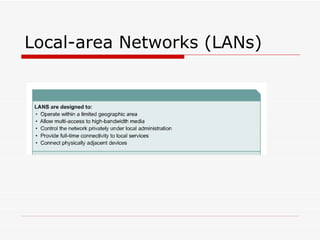
Local-area Networks (LANs)
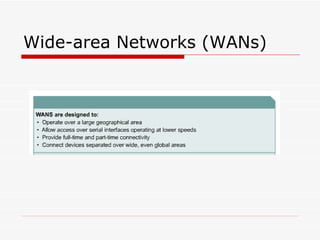
Wide-area Networks (WANs)
Network devices Hub Switch Router Nic
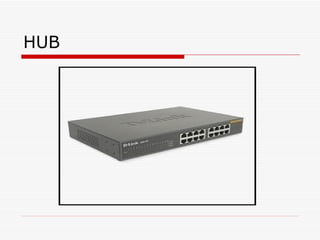
HUB A hub is a device into which you can connect all devices on a home network so that they can talk together.
HUB
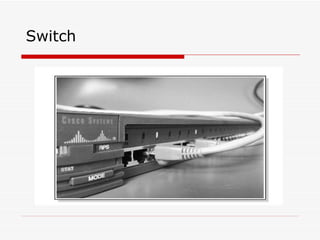
Switch A switch is also a device into which you can connect all devices on a home network so that they can talk together. Unlike a hub, traffic sent from Server A to Server B will only be received by Server B.
Switch
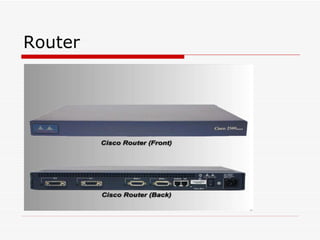
Router Router is device which allows communication possible between two or more different networks present in different geographical locations.
Router
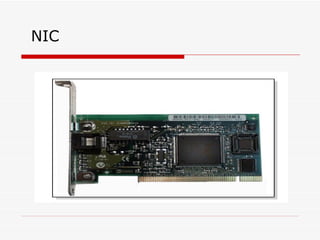
NIC The Network interface card is frequently called a NIC. It forms an interface between the networked device  ( Computer ) and the Ethernet ( LAN ).
NIC
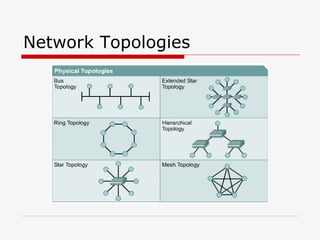
Network Topologies Bus Star Ring Mesh
Network Topologies
Logical Topologies Workgroup Model or Peer-To-Peer Model Domain Model or Client/Server Model
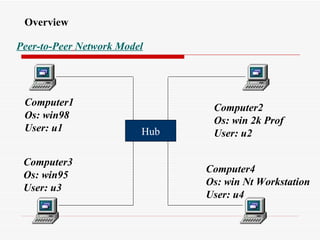
Overview Peer-to-Peer   Network Model Hub Computer1 Os: win98 User: u1 Computer3 Os: win95 User: u3 Computer2 Os: win 2k Prof User: u2 Computer4 Os: win Nt Workstation User: u4
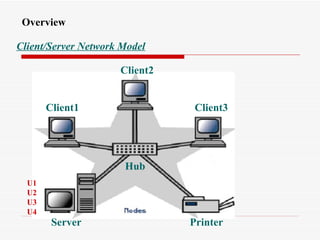
Client/Server Network Model Overview Server Client2 Client1 Client3 Printer Hub U1 U2 U3 U4
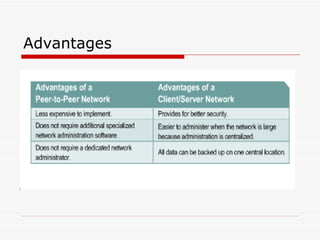
Advantages
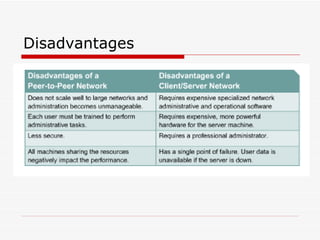
Disadvantages
Introduction   Microsoft Windows 2003 Server
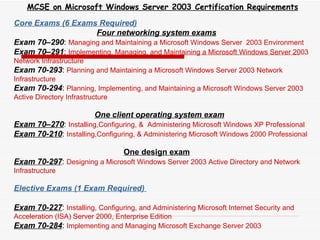
MCSE on Microsoft Windows Server 2003 Certification Requirements Core Exams (6 Exams Required) Four networking system exams Exam 70–290 :  Managing and Maintaining a Microsoft Windows Server  2003 Environment Exam 70–291 :  Implementing, Managing, and Maintaining a Microsoft Windows Server 2003 Network Infrastructure Exam 70-293 :  Planning and Maintaining a Microsoft Windows Server 2003 Network Infrastructure Exam 70-294 :  Planning, Implementing, and Maintaining a Microsoft Windows Server 2003 Active Directory Infrastructure One client operating system exam Exam 70–270 :  Installing,Configuring, &  Administering Microsoft Windows XP Professional Exam 70-210 :  Installing,Configuring, & Administering Microsoft Windows 2000 Professional One design exam Exam 70-297 :  Designing a Microsoft Windows Server 2003 Active Directory and Network Infrastructure   Elective Exams (1 Exam Required)  Exam 70-227 :  Installing, Configuring, and Administering Microsoft Internet Security and Acceleration (ISA) Server 2000, Enterprise Edition Exam 70-284 :  Implementing and Managing Microsoft Exchange Server 2003
INTRODUCTION  TO WINDOWS 2000
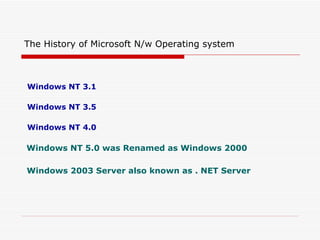
Windows NT 3.1 Windows NT 3.5 Windows NT 4.0 Windows NT 5.0 was Renamed as Windows 2000 Windows   2003 Server also known as . NET Server   The History of Microsoft N/w Operating system
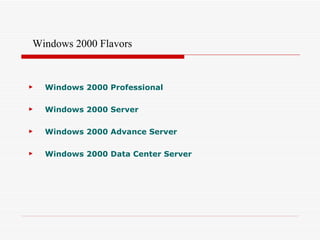
Windows 2000 Professional Windows 2000 Server Windows 2000 Advance Server Windows 2000 Data Center Server Windows 2000 Flavors
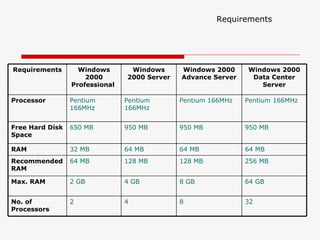
Requirements 64 GB 8 GB 4 GB 2 GB Max. RAM 256 MB 128 MB 128 MB 64 MB Recommended RAM 32 8 4 2 No. of Processors 64 MB 64 MB 64 MB 32 MB RAM 950 MB  950 MB  950 MB 650 MB Free Hard Disk Space Pentium 166MHz Pentium 166MHz Pentium 166MHz Pentium 166MHz Processor Windows 2000 Data Center Server Windows 2000 Advance Server Windows 2000 Server Windows 2000 Professional  Requirements
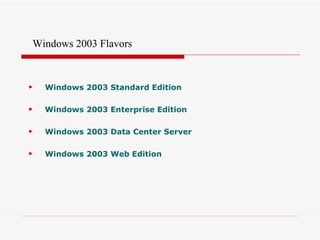
Windows 2003 Standard Edition Windows 2003 Enterprise Edition Windows 2003 Data Center Server Windows 2003 Web Edition Windows 2003 Flavors
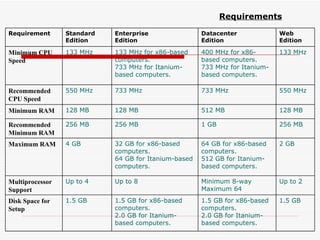
Requirements 1.5 GB 1.5 GB for x86-based computers. 2.0 GB for Itanium-based computers. 1.5 GB for x86-based computers. 2.0 GB for Itanium-based computers. 1.5 GB Disk Space for Setup Up to 2 Minimum 8-way Maximum 64 Up to 8 Up to 4 Multiprocessor Support  2 GB 64 GB for x86-based computers. 512 GB for Itanium-based computers. 32 GB for x86-based computers. 64 GB for Itanium-based computers. 4 GB Maximum RAM 256 MB 1 GB 256 MB 256 MB Recommended Minimum RAM 128 MB 512 MB 128 MB 128 MB Minimum RAM 550 MHz 733 MHz 733 MHz 550 MHz Recommended CPU Speed 133 MHz 400 MHz for x86-based computers. 733 MHz for Itanium-based computers. 133 MHz for x86-based computers. 733 MHz for Itanium-based computers. 133 MHz Minimum CPU Speed   Web Edition Datacenter Edition Enterprise Edition   Standard Edition   Requirement
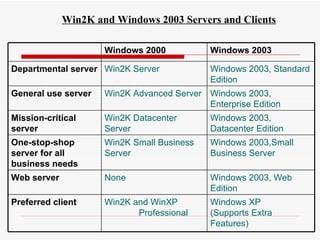
Win2K and Windows 2003 Servers and Clients Windows XP  (Supports Extra Features) Win2K and WinXP  Professional Preferred client Windows 2003, Web Edition None Web server Windows 2003,Small Business Server Win2K Small Business Server One-stop-shop server for all business needs Windows 2003, Datacenter Edition Win2K Datacenter Server Mission-critical server Windows 2003, Enterprise Edition Win2K Advanced Server General use server Windows 2003, Standard Edition Win2K Server Departmental server Windows 2003 Windows 2000
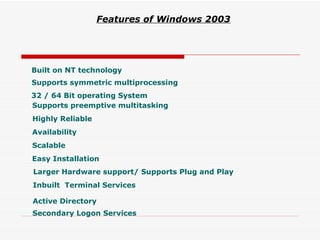
Built on NT technology 32 / 64 Bit operating System Supports symmetric multiprocessing Supports preemptive multitasking Highly Reliable Availability Scalable Easy   Installation   Larger Hardware support/ Supports Plug and Play Inbuilt  Terminal Services Active Directory Features of Windows 2003   Secondary Logon Services
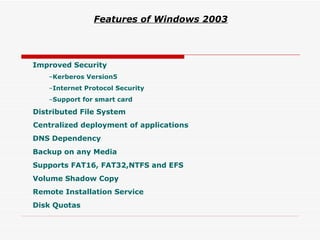
Improved Security Kerberos Version5 Internet Protocol Security Support for smart card Distributed File System Centralized deployment of applications DNS Dependency Backup on any Media Supports FAT16, FAT32,NTFS and EFS Volume Shadow Copy Remote Installation Service Disk Quotas Features of Windows 2003
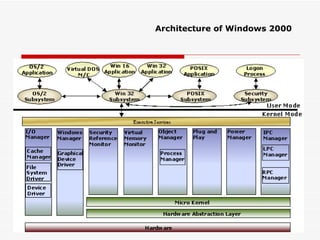
Architecture of Windows 2000
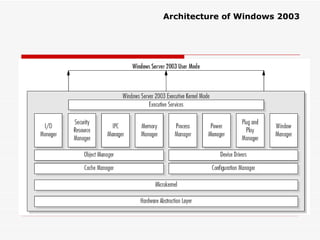
Architecture of Windows 2003
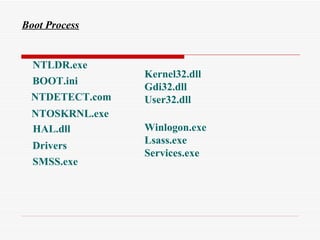
Boot Process NTLDR.exe BOOT.ini NTDETECT.com NTOSKRNL.exe HAL.dll Drivers SMSS.exe Kernel32.dll Gdi32.dll User32.dll Winlogon.exe Lsass.exe Services.exe

Networking & Intro 2003

  • 1.
  • 2.
    Network A Networkis an Interconnection of devices Networking is the communication between the interconnected devices basically to share the network resources.
  • 3.
    Types of NetworksLocal Area Network Wide Area Network Metropolitan Area Network
  • 4.
  • 5.
  • 6.
    Network devices HubSwitch Router Nic
  • 7.
    HUB A hubis a device into which you can connect all devices on a home network so that they can talk together.
  • 8.
  • 9.
    Switch A switchis also a device into which you can connect all devices on a home network so that they can talk together. Unlike a hub, traffic sent from Server A to Server B will only be received by Server B.
  • 10.
  • 11.
    Router Router isdevice which allows communication possible between two or more different networks present in different geographical locations.
  • 12.
  • 13.
    NIC The Networkinterface card is frequently called a NIC. It forms an interface between the networked device ( Computer ) and the Ethernet ( LAN ).
  • 14.
  • 15.
    Network Topologies BusStar Ring Mesh
  • 16.
  • 17.
    Logical Topologies WorkgroupModel or Peer-To-Peer Model Domain Model or Client/Server Model
  • 18.
    Overview Peer-to-Peer Network Model Hub Computer1 Os: win98 User: u1 Computer3 Os: win95 User: u3 Computer2 Os: win 2k Prof User: u2 Computer4 Os: win Nt Workstation User: u4
  • 19.
    Client/Server Network ModelOverview Server Client2 Client1 Client3 Printer Hub U1 U2 U3 U4
  • 20.
  • 21.
  • 22.
    Introduction Microsoft Windows 2003 Server
  • 23.
    MCSE on MicrosoftWindows Server 2003 Certification Requirements Core Exams (6 Exams Required) Four networking system exams Exam 70–290 : Managing and Maintaining a Microsoft Windows Server 2003 Environment Exam 70–291 : Implementing, Managing, and Maintaining a Microsoft Windows Server 2003 Network Infrastructure Exam 70-293 : Planning and Maintaining a Microsoft Windows Server 2003 Network Infrastructure Exam 70-294 : Planning, Implementing, and Maintaining a Microsoft Windows Server 2003 Active Directory Infrastructure One client operating system exam Exam 70–270 : Installing,Configuring, & Administering Microsoft Windows XP Professional Exam 70-210 : Installing,Configuring, & Administering Microsoft Windows 2000 Professional One design exam Exam 70-297 : Designing a Microsoft Windows Server 2003 Active Directory and Network Infrastructure Elective Exams (1 Exam Required) Exam 70-227 : Installing, Configuring, and Administering Microsoft Internet Security and Acceleration (ISA) Server 2000, Enterprise Edition Exam 70-284 : Implementing and Managing Microsoft Exchange Server 2003
  • 24.
    INTRODUCTION TOWINDOWS 2000
  • 25.
    Windows NT 3.1Windows NT 3.5 Windows NT 4.0 Windows NT 5.0 was Renamed as Windows 2000 Windows 2003 Server also known as . NET Server The History of Microsoft N/w Operating system
  • 26.
    Windows 2000 ProfessionalWindows 2000 Server Windows 2000 Advance Server Windows 2000 Data Center Server Windows 2000 Flavors
  • 27.
    Requirements 64 GB8 GB 4 GB 2 GB Max. RAM 256 MB 128 MB 128 MB 64 MB Recommended RAM 32 8 4 2 No. of Processors 64 MB 64 MB 64 MB 32 MB RAM 950 MB 950 MB 950 MB 650 MB Free Hard Disk Space Pentium 166MHz Pentium 166MHz Pentium 166MHz Pentium 166MHz Processor Windows 2000 Data Center Server Windows 2000 Advance Server Windows 2000 Server Windows 2000 Professional Requirements
  • 28.
    Windows 2003 StandardEdition Windows 2003 Enterprise Edition Windows 2003 Data Center Server Windows 2003 Web Edition Windows 2003 Flavors
  • 29.
    Requirements 1.5 GB1.5 GB for x86-based computers. 2.0 GB for Itanium-based computers. 1.5 GB for x86-based computers. 2.0 GB for Itanium-based computers. 1.5 GB Disk Space for Setup Up to 2 Minimum 8-way Maximum 64 Up to 8 Up to 4 Multiprocessor Support 2 GB 64 GB for x86-based computers. 512 GB for Itanium-based computers. 32 GB for x86-based computers. 64 GB for Itanium-based computers. 4 GB Maximum RAM 256 MB 1 GB 256 MB 256 MB Recommended Minimum RAM 128 MB 512 MB 128 MB 128 MB Minimum RAM 550 MHz 733 MHz 733 MHz 550 MHz Recommended CPU Speed 133 MHz 400 MHz for x86-based computers. 733 MHz for Itanium-based computers. 133 MHz for x86-based computers. 733 MHz for Itanium-based computers. 133 MHz Minimum CPU Speed Web Edition Datacenter Edition Enterprise Edition Standard Edition Requirement
  • 30.
    Win2K and Windows2003 Servers and Clients Windows XP (Supports Extra Features) Win2K and WinXP Professional Preferred client Windows 2003, Web Edition None Web server Windows 2003,Small Business Server Win2K Small Business Server One-stop-shop server for all business needs Windows 2003, Datacenter Edition Win2K Datacenter Server Mission-critical server Windows 2003, Enterprise Edition Win2K Advanced Server General use server Windows 2003, Standard Edition Win2K Server Departmental server Windows 2003 Windows 2000
  • 31.
    Built on NTtechnology 32 / 64 Bit operating System Supports symmetric multiprocessing Supports preemptive multitasking Highly Reliable Availability Scalable Easy Installation Larger Hardware support/ Supports Plug and Play Inbuilt Terminal Services Active Directory Features of Windows 2003 Secondary Logon Services
  • 32.
    Improved Security KerberosVersion5 Internet Protocol Security Support for smart card Distributed File System Centralized deployment of applications DNS Dependency Backup on any Media Supports FAT16, FAT32,NTFS and EFS Volume Shadow Copy Remote Installation Service Disk Quotas Features of Windows 2003
  • 33.
  • 34.
  • 35.
    Boot Process NTLDR.exeBOOT.ini NTDETECT.com NTOSKRNL.exe HAL.dll Drivers SMSS.exe Kernel32.dll Gdi32.dll User32.dll Winlogon.exe Lsass.exe Services.exe