VISVESVARAYA TECHNOLOGICAL UNIVERSITY BELGAUM


                              Technical Seminar
                                    On
                             “Linux Administration”
                                    By
                                YOGESH K S
                                4GH08CS058

                             Under the guidance of
                              Mr.Annaiah.,B.E.,M.Tech
                               Asst.professor
Seminar co-ordinator                                         Head of the Department
Mr.Chethan K.C.,B.E,M.Tech                              Dr. K.C Ravishankar B.E., M.Tech., Ph.d
                                                            Professor & Head,Dept.of
   Asst.professor
                                                               CS&E, GEC,Hassan
Linux Administration
Contents

1.   Introduction
2.   Admin Tasks
3.   Installation of Linux
4.   Admin Login
5.   User and Group management
6.   Security
7.   Backup & Restore
8.   Packages
9.   Conclusion
Introduction


• Linux is based on Unix

• Administration involves the management of
  entire system

• From maintaining user accounts to performing
  backups
Admin Roles & Tasks

• Install and Upgrade systems
• User management
• Group management
• Security
• Networking
• Backup and Restore
• Communicate with the users
• Managing System Services
• Adding or Removing application packages
and many more..
Installation of Linux

Several methods are available some of them are:

• FTP: One of the earliest method used for performing
       network installations

• HTTP: Installation is served from a web server.

• NFS: Distribution tree is shared/exported on an NFS server.

• From the Optical or removable media.
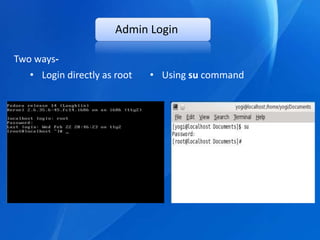
Admin Login

Two ways-
   • Login directly as root   • Using su command
User management

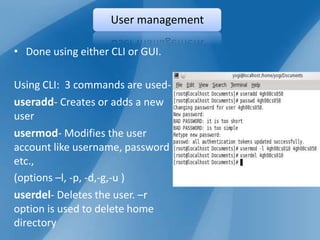
• Done using either CLI or GUI.

Using CLI: 3 commands are used-
useradd- Creates or adds a new
user
usermod- Modifies the user
account like username, password
etc.,
(options –l, -p, -d,-g,-u )
userdel- Deletes the user. –r
option is used to delete home
directory
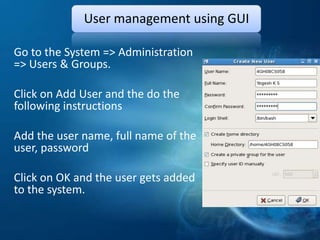
User management using GUI

Go to the System => Administration
=> Users & Groups.

Click on Add User and the do the
following instructions

Add the user name, full name of the
user, password

Click on OK and the user gets added
to the system.
Group management


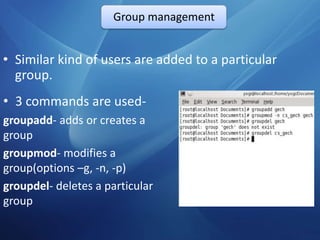
• Similar kind of users are added to a particular
  group.
• 3 commands are used-
groupadd- adds or creates a
group
groupmod- modifies a
group(options –g, -n, -p)
groupdel- deletes a particular
group
Networking


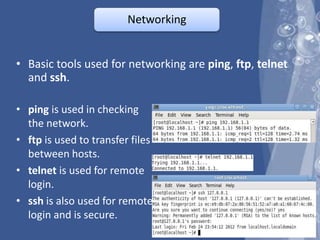
• Basic tools used for networking are ping, ftp, telnet
  and ssh.

• ping is used in checking
  the network.
• ftp is used to transfer files
  between hosts.
• telnet is used for remote
  login.
• ssh is also used for remote
  login and is secure.
Communicating with Users

• The admin should
   communicate with the users
   to intimate about the changes.
• Commands used-
wall- addresses all users
simultaneously who are
currently logged in.
 Syntax: wall msg

write-addresses a single user
Syntax: write username [tty] msg
Managing System Services


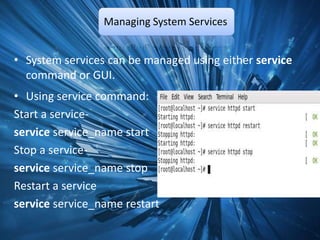
• System services can be managed using either service
  command or GUI.
• Using service command:
Start a service-
service service_name start
Stop a service-
service service_name stop
Restart a service
service service_name restart
Managing Services Using GUI


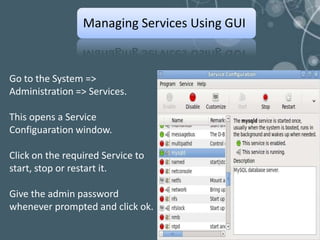
Go to the System =>
Administration => Services.

This opens a Service
Configuaration window.

Click on the required Service to
start, stop or restart it.

Give the admin password
whenever prompted and click ok.
Security

• Linux is more secure and it is enhanced with its
  Firewall and SELinux.

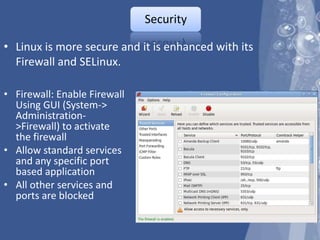
• Firewall: Enable Firewall
  Using GUI (System->
  Administration-
  >Firewall) to activate
  the firewall
• Allow standard services
  and any specific port
  based application
• All other services and
  ports are blocked
SELinux
• Malicious or broken software can have root-level
  access to the entire system by running as a root
  process.

• SELinux (Security Enhanced Linux) provides
  enhanced security.

• SELinux can take one of these three values
enforcing - SELinux security policy is enforced.
permissive - SELinux prints warnings instead of
enforcing.
disabled - SELinux is fully disabled
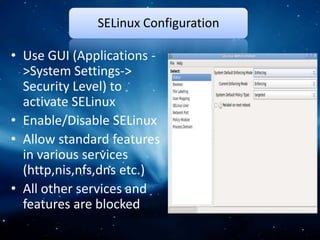
SELinux Configuration

• Use GUI (Applications -
  >System Settings->
  Security Level) to
  activate SELinux
• Enable/Disable SELinux
• Allow standard features
  in various services
  (http,nis,nfs,dns etc.)
• All other services and
  features are blocked
Backup & Restore

• Backup the user area or configuration file
• Use tar to take backup on a different disk or tape
• Backup can be scheduled using cron
• Backup: tar –zcvf <dev filename> <Directory Tree to be
  backedup>
• Restore: tar –zxvf <dev filename> <file to be
  recovered>
• Backup should be occasionally checked by restoring it
• Backup Policy: Full Backup every weekly/fortnightly
  and incremental backup every day
Adding & Removing Packages

• Can be done using source code of the package, binary
  rpms or yum utility.
• Using source code-
• This is hard way to install a package.
• Usual steps-
Download the required tar compressed file and extract it.
Run ./configure and make for compiling.
Run make install.
• May run into problems because of shared libraries or
  compilation.
Using RPM(Redhat Package Manager)

• Be aware of Architecture and type of kernel.
• Syntax: rpm [options] file.rpm(-i=install, -U= upgrade,
  -e= erase)
• To install a package: rpm –i pkg.rpm
• To remove a package: rpm –e pkg
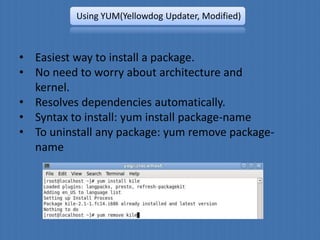
Using YUM(Yellowdog Updater, Modified)


• Easiest way to install a package.
• No need to worry about architecture and
  kernel.
• Resolves dependencies automatically.
• Syntax to install: yum install package-name
• To uninstall any package: yum remove package-
  name
Conclusion
                Conclusion

• Discussed only few essential linux
  administration tools.


• Full administration requires an in-depth
  knowledge of different components of system.
Any Qs?
ThanQ You

Linux administration

  • 1.
    VISVESVARAYA TECHNOLOGICAL UNIVERSITYBELGAUM Technical Seminar On “Linux Administration” By YOGESH K S 4GH08CS058 Under the guidance of Mr.Annaiah.,B.E.,M.Tech Asst.professor Seminar co-ordinator Head of the Department Mr.Chethan K.C.,B.E,M.Tech Dr. K.C Ravishankar B.E., M.Tech., Ph.d Professor & Head,Dept.of Asst.professor CS&E, GEC,Hassan
  • 2.
  • 3.
    Contents 1. Introduction 2. Admin Tasks 3. Installation of Linux 4. Admin Login 5. User and Group management 6. Security 7. Backup & Restore 8. Packages 9. Conclusion
  • 4.
    Introduction • Linux isbased on Unix • Administration involves the management of entire system • From maintaining user accounts to performing backups
  • 5.
    Admin Roles &Tasks • Install and Upgrade systems • User management • Group management • Security • Networking • Backup and Restore • Communicate with the users • Managing System Services • Adding or Removing application packages and many more..
  • 6.
    Installation of Linux Severalmethods are available some of them are: • FTP: One of the earliest method used for performing network installations • HTTP: Installation is served from a web server. • NFS: Distribution tree is shared/exported on an NFS server. • From the Optical or removable media.
  • 7.
    Admin Login Two ways- • Login directly as root • Using su command
  • 8.
    User management • Doneusing either CLI or GUI. Using CLI: 3 commands are used- useradd- Creates or adds a new user usermod- Modifies the user account like username, password etc., (options –l, -p, -d,-g,-u ) userdel- Deletes the user. –r option is used to delete home directory
  • 9.
    User management usingGUI Go to the System => Administration => Users & Groups. Click on Add User and the do the following instructions Add the user name, full name of the user, password Click on OK and the user gets added to the system.
  • 10.
    Group management • Similarkind of users are added to a particular group. • 3 commands are used- groupadd- adds or creates a group groupmod- modifies a group(options –g, -n, -p) groupdel- deletes a particular group
  • 11.
    Networking • Basic toolsused for networking are ping, ftp, telnet and ssh. • ping is used in checking the network. • ftp is used to transfer files between hosts. • telnet is used for remote login. • ssh is also used for remote login and is secure.
  • 12.
    Communicating with Users •The admin should communicate with the users to intimate about the changes. • Commands used- wall- addresses all users simultaneously who are currently logged in. Syntax: wall msg write-addresses a single user Syntax: write username [tty] msg
  • 13.
    Managing System Services •System services can be managed using either service command or GUI. • Using service command: Start a service- service service_name start Stop a service- service service_name stop Restart a service service service_name restart
  • 14.
    Managing Services UsingGUI Go to the System => Administration => Services. This opens a Service Configuaration window. Click on the required Service to start, stop or restart it. Give the admin password whenever prompted and click ok.
  • 15.
    Security • Linux ismore secure and it is enhanced with its Firewall and SELinux. • Firewall: Enable Firewall Using GUI (System-> Administration- >Firewall) to activate the firewall • Allow standard services and any specific port based application • All other services and ports are blocked
  • 16.
    SELinux • Malicious orbroken software can have root-level access to the entire system by running as a root process. • SELinux (Security Enhanced Linux) provides enhanced security. • SELinux can take one of these three values enforcing - SELinux security policy is enforced. permissive - SELinux prints warnings instead of enforcing. disabled - SELinux is fully disabled
  • 17.
    SELinux Configuration • UseGUI (Applications - >System Settings-> Security Level) to activate SELinux • Enable/Disable SELinux • Allow standard features in various services (http,nis,nfs,dns etc.) • All other services and features are blocked
  • 18.
    Backup & Restore •Backup the user area or configuration file • Use tar to take backup on a different disk or tape • Backup can be scheduled using cron • Backup: tar –zcvf <dev filename> <Directory Tree to be backedup> • Restore: tar –zxvf <dev filename> <file to be recovered> • Backup should be occasionally checked by restoring it • Backup Policy: Full Backup every weekly/fortnightly and incremental backup every day
  • 19.
    Adding & RemovingPackages • Can be done using source code of the package, binary rpms or yum utility. • Using source code- • This is hard way to install a package. • Usual steps- Download the required tar compressed file and extract it. Run ./configure and make for compiling. Run make install. • May run into problems because of shared libraries or compilation.
  • 20.
    Using RPM(Redhat PackageManager) • Be aware of Architecture and type of kernel. • Syntax: rpm [options] file.rpm(-i=install, -U= upgrade, -e= erase) • To install a package: rpm –i pkg.rpm • To remove a package: rpm –e pkg
  • 21.
    Using YUM(Yellowdog Updater,Modified) • Easiest way to install a package. • No need to worry about architecture and kernel. • Resolves dependencies automatically. • Syntax to install: yum install package-name • To uninstall any package: yum remove package- name
  • 22.
    Conclusion Conclusion • Discussed only few essential linux administration tools. • Full administration requires an in-depth knowledge of different components of system.
  • 23.
  • 24.