What Developers Should Know About Windows® Server 2008 R2Clint edmonsonArchitect Evangelistclinted@Microsoft.com
Agenda“Not Your Average R2…”Powerful, efficient, and extensible!   The Core Web Application PlatformUbiquitous and Extensible Platform Technologies
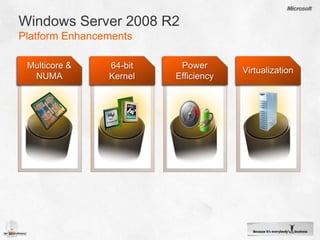
Windows Server 2008 R2Platform EnhancementsPower EfficiencyMulticore & NUMA64-bit KernelVirtualization
Performance, Efficiency & ExtensibilityKernel ChangesWindows® 7 (x64) and Windows ® Server 2008 R2 are based on same kernelEnhancements in many areas: Multi-core and many-core processingRemoval of several coarse-grained locks Desktop and registry memory management optimizationsProcess & Power efficiencyVirtualizationSecurityManagement
User Mode Scheduling (UMS)Designed for PerformanceLimitation of Fibers is that the kernel doesn’t know about themSome system calls have state associated with underling threadIf Fibers run on multiple threads, state can become corruptUMS solves thread state problem by separating user-mode thread and kernel-mode threadRuntime creates enough threads for concurrency demandsEach thread has user-mode thread (UT) and kernel-mode thread (KT) stateSwitching between user-threads doesn’t switch kernel threadWhen a user-mode thread goes into kernel mode, it switches to the corresponding kernel thread
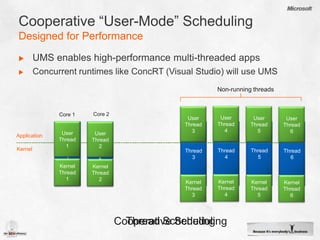
Cooperative “User-Mode” SchedulingDesigned for PerformanceUMS enables high-performance multi-threaded appsConcurrent runtimes like ConcRT (Visual Studio) will use UMSUserThread4UserThread3UserThread5UserThread6Core 2Core 1Core 2Core 1Thread4Thread5UserThread1Thread1Thread3Thread2Thread6UserThread2ApplicationKernelKernelThread1KernelThread2KernelThread4KernelThread3KernelThread5KernelThread6Non-running threadsThread SchedulingCooperative Scheduling
Removal of Coarse-Grained LocksLocks serialize access to kernel data structuresPrevents multiple threads from simultaneously modifying data Inhibits scaling because threads must wait for their turn (contention)Examples:Dispatcher LockMemory Manager PFN LockCache Manager Virtual Address Control Block (VACB) LockObject Manager Type LockEither replaced with lock-free algorithms or with finer-grained synchronization mechanisms
Memory OptimizationsDesktop Window Manager (DWM) re-architecture reduces memory footprint per window by 50%Registry moved from mapped files to paged poolImproves performance because views into registry file don’t need to be mapped and unmappedWorking set management improvements:Working set is amount of RAM memory manager assigns to process or kernel memory typeMemory manager uses more information for better tuningSystem cache, paged pool, and pageable system code each have own working setBefore were in the same working setNow, each tuned according to specific usage, which improves memory usage
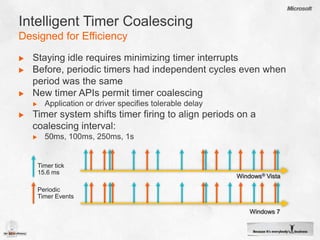
Intelligent Timer CoalescingDesigned for EfficiencyStaying idle requires minimizing timer interruptsBefore, periodic timers had independent cycles even when period was the sameNew timer APIs permit timer coalescingApplication or driver specifies tolerable delayTimer system shifts timer firing to align periods on a coalescing interval:50ms, 100ms, 250ms, 1sTimer tick15.6 msWindows® VistaPeriodic Timer EventsWindows 7
“Trigger-Start” ServicesDesigned for EfficiencyPreviously, services typically started at system boot and ran until shutdownServices can now specify specific start and stop conditions (triggers):Device class arrival and removalBthserv: start on Bluetooth device class arrivalIP address arrival and removalLmhosts: start on first and stop on last IP address availabilityFirewall port eventBrowser: open of NS and DGM portsDomain join and unjoinW32Time: start on join, stop on un-joinCustom Event Tracing for Windows (ETW) eventAppid: start when Security Rollup Package (SRP) enabledTriggers are stored in service registry key
Trigger-Start ServicesInspecting Service Trigger Eventsdemo
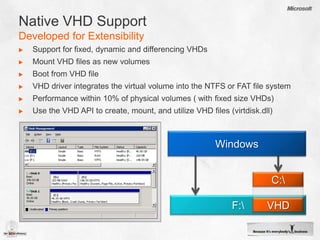
Native VHD SupportDeveloped for ExtensibilitySupport for fixed, dynamic and differencing VHDsMount VHD files as new volumesBoot from VHD fileVHD driver integrates the virtual volume into the NTFS or FAT file systemPerformance within 10% of physical volumes ( with fixed size VHDs) Use the VHD API to create, mount, and utilize VHD files (virtdisk.dll)WindowsC:\F:\VHD
Virtual Hard DisksEasy To Manage & Userdemo
Maintenance OS1 Guest Partition Host Partition Guest Partition Guest PartitionService 1BitsService 2BitsService 3Bits6WebVHDWorkerVHDWorkerVHD5Host DifferencingVHDGuest DifferencingVHDGuest DifferencingVHDGuest DifferencingVHD4Enterprise baseVHDServer CoreVHDServer Core base VHD273HypervisorPhysical Server HardwareCPU, memory, disk, and network
AgendaThe Core Web Application PlatformNew opportunities for .NET and ASP.NET applications!Ubiquitous and Extensible Platform Technologies“Not Your Average R2…”
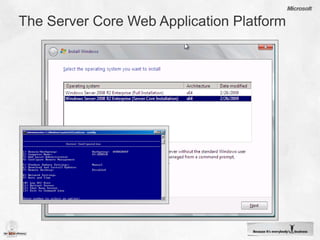
The Server Core Web Application Platform
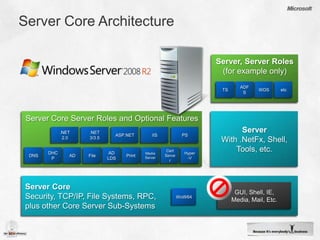
Server Core ArchitectureServer, Server Roles (for example only)TSADFSWDSetcServerWith .NetFx, Shell, Tools, etc.Server Core Server Roles and Optional Features.NET2.0.NET3/3.5ASP.NETIISPSDNSDHCPADFileADLDSPrintMedia ServerCert ServerHyper-VServer CoreSecurity, TCP/IP, File Systems, RPC,plus other Core Server Sub-SystemsGUI, Shell, IE, Media, Mail, Etc.WoW64
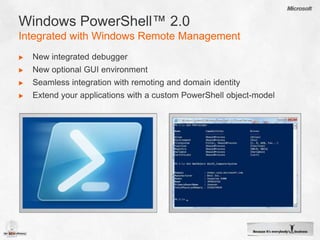
Windows PowerShell™ 2.0Integrated with Windows Remote ManagementNew integrated debuggerNew optional GUI environmentSeamless integration with remoting and domain identityExtend your applications with a custom PowerShell object-model
PowerShell™ 2.0Integrated Scripting Environmentdemo
AgendaUbiquitous and Extensible Platform TechnologiesYour applications extend the platform!“Not Your Average R2…”The Core Web Application Platform
BITS Compact ServerBackground Intelligent Transfer Service Gets SmallEasy to manage “lightweight” HTTP serverStandalone solution to host files in domain/work groupsComplements BITS client to provide ubiquitous file transfersEnables orchestration of secure file transfers remotely (via WMI) between machinesExtensible API for your applications For large scale downloads, leveraging existing BITS IIS extension is recommended
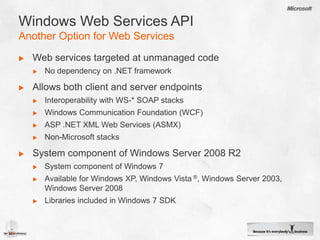
Windows Web Services APIAnother Option for Web ServicesWeb services targeted at unmanaged codeNo dependency on .NET frameworkAllows both client and server endpointsInteroperability with WS-* SOAP stacksWindows Communication Foundation (WCF)ASP .NET XML Web Services (ASMX)Non-Microsoft stacksSystem component of Windows Server 2008 R2System component of Windows 7Available for Windows XP, Windows Vista ®, Windows Server 2003, Windows Server 2008Libraries included in Windows 7 SDK
Windows Web Services APINative WS-* Endpoint Library (webservices.dll)ClientWeb ServiceEndpointEndpointABCABCEndpointService ProxyABCEndpointCode GeneratorABCWSDLService HostCodeGeneratorXSD

Windows Server 2008 R2 Dev Session 01

  • 1.
    What Developers ShouldKnow About Windows® Server 2008 R2Clint edmonsonArchitect Evangelistclinted@Microsoft.com
  • 2.
    Agenda“Not Your AverageR2…”Powerful, efficient, and extensible! The Core Web Application PlatformUbiquitous and Extensible Platform Technologies
  • 3.
    Windows Server 2008R2Platform EnhancementsPower EfficiencyMulticore & NUMA64-bit KernelVirtualization
  • 4.
    Performance, Efficiency &ExtensibilityKernel ChangesWindows® 7 (x64) and Windows ® Server 2008 R2 are based on same kernelEnhancements in many areas: Multi-core and many-core processingRemoval of several coarse-grained locks Desktop and registry memory management optimizationsProcess & Power efficiencyVirtualizationSecurityManagement
  • 5.
    User Mode Scheduling(UMS)Designed for PerformanceLimitation of Fibers is that the kernel doesn’t know about themSome system calls have state associated with underling threadIf Fibers run on multiple threads, state can become corruptUMS solves thread state problem by separating user-mode thread and kernel-mode threadRuntime creates enough threads for concurrency demandsEach thread has user-mode thread (UT) and kernel-mode thread (KT) stateSwitching between user-threads doesn’t switch kernel threadWhen a user-mode thread goes into kernel mode, it switches to the corresponding kernel thread
  • 6.
    Cooperative “User-Mode” SchedulingDesignedfor PerformanceUMS enables high-performance multi-threaded appsConcurrent runtimes like ConcRT (Visual Studio) will use UMSUserThread4UserThread3UserThread5UserThread6Core 2Core 1Core 2Core 1Thread4Thread5UserThread1Thread1Thread3Thread2Thread6UserThread2ApplicationKernelKernelThread1KernelThread2KernelThread4KernelThread3KernelThread5KernelThread6Non-running threadsThread SchedulingCooperative Scheduling
  • 7.
    Removal of Coarse-GrainedLocksLocks serialize access to kernel data structuresPrevents multiple threads from simultaneously modifying data Inhibits scaling because threads must wait for their turn (contention)Examples:Dispatcher LockMemory Manager PFN LockCache Manager Virtual Address Control Block (VACB) LockObject Manager Type LockEither replaced with lock-free algorithms or with finer-grained synchronization mechanisms
  • 8.
    Memory OptimizationsDesktop WindowManager (DWM) re-architecture reduces memory footprint per window by 50%Registry moved from mapped files to paged poolImproves performance because views into registry file don’t need to be mapped and unmappedWorking set management improvements:Working set is amount of RAM memory manager assigns to process or kernel memory typeMemory manager uses more information for better tuningSystem cache, paged pool, and pageable system code each have own working setBefore were in the same working setNow, each tuned according to specific usage, which improves memory usage
  • 9.
    Intelligent Timer CoalescingDesignedfor EfficiencyStaying idle requires minimizing timer interruptsBefore, periodic timers had independent cycles even when period was the sameNew timer APIs permit timer coalescingApplication or driver specifies tolerable delayTimer system shifts timer firing to align periods on a coalescing interval:50ms, 100ms, 250ms, 1sTimer tick15.6 msWindows® VistaPeriodic Timer EventsWindows 7
  • 10.
    “Trigger-Start” ServicesDesigned forEfficiencyPreviously, services typically started at system boot and ran until shutdownServices can now specify specific start and stop conditions (triggers):Device class arrival and removalBthserv: start on Bluetooth device class arrivalIP address arrival and removalLmhosts: start on first and stop on last IP address availabilityFirewall port eventBrowser: open of NS and DGM portsDomain join and unjoinW32Time: start on join, stop on un-joinCustom Event Tracing for Windows (ETW) eventAppid: start when Security Rollup Package (SRP) enabledTriggers are stored in service registry key
  • 11.
  • 12.
    Native VHD SupportDevelopedfor ExtensibilitySupport for fixed, dynamic and differencing VHDsMount VHD files as new volumesBoot from VHD fileVHD driver integrates the virtual volume into the NTFS or FAT file systemPerformance within 10% of physical volumes ( with fixed size VHDs) Use the VHD API to create, mount, and utilize VHD files (virtdisk.dll)WindowsC:\F:\VHD
  • 13.
    Virtual Hard DisksEasyTo Manage & Userdemo
  • 14.
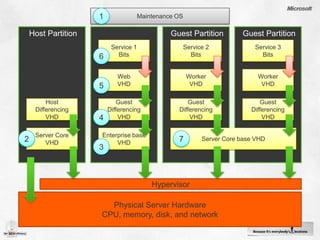
    Maintenance OS1 GuestPartition Host Partition Guest Partition Guest PartitionService 1BitsService 2BitsService 3Bits6WebVHDWorkerVHDWorkerVHD5Host DifferencingVHDGuest DifferencingVHDGuest DifferencingVHDGuest DifferencingVHD4Enterprise baseVHDServer CoreVHDServer Core base VHD273HypervisorPhysical Server HardwareCPU, memory, disk, and network
  • 15.
    AgendaThe Core WebApplication PlatformNew opportunities for .NET and ASP.NET applications!Ubiquitous and Extensible Platform Technologies“Not Your Average R2…”
  • 16.
    The Server CoreWeb Application Platform
  • 17.
    Server Core ArchitectureServer,Server Roles (for example only)TSADFSWDSetcServerWith .NetFx, Shell, Tools, etc.Server Core Server Roles and Optional Features.NET2.0.NET3/3.5ASP.NETIISPSDNSDHCPADFileADLDSPrintMedia ServerCert ServerHyper-VServer CoreSecurity, TCP/IP, File Systems, RPC,plus other Core Server Sub-SystemsGUI, Shell, IE, Media, Mail, Etc.WoW64
  • 18.
    Windows PowerShell™ 2.0Integratedwith Windows Remote ManagementNew integrated debuggerNew optional GUI environmentSeamless integration with remoting and domain identityExtend your applications with a custom PowerShell object-model
  • 19.
  • 20.
    AgendaUbiquitous and ExtensiblePlatform TechnologiesYour applications extend the platform!“Not Your Average R2…”The Core Web Application Platform
  • 21.
    BITS Compact ServerBackgroundIntelligent Transfer Service Gets SmallEasy to manage “lightweight” HTTP serverStandalone solution to host files in domain/work groupsComplements BITS client to provide ubiquitous file transfersEnables orchestration of secure file transfers remotely (via WMI) between machinesExtensible API for your applications For large scale downloads, leveraging existing BITS IIS extension is recommended
  • 22.
    Windows Web ServicesAPIAnother Option for Web ServicesWeb services targeted at unmanaged codeNo dependency on .NET frameworkAllows both client and server endpointsInteroperability with WS-* SOAP stacksWindows Communication Foundation (WCF)ASP .NET XML Web Services (ASMX)Non-Microsoft stacksSystem component of Windows Server 2008 R2System component of Windows 7Available for Windows XP, Windows Vista ®, Windows Server 2003, Windows Server 2008Libraries included in Windows 7 SDK
  • 23.
    Windows Web ServicesAPINative WS-* Endpoint Library (webservices.dll)ClientWeb ServiceEndpointEndpointABCABCEndpointService ProxyABCEndpointCode GeneratorABCWSDLService HostCodeGeneratorXSD

Editor's Notes

  • #3 “Not your average R2…”Paul Thorrott, Windows IT Pro http://windowsitpro.com/article/articleid/100766/windows-server-2008-r2-not-your-average-r2.htmlThis is a quote from a technical writer, Paul Thorrott, after reviewing the Windows Server 2008 R2.He’s correct. Usually, an “R2” release is a mid-cycle feature-extension of an existing product release. Not with this “R2”.The Server platform has received fundamental technology enhancements that really do make this release significant.
  • #4 Besides Scalability… there are several hardware trends influencing system design today.Windows® Server 2008 was our first significant product release with platform features taking advantage of these trends.Windows Server 2008 R2 builds upon the exceptional legacy of Windows Server 2008. While Windows® 7 is available in both 32- and 64-bit versions, R2 is the first 64-bit only Server release, for instance, some of the key new features areas in Windows Server 2008 R2 include: ·         Platform Scalability - We just mentioned the support of more than 64 processors.·         Virtualization – the “R2” release of Hyper-V™ is arguably Microsoft’s first “full-feature” implementation of the Hyper-V technology.·         Power Management – Power efficiency in the data-center has never been more important. “R2” is the server to deploy if power-savings are business critical.·         Web Workloads – IIS7 was a re-architecture of the Microsoft Web Platform. That extensible architecture has proven to be very robust. “R2” builds upon this with IIS7.5. We’ll discuss this more in Session 3 today.·         Enterprise Workloads – Microsoft remains “the” Enterprise Platform. No other platform offers as many integrated solution possibilities in the Enterprise. We’ll look at a few solution scenarios that are new with “R2”. Developers, we think, will appreciate using these extensible platform technologies within their own Windows solutions.  
  • #5 Let’s first take a look at “R2” from the Kernel perspective… Windows 7 is available in both 32-bit and 64-bit versions. Windows 7 (64-bit) and “R2” share the same kernel source. There are lots of new and improved Windows 7 features, but the Server includes specific features for server workloads (of course). Let’s examine a few of these in more detail:Removal of several coarse-grained locks:• Locks serialize access to data structures.•Prevents multiple threads from simultaneously modifying data.•Inhibits scaling because threads must wait for their turn (contention).Examples:• Dispatcher Lock.• Memory Manager PFN Lock.• Cache Manager Virtual Address Control Block (VACB) Lock.• Object Manager Type Lock.• Either replaced with lock-free algorithms or with finer-grained synchronization mechanisms.Memory management optimizations• Desktop Window Manager (DWM) re-architecture reduces memory footprint per window by 50%.• Registry moved from mapped files to paged pool.• Improves performance because views into registry file don’t need to be mapped and unmapped.Working set management improvements:• Working set is amount of RAM memory manager assigns to process or kernel memory type.• Memory manager uses more information for better tuning.• System cache, paged pool, and pageable system code each have own working set (were previously in the same working set).• Now, each tuned according to specific usage, which improves memory usage.Multi- core & many-core processingNon-Uniform Memory Access (NUMA) Computer Architecture Support.Windows 7/R2 Supports more than 64 Logical Processors on a single system.• Introduced Processor Groups (in groups of 64).• New applications can localize processes, threads, and interrupts at very granular level (node, processor enables developers to “minimize resource contention and maximize execution locality”).• User-Mode-Scheduling (UMS).UMS solves thread state problems in highly concurrent solutions by separating user-mode thread and kernel-mode thread execution.• Switching between user-threads doesn’t switch kernel thread.• When a user-mode thread goes into kernel mode, it switches to the corresponding kernel thread.• Minimizes most cases of thread-context-switching. • The C++ Concurrency Runtime (Visual Studio 2010) uses UMS for thread and task scheduling.Power efficiency• Minimize running services and tasks with Unified Background Process Manager (UBPM) enhancements .- Trigger-Start Services use system or user-defined events to start and stop.- Avoid background processing.- Integrate with system-level power-state designs.• Core Parking- The OS dynamically transitions low-activity sockets and processors to low-power states.- Automatically consolidates processes and threads to alternate processors to maximize power and CPU usage.• System Timer Reduction- Eliminated timer scenarios on Deferred Procedure Call (DPC) interrupts.- Reduced timer frequency for specific scenarios (USB).- New “Timer Coalescing” system strategy minimizes timer interrupts across the system.• Device Power Management EnhancementsSupport for latest power-intelligent devices (NIC, BlueTooth, etc.)Security• Virtual Accounts- Better isolation for service accounts. - Services can specify a local, automatically system-managed, account e.g. “NT SERVICE<account>”• Managed Service Accounts- New Active Directory® (AD) class.- Password and SPN automatically managed by AD.Management• WinRM (Windows Remote Management) service enhancements.• Windows PowerShell™ V2 enhancements.- Remote Execution- Sessions• Enterprise Networks enhancements- DirectAccess- BranchCache™- BITS Compact Server- Windows Web Services API Virtualization New VHD support in file systems. VHD’s may be mapped as NTFS volumes within existing file system. Boot to VHD capability. Extensive improved support for virtualization with Hyper-V role.Componentization and layering • Server Core Installation.• Now includes .NET Runtime and .NET Framework Class Library support.• No GUI components of .NET supported.• Expanded “optional feature” list supported (IIS, ASP.NET, WoW64, and numerous network services roles/features).
  • #6 Read more here: http://blogs.msdn.com/nativeconcurrency/default.aspx
  • #7 User-Mode Scheduling (UMS) is new in R2.On high-performance multi-core systems, many computational applications could benefit from their own thread scheduling facilities. UMS is a light-weight mechanism that an application or library can use to schedule its own threads. An application can switch between threads in user-mode without involving the operating system thread scheduler and thus maintains control of the processor. A UMS-based Scheduler never blocks on worker threads making kernel transitions and effectively maximizes parallel task execution.The implementation details of UMS is beyond the scope of this presentation, but suffice it to say that you can benefit from UMS without actually writing your own scheduler. This is because the new Concurrency Runtime includes a built-in UMS-based Scheduler. Our second session today will cover this topic in more detail.The animation on this slide illustrates how an Application (running in user-mode on the top of the slide) manages 6 worker threads that are scheduled against 2 physical processing cores. The kernel (on the bottom of the slide) collaborates with the applications’ UMS Scheduler to ensure that when any thread that makes a blocking system call, the application regains control of the core and is able to schedule a waiting worker thread. The application benefits from high processor utilization.================ More Reference Info ==========================User Mode Scheduling (UMS) • UMS solves thread state problem by separating user-mode thread and kernel-mode thread.• Switching between user-threads doesn’t switch kernel thread.• When a user-mode thread goes into kernel mode, it switches to the corresponding kernel thread.• Concurrent runtimes like ConcRT (Visual Studio) will use UMS.UMS Architecture• Runtime creates enough threads for concurrency demands.• Each thread has user-mode thread (UT) and kernel-mode thread (KT) state.• Runtime creates one primary thread per LP.• Primary hands off to user-mode threads (UT) .• UTs remain running on Primary KT.• UTs schedule cooperatively.UMS System Call Servicing• When UT makes system call, scheduler makes directed context switch to corresponding KT.•Matches kernel state with user state.•When KT exits kernel, scheduler switches back to primary.If KT blocks in the kernel:•Scheduler switches to Primary.•When KT unblocks, UT goes to completion list.•Runtime can schedule when ready.•Kernel uses Kernel Queue to limit concurrency.•Queues also used by I/O completion ports.
  • #8 http://channel9.msdn.com/shows/Going+Deep/Mark-Russinovich-Inside-Windows-7/Removal of the Dispatcher Lock:Scheduler Dispatcher lock hottest on server workloadsLock protected all synchronization objects (mutex, events, semaphores)To improve scaling, Dispatcher Lock was removedNow, each object is protected by its own lockRemoval of the Memory Manager PFN LockWindows tracks the state of pages in physical memoryIn use (in a working set)Not assigned to a working set (on one of several paging lists: free, zero, modified, standby…)Before, all page state changes protected by global PFN (Physical Frame Number) lockNow, the PFN lock is gonePages are now locked individuallyImproves scalability for applications that manage large amounts of memoryRemoval of Cache Manager Virtual Address Control Block (VACB) lockImproves scaling of applications that perform intensive cached file I/ORemoval of Object Manager Type lockImproves scaling of workloads that modify kernel objects (synchronization, files, registry keys)
  • #10 OPTIONAL SLIDE – Hidden by defaultTimer CoalescingAnother way we’ve handled power is to minimize the number of times the system wakes up to handle timer interrupts.When we looked at how Windows apps use timers, many of them just ask for a timer.If there are 2 apps and they both want a timer to return in 50ms then the first one happens & bang, almost immediately the 2nd one occurs. In most cases they don’t really care about the precision, just as long as the pulses are about say 50ms apart. You know what, roughly every 50ms I want to do something.So there are new API’s that have been introduced called the coalescing timers. I want to be called every 50ms, but if you’re off by 3ms, I don’t care.The top line shows the WindowsVista system, the lower picture shows how over time, the number of wake-ups is much reduced.Intelligent Timer Tick DistributionWe’ve done something else too.We want to keep processors idle. The first processor gets the heartbeat (for scheduling). When this occurs, it notifies the other processors.The problem is that if you’ve got processors that are idle, they would wake up and say “hey, there’s nothing to do” and then go back to sleep again.Now we have Intelligent Timer Tick Distribution (aka Tick Skipping) – it doesn’t needlessly wake up idle processors.
  • #11 Trigger-Start Services built upon another system feature - Unified Background Process Manager (UBPM)UBPM infrastructure unifies mechanisms for event-based process start and stop.• Implemented in Service Control Manager. • All events are based on ETW (Event Tracing for Windows) events.SRP = Software Restriction PoliciesUBPM system clients include:• Task Scheduler: new Taskhost processes.• Service Control Manager: Trigger-Start services.Trigger Start Services are just one example of how R2 is designed for efficiency. One important benefit is that now your services can play a bigger role in overall system responsiveness, especially in usage scenarios like system-boot. ================ Optional ==========================Demo: Show Trigger Start ServiceAdmin Command Window (sc communicates with the Service Control Manager).sc qtriggerinfo bthservsc qtriggerinfo lmhostsyou can see the START SERVICE and STOP SERVICE conditions; these are specified in the register for any specific service. With that, we’ve minimized the number of services which need to start up at System Start-Time.
  • #13 Native Virtual Hard Disk (VHD) SupportVHD is exploding – a lot of people want to do it. As a result, VHD support has been integrated into the OS (not only for virtual machines, but also for new scenarios including disk management and ‘boot-2-vhd’ capabilities).We support fixed, dynamic and differencing VHDs.VHD files may be mounted as new volumes within the Operating System.You can add a VHD file as a “bootable” partition within the Windows Boot Manager.You can even write applications to create, access, mount, or otherwise use VHD’s.The key is a VHD driver that integrates the virtual volume into the NTFS or FAT file system. The VHD Driver knows the VHD format and it will propagate operationsdown into the physical volume using regular File IO. ================ More Reference Info ==========================VHD BOOTStrategic direction for Windows in the Data Center:• Image consolidation.• Single image format for generalized and specialized physical images.• Single generalized master image for virtual and physical environments.• Reduced management TCO.• Single toolset and process for management and deployment. Enables other compelling scenarios: • Rapid provisioning and repurposing. • Rapid, reliable patching and rollback.Foundational support for booting from VHD and for Surface/Removal of VHDs:• Orderly and surprise removal of volumes.• Support for nested volumes.• Servicing for mounted (offline) VHD volumes.VHD Operations:• Create / Surface / Remove.• Meta-operations.Tools and APIs: • Win32 APIs. • VDS APIs (DCOM Remotable). • Hyper-V WMI for management operations.Performance goal: within 10% of native
  • #14 Let’s take a look at what a developer should know about Windows Server Core and also showcase some PowerShell in the process…< SEE THE DEMO’s DOCUMENTS>
  • #16 Let’s switch gears a bit and look at the platform from a recent trend that’s quite challenging for developers.Your customers like to deploy servers that require a minimal amount of patching and administration. They also want their servers to be secure and difficult to attack.Developers want to write code once and deploy it to systems without having to deal with deployment constraints.This is where Server Core comes in…
  • #17 TO DO: Animate the console window to appear as the speaker introduces Server CoreServer Core is:A minimal installation option for Windows Server.There is onlyCommand Line interface, no GUI Shell.<CLICK>Very popular for Enterprise service workloads.Included in the following Windows Server editions:• Windows Server 2008 R2 Web Edition• Windows Server 2008 R2 Standard Edition• Windows Server 2008 R2 Enterprise Edition• Windows Server 2008 R2 Datacenter EditionServer Core reduces requirements for Updates.Servicing burden is reduced by removing components that are most often serviced.• Windows 2000 is ~60% reduction• Windows Server 2003 is ~40% reduction• Windows Server 2008 to date is ~40% reductionSo, it’s an installation option for Windows Server… A way to minimize the system components that get deployed.
  • #18 Let’s consider the Server Core system architecture. What’s different from a normal Windows Server?Server Core is all about “component Windows” - that means that not all, but many, system components are optional. What’s new with R2 is that now the selection of optional components includes portions of the .NET Framework and Runtime.Now, you can select the smallest set of system dependencies required to host your applications and significantly reduce the administration and management of servers within your enterprise.<CLICK>You may choose to add or remove the WoW64 feature, for instance…<CLICK>Or Add portions of the .NET Framework required to host an ASP.NET application…<CLICK>Maybe add support for Windows PowerShell™ in order to host your cmdlets for remote management capability…<CLICK>Or, one or more of a number of optional server roles and features….Server Core has moved from a typical network services host platform to a very reasonable option for hosting enterprise applications. You will want to include Server Core as a target deployment platform for your applications and include it in your list of platforms for application testing.
  • #19 PowerShell 1.0 was introduced as a new, powerful, shell scripting environment. It has succeeded and as such has developed quite a community.However, “PowerShell” is much more than a scripting environment. It’s also the surface representation of an automation sub-system. You can integrate your applications with this automation system and give your customers a truly versatile application experience.For Developers specifically, Windows PowerShell in combination of the Windows Management Infrastructure (WinRM, WS-Management, WMI) and provides a great way to automate server hosted solutions.For example, if you implement all your administration logic via PowerShell, then layer the MMC GUI over the top (i.e. MMC calls PowerShell to get the work done) - you will have given your Enterprise customers the absolute best of all worlds; GUIs, scripting,and delegated, remote automation. Unlike most scripting shells, which accept and return text, Windows PowerShell is integrated with the .NET Common Language Runtime (CLR) and the .NET Framework, and thus deals in .NET objects instead of just text strings. This fundamental change in the environment brings entirely new tools and methods to the management and configuration of Windows.   Application Developers may extend their solutions with custom PowerShell based object models which integrate seamlessly with platform management solutions. Like many shells, Windows PowerShell gives you access to the file system on the computer. In addition, Windows PowerShell providers enable you to access other data stores, such as the registry and the digital signature certificate stores, as easily as you access the file system. Version 2 of Windows PowerShell introduces an array of new features including remote sessions, an integrated script environment, debugging tools, and much more.   
  • #20 Let’s take a look at what a developer should know about Windows Server Core and also showcase some PowerShell in the process…< SEE THE DEMO’s DOCUMENTS>
  • #21 Windows Server is a great foundation for custom network-aware enterprise solutions.Let’s look at a few new technologies available now with R2 in the area of Enterprise solutions. Each of these technologies is extensible with API’s you can use from within your own applications.
  • #22 Prior to R2, BITS Server required the host machine to be an IIS Web Server. Now, BITS has a “compact” option in which BITS functionality integrates directly with the HTTP stack avoiding the requirement for IIS. This is ideal for smaller-scope deployments within the Enterprise.BITS also exposes PowerShell and WMI API’s which integrates easily within your applications or scripts.You might combine BITS with the new BranchCache, for example, and achieve a very efficient content distribution solution within the Enterprise.
  • #23 Primer: http://msdn.microsoft.com/en-us/library/dd430435(VS.85).aspxWindows Web Services API is intended for extreme performance and minimal overhead Web Services scenarios. You can build both client and server WS-* protocol endpoints using WWSAPI. WWSAPI is not meant to replace Windows Communication Foundation (WCF) for building web services.WCF is a .NET technology for web services. WCF itself has good performance and it is very easy to build web services using WCF. However, there are scenarios where WCF may not be the correct choice.A designer might choose to implement solutions using WWSAPI given the following requirements, for example:• A native code only mandate. • Minimal library or component dependencies.• Minimal tolerance for endpoint service startup times.• Minimal runtime process working set. • Per process memory constraints. • Avoidance of native/managed interop scenarios (especially interop scenarios between “chatty” interfaces).• Easy to WS-* enable a legacy native service or solution-domain library.Features:Connecting with existing (perhaps legacy) native code and web services:• Win32 API• No dependency on .NET FrameworkInteroperability with WS-* SOAP stacks:• Windows Communication Foundation (WCF)• ASP .NET XML Web Services (ASMX)• Non-Microsoft stacksSystem Component of Windows 7 and R2:• Available for Windows XP/Vista/2003/2008Developing for either client or server endpoints required the pre-release Windows 7 SDK to access the "WebServices.h" header file.COMPONENTS OF WEB-SERVICES (WS=*) SPECIFICATION: A = Address B = Binding C = Contract
  • #24 Primer: http://msdn.microsoft.com/en-us/library/dd430435(VS.85).aspxWindows Web Services API is intended for extreme performance and minimal overhead Web Services scenarios. You can build both client and server WS-* protocol endpoints using WWSAPI. WWSAPI is not meant to replace Windows Communication Foundation (WCF) for building web services.WCF is a .NET technology for web services. WCF itself has good performance and it is very easy to build web services using WCF. However, there are scenarios where WCF may not be the correct choice.A designer might choose to implement solutions using WWSAPI given the following requirements, for example:• A native code only mandate. • Minimal library or component dependencies.• Minimal tolerance for endpoint service startup times.• Minimal runtime process working set. • Per process memory constraints. • Avoidance of native/managed interop scenarios (especially interop scenarios between “chatty” interfaces).• Easy to WS-* enable a legacy native service or solution-domain library.Features:Connecting with existing (perhaps legacy) native code and web services:• Win32 API• No dependency on .NET FrameworkInteroperability with WS-* SOAP stacks:• Windows Communication Foundation (WCF)• ASP .NET XML Web Services (ASMX)• Non-Microsoft stacksSystem Component of Windows 7 and R2:• Available for Windows XP/Vista/2003/2008Developing for either client or server endpoints required the pre-release Windows 7 SDK to access the "WebServices.h" header file.COMPONENTS OF WEB-SERVICES (WS=*) SPECIFICATION: A = Address B = Binding C = Contract
  • #25 http://www.microsoft.com/windowsserver2008/en/us/fci.aspxFCI is new and available only with R2.FCI is a an extension of the existing file properties design that provides a built-in solution for file classification. FCI also provides an extensible infrastructure upon whichdevelopers can build end-to-end solutions that enable organizations to perform advanced classification and datamanagement. Example implementations include automatic identification of stale or unreferenced data on a file server combined with automatic removal or archiving. Or, automatic classification of business-sensitive content and corresponding encryption or RMS protection of the content.Main points - Windows Server 2008 R2 provides an infrastructure to classify files and apply policy based on classification.Extensible – partner ecosystem to build on top of the infrastructure to deliver rich end to end solutions.Windows functionality inbox to provide end to end scenarios to automatically classify files and apply file management tasks based on classification.SharePoint Integration: When files are classified on the file server and moved to SharePoint, the classification is maintained.