COMPUTER NETWORK
TOPIC:
I
PRESENTATOR:
Mujahid Hussain
• Network
• Uses of Network
• Types of Network
• Network Structure
• Network Topologies
• Network Hardware
• Protocols
• OSI Model
CONTENTS
II
NETWORK
• A group of technologies.
• Two or more computers connected to each other.
• A system of interconnected computers and computerized peripherals such as printers.
• This interconnection among computers facilitates information sharing among them.
1/24
USES OF NETWORK
2/24
• A set of technologies.
• Including hardware, software, and media that can be used to connect
computers together.
• Enabling these component to communicate, exchange information, and
share resources in real life.
• It allows many users to access shared data and programs.
• It opens up new ways to communicate, such as email.
TYPES OF NETWORK
• Local Area Network (LANs)
• Wide Area Network (WANs)
• Hybrid Networks
• Home Area Networks (HANs)
3/24
LANS
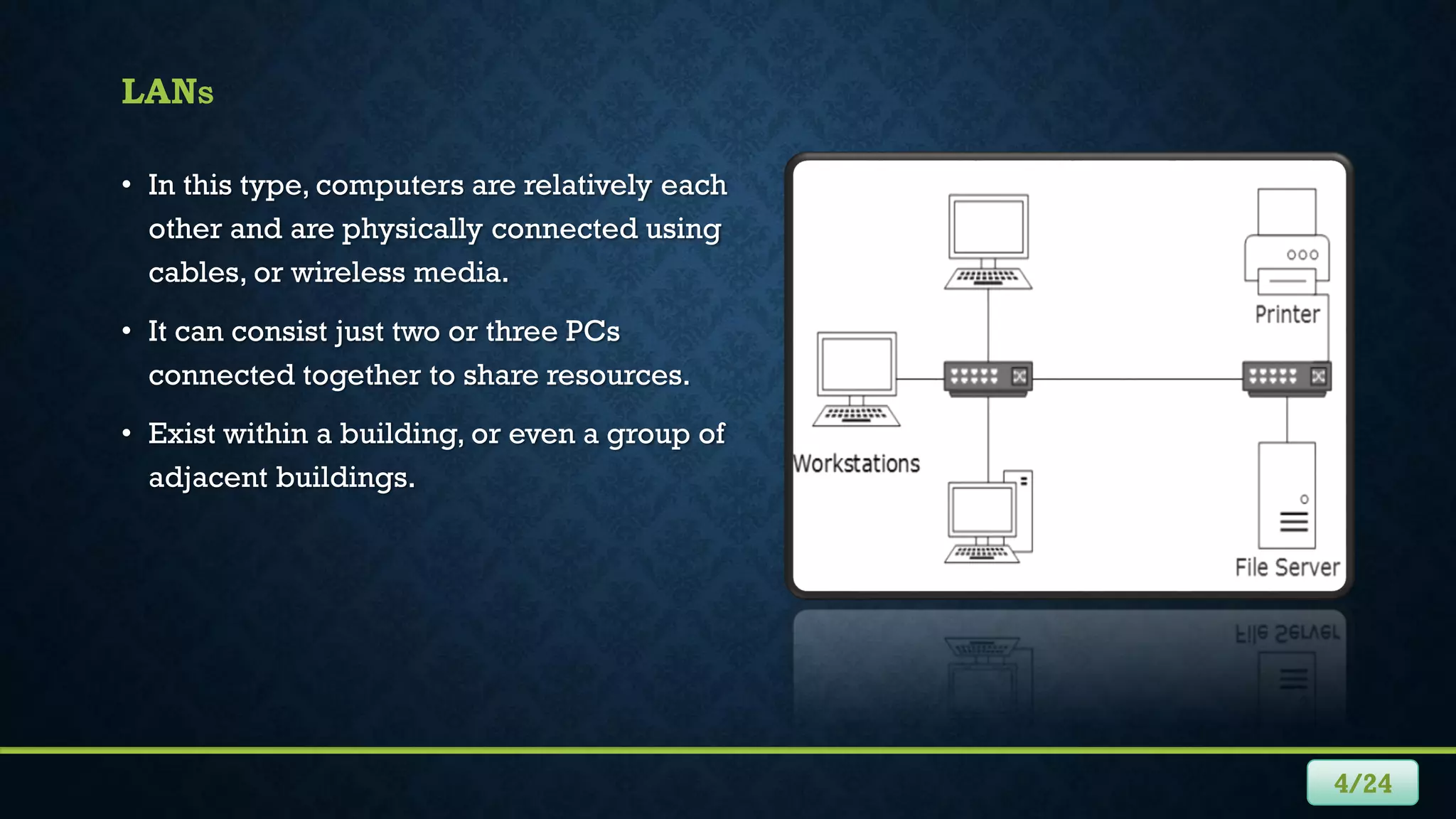
• In this type, computers are relatively each
other and are physically connected using
cables, or wireless media.
• It can consist just two or three PCs
connected together to share resources.
• Exist within a building, or even a group of
adjacent buildings.
4/24
WANS
5/24
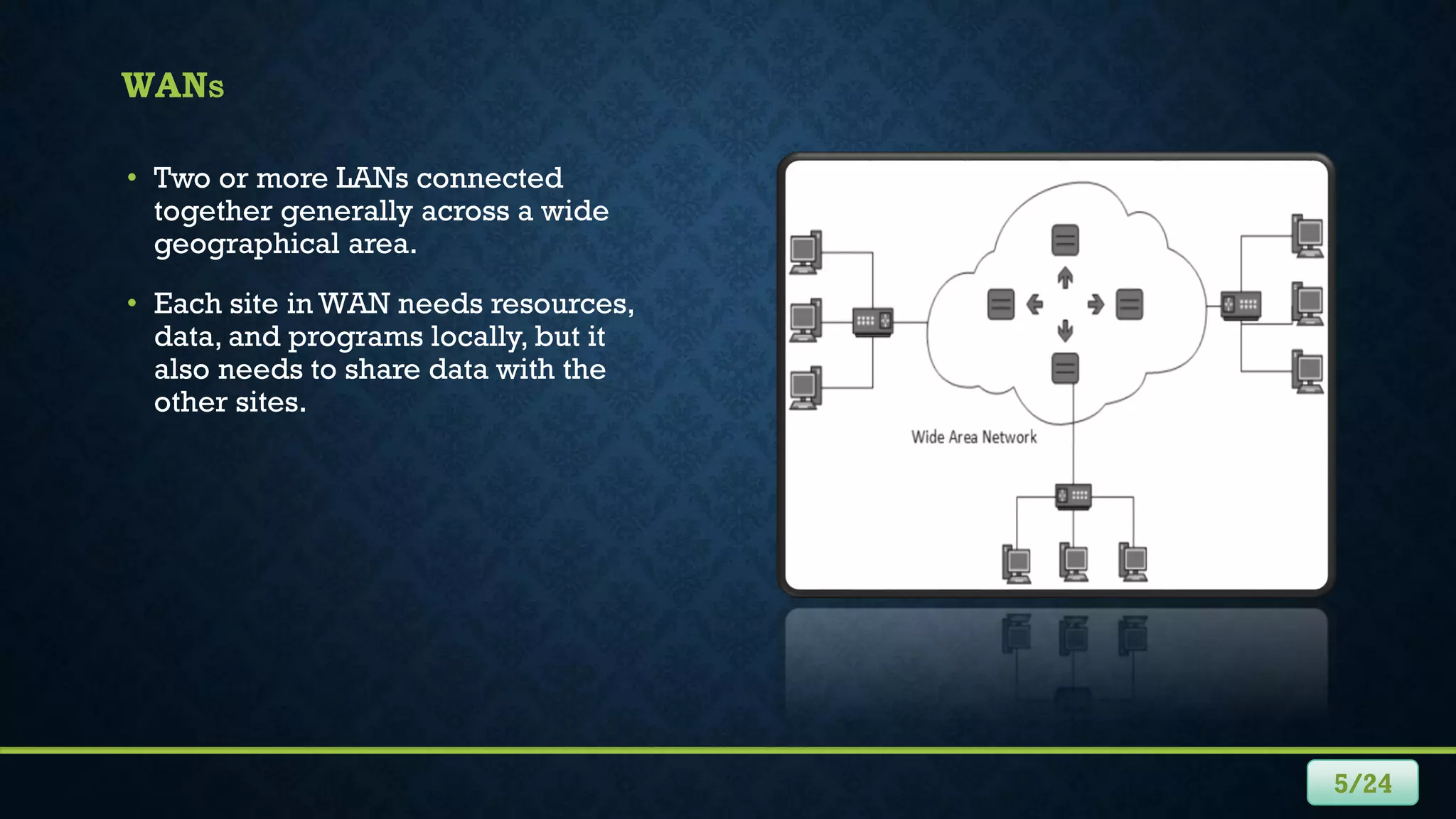
• Two or more LANs connected
together generally across a wide
geographical area.
• Each site in WAN needs resources,
data, and programs locally, but it
also needs to share data with the
other sites.
HYBRID NETWORKS
• Between the LAN and WAN structures, we will find hybrid networks such as
campus area networks (CANs) and metropolitan area networks (MANs).
• A new form of network type in emerging called home area networks (HANs).
6/24
7/24
HANS
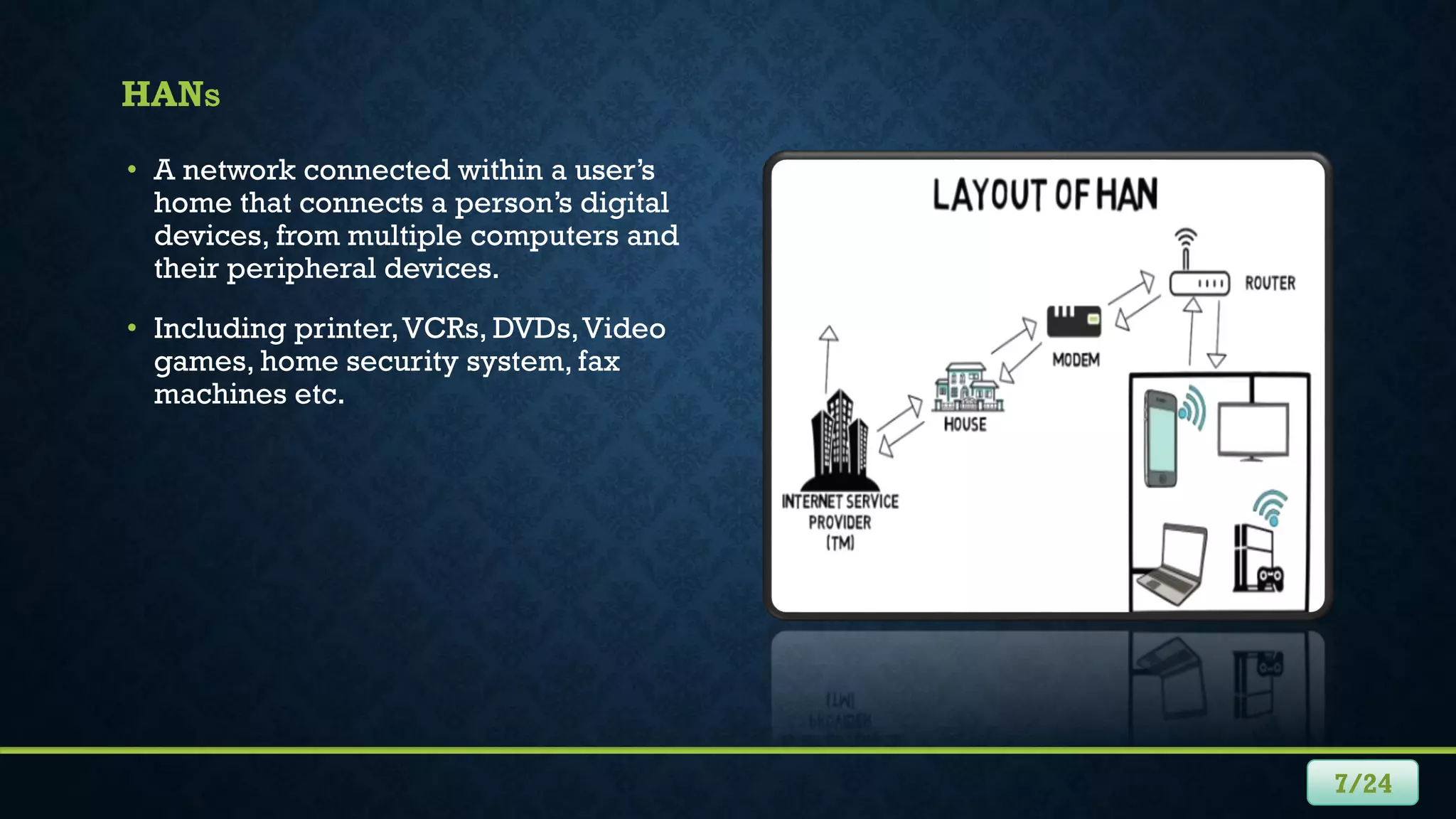
• A network connected within a user’s
home that connects a person’s digital
devices, from multiple computers and
their peripheral devices.
• Including printer,VCRs, DVDs,Video
games, home security system, fax
machines etc.
HOW NETWORKS ARE STRUCTURED
• Networks can be categorized by the roles the serves and PCs, play a hierarchical
and security interaction.
8/24
CLIENT/SERVER NETWORK
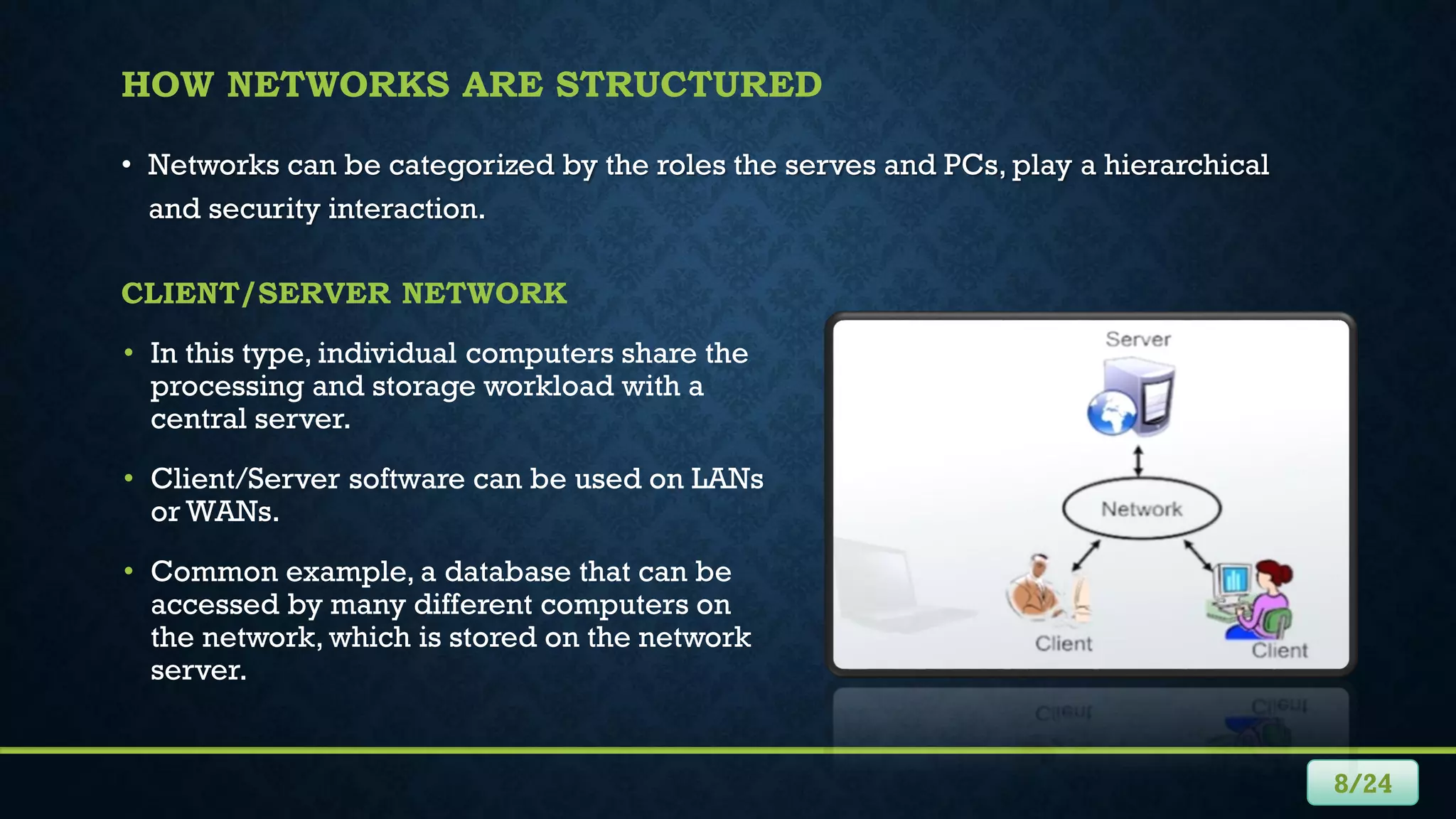
• In this type, individual computers share the
processing and storage workload with a
central server.
• Client/Server software can be used on LANs
or WANs.
• Common example, a database that can be
accessed by many different computers on
the network, which is stored on the network
server.
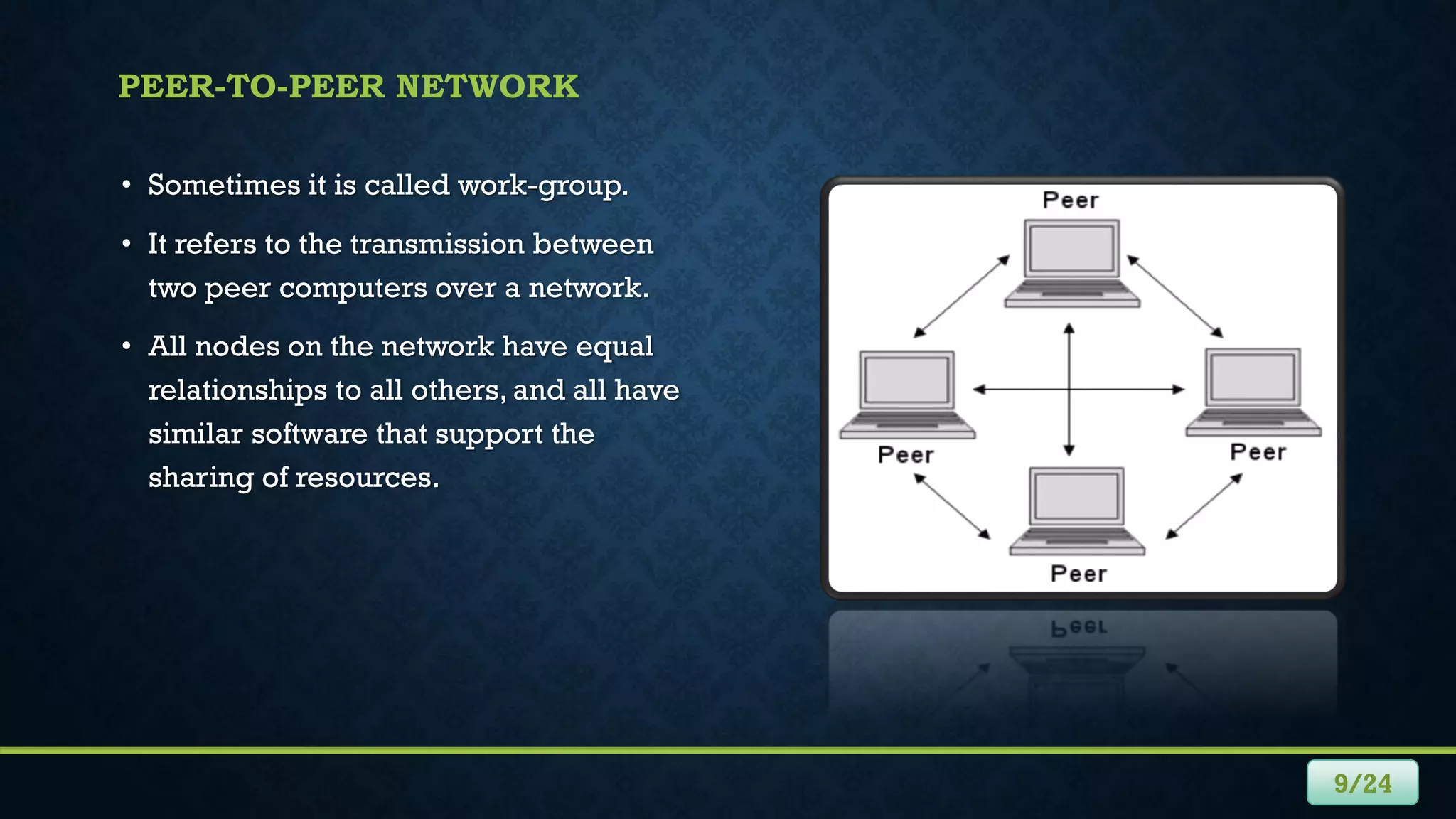
• Sometimes it is called work-group.
• It refers to the transmission between
two peer computers over a network.
• All nodes on the network have equal
relationships to all others, and all have
similar software that support the
sharing of resources.
9/24
PEER-TO-PEER NETWORK
NETWORK TOPOLOGIES
• The logical layout of the cables and devices that connect the
nodes (computer systems) of the network.
• It may define both physical and logical aspect of the network.
• Some topologies are:
 Bus Topology
 Star Topology
 Ring Topology
 Mesh Topology
 Tree Topology
 Hybrid Topology
10/24
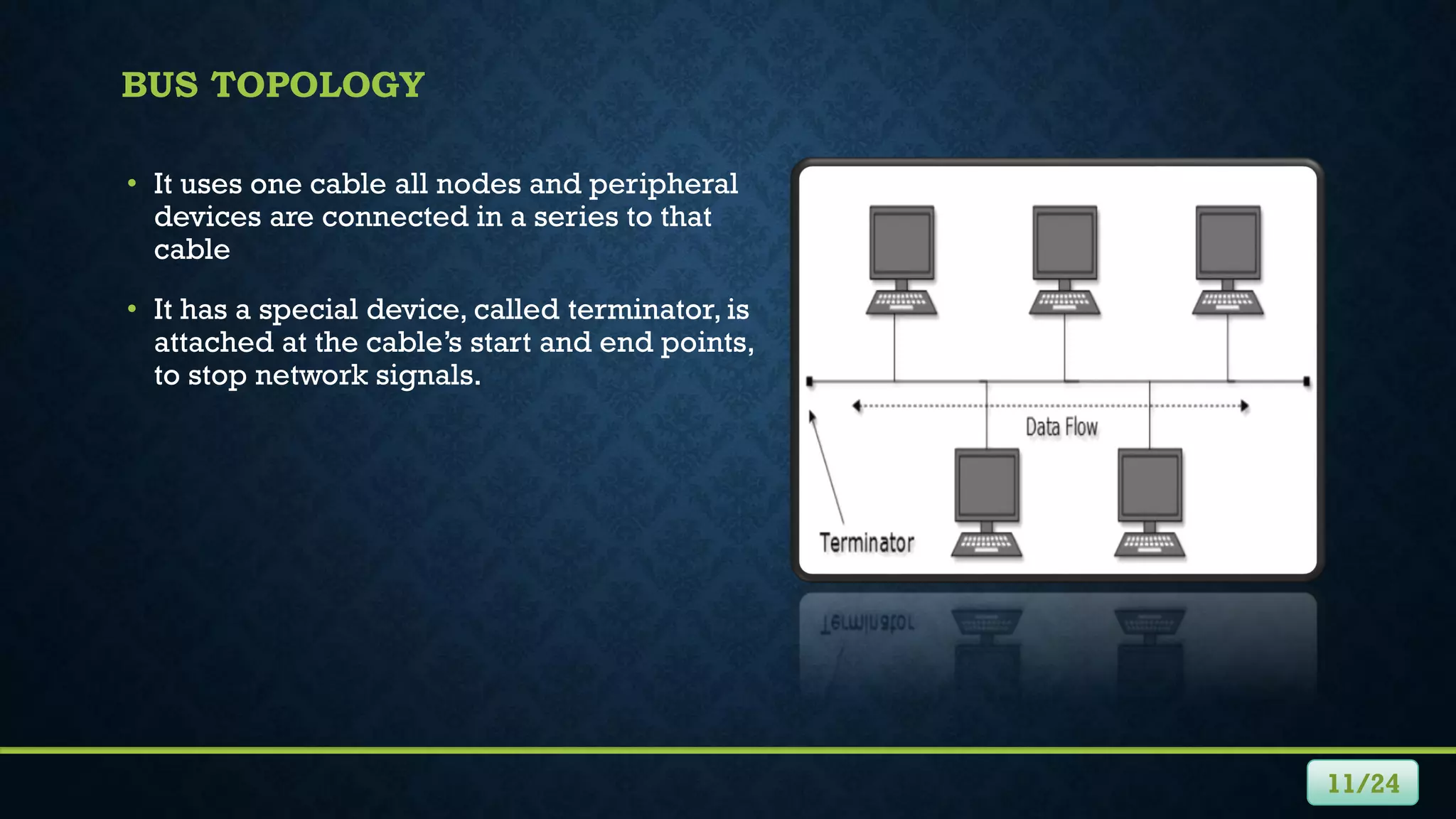
BUS TOPOLOGY
• It uses one cable all nodes and peripheral
devices are connected in a series to that
cable
• It has a special device, called terminator, is
attached at the cable’s start and end points,
to stop network signals.
11/24
STAR TOPOLOGY
• All devices are connected to a device
called a hub and communicate through it
• Some hubs are known as intelligent hubs,
can monitor traffic.
• The benefit is that if a cable fails, only one
node will be brought down.
12/24
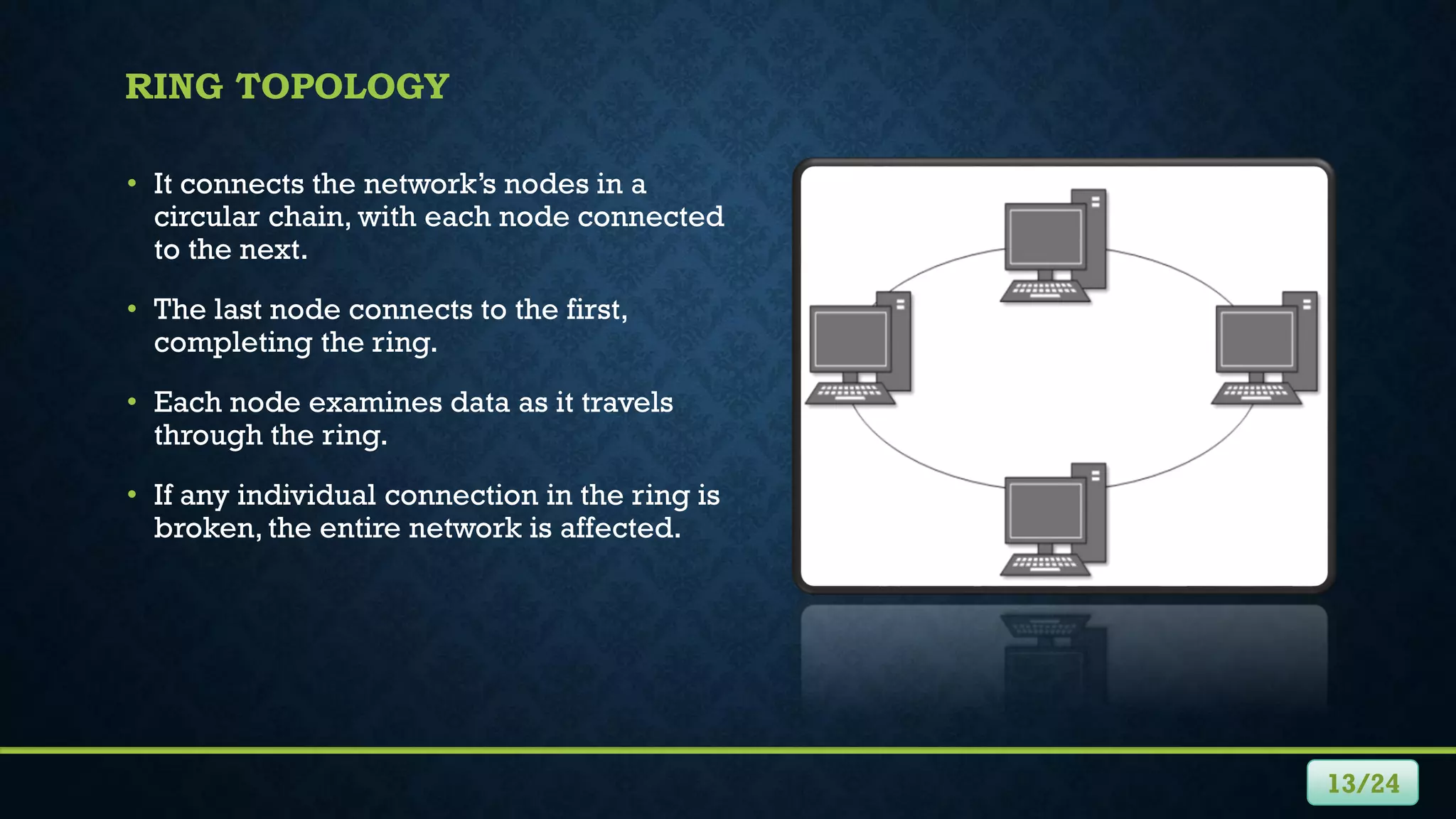
RING TOPOLOGY
• It connects the network’s nodes in a
circular chain, with each node connected
to the next.
• The last node connects to the first,
completing the ring.
• Each node examines data as it travels
through the ring.
• If any individual connection in the ring is
broken, the entire network is affected.
13/24
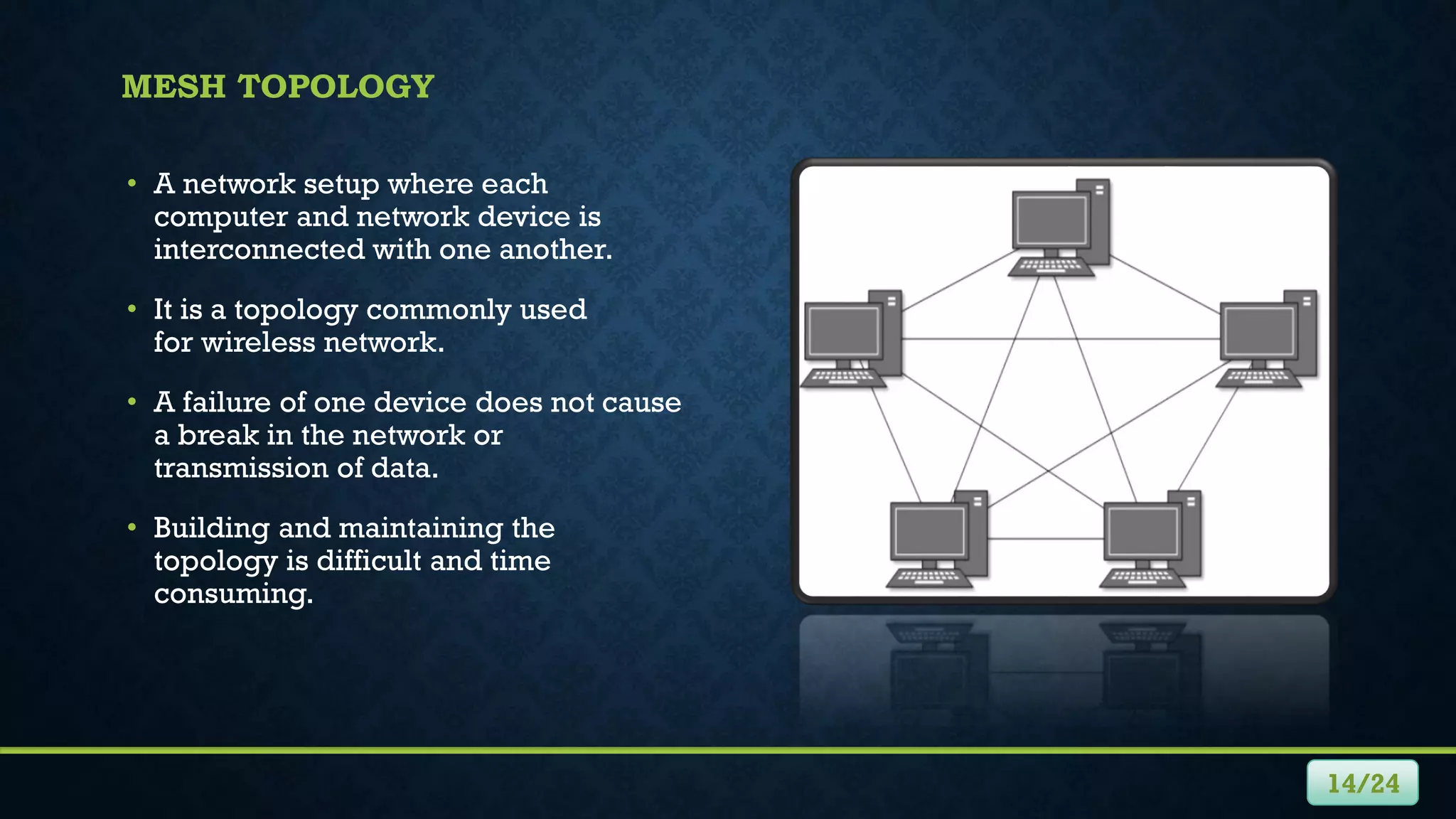
MESH TOPOLOGY
• A network setup where each
computer and network device is
interconnected with one another.
• It is a topology commonly used
for wireless network.
• A failure of one device does not cause
a break in the network or
transmission of data.
• Building and maintaining the
topology is difficult and time
consuming.
14/24
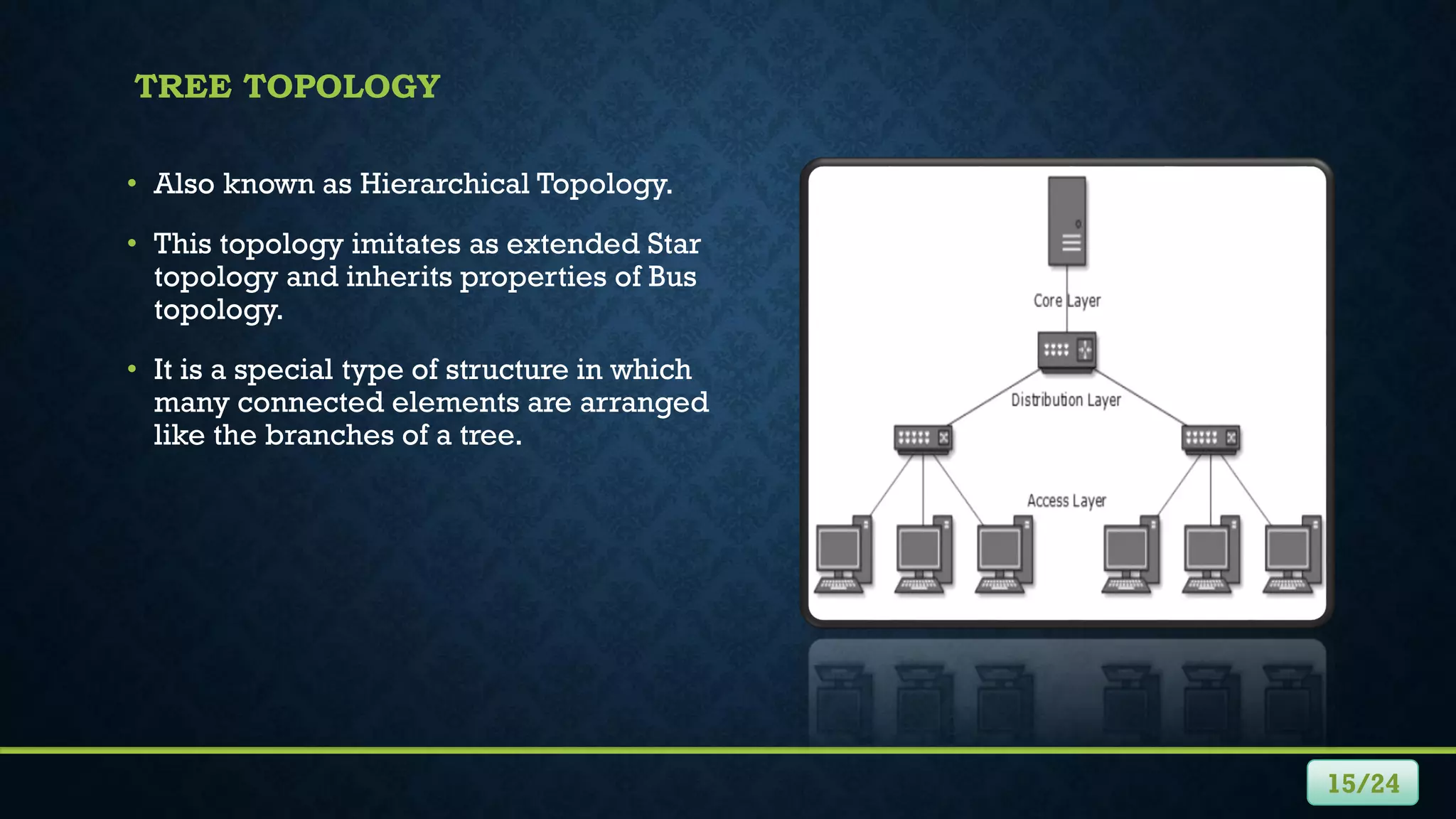
TREE TOPOLOGY
• Also known as Hierarchical Topology.
• This topology imitates as extended Star
topology and inherits properties of Bus
topology.
• It is a special type of structure in which
many connected elements are arranged
like the branches of a tree.
15/24
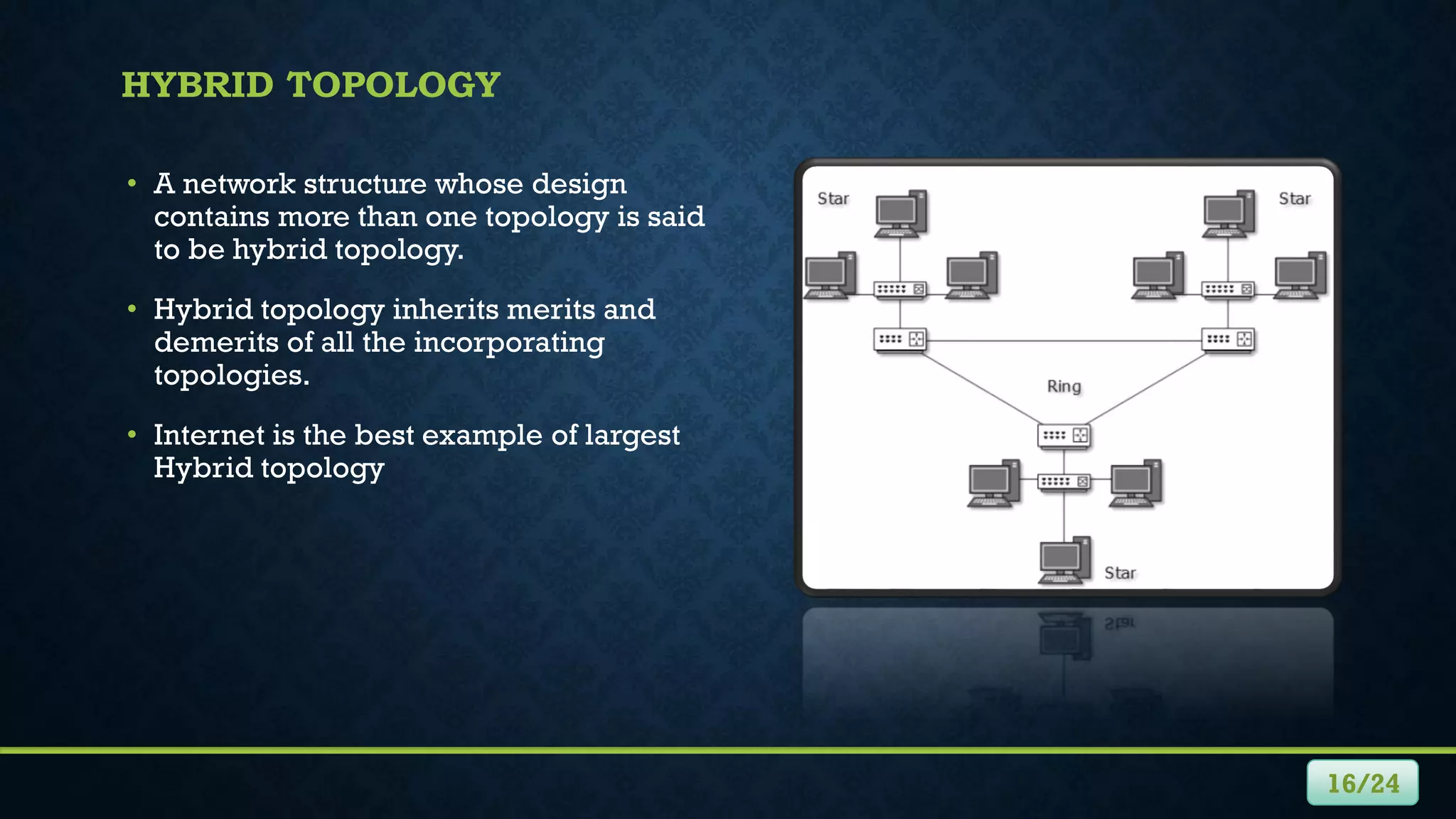
HYBRID TOPOLOGY
• A network structure whose design
contains more than one topology is said
to be hybrid topology.
• Hybrid topology inherits merits and
demerits of all the incorporating
topologies.
• Internet is the best example of largest
Hybrid topology
16/24
NETWORK HARDWARE
• Also known as network equipment.
• Electronic devices which are required for communication and interaction
between devices on a computer network.
• Such as hubs, bridges, switches, and routers
17/24
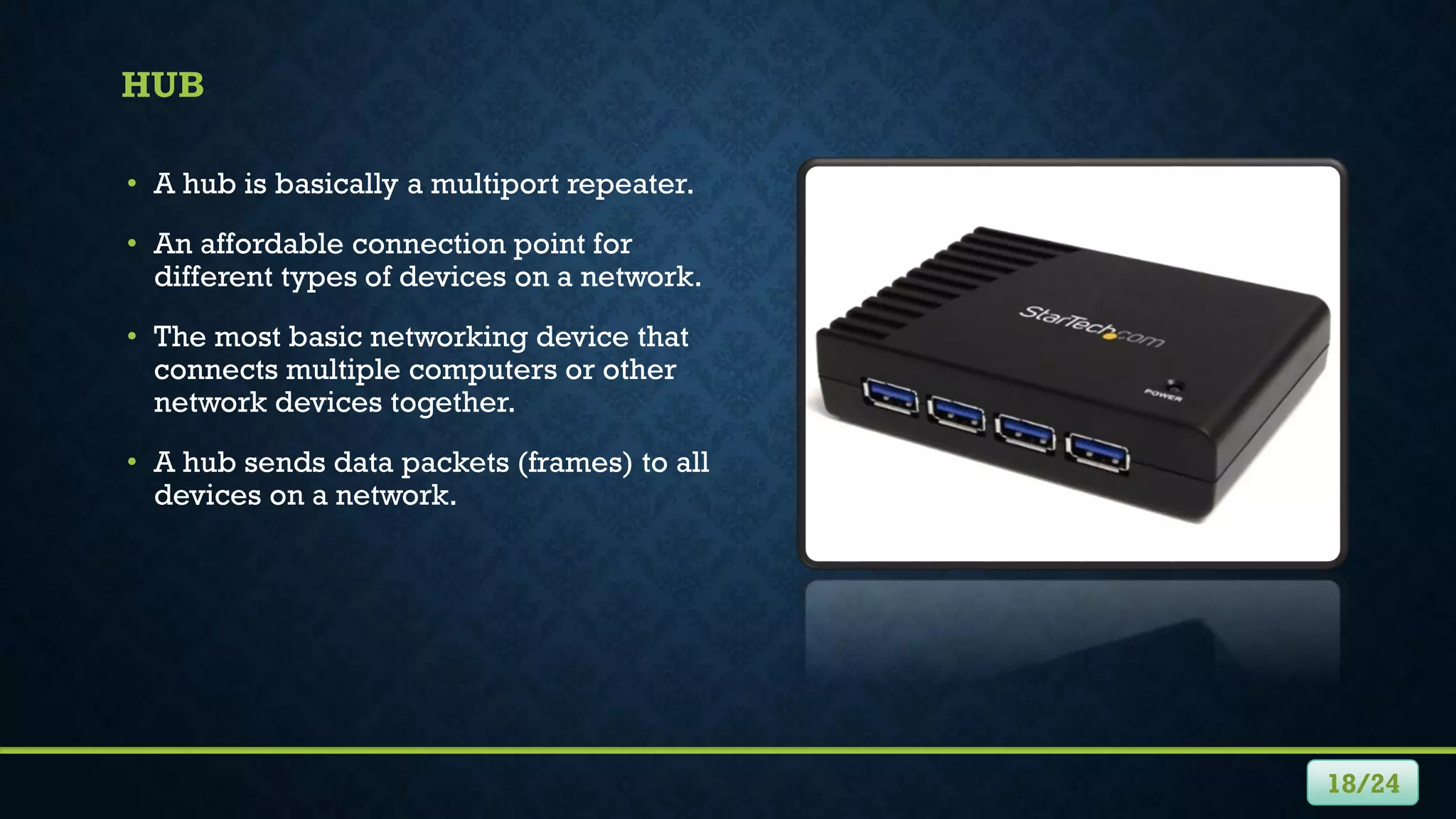
HUB
• A hub is basically a multiport repeater.
• An affordable connection point for
different types of devices on a network.
• The most basic networking device that
connects multiple computers or other
network devices together.
• A hub sends data packets (frames) to all
devices on a network.
18/24
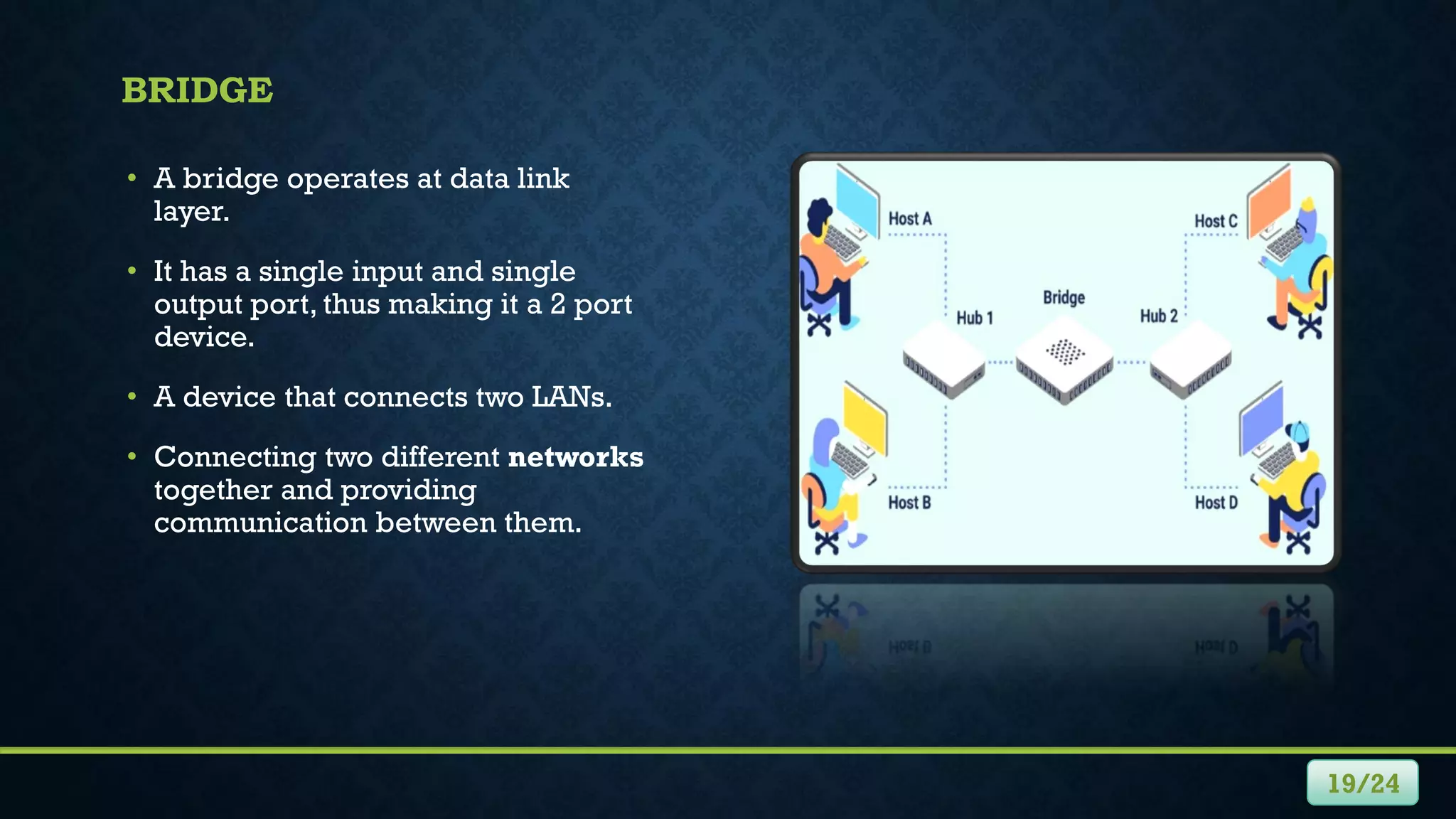
BRIDGE
• A bridge operates at data link
layer.
• It has a single input and single
output port, thus making it a 2 port
device.
• A device that connects two LANs.
• Connecting two different networks
together and providing
communication between them.
19/24
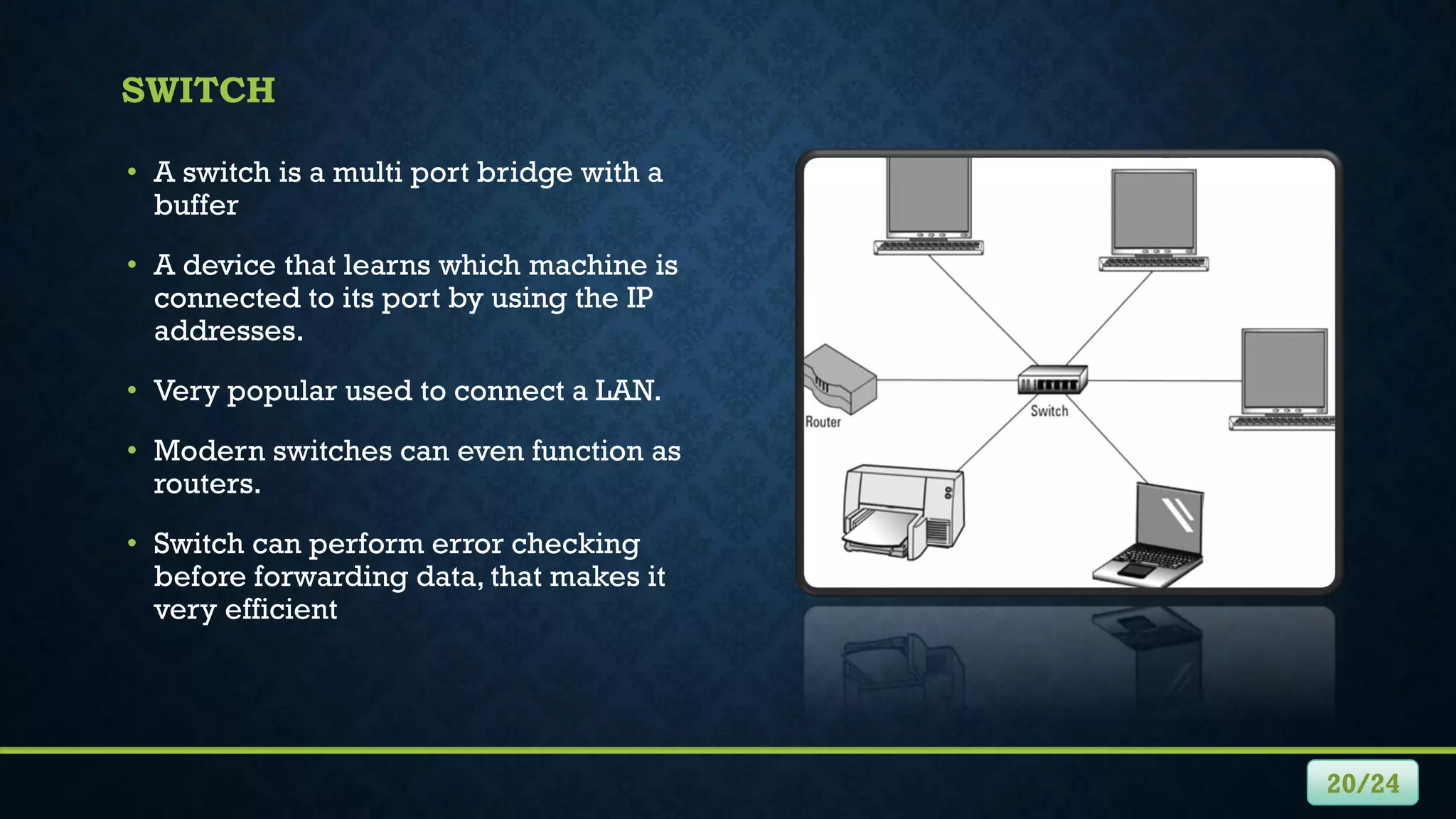
SWITCH
• A switch is a multi port bridge with a
buffer
• A device that learns which machine is
connected to its port by using the IP
addresses.
• Very popular used to connect a LAN.
• Modern switches can even function as
routers.
• Switch can perform error checking
before forwarding data, that makes it
very efficient
20/24
ROUTER
• A device like a switch that routes data
packets based on their IP addresses.
• It is mainly a Network Layer device.
• It normally connects LANs and WANs
together.
• Router divide broadcast domains of hosts
connected through it.
•
21/24
PROTOCOLS
• A protocol is a standard set of rules that allow electronic devices to communicate
with each other.
• Each protocol has its own method of how data is formatted.
• A set of invisible rules that govern how an internet document gets transmitted to the
screen.
• Examples of Internet computer protocols are:
• http Hypertext Transfer Protocol
• https Hypertext Transfer Protocol Secured
• TCP/IP Transmission Control Protocol/Internet Protocol
• ftp File Transfer Protocol
• UDP User Datagram Protocol
22/24
OSI MODEL
• Open System Interconnection.
• OSI is a network model developed by ISO
in 1978 where peer-to-peer
communications are divided into seven
layers.
• Each layer performs a specific task or
tasks and builds upon the preceding layer
until the communications are complete.
23/24
LAYERS
• Physical Layer: responsible for the electrical, mechanical, and timing across the link.
• Data Link Layer: responsible for transmitting data across a link.
• Network Layer: responsible for routing information through the network and allowing
systems to communicate.
• Transport Layer: responsible for transferring information between endpoints on the
network and deals with errors, such as lost or duplicate packets.
• Session Layer: responsible for managing a session between two applications.
• Presentation Layer: responsible for the data formatting and display, allowing for
compatibility.
• Application Layer: responsible for user interaction.
24/24
ANY QUESTION

Networking by Mujahid Hussain

  • 1.
  • 2.
    • Network • Usesof Network • Types of Network • Network Structure • Network Topologies • Network Hardware • Protocols • OSI Model CONTENTS II
  • 3.
    NETWORK • A groupof technologies. • Two or more computers connected to each other. • A system of interconnected computers and computerized peripherals such as printers. • This interconnection among computers facilitates information sharing among them. 1/24
  • 4.
    USES OF NETWORK 2/24 •A set of technologies. • Including hardware, software, and media that can be used to connect computers together. • Enabling these component to communicate, exchange information, and share resources in real life. • It allows many users to access shared data and programs. • It opens up new ways to communicate, such as email.
  • 5.
    TYPES OF NETWORK •Local Area Network (LANs) • Wide Area Network (WANs) • Hybrid Networks • Home Area Networks (HANs) 3/24
  • 6.
    LANS • In thistype, computers are relatively each other and are physically connected using cables, or wireless media. • It can consist just two or three PCs connected together to share resources. • Exist within a building, or even a group of adjacent buildings. 4/24
  • 7.
    WANS 5/24 • Two ormore LANs connected together generally across a wide geographical area. • Each site in WAN needs resources, data, and programs locally, but it also needs to share data with the other sites.
  • 8.
    HYBRID NETWORKS • Betweenthe LAN and WAN structures, we will find hybrid networks such as campus area networks (CANs) and metropolitan area networks (MANs). • A new form of network type in emerging called home area networks (HANs). 6/24
  • 9.
    7/24 HANS • A networkconnected within a user’s home that connects a person’s digital devices, from multiple computers and their peripheral devices. • Including printer,VCRs, DVDs,Video games, home security system, fax machines etc.
  • 10.
    HOW NETWORKS ARESTRUCTURED • Networks can be categorized by the roles the serves and PCs, play a hierarchical and security interaction. 8/24 CLIENT/SERVER NETWORK • In this type, individual computers share the processing and storage workload with a central server. • Client/Server software can be used on LANs or WANs. • Common example, a database that can be accessed by many different computers on the network, which is stored on the network server.
  • 11.
    • Sometimes itis called work-group. • It refers to the transmission between two peer computers over a network. • All nodes on the network have equal relationships to all others, and all have similar software that support the sharing of resources. 9/24 PEER-TO-PEER NETWORK
  • 12.
    NETWORK TOPOLOGIES • Thelogical layout of the cables and devices that connect the nodes (computer systems) of the network. • It may define both physical and logical aspect of the network. • Some topologies are:  Bus Topology  Star Topology  Ring Topology  Mesh Topology  Tree Topology  Hybrid Topology 10/24
  • 13.
    BUS TOPOLOGY • Ituses one cable all nodes and peripheral devices are connected in a series to that cable • It has a special device, called terminator, is attached at the cable’s start and end points, to stop network signals. 11/24
  • 14.
    STAR TOPOLOGY • Alldevices are connected to a device called a hub and communicate through it • Some hubs are known as intelligent hubs, can monitor traffic. • The benefit is that if a cable fails, only one node will be brought down. 12/24
  • 15.
    RING TOPOLOGY • Itconnects the network’s nodes in a circular chain, with each node connected to the next. • The last node connects to the first, completing the ring. • Each node examines data as it travels through the ring. • If any individual connection in the ring is broken, the entire network is affected. 13/24
  • 16.
    MESH TOPOLOGY • Anetwork setup where each computer and network device is interconnected with one another. • It is a topology commonly used for wireless network. • A failure of one device does not cause a break in the network or transmission of data. • Building and maintaining the topology is difficult and time consuming. 14/24
  • 17.
    TREE TOPOLOGY • Alsoknown as Hierarchical Topology. • This topology imitates as extended Star topology and inherits properties of Bus topology. • It is a special type of structure in which many connected elements are arranged like the branches of a tree. 15/24
  • 18.
    HYBRID TOPOLOGY • Anetwork structure whose design contains more than one topology is said to be hybrid topology. • Hybrid topology inherits merits and demerits of all the incorporating topologies. • Internet is the best example of largest Hybrid topology 16/24
  • 19.
    NETWORK HARDWARE • Alsoknown as network equipment. • Electronic devices which are required for communication and interaction between devices on a computer network. • Such as hubs, bridges, switches, and routers 17/24
  • 20.
    HUB • A hubis basically a multiport repeater. • An affordable connection point for different types of devices on a network. • The most basic networking device that connects multiple computers or other network devices together. • A hub sends data packets (frames) to all devices on a network. 18/24
  • 21.
    BRIDGE • A bridgeoperates at data link layer. • It has a single input and single output port, thus making it a 2 port device. • A device that connects two LANs. • Connecting two different networks together and providing communication between them. 19/24
  • 22.
    SWITCH • A switchis a multi port bridge with a buffer • A device that learns which machine is connected to its port by using the IP addresses. • Very popular used to connect a LAN. • Modern switches can even function as routers. • Switch can perform error checking before forwarding data, that makes it very efficient 20/24
  • 23.
    ROUTER • A devicelike a switch that routes data packets based on their IP addresses. • It is mainly a Network Layer device. • It normally connects LANs and WANs together. • Router divide broadcast domains of hosts connected through it. • 21/24
  • 24.
    PROTOCOLS • A protocolis a standard set of rules that allow electronic devices to communicate with each other. • Each protocol has its own method of how data is formatted. • A set of invisible rules that govern how an internet document gets transmitted to the screen. • Examples of Internet computer protocols are: • http Hypertext Transfer Protocol • https Hypertext Transfer Protocol Secured • TCP/IP Transmission Control Protocol/Internet Protocol • ftp File Transfer Protocol • UDP User Datagram Protocol 22/24
  • 25.
    OSI MODEL • OpenSystem Interconnection. • OSI is a network model developed by ISO in 1978 where peer-to-peer communications are divided into seven layers. • Each layer performs a specific task or tasks and builds upon the preceding layer until the communications are complete. 23/24
  • 26.
    LAYERS • Physical Layer:responsible for the electrical, mechanical, and timing across the link. • Data Link Layer: responsible for transmitting data across a link. • Network Layer: responsible for routing information through the network and allowing systems to communicate. • Transport Layer: responsible for transferring information between endpoints on the network and deals with errors, such as lost or duplicate packets. • Session Layer: responsible for managing a session between two applications. • Presentation Layer: responsible for the data formatting and display, allowing for compatibility. • Application Layer: responsible for user interaction. 24/24
  • 27.