Computer Networks
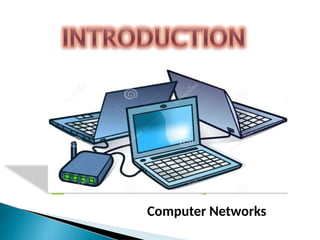
 A computer network is an interconnection of
two or more computers that are able to
exchange information.
 The computer may be connected via any data
communication link, like copper wires, radio
links, etc.
 They may be personal computers or large
main frames.
 The computer network may be located in a
room, building, city, country, or anywhere in
the world.
 Computer networks have opened up an entire
frontier in the world of computing called the
client/server model.
 FILE SHARING – Networks offer a
quickand easy way to share files directly.
 RESOURCE SHARING – All computers in
the can share
fax machines, scanners,
resources such as
and
network
printers,
modems.
 COMMUNICATION –Those on the network can
communicate with each other via e-mail,
instant messages, etc.
 Flexible Access - Networks allow their users
to access files from computers throughout
the network.
 Sharing of Information - Computer
networks enable us to share data and
information with the computers that are
located geographically large distance apart.
The different types of network are based on
following:
 Size of the network – Refers to the area
over which the network is spread.
 Connection – Refers to the transmission media
and protocols used for connecting.
 Network topology – Arrangement of computers
on the network.
ON THE BASIS OF SIZE
 LAN is a computer network widely used for local
communication.
 LAN connects computers in a small area like a
room, building, office, or a campus spread up
to a few kilometers.
 They are privately owned networks, to exchange
information.
 Star, Bus, and Ring are some of the common
LAN networking topologies.
 LAN runs at a speed of 10 mbps to 100 mbps
and has low delays.
 A LAN based on wifi wireless network
technology is called wireless local area
network(WLAN).
METROPOLITIAN
AREA
NETWOR
K (MAN)
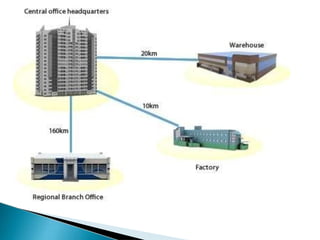
 MAN is a computer network spread over a city.
The computers in a MAN are connected using
cables.
 MAN connects several LAN spread over a city.
 It covers the distance upto 30-50 km.
 Example- Cable television network.
WIDE
AREA
NETWOR
K (WAN)
 WAN is a network that connects computers
over long distances like cities, countries,
continents or world wide.
 WAN uses public, leased, or private
communication links to spread over long
distances.
 WAN uses telephone lines, satellite link and
radio link to connect.
 The need to be able to connect any number of
computers at any number of sites, results in
WAN technology to be different from the LAN
technology.
 It is slower and less reliable than a LAN.
 INTERNET is a common example of WAN.

It is the physical way in which
computers are interconnected.
 Five basic network structures are :
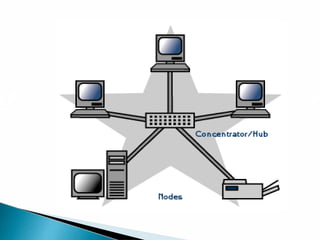
 Devices are connected to a central
computer called HUB.
 A Star network is particularly appropriate for
organizations that require a centralized data
base or a centralized processing facility.
 For example, a star network may be used in
banking for centralized record keeping in an
on-line branch office environment.
 It is easy to add new and remove nodes.
 A node failure doesnot bring
let down the entire network.
 It is easier to diagnose network problems
through a central hub.
 If the central hub fails, the whole network
ceases to function.
 It costs more to cable a star configuration
than other topologies because more cable is
required than other topologies.
 In Bus topology a single network cable runs in
the building or campus and all nodes are linked
along with this communication line with two
endpoints called the bus or backbone.
 This structure is very popular for
local area networks
 Reliable in very smallnetworks as well
as easy to use and understand.
 Requires the least amount of cable to connect
the computers together and therefore is less
expensive than other cabling arrangements.
 Heavy network traffic can slow a
bus considerably.
 Each connection between cables weakens the
electrical signal.
 In Ring topology the network cable passes from
one node to another until all nodes are
connected in the form of a “loop or ring”.
 Transmits in only one direction.
 Used in LAN’S and WAN’S.
 Ring networks can span longer
distances than other types of networks.
 Ring networks are easily extendable.
 Relatively expensive and difficult to install.
 Failure of one computer on the
network can affect the whole network.
 Adding or removing computers can disrupt
the network.
 In mesh network, there is random connection
of nodes using communication links.
 Meshtopology is the general topology
for wide area network.
 A mesh network may be fully
connected or connected with only partial links.
 The reliability is very high as there are always
alternate paths available if direct link between
two nodes is down.
 Yields the greatest amount of redundancy in the
event that one of the nodes fails where network
traffic can be redirected to another node.
 The cost of installation and maintenance is
high ( more cable is required than any other
configuration).
 A tree topology connects one star network to
the other star network.
 It is an extension of star topology.
 Here, we divided the whole network into
segment which can be easily managed and
maintained.
 Each segment is provided with dedicated
point-to-point wiring to central hub.
 Error detection and correction is easy.
 If one segment is damaged, other segment
are not affected.
 Expansion of network is possible and easy.
 As multiple segments are connected to a
central hub, the networks depend heavily on
the hub. Its failure affects the entire network.
 Maintenance is not easy and cost are high.
 With increase in size beyond a point, the
management becomes difficult.
 A network protocol
defines rules and
conventions
for communication between
network devices.
 Protocols specify
interactions between the
communicating entities.
Protocol has Five
types-
TCP (Transmission Control Protocol)
IP (Internet Protocol)
HTTP (Hyper Text Transfer Protocol)
FTP (File Transfer Protocol)
HTTPS (Hyper Text Transfer Protocol Secure)
 It provides reliable transport service i.e. it
ensures that messages sent from sender to
receiver are properly routed and arrive at the
destination.
 TCP converts messages into a set of packages
at the source which are then reassemble back
into messages at the destination. For this, TCP
operates with the packet switching techniques.
Packet Switching Techniques
–
 The message is divided into small packets.
 Each packet contains address and
information.
 The address is used to route the packet to its
destination.
different
computers
to
 IP allows
communicate.
 IP handles the dispatch of packets over the
network.
 It handles the addressing of packets, and
ensures that a packet reaches its destination
travelling through multiple networks.
TCP/IP protocol makes it possible for any pair
of computers connected to internet to
communicate, despite their hardware
differences.
 The File Transfer Protocol (FTP) is a
standard network protocol used to
transfer computer files from one host
to another.
 FTP is built on clientserver
architecture.
 HTTP is the underlying protocol
used by the World Wide Web.
 HTTP defines how messages are
formatted and transmitted and
what actions web servers and
browsers should take in response
to various commands.
 For example, when you enter a URL in your
browser, this actually sends an HTTP
commands to the Web server directing it to
fetch and transmit the requested Web page.
 HTTPS stands for Hyper Text Transfer
Protocol over SSL(Secure Socket Layer). It is
used by Web servers to transfer and display
web content securely.
 HTTPS used by any website that is collecting
sensitive customer data such as banking
information or purchasing information
HUB
REPEATER
BRIDGE
ROUTER
GATEWAY
A hub is a multiport
connecting device that is
used to interconnect LAN
devices.
 A hub can be used to extend the physical
length of a network.
 Repeater boost or amplifies
the signal before passing it
through to the next section
of cable.
 It connects the network with same protocol
and topology.
 The main task of a bridge computer is to
receive and pass data from one LAN to
another.
 A router is a device that connects multiple
networks using similar or different protocols.
 Routers are used when several networks are
connected together.
 Gateway is a device that connects two or
more networks with different types of
protocol.
 It receives data from one network and
converts it according to the protocol of other
network.
Computer Networks  POWERPOINT Presentation

Computer Networks POWERPOINT Presentation

  • 1.
  • 2.
     A computernetwork is an interconnection of two or more computers that are able to exchange information.  The computer may be connected via any data communication link, like copper wires, radio links, etc.  They may be personal computers or large main frames.
  • 3.
     The computernetwork may be located in a room, building, city, country, or anywhere in the world.  Computer networks have opened up an entire frontier in the world of computing called the client/server model.
  • 6.
     FILE SHARING– Networks offer a quickand easy way to share files directly.  RESOURCE SHARING – All computers in the can share fax machines, scanners, resources such as and network printers, modems.  COMMUNICATION –Those on the network can communicate with each other via e-mail, instant messages, etc.
  • 7.
     Flexible Access- Networks allow their users to access files from computers throughout the network.  Sharing of Information - Computer networks enable us to share data and information with the computers that are located geographically large distance apart.
  • 11.
    The different typesof network are based on following:  Size of the network – Refers to the area over which the network is spread.  Connection – Refers to the transmission media and protocols used for connecting.  Network topology – Arrangement of computers on the network.
  • 12.
    ON THE BASISOF SIZE
  • 14.
     LAN isa computer network widely used for local communication.  LAN connects computers in a small area like a room, building, office, or a campus spread up to a few kilometers.  They are privately owned networks, to exchange information.
  • 15.
     Star, Bus,and Ring are some of the common LAN networking topologies.  LAN runs at a speed of 10 mbps to 100 mbps and has low delays.  A LAN based on wifi wireless network technology is called wireless local area network(WLAN).
  • 17.
  • 18.
     MAN isa computer network spread over a city. The computers in a MAN are connected using cables.  MAN connects several LAN spread over a city.  It covers the distance upto 30-50 km.  Example- Cable television network.
  • 20.
  • 21.
     WAN isa network that connects computers over long distances like cities, countries, continents or world wide.  WAN uses public, leased, or private communication links to spread over long distances.  WAN uses telephone lines, satellite link and radio link to connect.
  • 22.
     The needto be able to connect any number of computers at any number of sites, results in WAN technology to be different from the LAN technology.  It is slower and less reliable than a LAN.  INTERNET is a common example of WAN.
  • 25.
     It is thephysical way in which computers are interconnected.  Five basic network structures are :
  • 26.
     Devices areconnected to a central computer called HUB.  A Star network is particularly appropriate for organizations that require a centralized data base or a centralized processing facility.  For example, a star network may be used in banking for centralized record keeping in an on-line branch office environment.
  • 28.
     It iseasy to add new and remove nodes.  A node failure doesnot bring let down the entire network.  It is easier to diagnose network problems through a central hub.
  • 29.
     If thecentral hub fails, the whole network ceases to function.  It costs more to cable a star configuration than other topologies because more cable is required than other topologies.
  • 30.
     In Bustopology a single network cable runs in the building or campus and all nodes are linked along with this communication line with two endpoints called the bus or backbone.  This structure is very popular for local area networks
  • 32.
     Reliable invery smallnetworks as well as easy to use and understand.  Requires the least amount of cable to connect the computers together and therefore is less expensive than other cabling arrangements.
  • 33.
     Heavy networktraffic can slow a bus considerably.  Each connection between cables weakens the electrical signal.
  • 34.
     In Ringtopology the network cable passes from one node to another until all nodes are connected in the form of a “loop or ring”.  Transmits in only one direction.  Used in LAN’S and WAN’S.
  • 36.
     Ring networkscan span longer distances than other types of networks.  Ring networks are easily extendable.
  • 37.
     Relatively expensiveand difficult to install.  Failure of one computer on the network can affect the whole network.  Adding or removing computers can disrupt the network.
  • 38.
     In meshnetwork, there is random connection of nodes using communication links.  Meshtopology is the general topology for wide area network.  A mesh network may be fully connected or connected with only partial links.
  • 40.
     The reliabilityis very high as there are always alternate paths available if direct link between two nodes is down.  Yields the greatest amount of redundancy in the event that one of the nodes fails where network traffic can be redirected to another node.
  • 41.
     The costof installation and maintenance is high ( more cable is required than any other configuration).
  • 42.
     A treetopology connects one star network to the other star network.  It is an extension of star topology.  Here, we divided the whole network into segment which can be easily managed and maintained.
  • 44.
     Each segmentis provided with dedicated point-to-point wiring to central hub.  Error detection and correction is easy.  If one segment is damaged, other segment are not affected.  Expansion of network is possible and easy.
  • 45.
     As multiplesegments are connected to a central hub, the networks depend heavily on the hub. Its failure affects the entire network.  Maintenance is not easy and cost are high.  With increase in size beyond a point, the management becomes difficult.
  • 47.
     A networkprotocol defines rules and conventions for communication between network devices.  Protocols specify interactions between the communicating entities.
  • 48.
    Protocol has Five types- TCP(Transmission Control Protocol) IP (Internet Protocol) HTTP (Hyper Text Transfer Protocol) FTP (File Transfer Protocol) HTTPS (Hyper Text Transfer Protocol Secure)
  • 49.
     It providesreliable transport service i.e. it ensures that messages sent from sender to receiver are properly routed and arrive at the destination.  TCP converts messages into a set of packages at the source which are then reassemble back into messages at the destination. For this, TCP operates with the packet switching techniques.
  • 50.
    Packet Switching Techniques – The message is divided into small packets.  Each packet contains address and information.  The address is used to route the packet to its destination.
  • 51.
    different computers to  IP allows communicate. IP handles the dispatch of packets over the network.  It handles the addressing of packets, and ensures that a packet reaches its destination travelling through multiple networks.
  • 52.
    TCP/IP protocol makesit possible for any pair of computers connected to internet to communicate, despite their hardware differences.
  • 53.
     The FileTransfer Protocol (FTP) is a standard network protocol used to transfer computer files from one host to another.  FTP is built on clientserver architecture.
  • 55.
     HTTP isthe underlying protocol used by the World Wide Web.  HTTP defines how messages are formatted and transmitted and what actions web servers and browsers should take in response to various commands.
  • 56.
     For example,when you enter a URL in your browser, this actually sends an HTTP commands to the Web server directing it to fetch and transmit the requested Web page.
  • 58.
     HTTPS standsfor Hyper Text Transfer Protocol over SSL(Secure Socket Layer). It is used by Web servers to transfer and display web content securely.  HTTPS used by any website that is collecting sensitive customer data such as banking information or purchasing information
  • 59.
  • 60.
    A hub isa multiport connecting device that is used to interconnect LAN devices.  A hub can be used to extend the physical length of a network.
  • 61.
     Repeater boostor amplifies the signal before passing it through to the next section of cable.
  • 62.
     It connectsthe network with same protocol and topology.  The main task of a bridge computer is to receive and pass data from one LAN to another.
  • 63.
     A routeris a device that connects multiple networks using similar or different protocols.  Routers are used when several networks are connected together.
  • 64.
     Gateway isa device that connects two or more networks with different types of protocol.  It receives data from one network and converts it according to the protocol of other network.