COMPUTER SYSTEM &
PROGRAMMING
SUBMITTED BY :-
ABDUL WAHAB BIN SHAHBAZ
BSME 01153105
COMPUTER NETWORK
• A computer network or data network is a
telecommunications network which allows computers to
exchange data.
• In computer networks, networked computing devices exchange
data with each other using a data link.
• The connections between nodes are established using either
cable media or wireless media.
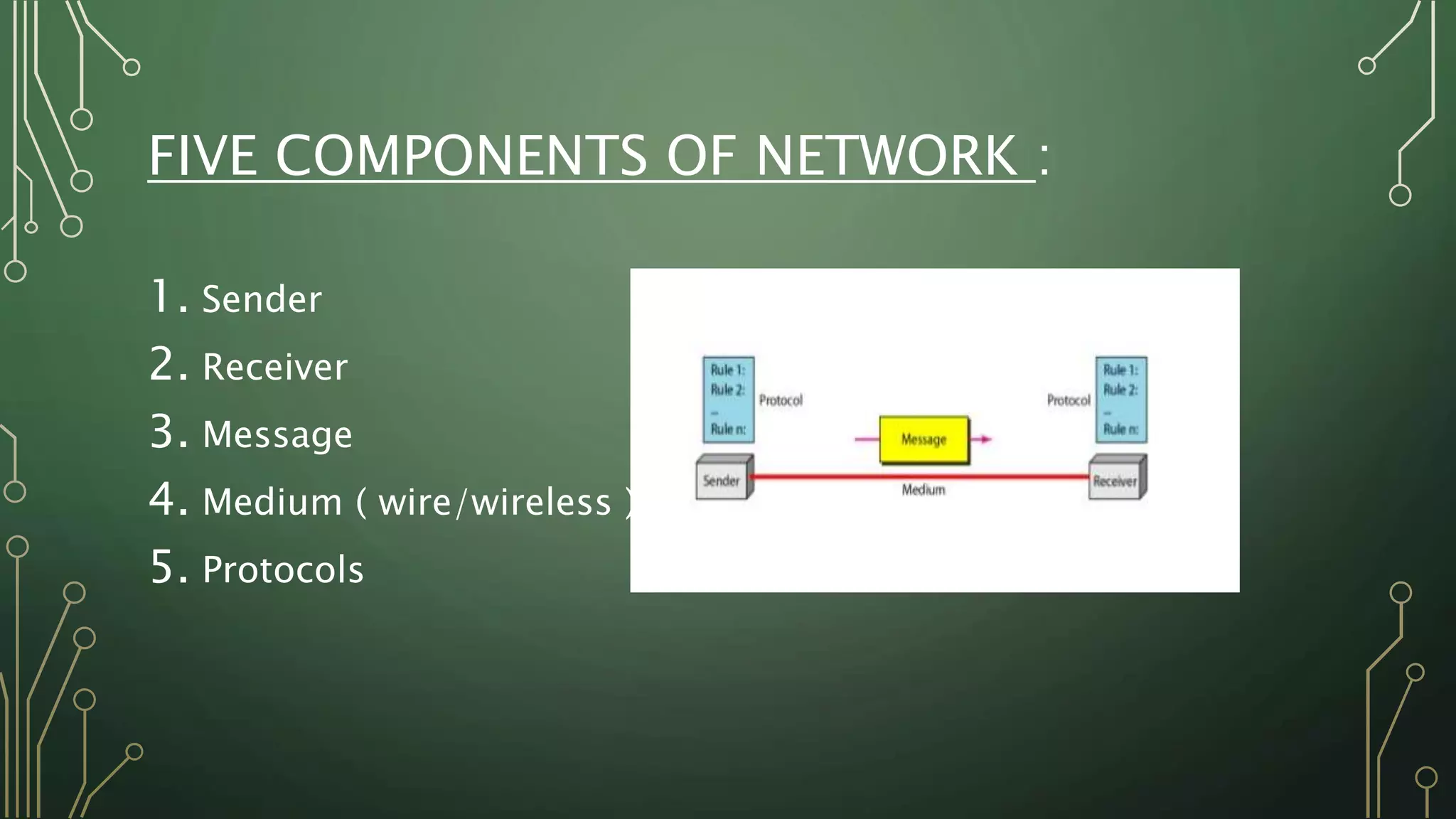
FIVE COMPONENTS OF NETWORK :
1. Sender
2. Receiver
3. Message
4. Medium ( wire/wireless )
5. Protocols
NETWORK MODES
• Network mode means transferring of data between two devices.
It is also called communication mode or transmission mode.
These modes direct the direction of flow of information.
• There are three types of network mode.
1. Simplex Mode
2. Half-Duplex Mode
3. Full-Duplex Mode
SIMPLEX MODE :
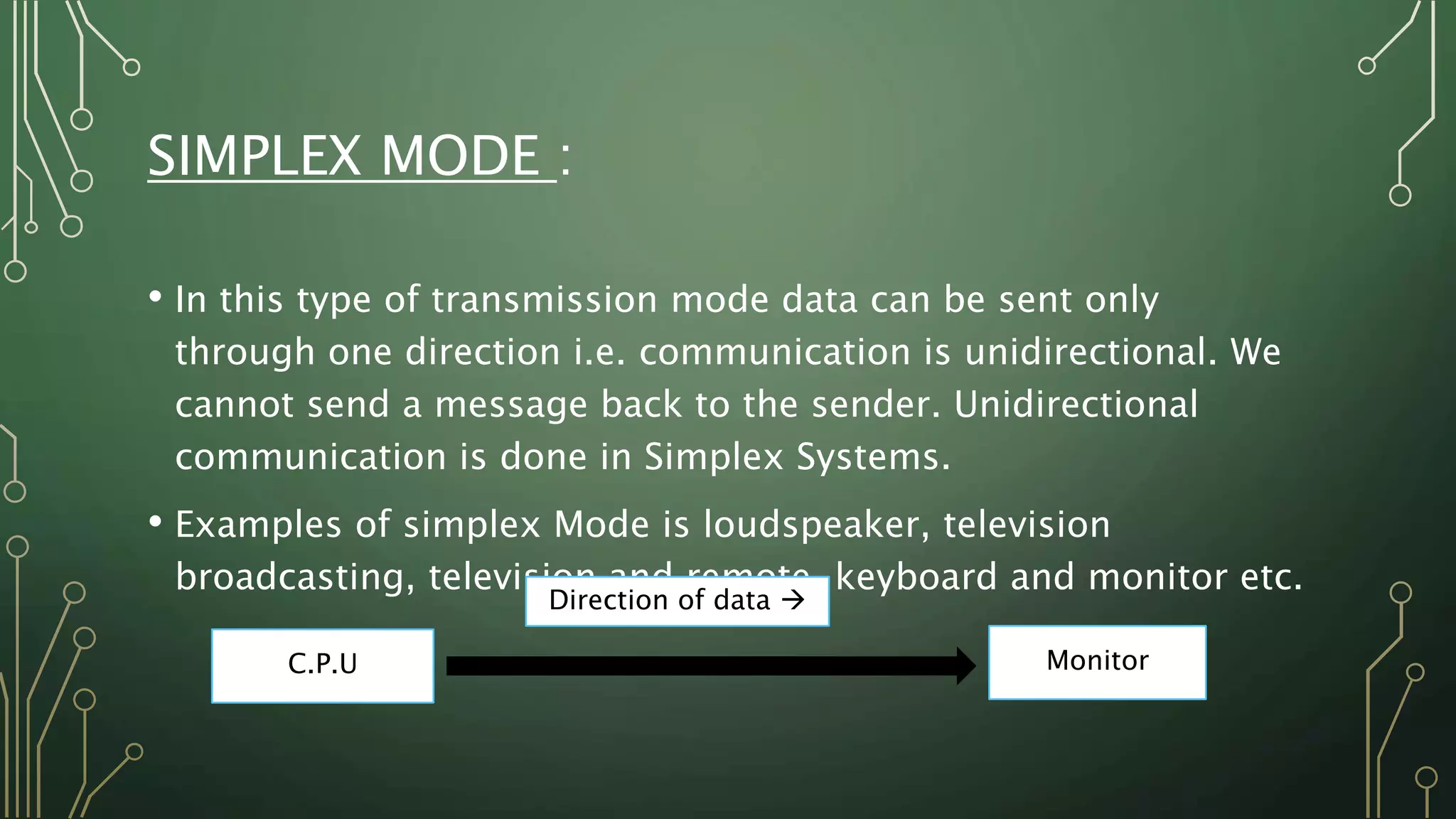
• In this type of transmission mode data can be sent only
through one direction i.e. communication is unidirectional. We
cannot send a message back to the sender. Unidirectional
communication is done in Simplex Systems.
• Examples of simplex Mode is loudspeaker, television
broadcasting, television and remote, keyboard and monitor etc.
C.P.U Monitor
Direction of data 
HALF-DUPLEX MODE :
• In half duplex system we can send data in both directions but it
is done one at a time that is when the sender is sending the
data then at that time we can’t send the sender our message.
The data is sent in one direction.
• Example of half duplex is a walkie - talkie in which message is
sent one at a time and messages are sent in both the
directions.PC PC
Direction of data 1 
 Direction of data 2
FULL-DUPLEX MODE :
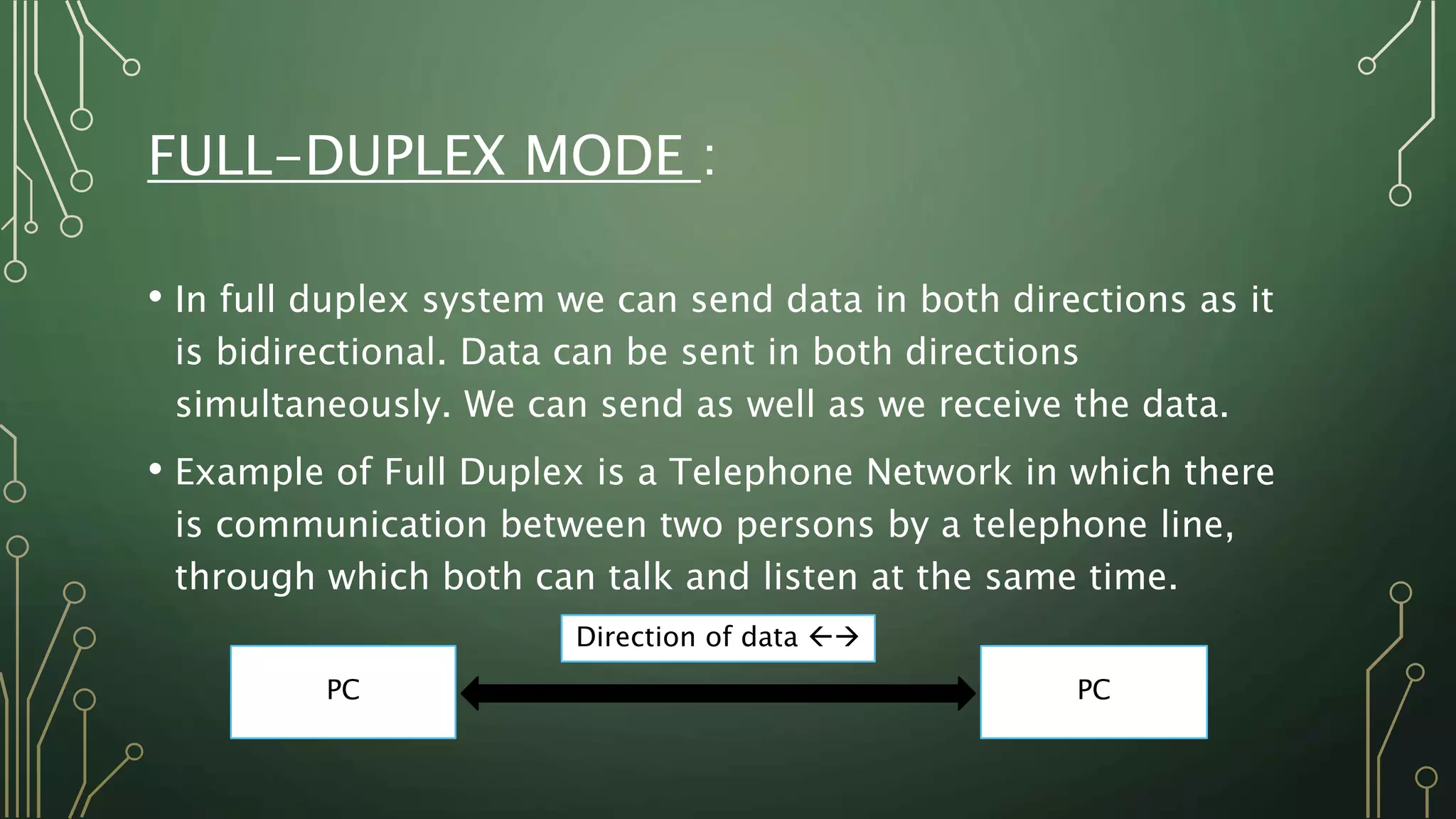
• In full duplex system we can send data in both directions as it
is bidirectional. Data can be sent in both directions
simultaneously. We can send as well as we receive the data.
• Example of Full Duplex is a Telephone Network in which there
is communication between two persons by a telephone line,
through which both can talk and listen at the same time.
PC PC
Direction of data 
TYPES OF NETWORK
• PAN – Personal Area Network
• CAN – Campus Area Network
• LAN – Local Area Network
• MAN – Metropolitan Area Network
• WAN – Wide Area Network
TOPOLOGY
• Physical layout of a network is called network topology
• There are six types of topology
• Bus Topology
• Ring Topology
• Star Topology
• Mesh Topology
• Tree Topology
• Hybrid Topology
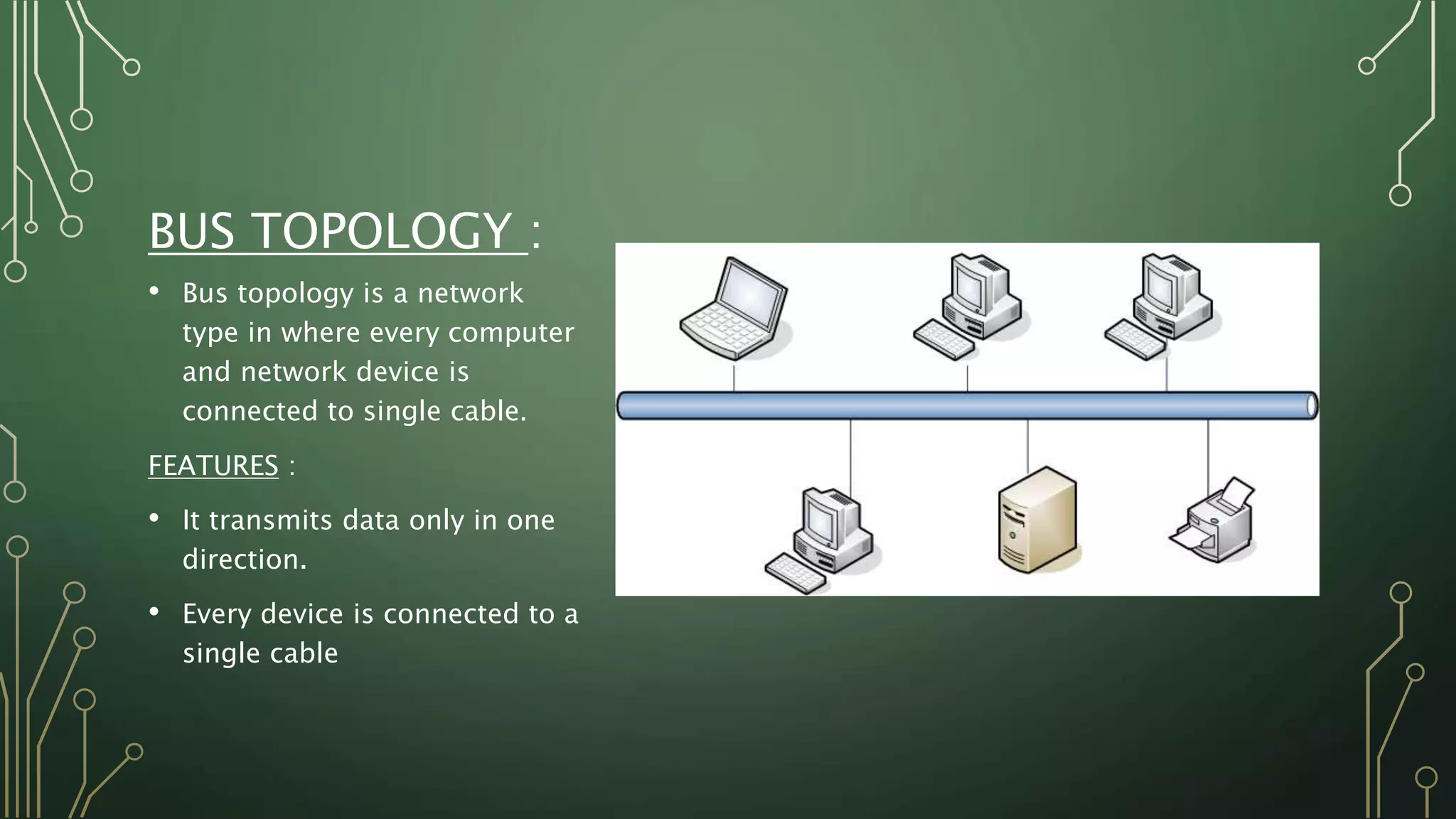
BUS TOPOLOGY :
• Bus topology is a network
type in where every computer
and network device is
connected to single cable.
FEATURES :
• It transmits data only in one
direction.
• Every device is connected to a
single cable
BUS TOPOLOGY :
ADVANTAGES :
• It is cost effective.
• Cable required is least compared to
other network topology.
• Used in small networks.
• It is easy to understand.
• Easy to expand joining two cables
together.
DISADVANTAGES :
• Cables fails then whole network
fails.
• If network traffic is heavy or
nodes are more the performance
of the network decreases.
• Cable has a limited length.
• It is slower than the ring
topology.
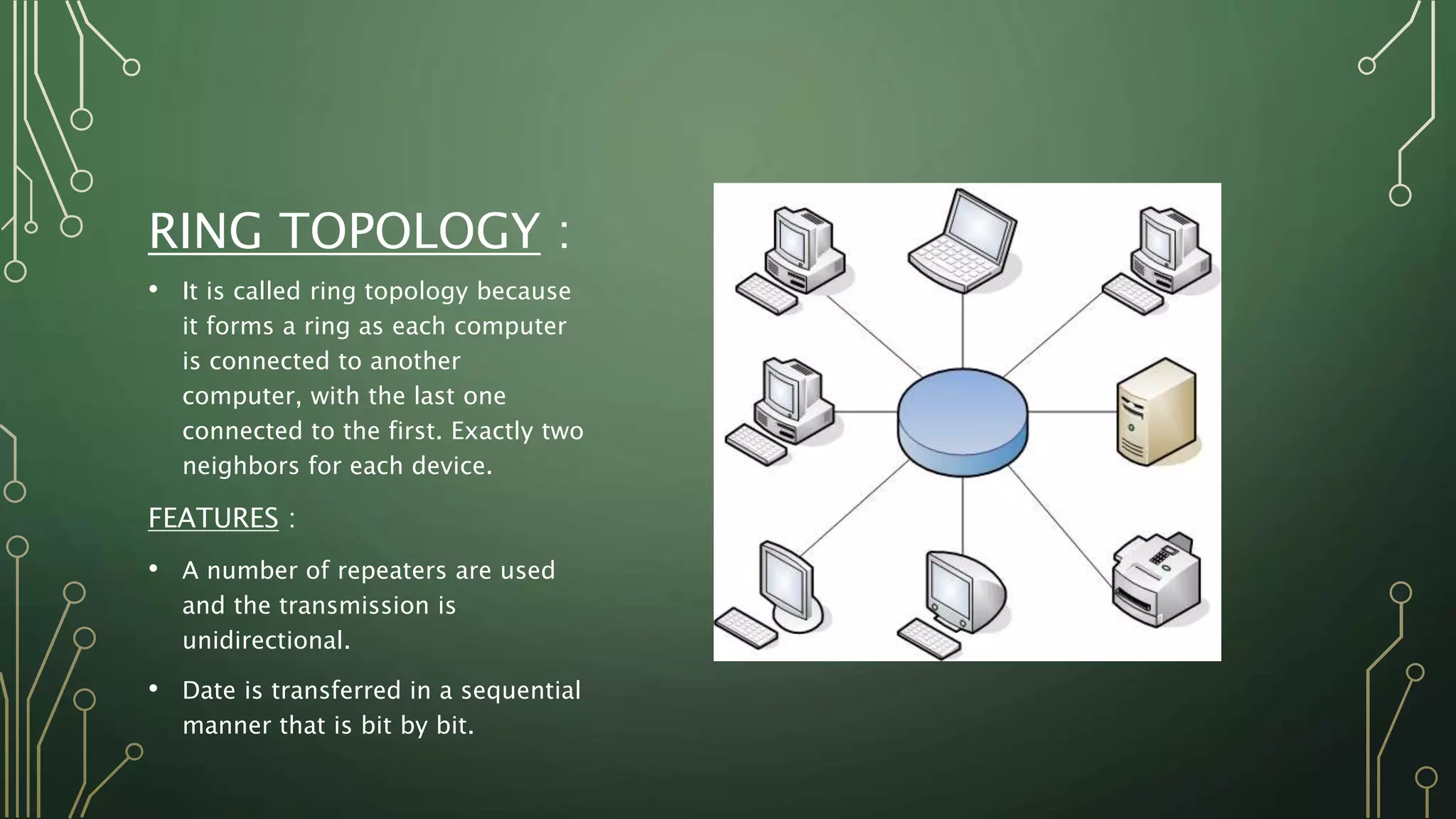
RING TOPOLOGY :
• It is called ring topology because
it forms a ring as each computer
is connected to another
computer, with the last one
connected to the first. Exactly two
neighbors for each device.
FEATURES :
• A number of repeaters are used
and the transmission is
unidirectional.
• Date is transferred in a sequential
manner that is bit by bit.
RING TOPOLOGY :
ADVANTAGES :
• Transmitting network is not
affected by high traffic or by
adding more nodes, as only
the nodes having tokens can
transmit data.
• Cheap to install and expand.
DISADVANTAGES :
• Troubleshooting is difficult in
ring topology.
• Adding or deleting the
computers disturbs the network
activity.
• Failure of one computer disturbs
the whole network.
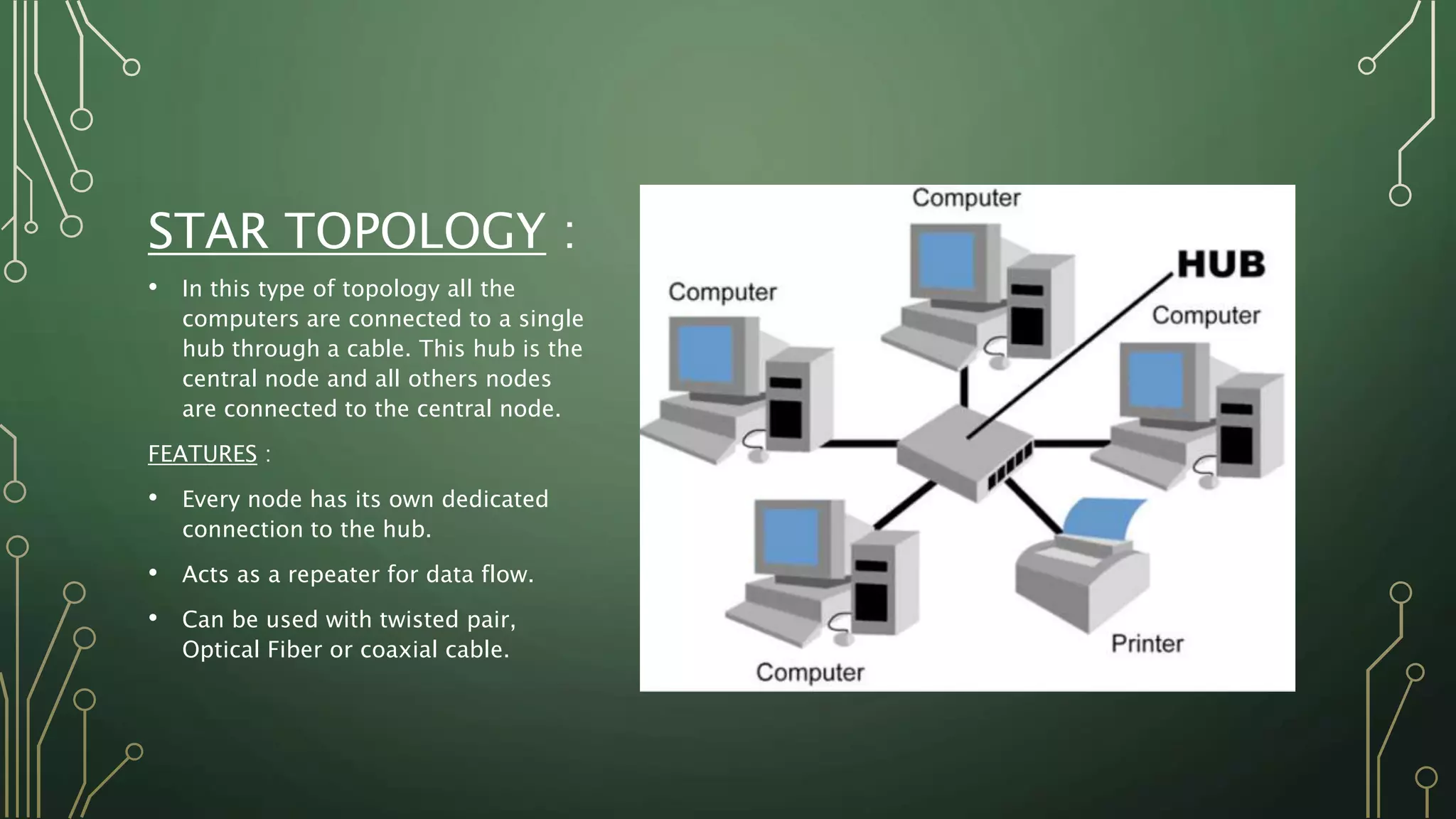
STAR TOPOLOGY :
• In this type of topology all the
computers are connected to a single
hub through a cable. This hub is the
central node and all others nodes
are connected to the central node.
FEATURES :
• Every node has its own dedicated
connection to the hub.
• Acts as a repeater for data flow.
• Can be used with twisted pair,
Optical Fiber or coaxial cable.
STAR TOPOLOGY :
ADVANTAGES :
• Fast performance with few nodes and
low network traffic.
• Hub can be upgraded easily.
• Easy to troubleshoot.
• Easy to setup and modify.
• Only that node is affected which has
failed rest of the nodes can work
smoothly.
DISADVANTAGES :
• Cost of installation is high.
• Expensive to use.
• If the hub is affected then the
whole network is stopped because
all the nodes depend on the hub.
• Performance is based on the hub
that is it depends on its capacity
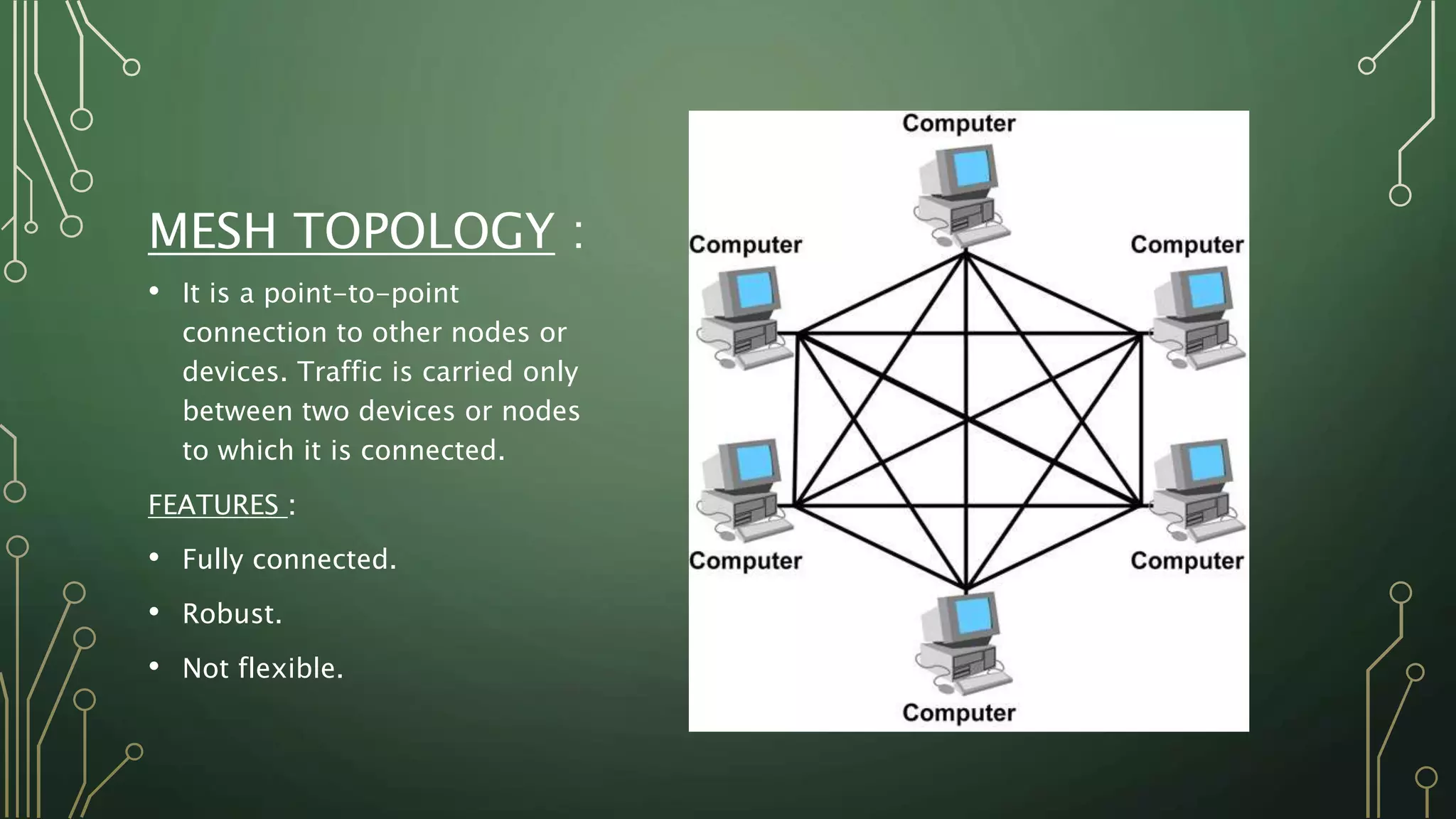
MESH TOPOLOGY :
• It is a point-to-point
connection to other nodes or
devices. Traffic is carried only
between two devices or nodes
to which it is connected.
FEATURES :
• Fully connected.
• Robust.
• Not flexible.
MESH TOPOLOGY :
ADVANTAGES :
• Each connection can carry its
own data load.
• It is robust.
• Fault is diagnosed easily.
• Provides security and privacy.
DISADVANTAGES :
• Installation and configuration
is difficult.
• Cabling cost is more.
• Bulk wiring is required.
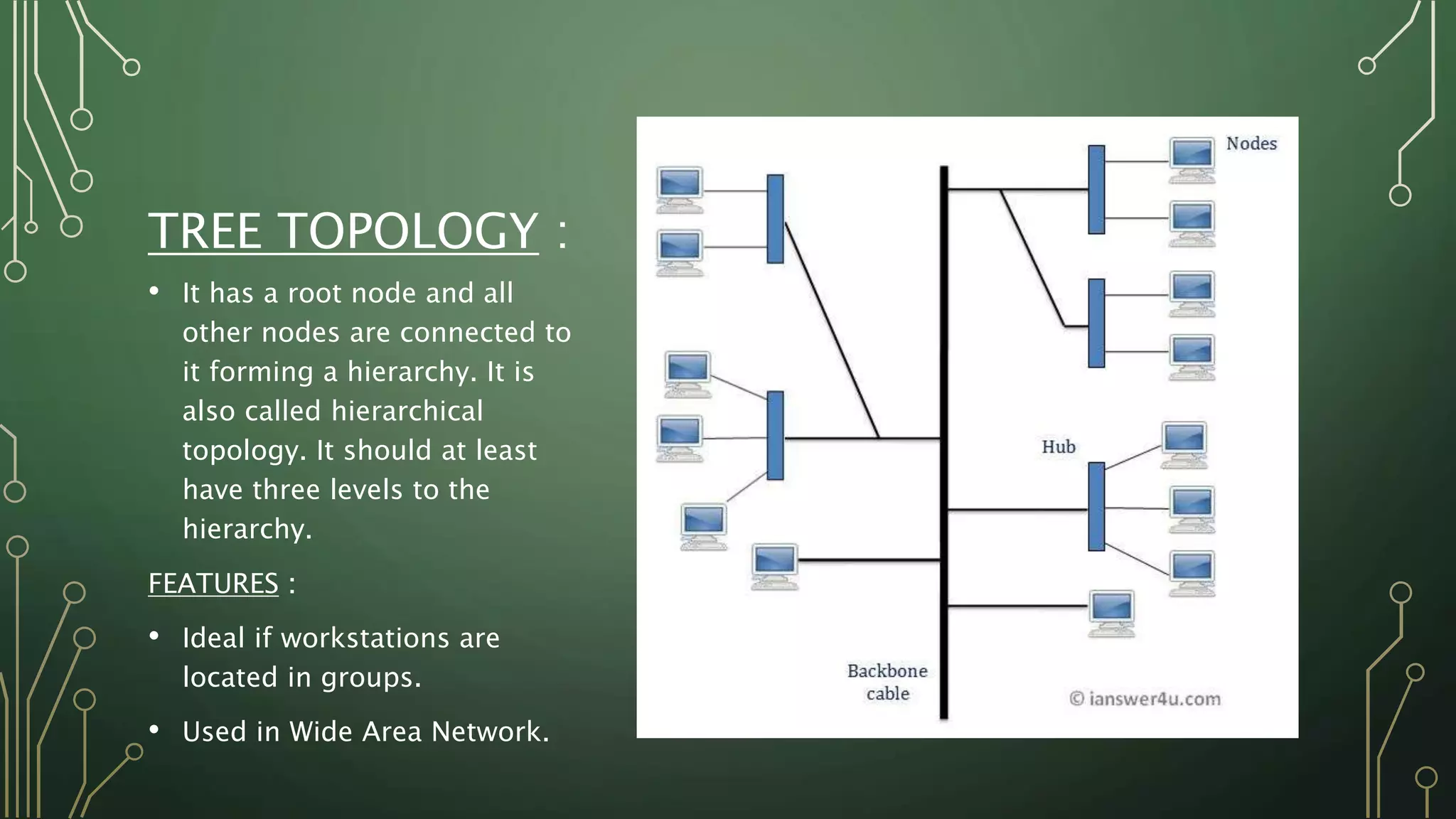
TREE TOPOLOGY :
• It has a root node and all
other nodes are connected to
it forming a hierarchy. It is
also called hierarchical
topology. It should at least
have three levels to the
hierarchy.
FEATURES :
• Ideal if workstations are
located in groups.
• Used in Wide Area Network.
TREE TOPOLOGY :
ADVANTAGES :
• Extension of bus and star
topologies.
• Expansion of nodes is
possible and easy.
• Easily managed and
maintained.
• Error detection is easily done.
DISADVANTAGES :
• Heavily cabled.
• Costly.
• If more nodes are added
maintenance is difficult.
• Central hub fails, network
fails.
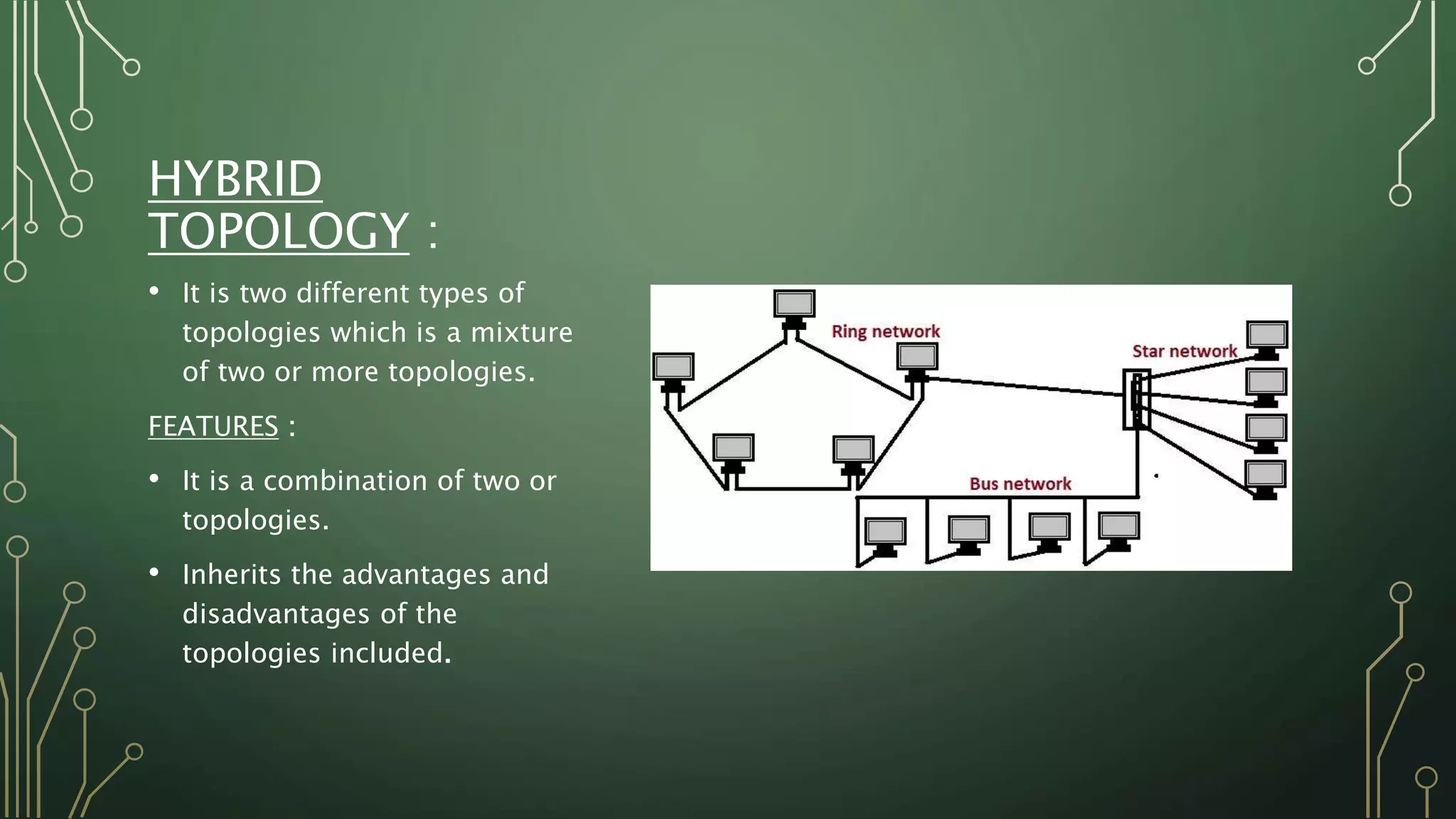
HYBRID
TOPOLOGY :
• It is two different types of
topologies which is a mixture
of two or more topologies.
FEATURES :
• It is a combination of two or
topologies.
• Inherits the advantages and
disadvantages of the
topologies included.
HYBRID TOPOLOGY :
ADVANTAGES :
• Reliable as Error detecting and
trouble shooting is easy.
• Effective.
• Scalable as size can be
increased easily.
• Flexible.
DISADVANTAGES :
• Complex in design.
• Costly.
NETWORK TOPOLOGY

NETWORK TOPOLOGY

  • 1.
    COMPUTER SYSTEM & PROGRAMMING SUBMITTEDBY :- ABDUL WAHAB BIN SHAHBAZ BSME 01153105
  • 2.
    COMPUTER NETWORK • Acomputer network or data network is a telecommunications network which allows computers to exchange data. • In computer networks, networked computing devices exchange data with each other using a data link. • The connections between nodes are established using either cable media or wireless media.
  • 3.
    FIVE COMPONENTS OFNETWORK : 1. Sender 2. Receiver 3. Message 4. Medium ( wire/wireless ) 5. Protocols
  • 4.
    NETWORK MODES • Networkmode means transferring of data between two devices. It is also called communication mode or transmission mode. These modes direct the direction of flow of information. • There are three types of network mode. 1. Simplex Mode 2. Half-Duplex Mode 3. Full-Duplex Mode
  • 5.
    SIMPLEX MODE : •In this type of transmission mode data can be sent only through one direction i.e. communication is unidirectional. We cannot send a message back to the sender. Unidirectional communication is done in Simplex Systems. • Examples of simplex Mode is loudspeaker, television broadcasting, television and remote, keyboard and monitor etc. C.P.U Monitor Direction of data 
  • 6.
    HALF-DUPLEX MODE : •In half duplex system we can send data in both directions but it is done one at a time that is when the sender is sending the data then at that time we can’t send the sender our message. The data is sent in one direction. • Example of half duplex is a walkie - talkie in which message is sent one at a time and messages are sent in both the directions.PC PC Direction of data 1   Direction of data 2
  • 7.
    FULL-DUPLEX MODE : •In full duplex system we can send data in both directions as it is bidirectional. Data can be sent in both directions simultaneously. We can send as well as we receive the data. • Example of Full Duplex is a Telephone Network in which there is communication between two persons by a telephone line, through which both can talk and listen at the same time. PC PC Direction of data 
  • 8.
    TYPES OF NETWORK •PAN – Personal Area Network • CAN – Campus Area Network • LAN – Local Area Network • MAN – Metropolitan Area Network • WAN – Wide Area Network
  • 9.
    TOPOLOGY • Physical layoutof a network is called network topology • There are six types of topology • Bus Topology • Ring Topology • Star Topology • Mesh Topology • Tree Topology • Hybrid Topology
  • 10.
    BUS TOPOLOGY : •Bus topology is a network type in where every computer and network device is connected to single cable. FEATURES : • It transmits data only in one direction. • Every device is connected to a single cable
  • 11.
    BUS TOPOLOGY : ADVANTAGES: • It is cost effective. • Cable required is least compared to other network topology. • Used in small networks. • It is easy to understand. • Easy to expand joining two cables together. DISADVANTAGES : • Cables fails then whole network fails. • If network traffic is heavy or nodes are more the performance of the network decreases. • Cable has a limited length. • It is slower than the ring topology.
  • 12.
    RING TOPOLOGY : •It is called ring topology because it forms a ring as each computer is connected to another computer, with the last one connected to the first. Exactly two neighbors for each device. FEATURES : • A number of repeaters are used and the transmission is unidirectional. • Date is transferred in a sequential manner that is bit by bit.
  • 13.
    RING TOPOLOGY : ADVANTAGES: • Transmitting network is not affected by high traffic or by adding more nodes, as only the nodes having tokens can transmit data. • Cheap to install and expand. DISADVANTAGES : • Troubleshooting is difficult in ring topology. • Adding or deleting the computers disturbs the network activity. • Failure of one computer disturbs the whole network.
  • 14.
    STAR TOPOLOGY : •In this type of topology all the computers are connected to a single hub through a cable. This hub is the central node and all others nodes are connected to the central node. FEATURES : • Every node has its own dedicated connection to the hub. • Acts as a repeater for data flow. • Can be used with twisted pair, Optical Fiber or coaxial cable.
  • 15.
    STAR TOPOLOGY : ADVANTAGES: • Fast performance with few nodes and low network traffic. • Hub can be upgraded easily. • Easy to troubleshoot. • Easy to setup and modify. • Only that node is affected which has failed rest of the nodes can work smoothly. DISADVANTAGES : • Cost of installation is high. • Expensive to use. • If the hub is affected then the whole network is stopped because all the nodes depend on the hub. • Performance is based on the hub that is it depends on its capacity
  • 16.
    MESH TOPOLOGY : •It is a point-to-point connection to other nodes or devices. Traffic is carried only between two devices or nodes to which it is connected. FEATURES : • Fully connected. • Robust. • Not flexible.
  • 17.
    MESH TOPOLOGY : ADVANTAGES: • Each connection can carry its own data load. • It is robust. • Fault is diagnosed easily. • Provides security and privacy. DISADVANTAGES : • Installation and configuration is difficult. • Cabling cost is more. • Bulk wiring is required.
  • 18.
    TREE TOPOLOGY : •It has a root node and all other nodes are connected to it forming a hierarchy. It is also called hierarchical topology. It should at least have three levels to the hierarchy. FEATURES : • Ideal if workstations are located in groups. • Used in Wide Area Network.
  • 19.
    TREE TOPOLOGY : ADVANTAGES: • Extension of bus and star topologies. • Expansion of nodes is possible and easy. • Easily managed and maintained. • Error detection is easily done. DISADVANTAGES : • Heavily cabled. • Costly. • If more nodes are added maintenance is difficult. • Central hub fails, network fails.
  • 20.
    HYBRID TOPOLOGY : • Itis two different types of topologies which is a mixture of two or more topologies. FEATURES : • It is a combination of two or topologies. • Inherits the advantages and disadvantages of the topologies included.
  • 21.
    HYBRID TOPOLOGY : ADVANTAGES: • Reliable as Error detecting and trouble shooting is easy. • Effective. • Scalable as size can be increased easily. • Flexible. DISADVANTAGES : • Complex in design. • Costly.