_________________________________________________________________________
www.irp-management.com Network Security
Page: 1 Date: 9 april 2018 Draft version
Network Security26032018-version 0.1-
Hans Oosterling
2018 March
_________________________________________________________________________
www.irp-management.com Network Security
Page: 2 Date: 9 april 2018 Draft version
Public Internet (1)
 There is no command and control center, no central authority
– Coldware
– Regulated protocol and standards on communication
– Almost everybody can join without any restrictions
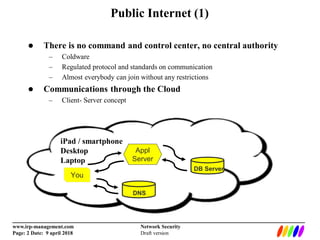
 Communications through the Cloud
– Client- Server concept
iPad / smartphone
Desktop
Laptop
You
Appl
Server
DB Server
DNS
_________________________________________________________________________
www.irp-management.com Network Security
Page: 3 Date: 9 april 2018 Draft version
Public Internet (2)
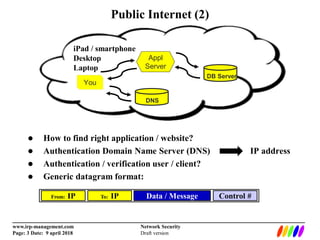
 How to find right application / website?
 Authentication Domain Name Server (DNS) IP address
 Authentication / verification user / client?
 Generic datagram format:
iPad / smartphone
Desktop
Laptop
You
Appl
Server
DB Server
DNS
From: IP To: IP Data / Message Control #
_________________________________________________________________________
www.irp-management.com Network Security
Page: 4 Date: 9 april 2018 Draft version
Communications (1)
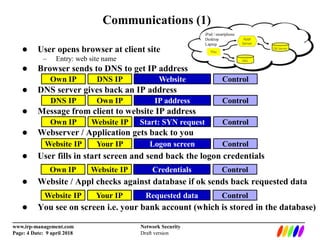
Website IP Your IP Logon screen Control
Own IP Website IP Credentials Control
Website IP Your IP Requested data Control
 User opens browser at client site
– Entry: web site name
 Browser sends to DNS to get IP address
 DNS server gives back an IP address
 Message from client to website IP address
 Webserver / Application gets back to you
 User fills in start screen and send back the logon credentials
 Website / Appl checks against database if ok sends back requested data
 You see on screen i.e. your bank account (which is stored in the database)
Own IP DNS IP Website Control
DNS IP Own IP IP address Control
Own IP Website IP Start: SYN request Control
_________________________________________________________________________
www.irp-management.com Network Security
Page: 5 Date: 9 april 2018 Draft version
Communications (2)
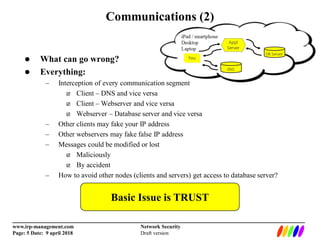
 What can go wrong?
 Everything:
– Interception of every communication segment
 Client – DNS and vice versa
 Client – Webserver and vice versa
 Webserver – Database server and vice versa
– Other clients may fake your IP address
– Other webservers may fake false IP address
– Messages could be modified or lost
 Maliciously
 By accident
– How to avoid other nodes (clients and servers) get access to database server?
Basic Issue is TRUST
_________________________________________________________________________
www.irp-management.com Network Security
Page: 6 Date: 9 april 2018 Draft version
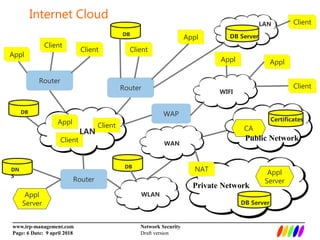
Internet Cloud
Router
WLAN
Router
Router
Client
Appl Client
LAN
Client
Appl
Client
Appl
Client
LAN
WAP
WIFI
Client
Appl
Client
Appl
Appl
Server
DB Server
WAN
DB Server
Appl
Server
Certificates
CA
DN
S
DB
DB
DB
Public Network
Private Network
NAT
_________________________________________________________________________
www.irp-management.com Network Security
Page: 7 Date: 9 april 2018 Draft version
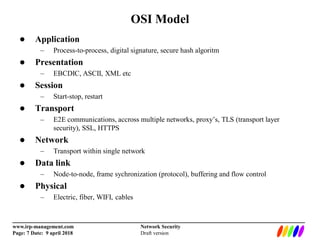
OSI Model
 Application
– Process-to-process, digital signature, secure hash algoritm
 Presentation
– EBCDIC, ASCII, XML etc
 Session
– Start-stop, restart
 Transport
– E2E communications, accross multiple networks, proxy’s, TLS (transport layer
security), SSL, HTTPS
 Network
– Transport within single network
 Data link
– Node-to-node, frame sychronization (protocol), buffering and flow control
 Physical
– Electric, fiber, WIFI, cables
_________________________________________________________________________
www.irp-management.com Network Security
Page: 8 Date: 9 april 2018 Draft version
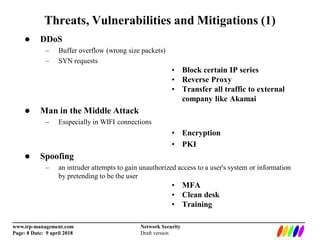
Threats, Vulnerabilities and Mitigations (1)
 DDoS
– Buffer overflow (wrong size packets)
– SYN requests
• Block certain IP series
• Reverse Proxy
• Transfer all traffic to external
company like Akamai
 Man in the Middle Attack
– Esspecially in WIFI connections
• Encryption
• PKI
 Spoofing
– an intruder attempts to gain unauthorized access to a user's system or information
by pretending to be the user
• MFA
• Clean desk
• Training
_________________________________________________________________________
www.irp-management.com Network Security
Page: 9 Date: 9 april 2018 Draft version
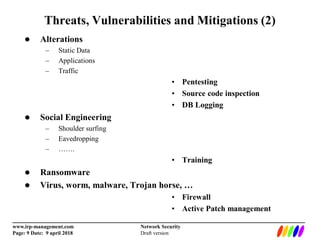
Threats, Vulnerabilities and Mitigations (2)
 Alterations
– Static Data
– Applications
– Traffic
• Pentesting
• Source code inspection
• DB Logging
 Social Engineering
– Shoulder surfing
– Eavedropping
– …….
• Training
 Ransomware
 Virus, worm, malware, Trojan horse, …
• Firewall
• Active Patch management
_________________________________________________________________________
www.irp-management.com Network Security
Page: 10 Date: 9 april 2018 Draft version
Data Protection and Mitigations (1)
 Proxy server
– Hide IP outbound addresses
– Anomous surfing the internet
– VPN, proxy plus encryption (authentication by logon and password and / or certificate)
 Reverse Proxy server
– Check on inbound IP addresses
 Certificate Authority
– Trustworthiness of parties on the internet
– Webservers are authenticated (HTTPS)
– Clients are authenticated (Identity card)
 Encryption
– Symmetric (same encryption key on both sides)
– Asymmetric (public and private encryption key)
– Hash algoritm
_________________________________________________________________________
www.irp-management.com Network Security
Page: 11 Date: 9 april 2018 Draft version
Data Protection and Mitigations (2)
 Intrusion detection and prevention
– Checking afterwards
– Tracking what has been affected / which segments were accessed
– Snort
 Logging
– Tracking and tracing changes / alteration:
– Data
– Systems (IT stack)
 Traffic monitoring
– Packet sniffing and protocol analyzer
 Snort
 Wireshark

Network Security and Risk Management