Necto 16 Training
Necto Data Security
Objectives
• By the end of this lesson you will be able to perform Necto Data
Security setups
• Necto security
• Windows security
• Mixed security
• No Security
Agenda
•Necto Data Security Administration
• Administrator
• Application
• Data Security
Necto Data Security
Administration
Necto Data Security Hierarchy
Level 1
Level 2
Level 3
Necto Data Security Hierarchy
Example
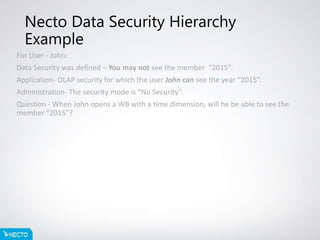
For User - John:
Data Security was defined – You may not see the member “2015”.
Application- OLAP security for which the user John can see the year “2015”.
Administration- The security mode is “No Security”.
Question - When John opens a WB with a time dimension, will he be able to see the
member “2015”?
Necto Data Security Hierarchy
Example Answer
John will not be able to see the member “2015” because data security is the
highest level in the hierarchy and overrides all others!
Necto Data Security Administration level 1
• No Security
• Necto
• OLAP (Roles)
• OLAP (User)
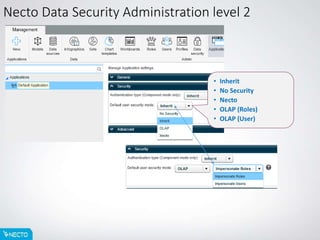
Necto Data Security Administration level 2
• Inherit
• No Security
• Necto
• OLAP (Roles)
• OLAP (User)
Necto Data Security level 3
• Necto Models
• OLAP Models
Necto Data Security level 3
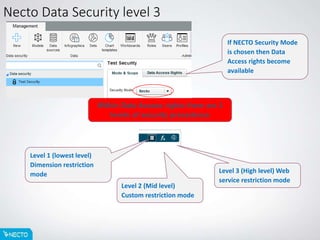
Within Data Access rights there are 3
levels of security precedence
Level 1 (lowest level)
Dimension restriction
mode
Level 2 (Mid level)
Custom restriction mode
Level 3 (High level) Web
service restriction mode
If NECTO Security Mode
is chosen then Data
Access rights become
available
Necto Data Security level 3 (Sub Level 1)
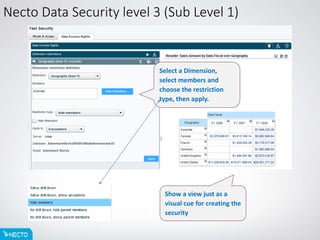
Show a view just as a
visual cue for creating the
security
Select a Dimension,
select members and
choose the restriction
type, then apply.
Necto Data Security level 3 (Sub Level 1)
Show MDX can help
you create MDX for
Slicer security if
using component
mode
Necto Data Security level 3 (Sub level 2)
Show MDX can from the
sub level Dimension
security can help you
create Custom
restrictions
Necto Data Security level 3 (Sub level 2)
Show MDX can from the
sub level Dimension
security can help you
create Custom
restrictions
Summary
• In this lesson you have learned how to Setup the Data security
types:
• OLAP
• Necto
• Mixed
• Necto Sub level security
Thank you, any
questions?

Necto 16 training 19 - data security

  • 1.
  • 2.
    Objectives • By theend of this lesson you will be able to perform Necto Data Security setups • Necto security • Windows security • Mixed security • No Security
  • 3.
    Agenda •Necto Data SecurityAdministration • Administrator • Application • Data Security
  • 4.
  • 5.
    Necto Data SecurityHierarchy Level 1 Level 2 Level 3
  • 6.
    Necto Data SecurityHierarchy Example For User - John: Data Security was defined – You may not see the member “2015”. Application- OLAP security for which the user John can see the year “2015”. Administration- The security mode is “No Security”. Question - When John opens a WB with a time dimension, will he be able to see the member “2015”?
  • 7.
    Necto Data SecurityHierarchy Example Answer John will not be able to see the member “2015” because data security is the highest level in the hierarchy and overrides all others!
  • 8.
    Necto Data SecurityAdministration level 1 • No Security • Necto • OLAP (Roles) • OLAP (User)
  • 9.
    Necto Data SecurityAdministration level 2 • Inherit • No Security • Necto • OLAP (Roles) • OLAP (User)
  • 10.
    Necto Data Securitylevel 3 • Necto Models • OLAP Models
  • 11.
    Necto Data Securitylevel 3 Within Data Access rights there are 3 levels of security precedence Level 1 (lowest level) Dimension restriction mode Level 2 (Mid level) Custom restriction mode Level 3 (High level) Web service restriction mode If NECTO Security Mode is chosen then Data Access rights become available
  • 12.
    Necto Data Securitylevel 3 (Sub Level 1) Show a view just as a visual cue for creating the security Select a Dimension, select members and choose the restriction type, then apply.
  • 13.
    Necto Data Securitylevel 3 (Sub Level 1) Show MDX can help you create MDX for Slicer security if using component mode
  • 14.
    Necto Data Securitylevel 3 (Sub level 2) Show MDX can from the sub level Dimension security can help you create Custom restrictions
  • 15.
    Necto Data Securitylevel 3 (Sub level 2) Show MDX can from the sub level Dimension security can help you create Custom restrictions
  • 16.
    Summary • In thislesson you have learned how to Setup the Data security types: • OLAP • Necto • Mixed • Necto Sub level security
  • 17.

Editor's Notes

  • #6 Necto Data Security has a hierarchy allowing the strongest security type to override the others Level 3 - Data Security is the Highest level of security and also the most granular area, anything set here overrides all else Level 2 - Applications is the 2nd level of security any thing set here over rides the Administration settings for Data Security but is irrelevant if Data Security is set Level 1 - Administration is the lowest (default) level of data security and is overridden by all other types, but is the starting point of your Data security.
  • #9 Data Security Mode (Administration) – How data is filtered for users at Level 1 No Security –Necto users will not be restricted on the data that they see OLAP (Roles) – Active Directory users will have restrictions placed on their data viewing capabilities based on the roles that they are in on the OLAP cubes or the Users within the cubes OLAP (Users) – Active Directory users will have restrictions placed on their data viewing capabilities based on Dynamic security that is defined by the cube developers and administrators on the cube itself. Necto sends the Effective Username to the cube to identify the user uniquely and data is returned on this basis. This slows down Necto because a unique thread must be used for each user getting data but is very secure data wise. Necto – Windows users and Necto users will have restrictions placed on their data viewing capabilities based on definitions within Necto, You MUST define security restrictions in Level 3 Data Security if you use this option.
  • #10 Data Security Mode (Applications) – How data is filtered for users at Level 2 For the most par the settings are the same as Level 1 but you can set a different security mode for each Application you setup within Necto Inherit – This is the default setting and means that the Application will take the security from the Application level 1 setting. No Security –Necto users will not be restricted on the data that they see OLAP (Roles) – Active Directory users will have restrictions placed on their data viewing capabilities based on the roles that they are in on the OLAP cubes or the Users within the cubes OLAP (Users) – Active Directory users will have restrictions placed on their data viewing capabilities based on Dynamic security that is defined by the cube developers and administrators on the cube itself. Necto sends the Effective Username to the cube to identify the user uniquely and data is returned on this basis. This slows down Necto because a unique thread must be used for each user getting data but is very secure data wise. Necto – Windows users and Necto users will have restrictions placed on their data viewing capabilities based on definitions within Necto, You MUST define security restrictions in Level 3 Data Security if you use this option.
  • #11 Data Security Mode (Data Security) – How data is filtered for users at Level 3 Here you setup security roles, to these you can add specific users or User roles. Mode and Scope – for each security role you can set the security mode No Security –Necto users will not be restricted on the data that they see OLAP (Roles) – Active Directory users will have restrictions placed on their data viewing capabilities based on the roles that they are in on the OLAP cubes or the Users within the cubes OLAP (Users) – Active Directory users will have restrictions placed on their data viewing capabilities based on Dynamic security that is defined by the cube developers and administrators on the cube itself. Necto sends the Effective Username to the cube to identify the user uniquely and data is returned on this basis. This slows down Necto because a unique thread must be used for each user getting data but is very secure data wise. Necto – Windows users and Necto users will have restrictions placed on their data viewing capabilities based on definitions within Necto, You MUST define security restrictions in Level 3 Data Security if you use this option. Additionally you can set the scope of the security role Based on an OLAP model / cube or a Necto model Within this you may specify the level of granularity OLAP data source, Database, Model
  • #12 Data Security Mode (Data Security) – How data is filtered for users at Level 3 Data access rights – Are split in to three sub-categories Web Service (Sub Level 3) – The highest level it will override all others Custom Restriction (Sub Level 2) – Mid level that overrides Dimension restriction Dimension Restriction (Sub Level 1) – Lowest level but the most commonly used
  • #13 Data Security Mode (Data Security) – How data is filtered for users at Level 3 Dimension Restriction (Sub Level 1) – Lowest level but the most commonly used Choose the Dimension you want to place a restriction upon Choose members of the dimension to restrict Choose the restriction type Allow drill down Allow drill down, show ancestors Hide members No drill down, hide parent members No drill down, show parent members Choose where to apply the restriction Current model Current database Current server
  • #14 Show MDX is very useful
  • #15 Data Security Mode (Data Security) – How data is filtered for users at Level 3 Custom Restriction (Sub Level 2) – Advanced topic Use MDX to write Custom restrictions for security, this is a very advanced topic and should only be attempted by Admins or cube designers familiar with MDX and the SDK security model
  • #16 Data Security Mode (Data Security) – How data is filtered for users at Level 3 Web Service Restriction (Sub Level 3) – Advanced topic This mode is intended for organizations using their own security mechanism and serves to connect to the external security settings. Enter the web service URL for the page Necto should call when the users try to access the defined data scope. Enter the parameters you want to pass to this page.