MySQLinsanity!


                 1
Topic

▪ Who am I?
▪ MySQL performance tuning experience sharing.
▪ Q & A.


                                                 2
Who am I?

▪ Stanley Huang (黃偉倫)
▪ My email
 ▪ wenlien1001@gmail.com
▪ My Blog
 ▪ http://stanley-huang.blogspot.com


                                       3
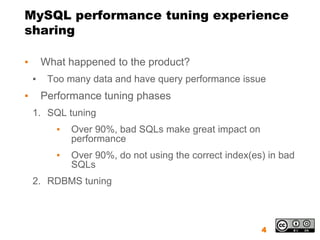
MySQL performance tuning experience
sharing

▪       What happened to the product?
    ▪    Too many data and have query performance issue
▪       Performance tuning phases
    1. SQL tuning
           ▪   Over 90%, bad SQLs make great impact on
               performance
           ▪   Over 90%, do not using the correct index(es) in bad
               SQLs
    2. RDBMS tuning


                                                          4
MySQL SQL tuning(1/2)

▪ Enable slow query log and find out the top 10 slow
  queries
 ▪ Add two settings in my.cnf
   ▪ log-slow-queries ## default off
   ▪ long-query-time=5 ## default 10
 ▪ [data folder]/[host name]-slow.log


                                                  5
MySQL SQL tuning(2/2)

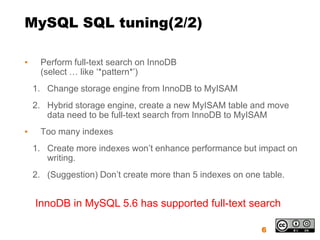
▪    Perform full-text search on InnoDB
     (select … like ‘*pattern*’)
    1. Change storage engine from InnoDB to MyISAM
    2. Hybrid storage engine, create a new MyISAM table and move
       data need to be full-text search from InnoDB to MyISAM
▪    Too many indexes
    1. Create more indexes won’t enhance performance but impact on
       writing.
    2. (Suggestion) Don’t create more than 5 indexes on one table.


    InnoDB in MySQL 5.6 has supported full-text search

                                                            6
Useful Tips For Networking System

1. IP Support
2. Mac Support


                             7
IP address support

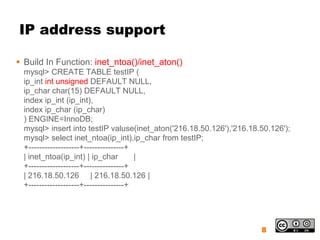
 Build In Function: inet_ntoa()/inet_aton()
  mysql> CREATE TABLE testIP (
  ip_int int unsigned DEFAULT NULL,
  ip_char char(15) DEFAULT NULL,
  index ip_int (ip_int),
  index ip_char (ip_char)
  ) ENGINE=InnoDB;
  mysql> insert into testIP valuse(inet_aton('216.18.50.126'),'216.18.50.126');
  mysql> select inet_ntoa(ip_int),ip_char from testIP;
  +-------------------+---------------+
  | inet_ntoa(ip_int) | ip_char         |
  +-------------------+---------------+
  | 216.18.50.126 | 216.18.50.126 |
  +-------------------+---------------+


                                                                      8
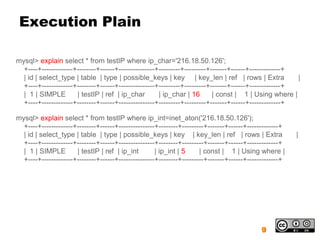
Execution Plain

mysql> explain select * from testIP where ip_char='216.18.50.126';
  +----+-------------+--------+------+---------------+---------+---------+-------+------+-------------+
  | id | select_type | table | type | possible_keys | key | key_len | ref | rows | Extra                |
  +----+-------------+--------+------+---------------+---------+---------+-------+------+-------------+
  | 1 | SIMPLE        | testIP | ref | ip_char        | ip_char | 16       | const | 1 | Using where |
  +----+-------------+--------+------+---------------+---------+---------+-------+------+-------------+

mysql> explain select * from testIP where ip_int=inet_aton('216.18.50.126');
  +----+-------------+--------+------+---------------+--------+---------+-------+------+-------------+
  | id | select_type | table | type | possible_keys | key | key_len | ref | rows | Extra                 |
  +----+-------------+--------+------+---------------+--------+---------+-------+------+-------------+
  | 1 | SIMPLE        | testIP | ref | ip_int        | ip_int | 5     | const | 1 | Using where |
  +----+-------------+--------+------+---------------+--------+---------+-------+------+-------------+


                                                                                             9
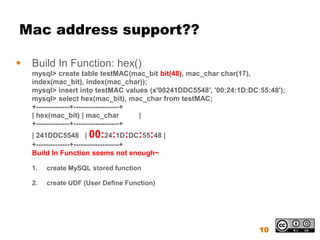
Mac address support??

   Build In Function: hex()
    mysql> create table testMAC(mac_bit bit(48), mac_char char(17),
    index(mac_bit), index(mac_char));
    mysql> insert into testMAC values (x'00241DDC5548', '00:24:1D:DC:55:48');
    mysql> select hex(mac_bit), mac_char from testMAC;
    +--------------+-------------------+
    | hex(mac_bit) | mac_char            |
    +--------------+-------------------+
    | 241DDC5548 | 00:24:1D:DC:55:48 |
    +--------------+-------------------+
    Build In Function seems not enough~

    1.   create MySQL stored function

    2.   create UDF (User Define Function)


                                                                     10
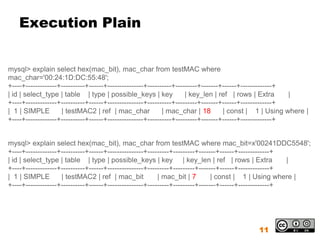
Execution Plain


mysql> explain select hex(mac_bit), mac_char from testMAC where
mac_char='00:24:1D:DC:55:48';
+----+-------------+----------+------+---------------+----------+---------+-------+------+-------------+
| id | select_type | table | type | possible_keys | key              | key_len | ref | rows | Extra      |
+----+-------------+----------+------+---------------+----------+---------+-------+------+-------------+
| 1 | SIMPLE        | testMAC2 | ref | mac_char             | mac_char | 18        | const | 1 | Using where |
+----+-------------+----------+------+---------------+----------+---------+-------+------+-------------+


mysql> explain select hex(mac_bit), mac_char from testMAC where mac_bit=x'00241DDC5548';
+----+-------------+----------+------+---------------+---------+---------+-------+------+-------------+
| id | select_type | table | type | possible_keys | key | key_len | ref | rows | Extra                  |
+----+-------------+----------+------+---------------+---------+---------+-------+------+-------------+
| 1 | SIMPLE        | testMAC2 | ref | mac_bit            | mac_bit | 7        | const | 1 | Using where |
+----+-------------+----------+------+---------------+---------+---------+-------+------+-------------+


                                                                                            11
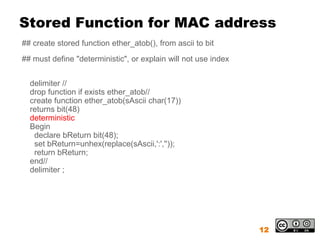
Stored Function for MAC address
## create stored function ether_atob(), from ascii to bit
## must define "deterministic", or explain will not use index


  delimiter //
  drop function if exists ether_atob//
  create function ether_atob(sAscii char(17))
  returns bit(48)
  deterministic
  Begin
   declare bReturn bit(48);
   set bReturn=unhex(replace(sAscii,':',''));
   return bReturn;
  end//
  delimiter ;


                                                                12
Stored Function for MAC address
(cont.)
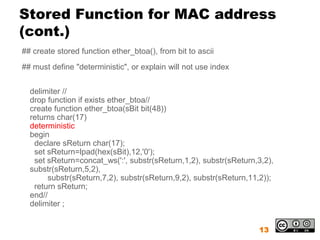
## create stored function ether_btoa(), from bit to ascii
## must define "deterministic", or explain will not use index


  delimiter //
  drop function if exists ether_btoa//
  create function ether_btoa(sBit bit(48))
  returns char(17)
  deterministic
  begin
   declare sReturn char(17);
   set sReturn=lpad(hex(sBit),12,'0');
   set sReturn=concat_ws(':', substr(sReturn,1,2), substr(sReturn,3,2),
  substr(sReturn,5,2),
       substr(sReturn,7,2), substr(sReturn,9,2), substr(sReturn,11,2));
   return sReturn;
  end//
  delimiter ;


                                                                  13
Stored Function for MAC address
(cont.)
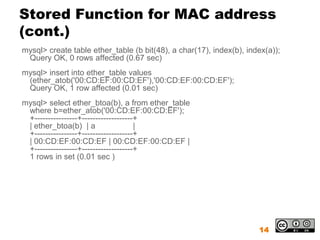
mysql> create table ether_table (b bit(48), a char(17), index(b), index(a));
 Query OK, 0 rows affected (0.67 sec)
mysql> insert into ether_table values
 (ether_atob('00:CD:EF:00:CD:EF'),'00:CD:EF:00:CD:EF');
 Query OK, 1 row affected (0.01 sec)
mysql> select ether_btoa(b), a from ether_table
 where b=ether_atob('00:CD:EF:00:CD:EF');
 +----------------+-------------------+
 | ether_btoa(b) | a                  |
 +----------------+-------------------+
 | 00:CD:EF:00:CD:EF | 00:CD:EF:00:CD:EF |
 +----------------+-------------------+
 1 rows in set (0.01 sec )


                                                                     14
Stored Function for MAC address
  (cont.)

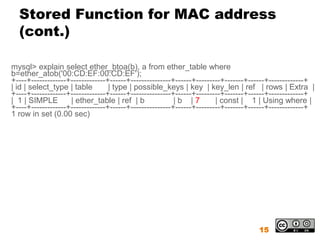
mysql> explain select ether_btoa(b), a from ether_table where
b=ether_atob('00:CD:EF:00:CD:EF');
+----+-------------+-------------+------+---------------+------+---------+-------+------+-------------+
| id | select_type | table        | type | possible_keys | key | key_len | ref | rows | Extra |
+----+-------------+-------------+------+---------------+------+---------+-------+------+-------------+
| 1 | SIMPLE        | ether_table | ref | b              |b |7         | const | 1 | Using where |
+----+-------------+-------------+------+---------------+------+---------+-------+------+-------------+
1 row in set (0.00 sec)


                                                                                    15
Create UDF

▪ http://stanley-huang.blogspot.com/2010/03/level-3-
  create-udf-for-storing-mac.html


                                                 16
Using UDF on MySQL Database

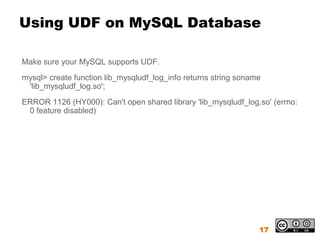
Make sure your MySQL supports UDF.
mysql> create function lib_mysqludf_log_info returns string soname
 'lib_mysqludf_log.so';
ERROR 1126 (HY000): Can't open shared library 'lib_mysqludf_log.so' (errno:
 0 feature disabled)


                                                                 17
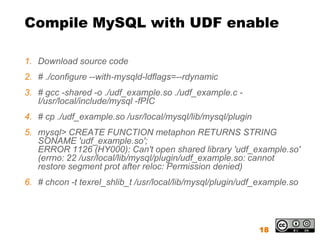
Compile MySQL with UDF enable

1. Download source code
2. # ./configure --with-mysqld-ldflags=--rdynamic
3. # gcc -shared -o ./udf_example.so ./udf_example.c -
   I/usr/local/include/mysql -fPIC
4. # cp ./udf_example.so /usr/local/mysql/lib/mysql/plugin
5. mysql> CREATE FUNCTION metaphon RETURNS STRING
   SONAME 'udf_example.so';
   ERROR 1126 (HY000): Can't open shared library 'udf_example.so'
   (errno: 22 /usr/local/lib/mysql/plugin/udf_example.so: cannot
   restore segment prot after reloc: Permission denied)
6. # chcon -t texrel_shlib_t /usr/local/lib/mysql/plugin/udf_example.so


                                                             18
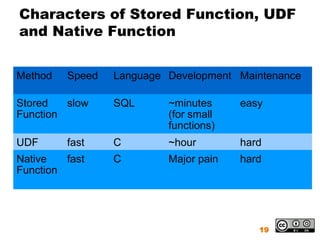
Characters of Stored Function, UDF
and Native Function


Method   Speed   Language Development Maintenance

Stored   slow    SQL      ~minutes     easy
Function                  (for small
                          functions)
UDF      fast    C        ~hour        hard
Native   fast    C        Major pain   hard
Function


                                          19
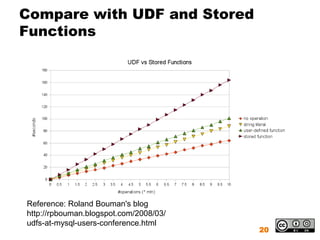
Compare with UDF and Stored
Functions


Reference: Roland Bouman's blog
http://rpbouman.blogspot.com/2008/03/
udfs-at-mysql-users-conference.html
                                        20
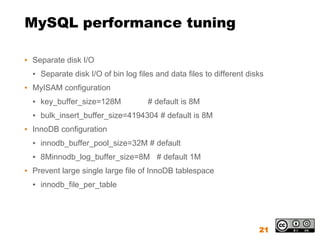
MySQL performance tuning

▪ Separate disk I/O
  ▪ Separate disk I/O of bin log files and data files to different disks
▪ MyISAM configuration
  ▪ key_buffer_size=128M            # default is 8M
  ▪ bulk_insert_buffer_size=4194304 # default is 8M
▪ InnoDB configuration
  ▪ innodb_buffer_pool_size=32M # default
  ▪ 8Minnodb_log_buffer_size=8M # default 1M
▪ Prevent large single large file of InnoDB tablespace
  ▪ innodb_file_per_table


                                                                      21
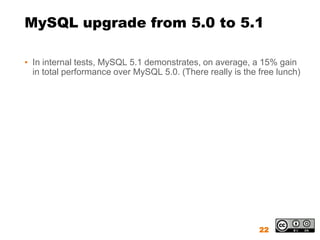
MySQL upgrade from 5.0 to 5.1

▪ In internal tests, MySQL 5.1 demonstrates, on average, a 15% gain
  in total performance over MySQL 5.0. (There really is the free lunch)


                                                            22
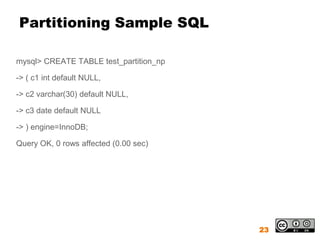
Partitioning Sample SQL

mysql> CREATE TABLE test_partition_np

-> ( c1 int default NULL,

-> c2 varchar(30) default NULL,

-> c3 date default NULL

-> ) engine=InnoDB;

Query OK, 0 rows affected (0.00 sec)


                                        23
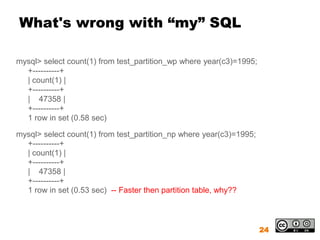
What's wrong with “my” SQL

mysql> select count(1) from test_partition_wp where year(c3)=1995;
  +----------+
  | count(1) |
  +----------+
  | 47358 |
  +----------+
  1 row in set (0.58 sec)

mysql> select count(1) from test_partition_np where year(c3)=1995;
  +----------+
  | count(1) |
  +----------+
  | 47358 |
  +----------+
  1 row in set (0.53 sec) -- Faster then partition table, why??


                                                                     24
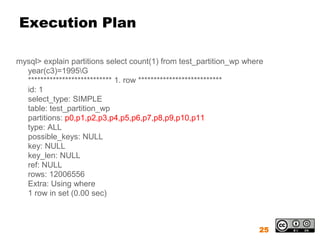
Execution Plan

mysql> explain partitions select count(1) from test_partition_wp where
  year(c3)=1995G
  *************************** 1. row ***************************
  id: 1
  select_type: SIMPLE
  table: test_partition_wp
  partitions: p0,p1,p2,p3,p4,p5,p6,p7,p8,p9,p10,p11
  type: ALL
  possible_keys: NULL
  key: NULL
  key_len: NULL
  ref: NULL
  rows: 12006556
  Extra: Using where
  1 row in set (0.00 sec)


                                                                    25
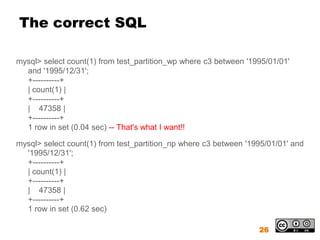
The correct SQL

mysql> select count(1) from test_partition_wp where c3 between '1995/01/01'
  and '1995/12/31';
  +----------+
  | count(1) |
  +----------+
  | 47358 |
  +----------+
  1 row in set (0.04 sec) -- That's what I want!!

mysql> select count(1) from test_partition_np where c3 between '1995/01/01' and
  '1995/12/31';
  +----------+
  | count(1) |
  +----------+
  | 47358 |
  +----------+
  1 row in set (0.62 sec)

                                                                  26
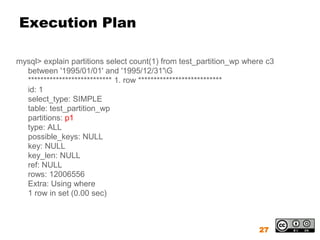
Execution Plan

mysql> explain partitions select count(1) from test_partition_wp where c3
  between '1995/01/01' and '1995/12/31'G
  *************************** 1. row ***************************
  id: 1
  select_type: SIMPLE
  table: test_partition_wp
  partitions: p1
  type: ALL
  possible_keys: NULL
  key: NULL
  key_len: NULL
  ref: NULL
  rows: 12006556
  Extra: Using where
  1 row in set (0.00 sec)


                                                                    27
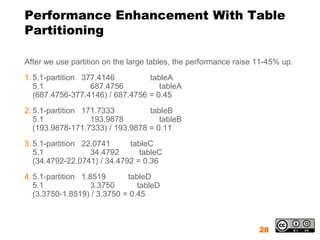
Performance Enhancement With Table
Partitioning

After we use partition on the large tables, the performance raise 11-45% up.
1. 5.1-partition 377.4146         tableA
   5.1             687.4756          tableA
   (687.4756-377.4146) / 687.4756 = 0.45
2. 5.1-partition 171.7333         tableB
   5.1             193.9878          tableB
   (193.9878-171.7333) / 193.9878 = 0.11
3. 5.1-partition 22.0741     tableC
   5.1             34.4792      tableC
   (34.4792-22.0741) / 34.4792 = 0.36
4. 5.1-partition 1.8519      tableD
   5.1             3.3750       tableD
   (3.3750-1.8519) / 3.3750 = 0.45


                                                                  28
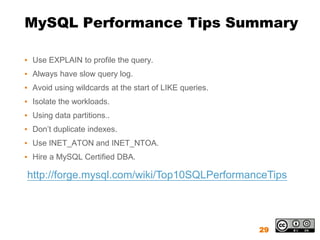
MySQL Performance Tips Summary

▪ Use EXPLAIN to profile the query.
▪ Always have slow query log.
▪ Avoid using wildcards at the start of LIKE queries.
▪ Isolate the workloads.
▪ Using data partitions..
▪ Don’t duplicate indexes.
▪ Use INET_ATON and INET_NTOA.
▪ Hire a MySQL Certified DBA.

http://forge.mysql.com/wiki/Top10SQLPerformanceTips


                                                        29
Q&A


      30

MySQLinsanity

  • 1.
  • 2.
    Topic ▪ Who amI? ▪ MySQL performance tuning experience sharing. ▪ Q & A. 2
  • 3.
    Who am I? ▪Stanley Huang (黃偉倫) ▪ My email ▪ wenlien1001@gmail.com ▪ My Blog ▪ http://stanley-huang.blogspot.com 3
  • 4.
    MySQL performance tuningexperience sharing ▪ What happened to the product? ▪ Too many data and have query performance issue ▪ Performance tuning phases 1. SQL tuning ▪ Over 90%, bad SQLs make great impact on performance ▪ Over 90%, do not using the correct index(es) in bad SQLs 2. RDBMS tuning 4
  • 5.
    MySQL SQL tuning(1/2) ▪Enable slow query log and find out the top 10 slow queries ▪ Add two settings in my.cnf ▪ log-slow-queries ## default off ▪ long-query-time=5 ## default 10 ▪ [data folder]/[host name]-slow.log 5
  • 6.
    MySQL SQL tuning(2/2) ▪ Perform full-text search on InnoDB (select … like ‘*pattern*’) 1. Change storage engine from InnoDB to MyISAM 2. Hybrid storage engine, create a new MyISAM table and move data need to be full-text search from InnoDB to MyISAM ▪ Too many indexes 1. Create more indexes won’t enhance performance but impact on writing. 2. (Suggestion) Don’t create more than 5 indexes on one table. InnoDB in MySQL 5.6 has supported full-text search 6
  • 7.
    Useful Tips ForNetworking System 1. IP Support 2. Mac Support 7
  • 8.
    IP address support Build In Function: inet_ntoa()/inet_aton() mysql> CREATE TABLE testIP ( ip_int int unsigned DEFAULT NULL, ip_char char(15) DEFAULT NULL, index ip_int (ip_int), index ip_char (ip_char) ) ENGINE=InnoDB; mysql> insert into testIP valuse(inet_aton('216.18.50.126'),'216.18.50.126'); mysql> select inet_ntoa(ip_int),ip_char from testIP; +-------------------+---------------+ | inet_ntoa(ip_int) | ip_char | +-------------------+---------------+ | 216.18.50.126 | 216.18.50.126 | +-------------------+---------------+ 8
  • 9.
    Execution Plain mysql> explainselect * from testIP where ip_char='216.18.50.126'; +----+-------------+--------+------+---------------+---------+---------+-------+------+-------------+ | id | select_type | table | type | possible_keys | key | key_len | ref | rows | Extra | +----+-------------+--------+------+---------------+---------+---------+-------+------+-------------+ | 1 | SIMPLE | testIP | ref | ip_char | ip_char | 16 | const | 1 | Using where | +----+-------------+--------+------+---------------+---------+---------+-------+------+-------------+ mysql> explain select * from testIP where ip_int=inet_aton('216.18.50.126'); +----+-------------+--------+------+---------------+--------+---------+-------+------+-------------+ | id | select_type | table | type | possible_keys | key | key_len | ref | rows | Extra | +----+-------------+--------+------+---------------+--------+---------+-------+------+-------------+ | 1 | SIMPLE | testIP | ref | ip_int | ip_int | 5 | const | 1 | Using where | +----+-------------+--------+------+---------------+--------+---------+-------+------+-------------+ 9
  • 10.
    Mac address support??  Build In Function: hex() mysql> create table testMAC(mac_bit bit(48), mac_char char(17), index(mac_bit), index(mac_char)); mysql> insert into testMAC values (x'00241DDC5548', '00:24:1D:DC:55:48'); mysql> select hex(mac_bit), mac_char from testMAC; +--------------+-------------------+ | hex(mac_bit) | mac_char | +--------------+-------------------+ | 241DDC5548 | 00:24:1D:DC:55:48 | +--------------+-------------------+ Build In Function seems not enough~ 1. create MySQL stored function 2. create UDF (User Define Function) 10
  • 11.
    Execution Plain mysql> explainselect hex(mac_bit), mac_char from testMAC where mac_char='00:24:1D:DC:55:48'; +----+-------------+----------+------+---------------+----------+---------+-------+------+-------------+ | id | select_type | table | type | possible_keys | key | key_len | ref | rows | Extra | +----+-------------+----------+------+---------------+----------+---------+-------+------+-------------+ | 1 | SIMPLE | testMAC2 | ref | mac_char | mac_char | 18 | const | 1 | Using where | +----+-------------+----------+------+---------------+----------+---------+-------+------+-------------+ mysql> explain select hex(mac_bit), mac_char from testMAC where mac_bit=x'00241DDC5548'; +----+-------------+----------+------+---------------+---------+---------+-------+------+-------------+ | id | select_type | table | type | possible_keys | key | key_len | ref | rows | Extra | +----+-------------+----------+------+---------------+---------+---------+-------+------+-------------+ | 1 | SIMPLE | testMAC2 | ref | mac_bit | mac_bit | 7 | const | 1 | Using where | +----+-------------+----------+------+---------------+---------+---------+-------+------+-------------+ 11
  • 12.
    Stored Function forMAC address ## create stored function ether_atob(), from ascii to bit ## must define "deterministic", or explain will not use index delimiter // drop function if exists ether_atob// create function ether_atob(sAscii char(17)) returns bit(48) deterministic Begin declare bReturn bit(48); set bReturn=unhex(replace(sAscii,':','')); return bReturn; end// delimiter ; 12
  • 13.
    Stored Function forMAC address (cont.) ## create stored function ether_btoa(), from bit to ascii ## must define "deterministic", or explain will not use index delimiter // drop function if exists ether_btoa// create function ether_btoa(sBit bit(48)) returns char(17) deterministic begin declare sReturn char(17); set sReturn=lpad(hex(sBit),12,'0'); set sReturn=concat_ws(':', substr(sReturn,1,2), substr(sReturn,3,2), substr(sReturn,5,2), substr(sReturn,7,2), substr(sReturn,9,2), substr(sReturn,11,2)); return sReturn; end// delimiter ; 13
  • 14.
    Stored Function forMAC address (cont.) mysql> create table ether_table (b bit(48), a char(17), index(b), index(a)); Query OK, 0 rows affected (0.67 sec) mysql> insert into ether_table values (ether_atob('00:CD:EF:00:CD:EF'),'00:CD:EF:00:CD:EF'); Query OK, 1 row affected (0.01 sec) mysql> select ether_btoa(b), a from ether_table where b=ether_atob('00:CD:EF:00:CD:EF'); +----------------+-------------------+ | ether_btoa(b) | a | +----------------+-------------------+ | 00:CD:EF:00:CD:EF | 00:CD:EF:00:CD:EF | +----------------+-------------------+ 1 rows in set (0.01 sec ) 14
  • 15.
    Stored Function forMAC address (cont.) mysql> explain select ether_btoa(b), a from ether_table where b=ether_atob('00:CD:EF:00:CD:EF'); +----+-------------+-------------+------+---------------+------+---------+-------+------+-------------+ | id | select_type | table | type | possible_keys | key | key_len | ref | rows | Extra | +----+-------------+-------------+------+---------------+------+---------+-------+------+-------------+ | 1 | SIMPLE | ether_table | ref | b |b |7 | const | 1 | Using where | +----+-------------+-------------+------+---------------+------+---------+-------+------+-------------+ 1 row in set (0.00 sec) 15
  • 16.
  • 17.
    Using UDF onMySQL Database Make sure your MySQL supports UDF. mysql> create function lib_mysqludf_log_info returns string soname 'lib_mysqludf_log.so'; ERROR 1126 (HY000): Can't open shared library 'lib_mysqludf_log.so' (errno: 0 feature disabled) 17
  • 18.
    Compile MySQL withUDF enable 1. Download source code 2. # ./configure --with-mysqld-ldflags=--rdynamic 3. # gcc -shared -o ./udf_example.so ./udf_example.c - I/usr/local/include/mysql -fPIC 4. # cp ./udf_example.so /usr/local/mysql/lib/mysql/plugin 5. mysql> CREATE FUNCTION metaphon RETURNS STRING SONAME 'udf_example.so'; ERROR 1126 (HY000): Can't open shared library 'udf_example.so' (errno: 22 /usr/local/lib/mysql/plugin/udf_example.so: cannot restore segment prot after reloc: Permission denied) 6. # chcon -t texrel_shlib_t /usr/local/lib/mysql/plugin/udf_example.so 18
  • 19.
    Characters of StoredFunction, UDF and Native Function Method Speed Language Development Maintenance Stored slow SQL ~minutes easy Function (for small functions) UDF fast C ~hour hard Native fast C Major pain hard Function 19
  • 20.
    Compare with UDFand Stored Functions Reference: Roland Bouman's blog http://rpbouman.blogspot.com/2008/03/ udfs-at-mysql-users-conference.html 20
  • 21.
    MySQL performance tuning ▪Separate disk I/O ▪ Separate disk I/O of bin log files and data files to different disks ▪ MyISAM configuration ▪ key_buffer_size=128M # default is 8M ▪ bulk_insert_buffer_size=4194304 # default is 8M ▪ InnoDB configuration ▪ innodb_buffer_pool_size=32M # default ▪ 8Minnodb_log_buffer_size=8M # default 1M ▪ Prevent large single large file of InnoDB tablespace ▪ innodb_file_per_table 21
  • 22.
    MySQL upgrade from5.0 to 5.1 ▪ In internal tests, MySQL 5.1 demonstrates, on average, a 15% gain in total performance over MySQL 5.0. (There really is the free lunch) 22
  • 23.
    Partitioning Sample SQL mysql>CREATE TABLE test_partition_np -> ( c1 int default NULL, -> c2 varchar(30) default NULL, -> c3 date default NULL -> ) engine=InnoDB; Query OK, 0 rows affected (0.00 sec) 23
  • 24.
    What's wrong with“my” SQL mysql> select count(1) from test_partition_wp where year(c3)=1995; +----------+ | count(1) | +----------+ | 47358 | +----------+ 1 row in set (0.58 sec) mysql> select count(1) from test_partition_np where year(c3)=1995; +----------+ | count(1) | +----------+ | 47358 | +----------+ 1 row in set (0.53 sec) -- Faster then partition table, why?? 24
  • 25.
    Execution Plan mysql> explainpartitions select count(1) from test_partition_wp where year(c3)=1995G *************************** 1. row *************************** id: 1 select_type: SIMPLE table: test_partition_wp partitions: p0,p1,p2,p3,p4,p5,p6,p7,p8,p9,p10,p11 type: ALL possible_keys: NULL key: NULL key_len: NULL ref: NULL rows: 12006556 Extra: Using where 1 row in set (0.00 sec) 25
  • 26.
    The correct SQL mysql>select count(1) from test_partition_wp where c3 between '1995/01/01' and '1995/12/31'; +----------+ | count(1) | +----------+ | 47358 | +----------+ 1 row in set (0.04 sec) -- That's what I want!! mysql> select count(1) from test_partition_np where c3 between '1995/01/01' and '1995/12/31'; +----------+ | count(1) | +----------+ | 47358 | +----------+ 1 row in set (0.62 sec) 26
  • 27.
    Execution Plan mysql> explainpartitions select count(1) from test_partition_wp where c3 between '1995/01/01' and '1995/12/31'G *************************** 1. row *************************** id: 1 select_type: SIMPLE table: test_partition_wp partitions: p1 type: ALL possible_keys: NULL key: NULL key_len: NULL ref: NULL rows: 12006556 Extra: Using where 1 row in set (0.00 sec) 27
  • 28.
    Performance Enhancement WithTable Partitioning After we use partition on the large tables, the performance raise 11-45% up. 1. 5.1-partition 377.4146 tableA 5.1 687.4756 tableA (687.4756-377.4146) / 687.4756 = 0.45 2. 5.1-partition 171.7333 tableB 5.1 193.9878 tableB (193.9878-171.7333) / 193.9878 = 0.11 3. 5.1-partition 22.0741 tableC 5.1 34.4792 tableC (34.4792-22.0741) / 34.4792 = 0.36 4. 5.1-partition 1.8519 tableD 5.1 3.3750 tableD (3.3750-1.8519) / 3.3750 = 0.45 28
  • 29.
    MySQL Performance TipsSummary ▪ Use EXPLAIN to profile the query. ▪ Always have slow query log. ▪ Avoid using wildcards at the start of LIKE queries. ▪ Isolate the workloads. ▪ Using data partitions.. ▪ Don’t duplicate indexes. ▪ Use INET_ATON and INET_NTOA. ▪ Hire a MySQL Certified DBA. http://forge.mysql.com/wiki/Top10SQLPerformanceTips 29
  • 30.
    Q&A 30