25/03/16 Client-server Programming 1
Block 6: Threads 1
Jin Sa
25/03/16 Client-server Programming 2
Outline of block 6
• Why multi-threads and typical applications
• Defining and creating threads
• An example with two threads
• Life cycle of a thread
• An example with user interface
• Problem with threads
• Synchronisation among threads
25/03/16 Client-server Programming 3
Why multithreading?
• Most of the java programs you have seen so
far can only do one thing at a time. In the
real world many actions are happening
concurrently.
• Typical applications:
– User interfacing, e.g. One deals with the drawing,
the other deals with user interface
– Many instances of similar behaviour, e.g. a
concurrent server serves many clients
– Many different tasks, e.g. open day simulation
25/03/16 Client-server Programming 4
Two ways to define threads in Java
• Extending the Thread class
• Implementing the Runnable interface
25/03/16 Client-server Programming 5
Creating threads by extending the
Thread class
• Define a class, e.g. NewThread, extending the
Thread class
• Override the run() method to tell the system
how the thread will be executed when it runs.
• Create an instance of NewThread,
• Invoke the start() method to tell the system to
start the thread and to execute the run() method.
25/03/16 Client-server Programming 6
Key elements for extending Thread 1
class NewThread extends Thread {
…
//override the run method
public void run() {
//define how the thread runs
…
}
…
}
25/03/16 Client-server Programming 7
Key element for extending Thread 2
class MyApplication {
…
public void someMethod() {
NewThread mythread=new NewThread();
…
mythread.start();
}
…
}
25/03/16 Client-server Programming 8
An example: a thread printing its id
repeatedly
class MyThread extends Thread {
private String threadID;
MyThread(String s) { threadID=s; }
public void run() {
for (int i=0;i<200;i++){
System.out.println("Print thread "
+ threadID);
}//for
}//run
} //MyThread
25/03/16 Client-server Programming 9
An example: two threads printing
their ids
public class SeveralThreads {
public static void main(String [] args) {
MyThread t1,t2;
//create threads
t1 = new MyThread("t1");
t2 = new MyThread("t2");
//start threads
t1.start();
t2.start();
}//main
}//SeveralThreads
25/03/16 Client-server Programming 10
An example: two threads printing
their ids
Print thread t1
Print thread t2
Print thread t2
Print thread t1
Print thread t1
Print thread t2
Print thread t1
Print thread t2
Print thread t1
Print thread t2
…
Run the Severalthread program in E:TeachingClient_serverRun2006-7CodeClientServer.
Package threads
25/03/16 Client-server Programming 11
Life cycle of a thread
• A thread can be in one of these states once it is
created: ready, running, blocked, finish
• A ready thread is runnable, but not running, it
needs allocation of CPU time.
• Common ways for a running thread to become
blocked include: waiting for I/O, sleep
• A common way for a thread to finish is when it
completes its execution of the run() method
25/03/16 Client-server Programming 12
Creating threads by implementing
the Runnable interface
• Define a class, e.g. NewTask, implementing the
Runnable interface
• implement the run() method to tell the system
how the task will be executed when it runs.
• Create an instance of NewTask, e.g. t1
• The task needs to be executed in a thread. Create
an instance of Thread with t1 as the parameter
• Invoke the start() method of the thread to tell
the system to start the thread.
25/03/16 Client-server Programming 13
Key elements for implementing
Runnable 1
class NewTask extends AnotherClass
implements Runnable {
…
//implement the run method
public void run() {
//define how the thread runs
…
}
…
}
25/03/16 Client-server Programming 14
Key elements for implementing
Runnable 2
class MyApplication {
…
public void someMethod() {
NewTask mytask=new NewTask();
Thread mythread=new Thread(mytask);
…
mythread.start();
}
…
}
25/03/16 Client-server Programming 15
Implementing Runnable or
Extending Thread
• Use Runnable if need to extend another
class
• Even if NewTask does not extend another
class, this is the preferred method for
creating a thread if we only want to define
the run() method, and not using the other
methods in Thread.
25/03/16 Client-server Programming 16
An example: thread printing its id
using implementing Runnable
class MyTask implements Runnable {
private String threadID;
MyTask(String s) { threadID=s; }
public void run() {
for (int i=0;i<200;i++){
System.out.println("Print thread "
+ threadID);
}//for
}//run
} //MyTask
25/03/16 Client-server Programming 17
An example: two threads printing their
ids using implementing Runnable
public class SeveralThreads {
public static void main(String[] args) {
//create instances of MyTask
MyTask t1 = new MyTask("t1");
MyTask t2 = new MyTask("t2");
// create Thread instances
Thread tt1=new Thread(t1);
Thread tt2=new Thread(t2);
//start threads
tt1.start();
tt2.start();
}//main
}//SeveralThreads
Thread synchronisation
Problem with accessing shared
resources– an example
• The Account class is a bank account, contains
methods such as deposit and withdraw.
• Cardholder is a thread allows the card holder
to deposit £10 repeatedly for 10 times.
• FamilyAccount has a main methods that
creates one instance of an Account, two instances
of Cardholders, both putting money into the same
account.
Balance=50
An instance
of Account
c1 c2
deposit(10)
deposit(10)
deposit(10)
deposit(10)
deposit(10)
deposit(10)
deposit(10)
deposit(10)
Problem with accessing shared
resources– an example 1
class Account {
private int balance=0;
public void deposit(int amount) {
//balance=balance+amount;
int tmp = balance;
Thread.sleep(200);
balance = tmp + amount;
System.out.println("Current balance is "+balance);
}
}
Problem with accessing shared
resources– an example 2
class CardHolder extends Thread{
private Account acc;
private String accName;
CardHolder(Account a,String nm) {
acc=a;
accName=nm; }
public void run() {
for (int i=0;i<10;i++) {
System.out.println(accName+" is depositing
£10 ...");
acc.deposit(10);
}
}//run
}//CardHolder
Problem with accessing shared
resources– an example 3
class FamilyAccount {
public static void main(String [] args) {
Account ourAccount=new Account();
CardHolder c1 = new CardHolder(ourAccount,"john");
CardHolder c2 = new CardHolder(ourAccount,"Kate");
c1.start();
c2.start();
}
}//FamilyAccount
Problem with accessing shared
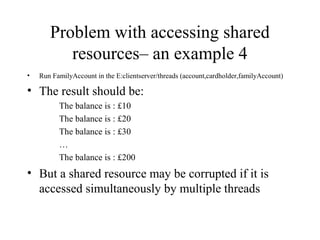
resources– an example 4
• Run FamilyAccount in the E:clientserver/threads (account,cardholder,familyAccount)
• The result should be:
The balance is : £10
The balance is : £20
The balance is : £30
…
The balance is : £200
• But a shared resource may be corrupted if it is
accessed simultaneously by multiple threads
Problem
• For example, the current balance in ourAccount is £50,
• The c1 thread: tries to deposit £10; loading the current
value, i.e. 50, to the temporary storage place before doing
the arithmetic. The thread is suspended; switches to the c2
thread.
• The c2 thread: tries to deposit £10; loading the current
balance, which is still £50. The thread is then suspended;
resumes the c1 thread,
• Back with the c1 thread: add £10 to the value, i.e. £50, in
the temporary storage; £60 is stored in the attribute
balance; suspend the c1 thread
• Back with the c2 thread: the c2 thread adds £10 to the
current value in the temporary storage that is 50. The result
60 is now stored in the balance attribute.
• Should be 70, not 60!
Race condition
• The problem is that the two threads (c1 and c2) are
accessing the same resource (account) in a way
that causes a conflict.
• This is a common problem, known as a race
condition, in multithreaded programs.
• A class is said to be thread-safe if an object of the
class does not cause a race condition in the
presence of multiple threads.
• The Account class is not thread-safe at the
moment.
Synchronized method
• There is a need to protect the shared data.
• Use synchronized methods so that there can be
only one thread executing this method at a time.
• Java guarantees once a thread has gained access to
a synchronized method, it will finish the method
before any other thread gains access to that or any
other synchronized method in that object.
• A synchronised method (implicitly) acquires a
lock on the instance.
Deposit as a Synchronized
method
class Account {
int balance=0;
public synchronized void deposit(int amount) {
int tmp = balance;
Thread.sleep(200);
balance = tmp + amount;
System.out.println("Current balance is
"+balance);
}
}//Account
• Run the program familyAccount, change the first line of deposit
25/03/16 Client-server Programming 29
Multithreading for user interface
in GUI applications
25/03/16 Client-server Programming 30
Example: Flashing label
• Press start, program displays a flashing
rectangle until user presses the stop button.
• One thread is tied to display the flashing
rectangle.
• In order to be able to accept user’s input,
need more than one thread.
• Run the FlashStop program. (E:TeachingClient_serverRun2006-
7CodeClientServersrcthreads)
25/03/16 Client-server Programming 31
Implementations
• Two classes: FlashStop and FlashRec
• FlashStop deals with the graphical interface and the
interaction with the user
– Presents gui elements (behaves as a Frame)
– Implements the actonPerformed method (behaves as an
ActionListener)
• To start a thread for displaying the “flashing”
• To stop the thread
• FlasRec deals with displaying the “flashing” effect.
– A thread repeatedly sets the background colour to be red/white
25/03/16 Client-server Programming 32
Flash rectangle 1
class FlashRec extends JPanel implements
Runnable{
private boolean keepgoing=false;
public void run() {
while (keepgoing) {
try {
setBackground(Color.red);
Thread.sleep(800);
setBackground(Color.white);
Thread.sleep(800);
} catch (Exception e) {…}
}//while
}//run
To continue…
25/03/16 Client-server Programming 33
Flash rectangle 2
public void pleaseStop() {
keepgoing=false;
}
public void pleaseStart(){
keepgoing=true;
}
}//FlashRec
25/03/16 Client-server Programming 34
FlashStop class 1
public class FlashStop extends JFrame
implements ActionListener {
private JButton flash=
new JButton(“flash");
private JButton stop=new JButton("stop");
private FlashRec fr;
private Thread recThread;
…
25/03/16 Client-server Programming 35
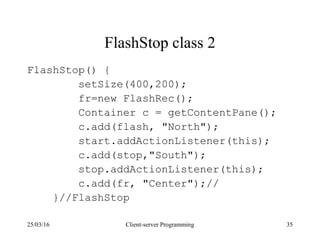
FlashStop class 2
FlashStop() {
setSize(400,200);
fr=new FlashRec();
Container c = getContentPane();
c.add(flash, "North");
start.addActionListener(this);
c.add(stop,"South");
stop.addActionListener(this);
c.add(fr, "Center");//
}//FlashStop
25/03/16 Client-server Programming 36
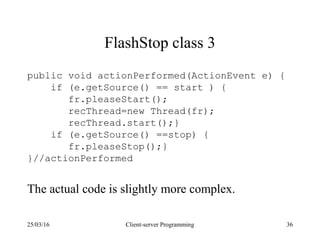
FlashStop class 3
public void actionPerformed(ActionEvent e) {
if (e.getSource() == start ) {
fr.pleaseStart();
recThread=new Thread(fr);
recThread.start();}
if (e.getSource() ==stop) {
fr.pleaseStop();}
}//actionPerformed
The actual code is slightly more complex.
25/03/16 Client-server Programming 37
Review
• Understand how to define and create threads in
Java: extends Thread and implement Runnable
• Be able to write simple Java thread applications
• Problem and solution with concurrent thread
• Understand the GUI example and how to deal with
events.

MULTITHREADING CONCEPT

  • 1.
    25/03/16 Client-server Programming1 Block 6: Threads 1 Jin Sa
  • 2.
    25/03/16 Client-server Programming2 Outline of block 6 • Why multi-threads and typical applications • Defining and creating threads • An example with two threads • Life cycle of a thread • An example with user interface • Problem with threads • Synchronisation among threads
  • 3.
    25/03/16 Client-server Programming3 Why multithreading? • Most of the java programs you have seen so far can only do one thing at a time. In the real world many actions are happening concurrently. • Typical applications: – User interfacing, e.g. One deals with the drawing, the other deals with user interface – Many instances of similar behaviour, e.g. a concurrent server serves many clients – Many different tasks, e.g. open day simulation
  • 4.
    25/03/16 Client-server Programming4 Two ways to define threads in Java • Extending the Thread class • Implementing the Runnable interface
  • 5.
    25/03/16 Client-server Programming5 Creating threads by extending the Thread class • Define a class, e.g. NewThread, extending the Thread class • Override the run() method to tell the system how the thread will be executed when it runs. • Create an instance of NewThread, • Invoke the start() method to tell the system to start the thread and to execute the run() method.
  • 6.
    25/03/16 Client-server Programming6 Key elements for extending Thread 1 class NewThread extends Thread { … //override the run method public void run() { //define how the thread runs … } … }
  • 7.
    25/03/16 Client-server Programming7 Key element for extending Thread 2 class MyApplication { … public void someMethod() { NewThread mythread=new NewThread(); … mythread.start(); } … }
  • 8.
    25/03/16 Client-server Programming8 An example: a thread printing its id repeatedly class MyThread extends Thread { private String threadID; MyThread(String s) { threadID=s; } public void run() { for (int i=0;i<200;i++){ System.out.println("Print thread " + threadID); }//for }//run } //MyThread
  • 9.
    25/03/16 Client-server Programming9 An example: two threads printing their ids public class SeveralThreads { public static void main(String [] args) { MyThread t1,t2; //create threads t1 = new MyThread("t1"); t2 = new MyThread("t2"); //start threads t1.start(); t2.start(); }//main }//SeveralThreads
  • 10.
    25/03/16 Client-server Programming10 An example: two threads printing their ids Print thread t1 Print thread t2 Print thread t2 Print thread t1 Print thread t1 Print thread t2 Print thread t1 Print thread t2 Print thread t1 Print thread t2 … Run the Severalthread program in E:TeachingClient_serverRun2006-7CodeClientServer. Package threads
  • 11.
    25/03/16 Client-server Programming11 Life cycle of a thread • A thread can be in one of these states once it is created: ready, running, blocked, finish • A ready thread is runnable, but not running, it needs allocation of CPU time. • Common ways for a running thread to become blocked include: waiting for I/O, sleep • A common way for a thread to finish is when it completes its execution of the run() method
  • 12.
    25/03/16 Client-server Programming12 Creating threads by implementing the Runnable interface • Define a class, e.g. NewTask, implementing the Runnable interface • implement the run() method to tell the system how the task will be executed when it runs. • Create an instance of NewTask, e.g. t1 • The task needs to be executed in a thread. Create an instance of Thread with t1 as the parameter • Invoke the start() method of the thread to tell the system to start the thread.
  • 13.
    25/03/16 Client-server Programming13 Key elements for implementing Runnable 1 class NewTask extends AnotherClass implements Runnable { … //implement the run method public void run() { //define how the thread runs … } … }
  • 14.
    25/03/16 Client-server Programming14 Key elements for implementing Runnable 2 class MyApplication { … public void someMethod() { NewTask mytask=new NewTask(); Thread mythread=new Thread(mytask); … mythread.start(); } … }
  • 15.
    25/03/16 Client-server Programming15 Implementing Runnable or Extending Thread • Use Runnable if need to extend another class • Even if NewTask does not extend another class, this is the preferred method for creating a thread if we only want to define the run() method, and not using the other methods in Thread.
  • 16.
    25/03/16 Client-server Programming16 An example: thread printing its id using implementing Runnable class MyTask implements Runnable { private String threadID; MyTask(String s) { threadID=s; } public void run() { for (int i=0;i<200;i++){ System.out.println("Print thread " + threadID); }//for }//run } //MyTask
  • 17.
    25/03/16 Client-server Programming17 An example: two threads printing their ids using implementing Runnable public class SeveralThreads { public static void main(String[] args) { //create instances of MyTask MyTask t1 = new MyTask("t1"); MyTask t2 = new MyTask("t2"); // create Thread instances Thread tt1=new Thread(t1); Thread tt2=new Thread(t2); //start threads tt1.start(); tt2.start(); }//main }//SeveralThreads
  • 18.
  • 19.
    Problem with accessingshared resources– an example • The Account class is a bank account, contains methods such as deposit and withdraw. • Cardholder is a thread allows the card holder to deposit £10 repeatedly for 10 times. • FamilyAccount has a main methods that creates one instance of an Account, two instances of Cardholders, both putting money into the same account.
  • 20.
    Balance=50 An instance of Account c1c2 deposit(10) deposit(10) deposit(10) deposit(10) deposit(10) deposit(10) deposit(10) deposit(10)
  • 21.
    Problem with accessingshared resources– an example 1 class Account { private int balance=0; public void deposit(int amount) { //balance=balance+amount; int tmp = balance; Thread.sleep(200); balance = tmp + amount; System.out.println("Current balance is "+balance); } }
  • 22.
    Problem with accessingshared resources– an example 2 class CardHolder extends Thread{ private Account acc; private String accName; CardHolder(Account a,String nm) { acc=a; accName=nm; } public void run() { for (int i=0;i<10;i++) { System.out.println(accName+" is depositing £10 ..."); acc.deposit(10); } }//run }//CardHolder
  • 23.
    Problem with accessingshared resources– an example 3 class FamilyAccount { public static void main(String [] args) { Account ourAccount=new Account(); CardHolder c1 = new CardHolder(ourAccount,"john"); CardHolder c2 = new CardHolder(ourAccount,"Kate"); c1.start(); c2.start(); } }//FamilyAccount
  • 24.
    Problem with accessingshared resources– an example 4 • Run FamilyAccount in the E:clientserver/threads (account,cardholder,familyAccount) • The result should be: The balance is : £10 The balance is : £20 The balance is : £30 … The balance is : £200 • But a shared resource may be corrupted if it is accessed simultaneously by multiple threads
  • 25.
    Problem • For example,the current balance in ourAccount is £50, • The c1 thread: tries to deposit £10; loading the current value, i.e. 50, to the temporary storage place before doing the arithmetic. The thread is suspended; switches to the c2 thread. • The c2 thread: tries to deposit £10; loading the current balance, which is still £50. The thread is then suspended; resumes the c1 thread, • Back with the c1 thread: add £10 to the value, i.e. £50, in the temporary storage; £60 is stored in the attribute balance; suspend the c1 thread • Back with the c2 thread: the c2 thread adds £10 to the current value in the temporary storage that is 50. The result 60 is now stored in the balance attribute. • Should be 70, not 60!
  • 26.
    Race condition • Theproblem is that the two threads (c1 and c2) are accessing the same resource (account) in a way that causes a conflict. • This is a common problem, known as a race condition, in multithreaded programs. • A class is said to be thread-safe if an object of the class does not cause a race condition in the presence of multiple threads. • The Account class is not thread-safe at the moment.
  • 27.
    Synchronized method • Thereis a need to protect the shared data. • Use synchronized methods so that there can be only one thread executing this method at a time. • Java guarantees once a thread has gained access to a synchronized method, it will finish the method before any other thread gains access to that or any other synchronized method in that object. • A synchronised method (implicitly) acquires a lock on the instance.
  • 28.
    Deposit as aSynchronized method class Account { int balance=0; public synchronized void deposit(int amount) { int tmp = balance; Thread.sleep(200); balance = tmp + amount; System.out.println("Current balance is "+balance); } }//Account • Run the program familyAccount, change the first line of deposit
  • 29.
    25/03/16 Client-server Programming29 Multithreading for user interface in GUI applications
  • 30.
    25/03/16 Client-server Programming30 Example: Flashing label • Press start, program displays a flashing rectangle until user presses the stop button. • One thread is tied to display the flashing rectangle. • In order to be able to accept user’s input, need more than one thread. • Run the FlashStop program. (E:TeachingClient_serverRun2006- 7CodeClientServersrcthreads)
  • 31.
    25/03/16 Client-server Programming31 Implementations • Two classes: FlashStop and FlashRec • FlashStop deals with the graphical interface and the interaction with the user – Presents gui elements (behaves as a Frame) – Implements the actonPerformed method (behaves as an ActionListener) • To start a thread for displaying the “flashing” • To stop the thread • FlasRec deals with displaying the “flashing” effect. – A thread repeatedly sets the background colour to be red/white
  • 32.
    25/03/16 Client-server Programming32 Flash rectangle 1 class FlashRec extends JPanel implements Runnable{ private boolean keepgoing=false; public void run() { while (keepgoing) { try { setBackground(Color.red); Thread.sleep(800); setBackground(Color.white); Thread.sleep(800); } catch (Exception e) {…} }//while }//run To continue…
  • 33.
    25/03/16 Client-server Programming33 Flash rectangle 2 public void pleaseStop() { keepgoing=false; } public void pleaseStart(){ keepgoing=true; } }//FlashRec
  • 34.
    25/03/16 Client-server Programming34 FlashStop class 1 public class FlashStop extends JFrame implements ActionListener { private JButton flash= new JButton(“flash"); private JButton stop=new JButton("stop"); private FlashRec fr; private Thread recThread; …
  • 35.
    25/03/16 Client-server Programming35 FlashStop class 2 FlashStop() { setSize(400,200); fr=new FlashRec(); Container c = getContentPane(); c.add(flash, "North"); start.addActionListener(this); c.add(stop,"South"); stop.addActionListener(this); c.add(fr, "Center");// }//FlashStop
  • 36.
    25/03/16 Client-server Programming36 FlashStop class 3 public void actionPerformed(ActionEvent e) { if (e.getSource() == start ) { fr.pleaseStart(); recThread=new Thread(fr); recThread.start();} if (e.getSource() ==stop) { fr.pleaseStop();} }//actionPerformed The actual code is slightly more complex.
  • 37.
    25/03/16 Client-server Programming37 Review • Understand how to define and create threads in Java: extends Thread and implement Runnable • Be able to write simple Java thread applications • Problem and solution with concurrent thread • Understand the GUI example and how to deal with events.