Multi-Threading
.NET Multi-ThreadingIntroductory UsageProven PracticesOverture
Hello to the threading world
BlockingThread.Sleep & JoinLockinglock, Mutex & SemaphoreSinglingEventWaitHandle& Wait/PulseNon-BlockingMemory Barrier, Interlocked & VolatileManaging
Managing threads
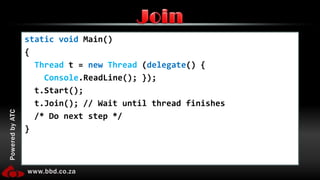
static void Main() {Threadt = newThread (delegate() {Console.ReadLine(); });  t.Start();  t.Join(); // Wait until thread finishes /* Do next step */}Join
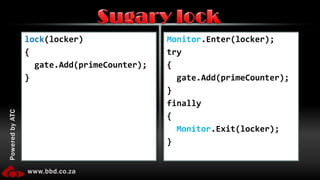
lock(locker){  gate.Add(primeCounter);}Monitor.Enter(locker);try{gate.Add(primeCounter);}finally{Monitor.Exit(locker);}Sugary lock
Same as a lockAdvantage: Can work across processes, meaning multiple applications can use a single mutexMutex
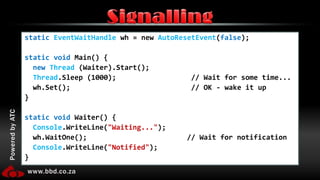
staticEventWaitHandle wh = new AutoResetEvent(false);static void Main() {newThread (Waiter).Start();Thread.Sleep (1000);                  // Wait for some time...wh.Set();                             // OK - wake it up}static void Waiter() {Console.WriteLine("Waiting...");wh.WaitOne();                        // Wait for notificationConsole.WriteLine("Notified");}Signalling
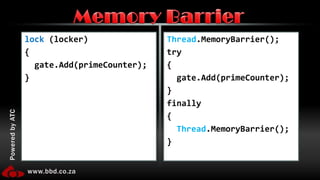
lock(locker){  gate.Add(primeCounter);}Thread.MemoryBarrier();try{gate.Add(primeCounter);}finally{Thread.MemoryBarrier();}Memory Barrier
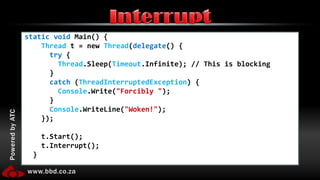
static void Main() {Thread t = new Thread(delegate() {try {Thread.Sleep(Timeout.Infinite); // This is blocking      }catch (ThreadInterruptedException) {Console.Write("Forcibly ");      }Console.WriteLine("Woken!");    });    t.Start();    t.Interrupt();  }Interrupt
Similar usage to InterruptThrows – ThreadAbortExceptionDoes not wait for blockingAbort
Using non-blocking management
Using the built in ThreadPools
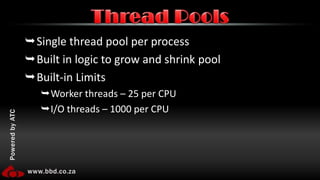
Single thread pool per processBuilt in logic to grow and shrink poolBuilt-in LimitsWorker threads – 25 per CPUI/O threads – 1000 per CPUThread Pools
Threaded controls in WinForms
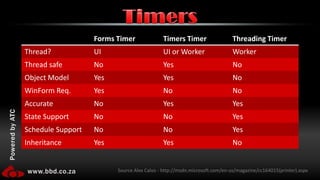
TimersSource Alex Calvo - http://msdn.microsoft.com/en-us/magazine/cc164015(printer).aspx
Talking to the UI thread from a worker thread
“Multi-threaded programming needs a little care” Patricia ShanahanUnderstatement?
CostThread SafetyRace conditionsDead locksException ManagementDebuggingCommon Problems
1 Mb of Address space12k for kernel mode stackNotification of every DLL in the processThreads are expensive
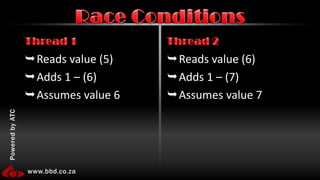
Reads value (5)Adds 1 – (6)Assumes value 6Reads value (6)Adds 1 – (7)Assumes value 7Thread 1Thread 2Race Conditions
If file does not existCreate itPopulate it with initial dataRead data from fileProcess dataWrite to fileLogical Process I
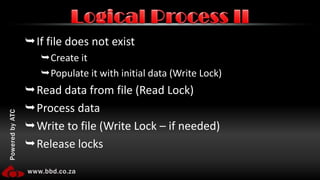
If file does not existCreate itPopulate it with initial data (Write Lock)Read data from file (Read Lock)Process dataWrite to file (Write Lock – if needed)Release locksLogical Process II
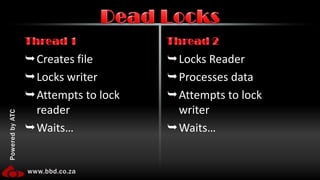
Creates fileLocks writerAttempts to lock readerWaits…Locks ReaderProcesses dataAttempts to lock writerWaits…Thread 1Thread 2Dead Locks
Exceptions are limited to a threadExceptionsMainChildtry{}catch{}1
Debugging in Visual Studio
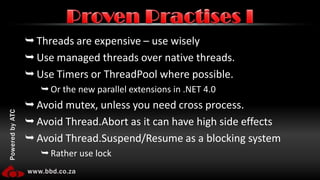
Threads are expensive – use wiselyUse managed threads over native threads.Use Timers or ThreadPool where possible.Or the new parallel extensions in .NET 4.0Avoid mutex, unless you need cross process.Avoid Thread.Abortas it can have high side effectsAvoid Thread.Suspend/Resume as a blocking systemRather use lockProven Practises I
Be careful what you locklock’s are type based shared across all AppDomains. Use static as the solutionthis (instances) have a high chance of deadlocksUse lock over MonitorIf you must use Monitor, use try...finallyInside a lock do as little as possibleIf you are doing math inside the lock rather change to InterlockedNever perform long running operations on the UI threadProven Practises II

Multi-Threading

Editor's Notes

  • #4 Initially do finding primes then speed it up with simple threadingDemo notes – get someone to note the times in milliseconds and maybe run twice to get an average. Also note the amount of primes (should always 9593, within first 100000) being displayed in test 2 may differ between runs – this is important to point out as it leads to the next topicAlso get task monitor open for this set – show the difference between using one and two cores (from test 1 to test 2)All demos should be run in release mode (Ctrl+F5) unless otherwise specifiedOpen up the base threading solution, go over the core code of demo set 1.Paste in line Ctrl+1 within the loopText should be: TestPrime(primeCounter);Run, show results, explain the problem domain and these can be worked out individuallyPaste in line Ctrl+2 – replacing the text within the loop. Text should be: new Thread(new ParameterizedThreadStart(TestPrime)).Start(primeCounter);Should have an exception on the TestPrime because it’s signature does not match.Paste in line Ctrl+3 below the main method, should be ok to run now.Text should be: private static void TestPrime(object objectToTest) { int valueToTest = Convert.ToInt32(objectToTest); TestPrime(valueToTest);}-< END >-
  • #6 Fixing the code by adding synchronisationFirst step add code in Ctrl+4, replacing existing thread start, and explain properties and that maybe (ha ha) if we up the priority it will help – might be good point to wake the audience to see who thinks it will.Text should be: Thread primeThread = new Thread(new ParameterizedThreadStart(TestPrime)); primeThread.Name = primeCounter.ToString(); primeThread.Priority = ThreadPriority.Highest; primeThread.Start(primeCounter);Note that by now we should have a few different numbers of found primesNext add code from Ctrl+5, to the variables at the top – the idea here is to add items to the “gate” and remove them once calculated and do not finish until all the numbers are worked outText should be: private static List<Int32> gate = new List<Int32>();Ctrl+6 into the loop above the code from beforeText should be: gate.Add(primeCounter);Ctrl+7 into the overrided TestPrime method we added before, at the endText should be: gate.Remove(valueToTest);Add the next code, Ctrl+8, after the loop so that we are forced to wait until the gates have been clearedRun in debug mode and wait for the crash – the list is being manipulated in an odd way and the item was gone before we could get it.Right now explain we need to make sure that only one thread at a time can access the list to fix it.Ctrl+9 to the variablesText should be: private static object locker = new object();Replace the gate.add and gate.remove we added eariler with the code from Alt+1 and Alt+2 respectivelyText (Alt+1) should be: lock (locker) { gate.Add(primeCounter); }Text (Alt+2) should be: lock (locker) { gate.Remove(valueToTest); }Run in release and note the time and itemsExplain that the amount of threads is hurting the CPU, increasing deadlocks etc… so lets limit the treads Add Alt+3 after the lock for adding to the gate, but before we spin up a threadText should be: while (gate.Count > 10) { Thread.Sleep(0);}-< END >-
  • #11 This is used for lock-free code - making sure that changes made on one thread are visible to another without incurring the cost of a lock. It does not control thread synchronization, unlike lock
  • #14 Volatile DemoCLR memory model… Essentially the memory model allows for non-volatile readswrites to be reordered as long as that change can not be noticed from the point of view of a single thread. The issue is, of course, there is often more than one thread (like the finalizer thread, worker threads, threadpool threads, etc). volatile essentially prevents that optimization. Replace the two variables we added in the last demo with the new one in Alt+4Text should be: private static int poolSize;Replace the gate.add (lock and all with) the interlocked from Alt+5Text should be: Interlocked.Increment(ref poolSize);Replace the while on the gate with the code from Alt+6Text should be: while (poolSize > 10) { Thread.Sleep(0); }Replace the gate.remove (lock and all) with the interlocked code from Alt+7Text should be: Interlocked.Decrement(ref poolSize);Replace the check at the end of the loop with code from Alt+8Text should be: while (poolSize > 0) { Thread.Sleep(0); }Run and check the speed increase, if any-< END >-
  • #15 Using ThreadPool to find primesNow replace all the code in the main loop, with the exception of the Interlocked.Increment with Alt+9Text should be: ThreadPool.QueueUserWorkItem(TestPrime, primeCounter);RUN-< END >-
  • #17 WinForms DemoStart off explaining what we are trying to do – we have fully working SINGLE threaded solution going on here. First step is to make the status bar keep track of what we are doing.Add backgroundWorker control and add a DoWork event, and in there add the code from Ctrl+Alt+1Text should be: while (true) { toolStripStatusLabel.Text = primesList.Items.Count.ToString(); Thread.Sleep(250); }Add the kick off, Ctrl+Alt+2, to the form constructor below the initialisationText should be: backgroundWorker.RunWorkerAsync();RUNNow remove the background worker component and related code. Add the following code to the class (Ctrl+Alt+3)Text should be: private void timerTick(object state) { toolStripStatusLabel.Text = primesList.Items.Count.ToString(); }And add Ctrl+Alt+4 to the constructorText should be: System.Threading.Timer timer = new System.Threading.Timer(new TimerCallback(timerTick), null, 0, 100);RUN-< END >-
  • #19 Add the code from Ctrl+Alt+5 to the loop replacing the code which calls TestprimeText should be: ThreadPool.QueueUserWorkItem(ThreadedTestPrime, primeCounter);Run and crashNow add Ctrl+Alt+6 to the isPrime block – lots of explaining needed now. Remove the add to list line.Text should be: AddItemDelegate addItemMethod = new AddItemDelegate(AddItem); this.Invoke(addItemMethod, valueToTest);Now add Ctrl+Alt+7 outside of any methodText should be: delegate void AddItemDelegate(int value);Run – point out that although we are doing a separate thread it is still not very responsive etc…Add Ctrl+Alt+8 to the new AddItem method we added previouslyText should be: Application.DoEvents();
  • #22 Notification of every DLL in the process is on creation AND destruction
  • #23 A race condition occurs when two threads access a shared variable at the same time. The first thread reads the variable, and the second thread reads the same value from the variable. Then the first thread and second thread perform their operations on the value, and they race to see which thread can write the value last to the shared variable. The value of the thread that writes its value last is preserved, because the thread is writing over the value that the previous thread wrote.
  • #28 Show the debugging window for threading (if you it is gone, it is under Debug > Windows > Threading)Output window for debugging messages-< END >-