Best Practices in Circuit Design Using Multisim and LabVIEW

Welcome to ‘Best Practices in Circuit Design Using Multisim and LabVIEW’ - a seminar for engaging the design
engineering community for improving circuit design methodology by promoting the use of joint simulation and applied
measurements.


                                                                                                                      1
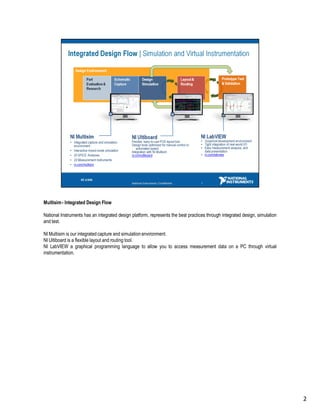
Multisim - Integrated Design Flow

National Instruments has an integrated design platform, represents the best practices through integrated design, simulation
and test.

NI Multisim is our integrated capture and simulation environment.
NI Ultiboard is a flexible layout and routing tool.
NI LabVIEW a graphical programming language to allow you to access measurement data on a PC through virtual
instrumentation.


                                                                                                                              2
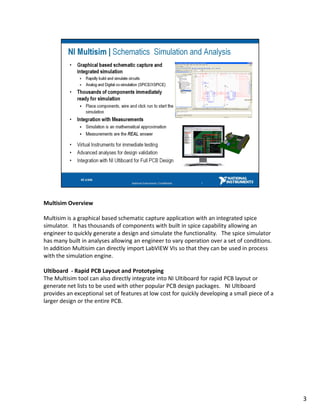
Multisim Overview

Multisim is a graphical based schematic capture application with an integrated spice
simulator. It has thousands of components with built in spice capability allowing an
engineer to quickly generate a design and simulate the functionality. The spice simulator
has many built in analyses allowing an engineer to vary operation over a set of conditions.
In addition Multisim can directly import LabVIEW VIs so that they can be used in process
with the simulation engine.

Ultiboard - Rapid PCB Layout and Prototyping
The Multisim tool can also directly integrate into NI Ultiboard for rapid PCB layout or
generate net lists to be used with other popular PCB design packages. NI Ultiboard
provides an exceptional set of features at low cost for quickly developing a small piece of a
larger design or the entire PCB.


                                                                                                3
SPICE Primer – Examples

The netlist will consist of components that have been defined in SPICE. SPICE components include several different types
of electrical devices that can be simulated.

In SPICE all the network elements are entered in a specific format; let’s examine the netlist created by the above voltage
divider circuit:

– Any text after the asterisk (*) is ignored by SPICE.
– Every element is defined between terminals called nodes (in this example we have 3 nodes: 0, 1 and 2).
– The DC voltage source (V1) is defined by ‘v’ followed by whatever name you may want to use (in this case ‘V1’).
– The next number is the node corresponding to the positive side of the DC source (‘1’); ‘0’ is the negative side.
–’12’ is the magnitude of the voltage source.
–Similarly, we’re defining R1 and R2.

Subcircuit Model
A subcircuit is simply a shell that contains any combination of primitive devices (basic SPICE models) and
.MODEL statements, which combine to create a more complex circuit.
For example, the subcircuit model from the slide is definition of a bipolar junction transistor.


                                                                                                                             4
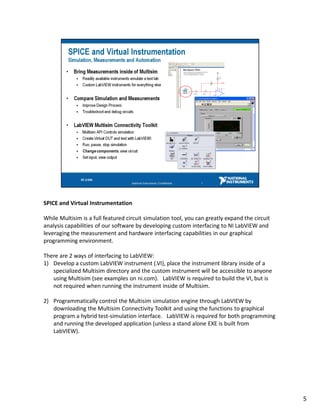
SPICE and Virtual Instrumentation

While Multisim is a full featured circuit simulation tool, you can greatly expand the circuit
analysis capabilities of our software by developing custom interfacing to NI LabVIEW and
leveraging the measurement and hardware interfacing capabilities in our graphical
programming environment.

There are 2 ways of interfacing to LabVIEW:
1) Develop a custom LabVIEW instrument (.VI), place the instrument library inside of a
   specialized Multisim directory and the custom instrument will be accessible to anyone
   using Multisim (see examples on ni.com). LabVIEW is required to build the VI, but is
   not required when running the instrument inside of Multisim.

2) Programmatically control the Multisim simulation engine through LabVIEW by
   downloading the Multisim Connectivity Toolkit and using the functions to graphical
   program a hybrid test-simulation interface. LabVIEW is required for both programming
   and running the developed application (unless a stand alone EXE is built from
   LabVIEW).


                                                                                                5
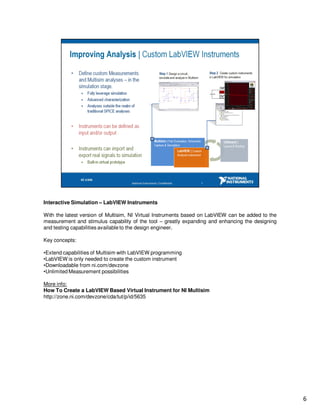
Interactive Simulation – LabVIEW Instruments

With the latest version of Multisim, NI Virtual Instruments based on LabVIEW can be added to the
measurement and stimulus capability of the tool – greatly expanding and enhancing the designing
and testing capabilities available to the design engineer.

Key concepts:

•Extend capabilities of Multisim with LabVIEW programming
•LabVIEW is only needed to create the custom instrument
•Downloadable from ni.com/devzone
•Unlimited Measurement possibilities

More info:
How To Create a LabVIEW Based Virtual Instrument for NI Multisim
http://zone.ni.com/devzone/cda/tut/p/id/5635


                                                                                                   6
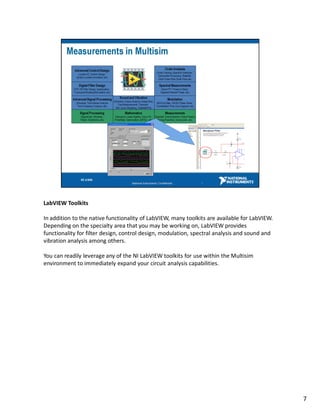
LabVIEW Toolkits

In addition to the native functionality of LabVIEW, many toolkits are available for LabVIEW.
Depending on the specialty area that you may be working on, LabVIEW provides
functionality for filter design, control design, modulation, spectral analysis and sound and
vibration analysis among others.

You can readily leverage any of the NI LabVIEW toolkits for use within the Multisim
environment to immediately expand your circuit analysis capabilities.


                                                                                               7
Virtual Prototype

Thus as a part of an integrated platform between design and virtual test – we can improve simulation
and overcome such an issue. The virtual prototype effectively plugs a real world source into the
simulation environment – so that our design SPICE based circuit is reacting to a real-world noisy, or
domain specific signal.

This can be done in a National Instruments platform – by using the virtual instrumentation of
LabVIEW to connect to hardware and record a real world signal. Therefore a real power source can
be analyzed and saved to a standard measurement format. Once saved to a LabVIEW format it can
be exported to the simulation environment of Multisim where, due to a native file format transfer that
real signal that we have saved can now be used as a stimulus in simulation. This means we can
analyze how our circuit performs under real conditions. Changes that would normally not be seen till
after prototyping can now be iterated upon within the Multisim simulation environment.


                                                                                                         8
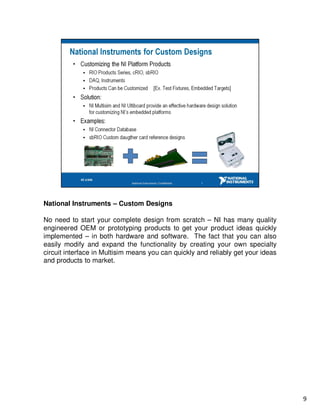
National Instruments – Custom Designs

No need to start your complete design from scratch – NI has many quality
engineered OEM or prototyping products to get your product ideas quickly
implemented – in both hardware and software. The fact that you can also
easily modify and expand the functionality by creating your own specialty
circuit interface in Multisim means you can quickly and reliably get your ideas
and products to market.


                                                                                  9
Hardware Design References in Multisim

Many hardware design references are now available and more are being
added as National Instruments grows the prototyping product line.

The NI hardware products are easily programmed using on our LabVIEW
development environments.


                                                                       10
Multisim - Recap

Multisim, Ultiboard and LabVIEW are an exceptional solution for circuit
simulation, PCB prototyping and virtual testing.

Use NI tools for rapid prototyping and simulation to avoid problems and to
get to market quickly.


                                                                             11
NI Multisim – More Information

Thank you for looking at National Instruments to meet your engineering design needs.
Although we introduced some basic but essential topics in Multisim design – you may have
more questions. To speak to a technical expert directly, call 1.800.263.5552 and one of our
technical representatives will be able to assist you. If you are located outside of North
America please check out www.ni.com/niglobal for local contact information for your area.


                                                       12                                     12

Multisim For Design, Validation And Test

  • 1.
    Best Practices inCircuit Design Using Multisim and LabVIEW Welcome to ‘Best Practices in Circuit Design Using Multisim and LabVIEW’ - a seminar for engaging the design engineering community for improving circuit design methodology by promoting the use of joint simulation and applied measurements. 1
  • 2.
    Multisim - IntegratedDesign Flow National Instruments has an integrated design platform, represents the best practices through integrated design, simulation and test. NI Multisim is our integrated capture and simulation environment. NI Ultiboard is a flexible layout and routing tool. NI LabVIEW a graphical programming language to allow you to access measurement data on a PC through virtual instrumentation. 2
  • 3.
    Multisim Overview Multisim isa graphical based schematic capture application with an integrated spice simulator. It has thousands of components with built in spice capability allowing an engineer to quickly generate a design and simulate the functionality. The spice simulator has many built in analyses allowing an engineer to vary operation over a set of conditions. In addition Multisim can directly import LabVIEW VIs so that they can be used in process with the simulation engine. Ultiboard - Rapid PCB Layout and Prototyping The Multisim tool can also directly integrate into NI Ultiboard for rapid PCB layout or generate net lists to be used with other popular PCB design packages. NI Ultiboard provides an exceptional set of features at low cost for quickly developing a small piece of a larger design or the entire PCB. 3
  • 4.
    SPICE Primer –Examples The netlist will consist of components that have been defined in SPICE. SPICE components include several different types of electrical devices that can be simulated. In SPICE all the network elements are entered in a specific format; let’s examine the netlist created by the above voltage divider circuit: – Any text after the asterisk (*) is ignored by SPICE. – Every element is defined between terminals called nodes (in this example we have 3 nodes: 0, 1 and 2). – The DC voltage source (V1) is defined by ‘v’ followed by whatever name you may want to use (in this case ‘V1’). – The next number is the node corresponding to the positive side of the DC source (‘1’); ‘0’ is the negative side. –’12’ is the magnitude of the voltage source. –Similarly, we’re defining R1 and R2. Subcircuit Model A subcircuit is simply a shell that contains any combination of primitive devices (basic SPICE models) and .MODEL statements, which combine to create a more complex circuit. For example, the subcircuit model from the slide is definition of a bipolar junction transistor. 4
  • 5.
    SPICE and VirtualInstrumentation While Multisim is a full featured circuit simulation tool, you can greatly expand the circuit analysis capabilities of our software by developing custom interfacing to NI LabVIEW and leveraging the measurement and hardware interfacing capabilities in our graphical programming environment. There are 2 ways of interfacing to LabVIEW: 1) Develop a custom LabVIEW instrument (.VI), place the instrument library inside of a specialized Multisim directory and the custom instrument will be accessible to anyone using Multisim (see examples on ni.com). LabVIEW is required to build the VI, but is not required when running the instrument inside of Multisim. 2) Programmatically control the Multisim simulation engine through LabVIEW by downloading the Multisim Connectivity Toolkit and using the functions to graphical program a hybrid test-simulation interface. LabVIEW is required for both programming and running the developed application (unless a stand alone EXE is built from LabVIEW). 5
  • 6.
    Interactive Simulation –LabVIEW Instruments With the latest version of Multisim, NI Virtual Instruments based on LabVIEW can be added to the measurement and stimulus capability of the tool – greatly expanding and enhancing the designing and testing capabilities available to the design engineer. Key concepts: •Extend capabilities of Multisim with LabVIEW programming •LabVIEW is only needed to create the custom instrument •Downloadable from ni.com/devzone •Unlimited Measurement possibilities More info: How To Create a LabVIEW Based Virtual Instrument for NI Multisim http://zone.ni.com/devzone/cda/tut/p/id/5635 6
  • 7.
    LabVIEW Toolkits In additionto the native functionality of LabVIEW, many toolkits are available for LabVIEW. Depending on the specialty area that you may be working on, LabVIEW provides functionality for filter design, control design, modulation, spectral analysis and sound and vibration analysis among others. You can readily leverage any of the NI LabVIEW toolkits for use within the Multisim environment to immediately expand your circuit analysis capabilities. 7
  • 8.
    Virtual Prototype Thus asa part of an integrated platform between design and virtual test – we can improve simulation and overcome such an issue. The virtual prototype effectively plugs a real world source into the simulation environment – so that our design SPICE based circuit is reacting to a real-world noisy, or domain specific signal. This can be done in a National Instruments platform – by using the virtual instrumentation of LabVIEW to connect to hardware and record a real world signal. Therefore a real power source can be analyzed and saved to a standard measurement format. Once saved to a LabVIEW format it can be exported to the simulation environment of Multisim where, due to a native file format transfer that real signal that we have saved can now be used as a stimulus in simulation. This means we can analyze how our circuit performs under real conditions. Changes that would normally not be seen till after prototyping can now be iterated upon within the Multisim simulation environment. 8
  • 9.
    National Instruments –Custom Designs No need to start your complete design from scratch – NI has many quality engineered OEM or prototyping products to get your product ideas quickly implemented – in both hardware and software. The fact that you can also easily modify and expand the functionality by creating your own specialty circuit interface in Multisim means you can quickly and reliably get your ideas and products to market. 9
  • 10.
    Hardware Design Referencesin Multisim Many hardware design references are now available and more are being added as National Instruments grows the prototyping product line. The NI hardware products are easily programmed using on our LabVIEW development environments. 10
  • 11.
    Multisim - Recap Multisim,Ultiboard and LabVIEW are an exceptional solution for circuit simulation, PCB prototyping and virtual testing. Use NI tools for rapid prototyping and simulation to avoid problems and to get to market quickly. 11
  • 12.
    NI Multisim –More Information Thank you for looking at National Instruments to meet your engineering design needs. Although we introduced some basic but essential topics in Multisim design – you may have more questions. To speak to a technical expert directly, call 1.800.263.5552 and one of our technical representatives will be able to assist you. If you are located outside of North America please check out www.ni.com/niglobal for local contact information for your area. 12 12