


Group Member
Trishan Jaiswal (2GI10EC106)
Trupti Badiger (2GI10EC107)
Vaibhav S       (2GI10EC108)


Guided By
Prof. Veena Deshmukh
Overview
 Introduction
Dealing with software
 Circuit simulation
 Building and testing a circuit
 Salient Features
 Overview of application
 Conclusion
Introduction
 Electronic WorkBench (EWB) is a simulation package
  for electronic circuits.
 The National Instruments is responsible for
  innovating circuit design software EWB.
 Board-level design on PC.
 Design and analyze circuits without using
  breadboards, real components or actual instruments.
Handling the software

 Double click on its icon.
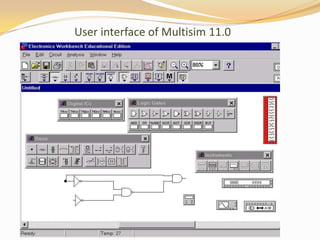
 An empty circuit window will appear with 2 toolbar.
 Circuit toolbar with the common file management,
  editing and graphics tools.
 Parts Bin toolbar from which a wide range of circuit
  elements, and instruments can be selected.
User interface of Multisim 11.0
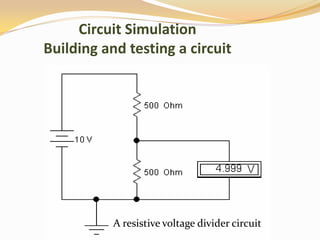
Circuit Simulation
Building and testing a circuit


           A resistive voltage divider circuit
Steps for circuit Building

 Place components on circuit window.
 Arrange circuit elements.
 Wire the components together.
 Set values for components.
 Save the circuit.
Circuit testing

 Attach voltmeter.
 Make changes and additions
 Add an ammeter to the circuit to measure the current
  through the resistor.
 Change the value of the resistor and observe the
  change in current and voltage.
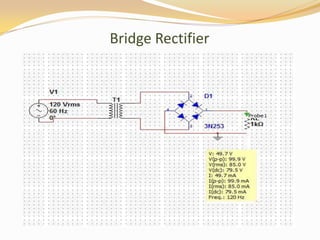
Bridge Rectifier
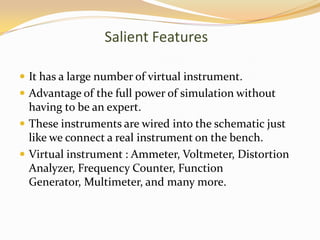
Salient Features

 It has a large number of virtual instrument.
 Advantage of the full power of simulation without
  having to be an expert.
 These instruments are wired into the schematic just
  like we connect a real instrument on the bench.
 Virtual instrument : Ammeter, Voltmeter, Distortion
  Analyzer, Frequency Counter, Function
  Generator, Multimeter, and many more.
Overview of application
    With its many desirable features…….
    EWB play an important role in teaching.
   Understanding of basic circuits and electronics.
   Desirable in the pre-lab stage pro-type development.
   In the pre-lab assignments/exercises.
   Design projects.
   Electronic industries where before implementation
    circuit simulation is required.
Conclusion
 Build and test circuits entirely on the Workspace using
    the mouse and menus.
   International market leader.
   World’s most widely used circuit design software.
   Most successful simulator in the industry.
   Over 180,000 users worldwide.
   Delivers real laboratory Environment.
    Student version of the EWB can handle up to 30 active
    devices with no limits on the number of passive
    derives.
References

1. wikipedia
2. Google
3. www.nptel.iitm.com
Seminar report on national instruments electronics workbench

Seminar report on national instruments electronics workbench

  • 1.
    Group Member Trishan Jaiswal(2GI10EC106) Trupti Badiger (2GI10EC107) Vaibhav S (2GI10EC108) Guided By Prof. Veena Deshmukh
  • 2.
    Overview  Introduction Dealing withsoftware  Circuit simulation  Building and testing a circuit  Salient Features  Overview of application  Conclusion
  • 3.
    Introduction  Electronic WorkBench(EWB) is a simulation package for electronic circuits.  The National Instruments is responsible for innovating circuit design software EWB.  Board-level design on PC.  Design and analyze circuits without using breadboards, real components or actual instruments.
  • 4.
    Handling the software Double click on its icon.  An empty circuit window will appear with 2 toolbar.  Circuit toolbar with the common file management, editing and graphics tools.  Parts Bin toolbar from which a wide range of circuit elements, and instruments can be selected.
  • 5.
    User interface ofMultisim 11.0
  • 6.
    Circuit Simulation Building andtesting a circuit A resistive voltage divider circuit
  • 7.
    Steps for circuitBuilding  Place components on circuit window.  Arrange circuit elements.  Wire the components together.  Set values for components.  Save the circuit.
  • 8.
    Circuit testing  Attachvoltmeter.  Make changes and additions  Add an ammeter to the circuit to measure the current through the resistor.  Change the value of the resistor and observe the change in current and voltage.
  • 9.
  • 10.
    Salient Features  Ithas a large number of virtual instrument.  Advantage of the full power of simulation without having to be an expert.  These instruments are wired into the schematic just like we connect a real instrument on the bench.  Virtual instrument : Ammeter, Voltmeter, Distortion Analyzer, Frequency Counter, Function Generator, Multimeter, and many more.
  • 11.
    Overview of application With its many desirable features…….  EWB play an important role in teaching.  Understanding of basic circuits and electronics.  Desirable in the pre-lab stage pro-type development.  In the pre-lab assignments/exercises.  Design projects.  Electronic industries where before implementation circuit simulation is required.
  • 12.
    Conclusion  Build andtest circuits entirely on the Workspace using the mouse and menus.  International market leader.  World’s most widely used circuit design software.  Most successful simulator in the industry.  Over 180,000 users worldwide.  Delivers real laboratory Environment.  Student version of the EWB can handle up to 30 active devices with no limits on the number of passive derives.
  • 13.