Information and Communication
Technologies(ICT)
Principles and Perspectives
Lecture : Multimedia Networks
Study Guide(17) essential reading (7)
Multimedia Applications
• A multimedia network application as any network application that
employs audio or video
• Can be classified in
1. streaming stored audio/video
2. conversational voice/video-over-IP
3. streaming live audio/video.
Video Properties
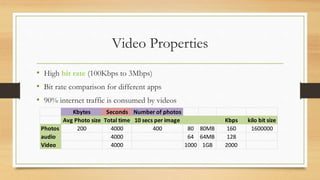
• High bit rate (100Kbps to 3Mbps)
• Bit rate comparison for different apps
• 90% internet traffic is consumed by videos
Kbytes Seconds Number of photos
Avg Photo size Total time 10 secs per image Kbps kilo bit size
Photos 200 4000 400 80 80MB 160 1600000
audio 4000 64 64MB 128
Video 4000 1000 1GB 2000
Video properties: Compression
• Videos can be compressed, trading off quality with bit rate
• Video
• Sequence of Images (24-30 per second)
• Image is array of pixels, each pixel encoded represent luminance and color
• For compression we can exploit redundancies
1. Spatial Redundancy
2. Temporal Redundancy
Spatial redundancy
• Repetition within an image
• More white space, can be compressed more
Temporal redundancy
• Repetition from image to subsequent image
• If subsequent image is same then no need to re-encode it
Compression continues
• Today multiple versions of same videos are created with different bit rate
• User can choose according to their network speed
• Video in video conference application is compressed on the fly
Audio Properties
• Analog audio signal is sampled at some fixed rate (e.g. 8000 per second)
• Each sample is rounded to one finite number of values. Operation known as
quantization. These values quantization values
• Each quantization value is represented by fix number of bits
• For example of 8000 samples per second is quantized and represented by
8bits. Then for one second digital signal rate would be
8000 x 8 = 64000 bps
Pulse code modulation
• PCM is basic encoding scheme
• 8000 samples with 8 bit per sample results in 64kbps
• CD use PCM with 44100 samples and 16 bit per sample (705.6kbps) Mono
• 1.411 Mbps for stereo
• Compression techniques
• Mp3 can compress to many different bit rates(128kbps is most popular)
• Advanced audio coding(AAC)
Type of multimedia network apps
Streaming stored audio/video
• Content is pre-recorded video or audio (youtube)
• 50% downstream traffic is of streaming stored video
• Features
• Streaming: play out starts as soon as some portion is received. Playing as well as
receiving later parts of video
• Interactivity: play, pause, forward
• Continuous playout: video should play according to original timing else frame freezing
or frame skipping experience
Streaming stored audio/video
• Most important performance measure is throughput
• It should be minimum of bit rate of video
• Techniques like prefetching, buffering
Conversational voice/video-over-IP
• Internet telephony (Voice over IP)
• Skype, Google talk
• Properties
• Timing consideration
• Tolerance of data loss
Conversational voice/video-over-IP
• Delay sensitive (Timing consideration)
• 150 millisec not perceived by human
• 150-400 millisec acceptable
• Loss tolerant
• Annoying but not particularly harmful if we compare with web, email
Streaming Live Audio & Video
• Similar to broadcasting
• Delay of up to 10 seconds is acceptable
Streaming stored video
1. UDP streaming
2. HTTP streaming
3. adaptive HTTP streaming
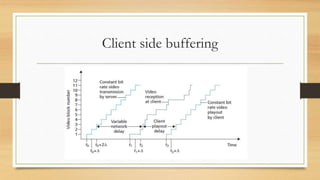
• A common characteristics of all 3 forms is client side buffering
Client side buffering
UDP Streaming
• Server tries to match client’s consumption rate
• Drawbacks
1. If available bandwidth drops client will face freezing or skipping
2. Requires media control server to process client to server interactivity requests. Play,
pause , managing client state becomes complex
3. Firewalls sometimes block UDP ports
HTTP Streaming
• video is simply stored in an HTTP server as an ordinary file with a specific
URL
• TCP congestion control and flow control
• Prefetching:
• Client can attempt to download video at higher rate than the consumption rate
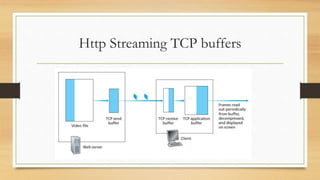
Http Streaming TCP buffers
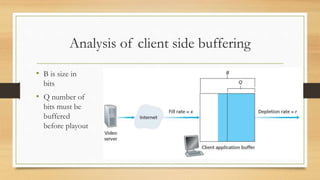
Analysis of client side buffering
• B is size in
bits
• Q number of
bits must be
buffered
before playout
Early Termination and Repositioning the
Video
• Requesting future point in time in the video
• Server can forget earlier requests and can start sending according to new
• Http byte range header is used for this
• Some pre-fetched video will go unwatched
• To avoid this client uses moderate size buffers
• Repositioning and early termination are analogous to cooking a large meal, eating only a
portion of it, and throwing the rest away, thereby wasting food
Adaptive Streaming and DASH
• On http choose video from different available bit rates
• With DASH, each video version is stored in the HTTP server, each with a
different URL

Multimedia networks

  • 1.
    Information and Communication Technologies(ICT) Principlesand Perspectives Lecture : Multimedia Networks Study Guide(17) essential reading (7)
  • 2.
    Multimedia Applications • Amultimedia network application as any network application that employs audio or video • Can be classified in 1. streaming stored audio/video 2. conversational voice/video-over-IP 3. streaming live audio/video.
  • 3.
    Video Properties • Highbit rate (100Kbps to 3Mbps) • Bit rate comparison for different apps • 90% internet traffic is consumed by videos Kbytes Seconds Number of photos Avg Photo size Total time 10 secs per image Kbps kilo bit size Photos 200 4000 400 80 80MB 160 1600000 audio 4000 64 64MB 128 Video 4000 1000 1GB 2000
  • 4.
    Video properties: Compression •Videos can be compressed, trading off quality with bit rate • Video • Sequence of Images (24-30 per second) • Image is array of pixels, each pixel encoded represent luminance and color • For compression we can exploit redundancies 1. Spatial Redundancy 2. Temporal Redundancy
  • 5.
    Spatial redundancy • Repetitionwithin an image • More white space, can be compressed more
  • 6.
    Temporal redundancy • Repetitionfrom image to subsequent image • If subsequent image is same then no need to re-encode it
  • 7.
    Compression continues • Todaymultiple versions of same videos are created with different bit rate • User can choose according to their network speed • Video in video conference application is compressed on the fly
  • 8.
    Audio Properties • Analogaudio signal is sampled at some fixed rate (e.g. 8000 per second) • Each sample is rounded to one finite number of values. Operation known as quantization. These values quantization values • Each quantization value is represented by fix number of bits • For example of 8000 samples per second is quantized and represented by 8bits. Then for one second digital signal rate would be 8000 x 8 = 64000 bps
  • 9.
    Pulse code modulation •PCM is basic encoding scheme • 8000 samples with 8 bit per sample results in 64kbps • CD use PCM with 44100 samples and 16 bit per sample (705.6kbps) Mono • 1.411 Mbps for stereo • Compression techniques • Mp3 can compress to many different bit rates(128kbps is most popular) • Advanced audio coding(AAC)
  • 10.
    Type of multimedianetwork apps Streaming stored audio/video • Content is pre-recorded video or audio (youtube) • 50% downstream traffic is of streaming stored video • Features • Streaming: play out starts as soon as some portion is received. Playing as well as receiving later parts of video • Interactivity: play, pause, forward • Continuous playout: video should play according to original timing else frame freezing or frame skipping experience
  • 11.
    Streaming stored audio/video •Most important performance measure is throughput • It should be minimum of bit rate of video • Techniques like prefetching, buffering
  • 12.
    Conversational voice/video-over-IP • Internettelephony (Voice over IP) • Skype, Google talk • Properties • Timing consideration • Tolerance of data loss
  • 13.
    Conversational voice/video-over-IP • Delaysensitive (Timing consideration) • 150 millisec not perceived by human • 150-400 millisec acceptable • Loss tolerant • Annoying but not particularly harmful if we compare with web, email
  • 14.
    Streaming Live Audio& Video • Similar to broadcasting • Delay of up to 10 seconds is acceptable
  • 15.
    Streaming stored video 1.UDP streaming 2. HTTP streaming 3. adaptive HTTP streaming • A common characteristics of all 3 forms is client side buffering
  • 16.
  • 17.
    UDP Streaming • Servertries to match client’s consumption rate • Drawbacks 1. If available bandwidth drops client will face freezing or skipping 2. Requires media control server to process client to server interactivity requests. Play, pause , managing client state becomes complex 3. Firewalls sometimes block UDP ports
  • 18.
    HTTP Streaming • videois simply stored in an HTTP server as an ordinary file with a specific URL • TCP congestion control and flow control • Prefetching: • Client can attempt to download video at higher rate than the consumption rate
  • 19.
  • 20.
    Analysis of clientside buffering • B is size in bits • Q number of bits must be buffered before playout
  • 21.
    Early Termination andRepositioning the Video • Requesting future point in time in the video • Server can forget earlier requests and can start sending according to new • Http byte range header is used for this • Some pre-fetched video will go unwatched • To avoid this client uses moderate size buffers • Repositioning and early termination are analogous to cooking a large meal, eating only a portion of it, and throwing the rest away, thereby wasting food
  • 22.
    Adaptive Streaming andDASH • On http choose video from different available bit rates • With DASH, each video version is stored in the HTTP server, each with a different URL