AMAZON SQS
CONNECTOR
By – Ankush Sharma
What is Amazon SQS?
■ Amazon Simple Queue Service (SQS) is a fast, reliable, scalable, fully managed
message queuing service. SQS makes it simple and cost-effective to decouple the
components of a cloud application.You can use SQS to transmit any volume of data, at
any level of throughput, without losing messages or requiring other services to be
always available.
■ With SQS, you can offload the administrative burden of operating and scaling a highly
available messaging cluster, while paying a low price for only what you use.
Why Mule’sAmazon SQS connector?
■ If Amazon SQS’s API is so rich then what is the need of using Mule’s Amazon SQS
connector?Answer for this is in below paragraph.
■ Amazon Simple Queue Service (Amazon SQS) offers a reliable, highly scalable hosted
queue for storing messages as they travel between computers.Which means
developers doesn’t need to write any line of code, just drag and drop Amazon SQS
connector, configure it and everything is done.
Prerequisites for Amazon SQS connector
■ Amazon webservices account and set of credentials.
■ Mule runtime environment 3.5.X or higher.
■ AWS SDK for java version 1.9.39
■ If Amazon SQS connector is not in your Mule palette then download that from
Anypoint exchange.
Amazon SQS connector – Configuration
Wizard
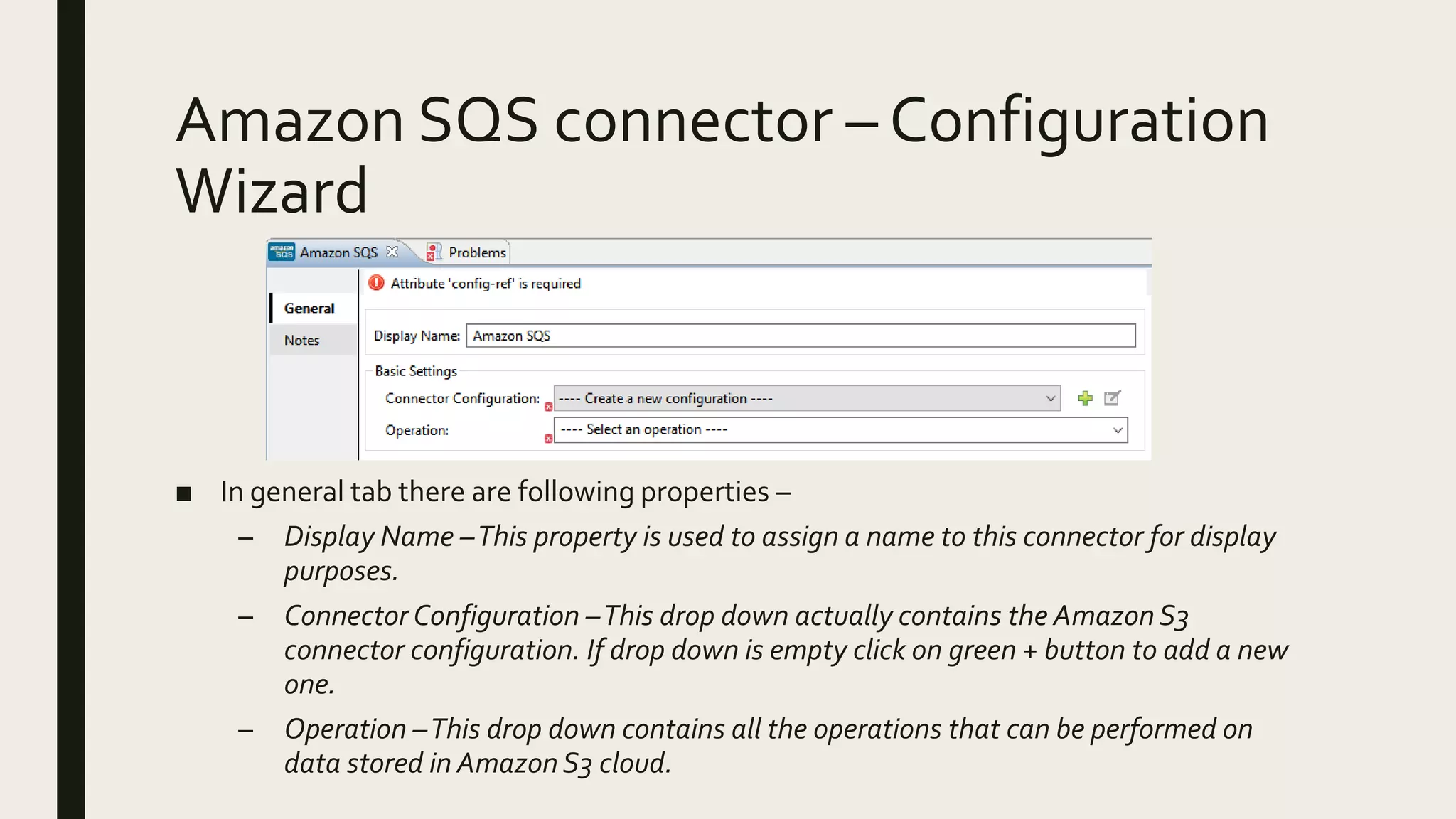
■ In general tab there are following properties –
– Display Name –This property is used to assign a name to this connector for display
purposes.
– Connector Configuration –This drop down actually contains the Amazon S3
connector configuration. If drop down is empty click on green + button to add a new
one.
– Operation –This drop down contains all the operations that can be performed on
data stored in Amazon S3 cloud.
Amazon SQS connector – Adding a new
Connector Configuration (General tab)
(cont.)
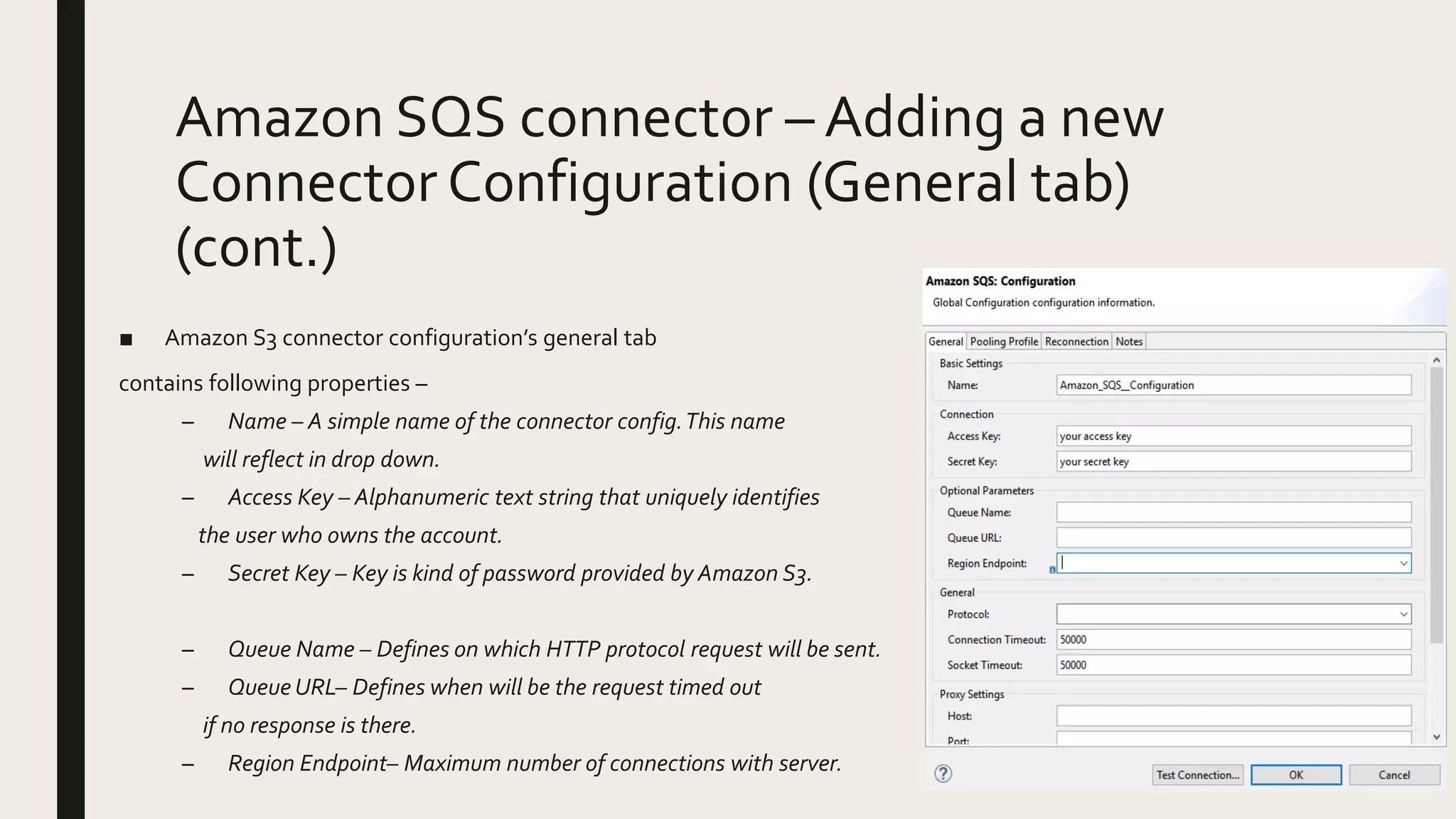
■ Amazon S3 connector configuration’s general tab
contains following properties –
– Name – A simple name of the connector config.This name
will reflect in drop down.
– Access Key – Alphanumeric text string that uniquely identifies
the user who owns the account.
– Secret Key – Key is kind of password provided by Amazon S3.
– Queue Name – Defines on which HTTP protocol request will be sent.
– Queue URL– Defines when will be the request timed out
if no response is there.
– Region Endpoint– Maximum number of connections with server.
Amazon SQS connector – Adding a new
Connector Configuration (General tab)
■ Amazon S3 connector configuration’s general tab
contains following properties –
– Protocol – Defines on which HTTP protocol request will be sent.
– ConnectionTimeout – Defines when will be the request timed out if no response is
there.
– Max connections – Maximum number of connections with server.
– SocketTimeout - Defines when will the socket connection timeout.
– Proxy Settings – Settings to setup a connection to Amazon S3 via proxy server.
Amazon SQS connector – Adding a new
Connector Configuration (Pooling Profile
tab)
■ Amazon S3 connector configuration’s pooling profile tab
contains following properties –
– Use default connection pool config –This radio button is used
enable default connection pooling setting of this connector.
– Define connection pool config – Radio button used to create
custom connection pooling settings.
– Max active – Property which define how many connections can be
there in connection pool.
– Max idle – Defines maximum number of connections that can be idle.
– Initialization policy – Defines how to initialize new connections.
– Exhausted action – Defines how to release a connection after usage.
– Max wait – Maximum time to wait for a new connection to be available.
– Min eviction time – Minimum amount of time a connection can sit idle for.
Amazon SQS connector – Adding a new
Connector Configuration (Reconnection tab)
■ The Reconnection tab contains following properties –
– Do not use a Reconnection Strategy –This is the default radio
button which specifies do not try to reconnect if there is error
connecting to the web address URL.
– Standard Reconnection – Use this radio button to enable a
standard reconnection strategy.
■ Frequency (ms) –The frequency time in milliseconds after which
theAJAX connector will try to access the web address URL.
■ ReconnectAttempts –This tells how many times theAJAX
connector will try to connect to web address URL.
■ Reconnector Forever – Check this box if there is need to make
AJAX connector connect to web address URL until there is a
successful connection with it.
– Custom Reconnection – Use this radio button to create a custom
Reconnection strategy.
■ Class –The java class which will come in action after a failed connection attempt.
■ Run the connection in a separated thread – Check this box if there is need
to use this custom reconnection operation in separate thread.
Amazon SQS connector – Configuration
Wizard (Notes and MetadataTab)
■ Notes tab - This tab is used to add special notes for the Amazon SQS connector.
■ Metadata tab –This tab is used to add any metadata entry for Amazon SQS connector.
ThankYou!

Amazon SQS connector

  • 1.
  • 2.
    What is AmazonSQS? ■ Amazon Simple Queue Service (SQS) is a fast, reliable, scalable, fully managed message queuing service. SQS makes it simple and cost-effective to decouple the components of a cloud application.You can use SQS to transmit any volume of data, at any level of throughput, without losing messages or requiring other services to be always available. ■ With SQS, you can offload the administrative burden of operating and scaling a highly available messaging cluster, while paying a low price for only what you use.
  • 3.
    Why Mule’sAmazon SQSconnector? ■ If Amazon SQS’s API is so rich then what is the need of using Mule’s Amazon SQS connector?Answer for this is in below paragraph. ■ Amazon Simple Queue Service (Amazon SQS) offers a reliable, highly scalable hosted queue for storing messages as they travel between computers.Which means developers doesn’t need to write any line of code, just drag and drop Amazon SQS connector, configure it and everything is done.
  • 4.
    Prerequisites for AmazonSQS connector ■ Amazon webservices account and set of credentials. ■ Mule runtime environment 3.5.X or higher. ■ AWS SDK for java version 1.9.39 ■ If Amazon SQS connector is not in your Mule palette then download that from Anypoint exchange.
  • 5.
    Amazon SQS connector– Configuration Wizard ■ In general tab there are following properties – – Display Name –This property is used to assign a name to this connector for display purposes. – Connector Configuration –This drop down actually contains the Amazon S3 connector configuration. If drop down is empty click on green + button to add a new one. – Operation –This drop down contains all the operations that can be performed on data stored in Amazon S3 cloud.
  • 6.
    Amazon SQS connector– Adding a new Connector Configuration (General tab) (cont.) ■ Amazon S3 connector configuration’s general tab contains following properties – – Name – A simple name of the connector config.This name will reflect in drop down. – Access Key – Alphanumeric text string that uniquely identifies the user who owns the account. – Secret Key – Key is kind of password provided by Amazon S3. – Queue Name – Defines on which HTTP protocol request will be sent. – Queue URL– Defines when will be the request timed out if no response is there. – Region Endpoint– Maximum number of connections with server.
  • 7.
    Amazon SQS connector– Adding a new Connector Configuration (General tab) ■ Amazon S3 connector configuration’s general tab contains following properties – – Protocol – Defines on which HTTP protocol request will be sent. – ConnectionTimeout – Defines when will be the request timed out if no response is there. – Max connections – Maximum number of connections with server. – SocketTimeout - Defines when will the socket connection timeout. – Proxy Settings – Settings to setup a connection to Amazon S3 via proxy server.
  • 8.
    Amazon SQS connector– Adding a new Connector Configuration (Pooling Profile tab) ■ Amazon S3 connector configuration’s pooling profile tab contains following properties – – Use default connection pool config –This radio button is used enable default connection pooling setting of this connector. – Define connection pool config – Radio button used to create custom connection pooling settings. – Max active – Property which define how many connections can be there in connection pool. – Max idle – Defines maximum number of connections that can be idle. – Initialization policy – Defines how to initialize new connections. – Exhausted action – Defines how to release a connection after usage. – Max wait – Maximum time to wait for a new connection to be available. – Min eviction time – Minimum amount of time a connection can sit idle for.
  • 9.
    Amazon SQS connector– Adding a new Connector Configuration (Reconnection tab) ■ The Reconnection tab contains following properties – – Do not use a Reconnection Strategy –This is the default radio button which specifies do not try to reconnect if there is error connecting to the web address URL. – Standard Reconnection – Use this radio button to enable a standard reconnection strategy. ■ Frequency (ms) –The frequency time in milliseconds after which theAJAX connector will try to access the web address URL. ■ ReconnectAttempts –This tells how many times theAJAX connector will try to connect to web address URL. ■ Reconnector Forever – Check this box if there is need to make AJAX connector connect to web address URL until there is a successful connection with it. – Custom Reconnection – Use this radio button to create a custom Reconnection strategy. ■ Class –The java class which will come in action after a failed connection attempt. ■ Run the connection in a separated thread – Check this box if there is need to use this custom reconnection operation in separate thread.
  • 10.
    Amazon SQS connector– Configuration Wizard (Notes and MetadataTab) ■ Notes tab - This tab is used to add special notes for the Amazon SQS connector. ■ Metadata tab –This tab is used to add any metadata entry for Amazon SQS connector.
  • 11.