Amazon Connector
Introduction
• Amazon Simple Storage Service (Amazon S3) is
storage for the Internet
• Store and retrieve any amount of data at any
time, from anywhere on the web
• The AWS SDK for Java provides a Java API for
AWS infrastructure services
Prerequisites
• To use the Amazon S3 connector, you must
have the following:
– Access to Amazon Web Services
– To access AWS with the connector, you need the
credentials in the form of IAM
– Anypoint Studio Enterprise edition
Compatibility
• Amazon S3 connector is compatible with:
– Mule Runtime: 3.5.0 or later
– AWS SDK for Java: 1.11.21
Installing the Connector
• Updating from an Older Version
– Click the popup and check for the available
updates
– Select the Amazon S3 connector version 3.0.0
check box and click Next.
– Follow the instructions provided by the user
interface
Installing the Connector
• Updating from an Older Version
– Restart Studio when prompted. After restarting, if
you have several versions of the connector
installed, Mule asks you for the version of the
connector to use
Configuring the Connector Global
Element
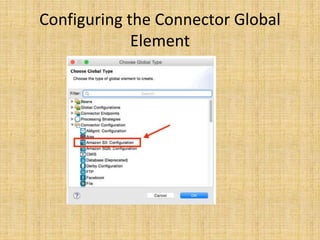
• Click the Global Elements tab at the base of
the canvas, then click Create
• In the Choose Global Type window, expand
Connector Configuration, and click Amazon
S3: Configuration
Configuring the Connector Global
Element
Configuring the Connector Global
Element
• Click Ok
• Enter the global element properties:
Connecting to S3 Compatible Storage
• If you need to connect to a different storage
than the default AWS S3, you must specify its
URL in the S3 Compatible Storage URL field
Using the Connector
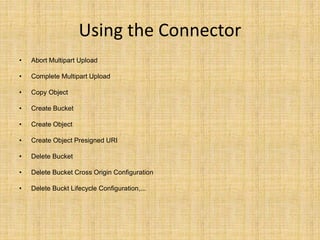
• Abort Multipart Upload
• Complete Multipart Upload
• Copy Object
• Create Bucket
• Create Object
• Create Object Presigned URI
• Delete Bucket
• Delete Bucket Cross Origin Configuration
• Delete Buckt Lifecycle Configuration,...
Using the Connector
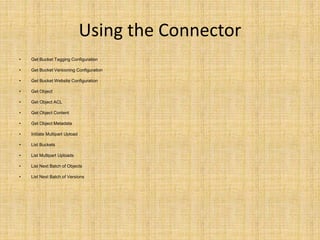
• Get Bucket Tagging Configuration
• Get Bucket Versioning Configuration
• Get Bucket Website Configuration
• Get Object
• Get Object ACL
• Get Object Content
• Get Object Metadata
• Initiate Multipart Upload
• List Buckets
• List Multipart Uploads
• List Next Batch of Objects
• List Next Batch of Versions
Using the Connector
• Delete Bucket Policy
• Delete Bucket Tagging Configuration
• Delete Bucket Website Configuration
• Delete Object
• Delete Objects
• Get Bucket ACL
• Get Bucket Cross Origin Configuration
• Get Bucket Lifecycle Configuration
• Get Bucket Location
• Get Bucket Logging Configuration
• Get Bucket Notification Configuration
• Get Bucket Policy
Using the Connector
• List Objects
• List Parts
• List Versions
• Set Bucket ACL
• Set Bucket Cross Origin Configuration
• Set Bucket Lifecycle Configuration
• Set Bucket Logging Configuration
• Set Bucket Notification Configuration
• Set Bucket Policy
• Set Bucket tagging Configuration
• Set Bucket Versioning Configuration
• Set Bucket Website Configuration
• Set Object ACL
• Set Object Storage Class
• Upload Part
• Upload Part Copy
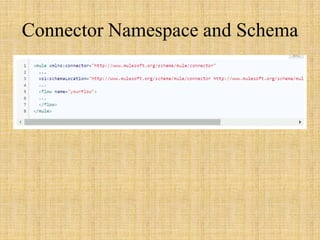
Connector Namespace and Schema
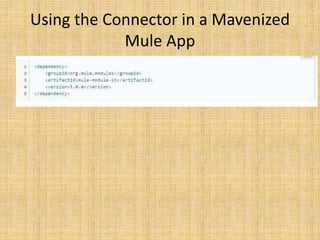
Using the Connector in a Mavenized
Mule App
Use Cases
• The following are the common use cases for
the Amazon S3 connector:
– Store an image from a URL on Amazon S3, then
retrieve and display the image.
– Create an image link in Amazon S3 and update the
status in twitter along with the image link.
Adding the Connector to a Mule Flow
• Create a new Mule project in Anypoint Studio.
• Drag the Amazon S3 connector onto the
canvas, then select it to open the properties
editor
• Configure the connector’s parameters:
Adding the Connector to a Mule Flow
Question and answer

Amazon S3 connector

  • 1.
  • 2.
    Introduction • Amazon SimpleStorage Service (Amazon S3) is storage for the Internet • Store and retrieve any amount of data at any time, from anywhere on the web • The AWS SDK for Java provides a Java API for AWS infrastructure services
  • 3.
    Prerequisites • To usethe Amazon S3 connector, you must have the following: – Access to Amazon Web Services – To access AWS with the connector, you need the credentials in the form of IAM – Anypoint Studio Enterprise edition
  • 4.
    Compatibility • Amazon S3connector is compatible with: – Mule Runtime: 3.5.0 or later – AWS SDK for Java: 1.11.21
  • 5.
    Installing the Connector •Updating from an Older Version – Click the popup and check for the available updates – Select the Amazon S3 connector version 3.0.0 check box and click Next. – Follow the instructions provided by the user interface
  • 6.
    Installing the Connector •Updating from an Older Version – Restart Studio when prompted. After restarting, if you have several versions of the connector installed, Mule asks you for the version of the connector to use
  • 7.
    Configuring the ConnectorGlobal Element • Click the Global Elements tab at the base of the canvas, then click Create • In the Choose Global Type window, expand Connector Configuration, and click Amazon S3: Configuration
  • 8.
  • 9.
    Configuring the ConnectorGlobal Element • Click Ok • Enter the global element properties:
  • 10.
    Connecting to S3Compatible Storage • If you need to connect to a different storage than the default AWS S3, you must specify its URL in the S3 Compatible Storage URL field
  • 11.
    Using the Connector •Abort Multipart Upload • Complete Multipart Upload • Copy Object • Create Bucket • Create Object • Create Object Presigned URI • Delete Bucket • Delete Bucket Cross Origin Configuration • Delete Buckt Lifecycle Configuration,...
  • 12.
    Using the Connector •Get Bucket Tagging Configuration • Get Bucket Versioning Configuration • Get Bucket Website Configuration • Get Object • Get Object ACL • Get Object Content • Get Object Metadata • Initiate Multipart Upload • List Buckets • List Multipart Uploads • List Next Batch of Objects • List Next Batch of Versions
  • 13.
    Using the Connector •Delete Bucket Policy • Delete Bucket Tagging Configuration • Delete Bucket Website Configuration • Delete Object • Delete Objects • Get Bucket ACL • Get Bucket Cross Origin Configuration • Get Bucket Lifecycle Configuration • Get Bucket Location • Get Bucket Logging Configuration • Get Bucket Notification Configuration • Get Bucket Policy
  • 14.
    Using the Connector •List Objects • List Parts • List Versions • Set Bucket ACL • Set Bucket Cross Origin Configuration • Set Bucket Lifecycle Configuration • Set Bucket Logging Configuration • Set Bucket Notification Configuration • Set Bucket Policy • Set Bucket tagging Configuration • Set Bucket Versioning Configuration • Set Bucket Website Configuration • Set Object ACL • Set Object Storage Class • Upload Part • Upload Part Copy
  • 15.
  • 16.
    Using the Connectorin a Mavenized Mule App
  • 17.
    Use Cases • Thefollowing are the common use cases for the Amazon S3 connector: – Store an image from a URL on Amazon S3, then retrieve and display the image. – Create an image link in Amazon S3 and update the status in twitter along with the image link.
  • 18.
    Adding the Connectorto a Mule Flow • Create a new Mule project in Anypoint Studio. • Drag the Amazon S3 connector onto the canvas, then select it to open the properties editor • Configure the connector’s parameters:
  • 19.
    Adding the Connectorto a Mule Flow
  • 20.