Last edited on March 12th, 2014
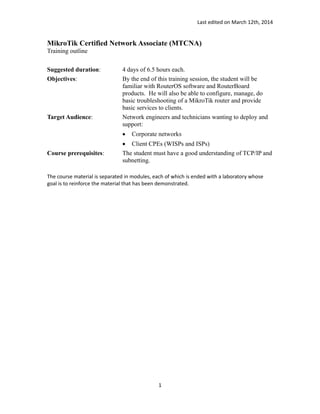
MikroTik Certified Network Associate (MTCNA)
Training outline
Suggested duration: 4 days of 6.5 hours each.
Objectives: By the end of this training session, the student will be
familiar with RouterOS software and RouterBoard
products. He will also be able to configure, manage, do
basic troubleshooting of a MikroTik router and provide
basic services to clients.
Target Audience: Network engineers and technicians wanting to deploy and
support:
 Corporate networks
 Client CPEs (WISPs and ISPs)
Course prerequisites: The student must have a good understanding of TCP/IP and
subnetting.
The course material is separated in modules, each of which is ended with a laboratory whose
goal is to reinforce the material that has been demonstrated.
1
Last edited on March 12th, 2014
Title Objective
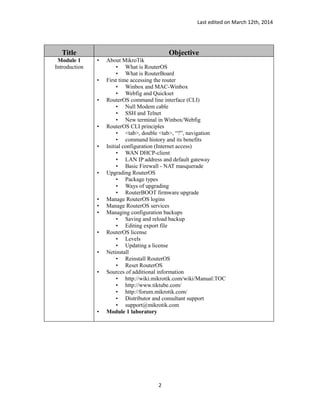
Module 1
Introduction
• About MikroTik
• What is RouterOS
• What is RouterBoard
• First time accessing the router
• Winbox and MAC-Winbox
• Webfig and Quickset
• RouterOS command line interface (CLI)
• Null Modem cable
• SSH and Telnet
• New terminal in Winbox/Webfig
• RouterOS CLI principles
• <tab>, double <tab>, “?”, navigation
• command history and its benefits
• Initial configuration (Internet access)
• WAN DHCP-client
• LAN IP address and default gateway
• Basic Firewall - NAT masquerade
• Upgrading RouterOS
• Package types
• Ways of upgrading
• RouterBOOT firmware upgrade
• Manage RouterOS logins
• Manage RouterOS services
• Managing configuration backups
• Saving and reload backup
• Editing export file
• RouterOS license
• Levels
• Updating a license
• Netinstall
• Reinstall RouterOS
• Reset RouterOS
• Sources of additional information
• http://wiki.mikrotik.com/wiki/Manual:TOC
• http://www.tiktube.com/
• http://forum.mikrotik.com/
• Distributor and consultant support
• support@mikrotik.com
• Module 1 laboratory
2
Last edited on March 12th, 2014
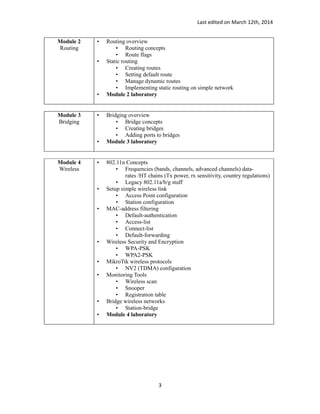
Module 2
Routing
• Routing overview
• Routing concepts
• Route flags
• Static routing
• Creating routes
• Setting default route
• Manage dynamic routes
• Implementing static routing on simple network
• Module 2 laboratory
Module 3
Bridging
• Bridging overview
• Bridge concepts
• Creating bridges
• Adding ports to bridges
• Module 3 laboratory
Module 4
Wireless
• 802.11n Concepts
• Frequencies (bands, channels, advanced channels) data-
rates /HT chains (Tx power, rx sensitivity, country regulations)
• Legacy 802.11a/b/g stuff
• Setup simple wireless link
• Access Point configuration
• Station configuration
• MAC-address filtering
• Default-authentication
• Access-list
• Connect-list
• Default-forwarding
• Wireless Security and Encryption
• WPA-PSK
• WPA2-PSK
• MikroTik wireless protocols
• NV2 (TDMA) configuration
• Monitoring Tools
• Wireless scan
• Snooper
• Registration table
• Bridge wireless networks
• Station-bridge
• Module 4 laboratory
3
Last edited on March 12th, 2014
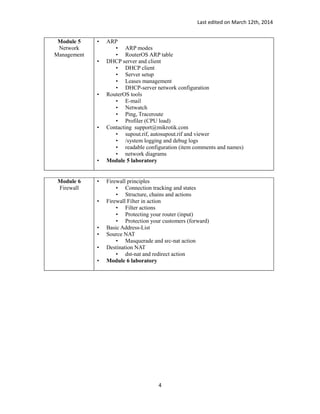
Module 5
Network
Management
• ARP
• ARP modes
• RouterOS ARP table
• DHCP server and client
• DHCP client
• Server setup
• Leases management
• DHCP-server network configuration
• RouterOS tools
• E-mail
• Netwatch
• Ping, Traceroute
• Profiler (CPU load)
• Contacting support@mikrotik.com
• supout.rif, autosupout.rif and viewer
• /system logging and debug logs
• readable configuration (item comments and names)
• network diagrams
• Module 5 laboratory
Module 6
Firewall
• Firewall principles
• Connection tracking and states
• Structure, chains and actions
• Firewall Filter in action
• Filter actions
• Protecting your router (input)
• Protection your customers (forward)
• Basic Address-List
• Source NAT
• Masquerade and src-nat action
• Destination NAT
• dst-nat and redirect action
• Module 6 laboratory
4
Last edited on March 12th, 2014
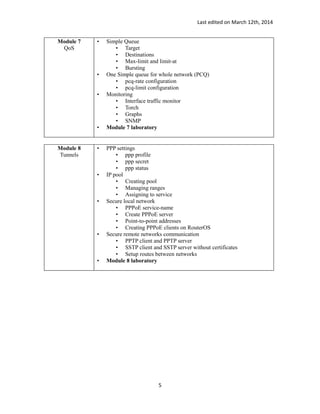
Module 7
QoS
• Simple Queue
• Target
• Destinations
• Max-limit and limit-at
• Bursting
• One Simple queue for whole network (PCQ)
• pcq-rate configuration
• pcq-limit configuration
• Monitoring
• Interface traffic monitor
• Torch
• Graphs
• SNMP
• Module 7 laboratory
Module 8
Tunnels
• PPP settings
• ppp profile
• ppp secret
• ppp status
• IP pool
• Creating pool
• Managing ranges
• Assigning to service
• Secure local network
• PPPoE service-name
• Create PPPoE server
• Point-to-point addresses
• Creating PPPoE clients on RouterOS
• Secure remote networks communication
• PPTP client and PPTP server
• SSTP client and SSTP server without certificates
• Setup routes between networks
• Module 8 laboratory
5

MTCNA Training outline, Certified Network Associate (MTCNA)

  • 1.
    Last edited onMarch 12th, 2014 MikroTik Certified Network Associate (MTCNA) Training outline Suggested duration: 4 days of 6.5 hours each. Objectives: By the end of this training session, the student will be familiar with RouterOS software and RouterBoard products. He will also be able to configure, manage, do basic troubleshooting of a MikroTik router and provide basic services to clients. Target Audience: Network engineers and technicians wanting to deploy and support:  Corporate networks  Client CPEs (WISPs and ISPs) Course prerequisites: The student must have a good understanding of TCP/IP and subnetting. The course material is separated in modules, each of which is ended with a laboratory whose goal is to reinforce the material that has been demonstrated. 1
  • 2.
    Last edited onMarch 12th, 2014 Title Objective Module 1 Introduction • About MikroTik • What is RouterOS • What is RouterBoard • First time accessing the router • Winbox and MAC-Winbox • Webfig and Quickset • RouterOS command line interface (CLI) • Null Modem cable • SSH and Telnet • New terminal in Winbox/Webfig • RouterOS CLI principles • <tab>, double <tab>, “?”, navigation • command history and its benefits • Initial configuration (Internet access) • WAN DHCP-client • LAN IP address and default gateway • Basic Firewall - NAT masquerade • Upgrading RouterOS • Package types • Ways of upgrading • RouterBOOT firmware upgrade • Manage RouterOS logins • Manage RouterOS services • Managing configuration backups • Saving and reload backup • Editing export file • RouterOS license • Levels • Updating a license • Netinstall • Reinstall RouterOS • Reset RouterOS • Sources of additional information • http://wiki.mikrotik.com/wiki/Manual:TOC • http://www.tiktube.com/ • http://forum.mikrotik.com/ • Distributor and consultant support • support@mikrotik.com • Module 1 laboratory 2
  • 3.
    Last edited onMarch 12th, 2014 Module 2 Routing • Routing overview • Routing concepts • Route flags • Static routing • Creating routes • Setting default route • Manage dynamic routes • Implementing static routing on simple network • Module 2 laboratory Module 3 Bridging • Bridging overview • Bridge concepts • Creating bridges • Adding ports to bridges • Module 3 laboratory Module 4 Wireless • 802.11n Concepts • Frequencies (bands, channels, advanced channels) data- rates /HT chains (Tx power, rx sensitivity, country regulations) • Legacy 802.11a/b/g stuff • Setup simple wireless link • Access Point configuration • Station configuration • MAC-address filtering • Default-authentication • Access-list • Connect-list • Default-forwarding • Wireless Security and Encryption • WPA-PSK • WPA2-PSK • MikroTik wireless protocols • NV2 (TDMA) configuration • Monitoring Tools • Wireless scan • Snooper • Registration table • Bridge wireless networks • Station-bridge • Module 4 laboratory 3
  • 4.
    Last edited onMarch 12th, 2014 Module 5 Network Management • ARP • ARP modes • RouterOS ARP table • DHCP server and client • DHCP client • Server setup • Leases management • DHCP-server network configuration • RouterOS tools • E-mail • Netwatch • Ping, Traceroute • Profiler (CPU load) • Contacting support@mikrotik.com • supout.rif, autosupout.rif and viewer • /system logging and debug logs • readable configuration (item comments and names) • network diagrams • Module 5 laboratory Module 6 Firewall • Firewall principles • Connection tracking and states • Structure, chains and actions • Firewall Filter in action • Filter actions • Protecting your router (input) • Protection your customers (forward) • Basic Address-List • Source NAT • Masquerade and src-nat action • Destination NAT • dst-nat and redirect action • Module 6 laboratory 4
  • 5.
    Last edited onMarch 12th, 2014 Module 7 QoS • Simple Queue • Target • Destinations • Max-limit and limit-at • Bursting • One Simple queue for whole network (PCQ) • pcq-rate configuration • pcq-limit configuration • Monitoring • Interface traffic monitor • Torch • Graphs • SNMP • Module 7 laboratory Module 8 Tunnels • PPP settings • ppp profile • ppp secret • ppp status • IP pool • Creating pool • Managing ranges • Assigning to service • Secure local network • PPPoE service-name • Create PPPoE server • Point-to-point addresses • Creating PPPoE clients on RouterOS • Secure remote networks communication • PPTP client and PPTP server • SSTP client and SSTP server without certificates • Setup routes between networks • Module 8 laboratory 5