1© Copyright 2010 EMC Corporation. All rights reserved.
Data Centre
Storage Essentials
Eng Kong Ooi
Specialist TC
EMC SEA
2© Copyright 2010 EMC Corporation. All rights reserved.
Welcome
VMware Partners
EMC Partners
3© Copyright 2010 EMC Corporation. All rights reserved.
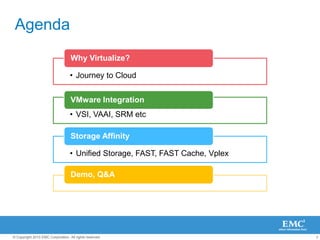
Agenda
• Journey to Cloud
Why Virtualize?
• VSI, VAAI, SRM etc
VMware Integration
• Unified Storage, FAST, FAST Cache, Vplex
Storage Affinity
Demo, Q&A
4© Copyright 2010 EMC Corporation. All rights reserved.
Why Virtualized?
5© Copyright 2010 EMC Corporation. All rights reserved.
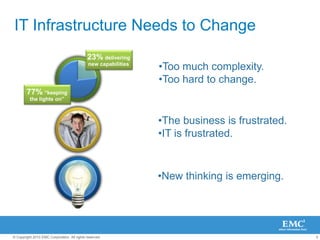
IT Infrastructure Needs to Change
•Too much complexity.
•Too hard to change.
•The business is frustrated.
•IT is frustrated.
•New thinking is emerging.
23% delivering
new capabilities
77% “keeping
the lights on”
42%
Infrastructure
Maintenance
6© Copyright 2010 EMC Corporation. All rights reserved.
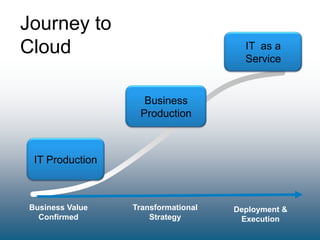
Journey to
Cloud
Business Value
Confirmed
Transformational
Strategy
Deployment &
Execution
Cloud
Computing
IT Production
Business
Production
IT as a
Service
7© Copyright 2010 EMC Corporation. All rights reserved.
VMware Integration
8© Copyright 2010 EMC Corporation. All rights reserved.
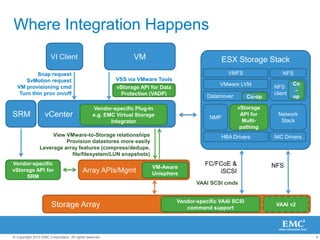
Where Integration Happens
FC/FCoE &
iSCSIArray APIs/Mgmt
vCenter
VAAI SCSI cmds
ESX Storage Stack
Datamover
Vendor-specific Plug-In
e.g. EMC Virtual Storage
Integrator
View VMware-to-Storage relationships
Provision datastores more easily
Leverage array features (compress/dedupe,
file/filesystem/LUN snapshots)
VI Client VM
Storage Array
VMFS NFS
NFS
client
Network
Stack
VMware LVM
HBA Drivers
VSS via VMware Tools
Snap request
SvMotion request
VM provisioning cmd
Turn thin prov on/off
Vendor-specific VAAI SCSI
command support
vStorage
API for
Multi-
pathing
NMP
VAAI v2
NFS
NIC Drivers
vStorage API for Data
Protection (VADP)
Vendor-specific
vStorage API for
SRM
SRM
VM-Aware
Unisphere
Co-op
Co
-
op
9© Copyright 2010 EMC Corporation. All rights reserved.
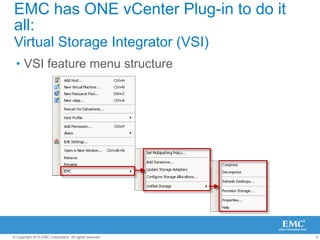
EMC has ONE vCenter Plug-in to do it
all:
Virtual Storage Integrator (VSI)
• VSI feature menu structure
10© Copyright 2010 EMC Corporation. All rights reserved.
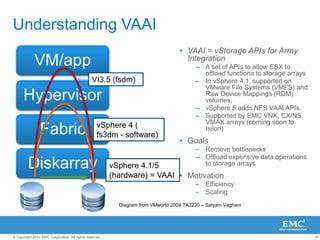
Understanding VAAI
• VAAI = vStorage APIs for Array
Integration
– A set of APIs to allow ESX to
offload functions to storage arrays
– In vSphere 4.1, supported on
VMware File Systems (VMFS) and
Raw Device Mappings (RDM)
volumes,
– vSphere 5 adds NFS VAAI APIs.
– Supported by EMC VNX, CX/NS,
VMAX arrays (coming soon to
Isilon)
• Goals
– Remove bottlenecks
– Offload expensive data operations
to storage arrays
• Motivation
– Efficiency
– Scaling
VM/app
Hypervisor
Fabric
Diskarray
VI3.5 (fsdm)
vSphere 4 (
fs3dm - software)
vSphere 4.1/5
(hardware) = VAAI
Diagram from VMworld 2009 TA3220 – Satyam Vaghani
11© Copyright 2010 EMC Corporation. All rights reserved.
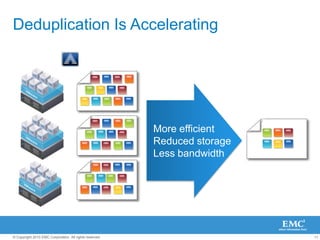
Deduplication Is Accelerating
More efficient
Reduced storage
Less bandwidth
12© Copyright 2010 EMC Corporation. All rights reserved.
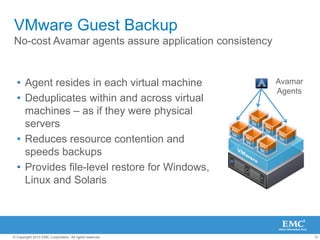
VMware Guest Backup
No-cost Avamar agents assure application consistency
• Agent resides in each virtual machine
• Deduplicates within and across virtual
machines – as if they were physical
servers
• Reduces resource contention and
speeds backups
• Provides file-level restore for Windows,
Linux and Solaris
Avamar
Agents
13© Copyright 2010 EMC Corporation. All rights reserved.
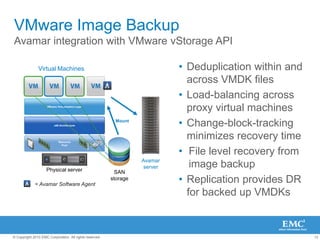
VMware Image Backup
Avamar integration with VMware vStorage API
Resource
Pool
VMware Virtualization Layer
x86 Architecture
Physical server
Virtual Machines
SAN
storage
Avamar
server
Mount
= Avamar Software Agent
• Deduplication within and
across VMDK files
• Load-balancing across
proxy virtual machines
• Change-block-tracking
minimizes recovery time
• File level recovery from
image backup
• Replication provides DR
for backed up VMDKs
14© Copyright 2010 EMC Corporation. All rights reserved.
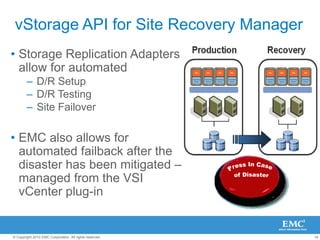
vStorage API for Site Recovery Manager
• Storage Replication Adapters
allow for automated
– D/R Setup
– D/R Testing
– Site Failover
• EMC also allows for
automated failback after the
disaster has been mitigated –
managed from the VSI
vCenter plug-in
15© Copyright 2010 EMC Corporation. All rights reserved.
Storage Essentials
16© Copyright 2010 EMC Corporation. All rights reserved.
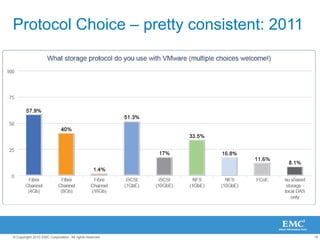
Protocol Choice – pretty consistent: 2011
17© Copyright 2010 EMC Corporation. All rights reserved.
FCiSCSI NAS
Virtualised Data Center
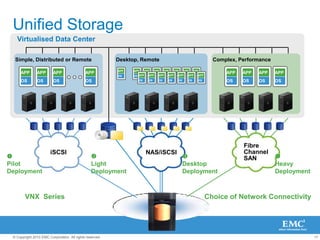
Unified Storage
Simple, Distributed or Remote
iSCSI
APP
OS
APP
OS
APP
OS
APP
OS
Desktop, Remote
APP
OS
APP
OS
APP
OS
APP
OS
APP
OS
APP
OS
APP
OS
APP
OS APP
OS
APP
OS
APP
OS
APP
OS
APP
OS
APP
OS
APP
OS
NAS/iSCSI
Complex, Performance
Fibre
Channel
SAN
APP
OS
APP
OS
APP
OS
APP
OS
VNX Series Choice of Network Connectivity

Pilot
Deployment

Heavy
Deployment

Desktop
Deployment

Light
Deployment
18© Copyright 2010 EMC Corporation. All rights reserved.
What cool Storage
stuff are people
using?
19© Copyright 2010 EMC Corporation. All rights reserved.
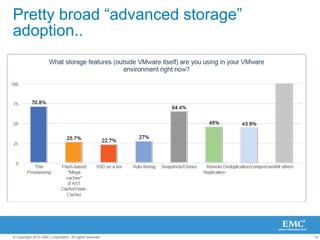
Pretty broad ―advanced storage‖
adoption..
21© Copyright 2010 EMC Corporation. All rights reserved.
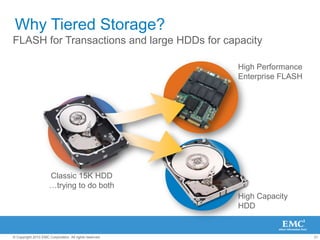
High Performance
Enterprise FLASH
High Capacity
HDD
Why Tiered Storage?
FLASH for Transactions and large HDDs for capacity
Classic 15K HDD
…trying to do both
22© Copyright 2010 EMC Corporation. All rights reserved.
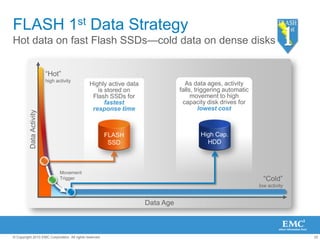
FLASH 1st Data Strategy
Hot data on fast Flash SSDs—cold data on dense disks
―Hot‖
high activity
As data ages, activity
falls, triggering automatic
movement to high
capacity disk drives for
lowest cost
Highly active data
is stored on
Flash SSDs for
fastest
response time
Movement
Trigger
FLASH
SSD
―Cold‖
low activity
DataActivity
High Cap.
HDD
Data Age
23© Copyright 2010 EMC Corporation. All rights reserved.
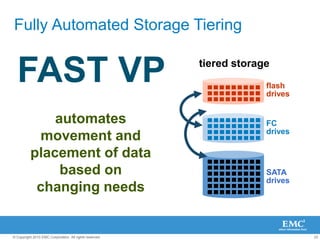
Fully Automated Storage Tiering
SATA
drives
FC
drives
flash
drives
tiered storage
automates
movement and
placement of data
based on
changing needs
FAST VP
24© Copyright 2010 EMC Corporation. All rights reserved.
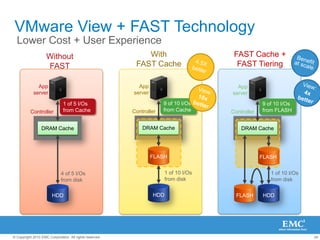
HDD
FAST Cache +
FAST Tiering
App
server
Controller
DRAM Cache
FLASH
9 of 10 I/Os
from FLASH
FLASH
1 of 10 I/Os
from disk
HDD
With
FAST Cache
App
server
Controller
DRAM Cache
FLASH
1 of 10 I/Os
from disk
9 of 10 I/Os
from Cache
HDD
VMware View + FAST Technology
Lower Cost + User Experience
DRAM Cache
4 of 5 I/Os
from disk
Without
FAST
App
server
Controller
1 of 5 I/Os
from Cache
25© Copyright 2010 EMC Corporation. All rights reserved.
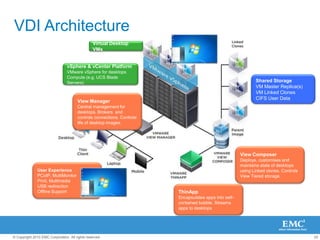
VDI Architecture
View Manager
Central management for
desktops. Brokers and
controls connections. Controls
life of desktop images.
View Composer
Deploys, customises and
maintains state of desktops
using Linked clones. Controls
View Tiered storage.
ThinApp
Encapsulates apps into self-
contained bubble. Streams
apps to desktops
vSphere & vCenter Platform
VMware vSphere for desktops
Compute (e.g. UCS Blade
Servers)
Virtual Desktop
VMs
User Experience
PCoIP, MultiMonitor
Print, Multimedia
USB redirection
Offline Support
Shared Storage
VM Master Replica(s)
VM Linked Clones
CIFS User Data
26© Copyright 2010 EMC Corporation. All rights reserved.
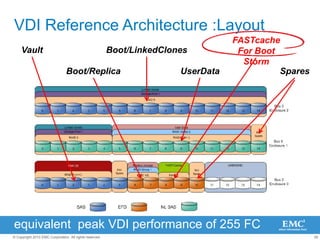
VDI Reference Architecture :Layout
Vault
Boot/Replica
FASTcache
For Boot
Storm
Boot/LinkedClones
UserData Spares
equivalent peak VDI performance of 255 FC
27© Copyright 2010 EMC Corporation. All rights reserved.
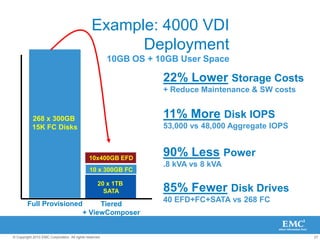
Example: 4000 VDI
Deployment
10GB OS + 10GB User Space
Full Provisioned
268 x 300GB
15K FC Disks
Tiered
+ ViewComposer
10 x 300GB FC
10x400GB EFD
20 x 1TB
SATA
11% More Disk IOPS
53,000 vs 48,000 Aggregate IOPS
85% Fewer Disk Drives
40 EFD+FC+SATA vs 268 FC
90% Less Power
.8 kVA vs 8 kVA
22% Lower Storage Costs
+ Reduce Maintenance & SW costs
28© Copyright 2010 EMC Corporation. All rights reserved.
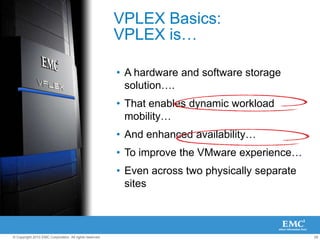
VPLEX Basics:
VPLEX is…
• A hardware and software storage
solution….
• That enables dynamic workload
mobility…
• And enhanced availability…
• To improve the VMware experience…
• Even across two physically separate
sites
29© Copyright 2010 EMC Corporation. All rights reserved.
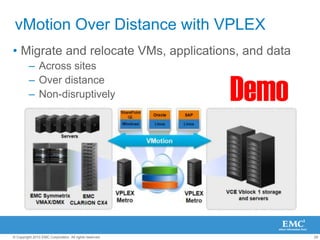
vMotion Over Distance with VPLEX
• Migrate and relocate VMs, applications, and data
– Across sites
– Over distance
– Non-disruptively Demo
30© Copyright 2010 EMC Corporation. All rights reserved.
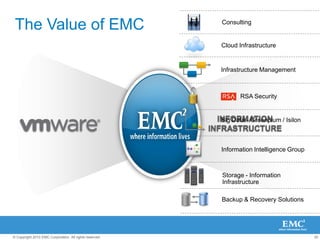
The Value of EMC
INFORMATION
INFRASTRUCTURE
INFORMATION
INFRASTRUCTURE
RSA Security
Backup & Recovery Solutions
Big Data - Greenplum / Isilon
Infrastructure Management
Storage - Information
Infrastructure
Cloud Infrastructure
Information Intelligence Group
Consulting
31© Copyright 2010 EMC Corporation. All rights reserved.
THANK YOU

Presentation integration vmware with emc storage

  • 1.
    1© Copyright 2010EMC Corporation. All rights reserved. Data Centre Storage Essentials Eng Kong Ooi Specialist TC EMC SEA
  • 2.
    2© Copyright 2010EMC Corporation. All rights reserved. Welcome VMware Partners EMC Partners
  • 3.
    3© Copyright 2010EMC Corporation. All rights reserved. Agenda • Journey to Cloud Why Virtualize? • VSI, VAAI, SRM etc VMware Integration • Unified Storage, FAST, FAST Cache, Vplex Storage Affinity Demo, Q&A
  • 4.
    4© Copyright 2010EMC Corporation. All rights reserved. Why Virtualized?
  • 5.
    5© Copyright 2010EMC Corporation. All rights reserved. IT Infrastructure Needs to Change •Too much complexity. •Too hard to change. •The business is frustrated. •IT is frustrated. •New thinking is emerging. 23% delivering new capabilities 77% “keeping the lights on” 42% Infrastructure Maintenance
  • 6.
    6© Copyright 2010EMC Corporation. All rights reserved. Journey to Cloud Business Value Confirmed Transformational Strategy Deployment & Execution Cloud Computing IT Production Business Production IT as a Service
  • 7.
    7© Copyright 2010EMC Corporation. All rights reserved. VMware Integration
  • 8.
    8© Copyright 2010EMC Corporation. All rights reserved. Where Integration Happens FC/FCoE & iSCSIArray APIs/Mgmt vCenter VAAI SCSI cmds ESX Storage Stack Datamover Vendor-specific Plug-In e.g. EMC Virtual Storage Integrator View VMware-to-Storage relationships Provision datastores more easily Leverage array features (compress/dedupe, file/filesystem/LUN snapshots) VI Client VM Storage Array VMFS NFS NFS client Network Stack VMware LVM HBA Drivers VSS via VMware Tools Snap request SvMotion request VM provisioning cmd Turn thin prov on/off Vendor-specific VAAI SCSI command support vStorage API for Multi- pathing NMP VAAI v2 NFS NIC Drivers vStorage API for Data Protection (VADP) Vendor-specific vStorage API for SRM SRM VM-Aware Unisphere Co-op Co - op
  • 9.
    9© Copyright 2010EMC Corporation. All rights reserved. EMC has ONE vCenter Plug-in to do it all: Virtual Storage Integrator (VSI) • VSI feature menu structure
  • 10.
    10© Copyright 2010EMC Corporation. All rights reserved. Understanding VAAI • VAAI = vStorage APIs for Array Integration – A set of APIs to allow ESX to offload functions to storage arrays – In vSphere 4.1, supported on VMware File Systems (VMFS) and Raw Device Mappings (RDM) volumes, – vSphere 5 adds NFS VAAI APIs. – Supported by EMC VNX, CX/NS, VMAX arrays (coming soon to Isilon) • Goals – Remove bottlenecks – Offload expensive data operations to storage arrays • Motivation – Efficiency – Scaling VM/app Hypervisor Fabric Diskarray VI3.5 (fsdm) vSphere 4 ( fs3dm - software) vSphere 4.1/5 (hardware) = VAAI Diagram from VMworld 2009 TA3220 – Satyam Vaghani
  • 11.
    11© Copyright 2010EMC Corporation. All rights reserved. Deduplication Is Accelerating More efficient Reduced storage Less bandwidth
  • 12.
    12© Copyright 2010EMC Corporation. All rights reserved. VMware Guest Backup No-cost Avamar agents assure application consistency • Agent resides in each virtual machine • Deduplicates within and across virtual machines – as if they were physical servers • Reduces resource contention and speeds backups • Provides file-level restore for Windows, Linux and Solaris Avamar Agents
  • 13.
    13© Copyright 2010EMC Corporation. All rights reserved. VMware Image Backup Avamar integration with VMware vStorage API Resource Pool VMware Virtualization Layer x86 Architecture Physical server Virtual Machines SAN storage Avamar server Mount = Avamar Software Agent • Deduplication within and across VMDK files • Load-balancing across proxy virtual machines • Change-block-tracking minimizes recovery time • File level recovery from image backup • Replication provides DR for backed up VMDKs
  • 14.
    14© Copyright 2010EMC Corporation. All rights reserved. vStorage API for Site Recovery Manager • Storage Replication Adapters allow for automated – D/R Setup – D/R Testing – Site Failover • EMC also allows for automated failback after the disaster has been mitigated – managed from the VSI vCenter plug-in
  • 15.
    15© Copyright 2010EMC Corporation. All rights reserved. Storage Essentials
  • 16.
    16© Copyright 2010EMC Corporation. All rights reserved. Protocol Choice – pretty consistent: 2011
  • 17.
    17© Copyright 2010EMC Corporation. All rights reserved. FCiSCSI NAS Virtualised Data Center Unified Storage Simple, Distributed or Remote iSCSI APP OS APP OS APP OS APP OS Desktop, Remote APP OS APP OS APP OS APP OS APP OS APP OS APP OS APP OS APP OS APP OS APP OS APP OS APP OS APP OS APP OS NAS/iSCSI Complex, Performance Fibre Channel SAN APP OS APP OS APP OS APP OS VNX Series Choice of Network Connectivity  Pilot Deployment  Heavy Deployment  Desktop Deployment  Light Deployment
  • 18.
    18© Copyright 2010EMC Corporation. All rights reserved. What cool Storage stuff are people using?
  • 19.
    19© Copyright 2010EMC Corporation. All rights reserved. Pretty broad ―advanced storage‖ adoption..
  • 20.
    21© Copyright 2010EMC Corporation. All rights reserved. High Performance Enterprise FLASH High Capacity HDD Why Tiered Storage? FLASH for Transactions and large HDDs for capacity Classic 15K HDD …trying to do both
  • 21.
    22© Copyright 2010EMC Corporation. All rights reserved. FLASH 1st Data Strategy Hot data on fast Flash SSDs—cold data on dense disks ―Hot‖ high activity As data ages, activity falls, triggering automatic movement to high capacity disk drives for lowest cost Highly active data is stored on Flash SSDs for fastest response time Movement Trigger FLASH SSD ―Cold‖ low activity DataActivity High Cap. HDD Data Age
  • 22.
    23© Copyright 2010EMC Corporation. All rights reserved. Fully Automated Storage Tiering SATA drives FC drives flash drives tiered storage automates movement and placement of data based on changing needs FAST VP
  • 23.
    24© Copyright 2010EMC Corporation. All rights reserved. HDD FAST Cache + FAST Tiering App server Controller DRAM Cache FLASH 9 of 10 I/Os from FLASH FLASH 1 of 10 I/Os from disk HDD With FAST Cache App server Controller DRAM Cache FLASH 1 of 10 I/Os from disk 9 of 10 I/Os from Cache HDD VMware View + FAST Technology Lower Cost + User Experience DRAM Cache 4 of 5 I/Os from disk Without FAST App server Controller 1 of 5 I/Os from Cache
  • 24.
    25© Copyright 2010EMC Corporation. All rights reserved. VDI Architecture View Manager Central management for desktops. Brokers and controls connections. Controls life of desktop images. View Composer Deploys, customises and maintains state of desktops using Linked clones. Controls View Tiered storage. ThinApp Encapsulates apps into self- contained bubble. Streams apps to desktops vSphere & vCenter Platform VMware vSphere for desktops Compute (e.g. UCS Blade Servers) Virtual Desktop VMs User Experience PCoIP, MultiMonitor Print, Multimedia USB redirection Offline Support Shared Storage VM Master Replica(s) VM Linked Clones CIFS User Data
  • 25.
    26© Copyright 2010EMC Corporation. All rights reserved. VDI Reference Architecture :Layout Vault Boot/Replica FASTcache For Boot Storm Boot/LinkedClones UserData Spares equivalent peak VDI performance of 255 FC
  • 26.
    27© Copyright 2010EMC Corporation. All rights reserved. Example: 4000 VDI Deployment 10GB OS + 10GB User Space Full Provisioned 268 x 300GB 15K FC Disks Tiered + ViewComposer 10 x 300GB FC 10x400GB EFD 20 x 1TB SATA 11% More Disk IOPS 53,000 vs 48,000 Aggregate IOPS 85% Fewer Disk Drives 40 EFD+FC+SATA vs 268 FC 90% Less Power .8 kVA vs 8 kVA 22% Lower Storage Costs + Reduce Maintenance & SW costs
  • 27.
    28© Copyright 2010EMC Corporation. All rights reserved. VPLEX Basics: VPLEX is… • A hardware and software storage solution…. • That enables dynamic workload mobility… • And enhanced availability… • To improve the VMware experience… • Even across two physically separate sites
  • 28.
    29© Copyright 2010EMC Corporation. All rights reserved. vMotion Over Distance with VPLEX • Migrate and relocate VMs, applications, and data – Across sites – Over distance – Non-disruptively Demo
  • 29.
    30© Copyright 2010EMC Corporation. All rights reserved. The Value of EMC INFORMATION INFRASTRUCTURE INFORMATION INFRASTRUCTURE RSA Security Backup & Recovery Solutions Big Data - Greenplum / Isilon Infrastructure Management Storage - Information Infrastructure Cloud Infrastructure Information Intelligence Group Consulting
  • 30.
    31© Copyright 2010EMC Corporation. All rights reserved. THANK YOU