Ring Documentation, Release 1.2
15.4 Using For in to modify lists
When we use (For in) we get items by reference.
This means that we can read/edit items inside the loop.
Example:
aList = 1:5 # create list contains numbers from 1 to 5
# replace list numbers with strings
for x in aList
switch x
on 1 x = "one"
on 2 x = "two"
on 3 x = "three"
on 4 x = "four"
on 5 x = "five"
off
next
see aList # print the list items
15.5 Do Again Loop
Syntax:
do
Block of statements
again expression
Example:
x = 1
do
see x + nl
x++
again x <= 10
15.6 Exit Command
Used to go outside one or more of loops.
Syntax:
exit [expression] # inside loop
Example:
for x = 1 to 10
see x + nl
if x = 5 exit ok
next
15.4. Using For in to modify lists 70
Ring Documentation, Release 1.2
15.7 Exit from two loops
The next example presents how to use the exit command to exit from two loops in one jump.
Example:
for x = 1 to 10
for y = 1 to 10
see "x=" + x + " y=" + y + nl
if x = 3 and y = 5
exit 2 # exit from 2 loops
ok
next
next
• Loop Command
Used to jump to the next iteration in the loop.
Syntax:
loop [expression] # inside loop
Example:
for x = 1 to 10
if x = 3
see "Number Three" + nl
loop
ok
see x + nl
next
15.8 Exit/Loop inside sub functions
While we are inside a loop, we can call a function then use the exit and/or loop command inside that function and the
command will work on the outer loop.
Example:
# print numbers from 1 to 10 except number 5.
for x = 1 to 10
ignore(x,5)
see x + nl
next
func ignore x,y
if x = y
loop
ok
15.9 Short-circuit evaluation
The logical operators and/or follow the short-circuit evaluation.
15.7. Exit from two loops 71
Ring Documentation, Release 1.2
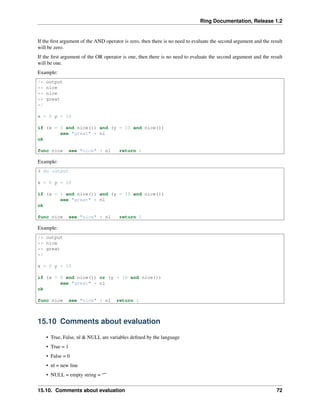
If the first argument of the AND operator is zero, then there is no need to evaluate the second argument and the result
will be zero.
If the first argument of the OR operator is one, then there is no need to evaluate the second argument and the result
will be one.
Example:
/* output
** nice
** nice
** great
*/
x = 0 y = 10
if (x = 0 and nice()) and (y = 10 and nice())
see "great" + nl
ok
func nice see "nice" + nl return 1
Example:
# No output
x = 0 y = 10
if (x = 1 and nice()) and (y = 10 and nice())
see "great" + nl
ok
func nice see "nice" + nl return 1
Example:
/* output
** nice
** great
*/
x = 0 y = 10
if (x = 0 and nice()) or (y = 10 and nice())
see "great" + nl
ok
func nice see "nice" + nl return 1
15.10 Comments about evaluation
• True, False, nl & NULL are variables defined by the language
• True = 1
• False = 0
• nl = new line
• NULL = empty string = “”
15.10. Comments about evaluation 72
Ring Documentation, Release 1.2
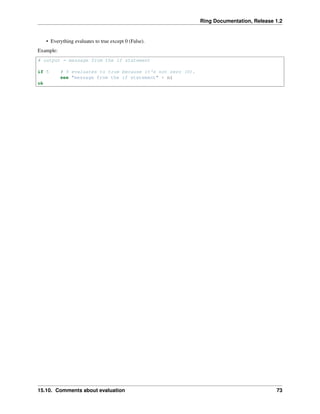
• Everything evaluates to true except 0 (False).
Example:
# output = message from the if statement
if 5 # 5 evaluates to true because it's not zero (0).
see "message from the if statement" + nl
ok
15.10. Comments about evaluation 73
CHAPTER
SIXTEEN
CONTROL STRUCTURES - SECOND STYLE
In this chapter we are going to learn about the second style of control structures provided by the Ring programming
language.
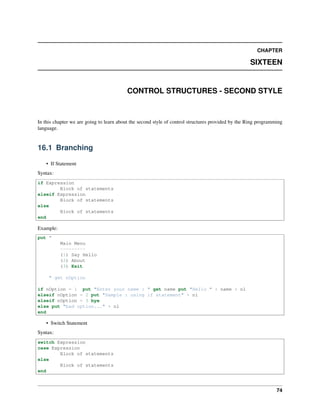
16.1 Branching
• If Statement
Syntax:
if Expression
Block of statements
elseif Expression
Block of statements
else
Block of statements
end
Example:
put "
Main Menu
---------
(1) Say Hello
(2) About
(3) Exit
" get nOption
if nOption = 1 put "Enter your name : " get name put "Hello " + name + nl
elseif nOption = 2 put "Sample : using if statement" + nl
elseif nOption = 3 bye
else put "bad option..." + nl
end
• Switch Statement
Syntax:
switch Expression
case Expression
Block of statements
else
Block of statements
end
74
Ring Documentation, Release 1.2
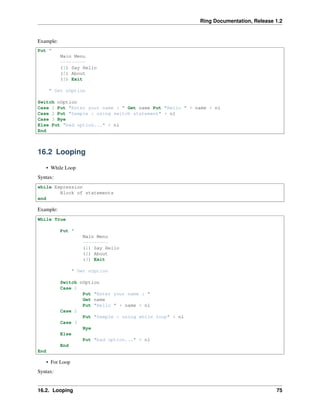
Example:
Put "
Main Menu
---------
(1) Say Hello
(2) About
(3) Exit
" Get nOption
Switch nOption
Case 1 Put "Enter your name : " Get name Put "Hello " + name + nl
Case 2 Put "Sample : using switch statement" + nl
Case 3 Bye
Else Put "bad option..." + nl
End
16.2 Looping
• While Loop
Syntax:
while Expression
Block of statements
end
Example:
While True
Put "
Main Menu
---------
(1) Say Hello
(2) About
(3) Exit
" Get nOption
Switch nOption
Case 1
Put "Enter your name : "
Get name
Put "Hello " + name + nl
Case 2
Put "Sample : using while loop" + nl
Case 3
Bye
Else
Put "bad option..." + nl
End
End
• For Loop
Syntax:
16.2. Looping 75
Ring Documentation, Release 1.2
for identifier=expression to expression [step expression]
Block of statements
end
Example:
# print numbers from 1 to 10
for x = 1 to 10 put x + nl end
Example:
# Dynamic loop
Put "Start : " get nStart
Put "End : " get nEnd
Put "Step : " get nStep
For x = nStart to nEnd Step nStep
Put x + nl
End
Example:
# print even numbers from 0 to 10
for x = 0 to 10 step 2
Put x + nl
end
Example:
# print even numbers from 10 to 0
for x = 10 to 0 step -2
put x + nl
end
• For in Loop
Syntax:
for identifier in List/String [step expression]
Block of statements
end
Example:
aList = 1:10 # create list contains numbers from 1 to 10
for x in aList put x + nl end # print numbers from 1 to 10
16.3 Exceptions
try
Block of statements
catch
Block of statements
end
16.3. Exceptions 76
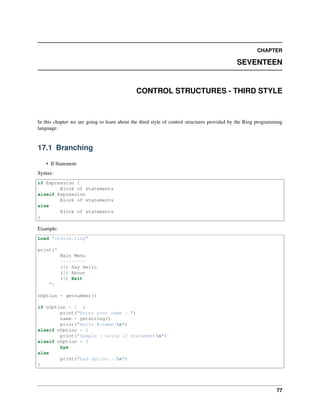
CHAPTER
SEVENTEEN
CONTROL STRUCTURES - THIRD STYLE
In this chapter we are going to learn about the third style of control structures provided by the Ring programming
language.
17.1 Branching
• If Statement
Syntax:
if Expression {
Block of statements
elseif Expression
Block of statements
else
Block of statements
}
Example:
Load "stdlib.ring"
print("
Main Menu
---------
(1) Say Hello
(2) About
(3) Exit
")
nOption = getnumber()
if nOption = 1 {
print("Enter your name : ")
name = getstring()
print("Hello #{name}n")
elseif nOption = 2
print("Sample : using if statementn")
elseif nOption = 3
bye
else
print("bad option...n")
}
77
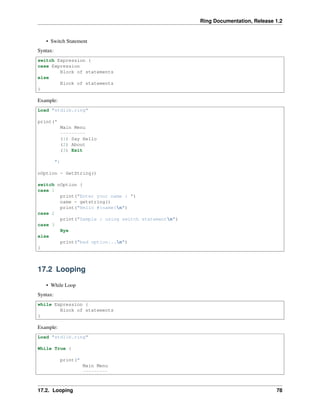
Ring Documentation, Release 1.2
• Switch Statement
Syntax:
switch Expression {
case Expression
Block of statements
else
Block of statements
}
Example:
Load "stdlib.ring"
print("
Main Menu
---------
(1) Say Hello
(2) About
(3) Exit
")
nOption = GetString()
switch nOption {
case 1
print("Enter your name : ")
name = getstring()
print("Hello #{name}n")
case 2
print("Sample : using switch statementn")
case 3
Bye
else
print("bad option...n")
}
17.2 Looping
• While Loop
Syntax:
while Expression {
Block of statements
}
Example:
Load "stdlib.ring"
While True {
print("
Main Menu
---------
17.2. Looping 78
Ring Documentation, Release 1.2
(1) Say Hello
(2) About
(3) Exit
")
nOption = GetString()
switch nOption {
case 1
print("Enter your name : ")
name = getstring()
print("Hello #{name}n")
case 2
print("Sample : using switch statementn")
case 3
Bye
else
print("bad option...n")
}
}
• For Loop
Syntax:
for identifier=expression to expression [step expression] {
Block of statements
}
Example:
# print numbers from 1 to 10
load "stdlib.ring"
for x = 1 to 10 {
print("#{x}n")
}
Example:
load "stdlib.ring"
# Dynamic loop
print("Start : ") nStart = getnumber()
print("End : ") nEnd = getnumber()
print("Step : ") nStep = getnumber()
for x = nStart to nEnd step nStep {
print("#{x}n")
}
Example:
load "stdlib.ring"
# print even numbers from 0 to 10
for x = 0 to 10 step 2 {
print("#{x}n")
}
17.2. Looping 79

The Ring programming language version 1.2 book - Part 10 of 84

  • 1.
    Ring Documentation, Release1.2 15.4 Using For in to modify lists When we use (For in) we get items by reference. This means that we can read/edit items inside the loop. Example: aList = 1:5 # create list contains numbers from 1 to 5 # replace list numbers with strings for x in aList switch x on 1 x = "one" on 2 x = "two" on 3 x = "three" on 4 x = "four" on 5 x = "five" off next see aList # print the list items 15.5 Do Again Loop Syntax: do Block of statements again expression Example: x = 1 do see x + nl x++ again x <= 10 15.6 Exit Command Used to go outside one or more of loops. Syntax: exit [expression] # inside loop Example: for x = 1 to 10 see x + nl if x = 5 exit ok next 15.4. Using For in to modify lists 70
  • 2.
    Ring Documentation, Release1.2 15.7 Exit from two loops The next example presents how to use the exit command to exit from two loops in one jump. Example: for x = 1 to 10 for y = 1 to 10 see "x=" + x + " y=" + y + nl if x = 3 and y = 5 exit 2 # exit from 2 loops ok next next • Loop Command Used to jump to the next iteration in the loop. Syntax: loop [expression] # inside loop Example: for x = 1 to 10 if x = 3 see "Number Three" + nl loop ok see x + nl next 15.8 Exit/Loop inside sub functions While we are inside a loop, we can call a function then use the exit and/or loop command inside that function and the command will work on the outer loop. Example: # print numbers from 1 to 10 except number 5. for x = 1 to 10 ignore(x,5) see x + nl next func ignore x,y if x = y loop ok 15.9 Short-circuit evaluation The logical operators and/or follow the short-circuit evaluation. 15.7. Exit from two loops 71
  • 3.
    Ring Documentation, Release1.2 If the first argument of the AND operator is zero, then there is no need to evaluate the second argument and the result will be zero. If the first argument of the OR operator is one, then there is no need to evaluate the second argument and the result will be one. Example: /* output ** nice ** nice ** great */ x = 0 y = 10 if (x = 0 and nice()) and (y = 10 and nice()) see "great" + nl ok func nice see "nice" + nl return 1 Example: # No output x = 0 y = 10 if (x = 1 and nice()) and (y = 10 and nice()) see "great" + nl ok func nice see "nice" + nl return 1 Example: /* output ** nice ** great */ x = 0 y = 10 if (x = 0 and nice()) or (y = 10 and nice()) see "great" + nl ok func nice see "nice" + nl return 1 15.10 Comments about evaluation • True, False, nl & NULL are variables defined by the language • True = 1 • False = 0 • nl = new line • NULL = empty string = “” 15.10. Comments about evaluation 72
  • 4.
    Ring Documentation, Release1.2 • Everything evaluates to true except 0 (False). Example: # output = message from the if statement if 5 # 5 evaluates to true because it's not zero (0). see "message from the if statement" + nl ok 15.10. Comments about evaluation 73
  • 5.
    CHAPTER SIXTEEN CONTROL STRUCTURES -SECOND STYLE In this chapter we are going to learn about the second style of control structures provided by the Ring programming language. 16.1 Branching • If Statement Syntax: if Expression Block of statements elseif Expression Block of statements else Block of statements end Example: put " Main Menu --------- (1) Say Hello (2) About (3) Exit " get nOption if nOption = 1 put "Enter your name : " get name put "Hello " + name + nl elseif nOption = 2 put "Sample : using if statement" + nl elseif nOption = 3 bye else put "bad option..." + nl end • Switch Statement Syntax: switch Expression case Expression Block of statements else Block of statements end 74
  • 6.
    Ring Documentation, Release1.2 Example: Put " Main Menu --------- (1) Say Hello (2) About (3) Exit " Get nOption Switch nOption Case 1 Put "Enter your name : " Get name Put "Hello " + name + nl Case 2 Put "Sample : using switch statement" + nl Case 3 Bye Else Put "bad option..." + nl End 16.2 Looping • While Loop Syntax: while Expression Block of statements end Example: While True Put " Main Menu --------- (1) Say Hello (2) About (3) Exit " Get nOption Switch nOption Case 1 Put "Enter your name : " Get name Put "Hello " + name + nl Case 2 Put "Sample : using while loop" + nl Case 3 Bye Else Put "bad option..." + nl End End • For Loop Syntax: 16.2. Looping 75
  • 7.
    Ring Documentation, Release1.2 for identifier=expression to expression [step expression] Block of statements end Example: # print numbers from 1 to 10 for x = 1 to 10 put x + nl end Example: # Dynamic loop Put "Start : " get nStart Put "End : " get nEnd Put "Step : " get nStep For x = nStart to nEnd Step nStep Put x + nl End Example: # print even numbers from 0 to 10 for x = 0 to 10 step 2 Put x + nl end Example: # print even numbers from 10 to 0 for x = 10 to 0 step -2 put x + nl end • For in Loop Syntax: for identifier in List/String [step expression] Block of statements end Example: aList = 1:10 # create list contains numbers from 1 to 10 for x in aList put x + nl end # print numbers from 1 to 10 16.3 Exceptions try Block of statements catch Block of statements end 16.3. Exceptions 76
  • 8.
    CHAPTER SEVENTEEN CONTROL STRUCTURES -THIRD STYLE In this chapter we are going to learn about the third style of control structures provided by the Ring programming language. 17.1 Branching • If Statement Syntax: if Expression { Block of statements elseif Expression Block of statements else Block of statements } Example: Load "stdlib.ring" print(" Main Menu --------- (1) Say Hello (2) About (3) Exit ") nOption = getnumber() if nOption = 1 { print("Enter your name : ") name = getstring() print("Hello #{name}n") elseif nOption = 2 print("Sample : using if statementn") elseif nOption = 3 bye else print("bad option...n") } 77
  • 9.
    Ring Documentation, Release1.2 • Switch Statement Syntax: switch Expression { case Expression Block of statements else Block of statements } Example: Load "stdlib.ring" print(" Main Menu --------- (1) Say Hello (2) About (3) Exit ") nOption = GetString() switch nOption { case 1 print("Enter your name : ") name = getstring() print("Hello #{name}n") case 2 print("Sample : using switch statementn") case 3 Bye else print("bad option...n") } 17.2 Looping • While Loop Syntax: while Expression { Block of statements } Example: Load "stdlib.ring" While True { print(" Main Menu --------- 17.2. Looping 78
  • 10.
    Ring Documentation, Release1.2 (1) Say Hello (2) About (3) Exit ") nOption = GetString() switch nOption { case 1 print("Enter your name : ") name = getstring() print("Hello #{name}n") case 2 print("Sample : using switch statementn") case 3 Bye else print("bad option...n") } } • For Loop Syntax: for identifier=expression to expression [step expression] { Block of statements } Example: # print numbers from 1 to 10 load "stdlib.ring" for x = 1 to 10 { print("#{x}n") } Example: load "stdlib.ring" # Dynamic loop print("Start : ") nStart = getnumber() print("End : ") nEnd = getnumber() print("Step : ") nStep = getnumber() for x = nStart to nEnd step nStep { print("#{x}n") } Example: load "stdlib.ring" # print even numbers from 0 to 10 for x = 0 to 10 step 2 { print("#{x}n") } 17.2. Looping 79