{{More}} Kibana 
@argv 
1
Who am I 
Perl Monger 
Author of《网站运维技术与实践 
》 
SRE Architect @sina.com 
weibo: @ARGV 
github: 
https://github.com/chenryn 
blog: http://chenlinux.com 
2
ELK and I 
Using ELK from 2012 
<Logstash> at slideshare.net had 18232 views 
3.3 & 4.2 chapters in my Book 
2 ebook at gitbook.io: 
[logstash best practice](https://www.gitbook.io/book/chenryn/logstash-best-practice) 
[kibana Chinese Guide](https://www.gitbook.io/book/chenryn/kibana-guide-cn) 
kibana fork: <https://github.com/chenryn/kibana> 
3
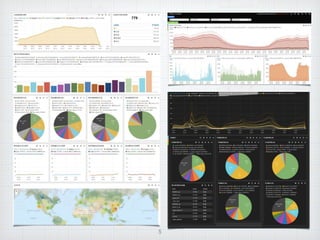
Kibana Intro 
angular.js(framework) + jquery.flot(visualize) + 
elastic.js(search) 
time-based comparisons 
make sense of your data 
empower more team members 
flexible interface, easy to share 
powerful search syntax 
easy set up 
4
5
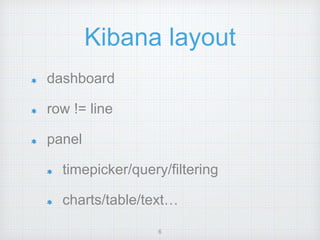
Kibana layout 
dashboard 
row != line 
panel 
timepicker/query/filtering 
charts/table/text… 
6
histogram 
@timestamp based 
count/mean/total 
bar/lines/stack/percent 
selected queries 
7
table 
paging 
fields.list 
highlight 
sortable 
micro analysis 
8
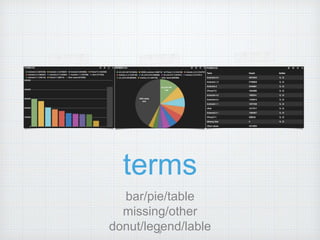
terms 
bar/pie/table 
missing/other 
donut/legend/lable 9
TopN query 
query termfacets before 
panel rendering 
multi-facet with filtering 
each term 
10
Dynamic Kibana 
logstash.json 
http://yourserver/index.html#/dashboard/fil 
e/logstash.json?query=status:200&from= 
7d 
logstash.js 
http://yourserver/index.html#/dashboard/s 
cript/logstash.js?query=status:403,status: 
404&from=7d 
11
Game Over? 
12
No, We need more! 
13
Range panel 
No range panel in kibana3 
well, it’s in kibana4 now~ 
DIY beginning 
14
findsearch range facets in ES doc. 
√ 
find pie charts code in Kibana. √ 
copy terms/, paste to range/. √ 
change request in module.js. 
√ 
change ng-model in editor.html. √ 
it work. √ 
15
module.js 
scope.ejs.RangeFac 
et() 
rangefacet.addRang 
e() 
rangefacet.field() 
request.facet() 
scope.ejs.doSearch( 
) 
results.then() 
16
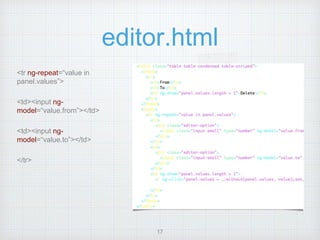
editor.html 
<tr ng-repeat=“value in 
panel.values”> 
<td><input ng-model=“ 
value.from”></td> 
<td><input ng-model=“ 
value.to”></td> 
</tr> 
17
Range Panel 
DIY Result 
18
More DIY panels 
percentile panel 
selectable bettermap providers 
queries generate helper 
histogram thereshold notification 
china map panel 
term_stats map panel 
statisticstrend panel 
multifieldhistogram panel 
valuehistogram panel 
force panel 
19
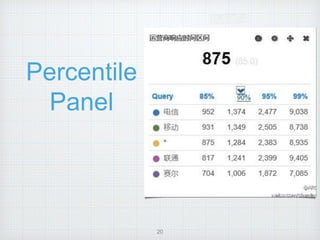
Percentile 
Panel 
20
Gaode(高德地图) 
21
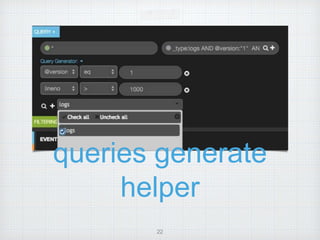
queries generate 
helper 
22
histogram threshold 
notification 
threshold/anomaly detection 
HTML5 notification API 
23
china map 
24
term_stats map 
25
statisticstrend map 
term_stats for trend map 
26
multifieldhistogram 
different histogram setting for each query 
for example: A : (B*1000) 
27
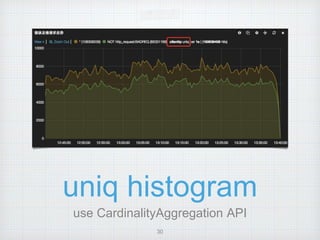
valuehistogram 
detect the probability distribution of 
responsetime 
28
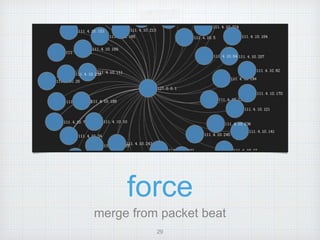
force 
merge from packet beat 
29
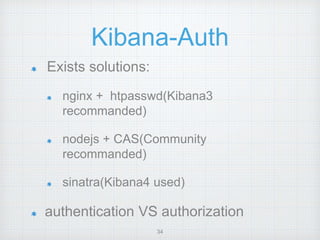
Kibana-Auth 
Exists solutions: 
nginx + htpasswd(Kibana3 
recommanded) 
nodejs + CAS(Community 
recommanded) 
sinatra(Kibana4 used) 
authentication VS authorization 
30
my solution 
transparent proxy for ES 
fake `/_nodes` JSON 
`kibana-auth` index for 
cluster and indices 
authorization 
`kibana-int-$user` index 
for dashboards 
authorization 
Authen::Simple 
framework 
LDA 
P 
31 
1 2 
kibana-int-a 
logstash-abc- 
2014.10.25 
logstash-opq- 
2014.10.25 
kibana-int-b 
logstash-xyz- 
2014.10.25 
logstash-dev- 
2014.10.25 
kibana-auth 
a:{“server”:”a”, 
prefix:[“logstas 
h-abc”]} 
b:{“server”:”b”, 
prefix:[“logstas 
h-dev”]} 
KbnAut 
h 
3
kibana-auth 
$ curl -XPOST http://127.0.0.1:9200/kibana-auth/indices/sri -d '{ 
"prefix":["logstash-sri","logstash-ops"], 
"server":"192.168.0.2:9200" 
}' 
User “sri“ now can and **ONLY** can 
access `logstash-sri-yyyy.MM.dd` and 
`logstash-ops-yyyy.MM.dd` etc stored 
in `192.168.0.2:9200` 
32
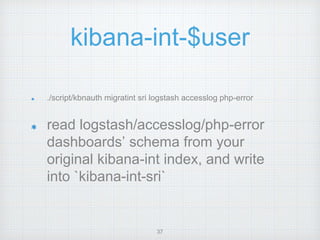
kibana-int-$user 
./script/kbnauth migratint sri logstash accesslog php-error 
read logstash/accesslog/php-error 
dashboards’ schema from your 
original kibana-int index, and write 
into `kibana-int-sri` 
33
Authen::Simple 
Authen::Simple::ActiveDirectory 
Authen::Simple::CDBI 
Authen::Simple::DBI 
Authen::Simple::FTP 
Authen::Simple::HTTP 
Authen::Simple::Kerberos 
Authen::Simple::LDAP 
Authen::Simple::NIS 
Authen::Simple::PAM 
Authen::Simple::Passwd 
Authen::Simple::POP3 
Authen::Simple::RADIUS 
Authen::Simple::SMB 
Authen::Simple::SMTP 
Authen::Simple::SSH 
34
Overview 
{ 
eshost => 'http://127.0.0.1:9200', 
hypnotoad => { listen => [‘http://*:80'] }, 
secret => 'kibana_auth_secret', 
authen => { 
LDAP => { 
host => 'ad.company.com', 
binddn => 'proxyuser@company.com', 
bindpw => 'secret', 
basedn => 'cn=users,dc=company,dc=com', 
filter => 
'(&(objectClass=organizationalPerson)(objectCla 
ss=user)(sAMAccountName=%s))' 
}, 
Passwd => { path => ‘.htpasswd' } 
} 
} 
35
The Last But Not 
Latest 
give a star(23 star now) 
give a try(kibana4 still beta now) 
give a feedback 
If a new user has a bad time, it's a bug in logstash. 
36
Thank You! 
37
More kibana
More kibana
More kibana
More kibana

More kibana

  • 1.
  • 2.
    Who am I Perl Monger Author of《网站运维技术与实践 》 SRE Architect @sina.com weibo: @ARGV github: https://github.com/chenryn blog: http://chenlinux.com 2
  • 3.
    ELK and I Using ELK from 2012 <Logstash> at slideshare.net had 18232 views 3.3 & 4.2 chapters in my Book 2 ebook at gitbook.io: [logstash best practice](https://www.gitbook.io/book/chenryn/logstash-best-practice) [kibana Chinese Guide](https://www.gitbook.io/book/chenryn/kibana-guide-cn) kibana fork: <https://github.com/chenryn/kibana> 3
  • 4.
    Kibana Intro angular.js(framework)+ jquery.flot(visualize) + elastic.js(search) time-based comparisons make sense of your data empower more team members flexible interface, easy to share powerful search syntax easy set up 4
  • 5.
  • 6.
    Kibana layout dashboard row != line panel timepicker/query/filtering charts/table/text… 6
  • 7.
    histogram @timestamp based count/mean/total bar/lines/stack/percent selected queries 7
  • 8.
    table paging fields.list highlight sortable micro analysis 8
  • 9.
    terms bar/pie/table missing/other donut/legend/lable 9
  • 10.
    TopN query querytermfacets before panel rendering multi-facet with filtering each term 10
  • 11.
    Dynamic Kibana logstash.json http://yourserver/index.html#/dashboard/fil e/logstash.json?query=status:200&from= 7d logstash.js http://yourserver/index.html#/dashboard/s cript/logstash.js?query=status:403,status: 404&from=7d 11
  • 12.
  • 13.
    No, We needmore! 13
  • 14.
    Range panel Norange panel in kibana3 well, it’s in kibana4 now~ DIY beginning 14
  • 15.
    findsearch range facetsin ES doc. √ find pie charts code in Kibana. √ copy terms/, paste to range/. √ change request in module.js. √ change ng-model in editor.html. √ it work. √ 15
  • 16.
    module.js scope.ejs.RangeFac et() rangefacet.addRang e() rangefacet.field() request.facet() scope.ejs.doSearch( ) results.then() 16
  • 17.
    editor.html <tr ng-repeat=“valuein panel.values”> <td><input ng-model=“ value.from”></td> <td><input ng-model=“ value.to”></td> </tr> 17
  • 18.
    Range Panel DIYResult 18
  • 19.
    More DIY panels percentile panel selectable bettermap providers queries generate helper histogram thereshold notification china map panel term_stats map panel statisticstrend panel multifieldhistogram panel valuehistogram panel force panel 19
  • 20.
  • 21.
  • 22.
  • 23.
    histogram threshold notification threshold/anomaly detection HTML5 notification API 23
  • 24.
  • 25.
  • 26.
  • 27.
    multifieldhistogram different histogramsetting for each query for example: A : (B*1000) 27
  • 28.
    valuehistogram detect theprobability distribution of responsetime 28
  • 29.
    force merge frompacket beat 29
  • 30.
    Kibana-Auth Exists solutions: nginx + htpasswd(Kibana3 recommanded) nodejs + CAS(Community recommanded) sinatra(Kibana4 used) authentication VS authorization 30
  • 31.
    my solution transparentproxy for ES fake `/_nodes` JSON `kibana-auth` index for cluster and indices authorization `kibana-int-$user` index for dashboards authorization Authen::Simple framework LDA P 31 1 2 kibana-int-a logstash-abc- 2014.10.25 logstash-opq- 2014.10.25 kibana-int-b logstash-xyz- 2014.10.25 logstash-dev- 2014.10.25 kibana-auth a:{“server”:”a”, prefix:[“logstas h-abc”]} b:{“server”:”b”, prefix:[“logstas h-dev”]} KbnAut h 3
  • 32.
    kibana-auth $ curl-XPOST http://127.0.0.1:9200/kibana-auth/indices/sri -d '{ "prefix":["logstash-sri","logstash-ops"], "server":"192.168.0.2:9200" }' User “sri“ now can and **ONLY** can access `logstash-sri-yyyy.MM.dd` and `logstash-ops-yyyy.MM.dd` etc stored in `192.168.0.2:9200` 32
  • 33.
    kibana-int-$user ./script/kbnauth migratintsri logstash accesslog php-error read logstash/accesslog/php-error dashboards’ schema from your original kibana-int index, and write into `kibana-int-sri` 33
  • 34.
    Authen::Simple Authen::Simple::ActiveDirectory Authen::Simple::CDBI Authen::Simple::DBI Authen::Simple::FTP Authen::Simple::HTTP Authen::Simple::Kerberos Authen::Simple::LDAP Authen::Simple::NIS Authen::Simple::PAM Authen::Simple::Passwd Authen::Simple::POP3 Authen::Simple::RADIUS Authen::Simple::SMB Authen::Simple::SMTP Authen::Simple::SSH 34
  • 35.
    Overview { eshost=> 'http://127.0.0.1:9200', hypnotoad => { listen => [‘http://*:80'] }, secret => 'kibana_auth_secret', authen => { LDAP => { host => 'ad.company.com', binddn => 'proxyuser@company.com', bindpw => 'secret', basedn => 'cn=users,dc=company,dc=com', filter => '(&(objectClass=organizationalPerson)(objectCla ss=user)(sAMAccountName=%s))' }, Passwd => { path => ‘.htpasswd' } } } 35
  • 36.
    The Last ButNot Latest give a star(23 star now) give a try(kibana4 still beta now) give a feedback If a new user has a bad time, it's a bug in logstash. 36
  • 37.