The document outlines materials, tools, equipment, and testing devices needed for computer hardware installation. It lists and describes common tools like screwdrivers, pliers, and soldering irons. It also lists equipment like LAN cards, servers, hubs, and accessories. Materials mentioned include software, network cables, and device drivers. The document provides definitions and purposes of these items to help plan and prepare for computer hardware installation. It concludes with a quiz to test understanding of the various tools, equipment, and terms discussed.
Module 3, Lesson1: Plan and Prepare for Installation
MATERIALS, TOOLS, EQUIPMENT and TESTING DEVICES
The following tools and equipment are classified according to
their functions and uses.
Equipment and Accessories - the necessary items for a
particular purpose.
Tools - any physical item that can be used to achieve a goal,
especially if the item is not consumed in the
process.
Materials - a physical substance that things can be made
from; consumable
7/19/2017PreparedbyLMCadapanKNHS2017
2
3.
Module 3, Lesson1: Plan and Prepare for Installation
MATERIALS, TOOLS, EQUIPMENT and TESTING DEVICES
The following tools and equipment are classified according to
their functions and uses.
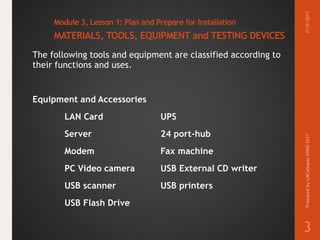
Equipment and Accessories
LAN Card UPS
Server 24 port-hub
Modem Fax machine
PC Video camera USB External CD writer
USB scanner USB printers
USB Flash Drive
7/19/2017PreparedbyLMCadapanKNHS2017
3
4.
Module 3, Lesson1: Plan and Prepare for Installation
MATERIALS, TOOLS, EQUIPMENT and TESTING DEVICES
The following tools and equipment are classified according to
their functions and uses.
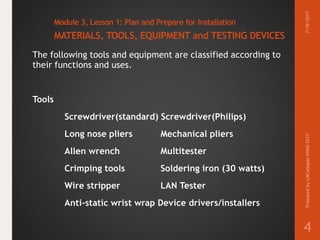
Tools
Screwdriver(standard) Screwdriver(Philips)
Long nose pliers Mechanical pliers
Allen wrench Multitester
Crimping tools Soldering iron (30 watts)
Wire stripper LAN Tester
Anti-static wrist wrap Device drivers/installers
7/19/2017PreparedbyLMCadapanKNHS2017
4
5.
Module 3, Lesson1: Plan and Prepare for Installation
MATERIALS, TOOLS, EQUIPMENT and TESTING DEVICES
The following tools and equipment are classified according to
their functions and uses.
Materials
Software applications
Network OS Software
RJ 45
UTP Cat 5 cable
Motherboard’s manual and installer
Sound device driver installer
7/19/2017PreparedbyLMCadapanKNHS2017
5
6.
Module 3, Lesson1: Plan and Prepare for Installation
MATERIALS, TOOLS, EQUIPMENT and TESTING DEVICES
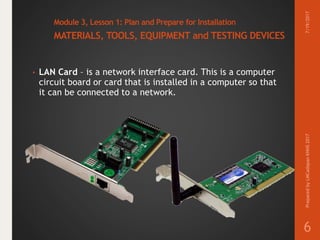
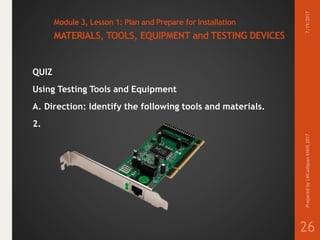
• LAN Card – is a network interface card. This is a computer
circuit board or card that is installed in a computer so that
it can be connected to a network.
7/19/2017PreparedbyLMCadapanKNHS2017
6
7.
Module 3, Lesson1: Plan and Prepare for Installation
MATERIALS, TOOLS, EQUIPMENT and TESTING DEVICES
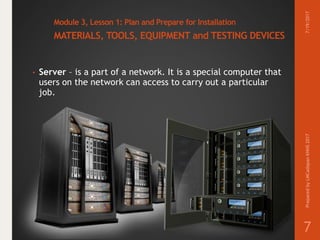
• Server – is a part of a network. It is a special computer that
users on the network can access to carry out a particular
job.
7/19/2017PreparedbyLMCadapanKNHS2017
7
8.
Module 3, Lesson1: Plan and Prepare for Installation
MATERIALS, TOOLS, EQUIPMENT and TESTING DEVICES
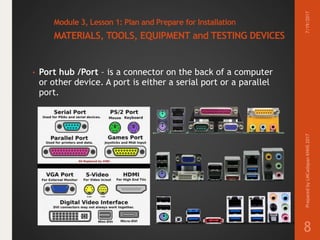
• Port hub /Port – is a connector on the back of a computer
or other device. A port is either a serial port or a parallel
port.
7/19/2017PreparedbyLMCadapanKNHS2017
8
9.
Module 3, Lesson1: Plan and Prepare for Installation
MATERIALS, TOOLS, EQUIPMENT and TESTING DEVICES
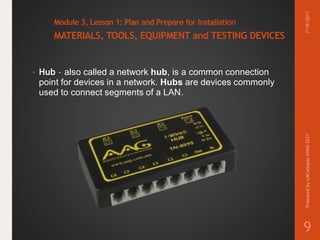
• Hub – also called a network hub, is a common connection
point for devices in a network. Hubs are devices commonly
used to connect segments of a LAN.
7/19/2017PreparedbyLMCadapanKNHS2017
9
10.
Module 3, Lesson1: Plan and Prepare for Installation
MATERIALS, TOOLS, EQUIPMENT and TESTING DEVICES
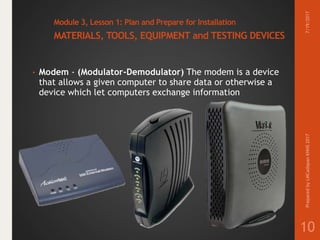
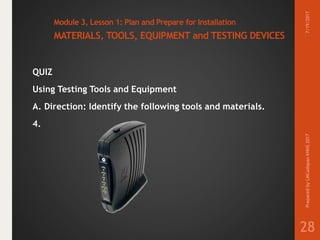
• Modem - (Modulator-Demodulator) The modem is a device
that allows a given computer to share data or otherwise a
device which let computers exchange information
7/19/2017PreparedbyLMCadapanKNHS2017
10
11.
Module 3, Lesson1: Plan and Prepare for Installation
MATERIALS, TOOLS, EQUIPMENT and TESTING DEVICES
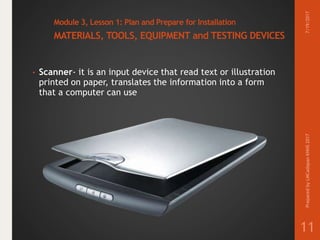
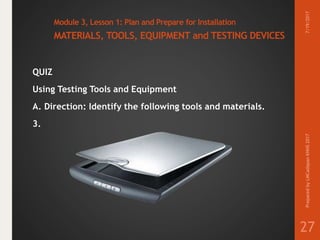
• Scanner- it is an input device that read text or illustration
printed on paper, translates the information into a form
that a computer can use
7/19/2017PreparedbyLMCadapanKNHS2017
11
12.
Module 3, Lesson1: Plan and Prepare for Installation
MATERIALS, TOOLS, EQUIPMENT and TESTING DEVICES
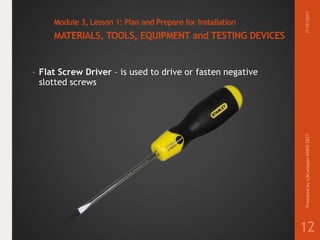
• Flat Screw Driver – is used to drive or fasten negative
slotted screws
7/19/2017PreparedbyLMCadapanKNHS2017
12
13.
Module 3, Lesson1: Plan and Prepare for Installation
MATERIALS, TOOLS, EQUIPMENT and TESTING DEVICES
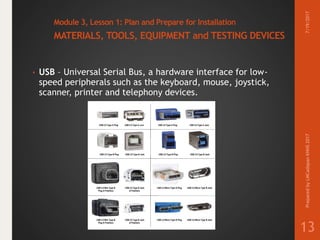
• USB – Universal Serial Bus, a hardware interface for low-
speed peripherals such as the keyboard, mouse, joystick,
scanner, printer and telephony devices.
7/19/2017PreparedbyLMCadapanKNHS2017
13
14.
Module 3, Lesson1: Plan and Prepare for Installation
MATERIALS, TOOLS, EQUIPMENT and TESTING DEVICES
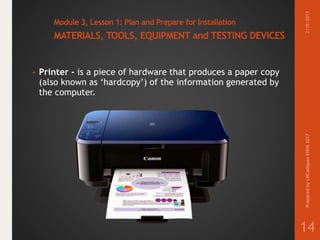
• Printer - is a piece of hardware that produces a paper copy
(also known as ‘hardcopy’) of the information generated by
the computer.
7/19/2017PreparedbyLMCadapanKNHS2017
14
15.
Module 3, Lesson1: Plan and Prepare for Installation
MATERIALS, TOOLS, EQUIPMENT and TESTING DEVICES
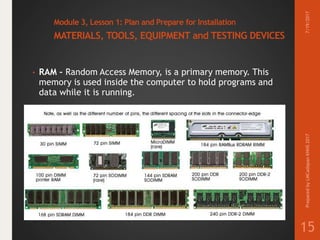
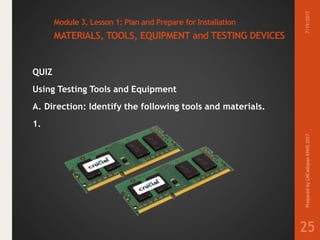
• RAM – Random Access Memory, is a primary memory. This
memory is used inside the computer to hold programs and
data while it is running.
7/19/2017PreparedbyLMCadapanKNHS2017
15
16.
Module 3, Lesson1: Plan and Prepare for Installation
MATERIALS, TOOLS, EQUIPMENT and TESTING DEVICES
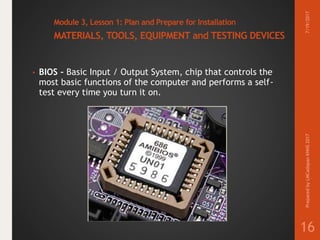
• BIOS – Basic Input / Output System, chip that controls the
most basic functions of the computer and performs a self-
test every time you turn it on.
7/19/2017PreparedbyLMCadapanKNHS2017
16
17.
Module 3, Lesson1: Plan and Prepare for Installation
MATERIALS, TOOLS, EQUIPMENT and TESTING DEVICES
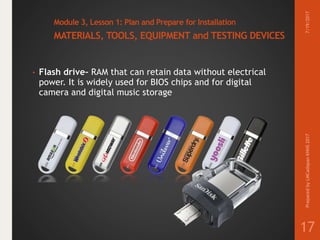
• Flash drive– RAM that can retain data without electrical
power. It is widely used for BIOS chips and for digital
camera and digital music storage
7/19/2017PreparedbyLMCadapanKNHS2017
17
18.
Module 3, Lesson1: Plan and Prepare for Installation
MATERIALS, TOOLS, EQUIPMENT and TESTING DEVICES
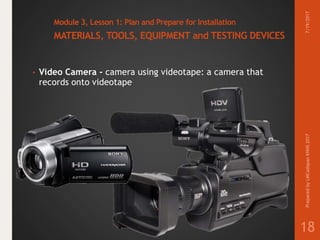
• Video Camera - camera using videotape: a camera that
records onto videotape
7/19/2017PreparedbyLMCadapanKNHS2017
18
19.
Module 3, Lesson1: Plan and Prepare for Installation
MATERIALS, TOOLS, EQUIPMENT and TESTING DEVICES
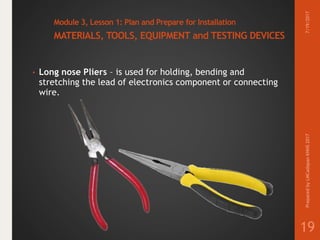
• Long nose Pliers – is used for holding, bending and
stretching the lead of electronics component or connecting
wire.
7/19/2017PreparedbyLMCadapanKNHS2017
19
20.
Module 3, Lesson1: Plan and Prepare for Installation
MATERIALS, TOOLS, EQUIPMENT and TESTING DEVICES
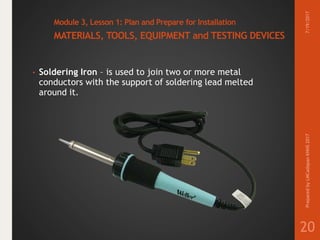
• Soldering Iron – is used to join two or more metal
conductors with the support of soldering lead melted
around it.
7/19/2017PreparedbyLMCadapanKNHS2017
20
21.
Module 3, Lesson1: Plan and Prepare for Installation
MATERIALS, TOOLS, EQUIPMENT and TESTING DEVICES
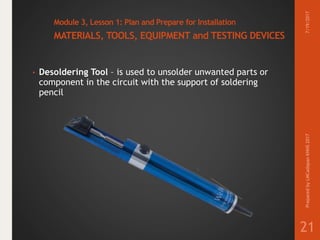
• Desoldering Tool – is used to unsolder unwanted parts or
component in the circuit with the support of soldering
pencil
7/19/2017PreparedbyLMCadapanKNHS2017
21
22.
Module 3, Lesson1: Plan and Prepare for Installation
MATERIALS, TOOLS, EQUIPMENT and TESTING DEVICES
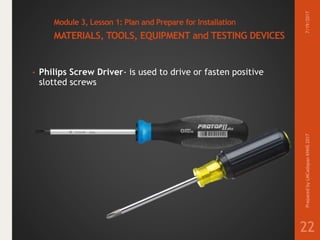
• Philips Screw Driver- is used to drive or fasten positive
slotted screws
7/19/2017PreparedbyLMCadapanKNHS2017
22
23.
Module 3, Lesson1: Plan and Prepare for Installation
MATERIALS, TOOLS, EQUIPMENT and TESTING DEVICES
• LAN Tester- for RJ11,12,45 & BNC w/ Remote Unit This
ergonomic tester is designed to test most network cable
wiring. You can either conduct an auto or manual test.
7/19/2017PreparedbyLMCadapanKNHS2017
23
24.
Module 3, Lesson1: Plan and Prepare for Installation
MATERIALS, TOOLS, EQUIPMENT and TESTING DEVICES
QUIZ
Using Testing Tools and Equipment
7/19/2017PreparedbyLMCadapanKNHS2017
24
25.
Module 3, Lesson1: Plan and Prepare for Installation
MATERIALS, TOOLS, EQUIPMENT and TESTING DEVICES
QUIZ
Using Testing Tools and Equipment
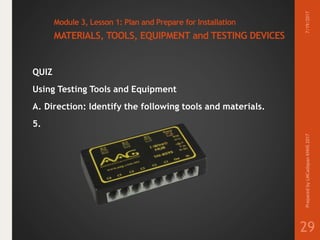
A. Direction: Identify the following tools and materials.
1.
7/19/2017PreparedbyLMCadapanKNHS2017
25
26.
Module 3, Lesson1: Plan and Prepare for Installation
MATERIALS, TOOLS, EQUIPMENT and TESTING DEVICES
QUIZ
Using Testing Tools and Equipment
A. Direction: Identify the following tools and materials.
2.
7/19/2017PreparedbyLMCadapanKNHS2017
26
27.
Module 3, Lesson1: Plan and Prepare for Installation
MATERIALS, TOOLS, EQUIPMENT and TESTING DEVICES
QUIZ
Using Testing Tools and Equipment
A. Direction: Identify the following tools and materials.
3.
7/19/2017PreparedbyLMCadapanKNHS2017
27
28.
Module 3, Lesson1: Plan and Prepare for Installation
MATERIALS, TOOLS, EQUIPMENT and TESTING DEVICES
QUIZ
Using Testing Tools and Equipment
A. Direction: Identify the following tools and materials.
4.
7/19/2017PreparedbyLMCadapanKNHS2017
28
29.
Module 3, Lesson1: Plan and Prepare for Installation
MATERIALS, TOOLS, EQUIPMENT and TESTING DEVICES
QUIZ
Using Testing Tools and Equipment
A. Direction: Identify the following tools and materials.
5.
7/19/2017PreparedbyLMCadapanKNHS2017
29
30.
Module 3, Lesson1: Plan and Prepare for Installation
MATERIALS, TOOLS, EQUIPMENT and TESTING DEVICES
QUIZ
Using Testing Tools and Equipment
B. Direction: Identify the appropriate term described in each
sentence.
6. It is a connector at the black of a computer or other
device.
7/19/2017PreparedbyLMCadapanKNHS2017
30
31.
Module 3, Lesson1: Plan and Prepare for Installation
MATERIALS, TOOLS, EQUIPMENT and TESTING DEVICES
QUIZ
Using Testing Tools and Equipment
B. Direction: Identify the appropriate term described in each
sentence.
7. A computer circuit board installed in a computer so that it
can be connected to a network.
7/19/2017PreparedbyLMCadapanKNHS2017
31
32.
Module 3, Lesson1: Plan and Prepare for Installation
MATERIALS, TOOLS, EQUIPMENT and TESTING DEVICES
QUIZ
Using Testing Tools and Equipment
B. Direction: Identify the appropriate term described in each
sentence.
8. A device that allows a given computer to share a data.
7/19/2017PreparedbyLMCadapanKNHS2017
32
33.
Module 3, Lesson1: Plan and Prepare for Installation
MATERIALS, TOOLS, EQUIPMENT and TESTING DEVICES
QUIZ
Using Testing Tools and Equipment
B. Direction: Identify the appropriate term described in each
sentence.
9. An input device that read text or illustration printed on
paper, translated the information into a form that a
computer that can use.
7/19/2017PreparedbyLMCadapanKNHS2017
33
34.
Module 3, Lesson1: Plan and Prepare for Installation
MATERIALS, TOOLS, EQUIPMENT and TESTING DEVICES
QUIZ
Using Testing Tools and Equipment
B. Direction: Identify the appropriate term described in each
sentence.
10. least expensive and most popular network media.
7/19/2017PreparedbyLMCadapanKNHS2017
34
35.
Module 3, Lesson1: Plan and Prepare for Installation
MATERIALS, TOOLS, EQUIPMENT and TESTING DEVICES
End of
Module 3, Lesson 1:
Plan and Prepare for Installation
MATERIALS, TOOLS, EQUIPMENT
and TESTING DEVICES
7/19/2017PreparedbyLMCadapanKNHS2017
35